#blueprint
402296 messages · Page 692 of 403
 gentle urchin
 uneven geode
somebody worked with remote control api? any idea how to make it work in packaged game? (in editor and play in editor is working fine)
 jade frost
uneven geode
somebody worked with remote control api? any idea how to make it work in package...
jade frost
uneven geode
somebody worked with remote control api? any idea how to make it work in package...
Like virtual camera?
live link is a plugin that may help you do that
uneven geode
jade frost
live link is a plugin that may help you do that
gonna check it out, im trying to move objects from python app like: camera -> python -> websocket -> unreal
jade frost
uneven geode
gonna check it out, im trying to move objects from python app like: camera -> py...
Also the Virtual Production stuff of UE4 plugin has a lot of things like that, maybe you can check it
uneven geode
thanks! hope i can find the solution 😄
 nocturne relic
How can i make variables get created when i make a child of a class? I need each child to have a different value for damage dealt and so on
 deep radish
Hey need some advice - is it possible to record position of touch when a umg button is pressed on mobile/ios? for me the button seems to prevent that information from being available
 elfin robin
I asked last night but hadn't posted a picture. Trying to make a full body health system. Can anyone tell me why might I not be receiving damage to my chest health that I have set. I have been stuck on this for coming up 5 days now. Pulling my hair out I will buy who Ever helps me fix it a coffee haha. I'm not receiving any damage now when I was before I tried to switch it
 gentle urchin
nocturne relic
How can i make variables get created when i make a child of a class? I need each...
gentle urchin
nocturne relic
How can i make variables get created when i make a child of a class? I need each...
You make the variables in the parent class, and adjust them in the child class
nocturne relic
Thanks @gentle urchin


 maiden wadi
@elfin robin You have it pulling data from a struct, reducing that, and then setting a second variable. So if you're comparing the damage from the struct to display health, it'll never change.
elfin robin
Thank you! Do you know how to fix that I'm a noob
maiden wadi
Where are you displaying your health? What variable is being used?
elfin robin
I had changed that set chest health from chest health 0 to chest health variable noticed that there haha. I have it in a health bar one for each body part it's binded as a progress bar
 elfin robin
maiden wadi
Where are you displaying your health? What variable is being used?
elfin robin
maiden wadi
Where are you displaying your health? What variable is being used?
That's my projectile and how it removes health by what body part it hits
deep radish
Does anyone know how I can detect touch position on iOS when a UMG button is pressed? It seems the button stops that info from being available in any way. I've turned off 'Is Focusable?' etc but no change... Any idea???
maiden wadi
But what displays health of the limbs? How are you debugging it?
@deep radishUsing an Image as a button might fix that if you don't mind doing the state changes yourself. Not as familiar with mobile functionality, but I personally have a serious dislike for the default Slate Button and Checkbox.
elfin robin
I had a print string for damage received that works when I hit AI but not me. The AI are using a different projectile so I set it up for them as well but that doesn't even come up. I don't know how to debug it other than that. I'm thinking maybe this is a bit to advance a system for me since theres no tutorials on it
deep radish
maiden wadi
<@!736510439533576284>Using an Image as a button might fix that if you don't min...
Using Tick for state change etc? Yeah I was hoping to stick to the default button system if possible
maiden wadi
You don't necessarily need tick. There are event driven functions you can use.
deep radish
maiden wadi
You don't necessarily need tick. There are event driven functions you can use.
All i saw on images in UMG is binding OnMouseDown as I remember
is it possible to use touch instead?
maiden wadi
@elfin robin I think it's just an issue with property control. I'm not sure what your struct is, but you're pulling data from it and then setting something else. So if your printstring is pulling from the struct, it won't change.
@deep radishUncertain. It doesn't look like it. I tend to just make my own basic buttons out of UserWidgets. Create a delegate, call it from things lik Userwidget's MouseDown, or Touch functions. Handle visuals the same way. You can expose properties to make it editable as well. Just keep the widget hierarchy fairly simple and it's a great replacement for the default button or checkbox.
To be fair, the button isn't nearly as bad. It's just an attention hog for focus and whatnot. And it has a bug that can get it's click state stuck until you move a cursor away and back.
 upper adder
 elfin robin
maiden wadi
<@!699576201538437201> I think it's just an issue with property control. I'm not...
elfin robin
maiden wadi
<@!699576201538437201> I think it's just an issue with property control. I'm not...
Thanks man. I just realized it might be because on the enemy's projectile I changed the damage to a new variable but it's not linked to there weapon damage. So when they hit me no damage will happen if that makes sense?. I'll have a look when I'm on the computer but if I can't get it working today I'm giving up until I'm better at blueprints haha. Cheers
deep radish
maiden wadi
<@!736510439533576284>Uncertain. It doesn't look like it. I tend to just make my...
OK thanks very much, I'll have to read more about it but sounds like it might be a possible approach. Thx!
gentle urchin
 delicate folio
thanks i shall move the question to there
gentle urchin
If its only the server seeing things, and its ment to be dedicated server, then i'd say it doesnt really matter what the server sees in regard to visibility, since its only for cosmetics
delicate folio
its local server that im testing with so i kinda need it to work the same way it does on the client
 loud cipher
Hey all i was wondering
I have a third person project
And i have setup a seperate camera that activates when the player overlaps

So it switches from third person camera to this camera i have circled
It works well however my input becomes inverted
When using that camera
Is there a way i can tell it to reverse that input so it cancels out?
 fading wren
Is there any online studying blueprints ? I mean study course, where you have teacher and other people studying with you
?
 brave citrus
You can, they answer messages. As well as a specific forum for each course I believe to chat with others taking the same course
Otherwise you would be looking for something like a college course I guess
fading wren
brave citrus
You can, they answer messages. As well as a specific forum for each course I bel...
Oh, i didn't know this
brave citrus
Make sure to only buy the courses for like $12-15 they are always on sale
fading wren
brave citrus
You can, they answer messages. As well as a specific forum for each course I bel...
Any advice in udemy course, or just should look at rating
brave citrus
The ones taught by Ben tristem are really good

Udemy
Code Your First Video Game in 100 minutes with Visual Scripting. Created in collaboration with Epic Games.
fading wren
brave citrus
The ones taught by Ben tristem are really good
Ok, thanks
 runic sparrow
Hey guys quick question, if I duplicate certain variables I get greeted with this message. I always ignore it, but does it actually affect my ability to save data? Because after I save my project and re-open Unreal, some of my variaables don't actually end up being saved and I lose a lot of data. I think this message may have something to do with it?

 faint hawk
I want to destroy the child actors before destroying the parent. It is not working. Only parent is getting deleted.

I installed ue4 yesterday dont know what i am doing
I found a node "add child actor component" how to implement it?
 burnt nest
In my experience; avoid child actor components. 🤨
faint hawk
I am destroying parent actor which has a child attached to it, I want to destroy the child with parent
jade frost
faint hawk
I am destroying parent actor which has a child attached to it, I want to destroy...
highly recomended to:
make those children real actors and attach them.
have a custom destroy method in the parent where you destroy those children.
faint hawk
"Get Attached Actors" node did the trick

 wise raven
Why cant i access my interface functions?

 midnight veldt
hey all, I swapped around my game mode so that there is no default pawn, leaving my PlayerController to spawn that pawn manually. It works fine but I have no idea what to do for the spawn transform.
Because I'm spawning the pawn manually, it means I don't have the pawn spawning at the editor's current camera location, but I find that feature super helpful. Is there any way to get the transform of the editor's camera before hitting play, but after play-in-editor has begun?
 errant cradle
hi, is there any way to get time from value on curve ?
 rich trellis
Hello. Is it possible to somehow edit BP without opening it in UE? Or maybe somehow turn off compilation?
I had a BP and switched type of one of variables and not its not opening anymore, its just crashing the editor, but I know that it will work if I will switch it back.
Thanks
 surreal peak
Hm. Don't think so. They are binary files. That's why everyone should always use #source-control
gentle urchin
Breaking the bp usually saves me on the rare event that it crashes the editor when i open it. Renaming outside editor etc..
Usually involves alot of extra work tho.
 acoustic tundra
Hey, I am looking for assistance in material/material functions.
Currently I'm working on a project in which I have shooting turrets placed over the level. These turrets start shooting once the player is in sight of the turrets (using pawnsensing). These turrets are a plain colour now, but I want to make a function that fills the turret up with red (from down to up) whenever the player is in range. Once the turret is filled with red, the turret will shoot a bullet. The shooting speed of the turret is controlled by a variable, so I'd only need a material function that fills up the mesh with a colour over a specific amount of time. I've had no experience ever in material blueprinting, and can't really seem to find anything about filling up meshes using a material function..
Any help would be much appreciated :)
 faint pasture
acoustic tundra
Hey, I am looking for assistance in **material/material functions**.
Currently ...
faint pasture
acoustic tundra
Hey, I am looking for assistance in **material/material functions**.
Currently ...
You want an object aligned UV, maybe world aligned if it's always in the Z direction
@acoustic tundra That's what you want
 faint pasture
acoustic tundra
Hey, I am looking for assistance in **material/material functions**.
Currently ...
faint pasture
acoustic tundra
Hey, I am looking for assistance in **material/material functions**.
Currently ...
You do the 0-1 fill up in game code, just pass the value to the material instance so it can color everything below the FillAlpha red.
Materials are responsive to gameplay, they don't drive it.
 south field

 proven shadow
Hi, I have this function created called Find Plug Wire Offset:

And would like to create an instance of it, such as this one:

But when I attempt to do so, by typing out the name when searching for an action, it doesn't show up. Does anyone know why?
 pliant tendon
this stop movement function immediately is straight up not working

even after calling it, it still allows the spider enemy to rotate as it wishes
 sudden nimbus
pliant tendon
even after calling it, it still allows the spider enemy to rotate as it wishes
sudden nimbus
pliant tendon
even after calling it, it still allows the spider enemy to rotate as it wishes
its just intended to clear the current MoveTo and cancel any pending Movement Input (which does not include Controller Rotation i believe)
depending on how your spider enemy is set up to rotate, it very well may continue rotating itself
if you are using Orient Rotation to Movement then it shouldnt happen
but i assume you arent
 pine idol
Is there no way to put an array into a struct, and then use said struct in a map?
sudden nimbus
sudden nimbus
but i assume you arent
more than likely you are using "Use Controller Rotation" on character movement, and your behavior tree itself has a Face Actor or Set Focus that is still active
sudden nimbus
pine idol
Is there no way to put an array into a struct, and then use said struct in a map...
you can totally do that
you cannot nest containers directly (ie array of maps or map of arrays)
you cannot use that struct as the key of a map
but you can use it as a value

 pliant tendon
sudden nimbus
if you are using Orient Rotation to Movement then it shouldnt happen
pliant tendon
sudden nimbus
if you are using Orient Rotation to Movement then it shouldnt happen
sorry my power cut out and i couldnt reply, but here is what im using
 sudden nimbus
pliant tendon
sorry my power cut out and i couldnt reply, but here is what im using
sudden nimbus
pliant tendon
sorry my power cut out and i couldnt reply, but here is what im using
you're going to want to look at the spider's behavior tree and the settings on its Character Movement component to understand why it continues to rotate after you halt it
pliant tendon
it doesnt have a behaviour tree 
pliant tendon
nope, BP_Alien is the spider
sudden nimbus
well it shouldnt rotate at all after you stop its moveto then unless BP_Alien itself has some logic to tell it to rotate
 lime fulcrum
Hi guys!
SAVE / LOAD Topic here.
I put a BP Component on each actor I want to be added to actors to be removed when loading the game.
So when I load the game, it removes the killed/exploded things in the level.... But when I try to destroy them, it seems like they are invalid even tho they have the correct name reference....
pliant tendon
sudden nimbus
well it shouldnt rotate at all after you stop its moveto then unless BP_Alien it...
ye its confusing me too, is StopMovementImmediately the way to stop AIMoveTo?
sudden nimbus
pliant tendon
ye its confusing me too, is StopMovementImmediately the way to stop AIMoveTo?
pretty sure yeah
 lofty hound
Does anyone know how i can reference variables in an actor blueprint from a class reference? or is that not possible?
pine idol
Yeah, trying to use it as a map of arrays
@sudden nimbus
Guess I'll figure out an alternate
sudden nimbus
lofty hound
Does anyone know how i can reference variables in an actor blueprint from a clas...
could you clarify what you mean?
lofty hound
sudden nimbus
could you clarify what you mean?
It’s all blueprints.
So I’m making a Pokemon type turn based combat prototype.
I have an actor blueprint to handle the base “mon” and child actors from that BP for each unique mon.
I’m using a battle manager to do the combat which spawns in the mons fine as I need them too so I can reference the actor fine to spawn it. Each child actor has stats that I need to reference in the battle manager but I can’t figure out how to reference them as it’s not working as I’d normally do it
I’m sure I’m being dumb I just can’t figure out why at the moment
sudden nimbus
if the stats are just properties of the 'mon subclasses, then you could just access them from the instances of the actor you spawn into the level
or do you mean you need to access stats of mons that are not currently spawned into the battle? like pokemon that are waiting to be put into the battle after the current one goes down for instance?
there is no way to access the properties of an actor instance from just its class, no, so youd either want to spawn them in and set them to be invisible or something or store the stats outside of the actor's instance variables
pliant tendon
@sudden nimbus https://community.gamedev.tv/t/never-explained-how-to-deactivate-ai-movement/114213/6 found a solution thanks!

GameDev.tv
having same problem he didnt explain where did he get the function
lofty hound
sudden nimbus
or do you mean you need to access stats of mons that are not currently spawned i...
Both really, I have a component that stores the players party of mons and they are class references, they come from a class reference array which references all the subclasses for the mons. This is where the info comes from into the battle manager, and spawns the right subclass actor into the right spot. How can I access the info from instances I spawn in the level ?
sudden nimbus
lofty hound
Both really, I have a component that stores the players party of mons and they a...
just use the actor pin off Spawn Actor and use a Get for what you want
 manic smelt
Anyone know how I can get the specific angle (not 0 - 1) of an actors forward vector and an object

 wraith comet
manic smelt
Anyone know how I can get the specific angle (not 0 - 1) of an actors forward ve...
wraith comet
manic smelt
Anyone know how I can get the specific angle (not 0 - 1) of an actors forward ve...
why not get the locations of both objects and use "Find look at rotation"? instead of using the forward vector
sudden nimbus
manic smelt
Anyone know how I can get the specific angle (not 0 - 1) of an actors forward ve...
there is this if you're cool with 2D

oh wait no thats the cosine of the angle actually right
 fleet cedar
sudden nimbus
manic smelt
Anyone know how I can get the specific angle (not 0 - 1) of an actors forward ve...
fleet cedar
sudden nimbus
manic smelt
Anyone know how I can get the specific angle (not 0 - 1) of an actors forward ve...
there is this one that does it in 2D using acos2 and outputs in degrees -180 to 180 with 0 being "the same direction"
 manic smelt
@sudden nimbus Thanks! I'll see if I can get Find Look at rotation working first, if not I'll have a go at that one
sudden nimbus
yeah also if this is for visibility checks you can get pretty far with the cone visibility in the pawn sensing component et al without doing any math
manic smelt
sudden nimbus
yeah also if this is for visibility checks you can get pretty far with the cone ...
Yeah I tried that but I didnt like how I couldnt adjust the centre of the player, which meant cover acted a bit strangely. I've got it working so it detects if it can see the players head, just need to limit its vision to an angle
sudden nimbus
nice
yeah i suppose Find Look At Rotation is an easy way to do it but you may want to zero the Z inputs on the incoming vectors if you want a 2D result

and target there would be (dest - start) not just dest
manic smelt
sudden nimbus
and target there would be (`dest - start`) not just `dest`
Thanks @sudden nimbus @wraith comet That's a nice simple solution and should work well!
manic smelt
sudden nimbus
and target there would be (`dest - start`) not just `dest`
also cheers I was wondering why the numbers didnt look quite right
 quartz field
Hi everyone, I would like to create a dynamic UMG that moves along the border to indicate the direction of an actor that is outside of my camera view. Any idea how I can set the position of the UMG along the canvas border, based on an actor world location ?
 sudden nimbus
manic smelt
also cheers I was wondering why the numbers didnt look quite right
sudden nimbus
manic smelt
also cheers I was wondering why the numbers didnt look quite right
yeah you would just need the enemy's location expressed as a vector from your player's origin, just like the forward vector is
 minor merlin
Hello everyone, I'm trying to reach the game mode through a character, and I get this Blueprint Runtime Error: "Accessed None trying to read property 2Node_DynamicCast_AsGM_Main". Blueprint: BP_BaseCharacter Function: Is Looking Graph: IsLooking Node: Is Being Looked
 wraith comet
quartz field
Hi everyone, I would like to create a dynamic UMG that moves along the border to...
wraith comet
quartz field
Hi everyone, I would like to create a dynamic UMG that moves along the border to...
there's a node called "Project world to screen", it returns screen coordinates that you can feed to a widget
minor merlin
It's in test so it's fucking ugly sorry, but basicly every tick I see if I get a hit, if so I check if it's a special character, if so I cast to the GM a function to do something on this character. But I get this error all the time, I'm unable to cast to the GM
 quartz field
wraith comet
there's a node called "Project world to screen", it returns screen coordinates t...
quartz field
wraith comet
there's a node called "Project world to screen", it returns screen coordinates t...
Thanks!
minor merlin
Yes, but that just make me have an error. But I HAVE TO cast to the gm,
Also I only have 2 GM, and the only one that can make me change map and everything is this one
Are 0%
Really
I change the map on it
I use it for the main menu, and the other for everything

Don't exist for the client?
I still have the same error with the server
Thanks, I was looking for it but couldn't remember were I saw it
Yes, but I didn't remember the name either x)
Was looking for ue4 multiplayer things
faint pasture
wraith comet
there's a node called "Project world to screen", it returns screen coordinates t...
What does that do with points behind the viewpoint?
 west wigeon
If I run a switch statement with 150 options whenever I hover over a button, would that affect fps?
faint pasture
west wigeon
If I run a switch statement with 150 options whenever I hover over a button, wou...
Idk, try it
Doubtful but there's prolly a better way to do what you're trying to do.
wraith comet
faint pasture
What does that do with points behind the viewpoint?
Not sure, I use it with a top down camera angle, so I don’t have this problem, sorry! I just had to clamp the vectors I feed into it cause when they are too far from the camera view, it returned weird results....
faint pasture
@west wigeon What are you trying to do anyway.
west wigeon
When hovering over a button, it gets a bunch of attack details and displays them in a sidebar
then again, might be better to go with the more intensive route and just put them all in a datatable and load it into the button beforehand
faint pasture
Then why the switch? That sounds really smelly.
 icy dragon
west wigeon
When hovering over a button, it gets a bunch of attack details and displays them...
icy dragon
west wigeon
When hovering over a button, it gets a bunch of attack details and displays them...
Using Switch to whopping 150 entries is like the worst route that I never could think for that purpose.
 small mica
Anyone know how I might be able to prevent the player from placing a spline point that has too sharp of an angle when compared to the last two spline points?
Could I somehow detect the angle, and if angle is < a certain number, prevent the placement of the spline point?
 silk hinge
Hey I got a simple question that I couldnt solve so far ^^
I would like to set a combination of keys to be a command how can i do that ?
For Exemple making this "A" input to be like "A+Left Clic"

 wary hare
silk hinge
Hey I got a simple question that I couldnt solve so far ^^
I would like to set a...
wary hare
silk hinge
Hey I got a simple question that I couldnt solve so far ^^
I would like to set a...
Try with gates
Open two gates with 2 keys, if both are open then execute
silk hinge
this node ? https://prnt.sc/1954cf6
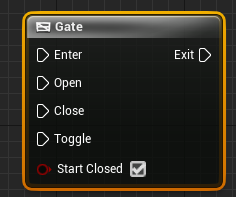 wary hare
yup
silk hinge
So I plug left clic and "A" to be the opening ?
 fiery glen
silk hinge
Hey I got a simple question that I couldnt solve so far ^^
I would like to set a...
fiery glen
silk hinge
Hey I got a simple question that I couldnt solve so far ^^
I would like to set a...
could do an actual input binding in the project input settings
wary hare
That is simpler then
fiery glen
oh, nevermind I assumed you meant shift+A or something
unsure if you can use any key as a modifier
silk hinge
Yeah Shif+A is not a problem but two keys if way too hard for a verry basic feature xD
sudden nimbus
yes only modifier key combos in input actions but @silk hinge looks like you are already on the right path
wary hare
Is there any way to mantain the value of a local variable without it being global? I had this idea but it can't be done...
 sudden nimbus
just use a Boolean to know if A is down, and check it during left click
that being said, you could (and should) use input actions for A and left-click individually
fiery glen
that way you can easily change which button they are later
sudden nimbus
from an organization perspective, if not a runtime remapping perspective
also if you want gamepads support some day or VR etc
wary hare
wary hare
Is there any way to mantain the value of a local variable without it being globa...
I have the variable error which must be global, but I want to add more functions later on and they can't have the same error... But the variable must mantain its value
sudden nimbus
wary hare
Is there any way to mantain the value of a local variable without it being globa...
why not just a blueprint variable
wary hare
The function is called every tick, and the Error variable must mantain its value, if I use local vars it'll just snap back to 0
sudden nimbus
if the blueprint variable is what you are calling "global" and you'll "need multiple" later, then rearrange what the blueprints are for so that the variable state matches your intended use
Not local variables
Variables
these are different
wary hare
I'm first timer in unreal though
sudden nimbus
any programming experience?
wary hare
Also, am I dumb or there is no way to remove an output?
 wary hare
sudden nimbus
any programming experience?
wary hare
sudden nimbus
any programming experience?
C and C++
sudden nimbus
perfect
yes you can remove an output
go to the Parameters section by clicking the entry node of the function
or by clicking the function name in the function list
or actually, just clicking that return node iirc
wary hare
 sudden nimbus
ahmmm dammit ue5
wary hare
Yup haha
sudden nimbus
maybe right click on an empty space, but in ue4 there's an X button
 sudden nimbus
is this an inherited function
 wary hare
I don't know why is there that space on the left
sudden nimbus
there ya go for that one haha
wary hare
There is literally nothing...
wary hare
Yeah I guess its ok
fiery glen
don't worry about the knowledge transfer, everything is pretty much the same
wary hare
I figured out since I'm working with physics and some other stuff, just use the newer version
There are many deprecated nodes that were on ue4
sudden nimbus
ue 4.26 has every bit as good physics as UE 5 (with caveats... chaos is the new physics engine and it's not default built in on the launcher ue4 iirc)
wary hare
Yeah I had to rebuild it so I might aswell jump into ue5
sudden nimbus
more importantly though the way you use physics between physx and chaos doesn't change, unless we're talking about destruction or whatever
sudden nimbus
wary hare
Yeah I had to rebuild it so I might aswell jump into ue5
rebuild UE?
wary hare
I had to enable something to make chaos the default physics engine I think
I didn't look too much into it anyways
sudden nimbus
oh I guess it's not enabled on UE5 ea2 launcher version either haha
fiery glen
other fancy things to look forward to in chaos in the future: networked physics that actually works
wary hare
fiery glen
other fancy things to look forward to in chaos in the future: networked physics ...
Great
sudden nimbus
fiery glen
other fancy things to look forward to in chaos in the future: networked physics ...
also chaos vehicles
fiery glen
yep
wary hare
Chaos vehicles needs to introduce 2 wheeled vehicles -.-
sudden nimbus
but yeah I dunno, if you are doing some deeply physics thing and chaos is your jam, yeah might as well do ue5 but my recommendation is always mention you are using ue5 when asking questions cause man we have had some confusions about that
some important things are different in ue5 and most people here have years of experience in ue4
wary hare
sudden nimbus
but yeah I dunno, if you are doing some deeply physics thing and chaos is your j...
Makes sense
I couldn't get this blueprint to work...
I have a function that balances my bike, a PID controller
sudden nimbus
oh also there is #legacy-physics
wary hare
sudden nimbus
oh also there is <#221799426820276226>
Yeah I'm there 24/7 haha
sudden nimbus
heh makes sense
wary hare
wary hare
I have a function that balances my bike, a PID controller
And the error must be a global variable or else it will be reset to 0 in the next tick
But I don't want to use a global because that won't let me use the function on other stuff
sudden nimbus
as a point of semantics but one that will help you here, there is actually no such thing as a global variable in blueprint
wary hare
sudden nimbus
as a point of semantics but one that will help you here, there is actually no su...
I refer to global variable as the blueprint variable
 sudden nimbus
wary hare
But I don't want to use a global because that won't let me use the function on o...
sudden nimbus
wary hare
But I don't want to use a global because that won't let me use the function on o...
you can have multiple functions that compose each other though
wary hare
Compose?
sudden nimbus
yeah, one calls the other
wary hare
I don't want to get into recursive shit with this lol
sudden nimbus
this isn't about recursion
it's about reuse of code
if you want to keep a value between function calls your only option is blueprint variables (globals)
wary hare
sudden nimbus
if you want to keep a value between function calls your only option is blueprint...
That's it then
sudden nimbus
it doesn't mean you can't structure your functions in such a way as to increase reusability
sudden nimbus
you mean pass a reference to the variable in?
wary hare
Yeah
sudden nimbus
actually you can, there is Reference on parameters
but I've literally never needed to use it
wary hare
Hmm let me look into that
I'll have "error0", "error1", etc...
And If I plug in error0 I want to set the error0 value, if I plug in error1, set the error1...
sudden nimbus
there are two hard problems in computer science, cache invalidation and naming
highly recommend not calling things error0, error1
wary hare
yeah it was for the sake of simplicity
It would be something like FrameError and WheelError
sudden nimbus
fair, and yeah you could do that but you could also return multiple outputs as you've seen
so pass in the error and have the caller responsible for putting it back into the blueprint variable (global)
Previous Error input, Error output
wary hare
Oh, to set it after the function is called?
wary hare
get variable -in function, out function- set variable
sudden nimbus
totally reasonable for having it responsible for saving it afterwards
 wary hare
sudden nimbus
actually you can, there is Reference on parameters
wary hare
sudden nimbus
actually you can, there is Reference on parameters
Not finding reference..
 north hedge
Anyone know how/why mobile devices wouldn't allow you to open a URL via LaunchURL?
Got https:// and a / at the end and it still fails to open
 vagrant prism

How can I make my particle system on casting a spell follow my character location as it moves?
wary hare
north hedge
Anyone know how/why mobile devices wouldn't allow you to open a URL via LaunchUR...
Maybe you have to specify a default browser or some shit?
vagrant prism
Following along with the RPG tutorial series, going well so far but ran into this problem since he doesn't have his character move while I want my character to be able to move while casting
wary hare
Is it possible to make the Emitter you spawned in to be a child of your character?
vagrant prism
Sorry, im completely new to Unreal and programming but I do have experience in digital software. Are children just the "children" (lol) of parents, like parenting and pick whipping in After Effects?
Right now it's spawning at his Feet bones/mesh using socket location
wary hare
vagrant prism
Sorry, im completely new to Unreal and programming but I do have experience in d...
Yup
vagrant prism
How can I do that exactly then cause that sounds like it would work!
wary hare
I also don't know much haha, just gave you an idea
 wary hare
Oh it is there, thanks
I found a better solution anyways I think
I just use the "global" variable to set the local one
 sudden nimbus
vagrant prism
How can I make my particle system on casting a spell follow my character locatio...
sudden nimbus
vagrant prism
How can I make my particle system on casting a spell follow my character locatio...
you can either put the particle system in the actor as a child, or you can use Attach Actor to Actor
 sudden nimbus
 vagrant prism
I think attach actor to actor seems a little more simple, but im still not sure how to set up the nodes and where in the process that would be

This is my node layout right now
vagrant prism
okay
sudden nimbus
oh wait you are using sockets
yeah you could attach it to the right foot right there
and use the location/rotation/scale rules that youd like for it
vagrant prism
im not seeing add actor to actor when i right click, it's bring up add actor to layer
im in UE5 if that makes any difference
sudden nimbus
Attach actor
wary hare
Back at it again with the UE5 problems
sudden nimbus
wary hare
Back at it again with the UE5 problems
heh the biggest things weve seen has been world partition
people go and use Get All Actors of Class and they cant get something out
well yeah, because its in another unloaded world partition cell across the map
that and lumen
havent seen any confusion about nanite, its pretty plug and play
silk hinge
okay seems like my problems is not keys related thanks for the help i'm gonna rework my shooting system on tommorow ^^
vagrant prism

im sure that I have this wrong
but not sure what I should plug into what
I set the socket name is Right Foot
Parent actor needs to reference as Third Person Character even if the target is already set to self and its in the blueprint for the character
?
@sudden nimbusNo rush but when you get the chance I could use your input on this, take your time though seriously I appreciate any and all help!
thanks regardless for helping noobs like me 😄
sudden nimbus
vagrant prism
but not sure what I should plug into what
the Target is the thing being attached, the Parent Actor is the thing you are attaching it to
here you want to use "Self Reference" for Parent Actor (meaning, get a reference to myself)
and you want to use the output of spawn emitter for Target
so, "attach this new shiny spawn emitter i have to myself" blam
or i guess more specifically "attach it to my right foot"
its just a flesh wound
wary hare
Hold on, I can call twice a function in unreal right?
And it acts as two different things
sudden nimbus
you can call a function in multiple places, and any of those places can run multiple times
wary hare
Oh ok, then I'm having another problem
sudden nimbus
and each place you call the function can have different inputs
small mica
if I have three location vectors A, B and C and there is a line drawn from A to B to C, how might I find the angle of the line from A to B to the line from B to C?
vagrant prism

@sudden nimbus i cant plug in "return value" from Spawn emitter to Target on Attach Actor
What is the output of Spawn Emitter than I can actually plug into target?
All the directions say incompatible
 trim matrix
so im having a couple of issues with the world to screenspace projection node
i have a scene component parented to the main gun bone which is simply connected to the right hand via sockets, and im simply piping the world location of the scene component into the HUD blueprint so i can draw a debug shape, which is the black square.
Ideally, this should be where the gun's sights are, but in the video it doesn't perfectly line up, as it drifts from side to side quite significantly, but for some reason it doesn't drift upwards, that is actually working well
i suspect this may be some sort of transform space issue?
 faint thicket
I use 'x' to print strings of useful info that I'm debugging.
I have an image sequence (.jpg) in a media player, I'd like to print the current frame being displayed of that sequence, but I'm not sure where to pull that info from.
Any advice for doing this? Thanks.

 mint comet
do enum switches dont work in actor components?
faint thicket
mint comet
do enum switches dont work in actor components?
I couldn't pull a compatible data type out of the media player source.
trim matrix
Trying to replicate this mechanic in side scroller, but stuck at this part of the video (https://youtu.be/MLINAJt3lbs?t=733) because my character won't cling to the wall, someone plz help
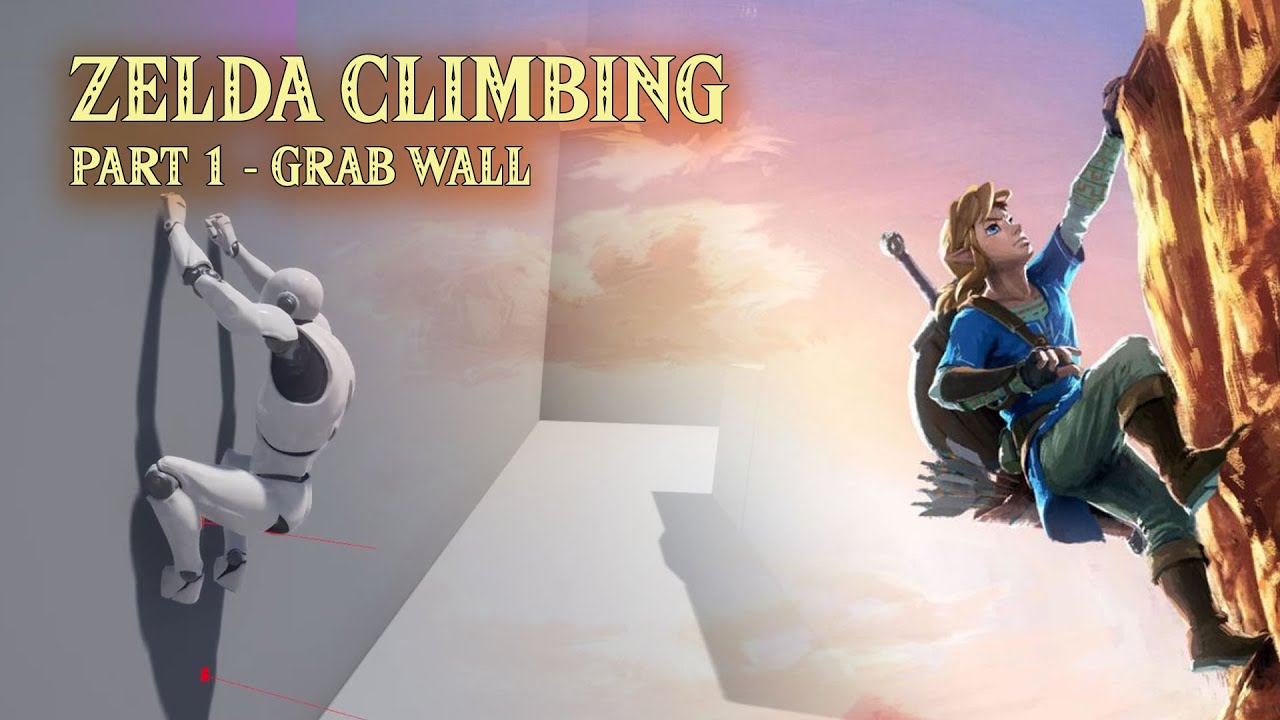
Project Files : https://www.patreon.com/posts/52828728
This is the first episode of the tutorial series I am doing on "Legend Of Zelda - Breath of the Wild" like climbing system in unreal engine. Here, we will look into how to detect the wall in front of the player character and hang on the wall when the jump button is pressed. If player press t...
 warm parcel
This is a probably pretty simple math question, but how do I get the rotation between 3 points in space?
 zinc wasp
warm parcel
This is a probably pretty simple math question, but how do I get the rotation be...
zinc wasp
warm parcel
This is a probably pretty simple math question, but how do I get the rotation be...
If it's x,y,z than there's no rotation. Just a point in world space.
warm parcel
unreal forums have let me down
 warm parcel
zinc wasp
If it's x,y,z than there's no rotation. Just a point in world space.
warm parcel
zinc wasp
If it's x,y,z than there's no rotation. Just a point in world space.
I mean, if I were to make a triangular plane out of those points, what would its forward vector be? Maybe that is phrased more correctly
zinc wasp
The forward vector in unreal is just the direction of X. Unless you mean the direction to it's center.
warm parcel
zinc wasp
The forward vector in unreal is just the direction of X. Unless you mean the dir...
I guess I mean the normal of the plane. Maybe I can illustrate what I'm trying to do

So here I am drawing a shape and when the shape is closed I find the middle three points and spawn a plane at the center of those points. I want the plane to be faced the same way as the drawn shape, and I think I can do that with math between those three points
Right now it simply faces the camera but this is undesirable
zinc wasp
Look at rotation could make a rotation from two points. Line trace can give you the normal which you could also use as a rotation.
Sorry I don't really understand what your trying to achieve. As the drawing looks like it's on a plane.
warm parcel
The plane is created after the drawing is completed. Thank you for discussing the problem with me, I'm probably not explaining it very well
As it is, I will think on it tomorrow. Thank you!
 pseudo pelican
Hey guys, I'm quite new to unreal engine. How would I cap the speed of the camera rotation for a player?
ive looked around for a while now and I cant find anything on the internet, I found a sensitivity multiplier and yaw pitch limits but those aren't what I am looking for
 nova belfry
@pseudo pelican using the mouse or controller? I think there is a turnrate float input value. You could probably multiply it with a 0.X value to have it turn slower in general in the input actions.
nova belfry
Hey guys, do you know how to make Water Splashes when the character is running through water bodies? (using the water plugin from 4.26?) do I have to manually detect if the character is in a water body and then spawn particles?
pseudo pelican
having a multiplier means u can just up ur sensitivity and bypass it
nova belfry
pretty sure you can clamp it then as well
pseudo pelican
yeah just couldn't figure out how to go about doing that
nova belfry

in there ^ the axis values is going straight into the add controller yaw input etc
you can probably do a multiply to lower sensitivity or potentially use a clamp to restrict it
not sure though since I havent tried it myself
pseudo pelican
yeah thats waht I was thinking just couldnt figure out how to setup the clamp
gentle urchin
Isnt there also a rotationrate
But i guess it really does the same as the sensitivity multiplyer
Nvm, thats for the pawns rotation !
nova belfry
@pseudo pelican Id probably first check what kind of numbers are coming out of these mouse turn things
or check into the code for the add controller yaw in put so you know how it handles the rotation ^^ analogue stuff like a controller the max value will always be 1
 celest steppe
I have a transform variable in a blueprint with a 3d widget. How can I make this variable be in world coordinates without forcing the actor to 0,0,0 location?
gentle urchin
Not sure what you mean
nova belfry
its easier to explain what youre trying to do probably
gentle urchin
Do you wanna set relative as world location, but not force the actors world location?
nova belfry
Do you want your Transform Variable always relative to another Actor? independent of where the other actor is in the world?
celest steppe
I have an array with transforms (I basically only need rotation and location). When placing the actor into the world at some location, I can add transforms to the array (which is basically what I need). It is easy to calculate the world location/rotation of each transform, but when I move/rotate the base actor all transform will also be translated/rotated. I want them to stay in place, basically
I had it some time ago, but I don't remember how
nova belfry
How do you add the transforms to the array? just offsetting them from the base actors location relative to the base actor? I dont really get why the transform would be relative or be updating if its just an array of transforms
unless you update the transforms every frame or something
celest steppe
it's during set up of the blueprint inside the level. I don't need any realtime capabilities for this
I basically add them by hitting the + icon at the array entry in the details panel
and they are definitely stored with relative location
maiden wadi
Not sure I'm following the conversation well, but if you have an actor with local space transforms and you need them to remain correct when the actor moves then.. Your transforms either need to be in world space, or you need to save your actor's originally placed location to keep your transforms relative. or update all of your transforms every time you make a move to keep them relative. Second would likely be the easiest.
 meager wasp
can anyone tell me why is this failing everytime, and whatever I try it doesnt work. Its a child actor and its supposed to print out a value in the HUD. If anyone can help out I'd appreciate

 candid nest
u have not selected any class yet
meager wasp
omg.... ty
candid nest
no problem
celest steppe
maiden wadi
Not sure I'm following the conversation well, but if you have an actor with loca...
yeah, but how would I do that? I could make a world position copy of that array or something like that, maybe?
maiden wadi
Personally. I would just have a StartingPosition Property as a transform. Make the actor's Construction script set it to the actor's current world position. Then your logic can set it's world position as LocalArrayTransforms+StartingPosition in world space.
nova belfry
Anybody know how to deal with Water Splashes using the Water Plugin? I've gotten it to work with the main character by checking if he's overlapping with the water however, doing it this way seems somewhat limited in terms of expansion
manic smelt
Anyone know what I am doing wrong here? I'm trying to get the characters angle compared to the player. It currently returns that angle but not adjusted for the characters rotation.

In other words - It outputs the relative angle of the player to the AI character as if it the AI was facing directly forward, which it isnt.
candid nest
just try to remove the blue node from the first get actor location
manic smelt
also this should help explain the issue. Blue is what I want from the angle but it is currently outputting blue + orange
 nova belfry
Find look at rotation
A - AI
B- Player
And then if he's facing the right way since the characters tend to be rotated 90 degrees away from the original direction, can't you just add/subtract 90 on the right axis to get the right angle?
(this is the reason why I also tend to add direction arrows to my characters and reference those instead xD)
manic smelt
nova belfry
Find look at rotation
A - AI
B- Player
And then if he's facing the right way si...
Slightly Unsure what you mean specifically. Currently the AI goes into Start and the Player into target but it gives a rotation from the world X axis

Thats the current setup ^
This seems to work actually

 timid arch
Hi guys. I have a timeline which goes from 0 to 1 and a Spline along which I am moving, via the timeline. I need to cover the whole spline length, in 80 seconds total, while at some point along the spline, I need to slow down and cover that portion in 30 seconds. Is there a way to make this work?
For the moment, I have set it up to work with Set Play Rate, however this requires me to perform multiple manual tests, in order to determine the proper play rate.
This is my current setup.

On the right the, the nodes go to setting the location and rotation. And bellow is a third Set Play Rate section.
zinc wasp
timid arch
On the right the, the nodes go to setting the location and rotation. And bellow ...
Does time dilation work?
timid arch
I haven't tried it. I saw in a clip how the dilation works. Will it affect only the actor who is traveling along the spline, or the whole scene ?
If I understand correctly, the dilation speeds up the game time
or slows it down, depending
Okay, I just checked some more documentation. The Time Dilation appears to be what I need. I will try it and confirm. Thanks
 green eagle
Any help or direction or ideas welcome!!
Player hits 'E' to pick up actor > it attaches actor to socket/scene component
Player hits 'X' to put down actor > HELP!!! Can't seem to figure how to "drop" the held actor.
Not sure if I have to destroy that actor and spawn a new? or if there is a simple function I just am not keen on.. 😦 thanks again to any advice or guidance.
midnight veldt
@green eagle have you tried DetachFromComponent? if you are struggling with actually referencing the held actor then try making an actor variable and setting that variable to the actor when it is picked up
--
for my own question... does anyone know if I can select data table rows (or any part of a data table) from a drop down? Or use a data table to set the defaults of different classes in the editor?
the reason being I have a quest system that uses a base quest class for all the different quests. this makes it really handy to quickly set up the characters in the world with them;

with just a drop down and a quick search
but it goes without saying this gets messy pretty quick, is more complicated than it needs to be for backing up, and ive already seen some data get wiped a few times (luckily had backups but still...)
In terms of managing the data I think a datatable would be way more suited for this but I don't know how to get this functionality out of a data table in blueprint... would appreciate any input
green eagle
midnight veldt
<@!460145198496743444> have you tried DetachFromComponent? if you are strugglin...
Thank you!!
Some reason my brain just couldnt think of the word "detach" lmfao... I knew it was some brain functionality failing to find the right words.. Thank you for the insight on referencing proper actor/component part too.
 dry blaze
Hey does anyone know how I can stop two capsules bouncing off one another while in the air, I want them to sort of lock together 🙂
midnight veldt
Prox I know that feeling it has happened to me many times lol. glad that it helped
 waxen sorrel
It's possible to have a component tick timer lets say set to 2 executions per second and inside it a timer with 5 executions per second ?
trim matrix
Hello, i have some sort of Top Down Game going on (like Bloodline Champions if you know this). My characters move on a plane, so there is no pitching needed. I have a function to orient the character to the cursor position.
My problem now is, i want to have a GroundTarget spell (like the Meteor in traneks example) and everything works, except the targeting decal is not follwing my mouse cursor. I cannot get it to be affected by anything.
I use some calculations around the "Wait Target Data".
I reckon this is more of a blueprint problem than gameplay ability problem.

 boreal ether
waxen sorrel
It's possible to have a component tick timer lets say set to 2 executions per se...
boreal ether
waxen sorrel
It's possible to have a component tick timer lets say set to 2 executions per se...
Timers don't use tick so yes
zinc wasp
waxen sorrel
It's possible to have a component tick timer lets say set to 2 executions per se...
Could probably just use a n count, set to 2 with a delay at 0.5. Than with a sequence you could do the same with the 5 ticks per sec. Though not sure if this is running on a tick or not.
waxen sorrel
boreal ether
Timers don't use tick so yes
Ty man!
midnight veldt
midnight veldt
for my own question... does anyone know if I can select data table rows (or any ...
OK i think i figured this out so I will write out the solution to this, for posterity. Its not very well documented sadly. It requires some C++ to start as well.
The answer is the FDataTableRowHandle. This is a struct that contains 1) a pointer to a data table and 2) a row in said table. By creating a UPROPERTY of this struct (in my case TArray<FDataTableRowHandle> Quests; and making it BlueprintReadOnly, it can then be set from the editor like how I needed it to be:

hooray! for now I will just have one big data table that contains all the quests (I made a quick one and put in 3 examples for this screenshot). I might end up separating them into different tables but luckily this solution supports that easily
then the actor could get all of their quests like so:

I hope this helps somebody else if they run into this same problem!
 wet surge
hey, does someone knows how to rotate a linetrace around an axis depending of the orientation of a mesh?, ive tried almost everything i know about math but for me its pretty impossible to do it
this is the code that i actually have, it makes the linetrace but always points down

 simple dragon
@wet surge get socked rotation -> rotate vector
wet surge
simple dragon
<@!340885357019267073> get socked rotation -> rotate vector
and then it should be in the end ?
this is the result
 simple dragon
@wet surge
ok lets go tho vector and rotation math
A = location of object
B = other object
RO = rotation of object
Dir = direction Axis
length = length of vector
FV = final vector
1 direction to object
FV = a -b;
length of vector is equal to distance between object a-b
2 direction to other object Scaled
FV = (a - b) * length
if one direction have length of distance between object a-b length of vector is equal to distance between object a-b
3 direction from axis baste on rotation (in ue rotate vector)
FV = RO * Dir
if dir is (0,0,1) and RO is (0,0,0) Fv is (0,0,1) if dir is (0,0,1) and RO is (0,90,0) Fv is (0,1,0)
3 direction from axis baste on rotation scaled
FV = (RO * Dir) * length
if dir is (0,0,1) and RO is (0,0,0) Fv is (0,0,1* length) if dir is (0,0,1) and RO is (0,90,0) Fv is (0,1* length,0)
remember all of functions are world local not object local
to move final calculation to object local use FV + a
wet surge
the other object is any surface basically, but the linetrace should come from the botton of the car
or maybe i cold forget about tthe linetrace and make it simpler?, i only want to detect if each wheel if touching something
wet surge
simple dragon
<@!340885357019267073>
ok lets go tho vector and rotation math
A = location of...
also thank u so much for this, its so helpfull
wraith comet
@wet surge you can try something like this
 wet surge
wraith comet
<@!340885357019267073> you can try something like this
wet surge
wraith comet
<@!340885357019267073> you can try something like this
tried something similar before but doesnt seems to work

 quasi frost
I am using the top down template and trying to line trace to check if I click the enemy. For some reason though the mouse location found in click to move seems to be incorrect when trying to use it for line trace. Any one have any idea what this is about?
 simple dragon
@wet surge direction from axis baste on rotation scaled
start trace = actor location
end trace = (rotate vector(actor rotacion, vector(0,0,-1)) * max distance) + actor location
wraith comet
wet surge
tried something similar before but doesnt seems to work
you're almost there, you just need to add or remove 90 degrees on some of the rotator axis, a bit of trial and error will get you there
wet surge
wraith comet
you're almost there, you just need to add or remove 90 degrees on some of the ro...
ok, so basically i dont know why the code yesterday didnt worked but now seems to work, maybe something related to the socket position that im using, now i have the linetrace going into the proper direction
but there's another problem, the socket seems to not be affected by the suspension, there's any way to fix it
wet surge
simple dragon
<@!340885357019267073> direction from axis baste on rotation scaled
start trace...
thanks so much for the help to both of you
simple dragon
socked cannot be moved 😄
wet surge
simple dragon
socked cannot be moved 😄
any other way then to get the wheel location in real time?
simple dragon
if u wont to move wheel u moving a mesh
if u wont to get a socked location use GetSockedLocation(mesh,"Wheel back right") btw this is in world space
 rustic pond
I have a datatable I need to populate with around 1300 items. Is there any way I can add rows to a datatable using the editorutilities plugin?
 wet surge
simple dragon
if u wont to move wheel u moving a mesh
if u wont to get a socked location use ...
wet surge
simple dragon
if u wont to move wheel u moving a mesh
if u wont to get a socked location use ...
i dont want to move the wheel but to know its position to attach de linetrace to it
 thorn fiber
Would this work for 3D widgets?
simple dragon
@wet surge copy contend and paste in bp
wet surge
ok done
im not seeing the linetrace in the screen
maybe itt get lost in space
oh ok now im seeing it

its far apart from the wheel idk why
simple dragon
show bp
simple dragon
ops replace socked rotation with world rotation 😄
this is right one 😄

@wet surge
 simple dragon
and set ignore actors to self

 simple dragon
ok
wet surge
feedbacck and support?
 astral estuary
on what units is that startPosition? frames? seconds? ratio? 
(seen on an animation details panel inside an animation state machine node)

 languid haven
anyone got any ideas or bp jumping off points for making a drivable jetski that floats on the new water plugin's water? It's meant to be a jetski racing game so don't need to have the player get on it or anything, but I spent most of yesterday floundering around without much success.
silk hinge
hey I didnt find my problem yet ^^
Basicly my char is going to A pose beentwin Every anim montage loaded

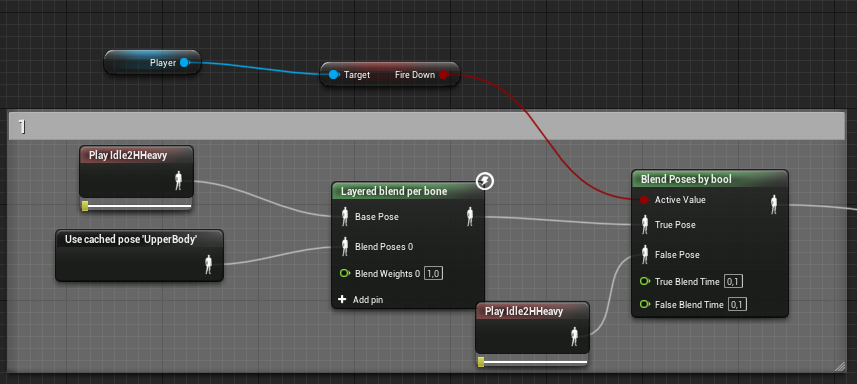
My anim montage is played on the slot beetwin lowerbody and upper body
I tryed to use diferent slots beetwin "lowerBody" and "UpperBody"
But still have the same issu, char goes into "A pose" for 1-2 frames beetwin every animations 😦
I tryed to get anims for the anim starter pack to see if the problems are from my anims, but have the same issu with premade anims
 safe musk
hello everyone, i am new here, i started study unreal about 3 weeks ago. i would like to know if someone can help me, i have been try to comunicate this collision compenent, my player has two collider, and i am trying comunicate this "green" collider with a different collider that i specify in this box, because i wish put 4 differents collider to get 4 differntes actions in this cube.


 woeful pelican
Question: is there a better way of having a function being called by either (or both) input events?

 ashen panther
when doing overlap events, is it more performant to check for a tag or equal = get player character?
elfin robin
Anyone know how I can stop a camera shake when I release a button?. I'm using a camera shake to work as breathing make aiming harder. I tried on release of button stop camera shake but that didn't work
zinc wasp
woeful pelican
Question: is there a better way of having a function being called by either (or ...
I prefer to use action mapping instead of axis. I believe axis mapping fires every frame.
woeful pelican
zinc wasp
I prefer to use action mapping instead of axis. I believe axis mapping fires eve...
Ignoring that I don't have controller mappings yet, are you suggesting something like this?
 zinc wasp
Yes though if it's an automatic weapon, you'll need to check if the button is still held down by the end of it and also adding a delay would control the rate of fire.
But that's all just preference. I believe there's no wrong way unless somehow your script is eating up all the cpu usage.
 sand shore
woeful pelican
Question: is there a better way of having a function being called by either (or ...
sand shore
woeful pelican
Question: is there a better way of having a function being called by either (or ...
you can do this with a custom macro
make a macro with two inputs
safe musk
can someone help me, why when the player componente collider "COL_Kiara_INT" with the box collider componente "COL-2" the branch is true ? Because my blueprint only check is the player collider "COL_Kiara_INT" is overlapping with the box componente collider "COL-1" ... ?
 sand shore
make a macro with two inputs
sand shore
sand shore
make a macro with two inputs
it should have two separate local variables that are boolean. Each local corresponds to an exec path. After setting the local to true, check if both have been set. If both have been set, clear both locals and then output an exec.
not the cleanest but would work well enough
 humble frigate
if im in an interface and i want to do something depending on a boolean in another blueprint, i cast to that blueprint but whats the object?
 simple dragon
someone have idea wtf is going on
montage do not wont to rotate character for some reason
but test character is ok
orient to movement = false
use controller yaw = true
 elfin robin
What's the best way to simulate breathing while aiming down sights?. Tried camera shake but can't get it to stop shaking as soon as I stop aiming
simple dragon
@elfin robin https://www.youtube.com/watch?v=YYVEHk_KurY&ab_channel=reubs this might be helpful
on 3min mark
simple dragon
humble frigate
if im in an interface and i want to do something depending on a boolean in anoth...
instance of actor/character/pawn i also called script 🤣
humble frigate
simple dragon
instance of actor/character/pawn i also called script 🤣
wait so i get what? "get..."
elfin robin
simple dragon
<@!699576201538437201> https://www.youtube.com/watch?v=YYVEHk_KurY&ab_channel=r...
Thanks, looks too complicated without proper tutorial 😂
simple dragon
but u know how to do it 🙃
humble frigate
uhh
simple dragon
humble frigate
wait so i get what? "get..."
get base class of gate key bp
humble frigate
okay ill try, thanks
 pale orbit
Does anyone know when the player character gets destroyed what gets destroyed also? and what remains i saw GameInstance still remains
 clear plover
Is there a way to make a existing Actor Child of a new Actor that i create??
Thanks
simple dragon
@pale orbit player re spawn example
 faint pasture
elfin robin
What's the best way to simulate breathing while aiming down sights?. Tried camer...
faint pasture
elfin robin
What's the best way to simulate breathing while aiming down sights?. Tried camer...
It depends on what the base data for your aim Direction looks like. I would use a timeline or sample a curve on tick to apply an offset to aim. Multiply it by some scalar, and vary that scalar when holding breath
humble frigate
hmm. doesnt seem to work, i might be stupid
pale orbit
simple dragon
<@!220688976527360000> player re spawn example
I need to keep the rounds of a game stored somewhere so when i respawn my hud have acess to it
faint pasture
pale orbit
I need to keep the rounds of a game stored somewhere so when i respawn my hud ha...
Game state or game instance
simple dragon
or duplicate perimeters to new character 😄
faint pasture
Game state gets reloaded every time you open a map, game instance is one object the entire lifetime of the application
simple dragon
bump : #blueprint message
humble frigate
This might be a better pic. What do u put in the object?
 pale orbit
faint pasture
Game state gets reloaded every time you open a map, game instance is one object ...
pale orbit
faint pasture
Game state gets reloaded every time you open a map, game instance is one object ...
I'm trying gameinstance, is it normal for it to not create widgets?
faint pasture
pale orbit
I'm trying gameinstance, is it normal for it to not create widgets?
You don't create the widgets from the game instance, but the game instance should be where you store the data
simple dragon
@humble frigate content object to interact node and flow
faint pasture
Wherever you are setting up the hud, just get the game instance and pull the data from it
@pale orbit if the data is meant to be persistent between maps, store and game instance. If it's meant to be persistent within a single map, store in game state. If it's a multiplayer game, go with game state
humble frigate
simple dragon
<@!282953733325717507> content object to interact node and flow
Hmm. I’m very new to this. What do you mean by that?
simple dragon
 humble frigate
my graph isnt editable... hmm
simple dragon
Blueprint Interfaces allow Blueprints to call functions in different types of targets, if they also implement the interface.
simple dragon
bump 2 : #blueprint message
safe musk
can someone help me, why when the player componente collider "COL_Kiara_INT" with the box collider componente "COL-2" the branch is true ? Because my blueprint only check is the player collider "COL_Kiara_INT" is overlapping with the box componente collider "COL-1" ... ?

 misty viper
anyone know how to fix this warning permanently? " LogClass: Warning: In asset 'None', there is an enum property of type 'EDepthOfFieldMethod' with an invalid value of '('
"
I can edit the editor.ini to change the depth of field value thats missing, but once I reload the editor the error comes back
I have no way of finding this "None" asset that is causing this
simple dragon
@misty viper
some error do to engine crash and not saving a variable reference correctly
excuses only on builds !!
how to fix it open notepad++ find in files NoneNone
and u have clue with bp is in
in unreal
try deleting one variable compile save
in notepad++
do find NoneNone
if is gone:
undo delete
rename variable so something else compile and save.
revert back to original name compile and save
if is not gone:
undo delete compile and save try other one
 desert juniper
safe musk
can someone help me, why when the player componente collider "COL_Kiara_INT" wit...
desert juniper
safe musk
can someone help me, why when the player componente collider "COL_Kiara_INT" wit...
Question, what if you didn't have multiple colliders, but just determined the angle between the player and the collider's forward vector instead?
Final geometry isn't going to be a cube most likely, so this doesn't seem like a good idea
 gusty shuttle
Anyone ever have the issue where you're using a widget with your controller and it skips over a button in the vert box?
nvm, solved it, my vert box was rotated -1 and thus it would skip the middle button
nova belfry
anybody know why this would happen with the buoyancy? ie the water plane is floating above the terrain in areas causing the buoyant objects to sometimes float in the air.
EDIT:
So it generally just seems like water bodies cant be too close to each other it causes an overlap for whatever system they use for the buoyancy. It is however somewhat confusing that its not perfectly following the visual mesh.
 rough blade
Hey everyone, im trying to get bomb drops working but I have run into a weird hiccup. Below you see that projectile movement inherits the parent vehicle velocity but when in game the projectiles velocity is set much higher than the parent vehicle and ends with bombs getting yeeted faster than the vehicle is moving. I think it has something to do with rotation but cant find any reason why.


 pale orbit
Does anyone know how to make it so Enemies can see my 3p mesh but i can't?
vagrant prism
I have a widget appear for text once I enter a hitbox to say that the player can "Press E to Open Door"
What's the best way to then remove that widget once I leave in the On Component End Overlap
I tried using removal all widgets, which did work, but it also removed my health bar and mana bar
faint pasture
@rough blade that looks fine, and you're saying it spawns with a different velocity?
Check if you have "initial velocity in local space" checked. You might
rough blade
Sorry - they have consistent velocity, its that the velocity does not match that of the parent @faint pasture
local space is not ticked

 naive palm
how come a lot the blueprint functions im wanting arent showing up? GetAllActorsOfClass, Delay, etc. do i need my blueprint to extend from a specific class?
 real garnet
"Is Locally Controlled" what is this?
 supple dome
naive palm
how come a lot the blueprint functions im wanting arent showing up? GetAllActors...
supple dome
naive palm
how come a lot the blueprint functions im wanting arent showing up? GetAllActors...
kinda late but make sure your blueprint implements getworld, else those wont exist
naive palm
implement or override? because i dont have an option to override anything. for reference, my blueprint is a child of a c++ class which is a child of UObject
sand shore
well there it is
UObject BP cannot use functions that require a world context
A bit silly that they chose to hide them without giving you an option to just pass a world context
 earnest stream
hey guys, quick question: say i have a widget thats getting dpi-scaled at 0.688. with that dpi scaling value (0.688), what math can i do to effectively negate the scaling?

 naive palm
sand shore
A bit silly that they chose to hide them without giving you an option to just pa...
naive palm
sand shore
A bit silly that they chose to hide them without giving you an option to just pa...
so do i have to modify my event to take in a world context as a parameter then? or can i just have my c++ class extend from something?
sand shore
Well
The easiest solution is to have an actor you can always reference
Then implement GetWorld in terms of that
And then bam
just don't call super
 civic basalt
 covert arrow
why is this not working
covert arrow
why is this not working
You might have to pull out from Other Actor and do a cast
silk hinge
After 4-5 hrs of searching I have solved my problem xD
I'm gonna make a quick recad here if it can help
 faint spire
Hey so I have a door that is destroyed when I interact with it. Before it is destroyed, it blocks both the player character and the ai chasing the character. After it is destroyed, however, the ai still cannot go through that area. I know its a problem with the navigation area still acting like the door is there, but how do i fix that?
silk hinge
https://prnt.sc/19d95sp
So basicly my animation call was plug this way on the cache, meaning that when I press the fire button its playing the slot but this slot was empty beetwin animation causing my char to comeback into 'A Pose" beetwing each animation
The way I plugged it now is making my char playing the Idle anim when ever nothing is called in the slot removing any "A pose" problems, my animation where allready set with the first frame beign the Idle animations to make transition beetwin states and attack way better
faint spire
I tried using a nav link proxy but it just glitches out the ai
silk hinge
havent reach IA point yet,cant help sorry ^^
faint spire
It's all good 👌
 plucky copper
faint spire
Hey so I have a door that is destroyed when I interact with it. Before it is de...
plucky copper
faint spire
Hey so I have a door that is destroyed when I interact with it. Before it is de...
if you go to project settings nav mesh tab runtime you might be able 2 fix it not sure thou
faint spire
That worked perfectly!!
faint spire
plucky copper
if you go to project settings nav mesh tab runtime you might be able 2 fix it no...
You're the goat 🐐
plucky copper
🐐
faint spire
Do you think it would cause lag issues? Or not really something to worry about for a small game?
plucky copper
I would guess fine unless you are doing tons of stuff with moving n stuff
probably fine
faint spire
Okay bet 👌
 full night
Anyone know how to add jumping to a VR project?
naive palm
sand shore
Then implement GetWorld in terms of that
so just add a GetWorld function to my c++ class and then my blueprint class (which is a child of the c++ class) can access the functions
vagrant prism

I have my door rotating 90 degrees and opening, however, the collision doesn't move and i cant walk through
how can I have the collision move with the object?
before i could just walk through the door without opening it, it didn't have collision.
 short burrow
how would i go about making it so when i press my aim key it reduces the mouse sensitivity, and when released it brings it back to normal. also attaching an image for what i have in mind but not sure how to make it actually work.

 fast gale
Is it possible to set an Actor's Is Editor Only Actor property from Editor Utility Widget blueprint? I try to use the set Editor property node but it always say that property is not found on the actor.
 surreal peak
short burrow
how would i go about making it so when i press my aim key it reduces the mouse s...
surreal peak
short burrow
how would i go about making it so when i press my aim key it reduces the mouse s...
Make a float variable instead of hardcoding the 0.75 and set it to 0.75 or 1 when pressing or releasing
surreal peak
fast gale
Is it possible to set an Actor's Is Editor Only Actor property from Editor Util...
Without spaces?
zinc wasp
full night
Anyone know how to add jumping to a VR project?
Just add a jump node like you normally would do.
zinc wasp
vagrant prism
how can I have the collision move with the object?
If the collision is seperate from the mesh than make the mesh the parent of the collision.
vagrant prism
How can I make the mesh and the collision the same?
I can make the changes right onto the door for example
I dont need to make a separate box collision?
full night
I was trying that but it didn’t show up.. I found out that I had to be a character instead of a pawn 😔
zinc wasp
vagrant prism
How can I make the mesh and the collision the same?
Yes. You could use your mesh as a collision. Double click the mesh and in it has a few options, on the right side. Just go through it and you'll find out. Not on pc to show you.
 ornate sleet
Is it possible to have the NPC and PC run on the same script? This is really bugging me seeing that the character script is the main parent. What I want to do is have events or components do the move, idle, combat ect and have the controllers call that same event. Is that possible?
zinc wasp
ornate sleet
Is it possible to have the NPC and PC run on the same script? This is really bug...
Yes you can.
Though you'll need to have seperate control for the player and AI logic.
ornate sleet
zinc wasp
Yes you can.
So it is possible to have the controllers use the same movement events?
 remote belfry
QQ. After using a create widget node, is there some type of destroy or remove process you should do as well?
zinc wasp
ornate sleet
So it is possible to have the controllers use the same movement events?
No. Same script yes, not controller.
I mean yes I thought you meant same controller.
vagrant prism
@zinc waspthanks so much!!
ornate sleet
zinc wasp
No. Same script yes, not controller.
So the AI CAN use add movement input and not just ai move to.
zinc wasp
No, as I stated before. You'll need seperate controls for AI and player. AI uses navnesh.
ornate sleet
But Jump and Combat can be same function calls from separate controllers then? I don't have to make two different versions?
zinc wasp
Yup. Just the controls.
This is something stupid I made long ago but the AI and player is all the same blueprint.
ornate sleet
Would it best to put them in components since I have different stats affecting speed stuff? Then grab that component and calling from an event that the controllers call separately?
short burrow
surreal peak
Make a float variable instead of hardcoding the 0.75 and set it to 0.75 or 1 whe...
okay that helps but im lost on where to go on from what i have currently.

never mind, figured it out. had to use the get node thing! thanks so much for the help man!
zinc wasp
ornate sleet
Would it best to put them in components since I have different stats affecting s...
I dunno what is best. I just do what makes sense to me. Speed buff and so on I usually just make a macro that changes it and throw the current speed in a variable.
ornate sleet
Thanks. Looks like I got some experimenting to do
zinc wasp
The one best advantage is the animation since you don't need to make it for the AI and player.
ornate sleet
Yes that part I got to work. And a possess feature I'm just hoping to get the script to call same functions independently.
faint pasture
ornate sleet
Yes that part I got to work. And a possess feature I'm just hoping to get the sc...
You can do that disregarding any weird stuff with the CMC. Basically Button input -> DoThing() for player controlled, and just call DoThing() directly from AIController. I wish you could emulate input with ai controllers but anyway, it works.
surreal peak
Yeah last time we had this scenario we just had the Character itself and the AI used the same functions the input events called.
Worked quite well, specially since you have one true character (+- ai specific overrides)
ornate sleet
faint pasture
You can do that disregarding any weird stuff with the CMC. Basically Button inpu...
That part I comprehend. It's the do thing() but using the same movement mechanism that the player uses is what I want to do. Get everything done from one do thing event like a a custom event in the parent bp
So for example
MoveForward call on parent BP event Move
And AI controller call on parent BP event move
I got jumps and combat states to work. Somewhat. It's a little Behavior tree tweak but it's the movement I want to just use the same event/function 😅
 maiden meteor
hi guys, does anyone know how I can display this struct as an array of meshes into the marked red boxes?

 worthy holly
anyone knows how to replicate glory kill system from doom eternal (im a beginner so i dont know much abt ue4)
 royal anvil
In UE4 many function can have as input several inputs on one input pin. Like "Set color", you can target several objects directly with one node by plug in several objects. How can I achieve this on own functions or macros? I tried it with own macro and function in BP, but I can only plug one object target into the pin.
Goal is like in many UE4 functions:

 blazing creek
Does anyone know why when I reparent a blueprint that had a scenecomponent root, that scenecomponent root gets moved 103 units in X axis?
 lost solstice
what is the difference between SphereTraceForObjects and MultiSphereTraceForObjects?
 rain ravine
lost solstice
what is the difference between SphereTraceForObjects and MultiSphereTraceForObje...
rain ravine
lost solstice
what is the difference between SphereTraceForObjects and MultiSphereTraceForObje...
Multi can pass trough multiple collisions and returns array of hits
rain ravine
maiden meteor
hi guys, does anyone know how I can display this struct as an array of meshes in...
You need to create a UMG widget and pass your own icons into it. You cant just use the asset icons from editor. You need to create your own.
maiden meteor
rain ravine
You need to create a UMG widget and pass your own icons into it. You cant just u...
Can I use meshes instead of creating icons / thumbnails? just a small version and clothes in an array
 fallen glade
when the engine is using a term like speed does it mean 1 = 1m/s?
no 1 = 1cm/s right?
maiden meteor
that's what i'm after, but can't really put a blueprint together
 little flame
hi everyone! does someone have a tutorial on how to spawn objects back in place after certain time? my player hits and kicks objects that I would like to return once the player also returns to that area
 stuck hedge
Is there any way to see what reference exists between 2 classes in blueprint? I had a reference in a UMG widget to a class, but I decided to change the reference to a generic actor reference and then implement an interface. I've gone through the whole UMG twice now but the Reference viewer is still showing some kind of connection between the widget and the other actor class.
blazing creek
stuck hedge
Is there any way to see what reference exists between 2 classes in blueprint? I ...
are you by chance using the Spawn Actor node there?
stuck hedge
blazing creek
are you by chance using the Spawn Actor node there?
No, I'm not spawning it. It's a time manager in the level. I need a reference to it to get some stats from it. I previously had a hard reference, but I've changed it to a generic actor reference, and I'm using interface calls to get the info. For all the other classes I made this change, it worked fine and removed them from the size viewer/reference list. But for some reason this one is being stubborn.
I also had hard references and casts to the player controller, player character, etc and replaced those with generic calls and interface calls, and those all cleaned up
As you can see the variable is clearly set to plain actor.
 rain ravine
maiden meteor
Can I use meshes instead of creating icons / thumbnails? just a small version a...
rain ravine
maiden meteor
Can I use meshes instead of creating icons / thumbnails? just a small version a...
No, unless you write the code for it yourself, the editor icons are not available in game.
For mesh to render you would need to have it in scene by itself, scene capture, render to render target and put that into material and THAT into UMG
Having icons is much easier and faster too
stuck hedge
Cache the location when you start
rain ravine
@little flame i mean, it's so trivial that you should be able to make it in 2 seconds
It's literally a delay and move to location
blazing creek
stuck hedge
As you can see the variable is clearly set to plain actor.
Did you recompile them before checking with reference viewer? Also, reference viewer doesnt do live updates, so you have to either reopen it or change search parameters. Other than that, I have no more ideas, sorry.
stuck hedge
Yeah, I completely closed and reopened the project, like I said all the other classes that were referenced there have been removed as they should hav been
rain ravine
oh wait, sorry I missunderstood your question
little flame
@rain ravine thanks but im a 3d modeller and environment artist when it comes to BP im very noob, so for you its probably super easy but for me not really hehe
stuck hedge
It's acting like there is a reference still buried in there somewhere, but I can't seem to find it anywhere.
rain ravine
@little flame do you have multiple levels or is it a single level?
like are you using level streaming?
because if you walk out of a level and come back, every actor will move to their original place by default
if not, you should create a trigger volume around the "zone", that when you pass it, you move the ball back to its original location
little flame
@rain ravine its a single level!
@rain ravine thing is you experience the level from a locked position so you wont move away from it
@rain ravine you can throw objects around, and I simply want the objects to go back in place after certain time
stuck hedge
On begin play cache their location
after they are thrown, set a timer and on the end of the timer set their location back to that original location
little flame
@stuck hedge thanks! any tutorials how I do that ? im very noob in BP but have the feeling its rather simple what I have to do
stuck hedge
on begin play just "get actor location" and promote to a variable
rain ravine
there are tutorials for each separate part, not really for your case
stuck hedge
@little flame https://www.youtube.com/watch?v=qc5WpNq7RFg

What are the Set Timer by Function and Event Name Nodes in Unreal Engine 4
Source Files: https://github.com/MWadstein/wtf-hdi-files
rain ravine
search for how to work with variables in blueprint (begin play, cache location)
then for how to detect that it moved (either tick, or collision hit)
then timers (sent by crossmr actually)
and move to location
stuck hedge
Just watch all that guy's videos, then you'll be fine.
little flame
thanks guys!
rain ravine
this youtube channel should have all you need, they have a video for almost every node and unreal thing you can think of
also check the HTF playlist, its other way around, not what nodes do, but what nodes you need for certain tasks
little flame
but im a little puzzled that there is no full tutorial on this as I find it quite a basic need :S
rain ravine
it is, but it's much more efficient to teach you how the lego bricks work, then to have tutorial for each specific case
then when you need to change it, you know how

WTF Is and HTF Do I is an ongoing series that aims at giving a simple explanation and example for Unreal Engine 4.
Source Files: https://github.com/MWadstein/wtf-hdi-files
simple dragon
bump 4 : #blueprint message
rain ravine
i mean not really sure, but AFAIK you don't rotate using montages if you are rotating using controller
basically the controller uses Control Rotation (set by player input or movement or Focal Points for AI) and that rotates the capsule
if you need to rotate capsule using montages, you probably need to use them as root motion, but that only works in single player
simple dragon
it have root motion 😄 location is ok but is not rotating
is some setting im missing in bp and i have no idea what it is
anim bp tested
bp tick and start , binds tested
 dense cedar
what do people use instead of get all actors to set references?
like is it cheaper to set a set of references in the game state and then cast to them or just use get all actors to set new reference only being used by the local bp?
 dense tulip
How do i set markers or such for allowing a boat to float ?
 spice shore
hi there, a while back i was working on a random moving ai, and it worked fine, a few weeks latrer and its not moving at all, i can send pics of my code as well

 maiden wadi
If you haven't changed the code, it's likely navmesh or pawn related. Changed anything in the level, or pawn recently?
spice shore
no, i can send screenshots if u want?
maiden wadi
Double check that your navmesh still exists. I found them a little finicky when I was messing with AI. Can't remember the hotkey for it.
 maiden wadi
Could be failing to find it's route. Some prints on Success/Fail could help see.
spice shore
how do i see these prints?
maiden wadi
How are you testing the game?
spice shore
by clicking play at the top of ue4 program
maiden wadi
They should show up automatically in the top left of the screen in PIE and Viewport play. Not sure about Standalone.
spice shore
nothing shows up im afriad
spice shore
yeah its defo in the level
maiden wadi
The other way to see printed messages is the log. I'd apply one to the beginning of the tick too. Also, does this AI have a C++ base class?
Window/Developer Tools/Outpost Log
spice shore
i used the spagetti stuff insted of the c++
maiden wadi
Forgetting to call supers in overridden functions in C++ can break tick.
Either way, I'd make sure your tick function is working via breakpoints or prints. After that, see if it's failing or succeeding.
 little flame
hey its me again 😄 instead of using delay one time, how do I say every xx seconds do this?
maiden wadi
SetTimerByEvent
little flame
ah ofcoyrse thanks
lost solstice
Is there a way to see if any of the children components from GetChildrenComponents where inside the sphere trace

 random delta
why did epic change this node?
where am I supposed to plug the target physical animation data now?

doesnt make any sense
 burnt canyon
its not changed
read the node name
one is profile one is setting

@random delta
 novel ice
Hey guys!
When player jumps while running to any side (forward/right/back/left/ whatever) and when I stop pressing a key to run somewhere, player still goes to the last direction I used to go. How can I change it so my player stops moving in air right after I stop pressing my movement keys?
trim matrix
@novel ice can you show a screenshot of your movement inputs etc.? Do you handle it on character or controller?
btw neat misspell on that name 😭
random delta
burnt canyon
its not changed
goddamn it. thanks haha
burnt canyon
No worries 🙂
trim matrix
also we might need to see your character movement component
 hollow marsh
i have a problem. can some one help me?
burnt canyon
Might want to list your problem.
lofty hound
Is there anyway i can reference and store an actor in a player party BP before the actor is spawned into the level?
burnt canyon
lofty hound
Is there anyway i can reference and store an actor in a player party BP before t...
No because it needs to exist for the reference to be valid, you could make a reference thats empty and designate it for that, then when its spawned set the reference.
There is some exceptions to this, like spawning deferred or w/e its called i forget
hollow marsh
hi i have a main menu. in background we can see level. and in that level have a actor blueprint. so i need to get mouse click event when clicking in that actor blueprints inside object. i mean im in a main menu widget and i need to click a button in blueprint, that visible in background. sorry for my bad English. can any one help
 slate harness
I am making a camera shake for sprinting but i dont know the new BP node for playing it
can anyone help plz
burnt canyon
slate harness
I am making a camera shake for sprinting but i dont know the new BP node for pla...
Start Camera shake node, requires a camera shake source component
slate harness
burnt canyon
Start Camera shake node, requires a camera shake source component
Thanks you man
burnt canyon

NOTE This is now referred to as the Matinee Camera Shake instead of Camera Shake when creating the new Blueprint
What is the Camera Shake Class in Unreal Engine 4
Source Files: https://github.com/MWadstein/wtf-hdi-files
hollow marsh
i tried set visibility to widget caves but i cant click through widget
lofty hound
burnt canyon
No because it needs to exist for the reference to be valid, you could make a ref...
So for example, when making a pokemon game in UE. There is no way to store a players party in the overworld ready for use in the battle level?
trim matrix
maybe dont make the widget full screen so u can click next to it?
hollow marsh
@burnt canyon can help with this. i cant understand
burnt canyon
lofty hound
So for example, when making a pokemon game in UE. There is no way to store a pla...
There is a ton of ways to approach this, having a pawn/actor/object not visible is not the same as not having them in the world.
IE you could destroy them, spawn them in and out each time, or disabled and hide
etcetc
trim matrix
Hi would like to ask if somebody knows how to get the roll on a spline correct with out normalizing the float value?
hollow marsh
is their any way to click through widget?
burnt canyon
Set it to click through
hollow marsh
how i can do that? i cant find @burnt canyon
lofty hound
burnt canyon
There is a ton of ways to approach this, having a pawn/actor/object not visible ...
What would the best approach be, I have an over world which is my main level and when contacting enemy it opens a new level which will contain the battle. Player party is stored in the game mode. will that be consistent with both levels?
waxen sorrel
Someone knows how to initialize a procedural mesh component ?
burnt canyon
Should be blue

 burnt canyon
Well first thing i need to know is where you are getting that target from
Is it already in world? are you spawning it?
waxen sorrel

Is a empty var inside a Editor Blueprint
I can only do this inside a level editor blueprint ?
burnt canyon
Ah right okay i see
hmmm
Lets see what it derives from
Its from a Mesh component so maybe just normal mesh init works?
its prob a wrapper class around it
waxen sorrel
its a procedural mesh component
I just need it empty to add content
also found out this

 waxen sorrel
Why the custom events don't get exposed to level editor blueprints ? 😂
the bugs strike again
waxen sorrel
burnt canyon
So maybe you can init like a umesh
how ?
hollow marsh
thanks but it not working. in my scene i have box (Its is a blueprint and have a child box{name + box20} too.) i need to click that box20 and after cliking fire a mouse click event. so added event to it normal way. now i need that box20 to click thrugh a widget. i mean widget is main menu and background transparent so i can see that box blueprint. but i cant get click that blueprint. i set widget to no hit testble(selff and Child) but it cant clikeble thrue widget. @burnt canyon
burnt canyon
I might be dumb Hevedy but i read through the func list and i honestly cant see how
 unique wasp
I have a Math Expression Blueprint node that won't eat my function, and I don't understand why. I type this:
value * (maxValue - minValue) + minValue
And then I get the below result. As you can see, there's an error, two of the inputs aren't added, and there's no output either. If I press compile, the error disappears, but the inputs and outputs still don't appear.
What am I doing wrong here?
 burnt canyon
@waxen sorrel i think maybe
ughh
sec
Im unsure
Im guessing too much
You need to dig some API info or example videos up
hollow marsh
i cant understand why cant do this. thanks guys.
surreal peak
waxen sorrel
it seems like it's impossible to initialize components inside a Widget
Bit confused what you are trying to do. Is that just an empty component pointer?
waxen sorrel
Well I just wanted to generate a mesh and save it to the assets inside the editor
But seems like will need to use a initialized procedural component inside a actor in the world
surreal peak
Well a Procedural MeshComponent has the same limitations as any other Component.
You will have to create it one way or another
Either via Constructor of an Actor or during runtime and then registering it yourself
But i think runtime still needs an actor
And Widgets can't have Components
waxen sorrel
yeah I just wanted to do it inside the editor at the Editor Widget tools
surreal peak
Neither can any other UObject afaik
 surreal peak
Do you have an Actor with the Component in the level?
waxen sorrel
surreal peak
Well, not sure what "this" is

Well this was the concept todo everything inside a Editor Widget panel
That I mean
surreal peak
Yeah and I assume Target is null
You need an Actor with that Component
Or some c++ magic
waxen sorrel
Yeah and I wasn't able to initialize it inside the Editor Widget so, doing a initialized one inside a BP Editor in the world
surreal peak
Initialize? You mean spawn?
waxen sorrel
also the BP Editor Actors don't expose for whatever reason the Custom Events as buttons
 surreal peak
Yeah, if you want that to be automated, you can try check if the pointer is valid, and if not spawn the actor to 0,0,0 or so
And then destroy it again once you are done or so
 opal ivy
Is Python support in UE official?
And how does it compare, performance-wise, to BP if so?
 serene sand
Problem: I am creating a "header" from 3 of my .csv files using the file name and then I am filling in the headers with information. All of the information is populating into index 0's (SwitchMachine.csv) Vertical Box.
What I would like to happen is if Bridges.csv, Stations.csv, & SwitchMachine.csv has it's information populated into it's respective correct header.
I've also posted this in "umg" but this is also a blueprint so if this is the wrong place to post, please let me know.

 tidal marlin
Hello. How i can unattached components?
 gaunt fractal
Hey, when using RInterp To, is there a way to use shortest path or get the same behaviour?
 swift yarrow
A very quick question about arrays. I have an array with two values depending on the character and I want to set up a menu that allows each character to change their model to another one for their character. Is there a way to only instantiate buttons for outfits for one character?

The answer is probably simple, but I can't remember off the top of my head right now.
 open crypt
is there a way to access these points in the editor itself? I'd like to adjust them like i do with the actor's location

like from here
 lofty hound
Whats the best way to get characters stats like health and mana? variables within the actor BP?
trim matrix
@tidal marlin do you mean the node "DetachFromActor"?
tidal marlin
trim matrix
<@501448430116405269> do you mean the node "DetachFromActor"?
Thank you bro))
trim matrix
or DetachFromComponent if it is attached to a component
tidal marlin
I didnt know this word in english and was see all node like unatched and other))
trim matrix
lofty hound
Whats the best way to get characters stats like health and mana? variables withi...
there are so many ways of doing it, that none of it fits "the best". Many people nowadays use GAS plugin for handling stuff like this, but it really depends on the scale/size of your project
if it is a simple single player you might be better off without such a huge framework like GAS, but if u think about multiplayer and a more complex project, give GAS a try, though u might need to take 4+ weeks to understand it

 warm swallow
Hey there, I'm trying to create some form of mantling for my game, but all of the tutorials I've found are for third-person or they are just really long. Does anybody here have experience with this sort of thing or know how to create it? If you do, please help!
lofty hound
trim matrix
if it is a simple single player you might be better off without such a huge fram...
Its a small single player game so GAS isnt the best thing for it
trim matrix
lofty hound
Its a small single player game so GAS isnt the best thing for it
then you might best go for variables on the PlayerState/Playercontroller or even the Characters. Another go would be to use Components for these stats and add them to the characters
 stuck palm
hello, is there a way to make a blueprint run on the map editor?
warm swallow
I think there are editor blueprints you can use
"Editor Utility Blueprints are a specialized kind of class that is intended for logic that you need to run only within the Unreal Editor, never at runtime, and that does not need any custom UI."
Does that help?
lofty hound
trim matrix
then you might best go for variables on the PlayerState/Playercontroller or even...
I tried going component route but cant get my head round it
trim matrix
yea its a bit tricky at first
think of them as maybe parts of a car. if you consider the radio a component...if you install the radio into your car and you read the manual (aka you know how to operate the buttons), you can use the radio
and if you take the same radio (or one built from the same blueprint...pun) you can install it in a different car and still operate it
the car is the character in this case 😉
and if u have one of those old car cell phones, the cars can now interact with each other, but only through the interface (phone protocol) which you specified when building the phone, not the car
stuck palm
warm swallow
Does that help?
it does, thanks.
faint pasture
gaunt fractal
Hey, when using RInterp To, is there a way to use shortest path or get the same ...
I think there's a spherical interp
faint pasture
lofty hound
Whats the best way to get characters stats like health and mana? variables withi...
Make a component which holds stats
open crypt
A skeletal mesh's actual skeleton - that's where any linetraces would originate from, if you used the mesh itself right? I have a bus that is using the same skeleton as a little sedan (mainly for the wheels which work fine) but I'm wondering if this guy's pack, the problems I'm getting are because he's line tracing from the skeleton and I need to offset the distance from the bus
maiden wadi
You cannot exactly trace from the mesh itself normally. You usually trace from a bone location which is retrieved in the component's local space and then added to the component's world position.
open crypt
maiden wadi
You cannot exactly trace from the mesh itself normally. You usually trace from a...
Ah - so I just need an vector offset added to the linetrace
lofty hound
trim matrix
think of them as maybe parts of a car. if you consider the radio a component...i...
So if i make a component and attach it to each actor that i want to have individual stats that change as the game plays out. Do i add the stats as variables in the stat component and call them in the actor ?
maiden wadi
I mean that if you have two meshes. And you change them on the same component. If you're using the component's location for the line trace, the trace location won't change. That's why most things like that are done via bone location of the mesh within the component. If the bone doesn't exist, I'm semi sure it'll default to 0,0,0
 wooden knoll
Can anybody help me with this climbing system I'm trying to make?
lofty hound
wooden knoll
Can anybody help me with this climbing system I'm trying to make?
Whats the problem?
wooden knoll
lofty hound
Whats the problem?
I'm trying to make a free climbing system that can also round corners but it never wants to cooperate with me. I started to rework it from line traces to capsule and sphere tracing but I'm not sure how to go about the corner logic.
Right now I have it set that once the Sphere trace for climbing doesn't detect a wall it detects which way the player is going and creates a capsule trace based on two arrow components I gave the character to look and see if the wall continues
But I believe I need to make a line trace based on the direction to also detect if the wall stops, the line traces won't draw properly.
I also don't know if I need anything else for this, sorry for the trouble
lofty hound
wooden knoll
I'm trying to make a free climbing system that can also round corners but it nev...
Use sphere trace then a branch hooked up the the traces return value. If the trace doesnt detect you can create another sphere trace of the false branch to detect round the cornor you want
wooden knoll
lofty hound
Use sphere trace then a branch hooked up the the traces return value. If the tra...
I'll try it out, how would I handle the transition to the walls though?
open crypt
It might just be a simulation error but I'm having actors that are spawned from a spawner in a stream level that remain in my persistent level after their original level is unloaded - what am I missing here? I'm having to do hacky things like make a giant collision volume to delete them ,otherwise they fall from the sky (even that doesn't work, I have to place the collision volume in a different level because the engine is obviously unloading the "catcher" in the offending level as well - (but somehow it's not unloaded the cars I'd need to delete from that SAME level)
You can see what is happening there
While I can just move that catcher from the persistence up to that level, I really shouldn't have to
proven shadow
A cutscene which I created, and which functions properly, does not seem to appear in the built version of my project, are there some well known mistakes which cause this to happen?
wooden knoll
Is there something wrong with my movement logic? Sometimes it doesn't detect that the character is moving left.


 silk hinge
why dont you get the player camera ?
 gritty aspen
i didn t understand
lofty hound
wooden knoll
I'll try it out, how would I handle the transition to the walls though?
I would use move to node with anim montages
wooden knoll
lofty hound
I would use move to node with anim montages
But that wouldn't do anything for surfaces with curves wouldn't it? I was looking for a solution that wouldn't involve anim montages
Er Rely on anim montages
gritty aspen
can someone help me
wooden knoll
Try get player camera instead of camera manager
IE get a reference to follow camera
Or first person camera whichever you use
gritty aspen
ok
wooden knoll
Was my movement logic ok @lofty hound ?
open crypt
How can I remove an item from an array and have every item shift down accordingly (like someone leaving a queue/line)
 summer jetty
How do you save to multiple slots with an open world game? I've found loads of tutorials on manually saving to different slots but none that cover how this works 'automatically' with an open world (with various 'trigger point' saves like levelling up, buying an item, completing a quest, etc). How do you tell it to continuously save to a specific variable depending on the current game slot being played?
My game allows up to 3 saved slots per account. So can I just have in the game instance blueprints 3 custom save/load events that reference the relevant group of variables in the save game blueprint? The game is a singleplayer and not that big, so would that work (other than requiring a bit of copy pasta and good organisation of the variables in the save game blueprint)? Or am I missing something obvious? When I tried this before, it wouldn’t let me run the event via the start menu buttons.
Are there any good tutorials that show an example of this (multiple slots, open world) that people can recommend?
 earnest tangle
If you have a question, just ask
earnest tangle
open crypt
How can I remove an item from an array and have every item shift down accordingl...
Pretty sure it should behave like this by default if you just remove from array as normal
maiden wadi
@open cryptNot sure if I'm misunderstanding the question, but Arrays do that by default in Unreal. If you have 5 entries, and remove index2 out of 0,1,2,3,4, then 3 will become index2, and Index4 will become index3
open crypt
AH
If I turn on player collision viewmode, and my object is hitting something (but I can't see anything there) does that mean it's not being stopped by a collision of an object?
 onyx token
why are these always in pixel units and not in %?
How can i ever make something responsive?
 maiden wadi
A lot of UMG stuff is meant to be designed around the idea of scaling. 450 does not inherently equal 450 pixels. It depends on what this canvas ends of slotted to, and how it's properties are set, and it's parent's parents properties, etc.
Don't set Dead every time damage is called. Just leave it as false as a default and only change it once when death occurs.
 fluid rover
What's the best way to compare a single string's first few letters against those in a level name? Or, otherwise, what's the best way to say "if this string is equal to ANY ONE of these other strings, then..."?
maiden wadi
Probably Substring and compare.
You shoot someone with 100 health for 50 damage. First shot sets health to 50 and dead to false. Next shot sets health to 0 and dead to false, then sets dead to true. Third shot sets health to -50 and dead to false, doonce has already been called, so dead stays false.
fluid rover
@maiden wadi Thanks! Substring appears to be just what I need
 calm schooner
Is it possible to let the user select an element from a mesh-array from a drop-down box in-editor? All I can come up with is letting them select a number for the element index.

 random citrus
Not specifically a blueprint question but cant see a more appropriate place to ask. Does anyone know of a way to make the ocean actor rise and lower? I can't seem to make its translation affect it
 rancid zealot
Here's a probably stupid question which I can't seem to find the answer to. I have a pawn which is taking input and using those values to change the player controller's control rotation in order to rotate the camera around around an actor. What I'm attempting to do is allow the wsad keys to do this (which is working fine) and the mouse to do it while holding rmb. I think I have the rmb mouselook correct where while held it's hiding the mouse cursor and setting the input mode to game only and when released showing and switching to game and ui. My issue is that when I hold LMB it still allows camera rotation. Is that caused because I don't have a UI set up yet or is it something I'm overlooking?
I'm starting to think it's because I don't have a UI to absorb the input and it's passing it along to the player controller?
faint pasture
@summer jetty Just have 3 save slot names
fluid rover
When spawning a widget, is it possible to alter a button's texture map based on a condition, the condition in this case being the level name?
 fiery swallow
Is there a way to force camera rotation?
north hedge
fluid rover
When spawning a widget, is it possible to alter a button's texture map based on ...
Yes, OnConstruct get a reference to the Level Name and Widget component and then set its style
north hedge
fiery swallow
Is there a way to force camera rotation?
Yes
Either set actor rotation or get a reference to the camera/Spring Arm and set its rotation
For a FPS controller I'd set pawn rotation on Yaw and Camera on Roll and Pitch
For third person it's all spring arm
fluid rover
@north hedge Thanks! That should probably work out fine. Currently working on a pop-up level navigator, disabling the menu button whose level I'm in so the player can't just reload their current level

actually, now that I look at it, I think I should be getting an array of buttons within the widget, not all widgets like the one I have
 muted comet
hey! im in need of some help! i am wondering on how i should go about making a button system, in the game i will have physical buttons in the game some next to each other. and i need to avoid using event tick at all costs, anyone know any good ideas for this?
north hedge
fluid rover
<@!240799276987449344> Thanks! That should probably work out fine. Currently wor...
If that is the extent of your code you can just do a " LevelName == GetObject Name NOT > SetIsEnabled"
by just adding a NOT into the end of the equals check and then throwing that directly into SetIsEnabled 😄
fluid rover
@north hedge Did a bit of modification and just grabbed all the children of my menu canvas, then checked them all against the Level Name, so more or less the same-but-opposite to what you're saying, if I'm thinking correctly
 north hedge
More just this to ignore the If statement, although its probably a bit more confusing
 summer jetty
faint pasture
<@354359608942395402> Just have 3 save slot names
summer jetty
faint pasture
<@354359608942395402> Just have 3 save slot names
I tried that before, but how does it know which slot is ‘active’. I.e. If I have 3 saved game slots and load game 2, then when the character reaches a save ‘trigger’ in the game, how would it know to update the variables on slot 2 and not slot 1 or 3? (plus it wouldn’t allow me to run game-instance events via clicking the start/continue game buttons in the menu, so I figured that option wasn’t feasible anyway).
faint pasture
summer jetty
I tried that before, but how does it know which slot is ‘active’. I.e. If I have...
Save that in GameInstance. SaveSlot = Whatever
summer jetty
I’m not sure you’re understanding me. I can set the save slot names when they are first created. But the active save slot will then change depending on which saved game the player loads up when they log out/log back in to the game later on.
Say I have 3 different game slots running for a year. Whenever I log into the game I will pick one of those slots to continue playing. During the game it will need to save regularly (if a quest is completed, when the user earns money, when they reach the next XP level, etc). The player won’t be asked to manually choose the right game slot every time. It needs to automatically know they are playing slot 2 (or whichever) and know to update the variables for slot 2 only.
 halcyon hill
Can anyone tell me, what is a Uniform Integer? I see them being used in the Field system, but I can't quite figure out what it is.
 keen goblet
@halcyon hill Check the source code to see what it does
 mortal cradle
The easiest way to change variables in anim bp which are dependent on other blueprints is to cast on "Update animation" but it's very expensive, I thought of a workaround that I cast from a different bp to animation bp and change the variable only when I have to, is this the way to avoid all of those casts on tick in anim bp? It does work but maybe there is a better way?
 proper vale
Hi, guys!
Is it possible to check name of character animation(anim sequence) which play at the current moment?
 viscid arrow
does anyone know how to find the velocity node after breaking a spawn actor from class?
trim matrix
lofty hound
So if i make a component and attach it to each actor that i want to have individ...
Sorry for the late answer, but yes
trim matrix
mortal cradle
The easiest way to change variables in anim bp which are dependent on other blue...
You can always try to get a reference to the class you ant to cast in the "Blueprint Begin Play" and store it. Or if you want to avoid casting at all, go fore interface calls rather than casting (needs a little more setup though, but it is worth it)
 rugged nexus
Any idea on how to put a water body custom from the new water system at a specific z axis?
trim matrix
summer jetty
I’m not sure you’re understanding me. I can set the save slot names when they ar...
If i understand you correct, do you want to persist the info on the active save aswell when the user quits the game? you could then have amount n save slots for your save games (game states etc.) and 1 save slot for the info on the active save (name of the save)
summer jetty
trim matrix
If i understand you correct, do you want to persist the info on the active save ...
I’m not 100% sure what that refers to. But it’s like WoW where you select which saved character to continue playing when you open the start menu, that uses the data stored in the SaveGame to determine where they last got to in the game, while they play the game will save to the game slot for that character, then when they log out and log back in they pick which character (slot) to continue again.
So there are up to 3 game slots. Although if the player hasn’t yet created any characters then those slots won’t be used. Once they create a character, all SaveGame data for that slot will exist until they choose to delete that character (slot) in future.
trim matrix
so 3 Game slots per character or 3 slots for 1 character each?
summer jetty
1 per character
trim matrix
the "loading screen" loops over all the save games it can find in the specific slots, you can gather them all by searching for maybe "CharacterSaveX" where X is 1-3
then if he chooses to load a game, pass the name of the slot to the game instance and store it there
this way you can always address the correct save, what am i missing?
summer jetty
What do you mean by ‘loading screen’ exactly?
trim matrix
character select screen sorry
summer jetty
Ok maybe I’m misunderstanding the game instance blueprint. I didn’t think it would allow that?
trim matrix
think of the game instance as a 1:1 relation to the game executable, when u start up a new game, there is 1 game instance (on the client only)
surreal peak
It also exists on the Server
surreal peak
Just not at all replicated. Shouldn't even hold any gameplay logic
It's also hard to compare this to WoW
As WoW has a central database it pulls the data from
trim matrix
and while you play, you can store the name of the currently active save file in the game instance
surreal peak
The Client only selects which Character they want to play with, which is probably send back to the Database too
summer jetty
All the SaveGame tutorials I’ve seen store the logic for saves on there for all instances.
trim matrix
i think it was more about the WoW UI than the DB structure here 😉
surreal peak
Yeah, you can utilize the GameInstance or a Subsystem of it if you are fancy, to handle your SaveGames.
Is that for Singleplayer only?
summer jetty
Yeah the UI (my game is teeny single player compared to WoW)