#blueprint
402296 messages · Page 653 of 403
 gusty cypress
the paste pin I sent shows if filters are true, ABC, AB, AC, CB, A, B, C, (none)
I feel like Im missing an easy faster solution but idk
 ember dawn
Is anyone aware of any resources out there (tutorials, plugins, example projects, etc) for replicating the dialogue tooltips from more recent Obsidian games like Deadfire and Tyranny? Where certain key words in the dialogue were tooltips you could mouse over, to get narrative info without need for exposition?
 wanton kite
@north hedge https://youtu.be/_EEatDYJTcY
It took a while to upload the video. Hope this can be a great addition to words

 north hedge
AHHH so you want it so users can't move when the "PRESS BUTTON" Ui is there?
You can use these to toggle the User Input.

or

Which is far easier
When you create your widget set your input mode to UI only and focus it on that widget
There's also the AnyKey function

 languid lion
Is there a way to limit maximum force applied to an object that's simulating physics
I've got some really odd behaviours that I'd like to iron out
But don't really know how I'd go about doing that
Were you able to resolve this? And where is this variable being handled?
languid lion
Still hard to figure out from this. My guess is probably the same as yours that it's also being reset somewhere else, or it's a local variable in a function (if this is all happening in a function)
north hedge
Yeah, my final guess was to cast to floats due to an issue I had the other day that was causing int * int to return the default value
languid lion
Find references for "Loss Multiplier" and check all the places where it's being set
You should be able to figure out what's going wrong and where
If it's a local variable in a function, use a global instead
Also, probably the dumbest thing but needs to be said just in case, make sure the default value for the variable isn't zero
north hedge
We've all been there 😂
gusty cypress
does "size to fit for arrays" add a value if the index is outside the array original length
north hedge
The Resize Array node?
Yes
If you hover over any default blueprint event etc it will give you a descriptor of it
gusty cypress
I know i was just confused between the descriptions for array "ADD" versus "Set Array Elem" with size to fit true
arent they the same?
wouldnt both add element to array if necessary
north hedge
ADD adds an element to the end of the array, possibly reallocating the whole array in the process to fit
SetArrayElem looks like it sets that specific array element, which means unless you have resize enabled it won't resize the array, which is safer for memory and allows you to set existing values
 solemn briar
Is there something I have to do to refresh blueprint data with cpp information? e.g. I wrote in the cpp where the capsule collider should be and that there should be a camera attached but in the blueprint they wont show
north hedge
Did you make them UPROPERTY(VisibleAnywhere, BlueprintReadOnly) ?
solemn briar
Yeah I did. I just rewrote it and for some reason it works now so I think I had a spelling error or something I bet.
 gaunt pollen
Hello, do you know if it's possible to do a replay playback like a killcam in blueprints?
north hedge
The one I found has BP and C++
https://michaeljcole.github.io/wiki.unrealengine.com/Replay_System_Tutorial/
I don't think there are any BP exclusive
 pulsar valley
Guys, is there a smart way to find references to a function/delegate/whatever in any blueprint of the project?
I know that you can click on the "Find in all Blueprints" button when searching, but it basically does only a string search... so if a blueprint has a function with the same name but completely unrelated, it will show up there as well: that's not what I want
 dawn gazelle
Make your event dispatcher from your checkbox clicks pass through the values of each checkbox. https://blueprintue.com/blueprint/k1l-csx6/
BlueprintUE
gaunt pollen
Thanks :) @north hedge
 bold charm
i currently have this system to switch between walking or idling animation but for some reason its not working
this in the event graph of the animation blueprint


this inside the transition rule

is there anything im doing wrong?
 autumn shard
@maiden wadi Still nothing. I am going to do more testing. It could be a bug? I don't understand since I am using the same technique for GraphNodeEvents, ItemEvents, Character Archetype events and so on. So its so confusing.
 maiden wadi
Dunno. To be honest I don't use UObject bases that often. I've never found a good use for them yet. If I need something in the world as a manager, it's usually an actor or an actor component attached to an already major actor like GameState. If I'm just handing basic data, structs are easier to work with, specially in C++.
autumn shard
maiden wadi
Dunno. To be honest I don't use UObject bases that often. I've never found a goo...
it's working
autumn shard
maiden wadi
Dunno. To be honest I don't use UObject bases that often. I've never found a goo...
Under this function I changed : void UFluidNarratorBPFunctionLibrary::RunNarratorActor(AActor* Actor, bool& bDidRun_out)
auto N = ActorToNarratorControllerClass[ID].GetDefaultObject(); // NewObject<UFluidNarratorController>(ActorToNarratorControllerClass[ID]);
It was not creating proper child class I guess. I just set the controller to what ever classes default sub object is.
So it was calling the parents (Base class which is nothing) version of the OnNarratorTextAction event
@maiden wadi anyway thank you very much for your help
maiden wadi
Glad it's working. 💯
autumn shard
btw, Its that highlighted part that is causing issues. Even though I set a class in the function parameters, it just goes to base class for some reason.
 maiden wadi
Hmm. All that should do is cast it to a different pointer type. I'm not sure you specified for it to create the blueprint version.
Usually you'll specify a TSubclassOf<YourCPPBaseClass> property somewhere, and you'll set that in blueprint as a class default or whatever, and then use that property as the second argument in NewObject. The first, which is your only argument right now, is the newly created object's outer. So it's defaulting to your C++ version that you've specified in the highlighted part.
autumn shard
I am using this for my TSubclass which I am passing in
TMap<FString, TSubclassOf<UFluidNarratorController>> UFluidNarratorBPFunctionLibrary::ActorToNarratorControllerClass;
maiden wadi
New object's arguments are
const UClass * Class,
FName Name,
EObjectFlags Flags,
UObject * Template,
bool bCopyTransientsFromClassDefaults,
FObjectInstancingGraph * InInstanceGraph,
UPackage * ExternalPackage
that is where I am setting it in blueprints
 maiden wadi
But you have to use that in the NewObject call. Should be something like
NewObject<UMyCPPClass>(ThisObjectsOwner, BPClassThatYouWantThisNewObjectToBe);
autumn shard
it makes sense. It worked.
here the final version:
auto N = NewObject<UFluidNarratorController>(Actor,ActorToNarratorControllerClass[ID]);
I feel dumb
@maiden wadi thank you good sir. couldn't get a clear view on this one, your eyes helped a lot
maiden wadi
Haha. You'll pick it up. Blueprint to C++ nuances can be frustrating sometimes. It's a very nice design system once you're used to it though.
 trim matrix
im making a flash game but the system i have for entering super speed is like this, using set max walk speed, but using that means that my characters acceleration builds up over time, but i want his acceleration to increase to max speed instantly, can anyone help me with this?

 upper adder
I think i found out something really weird, event tick is being played before event begin play if the level is still loading assets and has a little bit of lag..
Like event begin play fires when the game comes on the screen but event tick already fired a few times while it was frozen loading..?
trim matrix
trim matrix
im making a flash game but the system i have for entering super speed is like th...
nvm i figured it out
 foggy escarp
Is there any good reason why the DoOnce Node doesn't have an output on its reset node by default?
I mean I think it would be easier for beginners to create a feedback loop, but it cant be much difference from doing that with any other method.
 light garnet

 worthy frost
@foggy escarp cause the idea is do once, then reset allowing the other branch to pass through when the function is called again
that node is perfectly fine
 dry valley
 worthy frost
if you want something similar to what you say, use a FlipFlop
dry valley
i want to use this content but im not using one of its supported version
when i download new version of unreal can i open my existing project?
worthy frost
@foggy escarp flip flop with execute A then B then A then B as the main exec line is executed
foggy escarp
Oh Pfft. I should have been using the Do Once multi input
Now Things will be easier for me now designing my interaction system
worthy frost
that is different also
that is multiple exec pins in, so it depends what you are creating
foggy escarp
main idea is to use a execution line to reset something without disrupting a separate section.

oh wait thats wrong anyways...
This is how i meant to configure it, but Shouldnt A in be doing it once?
You can see here its staying solid while as the reset line isnt active.

@worthy frost
 stable dove
whats the hotkey for straightening wires in blueprints?
everytime i take a break from doing stuff in blueprints and come back to it i forget it
 spark steppe
q, shift + a, shift + d
stable dove
ty so much
spark steppe
i had to check them, even if i use them all the time 😄
stable dove
Trying to clean this up because its such a mess
 spark steppe
i would make a small getter function getSpawnLocation which takes x/y index as input
and you are aware that you can reference variables from the input pin? so you don't have to wire everything to the input node
stable dove
yeah i learnt that recently
this was an older project just cant be bothered doing it
might have to though
like it took me a solid minute to work out what the code was doing again
foggy escarp
@worthy frost It seems i found a bug with the DoOnce MultiInput.
It doesnt work in functions. Instead of doing once it just is a pass through.
Outside of functions its fine
worthy frost
yeah i never really use the multiinput node
foggy escarp
Guess ill just duplicate the Do Once Macro and make it do what i want.
 zenith pond
Is there any performance difference on loops if I use the index to set a variable at the start of every loop instead of dragging that pin all over?
Normally I wouldn't be concerned about something minor but if you loop 100 times, seems like it could really affect editor performance
languid lion
How does one set up loading screens?
 buoyant zealot
most effective for usual stuff is google. here is the first pick: https://www.youtube.com/watch?v=3CkBaZQBUVI

This is episode 50 of my unreal engine 4 beginner tutorial series, in today's episode we look at how we can create a simple loading screen and have it display between the transition from one level to another.
We also talk about how we can implement this simple system into various ways of changing levels such as player death, reaching a checkpoi...
more elaborate one from epic: https://www.youtube.com/watch?v=6CkR6KG2znM

Announce Post: https://forums.unrealengine.com/showthread.php?117187
Alan Noon is back in action and ready to demonstrate one of the most common features in every game; Loading Screens. Through using UMG, Alan explains how to set up a screen to hold the player's attention while loading, then go away and trigger the level when it's ready. So sit...
trim matrix
Hey! I'm having troubles to create a character selection with my game,
I implemented it with an Enum that I used in the Construction script of my Game Mode to set the new Default Pawn Class to change my character between levels. And it works pretty well on the engine.
But when I'm building the project, the character selection is not working anymore. I think it's because the construction script is executed during the packaging (but not sure about that).
Do you have an idea on how to fix it ?
Thanks a lot!

 hot swift
Can anyone please help me to for Virtual camera offset and orientation, I'm using vive tracker!

 real garnet
 celest yacht
 dim barn
Hello guys, I cannot find this node in UE 4.26 :
dim barn
Hello guys, I cannot find this node in UE 4.26 :
have you unchecked context sensitive?
Oh wait I don't see that either.
dim barn
@celest yacht yep, I tried context sensitive
cannot find it anywhere ^^ ! I ended up making my own function
but weird that it's still indicated
in the doc
celest yacht
Yeah I see it and a bunch of other actor tag functions in the doc that don't appear under searches
There's not too much recent stuff online either.
Weird.
dim barn
yep !
I guess they removed some of them ?
it's not to hard to make it as a function but it's quite useful so weird if they removed it
trim matrix
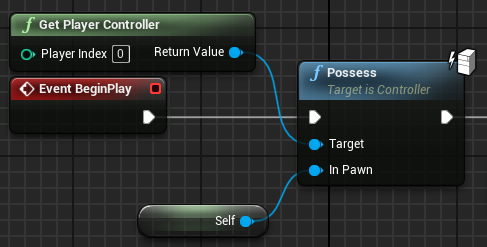
Hey guys, following the Detach from Controller Pending Destroy node, what can i do to automatically have the controller posses another pawn of the same class that is already placed in the world?
 fair sun
trim matrix
fair sun
trim matrix
thank you
celest yacht
Hey so I'm having some trouble with a collision box blocking my widget interaction


 sharp sigil
Why does my decal looks different spawning it from a blueprint than creating a DecalActor?
celest yacht
I want to have the widgets appear randomly over the wall of static (also a widget). The laser only appears when over the widget, but the collision box is causing the laser to not be visible.
I'm assuming it's because my hit result is the widget, but I'm not sure how to make it so that the collision box is not in the way but can still work as a spawning volume boundary
celest yacht
I'll just destroy the box after it spawns the cube.
 mellow stump
I backed out far enough to see this whole mess and it made me laugh 

 cyan drift
Hello i've problem in my live menu when i click to test my fame there is a little ball and I can control her with my control key
spark steppe
all in the same spot 😛 (nah, whatever fits the layout, in the case of the screenshot my input would be down and the output up)
solemn briar
Quick question. I update parent class on my BP, e.g. I make the camera follow @ 3.0 just to test instead of 300. If I save and build the solution it will not update in the viewport even if I compile. I have to save everything, close project, reopen project then I will see the changes I made in visual studio. Is there an option I can enable to allow the viewport to open automatically
with unreal open? yeah
I'm from Unity where you could, does Unreal not let you?
tyty
 faint pasture
Opposite of that. Input at bottom, output at top
maiden wadi
@real garnet Usually via separate mesh components, and hiding one component that is the head. Modular skeletal meshes make it a little easier. Alternatively, you can also just make the material on the head UVs transparent, but it'll look bad unless you cover it with something else.
 radiant nexus
Justa general question. I'd like to make a top down acade racer game with blueprints. Anyone have a suggestion for an appropriate tutorial?
sharp sigil
Anyone good at math? Trying to solve this trig shader problem
I'll post it anyways in case

Essentially, I need to match the rotation of the material with the rotation of the X axis (which I am getting via the splitcomponents node). It's all fine and dandy until you rotate it beyond (-90,90)
 rapid forum
Hi there,
I could manage to write the Metadata of an agent as an array. But how can i write multiple metadata arrays (like: position, id, direction, ...) to one text file?
thanks

 fossil ferry
is it possible to reference a component inside of a widget? i am trying to stop my "CursorToWorld" from displaying when i have my main menu open, but i am also using the level as the background of my main menu
 wooden dew
I've created a blueprint derived from SceneComponent. How do I add subcomponents to it?
fossil ferry
@wooden dew i think we are asking very similar questions. certain blueprints do not have the ability to reference components i think?
wooden dew
@sharp sigil you should use Arctangent2 on the R and G components of the vector
sharp sigil
@wooden dew oh wonderful thanks!
wooden dew
oh, I see; there is no way to do the thing I was asking: https://forums.unrealengine.com/t/spawn-a-component-from-a-component/115978#post1525284

Unreal Engine Forums
I’m making a custom skeletal mesh component and want to spawn other components from it and attach them. The reason for this is the characters in our game have a lot of customisation options and it would be really cool to have a skeletal mesh component that handles all of this, so that we can re use it in different places and not just in the cha...
 pastel garnet
cyan drift
Hello i've problem in my live menu when i click to test my fame there is a littl...
pastel garnet
cyan drift
Hello i've problem in my live menu when i click to test my fame there is a littl...
Set input UI only?
 covert kestrel
Evening all. Is anything wrong with this? I'm trying to move the camera pawn to this actor's location on a umg button event. For debugging, pressing 5 returns the correct location of the target actor, pressing 6 returns 0,0,0, and sure enough pressing the UMG button sends my camera pawn over to 0,0,0 and breaks it. I'm trying to understand interfaces better and referencing variables to avoid adding multiple target actors in my level blueprint to accomplish the same task via event dispatchers.

 chrome locust
covert kestrel
Evening all. Is anything wrong with this? I'm trying to move the camera pawn to...
chrome locust
covert kestrel
Evening all. Is anything wrong with this? I'm trying to move the camera pawn to...
if you mean switching between different cameras
where you have a camera at location 1, and another camera at location 2, etc..
you can use SetViewTargetWithBlend and give it the target camera
otherwise attach the camera to the actor with spring arm comp i guess
covert kestrel
Already on a spring arm but switching between cams isnt an option. Need to understand referencing variables. Can move it easily with targets and binding events but seems like more messing about. Still not sure why this returns the default 000 nit the target location.
chrome locust
covert kestrel
Already on a spring arm but switching between cams isnt an option. Need to under...
Bedroom 2Loc variable is returning 0,0,0?
covert kestrel
'Event bedroom 2' from the interface returns 0,0,0. The variable to start with returns its correct location in the world.
chrome locust
covert kestrel
'Event bedroom 2' from the interface returns 0,0,0. The variable to start with r...
i belive you have to add the interface to the class from where its going to be called
and the class where its going to be implemented
also you should probably call Bedroom2 (Message) with envelope icon on the first picture
covert kestrel
So its back to front? I've got the level blueprint calling the event in the camera blueprint but the camera should be calling the event in the level bp. Pic 1 is level bp and pic 3 is camera bp.
chrome locust
you add the interface to class 1 and class 2
class 1 : calls message function to "notify" others
class 2 : implement/override the function to react in a different way
covert kestrel
I thought thats how I have it, with my umg telling my camera bp to fire the event. The event being, set new actor location, to the set variable from the actor referenced in the level bp.
 severe geyser
hey folks, I used this video to be able to save the highest wave you have gotten to on the UI. It works and I am happy. I want to create different levels and for each level I want the highest wave to be saved separately. I can copy my gamemode and override it to each level, but my question is THIS - Where does the highest wave save to? The slot or the SaveGameHS? https://www.youtube.com/watch?v=Iu3pgdEJnv8

Hey guys, in today's video, I'm going to be showing you how to create a high score system which allows you to set, save and load it and only increase it when your current score is higher.
Unreal Engine 4 Tutorials Playlist: https://www.youtube.com/playlist?list=PLQN3U_-l...
 unique hollow
So
I wanna check how much in a variable remains out of X
by that I mean let's say we have two variables
a "Magazine" variable and "MaxMagazine" variable
both are ints
let's say Magazine is 9 and MaxMagazine is 17
so that's 9/17
how would I get the remainder, which is 8?
I'm sure it's an easy equation that I'm literally not thinking of cause my brain is dumb
severe geyser
does it save to my "Slot Name" variable?

or does it save to Save Game HS?

both perhaps?
looks like it saves to the slot. If I create a new string variable and name it something like "New Level" and then replace all the "Slot Name" variables, it creates a new save slot that I assume is stored inside Save Game HS. So my plan would be to duplicate the GameMode (where this is stored), create a new slot in that that GameMode and then override the GameMode to this new one for the new level. Does anyone see any issue with that?
 keen terrace
Any idea why I am unable to save which Skeletal Mesh is being used?

Testing the loading works, if I change the default value within the save file then I can load whatever Skeletal Mesh I like. However I cannot set it in the above screenshot. Any ideas?
severe geyser
I seem to be talking myself through this. My idea above will work, but because I cast to the original gamemode in my AI and Character blueprints, each of those will need to be duplicated for each level so that they work with the new gamemode. There must have been a better way but it looks like this is what it is
but this could be a good thing. It'll allow me to change AI colours and speed/strength, etc based on the new level
oh man, that means each blueprint that references anything for the gamemode, AI, Pick-ups or Player Character will need to all be updated every time each one is duplicated. Eeesh
dawn gazelle
keen terrace
Any idea why I am unable to save which Skeletal Mesh is being used?
You can't save objects directly in a save game. You can only save properties of objects and then when spawning them on load you read the properties to recreate what you're looking for.
dawn gazelle
severe geyser
oh man, that means each blueprint that references anything for the gamemode, AI,...
This is a perfect scenario to use a Blueprint Interface.
dawn gazelle
Example:

Here I'm getting just a reference to the game instance, and calling a BPI Message.
The Game Instance that is actually being used would have to implement this interface
keen terrace
@dawn gazelle Ok, thanks I will go read into that
dawn gazelle

^ So here is my BP_GameInstance that I use, and what it does when it implements that interface.
It's a way of communicating between blueprints without explicitly casting, and the communication will only happen if the object in question implements the interface.
severe geyser
I will definitely look into this. Aside from the time it will take, anything else wrong with the way I had planned on doing it? Duplicating each for each level?
dawn gazelle
Your game mode shouldn't really need to change unless there are rules you have in play that change with each game mode. Think like, capture the flag vs. death matches. One, the game will end if the flag is captured, the other when a certain amount of kills achieved or time runs out. By utilizing game mode, you are able to reuse levels as you wouldn't need to hard code the win conditions or what spawns where in the level itself. (Eg. in CTF game mode it would need to spawn a flag in the two bases on the map and players are put into teams, in deathmatch, no flags are spawned and players are spawned at random (but predefined) points in the level).
severe geyser
I see what you mean. It's not very efficient to change the gamemode for each level only to ensure it has it's own "high score"
dawn gazelle
The slot name of a save game should either be something defined by the player (think naming their save) or if you only want them to have a predefined amount of saves, then it can be like "slot1", "slot2", "slot3"
Inside of the save game if you're wanting to save a high score for a level, then create a map variable within your save game.
severe geyser
Yeah, in this case the same is automatic and only to hold and display the highest wave they have gotten to
dawn gazelle
Then the map can be something like "LevelName" to "Integer" in your case.
severe geyser
hm
dawn gazelle
So when you need to look it up, you can look up in the map which level it was, and return the highest wave.
severe geyser
so inside my SaveGameHS I would make a new variable called Map?
 rapid forum
Hi there,
I could manage to write the Metadata of an agent as an array. But how...
rapid forum
rapid forum
Hi there,
I could manage to write the Metadata of an agent as an array. But how...
does anyone have an idea how to use this script but with multiple metadata strings?
dawn gazelle
I'd say call it something like "LevelHighestWave"
severe geyser
I'll have to loop back to this but I am looking into it. Thank you again for your time
dawn gazelle

Something like this would allow you to save the current value.
and reading the values out of it:
 rapid forum
any idea?
i basically want also the metadata of the agent id frame by frame in an array. how ould i connect it. it works now for the position metadata
 fossil ferry
unreal engine is so good
 thorny marsh
I know right.
fossil ferry
it's really easy to get an idea running. there are a decent amount of resources especially for blueprint users. I hope they add official EOS blueprints
 devout tide
anyone knows whats the use of speech input in input settings? Is it requiring something more than just adding the input itself? Cant find any documentation for it
 dark crow
rapid forum
i basically want also the metadata of the agent id frame by frame in an array. h...
dark crow
rapid forum
i basically want also the metadata of the agent id frame by frame in an array. h...
Uuh, i don't understand what you're trying to achieve that well, but you could also add the id to the Array after the position?
rapid forum
like that?
 dark crow
I don't see why not
rapid forum
ohhh yeah works
dark crow
Not really sure if this would work, but if you wanna have just one Add you could use Format Text and give each string as an arguement then feed it into the Array
That would result in it being just one index with all the data tho
And at that point you could just use normal Save to File
dawn gazelle
Anyone familiar with localization? Is it wiser to use a string table with predefined keys rather than relying on the generated keys from text fields? I'd imagine the benefit is that you could have a better definition of what the text is by having the key being something meaningful rather than just a number. The thing is, I have about 1000 fields where I need to put text into a table, and that would mean instead of just placing text into those 1000 fields, I have to set those fields to the specific string table entry AND put the text into the string table.
spark steppe
is the localization table a normal data table?
then you could export it as CSV, and edit it outside of unreal, and also keep your "mapping" there
like a excel table or something
or a DB :>
dawn gazelle
It's something like that if I recall, it's just I'm trying to think ahead without diving into localization at the moment. My issue is more in the case of creating the links to the data within the data tables... Though I think I may be able to do them programmatically by creating a csv to import into the table which then would create the link to the string table which would alleviate the tedium of having to click and assign a whole bunch of fields in a table to another table XD
Ok that's exactly what I can do... You can define a link to a string table within a CSV or JSON file and then import it which alleviates having to click and assign 1000 fields manually to a string table. 😄
I just make a tiny program that generates the required JSON for the fields.
 silk crystal
Does anyone know why the set location of the grab physics handle has lag and stutter? Is it fixable or do I have to use animation idk
north hedge
If you're moving with it, attach actor to actor, if its meant to be a ball or something you kick then add force in the direction the player is moving
silk crystal
north hedge
If you're moving with it, attach actor to actor, if its meant to be a ball or so...
Thank you I’ve been meaning to try this but... so is it possible to put a socket on the skeletal mesh floating in that sameish area?
north hedge
Yeah, should be easy
it doesn't account for height though if you're wandering down hills etc
silk crystal
Aight that’s ok thanks
 pearl rose
Someone here have experience with profiling with the session frontend? I'm trying to figure some stuff that I don't find information about 🙂 Thank you
north hedge
Yeah, what do you need a hand with?
pearl rose
I'm confuse about how to find what is causing the hitchs, would you like to jump in the vocal so I share my screen? (no need to speak if you don't want to)
north hedge
I can't sorry, I'm at work
pearl rose
no worries!
I don't want to bother you in your work, but since you ask me if I need some help, I'm wondering if I can send some picture here at least?
north hedge
Yeah sure
If you can set the profiler up and at see the more detailed stuff its giving you then shoot a few shots over
My first recommendation would be to rip as much out of Tick as you can, if you have a lot of actors ticking replacing them with Delegates
pearl rose
there is not a lot of ticking, only in a couple of widget
north hedge
You've also run stat game, stat gpu and other stat commands to see whats clearly causing issues?
pearl rose
I have a bunch of CPU Stall - Wait for event, it's hard to see where the problem is coming from
So regarding the GPU, the game doesn't have actual aesthetic and the performance stay around the same even when I put every setting on low (or simply force to render like 20%)
so it's some CPU problem
At least I believe
(going to send a couple of sreenshot)


hum
maybe this is a not a good segment, it's when the AI get their nav attribute I think
yes, forget about it

 tacit lake
Okay sorry to bother again but having a very strange issue and I've tried diagnosing it with no luck

I have determined that this code is the problem. The player is supposed to automatically reload when the ammo reaches 0
Instead, it reloads every about 4 shots. Very weird
tacit lake
I'm already in a call, and hold on I'm gonna try one more thing really quick
pearl rose
@north hedge Whenever you find the time to look at the picture, let me know, if you don't no worries!
 agile jungle
When I created custom function in bp it can't find actor variable in inputs, what's going on?
 thorny marsh
agile jungle
When I created custom function in bp it can't find actor variable in inputs, wha...
thorny marsh
agile jungle
When I created custom function in bp it can't find actor variable in inputs, wha...
 agile jungle
oh
 zealous moth
pearl rose
I have a bunch of CPU Stall - Wait for event, it's hard to see where the problem...
zealous moth
pearl rose
I have a bunch of CPU Stall - Wait for event, it's hard to see where the problem...
a good trick is to copy that level and remove things to see if it improves performance. I once had an HISM cause massive CPU drops and it wasn't really obvious as to why
zealous moth
silk crystal
Does anyone know why the set location of the grab physics handle has lag and stu...
The stutter is due to collisions. Make sure that when grabbed, the collision is disabled
pearl rose
I'm trying to remove stuff and understand the profiling
for now, moving my pawn on different Tick Group did help
My level is practically empty
what make me crazy it's when I'm alone I have 180 fps and when I'm with 32 bots, I'm at 120-150 fps
zealous moth
that's about right, around 30 actors performance will drop
pearl rose
those perf look good on my computer, just doesn't on other and the marketplace require higher performance, I did some scavenging in another template and it perform around 300 fps on my computer, so I'm really confuse
 coarse forge
or a mesh to socket...
pearl rose
AttachActorToComponent
coarse forge
thx
zealous moth
@pearl rose wanna share your bp? or i guess not for market place... how many operations run on tick?
 mighty fable
So as of now I have a box collider that activates a 2nd camera that I put on my character but when I do a 180 it moves the camera. Is there a way to ensure it doesn't always stay on the players right side?
mighty fable
or would it be easier to set the camera up in the level independently?
 stuck hedge
What's the best way to decide which actor initiates a hit? The hit system only really tells us that a hit occurred, not who is responsible for making it happen. Imagine a scenario where 2 actors are side by side going forward, and the actor on the left suddenly lurches right to hit the other actor. if they have a collider that is set to block pawn, it's likely that both of their colliders would trigger at the same time, and bother generate a hit event, but logically we'd want the left actor to be the one registering the hit. Is this going to be a matter of comparing velocity and figuring out who slammed into who?
 torn oriole
Can anyone send some tutorials link for blueprints ??
stuck hedge
There are literally thousands of them.
torn oriole
Complete beginner
stuck hedge
how could anyone pick one to send you?
torn oriole
stuck hedge
There are literally thousands of them.
Thats why somone might who whats best
stuck hedge
start here: https://www.youtube.com/c/VirtusEdu/playlists

YouTube
Ever wanted to be a game developer? Well now you can with our extensive library of FREE courses!
On our channel you will find numerous courses teaching you how to use game engines and software to create your very own game from the ground up without any experience.
These coures will allow you to fully utilize engines to create any game you dre...
that's as good as any to get your feet wet.
scroll down to his beginner ue4 playlist, it's like the 4th one from the bottom.
torn oriole
Thanks bro
north hedge
Best ones are probably the actual ones by Epic + the Docs, the more understanding you have of the basics of proper language based programming the easier Blueprints are
mighty fable
anyone know how I can turn a 3rd person camera to a 2d side scroller camera? I have the transition down but when I go 2d and rotate it stays on one side
north hedge
If you want it to swap sides you can set its position based on the characters rotation angle
If you want to lock it off to not rotate then create a camera in the scene that follows the character only in position though
Which would be a separate camera actor that has
Position = Player->GetActorPosition + CameraOffset
mighty fable
north hedge
Which would be a separate camera actor that has
Position = Player->GetActorPosit...
not super familiar with a lot of the camera options so i dont know what that would look like
I am looking for it to lock and not rotate
severe geyser
hey folks, what format does music need to be in for adding to game? Is it WAV?
mighty fable
severe geyser
hey folks, what format does music need to be in for adding to game? Is it WAV?
yeah .wav
north hedge
You can find more info
https://docs.unrealengine.com/en-US/WorkingWithMedia/Audio/WAV/index.html
The basic requirements for getting sound files into Unreal Engine 4.
north hedge
mighty fable
I am looking for it to lock and not rotate
Create a camera actor in the world, do the position = stuff I posted and then when you toggle into that viewmode just do SetViewTargetWithBlend
You can also create a camera reference in the Character BP that will allow you to then toggle between them via the Set View Target on an input rather than doing some jank ass GetActorsOfClass crap
mighty fable
north hedge
You can also create a camera reference in the Character BP that will allow you t...
I currently have another camera tied to my camera and when they enter a box collider the 2nd one triggers giving me the angle I want. However if I move backwards the camera will rotate with him
north hedge
Is it attached to the Character Controller?
mighty fable
yea
north hedge
Click the camera and then make sure "Use Pawn Control Rotation" is disabled
mighty fable
it is unchecked
north hedge
Ok cool, delete that camera, create a camera actor in the world, do the position = stuff I posted and then when you toggle into that viewmode just do SetViewTargetWithBlend
or just make the position follow on the X and Z axis
 mighty fable
north hedge
mighty fable
north hedge
how did you get the camera actor node?
north hedge
Its a camera in the world
Click your camera
Goto your Level Blueprint
Right Click and click Reference (Whatever Actor you have selected)
You'll also have to be aware at what angle your character is moving
mighty fable
north hedge
You'll also have to be aware at what angle your character is moving
so I found it but the camera doesnt transition
north hedge
Did you SetViewTargetWithBlend?
mighty fable
I honestly don't know how to do that
north hedge
Its just the node Set View Target With Blend
If you google that you'll get docs on how to integrate it
Manage to get it?
mighty fable
not quite, im watching a video on it now
north hedge
Alright, @ me if you need a hand
 frosty hamlet
I have kind of a complicated question about state management in a character action game. I'm rebuilding my project in UE4 after making a mechanical prototype in Unity, and I'm wondering how much of my existing system is applicable/how much I need to know/how much I need to refactor when it comes to the project
Is this the correct channel for that? I do plan on using Blueprint, but it's kind of a question of UE4's capabilities and included features
mighty fable
north hedge
Alright, @ me if you need a hand
is it possible to make it so I can create a box collider that when the player goes in it, it transitions the 2nd cam?
 mellow hinge
send help

i have this
but it just doesnt register
i have tried literally EVERYTHING
north hedge
Have you tried casting?
Also OtherActor
not OtherComponent @mellow hinge
Cast to FirstPersonCharacter from OtherACtor
mighty fable
north hedge
Cast to FirstPersonCharacter from OtherACtor
would you be interested in screen sharing?
mighty fable
I got that part I'm struggling with getting variables still
north hedge
Which variables?
 blissful grail
Do I need to clean up any event bindings when I destroy an actor?
dry valley

how can i disable the collision for my own character?
the bullet gets stuck

if i ignore the pawn it would work but
it wouldnt colide to the enemy which is also a pawn
stuck hedge
stuck hedge
What's the best way to decide which actor initiates a hit? The hit system only r...
answering my own question, this doesn't work because apparently, at the time that a hit is generated, your velocity must be 0, as it reports a velocity of 0,0,0 for the character when the hit is called. It is otherwise getting the velocity properly, if I print it on tick, it's printing the velocity all day. Also "last inputed movement vector" also reports zero when the hit is generated.
stuck hedge
dry valley
it wouldnt colide to the enemy which is also a pawn
When you ignore movement on your pawn, it only ignores movement on your pawn, not all pawns.
use "ignore actor when moving" on your bullet and pass a reference to your bullet for your actor.
but your bullet should probably be spawning at a spot just in front of your gun, if that blue thing is the bullet.
dry valley
stuck hedge
but your bullet should probably be spawning at a spot just in front of your gun,...
yea
stuck hedge
You'll want to stick an arrow or sphere collision on the end of your gun and use it as the spawn location for your bullet.
dry valley
i used the socket location from the skeletal mesh
stuck hedge
A socket is fine as well, but if it's up there, it seems to be in the wrong place.
dry valley
 stuck hedge
pull it out in front of the barrel a little. If you leave it there and it's set to adjust its position on spawn it could end up anywhere.
You call pull it out in front of the barrel and set it to ignore collisions and spawn anyway to make sure it's spawning in exactly the right spot.
dry valley
oke
north hedge
frosty hamlet
Is this the correct channel for that? I do plan on using Blueprint, but it's kin...
This is the right channel, especially when it comes to coding but unfortunately its such a non-specific question that it would be hard to answer
frosty hamlet
north hedge
This is the right channel, especially when it comes to coding but unfortunately ...
Well I haven't really asked my actual question(s), I was just double checking before I posted it in the wrong place. A lot of servers are pretty strict about where to ask specific things (and my question is pretty long so I didn't want to spam)
gusty cypress
Hello, I am trying to create a event dispatcher within my gamemode to have inputs and outputs, but everything broke and the event is (Read-only) and in other bps it says "no value will be returned by reference...
Its used to communicate between ui blueprints ( main UI --> call event in gamemode --> sub UI --> bind event from gamemode
 north hedge
frosty hamlet
Well I haven't really asked my actual question(s), I was just double checking be...
north hedge
frosty hamlet
Well I haven't really asked my actual question(s), I was just double checking be...
Ahh yeah fair, seems like its not much of a problem on this Discord. Ask away as I'm finishing work in about 30 mins and I'll be able to help a bit more
 honest forge
Hello, does anyone know how to add a second sun to the sky sphere? I would like to have two suns orbiting in a day night cycle 🙂
north hedge
If you create a new scene there is a TimeOfDay template scene @honest forge
and you can just rotate that over time
frosty hamlet
north hedge
This is the right channel, especially when it comes to coding but unfortunately ...
Basically, I have a state machine that assigns states from a scriptable object (data asset?) containing every state in the game, I have a CharacterState class which contains all the properties, criteria and scripts (scripts being generic behaviors like movement, invincibility, etc.) for a state. I have an Attack class with frame data (damage, active frames, hitbox dimensions) built into it, and CharacterState contains a list of Attacks that play at certain times along the length of the whole State
So when you press an attack button, the player state machine checks what state is assigned to the input, checks if the conditions are met to start it, and if so starts the appropriate state, flagged as an "attack"
The state itself then plays the animation with the same name, and performs the Attacks within the attack list and transforms the "hitbox" accordingly (a box trigger)
So I guess my question is, how the heck would you do any of this in Unreal? Is there an existing state machine to handle this stuff? I've heard of some people defining this behavior within the animations themselves instead of having a discrete "currentState/currentStateTime" variable handled independently. I can vaguely wrap my head around rebuilding this system in unreal (minus the scriptable object/data asset part) but is there a simpler way in unreal?
Also, how would you handle stuff at a fixed timescale? I've only seen stuff that updates every frame so far in unreal, but I'd want something that has a regular fixed update rate (like a fighting game) for the sake of consistency
honest forge
north hedge
If you create a new scene there is a TimeOfDay template scene <@!480383091953762...
How would i add this to an existing level?
frosty hamlet
I'm an absolute zero-experience beginner to blueprints, so sorry if this is all fairly abstract and/or obvious and/or convoluted
Also, I'm falling asleep so if anyone has an answer to this stuff please @ me so I'll see it later
But I'll try to stay up in case anyone responds
north hedge
honest forge
How would i add this to an existing level?
Copy-Paste the stuff you need
 fair jungle
Hey all, is there any obvious reason why a vector lerp would return more than 100% of the B input when the alpha is 1? It's hooked up to a timeline that's moving an actor's location based on the lerp result and it's overshooting every time
Here's the graph if it makes it clearer, I'm stuck on this bug for a uni project I gotta show tomorrow so if anyone has any ideas I'd be so grateful

 magic temple
Hallo iam trying to make bow and arrow iam following tutorial from Michael Milord i did everything as he did by my arrows dont stick to the surface correctly. They are always pined horizontally with no pitch. His tutorial is from 2014 so i figured there were some changes to the engine?. So if anyone knows why or how. It would realy help me.
 honest forge
@north hedge sorry, i am a bit lost. I have created a new timofday scene but i can't see what it is i am copying to my level? 😦
north hedge
Skybox and Light mainly iirc
honest forge
I can't see a skybox 😦

 mellow folio
fair jungle
Hey all, is there any obvious reason why a vector lerp would return more than 10...
mellow folio
fair jungle
Hey all, is there any obvious reason why a vector lerp would return more than 10...
are you sure the timeline only goes up to 1? Most timelines last 5 seconds by default I think
it's also a bad idea to be reading from that linetracenode after time has passed, you should save that hit location to a variable then read that
Oh
and most obviously, this is almost definitely your problem
You're probably experiencing the biggest issue when your line trace fails
Which causes you to move towards a point in front of yourself by DASHDISTANCE
but what you don't realize is that you're recalculating that "point in front of yourself" every time the timeline updates, so you're constantly chasing a point that keeps moving in front of you
So again, you need to save that "Point I am Dashing towards" to a variable before the timeline begins, so the code can remember where you're supposed to be headed
specifically this
 fair jungle
mellow folio
So again, you need to save that "Point I am Dashing towards" to a variable befor...
fair jungle
mellow folio
So again, you need to save that "Point I am Dashing towards" to a variable befor...
Thank you so much, that's done it. I didn't expect that point to be recalculated because it came from a non-pure function and the line trace was only drawing one debug line
 glad coral
Hey guys i want to ask you something.How can i make open and close widget with one key inside character bp? I've tried with flip flop but it doesn't work for some reason.Here is the code.Every help is appreciated.


 calm flame
guys I am not 100% sure this is the channel for this but when would I need c# or c++ while making a game in unreal engine
bc I only know how to use blueprints I thought maybe here would be okay to ask
dark crow
You can get comfortable with BPs then try to rewrite the BP code in C++ as an exercise while looking at the BP code
 tawdry surge

 frozen spear
@calm flame or just use the engines to covert it to cpp using https://docs.unrealengine.com/en-US/ProgrammingAndScripting/Blueprints/TechnicalGuide/NativizingBlueprints/index.html

Technical guide for programmers exposing gameplay elements to Blueprints.
And just keep using blueprints
There is videos on yt testing performance and In a few cases the hand written cpp was less optimized than what the engine produced
faint pasture
@calm flame Maybe try getting your feet wet by making a function library and moving some of your heavier functions there. It let's you mess with C++ in a smaller and more limited scope.
 bleak perch
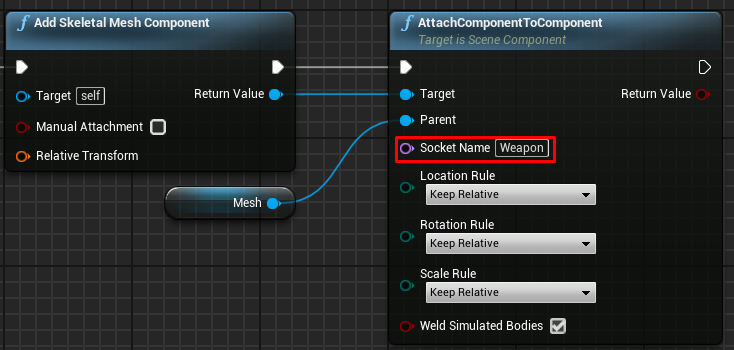
I am trying to attach a weapon to my hand but the rotation is off and I cant find a way to rotate it so that it first perfectly in their hand

this is what it looks like
 tawdry surge
Wouldn't you just rotate it in the BP viewport?
bleak perch
tawdry surge
Wouldn't you just rotate it in the BP viewport?
no because its not there where the character spawns
I am attaching the gun to my hand
and i want to rotate it but I cant
 last abyss
you can put a socket on the skeletal mesh and attach the weapon to that socket
bleak perch
how would i attach the weapon to the socket
last abyss
when you parent the weapon to the skeletalmesh u can choose what socket to attach it to
tawdry surge
^ thats what I was talking about
last abyss
https://www.youtube.com/watch?v=kIfV8LHYqqw check out this video

In this video we talk about what sockets, discussing some of their uses within Unreal Engine and how you can create them.
We also take a look at how we can manipulate a socket's location, rotation and scale with the help of a preview mesh.
♥ Subscribe for new episodes weekly! http://bit.ly/1RWCVIN
♥ Don't forget you can help support the chann...
bleak perch
@last abyss I am trying to attach a skeletal mesh
trim matrix
Is there a way to rename a blueprint without breaking the Cast To nodes it's refered by in other Blueprints ?
 long schooner
Hi, can someone help me with the movement of the player character?
I want the movement to has small acceleretion and deceleration
But for some reason the values are static
aka constant
trim matrix
Did you Set them in your Character Blueprint ? Make sure nothing overrides the default values, or the Set values are used the way you want.
last abyss
bleak perch
<@!131341150136172544> I am trying to attach a skeletal mesh
https://prnt.sc/11bzjaf try this
 long schooner
trim matrix
Did you Set them in your Character Blueprint ? Make sure nothing overrides the d...
long schooner
trim matrix
Did you Set them in your Character Blueprint ? Make sure nothing overrides the d...
are you answering me? all i did is this

 trim matrix
It looks very messy. There's unplugged inputs and outputs. Not sure what you're trying to do.
Why are your InputAxis nodes not directly linked to the Add Movement ones ?
Why do you have to Set X and Y movement separately ?
long schooner
It iz cuz I have to update them every tick as for the time value
trim matrix
... but Inputs axis are kind of already "Ticked".
Because they are updated as long as you use the inputs.
long schooner
are they? don't they update only when u press the button?
long schooner
yeah, but I need to have a deceleration after I stop pressing the button
At least that what I was thinking to do
trim matrix
So for deceleration, you can use the "Friction" value in character movement. It's set to 2 by default I think. A lower value equals slower deceleration. Acceleration is Max Acceleration.
long schooner
actually all of it is cuz my blend animations are not blending properly
coarse forge
so.. if attach actor to component attaches to a socket..... what is the detach one..
is it just detach from actor?
I don't see one that takes a socket name in
last abyss
depends on what you are trying to detach it to
coarse forge
nothing.. I pick an object up.. add to my socket on my hand.. now.. on drop action.. i'd like to remove it
tawdry surge
There is a sword combat project available for free. Id suggest looking the player character in there.. it has a sword and drops it on death
 tulip canyon
is this not how it should be set up?
i'm using the twinstick template and this is in the twinstickBP. it doesn't work.

 charred breach
Hello, how can I make the character scaling up on event tick?
mellow folio
Would have to see the logic inside to see what you're trying to do. I typically have a "trigger down" boolean variable that I turn on and off with presses and releases, and then there's also a firing event on Press
All that said, there's no reason to pass the "actor forward vector" into this event because you can just call that some node inside that event.
Also, unless you're a spaceship, I find it unlikely that the "actor forward vector" will be the precise direction you want to fire...Characters looking up for instance would just shoot straight forward with no pitch
frozen spear
@trim matrix i understand there is limitations, ive not run into an issue with it and i write some pretty complex blueprints. I would guess if a person just writes horrible blueprint code it would be a disaster...but that would be true even if they converted bad blueprint code by hand to cpp
charred breach
charred breach
Hello, how can I make the character scaling up on event tick?
If anyone knows and help me I will be really thankful!
mellow folio
charred breach
Hello, how can I make the character scaling up on event tick?
tick --> set actor scale (Get Actor Scale x 1.01)
frozen spear
Setting actor scale on tick would tie it to framerates. You might want to just start a timer event on beginplay and control the scaling more precisely.
mellow folio
wouldn't be too worried about that precision of someone trying to change actor scale at tick 😆
frozen spear
What I mean by precision is that that thing's going to get massive really quickly
If you run it on tick
Not sure what kind of game the person is making but scaling an actor shouldn't really be done on tick to begin with...
You would in beginplay...use the "set timer by event" node...then connect a custom event that does what panther suggested...set it's rate to the desired speed you want scaling to happen...it will be in secs...
charred breach
@mellow folio What node should I use?
frozen spear
Ok...guess imma see my way out...i just told you 😆

What are the Set Timer by Function and Event Name Nodes in Unreal Engine 4
Source Files: https://github.com/MWadstein/wtf-hdi-files
mellow folio
this will rock your world
of course his idea is better, but changing scale on tick or timer would almost never make sense in a game
 faint pasture
mellow folio
this will rock your world
of course his idea is better, but changing scale on ...
faint pasture
mellow folio
this will rock your world
of course his idea is better, but changing scale on ...
For extra spice use a random float there
frozen spear
Hey im going off the fact that hes scaling on tick...im assuming its not ever going to stop growing...a timeline would be best...but tick would be a mess...just saying
faint pasture
@charred breach What is the effect you're trying to accomplish?
frozen spear
And a timer does it like tick would with more control
faint pasture
Although if it needs to be completely smooth then you end up with a fast timer which is basically a tick with extra steps.
frozen spear
You would never end up with a fast timer lol if you set it to .5 it will always tick on every half sec
faint pasture
frozen spear
You would never end up with a fast timer lol if you set it to .5 it will always ...
Well yeah but if it's something noticable, that's not smooth at all. Depends on the desired effect.
frozen spear
I would still use a timer or a timeline... You can easily set the rate on a timer event to happen every 0.001 second ... Tick is directly tied to your frame rate it's every frame...so if you're on a computer that can pump out 128 frames it's going to happen 128 times... If you're on a potato that only pumps out 30 frames it's going to happen 30 times
Timers are different because you set how often per second it happens. So if you use .1 it will happen 10 times in a second.
 sonic raft
Is there a way to align the text in an InputKeySelector to the left?
I can't seem to find it, there's no justification option like regular text has.
Widget blueprint btw
 finite flax
I want to make an object move at a constant speed but the object just stays in place...

anyone know how to fix?
celest yacht
Looks like you've set the location
frozen spear
You get the actors location and add it to its location+100 in the direction you want
finite flax
so then how do I translate it
frozen spear
If its movement in the world set actors world location
celest yacht
^ this
frozen spear
If its movement inside another actor root then set relative location
finite flax
it still doesn't work tho
 frozen spear
Becuase delta seconds isnt a vector lol
Do a printstring off delta seconds and youll see a result like 3736.2626
finite flax
alright yeah but still, when I do DeltaTimes * Vector forward it also doesnt work
frozen spear
Getactorlocation + (getactorlocation+vector 100.0.0) then set actor world location to the result
finite flax
that crashed my Unreal 😆
celest yacht
Hey so I'm trying to predict path along a straight line for a laser pointer interaction
finite flax
 frozen spear
I would literally have to see what it is that you're putting in there then
I don't mean this in any way to sound insulting but setting an actor's location and moving it around in the world is beginner level stuff
celest yacht
BUT I'm using "Predict Projectile Path by ObjectType" and that has gravity is there another function I can use
finite flax
frozen spear
I don't mean this in any way to sound insulting but setting an actor's location ...
I know, I am a beginner
frozen spear
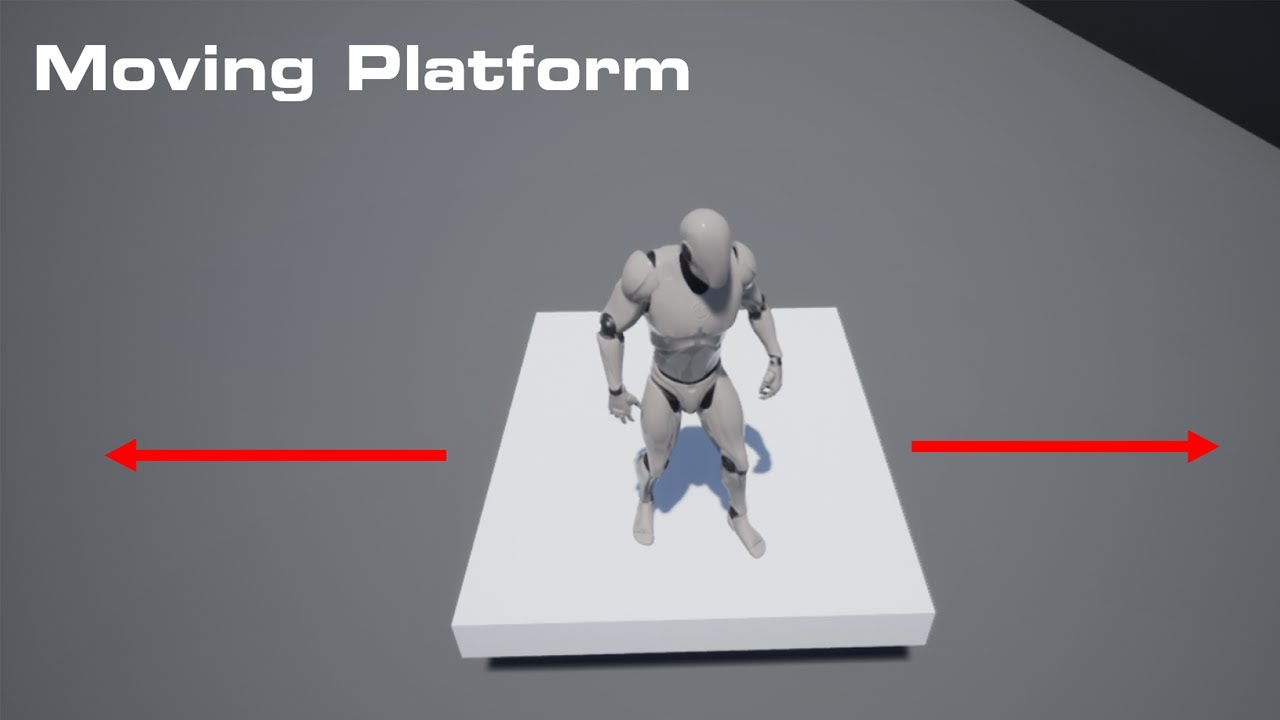
In this video I go over how to make a moving platform how to control where goes and how fast it moves
Check Out My Website For a FREE 3D Model and more of my content : https://www.uisco.dev/
celest yacht
Cause all predict projectile paths have gravity of some kind
finite flax
frozen spear
https://youtu.be/TNkX3DdwhQw
I've watched that video a couple of times already, he uses locations to move towards while I just want my object to keep moving in 1 direction and never stop
celest yacht
Loop the forward progress part?
You can always just give your actor a target point?
tawdry surge
Why not just do a ray trace if you want a straight line? @celest yacht
celest yacht
Not familiar with ray trace tbh lol.
tawdry surge
Line trace
celest yacht
I just want to have my player point to an actor and make a trigger press
Which you would assume would be easy...
tawdry surge
You have to give it a start location and end distance and it gives you a line to that spot while returning any collisions
frozen spear
Idk I posted the code for it above, im just not at my computer so i cant mock it up
celest yacht
Yeah I have the start location set up
tawdry surge
So just add the distance/range of the line trace to the start location and plug it into the end location
You'll get a line of that length and can get a reference to the objects the line hits
celest yacht
and I can have the actor set up to respond to trigger releases made when hovered by the laser/line trace
makes sense.
Should be a bit less of a headache than the freaking widget/laser system I was trying to run...
finite flax
@frozen spear even with a projectilemovement set to a velocity of 300 it still doesn't move lmao

 glossy sphinx
Could anyone help me out? I've got the exact same project on two PC's (made on 1 and copied to 2), on PC 1 it does work properly but on PC 2 the input actions don't seem to work in the bp. I've checked every setting I could come up with and got the same input keymapping but it still refuses to work, any idea on something that I might have missed?
last abyss
finite flax
<@!324316692249444353> even with a projectilemovement set to a velocity of 300 i...
make sure the object is set to dynamic
finite flax
last abyss
make sure the object is set to dynamic
It's set to moveable
celest yacht
@glossy sphinx did you remap the inputs on the second PC yet?
Under action mappings you can click the little icon next to the input key

and then whatever button you press will be mapped to it.
glossy sphinx
Haven't done that yet, going to try that now
celest yacht
If its the same project no changes and the only difference is the hardware that's the only thing I can think of, unless your using VR/gamepad stuff
BBL looking up line tracing stuff
frozen spear
@finite flax if you use projectile movement you have to set the initial velocity also it should be in the details panel
What are you making exactly? Just practicing?
covert kestrel
How can I reference these variables in my game instance? I want to cast to the game instance from my umg to set a camera pawn to these co'ords as a new location for the pawn. I have had mixed results using an interface between the camera pawn, and the blueprint class (not children) and umg event binding, so I'm going to try via the game instance.
 finite flax
frozen spear
<@247360311659724800> if you use projectile movement you have to set the initial...
finite flax
frozen spear
<@247360311659724800> if you use projectile movement you have to set the initial...
I just had to set the gravity scale to 0, now it works
thanks for the help tho!
glossy sphinx
Didn't work 😦 @celest yacht
I've put the enable input and inputaction in the level blueprint as well but still no input from that
 frozen spear
Doxul could something else be consuming the input? A hud that has the same keybind?
glossy sphinx
Not that I know of, there isn't much in the scene for now just a camera with some static meshes, In the settings there isn't any other input that came up with the same key
last abyss
my guess is that you're not controlling player controller 0
tacit lake
Is there a function that will only activate after being called so many times?
Nvm, wouldn't work with my system anyways after I thought about it
Actually, it might if you can make it reset the count
last abyss
you can make your own function/macro for that
glossy sphinx
last abyss
my guess is that you're not controlling player controller 0
This might be it, but how can I check that?
last abyss
glossy sphinx
This might be it, but how can I check that?
click on whatever player you're supposed to control and see if auto possess player is player 0
or this on the actor you're trying to control https://prnt.sc/11c44mi
 cinder shell
heya, guys! maybe someone can help me with this one? I'm trying to make some lights smoothly on and off on button press. So I created array with all my lights and trying to multiply emissive intensity value of lights material with a value from timeline usign for each loop. And I suppose it will not work that way, because it passing just through first array item. But how can I make it work?
 faint pasture
cinder shell
heya, guys! maybe someone can help me with this one? I'm trying to make some lig...
faint pasture
cinder shell
heya, guys! maybe someone can help me with this one? I'm trying to make some lig...
In the timeline update it has to go over all lights and update them
 gentle urchin
^
faint pasture
Access the array in update
gentle urchin
cant they all use the same instanced material aswell?
so you'd only need to control that singular material instance?
Plus Source Material is empty..
cinder shell
good point
faint pasture
@cinder shell are you trying to modulate the actual light emitted as well? Or just some material
glossy sphinx
last abyss
click on whatever player you're supposed to control and see if auto possess play...
Tried both but no luck, the control option for input to player 0 isn't there (It's a camera that I'm trying to control) however I did find that when I press play and I've got the camera selected, I need to press this ''Possess'' button (f8) to control it. Once that is done it allows the inputs to work somehow
 faint pasture
I would recommend you make a light actor, and then just go over the array of actors and call an update event on them.
cinder shell
faint pasture
<@118491516229386244> are you trying to modulate the actual light emitted as wel...
just material emission
faint pasture
cinder shell
just material emission
Is this something you are meaning to be global? Like all lights use the same value at the same time?
If so, this is a good candidate for a material parameter collection. They're basically global parameters that can be accessed in any material, and set anywhere in one place
For instance, if you were making a modern Mario game, you would have some parameter representing the beat of the music and many different materials could use it in different ways
cinder shell
yep... I have four light and I want to change emissive intensity on all of them at the same time
and they all have one material instance
faint pasture
covert kestrel
How can I reference these variables in my game instance? I want to cast to the ...
You are doing nothing with the result of that cast. You're asking hey, can I treat the game instance as GameInstanceContainer? And then it says yep, and then you do nothing with it.
cinder shell
can I just change the value of that material instance without creating dynamic instance of it?
covert kestrel
faint pasture
You are doing nothing with the result of that cast. You're asking hey, can I tre...
great I'm wrong again ffs
faint pasture
cinder shell
can I just change the value of that material instance without creating dynamic i...
I've done that
 vale needle
Hey guys quick question, I understand that not casting to character on animbp on every frame was not working in earlier versions and that's why most tuts actually do it that way. But I tried casting on begin play and setting up a variable, and it doesn't work. Does the problem still persists or am I doing smt wrong?
I kinda wanted to avoid it if possible, just out of best practice
worthy frost
@vale needle what is wrong with a IsValid node on UpdateAnimation and if its not valid try to set it, once its set, you never cast again?
covert kestrel
faint pasture
You are doing nothing with the result of that cast. You're asking hey, can I tre...
so by casting direct from the game instance to the blueprints I want to get the location from, what wildcard should I fill this with?
 vale needle
doesn't isvalid just run every tick in that case? Might be missunderstanding how isvalid actually works
worthy frost
what is wrong with that?
faint pasture
covert kestrel
so by casting direct from the game instance to the blueprints I want to get the ...
Get game instance
 faint pasture
That will return THE GameInstance. Then you have to cast to see if it's of type YOUR GameInstance
vale needle
worthy frost
what is wrong with that?
It's casting on tick no?
vale needle
I see, then it was a total misunderstanding, thanks for clarifying 🙂
blissful grail
worthy frost
no?
I think because it is in the UpdateAnimation event, they're reading it as the AnimBP's tick function.
I just don't think the "Is not Valid" part registered when they asked the question
covert kestrel
faint pasture
Get game instance
everything is saying it doesn't inherit from that class. This is IN the game instance already. All I want is to get the actor locations into the game instance so I can access them. Well doing my head in.
vale needle
blissful grail
I think because it is in the UpdateAnimation event, they're reading it as the An...
That was exactly it! Got me confused :p
blissful grail
Well - what they are doing is setting the variable ONLY if it isn't already set. So, the only time it does do the cast is when the variable is not set.
vale needle
blissful grail
Well - what they are doing is setting the variable ONLY if it isn't already set....
I got it! Thanks both for clarifying this out : D
blissful grail
The validity check is running as often as the UpdateAnimation event is called, but the cast only happens if the variable is null
faint pasture
covert kestrel
everything is saying it doesn't inherit from that class. This is IN the game in...
Show in project settings what class you have set as GameInstance
covert kestrel
All set fine up to now

 tawny jackal
What is the "Is Variable" flag used for here? Does this refer to the actual content changing?
 covert kestrel
I 've already added nodes and used them in there
and event dispatchers
dont understand why it seems so hard to get variables from one pawn/bluprint or actor to another.
blissful grail
tawny jackal
What is the "Is Variable" flag used for here? Does this refer to the actual con...
So you can reference it in the Graph
tawny jackal
blissful grail
So you can reference it in the Graph
So this probably wouldn't be necessary in c++?
blissful grail
tawny jackal
So this probably wouldn't be necessary in c++?
What do you mean? Like if you were building your UI with slate?
tawny jackal
blissful grail
What do you mean? Like if you were building your UI with slate?
I am building a c++ actor that has text in the scene for the user to read. I will need a reference to that text inside my actor. If I write a c++ function to update that text, I can just find a reference on begin play and use that.
blissful grail
I wouldn't approach it like that personally. I would have the actor send out an event that something happened to cause the text to be updated, then in the UMG graph, bind to that event.
dark crow
Let the UMG handle changing its own things, just pass from the Owner of it what you want it to change to
cinder shell
make it work like that.. But I will try material collections tho.. Thanks!
 covert kestrel
faint pasture
Show in project settings what class you have set as GameInstance
covert kestrel
faint pasture
Show in project settings what class you have set as GameInstance
The issue is that this particular cast to game instance (green stroked box) is inside a function I made (since I have to replicate it 5 times figured why not). Putting it into the event graph of the bp itself allows the cast to work, and I can now access the variable in my game instance. I'm still not sure on how to cast out of the GI to another blueprint though.
 worthy frost
@covert kestrel the issue is you have no world context available in that blueprint
you need to pass in some actor that is in the world or some way to get the world.

that is why there is this little World Context Object pin.
function blueprints do not have access nor do they know how to access the world
covert kestrel
I have no idea what world contxt is at this stage of my fledging blueprint career
Though I understand it in theory
covert kestrel
based on your last line
worthy frost
and attach that to the world context on Get Game Instance
covert kestrel
just an empty actor?
worthy frost
its a variable
covert kestrel
yes

 tawny jackal
blissful grail
I wouldn't approach it like that personally. I would have the actor send out an ...
tawny jackal
blissful grail
I wouldn't approach it like that personally. I would have the actor send out an ...
Why would that not be ideal, just calling a public function on the textcomponent that sets the text. Isn't that using a proper interface for such a change?
covert kestrel
worthy frost
I see thanks
 kindred mason
are nested structs ok to use?
fossil ferry
can i change which side blueprints lock to the grid?
dawn gazelle
kindred mason
are nested structs ok to use?
vectors are structs that contain 3 floats and transforms are structs that contains 3 vectors, and you can put both of these in structs, so yes structs are ok to use within structs, just don't try to put a struct into itself.
worthy frost
@fossil ferry blueprints lock to the grid?
fossil ferry
the components in the visual script. can i change which side of the grid they align to?
they align on the left side but it would look better for me if it did it on the right
the anchor for the components in the visual script
blissful grail
tawny jackal
Why would that not be ideal, just calling a public function on the textcomponent...
If you want to do your approach, the actor would need to know about the UMG Widget. Going the event route, the actor doesn't need to know about the UMG Widget, plus the UMG Widget manages its own state.
 summer bolt
how would you cast to a save game object pin, i tried an editable and exposed on spawn variable but it didnt work and i dont really know what else i could try
 dark crow
You Create a Save Game Object, then Cast to your custom Save Game Object and Set it on a Variable
 green eagle
Man having the biggest newb moment.
BSP brush converted into static mesh > set to blockall collision presets.
Character BP with default settings.
Character keeps falling through the plateform.. not sure what I am missing
celest yacht
@green eagle did you import any models?
dark crow
Create Collisions for Static Mesh
green eagle
@celest yacht nah it was a static mesh made from bsp
summer bolt
dark crow
You Create a Save Game Object, then Cast to your custom Save Game Object and Set...
its the casting issue, the object reference pin output fails, with actors i get all actors of classes and get the the one with an index of 0 but you cant do that with a save game object :/
green eagle
@dark crow from what I can tell it has collisions? I used simple.. granted I don't see a box on it.. I do feel I am missing something in that area
dark crow
It's a Green Box or Shape in the Static Mesh view
Represents Simple Collision
If you see none you may not have
You can Auto Generate with the Collision Tab or Auto Convex in case
dawn gazelle
summer bolt
its the casting issue, the object reference pin output fails, with actors i get ...
The "Save Game Object" variable you have... What is the class of it? (You can hover over its output pin to see)
covert kestrel
So my set actor location event is still defaulting to zero , same as it was yesterday by way of a blueprint interface. Now I've tried accessing the target location via the game instance instead, which I prefer as it means less messing when linking to my umg. But I still get 000, but not if I hard wire the coords. Is there anything intrinsically wrong about the way it reads the vector variable of the target object.
 summer bolt
dawn gazelle
The "Save Game Object" variable you have... What is the class of it? (You can ho...
summer bolt
dawn gazelle
The "Save Game Object" variable you have... What is the class of it? (You can ho...
save game object is the class
it sounds weird
and confusing
i think
dawn gazelle
So if it's the same class as what your cast is, you don't need to cast it.
green eagle
@dark crow where is the auto generate that is what im lost on at the moment

 last abyss
covert kestrel
So my set actor location event is still defaulting to zero , same as it was yest...
last abyss
covert kestrel
So my set actor location event is still defaulting to zero , same as it was yest...
you're setting the location of the bedroom 2location variable on the plot itself not the bedroom 2location variable in the game instance?
green eagle
@dark crow aaah! Jebis thank you! God brain just wasn't registering to look at that area.. Thank you so much!
dawn gazelle
summer bolt
save game object is the class
Casting is a means of taking a generic reference and getting to a more specific reference in order to access the more specific class' variables and functions. For example, you can do "Get Player Controller" which returns a "PlayerController" reference. But let's say you're using a custom player controller of class "BP_PlayerController" that has a variable called "MyUI" - you would not be able to access this variable with just the plain "GetPlayerController" reference. You would need to cast the "PlayerController" reference to "BP_PlayerController" so you could access "MyUI".
covert kestrel
last abyss
you're setting the location of the bedroom 2location variable on the plot itself...
Ignore the plot it's just a umg image with buttons where the string printed in the viewport. The target is in a 3d model which the camera rotates around etc. The big number is what I'm trying to retrieve to use as my new location for my camera pawn on a spring arm, but it comes giving me the default 0.
I don;t understand it's like the number is getting lost in translation to the pawn, since the default value of the set node reads 0,0,0, even though the print gives the actors actual location.
last abyss
so whats the "target" in your game instance referencing?
last abyss
okay, when do you set them as the target?
covert kestrel
simple blueprints, single mesh, material with opacity set to zero. Camera rotates around a default target (the walls), I have a camera pawn set up to 'move to focused object' (the invisible celings) when they are highlighted on mouse click. This all works fine. I want my umg buttons in that small plan to do exactly the same thing, 'set actor location' to the invisible ceilings (targets). The UMG button casts to the GI, all works fine, except for 0,0,0 via this set variable.

I could hard code the coordinates and be done with it, but that doesn't help me understand somehting I need to.
covert kestrel
last abyss
okay, when do you set them as the target?

so the plan top left will be used for nav with touchscreens
as well
last abyss
so when you click on the button you should be setting them as the target on your game instance if I understand correctly?
sharp sigil
Is there a function to find a spawn location where an object would not be colliding?
covert kestrel
yes, the event is in my GI and the umg casts to GI and said event.
severe geyser
is there a way to cast to a level blueprint?
faint pasture
severe geyser
is there a way to cast to a level blueprint?
That is not what casting is.
severe geyser
Alright, inside my level blueprint I am essentially calculating and setting the highest wave you were able to reach. In my UI, I want to set it on the screen to show what the highest wave you got to. I need to be able to access the highest wave variable from the level blueprint
in my UI blueprint
I am doing it this way so that each level has its own highest wave. I originally had all this in my gamemode but then it would set the highest wave from one level to all levels
 runic osprey
Hey all, quick question. How can I spawn an actor (in this case a static mesh) at a random location from a target point array? Right now I have it set up so that it will spawn a cloud on begin play, but I get an error saying "SpawnActor failed because no class was specified"


Feel free to @me if I don't respond right away to an answer, thanks!
 golden fossil
Not sure on where to go with this, tried searching online and having a go myself but it just doesn't work lol. I'm looking to create a camera style similar to the Sims 3/4, middle-click to basically do things like turn and alter yaw/pitch etc. WASD / Arrows to move. Any ideas on how to go about this?
celest yacht
runic osprey
Hey all, quick question. How can I spawn an actor (in this case a static mesh) a...
Is your game mode right?
runic osprey
All this is being done inside the blueprint for the actor
But the gamemode for the level is set to the correct one, yes
fossil ferry
Is there any way to reference a camera inside of a game instance blueprint? I am trying to set the background of my main menu to a camera actor referenced by the level blueprint, but i don't know how to call that to my main menu. I tried with a BP interface but it didn't work, most likely because i do not know what i am doing
fossil ferry
if you can link that nice, ty
blissful grail
severe geyser
I am doing it this way so that each level has its own highest wave. I originall...
Put it in the gamemode but have the level BP tell the gamemode how many waves the map is allowed to have.
celest yacht
@fossil ferry https://www.youtube.com/watch?v=jHGASFLaH1w

Support Two Star Games on Patreon! https://www.patreon.com/twostargames --------------------------------------------------------------------------------------------------------------------------
Check out my Link Tree, with links to my game My Beautiful Paper Smile, my other socials, and Discord server!
https://linktr.ee/TwoStarGames
-------...
fossil ferry
golden fossil
Not sure on where to go with this, tried searching online and having a go myself...
i can send you a pic of how i did it
@celest yacht ty
celest yacht
runic osprey
All this is being done inside the blueprint for the actor
So is the actor persistent in the level? Like how does the engine know begin play? I'm still pretty green when it comes to working with this stuff, so another person might be better suited to help you but I can try.
runic osprey
Yea, I'm still learning bleuprint's myself and wanted to do this for practice
What I have it doing is checking to find all the TargetPointActors in the level, making an array out of them and picking a random point from that array. Then it gets the transform of that array at gives the location to a variable. That variable with the location then gets passed along to BeginPlay to spawn a static mesh at that location
celest yacht
The actor exists in the world already though correct?
Or you cast to that actor at some point.
runic osprey
I didn't even realize, no I don't have that actor placed in the level
So I'm doing this in the wrong place then, this should be done in the level blueprint or gamemode, right?
celest yacht
So if you don't reference that actor, or have an instance of that actor in the level then it isn't getting any input and so it doesn't do anything.
runic osprey
Exactly, I completely skipped over that
celest yacht
I believe Gamemode is where you are supposed to spawn actors/pawns/chars
I tend to do weird janky stuff and just force my code to work
golden fossil
fossil ferry
i can send you a pic of how i did it
That would be really helpful, thank you 🙂
runic osprey
See, I usually use C++ but I thought I'd get some practice with blueprint
celest yacht
From what I've read, cpp is superior to debugging
fossil ferry
golden fossil
That would be really helpful, thank you 🙂
i am writing a post on the forums as we speak. i will link for you in a second
golden fossil
fossil ferry
i am writing a post on the forums as we speak. i will link for you in a second
 you're amazing tysm
celest yacht
I had an asset that was deleted and then I changed versions, the asset was still being called but due to the update it never threw out an error. The system would just RANDOMLY crash
runic osprey
Ouch, thats not good
celest yacht
Because I was 100% BP, I couldn't debug as it was kicking out a weird error (again this is what I read online) I ended up having to redo the entire project in the new version
runic osprey
I think that for me, I want to be able to do more complicated things that are easier for me to understand in C++, and then simpler things in blueprint
faint pasture
@runic osprey pretty much don't do anything in the level blueprint. What you should do, is wherever you are storing the score (GameMode is fine for single player), at begin play, set up all your stuff by getting the actors in the level.
So the game mode might get all actors of class wave, figure out what the highest one is, store that, then your character can communicate with the game mode and let it know what wave it hit or whatever
runic osprey
Good to know, thank you
 lime ridge
Hi, I am trying to dynamically move a camera between different locations at run time using an attach to component system. This is called in the persistent level and moves the actor between components as required. This is working and I can see it working in the world outliner, but the camera view isn't changing in game.
When i click on the actor in the world outliner after it has moved I can see the change in the pinned camera popup. But not if I am piloting the camera or in the unselected pinned preview.
Previously in 4.25 this worked, so I am curious what changed since then

 fossil ferry
golden fossil
<:Shy:748955433623879724> you're amazing tysm
fossil ferry
golden fossil
<:Shy:748955433623879724> you're amazing tysm
Unreal Engine Forums
This took me a week or so to figure out and it’s what got me hooked on messing with Unreal Engine. These forums and the discord are great! Also DevAddict and a few others on YouTube are a big help. I have seen this question asked in many different ways but not really answered in a cut and paste format. This is from the original TopDownController...
oof maybe change the first paragraph
 nova sedge
This seems complicated functionally to me. Trying to wrap my head around it (probably math wise) to get this working. HELP!
Preface on UMG scale. I’m making a retro 1-bit game. Perfect pixel scaling is crucial for the visual aesthetic. I use a render texture to capture the game world, and relay it onto the HUD widget. (More control over how it looks to the end-user.
I have a function set up so it’ll either scale to viewport with pixel doubling, or be pixel perfect. There’s 1x, 2x, and if higher resolution, 3x of the original 700x400 resolution.
THe problem is, you don’t interact with the world through the Render Texture. There is a click through, using the gameworld behind the UMG widget. Therefore, I need the FOV to be exactly the same as the render texture, no matter the scaling of the UI and viewport.
I currently use vertical fov so it can scale widget wise for ultrawide resolutions.
So if i’m running the game at 1920x1080, running the UI at fullscreen, there’s no change needed for FOV. But if i’m running the UI at multipler 1x, the FOV will have to increase to compensate for the fact the UI is much smaller.
So I guess, the question is, is there a formula to calculate how much the game camera’s FOV has to increase to display the correct image comparable to the UI render texture?
The following are examples of what i’m talking about and the problems I’m having at 1280x720 resolution.


The camera pawn takes a “FOV” variable, which allows me to change the camera’s fov while maintain the original desired FOV for the render texture overlay. So here, it’s 90fov, while others are 100 or even 110. So I need a function that’ll take those numbers, and compensate when the UI scale changes.
 fossil osprey
Can someone help me? I have a pawn as a main player character, and it has a game mode, it has a player start it has everything for it to spawn, but the collision is not working at all, and once i set the collision of either itself (skeletal mesh) or the box collision (which is the root) it doesnt spawn when its set to "block all" and i've noticed that whenever the collision is set to "query only" the pawn doesnt even spawn, so idk how to set collision for the pawn
nova sedge
This is my current function I use to calculate the FOV scale, but its doesn't align well.
 bold charm
Im looking to make a dash mechanic that dashs to the side that the character is moving , what would be a good approach (like if hes going left than it will dash left , and if hes not moving than just straight up) similar to jett from valorant
faint pasture
@bold charm Single player or multiplayer?
 ionic gull
I'm trying to build a first person shooter, and there needs to be 2 versions of the gun. The first person one that only he sees, and the third person one everyone else sees, is there an easy way to duplicate the object from the first person one?
bold charm
faint pasture
<@444764186359103488> Single player or multiplayer?
single player but does it matter?
ionic gull
Slightly more complicated because certain data needs to be present i.e. What attachments they have on and such
faint pasture
bold charm
single player but does it matter?
Yeah in multiplayer you'd have to dig into the CMC in c++
faint pasture
Idk how good it'd be but the first draft many people do is to set friction and acceleration really low, launch character, then put friction and acceleration back to normal
Launch velocity should be in direction ForewardVector x MoveForwardAxisValue + RightVector x MoveRightAxisValue
Set length to desired dash velocity
Thatll dash in direction you're inputting. To dash in the actual direction you're going you'd just use velocity to get the direction.
bold charm
Thanks alot
 fossil ferry
is this possible? The first interface works but when i try to get the camera working it does not blend


 severe geyser
hey folks, anyone know how I would set the current level as a variable so I can ask the gamemode which level is currently playing, and then load the highest wave for that level?

 obsidian meteor
does anyone know if it's possible to manipulate spline handles (tangents) so that they have unequal magnitude?
@severe geyser there are so many different ways you could do this. you could make an enum of all your level names and set that when you travel. or you could just use getLevelName and parse it through something if you want to do it that way
 cold crown
hey im having a hard time finding out how to do this. I want a boundry to consistently add an upward velocity to everything within it. I am able to make a list of everything within, but not apply the velocity :/
worthy frost
screenshot tool 😦
that is so bright
@cold crown not really sure what you are doing, but it looks very wrong
cold crown
 worthy frost
first your not checking before adding an actor to your array
if it is the correct type that you want to apply velocity too
secondly, your tick needs to loop thorugh each one in that array and apply itr
so Tick -> For Each Loop -> grab its Component -> Apply Velocity
cold crown
i pourposly left no conectors on the bottom half, becuase nothing i try is working, imagiine the picture as more of a fill in the blank question
worthy frost
if its a specific hit component, then why are you storing the actor
cold crown
oh im sorry the velocity change on the right wasnt supposed to be there, I was trying to see what i CAN plug into that node
worthy frost
i mean i just told you what you need to do 😄
cold crown
yeah, im slow at reading, Im trying to take it all in
worthy frost
li
 cold crown
oh thank you
 frank nest
Got a interesting a question here. I am rotating my pawn on the yaw and the roll of when I look around with the mouse. My issue is that the pawn (surfboard) rotation needs to gradually return to center as if you just made a turn in a car and your tires straighten out
 cold crown
does it have to be simulating physics or was that just an example filter?
worthy frost
well you cant apply physics velocity if its not simulating physics
frank nest
at the moment the only thing that returns the rotation to to the other side is using the mouse.
cold crown
@worthy frost lol makes sense , I just feel like i have been able to do it to my character before (not simulating physics) but i may be confusing it with launch character
worthy frost
character is different
cold crown
basically i want it to be able to launch physics body's and player characters at the same time, but i did screen shot you example and can work from there for now, thanks for the help 🙂
 gritty elm
is there anyway to change parent class of blueprint at runtime?
blissful grail
I highly highly highly highly highly doubt it - and why would you even want to do that?
If that is your solution to w/e problem you have, it is awful.
gritty elm
got it, so the next question is : when i set animation instance class, then animation blueprint on blueprint init event is called?
cold crown
@frank nest I have something similar to this, where i would rotate the screen with the mouse, then on release the screen would go back to normal. I used a timeline, but that caused issues with responsiveness, (because the timeline had to Finnish before i was able to move my screen again). So i ended up lerping the timeline "return values" with the input values at the same time, so i was still able to move my screen as it returned back to normal. There are probably better ways but that's how i did it.
 round edge
anyone here good at transform logic got a second? I'm having issues with my math
frank nest
cold crown
<@!339914522015825931> I have something similar to this, where i would rotate th...
Okay I will try something like that! As you can see I was trying to use the F Interp Nodes but no luck so far
north hedge
frosty hamlet
But I'll try to stay up in case anyone responds
Yeah I basically did the same thing
So to answer your question, you can use enums to declare/switch between states in Blueprint, exactly like C#'s enum and switch system, this can be done in Right Click > Blueprints > Enumeration, then you can just create a variable in your Blueprint and make it the enum then use that to swap between states.
So yeah almost everything you've done in C# can be replicated in Unreal, you'll just need to get used to the conversion like GameObject/MonoBehaviour > Actor/Components
north hedge
honest forge
I can't see a skybox 😦
Incase this still hasn't been answered, you need to copy over the SkyAtmosphere, SkyDomeMesh, SkyLight, Directional Light and if you want volumetric clouds copy them over as well, basically everything apart from the text and geo
because just using Ctrl + L you can make some neat lighting scenarios, not that this is a good one but its an example of a real-time non light build lighting change

 deft nimbus
Hello! If I save a player state in the game instance, can I load it in another game mode? It doesn't seem to work for me.
Ok I take that back it works
 sweet swan
Why does my MultiSphereTrace return these two green hits outside of the trace?


 marble tusk
gusty cypress
Why can I not edit my event dispatched with input and outputs?
marble tusk
gusty cypress
Why can I not edit my event dispatched with input and outputs?
Are you selecting it in the My Blueprint panel and trying to edit the inputs and outputs in the Details panel? Or do you mean why you can't edit the node graph?
foggy escarp
worthy frost
<@!272978892837486593> cause the idea is do once, then reset allowing the other ...
Yeah I didn't realize that functions are called every time as a separate code block. So any flow controls shouldn't be used in them as they would be called for the first time every time.
It's makes since that way anyways
 brittle sky
how would i loop through this array and change every lights intensity to x ?

i understand arrays and how loops work but not how to actually go about it in unreal
north hedge
If you're not doing it per-frame and rather on a timer or something you could do this...
brittle sky
its simply when x is true loop through array and set everything to x
dawn gazelle
Something like this
 north hedge
Yeah that
 odd roost
Does anyone know how to replicate this mechanic (link is time stamped)? If I use a physics handler and have the mesh simulate physics, then the actor flops and spins all around. If I turn off physics when I pick up the actor and turn it back on when I set it down, than I can never pick it back up again because the mesh isn't the root component and it is a scene actor (the actor in question is a child of a child).
https://www.youtube.com/watch?v=CzVCjQQW-Kc&t=277s
Welcome to Mist Survival! MIST SURVIVAL is a Single-player, survival stealth sandbox game; Players will experience the Apocalypse stimulation in the form of virus pandemic, the players have to deal with it to survive through the difficulties such as finding shelter and food and threats from the environment and climate. Today in Mist survival, we...
 north hedge
Thats exactly what Datura linked lol
north hedge
Nah I had the same issue
north hedge
odd roost
Does anyone know how to replicate this mechanic (link is time stamped)? If I use...
At a very basic level its just attaching an actor to an actor
odd roost
Yes
The two methods I've approached are physics handle and attach actor to component
The item needs to simulate physics at the end of the process though as it needs to be transported in a trailer
brittle sky
how would i implement a timeline for each lights intensity

so each time it loops it starts the timeline to slowly lower the intensity
if that makes sense
north hedge
lerp
or finterpto (thanks Datura :P)
What I did for another game I was working on for softly flickering lights was make a Spotlight child actor, create a bool for that actor and then run a timer that set a random time between two values that would enable a bool that allowed Tick to run the FInterpTo between the current brightness and a target brightness that was set by the timer
odd roost
I believe my only option is to make the mesh the root, that seems to work
north hedge
If you make it kinematic when you pick it up that might also work, that way its still running physics collision checks
odd roost
this seems to work well, but as you mentioned, it is ignoring collision completely, not just the pawn channel.
 north hedge
Try replacing SetSimulatePhysics off with Kinematic Physics on?
It should then still physically interact with objects
I'd test it myself but UE4 is building lighting and shaders
cyan drift
pastel garnet
Set input UI only?
How can I do that
north hedge
PlayerPawn > Input Mode UI Only
odd roost
That node doesn't show up, even with context sensitive unchecked
north hedge
yeah, gimme a sec to find what its actually called
north hedge
cyan drift
How can I do that
Set Input Mode UI Only
Apparently they're called Physics Constraints
A user guide on using the Physics Constraint Component in Blueprints.
odd roost
Ah okay, I'm not using a physics contraint
Thanks for checking
First pass, trailer is not simulating physics, just a PoC
 odd roost
yeah like crazy
north hedge
When you drop it on the trailer try running an "Attach Actor to Actor"?
odd roost
if I don't sim physics then it just stays where ever I put it and doesn't move with the trailer
north hedge
Yeah
odd roost
I am not, because there will be a lot of things that you can put on the trailer
north hedge
Ahh ok
Then yeah, maybe a trigger that attaches it to a physics constraint when you drop it?
odd roost
It's possible I can add sockets and attach to the nearest socket, but the combinations just seems like far too many to account for
Also, that trailer is a placeholder and I plan on adding one with higher walls
north hedge
What if you make the objects heavier?
odd roost
might be able to do the physics contraint
that seems to never have any effect for me when I mess with physics
 rocky flicker
hey I am trying to add a item to a socket I modified the socket through the preivew asset but one I bring the static mesh into the the blueprint and attach it to the socket it some where super far away
I adjusted the socket to look right in the skeleton do I have to move the sword back into back by hand in the blueprint then whats the point of setting up the socket
does the static mesh need a bone what am i missing
so in the blue print I had to zero out the location to get it more or less in the spot
In this video we show how the Skeleton asset can be used to create sockets which we then populate with a Static Mesh. This is useful if you want to have your character hold something in their hands or attach something to a characters head like a hat. We also show how Skeletal Meshes that share the same Skeleton asset can share any sockets you de...
if anyone gets lost
 woven idol

guys
if its a 3. person character, to get the skeletal mesh we do ,,get player character,,
But what node do we use if its a vehicle and we want to get the mesh of the vehicle?
stuck hedge
How does one get the velocity of an actor when it hits something? Or more precisely the tick before it hits something? Unreal seems to immediately change the velocity on hit, either to 0,0,0 if it causes it to stop or if the hit causes the actor to move in a direction (like down) it immediately reports a velocity like 0,0,-1 or something of that nature depending on which way the actor his thrown from the hit. I can't just filter on 0s, because the velocity on the same tick as the hit could actually be anything depending on the angle of the impact.
stuck hedge
woven idol
You need to cast to the pawn BP first.
Until you cast it doesn't know what the player character is.
so pull off player character and cast to the vehicle blueprint, then you can access all the components and variables of the vehicle.
woven idol

In the tutorial I watched he did this to attach an actor to his 3. person character and I want to attach an actor to a vehicle @stuck hedge
He didnt use casting but it worked in his video?
 sand shore
that isn't a tutorial
stuck hedge
I thought your vehicle was your player character.
sand shore
tutorials teach you how things work, not a specific thing that happens to do a thing
you can't find the vehicle mesh because the tutorial didn't teach you how
anyway
where is this code at?
is this a controller?
is this the game instance?
woven idol
Do I cast to the name of the vehicle blueprint or do I use cast to pawn
is a blueprint class with a vehicle in it
 woven idol
Which one do I use
sand shore
aight I tried
I cannot help you without more information
you won't give it to me
Good luck, enjoy tuts that don't teach
 white crypt
in order to get some help you will need to put in time to atleast learn fundamentals

Announce Post: https://forums.unrealengine.com/showthread.php?101051
This Training Stream takes a look at Blueprint Communication. We find that Unreal Developers of all levels can sometimes struggle through the concepts behind moving data between objects. So in this video we'll take a look at the different ways to make Blueprints talk to one an...
watch this video couple of times @woven idol
woven idol
Ohh thank you very much ☺️
white crypt
i recommend doing something easier, don't expect to make your dream game in your first attempt
it will take a lot of time
imagine if we didnt have blueprints, what would you do then?
you would have to memorize and understand all the definitions/rules etc to even have something functional
i would say its similar when you are learning a new language, you start with simple words like hello goodbye and not full paragraphs
 patent wasp
What is the deltatime in the tick function? How does that get calculated?
patent wasp
Oh awesome. Thank you
trim matrix
Hey guys, just a quick question, is there a limit of variable ? I mean, can the player have like 50 variables without causing problem when you play ? As I want to save the informations of the variables on my save system that I made earlier
 boreal tusk
I have a base actor where I cast to & get the game mode.
I made children of that actor, those inherent the created variables from the base actor. However, This does not seem to work with the game mode reference.
My question: Do I have to get my game mode on each actor child? Or is there some extra step I am missing to make the game mode ref variable from the base actor work on a child actor?
dawn gazelle
boreal tusk
I have a base actor where I cast to & get the game mode.
I made children of that...
If you're setting the game mode reference on something like Begin Play on your parent actor class, then on your Begin Play of any child actors, if you're overwriting it, you need the call to the parent hooked up and you should then have the variable set on the child as well.

 boreal tusk
@dawn gazelle Yep that was it 😅 Thanks for the pointer!
torn oriole
Can anyone help why the cube is not moving ??
Why is it like the camera moving i want that cube to be moving ?
white crypt
because its not a pawn and by default it wont take any inputs
if you want for inputs to work inside an actor, you need to enable input first
 fair frigate

am i crazy?
this works in 4.22, but in 4.23-4.26, once i disable the collision, it never renables itself again.
i built this small demo actor to test it. the collision and visibility works perfect in 4.22, but works incorrectly in 4.23 and above
 solar yew
Hi! I'm making a Virtual Camera for Digital Scouting/Recording of Mixed Reality Content.
I've made a blueprint which follows a Motion Controller for its position and orientation, so I can drive a remote display.
I'm currently using a Vive Tracker, configured as "Camera" in the SteamVR Manage Vive Tracker Settings, and selected it under that name in Unreal. However, I can't for the life of me figure out how I can make my Vive Controller work in the same way.
When I select "Left", "Right" or "AnyHand" in the Motion Controller Source settings, it doesn't follow/track the Vive Controller at all. It would be great if anyone could help me figure out what I am doing wrong. Thank you!
 trim matrix
Hi All I working on my panel but I cant find information how making this in Editor Utilities is it possible ? BTW is not my panel is one example witch I find in internet

 haughty crypt
hey guys, what would the best way to make a wheel click every angle iteration
like a ticking sound every time a wheel reaches an angle tolerance
like, I could add a modulo, but then it would have to be looking for a nearly zero value, which is not what I'm going for
 round merlin
is it possible to know wether an instantiated mesh is colliding with another one?
 brisk tide
whats the best way to replace even tick? If I want something looping every 0.01sec
i know you can make a timeline loop but im wondering if it has any cons and how is that different in terms of performance?
round merlin
brisk tide
whats the best way to replace even tick? If I want something looping every 0.01s...
you have timers in bp
you can set a timer by event/function
brisk tide
Oh right ill try that out. Thanks!
 lean epoch
@brisk tide you can change the tick interval. Also you can use the tick with a delay to control the interval inside tick itself. Tick isn't the devil.
 supple dome
If I want something looping every 0.01sec
a tick runs each 0.016 seconds (average)
you cant use a timer for something faster than tick, not reliably
brisk tide
timer works well for my linetrace stuff but when i use the timer for my camera logic it gets pretty choppy even on 0.01
does adding a delay to tick actually controls the interval of the tick itself or does it just delay the interval?
supple dome
whatever movement you need every frame, use tick, theres no alternative
lean epoch
I saw that in the Epic example, in the flying butterflies, and it liked me, you can download it and see how it manages in the the blueprint
brisk tide
@lean epoch ill check it out thanks
deft nimbus
I'm struggling with something I maybe do not understand properly so I would like to ask:
I have two teams that get set in a lobby with an own game mode with 2 playerstate arrays in the game state. These 2 arrays are then saved in the game instance for servertravel that is changing the level and the game mode. Both game modes use the same game state.
Loading the array with the teams however seems to not work, the arrays have the right length, but nothing in it. Is this not the way to save stuff between levels?
 latent arch
hey peeps i wonder if anyone here knows, ive tried the CPP room too 🙂 Ive enabled this check box and now my project wont open because i dont have the source locally. Does anyone know which config file this command is in so i can revert it? many thanks!

does anyone know which config file i can delete to reset the editor prefs perhaps?
trim matrix
I add again this time is my panel i want add this icon on my Editor Utility Widgets is possible ?

is it possible without CPP use only BP
?
faint pasture
@haughty crypt use modulo or rounding and store a current value. Click when NewValue does not equal OldValue
haughty crypt
yeah I think the rounding was a good idea, I floored the division between current rotation with a specified angle and would fire a function when the new integer does not equal the old
 manic vessel
Can somebody tell me What Im doing wrong. Im trying to get a Location in the centre of a vector between 2 points.

 left niche
manic vessel
Can somebody tell me What Im doing wrong. Im trying to get a Location in the cen...
left niche
manic vessel
Can somebody tell me What Im doing wrong. Im trying to get a Location in the cen...
After you multiple the rotation by 2, you need to add it to the vector from where your line starts
it should be "Physics hand R"'s location here
manic vessel
thanks , will try now 🙂
AWESOME 👍 , The fact I was so close is encouraging to me ( UE4 is the only coding I have ever done )
 high wave
Hi,
Does anybody knows if Spline Mesh is broken for 4.26?
I'm trying something quite simple and I followed 3 different (but pretty similar) tutorials that were very straight forward. Nevertheless, my mesh is only getting stretched on the X axis, not truly following the spline.
At this point, I'm starting to think that Spline Mesh are simply not working on my version or that I might be missing something so basic that isn't covered on the tutorials.
Anyone with the same problem?
 twilit heath
high wave
twilit heath
high wave
Hi, thanks.
Not sure if it is what you mean, but I've configured the "forward direction" to meet with the direction I want my mesh stretched
covert kestrel
Whats the big secret? This is always 'none', whether I use the pipper in the viewport, or select my target from the dropdown? I compile, I reboot, but it's still the same. I don't understand.
 high wave
This is the configuration when I add the spline mesh component

This is what it looks like right away in the editor

When I stretch alongside the X axis, the spline mesh stretches as expected

But if I move the spline point in any other direction, weird things start to happen
 runic osprey
Hey everyone, yesterday I was having an issue getting a static mesh to spawn from a random location from an array. I fixed that and it spawns just fine, but I am getting a lot of errors thrown when it spawns. Can someone help tell me what the mistake is? (done in mesh blueprint)

This is how I am getting those random spawn locations (done in gamemode). Disregard the set gamemoderef. I was testing something, and it doesn't do anything right now

 radiant basin
Hello there! Quick question, how would you go about making a different input "mode" such as approaching a crane game machine where the same inputs suddenly controls the machine and not your character?
 cinder laurel
How do I get Sequencer Editor, use it to open a sequence in blueprint library?
I need to automate a few task in sequencer
 turbid siren
Guys Hi, can yanyone help me solve this. It completetly breaks my flow each time.
 bold charm
how can i launch the player in one axis?
 sonic pine
Hiho i have a little problem with my healthbar. My healthbar widget isnt updating. I have a HealthManaEXP_widget, called Heathbar_widget and a Main Widget to display all widgets.
I have linked all widgets to the ThirdPersonCharacter_BP

Maybe I linked it incorrectly?
My 2nd question is should I replace the main_widget with a BlueprintClass HUD?
Is this better? Better performance or should I continue to work with Main_widget?
 heady pebble
very noob question here. working my way thru a tutorial on gamedev.tv. Is there a way to copy blueprint code from one level in a project to another? In other words, I have some funtionality on one level blueprint which I want on a new level that I just made. Hope that's clear! TIA!
 latent mauve
@heady pebble 🙂

unless you mean just copying nodes, then in that case, you can use CTRL+C
heady pebble
I tried copying the nodes. Selected them, did ctrl-c, then switched to other level blueprint and did ctrl-v. nada
latent mauve
that's unusual, i just tried on my project and it worked fine!
heady pebble
@latent mauve and where would I find the dropdown you pictured above?
latent mauve
right click the blueprint in your content browser
maybe it's an external problem? have you tried right clicking and selecting copy from inside the blueprint instead of keyboard shortcuts?/
heady pebble
right clicking in the blueprint level where the nodes doesn't allow me to copy
derp just got it with ctrl-c and v. I had to click into the blueprint graph first. Thanks for your help!
 fervent swallow
Hi! I would like to know how to stop playing a sound under a condition. I have a pushable box that is meant to play a sound when the player starts to push it. the problem is that when I stop pushing it the sound keeps playing. Does anybody know how can I make the sound stop along with the box?
I tried getting a refrence to a sound and then I guessed there would be a play and pause option, but it seems like it is not the way
white crypt
you can go that route
and use stop
or make a sound class and change volume for that, but personally i would go with the first approach

 tidal ledge
Hey folks,
I have a blueprint actor that's derived from a custom class that is in turn derived from AActor. I have a custom event in the blueprint called ActivateNextNode. I want to trigger that event from my level blueprint. But when I try to use that event in my level blueprint, it won't compile. The error message is:
Cannot use the editor function "ActivateNextNode" in this runtime Blueprint. Only for use in Editor Utility Blueprints and Blutilities.
Is there some obvious setting I'm missing to make the event available for use at runtime?
 stray island
My for loop is inside a function , how do i make it so after calling the function it should not loop whats after the function but as “ completed “ instead
 kindred wagon
Hey guys, hope you are doing great!
Who somebody can tell me how i can spawn a particle system to every bone of my fracture object?
This method does not work correctly: Screenshot
 fervent swallow
white crypt
<@!271755468219613185> , or `set paused`
fervent swallow
white crypt
<@!271755468219613185> , or `set paused`
Im kinda lost with this, what is set paused?
 mild valve
Guys maybe someone have seen issues like that, when I'm testing my pawn in UE4 edtior everything works fine, but when I build game - pawn doesn't react to any input, but what is the most fun part is that even if I do some print string to debug on input event - those are working, but pawn doesn't move, aswell as mouse can't rotate
faint pasture
@mild valve what happens if you just launched the game? Like right click the project file and hit launch
mild valve
project file or builded game exe?