#blueprint
402296 messages · Page 631 of 403
 stray island
 dawn gazelle
Probably cleaner and better to control a looping timeline for each input I'd imagine.
 dawn gazelle
stray island
But how come the keyboard button only works with the inputs project setting bein...
dawn gazelle
stray island
But how come the keyboard button only works with the inputs project setting bein...
I don't understand the question.
 shy current
How can i have 2 execute thing in one "Square"
shy current
yes
 twilit heath
should first agree on definition of "node" and "pin" for this one 😄
 worthy frost
Make a macro and add exec as a pin in the return node
Duplicate for additional pins
If you are on about latent tasks then that is a whole other ballgame
 dark saddle
hey, say why is it when i use nav modifier in the level i can change the shape to cylinder

but not in the BP nav modifier

just a box shape
worthy frost
Brushes are only modifiable in the world
shy current
I never used a macro
 dusk umbra
Please message me if you know about networking, I have a very specific problem that needs to get fixed
dark saddle
well thats too bad becuase i wanted to proceduralize this

guess ill just have to cut out a bigger chunk
 shy current
What is your game?
dark saddle
2D RTS, company of heroes & kingdom rush crossover
i wanted to do something 3D, but i cant run it, so im starting off with this
every sprite was drawn by me with my mouse, no graphics tablet
shy current
Lol i tough the game was about a capsule rolling down a hill and that the sand bag thing was an chicken nest
dark saddle
yeah paper character also has capsule component inherited as the regular character is the parent class, as for the bunker that's the first time someone called it a 🐔 nest
 jaunty stirrup
Need help my input is never called however i set receive input to player 0

its not called since i reParented the class to character

 spark steppe
dark saddle
yeah paper character also has capsule component inherited as the regular charact...
spark steppe
dark saddle
yeah paper character also has capsule component inherited as the regular charact...
it's not too late to go for the chicken game
dark saddle
crossy road 2.0
 hasty nebula
hi guys, i got a qustion
So i've used the mixamo animation retargeting plugin to convert my skeletalmesh/skeleton from mixamo into ue4. However if i change my skeletal mesh in my 3rd person character bp, and set the animationbp for the same one i was using, it doesn't work. in fact, no animations show up. in order for them to show, i need to retarget animation(duplicate)then it works on the model i brought from mixamo. I was under the impression that if the Skeleton was retargetted, it would basically be the same as my manequion's skeleton and therefore older animations (from the mannequin) would work on my new, skeletalmesh from mixamo.
So my question is, having already set up quite a big animation bp with logic/other blueprints tied to it, whats the procedure to have the new skeletalmesh work with all my previous logic and animation? Seems like retargetting all the old animations would require me to have to change the animation files everywhere(blendspaces, blueprints and animation blueprint).
Am i doing this wrong? Or it's really all about the painstaking process of going one by one, through the entire game and replace animations?
 tardy kayak
I need to pick up a object on the client side and have it update on the server any one got a good tutorial on this I need to update its transform thanks
 dense mica


 sweet swan
I have an arrow and I want it to point the direction it's going after it bounces off a wall. Currently, whenever it hits a wall it bounces off and spins in circles. I've locked it's Z position and it's X/Y rotation. How would I set an actors yaw/Z rotation in the event hit to point in the direction of it's velocity after a bounce? I would think the "Rotation Follows Velocity" on the ProjectileMovement component would do the trick but it doesn't seem to work and I've tried every combination of these nodes.

 burnt edge
does a do once node inside a function get reset each time the function is called?
sweet swan
burnt edge
does a do once node inside a function get reset each time the function is called...
Yeah, it's ran separately
burnt edge
is there a way to make that not happen? other than putting the logic in the event graph?
sweet swan
burnt edge
is there a way to make that not happen? other than putting the logic in the even...
that would be the solution
burnt edge
ok thx
 tight schooner
@sweet swan maybe look-at-rotation with velocity as target and 0,0,0 as start. Set arrow component rotation mode to absolute (in transform section of details rollout)
sweet swan
tight schooner
<@434005121509228547> maybe look-at-rotation with velocity as target and 0,0,0 a...
It still spins, it seems like it has some rotational velocity or something after it bounces
tight schooner
I don't know anything about the projectile movement component unfortunately. All I know is if the root or otherwise parent component is rotating, and the (arrow) component attached to it is set to "absolute" rotation mode, that component won't rotate with the parent. Idk if projectile movement component does something weird with that.
sweet swan
tight schooner
I don't know anything about the projectile movement component unfortunately. All...
Using the SetPhysicsMaxAngularVelocityInRadians to 0 seemed to allow me to set the rotation without it continuing to spin.

 jagged marten
Hi I have this on hit response from an object I've created. It currently correctly prints me the object I'm hitting, however, I ideally would like to know which child specifically of that object I'm hitting. How can I access this information?

To partially answer my question myself : You can use the "Hit Component" output to get the child hit, however, In my case I'm still having problems as my Box Collision is for some reason not considered a component.
dawn gazelle
jagged marten
Hi I have this on hit response from an object I've created. It currently correct...
You can do the same thing as below when plugged into Hit Actor

 lunar flower
Hey bois I need math help again 😅
Trying to rotate a needle based on RPM.
I want to have the needle pointing at 25 if the input value is 25. However when the needle is pointing at 25, the rotation of the needle is 53.
When the needle is pointing at 0, its rotation is -119 and when its pointing at 35, the max value, the needle's rotation is 131. So the needle moves over a 150 degree radius.
How can I solve this with math?
I suppose the answer is really simple, but I'm having issues here 😅
 dawn gazelle
Map range node. I think this should do it.
 lunar flower
No, because remember, the needle does not rotate over 360 degrees, but 250.
dawn gazelle
You've already figured out the rotation bit of it tho... -119 when pointing at 0, and 131 at 35.
So now, what you do is feed in the value of the RPM, which is the In Range A and in Range B. So when it's 0, the output will be set to -119. When its 35, it'll be set to 131.
lunar flower
What does the 35 number in "In range B" mean in this case?
lunar flower
Ok, but I tried this, and it worked fine when the input RPM was 25, but the lower it gets the more wrong it gets. So if I input 10 in the "input value" the needle points at 12, and if I use Input value 5, the needle points at 7
dawn gazelle
only thing I coudl say there is that your gauge starts at 3, not 0.
so maybe set in range a to 3.
 solid nexus
hey ya'll - I'm using a blueprint interface to open doors - so when a door is overlapped by the player, the player can hit 'E' and send the 'open' event to the BI and the door opens. it works locally but the door remains closed in all other instances. I'm a bit confused about how to get this to replicate
this is on the player:
 lunar flower
dawn gazelle
so maybe set in range a to 3.
lunar flower
dawn gazelle
so maybe set in range a to 3.
That did the trick! Thanks a lot 😄
dawn gazelle
lunar flower
That did the trick! Thanks a lot 😄
also, as it's a clamped node, that means the gauge will always start at 3 if you set it to that. Not sure if you want it to be below 3 if the value actually is 0.
solid nexus
and this on the door:
 lunar flower
dawn gazelle
also, as it's a clamped node, that means the gauge will always start at 3 if you...
lunar flower
dawn gazelle
also, as it's a clamped node, that means the gauge will always start at 3 if you...
No this is perfect. Thanks again!
jagged marten
@dawn gazelle thanks :)
 stray basin

 trim matrix
@sweet swan sounds like behaviour of a bouncy ball, either make it less bouncy or handle the collisions manually
 sweet silo
Hi everyone ! I'm trying to create a routine for my character. Like he wakes up at 8.05, has to take the 8.10 train, be in the factory at 8.12 etc...
And then the day just starts over again.. how would you do that ?
Thanks a lot !
here is a scheme of how the day would go
I've already made a timer but don't really know how the best way to go from there..
The day would be real time, with some ellipses, from 8 to 12 for example

I know it's a bit of work but i would be really interested to have your opinion 🙂 Thanks again !

 arctic finch
Ok, i have a problem, i have a level with world comp and level streaming, when the map loads, i fall belew the map because the level im loading in doesnt load right away, how can i set up a delay so it wont spawn in untill all the sub levels are loaded?
 keen bluff
Is there a way to wait for a module to load before loading the content?
I keep losing my blueprint widget bc the plugin isn’t loaded

 short coral
Hey guys , is it possible to create mutliple variables through the use of a for loop?
Like say i'm going through an array of materials and i want to create a dynamic material instance of each , is it possible to just have it promote each to a variable with its own name?
twilit heath
why just add them to an array of DMIs
 dark crow
You need a reference of the Enemy
Could use Get Owning Player
If it's done with a Widget Component you need more of a setup
spark steppe
then you dont need to cast it
so i guess that logic is somewhere else, not on the enemy character
is the widget attached to the enemy? or is it just 2D overlay?
then i dont know why casting the result of get owner would fail
i would add some print string nodes to debug it to see if you get the correct reference
perhaps, can't check right now as i dont have access to unreal atm
no wait
getowningplayerpawn would give an player?! which the enemy is not
theres some node to get the pawn where the widget component is attached to, thats the one you want to use
just a self reference as input
the one with the error, is that a plain self reference or did you drag that out of the characters outliner?
can't you just pick a reference of the character if the component is aware of the whole hierarchy? I'm actually not sure myself whats the best way, was under the assumption that its not aware of the upper hierarchy
but apparently it is, or it wouldn't show the option to give you a reference to the character mesh
 fading raptor
Im having a strange problem. So on one level, my character aligns to the landscape and everything works fine, but on another level, the character doesn't align. I checked if i was using the same character, checked the landscape collision, and even checked the code but i cant find out the problem
Here's the code to align the character, basically im trying to figure out why it doesnt work in a different level
 dark crow
 narrow bear
Is it not possible in blueprint to unbind a specific event listener, tied to a dispatcher?
That is to say, there's the unbind all node, but I want to cancel a specific bound event, within the context of the observer/listener
EDIT: I'm blind, there's an unbind node...

 hearty lintel
sorry guys i'm a bit of a noob sometimes, i need to do something really easy but cant figure out the vectors maths behind it x'D
i need to do a linetrace from my vehicle that aligns to the velocity of it
how do i set up the end of the linetrace to do so? thank you
hearty lintel
alright thank you really much, i was trying differnt things but i didnt get this one right lol 🙂 ty
 orchid garden
 elder gulch
How can i fix this bug?
elder gulch
How can i fix this bug?
it looks like its continually firing your switch, what you'd need to do is have a do once for when its activated and a do once for when it becomes inactive. The activated event would also reset the do once on inactive, and the inactive would reset the do once on the active.
This would allow the switch to only fire off its active/inactive event once, instead of a continual firing.
elder gulch
orchid garden
it looks like its continually firing your switch, what you'd need to do is have ...
hmm
can you show me how i can do it?
orchid garden
sry im not at a pc with ue installed
 steep gull
How do i stop it being on per poly execution after the 2D grid execution macro?

as in ive done the stuff i need to be per poly and now need it back to normal
- in the construction strip
 celest bone
Hi, I am trying to add a new option (like Explode, Xray, Transform etc) in interaction menu in the Collab Viewer.
But I am unable to find the blueprint where I can do so. I found the "OptionButton" Array (node) in blueprint but I have no idea where and how this array is being filled or where the default values are set.
trim matrix

how would I set an empty variable in this
so that when all chairs are occupied
he wont go anywhere
Hello there! How can i join this?
 tight schooner
Painstakingly
Or get some marketplace plugin https://www.unrealengine.com/marketplace/en-US/product/node-graph-assistant
trim matrix
Thanks haha
spark steppe
just reconnect them by hand, and rethink your life choices while doing it
trim matrix
My life choices are pretty terrible
worthy frost
ctrl + click, drag to place where you want
does that work for reroute nodes? i don't mess a lot in a bp
spark steppe
it does
spark steppe
it's tricky to get the connector, but it works on them, too
try to surprise click it from the right or left
shouldnt be selected while doing so^
trim matrix
Here. Made domething decent.
 spark steppe
you have to click on the "wire" not on the node
decent would be wrapping it in a function and using references of the variable input
 trim matrix
worthy frost
trim matrix
worthy frost
I'm modifying this indeed, that why it is loose
worthy frost
😄
only downside to BP, is no matter how much you try to make it look pretty, its always just spaghetti

only so much you can make it look pretty
sweet silo
Hi ! What would be the best way to create a looping day ? Like repeating the same events again and again ?
thanks
elder gulch
elder gulch
How can i fix this bug?
Can anyone show me how i can fix this?
elder gulch
orchid garden
it looks like its continually firing your switch, what you'd need to do is have ...
explained but i failed to understand so can anyone help me?
sweet silo
Have you tried the "do once node" ?
because it seems it's firing all the time instead of once
@elder gulch
elder gulch
sweet silo
Have you tried the "do once node" ?
yea but i dont want it to only do one i want it to do whenever i put it back too and i want it to get disabled whenever i take my lazer out
sweet silo
ah ok...
elder gulch
sweet silo
ah ok...
tbh it does work at that ways but the main problem is it spams the laser
 north kelp
I have an ADS (aim down sights) camera location and FPS camera, tried to use the "set view target with blend" node but it only works if the user completes the blend, if they cancel in the middle it will instantly jerk back into position.
Trying to use a timeline with lerp to change the position over time, so i can reverse the animation if they let go of the button. This part is good, but I'm stuck on relative vs world locations/transforms... how would I take my characters "normal" FPS camera position and the location of the ADS camera and move the camera there? I need to keep it all relative to where the character is, but my ADS is parented to my weapon (which is attached to the mesh) and my camera is parented to the mesh
dawn gazelle
elder gulch
yea but i dont want it to only do one i want it to do whenever i put it back too...

 odd veldt
is there a way to increase the amount of "custom primitive data" its max 31 in 4.25 and 35 in 4.26 (I would need 108+) 😬
elder gulch
dawn gazelle
the main problem is the mechanic of the laser detector is this

ik that, but idk this
i tried to do like that but it isnt working fsr

thats why i use this mechanic
 fading jetty
Really basic question i'm sure. I want to trigger and overlap event but want all object to be able to pass through the collision area. Any ideas ?
 faint pasture
elder gulch
faint pasture
elder gulch
Start from the beginning, what exactly are you trying to implement? A laser that triggers a switch that does something?
elder gulch
faint pasture
Start from the beginning, what exactly are you trying to implement? A laser that...
yep
a laser that triggers a laser collector
and boom the door is open

In this free step by step Unreal Engine 4 tutorial video (UE4 how to) you will learn how to make a laser system that reflects light with emitter, sensor and mirrors using blueprints.
All my UE4 tutorials: https://www.youtube.com/watch?v=BT0jFArPtGM&list=PLEp7216xGGILh3i2BZe2E0ZEuiIGa-VQT&index=1
Join me for Live Streams: https://www.twitch.tv/...
i used this as tutorial but
he explains as he only trigger lights
with this mechanic
but i need to trigger the door
faint pasture
K couple things, do you want the switch state to change instantly with a cooldown or to change over some time?
elder gulch
faint pasture
K couple things, do you want the switch state to change instantly with a cooldow...
wdym?
like i want door to open whenever i get the lazer on top of it and i want door to close whenever i ge tit out back
faint pasture
You'll need one or the other or you'll get in feedback loops if the switch makes a door move which blocks the laser which moves it back and it just loops every frame like that
But you want it to happen absolutely instantly with no cooldown and with no time?
elder gulch
faint pasture
But you want it to happen absolutely instantly with no cooldown and with no time...
i mean there can be a 1 sec cooldown but no more than that
since this is a puzzle game i dont want players to break
faint pasture
I'd use an alpha over a bool maybe but it's whatever. Depends on if most switched things are discrete or continuous

 faint pasture
That looks pretty spaghetti but anyways. I'll explain the alpha version.
Switch has a timeline, 0.5 seconds or so long, that outputs a float from 0 - 1.
elder gulch
faint pasture
That looks pretty spaghetti but anyways. I'll explain the alpha version.
Switch...
yea ik i did what the tutorial guy did
it is normal to be spaghetti
Switch has a timeline, 0.5 seconds or so long, that outputs a float from 0 - 1. alpha version?
faint pasture
Yeah I'll do that right quick.
K so switch has event SwitchOn which plays the timeline forward, SwitchOff plays it backwards
Update sends Alpha to whatever the switch controls.
fading jetty
That's what I thought, but I don't seem to be getting the desired result from my eyes tracked sphere.
trim matrix
any allmighty knowers of bp here?
elder gulch
faint pasture
K so switch has event SwitchOn which plays the timeline forward, SwitchOff plays...
i use this mechanic at the box to button mechanic but idk how to do it on laser
trim matrix
For the love of god can someone tell me how to mute ALL sounds or put volume to 0 in BP. preferably in level BP.
celest bone
Hi -- In Collab Viewer template - In BP_BaseCommandComp -- Where do these array -- "Option Button Names" and "Option Button" filled?
 faint pasture
Laser has variable CurrentSwitch. When the laser does its trace, you have to do a couple of things. If it didn't hit a switch, you check to see if Current switch is valid, if so, call SwitchOff on it and unset the variable.
If it did hit a switch, check to see if HitSwitch = CurrentSwitch. If so, do nothing. If not, call SwitchOff on CurrentSwitch if valid, then call SwitchOn on HitSwitch, then set CurrentSwitch = HitSwitch.
elder gulch
ok so i got some things but idk where to place theese
faint pasture
There's another simpler way to do it as well.
elder gulch
how?
i do know what to do but i dont know how to do
but if there is a easier way i would like to learn it
faint pasture
Couple ways actually. Simplest is that each switch ticks, and sets Alpha = Alpha - 1 x timestep, and in laser, if trace hits Switch, set the Switch Alpha = 2 x timestep. Result is that alpha decays when not hit, and grows when hit. That's for a 1s transition.
Clamp alpha 0-1 of course.
elder gulch
idk how to use the alpha
i mean im new
idk how to use this or idk where to place it
faint pasture
Then just send the alpha to whatever the switch is controlling.
So a door would take the alpha of 0 to 1, multiply it by 90, and set its yaw. then the connected door would open over one second when laser is shining up the switch.
If you are brand new you really ought to learn the ropes with something a lot simpler
elder gulch
it is my 9th day
but i need to fix that system somehow bcs i did a lotta thinks to work with it
 boreal bloom
I have a data table with asset references in one column, and a "Type" enumerator assigned in another. How would I go about finding the index of each row that contains a specific "Type" and create an array for that?
 faint pasture
elder gulch
but i need to fix that system somehow bcs i did a lotta thinks to work with it
faint pasture
elder gulch
but i need to fix that system somehow bcs i did a lotta thinks to work with it
Then you should back up and debug. Whether you do it with a Boolean or a float, set up a bunch of switches withdraw debug text and make 100% sure that your laser and switch interaction is working bug free.
dawn gazelle
boreal bloom
I have a data table with asset references in one column, and a "Type" enumerator...
 boreal bloom
Thanks
elder gulch
faint pasture
Then you should back up and debug. Whether you do it with a Boolean or a float, ...
hmm
ty :) i'll give it a try as much as i can
dawn gazelle
Are all the conditions related? Perhaps an enumerator would be a better choice and select based on the enumerator?
faint pasture
That sounds smelly. What exactly are you trying to do?
 maiden wadi
Could probably make your own select macro or whatever for it.
Or function if it's just for returning values and no extra execution path.
sweet silo
Hi ! What would be the best way to create a looping day ? Like repeating the same events again and again ?
thanks
maiden wadi
You just need to reset everything. Actors have a function that you can override that can be used to do whatever you want to them when you call a game reset. You could use that to put them back in place, or reset their variables or whatever.
 quasi frost
If I create a widget but don't add it to the viewport does it still "exist" but just invisibly?
IE would event constructs from the widget still trigger etc
dawn gazelle
I believe construct only happens when they exist on screen if I remember correctly.
maiden wadi
It will exist for a time until garbage collection. Unless you store it in a variable. And yeah, construct only runs when it's added to screen.
sweet silo
ok but what i need to build is like a daily routine, from taking the subway at 8.00am to sleeping at 9pm, and this should repeat every day, in the same level.. Would your solution apply as well?
maiden wadi
Ah. I see what you mean. Not really. Not unless you only have one single map and then it would only apply to the end of the day.
Ai stuff like that is very complex. And it really has to be tailored to your specific project. Do you have one large map or multiple?
sweet silo
It's actually one pretty small level with House, subway and factory. You wake up, take the subway, work and come back home. The whole game revolves around this. There will be narrative choices and events as well implemented later on..
maiden wadi
Are these tasks for an ai or a player?
sweet silo
no for the player only. It's like a time puzzle game where you need to be aware of what's going on around you.
Ai will be really basic, like coming and going certain spaces for example.
It's a game about the french resistance and what it meant to sabotage and resist.
It's a time puzzle in the sense that you will need to know the routines, find interstices and act when you can
maiden wadi
And time resets every day, or is it a new day?
sweet silo
It would be a new day, like day 1 day 2 etc....and the game would maybe last a month or more
ah yeah i forgot the time will be real time like from 8.05 you wake up to 8.07 you are at the factory
but from 8.09 you start to work to 12.00 there is an ellipse
Again Thanks a lot for helping 🙂
 keen wedge
Anyone have any thoughts on this...
BP_GameMode_Base (common shared functionality)
BP_GameMode_Practice (rules for a practice)
BP_GameMode_Game (rules for the game)
BP_PlayerController - gets a reference to the GameMode, but the variable needs to be set to the appropriate type, either BP_GameMode_Practice or BP_GameMode_Game otherwise you don't get access to the unique behaviours.
Creating two variables within the player controller for two references doesn't feel right.
Creating two different player controllers, one for each game mode also doesn't feel right.
Any thoughts?
dawn gazelle
keen wedge
Anyone have any thoughts on this...
BP_GameMode_Base (common shared functionali...
You can make an interface and have the functions implemented on your differing game modes. Then you can just do "Get Game Mode".
And create what functions you want for any of them within the interface.
maiden wadi
@sweet silo Sounds mostly like you just need a lot of state variables. Maybe in game mode. You could utilise save game stuff. On begin play, get state variables from save game, set them all up and then start the game. Then your daily logic could change based on those states variables and you could save them at the end of each day. So when ai Steve is loaded on day three he can go do something else than the rest of the days. Or the player picked up something yesterday, so they might trigger something different to happen this day that wouldn't normally. There isn't exactly an easy way to go about it. It's all just data usage and control.
keen wedge
dawn gazelle
You can make an interface and have the functions implemented on your differing g...
Thanks for the reply, appreciated. When you say "Then you can just do "Get Game Mode", do you mean just have the one rather than using inheritance?
dawn gazelle
keen wedge
Thanks for the reply, appreciated. When you say "Then you can just do "Get Game...
Something like this. It doesn't matter what game mode you actually have set, so long as it implements the interface and has the return functions set up, it'll return the value.
 keen wedge
dawn gazelle
Something like this. It doesn't matter what game mode you actually have set, so...
keen wedge
dawn gazelle
Something like this. It doesn't matter what game mode you actually have set, so...
But, within the PlayerController I want to hold a reference to the gamemode, so I need to set its "type", as I have two, and a base, I need to pick one... its being cast etc..
sweet silo
maiden wadi
<@171751358347739136> Sounds mostly like you just need a lot of state variable...
thanks a lot.. Yeah i think it isn't simple.. I'm trying to make a vertical slice first so the player could be doing simpler things..
dawn gazelle
keen wedge
But, within the PlayerController I want to hold a reference to the gamemode, so ...
Why do you specifically need a reference to its type? What I'm getting at is that you don't need the type - you can interact with whatever game mode is currently active without having to save the specific reference.
keen wedge
dawn gazelle
Why do you specifically need a reference to its type? What I'm getting at is th...
I guess initially because it was how to get to the "right" version of the two. I've only just added the base class to this and was attempting the inheritance approach when I ran into these issues.
Would you be creating just the one interface here then or different ones for different behaviours?
dawn gazelle
Just one.
keen wedge
dawn gazelle
Just one.
hmm, okey dokey, I'll give this a whirl and see how it goes. Had got in the habbit of setting my references at the beginning, casting, holding the reference for later use etc etc... different approach is called for perhaps now..
dawn gazelle
So if you hvae a function that is common between the practice and regular game mode, you'd implement the interface function in your base game mode. If it's specific based on the game mode, then you implement the interface function in both practice and regular game mode and have them do their specific behaviours.
keen wedge
dawn gazelle
So if you hvae a function that is common between the practice and regular game m...
...and in a scenario where only one of those game modes has a specific function? I guess the interface creates a kinda "stub" but then the other mode just would have any code for that implementation?
dawn gazelle
Just make it so that specific game mode doesn't implement the specific function and it won't be run.
sweet silo
maiden wadi
<@171751358347739136> Sounds mostly like you just need a lot of state variable...
And before creating save game and stuff i need to create a routine first.. with just time and alarm clock sound, metro moving etc.. would you use the same system ?
keen wedge
dawn gazelle
Just make it so that specific game mode doesn't implement the specific function ...
I thought with interfaces, classes "had" to implement the functions within them, by implement I mean "have a definition for them", even if that was just "empty" etc? (thinking more of C# here)
dawn gazelle
Sorry wrong terminology. There's implement event - if you don't implement events, it won't run. Functions I think it still will though.

If you want to know which game mode, then you can even create a function to return an enum or something, then you can make sure you're only running bits that you want to based on the enum.
keen wedge
dawn gazelle
Sorry wrong terminology. There's implement event - if you don't implement even...
ah, ok... I will take a look and give it a try and see what happens...
As a noddy example of behaviours... both game modes have event dispatches for "GameStart" and "GameOver" - so that was going to go into the base...
but both modes also need to update a timer displayed to the player. However, in "practice" the timer starts at 60 seconds and counts down... in "game", it starts at zero and counts up. So the function might be "UpdateTimer" but the behaviour would be different etc...
Not quite sure what happens if I end up with behaviour that is purely unique to one game mode though, again, I'd not be able to access that through GetGameMode without casting it... so I guess I'd add another interface but to only the one gamemode that had the unique behaviour?
Thanks again for the replies, super appreciated... gotta dash as my lad is calling me but I'll be back shortly and give it a try 🙂 Thank you 🙂
dawn gazelle
keen wedge
ah, ok... I will take a look and give it a try and see what happens...
As a nod...
In response to:
Not quite sure what happens if I end up with behaviour that is purely unique to one game mode though, again, I'd not be able to access that through GetGameMode without casting it... so I guess I'd add another interface but to only the one gamemode that had the unique behaviour?
You can still create it in the same interface, if the other game mode doesn't implement the event, then nothing happens. Up to you though if you do wish to keep it entirely separate.
 thorn moth
trying to get the position of a widget but I am doing something wrong

get direct from local to viewport works?
yeah, works like that xd
trim matrix
anyone here know about sounds and BP?
faint pasture
trim matrix
anyone here know about sounds and BP?
A bit, what's up
trim matrix
Im trying to mute all sound.
I created a mix and own custom sound class for master. Did actually manage to make it work and now I open my project and it doesnt work.
event begin play -> set base sound mix to my mute mix
faint pasture
Is there a set global volume node?
thorn moth
the best way is to change the bar inside the enemy
when the enemy take damage update the bar for everyone
it is a multiplayer game or single?
than inside the enemy on damage taken, pick de widget reference of the enemy and send the life to the widget to update
the get all actor of class should not be used
do you have your widget as a component of the enemy?
because with the reference you can just send to it
keen wedge
dawn gazelle
In response to:
```Not quite sure what happens if I end up with behaviour that i...
Many thanks @dawn gazelle, I'll give this ago this evening and see what happens. For this tiny little project its all invariably over-kill, but who doesn't like a little over-kill 🙂
thorn moth
yeah, make a function inside the widget like "update life" giving to the widget the 2 values
sweet silo
Hi ! I've got a moving platform BP and i want to make it move after another function.. How do i tell it to activate move ?
 maiden wadi
@sweet silo Been away a bit. For the timed stuff i personally would probably make my own actor or component of a major actor like game mode or state. Then use that object to broadcast delegates that any actor could easily hook into. Then that one actor can set up times or tick or whatever to call them at the right time. That way multiple actors can do things at the same event and more importantly you can keep all of the timings in the same place.
sweet silo
maiden wadi
<@171751358347739136> Been away a bit. For the timed stuff i personally would pr...
no problem ! ok thanks a lot that sounds great
i didn't know about delegates..
dawn gazelle
sweet silo
Hi ! I've got a moving platform BP and i want to make it move after another func...
Create a function or an event with the same function name specified on the timer node. Alternatively, you could create timer by event and plug in to an event.


Though I don't think that answers your question XD
sweet silo
ok great thanks for answering 🙂 ! How would i reference the moving platform in the so that it can be set in motion by the function in the level blueprint ? sorry it's a bit messy 🙂
dawn gazelle
If you're in the level blueprint, you should be able to get a reference to the specific platform.
sweet silo
This is the level blueprint and the function i'm trying to activate is called "platform"


and this is the platorm movement blueprint

Sorry for the spam
dawn gazelle
You can drag the reference of the platform from the world outliner into the level blueprint. Example:
 sweet silo
ah nice one, and then the movement should be started by a timer as well.. but i thought that timer could be placed in the level blueprint not in the "Moving platform" Blueprint
 prisma stag
Hello, I followed a tuturial on how to do grid placement to place items in your world. However, in the tutorial the placement is recessed into the ground so things dont float however I have objects that I want to be at the base of the grid so that if placed on top of a block it looks like normal ground. How could I do that?

This is the code that get the location for the placement
This is the event that fires when placing and the vector snapped to grid is also a problem as the object I want to place, I would like in the center of a 2m by 2m grid but this grid size is static.

 rain ravine

Why do event dispatchers have this note when I pass in arrays?
I don't want them to be passed as reference, if I wanted, I would click the ref button. Then I would get the note.
 sand shore
That seems to be a bug 🤣
 lean thistle
does ue4 have a way to detect audio input? I don't need to know whats being said.. just if the user is speaking
keen wedge
dawn gazelle
In response to:
```Not quite sure what happens if I end up with behaviour that i...
Hey, giving the interface stuff a whirl and its not really working out. The "Get GameMode" approach of not caring which specific game mode was being used doesn't work when trying to access event dispatchers. In order to do that, even with them in the base game mode, I still need to cast it for it to know about them. So I'm kinda back to where I started I think with needing to know which game mode I am dealing with.
faint pasture
@keen wedge What are you trying to implement?
dawn gazelle
faint pasture
<@486928404361379840> What are you trying to implement?
He has two different game modes (practice vs. actual game), and a third parent game mode that has common functionality. He wanted to save a reference to the game mode and realized that in order to access the things he wanted, he needed a reference to the specific game mode, and he thought it silly to have to have 3 different variables to access the functionality in his different game modes, so I tried to push him towards using an interface.
 primal smelt
I was about to start dabbling in animation for the first time but for my particular design for the playable character I started thinking how feasible it would be to just set up a skeletal rig and manipulate the bones to do what limited movement is required. I don't expect this to be an efficient way of doing things but I like to spend some time messing around with things like this. I've noticed that if I set transforms on bones at eventbeginplay, during movement of the pawn there is a very rapid judder effecting those specific bones that have been manipulated. It's very fast, like they're vibrating and with the default camera motion blue settings it generates a black hole of blurry sludge. But if done on event tick the judder is completely gone.
I'm curious, does anybody know why there is this difference? Apologies if I've glossed over something basic that explains this but I'm not sure why updating every frame yields better results than setting the transform in the first place where it should be the new default position (adjusted for pawn movements) every frame anyway. There is nothing in the code that is attempting to reset the pose.
 viral spoke
Hey, I was wondering if you can set an actor reference within a widget blueprint. I am using an actor reference within a widget blueprint and it sees the available actors as well, however I cannot assign them. Is there another work around to this? (the end goal is for level designers to set the possible destinations to teleport to themselves without going into blueprints)

 silent comet
https://gyazo.com/1f15bb56a88e08a9c53a876055c0dc0a Hi Guys, My Game fires 2 bulets instead of 1 Client & Server. i cant figure it out -Tom

 haughty crystal
anyone ever get this? widget that no longer exists? is trying to access a enum thats been moved?

 oblique jacinth
hi, is there a way how to detect when my pawn reached the destination? Using simple move?
dawn gazelle
viral spoke
Hey, I was wondering if you can set an actor reference within a widget blueprint...
Yes, you can, but if the actor is no longer relevant then you lose the reference.
dawn gazelle
silent comet
https://gyazo.com/1f15bb56a88e08a9c53a876055c0dc0a Hi Guys, My Game fires 2 bule...
You should only need to spawn the bullet on the server and if the actor is set to replicate, it'll replicate to all clients automatically.
dawn gazelle
haughty crystal
anyone ever get this? widget that no longer exists? is trying to access a enum t...
Something like that. Do you still get that after restarting?
dawn gazelle
oblique jacinth
hi, is there a way how to detect when my pawn reached the destination? Using sim...
You could spawn an actor at the desired location that detects the specific actor overlap and sends the event back to the actor, then destroys itself. Or have a timer fire every X seconds and check if the location of the pawn is at the desired location (or close enough to). I don't see any delegates or anything you could use to determine if the goal has been reached.
silent comet
dawn gazelle
You should only need to spawn the bullet on the server and if the actor is set t...
Thanks, now somehow a new problem apeard. Client can only shoot in 1 direction... Server is shooting where i aim at ( witch is right )https://gyazo.com/ec06faea4b14a45d41fb2a86bf162f7d Maybe coz i havent replicated the gun PITCH yet ?
 oblique jacinth
dawn gazelle
You could spawn an actor at the desired location that detects the specific actor...
oblique jacinth
dawn gazelle
You could spawn an actor at the desired location that detects the specific actor...
thank you. Maybe I should use something different, for example Ai Move to. But the problem is, I want to move possessed pawn :). Anyway, gonna try that overlap thing
silent comet
Fixxed ! https://gyazo.com/43f3a81f7662e26b5bf70baf44c4f6d6 Swaped World with controller rot.

 rancid topaz
Is there any way I can smooth out movement
I wanna reach a apex/overwatch state movement to create a small fps game but it seems like google doesnt wanna help me
like isnt there an easy way I can
rancid topaz
like what blueprint blocks have a like purpose in movement cause I want to know what would be used to i guess change the speed of movement and step and so on
like anything kinda like a cheat so i dont need to redirect off the course because of a little change
unless i have to
faint pasture
rancid topaz
I wanna reach a apex/overwatch state movement to create a small fps game but it ...
In multiplayer? Yes, it's doable. People do it all the time. If you are new to unreal engine, it will be very very hard to do.
rancid topaz
no no like singleplayer
@faint pasture what i wanna do is kinda learn this while im new to unreal so I can remember how it goes and be able to use it
or at least be able to see how its done
use it once or something and on the way as i get closer to knowing how i can do that withoiut a tutorial and know how to kinda make it like i know how unreal works fully or at least most of it then yeah
but yes i am new and im learning how to but i wanna do this movement once learn from it maybe work on it a little play around and kinda remember how to
no matter how difficult it is
faint pasture
If you're a new to unreal, completely forget about multiplayer unless you plan on fiddling around for at least a year before you have anything passable. You need to learn the engine before trying to get in the guts and move them around
rancid topaz
no multiplayer
this is a singleplayer fps just for training for me and some friends then eventually ill work on multiplayer
i just want to do this once and work on it from time to time
faint pasture
In that case, start digging into the character movement component.
rancid topaz
so i have to fully understand movement in order to be able to do this?
 static charm
to do WHAT lol
rancid topaz
i mean im slowly like watching this udemy tutorial but the next section will be a 3d third person/2nd person type of lik egame
shooter game
to create smooth movement similar to apex
character movement
faint pasture
The stock movement component is already smooth enough for your use, fiddle with it and fine tune it to get to behave the way you want.
rancid topaz
the template?
like the basic movement I can do already
or is it within the blueprint
prisma stag
static charm
don't subtract 500 units
The subtraction is used to get the location on on the ground.
faint pasture
Well then what are you asking?
static charm
Derek, ah yes, sorry
static charm
Deaf, you need to show an example of what movement you want
faint pasture
Well then you need to start figuring out how to do slides and dashes and changing the capsule height at run time and all the little things that had together to make a complicated movement system.
rancid topaz
thats exactly what i wanted to confirm
that i need to do capsule height and run time
faint pasture
Yeah it's pretty easily done for single player. Multiplayer is another story, but single player is definitely doable
rancid topaz
but when i have to do capsule height and run time like i get i have to change the speed and all
but will it be easy to enable like smooth like slope
slopes and going up the slopes
like I would like to enable the same speed going up which i dont think would be a problem
faint pasture
there are a million tutorials on YouTube for every single type of movement in Apex legends, just watch a couple of them and figure out what they're doing. But it is most important that you dig into the character movement component and understand how it actually works instead of just copying things
static charm
Derek, yeah the code you showed. there's nothing that's manually recessing the objects.
Either there's other code not shown, or the origin/pivot point of the object is not at the base of the object. which you can fix by adding an offset manually, or automatically by using the Bounds of the object.
prisma stag
static charm
Derek, yeah the code you showed. there's nothing that's manually recessing the o...
Yea, what its doing is a line trace and then when the line trace hits the floor, it gets that location and sets the actor to that position when you left click again to place it. So I could check to see where the center is and set an offset but I still need to figure out my new object I added which I want to snap to the center of a 2x2 grid instead a 1x1 grid.
static charm
okay well let me/the chat know if you need anything
haughty crystal
dawn gazelle
Something like that. Do you still get that after restarting?
restarting computer or project? i rebuilt and regenerated
 night quail
Hello everyone, can someone help me understand what is happening here (WaterSurface_BP in the content examples)? Is this testing if the result from "Cast to Pawn" is empty? If so, isn't the added Branch node redundant, and I can just use the "Cast Failed" execution path instead?

 pallid wave
What's the difference between these 2?
 worthy frost
One is detour, the other is grid
Detour is for crowd avoidance, grid is for local grid pathfinding
pallid wave
Ty
 weary jackal
night quail
weary jackal
night quail
If the pawn is empty then cast would fail
Here the blue pins are pointers which locate the instance of the class. You know that there's an object pointer but don't know of which class. So you are casting it to your desired class. If it's your class pointer then it will succeed otherwise fail.
In here you are casting to your pawn. But probably your pointer doesn't contain anything (a Null pointer) this is why it's failing
rancid topaz
what is the um crosshair default for the template
i know I could go an search it up but im trying to start from new new and usually google doesnt help
like whats the event that it uses
and if I cannot use the same from a scratch like empty project then what am I able to use as the event for it
night quail
weary jackal
If the pawn is empty then cast would fail
Here the blue pins are pointers which...
If I'm understanding correctly, then that means the blueprint is only looking for when the casting fails... that means that the branch and equals nodes are redundant, right? And I can take execution right out of "Cast Failed" in the "Cast to Pawn" node?
weary jackal
Yea
night quail
So if that's the case, why would this continue execution only for when it fails?
I don't understand the point of that
Why not just set the variable that references the overlapping actor (TouchingCharacter) directly? (I figured the author might only want this to work with the player character, but I'm confused as to why the author is looking for a failed cast)
weary jackal
If the touched actor is not the pawn then you should do the execution. This is what the code says
rancid topaz

is there something wrong with it?
im attempting to try to make a simple crosshair but it seems I cant change the Rect color and i dont think this tutorial I watched was correct
I would like to get some help asap cause I have to go to bed soon and school starts at 8:30 tmr -_-
night quail
@rancid topaz have you tried going through this tutorial?
How-To use Blueprints and Render Targets to create realtime Height Filed Painter.
night quail
Just the HUD part would be relevant
night quail
Look at step 8 in that tutorial
rancid topaz
it says draw material -_-
yeah the tutorial i watrched def had something little changed from the template i used before
thanks
night quail
step 8 in the HUD part (which is part 1)
rancid topaz
yes i know
i got it thank you
wait
i see it says select asset for material
am i needing a material?
night quail
well you need to show something that represents the crosshair right
that's where that comes from
rancid topaz
so i need an image?
persay?
i love how i just made a simple like movement
including jump
but they arent customizable through the editor
awesome I cant change the value on it
oh god im just waiting for that paragraph
xD
so it says i need a material and it cant be an image
so i learned that
jagged marten
Hey if anyone could help me I would appreciate it! I'm having problems updating an array from a blueprint that isn't the "owner"? of that blueprint. "Stage 1 Welding Point Hits" is an array that exists within "WeldingFramework", however, Set Array Elem is not updating the original array value. I'm assuming it is copying the array instead of getting a reference? Feel free to PM me (don't want to interrupt conversation)
 rancid topaz
hmm
night quail
rancid topaz
xD
I was replying to someone else but I got stuck so I'm going back to this lol, you need a material not a texture
night quail
oh so you're good?
rancid topaz
i found a dynamic crosshair pacj
pack
BUT
i dont wanna start a new template
i think there is a possible way to insert it into the project folder
but i dont know if its possible
night quail
is the pack a different project? If so, just Migrate what you need
into the project you have
night quail
yeah so in the DynamicReticlesDemo folder, there's a project
rancid topaz
mhm
rancid topaz
how i migrate
night quail
Right click -> Asset Actions (I think) -> Migrate
rancid topaz
am i able to do import
night quail
on the asset(s) and folders you've selected
I think so, but I've never tried it so idk
rancid topaz
wait so i have to open a new project with this
ok ill test it
thanks
ugh i think i gotta try this tomorrow XD
ah thanks for the help
if im srtill confused ill reahc u again
*reach
and you have a goodnight
night quail
good luck! same to you 👍
rancid topaz
thanks
ugh i wish it was less difficult to just drag and drop uasset file types
it like gives u this bs "cannot define uasset type"
like it clearly is a real file
why cant it be reuploaded or at least dragged in or uploaded
night quail
weary jackal
If the touched actor is not the pawn then you should do the execution. This is w...
Ok so I think I'm misunderstanding what EventActorBeginOverlap returns, or maybe what a pawn is... this blueprint is for the water mesh for creating ripples when the player steps through it, and so by my understanding, wouldn't "Other Actor" return the player that hit the water? Doesn't that mean casting to Pawn should be successful? Even in the tutorial (https://docs.unrealengine.com/en-US/RenderingAndGraphics/RenderTargets/BlueprintRenderTargets/HowTo/FluidSurface/index.html) it says, "This video shows what happens when you walk over the fluid surface Blueprint with a Pawn-based character."
night quail
rancid topaz
ugh i wish it was less difficult to just drag and drop uasset file types
Why do you want a uasset? Isn't all you want is the HUD blueprint and crosshair material?
Like this was my custom material when I went through the tutorial (also plugged in opacity in order to make translucent all the black areas)

and I made the HUD blueprint in like 2 minutes, then added it to a custom GameMode (but you can add it to the default one too) as the HUD class


pretty sure that's all you need to make a crosshair appear
rancid topaz
So to make it easier I create a quick material pretty much
And it says texture so imaged can be examples right?
I'll try this out tmr
Lme copy the message link and save it in someone's DMS xD
Nvm can't on phone
night quail
rancid topaz
And it says texture so imaged can be examples right?
Yeah I just crated a basic material using a texture I found in the default content somewhere
rancid topaz
Oh OK that don't seem so hard
Yeah I'll be sure to try that tomorrow
Is it possible you could copy a message link from one of your messages or mine just so in case I can't find it again I can click on the link tmr on my computer
Yeah it seems silly 😅
night quail
Lol I just dmed you the link
night quail
weary jackal
If the touched actor is not the pawn then you should do the execution. This is w...
I actually was mistaken... I failed to notice that it's a double negative:

All this does is confirm that the actor IS a Pawn, by making sure that something got returned after the cast
Kind of a weird way to do it but I don't know the syntax for the alternative lol
dawn gazelle
The thing is, if the cast succeeds, that means whatever it is, is for sure a pawn and will have something in the return value. Otherwise on the cast failed it is not a pawn and will not have anything. What you have there doesn't make a lot of sense, as it seems like you only want to proceed if it succeeds, which means that you should only need to hook up the top path and remove the branch and the ==.
If you really want to keep that check for the pawn value, then I'd recommend changing the == to a != and hook up the true on the branch instead - I think it would make it easier to follow.
night quail
dawn gazelle
The thing is, if the cast succeeds, that means whatever it is, is for sure a paw...
Changing the condition to a != makes a lot more sense here, I'll definitely replace that! However, I tried removing the branch and condition entirely and just continuing execution from Cast Failed, but the water ripples stopped working when I did that (modifying the completed bp in the content examples)... This is just my educated guess, but I feel like an empty cast is different than a failed cast
dawn gazelle
No, casts will either:
A) Succeed and in the output pin provide a reference to the object at the desired class level (ie. if you feed in an actor reference that happens to be a character, but cast to pawn, then you can get access to whatever the Pawn has access to, but nothing more)
or
B) Fail and in the output pin provide a reference to nothing.
I've tested this myself with an overlap. Whenever I run over the overlap with my Female Hero Character, I get the display name printed, whenever an enemy runs over it, I get Is not valid.

Even first hitting it with my Female Hero Character, and then overlapping with an enemy, the enemy still comes up invalid.
So the only way for that branch that you have to work, would be if the pawn pin is populated, which means the cast had to succeed.
night quail
OH you're right!! I figured out what the issue is... I fell prey to the double negative again
I continued execution from the Cast Failed node when it should have been the Cast Successful (default) one
Thank you so much for helping understand what was going on, this works as intended and now the code actually makes sense lol
dawn gazelle
That's why I commented that it was tricky to follow XD Even I had to look over it several times to make sure lol
night quail
I only wish the UE docs would explain the steps in detail, instead of saying "hey copy this entire node graph and expect everything to work"
On the plus side I'm slowly becoming really immersed in the nuances of UE but on the other hand it is not a pleasant journey to go on
On a related note, can anyone confirm that I have the correct understanding of the flow of the following execution?

I'm pretty sure I have 1 and 3,4,5... right, the only place I believe where my understanding is ambiguous on is going from 2 to 3
dawn gazelle
yeah you got it right
night quail
Ok perfect, so just to confirm: when the while node is reached (the first time and while looping) and the "condition" input is being evaluated, execution stops at the Greater Than node, right?
Actually this might be more accurate (I guess the "2" and "3,4,5..." should also be replaced with "2,4,6,..." and "3,5,7,....", respectively):
 dawn gazelle
Yes (to both)
night quail
Thank you so much!! That will greatly help my stepping through execution and understanding what's going on
 little cosmos
I am trying to make this simple zoom logic for my archviz project. This works good but when I release the mouse button it takes as long as I hold it to zoom back

Hope it makes sense. Basically the longer I hold it the longer it takes to reverse, and im not sure why.
And I want it to reverse immediately as I release
NVM fixed it -.- Had to reduce the length of the timeline itself
 honest forge
Anyone know how to get rid of this compass icon when my player possesses a pawn I’m using for a debug camera?

 dense maple
@honest forge ig u can u hide that via editor or just move it up high so u dont see it
 turbid shard
Hey, I have a mesh and I want to update the location to 9 different positions, how can I use my switch on int as an index of the array of positions? Or is there any better way to do it? Thanks

 granite rain
turbid shard
Hey, I have a mesh and I want to update the location to 9 different positions, h...
granite rain
turbid shard
Hey, I have a mesh and I want to update the location to 9 different positions, h...
maybe something like this?

 summer bolt
is it possible to make a grappling hook and jetpack without using controllers, characters and gamemode?
Sorry if i asked in the wrong channel
turbid shard
@granite rain Just thought about that, but all indexs go the same position of the array
 granite rain
turbid shard
<@!579039366098321518> Just thought about that, but all indexs go the same posit...
granite rain
turbid shard
<@!579039366098321518> Just thought about that, but all indexs go the same posit...
And what you want is that depending on the room number, it moves to a location?
turbid shard
@granite rain Yes I want to macth my int room number to mark my position of the array, for example room 1 uses position 1, room 7 position 7
granite rain
@turbid shard do you already have a variable that tells which room you are in?
turbid shard
I do
granite rain
well, then you can try to do something like this
 turbid shard
@granite rain Thanks, will try that
oblique jacinth
Hi guys, I have created simple turn bases system 🙂 and now I'm interested in how to create characters + enemies. I mean, something like xcom, player can select char, and do action (move / attack) 🙂
But I have a question about pawn / possesing an player controll.
Is it better have playable characters as pawn? And possessed him, when is selected? Or is better have one camera pawn and controller: D
this is something I'm a little confused about, .. what should be a pawn, or player character (if there are myltiple characters on the map)
Thanks for any advice
 hollow drift
how to write a proper randomizer?

my plants are kinda on a straight line and only one of my textures applied out of my 5 different types


I need to randomize the seed too?
put random into random-?
but how to randomize the seed
maiden wadi
@oblique jacinth In a game like XCOM, the player wouldn't control any of the characters. They would all be AI controlled. The player would likely possess a camera pawn. A pawn with a camera set up with the camera controls and such that you want the player to use.
@summer bolt Not sure if anyone answered or you solved this, but it should be. Weapons are often made in much the same manner. You just make an actor inheritted class, and then when you spawn it for use, make sure to set the owner variable to the character that is using it. Then in the Grapple/Jetpack's code you can use the Owner variable cast to the basic Character class to affect the character using it. Then any class inheritting from character could use either as long as that owner variable is set. Then in the actor, you could make a static mesh or skeletal mesh component for the actual visual and attach it to the owner.
summer bolt
Alright thanks a lot 🙂
 gaunt kayak
how to solve this problem?

but why can't VS find it 
Like VS loaded automatically when clicking on it
 oblique jacinth
maiden wadi
<@!509639489673625600> In a game like XCOM, the player wouldn't control any of t...
oblique jacinth
maiden wadi
<@!509639489673625600> In a game like XCOM, the player wouldn't control any of t...
thank you!
maiden wadi
I don't think you need source to search though the solution explorer. That's how I usually find things, and I use a launcher installed version of UE4.
 shy path
Why does this cast fail? trying to cast from my characterpawn to the PlayerController
 gaunt kayak
I remember doing all the passages at here:
https://docs.unrealengine.com/en-US/ProgrammingAndScripting/ProgrammingWithCPP/DownloadingSourceCode/index.html
Steps for connecting to the source code repository and downloading the latest build of Unreal Engine.
regarding this it seems to find something

but technically I do have a "Source" folder in the VS, so the source should be in
worthy frost
this does not look like blueprint to me..
gaunt kayak
yeah, I'm trying to open a blueprint, and I thought this would be the best place to ask for it
if not, I'll gladly go to the best channel for it 
honest forge
@dense maple thanks for the reply. I can't move it higher because when i fly around the players can still see the shadow of that icon on the ground.
How would i remove it via editor?
dense maple
honest forge
<@!273952694031613954> thanks for the reply. I can't move it higher because when...

check it and it should hide it
gaunt kayak
ah yeah, I meant the c++ component,
I'll head over to the cpp channel then, seems more appropriate
thank you for the help ^^
 ancient topaz
Hello!!! I have fog on the level, but that same fog is also spreading into the dungeon. Is there any way to block it in the dungeon, but leave it on the level itself?
 summer bolt
following a tutorial..... I meant to see a red line trace when i press e i am not, im using an actor to run everything as i cant use the charcter for reasons, Also the tutorial is for first person im using third is that ok?

👍
 rain peak
So, uh, is there really no "switch on [key]" in Blueprints as of 4.26.1?
 faint pasture
shy path
Why does this cast fail? trying to cast from my characterpawn to the PlayerContr...
faint pasture
shy path
Why does this cast fail? trying to cast from my characterpawn to the PlayerContr...
Print the result of getcontroller, what is it?
trim matrix
Hi, Ive been trying to fix for hours already! I have my character and that mesh BL_PA_ShirtUP is a skeletal mesh in the same blueprint. I want the cursor to hover over it, but theres no way to do it. Any ideas? Before everything, it works fine on other skeletal and static meshes in the scene
 summer bolt
Why cant you just use set show mouse cursor?
trim matrix
I want the mouse cursor to change when hover the skeletal mesh, and then, click on it
But it doesnt detect it
summer bolt
ah
so i might be wrong here but try instead of player conroleer.... try referencing the skeletal mesh
 trim matrix
I tried the same configuration but didnt work, neither. It has to be something in the skeletal mesh details panel
 round basin
Hello I want to have a movement input that depends of the joystick axis, but I want to have [joystick axis 1 = movement input 1] / [joystick axis 0 = movement input 0.6] / [joystick axis -1 = movement input 0.3]
This works but there isn't a difference between -1 and -0.1 for exemple

I need to put something here but I don't know what
 faint pasture
@round basin don't use equals a floats, they can be arbitrarily different. Why not use map range? Map -1,1 to 0.3, 1
 proper fossil
Hi guys, any idea how to check how much percentage of a mesh is visible on the screen?

I have this scanner mechanism, in which you "screenshot" the frame, and I should be able to check if the found object inside is really visible
round basin
faint pasture
<@659846132482048021> don't use equals a floats, they can be arbitrarily differe...
i'll try that thanks
proper fossil
Depending on the result, if less than 50% is visible, the player failed to find it
faint pasture
proper fossil
Depending on the result, if less than 50% is visible, the player failed to find ...
Just do a line trace from the camera to the object. Also check that the object is in camera frustum.
you aren't going to be able to exactly determine what percentage of the object is visible, but if you can see the center of it, is a pretty good chance you can see half of it at least
proper fossil
@faint pasture Isnt there possibility to map it inside a box maybe, with few vertices, and check those? Or is it dumb idea 😄
faint pasture
proper fossil
<@!127902729677963264> Isnt there possibility to map it inside a box maybe, with...
You can check the corners of the bounding box. it is axis aligned and is a good bit bigger than the object but that would work
round basin
faint pasture
<@659846132482048021> don't use equals a floats, they can be arbitrarily differe...
Thank you it works. I tried that before but didn't used it correctly.
faint pasture
Or you can add your own scene components and Trace to them
Or add sockets in the mesh to do the same
proper fossil
faint pasture
Or add sockets in the mesh to do the same
Thanks for suggestions, will try and see what works the best 🙂
 earnest tangle
simplest implementation for that would simply divide the coordinate by something
and round it
faint pasture
Just when you place an item, round its position to the nearest grid size
earnest tangle
you can get a grid like that
faint pasture
Or rather, make it function that takes in a vector and returns a vector rounded to the nearest grid location
When you spawn an item, you need to give it a transform. You would use that function when generating the location for the transform. You probably also want to round rotations as well
earnest tangle
Depends on whether the grid is going to be static or not probably
If it's always the same size the easiest one would probably be a function library, because you can access those from anywhere
faint pasture
Function library, unless the grid is meant to be a more substantial element. If you need to do stuff like get actor at grid location, and have a big structure representing your grid and its data, then I'll put it in the game mode or a subsystem
I would actually probably put it in a component in the game mode if not a subsystem if you need to have some sort of representation of your data
maiden wadi
Alternatively, if you want to save things based on grid locations and whatnot in an array, you could just have the actor doing the grid and spawning placed in level, and have it register itself in gamemode or gamestate on beginplay. Then you can look up information about grids from anywhere via GetGameState->GetGridActor->IsAnythingInThisGridSpot(213,415)
Then you can even see it working in editor via seeds or whatever if need be and coded stuff can still get references to it.
Also allows easy use of HISM components.
earnest tangle
I have a grid system in my game which is configurable to some degree.. I still ended up wrapping it within a function lib
but it's a bit more complex as the library functions query for the grid actor that sits in the world and contains configurations for it
I'm not sure if the current implementation will be the final one, so wrapping it in a function lib made sense - if I need to change how the grid is implemented, I can just modify the library instead of having to modify all the actors that are using the grid since they all use the library instead of the grid directly :)
 fossil crystal
GOod Morning everyone. I am working on a VR game - and for some reason cannot figure out why im able to teleport through my walls. What do I need to check? any help is much appreciated. Thanks all
 fiery siren
I would check the collision mesh of the wall... are you using the template? There is probably a trace send out to see where it collides. So fix the collision response and it should be fine 🙂
 tawny tinsel
i need to take this rotation is this relative actor rotation or world?
 faint pasture
tawny tinsel
i need to take this rotation is this relative actor rotation or world?
faint pasture
tawny tinsel
i need to take this rotation is this relative actor rotation or world?
That node adds delta to the local rotation. What exactly are you trying to do?
tawny tinsel
so you know the ufo flying template? im trying to modify it that every time i let go of the pitch button w and s or smth it goes back to going forward instead of still staying up cause it rotated that way
tawny tinsel
faint pasture
That node adds delta to the local rotation. What exactly are you trying to do?
help\
fiery siren
so you want the ufo to align slowly back until it's horizontal again if you let go of the controls? 🙂
rancid topaz
it is an actor
tawny tinsel
i barely understand how this blueprint funcions
its a player character yes everything in ue4 is an actor lmao
tawny tinsel
fiery siren
so you want the ufo to align slowly back until it's horizontal again if you let ...
can you help me accieve that?
rancid topaz
yeah but blueprints have a block which is for actors which is majority of them
and then theres the world
 left niche
proper fossil
Thanks for suggestions, will try and see what works the best 🙂
left niche
proper fossil
Thanks for suggestions, will try and see what works the best 🙂
I did this with skeletal mesh on the mannequin with trace to each bone/socket.
rancid topaz
so you would need a get world location or something
summer bolt
summer bolt
following a tutorial..... I meant to see a red line trace when i press e i am no...
anyone know why i cant see a Red line from this?
rancid topaz
im noat in the right blueprint to remember XD
tawny tinsel
yea i guess level blueprints and game mode are the only used non actor blueprint that is required for the game to run
fiery siren
tawny tinsel
can you help me accieve that?
yeah, there are many ways to do it. I will just load the example and see what's the best way to solve this
summer bolt
summer bolt
anyone know why i cant see a Red line from this?
the pics a little small ill crop it
tawny tinsel
the simplest way shall always be the best way
earnest tangle
Technically speaking both the level blueprint and gamemode are actors
left niche
tawny tinsel
the simplest way shall always be the best way
So you want the ufo to level if you aren't giving any input?
summer bolt
summer bolt
the pics a little small ill crop it
 earnest tangle
gamemode and level script inherit from AActor eventually :)
tawny tinsel
left niche
So you want the ufo to level if you aren't giving any input?
yes
left niche
tawny tinsel
yes
Lerp then from your current rotation to the default rotation
fiery siren
that won't work, because the ufo will probably rotate around the Z axis as well 😛
left niche
Then you can lerp along the needed axes only instead of full Rot
fiery siren
but that might lead to a gimbal problem if the ufo is 90° rotated 😄
 foggy sedge
Hey I’ve just started here, I’m currently on the screen where it says Project categories - I’m wanting to create cinematic films what’s the best category to use?
tawny tinsel
yea this is a complex problem
ive been trying to solve this for 3 hours
so now ive kinda given up and ask for the assitance of you the kind folk
summer bolt
earnest tangle
Technically speaking both the level blueprint and gamemode *are* actors
Im using it for modding so i cant use a character file
tawny tinsel
my brain sucks at vector math
left niche
fiery siren
but that might lead to a gimbal problem if the ufo is 90° rotated 😄
wdym by gimbal problem?
tawny tinsel
the roll can influence the rotation and bug it out all the times i tried to level it back it bugged out cause of that
fiery siren
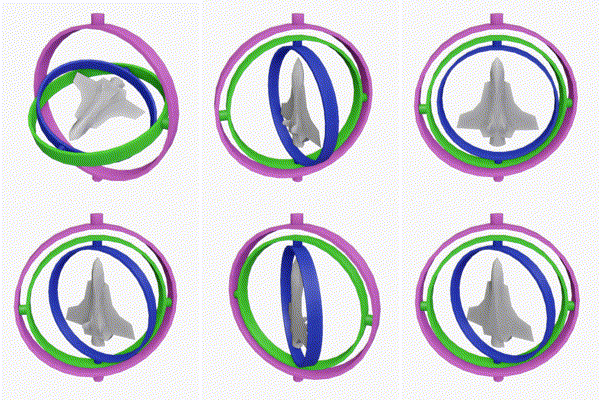
Gimbal lock is the loss of one degree of freedom in a three-dimensional, three-gimbal mechanism that occurs when the axes of two of the three gimbals are driven into a parallel configuration, "locking" the system into rotation in a degenerate two-dimensional space.
The word lock is misleading: no gimbal is restrained. All three gimbals can still...
tawny tinsel
owo that gif is really cool
fiery siren
oh gosh, that is literally how this thing is steering

I would get rid of all that and build it completely new to be honest ^^
rancid topaz
so someone yesterday helped me about setting up the crosshair
now that i set it up correctly how do i apply it to my character
prisma stag
prisma stag
Hello, I followed a tuturial on how to do grid placement to place items in your ...
Does anyone have an idea for my situation?
tawny tinsel
fiery siren
I would get rid of all that and build it completely new to be honest ^^
but i tried to built this flying mechanic on my own its really buggy so i just decided to use ue4 flying template
left niche
fiery siren
https://en.wikipedia.org/wiki/Gimbal_lock
I've been using floating pawn, havent ever run into this😕
summer bolt
summer bolt
Anyone know?
left niche
summer bolt
Anyone know?
Increase the grapple distance and increase the duration. maybe you're missing it
summer bolt
Wym duration I get the distance
left niche
The duration for which the trace is visible.
 summer bolt
Oh yeah lol
left niche
summer bolt
Oh yeah lol
start + printscrn
left niche
Is the branch actually executing. The one with "can grapple hook"
left niche
200 iq
summer bolt
😂
 stable fjord
How to detect, on which side of object is another object?
 left niche
stable fjord
How to detect, on which side of object is another object?
left niche
stable fjord
How to detect, on which side of object is another object?
Dot product
From your right vector to the vector from you to the object
stable fjord
dot product of vector A and right vector of B?
faint pasture
stable fjord
dot product of vector A and right vector of B?
Depends on where you want your point of view to be to determine which side of it it's on
Are you talking from the camera viewpoint?
summer bolt
now i get thiss after playing and still no work :/
 stable fjord
I have a object A and B is me, player which hits the objects
I would like to determine from which side the hit is
left niche
summer bolt
now i get thiss after playing and still no work :/
Just do get actor forward vector
stable fjord
If I hit a object A from right side, I would like to print RIGHT SIDE, and reversely
faint pasture
@stable fjord from right side relative from object b or relative from your camera? Or relative to object a? Where is your camera in this situation
stable fjord
 faint pasture
If a and b are pointed at each other, A's right side is B's left side and vice versa.
stable fjord
I have something like this
left niche
stable fjord
If I hit a object A from right side, I would like to print RIGHT SIDE, and rever...
A is you B is object
Get right vector of A(or your camera, whatever the context is)
Vector Z = Get location of B - Get Location of A
Answer = Z dot (Right vector of A)
If answer is positive the object is on the right
faint pasture
You're probably want to use hit location instead of location of B though.
faint pasture
Location of B can be on your left when the hit is on your right. So yes, just do hit location minus character location, dot product with character right vector, get sign of result
Is this for hit reaction particles?
left niche
faint pasture
Location of B can be on your left when the hit is on your right. So yes, just do...
Dude, thats just the world location B - World location of A, which is what I said
summer bolt
left niche
Just do get actor forward vector
doing that but those 2 dont link :/
 stable fjord
no no, for warhips
left niche
summer bolt
doing that but those 2 dont link :/
Get actor forward vector. forget the camera
summer bolt
K
faint pasture
left niche
Dude, thats just the world location B - World location of A, which is what I sai...
I mean if the object is Big enough, it's location can be on your left, but the hit can be on your right.
left niche
faint pasture
I mean if the object is Big enough, it's location can be on your left, but the h...
Makes sense. i didnt think of the scenario when the object is big. Nice
faint pasture
Although this whole setup sounds smelly, he should probably be using the hit normal
left niche
Nah the hit location will work. I've done this before
 stable fjord
I am just asking for small explanation, I know linear algebra etc, on my piece of paper everything works correctly, but how to get this fucking vectors my dear god
left niche
summer bolt
like that?
You changed the start too.
summer bolt
yeah i added enable input?
stable fjord
but I am using a cross product of these vectors
left niche
summer bolt
Everything is fine here. Just replace the get forward vector of camera with the actor forward vector.
stable fjord
and the Z direction of cross product vector should determine on which side is
faint pasture
stable fjord
and the Z direction of cross product vector should determine on which side is
He needs to trace from a location, not from a direction
tawny tinsel
ffs how do i scale particle over time in niagra?
 summer bolt
left niche
Everything is fine here. Just replace the get forward vector of camera with the ...
summer bolt
left niche
Everything is fine here. Just replace the get forward vector of camera with the ...
yeah i did that tho right?
stable fjord
but I am not sure that I do it properly
left niche
summer bolt
yeah i did that tho right?
You replaced the start too. get Actor location goes into the start input.
stable fjord
my solution works, but when I am rotating object of Y direction, then I am getting wrong results
faint pasture
stable fjord
to get this
To get what? What are you trying to get?
stable fjord
I would like to get following set of vectors
summer bolt
left niche
You replaced the start too. get Actor location goes into the start input.
TYSM it works 🎊 🥳 except it comes from the actor...... so how can i make it come from the player...
faint pasture
summer bolt
TYSM it works 🎊 🥳 except it comes from the actor...... so how can i make it c...
Show what you have right now
summer bolt
k
left niche
summer bolt
TYSM it works 🎊 🥳 except it comes from the actor...... so how can i make it c...
You are looking for "Get player camera manager"
faint pasture
I mean show the blueprint.
summer bolt
 summer bolt
left niche
You are looking for "Get player camera manager"
summer bolt
left niche
You are looking for "Get player camera manager"
k


 faint pasture
@summer bolt start from the beginning. Where do you want the trace to come from, and what direction do you want the trace to go in? Be very specific, do you want to go in the camera facing direction or in the character facing direction or what?
summer bolt
faint pasture
<@508566496562380800> start from the beginning. Where do you want the trace to c...
Want it to come from my character but using an actor and go to where my camera points it to
like it kinda works now but
like if the actors above me\
faint pasture
Is your camera third person or first person?
summer bolt
third
faint pasture
Then you need to trace from the camera location to the camera location plus camera direction times Trace distance. That will give you the impact point
summer bolt
summer bolt
like if the actors above me\
it will go off if mya actor can see
faint pasture
That will give you the point that you are aiming at. You should really be doing that on tick anyway.
summer bolt
faint pasture
Then you need to trace from the camera location to the camera location plus came...
Sorry i dont understand
left niche
@summer bolt
 faint pasture
The character blueprint probably already just has a camera component but that'll work too
summer bolt
left niche
<@!508566496562380800>
k
summer bolt
faint pasture
The character blueprint probably already just has a camera component but that'll...
k
It works perfectly
🥳 ty alot guys
faint pasture
Welcome to third person aiming, it's an art form.
summer bolt
😆
 haughty latch
With Set Anchors in viewport what are the anchor postions. is there a set of names.. how you use it. cheers
 weary dock
hey how do i possess a pawn properly?
faint pasture
Call possess on it on the server. You need references to the pawn and possessing controller.
weary dock
main problem is that it accepts nothing to the "in pawn" input

what do i need to plug in there?
fiery siren
a pawn reference
faint pasture
A reference to whatever Pawn you're trying to possess
fiery siren
every character is a pawn for example.
so you cannot possess an Actor, if that actor is not a pawn 🙂
weary dock
ah that would make sense
can i make my actor into a pawn or do i have to create it again as a pawn?
fiery siren
you can change the class to Pawn. ^^
There is a hirachy Actor -> Pawn -> Character
If you create a new Blueprint Class you can select the parent class (defaults to Actor)
faint pasture
weary dock
can i make my actor into a pawn or do i have to create it again as a pawn?
Change parent class to pawn.
fiery siren
you can change it later, but a pawn and a character come with inherited stuff, so you should choose the right one while creating the new class 🙂
faint pasture
It's easy to go down the tree, harder to go up. Changing an actor to a pawn won't break anything, but going the other way might.
fiery siren
a character for example always has a skeletal mesh and a capsule collision if I'm not wrong... if you change it back to Actor, it won't work 🙂
But you can make a Actor into a character without problems I think ^_^
weary dock
wow so much info 😄 how do i change it back tho? i mean, where?
faint pasture
UObject -> Actor -> Pawn -> Character
faint pasture
weary dock
wow so much info 😄 how do i change it back tho? i mean, where?
Bp editor, change parent class
weary dock
yesss it works
i mean, it partly broke my setup but i beleive i can fix that
thanks for all the help @faint pasture @fiery siren , tbh ive never really gotten help on this discord so this was a pleasant surprise
faint pasture
You'll find that the discord helps those who help themselves. I think a lot of people get disillusioned with vague questions. If you're specific you'll be fine.
weary dock
i was specific before aswell, i think just no one was around at the time or something
mostly my questions were answered with somebody ignoring it and posting their own 😄
 prime snow
People too lazy to walk a few basic youtube unreal tutorials and jump right into asking questions...
rancid topaz

so i seem to roll
if its connected to x
but to z it does nothing
nevermind
is there any way I can customize the
like
smoothness
of the movement
 odd flame
HI, I have a really strange problem with rotating my character. I'm a noob making a platformer based on multiple tutorials and assets, and everything works fine, mostly, apart from the character always facing left when starting a game. I want it to face right, but it faces left, no matter what I do to try to fix it. I narrowed the possible sources of errors down to the character, there seems to be something wrong with the capsule component and arrow, but it doesn't affect the movement, only the direciton faced at level start. I tried a lot of stuff to change the direction the char faces at level start: rotating the actors, the controller, making it walk to the right to change direction and so on - nothing works. if i change the character setup, I can fix the direciton issue but then the movement or the camera is wrong. I can't fix everything at the same time 😦 my biggest issue rn is why the character will not react to any rotation command given at start or even during gameplay depending on key input. I tried using different setting sin the actor and the movement component, but nothing fixed it... any ideas anyone?
prime snow
Is the player start facing left?
odd flame
no it's facing right
and the arrow in the actor BP is also seemingly in the correct direction

but somehow the actor BP is messed up... It doesn't seem to be a problem for anything else apart from the initial direciton the char faces at level start
prime snow
if you add the character to the level and set "autoposses player 0" still same problem?
odd flame
thanks gonna try it out
i can't really possess it (it spawns a new actor when starting the game, maybe realted to the save/load system I'm using that I don't fully understand...), but it's also facing the wrong direction...
no matter what rotation i give either the character on the map or the player start actor, always facing left
stray island
Anyone has acknowledgment of real time drawing ? Render targets? Idk how to start with that
odd flame
what's the most fool-proof way to rotate the actor from facing left to facing right after level start? I know it sounds stupid but nothing has been working in my case...
stray island
odd flame
what's the most fool-proof way to rotate the actor from facing left to facing ri...
Set relative rotation?
Or world rotation
odd flame
I tried relative rotaion, world rotation and on capsule component and actor and control rotation on the controller - no luck
movement works perfectly but the rotation commands give no effect whatsoever
if I make the actor move from the blueprint, it moves, but it doesn't face the correct direciton (in contrast ot the real movement where it works perfectly)
any idea for a smart workaround? like, simulating controller input or something? I'm really out of ideas 😦
the rotation commands are firing, but nothing is rotating at all
 teal spade
stray island
Anyone has acknowledgment of real time drawing ? Render targets? Idk how to star...
teal spade
stray island
Anyone has acknowledgment of real time drawing ? Render targets? Idk how to star...
as far as I know, drawing is limited to a few things. Better use widget if you wish to have a bit more flexibility on the matter. What do you wish to use the render target?
teal spade
sure it can, just use it on an actor
stray island
Hmm
teal spade
albeit, won't be "3D", in the way you'd expect. just a 2D plane
teal spade
stray island
Ok will look it out
there's 2 actor components: Widget and Widget interaction
rain peak
Is there a way to call an event in Level Blueprint from a non-actor Blueprint class?
like, the player controller
rancid topaz
how can i link my pawn to my character controller
and i mean like pawn blueprint to my character controller blueprint
maiden wadi
@rancid topaz In what way?
rancid topaz
like i was told a character controller is much better especially when its multiplayer
so i moved from the character blueprint
to the character controller
the inputs
maiden wadi
That...really depends on what you're..no.
maiden wadi
If input is meant for the pawn, put it in the pawn.
Consider something for a moment.
rancid topaz
but how can i make it function the same in the character controller
k i moved it to the pawn blueprint
maiden wadi
You have a character dude, and a car. Two different pawns with two very different control types. You want their input to act differently. You could do this in the controller by casting the controlled pawn to each type every tick and switching on which cast succeeds, and doing your logic with a chain of branches. Or you can simply put the input in the pawn that is meant to use it. Small example is MoveRight. You want to move the character dude right or left based on camera orientation. In the car, you don't want your car moving sideways, so you'd only change the wheel orientation that it's movement could use to determine direction.
rancid topaz
it cant connect to itself
odd flame
when I add movement like this, the char is facing backwards 😦 only the normal input movement works correctly... anybody any idea?
 past girder
working on some low poly modeling and thought i would want to make a prop hunt game becuse why not right? I have tested some ways to randomly select a player to be a hunter and the rest to be props, but i dont seem to get it to work, at least not on client? Any help would be greatly appreciated!
maiden wadi
@rancid topaz What is your input for? What are you trying to do with it?
 wind sequoia
DAT MOONWALK THO
rancid topaz
movement
such as jump
crouch
move forwards/backwards right and left
as well as look around
summer bolt
So why is this happening i will send bp screenshots in a sec\
maiden wadi
First or third person?
rancid topaz
first

 maiden wadi
@rancid topaz Try this in the character.
 maiden wadi
For which function?
rancid topaz
all
odd flame
wind sequoia
<@!349415978997907456> ur adding movement input backwards so yea
my problem is that the actoir is not faciong the correct direciton - any ideas how I fix this?
maiden wadi
That's... odd. Try reparenting it. Make a new blank character class in your content browser and then use this here to select that as the new parent, compile it once, and then reparent it back to character.
 rancid topaz
wait do i have to use a pawn
or a charcter
cause i assume ur saying character controller
but then again u might be talking about charcter blueprint
maiden wadi
Character, not controller.
summer bolt
summer bolt
So why is this happening i will send bp screenshots in a sec\
anyone know, im in third person
maiden wadi
@summer bolt Uncertain, but it looks like it's trying to launch slightly in the wrong direction. Possibly the unnormalized direction vector. What happens if you try this instead?

Replace the make vector with your hit location and the 2500 with how much ever force you want.
@odd flame What are you using for the orientation? AddMovementInput will not turn the character by default. For that you need to use OrientRotationToMovement in the CharacterMovementComponent. Alternatively, you can do the same thing on tick by orienting the Controller's Control rotation's Yaw into the direction of it's velocity.
summer bolt
maiden wadi
<@!508566496562380800> Uncertain, but it looks like it's trying to launch slight...
k
odd flame
maiden wadi
<@!349415978997907456> What are you using for the orientation? AddMovementInput ...
Thank you! I'm using "OrientRotation..." in the movement component. it's working for all the movement, but not for changing the direction of the actor at level start 😦 gonna check the tick thing!
rancid topaz
wait
i cant use a capsule collision thats my problem
but i dont know what else to use cause I cant use a camera either
nor can create a solid capsule
and character controller needs a well component it needs to be connected to
past girder
past girder
working on some low poly modeling and thought i would want to make a prop hunt g...
I am sorry for the bother, but if anyone have time please help me.
trim matrix
Anyone using Master pose component? I cant enable Mouse events for any of the components
faint pasture
past girder
I am sorry for the bother, but if anyone have time please help me.
You need to have a boolean IsHunter on the Playerstate. Set a random players boolean to true, then restart all players. In the function that selects the pawn for the player controller, check IsHunter to choose what pawn they get.
odd flame
orient rotation to movement isn't working for this for some reason, tried to do it on tick and still not working for some reason... I think my char setup is inverted or something, but I just need fool-proof way to make the character face right at level start, everything else seems to be working nively.....
faint pasture
@odd flame rotate the playerstart to face the direction you want them to face...
odd flame
not working, always facing left
faint pasture
Are you doing anything weird or just letting the gamemode spawn the character as normal?
odd flame
when starting the level, the actor is always facing left, no matter what rotation the player start has
the spawning is based on a save/load/menu system, but it's just placing the char in the level as far as I can see
faint pasture
are you manually placing the char or just letting the default gamemode function do it?
faint pasture
then something is rotating it
odd flame
no matter what direction I place it in, it's always facing left at level start, the spawned and the placed actors
I guess you are right but I can't figure out what's causing this, checked the game instance, level blueprints, actor tick and so on...
faint pasture
in the bp editor is the character mesh facing X direction?
add something else to the capsule so you can make sure that the capsule itseslf is facing the wrong direction and you don't just hvae your mesh rotated.
odd flame
the mesh is facing in the direction of an arrow fixed to the capsule component, so it should be ok, but if I start rotating things, the movement and/or is always wrong, Ican't get everything right at the same time
 past girder
faint pasture
You need to have a boolean IsHunter on the Playerstate. Set a random players bo...
past girder
faint pasture
You need to have a boolean IsHunter on the Playerstate. Set a random players bo...
Can you explain a bit more, becuse i have already tried like that
faint pasture
past girder
Can you explain a bit more, becuse i have already tried like that
Just watch a few character selection tutorials on youtube.
odd flame
I don't understand what you mean - qhat exactly is backwards? everything is working fine apart from the direction at level start
past girder
faint pasture
Just watch a few character selection tutorials on youtube.
Ok i will try thanks
faint pasture
odd flame
I don't understand what you mean - qhat exactly is backwards? everything is work...
show your bp with the direction indicator like so

make sure everything is visible including your camera
also, what is driving the capsule rotation and camera rotation? I'm guessing you're using orient rotation to movement to set the capsule rot and control rotation to set the camera rot?
odd flame
I don' have camera rotation but yeah I'm using orient rotation to movement rn for the char
the direction indicator is the coordinate system in the lower left?
faint pasture
yes
odd flame
 faint pasture
and to confirm you are NEVER EVER changing the rotation of the mesh?
other than the initial 90 degrees youve rotated it in the outliner to line up with the actor forward direction
odd flame
hm not completely sure about that rn tbh, but it shouldn't be changing at level start at least...
faint pasture
have you tested with the arrow visible? Does the arrow point left as well?
odd flame
i cant make the arrow component visible but I'm gonna put another arrow in to check
faint pasture
Why would it even point right or left tho, shouldn't the character spawn facing the camera? you have the camera in front of it
you can make it visible, just uncheck hidden in game
odd flame
doesnt give me a deatil section
faint pasture
oh ya maybe not for the default character arrow

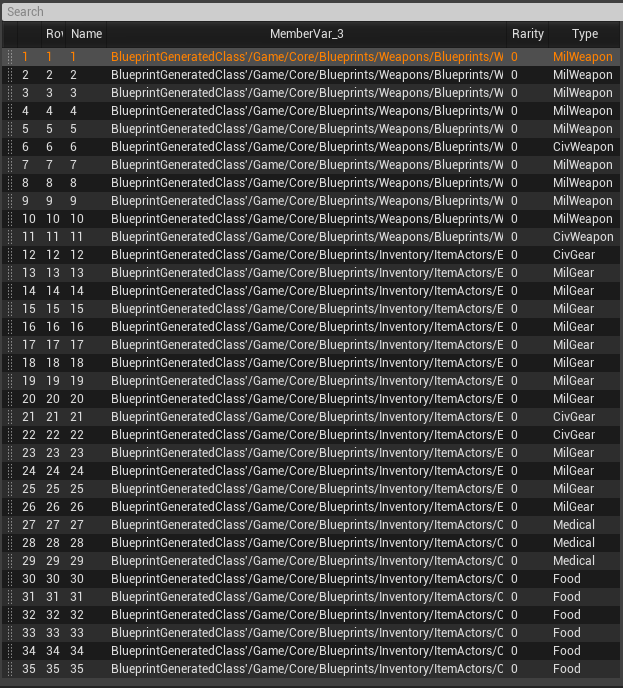 odd flame
faint pasture
Why would it even point right or left tho, shouldn't the character spawn facing ...
odd flame
faint pasture
Why would it even point right or left tho, shouldn't the character spawn facing ...
yeah, I thought that too, there must be something rotating that actor (and every actor of that class spawned or placed on map)... damn...
faint pasture
odd flame
yeah, I thought that too, there must be something rotating that actor (and every...
turn off orient rotation to movement and see if they still rotate
 queen urchin
Hi. Going to deal with game saving. Just want to know if I can save actor reference or not?
odd flame
yeah still facing left
faint pasture
odd flame
yeah still facing left
If you place one of these characters in The level, and hit simulate does it instantly rotate to face left?
left niche
tawny tinsel
the roll can influence the rotation and bug it out all the times i tried to leve...
A simple pawn. lerp working fine for me😕
maiden wadi
@queen urchin TLDR no. The blue variables are called memory pointers, or object references to blueprinters. In short, the pointer is just a small 4byte value that points to a memory location where that actual object is stored. So if you save this, and try to look at it after loading a new level, it will point to the same memory location, but what is there in memory won't be the same, so it won't be valid. You have to save all of the properties on that actor that you wanted saved along with it's class, and have your load game stuff respawn your actors and set back up references and such.
 wet adder
Hey guys, I'm new 🙂 Is this a programming chat were you can ask Blueprint related questions?
queen urchin
Got it. Iyo, whats the best way of reassigning references? Give ID to each actor, respawn them and reassign?
maiden wadi
Possibly. Depends on your game setup and the relation the object have to one another.
pallid wave
Does the Get Player Character node output Null if using the Top Down Example. I'm guessing my bp isn't working cause the mannaquin isn't considered the actual player character.
odd flame
faint pasture
If you place one of these characters in The level, and hit simulate does it inst...
not sure if I'm doing it right, but if I place the actor on the map and hit simulate, it turns left. but I don't know how to activate simulate during gameplay, I don't see an option for it while playing
faint pasture
Then something somewhere is turning it left. Just search for references to that character and check them all. Something somewhere is doing it
maiden wadi
@pallid wave Pretty sure top down possessed the pawn. Let me check though.
odd flame
thank you very much, that makes sense! gonna check the references now and be back if I still can't find it
haha damn that's a lot of references, might take a while ^^
maiden wadi
@pallid wave Seems to work fine. Where are you using GetPlayerCharacter?
pallid wave
I'm trying to get an AI to follow the character.
I'm using it in the AI module. I doubled checked the enum+controller+branch, but it just following :/
Once in range, True = follow. False = Idle.
 left niche
pallid wave
I'm trying to get an AI to follow the character.
I'm using it in the AI module. ...
left niche
pallid wave
I'm trying to get an AI to follow the character.
I'm using it in the AI module. ...
Is this a service
pallid wave
left niche
Is this a service
Yes
 gaunt pollen
hello, sorry but i don't understand why my print string does not appear on my screen when i play?
 blissful gull
hey does anyone know why when I try to use a macro library in my project it wont let me save any other blueprints that use it?
it tells me graph is linked to external private object when i try to save
okay i figured it out, i had to recreate the macro in the library
 indigo ledge
Hey, I'm trying to get my IAPs working for my app on google play. I think they're all set up correctly, but when I go to test it and the Leaderboard, it tries to sign in / connect to google play games and then just, shows the loading circle and then it just vanishes. Is this because it's in closed testing or something else I'm missing?
quasi frost
So I am looking through a BP template to learn more about networking. How do you get with an input? I have never seen that.

 bold torrent
quasi frost
So I am looking through a BP template to learn more about networking. How do you...
bold torrent
quasi frost
So I am looking through a BP template to learn more about networking. How do you...
Right click your variable and look all the way at the bottom "Convert to validate get"
faint pasture
quasi frost
So I am looking through a BP template to learn more about networking. How do you...
That's a validated get. It just combines get, is valid, and branch
quasi frost
Thanks that is super cool. Not sure what to use it for, but always good to learn new node stuff
summer bolt
maiden wadi
<@!508566496562380800> Uncertain, but it looks like it's trying to launch slight...
got this working does the sane thing
 timber gull
Hello, i'm currently using a component with like 10 HISM [BP ONLY] (but only 4 are pre-filled when spawning) inside and i'm spawning that component at least 81 times but the problem is that when that actor spawn it cause the game to freeze for ~2sec for each component (but when they are spawned i don't have performance issue). What can i do about this ?
 celest yacht
Hey is there a way to create new actor BPs using BP?
Like I have an actor BP (truck), that I spawn and then destroy after a delay. I have six different delays, so I've been making 6 different BPs
I'm assuming I can create a function that creates new BPs from an existing BP, but that seems like it would be a heavy cost to have generate every time?
earnest tangle
I'm not entirely sure if I understand what you're looking for but there is a node called Spawn Actor from Class which can spawn actors at runtime from a given BP
night quail
So I just spent more time than I'd like to admit trying to figure this out, and I think I got it!

 frank rover
celest yacht
Like I have an actor BP (truck), that I spawn and then destroy after a delay. I ...
frank rover
celest yacht
Like I have an actor BP (truck), that I spawn and then destroy after a delay. I ...
Why not spawning a truck and change this value? I think you need to learn a little more about classes and how to use them ^_^
edit: sorry, maybe there was a misunderstanding.
you can use "Spawn Actor from Class" to spawn a new Truck like zomg said. And you can expose variables to the spawn function as well, to spawn trucks with a random color or whatever 😉

 glad sigil
Hey! I'm using the "View Target With Blend" node to jump to a sequence, but when it ends it jumps straight back to my player camera. Is there any way to make the sequence blend when it ends too?
celest yacht
@earnest tangle @frank rover Oh no I'm already spawning from class, all my actors are of their own class. I'm doing a reaction time task where the player sees an object and has to name it. The truck actor is only visible for 100-600ms in 100ms steps, and I am using the actor names to save to an array and then print to log all the important features I want in a file that is easy to import for data analysis.
frank rover
@celest yacht in that case you can just use the same truck and set it's visibility to hidden and visible instead of deleting and respawning it, right? Or are all the trucks that pop up in 100ms steps different?
in that case preloading them and showing only the right one might be faster than spawning them on the fly if it's that time critical ^^
celest yacht
They are all the same, all my actors (552* [92 actors each with 6 different durations] at the moment) appear in the same location and basically appear and then disappear quickly.
I've set it up so that the next actor can't spawn (completely randomized) until the player makes a response.
I set my code up with 4 actors and then realized how time consume it is adding each actor to the array that they are spawned from and making each individual blueprint.
@frank rover I'll look into pre-loading, if I have to change my core game/task code too much I'll probably leave it as is (I'm already SEVERAL weeks behind schedule here) hah