#blueprint
402296 messages · Page 614 of 403
 solemn parcel
 trim matrix
what bp would I use to get the pawn then?
solemn parcel
Thanks tho !
solemn parcel
@trim matrix I'll enjoy that moment to ask for my lack of experience : I started the 'casting spells system' on my character BP along with a lot of other mechanics, is it fine to do it on the same BP and having tons of lines of code or it's better to make a separateBP for all of this to lighten a little that BP cost ?
Because all of this is linked to a stamina and movement systems that interact with the 'casting spell system' system, so all the variables are centralized in the char BP
 cinder shell
@stray island nope... still nothing
solemn parcel
takin into account 😉
trim matrix
@trim matrix any idea?
 fleet cosmos
I have a cable component and I want to set the number of segments in the blueprint, I read the api and there is a public variable called NumSegments but when I drag the pin from my cable and search for this variable it shows nothing, like there is no such a thing in cable calss.
is there any way to solve this?
 summer harness
@solemn parcel for spells ill look into the gameplay ability system of unreal, its pretty awesome
 crimson swan
guys, any tips on how to prevent characters from sliding when they're moving into another character
like what's a good way to go about it? have some kind of trace and if it's within distance just stop moving?
solemn parcel
@summer harness I'm checking into it, but isn't this only C++ ?
summer harness
solemn parcel
<@!254307352528814080> I'm checking into it, but isn't this only C++ ?
a bit of C++ is needed, yes but its manageable 😄
trim matrix
mhm but how do I cast stuff to it?
what do i put into object?
ah sorry my bad
its an actor or pawn inside a nav mesh
im trying to start simple haha
i just want a cube to move to a specific point or actor, but I dont know how to get the target actor into the bp
 west beacon
Hi, I want to give custom block id to my blocks (actors). I tried blueprint component but its single for a one actor. How can I do that?
trim matrix
i mean that doesnt solve anything if hardcode the numbers lol
west beacon
Yeah, I tried the component thing. But the values of the blocks change each other and it only works in 1 block
 unborn maple
so i added to game mode one for main menu and one for player ever since adding second game mdode and erasing the main menu everything is broke. it no longer reads just the one game mode. i even try to migrate to the new project and it doesnt read it.
west beacon
How can I do that? I'm just beginner who tries simple voxel game. Can u send any tutorial or doc?
unborn maple
is there anyway to fix issue with out having to redo the whole code
 unique falcon
Afternoon all, sorry to stick in a random question mid-flow. Does anyone know how best to approach doing a sort of 'min' operation on a vector?
west beacon
I made simple games before this project.
west beacon
Like I said, if you can send any example or doc or youtube tut, I'll be very happy for that.
trim matrix
just determines what order
west beacon
That video is not what i want
unique falcon
in this instance i've got a normalised velocity that i want to ensure, even if it's falling almost directly downwards, it's giving me an angle that's a minimum of 45 degrees from 0,0,-1
that's a good point
So I guess i could take the XY components and normalise them, then add 0,0,-1 and normalise it once more and that would give me a normalised vector that is representative of my object's motion through XY space, as if it was descending at an angle of 45 degrees
 deft elm
Hey guys
im trying to let my UI show the mouse cursor when it launches
however it does not register any hovering events
before I click somewhere arbitrary in the screen
any way to make the hovering events start listening/waiting for input right away ?
 raven hollow
@deft elm it is when your game starts?
deft elm
nope, more like a dialogue option
raven hollow
Ok
deft elm
any clue?
raven hollow
No, but I am looking in to, I will let you if I find something.
deft elm
mmm
so
I made a way around it
By making the widget (display notification) spawn with the HUD, instead of being added to the hud when I press N, I made it start on construct
somehow adding a widget dynamically inside our HUD doesn't allow it to capture mouse input just yet
 fleet cedar
Hi guys. Noob questions here... I want to make my camera interact with "Camera Waypoints", a separate BP. What's the best way to have them interact? Blueprint Interfaces? Custom Trace Channels?
 jolly niche
Does anyone have any idea why a variable made in GameInstance returns empty when referenced in GameMode? Isnt GameInstance supposed to store things globally per session?
 static charm
if u doing multiplayer, gameinstance is one per client
jolly niche
It's singleplayer
 fossil thistle
Trying to find create a brightness slider for a game I'm working on. Found this UE4 forum post the only issue is that we use multiple post processing volumes in our game and we stream levels. Any idea how I could adapt this solution to fit my game or should I be looking in a different direction? https://answers.unrealengine.com/questions/947863/how-can-i-change-the-brightness-with-a-slider.html
 sonic cipher
Hello, i would like to be able to save a variable so when i close and reopen the game then it load the variable
- I have a hitbox in my map, when we go trough it, it enable visibility of the button to go in the next map, thing is if i close the game, and reopen it the button will be invisible again
thanks
sonic cipher
fleet cedar
where is this bp ?
and is the sphere collision variable in the same bp ?
fleet cedar
Hey @sonic cipher . It's just a sphere collision in the map, and yes the sphere is in the same BP
Trying to do some camera waypoint type thing, where you can do a linetrace until you're in the spot then you can't hit it
sonic cipher
you did set nothing in the actor of the overlap nodes
 night citrus
I want to make a rotation like in gmod game via physics handle, the video shows how it works in gmod and how it works in my game, I will pay who will help me, write me in pm
fleet cedar
sonic cipher
you did set nothing in the actor of the overlap nodes
Would that make it work with anything though?
sonic cipher
fleet cedar
Would that make it work with anything though?
what do you want to be overlapped ? your character ?
fleet cedar
yes
sonic cipher
then do "cast to (yourcharacterbpname)" and link the object to it too
fleet cedar
Am I misunderstanding how this works? Seems like this would toggle it if it overlaps anything, and currently there's only one possible thing that can overlap
sonic cipher
i show you
fleet cedar
Thank you
 fleet cedar
Thanks... I am still confused, I'll read up more on overlaps
sonic cipher
fleet cedar
Thanks... I am still confused, I'll read up more on overlaps
is it working ?
 opal sinew
How do I use a .png with transparency? I found a crosshair online and dragged it into ue4 and then added it to my widget but it looks like this
 sour urchin
do i need to wait completed callback if i use async load asset?
 unique hollow
Is there any way I can set the variable of a class reference?
 neon gust
 worthy frost
@neon gust #old-rules number 7 please don't post same question in multiple channels.
 orchid garden
opal sinew
orchid garden
opal sinew
off the top of my head, i'd say the image that you pulled in doesn't have transparency or its in a unsupported format for the transparency.
worthy frost
^ image needs to be PNG and have transparency.
 spark robin
Very diffuse question here but, Im getting a saving error when saving a blueprint using a macro from an external macro library, of which this macro contains a "cast to" node.
Is it simply not possible to use the cast to node inside of a macro library (but that its just not pointed out in the editor)?
(Please ping on reply ❤️ )
 faint pasture
night citrus
I want to make a rotation like in gmod game via physics handle, the video shows ...
faint pasture
night citrus
I want to make a rotation like in gmod game via physics handle, the video shows ...
That's ez
night citrus
faint pasture
That's ez
Ok
faint pasture
You just gotta grab with rotation too
solemn parcel
So i've got a projectile with these caracteristics :
Thing is, it goes through ennemis as I want to, but sometimes, randomly, the projectile just stops moving, and stays in place. I really don't understand.
mostly when, it seems like, it hits multiples targets with high velocity.
crimson swan
Can anybody hit me up with the keybind to automatically add an input to a custom event when you drag onto it?
like instead of manually having to add them in the event you can drag onto the receiving end and the input is generated for the output end?
spark robin
@crimson swan I think you will have to make that a feature request to Epic (or make an extension for it), Ive never seen anything like that in the settings menus
It does work like that for custom functions and macros (when working in the macro/function editor)
trim matrix
how would I get the position of a pawn to use in a behaviour tree as a key?
 undone quiver
I'm trying to detect attack collision by setting a box area collision to Query Only during a few frames of an animation. Seems to be a common way to do it. However, it isn't triggering OnBeginOverlap when it should be. I believe my collision settings are correct, so I suspect it is because my player is IN the area when I enable collision, so there is no "Begin" overlap. Could that be true, or am I chasing a red herring?
I've confirmed that the Set Collision Enabled nodes are getting hit.
Never getting the print string node here
crimson swan
@trim matrix with an Ai function, i forget what it's called exactly EDIT: Btttask
undone quiver
Collision settings for the box
Collision setting for player capsule component
Sorry @lanH. I think I buried an answer that was for you.
crimson swan
no worries lol his answer is he need to create a blueprint class of type BTTask
@trim matrix
undone quiver
I probably DID just bury my own question to the point that noone will look at it though 🙂
trim matrix
ah okay ty
undone quiver
I would prefer to check for overlapping actors directly, but I'm following a course, so I'd rather not deviate that much
crimson swan
quebirt try enabling the overlap for every single type and see what happens
undone quiver
Ok, thanks. That did it, so I just need to figure out why. Appreciate it.
 olive sedge
can you designate levels as singleplayer only? I want a main menu with characters doing emotes and such but the game is MP so it expects some server logic here
crimson swan
@undone quiver change your box object type from world dynamic to pickup
aka the custom type you made
@olive sedge i'm not 100% sure on this but i think the proper way of doing it is setting up a new gamemode for the main menu
olive sedge
and you can set singleplayer in the game mode?
crimson swan
well you would be technically single player untill you connect to other people right?
olive sedge
hmm
crimson swan
also technically speaking i'm pretty sure untill you connect to a server you ARE the server. so you can do serverside logic and it should work
same as if you're doing standalone
undone quiver
@crimson swan Thanks. I tried that and get no collision again, but even worse, when I turned on overlap for everything, I started taking damage when I walked in to the area. I think I'm going to back up and see if I missed anything in this course. I appreciate the help.
olive sedge
@crimson swan my issue is.. the character spawned on the client doesn't have an AI controller and doesn't take input
crimson swan
how are you assigning the controller then?
olive sedge
I'm not.. I just spawn AI from class
on the server, it immediately has an AI Controller
olive sedge
yes
crimson swan
then i'm out of ideas :/
olive sedge
@crimson swan https://i.imgur.com/AIKssPL.png
alriiiiight
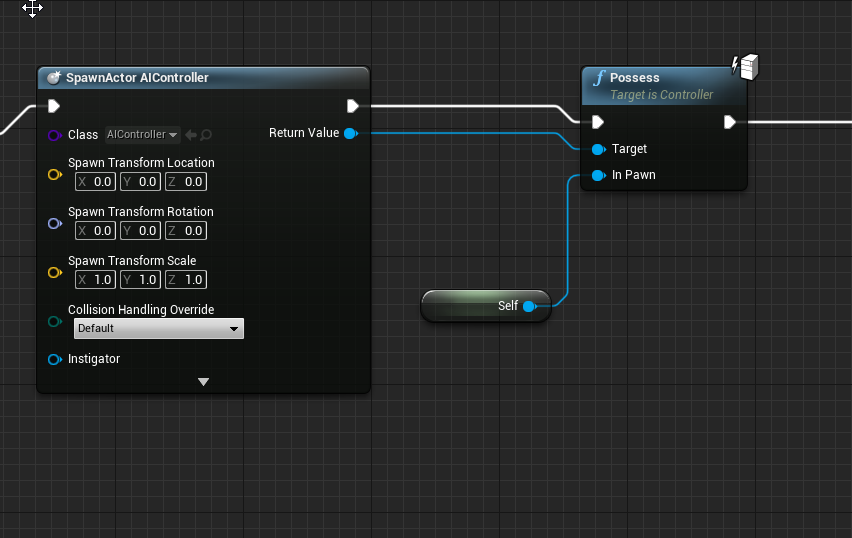 undone quiver
Wow. Stupid hurts. I had done two stupid things. First I was manipulating the collisions for the mesh for some reason instead of the box area. I guess I just dragged out the wrong one and didn't pay attention. I had also changed the initial collision state for the child pawn to overlap only, so it was on when it loaded in.
I love blueprints, but it's a whole different set of mistakes compared to cpp. Forgotten semicolon becomes dragged out the wrong component.
orchid garden
worthy frost
^ image needs to be PNG and have transparency.
some types of png images with transparency aren't supported by UE from what i've seen, i.e. 8 bit greyscale with transparency. it never seems to apply the transparency.
worthy frost
that is true actually
unborn maple
so this doesnt reset my ball location tho it use to before i remade the project. i copied every thing i did in the last project but seem not to want to reset back to the middle
crimson swan
Can anybody help me out as to why Possessing a pawn doesn't do it clientside?
 snow halo
Hey all, I believe i know the answer to this Set Timer by Event question but just wanted to check with you all. Whether looping or not looping, a timer does not fire the event initially when time is > than zero right?
crimson swan
the server posseses it because it's able to move but the client doesn't so the server has to continuously sync up the client to the server and it basically skips all aover
snow halo
so if you want to fire the event at 0 you use the exec pin after the timer i believe. Sound correct?
crimson swan
Yeah that makes sense lagauche
i mean the easiest way to test is set the timer to like 5 minutes and print something
snow halo
cool, ya it doesn't fire the event initially if i do that
took me a second to realize... makes sense though, it's just a looping delay basically
i assumed it would fire at 0 at first
snow halo
like so?
crimson swan
something like this
snow halo
same dif i think as you are saying
i just didn't realize a timer is like a delay. I thought it would fire at 0 seconds then at 5 seconds etc etc
but it's more like a delay instead in that it doesn't call the bound event until 5s
would be a small nicety if it had a checkbox that said FireInitially?
faint pasture
@snow halo try a negative initial start delay
snow halo
oh! nice trick @faint pasture makes sense why that would work
don't think that works though hehe
faint pasture
I could swear I got it to work before. Anyways, you can just call the event manually before setting the timer too.
snow halo
any reason you and Nubbiz are suggesting to call it before rather than after the Set Timer by Event node?
should still be the same frame...
you both seem to suggest this
faint pasture
Well yeah, you said it doesn't fire right away. If you want it to fire right away, you can just call it
Doesn't matter the order really
opal sinew
orchid garden
off the top of my head, i'd say the image that you pulled in doesn't have transp...
Thanks!
unborn maple
any idea why set actor location not setting/resetting position of actor?
just trying to respawn the actor once destroyed
crimson swan
is the actor valid?
unborn maple
yes all it doin is hittin a collision box
and if it hit the collision it reset the position
crimson swan
try and make a print coming out of that function
see if it's even calling it because that node should work
unborn maple
the bool print as 1 im guessing is true
crimson swan
yeah 1 means it's true
opal sinew
So I have a damage vingette that appears when a play is below certain health. However if another player gets below this health the widget appears on all players screens. How do I do it only for the player calling the function that make the widget appear?
crimson swan
your create damage vignette is called on server as far as i can see
unborn maple
so it is getting a reference from it self but not firing to set location it just places from the location it already at
crimson swan
uncheck sweep
crimson swan
probably, did it move where you wanted to though?
crimson swan
i honnestly haven't messed around with teleporting objects much but i don't see why you script wouldn't work
unborn maple
it odd it work like that b4 lol with teleport uncheck
now it just doesnt seem to want to work
i may just have to destroy actor completely and spawn a new one
opal sinew
crimson swan
your create damage vignette is called on server as far as i can see
I have a take damage function which is called by the player taking damage
So I am trying to get the damage vignette only visible on that player
fleet cosmos
I'm trying to change a material scalar parameter in my level blueprint but it does not work!
how can I fix the issue?
 stray island
I think it shd be in construction script
stray island
Whats Enum for , i saw tutorials and it seems like a useless string array
stray island
I am all after organization my work but I’m not getting the idea of enums
 tight schooner
@stray island it's used like a boolean with more states. Or like an int but with labels for each number. So one typical use for it is to describe if a character is Jumping or Landed or Walking or Running etc... You can plug that enum variable into a Switch On Enum or a Select node and etc.
 twilit heath
most common use-case is for managing a limited number of states
stray island
So its idea is to label indexes
fleet cosmos
@twilit heath is it possible to change material scalar param in level blueprint?
twilit heath
but it also makes things more human readable along the way
it is @fleet cosmos
i don't see that DMI being saved into variable, or assigned to a mesh there
so you might be changing parameters on unassigned DMI
tight schooner
If you find yourself using a series of booleans to describe multiple states that are all mutually exclusive, or you're abusing Switch On Int and want to make it human-readable before you forget what number corresponds to what concept, then it's enum time
twilit heath
or GameplayTag time
i usually ended up regretting not making enums of 6+ members as tags
stray island
Oh , So if i want to set presets Enum is good for that
fleet cosmos
twilit heath
i don't see that DMI being saved into variable, or assigned to a mesh there
I just want to set the scalar param after creating the DMI so i did not stored it! thanks it works now!
stray island
Btw how do i have presets of my bp default settings? Do i just create childs
Or theres another way
trim matrix
how do i get an actors location into a blackboard for the behaviour tree?
 unique harness
trim matrix
how do i get an actors location into a blackboard for the behaviour tree?
unique harness
trim matrix
how do i get an actors location into a blackboard for the behaviour tree?
Unreal Engine Forums
Build powerful visual scripts without code.
unique harness
stray island
Btw how do i have presets of my bp default settings? Do i just create childs
create children or you can edit them if they're placed in the level
stray island
unique harness
create children or you can edit them if they're placed in the level
If i make preset inside the bp , for example preset 1 load this texture preset 2 load another texture , would the bp load all textures together in background taking memory space , or it would not load its other setting
solemn parcel
I'm struggling to know how can I do to have access to the CharacterMovementComponent of that specific overlapping actor. Any help ?
unique harness
stray island
If i make preset inside the bp , for example preset 1 load this texture preset 2...
if you make the soft references they will not load. if they are hard references they will load
unique harness
solemn parcel
I'm struggling to know how can I do to have access to the CharacterMovementCompo...
cast that actor to a character and if it succeeds, you can get the movement component then
solemn parcel
@unique harness Cast to character ?
unique harness
stray island
Whats these terms
unique harness
solemn parcel
<@!209383767322656768> Cast to character ?
yes, drag off the actor pin and type cast to character
solemn parcel
damn
it4s been a while I'm struggling to find a way, didn't knew CastToCharacter would take the actor if valid as a character
anyways thanks !
unique harness
yes, that is what casting is
stray island
Oh , soft , interesting, wow there’s a world of optimizations that idk about
unique harness
solemn parcel
it4s been a while I'm struggling to find a way, didn't knew CastToCharacter woul...
I suggest reading through this https://docs.unrealengine.com/en-US/ProgrammingAndScripting/Blueprints/UserGuide/CastNodes/index.html
Examples of different Casting Nodes and usage cases.
 dawn gazelle
as expected. -5 -(-5) = 0.
spark robin
Oh wait youre right
stray island
Can Bps browse my desktop files yet ? Or only C++
unique harness
quick maffs
unique harness
stray island
Can Bps browse my desktop files yet ? Or only C++
what are you trying to do?
unique harness
No, that is not built in
stray island
So only c++
unique harness
well it's not built into c++ either, you would have to write it yourself
stray island
Yes idm , so do u think it’s possible via bp
unique harness
yes it is possible but relatively difficult
stray island
Where do i search or study , all google results , how to import files to your project (beginner tutorial)
unique harness
I doubt there is a tutorial
Like I said, it's relatively difficult, therefore most people don't even attempt it
spark robin
Its not I who am stupid lol
unique harness
that's 5-(-5) not -5-(-5)
dawn gazelle
XD
spark robin
Ignore me ;-;
dawn gazelle
S'ok.
unique harness
You would likely have to search through engine code to find how epic loads an image into a texture and write your own code to do the same since you can't use editor code in a release version
stray island
Alright thanks
unique harness
I lied, Rama has that functionality in his victory plugin
worthy frost
Ewww
unique harness
(which I figured he probably did)
stray island
@spark robin you’re not stupid I’m an engineer and almost fell for it
unique harness
Why the Rama hate?
worthy frost
Cause I have seen a lot of his stuff and it's pretty shobby
worthy frost
Rama seems like a nice guy but that victory plugin has some questionable stuff in it
unique harness
If you don't right questionable code, are you even a real programmer? 😛
spark robin
I will just put my actual issue here. This macro is supposed to calculate the distance between V1 and V2 and it appears to work correctly when all the input coordinates are positive, but not when some are negative
Can somebody tell what could be going on?
(Please ping on reply ❤️ )
unique harness
spark robin
I will just put my actual issue here. This macro is supposed to calculate the di...
Is there a reason you're not just using built in vector math?
spark robin
Because Im working with integers for performance reasons 🙂
solemn parcel
So Have 4 actors BP that act has 4 different types of spells. Now I'd like each one of them to have 4 variations with different damage and effects. I thought about adding 4 different components with 4 differents effects in each of the actor BP. But I cannot find a way to reference them in an array
spark robin
(Im storing lots of integers)
worthy frost
Ints for performance ?
unique harness
😛
worthy frost
Ints are also bigger 8 bytes compared to 4 bytes for a float so you are increasing memory cost
spark robin
Well convenience I guess, when I well do store my data in ints I thought I would make a few functions so that I dont have to do conversions all over my code
stray island
Is rama stuff on market place?
worthy frost
You can divide or multiply ints properly also
unique harness
stray island
Is rama stuff on market place?
yes
worthy frost
Floating point or double precision is the only way for this type of stuff
spark robin
Thanks for the advice but I already built my library and setup my code. And I think I made the right choice for my purpose
But regardless can we focus on the question here?
Its basically Pythagoras equation
worthy frost
I can see what it is
unique harness
Is there a reason you didn't create a custom vector struct for ints? Just curious
spark robin
I do, its just that I split it up on the input node
solemn parcel
Is there a way to desactivate a component from a BP before his BeginPlay ?
 minor lynx
spark robin
minor lynx
spark robin
I really still dont understand what could be going on with my macro, does it look right to you guys?
Its also kinda weird that the output for the positive numbers are 10x higher than they should be
(Like that 4000 is supposed to be just 400)
I should have just said that I only use whole numbers, its that simple
I dont need floats, so why then use them
unique harness
avoiding rewriting an entire math library seems like a logical reason
orchid garden
spark robin
I really still dont understand what could be going on with my macro, does it loo...
you could look at the c++ source and look at the function for distance to (actors) and see how they are calculating it to get the distance between the two.
 rancid quartz
Hello. Does anyone know of a way to find the bounds of an actor before spawning it? Or is such a thing impossible?
tight schooner
@spark robin There's too much custom stuff going on in your video for anyone to say where the issue lies
spark robin
The issue is within the macro
This gives accurate output
(I guess the purpose of the video was just to show that I do at least perform some kind of testing)
tight schooner
it looks okay to me...
the less consolidated way to do the same thing, AFAIK, is VectorLength(vector1 - vector2)
... but I suspect the issue lies outside of this macro
 torpid iron
How would I set a spawning vehicle in one level and spawn with it in another?
orchid garden
save its info in gamestate then after loading the level spawn the vehicle again?
torpid iron
I will try that
dawn gazelle
-X^2=X
eg. -5^2=25
-X * -X=X
eg. -5 * -5=25
 balmy hamlet
Hey guys, I have an array of widgets, and I want to change the value of a text box in one of them via get (a ref). For some reason, that isn’t allowed? I can only do get (a copy), and can’t change it to a reference.
tight schooner
I'm pretty sure there's no performance gain from integer-based math btw (BP performance is more about function calls and other such node execution overhead) but on some level I like that you're approaching video game math in a 1990 way
orchid garden
balmy hamlet
Hey guys, I have an array of widgets, and I want to change the value of a text b...
are they references to the widgets? or references to the classes?
 tired cypress
I think I usually end up using Get (a copy), doing several things, then storing it back to the array which is also an option.
orchid garden
thats what i was going to suggest if it was a array of references
i.e. basically...
tired cypress
Yep, that
cinder shell
good night, guys! Can I change this values of mesh in blueprint from event graph?
 marble tusk
balmy hamlet
Hey guys, I have an array of widgets, and I want to change the value of a text b...
marble tusk
balmy hamlet
Hey guys, I have an array of widgets, and I want to change the value of a text b...
That's because an array of objects are themselves references. You're not storing the entire objects in the array, just references. They're different than your basic variables
At least that's the reason I found when looking it up
 drowsy mauve
I'm lost on something and don't even know the terms of what I'm trying to do.
I've got a collision volume that is used for sepperating rooms within my game. this volume will always be in whole number units, minimum 1x1, but is often used is 2x3, 4x1, etc.
I'm trying to have sub-room volumes, that would be child blueprints? I think? that would break up this room based on its size, and these children would always be in 1x1
In the case here, if I know the units, can I just spawn an array of sub-rooms through my construction script?
 nocturne flax
Hey, is there a way to keep mobility set to static while being able to move the actor/mesh component in the editor? The actor will not move in-game at all, but I still need to position stuff in-editor only
 frank wolf
Hey folks! I've got a question about something that's been bugging me!
I'm trying to get my current camera location via the camera manager, and it works great! But I've realised that if you use "Set active camera with blend" and the camera is actively blending to another camera, then getting the actual location of the camera doesn't seem to work.
I'm currently attaching something to my camera and it works fine except when it starts blending to another camera, is there a better way to get the ACTUAL world location and rotation of the active camera?
tired cypress
nocturne flax
Hey, is there a way to keep mobility set to static while being able to move the ...
If you lock the object, it stays put in the Editor. But if you don't lock it, it should still stay put unless you have Simulate Physics checked on the object and are Simulating
 icy saddle
is there a switch/case node for Gameplay Ability Attribute?
orchid garden
... only took me 4 hrs to work out a color swapping material to change the paint colors on my drone... lol ... only 4 hrs...
tired cypress
It's always the "simple" things that can take a long time heh
orchid garden
it actually wasn't too simple i tried multiple methods yesterday and while they 'sorta worked' none of them gave the properly changeover.
if it would of been simple i could of done it as easy as the eye part of it 😉
torpid iron
How do I save a pawn into a game instance variable?
tired cypress
torpid iron
How do I save a pawn into a game instance variable?
You can grab a ref to it. If it's your Player Pawn you can use the GetPlayerPawn node
orchid garden
worked out pretty good i think 🙂
snow halo
When you Unsubscribe to an event shouldn't it stop firing immediately?
torpid iron
tired cypress
You can grab a ref to it. If it's your Player Pawn you can use the GetPlayerPawn...
Thanks, I will try that
snow halo
It's a bit new and experimental but this is the node that's failing me rn in this sense
faint pasture
@snow halo is that your own node surrounding dispatchers?
snow halo
it's not custom no. It's built into UE4's 4.26 new audio sync system
When i fire it, the event bound here continues to fire : /
May have figured out the issue and it's Quartz related
tight schooner
Looks like you already asked in #audio. Definitely a good place to ask when possible cuz UE4 devs are in there.
My game has a TimeSynth-based timing system but I'll maybe replace it with Quartz someday...
 granite barn
I have a weird little issue.
When I use my LMB click event, it doesnt fire anything, but every other key event works, including RMB.
Is there something I've done or weird going on here?
 latent finch
Hey everyone, quick question, I have a glide blueprint made now, but I'm wondering if there's a way to force the character to float forward while gliding
 versed stirrup
I have this in my BT to attack the player if the AI gets within 500 range of the player, but it will not play the animation.
these are the components to it, can anyone help me out?
tired cypress
granite barn
I have a weird little issue.
When I use my LMB click event, it doesnt fire anyt...
Sometimes this is because you have a duplicate of the Event node
Or it's bound using the Input system and that event is firing instead, etc
tired cypress
latent finch
Hey everyone, quick question, I have a glide blueprint made now, but I'm wonderi...
Yes, but not necessarily a "quick" answer 🙂
When you say "force the character to float forward", do you mean they are constantly moving forward while glide is true?
latent finch
yes
Like for example in spyro you floar forward and you float down
As my blueprint is right now I can jump and float slowly down in place
tired cypress
You will want something like this probably...
The AddActorLocalOffset node (with Sweep checked) will sweep your actor forward at a given rate
latent finch
ah, ok. makes sense. With that will I need to create my characters own ticks when jumping and gliding?
tired cypress
Well, you'll want to put in some kind of boolean for the character state like "IsJumping" and check that before you apply the above
latent finch
ok, I have an "is gliding" Bool
dawn gazelle
icy saddle
is there a switch/case node for Gameplay Ability Attribute?
not directly, but you can break the gameplay ability attribute structure which gives you the name in string format, which you could then build a switch off of.
orchid garden
i think you can only do that on materials @stray island
stray island
Yes the same way materials does but no need for slider
I want to limit a variable Just to avoid exploding the pc
cinder shell
I'm wondering if camera lag doesn't work if I'm rotating character with physics?
orchid garden
camera lag works, don't know if it a physics character will effect it differently.
dawn gazelle
stray island
How do i set a maximum value for an exposed editable float
There is value range that you can define when looking at the float:
But that doens't specifically limit you :/
orchid garden
well... i just learned don't install infiltrator demo on 4.25... it continually crashes at 45%.
orchid garden
dawn gazelle
There is value range that you can define when looking at the float:
so if i set the vvalue range to 0-1 and the float is 33349.0 it'll read it as 1?
dawn gazelle
Technically you'd think it would, but it doesn't seem that way when editing it directly in BP.
Only when typing in through an exposed setting like below... I have my var set to max value of 100, but I typed in 5000 and got 100 displayed.
But doing this, still prints 5000
 proud hull
Value range is for controlling of setting up values in editor via Defaults tab. If someone puts value higher/lower than specified range, it will clamp.
orchid garden
well thats abit pointless then...
dawn gazelle
As Slashin8r just said... It's meant more for people to adjust in editor .
proud hull
More for the level designer not to screw up the setting of variables when placing them into the world and adjusting defaults.
orchid garden
maybe if your making a item for someone else it could be useful.
stray island
yes I’m doing in the editor , so it works great thanks 👍
orchid garden
hrm.... guess i should set those on the door i've been working on... gonna be giving it to someone else to use for their project... be nasty to go over some of the max values for it lol...
 long schooner
hi, anyone know how to set up a menu with controller support?
orchid garden
seems to be a popular question lately
long schooner
I have an issue with the inventory, since the menu has an inventory with spawns as a child, I can't get it work with it
long schooner
orchid garden
seems to be a popular question lately
the basics I try to find em, on youtube, but I got to a dead end
orchid garden
this might help:
https://www.youtube.com/watch?v=7TpsulbqGOM

This is episode 54 of my unreal engine 4 beginner tutorial series, in today's episode we go over how you can start to use gamepad and keyboard inputs to influence the controls of the main menu. Having said that, you'll able to make your main menu work on xbox one, PS4 or any other key/button based platform.
We'll be breaking this down into two ...
long schooner
orchid garden
this might help:
https://www.youtube.com/watch?v=7TpsulbqGOM
Thanks for the help, but my issue is with the array
there are some spawning buttons, and I can't add em to the array so they can be change
orchid garden
oh, i don't think i've seen any tutorials on gamepad + inventory systems
long schooner
orchid garden
oh, i don't think i've seen any tutorials on gamepad + inventory systems
Thanks, but I think I will fix it later on, or maybe change it, since this inventory is a provisional one
proud hull
long schooner
there are some spawning buttons, and I can't add em to the array so they can be ...
Was just about to explain the use of arrays for it, but looks like you already got the basics of gamepad ui control.
Why are you unable to add them to the array when spawned?
proud hull
Use a reference of button array for that foreach loop. You are directly connecting it to a hard-coded make array
long schooner
proud hull
Use a reference of button array for that foreach loop. You are directly connecti...
Nope, same issue
proud hull
What does list items return?
long schooner
getting the bp button out of there, cuz I thought It may be an issue since it is not in the main graph
proud hull
Nah, that doesn't matter
long schooner
Okay
proud hull
Get rid of that return node, it is messing things up being in the for loop body.
It should be on complete if anything. Essentially, you loop one time and the function ends.
As soon as a function hits a return node, it ends.
Ah, I see your problem
proud hull
Move the list items function after you set the button array.
You can get rid of the delay node if you want too.
and the add node
Set button array > List items > foreach
long schooner
Okay so it works but kinda
proud hull
Can you show updated graphs?
long schooner
Sure
Now it works, it is in the array, however, I cant move between those 2 menus
maybe it is cuz I spawn it on different boxes?
proud hull
Shouldn't matter. You have a direct reference to the buttons, so no matter where they are, you should be able to cycle between them.
long schooner
Look, if I get the focus on the left buttons there is no way to move the focus to the right one and viceversa
proud hull
Are you trying to go left and right or something?
long schooner
I am trying to move it in all directions tbh
proud hull
I'm assuming you cycle through the button array up and down only for this instance.
Can you show how you change your button array selection index?
Not sure how you are currently doing it, but normally you have an integer variable to save the current index of the button array.
long schooner
I am not a programmer, I am just good enough with maths to have an idea what I am doing, but I have no idea what are you asking now
proud hull
If you want to go left and right between them, you need 2 separate arrays.
long schooner
So I guess I just didn't do it
proud hull
How do you currently change the selected button?
long schooner
So if I do a second array, I would fix the problem?
proud hull
Oh, wait, are you relying on built-in navigation?
long schooner
Well I don't exactly know, I can send you the bp that I have
proud hull
If so, you may need to change some things to not focusable. Or the visibility settings.
You didn't setup any input code, right?
long schooner
proud hull
You didn't setup any input code, right?
I dont think so
I am going with the default one form ue4
proud hull
Ok, so default nav controls.
Those are usually a pain to get working properly, but it can still work if you setup everything perfectly.
So can you show your item list widget blueprint? Specifically the hierarchy.
long schooner
proud hull
Those are usually a pain to get working properly, but it can still work if you s...
proud hull
What you want to do is check the visibility of everything that is not a button and set it to non-hit testable or whatever the setting is.
Might also need to uncheck focusable, I think it is called.
long schooner
What I really want is that the player can move around with the controller and press every single button
that's it
proud hull
This will get you to that with default nav controls.
What happens is that you have something else, non-button, that is gaining focus.
long schooner
Okay, let me try it
proud hull
Actually, you really should get rid of default nav, you already did half the work for setting up your own navigation.
long schooner
proud hull
Actually, you really should get rid of default nav, you already did half the wor...
Did I? tbh the menu I set up is a temporary one
proud hull
Button arrays are for custom navigation.
long schooner
I gonna change it later, but since I am not a programmer, but a 3d artist I tried to make a simple one
 upper linden
any suggestion for aim prediction? when shooting a flying target with bullets
my goal is to display a target widget in front of the flying target
proud hull
With default nav, you wouldn't even need arrays, it just jumps focus from one item to another.
But it is difficult to do anything other than clicking a button with default nav.
proud hull
upper linden
any suggestion for aim prediction? when shooting a flying target with bullets
my...
Maths
long schooner
Yeah i figured that one out
upper linden
i figured that one out
long schooner
proud hull
But it is difficult to do anything other than clicking a button with default nav...
But rn I am really worrying about making so the player can move the focus to the items column, but I can't do it
is there a simple way of doing that?
proud hull
Since you already made the button arrays, you can just do your own nav, then you know it will work as you expect.
icy saddle
im using a widget component to display an HP bar in 3D space using the "World Space". Is there a way to make my HP bar not affected by world lighting and always be lit like when you set it to "Screen Space" ?
proud hull
long schooner
is there a simple way of doing that?
So, in your main menu widget, override the function, onKeyDown.
Or do you have action input mappings setup in project settings?
long schooner
proud hull
Or do you have action input mappings setup in project settings?
I haven't done much the code I sent you is all I have
proud hull
No prob, you can hard-code the input, if you don't need the players remapping keys.
long schooner
proud hull
No prob, you can hard-code the input, if you don't need the players remapping ke...
I don't think I would need em, I am working on a sillent hill like game, so everything is rather basic
proud hull
Functions on the left should have an override dropdown, select onKeyDown and you can get input for up down left right etc.
long schooner
proud hull
Functions on the left should have an override dropdown, select onKeyDown and you...
Can you send me a screenshot with what you saying?
cuz the only navigation tools I am aware of are those
proud hull
proud hull
long schooner
cuz the only navigation tools I am aware of are those
Set all of those to Stop, which will disable the default navigation.
long schooner
How did you get onKeyDown function?
proud hull
In the widget graph.
proud hull
Get a parent node out, we will use it later.
proud hull
Set it up like this for now. This is now back to default.
Give me a moment, gonna set it up for a screenshot.
long schooner
Ok
proud hull
Make these local variables, so you can decide which keys do what in the menu.
long schooner
Ok
proud hull
long schooner
From where did you got those arrays?
proud hull
Make functions to go with each key.
Now we can setup the functions to cycle through the button arrays you build.
Also, don't forget to set the default values of the local variables. The buttons you want working for each function (menuup, menudown, etc.) will go in the corresponding arrays.
Usually buttons like WASD, arrow keys, gamepad d-pad, gamepad joysticks, enter, esc, gamepad face bottom, face right, etc.
long schooner
proud hull
Also, don't forget to set the default values of the local variables. The buttons...
I won't lie ya, I get the idea, but I can't make it on my own
Keep sending screnshots, Cuz I will got it midway through
orchid garden
💯 @proud hull
proud hull
You will need an integer variable to save the current button index. Then a function to cycle that based on number of buttons in the array.
Reverse will cycle it backwards.
long schooner
proud hull
You will need an integer variable to save the current button index. Then a funct...
Okay, let me copy it
proud hull
More variables, another function. Renamed some variables.
long schooner
Ok
proud hull
Actually I think it should be button array in the function.
Trying to figure out best way to switch columns. Structs would be best, but don't wanna go down that path for this example.
2 columns ok with you? at least for the example?
long schooner
Yeah ]
 prime wyvern
if I was to create a jetpack jump that can be activated on the ground and also in mid-air should I use Launch Character instead of jump?
proud hull
Easiest way to understand is to just link select nodes like this for as many columns as you want. This is pretty inefficient, but for a menu, it will be ok.
For the example, I only need the one select node.
long schooner
Okay
proud hull
Might as well make it a function of its own. Then you can add as many columns as you want in only one spot.
New Param = ButtonArray
long schooner
Okay
proud hull
MenuRight is same as left in this case since there are only 2 columns.
Confirm runs your button event, and cancel closes menu or whatever you want those to do is cool.
long schooner
Let me check it
proud hull
long schooner
I am still doing the right menu
long schooner
proud hull
My bp button only has the visual changes
proud hull
You have 2 button arrays now, right? One hard-coded with make array and the other generated dynamically with your item list function?
long schooner
Yes
long schooner
proud hull
This is in the main menu right?
proud hull
prime wyvern
if I was to create a jetpack jump that can be activated on the ground and also i...
Yeah, launch would work best for that.
proud hull
long schooner
This is in the main menu right?
Yes
long schooner
Okay, everything still works, but still cant move between columns
so it works like it used to
proud hull
Did you set those navigation settings to Stop?
Select all widget components in your hierarchy and change them all at once.
proud hull
All of them
long schooner
Sorry, but I am a newbie, thanks for yout help
proud hull
We don't want anything using default nav now.
proud hull
It will mess with widget focus and then your main menu might not be able to capture input events.
here: #blueprint message
proud hull
Everything
long schooner
I can't change the root scene
proud hull
That is fine
long schooner
Done, what should I do now?
proud hull
Test it out. Still not working?
long schooner
Not working
proud hull
Add this to MenuLeft and see if the column name changes when trying to go left.
proud hull
Adding the print string did that?
proud hull
What does your construct event look like?
long schooner
proud hull
What I showed you, you should have just added to the end of what you had
Your Construct event, not highlight, hehe
long schooner
Ahh
stray island
Basic question how do i make event tick from another actor not my player actually work
long schooner
Ahhhh
proud hull
stray island
Basic question how do i make event tick from another actor not my player actuall...
Whatcha mean? Event tick runs by default.
stray island
Hmmm
proud hull
Is the actor spawned in game?
stray island
Yes its spawned ur right it works but i have a problem with my variable i guess
proud hull
This event, what does yours look like?
 true valve
So I've a spawner and a child bp of it. I've placed the child all over the level. I added sphere radius to my character. When the radius overlaps the child spawners, they spawn ai. Currently when I overlap one of them all spawner spawns ai. What am I doing wrong?
proud hull
true valve
So I've a spawner and a child bp of it. I've placed the child all over the level...
Show your overlap event please
proud hull
Run list items before the 2nd screenshot
Remove it from the highlight function.
After set keyboard focus, you should do something like change the text color, so you can see what is actually highlighted.
long schooner
Okay, let me see If I understood it
true valve
proud hull
Show your overlap event please
 long schooner
proud hull
After set keyboard focus, you should do something like change the text color, so...
long schooner
proud hull
After set keyboard focus, you should do something like change the text color, so...
Like this?
proud hull
true valve
https://gyazo.com/3dbfe67fdf9a7669db5c571fe9c1c64f
Need to see how you are spawning the AI.
long schooner
i have errors here
proud hull
long schooner
Remove list items there. Put it back in construct where it originally was.
The code I showed for construct, put at the end of your current code, connect it to the completed exec pin of the foreach loop.
long schooner
proud hull
Remove list items there. Put it back in construct where it originally was.
Ok
like this?
proud hull
The foreach in my screenshot represents your foreach loop
long schooner
of the inventory spawned?
proud hull
Button Array 1 should be just Button Array
Unless you want it to start with inventory highlighted
That little bit of code there simply selects the first button when the menu is opened.
So whichever button you want selected, set the column accordingly.
proud hull
Show me your item list function now.
Remove that item list function there, lol.
list items*
long schooner
Ohh ok
proud hull
That was in your construct earlier
Where it needs to be
Where you have it now, every time a button gets highlighted it would generate the item list.
proud hull
Because you have an empty column array.
One of your button arrays is not being filled
long schooner
so that one has to be the built one right?
proud hull
Show your item list function, you need to fill one of the arrays there.
"Button Array" filled in construct with make array node and "Button Array 1" filled in item list function.
long schooner
so "array 1" and "button array"
Has to be the same?
Cuz I made it as a new variable
proud hull
You need 2 arrays though, are those the only 2 you have?
proud hull
Ah, okay, yeah change button array over to button array 1
long schooner
I been doing what you asked with array 2 and array 1 didn't touch array without number
proud hull
I didn't think you would copy the exact variable names too when you already had some of your own, hehe
long schooner
Yeah, I am bad with programing so I decided to copy just in case
so whats the second array?
proud hull
No prob, at least we found the problem now
One array for the buttons on the right and the other for the inventory buttons.
proud hull
Treat them as 2 columns of buttons
Left/Right will switch columns. Up/Down will switch buttons in a column.
proud hull
I'm pretty sure you had text in your buttons, so this is a simple way to make a highlight effect if you don't already have one. It just changes text color.
proud hull
Both look good
long schooner
It looks like my menu confirm is not complited
proud hull
You will need to run your button click event there
long schooner
well, it works when I press the A botton
proud hull
In your button you probably already have a click event setup, but you need to add a custom event also linked to it.
long schooner
But I cannot move around I dont get any errors
proud hull
Then your confirm looks like this:
You sure it isn't moving? What does your highlight function look like? Are you making any changes you can see?
long schooner
Wait maybe the issue is with the highlight button
proud hull
Also need to set it to unhighlight previous
proud hull
proud hull
long schooner
I am missing something here right?
I just showed you that above, heh
Your button blueprint probably has a click event setup. Add a new custom event linked to it as well.
See here: #blueprint message
Then you can call that event in menu confirm.
long schooner
Ok, but do I have to do a thing for each button?
proud hull
That is up to you and the scope of your project.
I usually just have the click event return "self" so then the main menu widget can handle what it does.
With an event dispatcher.
long schooner
ohhh ok okl
proud hull
There are a few ways to accomplish it
proud hull
right click that node and refresh it
long schooner
thanks
proud hull
I forgot this part too
long schooner
Ok, I can't move still though
proud hull
Highlight function
long schooner
ok
proud hull
Can you show screenshot of yours?
proud hull
hehe
You need to make a physical change in the highlight function.
To color or something
long schooner
proud hull
Oh wow, yeah, that is code to utilize the built-in nav that we disabled.
long schooner
shouldn't I be able to move tho?
proud hull
You only need to run check focus in the highlight function.
You have the physical change setup in there already. You change the style.
long schooner
proud hull
Remove the other functions. Just check focus.
Custom Event goes in confirm function.
Or nowhere, hehe
proud hull
Yep
long schooner
I still can't move
icy saddle
how can I get the actor location of the owning client's character in BP?
proud hull
Ignore or remove reset, you had that all covered in your check focus event
proud hull
It doesn't affect anything, you can either ignore or remove it.
proud hull
I can't tell what's going on in that
long schooner
Like I can move the highlights with the mouse, but can't move it with the controller
the issue is with the movement of the controller, not the highlight
proud hull
Did you setup the local variable defaults in on key down?
proud hull
No problem, easy thing to miss.
Also, if you do use your Start function, you can completely get rid of the highlight function.
long schooner
Okay, let me deleted it then
and got it on the spawn
btw, should I merge bouth arrels or I should keep them separeted
prime wyvern
is there a node like a branch that doesn't split off into true or false?
proud hull
prime wyvern
is there a node like a branch that doesn't split off into true or false?
Sequence?
proud hull
Sequence does one path, then the next, then the next
stray island
Construction script overwriting my event tick
proud hull
long schooner
btw, I still can't move it, I can stream you the blueprints or something
cuz there has to be an error somewhere, cuz I cant move at all in the menu
prime wyvern
is there a way to make it so just plays all together at the same time?
proud hull
I actually gotta get some sleep soon.
long schooner
@proud hull maybe here ?
long schooner
proud hull
I actually gotta get some sleep soon.
well then, if you wanna go, it's fine
proud hull
prime wyvern
or is like a reroute node but splits it off
Sequence is kinda like a reroute node. They all will execute, but in that specific order.
proud hull
long schooner
well then, if you wanna go, it's fine
You can also check out this plugin. I have not tried it yet myself. https://www.unrealengine.com/marketplace/en-US/item/0b7079810acc409a907cd02149281724

Unreal Engine
A simple-to-use and flexible UMG framework that allows you to build menus that can be navigated with Mouse, Keyboard and Gamepad in one go.
long schooner
its unavailable?
long schooner
it says so
proud hull
They must have removed it since then. I see they have a new one for $10.
Heh, thought that might help, but ah well.
long schooner
ohh I see, unlucky me ig xD
proud hull
😢
long schooner
proud hull
😢
Look, maybe the issue is somewhere with the controls and movement?
stray island
My construction script sets my static meshes on transform
And when i want to tick it for animation it wont move because its stuck with construction script transforms
long schooner
long schooner
Look, maybe the issue is somewhere with the controls and movement?
this?
proud hull
Possibly, might need up and down set to escape?
Revert them all back and test it out
I gotta sleep now. Night all.
icy saddle
I have a widget component that is in "World" space (so it renders in 3D space, not screen space). How can I set the rotation of the widget?
tight schooner
@trim matrix savegame file (or GameUserSettings) is all that'll get written to storage AFAIK
If you're talking about inter-level data then you can use the GameInstance class, which persists in memory across level loads
@icy saddle put the widget component on your graph and then you should be able to manipulate it
 paper sky
Good morning yall, I am trying to use particle systems to fill up a chest, my aim is to use an emitter to spread the particle system and as the particles enter the chest I want variable attached to the chest to increase.
Like every particle gets inside the chest should increase a variable by 1, until 100
is it possibe for me to make something like that ?
 teal spade
Is there a way to access instanced level blueprints? (using the create level streaming instance node) No matter what I try, I can't communicate with them (only get the OBJ references, and load or unload, no direct comm.). Tried using interfaces, and dispatchers. None worked so far.
 fathom portal
teal spade
Is there a way to access instanced level blueprints? (using the **create level s...
fathom portal
teal spade
Is there a way to access instanced level blueprints? (using the **create level s...
I'm not super familiar with instanced levels, but can you not just make them report their reference to the gameinstance/gamemode/etc so there's a list of them to easily access?
I see this node:
But it's from Rama's Victory BP library plugin
It's free, iirc
teal spade
fathom portal
I'm not super familiar with instanced levels, but can you not just make them rep...
when I simple print self (from the level), it only returns the name of the original level blueprint (not the one that is created by the Dynamic streaming class
and if I try to use the assigned object reference (when created, that uedpie one), the reference(level) cannot be found
haven't used Rama's. Bit worried of using plugins (maintenance reasons)
fathom portal
Reasonable to want to avoid plugins, but it's tough to pass up some of these plugins that do tons of stuff with a single node
teal spade
fathom portal
Reasonable to want to avoid plugins, but it's tough to pass up some of these plu...
Guess so. The reason why I'd need this, is to break up a procedural generated map into manageable chunks. And as it's a vital component to the project, if it breaks (the plugin), then the game would become unplayable (literally).
fathom portal
I mean, you're right, if you update unreal engine past what the plugin handles
teal spade
The lame way, which I hoped to not do, is to create 100+ empty levels, and load them manually, one by one (as needed). sort of a hacky solutions (opposed to the world composition)
even referencing it as a soft ref, doesn't work
read somewhere, in an old forum thread that it is impossible to communicate with instanced maps (other than using C++)
fathom portal
There are a few things that blueprints simply can't do, yeah, unfortunately
I use blueprints whenever possible, then cpp when forced (Or for intensive things like proc gen)
teal spade
but then how'd you go about optimizing procedural levels? I've a hex grid (made up of individual actors, for mesh placement), and I already get chugging FPS with 2-3K actors (which all currently have a hexagon mesh in them).
the idea was to generate the map, save it, then load it into maps, when needed
fathom portal
Well, you're not going to like it, but I use the voxel plugin for my current proc gen project lol
fathom portal
stray island
You're changing the variable, not anything on the component
stray island
Oh
fathom portal
Gotta tell the variable to update the component
teal spade
fathom portal
Well, you're not going to like it, but I use the voxel plugin for my current pro...
😄
fathom portal
But you never tell your child that there's cookies in the jar, so they never use them
teal spade
won't judge, if it works, then why not
stray island
I invited all the childs
Now my game adds cubes
Oh wait i know what to do now
I will set the begin play as var then use it
fathom portal
stray island
You're now adding a new static mesh component every tick
Instead, you have to update the Z for your original static mesh
teal spade
fathom portal
I knowwww
Just don't understand that why event dispatcher won't work with them
fathom portal
Ok, my turn for a question:
stray island
My original static mesh doesn’t exist , it existed on begin play
Lets find a way out
fathom portal
Your static mesh doesn't just go away (As far as I know, someone correct me)
stray island
It didnt exist to go away , my actor added it
fathom portal
I'm unsure then, sorry
My turn:
How can I record a screenshot from the player's camera, into a variable? I'll be using it to attach it to my save system to see a screenshot of when the player saved, from the player's perspective. 10 dollar paypal/zelle bounty to get a screenshot from camera to variable
 weak grove
heyy i have a question
i am working on a fighting game like tekken
i want to know how to rotate my character when it gets on back of the other character
the left one is ai
i want my character to look at him when he jumps over him
fathom portal
Pull off the return value and click "Promote to variable":
Then reference that variable instead in event tick
I don't remember much about static meshes though
Rotating kinda defeats the purpose of "static", no?
stray island
Lmao
dawn gazelle
fathom portal
Rotating kinda defeats the purpose of "static", no?
No, you can still move static meshes, the idea is that they don't have bones that can manipulate the shape of the mesh itself.
fathom portal
Ah, thanks
weak grove
i didnt understand
fathom portal
weak grove
i didnt understand
No one has an answer for you so far
stray island
Ohh i was supposed to set the float to add a value each tick , now it finally rotates
weak grove
🤔
paper sky
is there way I can disable this emitter when the branch is false ?
dawn gazelle
Promote your emitter to a variable and you can deactivate it.
fathom portal
paper sky
is there way I can disable this emitter when the branch is false ?
^
Beat me to it
paper sky
fathom portal
Beat me to it
lol
paper sky
dawn gazelle
Promote your emitter to a variable and you can deactivate it.
thanks, gotta try
stray island
Datura remember the circular duplication u helped me with while back?
The one based on construction script
dawn gazelle
Yeah
stray island
So if i want my event tick to change its values , its not working at all
For example event tick increase the number , the tick wont communicate with construction script
Its like Construction script overwriting it
dawn gazelle
The construction script is only run once - when that object is created or placed in the world. Ie. If you drop an actor of the class and move it around, it'll run the construction script every time you move it.
stray island
What if i want the values of it to break and change , to make animation
Like its rotation or number or distance .. etc
Everything is stuck to its original location in construction
paper sky
dawn gazelle
Promote your emitter to a variable and you can deactivate it.
it causes errors, I think its because when the game starts the condition returns true first so it cant find anything to deactivate
dawn gazelle
paper sky
it causes errors, I think its because when the game starts the condition returns...
right click on the emitter variable plugged into the deactivate and select the "Convert to validated get" and connect the valid exec pin to the deactivate node.
dawn gazelle
stray island
What if i want the values of it to break and change , to make animation
So again, you're talking about doing something far more complicated than just spawning items in a circle or a spiral. You can move the data from the construction script and move it to a different function that you can then call whenever you like, but you also have to manage all the instanced static mesh components you're creating (probably best to store them in an array so you can destroy them all at once) and then call the function you've made to construct it again.
paper sky
@dawn gazelle does this seem right because it doesnt work, there are no errors but its back to phase one, one I start the emitter I cant despawn it
dawn gazelle
You probably don't want that on tick.
You can create events to control when the emitter is created, activated & deactivated.
paper sky
Yeah event tick is not really convenient but I need this to be checked all the time
paper sky
dawn gazelle
You can create events to control when the emitter is created, activated & deacti...
hmm
dawn gazelle
What is setting the booleans?
fathom portal
Side note: How do you do this:
dawn gazelle
fathom portal
Side note: How do you do this:
Right-click on a variable and select "Convert to validated get"
paper sky
dawn gazelle
What is setting the booleans?
its basically a drink for VR, when it is rotated downwards I want the particle to work, therefore the "liquid" to spill
then I will use the particle collisions to fill a glass or something
fathom portal
Well, you don't want to spawn a new emitter every time they tip the cup. You'd want to just attach an emitter to the cup, then when tipped activate it
Or do particle emitters die off when deactivated
paper sky
fathom portal
Well, you don't want to spawn a new emitter every time they tip the cup. You'd w...
yes I thought about that but couldnt find the nodes to activate / deactivate existing components
fathom portal
You've got the deactivate there, just change the "true" in your branch to activate, then spawn the emitter in like a begin play
Instead of event tick
Because you currently have it set so when they tip the cup, it spawns and activates a new particle emitter once a frame every frame
paper sky
fathom portal
Because you currently have it set so when they tip the cup, it spawns and activa...
oof, no wonder there are so many particles spawned
fathom portal
Haha yeah
paper sky
now it makes sense, thanks
fathom portal

paper sky
its my first time working around particles didnt know the node worked like that lol
fathom portal
I don't know when the "auto destroy" checkbox kicks in, unsure if that destroys it when the particles stop
paper sky
On the forums Ive seen someone mentioned it auto destroys after a minute or something
fathom portal
But spawn the emitter once during begin play, uncheck "Auto Activate", then activate it in your "true" branch
And probably uncheck auto destroy if that's the case

 fathom portal
So, anyone know how to save a camera's view (Like a screenshot) into a variable?
stray island
Unfortunately I think its a c++ thing
fathom portal
I mean I do both, I don't mind doing cpp for it, I just can't find a way to do it without making a local screenshot file, which I'm trying to avoid
fathom portal
Yeah, they're mentioning the "create file" version, which is a last resort kinda thing, but I appreciate it
fathom portal
Uhhh
That makes sense
Expose that variable on spawn
Assuming you're spawning it at runtime
Also @stray island, try out snipping tool, it's built into windows and then you just control+v to paste the image here
stray island
I want it to destroy in game so i rewrite it as function
Alright Sorry for my annoying camera thing
fathom portal
I mean it doesn't bother me, I'm just trying to help you save time
dawn gazelle
fathom portal
So, anyone know how to save a camera's view (Like a screenshot) into a variable?
Are you trying to make like a screenshot for a save game?
fathom portal
dawn gazelle
Are you trying to make like a screenshot for a save game?
Yes, I have the save system all fleshed out, but the fancy cherry on top would be having a screenshot of the player's view from when they made the save
fathom portal
stray island
<@!132020641065861120> how about this
I will try that in the morning, it's 1:25AM, but it looks promising. Thanks Everyone
Kind of a shame how the thirty links I've gone through all link to each other but none really answer it too well
dawn gazelle
Create a bool named "Can Shoot" Set it by default to true. Set it to false coming off of your false going into your reload montage. Right after your "Shoot" event, add a branch, with the "Can Shoot" bool plugged into the condition. After your last set "Current Spare Ammo" there at the bottom, set your "Can Shoot" to true.
 brittle reef
hi everyone! im very new to UE Blueprints (my main role is 3D Environment/Prop Artist) and im following a udemy course, but on this third person course the camera is locked and i want it to be controlled by the mouse movement, i tried to fix it with the standard thirdpersonBP as an example but without sucess, can anyone show me how to do that? thanks 🙂
dawn gazelle
Might want to change your branch to only be > 0 rather than >= 0
dawn gazelle
brittle reef
hi everyone! im very new to UE Blueprints (my main role is 3D Environment/Prop A...
What you have there is specifically the movement of the pawn. This is the part for the camera.
You're also subtracting ammo every time Shoot is called before checking if you should actually be able to shoot.
Yes
And plug the false into your reload.
But, you probably need another bool to check if you're reloading already
and if you aren't go ahead and reload, set reloading to true, and once done reloading, set reloading to false.
Nope. You're currently setting "Can shoot" to false when entering into your montage, so every time your checking false, it'll go set "Can shoot" to false, then go into your montage again.
I'm probably making things more complicated than it needs to be..
brittle reef
so im getting these errors, the tutor is using a Player Controller blueprint class instead of the actual pawn, is that what is causing it?
also he said to uncheck these options on the springarm
dawn gazelle
Yes. should be in your character/pawn
And I believe you need those checked.
The inherit bits at least. not sure of the others
brittle reef
but is there a fix for this instead of just using on the pawn? not making "his" way can cause some problems later i think
twilit heath
you can just connect output of getcontrolledpawn to target of both of those nodes
dawn gazelle
Here... this is probably better...
I didn't connect the reload to the rest of the shooting logic as most games you wouldn't fire immediately after a reload animation is finished from clicking shoot and if you're holding down the button and it's firing this event repeatedly then when the conditions are correct it will fire anyway.
brittle reef
@twilit heath That almost worked! i checked the 3 inherit ones and the use pawn control rotation and now the camera moves but when i move camera to top or bottom the character gets stuck, looks like the camera control is interfering on the character movement, any tips on that?
 feral ice
in an int array can i store different data but if i want to change position [2]. How do i break the the array?
dawn gazelle
brittle reef
<@!352507850980851712> That almost worked! i checked the 3 inherit ones and the ...
That's probably because you're using this to feed into your movement input. What this is saying is get the forward vector of the camera which could be pointing downwards or upwards which means your character is trying to move in that direction.
feral ice
dawn gazelle
brittle reef
<@!352507850980851712> That almost worked! i checked the 3 inherit ones and the ...
This is what is normally present in the third person example:
feral ice
i want to make a ammo list that keeps track of every guns current ammo
solemn parcel
I can't zoom in or out in the viewport. Any help ?
dawn gazelle
feral ice
in an int array can i store different data but if i want to change position [2]....
Set Array Elem lets you manipulate an array at an index directly.
dawn gazelle
Not sure if you really want to use an array for storing ammo types like that though. Hard to keep track of which # may relate to what ammo.
brittle reef
thank you @dawn gazelle ! i used the break rotator and make rotator and it worked perfect, thanks
feral ice
i have it set like this
with 5 different weapontypes
keeping track is pretty simple cuz there are not many weaponms to keep track of
xd
dawn gazelle
Enum would be a lot easier to follow along with.
dawn gazelle
Even better... You can use a map for your ammo.