#blueprint
402296 messages · Page 562 of 403
 barren salmon
what keeps staying 0 is
@maiden wadi text for lang is based on a int
if this lang = 3 then french or 0 = english 2 = protuges and so on
text will save but it seemingly is not working
on switch int and the widget still thinks it is 0
 maiden wadi
You're not telling it to change anything. Not in the screenshots at least. You're creating a savegame object and making a pointer to it named Player, and then using that pointer to save it after printing something. Nothing has been set inside of the savegame anywhere.
barren salmon
this widget sets it
as i have scene on start up where the player picks there languge
so it is set in one scene just not carried over to the next
BlueprintUE
langue BP
BlueprintUE
AH
i need to set it
not use another int
maiden wadi
It'll only save a value if you click on English. Spanish isn't saving a value. On a side note. I'm not sure you want to use ASYNC.
maiden wadi
Async is for saving while letting other tasks still go. Don't async save when you're about to open a new map. You strictly want it to finish saving before that map load happens.
barren salmon
oh
maiden wadi
Otherwise your save may not finish sometimes.
barren salmon
so i should delay or use savegame
maiden wadi
Just use the normal SaveGameToSlot
 neon sorrel
Anyone know a good way to disable user input in a widget? Im trying to disable input while I display a refreshing icon but disable input targeting the player controller owning the widget doesnt seem to work
maiden wadi
@neon sorrel Just in the widget, or all user input?
maiden wadi
Hmm. Well for like clicking on buttons and the like, you'll probably want to disable the button directly or set a branch on their on clicked to keep anything from happening. If you have a 3D menu you'll want to probably disable click events in GetPlayerController0
@neon sorrel Is your game local coop?
neon sorrel
Nope, multiplayer and singleplayer mix. I just have a verification at the start when the main menu loads to detect if theyre connected to steam or not to enable / disable multiplayer respectivly
maiden wadi
If it's not local coop. Don't bother assigning widgets an owner. That's only for splitscreen sort of stuff where multiple people play on the same machine. For actual multiplayer and singleplayer, no UI needs an owning player or owning controller. You can usually just call GetPlayerController0 for UI related stuff and the local version of the controller on that machine.
neon sorrel
Also I have the verification code in my player controller for the main menu, but when I start the game it switches to another player controller to give the user functionality and shooting logic, etc. Im trying to make it only run once so I just set a variable to true at the end and check if its false at the start to run it. Though it seems to always reset to defaults.
Does the player controller somehow just reset itself when not in use? 🤔
maiden wadi
Literally everything except for the GameInstance is destroyed and recreated for each map load.
 late meadow
I'm having some issues figuring out how to get a component to rotate towards or away from the player no matter what direction you are facing.
 neon sorrel
Hmmm yeah I was thinking so
Any other ideas then on how I can make it only run once? Maybe store the players info somewhere and call it to check?
maiden wadi
For simpler things, that you don't mind keeping track of, you could keep that variable someplace like the GameInstance. Just avoid storing pointers there because they won't work across map loads.
 zealous moth
has anyone ever managed to make camerablocking volumes work with cameras on springarms going sideways? so far, they always block and allow the camera to zoom in and out but never block them from moving to the sides
neon sorrel
Interesting hm, Ill take a look and see what I can do. Of course thank you Authaer
 pine trellis
does anyone know if an is valid check could stop these errors here?
 flat raft
Any recommendations for intermediate to advance AI learnings ?
 grizzled rain
Inside my animation BP my blendspace isn't working correctly. When I change the float, the animation doesn't change
 low wadi
Hi. Anyone had an issue with blueprint nativization, where some (not all) of the plugin include files could not be found?
It seems like similar problem was solved with this pull request: https://github.com/EpicGames/UnrealEngine/pull/4202
But I'm still facing it. UE 4.25.3 Win64
 astral epoch
Hey folks, I'm setting up some permission check/requests for an Android game.
Typically this stuff is done before an app loads, or at least its one of the first things when it is loaded... where can I place these nodes to achieve this?
 dense mica
I have a ChildActorComponent and I am setting its default variables in editor
But in gameplay I need to change ChildActor class
In blueprints "Avaiable Upgrades" is none
it doesnt have any elements
Cant I carry these variables somehow?
 timber cloak
anyone knows how to fire both booleans together instead of 1 being choosen?
 crystal kettle
What does fire a boolean mean?
timber cloak
as in launch both boolean, sorry
astral epoch
A boolean is a datatype, I'm not sure how you would fire/launch one...
crystal kettle
Exactly, it's just a value either 0 or 1 it has no behaviour
timber cloak
can't i pick both?
crystal kettle
in a branch?
timber cloak
then probably boolean isn't what i want to use?
astral epoch
....can a number be multiple values at once?
timber cloak
i am trying to replicate game, giving players random role with booleans
crystal kettle
You can put two branches together to check two booleans or use an and node
astral epoch
Oh god.
timber cloak
is it wrong?
astral epoch
Okay... I think I see the misunderstanding here.
You can plug one of the random bools into the select directly.
To get the desired effect.
timber cloak
can't though, it says not compatible
timber cloak
you mean instead of using the "AND" Boolean node, right?
i did that previously, same effect
crystal kettle
Rand bool straight into enum select will pick either imposter or crewmate, SirAnqry is correct there is no need for two booleans and the and node here
 odd ember
@dense mica if you can make your setup work without child actors, you should
timber cloak
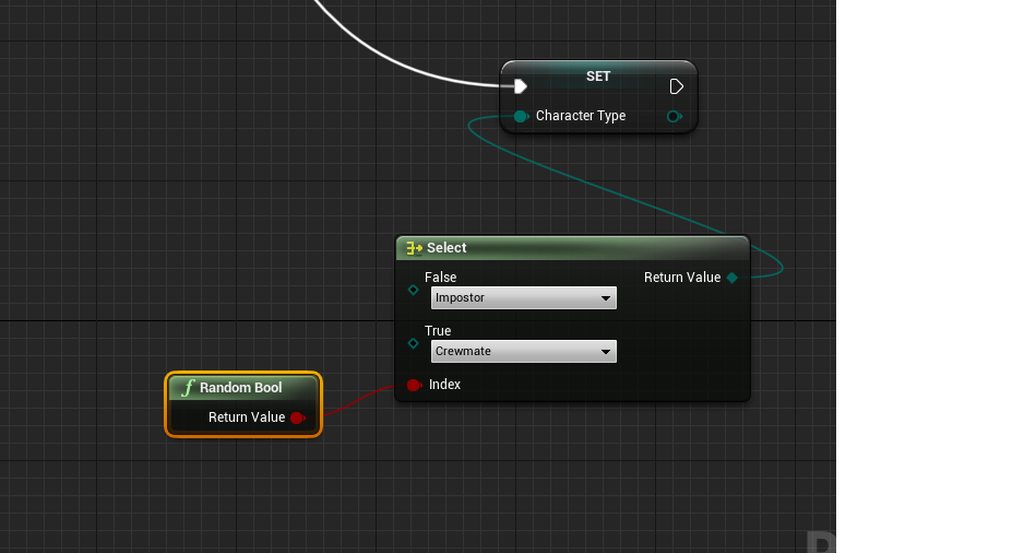 astral epoch
Yes.
dense mica
@odd ember i think its impossible with the current architecture of my code
timber cloak
yes, and the server launch only ONE role for all clients that way
which is why, i am thinking of getting both Booleans
crystal kettle
where is this code running?
astral epoch
uuuttp, can I ask, how much do you know about programming?
timber cloak
i can't say i am very good though, but i understand some basics here and there
it seems like boolean is "either" data, right?
astral epoch
No.
timber cloak
so meaning i should not use boolean
astral epoch
A boolean stores either a true or false. Yes or not. 1 or 0.
odd ember
@dense mica then it may be worth considering rewriting it so you can write out the child actor components
astral epoch
That is when you actually store the data. But what you're doing is generating a random choice of true or false and applying it to that select.
dense mica
@timber cloak you can store all connected controllers on OnPostLogin and after everyone is joined (match is started) select random controller then "getControlledPawn" then cast your character then set impostor
then store the casted character as varaible and name it impostor
crystal kettle
the code you shown is fine @timber cloak if you just have 2 values in your enum, if you add a third then you will need to use another data type to pass into select (an integer) but with just 2 values the boolean is fine
timber cloak
Which is why it fires only either Yes or No to clients. Let's say, it is "True", then all clients are getting "True", but i am trying to get both "true" and "false" randomize together to all server
dense mica
gamemode only exists on server it cant run on everyone
astral epoch
Yes uuttp, but that's doing that because it is generating a random value each time you use that random bool.
Which means every time you use that to set a player as imposter or crewmate, they will get a 50% chance of being either.
Which will be unaffected by what the other players are, assuming there isn't more nodes before this.
timber cloak
i am trying digest here
crystal kettle
If this is in your game mode then it looks like you are just overwriting a variable on your game mode (Character type) each time a player joins
timber cloak
Which is actually correct. If someone gets Impostor, the rest of the other players are getting Impostors too. So, if* in my ClassDefault setting is 1 impostor_count*, then the other players controllers won't possess any of the pawns i spawned.
astral epoch
Is there something before this selection that checks how many imposters have already been chosen?
crystal kettle
Would it not make more sense to override the Spawn default pawn for function in the game mode to either return an Imposter pawn or a Crewmate pawn?
dense mica
You can improve it yourself @timber cloak
number of Impostors for loop is wrong btw
i forgot to edit it wait
dense mica
you should store the impostor data in playerstate or gamemode, there shouldnt be any "impostor" enumeration or boolean in character class
i would go for gamemode
you can do like this
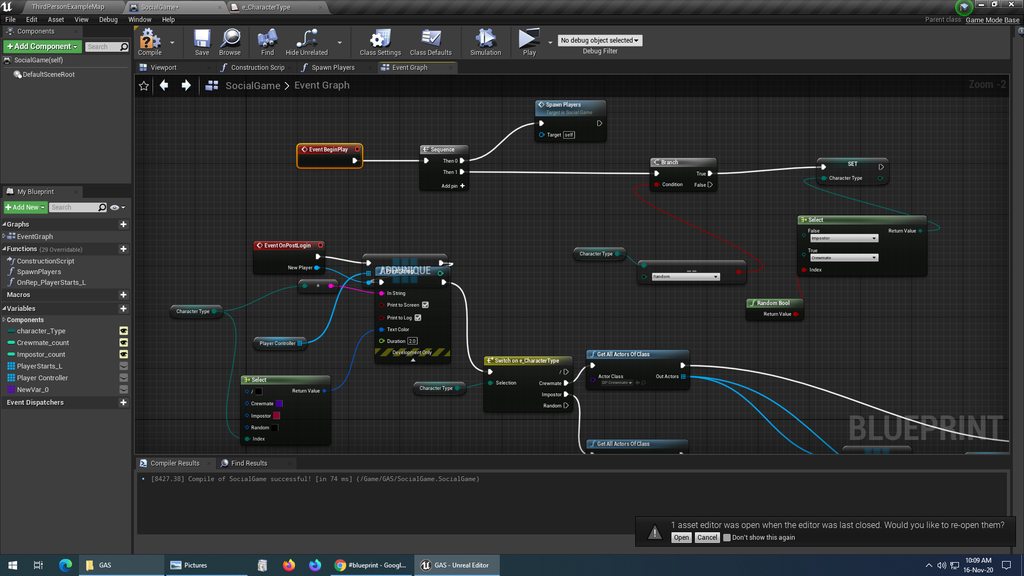
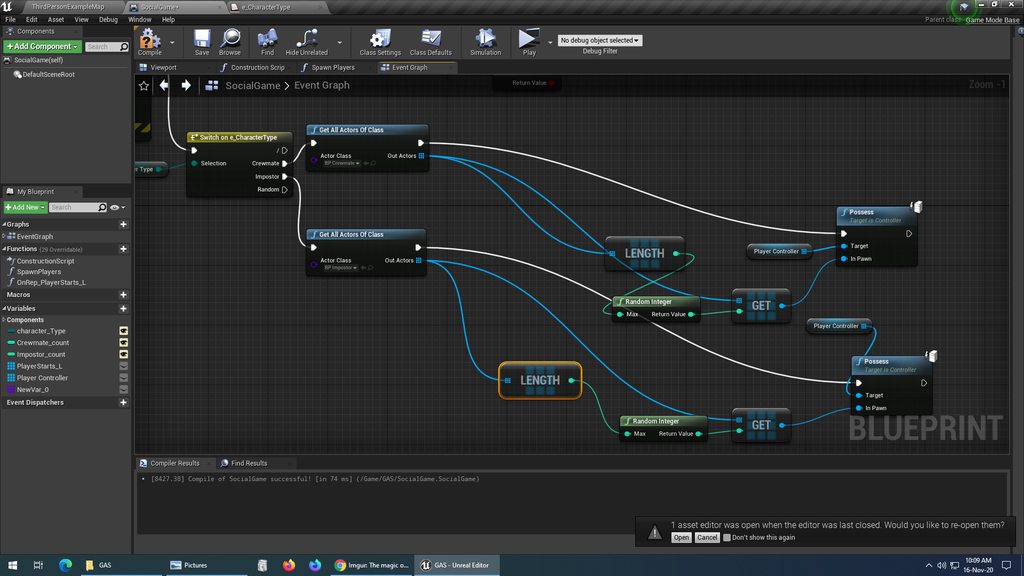
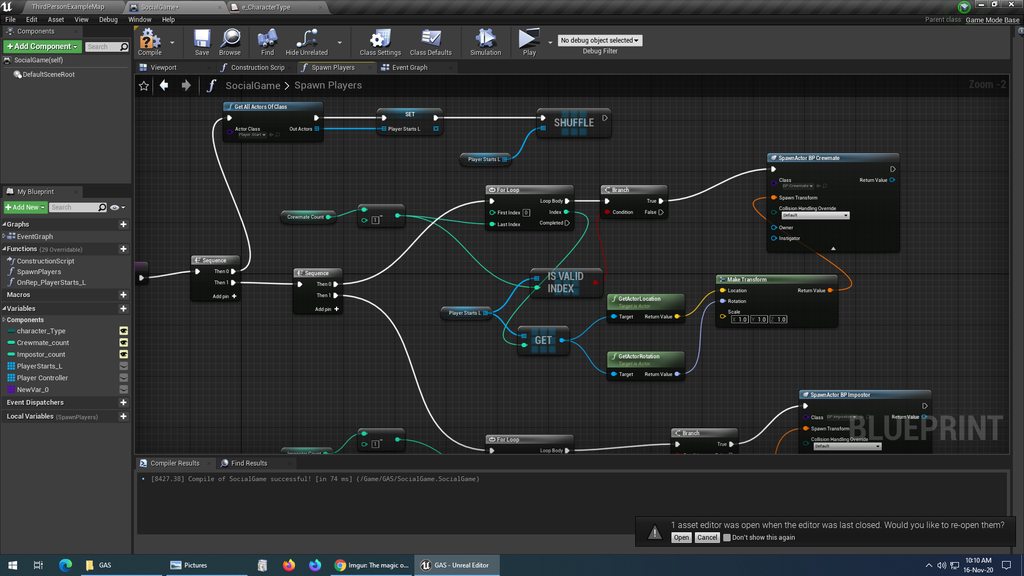 dense mica
i dont understand why do you spawn players and trying to posses them on gamemode
come to #multiplayer
timber cloak
if i don't spawn it in GameMode, then it should be at Actor blueprint? i thought that's client
crystal kettle
Actors can be instantiated on client and the server, infact the game mode is an actor it just doesn't get replicated to all clients (as you are aware)
highly recommend reading this at some point if you haven't already come across it http://cedric-neukirchen.net/Downloads/Compendium/UE4_Network_Compendium_by_Cedric_eXi_Neukirchen.pdf
timber cloak
@crystal kettle thanks, i have read that, roughly understand those basics. I am not touching Dedicated server, listen server is more than enough for me to learn about the Engine
 left latch
Hi there! I'm John. i am new here and also new in unreal engine. i was following a youtube tutorial on how to start a shooting game but there was no tut about how i make my character move while shooting . im sorry this sounds kinda basic but as of now im finding my way through it
odd ember
isn't the shooter game a complete shooter from start to finish? I think shooting while moving should work per automata
 high phoenix
how to make my bullets ingore my character
 rough jay
ignore visibility
rough jay
you using line trace or actors for bullets
rough jay
line trace does damage right
go on the character and ignore vis for line trace
idk about actors
left latch
i mean the problem i have right now is when i move i have the run animation right? after i clicked to shoot it plays the animation for shooting but after it plays shooting animation it is stucked liked a scare-crow walking around
rough jay
show bp
rough jay
no the nodes that make it do the animation
rough jay
is that not anim montage
high phoenix
show bp
@rough jay ok so can i spawn the bullet in front for my character
left latch
sorry i dont understand completely
rough jay
i would try anim montage
 pulsar mist
I hope I'm not interrupting anything, but I had a bit of an issue with my project. My HUD wasn't showing and after fiddling around with some things, I figured out that for some reason the BeginPlay event isn't firing on my level blueprint. The HUD will show up if I press the Enter key, but I can't get it to load automatically
left latch
should i add like an if statement that if the montage is done it opts to running animation?
rough jay
this makes shit smoother use that
then add a slot default to ur anim blueprint to make somethign anim montage right click the animation go up to create then anim montage
pulsar mist
Is there any reason why my level blueprint would be referencing an actor instead of the level itself?
 faint pasture
@pulsar mist yeah, that's pretty much what a level blueprint is for. I think there's a button on an actor in the map that you can press to add it as a variable in the level blueprint. You probably did that on accident
pulsar mist
Not sure what else could be the issue. I even tried creating a new level to see if that would fix it, but no dice. Not sure if there is maybe a project settings
 desert juniper
Hello. Quick question
I'm trying to make a light switch that turns on and off lights
I've created a blueprint BP_LightSwitch with an array of type I_Light (an interface)
I'd like to add objects to this array from the world outliner
I'd ideally like to just drag and drop these lights objects (whos BP implements the I_Light interface) onto the array field i created earlier for the light switch.
Is this the right way of going about it? Is there another prefered way?
 placid otter
how would i set up the blue prints for a gacha event in my game ?
flat raft
@desert juniper instead of an interface, try a Event Dispatcher.
It's more suited, in my opinion, for this
 tiny meteor
@placid otter you mean open a random item?
placid otter
yeah like if youve played battle cats or similar games, where you use in game currency to draw a random item/character and can pay more for a 10-pull of random characters/items
in a seperate menu
desert juniper
Thanks @flat raft I'll take a look
flat raft
@high phoenix have you tried the built in one? https://docs.unrealengine.com/en-US/BlueprintAPI/Game/PredictProjectilePath_Advanced/index.html
Predict Projectile Path (Advanced)
Predict Projectile Path By TraceChannel
 sonic pine
Hiho why i cant connect object Reference to an other object reference?
Its the same type, so it should work
desert juniper
I'm not quite sure Event Dispatchers is what I'm looking for.
It just seems overcomplicated.
I know I can hook it up with an Array of class Actor variable, but I'd like to be a little bit more typesafe than that.
I'm just really looking for a way to have an array variable hold reference to scene objects so that I may loop through them
sonic pine
I dont know exactly but it seems you are looking for a way to Connect different variables? Like a Variable Map (directory)???
maiden wadi
@desert juniper Nah. It's definitely a Dispatcher you're looking for. They're not complicated at all. What is your use case? Are you placing everything in the editor by hand, or spawning stuff in dynamically?
Well, actually that depends on whether you want to use a subclass of actor for lights. Which you should. But it's a designer preference I suppose.
desert juniper
@maiden wadi
I'm basically trying to hook up certain lights to a light switch.
The lights are all manually placed for the time being
I'm just used to the unity way of creating a field, and dragging/dropping scene objects onto it
 earnest tangle
There's two ways you could do it I guess
maiden wadi
Okay. You can do the same thing here.
earnest tangle
You could have an array of actors, which the switch would loop through to activate/deactivate - this sounds similar to the unity approach you describe
Or use an event dispatcher
maiden wadi
@desert juniper I made an array of actor pointers that are lights. Note there's two types of Light class, make sure it's the one I hovered. It's Instance editable, noted from the eye on the right side of the Lights variable in the lefthand display.
Click your lightswitch in the scene. And you should more or less see something like this. There's a Lights Variable under Default in the Details panel.
Click the lock at the top right of that so that selecting something else doesn't show it's details, but keeps the lightswitch. Then you can drag your lights from the WorldOutliner to the Array.
sonic pine
Someone know why i cant connect the Object Reference Health with Object Reference Member in Stats?
maiden wadi
@sonic pine What does the error say when you drag one pin over the other?
desert juniper
ah okay I think I see the issue to what I had tried to do before
desert juniper
I had created a BP out of a lamp from the starter content, and at that point I guess it didn't derive from Actor anymore
Creating a new BP_Light and adding the mesh & components as needed works as you described
maiden wadi
@sonic pine Is HealthBar, from MainWidget a Widget you've created, that has a ProgressBar Widget inside of it?
desert juniper
thanks @maiden wadi & @earnest tangle
sonic pine
Yes
maiden wadi
@sonic pine I'm pretty sure you need to get the actual progress bar out of the HealthBarWidget to plug into that.
sonic pine
?
I have to connect the empty widget, after that i can include the progressbar into the widget?
maiden wadi
I have no idea. I'm just guessing at what you're trying to do. But if HealthBar is a UserWidget with a ProgressBar inside of it, and BarWidget is asking for a ProgressBar, then you need to get the ProgressBar from your HealthBar UserWidget.
maiden wadi
Did you get it hooked up?
sonic pine
I have created the ProgBar and the MainWidget after that i have include the ProgBar into the main widget
so the progressbar is included and not declareted in the main widget
maybe this could be the problem ..
maiden wadi
The actual ProgressBar is inside of HealthBar, right?
maiden wadi
Kay. Back in the original screenshot. Drag off of Healthbar that is coming from the MainWidget, and try to do "Get HealthBar"
You need the HealthBar, that is inside of Healthbar, that is inside of MainWidget.
flat raft
@desert juniper I forgot I had this. This is the Array method. https://youtu.be/y5SZ9tDGk64

Connecting two Blueprints via Direct Reference.
sonic pine
Kay. Back in the original screenshot. Drag off of Healthbar that is coming from the MainWidget, and try to do "Get HealthBar"
@maiden wadi ok thats difuse ^^
i have renamed the different Healthbars xD
maiden wadi
Them nested names though.
sonic pine
The Main Widget is including the Main into my Code
In the Main i have include the Health mana EXp bar
And here the healthbar is created
what should i delete and what should i include?
maiden wadi
Are we still talking about connecting the right pointer to the SetMembers node?
sonic pine
yes
maiden wadi
HealthBarCreate is the one you're after I think.
So it'd be MainWidget->HealthBarInclude->HealthBarCreate
sonic pine
Heathbar create is that one who is the prgressbar and the function
correct
The other way round
HeathbarCreate is Progressbar and the Functionallity ->
HeathBArInclude is the widget where are all Bars, the Skills, minimap and so on will be Displayed ->
MainWidget is the Variable to Link it to the Character Stats
So i dont have to use Binds, i think you told me not to use binds 😉
flat raft
What are you trying to do Raikun?
maiden wadi
I dunno. I was just trying to help connect the dots. Your SetMembers was asking for a progressbar, and HealthBarCreate is a progressbar. HealthBarInclude which you were trying to connect before isn't a progress bar.
 simple berry
hi quick question, how would i go about creating a secondary player mode (i.e. a death/spectator state, or a second playable character)?
sonic pine
I dunno. I was just trying to help connect the dots. Your SetMembers was asking for a progressbar, and HealthBarCreate is a progressbar. HealthBarInclude which you were trying to connect before isn't a progress bar.
@maiden wadi That what i mean the member stat cant find the progressbar into the Include
so i should change that to Probar?
maiden wadi
@sonic pine Did you get the HealthBarCreate out of HealthBarInclude to try and connect it?
maiden wadi
What do you mean by without it?
No, keep the Include. Like I said, MainWidget->HealthBarInclude->HealthBarCreate. There should be three little blue bubbles there.
sonic pine
if i delete the HealthbarInclude into the main i cant use it into the Character
where should be the bubbles?
maiden wadi
That screenshot you just posted.
sonic pine
there are no bubbles xD
maiden wadi
flat raft
Your set member, look in the details panel. There should be some checkboxes
sonic pine
Ahh you are good ^^
this is working
ok i have to include the Create into the Character 😉
sorry ^.^
maiden wadi
Why do you have to include it into the character?
sonic pine
this i have to "include"
the HealthBar Create next to the include, no new variable or something like that
thats what i mean with include
maiden wadi
Ah, yeah.
sonic pine
i dont know wahts the correct name to to "import" into the BP
Is it a problem that i have only the healthbar created for Health, Mana and exp?
I have created 1 bar and in the Main i was using the samebar 3 times with different settings for Health, mana and EXP
maiden wadi
By the look of the setup, you should probably rename HealthBarCreate to something more dynamic. Since despite that it's a Healthbar, it's also a Manabar, XPBar, etc.
sonic pine
yes ^^
maiden wadi
ProgressBar, ResourceBar, StatBar, etc. Cause you'll know which bar it is based on the second variable. It'd be like MainWidget-ManaBar-ProgressBar for the Mana bar. MainWidget-HealthBar-ProgressBar for the healthbar.
sonic pine
its only the BarForm or BasicBar
Thats better 😉
ok now is the dificult part is comming 😉
I will work first time with structures and Enums(?) thanks for help.
simple berry
how do you properly add a second playable character?
flat raft
Drag your second character into the world, and possess it with your player controller
simple berry
i mean dynamicly, like lets say i have a character selection menu and when you click on it you swap
flat raft
same
just have your menu trigger the event
I think there are a few YT vids on character selection
 muted anchor
How can you get an animation's current position/frame from an animation blueprint? I want a slider to reflect the progression of an animation playing in the anim blueprint
 tender sierra
I want a sound to be played when I collide with a component in another blueprint.
This seems not to be the right way to do - what am I doing wrong?
 atomic salmon
@tender sierra first of all, an overlap is not a collision, meaning that even will trigger as soon as the two actors "invade" each others' space but they will not bounce off.
secondly for it to work the Cast has to succeed, so the class of the other actor you are casting to should be the expected one
third, you are spawning the sound at a location, currently the center of the world (0,0,0). This means the sound may actually be playing, but you are too far from it to hear it
 gaunt kayak
is there a technical documentation for how X blueprint function like GetLocation and Tanget at Spline Point is made?
atomic salmon
@tender sierra you should probably be spawning it at the world location of one of the two actors involved in the overlap
tender sierra
@tender sierra you should probably be spawning it at the world location of one of the two actors involved in the overlap
@atomic salmon
or probably just Play Sound 2D
atomic salmon
yes that would work regardless
@gaunt kayak your best source if information is the engine source code on GitHub
tender sierra
secondly for it to work the Cast has to succeed, so the class of the other actor you are casting to should be the expected one
@atomic salmon
Can you help me with this part?
I have a Component Begin Overlap Sphere (this is where I am now) - then I want to overlap with a component inside CHA2_CH called sphere collider (never mind the incorrect name, since we are not colliding as you explained)
gaunt kayak
@gaunt kayak your best source if information is the engine source code on GitHub
that's a bit overwhelming, but I'll see 😄 ty @atomic salmon
atomic salmon
@tender sierra first thing is to check that the overlap event is being triggered. Add a Print String directly after the event with a text like "BEGIN OVERLAP TRIGGERED!"
If you see that appear on play when the two actors overlap, then the overlaps are set properly.
Next you need to check the cast in a similar way. You can also use breakpoints if you like, but print string are pretty straightforward.
 hushed topaz
Morning all. Just found a solution to an issue we've been struggling with for over a year now. Levels being dirtied and asked to save when you open them when using world composition. Turns out, it was the level bounds actors auto-updating in a weird way. Not sure why they were doing this, but we've turned it off now. Happy level designing!
maiden wadi
@gaunt kayak If your project has had C++ included, and you're working in Visual Studio at least(I'm sure other IDEs do the same thing), all you have to do is open of that class' .h File, and search for your function to see how it's written.
gaunt kayak
does it work for blueprints stuff as well? 🤔
maiden wadi
Like, functions that you call in blueprint you mean?
gaunt kayak
like this
maiden wadi
@gaunt kayak Sure. Do you know your way around C++?
gaunt kayak
I'd say beginner level 🤔
I know more about C than C++ (been studying C for years, whereas C++ not)
atomic salmon
Honestly if the purpose is just understand how the function is implemented, you can simply look it up on GitHub and read it there
gaunt kayak
reading the code is basically what I need 🤔
so either done through github (finding it seems harder) or in another way 🤔
atomic salmon
Open GitHub, browse to the release version of the engine, enter the name of the function in the search box and you will find it
You may get the .h or the .cpp file. If you get the .h file look at the folder it is in, it is probably Classes
Browse back to Private
earnest tangle
If you have the engine source and debug symbols installed you should be able to doubleclick the node to open up the C++ code for it
atomic salmon
Into the same sub-folder you will find the cpp file with the implementation.
earnest tangle
Otherwise yeah best bet to try and look at where the node could be, for example look at that node - it says "target is Spline Component", usually that means it would be in a file called SplineComponent
atomic salmon
True but you also need the full Visual Studio installed.
earnest tangle
yeah that's true
gaunt kayak
well I do have Visual Studio installed 🤔
I'll try both ways and see which is "bettter" thanks a lot guys ^^
atomic salmon
then it will do the search for you
maiden wadi
Oh Thaaats how that works. I keep forgetting to open UE4 with F5 in Visual Studio. Guess that'll keep me from searching stuff manually in the future.
atomic salmon
@maiden wadi correct. You double click on the node and if the Editor has been started from Visual Studio it will take you to the cpp file with the implementation.
Now if you use VAX it is easier to do the search directly with it within VS.
Easier and faster.
maiden wadi
I always just searched for the target's .h file, and then the function name.
atomic salmon
Yes. For components it is relatively easy, for other functions it depends.
For example Execute Console Command you cannot really guess where it is defined.
You can kind of guess from the tool tip.
earnest tangle
you can try to search for symbol
usually the function name for the node contains at least part of the node name in it
 jovial latch
hi im trying to trigger a box collider event when a traceline hits it - but it doesnt work :S
has it maybe something to do with the box collider not being the root of the blueprint but just a component?
maiden wadi
@jovial latch You can't trigger hit or overlap events with a line trace. The line trace itself should hit the box and call something on the hit actor.
jovial latch
i dont know if im getting what you are referring to.
my concrete problem is:
i have a door-controlpanel (for the moment a collision box), which is part of a door blueprint. when the player (fps char) looks at that controlpanel it should change color.
im struggleing with detecting a mesh component in a blueprint.
sorry if i havent made this clear enough before
maiden wadi
@jovial latch And by look at, you're using something like LineTraceByChannel?
jovial latch
yes, from camera - like a crosshair
maiden wadi
Right. The line trace returns a HitResult struct of the details of the trace. If it hit something, the Actor variable will be populated and you can cast it to the class and then call functions on it. Usually in larger scenarios people use interfaces or base interactable classes for this. Both to see if something is interactable in the first place, and then also to interact with it. The line trace itself cannot trigger Overlap or Hit events like a moving object though.
@jovial latch I can give a better example. Are you trying to do this just when the character looks at the panel, or when they look at it and press a key?
jovial latch
oh that would be nice ^^
yes indeed, the player needs to press a button, while he is looking at the panel to open the door
maiden wadi
So, the action for it at least would be this. I made a simple class named ControlPanel. In it is an Event named ActivateControlPanel. In the character would be this. On key press F, Line trace from camera. If it hits anything, cast the hit actor to control panel, and if that cast succeeds, call that event.
jovial latch
ah good idea! i'm going to try this out
thank you!
maiden wadi
@jovial latch It's worth noting that this is only really for simple solutions. If you have more than a couple item types you can interact with, you really should do this with an interface. Otherwise that simple function can quickly turn into this.
jovial latch
that reminds me: how costly is a cast node? i remember reading somewhere, that you should use as few as possible - especially on tick events
maiden wadi
Less costly than not using one.
 twilit heath
not very, but each cast node will load the class its casting to
and everything it references
maiden wadi
Actual truth is, casting costs nothing. The validity check in the normal cast node costs a little, but trying to use a casted object that ends up null will cost literally up to 1,300% more than the cast will in blueprint, and if you ever move to C++ that same mistake will crash a game.
twilit heath
so the impractical example that Authaer shown above eventually results in a blueprint that causes all of the game assets to be loaded
as ssoon as the BP itself is loaded
 azure bolt
Does anyone know how i can cull parts of my mesh spline that are far away?
 tight schooner
There might be a max draw distance parameter in the component's details panel
Otherwise there's this: https://docs.unrealengine.com/en-US/Engine/Rendering/VisibilityCulling/CullDistanceVolume/index.html
An overview of how to use the Cull Distance Volume to cull Actors in your Levels as specified distances based on their size.
azure bolt
I don't have a draw distance parameter unfortunately, and the cull distance volume thinks of the mesh spline as one object, i need to cull different segments of the spline
 pearl rose
@azure bolt What about using LODs for your mesh?
 hollow drift
Hey folks. I need an idea or suggestion about Get hit result under cursor by channel.
Top down game, you can pick up pawn and move it to another tile
My idea is to move the pawn only inside a certain selection of tiles. Problem is, I need to somehow tell my script to use a external bp collision
how can i combine box collision "coordiantes" with actor location?
pearl rose
why collision?
hollow drift
Perhaps i can also set a max distance
pearl rose
Okay got it
hollow drift
the darken thile is the target tile
but also i need to be able to move the collision afterwards
pearl rose
So you do something very simple
hollow drift
so i cannot make it static
azure bolt
I tried LOD's too, but it didn't seem to make much difference. I have a whole spline mesh going round my terrain (a railway) but it just lags a tonn when the whole thing is in viewed from a mountain
hollow drift
i made it seperately
think i might be already bit more advance
trow me the cheese please 🙂
I am looking for ideas how to do it
pearl rose
before moving, you can use a boxOverlap (actor/component) and look if this is overlapping anything. If it does, then it's not a valid cell, if it doesn't then you are good to move
hollow drift
a graphnode i might not heard of before or something which would be prefect for my problem
so boolean after all
pearl rose
hollow drift
hmm, can i also define object name somehow?
pearl rose
yeah, just look if the box you spawn (same dimension of the box you try to move) is overlapping something
pearl rose
you have an array of Actors
hollow drift
ye
pearl rose
so you can test them all with whatever is best for you (store variable, by casting, by tag)
hollow drift
kk
pearl rose
and base over the result you can decide if the move is allowed
hollow drift
sec, leme study the node
pearl rose
let me do an example quickly
pearl rose
basically
That would be working with tag
So you would need to store the tag (whatever name you like) and see if it exist inside the overlap actors
@azure bolt What about an empty lod over a reasonable distance?
pearl rose
Box pos et Box extent?
hollow drift
i get what they do
azure bolt
Thanks Blansiker I'll try that
pearl rose
All good 🙂
hollow drift
but they dont get calculated into the "equation"
i have an separate actor for collision
so i took it as actor inpuit
pearl rose
The box pos would be the location you try to go and the Box extent would be the size of the box of the pawn you try to move
Does that make more sense to you?
hollow drift
does it generate the box or does it take pre existing boxes?
pearl rose
The Node BoxOverlap will create a box just for the purpose of this function and then remove it
hollow drift
"Returns an array of actors that overlap the given axis-aligned box."
pearl rose
and this box is a overlapping collider
pearl rose
Pretty much what the node is saying himself 😉
pearl rose
yes
hollow drift
hmm. no i need it to have it there. I am updating the box position afterwards in the next turn
but could also just drop it and generate it each time
well both way actually works
ah yes yes
pearl rose
This is only to know if your pawn is allowed to move. So when he press the logic to move, you run this code to ensure he have the authorization to
pearl rose
😉
hollow drift
tyyy
pearl rose
My pleasure
hollow drift
ill give it a try
just on short note
i dont use loop, but gate with event tick
hypothetically this should work too
pearl rose
It should work, but I highly recommend you not using the event tick for this
hollow drift
i could generate it before
then use it static
then on gate close despawn it
oh actually
how do it "despawns?
pearl rose
Specifically for a chess game style, no need to calculate everything in real time, just use Timeline when you need to move something
pearl rose
This box get kill directly after the return
pearl rose
and it's invisible
pearl rose
Why would it need to be visible?
hollow drift
also if i pick up the pawn and put it down, it would not work
since on each pickup, it will be genearted a new
damn
pearl rose
I'm either not getting what you are tyring to do or you are confuse
hollow drift
sorry i already thought one steap ahead
pearl rose
Or both :p
pearl rose
okok 🙂
hollow drift
just to illustrate
i pick up the pawn, it floats above the tile
then i can select where to put it down
but with this script, player controler, it would alawys genearte my new collision box from the pawns position out
but i want to have it fixed, so on "first turn" i should only be able to place the pawn in a designated area, eg collision box
pearl rose
Make sure you do all your testing before setting up the location and you should be good
hollow drift
hmm
no i need to use the static
else it will always update the collision pos anew
and i have no other reference
i need to lock the position of the collision box behind my next turn, so it updates it only on next turn
i needs to be static therefore
e.g. and own actor
But i get now a good idea what i have to do^^
pearl rose
excellent 🙂
hollow drift
Can you give me a second go?
Leme refrase my question
perhaps i did it wrong
i am still not 100% shure
pearl rose
I'm about to go sleep very soon, but if you want we can do a 10min call before
pearl rose
Let's go in private
astral epoch
Is it possible to write to a data table during runtime and have this information persist after stopping the editor?
 solemn bloom
how do you get to see the a child actor template in editor ? i have a blueprint within a blueprint and i want to be able to change the child's bp variables in the editor
i want that window on the right to show up in the editor
any help would be greatly appreciated 😄 !!
 dim robin
hello, I'm trying to implement a local multiplayer character selection menu, I would like to achieve something like this (attached picture).
do you have any tutorial or reference I can follow? I still have some difficulties understanding how it could be done. thanks
 normal rampart
@solemn bloom not sure if there's a more efficient way, but if it's only a few variables you're trying to expose in the world editor, you could create public (editable) variables in the blueprint containing the child actor. Then in the construction script of the same blueprint containing the child actor, go ahead and update the variables of the child actor to match the variables in the blueprint
 trim matrix
How can I make a projectile collide with the character mesh but not the collision capsule?
I want it to ignore the collision capsule but not the mesh
 sullen oar
Can anyone please link a great video tutorial for blueprints for modular assets (such as prop or buildings)?
Please ping me so I can see it as I am not looking at this channel
 weary jackal
@trim matrix make a new collision object preset and apply that to projectile. Then in the player capsule collision setting you will see a new collision object is added. For capsule make it ignore and for mesh make it block
trim matrix
Thanks @weary jackal il try that
 paper galleon
Good evening from here people. I have a question.
So, basically if I do this
And at some later time, I do this
Will the constructed object be marked for destruction ( it's not being referenced anywhere else).
I'll be creating a bunch of these and I want to ensure that if I remove them from the TMap, they are eventually removed from memory by garage collection and not hanging around somewhere.
 stable fjord
Hello guys, how to set for example random time to execute function of each element of the array with different time?
I have a 10 cannon and I would like to make following cannon fire more randomly
 regal folio
does anyone know how i can do something before the first player is spawned? im trying to do procedural level generation. i want to generate the level before the player spawns (include the spawn point that will be used)
 past void
anyone know/have the blue prints for twitch intergration please as i have the plugin but can work out how to set it all up . ive got it to connect to the chat but i cant do the command base side for a game. Sorry for my spelling im dislexic
 sonic raft
Any suggestions for what I can use as a Steam status symbol in my widget? (Online, Away, Offline etc.)
I've thought of adding images of orbs of varying color, but perhaps there's something more suitable
 storm dove
can someone explain why my cast to child class fails?
stable fjord
look at what child class returns
u should use for example Print statement
and It could explain u everything
stable fjord
right, are u sure about your classes?
BP_BaseWeapon as I suppose is a base class for your guns
its a base class and rest of classes are a child classes ya?
earnest tangle
Where does this connect into?
stable fjord
hi @earnest tangle
earnest tangle
👋
stable fjord
@earnest tangle I have a small question for u, but not at this time
stable fjord
@earnest tangle about function delay
earnest tangle
Sure :)
@storm dove yeah you can't just take a base class and cast it into something it isn't
stable fjord
execution delay
I am thinking how to make a small delay inside the BP function, delay function isint available unfortunately
Thats why I am decided to make a timer
earnest tangle
oh, if it has to be inside a function, you could call a custom event which runs the delay or timer
stable fjord
I have created a Macro with delay inside
but it not works, and inside the function I cannot call a Delay
I have a 10 elements in array and I would like to execute fire function randomly (with random time)
earnest tangle
ah was it that cannon thing?
stable fjord
its my cannons
and I would like to make this cannon shooting randomly
not at the same time
as on the real ship
earnest tangle
ah right... in this case, I think it might be easiest to make a custom event in the cannon.. like FireWithDelay
because with BP's it's kind of a pain to do multiple timers inside a single actor... if it's inside each cannon, then it won't be a problem
stable fjord
inside the each cannon
yes like this way
I have a following event
FireWIthDelay
and I am trying still to make a timer
but it not works properly
like this
https://docs.unrealengine.com/en-US/Gameplay/HowTo/UseTimers/Blueprints/index.html I followed a documentation
A How To Guide for using timers in Blueprints.
earnest tangle
Why not use a delay? It would probably be simpler for this
earnest tangle
lol :)
storm dove
if i colapse code into function does it run faster?
stable fjord
not sure about it, but it makes your code more cleaner
if you are using something more than once
in more than one place you should collapse to function and make your code cleaner
 brittle knoll
what's the easiest way to interp over time instead of at a speed?
like let's say I want my cube to move in .5 seconds from 0 500 600 to 200 6500 900
well currently trying to figure out what a timeline is
trim matrix
Hello guys... i,ve created a day cycle, now I want to create the possibility to sleep and select the time you want to sleep, how do I do it? There are any tutorials? Thx
 half plank
Is there a simple tutorial on how to change my bean fps character to an actual character, not just floating arms
 rough wing
@stable fjord so what happens if you decide to stop the cannon from firing halfway?
You can add a boolean to check that if that's a thing in your game
stable fjord
works atm, it is created like one single trigge
trigger
which makes a cannon's fire
each cannon's fire
now, works properly
but thanks
 frigid anvil
You could check out the third person template project @half plank
half plank
That would probably be a better way to learn, i just implemented wall running and a few good things that took me awhile. Im like totally new and im having a rough time figuring out some things lol
 pulsar orchid
Can the node “Get Debug String from Gameplay Tag” be used in a packaged build, or is it disabled similar to Print Strings?
rough wing
It should have the yellow stripes if it's development only
frigid anvil
You can add the third person character to your current project and either copy that to your fps character or remake the system in the third person character
half plank
just looking for resources, because if its not on youtube i cant do it. i have tinkered a bit, but im having a hard time getting my thoughts into the blueprints, like i know how the code should kinda go but i cant seem to implement things because of the color coordination. i am not familiar with the nuances yet
can i literally copy paste the third person blueprints and just move my camera into my face?
 fallen wharf
Hi, I am just learning Unreal and trying to create a game for my architecture studio. Would you know how to have a sequence of multiple triggers activate an event? So for example, to create spawning(?) of new geometry all 5 boxes must be stepped on first. We are trying to use array and boolean commands but it's not working. This is the most helpful thing we could find so far. https://answers.unrealengine.com/questions/259095/activate-triggers.html
frigid anvil
Yes you could use the third person character and put a camera in the face for a "true first person" view. I suggest you play around with both the first person and third person templates and also watch some tutorials. @half plank
half plank
yeah i have watched and followed along implementing things, thats why i dont wanna start over lol
 wild moth
Hello everyone,
I'm having a bit of an issue with changing the current cursor. When I use the Controller's set cursor it only changes after a click off of the UMG button (A trigger like cursor change)
Any tips?
 valid warren
Pretty minor question, I'm working on a squad-based single player game, with a core feature being the ability to switch between different specialists within the squad (Think batalion wars). I've already implemented a system of actor tags for the program to identify what the requested 'type' of actor is, but I'm having trouble determining what the scope I should implement the actual blueprint. Should it be part of the individual pawns, or an element of the gamemode?
 solemn musk
Hello
So I am trying to make a FPS game using the Third Person template, everything worked but for some reason when I did a test, this single code stopped working, what its trying to do is check if the player is in the view of this code (enemy), they are supposed to go towards the player but for some reason the Fail result executes, so the MoveTo might be the problem.
 spark steppe
so an Get Actor Eyes View Point node exists, which refers to the eye height of the pawn, but i can't find any setting in my character bp details to change said eye height?!
is it the Base eye height in the camera section, even if the actor doesn't have any camera attached? --- apparently it is...
solemn musk
Apparently MoveTo it self is broken since my roaming code stopped working. Even with testing (Doing an Event Play and telling the AI to move to the 0,0,0 origin), it seemed to say that the code failed
rough wing
@spark steppe yes it is. You can even override this function to have it always return the camera location instead of character location+eye height
spark steppe
thanks, i was just curious how to alter the result of the other method, wanted to set the eye height on game start based on where the eye bones are in the rig
it works now with setting the base eye height, so my problem is solved
 calm cargo
Is there any way to define more blueprint function categories, nicely, from the editor? So they're slightly more organized?
like the Bullet Damage category for instance
 void oak
Does anyone know how one would store "Spawn points and there locations" per level? I want my key to be any levels specific name then output a list of spawn points and their locations. I'm not sure how i would get a data table or a map to do this. Is there a better way?
spark steppe
@calm cargo yes, click the function and change the graph category in the details tab
 graceful hamlet
I'm looking at the gameplay abilities stuff, trying to evaluate if it's worth integrating yet. https://docs.unrealengine.com/en-US/Resources/SampleGames/ARPG/GameplayAbilitiesinActionRPG/MeleeAbilitiesInARPG/index.html
My question is - this seems like a ton of moving pieces to accomplish essentially a "on hit->get hit actor->damage_event (assuming you have no need to cast, your default/shared class actor has been extended with a damage stub)
Going over how Melee Abilities are setup in ARPG.
Is there something this adds hugely vs the existing event/call system?
I'm sure I'm just not understanding how it's 'better' and not just 'way overcomplicated'
void oak
If you have a shared combat component between the actors it shouldnt be to complicated
graceful hamlet
^ that exactly
if your "can be damaged" mobs all share a set of event stubs via C++ or whatever
flat raft
Can some check if the ASYN Load Asset node is in BP?? It doesn't show up for me
graceful hamlet
like these?
void oak
just add a combat component to anything you want to fight with each other and do all the logic inside that comp
graceful hamlet
yeah, that's my point. So why is there this huge gameplay abilities system that's been beta for 5 years?
And is it worth bothering with?
Currently, there are so many ways to pass events, launch stubbs, tags, the works
flat raft
@graceful hamlet hmm.. i dont have those
graceful hamlet
@flat raft Are they there if you deselect context?
void oak
I think the "beta" thing is specifically for different abilities like cast dif spells depending on the actor. Its quite a task to impliment abilities if you have a ton of dif units.
graceful hamlet
so it might be an economies of scale thing, if you have hundreds of abilities and huge swarms of chars
flat raft
@graceful hamlet found it Thanks! I was in the construction script
graceful hamlet
ok, I think I'll leave it as academic, since we might hit UE5 and see them totally revamped. None of my current games are on a scope that big
void oak
I use data tables for abilities and have never looked back.
solemn musk
Anyone else having trouble with AI Move to recently?
graceful hamlet
Oh, for sure @void oak, data tables drive so much stuff
graceful hamlet
Yeah, AI move to is fun 😄
solemn musk
It randomly broke before and im like wtf
graceful hamlet
Ok, seeya all. Thanks @void oak
solemn musk
the AI move kept returning a failure so I thought it was broken lmao
void oak
Yeah no problem. have a good night
solemn musk
wasted like 30 minutes waiting for it to verify thinking its just the code breaking
void oak
Yeah ai movement is my bane
 silent ice
does anybody know to to make an actor do something only if it's placed (manually) but not if it is spawned via a bp in a map? 🙂
 winged sentinel
Got a quick question, I created this to make a variable for my weapon to determine if its firing so i can trigger a transition to firing in my anim bp. Problem is, the delay messes with the animation if I shoot rapidly. Is there a more efficient way to transition pack to my idle pose without using a delay?
 proud hull
@silent ice add a boolean variable to your actor, maybe called bWasSpawned, set to false by default, then set "expose on spawn" to true for the variable as well. When you spawn the actor, make sure it is set to true.
silent ice
@proud hull yeah that makes sense, will do! i thought there might have been something out of the box already, thanks!
proud hull
There possibly could be something built-in, but it'd be very similar to using the boolean var anyways.
pine trellis
is there something else I need to do to make this actor connect to socket? right now it spawns on my thigh, if I press the button it comes to my hand ok but when I press it again it falls to the ground
proud hull
@winged sentinel you can possibly try using an event timer. Delays are called within that current execution path, but timers all wait to run their checks in a particular order so no other logic is held up by it. At least that is my understanding of it.
 wet notch
hi there, I asked this question in audio but was told this might be a more appropriate channel. I've got a rolling sound playing when the physics ball is on the ground, but now I'm trying to get it so that it doesn't play while it's in the air, and then continues once it hits the ground again. how would I go about this?
winged sentinel
@proud hull Ill check it out thank you
@proud hull I see set timer by function name, but it gives me an output, how can I trigger something at the end of the timer?
proud hull
You can also use timer by event if you want to just use what you have in your current graph.
@wet notch Does anything trigger the ball to be in the air? Or does it simply fall off something?
 shadow saddle
how do i set the boolean var
because im getting the array by ref
i want to change directly
float and integer i can just +float/intger
as for boolean i really dunno how
wet notch
@proud hull it's triggered by a jump
proud hull
So when you trigger the jump, set a boolean variable to true to let you know the ball is in the air. Then you can test for a hit or overlap to set back to false again.
Otherwise, you may need to do a downward trace to test if the ball is on the ground.
Or you can even add character movement component just to use the isFalling or FindFloor functions.
wet notch
yeah, someone else mentioned doing a downward trace but due to my inexperience with blueprints, I wasn't sure where to go from there 😅
proud hull
@wet notch can also test velocity, specifically on the z-axis. If it is above/below a certain threshold you know it is either moving up in the air or falling down.
Possibly could be rolling down a steep hill though.
winged sentinel
@proud hull Would I be better off triggering the shot from a montage? The only reason why i put it in the anim bp is because Im blending lower body walking animations with it
proud hull
Downward trace will give the most accurate results. Or you can do something like get overlapping components and use a sphere just a bit larger than the ball itself.
@winged sentinel I personally use montages for attacks, pretty much for the nice built-in on complete and notify execution paths.
Works good for automatic weapons too. On complete, you just test if the button is still being pressed and then loop it right back in to play the montage again.
winged sentinel
It looked good with montage, only issue is this my my anim bp
when I use a montage is snaps my legs to t pose position
proud hull
@shadow saddle I think you want to use the set members in struct node:
@winged sentinel if you use the montage, do you really even need the animation state for firing anymore?
You can keep a boolean variable to set true and false for logic tests, but the animation state won't really be needed.
winged sentinel
Is there a way I can get my montage to only effect my upper body?
proud hull
winged sentinel
That normal?
it t posed when i changed the slot
nvm got it
so in theory i can do everything from a montage once i hook up the locomtion and switch my upper body montages to the upper body slot
holy shit on a shingle it worked
@proud hull ur the best
trim matrix
Hey guys
Idk if it has happened to anyone before or not... idk if its a b ug ir what and i hope when i make a new map it goes away on its own but
Today when i opened up my project to and hit play like a bout a 2 second into the game I'm seeing a random model of my character with jumping (sometimes running mostly jumping) is playing oj its own, usually near the camer and it's back is to the camera :|
Like my character is moving and suddenly i can see a duplicate of my character just jumping.... I haven't placed any asset or anything like that
And it's never in same place but always near to the camera and is facing away from it (the game is side scroller btw)
Ok i found an error code... It seems there is a proboem with the branch node in one of the functions in my charactets blueprint
But idk how to fix it
Here is a picture of the error
 whole mirage
hey
quick question
for this
can anyone tell me how to get the green parts
the set variable
im not sure hoe
how
but i have the left half
sorry neverming
i figured it all out
trim matrix
Man i guess I'm about to burst into tears
All i want is to be able to grab some objects with my mouse curser and release therm where ever i want
Non of the tutorials I'm following is working, one of the is kinda working but it's super glitchy and also causing some sort of weird glicth/problem... :(
Been trying to get it for days but it seems its impossible
 clear meteor
Hi, does anyone know how to hook a slider up in a widget so I can change samples per pixel in raytracing?
 unborn maple
So, my mouse click stop working randomly and i didnt change anythign in the blueprint i am useing event actor on click and mouse event and mouse click are enable in check on player controller they working working fine before it just now when i click on left click that not even getting called
 atomic prairie
Hello, I created a Door BP which opens if I've the key, everything works perfectly if is in the same Level, but if I take the key in another Level and I go back to the door, it doesn't work. I think this reset or something like that when i switch Levels, any ideas?
unborn maple
yes you have to code it all again in the new level if it not being stored on something like game mode or character bp
atomic prairie
I cast the thirdpersoncharacter
this is my key bp
and this is my door bp, i only use the integer in my thirdplayercharacter
 fair sierra
Idk if it has happened to anyone before or not... idk if its a b ug ir what and i hope when i make a new map it goes away on its own but
Today when i opened up my project to and hit play like a bout a 2 second into the game I'm seeing a random model of my character with jumping (sometimes running mostly jumping) is playing oj its own, usually near the camer and it's back is to the camera :|
Like my character is moving and suddenly i can see a duplicate of my character just jumping.... I haven't placed any asset or anything like thatAnd it's never in same place but always near to the camera and is facing away from it (the game is side scroller btw)
@trim matrix My guess would be that the ray you are casting for collision is not findng the floor? Check the result for hit trace to see if it hit anything rather than try to process it regardless perhaps?
unborn maple
so, you need to set a bool in there to true once the key is stored.
atomic prairie
yea i see, i'm trying that right now
fair sierra
can anyone tell me how to get the green parts
@whole mirage The green parts to appear within a blueprint is by r-clicking on them and select the type, or if you want the values then it's a GET on the variable, which can be done by dragging it from the left panel OR typing it in and going to the very bottom I think?
atomic prairie
@unborn maple i think i'm not doing this good, that works on the same level but not in different levels again
proud hull
@atomic prairie you need to store your variables in something that persists between levels. Even a character will need to be recreated in a new level and the variables will reset to default.
unborn maple
^
proud hull
I suggest looking into using save game blueprints. This is something you will most likely need to tackle anyways.
atomic prairie
Okaaay!
yea in my head the character is the same always but no, i'm gonna looking that! Thanks
 deft zealot
I removed thirdpersoncharacter default blueprint from the viewport but then added it back again, but now I have weird shit happenning, like when I start playing, it spawns a duplicate character, like so
, and it doesn't happen every time, like sometimes it will spawn, sometimes it will not
What is the issue?
fair sierra
Might be there's 2 entries for thirdpersoncharacter controllers in the screen shot, one is created at runtime?
 rose hazel
Is there any event for a value changing?
zealous moth
@atomic prairie i recommend this series on getting started with an actual video game environment https://youtu.be/C8FNZ6B7bU8?list=PLqE-M9bkjoRgzSQGrBCGuLUAhCgFYzXXd

Source code: https://github.com/PendingKill/BasicGameTutorial
00:00 Introduction
00:39 Demo
02:11 Introduction to GameInstance + Setup
05:25 GameInstance Blueprints
06:30 SaveGame setup + Structs
09:50 GameInstance Blueprints, cont.
12:20 Main Menu WBP (Widget Blueprint)
15:5...
it shows how to make a basic game and explains the logic behind it
atomic prairie
Thanks!!
proud hull
@rose hazel What value are you trying to change?
rose hazel
I actually need a blueprint to respond to a Bool being changed
proud hull
Is it a bool you created?
If it is a variable you made, then you can make a function that sets the value of it and then broadcasts that value change to any blueprint that needs to know about the change via an interface call.
deft zealot
Might be there's 2 entries for thirdpersoncharacter controllers in the screen shot, one is created at runtime?
@fair sierra Could you please elaborate on that? I simply don't understand what could've happened lol. I just removed the thirdpersoncharacter blueprint and then just added it back
proud hull
Errr not interface call, event dispatcher.
rose hazel
I’m working on a modular rifle, and the bolt has a value named Primed. When the player clicks, that value will be set to false
I know that a gun will usually just fire when the player clicks, but the system I’m making will require a number of actors to work together
proud hull
Does the blueprint that needs to know about this boolean variable have a reference to the bolt blueprint that holds the boolean?
rose hazel
It’s the actor that has the value
The value will be changed by another actor if possible
proud hull
If they have references to each other then you can get and set the boolean in either.
rose hazel
What I need, however, is the blueprint to react to the value being changed by another actor
When the value is set to false, the bolt will spring forwards
For now, I’m using a timeline to set the relative location since it’s all static meshes
rose hazel
I’ll need to back up a bit here, so bear with me for a second
The action and receiver are two of the required parts. The receiver includes the trigger group, so that will take the player’s input
If the gun has a bolt, the receiver will use that input to set the bolt’s Primed value to false
proud hull
At that point you need other things to react to this change?
rose hazel
Yep. In this case, the timeline that changes the bolt’s location
proud hull
Is it only the bolt that reacts to it?
rose hazel
Yep. All that needs to happen is the bolt moving forward
Which is why the Primed value is in the bolt itself
proud hull
If so, since the boolean is stored in the bolt, you can simply do a test that runs on tick or a timer.
rose hazel
I considered that, but I need to make sure the blueprint won’t repeat that step for every tick
proud hull
But you are triggering the change yourself, so it should be event driven.
rose hazel
I would have gone with an event using the player input if that was the case
I take it there’s no event for the Bool changing then?
proud hull
The event is the one you make to change it.
Since it is your variables you made, you have full control over when it changes.
In your bolt, make a custom event that runs the timeline forwards or backwards based on that boolean (or however you planned for it to work). Then anytime you change the boolean, you also call that event too.
rose hazel
And just to be sure, I can call that event from another actor as long as there’s a direct reference?
In this case, that would be the receiver
proud hull
Yes. If you are able to change that boolean inside bolt, then you can also call any event you have inside bolt.
You probably don't even need a boolean variable, just a custom event with a boolean input.
Then tie that event to your timeline.
rose hazel
Just found the custom event
proud hull
Now that you made a custom event, you can call it similar to how you were setting the boolean.
fair sierra
@fair sierra Could you please elaborate on that? I simply don't understand what could've happened lol. I just removed the thirdpersoncharacter blueprint and then just added it back
@deft zealot There's differently 2 there, perhaps another link got removed and defaults to now creating it runtime rather than realising that you already have one in the list. The controller will likely add one. You could always track the creation by using f9 on the node to see what is happening within the character controller
*definitely
proud hull
@deft zealot Remove and replace your player start. Player start more than likely has a mismatched reference to your character. It is using the old reference which was deleted, but then re-added so it exists, however the engine still thinks it is a different file.
So I'm guessing a character is spawned where your camera was in the editor and a character also spawns at the player start.
fair sierra
Managed to replicate the bug, it's the auto-possession for the player 0 controller, turn that on and the duplicate will go away.
proud hull
That would work if the characters were dragged into the level as if they were NPCs and not spawned in on begin play.
fair sierra
Yeah I presumed that was the case since it's likely to drag and drop the controllers from the examples, that's how I replicated the issue they were having, so I presumed (which might be incorrect) that the fix was just to adjust the controller to be connected to the player controller
 subtle pulsar
Anyone give help on here.
 thorny marsh
Ask your question, someone with the answer will reply when they can.
 neat frost
subtle pulsar
neat frost
subtle pulsar
Sorry only just seen this, I have managed to fix my problem, not sure how though
Haha from deleting stuff to putting the same back in
Basically its my first nice on unreal engine and I'm just following a tutorial to get use to things at the minute
 marble violet
hi guys, is there anyway that i can align the socket rotation to where camera looking at? e.g. My character holding a laser and laser attached to a socket, and i want the socket rotation always point at where camera looking at.
the problem that I'm facing is that socket's location and rotation are always changing depends on animation, but I want animation only change the socket's location and camera only change the socket rotation.
do we have something like LookAt constrain in unreal? or can I constrain location in Unreal just like how Maya has?
oh wow... i just solve my question!
i guess sometimes typing the question can lead to solution faster
 glacial light
hey
im trying to make a mechanic where the engine tryes to guess what shape or drawing i have drawn on the screen
either by mouse or touchscreen
like how you wuld do magic in arx fatalis
tight schooner
Arx Fatalis... that's a deep cut. "Gesture recognition" might be a key word to google https://www.google.com/search?&q=gesture+recognition+unreal+engine&oq=gesture+recognition+unreal+engine
There appears to be some stuff in the marketplace like "Neural Network Symbol Recognizer" and "Similarity Recognition". Can't vouch for any of it, personally, but fwiw they're there.
 vivid saffron
Hi guys, how to set sensitivity sliders for horizontal and vertical axes?
and, how to increase the normal volume? because everyting is set to a max of 1, and I guess raising it to 5 for example can cause audio issues, or not?
audio volume
glacial light
thanks ill look into it
 surreal peak
@vivid saffron Gotta do it by hand
vivid saffron
You mean the volume issue
surreal peak
You can always have a look at the value that comes in and use a Min node
vivid saffron
or the axis?
surreal peak
Oh you mean your Mouse Sensitivity
vivid saffron
yeah
surreal peak
You have an input somewhere
vivid saffron
I would like to allow poeple to edit it manually
surreal peak
That sets ControlPitch and ControlYaw I assume
You can multiply that with a float variable
Your settings can then adjust that float
glacial light
@tight schooner btw if i use that github thing you posted am i allowed to use it commercially
surreal peak
Not sure, but as said, you have the control over the value
vivid saffron
Ok thanks
surreal peak
When you set the value on the sound class you can always clamp it
So if it magically turns out to be five, it can be forced to remain between 0 and 1
vivid saffron
ok, but now you mean I shouldn´t change the sound volume per sound but per class
surreal peak
Yeah, Audio Volume Settings are done via Sound Classes
surreal peak
Each of your sound, if you open the SoundCue itself, should have a Sound Class Property
You can make new ones in your Content Browser. They can also follow some sort some child/parent hierarchy
E.g. Master for everything, then Music and SFX.
vivid saffron
yeah, but that sound class volume is 1
surreal peak
Yeah, which is 100%
vivid saffron
I would have to raise it to 2 ror 3.... my wonder was if people wont have issues after raising it so much
surreal peak
Why would you raise it to 2 or 3?
vivid saffron
testing people said the volume has to be raised to the top in their PC's to make it sound high, and my classes already have min 0 max 1
so they recommend me to increase it at lease X2.5
leas*
least***
and actually... when I play It I always increase my volume to 100... but I never thought there was an issue... apparently they want it higher
LOL
but most of my cues are .75 or 1.... and my classes are also min 0 to 1
Thanks eXi
high phoenix
how to fix this?
earnest tangle
What is "this"?
It's not really clear from that video what you're referring to specifically
high phoenix
ooh
It's not really clear from that video what you're referring to specifically
@earnest tangle the bullet is colliding my the player itself
earnest tangle
are you using a linetrace or a projectile?
maiden wadi
You've already answered your own question. Don't make it collide with whatever it's colliding with. Spawn it at a different location. Most people make a named socket in front of their gun that they can get the location of and use as a spawning location.
maiden wadi
What is it colliding with? If it's the rifle, you can change it's collision settings on it or the bullet to avoid the rifle specifically. Most games don't use weapon collision.
high phoenix
and it looks not that realistic
What is it colliding with? If it's the rifle, you can change it's collision settings on it or the bullet to avoid the rifle specifically. Most games don't use weapon collision.
@maiden wadi its says hand_r and hand_l
and if i ingore character in collision and bullet works perfectly
so can i ignore the instigator
maiden wadi
Do you have a massive hit box on the bullets? If it's spawning at the end of the rifle, it shouldn't be anywhere near the hands.
maiden wadi
You might want to show how you're spawning the bullets then. Because if they're spawned at the end of the weapon, and you do the line trace from the same spot to decide where they're going to fire, you shouldn't be shooting hands when you're looking at a wall. Either your spawn location is messed up, your line trace is off and hitting the hands which sends the bullet in the wrong direction which I don't think is the case because your trace looks fine in the video, or something is up with the bullets' collision that is causing it to collide with the hands the moment it's spawned.
high phoenix
i am following a tutorial and that guys uses same setting for collision @maiden wadi
but this seems to work for now
 pale grotto
This is some
i am following a tutorial and that guys uses same setting for collision @maiden wadi
@high phoenix This is definitely some collision issue, nothing to do with the spawning. You can create a custom collision channel for your bullet that way, it wont mess up with the rest of your setup.
 upper linden
high phoenix
upper linden
high phoenix
This is some
@high phoenix This is definitely some collision issue, nothing to do with the spawning. You can create a custom collision channel for your bullet that way, it wont mess up with the rest of your setup.
@pale grotto ya but its multiplayer so how to ignore the shooter?
pale grotto
@pale grotto ya but its multiplayer so how to ignore the shooter?
@high phoenix You have to come up with some solution around this, maybe remove the hand collision. Or Change the response of hand collision. Maybe add all the actors you want to ignore in the array
upper linden
how about you make a new trace channel, and set your character to ignore that channel
and everything else to block
just make sure you modify the channel on all the collision presets
high phoenix
can you tell me how to delete the collision? @maiden wadi
just make sure you modify the channel on all the collision presets
@upper linden ya but its multiplayer so the bullet need to hit the enemys too
or does it not apply for enemys?
upper linden
set the enemies to block
high phoenix
ooh
upper linden
why does your pawn block the thing in the first place ?
do you have a collision box on projectile ?
high phoenix
i have no idea how to set the enemies to block and my actor to ignore because enemies are same actor as the player
do you have a collision box on projectile ?
@upper linden ya
upper linden
make it small, and spawn it further from your gun then
upper linden
or better yet, move the collision box to the front ot the projectile, maybe
high phoenix
upper linden
omg
high phoenix
ya
upper linden
can you go into the projectile collision panel, and show it
upper linden
weird
high phoenix
ya
upper linden
what about your gun ?
upper linden
looking at your video, the projectile is spawning from the middle of your gun
high phoenix
ya
upper linden
why not from the socket ?
high phoenix
thats y i am confused
upper linden
i saw "getsocketlocation"
are you sure it's the proper name of the socket ?
you wrote "muzzel"
high phoenix
ya
high phoenix
https://cdn.discordapp.com/attachments/221798862938046464/778210832668557322/Capture.JPG you can see the socket name

it's "muzzle"
@upper linden ooh wait
upper linden
you typed the wrong name in "getsocketlocation"
you typed"muzzel" instead of "muzzle"
upper linden
strange
high phoenix
ya
upper linden
nice, good luck
high phoenix
thanks same to you
 short pawn
is there a way to make arrays faster? I already had to drag out and get 100 variables slowly i thought maybe i could drag all of them to the array but it doesn't work. is there a lifehack I don't know about
upper linden
where do you get the variables ?
short pawn
the variables are in my widget
i would just like to know in general is there away to batch make variables into an array or batch "get" variables
*a way
upper linden
i believe there's an "Add" node
short pawn
it only does one variable at a time
upper linden
make a loop
earnest tangle
I don't think there's a way to do like.. "get all variables"
short pawn
i want to add all of them at the same time to save time when blueprint coding
not in the code
earnest tangle
why don't you just put the values into the array to begin with instead of having them as seaprate variables?
short pawn
they are all different buttons @earnest tangle
earnest tangle
Ohh so they're buttons in a UMG widget or something?
short pawn
im just wondering if there is a time saver @upper linden
earnest tangle
You could probably use something like Get Children from whatever the parent widget for them is
there might be some functions to get children by type too
short pawn
@earnest tangle ok i didn't think of that thank you
upper linden
you'll have indexes and values
index will be the number of the button
if you input the value manually, no
if the values are generated procedurally, yes
short pawn
@mossy robin i keep searching google for ways to optimize using unreal blueprints. i wish they had a few features
short pawn
i am already half way done dragging out 100 button variables and making an array with them. I was just wondering for next time if there is a way to do it faster so I don't waste time.
zomg gave me an idea im about to try
solemn bloom
why i don't get DOF with a font ?
 mossy robin
So you want to make a system where when something is selected something happens ? @short pawn
short pawn
no i want to use unreal blueprints more efficiently, behind the scenes I'm pretty sure zomg answered my question
thank you @earnest tangle
mossy robin
Have you heard of structs
It can save time for you later
Not necessarily in this case
short pawn
ill look into it thanks
pale grotto
How can we access input in an object blueprint ?
This is inside a pawn. but I am not able to access "HorizontalMove" in the object BP
proud hull
@short pawn any particular reason you have 100 buttons in a single widget? Instantly that tells me that your widget should be broken down into multiple widgets and the buttons procedurally added.
@pale grotto is that pawn also the playable character?
pale grotto
@pale grotto is that pawn also the playable character?
@proud hull Yes
proud hull
Do you have a player controller possessing it?
pale grotto
Actually I am making a different BP for input and then access inputs from there in the pawn
 glacial eagle
Only pawns / controllers / actors support that by default
Input is provided by a UInputComponent, and objects can't have those
pale grotto
Do you have a player controller possessing it?
@proud hull Yes, Its working with the pawn. But The InputAxis Is not at all available for Object Class
glacial eagle
You can't get input directly in an object
You have to pass it in from something else
pale grotto
Input is provided by a UInputComponent, and objects can't have those
@glacial eagle So I should instead make an Actor script instead of object
glacial eagle
It will only respond to input if you also auto-assign input
proud hull
Or you use your player controller to trigger whatever the object needs to do.
glacial eagle
Controller / Pawn is the place to manage inputs yeah
and pass to whatever else needs it when needed
pale grotto
I am thinking of something like how we can add input script in unity to a gameobject. Pawn will otherwise get very much cluttered
glacial eagle
UE4 is more strict in it's design
pale grotto
Input is provided by a UInputComponent, and objects can't have those
@glacial eagle But thanks, I couldnt find much online about this.
glacial eagle
Input is always managed by a Controller, which has a stack of UInputComponents
InputComponents are not exposed to Blueprint
In Blueprint you are more limited in that you have to route the input through the controller/pawn input component.
pale grotto
I'll code it in C++, but first making it in BP to test.
glacial eagle
In C++ you would I suspect create a new input component for your object, then add it to the player controllers' input stack
If you wanted it separate anyway
pale grotto
Can I use AActor for input and then call the movement function in the pawn ?
I am just looking for some good practices to set up inputs
glacial eagle
Well sort of. When you use an AActor, you also need to tell the actor to automatically receive input from a given player
It's a stupid system - but doing that creates an input component for the actor and adds it to the players' stack
pale grotto
Yeah, this makes sense. But how do devs usually go about inputs in general ?
Coding it all inside the pawn ?
glacial eagle
That or controller yeah, in Blueprint at least AFAIK
CPP you get a lot more control
proud hull
@pale grotto where to put input events is all about how relevant that input is to the class. You can technically store everything in the player controller if you wanted, but things like movement don't make sense there if you will, for instance, be allowing the player to change between multiple characters.
glacial eagle
As an example - I have weapons that respond differently to different inputs, so instead of routing weapon input through the pawn/controller, the weapon creates it's own input and bindings, and adds that to the players' stack when equipped
But you can't do that in BP
pale grotto
https://twitter.com/i/status/1286401298875559936 I am remaking this in UE C++ now.


New HDRP Update as well as an advanced camera system.
Have to make it a bit more Arcadey. Will start working on some procedural stuff now. Let me know what you guys think about the lighting :) @unity3d #unity3d #gamedeveloper #programming #indiegame #indiegamedev #games http...
 Twitter
·
pine trellis
Twitter
·
pine trellis
does anyone know how I can check to see if I have "debug symbols" installed as my game is crashing and t hey said I needed this to find errors