#blueprint
402296 messages · Page 555 of 403
 native terrace
 fierce birch
i just added a break point and apparently that works
native terrace
🙂
native terrace
did you implement OnDamage
native terrace
damn
fierce birch
idk
the any damage isnt firing when i add a breakpoint
the damage type should affect it because its a param
 sinful zealot
This drag and drop functionality is so powerful...this is awesome. (purple current position, whitish suqare is being dragged)
 sick crown
@swift pewter the trail probably only goes so far because your multiplied your forward vector by a number for the end distance.
This is mine when it stops by hitting something
@swift pewter This is how adjust distance
fierce birch
@native terrace i got it
native terrace
what was it
 sick crown
its differnt
but maybe the same
@swift pewter did u get it to stop if it hits something?
@swift pewter Notice how i utilize the bool. You could set a variable after each branch of the 'branch' and use just one function, instead of two like i have.
 feral ice
im a bit stuck...I want to launch a character in the direction of the camera (only yaw). How do i do that?
 supple dome
LaunchCharacter( Camera.GetForwardVector * LaunchSpeed)
@feral ice
might want to break forward vector and zero out the Z
 rough blade
does anyone know of any examples of sound reactive coding? I was hoping to have blocks change position depending on pitch.
 cursive sage
well we have to see your BP
 north herald
Hello everyone! I'm working on an inventory system for my game. My items are all children of a pickeable class. Inventory functions well, but how could I keep the settings of my picked up actor when I recreate it?
Since the different sub-types of item have different settings (ammo in magazine, attachments, damage, etc) I can't have a single shared "struct" or vars to transfer the info. How would you guys go about that? Am I missing an obvious fix lol?
 obtuse current
Hello everyone, I am trying to get my character (a spaceship) to bounce off of a wall; anyone know the best approach to do this? Surprisingly difficult since my velocity seems to get zero'd as soon as I collide
 unborn turret
is there a delegate that fires when i remove widget from parent?
 covert arrow
anyone know how to make a player rotate where the camera is looking \
sick crown
@covert arrow like a function that rotates your character to the direction of the camera, or use the camera rotation for the character movement?
 winged sentinel
i have a really simple question that i cant figure out
im using the 3rd person template and i just want to add some walking camera shake
thats what i have in my event graph
and thats the camera shake function i made
but when i walk forward, the animation starts, but it wont stop when i stop walking
 tawny bison
I was wondering is there a way to expose a components variables to the details panel of the actor it is attached to. That way when it is attached I can edit these variables in the actors blueprint? And each actor will have separate default settings for their component.
or will i need to use the contructor on the actor to to set these in the component that way i can set these in the actors details panel for each actor.
 bright frigate
You could make a blueprint with all your default values and then parent the other blueprints to that one ?
tawny bison
Well in my situation there is an issue with that because we use sprite sheets. If all options are within a parent. sprite sheets that do not need to be streamed into memory are because the component would reference all of them within that component.
I know the second method will work. I was more wondering if you could expose variables from a component to the actor it is attached to so that those variables could be changed in that actors details panel.
So, if i understand correctly, what you says is that only the components that are added to an C++ actor (not a blueprint one) are accessible from the actor details panel, right?
That is correct, and those will not be accessible in the blueprint editor if they are added outside of the blueprint.
I think that is my answer
 tardy hollow
Does the NavModifier not work anymore? I have a deathtrap with a NavModifier that succesfully removes the trap from the navmesh in UE 4.18, but the same exact BP appears on the navmesh in 4.25 (Just porting the project from 4.18 to 4.25). I also tried with a fresh project in UE 4.25 and the same bug happens
Basically, this gets ignored:
 onyx harbor
how do i get the current players playercontroller?
tardy hollow
how do i get the current players playercontroller?
@onyx harbor From where?
You could try this: https://docs.unrealengine.com/en-US/BlueprintAPI/Game/GetPlayerController/index.html
Get Player Controller
 shadow saddle
idk what the hell is going on with my ue4
can increase index is true
but somehow over here
it became false

is this some kind of paranormal activity
i only log once
but somehow it shows 2 results
 atomic salmon
@shadow saddle you may have two instances of that actor in your level
When logging also print the actor’s name
 plain flare
Hey i need your support in a problem
I want to play voice when "IsReadyToPlay?" boolean comes true. But which event should i use ? If i use event tick, voice isn't working and in event begins not suitable event for that. Which event i have to use ?
Please help
 surreal peak
Make a function that sets the boolean. Only use that function to set. Use that function to also play the sound
atomic salmon
Or if you still want to do it from Tick (not recommended) use a Sequence then a DoOnce and then play your voice
When you reset the game you also need to reset the DoOnce of course
 glad sand
I'm trying to make a crosshair that can find the enemy in a small area around it and shoot to anything in it when pressed. Is there anyone who can help?
 stable fjord
How to attach Actor to Character?
I have currently attached as a Child Actor but I would like to have Actor instead of it
Or, how to refer to for example "Jaw" when my actor is attached to Character as a child actor
There is nothing to call...
 maiden wadi
If Jaw is in your pistol, then you would need to get the Actor reference from your ChildActorComponent, and get the Jaw reference from that Actor reference.
stable fjord
hmm
how to get following reference?
I have a BP animation
and instruction like this
here I would need to refer to pistol jaw
maiden wadi
The child actor component is just an ActorComponent in your main actor. It's not actually an actor itself. That component spawns an actor and attaches it via that ChildActorComponent. The ChildActorComponent keeps a reference to the Actor it spawns.
stable fjord
yes
but I dont see a function get reference
and something similar to it @maiden wadi
maiden wadi
Drag off of the Pistol reference you already have, and type Get ChildActor, then cast that to your pistol class, use the cast to get the Jaw.
stable fjord
I dont have "Pistol Reference". What you see is what I have attached currently inside the character
Its a child actor
maiden wadi
stable fjord
I tried, getting warning "cast would always fail"
LOL
It works why
Ealier I did it the same way
I am getting warning I mentioned above
@maiden wadi thanks. Thats why I asked on this channel because I got this warning hmm UE is making fun of me today
maiden wadi
There shouldn't be a warning about the cast always failing. That's odd.
stable fjord
It suprised me too @maiden wadi . I was maybe a Editor temporar problem
Look auther
still
what the hell
I am about to smash my pc
dammit
maiden wadi
Let me load up UE4 really quick to show you, you missed a step.
stable fjord
right
maiden wadi
stable fjord
If I missed the step hmm
Yes as I thought
@maiden wadi is never wrong
thanks a lot @maiden wadi I am grateful
 dense mica
I am trying to align my pawn to floor but its going crazy when this function called, any ideas?
 errant root
I am looking for guidance and tutorials in handling a “quest” like system. This is for VR, but it could be for anything. Here is what I’m looking for, and some examples so hopefully I can get some understanding about how to do this in blueprints. Forgive the long post, I’m just trying to be descriptive.
There are two areas - the quest log (which will be handled in UMG) and the Quest actions. For each level, there are probably 30 quest actions that need to happen before the user can move on, and sometimes those actions require two to three steps to be completed. I don’t know how to keep track of it all in an organized way.
Quest Log: this will describe each quest and give the user a way to know if the quest is complete. So essentially, this is text with a check mark next to the completed tasks. Ideally, this could be read from an external file so the wording could be easily tweaked. Nevertheless, this would be presented on a UMG widget, either one per screen or a few per screen and would show if the step was complete. This isn’t so hard, but tying the quests in to make sure the actions are complete is where I’m having issues (conceptually) in keeping things organized.
Quest actions: these are the actions that need to be to be performed per quest. The actions can vary greatly, and can include several steps. This is the hard part where I don’t know how to track or tie these in with a quest. For instance (just making things up here) one quest might be to move a cube from point a to point b and press three buttons in a specific sequence. So in this case, I would need to know which cube needed to be moved, whether it has been moved, and then whether each button was pressed in order. In addition, I will need to highlight the cube/buttons if the user is having issues. Another quest might be to simply pull a lever. So the actions for the quest can be simple or complicated but I need to be able to track whether they were complete, the order they were completed in, which objects are associated with the steps (so they can be highlighted) and when they are “complete” (or even what “complete” means - turn on, turn off, etc.
How do I define all of this in a way that is manageable? I could do this if it were one or two, but when I’m talking like 30 quests and they need to be done in sequence (well, actually, that’s another thing... some can be done out of order, others cannot). Anyway, I don’t know how to define the actions and whether they have been completed in blueprints which is what I’m looking for help in.
Thanks for any help or tutorials you can point me to.
dense mica
@errant root its too long to read but your first 6 lines explaining this: https://youtu.be/vYL1cjOZKGQ
errant root
Thank you! Every time I look up Quest it seems to be about the oculus quest.
This looks like what I need to get started. I appreciate the links, @dense mica
dense mica
Yep. As far as I know advertising other channels is not allowed here but I know the author the tutorial and most of the people having difficulties with the tutorial while trying to implement it, so if you have any problem about the tutorial check the description you'll find him
errant root
The Oculus Quest has made it difficult to go on a quest to learn about quests. 😆
 tame steeple
@maiden wadi thank you so much , i will try it 👍
 ashen relic
any suggestions on why my menu is not loading when I press play to play test?
dense mica
You cant create a widget on not constructed (spawned) widget
create your main menu on gamemode or any other related class you want to
it'll work i guess
if i understand correctly
 amber rune
ok so this is a bit hard to explain i have a line trace thing that works fine and can get two points that spawn the pipe but how can i get a line trace that can hit everything no matter if its an actor or a static or phyics mesh and if it hits a certian point on a actor
 trim matrix
When should I use character blueprint and when should I use player controller?
amber rune
player controller is the player inputs (e.g if you press e the player controller recieves that) but that player character is the pawn and what most likley uses those inputs
the character can change but the controller cant
unless its a seprate player
trim matrix
Oh ok
amber rune
its a bit confusing
trim matrix
So like when I have a use input I should have it in the player controller?
amber rune
yes
trim matrix
ah ok*
amber rune
and the gamemode is anther confusing thing but you should also look into that it can be useful
but its only really usful if the game has seprate modes
 chilly lodge
How do i rotate the character capsule ?
 turbid harness
I'm working on generating dungeons in blueprint and I have an issue with actors taking a few frames to spawn, causing them to be seen as not valid by my generation algorithm. What's a clean way to wait for actors to be spawned properly before resuming the generation ?
I've tried using an event that checks if the actor is valid every 10 ms until it is using a delay node but it doesn't feel clean to me
chilly lodge
Anyone Know the answer please
sick crown
@chilly lodge i dont think you can
 warm parcel
@chilly lodge probably “set control rotation”
sick crown
@chilly lodge what do you need to rotate it for?
chilly lodge
But my Character is a Leech
As you can see this wont work
He flots lol
floats
warm parcel
@chilly lodge why would that make “set control rotation” not work?
chilly lodge
I havent it dont work
sick crown
@chilly lodge Google is saying no, or if you really want its a lot of work.
chilly lodge
What do you mean sorry
cursive sage
do you know how we make a death montage when you get killed how i should do it? like in BP so the player look at the killer head
onyx harbor
ik this is multiplayer related but someone else has a problem there being addressed and i dont want to butt in
i need help this isn't working
sick crown
@chilly lodge well, ue4 from what im reading doesnt allow a flexible capsule component for various reasons.
onyx harbor
oh nvm someones busy here too ill go back to multiplayer hehe
 past hazel
what could be the problem?
trim matrix
hey guys how's it going 😄
can someone help me with something?
i know its not that hard but i really suck at blueprints😅
ive got bunch of assets and i want their locations to change based on the sun location
can someone help me with that?
cursive sage
do you know how i can get a cine cam from a lvl sequence in blueprint?
 gritty vault
I am trying to copy this graph but I dont know what the convert nodes are after the 'text to float' and the 'Current Sample V' and the 'Current Sample R'
 karmic tree
How can i add Flipbook animations with this blueprint?
 manic knot
@trim matrix you’ll probably want to make an array of actor object references instead. Then use a for each loop to find each actors price integer
 late cave
Just found out that "Completed" in a for loop actually runs even if you break it! WHY EPIC, WHYYYYYYY? 😭 😭 😭
 loud cipher
I have made a blueprint car and i have recorded it
In sequencer it is perfect
but when rendered it is a different story
 lucid granite
I wonder if EQS will still be considered Beta in UE5?
 pine trellis
Can someone please help, I am starting to question my sanity, and my hairline has receeded 3 inches, but isnt there suppose to be some kind of options for my character movement?
all my other characters have the option, is this some kind of bug? I am on 4.25.4
I have deleted the saved and intermidate folder and still
is it corruption?
 vernal bramble
No
Intermediate and saved folders are safe to delete
Have you restarted unreal ?
pine trellis
yes I have
vernal bramble
On the parent class is it okay?
pine trellis
yes the movement stuff is there
vernal bramble
Weird
pine trellis
I had to update a asset and I put my child actors back
and now this, I dont know how else to update, I thought if I kept everything i n a folder
 verbal magnet
hello everyone! is there a way to check if an object has specific components? I tried "getComponentByClass" with some "is valid" but it shoots errors every time the components i want to check are not present
this is my code so far
the actual code works, but it gives me "Accessed None trying to read property CallFunc_GetComponentByClass_ReturnValue"
 sand shore
Select node doesn't actually prevent you from accessing the nullptr
The compiled bytecode first evaluates every input, and then it chooses which result gets "passed along"
You need a specific IsValid impure node for each one of the potentially absent comps
 odd ember
does the logic AND node do lazy eval @sand shore ?
sand shore
no short circuiting
at all
maybe an enterprising engineer could make it short circuit, but that's not currently a thing
odd ember
huh well good to know
 unborn maple
Question. i am doing a small prototype of a game i want to make where a person is essentially a criminal going around and stealing certain item. i have it set up by a line trace hitting the specific object. once E is press. but i dont want them to spam E and a line trass happen everytime. how would i set up the line trace to only be done if near the object? should i just set a boolean check when in overlap
odd ember
pretty much
unborn maple
ok cool. just wanted make sure that was the proper way to do it. thanks
odd ember
there is no proper way
there are optimized ways and unoptimized ways
and there are more elegant approaches that don't accrue technical debt for you
but at this level none of that really matters
unborn maple
got it.
 teal burrow
One of the ways is to use a shape trace instead, like a sphere @unborn maple
Pardon the late ping
I tend to use that since it also gives me control if there's more than 1 actor in range
It allows me to run dot product so I can choose whichever object is closest to the center of the screen or wherever you need it to be
It requires a bit of extra work by requiring you to then make a pick from an array of hits, but it's worth in the long run
The performance hit isn't any significant even if you run on tick
shadow saddle
is there a way for me to set the rotation of the chara so that when it moves right the animation playing is actually forward
so i can test if my roll Left and right working or not
or else it will just keep rolling forawrd anim
verbal magnet
You need a specific IsValid impure node for each one of the potentially absent comps
@sand shore
Any example? Im still trying to learn, sorry for late response
 zenith scarab
That would be a way, also you could spawn it and then destroy it after completion
 fair holly
long shot guys, but does anybody have any experience cutting between cameras without using SetViewTargetWithBlend ? im getting motion blur, and even with that switched off the transition takes longer than one frame even with no blend time
 covert stirrup
Why doesnt't this work? it throws no errors, but will never ping ther WGT to start playing?
Collision works and pings correctly, I never see 'Play Media' appear in string
 lean burrow
@covert stirrup
Put some breakpoints to see where it fails. It probably just returns an empty widget array (the getAllWidgets thingy I mean).
 tall pine
i managed to figure out how to make first person footsteps. i'm quite proud it somewhat worked, is this ok as it is? http://prntscr.com/vb580k
 zenith scarab
Yes
covert stirrup
@lean burrow I have, so it just doesn't send to the BP_WGT that contains the second half. I can trigger it through a "do once" event tick inside it's own BP but a reference doesnt work
so the button detects the collision (collision working)
but it doesn't send to the WGT even though it has all the references it needs
so this works, but not the 'CE_Play_Media" if I try reference it in another BP
ffs fixed it
late cave
Grr... Blueprint Interfaces is still such an editor UI clusterfuck... 🤬
covert stirrup
That.
Set it to OFF.
@late cave yep 100% xD
not sure wtf that top level thing is, but setting it off works..anyone having a similar issue
trim matrix
@swift pewter Don't you have to specify a location?
lean burrow
Snap to target and 0,0,0 looks right if he wants it directly on the socket. idk if u have to put the mesh component in the attach to component thingy. Maybe the socket name has a typo.
Put a breakpoint on it. If it's triggered it should be somewhere in the world outliner when ejected. If it doesn't trigger you use the wrong character or you disabled the tick.
 hot spindle
am i right that blue print function libraries are only available in actors, and not in things subclassed from object?
at least thats what im finding, i have those functions available in one but not the other
any reason why this is?
lean burrow
Just made a blueprint from UObject to see if this is the case.
I can still use my blueprint library functions  . Idk.
But the blueprint function library is written in c++. Not sure if this makes a difference.
 fading parcel
Hi Anybody knows how to use this node?
it never returns, i recreated this node as a macro and i get a perfect output but not when i use the same statement and use this node
 delicate folio
can anyone help please - doing local multiplayer - however other players are not valid for some reason - trying to get HUD to show up on other local players but it only works for the original player
i have my PS4 controller connected and it works in controlling the second player but its still not valid in this BP so therefore not showing the HUD - if i plug not valid into the cast to playercontroller the HUD shows up but that doesnt fix the problem of them not being valid
doing this gives all the local multiplayer players the correct HUD but still not sure why its firing as not valid when it is going through that previous screenshot
ok im not sure whats going on - when i save all in the project it stops working - i changed it back to the first screenshot and then that one worked i saved all it stopped working again??
maiden wadi
@delicate folio Not sure if you're having the same issue, but I've found there to be some timing issues with the Possessed events in the pawn/controllers. Quite often when these are called, at least near world creation, the controller/pawn reference is invalid for a short time. Even a 0.2 second delay solves it, but delays aren't really a useful way to solve that issue. I can't really give good advice without knowing your project.
delicate folio
@maiden wadi its atm just an experiment for local multiplayer racing
all i have rn is a main menu to choose the amount of players to spawn and then the default vehicle template map
getting the hud to show up works when i edit the blueprint and compile save
but when i go into file save all in the project it stops working
 pulsar moss
How do I get a list of all maps in a folder? I tried using asset registry but that returns zero.
this is a bit janky but works 😐
however I can't guarantee the assets in there are maps
 teal nexus
I am working with AI and I ran into an odd issue with BPI/Event Dispatches in regards to Behavior Tree Tasks. It seems that there is no way to use dispatchers between tasks and anim notify objects. Same goes about using BPI to execute custom event inside of the task (I can easily use BPI from the task to get things done, but I can't seem to be able to call BPI even inside the task from elsewhere - from anim notify in particular)
any idea who I can call a custom event or BPI event inside the behavior tree task ? (or somehow hook up dispatcher between anim notify and BT task)
surreal peak
@pulsar moss "Map" is not the Asset Type iirc. It's Level or ULevel
sinful zealot
One of these two nodes looks like a "condition + branch in one" node. Is it fine to use it as opposed to mixing the boolean node with the branch node?
 weary jackal
Is valid exec is a standard macro of the is valid bool
It checks if the object is null or not
sinful zealot
Looks like my custom Game Instance cast didn't show up from the GetGameInstance context menu until I checked my Maps and Nodes (which was already set), after checking my editor settings the it started showing up in my context menu. I'll prob right click + filter from now on if that quirk happens.
Say, I can't find a blueprint node for "breaking out of a loop" early. (say I want to go from indeces 0 through 99 but exit early on certain conditions, which node accomplishes this?
pulsar moss
@surreal peak ah thanks
sinful zealot
I might have to resort to a while blueprint node. (For loop node boolean looks airtight)
 simple sky
I am loading an BP actor from a PAK file; I've no idea (functions, interfaces, etc.) about the actor but I want to be able to send it data and receive responses from it in a controlled way - if both my game, and the PAK actor, could implement some sort of communications system what way would this be accomplished? Any hints?
sinful zealot
Did you implement/write these actors? Without knowing at least the interface of these actors, you cannot use any functionality specific to them (you can only treat them like you would any other AActor).
 feral stream
Heyo, anybody here know how to work with FindFloor?
I'm trying to use this check to offset my character when he dashes off ledges -
But It also triggers when dashing into walls and im kinda stumped as to how to fix this
 proud hull
@feral stream not too sure about find floor, but for the capsule location you should use GetActorLocation + (ForwardVector * 15). Then there is no need for the select node and you can also leave everything as vectors instead of splitting the vector.
teal nexus
what makes BPI read-only when added to a BP class ?
 gritty elm
how i can load static mesh actor?
right now i'm only able to load static mesh, not static mesh actor
proud hull
@gritty elm what exactly are you trying to do? If you just want to add a static mesh to the current actor BP you are working in, then use the big green button in the top-left corner and add a static mesh component. Then customize the details of that static mesh component.
fierce birch
Stupid question but, I’m making a main menu, how would I prevent the character from spawning
proud hull
@fierce birch make a new level just to load the main menu widget. Then when you hit play in your main menu, it will load the level it needs for the character.
fierce birch
I did
I just made a new plan level and put the menu widget on top of it, but my character spawns at the camera location @proud hull
proud hull
@fierce birch set default pawn class to none in the game mode of the level's world settings.
fierce birch
Ok let me try
fierce birch
@proud hull it’s set to none but he keeps respawning
trim matrix
Looking for someone who is willing to help me setup some more logic in my blueprints and help me fix some minor bugs. offcourse there will be a small repayment in any form for the one who is willing to help me with this. https://www.youtube.com/watch?v=2ZopAGVi5AU
PM me if you are interested
 haughty axle
hello there guys, need some help. I have uniform grid in my Widget, i am trying to get context menu to pop out then i right click on it. and cant figure out how to force it (rightclick) to only work on it's childs (this point grid childs) not on whole uniform grid
 tight schooner
@trim matrix there's a #looking-for-talent board... read the #more-resources for how to use it
trim matrix
can someone help i want to play my blender video when the player winss the end of the game
its movie
i did it when start of the game but i want to make it when the game end too
 flat raft
@haughty axle might get a better answer in #umg, but the first step is to get a response from the child/slot when you mouse over or right click.
haughty axle
@flat raft thx man i figure it out
had to do in item i populate the grid, not on main grid widget. still have one bug i dont get it why but happy as fuk 😄
 fast bear
I'm having an issue with GetForwardVector(), i'm getting 0,0,1 back everytime.
I thought it went off of the rotation of the actor:
LogBlueprintUserMessages: [Fireball_1_C_0] P=-90.000000 Y=-36.869884 R=-45.951874 LogBlueprintUserMessages: [Fireball_1_C_0] X=-0.000 Y=0.000 Z=-1.000
I'm taking the rotation and putting it into getForwardVector() that printing the result
tight schooner
The pitch is -90 there so the vector is just pointing straight down
-1 on Z
The vector can't "roll" so to speak so you lose some information in the conversion from rotation to vector
fast bear
Ah ok
 sullen iris
Would it be a bad idea to rely 100% on Particle Collision Events to drive projectile logic? I've been testing this idea on a minigun-type weapon and it's been very reliable thus far, if a little limited. I wanted to ask around for bad experiences before I commit to it 🙂 (Cascade into Blueprint via Event Generator)
fast bear
Can you do that with the new niagara system?
 raven pilot
quick question
for like more advance keybindings, like for ability X being activated by pressing "shift and E simultaneously" instead of just like right click
 umbral shard
Does anyone know how to go about replicating decals? The guys in multiplayer don't seem to have any clue...
 blissful grail
Is there a way to convert a rotator to a unit Vector? In C++, there is a method called Vector() that does this. I can't seem to find the equivalent in BP. 🤔
blissful grail
I'm using Get Actor Eyes View Point and doing a line trace with it. Any reason on why it isn't actually from the eyes? The location is tied directly into the start pin.
 earnest tangle
afaik the eyes is just calculated based on the eye height of the character
it doesn't actually put it into where the skeleton's eyes would physically be
 burnt rivet
@earnest tangle correct height above zero
i think its like 70 ish or close to it.
Does anyone know how to go about replicating decals? The guys in multiplayer don't seem to have any clue...
@umbral shard check to see that the server is drawing the decal or force the server to draw the decal.
 amber marsh
Hey would anyone here have any idea why begin play does not fire but event tick does?
burnt rivet
another thing you can do is tell the client to draw the decal
@amber marsh your event play does nothing
burnt rivet
what blueprint is it
amber marsh
I even tried restarting the editor and recreating the player controller
umbral shard
Thanks NeoReforged btw
burnt rivet
is the player controller correctly set
umbral shard
I think I understand it some more now!
amber marsh
its a brand new project with almost nothing in it and I have the player controller in the pic
burnt rivet
is the player controller the current set controller in the game mode
amber marsh
The event tick functions fine
it appears to be
but begin play is simply broken?
latest version of UE4
burnt rivet
what is print string timer set to
amber marsh
2.0
burnt rivet
test it without the delay
amber marsh
nothing
burnt rivet
create a custom event, have the event print string then call the event on begin play
amber marsh
I only see event tick
burnt rivet
delete that begin play and add a new one
amber marsh
Is UE4 borked or something?
Only see Event Tick
deleted the event and put a new one
burnt rivet
hmm strange ive never had this issue. only thing i can think of is what i mentioned and whether its calling the correct player controller
amber marsh
I have used UE4 for years and years and never saw this
burnt rivet
have you tried creating a new controller
amber marsh
ill making a new one with a different name
I did try deleting it
and remaking
ill try again
burnt rivet
double check to make sure its correctly referenced/called in the game mode
also what version
amber marsh
4.25.4
its refed on the game mode as event tick is responsive
made a new player controller and same issue
fresh project too
like I am literally just getting started
Yep only event tick works lmao
how do I solve this ? lol
amber marsh
ok is it possible that having two editors open at the same time can bork stuff?
because it looks like begin play is broken on everything
amber marsh
ok confirmed that begin play is fucked on everything even game mode
amber marsh
ok it was a random blueprint that I had that once I removed it then begin play began working again lol
 prime flare
So the easy part was figuring out how bp's work. drag and drop and all that the hard part is I have no idea what all is i the library and what they do.
What I'm trying to do is make a material.... if that's the right word for it.
I have a bunch of different armors with different properties. after looking through a bunch of stuff labeled as 'materials' I don't think that's the right place to look.
maiden wadi
Can probably help. What are you trying to achieve?
prime flare
I have a list of types of armor for my game. each of them a bit different than the last. I just want to set up the framework, a basic "armor" that can then be tweaked as I need to. All I really know about blueprint at this point is that you select different nodes, edit them, and string them together.
 gentle dagger
Does anyone here have any familiarity with the Sphinx Speech Recognition Plugin? I was able to find a updated build of it for 4.25 but I am having trouble compiling the example project.
Here is a link to the demo project. https://drive.google.com/file/d/1MCcumjHAI_c2SVX5pBREdqFRdlft3U0e/view
Google Docs
A static site pulled from the internet archive
prime flare
I guess if I boil it down. I need to make a material. but checking anything tagged as material doesn't bring up anything I can rationalize.
maiden wadi
@prime flare So. That depends on your case. Do you have one mesh and you want to change it's texturing via which armor in in use?
In Unreal, Material generally means Texture or Shader.
prime flare
No. I mean the numbers and such behind the scene. like, stopping and figuring AC in a tabletop game. If that even makes sense.
I guess the opposite of this is the gun. different damage types.
maiden wadi
Well, I suppose that would depend on your class and game setup. One of those very simple questions with a complicated answer things.
prime flare
My grasp on Unreal terminology is loose at best.
maiden wadi
Like, if most things in your game are using this armor system, you'd want a class that most things in your game can inherit from and then you'd do this logic in that class. Like making a class based off of Character and putting your damage taking and armor logic there.
prime flare
Class?
Sorry. I don't follow. Do you mean...... A 'class' of things? Like how I'd 'classify' a quadruped as such because it has four legs?
gentle dagger
I could use some assistance if anyone is capable of helping me tame this Sphinx Speech Recognition plugin.
maiden wadi
Class is a general programming term for a thing or object you use. It's class is what defines it. You program the class, and then in the game you create instances of a class to use.
prime flare
I get it. but I've been poking around and just checking through the things tagged as "class" I haven't found anything I can make sense of.
maiden wadi
@gentle dagger It would seem they've changed something that broke your blueprint. It might compile if you disconnect the MakeArray from the Init function.
prime flare
Get class? Is that sounding like I'm hitting close?
maiden wadi
@prime flare Class isn't an Unreal term. It's just general programming. https://en.wikipedia.org/wiki/Class-based_programming
Class-based programming, or more commonly class-orientation, is a style of object-oriented programming (OOP) in which inheritance occurs via defining classes of objects, instead of inheritance occurring via the objects alone (compare prototype-based programming).
The most popu...
prime flare
I'm probably nowhere near where I should be to try this.
Then why didn't you use the Unreal term?
maiden wadi
Because Unreal also uses it, but it's not specific to Unreal.
prime flare
So what would I search for?
Something I'm noticing is that the blueprint pieces all seen to want to pull from something.
maiden wadi
Do you have any prior programming experience?
prime flare
Nope.
but I do have a firm grasp o the idea of experimentation as a means to learn and I figure the more stuff I poke the more I can learn.
maiden wadi
So. In short, blueprint blocks are just blocks of C++ code. They're functions that have been written and they're wrapped in a fancy pin and line UI for more visual people to use. Functions are blocks of code that do things, and sometimes return values for other blocks of code to use. Classes are what hold these functions and define how they can be used to affect that class or other classes. I'm not really academic in my learning, so it's hard to explain this, because Blueprint is still a programming language. Or Scripting language. You're still going to need to understand the basics to use it. If you want to dive right in, I suggest finding one of the multi video tutorials on youtube, and just follow it for a few days. But I'd also recommend reading through some general programming stuff about Object Oriented Programming, Classes, etc.
prime flare
I understood that up to classes, that's as much as I learned so far. the other stuff about how their pre wrapped code I also knew.
I mean, the video I watched explained it up to classes. this is the first I've heard of them. Shows how good tutorials are.
 deft zealot
guys I want to change the material of my landscape during runtime on button press. It works with every static mesh object but not the landscape
What are the workarounds?
gentle dagger
@maiden wadi I disconnected the MakeArray from the InitFunction, it did get rid of a lot of the errors. I am still left with a couple though... Any idea?
@maiden wadi I disconnected the MakeArray from the InitFunction, it did get rid of a lot of the errors. I am still left with a couple though... Any idea?
guys I want to change the material of my landscape during runtime on button press. It works with every static mesh object but not the landscape
What are the workarounds?
@deft zealot
Check this out... https://www.reddit.com/r/unrealengine/comments/7mv35y/question_changing_material_of_landscape_during/

reddit
6 votes and 1 comment so far on Reddit
prime flare
Hey, I almost understand what that blueprint says.
maiden wadi
@gentle dagger Select both the Event and the Bind and refresh them. That might fix it.
gentle dagger
@maiden wadi Yeah, i tried that one already...
prime flare
What's the hard white line mean?
gentle dagger
@maiden wadi Im tryna make a phasmophobia clone in unreal engine. And this is the only speech recognition plugin that I could find.
maiden wadi
Oh. It's because it can't find the OnWordSpoken event, I believe.
Is the SpeechRecognition class compiled?
gentle dagger
This is a demo project that the developer included with the documentation. Only problem is though, it was made for 4.11 i think. But... someone updated the project file for 4.25.
maiden wadi
@prime flare White line is execution. It's the one that calls each function.
gentle dagger
let me check
maiden wadi
Whew. That's a lot of changes.
prime flare
So, things happen in the order they appear on the line.
gentle dagger
@maiden wadi Yeah it is compiled.
@maiden wadi Here is what I am working with, check it out if you have a minute. https://drive.google.com/file/d/1MCcumjHAI_c2SVX5pBREdqFRdlft3U0e/view
Google Docs
 slate apex
could anyone refer me to a good dialogue tree blueprint tutorial of some kind? I don thave the funds to blow on one of the fancier plugins.
 ornate apex
has anyone heard of any current ways to code using C#, monoue isnt there anymore and CLR just isnt working
maiden wadi
If you know C#, why not just learn C++? It can't be that difficult, and surely it's much easier than doing things off the mainstream way that are likely to end up buggy.
ornate apex
@maiden wadi im so reluctant to learn old programming languages but i think i have to lol
maiden wadi
Old doesn't make it bad? Old means it's more bug free and solid. They're still reworking and updating C++ often. It's not like it's a dead language. And beyond that, Unreal kind of has their own style anyhow.
 pale blade
Given the choice between making a function or an event, we should always choose an event right?
I read about the differences: events can have timers and stuff, and functions can have local variables and return values
But if you don't have any of those requirements, then we should choose events?
For example, a widget blueprint with the event/function: AddMarker would be better as an event?
maiden wadi
In the end, an event is a function as well. Blueprint just differentiates them because of the blueprint's graph layout. But in general, yes. If you need latent stuff in your execution, go event, if you need to throw stuff into a black hole and get a value out of it, go with a function.
On the other hand, technically Events can have local variables too. You just have to use Macros. Those local variables also don't reset unless you tell them to.
pale blade
Gotcha
And I also read it's good to use events over functions cause it's like multi-threaded where you call the event and let it do its thing, and it's like a thread wrapper thing
Is that why it's recommended to use events over functions?
maiden wadi
That I've never heard about. It's possible, but I doubt it. Pretty much everything gets ran on the game thread as far as I know.
 glacial eagle
Yeah that's nonsense
You call an event, it's executed instantly
And all on the game thread
pale blade
Hm, I wonder why events are recommended over functions then (assuming no requirements)?
glacial eagle
There's no reason to recommend one over the other tbh
 lone ocean
Well, where did you get that recommendation from?
pale blade
I've been just reading functions vs events
Things like this:
https://forums.unrealengine.com/development-discussion/blueprint-visual-scripting/5369-macros-functions-and-custom-events
Unreal Engine Forums
Build powerful visual scripts without code.
From PenguinTD
glacial eagle
Doesn't say anything about threading there, it's more of a design thing
pale blade
Hmm, so should I still use events for things like:
For example, a widget blueprint with the event/function: AddMarker would be better as an event?
It really doesn't matter to be honest
maiden wadi
@stable fjord Given it's for a steering wheel. If I understand correctly, I want to say use something like the 1D AimOffset style.
It's traditionally used for adjusting the pitch of a third person shooter, hence the name. Making them aim up or down. But you could use the same thing to drive turning a wheel or setting the animation of hands on a wheel based on the wheel's axis.
stable fjord
In this case it is a player hands placement anim on the wheel exactly
so I would like to control hands placement through "anim frames" whatever it means
cause sometimes hands placement on the wheel isint correct
maiden wadi
I think this comes down to how you're implementing it. What turns the wheel itself?
stable fjord
"hands are moving the air"
wheel is a separate anim and player too
wheel rotates by rotator
which is increased or decreased in player animation
if we press A or D, is dec/incremened to make wheel turning around his axis
but If I press release press release and so forth, wheel anim doesnt match hands placement
thats why I have got an idea to set manually current "time" of player hands animation
if U like i am able to share my screen to better visualization
maiden wadi
How far does the wheel turn? Are you allowing more than like 90 degrees? Because that changes the hand implementation a bit.
stable fjord
turning to 400 degres
degrees
to left and right site
and stops
correctly
like a car steering wheel
limited rotation
maiden wadi
So the hands need to leave the wheel at times to 'reset' and keep turning the wheel.
maiden wadi
Disabled messages.
maiden wadi
Yeah. Personally I'd probably just IK the hands to the wheel at socket points and drive them based on their socket movements. You could do it really simply based on some simple math. Put a socket on each 'handle'? Not sure what the knob things are on a ship wheel where the hand grabs. So for example, if you're turning the wheel left or counter clockwise, the left hand would change it's IK first. It's socket would reach the rotation point near the left side of the wheel and then you could find the best socket point near the top right to IK that hand to. Same with the right hand, only it might find a new socket once it's socket reaches the top left, and find a new one on the far right of the wheel. And then this math gets inversed for when the wheel moves clockwise. Sounds complicated, isn't really.
stable fjord
There is nothing. This animation works only like animation. Animator created animation like "matching wheel grabs with player hands by good timming"
I will try idea with sockets ehh
I dont have anything to lose hahaha
Thanks @maiden wadi . I hope it could solve my problem
maiden wadi
IK is fun. Solves a lot of small issues like this. I think it'll work fine for you. Just takes a bit of testing and setup.
 slender hawk
With timelines, can you make things trigger reliably at variable times?
i.e., on one play I might want it to trigger an event at 0.333% and 0.666%, but in another play I want it to trigger at 0.5%
 carmine sequoia
is there a way to setup a plane as a blueprint?
actually i should give more context to this, a plane as a bp with a media source attached
oh never mind im being dumb i figured it out
trim matrix
Hi!
I would like my static mesh to continuously rotate in the editor and therefor i have created BP with a static mesh but it rotates only once. How can i make it to rotate continuously? Keep firing? Not in gameplay.
Regards steel
 lapis inlet
I made a blueprint that increases the number of a text component, which goes on for each frame. I'm gonna ask, is there any way to reduce the amount of BP's?
vernal bramble
@trim matrix check the RotatingMovement component if you want a continuous rotation
@lapis inlet yes, if you want to only + 1 you can use the ++ node
lapis inlet
Cannot find a ++ node
vernal bramble
It’s called “Increment int”
lapis inlet
Ah, thank you!
vernal bramble
Keep in mind that this node increments a variable by one and set it with the new value automatically so you don’t have to set it, if that makes sense
lapis inlet
Hmm, well I have it set to 0 on level start just in case
trim matrix
@vernal bramble when i start play is starts to rotate but i want my mesh to rotate in the editor when building my level. My first ide was to make this in construction script but i cant get it to work. any help is most appreciated
vernal bramble
@trim matrix No, I don’t know how to make it rotate in editor, but why you need it to rotate in editor?
trim matrix
@vernal bramble I know it´s not optimal but need it for level discussions with in my team. Not for the end result
lapis inlet
How do you make a global variable, that all blueprints in a level share?
trim matrix
There is no such thing as a “global variable”. @lapis inlet
What you can do instead though is save the variable to a class such as the game mode.
Since all actors can get a reference to the game mode with the “Get Gamemode” node.
Anyways no global variables. you must save save variables in a specific blueprint, then have a reference to that blueprint.
teal burrow
Game instance is a persistent object that can be used to store data
trim matrix
Yes game instance works as well. Any framework piece will do.
lapis inlet
How do references work? I tried them a few days ago, but had to scrap it and go for a more mundane solution.
raven pilot
do you know how do you map an action to 2 keys, for example; instead of just "Q", you have to hold E and then press Q? @trim matrix
teal burrow
Hard reference requires referenced object to be loaded, soft references only hold a path but need to be loaded first
Depends on what got you goofed on references
trim matrix
@lapis inlet Hm it’s very important concept to understand, references. I’m not sure I could explain it well over text. Maybe you could try watching the UE4 tutorial on blueprint communication.
It’s one of there livestreams they did.
Oh @raven pilot I don’t know of a way todo that. I have never tried. I can think of a way to accomplish that using bp code. Although there very well could be a way todo that built into ue4 itself, I wouldn’t know what it was though.
teal burrow
Wasn't there something about that in the new enhanced input?
Though that's for 4.26, not live for 4.25 I believe
trim matrix
I’m not sure, but that would be a awesome feature of they allowed stuff like that easily.
teal burrow
I need to see how that system is used, I moved to 4.26 for my projects, but pretty much because of Chaos and some other new features
Though the enhanced input will be of much use for controllers
raven pilot
@trim matrix Alrigh gotcha, thanks for the insight
trim matrix
Oh @raven pilot the way you could do it in BP code is simply have your E button set a variable (Is E pressed). The same for your Q button (Is Q Pressed). Then after setting the variables for a button press, Just check if both E and Q variables are true.
teal burrow
These exist if it's any help
teal burrow
I'm not sure if VictoryBP had anything to offer
One way to do it is to keep a "buffer" of held down actions
raven pilot
Thank you guys, I will try that out
teal burrow
Once an action is pressed (I assume your inputs are actions) add it to a buffer of names and remove it once released
 desert sentinel
Can someone help me guys to fix this issue, I have posted on reddit
https://reddit.com/r/unrealengine/comments/j4v3ro/help_me_i_dont_know_why_he_is_rotating_like_this/
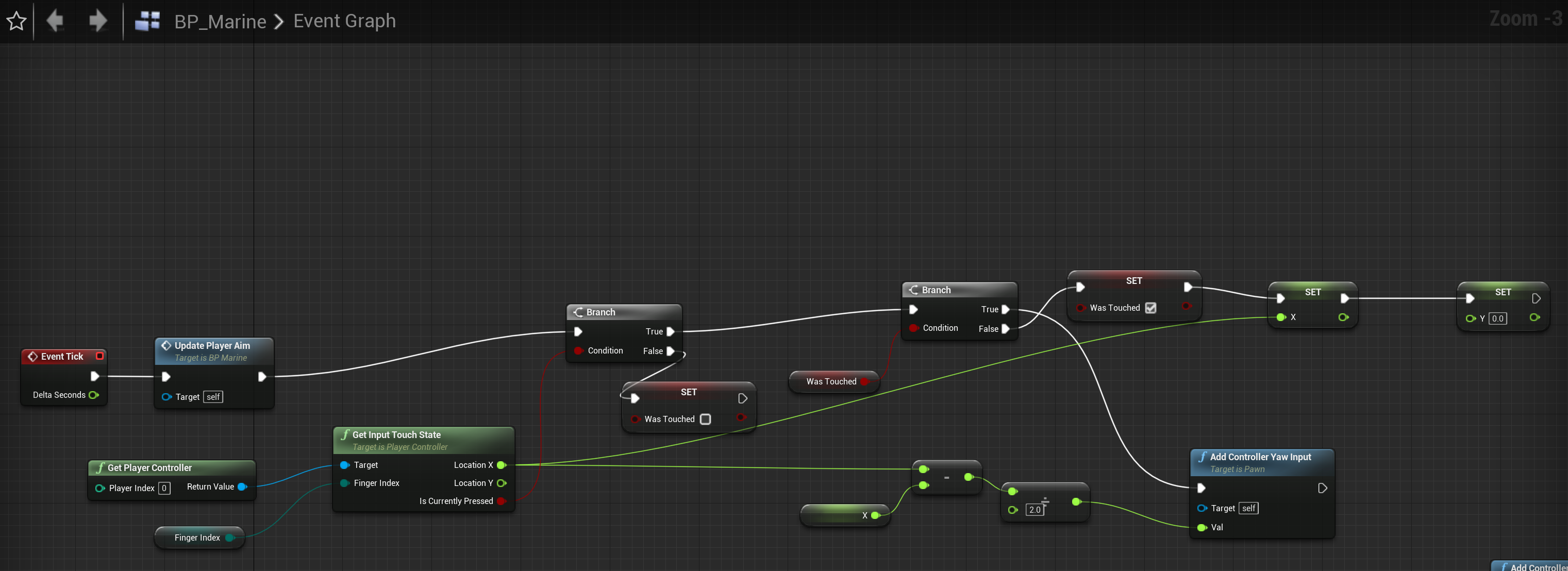
Here is the blueprints
https://imgur.com/IGh05IT

reddit
0 votes and 2 comments so far on Reddit
 teal burrow
For example if E is Ability1, you save that name, and you have a Find node to see if Ability1 exists when you press Q
raven pilot
Alright, I have the Input saved as kick
teal burrow
Just remember
Save such crucial text stuff as names
They're significantly more optimized than strings or text
And you won't be doing anything more than the array anyway
 proud mauve
How can a object be valid if it doesn't get spawned?? I need to test if something has spawned or not...
raven pilot
Alrigh then thnx
trim matrix
@proud mauve it should never be valid if it has not been constructed and saved what.
If it’s valid then it has been
What kind of object is this? And are you really talking about a Uobject or an Actor.
proud mauve
@trim matrix It's a child actor. And first i tried with checking if the class is valid, and it was... Even if it is not in the World Outliner... I am inside a Actor BP and want to check if the Child Actor is valid. And if not, spawn it^^
trim matrix
Oh a child actor. You know I never use child actors as I’ve never found a use for them. To me they just seem worse in every way to spawning in an actor myself using code. But as I understand them, The child actor will automatically get spawned in at the beginning of the game.
@proud mauve
So that would probably be why there already valid when you check.
proud mauve
ok, but i emptied the child actor. It's like the BP has still a old reference
trim matrix
Oh are you checking if the child actor component is valid??
Or the child actor itself 
proud mauve
Oh... that could be it, wait do i have to cast then?
trim matrix
I would assume you have todo run some sort of “Get Child actor” function in the child actor component to actually get the reference to the child actor.
Same as having to run “Get User Widget” to get the reference to the Widget on a widget component.
proud mauve
I see, ok need to test that out. Thanks😀
trim matrix
Ok, well I hope I’m pointing you in the right direction.
Maybe soon when I goto my computer i can take a quick look at the child actors myself.
 rain ravine
is there a way to draw debug a pyramid?
i want to debug vision shapes and I use a pyramid instead of a cone
I tries draw debug frustum, but have no idea how that works (it takes in a matrix, but I have trouble creating a it)
teal burrow
Debug draw cone, but with 4 sides
rain ravine
no shit, that's brilliant, thanks 😄
teal burrow

rain ravine
damn
it works, kinda
it's rotated 45 degrees 😄
and AFAIK I can't roll a direction vector right?
teal burrow
Generally you'd just rotate 1,0,0 and use that as direction
You can combine rotator when you rotate by it I believe
rain ravine
yeah but it takes a vector, which looses the roll information
teal burrow
One alternative is to draw debug plane and then draw lines from its corners
rain ravine
yeah probably will have to do that
trim matrix
hey guys
i made this thing that whenever i press E it makes the number ive got to go down by .5 now it works but only for the firs time
and after that it stops...wait
nevermind i got it 😅
had to replace the = with <=
odd ember
@raven pilot you can use the key commands and it'll be fine just be aware that if you want to consider something like input bindings you'll have to redo it later
e.g. if you want players to have custom binds for their actions
raven pilot
oh gotcha
am super new to BP, so how do i use key commands, or do u have any video or documentations to help?
odd ember
I mean the commands that the other dude showed you are nodes that output a bool I presume
so hook that into a branch
hook that branch into a key event
presto
unborn maple
is there a main reason why a bool will come back as none. i get the access trying to read error when setting if my player has hit the overlap collision box, and i set it to true if he in the box and then i drew a variable refrence to branch it out in to a line trace
unborn maple
i did it stop on the branch before the line trace
the overlap function work fine.
im pretty new to this unless there another way of debuggin
when i take the branch out the line trace work fine and it pick up the object in game
rain ravine
@swift pewter becase that's not a SpawnActor?
proud mauve
first spawn then attach
then you want it to set on snap on target in the options of Location and maybe rotation^^
hm, sry, dont know then...
 wet notch
Hey, apologies if there's a better place to ask this question, but PIE immediately closes once the level loads, and I'm not sure what's causing that since it was working fine like half an hour ago.
Here's what was in the logs last:
rain ravine
literally says it started the world, then that it ended the world
nothing else
you probably need to debug in VS
odd ember
@unborn maple https://www.youtube.com/watch?v=vCmxwyw6lkY

Here is a UE4 tutorial about debugging blueprints and using breakpoints. It is a primer for beginners to debugging with blueprints.
See my social profiles here
G+: https://plus.google.com/+JayAnAm
Twitter: https://twitter.com/jayanamgames
Facebook: https://www.facebook.com/ja...
unborn maple
thanks yeah the boolean is not being set
unborn maple
i knew it wasnt but i dont know why because it set in a different blueprint as you see above
once i step in range it set it self to true but it not being carry over.
odd ember
do you have more than one instance of the BP you're trying to debug?
unborn maple
i have a line trace that work fine but when i attach a boolean to the collision i want to overlap is when the trace stop working.

that the blueprint of the collision which run fine
odd ember
sounds like you're trying to convert two different cases to the same case
in which case no wonder it isn't working?
you sure make sure that the collision settings are set correctly
it might be a hit and not an overlap
unborn maple
what i was trying to to do is to make it where the line trace doesnt happen everytime you press e
it has to be in range
odd ember
sounds like the bool desn't get set correctly because you're not overlapping correctly? which either means you're overlapping with the wrong actor or you have wrong collision settings
that's something to work with
 simple dragon
how to get bones form SkinedMeshComponenmt with coliders ?
 mighty fable
So I have an action bar in my game much like diablo or PoE yet I can't figure out how to make it so instead of clicking the ability I can just press 1, 2, or 3 on the keyboard instead.
carmine sequoia
right click in blueprint type keyboard (letter or number) and you will get a event for keypress @mighty fable


then just hook in your events for your spell castings into the pressed/released depending on how you want it setup
haughty axle
welp the all fun and games then you disable jump on high run speed and can't find where... 😄
trim matrix
Hi all, when i add a widget to viewport and open it in game and i try to click a button i have to click it twice for it to have effect. how can i fix this ?
Who is the object when casting to that widget @carmine sequoia
 versed sun
Does anyone know of a way to change the highlighted option after typing in the node selector?
Typing "make tr" defaults to the "Make Relative Transform"(Which i never use).
"Make Transform" is a closer match anyways.
https://www.screencast.com/t/cSxmXs0IFxe8

It is default on the Palette window
 vivid cypress
how do you line trace in uobject extended blueprint graph? can't even do it with a component from the actor
earnest tangle
you need to use a C++ base class for it which overrides GetWorld
it has to return a valid world for it to work
 haughty ember
@vivid cypress You might be able to do it with a blueprint function library. If so, it will expose the world context as pin and you can just pass it then.
mighty fable
Ok I am trying to implement a Cooldown function on my instant cast spells but cant quite figure it out. Does anyone have any thoughts?
 narrow kelp
Hey folks, is there a way to prevent / hide component properties from being displayed in the details panel by default when selecting an actor instance?
odd ember
uh advanced display
narrow kelp
there are so many that its very inconvenient for people placing actors in the level to access properties that are actually useful
narrow kelp
Unfortunately I cant make them private because I want child assets to modify the fields, I just dont want the instances in the level to be modified.
like with character movement values
odd ember
you can try with protected
narrow kelp
i almost never want an individual enemy to have unique movement
odd ember
alternatively if you don't plan on having them editable then just remove that and they should hide away?
narrow kelp
For sure, most of my pawn values aren't instance editable
odd ember
try with protected + advanced display
narrow kelp
okay thanks, i'll look into that
I wish i could make things such as mesh component properties or character movement component properties not show up
unless you select the component
odd ember
I mean I have that in my setup currently
I reckon there is a special case for it showing in pawn
narrow kelp
maybe its an editor setting
odd ember
no I mean none of my self made actors have the issue but it's true I do have it for pawn
so I reckon it's just a special case for pawn that is engine side
 rare gale
@mighty fable Here's what I have setup for a bolt action type of gun that might be similar to what you're trying to do...
 lone nimbus
Hello.
Looking for some help with damage system.
Currently have base damage set to 10.
Enemy current health is set to 15.
On enemy, Event AnyDamage damage output goes to float - float and inputs are damage from Any EventDamage and the CurrentHealth variable (set to 15). That then outputs to SET CurrentHealth and then that SET CurrentHealth float value goes out to float <= 0 to a branch and so on to other things (kill enemy and what not).
Added print string to the float output of SET CurrentHealth and it prints - 5.
Now,if my damage is set to 10, and CurrentHealth of this enemy is set to 15, why after one hit would the new CurrentHealth of the enemy be set to - 5 and not 5?
Change the CurrentHealth variable to anything, like 100, it prints - 90.
Any ideas?
odd ember
have you tried debugging it?
lone nimbus
Let me share the blueprint, and I'll explain where I inserted the PrintString
Enemy Base
Enemy Worm
Player
Okay, so added PrintString at the EventAnyDamage DAMAGE out, so before the float - float (so before the SET CurrentHealth), and it shows the proper 10 damage.
I moved the PrintString to after the float - float, but before the SET CurrentHealth, and it prints -5. Confused for real, because the health for the WORM CurrentHealth variable is set to 15, so Damage - CurrentHealth should be 5, not -5. But also, setting the WORM CurrentHealth to 50, one attack and it prints -40, not 40.
I got it... swapped the inputs @ the float - float
odd ember
use debugging with breakpoints. print strings will not tell you the whole story, only the end result
lone nimbus
@odd ember thanks for the help.
The issue was I had the damage and current health inputs swapped @ the float - float
 sonic pine
Hiho maybe someone knowthe answer of my problem? Im in the EventGraph to Bind the animations ti my text character and im looking for the Calculate Direction
But i cant connect it to my cast to character
teal burrow
That's a pure node, it doesn't take an exec
The target is an AnimInstance, I'm assuming this is inside your AnimBP
If that is indeed your AnimBP, then you don't need to connect anything
sonic pine
ok, im following a tutorial to lern more about animations, and he is connecting that one.
teal burrow
(Except your velocity and rotation ofc)
I guess that node was made pure down the line
sonic pine
ah ok
teal burrow
Just connect the exec pin to the next node that has such an input
sonic pine
ah i see they have changed the Direction so the direction havnt any input ohny outputs
 bitter iron
exec are white triangle looking shapes
sonic pine
ok i have the CD connected with the Actor Rotation and Velocity but the next problem ist "Set Direction",
It should be like this to calculate the Animation speed with the direction
teal burrow
Connect from the cast to the Set Direction directly
The other nodes are connected as usual
sonic pine
i did
teal burrow

sonic pine
I have only buildet mod for a game until now and now im trying to lern more about UE ^^
Thank you !^^
 neat pond
i always get the same error when i delete the storage , replace it with the same BP , or in different level , anyone could help with this ?
sonic pine
Ok i have only one Error left, if im starting and try to click. SetWordLocationAndRotation
tight schooner
"accessed none" means that variable has no data in it. It's unset.
sonic pine
ok but witch variable? SetWorldLocationAndRotation is getting the Variable from Cursor to World
tight schooner
CursorToWorld is unset
sonic pine
but the original "Cursortoworld" have the same settings
tight schooner
I don't know jack about decal components, or your project, but I'm just telling you what the error means
either it needs a default value (if possible), or some part of your BP script needs to set that variable with something
so that your Set World Location And Rotation node has a target
sonic pine
Ok i have found the problem, it was also a very simple mistake ^^
sonic pine
@tight schooner Thank you !
 thin wraith
I was wondering if anyone would be able to help me with setting up a blue print to posses pawns at start up. I have watched 2 videos and neither solution ends up working for me it just spawns a new pawn
 polar stirrup
I'm currently watching Epic's tutorial series from 2016 for BP Multiplayer. He's setting variables within GameInstance to replicate. But the GameInstance only exists clientside, right? If so, then there would be no point to replicate these variables, I believe
winged sentinel
does anyone know why when im idle my camera shake plays, and when i walk it stops? its doing the opposite of what i want
sick crown
@winged sentinel what would happen if you went straight from your 'move forward' into the 'add movement input' function, using the 'axis value' float for 'scale value' input? (get rid of the branch, and the setting of the 'moverightvalue' variable)
maiden wadi
@winged sentinel We can't help you with the camera shake because you're not showing us the camera shake programming, we only see it being called twice every frame.
winged sentinel
thank you for helping, i ended up fixing it, idk why but when i switched it to false it got really glitchy then i switched it back to true and it suddenly worked
weird
thank you for the help tho!
maiden wadi
@polar stirrup The 4.11 tutorial series? What video?
polar stirrup
@maiden wadi The PlayerInfo one. But through my own testing now, I can confirm that the GameInstance does actually exist on the server too. Wherever a .exe is ran, a GameInstance exists
maiden wadi
Haha. I found it. That's awesome. But yeah, GameInstance is per machine. However, the funny part here isn't even that. GameInstance is a UObject class. Replication doesn't generally start until Actor or ActorComponents.
polar stirrup
Hmmm, that's interesting 🤔 Yeah, I don't have a need to replicate in the GameInstance myself. I just though that was interesting
 forest seal
I have a problem on Blueprint "Cast to"command can anyone help me on this
sonic pine
Good Morning ^^
trim matrix
hey can someone hel me when i go to a new level I lose my weapon I need to keep player data even when I leave a map
sonic pine
Hiho im not sure but i think if you leave the level you have to save your character (Stuff, Experience, Name etc.) into a global Variable. Im Not sure but i think so ^^
How do you saved your Weapons in the first Level?
maiden wadi
@trim matrix Generally speaking, your safest and probably best design bet is to learn about SaveGame objects. When transitioning maps, write variables into a savegame, and then on the next map load, you'll program your classes to reinitialize based on those savegames. If no savegame exists, you set up defaults.
sonic pine
-.- Ok my Playercontroller will not work xD
Ok I'm trying to create a player controller to teach my character to run via mouse click, but my character doesn't like to move. However, I don't get any error messages to be able to fix any errors.
trim matrix
@sonic pine i did not save my weapon i just put it at the env
@maiden wadi how do i set up save game
i dk how to set it
maiden wadi
I can't exactly answer that question for your project. It's about the equivalent of asking how to paint a picture. Colors, Style, Paints, Brushes, Canvas, what the picture is of. All matters. In your case, I don't know your classes, how you've set them up, your level transitioning. You should check out some videos or guides on savegames. All I can say is that you more or less save values in the savegame from your classes when you're ready to change levels, and then on level load, when that class is created, you load the savegame as well and apply those values to your class however you want to do so.
sonic pine
I think it doesnt matter how the levels are configuratet, normally the steps to create a savegame are the same only the names of variables, chars, items are different, isnt it?
trim matrix
idk
sonic pine
I am now comparing that to other things. The way to save is always the same, only the content is different
trim matrix
in my save game there no var idk why
maiden wadi
It really depends on how you set things up. A lot of games rely on manager classes, and when the player goes to change maps, what they'll do is call a single function that'll poll these managers to collect the data needed for their save and all of the managers will send their data back to the original function and then that function will save the game data. Then when the game loads into the new level, the game will open up that save if it exists, and spawn actors with those values. Or allow level spawned actors to get the savegame data to set themselves up.
sonic pine
oh ok
maiden wadi
One major thing to note is that pointers are not saved. The blue variables you use to reference objects.
trim matrix
my brainnnnnn!!! so crazyyy
maiden wadi
Welcome to software development.
trim matrix
yeah
sonic pine
me too my game will only have one map, after this info xD
trim matrix
hahahaha
maiden wadi
Haha, still have to save data for your players somehow to allow them to keep playing. It's not as complex as it sounds in the end, not if you boil it down to a single project.
sonic pine
im new in develope a whole game, normally im only a small modder ^^
trim matrix
@maiden wadi can you help me ican send you my files just asking
sonic pine
its my first try to lern how to build a whole game ^^
sonic pine
nice i startet yesterday xD
sonic pine
i have created one bigger Ark Mod. On this way i learned al about the dev kit, but Blueprints, controllers and savegames i´ve never need to know ^^
maiden wadi
Honestly, one of the greatest pieces of advice you'll ever get, is to keep a professional curiosity. Watch videos, read through stuff. You will not learn everything in a day, a week, or even a year. People in this field learn things after ten plus years. You will never have all of the answers, mostly because you'll forget half of the things you've already learned and learn them again.
sonic pine
isn't a third person shooter difficult to play? Shooter should be better in first person right?
trim matrix
@maiden wadi cool its very true
@sonic pine its easy to play
@sonic pine wnna sceen shot
maiden wadi
There's no real difference between third and first person in play difficulty. Put the stuff you want dead on the center of the screen and click.
sonic pine
@maiden wadi do you can help me by my controller problem?^^
maiden wadi
What kind of character? Is it controlled by the Controller, or is it an AI character?
trim matrix
@maiden wadi how old are you
sonic pine
My character ist no NPC, its the player.
maiden wadi
What kind of movement? Just move towards where the cursor is?
sonic pine
I have startet the project with "topdown" so the engine was creating the topDownController. Now i try to make my own controller for my own character
move by clicking
maiden wadi
Diablo-esque?
sonic pine
yes
i have a var CursorToWorld
TopDown (from Engine)
my controller
the taget -> Cursor to World is the problem i think, but i dont get any errors, so i dont know whats wrongt ^^
I have the save functions, Variables and settings like topdown but it doesnt work
maiden wadi
Are you actually using the HeadMountedDisplay thing, or are you using a mouse and keyboard?
maiden wadi
Kay. Cause the part you copied is for a HeadMountedDisplay setup, which I'm assuming is some sort of VR thing. Haven't done much with it myself.
sonic pine
yes but its the only Cast to character in the controller
in toDown is Click to go here and HMD, there are only one Cast to character but it works
 vague dome
Heyhey, does anyone wanna give me some quick hinters towards the best way to easily possess a simple pawn?
sonic pine
So i have rebuilde the HDM
vague dome
using the 1p template
sonic pine
hiho zeno^^
maiden wadi
@sonic pine Try this, see if this works for a start.
vague dome
I basically wanna have my player take over a Cannon pawn, and be able to aim it up and down and fire, and then unpossess the cannon back to the player character
maiden wadi
Casting doesn't get you references. That's what the GetPlayerCharacter is for. In this case, you don't need either. Just try what I posted inside of your Controller class. It should work with the top down template.
sonic pine
ok thanks i will try ^^
maiden wadi
@vague dome You could set a variable in your Controller class for your character pawn. Make a function or event that your Cannon can call.
Do something like this in the controller class, make sure that MainCharacter is populated with your currently possessed pawn before you possess the cannon.
Then you can just call it like that in the cannon to leave the cannon. Could add in a Set ViewTargetWithBlend in there too, or something.
sonic pine
it is working, not smooth but working ^^
vague dome
i got it working actually, i was just messing up something by following 2 different tutorials 😅
maiden wadi
@sonic pine What's it not smooth with?
vague dome
@maiden wadi So, i got the Cannon possessable now, whats the best way of setting a clamp on the rotation of the barrel?
its just a simple 1 axis rotation for the cannon
controlled by W/S
maiden wadi
If you want to be precise, you'll need to use SetRelativeRotation. Do it by getting the relative pitch, adding your value to it, clamp that value, then SetRelativeRotation.
vague dome
How would i gradually increase/decrease the pitch while holding W/S @maiden wadi? setting it just snaps it to the rotation
maiden wadi
Just a sec. I don't have a project open.
@vague dome Wait, which project did you start this off of? Do you have the MoveForward event?
vague dome
thanks, that solved it
covert stirrup
how do I apply a planar reflection to an object?
I created a fully reflective mirror material and placed a planar reflection infront
Is this the correct implementation?
trim matrix
can anyone tell me I made this on my ui so buttton when pressed vehicle moves
but as such mothing happened
can anyone answer
chilly lodge
Hello How would I make my character to return to its default animation after playing an a diffrent animation
For instance walk then bite then back to walk
sonic pine
you need to end the animation like the start
In your Animation BP you have started your Animation like that
nur you have to Finish without the activation
so the character will start ideling and you can walk run or jump again ^^
chilly lodge
Ahh thanks
sonic pine
np i have learned it 5 minutes ago xD
I have a problem with my regenerations of HP and MP ^^
Normally it should work but my Char is regenerating nothing
Does anyone know what settings I might have forgotten? ^^
Is it allowed to have several tick events in one blueprint?
If I want to insert a TickEvent, ue always directs me to the TickEvent that has already been used. Could this be my fault?
trim matrix
This is how i have it working and well atm @sonic pine
But this blueprint is still being optimized
You can only have 1 tick event and you should avoid using it as much as possible
You could have certain events to trigger the tick to play and stop using the tick when the condition has been met.
So for example you mana is lower than max amount it starts ticking, your mana is full it stops ticking
So this is checking if my enemy is being agroëd by the player being in his agro range, if it is, then it starts using the tick. Once it leaves its agro range it stops ticking.
This is to avoid preformance loss
sonic pine
ok but if you are in aggrorange the event ist ticking, so if you are in aggro range, you dant have mp reg??
trim matrix
i dont have the is mana lower than 100 then start ticking event not set up yet
but i could make and example for u
i just need to check how and what
because it might not work if its not on tick.
 dusk flame
Anyone have any tips for searchin in output log?
I know i can filter, but filtering doesn't allow me to see context around what I want.
chilly lodge
how does a skel mesh recieve decals IE Bullet holes
trim matrix
Does anyone know if unreal instanced static meshes all have to be in the same component or could they be in seperate actors using different components?
glacial eagle
same actor/component
dusk flame
Is it possible to change the ParentClass of a Blueprint?
I know you can do it when you first create it, but what about editing it after the fact?
trim matrix
@glacial eagle thanks
 tired saddle
Is it possible to change the ParentClass of a Blueprint?
@dusk flame Check the top-right corner of the Blueprint Editor.
dusk flame
I was able to find file -> reparent 😁
Top right just opens the VS parent class, which I didn't actually want.
tired saddle
True. I was sure that would open a list for changing the parent.
dusk flame
But I found it anyway, thanks for the help ❤️
tired saddle
Another way is Blueprint Editor > Tool Bar > Class Settings > Class Options > Parent Class
dusk flame
Ah nice, also good to know.
Only problem now is fixing all the horrible broken references from changing parents 😩
glacial eagle
File->Reparent is the way
trim matrix
Hi all!.
So iam using 2d paper sprites, and normally the animation are being updated by tick on default. we are trying to rescript it to set actor tick enable when it meets the "is overlapping" condition. and this makes the enemy attack and walk accordingly but once it is out of the overlapping state it should return to a Idle animation, but since its not ticking anymore when leaving the overlapping condition it doesnt update the animation to idle. Any ideas to fix this ?
 gusty shuttle
@trim matrix Usually for 2d it's best to stick the UpdateAnimation on a InputAxis
Like left or right
trim matrix
But its the enemy. thats not getting an input axis right?
just the player
i though input axis was the direction key you pressed
gusty shuttle
Oh, my bad, I thought you were talking about player.
Sounds like you either need to set the flipbook back to idle anim or enable tick on end overlap?
trim matrix
but that would mean on end overlap it is just ticking like normal and we wanna avoid constant ticking
unborn maple
So, i fix the no scope issue with my blueprint from line trace by creating custom event to trigger off each session, but now when i get in to the over lap box the text is triggest, i press E as the bool show true that im in range but when the line trace hit the object it doesnt get destroyed.
and im watching the value and the value it self is being set to true.
there no error coming off of the breakpoint so not sure what it can be.
stable fjord
 tawdry pawn
hey guys
i try to do age verfication how should i do that
i want to do that process once i press button in UMG
that if that result are positive the other button will be available if negative the software will be exit
trim matrix
Hey everyone. I tried to block a Pawn, but it still goes through other objects. How to block it by (for example) walls?
trim matrix
It has collisions (Box collision) and as a presets I use BlockAll
 quick lark
Hi all, my post processing material is not being shown on my scenecapturecomponent2d. Am I doing it wrong?
got it! Had to set "Capture Source" to Final Color :)
 void oak
Is there an easier more elegant way to do this?
void oak
ok i will look into that
gusty shuttle
Is there a node to find out if I am going left or right on a axis? Y axis for example. Is there a way to get my actors world location and find out if it's moving + or -?
As in, if im 150 Y and want to move to the 15Y then how could I show it was minusing?
subtracting: P
void oak
get world location
gusty shuttle
I'm not talking about moving my character, im just asking if there is a way to tell which way a character is going down a axis.
I know about GetWorldLocation, I want to know if there is a way to find out if I am moving left or right on the Y. Like a node that can see if the number is going up or down
I mean, I can extract that from GetWorld Loc
void oak
so velocity then
gusty shuttle
Velocity eh?
void oak
get velocity
gusty shuttle
I know that haha. I guess what I'm trying to do is switch my enemy char's rot based on which way it's moving down Y axis
Velocity is more for speed, though it can get some info out of it
chilly lodge
How do i enable Character movement in BP I know how to disable it, I see nothing to enable it
void oak
gusty shuttle
Aye, I suppose, but I feel like there is a more mathy way to do that haha
Maybe GetUnitDirection
@chilly lodge You're gonna have to use SetMovementMode and set it to None, then when you want to move, set it to Walk
void oak
unit direction only compares 2 points
gusty shuttle
Aye, I think I'll just use GetWorldLocation and do some floats like you posted
Thanks for answering mate
chilly lodge
Thats what Im doing Wnen he finnishes eating animation I want him to return to default roaming again
Set annimation mode not working
manic knot
Hey everyone! Im wanting to make a "Dynamic Vehicle Dashboard widget" and not 100% sure how to approach it. I have a Base Vehicle actor, and child vehicle actors. I'd like to have each vehicle have its own Dashboard widget with its own style, all I need is the vehicles MPH etc and then the widget can handle the styling. But as I understand it you cant make Child widget blueprints. So how can I make a generic, inheritable widget variable and a function to manage it and utilize inheritance?
rain ravine
hey how do I get an asset factory for Create Asset With Dialog in editor utility widget?
 severe folio
Is there a function to convert a Date Time into a string in blueprints?
without appending all the member variables in a date time structure..
covert stirrup
is it possible to have a Scene capture material Instance?
rain ravine
@covert stirrup you want to capture to a render target, then make material with the render target as texture
covert stirrup
@rain ravine yea but making it into a parameter for a material instance doesn't work. My attempt is to make it hot swappable in an instance
rain ravine
well whats the error?
covert stirrup
my guess is that it's just not possible to create a parametered version of this type of live streamed texture
rain ravine
your parameter is a cube texture
so you need a cube texture sampler
click on the param and change it
but make sure you want a cube, maybe you actually want a SceneCapture2D?
covert stirrup
it's for a mirror so yea a capture 2d would probably be better
rain ravine
depends, mirror is technically not a 2D display with a camera
you will need some more magic to make it look like a mirror
covert stirrup
the scene capture parameter worked great
I get lost in the material editor sometimes when it comes to the samplers, it's not immediately clear to me which one is which
rain ravine
yeah because the material editor sucks ass when telling you parameter types
you need to read the error log :/
i usually connect like vec3 to vec4 by accident
covert stirrup
yea I overlook the part where it says "paramcube" but hey now I know, so thanks! 😄
I will experiment with capture 2d see if it gives good enough results!
 keen seal
Hi, is there a way my AI can always stare at the player no matter if he sees him or not?
rain ravine
yes? just implement it? 😄
i don't understand what you're asking, that's your games code, there's no reason you couldn't do that
covert stirrup
there are some useful nodes such as "find look at rotation" which takes a current + Target value to give your rotation
rain ravine
well that's not really an answer tho
because we don't know what the question really is
is it animation?
is it pawn rotation?
is it eye movement?
is it AI?
i especially don't know what to make of the "no matter if he sees him or not"
that's the default, unless you specifically made effort to implement perception system and CanBeSeenFrom method, then there's no way AI would know it DOESN'T see the player
 frozen dune
I'm in the widget editor and would like to know how to put a progress bar on top of another
rain ravine
@frozen dune use an overlay widget
frozen dune
thanks a lot @rain ravine , didn't knew about it
trim matrix
good evening all. iam trying to get my character to bounce back when hit, and i kinda got it up and running, but its just to 1 side,
any Suggestions?
shadow saddle
anyone know how to calculate the animation speed so that my walking and running dun look like they are sliding
 spark summit
Hey guys i need help, iv got root motion animation but, my character slide after each step, do you now how to fix this please ?
https://puu.sh/GJKvI/1cfcec5cd2.png


 flat raft
Is there a better way to increment a number inside a MAP ?
flat raft
Tell me more about the CPP way
 worthy frost
    if (Whatever)
    {
        Whatever->SomeValue++;
}```Damn that's nice!
worthy frost
it doesn't return by ref
so you cant
Find is not a reference, its a copy, so Increment won't increment
rain ravine
ah ok
worthy frost
    int32* Whatever = SomeMap.Find("Blah");
    if (Whatever)
    {
        Whatever++;
}```this is also nice
increment the int32 on a map
flat raft
What about combining 2 maps?
flat raft
SO, nice