#blueprint
402296 messages · Page 539 of 403
 neon sorrel
 normal rampart
@winter garnet Does the sphere appear when you do "selected viewport" mode?
 winter garnet
@normal rampart yes.
normal rampart
@winter garnet Have you tried doing selected viewport, pausing, ejecting and then clicking on the sphere to find out it's source?
winter garnet
yes, just stated - this sphere is spawned where I left the camera on the editor.
How do I eject? Lol.
Never done that in my years of UE.
normal rampart
It should be right next to the pause and stop buttons
It only works when playing in "selected viewport"
winter garnet
Oh, perfect. Just spotted it.
Now I know what it is.
Thank you, @normal rampart . ⭐
normal rampart
No problem 🙂
Now I've gotta question. Is it possible to make in-editor 3D Widget Vectors display relative to the world rather than the actor they're in. In other words, how can I make a vector that's being displayed as a 3D Widget (in-editor) have absolute location rather than relative location to the actor it's in?
 vestal plinth
SetWorldRotationAndLocation
do it every tick
because it's a component it either needs its own actor or you have to update it as the parent actor moves
 tribal kraken
Hey would anyone know how I could achieve a wallride system similar to the one seen here?
https://streamable.com/i0vf9a

I've got tracers popping out to the left and right and make sure it only will register something if the object to the left or right of you has a wallride tag
My last attempt he didn't really follow the wall for shit, he kinda just stuck on it for a second and jumped off, the following the wall part barely even worked at all.
 cloud trellis
Am i able to spawn a blueprint class actor skeleton, into my main character blueprint. i could using a normal actor, but some reason i cant now. fix?
 rotund thicket
hello,
What is the difference?
First case do what i need second don t and i do not understand why
vs
 shy path
im trying to make multiplayer teleportation, when a actor overlaps a trigger box. But how do i get the id of the owning player of the actor overlapping?
rotund thicket
have you checked in player state?
shy path
as in get player state?
would i do that from the playercontroller or player character
or can it be done from the level blueprint
rotund thicket
can be done with controller
shy path
i thought maybe this would work, but no luck
 obsidian pelican
?
 ashen sparrow
I want to have different game modes to choose from when selecting level; TDM, DM, Conquer, Plant/Defuse etc.
Is this what the a GameMode BP is for? Or do I need to create a copy of the level for each mode? (I hope not...)
 fluid wraith
No, check the left node, дююююд
fluid wraith
np ;'y
obsidian pelican
could you tell me why this doesnt get triggered with the spawned actor?
I'm making a building system and have a snapping mode
whenever i touch the holoplacement the actor should be hidden
if i try it with the player it gets triggered but not with the spawned actor...
fluid wraith
The "set actor hidden in game" should have an input in "target"
Otherwise the blueprint actor sets itself hidden
Take the "other actor" pin and shove it in the "target" thing
Should work
Probably
obsidian pelican
the self target is the holoitem
whenever im in building mode the holoitem gets highlighted
and it should dissapear when i overlap it with the item i want to build there
fluid wraith
Are the collision channels setup propper then?
obsidian pelican
both set to overlap and also active to generate overlapping events
the spawned actor
fluid wraith
What are you using for the snapping?
obsidian pelican
An Interface function basically it gets the location and rotation of the hitted actor
the sanpping works perfectly
but the holo item doesnt gets hidden
fluid wraith
Thing is, depending on the way you move an actor, I'm pretty sure it can sometimes mess with overlap
So for the holothing, are you destroying and spawning it back in every time you move it?
Or sup?
obsidian pelican
no i want to make it hidden in game
fluid wraith
Yes, I know
obsidian pelican
and afterwards unhide it
fluid wraith
But how are you actually moving the holoitem
You showed me maketransform, what are you using that for? show me what you're using the return node for
obsidian pelican
the holo item is static it is already in my world
fluid wraith
Yes, so how are you moving it?
Or is it completely static and you just spawn the thing on it?
cloud trellis
Am i able to spawn a blueprint class actor skeleton, into my main character blueprint. i could using a normal actor, but some reason i cant now. fix?
obsidian pelican
if it hits the actor it gets the location of the holo
fluid wraith
@obsidian pelican Try enabling "sweep" on setworldtransform
obsidian pelican
@fluid wraith what does it do ?
fluid wraith
hover over it, it shows a thing that says what it do
obsidian pelican
well for me it doesnt do anything ^^
fluid wraith
😮
Oh, right, uhh
Idk, try splitting the sweep hit result pin and using the bool for the hiding instead?
Comme ça?
obsidian pelican
ok wait ill try that
shy path
@rotund thicket sorry, could you make an example bluepirnt, im a bit unsure how to do it
rotund thicket
obsidian pelican
@fluid wraith Target is none it doesnt detect anything ...
fluid wraith
wym? which target?
obsidian pelican
Sweep Hit result hit actor
fluid wraith
Oh
fluid wraith
🤔
obsidian pelican
i hate this overlapping things ^^
fluid wraith
I know right
@obsidian pelican Maybe try replacing the "set world transform" with "set actor location" with sweep enabled? See if that does anything?
 crude timber
Me again ^^ I'm not sure what to use as Object here. What I'm trying to do, is reference an Index from another actor
obsidian pelican
@fluid wraith still no result 😦
cloud trellis
How do i spawn another Character Blueprint Actor, through my main bp
fluid wraith
@cloud trellis Why do you need a character within a character?
cloud trellis
because, its a gun, and i have a anmation blueprint for it, but cant do it through the main bp actor
fluid wraith
Spawn it via "spawn actor" node and attach it with "attach to parent" node or whatever
fluid wraith
hm?
cloud trellis
it worked for a acotr
but theres a error also
here :
some reason the message log wont show up
it shows up in the task bar
but i cant open it
fluid wraith
@cloud trellis I do this, seems to work fine
fluid wraith
if you press alt+S when playing and look at your character from aside, is the gun there? Also, did you create that socket on the skeletal mesh?
cloud trellis
Yes i did
cloud trellis
whats that variable set to
fluid wraith
Dunno what you used to get the hit result, but does it work without cast to Holo?
obsidian pelican
should work also without cast to holo but then it makes every actor i hit hidden ingame ^^
cloud trellis
i just feel like the spawn actor should work, idc why it isnt
let me see if i can fix this error
obsidian pelican
the hit result is from my traceline
fluid wraith
What you're line tracing for though?
obsidian pelican
well 1st to move the spawned actor and second to check if there is any hit with the trace if so i snap the spawned actor to the hitted actor
 mental robin
Is there a way to get the specific point of an overlapping area between two meshes using complex collisions
fluid wraith
@cloud trellis Do you have a "destroy actor" somewhere?
obsidian pelican
@mental robin there is a impact point in the hit result
mental robin
Was hoping I dind't have to do any line traces
obsidian pelican
@cloud trellis ouch
cloud trellis
??
obsidian pelican
why do you use event tick ?
cloud trellis
because im checking if the rifle is active
if it is, it does nothing, but spawns in in the main bp
but if it is inactive, it destroys the actor
fluid wraith
I dont think you even need to check for it, just destroy the actor when you press a switch buttin
cloud trellis
let me try that
fluid wraith
Also
obsidian pelican
this call is called based on the fps
fluid wraith
You dont have to do == to check bools like that
obsidian pelican
so 60 fps calls it 60 times
fluid wraith
You can just shove the bool straight into the branch
fluid wraith
you can get attached actors
cloud trellis
then?
fluid wraith
fluid wraith
cloud trellis
didnt work
fluid wraith
😮
mental robin
@obsidian pelican Ah of course, thank you 🙂
obsidian pelican
with the event you could do it but not sure if you get the certain location
cloud trellis
if its a normal blue print actor, it works, but if its a blueprint character, it still shows up on spawn actor, but doesnt work
obsidian pelican
or if it is only a radius location where the hit was
i think the first pixel it hits is the location
shy path
this teleports the server every time, how do i teleport the client?
 haughty egret
Does anyone know how I force unreal to recalculate source revisions? I keep getting this even though I know there are multiple commits.
 vast lion
Is it normal for the mouse to snap to 0,0 when launching a game? (not in editor)
 dense mica
 peak umbra
So I'm trying to add a force/impulse to a possessed character to simulate attraction to an object. What function is supposed to be used for that. I've messed around and nothing has happened so far
cloud trellis
how do i add a add bone transform to addivite layers in a animation
 stray folio
guys
i need help
here is my E key event that checks if we can axe and it plays a animation and suppose to chop
(gonna check that soon)
and here is where i think the problem is right here........................................................................
peak umbra
@dense mica get all actors of class instead?
stray folio
stray folio
there is my event that is suppose to run
but it wont make the debug appear
so its not making the hits left go down
i put a print screen down, so it is calling the EVent Chopped
anyone have any ideas?
event isnt being called at all
the harvest node
i dont get why it wont spawn Chopped
the E key event does run
but doesnt minus the interger, or event call it
haughty egret
Does anyone know how I force unreal to recalculate source revisions? I keep getting "No revisions found" even though I know there are multiple commits.
 tight schooner
I never tested this but I wonder if Set Timer by Function Name with an object reference as a target is a way to get around using an interface or casting
 flat raft
What do you mean?
@stray folio you need to get a reference to the object. I believe there are 5 or 6 methods commonly used to get ref.
pick one that works for you
 deep elbow
you could also use event dispatchers innit
 tiny meteor
hi, I need a help with timelines
I have one event, and I need to play this backwards from the interrupted time
I tried to set time and then reverse, but it isnt working
 ocean island
I am getting errors trying to access get parent actor and get parent component nodes. Is there a way I can avoid them from being called on? Select does not seem to do the trick.
A branch works with Is child Actor node but... I would have to add nodes to the array and would make it would look unclean. Trying to keep nodes to a minimal. seeing if i have other options
It seems that calculates all the options no matter what. I guess branch it is
tight schooner
@tiny meteor looks like the answer is in your screenshot. If it's playing in reverse from 0 seconds then it has nothing to play
tiny meteor
yeah, thing is I tried to call the set time node before reversing it, but nothing happens
oh, I think I found the problem, the interrupted time is 0 when its called for some reason
flat raft
I never tested this but I wonder if Set Timer by Function Name with an object reference as a target is a way to get around using an interface or casting
@tight schooner Did you get a chance ?
I'd assume once you have a reference, then you can call any function on that object.
deep elbow
wew lad
anyone got experience adding line breaks to scrolling rich text block
while retaining formatting and recognising the actual line break from shift+enter
the designer doesn't want to use a special character as a line break and i want to exhaust all other possibilities
tight schooner
@flat raft nah I haven't tested it; I'm not UE4-ing right now
neon sorrel
Does anyone know why a sphere collision overlap properly works for this and casts and all, Yet if I use my linetracebychannel it doesnt have cast errors but just doesnt do anything.
Point of the script is to hide a players name tag upon user looking at them
(Red circles are the ones I connect in place of the sphere collision, but nothing happens then. The hit actor is the same as the other actor from the sphere overlap)
vestal plinth
I'm trying to use the position of an editor-only scene component in my blueprint as input, so I can move it about in the world on an actor and see changes in realtime. in reality the position of the scene component is always zero in the constructor. what's up with that?
 maiden wadi
@neon sorrel I have to ask to be certain. You are actually plugging the actor from the line trace into the cast and not leaving that plugged into the Overlap and just moving the execution line?
neon sorrel
Yep. That was just a example of showing the overlap way
With line trace I removed everything from that overlap event and used the hit actor from the line trade
Trace*
maiden wadi
Only reason I could see that the correct actor would fail that then would be your tag checks.
neon sorrel
Hmm true, I’m away from my pc now but when I’m back I’ll double check those and the tags on the actors
Thank you though
 lost solstice
would someone be able to point me in the right direction as to how i would achieve dynamically filled containers / cups with particles and taps like how job simulator does drinks and such
deep elbow
@lost solstice most likely not particles and a combo of checking overlaps or "liquid" volumes and the container, the liquid in the cups looks like it's the ol' jiggle bone trick from L4D2 goo container
the liquid IS particles, but i presume they do a line trace or similar in the general direction of the 'pour' and the hit object will implement which liquid it shoiuld fill up with
or they could be spawning a shitload of physics spheres and doing the logic from the hit event or overlap, that'd be more physically accurate for liquid i suppose
@maiden wadi I don't suppose you've got any experience with printing rich text letter-by-letter and handling line breaks? 😮
maiden wadi
Not so much.
deep elbow
;_;
 earnest tangle
pretty sure most games just do it by adding letters into a string one by one with a short delay
and linebreaks will appear whenever linebreaks appear
deep elbow
yup, i'm formatting each letter, but when wrapping a line break in formatting the formatting breaks because it can;t parse it correctly. in a previous project we got around this by letting most of the text be <default> and avoiding line breaks in-between formatted text
earnest tangle
ah, that might be a bit trickier 🤔
deep elbow
and i can't seem to detect a line break in order to do somethign else - i can have a certain character act as a trigger for a line break, but the designer doesnt want that
earnest tangle
I guess you'd have to check whether you're currently in a formatted block, and if so, you'd have to append the end of the block into it
\n should be a linebreak I think, eg. if it's an actual linebreak
or if you press shift+enter into a textfield in BP's, that should also generate one
deep elbow
yeah that was my thought as well, don't format each letter but format them as a block, and exit formatting for the line break, but i cant seem to detect the line break itself when parsing the string
i wonder if i search for \n it would detect it in a string
maiden wadi
Sounds like a good use for an array of text. Each entry is the line before the break, then you can choose how fast each letter is set and how long to pause on the breaks between array entries.
deep elbow
hmm, and then have the designer add entries into the array for each line
i don't think that would be so easy to work with when it comes to localisation
we had to do a lot of work shuffling around line breaks for different languages because of word lengths previously
like we could automate it with word-wrap but when printing each letter at a time it doesn;t realise it needs to wrap until a certain point and looks quite ugly
like just fyi not looking for an exact solution, just trying to brainstorm some ideas to get my morning brain working 😛
earnest tangle
if you can style text so its transparent another option might be to have like a "sliding" transparent styling thing
you'd just keep moving it character by character and this way they'd appear one by one and this might also respect word-wrap linebreaks
deep elbow
i suppose that could work, iirc one of the vertex colors of the text is a bounding box gradient, hm
hm altho i don't think so, the problem is actually wrapping a line break in formatting, so the problem would still persist
 onyx pawn
@onyx pawn in the designer window of the widget. Click on the root in the hierarchy. You'll find IsFocusable in the details panel
@weary jackal tried using your sample to try and ref the camera pawn but cant seem to assign target
maiden wadi
@onyx pawn Is your CameraPawn the player's default pawn in your game mode?
If it's your player's default pawn, you can replace that errored target node with GetPlayerPawn(0)
 cobalt hollow
Im creating an spell that you can Aim with your cursor, Using GetHit Results under Cursor by channel and spawning a decal at the hit location. I want to limit the range of this from the player. Does anyone have a tip that I can look into in order to set up a clamp on the distance from the player to the mouse decal that would stop it at a max range but still allow it to move in a circle around the player even if the mouse is past that point moving in a circle.
maiden wadi
@onyx pawn You're sure your pawn that the character possesses at the beginning of the game has a movement component of some kind? Likely FloatingPawnMovement.
@cobalt hollow Is this spell like an AOE explosion sort of thing being spawned at a particular place on the ground?
cobalt hollow
Yes
Circle AoE Decal that follows your mouse, but needs to be limited to a distance from the player in a circle around the player.
maiden wadi
Sec
 vague dew
Hi
onyx pawn
basicly I have an RTS camera with spring arm and camera assigned to static mesh in the pawn, the pawn is controlled by the RTS camera pawn controller that has basic mouse orbit and move.
maiden wadi
@cobalt hollow This is going to be a bit. And it's messy.
cobalt hollow
No worries, Ill keep an eye out and appreciate your help.
maiden wadi
In short... trace to the mouse, Take the hit location, make it's Z equal to the spellcaster's so that distance check is accurate. If distance is < max distance amount, use that mouse hit location. If not, get the unit vector from the caster to the mouse hit location(after Z correction), multiply it by the max distance and then do a straight down trace to find the ground and use that location.
cobalt hollow
Awesome, I will work on recreating this and understanding it and implementing it into my spell, thank you Authaer!
maiden wadi
Do note you might have to check some of your trace channels. You'd probably want both traces to avoid anything like characters or whatever, so that it'll be placed on the ground correctly.
cobalt hollow
Do you have some insight on the World Direction x 50000, I noticed things dont work unless its 50,000
maiden wadi
@cobalt hollow At the beginning?
cobalt hollow
yea
maiden wadi
All that's doing is taking the world location of the screen pixel that the mouse is at, finding where that would be in the world as a location vector. The WorldDirection is a 0-1 directional, or what is called a Normalized pointing vector. It's pointing in the same direction that the screen is facing. If you multiply that by a number, 50,000 in this case, it'll be a location vector 50,000 units away from 0,0,0 in local space. So you take that new local space vector and add it to the world vector and that gets you the end of your trace.
 forest oyster
Hey guys, Get Player Pawn vs Get Player Controller vs Get Player Character. I understand the difference between Pawn, Character and Controller, but when a blueprint node needs a reference to the player does it matter which one is used? For instance using the Get Distance To node where you want to get the distance to the player. Can Get Player Pawn ever return a Pawn that isn't possessed by the player?
maiden wadi
Hmm. Constrollers don't have a location in world space by default. There is a setting you can use to attach the controller to the character though. But I'd probably just rely on Pawn or Character. There is no difference between those two except that one will return null of your currently controlled class is not a character or a class that inherits from character. Pawn is pretty much always safe if you need the location of your controlled actor.
forest oyster
@maiden wadi makes sense, thank you so much! 🙂
maiden wadi
@forest oyster And no, it won't return a reference different than the controlled pawn. In fact, GetPlayerPawn literally gets the player controller at that index and calls a function that returns the controlled pawn. In blueprint it's equivalent is this
forest oyster
ahhh okay gotchya
maiden wadi
cobalt hollow
Authaer can I DM you?
maiden wadi
Those are also the same pretty much
forest oyster
perfect, thank you again!
maiden wadi
I don't really do DMs much, but what's up?
cobalt hollow
I was going to send a gif, but pretty much your solution works well, I have found 2 bugs for my project im trying to work around.
When my mouse cursor is inside the approved "range" the decal/hit debug is spawned right under my mouse tip and looks good, once I pass that range the decal/debug is offset slightly and doesnt line up from a straight from the player to mouse, it is confined in a circle around the player tho.
Also I noticed that when I move around my word that the system works if Im within the range, but if I go outside of it it teleports the debug and decall actor to my starting location. So thats not being updated some how.
maiden wadi
Show me your part for the outside range.
cobalt hollow
maiden wadi
@cobalt hollow Try moving the... To on GetUnitDirection(Vector), move that to the MakeVector that's also going to V2 on the Distance check.
Instead of directly into the Location from the trace.
cobalt hollow
@maiden wadi That did not seem to change much.
 simple dragon
how to rotate character to rotator i'm trying to make Vehicles in my game and i not have any idea how to set rotation
maiden wadi
It fixes a small displacement from the edge. Show me that gif with your issue if that didn't quite fix it. I'm not sure what else it could be.
cobalt hollow
Hmm it also seems that im not directly in the middle of my acceptable radius. I wonder if my camera or player setup could have something to do with it.
maiden wadi
Is that character in the gif possessed by your player controller?
cobalt hollow
This is currently built inside my PlayerController, and this player controller is set in the gamemode for the level im on, so I believe so.
maiden wadi
Is that character the default pawn?
The circular distance seems fine. But I don't understand that second trace.
cobalt hollow
That was not the default pawn it was a spawn being auto possesssed, but I just made that player pawn the default pawn and spawned in with player start and its the same.
Same issue.
maiden wadi
For some reason it seems to think that your player pawn is way up top left of where you're trying this targetting. Can you print off the PlayerPawnLocation and see what it says?
cobalt hollow
It thinks my player is at 0,0 even if I move it. When I move it and print string the string updates, but the whole script is focused on 0,0
maiden wadi
Your player controller likely doesn't have a possessed pawn then. Try printing off the display name from the GetPlayerPawn.
cobalt hollow
Display name of "GetPlayerPawn" at index 0 is SkillCharacter, my BP for my pawn
maiden wadi
Which is the one with the mannequin mesh in the gif?
cobalt hollow
Yes, has the mesh and all my other scripts running successfully
Mesh animations variables etc
maiden wadi
That is some odd behavior.
cobalt hollow
Any reason I shouldnt build this in the player controller?
maiden wadi
Actually. I remember a glitchyness with that from a few weeks ago. Just a sec.
cobalt hollow
Rebuilding the script in the pawn script fixed one issue. The Gif where once you hit range it adjust the debugg is fixed
So player controller doesnt work for some reason with this script
maiden wadi
Nope. Still works fine. Moved my version to the player controller tick and added GetPlayerPawn instead of just GetActorLocation and it's working fine.
cobalt hollow
Moving the exact script works now in the player pawn BP and not in the player controller for some reason.
My current issue is that even tho the player location is getting updated on event timer of .1, the script still things everything is at 0,0
maiden wadi
Yeah. Not sure on that one. It's definitely odd behavior. The only reason that it should ever return 0,0,0 for that is if you have no controlled pawn, or if the pawn actually is at 0,0,0 for whatever reason.
cobalt hollow
My player start is set to 0,0,900 in my world and the circle is focused exactly on 0,0 but if I move it doesnt follow me, and If I start my player at 100,100 it is still focused on 0,0 once I go outside the acceptable range.
maiden wadi
How are you spawning/possessing that character?
cobalt hollow
PlayerStart set to 0,0 with Gamemode Default Pawn Class set to my PawnBP - SkillCharacter
maiden wadi
Is that a Character or Pawn class?
maiden wadi
To debug the issue directly, can you put a print on tick in the SkillCharacter class that just prints GetActorLocation?
cobalt hollow
On tick
Updating as I move
Not running on Tick but even timer set to delta, any issue there?
maiden wadi
Shouldn't really be an issue. Nothing that should cause the possessed pawn to return a location of 0,0,0 when it's clearly possessed and prints it's own location fine.
This last screenshot was in the SkillCharacter?
cobalt hollow
Yes
maiden wadi
Ohhh.
That moment you realized you missed something fundamental. Like a brick from the third story.
cobalt hollow
Hahah Im on the edge of my seat
maiden wadi
That + node I have selected there, you need to add that. We created a direction vector and multiplied it and then left it in local space.
Never added it to the actor's location.
cobalt hollow
And perfection
Works amazing!
Im still working on learning all of the vector math in order to do things, so even tho things looked like they made sense to me, its easy to not understand something like that.
maiden wadi
I love vector math. Even more now that I started doing things in C++. I love blueprint's simplicity, but it's also stuffy in some ways.
cobalt hollow
Did you learn just with small projects, or have you across any good resources that teach usable examples and how to do it? Again when I see people do it I can like put it together that it makes sense, but I wouldn't be able to pick out things missing. Need more experiance there.
maiden wadi
Tinkering and a lot of reading. Not really a tutorial kind of person.
cobalt hollow
I understand, for me seeing piratical uses and examples is helpful, sometimes just the pure math or info without that gets lost.
This solution works very well tho, thank you a ton Authaer!
 severe iris
How can execute something on game exit? (or on actor destruction)
I've tried this but it doesn't trigger
cobalt hollow
Instead of a Destroy Actor call a custom event "Destroy Prep" that does your needed execution and then destroys self?
cobalt hollow
Do you have an exit button?
severe iris
No, so whenever someone closes the window or alt+F4
cobalt hollow
I dont know about that, If you create a button, you can have it call the execution and once its done call exit game, but alt f4 no clue.
maiden wadi
You'd have to test if EndPlay or something gets called on AltF4. Most programs won't rely on that though. AltF4 is considered more of a "Please crash this and wipe it away quickly" more than a controlled shutdown.
severe iris
Yeah I realize, well handing closing the window would be enough for my need
if that's possible
EndPlay is called in level blueprint?
maiden wadi
Not sure about the windows X button close, but like Shadowfall said, if you had your own "Exit Game" button, that'd be the best solution.
It might. It should be an AActor event if I recall correctly, let me look.
severe iris
I'm building a VR Tool, most people will exit by pressing "Escape"
cobalt hollow
Can you Bind Escape as a hotkey? Not sure how VR works.
severe iris
endplay is definitely accessible in any old actor, I'll check it out 🙂
I don't know but in VR preview "escape" quits
cobalt hollow
Escape quits the Play In Editor for UE4 but you can set that up so a packaged game can utilize Escape.
severe iris
endplay works even with Alt+F4, perfect thank you 😄
It likely won't be packaged, what I'm creating is a bit of an odd usecase 🙂
cobalt hollow
I see, good call on Endplay Authaer, best of luck Cafe
severe iris
Thanks 😉
maiden wadi
Yeah, just tested with a SaveGame creation. Seems to work fine.
 trim matrix
Guys, can anyone help me with automotive material ? I really need help
I'm trying to connect my normal map to the existing automotive material, but it doesn't work properly...
maiden wadi
@cobalt hollow On a side note, if you ever have any C++ aspirations for optimizing, that whole function can be condensed down to this.
@trim matrix Try #graphics. You'll get better luck with shader programming there.
cobalt hollow
Oh wow, I can see the general flow from the blueprints to C++ but it looks very slim in c++! Thats cool
 gritty elm
need help @maiden wadi
i want to move my object from current point location to any specific point location from spline
 marble tusk
The engine has a bunch of spline functions to do stuff like get location at spline point. If you want to move your object along the spline over time, then something you could do is get distance at spline point for both the starting point and the ending point then lerp the distance. Then, use the get location at distance along spline to set the location of your object. Can also do transform instead of location to get the rotation and scale too
maiden wadi
It really depends on how you're wanting the location along the spline and where it's current location is.
cobalt hollow
@maiden wadi After setting up that system you helped me with I started incorporating it into my existing skill system. Keeping with consistency I tried to add that script to my spell BP and I am finding that the ConvertMouseLocationToWorldSpace is not returning anything. I have to uncheck context sensitivity to get it to pop up when searching. With context sensitivity check in the player Controller the node does pop up. At the same time in the Character BP the node does not show unless you unselect context sensitivity.
I am trying to figure out a best practice in knowing what nodes can be use where and what cannot. Do you have any tips here?
maiden wadi
@cobalt hollow Hmm. Hard to say without relying on general experience. As for the ConvertMouseLocationToWorldSpace, that is actually a PlayerController function. So you'd need to get your player controller and get it from that if you wanted the node without unchecking context sensitivity. I'll be honest, as far as programming goes, I've never once had to rely on unchecking that. I've done it to browse curiously, but in blueprint, if you can't find a function you're after then you likely have the wrong pointer or have the function declared wrong somewhere/somehow.
But in this specific case ConvertMouseLocationToWorldSpace is a PlayerController class function. If you leave ContextSensitivity on and try to get the node ConvertMouseLocationToWorldSpace in the player controller, it'll show up. To get it from any other class with context sensitivity on, you first need a reference to the player controller. Usually gotten via GetPlayerController(0)
 fossil crystal
is there a BP i can use that will help me pick this item back up so its standing upright? or a way to even prevent it from tipping over?
tried this doesnt seem to do anything.
maiden wadi
Try just setting the WorldRotation to 0,0,0
maiden wadi
@fossil crystal On a side note, how is it rotating in the first place? If it's physics, you can clamp it's ability to rotate I believe.
fossil crystal
It’s falling
I clamped the rotations but when it falls that seems to go out the window
So I tried your suggestion set world. Seems to work except when it’s on an edge and about to fall it does some weird jump
maiden wadi
Checking these in the component's physics tab doesn't stop it from rotating?
Checking those five should stop any sort of rotational movement in physics.
fossil crystal
ok ill check the bottom two, top three are checked
yea still falls over with all 5 checked
the world rotation keeps it upright but for some reason when i place it near an edge (i know a player will) it does a little slide then jumps
maiden wadi
@fossil crystal I don't understand how you're making the object fall then? To double check, I created a simple Actor. It's just a StaticMeshComponent that has a Shape_NarrowCapsule as it's mesh. If I just check SimulatePhysics and let it fall against an edge, it falls and tumbles. If I just check the X, Y, Z of LockRotation, it falls, bounces off of the edge, but does not roll in any direction.
fossil crystal
you see that little table
when its on the edge far enough gravity was taking it
but i just tossed that collision box on the sides to prevent it from falling off
fossil crystal
@maiden wadi thats weird. im assuming it has to do with my static mesh
 gusty shuttle
Quick one, did you guys ever make a build and some sound fx don't come through?
Like, half my soundfx I can hear, others I can't like on item pickups. Just using PlaySound2D
Or PlaySoundAtLocation
 simple berry
hey yall, i need a lil help, basically ive been on a roll making multiplayer stuff work, but im having issues getting enemy health to work on the server side, as of this moment bullets dont replicate to save on server stuff, but the impact is still supposed to replicate to server, as of this moment when it overlaps its supposed to do damage and the damage is set to repnotify to update the health number, but its not working right, can someone please help?
 paper shore
Hello, Room. Newish to Unreal, so any help with a specific problem would be appreciated.
I am attempting to use a custom Player Controller, with movement and stats in the Controller, and weapon firing and such controlled in my Pawn and the various subclasses.
Now, when I simply drag-and-drop a copy of my pawn into the test map, controls are working just fine. However, spawning the Pawn using my Main Game Mode (as opposed to my Menu Game mode) does not allow the pawn to move.
Collisions don't appear to be the problem, initial text debug messages are showing no casts are failing, the InputAxis functions spam the screen with non-stop debug messages when set to Print (which is normal, from what I gather from research), and the Controller successfully is calling the preliminary weapon fire function I set for the Pawn class, so it seems like everything is communicating properly. My pawn simply won't move :(
If anyone has any ideas of what to check, I'd appreciate the insight. Feel free to @ me.
simple berry
im not exactly great at this, but from what it sounds like, the issue seems to be that the player dosent inherit the player controller when its spawned
like, i know its something to do with the auto posses variable here
 neon perch
@paper shore You might not be possessing the pawn after it's spawned
paper shore
Possible idea, though I wouldn't be sure how to fix it. A second debug method I have tried, which I didn't mention above, is that the movement isn't working even when I move the functionality into the Pawn itself.
This is my spawn and posses
Base Pawn settings
As I stated in my initial blurb, the Pawn will move if I simply drag one into the map.
But attempting to use a Player Start to spawn the Pawn seems to disable movement no matter if the movement functionality is in the Pawn or the Controller
simple berry
set "auto possess AI" to "spawned"
paper shore
No change. Saved and compiled, ran level, Pawn won't move, but will fire weapon still.
simple berry
hm
 burnt leaf
Having issues with a turret thats not smoothly rotating on client side. Server side works perfectly and i'm just trying to figure out how to replicate.
This is where the rotation happens on server side:
maiden wadi
@burnt leaf How does that even work on the server? That should snap the turrets to the first overlapped thing's rotation every tick.
burnt leaf
Yes, it will snap to actor location when it enters the overlap
maiden wadi
What are you running this on? Is this only being ran on the server with replicated movement, or is this running on both independently, or?
burnt leaf
When the begin overlap is activated it will trigger this to start which will run the timeline & rotation.
maiden wadi
Are you using a ListenServer setup?:
burnt leaf
To test if it works? Yes
maiden wadi
GetPlayerAnything at index 0 will always return the listenserver's stuff.
So, you're getting the listenserver's Character in this case, even when it's ran on the client's version.
The only time this works for a client is on their machine. GetPlayer Character/Controller/Pawn 0 will always return that machine's own Pawn/Controller/Character because what they all do, is get the player controller at index 0. Controller returns that, Pawn gets that controller's pawn, and character casts that pawn return to a character class. In short, this.
The reason that is important is because only one controller ever exists on each client(unless it's a split screen). Thus, controller 0 on a client is different than controller 0 on the server.
burnt leaf
Ok so i've updated it to this?
burnt leaf
If anyone else is able to help please PM me.
trim matrix
Can somone help me ? I want to make a LineTrace for my Enemy character that he can shoot at my Character but I cant get the start and end position.
flat raft
Is there a Less hacky way to move a variable from one bp to another ?
hacky is the Get Variable, Copy, Paste in the other BP, Right click make var. Then back to orignial, copy data, and paste
 hard hatch
It is not hacky at all I think, I would do it the same way if I were to move a variable from one class to another in C++
gusty shuttle
On a fresh, "never played the game yet" load in a fresh build, my game's "continue" button should be lighter gray.
At this stage, I didn't tell my game to create a save yet, so why is it detecting a save?
 teal nexus
how can I delay actor spawning on the level without making some kind of spawning manager ? (whatever logic that will delay spawn should be inside the actor that is placed on the level)
 keen goblet
@teal nexus If you want your actors to be placed in the map already, maybe write a script that has the actors get deactivated (disable visibility, collision, and tick) for a certain duration before reactivating
teal nexus
not exactly what I am after.. My level is a streamed level. When I place AI on it in the Editor, it works fine. However, when running the project on Android, AI spawns ahead of the level and falls into the void. Then level spawns. So when I get to the portion of the level with AI - no one is around.
maybe I need to disable physics, check if level is loaded, then re-enable physics on AI ?
keen goblet
Ok, I understand now. I'm not experienced with level streaming, so don't think I can help much.
That physics-toggling idea sounds like it should work, though
maiden wadi
@gusty shuttle What is the value in that string?
forest oyster
hey guys, is there a trick with UMG to animate text scaling without it being all jittery and weird? it looks like it's drunk or having a seizure.
gusty shuttle
@maiden wadi It had the word "save" in it. So I guess it was always finding something. I ended up somewhat fixing it to a degree. My next issue is that it seems to not actually create a save on a persons PC once a save is created
 late cave
@forest oyster just make sure your widget animation timeline is smooth?
 crimson charm
so i have a system to pick up ammo, but after the actor is collided with it will give you ammo and destroy the actor. is there a way to make it destroy the actor then respawn after x seconds?
forest oyster
@late cave i have it set to linear so its just a straight line
neon sorrel
Dont know if this is a blueprint thing but cant find a channel for it. Is there any way I can easily assign a new skeleton to a old one? I have a character with an existing skeleton but when I try to assign a new skeleton and it asks to merge only one bone it always has failed to merge bones and crashes.
(Or any way to at least delete that bone, other than trying to open it up in a 3d modeling software and do it that way 😐 )
 jaunty vessel
If I have an interface blueprint with a custom event in it (say the event is called "PrintValues" in an interface blueprint called "UserInterfaceBP" and it literally just prints values to the screen), how do I reference and trigger that custom event from another actor blueprint which exists in the scene (say that blueprint is called "SceneControllerBP")?
Have been scouring the inter-webs for almost 2 days now and no tutorial or forum I've found has given me an obvious solution. It seems so simple, yet has driven me to banging my head on my desk for hours...
shy path
i want to make a system, so different sountracks play in different parts of my level, based on which player is inside different volumes. It has to work in multiplayer. Any ideas, on the best way to do it?
could you do a for each player inside trigger volume loop, play sound?
mental robin
Is there a way to fill an array with Static Mesh Actors without spawning them first? I don't want just static mesh..I want the static mesh actor
earnest tangle
Is there some particular reason you need it to be a static mesh actor?
keen goblet
@jaunty vessel Your SceneController BP needs a reference to your interface-implementing actor to call the interface event on it. There's several ways of doing this: https://docs.unrealengine.com/en-US/Engine/Blueprints/UserGuide/BlueprintCommsUsage/index.html
Overview of when to use different methods of Blueprint Communications.
mental robin
Is there some particular reason you need it to be a static mesh actor?
@earnest tangle Well right now I am messing with it as a static mesh component and I am trying to set it to use dynamic inset shadows but I don't see an option anywhere to do that in blueprint
As an actor I can just have all its settings I want first so idk
keen goblet
@crimson charm Absolutely. You could make an AmmoSpawner BP that spawns an AmmoPickup actor, then when the pickup is destroyed, have the spawner delay X seconds and spawn another (and so on).
Or, more simply, you could have your AmmoPickup actors disable themselves for X seconds and then reappear instead of destroying themselves and spawning another.
 lusty escarp
Hi guys, i've been trying to wrap my head around this for some time now, but with no prevail. I am trying to create an Grid based inventory system that uses an item sizing list. so 'Stone' only takes up a 1x1 slot, whereas a 'gun' will take up a 2x4 area. I've managed to get the Vertical sizing working, but not the Horizontal. and tips?
Result:
 fathom frost
Hey guys, I'm having a collision issue that driving me insane, any help is appreciated.
The projectile is colliding with the instigator even though it's set to be ignored and causing it to push the player away.
Clip of the bug: https://streamable.com/5ffpjk
BP images:
lusty escarp
Will the arrow do damage to other players?
fathom frost
yea all works correctly just pushes away the owner
lusty escarp
Are you setting the 'SparrowReference'?
 golden kite
any ways to edit simple wheeled vehicle movement component with blueprints?
fathom frost
I set that on the begin play inside the arrow BP yes
lusty escarp
Can you replace the reference with just the 'Get Instigator'?
as you are passing through the instigator when spawning the arrow
fathom frost
yes, same result :/
burnt leaf
How would I replicate the rotation of an actor? The standard replicate movement is laggy on client side and not ideal
gritty elm
event logout in game mode, does it work on client?
i want to save game on client side when user quit game
fathom frost
@lusty escarp yep passing through when spawning the arrow
lusty escarp
Potentially setting the Collision Handling to Adjust location may fix the issue
fathom frost
same result, damn
i have a feeling it's something to do with the object type being pawn, and it not ignoring the instigators pawn? Only thing I can think of
mental robin
How can I get a static mesh actor that isn't spawned in the world yet???
I want to be able to store a large array of themn
lusty escarp
Are you wanting to spawn these into the world? or onto an actor?
mental robin
Into the world
lusty escarp
okay
mental robin
I want them all stored in an array so I can access them at runtime during certain events etc
lusty escarp
Are you going to interact with these static meshes during runtime?
 rough wing
After you spawn/add the static mesh
you can use "Set static mesh"
Or you can click on the spawn node and pick your static mesh
lusty escarp
This will spawn the actor within the world using the static mesh within a blueprint
mental robin
So heres the way I was trying to do it before. Works perfect and its' easy..problem is it won't let me set the meshes to use 'dynamic inset shadowing'. Even though it's all set where I am casting to...it spawns without Inset Shadowing...so I thought okay I'll set the inset shadow in BP..except that's the thing..there's 'set inset shadow'..but not dynamic inset..totally useless. Not sure if there is just something I am missing ..because spawning them as components worked fine...if not for the dynamic inset shadow deciding it wants to not work
Now of course I can just 'add static mesh component' and set it then and there
but it'd be much more organized this way and makes more sense for what I am doing
This will spawn the actor within the world using the static mesh within a blueprint
@lusty escarp But how to fill the array...it won't let you add them like a regular static mesh array
crimson charm
@crimson charm Absolutely. You could make an AmmoSpawner BP that spawns an AmmoPickup actor, then when the pickup is destroyed, have the spawner delay X seconds and spawn another (and so on).
Or, more simply, you could have your AmmoPickup actors disable themselves for X seconds and then reappear instead of destroying themselves and spawning another.
@keen goblet thank you
mental robin
Got it all sorted 🙂
 burnt tundra
I am trying to find the node that checks for authority. It's output is local and remote. I can't think of the name, anyone know what it is called?
I found it. Switch has Authority
crimson charm
how do you make it so a camera that is attached to a bone will ignore the current state machines animation
 hearty gazelle
Hey guys
I have a question to ask
The tutorial shows this
How do i do it like in the tutorial?
earnest tangle
Drag from "out actors" and type in "get"
hearty gazelle
ok ty
rough wing
Get (copy)
hearty gazelle
Yeah thats what i did
tight schooner
I think there's a node called "get an actor of class" that does the same thing
Get Actor Of Class
lol
Saves you 1 node
earnest tangle
lol
yeah that'd probably be a tiny bit more efficient if all you want is the first actor that comes up
 cinder thistle
is it bad i have a char move speed and root movemment speed? one displays 0-3 the other 0 to max walk speed e.g. 650
obsidian pelican
Hey there
quick yuestion
i have this setup
can somebody tell me why i dont get any overlapping actors in my array?
its obvious that the triangle overlaps another item
obsidian pelican
i cannot use a collision Box <- need only the mesh collison
if i use the box for the triangle then i also check space i dont want to
obsidian pelican
i debuged the branch and checked the array if it has any members
but its empty
it gets fired by begin play immediately because later ill spawn those triangles and have to check at the beginning if there is an collision
cinder thistle
try removing the branch and debug?
wait you dont gave a Class selected in the get overlapping actors
you should see the problem i just ran into in 4.25... says i cant play in editor while editing comment selection operation but i dont even have anything like that going on
 glad lake
Hey I have some questions about adding motion control to the NDICam from the remote session IOS app Can anyone help?
I can get motion control on the camera when I hit play but it appears to start it off really far away from my level
cinder thistle
@obsidian pelican you can make your own custom collision in project settings --> collision
i just did procedural leaning in like 6 mins lol god i love BPs
obsidian pelican
@cinder thistle I was thinking if I leave the class empty then it looks for all 🤔
Wait do you mean by collision the collision channels or and collision box ?
Because if you mean channel then it will be hard to implement into the game I want it to be later :/
cinder thistle
COLLISION PRESETS UNDER PROJECT SETTINGS
 round dock
Is there any reason why calling Add Input Vector wouldn't work if it's going from Input Axis Event (Client) -> Server_Custom Event (Server) -> Add Input Vector
the axis values are getting there and going into the plugs, but it's not updating the client's pawn for neither the client nor the server
ownership?
paper shore
Hello, Room. Newish to Unreal, so any help with a specific problem would be appreciated.
I am attempting to use a custom Player Controller, with movement and stats in the Controller, and weapon firing and such controlled in my Pawn and the various subclasses.
Now, when I simply drag-and-drop a copy of my pawn into the test map, controls are working just fine. However, spawning the Pawn using my Main Game Mode (as opposed to my Menu Game mode) does not allow the pawn to move.
Collisions don't appear to be the problem, initial text debug messages are showing no casts are failing, the InputAxis functions spam the screen with non-stop debug messages when set to Print (which is normal, from what I gather from research), and the Controller successfully is calling the preliminary weapon fire function I set for the Pawn class, so it seems like everything is communicating properly. The pawn is possessed properly in the spawn script, pawn is also set to be Auto Possessed by player, and movement won't function even when moved from Controller to Pawn.
My pawn simply won't move when spawned :(
If anyone has any ideas of what to check, I'd appreciate the insight. Feel free to @ me.
This is how I'm spawning the pawn
Spawning the ship in the Controller
glad lake
So anyone able to help me with some UE4 info Im a producer/artist trying to create a virtual stage setup and out to OBS using the NDI cam to send signal from UE4. My hope is a vet can help me with the following: NDICam control w/ tracker [Currently using the Iphone via the connect app] , Hotkey instance for virtual pre- railed camera movement, Adding browser sources for textures things like twitch alerts and chat box, and basic level design with pre-created assets[Epic store designed levels objects in new design]. I have basic knowledge of composure and how to introduce a live stream into UE but still really green to this. I have an editing/gaming rig [I-7 8700k 16GB RAM 2080 rtx FTW3 edition] with all the necessary Audio /video components. I would love some help and to find a way to bring my skills together so I can do live performances and hopefully earn some side income during this pandemic. Any help or feedback is very much appreciated!
flat raft
How would I go about checking the blueprint size at runtime? (Memory usage)
Anyone know a quick stat command?
round dock
@flat raft there's probably a way using Unreal Insights if you haven't looked into that yet
I don't know how specifically, I've only used it for cycle counting
flat raft
I saw a vid on Insignts, looks complicated. 😂 there should be a simple console command for it
round dock
It's not too hard
My guess is that they didn't want to have to include logic for switching profiling on and off depending on the packaging configuration and instead just opened the process up to be profiled in Insights when necessary
But yeah
 ember dawn
How do I cast to an actor to get info about a component of that actor, from a GameMode?
 twilit heath
cast what to an Actor?
ember dawn
I'm ... not sure? I feel like I don't really understand Casting very well. Is there a way to get info about an actor other than casting?
twilit heath
your BP_House_1A is an Actor, but its also a BP_House_1A
because the House inherits from an Actor
so when you have an Actor reference to BP_House_1A
then you can Cast it to access the member variables/fucntions specific to the House
but you need that reference first and foremost
trim matrix
what yea he just needs a reference
twilit heath
say you have 5000 houses in your level and you wanted to modify just one
how would a Cast pick a correct house?
ember dawn
How do I tell it which one to pick then?
twilit heath
depends on the situation, there are many approaches
ember dawn
Or is there a way to get info about the component of a blueprint without casting? Some other alternative node?
twilit heath
the one (fairly terrible) most beginners go with is GetAllActorsOfClass and just pulling the index 0 from the return array
that would find all actors of that class on the level
and would work reliably (if slow-ish) only if there is just the one house
ember dawn
In this case there is only one
twilit heath
basically its your... job... to design your code so you have the correct references handy
while the GameMode might have trouble finding a house
the reverse does not apply
house can find GameMode easily, just GetGameMode and Cast it to your custom one
its also how one of the techniques for populating references works
House on its BeginPlay, accesses the GameMode and sets itself to its MyHouse variable
or in an array
(also known as Registering)
ember dawn
So if the House casts to the GameMode and sets itself to a variable, then the GameMode can use that variable to cast to the House and get any references it wants?
twilit heath
no
house can access GameMode with GetGameMode node
that provides you with a GameMode reference, but it is of generic Type, GameMode
that reference cannot access the custom functions and variables in your custom GameMode class
that is when the Cast comes in, it... interprets the GameMode reference as YourCustomGameMode reference
which know the type information to access MyHouse variable
then House can set Self to GameMode's MyHouse
 dusk wing
I'm really struggling with this. I've got a an event dispatcher on a castbar to call out when it succeeds. From the character BP I bind a function to that event, but I need to pass some variables through to set a cooldown timer on the UI Action bar slot. But I can't pass variables through Events bound to dispatchers.
How can I call a function on my UI Action bar slot and pass through variables (like Cooldown duration) from within the Character BP, after the Cast Successful Event from the castbar is triggered?
twilit heath
after that, GameMode can access that house and that house only
via MyHouse reference, and it doesn't need a cast if variable is of type BP_House_1A
ember dawn
MyHouse should be an Actor variable then, yes?
twilit heath
but if you make it of type Actor, then it does need to Cast to access any of the Houses custom type information
not in this case
it would just make you Cast every time you want to use it
so might as well just skip that part
@dusk wing when you select your EventDispatcher below the variables, then on the details panel on the left
it has Inputs tab
whatever you add there gets added to CallDispatcher node as pins
and also as pins on your EventHandlers
twilit heath
that will do
dusk wing
@twilit heath Thanks, I can add a variable input there, but then I can't pass that through to the event (function) that I call once it's triggered, at least I'm not sure how to?
twilit heath
the signatures must match exactly
if your EventDispatcher has bool, String, Integer inputs
the function/event handling it must have bool, String, Integer inputs as well, in exact same order
 sonic crescent
hi! Sorry to disturb again. I'm having a small problem.
I'm dropping Bomb with a button in my Pawn BP. Then in my Level BP, i'm using the same button to display a message. Now, my Pawn can't drop Bomb anymore. Does the Input can be used only in one BP at a time?
twilit heath
@dusk wing if you're not trying to bind from inside a function, but from event graph
just drag from red square pin on Bind node and type in CustomEvent
and you'll see what i mean
 hushed needle
how much easier is blueprint compared to c++?
i heard blueprint is slightly easier but is way more limited on what it can do
neon sorrel
Anyone know how I can get this Time variable to be replicated across all clients? So when one joins it shows the current value, not just starts from default.
The only other code for this is setting it to showup on the players screen when they join
twilit heath
GameState replicates the Servers WorldTimeSeconds by default @neon sorrel
its not fantastically accurate, but its close enough for most uses
simple berry
heyoo, need a lil help. basically i got actor spawning and i got bullet spawning set to work server side, but how do i go about setting an enemy actor's hp on server when hit by a bullet?
 frank turret
@simple berry have you tried using OnTakeAnyDamage? Pretty sure it is replicated.
simple berry
i tried to set it up but when i was using it it never worked, can you help me find a refrence of it being used properly?
frank turret
The shooter game uses it and a replicated float for health
simple berry
hmm okay
unfortunatley im having issues finding the shooter game template for some reason? did it move submenus?
frank turret
You have to create it from the epic launcher if it is not already present
DM'd you relevant code
simple berry
That's what I was trying to do, I'm assuming it's c++ only then?
frank turret
Yeah
simple berry
Ah
frank turret
- Health float is set to replicated
- Create implementation of OnTakeDamage and modify health value
- Call this on the server during your impact/hit event (SwitchAuthority)
simple berry
Alright lemmie test this
fluid wraith
Yo! Question:
How should I go about communications between actor components? Should I try to do it inside the actor components themselves or should I just do it in my Actor blueprint?
dusk wing
@twilit heath Thanks a lot! I'm almost there >< Now I just can't seem to pass a variable through a function on a set timer by function node
twilit heath
BP can't do that
maiden wadi
@fluid wraith That is a largely personal design choice that really depends on how you want to lay things out. Also depends a lot on what those components are for.
twilit heath
not directly
fluid wraith
I got two actor components, one for health and one for XP. I'd like health to scale with XP, either directly or through a skilltree, and I'm not sure if I should try using interfaces for that or do it through Event Graph
maiden wadi
Personally, I'd probably just give the XP component a pointer to the health component, and whenever XP changes or skilltree change happens or whatever event, send the relevant data to the health component through a function and let it set it's own health.
fluid wraith
fairs ^^
 heady jay
How can I spawn different pawns for players in multiplayer. For example, 5 people get PawnA and one person plays as PawnB? Thanks
round dock
Clear out your default pawn, and the on Begin Player spawn and possess whichever Pawn for whichever Controller
Just gotta make sure you Spawn and Possess as the server if you're doing network. Shouldn't have to do anything special afaik if you're doing local MP
simple berry
hiya guys, just curious but how can you generate a random variable and make that variable constant across clients once random
maiden wadi
What is the variable for?
simple berry
Basically, I have a self creating dungeon like area that bases some parts off random variables, the issue is it is random on every player so diffrent stuff generated and I want it to all generate the same
maiden wadi
I'd probably say use a Repnotify of some kind. You can create the random variable on the server and once it's created and set, let it replicate to the client, who has a repnotify function to handle how it uses that random number.
simple berry
That's the thing, I don't exactly know how to do that properly
maiden wadi
What kind of variable are you working with?
cobalt hollow
Im looking into better Understanding the GameMode Override and when / why I should use the different classes.
Default Pawn - Typical player class where you can set components etc to your played pawn
HUD Class - ?? I dont see many using this, is this an area where you should add your widgets to your viewport? Any reason to use this?
Player Controller Class - Inputs etc can be done here
Game State - Related to Multiplayer related - Keep game score and non player sensitive information that player needs to know
Player State - Related Multiplayer related - Player information such as name and attributes that other clients / server needs to know
Spectator Class - Related to Multiplayer? - Setting up spectator information when your not controlling a pawn?
Game Instance - Information to be stored that is persistent through multiple levels.
There are my basic thoughts on each blueprint at this point.
I know you dont NEED to use a specific blueprint or override the gamemode in some cases, but thinking of best practice and why you would I was looking to understand this more.
If anyone has something to add, or can clarify some of this feel free.
simple berry
It's a int variable
maiden wadi
@cobalt hollow Mostly correct. But to clarify some things.
HUD is a fantastic class to use for all widget related things for two serious reasons. One is that only one ever exists on a client at a time which is very important because UI should never be networked and only ever pull from your client's data, and two is that it's very easy to get a reference to from your client's player controller. It's also not used for a lot else, and it's literally named Heads Up Display, fantastic class for keeping UI.
Player controller is for Input, yes, but it's more than that. To clarify on the input first, DO NOT DO ALL OF YOUR INPUT HERE. Input related to pawns needs to be in the pawns. Input for other specific actors needs to go there. Leave input for the controller that you can always do even if the pawn isn't possessed or if the pawn is different. Consider something as simple as opening up the game menu. Moving past the input part, the player controller is your main class that your client uses for multiplayer.
Game Instance should be used carefully. This isn't necessarily the best place to keep information that persists levels. In fact most stuff that will persist levels should probably be handled in savegame data. Everything spawned exists in the World, when you change levels the world is destroyed and a new one created. That means everything is destroyed with it. So if you try keeping pointers to objects in the Gameinstance and then level change, those pointers will be empty or null.
cobalt hollow
Very interesting, thank you Authaer, I see so many cases where things are done and it works but have never seen HUD class used or much of the other classes get much attention outside of Pawn and maybe Controller.
With so many ways to get to the goal, I would like to figure out and keep best practice in mind.
Thanks
maiden wadi
You won't see it used a lot, specially in Youtube related stuff. A lot of people like to cram everything into their player controller with very little concept to keeping things object oriented.
@simple berry Just to be sure before I show, you're not sure how to repnotify an integer?
simple berry
specifically, i want it to be generated either in a specific player or the server, and duplicated to everyone else the exact same, when i try to do this via rep notify, its diffrent rooms or it goes through server, prints out as being the same, and is unable to spawn because events cant be made in the rep
maiden wadi
If you set up a variable like this, with that green circled part, and only get a random int behind the authority switch, then only the server instance of this class will generate an integer and set it.
In the Notify, you can call your own custom event either with that integer like I did, or you can just use the Integer in the graph.
In this case, only the server machine chooses the integer, and all versions of this instance will run that event with that integer.
heady jay
Made this to spawn 3 different players in my level, but only one of them are controllable and spawn in the right location. All the rest are not controllable. How could I get it to work? Thanks
maiden wadi
@simple berry Double checking on a multiplayer project, but I can't see why your second client would print something different.
@heady jay You're spawning three actors at the same time and possessing all of them.
simple berry
honestly have no idea either, should i be running this part in the player?
heady jay
@maiden wadi How could I make it so 3 different players posses one of the characters?
maiden wadi
That's a semi complicated question. In short, only run this on the server, and get a reference to all of your player controllers, and have each one of them possess a different spawned pawn.
heady jay
Hmm, any resources or videos you know on this question/topic?
maiden wadi
@simple berry Yeah. Not sure what your error with that is. But the server and three clients are consistently printing out the same numbers in my case. I just made a new Actor, set it to replicate, and did pretty much the same thing as before.
@heady jay I don't really know of any. Do you care about order? Or is it randomized.
heady jay
@maiden wadi Order of what? Like what is spawned first and last, or what type or character?
maiden wadi
The type of character that each client has, mainly. Do they get to pick, or is it random?
heady jay
@maiden wadi Well it is random, but their has to be a certain amount of each characters. Like 1 CharacterA and 5 CharacterB
maiden wadi
I dunno. Never dealt with changing the default pawn. If I was working in C++ I'd just get all player controllers on the server, randomize their order, create a list of pawn classes based on requirements. Randomize that list's order too, then just iterate through the player list to make them spawn and possess the same index of the other list.
heady jay
Using blueprints so idk tho. 
maiden wadi
I mean, you can do pretty much the same thing in blueprint. Just not sure how to get all player controllers at once in blueprint, let me look.
I know some people get all of the player states from GameState and get the player controllers from them.
simple berry
@maiden wadi I think I know what the issue is, I don't think I enabled replication on the generation actor itself, I'll have to check tommorow though, off pc for now lmao
maiden wadi
@simple berry It's possible, that shouldn't have printed anything on the clients if that was the case though. Should have only ran on server and never called the notify on clients.
simple berry
Nevertheless I'll have to look deeper into it tommorow
earnest tangle
Check in GameMode as well... I recall there's a function in there you can override which is used to spawn the pawn for a player
heady jay
Pretty new to multiplayer blueprints so not totally sure how to do that, but I'll see if I figure it out tomorrow. Thanks
 solar bison
Hey guys, I have this scenario where there are 5 skeletal meshes, and the player has to pick one of them.
What's the best way I can go about this?
I don't want the player moving around or anything. Player just has to click "left" or "right" buttons that moves the camera to the different meshes. What's the best way to achieve this?
Think: Character selection in a game like Valorant or COD
 acoustic lava
Hey guys I am trying to make a gameplay carrying mechanic similar to Moving out, it seems like a rather difficult problem does anyone have any pointers?
maiden wadi
I'd probably just put this in a single actor. On left or right click, choose next/previous index. Have an array of the meshes. Spawn them and set them a specific distance apart in a local space vector. On change, move the camera that far to the same direction via interp.
 brittle fiber
excuse me masters
solar bison
@maiden wadi I don't need a Default Pawn or Player Controller for any of this right?
Because my HUD is handling everything (cycle through characters + picking one)
brittle fiber
one must toggle with key press
solar bison
@maiden wadi got the skeletal meshes to spawn successfully. Placed a cameraActor in front of the first mesh.
I'm using Set View Target with Blend and my default pawn is none. The buttons on my HUD will move the camera around
But I'm running into a problem.
My game is MP. Set View Target with Blend requires to be fed the player controller
Get Player Controller returns None in MP (as expected). How would I resolve this?
In all honesty, I don't need a playerController either I think..?
maiden wadi
GetPlayerController0 should always return the client's or the listenserver's controller.
solar bison
Blueprint Runtime Error: "Accessed None trying to read property CallFunc_GetPlayerController_ReturnValue". Blueprint: VotingLevel Function: Execute Ubergraph Voting Level Graph: EventGraph Node: Set View Target with Blend
But it works in game tho, I mean my camera is in the right place
maiden wadi
Are you running a dedicated server setup?
solar bison
yes
maiden wadi
Ah. How come you're replicating the selection? You should be able to handle all of that client side with no networking until the eventual selection of which mesh they want.
maiden wadi
Where is that line coming from?
maiden wadi
That error is probably a misconception then. It's also running on the dedicated server, which will return null, but it should return correct when the clients run it. To avoid that. Try putting this in front of your Set ViewTarget
solar bison
that makes sense
yep, that worked
@maiden wadi any best practice for changing this camera position? Should I maintain a variable like "IndexPosition" or something that gets passed to the level BP from the widget?
deep elbow
anyone know of a decent way of saving transforms of objects when simulating in editor - and saving/storing those transforms for use once simulation ends?
maiden wadi
You'll have a hard time referencing the level blueprint. One reason I was suggesting an actor instead.
solar bison
Actor to do what exactly?
Can't I store something like the currentIndex in PlayerState?
maiden wadi
To do what you're currently doing in the level blueprint. Create StaticMeshes to view. You could use the level blueprint's tick to keep track of the index, but it's kind of a hacky work around. Level blueprint can reach out, but things can't reach it.
cobalt hollow
Create a Animation in the UMG widget for the progress bar that makes it shake. On your branch if its less than 1 enable animation.
 sudden swan
how do i make a blueprint project have multiplayer, lobbies and parties without spending a single dime
i know aws gamelift has a plugin to use their stuff in unreal on blueprints but its like 200$
needs to be a c++ prjoject and i cant code
all i use is blueprints
but i cant code
theres a plugin to use it with blueprints but costs a couple hundred dollars
and i have $0 to spend
sudden swan
well i have NO money
might follow this maybe? https://www.youtube.com/watch?v=abmzWUWxy1U

In this video we take a look at the finished project and step through each of the features that will be covered in this series. We show our functional Main Menu and its options, a lobby where players can chat with one another and select their characters for the game, some serv...
 primal smelt
might follow this maybe? https://www.youtube.com/watch?v=abmzWUWxy1U
@sudden swan Try it, plenty of tutorials out there. Cast the net wide to begin with and zero in on a series that you get on with the most.
In this video we take a look at the finished project and step through each of the features that will be covered in this series. We show our functional Main Menu and its options, a lobby where players can chat with one another and select their characters for the game, some serv...
 sudden spear
hey guys,
I want to use the "cast to soundcue" node but I dont know what I should use as a object wildcard (?)
primal smelt
I'm pretty new myself and haven't had to do any casting yet but pretty sure the wildcard is always the thing you're trying to find right? So cast to will execute and if it returns the object reference you've plugged in it will return "true". I think, as I said I'm new myself.
cobalt hollow
Hold your mouse over it, it will tell you. If that is an animation you may need a ref to the animation or to the widget
maiden wadi
@sudden spear Casting does not "Get" an item. To try to explain it, it's like looking at a cannon as the cast node. You look at a cannon and expect it to shoot something. Of course, if you put 9mm bullets inside of the cannon, it's going to fail and just sit there, they're the wrong ammo for this cannon. You need ammo that resembles a cannon ball to put into this cannon to get the shooting that you are after.
For Widgets, you need to save a reference to them when you create them.
cobalt hollow
When you add the widget to the viewport make it a variable, and then you can call it from searching for the player char or hud or where ever you made it a ref.
^^ what he said
maiden wadi
There IS a hacky way, of using GetAllWidgetsOfClass or whatever, but relying on that is really bad practice, and likely to end up creating more bugs than you want to solve the more complex your project gets.
sudden spear
@maiden wadi so in this case the object wildcard for Cast to SoundCue would be a audio file ?
maiden wadi
I'm not sure what the USoundCue class is, so I can't be much help there. What are you trying to do with it?
sudden spear
First of all, thank you very much for helping me :)
I've created a custom sound cue, which has various footstep sounds in it. I want to get a reference to this cue so that my (player character)-line trace compares the surface type (of my physical materials) to the sounds I've stored in the sound cue
cobalt hollow
Assuming I know what you want to do.
- Create Widget with your ammo progress bar
- Create Animation that rotates the progress bar on a timeline to your liking
- Add widget to viewport and take the return and promote to variable
- When your ammo is <=0 call that animation.
Get location of the widget variable, Get Widget off it, get animation off widget, play animation,
 compact mauve
Hi, I am trying to move some actors via SetActorLocation. Currently I am moving 7 via a for loop where I also call SetActorLocation. I thought this would be more efficient than spawning a new actor everytime. I have an array with 7 references to the initial spawned actors which I am using.
However using SpawnActorByClass does not freeze. Why is it cheaper to spawn SpawnActorByClass than reusing actor instances? Is SpawnActor on a seperate thread or something?
tight schooner
Normally moving 7 actors around shouldn't cause a hitch on its own. @compact mauve
Epic Games would say spawning actors is more expensive than manipulating already spawned ones
So I suspect there's something strange going on in your project
But not knowing anything else about it, it's impossible for us to say
other than suggest doing some performance profiling or otherwise digging to figure out what it is
compact mauve
This is what I get with Insights
It must be connected to SetActorLocation because if I just remove this node it works. So my calculation should not be a performance issue.
Oh wait
Yeah if I use the same nodes with spawn actor its working. So something I miss with SetActorLocation.
tight schooner
I use set actor location all day... There's nothing special about that node in particular
But that's a huge hitch
Anything I suggest would be a total stab in the dark. But you know, narrow down whether it's physics, BP, draw thread, RHI, GPU...
maiden wadi
@compact mauve Should show the loop. Also make sure your references are valid. Invalid references in blueprint won't crash, but will severely stall a system.
@sudden spear I'm not sure if I'm in the right track here, but instead of PlaySoundAtLocation, try to use SpawnSoundAtLocation The SpawnSound gives a reference that you can use to pass parameters into the system. I'm like 37% sure that might be what you're after?
sudden spear
well.... that does the trick 😄
thank you very much !!
compact mauve
This nodes are getting executed in the spike shown above. If I display stat unit frame, game, and gpu are hitting that spike.
tight schooner
Yeah, none of that looks heavy, but it is a gamethread issue
Sorry, I'm at a loss. 1/4 of a second is a massive hitch. It's up to you whether you want to pursue the mystery (I would but that's just me) or you want to go with spawning new actors.
compact mauve
Yes for me its sounds stupid to spawn new actors while I can reuse the instances 🙂 What can I do regarding profiling? I have also tried to deactive for instance overlab detection etc. nothing worked.
Can it be influenced by moving instanced static meshed?
tight schooner
I'm not sure. Like yeah, actors with a ton of components are heavier to "update" but they would be heavy to spawn as well...
It'd have to be one hell of a complicated actor to cause a hitch that large just by moving it
compact mauve
Well I have only 2 components ^^
tight schooner
Does the actor do anything special when it's moved? Like load a new asset, play a new sound, spawn a mountain of particles... Sorry, I'm totally stabbing in the dark here.
Authaer suggested invalid references... Do you get errors in messages tab / output log?
compact mauve
No nothing. Currently I am only drawing a debug box on tick on the actor.
No also no errors or warnings
tight schooner
I'm not an Unreal Insights expert but I think there are command line options to use on your packaged game exe to trace more stuff
Or maybe that was a thing with previous versions lol
compact mauve
Finding something for Unreal Insights was really difficult. I was happy that I found out how to start it and which parameter I had to set ^^ I havent found any official docs yet
This is my viewport
tight schooner
Yeah the docs are a little cryptic https://docs.unrealengine.com/en-US/Engine/Performance/UnrealInsights/Reference/index.html
Unreal Insights reference covering input shortcuts, macros, and command-line options
compact mauve
Oh thanks. At least something to work with
tight schooner
I knew how to use the "session frontend" profiler better lol
The thing that preceded Insights
Anyway I have to go
Sorry I couldn't help
compact mauve
Okay no problem but thanks for your effort
 drifting mulch
Hey. Any way to skip the Infinite Loop Detected thingy? I have a couple of function that call eachother until a certain break, they'll definitely reach that point but UE4 won't let me run.
onyx pawn
I have an event that is tied to button on interface widget that when pressed it rotates camera left and right but currently it only rotates the camera once on mouse click, I want to make so that it continues to rotates as long as the button in the widget is pressed. this is my current setup how would I adjust it to do what I need?
cobalt hollow
Look into the Widget overrides, Mouse Button Down might work.
On your function set timer by event, promote timer to variable, set looping and connect delta time to the time. On button up clear and invalidate the event timer.
This might work, I havnt tried it yet.
drifting mulch
Huh, apparently UE4 actually detected an infinite loop, not just assumed based on the BP
maiden wadi
Refactoring tiiiime.
drifting mulch
😅
sudden swan
On my blueprint project i used the grass texture in the starter content for my landscape
The grass looks fine in the editor but my users report it looks blurry and low res in game how do i fix
anyone?
 brisk oyster
You can scale up your quality in Settings > Enable Scalability Settings
Does someone know if there is a blueprint function to check if an actors is inside an other actor ?
IsOverlappingActor don't seem to work
cobalt hollow
I dont know of a specific functions outside of making a sphere collision and checking for overlap or by casting a SphereTraceForObject and checking hit results @brisk oyster
brisk oyster
the sphere is the only object for this kind of query ? A cube will not work ?
sudden swan
You can scale up your quality in Settings > Enable Scalability Settings
@brisk oyster its not because of scalbility or quality options i checked
cobalt hollow
Adding a component to the primary actor you want to check and making a Box Sphere or Capsule collision will all work. In that BP click the collision and make a trigger for On Overlap, cast that to the actor you want to check and see.
brisk oyster
trigger can be really heavy, I'm looking for a way where I query on demand when my actors in inside the box :/
sudden swan
like this @brisk oyster but its fine in the editor viewport
brisk oyster
oh sorry i thought you were talking of grass foliage not texture my bad
sudden swan
it is grass
i mean i made it with the landscape tool but using geass texture in starter content
sudden swan
@brisk oyster Any idea on how to fix?
brisk oyster
nop sorry 😦
 merry yew
Hello
I'm struggling to make a character selection like in Street Fighter or one of those things. I was thinking that local multiplayer with multiple gamepads was a pretty popular thing, but I can't find any solutions anywhere. I'm wondering if anybody knows how to create multiple player-controlled character selectors in a menu.
Thank you.
merry yew
Ugh, so tired. I thought plugging in multiple controllers for the menu would take like 10 minutes. Four hours and 100 forum posts with "no replies" later, I don't even have an idea what to do.
I guess UE4 just wasn't designed with local multiplayer in mind.
So now what? Give up on this project and think of something else.
 surreal peak
For the menu?
Gamepad support for menus is disgusting. They have the focus system but every time I implement it I end up doing lots of cpp and some engine mods...
@merry yew
surreal peak
You can focus umg elements
merry yew
And I was thinking of doing some simple game and worrying about C++ in the next project. I guess little local multiplayer arena game wasn't simple enough.
surreal peak
After that, using the stick or cross will try to focus the next focusable widget in that direction
Yeah the gamepad suppory for ui is lacking
merry yew
That's insane.
surreal peak
You can try and see how for you get without changes.
Widgets like buttons have a checkbox for being focusable
You can call SetUserFocus on those and it should allow navigation
merry yew
Yea, but I don't even know how to get two controllers for menu.
There's absolutely nothing available about the subject.
surreal peak
CreatePlayer function is for that
merry yew
Yea, that I've done.
But gamepad automatically selects the buttons.
And I don't even know if buttons is the right way to go about it, because of the limitations of hover.
So I'm thinking maybe spawning a widget on top of the menu widget for each player.
and then keeping track in an array or something what they've selected
which already makes my skin crawl cos it's so hacky
surreal peak
That's all i did in the past. We always had multiple widgets where we pass in the specific controller of each player we n creating them
merry yew
But now I can't spawn the widget
surreal peak
But we also had actual split screen
merry yew
I've created the controllers, but when I try to like hit start for creating a fidget, nothing happens
I can't even print string from the player controller
does nothing
surreal peak
Hm that's something i can't help with without debugging
Hm
And that controller is used?
You can see it in the world outliner?
merry yew
when I play I get these
surreal peak
That looks okay
surreal peak
Yeah that's fine too
You get input working at all?
Cause what you posted was a keyboard key
Not gamepad
merry yew
Yes
set keyboard focus on a button
and then you can move around with the pad
and A is confirm
I have no idea where that is setup
set input mode ui only somehow reads facebottom is confirm from something?
thank you for your time, by the way
I'm so frustrated with this crap
Epic keeps adding niagara crap and chaos crap... meanwhile basic input is like dollar store quality
 lapis knot
how do i do damage over time like bleeding or burning?
merry yew
So tired of this
Why wouldn't a playercontroller just work
it prints on even beginplay
but doesn't fire input events
lapis knot
its not connected because im not sure of how to do it so i just tested a bit and idk c++
merry yew
@trim matrix I'm sorry, I don't know what that means. Thanks for the reply.
I have a character running around.
I'm in my menu map
I can control my menu.
But my playercontrollers, that are spawned (see above) don't fire input events
lapis knot
hmm i still dont understand how to do it hehe 😅 do you have a screen shot of a damage over time code or something? something very simple
i already used basic stuff like ai that damage you or traps that do damage but im not sure how to do over time damage
 hearty lintel
hello everyone! does anyone know what's the procedure to deform a mesh at runtime and keep the collisions as well? i'm trying to make an ocean wave that rolls like the one surfed by surfers
lapis knot
oh i made spikes trap so the timeline is for that to go up and down
hearty lintel
i just truly need a hint
lapis knot
ok thanks
merry yew
@trim matrix yes I'm making a multiplayer
lapis knot
will that work? and what do i need to connect to object?
compact mauve
@tight schooner I have recreated it with a simple cube actor and it worked. The problem seems to be the instanced static mesh component. I am calling the SetActorLocation only 7 times. Each actor has an instanced static mesh component with 256 tiles each. I have set the instanced static mesh to movable. However even with 256 instances it shouldn't be a performance issue or?
merry yew
@trim matrix Alright, thanks, I was thinking #multiplayer was more about networking, and not local multiplayer. Thought I'd get answers here easier, but I'll try there.
normal rampart
Hey anyone know what's up with rotator's pitch value (y value) only going from -90 to 90, and when you surpass either of those values, it adds 180 to the Yaw and Roll and the pitch "turns back around" and starts going the other way?
onyx pawn
I got it so my rotation one event works and its connected to tick
but the bottom one rotate right I cant get it to link to the tick since tick only can have one link going off from it
how should I connect the lower one so it also is called each tick
 weary jackal
@onyx pawn use timer instead tick. Otherwise you have to make boolean for every button.
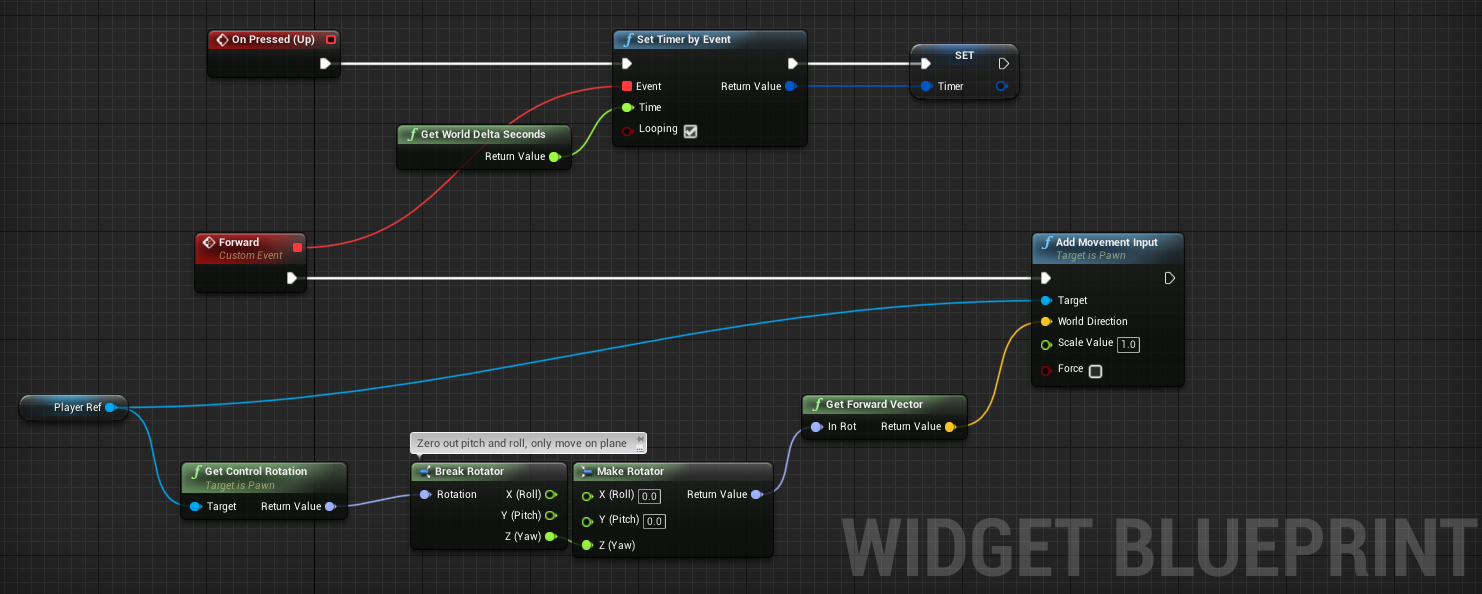

When pressed create timer and attach it to custom event and inside custom event do the code. When button released clear and invalidate the timer
Also don't use cast in every tick. Casting is very expensive. You might occur performance issues or fps drop
 sinful zealot
I see/assume that Blueprints used to be called Kismet https://docs.unrealengine.com/udk/Three/KismetExamples.html (it looks so old)
brittle fiber
masters, any material on spawning and editing BP parameters within active editor (Live)?
merry yew
@sinful zealot udk3 had Kismet scripting language
sinful zealot
I had always wondered why I kept seeing "Kismet" on so many nodes and functions XD.
 spark robin
How can I check if a world space widget is in the center of the players screen?
fluid wraith
This?
spark robin
So the center should then be X: 0.5 Y: 0.5 right?
fluid wraith
Should be, yeah
spark robin
Cool, I guess I will have to use a for each loop > Get all actors of class for it, but 🤷🏻♂️ I wont have that many widgets
spark robin
Its an Apex legends inspired comms system
fluid wraith
Ahhh
spark robin
fluid wraith
Instead of doing it on each loop though, maybe get player controller and do that on creation of the widget?
spark robin
I wont be using it on creation tho, its every time the player hits MMB, I wanna check if any existing widget is in the middle of the screen, if it is, it will open up a menu that will let you add a reaction to the "comm widget", else wise, it will just bring up that menu that yo usee in the video I posted (The teknik.io link)
fluid wraith
You could also do a sphere cast for that though
spark robin
Yeah that did hit my mind, but what if the widget is really far away? Then it might be hard to target the collision
fluid wraith
Make the sphere bigger
spark robin
Like, depending on distance?
spark robin
Actually, I could use the widget interaction component
Or, maybe I cant since its screen space?
fluid wraith
Its basically the same as using a sphere/line trace, from what I'm reading
spark robin
Im tinking of the widget interaction component might be able to judge based on screen size/position/coverage
thinking*
spark robin
Maybe I could do a multi line trace and THEN do a for each loop based on what is hits
fluid wraith
Sphere trace*
spark robin
Sphere trace?
fluid wraith
If you're saying it might be super far away, trying to hit it with a line could be a pain
spark robin
But, shouldnt the trace be straight?
fluid wraith
Yeah, you basically use it as a line trace, then the radius basically changes the thiccness
Pwobabwy
normal rampart
Hey anyone know what's up with rotator's pitch value (y value) only going from -90 to 90, and when you surpass either of those values, it adds 180 to the Yaw and Roll and the pitch "turns back around" and starts going the other way?
So apparently I'm running into something called gimbal lock and I just don't know what to do to get around it. You can use quats I guess but I don't understand them that much. I just need to get the pitch of my actor in degrees. My actor rotates fine, it's just when I try to get the pitch, it's wrong. I'm just not sure what to do 😛
 modest gulch
hello, is there some good guide on configuring lighting (I mean settings and parameters of individual lights, what they do, what they mean etc)?
I mean, something more comprehensive than UE docs
gusty shuttle
Is there a better way to pull out info from a class ref that this? It's not providing any real results, bad pointers. If I use GetAllActorsOfClass it works, but not this. Is there a better way?
 ember niche
Hey guys
Just need some minor help
Im making a ball game, and rn im making character selections widget, so in the code above, other objects are not appearing in “set skeletal mesh”
Anyone knows why?
I want it to be sphere shape, it wont show me that object
normal rampart
@ember niche So your character has an inherited mesh (appears as "Mesh" (Inherited)), which is the skeletal mesh you're trying to set. The ball meshes are not skeletal meshes (I mean most likely lol). It appears you added another component, though, which is called "Static Mesh". You want to drag that component into the blueprint and set the static mesh of that
 pine trellis
hI I am using a widget interaction and when I pack my game, I cant see the red debug line, is there any way to get this to show up in a packed game??/
normal rampart
@pine trellis Yes, the debug lines are not packed in the game. You can use Rama's Victory Plugin, which includes it's own debug line nodes that DO get packed into the game. Check it out here: https://forums.unrealengine.com/development-discussion/blueprint-visual-scripting/4014-39-rama-s-extra-blueprint-nodes-for-you-as-a-plugin-no-c-required
Unreal Engine Forums
Dear Community,
MIT Software License for The Victory Plugin ~ License (https://forums.unrealengine.com/development-discussion/blueprint-visual-scripting/4014-39-rama-s-extra-blueprint-nodes-for-you-as-a-plugin-no-c-required?p=1718286#post1718286)
I've decided to create my ow...
ember niche
Its not working
When i drag it disappears
You know, i only used character class cause using actor or pawn doesn’t work
Here what happens when i use actor class
pine trellis
ok cool thanks @normal rampart
normal rampart
@ember niche
Yes that won't work, the character has to be a pawn or character. Try deleting the set skeletal mesh node and then dragging off of Character Ref node, typing in Static Mesh, and then off of THAT node, dragging off and typing set static mesh, then you should be able to set your mesh with that
gusty shuttle
Is using a GetAllActorsOfClass alright if there is only one actor of class in the world and I'm using it inside a widget?
ember niche
Its not working 😔
normal rampart
@gusty shuttle You can also use GetActorOfClass, which will automatically use the first one found 🙂 should be alright
gusty shuttle
Oh snap, much better!
I didn't even think that was a thing haha. Smoooooth
Still a "slow operation" though, and widgets kinda work on a tick
normal rampart
@gusty shuttle ah, get it on beginplay or construct, set it as a variable, use the variable in the widget function. Ba da bing ba da boom 😉
gusty shuttle
Aye, I dunno why I didn't think of that. My programmer brain goes to mush in the afternoon haha