#blueprint
402296 messages · Page 458 of 403
 karmic zealot
karmic zealot
karmic zealot
So what exactly is the issue you're having?
 worn gyro
thats why i asked you, cause i assume then im just doing it wrong
is your pawn in that scene
possessed by a player controller
karmic zealot
I said yes
And also showed video of editor
Again, you need to give me something more than "can I do this?" so I can be of further use
worn gyro
alright thanks so far!
oof
it does work
first day at the new job
great first impression
😆
 golden kite
quick question, how can I push an entire actor instead of its components?
karmic zealot
@golden kite can you rephrase that?
Or show what you mean? Usually you do push the entire actor.
golden kite
like impulse, add force
I want to use the actor as a target to push instead of a component
karmic zealot
@golden kite non-Character?
golden kite
yes, just an actor
karmic zealot
I know I'm playing 20 questions. But you're question is a bit loaded depending on what exactly you're trying to push and how.
Can you explain it a bit more?
Like, are you trying to push a box as a character...or what
golden kite
hm
so, I have vehicle actors
they have a collision box, when the shell hits the box, it sent them to the moon, so I had to seperate the collision box
I still want it to have push, but not much to make you go into mach 55
karmic zealot
Does it have to be physically accurate ?
golden kite
not that accurate, just a customizable push
karmic zealot
Just move it with a lerp then
Vinterp in the opposite direction of the hit.
SetActorLocation
Hopefully you don't have much or anything on your tick. Keep tick disabled at start. when hit, enable tick to do the vinterp until it's at the destination and disable it. Can use timeline as well.
golden kite
hm.
karmic zealot
But, this is better than trying to rely on UE4 physics
If you really want that, go to #legacy-physics
golden kite
I see what you are suggesting, but I expected this thing to have something this simple :p
karmic zealot
This is simple?
 deep elbow
@maiden wadi about the screen-space rotation, I finally resolved it, I can share the approach I ended up using if that's helpful as I'm sure there's a better way but the end results seem to function correctly
@golden kite you are applying a physics impulse from a "shell", there's so many options to control how it behaves, the intensity of the impulse, the mass of the objects, etc
when you say shell, are we talking about a sea-shell, a turtle shell, a weapon shell, presuming somehtign like mario-kart yea?
golden kite
tank shot
deep elbow
Ok and the vehicles gets hit and needs to react to the impact, then you can use Add Impulse perhaps, and get the incoming direction of the tank shell, normalise it and multiply it by a float, then experiment with the value of the float to control the intensity
golden kite
I know I can do that
I added a collision box to hold the shell, and made it seperate so it doesnt use its own momentum to shoot the thing into the andromeda
deep elbow
like that would presumably give you a decent control, right? hope i don;t miss somethign obvious
golden kite
does that apply impulse to the entire actor or just the component in it?
deep elbow
oh thats not good example i just did it inside a random blueprint, but that will apply to a component, the thign with unreal's physics is your root component needs to be the physics object that drives everythign else or you get weird results, at least that is what i have found
so you'd get the tank actor, get the root component and apply all your physics to that
if your root actor is not the physics simulator for the blueprint you'll run into issues
 smoky basin
i have a pause menu set up but i'm trying to make it when you click a button it fires the event in the level script to close the menu, but when i click the button nothing happens, is there a way to get around it?
deep elbow
hard to say without seeing your setup, but have you hooked up some debug prints to see what is getting fired. is the button in the widget actually getting called, is the event in the level script actually getting called
smoky basin
the on click event for the ui is firing, but it won't fire in the level blueprint
 distant sun
Hey, I have an arrow with a weapon attached to it, however the weapon isnt staying attached any ideas why?
do I have to add something for it to ping the game to reattach to that point?
every so often
nevermind I fixed it, I didnt connect the white section from set to attach
 exotic warren
does that apply impulse to the entire actor or just the component in it?
@golden kite I would just use SetPhysicsLinearVelocity if you're going to use Physics for that
deep elbow
@smoky basin then it's not getting passed along properly, can you show some images. the widget where it is called, and the even in the bp
smoky basin
this is the event where I want it to activate
and this is what I have it like in the ui section
does that mean I have to get the continue variable from the ui blueprint and then bring it over to the level blueprint?
 stable reef
how to cut off the remainder of float?
smoky basin
to try and get the continue button variable i did this, but now it says out of scope
 livid cliff
hello!
im working on a turn based rpg and wondering
is it generally a good idea to have the player and enemy units derived from the same base class (actor) or have the unit parameters on an object bp and simply link said bp onto the actor?
deep elbow
@smoky basin your continue exec isn;t hooked up to set unpaused, is that on purpose?
 left bay
@stable reef if you wanna round you can use a float>integer conversion, with a ceil or floor to round up or down specifically (instead of <5 down, 5+ up)
livid cliff
in my case in particular, player-controlled units do not have any in-world representation
 trim matrix
How can I use a double left click rather than the normal left click event?
smoky basin
@deep elbow yes, i have it unplugged to debug it, though i think i understand what i did wrong now maybe, i needed to use a event dispatcher 
stable reef
thnks
deep elbow
personally I wouldn't have stuff like that in level blueprint, logic liek that should be handled between the game mode, or player controller, and the HUD. problem with level blueprint is it is specific to a single level, what happens when you make a new level and have to redo all that logic etc
smoky basin
oh, i'm very new to this and i don't know how to do any of that, gotta do some researching i guess
do you have to do that in c++?
deep elbow
no no, not at all, for learning it's fine to bumble your way through things. but as you come up against more and more complicated problems you can start looking into how unreal uses the Game Mode, the Player Controller, and the HUD classes. You can always google "unreal blah blah blah" or "ue4 blah blah blah" and there's a large amount of people that have asked the things you will be asking!
trim matrix
How can I double click?
 thorny marsh
Drag and drop the Event Dispatcher into the Graph.
It will give you an option to Call it.
 green crypt
trim matrix
green crypt
trim matrix
How can I get an emitter or actor to be destroyed when it collides with the player character?
and how can I get the player character to automatically move towards the emitter/object the moment it spawns on map?
deep elbow
@green crypt lmao
thorny marsh
@smoky basin Make sure you dont have the Editor open more than once.
 faint compass
i am new to Unreal (i com from the 3d render world) and I'm trying to follow a Unreal University tutorial, but my nodes work differently then in the tutorial. I cant use the SetText node like in the tutorial. Here is an image TOP is the tutorial Set Text, that the bottom is the one that I get.
top is lesson, bottom is mine
deep elbow
you are typing the correct thign into the search bar but you are not selectign the correct node - try just typing "set text" and looking for a node called "Set Text (Text)" - the icon will be a blue f
what you are doign is setting a variable, the icon will appear different
faint compass
all i get it the reference to the variable "set" i dont see "Set text (string)"
I am trying to change the text in a text box that has been flagged as a variable
deep elbow
yup, so you grab the reference to that variable, which is called "TextHealth", you drag out of the TextHealth pin and get the search list, you can type in "set text" - you are lookign for this
faint compass
once i turned off "context sensitive" in the search field i saw a TON more option and THEN i saw Set Text
deep elbow
then it's possible your variable TextHealth is not actually text and is some other type of widget
deep elbow
it's poissble. there are a number of different styles of text in a UMG widget, right. editable text, text box, rich text. you are looking for simply "Text"
oh look, see where it says "Slot" at the top
it tells you what kind of element it is, in this case it;s a canvas element, canvas is just an empty space to put other things inside of
oh wait sorry im a dumbass
lmao, let me grab a screen
no that looks correct
faint compass
Thanks Rick, i have pulling my hair out for 90 minutes on this dumb problem
deep elbow
here is an example of text i change
and i can reference that, pull out of the pin and get set text
ignore all the settings on the text like font and such, will have no impact on getting the set text
faint compass
I think i got it
I deleted my text field and recreated it, with 'Context Aware' turned off and it compiles
deep elbow
great!
faint compass
still not sure what i did wrong, but at least of can continue the tutorial
Thanks for walking me through this
deep elbow
no worries, glad you got it fixed!
 maiden wadi
@deep elbow Actually I am a little curious about the rotation thing. I tried a few things, but got distracted making UMG.
deep elbow
yeah, it was killing me over the weekend, gimma sec
distant sun
Hey, I was trying to respawn some enemy characters but for some reason it's not working, any help would be greatly appreciated!
EnemySpawner
GameMode
I have set the respawn box above the map
so hopefully they would just fall onto the map like they did in the tutorial
but they didn't spawn anything
 marble folio
Did you set the default values for the max enemies?
distant sun
yeah they are originally at 0 but they are editable in the map viewer thing
I also tried changing them to default at 4
but it still didn't work
marble folio
Checked the log?:)
distant sun
how do I do that?
marble folio
Under the menu Window -> Developer -> and not sure what there
You can also check the "No Collision Fail"
distant sun
so no collision hasn't fixed it, also the log doesnt say anything other then game started
 ocean radish
@distant sun Your checking all enemy characters and trying to get a var off them, then trying to use this to spawn, take the counter off the character and put into somthing like the gamemode
@distant sun that var is not going to exist if theres no enemy characters
ah see what it is not sorry just hot up
got up^
i would put a counter in the gamemode still and stop doing a get all of class
and just add to it when they spawn
and remove on kill
distant sun
I see, is there anyway to fix this a little as possible, the guy in the tutorial said it had flaws and they were going to show them later, but I haven't been able to get it working yet like they have.
ocean radish
just take the divide out, timers work on seconds
distant sun
@ocean radish THANK YOU SO MUCH
ocean radish
yw
distant sun
I missed the smallest little detail and it stuffed everything up
distant sun
and yeah I would probably use less dividers but the tutorial guy insists on constantly using them for pretty much all of them
and uses the bottom fraction for how many times that thing will occur per secon
like rounds per second
which I guess works but it sounds less efficient then just putting a decimal
but maybe epics code thing is smart
ocean radish
yea timers already run based on seconds, so completely null point really but follow him, might be a reason for it later on
distant sun
yeah that's what I'm thinking
trim matrix
@ocean radish hey man, how can I get my character to move to an emitter/object that spawns when I click? and how can i get the emitter/object to get destroyed upon collision with the character?
ocean radish
@trim matrix do you need it to move to the object or just remove its collision from the test you have to movement, so it will just path 'under' the item
@trim matrix and for the interaction part, setup a collision box around your player for the distance you want it to interact/destroy, then do on overlap, check the items class or cast and perform your logic
@trim matrix if you need it to be more precise so they only destroy objects that they click on, you could do somthing like a move to then a distance check and when they get into range destroy that object,
trim matrix
@ocean radish didnt understand your first point. Basically, I want to be able to spawn a waypoint item when i click, and once the waypoint item (emitter/object/actor) is spawned, the character should just go to that item and take its position while destroying it
maiden wadi
You might be better off making a single actor that's hidden when the character overlaps it and when you click, unhide it and move it to the clicked location. Then set up the AI logic to go to that actor if it's > certain distance. Might not even use collision for hiding, just use a distance check. If greater than, move to object, if less than, set object hidden and don't move.
Otherwise you're going to have a lot of extra logic for cleaning up your unused clicks and a bunch of needless actor spawning. Bug potential.
 gloomy drift
hmm how do i find which BP listen to a dispatch call ?
maiden wadi
Why do you need to know which BP is listening for a dispatch?
gloomy drift
to find the code that gets executed on the call
maiden wadi
But why do you care what it's doing if you're using a dispatcher? The point is to tell a second actor that something happened in the first actor and maybe pass along information.
gloomy drift
yes just debugging
 hard geyser
how hard is blueprint ?
maiden wadi
That's an incredibly vague question with a huge answer.
Shortest answer, it depends on you. It's very easy if you have any sort of vague programming knowledge. It's easy to pick up once you know what you're doing with the engine, but like any design environment it has it's own nuances you'll spend time learning. It simplifies a lot of concepts, but you can still very easily misuse it if you don't think things through.
hard geyser
thanks!
maiden wadi
Not sure what you're using it for, but it works in the editor. I've used it to allow Niagara access to static meshes.
 wise raven
using it for procedural meshes
I got a warning saying in order to use procedural mesh in cooked builds you must apply allow cpu access
But will that make performance better in cooked builds than in the editor? cause all the vertex calculations will go through the CPU instead of the GPU right?
maiden wadi
Possible. I honestly don't know. Haven't gotten much into optimization stuff myself yet.
wise raven
okay
 tawny tinsel
I NEED REALLY ADVANCED HELP WITH A TUTORIAL

In this episode I show you how to create a more advanced minimap for your game. Part 3 shows you how to add other icons to the minimap for ANY actor. That includes, NPCs, resources, and objective markers.In fact anything you want to have an icon will work just fine.
This type...
so im tryna make a minimap
first problem
the poi is not on a square clamp and i was not told how to do a square clamp
second
they dont stay in their location
and they are always very far away from the player
even when they are tauching the player
help
maiden wadi
Usually "Get(a Copy)" when dragging from an array pin.
 onyx heath
Hey I have this weird problem with networking in UE4.
Right now I'm checking if I have an active building object before I create a new one using an 'Is Valid' method and destroying the one I have if I would have one. (At the end of the function I spawn a new object and set that object as "Active Building Object"
The weird part is that this way works for the client but not the server. If I input and run "Attempt New Pick Up Item" from the client side, the object is successfully destroyed. However, the server just spawns new items.
I've found out that the reason for this is that the server finds "Active Building Object" to be NULL despite me setting it at the end on the function - while the client does find a value from Active Building Object.
Anyone knows why this could be the case :/?
ocean radish
could be how you area setting active building object, the client might be setting it but the server might not know if you've not told it the object
where you setting it for the server?
onyx heath
You mean like replication and so on?
I've tried all replication settings but it is the same on all
 worthy frost
client can not replicate stuff to server
onyx heath
This is where I spawn the new actor and set is as active building object
ocean radish
I'm guessing you have the client requesting a pickup or somthing along those lines? you could feed a reference to the object as an input for the function, i've not done much on multiplayer side, but sure ue4 handles references internal
maiden wadi
@swift pewter Make sure you're using the bottom one of these two. Drag off of the array pin and type get.
onyx heath
@ocean radish Yeah it is meant to be a pickup in the end. Right now however it just spawns the active building object in the world location 0,0,0
So the way I do it right now is that I use a forward tracer to find a hit actor (to be used later to delete)
Upon finding an actor, I spawn BP_Buildbase at 0,0,0
@worthy frost RPC is running it on server right?
I still find it weird that server side does not seem to remember the value of Active Build Object while the client side seems to be able to do it. Usually it is the other way around that the client side fails to comply but the server side does
ocean radish
this looks like its on the client to me
onyx heath
So you mean that despite it working for the client it's more of a fundamental error?
Right now I have a solution like this.
If I press 1 and I am not holding an object, I run Server New Pick Up Item, which is set to run on server. I then run Attempt New Pick Up Item which is the one presented above. The first thing it checks is if I have authority which only the server should have. So yeah, the client sends a request to the above presented function and it works for the function but not the server.
maiden wadi
I don't understand what you're doing with the bool. You're checking it on the client, and then setting it on the server, but never replicating it back to the client. At least as far as I can see.
onyx heath
I mean I could do it like this I guess
But I don't think that is the issue. The issue is that Active Building Object is saves as nothing for the server for some reason despite setting it (as far as I can see it)
maiden wadi
Now you've set it to replicate, but you're setting it on the client now. Any replicated variables need to be set on the server.
 urban jetty
Hi all, I got a problem with mouse overlap events in the game rather than UMG. when I enable mouse over events in my Player Controller my click events stop working or rather behave irrationally . Seems real strange. just wanted to add some dead simple animations to mouse over like changing a material param which all works but the events just mess up everything else, any addvice or workarounds would be great.
onyx heath
Hm, as far as I undersstand it my "ServerPickUpItem" runs the "PickUpItem" function only, and so the set Active Building Object should be set only from the server side?
maiden wadi
@urban jetty That should not affect your click events at all, unless you're changing something's collision on mouse over.
urban jetty
That's what I thought. it's like it's changing UI focus. I'm going to try to replecate in clean doc
ocean radish
are you overriding mouse over?
urban jetty
no, just getting Mouse Over Event from a collision sphere I'm using as a trigger. set to UI
ocean radish
yea sounds like its an issue with focus,
instead of a mouse over event, if its in world space, a trace might work better
gives you the option of making sure it only works within a distance too
urban jetty
how to trace from mouse though?!
ocean radish
traceundercursor or somthing along those line, cant remeber exact name
hitundermouse or cursor maybe
maiden wadi
GetHitResultUnderCursor
urban jetty
oh brilliant thanks
ocean radish
there you go^
urban jetty
Thanks guys that's working
onyx heath
Well so now i've pinned it down that the "? is Valid" results in neither "Is Valid" nor "Is Not Valid"
Should that even be possible?
Alright so I now tried to SET Hit actor just like Active Building Object and server seems to remember that one. Could it possibly be something with the spawning of new objects?
 next tusk
hi guy i just wanted to know witch can of bp to use to do this
 violet inlet
Hello boys , i would like to add some tilt while my character is running but i don't know with rotation should i take ^^
 tight schooner
@next tusk if the information needs to persist in memory across map loads, then GameInstance. If not, or you're saving the DB to disk, then mostly anything can work, incl. a regular old actor BP.
next tusk
well im saving something like 10 000 tiles so
tight schooner
Can't comment on it cuz I never managed an array that large. Dunno what the implications of that are. But otoh modern computers are fast and have oceans of RAM as far as game logic goes.
next tusk
only spawning cube with a mesh on it with specific coord unless i can create tiles grid map and change the texture of each one easily?
tight schooner
I'm not clear on what you're asking. I will say that if you're making a Minecraft-like voxel block world, there should be a lot of literature online on how to do that in UE4
and also systems on the Unreal Marketplace
next tusk
no im making xcom types game but bigger map
already have some asset but they dont really give you the option
 thorny cedar
i have following problem. i want to have a grabable object with a collision sphere around it, but when moving it i want the collisin to stay static
i tried to set the relative and worldLocation of the collision through an call event, but nothing happened
 zealous moth
I am trying to create a grappler and so far all my physics work fine with the trace. My issue comes with the rendering.
I though about using either a spline or a cable. The cable seems to be the easiest in terms of physics and simulation but i cannot change the mesh. For the spline, I can make the mesh look like whatever i like.
Is there a way to mod the cable mesh? The documentation doesn't not mention this.
maiden wadi
@next tusk Why don't you just design everything with a grid in mind, instead of spawning in thousands of tiles? Make your maps and objects in a scale that fits your grids, and tell units to move to the closest grid point which is done in math instead of literal grids.
 haughty crypt
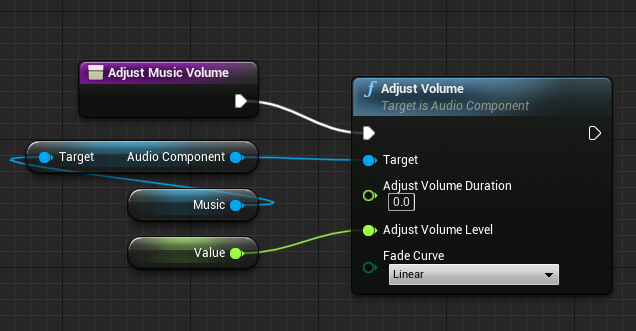
is there any way of setting audiocomponent without using soundcues?
everytime I do and I set it to 0 it just stays at 0
using adjust volume
 frozen spear
@next tusk you could easily store all that information and edit it inside a blueprint structure
deep elbow
hey, rando query, I want to transition between two pawns, and use Set View Target with Blend, going from A to B is fine, the camera is in a static position - forward and right vectors are zeroed out - then I want to switch back with the same view target blend, but blend always gets sort of half way there and then snaps to a zeroed out forward and right vector - and I believe that is the player controller pitch and yaw getting reset when possessing then pawn. So what's the solution, should I run the camera rotation update on both pawns at the same time - there's no harm in doing that because you'll only ever have possession of one at any given time, but is that the best/only solution, hmm
maiden wadi
Are you asking if there's an easy way to shake a mesh?
Uhh. That really depends on the kind of effect you want. There's a surprising amount of ways to shake something. Like if you just want something random, then set the mesh's relative location to a random vector between -5 to +5 on tick?
Timeline I guess
 opal pendant
hey @maiden wadi I tried a few things regarding attaching an actor to my helicopter, and it sort of worked but the player could still move while attached. I checked to see if everything was replicating properly and it is, so I think the issue is that my character doesn't have physics enabled but my helicopter does so they don't get welded together. is there any way to get around that?
 digital flax
hey guys im having some issues with my steering wheel. all the buttons sometimes doesnt get picked up by the engine. ive checked the logitech profiler and another indepenend software and it works fine, its like the wheel keeps throwing information at ue4 and ue4 just picks up some of it, does anybody have any advice?
to truley make sure its ue4 related i just played a round of csgo with it
maiden wadi
You played CSGO with a steering wheel? O.o
digital flax
yeah i mean to test it
dont really play racing games and ive thought source is pretty.. open to stuff
maiden wadi
@opal pendant I'm not sure how to work around that. I haven't done a whole lot of physics stuff. Beyond just disabling the character's collision, and attaching it to a socket in the helicopter and then setting control to the helicopter, I dunno. I probably need to look that stuff up soon though. Going to need similar stuff for my own project.
 upbeat smelt
so Im trying to update value at specific index of an array. I tried getting the value at that index as ref and setting this to a variable but changing the value of variable doesnt reflect back in the array. Whats happening? Is there any other way to do something like this in bp rather then directly updating array index value? Also I will be using this variable in other functions too.
maiden wadi
@upbeat smelt If you're getting by ref, you need to set by ref.
If you need that variable to be the same as the index in the array, you just need to set them to the same thing at the same time.
upbeat smelt
ok ill try this
this is what im trying to do. once i get the value from array, updating the value at ammo in mag will update the value of array at CurrentMagzineIndex. Sorry if i wasnt clear before.
@maiden wadi
frozen spear
Anyone know if they fixed blueprint children inside blueprints resetting to default values issue in 4.25?
 little trench
Hello, We know what is the advantage of nativization of blueprints, but what is the disadvantage of that caused to disable in default?
 white crypt
wasnt that an issue back in 4.15 ? @frozen spear
i've never experienced it again since then
frozen spear
Yup...it still happens in umg blueprints
white crypt
back then i remember a lot of people had this issue
yikes, i feel for you :<
you can try submitting a report, otherwise it might not get fixed
frozen spear
I hate it...the whole point of defaults is so i dont have to manually insert things into arrays on beginplay
 glacial eagle
UMG doesn't really support inheritance IIRC
maiden wadi
@frozen spear I had a problem with that, and I created a new parent, same variable types. Replaced stuff where I was casting to the parent and it's working fine now.
frozen spear
Its not inheritance children...it blueprint children...as in a child object that is another blueprint
maiden wadi
Ah. That I can't say. Never had the issue.
frozen spear
It's only resetting the arrays
maiden wadi
@glacial eagle I read somewhere that UMG only supports variable inheritance and maybe like events. But none of the ui is inherited.
frozen spear
All the other settings stick...and also totally randomly
white crypt
make sure you dont have stuff on construct that might update them
but as someone said, making a new widget might solve it. its unreal we are dealing with
frozen spear
That i have to check...i think i grab section names to set on construct
 raw sapphire
Sorry to interrupt and I hope it's ok to ask this here, but I've been looking and haven't seen an example: How do I make it that a timer runs X times and stops? If I do loop, it goes on forever. I tried to do time lapsed after, couldn't make it work.
I just wanted to do a countdown before a wave starts : (
frozen spear
You could use a timeline maelstorm
white crypt
you can check if time is 0 or less then invalidate and clear the timer
maiden wadi
@raw sapphire Turn the return of the timer into a variable, and in the event you're repeating increment an integer. If integer >= desired loop count, clear and invalidate timer.
raw sapphire
ok, I tried these and couldn't make it work. NOw that I know they are supposed to work, I'll take another look. Maybe I just did a silly mistake. I'll also check timelines. Thanks guys
frozen spear
Event tracks on a timeline then you can actually tick on real seconds without crazy amounts of deltatime math
white crypt
@trim matrix first check few things, if you have mouse over events enabled and if the game mode is set to game/ui
frozen spear
Back to the umg...so messing with it in construct could cause this issue...cause i could easily move that code to the beginplay of the umg
Still its a nasty little bug that never got fully fixed since 4.17...atleast it stopped happening to actual bps that was stupid
maiden wadi
@raw sapphire
raw sapphire
wow, thank you!
raw sapphire
(that said - kinda silly... why don't we just have a version that works with an iteration or time count..)
frozen spear
Cause its called timeline and you dont want to use it lol
white crypt
@trim matrix if you have those 2 things correct then your problem most likely will be collision. check if the actor has overlap events enabled and if the collision response channel is correct. to simplify make a new actor and try getting mouse over event to work. once that is done you will be able to move that logic to your inventory system
frozen spear
Timeline event tracks are exactly for what you are trying to do
white crypt
as I said, make a new actor. add a box
and make that work
will be much easier to get the gist of it
are you overlapping a widget component there or an actor?
can be that the item you are dragging is blocking the view. should check which object you are really hitting
raw sapphire
@frozen spear - ill check them! 😄 I just didn't know about them before.
Btw, - I just noticed the "looping" check takes a bool, so I just put a countDown>0 to it, it's resolved.
Anyway, thanks a lot everyone!
frozen spear
Look up the timeline event track.... It lets you add keys to output functions
Then you can start you mob wave in finished
Control what's displayed from umg ect
little trench
Hello, We know what is the advantage of nativization of blueprints, but what is the disadvantage of that caused to disable in default?
white crypt
@trim matrix if you are using widget component inside your actor, you might need widget interaction component inside your PC for it to work. since i dont know your set-up just taking blind guesses
but you should debug it more, make a system that tells you what is being hit there and then
then you will probably know your issue
frozen spear
@little trench there is no disadvantage except the speed lost that you gained from the code converting to c++
white crypt
its harder to maintain. packaging can promt why more errors than usual
frozen spear
If you know the advantages the opposite of that would be the disadvantage...
white crypt
if you enable that in mid-project then you wont have fun time
little trench
that means we need to enable it begin?
white crypt
yeah, it just wont overwhelm you later on that all your systems would need to be redone in order for it to work
frozen spear
Theres a few bp vs nativised studies you can watch on yt to see the exact difference...you can decide to native at any time...its done on compile and build
You can even decide at any time to uncheck native
It has no ill effects that ive seen
Changing your mind
little trench
I heard level blueprints and macros are cant nativized. SO what happen if our projects has macros and level BPs
frozen spear
Ive never had an issue enabling or disabling mid project of the nativize blueprints
white crypt
have you tried packaging?
in editor you might not see any differences
personally i wouldnt use, it looks to be more experimental than a finished system
frozen spear
Not often enough to have ever run into a case where it wrecked my code
Whatever it can nativize it warns you that it wont convert it to nonbp
white crypt
in some cases your game wont package because you are using an enum
just from my experience
frozen spear
Im talking about individual objects btw
Not the setting that bakes the full project
white crypt
individual might be fine, but not the whole project
frozen spear
In the class defaults where you can enable nativize this blueprint
Anything I feel that's going to slow me down I usually check that
Usually when the blueprint reaches like a hundred nodes
You probably want to nativize
white crypt
would be much better to put in time on how to move bps to c++
or make your own custom nodes using c++
frozen spear
Interestingly enough have you ever checked out the outputed files for your blueprints that you nativize? Its crazy...and i have c++ experience but ue4 does it on a completely different level
maiden wadi
Speaking of the level blueprint, I really wish college courses would stop promoting the level blueprint in general use. It has it's place, but they really seem to abuse it and the people that come here asking how to reference it from characters or why it can't be referenced really aren't being taught good object oriented programming habits.
white crypt
i decided not to use nativization so havent seen what it outputs
frozen spear
Oh my God I agree... Whenever I have to look up a tutorial on how to do something, and I noticed that the person who's making it tutorial just completely takes concepts like encapsulation and throws them out the window... I cringe a little bit
glacial eagle
The nativizer doesn't really generate good/readable C++ code. The speed benefit comes from skipping the blueprint VM
frozen spear
I tried to only look up things related to the math
ocean radish
there not nativized as default for many reasons, they can cause compile errors, they dont work in all scenarios and epic still expects you to do any heavy lifting in C++, as even nativized it is still slower, there certain things that benefit from it and some that dont
glacial eagle
I believe it's off by default because it doesn't always work. It's a glorified copy-paste tool really.
frozen spear
Yeah the code it generates is on another level
white crypt
doesnt mean its good though 😄
glacial eagle
Yeah. Not really meant for human reading 😄
C++ written by an actual programmer will always be better
frozen spear
Wouldn't it be neat if we had a blueprintize my C++
glacial eagle
But you can save a lot of processing time just removing the Blueprint VM from the equation.
frozen spear
I would love to see what my code would actually look like as pure nodes and not inherited from my classes
glacial eagle
Probably not possible. A lot of C++ isn't possible in BP
ocean radish
no you wouldnt, your eyes would bleed
white crypt
anyways the person asked for pros/cons of native. I think that his main intention was to know if its possible to make a game only using blueprints (especially for non-programmers)
glacial eagle
It's possible for sure. There will always be a scope limitation though.
white crypt
some people think that nativization will make their game as it would be done in cpp
which is not true obviously
frozen spear
I honestly use bp more now than c++...i think ive only ever run into a couple instances where what i was trying to do was easier in c++
glacial eagle
Don't go making a 100 player BR game in Blueprint, that's all I'm sayin'
ocean radish
ofc its possible will it be performant, depends on what you put in the game and how heavy it is
ocean radish
blueprint only, non nativized make it a challenge
frozen spear
Whenever you're dealing with data in maps and structures it's always easier in C++... Same thing with tables
Basically whenever you're dealing with all the lot of information
It's so much more convoluted as blueprint nodes
maiden wadi
Blueprints also have the same drawback that any written language does too. You can write bad C++ that runs slow just because you don't know what you're doing. Blueprints just get more flak for it because it's more commonly used by non programmers who literally don't know what they're doing.
glacial eagle
Personally I find C++ faster to work with now, but I'm used to it.
frozen spear
Or by people getting taught to put their players hit points in the level lol
frozen spear
Faster yes... But oh my God is it's so much more prone to issues in the engine...That's what pushed me to start doing more blueprint instead... having stupid where the compiler fudges up on you because you change the default or remove the variable in your class
glacial eagle
The only bugs you run into in CPP are the ones you create. The engine doesn't get any less stable using CPP.
frozen spear
I guess if you call deleting a variable you decided not to use... An issue I would have created for myself... You're right
glacial eagle
Never had that issue personally. Removing a var doesn't cause any problems
frozen spear
Create a class add like four variables to it... Static meshes are the worst set static meshes on them... Create a blueprint from your class in the engine... Compile then delete one of those variables from the class... Hit compile again and you'll see what I'm talking about... It's even way worse when you use hot reload
glacial eagle
Yeah but every seasoned CPP programmer knows not to use hot reload ever 😄
Probably the wrong channel for that discussion though
frozen spear
It happens either way.... With or without hot reload
glacial eagle
Never had that issue myself
frozen spear
You've gotten lucky man it's obnoxious
ocean radish
https://www.youtube.com/watch?v=2edoacF53F0&t=1840s thats a good talk on what not to do with blueprints and common pitfalls theres some good blueprint use cases and when not to do it in there
This practical discussion led by Senior Dev Rel Tech Artist Zak Parrish presents an overview of common issues that arise during a studio’s first six months on a UE4 project, focusing on solutions. Topics include general best practices, optimization guidelines, and how to avoid...
glacial eagle
CPP is my day job, I'm just used to it. There aren't any major issues there so long as you know what to do
BP is a great tool, just has a ceiling IMO.
frozen spear
You probably are very good at coming up with a plan in your head and then once you write your code you probably don't change it very much
I often find myself deciding not to use certain variables or rearranging my code which is probably why I notice it as an annoying issue
glacial eagle
Well yes and no. I mean if you remove something from a class layout you should recreate the blueprint anyway, otherwise you have a load of useless data serialized into it.
If you're doing that all the time I can see the issue yeah.
frozen spear
It's mostly during refactor
glacial eagle
There are utilities you can use to workaround it though, but I agree C++ works best when you can plan upfront.
frozen spear
Lately I've been doing what everyone else sort of does once I absolutely know I'm not changing the blueprint... I create my c++ classes based on the blueprint whenever I do a refactor pass
I definitely don't jump into visual studio first though... Not anymore
 indigo zenith
im trying to swap a skeletal mesh on runtime, everything seems to be working fine. however. when i have master pose component enabled, the engine crashes. anyone might have an idea what that can be ?
glacial eagle
different skeleton?
indigo zenith
i tried both methods. both crashes
ocean radish
got cloth sims on the meshs?
glacial eagle
@indigo zenith I mean do the two meshes use different skeletons?
They have to use the same Skeleton asset.
indigo zenith
the "cloths" are from master pose component
trying to make a gore system, just removed the head
when master pose isnt connected, it swaps out fine
 hot wedge
how can i get a direction from one vector to another?
indigo zenith
the moment i enable the master pose component, it crashes
glacial eagle
well the log will tell you why it crashes
indigo zenith
so the cloths are skeletal meshes
glacial eagle
Master pose only works when the two meshes are using the exact same skeleton
indigo zenith
that should be the case @glacial eagle
glacial eagle
collision isn't supported on the child meshes either FYI
indigo zenith
ye, both are redirecting to same skeleton
glacial eagle
If you download the debug symbols for the engine the crash reported will tell you where and why it crashed
indigo zenith
and have same bone structure
glacial eagle
The bone structure being the same isn't enough
the actual skeleton asset has to be the same one
When you import a skeletal mesh you have the option to use an existing skeleton. By default it imports a new one, which is stupid.
indigo zenith
both pointing to same skeleton
i letterly just removed the head, (didnt remove any bones)
glacial eagle
I guess that's not the crash then
ocean radish
I know there was an old bug with having more than 1 cloth sim on a mesh and it causing an editor crash
other than that no idea
indigo zenith
im not running any cloth sims, the "cloths" are skeletal meshes,. im swapping the base skeletal mesh to a "new" one
glacial eagle
Get the debug symbols
It'll tell you where the error occurs in the crash report window. Otherwise you'll just be speculating forever.
ocean radish
https://issues.unrealengine.com/issue/UE-87501 @indigo zenith sounds like same issue
 neon brook
hello, has anyone ever tried the Raycast Vehicle tutorial? I have some confusing on the first tutorial 😁
 undone temple
Is there a way to truncate to a specific decimal place?
for example, 1.2345 truncated to 1.23
guess I can multiply, truncate, then divide
but that seems messy
maiden wadi
If you're using it for text, the ToText node has inputs for that.
undone temple
it's not for text, I'm passing values to an MPC
but perhaps that will work anyway
I'll take a look
glacial eagle
You can multiply it, round it, then divide again
ocean radish
or maths
glacial eagle
E.g, for two decimal places - multiply by 100, round to an int, divide by 100.
It won't be perfect because float precision ofc.
maiden wadi
Yeah, if it's not for text, definitely just do that math.
undone temple
I'll try these, thanks @maiden wadi @glacial eagle @ocean radish
ocean radish
@undone temple also the LE extended libary has them in built
raw sapphire
@frozen spear thank you! As you said, timeline is exactly what I needed : ) Quick question (to anyone) let's say I put some key frames for events on a timeline (with the ! button), which creates an exec pin to create the "event" there.
Is there a way to get the time remaining for the next frame for that without manually entering it?
(e.g I run "wave" at 00.00, 15:00, 30:00. This spawns monsters and sets the variable for timer to 15 seconds. But if I change the timeline to 20:00, 40.00, then I'd have to manually change the timer value.
If I have different intervals, then I'd probably have to do some branching.
What I'd like to do is directly taking the time remaining for the next time it's fired - if that makes sense
(I guess I could do a timeline dedicated to each wave, then set/get the wave length; and have another timeline that fires this timeline every time - if I can do nested timelines)
maiden wadi
I'm confused. Why do you need a timeline for that? What are you doing every frame that requires the timeline?
frozen spear
You should be able to add as many keyframes to each event track if you want... So for example if you have a countdown timer track... You can put a key in every second on the track and it will fire that exec
frozen spear
Gloria you're not using the rgba
How do you expect it to alpha if you don't use the alpha
tawny tinsel
but this texture has color i dont understand what do you mean
if youre asking why not rgba
this is wy
i get an error
tight schooner
@tawny tinsel this is a #graphics question btw. RGBA is a float 4. You forgot to connect the other RGBA pin there.
frozen spear
By dragging the line from there instead
tawny tinsel
it still doesnt work
why does it look like this?
the texture looks like this
why does it distort so much?
tight schooner
I think you should take this to #graphics
you should also read about how alpha channels work
frozen spear
You probably have other information in the RGB channels of that mask texture
Opening that texture in the top left corner you'll see us setting you can change to see what's on each of the individual channels
frozen spear
You probably need to look up a tutorial on it... I don't think you want to use the add node for that... But I'm not very good with texture so...
tawny tinsel
ah i guess
can anyone help me solve an isue i have in #umg ?
so i dont have to try and do fancy material stuff
ocean radish
add should be fine for that, are your textures the same size, i'm assuming your trying to put a border around your img?
frozen spear
Yeah i only know enough material editing to get myself out of a bind
 pallid rampart
what was the function called that gets players speed in float value?
indigo zenith
@ocean radish worst part of this, i had this working in ue 4.21
ocean radish
@indigo zenith prob a new bug, that was reported this year
indigo zenith
@ocean radish ye. might have to go for material gore in the meantime.
ocean radish
you wanting there speed value as in there max or velocity?
ocean radish
🙂
pallid rampart
i forgot it was GetVelocity and then jsut add a vector lenght
ocean radish
@indigo zenith not worked with too much in the mesh side of characters as i'm using sprites for my current game, is it possible to hid a portion of a mesh?
pallid rampart
length*
tawny tinsel
idk it just doesnt work
indigo zenith
sounds like bethesda ^^
ocean radish
haha no mines all 2d 😄
htinking as a work around for now, you could hide the head and spawn a non descript gore skull @indigo zenith
 valid hound
guys, I would like some help on how to make ai vehicles follow a spline path, and also make it so the ai avoid obstacles (such as the player obstructing the path)
 neon jay
Hello, I have a blueprint in my scene I have disabled casting shadows for my instanced static mesh for it but yet it seems to still casting a shadow, does anyone know how to disable shadow casting on it?
digital flax
anybody got experience using the rawinput plugin /generic usb buttons etc?
hot wedge
how to draw a vector from a location to another location?
i have 2 vectors
anyone? I did this but i can't remember how
 steady bison
I’m working on casey’s TD tutorial and running into an issue, how do I make the moveto blueprint able to receive the location from the spawner?
hot wedge
@white crypt I can do that tanks. Isnt there any other way? Giving two vector3's and getting the resuts direction
white crypt
you want to get rotation from 2 vectors?
hot wedge
yes
hot wedge
FINALLYY THANKSS
steady bison
hot wedge
its so hard to find these things when you cant find the words to ask or search for it
indigo zenith
lol why not make a print screen, that mobile capture lol
 atomic prairie
I would like my object twinkle, is it possible to add a fade effect or something with that? Because it's a little too brutal like that haha
steady bison
because I don’t know how to printscreen
undone temple
thanks @ocean radish I got it sorted out
tight schooner
@atomic prairie It should also be possible (and "cheaper") to do it in the material itself using a "time" node and doing some math on it; you can make a material that strobes on its own. But otherwise yeah, timelines or looping Set Timer By nodes are useful for animating stuff in Blueprint.
atomic prairie
i try the Timeline node but i'm confused
tight schooner
obligatory Mathew Wadstein video https://www.youtube.com/watch?v=v7bdcvGlgIg
worthy frost
@steady bison you have no white exec wire going into your cast..
atomic prairie
Thanks!! @tight schooner
 full fjord
Can anyone help me figure out how to connect the last two "set" nodes to this blueprint? I've got the character to do the jump animation but it only jumps if Spacebar is pressed and not if it's just falling or if I'm pressing WASD while doing pressing space
It would be nice if the branch node and the "cast to" nodes supported more than one output
tight schooner
I'm not sure what it is you're trying to do.
If "Can jump" is true, does that automatically cause the APBGoat actor to jump?
frozen spear
Beestman you can create your own version of the nodes
white crypt
he didnt set the "in air" state inside animbp
just open 3rd person template and look on how its made
neon jay
@atomic prairie I would do this in your material, it will be a lot more performant that way. 👍
full fjord
so basically the original blueprint was from a youtube video where it checked if the character was moving forward and back and then if it was true, it would play the run animation and if false, it would play the default animation (i had it set to idle). The video stopped at that and the guy said "you can add a jump animation and other animations if you want" lol
for reference, this is the animation blueprint i created:
frozen spear
Just make a macro...open the existing node...copy everything but the input and output into your new macro...add the correct input and output to the in and out of the macro...then once it works the same as the original...add your own custom logic to it
white crypt
you only have jump
no loop in air
so probably your condition is only met when spacebar is pressed
frozen spear
If you want an example of changing one of the standard macros look up "ue4 for each loop with delay" on yt
white crypt
you need to make a full jump loop first of all. begin jump/in air loop/end jump
get the 3rd person template and use that instead
full fjord
thanks zethfox i'll take a look into that i feel like that's too advanced for me tho lol
this is a custom character for a project so i cant use that but the "jump" animation is actually the "in air loop" you're referring to
full fjord
yeah
white crypt
in the template it looks like this
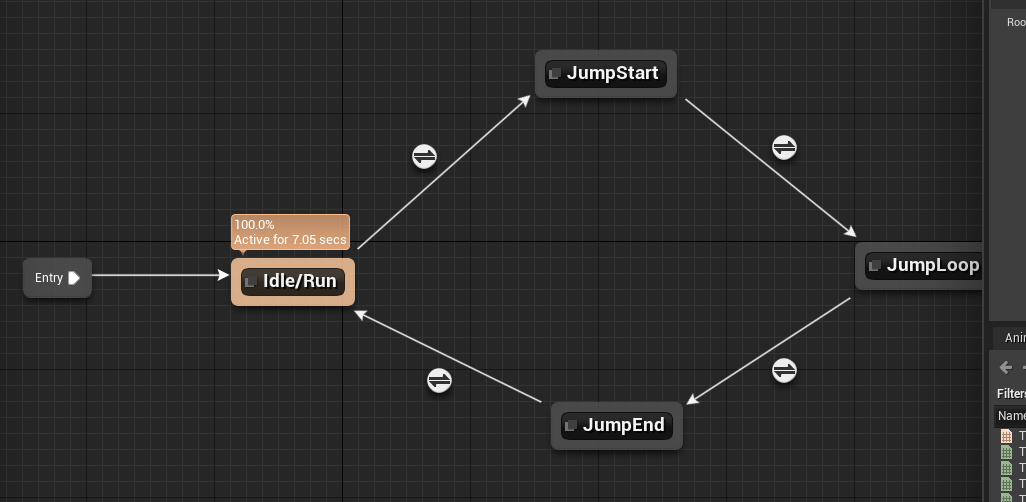
if you just want it to play jump when you are going of cliff, make the first condition to be is in air
full fjord
I want it to play jump when I'm pressing WASD + Spacebar or if falling off the cliff
white crypt
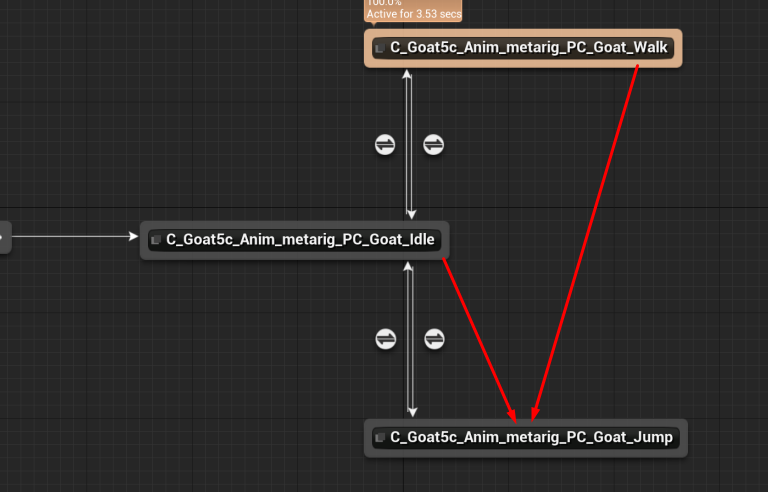
make a new boolean and call it in air, also you could use blendspace to put idle and walk into 1 state

 frail marlin
Hey guys, I am attaching a Blue Print Actor to my hand on grab. I have a Scene Component with a child static mesh. This is for setting a parent "grab point" on the object. When I attach the Actor to the Hand, the static mesh's transform is not effected by its parent scene component's transform changing? What am I missing? The Scene Component is getting attached to the hand component properly, but the static mesh transform is not changing.
white crypt
thats just from the template, nothing fancy
full fjord
okay so if I'm reading this right, the "is falling" casts to "in air" when then calls for the "jump" animation to play?
white crypt
yes, you can delete everything else from tick as well
and use this instead for jump https://prnt.sc/sbi4d1
 full fjord
So actually I had duplicated the 3rd person template to do this idk if that changes anything
white crypt
you will need to change your game mode settings
to set the pawn class
also download the template, it wont hurt 🙂
later on you might want to start using blendspaces for movement animations
full fjord
yep! I had already changed the pawn class. Basically it was working with going from idle to walk and then back, but it was the jump that messed it up for me
I'll look into blendspaces as well
white crypt
the tutorial you followed, you should avoid that kind of stuff
thats a good example on what not to do 😄
full fjord
is there like a hub i can go to then that covers basic things like importing custom characters?
white crypt
if you are just starting you then watch this one, covers the fundamentals https://www.youtube.com/watch?v=EM_HYqQdToE

Announce Post: https://forums.unrealengine.com/showthread.php?101051
This Training Stream takes a look at Blueprint Communication. We find that Unreal Developers of all levels can sometimes struggle through the concepts behind moving data between objects. So in this video we'...
but basically you can find a lot of stuff just by googling, or if you cant find it then just ask here

Complete resources for learning to use Unreal Engine 4
poke around here too
full fjord
Okay thanks yeah I've mostly learned on a per-need basis and a lot of it has had to do with level scripting like event triggers etc but like this is my first time doing everything from scratch
smoky basin
@deep elbow you were right about me needing to put my menu in the player, it wouldn't work until i did that
 wintry grove
why all of a sudden this is refusing to work ?
 queen urchin
Hey, guys, whats the best way to make time speed change functions for RTS?
 sleek jacinth
One of the update notes for UE4.25 says "Implemented variadic function support for Blueprints". I cannot seem to access this feature. Does anyone know if this is fully exposed to blueprints, or do you still need to set it up in C++ to be able to use it in blueprints?
sleek jacinth
Hmm, seems like the function still needs to be declared in C++. Ah well
 shell bough
Can someone help with socket attachments? I need to attach camera to socket on the GUN
GUN got skeletal mesh and socket (ADS CAM).
 gilded pebble
Hey can someone help me?
this works fine but If I restart the editor I get this error
"Actor Object reference is not compatible with Character Object Reference(by ref)"
if I delete and add a new Addunique it works until I restart
 supple dome
you can open the image..
 hollow cape
hit actor is of class "actor" until you cast it. That error is happening because you are adding an "actor" to an array of "character"
worthy frost
@gilded pebble you need to cast Actor to Character
before inserting into you array
or make your array Actor instead of Character
gilded pebble
I see, thank you everyone for responding
zealous moth
@supple dome you don't say! guess i've been using discord wrong
supple dome
youre welcome
 quaint bough
i calculated values for pixel positions and i wanna know if i can generate a texture with a width, height and access pixel color at x/y positions with blueprints, is this possible ?
 hybrid hound
my line trace isnt going in the middle of the crosshair. its going just on the corner. like in the photo. i want it so the square on the debug is directly in the center of the crosshair
tight schooner
It's been a while since I submitted a UE4 bug report, but setting an exposed-on-spawn, linear color variable through a Spawn Actor From Class node either fails to apply or it crashes the whole editor in 4.25, even in a new empty project. I sent that one in to Epic.
I suppose I'll work around it by using vector variables as bootleg linear-colors cuz I want to keep kicking the tires on 4.25
hollow cape
@hybrid hound Show code
zealous moth
@hybrid hound yeah not much to go on... do you use an offset? is the line trace hitting the actual value but showing it off? etc
zealous moth
says -1
hybrid hound
that gets the negative so i get a min and a max from 1 value
zealous moth
oh i see
can you try this for me just to check if by default the behaviour is skewed?
zealous moth
is your crosshair perfectly centered? it seems to always be off by 1,1
hybrid hound
i dont know, is there a way to check. im drawing the crosshair like the above photo
zealous moth
hm good question, not sure myself...
hybrid hound
yea just found that on a youtube video. thanks, that fixed it
zealous moth
eh close enough
 ornate rain
does anyone know why the texture quality decreases?
im taking an integer input and using that to make walls but ive had to scal the initial wall, the texture stays correct on the base wall but not on the rest
maiden wadi
@ornate rain Hard to say without testing, but just curious, how come you're not using Instanced Static Mesh for that?
ornate rain
i dont know what that is....very new to tech art....im lazy and dont wanna keep hand placing my assets so i thought id build this to save time...
@maiden wadi
 loud cipher
anyone know how i can set lod bias on a entire level?
for all textures on map instead of 1 by one going into them and adjusting?
maiden wadi
An Instance Static Mesh is designed for exactly what you're doing. Using one object but using the same static mesh over and over. It also has the benefit of reducing draw calls and such usually.
ornate rain
does that mean i dont have to change the scal of my new meshes?
maiden wadi
Every mesh in it should come out the same size. Here, try this really quick. In your actor add a new InstancedStaticMeshComponent.
Click on it and go to the details panel on the right and change the mesh setting.
Then just do something like this in the construction script. You can even replace the MakeLiteralInt I made there with your struct.
ornate rain
dope ill run that oen quick
yo thats sick its so much more streamlined cheers man
only 7 more data types and 3 structs
i imagine you can see what im trying to do here...any suggestions which varibales to add in? is there a way to grab all of the new instanced meshes?
@maiden wadi
maiden wadi
Not sure that I follow.
ornate rain
forgot the scrrenshot sorry
 neon remnant
is there a way to edit instance varibles on a gamemode blueprint?
 hollow sequoia
Hi - is there a way to set a custom icon for a blueprint class that instances use in the world outliner?
zealous moth
can a cable have its end location interpolated to? mine just teleports to the location even with an interp of 100 seconds
 upper otter
How do you set the Jump z-velocity?
on a Character?
nvm, player movement i'm dumn lol
 rare gale
anyone know how to reset the view camera in the Viewport of a blueprint? In the viewport of my main character, the fly around camera you possess to move things around is tilted on its side and looking and moving is all messed up. No idea how it got that way or how to fix it. Perspective view is messed up, the orthographic views are normal
frozen spear
@maiden wadi @ornate rain HiSM have its downsides make sure to do a little research on them before settling on using them...things such as changing the material of one effects all of them...as its making copies of a single peice...very good for preformence but does have some limits
trim matrix
How to efficiently handle ability system? Like I have been thinking about also gun system like they have base, then children etc. Spawning and destroying, but they're always being spawned. Would it have a big impact on performane creating/destroying 100 max per minute of these blueprint actors?
More so not sure of a way to have it organized well like how gun systems are usually made but also not have to be spawned (no mesh to it so doesnt really need to be but too many functions to be in 1 bp) in the world just to access those functions
 fossil crater
For the variable map, is there an way to locate an value by key, then changing the value directly? Because for now I have to remove a key&value, then adding it back on to change the value.
karmic zealot
@fossil crater reset it
Basically the way you're doing it. You just had to add it back in
 visual vigil
guys can any1 help how do i lerp rotation. When rotation goes above 180 it goes to negative for some reason
 astral ravine
 trim matrix
Blueprints feel very cumbersome when doing vector maths :/
 old prism
Hey does anyone know if there is a way to bind two characters and offset their position I.E they both move together but in diffrent locations
hybrid hound
my game cant find a level beacuse it is looking in the wrong directory, only just started happening and it didnt happen earlier
tawny tinsel
i have a funcion that spawns a quest on the minimap
as a blue circle
so the player can follow it
but it keeps spawning it on top of it
how do i set up the validate node so it deletes the previus circle every time this funcion is run?
tawny tinsel
help i think i messed up the node
all im gonna try to do is teleport the actor inside the level
and it keeps failing
what can i plug in the object to teleport its locatin
nvm i figured it out
this works perfectly
 short pawn
Hi guys, I have a "game" that reacts to sound and needs the song audio to make things glow etc. How could I render this as a video. When I try the song plays and ends before the video render is complete and doesn't react to the sound on beat any more.
i don't need the sound rendered, just want my scene to react to the music in time and render a video of it
 thin rapids
who can help me
@trim matrix what do you need help with?
trim matrix
the skeletal mesh doesnt ssave
if I close and reopen the page returns as before and does not save
 fleet sandal
<@&213101288538374145> seen the same post in over 6 channels within the hour
 nimble vortex
@trim matrix please refrain from asking the same question in multiple channels, and please refrain from asking it over and over again. I suggest you to read the #old-rules so we wont have to infract (or worse, ban) you.
hot wedge
what is the best way to place a point in the space?
i want to mark a point in order to spawn something from there in a blueprint
actor
tight schooner
@tawny tinsel I have no idea what I'm looking at in the screenshot. If it's camera plane clipping it should be adjustible in the camera settings IIRC.
@hot wedge not sure what the nature of your question is. You can store locations with a vector variable. You can see vector locations for debug purposes during gameplay via one of the "draw debug" nodes, or use the VisLog system to record it (look it up).
hot wedge
I want to have a vector in my blueprint that i can easly move while editing my blueprint I want to see it in 3d view
like setting some place for spawn locations
I know I can add some objects and hide them and use their locations but I don't think thats the ideal solution
tight schooner
It's not actually a bad solution; people use billboard icons and other such components as level design visual aids.
Catalogue of visual components: https://docs.unrealengine.com/en-US/Engine/Components/Rendering/index.html
 fallen glade
I'm struggling changing physics material at construction scrip...
my result is always concrete :/
the default value :/
the test zone:
tawny tinsel
@tight schooner ill check that out
fallen glade
I don't think my construction script is running properly anymore in general..... has anyone experienced anything similar ?
 autumn heron
Does someone know how do i set up camera collision or pawn collision in First Person(made from third person template)? When rotate the camera, pawn head overlaps everything
frozen spear
@hot wedge show 3dwidget is a check box on vector variables
Adds a little icon to show you where it is and you can move it around
Is that what you mean?

In this video, you'll learn how to expose vector variables to be edited right in the level viewport.
(00:05) - Adding Components
(01:23) - Exposing Variables
(02:28) - Vector Setup
hot wedge
no I want a point that i can refer from the code or blueprint
frozen spear
A vector.... with a 3d representations... That you can access in code and get the values of it's placement relative to the blueprint?
To spawn stuff at...for example...
Otherwise you just want a bp actor with a Billboard
That literally does nothing else
Just confused...reading what your planning to use it for...3d widgets in whatever bp is going to use that vector is the way to do it...but as someone stated above its not uncommon to have billboards actors as "location points"...tho thats just adding extra actors in your level for everything to deal with not just the actors that actually uses it... @hot wedge
@autumn heron first person models tend to have thier head mesh cut off
Theres a bunch of different ways to get the head not in camera view, moving the camera more forward...hiding the head of the mesh on a modular character...ect
Will be hard to suggest anything without knowing the specifics of your game design
ornate rain
is there an equivalent of an Is odd or even node?
 bleak vector
I keep getting a hot reload issue with blueprints derived from c++ classes in 4.25 🤔
frozen spear
Hot reload is not very good causes more problems than it solves for you
maiden wadi
@ornate rain Are you working with integers and wanting to know if the number is odd or even?
loud cipher
how can i take contents out of a folder than manually going into them and moving them elsewhere?
im trying to take textures out of folders but theres too many
how can i bulk move them?
ornate rain
@maiden wadi yeah exactly that
maiden wadi
I don't think there's a node for it, but I made a small function in a library to use for my own. Just a sec.
ornate rain
dope
maiden wadi
Just literally checks if the remainder of a division by 2 is 0 or 1 and outputs the bool based on it.
ornate rain
yo works a treat cheers
frozen spear
.
Nevermind thats modulo...i can barely see pictures on discord on my phone
Even blown up
 tiny meteor
is there some way to replace all instances of one node with another
for exmaple, changing the cast
maiden wadi
Hmm. Not sure about for like cast nodes. I know there's an editor tool you can enable for replacing reference variables.
 worldly gyro
hello
 tall root
im trying to call a function in my level blueprint from a blueprint interface but it doesnt seem to want to work
worldly gyro
Hi,
I have a question.
I make a platformer. From one level to another I unlock data. How can I recover my data when I load another level?
For example, I unlocked a power in one level how checked if I have it when I am in another level.
 tacit pelican
Hi,
I have a question.
I make a platformer. From one level to another I unlock data. How can I recover my data when I load another level?
For example, I unlocked a power in one level how checked if I have it when I am in another level.
@worldly gyro You can store passed data from one level to another by using save game object
tacit pelican
how we do that
@worldly gyro google save game object UE4 and it makes you happier 🙂
tacit pelican
ok ty
@worldly gyro https://www.youtube.com/watch?v=_4usRrTiqak

How do I use the Save Game Object in Unreal Engine 4?
Source Files: https://github.com/MWadstein/wtf-hdi-files
worldly gyro
htf what that mean
tacit pelican
how to do smth 🙂
worldly gyro
ok
thin rapids
im trying to call a function in my level blueprint from a blueprint interface but it doesnt seem to want to work
@tall root the Save Items node needs to be Save Items(Message)
in the level blueprint
tall root
@thin rapids i tried doing that and it still wont work
thin rapids
did you put the correct target?
tall root
oh you know what that could very well be the issue
how might i set the target as the level blueprint? i cant find anywhere to do that
because the function im wanting to call is in the level blueprint
thin rapids
@tall root isn't there a way to make that function into an actor and then use that as the target for what you want it to do?
tall root
yea thats what i was thinking of doing if this doesnt work
thin rapids
because i'm pretty sure there's no way to reference the level blueprint
tall root
would an event dispatcher work?
thin rapids
i guess, i never really used it but you could try
maiden wadi
Just as a general note. Try not to use the level blueprint like that. Level blueprint should be independent of classes entirely. You're not able to access the level blueprint as a reference from classes for a reason.
 hazy igloo
Which function has the level blueprint? I use it to call my first UI screen only.
old prism
Hey does anyone know if there is a way to bind two characters and offset their position I.E they both move together but in diffrent locations
hot wedge
how can i attach a particle to a mesh?
Like I'll have a flying object with particles going out of it
 gusty shuttle
Spawn emmiter node @hot wedge
What's some good draw call stat commands? Should I just use Stat Unit, Stat SceneRendering?
hot wedge
I have an emitter on the blueprint and i start it when impulse added but the particles stay in the same area. It is in burst mode
I want a trace like particles
hmm iy looked a lot better when i set it to normal mode not burst
 zenith scarab
What is the emitter attached to in the blueprint?
The root or the thing that moves?
hot wedge
staticmesh
zenith scarab
And that's the thing that moves?
zenith scarab
And not using a burst does what you want?
hot wedge
Yes
hot wedge
No problem now. I solved it 🙂
Cuz burst relases all the particles at the beginning and nothing left to trace
tight schooner
@gusty shuttle maybe Stat RHI? Going from memory here...
gusty shuttle
Cool, Ill try that
@tight schooner So it seems the draw call number changes based on what I select. What's up with that haha
Also, what's a good draw call number anyways
tight schooner
I'm no expert. You'll have to ask the #graphics wizards
The target number depends on platform
gusty shuttle
This scene has only a directional light, floor with a mat instance and 3 cubes and its 200+
Cool cool
tight schooner
Thousands on PC, but like a couple hundred on Android, etc
gusty shuttle
For sure. I just wanna make sure before I go ham on texturing that I keep the calls down.
Just trying to understand it
tight schooner
Discrete meshes, material slots, smoothing groups, shadow casting lights, scene capture events... All those increase calls
Anyway I'm getting off subject for #blueprint
gusty shuttle
Thanks, ill go to graphics
 rich trellis
you can rightclick on set socket offset and select to split into xyz
@worldly gyro
maybe some had this error. Today I updated to 4,25 and I am getting crash.
I am spawning and de-spawning (On trigger enter and exit) enemies (Standard AI Pawns with behavior tree). On despawn (just use Destroy) I get this crash:
(Worked on 4,23 and 4,24)
 onyx crown
Can anyone help me solve this problem. I am unable to spawn this AI Actor. I have tried using spawn actor from class with it too however it does not seem to spawn
 teal nexus
I made an inventory in the past (all BP) and I used struct to hold inventory item's various data/values. I didn't quite like using structs (seems like a mess when adding/removing things from a struct variable) and now I am wondering whether there is much difference between using struct variable, or just having a variable for each of the parameters of the inventory item ?
 native juniper
Anyone have an idea to edit an Assets Import Data? I'm trying to create a Editor Utility Widget for this. But I can't find any functions to change this. Not much documentation out there either it seems. Any help would be appreciated!
maiden wadi
@teal nexus I find structs particularly useful for inventories because I don't use spawned actors. So an array of structs is very easy to keep up with compared to say keeping multiple 1d arrays in sync.
@onyx crown Presuming that your execution line is actually being called, have you made sure that it's not being blocked by collision of any kind? Also The SpawnAI from Class node spawns an AI controller for the actor it's spawning, so you don't need the spawn default controller afterwards.
 hallow helm
Hey guys! Looking to make a game kind of like animal crossing where the world is on a cylinder or even a sphere. Wondering how you guys would go about doing this? I currently have a cylinder set up and was trying to figure out if there is a way to rotate that cylinder as the player moves, or preferably a way to keep the player constrained to the cylinder itself?
 abstract socket
Any idea why OpenLevel only works while in the editor? If I launch the game, it just doesn't work
 rugged nexus
is there a way to call input action or input axis events without making custom events
using a plugin for Dinput devices and would like to just call the standard unreal input axis events or input action events themselves
frail marlin
So this might be a lot simpler than i am making it. im trying to get the World Z of two objects. If object A goes down in the Z, i want object B to proportionally move down as well.
hollow cape
@frail marlin attach/parent B to A?
hot wedge
how can i set an objects rotation to static? I want it to move with physics enabled but i want the rotation to stay same always
frail marlin
so these are sockets.
If the head bone goes down I want the pelvis to at some point proportionally start moving down
hollow cape
@hot wedge you can set rotation limits in the details panel of the component
@frail marlin You're going in to the IK realm
frail marlin
Yeahhh
I got great CCDIK working on hands, and head
I tried two bone IK from pelvis-Root
with the head as the effector but it will not move the pelvis
hollow cape
hot wedge
ahh its expandable I see now. Thank you ❤️
But I dont have it under my object
its a static mesh
interesting :S
 haughty ruin
inside animation blueprint, how can I get reference to the mesh component instance it is animating?
tight schooner
@rich trellis if you can replicate it in an empty project then send a bug report to Epic. Anecdotally I've also found a spawn/despawn crash bug yesterday and sent that in. (My report was ultimately merged with issue # UE-92810.)
I get the feeling that 4.25 isn't fully baked.
rich trellis
I fixed it 🙂
 quartz plume
Hi guys 🙂 have you ever met a problem with onclicked and camera? I have camera perfectly above clickable object and I don't get OnClicked event, camera consumes it. Do you know how to disable it?
and the gray square is not clickable near to spring arm position 😦
rich trellis
actually not fully fixed, but found workaround, just removed "instance synced" checkbox from all blackboard values and set values from controller bp. Will wait for fix.
@tight schooner
 stiff hatch
@tulip iris do you have the controller set to focus on gameinput when possessing a new character?
 tulip iris
Do you mean enabling input on the new character (in this case vehicle)?
Im just possessing the vehicle and then enabling input as I would my characters
stiff hatch
These ones.
your game might not be focusing on the gam inputs but rather a UI by chance
tulip iris
Hmm
let me give it a try
1 sec
I set it to game only and tried gamen and ui
neither worked
stiff hatch
I dont quite know then. I'll see if I can find something
tulip iris
Hmm, alrighty. Thanks for the suggestion. I thought that might have worked.
stiff hatch
yeah Im sorry it didnt work
I am also having an issue of my own. I'm working on a online multiplayer game and have a HUD I made and It is set to the Default HUD in the gamemode but no clients will draw the hud
tulip iris
HUD is one of those things that I have never used. 😦
Shot in the dark here but is the HUD something you have to set to be replicatable?
stiff hatch
hud does nt have a 'replicates' check box no
tulip iris
Hmm
Unreal Engine Forums
For discussions about Materials, Textures, Lighting, Particle Systems, and Post Process Effects.
Saw this
It looks like you might have to deffine which player or players can get the HUD
Or skip Hud altogether and just give players control of their own menus using a basic UMG setup
I'm not up on all this so
I'm not an authority
stiff hatch
I tried having the player's character draw the hud on their own along with the controller but the widget wont show up on the screen
tulip iris
Have you tried the UMG channel?
I think they would be more up on that.
I can get the key press on tick but not the input action...
stiff hatch
I know a tiny bit about HUDs, Widgets, to get me by when making a singleplayer game but this is my first wack at making a multiplayer game so ive never quite dived this deep into UMG and that
tulip iris
I'm having trouble getting input actions to work on a vehicle.
- The input actions are setup and work on characters so I know those are good.
- I have possessed and enabled inputs on the vehicle.
- I set the vehicles controller to the same controller for everything else I use so it should take the input actions.
- At runtime I printed a string to show what controller the vehicle was using and its proper.
- Every time its possessed its immediately unpossessed.
I'm losing my mind, what am I missing here?
 crystal mural
Can anyone see any obvious mistakes here? It loads the main level but the stream part and the print doesn't seem to execute. I'm quite sure my spelling and append is correct.
This fixed it. So I assume it's not loading the level quick enough before executing the stream, yes? Should I rather have the Level Blueprint check the Game Instance for what stream it should load rather than the Game Instance trying to load it?
 upbeat sinew
Possibly its loading the game instance before the level as both LoadStreamLevel and OpenLevel are done on the same tick, Although i'm not sure about what prioritizes first when loading
crystal mural
Hmmmm... I think in my limited experience making the level load its own stream makes sense to me.
 vast lion
At very large values, the spline mesh seems to detach further and further from the spline. Anyone run into a similar issue?
 regal mountain
Does anyone know why this might be happening and how to fix it? Every time I click play it spawns what seems to be the template AI in the back. (new to all this)
stiff hatch
the gamemode might not be set in the level or the gamemode might not have the default pawn set @regal mountain
 deft ingot
I have a question about Blueprints/C++. Is this the right place to ask?
regal mountain
thank you @stiff hatch!
deft ingot
The Actor I have is set up in C++ yet I'm trying to set up some additional functionality in BP and I've having issues.
 silver jackal
Hey everyone. I come from a graphic design background and have only been dabbling in blueprint for a couple of days, so please go easy on me 😆 .
I've made a camera that can pan well enough, however I wanted to add the ability to press shift to double the pan speed.
This is my current progress. I'm almost 100% certain the additions I've made to the standard pan controls are completely wrong but I was hoping I was on the right track.
Where am I going wrong? Thanks everyone.
silver jackal
Hey @zealous moth. Thanks for the reply. Currently the camera behaviour doesn't seem to change when I press shift.
zealous moth
well first off your sideways event is not even bound so start with that
like i said, try the #cpp channel, they are better at C++
zealous moth
does it work now? :/
silver jackal
No. I just fixed the sideways event. Could it be because I don't have anything coming out of the set camera speed nodes? They just modify my camera speed variable which is plugged into a multiplier.
zealous moth
no it is fine but i am not sure that the camera speed is controlled this way
how is your camera set up? separate from your character or attached?
silver jackal
Separate, I believe, from my character. I have a sphere static mesh w/camera and spring arm etc and then I have a separate BP setup for controls
zealous moth
oh, sec i got a thing about that
@deft ingot no clues :[
lemme know if you figure it out, i'd love to have it fullscreen
deft ingot
Will do Zanet!
zealous moth
@silver jackal so to be clear, you can move the camera on its own, correct?
deft ingot
I just moved the Windows around a bit. No fullscreen option for the Graph Editor or other things like that. Only Immersive Mode for Viewport I suppose. 😭
silver jackal
Correct. currently the extra nodes that were intended to increase the camera speed on button press do not affect the camera at all =\
deft ingot
Anyway I'm working on prototyping the script for making it so this Black Hole thingy I made thru this online course will cause things it's "eating" to be shrunk down as they travel towards it's greedy "mouth". I got this so far. Not sure exactly how to finish it up. I know I need to find the locations of the Actors in relation to the Black Hole Actor and compare them and decrease the Scale of the Actors (Editor Boxes or something in this case) as the distance decreases, until they get eated.
I'm thinking I need a Float Variable for the Distance between the Actors. Maybe...
Also, I know eated isn't proper Engrish. That's the point. Lol!
rugged nexus
ERROR: Missing precompiled manifest for 'Launch'. This module was most likely not flagged for being included in a precompiled build - set 'PrecompileForTargets = PrecompileTargetsType.Any;' in Launch.build.cs to override.
What does this mean
hallow helm
Hey guys! Looking to make a game kind of like animal crossing where the world is on a cylinder or even a sphere. Wondering how you guys would go about doing this? I currently have a cylinder set up and was trying to figure out if there is a way to rotate that cylinder as the player moves, or preferably a way to keep the player constrained to the cylinder itself?
deft ingot
I saw a YouTube video by Ryan Laley that talks about setting up the visual effect for something like Animal Crossing that makes the landscape rotate as you move. Might help you.
https://youtu.be/zzF-mL7VLSA Here's the link.

Recorded 12th March 2020
In this live stream we go through how to replicate Animal Crossings iconic rolling world effect.
hallow helm
Good God why couldn't I find this? Thank you so much!
deft ingot
Anytime!
The name of the vid was throwing me off too.
I haven't watched it yet, cuz I'm not interested, but I hope you can make good use of it.
Anybody got any advice on how to do that Scale based on Distance to Actor?
hallow helm
I am sure I will! It looks perfect for what I need.
deft ingot
Anybody? Bueller? Bueller?
stiff hatch
So if the gamemode is always ran on the server and clients cant cast to it then where would I store things like scores of teams?
hallow helm
@deft ingot sorry to get you excited because of the mention, but I just wanted to say thanks again! Got the rolling landscape implemented and it's awesone
deft ingot
No worries. Glad that helped you.
Now if only I could get some help....from anyone.
Anywhere!
hallow helm
I'm not 100 percent sure what you need since I know almost nothing about materials and material functions, but in that video he gets the distance from camera in me material function... That could help? I dunno
 spring siren
ok so it has been a really long time since I have worked with Unreal, so this might be a little dumb. I am trying to make a jetpack joyride style game and got the constant acceleration for the character down using vectors for the movement. The Z (up and down) is al messed up. The original jumping functions that are in the side scroller character dont work. I tried making my own jump functions but I run into different issues. Does anyone have a tutorial or able to explain fairly easy how to make a working jumping function?
deft ingot
No, I'm not using material functions. I'm literally just trying to Scale the Boxes getting sucked into the Black Hole from their original size to 0 as they closer to it.
Before they get Destroyed by Overlapping the Inner Sphere Collision Component.
Of the Black Hole.
Hold on.
hallow helm
@deft ingot get location of object and black hole, subtract for delta distance and scale it based on that?
deft ingot
See, I didn't think of that.
hallow helm
Maybe I helped you too :D
hallow helm
Just a fancy word for difference
deft ingot
Ok, cool.
Difference between A and B, therefore Relative to the n (2 in this case) number of things.
Eh?
deft ingot
Yeah I know that, I just don't know how to use it in this application.
I actually used it but I couldn't get it to work.
hallow helm
That node returns a float, so what I would do is once the object is at a distance you feel like it should start to scale, do a branch and have it interp the scale of the object to 0
deft ingot
Like I've said already, maybe in another server, I've done all kinds of searching trying to find out how to do this and got nothing, hence why I'm here asking for help.
Oh, interp. DOH!
I'm an idiot.
hallow helm
No worries mate
 verbal narwhal
Hey anyone can help me from a problem??
deft ingot
Ok, going out for some "fresh air". Brb.
hollow cape
@verbal narwhal ask your question, don't ask if you can ask
@deft ingot coming in to this late, but is the "root component" of the overlapping actor what is expected to be simulating physics? I doubt it
deft ingot
@KHarvey Idk.