#blueprint
402296 messages · Page 442 of 403
 thin rapids
 astral fiber
I already got it working, I had to use a "Get Child Actor" Node in between
 trim matrix
someone please help me 😦 im following virtus's fps series and i have this issue
can someone explain what it means and how i can fix it?
 burnt abyss
is there a way to pause all sounds when the game is paused? right now whenever the game is paused it throws off dialogue with triggers and that's a problem
 stable plume
@trim matrix this is quite a good video on that type of error: https://www.youtube.com/watch?v=7uDQnQty0-4

In this series of videos I show you how to fix some of the more common errors found when developing games in UE4. If you have an error that you want explained, please leave a comment below.
This is the solution to the error of "Blueprint Runtime Error: "Accessed None trying t...
trim matrix
thanks i'll check it out
 dapper cradle
Anyone know if you can hold a key down to slow down how fast you scale things ?
trim matrix
shift or ctrl i think
dapper cradle
ty
 halcyon latch
hi 🙂 is this the best place to ask about blueprint multiplayer? or should I ask in the multiplayer channel?
I'll try asking in here. I'm trying to create a multiplayer game where players can pick up objects, which then attaches to their characters.
I've got this mostly working, but the item is either jittery on the client, or when seen through the server, depending on which replication settings I use.
I've tried multiple methods, and all seem to come back to this same issue.
The player character has a scene component for where the object should appear.
I create a replicated Transform variable and get it to copy the position of the scene component.
When a player picks up the item, their player controller uses a custom event to Run on Server, which calls another custom event to Multicast, to tell that item to change its position and rotation to the Transform variable.
The item is an actor with a single static mesh component. The actor is set to Replicate and Replicate Movement but the static mesh is not (I've tried it both ways to no avail).
I've narrowed the problem down to the Transform; if I use the same logic to attach the item to the character's position + an offset, it works fine. But trying to replicate the Transform's position is causing big issues. Currently it sets the Transform on the Server every frame, I guess it doesn't like that?
 maiden wadi
@halcyon latch Wait you're trying to change an object in the clients based on a location that's set to change in the server every frame? If I understood that right.
halcyon latch
the object is on the server (I assume, it's an actor dragged into a level). The client clicks on it, and the client's player controller then gets the client's transform, and tells the item to move there
by transform I mean the transform of a scene object i attached to the camera
this all works if i instead use the client's camera's position and add an offset; but i can't get it to properly replicate the transform of an object attached to the camera
 ashen night
if the player is replicated, you dont need to replicate the attached object
maiden wadi
Still a bit new to multiplayer myself, but if I'm understanding right, why not simply attach the object to the actor you're wanting it to follow on the server? If this is executed on the server, and the actor is set to replicate, it's my understanding that this would happen on all clients, which would save the need to update it's transform every frame. That should allow for a lot smoother looking movement in the clients.
ashen night
i mean it's transform, you just attach it to the characted.. you still need to replicate the act of attaching though
halcyon latch
attach it how?
ashen night
.. as to your problem, when you say 'tells the item to move there' .. you tell the server to move the item right?
ashen night
yes
halcyon latch
and i'd still need to replicate the Z movement of the character's camera somehow, as that isn't replicated
ok i'll try attaching and go from there, thanks! 🙂
dapper cradle
HEEEELP
I cant see a viewport or blueprint grid
I dont know what I have done to it :S
 wet briar
@halcyon latch If I understand the question correctly, you shouldn’t be updating a transform over the network every frame if you can help it. The nodes you’re looking for are “AttachToActor” and “AttachToComponent”. Execute those functions across the server and the clients will handle the attachment from there
@dapper cradle You should be able to bring those windows back under “view” at the top
dapper cradle
Ty 😄
wet briar
No problem 🙂
 granite jackal
Do someone know how to use this plugin? https://unrealengine.com/marketplace/en-US/product/directional-planet-gravity pls help me, i want to replicate the earth gravity on a ball and walk there

Free vector gravity for planets and directions. GravityMovementComponent allows you to control gravity direction and force for physics and movement.
 lost gust
hey im trying to display different ui elements when the character walks into a certain trigger. I dont want to put this into the bp for the character as it would be very difficult to implement, but when I try to make a blueprint for these trigger i dont know how to say basically "if you overlap with this particular actor then display this widget"
nvm i worked it out
 versed mortar
@trim matrix I dont think it should be a one or the other kind of thing, personally.
I use blueprints where ever I can and CPP for things that I cant make work in BPs. But everyone is different
 feral shale
Hey guys. Anyone know if its possible for actors to get information from a EditorUtilityWidget?
I have an arduino sending out data over a serial port. Only one can be open and I really want that data to be avaible in the editor
but my actors also rely on said data
 sacred wadi
Anyone know if it's possible to disable editing a blueprint
versed mortar
@sacred wadi what do you mean? Like source control?
sacred wadi
basically to give people access to making children of the class without giving them the ability to tamper with the base class
 oak elm
Is there a way to loop through all child gameplay tags of a specific parent?
For example, if I define the following gameplay tags: Test.A, Test.B, Test.C, Test.D
Is there a blueprint method that I can call to say "Give me all of the GameplayTags with a parent of 'Test'"
 opal pendant
@unique flicker in your Player BP when the function that opens the container is called, set a variable reference to the container that gets opened. In your widget BP create a player reference using "get owning pawn" and casting it to your Player BP and from there you can get the reference of the container, meaning you can get the inventory of the container
trim matrix
I'm trying to set up a spectator camera that works with any video resolution, but I'm having an issue that I'm trying to figure out.
Does anyone know how I can resize or create a render target texture at runtime?
Is this good for blueprint performance?
4 GB Ram + Snapdragon 625
Mobile HDR is active
Using Vulkan API
Also project is nativized
 worthy frost
turn off debug spheres for even better peformance 😄
trim matrix
lol yeah, thanks 😁
trim matrix
Something else I was wondering is how I could get a UMG widget only appearing in the spectator view and not in VR.
 dry pewter
Hello guys, does anyone knows if i can se one animation on a blend space to not loop?
 analog lintel
Hi how can i stop an object from moving when my win condition triggers?
 summer token
How would I go about storing player information into a database with Blueprint? I want a system where the database is hosted separately (probably with the website) and then the game server connects to it to store information. Would a mySQL database be good for this?
trim matrix
hey guys stupid question, how can i create a widget on a onclick event?
have a menu but cant open videosettings with the options button
 rough wing
Here's a tutorial for anyone who needs it.
It shows how you can make a hold key.

Hello devs! In this video I covered how to make, or rather change events depending on the type of input; specifically tapping and holding. I hope you will find this video helpful!
My goal: 150 subscribers.
Subscribe if you like my tutorial series. I'm posting daily and I need...
 chilly moon
What would cause a SpawnActorByClass call to return an invalid reference? I have a call to this function that works fine on the server, but returns an invalid reference on the client...
 sand shore
Bad class on the client? Collision which the server cleared up but the client didn't? Bad location data?
Tons of reasons why
chilly moon
I have spawn even if colliding checked, so that shouldn't be the issue? It doesn't depend on placement location - it's always invalid on the client and always valid on the server.
What do you mean by bad class on the client?
sand shore
Have you checked your output log?
Should be something there about why the spawn failed
chilly moon
Yeah, no logs explaining anything. I have an IsValid check right after with a print string on the Is Not Valid Node, and that's all that prints.
sand shore
So if you spawn regardless of collision, then it's a bad class.
Print the class before the spawn node
chilly moon
The class is set directly in the node
sand shore
And it definitely prints "No SCA?"
chilly moon
Yeah, I'm getting the PIE running to to show you some output.
LogBlueprintUserMessages: Client 1: PlayerPawnTest_Male_C3
LogBlueprintUserMessages: Client 1: 0
LogBlueprintUserMessages: Client 1: Placer Ref is set
LogBlueprintUserMessages: Client 1: Preview UI
LogBlueprintUserMessages: Client 1: PlayerControllerBlueprint_C3 // All logs here and above called before this function
LogBlueprintUserMessages: Client 1: Starting UI
LogBlueprintUserMessages: Client 1: Calling SCA init
LogBlueprintUserMessages: Client 1: No SCA?
And on server:
LogBlueprintUserMessages: Server: Starting UI
LogBlueprintUserMessages: Server: Calling SCA init
LogBlueprintUserMessages: Server: SCA init // Called immediately inside init
LogBlueprintUserMessages: Client 1: SCA ROC
Hrm
chilly moon
My thoughts exactly 😉 Although I am quite new at this, so it's equal parts confusion and lack of knowledge.
sand shore
Take solace in the fact that I know UE4 and this is stumping me
chilly moon
Oh whew. I'm glad that it's (probably) not going to be an easy fix... 🤔
sand shore
And you're not filtering your output log at all?
chilly moon
Didn't know you could do that - I have it as the default settings
sand shore
This is so strange.
Based on the context you've given me (you aren't filtering your logs... the nodes shown)...
chilly moon
How do I check the filters? Just to make sure nothing somehow got messed up?
chilly moon
I'll try it
Same, no change
btw, ShrineCommActor is a subclass of Actor directly, so it has no custom spawn logic (where it may immediately destroy itself or something). Begin Play isn't even used.
sand shore
Oh yeah fair enough
You're sure if you go to the output log and search SpawnActor, that you get nothing?
chilly moon
How do I tell if I have a filter on I don't know about? Or how do I search the log?
I guess I can look directly in the log file, instead of the in-editor output log
chilly moon
Hmmm.... I don't have that. Maybe this has to do with the fact that I'm using the ARK dev kit, which is a somewhat-modified version of UE4?
sand shore
Then go search in the output log for "SpawnActor"
(╯°□°)╯︵ ┻━┻
(╯°□°)╯︵ ┻━┻
(╯°□°)╯︵ ┻━┻
Mention that!!!
Bye, good luck
chilly moon
Well this seemed like a more general problem. If this should work in UE4, but not in the ARK dev kit, then it's a bug in their version. But being inexperienced, I wanted to double check that I'm not just doing something wrong.
sand shore
Yeah I was a bit over the top... but this is definitely something funky going on with ark
They're on like. 4.5
chilly moon
Great, now I have to try to get them to respond... 😛 I haven't had much luck with that recently.
sand shore
Go to the modding discord?
chilly moon
Thank you for looking into it, though, I really appreciate it
Yeah I'm there. It just feels like pulling teeth to get a response, though.
sand shore
:/
I promise real-boy UE4 gives you better error messages
also
Their spawnactor might just Not Work™️ on the client
They can do whatever in their editor - there's no promise their spawnactor even does what 4.5 spawnactor is supposed to do
I've done some ark modding (C++ only) and it would not surprise me in the slightest
chilly moon
I asked that over there before I came here at all, and I never got a response. I'll just keep asking/bugging them over there.
Anyway, thank you once again for your time 😄
sand shore
Yeah sorry I couldn't give you any help
Oh here's an idea.
Can you add components at runtime / via the graph in ARK?
If so, you could get a client only actor by spawning on the server and then having it only do stuff on the intended client.
- Check you're not on the server
- Check you're on the correct client ID
- If both are true, spawn some components which actually hold your logic and will do things.
You can also make macros (possibly) to do similar logic gating.
However - if you're not making a client-only actor, then probably only spawn it on the server and let it replicate down?
If you wanna do client prediction in ARK, you care more than they do about that (lost cause, just stop)
chilly moon
What is client prediction? Is that related to the accuracy of replicated variables on the client?
chilly moon
I am making a client-only actor - it's one workaround to get from structures -> UI for ARK, because even simple problems are complex over there.
sand shore
Yeah
That's modding
Okay so spawn it for a particular Net ID
That'll be an exposed param.
Make it OnRep
If that's a thing in ARK
bless it's outdated lil heart
if not, delay 1s on BeginPlay. Check role and Net ID of the local player
You can then maybe tear off (on the correct client)
So then the server actor might be able to destroy after 2s
chilly moon
I've never seen something called Net ID... What class has that attribute?
sand shore
and that'll remove it from all non-correct clients.
Pffft
Uh.
PlayerController or PlayerState might?
I mean. It's ARK
But TearOff is definitely a #multiplayer thing... you can link back to this suggestion here https://discordapp.com/channels/187217643009212416/221798862938046464/698032741316296784 but I think asking how to do this is better done there.
chilly moon
Yeah I don't see NetID on either of those 😛
sand shore
You'll want to explain very clearly that you're modding ARK and that you seem to only be able to spawn actors on the server
I've given you a rough outline that should work - but ARK might be missing some things or call things by different names
chilly moon
Yeah, I got the message that "ARK Dev Kit" should be the first thing I point out 😛 I thought they were mostly alike with just a few differences. In reality, it's looking like between the changes they made and the deprecation level, it's pretty much an entirely different engine 😛 Slight exaggeration, but not much
 sacred sundial
does anyone know how to convert a blueprint to a Static Mesh? I thought there was a right click option somewhere, but I can't seem to find it anymore
I do know how to do it in Window > Developer Tools > Merge Actors method.
 pseudo tusk
any better way to approach this? (using a curve for float values and interpolating across it)
(left out the part where I set the new FOVTime
 rugged nexus
I'm trying to access a .sav file from a directory outside of my games directory
using steam workshop
but DoesSaveGameExist still outputs false
 untold fossil
Anyone ever experienced this: https://gyazo.com/cd16d53735022e47f6bf9967c6d5dfc9

the blueprint compiles fine, no errors in compiler log
but it is marked as "blueprint bad" and can no longer be saved
halcyon latch
@maiden wadi @ashen night @wet briar Thank you so much for your advice yesterday, I've got it working now 🙂
untold fossil
@unique flicker I found the cause, the parent blueprint had errors
 amber marsh
Does anyone know what blueprint nodes I would use to make sure an object is within 60 degrees of a locations forward vector?
like form a frustum from the forward vector of an object? Then calculate if another object is within that frustum?
 fossil thistle
So I'm trying to create a mini-puzzle where the player picks up furniture and has to move them to specific place. I was hoping to use trigger volumes and have it be so that when the player moves the player onto the trigger volume, either the blueprint for the furniture or the trigger checks a boolean to be true. Then, in the level blueprint, when all the furniture is moved into the right place (all the booleans are checked true), a seperate object in the level is destroyed. A) is this feasible/the right way to do that? B) I can't seem to grab a reference to either the trigger volume or the furniture in the other entities blueprint
 mild pine
How do I start a sound at 0 and lerp it to 1 for instance in volume, during runtime?
 waxen sorrel
@rugged nexus dont think you can do such thing without touch c++ the base system it's designed for an specific folder 🤔
trim matrix
Can someone help me? I am currently creating a graphics menu for my game. If the graphics option changes, the text is also changed by a function. But if I save these things with a SaveGame, the text is not saved.
waxen sorrel
You are saving and loading it correctly?
trim matrix
yes i think or can you explain to me how you would do it?
dapper cradle
These two objects are in the parent of BP
here is how they sit in the viewport
I need to change their Pivot, Is it possible ?
trim matrix
@waxen sorrel yes i think or can you explain to me how you would do it?
 gloomy linden
@dapper cradle you cant change the pivot in ue4, youll have to that in a 3d model program like 3d max or blender
waxen sorrel
can't tell you really much from a single screenshot, there is a complete example in the Epic official docs about load and save the sav files
I would rather save a index per setting, rather than names
then load the index number and set the widget to given index
dapper cradle
Thank you @gloomy linden
amber marsh
man I am really stuck on making sure an object is within rotation angle of the forward vector of another object.
I just need to find if something is more or less than 60 degree angle from the forward vector of another object.
fossil thistle
Trying to figure out what I did wrong, none of my print strings print. I tried switching between overlapped actor and other actor but that was not the problem. the trigger volume is set to generate hit and overlap events
halcyon latch
I have another issue with replication; I've attached an item to a character and it replicates fine, but if i try to rotate it, the rotation does not replicate from the client, even if i run the event through the server and multicast
gloomy linden
@fossil thistle SM_chair is not an actor?
fossil thistle
No, I just figured it out, apparently the chair also needs to have the generate overlap events checked
thank you though!
dapper cradle
These Purple orbs are inherited from a parent BP.
I understand that when I attach them to a socket they use the scale/position etc of the socket.
The problem Is I cant find a way to make the cubes smaller (the just dissapear when I try to scale them down further
The problem is in this second picture< I cant scale these blocks down without them just disappearing into nothingness..
I might have found a way!
 ashen snow
Is there a way to force something to be last to load? Like have it's begin play be last?
Or to know that all objects / classes have already fired their begin play (without keeping a tally manually - if possible)
maiden wadi
@ashen snow I can't be certain about things placed in level. I don't know of any way to check their begin play. I just assume they all fire at random, at best they fire in the order they're placed in the level but it's not reliable as far as I know. What is your use case though? What are you wanting to be called last?
 ivory sluice
Hi there,
So I'm experiencing this weird issue. I'm trying to port an android AR app I made in UE4 to iOS. Works perfectly on Android, but causes this issue on iOS.
Assertion failed: Dimension <= GMaxTextureDimensions [File:/Users/build/Build/++UE4/Sync/Engine/Source/Runtime/Apple/MetalRHI/Private/MetalVertexBuffer.cpp] [Line: 171]
Note: The max dimension my textures have is 2048x2048.
Any kind of help would be appreciated.
ashen snow
I'm wanting to use a class I have that does some VR management in the levels be the last thing to fire off. Just seems like a really nice thing to have for reporting back the state of a level. The idea being that my VR manager exists in each levels, and as I level stream in the various levels I would get to know when the last thing occurs. Right now there is a Bind to On Level Loaded event which I use but I don't know if that is the same thing or not. If it is - great because I use that regularly.
I feel like On Level Loaded fires before any of the event Begin Plays fire
I could be wrong though, just seems like it would do that - that loading an asset and having it ready to Begin play is really what it is saying. Generally you load the level in it's invisible state - then once that event fires, you set the level to 'visible' which then fires the begin plays in that level
yeah the more I think about it - I'm pretty sure On Level Loaded fires before any begin plays occur
maiden wadi
@ivory sluice That's not really a blueprint question at all. The only thing I could find involving that error was something about IOS having problems with oddly sized textures, IE not 32x32, 64x64, 128x128, that sort. OR someone also fixed it by changing texture compression to userinterface 2d(RGBA)
 limber sinew
any general rules of thumb on when to add stuff to the AI bp vs the AI controller?
halcyon latch
Does anyone know how to properly replicate Mouse Y?
halcyon latch
ok dumb question; how do I stop the camera rotating when the mouse moves?
ah nm found it
limber sinew
could be @unique flicker haha, thats kinda how i've been doing it
 ocean radish
@ashen snow what you want to find out from whats been loaded last? are you just talking about actors you have in the world, or everything like volumes, post fx all that?
 meager ocean
hey guys
i have an issue with a tutorial widget
i am trying to stop the fucking camera from rotating when the widget is on the screen
but i am not sure why it doesnt work
this is my code
This is my camera
ocean radish
just set a bool and put a branch in before you set the rotation
I believe input mode is just used for mouse events, like click
ocean radish
@meager ocean was just looking it should block all mouse movement
meager ocean
no no
because i need to be able to press the close of the tutorial
the X if you may
ocean radish
https://www.youtube.com/watch?v=rP0T-pjzyvs theres a little tut, i dont have time to look through right now, might put you in right direction
What are the Controller: Set Input Mode Nodes in Unreal Engine 4
Source Files: https://github.com/MWadstein/wtf-hdi-files
ocean radish
yea should work how you want it to
 undone timber
in an structure array, how are uniques identified? is it by the first variable of each struc?
maiden wadi
If I recall correctly, every value in the struct has to match every value in another struct.
dapper cradle
I use a line trace to activate animations, any idea why I initially have to press the button twice when I initialy go into preview mode ?
like the first button press does nothing
As one example, I have attached an audioclip to play with an animation, the audio plays with the first click but the animation doesnt.
ashen snow
@ocean radish Hmm that's something I didn't consider. I think initially it was about actors I've placed as they are most dependent for blueprint logic - although I could see those other objects you mentioned being dependent for others - just not in my situation
ocean radish
@ashen snow one way you could do it would be to make a new actor class, in there on begin play set a variable on a loaded BP like level, one of the base classes game state or somthing, in this make a actor ref, get each one to set themselves as that var on load, then do make a timeline that checks to see if that varible was changed in the last whatever time frame if it was cycle again if not then everything loaded and you have access to the last loaded one too, then you could use that to spawn your manager
@ashen snow then as long as your actors are children of your new class, it would be automatic, if a little long winded
@dapper cradle Its because when you first play in editor, the 'game' window does not have focus
@dapper cradle to test this, try middle click into the game window first then left click, see if this is the issue
 static shuttle
Hey everyone, is there a way to get the extents of a group of components? i have an actor that spawns a variable amount of spheres and using the physics constraints i have them all grouped and i need to know how much space they are taking in the x, y and z so maybe bounds or something?
ocean radish
are they parented together?
static shuttle
they are all components of the main actor, children to the root
wet briar
@static shuttle In that case you should be able to use get actor bounds.
ocean radish
get actor bounds yep
wet briar
If not you should be able to use get component bounds and add the return values together
static shuttle
can i be selective to which components, because i dont want it to add in overlap volumes
wet briar
Or rather, get the largest values on each axis
If I’m not mistaken, if the overlap volumes are just collision primitives then they shouldn’t be taken into account for the bounds
I’m not positive on that though. You can draw a debug box or sphere from the return value of the get actor bounds node to see exactly what the bounds are
 cunning creek
how can i print animation variable in character blueprints?
wet briar
@cunning creek where is the variable stored?
wet briar
You can get the animation blueprint by getting your skeletal mesh -> get animation instance -> cast to “animation blueprint class name” -> get “variable name”
wet briar
Is your skeletal mesh a part of the actor whose blueprint you’re trying to print the variable from?
wet briar
Under components, find the name of the skeletal mesh and drag and drop it right into your blueprint
cunning creek
and i want to print it in the JugadorBP input event
i don't undestand what yoou mean hahah
sorry 😦 im new using this
wet briar
Haha no problem. So double click on “JugadorBP” to open it up
cunning creek
yes
wet briar
On the left side you should see the name of your skeletal mesh
cunning creek
yes
wet briar
Drag and drop that right into your event graph
wet briar
Perfect
Now from that little blue pin on the right side of the “mesh” variable you just put into your event graph, drag off of that pin and then type in “get anim instance”
cunning creek
wet briar
Perfect
 tight gyro
is there a blueprint bible or wiki that i can actually look up whatever function etc and can find out what it actually does in depth
wet briar
Now from the blue pin that says “As My Animation BP” drag off of that and type in get and then the name of your variable
maiden wadi
@static shuttle Unfortunately that node does not exist for actor components, just for Actors. the only components one I know about is for all actor components. For specific components, you would have to create your own function that inputs actor components.
cunning creek
Nicee 🍮 tyyy
 wet briar
Otherwise you can have a lot of luck searching google about info regarding the certain blueprint functions you're trying to learn about. Or ask here haha. Documentation on a lot of blueprint stuff can be pretty slim at times, so unfortunately if nobody here can help you then youre next best bet is just doing some experiments yourself
@cunning creek Oh haha, you need to connect the white pin from event tick into the white pin on the left side of the "Cast to" node
tight gyro
yeah ive found that to be the case in my journey with it so far
wet briar
then from the right side, plug the top-most white pin into "print string"
wet briar
The white pins are called "execution pins". They need to be plugged in in order to tell the code to perform the operations it needs to perform in order to get the information you want
No problem 😄
cunning creek
haaha nicee
it would be nice to learn in c++
i develop in java and c#
so maybe i do the step to c++
tight gyro
I'm a little stuck on something. My player character receives xp after the enemy ai actor is destroyed. I want the actor to go into ragdoll on death which I can do already but I can't write a delay in a function so Idk where to throw it in. event graph?
sorry maybe easier to say I want my actor to destroy shortly after ragdoll
wet briar
C++ is super valuable to know, but best practice for me at least is to do everything I can in blueprints, and resort to C++ when blueprints can't do what I want. When you get good at blueprints, I've found it to be 10 times faster than writing in c++.
@tight gyro There are multiple ways you can get around that, but arguably your best bet is to go into your blueprint and create a custom event
wet briar
And then inside your function call that event
wet briar
@tight gyro Yeah its a little annoying at first figuring out the dealio with functions, but they get easier to deal with I assure you 😄
maiden wadi
Functions cannot have latent actions. This includes timelines, delays, etc. Anything with the little clock icon in the top right.
And for documentation. If by some random chance there isn't a youtube video about the particular node and it's intended use. You can find it in here. https://docs.unrealengine.com/en-US/BlueprintAPI/index.html
Unreal Engine Blueprint API Reference
tight gyro
well that did it
idk how but i wrote it up quick lmao
thank you now i know about custom events my mind is blown
wet briar
@tight gyro Haha no problem 😄
tight gyro
i haven't studied enough obviously kinda learning as i go
wet briar
Yeah thats the way to do it, learn as you do
tight gyro
I used kismet many moons ago but haven't practiced code related stuff in years
blueprints are nice
static shuttle
@static shuttle Unfortunately that node does not exist for actor components, just for Actors. the only components one I know about is for all actor components. For specific components, you would have to create your own function that inputs actor components.
@maiden wadi but if i do that then how do i get the extents of the components themselves?
or do you mean i would create a function that filters and then passes them on?
wet briar
@tight gyro For future reference, functions always happen instantly, so they don't let you put delays inside of them. If hypothetically you could put a delay inside a function, the whole game would freeze until that function finished. Events on the otherhand (As well as macros), allow you to put delays into them.
@static shuttle Are you still trying to get the extents of all your spheres that are attached together?
wet briar
@static shuttle Okay I'll walk you through getting it to work
static shuttle
they are components of one actor that are spawned at runtime and using a physics constraint they are all pulled towards the center
that would be awesome
trim matrix
How I can save the Index from a Text in Game User Settings?
wet briar
@static shuttle Okay so first of all, when you are spawning these spheres, are you saving them to an "Array" variable?
@static shuttle If not I'll show you how to do that
static shuttle
Yes i am
wet briar
@static shuttle Okay so just to make sure, you're trying to get one x, y, and z variable- each being the furthest point on the furthest sphere from the center of them all?
static shuttle
yes exactly
 worldly radish
could someone help me with this, asking here since I did not get a response on the other channel, https://discordapp.com/channels/187217643009212416/225448446956404738/698125017224970240
wet briar
@static shuttle Okay, so what you want to do is create a new function, and then inside that function add a "foreachloop" node. Then drag and drop your array variable, and plug it into the "array" input on the left side of that array node
@worldly radish Could you simply set the transform of your player's camera to the transform of the camera you're trying to snap your view to, instead of using the "Snap View To Object" node?
worldly radish
I did that too, same result
wet briar
Is the camera that you're viewing through a custom actor you made?
worldly radish
its actually the viewport camera and I am trying this from a editor utility widget
i read the transform of multiple camera actors and keep switching to them to take a screenshot from multiple angles
 atomic prairie
Hey! how to fix the position of an element in the widget in pixels rather than an anchor? I’ve a text that changes position as soon as my resolution changes, and I can’t put it in a box otherwise the BP does not work anymore.. (It is the number of collectibles that we have)
worldly radish
i also tried passing the camera directly to TakeHighResScreenshots but that also gave the same result
wet briar
@worldly radish Ahh I don't typically work with editor utility widgets so I may not be qualified to help you with that. So this isn't something you're trying to do in "Play in Editor"?
@static shuttle Let me know when you get to that point.
atomic prairie
it's annoying that the number exceeds the words
worldly radish
No, it is a editor only utility that works outside play mode
it looks like this. i even added set position to camera buttons to test and it is happening there too
dapper cradle
Does anyone happen to know if a sound file can somehow be pulled into this to replay over and over with the animation ?
just asking incase anyone knows as the animation and audio channels are totally silent
wet briar
@worldly radish I'm unsure about that then, I don't typically work with Editor Utility Widgets, so I'm not sure what could be causing that.
worldly radish
Ok
wet briar
@dapper cradle Just under the viewport in your animation window there, you'll see that white bar that says "Notifies"
static shuttle
@wet briar is there a way to extract an array from a map?
wet briar
Right click on that -> add notify -> play sound
worldly radish
The camera is kind of inside some geometry but I dont see how that would affect it because other cameras in similar positions work fine. I have even disabled collision on the colliding geometry
wet briar
@static shuttle Yup, drag off of that map and type either "Get Keys" for the key values, or "Get Values" for an array of all the values.
 fiery tendon
Hi. Is there a way to force Blueprints to update after compiling C++ ?
static shuttle
i cant find those
wet briar
@static shuttle Sorry the nodes are actually called "Keys" or "Values"
static shuttle
whats the difference though? which one would i need?
wet briar
It depends on how you set up that map variable. A map essentially is two arrays put together, one array being the "Keys" and the other array being the "Values". Each "Key" is assigned to a "Value"
static shuttle
oh ok alright that makes sense, ineed the keys
wet briar
So when you call the "Find Map" function on that map, the variable that you put in, if that variable matches any of the key values, will return the value assigned to it.
atomic prairie
Someone can help me for the widget position?
wet briar
@atomic prairie Could you just add an extra space between the ( and 0? haha
static shuttle
ok i have the for each loop setup
atomic prairie
I try but when I change again the resolution the number change position xD
wet briar
@static shuttle Okay so the first thing you'll want to do is find the center point of all the spheres. To do this, you'll want to start off by creating two local variables. Local variables are variables that only exist within that function when its called
atomic prairie
when I link it to the text box to have the perfect position, it disappears, maybe BP problem
wet briar
You can add them at the bottom left
Actually, you only need to make one for now. It should be a "vector" variable
static shuttle
done
wet briar
@atomic prairie It must be a bp problem or a problem with your settings for that text block, I'm not sure why it would be doing that.
@static shuttle So now from that foreachloop's "ArrayElement" pin, do get "Get World Location"
@static shuttle Then from get world location, do "Vector plus vector"
@static shuttle Then plug that vector variable into one of the inputs for "Vector plus Vector", while the other input should be plugged into the get world location node
wet briar
@static shuttle So you're plugging the local variable and the get world location into vector plus vector, this will add them together
static shuttle
@wet briar so far so good
wet briar
@static shuttle Now you want to drag in the local vector variable in again, this time do set instead of get
and you want to set that variable to be the output from the vector plus vector node
static shuttle
@wet briar done
wet briar
@static shuttle Want me to live stream my screen to you? There's quite a few steps so it'll probably be easier that way
static shuttle
that would be great
wet briar
That way you can legit just copy my screen haha
gloomy linden
@lost zealot Activate (enable Reset)
trim matrix
How i can save an Integer
gloomy linden
@trim matrix As in a game save, in that case a Save Game blueprint can be used
 surreal peak
If you explain what you mean with "save", we could tell you :D
gloomy linden
Else Ctrl+S
trim matrix
@surreal peak Can you make a screenshot or something? i dont know how i can save an integer in a SaveGameBP
gloomy linden
@trim matrix Save Game To Slot
trim matrix
can you send me one?
surreal peak
No
 urban salmon
lol 🙂
@trim matrix https://www.youtube.com/watch?v=_4usRrTiqak

How do I use the Save Game Object in Unreal Engine 4?
Source Files: https://github.com/MWadstein/wtf-hdi-files
legendary matthew wadstein to save the day
opal pendant
quick question about Timers: if I have a looping timer, will the 'initial start delay' value only delay before the first event call, or will it delay before every single time it loops?
gloomy linden
Wouldnt ue4 see it and return the error "infinite loop"?
 odd veldt
Is it possible to get the volumetric lightmap info of a location into a blueprint?
dapper cradle
I am currently using this BP to play a sound and make particles on overlap, But the particles play continuously,
How can I make it sparkle once and stop ?
maiden wadi
@opal pendant That is just a delay before the timer starts looping. The only delay once it starts looping is the Time.
odd veldt
@dapper cradle In the particel system under "required" is a "duration" tab, you can disable loop there
maiden wadi
Yeah, if the Loops is set to 0, it'll just keep repeating the particle.
odd veldt
still looking for a way to get the lighting info into a blueprint
dapper cradle
@odd veldt @maiden wadi Is this where I need to be ?
while I am here if it is possible to shrink the particles smaller that would be great too
 plush ridge
hey, I have 2 parts on a skeletal mesh that are cloth simulated, but for some reason I can only apply cloth data to one at a time, what's that all about? if I apply it to the second, the first one goes stiff and second simulates. If I do the first, the second goes stiff and so on
 fallen glade
anyone know why my gamepad event is not firing ? its working in UMG
dapper cradle
I currently use this Flipflop to switch between animations on button press.
would it be possible to make it play an animation only once through and return to its idle pose afterwards ?
(so I could simply click on it again if i want it to replay the animation, instead of it looping continuously)
 dreamy ice
When it comes to BP always start with the origin. So if my container actor contains the inventory array I would get my container actor reference first then get the inventory array.
It disconnects itself? Like on its own?
I have no clue either. Is the Inventory Manager Component a variable in the controller?
1 thing is that if your using the default player controller you don't need to cast.
versed mortar
Anyone have any idea why/how my projectiles are falling when I have physics off, gravity off, and have them locked to the z plane?
Edit: nevermind, found the lock to plane constraint in projectile movement
dreamy ice
Is the inventorymanagercomponent just a blueprint?
same with the playerinventory
I really have no idea how to help you then sorry. All my inventory systems have just been actors added to the player at runtime.
Name your custom player controller something different
UE4 has a build in player controller class that is the parent of all custom player controllers. You can't rename it.
nor can you find it easily.
it should change all your references automatically
Make sure to fix up redirectors and stuff. that drives me insaaaane
 rare gale
unless you used the wrong one somewhere, you'd have to change that one manually
rare gale
but, it should be fairly easy to find once you've changed the custom one
astral fiber
I have an actor which has a child actor.
All variables of the child actor are public.
Is it possible to modify these variables inside the editor?
At the moment I have to create these variables also at the main actor so the user can see them inside the editor.
dreamy ice
@unique flicker He's saying if you previously used the wrong controller within your code.
 rigid thistle
@astral fiber What do you mean by that? "Is it possible to modify these variables inside the editor?"
halcyon latch
Hi, I have a Character that is replicating, and I want it to send a message to another actor without that replicating. I've tried creating custom events that 'do not replicate' and 'run only on client' but the message is still always replicated to all clients. Does anyone know of a way around this?
dreamy ice
@halcyon latch #multiplayer
halcyon latch
ah ok sorry
astral fiber
@rigid thistle The editor only shows me this variables if I have them inside my main actor blueprint.
I want that also the public variables of the child actor inside my main actor get shown
dapper cradle
WoW, Random, But..
Im working on BP while the FFX OST plays in the background.
The palace of ordeals just seems like the perfect track to build BP to..
Reminds me how stressed I used to get when figuring out the puzzles in the temples of FFX 😆
rigid thistle
why would you want that? The whole point of your "main" -> parent actor is to have certain functionality and variables, which all the child actors also have. No point of getting the variables of child actors to the parent actors :/ @astral fiber
astral fiber
@rigid thistle Of course, there are many scenarios where you want to utilize the oop paradigma, even in blueprints.
If I would do the same in C++ it would also work.
I dont want to define the variables which are already inside my child actor also in the main actor, only to forward them to the child.
rigid thistle
So you want to forward it from the child to parent or parent to child now? @trim matrix
 loud bridge
hi, I would like to make a system like on youtube with a slider, that is to say that I want to be able to move forward and backward a video that I play in a Widget. How to do ?
 zealous moth
less newbie question: what would be creative alternatives of having an NPC follow you other than navmeshes? In my context, you have a partner that just walks around with you. it doesn't require any more logic than that
 dapper kiln
Is this node expensive to use? Or should I use "getParentBone?"https://i.gyazo.com/77558b43103c4143d7d13c66b4b045bf.png
https://i.gyazo.com/fa96e2b9488140f37a9ac4ece2aa4e4f.png

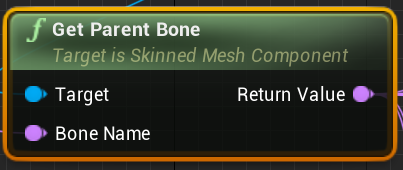
I'm going to be using it a lot with bullet linetraces
gloomy linden
Im not sure if one is more expensive than the other, but the usage is specific
Parent bone doesnt have to be the closest
dry pewter
@zealous moth Unfortunately i think No AI will be able to move anywhere without a nav mesh
dapper kiln
@gloomy linden Ok thanks. 🙂
versed mortar
how do move the default "center" of an actor?
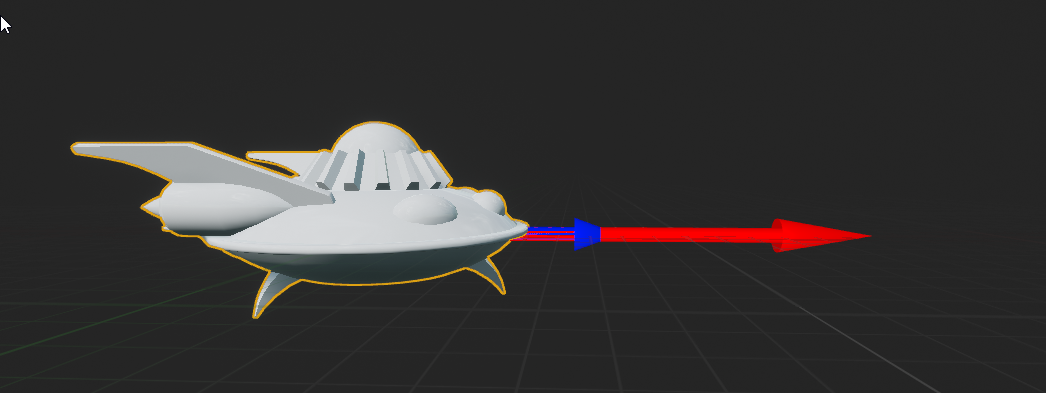
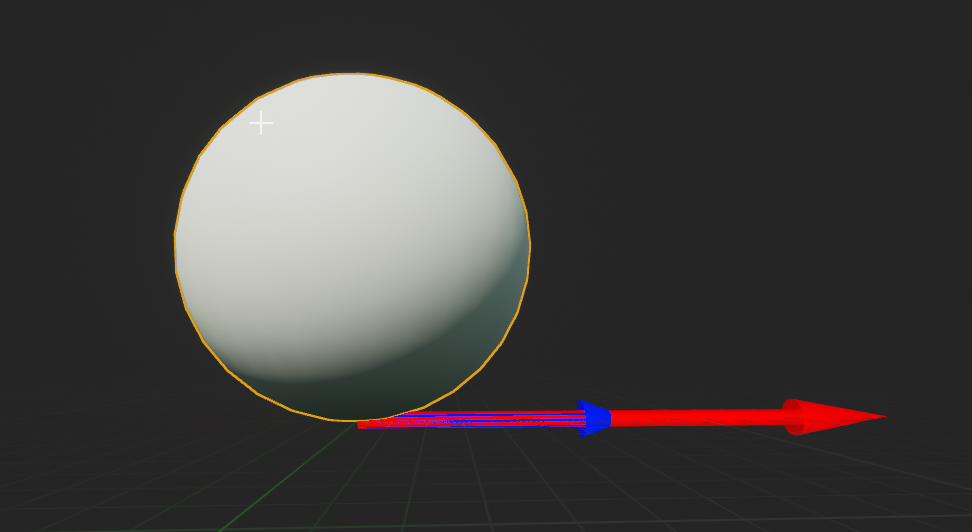
like the twinstickpawn is "embedded" in its coordinate space so that 0,0,0 is inside it. https://i.imgur.com/x7k1bTw.png
But if I make an actor myself and add a sphere mesh, it is sitting ontop of 0,0,0? How do I make it so that its centered on 0,0,0? https://i.imgur.com/oXlgUBo.png
 rigid thistle
@loud bridge https://docs.unrealengine.com/en-US/Engine/MediaFramework/HowTo/ControllingPlayback/index.html
Example of how you can fast forward, rewind, pause and resume playback of your videos in Blueprint.
@versed mortar Either you set the Origin in the Center of the mesh in your 3d Modeling software (e.g. Blender) Or you just move it down which should work fine in your example
versed mortar
@rigid thistle in this case it's a default mesh. But it won't let me move it down. If I hit w no arrows come out and I can't click and drag it
rigid thistle
You should be able to do that. Can you post a Screenshot of the Components tab?
What do you want to do with it later? Move it as a Character? @versed mortar
dreamy ice
A stupid question. If you were making a building system with snapping walls and floors together ect... how would you tackle that? Do you have any tutorials that you find to be beneficial?
rigid thistle
@dreamy ice I would suggest that there are lots of tutorials on this. I think I have actually already seen one. The basic principle would be that you lock it onto a grid, say 100 Units. Now depending on what direction you're looking at, get the forward vector and get the nearest position thats on the grid. So if say your looking direction is at 1223, 311, 299 it would appear at 1200. 300 and 300
astral fiber
Why cant I use "Spawn Actor From Class" inside an actor blueprint?
dry pewter
You should be able to, @astral fiber cna i see how are you using the node?
astral fiber
maiden wadi
You're in the construction script.
maiden wadi
Nick Whiting's point in this thread is a good enough point. https://forums.unrealengine.com/unreal-engine/feedback-for-epic/29060-spawn-actor-from-construction-script-loophole
Unreal Engine Forums
Tell us how to improve Unreal Engine 4!
loud bridge
@rigid thistle it not help me
versed mortar
@rigid thistle sorry for slow reply, I was having lunch
the arrows can be moved

but not the sphere itself
odd veldt
I need a way to get the lightlevel at player location into a blueprint
maiden wadi
@versed mortar You Sphere is the default root. You need something else as the root if you want to move the Sphere.
versed mortar
@maiden wadi theres no way to move the root relative to its own local coordinates?
maiden wadi
Not in the way you're wanting. Reparent it so that something like a collision sphere or a scene component is your root.
versed mortar
okay, that works. I guess I just assumed it would have an offset somewhere lol
This seems like a weird work around. I guess the "right" way is to edit the mesh in 3d editor software?
maiden wadi
Usually. A lot of people use scene components as the root of non moving actors. Moving actors 'usually' have a collision component as a root.
versed mortar
Can I ask why that is? I mean why use a collision component? Is it for things not using physics?
i mean for actors
i get the use of collision components for other stuff
maiden wadi
I honestly don't know. My initial guess would be because using simple collision shapes is probably cheaper than using collision with a lot of geometry.
versed mortar
ah, probably.
fossil thistle
this is a kind of abstract question so I apologize in advance. I'm trying to create a puzzle that consists of 9 "keys" on the ground. The player is given a pattern like X-XX-X--X where X is the "keys" they must step on. When they step on an X key, it lights up red, but if they step on a non X key, then the whole pattern turns off. I'm having trouble figuring out how to code it and was hoping someone could point me in the right direction
loud bridge
hi, I would like to make a system like on youtube with a slider, that is to say that I want to be able to move forward and backward a video that I play in a Widget. How to do ?
rigid thistle
@loud bridge https://docs.unrealengine.com/en-US/Engine/MediaFramework/HowTo/ControllingPlayback/index.html look at this! I think the node you are looking for is seek: It sets the movie to a specific time I think
Example of how you can fast forward, rewind, pause and resume playback of your videos in Blueprint.
@fossil thistle Are those keys actors? If so, add a collision box. On event overlap check if its an X key. If it is, add 1 to a variable: counter somewhere and in the key actor set a variable : is enabled = true . if it is not, set the counter to 0 and get all of the key actors and set all is enabled : false. If the counter reaches 5, the path unlocks. Also note, that before checking if its an X key, check if it is enabled already, so you don't add to the counter when you already walked past it sometime
This is, if the order doesn't matter
Also, you first wanna check if the overlapping actor is actually the player, so it only gets triggered if the PLAYER steps on it and not an enemy or physics item or something
trim matrix
Guys, how can I get WorldSettings from blueprints? I found it on the viewport but how can I get the viewport?
dapper cradle
Is anyone aware of a Node i could use that would mean BOTH of these overlap events have to be activated in order to set the time dilation ?
at the moment only 1 has to be complete
rigid thistle
@loud bridge You want to display a video in the game right? follow this tutorial
loud bridge
no
i want to can decrement and increment a time or advanced and decrement As youtube app @rigid thistle
rigid thistle
Yes. First of all you need a video displaying, do you have that?
 vapid hatch
whats the easiest way to visualize "apply radial damage"?
rigid thistle
Before you can change it with a slider you need that
loud bridge
it i know but by what method ?
rigid thistle
@dapper cradle Probably easiest with variables? Set one if you begin overlap to true and on end overlap to false. Then check if both variables are true and then set time dilation
@loud bridge what do you know, how to display a video?
@vapid hatch Probably with a transparent sphere which has no collision? spawn it at the epicenter of the radial damage and set the radius of the sphere to the radius of the radial damage
and set a lifespan
loud bridge
@rigid thistle no
i want to can decrement and increment a time or advanced and decrement a second and minutes of my video @rigid thistle
rigid thistle
yes. you need to know how long your video is in seconds, then add a slider to your widget. Make an on slider value changed event and multiply the value by the amount of seconds your video has. If the slider is at 0, the seconds are also 0 and if the slider is at 1 (full), the end of the video is shown
rigid thistle
what?
vapid hatch
@rigid thistle thanks for the idea! but i just found out theres a "draw debug sphere" and thats exactly what i needed
rigid thistle
ah perfect, didn't know that existed
maiden wadi
Get very used to drawing debug shapes, points and prints. They'll increase your leaning and productivity greatly.
dapper kiln
when I kill my enemy I set them to simulate physics aka ragdoll. Do I need to do something to stop the animation blueprint from executing? Is that wasting resources?
For example I'll just have 5 to 10 dead zombies laying on the ground and their animbp is still running correct?
rugged nexus
has anyone worked with Easy File System (Blueprint Library) ?
trim matrix
Any way of getting WorldSettings from blueprints?
zealous moth
@rugged nexus yeah, it's not easy and it's garbage and the person that made it in no way is reachable let alone informative on their discord
i recommend you either follow tutorials on saving for more management or if you need a server dedicated save system to contact either Epic or Amazon for more info
rugged nexus
I figured it out
but it was a pain
In order to copy the workshop file I wanted I had to make sure the target directory was already created
 covert agate
Hey guys. My apologies for asking a lot, first of all: how would I make an attack like this? https://youtu.be/Xx_gwbzPCfA?t=131 and then second of all, how would I make it hurt another player BP? Thank you! (This is multiplayer, so don't worry about AI) Thank you!

DEAD BY DAYLIGHT Stranger Things Gameplay Trailer (2019)
SUBSCRIBE → https://goo.gl/wiBNvo
subscribe for the latest PS4, Xbox One and PC, Gameplay, Trailers, Walkthrough and Games News.
[blood warning]
please tag me if you respond! ❤️
zealous moth
@rugged nexus yeah, i personally went for it for the online save but there is 0 documentation or help. So overall, more useless than making the save file yourself
rugged nexus
atleast it was cheap lmao I was frustrated too
making my themes shared on workshop etc etc
zealous moth
nice
trim matrix
im trying to do a boss where there are a line of deactivated robots and the boss will start to activate a certain amount of them to attack you
zealous moth
if you ever figure out how to use it for online saves, I'll pay you a tip to know 😛
trim matrix
anyoone who is technically inclined pls help me out
zealous moth
@trim matrix get all actors of class > get array ref at index xyz > activate event
rugged nexus
@zealous moth as in steam cloud saves?
 halcyon trellis
I am having trouble with my state machine transitions as im not sure how to apply a variable that checks if a key is held down. I want to transition from idle to crouchstart when space bar is pressed down, then to loop if crouchstart has been activated, which will then go to jump start when the button is released. The idle to crouchstart is the main issue as i cannot find a function that reads if the jump key has been pressed.
My current setup:
trim matrix
"Attempted to access index 1 from array" How do i find out what exactly is causing this error? the actual node
nowhere has have accessed any array by index.........
zealous moth
@rugged nexus as in dedicated server saves 😛
I was trying to set up a login page with that plugin and it never worked
@trim matrix you got a screenie?
trim matrix
@zealous moth nope its too big, i just want to know how to find out what exactnode is causing the error
starting to think about just throweing aeverything away
cant even type anymore see :-p
zealous moth
i meant can you show me the error screenshot and the node?
it could be a special circumstance throw error
trim matrix
have you read what i asked?
i have no clue what the node is............. that is what i am asking
HOW do i find the node?
i only know the function
zealous moth
show me the error screenshot, it tells you the bp and the area
trim matrix
nope, just tells the function
zealous moth
fine, show the function
rugged nexus
can I use scenecapture2d to save an image of a widget?
hoping to export them for upload to workshop
zealous moth
if i had experience with 2d i'd help :/
halcyon trellis
Does anyone know how to set a key input for a transition rule?
 stoic narwhal
I'm pretty sure Split isnt working as intended.. I've got my save files here stored as text files, each one starts with 01_, and for some reason this is always returning false.
I've just spent the last hour trying a bunch of different things and its either not working as intended or I'm being a massive idiot.
Printing out the 'Left S' will be null
Printing out 'Right S' will also be null
zealous moth
you plugged it in the wrong pin
invert your source and in str
you are splitting _ with your full path
makes no sense
stoic narwhal
ahhh
the tool tip for In Str confused me
"The string to search and split at"
Source string's tooltip is just 'String'
Thanks for the help
zealous moth
yeah, i did a lot of string manip in my lifetime, it is usually methods that take in the overall string and then the string to split at. So in ABBBBBBBABBBBBBABBBBB this is the string and A would be the split
stoic narwhal
Managed to get a small file size down from 300kb to 10kb using strings to store my saves 😄
zealous moth
hm, is that worth it though?
stoic narwhal
for what i intend to do, yup 😄
worthy frost
@trim matrix please don't be hostile and rude to people who are trying to help. You are the one who clearly wasn't willing to let the person help.
No one is obliged to help, so don't be rude!
trim matrix
@worthy frost oh can you point me to where he answered my question?
oh ready and waiting for my reply i see 🙂 eager to moderate much?
worthy frost
he didn't but he was asking a simple question. How can he know what nodes you have and point you to the correct node if he can not see your function.
trim matrix
let me help you....
worthy frost
clearly you are doing something to access an index out of bounds of an array.
What that is ? Who knows only you. So look where you could be accessing an array, and hopefully you can find the issue.
 pine palm
Anyone got a second, I have a problem with something I'm trying to-do.
worthy frost
don't ask to ask, just ask 🙂
pine palm
Alright, so I have a RunOnServer event, within my player pawn that sends a message (Using A blueprint Interface) to a actor to-do something. But for some reason only the server ends up sending the message (In the actor I'm trying to message) and not the client. I only have a basic understanding with these sorts of things, but what am I doing wrong?
pine palm
I can send a few photos if you would like, just to make it more simple to understand :D
loud bridge
@rigid thistle sorry but in my video there are seconds and minutes , so how used your method ?
zealous moth
@worthy frost thanks! i blocked him anyways
pine palm
Anyone got a clue why Interaction is never getting sent to the requested actor. The Interaction event gets fired, because the client owns the player, but for some reason the Blueprint Interface (Interaction) never gets sent???
zealous moth
can you print string or var check your actor requesting before you send the interaction?
curious to see if null
pine palm
What do you mean?
zealous moth
put a print string node before the message (or after) and link in the string pin "actor requesting"
pine palm
Like this?
zealous moth
yup
pine palm
Yes, but the server works fine
zealous moth
might be a long shot but when you do not have authority run on server and then multicast
pine palm
that's what I've done (I think)
Interaction Event is RunOnServer
Then it fires a mulicast
within the actor
zealous moth
processing
ok, i think i got it
this is more of my way of working so it may not be to your liking
pine palm
I'll take anyway
zealous moth
k, so the C1 is a non-replicated custom event. It then uses the macro built in called "switch has authority". If you do (server), you run custom event A; otherwise you are the client and you run custom event B.
A is a multicast that fires off your function or method or whatever you want to do
B is a run on server that calls A
that way if you are the server, you just multicast; if you are not, you tell the server what you want to multicast
and then the server always handles the info to everyone
so that in your setup, server and client can see the same thing
had to get my old notebook on it 😛
does this make sense?
pine palm
Yeah, give me a second just reading it
Let me try that
So if I get what your saying, Something like this
zealous moth
looks like it, cannot see resolution :x
zealous moth
so the setup is good but i dont understand the branches
most return false
no true
pine palm
Oh, that's how the script knows what floor too go to, I'm not the smartest when it comes to better ways of doing something.
pine palm
yeah
zealous moth
try floor 1 and then deal with the branches 😄
pine palm
oh k
honestly the branches aren't important
I'm going to improve that, I'm just trying to find out why RunOnServer Elevator never fires.
zealous moth
did it not work?
zealous moth
it worked for server but not client, correct?
pine palm
yes
zealous moth
hmmmmm
pine palm
I did read this this, where RunOnServer only works if the client owns the actor but I don't get how that's meat to work.
sand shore
There's a booklet pinned in #multiplayer, but imagine that we're both in a multiplayer game. I have a copy of your pawn on my computer - I can reference it and I could, theoretically, call functions on it or modify it.
I could not take your pawn and change the state of it on the server.
So I can't affect your pawn on the server, but I can do mine.
zealous moth
yeah and that's why i proposed that architecture, since you communicate to the server what you want to do
pine palm
But I can't communicate to the sever since RunOnServer never works
zealous moth
thats the odd part, it should
pine palm
Hmmmm
zealous moth
@trim matrix if you wanted to do 1 at a time, i would not use the for each
but that's what you wanted no?
 hoary marsh
For Event Hit node how to use the collision direction such that only if my actor hits from the top only then it should execute
pine palm
How can I update a Variable, from the client. So the server sees the updated variable.
pine palm
alright thx
hoary marsh
Can someone tell if ue4 documentation is better or youtube tutorials
 true valve
Let's say I have save the game multiple times using timestamps. How can I load them so that I can put them in my UI?
 neon remnant
please help i am having an issue for some reason <= is allways returning true the value that is being passed into it is 2 i have tested that but its still returning true
neon remnant
huh thats werid, thanks!
 thorny marsh
Its not weird, it makes sense.
 brave nexus
Hey, if I have a variable in another widget (A username, text) how do I call that in another blueprint so that the text changes to the username variable?
rigid thistle
@loud bridge easy.. Take seconds, divide by 60 so so you have minutes. then base it, so it is an integer. Then you need to find how many seconds are remaining. For that you again take your seconds and then use the Modulo Operator of 60 which gives yoz the remaining seconds that couldn't fill up a whole minute
@brave nexus Where did yoz create the Widget? In your game instance blueprint? (Thats the place where I create them.) When creating a widget ALWAYS set a variable with it (rightclick on output of create widget and click make variable). Also before creatung the widget check if the variable is already valid (so you never create it twice). The good thing if you do that in your game instance blueprint is, you can get it easily from every blueprint. You just get Game instance (in your blueprint) ans then cast to your game instance blueprint and then get the variable of the widget you want to access and then get/set the variable you want :)
brave nexus
Thanks I will try that!
rigid thistle
:)
rigid thistle
google it. How to convert seconds to minutes and seconds in UE4
loud bridge
because i have also the minutes. it i know
rigid thistle
and don't tell me im not explicit, obviously you're very bad at english, so thats not my fault :/
loud bridge
it's french
rigid thistle
if you have 100 seconds
you have 1 minute and 40 seconds
Oké, je parle un peut francais
loud bridge
OK, felicitation
loud bridge
un peu, donc tout doit etre convertie en seconds ?
et donc ce sont les seconds qui seront decrementé ? @rigid thistle
rigid thistle
non, tu dois converte les seconds à minutes et seconds. Parce que le "node" "seek" prend les minutes et seconds. comme 10 minutes et 13 seconds... pas 10020 seconds
Est ce que tu as les seconds totale de ton video?
loud bridge
OK, mais comment faire ça quand j'utilise un slider ?
@rigid thistle oui
C'est 180s
rigid thistle
Oké, tu as le "event on slider value changed"?
rigid thistle
Oké, prend le "value" du slider et multipli ca avec 180. Apres, divise la avec 60 pour recevoir des minutes. Mais ca n'est pas un integer. c'est comme 1.3457 mais tu seulement veut le 1 parceque c'est 1 minute entière.
Mainenant tu as les minutes. Apres tu veut aussi avoir les seconds
loud bridge
donc ça c'est pour les minutes ?
rigid thistle
Meme, tu multiplie le value de slider avec 180 et apres tu utilise le "modulo" qui te tend la reste des seconds qui ne sont pas une minute entière
le modulo c'est 60
loud bridge
comment je vais utilisé le modulo ?
rigid thistle
Attention!: Je ne sais pas si tu peut seulement "seek" le video avec des seconds (comme 150 seconds). Si ca est vrai, tu aussi jusquement peut multipli le value de slider avec 180 et tend les seconds a la seek node
comme tu seek le video?
rigid thistle
Oke, si tu ne comprend pas comme modulo fonctionne, google la
brave nexus
I have another question, if I use a menu index with a menu switch, how do I refrence that in another widgetBP? I have a login BP and when it is completed I want it to open the MP widget but that is an widget inside the main menu widget.
I hope this is clear
It is very hard to explain 😅
NVM figured it out, did not add to viewport oops
loud bridge
@rigid thistle OK
 shy pecan
Does anybody happen to know how to implement this kind of VR player rotation in blueprints by composing transforms? I'd want the pawn (play area) to rotate around the capsule that is right under the player camera. The problem is that the capsule is also a child of the actor, so if I compose the rotation and capsule relative location with the actor transform, it cycles and sends the pawn flying.
I'm in general having a hard time wrapping my head around this transformation math
the transform should go into either set pawn transform or add actor world transform nodes
fossil thistle
I'm trying to create a system mechanic where there is an area in the center of a room and if a buller flies through that area, is dragged downwards instead. Is this even possible to implement?
rigid thistle
@fossil thistle It is I guess. Add a collisionbox to the center of the room. On Event Overlap you check if its a bullet. if it is you apply downward force to it on tick, as long as OnEvent Overlap hasn't been activated
@shy pecan Could you connect what you wrote with what you drew? Can't make sense of it
shy pecan
ah
The red ring would be the player capsule. The red dot in the middle is the pawn transform. I want the red dot to rotate around the red ring, but the red ring is a child of the red dot
hoary marsh
Can someone help me at #ue4-general
shy pecan
So i want the red ring to act as a pivot point for the red dot
dapper cradle
hi all!
I would like to make these sockets spawn after a set amount of time. But I dont want to slow anything else down in the process... any pointers on how I might achieve this ?
Ill attach 2 Images illustrating its current form
shy pecan
I think the red ring being a child of the red dot doesn't really matter, if you'd use world transforms in the transformation math and use add actor world transform instead of setting it
dapper cradle
shy pecan
Make a custom event for the delayed stuff, and make a set timer by event node wherever you want the countdown to begin, and then connect it to the custom event with the red delegate pin @dapper cradle
fossil thistle
I need to simulate physics on my projectile in order to use the above method for a "gravity well". The issue is that I was firing the projectile before by building up a charge and then multiplying the charge by the base velocity. I would like to keep the same mechanic in that you charge up and then fire a shot but I dont know how to do that in a way that uses physics, can someone help?
never mind, I found a work around without using physics
this is basically what I did instead
now, is there a way for this to only be applied every 30 seconds?
nvm, I think I got it
rigid thistle
Does this not affect the forward movement speed?
fossil thistle
It does, but I didnt need it to be a gradual decrease. Its for a class project and we just have to make a system mechanic that is always present and effects the level but cannot be controlled by the player. So I decided to do a spot where a giant hole in the roof opens up and "blows air down" forcing the projectile downward. Is it realistic? No. Does it satisfy the requirements? Yes...I think lol
maiden wadi
If you wanted to make it slightly more realistic, you could just get velocity and add a lot on the -z vector. They'd keep moving forward, but start to face more downwards instead of just stopping and dropping to the ground.
 hallow hollow
The SetActorTickInterval node. What is the TickInterval pin? The number of seconds between each tick? Number of ticks per second? Number of ms between each tick?
https://docs.unrealengine.com/en-US/BlueprintAPI/Utilities/SetActorTickInterval/index.html is very confusing.
Set Actor Tick Interval
hallow hollow
Ok, thanks.
trim matrix
Guys, any way of getting world settings from blueprints (just to read the values)?
 versed sun
hoary marsh
versed sun
hoary marsh
For getting radial damage should i use Event RadialDamage?
static shuttle
Are interfaces less expensive than casting? if at one point i need to perform a cast 100 times (in a for each loop) vs sending an interface message that returns a certain variable.. which is better?
worthy frost
interface is not really anything to do with amount of casting
use Interface if you don't care what the object is, but if they have this interface, they respond toit
hoary marsh
So i made this to reduce my player's health when he overlaps wirh P_Fire_Blueprint from starter pack,but it isnt working
dapper cradle
How can I make it so this time dilation node only works when BOTH (the red and the blue outlined) overlap events are complete ?
shy pecan
I think I came up with something that can change the VR pawn pivot to be the capsule (player view) instead of the pawn root. No clue what it does but somehow I managed to figure it out 😅. Posting here if somebody will ever need it. Also, this is only a relative transform, so you need to add it to the existing transform of the pawn. Probably with compose transforms.
https://forums.unrealengine.com/filedata/fetch?id=1363001&d=1506892034 found this on the forums but decided to use transform math instead too
 dapper cradle
@shy pecan would an example of this being used be for a VR third person game ?
you watch the character being controlled from an outside, fixed pers[ective ?
shy pecan
Probably not
It's for rotating the player around the player itself, not the play area center
for example turning in boneworks and hl alyx and many other games
vrchat, recroom
https://gyazo.com/86f2ff5af98e4e12df41091003779045 like this, the box is the play area center and the capsule is the player, which is updated to always be right under the camera
dapper cradle
Seems very interesting, Unfortunatly I haven't gotten around to playing boneworks or HL Alyx yet though (though i do have a headset and fully intent to)
sp im not sure I can totally grasp what Im looking at
static shuttle
@worthy frost yes i understand that but is it better for performance if i send an interface message than cast?
worthy frost
Negligible
 viscid valve
Trying to make an object hover in front of my character at a set distance and height
Basically atm I'm just multiplying the forward vector by a float, then adding that to the location vector of the character - this is updated every tick atm
The current behaviour is that the object just doesn't want to move - I turned gravity off, disabled physics on the actor I want to move, just stays where it is
However, if I select the object in the world outliner and click back into the window, the object does roughly what I expect it to...
hoary marsh
Hello anyone there
Does anyone know how to provide a radial damge from a fire actor
Like at the centre high damage to lower damage on the circumference
shy pecan
Make a collider, on trigger enter start damaging, on trigger exit stop damaging
Damage is trigger position - damaged actor position, get the vectorlength of that, put the vectorlength into map range clamped
map range maps the distance to a damage number you want
damage over time could be done with a timer by event
@hoary marsh
viscid valve
Yeah the functionality definitely only seems to work properly if I select the item in the world outliner
Why do I keep finding all these weird oddities in Unreal
I have checked that the calculation is correctly occurring, the "SetActorLocation" node's return value is true, which means the location has apparently been successfully set, despite the fact the object isn't (visually) moving
trim matrix
@versed sun Not perfect but at least some solution. I guess I will expose WorldSettings in c++ then. Thanks!
hoary marsh
@shy pecan So Map range is an event ?
Map Range Clamped is a function
Ok got that
Now whats the input?
I mean how to get trigger vector position and damaged actor vector position
So with that value i get the value for damage
I can just set a delay of 1 sec and make damage as some dmg * distance from map range
So what did u mean by damage over time with a timer by event
cunning creek
how can i stop the animation if i walk?
 lethal rain
Have a "isMoving" bool. Or a "Speed" Float variable. that way if you apply speed or trigger the isMoving bool. Your animation will stop.
hoary marsh
Someone plz tell how to get trigger vector position and actor vector position
 modest gulch
is there some node or other easy way to get this information: how far away I am rotation-wise from rotation where I am looking straight at object? I need it for effect that is stronger when I am looking at or nearly at object. I also worry about difference between rotation of character and rotation of camera...
cunning creek
Have a "isMoving" bool. Or a "Speed" Float variable. that way if you apply speed or trigger the isMoving bool. Your animation will stop.
@lethal rain but if i do that? how can i disable
lethal rain
Green is the idle to moving statemachine transition. Red is the moving to idle statemachine transition.
lethal rain
Derp. I missed that montage.
You might be able to place down a Branch, then have the condition be ismoving->not->condition
hoary marsh
So this is a sphere collision trigger for some damage intake, but when running the game this part doesnt execute though my character runs to it
Plz help
 severe turret
what happens when you branch off from the False ?
because that code is presuming its true.
and the cast is presuming true
its like you half wrote the code instead of finding out if its the right actor type or if it casts. Fill in the False parts and see
 velvet viper
@hoary marsh Bit of advice, maybe don't go to other channels asking for assistance within 3 mins of posting, people will help you out eventually
hoary marsh
@velvet viper Ok sorry but yeah i did that cuz sometimes ppl dont notice
@severe turret But when i play it window mode i dont see that flow even till Branch
maiden wadi
Then your sphere collision isn't colliding with anything.
 covert stirrup
Hey guys! I am making a VR template with Thumbstick movement, that works but my character doesn't get affected by gravity.
How do I make it so that gravity pushes the character down to conform to the terrain? (currently floats on the same Z axis)
 swift palm
Hi guys, can you take a look what i did wrong?
I have an array on actor component, which is added to character. I'm trying to save array in an instance, but in situation when i have 3 objects in array and load new map, i get triple "None" print. Hope you can help
maiden wadi
@hoary marsh You need to check your collision channels. Both on the character and the sphere. You might also try EventHit instead of beginoverlap.
@swift palm Are you using level streaming? If not, I would have to test, but I don't believe actual actors will travel levels. It was my understanding you needed to respawn them in the new level if you needed the actors. I always saved mine as classes.
swift palm
@maiden wadi I just use open level. I also have no clue why array size is saved in instance but not the content of it
maiden wadi
Because you're creating an index in the array and then your actors are being deleted. The index remains because you haven't told the array to delete them, but the actor references no longer exist.
 north onyx
@swift palm Are you using a game instance object?
trim matrix
anyone know how it can make a multiple weapon system for a topdown shooter?
swift palm
@north onyx On game instance BP class i have array variable that stores objects. Not sure what do you mean
 maiden wadi
You're not actually saving the objects in the GameInstance. You're storing their references. Which get lost when you change maps because the object doesn't exist anymore.
swift palm
@maiden wadi Yes that might be it. So i need to store objects insted of just references? @north onyx And yes, my class instance is set correctly
north onyx
What should you need to save? Maybe you can make struct.
swift palm
It's inventory so in future i would like to expend it into taking items from it. I need to just find a good way to make copy of it.
Anyway thanks guys for your help. At least now i can see what's wrong @maiden wadi @north onyx
north onyx
Is your game only singleplayer?
swift palm
Yes it's. Only one player without switching characters
north onyx
Okay, you can save the properties of the actor thought game class and load it when new map finished. That is more better rather than using game instance.
But go for game instance if you wish
maiden wadi
That's one reason I've always made my inventories out of classes with counters per item type. Then you can just spawn the item at need and transfer the arrays of classes and counts with ease between levels and into savegames. No need to worry about keeping so many object references.
north onyx

We will be showing the concept of a Saveable Object Manager that keeps track of objects in our scene that are saveable and then reloads their state when the player comes back into the game.
Source Files: https://github.com/MWadstein/wtf-hdi-files
 rugged epoch
Hey guys wanted to show you something I'm building to have some fun
swift palm
@north onyx I read that game instace is the only way to not have everything reseted when loading new level. Must have been worng. Thanks for the link it will definitely be helpful. @maiden wadi You just get number of items of specific class, and when loading new level you spawn x objects of the class and setting up references from spawned objects? Not sure if i got idea correctly
maiden wadi
The inventory I use is just a map of class types, with an integer value. One class type per item type. Integer tells me how many of that item I have. It allows a lot of easy flexibility. One project I'm keeping up with weight, so to see how much weight is in the pack, I can get class defaults and multiply it by the integer associated with that class, for loop to do that once per class. Just one point though. As for the objects, I don't ever actually spawn them unless I need them. In this case, to throw something on the ground, or make the character use it with it's model in their hand. If you want an inventory where you absolutely need the objects spawned in, then when you change maps, you'll need to save them as classes and then respawn those items when the inventory reloads into the new map.
swift palm
Do you store every object class that can be stored with default count of 0, or are you adding class only if you actualy have object of that class? Not sure if i wrote it clearly
 acoustic drift
Hello ! I have a quick question ... when I do a "SetActorLocation" or "Teleport", I see the actor very very briefly moving from its position to the target position, I don't know if you have already had / noticed this? Besides, it's not all the time ... Do you know where it comes from?
maiden wadi
You can do it either way if you want. I just keep a map of the classes the inventory possesses. Indexes with a value of 0 are removed.
swift palm
@maiden wadi I got it. Thanks a lot for your time!
 stable reef
Hello everyone.
How can I see the level of lighting around a character and write it into a variable?
north onyx
Did you mean intensity value of point light actors?
What do you mean bu level of lighthing?
stable reef
yeah
north onyx
Alright, so i would make a sphere linetrace that detects point light (or any light type) actors(as a result of array) and take their luminance/intensity values on Event Tick

What is the Multi Sphere Trace For Objects Node in Unreal Engine 4
Source Files: https://github.com/MWadstein/wtf-hdi-files
stable reef
thanks
stable plume
Can anyone help me with this:
I seem to somehow linked this file with the project I'm editing??
stable reef
Alright, so i would make a sphere linetrace that detects point light (or any light type) actors(as a result of array) and take their luminance/intensity values on Event Tick
@north onyx I want to lower the scale of reason. the lower the light level, the faster it falls)
north onyx
Since your sphere linetrace hits the point light actor object and have valid reference into the world, yes you can access all of methods.
Or you can create a new class and add point light component that behaves differently instead of using default point light actor
trim matrix
1>D:/UE4Source/UE_4.24.1/Engine/Source/Runtime/UMG/Private/Slate/SObjectWidget.cpp(43): error C2100: illegal indirection
any idea why I might be getting this error ?
I did some sorting in blueprint and that is the only place I think might be the reason
here is the function P.S : I repost it here because I couldnt decide if its c++ or blueprint ?


is it because I work with widget array or smth ?
or mb using widgets in a map ?
 exotic warren
Oi guys why is my InputBox not being focused here?
"ChatInput" should be taking the focus and being typed into surely
 vague vessel
So I just thought of something. You know how when programing locomotion you have to have all the different directions as separate animations? Could you possible use an aim off set where when you turn one way or the other the character pans their foot off the ground and make an additive of the feet moving? Then apply IK notifiers to the additive animation?
maiden wadi
@exotic warren Try feeding ChatInput into the SetInputModeUIOnly "InWidgetToFocus"
exotic warren
@exotic warren Try feeding ChatInput into the SetInputModeUIOnly "InWidgetToFocus"
@maiden wadi Didn't work
Not entirely sure why, It doesn't make sense
maiden wadi
@exotic warren What kind of widget is ChatInput? I'll double check.
exotic warren
"Text Box"
maiden wadi
@exotic warren Not sure what's wrong with yours, but mine's working fine with just the SetInputModeUIOnly. Even adding the other two nodes SetUserFocus and SetKeyboardFocus after that didn't change anything. You're sure that both of your references are fine, and that that execution line is being used?
exotic warren
It puts your input to typing in the box? @maiden wadi
 weary marsh
@maiden wadi, Are you using the SetInputModeUIOnly inside a widget (as Snaps seems to do) or outside, like an actor ?
maiden wadi
Widget's EventConstruct. And yes, it loads up the widget and puts the blinking line there ready to type.
exotic warren
hmmm...
I mean the execution is running, and the variable (should?) work it's just a direct reference to the widget
exotic warren
@maiden wadi Does it work for you inside functions?
trim matrix
I am stuck
please help D:/UE4Source/UE_4.24.1/Engine/Source/Runtime/UMG/Private/Slate/SObjectWidget.cpp(43): error C2100: illegal indirection
maiden wadi
@exotic warren Sec. Shooting things. I'll try in a moment.
exotic warren
np
maiden wadi
Works fine.
exotic warren
This makes no sense lol
hangon lemme do valid check
WUT
WHY DOES IT WORK WHEN I PUT A 1 SECOND DELAY IN FRONT OF IT
maiden wadi
Bad reference timing?
exotic warren
I don't see why that would be the issue, It's not like it's race conditions
It's playing an animation and then setting the UI focus
that's litterally it
weary marsh
@trim matrix map or arrays of widgets aren't the problem. Your sorting algorithm is pretty messy from what I can see. So there's big change you're actually removing things inadvertently and creating this "illegal direction" in the core engine (which is caused usually by empty references). You should maybe break it down a little, using more functions (and comments) so we can help you see it better.
 dusk prairie
guy know any good way to edit binary fnt/dds?
maiden wadi
@exotic warren Where are you setting ChatInput, and Where is the controller reference coming from?
trim matrix
@weary marsh Its used for sorting
maiden wadi
@exotic warren What about the ChatInput reference?
trim matrix
@weary marsh I also tried removing this function and still same error
I couldnt find anything online so here I am confused
weary marsh
@exotic warren LOL
exotic warren
I litterally have been tearing my hair out about this for 2 hours
wondering why the hell it wasn't working
maiden wadi
Gotta love them little quirks.
 maiden wadi
@exotic warren Using Render Opacity for the animation works fine.
weary marsh
@trim matrix Well then you obviously have a problem with getting those widgets in an array for some reason. Tell me .. why are you sorting widgets instead of sorting data then using widgets to represent the sorted data ?
vapid hatch
im using the top down template, how can i make the player character look at the mouse? not at the thing marked on the floor but actually the mouse
trim matrix
@weary marsh at the moment I was lazy to switch but even though I remove those functions the problem still exists
I will remove and then re generate project files again
so maybe it fixes
weary marsh
Nah, I don't think so.
trim matrix
god I dont like widgets
maiden wadi
@vapid hatch Would something like this help you?
weary marsh
I have a question: Anyone here made a module but added blueprint content to it ? Is it even possible ?
trim matrix
what do you mean by module
weary marsh
A C++ module, a separate folder that groups specific code to be used like a library of sorts.
vapid hatch
@maiden wadi yes, thank you so much!
trim matrix
what do you mean by blueprint content ?
maiden wadi
Are you talking about a Blueprint Library?
weary marsh
More that that, I`m actually talking about Actors, Materials, Anything blueprintable.
I was thinking of like mods. Adding content to the main game but can be added from a separate source.
I wanted to create minigames in my main game but didn't want to burden the main logic with content that might get removed at will because it didn't pass the smell test.
Modules in C++ do a great job for this kind of task. But I didn't find anything similar for blueprints and assets.
 cold sinew
Hello
 sterile path
hi there friends! trying to figure out the best place to post this because it's both about #blueprint and #multiplayer but basically we have these zones where you can walk into it and open up UI Widgets and this causes some issues. we're currently just using the ThirdPersonCharacter for this but if multiple players are in the session; they can also get the prompt whilst not being in the zone
dusk prairie
anyway to convert bitmap font to other format?
 pearl burrow
Hello^^ i have probleme with my BP, i want make disapear my widget button after speak to my npc, but i cant, i can only make "remove all widget" but i want keep my HUD, i have 2 widget when i speak to my NPC, dialogue and the Button for activate something..i'm french and i have bad english i think, so no problem is no body can help me x')
maiden wadi
@sterile path I might try that in multiplayer. But the short story is that you need to tell the server to only prompt the client who's character entered the zone and run the UI display on that client only. People in Multiplayer will know a lot better.
plush ridge
How do you achieve these kinds of gradients in UE? If I try to change the color, it overrides it to a solid color, no gradient. No way I can see to modify it as a gradient
maiden wadi
@pearl burrow You need to keep your user interface referenced in variables if you want to hide and show them at will. You need a reference to the exact widget you want to remove from viewport to remove only that widget. Usually you'll create references for these when you construct the widget.
sterile path
alrighty thanks @maiden wadi I'll ask there
pearl burrow
thx! but how i code it ? " after remove all widget" ? i did my variable for keep my HUD ^^'
someone help me thx @maiden wadi
maiden wadi
@pearl burrow You're not trying to use RemoveAllWidgets. You're trying to use RemoveFromViewport on the specific widget that you want to hide.
 jovial canopy
Hi!
I'm very new here (and to UE, I usually do my own engines), sorry to come and directly seek help...
Truth be told, I couldn't find anything online to solve my issue, F.
So, I made a playable character in the top down template using greystone's assets (from paragon packs).
Nothing special, I just modified the topdown character blueprint to use my own animation class. Animation class that I created, with a basic state machine for idle, run, jump and land animations. I also made a blend space for it (I don't even remember how it's linked to the animation blueprint anymore, but it is).
So far, so good, does what you'd expect it to do.
Now I just want to add a simple attack animation. So I created an action mapping, and hooked it in my playable character blueprint.
But when I trigger a play montage with an attack animation (or any animation, for that matter), it interrupts it instantly.
What can be a cause for this? Is it because my animation blueprint is setting my current animation every frame and interrupts played montages instantly?
maiden wadi
@pearl burrow My bad. That's the one you're after. RemoveFromParent.
jovial canopy
I'm really stuggling with this, it's been 4 hours...
I just want to use "play montage" in my character blueprint and it does nothing.
Can anyone tell me if (and what) I need to add something in my animation blueprint state machine please?
trim matrix
Does anyone know a documentation or video of how i can implement a mulltiple weapon system for a top down shooter?
jovial canopy
https://www.youtube.com/watch?v=-aaDRN9uF3Y @trim matrix something like this?

In part 3 of this mini series on Weapon Systems, I'll show you how to pick up & equip multiple weapons cleanly and debug audio playback.
true valve
Any idea where I could store the saved game names so that when I load the game the names remain
Game Instance perhaps?
I'm working on load games menu.
jovial canopy
Just google save data, there's a biollon tutorials on that, you should find something very easily
true valve
I know how to save and load games.
Let's say I saved the game three times. I want to store the saved game names (String/Text) in a variable. So that when I bring up the load menu, I can iterate over the names to list all the available games.
I can load a specific game by passing in a text which is the saved game name.
jovial canopy
Sorry I misunderstood the question then. I don't know, I'm very new to UE.
Just spent 5 hours on a very trivial problem, made no progress. UE sure is very steep to get into...
cunning creek
https://gyazo.com/501b2f32c1a44fa0019125c2c9b6a8e3 how can i make the character follows mouse moviment while walking? like this gif

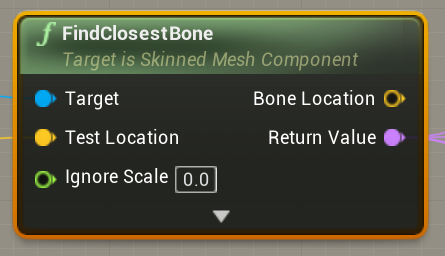
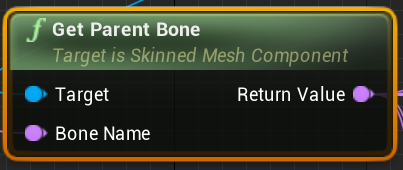


 unborn lantern
Does anyone know how to turn foliage off at runtime? So if a player wants to have less grass he can .
jovial canopy
Well anyways, off to bed, bye ^^'
And if someone has ever used an animation montage successfully before (reassure me, most people do use them very often... right?), I'd really love an explanation/links to some tutorials/docs, it'd be very appreciated!
@cunning creek have you tried setting the character look direction to the arrow camera arrow vector on update?
I'm probably too new here to say anything sensible, but I don't see why it wouldn't be a good approach
stable plume
Can anyone help me with this:
I seem to somehow linked this file with the project I'm editing??
trim matrix
@jovial canopy yeah sorta, i want the pickup to change the firemode like how many bullets are being shots, wider range etc etc
zealous moth
I got a child component that is another actor called "rattle"; however I cannot cast into it... is there any other accessibility method I could use?
 distant sedge
@zealous moth You have to use Get Child Actor off Rattle and then cast to the class.
zealous moth
got it 🙂
 tight schooner
Just a shoutout to @trail crane who reminded me that the multiple graphs feature exists. I just started making use of it.