#blueprint
402296 messages · Page 440 of 403
 maiden wadi
 dapper cradle
yes
maiden wadi
Does anything print if you put a print node after the cast and make the VR pawn walk through the trigger box?
If no, try before the cast and see if it prints when the VRpawn walks through it.
dapper cradle
the tut is barely 2 mins long, very quick and concise but It doesnt work seemingly wether I use my motionconrtollerpawn (the camera for the headset) or the BP_motioncontroller (the vr hands)
ok will try
 latent basin
Hey guys, I want to make an object that will be global to the enitre stage, kinda like a static class in cpp, I guess I can make an actor and spawn it in at every stage but is there a better way?
 trim matrix
can i have an actor reference other then self for an event?
i dont see the point of having an input if it literally can only be self :-s this confuses me
maiden wadi
@trim matrix The Target of a function is what that function is being called on. An example would be getting a character's movement component and telling it to stop all movement. That's a function call, but if done inside of the actor it needs a reference to the movement component.
dapper cradle
Im trying to figure out how to use colision because I want my animations to slow down into a QTE when they enter a colision.
But for some reason just getting any kind of reaction is proving difficult
maiden wadi
@dapper cradle That means your collision box is never triggering. What kind of collision box are you using?
dapper cradle
a box trigger
maiden wadi
Trigger Volume from the level designer?
maiden wadi
Have you changed any settings?
dapper cradle
I havent changed any
 spark steppe
you might want to use on actorbeginoverlap
maiden wadi
OH!
dapper cradle
is it something to do with this that I am going to facepalm over ?
I have tried actor begin overlap
maiden wadi
I missed that, yeah, Trigger boxes use Query. You can't use OnHit unless the collision is set for Block. Trigger is set for overlap by default.
You can either change the collision type, or use OnBeginOverlap.
spark steppe
are you spawning inside the box?
dapper cradle
Im spawning and walking over to the box
dapper cradle
ok ill check it
trim matrix
@maiden wadi so events can only be sent to everything?
i just need to send a struct to another actor, and i know which one, i dont get why this is so hard
i could change its variable but i cannot say that it has to parse it again, i need a way to say "heres the message, do something"
maiden wadi
Events are executed in the actor they originate from. Using that actor's reference from another actor, you can call that event from a different actor.
dapper cradle
I got print screen when I used the on begin overlap @maiden wadi
trim matrix
@maiden wadi the message is not in the list when i try this
@maiden wadi i mean the event that sends the message
maiden wadi
@trim matrix Are you using an interface, or are we talking about normal events?
dapper cradle
Strangely the destroy actor doesnt work
trim matrix
@maiden wadi normal events, but they dont seem to do what i want so, should i look at invent interfasces?
ah that does not exist.....
spark steppe
no, you should learn how events do work
maiden wadi
@trim matrix Do you have a correctly casted reference to the actor that has the event?
spark steppe
it's easier if you show your current blueprint setup and tell us what doesnt work
then someone can tell you how it would be done
maiden wadi
@dapper cradle Are you still using the cast before the destroy?
dapper cradle
yes
trim matrix
@maiden wadi yep
dapper cradle
trying after now
maiden wadi
@trim matrix You should be able to drag off of that and call the event, right?
trim matrix
@spark steppe well i just want to send a message from one actor to another, thats it....
maiden wadi
@dapper cradle Does the cast succeed, and the destroy actor still not run?
trim matrix
@maiden wadi let me try again maybe the var im using is not set for some reason that would explain the problem
trim matrix
@maiden wadi found the problem i thought it was cast already but it was not......... lol
@maiden wadi also the error confused me
maiden wadi
@dapper cradle Hmm. What about on the failed part of the cast?
@trim matrix You get that working after the cast?
trim matrix
@maiden wadi yep all is fine now, this is how i thought it worked 😄
thanks for reminding me of the cast it would have taken me a while, i really thought it was already cast
maiden wadi
@dapper cradle I meant the second pin on the cast, "CastFailed", does it print if print and the do once is plugged there?
 jolly trail
Oh I see
maiden wadi
@dapper cradle Does the failed pin on the cast work?
maiden wadi
Yeah, does that destroy the actor, or print if a print node is placed there?
trim matrix
cant believe how simple my logic is now 😄
dapper cradle
This Print AND destroyed actor succsesfully but I cant understand why
maiden wadi
@dapper cradle Your cast is failing. Disconnect that stuff for a moment and put this stuff on that event.
It'll print out something like ClassNameStuff_C
ClassNameStuff is what you'll have to cast to.
 craggy hinge
Hey, Sorry to interrupt, I got a service in my behavior tree, And i want it to change the movement of the AI character, So on Event Receive Activation, i casted to my AI character, But when i try to drag from the As Ai character i can't find the character movement component to set it's max walk speed, What should i do?
I already added the service to the Behavior tree nodes.
maiden wadi
@craggy hinge Your AI, is it a child of the Character class?
craggy hinge
Yes, It's a character
maiden wadi
@craggy hinge This should work if you're casting it to the right class that has a CharacterMovement component.
dapper cradle
Is there a way to increase the preview window size ? evevrything is too small to read XD
using the maximise box just gives a big border
maiden wadi
@craggy hinge It's just Get Character Movement in the search box. If you don't see it initially, components are usually all of the way at the bottom of the context box.
dapper cradle
But the cast is BP_Motioncontroller_C
spark steppe
Edit => editor preferences => play => game viewport settings => resolution
jolly trail
I'm having a funny problem with my AI here, my Ai roams around randomly in a room and there are doors. When I press the E button the AI actually manages to open doors aswel if he happens to be near one which shouldn't be happening
maiden wadi
@dapper cradle You'll need to cast to BP_MotionController then.
spark steppe
what's e supposed to do?
jolly trail
that black thing in the background is my AI in front of a closet that can open and close
pressing E opens and closes doors
I'm not even sure where to start looking for this issue
 spark steppe
is it really the AI that did open it?
jolly trail
It's me pressing E
spark steppe
well, then its not related to the ai?!
jolly trail
but it should only open when you get in the triggerbox of the door
and i'm super far from it
when the AI walks into it, and I press E
it opens lol
jolly trail
It checks if the player is in the box and if E is pressed, but hold on it might be that lol
It probably mistakes the Ai for the playercharacter
Can't really seem to find it though , let me upload a few screenshots
 gloomy linden
You could check if the actor that triggers the trigger volume == getPlayerPawn
jolly trail
Hmmm, lemme look for that
found it
Should I insert getplayerpawn in there?
Oh.. is it cause I left the "Target" open
dapper cradle
@maiden wadi I am experimenting with how to creat a QTE, The whole reason I have been trying to understand how the overlap works is to makes things happen when this mannequin crosses, overlapping that box.
I started mesing with player Pawn when I failed to get the actor to destroy itself, I Assmed that its collision box will travel with it when it goes over backwards ?
therefore overlapping the triggerbox and destroying itself (I used destroy as a placeholder as it will eventualy be time dialation and button prompts
spark steppe
is there any event/variable that gives me the actor that im looking at?
or do i have to raycast every tick?
maiden wadi
@dapper cradle The collision of the mesh will move. I don't know about the capsule. Haven't experimented enough with animation stuff yet. So if you're using the mesh as a collision too, that'll work.
dapper cradle
The capsul is parented to the skeletal mesh so I would assume the cast to BP should reference all of it ?
maiden wadi
@spark steppe Pretty sure traces are the only way for that. Unless you want to hack up positioning the mouse cursor at the center of the screen every tick and using it's mouse overlap. Traces are a lot better though. I did it for a project to display look at information in a Skyrim like style, it's not heavy at all. If you're truly worried about performance, you can set it on a timer to only do it somewhere between 5-20 times a second. I limited mine to 30, didn't notice any real difference there even with the game running at 120fps.
@dapper cradle It will. I just mean while the skeletal mesh is animating, I don't think the capsule will move, and some people disable mesh collision in a lot of circumstances. So if you had the skeletal mesh's collision disabled, I don't think the capsule would move during the animation to trigger the box. But if you're not disabling the skeletal mesh's collision, you can ignore what I was saying.
spark steppe
thanks authaer, guess i have to trace from the camera?
maiden wadi
Probably. How precise are you looking to be with it? Is it just for one actor close to the center of the camera, or are you looking for stuff in the whole field of view?
maiden wadi
Ah, yeah. Line trace, or a very small radius spheretrace should be fine without any real performance hit then.
maiden wadi
Made a building function once after hearing horror stories about how bad line traces supposedly are on performance. 300 traces per second in most parts. I think I lost about one fps from 118 to 117.
Gamelogic?
spark steppe
stuff in blueprints
well, i'll try to limit it to 5 traces per second, that should probably be responsive enough in my case
jolly trail
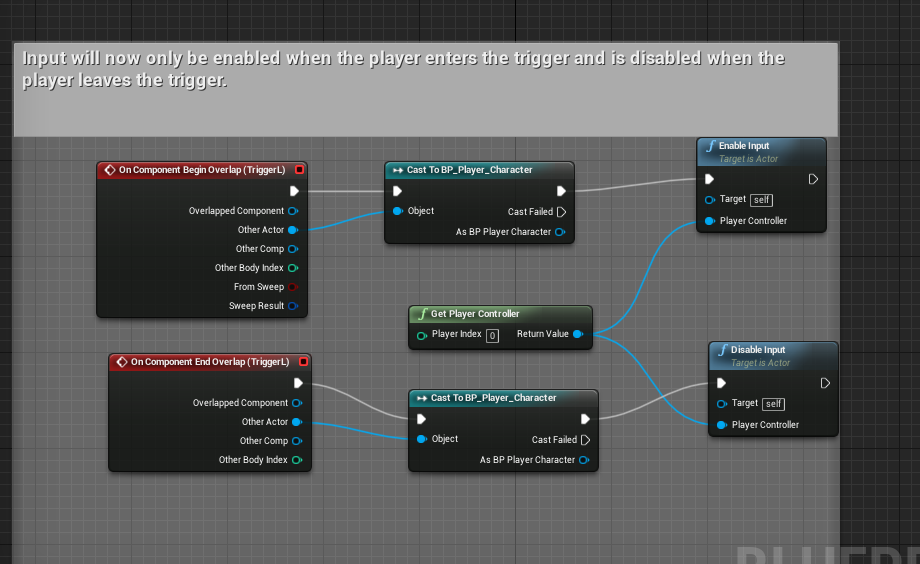
I tried looking for it but I cant seem to find the issue
I want the triggerbox to go off only when my playercharacter goes over it
but it registers my AI aswel
trim matrix
then your ai inherits from your character bp?
in this case you could either check a cast to that ai or give the player bp a tag
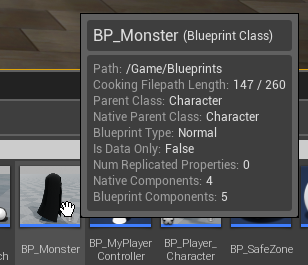 trim matrix
actually not sure if the ai bp will have the tag too
jolly trail
What do you mean with giving the player bp a tag?
jolly trail
It 100% does
trim matrix
Is there a way for me to remove the head in a first person game, but still see the shadow. I'm trying to stop the camera from clipping through the head. I've tried to make a separate character with no head, but i get the problem of the shadow having no head.
jolly trail
It's super strange
jolly trail
I'll try doing that
maiden wadi
@spark steppe Had to AFK. Stuff in blueprints only runs as often as you want it. Tick, latent functions, and timers by event run every frame to update or run logic. Stuff like character movement components movements updates, animation updates, stuff like that all run per frame, but anything not coded on a timer, axis event, or tick generally do not.
spark steppe
good to know, is there a node which would throttle the execution?
so that it would only run 10times / second
maiden wadi
@trim matrix That gets asked often and I never seem to remember the answer. There's a thing with setting the object as hidden and then in it's properties setting HiddenShadow to true.
spark steppe
search "owner no see"
then you can also set the mesh without head to "only owner see"
that way others should see you with head, while you dont
trim matrix
ahhhn thank you
maiden wadi
@spark steppe You can set the tick rate of an actor. The Tick Interval. I generally don't recommend changing it in most circumstances unless you're wanting the ENTIRE actor to work slower. I do it for some managers so I don't have to put their updates on timers. Setting it will change the rate of every update in the actor, so anything that moves will be choppy if set too low.
 prisma flame
Hi, Quick question about the UI interface, I added a simple text with a value "0" directly in the User Interface blueprint.
But when I modify the text to increment it, the 0 remains, and the text is written over it.
The only time I open this interface is when I launch the game.
How can I erase it? I'd like to keep the visual of the number on the UI editor.
Thank you
spark steppe
that looks like multiple instances of your UI are opened over each other
prisma flame
that's what I thought at first, but the only blueprints I added were these. (I created a new project just to learn about UI intrfaces)
maiden wadi
What blueprint is this in?
prisma flame
"BeginPlay" and "Input Action" are placed in "Level Blueprint"
For the "SetBulletNumber" function I put it directly in the blueprint of the UI interface.
--
I also made a test: if I change after 10s during the "begin" he updates it normally.
The moment I make a change with "InputAction Fire", I have my value superimposed :/ (by the way, if I fire before, it's superimposed as usual, but it replaces me correctly after the 10seconds)
maiden wadi
First test, I'd start by putting this on your fire button, set it to you MenuUI, uncheck Top Level, and make sure it only prints 1.
You should only have one, but who knows.
prisma flame
Well, he's telling me two. Weird
maiden wadi
Is this multiplayer?
dapper cradle
@maiden wadi I looked and the mannequin had no collision on
prisma flame
No, I'm solo, on the "First Person" template.
maiden wadi
@prisma flame You're absolutely sure you're not creating and adding this to viewport anywhere else?
dapper cradle
@maiden wadi Badda bing badda boom It now can destroy itself
maiden wadi
Score! Ten points.
prisma flame
@maiden wadi Yes I even cut the link to test and the interface is no longer displayed.
maiden wadi
@prisma flame Hmm. What happens if you put a single print string node at the beginning of begin play? Does it only print one Hello or two?
prisma flame
I had just taken the test, and he showed it to me twice, yes.
maiden wadi
Are you doing anything like level streaming, or anything like that?
prisma flame
I took over a project from scratch, just to learn the interface principles, and to make sure I don't have a conflict with what I could have done earlier.
so I only have what I just sent.
maiden wadi
There's a few forums about this, but no one seems to have an answer. Well, plenty of answers, all either stupid or useless to the level blueprint. Only one that may help is someone says that they just created a new level and it solved it. I'd try the usuals first. Restart engine, Test quickly in a new level with a quick beginplay print in the clean level blueprint, at worst, try reinstalling the engine if those don't help. Beyond that I have no idea.
prisma flame
Okay, I see, that would be more like a Unreal bug.
I've already tried to restart the engine just in case, but I'll try with another level to see.
At worst, being a test project, I'll make a boolean variable to call it once (it's a bit ugly I know).
maiden wadi
Just curious, do any other single actors like the player pawn call anything twice?
dapper cradle
If a collosion box had a custom time dilation and an animation had a path going through it.
Would it be safe to assume it would slow doing going into the box and speed up on the way out ?
maiden wadi
You could set the actor to a lower time dilation on begin overlap and on end overlap set it back to 1.
prisma flame
I just did the test with an "Empty Actor", it calls the "print" only once with the Begin Play.
maiden wadi
Weird. I dunno. Does a new level fix it?
prisma flame
Yes, for a new level, it's working very well. It's just weird.
maiden wadi
I just tried a few things to make mine print twice. Thought maybe having two editors of the same project and both having a game open might do it. No dice on that or multiple event graphs, or anything. So no idea. Level is just bugged.
 opal pendant
are there any ways to detect an object using line traces without using event tick?
prisma flame
Yes. Maybe I unintentionally created a hidden reference by moving the interface?
I made the wrong folder to create it in the Content Browser, I put it on a folder in the back.
maiden wadi
@opal pendant Not unless you want to do it on input like a keypress. I mean you can use timelines, or set timers for custom events and do it on the custom events.
Should note that timelines use tick as well, and setting timers by event also uses tick, but you can more easily choose how often to run the trace instead of every frame.
spark steppe
wasnt there a node to get a rotator from two given vectors?
maiden wadi
Look at rotation?
maiden wadi
FindLookatRotation I think.
spark steppe
thank you
yes, that indeed is what i've searched for
and i was already lost in cos/makerotfromfoobar and stuff like that for 15 minutes 😄
 undone saffron
Do you guys have any idea why my AI won't take any damage after i have spawned it through BP?
maiden wadi
@undone saffron Dunno. How are you trying to damage it?
Speaking of vectors. I had fun making a little recall component that rewinds an actor smoothly along 20 vectors and rotators, five seconds worth of movement stored and reversed over a second. That was rather fun to make. Always loved rewinds in games.
undone saffron
I have a function which is replicated on client and reliable. I just call that function when I want to damage it in this case the Z key
prisma flame
@maiden wadi So I made a huge copy and paste of the "World Outliner" and made a copy and paste of everything I had in the "Level Blueprint", and recreate the variables.
It works very well that way.
Namely I can't duplicate the first level, it throws me an error when saving the map otherwise. But I don't mind for this case, hopefully I won't have that bug again 😺
Thank you
maiden wadi
Anytime!
@undone saffron What does the function do, what blueprint is it located in? Are you using the Unreal Damage interface of ApplyDamage and Event AnyDamage? Or is this your own personally written function for subtracting health?
undone saffron
My custom-made function! And it's in a character bp. It just subtracts the damage from the health
maiden wadi
Hard to say. The function is always being going through when called? You can test and make sure the right actor is printing with a print node or such?
maiden wadi
Where are you calling this function from? It sounds like your reference isn't referencing the spawned ones.
undone saffron
From a hit result
maiden wadi
Well that's really odd then. Unless the spawned and placed ones are somehow different classes, or different values the functionality should be the same unless you're changing values on the spawned ones, or have changed something in the instances you've placed in the level.
trim matrix
what is this "Self Object Reference" in a custom event? i need to have another actor as target, can i do this?
everything works fine with the same actor though, jsut to be clear 🙂
but now i want to add a second message to another actor
nvm found it 🙂
 amber marsh
Does anyone know how I can change the screen percentage of a planar reflection component?
trim matrix
is there any good way to export a struct? i would like to take a look at it outside of UE if i can
 mild ore
trim matrix
mild ore
trim matrix
you can copypaste too but that gives veeeery long strings
 thin rapids
@amber marsh expand the planar reflection tab
there will be a screen percentage option
 autumn ore
hello every one
i set up a save blueprint but it does not work in the build. it doesn't keep the saved variable after exiting the game. how should i fix it?
amber marsh
I need to do it using a UI widget
@thin rapids
Thus allowing players to modify the screen percentage of the mirror in game.
 pallid vector
how i can pan and scale a 3d model with gesture in android
thin rapids
@amber marsh well i guess you can change that by getting a reference to the planar reflection but i dont know
never tried that
amber marsh
yeah the reference does not seem to give me access to the variable.
maybe its hidden somehow?
 covert crane
I have a standard UI menu system that has a button to change levels. However, where should I store the name of the next level to go to? I set it to a var but I can't find how to modify the var. 😕
thin rapids
@amber marsh im going to try it myself and if i find anything i'll tell you
amber marsh
thank you 🙂
thin rapids
@amber marsh aparently the only screen percentage node there is has nothing to do with planar reflections so i don't think you can do that, but maybe there's something that allows you to do something similar
amber marsh
hmm ill look into it more.
trim matrix
I've made a physical sound component in C++, anyone is interested in it?
- It can do hit sounds, slide, roll, and has blueprint API to override and change behaviour.
I would be happy to share it on github, because basic stuff like this should be free.
 drifting vortex
How do you check if script is running in the editor? I want to have a branch with condition being that the game is actually running, so it does not go forward in the editor/construction.
 wet briar
@drifting vortex
 cunning creek
how can i fix it?
 crude onyx
This is a very general question... Do reroute nodes affect the performance of the game?
trim matrix
Nop
I mean they do affect editor performance, but they don't affect the built game
and you can nativize them if you worry about the performance anyways
cunning creek
what's wrong in my blueprint?
trim matrix
You're in the anim blueprint graph.
Use the event graph in the anim blueprint to store the value.
@cunning creek
you should never access nodes like that in the anim graph lol
 sand shore
azarus already said
you can access atomic variables in the animation graph, that's fine.
and even some PODs
crude onyx
Thank you @trim matrix
drifting vortex
@wet briar I don't have that node for some reason. Also, that image is tiny, hardly can see see
sand shore
Victory plugin, perhaps?
trim matrix
hey guys maybe a stupid question but im new to blueprints and followed several tutorials but is there a way i can count footsteps and make an xp system based on stamina? and make a reward to increase upon level up?
Yes there is a way.
 zealous moth
literally count the input value and make sure that speed/velocity is not zero and you get a float. You can then just use that as a numerator for exp.
You're literally asking us to show you how to make a game...
trim matrix
@zealous moth he's likely lacking the programming principles so he has a hard time to think where he would start. Just because you know how to use a tool, it doesn't mean you know when to use it. It's common for beginners in programming ;)
@trim matrix I would count and measure the distance walked by the player, vector math goes here.
Then just use that information to calculate your stamina and then build the rest of the xp system.
I would recommend to start with simpler stuff
@trim matrix Thank you very much now i need where to search and get the experience for cause basic tutorials just show you half the way but dont give info on how to proceed from there
there are tons of tutorials on youtube
Not on the topics of gaining info on player stats and how to implement them just on how you can build a basic xp system and press x for more xp
I think you should have a look at google results
there is plenty of content online
freely available

we live in an age where information is freely available
use it for your own gain
😉
 wind atlas
hello, I'm trying to make a game with local multiplayer, its sort of working, but I want to add blueprint objects in my scene that "belong" to different players, e.g. if player one presses an input, how can I tell a specific blueprint to act on that input? its more of a high level organisational question
trim matrix
yeah already done those tutorials but like i said very very basic stuff, but thanks to your tip i found an article in ue4 forums wich explains how to setup a variable for distance travelled maybe i can tie that in
wind atlas
i put variables on my blueprint called "playerID", and inside the player pawns i am putting my action input events
my thinking was, i scatter these blueprints in my level, and they should recognise if a player with ID that matches the BP variable is sending an event
trim matrix
lol thank you @trim matrix i actually got the data now in my input string great tips also thank you @zealous moth
wind atlas
i cant put the action input events in the BP itself since then they won't know which player controller sent the event
my first idea was to put all BP which can be controlled by the player inside the player pawn, even then I still need to cast them in order to send events to them (I think)
drifting vortex
@sand shore Nope, its not in victory plugin it seems
So, I would like to ask again: I want to have a branch with condition being that the game is actually running, so it does not go forward in the editor/construction. Is there a way to do that? I tried the game time, but it didn't work.
sand shore
It's super simple to set up if you would add 1 C++ class to your project, but I don't know of any tutorial so....
Maybe a GetWorld check?
trim matrix
@trim matrix just take the surface normal and the impulse normal
to figure out wether the mesh is sliding or not
for the rolling you can check for the angular velocity
bool UPhysicalSoundComponent::CanFireSlidingSound_Implementation()
{
    if (!SlideSoundPlayer)
    {
        return false;
    }

    if (GetAngularVelocity().Size() > RollAngularVelocityThreshold)
    {
        return false;
    }

    if (GetLastHitAngle() > MinSlideAngle)
    {
        return false;
    }

    return true;
}

float UPhysicalSoundComponent::GetLastHitAngle()
{
    return FMath::Abs(FVector::DotProduct(LinearVelocity.GetSafeNormal(), LastActorHitNormalImpulse.GetSafeNormal())) * 90.0f;
}
Thats how i figure out wether the mesh is sliding or not
RollAngularVelocityThreshold is used to check if it's rolling or not
it's fairly simple, just that annoying fact that UE4 has no events to check if collision has ended so you have to use timers and other hacky stuff to track state
 oak bane
Alright genuinely can't figure this out on my own, I'm really sorry if this is the wrong channel. This "set timer by function name" node doesn't seem to want to loop back onto itself and I canne figure out how come
Would be super dope if someone could help me out
I'll uh, draw a picture of your cat with the pen tool if you help me
 rancid creek
Is the function you are trying to make it call spelt properly?
 dreamy mulch
Howdy all, Look for some helps drawing a line in 3D space. I need something that acts like the Draw Debug Line that I can assign a material to. My goal is to have a fleet movement line that starts at a start coordinator and follows the mouse.
oak bane
@rancid creek Look, you're right and I hate you for that. Because that means I'm so much dumber than I thought lmao
rancid creek
I was wondering if anyone knows why a do-once node isnt just doing once. It fires the code after it everytime. No reset is connected
oak bane
God damn, it was really that obvious lmao
rancid creek
@oak bane lol it happens 😂🙃
oak bane
It was throwing me off because I had the Fire Bullet thing connected to it, so I thought that was the thing making the bullet fire
Because it would fire on the first click
Damn, I've let myself down boys
rancid creek
My do-once is inside a function of that makes any difference - this is the most annoying fecking thing cos it's stopping my battlefield conquest style control points from working right for when one is owned and is about to be taken, and needs a timer reset
trim matrix
I have a problem but its more about math.
I have a gun actor that its fire rate set to 0.22 per seconds. So my gun fires in 0.22 secs.
And I have a animation for my character that executes when my gun fires. Animations lenght is 1 second. I can change the speed in Persona to 0.22 to sync this.....
But my fire rate changes over time, when you kill enemy or going on a kill streak, it become 0.18, 0.15 even 0.10 but how can I set the animation lenght synced to frame?
animation speed / fire rate = ? anything to do with delta seconds? or anything i am missing?
 timid bear
hopefully a quick question, just need to be pointed in the right direction:
im making a cockpit, which is full of instruments, which would ideally be made out of a bunch of reusable knobs / switches / dials / etc
im setting that up right now as, the parts (knobs etc) are actors, and then composing them together into instruments (another actor) that have multiple of those as child actor components. but trying to hook those up with variables and events seems to have a lot of friction and i don't feel like i'm doing things the right way
is this the right approach or are there other ways i could organize this?
fwiw: i'd accomplish this in unity with nested prefabs
rancid creek
Make each instrument an actor, which will hold its own dials and switches. Each actor can have its own code
timid bear
sounds good so far
and those (the switches and knobs) will be child actor components?
will i need to be always casting those to the component i need before accessing them in blueprints
 undone timber
if i have a ship turret and i want th e turret to track the camera position for aiming purposes (its independant of the ship heading) would i have to do this on the tick of the turret? or is there any wya i could make it more efficient?
undone timber
hmmm okay
 weary dock
Am i allowed to ask the simplest question of them all?
timid bear
yes
weary dock
Is there a plan or an order as to how i should learn blueprints in? I know the basics but its just so much stuff now i dont know what to even learn
And im feeling PUMPED to learn blueprints
weary dock
Ill check it in no time, thanks 🙂
timid bear
@rancid creek what i'm doing now is this
where Power is a child actor component in this instrument panel
is there a simpler way to do this
also im having a hard time figuring out how to pass events from the child actors to the parent
i did a bunch of production unreal stuff around ~2015 its all just really hazy to me and all the online discussions i can find about this are pretty vague
 surreal peak
In general: You need to get a reference to the parent.
One way would be by having a variable on the child and then setting it from the parent side to "self".
There is also a video pinned to this channel that showcases blueprint communication
rancid creek
Anyone know why a do-once just keeps firing even with no reset connected?
Or is my ue4 just being stupid
surreal peak
Is it insidea function?
rancid creek
Atm yes
surreal peak
Then it's that
rancid creek
Gotcha
timid bear
just confiming though: creating actors for the instrument clusters, which then contain the actors of all the knobs and switches, that's the right idea?
vs say, prefabs or whatever
surreal peak
Inside the function you can trigger it only once
But if you call the function again, it will be a "fresh" execution
rancid creek
I follow - makes sense
surreal peak
In cpp it's a bit clearer, as this is basically a boolean keeping track of you having called that part already or not. And that boolean only exists in the functions scope. So once you leave the function, the boolean will be removed from memory until you call the function again
rancid creek
Ahh.. so that's how it works. Never thought to open the macro and see
Thanks @surreal peak
surreal peak
No biggie
@timid bear Theoretically yes. There isn't a wrong way about this. Just different solutions. Whatever is easier for you to maintain and extend
It's a good idea to split functionality into other bps to keep things organized and reusable
timid bear
composing actors together seems the most logical to me
this video seems great so far, just what i need
surreal peak
Yeah ue4 is a bit annoying in that regard due to not easily being able to communicate between the actors. But once you have that figured out it's nice
 vocal urchin
Weird use case, but what if I wanted to shorten the distance of a line trace, but instead of doing at the end of the line trace, I wanted to do it at the start of the trace?
Like so
 fathom cobalt
@vocal urchin Try using the GetActorRotation node, get the forward vector, add that to the get actor location and plug it into the start. THEN take that value, and subtract the Z(?) value for the end
If I fail to explain it then watch this video and skip to the height tracer part. I think it has what you're looking for https://www.youtube.com/watch?v=BKiSTM-G9pQ
Hi guys!!!!! Can we hit 200 likes??????
Today is a special day!!
I've just finish the first part of the tutorial series of the climbing system. It will be a 4 video tutorial series.
Video 1: Grab & Climb Up
Video 2: Side movement
Video 3: Corner detection & Side Jump
Video 4: ...
vocal urchin
Thanks, I'll have a look
fathom cobalt
I've been tinkering with a similar concept earlier today using that video
vocal urchin
Are you talking about at around 6:40 in the video?
surreal peak
Do you have start and end of the first trace already?
vocal urchin
Yes
vocal urchin
I can get it, yes
surreal peak
Right. If you have StartVector and the direction, then you can always multiply the direction with a float and add it to StartVector. And then use the result as the NewStartVector, leaving EndVector unchanged
Float being how far you want to offset the start
vocal urchin
Ok, let me read that three times and try to understand how to apply that to what I'm working with 😄
surreal peak
Pseudo code:
Vector Direction = (EndVector - StartVector).Normalize()
float Offset = 50 // or whatever you want
Vector NewStartVector = StartVector + (Direction * Offset)
vocal urchin
Here's what I'm working with
It didn't do what I expected
It actually made the start vector much longer
way behind where I expected it to be, instead of shifting it forward
Something is weird with the offset, I think? @surreal peak
surreal peak
You want to half the distance?
vocal urchin
That would be a good start. Could adjust from there.
Yeah, seems like everything I try makes the trace distance insanely longer. Like, way, way behind where I need it to be by hundreds of meters lol
surreal peak
- Is the Result that exactly describes a Vector between Start and End. You can imagine that as a Wooden Stick that is exactly starting at StartStart and ending on EndVector.
- Is the Result of halfing the Length of 1. , So you figuratively cut that Stick in half.
- Is now basically the NewStartVector.
vocal urchin
Well, my hairbrained use case is now semi-working
The only problem is...(one sec)
As you can see, the traces are fanning. They need to remain parallel with the center trace from the character.
Which is something I fixed way earlier on, but it has now reappeared when I do this shortening.
Oh wait, nevermind, I fixed it
Accidentally disconnected something I had set to begin with.
@surreal peak Thanks a ton, man. This was the final touch on this mechanic. Do you have any recommendations on how to visualize and repeatedly understand vectors? I keep watching youtube math tutorials and have picked up some things, but I feel like I need more practical examples for gamedev
especially in 3D
surreal peak
Well you can see Vectors as two things:
- A Point in 3D, that's basically X,Y,Z away from 0,0,0.
- A Direction + Length.
E.g. Vector(100,0,0) is either a Point at (100,0,0) away from (0,0,0).
Or a Direction (1,0,0) and Length (100).
The Direction + Length can be imagined like a Stick, or a Pencil in real life.
E.g. if you look at your desk and select one of the for corners and declare that as "0,0,0" for now.
If you then put a pencil on that and point it directly upwards, then you have a Vector that points in (0,0,1) direction (up) and is Length (whatever the length of that pen is).
Might also help doing it first in 2D.
weary dock
hey, can i have a quick question about the SphereTraceByChannel node?
the question is if im somehow able to increase the amount of times it checks a second, or not
because im using it to check for contact in an animation and half of the animation isnt checked usually, because its a swift move
surreal peak
@vocal urchin
Maybe this also helps. You can see that in the bottom left, the Direction Vector + Length that described the way from 0,0 to (10,20) can also be used "again" to go twice as far.
At that point you should notice that the red line is now twice as long. So the Length got doubled, but the direction stayed the same.
If you think the other way round, the red line can also be halfed, which is what we did for your trace.
Your trace previously went from StartVector (0,0) to EndVector (20,40).
You took the Vector that describes that (20,40) - (0,0) = (20,40) and halfed that. (result is (10,20)).
Then you added that to StartVector (0,0) + (10,20) = (10,20) and had a NewStartVector, which sits between the previous StartVector and EndVector.
So now your trace goes from (10,20) to (20,40).
The Math gets a lot easier if you use an example that is 0,0 based. You can then later do the exact same thing with other Startvector values.
In fact, lots of vector problems are solved by rebasing the issue to 0,0 first, then solving it there and then unapplying the offset back to where it was before.
@weary dock It probably checks once per tick? There might also be a tickRate just for animations. Maybe better to ask in #animation
weary dock
i cant find any kind of tick rate so ill try asking in random, thanks
(i meant animation not random, sorry)
vocal urchin
@surreal peak Thanks man, this is hugely beneficial. I'll definitely be saving this and referring to it again!
 atomic salmon
@weary dock sounds strange. Are those physics driven animations? If so you could use Physics sub-stepping.
weary dock
no, its just a normal animation that has a notify attached to it. in the span of the notify it uses the spheretracebychannel node to check for collisions so i can simulate damage on the target, but it doesnt cover the whole area of the swing for some reason
trim matrix
Hello guys I have big problem with the hud-so I use inventory package which is with replication and this package setuped the hud on his own
so I want to make when the game starts to generate random name of the player
this is the function that I did in the inventory player controller
this is in the event graph in the inventory player controller
it generates it and works, but the problem is that somewhere in the content folder in other event graph or where it generates the hud again-I can't find it
We can't really help you with finding a function
and when I start the game I have this:
You have to find it yourself or use content browser
or thats what I think its called
I tried with create widget and I saw that it is ntot created the hud with create widget
weary dock
@atomic salmon i will try to take a few screenshots for you to understand, at the beginning and end of the animation so you see what im talking about. (using paragon ch for now)
trim matrix
when I wrote hud I got this:
Find Results does not pick up object references in functions
Search up "Create Widget"
¯_(ツ)_/¯
this is basically
I told you that when I write create widget there are no results
^
Find Results does not pick up object references in functions so it will not detect HUD
So idk man
You have to find it
these are the 2 create widget but one is for the pause menu, other one is the new create widget is for this:
^
trim matrix
idk
which widget you cannot edit?
@unique flicker
which is broken?
idk
idk
I think I will need my own inventory cus this is good but the stuff is not ordered good and I want to customise it but I can't and I tried to work on inventory before but I stucked 3 times 😦
 hallow night
thats why i don't buy complex blueprints from the marketplace
hallow night
well... its still something you didn't make so you don't know how it works ( that was my point)
check the documentation?
hallow night
or follow a tutorial
atomic salmon
@trim matrix you should apply some high level debugging to your code. Follow how the player name you created is handled. It is obviously passed to the Widget Creation as an extra parameter. What happens next to it? Go within the widget code and check where it is used. Eventually you will get to a point where it is either forgotten or its value replaced with something else.
 crystal mural
Quick question. This is running in a state machine. How do I restart the animation externally from another blueprint? I cast to it but then what do I do? I'm not finding the node I'm after.
 coarse marten
I'm mad confused with doing something, how would you go about making an actor auto move forward? Like you can turn them left or right and can brake to stop yourself, but they're always moving forward, my brain is thinking to plug like movement input into an event tick, but that function replicated to multiple similar actors would be expensive 🤔
trim matrix
idk where os this create widget for the hud before I did this second and i can't find it @atomic salmon
atomic salmon
@trim matrix have a look into your GameMode. There is a HUD class which you can indicate in it. That creates a HUD at runtime. It may be it.
trim matrix
other person told me to check there too I checked - nope
there is nothing 😦
@atomic salmon
atomic salmon
@trim matrix Did you check the Level Blueprint as well?
trim matrix
good idea, I will check now, as far as I know I checked and nothing was there but again let me check
nope
I will remove them cus I don't need it
@atomic salmon
so the level bp-s are checked
the problem come from the widget hud widget cus it is parent of the other parts of the hud
here as you see they are pieces
atomic salmon
@trim matrix check the code for this widget
trim matrix
for which widget? ^ @atomic salmon
undone saffron
Does anyone know why my trace won't find an other character bp?(i am using linetracebychannel). The trace goes through the other character
trim matrix
and when I wrote the stuff for the player part it is in the hud too and when I make the create hud in the inventory controlelr to shows you 2
no I don't know sorry @undone saffron
gloomy linden
@undone saffron Usually thats a collision channel issue
trim matrix
what is the channel for?
gloomy linden
the line trace should be blocked by the thing you want to line trace, so make sure the "target" is set to block it
gloomy linden
there is also a checkbox for 'Trace'
undone saffron
Trace Complex On Move?
gloomy linden
The Trace Response should be set to Overlap or Block
(dont use these exact settings, this is my skybox 😛 )
undone saffron
Like this?
gloomy linden
Dont set the Trace Response to Ignore
should be Overlap or Block
If you set the Trace Response to Ignore, it will ignore it
this is from a Mesh I use to block stuff out
 scenic rivet
Help with the video lesson on how to interact with an object by grabbing it for a certain part (Bone, Socket).
gloomy linden
Thats just a statement
 uncut granite
Hey all, I've really been struggling with this so would appreciate any help, i have a custom gravity which allows me to run up any surface but i can't figure out how to orient my character to current velocity because once the character is on an angled surface, i can't use any method i already know of including the built in orient to velocity. Please help lol
gloomy linden
@uncut granite isnt it easier to just rotate the world?
uncut granite
I've never done that before and the character is going to be changing surface a lot (loops etc) and whilst i am happy with the functionality of the surface change which i currently have, i can't orient to movement. I appreciate the suggestion and will try it if all else fails but i don't believe it is what i am looking for unless you have an example as i can't find one
@gloomy linden
 gentle inlet
Hey guys, I want to rotate the boat while the camera is supposed to stay in place. I use a spring arm with inheriting yaw, pitch and roll unchecked. The camera does not rotate per se but as you can see the location of the camera rotates when the player is rotating. What am I missing?
Do I need to unparent the camera from the player? If so, how do I manage that it's following the location of the player?
I set the rotation of both the spring arm and the camera to 'absolut rotation'.
hallow night
don't make it follow the pawn's control rotation
gentle inlet
use pawn control rotation is unchecked in the camera
hallow night
in the spring arm
gentle inlet
switched off too
the thing is the camera is not actually rotating - but since the camera has an offset relative to the player it's rotating around the player if the player is rotated
while maintaining the direction it's facing - hence not rotating per se
basically the place of the camera changes when rotating the player - at least it does keep facing 'north'
hallow night
how about changing the location to absolute and with an event tick set the location with an offset that way the rotation of the player doesn't change the offset?
gentle inlet
Good idea, that would work for sure, but isn't there a less hacky solution?
hallow night
you can use this solution for now
crystal mural
If anyone was curious about getting animations to restart in a state machine... I did this. No idea if this is right, but it works.
hallow night
or you can do this?
gentle inlet
you can use this solution for now
@hallow night just wondering why it workes in the top down template though
hallow night
what?
gentle inlet
fixed it
Spring arm: Set to absolute rotation, checked: inherit pitch, yaw and roll, unchecked: use pawn control rotation.
Camera: Unchecked 'use pawn control rotation'
hallow night
RashedToday at 3:51 PM
don't make it follow the pawn's control rotation
ObiToday at 3:54 PM
use pawn control rotation is unchecked in the camera
RashedToday at 3:54 PM
in the spring arm
ObiToday at 3:55 PM
switched off too
u already did this before didn't u?
gentle inlet
yes but I had to check inherit pitch, yaw and roll
this wasn't very intuitive, when I looked online, ppl said one should uncheck these inheritance - which would have made more sense to me
no idea why inheriting yaw makes all the difference
 cold sinew
hello guys Did anyone worked with Dirgravity plugin before ?
zealous moth
hey @gentle inlet you made it ride the boat! 😄
 short coral
Hello , quick question , does the console command node only take 1 console command or can i put in more than 1 command?
 torpid linden
it's a single command
you can make a macro or a function if you want to do a bunch in a row without getting sloppy
crystal mural
or you can do this?
@hallow night Sure, but if I were to restart the animation many times a second? That was the first thing I went to but it didn't react fast enough because of the blends between states.
undone saffron
i am trying to use render custom depth but it only works on the server not on the clients, any ideas?
i have a multicast event
gloomy linden
try asking in #multiplayer
short coral
@torpid linden thank you
 mild pine
How can I check if a spawned actor BP is valid or not? I'm checking if valid, if true then spawn the actor, if not true then destroy the actor. That obviously doesn't work, but I need an alternative method to make sure I can do the above 🙂
 tawny tinsel
is there's a way to set the start rotation of an object inside the level just by blueprints?
 glacial oar
How can I find a target point for a behaviour tree in current level ?
glacial oar
It's placed in the level already @short coral , I've thought about find all actors, and even though I don't have many it seems like bruteforce
short coral
If it's already placed in the level , maybe store a reference of it in during begin play and check if it's valid through that reference
glacial oar
I'll try that out thanks
short coral
Hope it works
glacial oar
I'l quite new so I'm not really sure how to communicate the reference to the task, could you give me a hint ? @short coral
short coral
Wait reading through the previous messages here , i hope you understood that my first message wasn't for you. So if i understand your issue correctly , you want to communicate a point on the level to a behavior tree ?
glacial oar
@short coral my bad sorry, yes indeed
mild pine
@short coral I have a pickupable item. If I drag that pickup from inventory and onto an equipment slot, then I run a notify event which checks what item is equipped, and then spawns and attach that specific item.
 teal spade
hi! has anyone encountered the problem with a for loop, that misses to check the last index?
zealous moth
@tawny tinsel You want looping or...? what kind of rotation?
hallow night
just add 1 to the last index?
tawny tinsel
@zealous moth im trying to save time of day
i have a custom sky sphere bp that is powering the rotation
and im trying to save the rotation on the directional light blueprint i made
but it never loads
its being overwriten by the sky bp
i got it from the market place
PLEASE HELP MEt-t
tawny tinsel
yes it is movable
teal spade
@hallow night tried that, but didn't work. still skipped. Also, I'm doing a reversed loop, from -4 to 0
tawny tinsel
what do you mean dl?
zealous moth
directional light
tawny tinsel
the sky bp bases time of day on the dl actor i have in the level
so i have a bp for the dl that saves rotation and should load it on event begin
but it doesnt load
i think its being overwriten by something
zealous moth
show me the bp
tawny tinsel
of ?
zealous moth
so i have a bp for the dl that saves rotation and should load it on event begin
@tawny tinsel
where is this?
 true mango
Can somebody help me? i have a trigger box in a hallway wich teleports the player to a position, but if the player walks into the wall while touching the trigger, so it teleports the player, it teleports him to the void?
tawny tinsel
in the directional light
zealous moth
where are you saving your rotation
tawny tinsel
zealous moth
the controller? the player? the game mode?
zealous moth
you aren't saving it in the save file
zealous moth
you need to cast to your save file and modify that value
tawny tinsel
so to save i need to cast?
zealous moth
what you did there is created the save file, set a rotation to whatever and then saved the game
tawny tinsel
oh
zealous moth
well you need to tell the save file that you want to save
you didn't save it inside the save file
tawny tinsel
but save to slot does that no?
zealous moth
but you didn't save it to a slot
tawny tinsel
i saved everything this way including chracter position and items in inventory and it works
aaaaaaaaaaaaaaaaaaaa
tawny tinsel
ok i relax
teal spade
@hallow night NVM, fixed it. The clutter was so much, I couldn't see that there was a bypass in the loop! oof
zealous moth
to load data:
gloomy linden
imho its better to do save game stuff in the GameInstance as the GI is persistant throughout the game session
tawny tinsel
hm
zealous moth
to save data to slot:
zealous moth
well do you want to save data permanently and fetch it next time you load your game or do you want to temporarily store it until the game is closed? either way doesn't matter for what he is doing
zealous moth
you need to define the var in the save file and then you have to SAVE THE FILE
hallow night
also stop doing it every tick unless you hate having high fps
 versed sun
Anyone have any idea how to make the view of the camera off center of the viewport? I want to always have a menu for building and such on the side of the screen.
tawny tinsel
yes i hate high fps lol
gloomy linden
If you hate high fps its easier to constantly spawn and delete 1000 actors
@versed sun just move the camera to the right in the player bp?
zealous moth
@hallow night He should do it on tick and start new timers on tick with loop 😛
hallow night
yeah if he wants a cooked pc
tawny tinsel
well the print stings dont lie
the saving works
but why does the sky bp overwrite it?
zealous moth
do you use another type of sky that has its own BP and functions?
tawny tinsel
yes i got it from the market place and its a bit weird
zealous moth
link?
hallow night
GoodSky
tawny tinsel
is it terible
its very nice
it refrences the directional light ive chosen but for some reason just casting to the bp and getting the rotation from there doesnt work
zealous moth
k well now you have to go into your sky bp and set the rotation based on the saved file
tawny tinsel
hm
zealous moth
is it instance changeable?
tawny tinsel
how do i check
zealous moth
click on the variable and in the details panel, show me
ugh, i dislike the marketplace sometimes....
I get my stuff rejected all the time but then terribly made stuff is always accepted
tawny tinsel
hallow night
right click and break
tawny tinsel
well shit i broke it
nobody will help me
@zealous moth even you left because this is an imposible mission
to save and set sunlamps loaction
guess every time the player goes back into the game they still start from the morning
so if they run out of time they can just reopen the game and theyll have all the time infinitly
zealous moth
I do have a life 😛 at least your save data is working
 cinder dirge
Can we see the latest version of your BP code? It looks like you're probably close to having it work
trim matrix
@crystal mural do you mean looping?
@tawny tinsel your savegame data should probably be a struct
you can't save object pointers they will be null when loading
tawny tinsel
object pointeres? @trim matrix what do you mean
trim matrix
your save game data
it's an object pointer
is that what you store your data in your save game with?
tawny tinsel
yes
tawny tinsel
how do i save a rotation of an object as a struct does?
are those values even convertable
trim matrix
in a struct you can have multiple different variables
trim matrix
yes
make a struct for your data, make a member on the save game class with that struct, set its variables at saving, get its variables at loading
trim matrix
maybe google ue4 struct or something
tawny tinsel
@cinder dirge also now the sun doesnt rotate for some reason even if i go back to the previus edit
trim matrix
actually lemme make some screenshots
trim matrix
oh that thing is your savegame
my bad
forgot what i said
you can use print string to debug
f.e. if the cast fails or the rotation is set and all of that
breakpoints also work
tawny tinsel
yes i did the debug it works
its the sky bp that overwrites it
works both on save and load
trim matrix
does it print a rotation other than 0?
tawny tinsel
oh
trim matrix
you are overwriting the loaded location after setting it
tawny tinsel
its gives me 9.xxx 0.0 0.0
it doesnt move tho
yes but how do i first overwrite it then set it
trim matrix
why would you want to get the rotation before?
if you do just put that first setter node right after the isvalid or something
tawny tinsel
so it cancels overwrite
trim matrix
are you even using setactorrotation anywhere?
trim matrix
where is that node?
cinder dirge
^
It looks like maybe you're only setting the variable but not using the variable to set your actor's rotation?
Or does that happen off to the right of what we can see?
hallow night
why are you setting the rotator variable 2 times in a row
tawny tinsel
i mean the base blueprint broke
i swear i put it all back together but i guess its broken
IDK
im just trying to make this shit work
thats what ive been doing for 12 hours
hallow night
so you're taking the variable from the save file and then changing the same variable to the actor rotation.. whats the point?
tawny tinsel
im setting it in the sun then saving it then trying to load it
thats the variable that is suposted to do the rotation of the time and day
gloomy linden
@hallow night thats called brute forcing it, take a value or take null but you gotta TAKE IT NOW
tawny tinsel
as you can see one if false other one is true
trim matrix
@tawny tinsel i wrote you a pm
hallow night
you have 2 set rotation variable in the same line in a row
even if you load the variable you'll change it again
tawny tinsel
so how do i fix it
hallow night
load before saving
tawny tinsel
dont work
 loud cipher
whats the differenece between world, relative and local rotation?
maiden wadi
@loud cipher World is an object's rotation in world space. Relative rotation is comparing to a component's parent, and local rotation is comparing to the root of the actor it belongs to. If I'm not mistaken.
loud cipher
Oh, okay. Thanks for the help.
 crisp garden
hello there.
i'm currently changing my save instructions to async. in my current implementation, i created a derivate SaveGame class which exposes a save event to call, after other things, SaveGameToSlot.
when changing that node with AsyncSaveGameToSlot it gets marked with a warining stating that it may be unsafe to call that node inside my SaveGame class, although it seems to work. any pointers here?
 proud zinc
I am trying to get the size of a static mesh bounding box however, that function seems to be gone in 4.24.2. Any suggestions on how I can get the size of the bounding box?
or any other suggestions to get the size of a static mesh
 proper quail


 urban salmon
any way to hide the default scene root sprite from rendering in editor? it's kind of irritating and visible bool doesnt seem to do anything.
maiden wadi
@urban salmon Class Defaults, Billboard Scale. Is one way.
@proud zinc I don't know if there's a function to input to that'll return the same thing, but this would return a vector of the sizes of the bounding box of a static mesh component.
proud zinc
@maiden wadi Thanks for the help!
uncut granite
Sorry for repost but i need input I've really been struggling with this so would appreciate any help, i have a custom gravity which allows me to run up any surface but i can't figure out how to orient my character to current velocity because once the character is on an angled surface, i can't use any method i already know of including the built in orient to velocity. Please help lol


 tribal axle
How do you set an overlap event, only when one component overlaps an actors specific component, my box is firing when it touches any part of the actor
cold sinew
@tribal axle You can get overlapping Actors and choose the actor you want to get and do loop
 rugged iris
Has anyone run into an issue where when you set a new skeletal mesh at runtime through a button press event, the materials that were on the previous skeletal mesh are applied "differently" to the new mesh?
At first I thought the materials from the first mesh would override the material set on the new mesh, but both meshes have the same materials and same material ID order
Somehow they are "re-ordered" when initialized?
 dreamy ice
re-set the material after setting the mesh?
dreamy ice
Get the mesh then set material.
rugged iris
The mesh has 7 or so materials, I suppose I could set them all again, was just wondering if there was something else I could do
dreamy ice
I'm not sure how to fix it then sorry.
 cobalt ferry
are the multiple event graphs just a organization feature?
cold sinew
guys how can i Keep the Scoreboard updated
Im setting the variables after every gamemode but its not updating
and the widget constructing when the player holding tab
scenic rivet
Hey, guys! Help me to interact with the object by grabbing it for a certain part (Bone, Socket).
How do you lift a sword for a certain part? So that the character lifts his sword by the handle, not by the blade?
I want to make a zombie bite so that it bites the neck, but I can't do it. I can make it work that a zombie can bite anywhere, even just the air.
Can you help me with a video lesson on this? I can't find anything like that
Translated with www.DeepL.com/Translator (free version)
here is Nemezis grab for Jill head. How can i make somthing same?
maiden wadi
@uncut granite I'd love to help, but I've never toyed with custom gravity. What do the character's vectors point to? Is it's velocity still positive on Z when it runs 'up' a wall or is that now an X or Y vector? Is the full character actually turned sideways capsule and all or just the mesh?
uncut granite
the full capsule and all is but honestly if i can rotate the mesh to be what i'm looking for then i'd be happy to just toss the custom gravity @maiden wadi
maiden wadi
What about the velocities? are those altered or is running up the wall still making velocity return towards Z?
maiden wadi
@tribal axle You need to get the component you want the overlap to happen for. A use case would help a lot for helping you.
 wheat shore
I'm using Procedural Mesh component in blueprints to add noise to the vertices of an existing mesh. Creating the PM from a static mesh is really fast and can be done every frame with negligible performance effect. As soon as I try iterating over the vertex array (with a foreach) to add the noise offset, the performance hit is huge. Am I doing something wrong? My source mesh has 1500 vertices
maiden wadi
@cobalt ferry I may be mistaken, but it may also be for performance while designing. Have never made a graph big enough myself to test, but some people have mentioned using multiple graphs because their potatoes can't handle more than a few hundred nodes before having lag while designing. I guess a new graph that isn't showing as much solves that for them.
uncut granite
thank you @cold sinew but that is for the character facing the same direction as the camera
cobalt ferry
thanks Authaer. I can envision it being quite nice to put things over multiple graphs too, but never really understood if that was something you can just do or not
uncut granite
i'm looking to get my character to orient with velocity
cold sinew
oh so i misunderstand xD
maiden wadi
@wheat shore Out of curiosity, how come you don't use a material for the vertex offset?
wheat shore
@maiden wadi I'm trying to make a tool that takes a low resolution mesh as input (which will be the result of a simulation) and use it to deform a high resolution 'render' mesh. Maybe it could happen on the gpu but I don't know how I'd upload the source vertices (which change every frame as a result of the sim)
Another angle - maybe you know of something that can do this already? 🙂
The idea is kind of similar to a skeleton rig.
maiden wadi
Bit out of my area I'm afraid. More of a gameplay artist. Haven't done a whole lot with animating or modelling just yet.
wheat shore
no worries, thanks anyway!
maiden wadi
The scoreboard?
maiden wadi
Is it like an Overwatch tab to see stats board?
uncut granite
@maiden wadi I'm afraid i don't know what you mean by your recent message
cold sinew
yes its very primitive like name , level , points , ping
and im setting the values from structure located on player state
maiden wadi
@uncut granite For a test, make a print on tick and put your character on the wall and then run 'up', or towards the sky. See if the dominant velocity is a positive Z vector.
scenic rivet
Somebody give me some advice! How can you interact with the enemy by grabbing a certain part of his body, like his throat? Any thoughts on that?
maiden wadi
@cold sinew Do you already have things in place that update those stats and they're not working, or are you looking into 'how' to do those?
covert crane
hey folks, if I launch target to my mobile device; are other levels accessible? every time I try to load a new level it fails out
cold sinew
at the end of every function im getting reference for player state and setting the structure to the new values
when i construct the widget its still on the old data
maiden wadi
@cold sinew But the construct is on the tab key? So should be fired well after the values changed in the player state?
maiden wadi
If your widget is getting the values from the player state on construct and setting them there, then that means the player state isn't updated yet.
versed sun
@covert crane you have to add each map that you want to include in Project Settings
cold sinew
well im using this function i will show you
this event in player state is it wrong if i set it here ?
covert crane
@versed sun Yep, definitely there (though I notice that the list isn't visible unless I search for it explicitly which is strange).
maiden wadi
@cold sinew Is it the info in the player info struct that you're passing in when calling the event that doesn't update?
maiden wadi
What is the player info? Where is it coming from?
cold sinew
from player controller when its firing the event
maybe because of this ?
its overwriting the old data right ?
 loud bridge
Hi , how can I advance the seconds of my video with a slider? (My slider already takes the value of the video for advanced but except when a certain variable is true) Myself I optimized it
As on Youtube
maiden wadi
Have you checked to make sure the values of that struct are accurate before they're sent to the playerstate?
cold sinew
yes it is
maiden wadi
@loud bridge Can you get the total time of the video as a variable?
cold sinew
when im changing something from the default value of struct its working
loud bridge
@maiden wadi Yes
maiden wadi
@loud bridge Can you make the slider go from 0 to 1. Get the value of the slider, and multiply that by the video total time and play the video from the return value of that multiply?
@cold sinew Where are you updating the struct in the player controller?
cold sinew
im just getting the default data from struct
loud bridge
For the moment the slider takes the value of the video for advanced
maiden wadi
@cold sinew I know. But where are you setting the struct? It's values need to be changed somewhere before it's passed to the PlayerState.
cold sinew
oh you mean the updates its must send from gamemode after the game type finish
loud bridge
In my video there are the Minutes and the seconds @maiden wadi
maiden wadi
@loud bridge Total time should be end time, yeah. Does it return that in seconds, or minutes and seconds?
@cold sinew Yeah. Cause it sounds like it's just not being updated inside of the player controller. The values aren't being set if you're just getting default values.
cold sinew
Yes So i need to update the Playercontroller sturcut its will pass it to player state right ?
maiden wadi
Probably, yeah.
loud bridge
For put the values of my video i convertie the minutes in seconds then I do the result + the seconds after it i do it divise By 180 ( 180 is the end value ) @maiden wadi
maiden wadi
@loud bridge What is the video thing? What are you trying to control with the sliderbar?
maiden wadi
@uncut granite It's very odd that rotate towards velocity doesn't work. Is the actor's forward vector pointing upwards as well when running up the wall?
loud bridge
?
maiden wadi
@loud bridge I know, but I'm asking what the video is. Is it a media texture on an image widget, a sequencer, or?
 scarlet quail
Hey I cant compile a blueprint .uasset file can someone look on why that is?
I can send you the file via DMs
 daring stump
Question: why is the bottom one not working like the top one with binding? do i missed something
 vapid hatch
is there an easy way to move my mouse cursor with my gamepad?
vapid hatch
@daring stump thanks!
trim matrix
Hey guys i tried to get skeletal mesh here but it doesnt have a input and output so icant connect mesh to new mesh any one know what i done wrong here?
maiden wadi
@uncut granite Just curious. Instead of using the default pawn movement of orient. What does it look like if you just set the character's world rotation facing velocity on tick? It'll be too fast at first, but I'm wondering if it works.
uncut granite
I have tried that and will show you what it does, just a moment
loud bridge
it's a Media player , a video who plays in a widget of my Men @maiden wadi
trim matrix
i have a cube that is shooting out beams hitting other cubes with materials that have physmats on them but i keep getting error
like it spawns decals
i see the code working
vapid hatch
all my mouse inputs only work on double click, any ideas why that happens? the mouse isnt captured or locked. please ping me if you have an idea. thanks!
maiden wadi
@loud bridge Been looking into the media textures. Do you have the media player reference that you can use to call the seek function on the texture?
loud bridge
It's not a texture
 faint pasture
How would you guys go about implementing something like a heat map? A render Target would be great for this except that querying it for gameplay purposes is expensive
maiden wadi
@uncut granite I had a thought about that, but I don't know if it'd work well. I wondered about using your traces, storing the last trace, and rotating the character based on the look at directions. It'd need some fix up to work well though. Was an elementary thought.
uncut granite
@trim matrix you could create a custom event in thirdpersoncharacter and call it from the cast
yeah, I'm stuck and it's really infuriating because i don't have the knowledge to figure this out and don't know where to learn this very specific thing
asking here is my last hope 😔
trim matrix
@uncut granite Thnx im gonna try it out now brb
 frozen otter
Idk if this is the right channel, but for Matinees, I am running into a big issue ("Nothing to keyframe, or selected object can't be keyframed on this type of track."). It's like my thing is broken or something, but I'd like to know if I'm just doing something wrong. Any idea on how to fix a such thing?
The smallest issue, ever, but the biggest issue I've came across lol
edit: Fixed. Not sure how. Think I just never clicked my object I'd want to animate when making a group. Weirdest issue I've came across lol but I'm majorly unexperienced in these sort of things.
faint pasture
@uncut granite I can't find your original question, can you spell it out?
uncut granite
I need to figure out how to orient my character based on velocity whilst on any surface as i change the gravity and that part works fine but i can't rotate my character so their feet stay on the surface and still face direction of movement
@faint pasture
faint pasture
Are you using the character movement component? Or you handling movement on your own?
uncut granite
It still has it
faint pasture
is gravity supposed to point toward different objects like on Mario Galaxy or going different directions by some other mechanic?
uncut granite
It's a line trace down and inverts the normal of the hit
faint pasture
I mean mechanically, is this a game where you can walk on the walls and ceiling or is it a game where there is a specific gravity field that varies over the space
uncut granite
Oh i see, You can walk on walls and around loops etc
i mean at any point, it doesn't rely on anything outside of the character other than the orientation of the ground
faint pasture
I haven't messed with the character movement component much, what does it do if you rotate the character?
uncut granite
could you elaborate?
trim matrix
@uncut granite i had the variable type wrong thats why it didn't work hahaha thank you anyways 😄
uncut granite
👌🏻
faint pasture
Like if you spawn your character, and then give it like 45 degrees of roll, does the CMC override the orientation?
What you need to find out is if the character movement component always considers negative z to be down, or if it looks at the global gravity vector, or what.
trim matrix
@deep roosttis i have a new issue tough when i walk sideways my screen shakes do you have any idea what can be the cause?
uncut granite
i believe that is my problem regarding the negative z being down
faint pasture
Try changing the orientation of the character actor, what does it do?
uncut granite
where would you like me to change it?
faint pasture
Sec, testing something
uncut granite
👍🏻
 pulsar moss
how do you blend to a camera component?
faint pasture
Yeah I think you have 2 options. Either modify/extend CharacterMovementController or just use physics or roll your own.
@uncut granite Is this meant to be multiplayer?
uncut granite
no, just singleplayer
faint pasture
I'd use physics IMO
I got something similar working using physics in 1 night, with multi-body gravity and Mario Galaxy style movement.
uncut granite
Main thing that i want is to run around a loop or up a slope
@faint pasture I appreciate the input, thanks
faint pasture
@uncut granite Im whipping up a physics movement prototype, sec
@uncut granite Quick and dirty but the approach works i think.
You'd want to do something off event hit to get smoother change in gravity normal, and how to handle camera and look orientation is up to you.
uncut granite
That's awesome, i won't have time to look at this any further tonight in unreal but what about adding the orient to velocity for this physics version?
faint pasture
You'll just manually have to do it. Just set orient capsule forward to velocity in plane of ground normal.
uncut granite
Right, thanks for everything. I believe i understand everything you've made but i don't understand what you mean " Just set orient capsule forward to velocity in plane of ground normal."
faint pasture
Project velocity on to the ground/gravity normal plane, and then orient capsule so its X axis points in that direction. You'll have to fiddle around to sort the math out.
Sec
@uncut granite This works pretty good
You'll want a much smoother way to detect gravity. I'd suggest some sort of a vector field approach, depending on how your map geometry is set up.
This smooths it out pretty well
uncut granite
Alright, that's awesome. It's the part about Crossing two vectors and projecting on to a plane which i didn't understand
faint pasture
Smoothed
You'll need to brush up on your vector math to pull this off. Determining movement direction intent is the hard part.
uncut granite
@faint pasture Thanks for everything, I will be looking at this tomorrow and will send results to make you proud papa
actually
faint pasture
Show your capsule
You probably just need to rotate the mesh relative to the capsule. In the BP editor is the mesh forward faceing X?
uncut granite
I'd plugged one node wrong, got it working fully as i intended originally.
Thanks so much for everything man, could not have worked this out alone and could not find answers anywhere else @faint pasture
Literally in disbelief, been stuck trying so much stuff over the last like 2 weeks
The part that made all of what i was trying to accomplish was this
Thanks again ❤️
 vast lion
Is there an easy way to rotate an actor around a point that is not it's center?
zealous moth
@vast lion either give it a root at a distance equal to the radius
or add it to another actor as a child and rotate around the actor
same thing, different means
 rose spire
Going to ask this in blueprints because I'll be doing it in blueprints. So we have different areas to our game. A forest, town, graveyard, etc. Well when you go to a different area, it prompts you if you want to go to a different level and you say yes or no. That works. When I go back to the level I was originally (over this bridge which separates the two levels), it spawns me back to player start not from the end of the "bridge". How do you change spawn points depending on starting the level or coming back into the area?
zealous moth
@rose spire put actors that will fulfill the role of level entry; when you load your character, on begin play event, move that pawn to one of those locations based on a condition. Best way to set those conditions is to use the game instance and whenever you move from an area to another, record the last area.
rose spire
ooo okay cool! Thank you
 thin iris
Hey hey, I'm trying to get the force of impact of hit events on a destructable mesh when it breaks. So ideally i want to be able to get the force of impact from each piece of debris. There doesn't seem to be much in the hit event or break hit which I can calculate a this from. I dont think I can use get velocity on it as there are multiple debris/chunks all moving simulatneously.
 modest hull
I need a little help
Is there a way I can press a key to switch camera's, what I mean is when you press a key it switches to a different character pawns camera kind of like spectating but you spectate an ai
opal pendant
@modest hull you can use the "Possess" function
so essentially you could have pawns named camera 1, camera 2, etc. and so what you'd do is on event press key like 1 or 2, it would possess the pawn "camera 1" or "camera 2" then causing you to look through those cameras
modest hull
this is the ai
when you press the certain key it shows the ai's camera
it changes from your point of view
and you see the ai's camera
but you can't control it
trim matrix
Not sure if its an bp issue but, when I drag my mouse with while clicking when I have the widget open it still moves player camera around, how do I prevent this?
modest hull
i kept searching things online but can't find anything to the thing i'm looking for
faint pasture
@trim matrix UI only should fix that.
trim matrix
@faint pasture oh yeah that fixed it kinda, here is how I have it call it, but because UI only, when I let go of Q the widget is still appearing since it isnt taking input from Q, is there a way to disable mouse click specifically in game but not UI?
trim matrix
who
 granite wedge
nothing came in in the middle my bad
faint pasture
@trim matrix What do you mean it does something when you let go of Q? From what I can see releasing Q does nothing.
trim matrix
oh wait I meant pressing it again
when I press Q again to switch off widget, it doesnt go away cus input is set ui only now
Oh nevemind I got it
faint pasture
@trim matrix What was the fix?
trim matrix
allowed me to keep the game and ui so character could be moved still but not loko around
is there any nodes i might not know about that make recursion easier? keep running into trouble, tried everything i can come up with 🥴
 tired arrow
Hey so I'm trying to make portals and my method works perfectly when the portals face opposite directions, but doesn't when they are rotated in any way besides that. If anybody could hop in a call and help me with this it would me much appreciated.
modest hull
okay now i have an easier way to ask
is there a way i can spectate an a.i character but not control it
the a.i still wanders and stuff
and attack the player
posted on forums aswell
Unreal Engine Forums
I'm trying to get it so when you press a certain key you can spectate the A.I character. I've tried using possess function but then the A.I will stop working and have me control it, I want the A.I to still be normal and attack human player. Also when you press that key again i...
nevermind I got it to work
last issue is
how can i get it when i press the key again it goes back to normal
modest hull
when you press "Num -" it will go back to normal