#blueprint
402296 messages · Page 429 of 403
 teal spade
which throws the array off
well, I think I'll debug this later, maybe I'll come up with an answer; or switch to capsules
 faint pasture
I see 3 traces going full length and not hitting anything.
"on impact" when do you determine that?
teal spade
when it hits the static object. its done by blueprint. other than that, I can't tell you much. and the reason why it doesn't touch, because it launches the character in the air
faint pasture
You're prolly having 1 trace hit before the others. Just use 1 trace, there's no reason to use 3. What are you trying to do, detect when facing a wall?
@short coral That should work. Just check every few seconds if any ai are out of range and if there's any new spawn points in range.
 short coral
Thank you both , i'm trying it in a bit and will report back with the findings
teal spade
yes. And the reason why I thought to use three traces, is to find an equal grounding, on uneven surfaces
and to check if the pawn can fit/can climb
certain obstacles
 keen goblet
How do I get a dimension of a vector in a Math Expression? SomeVector.X isn't it 😞
 odd ember
@keen goblet make a vector, double click the math expression node, split it, exit it and see what it says
 vapid owl
Is there an easy/good way to get all widgets currently in a camera's view?
 upbeat sinew
Does anyone know to get refence to Real time to reset a quest system every hour? Id like to this to also run offline to encourage replayability and give reward guided direction to players
odd ember
@vapid owl if they're in a hierarchy you could remove the parent from parent
keen goblet
@upbeat sinew "Now" returns the current Datetime
short coral
@odd ember Is there a way to make overlap events ONLY work on the player character? I tried looking into to its collision properties but if pawn is set to overlap it detects other characters besides the player character
vapid owl
I'm not quite sure I follow. Remove the parent from parent? How is that checking if it is in the camera's view?
upbeat sinew
@upbeat sinew "Now" returns the current Datetime
@keen goblet Thank you!
keen goblet
@odd ember Can't split vectors inside a Math Expression b.c. they're read-only. Ended up not using a ME for my problem anyway, so point's moot
odd ember
@short coral you kind of want that, you can check on the character overlapping by casting it
 night grotto
I have a question about Animation Blueprints. Right now on my project we have several skeletal meshes, and we have a base ABP for each skeletal mesh. In the blueprint for each, we have common code that has been copy/pasted between ABPs because I'm not aware of a way of creating a library of shared functions that can be shared across ABPs with different skeletal meshes.
I'm probably missing something basic here - help?
keen goblet
@short coral You could make a new collision channel for your player pawn too
odd ember
you could but you really want to be able to reuse collision
keen goblet
What do you mean by that?
odd ember
so in the interest of future proofing
I would not recommend it
like later on you could reuse the same collision for other things
some things you will want to have all characters respond to
keen goblet
Makes sense! Good tip
odd ember
I recommend you look up technical debt as well
this is something you should strive to avoid
 trim matrix
I'm trying to make a camera shake in Blueprint outside the "Play Camera Shake" UE4 has. This set of nodes doesn't do anything except for the location.
keen goblet
@odd ember Didn't know the name for that concept before; thanks
trim matrix
Oh, I ticked use Pawn Control Rotation, that's why it didn't work.
Uh... I can't look up or down now.
teal spade
@faint pasture @odd ember I added a bool chain, to check if all three lines fired; that seems to have fixed the issue! thx for the help.
trim matrix
I saw this Make FOscillator node, it looks like what's being used for the camera shake class.
There's also ROscillator.
It doesn't do anything with this setup.
 sick sapphire
oh wait i just noticed there is an AI section
sry
odd ember
@trim matrix why aren't you using the camera shake?
trim matrix
Because I want to increase the frequency with the Move Input axis.
And I'm not sure I can affect the Camera Shake Class to modify the values.
odd ember
if you're not sure why don't you try first?
you can increase the intensity with delegates
skipping over functionality without testing it thoroughly is a bad call, especially when that functionality is literally made for this
you get no points for reinventing the wheel, if you catch my drift
trim matrix
This doesn't work.
I took the Axis down there, multiplied by 3 so it's not multiplied by 0 to 1 and multiplied again with the Frequency.
I'm trying to do the same for the weapon, make a weapon shake like the camera.
odd ember
weapon shake needs to be handled individually
anyway the reason it doesn't work is because you don't change the values on the class, you change them on the object
 fallow fox
Hello. I'm trying to rotate the pawn to look at a specific actor. I've disabled the camera control rotation and checked only rotation pitch and yaw.
If I don't disable manually the rotation pitch and yaw it doesn't work. But in this way, after the delay, the camera jumps again to the initial rotation
 cinder citrus
Guys, How to make a camera move when paused? (Already tried setting bIsCameraMoveableWhenPaused to true , didn't work)
odd ember
you want to do it over time @fallow fox ?
fallow fox
I've placed the delay, because otherwise is not working
This is what you want to say?
odd ember
I have no idea what you're trying to do
 fickle nebula
Hey guys, I'm using get all actor of class to save this in my save slot, and I have items that the player placed there, so I need to spawn them, how I do it, cause I dont have the location of each obj in the level?
trim matrix
I got a question. Also sorry for my behavior yesterday whoever saw. I was just stressed. Anyway, i have some tents that need to be spawned in randomly to hide from the enemy. How can i spawn a specific number of tents and scatter them across the map?
fickle nebula
fickle nebula
fallow fox
If there is an explosion I want the pawn to face that explosion. To disable the movement until is rotating
odd ember
@trim matrix I think there's a node called something like spawn points in volume or something like that, try googling that
fickle nebula
@odd ember yes, each Item is doing.. but it works in cases I need to destroy it from the level, but imagine the case the player placed it, so how I store the location?
odd ember
the same way
cinder citrus
Nvm, got it (needed to set PerfomrFullTick on controller)
odd ember
what you want is any time the game saves, before the save itself you issue a call to each item to return their current position for instance
fickle nebula
this is possible?
odd ember
yeah but it's not a good way of doing it
fickle nebula
how I do?
odd ember
you really don't ever want to use get all actors of class
use event dispatchers and what I said
fickle nebula
I dont know how use dispatcher T.T
odd ember
then I recommend finding a tutorial
fallow fox
Ah. Solved the rotation using set control rotation. Now the pawn is facing the actor I want
fickle nebula
for a while I'll do that way.. I've just watched videos os dispatcher.. but I dont know how to use, anyway.. thank u xD
odd ember
it's a way to call multiple entities with 1 call
 leaden glacier
Getting some weird array behaviour I don't understand. In an array of 10 elements, all set to 1, the following always returns 0:
https://i.imgur.com/eMeopgS.png
I can only get to to return the right value when reading the value in the same function i set it in, when reading it from anywhere else it returns 0.
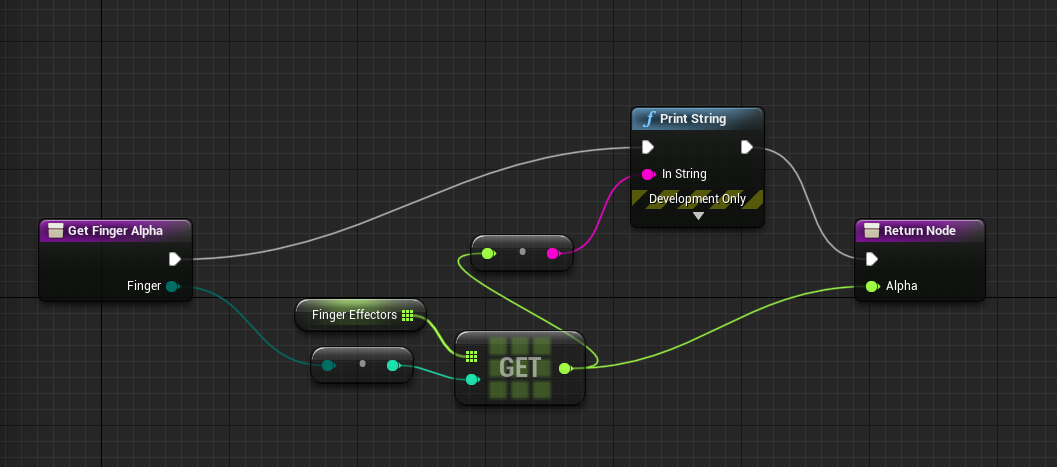
Am i using the wrong get function?
 half osprey
https://blueprintue.com/blueprint/4qin317j/
Is this a good way to check if the player is idle?
BlueprintUE
 fathom portal
@half osprey use "get velocity", the simply check if that's close to zero
leaden glacier
I'd probably set an last input time and check against current time every tick. Velocity limits you to moving, in a game with UI interactions it wouldn't work well I assume.
fathom portal
@leaden glacier what's calling the function?
leaden glacier
I've tried calling it from an animbp (intended use) and from tick in the actor itself
neither work
half osprey
Use get velocity into a == node right?
 half osprey
Like this??
fathom portal
@leaden glacier But you're converting your enum to a float. I've never done that before, what is that supposed to do?
Sorry @half osprey, use "Get vector length" out of the "Get velocity", then it's a float, my bad
leaden glacier
Enum to integer, enums are internally set from 0 onward, so you can iterate over them and get unique indexes
If i print the integer value of the enum, i get a correct index for the array
fathom portal
I never knew they worked that way, interesting
leaden glacier
It's useful
fathom portal
Then I've no idea why it's returning 0
leaden glacier
Yeah me neither lol
leaden glacier
A vector is just a point, can't get a length from it?
fathom portal
A vector is a point, a direction, and a line segment
Lemme open my project and see
Maybe I'm misremembering the name of the node
 gusty willow
fathom portal
gusty willow
fathom portal
What are you trying to do?
Because that simply binds the event, it doesn't call it
 exotic moth
I need to be able to scale my material to fit a specific length in world units. No idea where to start. I tried searching for scale to fit. Didn't find any results that were close.
exotic moth
ah ok
leaden glacier
Found the issue with the array stuff. It's a big problem present in every engine build I've tested so far 🧐
It's human error and oversight.
I was overriding the array by accident.
trim matrix
hey can someone tell me how i can make it where my character doesnt sprint in any other direction but forward?
i have a sprint blueprint set up already but he sprints in all directions
i want the speed to slow down when he goes anywhere but forward
 distant sedge
On your InputAxis nodes check if side strafing or backpedaling, then decrease the Axis Value by a modifier like x 0.25
Before passing it into Movement Input
 elfin flicker
Hello guys, i have a little problem, my camera doesnt work as I would like, i have TPS camera and i want to rotate around character. Now camera is rotate with my character like in gta vice city. Can anyone help me? :<
trim matrix
@distant sedge how would i check for strafing or backpedaling?
 frigid anvil
@elfin flicker Just turn of controller rotation Yaw in your character
distant sedge
@trim matrix This is a modification to the FPS test, if moving left or right slow it down to 80% of max speed. If moving backwards slow it down to 60% of max
trim matrix
ty
I want my gas cans to spawn ON the terrain and scattered all across the map
how can i do that?
elfin flicker
@frigid anvil Working! THX!
trim matrix
Can someone help me PLEASE?
 gentle urchin
First thing i can think of is just defining spawn bounds, finding your max z height, randomly spawn inside bounds with z defined as hit location of a linetrace,if the hit lands on landscape
leaden glacier
^ that's generally how to do it i'd say
trim matrix
can you put that into code and show me? I have a learning disability
gentle urchin
Guess i can slap something together
trim matrix
thancc
gentle urchin
Do you intend to spawn them in editor, or at gamestart ?
gentle urchin
Nothing to be sorry about
trim matrix
ping me when you post it
 solemn dagger
hello, i want to create a "move gizmo" , does this exists anyone knows ?
gentle urchin
I generally dont like doing things in the level bp, so I'd advice moving it to a separate actor just placed in the world, and worst case hard referencing the landscape
If you got several landscapes, this method would require you to have 1 actor per landscape
Anotherthing is the WhileLoop. Can be dodgy if you're not familiar with it, so could be beneficial to replace it with a forloop
SpawnActorFunction:
FindValidSpawnPoint:
then its just calling the function on beginplay
Ignore my naming convention, it's not fitting here. tired 😛
trim matrix
Thank yee
gentle urchin
The result is, as expected, random
trim matrix
thank ye
trim matrix
@gentle urchin it crashed my engin
gentle urchin
Make sure that AmountToSpawn has a value
trim matrix
it does
gentle urchin
Oh shiet
this is my bad 😂
when you spawn one, make sure to increment the int it compares to!
trim matrix
what do you mean?
trim matrix
and that wont crash it?
gentle urchin
Could you show me your map
trim matrix
trim matrix
how can i check?
gentle urchin
"Draw Debug Type"
gentle urchin
Just move the increment up to after the linetrace,
this will make it count regardless
 sullen radish
hello everyone, can i use the "Material Parameter Collection" inside Blueprints and edit values of their parameters inside the blueprints not inside the material editor ?
trim matrix
ok its hitting @gentle urchin
gentle urchin
Is the landscape reference correct?
Are you doing this in the level bp or in another actor?
gentle urchin
Just alter the rotation to make them face the correct way,
and adjust the scale according to your liking
Something like this
you can see the Spawn Transform Scale values aswell
for the rotator just play around with the values
sounds like its just +90 in either X or Y
fathom portal
Raise up the spawn location? Or change the collision handling override
gentle urchin
same thing really, just subtract some from the hit location
ye ^ like MFG said
you just need to adjust the Z value
half osprey
https://blueprintue.com/blueprint/6sndpko0/ I'm trying to make this blueprint do its actions only if you hold down Interaction (L), heres what I have and it ain't working. What should I do?
I know the AND bool isn't connected, but it didn't work when I had it in anyway
 regal crag
Who knows how I should go about doing buoyancy? I attempted a mathematical sinewave in my floating object's blueprint that mimics the behavior of the material but it isn't working correctly. I have seen something about render targets but I don't know what those are. Any help appreciated.
upbeat sinew
Looking to find the time between these numbers, DailyQuestTimer Has been set for 15 minutes later than the current time, How would I get the difference between these numbers?
 iron inlet
Hi guys, I am stuck trying to fix a crash for my dedicated servers, I somehow have too many UObjects, and the UObject that breaks everything is always the OnFail node of an AiMoveTo node, why is that creating an UObject?
Script Stack (2 frames):
AI_C.ExecuteUbergraph_AI
AI_C.OnFail_AEE485CD4A8F4111E032D1BC16C01533

[2020.03.17-20.56.48:299][244]LogCore: Error: appError called: Assertion failed: Result + NumToAdd <= MaxElements [File:C:/UE4/UnrealEngine-4.21/UnrealEngine-4.21/Engine/Source/Runtime/CoreUObject/Public\UObject/UObjectArray.h] [Line: 489]
Maximum number of UObjects (12189696) exceeded, make sure you update MaxObjectsInGame/MaxObjectsInEditor in project settings.
Is there a way to get all current UObjects for debugging purposes, so I can see why I have so many?
regal crag
Who knows how I should go about doing buoyancy? I attempted a mathematical sinewave in my floating object's blueprint that mimics the behavior of the material but it isn't working correctly. I have seen something about render targets but I don't know what those are. Any help appreciated.
 pure tulip
Hey, does anyone know why this happens to my targeting thing? https://youtu.be/JlNOnJeg7KU
https://blueprintue.com/blueprint/ec_l_uah/ (This is the blueprint after the first image that didn't fit in one screenshot)

BlueprintUE
If it wasn't obvious in the video. The screen stops locking directly on to the red block. It kinda moves to the left or right of it a bit. I think the character still rotates around the red block though.
 runic atlas
How do you extend a volume upwards on the Z without extending it in both directions?
fickle nebula
I'm saving the actor with interface interactable
I print it before save
In another BP I load the items but only the last 2 items has blank name
The missing names are the one that have been spawned when I destroy the bush
@odd ember you that know my case, do u have any ideia why this is happening?
odd ember
@fickle nebula sorry It's a bit hard to understand, what is the problem exactly?
fickle nebula
let me show u, click my picture.. I'm streaming
odd ember
I'm sure it is, it is also completely discouraging me from ever using twitch again
if you can summarize your problem I'll try and help
 forest basin
Dumb question, why is it when I spawn a pawn (seeker mine) by placing it in the map it works fine, but when spawning it from the player it does not work?
forest basin
using standard AI Move To
odd ember
I mean show me a screenshot
forest basin
one sec have to trim or SS shows all monitors
odd ember
if you're on windows I recommend the snipping tool
you don't even have to save the image, you can just copy it straight into discord
odd ember
where do you spawn it
forest basin
just spawning from a scene componant in front of the player
if I place one in the map it works fantastic going after the first bot it sees (will do targeting later on) but if I spawn one it just sits there
odd ember
right so
forest basin
on begin play it splits so I can do a 10 sec self destruct. But then delays 1 sec, gets target then gos to the AI Move To
odd ember
do you want to spawn the mine inside the player because the player controls it?
forest basin
nope want to drop it on the ground, and it do its own thing
odd ember
okay
forest basin
if I place one in the map it works perfect
odd ember
in that case you should just spawn it inside the player blueprint
if you want the player to "drop" it
forest basin
last image is inside the player BP
odd ember
k perfect
odd ember
so it doesn't spawn?
odd ember
right
that's fine
so the first piece of logic
you should delete
never use get all actors of class
99.9% of the time there are better ways than using that node
forest basin
yet its working if I place it in the map
forest basin
tried casting to the target dummy BP
odd ember
you want the movement logic to be inside of the drone blueprint itself
forest basin
it is in the drone
odd ember
so why are you using get all actors of class?
forest basin
cuz no matter which way it works the same
casting to the BP class of the target
casting to character
casting to player BP
odd ember
you know if there are more than one target it'll seek them out randomly, right?
forest basin
not worried about target selection
odd ember
well you should be
odd ember
so you want it to seek out the player
forest basin
I can deal with targeting later
odd ember
well this is targeting
forest basin
no its targeting the target dummy BP which is just an idle NPC
forest basin
but why is it working if I place it in the map and not when I spawn it in
odd ember
because of non determinism
forest basin
and
forest basin
and how is it fixed
odd ember
well, you create an actual targeting system
is the dummy near the player
can the player see the dummy
forest basin
so your saying that due to UE4 failed logic, on begin play it cannot find the target
odd ember
there's no logical failure
it's an effect of how the level loading process is happening
anyway
forest basin
event begin play of the seeker, then finds the target and goes after it
odd ember
can the player see the dummy
forest basin
yup
odd ember
ok
so why don't use a trace to pick up the location of the dummy from the player, then spawn the drone and supply it with the dummy actor
forest basin
I went right for a line trace fired, which only would do anything if it hit the NPC and then it set in the spawned seeker the target location and such
with or without a targeting system pre or post spawn has mattered
odd ember
youcan try with a box of a sphere as well
that has greater range
or volume I should say
you could also have the drone itself pick up a target autonomously if you want
but you need to have some sort of targeting
forest basin
my NPC is roaming around, yet the placed in map version is perfectly fine, drone picks its own target, and I have set the drones target and no difference in result
odd ember
the drone thing is even simpler, you just put a collision sphere and on begin play check for overlapping actors of type dummy, then get the first one of that
forest basin
not a problem, the drone finds its target, does its damage and emitter and sounds
problem is the fact the drone does not work when spawned by the player but works PERFECT when I place one in the map then hit play
forest basin
both version my floating pawn version or NPC version
odd ember
if you do it in either of the ways I suggested you get around that
forest basin
you havnt suggested anything I have not tried yet as I said
odd ember
I think you're not reading what I am writing
forest basin
why would it not get the target when player spawned yet works on begin play of the map
odd ember
because of
forest basin
I have set the target post spawn as well and it failed to work
forest basin
yeah your not providing a solution by saying that
odd ember
you will not make it work consistently ever if you do it like that
so either you listen
or I'm done here
your choice
forest basin
here how bout this, thanks for your attempt but your have been of no use to me what so ever. So to keep from becoming rude or offensive Im just going to leave.
odd ember
cool, no reason to talk you again then
forest basin
not a problem, but in the future if you attempt to help someone, at least provide usable information on how they can actually resolve the problem. Have a nice evening.
fickle nebula
I need help T.T
odd ember
@fickle nebula state your problem
fickle nebula
I saved the obj ref in a save game slot
and then I open the file I can see the list with the names there
but when I print this when I load the game, the list of obj is missing the last two ones
👽
odd ember
are the objects missing from world too?
fickle nebula
these objects I'm spawning in game
odd ember
how do you add the objects to the list?
fickle nebula
odd ember
do you have the interface on the last two objects?
fickle nebula
YES
odd ember
have you used breakpoints before?
fickle nebula
I can see their name on the print
 pliant oracle
@odd ember but the data is in the save file for her.
odd ember
I get it, but from what I can see the interface is the only thing that stands out
have you used breakpoints before?
fickle nebula
where should I use the breakpoints?
odd ember
can you show me where you print the names
odd ember
so I'm thinking if it's not the interface that's the issue, it's probably the fact that you use AddUnique instead of Add
you could try replacing that and see if that works
if it prints the names on load
but the two last ones are missing
on load only
then it's something about how they are added to the array
odd ember
if they are printed but still not present, use a breakpoint to go through the loop until you find out why they aren't in the list after you have printed them
fickle nebula
but the data is on the file
I can read there
the problem is in some part of the loading
odd ember
so use a breakpoint to find out why it isn't in the list
odd ember
do they actually spawn in the world?
fickle nebula
yes
odd ember
ok then it's probably just a fluke inside of the system
fickle nebula
odd ember
maybe their names are just " "
odd ember
ah so you're saying it is spawning when it shouldn't spawn
fickle nebula
no..
pliant oracle
she's saying they're not spawning when she loads the save
odd ember
k
fickle nebula
I use the stone to destroy the bush, the stick spawns from it
they are being stored on the save slot
odd ember
yep and then you reload and the sticks aren't there?
fickle nebula
but when I print this value, just the items weren't in the level editor have problem
odd ember
try printing them when you save them?
fickle nebula
If u had a time to see this happening...I'm on stream, so it would be easier
odd ember
you could also try printing the int on the AddUnique node, if it is -1 it didn't get added
odd ember
I mean we saw that the Transform had that name
so I think you're looking at the transform list
but try going up
and see if you see the list, but without the two last entries
I don't think the get added at all
generally btw if you're looking to save values like this, and they are linked, using structs might be worth considering
since you can put two values together in one struct
(so actor and location)
fickle nebula
yees, first I try to make thing work, after I optimize them
odd ember
sure, I'm just saying it might prevent issues like these as well
since they are saved as one entry in the array instead of in two separate arrays, there's never a possibility of unlinking them
it may help you narrow down your problem, which is why I suggested it tbh
fickle nebula
hummm, ok I'll try use struct then
 low lotus
anyone know why set timer isnt working? nothings printing
fickle nebula
why u are using a timer in a event tick?
low lotus
oh its supposed to be in event beginplay right
fickle nebula
yes
low lotus
im a noob
trim matrix
hey I got a problem with my animation replaying when my bullet overlaps a character and kills them
how do i make it where the animation only plays once when the bullet hits the character
odd ember
@fickle nebula I'm sorry it didn't work. but I think it's most likely that the actor values do not get saved
@trim matrix #animation
 rough wing
Does anyone know why a cable component would flicker?
fickle nebula
 odd ember
so when you print for the save, when do you do this? because it should print after the add to array
I didn't get to see it
fickle nebula
odd ember
yeah that looks very good
I gotta admit it's a bit strange. I'm thinking if it's because it's the size of the array or what is going on
save for some array manipulation I wouldn't be able to tell you what's wrong. I would try some very specific cases out since it's only the last two. so for instance I would try and change the order to see if other actors at slot 28, 29 have the same problem, or if it's only the BP_gravito
at least if you do the array manipulation you can see whether the array is at fault (in which case it's probably a bug in the save system) or if it's an error with the actor
fickle nebula
try this - in a empty level spawn a something in game, and save and load
odd ember
I don't have unreal available right now 😦
fickle nebula
ahh
odd ember
I can test it out tomorrow
did you ever get this for single values that are not arrays?
fickle nebula
I had the same situation with every item spawned
odd ember
so it's the slot 28, 29 that is the problem?
odd ember
so you have bamboo, and you save the bamboo into the save file outside the array?
or was the bamboo inside the array, at slot 28 or 29?
fickle nebula
 odd ember
@fickle nebula yep looks like a limitation on the array
so that's either a bug (fingers crossed) or some weird limitation that just exists
fickle nebula
I'll delete thing then
odd ember
which thing?
fickle nebula
 odd ember
I see
I gotta dip but
the only thing I can say is to try making the system without the get all actors of class at this point. I don't know if it's at fault, but it's the only other variable left, apart from the save/load game nodes
 bleak vector
I'm wondering if anyone has found a good way to use navmesh for grid-based movement 🤔
odd ember
good find though, I'm glad someone's doing their research
@bleak vector you can close off the corners of the navmesh so movement is only possible in straight lines. not really a BP question though
bleak vector
I don't actually care about straight line movement, just that movement begins and ends on a grid point. I've tried this but it's clearly not ideal.
odd ember
what's wrong with it?
you could use the snapped to grid as the initial position as well
although I'd recommend you use AIMoveTo under any circumstances
bleak vector
I know I've seen that work before in a service, can it only be called there? I can't seem to pull it up in a regular bp
odd ember
it's available in the AI controller
bleak vector
ok cool 🙂
aimoveto lets me evaluate continuously and stop if its ie out of movement points easily, right?
forest basin
Resolved my Issue. When spawning something that has AI control you dont spawn ACTOR you spawn AIFrom Class
My seekers were perfect, well close enough. The problem was not in my targeting at all but in the node to spawn AI vs an actor
 true valve
Anybody knows why my collision boxes shift upward when I walk this static mesh?
forest basin
static meshes dont like skeletal meshes, for the event disable collision on the static mesh
Synty assets and SGK, guess you watched some of my vids lol
true valve
Do you know how to fix it?
forest basin
what is the object your stepping on
Much as I love em Synty assets are know for bad collision boxes. Are you talking about the boards or the object on the ground
true valve
I might know the issue. THe landscape has collision and SM has collision
forest basin
if its a terrain mesh or like the boardwalk itself, open the mesh check the collisions and make a new one as needed
forest basin
just looking at it lol yeah your on a horse
lol couldnt tell what you were standing on
true valve
I put mesh and capsule both to block all. Still this?
forest basin
I need to see if I have a project with that horse pack and synty characters
faint pasture
How would you guys represent inventory with multiple slots and sizes? That is, the character has 4 weapon slots, and weapons can come in sizes 1, 2, and 3. So equipping a size 2 weapon in slot 1 blocks out slot 2 as well.
true valve
@forest basin nvm my IK system was causing that issue.
forest basin
k yeah sorry got side tracked tweaking my seeker mines
cannot help but giggle when it hits and the target rag dolls
fickle nebula
@odd ember I fixed it, it`s working now
 shadow fox
anyone up
forest basin
working on a seeker mine project
shadow fox
oh dope
ima post a screenshot
if anyone sees anything I am over lookin bc I sure dont and its not working lol
ive been going over it for 2 hours I do not see anything wrong
top pic is the spawner for the ball...the 2nd one is the ball
spawns the ball at the start just not after the ball scores and destroys
shadow fox
that is in the top one
I watched a video dude it it and it worked on his almost exactly the same thing
I copied his
forest basin
so instead of destroyed just run the custom event when you were telling it to destroy actor or just set it to a new location
shadow fox
I think the issue is its not calling the new ball from the other blueprint
are you not able to do things like that?
forest basin
once you have the custom event in an actory you do a castto node to the blueprint. then set actor location to where you want it to go
shadow fox
kk ya I was thinking of putting all of it in 1
I didnt know spawning a ball could be so hard
this is just a base for what its gonna end up its gonna be a disk....that gets tosses from player to player
forest basin
probably can, its sort of part of what Im doing. I am using a projectile for my thrown version of my seeker mine. once it stops moving, it goes invisible, then spawns in the new seeker mine itself then deletes itself
shadow fox
I am dreading that mission
hell ya
I have not found any guides on how to make something catchable
one thing and it was a boomerange
r
forest basin
watching the ball zip across the ground after a moving target then it exploding and rag dolling the target
forest basin
box collision on the person catching and have it set a variable to true
wich adds it to their inventory, thats how Im doing the football in my main project to play catch
shadow fox
now do you think it would be easier to leave it a skill shot?
or make this like a tab through your team target system
forest basin
possible. Im wondering if I should add a dust or smoke trail to my seeker for cool factor
I need to stop playing with the seeker in this project and put it in the one its going into, but its too funny
shadow fox
I have not got side tracked yet cus nothing has worked 100%
shadow fox
whats driving me nuts is I feel like all these tuts I watch....I feel like they make the stuff complicated
no Idea I have yet to make it that far
pure tulip
Anyone know how I can get a reference to my landscape before I enter the game? I have to put down my character into the world and set the landscape variable in the details section, then possess the character. Doing this messes up all my stuff.
shadow fox
:)) I am still tryin to get a ball to explode and respawn
 maiden wadi
@shadow fox What's wrong with your ball spawning?
shadow fox
ok so all works up untill it goes in the goal then dissapears (which will be explosion later) then the ball is supposed to respawn back in middle
on the spawn arrow
but it does not
https://www.youtube.com/watch?v=82l0WB9kN8g at 2 mins 8 seconds is where I got my plans from
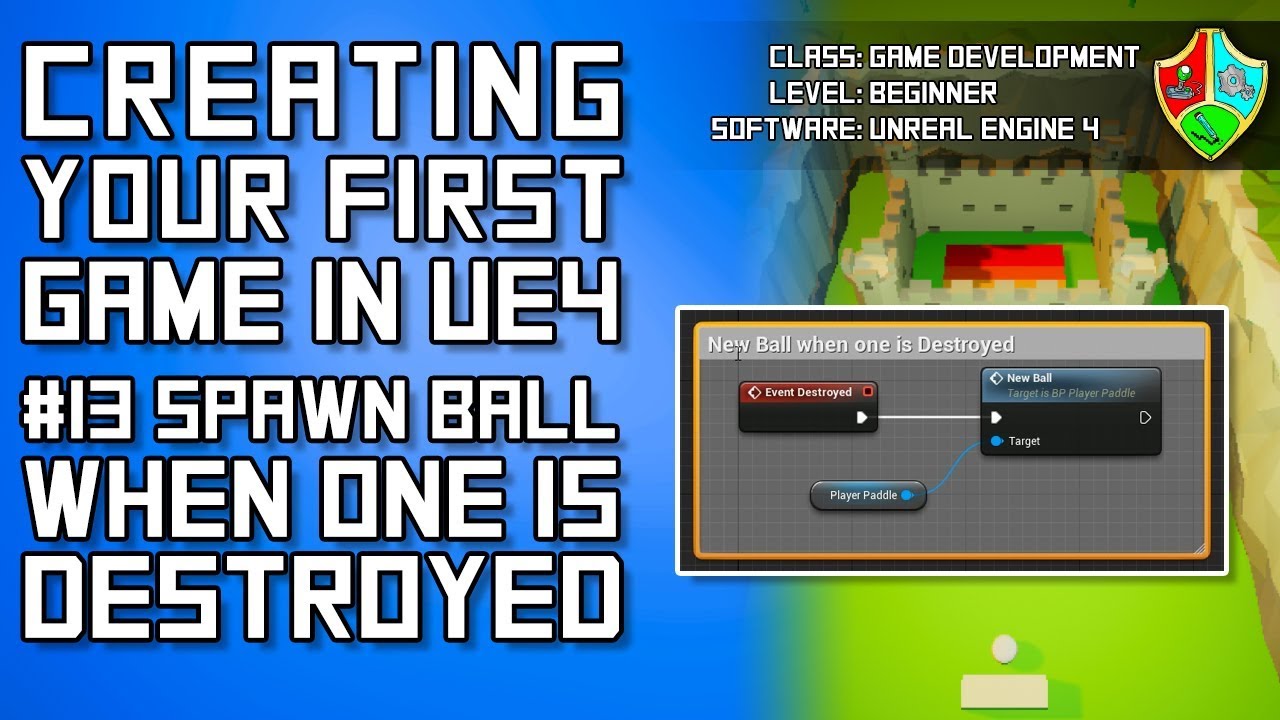
In this part of my free Unreal Engine 4 for beginners tutorial video series you will learn how to automatically spawn a new ball once one is destroyed. Enjoy!
Watch this tutorial series as one long video: https://youtu.be/icR_EgXrS6o
♥ Get the resources used in this tutorial ...
its exactly what he has except he uses his paddle thing I use arrow
maiden wadi
@shadow fox Two thoughts, I don't know how Event Destroyed works in regards to variables, but you might also try the Event EndPlay, it's called right before Destroyed in the lifecycle. Other thing is, where are you setting your reference to the Ball_Spawner in your ball?
shadow fox
see thats what I just finnaly though tof
thought of
he used a solid object
I am using Solid Object a plane > arrow\
I am gonna try just the plane
maiden wadi
Do something for me to make sure things are working nearly as intended?
In your Ball Spawner blueprint, put a print node on your New_Ball event, after you set the Ball variable. It should print once at the beginning of the level and once when the ball is destroyed.
shadow fox
kl
kk* still workin on this now that I took the Arrow away and its just the plain its not doing anything
maiden wadi
Is the ball being destroyed, but not spawning?
If so, put that print node in, and make sure it does it once when you load the level and once when the ball is destroyed.
maiden wadi
Does it print both when you begin play and when the ball is destroyed?
shadow fox
no
it does both when I load in
but only 1 ball which is goof
good
now
I added one to the new ball after destruction
the print thing
it said it
but nothing happened
maiden wadi
Try to change that from Event Destroyed to Event End Play
shadow fox
meh ya
i have to try something else
I dunno wtf it wont read it
I made the variable
maiden wadi
What are you trying to do now?
maiden wadi
@shadow fox Just did a few tests, the way you have it set up should work, but where are you setting the Ball_Spawner reference variable inside of your Ball_BP_Final?
shadow fox
what do you set as/
mean * set as
I made a variable then referanced it to Ball_Spawner
maiden wadi
You need to tell the ball what Ball_Spawn_BP to use. You could potentially have fifty of them in your level, it doesn't know WHAT one to use, just what type. You should set that when you spawn the ball.
shadow fox
but I do only have one thats the weird one
maiden wadi
In the Ball_Spawn_BP, on the New_Ball event, the Set Ball node, drag off of the blue pin where you're setting Ball and type "Set Ball_Spawner" It should show up in the context menu.
Right click anywhere and type "Self" "Get a reference to Self" should show up, plug that into the set node on Ball_Spawner
shadow fox
kk
omg
that was there earlier
but when I toyed with it I deleted it
it was called ball
maiden wadi
Show me what you have for your New_Ball event
 novel cosmos
Is it possible to store an actor inside a datatable?
Nvm actor but also things like meshes and textures?
Like assets in general, can we somehow store them in a datatable? D_D
shadow fox
are you talking about taking the pin off the section to the right that says set
or the SpawnActer
maiden wadi
Either should work.
maiden wadi
shadow fox
got ya
maiden wadi
What that will do, is tell the ball what ball spawner to use when it calls the New_Ball event on destroyed.
 delicate jay
Does anyone have a simple solution for setting inputs back to default via blueprints?
Or even in .cpp
 surreal peak
Like runtime, by user, changed bindings?
trim matrix
store em in data table you must
delicate jay
runtime
yeah I thought about using a datatable for defaults then just changing it in inputs for project settings and the data table
surreal peak
There should theoretically be a Inputs.ini and a DefaultInputs.ini
Wouldn't be surprised if epic has something in place for this
I wouldn't use a DataTable. Way too much work
delicate jay
yeah they don't seem to give you nice access to it
 random shale
Hey guys, does anyone knows how to change the scalability settings for a build? I followed the instructions from EPIC to change DefaultScalability.ini, but it's not working.
 fathom spindle
Hi guys, struggling with some blueprint logic for a few days now. I have a line trace firing from the vertices of a mesh in a for each loop and i'm accumulating the number of hits to an 'hits counter' integer, then at the end of the loop i'm dividing that by the total number of traces and converting to a float to get a percentage. My problem is I need to smoothly interpolate the changes in the percentage float. I know that I need to store the previous frame value before I set a new one and then feed them to an Finterp, but I can't figure out where/how to set these. If anyone could take a look at these screenshots and point me in the right direction i'd be really grateful.
the linetrace
the end of the for each/percentage
 plush ridge
Anyone know why my emitter keeps spawning even with a spawn rate of 0?
@fathom spindle Interpolations have to be done each frame for it to work. Create an event that runs on Event Tick, hook it up to an FInterpTo with A being the variable "OcclusionPercentage" and B being the new math you just did
Example
delicate jay
@fathom spindle might also look into timelines, interp might not be what you want, you might just want to set a max gain and a max loss
fathom spindle
@plush ridge yeah i have a delta variable set on tick
plush ridge
Your current set-up will only run a single time (if executed only once), use the delta variable in that frame and then not run again
So the interpolation won't work
The actual update has to be run on Tick as well if you want to Interpolate
Timelines are also a good way if these changes aren't constant, yeah
fathom spindle
ah ok an event outside of the for each and otuside of the function its in?
plush ridge
yeah, an event to only update / interpolate the percentage, but using values set elsewhere (forloop for example)
fathom spindle
but im still confused by the order of operations
plush ridge
give me a min
delicate jay
@fathom spindle CurrentHits = MIN(ABS(CurrentHits - New Hits) , MaxDelta) + Current Hits
fathom spindle
right but where in the order of operations of the blueprint to set the new/current variables is whats breaking my head
delicate jay
so i'd run a function by a timer
then you just set new hits wherever (on tick or w/e)
fathom spindle
yeah the whole trace is already a function run on a timer
delicate jay
and then current hits get set only by the timer function
fathom spindle
ahhh
delicate jay
yeah I would do it in another function/event on timer
fathom spindle
ok ok i think i get it
delicate jay
One is line tracing and updating new hits
fathom spindle
so my line trace event is happening 0.06
delicate jay
and another is inching current hits closer to the "new hits" value
delicate jay
i wouldn't do it on tick
fathom spindle
or less than 0.06
delicate jay
frame rate will affect how fast it happens
plush ridge
@fathom spindle
delicate jay
oh yeah if you use delta seconds you don't have the frame rate worries
fathom spindle
wow @plush ridge thank you so much!
so the occlusion percentage is just 0 or is it set anywhere
plush ridge
Np! You can have the default value of that set to whatever you need, I'm assuming 0. Ultimately the goal is to get it to be what you need it to be, and what you need it to be is set as TargetOcclusionPercentage
fathom spindle
thanks for bearing with me as my mind attempts to wrap itself around this
plush ridge
the neverending struggle hahah, #gamedev
fathom spindle
anything time based and my brain gives up
im going to have a go at this now will let you know how it goes! 🙂
delicate jay
becareful when going from floats to ints with interp
plush ridge
sec
delicate jay
you might get to a point where you never reach your final target
fathom spindle
ah ok
i was about to ask if i can move the maths at the end of the loop outside into the main blueprint to run on tick
because im working all in integers
delicate jay
for example you are going from 9.0 to 10.0 but you pass in .05s it comes back 9.05 then you round it get 9, and repeat the same thing on tick over and over again
fathom spindle
ah i see
plush ridge
correcting the BP I sent you
fathom spindle
ok cool
fathom spindle
how should i handle the conversion from ints to floats?
fathom spindle
yeah i have a number of hits/total traces
 pastel rivet
is it possible to do image editing towards images in the engine? We want to take an image, the crop to a part of it and use it
fathom spindle
then converting to float to get the percentage
plush ridge
the edited method I sent just now won't cause problems if you use Floats, but it will interpolate from 0 to 1 with decimal points and the OcclusionPercentage float will have those decimal points until the interpolation is complete.
You can do this to convert the constantly updated percentage to an integer and use the integer as the actual percentage to never use the decimal points, though
That will round the float down to the nearest integer
delicate jay
@pastel rivet think you want this https://www.youtube.com/watch?v=_thf1Z3j73s
delicate jay
there are similar nodes available in BPs
pastel rivet
@delicate jay is it possible to export these targets?
fathom spindle
because im incrementing an integer
plush ridge
You don't have to convert, you can just change them to floats entirely, but during the interpolation use Floor to convert to that final percentage as a whole number
Could set it as an integer variable to use elsewhere at that point
fathom spindle
so its the other way around. i'm doing the maths in integers but display and using as float
and obviously interpolating as a float
so these both get set and converted at the start and the end of the function
or are you saying i should have this be a float variable
getting something but doesnt seem to be able to get past 40% now even if its 100% occluded
forgot to set previous 😆
my bad, thanks so much guys
oh wait i didnt actually because that needs to be in the function. oh well definitely made some progress understanding will keep working at it
 torpid marsh
how do i make a skeletal mesh in the ue4 editor?
bleak vector
Do you mean how do you add a skeletal mesh component to an actor? Or are you talking about 3D modelling and rigging something
 atomic salmon
@torpid marsh you don't in general. You can add bones/sockets though. Typically you would use a DCC program for creating your Skeletal Mesh, then import it into UE4.
torpid marsh
so like with blender
atomic salmon
exactly
Create the mesh in Blender, create the armature, skin the mesh to the armature, export as FBX, import into UE4
Make sure you apply all Rotation and Scaling before exporting, otherwise it won't work properly
fathom spindle
Hey @plush ridge so just to check I have three occlusion variables: previous, current and target.
at the start of the function, before the loop i set current to previous
the i set the target in the loop
and at the end of the loop
then i interpolate outside of the function on tick
then just get the percentage for display
atomic salmon
@fathom spindle in FInterp the Current input and the Current Output should be the same, unless you are trying to do something different
In other words, FInterp takes the current value, advances it toward the Target and then you need to store it again in the current value
So on the next Tick it can use the updated one
fathom spindle
i'm trying to interpolate between the previous and the current values of the amount of hits on multiple linetrace events
this seems to work i just need a much higher interpolation speed
i think
so on each frame im evaluating how many traces of the total number of traces where hit
so on frame 1 its 22/77
and frame 2 its 3/77
trying to blend smoothly between them
atomic salmon
it works because you set Previous = Current at the start of the tick, anyway
fathom spindle
but i mean obviously more like frame 1 and frame 24
ok if it works it works my brain is stretched to its very limits 🙂
atomic salmon
you are trying to average them or what?
so you have many multiple traces
each one returns a number of hits
fathom spindle
yeah i have a trace for every vertex of a mesh firing towards the player
finding the number of those traces that get a hit and dividing by total
its in order to get an occlusion percentage
of the mesh firing the traces
atomic salmon
total hits / total traces * 100
fathom spindle
yeah i got that bit
the trouble is interpolating between those values
but i think we got it now just need to tweak interpolation speed
plush ridge
@fathom spindle I don't think you need to run it again after the loop is complete, you'll have the most accurate numbers without that
let me know if it doesn't interpolate correctly and what you see instead 👌
fathom spindle
@plush ridge i was doing that because the integers would reset to zero without it
so i always had some left over value
of the last number of hits
 halcyon kelp
Guys quick question - can you have more than one game instance and change it via bps?
atomic salmon
@fathom spindle that makes sense because when you have 0 hits it interpolates toward that value
If you want a slower interpolation you need to reduce speed
fathom spindle
this is with an interpolation speed of 40, seems to work well 🙂
might try with the ease node
atomic salmon
This means the percentage of advancement toward the target is 40.0 * DeltaTime at each tick
fathom spindle
hard to fine tune it until its mapped to audio (thats the application)
atomic salmon
At 60 FPS it advances of 66% at each tick
fathom spindle
ah ok cool thanks for that explanation thats really helpful
atomic salmon
np
 void rock
Anyone know how to get the default scene root when deleted from an actor?
atomic salmon
@void rock just add a new Scene Component and place it as the root to your actor
odd ember
@fickle nebula so what was the issue?
void rock
Yeh I did that, but the blueprint doesn't recognize it as the root
atomic salmon
@void rock you need to drag it on the current root and select make root (or something similar)
replace root maybe, forgot how it is called
void rock
Yup, that's what i did
It looks like the new root and things work
but in the blueprint, any reference to 'self' can no longer be treated as a scenecomponent
atomic salmon
self is the whole actor, not the root
void rock
right
atomic salmon
self --> Get Root Component
odd ember
dragging a component and dropping it on top of root will replace it
atomic salmon
@void rock show the BP where the error happens
void rock
that works fine with a fresh actor
but not in mine because i replaced the root
i actually tried to rename my new root scene component to 'DefaultSceneRoot' and it said i couldn't because the name is already taken
atomic salmon
so you want to hide the root component? just drag a reference to it and connect it to that node
scene components do not have a visible part anyway, so not sure what you are trying to do. Maybe hide the whole actor?
@void rock
void rock
No, im not trying to do anything but get the root to act normally
it was deleted accidentally so i had to try to remake it and that's when things went to shit
atomic salmon
@void rock your node Set Hidden In Game is targeting a Scene Component, as it says in its name
Right now you have no Target for it
Self represents the whole actor BP, which is not a component nor a scene component
hence the error
void rock
yeh, i understand that
i can fix this node
im just trying to figure out the underlying problem
 slender sage
guys, i have a problem with landing animations. Basically i don't even have a node for it. I've searched the whole internet. But my other jumping set up is so complex that i don't even know where should i put it
fickle nebula
@odd ember I was saving a memory position, and when I load i canno make sure the item is in the position. So to solve it, I saved the diaplay name, and i used it to compare...
fathom spindle
Hi guys, simple question. I have a value derived from dot product going from -1, 0, 1 and have clamped between zero and one and abs as i only need those values. How do a remap that value with a float curve?
 loud marsh
Hi!
Anyone has worked with pixel streaming here? Managed to get it out in the world, and works perfectly from other PCs, however on iPhone, iPad or any android phone, the "Click to Start" on the main page is unresponsive
odd ember
@fickle nebula interesting, can I see that setup? it's just good to know in case there's ever a problem like this again
@fathom spindle what are you looking to do?
fathom spindle
Hi @odd ember I have a value for how much my player is facing an actor in the world using dotproduct in fact I think you helped me. I just want to remap the rate at which the values go from zero to one over a curve
rather than just linearly
just to have more control over the effect
odd ember
how do you want it to curve
fickle nebula
@odd ember Yes, but I just wake up right now, when I turn on the computer I post here
fathom spindle
in the curve editor
odd ember
@fathom spindle you'll only be able to do that mathwise, not as a curve in the curve editor afaik. perhaps you can but I haven't tried it at I'm not with a UE4 project right now
@fickle nebula much appreciated!
odd ember
@fathom spindle https://forums.unrealengine.com/development-discussion/blueprint-visual-scripting/1351366-how-get-value-from-runtime-curve-float
Unreal Engine Forums
How can I get a value from a variable of type Runtime Curve Float? I defined the keys in to graph, but in blueprint scripting I don't see any function to get
I definitely do not recommend doing abs or map range clamped
the full range of the dot is always relevant
odd ember
Get Float Value
plug the dot into this
and map the range of the curve from -1..1
and you'll be fine
fathom spindle
ok cool but i really do only need 0 to 1 of the dotproduct is the only thing
as the effect just doesnt happen past 90 degrees of divergence from the target actor
odd ember
so what do you do if the player is looking behind
or the opposite way
you still want to account for the case
regardless of whether you use the result
 pulsar arrow
Hello people, a friend of mine trying to implement SLerp to his game with using blueprints and this is what he's done. I also need to use Slerp but as he said there is a problem with blueprint version of the formula. Do you guys see the problem?
 mellow marlin
hello i know this should be simple but im new and the question is. im looking for making xbox controller controls and im trying to make jump but i cant find the A or green button in the project settings > input would any of you know what gamepad setting is for that?
 sonic kraken
hello guys, how can i know if the character is being controlled by the player or by the AI?
leaden glacier
Get player controller and check if it's an AI class or a player class? Assuming they have their own controller class assigned.
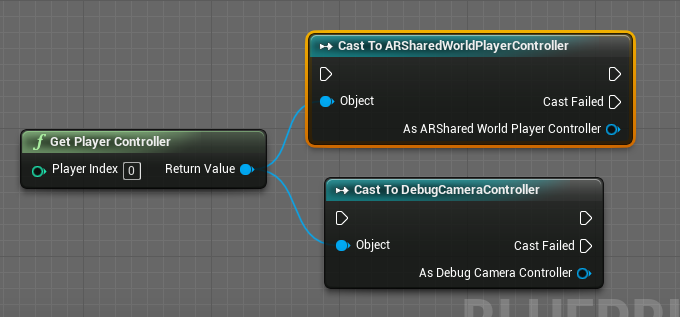
So like that, but then casting to your respective controllers
should do the trick
@mellow marlin For controllers it's the face buttons that usually represent the buttons with labels on controllers, and it's D-pad ones for directional buttons.
So for XBox controller A it should be "Gamepad Face Button Bottom"
pulsar arrow
@atomic salmon When I use this formula all angles of the formula is spherical lerped. The problem here is I want to lerp my vectors like in the picture below;
In the video you can see the problem
atomic salmon
@pulsar arrow what that formula gives you is the position vector along the arc from v1 to v2 depending on alpha
actually since you are working with directions it interpolates the direction vector
mellow marlin
k Kaz
pulsar arrow
thanks for the answer, where should I look into the get what I want?
atomic salmon
@pulsar arrow sorry I still don't get your problem. You are into the project so you see it obviously, but I still don't understand what goes wrong. Can you describe it with other words please?
Is the problem with the rotation of the hook or what?
pulsar arrow
Oh no problem, just give me a minute and I'll explain it better
atomic salmon
@pulsar arrow let's move this to #legacy-physics it is probably more appropriate to discuss there
sonic kraken
https://i.imgur.com/rGO8Yhd.png
@leaden glacier Well, i'm trying to handle the character's death but i cannot
https://blueprintue.com/blueprint/c18926lg/
This is my blueprint, if the AI deads it still keeps following me
BlueprintUE
if i dead it is the same
IA still keeps to following me
trim matrix
I have notifies in my fps character to play a sound when my player walks but the footstep sound plays automatically on start. How can i stop that?
Or is it because my character possesses and hits the ground?
This is my sound cue

This is my animation blueprint footstep code
And this is the code that plays the sound
fathom spindle
Hi there, anyone got any tips on optimizing blueprints? like links to tutorials on using the profiler they found helpful
odd ember
nativize, don't use too many traces
atomic salmon
@fathom spindle there is a webcast by Epic about optimizing blueprints, you can look it up on YouTube. This was way before nativization was introduce though. For the rest look up profiling, especially the latest improvements.
maiden wadi
@hallow night Not exactly sure what you're asking for?
 hallow night
I want my character to face the wall I'm climbing including the pitch and roll
Like in zelda breath of the wild
fathom spindle
@hallow night i think you need to find LookAtRotation or the forward vector of your player and the actor then set the player rotation
?
not sure though
maiden wadi
In general, you'd line trace from the point in your character you want the wall normal from. Probably somewhere in the center. Get the hit normal, and reverse it, and set character rotation off of it. There is a lot more going on in that climbing than just that, but it's a start.
 wintry grove
How would i change the set origin of the model or pivot point? of the model? it rotates directly from center but i want to edit it, put the "centet"r somewhere else . how do i move this origin pivot point?
maiden wadi
@wintry grove Unless you are talking about an actor, and not the static mesh object itself, I'm not sure if you can do that inside of UE4. I don't know if that's been changed, but you used to have to redo that in your 3d modeling software and reimport.
wintry grove
is it possible to make a socket the center of the rotating point ?
 tame pecan
Is it a marketplace asset project?
 tawny tinsel
yes
atomic salmon
@wintry grove you can edit the pivot point but only for a mesh already in the level. Better to edit it in your DCC tool and reimport. Or tweak the Location upon reimporting.
Otherwise you can make a BP out of it using a scene component as root, then rotate around it.
tame pecan
Try to make a clean project with nothing in it, then delete all the folders but the uproject file
then copy config and content folder from ActionRPGInventorySystem and into the clean project
That should work.
@tawny tinsel
 solemn bloom
Hey guys I'm in desperate need of help,
I have a level which can be seen on screen and when pressing enter key it enters the VR mode.
Now I have a BP actor in the level that triggers diffrrent cameras when I press keyboard buttons.
When I switch to vr mode tho the location of the VR Is at the center of the blueprint
And I can't seem to be able to move it anywhere else
Can anyone help ?
:(
tawny tinsel
@tame pecan it will open in a couple of minute instead of i do that?
tame pecan
Yes, yours is definitely stuck
tawny tinsel
well lets try
tame pecan
So make a clean project and delete all folders but the uproject file
then copy content and config folder from ActionRPGInventorySystem into the new project
trim matrix
I have notifies in my fps character to play a sound when my player walks but the footstep sound plays automatically on start. How can i stop that?
 zealous moth
you probably are falling into the world space. set up a delay to play that sound or until the first movement input
atomic salmon
@trim matrix you may have autoactivate turned on for your sound
wintry grove
@atomic salmon @maiden wadi i changed the x value from 0 and it moved the origin or pivot point thanks for the help
mellow marlin
how do i check if the player is colliding with object2
tame pecan
Object2?
mellow marlin
an other object(actor)
atomic salmon
@mellow marlin typically with an Event Hit
atomic salmon
therefore you take the Other Actor out of the Event Hit and you cast it to the actor you want to check the collision with
@mellow marlin
mellow marlin
k
atomic salmon
In your case you will cast it to Object2
If the cast is successful, you know you have bene hit by Object 2. Otherwise it was something else.
mellow marlin
k
odd ember
the object you want to cast
tawny tinsel
i want to cast good sky
odd ember
well then find out where your good sky is
cast nodes require you have an object to work with in the first place
atomic salmon
@tawny tinsel are you familiar with the concept of Cast(ing)?
halcyon kelp
Guys I have a weird issue.
I have a bp where you have to hold down the right mouse button to aim and then press the left to shoot.
However, it only ever responds when I hold down the right mouse button the second time, as if to 'reselect' the viewport or something.
I have changed the button to hold down to space, and it seems to work just fine. Anyone have any ideas?
 glad sigil
Has anyone used SetCinematicMode? Is there any way to set "Affects HUD" but that it only affects certain parts of my HUD? (Like make some widgets ignore this setting)
atomic salmon
@halcyon kelp is it while playing in the editor?
halcyon kelp
@atomic salmon thanks for replying! Yes?
sonic kraken
guys, i have a question: i need to send a victory message when all enemies in the map are dead
how should i do it?
tawny tinsel
yes i figured it out
atomic salmon
@halcyon kelp when you play in the editor initially the mouse cursor is not captured by the viewport, so the first click inside the viewport captures the mouse. After that the events are passed to the game. This said, the standard setting should pass also the initial event, so even if you right click on the viewport immediately after playing it should still shoot
Check under Project Settings --> Input
Scroll down to Viewport Properties
trim matrix
Ok i have a question. Now, with my current blueprint, i am getting the bounds of my landscape (max/min height) and picking a randomized location to spawn in actors. How can i add on to that where it spawns trees in different sizes?


This is my spawner in my level blueprint
halcyon kelp
@sonic kraken - here is what I have in the instance.
After an enemy dies, they send this (InfoCheckforMapVictory) to the instance. Then it casts for all enemy types (zombiebase). If there are none, then it goes a head and loads a level.
@atomic salmon this is what I have there...
halcyon kelp
@atomic salmon dang it. Thanks for trying man. I wonder if it could have something to do with widgets.
 desert pendant
is there any good way of copying a function from one blueprint to another, so you don't have to create a new function, set up input/outputs, then paste all the nodes and hook them all back up to the beginning of the function?
 twilit heath
good way is structuring your code so you don't have to
maiden wadi
@desert pendant Depending on your use, you should consider a blueprint library.
twilit heath
one of the major rules for writing a useable code is DRY - do not repeat yourself
tawny tinsel
i want to make a day system to do like if 24 hours has pased somehting happens
but the sky blue print doesnt have what hour is it variable
what do i do
atomic salmon
@halcyon kelp it is possible as widget are also using mouse input events and consuming them
tawny tinsel
i need the variable to come from the blue print
odd ember
@tawny tinsel what variable does it have
tawny tinsel
the good sky bp has alot of variables
but all of them are constaly set to 1 or 0 i checked with print string
they dont change
odd ember
I mean in regards to time of day
desert pendant
@maiden wadi Not really relevant. I've got someone else's example project and want to copy the functions over to mine.
tawny tinsel
even tho the time of the day changes in game
odd ember
is there a time of day variable?
tawny tinsel
desert pendant
So please, no stackoverflow answers of "well, I can't answer your question so I'm just going to say you shouldn't be doing whatever it is you're doing" 😄
tawny tinsel
theres a few