#blueprint
402296 messages · Page 427 of 403
 tulip iris
 odd ember
@tulip iris you can probably still make what you want to do happen, if you use event dispatchers
I bet there is an event called OnStreamActive in a streaming level or some such
 wise raven
does anyone know how to update a wheel vehicle's wheel's on runtime? like change the friction of the tires, different suspension stiffness depending on the physical material that the wheels are running on?
I want to get this done without adding seperate wheel meshes on the skeletal car body ( or setting up a wheeled vehicle from scratch)
odd ember
@wise raven probably event dispatchers that check for which physical material the vehicle is on and adjusts to a set values accordingly
probably could use enums for it
but idk I haven't worked much with phys materials
wise raven
thats what is so strange, i dont want to make my own variables and functions. the wheeled vehicle setup clearly has so many variables for tire friction, body suspension weight, speed etc but they are totally un editable on runtime
odd ember
are you sure you can't use getters and setters?
wise raven
no
odd ember
so you're not sure?
 atomic salmon
@wise raven for the way the PhysX vehicle works, it needs a pre-computed friction table and physics state which are needed to solve the Jacobian. To be able to change those at runtime you will need to modify quite a bit the logic of the whole PhysXVehiclesPlugin. If this is a key functionality for you, it may be easier to go with a different plugin from the marketplace or write your own vehicle simulation.
I guess you are after a run-time tuning HUD like this:
 static hatch
I've currently got a set of actors that I realized I need to combine into a compound object. I'm trying to decide how to approach that. My options are currently 1. Make a new blueprint with child actor components of the actors I need. 2. Refactor the Actors into components. Less change in code is better, and change needed for existing instances of the actors is something I'd like to avoid if possible.
Any thoughts on pros/ cons of each?
atomic salmon
@static hatch I would avoid Child Actors as much as possible as they give all kind of issues, including but not limited to breaking Blueprint Nativization.
static hatch
Thanks, good to know, I'm pretty new to UE4 and I'm trying to avoid unseen potholes like that
 potent citrus
Quick Question.... I'm in the process of developing a 3d side scroller. I want to give the main level a open world feel by allowing the character to turn 90degrees as though he's turning a corner. What would be the best way to produce this within blueprints?
odd ember
@potent citrus can you give an example?
 ocean gate
I've been blowing my brains out over this problem for a few hours and I can't for the love of god find out what I'm doing wrong. I'm still a semi-noob with Blueprints, so things like this frustrates me a lot. This is what I'm trying to achieve. I want to transfer a variable between my User Interface Widget to my player. The player is based on the starter content 2D Side Scroller Character, which in this case is a Blueprint Class specifically. I've read countless posts on the web where others have had similar issues but none of the solutions seem to work for me. I know I need to use Cast-To somehow, since that's the preferred way to communicate between objects. The issue with that is that Casting requires an input object to cast to. Now, with any normal blueprint that's fine. But for Widgets and Blueprint Classes, it doesn't seem to work. It gives me this error:
Using this blueprint layout.
I can't believe it would be more difficult than that, considering it's such a basic function. I must be doing something wrong. Any help would be very much appreciated!
 distant kayak
I want to print timestamps in one of my blueprints to see where the bottlenecks are, how do i do that ? I tried using "Get Real Time Seconds" but it doesn't seem to change value during blueprint execution.
 supple dome
@ocean gate just like with any other cast, just put your reference on the input object and it will work out, now where is the reference depends on where did you create the widget
@potent citrus instead of having it locked to a plane, have it locked to a spline, and make the camera be perpendicular to that spline
@distant kayak get real time seconds tick with the game tick, so that wont work, use the profiler https://docs.unrealengine.com/en-US/Engine/Performance/Profiler/index.html
ocean gate
The problem is I have no reference in the scene, since the player and camera is spawned through the Blueprint Class as a gamemode
supple dome
you need a reference to the UI, you created it somewhere right?
 rough wing
Why doesn't cable mesh not working on visibility channel?
ocean gate
ah yes of course, that I do have
Or well, I suppose you mean by created you mean I made the widget in UE and it's in a folder. It's not in any scene right now, but it's applied to the camera viewport when the gamemode 2DSideScrollerCharacter starts in any scene.
I still don't understand what to reference as object. Trying to drag/n/drop the widget object from the asset browser into the event graph doesn't work, so that can't be the way to do it.
supple dome
but it's applied to the camera viewport when the gamemode 2DSideScrollerCharacter starts in any scene.
how?
ocean gate
Level Blueprint
supple dome
screenshot?
ocean gate
supple dome
that is the reference
thats what you gotta plug there
however its on a blueprint that cant be easily accessed
thats why you probably should choose a better class to store that reference
ocean gate
like the 2dsidescrollercharacter class?
supple dome
for example, if that was the GameState, you can easily find that reference again by using "GetGameState > Cast to MyGameState > Get CHOICE1"
that works too
 charred flint
Anyone know how we can achieve this? I want to hide a parent but keeps it child intact
ocean gate
I don't think I understand GameState... where can I find it?
supple dome
gamestate is just a class that gets created for u so u can use that to store stuff, nothing special
ocean gate
gotcha, thank you so much for your help!
charred flint
Anyone know how we can achieve this? I want to hide a parent but keeps it child intact
@charred flint
Or is this very unlogical?
basically the purpose of this is to delete the hoverlayer when the player has achieved his goals
I am also looking for my playercontroller but am not able to trace it
this is not my controller is it
 shrewd summit
So I need some help on something: I want to make it so that when the NPC touches the character he plays an animation which I have. Though, when it does touch the player this animation is not played, does anybody know what to do?
ocean gate
I think I caused even more trouble for myself. I copied the nodes over to the 2DSideScrollerCharacter but the Choice 1 variable isn't there (of course) but I can't figure out how to make it again. It's been a few days and I can't figure out how I did it
I'm sure it's a User Widget variable, but I can't set it to actually use the widget
 frigid anvil
Just drag from the return node of the create widget node and click promote to variable @ocean gate
 snow geyser
Whats the diff between truncate and floor
frigid anvil
Floor - Rounds A down towards negative infinity / down to the previous integer (e.g., -1.6 becomes -2 and 1.6 becomes 1)
Truncate - Rounds A towards zero, truncating the fractional part (e.g., -1.6 becomes -1 and 1.6 becomes 1)
@snow geyser
snow geyser
Ah gotcha thanks
 twilit lily
 keen goblet
@shrewd summit Could be any # of things. From what I know, could be:
Capsule has collision disabled, player has collision disabled, capsule set to Ignore the player's collision channel (or vice-versa), or failed cast to your BP. That's excluding anything on the animation side.
 unborn lantern
I'm experiencing a problem with line trace. if I use "Get Hit Result Under Cursor for Objects" the face index is not working, if I use "Line Trace by Channel" tracing the same spot, same object, I get a proper face index.
 spiral surge
anyone know how to scrip BP fog of war?
 hard dove
This is probably a ridiculous question, but seeing this scene... how do I have it get the name Prop instead of the name being Static Mesh in one of them? it won't let me rename it
 stoic narwhal
I'm having issues with localization - I've just translated my game into a test language, and when I run the game and call 'SetCurrentLanguageandLocale' node, the language stays the same. I have made sure to compile the language after finishing all the translations
^ okay so apparently it only works in standalone / packaged games. Strange.
This is probably a ridiculous question, but seeing this scene... how do I have it get the name Prop instead of the name being Static Mesh in one of them? it won't let me rename it
@hard dove What are you trying to rename? the reason for the 'static mesh' component reference is because to do 'SetStaticMesh' it needs to input the mesh to change
I'm experiencing a problem with line trace. if I use "Get Hit Result Under Cursor for Objects" the face index is not working, if I use "Line Trace by Channel" tracing the same spot, same object, I get a proper face index.
@unborn lantern My guess is that it uses a different trace channel. You can still do the same thing as Get hit result under mouse cursor using the line trace
hard dove
In the attached image there are two; one is Target > Prop, one is Target > Static Mesh
I can't figure out how to do the Target > Prop on my side
stoic narwhal
Ah, this is from a tutorial?
unborn lantern
@stoic narwhal I followed the C++ code of that BP, and at the end it calls: FPhysicsInterface::RaycastSingle(this, OutHit, Start, End, DefaultCollisionChannel, Params, FCollisionResponseParams::DefaultResponseParam, ObjectQueryParams);
hard dove
It is, yeah
stoic narwhal
Show me the component hierarchy of the object you're trying to work with @hard dove
unborn lantern
where the collision channel is DefaultCollisionChannel
hard dove
stoic narwhal
Trace channels are different to collision channels, I think you should just use the line trace if thats what works for you
unborn lantern
yes, but I need it under my mouse
stoic narwhal
Do a line trace from the mouse into the scene
You can get the mouses location in screen space and then the targets location
@hard dove Looks like you have to meshes there that might be what you're looking for, the 'PropMesh' and 'Prop'. Although I'm not entirely sure I understand your issue
unborn lantern
@stoic narwhal do you have an exmaple of that?
stoic narwhal
I do not no, I'm sure a lil bit of googling and you will find it. I'm not great at math 😄
 indigo zenith
guys, i got a srs issue
it seems im not the only one it happend too
i opened my project
all maps flat
restored backup
worked on it for a day
then reloaded the next day to work on project
again maps pancaked
it happend 3 times over
im a bit scared to continue working on my project
did anyone else had this issue?
1st i though my cat walked on my keyboard
and i didnt bothered to much about it..
but what the hell?
i can understand 1 map be like flat, i made mistake.
but all scales are 1,1,1
on all maps
and all maps are flat like wtf!?
 loud cipher
how could i disable fabrik then reenable it?
 scenic belfry
i need help im making a turnbased rpg using paper 2d and i need help with battle system stuff
all i have is the movement and sprite animations
scenic belfry
How do i add diagonal movements to this
odd ember
dude no. I refuse to acknowledge that level of spaghetti exists
scenic belfry
 opal pendant
that's a really big serving of spaghetti, you could feed a whole family with that
 static charm
calling that spaghetti is a disservice to real spagett 
scenic belfry
 sonic vapor
recombine the get velocity into a vector, then use a get vector length node
 twilit heath
i never did 2D, but it should be possible to setup an animation blendspace that does all that in a single asset, just needing the velocity vector
and by "should be" i mean it would be insane if it wasn't possible
sonic vapor
they're using flipbook
opal pendant
@twilit heath how would I not spawn my character in a level and instead have it look through a camera?
so that I can have my player(s) select weapons and what not before spawning in
twilit heath
lobby
opal pendant
lobbies are stupid I don't like them
twilit heath
then don't spawn a player until they mark they are ready
opal pendant
how do I not spawn a player?
twilit heath
not that hard to prevent the GameMode from doing default spawns
twilit heath
DefaultPawnClass set to null
opal pendant
ohhhhhhh
twilit heath
HandleStartingNewPlayer overriden so it doesn't execute default implementation
which is basically RestartPlayer() call
opal pendant
so then when the player wants to spawn in I'd do that from the gamemode?
like player pushes spawn button then gamemode spawns them in?
twilit heath
pretty much, ofc if you want character to be shown on screen during the setup
you have to spawn it earlier
opal pendant
nah I want them to be invisible
just looking over the map
thank you
one more question, how do I have the players spawn at the designated zones besides manually setting the transform?
 stuck hedge
is there a better way to merge text than using the append node? Something that might allow an auto space after you plug a variable in?
 tight sleet
Learning how to code with blueprint, basic question : I have a trigger volume, I want it to stay active while my player character is touching it to execute an action for a given amount of time (30 seconds for example) what do I need to add to my blue print to enable this kind of function?
[right now I just have a simple OnActorBeginOverlap set. Which works but not for long enough)
supple dome
OnOverlap > SetTimerByEvent > Do your thing
OnStopOverlap > ClearTimer
@tight sleet something like that would be better
not exactly what you asked but can modify to your needs
tight sleet
Thank you both for the help.
indigo zenith
guys, i got a srs issue
https://forums.unrealengine.com/development-discussion/content-creation/1638531-my-whole-scene-seems-to-be-flat
it seems im not the only one it happend too
i opened my project
all maps flat
restored backup
worked on it for a day
then reloaded the next day to work on project
again maps pancaked
it happend 3 times over
im a bit scared to continue working on my project
did anyone else had this issue?
1st i though my cat walked on my keyboard
and i didnt bothered to much about it..
but what the hell?
i can understand 1 map be like flat, i made mistake.
but all scales are 1,1,1
on all maps
and all maps are flat like wtf!? - SOLUTION:
Unreal Engine Forums
straight to point, cant move camera in character bp, whole scene seems flat for some reason, literally the sky sphere icon in scene is flat like a pancake
Near clip on 0.0 seems to be the cause
or issue...
i dont understand why this isnt disabled or that that value can be entered.
when u restart the project on 0.0
all ur maps will be pancaked
when u revert back the near clip to another value
the issue is gone
 daring summit
I'm getting a delay for switching over to my spectator camera (or any camera for that matter) when joining my dedicated server, while waiting for the other player to join the server. Is there a way to immediately start on this spectator camera? Here's what it looks like (it's a quick delay, but it's there). Even if both players join at the same time, there is a slight delay in getting into the correct cameras for both players as if there's a default camera somewhere
 worthy pendant
The system im working on is chunk terrain generation
When the player exceeds a certain distance from a chunk, I want to set it's visibility to hidden
And then when the player comes back into the render distance, I'd like it to be shown again
As of right now, leaving the render distance causes the chunks to be caught in some kind of loop
Being hidden and shown multiple times a frame
Tag me if you have any ideas/questions
I'm gonna head to bed here in a minute
tight sleet
@worthy pendant You really just want to focus on distance culling which you can accomplish with a Distance Culling volume.
Also setting up your chunks under level streaming instead will be much more efficient on memory overall. Setting distance to engage level streaming instead of telling a bunch of objects to disable. Steaming is faster, especially with less blueprint instructions.
Looks like you're trying to turn off landscape too with this method and that is not very ideal, landscape doesn't typically like to be turned off.
 pine hull
Hello
Is there a way to fix ref of all blueprint?
I deleted/moved some blueprint in new folder etc and it happens I broke my project
I don't have any errors but I have weird things, for example, widget don't display correctly img
indigo zenith
might have to use: right click folder, fix up redirectories
indigo zenith
maybe, reassiging the img?
pine hull
Already did, nothing changed
I think its my variables but when I debug, I can see there aren't empty
¯_(ツ)_/¯
indigo zenith
if its comming from a variable
is it possible to make a new one?
might be bugged out
pine hull
Oh didn't think about it! I will do 👍
Didn't fix it 😬
So it could be me who did some shit
But weird, I didn't modify any blueprint, just moved them in new folders / deleted
indigo zenith
i do hope u have a backup?
pine hull
no I don't x(
indigo zenith
so to be clear, when u manually set the img inside the widget
does it display anything at all?
pine hull
it display blank img
I have a var struct Item
I bend img to Img Item
look like this variable is broke
indigo zenith
possible
structs break
rlly strange when u manually set the img, its blanc
it might just be the file "in cache" somewhere
but not on the right location
1st i would try reimport the asset
the img
see if it at leasts displays directly in the widget
without any binding
just make a test widget, with that img
is it still blanc?
pine hull
So, I set manually a random picture and its display correctly
pine hull
I didn't modify it however, I moved my struct in another folder
indigo zenith
well, at least we know the img location is fine.
i woudnt recommend a bind for a img
make a custom event that can be called to update the img
pine hull
yup, I'll create custom event instead of binding later!
yikes
How I should update? Deleting and recreating my struct var?
indigo zenith
well maybe there is a c++ god here that can help u debug.
but if its still small
i would just reacreate ye
its prolly faster
just try rememeber to make a lot of backups/source control
pine hull
should I re-create my file struct or should I re-create my var?
uh yeah, I feel like an idiot, I am working alone so I thought I don't need it 🙄
indigo zenith
file struct should be fine
it dispalyed in widget
so my guess the struct in var got broken somehow while renaming
pine hull
uhm, but previously, I created a new struct var, it didn't change anything 🤔
pine hull
😬
indigo zenith
might be looking totally at wrong location.
if its not beeing called/update it will display blanc
pine hull
x(
Well, now I understand where is the problem, thank you for your help! 😉
indigo zenith
ah ^^
 fathom spindle
hey does anyone know a way to get the overall screen brightness? im looking to get a float representing how much light is being blocked out by the player hands in VR
 blissful meadow
@fathom spindle What is leap4?
fathom spindle
thats just the title of the video i took the screenshot from
blissful meadow
ah ok
fathom spindle
leap motion is what im using for the hand tracking
blissful meadow
ok 🙂
fathom spindle
i saw on a forum post i can maybe use a post process material to measure luminance
fathom spindle
I have no idea if this is anything but I saw this formula for getting luminance and tried to replicate it, the only ue4 forum post on this topic says its now about 'taking a snapshot and averaging the pixles' then presumably somehow outputting them to a float that i can call in other blueprints but I have no idea, if anyone knows it would be super appreciated 🙂
unborn lantern
Can someone help me on this one? https://forums.unrealengine.com/development-discussion/blueprint-visual-scripting/1732609-get-hit-result-under-cursor-for-objects-face-index-always-1
Unreal Engine Forums
I'm having a problem with line trace. If I use "Get Hit Result Under Cursor for Objects" the face index is not working, it always returns -1. If I use "Line Trace by Channel" tracing the same spot, same object, I get a proper face index, example 7.
It's pretty easy to reprodu...
 winter pulsar
Hey Guys, I have littlebit problem. I want to make distance material when my character walking but when I'm near of material I've like be on distance, but on distance is like a near. Have somebody solution how can I fix it?
Hey Guys, I have littlebit problem. I want to make distance material when my character walking but when I'm near of material I've like be on distance, but on distance is like a near. Have somebody solution how can I fix it?
When I'm closer, the material is on, and when I'm on, my material is closer.
bad.
When I'm closer, the material is far away, and when I'm away, my material is closer.
 silver river
Hi Guys, How can I cast to a character from within my GameInstance.
What is the object of this character? It is an AI controller Character.
 proud mauve
Hey guys, i want to create a ability where the player gets out of his body and can fly with his "soul". Should i do this with spectator mode, or make a extra camera component or just detach the FirstPerson camera from the player mesh? And how do i have to the controls of the camera then?
 bitter raven
@winter pulsar Seems like a better question for a different channel, the material editor and Blueprints work very differently 🙂
winter pulsar
Oh, okay sorry :)
 quaint falcon
this is something from a controller blueprint from a school project we made in class
what is and how do you get the blue shoot thing
is this a custom event created or???
odd ember
yep
odd ember
well you go watch some tutorials
like creating an event or function is very basic so I'm not going to babysit that process for you
there's a bunch of pinned messages in this channel you can take a look at
loud cipher
I have a few weapon child blueprints off one parent blueprint, im trying to set up a random weapon spawner or so, so when i walk up to an actor it spawns a random one out of them, how can i create something like this
odd ember
@loud cipher simple version is: use an int value with FindRandomIntInRange and the Select node with class variables leading into a SpawnActorFromClass node
loud cipher
Oh thanks!
odd ember
@fallen glade wrong channel
quaint falcon
@odd ember aight thx for the reply, btw being polite is also very basic , maybe something you should work on..
odd ember
I consider it polite not to waste the time of other people. if you find me impolite you don't have to talk to me @quaint falcon
quaint falcon
aight good luck in life
odd ember
same
 normal rampart
Hey does anyone know if it's possible to declare a class as abstract (base class) in blueprints?
 fluid folio
Hello can someone help me? I tried to put all the connected blueprints in one screen, basicaly whenever i hover cursor over my enemie unit it should highlight, but it does it only sometimes, after unit moves to new location it wont highlight, then after few more steps it works again. I have tried changing the collision presets and messing around with the "detect under mouse" bluepriint but with no succes. I am still prety much a noobie and learning from toturials, and got stuck here. Thanks in advance!
loud cipher
trying to make it smooth, thought of using a timeline seems to not work? is there another node i could use
 fallen glade
@fallen glade wrong channel
@odd ember sorry
odd ember
@normal rampart under class options in the toolbar
normal rampart
@odd ember Perfect! Thank you 😊
 grizzled seal
how would you go about getting the angle of a character? so say, you're running up a slope, and if its more than 30 degrees then activate a force
twilit heath
DOT the forward vector with 1,0,0
odd ember
dot doesn't correspond to % does it
twilit heath
then either do acos from there or compare the result with sqrt(3/4) directly
odd ember
mm
worthy pendant
@tight sleet How would I incorporate a distance culling volume like this though?
The world is being generated at runtime, and is infinite
 fathom portal
@loud cipher if I'm understanding correctly, you want to right click the points in your timeline and select the other options, you'll get a smooth curve rather than a straight line
quaint falcon
how do you convert a child blueprint with a struct variable in it to data only?
odd ember
you can use structs as a base for creating data tables if that's what you're looking for
I don't know what you mean by child blueprint
quaint falcon
 cobalt slate
Hey everyone! Sequencer noob question. I added a Fade in sequence to my main menu level to fade in after the unreal logo intro. My issue is, my main menu widget is not being affected by this fade sequence. is there a way to include it? or no? I messed with adding a fade inside of the widget, but now if I got to, say, settings, and press back, it plays the fade every time I return to the front menu widget. I only want this to happen once when starting the game. What am I missing?
 jolly trail
Could anyone explain me why my last node doesn't do anything
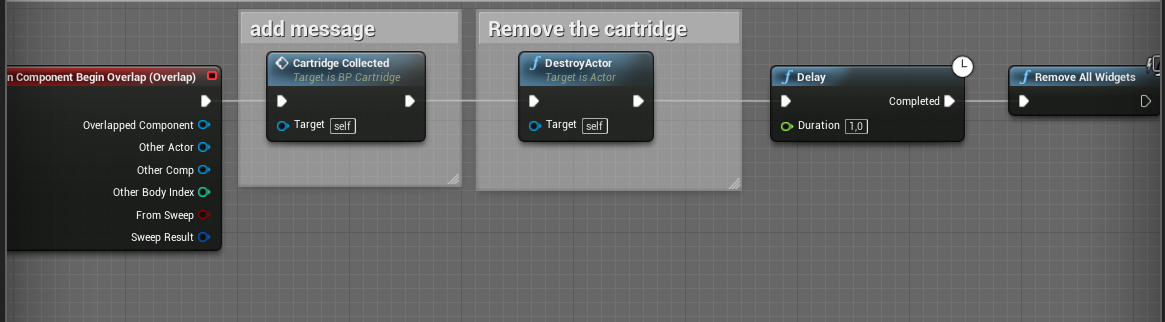
However when I remove the delay, it does work
The cartridge collected function basically adds a message on the screen:
twilit heath
and with the actor destroyed a second ago, whats there to execute that function?
 surreal peak
Because destroying an actor should be the last thing
jolly trail
Oh I see, well the reason why I have a 1 second delay is to keep my message on the screen
surreal peak
Hide it, turn off collision and destroy it later
jolly trail
Hmm, I'll try that, thank you both!
surreal peak
If the delay is for the message then handle the delay in the message
RemoveAllWidgets is also a bit weird
Let the widget remove itself after 1 second
jolly trail
There's no possibility to do that in a function, right?
surreal peak
You can use timers instead of delays
twilit heath
you can just put a 1s timer in widget OnConstruct that does RemoveFromParent
surreal peak
Or in UMG if it doesn't allow timers, you can use the animations with an event in it
Cant recall if timers worked in umg
twilit heath
they do
surreal peak
Alrighty
cobalt slate
Hey everyone! Sequencer noob question. I added a Fade in sequence to my main menu level to fade in after the unreal logo intro. My issue is, my main menu widget is not being affected by this fade sequence. is there a way to include it? or no? I messed with adding a fade inside of the widget, but now if I got to, say, settings, and press back, it plays the fade every time I return to the front menu widget. I only want this to happen once when starting the game. What am I missing?
tight sleet
@worthy pendant You could attach the volume to your actor through blueprint, or through blueprint attach a distance cull volume to every chunk you call to the screen, self contained this way.
 still sigil
So bare with me here. This is requires some backstory, so this is gonna be a lengthy one. So for the past week or so, I've been working on what I've been calling a "Jump to Safe Point" feature for my 3D platformer. This is a feature where if the play lands in a dangerous hazard, like lava or spikes for example, the game will automatically launch the player out of the hazard, and place them onto the nearest piece of safe ground.
If you're curious, here's how that's looking so far: https://gyazo.com/e29c96afb21efa16a7305ed5f7d1c75a
https://gyazo.com/74066b9da10243f1561e6ec141fdca6b
To achieve this effect, I used a NavMesh bounds to determine where the player can land, once they've been launched out of the hazard.

https://gyazo.com/df6d3946d1c0d0c6702b83cf8f94437b
https://gyazo.com/59fb60697eb42f478da122e6aefe4f30
And to achieve the launch itself, I'm using a "Get Random Reachable Point In Radius" node, combined with a "Launch Character" node.


As you can see in the first gif, it works relatively well. But there's a catch. You see I'm using a "Nav Modifier" volume to define the areas that aren't reachable. But despite this, the Blueprint seems to be ignoring those areas entirely. This results in the player sometimes locking onto a random point within the hazard that the game is trying to launch them out of. Causing them to launch into the hazard multiple times in some instances.
https://gyazo.com/5f64825cf4da0b682fe88d268143ddad
And also creating goofy instances like this. 😛

So my question is, is there a way to better define where the player can and can't launch to? And if so, how can I do it? And one other thing, "Get Random Point In Navigable Radius" seems to have the exact same problem. So I know it's not just the "Get Random Point" node that's causing it.
rough wing
How can I launch a character from cast?
odd ember
@still sigil you should try and debug it with breakpoints to see what the value of your safespots are
you might find that some functions are evaluated at the same time or before others
 half osprey
I have a pause screen that darkens the screen whenever the game is paused but uh, how do I get rid of it when the player unpauses?
odd ember
save the widget as a variable, then remove it from parent afterwards
odd ember
right click promote to variable... but really at this basic level you should look it up in the documentation
it's all written there
I advise you to follow those basic steps and use google instead of asking people constantly
half osprey
Gee, sorry
odd ember
we're all volunteers here trying to help out so it'd be nice to see that those we help are also willing to find help themselves when they can
half osprey
As I said, sorry
charred flint
How do we get a variable from another blueprint attached to this visible ?
Visibility node*
odd ember
ah you don't need to be sorry just take it into account next time you ask 😉
@charred flint I'm not sure I understand the question?
charred flint
As I said, sorry
@half osprey He means it really well ^^ Cranz is one of the most helpful guys out here!
@charred flint I'm not sure I understand the question?
@odd ember hmm what I mean is I wanna hide a widget but I think ive been trying it wrong, sec
What im trying to do is make this particular widget hidden when clicking on a specific button. I should have all of it right just confused because I have to cast to it since its in another widget
odd ember
so it's a different widget you wanna click on yes?
 trim matrix
Have you tried using Custom Events ?
Instead of Cast.
I'm trying to do communications between blueprints also.
odd ember
have you watched the pinned blueprint communication video in the pinned posts @trim matrix ?
trim matrix
I'm watching the 2 hours live video right now.
charred flint
Well I wanna hide 1 widget via click on button in another widget
trim matrix
@charred flint Add Custom Event > Search for your other widget on the right pannel by adding Input > Use the desired variable from the custom event.
odd ember
so in that case, the widget where you click needs to know about the other widget
trim matrix
I'm trying to move a crosshair (Box UI) along the Joystick axis.
Here it doesn't work...
charred flint
so in that case, the widget where you click needs to know about the other widget
@odd ember Yes this is what im trying to do
odd ember
@trim matrix I can't see what you're doing. like where is the crosshair BP?
 fossil thistle
hey everyone, I'm trying to create a slider widget blueprint that takes in a variable from my player blueprint which would determine where the handle is on the slider. I'm new to UE4 so I've been looking around for tutorials on how to do this but all I've found are videos showing how to manually change a slider, do you all know of any videos that explain how to control one the way I want or can anyone help me with figuring it out. tldr; I want a slider that goes up when I press F and goes back down when I release F but don't know where to start.
charred flint
@charred flint Add Custom Event > Search for your other widget on the right pannel by adding Input > Use the desired variable from the custom event.
@trim matrix I am not sure how or where I would use a custom event and get what I need as a result.
odd ember
@charred flint so, do you have a variable for the other widget? does the other widget spawn from the widget that you can click?
trim matrix
Have you tried using a Custom Event and adding Inputs on the right pannel ?
odd ember
@trim matrix I can't see any crosshair box. in any case you're doing this in your character or controller blueprint. that's not how blueprint communication works
you need to spawn the crosshair blueprint and then tell it to move
charred flint
Basically this is what im trying to hide/display
odd ember
so like, you click up top, and the widget changes?
trim matrix
Add a Custom Event and type this Blueprint name in the Inputs.
charred flint
the button of the trigger is in leftmenu and the overview is displayed inside the right menu
basically yes cranz like in this image
charred flint
you click on a button in the left menu and were it says coming soon is what im trying to toggle through out the left menu
odd ember
the menu on the left is the "manager" UI
charred flint
yes
odd ember
it will know about all the other UI, that it spawns from clicking on the buttons
so have a variable for each of those widgets that it needs to spawn, when you click, you know which button you clicked, and can spawn the appropriate widget
you will want to assign all of the spawned UI elements to a variable, something like CurrentVisibleWidget
so that every time you spawn a widget, you overwrite it
this way you won't spawn duplicates
charred flint
0.o
odd ember
and garbage collection will remove old widgets that aren't current
the alternative is that all of the widgets are spawned, and you just collapse all other widgets than the one you clicked on
charred flint
Oke let me try and find a way into that direction it sounds as a good approach
so basically I need to add variables of all of those widgets in the left menu and dont need to worry about it vice versa?
odd ember
yep
charred flint
the currentvisiblewidget is something im confused about
charred flint
not familiar yet with parenting them
odd ember
when you spawn them
they will spawn in hierarchy where the owner is the manager widget
that means the spawned widget is a "child" of the manager widget
it's just terminology
charred flint
I am going to share my mainmenu root with you so that you know what im looking at. Im not sure if I have the same child/parenting setup as you mean or if this is were I should look
this are the main pages currently the playerprofile is the ui you just saw
its a sub ui
thse are the frames of the left menu and main menu box of the profile page sub menu
 rugged stone
im trying to add some meshed for some guns into my project but when i try to import them in unreal they dont show up. i tried dragging them in and that didnt work either. if anyone knows how to fix this please help me
charred flint
and here are all the pages that I wanna be able to open inside the player profile main menu box after corresponding with the left menu as you know, so how do I parent them appropriate?
im trying to add some meshed for some guns into my project but when i try to import them in unreal they dont show up. i tried dragging them in and that didnt work either. if anyone knows how to fix this please help me
@rugged stone you should just copy paste the folder inside your game directory and click on import via unreal engine, that works for me usually
But be careful with replacing folder positions if they already exist and are being used. That can break up everything in seconds
rugged stone
im just trying to put them into a folder in my unreal project
charred flint
put them in the content folder
rugged stone
thats what im trying to do lol
trim matrix
I'm still figuring out how to use Axis Mappings on the UMG Blueprint.
Or transforming a UMG object into my Character Blueprint.
charred flint
Not sure what is going wrong then CTCT, do you know the location of your content folder?
drag them via your C disk itself not via the UE software
fossil thistle
I know this is wrong but I dont know what to use instead. Im trying to get my slider to increase or decrease when I change a variable in my player blueprint. Basically when I press F, I "charge up" an arrow by increasing the total velocity it can have. I want to take the velocity variable and use the widget to show that its being increased. How can I better implement this?
odd ember
@charred flint the content browser stuff doesn't matter
you just gotta create variable reference inside your manager blueprint
even better is if all those blueprints all derive from the same class
quaint falcon
can i make it so when 1 projectile is fired it switches to the other arm without if and booleans?
 zealous moth
why would i want to use a game instance instead of always using a game save?
odd ember
@zealous moth what do you mean?
zealous moth
well i keep reading on game instances and stuff but at this point, why not just always use the save data and just double your vars into temporary and permanent data?
odd ember
I mean the game instance is just the save game manager
zealous moth
yeah that's what it looks like to me... doesn't look that needed
zealous moth
it just looks like extra steps for nothing
odd ember
so how would you save games otherwise
zealous moth
have a save file with appropriate save data (arrays for collectibles with ID, integer for levels, etc). Duplicate your variables into Permanent and temporary data, so just dupe and add prefix. On acquirement event, cast to save file and modify temp data accordingly. When the player commits to saving, transfer the current temp data as permanent data.
When the player starts the game, load from permanent data and set temp data to match permanent data.
I don't see what the game instance offers that the save instance doesn't already have
I will still end up duplicating my data vars
and still do this whole transfer and load
odd ember
ok, in which class would you do this?
odd ember
like you still need to implement this logic somewhere
and it can't be in a class that is part of the save file
and it can't be in a class that is transient
zealous moth
i know... that's why i said it would all be in the save file
 winter kettle
I have a camera in a pawn that im possessing but the camera isn't changing when possessing the pawn
zealous moth
ok, here's a question for you, in what cases is the game instance better than just using the save file?
@winter kettle cast to that pawn or on possess even, get the camera and set active
odd ember
@zealous moth but you can't have the logic in the save file if it's the save file being used
like the save file has the data, how would you retrieve the data?
you need a manager class to do that
that isn't part of the save file, that isn't transient
there are very few options once those two filters have been applied
one is game instance, the other is game mode
game mode deals with rules, so it technically shouldn't have the responsibility
so that leaves us with game instance
zealous moth
are we talking about 2 different things? The game instance is the same as the save file but has data for as long as the game is running.
Management of saving can be done through the actors when needed. If I pickup a heart and heal, I can modify that value in the game controller and submit it to the temporary save file.
Correct me if I am wrong
odd ember
how can the management be done by the actors themselves?
the actor can't tell itself to spawn
zealous moth
how is that related to the save system?
odd ember
because you need to propagate the saved data to the actor
zealous moth
yeah, the controller can do it
half osprey
This tutorial I'm reading says to create an "Event On Interacted" but the only thing that shows up is a message. Am I stupid or something?
odd ember
how?
zealous moth
it deals directly with its controlled pawn
odd ember
how would the controller even know about the actor?
yeah but that's only the pawn
what about everything else that needs to be saved?
level actors and their states?
zealous moth
ah you mean a random actor, it can check itself with onbegin play and check the save data if needed
odd ember
@half osprey can you link to it?
@zealous moth it won't have a begin play if nothing spawns it
zealous moth
@half osprey compile first
odd ember
like it sounds like you're assuming will be populated by the level itself or something
zealous moth
yes?
half osprey
Unreal Engine Forums
This is the place to show, share, and link to your stuff!
Heres the tutorial
zealous moth
my game is not random, I place actors in levels and they are loaded as they should
half osprey
And I did compile
odd ember
@zealous moth if you load a save game then the actors won't be loaded anymore
that's the point
zealous moth
wut.... you load a level, then in the level all relevant actors can go into the save file to get the information they need.
This still doesn't answer what that has to do with the game instance, the instance itself does the same stuff.
odd ember
the game instance is the manager class
it manages the save games
it retrieves the data from a save game
and saves the data to the save game
it is accessible from any class, in any actor
it is global for the entire game session
it is not transient
which for instance a level WILL be
winter kettle
setting the camera to active isn't working
odd ember
@half osprey are you referring to the interface?
zealous moth
@odd ember out of all the videos, posts and articles I have read about game instances, they are all saying the same thing as it is a save file that gets its contents deleted when the game closes. I have no idea what you are talking about when you say it is managing anything.
odd ember
so click on it
shrewd summit
I'm trying to make it if you touch this enemy an image appears on the screen. This is my code. But when you touch the enemy nothing happens
odd ember
@zealous moth game instance is the first class to start up when the game starts up. it is the last class to shut down when you shut the game down
it manages save games by retrieving the data on disk, and deserializing it
that data can then be dispersed to whatever actors or values you want
putting save games in the game instance means you can save things even before you enter levels, or between levels etc. it is always active
transient means a class will wipe all data after you shut it down. for instance once you finish a level and load the next, the previous level will have all its data wiped
 mellow helm
So how come my projectilemovement component isnt causing the projectile to move
Something simple I'm sure
DirectionVector is set to 10, 0,0 but whether I unconnect all nodes, use the local space node, or the velocity node it doesnt move either way
odd ember
@mellow helm direction needs to a value between 0..1
mellow helm
Not if speed is 0
odd ember
if speed is 0 then the projectile won't move
mellow helm
When speed is 0 the velocity vector is the actual velocity
odd ember
a direction by definition is a vector with values of 0..1,0..1,0..1
odd ember
projectile movement has a direction as well
mellow helm
Right but how it works is if speed is 0 the velocity field is the actual velocity. If speed is anything other than zero it will treat the velocity vector as just direction
odd ember
which is velocity
right but you're complaining about it not moving
in which case I'd say change the speed value
or put in another way, what project movement is doing behind the scenes is speed * velocity, so if any of them are 0, both are 0
 sturdy notch
Have they developed a clean way to control the mouse with gamepad, yet?
rugged stone
im using a third person base rn and the player character always faces the direction of my key input (like if i press A it faces left and D it faces right ect.). i want it to always look in the direction of the mouse. how do i do this?
odd ember
oof
(screenCenter - mousePosition).normalized
then there should be a node called ProjectToWorld or something like that
that may work
rugged stone
how would i apply it
odd ember
depends on your character
but that will give you the direction in the world that the mouse is pointing towards from the center of the screen
odd ember
the thing is
the two cases you have aren't really comparable
because your character moves on input in one case, but in this case you aren't moving your character, just your mouse
unless there's an event called on mouse movement or on mouse delta
but I don't know if such event exists
rugged stone
i have input axis turn but idk if that has anything to do with the mouse lol
rugged stone
so what would i do with it
odd ember
I assume there's some node hooked up to turn already
odd ember
you could try with AddMovementInput with a scale of 0, and direction being the one I told you
 main lake
Guys is it possible to change the icon on the top left (UE4 logo) for my own logo, and put the text MyProject.fs in the center of the title bar, also changing it's font, and the color of the bar (on the screen you see the result of what i want is under the real bar ) please ?
odd ember
you're in the wrong channel buddy
main lake
Wich one do i have to go ? because i did that with blueprint
odd ember
main lake
odd ember
I dunno tbh, I think it's changed outside of the engine or through settings
don't think it's BP related
tbh I find it weird that you can set the window title in BP
rugged stone
i dont understand this ill just try it tomarrow lol
odd ember
what you want to do require some math knowledge @rugged stone
but I gave you all the answers on how to do it
winter kettle
so for some reason my custom character wont use its camera when possessed
did another character with a camera and it worked well, checked class defaults, spring arm component settings and camera settings of both pawns and even with the same settings my custom character still wont use its camera when possessed
 viscid skiff
I have a system setup where a tick line trace checks which item I am looking at, and sets a variable. Then in the weapon, it checks to see if "E" is pressed and checks if the item I am looking at is self, then it will give the player the item and spawn the old item the player had on the ground in front. However, this becomes an infinite loop thanks to the tick line trace, and if I hold "E" the item will follow where I am looking, with the item I want to pickup continuously cycling. How would I fix this? Also if you want to see a video to explain better, DM me.
trim matrix
what is the equivalent for get player pawn for enemies?
trim matrix
casting
im casting to enemy blueprint
and enemy is casting to me which is fine
i got it to get player pawn
but now i need something for the enemy
odd ember
@trim matrix again, what are you trying to do
like in the sense of the world
what do you need an enemy for
trim matrix
so he can slice me up with a sword
i can slice him up
Blueprint Runtime Error: "Accessed None trying to read property CallFunc_GetAIController_ReturnValue_1". Blueprint: ThirdPersonCharacter1 Function: Execute Ubergraph Third Person Character 1 Graph: SLICE Node: Cast To BP_MASTERSLICER
now it makes error like that
:S
odd ember
@trim matrix you need to use collision hitboxes
read up on blueprint communication
it's available under pinned posts
trim matrix
wtf
 pure tulip
Hey, does anyone have any idea how I would go about making a camera lock on system that allows me to circle an enemy, for a quadruped character? I don't have strafing on my character so I can't just rotate the character and camera to look towards the enemy. I'd like my character to move forwards (W) and backwards (S) and have it be similar to the A and D movement for a normal character that could strafe side to side and A and D movement for my character would be moving diagonally forwards, spacing me out from or towards the enemy.
 maiden wadi
@pure tulip Well if you're turning the character sideways anyhow(To keep their broadside towards the target), your W and S should stay the same, move forward and back, but you might also have to add a little part that checks if you're target locked, if yes, on movement update, turn the character to face 90 degrees away from their target so that it would keep circling. You might also be able to add to your A and D if you're using those to turn, to clamp their max values when locked to let your character slowly turn inwards or outwards of their target. If that makes sense?
pure tulip
@maiden wadi I think so. The one problem is how do I manage to set my direction 90 degrees depending on if I am going clockwise or counter-clockwise. That's the issue I'm having. I also want to be able to stop moving and tap A or D to do a 180 turn and start walking the other direction, so I can't put it all off of a static direction I was facing when I locked onto the target.
maiden wadi
I dunno. You could do something like having a Clockwise bool. Get the initial lock on direction by checking the character facing against the target and then set the bool. Could use that to determine which direction to turn when pressing W or S, and then on A or D, set up a little turning sequence, and then flip the bool. Probably not the only way to do it though, just thoughts.
pure tulip
Yeah, that could work. Lemme see what I can do. Been up for hours longer than I should have been trying to do this so I might not be able to actually think it through properly till tomorrow, I hope I can now though.
 late gorge
hi, can anyone help me debug a problem with an animation blueprint? when i try to turn on root motion it completely breaks my controller
and when i turn it off again it works... i printed all variables, they're the same regardless of the setting
i turned that to "Root Motion From Everything" from "Root Motion From Montages Only"
and it broke
 sick sapphire
How do I make an explosion impulse? Its for an explosive I'm making, I want it to affect physical objects
I know its radial impulse but I don't know how to set it up
atomic salmon
@sick sapphire you can use a Radial Force Actor: https://www.youtube.com/watch?v=3spScprWdyI

Using thrusters and radial force actors you can create wonderful physics simulations by using triggered impulses of FORCE! Link for the Chandelier constraint tutorial: https://www.youtube.com/watch?v=ZCJTt9euHJg&list=PLM6PTMy09y9AHmFFEvrksTlyhqJnppvQm&index=2
atomic salmon
@sick sapphire you need to get the location where your projectile explodes, find all physics actors in that area (within a certain radius), the apply a radial impulse to them: https://docs.unrealengine.com/en-US/BlueprintAPI/Physics/AddRadialForce/index.html
Add Radial Force
sick sapphire
@atomic salmon ok so is there a way to get all the actors in a radius without using a sphere collision
because i wanted to do that, but it messed with other systems that also used overlap
atomic salmon
You should use this: https://docs.unrealengine.com/en-US/BlueprintAPI/Collision/SphereOverlapActors/index.html
SphereOverlapActors
sick sapphire
@atomic salmon ok thanks dude
pure tulip
@maiden wadi I'm still trying to figure out how to distinguish which side of my character Is facing the enemy. I've tried as much as possible and the closest I've got is a -1 to 1 value (I can make it -180 to 180) when doing a full circle around it, but it spits out the same value whether I'm circling my left side in or right side in.
I'm probably missing a very obvious thing here but I just can't seem to find it...
atomic salmon
@pure tulip I am jumping in a bit late in the discussion, but one way would be to evaluate the Look At Rotation between your character and the enemy, then calculate the Delta with your character's rotation. That should give you the quadrant your enemy is respect to your character. You can use Find Look At Rotation and then Delta Rotator and look at the Yaw.
pure tulip
@atomic salmon You're a legend! Ty
 foggy egret
currently, my main menu is not loading as a result
 gentle urchin
well it shows that the actor references does not have the variable the engine is looking for, which gives you the rest of the errors..
foggy egret
umm, I'm very weak with BP, so I'm guessing from what you say.. its perhaps a typo .. that is leading to a wrong reference, or something else perhaps?
gentle urchin
Not a typo,
so the RuneOrder does not exist inside the BP_RuneController Actor
it's shown by the grey background of the "Get RuneOrder" node
foggy egret
this is non-confidential project, can I perhaps share it with you .. by giving you git access ?
I have no clue how to fix it
gentle urchin
figure out if you need it
if you do, you must add it in the BP_RuneController actor
if not, just remove it
foggy egret
I basically have 3 runes on 3 locations in my map, and they have to be activated in a correct order
maiden wadi
@pure tulip Was away, you get the math on that figured out?
foggy egret
for a bridge to appear .. leading to boss island
I could share screen perhaps? @gentle urchin
gentle urchin
Dont really have time for that, sorry
foggy egret
yeah
gentle urchin
In that case you must add the variable to the actor in reference
pure tulip
@maiden wadi vr_macro figured it out for me. I've got the left and right working great now I'm working on the A and D to move further away and closer. Then I'll work on the direction change. 🙂
gentle urchin
so open up BP_RuneController, and add the new variable, of the same type as the RuneOrder
foggy egret
uff.. for some reason .. this is happening: The main menu UI is not occupying the full screen, even though I have set it so..
atomic salmon
@foggy egret UI in general is scaling without deforming. Your PIE window has a weird aspect ratio, so that is expected.
Try to play in a standalone window or in a game window.
 exotic warren
ay, does the "Execute Console Command" node work on non-debug builds
atomic salmon
@exotic warren it depends on what they do, but in general yes
exotic warren
Well mainly I was thinking about the Engine Scalability settings
But I guess C++ exec functions too?
what specifically can't you do with them?
atomic salmon
@exotic warren scalability settings work. I had a VR project time ago that was changing them on the fly in that way.
What doesn't work is in general anything related to on-screen debugging.
trim matrix
In the 2D side scroller, does anyone know how to apply force to trajectory?
I want to make the character jump, but I don't want to use the "jump" event which pushes the character straight up.
Rather, I want the jump to follow a trajectory.
By applying a force on the x and y
 hallow sun
theres a AddForce node
you can give it a direction vector and if everything is set correctly, your character will fly
fluid folio
Hello can someone help me? I tried to put all the connected blueprints in one screen, basicaly whenever i hover cursor over my enemie unit it should highlight, but it does it only sometimes, after unit moves to new location it wont highlight, then after few more steps it works again. I have tried changing the collision presets and messing around with the "detect under mouse" bluepriint but with no succes. I am still prety much a noobie and learning from toturials, and got stuck here. Thanks in advance!
foggy egret
@atomic salmon .. I managed to fix the issue otherwise.. even in standalone window, I was having the same issue.
thanks though
maiden wadi
@fluid folio Where are you calling that DetectUnderMouse function from?
fluid folio
From BP_player_controler on event tick
maiden wadi
Collision presets should be fine if it works even half the time. Does it work constantly if the unit never moves?
fluid folio
Yes if i am able to over the unit it works all the time till they move
after they move few times i can over again at some point but its not constant, feels random to me
maiden wadi
Can this affect more than one unit at a time?
fluid folio
i have them in groups they are random from 1-4 units per group, so i can highligt one of the groops once overed.
 gilded pebble
Would it be possible to get the remaining vertices and triangles of a mesh after slicing it?
maiden wadi
@fluid folio I'd probably clear the CurrentOveredUnit regardless of if it's valid after the mouse check. But other than that, I'd put print nodes after all of your branches to make sure things are acting correctly.
fluid folio
@maiden wadi Put clear here? Placed it but also only works after highlight possbile, or you wanted me to put it right after the first if branch?
 twin pollen
guys, how do I set an UMG animation to loop? I can't really find it
atomic salmon
@foggy egret did you have to create a scale box?
foggy egret
@atomic salmon no actually I just had to turn the anchor of the background image to occupy the whole screen (a pre-made anchor default in the lower-right corner)
also, I made a different map for main menu only
the first thing fixed the issue, the second made it so that even if my game was broken, I can launch the main menu at least in standalone window mode
which is actually the case, as I was not able to get it to run in standalone earlier because of serious bugs in my gameplay blueprints
 vernal torrent
Hey! I'd say I'm below average with blueprints, I've only used unreal for a month or so. I have a problem and I think it's pretty weird, I have a variable referencing an object, (it worked yesterday, btw) and then I get the position of it. Well, it looks like it doesn't work,
I've got two variables, default ball location and ball
If I cast to Ball the error goes away but it still doesn't reference it, something like that
 wet swift
Hi, I have been working on this fairly large level (I had to increase the texture pool multiple times) I have been doing nothing out of the ordinary and then all the sudden when I go to open my level it gets to 70% and then crashes with no error. Any ideas?
 serene terrace
Hey, can someone help me... again. Well, the stuff is: I wrote algorithm that smoothly aims pawn towards the position of camera. And it works very fine
Until I hit something...
"Source code":
 slender ridge
It looks like its because your using physics, rather than logic, to move your dude around.
serene terrace
Well, yes, I'm using physics. Actually, movement is just "Add Force" nodes
But that doesn't actually change anything
I guess
slender ridge
Physics is great, but you will lose finite control at some point. You have a few options. The "easy" way from where your standing now would be to manually dampen the forces on your object so you can get rid of your jitter... but...
I would recommend you have your forward vector of your actor drive its position instead. Lerp/Tween to it rather than relying on add force
If you still want you ship to bounce around when it hits something, you could disable that lerp for a time.
serene terrace
For what time and even why though?
I mean, I didn't understand why my variant is appears to be non working
Pawn rotates towards the camera. The camera is always stay in it's position after the "collision". But yet still, pawn refuses to rotate back
slender ridge
Well, its because when you hit something, its applying all kinds of force in a non-cardinal direction. Ill bet if you look at the forces applied to your ship after it hits something its going to be all over the map . Like #.000#
you could either dampen those values (which would work, but never 'feel' tight), or drive with logic rather than physics, so when you bounce into something you dont have that problem.
Like A is my current forward vector, B is my desired forward vector, and have a value where you lerp between them.
slender ridge
if after you hit the wall, the rotational force is {4342.00000041241,-82131412.00000041241,0}, trying to even that out takes a little doing. When you rotate towards a point it looks like its over compensating.
serene terrace
I don't know what force is continue to be applied even after I stopped colliding with wall. And also I changed my algorithm so it now just sets rotation to cam's rotation (without interp, just sets rotation every tick) and even then this stuff happens. What force can overtake a tick?
Well, whatever. I'd like to look into original Flying Sample to see how this stuff handled there. I think I saw this type of thing
Well, that didn't work
vernal torrent
Does someone wanna help me to figure out how to fix my problem in a voice chat? I'd really appreciate it
odd ember
what's wrong with typing it here?
vernal torrent
I did, but then other people posted their problems and it got "lost". Also and more importantly, I'm not good at explaining things in chat, as I'm not super experienced with ue terminology and I'm not a native speaker
also, I can share the screen in vc
odd ember
it's just a big ask, that's all
vernal torrent
wdym?
odd ember
like you're asking a lot
like i can't be bothered doing voice chat
but I'll try to help regardless
odd ember
i saw it
vernal torrent
does it even make sense?
odd ember
the thing is the ball is probably not spawned by the time you try to recall its position
vernal torrent
nope, I added a one second delay and I still have the problem
the weird thing is that it worked yesterday just fine, but not today, I even have restarted my pc...
odd ember
are you doing it on the ball itself?
or where are you running the logic?
if it's running on another actor the ball may not have spawned by the time you try and run it
is all
vernal torrent
I'm running it in the player
odd ember
is the player the ball
vernal torrent
nope
ok, let me try to explain
I'm doning a physics based game, so you can move platforms and when you hit a button a ball falls
so, I want to get it's position so that I can reset it's position in-game
odd ember
you shouldn't be doing that logic in the player
vernal torrent
hmm, but I made a variable with the ball in it and it worked fine yesterday, I'm running more stuff in it, is there a reason why I shouldn't be running code in there?
btw, I really appreciate the help you are giving me 😄
odd ember
generally each actor should only have code that is responsible for itself
so if you want the ball to reset position, the ball should do that
not the player
vernal torrent
fair enough, let me try that
(the input is from the player, so I did it in there because of that)
odd ember
what kind of input?
odd ember
no it doesn't matter
vernal torrent
yeah, it works if I do in in the ball actor!
I still don't understand why it worked yesterday but not today, but this is enough for me! Thank you so much for helping me ❤️ !
 weak spruce
finally
that 10 minute waiting period is harsh, shouldn't have left before
does anyone know how to get the current camera viewport size in world units?
trying to make a background plane that covers the entire camera view, but I don't really want to make it ridiculously big since I've got some assets that need to be just on the edge
I've only found viewport size in relation to the UI toolset
odd ember
well yeah
viewport size is screen size
why don't you just make a screen space widget that fills up the space
weak spruce
I need it to be behind in-game assets
it's 2D I should mention
so there's a tilemap, some entities, and behind it all is this backdrop, which is a dynamically rendered sky
odd ember
mmm I see
weak spruce
eventually I'll have some clouds drift by too, but that needs to be relative to camera position
weak spruce
sure, yeah
odd ember
there is a node called ProjectScreenToWorld
maybe you can use that to gain an insight
but generally I'd just make it big and occlude it
weak spruce
hmm, occlude how?
odd ember
it's going to be a plane anyway so it's not high on performance
weak spruce
yeah exactly
odd ember
put something in front of it
weak spruce
right
I suppose if I could get the screen size
use ProjectScreenToWorld on the width and height that should work
thank you, I'll give it a spin
hmm no, that didn't really seem to help
it requires something to project in relation to, and that kind of throws it off
 late mango
Hello, can someone tell me how can I implement Admob Rewarded Ads in a game,
I saw on Blueprints there are Banner and Interstitial ads but no Rewarded Ads node.
 burnt obsidian
is there a way to compile all blueprints in my project at once? I have this issue evertytime I change something in a struct I have that I have to manually go to every blueprint where its referenced
and click compile was wondering if theres a way to just compile everything again
odd ember
@weak spruce I mean like I said the best case scenario is still just putting a big plane in the background
there are no downsides to it
weak spruce
Yeah I know, and that's sort of how I've solved it. The issue comes once I am going to introduce the cloud sprites
odd ember
not sure what you mean?
weak spruce
hold on
so here's the cloud spride
needs to be just wide enough for the camera view
odd ember
so what's the issue?
weak spruce
well screens come in all sorts of sizes right?
odd ember
yeah you're not going to solve it just by making it fit your screen size
why don't you just a few planes next to each other so it's continuous
weak spruce
because they're not supposed to be scrolled sideways
odd ember
does it matter?
weak spruce
for parallaxing? Yeah, it does
odd ember
I don't see the issue
weak spruce
they go along with the camera?
weak spruce
what do you mean
odd ember
and it won't work for all screens either
like it seems you are trying really hard to shoe horn in this idea of yours because you think that's the only way it'll work
... but it won't even work for any screensize that is different than your screen
weak spruce
listen man, I just wanted to figure out if there was a way to get the screen size in world units. I didn't come here for a lecture on my ideas
weak spruce
sure
 manic widget
@vernal torrent Hi, could you explain how do you reference the ball in the blueprint you showed
vernal torrent
I just added a variable that was the actor, but don't worry, I fixed it by running the code in the object itself
so now it works 😄
manic widget
Ok, good it worked. Just for info, making a variable and setting it to the object is not a way of referencing objects. You have to reference the actual instance of the ball spawned. One way of doing it is for example when you spawn the actor, you set the output of the spawn in a variable, so your spawned actor is the one referenced
I hope I explained it in an understandable way 😬
For example, if your game is about spawned balls, you should have a « ballManager » blueprint, who will spawn the balls and reference them. Then you can add logic for managing the balls in this manager ( spawn, des pawn, counting them, etc...)
odd ember
@manic widget in his case it was about the fact that he did before the ball spawned
in any case his case was solved
manic widget
@odd ember yeah, sorry if I got carried away here
vernal torrent
Thanks for the info, I'm sure it will help a lot in the future!
half osprey
https://forums.unrealengine.com/community/community-content-tools-and-tutorials/91268-simple-effective-expandable-interaction-system Hey, I was looking through this tutorial and followed all the steps but in the final part with the Light Switch's graph, I don't get an event for OnInteracted. Did I mess anything up? Is this outdated?
Unreal Engine Forums
This is the place to show, share, and link to your stuff!
odd ember
is the light switch implementing the interface?
half osprey
I... think so?
atomic salmon
@half osprey did you add the interface to the switch BP?
Class Settings --> Interfaces
And then hit Compile otherwise you won't be able to use it
half osprey
Uhhhh, where is class settings 😂
atomic salmon
Top menu bar
Icon with a paper sheet and a gear
Kind of
You need to be editing the Light Switch BP to see it of course
half osprey
Oh yeah that I'm dumb lmao
Okay I put that in but I still get no event for it
The 1st is just the same as the message
Wait nvm I got it
Thank you!
Okay I got the event and all that but pressing the button still does nothing :///
I have the light targeted as well
odd ember
@half osprey you need to do something with the event
odd ember
and where do you trigger the event?
half osprey
In thirdpersonbp
odd ember
you should make sure you're actually hitting something first
and try with a print string node instead of the toggle visibility
that way you have visual feedback for it working
half osprey
I should be hitting the hitbox like it says in the tutorial
odd ember
you don't know that
half osprey
I put print string in the bp and still nothing
odd ember
well then it doesn't hit probably
half osprey
Ok so I looked more at the guide and it says in thirdpersonbp in one part to use your camera for something. They used firstpersoncamera but there isnt a thirdpersoncamera so I used follow camera. Anything else I can do?
odd ember
try
like I think you're already in above your head and should probably try something easier to start out with, but since you've come this far you might as well see if you can finish it
half osprey
Well thats what I've been doing but I was thinking that maybe that might why it isnt working
odd ember
there is a boolean on the trace node you can use
loud cipher
im compiling shaders and it started at 10,000, its now at 8,000 but has been compiling for 6 hours now
half osprey
This one?
odd ember
@loud cipher wrong channel
odd ember
@half osprey yes
half osprey
Gotcha, what bool should I use?
odd ember
it's on the node?
half osprey
Hm?
odd ember
@half osprey I mean this is kind of what I also meant with being in over your head. you started out by picking something that's pretty complex to do, that people with more experience than you fail to do properly
half osprey
I just thought it would be smooth sailing since I had a tutorial to read and follow along with
odd ember
maybe find a tutorial for something like, idk, spawning bullets as projectiles and go through the basics of variables and functions
like what is an input, what is an output, how you can make those work together
you can find a LOT of badly written tutorials out there
best to take the ones that are available either on epic's wiki or straight from the documentation
at least to begin with
once you gain more experience you can go more complex
but there's no reason to throw yourself into the deep end day 1
it'll just burn you out
 granite steppe
Hello all. Please, who knows this - can i change default UE4 material thumbnail preview shape, from sphere to cube? Not for some material - for all materials in all project(s)? Thank You.
odd ember
making games isn't easy
@granite steppe you're in the wrong channel for that question. try #graphics
half osprey
This isn't day 1 for me, but I get what you mean. I'll go learn the more basics
granite steppe
how is that graphics, it is BP editor question...
odd ember
the material editor isn't BP
@granite steppe
the material editor is its own editor within the engine
#graphics is where you ask questions about the material editor
charred flint
What is the best way to make the landscape thick? Right now I have a voxel editor in my game but if you try to lower the ground it doesnt make the landscape but just makes a hole
odd ember
@charred flint also not the right channel. voxels you can try asking about in #graphics too
granite steppe
i am asking about thumbnails in UE4 editor browser. Not particular in material editor. Oh well 😦
odd ember
@granite steppe right okay, but that is still not blueprint. perhaps someone in #ue4-general can answer it
granite steppe
thanks
snow geyser
Working with splines atm and cant find any documentation on what I had originally planned. Does anyone know of some tutorials / documentation / etc related to attaching spline to static mesh? General plan is to create a static mesh at point A and B, then connect them via spline
twilit heath
there is a live stream for splines and spline meshes somewhere
snow geyser
Well I mean I have a general understanding of implementing splines, its connecting them to static meshes that ive not seen
if possible at all
 tight schooner
Yeah you can make spline components and add spline points with BP nodes that you feed with inputs for transform and (if desired) tangents. I'm away from my PC so I can't give you the rundown though. But I'd suggest noodling around with it in a construction script.
Not sure what you mean by "connect". Like are these meshes going to move around?
snow geyser
building a road system for a city builder. I want to create point A-B with static mesh and the middle fill in with spline / generated roads. Then eventually be able to create junctions along the spline that would insert static mesh to create the junction in the middle of the existing road
I want it to look more grid-like than say cities skylines where its obviously splines
which is why I want the static meshes for the junctions / corners etc
tight schooner
I never actually played with sockets but I'll guess that static mesh sockets would come in handy for defining the attach points for the splines. There's gotta be some Get Socket type node...
odd ember
you dont need sockets
spline nodes will handle it all for you
I did one of these like years back
snow geyser
Including the insert static mesh along a spline line and essentially splitting it?
odd ember
yeah so per new spline node you start a new mesh
the spline path determines the previous point's mesh's trajectory + transform values
I did one specifically for pipes so I could do thick pipes into thin pipes etc.
solving rotation was a bitch since this was before quats
trim matrix
theres a
AddForcenode
@hallow sun Add force doesn't seem to do anything to the character. It did say I needed to make the 2dcharactercapsule simulate physics so I set that accordingly but sitll nothing
trim matrix
So there's twoo Add Force.
One is for Character Movement.
The other is for Physics.
if I try to use the physics one, I have to enable physics on my character capsule.
Which just causes my character to fall below the platform.
So I think I still have to jump, but I can add impulse after the jump and then move the character in some direction!
And yes you were right, the number needs to be very high!
 mighty fable
Hey guys, I was curious if you could help me figure out how to blueprint something...
I'm looking to have a base character within the game and have it output a different color from the player controlled character, if that makes sense.
odd ember
@mighty fable you'll have to explain it a bit more than that
mighty fable
@odd ember Ok, so I have the player model set as the same model as the npc standing in my scene. What I am attempting to achieve is that when the game loads it will render the npc as a different base colored material than the player controlled unit. If that makes sense
odd ember
ok? do you need it to be dynamic or just static?
if static just pick a different color
@mighty fable
half osprey
Is this a good way to check if a key is being held down? (Read from epic forums)
 brave hatch
I want to make a mechanic where enemies will run away from or stay out of light created by both the player and environment, how does one go about doing that?
mighty fable
@odd ember Dynamic
 snow halo
Any reason why i can't get this to work in a level blueprint? The pawn has a movement component. It's inherited from the default pawn which comes with one.
 tidal jacinth
I want to count how much time a button is pressed, any easy way to do this?
snow halo
works with action mappings just fine don't understand why a simple F input node wouldn't work
tidal jacinth
I just need to know the best way to count how much time that button is pressed
I'm getting very confusedx with the timers
stuck hedge
Anyone ever seen a phantom reference like this? I went into the pause menu and can't find any reference at all to this BP. No variables are set to it, there are no casts, or anything else.
 faint pasture
@stuck hedge Everything compiled and saved?
stuck hedge
Yes, everything is compiled and saved. neither had been opened when I went to delete the TPC BP. I checked, and the TPC BP has a reference to the pause menu, but the pause menu does not seem to have any reference to the character BP at all
so I'm not sure why it's claiming it does.
faint pasture
Try just delete it and see what happens.
You are using version control right?
@tidal jacinth Count how many times total or within a timeframe?
stuck hedge
@faint pasture Yes of course, I'd just never seen something fail like that before. This is a half-done project I'm coming into, so i'm not entirely sure what the person before me did. i've never seen it kick up and claim there was a reference like this though when one didn't seem to exist. At least not in any of my projects. I just wanted to check and see if there was something I might be missing that someone had experience with.
faint pasture
@tidal jacinth How would you press a button multiple times without releasing it?
@tidal jacinth Something like this might work.
What are you trying to do though?
tidal jacinth
Hmm, see what you did, that's not actually what I need. I need how much time the button has been held not how many times.
If it was pressed for 3s I need an output float of 3 for example
faint pasture
sec
@tidal jacinth
You could also use a timeline, depends on what you're trying to do
tidal jacinth
@faint pasture almost that my man! I need the exact seconds elapsed while it's being held. But you gave me an idea! I'll subtract that stored variable by the game time seconds until it's realised and I'll have the float I need! Thanks!
faint pasture
What I gave you will give the exact time elapsed
tidal jacinth
Sure, but it'll give me the final elapsed time
faint pasture
Do you need time elapsed as it's held down or only when released?
What are you trying to do, exactly?
tidal jacinth
As it's held on
faint pasture
Is there an upper limit? DO you need it to go to like 30 seconds or only up to 5 or so?
tidal jacinth
That should work! I'll try it!
faint pasture
Timeline has keys 0,0 and 3,3, but you can do whatever. You want to use timelines whenever you need something to change over time smoothly and need the numbers as it goes.
tidal jacinth
Sure! Makes sense! The only issue is that I can't use timelines on a widget
tidal jacinth
Anyone knows why my launch is not avaliable?
 frank garnet
Sorry to chip this in but any blueprint for shooting stars in a custom made skybox?
Kindly DM so It doesnt disrupt the current conversation
 hybrid topaz
Hey. I am trying to make window wholes in the walls of a room in the gameplay. is this something anyone can help me with? walls are instanced static mesh.
 plush ridge
When I click the "isValid" or "Branch" in this error, it takes me to a "StandardMacro" for those instead of where in the Blueprint it failed. It's weird that it's throwing an error during an IsValid check, that's what those are for ... thoughts?
plush ridge
It says it couldn't read my "Opponent" variable in the BP_AIController class but that's very vague
surreal peak
Ubergraph is usually the eventGraph
plush ridge
Why would it throw this during an IsValid node though? Isn't that what IsValid is for?
surreal peak
Show the code
plush ridge
I don't know where it's happening in the event graph, there are 3, 4 maybe more places where the Opponent variable is checked in an IsValid
An example
surreal peak
Even if you click on the Branch?