#blueprint
402296 messages · Page 425 of 403
 odd ember
 round dock
so there's no way to inherit structs
odd ember
not in BP
round dock
cool that was the q
 trim matrix
you can
round dock
i recall having done it (somehow) in cpp before
 prime berry
I don't even get what "inherit structs" means in this context, so sorry for my misunderstanding of the initial question 🤔
trim matrix
f.e. if you want stuff to be able to be in data tables you have to inherit from FTableRowBase
round dock
like make a very basic item struct with one variable, say Display Name
odd ember
@prime berry data inheritance as opposed to functionality inheritance
round dock
then a weapon child of that that includes variables like Range, Damage, etc
prime berry
ooohhh
round dock
so they can all be grouped together and displayed in an inventory
odd ember
you'd be better off with a class hierarchy though tbh
round dock
i mean yeah i've been told to do that because "pure data" never stays "pure data"
odd ember
there is a distinction between the visual UI and the functional mechanics
round dock
well this grouping would be used under the hood as well
odd ember
I've been told that NVMe SSDs are standard now
you shouldn't believe everything on the internet
@round dock your data wouldn't mean anything under the hood unless it was accompanied by functionality
round dock
stored in the same array
as an inventory
with the functionality in the classes that uses them
odd ember
yeah it's fine for storing but when it comes time to actually equip those items, they need to also have functionality
round dock
anti-oop as hell but it just seems like a way better use of RAM
odd ember
it's not anti oop
odd ember
anti oop would be a fully fledged ECS
round dock
that's my preference, actually
odd ember
but you're not gonna get that in UE4 unless you make it yourself from scratch
round dock
my engine was built as an entity component system
odd ember
that's great but this is a UE4 forum sir
round dock
but alas
it seems like a waste for a character to be carrying around a bunch of actors as inventory items
odd ember
you can store them as soft references in a data table?
round dock
like, actors have world position and i don't need that. and i can't make them objects because they dont have a world instance or whatever
odd ember
then instantiate them when necessary
round dock
lemme look up this data table thing
and soft references
data table doesn't seem like it'd work because every entry has the same value types
where as my entries are only going to have a few similar values with the rest being specific to item type
off to visual studio!
trim matrix
Should I use RInterp to smooth a moving location ?
It works with rotation, but I don't know about Location.
 distant sedge
Sounds like you can just make an Object class, if you don't want the overhead from an Actor.
 glacial eagle
Yuki - use the vector version. There's one around.
round dock
I was running into the problem where Objects can't do certain things like Apply Radial Damage, and Play Sound at Location
glacial eagle
You need to implement GetWorld() for the object in C++.
round dock
so i was like "well i make all the weapons just data and put the functionality in the player class"
glacial eagle
Objects don't have a UWorld by default, since they can exist anywhere. As such they can't access many of the static functions that require a world context.
round dock
so it seems like kinda a lose lose situation
glacial eagle
Weapons are very commonly implemented as actors
It's not really wasteful, since it's what the actor class is designed for.
round dock
even when they don't show up in the world?
glacial eagle
Sure
round dock
fuck it lmao
glacial eagle
None of my weapons have visual components, but they're actors
The behaviours are created in components, and I use the actor as a "shell" class to tie functionality together. Worked well for me so far.
trim matrix
Vector Spring Interp ?
round dock
do you just leave them attached to the character or say fuck it and let them stack up at the origin
glacial eagle
I attach them
Vehicles rather than characters in this case, but same principle.
Plus if I then want to add visual components I can.
round dock
good deal didn't think of that
glacial eagle
If you're feeling brave you can try switching to gameplay abilities, but you kind of have to opt-in to the full system.
There's a fully fledged example now of a GAS-based shooter.
round dock
oof if every video on it is an hour long it is probably too new or too smart for me
but this looks interesting
glacial eagle
Yeah it's quite involved and takes time to get used to and setup, but it's very flexible once you get to that point.
I like making life difficult for myself though 🤷
trim matrix
@round dock https://www.youtube.com/watch?v=yxqSkFNAzE0

In this new series I go through a method of creating an inventory system, similar to a survival game. In this first part I introduce the system and go through the process of setting up some key assets that we will need going forward.
There are unlimited ways to create a tutor...
i'm about to make an inventory too
Vector Spring Interp have Execution pins...
🤔
 proper vine
Can some one help me ? Im getting this weird yellow and blue stripes in my transforming actors and even in my lines i dont really know whats going on with my project
 inner sandal
Anyone got any input on reverse playing media textures? I've asked multiple times but its fizzled out each time.
prime berry
@proper vine did you accidentally edit the gizmo material? it's in EngineContent/EngineMaterials and it's called GizmoMaterial
that would at least explain the arrows
 fair magnet
Hey there Is there a way to get a "actor is doing this since that many seconds" ?
I want something like a count which I can multiply
proper vine
@prime berry i dont have that xD
prime berry
can you delete the filter?
proper vine
the filter is not active
prime berry
I mean deleting the word gizmo from the search, but yeah I guess if it's not there then it's not there 🤔
question is how you managed to do that
fair magnet
Gotta delete the word
prime berry
if you downloaded it with the launcherm you might want to verify your engine files to see if that restores it
 thorny relic
@fair magnet store the game time when they started the action in a variable, then compare against the game time now if you want to know how long they've been doing it?
Also your name is very hard to @
trim matrix
So here's my Blueprint and what it does at the moment :
As you see it's not properly interpolated when I use the movement axis too fast.
I don't know how to use the Vinterp To node with my system.
Like... I don't know what's supposed to be Current or Target. Is Target the Weapon's offset so it goes back to the original position smoothly?
Or should I interpolate the Axis first ?
 upbeat sinew
Have you tried using a Finterp? and making that into a vector?
trim matrix
No.
upbeat sinew
Your player 3D?
trim matrix
What ??
upbeat sinew
Oh I havent clicked the video
trim matrix
Yes watch it.
upbeat sinew
._.
It seems to be happening while you start the Vinterp
Maybe after reaching a certain velocity then start the Vinterp
That way it wont jump between the movement values so fast
trim matrix
The Vinterp has no effect.
You could just ignore it as it is set on my screenshot.
I just set it just to show it's supposed to be used, but I don't know where or how.
 atomic salmon
@proper vine if you are using a launcher version of the engine, you can do a repair from the launcher. Whatever has been modified which is standard to the engine will be reset to default.
Just in case, make a backup copy of your project first.
Just click Verify.
trim matrix
Ooooooo ! Solved.
I just used my Mesh relative location for Current Location like I did for the rotation interpolation.
Umh... it's still a little weird tho...
 steep verge
guys i need help, I've encountered a problem with the first person character every time when i look forward my character doesn't seem to play the idle animation but if i look any were else the idle animation plays
 pulsar sparrow
my punch montage isn't playing?
the anim montage works when I place it in the game but when I try and make my character do it it doesnt work
trim matrix
A regular health system: 100% in BP_Char/Player or semi? Also linked to Game instance if you maybe switch levels/maps?
 uneven jolt
what does this mean?
 still sigil
https://gyazo.com/88b006e998a0969738eed43c875e129d
How would one go about creating a sort of "Jump to Safe Point" feature like the one featured here? Where if the player touches some spikes, lava, whatever hazard they land in at the time, the game will launch the player towards the nearest piece of solid ground?

 fathom portal
@uneven jolt see how it says "target is BTTask Blueprint Base"?
It means that's the type of object it needs to run that function
 blazing obsidian
stop player input -> nearest navigatable point -> timeline an arc moving player to that area -> re-enable player input @still sigil
fathom portal
And because you're not currently in a "BTTast_BlueprintBase", "self" doesn't work as a target for it @uneven jolt
still sigil
How do I define what's navigatable though? Is it similar to how it's done for AI characters, where I use a Nav-Mesh?
blazing obsidian
exactly
fathom portal
@still sigil your navmesh tells your game what points are navigatable
blazing obsidian
be sure to use nav modify volumes to craft the navmesh to suit
use nav filtering if other ai can traverse too
still sigil
Gotcha, that makes sense. Thanks guys. 🙂
fathom portal
While we're on @still sigil's topic, what's an efficient way to find a nearby point on the navmesh?
Without simply looping around blindly seeing if they're valid
blazing obsidian
nearest navigable point node
or nearest reachable point
ddepending on use case
fathom portal
Lemme get a reference to my nav mesh and try it out
blazing obsidian
aye
you dont have to supply navdata or filter class
just give it a radius and origin
fathom portal
Interesting, cool
still sigil
Oooh!
blazing obsidian
thats the reachable one, there is also just "get point in radius"
fathom portal
I currently can't get my AI to even move on my nav mesh, so this is more for the future
still sigil
That's even better.
blazing obsidian
if your char isnt on the navmesh the reachable one will likely fail
its more for.. like finding a point in the same room as the ai, not making them try path through walls?
for gamemasters case id just search for navigable point
also, get into the habit of cleaning up navmesh if you use it
can cause issues with small unintentional pieces of navmesh in geometry
fathom portal
blazing obsidian
aye
fathom portal
Sweet
blazing obsidian
👍
you can do the same with EQS, but this is cheaper
if you need more than this, youd use EQS
distant sedge
That'll get a random point, gamemaster probably wants ProjectPointToNavigation to return the player back to nearest safe area
still sigil
^ Yeh, that.
It sounds like either one could work for what I'm trying to do. I could try both options, and see which works better.
still sigil
So in theory, once the "Move to Random Radius" command is called, the player character should start moving to a random point in the nav-mesh, right?
https://gyazo.com/0453696d43494ef75ce3f9abd01cd839
However.....
 distant sedge
AI MoveTo only works with a Pawn using an AIController, guessing your player has a player controller
still sigil
Yes. Is there something I can substitute it with?
distant sedge
SetActorLocation if you're trying to teleport player
still sigil
I'm not. I'm trying to get them to move to a location.
Or rather, get them to jump to it, but I'm trying to work out the navigation part of it first.
odd ember
@still sigil just add an AI controller
uneven jolt
what node should i be using to execute it? And how to fix this error?
 maiden wadi
You shouldn't need both of those activates.
odd ember
@uneven jolt why do you want to execute it?
it serves no purpose if not used in context
you're better off not having it
distant sedge
@still sigil Can probably use SuggestProjectileVelocity to calculate the velocity needed and then use LaunchCharacter to bounce you player to the location like in the video you posted https://docs.unrealengine.com/en-US/BlueprintAPI/Game/Components/ProjectileMovement/SuggestProjectileVelocity/index.html
SuggestProjectileVelocity
 surreal peak
Click on the link :P
still sigil
So like, it's basically a more scripted "Launch Character?"
surreal peak
It doesn't replace Launch Character
still sigil
https://gyazo.com/13bbceb1715f9c370de434e870a4fd3a
So like this?
 odd ember
yep
surreal peak
+- yes
Might want to check if you have to override XY and Z Velocity
Cause if not then it might miss the target location.
And you need to fill in the rest of the variables on the left
Launch Speed etc.
odd ember
would be great if that node also gave a directional vector, but I suppose that's just normalizing the suggested velocity?
surreal peak
Depends on what direction you want
odd ember
the suggested direction
 odd veldt
Simple question, but I can't find a good solution. If I disable actor tick if not rendered... how can I enable it if it is visible again?
still sigil
Hmmm......Well it's certainly doing.....something. He doesn't seem to be going anywhere though.
He just kinda jitters off the ground for a second when I press the debug key for it.
fathom portal
@still sigil shouldn't the launch speed by set?
still sigil
I did. I set it to 4.
fathom portal
Ah, ok
still sigil
Ahh, there we go. Got him actually lifting off the ground.
But he doesn't appear to be trying to go to any of the points in the Navmesh. He's just jumping in place.
odd ember
probably need a lot higher speed than 4
still sigil
I set it to 700 now. He's actually launching in the air, but he doesn't move anywhere.
fathom portal
Print out the "return value" and see if the search even worked?
And print the origin and the random location to see if they're not the same
still sigil
Yeah, it's something with the Random Nav Radius. It's just printing the same location value over and over again.
odd ember
okay but this method supercedes the navmesh
fathom portal
For both origin and random point?
odd ember
so why are you involving the navmesh?
still sigil
....Cause I was told to use it?
odd ember
have you tried without the navmesh?
still sigil
https://gyazo.com/381d9e734711d2aaae2680b63947806c
What is this looking for then?
 fathom portal
Wait, those are "random reachable point"
If you're off the mesh, no point is reachable
still sigil
Ohhhhhhhh. Woops. XD
fathom portal
@odd ember we were told we don't need one:
https://discordapp.com/channels/187217643009212416/221798862938046464/686646929802789027
still sigil
Okay, the origin is the player. Correct?
odd ember
well try supplying it
fathom portal
Yes
still sigil
And the radius is just whatever is walkable I assume.
fathom portal
Radius is the max distance you want to send them
odd ember
check what it returns
my guess is that no location is found
so either it can't find the navmesh
or your character isn't navmesh enable or some shit
still sigil
Still printing the same location over and over.
distant sedge
Try 1000 for speed and check Favor High Arc
odd ember
@still sigil but what does the bool return
still sigil
False.
distant sedge
If you dont want to do a projectile path trace or worry about speed, there is custom arc version
odd ember
@still sigil then for some reason your actor can't find your navmesh
still sigil
Not sure why then. All he needs to find it is an AI controller, right?
odd ember
if you have an AI controller see if AIMoveTo works
still sigil
It does not.
odd ember
what is your actor's class?
still sigil
It's a player.
still sigil
No the pawn, is a player pawn. As in it's a class you control.
odd ember
yeah but it's not a given. but ok if it derives from the pawn class it should understand navmesh movement
hard to say what's going on though with no information about your setup
still sigil
You said before I don't need the navmesh? How's that method work? Cause I'm not really getting anywhere with this current method.
odd ember
@still sigil use the suggest projectile velocity without plugging in anything about the navmesh?
if you want to use the mouse cursor to find a point you can project screen to world and get coordinates that way
still sigil
https://gyazo.com/88b006e998a0969738eed43c875e129d
And just as a reminder, this is the effect I'm aiming to achieve.
odd ember
try to get it to work alone first
still sigil
Which makes me feel like I do need the Navmesh, cause there needs to be something there to let the game know what's a safe walkable area, and what's a hazard.
odd ember
then you can consider the navmesh approach afterwards
still sigil
Does the character need to be in the Navmesh at all times for it to work? Cause the navmesh is only in the room where I intend to put the hazard.
odd ember
first: does it work without navmesh?
still sigil
No, it does not work without the navmesh.
For some reason. I don't know why the launch thing isn't even working now.
 haughty axle
guy I need some help, i am too stupid to some stuff. I am trying to build push animation by pressing key F, but can't find the way how to trigger it. Build IputAction in character BP, builded up animation states in animation BP, but cant figure out how to make it work all of it in animation event graph. building everything on basic thirdperson BP.
odd ember
you need to set the variable inside the transition states. look up a tutorial @haughty axle
haughty axle
i tried but not working, i have the variables
odd ember
hence why I suggest you find a tutorial
 loud cipher
I got a grenade system and a ai hooked up to anydamage, how can i set this up so it takes damage in a radius
I cant seem to hook it up so it refrences to the ai
Or what origin does
haughty axle
hence why I suggest you find a tutorial
@odd ember i tried bunch but still not working, i will figure it somehow
still sigil
Ah HAAAA!
odd ember
@loud cipher set the origin
still sigil
It's launching him SIDEWAYS for some reason!
loud cipher
Set world location?
odd ember
@loud cipher set it to where you want the grenade to damage
loud cipher
But what about the ai? not taking any damage
 frigid anvil
You need this event in your AI @loud cipher
loud cipher
Ahh
odd ember
yep both will work
radial damage can determine damage based on hit info, though I feel that's a bit backwards
frigid anvil
But remember to set the grenades origin to where it should apply the radial damage. It will probably be at the grenades location when it explodes
loud cipher
Still nothing
odd ember
you need to do something with that event
just having it doesn't do anything
you need to create a health system etc.
still sigil
Okay, so it would seem that the projectile velocity will only launch the character upward if I use "Random Reachable Point in Radius," instead of "Random Point in Navigable Radis." But even then, it only launches the character straight up, and he doesn't try going anywhere.
odd ember
@still sigil that means you get a null vector returned
still sigil
Very strange.
steep verge
Please i help, everytime i look at the x axis the idle animation freezes and when i look any were but the x axis the idle anim plays
I need*
frigid anvil
Can you show me the animblueprint @steep verge ? Maybe the issue is there?
distant sedge
@still sigil Using the SuggestProjectileVelocityCustomArc and LaunchCharacter nodes, use a line trace to where camera is looking but can replace with your safe area spot.
haughty axle
can i split SET SPEED node in two different ways? or any node?
frigid anvil
What do you mean by splitting Set Speed @haughty axle ?
haughty axle
i need to link second one to same speed to get animations but can't figure it out
What do you mean by splitting
Set Speed@haughty axle ?
@frigid anvil here
odd ember
@haughty axle what are you trying to do?
frigid anvil
You just need to set the IsCrouching? variable?
haughty axle
i have to animations Crounch and Push, and idk how to make both to work
frigid anvil
Just connect it to the end of Set IsPushing
odd ember
yep
frigid anvil
And you dont need to cast twice. You can drag both of them from the same Cast node
haughty axle
i am not talking here anymore
still sigil
@distant sedge That's what I'm having trouble with. I can't seem to be able to set a safe spot area.
haughty axle
@frigid anvil @odd ember thnks guys
steep verge
Sebb ill send you a picture of the anim blueprint when i get bach home
 frail plaza
Hey guys, is there a way to do a select node with ranges? Where if the index falls within a-d use option 0, e-g option 1, etc? Or is there another node to use for something like that?
odd ember
there are many different options, depends on your context
frail plaza
Trying to break health down into damage brackets. Health below 150 = Critical, Health >150 - 350 = Hurt, 350 to max health = healthy.
Right now I just have multiple branch nodes and it just runs down the list but there seems like there should be a better way. I also have a couple other systems that use a similar bracket system but have more than 3 brackets so branch trains just become even more unwieldy.
frail plaza
The trouble I'm having is the splitting into outlets, maybe I misunderstand what you mean.
Wouldn't the macro just be all the branch nodes?
frail plaza

I'm just looking for a better way to do this, not exactly just hide it.
Yeah, I've tried enums but I'm still very new to the editor and just general coding practices as well so I wasn't able to make anything that didn't devolve into multiple branch nodes.
fathom portal
You could always do this:
Crap that 3 should be a 2

Copy all that and paste into your graph
Actually do this one:
It's the raw version, easy to copy
frail plaza
Thank you very much for the help. I'm not sure if that changes my situation, although it is a bit easy to understand at a glance than my mockup.
fathom portal
I mean, I don't know of a better way
frail plaza
Yeah, there may not be. Thank you very much!
 mental sail
Hello, I am having trouble with a construction blueprint script, I have a static mesh component that I change for each placed blueprint in the scene, and some sockets on said static mesh, that I read and save in the construction script. This works well for the default static mesh set in the blueprint class, however, when changing the static mesh in an blueprint instance, it still uses the values of the socket locations of the original mesh from the blueprint class. I would have expected it to read the data from the instance static mesh...
frail plaza
@fathom portal Looking through it again I think the branch nodes might still be a better choice than the InRange, with that set up would it not have to run through the entire chain every time where as a branch chain would break off early as soon as it hit the correct range?
fathom portal
naa, the selects only need to go to where they find a valid value
frail plaza
Ah alright, thank you again 🙂
maiden wadi
@mental sail Without seeing what you have, all anyone can do is speculate.
odd ember
the ENTIRE code
distant sedge
Your shroom is probably overlapping with the box spawning another shroom
Do Once node is a good start
trim matrix
doonce then reset on end overlap
maiden wadi
You could also set your collision channels to ignore the mushroom and only detect the player thing that's supposed to hit it.
 rocky niche
Volume camera blocking dosent work, near camera cliping dosent work, spring arm settings dosent work. HELP 😦
odd ember
@void pivot google how to debug blueprints in ue4
mental sail
@mental sail Without seeing what you have, all anyone can do is speculate.
@maiden wadi I set a static mesh component from a variable in the construction script?
I tried moving the logic out of the construction script into event graph with a custom Update event, which is also triggered by the construction script, or manually triggered by a button in the editor. The construction script still populates the socket names read from the static mesh that is the default static mesh, even after I change the static mesh in the blueprint instance...
So basically, I get the same unexpected behaviour out of this setup as well.
mental sail
Alternatively, I've been trying to figure out how to programmatically add or set a static mesh component in a blueprint that reads the static mesh from a variable, but It seems impossible. The closest I could come up with is setting an instance static mesh from a variable.
Actually never mind, the same function that sets the mesh on an Instance Static Mesh component can be used to set the mesh on a regular Static Mesh component! How useful...
I used this to get around my previous problem... 🦆
maiden wadi
@mental sail I know this doesn't concern your issue, but another thing to note about the construction script and arrays, is that the arrays aren't cleared on construction script update. It shouldn't pose an issue with yours as you're setting the entire array instead of just adding to it, but just a forewarning if you didn't know.
@rocky niche Make sure that your terrain mesh is blocking the same channel that your spring arm is set to.
mental sail
Thanks, the Construction script is odd, it seems like some things behave like class variables, and other times they behave like instance variables...
I think I would extend what you're saying about arrays, to Static Meshes Components as well, that would explain why the values read seem to not correspond to the instance
mental sail
More juicy Blueprints weirdness
How is this happening?
While the other socket names which use the same search string prefix, BUT are called within a function, work fine, and have not trouble finding the string prefix in the list of socket names...
Is this a timing issue? Do the other searches work by coincidence, just because they are within a function call, and the values are updated in time, but in this case they are stale? I am so befuddled.
Or am I tired?
 hollow cape
I don't see the issue @mental sail
 carmine thorn
Does anyone here have any experience in implementing an A* algorithm?
 cobalt ferry
been a long time
 coarse obsidian
HI there, I'm trying to play a single section of my animation montage. I can't find a way to do it. Looks like there is no blueprint node for that, am I right ?
 pulsar orchid
Is it possible to make an AI move in a direction as opposed to a location? I’m trying to have an AI duplicate the player’s pathing, but a couple of seconds after the player does it.
blazing obsidian
just add input to its movement component @pulsar orchid
@coarse obsidian dont believe there is, you can duplicate it and crop it in the editor though
pulsar orchid
@blazing obsidian Hm, I’ll look into it in the morning, thanks! I have done a few variations of utilizing the player’s location in an array that the AI then follows, the issue comes in when the player jump and then the AI tries to duplicate the jump, as the player has air control and simply having an AI move to a location does not grant air movement it throws the timing of the move-to array off. Thanks for the info!
coarse obsidian
@blazing obsidian thanks,
 ember wharf
Anyone know if its possible to have a spawned actor to rotate with the player? im trying to make a flamethrower attack that comes from the player so i have it spawn but it seems to stay in space
blazing obsidian
@ember wharf use attachtoactor node
 short coral
Hello , can anyone help me with this error?
[Interface:OpenChannel] Error: System.IO.IOException: The process cannot access the file 'C:\Users\Ibrahim Hajar\AppData\Local\UnrealEngine\4.23\Saved\Swarm\SwarmCache\AgentStagingArea\v1.9A15A2F9FFA772FA1F043A368349B1BC910B80E9.mtrlgz' because it is being used by another process.
at System.IO.__Error.WinIOError(Int32 errorCode, String maybeFullPath)
at System.IO.FileStream.Init(String path, FileMode mode, FileAccess access, Int32 rights, Boolean useRights, FileShare share, Int32 bufferSize, FileOptions options, SECURITY_ATTRIBUTES secAttrs, String msgPath, Boolean bFromProxy, Boolean useLongPath, Boolean checkHost)
at System.IO.FileStream..ctor(String path, FileMode mode, FileAccess access, FileShare share)
at NSwarm.FSwarmInterface.OpenChannel(String ChannelName, EChannelFlags ChannelFlags) in D:\Build++UE4\Sync\Engine\Saved\CsTools\Engine\Source\Editor\SwarmInterface\DotNET\SwarmInterface.cs:line 160
I can't build at all , it would crash at a specific point everytime and would say failed to start swarm agent then give me this error
 chilly jetty
Hi there, I'm quite new to unreal, I've set up some basic movements for a pawn but it doesnt seem to be moving
its just that but its not working
 viscid skiff
I know this is fairly simple, but how would I make it so when I click a button, it fires an event in a group of 5, I click the button again, it fires the next event in the group?
For example, I click a UI Button and it sets the Quality Preset to Medium, then again to High, then back to low, then medium etc
rocky niche
@maiden wadi thx i will check that, @void pivot maybe noob but try to find something about that noob question, and remeber you where noob to 😉
 zinc thistle
Hey all
ember wharf
@blazing obsidian thank you! worked perfectly
zinc thistle
can anyone explain how to apply a material to a spline mesh? its just showing grey
ember wharf
If im maklng a projectile that gets bigger when holding a button then launches it should i use projectile movement or add velocity in the control blueprints?
zinc thistle
this does not work: https://blueprintue.com/blueprint/lqgm--zm/
The mesh is created correctly, but the material is not used at all
BlueprintUE
 signal cosmos
Hi guys, is adding and removing HISM instances over and over again during the gameplay will mess up GC at some point? Or is it acting as a pool so it doesn't matter?
zinc thistle
the material logs out correctly but no colour in viewport https://i.imgur.com/FpIr3Wv.png
 zinc thistle
the issue was a checkbox in the material settings for Use with spline mesh, if someone wants to sue that blueprintUE
 obtuse depot
Does anyone know why SpawnActorFromClass node cannot be used in a Blueprint function library?
It's not an issue that it can't be used for me, I just want to know what the technical reason is etc
 sick sapphire
how do I make a 'fade out' effect in blueprint? like making a component slowly become more transparent
so basically setting opacity of component over a timeline i think
how do I do that
 still nexus
get color*
trying to place objects around a circle , can i get help ?
this isnt in construction script
sick sapphire
@still nexus not getting it
closest thing I'm getting is Get Color And Opacity, but thats for widgets
im trying to use the fade thing on a cube component with a material on it
still nexus
 sick sapphire
@still nexus cool, thx
sick sapphire
@still nexus never mind I just used Material Params in translucent material
 leaden glacier
Hey, i'm trying to set a mesh to rotate the same way an HMD is rotated, but for some reason this: https://i.imgur.com/ETnxC8Q.png creates a bit of a janky situation in which the mesh rotates a lot more than the hmd rotates. Anyone happen to know why? It almost never makes the mesh align with the hmd rotation, just sometimes, shortly.

 patent ermine
Would like some direction as to how i would go about doing this. Im pulling textures from the web with "Download Image" node in blueprint. Then once pulled from web, i create a dynamic material and apply it to a mesh. I'd like to be able to "cache" this material, in other words, maybe dumping it to user disk, so that way next time i launch the project, i'll browse directory and load those materials from disk. I'm trying the node "Export to Disk" to dump the textures, but this fails, and i'm assuming its failing because the textures pulled from web are Texture2DDynamic. How could I possibly save these dynamic materials to disk, or even just the textures, with a text file description that I can then re-create on next project load. Thank you
signal cosmos
Hi, why this is not actually launching 100 timers but only one?
 severe lantern
- you expect 101 events since the first index is 0 not 1
- i think each loop resets the delay/timer. If you put a print before the SetTimer, it should print 101 times
signal cosmos
Actually, It's just for a test so it's not the print string that is really important, but the fact that I'd like multiple timers to be launched. How could I achieve that?
 split wasp
see the red line
you are creating new binding to that event on every loop step
so it keeps forgetting previous binds
signal cosmos
@split wasp But the function SetTimer actually creates a new timer? It's just the event delegate that forgets?
split wasp
yea, you have 100 timers but only last one is bound to that event
now, you can use timer by function name to quickly solve that
but im sure there's a more elegant way to do that
or perhaps, use CreateEvent as the delegate
that might work too
signal cosmos
I tried that (CreateEvent), but no, it does the same. I'll try with function name.
 gritty plover
I'm trying to get the player's movement direction relative to the world, but in a situation where they're NOT being moved by the character movement, so doing Get Velocity doesn't work, because it equals 0.
 cyan lion
if you are rotating player towards movement "Get Actor Forward Vector" should be helpful then multipllie it by player speed
 fallen glade
how do you spawn a collision ?
 thorny cedar
i solved the problem that my joystick isnt centered, but now it moves from -0.5 to 0 to 0.5, but my tires in my car dont move to the higghest angle anymore
gritty plover
@cyan lion I am not. Is there a way to use the player location to determine the direction?
 cinder dirge
@gritty plover You can calculate velocity using (WorldPosition - PreviousTickWorldPosition) / DeltaTime. If it is your own code that updates the position, it would be easiest to calculate velocity at the same time. Otherwise you'll need to keep track of the position from last frame so you can calculate the difference.
gritty plover
So I'd need to use Tick?
 fallen karma
Hi, I am creating a local multiplayer game that is a 3vs1, 1 player has to try and destroy a party while the other three try and stop him. There is going to be 4 rounds per game and I want the game to automatically rotate between who is the person trying to destroy the party, so first round player 1 is that person, second round player 2 is that person etc.
I can make the switch of model in unreal to happen and change place, but it is still the same person controlling the character. And for some reason one player dissapears each round except for the first, so durign round 1 nothing happens, during round 2 player 2 disconnects, during round 3 player 3 disconnects and during round 4 player 4 disconnects. Would anyone be so kind as to help me out and look over my blueprints? Im quite new to Unreal but have worked a bit in unity before.
cinder dirge
@gritty plover Not necessarily. You could use (WorldPosition - WorldPositionWhenLastUpdated) / TimeSinceLastPositionUpdate
 gaunt mantle
What's the proper way to get the root capsule component when you have a reference to the pawn?
gritty plover
Works perfectly. Thanks.
odd ember
@gaunt mantle get capsule component
thorny cedar
@odd ember i got my axis problem solved btw 🙂 i substracted 0.5 and then multiply by 2 and it worked
actually i dont know why. what i think i did is setting my new center to 0.5 and the new extremes to -1 and 1 as Unreal expect it
where can i set the deadzone for usb generic usb controller axis?
odd ember
@thorny cedar yep exactly, that's called normalizing to a range. there are nodes for it as well but I'm glad you figured it out
deadzone values exist in the project settings under input
thorny cedar
im using a usb generic controller axis but i cant find any of these in the input settings
i also found raw inputs and a offset value that i can define for a specific axis
i need to have the values 1 and -1 as axis, i can also save the values and use them after i made the input, but it would be better to have them directly as input
odd ember
I don't have UE4 in front of me so I can't check but there should be just a generic controller in there as well
leaden glacier
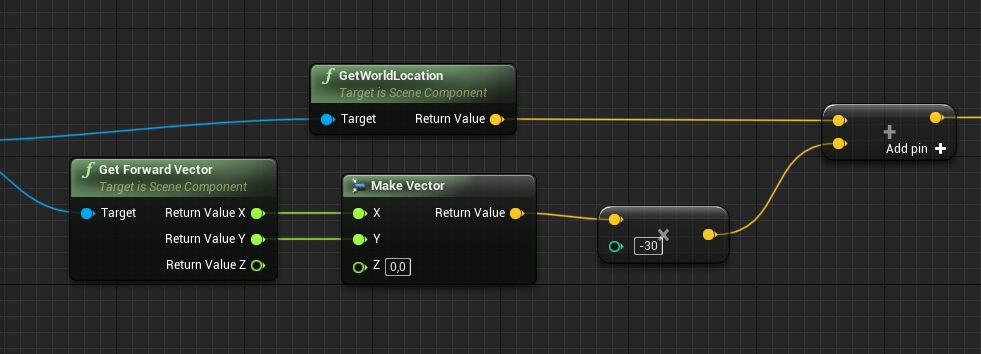
I'm trying to get a position just behind the HMD in my project, can i somehow use the world position of the HMD and the forward vector to get a world position just behind it?
The answer is yes
 thorny cedar
can i deactivate some specific input devices?
foe example joystick inputs to avoid random jittering?
signal cosmos
Is there a way to get the fixed framerate?
I would use GetWorldDeltaSeconds but I'm affraid that a hitch can occur at this specific moment, fxcking up all my computations ahead
The reason is, I have a speed value, and the actor is updating its position every tick, depending on this speed value. The problem is that the speed will variate depending on the frame rate the game is running at. To compensate that, I divide the speed by the frame rate.
atomic salmon
@signal cosmos fixing the frame rate is possible but requires recompiling the engine
Like you did, the right way is to make your calculations dependent on the Delta Time
signal cosmos
@atomic salmon Okay, but Delta time can variate if hitches occur :/ And If I run the game without using fixed framerate for instance
atomic salmon
Yes, this is how UE4 is designed.
Some functions directly take into account Delta Time. For example Add Force and the like. Some others require Delta Time as a specific input, for example FInterp and similar.
signal cosmos
hmm.. so the way I'm moving the actor (with only set actor location) is not really a good way to do it? (I don't use characters or pawn, it's for a custom movement).
atomic salmon
If you want to move your actor with a constant speed, you need to multiply that speed by Delta Time to find the amount of movement to set at each frame.
signal cosmos
Oh okay, so I'm doing it right then?
patent ermine
I have an example string "Test?random" ... is it possible to remove everything from that string that proceeds the questionmark? In other words, "?random" would be removed from that string.
atomic salmon
Yes, correct. Multiplying the speed by Delta Time or dividing by FPS is the same as Delta Time = 1 .0 / FPS
@signal cosmos
 snow geyser
my AI dont face the way they are moving, but I dont see any input for that on AI MoveTo?
atomic salmon
@patent ermine use FindSubstring and then GetSubstring or Left
signal cosmos
@atomic salmon Okay cool. But now I may face another problem. I want to determine the amount of time the actor will take to get to a point. The speed and the direction is constant.
I want to fire an event at the specific moment when the actor is supposed to arrive at the location. Does timer or delay take the delta time into account?
 ocean radish
@snow geyser You using CharacterMovement?
atomic salmon
@signal cosmos just do distance/speed
timers are reliable yes
delay I won't use honestly
signal cosmos
Okay, so it's distance/speed or distance/(speed*delta time) ? Delta time doesn't matter here?
snow geyser
@ocean radish yes its inherited on my NPC
ocean radish
@snow geyser theres a setting under the movement comp
snow geyser
yeah thats selected, but for some reason the angle they face isnt accurate
atomic salmon
@signal cosmos basically at each frame you calculate the amount of move based on speed * delta time, but then recalculate your speed based on distance to destination/residual time to get there
check also at the last frame that you are not overshooting the target, so if residual distance < move distance then just move by residual distance, then you are on the target
ocean radish
@snow geyser could be an issue in your AI actor bp, might have some rotation already appied to the mesh comp or somthing
signal cosmos
@atomic salmon Oh yeah, now that makes sense. Thank you very much man! That helped me a lot 👍
atomic salmon
@signal cosmos you are welcome. if you have the chance take a look at the source code of Finterp because this is how it does it
signal cosmos
Ah good to know, I'll look at it
snow geyser
@ocean radish ah youre right. For some reason the default body from UE4 needed to be turned -90 to face its arrow
ty
 jolly trail
I'm a bit stuck here
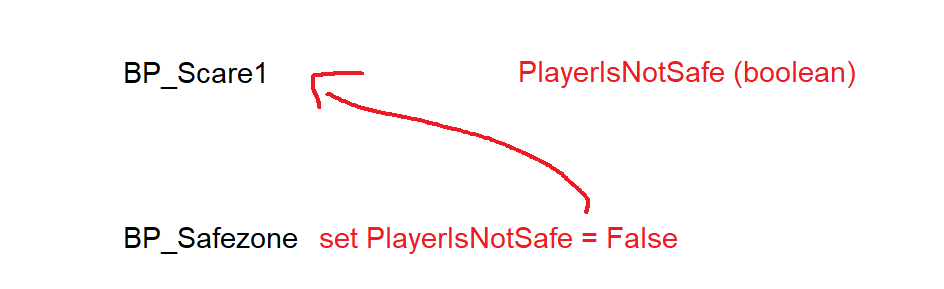
I have a boolean in BP_Scare1
When the player walks into a collision box in BP_Safezone it should set a boolean to false and send it to BP_Scare1
though i'm not sure what to connect Object to
distant sedge
Other Actor from the overlap node, that's who comes into the Safe Zone
jolly trail
Oh! I'll try that thanks guys!
 lament pawn
Hello all.
So I have this basic blueprint here, for animations. Until now I worked with blend spaces 1D, but what I want now requires a 3D blendspace.
I wish to set animations for forward, backwards, and side walk.
my issue is that, I know how to get velocity, but not direction.
who can mentor me for 1-2 min max. Thank you.
trim matrix
@lament pawn Create a new project and take the thirdperson template, there is one example^^
lament pawn
@trim matrix I have that, I imported my animations and now I'm looking to calculate direction.
trim matrix
sorry my mistake in content example are few example^^
lament pawn
Tzc, haven't look there, thanks for the pointer
steep verge
Help please i know I've posted this before but every time when i look on the x axis the idle anim freezes but if i look any were but the x axis it plays normally
more photos to see whats the problem
 rough wing
Is there a function to change a size vector (float) to a normal vector
Or is size just like speed
with no information on direction?
frigid anvil
Can you show me the blendspace @steep verge ?
frigid anvil
Is it the animation the correct one on speed 0 ?
steep verge
yes
frigid anvil
So it works if you test it in the blendspace itself?
 winter kettle
how do I destroy particles, this isn't working
frigid anvil
Your idle state is not playing the idle blendspace?
lament pawn
So I managed to create this blendspace, that takes in speed and direction, and it works perfect for what it should do.
less one thing, if I press [S] key and try to move backwards, the character turns but the backward animation plays.
how can I maintain the character looking forward while I'm going backwards?
cuz I tried checking and unchecking stuff in the character BP and it's not doing it.
 rich trellis
Hello. I wanted to ask one thing about saving game.
If I have Save Game Object with float values HP, Position and others.
And player plays it, saves its progress.
And later I will decide to add other float variables like EXP, LVL and update my game build.
Will it work with old save files? Because it will have different structure, amount of vars
And how to handle that?
lament pawn
There's a forum topic here, was looking into it some time ago
Unreal Engine Forums
I've been tinkering with a reasonably complicated RPG and I've come into some trouble regarding loading/saving across build changes.
Specifically I'd like to try a
frigid anvil
Have you tried unchecking this in the character movement @lament pawn
lament pawn
@frigid anvil hey, I have that un-checked yes, the issue is still live 😦
I could just live it
frigid anvil
This too?
 latent shadow
Does anyone know if datatables are zero based like arrays?
odd ember
seeing as you name the first identifier, it's up to you
steep verge
@frigid anvil i have tried without using the blend space and still it freezes when i look at the x axis
sorry i just went into spectator its my camera giving the problem
trim matrix
I have a question
So i have a landscape with foilage i painted on with the paint brush and a few static meshes. Would there be a way to figure out if a space is un-occupied then spawn a static mesh there if the size of the mesh can fit into that area?
 rare quiver
I need someone who is willing to carry me, please
trim matrix
this ain't fortnite
rare quiver
to help me*
winter kettle
How do I destroy spawned particles?
 zealous moth
@winter kettle either you put an self-destruct lifetime in that particle or you set it as a var and destroy it
winter kettle
setting as a var and destroy it with which function
destroy component didn't work for me
gaunt mantle
is it possible to move an actor with a behavior tree without a nav mesh? I tried using movedirectlytoward, but it doesnt seem to work
odd ember
sure if you create your own custom tasks
upbeat sinew
How do I destroy spawned particles?
@winter kettle set their lifetime in the particale it’s self, also make sure that the emitter loops are set to 1. If it is set to 0 it constantly loops
frigid anvil
So you fixed it @steep verge ?
 spark robin
Hey, so currently Im using using the Set max walk speed node to switch from running speed to walking speed inside of my character bp, however this changes the speed like very suddenly, so theres no slow down time, it just goes from running to walking in no time.
So my question is if you guys know any way of making the character slow down over a short amount of time, instead of just suddenly changing speed so drastically
(Please ping on reply ❤️ )
gaunt mantle
Do you guys know why this custom move task doesnt work or is there a way I can check why this request failed? The disabled pathfinding should have removed the need for a nav mesh.
frigid anvil
@spark robin This should work fine
(Ignore Crouch Height. It's supposed to say Alpha)
steep verge
@sebb i couldn't fix it its a unknown error witch i have never encountered and no docs found it has something to do with the first person character and sadly i had to recreate it but now theres no problem 😂
 eternal rock
Anybody here wanna team up and make a game? i have some ideas for a couple games and want to find a solid programmer who knows Unreal Engine. We can split revenue evenly....If interested DM me
ocean radish
@gaunt mantle your target location set to somewhere it can get?
gaunt mantle
@ocean radish Do you mean is the location a valid value or that it can path-find there? The location is randomly generated every few seconds and they seem to be valid. There isn't any obstacles so there shouldn't be anything preventing it from moving
but for some reason, it isnt moving at all
trim matrix
Ok i have an issue
I have like 5 'tents' I need to search for gas cans for the player's car in a forest. How can i make it so i can go to each tent, spam E on it, and it either returns "You've found a gas can" or "You found nothing" and then prevents that specific tent from being searched again?
ocean radish
@gaunt mantle can you take a screen shot of your ai character
frigid anvil
I can show you a way in 2 sec @trim matrix
gaunt mantle
Heres the behavior tree
shark in the level
and the AI controller blueprint, my shark character blueprint doesnt have anything except for a function that changes the movement speed and that it is auto possessed by the shark ai controller
 fossil tangle
Does anyone know why when I try to edit this property it won't let me because it's flashing fast? This happens on my home computer now at school.
frigid anvil
@trim matrix Here:
This would be in your tent blueprint and then you can activate it however you want. I am doing it with a OnClickedevent
trim matrix
but how can i make it where that spawned instance cant be searched again?
frigid anvil
Thats what the CanSearch bool is doing
trim matrix
oh ok
distant sedge
@gaunt mantle Still need a NavMesh, not using PathFinding means it'll try to move in a straight line
gaunt mantle
@distant sedge how come the Move To Location or Actor function works perfectly fine when I call it from inside the character blueprint? The only difference is that its being called from a custom task blueprint. I would love to use the nav mesh to avoid obstacle, but it doesnt work for 3d navigation
frigid anvil
Let me know if you got any questions @trim matrix
distant sedge
@gaunt mantle Is your GeneratePatrolLocation task succeeding and the MoveToLocation being hit?
trim matrix
Ok @Shebb
@frigid anvil I do have one issue
i can still search the same tent after i searched it
gaunt mantle
Yep, i verified that a new location is being generated right before the move function call and the move always results in printing the fail string
frigid anvil
Yes. The branch should go from False instead of True @trim matrix
trim matrix
?
frigid anvil
2 sec
distant sedge
@gaunt mantle Make the Patrol Location key variable editable on your task, then on your tree set the key on the node to match wherever you're storing the location from the prior task
frigid anvil
@trim matrix It should go from the False execution pin. I also renamed the bool variable to avoid confusion later
ocean radish
@gaunt mantle have you tried setting your default movement type in the character movement comp to fly?
trim matrix
ah ok
still doesnt work
i dont think you're understanding me
I have multiple spawned actors of the same blueprint class
I want to go up to one, search it, and then it prevents me from searching that particular one again
but if i go up to another, it should allow me to search it and so on and so on @frigid anvil
frigid anvil
This will do exactly that
trim matrix
No it wont
frigid anvil
How are you activating the Searching event?
frigid anvil
Show me the blueprint that is activating it
frigid anvil
Your E event wont activate since you are not controlling your tent
You need to activate it from your player character or controller
ocean radish
listen to sebb, your doing it backwards
trim matrix
bruh my E event is firing
ocean radish
you should have your interact events on your playercharacter not on your item
trim matrix
BRUH
 calm flame
Anyone have a blueprint for an interaction system that makes u open a inventory panel for a storage shelf, making a bunker and i want to be able to interact with storage items.
frigid anvil
I have tested it myself and it works 100%
But not with activating it the way you do
frigid anvil
I would use a linetrace
trim matrix
WOW
that worked
I am sorry @frigid anvil
I have a learning disability so its hard for me to learn
ocean radish
no not really, thats a very strange way of doing it, you would either linetrace, or setup a collision box, around your player and just get the overlapping
trim matrix
I apologize
 sullen lodge
@stoic narwhal I think I lost the idea. Say, you have a brick that's part of the table. You want that table to keep its form but move its location? Or do you want all the objects (say, tables in this example) you created to move, including the spacing between them?
 stoic narwhal
Okay so the idea behind this is that you build something in game, then you highlight it with a big box, and save it to an array, like so.
Then, lets say another day you want to load up that table, you can then load it into an actor that places it down. That actor is spawned where the player is looking, and has the array of bricks sent into it
stoic narwhal
So when the actor is loaded, we populate it with all the bricks from that selection
But, since we're using the old locations, that table spawns at the exact location it was made
sullen lodge
aha so you wanna keep the relative brick position
inside the table
so table keeps being a table
stoic narwhal
And so, when the player moves this actor around, its origin is really far from the model
Yes sir
sullen lodge
thanks, much clearer now
for this you'll need to average out the center of the table
gaunt mantle
@distant sedge oh wow thanks. didnt realize the key needed to be editable. I thought i tested the vector value but it really was some large garbage value
stoic narwhal
so you can see the white table is aaaaaalll the way over where it was first created, and the origin for controlling this white table is far away, so when I want to rotate the table, it cant rotate on the proper origin point I want
sullen lodge
yep I understand now
stoic narwhal
Okay
stoic narwhal
yeah you can make whatever you want really
sullen lodge
then you need to choose the bricks that are the furthest away in -x, +x, -y and +y
and average them out so you get the center
then you will need to take and just move the center and spawn all bricks around it
that will work for all kinds of tables
there is probably also a second way but lemme think a sec
stoic narwhal
I've thought of a different way
sullen lodge
yea but form wont be preserved
since you need to spawn around an arbitrary point, but initial spawn happens without it
stoic narwhal
What if I use a do once node to set the location of the actor to the first location loaded, and then when the loop is finished, set the location of the actor to the orginal vector?
I HATE to use Do Once, but I feel like right here it would be useful
sullen lodge
you mean like
you parent all bricks to the table
and change just the table coords?
because if thats an option it would be quite easy
trim matrix
Hey guys! Is it possible to move or offset the collision capsule somehow?
and put it back after some delay
is it addofset?
stoic narwhal
How would I change them? Thats basically what I wanted to do originally 😛
@trim matrix You could do that, as long as its not the root component of the actor, and any children will move with it also
sullen lodge
just the table coordinates? You just move the parent actor and all the 'children' bricks will move with it
they will preserve their local location
its just that im not sure whether ur actually adding them to a parent
hence I was thinking about calculating the pivot point by averaging the outliers' coordinates and then moving the pivot point and spawning them in (same brick position + (new table pivot point - old table pivot point)) which will spawn them literally around the point the player selects. Aka new table pivot point.
stoic narwhal
To be honest I've come to realise what I want isnt feasable
Your method would work, but it would require looping twice
stoic narwhal
What I was thinking was just transfering the origin point, which wouldnt work as if the build was made far away from world origin then when its passed to this placement actor, it'll still be far away
calm flame
Anyone have a blueprint for an interaction system that makes u open a inventory panel for a storage shelf, making a bunker and i want to be able to interact with storage items?
sullen lodge
@stoic narwhal by origin point you mean the original table placing point right
what I suggested is literally moving it
stoic narwhal
When the bricks are saved, it uses the world locations of each individual brick in the model
sullen lodge
ah
wait I forgot to ask
do you have a way to split up the brick loops by model
like do you mark them brick_model1 or something like that
because if not then indeed, my idea is not feasible at all
but if you do have a way of grouping them per model then it would still work with the world locations
since the whole model is what spawns
stoic narwhal
unfortunately I am using HISMs
and they are REALLY hard to work with in blueprint
even deleting a instance of a mesh is difficult because the indexs arent static
What I have now is a fix using the 'do once' method, and to be honest its not too bad
stoic narwhal
Thanks for your help @sullen lodge ❤️
sullen lodge
sure np
rough wing
Hey guys I need some help I don't really understand why it's acting this way
the dot product between a wall and my right vector
when i look directly up or down, it starts changing values really fast
-0.02
0.02
etc
odd ember
you should use the character, not the camera manager
rough wing
odd ember
pretty sure the camera manager just sits at 0,0,0 with a right vector of 0,1,0
rough wing
Im using it to check which way my camera should tilt when wall running
odd ember
the player camera manager isn't your camera
most likely anyway
your camera probably sits on your pawn
rough wing
I'm using ALS I have no idea how it uses the camera
haughty axle
the wise people of this discord, as again I come for help. I am trying to attach to component in my animation BP, but getting "accessed none" error, my animations play but jsut it doesn't attach to socket...
odd ember
so why are you attaching stuff in the animation BP, first
second what are you actually trying to do
haughty axle
second what are you actually trying to do
@odd ember i have item in my character BP who attaches to socket, and want it to pick up and put in hands.
i spawn and attach item to character mesh, and builded animations to equip and unequip, animations works but item don't
odd ember
your animation BP has no clue about what you're trying to pick up
or attach
so your attach logic should be in your character blueprint
not animation
haughty axle
need help again, i need to do looping to my pickup item. Item start spawned on character, then on press key it takes it on released key puts back. but then I repeat key presses it keeps item on character. here's blueprint. is there any more efficient way on doing item pick up from socket?
 stuck hedge
is there a way to use open level to force a new load of the level even if you're on that level? My load game function works fine if coming from the main menu, but if you're already on the level and use the load game feature, "open level" seems to reset the level, but it doesn't reset the game mode and load it like the level is just opening fresh.
trim matrix
Ok I have a question
So I got a system in place where you search tents for gas cans. On my first gas can collected, I want my AI to spawn somewhere near my location. How can I do this?
maiden wadi
@trim matrix https://docs.unrealengine.com/en-US/BlueprintAPI/AI/Navigation/GetRandomPointInNavigableRadius/index.html
GetRandomPointInNavigableRadius
trim matrix
yea i just found that out but my ai aint spawning. I'm looking into it
maiden wadi
Show me what you have, I might be able to help.
 little nacelle
is there a performance hit if i have thousands of objects loaded in but their visibility is off? i mean i know they exist in memory but does no visibility disable rendering hit?
trim matrix
@frigid anvil I require assistance please
So I made a widget to indicate i found a gas can. How can i make that pop up after i find all eight? Right now, it only works with the first search
it doesn't work after the first one tho
maiden wadi
Put a variable somewhere and update it each time you find one, or check your inventory each time you find one. If either of those equals eight, kaboom.
trim matrix
Thank you kindly @maiden wadi
it worked
anyone know whats happening? -- I have an fps character that instead of moving normally, whenever I press any key, it will cause me to fly in the opposite direction indefinetely (for example when I press W it launches me backwards)
Im kinda new to ue4 excuse my ignorance lol
I have the default movement bluescripts for third person game
if anyone has a solution please @ me
thank you for all your heklp
oh shoot is this the wrong channel
nevermind I fixed it
lol
 manic cradle
Not sure if this is the right channel for this question... Does anyone know if VR works with pixel streaming plugin?
 fathom spindle
Hi everyone, i'm (sort of) new to Unreal and trying to remap some values so that the mid point between the min and max becomes 1, and the min and max both map to 0. So far I have the min and max remapped to -1 to 1, so is there a math node to compare this to zero and get the amount of difference out as a positive value regardless of whether its going in the negative or positive direction? If possible i'd also like to do this remapping with a curve rather than just linearly.
i see there is the compare float but that executes on < or > whereas i just need the distance from zero as a positive float number. hope that makes sense
 tight schooner
@fathom spindle you're looking for abs or absolute
"power" node can make it curve
fathom spindle
thanks @tight schooner trying it now, it doesnt immediately seem to do what i need, but the values are coming in from linetraces/hand tracking so i'll set up something easier to test with
oh yeah great i see, now i just need to invert it. Thanks so much!
 gleaming raven
Hi all. I have a blueprint for a chest which I made following a tutorial on making a door. The chest lid opens correctly and everything works as expected. What I am now trying to do is (once the blueprint is selected) allow someone the option to choose the amount of degrees the chest opens. The few attempts I made didn't work out..
This is the timeline for the open sequence. The circled value is what I am trying to make instance editable..
atomic salmon
@gleaming raven you don't need to edit that value. Just make the curve 0..1 based and multiply its output by the amount of degrees
 fleet sandal
Alternatively, you could use a clamp
gleaming raven
👍 thanks ill give it a try
signal cosmos
Hi guys, is there a way to get an ID for each static mesh's sub-element?
atomic salmon
@signal cosmos what are you trying to achieve? By sub-elements do you mean the faces/triangles of your static mesh?
gleaming raven
Sorry im a real noob when it comes to blueprints. How would I convert the timeline curve to 0 .. 1 ? What I tried doing was float*float but thats not right lol. the lid spins a few times then settles, so im guessing the defualt 35degrees is being multiplied by the new number..
 wide lark
Hey :)
Any idea how to add more curves to the Curve Editor asset?
Shouldn't it allow to do so? Drag and drop another curve asset does not seem to do it. There is also no context menu on LMB.
Thanks in advance.
maiden wadi
@gleaming raven Not sure if you found anything yet, but if you want to convert any range of numbers to a 0-1, you can use the NormalizeToRange node.
odd ember
@gleaming raven you do it inside the timeline, not outside
then use a lerp node between the rotations you're looking for
 solemn igloo
hello guys . i have a weird question . Im using a plane infront of camera to add particle effect when needed. the issue is when i use default camera shake system of UE the camera dislocate and the plane will be in wrong position. does anyone know how to fix it? (i tried setting it to world doesnt work)
odd ember
@solemn igloo parent the plane to be under under the camera
odd ember
ah right
solemn igloo
it seems to me that
odd ember
try and see if you need to recenter its position after the shake
alternatively consider using postprocessing materials instead of a plane
solemn igloo
oh
atomic salmon
@gleaming raven your time line has to go, on the vertical axis, from 0 to 1
Then you multiply its output by the desired maximum rotation angle and the result will go from 0 to max angle
This (the fact that you are using a 0..1 based curve) is called normalization and it is often used in animation and physics as well
You can also use a lerp or map float to range (clamped) if you prefer.
 quiet basin
Hi all, I am trying to expand on the Flying Template that is provided by unreal but I cannot work out why the camera flips over if you rotate (pitch) the vehicle a certain amount (around 90 degrees). The camera is set not to follow the target pitch (only yaw), and it wont to until the pitch of the vehicle reaches a certain amount, and then the camera flips to the other side. I assumed there is a clamp setting somewhere thats making the camera behave this way but I cannot find it?
gleaming raven
Thanks guys 👍
atomic salmon
@quiet basin this is one of the use cases where you may not want to use a spring arm for your camera but just parent it directly to the root component. You can then handle the yaw rotation on your own if need be.
Or parent it to a scene component which you can use to pivot it around.
quiet basin
ah okay thanks @atomic salmon I thought this may be what I need to do. I assume there are blueprint functions to manually follow the pitch/yaw etc?
little nacelle
if you use DeltaTime from Event Tick for your timers, does that mean your timers will operate differently depending on machine?
 indigo zenith
use another variable for timers
atomic salmon
@quiet basin the easiest way is to attach a Scene Component to the root of your actor and position it at the location around which you want your camera to rotate. Attach the camera to it and offset it as needed to follow your flying pawn. Then use AddRelativeRotation or SetRelativeRotation on that Scene Component to control how the camera rotates around the pawn.
tight schooner
@little nacelle Yes. And not just between machines; the framerate at any given moment will affect delta seconds. I would only use delta seconds to scale certain on-tick math rather than set timers with it.
split wasp
Tick Deltatime is mainthread time, timers operate independently from that
prime berry
that's not entirely true though
if you set a timer to 0.0001 it'll operate multiple times between your ticks
unless I'm understanding your statement wrong
 supple dome
nope, it will just do a ExecuteCount = Deltatime/TimerDelay and execute it multiple times on a tick
not between ticks
little nacelle
alright thanks for the answers
prime berry
well if I hook up a print string to a timer with a time of 0.0001 and set it so that it increments an integer for each time it's called you will only see 1 print per tick, but the number will increase as if it was called multiple times
so maybe it's print string that's behaving weirdly then
atomic salmon
Timers are ticking with Delta Time but if Delta Time is longer than the timer span the delegate is called multiple times for each tick.
E.g. Delta Time is 0.10 and the timer is set to 0.05, the delegate will be called 2 times per tick.
Hence you cannot use timers to reliably go below Delta Time. e.g. as physics sub-stepping
 bleak vector
Hmm, how do I check for a valid path with find path to location? I tried using navigation path -> is valid but it's returning true even with an obstructed path 🤔
supple dome
it however is incredibly buggy, it wont carry over the internal time for the next tick, and a 0.05 timer with 0.09 delta will execute two times in two ticks, youd expect 3
prime berry
hm okay that would explain why it behaved like that 🤔 thanks
supple dome
it also doesnt account for halted timers
like if it thinks it should execute 10 times this frame, but on the first you set it to stop, it will still execute 9 times more
(based on this comment, havent tested) //@TODO: The actual call count may be less, e.g., if the delegate clears itself during the loop below
prime berry
yay for @TODO 😅
signal cosmos
@atomic salmon Sorry for the late response, By sub-elements I meant the sub objects like in 3ds max, when you can select non-merged objects independently within a single mesh. I don't know if that makes sense?
atomic salmon
@signal cosmos the proper way to handle that inside UE4 is to place all the sub-elements within the same actor as separate static meshes, then you can detect the hit/overlap with each one independently
if you had to merge all sub-elements in a single mesh, it will become difficult to tell later on which part has been hit/overlapped
signal cosmos
hmm.. Okay, that's a bit inconvenient, for performance purposes I created a big cluster of multiple objects so I don't have to use single static meshes. Like an HLOD basically.
atomic salmon
@signal cosmos that is understandable for performance reasons. Then there are other ways to detect which part of the cluster has been hit/overlapped, but not as easy as doing a line trace or hit/overlap on the components.
On the other hand how many parts do you have in there?
10, 100, 1000?
signal cosmos
I have 20 elements @atomic salmon
atomic salmon
@signal cosmos ok that's not too bad. If detecting the single interactions is key to your playing dynamic, then you may consider to keep the separated and collect them within the same actor
For example, a vehicle with a body, wheels, a turret etc.
Also because often you need to animate those parts independently anyway.
zealous moth
@bleak vector are you using an AI logic or just pathfinding?
signal cosmos
Actually, It's like a cluster of traffic cars, and I wanted to have 2000 of those, so by grouping them in clusters of 20 I can have 100 objects only while having 2000 cars on screen. That's why I would like to keep them clustered. And I don't plan on separating them anyways and animate them independantly. However, I plan on when I touch one car with a ray or an overlap or whatever, I "hide that can" (in the material) and replace it by a fully simulated Ai. @atomic salmon
 slow flume
hy - i guess this is a simple question:
i want to differentiate 2 actors, that call a function on the same object and pass themselves
i shouldnt use Actor->GetDisplayName or Actor->GetObjectName since this can be the same on both actors, right?
im wondering, do i need to make a blueprint library with UObjectBase::GetUniqueID, or is there any other solution?
atomic salmon
@signal cosmos Ok I am trying to visualize this but I am honestly struggling. Given your setup and the fact that you plan to work with materials, your best chance is to use UV coordinates out of a line trace.
There is an option to turn that on in the engine settings.
signal cosmos
Oh that's very nice thank you for this hint! It comes with a cost I guess? I hope it's not a big cost
atomic salmon
It is actually pretty intensive.
@signal cosmos
That's why it is off by default.
signal cosmos
Oh no... I'll try it and see then. Maybe it's intensive if there's a lot of hits per frame to process, but there's only a few of them, it might be smooth.
atomic salmon
@signal cosmos of course it depends on how many/how often you do those scene queries
signal cosmos
I'll try to keep them as low as possible then, thanks again for helping! 👍
quiet basin
thanks @atomic salmon im giving it a go. Does this mean I have to remove the mesh as the scene root? This is how it came in the template
atomic salmon
@quiet basin no, you just parent a scene component, let's call it Camera Pivot, to the root and the camera to it.
Then you set the relative rotation of Camera Pivot to rotate the camera around the space ship if you need to
quiet basin
even if the space ship is the actual root?
atomic salmon
@quiet basin yes, that's no problem. Scene components can be anywhere in the hierarchy
quiet basin
sorry so by parenting the scene component, if you parent a scene component to the root surely it has to become the root
atomic salmon
@quiet basin no, when you add a scene component while the root is selected it is parented to the root
if you drag it on top of the root it will ask you if you want to parent (attach) it or replace it
you want to parent (attach) it
quiet basin
sorry thought that was childing
atomic salmon
the Scene Component becomes a child to the root
 severe iris
How you would check if an actor's class isn't derived from actor, but literally is just an "empty" actor? Nevermind, pretty straightfoward.
still sigil
https://gyazo.com/fa1978475dbb25ac689ece3ab33581d2
Update for a discussion I had in here a couple days ago. I finally got my work in progress "Jump to a Safe Spot" mechanic working, whenever the player touches a dangerous hazard. Such as lava or spikes. It's a little wonky right now, (Sometimes he doesn't always jump.) but the basic foundation is finally in place. He's looking for a random piece of safe ground to land on, and is attempting to jump towards it when he takes damage. So that's a step in the right direction. 😄
 patent ermine
Loading a texture from disk using the Victory plugin node as shown in the attached image. I'm trying to switch of sRGB on the texture, but that node doesn't seem to do anything. Any ideas as to what i'm doing wrong?
Other than it obviously not being hooked up lol
fallen karma
Hi!
Is there a way to check between 4 integers which one is smallest? I have these integers that keeps track of 4 players different scores.
HighScorePlayer1
HighScorePlayer2
HighScorePlayer3
HighScorePlayer4
And I want to just through them and see which is the lowest of them! I am assuming im supposed to use a for loop or something like that but i havent been able to find my way through google 😦
cinder dirge
@fallen karma If I gave you two numbers and ask you to pick the smallest one, could you do it?
And if I gave you another number and asked you to pick the smallest out of the previous smallest number (from the other two) and the new number, could you do that?
And then perhaps the same again - the smallest from the previous smallest and some new number
And all of a sudden it looks quite a bit like a loop 😮
patent ermine
@fallen karma "Compare Int" node should do the job i suppose.
odd ember
or a select node with int input
fallen karma
Found something about Min interger?
cinder dirge
For only 4 numbers you can do Min(Min(HighScorePlayer1, HighScorePlayer2), Min(HighScorePlayer3, HighScorePlayer4))
(or just one node with 4 pins, I suppose, I'm perhaps being overly generic in my solution finding)
odd ember
depends on if it's an array or just 4 variables
cinder dirge
Indeed
odd ember
but setting up a heuristic for min picking isn't hard either
fallen karma
im storing them like this in a game instancec
its a local multiplayer so i need to know each players highscore separatley to know which player is the winner
might be a better solution for it but im quite new to unreal
odd ember
just do the min into min solution
 proud scaffold
Hi there guys, i have a question regarding Blueprint
For some reason this doesn't work
I want my that when my projectile overlaps the BP_target the BP_target destroy
Is confusing, because if instead of casting to the FirstPersonProjectile, i cast to the FirstPersonCharacter and i overlap the target with moving my character it works
trim matrix
Is there a way to line trace on terrain to randomly place down actors?
frigid anvil
Does your projectile have any collision @proud scaffold ?
fallen karma
Thanks guys!
 fair estuary
Yes you can do that @trim matrix You could set up a spawner BP that includes the line trace straight down from a point. When the hit actor equals landscape, take the hit location and spawn an actor on that location.
trim matrix
but how could i spread out foilage that way?
odd ember
@proud scaffold you are committing shotgun surgery
proud scaffold
i want the projectile of the gun to kill the BP_Target (Targets in the wall)
@frigid anvil This is my Projectile collision:
@odd ember wdym dude?
odd ember
look it up
anyway your collision is probably not correctly setup regardless
collision is two way, so both colliding actors need to have the same flags set
e.g. if one flag is block one one actor and the other is overlap on another it won't work
fair estuary
@trim matrix there is procedural foliage placement in the engine. You don't need to build your own tool for that. https://docs.unrealengine.com/en-US/Engine/OpenWorldTools/ProceduralFoliage/QuickStart/index.html
How to set up and use the Procedural Foliage tool.
snow geyser
Anyone have some reading material / tutorials that are good for roads/walls through splines? Making a city builder and Im assuming even if in grid format splines would be best for performance and navigation right?
 stone hound
How do I stop / resume projectile movement component ?
I can stop it by using deactivate node.
But It does not move again when I activate it.
supple dome
you will have to set velocity again after unfreezing
 prisma sundial
Uh is there a way to make a projectile increase in scale over it’s lifespan
distant sedge
A timeline thats 0.0 - 1.0s and then scale the timeline rate based on calculated time it would take for projectile to hit surface
 gloomy linden
@proud scaffold watch the Blueprint Communication of Zak on youtube
It will make more sense then
 modest crater
How can I dynamically make an arbitrary translucent triangle from a set of points in blueprint (or is this even possible)
I'm trying to make a tool to visualize hypergraphs, and there are vertices and faces that connect three vertices together, and I need to be able to see all of them (translucency)
supple dome
look up the procedural mesh component
patent ermine
https://streamable.com/7hfyw Here is a video of my issue to follow up on a previous question. I'm loading these textures from disk. In this particular instance, the normal map is coming in incorrectly with sRGB enabled. I'm disabling it through blueprint and applying it to the mesh. However, as you can see from the normal map image, the srgb does get turned off, but it doesn't? Because as soon as i press the srgb the normal map in game displays properly. It's almost as if the blueprint node turns off the srgb switch , but doesn't trigger something that when clicking it in the texture editor does trigger. Hope this makes sense.


 hollow flame
does anyone know how to create a simple online multiplayer game (not local multiplayer), like user can play and join game via session at anywhere
maiden wadi
@hollow flame You might want to direct that towards #multiplayer channel. But they're likely to tell you just to go watch tutorials.
 gilded pebble
Hey anyone can help me fix this?
https://cdn.discordapp.com/attachments/455872643174891532/687391180811403325/unknown.png
This is the curve I use
https://cdn.discordapp.com/attachments/455872643174891532/687391235769630720/unknown.png
It seems to get the max value for one axis since on the middle of each side either X or Y is 0


So I get these triangles on the sides instead of an even pyramide/Stalagtite shape
 sand tartan
Does anyone know why blueprint AND nodes check each pin (and if there's a way around this?), even after one has failed? Was hoping to plug an "Is Valid" into the first pin, and then dependencies of that into the other pins, but it throws errors when the object is not valid..
maiden wadi
Why not just use an IsValid in the execution line before you need the AND?
sand tartan
So the AND pin is only being used for a select node index when choosing an anim montage, but the rest of the code needs to run whether there's a valid object or not
I'm mainly curious as to why the AND node doesn't return after the first failure (assuming it processes in the order of the pins)
 slow hill
@sand tartan that is a pretty standard way that AND statements work. For example in c++ && will not evaluate any statement after the first failure
maiden wadi
Because blueprints aren't efficient, they're safe. When a node is called on, it checks every input output every time. In the case of your AND node, when it looks to see if the first pin is true or false, it also checks the second pin at that time, then when it checks the second pin, it'll also check the first pin. If you have three pins on the AND node, it'll check all three, three times to make sure the things connected are all valid. If that makes sense?
slow hill
@sand tartan sorry I misread your comment
sand tartan
Ah okay, that does make sense, thanks. I've mainly worked on the C++ side of things before, I'm still getting used to some of the unusual behaviors of BP..
maiden wadi
Basically, just make sure that anything you're plugging into any node at any time it's being checked, is valid.
 hexed saffron
Is there something in the Blueprint like a "if/then" value. Also if execute block 1 then go to block 2, so the BP will not execute them at the same time? I used "delay", but not sure if this is a good idea.
patent ermine
Not sure why the blueprint method posted above doesn't work. However, creating a blueprint callable c++ function that loads a texture from disk with srgb off works just fine. This works for me.
slow hill
@hexed saffron Branch?
hexed saffron
The Branch just say if it is active or not. But I want it to play 2 directly after 1, but not at the same time.
maiden wadi
Generally, I'd say avoid using delays in your coding, specially for timing of execution reasons. If you need something ran after something else, put them behind functions and make the first function call the second function when it's done.
hexed saffron
Do you have by chance a nice tutorial for this?
maiden wadi
Can you show me the two things you're trying to execute one after the other?
prisma sundial
How wood the blueprint node look if I wanted to increase the projectiles scale over time
gleaming raven
my noob experience think you would use a timeline node and some kind of transform node attached
maiden wadi
@hexed saffron Ah, I thought you meant like big blocks of code, not single nodes. What you're doing is probably fine, but I'm not an audio person. There may be better ways to streamline that that I'm not sure of.
hexed saffron
That´s the first time setup audio for me.
Yeah kind of dialogue. So if another event the computer has another voice command.
odd ember
so I made a dialogue engine previously that at its core hinged on a timer
I'd urge you to look into timers to replace your delay nodes
hexed saffron
Unreal Doc "Creating and Clearing Timers" right?
So that´s where I can play sound 1 "hello", then sound 2 "Frank". And replace sound 2 with a branch "Peter". As example, lol.
distant sedge
Might also consider Sequencer to play your dialogue, that way you don't have to touch BP everytime you want to edit the flow of VO lines. Can also have overlaps if needed or time things visually on the tracks
hexed saffron
Thank you guys a lot. I have a direction now. I´ll read that documention now.
zealous moth
@prisma sundial create a custom function or event and run it as a timer with a loop and an interval. In your custom function or event change scale by x units all around
 arctic rune
Hey guys, so this might be really basic but i've been struggling with it for a while. Im trying to create an effect similar to that of Skyrim where you press E to go into a room, Im just struggling with how to get it so that you can only enter the room if your within a certain area (Close to the door) I have a collision box on the door set up and a widget that appears when your in the area to say that you can enter. Although I cant find out how to get it so when I press the key (In this case E) it loads the level. I initially tried casting to the actor but I dont know what the object would be for the cast to that?
Screenshot incase it helps - (ShouldVisPressE) is basically a check to see if its in the box collision area (Close enough to the door)
 dim lily
Help please! ❤️ Why does this custom event not have the option to ADD INPUT on the DETAILS PANEL?
odd ember
@arctic rune look up blueprint communication in the pinned posts
@dim lily do you have it selected in your event graph?
dim lily
another event on the same BP shows the ADD INPUT as normal
odd ember
try deleting it and remaking it
odd ember
oh
you had it hooked up to a timer as well
in BPs timers can't take events with parameters
arctic rune
@odd ember Cheers mate, Actually managed to fix it that quickly using that xD
snow geyser
yo Cranz since you're active can I throw a general question at you?
odd ember
sure
snow geyser
How would you approach a grid-based road system for a city builder. I dont need you to hold my hand through it or anything I just am unsure of the approach thats best
I originally thought grid squares of static meshes that would detect neighbors to display proper mesh
but then I thought maybe that many static meshes would be too heavy system wise