#blueprint
402296 messages · Page 419 of 403
 merry orbit
 amber grotto
@merry orbit you can take a screenshot to see how it would be
@marble tusk hehehehe ok friend thank you very much anyway
merry orbit
@amber grotto Do you ever use spectator class from game mode. Maybe you show me your screen and i correct you. You have acceptable connection?
amber grotto
@merry orbit Now I am not on my PC I am from the cel so I asked for a screenshot .. to get an idea of how it was
merry orbit
You have two pawn when one is step on on triger he block Triger to until he go out?
or more?
@amber grotto This is very simple its more what type effect you have. And what trigger that effect.
amber grotto
@merry orbit I have a character that when I press another button to run, what I want to do is that when between an area you can not activate that button to run and only operate the walk
 trim matrix
@amber grotto use a boolean or state enum
merry orbit
@amber grotto Ok 10sec
amber grotto
I get home and show my shots ... what I want is to make the button not work, which makes me run when I enter an area and then when I leave it activates
@merry orbit Ok 🙌🙌🙌
 vital prism
Is there a way to get a reference to the primative components of a skeletalmesh physics asset from BP?
With the intention of getting angular & linear vels, reading and changing constraint data?
amber grotto
@merry orbit great when I get home I'll try
merry orbit
@amber grotto its wird you ask
trim matrix
Its possible better said a good solution to combine a game instance with a struct? (For example ST_Playerinfo (health, mana, stanima, coins, locations and so on) or different Projectiles or items in inventory..)
 ocean radish
not quite sure what you mean, if its what i think, you could make a child bp of game instance with a struct in it and cast to get access to that struct
not sure why would need to do that in a game instance though
ocean radish
@trim matrix if youre asking if its a good idea to store this in there? I usually keep things that effect a certain actor on the actor, this way its usually logical to be able to find it
 solemn igloo
Guys does any one know the best way for hit pause effect when you hit enemy?
im trying to do with global time dilation but when you set global td nothing works anymore. so no custom made timer or timeline or even delay work.
putting it to a very small number like 0.001 also mess up the timeline or timers
 unborn lantern
Hi, I may have found a bug in the engine, or I'm missing something. I'm using simple text box with wrapping of text, and I want to use the feature: "Wrap Text At". It works well in the design mode, and when the engine starts, first time I visualize the widget. But then if I change the text seems the "Wrap Text At" is ignored. I tried to get the value at runtime, and the value is set to 200, but its ignored. Im using 4.24.1
 verbal bolt
@odd ember I was talking about the return value of the array returning method. Seems like DeterminesOutputType supports array. good!
 burnt abyss
I have a door blueprint that i got from a game template and i want it to open on a trigger, but i cant find any function that references opening or closing the door. I'm not sure what to do (ik this pic is zoomed out if you want a closer one let me know)
the door opens fine if you click on it but idk how to make it open via other means
 unborn turret
currently my logs are printing on each line... how can i print them in one line?
so it can be debug: updated XP blah blah
 atomic salmon
@unborn turret use Append to create one single string, then output that one to Print String
You may also want to use a unique set of character as prefix, so it is easier to filter in the log. Something like $$$
amber grotto
@merry orbit https://youtu.be/KLJ4xfY9EsQ

@merry orbit I made it my friend .. thank you very much this is what I did
unborn turret
@atomic salmon but each of these are different keys
Level code and message are different keys. So level code could be error and message has the error
atomic salmon
@unborn turret is it something you output or you mean also the engine messages?
unborn turret
Its something i output
merry orbit
@amber grotto It look massy bat if it work. Maybe better to create function inside player to reaped that behavior across other map. And trigger by interface then directly calling function. Also you can create actor with volume so you can easy maintain that volume in many placed. Very cool also to use TAG.
atomic salmon
@unborn turret then you can build the output strings as you like, no? Or am I missing something?
unborn turret
There could be multiple keys with the same name
merry orbit
@unborn turret Yes very easy find format in format field put something like test {msg} {msg} {msg} {float} then press compile. This is what you really search for.
unborn turret
So for example multiple error code and multiple messages
merry orbit
@unborn turret Format node press right button the tap. Then try that
@unborn turret Also in c++ you can create error msg.
@unborn turret But for gameplay display msg in umd box. Show tex or string i think are more for debugging reason.
@unborn turret There are also two function display msg and display text. Text and string are very similar. But if you want to put many thing in one log. Yes format text and print.
amber grotto
@merry orbit you are better at an actor ... it is a very good idea now you are ... more than anything I wanted the idea and I already have it now it will be easier
atomic salmon
@unborn turret you can also use a Select to chose among different keys/messages
merry orbit
@amber grotto Going for food look info at UMD programing. It what you want if you want to be programmer. Real.
merry orbit
@unborn turret Its very shit press right button and type format is really what you search for. And tell me if i am wrong
atomic salmon
Format is indeed more compact
But I guess one uses what he is more comfortable with
amber grotto
@merry orbit I already changed it to an actor and it worked very well
.. my goal is to finish the game that I am creating
 modest gulch
So I have HISMC. I can either set static mesh in editor in advance or set it programmatically in blueprint. Problem is that in latter case navmesh says "I don't see anything because bleep you". What I can do to rectify that? To be precise, what I should do in addition to setting static mesh?
 sour urchin
hi, how i can disable construction script for game? I want the constructor to work only in the editor
 fathom portal
@sour urchin do you have cpp access?
@sour urchin I would use the "is development build" check:
fathom portal
Then just make sure you package your games as non-development-builds
So like pick shipping build instead
fathom portal
That would work too, I learned something new today lol
merry orbit
@unborn turret You can format text then change to string also you can print text
fathom portal
Yeah, I use append and sometimes format texts
merry orbit
@amber grotto Batter to do with other peoples. So you not risk 1-2years.
merry orbit
I need to understand spectator actor in game mode. That is specific class. The controller not posses that actor on beginning. And i can not do instance on map. You can move to that actor by this code. in c++.
```c++
TestPC->PlayerState->bIsSpectator = false;
TestPC->Possess(OriginalPawn);
TestPC->ChangeState(NAME_Playing);
TestPC->ClientGotoState(NAME_Playing);
But do i miss something and that is can not be change in bp or editor.

I can work with posses and move to other pawn. But spectator actor not create instance on map. Its a frame. How to approach code with that element of frame.@unique flicker yes and that is difrent some code can still work in new version but its old one from old project. So for down compatibility new do not work. New can provided some extra function. You know what is radian?
@unborn turret is what you search
 #include <cstdio>

int main()
{
    char ch = 'a';
    float a = 5.0, b = 3.0;
    int x = 10;

    printf("%.3f / %.3f = %.3f \n", a,b,a/b);
    printf("Setting width %*c \n",5,ch);
    printf("Octal equivalent of %d is %o \n",x,x);

    return 0;
}
https://www.programiz.com/cpp-programming/library-function/cstdio/printf
The printf() function in C++ is used to write a formatted string to stdout.
@unique flicker Fine answer?
 ember crescent
anyone know why this is not working for me?
it is working on first click and after that 20% of the times
(the released is working 100% of the times)
 frigid anvil
Does the default Left mouse button event work fine @ember crescent ?
ember crescent
you mean this @frigid anvil? no its not
 stray barn
any widgets consuming the mouse button click ?
frigid anvil
Yes
ember crescent
@frigid anvil no its not working
@stray barn dont think so
you mean if i have more then one?
frigid anvil
Try adding this to your BeginPlay event
ember crescent
your a god
thank you @frigid anvil its working now. have been traying to figure it out the hole day..
frigid anvil
Glad I could help. I've been stuck with that same issue once and it is quite annoying
ember crescent
what dose it do?
frigid anvil
It sets the input mode to be both for UI and Game
"Setup an input mode that allows only the UI to respond to user input, and if the UI doesn't handle it player input / player controller gets a chance. "
More about it here: https://docs.unrealengine.com/en-US/BlueprintAPI/Input/SetInputModeGameAndUI/index.html
Set Input Mode Game And UI
ember crescent
aaa ok thanks!
 fossil thistle
can someone tell me why the timeline plays immediately instead of after the object is destroyed?
frigid anvil
Because its not connected to the event that should fire when OnDestroyed. Now its just connected to BeginPlay @fossil thistle
ember crescent
what was the name of the blueprint that can take one execution line and split it in to tow or more?
ember crescent
yes ty
 knotty berry
http://prntscr.com/r9lbte
for some reason this is not changing my gamemode
 merry orbit
@knotty berry You can not change game mode. But you can change map. and map have different game mode. That help you? Game mode is start and provided for all player. Game mode is reload in every open map and can be specyficed by map. For all game only game instance not change. But i do not know can or can not change game mode. But maybe in map individual game mode can be changed also game mode specified in map override main game mode
knotty berry
yeah ty
 tulip iris
Hey there, can we convert cable actor components into static meshes?
merry orbit
@tulip iris No
merry orbit
@tulip iris Is a class not a asset c++ code. But also i can be wrong
@tulip iris But its generated so you can record that in map and use as material or something?
tulip iris
Record that?
use as material?
@merry orbit I'm old you're going to have to back up a little for me 🙂
 surreal peak
@knotty berry All your image does is casting the class (so not even an instance of it) of the gamemode from the child class to a parent.
That has nothing to do with changing the GameMode. GameMode's can only be changed when switching levels.
If you open a new level it either uses the default gamemode of the project, the specified override of the level or whatever you pass along with the open level node via ?game=<gamemodeshortcode> where <gamemodeshortcode> can be setup in the project settings.
There is no way of changing the gamemode mid-game without load/reloading a level.
@tulip iris Not aware of a way to do that, but theoretically it should be able if there is mesh data available.
But at that point you can just make a cable outside ue4
tulip iris
@surreal peak I built a tool that autogenerates powerlines using the cable actor component https://www.youtube.com/watch?v=Ywh5cehgwLs . For my specific purposes it would be great to have the option to convert them to static meshes.

If you want to wishlist us on Steam:
http://store.steampowered.com/app/438120/Ira/
Connections
Ira Twitter - https://twitter.com/IraGame
FaceBook - https://www.facebook.com/Ira-game-716023361822334/?ref=br_rs
Website - http://www.iragame.com/
My Twiiter - https://twitter.com...
knotty berry
@surreal peak ty
frigid anvil
Thats really cool @tulip iris !
One way to do it is with point cloud, where you could scan it and then convert that to a mesh but that would be a very unefficient method
tulip iris
Hmm, sounds interesting but I have no clue on the pros, cons, or implementation. Got any links?
 odd ember
I'm interested in knowing how you achieved that art style
tulip iris
Well, there will be a tech blog about it on Epics webpage in the near future 🙂
odd ember
feels like there aren't enough tutorials for creating a full art direction
which is sad
tulip iris
I know what you mean. The tech blog will showcase more of the theory and the utility widget pipline I have in place to create the art style.
odd ember
are you using stencilled billboards or is it actually meshes that have some level of custom depth on them?
that flattens them at distance
tulip iris
Custom depth and stencils + post process localized effects + post process height and ground fog + a few other fun things all wrapped up in a toolset to make implementation really easy.
odd ember
did you make the toolset yourself?
odd ember
very interesting
tulip iris
to show people how far you can take things with just BP's
tulip iris
Well, I want it to release when Ira is going to release to help drive traffic to the game. So I'm coordinating it to be around the Q3 of this year.
odd ember
oof
tulip iris
https://www.youtube.com/watch?v=I_02LI8-upo here's a terrible video that doesn't really tell you much of anything.
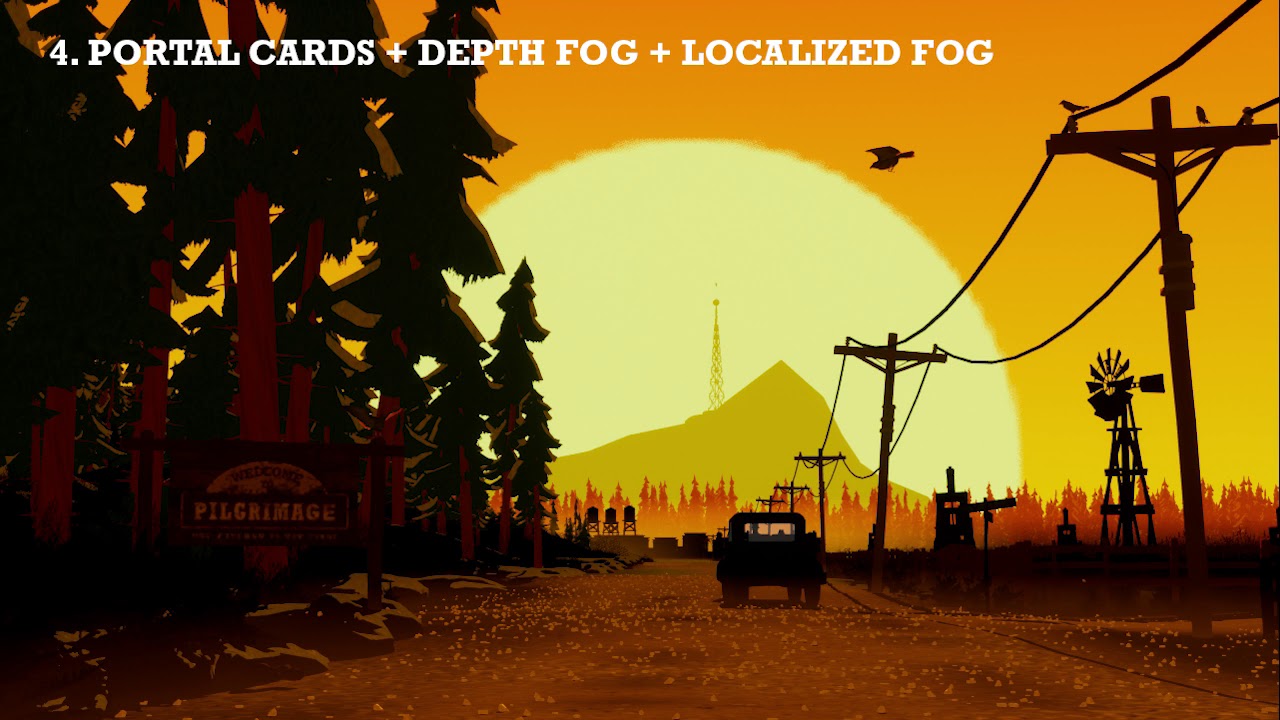
If you want to wishlist us on Steam: https://store.steampowered.com/app/438120/Ira/
Connections
Ira Twitter - https://twitter.com/IraGame
FaceBook - https://www.facebook.com/Ira-game-716023361822334/
Website - http://www.iragame.com/
My Twiiter - https://twitter.com/...
odd ember
what's your shading style? normal or cel?
odd ember
I see
very cool either way, had some bump ins previous with creating direction, it's one thing I'd like to devote more time to
tulip iris
Absolutely
odd ember
I created a kuwahara shader myself, but sadly it's not feasible to make game ready
one thing I'd like to nail is to see if I can use cel shade to work with 3 bands, one of them being pitch black
tulip iris
The pipeline is really cool as well. I talk a bit about how stylization can be leveraged to use any assets you want (for the most part). Part of the blog showcases converting assets into Ira's style using utility widgets. I can literally convert almost any asset pack via in editor BP automation. Saves 100's of hours.
odd ember
that's amazing
tulip iris
Anyway
odd ember
I think that has to be the future
tulip iris
It's meant to help people like you haha
Add me and I'll shoot you a link when its out
odd ember
yeah I mean I'd settle for being able to create my own assets but use the editor to wrap them into the art direction
tulip iris
🙂
fathom portal
Is it possible to create a component of an pawn, which doesn't keep up with movements of the pawn?
Like do linked child actors move with their parent? I'm about to try
odd ember
@fathom portal children always move with parents
odd ember
there is, but then they're no longer children
you could offset the child to be somewhere else, but really why not detach it at that point?
fathom portal
I'm just gonna make the pawn spawn it in, so it holds a reference to it
odd ember
generally there is no need to have something separate if its bound through a hierarchy
that is usually the better option
depending on your setup you may also be able to use player controller
since that is still an actor in the world
fossil thistle
does anyone know how to use the a GameInstance to change the player start when they re-enter a level basically, the player approaches a house and enters, but the house is on a separate level, so when they exit the house i want them to be in front of the house not on the original player start
 crystal mural
Hi! Looking for a quick bit of advice. I've got an "aim" object that I move about with my mouse. How would I dynamically constrain its motion within the playing field? I can manually see how far it should go in X and Y and clamp it. But what would be the best way to change this per level? Can I put a box in the level and find the bounds of it some how?
 vapid owl
If you are just using a box collision you can get scaled box extent https://docs.unrealengine.com/en-US/BlueprintAPI/Components/Box/GetScaledBoxExtent/index.html
Get Scaled Box Extent
Also, I pretty sure there should be a simple solution to this problem but I seem to be missing it. How would one go about making sure the player can't move off screen? Basically I need to be able to dynamically find the screen size. I've looked at GetViewportSize but I can't get it working. Any ideas?
crystal mural
Ja I'm thinking this node would be good.
crystal mural
If you are just using a box collision you can get scaled box extent https://docs.unrealengine.com/en-US/BlueprintAPI/Components/Box/GetScaledBoxExtent/index.html
@vapid owl Thanks, this worked. I made an actor with a box. The actor finds out the bounds and location of the box and with a little math casts to the shooter and limits the X and Y motion. Awesome 🙂
Get Scaled Box Extent
odd ember
@crystal mural are you looking to do it screen space or world space?
crystal mural
World space. The screen changes but the bounds shouldn't.
odd ember
fair
 gritty elm
how to take high resolution screenshot in blueprints including custom depth mask render enabled?
what is the console command to enable custom render depth when taking high res screenshot
 low venture
Any ideas how to make a map on a sphere, like an earth-map, where you can see animated symbols for levels and click them to open a level? Could use flipbooks as decals on the surface of the sphere, but it would be better if I could use "2d" particle systems and project them onto the surface of the sphere since they are much more flexible than flipbooks.
crystal mural
Hi again. Some maths here is evading me. It's not giving me the negative angle. It gets an angle exactly how I want it but no clue if it's left or right.
odd ember
that's the nature of the dot product
crystal mural
Ah OK. Looking at it I understand why. But no clue how to fix it.
odd ember
you can try with get right vector instead, in which case from the forward position you'll get 0 as the center value, -1 on the left side and 1 on the right side
crystal mural
I have a stupid idea to check if the X value of the position is left or right. But that can't be correct.
OK so not dot product but Get right? Let me try.
odd ember
no no
use the dot product still
but consider the case
if you use right vector, you skew everything 90º
crystal mural
Oh you mean at the beginning rather than forward?
odd ember
so instead of having 1 as the value for the vectors being teh same, it'll be perpendicular, e.g. 0. this means that you can now get left and right directions based on the sign
yes
gritty elm
i have an issue with this node, this node is executing in editor, but not in packaged build, is there console command to enable mask and hdri?
 twilit heath
you can use cross product, it gives a unit vector pependicular to both vector inputs multiplied by the product of their lengths and sine of the angle
odd ember
I suppose that's a better solution but I wouldn't know
my math savviness extends only so far
also welcome back @twilit heath
crystal mural
This works but I get left as positive and right as negative. Is that correct? Or is the rotation upside down?
twilit heath
swap the order of inputs
crystal mural
I was going to do a *-1 at the end. HAHA!
Thanks! This does exactly what I need. All this maths makes my head spin. I'm going to take a break and animate tomorrow.
odd ember
I wish I could solve all my issues with math
 crimson flicker
Hey guys, i am having problem with the nav mesh in sublevels when setting up level streamming. Any idea how is the correct way of doing this?
fathom portal
@crimson flicker is your nav mesh set to dynamically update at runtime?
crimson flicker
I have tried everything at this point. Now i have only a nav mesh dynamic on the persistent level. When I load and unload maps, at some point it stops working
load new map and unload old
crimson flicker
yeah i have that also have the one on the settings
i have no nav meshes on the sublevels now
fathom portal
Does your nav mesh bounds cover your newly-spawned in loaded level?
odd ember
@crimson flicker when you build nav, do you only do so for the persistent level?
are you using world composition?
crimson flicker
nav mesh in persistent is insanely big contains all levels, i build for persistent level with al sublevels visible but it shouldnt matter since is dynamic. I am not using world composition, i am loading and unloading manually
odd ember
have you used SHOW navigation to debug whether or not the sub levels have actual navmesh or not?
crimson flicker
i will try
 zealous moth
@fathom portal have you figured out the whole level validation yet?
fathom portal
@zealous moth I decided it wasn't worth it right now
fathom portal
It was more just an extra level of safety, I'll deal with it later lol
"That's a problem for future MFG"
zealous moth
the suspense is killing me, what is it hambo!?
 tardy spruce
Hey guys wondering if someone can help me with a very frustrating issue. Ive added a socket onto my first person arms called 'weaponattach'. Im using this socket as an initial offset for the weapon, but then im correcting it afterwards to get it in the position I need. In order to correct it, im trying to zero out the rotation the weapon mesh has been given by the socket, so im trying to get the relative rotation of the socket using 'get socket transform' and setting the dropdown to RTS Component, in order to get its relative rotation. The arms themselves are already 0,0,0. For some reason its giving me values that are incorrect, Ive checked this by using an arrow component socketed to the weapon attach, and pasting in the yaw, roll and pitch that ive been given by my print. Its something like 1-2 degrees out. Does anyone have an idea what on earth I could be doing wrong?? Thanks!
Hahaha Zanet 😄
odd ember
@fathom portal you should be kind to future you
I've found that to make for a better life
odd ember
than leaving problems for future you
fathom portal
meirl
odd ember
all I'm saying is future you is already gonna have problems, so you're just stoking the fire of madness 😉
zealous moth
@tardy spruce sounds like a mixup between world and relative transform
odd ember
@tardy spruce sounds like you're having issues between relative spaces
zealous moth
@odd ember hi5
odd ember
jinx
tardy spruce
Well I did consider that but if that is the case, I dont really know what im doing wrong? Am I right in saying that, the arms are at 0,0,0 rotation, pointing perfectly forward at the root. I can put a socket in the skeleton wherever I like, and by using the image above, I should get the 'difference'
zealous moth
@tardy spruce can you show screenshots of your sockets and the transforms?
tardy spruce
Sure can give me a second to get some images 🙂
@odd ember Wouldnt component be the relevant one here
since Im only interested in the difference in rotation between the socket and its component (the arms)
odd ember
component space doesn't mean what you think it means
zealous moth
and this is why i only deal in absolutes (e.g. world rotation)
odd ember
in world space you have actors location
within actors you have component locations
within components (if applicable) you have bone/socket locations
tardy spruce
So if im getting this right, im comparing a socket/bone location to a component location, which is never going to work?
zealous moth
it will work in the worst possible way, vectors
tardy spruce
Okay, so if I needed to find the rotation im after, between the socket and the arms themselves, what way exactly should I be doing that???
zealous moth
I would pick 1 specific point of reference and work with that. :/ I always work in world spaces and sometimes relative spaces
 faint egret
Hey I'm brand new so I'm not sure if this is the right place to ask, but could I get some input on this trajectory I'm working on? I want to make it so if you hold down the left click it adds force to the sling object to make it go further. How can I do this and make it so the trace also has this effect?
odd ember
@tardy spruce you can do a dot product between the forward vector of both? I think if you add a socket onto an actor, that socket will be in component space, whereas the arms are in bone space
tardy spruce
Let me give that a go and ill post back in just a sec with what happens, thanks for all this help guys!
Hmmm a little confused, actually this is my first time using dot product and im not exactly too sure what to do with the float result haha, in regards to the world rotation thing, the result is the same as before and not really what im expecting. When you have two world rotations, that are constantly changing based on the direction the player is facing, how exactly do you get the difference between those two vectors, because simply subtracting them clearly isnt working, I feel like im just doing something obviously wrong haha
As in, if the socket is attached to the arms, and the arms pitch say 10 degrees, surely the pitch world value of both arms and socket increase both by 10, thus just subtracting them would give you the difference, but apparently that isnt the case
odd ember
if you use acos on the result you'll get the degrees of the angle between the forward vectors
and no, it's not a given that arms and socket react the same way
tardy spruce
https://forums.unrealengine.com/development-discussion/blueprint-visual-scripting/74282-get-angle-offset-from-forward-vector-need-help just like this guy says in post '#2?
Unreal Engine Forums
Build powerful visual scripts without code.
odd ember
forward vector is already normalized
tardy spruce
Okay but then if ive got my ACOSd angle, I need a direction next right
I ended up with 11 degrees with seems a little high but not out of the realms of possibility, just need to figure out what to do with that degree now haha
Sorry just used to working with angles in roll pitch yaw
odd ember
@tardy spruce what direction do you need?
tardy spruce
I need it to be parallel with the arms, let me see if I can take a screenshot
Essentially I just need to make that arrow point forwards perfectly to match the floating axis of the arms
odd ember
you need to find the wrist bone and figure its forward vector, then figure out how you can get that out of bone space into component space
perhaps I can summon @cobalt ferry for assistance here
 cobalt ferry
trying to catch up but first: why not use look at?
tardy spruce
Maybe I should explain exactly why I need to do this actually haha
Basically I have a weapon and fp arms fully animated, and ive setup all the animation, and it works great. The issue is, right now, ive just spawned in the weapon, which defaults to the correct position relative to the arms. Because thats where it was animated right. I can attach that to the arms but because ive not socketed it to the hands, during certain animations, (firing) you can see that the gun and arms arent connected and are out of sync
So im trying to now instead of spawning the weapon and attaching it to the arms, im attaching it to a socket on the arms
thats then throwing the position and rotation out, which im then trying to zero back out
cobalt ferry
are you animating yourself, or otherwise are working with an animator?
tardy spruce
Im working with a friend doing the animation
cobalt ferry
you'd want to have a bone for the gun to attach to
then on that bone, you have two ik targets (bones) for each hand
mannequin has this already in form of
ik_hand_root
-> ik_hand_gun
---> ik_hand_l
---> ik_hand_r
then you use two bone ik on the fk bones (hand_l,hand_r) to have your arm chain match the ik hands
so when you switch weapons
you just adjust/offset these ik hands
as well as the gun bone
what your experiencing right now, is from the complexities of blending
you essentially need ik
tardy spruce
Why would you need to adjust the hand locations though if you already had the hands animated??
cobalt ferry
because the way the hand runs all the way up the elbow and shoulder
and looking up and down
its not going to be stable with any offset
and it'll even jiter between frames when interpolating
plus the gun is literally glued to the hand
tardy spruce
How do you mean offset though, little confused as to what you would be offsetting
cobalt ferry
do you have the mannequin in front of you in skeleton view/
tardy spruce
Im not using the mannequin, im using first person arms
And ive got animations specific for that weapon set up, so the hands are already holding the pistol grip/barrel
As in, the hands are already in the correct position relative to the gun
cobalt ferry
yeah asking about the mannequin because it has this layout i'm describing. there is no way to do what you are suggesting
unless you have extremely controlled animations
and again interpolation of quats is not your friend here
tardy spruce
So you're saying that essentially, I need to use IK to bring the pistol grip into the right hand, rather than socketing it to the right hand
Im looking at the mannequin at what you described right now btw
cobalt ferry
yeah the way to use that setup is you parent the gun to ik_hand_gun
in game
and then you can manually offset the two ik targets child of it
and then you have your arm chain of fk bones align to the ik targets
this also means when you reload your gun, it doesn't have to be attached to hand
tardy spruce
I understand what you are saying in terms of why IK is good, but how would that fix the rotation being off??
cobalt ferry
familiar with IK?
tardy spruce
Im not too familiar no, ive seen the Unreal Engine tutorials on it and understand what you're talking about with the adjustments, but in my head I feel like thats not going to fix the rotation being off the second I parent my gun to a socket
merry orbit
Is some actor type class. What to put in instigator
odd ember
@merry orbit what are you trying to do?
merry orbit
@odd ember Understand why if instigator is pawn and owner is pawn i get error.
odd ember
no I mean what are you trying to do with that node in general
because I don't think you're doing it the way you want to do it
merry orbit
@odd ember When i have object there are not instigator. Instigator like instigator of gun shouting bolet
cobalt ferry
https://www.youtube.com/watch?v=znjV-vVVpvM @tardy spruce there are only 3 animation sets here
 odd ember
@merry orbit construct is meant to be used for objects, there is a separate node for actors called Spawn Actor from Class
it doesn't make sense what you're trying to do
merry orbit
@odd ember Right but why its not work
odd ember
because you are not using the right node
like your setup doesn't make sense
there is not context for it
merry orbit
@odd ember I have class and need object to do something i can not create Object Actor
tardy spruce
@cobalt ferry I still dont really understand why I have to use IK to position my hands when they are already perfectly positioned in the animation and I dont want to adjust them, all im trying to do essentially is glue the gun into the right hand, if I have to use IK for that cool, but what I dont understand in that case is how do I ensure that the rotation of the gun is exactly 0 once I parent it
odd ember
you need to use the other node I mentioned
tardy spruce
No what im saying is I dont really understand what the video is showing in terms of ik
merry orbit
@odd ember So that actor should be before on scene? I can keep references after create
cobalt ferry
the guns are parented to the gun bone and the hands match the ik targets
for the different rifles, they just offset the bones slightly
tardy spruce
the gun bone is in the hands right
merry orbit
@odd ember Point is how to create actor by construct from class. Any example where that work
odd ember
@merry orbit once again, what are you trying to do? are you trying to make a gun shoot bullets?
cobalt ferry
the gun bone is not in the hands
tardy spruce
then the IK targets are points in the skeleton of the gun, ie, right_hand_ik, left_hand_ik
merry orbit
@odd ember I want to understand really how its work when instigator is neded. What is missing is can not work.
cobalt ferry
the ik matches these targets
odd ember
@merry orbit I'm telling you, you are using the wrong node
if you want help you gotta listen my dude
tardy spruce
hang on, ill just dm you an image @cobalt ferry so I dont spam this chat, because I feel like Im on a different page issue wise
merry orbit
@odd ember So what to node i need to conect as example
tardy spruce
If thats okay?
 elfin hazel
@merry orbit The error says "Cannot construct objects of type /script/engine.Actor", so it's an engine limitation that Actors can not be constructed. If you want to spawn an actor, use the Spawn Actor node.
merry orbit
@elfin hazel That is answer
@elfin hazel Not every error are waited correct but thx you.
elfin hazel
So I need some data from a decorator instance during the construction event of an Actor. However, the decorator - an actor component - does not seem to have the instance data since the default value is what I get.
The goal really is to create a workaround for the whole "child actor variables resetting to default". Any ideas?
odd ember
you can expose your variables on spawn and add them in if that's what you're looking for?
are you talking about decorators as in behavior tree decorators?
elfin hazel
No, not behaviour trees, just the design pattern.
merry orbit
I have all i need co actor can not be costructed
elfin hazel
And the Actor component is added to the actor already, not created at runtime or construction.
merry orbit
@odd ember I told you, Spawn Actor From Class. Yes but i want to know why i can not create object from actor. Thank you for point.
odd ember
@elfin hazel generally child actors aren't well supported and it's better to find other ways of achieving what you want
you seem to know design patterns, so I recommend finding a different way of doing what you want to achieve
@merry orbit an actor is an object with a transform. it exists inside a world. by contrast an object does not necessarily live in a world
merry orbit
@elfin hazel That is framework and its work how its work. Sometimes error are not accurate. But if i can what type of object open instigator node?
odd ember
construct doesn't make sense with actor since it does not allow you to supply the necessary context for the actor to exist
merry orbit
@odd ember I think is because ue4 is work how its work. What ever type class you create.
odd ember
yes it is because that is how UE4 works. generally if you work inside a program or a tool, you are subject to how that tool or program works
merry orbit
@odd ember I know that so you can have structure or what ever you need. Its more i do not trust in msg.
odd ember
trust what?
merry orbit
@odd ember There are not any type of class you can not create then do references. This is designed. I want to know
I have error and shold read that
Hey
I solved problem nothing special
merry orbit
When you have constructor you need to put something in copnstructor then you get error simple c++ python what ever
odd ember
an object does not exist in world
merry orbit
@odd ember So you can spawn from reference or move to scena
@odd ember Thank you for your time
@elfin hazel Use after constructor as begin play?
@elfin hazel I know solution
elfin hazel
I would like the objects to update in the viewport though
merry orbit
@elfin hazel So you can create component in separated place. Then import to actor (that only i do not know to dig inside actor. Then refer to class. And use a class function of component
@elfin hazel But i need to try its work.
merry orbit
You can create separated component and add to actor
elfin hazel
Trying to create a workaround for the cases where instances placed in the editor, that has a variable changed, changes that value to default after the editor restarts.
So my first thought was to add an actor component to the class that holds the data - perhaps that data wouldn't reset. But it doesn't provide the instance data during the construct event, it provides the default value.
odd ember
I don't know that you can interface between editor and runtime like that
well you can, using simulate
but that's mostly for physics
I don't think you can do it in BP alone
since it most likely requires a dive into PIE functionality
elfin hazel
it's got nothing to do with runtime or pie though, it all happens when just... editing.
odd ember
so you're editing and the values do what?
like you duplicate an instance and that new instance has default values?
elfin hazel
It sounds like you don't know about the bug where variables reset?
elfin hazel
https://forums.unrealengine.com/development-discussion/blueprint-visual-scripting/104674-child-blueprints-keep-randomly-getting-reset-on-editor-open
https://forums.unrealengine.com/unreal-engine/feedback-for-epic/115953-survey-there-s-a-really-really-terrible-bug-where-child-blueprints-get-their-variables-reset
Unreal Engine Forums
Build powerful visual scripts without code.
Unreal Engine Forums
Tell us how to improve Unreal Engine 4!
odd ember
right this for child actor components then?
elfin hazel
No, child classes.
odd ember
you mean instances of sub classes?
elfin hazel
The short version is, placing instances of a class where some variable is instance exposed, those changes will reset to default after the next editor restart
Yes, usually a hierarchy of 2 classes is needed for this to have the risk of happening
odd ember
never encountered it
elfin hazel
So say, Actor - Building - House.
Instances of house are placed and an exposed variable that Building has is changed, it resets.
odd ember
but again, has it been reported?
elfin hazel
Oh yes
merry orbit
@elfin hazel I do not know how to call class function in bp without instance. But something like this exists.
elfin hazel
and it's been around for years
odd ember
so what's the report state then?
fathom portal
Not sure this is a blueprint question, but here goes:
odd ember
fathom portal
Is there a way to make an enum that keeps up to date with a list of row names from a data table?
Example: Make a data table with a list of enemies in the game
odd ember
@elfin hazel seems to be linked to uasset corruption
elfin hazel
here's one: https://issues.unrealengine.com/issue/UE-22557 status unable to reproduce
fathom portal
Then, set a variable for an enemy enum that can be selected. So I can spawn in an overarching enemy type, and give it an enum from the table row name
So it will get access to the other data in the table
odd ember
sure that's possible, but really you'd want to use a hierarchy for this instead
enemies most likely won't be that different from each other in abstract terms
@elfin hazel you could try creating a new base class and copy over your logic and see if you still get errors
it may also be linked to something like upgrading versions
fathom portal
I mean, I have a data table of enemies (Or rather, it's setup but not yet filled) and instead of giving them a string (or name) to get their data from the table I want to give an enum, so it will be better validated and easier to control
odd ember
why doesn't each enemy type know their own data table though?
like why is the data externalized?
fathom portal
They know the table, but getting the specific row they need is the part im worried about
odd ember
@fathom portal can you give me an example?
fathom portal
So like, here's the current table:
Where all data will be stored about each possible enemy
The plan is to spawn the enemy and tell them their type, so it applies all the correct stats/randomized stats, applies the animation set, etc etc etc
odd ember
okay, why is that not a composite table of each enemy type's individual data table?
fathom portal
But I don't like working with "name" variables
Each enemy doesn't need it's own table
At least, that's the current plan
odd ember
I would disagree in this case
fathom portal
What would they need a whole table for?
merry orbit
@elfin hazel Maybe init that component in constructor. So you get a references that do what you need and remove from memory.
odd ember
like why are you trying to shoehorn in enums when instead you can have the enemy type itself take control of its own table?
then you don't need to worry about names either
fathom portal
What's the point of giving it an entire table to itself, other than the "one enemy one table reference" thing?
Like what would the multiple rows be?
odd ember
I have no idea how you have set it up, but currently much of that data could be handled by the enemy types themselves
merry orbit
@elfin hazel Generally you can call class function https://stackoverflow.com/questions/682721/calling-member-functions-within-main-c

Stack Overflow
#include <iostream>
using namespace std;
class MyClass
{
public:
void printInformation();
};
void MyClass::printInformation()
{
return;
}
int main()
{
MyClass::printInfor...
like I can't really picture a reason for having animations in the data table
fathom portal
I want to be able to change them easily, and this is the best way I know of
odd ember
yeah I'd definitely recommend a class hierarchy instead
odd ember
it's a pretty big topic
let me ask like this
do you know why a cast node works the way it does?
fathom portal
No idea how to answer that, so I suppose not?
Like I know it changes a "general" reference to a "specific" reference
I get what it does, but no idea how to answer the question i mean
odd ember
the reason a cast node works is because everything in UE4 shares a type
apart from primitive data types, but those are irrelevant for now
the way these types are shared are through class hierarchies
the root of all hierarchies is the object class
somewhere down the line you can find the actor
and from there it splits off in various directions
merry orbit
@elfin hazel Sorry wrong i mean static. https://stackoverflow.com/questions/10442404/invoke-a-c-class-method-without-a-class-instance/10442432
Stack Overflow
Is it possible to invoke a c++ class method without first creating a class instance?
Suppose we have the following code:
// just an example
#include <iostream>
using namespace std;
class
 stuck hedge
Normally things like graphical assets (say textures and materials) can easily be brought back to earlier versions. Anyone know a reason why even a texture file might not show up if migrated from 4.24->4.23?
fathom portal
Right, that makes sense @odd ember
odd ember
so when you perform a cast, you're essentially telling the compiler "I know that this object type is in fact this of type I specify"
the compiler is then like "ok, here have access to the functionality of that specific type"
@stuck hedge not a #blueprint question
@fathom portal so whenever you create a new blueprint, most of the time it's going to be a subclass of the actor class, or of a subclass of the actor class (e.g. pawn or character)
fathom portal
Yupyup
odd ember
those then also become new roots of any subclasses that you create for them
that's how you extend the already existing hierarchy
fathom portal
So if I'm understanding, you think it should be a parent AI class, with each child having the specifics?
odd ember
bingo
fathom portal
Ok, and if I have a parent AI and a child, what should go in the parent? THings shared by all AI?
odd ember
yes
fathom portal
Like movement, anim state machines for 2d, etc?
odd ember
exactly
the base class in most cases is abstract
it's not something you will put into the world
fathom portal
But its something I make the child class from
odd ember
but as you go down the hierarchy you will find subclass that you will put into the world, that carry over data from the base class
exactly
there is also no rule against making multiple sub base classes
fathom portal
So I'm digging (and following), but for example how would I assign an animation set from the child? Like in the construction script set it on the parent?
If the parent controls animations, I mean
odd ember
so for instance for a static interaction hierarchy, you could have a base class for all static interactions, then a sub base class for buttons, which then would have sub classes such as pressing button and lever
and the static interaction hierarchy would also have a base door class, that then branches off into sliding doors and rotating doors etc.
@fathom portal the subclass inherits all variables from its super class
but most of these can be overridden locally
and these local changes carry over into the subclasses of the subclass as well
fathom portal
So I can make a "animation set" variable on the parent, then change it in the child?
odd ember
yep
but only add it where it's applicable
consider if there are enemies that do not have animation sets for instance
and really do the same for all variables you have
 tough herald
hola a todos es que yo quiero hacer un sistema de crear cuenta
y inicias sesión en unreal con un
widget
y descargue el plugin de VaRest e estado investigando como envio la informacion a mi base de datos
estoy utilizando un servidor local xampp
y en el phpmyadmin ize la tabla se hacerla desde html pero no desde unreal
trim matrix
Is it possible to create a function that activates automatically every time a map is opened?
fathom portal
@tough herald's comment google translated:
hello everyone is that I want to make an account creation system
and you log into unreal with a
widget
and download the VaRest plugin and have been investigating how I send the information to my database
I am using a local xampp server

and in the phpmyadmin ize the table will be made from html but not from unreal```@trim matrix you can put stuff into your world blueprints
odd ember
I think it's in the rules that queries and talk have to be in english
but let me double check
fathom portal
It's suggested you take it to PMs, iirc
@trim matrix and level blueprints have event begin plays ^
trim matrix
I was hoping there was some blueprint that somehow commanded the level blueprint
so I don't have to put begin play xD
fathom portal
You can make your own actor that you place in the level and does stuff
trim matrix
isn't there something like a blueprint that starts every time I start a map, so I don't have to put the fade in on each level blueprint?
fathom portal
(most) actors have their own begin play
zealous moth
@trim matrix what are you trying to do? async open level?
what MFG says is the easiest and most sufficient
what are your drawbacks
trim matrix
before opening a map, I create an exit fade with a widget.
once inside the map, I can start the fade-in which is present in a widget, but since it must be started in each map, I was wondering if there was any method for not having to open the level blueprint of the level every time to make it to start
odd ember
you can template a level that has that behavior in it already
but you'll still need to move the level end/exit around
fossil thistle
"Attempted to access BP_Enemy_C_0 via property CallFunc_FinishSpawningActor_ReturnValue, but BP_Enemy_C_0 is pending kill" - Can someone help me fix this?
fathom portal
I've no idea, sorry @fossil thistle
I don't want you think people are ignoring it, though
fossil thistle
thanks anyway
fathom portal
Is that a level blueprint?
fossil thistle
yea
fathom portal
I'm sure you have your reasons, but why not just place that enemy at the target point in the world?
fossil thistle
I have a bunch of targets so I was trying to just have them all in one place
i get the same error though if I put the code on a regular blueprint
fathom portal
And the error you get takes you straight to the "spawn actor" node?
Does it still error out if you unhook the "spawn default controller" node?
fossil thistle
yea it did, I think I figured it out though. I raised the target point so it was above the nav mesh and not on the ground and it works fine
fathom portal
Oh, that must have been it, it wasn't a valid spot to spawn him so you can't call functions in him
So just add a "is valid" after spawning it
Just in case for the future
fossil thistle
thank you
fathom portal
Sure man, glad you got it
tough herald
ok next time I translate
zealous moth
has anyone ever made a turn based combat with blueprints alone?
 static charm
is the sky blue
static charm
you mean if someone here has experience with it
zealous moth
i have not found a single tutorial on this in unreal
i also tried looking at 2 assets with turn-based inputs
however it is elusive to me what they did
so reverse-engineering it is an uphill battle
fathom portal
@zealous moth are you looking for specific help, like with specific things, or more generalized stuff?
static charm
i dunno what turn based combat is , but i see plenty of various turn based tutorials
one of them surely has some combat/battle mechanic in it
zealous moth
nope :/
@fathom portal I am looking for general guidance on how to get started with it, I wanted to make a simple pokemon style turn based combat however all I find online are either demos or overly complex turn based combat
fathom portal
I mean, theoretically it shouldn't be too crazy. It can only ever be your turn or your opponents
Disable UI elements when it's not your team
zealous moth
i mean more elementary than that; I started off with a system of booleans before I scrapped it because it was too much to work with; i tried with events and interface signals but it just feel like the right direction
I was wondering if anyone had some form of at least "how to get a 1 to 1 turn combat" setup
fathom portal
Do you want it UI-based or real-world based?
fathom portal
A chess tutorial should be easy to find, which theoretically can explain a basic turn system
fathom portal
Yeah dude, you gotta go out and learn and come back and teach us
zealous moth
bleh, all tutorials are ridiculously complex for generating the pieces/board and overly simple for the turn gameplay
gotta keep looking
fathom portal
If I'm making an AI master class and subclass, what should the parent class be of the master class?
Character/actor?
zealous moth
I am guessing it's a character NPC? If you pick Character, you restrict yourself to character meshes; I believe actor will encompass character so you can put other actors in there as well like.. I dunno, a random sign post
 undone timber
hi, how can i execute a function on a child actor? is for a modular system i am making
undone timber
so i have this on my weapon, which is a child actor, how can i make this be triggered from the parent?
trim matrix
@undone timber what does "be triggered" mean?
undone timber
hmm when i press my fire binding button, i want the action to be done by the childs which have that graph
trim matrix
so that graph is of the child actors?
undone timber
yes
trim matrix
and do you have a reference of them on your pawn or character?
undone timber
my idea.. is that i want to make a weapon, that then i can copy and swap easily on the parent
trim matrix
it's hard to understand what you are trying to accomplish there
undone timber
Parent can use different turrets, all with different characteristics
which are defined on the turrets, so the turrets themsleves are childactors
trim matrix
what is the parent exactly, is it a walking character?
undone timber
no a spaceship
undone timber
yes
trim matrix
so you can fire different turrets on different button presses?
undone timber
for now only the main mouse button fires things, but that is indeed the idea, that i will add different bindings for different weapon groups, and as the game advances the player can swap the guns for other guns
trim matrix
you might wanna derive this from character instead, just saying
ok so if that graph you posted is of the weapon actor it shouldnt have the input action. Instead you could make a custom event and fire it from the space ship
so you could drag those gun child actors in the space ship graph and call the events
undone timber
oh... give me a sec let me try that
okay i get the idea of what you told me to do... but i am not sure of how to do that in unreal blueprints...
trim matrix
@undone timber what exactly is the issue?
undone timber
i know this means i set the binding in the parent then, when pressed it has to activate the event, when released, it deactivates the event, while the event is active, guns go ham , but... i dont know how to create a custom event...
trim matrix
right click -> custom event
@undone timber with the child actor component reference you also have to get the child actor property of it and then cast that to your gun class to call the event
also you should probably check if it's valid
undone timber
yeah i am getting the valid issue, says my lightknieticturet does not inherit from child actor component
trim matrix
can you show the graph?
undone timber
trim matrix
you have to get the child actor property of Gun1
then do an is valid with it after the input action
undone timber
gottcha, its working now mostly just gotta make the event end when i release the key (it keeps firing like its the fourth of july
its my first time making a game, something i had planned for a long long long time like... i actually made my own assets and have my design docs and stuff, learned unreal 4 recently (only used to make mods before with it) and making everything from 0 is being a pain learning
well i have progressed, made it able to stop too, now to learn how to make it call all thechild actors iwth a actor instead of specific ones >.>
trim matrix
@undone timber in your construction script you could make an array of all of the child actor components, then for loop them on the button press and do the firing
undone timber
but that wont work if i swap the guns with replace child actor at some point, would it?
trim matrix
you mean another class?
undone timber
yup
trim matrix
well the casting wont work unless you have a parent class which i would suggest and then cast to that, it should have the firing function
if not you would have to try multiple casts there and try another if one fails
undone timber
that sounds like a bunch of IFs chained >.> hahha
ill see if i can make just make the fire event cascade into childs
trim matrix
only the cast failed chained
undone timber
if not ill come later to ask for help
trim matrix
you could also use a blueprint interface
undone timber
not familiar with that
trim matrix
you can make functions on a blueprint interface then implement that on whatever actor you have and then call events on the actor
Blueprints that declare functions to define an interface between Blueprints.
undone timber
this is so much mroe complicated than i expected.... i kinda hoped for something simple like "get all child actors tagged weapon" -> call fire function on child actor.
trim matrix
you could probably do that too
undone timber
its what i wanted ot do from the beginning but could not find a way to do it
trim matrix
undone timber
i tagged them already
could not find a function to call a function on all child actors iwth a tag
trim matrix
well you still need to cast that to whatever class it is
trim matrix
@undone timber look with a blueprint interface it's like this:
Set up your function in the blueprint interface
Add the interface on the child actor class in the class settings and then add an event of that function
call the event from the space ship
undone timber
okay let me try, sorry
 brave oasis
btw about blueprints having convoluted and not ide-like jumping between files. I realized you can just add another content browser to blueprint layout and now you don't need to jump between editor window and blueprint window to open files.
you can even make another window layout for a dummy class and use it as a window purely for a content browser, and just start your work by opening it first
undone timber
okay i think... i am following your interfaces idea...
undone timber
dangit XD
trim matrix
just make an array of you child actor components
and call that on the child actor property in a for each loop
doesnt need casting then
undone timber
wont the array break if the child get swapped?
trim matrix
nope thats the idea of having the blueprint interface on the class
just that you'll have to add it to all of the classes then
undone timber
trim matrix
you can make an array of only the gun components, that might be less dangerous
trim matrix
@undone timber you can also use "MakeArray" it is a function
just drag the gun components in
do "Make Array" with them
on the loop get ChildActor
undone timber
like this... ?
undone timber
that i didnt get... sorry, you mean this?
 tame coyote
hey guys, will there be any functional differences in a vehicle if you change from using sockets to spawning actors at location?
trim matrix
@undone timber exactly
atomic salmon
@tame coyote do you mean for the wheels?
tame coyote
ehh... doors, computers, etc. really big vehicle, may or may not actually move in the end
atomic salmon
@tame coyote with sockets / bones in general you will do your animations in the AnimBP and you can take advantage of bone rotation etc.
With spawn actor at location you will do your animation in BP and you need to make sure your pivot points are correct or use a scene component for that
Also using a skeletal mesh you can mix animations and physics more easily
undone timber
okay the interface works, it fires whlie i hold the key, but i have a question
tame coyote
thanks, vr_marco. seems like switching away from sockets isn't going to do much for my purposes.
undone timber
on this part... market in blue, what would happen if during the game, the player for example, adds one more weapon to his ship, and, if the weapon gets swapped, won't the array become invalid?
marked*
should i tell the array to get a list of the childs instead of adding each one manually?
tame coyote
^^i would. otherwise adding guns won't do anything because it's only adding gun 1 and 2 to the array for the loop
trim matrix
@undone timber well if you want to dynamically add child components then this wont work
the get all child actors node you used earlier might be an option
I would have an array of child components as a member though
and update that properly
undone timber
thanks a lot, this interface stuff is gonna be really useful
tame coyote
yeah, interface is fantastic. good luck!
 lucid hemlock
Hi, I am trying to make this swing but using the physics constraint actor, it doesnt go how I would expect it to swing. It moves from the left to middle, but not over to the right. What am I doing wrong? Thanks
 golden kite
uh, why does is valid node giving me accessed none error?
trim matrix
@golden kite for arrays there is "Is Valid Index"
well i think maybe it is out of bounds
atomic salmon
@lucid hemlock the physics constraint should be placed at the rotation point
Assuming the cube is what you want to rotate around, it should be placed in the middle of the cube
Also check the setting of your angular constraints
 latent basin
Hey guys, I want to Save The Last Dragged Actor in a variable, so I will access it later in case Dragged Actor == None, But I guess that in the photo sent above, I set LastDraggedActor as a ref of DraggedActor, is there a way that LastDraggedActor will be an instance or an address to the actor so I will be able to access him later?
odd ember
@latent basin actor variables are always refs
BPs handle that for you by default
if for some reason it doesn't work, you can use Set Var by Ref
but it should automatically work
latent basin
I dont want the var to be a ref
I heard of this thing called "soft ref"
is this what im looking for?
odd ember
yeah soft ref is what you're looking for
latent basin
how do I convert an actor var to a soft-ref var?
odd ember
you... create a soft ref var and set it to be the actor ref?
odd ember
latent basin
so The only way is to promote it to a var?
well I guess that works...
thx a lot man!
odd ember
I mean you need the soft ref var somewhere right? that is the var you want to keep
like it won't let to keep a soft ref data state from an actor var if that's what you're thinking
 sand hull
anyone know how to use VaRest?
odd ember
you might have better luck in #plugin-dev
 opaque terrace
Hey, Guys i have question about this ->
This gate dosent work even on true, on "Move to location" i have simple move standart function with some addeons
If i useing without gate, my character always move to last vector in array
I dont know how to prevent this
zealous moth
@latent basin why don't you use a save data file to store it?
opaque terrace
@zealous moth
zealous moth
@opaque terrace
opaque terrace
save vector to file?
odd ember
jesus f
opaque terrace
Why loops work at instant speed, they should make all loop first
odd ember
because that's the nature of loops
opaque terrace
i mean whole loop function
odd ember
you don't get to decide which speed they happen at
don't use loops basically
at least in this case it makes no sense
opaque terrace
ok thanks for clear me this
zealous moth
@opaque terrace it is as @odd ember said, the loop happens instantaneously and then it goes to the last value of the array
and yeah the loop makes no sense
you'd be better off with a sequence or array of movements or commands
odd ember
if you're looking to move between array points like in a patrol, you have to think differently
opaque terrace
Right, move duration is long in sens of loop (around few secound so its forver for loop 🙂
odd ember
it takes more effort, but I recommend doing this setting up event dispatchers
unless you use latent nodes
zealous moth
that would require AI or on collision trigger fake AI
opaque terrace
@odd ember yep i need patrol move
odd ember
but both are more advanced blueprints
zealous moth
but the fallback behaviours are the best
too many games have bugged AI that bump into walls
opaque terrace
Ok i try save this vectors to data structure
odd ember
no
look
your array is fine
your array isn't the issue
the way you handle your array is the issue
odd ember
like I said, event dispatchers
opaque terrace
i used top down character with simple move and nav mesh
odd ember
and a queue-like iterator
imagine that your points are only relevant once your actor has reached a point or when the actor starts in the game
opaque terrace
wait sec
zealous moth
@odd ember he could just do a fake on overlap trigger
odd ember
I absolutely do not recommend faking any of this
there are many ways to do this right
faking is not necessary
zealous moth
like, make the pawn move to point 0 in array, once there, wait and then move to the next point
latent basin
@zealous moth Ok, Turns out That the soft ref problem wasnt actually the problem. The problem is detaching an object in the heiarchy.
I am using the DetachFromComponent node, but it seems like it has no affect in the world Outliner.
zealous moth
@latent basin wut... as @odd ember asked, what are you doing?
latent basin
ok
odd ember
cool
latent basin
I am basically trying to make a system that I have a public actor variable, that - whenever is valid - will attach the selected actor to self, and whenever is not valid, will detach the previously selected actor from self.
odd ember
so I recommend using this node instead of simple move to
opaque terrace
ok,
odd ember
@latent basin detach what from what?
odd ember
yeah so with this you circumvent using event dispatchers, since OnMoveFinished will do that for you
I would implement a simple iterator that takes an array
and has a function like Array.GetNext()
odd ember
yep
zealous moth
@odd ember i looked for that task awhile ago but did not find it, what UE version is this in?
latent basin
@odd ember Detach the actor that was previously selected in the var from self
odd ember
detach makes no sense in the world outliner @latent basin
latent basin
so how do I detach stuff in the world outliner
odd ember
again what are you trying to do?
detaching stuff in the world outliner isn't a thing
you want an actor removed?
is that it?
lucid hemlock
@atomic salmon like this? how would I make it swing from the start of play?
odd ember
@latent basin if you want to remove the actor from a var, just set the var to nothing
zealous moth
@odd ember
odd ember
@latent basin what is the detachment from?
zealous moth
now i just feel like i dungoofed
odd ember
it's the same function, it's just latent wrapped
odd ember
if you have no experience using AI and delegates, I definitely recommend it over using your own system
zealous moth
well what are the advantages and disadvantages of tasks?
odd ember
if you don't know how to make your own AI and delegates, they are provided for you?
plus like I said, it's the same function you're using, it's just latent wrapped
zealous moth
latent means dormant, like tuberculosis, for me; what does it mean in this context?
atomic salmon
@lucid hemlock you need to apply a force to the physics actor on Begin Play
odd ember
latent functionality gets executed by delegates
so the node suspends execution after initiation
and only calls execution when certain conditions have been met
hence why you have extra execution threads on it
the delay node is another instance of latent functionality
the node suspends execution until a certain time has passed
zealous moth
hm, I can kinda get it
how in the world will it prioritize my goals though... originally I filtered the message through a BPI to promote actors and interactions
odd ember
like I said, it's the same node you're using
it's just wrapped to include latent functionality
zealous moth
hm, I might not use it then
odd ember
I mean it just gives you more options instead of you needing to implement those options manually
zealous moth
and I agree, but this is a generalized template, so if you want specific actions or reactions for locations or actors and don't want to make it into 1 node, it works as well
odd ember
you're conflating things
zealous moth
ah?
odd ember
it doesn't do anything extra for you
it just gives you options to use delegates
e.g. it allows you do perform something when the move has finished
or if it fails
those are your use cases
odd ember
it doesn't
zealous moth
I am not using "simple move to"
odd ember
move to actor doesn't have latent functionality
zealous moth
odd ember
so your enum checks don't actually make sense
those are returned instantly
not latently
zealous moth
ahhhhhhhhhhhhhhhhhhhhhhhhhhhhh
request successful means that the request to move worked
derp
odd ember
eventually you'd want to move that behavior to a behavior tree as well
but that's getting increasingly advanced
zealous moth
yeah i know, but this is a simple point and click template
for like adventures
not RTS
you mainly interact
and trigger dialogs or interactions
zealous moth
pretty much ^
the simple move to nodes didn't have any latent returns
I needed those
odd ember
only the node I sent you has latent functionality
look for the timer symbol on the node
that's the identifier for latent nodes
zealous moth
ah, I thought it was an easter egg for Count Down from Mario RPG
😛
but kudos!
much cleaner
 charred flint
Anyone here has experience with an issue of main menu when building a new menu page and when open it in play the old menus are all fine but after I have opened my new menu page and going back via the back button to the main menu all other menus all of a sudden have kind of forced/cached my new menu in the back
Regular menu
New menu
Combined after have opened new menu once
zealous moth
@charred flint you gotta focus your menus and when you go back, unparent them
charred flint
On close this errors remain in existance but I cant find references in the blueprint of errors/issues
zealous moth
odd ember
show your logic
charred flint
@charred flint you gotta focus your menus and when you go back, unparent them
@zealous moth ah Oke, is there a specific way to do this? I dont have any visible examples in the other menus I think
odd ember
for where you go from main -> options etc.
zealous moth
I had that issue when I did my first UI with multiple window pop ups; you gotta set a "current active UI" variable to focus on and once you are done with it, you can either put it out of focus or remove it from parent, effectively deleting it
charred flint
the event graph is like this and the
and the return menu like this:
which works properly just seems to make a forced display of the new menu
charred flint
I had that issue when I did my first UI with multiple window pop ups; you gotta set a "current active UI" variable to focus on and once you are done with it, you can either put it out of focus or remove it from parent, effectively deleting it
@zealous moth Oke, this is still all new to me I started with unreal engine since 3 days and experimenting with blueprints since yesterday, how would we make that variable?
thanks, Graphic art is something I have a lot of experience with and web development I know quite well to, but game dev is the real passion
zealous moth
literally right click and look for "remove from parent", you may need to remove the context in the node search thing
charred flint
I know the refresh nodes and validate node thingy's but remove from parent I havent come accross yet,
this software is very exciting to
odd ember
@charred flint the issue you're having is that your functionality probably works
however, your variables don't
charred flint
yes that sounds familiar cranz
odd ember
can you show me the logic for spawning the menu?
charred flint
because I copied from the settings page which might have not been the best menu to copy and redo
can you show me the logic for spawning the menu?
@odd ember Ill try to find it sec
A function or a variable @odd ember ?
odd ember
nope
there's no logic there
and also that's inside the widget already
I need to know outside of the widget where you are spawning it
like when you start the game and the main menu pops up
zealous moth
he means your bp to trigger the ui
odd ember
or if you have it spawn on a button press
charred flint
Sec the thing crashed got to quickly reopen it. Apologies for my unawareness of the thermology for certain parts this is just so new ^^
ah oke so a blueprint
charred flint
the event graph is like this and the
@charred flint these 2 were not the ones u meant right?
or this 1 of th unlockallbuttons but I doubt thats the one to
zealous moth
i think he means this
odd ember
exactly that
zealous moth
like, how do you tell your game to pop up your UI window?
usually it's a "create UI" node with an "add to viewport"
charred flint
hmm im starting to wonder if I got that part
zealous moth
and when you open new windows, you should shift focus, where is that?
zealous moth
and finally, closing them 😛
odd ember
so your UI looks very sophisticated, which makes me wonder why you don't know that much about the logic behind it
odd ember
is it a template you downloaded?
charred flint
yeah I used a free main menu and build custom menus and following youtube tuts on how to connect it
odd ember
I see
zealous moth
ew....
odd ember
what's inside show meu
zealous moth
what is even that?!
charred flint
using this software for 2 days only now ... 😛
odd ember
not gonna lie you're probably getting a bit ahead of yourself @charred flint
charred flint
odd ember
day 2 you shouldn't be focused on the UI but whatever, let's get this mother done
charred flint
I might Cranz but its the best way to learn it isnt it
odd ember
I guess if you want to a UI artist sure
charred flint
yeah I love building ui's. and its an important part of what we trying to build and also we are not in a hurry I wanna learn this for the long run
odd ember
are you working in a team with a programmer?
charred flint
We do have someone and me and another main guy arent to worried to put in money for knowledge/help/solutions
odd ember
I'd recommend getting some tutoring from that person then
charred flint
Well I hired a tutor at fiverr but hes available starting wednsday
odd ember
UI is subject to complex system architectural patterns in order to work well
charred flint
and I dont wanna sit still
UI is subject to complex system architectural patterns in order to work well
@odd ember I am a really fast learner
odd ember
so your foundation needs to be solid before you even start building anything
lol
I wouldn't trust anything off fiverr
zealous moth
@charred flint I recommend you make a UI adventure. You can make one in literally a day if you are creative enough.
charred flint
Fiverr has a lot of nonsense but there are diamonds in the rough ^^
odd ember
it's not worth the gamble
charred flint
@charred flint I recommend you make a UI adventure. You can make one in literally a day if you are creative enough.
@zealous moth an Adventure UI?
odd ember
nobody who actually knows shit would advertise themselves there
zealous moth
Yeah, It took me 10 fiverrs to get a diamond
@charred flint like doki doki literature club
charred flint
I have spended thousands there
there are good ones
but anyway
not sure about the guys for ue offcourse not important to now
odd ember
fast learner or not, this is some complex system architecture you need to learn