#blueprint
1 messages · Page 397 of 1
 frozen hedge
 buoyant hill
ok
 last peak
buoyant hill
ok
last peak
buoyant hill
ok
Now you connect that to the rest where you had your set node before
frozen hedge
that movement comp is recognising the owner which it is attached to, so your player has the anim BP, which is the try get pawn owner.
last peak
 frozen hedge
You understand?
buoyant hill
ok so
frozen hedge
does it work?
buoyant hill
this is ok ryt?
 frozen hedge
is falling input, conect that to output of movement comp node
 frozen hedge
try now
last peak
 frozen hedge
yeah?
buoyant hill
the walk animation is not playing instead its just running slowly
last peak
buoyant hill
um explain pls
Wrong node
frozen hedge
I normally put, idle 0 speed, 300 is walk and sprint is 600
last peak
You need to drag off the movement component
is falling
buoyant hill
frozen hedge
I normally put, idle 0 speed, 300 is walk and sprint is 600
i did walk 500 and run 600
buoyant hill
last peak
You need to drag off the movement component
is falling
so should i disconnect
?
frozen hedge
yes
is falling, should be the top result when dragged of movement comp
it shoudn't have a yellow input
buoyant hill
ok its still working but same
 last peak
buoyant hill
ok its still working but same
last peak
buoyant hill
ok its still working but same
You need to drag off the movement component
is falling
buoyant hill
buoyant hill
i made a shift key for sprint
last peak
So isnt that exactly what you wanted ?
buoyant hill
last peak
You need to drag off the movement component
is falling
dude do i need to connect them
last peak
yes
buoyant hill
last peak
So isnt that exactly what you wanted ?
there is a walk animation which is not working
buoyant hill
frozen hedge
And whats your default max walk speed
wait
last peak
buoyant hill
wait
becasue youve set it to 500 in your blenspace
default movespeed is something like 500 i think
buoyant hill
run speed is 600 and walk speed 200 still same thing
last peak
buoyant hill
run speed is 600 and walk speed 200 still same thing
because youve put your walking animation on 500
 frozen hedge
how?
buoyant hill
wait
frozen hedge
Anyways personally walk is way to high
 frozen hedge
last peak
your walking anim is at 500
frozen hedge
last peak
your walking anim is at 500
I did just say that 😢
frozen hedge
buoyant hill
ok now another problem arises that the walking is only happening once
mhm
buoyant hill
then even if i dont sprint it is playing sprint animation
frozen hedge
what did you set your sprint and normal walk to be on your shift key
buoyant hill
why is jump delaying
buoyant hill
frozen hedge
what did you set your sprint and normal walk to be on your shift key
oh.......thanks now i understand
frozen hedge
Does the sprint and walk work now?
buoyant hill
frozen hedge
Does the sprint and walk work now?
perfectly
frozen hedge
The values you set on set max walk speed in player BP changes and responds back to your animation speed in ABP movement.
Once you understand it a bit, it gets very easy to create it without needing help
buoyant hill
thank you so much i wish i reached out for help in discord it helped very much
i understood too instead of randomly joining nodes
frozen hedge
Happy to help
buoyant hill
can you help me to fix the jump
 golden iris
Hey guys im new to ue, can anyone help me with my character blueprint not moving when using WASD controls? In the template Third person level, i have my custom character and animations applied to the third person BP and it works perfectly fine. But then in my other scene, using the same character blueprint, it wont move and only rotates on the spot. Sometimes if I spam the keys and spacebar the character does move a little but then gets stuck again. Any ideas? 👀
frozen hedge
My DMs are always open if you need help mate.
For jumping what’s wrong
buoyant hill
frozen hedge
My DMs are always open if you need help mate.
For jumping what’s wrong
i would need a lot of help so thanks
frozen hedge
You doing it for coursework?
buoyant hill
buoyant hill
why is jump delaying
in this the jump is delaying
buoyant hill
frozen hedge
You doing it for coursework?
no for making a personal project which i will publish
frozen hedge
Fair enough
frozen hedge
buoyant hill
in this the jump is delaying
I will check it out
buoyant hill
every time i make a progress i make video of it yk like DAY 1 ,2,3 of making my own multiplayer game
like that
frozen hedge
Good idea
last peak
buoyant hill
thank you so much i wish i reached out for help in discord it helped very much

 frozen hedge
So back to jumping
buoyant hill
frozen hedge
So back to jumping
yeah
last peak
buoyant hill
every time i make a progress i make video of it yk like DAY 1 ,2,3 of making my ...
You are making a multiplayer game ?
buoyant hill
last peak
You are making a multiplayer game ?
yeah
 buoyant hill
p2p
last peak
Everything you do in multiplayer is 4x harder than singleplayer
You need to learn the engine first
frozen hedge
So turn off the jump animation.
If it becomes instant → the delay is in animation or logic
If still delayed → it’s input setup or performance
buoyant hill
i m taking that as a challenge
 frozen hedge
This will tell you where the issue lies
last peak
Thats more torture than challenge
buoyant hill
frozen hedge
So turn off the jump animation.
If it becomes instant → the delay is in animati...
turning off from where
frozen hedge
I only recommend multiplayer if that person has a decent enough understanding of unreal engine nodes and oop principles
frozen hedge
buoyant hill
turning off from where
Just don’t add animation for jump
last peak
frozen hedge
I only recommend multiplayer if that person has a decent enough understanding of...
If you come from a programming background then yes but if your bloody beginner
uhhh
frozen hedge
Yeah I totally agree
That’s why I am making modular reusable code in single player games before I move to multiplayer
buoyant hill
last peak
If you come from a programming background then yes but if your bloody beginner
i m from artist background but learning coding for gaming in my gaming institute
i will manage it dw
last peak
Hehehe famous last words
frozen hedge
I’m 21 and on my honours lol
buoyant hill
frozen hedge
Just don’t add animation for jump
i didnt and its jumping in t pose
frozen hedge
And I struggle on multiplayer, so well done if you are understanding it
buoyant hill
frozen hedge
I’m 21 and on my honours lol
 buoyant hill
frozen hedge
And I struggle on multiplayer, so well done if you are understanding it
buoyant hill
frozen hedge
And I struggle on multiplayer, so well done if you are understanding it
theres first time for evrything , nah chill i m confident enough
frozen hedge
buoyant hill
i didnt and its jumping in t pose
Yeah it will if you disconnected the jump animation, is it delaying or is it instant
frozen hedge
So that’s good then yes
buoyant hill
ok
frozen hedge
It sounds like the input action is sending a jump message quicker than the state machine (jump state) can react.
You will find these issues throughout the engine of timing between different blueprints.
So I have one simple idea which may fix it
buoyant hill
ok
buoyant hill
hol up
frozen hedge
Sorry I forgot I’m talking to others in a different experience level lol.
If you need help going to that just ask
buoyant hill
like where is the blend time

 frozen hedge
Left
frozen hedge
So, if that's the case, what is your values in the transitions in general like isjumping = true

 frozen hedge
wait
Why do you have a delay in the middle?
and where is the input of is falling in event graph?
buoyant hill
no idea
frozen hedge
So remove the delay
buoyant hill
done
frozen hedge
after stop jumping put set jumping as false
because thats when it calls the anims in time
frozen hedge
buoyant hill
this?
show the full screen
buoyant hill
what do you do to get false actually
frozen hedge
you move the set is jumping node (false) to end of stop jumping
 autumn pulsar
What time frame do you want the jumping period to cover?
buoyant hill
autumn pulsar
What time frame do you want the jumping period to cover?
0.5 i think
autumn pulsar
are you trying to drive an animation?
buoyant hill
frozen hedge
you move the set is jumping node (false) to end of stop jumping
so i one's check box will be checked and the one which will be false will be unchecked ryt?
buoyant hill
autumn pulsar
are you trying to drive an animation?
the animation is already given but the animation is delaying
thats the problem
buoyant hill
frozen hedge
you move the set is jumping node (false) to end of stop jumping
still delaying bro
autumn pulsar
How much C++/Programming experience do you have?
buoyant hill
not much
only the basics
i was learning how to find out a numbers fibbonaci num last time
i will try tommorow
for today i want to settle the day with jump
autumn pulsar
Alright, so I'll give you the dirty solution. There's a lot you can do for this sort of thing many of which are much more proper
frozen hedge
Its hard to get the timing right in blueprints compared to C++
But theres still a couple of solutions left
autumn pulsar
ai helps with nebulous questions, but it's almost never right for programming a system itself
frozen hedge
did you wire is falling from before in anim bp
autumn pulsar
buoyant hill
ok then what can i do
one sec
buoyant hill
autumn pulsar
ai helps with nebulous questions, but it's almost never right for programming a ...
ok
this?
 buoyant hill
autumn pulsar
one sec
buoyant hill
autumn pulsar
one sec
tell me how to implement the code too
frozen hedge
is falling is never connected
autumn pulsar
buoyant hill
tell me how to implement the code too
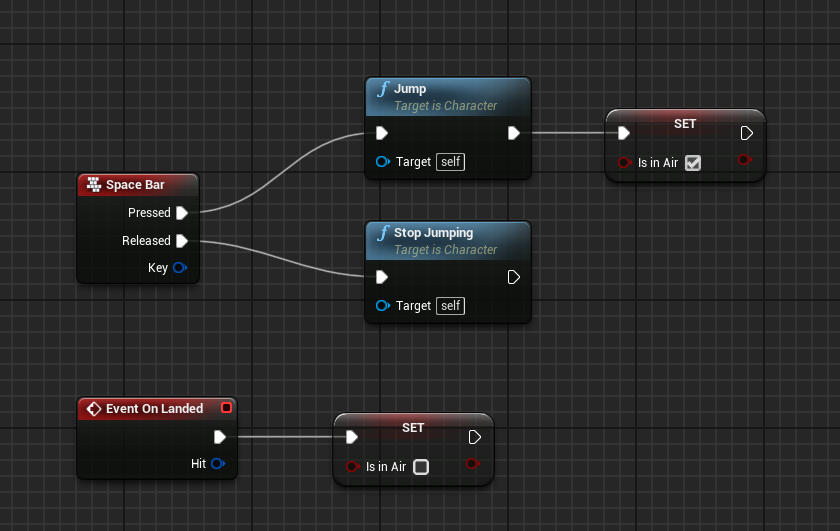 frozen hedge
from the input
autumn pulsar
So this is what I'd have in the main pawn
frozen hedge
Fair enough
autumn pulsar
though you'd replace spacebar with "IA Jump"
buoyant hill
frozen hedge
is falling is never connected
so what do i have to chnage
frozen hedge
buoyant hill
so what do i have to chnage
drag from on movemetn comp node
buoyant hill
autumn pulsar
though you'd replace spacebar with "IA Jump"
why
frozen hedge
get is falling node
frozen hedge
buoyant hill
why
Input Actions are a more efficient input node
autumn pulsar
buoyant hill
why
The complicated answer is that it allows you to rebind keys or use multiple inputs to the same action
If you don't plan to support rebindable controls you can use space bar
Which for a first game might not be bad
buoyant hill
autumn pulsar
If you don't plan to support rebindable controls you can use space bar
not rn
buoyant hill
autumn pulsar
Which for a first game might not be bad
yeah
i think i should do that later
 frozen hedge

This is what I meant by is falling connecting to falling node
Ignore my jumping
replace that node with is falling node
buoyant hill
autumn pulsar
the on landed event should be accessible easily
ok what does it do
frozen hedge
buoyant hill
how did u get isFalling
right click and search it
autumn pulsar
buoyant hill
ok what does it do
It "fires" when the pawn has landed
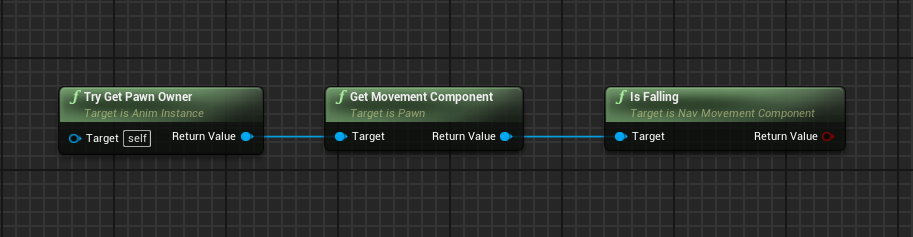
You use this chain to get "is falling" from the pawn in the Animation Blueprint
 buoyant hill
 buoyant hill
autumn pulsar
https://i.imgur.com/LyKBrZ7.png
buoyant hill
autumn pulsar
https://i.imgur.com/LyKBrZ7.png
ok wait let me finish the thing in BP third p first
 autumn pulsar
yeah
buoyant hill
dude i think it got better
buoyant hill
still problamatic tho
last finishing touch later will be just increasing speed and jump height
frozen hedge
buoyant hill
still problamatic tho
I know personally jump is a pain in the arse to get perfect in blueprints.
frozen hedge
buoyant hill
ryt
Probably yeah, blueprints can only get you so far.
buoyant hill
ok
autumn pulsar
You can do a lot with blueprints
frozen hedge
You should utilise both c++ and blueprints
buoyant hill
frozen hedge
You should utilise both c++ and blueprints
yeah
so which @autumn pulsar gave was a inbuilt func i think?
autumn pulsar
But you need a firm grasp on core programming concepts, as you'll quickly find seemingly basic stuff to be quite difficult without them
autumn pulsar
buoyant hill
so which <@151046841830473728> gave was a inbuilt func i think?
Correct, the "On Landed" event is a part of the Character Object
autumn pulsar
They might interfere
 autumn pulsar
So generally Jumping has 3 parts, the start of the jump, the middle of a jump, and the landing
generally in the animation, you only want to know when the jump happened to start the "jump" animation
buoyant hill
ok i understood a lil bit
autumn pulsar
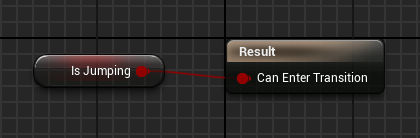
So for the Jump_start Transition, you'll have this https://i.imgur.com/e76cUFG.png
 buoyant hill
done
 buoyant hill
autumn pulsar
So for the Jump_start Transition, you'll have this https://i.imgur.com/e76cUFG.p...
buoyant hill
autumn pulsar
So for the Jump_start Transition, you'll have this https://i.imgur.com/e76cUFG.p...
done
autumn pulsar
Do you have a "Landing" animation?
buoyant hill
buoyant hill
should i delete it?
autumn pulsar
buoyant hill
should i delete it?
So delete the "unchecked "is jumping"
frozen hedge
buoyant hill
done
I would make the is jumping to true when I done start jump
If you are still using it that is
buoyant hill
only this much ryt
 autumn pulsar
yeah
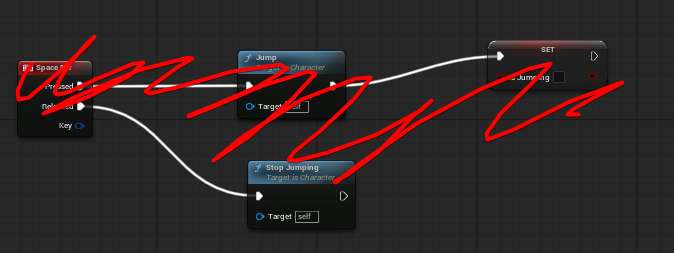
Then delete the top part here
Since the stuff you posted does that but in a different way
 autumn pulsar
I'm not sure if you have both a jumping and a landing animation
autumn pulsar
cool, do you have just a "falling" animation?
buoyant hill
yes
autumn pulsar
So you have "Jumping" "Falling" and "Falling To Landing" ?
buoyant hill
i have as jumping animation where i am jumping from ground to up and then and falling animation is from air to down
thats it
ntg more than that
autumn pulsar
So just the two
buoyant hill
u mean the one just glides in air ryt
autumn pulsar
yeah
autumn pulsar
Once you have that, you'll want this setup https://i.imgur.com/ueZE6ku.png
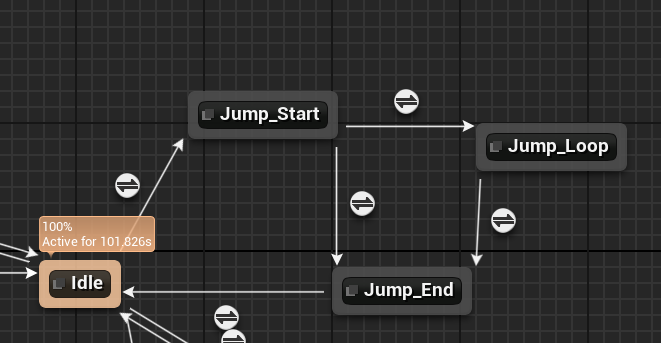
in your animation blueprint
buoyant hill
got '
buoyant hill
autumn pulsar
Once you have that, you'll want this setup https://i.imgur.com/ueZE6ku.png
wait
see i have this now

jumping-->falling idle-->falling to landing
like this ryt
autumn pulsar
yeah
buoyant hill
seee what to change
 autumn pulsar
So you don't need bidirectional on jumping and "falling"
buoyant hill
baam
 autumn pulsar
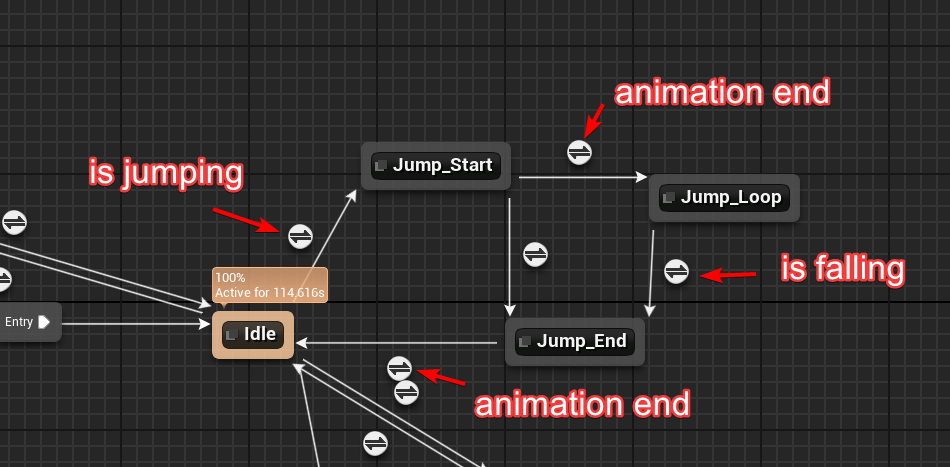 buoyant hill
what do i put in animation end in the upper
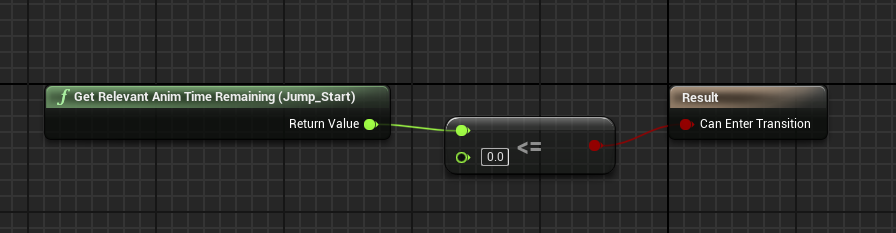 autumn pulsar
then check if it's "less than" 0
Basically check to see if the remaining time in the animation is zero then it transitions
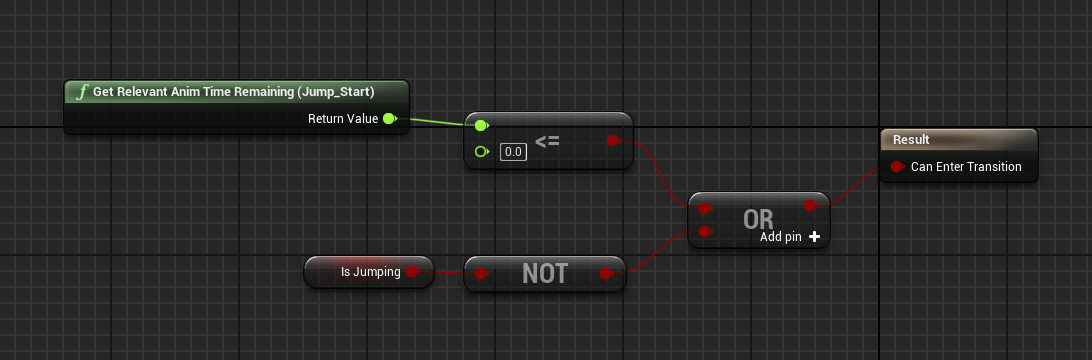
also add an or statement, then iis "not"
This basically tells us to exit early if we've already landed before the animation is over
buoyant hill
ok
buoyant hill
autumn pulsar
https://i.imgur.com/v3eLi4h.png
and how do i put falling idle animation in isfalling
 autumn pulsar
wrong place
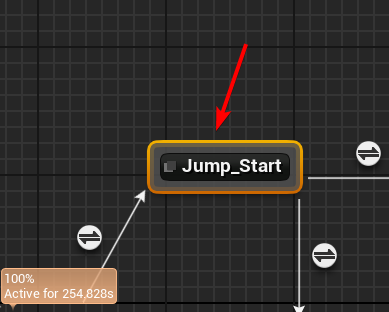
You need to do it in these nodes
the little circles are "conditions" for entering into the big bars
buoyant hill
oh yeah i m dumb sorry
buoyant hill
buoyant hill
and how do i put falling idle animation in isfalling
pls see this

what to do in lower animation end
autumn pulsar
the transition is correct, put the falling landing in the bottom one
err
the last node
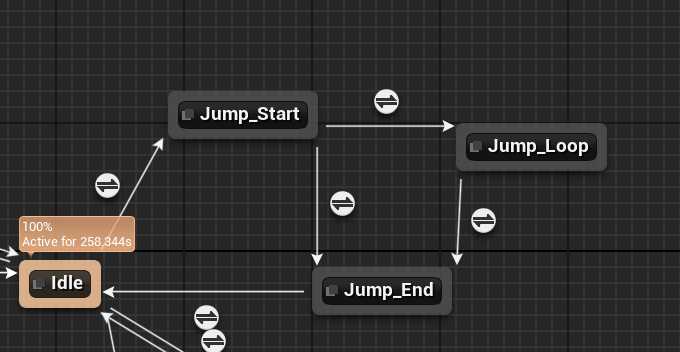
jump_start (Jump start animation)
jump_loop (Jump loop animation)
jump_end (Jump landing animation)
buoyant hill
ok i did the same thing
but i m not surr
do i need to make changes in transitions or the nodes
autumn pulsar
if you're playing an animation, it goes in the node
if you're doing a condition, it goes into the transition
The transition is basically "What is required to play this animation"
So think of it as "What is required for me to start jumping"
So we check to see if "Is Jump" is true
buoyant hill
ok so the thing is when i jump it getting stucked at falling idle animation
autumn pulsar
Cool, so the issue is it's not transitioning to the landing animation
buoyant hill
ok
autumn pulsar
so between "jump_loop" and "jump_end" we need a transition
So check "is jump" but check if it's false
buoyant hill
this is the transition
 autumn pulsar
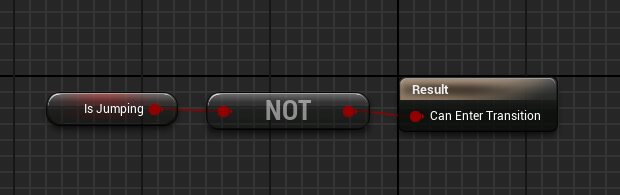
you can use "not" to get the opposite
that way if "is Jumping" is false, we enter into the animation
and since we landed, we set that to false
buoyant hill
i talking about this one
 autumn pulsar
yes


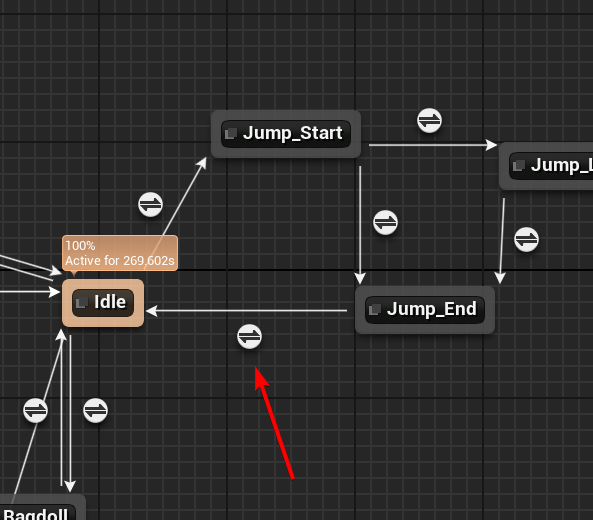 buoyant hill
this one?
 autumn pulsar
yeah
Also for the "Jump Start" and "Jump End" in the animation
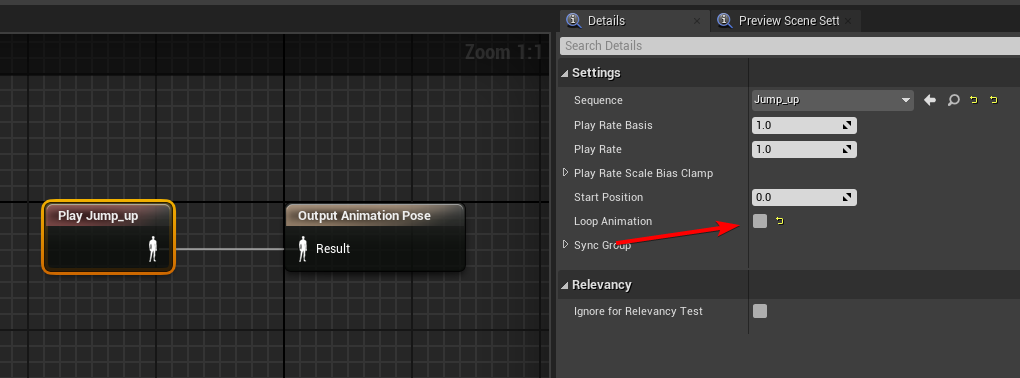
uncheck this box
on both
buoyant hill

 autumn pulsar
that looks correct, I think your jump animations need to be trimmed, but that's something for another time
should also look better with a higher jump height
buoyant hill
ok i thinks its ok for todays progress
buoyant hill
autumn pulsar
should also look better with a higher jump height
yeah the final touch
tell me how to change the running speed
and jumo height
autumn pulsar
buoyant hill
tell me how to change the running speed
They should be set in the "character movement" component
it's on the left-hand side
in your pawn settings
 autumn pulsar
yeah, on the right side there
buoyant hill
just tell me the running one
autumn pulsar
and "Max Walk Speed"
autumn pulsar
buoyant hill
but max walk speed is for walking
it's a poor description
"Max movement speed" would be more correct
but it does what you're wanting
buoyant hill
dude but if change walking speed
then walking doesnt work anymore
ok maybe not
it was error
not it was not a error
see if u can help
i am ending with this now
thanks for all the help
frozen hedge
Did you get it sorted?
Or are you still stuck on jumping?
@buoyant hill
buoyant hill
i changed the jumping animation
just see
i m sending
still it sliding after falling?
any fix
?
this much done
 dark drum
buoyant hill
still it sliding after falling?
dark drum
buoyant hill
still it sliding after falling?
You have two choices either:
A) on landing stop all movement on the character until the landing animation has finished.
B) have different landing animations based on forward velocity of the character. (Like a forward roll to run)
last peak
buoyant hill
how should i stop the movements
The easy way would be to turn your entire jumping into a montage
 lost wolf
its gonna feel horrible if you jump with the character and land and it stops all movement even if you are moving in the jump, imagine if you press space while running and then you land and stand still for a second while landing, that is not what you want to do
you want to combine a walking and landing animation
last peak
lost wolf
you want to combine a walking and landing animation

Everyone likes unresponsive movement
frozen hedge
True
 bronze grotto
Is there a way to populate and save primary data asset inside editor programmatically? (Ue4.27.2)
 maiden wadi
bronze grotto
Is there a way to populate and save primary data asset inside editor programmati...
maiden wadi
bronze grotto
Is there a way to populate and save primary data asset inside editor programmati...
Not sure in the 4.27 version. But you can SetEditorProperty on it in an editor utility. Works in 5.+ at least.
maiden wadi
bronze grotto
Is there a way to populate and save primary data asset inside editor programmati...
For a simple example, this is setting a texture's LOD setting. But the same applies to any asset. DataAsset, StaticMesh, Texture, etc.
 bronze grotto
I remember seeing set editor property maybe that'll work
maiden wadi
Ignore the SaveLoadedAsset at the end. Forgot to remove that.
bronze grotto
I have ~500 generated icons of different configurations and it would be quite subiptimal to populate them by hand
(widget styling n shit)
bronze grotto
maiden wadi
For a simple example, this is setting a texture's LOD setting. But the same appl...
Does it work with arrays/array members?
I would assume it works with entire array
maiden wadi
Maybe. If your asset has BP settable fields you might be able to set them directly without SetEditorProperty. SetEditorProperty just exists cause a lot of stuff that is editor editable is not Blueprint settable.
For arrays, you could still just strictly set the fully array value. For individual indices I think you'd need your own setter or to alter the array directly. Or to get, copy, change copy, write whole copy back.
 hoary wasp
Hello, has anyone here worked on these kind of portals in ue, using screen capture 2d. Thing is Im working on a team project, and there is an issue with our portals that I was asked to look into, but its quite difficult for me to debug. We want 'seamless' portals, so we dont want it to look like a mirror, but rather like the gameworld itself (its for a horror game)
is it not possible to match it one-to-one with the gameworld? .. i tweaked screen capture component 2d's reflection and lighting to lumen to match the game world, it looks sort of close, but it has a blurry effect when walking, i guess thats because of AA, should I avoid using TSR and juse try to use TAA? as for the resolution, the portal itself does have functions to check the viewport resolution and match it to it's
I know all this info is vague, im just wondering if anyone here has worked on something simillar before and could guide me somewhere

 dense forge
Hey guys I’m getting these errors and i’m not sure how to fix them. Here’s the errors and the code. The yellow errors are what i’m referring to.


 maiden wadi
dense forge
Hey guys I’m getting these errors and i’m not sure how to fix them. Here’s the e...
maiden wadi
dense forge
Hey guys I’m getting these errors and i’m not sure how to fix them. Here’s the e...
For the red error, before your first cast. IsValid on the OtherActor. Cast only checks if the cast succeeds and that the object is in memory. It doesn't check garbage or whatnot.
For the yellow, you should check IsEmpty on the GetOverlappingActors before running the logic trying to pull from the Get.
dense forge
maiden wadi
For the red error, before your first cast. IsValid on the OtherActor. Cast only ...
can you go into more detail on how to use isEnpty
maiden wadi
Connect it to a branch before you run anything connected to the Get.
 narrow kite
dense forge
Hey guys I’m getting these errors and i’m not sure how to fix them. Here’s the e...
narrow kite
dense forge
Hey guys I’m getting these errors and i’m not sure how to fix them. Here’s the e...
Not sure what you are doing there. However, that many casts often signals something that could be coded better.
Or maybe that's a single player party based game I'm not sure
dense forge
narrow kite
Or maybe that's a single player party based game I'm not sure
it’s supposed to be a 4 player local hot potato type game where your throwing an item to other players
 marble tusk
hoary wasp
Hello, has anyone here worked on these kind of portals in ue, using screen captu...
marble tusk
hoary wasp
Hello, has anyone here worked on these kind of portals in ue, using screen captu...
Make sure "has pixel animation" is set to true in the portal material
dark drum
dense forge
Hey guys I’m getting these errors and i’m not sure how to fix them. Here’s the e...
All the characters should have a common parent with the shield property. Then you only need to cast to the parent class to access the property. It would save you having to duplicate the code.
bronze grotto
from what it looks like you have subclass for each player, but are they actually any different logic-wise? if no you only need one class
 kindred mason
if I use the insert node for arrays, does it move the the existing elements up or down?
narrow kite
kindred mason
if I use the insert node for arrays, does it move the the existing elements up o...
'You can print string the index to verify it. I would presume it would just add the last index.
narrow kite
kindred mason
if I use the insert node for arrays, does it move the the existing elements up o...
I believe it shifts on deleting an index. I had to deal with that in an inventory system item list.
dark drum
kindred mason
if I use the insert node for arrays, does it move the the existing elements up o...
It moves them up. For example, if you have an array size of 5 and insert at index 2, everything at 2 and above moves to an index higher to make room at index 2. The order is maintained.
last peak
dense forge
Hey guys I’m getting these errors and i’m not sure how to fix them. Here’s the e...
Holy duplicate code tree.......
 thick prairie
Is there any Version control setup for Indie that you would recomend for Simultaniously working in BP and merging at end I work on CPP and BP on my main player char and DIversion make me conflict mess what can be my best go to ?
 frosty heron
thick prairie
Is there any Version control setup for Indie that you would recomend for Simulta...
frosty heron
thick prairie
Is there any Version control setup for Indie that you would recomend for Simulta...
bp is binary, only one person can work on it at a time afaik.
You can use preforce if you want to establish file locking.
last peak
thick prairie
Is there any Version control setup for Indie that you would recomend for Simulta...
Just dont touch the same bp 🤷
frosty heron
personally I just use any git software, source tree, git kraken, github desktop.
Use Azure dev ops to host your repo, it has kind of (I think) unlimited size. Up to 5 users before paying.
last peak
Thats why proper composition is important
frosty heron
last peak
Thats why proper composition is important
Keeping bp to minimum also helps.
if core system in bp then gl merging with multiple ppl working on it.
last peak
It aint that bad if you put everything in components and just lock the files
maiden wadi
Just remember kids. Systems like GAS suck ass because there's too many files.
last peak
Why would 2 ppl need to put their dirty hands in one bp all the time ? 😄
frosty heron
but ppl can work on the same class at the same time if it's text based.
maiden wadi
I really do hope that verse gets here soon and is a valid logic replacement for a lot of BP stuff. Will be nice to have a text based scripting system that is also available to consoles.
frosty heron
maiden wadi
I really do hope that verse gets here soon and is a valid logic replacement for ...
I tried verse when friend ask to collab to make fortnite map.
followed tutorial, the title says "verse is easy that even a non programmer can follow"
and holy cow, it was pretty hard imo.
the syntax is sooo confusing.
maiden wadi
I'd honestly prefer Lua. Specially since the engine is already in C++, Lua feels like an obvious easy choice. But it's hard to get it working on consoles from what I understand.
frosty heron
 # The VFX spawner to play VFX as characters are being healed.
 @editable
 VFXSpawner:vfx_spawner_device = vfx_spawner_device {}

 # The agent to follow while they're being healed
 var AgentToFollow:?agent = false
don't even know what :? is for. like std::optional?
name came before data type too X_X.
 # The queue of agents to heal in the case of multiple agents entering the heal volume.
 var AgentsToHeal<public>:queue(agent) = queue(agent){}

 # Used to specify how quickly to update the position of the HealVolume and VFXSpawner
 UpdateRateSeconds<private>:float = 0.1
Almost like they force them self to be swag.
but maybe it's just me, I dunnoe.
maiden wadi
# The VFX spawner to play VFX as characters are being healed.
 @editable
 VFXSpawner : vfx_spawner_device = vfx_spawner_device{}

 # The agent to follow while they're being healed
var AgentToFollow : ?agent = false```Spaces help the reading a little
frosty heron
I'm soo used to statically typed language even when working in python, I declare the type.
skill issue on my end perhaps but it's like seeing auto everywhere, kills my brain.
maiden wadi
Yeah, that's more of a scripting language thing though. Most scripting languages don't do types usually because... they're meant to be simpler for less tech minded individuals.
In essence you shouldn't need to usually care if you're using a float, double, int8, uint8, uint64, int32 etc. It's enough to understand that there's a number value in the field.
Admittedly though. Verse syntax compared to other scripting languages is... eh... Interesting. It simplifies some things away, and then does some other complicated shit that leaves even tech minded people baffled. It's not as easy as they want it to be.
maiden wadi
frosty heron
```
# The VFX spawner to play VFX as characters are being healed.
@editable
V...
As a fun example. This... contraption of shit here? Nice difference.
local VFXSpawner = nil
local AgentToFollow = nil```Lua is much nicer as a scripting language to read and understand.
 next hollow
Bruh, I really just wasted like 1 hour, getting trolled by an obscure widget bug
dark drum
next hollow
Bruh, I really just wasted like 1 hour, getting trolled by an obscure widget bug
Welcome to the unreal engine. 😅
next hollow
I thought I had went through all of them, given I've been doing BP based modding for years now.
I guess not. 😛
dark drum
next hollow
I thought I had went through all of them, given I've been doing BP based modding...
It likes to throw you a curve ball from time to time lol.
next hollow
Curve ball of performant widget design. 😛
 spark steppe
next hollow
Bruh, I really just wasted like 1 hour, getting trolled by an obscure widget bug
spark steppe
next hollow
Bruh, I really just wasted like 1 hour, getting trolled by an obscure widget bug
 next hollow
 last peak
spark steppe
last peak
spark steppe
deserved
 jovial delta
Assertion failed: CharacterOwner->GetCapsuleComponent() [File:D:\build++UE5\Sync\Engine\Source\Runtime\Engine\Private\Components\CharacterMovementComponent.cpp] [Line: 7037]
I get this crash message whenever I press the play button, any idea how to fix?
dark drum
jovial delta
Assertion failed: CharacterOwner->GetCapsuleComponent() [File:D:\build\++UE5\Syn...
Have you added a character movement component to your own pawn class? Or are you just using the character class?
 dark drum
jovial delta
I think so
dark drum
jovial delta
I think so
Whats the parent class?
jovial delta
In the character movement component?
dark drum
jovial delta
In the character movement component?
What is the parent class of the class you have the movement component on?
jovial delta
dark drum
What is the parent class of the class you have the movement component on?
I think it says character in the top right
One thing i have noticed is that the collision component says "Root Component (Collision Cylinder)" when a older version says "Capsule Component (Collision Cylinder)"
dark drum
jovial delta
One thing i have noticed is that the collision component says "Root Component (C...
I have some bad news. 🥲 It looks like you're class has broke. Make a backup and then reparent to actor and then back to character. Sometimes it can fix it but you might need to fix some things from the reparenting.
jovial delta
dark drum
I have some bad news. 🥲 It looks like you're class has broke. Make a backup an...
I see
I reparent the BP_basecharacter?
dark drum
In essence, its checking for the capsule as part of the find floor function. It doesn't find so gives the assertion failed crash.
 dark drum
jovial delta
I reparent the BP_basecharacter?
dark drum
jovial delta
I reparent the BP_basecharacter?
If thats the one with the broken capsule component, yes.
jovial delta
dark drum
If thats the one with the broken capsule component, yes.
how do i reparent it>
?
dark drum
jovial delta
how do i reparent it>
Under class settings.
jovial delta
Ok
jovial delta
dark drum
I have some bad news. 🥲 It looks like you're class has broke. Make a backup an...
thank you, this worked. though it was annoying having to fix everything
dark drum
jovial delta
thank you, this worked. though it was annoying having to fix everything
Yea, it can be a pain. Look at using composition (actor components) to help mitigate what breaks should it happen again.
jovial delta
dark drum
Yea, it can be a pain. Look at using composition (actor components) to help miti...
Ok 👍
last peak
Any merit to that?
Seems like he has a personal hate on blueprints lol

Guess hes correct in the sense that in most studios cpp is 100% preferred for most things
But really nothing is done in bp's sounds weird too me, in almost any job offer ive read so far they want both
It was in reaction to op explaining how he cant find a job with bp experience only
dark drum
last peak
Any merit to that?
Seems like he has a personal hate on blueprints lol
Sounds like personal hate to me. C++ and BP both have their pros and cons. Just use what makes sense to you for your particular use case. Make a game and have fun doing it. (or atleast try)
last peak
In personal projects im probably gonna prefer Bps forever just for the fact that closing down my editor all the time is so damn annoying 😄
Unless its math, that is really annoying in bps
maiden wadi
last peak
Any merit to that?
Seems like he has a personal hate on blueprints lol
I'm not reading much blueprint hate here. He's not necessarily wrong about his points about BPs shortcomings and he's not saying that using BP is shit per say. He's telling someone that their choice to avoid C++ is stupid, and on that I'd have to agree unless you're an artist or a designer. If you're even a tech artist or any form of programmer, knowing C++ will strongly benefit you even if you still do a lot in BP.
last peak
You cant step trough blueprints while debugging and watch variables? also the entire you have to re-wire part is weird
i mean sure sometimes you have to rewire but you also have to replace variables in cpp
maiden wadi
They seem to be talking about jobs as well. Which to be honest, unless you're working in a huge company any you want to stay on shit level pay, you aren't getting far as a BP only dev unless you're a tech artist just implementing display effects.
And on personal projects, too much of the engine is missing to BP still. There are incredibly simple things you can't do in BP only.
next hollow
last peak
You cant step trough blueprints while debugging and watch variables? also the en...
BP debugger and step-through is possible, but very buggy/ odd.
Compared to C++.
maiden wadi
You also can't see all variables in BP either. Only what are exposed.
next hollow
and even if there exposed.
It LOVES to do the stupid this isn't used in the current context or something goofy, and doesn't tell you the value.
maiden wadi
BP is nice. I love using it. But I also love using C++. And I think anyone saying to use one OR the other is wrong. You really need both for most work unless you're a really low level tools programmer.
last peak
next hollow
and even if there exposed.
It LOVES to do the stupid `this isn't used in the cur...
Ye but you can watch the variables and they will show up
last peak
maiden wadi
BP is nice. I love using it. But I also love using C++. And I think anyone sayin...
Thats true, what ive seen in most job offers is strong experience with both
Are there things you would never do in cpp ?
next hollow
last peak
Ye but you can watch the variables and they will show up
Its stupid stuff like this.
 last peak
next hollow
Its stupid stuff like this.
last peak
next hollow
Its stupid stuff like this.
Ye it has problems with things with more context
Arrays
Objects
Weird thing is that a print string will print it perfectly fine
maiden wadi
last peak
Are there things you would never do in cpp ?
Hard to say. Couple years ago I'd have had a list. But anymore, I find most things I used to like in BP easier in C++. I even do most of my UMG widget scripting in C++ anymore with BindWidget and BindAnimation metas.
Fun fact. BPs can't safely edit their code in a live game and you can in C++. At least function bodies. And fixing bugs, that shit is sometimes invaluable to quickly test fixes.
last peak
Sigh i really have to up my cpp game in unreal engine ....
I know regular cpp 98, and a bit of unreal cpp but not enough to do anything reliable
next hollow
What I do, with my newer experience to C++:
Define function in C++, then test/ do stuff in BP
Now I do a decent bit in C++, without BP testing.
But, still BP for more generic things.
and, still all BP for UI/ widgets, just cause I always hear slate is... Interesting to mess with.
maiden wadi
You don't need to touch slate if you use C++. In fact you still should not. You can still write your UUserWidget code in C++ same as you would in a BP.
next hollow
I thought slate was how you detect the widgets, for button press, and stuff?
Or, did I get the name mixed up?
maiden wadi
Slate is the actual UI. You use Slate even if you use BP widgets.
Placing a UButton in a UUserWidget still creates an SButton internally.
But for example.


Name the widgets in your BP subclass the same as your BindWidget, and now you can write code using them in C++.
next hollow
Oh, I didn't know of that, with the var name, and stuff.
The only way i've seen C++ interact with BP widgets is with text vars, and that like FindWidgetByName or something C++ function.
maiden wadi
void UVictoryConditionProgressWidget::NativeConstruct()
{
    Super::NativeConstruct();

    TextWinType->SetText(FText::FromString("Hello World!"));
}```
For a side by side. These are identical in this case.
Doing it in C++ is nice if you do it this way. Cause you can essentially write all of the logic for a widget, play animations when needed from the BindAnimation meta.
And meanwhile any designer can rearrange the widget and style it as they like in their blueprint child.
next hollow
Does the C++ automatically go nuclear if a widget by that name doesn't exist?
(without even using the ref)
maiden wadi
next hollow
Does the C++ automatically go nuclear if a widget by that name doesn't exist?
(w...
You should probably nullcheck them. But in general your widget will be valid unelss someone actively removes it from parent, which is just weird for a sub UWidget.
You can use BindWidget to make sure the BP won't even compile without that named widget present.
BindWidgetOptional gives the designer to option to exclude it.
next hollow
Oh, thats cool.
That lack of the widget will make the compile fail
last peak
Whats a good starting system to do 100% in cpp?
a basic interaction system maybe with a linetrace ?
 surreal peak
last peak
Whats a good starting system to do 100% in cpp?
surreal peak
last peak
Whats a good starting system to do 100% in cpp?
Assuming you still have some shape or form of BPs or assets in the end, sure.
Absolutely everything in C++ isn't correct either, but maybe you didn't mean that.
last peak
Its mainly just to learn cpp
And the entire workflow but i cant really find a lot of good tutorials for it
With bp's there are millions ^^
 fast laurel
hello everyone, does anyone have any blueprint resources for a tunnel runner, or am i the only person making this
the idea is to create a movement BP for a octogonal tunnel runner game, where the head of the player along with player orientation always remains at the centre of the tunnel
 lusty hedge
the Mouse Enter event does not work with LMB down... any work arounds? (widget blue prints)
fast laurel
quite a few problems i faced, switching lanes inside the tunnel causes my forward motion (every tick) to cut of, and jumping and switching lanes causes my player capsule to clip under the lane floor
current setup, but extremly buggy


im curious if it bcoz of runnign every tick or not,
PS. i was in proto mode and variable names were not important at the time
 flat coral
Okay do I not understand what RelativeLocation is? How can it be the same as world location for a component? How do I get the actual relative location?
This prints: ActorLocation=X=-1376.000 Y=-162.000 Z=102.000 Fuse_RelativeLocation= X=-1356.000 Y=-162.000 Z=102.000 Fuse_WorldLocation=X=-1356.000 Y=-162.000 Z=102.000
But if you look at the second image, that's the relative location as given by the editor


Shouldn't it be like <ActorLocation> - <ComponentWorldLocation> = <Component Relative location> ?
maiden wadi
last peak
With bp's there are millions ^^
Do the same thing BP does. Just do them in C++. I'm also the unpopular voice that'll tell you to ask an LLM to give you simple conversions here. Like if you don't know how to add a component to a class in C++.
If you ask it something like "How do I add a component to class in C++ similar to adding it in the blueprint's component list." This is Claude's output and it's accurate.

 maiden wadi
flat coral
Okay do I not understand what RelativeLocation is? How can it be the same as wor...
maiden wadi
flat coral
Okay do I not understand what RelativeLocation is? How can it be the same as wor...
Can you show your component hierarchy of that class?
Also is Fuse Mesh still attached or doing anything like simulating physics?
flat coral
It IS simulating physics, and attached to a physics constraint. I think that's where the weirdness is coming in

I've actually fixed it by just storing the relative offset in the construction script and using that for the operation in question
maiden wadi
If it's simulating physics, that'll be why you see what you see.
It's relative location is now world's because it's not attached to a parent anymore.
Essentially it's the same as if it was an actor's root component.
narrow kite
I want to have breakable walls in the game. Where a record of each instance is kept. I'm looking for the best way to store that info into ideally a single variable/map/table/etc. Consisting of a Map ID/Name and Toggle Destroyed / Not. What would someone suggest?
Like a Game Play tag map to a struct?
Or just a struct array maybe
Or a struct for each map. So if you're seaching the loop would only consist of data for that map or a region
If you get a specific index on an array using a specific number like 88 with 1,000 entries will it essentially loop to 88 to find it or is it more optimized?
narrow kite
It's a simple structure array to keep records during the lifetime of the map. No boolean is needed. If the record exists the event was executed/completed. Thus all events will reset on each map load as it's not going to be part of the save file. This will keep the record searching clean with only a few entries.
It's essentially the same as an old node system I created for a MMO. Where player events reset on a timer by just clearing out the data. Each player had their own record which consisted of which events they completed.

The Map ID and event ID are set directly on each event blueprint.
I'm going to simplify it since I'm not saving the data. This is another key aspect of tracking. To keep them organized with unique ID's I'm just going to label them.

 slim hamlet
i want the camera to still be affected by the mouse when im not holding
narrow kite
Example event: Working on it
 obtuse kiln
okay so I know this is jank, but is it 'no seriously you have to fix this it's going to be a problem' jank? I want the (first person) player to be able to corner peek without being instantly seen without needing to find space for lean controls.
I know I could do this more properly in CPP but I can barely set up an enum in CPP without it turning into a kerfuffle, so...
 dark drum
narrow kite
I'm going to simplify it since I'm not saving the data. This is another key asp...
dark drum
narrow kite
I'm going to simplify it since I'm not saving the data. This is another key asp...
I've read what you've posted and I'm not sure what you're end goal is. Is this for saving/loading walls that have been destroyed by the player?
dark drum
slim hamlet
i want the camera to still be affected by the mouse when im not holding
If the enhanced input events stop firing when you click, its most likely the UI being given input instead. Try setting the input mode to 'Game Only' to prevent this.
 hard charm
How can I orbit a spring arm on the yaw axis to allow me to perform a 360-degree rotation around my target?
It's always limited to -180 and 180.
 tight pollen
hi, How would you program an AI that chases a player who has entered an elevator, rides it down, and then—after some time—the AI also takes the same elevator down and continues chasing the player?
maiden wadi
tight pollen
hi, How would you program an AI that chases a player who has entered an elevator...
Navlinks
maiden wadi
hard charm
How can I orbit a spring arm on the yaw axis to allow me to perform a 360-degree...
AddLocalRotation, or keep a full 0-360 and just set it. Rotation will auto convert from those values to the normalized -180 to 180
tight pollen
maiden wadi
Navlinks
but it probably doesn't fit in the elevator
Because the elevator has to go down with AI
maiden wadi
What?
tight pollen
The AI must enter the elevator and follow the player to the lower floor.
I know how to do it more or less, but maybe someone will have a better solution, navlinks just don't really fit here, I don't even know how I would use it
navlinks fits doors or windows...
maiden wadi
You smart navlink from each floor to every other floor. The AI will run up to this navlink and activate it. This is the end of it's navigation normally. You interp the AI into the elevator somehow when it shows up and is open, you can program most all of this into the navlink itself special for the elevator.
Then when it reaches the next floor it spits out the AI on top of the other navlink. Now it canresume normal nav movement.
That way no matter what floor or whatever you go to, the AI can still try to reach you and it "Just works".
The alternative is just to fake it if it's a one off. 🤷♂️
tight pollen
well, that makes sense, thanks
 timid dock
Hello, I am trying to get my root motion to work my attack animations. I can see in the anim sequence that the root motion is working and the root is actually moving, but if I turn on enable root motion in the sequence and then play the game the animation also just stays in place. When I turn off enable root motion the animation moves with the root, but then snaps back to its starting position, which I do not want to happen.I have gone into the anim bp and tried both root motion from everything and root motion from montage only, which is the setting I would like to keep it at. any thoughts on why my root motion for my attack anim snaps back to where the animation started, and how to get my character to continue to move forward with the root motion?
next hollow
maiden wadi
You should probably nullcheck them. But in general your widget will be valid une...
Thanks for showing me this.
The widget C++ was far easier, and less cumbersome then I was lead to believe from past knowledge/ seeing stuff.
maiden wadi
It's nice. I do most of my widgets in C++ as a logic base anymore and designer work in the BP. Kinda similar to most of my BP stuff too though.
next hollow
Yeah, I had it confused that slate was super hard, so widget C++ is super hard.
and, thought you needed to manually spam GetWidgetFromName with widget names, on widget construct.
Rather then the automatic, and error throwing BindWidget meta.
 median estuary
MY BP for spotlight only works on 1 and not the others. How do i fix it?
 maiden wadi
median estuary
MY BP for spotlight only works on 1 and not the others. How do i fix it?
maiden wadi
median estuary
MY BP for spotlight only works on 1 and not the others. How do i fix it?
Need whatever code is triggering the one.
median estuary
Its not code. Its literally a BP with a static mesh and spotlight
 loud vessel
median estuary
MY BP for spotlight only works on 1 and not the others. How do i fix it?
loud vessel
median estuary
MY BP for spotlight only works on 1 and not the others. How do i fix it?
You can start from here, I suppose.
The other Lamps are simply static actors, not the BP you just created.

Click on the BP_Lightlamp in the content browser.
Then select all the lamps you want to replace in the level. (StaticMeshActor)
Right click on any of them.
And replace Actor. (There's an option for that.)
frosty heron
median estuary
Its not code. Its literally a BP with a static mesh and spotlight
Code literary means your bp here. How else can we evaluate without seeing the actual code?
median estuary
I fixed it
 restive knot
Hi everyone. I’ve recently started learning Unreal, and I’d like to ask for some help, if possible.
Dear experts, I need some help with a HUD issue in UE 5.5 Blueprint multiplayer.
I’m creating a test project using Steam Session / Online Subsystem. In BP_Character, on Event BeginPlay, I cast to PlayerController, check validity through Enhanced Input Local Player Subsystem, add the Mapping Context, then create a health widget blueprint — WB_HealthBar. I save it into an HP_Widget variable, add it to the viewport, and call its initialisation event.
The health logic is placed in a separate BP_HealthComponent, which is added to the character. It contains the damage logic, CurrentHealth, MaxHealth, and the OnHealthChanged dispatcher. When damage is received, the dispatcher is called, and in the character I bind an event to it, which should update WB_HealthBar.
The health system itself works: each player has their own HP, damage is calculated correctly, and the client character dies as expected. The issue is only with the HP bar display.
On the listen server, everything works reliably: the widget is created, health updates, and death triggers correctly. On the client, the widget is displayed and seems to show the initial health, but after taking damage, the HP bar does not update. At the same time, the health logic is working, because the client character still dies.
It looks like the dispatcher / update event is reaching the wrong character or widget instance.
 crimson briar
restive knot
Hi everyone. I’ve recently started learning Unreal, and I’d like to ask for some...
crimson briar
restive knot
Hi everyone. I’ve recently started learning Unreal, and I’d like to ask for some...
Is the Health Component replicated?
Are you updating the health on server only?
Is the CurrentHealth variable replicated?
In general your update health funciton should be on the server only. Then the CurrentHealth should be a RepNotify. Your update function does some stuff with the health, then sets the current.
RepNotify is triggered on each client (and listen server in case of BPs repnotify) - and here you call a dispatcher to update the widget. Since widgets are local
As a side note, starting learning Unreal with a multiplayer project makes the whole learning process at least twice as hard
restive knot
As far as I understand, yes, everything is replicating. I’m updating health on the server, I believe. As I mentioned before, the characters die as expected, and the health reaches zero correctly.
Did I understand you correctly? Are you saying that I need to use an OnRep function in my HealthComponent Blueprint to update the widget?
I’ll attach an image of how I understood it. Please correct me if I’m wrong.
 restive knot
crimson briar
As a side note, starting learning Unreal with a multiplayer project makes the wh...
restive knot
crimson briar
As a side note, starting learning Unreal with a multiplayer project makes the wh...
I understand, but a single-player approach doesn’t interest me and doesn’t motivate me to learn Unreal at all, unfortunately.
crimson briar
restive knot
As far as I understand, yes, everything is replicating. I’m updating health on t...
Yes, when the variable is marked to replicate with OnRep, it's OnRep function will be called on each client when they receive a new value from the server
As long as the component and the actor it belongs to are replicated ofc
 pseudo perch
median estuary
MY BP for spotlight only works on 1 and not the others. How do i fix it?
pseudo perch
median estuary
MY BP for spotlight only works on 1 and not the others. How do i fix it?
Unrelated but i really like ur grass here
restive knot
I’m getting some errors from Unreal here. What could this mean? How should I properly perform the cast?
'BP Third Person Character' does not inherit from 'Player Controller' ( Cast To BP_ThirdPersonCharacter would always fail).
[1772.76] Compile of BP_HealthComponent successful, but with 1 Warning(s) [in 179 ms] (/Game/Dungeon/Blueperints/Components/BP_HealthComponent.BP_HealthComponent)
crimson briar
restive knot
I’m getting some errors from Unreal here. What could this mean? How should I pro...
You used get player controller and cast to a character. THey are not the same
BUT
In MP scenario it is a good idea to avoid "GetPlayerX" when possible - in this case you can use GetOwner, since components are always attached to an actor
restive knot
 crimson briar
restive knot
crimson briar
restive knot
Make sure you have the context sensitive marked when loking for something

Actors also have GetOwner function
restive knot
So, I added GetOwner in the component with Context Sensitive enabled, compiled everything, and no errors were found, but the HP bar still doesn’t work for the client.
Could there be another step I’m missing? What should I check again?
 solid lotus
restive knot
So, I added GetOwner in the component with Context Sensitive enabled, compiled e...
solid lotus
restive knot
So, I added GetOwner in the component with Context Sensitive enabled, compiled e...
have you tried to set a breakpoint on the event call node and on the listener node to see if both are called? Also, I'm not certain if you've specified it but the whole thing is in bp right? not a parent class in CPP where you may have forgotten to call GetLifetimeReplicatedProps ?
frosty heron
First of all, dont have the event at your character / controller.
Have the attribute component broadcast its own event instead.
Your widget can then grab fhe attribute comp and listen to it.
@solid lotus
restive knot
solid lotus
have you tried to set a breakpoint on the event call node and on the listener no...
I did set breakpoints, but I didn’t fully understand where they were leading.
I’m tracking what’s happening mostly through Print String, and most of the messages are coming from the server, but not from the client.
And yes, I’m working with Blueprints.
frosty heron
OnRep is called when a variable is updated. So in the case of server replicating the value, onRep will be called.
AttributeComp->OnRep->CallAttributeUpdate event.
restive knot
The screenshots show how the signal flows: it passes the cast, goes into Call On Health Changed, then Health Changed goes to EHealthUpdate inside the widget blueprint.
The problem is that the widget code at the end does not execute if it’s the client. The server understands what is happening, but it doesn’t change any values for anyone, which makes sense, because as far as I understand, the widget should only be displayed on the client.
It feels like this situation should have a simple solution, but right now I just can’t see it at all.


 frosty heron
restive knot
The screenshots show how the signal flows: it passes the cast, goes into **Call ...
frosty heron
restive knot
The screenshots show how the signal flows: it passes the cast, goes into **Call ...
Having the event in your character is absolutelt unneccesary. Keep your system self contained.
And yes im working on multiplayer game.
Do as suggested it should work.
Also show how you create the widget once you make correction.
restive knot
This is how I create the widget, and at the start, the widget always takes both the maximum health and the current health directly from the component.
To be honest, I still don’t fully understand how I’m supposed to pass the character reference, but I’ll try to do that.
Thanks a lot!
 frosty heron
@restive knot you shouldnt bind mapping context at begin play in multiplayer. Suprised if this even work.
That asidse, in youe intialize function on widget. Change the parameter to the health component instead of player character.
Then just drag and drop the component from the character into the field. Then plugging it as the parameter.
restive knot
I think I understood you correctly, and this is what I have now.
I tested it just in case, and each character instance both on the server and on the client now has two health bars. However, they only update on the server. 

 maiden wadi
It seems really weird to have a health component, but broadcast the health change on the character.
restive knot
How would you do it?
frosty heron
restive knot
How would you do it?
he is iterating what we sees weird about the broadcasting on the character.
Delete that Call E Health update in your character.
have the broadcast in the health component instead.
also you haven't even set the health component in your widget.

 restive knot
I’ve done all of that, but it still doesn’t work quite correctly.
Now the client has multiple health widgets, while the server only has one, and it belongs not to the server character, but to the client character, which looks very strange.
Everything is getting pretty confusing, and I’ll continue working on it tomorrow. If needed, I’ll come back with more questions.
Thank you all very much.🫶
frosty heron
restive knot
I’ve done all of that, but it still doesn’t work quite correctly.
Now the client...
that happend because begin play called on each object. So if you have 3 characters, you will end up displaying 3 widgets.
I was under the assumption that the widget is a widget component that is displayed on world position.
Multiplayer is kinda too early if you can't even work on this in single player. if you are still learning what reference, instances and casting are. Forcing multiplayer will hinder those foundation skills as you have to deal with multiple instances (machine / computer / players).
 spiral kite
When I scale up the car, the wheels sink halfway into the ground. I wonder why.

 rose crest
restive knot
I think I understood you correctly, and this is what I have now.
I tested it jus...
rose crest
restive knot
I think I understood you correctly, and this is what I have now.
I tested it jus...
You have two replicated values and there's race which is replicated and which isn't yet. You can pack both into struct and replicate struct, that way you'll have one variable with correct values
After it's replicated just call the dispatcher and send both values. Widget will listen and update.
rose crest
restive knot
Also don't cast when you broadcast the dispatcher. There's no need, it doesn't need a target. Just call the dispatcher and bind to it inside the widget
 knotty quarry
Question: I'm trying to make a large procedurally generated maze/dungeon, and I want to run the generation algorithm without causing hitches or freezing. I would think that the best approach would be to run this asynchronously outside the main game thread, which would be very safe since no modified variables would need to be accessed until the generation is complete.
However, I can't find a blueprint-friendly way of achieving this short of introducing delays which is both very tacky and still could cause freezes (and artificially inflate load times). If there is no other option, I'll try to figure out a way to do it with c++, but I'd prefer to continue keeping my project mostly to blueprints. There is one Idea I had though, would it be possible to somehow tie the algorithm to the level loading? Because as-is the level will end up streamed in, so it's already asynchronously loading. But if I could get the level to include the algorithm while it's loading too, perhaps that could help. Of course, if there's another solution I'm open to anything.
 languid hemlock
knotty quarry
Question: I'm trying to make a large procedurally generated maze/dungeon, and I ...
languid hemlock
knotty quarry
Question: I'm trying to make a large procedurally generated maze/dungeon, and I ...
I think there is no builtin blueprint async task nodes but there are extensions for this. Also c++ is an option
You can split the work like run 20 times every tick, but that would slow the process, and not reliable
 calm stone
This might be a really basic question, but what would I have to do to get this Dash ability's cooldown to be displayed on the UI?
I want to use a progress bar/image to show when the player is on cooldown/dash ready. From what I'm reading this is purely "logic" and can't be read by the HUD? Not sure where to go next thanks for your help
 last peak
calm stone
This might be a really basic question, but what would I have to do to get this D...
last peak
calm stone
This might be a really basic question, but what would I have to do to get this D...
You need a ui element
After the launch you set a variable - float "time since launch" = 0
Then you create a timer you set it to looping 0.1 seconds and hook it up to a event
In the event you increase "time since launch" by X
Then you create a event dispatcher "on cooldown changed"
And you call that after you increased your time since launch
In your hud you add a progress bad
On event begin play you get a reference to your player then you bind this "on cooldown changed" to a custom event
in the custom event you set percent of the progress bar and done
knotty quarry
languid hemlock
I think there is no builtin blueprint async task nodes but there are extensions ...
Yeah I saw a few extensions but they were paid ones so I was a bit hesitant. They're pretty cheap though so I may just go with one of them. Thanks for the advice!
calm stone
last peak
You need a ui element
thanks for replying so fast! Gonna try to implement
rose crest
calm stone
This might be a really basic question, but what would I have to do to get this D...
If it's always the same cool down you can simply create timeline and trigger it
frosty heron
calm stone
thanks for replying so fast! Gonna try to implement
Dont use delay for such thing. Especially for anything that is interruptable.
last peak
frosty heron
Dont use delay for such thing. Especially for anything that is interruptable.
What do you mean? ive learned from youtube tutorial that the best code is full with delays and generally time based 🙂
Time Based code == quality
Events are overrated
frosty heron
Delay is like a promise. Continue after X time. If something can be intteruptable and one need to use time. Use timer to stop execution by grabbing the timer handle.
restive knot
rose crest
Also don't cast when you broadcast the dispatcher. There's no need, it doesn't n...
All of this sounds almost clear to me. I think I understand the system, but I still don’t understand how it should actually look in practice.
If anyone has a visual example or some kind of guide, it would help me a lot.
last peak
restive knot
All of this sounds almost clear to me. I think I understand the system, but I st...
disconnect the target from your dispatcher call

 chilly canyon
Let's say I have 5 buttons of the same class. I need to identify which one was clicked and add them to an array in the parent that contains all of them
Can I do it somehow via an event dispatchers, or do I need an interface function that takes the button itself and outputs it?
Also - how would I identify which timer from an array of timers finished? Is it only a brute force that checks the entire array when any timer from the array finishes?
That is from the perspective of pure blueprints approach
crimson briar
chilly canyon
Let's say I have 5 buttons of the same class. I need to identify which one was c...
Use a dispatcher. You can add an input to a dispatcher, so each button will call it with it's individual value - a name or an int id or something
crimson briar
chilly canyon
Also - how would I identify which timer from an array of timers finished? Is it ...
Uh, I'm not sure how you want to have an array of timers. Timers are usually done via events, why do you need an array of the handlers?
frosty heron
chilly canyon
Also - how would I identify which timer from an array of timers finished? Is it ...
The timer is contained on each instance. So you know which timer belong to which button.
As for youe buttons it really depend on design.
You can use gameplay tag or enum it really depend on the case.
Like you have W_Button, and you want to make option button, new game button, load game button, exit button out of W_Button.
You can just place all 5 on the master widget, have an enum or tag to uniquely indentify the button.
Declare an enum or tag variable in the button. Set it to expose on spawn. In the master widget, assign accordingly.
narrow kite
dark drum
I've read what you've posted and I'm not sure what you're end goal is. Is this f...
It was more about the overall aspect of managing the data for events in the game. Originally I had planned to save them, but one time events may not be a proper utilization. The breakable wall is just an example. Because a starting point is how does the BP know how to handle it. A main part of the solution was actually the labeling of the events. I don't want a massive amount of variables for this, but there could be 1,000's of events. Each needs unique identifiers which a large portion is handled on the placed event via the naming and data.
Which was part of the main question. On how to handle so much information. How to not overlap events or identify them. If they are saved it brings a lot of additional issues. Such as creating 1,000's of entries that would need loops to sort through or multiple variables.
Solution: Each map will essentially have Event 1,2,3,4,5. (This is managed in the Outliner by simply labeling them. Then the event will handle what occurs. A suprise attach, a treasure chest, a breakable wall etc. Changing maps will reset the data as it's not being saved. Thus the game design will control exploiting them. Putting a random no event, or back areas of maps.
The data being stored while the map is active is a minimal array of structs. So they have the flexibility to include more data if needed. Although most event logic/process will be contained in an event BP.
An array starts as empty when you load the map. As you trigger events, that specific event is added to the array. That is the tracking mechanism. Thus every individual event can reference how to handle it. (Whether to activate or not)
dark drum
narrow kite
It was more about the overall aspect of managing the data for events in the game...
It might sound strange but I'd do something similar to a quest system. (Using custom uobjects)
The custom uobjects contain the logic for the event and could define secondary events based on other things.
You can then maintain a list of active events and completed events. (As soft refs)
narrow kite
dark drum
It might sound strange but I'd do something similar to a quest system. (Using cu...
That makes sense as it's essentially just a list/array of active quests. I used the same system in a PHP web base multiplayer game. It was tracking player events by creating an array table record for each player consisting of a Map ID and Event ID.
By not saving the extra Map ID is not needed. It simply always pertains to the current map.
In the MMO aspect the nodes/events reset every 4 hours. Which also helped keep the database clean. It simply wiped all the data each time.
chilly canyon
crimson briar
Use a dispatcher. You can add an input to a dispatcher, so each button will call...
I didn't see that option to add an input within widget blueprint but I'll take another look, thanks! 😉
chilly canyon
crimson briar
Uh, I'm not sure how you want to have an array of timers. Timers are usually don...
I get number of pressed buttons then I start a progress bar tied to a timer. It can start multiple progress bars with different length of time each. Then I update progress bar based on remaining time.
Each timer that's created is added to an array of timers
It's my first time making UI that's a bit more complex than a simple health bar etc so I bet there are better ways to handle that xd
chilly canyon
frosty heron
The timer is contained on each instance. So you know which timer belong to which...
Timers are created within player pawn, not I'm the button
Also buttons are spawned at runtime based off of player vehicle configuration
Basically it's a repair mechanic - player picks from UI which components should be repaired - then I spawn progress bars for repair (either one after another for one type of repair, or all at once for different type) and I need to track when they start and finish
After finish I remove progress bars from owner to destroy them
frosty heron
chilly canyon
Timers are created within player pawn, not I'm the button
Also buttons are spawn...
Then its as simple as grabbing the timer from what ever object you want.
Is there something specific you are struggling with?
chilly canyon
It's twofold
As of right now I just get all buttons clicked when repair is initiated (check for my bool)
What I'd prefer is to add them in order of what was clicked when - for this I'll recheck adding some identifier to event dispatcher
The second thing is - in my implementation I've got issue with timers not being finished correctly
That's why I'm looking for a way of figuring out which timer from an array has finished instead of checking all of them
frosty heron
chilly canyon
Timers are created within player pawn, not I'm the button
Also buttons are spawn...
Sounds like you want UObject for this.
chilly canyon
Timers are on my base vehicle since they are tied to gameplay (on finished vehicle is repaired) so it needs to work for NPC too - can't tie it directly to UI only
frosty heron
For every repair you initiate, create a UObject and pass the data you need. Repair time, remaining time, etc.
Add it to the array of timers.
When finished just remove from the list, clean up and destroy the uobject.
frosty heron
chilly canyon
Timers are on my base vehicle since they are tied to gameplay (on finished vehic...
You never ever want to create the timer or any variable in the widget unless it belong to the widget (e.g waiting time after clicking an option button).
The timer should belong to the object it is used for. Anything else including the widget simply access the object to get the state of the timer.
chilly canyon
frosty heron
For every repair you initiate, create a UObject and pass the data you need. Repa...
That sounds good, I'll check it out whenever I can
chilly canyon
frosty heron
You never ever want to create the timer or any variable in the widget unless it ...
Yeah, I don't want any game logic within UI except picking up the buttons clicked etc
That's why all of the timers are made in the vehicle itself 🙂
Thank you!
frosty heron
chilly canyon
Yeah, I don't want any game logic within UI except picking up the buttons clicke...
The button click will just get data from its tied object. Or call a function from target object.
A widget should never do any gameplay logic.
Like some youtube tutorial would do hp subtraction on the widget. When the widget removed, the game breaks. 😂
chilly canyon
Naah, thankfully I know that kinda rules xd
Rn I just store clicked buttons in an array on that UI panel and when the button to initiate the repair is pressed I send that array over to the player
With this I can just add/remove clicked buttons more handily 🙂
Especially since that is still a temporary solution so the UI will generally work a bit differently but the logic of repairing etc is the intended thing
But UI is needed to properly test the logic 😅
dark drum
chilly canyon
The second thing is - in my implementation I've got issue with timers not being ...
As far as I am aware, if you start a timer for a given event/function for the same object it just restarts the timer. This could be the cause of the behavior you're experiencing.
dark drum
chilly canyon
Timers are created within player pawn, not I'm the button
Also buttons are spawn...
I wouldn't use timers and instead use a custom uobject. Every time you trigger a repair, create the custom repair object and specify some details such as what it's repairing and the duration of the repair.
Id have a component to handle these objects. When one is created it gets added to an array. On tick, the manager would call a custom tick on the repair objects that would reduce its duration by delta time. (Passed in by the manager)
From here you can have some event dispatchers to notify the manager when stuff has happened such as when it's complete. The repair manager can then remove the relevant repair objects and notify the UI to update.
Hopefully this makes sense.
chilly canyon
dark drum
As far as I am aware, if you start a timer for a given event/function for the sa...
I was worried it could be this :/
chilly canyon
dark drum
I wouldn't use timers and instead use a custom uobject. Every time you trigger a...
So yeah, as you and ColdSummer are suggesting, I'll most likely just switch to an object with the timer logic that handles all the stuff
Thank you, perfectly understandable! 🙂
dark drum
chilly canyon
I was worried it could be this :/
Nothing to worry about. 🙂 once you wrap your head around the method you'd probably use it for other systems too.
I think it's a nice method because you can just pass the repair object to the progress bar or have an event dispatcher on the repair object and create a binding that just calls a function on the progress bar widget.
chilly canyon
Good thing it should just be a matter of changing from starting timer to spawning an object and just waiting for it's finished event 🙂
chilly canyon
dark drum
I think it's a nice method because you can just pass the repair object to the pr...
Object will still need to communicate directly with the owner object since Npc's use the same logic flow for repairing themselves
They don't have any UI though xd
dark drum
chilly canyon
They don't have any UI though xd
More of a reason to use them. The UI would just be a layer on top so the system should still function without UI.
chilly canyon
Yeah, yup
Player will call the time update, npc's care only about start/end
dark drum
chilly canyon
Yeah, yup
Player will call the time update, npc's care only about start/end
The only differences would be that repair is initiated for the player from UI inputs, where the UI calls a function on the repair manager. For the UI they'd call the same function but it'll be triggered from some event (from BT or ST).
The player would just have a UI layer that displays the data.
chilly canyon
dark drum
The only differences would be that repair is initiated for the player from UI in...
Yeah, and that's exactly how is handled. Base vehicle calls it directly, player's has it overridden to be called from an UI-triggered event 😉
 regal fulcrum
I am not exactly sure which channel in which this best belongs, but I thought with UE5 you could make it look like your character was traveling into space to a degree without too much effort. But, it seems like as soon as I get to a certain point, my character is getting teleported back to the ground. Am I mistaken? I thought with either an early UE5 version or 4.27 version that I was able to do this, just never got really into it.
crimson briar
regal fulcrum
I am not exactly sure which channel in which this best belongs, but I thought wi...
Depends how you define "space"
If you mean literal, real world space, being 100km+ - I think this is way beyond Unreal safe distance
There are probably methods to work around that though.
regal fulcrum
No I just mean make it look like they are entering space, right before the next level loads.
crimson briar
Are you using level streaming, or loading a completely new level by itself
Because if it is a matter of implementing an effect of leaving a planet it should be doable
regal fulcrum
I just want the effect of leaving the planet and then the next loading screen shows up
I almost have it and then my character is getting telephoned back to the ground.
crimson briar
Are you using level streaming, or loading a completely new level by itself?
regal fulcrum
Not sure if that's the character movement component doing that automatically or something else built into ue
Loading completely new legroom
Level*
crimson briar
Then your character is not "teleporting", it is getting destroyed
If you spawn a character with the level, it will get destroyed with it
crimson briar
You either need to look up how to preserve an actor between levels (I never used it) or use level steraming instead, so the character exists in the persistent world, and the actual levels are streamed in
regal fulcrum
To be more clear, the only issue is the character getting automatically teleported as the ship is traveling up really high, before the next level load command timer kicks off
The rest of my setup is working fine
crimson briar
Then you need to show the code, it is hard to guess. I don't think unreal has anything built in to automatically teleport characters back
regal fulcrum
Ok, that helps a bit. I'm using the Lyra starter game template. Maybe there is something in there doing it then.
crimson briar
If you are using a template then yeah, it is possible they have a killbox
regal fulcrum
I'm also using the new charactermovercomponent for the ship itself, so maybe there is some weird interaction happening there.
I'm in my own sandbox level, that I created from scratch, so it'd have to be a core system doing it if it does, because their cmc doesn't do much
maiden wadi
regal fulcrum
I am not exactly sure which channel in which this best belongs, but I thought wi...
Is there any particular reason you're tying this to gameplay code?
As in it seems like something you'd do in a level sequencer better and more securely.
regal fulcrum
Well, this is going to be a 4 player multiplayer game that I can play with my friends, so I was trying to make the ship a pawn that actually carries the players
But, UE is not my day job, so always welcome to hear other suggestions.
 acoustic hemlock
This is probably a crap way of doing this, but I've moved onto updating my widget code. I have three arrays of text blocks that I update based on whatever the current frame is, but no matter how I change the nodes, it's always set to zero. The same thing I do for the other two arrays, but I just grab the index of 0 or 1 for the two rolls of the frame.
 tight pollen
maiden wadi
You smart navlink from each floor to every other floor. The AI will run up to th...
tight pollen
maiden wadi
You smart navlink from each floor to every other floor. The AI will run up to th...
hi again 🙂
Red = Elevator
Green = Floor
Yellow = NavLinkProxy
It seems impossible to me without C++

Is it possible to dynamically set the position of a NavLink somehow?
maiden wadi
tight pollen
hi again 🙂
Red = Elevator
Green = Floor
Yellow = NavLinkProxy
It seems impos...
Elevator doesn't have one. It connects every floor to every other floor. More like this. The elevator is just a middleman. The nav links are there to serve as pathing mechanisms to tell the AI "You can reach this location"
 tight pollen
Yeah, that’s one way to do it.
 empty karma


 dawn gazelle
 ruby cobalt
hmm i'm looking for switch on key? is there a way?
ruby cobalt
hmm i'm looking for switch on key? is there a way?
No. "Key" structures have multiple variables to them. A "switch on key" would have to take all of these into account in order to properly switch them.
 dawn gazelle
ruby cobalt
is this it? lol
dawn gazelle
ruby cobalt
is this it? lol
That's probably the closest to it, but that's also not great as you're just comparing strings which is computationally heavy, and is prone to mistakes.
ruby cobalt
dawn gazelle
No. "Key" structures have multiple variables to them. A "switch on key" would ...
ahh thx.. i should have tried to right click it and see if it had a break option since its blue
 indigo gate
I'm noticing that the max walk/fly/swim speed settings in the CharacterMovementComponent apply to literally everything no matter what external force is applied to the character. Radial force for instance will slow the character down if they walk against it but it won't make them walk any faster than normal if they walk towards it. What is the best way to deal with these situations like black holes or wind that push or suck the character in ?
 lyric rapids
im having trouble getting reference to what controller presses a button im doing local multiplayer and making a player join screen where they press A and will be assigned player 1,2,3,4 based on which controller presses A first however im struggling to get the owner of the controller reference from the input any advice
dark drum
ruby cobalt
hmm i'm looking for switch on key? is there a way?
What's your end goal? How is the function called?
 dark drum
lyric rapids
im having trouble getting reference to what controller presses a button im doing...
dark drum
lyric rapids
im having trouble getting reference to what controller presses a button im doing...
I've not done local multiplayer but from my understanding each player still gets its own player controller and would trigger the relevant Input Action. From here you can have them call a function on a manager type class that passes a reference to self.
Beyond that it might be worth asking in #multiplayer folk that frequent here tend to understand it better.
chilly canyon
@dark drum @frosty heron Thanks for help, using a separate Object instead of a timer solved all issues!
frosty heron
chilly canyon
<@430016173694779402> <@1050954229902213150> Thanks for help, using a separate O...
If you need timer use timer though.
But common mistake is to create a timer with the same name when dealing with multiple timers, it will just reset the existing one. The solution for that is to create a timer per actor component / UObject.
chilly canyon
Yeah, that was the issue - array of timers and they've just overridden each other
Now I just spawn an object and tick it down with delta time to reach 0 time remaining and remove it from my array - from what I've read up that should get garbage collected rather quickly and from brief test it's almost instant 🙂
frosty heron
the object can contain its own timer.
you can instance an object per repair
treat it as a task.
chilly canyon
Doesn't it need to tick to be possible?
Also - would that actually make any difference performance wise whether I spawn objects and start timers on them or just substract time remaining for ~4 objects at a time?
frosty heron
I wouldn't think there's any difference for performance for this. You probably don't deal with thousands of repair task rite?
don't know what kind of system you are developing but if you need timer, don't be shy to use it.
crimson briar
Don't try to optimize everything from the start. I always say - be mindful how you implement stuff but don't spend too much time on trying to optimize everything. Because it might not matter in the end.
Most performance problems come from stuff like AI pathfinding, bad mesh or light optimization. A few timers will be like a drop in the ocean compared to that.
 cunning vapor
Async question - is it possible to make sure certain assets (landscape Grass) are loaded before "loading into the level" ?

 maiden wadi
chilly canyon
Doesn't it need to tick to be possible?
Also - would that actually make any diff...
maiden wadi
chilly canyon
Doesn't it need to tick to be possible?
Also - would that actually make any diff...
To kind of extend what Verael said about not optimizing from the start. Take care when asking performance advice. Asking for it is gonna get you some bad experiences. People are bias towards certain things that might not even be issues anymore or weren't even issues in the first place and it was simply them misunderstanding the issue.
I want to put casting on the table for this one. A vast swathing majority of the Unreal community, even inside of Epic, caution against casting. Most of these people have no idea why they even say this, it's just something people do and say so they parrot it. Linkers and code only classes never get mentioned and they've never really dealt with the issue first hand to understand it.
For this reason I would strongly advise always taking what people say with a cup full of salt because it's more important to formulate your own opinions given your first hand experience and dig into the problems to understand them. Otherwise you end up just being a parrot even if it's just to yourself.
Projects are vast and complex. Even the simplest of them has a lot of moving parts that need to work together, and projects themselves vary drastically. Someone working on a Mass Effect clone with 20 max characters on screen at a time is going to have a WILDLY different philosophy to someone used to making an RTS with thousands on screen at a time. And this is from a single point of how to express characters.
My honest final take away is to strongly urge you to learn how to use Unreal Insights and profile. It takes a few seconds when you're used to using it to grab a profile for what you're after and to get genuine hard facts about what you're having problems with each frame.
This is important because if you ask "How do I optimize 300 characters to reach some FPS" A lot of people are going to go straight to the CMC. When really your problem is more likely animations or shadows. But you can't know fully without a profile.
chilly canyon
frosty heron
I wouldn't think there's any difference for performance for this. You probably d...
Yeah, no, it's just a couple. I assumed the performance is negligible for that so I've just made what was simpler to do tbh
chilly canyon
crimson briar
Don't try to optimize everything from the start. I always say - be mindful how y...
Yup, I'm aware enough to not play with it too much
Mostly focusing on proper structure to it all than optimizing every bit of the stuff. Learned my lessons xd
maiden wadi
cunning vapor
Async question - is it possible to make sure certain assets (landscape Grass) ar...
Most games will hold a loading screen for N extra seconds for this. I can't be certain but watching the gif of the grass spawning in, I don't think this is a loading issue as much as whatever system is placing the grass is taking N frames to populate the instances of it to not have frame spikes. I don't think this is an asset loading problem?
chilly canyon
maiden wadi
To kind of extend what Verael said about not optimizing from the start. Take car...
I do need to learn profiler at some point - I'll most likely do after I get out of the prototype phase and actually focus on proper optimization
As for casting - I'm aware and the controversies enough and I'm not ashamed of using this at all. Only for my base classes though where there aren't any assets etc
cunning vapor
maiden wadi
Most games will hold a loading screen for N extra seconds for this. I can't be c...
Ok; i can add a set number of seconds as well; the grass is being made via the landscape material - landscape grass output , not sure if this is the best way to be doing this ? especialy if its freaking out the loading

 maiden wadi
cunning vapor
Ok; i can add a set number of seconds as well; the grass is being made via the l...
maiden wadi
cunning vapor
Ok; i can add a set number of seconds as well; the grass is being made via the l...
Can you try setting this to something other than 1?
grass.MaxCreatePerFrame
It'll default to 1, try like 10 maybe.
cunning vapor
maiden wadi
Can you try setting this to something other than 1?
```grass.MaxCreatePerFrame``...
No joy :/
cunning vapor
maiden wadi
Can you try setting this to something other than 1?
```grass.MaxCreatePerFrame``...
Do you reckon it'd just be better to scrap that method and go for foliage route?
maiden wadi
cunning vapor
Do you reckon it'd just be better to scrap that method and go for foliage route?
I'm not certain. We use PCG for all of our stuff at work. So I haven't had much opportunity to mess with landscape's grass system. Our scale is a lot different though as a top down RTS style.
ruby cobalt
dark drum
that's beautiful actually
but yeah i'm not even sure if i got the right approach. I,m making a bunch of gyms where i want to map num keys to various events/shortcuts/fx whatever. the key event is in my pawn..
i figured I'd dispatch numkeypress/release to an "event manager" parent class that include the proper routing.. and build the logic in children classes of it.. since i'll build different stuff for each map.
this way they are already premapped by default
dark drum
ruby cobalt
oh. why name instead of int here?
Easier to know what the event is instead of using an Int. Either would work though.
ruby cobalt
ah yeah name can differentiate better between num 1 and 1
 sweet basin
https://blueprintue.com/blueprint/0c92s1jt/i been trying to make space ship movement system the space ship seem to only go forward when the f interp to is an negative number also think the sequence is not triggering the other branches
narrow kite
cunning vapor
Async question - is it possible to make sure certain assets (landscape Grass) ar...
Something seems wrong with that example. If those are standard static meshes or foliage there shouldn't be an issue. Especially with such low quality graphics and what looks like a small scene.
Pop in or loading generally occurs on streaming or a world partition. In which there is constant loading on the field of view. In a single small level it's possibly to just load everything and be near instant. With making exceptions for specific cases. Such as niagara effects.
 urban moon
why would this result in nothing added to this array? When I call it up later it returns 0 length

I run print screens and each step shows it cycles through
ok, realized I was not actually modifying the array before. Its ugly but now it works.
 narrow kite
urban moon
ok, realized I was not actually modifying the array before. Its ugly but now it...
narrow kite
urban moon
ok, realized I was not actually modifying the array before. Its ugly but now it...
Yes, the "blank object" is a common issue.
What would be recommended for a crack in a wall? An additional static mesh like a spider web?
narrow kite
Ended up just using a transparent PNG. It was a thin static mesh added right next to the wall then I merged the actors. I think the result will work for what I needed.

 rancid moat
How am I supposed to use this function?
It supposedly takes two input:
- Target (Static Mesh): Yeah, got that, pretty simple
- Socket (Static Mesh Socket Object): which I can't create a variable of, and I don't see any constructor or anything.
As a matter of fact, I've only found a single function that actually work with that type, and it's "Find Socket". Issue is, I just want to add a socket I create for that static mesh.
 dark drum
rancid moat
How am I supposed to use this function?
It supposedly takes two input:
- Target ...
dark drum
rancid moat
How am I supposed to use this function?
It supposedly takes two input:
- Target ...
Not sure if creating new sockets will work at runtime but if it did, it'll be like this. (if its event possible in BP)
 dark drum
Not sure if creating new sockets will work at runtime but if it did, it'll be li...
dark drum
dark drum
Not sure if creating new sockets will work at runtime but if it did, it'll be li...
Edit: Turns out it wont work this way.

I guess it'll be editor only.
rancid moat
It'll be an editor function so I'll see if this work, thanks! Idk why I didn't think of a normal object construct function
 sweet silo
hi there ! i'm trying to animate a character going back and forth with blueprints
sweet silo
here is the BP but i'm not sure how to make a seamless transition for the animation
 dark drum
sweet silo
here is the BP but i'm not sure how to make a seamless transition for the animat...
dark drum
sweet silo
here is the BP but i'm not sure how to make a seamless transition for the animat...
If you want blending, you'll need to use an animation blueprint and have your skeletal mesh use it.
sweet silo
actually i could just go back to idle after every custom animation i guess
wait 'ill show you what's not working
you re supposed to check the gaz hatch when the women is not here, when the phone rings
it wont be that fast in game it's just an example
 thin panther
narrow kite
What would be recommended for a crack in a wall? An additional static mesh like...
thin panther
narrow kite
What would be recommended for a crack in a wall? An additional static mesh like...
I know you've solved the issue, but typically you'd apply a decal
 obsidian mulch
in ue5 anim instance we have tranform modify bone which have component space add to exisitng
i want it in the control right how to get it ??
is there a similar fucntion
 graceful sage
can anyone tell me why this doesn't work and a better way to make a music playlist player?


something with the random node isn't working right
or its randomizing more than i think?
bronze grotto
yes it does
every node is +1 invokation
save the index and then get from index on each iteration
dark drum
graceful sage
can anyone tell me why this doesn't work and a better way to make a music playli...
It's because the random node is a pure node so it'll get a new random instance for each node its connected to. (reevaluated) You'll need to cache the result.
bronze grotto
you get random -> save index and then get from index
unless you want to make an array lookup and use saved song instead idk
dark drum
graceful sage
can anyone tell me why this doesn't work and a better way to make a music playli...
Also, you want to use soft refs for the playlist. Otherwise it would need to load every single song even if its not currently being played.
graceful sage
dark drum
Also, you want to use soft refs for the playlist. Otherwise it would need to loa...
true, but starting simple atm
i am saving the index as a variable though. is this not caching?
bronze grotto
i mean its literally just a type change from object to soft object and add +1 resolve soft object node
bronze grotto
graceful sage
i am saving the index as a variable though. is this not caching?
you also save the song before that
this is 2 random evaluations
graceful sage
ah i see
dark drum
bronze grotto
i mean its literally just a type change from object to soft object and add +1 re...
Its not, you have to actually load it if its not already. Although its not much more.
graceful sage
yeah not even using the current song var yet
bronze grotto
you do, you play it as an actual sound to play
so you play your first random song
cache index of second random song
and delay for duration of third random song
for 2 random object output wirse + index value
dark drum
graceful sage
yeah not even using the current song var yet
I need a simple music playlist for my game so if you give me half an hour I'll quickly set on up so you have an example.
 bronze grotto
still no
you still use random duration

so you are most likely using duration of another song
frozen hedge
Use print strings to see what song it’s getting from the random /get node if that’s the issue to selecting songs
graceful sage
where would be the best place for the music manager?
frozen hedge
graceful sage
where would be the best place for the music manager?
I use a blueprint actor
graceful sage
the music manager runs begin play before widget is created a delay fixed but dont like that
i have it in gamestate so can control with different map changes etc
i hate putting an actor in every level too
frozen hedge
Just thinking out load, component or game mode?
So you don’t have to add it in every level
graceful sage
its an actor component i put on game state currently
frozen hedge
Ah
ruby cobalt
arrgg i struggle with scaling.. left is my level. see bones are 10x too tiny ehre.. but right side is my BP.. where everything is fine. y?

when i change hand model in BP.. before i compile.. it does show the same issue
but when i compile its fine
dark drum
graceful sage
true, but starting simple atm
There you go. A simple music playlist manager. I placed mine on the game state and set the 'BackgroundMusic' data asset I created using the Music Playerlist Primary Data Asset for easy switching. You can add additional properties to the data asset for things like track names or even a display name for the playlist itself.
To clarify, you'll most likely need to build on it and add additional checks but it does work.


 frozen hedge
Thanks
 knotty fog
Hey everyone! Working on a UE5 FPS with a Deus Ex HR style cover system and got an issue: when I enter cover, my third-person mesh starts trembling. If I remove the AnimBP and use a static animation it stops, so looks like AnimBP problem.
Using 2 meshes (arms + full body).
Anyone faced something similar or knows what could cause it?


 graceful sage
dark drum
There you go. A simple music playlist manager. I placed mine on the game state a...
graceful sage
dark drum
There you go. A simple music playlist manager. I placed mine on the game state a...
is there a real difference in using sound wave vs sound base etc
eventually i plan on doing procedural stuff with metasounds too
dark drum
graceful sage
is there a real difference in using sound wave vs sound base etc
Sound base is the base class of all sounds so you get more flexibility, such as using sound cues if you wanted.
graceful sage
ah ok
graceful sage
@dark drum whoat you think is best way to do the track names etc?
dark drum
graceful sage
<@430016173694779402> whoat you think is best way to do the track names etc?
If its just a name you need, make a struct that contains a soft ref of the sound base and a text property.
Then in the data asset, use an array of the struct. Then when you add a track to the playlist, you can specify the name as well.
graceful sage
dark drum
If its just a name you need, make a struct that contains a soft ref of the sound...
okay so in data table use my struct instead of just array of soft ref sound bases
data asset*
dark drum
graceful sage
okay so in data table use my struct instead of just array of soft ref sound base...
Yea, you'll need to adjust a few things to get the relevant data out of the struct.
graceful sage
ofc
chilly canyon
dark drum
There you go. A simple music playlist manager. I placed mine on the game state a...
Any particular reason why you use modulo in the On finished when picking next song?
Just a preference for this over checking length of array?
graceful sage
anyone elses discord being weird?
last peak
graceful sage
anyone elses discord being weird?
The annunaki taking over rn
Lizard ppl
 steady night
Tips on why everything looks like "shit" :/?
 maiden wadi
steady night
Tips on why everything looks like "shit" :/?
maiden wadi
steady night
Tips on why everything looks like "shit" :/?
Define "shit", the blur look?
steady night
yeah
maiden wadi
Cheeeck your resolution scale AKA 3D resolution
steady night
 steady night
no difference
maiden wadi
Running any upscalers?
steady night
well, https://github.com/Dexied/XAIDemo/wiki/Step-8:-Optimize-XAI! i followed this "tutorial"
GitHub
Demo project of XAI plugin for Unreal Engine. Contribute to Dexied/XAIDemo development by creating an account on GitHub.
alot of rendering settings obviously its that but i dont know what affects the most 😛
dark drum
chilly canyon
Any particular reason why you use modulo in the On finished when picking next so...
Is so it wraps round. If it reaches the max length it'll return to 0 so the playlist starts again.
chilly canyon
dark drum
Is so it wraps round. If it reaches the max length it'll return to 0 so the play...
So just fancier way of incrementing and resting the counter pretty much?
dark drum
chilly canyon
So just fancier way of incrementing and resting the counter pretty much?
Yea
steady night
maiden wadi
Running any upscalers?
could i t be that i just have to build light ?
takes hours..
maiden wadi
Not sure. Doesn't feel like lighting. Feels like resolution scaling of some kind.
steady night
hmm did u find anything in the docs ?
dark drum
steady night
Tips on why everything looks like "shit" :/?
Check you aren't using a screen percentage override.
 steady night
hmm just switched to 5.7 cant find shit in this V wheres that located xD
dark drum
steady night
hmm just switched to 5.7 cant find shit in this V wheres that located xD
This one, top right of the viewport.

 dark drum
steady night
dark drum
steady night
There's also this in the viewport scalability.

 dark drum
steady night
oh but its ingame what im reffering to
dark drum
steady night
oh but its ingame what im reffering to
If you start PIE, you'll be able to change the screen percentage.
Edit: As in a build?
steady night
nah PIE
dark drum
steady night
nah PIE
Ah ok, yea start PIE and then you should be able to change it. (leave pie open)
steady night
looks mushy wasent like that before
dark drum
steady night
looks mushy wasent like that before
Im not sure what you mean by mushy.
 broken briar
hey yall, I've been working on character controls for a character for a bit, and i got the controller inputs to work and most of the keyboard/mouse ones as well, but i fear i've forgotten how to get the keyboard ones to work.
how do i get the WASD to work, do i have it be just one input action, or would it be better to make 4 and make them player mappable?
 kind estuary

im using spline mesh component here to draw a path line between my regions. but as the region is more distant, the arrow becomes weirdly stretched, like that
what should i do
a friend told me i must split into parts
something weird like that 🤨
chilly canyon
kind estuary
Idk of that's the proper way but you could try going the other way around
First spawn the arrow head at destination and then draw the stretched line from the tip to start maybe?
I bet there are better ways and this would be just quick and dirty
broken briar
how tf do i find what an object inherets from when i'm using the cast to node
kind estuary
chilly canyon
Idk of that's the proper way but you could try going the other way around
First ...
but that will stretch it anyways. isnt the stretch supposed to be uniform accross the whole arrow mesh? what starting by the tip would change?
maiden wadi
broken briar
hey yall, I've been working on character controls for a character for a bit, and...
I set these up as a single IA. Just IA_Camera_LateralMovement. You can put multiple keys with separate modifiers in it.
 broken briar
Awesome thanks
 faint pasture
broken briar
how tf do i find what an object inherets from when i'm using the cast to node
faint pasture
broken briar
how tf do i find what an object inherets from when i'm using the cast to node
Casting is what's doing the check. What are you trying to do here?
broken briar
I ahve a widget blueprint that is a button, and when i press that button i want to open another menu and destroy the other one, however the button widget is inside of another widget.
 chilly canyon
kind estuary
but that will stretch it anyways. isnt the stretch supposed to be uniform accros...
chilly canyon
kind estuary
but that will stretch it anyways. isnt the stretch supposed to be uniform accros...
I meant it to be two separate meshes. One for the tip which would be static, another for the base of the arrow which would stretch - again, I doubt that's the best approach, but for now I assume it'd work well enough 😅
maiden wadi
God I love CommonUI and CommonGame. Pushing a new menu like options to some layer and not giving a shit about references or management is just so stupidly nice.


 maiden wadi
CommonUI comes with engine. CommonGame you need to pull that plugin out of Lyra. After that your menu pushes like a full screen HUD, Options menu, full screen popup prompts, etc, all get pushed like this from where ever you want.

You can do it with CommonUI alone if you put in the layer infrastructure and the global call somewhere, but CommonGame does this for you so. 🤷♂️
CommonUI has the activatable widgets, like in this case Option menu activates, and your escape key or a button calling Deactivate will remove it from the layer and put back whatever was in the layer before.
broken briar
man that sounds fun
maiden wadi
If you want to do it without CommonGame, I think that the Cropout sample has a BP only CommonUI setup.
broken briar
cool
I think i might have found a work around for now
but yeah thanks!
I'll keep this in mind for next time
kind estuary
chilly canyon
I meant it to be two separate meshes. One for the tip which would be static, ano...
🫡 got it
 quasi hearth
does anyone know a good way to create a grapple hook kinda like the one in Deep Rock Galactic? basically hooks onto a specific point and then just pulls you towards that point at a constant speed
Hello guys, in this quick and simple tutorial we are going to learn how to make a grappling hook system in Unreal Engine 5
Check out my Steam Game! https://bit.ly/3rVlXU1
Follow me on Twitter: https://twitter.com/GorkaGames
Subscribe to the channel: https://www.youtube.com/channel/UCv_n9oioNF6OpzR2dt6E4xg?sub_confirmation=1
unreal engine 5,ue5...
I copied this video pretty much 1:1 but the mechanics of this one arent really what I'm going for
broken briar
I would think that’d almost be easier than anything else
My idea for grapple is much harder :)
In my project I want the character to aim and slow down time when they do and then throw the grapple
 vocal shell
does anyone know there is known issue with using gameplay tags as map keys?
i have a map with gameplay tags as key and names as return values, but the find node always returns failed
and i know the key its searching for is in the map
maiden wadi
Never had an issue with it. You're using the exact tag right? Not putting Thing.Stuff.A into the map as a key and expecting Thing.Stuff to get it?
vocal shell
hmm, yeah, the tags should be complete. maybe that's where im getting it wrong though, i should make sure
maiden wadi
Cause it won't MatchesTag, it's essentially an == operator instead of an IsA check.
vocal shell
yeah when i do a straight up == operator on the same tag values it does work
maiden wadi
If it's not that. Not certain. But I use tags pretty consistently as map keys and I can't say I've ever run into this.
vocal shell
intersting, good to know it's supposed to work at least, thank you for the help
i think it was just my blueprint having saved bad data or something. i remade the map and its behaving as expected now
i think i might have screwed it up because i was copy/pasting gameplay tags to populate it and might have pasted in some weird data inadvertently?
it looked fine from the UI but i dont know
quasi hearth
broken briar
I would think that’d almost be easier than anything else
yeah I was think it probably would be, its just idk what to change to make it work in the way I wanted
also I was thinking it would let you fire multiple at the same time and then it'd launch you in the middle direction of where they land
kinda like how a slingshot does, but wanted to get the basic 1-grapple version actually working first lol
broken briar
yeah
So if you don't' know my project is a sort of 3d version of silksong, and i have no idea if this is a good idea, but my idea is that a variant of the grapple will let you do a sort of spiderman 2 type thing where you can aim and fire a line that acts as a bridge sort of, letting you build your own spider web sort of
frosty heron
quasi hearth
yeah I was think it probably would be, its just idk what to change to make it wo...
Try making it your own? Write down the algorithm on paper then implement the logic.
Essentially all the grappling hook does is just move the player.
The math seems simple if the trajectory is straight.
quasi hearth
i dont have UE open rn but if I made a repeating Launch Character towards the grapple-point would that work?
or does it not need a looping function? my current one is hooked up to event tick
actually it probably needs to repeat still bc of gravity nvm
broken briar
mhm
maiden wadi
Feels like something I'd either try to use Flying movement mode for, or make my own new custom movement type to handle it.
 celest trench
Is there any way I can create a render target at runtime on the server and give all clients access to it? I noticed if I use "Create Render Target 2D" and set it to replicated variable, the clients don't actually get it
narrow kite
thin panther
I know you've solved the issue, but typically you'd apply a decal
Thanks I looked up a few vids on it. That's essentially what it did. I tried using some decals before, but they didn't work out so well.
faint pasture
quasi hearth
does anyone know a good way to create a grapple hook kinda like the one in Deep ...
Yes. The specifics will totally depend on how the character is moved
Also if it's single or multiplayer
But fundamentally it's a distance constraint that shrinks over time. How the constraint is enforced depends on what's doing the moving
It can be as simple as some math and an add force in BP, or a custom movement mode in c++, or a physics constraint.
 granite nacelle
Hello, has anyone ran into any issues when using gamepad left thumbstick for sprinting? in my case the player just wont sprint for some reason
 faint pasture
quasi hearth
i dont have UE open rn but if I made a repeating Launch Character towards the gr...
faint pasture
quasi hearth
i dont have UE open rn but if I made a repeating Launch Character towards the gr...
Character respects add force. I'd do that but it won't be 100% perfect in MP
faint pasture
granite nacelle
Hello, has anyone ran into any issues when using gamepad left thumbstick for spr...
Gotta show more code than that
vocal shell
granite nacelle
Hello, has anyone ran into any issues when using gamepad left thumbstick for spr...
might be helpful to show how the enhanced input data is set up
granite nacelle
faint pasture
Gotta show more code than that
thats about it

 vocal shell
does it actually execute?
faint pasture
granite nacelle
thats about it
So where is is sprinting used, how is it used, how is it set to false?
That code is cursed tho
vocal shell
by the way you stated the original question it sounds like it might work with different input?