
#blueprint
1 messages · Page 381 of 1
 last peak
 maiden wadi
You still don't want to clear at the end of this one trace. This is one trace out of many that run during the montage. The hit array needs to persist through all of these traces.
last peak
Well each hit should deal dmg ?
maiden wadi
They are running these traces from a montage tick. Each swing is a montage. Each swing has many individual traces. So you don't want to clear the array each trace, but each swing.
last peak
hm but why tick ?
wouldnt a montage with a notify be better ?
ye if it runs on tick you need to keep the array
and clear once the montage ends
maiden wadi
Even if you set up multiple notifies on the same animation you wouldn't want to clear it until the end.
last peak
You would if each swing should hit all the actors
notify - hit everything infront - clear references
next notify - hit all actors
 wispy mulch
Yeah so I made another interface function called sword attack end, called at the end of the ANS
all it does is clear the "enemies hit" array
and now it works!
thank you!
 eternal marsh
Can anyone eli5 why I would use a blueprint interface or a blueprint component and why I would decide to use them together? I have probably watched 10+ hours on the subject and I feel like some obviously simple concept is not clicking.
Is an interface as simple as this happened and a component what do I do with it now?
 spark steppe
that's a good first, and last, question for ChatGPT
the short version
a component is used to share logic between actors
a interface is used to... share the same interface between actors/objects, while the logic has to be implemented by everyone that wants to support a interface
eternal marsh
But they don’t have to work together. I think I am confused when I would use one, the other, or both.
I guess reusable logic is the component.
I guess if I am using a complicated component that can send and receive messages why I want to add a layer of interface to everything g as well.
last peak
eternal marsh
But they don’t have to work together. I think I am confused when I would use on...
Use the interface if you want to do something special with the object
Use the comp if you want to do the same thing
If you pick up a item you want to destroy it, always, for all actors
Pickup - destroy actor
This fits well into a comp
If you want to interact with it the interface is better
Interact with guitar - play sound
Interact with tv - turn on
Interact with Fridge - open
spark steppe
i think i can count on one hand how many times i've used an interface on a component
that's rarely necessary
eternal marsh
So let’s say I have a bullet hit an object
I want to
Effect health
Calculate angle of incidence
Determine if metal bullet hit rubber
Spawn corrrct sound and vfx
Determine if it should bounce again if it’s a laser.
Etc
I would structure that with an interface and logic it with a component? Sorry. I appreciate the replies.
last peak
eternal marsh
I would structure that with an interface and logic it with a component? Sorry. ...
No
eternal marsh
Ok. Maybe it’s the tutorial I watched that is slipping me up
last peak
eternal marsh
Ok. Maybe it’s the tutorial I watched that is slipping me up
Components always play the same code
While with a interface you are just calling 1 single event and then you have to implement your own unique code for each of these events
maiden wadi
At the end of the day, interfaces are only good for patching stuff that cannot be compositional or inherited. Things where you can't share a base class or put a component on it.
Interfaces are not systems. Systems have state. Anything that needs state should not be an interface but can use one.
eternal marsh
Yeah. In the video I watched they called the component functions in each interface function to complete the logic. It might be just over complicating the process
maiden wadi
Ew.
eternal marsh
Thanks for the info all. Much appreciated.
 wide beacon
is there a way to have y bp spawned lock on circle not clip through the mesh? its a widget thats attached

 true valve
Which is better?

 sturdy sorrel
does anyone know why the apply damage built in function would randomly change the damage number being fed into it into 0 after a few attempts?
basically all im trying to do as of right now is as soon as the player is overlapping the target it sets a timer = to the attack speed of the player and ever time the timer goes off it applies damage.
Then whenever the target takes damage it divides it by 10 sets the for loop = that number then iterates through the loop to spawn that many objects.
This works randomly from 0 - 10 times in a row then suddenly the apply damage stops working ive placed print strings everywhere and have determined the damage going in is always 100 the damage going to the object starts at 100 and suddenly switches to 0 which also causes the any damage event to stop firing however the timer is still going off on the correct interval so I am lost as to what I am doing wrong at this point


 crimson briar
sturdy sorrel
does anyone know why the apply damage built in function would randomly change th...
crimson briar
sturdy sorrel
does anyone know why the apply damage built in function would randomly change th...
I don't see anything straight up wrong with this code. Are you sure damage is not changed by something elsewhere?
sturdy sorrel
yes I have figured out why its not working just trying to figure out how to actually fix it now lol. So I discovered it was breaking because its touching 2 objects at once the one im colliding with that spawns the other objects and the other objects themselves as soon as I touch both at the same time it will break the apply damage call because it cant handle the multiple object collision so im trying to give the player two collision boxes now so one only collides with my spawning object and one only collides with the collectable objects that are spawned however im still having troubles getting that to work properly
Ive gotten it to the point where the spawning code always works im just trying to get my pickup code to work again with the new collision box I am using
crimson briar
sturdy sorrel
yes I have figured out why its not working just trying to figure out how to actu...
Oh, so it is the player damaging the boulders with an overlap.
One solution would be to make an array of boulders or actors if you don't need the boulder type. OnOverlap add the overlapped actor to the array, on overlap end remove it.
In tick or on a consistent timer call apply damage for each entry in the array.
And I'm not sure what do you mean by collision colliding with other stuff - you have a cast there, so objects of a different type shouldn't interfere with it
sturdy sorrel
yeah so basically if the player is in the boulder hitbox which is infront of the boulder because its played on a 2d plane but is 3d it starts the timer which is equal to the attack speed of the player which will eventually be upgradeable and what not but everytime the attackspeed rolls over it applies the damage to the boulder the boulder then takes that damage and determines how many pebbles to spawn which the player can then collect to raise their pebble count with that particular rock to buy upgrades sell to buy gear (all eventually trying to work out the core gameplay stuff first started on it today) etc etc.
so I got it to the point where it keeps spawning when im within the hitbox but now i cant pickup the stones like I could before which is what I am now trying to fix by using a second collision box on the player dedicated to just interacting with the pickups so that eventually the player could increase their pickup range
I was originally handling the pickup code of the pebbles in the pebbles event graph by checking if they were overlapping with the player which led to the issues of the spawning not working
now instead ive shoved the same code that was being called when the pebbles were overlapping with the player into a function and then check if the players new box is overlapping with the pebbles and if so I call that function which should increase my sandstone pebble score at the top by the value of the pebble and then destroy the pebble. however thats not working and i am currently trying to figure out why haha
now got it partially working now it appears to work in editor but im getting runtime error galore once i close the play preview about the pebbles being spawned trying to be accessesed but they arnt valid because they are pending kill or garbage
and fixed that with a simple is valid check before running the picked up function huzzah stuff works I can go to bed happy instead of pissed and confused lol
crimson briar
You shouldn't need two collisions for this, there are other ways to distinguish what overlapped with the collision - like changing the collision channels, adding custom channels, using a class comparison like IsASoft instead of casting (in case you don't need the custom actor functions and only want to call something generic like destroy or apply damage)
But if it works, great 👍
sturdy sorrel
I did add a custom collision tag so that pebbles dont collide with eachother and I just added that to the first collision that interacts with the boulder and I think overall having two might end up making it easier down the road when I want to increase the reach of the character and the pickup range of the character I can just scale each individual hitbox in size instead of check if objects are in the hitbox and within a specific range to attack boulder or to pickup pebbles
@crimson briar thanks for being my rubber ducky and letting me bounce ideas and consume solutions off of you
crimson briar
I didn't help much but no problem
 normal raft
is there any reason why i should not add a custom function such as for loop with delay to standard macros ?
 dapper acorn
what's the difference between binding an overlap event to a collision component vs right clicking and adding the overlap event? I'm struggling to find anything in the documentation. Attached are the two things that I mean

note that I renamed the binded one
 glacial forge
Hi everyone
I have this mechanic of pushing cart around a spline i used warp motion than with a small delay attach component to component node to attach the player to the active location
From the video you can clearly see the problem i'm facing the hand kept swinging becouse of the walk cycle animation, how can i attach the hands to the handle??
Knowingly i tried using two bones ik node and it didn't work and also CCDK too
And thank you
 scarlet root
dapper acorn
what's the difference between binding an overlap event to a collision component ...
scarlet root
dapper acorn
what's the difference between binding an overlap event to a collision component ...
None.
The binding binds an event (using CreateEventalso binding in external Actor) to the Delegate/Dispatcher
While the Event you add is the same Dispatcher/Delegate - automatically implemented /Bound
You normally use Binding to Bind the Event occurrence to an Event/Function in a different Graph - or different Actor, or binding multiple events to the same Dispatcher/Delegate, to fire all at once.
While the Event implementation is in the own Graph only.
 lethal pollen
I want to make the speech bubble to face the camera always (maybe making its forward vector points to the camera always). I'm using the character from the TopDown template. How can I do it? I have tried this, but it doesn't face to the camera.


Thanks!
 scarlet root
lethal pollen
I want to make the speech bubble to face the camera always (maybe making its for...
scarlet root
lethal pollen
I want to make the speech bubble to face the camera always (maybe making its for...
You calculate the LookAtRotation from the WidgetComponent World Location, to the Camera WorldLocation, and rotate the Widget Component accordingly - Every Player Movement and every NPC Movement (not in a Tick!!)
lethal pollen
So, my code is right or wrong?
scarlet root
I don't know the reason you get the child component of the camera.. since "Camera" should be the camera itself..
and you should get the WorldLocation of the SpeechBubble, not the Actor holdin git.
Since the Actor location can be different to the Bubble.
lethal pollen
This code doesn't make the widget to face the camera.
 scarlet root
cause you set the relative rotation - not the world one..
lethal pollen
This code neither.
 scarlet root
Relative rotation also takes into account the actor's/ parent's own rotation.. which offsets your rotation again..
World Rotation is always based on 0,0,0 - not manipulated by the parent/actor
lethal pollen
This code makes the widget face to the camera. Thanks, @scarlet root
 dapper acorn
scarlet root
None.
The binding binds an event (using `CreateEvent`also binding in external A...
dapper acorn
scarlet root
None.
The binding binds an event (using `CreateEvent`also binding in external A...
This is good to know, thank you
I only really ask because the binding version just didn't work for me and I have no idea why, ha
dapper acorn
but now in a completely new project it does work...
must be something really wild that I've done in the other one that's causing it to break
scarlet root
dapper acorn
but now in a completely new project it does work...
must be something really wi...
If you add the Event implementation AND binding inside the same Actor.. it sometimes can be confused and only call the event, not the binding..
dapper acorn
scarlet root
If you add the Event implementation AND binding inside the same Actor.. it somet...
but that's the thing, in my other project, adding just the binding (with the overlap event attached to it) it just didn't work
I'll check it again to see if I've got another random overlap event that it's getting confused with
it's almost certainly a user error
 dense hinge
Hiya! I have a loop of traces. Is there a way to get the end location of the last trace in case none of the traces hit anything?
Edit: Nevermind, got it. Apparently I just needed to say it out loud for my brain to figure it out. Got the end position location from the trace, and the filter out by the loop's last index
 scarlet root

 dark drum
dapper acorn
what's the difference between binding an overlap event to a collision component ...
dark drum
dapper acorn
what's the difference between binding an overlap event to a collision component ...
The one you create by right clicking on the component breaks if you ever call Unbind All on it. There's also no way to rebind it to make the node useful again during runtime.
I tend to go with the following, if an event dispatcher can be bound and unbound, go for a manual binding with a custom event. If there's no plans to ever unbind all, such as the overlap events. The other is fine.
 umbral venture
Hey 😄
i started up my project after being away over the weekend and now every node added their own middle node (the dots you get by doubleclicking the lines usually) twice.
Did i click something odd or is this mayhbe a plugin?
 scarlet root
maybe a plugin error of your theme-plugin, adding Reroutes...
umbral venture
hmm
scarlet root
once had this with electronic Nodes, too
maiden wadi
It's because your nodes have forcefields and it can't get through.
scarlet root
nope - one by one to not lose connections
dapper acorn
dark drum
The one you create by right clicking on the component breaks if you ever call Un...
so hilariously the reason why my manual binding wasn't working was because I had put the bind node after a "true" section of a branch, which had a 50/50 chance of firing
I've put it before that branch and now it works fine (obviously)
such a trivial thing!
thank you very much for the use case explanation. That's also a thing I was wondering about (when you'd go for binding over just right clicking)
scarlet root
reroutes normally are used to route the wire in ways, normal bezier do not..
And to keep your very long wires rendered on screen edge, to not flip around when being rendered again
lethal pollen
I have all of these static meshes that I've placed in a level. Is there a way to create one blueprint actor with all of them?
 maiden wadi
umbral venture
can i fast remove all the rerouts?
maiden wadi
umbral venture
can i fast remove all the rerouts?
Select them and shift+delete
scarlet root
Select them all - and at the top, hit the Blueprint Button (3 squares with wires inbetween) and select Convert Selection to Blueprint Class
umbral venture
maiden wadi
Select them and shift+delete
thx! that will work for me:)
scarlet root
lethal pollen
I have all of these static meshes that I've placed in a level. Is there a way to...
alternative - Use Prefabricator
Free Prefab Plugin
umbral venture
i fixed it 🙂
lethal pollen
Thanks, @scarlet root
spark steppe
also important to use harvest components option
instead of the default, which creates a bunch of child actor components
 dusky cobalt
lethal pollen
I want to make the speech bubble to face the camera always (maybe making its for...
dusky cobalt
lethal pollen
I want to make the speech bubble to face the camera always (maybe making its for...
You might also want to use WidgetComponent for that and display it on Screen.
 rich prairie
Hello everyone. I am getting rather frustrated about destruction system. In ue4 it was so easy to destroy actors and spawn loot or whatever you wanted it to do, through blueprint. This is my best attempt, and it is horrible. It doesn't always destroy and I then need to walk into it, for it to fall apart. How can I do this in a better way?
 scarlet root
I think the best is, to ask this in the https://discord.com/channels/187217643009212416/966517078834151484 channel.. since they are more specialized in there..
rich prairie
I will do this. Thank you 🙂
dark drum
dapper acorn
so hilariously the reason why my manual binding wasn't working was because I had...
Yea, functionally they're the same. Not sure if the hard bindings (you create from the right click menu) breaking with the unbind all is a bug or not. Its the only reason I choose to use them in different situations.
 floral stump
where is the float param? 🤔
 frosty heron
the custom rpc seems like passing a struct too not UObject. Are you sure it's the same function? try to re-drop the functioon call.
@floral stump
floral stump
frosty heron
the custom rpc seems like passing a struct too not UObject. Are you sure it's th...
re dropping fixed it 😄
floral stump
frosty heron
You don't work with bp a lot? it's quiet a common gotcha.
yeah I use it only for prototyping
99.9% c++
frosty heron
Working on vehicle already? is the shooting bit done?
floral stump
frosty heron
Working on vehicle already? is the shooting bit done?
yeah figuring out that FGear Physics, its a complex system but very robust
it was made for UE4, I updated its API to make it supportive for UE5
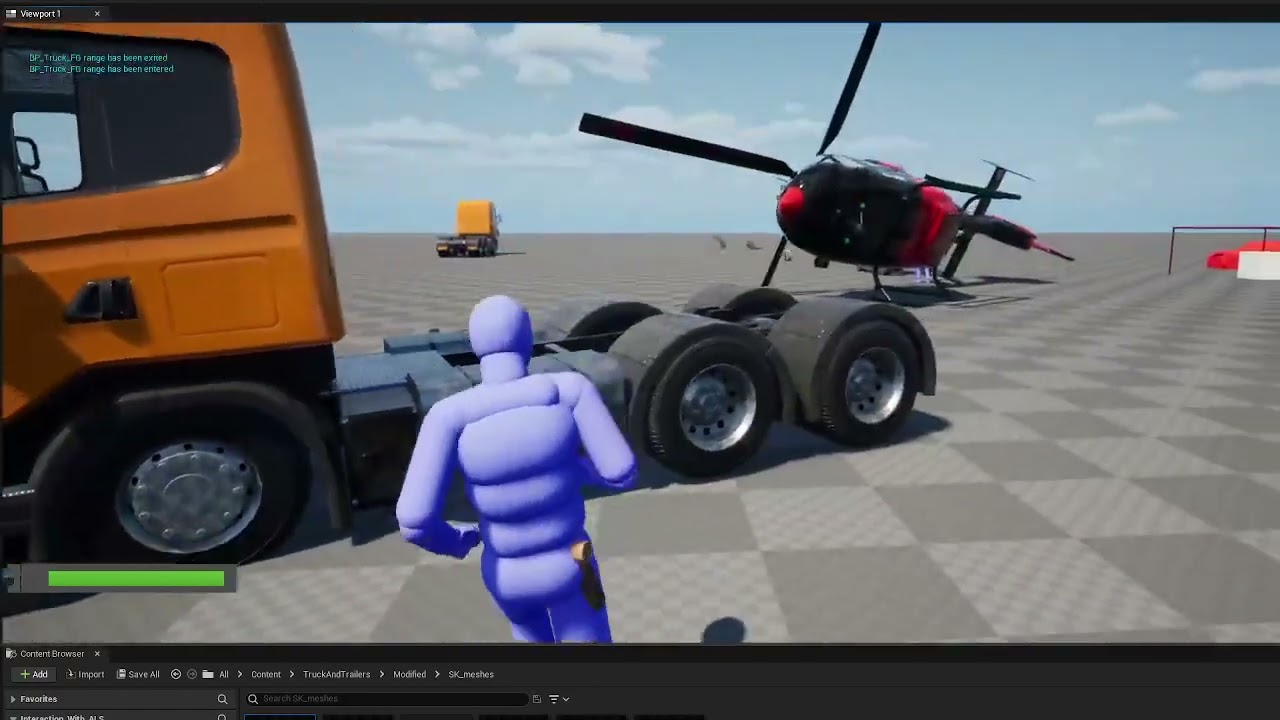
Little project with Fgear, IWALS and marketplace asset "'Trucks and Trailers" converted to Fgear.
 primal epoch
@dawn magnet sorry to ping you, did you manage to get "Bone Driven Controller" to work?
normal raft
to get the little bird right i would lerp its vector to match that of the lorry
but yep you could just rotate on it on x/y or what ever to make it align in the first place
i try and avoid these types of mismatches in the axes
its only going to make your life more difficult later basically
put the mesh in the correct XYZ in the first place
 flat pier
@harsh sparrow Can I take ownership of this server.
Love, Ghamy
 oblique wasp
I'm wondering if anyone can help me with a strange issue. I've done something very simple: in the Construction Script of my Blueprint, I use an InstancedStaticMesh to spawn some spheres.
At some point in the game, I need the location of a specific sphere, so I use the Get Instance Transform node to find it. This is where the 'magic' happens. When I draw a debug sphere at that location in PIE, the result is wrong—the red sphere appears in the completely wrong place:
However, as soon as I eject from the Player Controller... BAM! The debug sphere jumps to the correct position:


I have no clue what kind of black magic is going on here. Any ideas?
oblique wasp
Ok - nvm - it only affect Debug Sphere for some reason. When I spawn actor there - everything is fine. There is something wird in DrawDebugSphere thou....
 steady night

hi why is this happening, the "level" is all empty except for the foliage but im using 70/73 of my veruell dedicated memory ????
GB*
whats takin all my virutell memory usage O.o ?
just being idle in the editor takes a huge amount ??

 faint pasture
steady night
just being idle in the editor takes a huge amount ??
faint pasture
steady night
just being idle in the editor takes a huge amount ??
Memory is there to be used
Don't worry until it's a problem
but yes the editor is a memory hog
steady night
but i can barely do stuff in the level since its "lagging" while doing stuff
 lofty rapids
steady night
whats takin all my virutell memory usage O.o ?
lofty rapids
steady night
whats takin all my virutell memory usage O.o ?
whats your landscape material look like ?
 tropic token
We're creating a component BP_InteractableComponent derived from ActorComponent. We add a method called Interact to it.
Then we create BP_InteractableObjectBase, and add the BP_InteractableComponent to it.For different types of interactions, we'll make child classes from BP_InteractableComponent and override the Interact method in those children.
In BP_PointClickController we handle the InputAction PrimaryClick. We perform a trace under the mouse cursor, check if the Hit Actor has a BP_InteractableComponent, and if so — call the Interact method on it.
guys, does it make sense in case I don't wanna do interaction system based on interfaces?
frosty heron
Actor componenent most likely the most used method for interaction. It can hold state.
Its weird that you create interactableObjectBase
You can just attach the interactable component to any actor.
The whole point is you dont need to worry about the owner type.
As the system is contained within the actor comp.
tropic token
frosty heron
Its weird that you create interactableObjectBase
Yea. I guess it's weird. I was thinking about if I have doors I will make base door and attach door interact component to it and then make as many doors as I want. That sounds less weird? Or best way to go is to attach door interact component to every door type?
frosty heron
DoorInteactionComponent? Wut.
It should just be interactionComponent
Which work for any interactable object. Regardless of their type.
It can be attached to a door, a chest, a player character. Anything that is interactable.
tropic token
I'm not sure. But different object can have different state of interaction. That's why different components
frosty heron
No you are missing the point of components.
Think about inventory or equipment.
Any actor can have it. A chest may contain inventories, an npc may contain inventories.
A door may contain inventory.
The code should be seld contained.
tropic token
Where do I store state and do unique interaction logic?
I mean you interact differently with door and button
frosty heron
Your interaction component should have the method of being interacted.
The owner can bind to that function.
And just implement what its designed to do.
A door can open or close.
A button can be pressed.
An npc can be spoken to.
tropic token
So the door saves its own state and logic of interaction.
I need to see how to bind function of the component. Never did it
frosty heron
Your interaction component can hold states such as. BIsCurrentlyInteracting, or bCanBeInteracted. Etc.
frosty heron
tropic token
So the door saves its own state and logic of interaction.
I need to see how to...
Event delegate.
frosty heron
tropic token
So the door saves its own state and logic of interaction.
I need to see how to...
The door doesnt save the logic of interaction.
Door just sets its own member. Such as bIsOpened.
E.g
Overlap with a door -> get interaction component -> interact.
Door call its interact logic (an event that is binded from its interaction component) -> toggleOpenOrClose -> set door bOpen.
tropic token
okay, so I do it like this

 frosty heron
Yesss
tropic token
okay okay
thank you
but still. like if I have many doors, with same logic and state, it's reasonable to create base class for them, right?
this is the way? xD
frosty heron
But its decoupled from the interaction system. Dont mix the two.
Your interaction componemt should be owner agnostic.
tropic token
Yea, okay. Got it
frosty heron
You can have child of some door, sure. But the interaction component remain oblivious to any of these doors.
The component is just there to tell the owner, hey you have been interacted.
The owner can then execute its own logic.
tropic token
What about health component? It can store health, right?
tropic token
Yea but. It should have health or should take health from it's owner?
frosty heron
The health or attribute should live in the comp.
When you need to check an entity health you just go.
Get door -> get health componemt -> get health
tropic token
Yes okay. Sorry for silly questions btw. Many thanks for replies 🙂
frosty heron
Not silly at all. Gl
floral stump
🤣
today encounter 2 weired things in unreal in this plugin
😂
this is why never use bp's for complex stuff
 naive sable
I am trying to debug lag over time in my game with unreal insights, and found out that it was being caused by wait for tasks increasing. However, I cant figure out what is making wait for tasks increase. Does anyone know how I can find this out? I can also send my trace if that would help.
 eternal sandal
does anyone know of a guide for creating a interactable desktop/terminal in ue5?
faint pasture
tropic token
Yea but. It should have health or should take health from it's owner?
Think of your actors as bags of components with a bit of glue
the health should live in a health component
if this specific owner does something weird (like explodes on death), it can bind to HealthComponent.OnDeath and do the extra stuff
true valve
Since you can't use soft for DataTable Raw Handle? Including them in struct are heavy
scarlet root
true valve
Since you can't use soft for DataTable Raw Handle? Including them in struct are ...
yes
But you can have a Soft Reference of DataTable and a simple Name-variable for DataTable Row in your struct.. which is less heavy
The DataTableRowHandle simple is a
TObjectPtr<UDataTable>
FName RowName
Nothing big of a difference - even worse than doing it by yourself using a soft-reference instead of a hard one.
Like:
TSoftObjectPtr<UDataTable>
FName RowName
 scarlet pumice
I have a BP with an instance variable to a Level Sequence Actor instance in the scene. I am getting a warning about Spatially loaded (the BP) actor referencing non-spatially loaded actor (Level Seq Actor).
The LSA cannot be set to spatially loaded, but I don't want to make my BP non-spatially loaded, as there's no point in having it loaded when I am on the other side of the map.
Am I missing something? Maybe I should be spawning the LSA dynamically in the BP?
I changed the BP to Create Level Sequence Player instead of referencing a world actor, seems to work ok 👍
 near wolf
I'm explosing a sun angle slider to my widget, but the sun moves in steps and not smoothly. Is there a way to make it move smoothly?
 scarlet root
if you have a sun angle of 45 and set the slider to 60, it will jump from one frame to the next by 15°..
That's normal..
At runtime, you can use a timeline to interpolate the angle switch..
This timeline has to sit in an Actor, not inside a Widget..
In the editor, you kinda can.. but not recommended.. since it involves using the editor tick..
 compact hornet
i'm having this trouble with lumen GI. basically it takes such a long time to update when I turn off a light source. Any way to fix this?
https://youtu.be/--D96NuMVf4
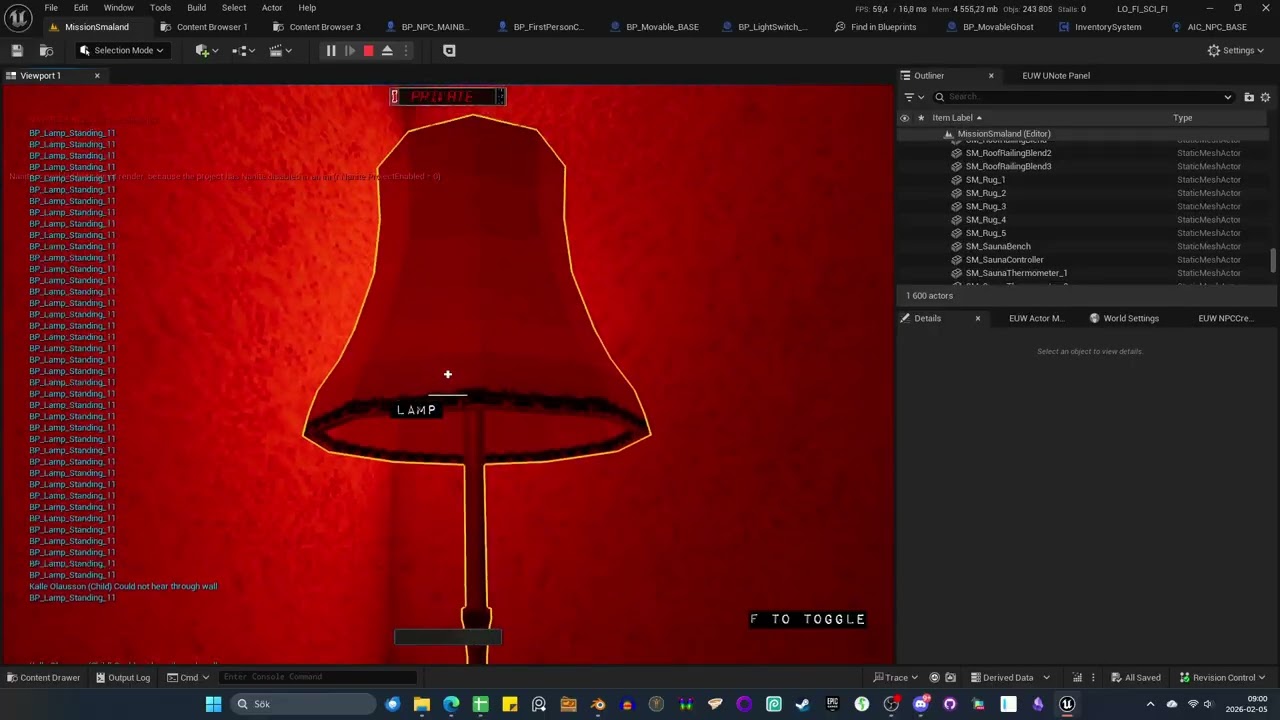 scarlet root
Is it intended to use Lumen in your Game? or do you just use it, cause it is enabled?
frosty heron
near wolf
I'm explosing a sun angle slider to my widget, but the sun moves in steps and no...
interpolate current value to target value.
compact hornet
i use it because I have so many interactible light sources
you think it would be better to bake? there are so many objects that are hit with more than 4 stationary lights at the same time no matter how I approach it
scarlet root
no.. but using MegaLights (even as experimental feature)
Alternative.. you can Execute a Console command with:
r.LumenScene.SurfaceCache.Clear
Clearing Lumens light cache on drastical changes (like switching lights on/off)
But i would not use Lumen if there is other ways around it..
compact hornet
ok
I've been experimenting with lumen and baked back and forth
it's said that megalights would help with the limit on stationary lights, but for some reason it seems to me like it doesn't really do it for me. but i guess i should deep dive into that
dark drum
compact hornet
i'm having this trouble with lumen GI. basically it takes such a long time to up...
Its realism. 😅 When you look at a light in real life and turn it off, you're brain/eyes take a moment to catch up leaving a light spot in your vision like its burnt on.
scarlet root
I remember there was a Lumen Update time setting - isn't it?
- Lumen Scene Lighting Update Speed
- Final Gather Lighting Update Speed

In the Global Illumination Settings of the PostProcess Volume
maybe you can alter that too, to get quicker response
near wolf
frosty heron
interpolate current value to target value.
something like this?

or like this

still feels like it's "laggy" or moving in steps
while using almost the logic above with "Time of The Day" - the time of the day slider works pretty smoth
but the Sun Angle not
the Sun Angle is moving in a way that feels like my fps is dropping when using it, but the fps is stable
scarlet root
near wolf
something like this?
ok.. rule 1 in UI coding:
Don't use TICK inside the UI...
Short axplanation how to achieve this:
1st: in Your PlayerController, add a new Event called "UpdateSunRotation" with a Float as Input.
2nd: Add a Timeline to this Event and doubleclick it, to open the Curve.
3rd: add two keys, one at time 0.0, with value 0.0 - And one at time 1.0 with value 1.0. Close the curve
4th: Wire the Event with the Play from Start of the Timeline.
5th: In the Timeline Body/Update, add the Interpolation, with the current Sun rotation as A, the target Sun rotation as B (B is the Event Input), and the Timeline Float Output as alpha. Set the Sun Rotation to the outcome.
6th: On Finished of the Timeline, set the Sun Rotation to the Event Float - which finalizes it.
In your Widget, On Slider Value Changed, Get Player Controller, Cast to your PC, call the UpdateSunRotation Event.
The timeline gets called each time you update the slider and starts from the beginning.
It only proceeds the whole second and finishes, if you leave the slider.
You can adjust the play-Rate of the Timeline, to make the interpolation quicker (higher rate) or slower (lower rate)
near wolf
ok i'll try it now
dark drum
near wolf
I'm explosing a sun angle slider to my widget, but the sun moves in steps and no...
With you using UDS, I would just add a new function to it that allows you to set the 'DesiredTime' and 'DesiredSunAngle' and then UDS handle lerping the current values to the desired values.
near wolf
dark drum
With you using UDS, I would just add a new function to it that allows you to se...
you mean to to that inside the UDS blueprint and then expose it to the widget?
dark drum
near wolf
you mean to to that inside the UDS blueprint and then expose it to the widget?
Yea, you're widget should only really need to call one function and specify a value. Everything else should be handled by the day/night cycle system. (UDS in you're case)
If you don't want to modify UDS, you can always create an actor component to act as a middle man you can place on the UDS actor.
near wolf
Not sure which one would be the least painful as I'm not really a blueprint guy haha
dark drum
near wolf
Not sure which one would be the least painful as I'm not really a blueprint guy ...
Something like this. It would be easier to put it in the UDS system but both should be fairly straight forward either way.
The below method should also handle quick changes by the player.
CurrentTime would just be what ever variable UDS uses.


 near wolf
dark drum
Something like this. It would be easier to put it in the UDS system but both sho...
near wolf
dark drum
Something like this. It would be easier to put it in the UDS system but both sho...
Ok thanks, I'm just a little confused which one of that should be added to UDS and which one to the widget?
Also in which part of UDS as there are a lot of functions and stuff going on. Sorry for my confusion
dark drum
near wolf
Ok thanks, I'm just a little confused which one of that should be added to UDS a...
All added to UDS. The widget would just call the 'SetDesiredTime' function.
near wolf
ok let me try and see if I would mess up haha
near wolf
dark drum
All added to UDS. The widget would just call the 'SetDesiredTime' function.
Not sure if I am using the wrong nodes here?

the sun angle variable is the original from UDS, the desired angle variable was made by me
dark drum
near wolf
the sun angle variable is the original from UDS, the desired angle variable was ...
If the 'CurrentSunAngle' is a variable in UDS, it shouldn't have the self pin. Try removing them and dragging them from the variables tab instead. (I believe its trying to set the one in the widget which might not actually be needed any more)
near wolf
ok wait. I think that one is from my widget
near wolf
dark drum
If the 'CurrentSunAngle' is a variable in UDS, it shouldn't have the self pin. T...
Here, but somthing is not working yet


nothing happens when I move the slider
ops one sec I forgot to pin that node
Ok it's actually moving now, but it still moves in that slow steppy way
let me record a quick video
near wolf
dark drum
If the 'CurrentSunAngle' is a variable in UDS, it shouldn't have the self pin. T...
Look how smooth "Time of the day" works, but "Sun Angle" is so slow and steppy even after I used the way you told me
I'm starting to think that maybe it's just UDS issue and moving the sun angle is too heavy for performance? But my FPS is not dropping
or maybe I messed up the nodes somewhere
dark drum
near wolf
Look how smooth "Time of the day" works, but "Sun Angle" is so slow and steppy e...
So it could be down to the angle value itself and what it expects. You might need to lower the threshold on the nearly equal node (perhaps 0.0001) and possibly play with the interp speed.
near wolf
dark drum
So it could be down to the angle value itself and what it expects. You might nee...
I Tried that, it moves faster, but still in a laggy and steppy way
dark drum
near wolf
I Tried that, it moves faster, but still in a laggy and steppy way
Print the angle values to see what it gives. I can't see anything wrong with the setup but it's worth checking.
near wolf
dark drum
Print the angle values to see what it gives. I can't see anything wrong with the...
from 0-360 . Not sure if I connected it at the correct node, but I guess it is, if it shows those values

 compact hornet
scarlet root
maybe you can alter that too, to get quicker response
compact hornet
scarlet root
maybe you can alter that too, to get quicker response
Thank for the help. yeah I've trested those kinds of settings as well but it mostly hurt performance without makig ut much better. I'm exploring if I should go back to baked lighting instead
 spiral rune
Hey ! I have A problem, I reopen my project today, I was able to launch it once, but when I recompiled my build file, I got an error; when I click on "jump to node," nothing happens.
The error is :
A Child Actor Component's class cannot be set to its owner! 'dialogCharacter_C' is an invalid class choice for '/Game/PestoQuest/BP/dialogCharacter.dialogCharacter_C:dialogCharacter_GEN_VARIABLE'.
IDK whats is it, i don't have any error in any node of my bp...
If someone can help me it can be crazy


btw here is my components


 pale idol
I think I found a bug in Unreal 5.6 blueprint:
Undo doesn't work as expected after adding components through Blueprints AActor::AddComponentByClass despite using the Transact system
Bug description and uasset reprocase can be found here: https://drive.google.com/drive/folders/1aCCedol7Pu7HQoE9gO8ssmY3kVu1xH5h?usp=drive_link
2 things I would like if possible:
- if it looks like I am using the node wrong, I'd like to know.
- if anyone has encountered this issue before, what workaround did you use?
Thank you!
 crude marlin
The bp is corrupted bcs i last saved it in UE 5.7 and now opens the plugin with the same blueprint in 5.5. And i need to find a way for them to be agnostic of version or atleast a way for me to quickly override versioning so they open so i canr recompile and save where im working for the moment.
 polar wadi
Hi, I have a car animation sequencer that has x and y transform key frames. I wanted to get the Z value based on the roads/terrain. The cars have physics enabled, and in the sequence, they have the static mesh component simulate physics. I was hoping on hitting play, the cars would get to z value based on collision with the road and continue moving along, but that is not happening. They hit the road and bounce a bit and stop. How can I fix this?
frosty heron
spiral rune
Hey ! I have A problem, I reopen my project today, I was able to launch it once,...
I strongly advice to not use child actor component. It is the most cursed entity in unreal engine. Even epic staff says to not use them outside transiet stuff like sfx.
eternal sandal
how can i create like a desktop on my pc that i can interact with? Please send a yt guide if possible because i couldn't find any.
last peak
eternal sandal
how can i create like a desktop on my pc that i can interact with? Please send a...
what ?
eternal sandal
like doki doki literature club
 pine carbon
Do you want it to be a physical thing in your world or just a screen?
The one in DDLC on Console, which I assume is what you mean, is just fancy UI that's made to look like a PC.
If you mean the original release of DDLC . . . that's a little trickier. Salvato was a clever bugger with how that game was made. There are no "tricks" to how that works, it's actually using your computer's filesystem. You can learn how to do it but it's not gonna be an Unreal thing.
pine carbon
frosty heron
I strongly advice to not use child actor component. It is the most cursed entity...
Why does it exist?
The ONLY thing I ever hear about Child Actor Component is that you shouldn't use it.
frosty heron
pine carbon
Why does it exist?
Fail product
pine carbon
Eh?
frosty heron
Full of bugs, dont know what else to say.
Many features are abbandoned but left for backward compability.
pine carbon
What was it intended for, though?
frosty heron
No idea, probably for prefab like workflow just like unity.
pine carbon
Hm. Neat.
 thin panther
pine carbon
What was it intended for, though?
thin panther
pine carbon
What was it intended for, though?
it's intent was probably exactly how people use it, it was just poorly made
pine carbon
thin panther
it's intent was probably exactly how people use it, it was just poorly made
I don't know how people use it though. I have only ever heard it brought up in the context of "do not use this."
thin panther
generally speaking people don't
the only safe usage is for purely cosmetic things that have nothing that need to be serialized
but that usage is few and far between, and even still alternatives exist
dark drum
My attempt at trying to understand how the construction script works helped highlight why child actor components are so buggy. 😅
 sand shore
thin panther
it's intent was probably exactly how people use it, it was just poorly made
sand shore
thin panther
it's intent was probably exactly how people use it, it was just poorly made
@pine carbon
Well, speculatively, the intention may have been that you would use CAC to implement “ItemSpawner” type things- you hand place what you want spawned into the level and you can see it in editor, you can customize all the properties it will have when spawned specifically from that spawner, all that cool stuff, and then you can spawn the real actor when you want to, programmatically.
But there’s tons of ways it can break so the general advice is “hey don’t use it” because the real answer is somewhere closer to “beware the dragons you must fight” and a lot of folks just aren’t ready to take those dragons on, the dragon of reimplementing the result yourself is often smaller, and especially so if you limit the scope of what your thing does
But it’s devious as to newcomers it seems like something that solves the problem and is endorsed until they ask anyone about it
For anyone who read that and thinks “oh so if I’m really comfortable with the engine I can make CAC work” you ought to be really comfortable with engine debugging in C++ and willing to make local changes
Like a custom build
Like I would just manually make what I need and not take any chances haha
maiden wadi
And by the time you get it working like you want you'll realize it a was a shit idea to begin with and you'll be writing an async customizer that can read an actor's component list and mimic them with async loading and time slicing. 🤷♂️
sand shore
AND you’ll benefit from learning to do all that and feeling like a smartypants for getting it all ergonomic and “better than epic”
Like there’s no losing when you ignore CAC
sand shore
pine carbon
Why does it exist?
Ok but the real answer for “why isn’t it gone” is probably back compat
 shut blaze
hey guys, how does one create a debug panel, to get information like player location, time of day, and also add commands like set time of day, without creating hard references or using interfaces?
(in other words: how should I do it?)
sand shore
shut blaze
hey guys, how does one create a debug panel, to get information like player loca...
You could make your gamestate able to do this. One possible way is you can make a struct that contains two string fields, and you can make an array of those structs on the game state. Every frame the game state clears the array and then every actor / component can add properties to that array, like the player could add “PlayerPosition”: GetActorLocation.ToString()
And the widget just displays them
That’s not optimal but it’s a really basic way to do this while minimizing references and interface use
shut blaze
I'm a bit stupid so I wanna make sure I understand right
ArrayStruct: String A and String B (idk how to label em)
Tick: Clear array
Player Tick: Cast to GameState, set array string elem
I think I got something wrong
shut blaze
sand shore
You could make your gamestate able to do this. One possible way is you can make ...
.

 shut blaze
sand shore
<:send_code:1316600153620353166>
shut blaze
sand shore
<:send_code:1316600153620353166>
I've got nothing dude, that Is why I'm asking
tropic token
my good guys, I have cine camera actor on level, like a bunch of them. designer already configured. I want to replace them with my own type that is derived from cine camera actor. the problem is that when I replace actor, all properties are sent back to defaults. is there any way to conveniently migrate all settings from one actor on the level to the other? there's a property transfer tool but it works for assets in asset browser
shut blaze
sand shore
What is confusing?
"Every frame the game state clears the array and then every actor / component can add properties to that array, like the player could add “PlayerPosition”: GetActorLocation.ToString()"
I've got no idea what you mean, so every frame just cast to the actors I am interested in the information
I want a Widget panel to display all info I want, such as a player panel, world, AI, command panel etc.
sand shore
I mean you had it.
Every actor or component that has stuff you want to be in the widget, they each on their own fetch the gamestate and each calls a function to append a separate struct to the array in the game state
The gamestate only knows about its own array member and to clear it
Each actor only knows about its own stuff it wants to add to the list
The widget only knows about the list
You can call the string members of the struct RowName and RowValue
Does it have issues? Probably! The GameState needs to tick before any of the other actors, and the widget should tick after all the other actors
shut blaze
sooo I should add a bool "IsDebugOn?" so that actors know when to actually give information?
sand shore
Well if the game state has a function that the other actors call, that bool can be handled inside
Otherwise yeah it would save some computation for the actors to skip making strings
shut blaze
ah, sooo,
- Create Debug Component
- GameState > ComponentFunction Get Info > Game State > Widget
sand shore
Yeah that seems like a possible modification of wht I proposed
Do you know how to change tick groups?
shut blaze
that could work, but, how would I call the component from each actor
shut blaze
sand shore
Do you know how to change tick groups?
nope
sand shore
Why did you wanna avoid em?
shut blaze
heard can be a hastle to debug or scale
idk why tho
just label each function DebugMenu_Something
shut blaze
GameState > EventDebug(fromBPI) > Game State > Widget
sand shore
Make an interface thats something like HasRowStringDescription.
The interface makes a function that returns an array of those structs, called MakeDescriptionArray.
The widget can use GetAllObjectsWithInterface and can append all these descriptions together into one big array and then it can spawn inner widgets for each row
Nothing on the game state
Nothing on random actor ticks
AND if you ever wanna reuse the interface for stuff like item inspector widgets in game, it wont feel like as much of a hack
Now, GetAllObjectsWithInterface is SLOW its really awful
But it’s perfect for debug tools
Does that idea make sense?
shut blaze
I think it does
so a widget that does it all
Get all objects and when you wanna update them just call the event in them
makes sense
tropic token
frosty heron
Not silly at all. Gl
I wonder, how would you implement CanInteract on InteractableComponent?
faint pasture
tropic token
I wonder, how would you implement CanInteract on InteractableComponent?
Does CanInteract mean it can interact right now or interact at all?
tropic token
faint pasture
Does CanInteract mean it can interact right now or interact at all?
right now
faint pasture
tropic token
right now
a bool in the component
tropic token
okay, owner anyways know about the component, so nothing is wrong with it
you can't really decouple it further 🙂
 versed oasis
i was trying to get a screenshot of what the player is looking at to show it when showing the list of load files the player has.
How can i go about it? It feels like no matter i am trying it just wont work. It either displays fully black or fully white
this is my current event that was supposed to be doing it but it doesnt

 steady night
hey how do i disable shadow culling ? when i zoom out shadow dissapears :/ ?
 flat coral
I'm working on a keybinds menu, and that means I need on some level to map from ANY possible key to a texture of an icon for that key. What's the best way to do that?
I could make a bigass map of keys to textures and store it somewhere I guess but that seems like a Big Awful and I'm hoping there's a smarter way
This is what the textures look like
 maiden wadi
Not sure how you would map keys to icons without a map of keys to icons. It'll get more fun when you consider consoles. Cause you'll need a data set for each console.
If you're serious about this, I'd recommend CommonUI. It already handles this.
 pulsar geode
anyone able to help me figure out some math here?
i have a value coming from a lerp (V), that i need to find the difference of between its current value and its last value.
i thought i could just have my V minus a temp number (T) who's default is 0, to get the answer, with T being set to what V was after. so next time it was run it would be a larger V number, minus T which was the previous V, giving me the difference (N).
the problem is the code seems to be executing in such a way that T is being set to V before anything else happens, ending up with it just repeatedly being V minus its current value over and over as you can see in the print screen inside the red square.
Does anyone know a way to correct this?

 next hollow
I mean, its right there. 😛
Your setting that temp speed multiplier before you do anything else.
You'd wanna do that at the very end, or at least after you do stuff with it
Cuz, you set the var, then print the var.
You'd want to print, then set.
pulsar geode
so just set it as far back as i can in the logic chain?
next hollow
Pretty much
pulsar geode
still getting the exact same error, its behind multiple different things in the timeline update, and still its being set before the subtraction is happening somehow.
next hollow
Hmmm.
And, your using, or caching the appends output?
Not, just dragging its line like a mile to the right?
pulsar geode
its was actually almost the opposite solution. i promoted the lerp to a variable but had the temp set to the lerp variable beforehand. since the default for the lerp is 0, it would always be one behind in the cycle.
next hollow
pulsar geode
its was actually almost the opposite solution. i promoted the lerp to a variable...
Is that not what you want?
The previous value, and thus the difference?
pulsar geode
thank you for the help though, once i knew it had to do with the ordering of what was being called, i was able to narrow it down
pulsar geode
next hollow
Is that not what you want?
The `previous` value, and thus the difference?
yeah i was able to solve it by reversing your suggestion, thanks for pointing me in the right direction
 thorn crown
Thats the old version, he has an updated version as well V2. which covers 5.2 to 5.7 https://www.fab.com/listings/e5f036a3-c476-40bc-9eaa-531e9617c0c5 @frozen wren INCASE your wondering about an updated version

Fab.com
Real Project Example (Thanks to @Uhr for sharing)Showcase VideoExample Project (Advanced Steam Sessions + Steam Sockets, Shipping ready)Example Project (OLD)DocumentationSupport Discord (or email darxdevcontact@gmail.com)Host Migration System V2Avoid setting up and paying for dedicated serversSuper fast with brand new C++ backendEasily Integrate...
crude marlin
Hello Gang, does anyone know how to solve when some blueprints seem to be breaking bcs of Unreal Versions.
I need to make sure all my demo blueprints works on any Unreal Version 5.4-5.5-5.6-5.7
But i can not find any documentation on how to solve this:
I have multiple projects and my plugin submoduled so i need to be able to test and save new changes in any Unreal version.
```The package 'MY BLUEPRINT' was saved with an newer version which is not backwards compatible with the current process. Min Required Version: 214 Package Version: 0````.

Epic Games Developer
Using customized serialization code and versioning to control how Objects are loaded from Assets and Packages in Unreal Engine.
frosty heron
crude marlin
Hello Gang, does anyone know how to solve when some blueprints seem to be breaki...
Use source control and create a branch for each version.
You cant have a project that just work for all version.
The plugin will depend on the version its compiled in.
scarlet root
flat coral
I'm working on a keybinds menu, and that means I need on some level to map from ...
CommonUI.
Since CommonUI includes the Common Input Data, which is literally what you are looking for.. Icons mapped to Keys..
 brave hatch
I'm still new to blueprint but can anyone tell me what I'm missing here?
logic I'm trying to achieve:
get static mesh component > get relative rotation > if relative rotation Z is equal to 180 return true > AND bool so I need all three to fire at the same time > branch condition achieved for true

achieving the rings correct rotation of z 180 doesn't even hit a break point on the and or the = =
crimson briar
brave hatch
I'm still new to blueprint but can anyone tell me what I'm missing here?
logic ...
First thing you would want is to swap == with nearly equal. Not sure if there is nearly equal for vectors, but there is for floats
In general you shouldn't use == with floating point numbers
Depending how you rotate the objects though the rotation can still jump over 180
scarlet root
brave hatch
I'm still new to blueprint but can anyone tell me what I'm missing here?
logic ...
180 is veeery specific - unreal has floating errors and almoist never hits the float exactly.. So as VeraelHasta stated.. change to a NearlyEqual Condition, that has some threshold.
Next is the 180 itself.
Maybe your 180 is different to the Unreal 180.
Rotations in Unreal are not 0-360, they are -180 - 180
brave hatch
scarlet root
180 is veeery specific - unreal has floating errors and almoist never hits the f...
it's checked against the viewports mesh rotation, it's 180/360 on Z. but I'll give it an error margin
scarlet root
alternatively, you could Round the Rotation.Z before checking.. So you deal with integer values then.
brave hatch
I think the main issue is that the 'get relative rotation' is not changing it's values at all during play
and I have 0 idea why
scarlet root
is the mesh rotating INSIDE the actor itself?
flat coral
scarlet root
CommonUI.
Since CommonUI includes the Common Input Data, which is literally what...
I've heard that, but would you import CommonUI just for that one function if you've already got an entirely working UI system otherwise?
brave hatch
scarlet root
is the mesh rotating INSIDE the actor itself?
I would say so?
scarlet root
relative means, that the rotation is based on the whole actors own rotation.. and from there, in what difference the mesh is to
brave hatch
rotation logic
 scarlet root
RingTarget1 - 3 is set somewhere?
brave hatch
actually there's an idea use the integer instead of the mesh.
nevermind, off to mess with it more until I hit a brick wall
scarlet root
flat coral
I've heard that, but would you import CommonUI *just* for that one function if y...
You should use CommonUI no matter what single function you need.
It's a recommended update to UMG and fixes some UMG problems by just being there.
CommonUI is not replacing your UI.. I don't know where this obscure rumor is coming from.. CommonUI IS Umg.. just extending it.. not replacing.. you keep your UI as before..
I also recommend using this function in a BlueprinrFunctionLibrary:
UFUNCTION(BlueprintCallable, BlueprintPure, Category = "CommonInput")
    static void QueryKeyIcon(const UObject* WorldContextObject, const FKey& InKey, UTexture2D* DefaultTexture, FSlateBrush& OutBrush, UTexture2D*& OutTexture);
void U<YourBlueprintFunctionLibrary>::QueryKeyIcon(const UObject* WorldContextObject, const FKey& InKey, UTexture2D* DefaultTexture, FSlateBrush& OutBrush, UTexture2D*& OutTexture)
{
    const UCommonInputPlatformSettings* PlatformSettings = UCommonInputPlatformSettings::Get();
    if (!PlatformSettings)
    {
        OutTexture = DefaultTexture;
        OutBrush.SetResourceObject(OutTexture);
        return;
    }

    if (!WorldContextObject)
    {
        OutTexture = DefaultTexture;
        OutBrush.SetResourceObject(OutTexture);
        return;
    }

    const UWorld* World = WorldContextObject->GetWorld();
    if (!World)
    {
        OutTexture = DefaultTexture;
        OutBrush.SetResourceObject(OutTexture);
        return;
    }

    const APlayerController* PlayerController = World->GetFirstPlayerController();
    if (!PlayerController)
    {
        OutTexture = DefaultTexture;
        OutBrush.SetResourceObject(OutTexture);
        return;
    }

    const ULocalPlayer* LocalPlayer = PlayerController->GetLocalPlayer();
    if (!LocalPlayer)
    {
        OutTexture = DefaultTexture;
        OutBrush.SetResourceObject(OutTexture);
        return;
    }

    const UCommonInputSubsystem* InputSubsystem = LocalPlayer->GetSubsystem<UCommonInputSubsystem>();
    if (!InputSubsystem)
    {
        OutTexture = DefaultTexture;
        OutBrush.SetResourceObject(OutTexture);
        return;
    }

    bool RetrievedBrush = false;

    const FName GamepadName = InputSubsystem->GetCurrentGamepadName();

    if (InKey.IsGamepadKey())
    {
        RetrievedBrush = PlatformSettings->TryGetInputBrush(OutBrush, InKey, ECommonInputType::Gamepad, GamepadName);
    }
    else if (!InKey.IsGamepadKey())
    {
        RetrievedBrush = PlatformSettings->TryGetInputBrush(OutBrush, InKey, ECommonInputType::MouseAndKeyboard, FName("Generic"));
    }

    if (RetrievedBrush)
    {
        OutTexture = Cast<UTexture2D>(OutBrush.GetResourceObject());
        OutBrush.SetResourceObject(OutTexture);
        return;
    }

    OutTexture = DefaultTexture;
    OutBrush.SetResourceObject(OutTexture);
}
This is a simple function to gather the Icon of a Key from your CommonInputBaseControllerData.
brave hatch
alright this doesn't work either .-.
 scarlet root
I know.. it's c++.. But CommonUI is not the easiest to deal with in BP only..
brave hatch
and yes I know that's a -180 and not 180, just trust me that I changed it after the first. (because my rings rotate at -60 per activation)
scarlet root
again.. are the integer values set correctly? (checked with a print)
 scarlet root
and printing after TRUE does not print anything?
brave hatch
this is printing after the rotation tick function, it's not even getting past the branch in the event graph.
 scarlet root
brave hatch
scarlet root
brave hatch
In this pront.. there is no 3-times the same value in a row... which should happen to make your branch being true..
brave hatch
scarlet root
In this pront.. there is no 3-times the same value in a row... which should happ...
pardon?
scarlet root
180
-180
-180
or
-180
180
-180
Not the same ...
All 3 have to be the same value to return TRUE on the AND
brave hatch
they do not rotate independently at the moment, they all rotate at the same speed/intervals/direction
crimson briar
Add ABS before comparing to 180
umbral venture
i am making a helix made of cubes in a square shape.
is this wrong?
https://blueprintue.com/blueprint/scpsv9gi/

No description provided
brave hatch
crimson briar
Add ABS before comparing to 180
what is ABS
scarlet root
It might also help if you use a PrintText and a Format text Note to it.. using
Name of Entity {OutY}
So it prints the Y value with a name.. to make the print not a magic number..
crimson briar
brave hatch
what is ABS
Absolute, it removes the minus signs from numbers
scarlet root
{Name} creates a wildcard Input Pin in the Format text, where you can plugin any value..
scarlet root
brave hatch
what is ABS
ABS = ABSolute = returns the absolute positive value of an equation or number
Example:
ABS(5-10) = 5 ,even the equation is -5
brave hatch
that just goes right over my head I'm afraid
anyway adding absolute does nothing either.
maybe I should just give up on the = = method and just go for an overlapping collision
scarlet root
ok...
Print this with a PrintText and a FormatText linked into its text Input:
Ring1: {OutY1}
Ring2: {OutY2}
Ring3: {OutY3}
So you know what Ring is off rotation with your prints. Cause your current PrintString does not give much of information..
brave hatch
I only needed the print to show me the value, I know it's rotating
I've got a lever that activates a 60 degree turn based on which ring it's attached to, I've got all three rings able to rotate a full 360 loop without issue, I've got a random integer at begin play so the rings are always random between their possible points (this is meant to be a trivial alignment door puzzle) i just need to get the damn thing to register my desired conditions to vector the whole thing to the side

 scarlet root
brave hatch
I only needed the print to show me the value, I know it's rotating
scarlet root
brave hatch
I only needed the print to show me the value, I know it's rotating
yes.. but you don't know which of the rings is off... cause your prints do not have identification informations..
And there is one off.. else you won't have -180 and 180 mixed
brave hatch
ignore the misalignment of the mesh, it is 180, it's just the basic cylinder mesh for UE5 is off center for whatever reason
brave hatch
scarlet root
yes.. but you don't know which of the rings is off... cause your prints do not h...
no. they all rotate the exact same direction.
scarlet root
maybe visually.. but as your prints return.. one is wrong
brave hatch
no it's not
 crimson briar
It is not wrong, the number can flip between + and - when it is on 180
brave hatch
that's all three rings on a different position and there is no negative in it
crimson briar
Due to how Unreal handles rotation
brave hatch
it's on relative Z axis
scarlet root
shitty gimbal lock 🙂
brave hatch
even so, you guys said an absolute would disregard the negative
scarlet root
So the setting of RingtargetX should be:
RingTargetX = abs(round(RingX.RelativeRotation.Z))
brave hatch
well, I have an absolute
crimson briar
Yeah, comapring it to be like ABS(-180) is nearly equal to 180 should return true for both -180 and 180
brave hatch
and using the integer that controls the rotation value should be no different, if anything - more accurate, than using the relative rotation value
scarlet root
or in a more BP way:
RingX.RelativeRotation.Z -> Round -> ABS -> SetRingTargetX
ring targets are already being set. that's how they rotate.

I appreciate you're trying to help but it does kinda feel like you're not really reading what I'm saying.
 scarlet root
No.. i am just thinking that all of this is kinda overcomplicated ^^"
brave hatch

lever activates (custom event first image) and dependant on it's number it activates the corresponding number
event tick fires bp function 'rotation tick' for designated ring
final image is rotation tick logic, grabs static mesh component and updates it's rotation by the integer values
brave hatch
scarlet root
No.. i am just thinking that all of this is kinda overcomplicated ^^"
how would you have done it then.
scarlet root
You have an event that you trigger by the lever..
Whenever this event fires, you want the rings to rotate to the next corresponding rotation..
So you want to create a Gimbal-Lock with Z-Oriented Ring rotation.
The rotations are in 60° increments and each lever switch pushes 60° on the ring rotation.. letting the ring rotate per switch on 0...60...120...180...-120...-60...0
correct?
As this:

only with Z-only
and if all 3 rings align, you want to fire a True branch
brave hatch
if all three rings are rotated correctly and align, yes.
then the entire mesh moves to the side.
think skyrim ruin door.
scarlet root
alright..
Scrap the tick then...
On Eventtrigger activation, you know what ring to rotate..
So you need 3 float variables
Ring1Target
Ring2Target
Ring3Target
They should be float, since they target the next rotation step.
So if you trigger the event, f.e. for Ring 1, you set:
Ring1Target = (Ring1Target + 60) -180
The -180 is because of Unreal's gimbal -180...+180
So you then know the target rotation..
Now.. add a Timeline.. and link the Play from Start right after you set Ring1Target.
Double-click to open it, to allow the adjustment of the curve keys.
Bets name the curve "alpha". Add a Key (right click line) at time 0.0 with value 0.0
And a second key at 1.0 with value 1.0
Close the Curve editor.
In your timeline Body (the update), you use a simple Float Interpolation
As Interpolation alpha, use the timeline alpha
As A-Input, use the Ring1.RelativeRotation.Z
As B-Input, use Ring1Target
From the Output of the Interpolation - MakeRotator > SetRelativeRotation of the Ring1
Add a new Event called "CheckupRingAlignments"
On Finished the Timeline: SetRelativeRotation of the Ring1 to be Ring1Target. Then all CheckupRingAlignments.
In CheckupRingAlignments check for:
(abs(Ring1Target) + abs(Ring2Target) + abs(Ring3Target)) / 3 ≈ 180
(maybe need to loop on specific positions so it rotates around)
The ≈is the NearlyEqual .. as Error Tolerance choose f.e. 0.1
And branch the output.
You can use 3 timelines, one for each ring. On such a construct, it's not that big of a problem.
A timeline is an internal timer object, already aligned with DeltaSeconds.
It runs through 1 time and drives your alpha curve automatically, so you simply interpolate from that.
This not only is an Event driven approach, getting rid of the nasty Tick Event (which you should use as sparingly as possible).. but also checks the ring rotation after rotating them completely.. making it error safe to not activate the branch before finishing rotation.
You also can change the speed of Rotation, by setting the second key of the timeline curve being later, or using the Timeline Reference variable and changing the play rate.
 hardy merlin
Good evening
scarlet root
Good morning..
hardy merlin
I miss the sun already.
umbral venture
hardy merlin
I miss the sun already.
the sun misses you too 🫠
normal raft
i am have a bit of trouble ratifying this small bit of logic.. (seems daft i know possible brain fog / reality filter issue)
the result I keep getting is that the ai pawn will climb from below min fly height .. and then once it reaches the height it starts fighting the other boolean which makes it fight the condition causing it to climb by 10 or so units then get pushed back down to min fly height

I want it to climb to 5k then continue to be able to climb to Max fly height then decend to min fly height
it may be able to climb simply because the distance to ground changed
dark drum
normal raft
i am have a bit of trouble ratifying this small bit of logic.. (seems daft i kn...
I'm not understanding. So you want it to go up until it reaches max and then at that point, go down until it reaches the min? But whats happening is it gets to the max, goes down a little and then go back up before reaching min?
scarlet root
What is the purpose / target of this Code?
An enemy flying up and down?
Actual climbing?
normal raft
dark drum
I'm not understanding. So you want it to go up until it reaches max and then at ...
yeah essentially that... but it still needs to climb if it got a new vector/or ground height changed and or somehow it got back bellow the min again,
i know i might of hurt my self by trying to do this in the the handling of it
 dark drum
normal raft
yeah essentially that... but it still needs to climb if it got a new vector/or g...
dark drum
normal raft
yeah essentially that... but it still needs to climb if it got a new vector/or g...
Oh so the min/max is the range it should stay above the terrain? So if its in the range, it doesn't need to change altitude?
dark drum
normal raft
yeah
instead of returning a bool, i'd return a desired velocity (or float). The issue is you have 3 states but only using a bool which only has 2.
scarlet root
wouldn't it make sense to trace from the ship.WorldLocation downwards for (let's say) 10K units..
Check the distance between Hit Location and Ship.WorldLocation.
If > Max = Lower ship altitude (f.e. return -1)
If < Min = Raise Ship altitude (f.e. return +1)
Else = nothing (f.e. return 0)
?
so.. as patty states.. return just a value of 1 or -1 to change the altitude on the return
(or -speed / +speed of the change)
dark drum
normal raft
it doesnt need to change if its range (did try playing inRange(float))
So something like this. You can then use the int to modify the Z velocity.
Edit: You'll need to swap the 1 and -1 on the return values. 😅 I put them the wrong way round.
 normal raft
dark drum
So something like this. You can then use the int to modify the Z velocity.
Edit...
normal raft
dark drum
So something like this. You can then use the int to modify the Z velocity.
Edit...
💎
thanks guys i will look at this approach
i was playing to have it as enum state ultimately
but wanted to see it working raw first 😄
dark drum
normal raft
thanks guys i will look at this approach
You could probally just replace the 'Select Float' node with the output of the function. (have it return a float instead of an int)
 normal raft
yep ngl that little bit of is kind of scarey
dark drum
normal raft
i was playing to have it as enum state ultimately
Enums are just sequencely named ints so you could easily swap it in an enum if you wanted.
normal raft
ah but first the most important thing moar coffeee!
normal raft
yep that did it.... I went for the enum in the end.. and just 3 distinct logic paths.
now it works like that we could put the float auto select stuff back in easy as well


not that easy to see really but yepit decended from 15k
normal raft
nice needs a bit a tuning... but at least it no longer is having serious aviation accidents in my little city 😂
 lilac pasture
hello everyone, how would one go about attaching a newly instanced object to a premade spot (component)? i tried using attach actor to component, but it straight up doesnt work lol. would appreciate some help greatly!

this is the setup if it helps
Hand Spot is the empty scene component attached to the player
normal raft
lilac pasture
hello everyone, how would one go about attaching a newly instanced object to a p...
you need to give it a socket, or a provide a existing bone name
then snap to location
lilac pasture
is this possible if i dont have bones?
normal raft
yeah just open the mesh and add socket
lilac pasture
i'll look into it then, thank you for the help!
dark drum
normal raft
you need to give it a socket, or a provide a existing bone name
It doesn't need a bone or socket. If one isn't found it'll just use the components origin.
dark drum
lilac pasture
hello everyone, how would one go about attaching a newly instanced object to a p...
Two things jump out.
The class isn't loaded meaning the actor never actually gets spawned.
or
The cast fails so it never gets to the attach node.
Are you able to confirm the actor gets spawned? If so, does it get to the attach node?
lilac pasture
it does get spawned, the cast works as well

this is what the outliner looks like
during runtime*
but it doesnt follow
dark drum
lilac pasture
it does get spawned, the cast works as well
Ok, what I would do then is change the rules to 'Snap to Target' and check to see if it's at the component. Sometimes you get get some strange offsets.
 lilac pasture
i already tried to do this earlier and it didnt change anything then, but suddenly it works??? 😭 thank you very much, though!
normal raft
yeah i was morely thinking he wanted it to snap some where specific
dark drum
lilac pasture
i already tried to do this earlier and it didnt change anything then, but sudden...
I tend to set the relative transform after its been attached. I believe Keep Relative is supposed to convert its world location into the relative location but I get mixed results.
 white parrot
lilac pasture
it does get spawned, the cast works as well
white parrot
lilac pasture
it does get spawned, the cast works as well
Did you check the location? (might be 0 in world)

 primal hare
Hello Blueprinters, Is there a way to switch Game Instance file, perhaps with a Editor Utility widget, in the editor, without opening the project settings?
dark drum
primal hare
Hello Blueprinters, Is there a way to switch Game Instance file, perhaps with a ...
The game instance that is used is defined in the DefaultEngine.ini so I'd imagine you'd be able to modify that. Not sure how easy it would be from BP though.
primal hare
Hmm..I was hoping we'd have a console command for this?
 white parrot
Console command for something that isn't bound to change throughout the entire game?
You could write one if you need it
spark steppe
kinda doubt it, the gameinstance exists once and is loaded during startup
primal hare
Yes, only want to change while in the editor before launching the game
primal hare
white parrot
Console command for something that isn't bound to change throughout the entire g...
How would one go about it? Do you have one?
 storm aspen
Hi, I need help with my ladder system in Unreal Engine (Blueprint).
Problem:
When I press E near the ladder, the character starts climbing automatically
and keeps moving up/down without pressing W or S.
What I want:
- E only to enter/exit ladder mode.
- W to go up, S to go down.
- No automatic movement when entering the ladder.
Here is my current Blueprint (screenshot attached).
What is the correct logic to handle this?


 white parrot
primal hare
How would one go about it? Do you have one?
white parrot
primal hare
How would one go about it? Do you have one?
Actually on second thought, it wouldn't work with a console command too since it requires relaunching the editor.
If it was possible it would require C++
dark drum
primal hare
Yes, only want to change while in the editor before launching the game
You'll most likely need C++ to handle it.
https://forums.unrealengine.com/t/modifying-the-defaultengine-ini-through-a-utility-widget/482207

Epic Developer Community Forums
Hello, I’m trying to save some time updating my project’s version through an editor utility widget . Currently I manually set the version through the editor’s project settings window and type whatever version I want in the Description → Project Version field. I have written a function to increment the current version number but unfort...
 fluid flint
Hey, guys! I am new in Unreal Engine I am learning it 3-4 weeks and I am really disappointed because I see blueprints and I really cant understand them a lot. It's seems very hard for me to understand and create a logic for example that I want.
Is there anybody that is able to help me?
dark drum
fluid flint
Hey, guys! I am new in Unreal Engine I am learning it 3-4 weeks and I am really ...
What are you struggling to understand? Specific nodes or something else?
fluid flint
dark drum
What are you struggling to understand? Specific nodes or something else?
You know in college we have to translate a unity project logic to unreal engine with blueprints and I don't know where to start. I just started creating UI like the title menu with press any key to start text and I don't really know what to do exactly right now just got confused.
I have no experience with blueprints at all and it seems very difficult to me
white parrot
fluid flint
I have no experience with blueprints at all and it seems very difficult to me
If you have coding experience, C++ might be easier.
fluid flint
white parrot
If you have coding experience, C++ might be easier.
Yes blueprints is the issue here cuz we have to translate strictly with blueprints
not a programming language
Maybe is there a course or something
dark drum
fluid flint
You know in college we have to translate a unity project logic to unreal engine ...
For me, I'd start by creating the same classes -> create functions (add desired inputs/outputs) -> Assemble logic.
A branch node for example is just an If statement. Where ever you see an if statement, add a branch and then connect the variable (bool) it uses. This could be from a function if the function returns a bool. Just like C++.
You have to remember, BP is just a node that encapsulates some C++ logic. (for the most part)
last peak
fluid flint
not a programming language
Blueprints are a programming language 😛
white parrot
fluid flint
Yes blueprints is the issue here cuz we have to translate strictly with blueprin...
Try writing some pseudo-code then, the logic is the same for C++ and blueprints, just the difficulty of playing the "guess the name of the node" game in blueprints
last peak
Its code with a picture ontop
I feel like blueprints are super intuitive for easy stuff
dark drum
white parrot
Try writing some pseudo-code then, the logic is the same for C++ and blueprints,...
or 'Remember the name of the node'. 😅 There's been a few times i know what the node is and what it does but not the name. lol.
last peak
You want to set the location of a actor ? ofc you would use set actor location ^^
dark drum
fluid flint
Yes blueprints is the issue here cuz we have to translate strictly with blueprin...
Do you have a short code snippet? We might be able to provide an example.
normal raft
@dark drum with the brain fog / reality filter thoroughly reset by a good dose of caffeine + reality check we have this
 frosty heron
Tbh if you know how to program you dont really need to learn blueprint. You would know your way around it. Like whats the issue? Aint no different calling a function in cpp with drag and dropping node in blueprint.
normal raft
primal hare
Yes, only want to change while in the editor before launching the game
i was reading how you can make your own editor tool the other day
so you basically get a icon/menu slot
frosty heron
Theres plenty of way to extend the editor. But if blueprint exclusive then the only option and limitation is probably editor utility widget.
 ruby shard
Guys so I have an arm that comes up with Two Bone IK is there a way to make it so the arm doesnt get affected by walking anims?
frosty heron
Filter by bone
normal raft
hrm interesting the whole issue of the logic fighting came back 😅 .. but yep i was hoping to avoid to do some thing like making the AI Input Locked out of of the altitude calculation
each state has to know its locked out for now
crude marlin
frosty heron
Use source control and create a branch for each version.
I think you miss the point, the point is that i want to create a flow that allows me to have my bluprint wok on any version.
Compiling the plugin is not a problem. its the reason.
Submodule the plugin to a new project for each Unreal Version. Great now i can use that to build the plugin on all thos eversions.
Ooups i saved a blueprint while testing in 5.7 now it wont work on 5.4 (This is the issue)
Solution: downgrade assets. if they got saved in a new version, and use the cicd to verify that they are not broken.
normal raft
normal raft
<@430016173694779402> with the brain fog / reality filter thoroughly reset by a ...
with this as a reference its always happy patty, never seems to crash or any thing .. but i am never there to see it lol.. but some how i have still found it a few hours later at absurd fly height and refusing to descend then when i debug it i can see both the logic branch's triggers at the same time .. its kind of weird i must say ..
i was curious if the way the original poster did things .. is going to mean that the each time the vector comes inside the BTT function and calls its children functions that the target vector might need to be adjusted some how ? ... because the behaviour tree is just going to keep hammering until its satisfied as well right?
dark drum
normal raft
<@430016173694779402> with the brain fog / reality filter thoroughly reset by a ...
Remove the sequence. With it the bottom ones will never call because the return node stops the function. The false pin on the first branch should connect to the other branch node so it can perform those checks.
normal raft
just for good measure i made the take off height slightly higher then max height so it can drop into the logic better 😄


maintaining 10K which is what its programmed for
now we something to tell it to stop doing that
you reach 10K ignore all other logic just keep decending to where god told you its ok to fly
yes in the ST/BT make it so it gets bored and the can override that function alltogether
 humble ravine
Hello guys,
Is there any way to get mouse actions in editor? I am making a tool that works only in editor and I want to be able to know the mouse position in world
 maiden wadi
frosty heron
Tbh if you know how to program you dont really need to learn blueprint. You woul...
maiden wadi
frosty heron
Tbh if you know how to program you dont really need to learn blueprint. You woul...
You would be utterly shocked at how many 'pro' programmers get tripped up on visual languages like BP and hate them for it.
 polar barn
Hello I need some help on this it shouldn't be to difficult but I cant get it work
I want it so that when the correct widget is visible in the Widget Switcher and the confirm button is pressed, it gives the currency. But if the wrong widget is showing, pressing confirm does nothing. How can I do that?
let me know if you need it better explained
 dark drum
polar barn
Hello I need some help on this it shouldn't be to difficult but I cant get it wo...
dark drum
polar barn
Hello I need some help on this it shouldn't be to difficult but I cant get it wo...
Swap your sequence pin connections around. The bottom one is being triggered first which would randomise the widget before doing the check.
polar barn
dark drum
Swap your sequence pin connections around. The bottom one is being triggered fir...
LOL that fixed it thank you so much
white parrot
maiden wadi
You would be utterly shocked at how many 'pro' programmers get tripped up on vis...


 queen dagger
im trying to get player names loaded onto a text box in the hud however im having issues loading names for anyone but the host

 ornate trail
sounds like you might need to multicast the names from the server?
faint pasture
ornate trail
sounds like you might need to multicast the names from the server?
player array should be in sync
faint pasture
queen dagger
im trying to get player names loaded onto a text box in the hud however im havin...
WHEN is this thing constructed?
ornate trail
faint pasture
player array should be in sync
why tho? cause it lives in the player state?
queen dagger
good question we do server travel load map, change controller to the game controller and in the event begin play on the contorller it calls a function to show hud
faint pasture
ornate trail
why tho? cause it lives in the player state?
Player Array lives in GameState and while it's not literally replicated it is kept in sync
 hollow mural
Hi I have a question regarding optimization...
I have 100 bp sound actors into the game, they're crickets 🔊  they only enable during the night 🌃 🌜 ....
My day and night cycle is in my level blueprint....

Is it too many calculations to use Get All actors of class?
Something like this...

Or should I only save into an actor array variable only those spheres that the player is currently overlapping? 💾
For example, crickets start singing at night, chickens stop signing at night, and they start clucking during the day 🔊
ornate trail
calculation wise it's fine but instead of looping you could just use an event dispatcher
hollow mural
ornate trail
calculation wise it's fine but instead of looping you could just use an event di...
You mean dispatch from the BP_Cricket audio actors, or from the bp_levelscriptactor ? ⚙️ 📨
queen dagger
faint pasture
WHEN is this thing constructed?
is timing here important? as far as i know these names are saved in the main menu of my game. and are available in the game lobby, is switching between gamemodes what may be screwing it up
ornate trail
hollow mural
You mean dispatch from the BP_Cricket audio actors, or from the bp_levelscriptac...
you would call it from when your day /night changes. Any actors subscribed to it would run the appropriate actions
if say your crickets and animals are of the same parent class you could call a dispatcher with a time variable. Then depending on the time passed they could do different things.
faint pasture
queen dagger
is timing here important? as far as i know these names are saved in the main men...
The player array is not persisting across a map change unless you're doing something fancy
queen dagger
hmmm
storm aspen
storm aspen
Hi, I need help with my ladder system in Unreal Engine (Blueprint).
Problem:
Wh...
queen dagger
faint pasture
The player array is not persisting across a map change unless you're doing somet...
well do i need an array to call the pl;ayers name if i only want to show the name of the the one player
normal raft
hollow mural
Something like this...
maybe less calculations with actor tag?
wispy mulch
How can I minimize this effect where the camera spins around like crazy when an enemy is too close to me
normal raft
rotation velocity in character movement
if your cameras all directly tied to that stuff
usually its absurdly slow from i recall
but yeah just set that it will stop all that wild rotation
 faint pasture
queen dagger
well do i need an array to call the pl;ayers name if i only want to show the nam...
faint pasture
queen dagger
well do i need an array to call the pl;ayers name if i only want to show the nam...
What owns this widget?
fluid flint
Hey, guys! I have a question. How to rotate my player character (capsule), when rotating the camera?
They both have to rotate at the same time and I was just wondering how I am supposed to do it.
 rustic rover
Hey everyone!
First time writing here, I hope I'm not doing anything wrong... 😅
I'm a little lost about collision-related setups!
I have a prototype here nearly working well, where I select cubes, then click/touch a destination tile and the cube move there automatically.
The problem I'm facing is that I have this box collider around my trees, which I need for internal thinking, like for my pathfinding to be aware of those trees while doing the line traces, etc., but I'd like to be able to clock this red tile even if it's behind the tree's box collider... (for now I'm rotating the camera until the path is cleared!)
I'm kind of lost about if I have to play with the trace channel from my player controller (sending rays from camera) or if I need to tweak the properties of the tree's box collider, or both, and how and etc. Eheh!
If anyone have any comment to enlighten me, I'd be forever grateful + 1 day!
 rustic rover
Yes. I want my trace from my camera to be able to go through the purple one to be able to hit the red one.
But I still want for the purple one to be hit by other traces, like my pathfinding checks.
I think I haven't been able to explain clearly yet! 😅
normal raft
no i get you
i do the same with my space ship that is made up of multiple parts
not sure if a custom object channel or a trace channel will be best
rustic rover
Neither am I eheh!
I think I'll just stop for now and digest some collision-specific tutorials!
Even finding the solution here won't mean I'll understand it, so...
normal raft
like i alawys think of it like layers of a horrible onion
but yeah to walk through one layer
you need to consider the next
but yeah in reality the game engine does it for you when you do it right
rustic rover
Yes eheh I think (I'm sure) the problem lies here: Me not doing it right!
dark drum
rustic rover
Hey everyone!
First time writing here, I hope I'm not doing anything wrong... 😅...
Id say custom trace channels but hard to say without knowing more about how some of your other logic works.
rustic rover
dark drum
Id say custom trace channels but hard to say without knowing more about how some...
I have those cubes.
When selected, I can first click anywhere, and a path appears from the cube to where I clicked (or the closest possible tile if unable to reach)
The pathfinding algorithm check with "line trace by channel" node to find the path, and when checking, it looks for anything around each tile, include atm my trees. And it's working fine.
If I second click the same tile, the cube moves, if I click another one, the path is updated.
I'm also using trace by channel for clicking (but with cursor position), and I'd like for this one to ignore those trees. Or better, ignore everything that is not a cube or a "walkable" tile, or to just consider them...
normal raft
ok so lets say your made a object channel called purple
then you block purple in ever other trace/channel
its easy to debug 🙂
block or ignore those custom channels/traces either way
if you want something else then do it inside
i think the limit is 84 or something
not to bad
rustic rover
Thanks I'll have a look at that!
hollow mural
normal raft
maybe less calculations with actor tag?
why would be calculations less with a tag?

its already getting only the actors of BP Crickets Class
normal raft
yeah fair enough
not sure what the true saving would be there anyway
i know using has tag does save allot of time from the out set checking if things are valid in some outsets
queen dagger
faint pasture
What owns this widget?
what do you mean own?
faint pasture
queen dagger
what do you mean own?
Who creates it and holds a ref to it?
queen dagger
faint pasture
Who creates it and holds a ref to it?
the palyer controller
faint pasture
queen dagger
the palyer controller
playercontroller knows about its corrosponding playerstate
have the playercontroller feed a ref to that playerstate or even that name to the widget
dark drum
hollow mural
I have 100 bp sound actors into the game, they're crickets 🔊 <:rider_debug:1316...
Id go down the route of using an event dispatcher. Personally, I'd have a global clock manager that just managers time for the game. On the transitions from day to night, have it call the event dispatcher.
If you make it as an actor component it can be placed on the game state and be easily accessed by actors. You'd get the component from the game state and bind to the event.
hollow mural
dark drum
Id go down the route of using an event dispatcher. Personally, I'd have a global...
can I just do event dispatcher withotu doing the global clock manager thing?
dark drum
hollow mural
can I just do event dispatcher withotu doing the global clock manager thing?
Not from the level BP.
hollow mural
dark drum
Not from the level BP.
not like this?
 dark drum
hollow mural
not like this?
dark drum
hollow mural
not like this?
No because the other actors would need to be able to get the level script actor (level BP) and cast to it which isn't possible in BP.
maiden wadi
dark drum
No because the other actors would need to be able to get the level script actor ...
 dark drum
maiden wadi
dark drum
maiden wadi
Yea you can get it but you can't cast to the specific level BP. (I couldn't find a way the last time I looked)
maiden wadi
dark drum
Yea you can get it but you can't cast to the specific level BP. (I couldn't find...
Not a specific level no. You have to have some foresight with that and put a new LevelScriptActor in your levels that has the stuff you want to get access, and then you can set it or override it in the level BP.
It's fucky. Don't advise. But possible! 😄
dark drum
maiden wadi
Not a specific level no. You have to have some foresight with that and put a new...
You can technically add an actor component to the Level BP and use the get component by class on the level script actor to get it.
maiden wadi
Yeah, that as well if you wanted to go compositional, for sure.
dark drum
I don't think you can cast to your own child of the level script actor though which is a shame.
maiden wadi
Cast no. But the autocast of the GetActorOfClass will still return it at that pointer level.
dark drum
maiden wadi
Cast no. But the autocast of the GetActorOfClass will still return it at that po...
Interesting, I never thought of that. 🤔
 cinder helm
do you guys know why my Get doesn't have the same inputs and outputs as this unreal tutorial?

 maiden wadi
cinder helm
do you guys know why my Get doesn't have the same inputs and outputs as this unr...
maiden wadi
cinder helm
do you guys know why my Get doesn't have the same inputs and outputs as this unr...
Right click it and convert to validated get.
cinder helm
maiden wadi
Right click it and convert to validated get.
whats the diff?
and thank you
maiden wadi
One serves as an IsValid node and a getter. The other one is just a getter.
 dusty spruce
love a recursive function in blueprints

 viral cradle
General bp question:
When I drag a pin out how do I get a list of only the "relavant api"?
For example here I have a data table
I would like to see all blueprint exposed functions which are members of that data table, not the entire blueprint library.
Essentially I just want the functions that are in the h file

UPROPERTIES would be nice too
next hollow
From my beginner-medium experience.
While that is a great want.
Its a bit impossible because the functions don't have to be defined in the same type/ var file.
Say DT's for instance.
None of there BP functions are in the DT file I believe.
sand shore
viral cradle
General bp question:
When I drag a pin out how do I get a list of only the "rel...
Well it’s kinda that “context sensitive” checkmark. Theoretically you should only find things in that current list which might be able to operate on that context
viral cradle
yeah I just want to be able to restrict the context what what is really relevant.
Like remove the data table part entirely
I have an object
It has UFUNCTIONS and UPROPERTIES
I just want to see those.
Like I get with intellisense with rider in this screenshot
The thing is this is actually probably the single biggest point of friction for me with BPs
It sounds like its not supported though.
Like I want to see the library sometimes, but most of the time I just want to call a function on the thing I'm using
 viral cradle
sand shore
Well it’s kinda that “context sensitive” checkmark. Theoretically you should onl...
viral cradle
sand shore
Well it’s kinda that “context sensitive” checkmark. Theoretically you should onl...
I get it, but context sensitive includes tons of things which are external libraries which include hundreds or even thousands of functions, and buried in that pile are the actual functions my object owns.
sand shore
The next closest thing is https://dev.epicgames.com/documentation/en-us/unreal-engine/blueprint-namespaces-in-unreal-engine

Epic Games Developer
An overview of Blueprint Namespaces in Unreal Engine 5
But I doubt all the existing code has logical namespaces
It’s really more for your own BPs
viral cradle
Its not a solution, but this is useful, thank you for taking to time to humor me, I appreciate it.
dark drum
viral cradle
I get it, but context sensitive includes tons of things which are external libra...
Putting functions and vars into categories helps. (And sub cats) You can just search for the cat then.
 raw latch
I need help. After a GitHub merge with 2 branches of the main repo, this happens, the character is also stuck like this, not moving during play, and this blueprint is showing bad


 normal raft
interface got moved?
raw latch
normal raft
interface got moved?
mean?
dark drum
raw latch
I need help. After a GitHub merge with 2 branches of the main repo, this happens...
It looks like some changes weren't pushed and never got merged.
raw latch
how to fix it?
dark drum
raw latch
how to fix it?
Is it just yourself that's been working on the project?
 dark drum
raw latch
2 people.
dark drum
raw latch
2 people.
So you could see if anyone hasn't yet pulled the main branch that has the missing files. They can push and merge with main.
If not, you'll have to try getting the missing files from the previous branches.
raw latch
I recently pulled it . after that this happens
normal raft
you might want to .. git diff <local branch> <remote>/<remote branch>

 raw latch
i found the old blueprint from another pc,
raw latch
raw latch
i found the old blueprint from another pc,
this one the correct one
 fiery flower
Hi, how can i solve this issue?
 cerulean mango
Hey everyone,
I’m working on a multiplayer game using Steam and ServerTravel between my Lobby map and my main Game map
What is currently the best way to implement a proper loading screen in this setup?
I’d like a loading screen to appear between the lobby (where players connect) and the game map
I’m using ServerTravel, not OpenLevel
I'm using both cpp and blueprint !
Any advice ? 🙂
maiden wadi
Pull CommonLoadingScreen out of Lyra.
cerulean mango
Thanks ! Is that hard to integrate ?
white parrot
It's just a few lines of code in 2-3 files
 civic quartz
Does anyone have an idea what could cause the Blueprint Editor to not allow any operations on nodes (add comments, copy/paste/delete)? It's happening with shortcuts, but also via context menu (see screenshot, options grayed out). Closing and reopening the BP helps, sometimes also just starting a PIE session. Compile and save almost never helps. And this state seems to be persistent when not reopening or at least takes minutes to resolve. This is happening so often (basically every time working on blueprints), that it really is very annoying. Being on 5.5.4.
 maiden wadi
cerulean mango
Thanks ! Is that hard to integrate ?
maiden wadi
cerulean mango
Thanks ! Is that hard to integrate ?
Not sure if you've already looked. But you literally just need to grab the plugin and put it in your own project. Then in the Project Settings under CommonLoadingScreen, you pick a widget class. After that most of the map travel cases are taken care of for you. And you can also make uhh.. forget the name. LoadingScreenTasks.. or something like that, which keep it up when you want. Like if you load into a map and need to do a bunch of setup work before dropping the loading screen.
maiden wadi
civic quartz
Does anyone have an idea what could cause the Blueprint Editor to not allow any ...
This has been a bug in the latest few versions. It used to only happen on purpose when you had a PIE session open. But rarely some BPs will get stuck like this even with PIE closed and you can't do much besides a reopen/reload.
civic quartz
Hi, thanks for the reply. Well, it is not rarely in my case, I almost can be sure that I run into it during a blueprint edit session. Means, every 5 minutes, being stuck. But, anyway - must live with that.
 meager igloo
Is there a way to paint directly on a texture of a skeletal mesh in runtime?
Or are there any good plugins for that?
normal raft
fiery flower
Hi, how can i solve this issue?
not sure but collision of the character mesh isn't blocking the axe ?
normal raft
So i found out why my altitude system was having so many dramas that made no logical sense what so ever

hitting both surfaces
not sure if that can be prevented
normal raft
yeah that is problematic for sure because i cant afford to ignore planetsurface when i am on a worldstatic structure as they are also classed as a surface
normal raft
this is the core logic if any ones got any ideas/advise
 dapper acorn
quick question
I have created a new pawn to be my default player character, and then made a new game mode class so that I can make it the default pawn
to make my input actions work, in OnBeginPlay I had to add the EnableInput node
is this standard practice? When I look online it keeps suggesting that EnableInput is for enabling input for other actors. Does this imply that for the default player character I should be using something else?
normal raft
might be the auto poseses pawn stuff
dapper acorn
I just want to make sure I'm not doing something wild
it works fine but that's also because I don't know any better! 😄
normal raft
yeah if you look at your pawn.. you should see the settings that it will get possessed by either being spawned or placed in the level
then you get the event onPosessed
dapper acorn
does any of that affect default input? What I'm trying to say is that is there a way to designate a pawn as the "player character" that has input enabled by default, without needing to set all the input up within OnBeginPlay?
doesn't matter if there isn't a way, just want to make sure I'm not missing something obvious
normal raft
well yeah because you can assign the pawn its own input mapping
if you didnt it would just use what the last mapping was for input
this is how i possese the spaceship for example with a different input mapping
 dapper acorn
You mean the input mapping contexts?
Am I right then in thinking that you have to add a mapping context in OnBeginPlay? There isn't a setting somewhere that states, "default pawn input mapping" that handles things at compile time or something
normal raft
not neccesarly you can have a interface or other event like onPosesess to take control of the mapping and enable/disable the controller input
dapper acorn
that's all good
it's as I thought it was then
thanks for the help!
normal raft
yep basically your not doing any thing wrong 😄
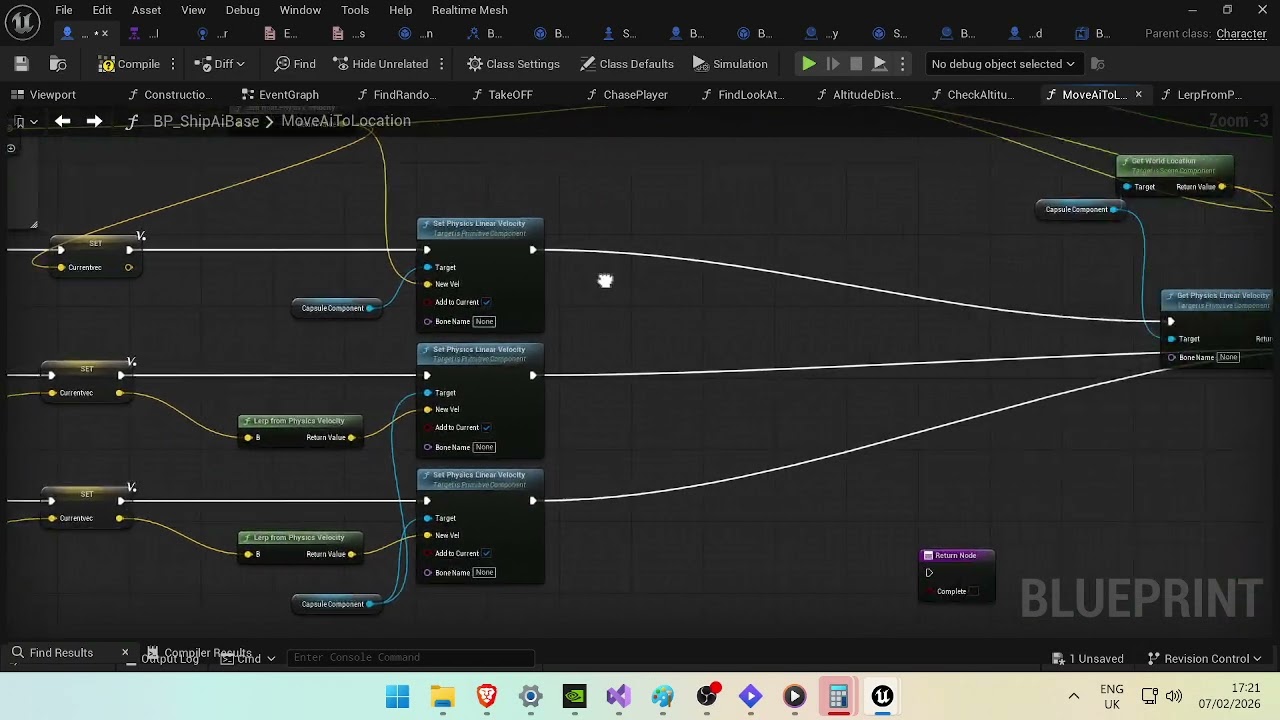
just a little walk around of whats trying to go on
 dense hound
Hello can somebody please help me with Unreal physics, im crying out here. Basically i have items which have Physics enabled, i interact to pick them up, turn of collisions and physics and then attach them to a scene component in my Player. But for some reason the mesh wont move and is basically stuck. Only the Pivot point attaches to my scene component. If i check the items in level, physics and collisions are turned of after i picked them up. My inventory array works correct as well  .
.
 ornate trail
dense hound
Hello can somebody please help me with Unreal physics, im crying out here. Basic...
ornate trail
dense hound
Hello can somebody please help me with Unreal physics, im crying out here. Basic...
attaching won't set the location for you if you leave it to keep world. If that's the way you need it set the location too
dense hound
ornate trail
attaching won't set the location for you if you leave it to keep world. If that'...
I did snap to target in the node
ornate trail
oh ha. I'm blind, so it's not snapping?
dense hound
ornate trail
oh ha. I'm blind, so it's not snapping?
no it only works if i completley disable physics for my actors, but as soon as i turn physics on, everything is stuck.
ornate trail
well your player normally doesn't need to simulate or have physics collision enabled. normally idk what this game is. but just doing what you have should work...
might be the attach, try just attaching the component to the player not the entire actor
dense hound
ornate trail
well your player normally doesn't need to simulate or have physics collision ena...
well im just trying to set up basic mechanics like picking up items and dropping them. If i have no physics you cant throw around the items and i have to teleport them on the ground.
ornate trail
just enable collision and simulate when you drop it, that's pretty standard
dense hound
ornate trail
just enable collision and simulate when you drop it, that's pretty standard
so just keep simulation turned off from beginning, got it
ornate trail
or disable it when you pick stuff up. either way
dense hound
ornate trail
or disable it when you pick stuff up. either way
yes thats what i did, and it didnt work at all
ornate trail
it might be failing. attach return a bool, you can log it to see if it worked. try just attaching the component to the player not the entire actor
dense hound
the funny thing is it returns true, like always
ornate trail
what is the actor setup?
dense hound
just a scene comp as root and a static mesh
ornate trail
yeah that should work. but in your graph your looping through your inventory and attaching each item?
also why are you trying to disable physics on the class and not the actor? that wont work
dense hound
yes inventory works fine, i turned of simulate physics in my actor and it works much better now, item just attaches weirdly after first drop, i think ue5 has a problem when i turn on simualte physics from the details panel
dense hound
ornate trail
also why are you trying to disable physics on the class and not the actor? that ...
no i got the static mesh from that class, and disabled physics for the mesh
ornate trail
what I mean is get the actual mesh, what ever it is called in your item
yeah thats very strange, get the mesh directly
your item should have a base class where the mesh always has the same name, you cast to 'my item class' and once cast you can get that mesh directly
dense hound
you can choose "static mesh" in get component by class, then it just gehts the static mesh for the class the actor has, which im picking up, but yes casting works as well
ornate trail
yeah you can but not really advised, if you ever have 2 Static meshes its an issue
I would say take it out of the loop, setup a debug key 1 and try attaching that way first. simplify the debugging
press button -> attach something
dense hound
okay now it works, because of physics, the item mesh and the pivot had an offset, which left the item attached on the ground after i dropped and picked it up again. Issue was turning on simualte physics in details.
ornate trail
if you need offsets use a socket in your mesh
dense hound
yes my character kinda doesnt have a character mesh, i just addet a scene component which i attached the item to, didnt want to bother with animating the body
but thank you for your help, was going crazy
ornate trail
no problem, even just a cube with a socket will work
keep things simple and dont loop at first
dense hound
oh didnt know you could add sockets to meshes, thought i need bones and stuff
ornate trail
static meshes have this tab
 dense hound
okay ill check it out
 torpid acorn
hey i need some help how would i make a wall splat happen for my charater fyling into a wall i an a beginner in ue5 and im lost on how to do it?
 deep wyvern
hello! im currently having an issue with a Begin Overlap function
I want to enable a postprocess volume whenever the camera's box collision enters the volume's bounds (in this case, water). The camera box collision is set to overlap all channels, as well as Generate Overlap Events.
So in this case. when i jump into water, once the camera enters the bounds, the screen tints blue as it should

however, ive found that the overlap event only occurs once the player character takes any kind of movement input, or moves at all, like the camera box can be overlapping the postprocess volume, but the change only occurs once i begin to walk or do an action. the same goes for the End Overlap event.
so in this case in the video below, im standing completely still on the ledge with water below, and when i move the camera within the water's bounds, the change doesnt take place until my player character takes input.
so i know the overlap event is detecting my camera's box collision, but i just dont understand why the event only fires once i start moving.
ive also print string debugged the camera box collision's world location to verify it is in fact moving with the camera
torpid acorn
so far this what i've come up with
 lofty rapids
torpid acorn
so far this what i've come up with
lofty rapids
torpid acorn
so far this what i've come up with
what is this supposed to do ?
torpid acorn
lofty rapids
what is this supposed to do ?
a wall splat
when your character hits a a wall when either filying/ swinging to long
maiden wadi
torpid acorn
hey i need some help how would i make a wall splat happen for my charater fyling...
By wall splat, you mean like a visual of where you hit the wall?
maiden wadi
I'd probably start with a decal. Simple enough to place using the hit location and normal
torpid acorn
maiden wadi
I'd probably start with a decal. Simple enough to place using the hit location a...
Im very new to this so ididn't know
torpid acorn
actually can you all help me improve it more? this is the current iteration of the code of the wall splat


the only probublem is that it will trigger when on top of buildings since im going off height abovove 0.5
queen dagger
faint pasture
playercontroller knows about its corrosponding playerstate
Thats my original idea, but i feel like im missing something for identifying which player state to use
 frosty heron
queen dagger
Thats my original idea, but i feel like im missing something for identifying whi...
frosty heron
queen dagger
Thats my original idea, but i feel like im missing something for identifying whi...
So you have a bunch of player characters and you want to display their name which lived in player state?
queen dagger
Yes
frosty heron
In that case,
PlayerCharacter-> getPlayerState
queen dagger
I’ll try that now
frosty heron
Dont use get player character with index that just gonna give you a random one at best.
You need to pass the character to the widget.
E.g createWidget->InitData (pass the character)
 frosty heron
queen dagger
why character? i assume that the player state is tied to the controller
frosty heron
queen dagger
why character? i assume that the player state is tied to the controller
Refer to my msg above
frosty heron
queen dagger
why character? i assume that the player state is tied to the controller
Client only know their own controller.
You cant access anyone else controller as client.
queen dagger
correct
frosty heron
Exactly...
queen dagger
thats all you should need right?
frosty heron
So you understand why we shouldnt get the controller then?
Read the pinned material in #multiplayer
queen dagger
but i dont need everyones name, i just need the name of the character that is being controlled, i would assume i can pull from my player state bp from the controller unless that cant happen
frosty heron
Being controlled by whom?
Context matter here
Maybe you can run this over from the start. Since game start.
How the name and stored and how you want to display them.
I was under the impression thst you want to see everyones name.
queen dagger
sorry no each player will only see their own name
frosty heron
As in player 1 character showibg player 1 name, player 2 charscter showing player 2 name and so on.
queen dagger
yes
frosty heron
I gave you the solution and reason why you cant involve controller for this.
If you cant do it then read the pinned material 12 times, is the most common advice.
SpawnWidget->initData(pass the character-> get character plsyer state -> get name
Widget bind to the player state delegate when name is updated.
Player state OnRep Name -> broadcast
Widget run a function -> set text (name)
If it isnt clear i will reiterate.
Client only knows their own controller and no one else.
So when a client run the code to get the controller->getplayerstate on a controller that is not their own, it will be null and your code breaks.
queen dagger
that part makes sense
frosty heron
Player state is replicated, meaning every client have copies.
Player state is also reachable from the character.
So dont overcomplicate this.
When you create the widget, pass the character or the player state of the character.
Then simply pull the name from it.
I would suggest doing with delegate and on rep above though because you will need to address race condition if your widget is created before the player state is valid.
queen dagger
i know it should be simple and what you say does make sense, im just probs making it too tricky
faint pasture
queen dagger
Thats my original idea, but i feel like im missing something for identifying whi...
the playercontroller knows about the playerstate for itself
queen dagger
then it should be as simple as get player controller get my bp player state that i made and get the name right?
frosty heron
No read what adriel is saying.
It only knows the player state for it self. But the client doesnt know anyone else controller. No copies exist in their machine.
So you can get the player state from the controller on client ONLY for the controller it owns.
It cannot reach other machine controller as copies dont exist in their machine.
In other word player 2 doesnt know player 1, player 3, plwyer 4 controller. Thus it cannot get the player state through the controller thus the client cant get the name routed from the controller.
 eager thicket
Need help with pause menu code
Is there an easy way to globally pause everything or do I need to do some legwork on individual blueprints to make sure no extra processes are running?
For instance, I've noticed a timer I've set in a widget is still counting down when the game is paused, and that makes me worry other stuff is also still running when I call "set game paused"
last peak
eager thicket
Need help with pause menu code
Is there an easy way to globally pause everythin...
Eh
Maybe set global time dilation
eager thicket
last peak
Maybe set global time dilation
does "set global time dilation" impact time based processes outside of event tick?
maiden wadi
The other issue is that you shouldn't be doing a countdown timer in a widget.
Countdown timer should be on whatever it's meant to be on. The widget should be able to pull the timer or start/end time of the timer, and display itself accordingly.
true valve
I'm trying to load big component using soft ref. But failing? I set the variable as soft object. Then assigned the compo to its value. async load asset->cast to that specific comp->some-variables
frosty heron
true valve
I'm trying to load big component using soft ref. But failing? I set the variable...
Show code
umbral venture
im making alot of progress but this is such a dumb issue that idk where to start

it only ever skips generating step 2
maiden wadi
umbral venture
im making alot of progress but this is such a dumb issue that idk where to start
Same thing ColdSummer said to TheMerchant. 😄 Need code.
umbral venture

this is my movement logic
but it may be an issue with my spawn or my grid generation

 floral stump
x2 removes 😄
Bug?


 ruby shard
Hello does anyone know the solution to this while using post process outline material and custom stencil etc. The stencil here is 4 which should be white but some parts are green when look from an angle like this, green is another material but uses a different stencil value
 floral stump
spark steppe
floral stump
spark steppe
This doesn't applied in this context, its blueprint related not unreal, unreal is pure C++, bp was long post depricated and will be replaced with unreal new scripting language
spark steppe
the sky is blue, water is wet, missty talks BS
can you give a link about the deprecation plans?
or deprecation notice, since you said it's post deprecated since long ago
floral stump
spark steppe
or deprecation notice, since you said it's post deprecated since long ago
write this on stone UnrealScript from UE3 is coming back soon
spark steppe
will do, once you are in throwing range
floral stump
 hollow mural
Hi I have a problem, im trying to play intermittent sounds on my actors, I dont want to use randomized timers on all my actors for sounds because that will be too expensive and it will have toooo many times all over the place if at one moment I have 50-100 actors all craeting those draw calls at the same time...
I have an audio component inside of all my actors
they're growling sounds mostly and other random sounds...
they are NPC AIs
is there a way to make this without having too many timers doing all these calls?

 frosty heron
Timers, audio and draw calls?
hollow mural
frosty heron
Timers, audio and draw calls?
yes isn't that creating too many "calls"?
frosty heron
Draw calls refer to rendering
hollow mural
oh I see
frosty heron
Have you profile and see if its a problem?
hollow mural
isn't there a similar problem similar to that?
crimson briar
Make a manager and on spawn register enemies for audio privileges. And limit it to 10-20 at a time. You probably don't want 100 enemies making individual noises anyway because it will be painful to listen to.
hollow mural
crimson briar
Make a manager and on spawn register enemies for audio privileges. And limit it ...
they will not be all in one place, its an open world game.
4k x 4k landscape
my simple idea is to make a sphere collision over them and only have them work on these sounds when i overlap these spheres
crimson briar
Then it shouldn't matter. If you run into some performance issue with them you can pause the logic when the actor is too far away
hollow mural
I as in the player character
crimson briar
There is probably a system for that related to relevancy and/or LODs, but I don't know specifics, never did anything like that
frosty heron
For single player game with a single controlled character you can just care about the npcs that is around the character.
 solar needle
urgent. i enable pawn sensing it doesnt show green lines
ue 4.27
any help ? please :((
 austere orchid
hey, can anyone help with this?
it appears as a little black box with squished widget, seeminly no matter what math i do
this is for a spectator screen

 hollow mural
Hi I have a question.... im possessing another character in my game, and from that point, im not able to press inputs like left mouse button... But I can use inputs like jump, arrows, etc. I can use these things, I can rotate the camera etc,
I can not press left mouse button
shut blaze
hollow mural
Hi I have a question.... im possessing another character in my game, and from th...
well I mean if the inputs work
then, did you code for that character to do something when you press LMB?
hollow mural
shut blaze
well I mean if the inputs work
then, did you code for that character to do somet...
my old character? yes, but im switching to a new character
I change and possess a different one what has no logic for what happens when you press LMB
shut blaze
if you have no logic when you press something, then you have no logic to run
The event still runs, but it has no code to run
hollow mural
shut blaze
if you have no logic when you press something, then you have no logic to run
The...
no the run works, same for the jump
everything else works properly
shut blaze
but what doesn't work?
hollow mural
left mouse button event
 paper gate
Got probably a dumb question, is there anyway to toggle this setting via code? Im creating a level design tool and I dont always want the 3D handles visable
 shut blaze
hollow mural
left mouse button event
shut blaze
hollow mural
left mouse button event
- try printing a string, if it works then it's probably a problem with your code
- try removing and re-adding the node back
- check your mouse
well, does it work?
hollow mural
shut blaze
1. try printing a string, if it works then it's probably a problem with your cod...
I did use a break point and print string, none of them worked. I used Input Action as well as simple Left Mouse Button even. Also did the refresh thing you said. Nope
hollow mural
shut blaze
well I mean if the inputs work
then, did you code for that character to do somet...
The input event is not executing at all
Input is being consumed by another Blueprint, either Old character, Player Controller, UI widget or Another possessed pawn 🖱️

 shut blaze
 eager thicket
where is a good place to handle pausing/unpausing the game?
I feel like it should be the Game Instance, but something tells me that isn't the right use. Can anyone confirm the absolute best practise for this?
solar needle
solar needle
urgent. i enable pawn sensing it doesnt show green lines
help ?
ornate trail
eager thicket
where is a good place to handle pausing/unpausing the game?
I feel like it shou...
I usually put it where ever the input actions are, either player controller or player character
maiden wadi
eager thicket
where is a good place to handle pausing/unpausing the game?
I feel like it shou...
I tend to find that the best place for the "state of the game", which paused or speed settings are, should go on the GameState.
In Atre we have a component on our GameState that handles our pause and speed settings. Little contained GameSpeedSettingManager thing.
pine carbon
When should you pass a Blueprint parameter by reference?
maiden wadi
pine carbon
When should you pass a Blueprint parameter by reference?
A "Blueprint parameter"? Not specifically sure what you mean with this.
pine carbon
When should you tick that box.
 maiden wadi
That's odd. Passing a pointer to a delegate by ref doesn't make sense.
In general you pass things by ref for two reasons. Performance, and because you want to alter them. But that being a pointer, performance is pointless there. And I'm 95% sure that will be passed as a const ref, so it can't be altered.
 fathom flint
I need help.I'm creating a player slot widget using a player array with for each loop. There is a ready and not ready checkbox in UI. Inside the function, I get the character class variable (replicated) after BP_playercontroller cast to, and then I compare it with the `branch = empty character class. But I have a problem When player A selects a character, it shows as player B has also selected one. How can I fix this?
The same thing happens with character textures in 2D veriable :(
maiden wadi
fathom flint
I need help.I'm creating a player slot widget using a player array with for each...
For a start, you need to not have anything to do with the PlayerController here.
PlayerController exists on the owning machine and the server. If you have three players and one of them is host for example. You have nine characters. Three characters on each of the three machines. You only have five player controllers. Three on the server and one on each non host client.
Which means each OTHER client, will not have access to the other client's PlayerController.
Your PlayerArray should be an array of PlayerStates. Which you can also pull directly off of the GameState already. Each PlayerState can get their associated Pawn(Character). But really you should move this ready state to the PlayerState. Because it's the state of the player.
maiden wadi
We have a whole LobbyState component on our PlayerState. Houses the things a player can pick in the lobby as well as their ready state since that is lobby related. Nice little contained thing to house all of the state for the lobby related to a player, and makes it easier to pull said data per player for gameplay initialization.
eager thicket
maiden wadi
I tend to find that the best place for the "state of the game", which paused or ...
thanks
fathom flint
maiden wadi
Your PlayerArray should be an array of PlayerStates. Which you can also pull dir...
Chatgbt told me same thing. I tried it but got the same result. I think I made a mistake in RPC. Thanks for the information.
true valve
Since you can't use soft ref on datatable how do you load them on demand
maiden wadi
What do you mean by can't use soft ref on datatable?
true valve
datatable variable can't be soft ref right
i don't see any option . not like when i pick objects
frosty heron
true valve
i don't see any option . not like when i pick objects
You can but i dont know what you mean with when you pick object. Show us a visual of your attempt.
frosty heron
fathom flint
Chatgbt told me same thing. I tried it but got the same result. I think I made a...
Always show code. Make it easier for people to help.
queen dagger
faint pasture
the playercontroller knows about the playerstate for itself
so each controller has a save game bp that i created, each just needs to get the name from its save game to show. should this not be as simple as get the player contoller get the save game profile and get the name from there
maiden wadi
queen dagger
so each controller has a save game bp that i created, each just needs to get the...
queen dagger
hmmm

so this will get the player array right
i just now need to identify which name to pull corrrect?
or more accurtetly which player state to gather the name from
frosty heron
Yeah and how r you going to associate it? We dont even know what sort of widget is this.
Is this like a name tag widget where the name appears pn top of character or is it like a list of players in the main hud widget.
Many codes r missing as well. At this point we dont even know if you already have the client pass the info from their save file to the server.
Where server replicate the changes.
faint pasture
queen dagger
Back up, what are you trying to do here? You got a widget, it's meant to show what?
queen dagger
faint pasture
Back up, what are you trying to do here? You got a widget, it's meant to show wh...
right now it needs only to show the player name of that one player
faint pasture
queen dagger
right now it needs only to show the player name of that one player
What actor is creating this widget?
You mean "show the name of the LOCAL player" right?
On my screen it'd say Adriel, on yours it'd say vdmce
queen dagger
yes
queen dagger
faint pasture
On my screen it'd say Adriel, on yours it'd say vdmce
yes, this hud is being created by a function on the player controller
frosty heron
queen dagger
right now it needs only to show the player name of that one player
Just break the ice, is it widget component hovering over characters head?
faint pasture
queen dagger
yes, this hud is being created by a function on the player controller

So why not this
playercontroller knows its corrosponding playerstate
frosty heron
He stated he wants to see other people name too
Like yesterday
In which case he cant involve controller.
faint pasture
Yeah just get player array in that case.
On my computer, the playerstate which is mine is the one where it is my local playercontroller.playerstate
Everyone's playerstate is in the Players array
frosty heron
faint pasture
Yeah just get player array in that case.
He is struggling with associating the player array. He get the index and got stuck.
What he should have done is get the player state from the pawn. Which ive told like multiple times but no attempt on that part.
hollow mural
Hi, I have a problem... Im riding an animal... but the way Im doing it is because I dont currently have a proper animation, I just wanna add the character on top of this animal, like say horse 🐎 and make it invisible, and the only thing you will see is pretty much the animal you're riding. 🏇 ⚙️
This is how im doing the attachment to attach my actor on an arrow point that exists on top of this pig. 🐗 ⚙️

It doesn't work the first time
faint pasture
hollow mural
Hi, I have a problem... Im riding an animal... but the way Im doing it is becaus...
do you want to possess the mount when riding it?
hollow mural
But if I mount + unmount again, it will work ✅♻️
hollow mural
faint pasture
do you want to possess the mount when riding it?
yes I am already doing that
But I dont understand why the first time the player charcater goes to chill at the corner xyz: 0,0,0 of the map...
queen dagger
faint pasture
Does not seem to be an option
 frosty heron
Implies controller class not your widget blueprint.
Also self refer to the instance of the object thats firing the code. You get that by right clicking on empty space and type self.
You need to make this clear though. If you want to see other player name. Stop involving controller, its futile.
queen dagger
i do not need to see other players names it just has to be the name of the player that is playing.
frosty heron
Then you just pull straight from your save game
But essentially you are saying that a player does not need to know anyone else name.
queen dagger
no
frosty heron
Is that really what it is?
queen dagger
it does not
frosty heron
Then do it proper way.
Have name stored in player state
Where its replicated and everyone have access to.
 frosty heron
Dont route from the controller but from the pawn.
@queen dagger i will run this with you on my phone for the next 15 mins if you actually answer the questions.
queen dagger
i am answering
frosty heron
How r u displaying this? Is the widget hover over the character head kind of name tag?
Or is it just a list of players at the corner of the main hud?
queen dagger
the text block is the player name
 frosty heron
This doesnt say much. So you want a list of players at the bottom left?
If there are 3 players you will have like
player 1
Player 2
Player 3
Name on a stack?
queen dagger
i do not need to see other players names it just has to be the name of the player that is playing.
frosty heron
Loop through the player array -> is locally controlled -> cast to your player state -> get name -> set text -> break.
 queen dagger
for each loop
frosty heron
Yes
Then check the element if its locally controlled
If thats not a function in the playrr state then you need to go
For each player state ->get controlled pawn -> is locally controlled.
This will filter the player state that belong to the local player.
queen dagger
closer?
 frosty heron
Not instigator, get the controlled pawn
Actually that will assume each player already possess a pawn.
You can do this actually, get the controller from the player state.
If its valid check if its locally controlled.
If its invalid do nothing.
faint pasture
queen dagger
Does not seem to be an option
Because you're doing something totally off base from what you said
You said the PlayerController is creating this widget right?
OK in PlayerController:
Whenever -> create widget -> pass in self.playerstate
In widget:
read passed in playerstate -> pull out name
done
it's that simple
queen dagger
in here i would need to get the player state right
 frosty heron
queen dagger
in here i would need to get the player state right
frosty heron
queen dagger
in here i would need to get the player state right
Yes, do you know how to make function with inputs?
You can pass the player state that way.
Well since the controller is already the owner.
You can also do, get owner cast to your controller -> get player state in your widget.
queen dagger
frosty heron
Yes, do you know how to make function with inputs?
You can pass the player stat...
yes i do, should one of the inputs be the player state i created
so i keep running into the player state that is recommends is not the player state that i have created
solar needle
urgent. i enable pawn sensing it doesnt show green lines. unreal engine 4.27.2
queen dagger
so this one seems to be working, althopug i dont understand why completely
 frosty heron
queen dagger
so this one seems to be working, althopug i dont understand why completely
frosty heron
queen dagger
so this one seems to be working, althopug i dont understand why completely
Because you need to address race condition when it comes to networking.
In otherword the data have to be readily available (e.g already replicated) before you create the widget.
If somehow you want to create the widget earlier then you will need to update the widget when the data is ready.
So if you create the widget and load your name save game file later. Then obvipusly the name isnt set yet.
You should never use delay to address race condition.
hollow mural
Hi, I fixed the previous problem. Now im trying to understand why after I unmount the animal, it will destroy it's wonder around logic, as well as it's begin play random intermittent sounds... Which is sad, it's no longer moving, it's like it got tired or smth from me riding it and then it becomes stuck in place. But I can still ride it again. It's weird tho.

After I un-mount the animal, im also restarting the Roam Around

This is my RoamAround
crimson briar
How do you unmount though? I don't see it on the screenshots. Unless the blue wire at the bottom of the first screenshot is a different pawn/character than the pig, but I can't know