#blueprint
1 messages · Page 377 of 1
 last peak
 vocal garden
do you have a solution or not?
vocal garden
do you have a solution or not?
this doesnt look like you entire blueprint
where do you set the cam ?
vocal garden

 crimson briar
vocal garden
crimson briar
vocal garden
He meant how do you alter the position/rotation of the camera. On the blueprint video you only show tracing for a target
vocal garden
crimson briar
He meant how do you alter the position/rotation of the camera. On the blueprint ...
I just move em with this
last peak
vocal garden
I just move em with this
No you dont .....
vocal garden
last peak
So if you target one of the npc how does the camera change its position then ?
Are you targeting then you go into your blueprint and you manually move the cam ?
I dont think so
vocal garden
you're losing me here.
It just targets exactly where the camera is placed
it didn't move, I just add a camera lag on the cameraa
 vocal garden
hmm so what do I do with it? delete it?
last peak
But you want something like z 1000
 last peak
vocal garden
there's no numbers sadly
last peak
vocal garden
there's no numbers sadly
what is a vector
crimson briar
Honestly I don't even know what you want fixed
 last peak
vocal garden
no vector
last peak
vocal garden
no vector
Can you explain what a vector is ?
crimson briar
You show a video that looks like some camera tracking an actor.
Then you show onyl a blueprint with the code selecting the actor.
You don't show anything related to how the camera is following the selected actor.
last peak
vocal garden
YOU mentioned it.
You need to understand what a vector is
vocal garden
crimson briar
You show a video that looks like some camera tracking an actor.
Then you show on...
I want the camera to lock on the enemy without the camera looking down at the target like in the video.
last peak
Otherwise you cannot do this
vocal garden
I prefer locking on where I can see the action closly
crimson briar
Default Unreal camera doesn't have "locking on" enabled. We need to know how your locking on works.

 last peak
vocal garden
Not this when I get close to the enemy
last peak
vocal garden
Not this when I get close to the enemy
Ye but if you refuse to show your code for the camera no one can help you XD
vocal garden
last peak
Ye but if you refuse to show your code for the camera no one can help you XD
what camera code?
crimson briar
Okay since you refuse to show anything more I can only give you a guess answer - your target pivot is probably on the ground and you aim at it. You need to aim higher, so instead of tracking the camera towards actor location, you need to add 90-180 to the Z of target location (depending how high you want)
last peak
vocal garden
what camera code?
Obviously you need some code to lock onto a npc
last peak
Lord allmighty XD
vocal garden
What is it?
vocal garden
crimson briar
Okay since you refuse to show anything more I can only give you a guess answer -...
"refuse"? I just showed you what I have. I showed you my camera target's blueprint
What more do you want to ask for?
last peak
Look .... you recieved the solution 2 times now
vocal garden
what solutions?
crimson briar
vocal garden
"refuse"? I just showed you what I have. I showed you my camera target's bluepri...
As I said, the standard Unreal camera doesn't have a lock on behavior. This had to be coded first. Maybe you are using some templates that are not default UE components but we can't know what they do
vocal garden
I am using a third person template
I am not going through the hassle to code. I'm sticking with blueprint and I wanna fix it with blueprint.
crimson briar
The code you showed has no ability to influence the camera position/rotation, something else must be doing it
 thin panther
Blueprints are code, they're just a more visual block based form of it. That's what people mean when they refer to seeing "the code", it's just short for seeing whatever makes the thing tick.
crimson briar
Your code traces - which doesn't cause collisions - and sets a variable. A variable does nothing if it is not used further
vocal garden
could've be specific but thanks for clarifying
This is the code I've been showing
This is the event that activates the targeting system
last peak
vocal garden
This is the code I've been showing
Its totally unrelated to your camera
vocal garden
That's litteraly it
last peak
it doesnt move your camera literally
vocal garden
then where do I find the camera blueprint?
last peak
Wtf do i know XD hahaha youve made this
crimson briar
I give up, sorry
vocal garden
yeh no shit.
vocal garden
last peak
Wtf do i know XD hahaha youve made this
then why are you asking my camera's blueprint?
vocal garden
Ok. You're obviously not taking it seriously
crimson briar
Feels more like a language barrier or something similar. Don't be an ass @last peak
last peak
crimson briar
Feels more like a language barrier or something similar. Don't be an ass <@27811...
Im not im almost convinced hes a troll XD
vocal garden
Are you serious.
Are you Fucking with me?
You're making this even more stressful if you're gonna act like this.
last peak
vocal garden
You're making this even more stressful if you're gonna act like this.
For whom tho?
Im having fun ^^
vocal garden
Oh! I see! You're just a jackass, ok then!
You were never interests in helping me. You were fucking with me this whole time
last peak
vocal garden
You were never interests in helping me. You were fucking with me this whole time
I gave you the solution by message 3 or 4 already
vocal garden
And what's the solution?
Tell me.
Tell me right now. Cause I KNOW you're not taking this shit seriously.
last peak
 vocal garden
Oh fuck right off.
I'm here to ask for some help. I don't have time for this.
Just tell me what it is because I'm lost because of your shitposting.
last peak
vocal garden
I'm here to ask for some help. I don't have time for this.
When you update your camera add a bit to the Z axis
There you go
vocal garden
last peak
When you update your camera add a bit to the Z axis
Here?

Ok, you gave me the answers but you gave a vague one.
You gotta be more specific.
 lost hemlock
Hi I have a question, I made a new channel called landscape, it ignores everything except for my landscape, but when I line trace it never finds my landscape. Why could that be?
crimson briar
lost hemlock
Hi I have a question, I made a new channel called landscape, it ignores everythi...
Did you set on the landscape collision to block this channel?
lost hemlock
crimson briar
Did you set on the landscape collision to block this channel?
yes
my landscape is world static

and I have these features off
 crimson briar
So you changed in the project settings the WorldStatic preset to block the channel? Maybe a restart or some refresh of the landscape is needed or smth
lost hemlock
these are my line trace settings at the moment
lost hemlock
crimson briar
So you changed in the project settings the WorldStatic preset to block the chann...
already restarted
crimson briar
lost hemlock
Enable the draw debug type to see if it is really crossing the landscape without a hit
lost hemlock
I did it earlier
lost hemlock
crimson briar
Enable the draw debug type to see if it is really crossing the landscape without...
it just goes through
crimson briar
Then idk, you need to wait for a landscape expert, maybe they behave differently than standard actors in this regard
lost hemlock
hit actor is none
unless if i make it visiiblity
but I dont wnat visibility
because it will also hit other things

 eternal marsh
Hi all. This one has me stumped and am hoping for some guidance on my blueprint. 5.7
I am building a simple twin stick shooter. Bare bones at the moment
- I have the input action - IA_Aim created and set to Axis2D(Vector2D) with modifier Dead Zone .2/1
- I have an Input Moving Context with AI_Aim set to Gamepar Right Thubmstick 2D-Axis - No modifiers
- I have created a player controller Blueprint that controls all the player movement. Everything works great, shooting, jumping, moving, except the IA_AIM
I have the EnhancedInputAction IA_Aim Event to get the action Value of X and Y in from my right thumbstick
Controlled Character is a variable created from - Get Controlled Pawn -> Cast to Character
The print strings are just to validate proper data is being used
I also created the timeline to at one point rotate all the Axis in a ROT to validate the character could in fact rotate, and it did.
So I know the Controlled Character is correct because my timeline data rotates it
I know the data is correct because I am printing it
The odd part is when I broke the data coming out of the timeline but left it connected to the stream everything works. Like the first image, alt description added to image. But if I remove it and everything else, same data, the character does not rotate. The rest of the character still works. I can move, jump and shoot, just not aim like I can with the broken setup. I have tried deleting everything and restarting from scratch but no luck when I make the Broken setup from the images. I can move on with the odd setup but trying to understand what I am missing. Any guidance would be appreciated. Thanks!!
 crude dew
Hi, Anyone know if its possible to sort a map by an integer value I have a map with a Controller and a Int Value and I want to be able to keep the controllers in line with the ints as you can see here I know I can use Sort Integer array but then that would have an issue if 2 int values are the same (If i was to use the Find Item solution and grab the index from the original array to store in a sorted array).

 faint pasture
crude dew
Hi, Anyone know if its possible to sort a map by an integer value I have a map w...
faint pasture
crude dew
Hi, Anyone know if its possible to sort a map by an integer value I have a map w...
What does the int represent?
crude dew
A dice roll.
I think i got it now thouhg I done it this way so it sorts it into player order.

This seems to work but need to test it a bit more.
eternal marsh
eternal marsh
Hi all. This one has me stumped and am hoping for some guidance on my blueprint...
I see I borked the renaming of the images


 versed oasis
Does anyone have any idea how i could make something like a slot machine in blueprint? My issue is that i have this model i made which can be controlled by its skeleton. I made it so each skeleton part controls one of the 3 reels. However i dont really know how to properly set it up in the blueprints to stop exactly where i want it to ( for example if it gets Numbers 2, 3, 1 to stop at each number accordingly)
faint pasture
versed oasis
Does anyone have any idea how i could make something like a slot machine in blue...
- cook up the results (2, 3, 1)
- cook up the final bone roll angles to reflect those results (30, 45, 15 for example)
- cook up some starting roll angle that is equivelent to your CURRENT angle, but very large. Like how 720 and 360 are the same. Just add some large amount of spins to the current roll. I'd start with 3600 (10 spins)
- Timeline that outputs a 0-1 range that is used as the interpolation between step 3 and 2.
faint pasture
faint pasture
1. cook up the results (2, 3, 1)
2. cook up the final bone roll angles to reflec...
Say the slot started at a roll of 0 and wants to end up at 45. The timeline 0-1 range would go into an interpolation between 0+3600 and 45. Tweak the timeline 0-1 range to make it start off fast and end slow
 pine carbon
Can enhanced input action events from multiple controllers propagate through one event node in a blueprint?
 surreal peak
pine carbon
Can enhanced input action events from multiple controllers propagate through one...
surreal peak
pine carbon
Can enhanced input action events from multiple controllers propagate through one...
You mean similar to binding the same function to multiple actions in c++?
pine carbon
I don't think so. My question is mostly about how multiple input devices interact with the Enhanced Input System.
surreal peak
If there ain't some bind method for it exposed, then probably not. You'd need to make your own function and manually call it from each generated action event.
Ah
InputActions are combined with InputMappingContexts where keys are assigned to them.
You can assign different devices to it or split them into different contexts which you apply at the same time if it makes sense for the given action
E.g. IA_Jump can be in IMC_Movement and have Space and FaceButtonBottom assigned. The event will trigger for either then.
Or IA_Jump can be in IMC_Movement_KeyboarsMouse and IMC_Movement_Gamepad and have each one key/button assigned there.
If you have multiple gamepads then they are usually mapped to multiple local players which each have their own enhanced input subsystem that get the IMCs pushed to
So those wouldn't overlap the events
pine carbon
What I really, desperately need to do is have a way to assign functions to those actions from somewhere which is not the pawns that have the controllers triggering the actions. The majority of our context-sensitive functions are contained in a blueprint function library, and mapped to a single input event via a switch statement. This has worked fine for most of them. But for a specific thing I'm doing, I want to decrease latency as much as possible and it would be incredibly nice to redirect those input actions. It feels like it should be possible but for the life of me I cannot figure out how.
My input event goes through here, with the switch going to functions of the same name and most of those are totally fine with this approach. Rhythm Tap, however, needs to store clock time, so it needs to GET to the node where it reads the clock time as soon as possible. The best solution I have found is this godawful back reference, but that is horrible and I want to improve it.


 severe coral
Hey do you have clue why my player camera manager is changing the field of view even though it’s just passing the value? (And the value is correct) Also, the second strange thing is that I need this "Return Value" checkbox to be true, but in every tutorial I’ve seen it works for them without it. I don’t really understand what this option means after reading its description


 fading raptor
Hello everybody ! I'm trying to create, alimentation cables that fill up progressively to show that it's charging a specific object but I followed a tutorial and in it the Dynamic Material Instance is a single value so I changed it to an array to stock all dynamic material instances & I want it to charge progressively. Is there anyway to do a for each loop but a loop that continues only if the previous one has fully completed ? for instance here, one spline mesh component charges & the second one in the list start charging only when the first one fully finished charging ?
 harsh nebula
severe coral
Hey do you have clue why my player camera manager is changing the field of view ...
harsh nebula
severe coral
Hey do you have clue why my player camera manager is changing the field of view ...
The return value is just a boolean with default name. It will only do something if you connect to the output pin from where the function was called.
severe coral
harsh nebula
The return value is just a boolean with default name. It will only do something ...
but this function is override in player camera manager bluperint class, and its descriptino is not default
 harsh nebula
severe coral
but this function is override in player camera manager bluperint class, and its ...
harsh nebula
severe coral
but this function is override in player camera manager bluperint class, and its ...
Where are you calling the function from? Also the return node you are showing in the screenshot is not plugged in so it won't execute anything.
severe coral
harsh nebula
Where are you calling the function from? Also the return node you are showing in...
In the first screen it’s connected properly, this one was just during testing. This is an override for "Blueprint Update Camera". It’s called by this class. I’ve not read the C++ code for this class, but from tutorials all they did was override this function, so I assume it’s called on every camera update. Have you ever used Player Camera Manager before?
harsh nebula
severe coral
In the first screen it’s connected properly, this one was just during testing. T...
Yep, in the game animation sample. The camera manager is quite complicated.
So you're following a tutorial?
severe coral
harsh nebula
Yep, in the game animation sample. The camera manager is quite complicated.
So ...
Yeah, and what I’ve noticed is that in the tutorial this return value is also true, but for some reason in the previous version it was true by default. In 5.6 it’s not default. But it still doesn’t solve my problem with FOV. On my camera, 100 degrees looks similar to 84 degrees in PCM. Also, what I’ve noticed is that it turns off my post process settings on the camera. I guess Im gonna do what I wanted to, in the in character bluperint instead of the camera manager
harsh nebula
severe coral
Yeah, and what I’ve noticed is that in the tutorial this return value is also tr...
Gameplay Camera doesn't have post processing options by default in the character BP, are you adding a post process component?
crimson briar
pine carbon
My input event goes through here, with the switch going to functions of the same...
You mean that you want an input do different things when a minigame is active and when it is not? You could have the same input bound to two actions in different mappings. Interact with E in a Standard mapping and MinigameInteract with E in Minigame mapping. When minigame starts, remove Standard mapping and add the Minigame one. Now it will use the MinigameInteract action, not the standard one. After the minigame ends, swap the mappings again
 elder gate
Hi I am making a vegetation growth effect with PCG and its custom blueprints.
This is by updating the points scale inside the execute with context and point body loop function and using that BP inside my PCG
However Im running into the issue**, that in sequencer it works but in Runtime no meshes are spawned or updated**. ( I have setup blueprint event triggers/repeaters, everything does work in sequencer and editor)
Any help from anyone would be appreciated!


 narrow pulsar
Sometimes the AI stops moving because it's "out of range" even though I'm clearly making it go within range in the screenshot. It doesn't always happen but it ends up happening every 10-15 attacks or so.
The issue is that it won't move at all afterwards so it won't trigger the "within range" check. If I change the "Goal Actor" and instead provide it a navigatable point in the nav mesh close to the actor it works since it'll always compute a different one but it's iffy and not as smooth to track the actor as making it the "goal" actor.

Any clue what the issue could be?
crimson briar
narrow pulsar
Sometimes the AI stops moving because it's "out of range" even though I'm clearl...
If attack range is set manually - it is possible the attack range is just smaller than the walk acceptance radius. I'm not sure how acceptance is calculated here, you would need to test - but in some cases acceptance also adds bounds of the root component of both actors. But as I said I don't know how it is handled by this particular node
narrow pulsar
The acceptance is literally just the attack range * 0.9
so it should always be smaller
Unless like you said, it adds other bounds
 lethal pollen
Hi!
I'm trying to save a game with the following code, but it always returns false without any error message. Is the following code correct?

Thank you!
crimson briar
lethal pollen
I'm trying to save a game with the following code, but it always returns false w...
- Check if the name is correct by printing it before. Also you shouldn't have spaces or special signs in the name
- Clear the content of the folder with the saves - it is in your project directory/Saved/GameSaves or something like that
 dense hinge
Hi. I have an array of 4 floats that I got through calculating dot products. Is there a way to filter out and get only the value closest to 1?
 frosty heron
dense hinge
Hi. I have an array of 4 floats that I got through calculating dot products. Is ...
frosty heron
dense hinge
Hi. I have an array of 4 floats that I got through calculating dot products. Is ...
So you want the highest value out of the 4 floats?
dense hinge
frosty heron
So you want the highest value out of the 4 floats?
Yes
frosty heron
Make a function that takes an array of float.
Loop through them
If index 0, highest value = index 0 element.
For the rest of the loop.
If index[i] >= HighestValue
HighestValue = index[i]
Once completed just return highest value.
Altough for dot product, you probably want to turn the negative to absolute?
Because -0.2 and 0.2 kinda the same thing for a dot product imo.
dense hinge
I can just discard the negatives, since I don't need them. But comparing the values against each other was what I needed, thenk you
frosty heron
Yeah just turn them to absolute value.
Lmk if you are stuck but i think you will be fine.
severe coral
harsh nebula
Gameplay Camera doesn't have post processing options by default in the character...
there is post process struct, and it works fine, but without PCM
 versed oasis
Could someone help me understand why these print as C B A instead of A B C? I am new to blueprints and trying to make a little something. However even though, from my understanding, a sequence should go from 0 to 1 to 2, it always prints as 2 > 1 > 0
 frosty heron
versed oasis
Could someone help me understand why these print as C B A instead of A B C? I am...
frosty heron
versed oasis
Could someone help me understand why these print as C B A instead of A B C? I am...
it's sequence, it fires from top to bottom.
A B C actually get fired not C B A.
what you are seeing in the screen, the bottom one would be the first thing that get fired.
since new print string will stack on top of it.
versed oasis
ah that was silly of me, for some reason i thought new prints show at the bottom
sorry!
frosty heron
nothing is silly! all the best.
 balmy moat
I tried to make the monster walk through the corridors and search for the player, and when it saw the player — immediately run towards them. But I couldn't make it work. I was only able to make the monster constantly chase and attack the player. Please help.

 white parrot
versed oasis
ah that was silly of me, for some reason i thought new prints show at the bottom
white parrot
versed oasis
ah that was silly of me, for some reason i thought new prints show at the bottom
You could also look at the output log, it will show there (for a more obvious order).
versed oasis
didnt even think of that, i was too frustrated with the order of the numbers on the slot machine compared to the printed numbers hahah
 dusky meadow
Hello im having an issue where when the player enters a door they can move into walls can anyone help ?


 crimson briar
dusky meadow
Hello im having an issue where when the player enters a door they can move into ...
crimson briar
dusky meadow
Hello im having an issue where when the player enters a door they can move into ...
First print the name of the object being hit after moving into a door and trying to go to the side - maybe the door overlaps the collision of the object next to it and it still counts as a door
dusky meadow
crimson briar
First print the name of the object being hit after moving into a door and trying...
It returns bp_tile_door which is the door
its weird because it isnt overlapping
crimson briar
What collision does the door use and is the door scaled non-uniformly?
dusky meadow
each tile is i think 1 by 1 meter the door is a child of the tile blueprint and they use the defualt sprite collision
crimson briar
Hmm, then dunno. You'll have to debug. Draw the trace, also during play get out of the character and enable collisions view to look at them during play, not only when editing the level
dusky meadow
crimson briar
Hmm, then dunno. You'll have to debug. Draw the trace, also during play get out ...
I fixed it by using a box trace thank you for helping with debug
versed oasis
Not sure if i should ask this here on in the animations channel. Im having an issue with the Play Montage node. I cant for the life of me make it work by plugging the "on notify begin", "on notify end" or even the "notify name" pins into the rest of my stuff. The only pin that works for me is the on completion but i ideally want to move onto the next event when the animation reaches a notify i added inside the montage itself. How do i approach this?
frosty heron
@versed oasis show your code.
versed oasis
im essentially trying to troubleshoot so i connected it like this for now. Im checking to see if the name of the notify is correct and trying to trigget it. It only works only if i connect the first exec pin or the on completion pin. The rest wont work at all and im not sure how to set it up
 frosty heron
hook it up on OnNotifyBegin then show your montage asset.
versed oasis
i have set it up with just a simple add notify on the frame i wanted it to actually trigger
 frosty heron
hook it up on OnNotifyBegin
versed oasis
wait how do i do that
frosty heron
 frosty heron
it should work then. No issue on my side.
maybe typo?
Try to just print the notify name on Notify Begin
disregard the branch.
versed oasis
sure thing
frosty heron
I have the same thing and it works on my end.
 versed oasis
it wont print anything. Im not sure if its a mistake i made by not setting something up properly within my anim BP but it just wont even run the print

any chance its bothered by the spaces? should i remake the notify and hope it works?
frosty heron
I don't think that's the issue, it should print Begin works still.
the icon is different than mine

can you just drop another one in? Show me how you create this AnimNotify.

 frosty heron
Are you absolutely sure the montage is playing until the notify time?
versed oasis
added these too in the anim bp to make sure it works

 frosty heron
it could be you are playing another montage right after.
So Completed calls but the montage actually isn't played the whole way.
versed oasis
frosty heron
Are you absolutely sure the montage is playing until the notify time?
the anim completes and there is no notification, no print, nothing. The only one that fully executes properly is the on completion and the top one
frosty heron
Check if this is the only time you are calling play montage on that specific mesh.
versed oasis
Oh yup 100% this is my first time calling this in the entire project
frosty heron
ok, lets check this way.
Play 2D sound around the time the notify is called.
if you don't hear the sound then we have problem.
versed oasis
let me do that real quick
yup its playing normally
im assuming its the notify itself being the issue here. Do i need to make a notify BP or something similar perhaps?
frosty heron
Are you making Montage Notify?

it should have a branching icon
I do use custom anim notify as well as montage notify, no issue with either.
versed oasis
THAT WAS IT! I was making an entirely new notify and it wasnt doing anything
i was so confused. Then whats the point of being able to make a new notify from scratch. Is it useful for making notify logic?
frosty heron
well if you want the NotifyBegin and NotifyEnd from the play montage execution pin, I suppose you need it to be MontageNotify not your custom AnimNotify,.
frosty heron
versed oasis
i was so confused. Then whats the point of being able to make a new notify from ...
You can encapsulate state and logic in your custom anim notify.
I use MontageNotify when it doesn't really do much other than calling for some events on the actor that is playing the montage.
versed oasis
interesting, it seems like even though one bone is moving the lever, the rest of them are not really being able to move at all. I will try and figure something out on this, now that the notify is out of the way i think im good! Thanks a ton!
frosty heron
versed oasis
interesting, it seems like even though one bone is moving the lever, the rest of...
Like, the montage not playing how it should?
preview montage and play time montage looks different, is that it?
versed oasis
essentially the slot machine has 5 bones, a body (does nothing), lever and 3 reel bones. The reel bones are working as intended. I used the Actor BP alongside the anim BP. The actor chooses through a custom event random variables. Said variables are being cast on the anim bp and decide on where the reels should land on. This works.
Now my idea was to make it so i can interact, pull the lever first and while the lever is returning back to its position (so a bit before the animation ends) to trigger it through a notify (we did this just now), and essentially roll the reels right after.
The problem now is that while the animation is playing from the montage, i cant seem to get the reels to also start rolling.
frosty heron
Yeah, you can't really play multiple animations at once.
well there is a way I suppose...
By adding more slots in your montage / Anim instance.
each bone is it's own slot.
actually I'm not sure if you can play multiple montage at once 🤔 .
My guts says you can though.
versed oasis
Hmm i have to look into that as im not super familiar with handling such things yet. Heck, blueprints alone were a headache for this slot machine hahah
faint pasture
versed oasis
essentially the slot machine has 5 bones, a body (does nothing), lever and 3 ree...
Why do you need animations here, you can just drive this all with simple bp or animbp code
frosty heron
just multiple slots + filter it with LayeredBlendPerBone
versed oasis
frosty heron
actually I'm not sure if you can play multiple montage at once 🤔 .
perhaps through blending. on a studio i worked for before i noticed they managed to make each part move indivisually whenever they wanted them to. So there is def a way
frosty heron
tbh, I wouldn't use animation to rotate those slot.
and using animation means always the same result.
versed oasis
faint pasture
Why do you need animations here, you can just drive this all with simple bp or a...
im a 3d artist, i thought it would be easier for me to simply animate the lever. The reels i wanted to animate using blueprints as i wanted them to land on specific things
frosty heron
versed oasis
perhaps through blending. on a studio i worked for before i noticed they managed...
Yeah if they are seperate component.
versed oasis
animating tool like 2 mins hahah
white parrot
For rotation it would either in the actor's bp or ControlRig if it's complicated
faint pasture
faint pasture
1. cook up the results (2, 3, 1)
2. cook up the final bone roll angles to reflec...
Did you try this kind of approach?
white parrot
didn't read the whole chat, sounds like actor's bp then yeah 
versed oasis
faint pasture
Did you try this kind of approach?
could potentially do this instead yeah. This would definitely save me the whole headache but im unfamiliar with doing even that currently saddly. Im super new to blueprints aside from certain stuff i played around with before
faint pasture
If the slots are meant to be actual bone-weighted bits of a mesh that actually spin, not just some materials shenanigans, then this is the approach
otherwise what do you do, make a million animations for the million ways they can land? lol
versed oasis
yup they are bone driven. I think i just overcomplicated it a bit. Essentially i get the random integers from lets say 1 to 4, then choose for all 3 reels then send data to animbp, anim bp tells each reel to stop spinning and interpolate into chosen result based on angle
i still need to figure out the logic for asking for specific amount of coin by the player but this should be super easy with a few variables
 storm solar
Im trying to use get random reachable point in radius instead of get random location in navigable radius.
I have an ai that will attack the player and than retreat 500 units away in a straight line. I also have an invisible wall in the area I want everybody to stay in. So if it's to close to the wall I dont want it to retreat.
I have a specific area I want to check that the ai can reach so the radius for either node is zero.
If this is done in reachable point it will always fail. If I do the same in navigable radius it succeeded but if its too close to the wall it will try to run out of the arena, which it cant do.
If i set the radius for it to 1000 in reachable point, it will succeed all the time. I then try to plug in that success point to the reachable point node with a zero radius and it fails.
How do i get reachable point to succeed when I give it the radius of zero? Why is it always failing when i do this?
frosty heron
If your environment is not a flat ground, honestly EQS is neccesary.
Learn the basic then add the condition one by one.
Starting by returning fail state if the points around the target area is near the invisible wall.
Then move forward from there adding more condition and requirement and act in BT according to the EQS results.
 keen gate
Hey I have a problem I want my character to not jump in lvl1 but from lvl2 so how can I do that I have not figured that out
storm solar
frosty heron
If your environment is not a flat ground, honestly EQS is neccesary.
Thanks for the response. so it is a flat ground. It's just a flat circle. There are no obstacles in the arena besides other players. Is there a way I can make the nav mesh a circle / the same size as the arena? I think that would solve my issue, but I cant find anything to make a custom nav mesh.
 spark kraken
keen gate
Hey I have a problem I want my character to not jump in lvl1 but from lvl2 so ho...
spark kraken
keen gate
Hey I have a problem I want my character to not jump in lvl1 but from lvl2 so ho...
I would add an integer with the level of the character and use a boolean to check the player level when the player presses the jump button.
white parrot
keen gate
Hey I have a problem I want my character to not jump in lvl1 but from lvl2 so ho...
Don't bind the input action prior to level 2 then, only when reaching level2.
keen gate
spark kraken
I would add an integer with the level of the character and use a boolean to chec...
not the level of character but game level actually
 solar needle
i wanna ask why damage doesnt work here ?

event transmit is beacon when activated add overlap event (begin overlap) so its upgrade base damage..then it doesnt work on explosive outside the transmitter

hmm something wrong
 frozen hedge
solar needle
i wanna ask why damage doesnt work here ?
frozen hedge
solar needle
i wanna ask why damage doesnt work here ?
Why is nothing attached to branch at the bottom, Boolean?
solar needle
frozen hedge
Why is nothing attached to branch at the bottom, Boolean?
bottom is transmitter that applying tag traps
it use interface transfer to trap
frozen hedge
Still
frozen hedge
Which part is not working?
solar needle
i prob forgot instance variable
you see when the transmitter activate the mines outside the radius dosmr deal damage
inside deal as intended
frozen hedge
Shouldn’t there be a Boolean on branch node then sets true or false to damage?
frozen hedge
solar needle
i wanna ask why damage doesnt work here ?
The bottom branch of here
 granite nacelle
Sup everyone, the thing is I followed a little tutorial from another post on how to change brightness in game, I’m using a post process volume in my level and whenever I change the brightness the ps1 effect just goes away.
granite nacelle
granite nacelle
Sup everyone, the thing is I followed a little tutorial from another post on how...
 frozen hedge
solar needle
inside deal as intended
frozen hedge
solar needle
inside deal as intended
So the mines deal damage based on if it’s near it and if it’s not it still does damage?
solar needle
frozen hedge
So the mines deal damage based on if it’s near it and if it’s not it still does ...
wait let me test something
hm
lets me update the work

The transmitter bottom is changing the base damage variable
its from transmitter actor
it work inside the transmitter radius but traps outside the radius doesnt give any damage
its 0
wait a minute
the character only damaged once
what
tch the problem lies on healthbar
UNBELIVABLE its Health bar problem all along
 fuckkkkkkkk
i feel so stupid
frozen hedge
Did you not do event any damage event? In player BP
solar needle
its boolen problem in player BP the trap code works perfectly. the HP is flawed
i follow tutorial again where i gone wrong
pine carbon
The return value here is indicating success, but there is no socket with that name, and I can't figure out where this is getting attached. I assumed it would fail if I give it an invalid socket name.
 white parrot
pine carbon
The return value here is indicating success, but there is no socket with that na...
white parrot
pine carbon
The return value here is indicating success, but there is no socket with that na...
It attaches to vector 0 in local space
pine carbon
Why on Earth is that the default behavior. What would trigger failure, then?
white parrot
You could just check if the socket exists
crimson briar
pine carbon
Why on Earth is that the default behavior. What would trigger failure, then?

Socket is optional so it doesn't result in failure
pine carbon
Ugh.
 maiden wadi
pine carbon
Why on Earth is that the default behavior. What would trigger failure, then?
maiden wadi
pine carbon
Why on Earth is that the default behavior. What would trigger failure, then?
So you game is working fine for a while. All good. Then some designer comes along and deletes a socket from a mesh.
With what you want, suddenly there's no attachment, at all. No one probably notices the bug for days. Something stays where it was probably spawned at world zero. Other weird bugs occur because of things not attaching correctly and now you're on a bug hunt to find out why things are at world zero or missing entirely from the thing they're supposed to be attached to.
With how it is now, it at least attaches to the root so that you can easily visually see that something is wrong.
white parrot
crimson briar
Hmm, if i recall there's probably a check if the socket's name isn't equal to 'None' before attaching.
crimson briar
Dunno, I opened the function but it was too complex to read through before going to sleep
pine carbon
Is there something here that would prevent the widgets from all adding themselves properly? The loop is running 4 times like it should, it sets a different name on all the widgets like it should (the part that's off-screen), they all have different but reasonable transform values, and yet only the first one actually shows up.

They should all have one of these.

 flat coral
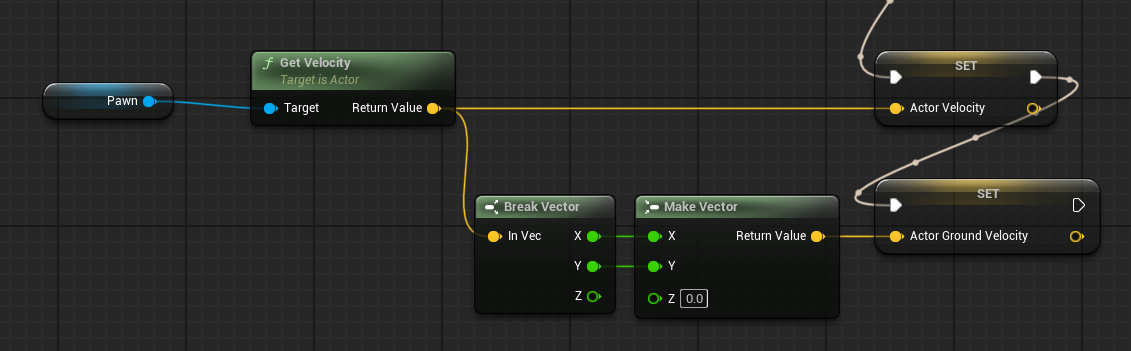
I'm trying to figure out how fast a pawn is moving for animations, but the problem is GetVelocity returns (0,0,0) even when like... it is moving. I'm watching it move around
I'm using SetActorLocation to handle movement, but I don't have the teleport flag set so it SHOULD be updating velocity
 pine carbon
Is that what not Teleport does? I was under the impression that when you don't teleport, it uses your velocity for like, jiggle physics and collisions, but doesn't actually apply new velocity to your movement.
If it did, setting location would launch you way further than where you want to be.
 next hollow
flat coral
I'm using SetActorLocation to handle movement, but I don't have the teleport fla...
next hollow
flat coral
I'm using SetActorLocation to handle movement, but I don't have the teleport fla...
Yeah, like they said.
Teleport in that, is for physics based visuals, not actual movement velocity stuff.
 autumn pulsar
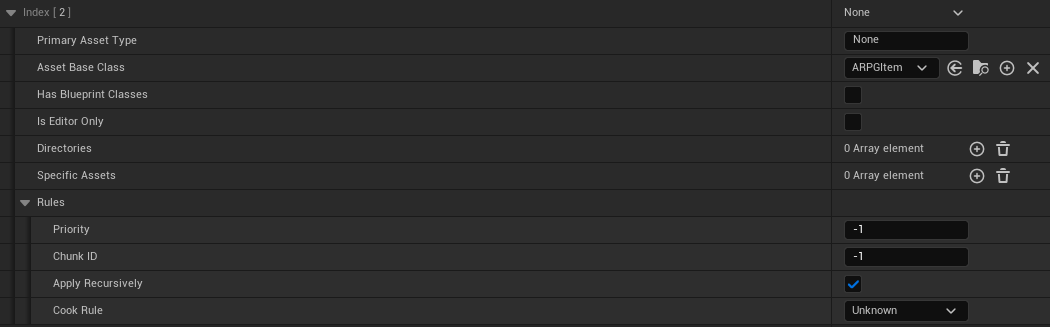
When checking in something into the asset manager, if it has children do I just put the parent in the filter or do I need to specify each child blueprint?
 maiden wadi
flat coral
I'm using SetActorLocation to handle movement, but I don't have the teleport fla...
maiden wadi
flat coral
I'm using SetActorLocation to handle movement, but I don't have the teleport fla...
Velocity is maintained from MovementComponents. If you're not using one, you need to track velocity per frame on your own.
versed oasis
i think i messed up on this and it wont display the current money Value after the change is supposed to be triggering it. Any ideas?

the cash calculation comes out correctly after i deduct it (on the print)
So its only the widget not changing
flat coral
maiden wadi
Velocity is maintained from MovementComponents. If you're not using one, you nee...
 pine carbon
flat coral
pine carbon
flat coral
Out of curiosity, why did you want it to?
Like I said, if it worked the way you thought, setting location would send you flying off into the ether.
 faint creek
Hi guys, somebody could recommend me some good UE5 tutorials on setting up a first-person perspective, please?
Specifically about movement, camera setup, and interaction, in the same style as Amnesia franchise game.
Thank you
 pine carbon
faint creek
Hi guys, somebody could recommend me some good UE5 tutorials on setting up a fi...
pine carbon
faint creek
Hi guys, somebody could recommend me some good UE5 tutorials on setting up a fi...
Homie, Unreal literally has a first person perspective setup built into it.
You need to be more specific about what features you're looking to replicate.
autumn pulsar
faint creek
Hi guys, somebody could recommend me some good UE5 tutorials on setting up a fi...
You're kind of asking someone to teach you how to make an entire game, which can take several years just to learn the skills necessary to do so. The proper way is to learn C++ as well as pick up fundamental things like vector math, but if you're wanting to shortcut a bit as foxlord mentions the content examples have a lot of pre-made logic
pine carbon
Game studios also don't tend to be in the business of telling people how they do things. Heck, many use proprietary engines that us consumers know nothing about to begin with. Unreal is a very powerful and versatile engine, but a lot of the struggle is going to end up being knowing what tools exist for you to use.
flat coral
pine carbon
Out of curiosity, why did you want it to?
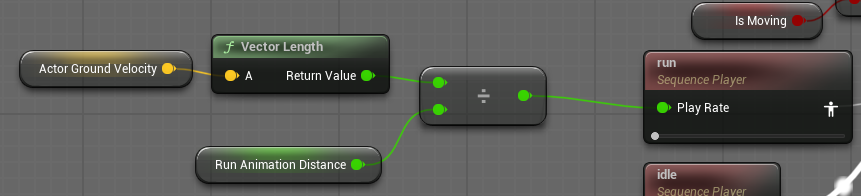
Oh I'm just grabbing the velocity in the animation blueprint so I know what rate to play the walking animation
pine carbon
Are you setting location to very short distances?
frosty heron
storm solar
Thanks for the response. so it is a flat ground. It's just a flat circle. There ...
No but i know you can have donut shape / ring with EQS. Might just want to explore that option.
flat coral
pine carbon
Are you setting location to very short distances?
Yeah, this runs per tick and the thing moves at about a walking pace, so I could do the math but at 90fps it's not much.
pine carbon
That sounds like you definitely want a character movement component.
frosty heron
Delta of last position and your current position lenght is your velocity.
pine carbon
I truly say this without malice: That is an insane way to handle walking.
frosty heron
flat coral
Yeah, this runs per tick and the thing moves at about a walking pace, so I could...
Fps shouldnt be a concern
pine carbon
Oh yeah I didn't even catch that.
frosty heron
Your game should work the same with 60 or 240 fps.
pine carbon
Do not attach your movement to fps.
flat coral
pine carbon
I truly say this without malice: That is an insane way to handle walking.
It's not for no reason. This pawn is a spider-like bug that moves across walls, ceilings, etc. Pretty complicated geometry too, doesn't get lost in pipes and damaged areas.
It has no concrete notion of up and down, so movement tick needs to handle BOTH the actual movement toward the objective AND alignment/adhesion to the current surface
 flat coral
pine carbon
Do not attach your movement to fps.
flat coral
pine carbon
Do not attach your movement to fps.
Eh it's fine, I throw delta time in there somewhere
autumn pulsar
not the cleanest, but that's how I match the animation with the velocity
pine carbon
flat coral
It's not for no reason. This pawn is a spider-like bug that moves across walls, ...
Can you change the gravity direction?
flat coral
Does CMC even respect that? But also nah, I've got a LOT of free-floating objects, including the player pawn
faint creek
pine carbon
Homie, Unreal literally has a first person perspective setup built into it.
I was meaning just movement of the player and camera, and the physical interaction of Amnesia
flat coral
Plus stuff like particle effects which are REALLY hard to override the gravity direction on
faint creek
I found some tutorials but I've just asked if there were some suggestions for others, just to have more different points, that's it 🙈
pine carbon
flat coral
Does CMC even respect that? But also nah, I've got a LOT of free-floating object...
I've never tried it myself but I've definitely seen videos of people making the default mannequin walk on wall geometry with otherwise normal Unreal handling.
pine carbon
faint creek
I found some tutorials but I've just asked if there were some suggestions for ot...
Even if there were, it would be a giant playlist of multi-hour videos that won't be helpful without prerequisite knowledge. You'll help yourself more by identifying specific aspects of Amnesia and learning to implement those one at a time.
What is the "physical interaction of Amnesia"?
autumn pulsar
pine carbon
What is the "physical interaction of Amnesia"?
I'm assuming picking up physics objects
with a sort of "soft grab"
pine carbon
Oh dang. Heck, if you search my name and go back enough, you'll find a bunch of that.
I did a lot of experimenting with the physics constraint component earlier in my project.
faint creek
pine carbon
What is the "physical interaction of Amnesia"?
Like take and drop objects and open/close the doors
pine carbon
https://discordapp.com/channels/187217643009212416/966517078834151484/1440041501538390117
Some reference material of my own experiments with picking things up lol.
My personal recommendation would be researching Physics Constraint Components.
I have a functional pickup system in my game now, and that's what I use. It's very versatile, and designed for you to bind stuff to objects that have physics while maintaining their physicality.
flat coral
Finally back at my computer, this is the code if you're curious

 golden pewter
whats this mean when you are packaging
ERROR: Non-editor build cannot depend on non-redistributable modules
frosty heron
I guess it's saying what it's saying. You are trying to package for non editor build (shipping / development) but you have modules that cannot be included on those build (shipping / development).
golden pewter
" " depends on 'SkeletalMeshUtilitiesCommon'.
wth is going on with the mesh that is preventing a package?
frosty heron
golden pewter
" " depends on 'SkeletalMeshUtilitiesCommon'.
SkeletalMeshUtilitiesCommon is editor module.
are you using some plugins?
or you have C++ code that make use of SkeletalMeshUtilitiesCommon
golden pewter
im only on blueprints, and my only plugins are playfab and imageplate
pine carbon
I don't suppose a component created at runtime having a name ending in -1 indicates something useful?
thin panther
golden pewter
im only on blueprints, and my only plugins are playfab and imageplate
might be helpful if you posted the full log
 sand shore
pine carbon
I don't suppose a component created at runtime having a name ending in -1 indica...
sand shore
pine carbon
I don't suppose a component created at runtime having a name ending in -1 indica...
MyCustomComponent_C_-1???????
or?
pine carbon
WidgetComponent /Game/Environments/Levels/UEDPIE_0_TestLevel.TestLevel:PersistentLevel.BP_MinigameCharacter_C_0.NODE_AddWidgetComponent-1
I did not mean to copy all that.
pine carbon
NODE_AddWidgetComponent-1 is the name of the component. But if there's ANYTHING that might be informative, I will find it for you.
I have exhausted my entire personal knowledge base. Genuinely not even sure where to look anymore.
sand shore
I know you're working in BP (or at least you posted here) but I think #cpp folks might be able to contribute to this. I've got no idea, that's pretty weird
pine carbon
The exceptionally weird thing is that name being the same every time despite this being a creation node and being inside of a loop.
You know what, screw it, let's hard code 4 individual add widget component nodes and see what happens.
sand shore
so you end up wth multiple -1 names???
pine carbon
sand shore
so you end up wth multiple `-1` names???
No, I end up with the exact same -1 name. Although end up with implies I can find them after the fact.
sand shore
that shouldn't happen and smells like a catastrophic bug
pine carbon
Inside the debugger graph node outputs is the only place I can find that name. The actual tree contains no instances of WidgetComponent that I can find despite one of them being visible.
pine carbon
sand shore
that shouldn't happen and smells like a catastrophic bug
Wildfire in Multiplayer replicated my code almost one-for-one and it worked for them so yeah, you can see why I'm utterly lost at this point.
pine carbon
pine carbon
You know what, screw it, let's hard code 4 individual add widget component nodes...
With this affront to God, I have learned that the name assigned to the outputs of the AddWidgetComponent nodes seems to be based on the order that they were added to the graph, as those 4 new ones end in -2 through -5. Which, unfortunately, suggests that is not the issue.


Also it STILL does the same thing!
The most godawful blueprint programming known to man to absolutely ensure that 4 individual, unique components are being created, and only player 1 shows any evidence of their existence!
I just don't fricking understand!
maiden wadi
pine carbon
With this affront to God, I have learned that the name assigned to the outputs o...
Is this local coop?
pine carbon
Yup.
maiden wadi
To better phrase. Have you made sure you have four players when this is ran?
pine carbon
Yes. In multiple ways.
pine carbon
Here they all are. They can all be controlled. They also appear in the scene tree. And printing out their names from the blueprint prints 4 different names.
 pine carbon
maiden wadi
Need to check code.
pine carbon
maiden wadi
Need to check code.
Whatever you need to see, I will get it.
I should've been done with this hours ago but instead I'm here losing my sanity.
maiden wadi
Not seeing what I thought I remembered in C++. Uhmn...I guess work through it. You do have four new components? They actually create?
pine carbon
maiden wadi
Not seeing what I thought I remembered in C++. Uhmn...I guess work through it. Y...
. . . kind of.
I can't find them. But everything returns valid.
I'm not sure where to look. Clearly ONE of them works.
pine carbon
pine carbon
With this affront to God, I have learned that the name assigned to the outputs o...
And thanks to the worst code I have ever written, I am now absolutely 100% positive that 4 individual components are being created.
I'm running out of things to work through.
maiden wadi
Lol, yeah maybe we could simplify that back down and just add some logging.
pine carbon
maiden wadi
Lol, yeah maybe we could simplify that back down and just add some logging.
It is very likely I already tried to log anything you are interested in logging long before I got to that point, but I am open to suggestions.
If I detatch from the player in the editor, the text sticks to my camera until I reattach to the player.

Not sure what's up with that. Maybe it's expected behavior, but I've never tried in a functional scenario.
Seems a bit odd considering that the component should be attached to the player mesh.
maiden wadi
It's normal. Detatching from play with widgets is a bit buggy.
@pine carbon Could you copy this into your graph? Replace the MakeArray with your Players array, set the widget class on the AddWidgetComponent node.
You can leave your other code, but unhook it and hook this up. I'm interested to see the prints and whether you end up with multiple arrows and where they are.
pine carbon

Btw for what it's worth, I "found" the components.
I know genuinely nothing about what this panel can do. I have never used it before. But it has the 4 instances of the score text.

Where are the 3 I can't see? No idea still.
maiden wadi
Hmm. Why are three of them collapsed?
pine carbon
I do not know because I do not know what that means in this context.
maiden wadi
Not your code I expect given the box containing the SObjectWidget is the thing collapsed, but curious.
pine carbon
I sure as all frick didn't tell them to do that.
maiden wadi
What engine version are you on?
I'm curious if someone finally decided to try to do some optimizations to the WidgetComponent.
pine carbon
maiden wadi
What engine version are you on?
5.6.1.
I know it has some weird stuff with mobile but otherwise I haven't heard about anything that would cause this.
pine carbon
maiden wadi
Not your code I expect given the box containing the SObjectWidget is the thing c...
It is worth noting that the one that is not collapsed is the one that I can see.
And hover over my mouse with the Pick Hit-Testable Widgets button.
maiden wadi
Could you click those three in the reflector and change their visibility to SelfHitTestInvisible?
Curious if they show up. Looking through the code though.
pine carbon
maiden wadi
Could you click those three in the reflector and change their visibility to Self...
If I can, I can't seem to figure out how. Where should that be?
maiden wadi
Click on the line with Collapsed. You should see a details panel on the right.
pine carbon
maiden wadi
Click on the line with Collapsed. You should see a details panel on the right.
Clicking on the line with collapsed does not update the details panel.
maiden wadi
Oof.
pine carbon
What does collapsed mean?
This is the closest to finding something wrong with the other components that I've been. This can't be meaningless.
golden pewter
how do i connect to a level using ipv6 in blueprints
can i still use open level by name node
frosty heron
Collapsed mean the widget not going to be rendered
It has to be visible or non hit testable.
pine carbon
frosty heron
Collapsed mean the widget not going to be rendered
So I've found the problem.
Why would they be collapsed?
This is the lowest layer that contains all 4. I have no idea what that means but maybe it's helpful?
 frosty heron
unless there's something that I don't know, usually those are self inflicted with code.
maiden wadi
I don't think that's his code. That looks like the container for the widgets that displays them for the widget components.
Which, if I'm reading this correctly, means that for some reason those other widgets failed to project... Oh
Wait
You said this was local coop?
frosty heron
yeah could be some gotchas with local co-op
pine carbon
maiden wadi
<@699304185522290769> Could you copy this into your graph? Replace the MakeArray...
Btw this crashed Unreal hard when I exited. The restore did not include the code I pasted in, and unless you need more information from it, I'll leave it that way.
maiden wadi
As in like... Four local players, and the split screen option turned off?
pine carbon
maiden wadi
You said this was local coop?
Yes.
maiden wadi
Sec, I need to reread through this.
pine carbon
maiden wadi
As in like... Four local players, and the split screen option turned off?
. . . is split screen on by default?
We never turned it off if it is, but the screen is not visibly split.
maiden wadi
Not sure these days. It used to be.
pine carbon
Where is that. If that's the issue I'm going to have some strong words with my teammates.
maiden wadi
Project settings
 pine carbon
Good thing those are already checked out.
 harsh comet
 simple baby issue that google isn't helping me with....
Anyone else have issues where your camera pitch is resetting when you re-possess the original pawn?
pine carbon
Dang. Split screen is already disabled.
maiden wadi
harsh comet
<:is4me:1418657843535675422> simple baby issue that google isn't helping me wit...
Yes. This is normal. There's a setting that disables it somewhere, I can't remember if it's in the controller or pawn
maiden wadi
pine carbon
Dang. Split screen is already disabled.
That'll be your problem then though.
Uh.. sec
pine carbon
maiden wadi
That'll be your problem then though.
But I don't want split-screen?
harsh comet
maiden wadi
Yes. This is normal. There's a setting that disables it somewhere, I can't remem...
okay, idk why but that sparked enough for me to figure it out
 maiden wadi
Maybe it is the problem. Need to read through this a bit more.
pine carbon
Well, I get this very funny image from turning it on, but otherwise nothing notable. Although it is entirely possible settings need fiddled with.
 maiden wadi
Hmm. Well I'm not seeing how this code would fail to project.
But I also can't find anywhere else this is set to collapsed.
pine carbon
SOMETHING has to be collapsing it!
I am not able to alter the Window Visibility setting when creating the components, so unfortunately I can't play with that.
 maiden wadi
pine carbon
SOMETHING has to be collapsing it!
maiden wadi
pine carbon
SOMETHING has to be collapsing it!
Can you turn this on?
 pine carbon
maiden wadi
Can you turn this on?
pine carbon
maiden wadi
Can you turn this on?
This option does not seem to exist for me.
That name sounds like EXACTLY what my problem is though.
maiden wadi
Hmm. Might be new in 5.7
But yeah... If I'm understanding correctly. I didn't read through all of this, but I think you have a widget component section for every player. And because those player's pawns own the component, maybe it's only trying to show for them. And that checkbox above makes all local player views overlay. They don't by default for... some... reason... I don't know why this is false by default. But... That would explain why it's failing to project and collapsing.
pine carbon
Surely, surely, this isn't a legitimate bug that was fixed in 5.7 Because if that's the case, there's genuinely nothing I can do, and I know for sure it's gonna cause more issues with our UI team.
pine carbon
maiden wadi
You could test this.
Anything.
maiden wadi
Uhh.. Maybe GameState? Try making the WidgetComponents on the GameState instead of the players.
Like
Don't move the code, but plug GetGameState into the Target
Still attach to players though.
Wait. That might not work. GameState is an AInfo isn't it?
pine carbon
Beats me, but it does not work.
I can wire it in, but now nothing appears, even for player 1.
maiden wadi
All of them disappear?
Yeah.. uh.. You need an actor that has nothing to do with the players to test that isn't an AInfo
pine carbon
I have the ball sitting in the middle that I use for indicating the beat.
maiden wadi
If no one owns that, try it.
Mostly just looking to see if they all show up with your current code. If they do, that split screen widget setting was probably your issue.
maiden wadi
Lol. Cause someone fucked up in 5.6.
pine carbon
So what, I just need a proxy object in our top level minigame mode in case something needs to do this?
maiden wadi
Unless you want to jump to 5.7, yeah.
maiden wadi
Fun rabbit hole. 😄
Obligatory notes:
Fuck widget components.
Fuck 5.6
pine carbon
I hate widgets in general. They make me long for Godot.
maiden wadi
I love them. But we have so many nice things to manage them that it's really hard using default implementations anymore. I wouldn't wish it on anyone.
frosty heron
Still guilty of not using common UI here, hopefully not missing much.
maiden wadi
😬
frosty heron
what's the benefit of Common UI? tldr.
I don't really need to support controllers.

Epic Games Developer
Learn about the problems Common UI is designed to solve and how it solves them.
oh seems like it's good for layered widgets.
maiden wadi
CommonUI itself?
- No more managing the InputMode(Game, GameAndUI, UIOnly)
- Gamepad niceness.
- UIActions(Menu mode hotkey actions that function like player controller inputs but for the widget even when in UIOnly mode)
- Suite of nicer widgets that actually work like the CommonListView
- CommonButtonBase is an amazing widget, even if for nothing else above, I'd use it just for this.
- CommonVisualAttachment is also amazing.
I'm sure I'm leaving plenty out but that'll be a start.
There's the whole ActivatableWidget stuff, but that's less of a perk, more of how the whole system works.
golden pewter
UATHelper: Packaging (Windows): Server targets are not currently supported from this engine distribution.
are you telling me someone decided to take out the ability to package servers in this whole update?
maiden wadi
You need a source engine to package dedicated servers.
golden pewter
sht, i thought i was on it musta clicked the wrong one
pine carbon
Well, this is probably the second-worst debugging experience I've had besides a memory leak once, but I'mma finally go get some sleep. Genuinely, massive thank you to everyone who helped me out.
maiden wadi
frosty heron
what's the benefit of Common UI? tldr.
The biggest thing that I love about CommonUI outside of the button is honestly the input mode handling.
I always go to one specific case that nearly any game will have. You have your primary game's hud/layout widget. You have an inventory or character sheet menu. And you have an options menu.
GameHUD is GameOnly
CharacterSheet is GameAndUI
Options is UIOnly.
Dying removes CharacterSheet.
You start in GameHUD. You open CharacterSheet. Then you open Options.
You just went from GameOnly, to GameAndUI, to UIOnly input mode.
You character dies behind options. Character sheet is removed.
You close the options. How do you know what input mode to go back to? Cause if you cached it, you'll be on the GameHUD with GameAndUI input mode which is wrong.
 mental panther
Hi! I'm experiencing some issues running my game on android.
When I try to view certain menus in my game, it freezes. No crash, just a frozen state.
After using logcat I found this. I've been trying to find out what could be causing this but haven't really found anything super useful so thought I'd check here :)
Anyone who has any idea?
UE5.6.1
Tested on my pixel 7 pro running android 16
 mental panther
Oh I figured it out, it's caused by retainer boxes, after disabling them it works now. But they are quite important for the visuals of the game... What am I supposed to do???
 mental bobcat
Hi.Im using get render target from widget component then applying it to a mesh and rendering the ui but its blurry. the render target resolutions are hign and match the meshes UVs. I flattend the DPI settings but no luck. checking Output depth and velocity is checked. Responsive AA is enabled. how do I get rid of the blurryness


 mental trellis
 slow plank
how to evil
slow plank
how to evil
This is what my generated materials looked like until I wrote a simple algorithm to position the nodes 😂
slow plank
mental trellis
This is what my generated materials looked like until I wrote a simple algorithm...
what 
mental trellis
I wrote a plugin that authors materials and when you create materials programmatically you have to position the material nodes in code too.
So you need an algorithm that does that.
 ornate trail
slow plank
how to evil part 2
ornate trail
slow plank
how to evil part 2
does absolutely nothing
 full badge
slow plank
how to evil
full badge
slow plank
how to evil
 ornate trail
nah, that's organized
 hearty rain
Man I just opened Discord and I see that ...
ornate trail
 last peak
full badge
https://cdn.discordapp.com/attachments/1431688618346418247/1436905150898770071/a...
last peak
full badge
https://cdn.discordapp.com/attachments/1431688618346418247/1436905150898770071/a...
 last peak
full badge
https://cdn.discordapp.com/attachments/1431688618346418247/1436905150898770071/a...
last peak
full badge
https://cdn.discordapp.com/attachments/1431688618346418247/1436905150898770071/a...
 frosty heron
A beautiful blueprint is one that doesnt exceed 15 to 20 nodes imo.
 violet spoke
frosty heron
A beautiful blueprint is one that doesnt exceed 15 to 20 nodes imo.
violet spoke
frosty heron
A beautiful blueprint is one that doesnt exceed 15 to 20 nodes imo.
you just don't like spaghetti do you? 😄
 white parrot
A beautiful blueprint has no nodes at all
frosty heron
violet spoke
you just don't like spaghetti do you? 😄
Creating core system in bp is ass
Bp is for designer to use. High level stuff only.
Imo anyway.
Not using bp at all sucks too. I dont want to create my abilities in native class only.
violet spoke
frosty heron
Bp is for designer to use. High level stuff only.
yes, doing switches in bP is nightmare
draggin is terrible, they should improve bps
honestly
violet spoke
there is one thing I love in bps, its Enumb to string node xD
you just drag and its prints enum
violet spoke
frosty heron
Select and switch in bp is awesome?
it gets clunky very fast, if your enum is 10 cases or 15
onless its 1 function call its kinda ok, but still 😄
frosty heron
Yeah bp become spaghetti real quick. Thats why i dont want to do core system there.
Nice to glue function calls.
crimson briar
I recently started converting some of my stuff to C++. But maaan, are blueprints easy to look at. I can see what is happening at a glance. Yeah C++ is better for more complicated stuff but still I wish I could stay in blueprints ._.
At the same time, converting a blueprint function covering half the screen into a few lines of code feels good.
last peak
frosty heron
Yeah bp become spaghetti real quick. Thats why i dont want to do core system the...
A true Chef enjoys the long spaghetti
It would be no fun if your brain doesnt break atleast 4 times for each blueprint you read
 frosty heron
you get to enjoy abstraction after the hard work.
just gluing function in bp to do X , Y and Z.
narrow pulsar
crimson briar
I recently started converting some of my stuff to C++. But maaan, are blueprints...
I've been working with both, for the most part everything can be done in blueprints
Except very specific things
I just try to include anything math heavy in C++ for sure, other than that I haven't had issues with having things in blueprints
performance is fine as well from my tests
mental bobcat
mental bobcat
Hi.Im using get render target from widget component then applying it to a mesh a...
Does anyone have any idea what the problem with this?
crimson briar
narrow pulsar
I've been working with both, for the most part everything can be done in bluepri...
I know it is possible. But I keep being annoyed at constantly running into the problem of "There is a better way to do it, but not in blueprints"
Most things work, but this 5% annoys me
versed oasis
if someone could help me figure this out i would really appreciate it. I have this machine as shown in the video. I have made an anim bp which essentially checks if the reels are spinning, checks which value the actor bp got from 4 random numbers per reel and tries to put each reel on the correct potition through the blueprints within the AnimBP using a Rinterp node. I dont like how instead of flowing in one direction it can pull the number reels from either top or bottom. I want it to always be top to bottom. Is that doable?
crimson briar
versed oasis
if someone could help me figure this out i would really appreciate it. I have th...
WOuldn't it be better to just make it stop when at certain rotation, instead of interping to this rotation?
For example, on tick have a gate that is closed, your code for stopping behind it. When the number is supposed to stop, you open the gate and start slowing down the roll. At some point after (so it has some time to slow down first) you start checking if the rotation is close enough to the goal, and if it is, you stop it and possibly snap the rotation the last one degree or so if needed
Basically a three step process.
- Rolling constantly.
- X Time passed, start slowing down.
- Y Time passed, check if at desired rotation and stop when reached
versed oasis
hmm i think you are right, i probably went with the wrong approach to this. I just was following guide to guide to get something like a wheel to do a spin since i couldnt find anything reel specific and im new to all this
Alright i think i will try to remake the entire thing with this approach and see if that works (which it probably should)
should be simpler too lol
crimson briar
I don't guarantee it won't have a different unforseen problem though, so better make a copy of the blueprint before remaking it!
versed oasis
oh yup for sure! I will keep a backup just in case!
storm solar
Working on AI movement right now, using add movement input.
They don't need anything complex, just to move towards their target (another actor) in a straight line.
If there is another actor in their way that is not their target they will move around it.
This is done by putting a sphere overlap actor in front of the ai, and if there is another actor in their way I have them veer left until it is not there.
This works well when the target is on their right side, but if it is on their left side they tend to slam into that actor and get stuck.
Is there a way I can decide if an actor needs to move left or right depending on what side and obstacle is on?
last peak
storm solar
Working on AI movement right now, using add movement input.
They don't need anyt...
You might want to look into avoidance
Its really easy to setup
storm solar
last peak
https://dev.epicgames.com/documentation/en-us/unreal-engine/using-avoidance-with...
I think i tried using that before and they still bump into actors instead of going around. It didnt seem as smooth as it should.
crimson briar
storm solar
Working on AI movement right now, using add movement input.
They don't need anyt...
DOT Product
In this case you would want to compare the AI right to the direction to the actor
- from dot product will be more to the right, - from dot means more to the left
...I think, I may not remember correctly
 deft yew
Quick question. How do you use chatgpt to edit, help, with blueprints? Do you actually post a pic of your blueprint?
storm solar
dont use chatgpt.
storm solar
deft yew
Quick question. How do you use chatgpt to edit, help, with blueprints? Do you ac...
they will not understand what you are doing and not give you correct advice.
Look online, on reddit, youtube, forums and you can showcase your BP with https://blueprintue.com/

blueprintUE is a tool for sharing blueprints for Unreal Engine. UE is a game engine which use visual scripting called blueprint.
If its something standard it should be easy to find online, for more complex things you can check videos and if its something super advance you can try posting what you want/ wait until you have the skill to figure it out yourself.
deft yew
Ahh, because I am not a programmer (artist) and I am just trying to get a Host and Client to connect over Steam. Not local, but two different machines over steam that see eachother ingame.
storm solar
Im sure there are YT videos covering that.
deft yew
I was looking at packs to buy for it, and I've gonna through about 3 tutorials.
crimson briar
deft yew
Ahh, because I am not a programmer (artist) and I am just trying to get a Host a...
Then I would recommend a course. It is slightly involved to do it properly, chat might give you too many wrong bits. Also you need C++
deft yew
You definitely need C++?
crimson briar
I think I followed a gamedev.tv tutorial for setting up the multiplayer subsystem
storm solar
Host/ client setup seems pretty advance.
crimson briar
deft yew
You definitely need C++?
Tbh, I'm not sure if it is still the case. It was when I was learning it
deft yew
I gotcha. A lot of the tutorials I see and the MP steam game packs say you dont need C++, but I am not sure at all.
crimson briar
storm solar
Host/ client setup seems pretty advance.
It is, and it isn't. You can mostly follow a specific course with initial setup and it will work. But at the same time, understanding it and tailoring to your own needs is advanced, yes.
deft yew
One tutorial was great, but after Part 2, my character just didnt move at all.
I just want a ready room, and when ready, drops 4-5 players in a level together.
storm solar
crimson briar
In this case you would want to compare the AI right to the direction to the acto...
Are you saying...
-Sphere overlap
-Get actor of sphere overlap
-use dot product of Ai and overlapped actor
-Dot product will produce a value telling you what side the overlapped actor is in relation to the AI.
-Use that to determin what direction to move
crimson briar
I think the BP multiplayer setups use a plugin for it. SOmething Sessions
crimson briar
storm solar
Are you saying...
-Sphere overlap
-Get actor of sphere overlap
-use dot product ...
Yes
I mean, no
sand shore
crimson briar
I think the BP multiplayer setups use a plugin for it. SOmething Sessions
advanced sessions
crimson briar
You use a dot product between
- AI right vector
- direction from the AI to the other Actor
deft yew
Yeah, I've been following the tutorials using Advanced Sessions and Steam.
sand shore
deft yew
Yeah, I've been following the tutorials using Advanced Sessions and Steam.
it handles a lot of what you might need to do in c++
personally I'd wanna roll my own for long term projects, but I'm also literally a c++ programmer by trade
AS should cover your needs is what I'm sayin
deft yew
Everything was great. Its makes the connection to steam, friends list works, but then the character I cant move or the camera.
frosty heron
Steam advance session is enough to host and join in bp only.
deft yew
It did have me replace the default BP_ThirdPerson controller with another one we wrote, so that was probably it.
frosty heron
Though if you are struggling with blueprint, going multiplayer is one giant leap.
sand shore
I mean it sounds plausible that inputs are the issue, the character doesn't know you pressed W or whatever to move
can you move in singleplayer?
frosty heron
Probably classic binding key on begin play on character.
But in multiplayer, begin play is called way esrlier before client possess the character.
deft yew
I am at work right now so I dont have it in front of me. Each time I tested it in standalone I couldnt move. If I switched back to the BP_ThirdPerson controller bit, then I could move, but nothing else worked (freinds list, steam connect etc)
frosty heron
Are you testing in shipping with multiple device?
You cannot use the same machine to test steam mp.
last peak
deft yew
Quick question. How do you use chatgpt to edit, help, with blueprints? Do you ac...
Yes, if you ask gpt you have to post your screenshots
You can also write in pseudo code and it will understand
However it isnt great for bps ..... it can probably still help you with very easy stuff
deft yew
I have another machine at home right next to me but its not easy to share the project. So I make a shippable EXE to share with my other machine?
I have a feeling that if I share/send the EXE to my other machine and they both connect to steam...the character will still be uncontrollable lol
Is this an OK spot to stop by later when I get home to ask about the issue?
frosty heron
deft yew
I have a feeling that if I share/send the EXE to my other machine and they both ...
Controlable aside, you cant connect to each other game with a single machine for steam connection.
It has to be shipped or development build. Not editor.
As for your contrplable character, see my msg above.
If you bind in begin play of your character u r doing it wrong.
deft yew
frosty heron
If you bind in begin play of your character u r doing it wrong.
I am not sure what a 'bind' is. I am a SR 3D Artist so I am giving BPs a go. lol trying
frosty heron
deft yew
I am not sure what a 'bind' is. I am a SR 3D Artist so I am giving BPs a go. lol...
Going multiplayer is wild if you just gave bp ago.
Not stopping you but its not an easy task.
deft yew
I just followed the tutorial and on Step 2 it just doesnt let me control the character. Everything else works great. Let me find the tut...
here it is: https://youtu.be/MojUmaf_VJQ?si=pumRS7cYc5S6HKhJ

In this Unreal Engine multiplayer tutorial, which is Part 1 of the How To Create A Steam Multiplayer Lobby System tutorial series, MizzoFrizzo will show you how to integrate the Steam Advanced Sessions plugin with your project.
Patreon: https://patreon.com/MizzoFrizzo
Resources:
I got to the end of Part 2 and he shows himself and others connecting. with mine, even is Standalone mode, I cant move my character.
crimson briar
It is not only about a lobby. Multiplayer is like 2-3x the work in my opinion. A lot more to think about and design
frosty heron
I mean if you dont know OOP, you cant get far in multiplayer as you have to deal with multiple instances.
deft yew
Oh I totally understand. I believe. I was just trying to get this part working at least.
Is that tutorial just way out of date and doesn't work anymore?
storm solar
crimson briar
You use a dot product between
- AI right vector
- direction from the AI to the o...
what do you mean by direction? Like, calculate direction?
frosty heron
Nah you should still be able to connect the same way.
deft yew
Everything worked, I just couldnt move the player at all. I could select friends on the friends list etc...but thats about it.
frosty heron
Im on 5.5 source code using advance session.
deft yew
I was using 5.7. Maybe it doesnt work in 57
frosty heron
Thats not version issue
crimson briar
storm solar
what do you mean by direction? Like, calculate direction?
There is a node to get a unit direction between two vectors - like your ai location and the other actor location
frosty heron
If the steam tab is showing up then advance session is working.
white parrot
deft yew
Is that tutorial just way out of date and doesn't work anymore?
In my experience when i first started their content is kind of a clickbait that might get you 10% of the way for what you're doing (assuming it even works), so i wouldn't count on them
deft yew
I can always get it to work on steam, to connect. Even with other tutorials. So it must be the player controller or inputs? (not sure where inputs are or why its not being 'controlled' lol)
mental trellis
crimson briar
There is a node to get a unit direction between two vectors - like your ai locat...
Normalise (B - A)
B is the target. A is the start.
frosty heron
If you possess a character and you cant move it then yes thats input.
deft yew
My idea is to just get it so a buddy can playtest with me, and I will start building out the art. In the past, getting connected has always been the issue. But with new versions of Unreal, its become a bit easier.
frosty heron
I dont think they changed the code for advance session for a decade
deft yew
frosty heron
If you possess a character and you cant move it then yes thats input.
But when I switch back to the BP thirdperson controller, the char works, but the other BP stuff I did isnt even seen, doesnt work
In that tut they have you make a new BP_'controller
frosty heron
deft yew
But when I switch back to the BP thirdperson controller, the char works, but the...
I can only guess when i dont have the project at hand.
Like i dont even know how you bind your input.
deft yew
Whats the best way to share a project? Share the entire project or the BP screenshots?
deft yew
frosty heron
Like i dont even know how you bind your input.
That's interesting because I don't know either! lolol cave man artist.
mental trellis
deft yew
Whats the best way to share a project? Share the entire project or the BP screen...
What do you want to share?
Or ask about
frosty heron
He is hosting a mp game and cant move his character.
Either not possessing any character or input is not bind.
deft yew
I went back through the tutorial several times to see if I missed something in part 1 and 2.
mental trellis
Or it's not being handled correctly.
deft yew
Thank you for all of the information. I have to look at it all again to realize what I am looking at.
 gaunt oracle
I have a Horizontal Box that Contains Buttons (with a Image), while I click on them, the Tab key make appear a outline and switch to next, and Maj+Tab make switch to previous,
I realized it do that for all my buttons in any box container actually,
I disabled the Focus on each buttons, but that dont fixe it,
Do anyone know how to fixe it, please ?
gaunt oracle
*finally myself fixed
 prime stump
Hi, I'm trying to set up this new Gameplay Camera system but it doesn't seem to be working correctly.. I have the Camera Asset set up correctly and the Camera Director Evaluator class set up correctly, attached the Gameplay Camera and set the camera to the Camera Asset, auto activate true set to Player 0 but because in my game mode the 'Default Pawn Class' is set to None and my players are spawned and possessed some time after pressing play not straight away, it just doesn't work for some reason the camera is basically inside the characters head, but if I stop my players spawning later and then set 'Default Pawn Class' to the character class I'm spawning as it works..
Any ideas what that's all about lmao?
storm solar
mental trellis
Normalise (B - A)
So is it
(Enemy location - Ai location) -> Normalize -> DOT
and
Ai get actor right vector -DOT
Because Im not getting negative values reguardless of what side its on.
mental trellis
If you want the direction of the ai to the enemy, yes.
It'll be negative if the enemy is behind the ai.
I wouldn't use the right vector for that right now.
faint pasture
storm solar
So is it
(Enemy location - Ai location) -> Normalize -> DOT
and
Ai get actor r...
Are you trying to detect if the thing is in front/back or left/right of the other thing?
storm solar
left/ right
faint pasture
Yeah so
Dot(A.Right, Norm(B.Position - A.Position))
Will be 1.0 if B is right of A, 0.0 if it's above or front or behind, and -1.0 if it's directly left
dot product of 2 direction vectors is 1.0 if aligned, 0 if at right angles, and -1.0 if opposite aligned
deft yew
There is a package you can get called SteamCore Pro which supposedly handles multiplayer and sessions etc. Could be it be that Unreal changes something in the future that makes this 'plugin' not work anymore? Debating on whether to just get it or write something of my own from tutorials.
storm solar
faint pasture
dot product of 2 direction vectors is 1.0 if aligned, 0 if at right angles, and ...
So like this?
Im getting + for right, - for left. Not 1.0 or -1.0. But this does seem to work.
 prime stump
deft yew
There is a package you can get called SteamCore Pro which supposedly handles mul...
prime stump
deft yew
There is a package you can get called SteamCore Pro which supposedly handles mul...
'Handles multiplayer' is pretty broad and I highly doubt it, looks like it handles sessions and some steam features like friend invites and stuff but that's about it, sessions themselves aren't that hard to set up and the Advanced Sessions plugin has some of the steam stuff that SteamCore PRO has like friend invites ect.. up to you whether the other features it offers is worth the money but Advanced Sessions is free and setting up sessions isn't really that hard
Also its just for Steam so if you ever wanted to use EGS I imagine this wont work
deft yew
I hear ya. I need to get home and figure out why I can't move the character after I did this one tutorial. Thanks!
faint pasture
storm solar
So like this?
Im getting + for right, - for left. Not 1.0 or -1.0. But this does...
show all the code here
deft yew
How do you normally show larger blueprints here?
In this tutorial you can see where he runs a standalone within the editor and he is able to move at least the camera. With my results, I get the menus etc we made but I cant move the character. https://youtu.be/Eg81FgtWbBc?t=2268

In this Unreal Engine multiplayer tutorial, which is Part 2 of the How To Create A Steam Multiplayer Lobby System tutorial series, MizzoFrizzo will show you how to create your lobby level, create a Steam session in that lobby level, as well as how to spawn a friends list and send session invites to your Steam friends.
Part 1: https://youtu.be/M...
storm solar
faint pasture
show all the code here
That is all the code.
pine carbon
Having a strange issue (?) with this. Visually, this function works fine. The stuff it's supposed to do after that validation happens. But that error message gets logged 10 times. It gets logged 3 times, then 4, then 3 again. I'm not sure why and I'd like to figure it out to make sure it doesn't cause problems later.

This code runs before the block that calls the offending function. Stepping through it with the debugger, the add node gets hit 4 times, but the debugger can't read the value of Player ID when it gets there for some reason.


Not sure what's the matter with this.

 faint pasture
storm solar
That is all the code.
faint pasture
storm solar
That is all the code.
 crimson briar
pine carbon
This code runs before the block that calls the offending function. Stepping thro...
crimson briar
pine carbon
This code runs before the block that calls the offending function. Stepping thro...
Um, first thing, why are you looking for a random static mesh actor in the Foreach on Players?
pine carbon
Scroll up lol.
Long story short, THAT works fine.
The basics is that a widget component is getting attached to that mesh.
pine carbon
pine carbon
Scroll up lol.
I wasn't kidding about it being a long story. The specifics of what this block of code is doing have already been thoroughly documented in this channel, and the thing I'm asking a question about right now does not interact with the mesh.
storm solar
faint pasture
That is a sphere overlap node that has the actor in the AI’s way.
faint pasture
pine carbon
Having a strange issue (?) with this. Visually, this function works fine. The st...
why dont' score displays just bind to some dispatcher and then you don't gotta worry about it
crimson briar
pine carbon
I wasn't kidding about it being a long story. The specifics of what this block o...
Not sure with the fragmented code, but are you doing two foreaches on players inside eachother?
ALso breaks inside loops may not work correctly
faint pasture
just tell the display about the object it cares about (playerstate probably) and let it do its thing
faint pasture
storm solar
That is a sphere overlap node that has the actor in the AI’s way.
Why are you only getting the first hit
pine carbon
faint pasture
why dont' score displays just bind to some dispatcher and then you don't gotta w...
They are. But I need to know which is which.
faint pasture
you have an array of hits
faint pasture
pine carbon
They are. But I need to know which is which.
pass it when you create it
you're not touching PlayerControllers, right?
and you have a playerstate or pawn per player when these widgets are created
storm solar
faint pasture
Why are you only getting the first hit
Just to test that it works.
There is only 1 or 2 extra actors in game atm.
I’ll set it up so it can determine what way it should go based on the actors after I finish this initial stage.
pine carbon
faint pasture
and you have a playerstate or pawn per player when these widgets are created
Nooooo. I have a skybox lol. They are all owned by the skybox.
faint pasture
pine carbon
Nooooo. I have a skybox lol. They are all owned by the skybox.
I mean the object representing the data they care to display
pine carbon
They're parented onto the player meshes, but they are all owned by the skybox.
faint pasture
I'm not talking ownership
pine carbon
faint pasture
I mean the object representing the data they care to display
That isn't really an object.
It's a time value, essentially.
faint pasture
which lives where?
pine carbon
The clock that's handling all that emits a bunch of events and they're subscribed to one of them.
pine carbon
faint pasture
which lives where?
The gamemode. Same place both of these functions are.
faint pasture
then why do you gotta talk to them at all after creation?
pine carbon
faint pasture
then why do you gotta talk to them at all after creation?
. . . because I need to tell them when to change text?
faint pasture
create them, let them bind to whatever and be on their merry way
bind to something that represents when to change text
This isn't networked, right?
pine carbon
faint pasture
bind to something that represents when to change text
I am. They are bound to On Player Input, an event dispatched from a Judge component of this Game Mode. That event is emitted whenever the player presses a button, right after a call to the clock.
Judge takes the raw clock data, runs math on it to turn it into the scoring system I want, and emits the On Player Input event with that score.
pine carbon
faint pasture
This isn't networked, right?
No.
faint pasture
pine carbon
I am. They are bound to On Player Input, an event dispatched from a Judge compon...
so why can't they just fetch the data themselves when that dispatcher fires
just give them the player ID they care about on creation or wahtever
pine carbon
Can Widgets themselves subscribe to events?
Oh dang they can! I did not realize that.
Okay one sec I'll try reimplementing this.
pine carbon
That is so much better, thank you.
 ruby cobalt
if I grab a rigged object.. i care about the grabbed bone instead of the center of the object.
I think i got an issue here.. get socket location is probably not world location.. it seems to be relative?
How do i get world loc from socket?

hmm the description of get socket location says it's world space
 silent dawn
this is my player blueprint
how would I get movement to be based on the direction the camera is looking? instead of a fixed point?
 faint pasture
ruby cobalt
if I grab a rigged object.. i care about the grabbed bone instead of the center ...
faint pasture
ruby cobalt
if I grab a rigged object.. i care about the grabbed bone instead of the center ...
you can detect the hit bone
when you do your hit to figure out what to grab
ruby cobalt
yeah that part works.. i believe my issue was with an offset i apply after
so the data was good
not perfect but that offset seems to help.
the effect lowers camera aperture and sets manual focus distance to the component distance..

i know there's auto focus that tracks a component but i have to manually offset focus too so i've been working with manual focus.
 narrow sentinel
Could someone help me with 3d widgets please, essentially what I want is a widget at size of 1920/1080 which is placed in the world but at the right size where I don't need to scale down the widget component to like 0.01 to fit correctly where I need it
thats the widget
 faint pasture
narrow sentinel
Could someone help me with 3d widgets please, essentially what I want is a widge...
faint pasture
narrow sentinel
Could someone help me with 3d widgets please, essentially what I want is a widge...
I'm pretty sure you have to scale it, the scale is the pixels / uu I'm pretty sure
narrow sentinel
what would uu be ?
so how would I find the uu ?
so i assume I need to find out what a 1920 /1080 screen size would be in cm I assume
so it'd be 53 / 1920 and 30 / 1080
that gives me scales which I assume would be correct
faint pasture
narrow sentinel
so how would I find the uu ?
how big do you want the thing to be in the world?
narrow sentinel
around normal screen size of what you'd have in a monitor
I think I've managed to get roughly the right values
faint pasture
yeah about .03 or so will do it
there are ways to make the thing be jammed in there without scaling but your resolution would suffer a lot. 1.0 scale on the widget component means 1 uu / px
narrow sentinel
faint pasture
there are ways to make the thing be jammed in there without scaling but your res...
yeah i'd rather scale the widget but keep the widget res at the 1920/1080 and tbf I can do other stuff to optimise later down road but for now
versed oasis
@crimson briar i noted your name down earlier so i could thank you. Absolute legend, i managed to get the slot machines working perfectly thanks to your idea! It works much better than before although it took me ... well until now to do it, lol
 elder crown
Hey guys Im not sure if this is the right place to ask. Im looking to find a tutorial for ray casting vehicle physics tutorial. Im pretty new to unreal ive dabbled and made some stuff but never touched this kind of stuff. if anyone could point me in the right direction that would be awesome
mental bobcat
mental bobcat
Hi.Im using get render target from widget component then applying it to a mesh a...
Does anyone know whats the problem with this?
vocal garden
hey how do I make my character face the target enemy when attacking?
I don’t want strafing just face the enemy when attacking
 blissful brook
Is there a way to intersect two containers in blueprint? Essentially container A removes any tag in container B and then returns the container then? If not I guess I'll have to add to my static library but I feel like this surely is a usecase that epic would have added
full badge
blissful brook
Is there a way to intersect two containers in blueprint? Essentially container A...
sets are able to do that
blissful brook
full badge
sets are able to do that
in what way? Not entirely sure what you mean
full badge
blissful brook
in what way? Not entirely sure what you mean
check this ig
https://dev.epicgames.com/documentation/en-us/unreal-engine/blueprint-sets?application_version=4.27

Epic Games Developer
Creating and editing Set containers, an advanced container type, in Blueprints, including an overview of this container's properties.
blissful brook
full badge
check this ig
https://dev.epicgames.com/documentation/en-us/unreal-engine/bluepr...
ah right yeah that's not ideally what I'd need so it's fine. I've just made a blueprint pure static function in cpp that uses the RemoveTags function on containers (insane to me that this isnt exposed to bp) edit: nvm its a struct so they probably just didnt bother adding it to the kismet library
full badge
ah okay
maiden wadi
blissful brook
Is there a way to intersect two containers in blueprint? Essentially container A...
I don't believe there's only by default unless it's been added recently. But it's easy enough to do an iterator with a contains and addunique.
crimson briar
blissful brook
Is there a way to intersect two containers in blueprint? Essentially container A...
The node is called Filter
 maiden wadi
Oh. Tags. 😄 Derp. My brain was stuck on arrays.
crimson briar
I mean, tag containers are just arrays, so you can break them into an array or create them from an array, so any solution viable for arrays will work too
blissful brook
crimson briar
The node is called Filter
Filter is doing the opposite though no? It's filtering matching ones but essentially I want to intersect them by taking out of one what's in the other
this is what I ended up with, just added a blueprint pure node

I could also just be missing something which is more than likely
frosty heron
@maiden wadi Sorry to bother you, got widget question again :D.
How can I detect mouse pressed instead of drag? Do I have to roll down my own timer?
I want to differentiate between a click and dragging.
right now only have this.
 maiden wadi
Hmm. Probably looking for something on MouseButtonUp. I think UButton for example does it by checking capture state, but I don't recall the specifics on that.
maiden wadi
frosty heron
<@143471961723371520> Sorry to bother you, got widget question again :D.
How can...
Oh. No it just checks hover.
frosty heron
I can't use button for the drag. Forgot what the issue was.
right now trying to implement some timer logic to detect one click or hold click.
just checking if there's like better way.
maiden wadi
Yeah. I recall. Does OnMouseButtonUp run when you're dragging?
frosty heron
I will check.
it does get called but the drag also get called.
actualy this should be fine!
the drag visual only appear if I move my mouse slightly
so if the mouse stood still OnDragDetected is not called.
maiden wadi
frosty heron
the drag visual only appear if I move my mouse slightly
Yeah this is a... console variable if I'm not mistaken?
Oh. Nope, set in SlateApplication. Can easily pull it from FSlateApplication::Get().GetDragTriggerDistance() if you need the actual distance it'll take for drags. I don't see it BP exposed anywhere, but could be a simple library function with no context needed.
Seems like they do some screen size detection magic based on user's hardware. Which is nice.
void FSlateApplication::SetupPhysicalSensitivities()
{
    const float DragTriggerDistanceInInches = FUnitConversion::Convert(1.0f, EUnit::Millimeters, EUnit::Inches);
    FPlatformApplicationMisc::ConvertInchesToPixels(DragTriggerDistanceInInches, DragTriggerDistance);

#if PLATFORM_DESKTOP
    DragTriggerDistance = FMath::Max(DragTriggerDistance, 5.0f);
#else
    DragTriggerDistance = FMath::Max(DragTriggerDistance, 10.0f);
#endif

    FGestureDetector::LongPressAllowedMovement = DragTriggerDistance;
}```@maiden wadi tyvm
faint pasture
vocal garden
I don’t want strafing just face the enemy when attacking
Do you know how to make them face an arbitrary direction?
 steady night
hi how can i clamp it to 1 deciamall ?

 dark drum
vocal garden
hey how do I make my character face the target enemy when attacking?
dark drum
vocal garden
hey how do I make my character face the target enemy when attacking?
I'd look at using motion warping.
When you press the attack button, you can check to see if there's an enemy in front (within an angle) of the character, if there is, you can you set the desired rotation for the motion warping.
In the montage you can specify the period where it can can warp the rotation to the desired rotation.
steady night
so the random value will be 1,4 / 2,7 / 2,5 max and not 1,4142 / 2,75242 / 2,556456
crimson briar
steady night
hi how can i clamp it to 1 deciamall ?
x 10 -> round -> / 10
I have a library function for it, not sure if there is a built in one
dark drum
steady night
hi how can i clamp it to 1 deciamall ?
Adding to what verael said, if its just to display in the UI (or something similiar) there's a float to text node that you can specify how many decimals it'll display at. This doesn't affect the original value.
versed oasis
i was watching a tutorial and noticed this guy has his cables like this, how is that possible? Is that a setting to make them from splines into this?
 steady night
hmm
yeah but if the value is 3,5436346463 wont it take more calculation "power" rather then it being 3,5 ?
might be overthinking it
or not overthinking it but it might not matter
@patt
 spark steppe
versed oasis
i was watching a tutorial and noticed this guy has his cables like this, how is ...
spark steppe
versed oasis
i was watching a tutorial and noticed this guy has his cables like this, how is ...
they likely use this plugin https://www.fab.com/listings/d6148766-27b1-47db-a730-832c53b7a895
versed oasis
would be legendary if it didnt have those little hooks at the end. I freaked out when i saw how clean it looks
 scarlet root
frosty heron
right now only have this.
scarlet root
frosty heron
right now only have this.
You need OnMouseButtonDown to handle the Clicking.
And OnPreviewMouseButtonDown, handle the Drag&Drop
Preview is handled before the normal Down function.. so if no Drag happens, forwards to the click.
Ps.: normally a click is a Tap.. meaning.. Mouse Down > Mouse Up > is click
So OnMouseButtonDown set a bool to true, OnMouseButtonUp check for the bool being true. If yes, it is a click, if not.. just return.
frosty heron
I have OnMouseButton up to handle the clicking and OnMoutButtonDown to handle the drag and drop.
Drag only happend if the mouse moves after clicking, so it's all good.
 chilly root
Hey all,
I am making a visual cone with decal and i want it to not register on walls and very steep slopes. But i have one issue with the angle. If i use ceil (or step with Y<0.4) node or step i get the image #1 with the soft teal line (but it turns dark when vieing it from an angle in the editor) on the curved slope but a uniform green on the straight slope. If i use step node, depending on the Y value i get the other 2 images.
What i want is a uniform color regardless of where i choose the angle cutoff to be. Can anyone help or point me to the right direction?


 prime stump
Hi, I'm trying to set up this new Gameplay Camera system but it doesn't seem to ...
prime stump
prime stump
Hi, I'm trying to set up this new Gameplay Camera system but it doesn't seem to ...
Alright so when using this new Gameplay Camera System, if my players are spawned and possessed via the Game Mode then the 'Run Camera Director' event inside the Camera Director Evaluator class doesn't run at all, which is why the camera just appears to be inside the character head when they spawn, however in my pawn I'm checking if the Gameplay Camera component IsActive and it is..
If I stop the spawning and possessing in the Game Mode and just set Default Pawn Class to my character class then it works and the 'Run Camera Director' event gets called.
Anyone have any idea why that is? There's no way you have to have Default Pawn Class set for it to work lol
dense hinge
Hiya, it's a Friday, so my brain decided to stop working, and I'm having trouble doing a bit of basic math: I have a segment between point A and B. How can I calculate the world position of a point 100uu from the edges of the segment?
Diagram of what I'm looking for
 dense hinge
I used 100cm as an example. I'm looking for much smaller offsets, but I think the logic behind getting the point would be similar to whether it's 10cm or 50% of the segment's length.
It's the logic that I'm having trouble calculating: How do I get a point X between 2 locations, regardless of the rotation of the segment between the 2 locations?
frosty heron
what is point X between 2 locations?
are you asking how far 2 location is?
if we are just talking about that line,
start is 0, End can be what ever number you want.
it's all arbitary until you define the number which you get from determining what it is you actually trying to achieve.
dense hinge
I have these beams that can have any rotation in the world. I know the start and end location of them (red), so I can get the segment and its length. But from point A, how do I calculate the location of the blue X on it towards point B
 frosty heron
A is 0, B is the length of the beam.
dense hinge
Yeah, I can get the offset, but how do I convert that into a world location?
frosty heron
@dense hinge try #game-math if no one answer here.
Ik some people who can answer these, but they are probably not around atm.
full badge
dense hinge
I have these beams that can have any rotation in the world. I know the start and...
location of X near a should be
direction from a to b multipled by 100 plus a location
dense hinge
Thank you both
frosty heron
This is like the time where I would use chat GPT.
dense hinge
Usually, it's not that much of an issue, but it being Friday has my brain scrambled
 clever swallow
in material graph use lerp node , in blueprint use interpolate node
 idle crescent
How can I read the pixel color values on a texture, by coordinate?
vocal garden
faint pasture
Do you know how to make them face an arbitrary direction?
No not yet
I don’t know what blueprint tree node I need to make
idle crescent
If it's better to do so in C++, I don't mind, but I just want a lead on where I look for an API call, or something.
ornate trail
idle crescent
If it's better to do so in C++, I don't mind, but I just want a lead on where I ...
yeah for sure in cpp by dumping the info into a uint16 array, I did it this way before. Simpler way would just be to read the tex coords in a material
idle crescent
Got a link to the API where I do it or something?
What function specific did you use to dump the pixels? Or read the material tex coords?
ornate trail
idle crescent
Got a link to the API where I do it or something?
for cpp you would need to dig into the api, this was several years ago. It's not super straight forward. Easiest way in BP if you already know the UV you wantt to sample.. Feed your texture into a render target then use the 'Read render target pixel' node in BP
 idle crescent
Wow. That might work. BP is just slower than C++, so I was thinking ahead. Though I need to do it only once, pre-runtime, I need to read all color values so that's why I was asking for C++. But thanks. This may work.
faint pasture
dense hinge
Hiya, it's a Friday, so my brain decided to stop working, and I'm having trouble...
Direction = (B-A).Normalize
OffsetA = A + 100 * Direction
OffsetA = B - 100 * Direction
ornate trail
idle crescent
Wow. That might work. BP is just slower than C++, so I was thinking ahead. Thoug...
not really slower unless youre doing it thousands of times per tick. You can always profile it later
idle crescent
Not doing it per tick anyways, and I need to do it just once pre-runtime, so this ought to work.
Since I don't plan the value to change that substantially.
ornate trail
yeah, no problems then
idle crescent
Can I get the resolution from the texture render target too?
ornate trail
I mean sure, depends on your setup. in BP you could have a reference and do smth like

but I'm assuming you know the size of the tex before hand anyway
idle crescent
Oh yeah. Sorry. Weird question. Does it start at 0 as all things do in computer?
And the actual end is -1?
For the read render target pixel?
ornate trail
starts at 0 yeah end should just be the size -1. Log it to be sure
idle crescent
Sure.
I'm updating my engine and making a backup now, I hope I get this working like I need.
I just hope the plan I'm using this for, works.
ornate trail
if I'm reading this right looks like the mip data is stored like this under the hood TArray64<uint8>& OutMipData,
idle crescent
Alright. Well. That would be for C++, and I'd need the function. What you showed in BP might work, if I can set the render target as just the texture I want.
ornate trail
yeah yeah, I just got curious XD
idle crescent
Nah. It's cool
Also, has anyone tested the performance overhead of triggers? Is there any?
I do mean many, many though.
 tawny lantern
any idea why this wouldn't work? im losing my mind here. It shows {action} and {times} as literally {action} and {times} in game - somehow the value isn't applied. But when i use append text and just break it into pieces, values are correct

and yeah, i tried it with text instead of string before, didnt work either
ornate trail
idle crescent
I do mean many, many though.
it works on physics overlaps so it's not something that runs all the time. how many are you talking?
idle crescent
Thousands.
I just am wondering how much it can do.
Probably negligible if each is fairly small, right?
ornate trail
yeah, I mean if you have several thousand firing at once you'll feel it for sure
idle crescent
Well. If they're active but nothing is in or goes near, I mean.
I can also set it they're only affected by certain types, right?
Like I only need it affected by pawns and a few other classes, for those that move.
ornate trail
yes in the collision profiles, but just having them in the level won't really hurt. Also is it open world, streaming stuff in etc
idle crescent
True, true.
ornate trail
buid first, profile later. It's probably fine
idle crescent
Yep. I'll find out. Just making a backup first, before I get back to it.
ornate trail
github account / version control is your best backup
idle crescent
It's too big for free.
I don't make any money, for now.
I hope my game will make some. XP
The current way I do things is atrocious though, no doubt.
faint pasture
idle crescent
It's too big for free.
at least use git locally then
so you can undo a big fucky wucky
idle crescent
How does one use Git locally? I've never heard such a thing.
faint pasture
idle crescent
How does one use Git locally? I've never heard such a thing.
Git is effectively local + can sync with a remote repo
it's local by default
ornate trail
https://www.youtube.com/watch?v=tRZGeaHPoaw
recommended
you don't need to do everything on a command line either, once you understand it you can use smth like git desktop
faint pasture
ornate trail
https://www.youtube.com/watch?v=tRZGeaHPoaw
recommended

ah, a fellow embed remover
idle crescent
Yeah, I know to use Git, didn't occur to me to do it locally.
ornate trail
it is local, github just lets you host it
this is why if you ever look at the size of your git folder it often can be way bigger than the project itself depending on what you commit to it.
idle crescent
Ah
eternal marsh
Hi all. This one has me stumped and am hoping for some guidance on my blueprint. 5.7
I am building a simple twin stick shooter. Bare bones at the moment
I have the input action - IA_Aim created and set to Axis2D(Vector2D) with modifier Dead Zone .2/1
I have an Input Moving Context with AI_Aim set to Gamepar Right Thubmstick 2D-Axis - No modifiers
I have created a player controller Blueprint that controls all the player movement. Everything works great, shooting, jumping, moving, except the IA_AIM
I have the EnhancedInputAction IA_Aim Event to get the action Value of X and Y in from my right thumbstick
Controlled Character is a variable created from - Get Controlled Pawn -> Cast to Character
The print strings are just to validate proper data is being used
I also created the timeline to at one point rotate all the Axis in a ROT to validate the character could in fact rotate, and it did.
So I know the Controlled Character is correct because my timeline data rotates it
I know the data is correct because I am printing it
The odd part is when I broke the data coming out of the timeline but left it connected to the stream everything works. Like the first image, alt description added to image. But if I remove it and everything else, same data, the character does not rotate. The rest of the character still works. I can move, jump and shoot, just not aim like I can with the broken setup. I have tried deleting everything and restarting from scratch but no luck when I make the Broken setup from the images. I can move on with the odd setup but trying to understand what I am missing. Any guidance would be appreciated. Thanks!!

 maiden wadi
eternal marsh
Hi all. This one has me stumped and am hoping for some guidance on my blueprint...
maiden wadi
eternal marsh
Hi all. This one has me stumped and am hoping for some guidance on my blueprint...
For a start you should prefer SetControlRotation on the controller for a pawn.
But have you tested to make sure IA_Aim is running every frame while you change the direction?
eternal marsh
maiden wadi
For a start you should prefer SetControlRotation on the controller for a pawn.
...
But have you tested to make sure IA_Aim is running every frame while you change the direction? - That was the original purpose of the timeline. I had the output go into the target X,Y,Z of the Rinterp to validate that it was actually rotating the character
faint pasture
eternal marsh
Hi all. This one has me stumped and am hoping for some guidance on my blueprint...
because something has to be ticking to interpolate something smoothly over time
protip, you can fetch axis values
so just tick -> fetch values -> ??? -> interpolate -> use them
eternal marsh
I will give that a try. I appreciate the help 🙂
But when I have it as the first image it works. Not saying it is correct in any way but I am baffled why when I remove the timeline from the process it fails. That makes me think there is a basic process I am still misunderstanding.
faint pasture
eternal marsh
But when I have it as the first image it works. Not saying it is correct in any...
it "works" because the timeline is firing a tick out its update pin.
you're ticking with extra steps
faint pasture
eternal marsh
But when I have it as the first image it works. Not saying it is correct in any...

This will work but there's also better ways, I know the CMC can enforce rotation rates but I'm not sure if it can do that if rotation is driven by aim instead of movement direction.
eternal marsh
Ah, I see. That makes a lot of sense. Thanks! I will try implimenting your way when I wrap up this current task I am on. Cheers
I type like I am still in a studio. Just some goober plugging away in his house
faint creek
Hello guys, I'm having issue with the footsteps sound: I created three different materials, with assigned each Physical material for each one. I've also add the in the ProjectSettings. After that I created a function and a Timer in the Event Graph of the BP_Player to check always the surface type. However, it doesn't work and I don't understand why Somebody could help me please?😭

 eternal marsh
faint pasture
eternal marsh
faint pasture
That worked great. Only issue I am having now is when I am not pressing the thubstick the values go to 0,0 resulting in the player going back to default position
Does this work differently than the movement because the movement is using the Get movement component?

 gloomy swift
Is there a way for the collision component to get overlapping actors/components when run in the construction script (not in play)?
Edit: actually the actor which I'm trying to check for overlaps might not be in the right channel setup...
Update: I still want the overlaps to work in editor. Idk what happened but I changed the collision box extent and now there's overlap during simulation.
pine carbon
idle crescent
Yeah, I know to use Git, didn't occur to me to do it locally.
If you don't know how to do it locally, you probably don't understand Git as well as you think you do. Github has done quite a bit of damage to general understanding of what Git is.
https://git-scm.com/book/en/v2 But look, free open-source software has free guide!
idle crescent
Nah. It's fine. I just don't use git much frankly.
frosty heron
You almost want to use remote repo anyway. Azure Dev ops is my go to.
While you can enjoy the benefit of version control locally, if your pc caught fire then it's still lost.
thin panther
idle crescent
Nah. It's fine. I just don't use git much frankly.
Just chiming in to talk about remotes. Azure DevOps as just mentioned might suit your needs as it has no space limitations. Well, virtually none. There's a repo size of 250GB and unlimited LFS space on the free tier. You only need to pay over 5 users I believe.
idle crescent
Is it? Hmmmm, if true I should do it.
Well. Alright then. If it works with GitHub Desktop I ought to do it tomorrow. Probably much better and optimal than what I've been doing, zipping things into a file and uploading them to the cloud.
thin panther
Should work fine with github desktop AFAIK, if not there's other git clients like sourcetree
idle crescent
Alright. I'll check it out tomorrow.
frosty heron
I am using Github Desktop. The pros called it terrible and I'm sure for good reason.
but suffice for now.
thin panther
You might want to still take backups of the repo occasionally, if you're paranoid about losing access to the cloud repo and thus losing version history
thin panther
frosty heron
I am using Github Desktop. The pros called it terrible and I'm sure for good rea...
It's terrible in the same way that writing C++ in Notepad++ is imo, it's just janky :P
pine carbon
thin panther
You might want to still take backups of the repo occasionally, if you're paranoi...
This right here is the primary reason why I prefer Git.
Not only is it super easy to have a backup of the remote, any repo that was cloned from the remote can become the new remote if something catastrophic happens.
faint pasture
eternal marsh
Does this work differently than the movement because the movement is using the G...
That's just more general.
faint pasture
eternal marsh
That worked great. Only issue I am having now is when I am not pressing the thu...
Gotta figure out how you want to handle that, probably have some minimum input size otherwise you don't change the target rotation.
 shut blaze
This graph kinda got a bit crowded. (on the left)
Got a question about hard refferencing.
Is it bad for a coin to cast to the player to trigger pickup?
In my game the player is always loaded in, it's offline.
 harsh nebula
shut blaze
This graph kinda got a bit crowded. (on the left)
Got a question about hard reff...
harsh nebula
shut blaze
This graph kinda got a bit crowded. (on the left)
Got a question about hard reff...
You won't have much of a problem casting to the player character since it is always loaded. But do some learning with blueprint interfaces. That will help keep the soft references up and the hard references down.
shut blaze
I know how to use interfaces, should I just replace the hard references all together? I mean this would only make the graph more readable and make this slower by idk, nano seconds
maiden wadi
You don't need interfaces to decouple this. You need real systems.
shut blaze
like?
maiden wadi
Well, case. What makes the player the only thing that can pick up coins?
white parrot
shut blaze
like?
An interaction component on the player
frosty heron
Step one, make interaction system. Use actor component.
shut blaze
Ahhh, I get what you guys mean
white parrot
coin doesn't care into who's pocket it goes to
spark steppe
don't overcomplicate it, unless necessary
casting is fine if the thing is loaded anyways
shut blaze
thanks for the reminder
spark steppe

 gentle urchin
People jumping hoops to avoid casting to PlayerCharacter is a classic
especially the Interface with hard ref to the very same class


 marble tusk
spark steppe
marble tusk
spark steppe
 That
That IsA ( soft ) node is good to know now exists
 high stag
shut blaze
This graph kinda got a bit crowded. (on the left)
Got a question about hard reff...
high stag
shut blaze
This graph kinda got a bit crowded. (on the left)
Got a question about hard reff...
bro i thought this type of blueprints are only for a joke didnt know its real X_X
full badge
high stag
bro i thought this type of blueprints are only for a joke didnt know its real X_...
it's not a bp.it's just reference viewer
high stag
ohh ok
shut blaze
it shows the connections between blueprints
for example when you use cast to get hp (from someone)
frosty heron
shut blaze
it shows the connections between blueprints
for example when you use cast to get...
the issue isn't the cast but hard reference to a blueprint asset, which cause dependency.
Casting to native class doesn't create that dependency.
shut blaze
frosty heron
Casting to native class doesn't create that dependency.
what do you mean by native class? like actor, pawn etc.?
frosty heron
a C++ class.
Normal workflow is you make a C++ class for your blueprint.
so AMyPlayerCharacter cpp file.
Then you can create a Blueprint out of that B_MyPlayerCharacter.
typically you don't cast to B_MyPlayerCharacter as the hard reference to the blueprint will create dependency.
You cast to AMyPlayerCharacter.
 shut blaze
so instead of casting to the player you mean casting to character
oooor you mean I need to learn C++ to make classes
crimson briar
I mean, not really. But it is one of the better ways
frosty heron
depends on your project scope.
shut blaze
pretty large for a solo dev
frosty heron
You gotta accept the limitation of your tool.
shut blaze
I do, but I don't wanna have unused stuff loaded into memory
frosty heron
yea hard ref to blueprint assets everywhere gonna make memory management extremly hard.
crimson briar
IN BPs I think it is enough to keep to two rules:
- make dependencies one way only when possible
- don't use casts with actors that don't always relate to each other (like a boss existing only on certain levels, casting to it in a character that is always present will be bad)