#blueprint
1 messages · Page 376 of 1
 trim matrix
lemme try that
 lofty rapids
create a channel
lofty rapids
lofty rapids
create a channel
you can then default it to ignore, then turn it on for all the things you want the ball to cling to
trim matrix
so if i turn it on in an object i wna pickup itl make it look like the player picked it up?
lofty rapids
trim matrix
so if i turn it on in an object i wna pickup itl make it look like the player pi...
ok so the top right video is what you have ?
trim matrix
yea and running it w the cursor trace on tick does the same
lofty rapids
ok
and you want to do the bottom right image ?
where you pick something up ?
its hard to tell whats even going on tbh
trim matrix
yea
 lofty rapids
ok so what i would do is have the ball stick the cubes as well
put them all on the same channel
and just lift it up with the mouse
trim matrix
just the mouse can hover over an object, if it can be picked up player can click and its then able to be moved aorund like an icon on your desktop til the player releases the input and the item drops
trim matrix
lofty rapids
and just lift it up with the mouse
i was lifting up w the mouse, it didnt move up it stayed snapped to the floor
lofty rapids
trim matrix
i was lifting up w the mouse, it didnt move up it stayed snapped to the floor
they have physics handle might help you pick it up
lofty rapids
trim matrix
i was lifting up w the mouse, it didnt move up it stayed snapped to the floor
so is whats going on is it pick it up in the video then that arrow is like where you are and then pointed at the thing your selected on ?
and you can rotate it ?
trim matrix
lemme get a clearer video
lofty rapids
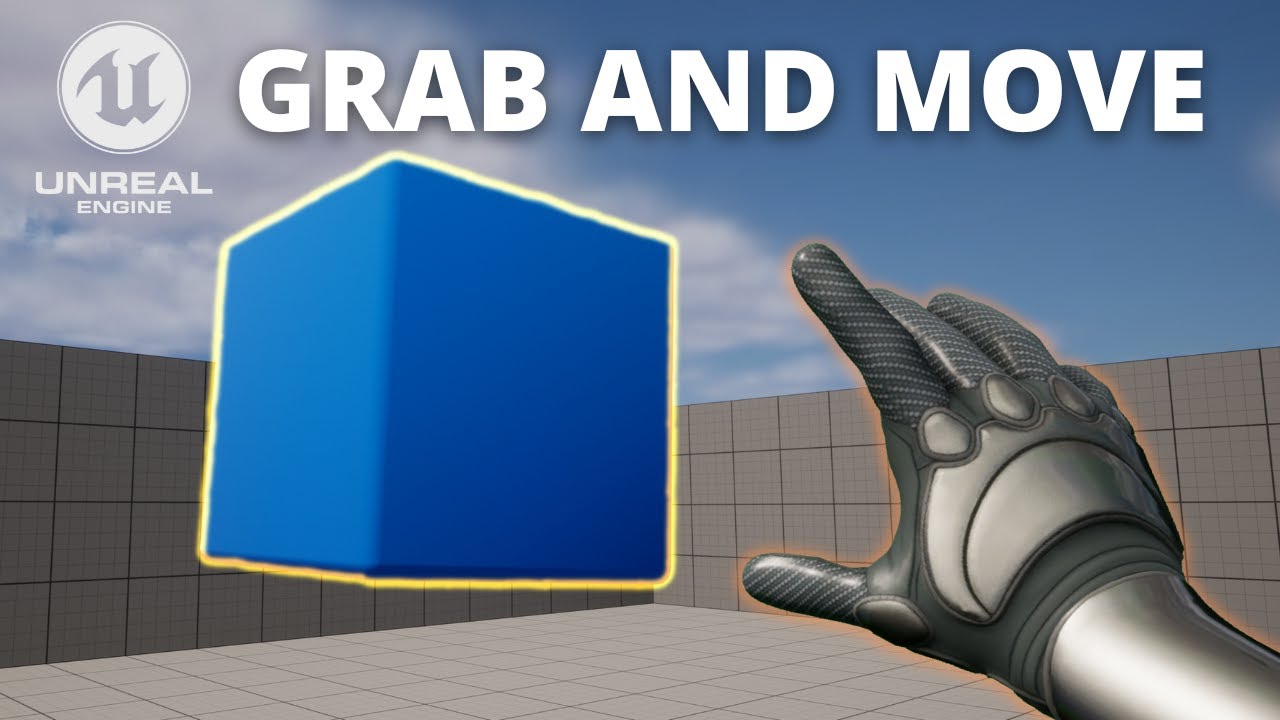
Hello guys, in this quick and simple tutorial we are going to learn how pick up /grab objects and move them around in Unreal Engine 5
↪️Check out awesome Unreal Engine courses: https://bit.ly/GorkaGamesWingfoxCombat
Check out my Steam Game! https://bit.ly/3rVlXU1
Follow me on Twitter: https://twitter.com/GorkaGames
Subscribe to the channel:...
trim matrix
trim matrix
lemme get a clearer video
lofty rapids
Oh
I see you want screen space
Save the xand y when you grab
Then make your point relative
trim matrix
w the physics handle? or just the trace node
trim matrix
so break the vector of the trace hit location save the x and y make the point relative
lofty rapids
Convert the vector to screen space
trim matrix
project world to screen?
lofty rapids
Sure try that
trim matrix
 trim matrix
ill have to set one up im just in a blank project
trim matrix
lofty rapids
Like a target or something
like an image of a target or
lofty rapids
trim matrix
like an image of a target or
I'm pretty sure the arrow in the vid is a ui element
lofty rapids
Get the screen space x and y when you grab
So set a var like grabvector
That is the grab point
Then on tick get the difference
trim matrix
 trim matrix
 lofty rapids
trim matrix
lofty rapids
trim matrix
You do need this as well but not grabpoit , this is move to point
trim matrix
 lofty rapids
Subtract grab from move on tick
And print it
But anyway that's how you would do the arrow
Just point it from grabpoint to moveto
trim matrix
how would i do the grabbing
lofty rapids
You can get the distance
Hmm
Physics handle would be easiest for that
IDK much about it I would follow that video
But you can use screen space and some maths otherwise
Like when you grab you know if your y goes up to move the thing on the z
Stuff like that
But now you have relative coords
From click to move and that's the basics of what you need
trim matrix
i have managed to get this but still have the issue of it not wanting to follow the mouse when i move up only when i go like far back in the map w the object it does it

 frosty heron
trim matrix
i have managed to get this but still have the issue of it not wanting to follow ...
frosty heron
trim matrix
i have managed to get this but still have the issue of it not wanting to follow ...
so what do you think you should check here?
think about the variables that you need for the logic.
trim matrix
my thought was to do something w screen location w the mouse on tick when an item is grabbed but im lost
frosty heron
the issue of it not wanting to follow the mouse when i move up only when i go like far back in the map w the object it does it
Try checking the distance between the object and the mouse click position before doing the set actor location,
I would probably try to interpolate it with MapRange Clamped
so the further they are apart, the more it's pulled to the mouse click location
Where if too close, it barely move if not at all.
trim matrix
so if i do that, (not trying to sound stupid) itl make the item be "static" if the mouse is and then move towars the cursor if the cursor is moving?
this is the distance being printed
frosty heron
is the object being physich simulated?
trim matrix
yea
frosty heron
yeah so that will detached the component from the actor.
so the actor will remain where it is since the simulated called while the mesh component is now on it's own.
instead checking distance to actor, check distance to the cube / mesh component world location.
trim matrix
how do i do that dosnt the trace under the cursor just get distance from cursor to hit location
frosty heron
well the hit location is the result of the trace isn't it?
so you gotta work with that.
If hit succesfull -> Cache the location.
-> Check the distance of the location and the mesh location -> If all is well -> Set Actor location
trim matrix
gt location of the hit componet subtract from cursor locatoin and thats the distance?
frosty heron
Yeah subtract 2 location and get the length of the vector.
that will be the distance.
trim matrix
 frosty heron
trim matrix
frosty heron
trim matrix
The component is not from the hit result, but the cube you want to follow along.
trim matrix
but im getting the cube from the trace
frosty heron
the trace is just a laser you shoot
trim matrix
yea
frosty heron
yea so think about it.
what's that got to do with the cube you want to follow along.,
trim matrix
i get the cube from the trace n set it as the grabbed object
frosty heron
it's not part of the equation
you shoot the laser to evaluate where your mouse pointer is.
the cube is just in the world, chilling there. You can then tell the cube to follow along if the distance between the cube and the mouse pointer is too far apart.
so you can try to do just that. Grab a reference to the cube component so you can get it's location.
trim matrix
even w multiple objects? and being able to drop and pick them up
 random vine
Do You want to drag the cube using the pointer?
trim matrix
random vine
Do You want to drag the cube using the pointer?
yes
trim matrix
trim matrix
this
frosty heron
trim matrix
even w multiple objects? and being able to drop and pick them up
yeah you just need to grab a reference to what ever you want to follow along the mouse pointer.
so if multiple object, it would be an array of actors.
Grab MyActors -> loop through -> Check distance -> Move to
trim matrix
why wouldnt i just use the trace fired on mouse click to set the hit actor as the reference n not update it on tick instead of using an array
bc wouldnt using an array make the mouse pickup multiple objects at once if they end up overlapping when the mouse moves it
or am i just overthinking it
frosty heron
well I never use physic constrain or w/e grab component u are using. But doing it that way you probably can't grab more than 1 object.
if you just want to do this for 1 object, then you probably have to just look for something that will lag the object behind in the component (if there's such thing).
maybe weight or some other variable.
if the goal is to move a flock of sheeps to a location, then I wouldn't use the grab component.
trim matrix
trim matrix
frosty heron
trim matrix
yeah, well you kinda already got that working with the flag being picked up and dropped.
trim matrix
but it isnt rly doing that
it rly snaps around and then flys out of the camera view and player cant move it anymore
frosty heron
Set a few rule before you set the location.
Some ideas.
- Make sure the location of the cursor is valid.
- Check the distance between the player camera and the cursor location.
You probably should make a custom collision channel for the floor and only test trace againts it.
That way if you point at the sky ur cube doesnt dissapear.
trim matrix
the camera is just a pawn in the world
trim matrix
frosty heron
You probably should make a custom collision channel for the floor and only test ...
would i need to apply the channel to the items too?
frosty heron
Sure but if you dont want to be able to drag to a point that is too far then your camera is your reference point.
frosty heron
trim matrix
would i need to apply the channel to the items too?
No, all you care is tracing the floor to evaluate the mouse position.
You dont want to trace the sky or any roof or items.
trim matrix
how do i set the floor's collison channel to the one i just made
frosty heron
Read doc or follow a guide.
I can tell you how but im exhausted at my own problem.
Rather just point you at a direction.
trim matrix
i got it

 trim matrix
frosty heron
No, all you care is tracing the floor to evaluate the mouse position.
trim matrix
frosty heron
No, all you care is tracing the floor to evaluate the mouse position.
setting the objects to ignore the trace collsion makes them not be able to be picked up
random vine
you still have to do some math with the mouse position, cause it only worked well in Fullscreen.
frosty heron
trim matrix
setting the objects to ignore the trace collsion makes them not be able to be pi...
Atm you are using the same trace for both the floor location and to grab the component.
But your problem is if you hover over the sky, your cube will get moved top far away.
Handle them respectively imo.
Do 2 trace, one for the floor one for the w.e u want to grab.
trim matrix
random vine
<@456226577798135808> this worked for me
didnt work for me
trim matrix
frosty heron
Atm you are using the same trace for both the floor location and to grab the com...
no
random vine
trim matrix
didnt work for me
this is inside the cube
trim matrix
when do u set dragging to true?
random vine
trim matrix
when do u set dragging to true?
I used event on clicked
you should have these set to true, in the player controller

like that
 random vine
trim matrix
yea i do, its still not working
random vine
trim matrix
yea i do, its still not working
the cube collision settings should block the visibility channel
 trim matrix
it is
random vine
like this
 trim matrix
 random vine
 random vine
random vine
random vine
do you do it like this?
trim matrix
 trim matrix
yea it prints
random vine
trim matrix
yea it prints
cool then it should make dragging true
trim matrix
random vine
trim matrix
you don't set dragging to false at anypoint right?
trim matrix
nope
random vine
trim matrix
nope
makse sure you have it like this
 trim matrix

No description provided
random vine
trim matrix
https://blueprintue.com/blueprint/4tv48a0t/
I just created it again from scratch again
https://blueprintue.com/blueprint/y8i96v52/
No description provided
that's what I have changed in the player controller

that's the cube actor
 trim matrix
still the same result
random vine
trim matrix
still the same result
the tick event should run at least, what does it draw, or prints
I added draw debug spheres to debug there
trim matrix
random vine
trim matrix
the red sphere is the actor current location, so you are moving an actor, but it's not the cube, or you have the cube as a child component with physics simulation enabled
can you show me a screenshot of the actor that has that logic?
trim matrix
disabling simulate physics has it moving now
idk why it snaps to the middle quick tho
random vine
trim matrix
disabling simulate physics has it moving now
if you want to keep physics simulation enabled, then make sure the cube is the main component, not a child
 trim matrix
i dont mind not using physics
random vine
good, now you just need to correct the position, and customize it the way you want
trim matrix
its just not moving up when the mouse cursor moves up
random vine
trim matrix
idk why it snaps to the middle quick tho
decrease the interp speed a bit, if you want it slower, also know that 0 value will just snap it there instantly
 random vine
trim matrix
its just not moving up when the mouse cursor moves up
random vine
trim matrix
its just not moving up when the mouse cursor moves up
yeah I made it only work on 2d for easier demonstration, you can customize it more
trim matrix
trim matrix
its just not moving up when the mouse cursor moves up
and even if position starts up high it makes it clip into the floor once grabbed
trim matrix
random vine
yeah I made it only work on 2d for easier demonstration, you can customize it mo...
how would i make it work in 3d
random vine
trim matrix
and even if position starts up high it makes it clip into the floor once grabbed
cause I set Z value to 0
random vine
trim matrix
how would i make it work in 3d
let me try
random vine
trim matrix
how would i make it work in 3d
you just need to make it like that, but I'll try making it not to collision with the floor
random vine
trim matrix
how would i make it work in 3d
or just like that, and enable sweep
 trim matrix
now it dosnt move
random vine
trim matrix
now it dosnt move
yeah, happened to me, just do this
 random vine
trim matrix
now it dosnt move
random vine
trim matrix
now it dosnt move
No description provided
trim matrix
ok ty, that worked but how could i make the mouse hit location higher, so theres an easier time to like "lift" the object bc rn it dosnt let u till the mouse is far away from the camera, or is that jus how it works
adding a float to the z helps
the only other thing is dropping the item ik id need a flipflop on the clicked but idk how id handle it on the tick
im wrong ab the flipflop
random vine
trim matrix
ok ty, that worked but how could i make the mouse hit location higher, so theres...
No description provided
trim matrix
i got it i think
 random vine
to lift the cube I decreased the trace distance
 random vine
trim matrix
i got it i think
random vine
trim matrix
i got it i think
try the one I sent
random vine
trim matrix
you can decrease the distance more, also try full screen for accurte mouse position
random vine
trim matrix
the only issue is the trace dosnt match up w my mouse position
I found a solution

use the get mouse position dragged from player controller instead of Get mouse positon on platform
trim matrix
ty
i think its working fine now
only issue is if the mouse goes too far from the camera the hit branch fails
but i think its ok
random vine
@trim matrix
I made a new logic that will work with any actor with an interface, the logic is now in the player controller not the cube actor
PlayerController
Cube
No description provided
No description provided

btw, you don't need these enabled anymore
Click events, and Mouse over events
 trim matrix
ty ill look into it and prolly edit mine more tmr im exhausted but this has got me close to something

 solar needle
can chat gpt help me documenting or they are hallucinating documentation ?
 frozen hedge
Documenting for what?
lofty rapids
solar needle
can chat gpt help me documenting or they are hallucinating documentation ?
always review everything that ai makes, but yes it will work for documenting very well
lofty rapids
solar needle
can chat gpt help me documenting or they are hallucinating documentation ?
if you can describe the thing well enough it will create a decent base you can work with
solar needle
frozen hedge
Documenting for what?
for nodes i dont know about
solar needle
lofty rapids
if you can describe the thing well enough it will create a decent base you can w...
hopefully. since people busy all time i rely on ai
lofty rapids
solar needle
for nodes i dont know about
do you mean for searching for nodes that you are unaware of ?
because i would google and look for good sources for that
but for "creating documentation" for a thing its good
 lofty rapids
well what you can do is get the explenation for a reputable source
and then paste that in to the ai
thats how i would go about it, and have it explain the paragraph or whatever
because ai is a good tool, but you need to be careful with the information you get
it's often incorrect and misleading
 crimson briar
Most AIs list their sources. Even then you can specify a prompt like "Explain X. Link the sources used" and then look through the sources.
AIs can be better at finding things than google - since it is now mostly a SEO hell.
But AIs can also use some random thread about a loosely related topic to draw their explanation from. Which can be false.
solar needle
crimson briar
Most AIs list their sources. Even then you can specify a prompt like "Explain X....
what SEO ?
crimson briar
search engine optimization, it is not relevant to the quesiton though
lofty rapids
i use gemini for images
random vine
solar needle
its stupider than gpt
now it's not
random vine
yes, and it will help you a lot
lofty rapids
i use all the ai can get my hands on tbh
i don't understand all the pushback about it
except the "human" factor i kind of get
but like i don't understand the problems people have
it's usually just fear disguised as some excuse
lofty rapids
solar needle
its stupider than gpt
gpt is a wise ass and overconfident a bit
it'll say things like
there is no question about this, this is the defacto answer
and i'm like, no gpt just stfu
its ok for like a person to have that attitude, but a machine shouldn't be like that lol
solar needle
lofty rapids
it'll say things like
there is no question about this, this is the defacto answe...
my gpt never said like that 
maybe each gpt different personality bot
lofty rapids
solar needle
my gpt never said like that <:noted:1345892826151653528>
it did for me its a wise ass
lofty rapids
solar needle
my gpt never said like that <:noted:1345892826151653528>
probably because i shit talk to it
 plucky ice
Hi guys, I'm sorry if this isn't the right channel for this and please direct me to the correct one if not.
I am working on a clinical project which requires really precise control over the lighting in the environment, basically trying to remove all the lighting altogether. My ideal situation is one such that the background is completely black, and the circles I am presenting are completely white to assess a patient's ability to see in different parts of space.
In particular, despite playing around with the material of the objects and making them unlit, deleting all lighting and other light sources from the scene, etc. I am getting an undesirable effect where the appearance of these white circles causes visible "bloom" around them when they appear in the VR headset, and I am sure there is some setting or parameter I have not thought of to adjust. This bloom is obviously undesirable as it makes it much easier to see the white circles since you can detect the bloom around it as being much larger than the circle itself.
 sick sky
plucky ice
Hi guys, I'm sorry if this isn't the right channel for this and please direct me...
sick sky
plucky ice
Hi guys, I'm sorry if this isn't the right channel for this and please direct me...
Bloom can be disable byt setting the bloom multiplier parameter in the post process volume to 0
If you removed the post process volume of your level, check the post process settings on your player pawn camera component
 pine carbon
What's the easiest way to watch the value of a blueprint variable when you're running a level?
I'm getting tired of print nodes.
random vine
pine carbon
What's the easiest way to watch the value of a blueprint variable when you're ru...

you can also use Blueprint Debugger


 ocean cloak
Hi everyone! I’m working on a mobile project and I’m having trouble with my Crouch/Uncrouch logic.
I’ve set up a toggle button in my Widget Blueprint using a boolean (isClicked). While my character can crouch properly, they won't stand back up (Uncrouch) when I click the button a second time. I've attached a video showing my Blueprint graph and the in-game result.
Could someone please take a look and tell me what I am doing wrong? Any help would be greatly appreciated
 queen heron
ocean cloak
Hi everyone! I’m working on a mobile project and I’m having trouble with my Crou...
queen heron
ocean cloak
Hi everyone! I’m working on a mobile project and I’m having trouble with my Crou...

you have to assign a boolean there aswell
don't leave it like that
can someone tell me why, despite this blueprint being valid, and even checked the values with a print string, the nav link won't update at runtime?

like, if these nav link nodes exist, then it should make sense to work, right?
or do these work upon spawned?
random vine
queen heron
or do these work upon spawned?
try construction script
queen heron
random vine
try construction script
I know it will work
but what if I want the actor to be used for a procedural purpose?
like a procedural ladder
point A (bottom/top) to point B (top/bottom)
random vine
queen heron
I know it will work
but what if I want the actor to be used for a procedural pur...
I didn't find anything inside the class, I assume it should just work the way you did.
what does it give you?
queen heron
random vine
I didn't find anything inside the class, I assume it should just work the way yo...
I just said the nav links aren't updating at runtime
which is something I need it to happen
right now I'm trying with spawning the NavLinkProxy actor and setting the links over there
and so far its an almost
links are positioned, but the navigation isn't generated
random vine
queen heron
I just said the nav links aren't updating at runtime
try this
 queen heron
really curious if that's it
alright, I'm seeing the nav link pointing where I want it
but the pathfinder isn't seeing it
I probably gotta make it refresh after starting the sim
yes there we go 👍
my ai navigation system updates after the nav link is generated
so I gotta make it wait a little bit
so setting runtime generation to dynamic was the last thing to do before spawning the nav link proxy
thanks @random vine
 fiery flower
Hi guys, I’m creating custom animations in Sequencer. I’m stuck on one point: there’s an external model that isn’t included as part of the character mesh. For example, a lighter. Attaching it to a fixed socket doesn’t really work for me, because the lighter’s transform values also need to change during the animation. How can I handle this?
 faint pasture
solar needle
maybe each gpt different personality bot
faint pasture
solar needle
maybe each gpt different personality bot
It's a setting, you can make it be really blunt and direct
solar needle
ye
random vine
fiery flower
Hi guys, I’m creating custom animations in Sequencer. I’m stuck on one point: th...
make a socket the represent the lighter, attach the lighter there.
then continue animating
 red night
Hi ! I finally dived in UE and I'm working on a tower def type game as an excuse to touch a bit of everything.
I'm trying to implement good habits from the get go and I have troubles finding an answer about where to store data like ( gold, currentWaveIndex, mobs killed etc)
The kind of data that is shown to the ui but mostly persist in a level.
From my understanding Gamemode is mostly about handling the level rules and menu, gameinstance would be about saving the game, playercontroller about the movement / abilities etc.
I saw some mentions about PlayerState only in multiplayer.
Could anyone help me figure out where to put those datas and also confirm what I have been doing for the rest ?
faint pasture
red night
Hi ! I finally dived in UE and I'm working on a tower def type game as an excuse...
If it's singleplayer then gamestate is perfectly fine
the state of the game includes how much gold you have, what wave you're on, and how many mobs you killed. If it's multiplayer then gold and mobs killed might be personal (per player)
red night
Great thank you for the fast answer 😄
random vine
red night
Hi ! I finally dived in UE and I'm working on a tower def type game as an excuse...
as you're new to UE, reading the documentation of these base classes will help you a lot in game development
fiery flower
random vine
make a socket the represent the lighter, attach the lighter there.
I'm already doing that, but since I can't move the socket in the animation, the model stays fixed.
random vine
fiery flower
I'm already doing that, but since I can't move the socket in the animation, the ...
maybe try a virtual bone then
fiery flower
random vine
maybe try a virtual bone then
I think this is what I'm looking for. ty 🙏
 desert storm
Hey everyone! I have a question.
I have a 3D level that needs to be reset frequently over the course of play, primarily for randomization of a dozen elements.
Is it better to have a system for deleting/resetting these actors within the level, or can I get away with just re-loading the level?
faint pasture
desert storm
Hey everyone! I have a question.
I have a 3D level that needs to be reset frequ...
Are these elements the only things that can have their state changed during gameplay?
desert storm
faint pasture
Are these elements the only things that can have their state changed during game...
I believe so. Why?
I have two values that'll be saved into a file and reloaded, if that makes a difference.
faint pasture
desert storm
I believe so. Why?
Just wondering if resetting the level might reset more than just those things.
How fast does this need to happen, is it like a super meat boy speed reset or a game over try again type thing?
desert storm
I guess the closest analogue is a PT style game; it's a looped linear path. The player can fail and reset quickly if they tried, but most likely they'll go probably around two minutes before it resets, not as a fail state but as part of the gameplay loop.
If it's not poor optimization, I can get away with reloading the level. Progress wise, there's nothing that I can't just keep in a save file.
I just need to figure out if it'd be worse to reload the level performance wise.
faint pasture
desert storm
I just need to figure out if it'd be worse to reload the level performance wise.
it'd be hitchier, if you have a good way to enroll stuff into resetting I'd just do that
it'd be smooth
desert storm
Yeah, I think I'll go ahead and give it a shot. It'll be a little complicated, but it might pay-off pretty well. Thanks
trim matrix
random vine
<@456226577798135808>
I made a new logic that will work with any actor with an ...
its erroring for me

i think i got it
 autumn pulsar
What do people usually recommend for characters with multiple weapons in terms of playing animations?
Like say if a character has a crossbow weapon, they'd have a set of animations specific to firing/loading that
I was thinking of an enum "slot" and then loading the animation to play for that slot
random vine
autumn pulsar
What do people usually recommend for characters with multiple weapons in terms o...
I think you should store the animations in the weapon, also for different poses (like crouch and prone) you can just do that in the animation montage it self, you can make the montage play an animation for each slot
autumn pulsar
random vine
I think you should store the animations in the weapon, also for different poses ...
I don't want to do that, because I want to make the weapons cross-character compatible
I was thinking of a "weapon type" then the character has the animation loadout for that weapon type
random vine
autumn pulsar
I don't want to do that, because I want to make the weapons cross-character comp...
it's better to make each wepaon has it's own (Reload, inspect, etc) animations, even if you have different characters, they should share same skeleton.
 ornate trail
autumn pulsar
What do people usually recommend for characters with multiple weapons in terms o...
ornate trail
autumn pulsar
What do people usually recommend for characters with multiple weapons in terms o...
well you have your locomotion in your animation blueprint then you would just play a montage when you want to use a certain attack
autumn pulsar
random vine
it's better to make each wepaon has it's own (Reload, inspect, etc) animations, ...
Well I have non-humanoid characters as well
autumn pulsar
ornate trail
well you have your locomotion in your animation blueprint then you would just pl...
Yeah I was going to have either an additive montage or a full body montage and have a wrapper for the montage with some settings
ornate trail
autumn pulsar
Yeah I was going to have either an additive montage or a full body montage and h...
it also depends on the number of skeletons, if you have 1 for all your characters makes it easier and more compatible
random vine
autumn pulsar
Well I have non-humanoid characters as well
you can make the weapon contain different reload animations for each character, I recommen using gameplay tags.
autumn pulsar
random vine
you can make the weapon contain different reload animations for each character, ...
I was thinking of an enum. Weapon would just be a prop, and characters would get skills based on the weapon they have
random vine
autumn pulsar
I was thinking of an enum. Weapon would just be a prop, and characters would get...
enum will work as well
autumn pulsar
Like a troll is going to swing a hammer differently than a humanoid
random vine
autumn pulsar
Like a troll is going to swing a hammer differently than a humanoid
yes, use enum or gameplay tags, both works.
each weapon montage parameter will have a map of animation montages and characters (as enums or tags)
faint pasture
autumn pulsar
Like a troll is going to swing a hammer differently than a humanoid
I would use gameplaytags then it can be heirarchical
Weapon.2hand.mace
that way you can have an animation for Weapon.2hand as a fallback if there's no animation for hte mace itself
weapon has tags describing its "slots"
Character has some mapping from tags to anim montages
You might not need to make a full sword/mace/spear/axe moveset for something simple, maybe an ogre just swings all 2handers the same, it'd work.
Axe:
Tag = Weapon.2hand.Axe
Ogre:
Weapon.2hand -> OverheadSwing
autumn pulsar
faint pasture
I would use gameplaytags then it can be heirarchical
That's an interesting idea
Might do that
 haughty depot
Hi all, do I need to use foliage mode to make the static meshes instanced, basically to placed it manually within level. Or is there any better method to make it instanced. this is for modular building by the way
autumn pulsar
haughty depot
Hi all, do I need to use foliage mode to make the static meshes instanced, basic...
Should be an instanced static mesh component
haughty depot
autumn pulsar
Should be an instanced static mesh component
I mean for manual placement
wait, I can actually move the foliage meshes manually and paint one by one
I assume this is the best way so far
 plush hornet
Hi all, If i set a bool to true on a parent actor why does it not set to true on the children? How can I solve this? Thanks
faint pasture
plush hornet
Hi all, If i set a bool to true on a parent actor why does it not set to true on...
It does. You're talking about setting the default to true right?
 pine fjord
not sure if this is the correct channel, but how can I make a simple trigger box animation?
 languid vapor
Hello, I'm having some trouble with BTs, if I move the Passive logic directly into the main tree in sequence with that decorator check, aborts work perfectly but If I put the exact same logic inside a subtree and run it via Run Behavior, the tree gets stuck in Passive when State changes.
What am I doing wrong here?

 faint pasture
pine fjord
not sure if this is the correct channel, but how can I make a simple trigger box...
faint pasture
pine fjord
not sure if this is the correct channel, but how can I make a simple trigger box...
meaning what?
 azure smelt
I'm not sure which channel to ask this in but, i have this issue with a portal i made, it's in blueprints but converted to C++, it's a mix of material, and 2dscenecapture along with using a niagara system as the wall for a water effect as i walk through the portal. My issue is that if i have the camera go too low it doesn't quite match up or if i jump. See the blue line at the bottom? that's my issue, i want it to be flush with the ground. I am thinking about just swaping the 2dscenecapture to a cubecapture as a solution, but i don't know if that will look any better. Please help!

 chilly root
Hey all. I have some zones in my game prevent my camera actor from going inside by using "get closest point to collision" and if the distance is less than 50, they push the camera away.
So far, in my camera BP i use "get all actors of class" to store all those areas in an array and check against each one to find out the distance. Can this be done with interfaces or another non hard reference way?
 spark steppe
that could be done with a camera spring arm and proper collision channel setup
chilly root
spark steppe
that could be done with a camera spring arm and proper collision channel setup
what i want to prevent going into the zones is the root of the camera actor (a collision capsule) the camera is on a long springarm 1500 long and at a ~55 degree angle. I tried with physical collision but the movement is sticky because i use math based edge scroll pan for movement so when i hit a surface i can't glide along its walls, at least not in my tests
 untold fossil
Hello. Does anyone know how I can make mouse input X and Y frame independant. I've tried multiplying with deltatime but it always gives different results on different framerates. When fps is high the derived input results in a slower change while at low FPS it is much faster, whether I add delta time or not makes no difference from my tests. I'm working on flight controls for a plane in my game and I need to mouse x and Y inputs to be equal in terms of change speed on all framerates. How can I achieve this?
 atomic hollow
untold fossil
Hello. Does anyone know how I can make mouse input X and Y frame independant. I'...
atomic hollow
untold fossil
Hello. Does anyone know how I can make mouse input X and Y frame independant. I'...
I think mouse speed is always locked maximum to monitor refresh rate, and I think I should be wrong for minimum as may be there is no minimum, it is normalized by default
 dapper vale
Hello! How can I prevent the camera to rotate when clicking outside of the button while in Game and UI input mode?
dapper vale
dapper vale
Hello! How can I prevent the camera to rotate when clicking outside of the butto...
This seems to work

 coarse spade
dapper vale
This seems to work
coarse spade
dapper vale
This seems to work
Pretty sure setting input mode to ui only works too.
ocean cloak
Hi everyone! I'm working on a First Person mobile game in UE5. I've set up a crouching mechanism, but I'm having an issue with the camera.
When my character crouches, the camera doesn't move smoothly or stays stuck. I tried to fix it, but now the camera positioning is completely wrong (glitching/offset).
I want the camera to smoothly transition (interpolate) from the standing height to the crouching height when the crouch button is pressed, and back when released.
Attached are screenshots of my Blueprint logic and a video of the current glitch. Any help would be appreciated
faint pasture
untold fossil
Hello. Does anyone know how I can make mouse input X and Y frame independant. I'...
It already is.
Input is how far it moved since last frame.
If you want mouse velocity then divide by delta seconds.
pine fjord
faint pasture
meaning what?
My character will pass through the trigger box and I want to make the object move like an animation
faint pasture
pine fjord
My character will pass through the trigger box and I want to make the object mov...
timeline
pine fjord
I'm kinda new to this so I have no clue on how to do it properly
faint pasture
 glacial hinge
Hey! Could you guys guide me to a tutorial of how to make a movement system using the new enchanced action input because i have no idea how to use them. Thanks!
faint pasture
glacial hinge
Hey! Could you guys guide me to a tutorial of how to make a movement system usin...
start by getting an enhanced input system to print something to the screen
 neat stream
on UE5 and webbrowser , the view does not scale to the bounds of the window I don't know why 😢 only on mac and ios
 glacial hinge
i've tried but it still doesnt work
faint pasture
glacial hinge
i've tried but it still doesnt work
show code
 dark drum
neat stream
on UE5 and webbrowser , the view does not scale to the bounds of the window I do...
dark drum
neat stream
on UE5 and webbrowser , the view does not scale to the bounds of the window I do...
I thought they dropped support for running UE in the browser. Are you using a plugin?
dark drum
neat stream
It's not running in a browser it's a cef view
Oh so viewing a web page inside UE?
neat stream
dark drum
Oh so viewing a web page inside UE?
yep it's perfect on windows
 lost hemlock
Hi, I tried to make a character idle rotate with camera... Following this video... why doesn't it work?
https://youtu.be/AXT0IXZVdMQ?si=LdbDd1u4ykGFE-Qj


IMPORTANT!!! Inside your move function add the clear root motion! This cancels out the turn in place animation if you suddenly move.
Learn how to create a Turn in Place animation system in Unreal Engine 5 in under 5 minutes! Perfect for beginners who want smooth character animations without the complexity.
Timestamps:
0:00 - Intro
0:05 - Confi...
faint pasture
lost hemlock
Hi, I tried to make a character idle rotate with camera... Following this video....
Show what's calling this function, and what turn does
lost hemlock
faint pasture
Show what's calling this function, and what turn does
This is whats calling the camera...

but for some reason, this always remains 0.000

And this is always False
 ocean cloak
Hi everyone! I'm working on a First Person mobile game in UE5. I've set up a cro...
ocean cloak
ocean cloak
Hi everyone! I'm working on a First Person mobile game in UE5. I've set up a cro...
pls help
lost hemlock
faint pasture
Show what's calling this function, and what turn does
nothing happens, the character mesh stays frozen when I rotate the camera, he follows the camera
I think the problem is here


Why are these zero?
oh I've put it on event tick and it worked! ✅
But I wanna remove it from tick, I wonder if it can work without tick
faint pasture
lost hemlock
And this is always `False`
you probably are directly mapping control rotatoin to the character yaw as well as the camera rotation
so yeah that delta will always be zero
Are you trying to do turn in place or an idle camera rotation? What are you actually trying to do here
 tough kiln
Set Use Controller Rotation Yaw to true on the character movement component
And get rid of that code
 next hollow
Then it would be instant, which isn't what they want
 normal raft
hey all. i am getting this strange problem .. with my spaceship pawn, where my character cant jump or walk on it .. it jump onto it but keeps bouncing and then eventually gets bounced off any idea what could be causing this..? the pawn is actually positioned on top of a packed level actor, and there no issues with jumping on the PLA's meshs...
Things I have tried:
create complex collision for the mesh
turn off simulate physics - while the ship is stationary/parked
increase walkable slope angle
the collisions are set to block all and use simple as complex.
solar needle
why this doesnt work ? it destroy actor nontheless

 vocal garden
ok

👉Get Access To My Souls Like Melee Combat System Course : https://bit.ly/3ArmxB0
👉Get My Free Unreal Engine Beginner Course : https://unreal-university.io/freecourse?video=Q5xk5PYlQ1k
Animations : https://bit.ly/4dua2D8
if you clicked the link from this video it shows his default manny with his own default blueprints
But MY custom character with their own animation doesn't have the same blueprints as him

This is his

and this is mine
how do I impliment an tree node like his when ours are different from each other?
hello?
solar needle
looks like nobody here
frozen hedge
vocal garden
hello?
Hi what tree node
vocal garden
frozen hedge
Hi what tree node
Scroll above
how do I get my tree node similar to his?
frozen hedge
The initialize event code?
 vocal garden
I don't have Character or Character component
random vine
hey guys, what's going on
random vine
what does he need?
frozen hedge
vocal garden
I don't have Character or Character component
Right click and search cast to character BP, promote the variable from the output.
frozen hedge
random vine
what does he need?
Just to search up nodes
frozen hedge
vocal garden
Here
vocal garden
frozen hedge
Right click and search cast to character BP, promote the variable from the outpu...
ok
 vocal garden
frozen hedge
Here
vocal garden
frozen hedge
Here
this one?
vocal garden
ok
frozen hedge
Which is basically saying get character reference.
 frozen hedge
search up what you can see, (the text on the nodes)
vocal garden
?
frozen hedge
Untick the box when searching up nodes if you can’t find it
frozen hedge
vocal garden
?
I mean for the other ones
 random vine


 vocal garden
frozen hedge
Character movement
vocal garden
frozen hedge
Character movement
this one?
random vine

 vocal garden
ok
random vine
vocal garden
also it's called Character Movement
 vocal garden
random vine
also it's called Character Movement
vocal garden
random vine
also it's called Character Movement
did I picked the wrong one?
random vine
vocal garden


 random vine
drag a bin from this one and call Get Character Movement
 random vine
now what do you want to do with it?
vocal garden
he doesn't do it step by step
he just SHOWED his node and without context or how he got there
frozen hedge
He walks you through it
frozen hedge
vocal garden
where do I find 'movement component' again?
It will be in your third person blueprint on the left

 frozen hedge
If you want the character movement for the animation, make sure you are referencing the right blueprint character
faint pasture
The movement component for your character is called Character Movement
faint pasture
vocal garden
he made a variable called MovementComponent and is storing his characters component named CharacterMovement in it
frozen hedge
So promote variable of that then I presume
faint pasture
same thing, 2 names
idk why he did that, all tutorials are shit until proven otherwise


 faint pasture
vocal garden
and the one I have is a NOTE
faint pasture
vocal garden
and the one I have is a NOTE
read the note
vocal garden
I did
vocal garden
 random vine
you can just connect them without casting
vocal garden
I'm doing what the guy says
random vine
you don't need it
faint pasture
vocal garden
I'm doing what the guy says
The guy has it wrong, just lose the cast
faint pasture
Make sure you understand what you're working with before just following along blindly with more stuff.
 random vine
can you mention me the video? @vocal garden
vocal garden
vocal garden
https://youtu.be/Q5xk5PYlQ1k?t=707
Right here
vocal garden
random vine
can you mention me the video? <@335931092785954817>
^^
random vine
vocal garden
^^
he does cast to his own made character from the character reference

you can just do the cast here

no need to store it as a new reference
do you have that notify event in your graph yet @vocal garden

 violet moth
hey peoples i need some help with my inventory system please
coarse spade
violet moth
hey peoples i need some help with my inventory system please
what do you need help with?
whats it doing?
violet moth
dm me if you cna
coarse spade
I'm just checking to see if i can help. inventory systems are usually pretty complex.
azure smelt
azure smelt
I'm not sure which channel to ask this in but, i have this issue with a portal i...
Hey can someone help me with this? Refer to my reply here.
frosty heron
violet moth
dm me if you cna
Ask your question so a lot of people can see if they can help.
You wont get much help (if any) from directly asking for dm.
 hardy mango
Running into a quirk here - when I perform the below from my MainMenu system (Different playercontroller/gamemode than my Gameplay controller/GMode) - my pawn class doesnt initialize right, and my GetWorld->GetTimerManager().SetTimer never happens...
I can launch the same map directly that i'd be calling in this blueprint graph, and everything magically works fine. Any initial thoughts? I'm stepping through this and all calls for GetWorld(), GetTimerManager() and the delegate passed to SetTImer() are valid.... i dont know what is going wrong with this.

playercontroller initializes fine, all widgets run fine, here's the pawn class viewport view -

but when i select the pawn in world outliner while PIE - this is what it looks like and what it SHOULD look like in teh viewport:
 vocal garden
random vine
do you have that notify event in your graph yet <@335931092785954817>
vocal garden
random vine
do you have that notify event in your graph yet <@335931092785954817>
No
I’ll just use a different tutorial :p
It isn’t that long to make anyways
 thorny cipher
Have you managed to get it working? I am having the same issue.
ocean cloak
 dusky cobalt
hardy mango
Running into a quirk here - when I perform the below from my MainMenu system (Di...
dusky cobalt
hardy mango
Running into a quirk here - when I perform the below from my MainMenu system (Di...
Do you have everything set properly in the GameMode class (not default pawn class), and also if you are using pawn that should be possesed, do you have some logic in GameMode that will handle Joining New Player and possesing the pawn in the level?
Also so in the viewport looks like the correct player pawns spawns? Also on the pawn class do you have Auto Posses Player or is it Disabled ?
 grim ice
I want to display a hud button that the player needs to press at certain times, like a minigame.
i thought i'd make this hud button minigame an actor component, to make it modular and independent of the rest of the player code.
but it seems awkward. i need to get the parent actor, cast it to the player pawn class (ugh) and then the player's controller and then the controller's hud.
is that the correct way to go about it?
frosty heron
Your mini game can depend on the player character. Thats fine if it needs to know the main character properties. E.g its level or attribute.
One thing to look out for is to make depedency one way.
This mean that the character shouldnt depend on the mini game component. The character should work without the mini game component.
Im not sure about making the mini game an actor component though but its hard to judge without knowing the context.
crimson briar
If you don't want to bind the component with casts, you can approach it from the perspective of adding/initializing the component from a class that already has the necessary data. For example, if the controller knows about the character and the UI, it can call Initialize on the Character component passing a reference to the needed UI stuff.
But it of course depends how complex the relationship between controllers and characters is. And how much encapsulation are you willing to give up for this
frosty heron
You can keep relationship one way mostly just by utilizing delegates.
Interface if you need to deal with multiple owner that doesnt share the same base class.
 last peak
grim ice
I want to display a hud button that the player needs to press at certain times, ...
last peak
grim ice
I want to display a hud button that the player needs to press at certain times, ...
get player controller - get hud
grim ice
frosty heron
You can keep relationship one way mostly just by utilizing delegates.
delegates in unreal?
frosty heron
grim ice
delegates in unreal?
event dispatcher
dusky cobalt
grim ice
I want to display a hud button that the player needs to press at certain times, ...
make the mini game actor and work as a manager that starts and stop the game, initializes and cleans up whatever is needed, from actor you can easily get PlayerController->GetHud -> Add button to some box OR make the mini game actor create widget -> add to viewport and then at the end remove it.
 errant mason
how to make simple objective system? i want to trigger a mission and the missions says collect three items, or find x, or go here. i want something very simple
 hearty rain
I would use gameplay tags to track the mission status. Like Mission1.Objective1.Started
Mission1.Objective1.Done
Mission1.Objective1.Failed, etc
Stored in a gameplay tag container inside the game instance for example.
then you access this gameplay container and check for tags to update your UI, actors, etc...
 lyric drum
I’ve been experimenting with Blueprint debugging in packaged UE builds, since there’s basically no way to inspect or pause Blueprint execution in packaged game. Here is a short demo.
Curious if anyone else has run into similar issues, or would find something like this useful.
 umbral latch
Hey! Is anyone quite experienced with arrays and inventories?
I'm trying to build a very basic system where my character finds standalone items, which are added to a widget, and from which he can circle through but I am having some issues with my blueprint
frozen hedge
What issues? Images or videos of proof will be great
umbral latch
There you go (with full context below).
My character can basically loot and collect "time" which is part of a specific "schedule mechanic".
I created a Structure, which includes my hours and mins (integer). (**image **1)
I have a BP actor (my time-related item) which can be looted. (**image **2)
When this actor is looted, its time information (minutes & hours) are being shared in my FirstPerson Blueprint and added to my array of all looted time - which is then sent to my widget. (image 3)
Then, this is where things go bad I assume.
What I want is that when I press a specific widget button, I can circle through all the times I have looted.
I've made a custom event in the widget (image 4)
And everytime I press my button, I run through the looted time.* But it only displays the first time being looted, and I cannot circle through the rest.*
(I've only tested on seconds at the moment)


 flat coral
Is there any cheap way to get all actors with a given component? or all instances of that component in level?
 dawn gazelle
umbral latch
There you go (with full context below).
My character can basically loot and col...
dawn gazelle
umbral latch
There you go (with full context below).
My character can basically loot and col...
All you appear to be doing with your button press is looping through the array and setting "Preview Min" to the last "Minutes" value from your structure.
If your intention is look at each individual value in the array with each button press going to the next value, then you should be incrementing a counter of some kind on the button press and then doing a GET on the array with that incremented value. Before doing the GET, you should check that the counter value is a valid index of the array -- When the incremented value > last index of the array, then you should set the counter back to 0 before doing the GET.
crimson briar
flat coral
Is there any cheap way to get all actors with a given component? or all instance...
If I need something like this, I make a manager for them. Then each component on spawn looks for the manager and registers itself with it.
But as always, it depends on the use case.
flat coral
crimson briar
If I need something like this, I make a manager for them. Then each component on...
Yeah that's probably the approach I'll take. The idea here is I've got a component that handles health, taking damage, and dying, and so looking for every actor with this component is basically "Give me every actor in level that can be damaged"
Which is useful for more efficient versions of things like BIG radial damage on tick
umbral latch
dawn gazelle
All you appear to be doing with your button press is looping through the array a...
Thanks a bunch! It seems to be working but only with 2 items looted. Anything more than that doesn't update (though their index exists). Am I missing something?
 umbral latch
It looks like the issue is related to the index number.
Item 1 = Index 0
Item 2 = Index 1
Item 3 = Index 2
How could I fix that? 🤔
trim matrix
hey uhm, ik this is simple but im just new on unreal engine, i think this will works?
because my idea its an gameplay tag contaniner check if match, and if match the tag will increase the size, and when the array will complete, will check if the lenght of the array its same on the sizes variable

i just see an UE tutorial of gameplay tags 💀
this is the full blueprint


so i need if my blueprint its good or nah

dusky cobalt
umbral latch
It looks like the issue is related to the index number.
Item 1 = Index 0
Item ...
Arrays start at 0 as the 'first' item
dusky cobalt
trim matrix
i just see an UE tutorial of gameplay tags 💀
this is the full blueprint
looks fine
trim matrix
dusky cobalt
looks fine
ok bet
trim matrix
dusky cobalt
looks fine
thanks
umbral latch
dusky cobalt
Arrays start at 0 as the 'first' item
This may be silly... but I am not sure how to have my index starts at 0 then? The flow starts at 1 constantly
dusky cobalt
umbral latch
This may be silly... but I am not sure how to have my index starts at 0 then? Th...
you +1 to the index before anything so if it's 0 at the start it ends up 1 in the function, it's never 0 because then you would have to start at -1 by default
at least in your current logic
also you do not check if Current Index >last index and then reset it to 0, if it jumps up to 5 from 4, but array is 4, then it will never reset to 0 ever
also do you want to have summarized time in the preview or what? because you are still displaying last added time
umbral latch
Ah gotcha! I am still a bit of a newbie to blueprints, any chance you could walk me through tackling what you mentioned?
dusky cobalt
can you describe what do you want to happen? do you want to get all the time player has ever looted and display the amount added together?
 keen ore
I'm running into an issue of whenever my player move while their aiming is offest the camerea postion. I can't figure out how prevent it.


 frosty heron
@keen ore Timeline is something with fixed length, meaning the beginning and the end transform shouldnt be changed / mutated.
Your end constantly change because you are getting the transform of the socket (world) every update.
If you want to use timeline, you gotta do this in local space, not world space.
Either interpolate on tick or edir the transform in local space ( so values r fixed)
 torpid acorn
i need some help with some code Basically the cycle speed feature is meant to call and change the speed of the fast flight But It keeps changing the hover instead of the value it needs to change

 frosty heron
torpid acorn
i need some help with some code Basically the cycle speed feature is meant to ca...
frosty heron
torpid acorn
i need some help with some code Basically the cycle speed feature is meant to ca...
First of all, triggered is called every tick.
So you are constantly alternating and i doubt thats the intention?
Use started if you want to have some input triggered once when you press.
Click on the down arrow key of the event to expand the pins.
Other than that, theres not much more info from your end. Not sure what the relation between the two pictures.
keen ore
frosty heron
<@554793846828171265> Timeline is something with fixed length, meaning the begin...
When I do that it just snaps me to the floor
frosty heron
keen ore
When I do that it just snaps me to the floor
I dont know what you do but you also want to transform the camera in local space.
torpid acorn
frosty heron
Click on the down arrow key of the event to expand the pins.
the red are the logic it changes insted of what it needs to and the blue is what it needs to change but doesn't
 keen atlas
Anyone knows what causes this state that prevents most node actions from happening? Can't copy paste, can't use shortcuts like C to comment, B for Branch. I've had this happen quite frequently recently and it's always hit or miss if I can clear it up
 keen ore
frosty heron
I dont know what you do but you also want to transform the camera in local space...
keen ore
frosty heron
I dont know what you do but you also want to transform the camera in local space...
Well it works but now it doesn't reset

 frosty heron
keen ore
Well it works but now it doesn't reset
frosty heron
keen ore
Well it works but now it doesn't reset
You are still using world transform for your ads ref point.
My guts tell me that to just point at weapon sight, you dont want to involve any world coordinate.
It should just go from transform X to Transform Y in local space.
frosty heron
keen atlas
Anyone knows what causes this state that prevents most node actions from happeni...
Are you in play mode?
keen atlas
I am not
 keen atlas
Neither. I rebooted my engine and it fixed itself but it's not great that I have to do that to fix it 🤔
hardy mango
dusky cobalt
Do you have everything set properly in the GameMode class (not default pawn clas...
sorry for the late reply - a LONG day at work!
All defaults in terms of properties to classes ... but GameMode is for sure my custom pawn class & player controller. As stated - OnPossessed fires and is valid/legit. No to "Joining New Player" - all Super() functionality.... i didnt even override it to be honest.
Viewport - yes it is the right class ... it just doesnt initialize, nor does my GetWorld()->GetTimerManager()->SetTimer() .... it never is ticking, yet when i debug step through it all aspects of it appear to be valid.....
Again - this is a new one to me... QUITE perplexing.
umbral latch
dusky cobalt
can you describe what do you want to happen? do you want to get all the time pla...
Sorry for the late reply.
Basically I want to start the game with a neutral time (which I have already 00:00).
When a “time” is looted, it’s being added to the array of available times, and from my neutral time, I can switch / circle to those looted times at any time. (Half working right now, I just need to fix that array issue)
Ideally, the looted times would then all be circled consecutively from earliest time to latest available time despite being looted in any order — if that makes sense?
 deft pivot
i'm trying to have an input with a key to show trails inside the game, why does it now show up? no matter what kind of mesh i use. i have it "hidden in game" in the rendering tab and i thought it would be visible once key is pressed.

 maiden wadi
deft pivot
i'm trying to have an input with a key to show trails inside the game, why does ...
maiden wadi
deft pivot
i'm trying to have an input with a key to show trails inside the game, why does ...
What did you set HiddenInGame on? If it was the mesh inside of that BP, that won't change from setting it's actor's HiddenInGame
deft pivot
viewport of the mesh that is supposed to show up

but for some reason, if i disable "hidden in game" the mesh is visible and disappears once i press the button so basically the other way around
maiden wadi
deft pivot
viewport of the mesh that is supposed to show up
Can you set HiddenInGame on the Actor's ClassDefaults instead of the mesh?
deft pivot
maiden wadi
Can you set HiddenInGame on the Actor's ClassDefaults instead of the mesh?
well fml. that was it 😄 thank you so much
 junior quest
If im making this struct already and expect to save it when i create a save game BP, do i need to check this or does it not matter?
 crimson briar
junior quest
If im making this struct already and expect to save it when i create a save game...
crimson briar
junior quest
If im making this struct already and expect to save it when i create a save game...
It is for serialization. It doesn't matter when you manually pull data from actors into the savegame object. Not sure if you can even use the serialization method in blueprints
 errant snow
junior quest
If im making this struct already and expect to save it when i create a save game...
errant snow
junior quest
If im making this struct already and expect to save it when i create a save game...
Weirdly, if you’re using the basic functionality built into the Engine and not some other plugin, it’s actually irrelevant.
You have to certain code (specifically a custom FArchiver) in C++ to leverage that flag.
junior quest
lol i am using near default UE yeah
thank you, im trying work through building some small things on my own and i wasnt sure what that option was for
umbral latch
umbral latch
Sorry for the late reply.
Basically I want to start the game with a neutral ti...
I have succesfuly fixed my INDEX issue with a modolu!

I would just need help tweakng my code to always display my looted time chronologically (despite looting them in random orders)
 steady night
Hi im using a top down camera actor, i can move around with key board A(left) W (up) D(Right) s(down) as normal, but im tring to add rotation also, so now im adding to the spring arms Z rotation to make it rotate in the world, but when using the w,a,s,d keys it dosent move correctly since its base on the rotation being 0 so i have to add the springarms Z rotation in the equation somehow

any tips ?
autumn pulsar
Hey, I'm trying to make an inventory system, and I'm trying to think of the best way to store items. Some stuff is going to be item specific, like what values the item has, but other stuff needs to be tracked by instance such as the stack quantity. wasn't sure if I would just make it a data asset then get class defaults?
It'd feel stupid duplicating all that data when I just need a pointer to it
dusky cobalt
steady night
Hi im using a top down camera actor, i can move around with key board A(lef...
In the Pawn category there is Use Controller Rotation Yaw, you might set it to true (or try with Pitch/Roll) i don't remember which one it was.
dusky cobalt
autumn pulsar
Hey, I'm trying to make an inventory system, and I'm trying to think of the best...
so your items and 'what' they are is just Data (so Data Asset is good), but for the Instances of the items in the inventory, you might want to use UObjects, so for example you would create ItemInstance (UObject) with DataAsset, that would be added to inventory array/tmap/struct whatever
and then this (setup above) is your 'data source' which then widgets might use to display (get inventory -> get all items -> update display (create 6 icons with icon from data asset and a tooltip)
i would put it into some InventoryComponent which would be the manager (AddItems, RemoveItem, DisplayItems, UseItem)
 formal grail
I've been banging my head against the wall trying to get this blueprint set up. I want a parameter to go from 0-1 wheni click on a mesh and drag the mouse up or down on the y axis. My wwise logic is correct and clicking on the mesh appears to properly trigger the "on click" however i don't think the parameter is changing. I'm new to blueprints if anyone can just give the input_onclick section a glance and tell me if anything is obviously wrong. thanks!

 unborn anchor
is this the way to make an interactable grid in unreal? I just use actors and when I interact with it it "sows" the dirt into a patch which can then have a plant planted on it.
autumn pulsar
dusky cobalt
so your items and 'what' they are is just Data (so Data Asset is good), but for...
I was thinking of a struct that contained inventory metadata, a data asset containing inventory information for the item, then another data asset containing the actual item itself
but with data assets, would I just use a class reference instead of an object reference?
Since I don't want to allocate memory for each object 
autumn pulsar
unborn anchor
is this the way to make an interactable grid in unreal? I just use actors and wh...
That's probably the worst way you could do it tbh lol
How I'd do it is fire a trace from the camera onto a surface, then get the hit position, then adjust it if you want, then snap it to a grid point
unborn anchor
you can snap a linetrace to a gridpoint in bp?
autumn pulsar
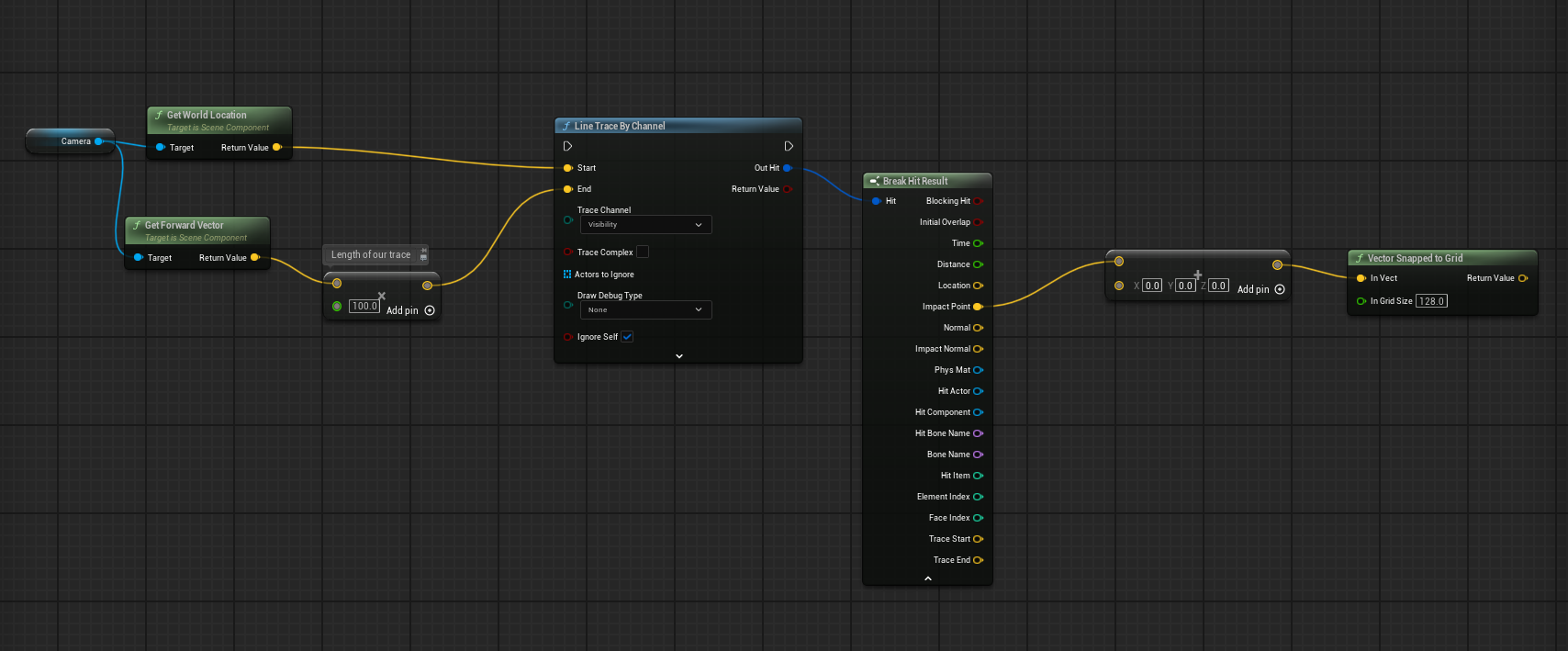 unborn anchor
autumn pulsar
https://i.imgur.com/eTylZc6.png
unborn anchor
autumn pulsar
https://i.imgur.com/eTylZc6.png
thanks I didnt know that node existed, ill try it out when I get a chance.
maiden wadi
Would likely be better to snap the trace itself to the grid? You may hit different things.
autumn pulsar
maiden wadi
Would likely be better to snap the trace itself to the grid? You may hit differe...
I mean if you're tilling a field, you just need to know the closest point to snap to so you can spawn the object
unborn anchor
ill try both methods. Gonna need to place other objects in the same grid as well
maiden wadi
In that regard though there's not even a point to trace if you're going by that. Just do a line plane math. Much cheaper, less complicated.
autumn pulsar
You might need to offset it
 steel pecan
You can also ignore actors with that node so it only hits what you want.
There is another line trace node I belive that can target collision as well I believe.
autumn pulsar
maiden wadi
In that regard though there's not even a point to trace if you're going by that....
I'd imagine they'd probably have a generic interaction like minecraft
So you might trace, see if you hit a "field" object then perform an action on that
steel pecan
Yeah I like casting to my target actor if I want one specific class. One place where I prefer it over interfaces, but you can also utilize interfaces of course if you just want to take action on something hit by line trace.
Infinitely useful node, worth playing with.
 fading raptor
Hello everybody ! I'm trying to create a "modular" door : for now I've got a back panel that scales depending on the number of energy sources linked to the door and I'm trying to do the same for the Cross mesh to spawn one for each energy source so the player can see their activation status. But I can't get it to work and the "meshes list" arrays looks kinda weird... Does anybody has an idea ? Thx in advance !


 steel pecan
fading raptor
Hello everybody ! I'm trying to create a "modular" door : for now I've got a bac...
steel pecan
fading raptor
Hello everybody ! I'm trying to create a "modular" door : for now I've got a bac...
Try clearing the mesh array on construction? I don't believe it'll do so implicitely and that means that everytime construct is called it may just append to what's there if the mesh component doesn't exist in the array already.
 golden pewter
when i packaged. what do i do. i already refreshed nodes.
 last peak
golden pewter
when i packaged. what do i do. i already refreshed nodes.
last peak
golden pewter
when i packaged. what do i do. i already refreshed nodes.
Are you using bp structs ?
 royal spade
golden pewter
when i packaged. what do i do. i already refreshed nodes.
royal spade
golden pewter
when i packaged. what do i do. i already refreshed nodes.
these "Unknown structure" packaging errors in Unreal Engine are almost always caused by structs (especially from Data Tables used in Get Data Table Row From Name nodes) not being properly referenced/cooked or having mismatched definitions, and can usually be fixed quickly by force-cooking the relevant blueprints/data tables, refreshing/recompiling nodes that use those structs, adding key maps/folders to the Packaging settings "Additional Asset Directories to Cook", and deleting Intermediate/Saved/DerivedDataCache folders before repackaging.
 mental bobcat
Hi im new to unreal and wanted to know, how would I create a detroit become human like flowcharts animation where it pans during the path and highliting the path the player took. preferably using blueprints or cpp. Thank you.
 cyan wren
I'm newer to unreal blueprinting, currently I have a weapon system that is sort of player based in the sense that the player blueprint checks to see what weapon it has to determine the projectile that is fired. Ideally I would like it to be weapon based where the weapon itself possesses the firing logic and ammo count so that way i dont have to copy the player's weapon tree script or whatever to every ai I spawn, slowing down the game. I was wondering if anyone would be able to point me toward pertinent resources to my issue?
last peak
cyan wren
I'm newer to unreal blueprinting, currently I have a weapon system that is sort ...
Firing logic and total ammo should stay in the player
The rest into the weapon
 storm vigil
Soft referenced SK meshes (some of them) are not loading during package or when editor was just opened on first try, like I have to wield another item to load some items.
So i assume since it is still not in memory so it wont be loaded, however, some meshes do load. This is during equiping an item for a separate mesh shadow.
I read i can use a data asset to hold a hard reference (searched its called a intermediate wrapper) of that SK mesh, so instead of "Cast to Skeletalmeshes" i used the PDA_SkeletalMesh that has one reference variable of an SK mesh. It sort of works now?
do i only need one hard reference on that PDA? im not sure if I have several items with lots of skeletal meshes if it will have a problem. Thank you.

 cyan wren
last peak
Firing logic and total ammo should stay in the player
cyan wren
last peak
Firing logic and total ammo should stay in the player
so i shouldnt have the ammo stored weapon side? I plan to have weapon dropping and everything, if i pick up an enemy's weapon how am i to determine the ammo left in the gun?
last peak
cyan wren
so i shouldnt have the ammo stored weapon side? I plan to have weapon dropping a...
Does your player not have a inventory?
If you only want ammo in weapons and the player doesnt carry any at all then yes put it in the weapon
cyan wren
last peak
Does your player not have a inventory?
It'd be easy if it was doomstyle but i plan to do a sort of cod-halo style 2 weapon inventory
cyan wren
last peak
If you only want ammo in weapons and the player doesnt carry any at all then yes...
oh i get what you mean, yeah
storm vigil
storm vigil
Soft referenced SK meshes (some of them) are not loading during package or when ...
Hmm, i think the way would probably just use the cast to skeletal mesh and find an area in the logic before using the async to preload the SK meshes? like during adding the item in the inventory and before the equip.
or do another check if the soft ref is valid, if its not the just resolve light blue to blue
crimson briar
storm vigil
Soft referenced SK meshes (some of them) are not loading during package or when ...
Hmmm this is actually a good question. When using DataAssets as wrappers I usually use the dataasset as a hard ref, but the meshes and textures inside the asset are soft references. So I async load the specific meshes, not the whole data asset. What you are doing doesn't sound correct to me but I don't know why
frosty heron
I would place ammo in the weapon, not the player.
Think about the bullets, they live inside the gun.
storm vigil
crimson briar
Hmmm this is actually a good question. When using DataAssets as wrappers I usual...
Yeah, I did not proceed. I just used asset blocking, seems to have no stutter
 gritty plover
Hey, I'm trying to add a function that includes leaning in a first person perspective. So my first thought was to just add 10 to the relative rotation of the camera. But that doesn't work at all UNLESS "Use Pawn Control Rotation" is disabled in the Camera Options. When I disable it, the relative rotation works, but with it disabled, I can't move the camera up or down at all, only left and right. What am I missing here?

 wide beacon
hello im trying to make a video play and the game start after the video, but its not working. The video will play without the logic after, but I want both if possible. I was wondering if anyone had any ideas, thanks.
 gritty plover
wide beacon
hello im trying to make a video play and the game start after the video, but its...
gritty plover
wide beacon
hello im trying to make a video play and the game start after the video, but its...
You might need to add a delay after playing the video that's the length of the video. All execution pins fire at the same frame. So it looks like you're playing the video, adding it to the viewport, and then removing it immediately within the same frame.
So maybe a delay between "Add to viewport" and "Remove from parent" would fix it
wide beacon
gritty plover
So maybe a delay between "Add to viewport" and "Remove from parent" would fix it
ive tried that, the screen just stays black after
gritty plover
wide beacon
ive tried that, the screen just stays black after
Is this being executed in the level that you should be playing or is this a dedicated menu level?
wide beacon
gritty plover
Is this being executed in the level that you should be playing or is this a dedi...
its executed in the level im playing
 austere orchid
is there a way to get the class of a class
for example, skeletalmeshactor, can i get the actor class from that without spawning
without casting
last peak
austere orchid
without casting
 austere orchid
class ref not object
last peak
austere orchid
class ref not object
What
maiden wadi
austere orchid
is there a way to get the class of a class
for example, skeletalmeshactor, can ...
What do you mean by get the class of a class? You can't get the class from the class. The class is the class.
austere orchid
sorry, wasnt specific. i mean the parent class of an actor class
maiden wadi
Like... You have a Pawn, and you want Actor?
austere orchid
yes
maiden wadi
Can I ask why? Curious of the use case necessity.
austere orchid
maiden wadi
Can I ask why? Curious of the use case necessity.
i’m building a strictly blueprint-only level editor where each property group (like transform or physics) has its own widget. i’m using a data table of "supported classes" to map specific classes to their corresponding widgets.
the challenge is that get class only returns the specific class of an object. if "Character," is selected then it would need to recognize that it should also display widgets for "Pawn" and "Actor" if those classes are in my supported list. i need a modular way to check this inheritance without using a massive chain of casts.
last peak
austere orchid
i’m building a strictly blueprint-only level editor where each property group (l...
I mean .... would a cast to all base classe be really that bad?
Like cant you cast in a loop with a break, cast trough all the base classes you want and if the cast succeeds you brake the loop
maiden wadi
You don't need to cast. Just walk up the parent tree?
Which you can't do in BP. Nice. +1 for Unreal scripting access.
 narrow pulsar
having an issue, for some reason my spawned AI(being summoned by another AI) aren't actually updating the blackboard for some reason? If I do a get value from blackbaord right after they update it the value looks fine, but the blackboard itself is still permanently stuck and in the results/values on bottom right they never change.. Dunno whats wrong.


 full badge
austere orchid
i’m building a strictly blueprint-only level editor where each property group (l...
full badge
austere orchid
i’m building a strictly blueprint-only level editor where each property group (l...
im making something similar for modding, the best way seemed to be just looping for every supported classes and check for it
and works fine for me

 austere orchid
last peak
I mean .... would a cast to all base classe be really that bad?
austere orchid
last peak
I mean .... would a cast to all base classe be really that bad?
no, i guess it's the only option. cheers guys.
austere orchid
full badge
im making something similar for modding, the best way seemed to be just looping ...
glhf!
full badge
austere orchid
no, i guess it's the only option. cheers guys.
another solution is to have all widgets constructed in the beginning, when the actor class is updated, in every widget check the actor class is child of the widget's supported class, and set widget visibility
 ashen flame
Im trying to build a left hand ik for different weapons on a Two bone IK in the animation blueprint, how do I pass it to be weapon blueprint using a scene componet?
austere orchid
full badge
another solution is to have all widgets constructed in the beginning, when the a...
smart
gritty plover
Hey, gang. Having kind of a rotator math problem. I've got a wallrunning function that works pretty good, but now I'm trying to add a dynamic camera tilt to add to the whole effect. I've looked up a few videos on it, and they're not quite as dynamic as I want, and usually constrain the player's camera in some way. What I'm trying to do is to have the camera tilt 10-15 degrees away from the wall, regardless of what direction the camera is in.
So if the wall is to the player's right as they travel forward, they lean to the left. If it's to their left as they travel forward, they lean to the right. But if the player turns their camera around 180 degrees to be looking behind their movement direction, that tilt should change dynamically so they're still leaning away from the wall. So if the wall is to their right as they travel backwards, they would still lean to the left.
I've got the player's velocity vector. I've got the wall's normal. I just need to combine them in some sort of very specific way that's tripping me up, and then set the Control Rotation to match that. Any ideas?
 gentle quartz
Not sure if this is the right spot for this question, But im using the water plugin and having an issue with it doing this.. and was wondering how to fix it
fading raptor
steel pecan
Try clearing the mesh array on construction? I don't believe it'll do so implici...
It's displaying good now thx !
 fading raptor
steel pecan
Try clearing the mesh array on construction? I don't believe it'll do so implici...
fading raptor
steel pecan
Try clearing the mesh array on construction? I don't believe it'll do so implici...
but even after adding the node to set the static mesh to the component to display it, it stays the same in the editor, do you perhaps know why ?
 steel pecan
I'm happy I could help! Hmm, no solid answers but a possible guess.
My assumption here is that you are updating the static mesh list after it gets created. Since nothing is listening for changes on that array by default nothing will automatically update. You could setup notifies but Instead of updating the component being used perhaps you could try creating one component that can be "polymorphic" so to speak and represent each option with say an enum or index or something like that. Then you could through the editor find the component on the actor in world and modify it there. This could be done in code too!
steel pecan
Enhanced input can handle it for sure.
Not sure about legacy
That's a hot maybe, probably with effort.
For enhanced input I think you find combo input on modifiers in the config? I'm really reaching in my memory here. Apologies for being vague lol.
fading raptor
steel pecan
I'm happy I could help! Hmm, no solid answers but a possible guess.
My assumpti...
my bad it was working I was just not seeing it since both items were the same material, I created a custom StaticMeshComponent for easier distinction, thx for your help !
 ruby cobalt
Is there a way to read and iterate through the point coordinates of a static mesh?
I did something where I take a very simple 3d model (think a 27 points "sphere" polygon) to control the location and orientation of instanciated static meshes.. it's really fun.
I'd like to get rid of the data table step completely and read the data from mesh itself
ruby cobalt
example: a sphere and its data:
i want to read the points from static mesh to get that kind of data table
 narrow pulsar
What's a good RVO / Detour Crowd Manager as a cheaper alternative in terms of performance while ensuring that AI doesn't just bee line straight to the player and get stuck on eachother instead of trying to find an empty space around the player?
 paper smelt
How can I check weather the tree should fall or not?
 royal vale
When I open a game map , I create a loading screen widget and then add that widget to viewport . I have attempted to perform this logic in multiples places such as ; begin play of the level blueprint or begin play of game mode it results in the same situation.
The situation is that it will always show a frame or more of the map prior to the loading screen widget being added to the viewport . Resulting in an unwanted sight of the map.
I have also tried creating and adding the widget via the game instance prior to map change but the result is the same thing .
All I’m trying to do is hide that initial frame(s) before the game starts to view through my camera . How can I do this ?
Here are picture examples , this is what the view looks like after it loads and what the camera IS SUPPOSED to show

But this is the frame that gets shown prior
 frosty heron
royal vale
When I open a game map , I create a loading screen widget and then add that widg...
frosty heron
royal vale
When I open a game map , I create a loading screen widget and then add that widg...
multiplayer?
in any case you can't do loading screen with blueprint alone. Widget get destroyed when traveling to another world by default.
You can keep it alive by making the Widget a shared ptr. Other than that, you either have to look for plugin or copy the loading screen module from Lyra.
frosty heron
royal vale
to answer this, in multiplayer, the player have loaded the map but haven't been given a pawn yet to possess, hence it just look at the center of the world.
If you are doing single player and you are only seeing a frame, well it's because you already load the world, but Begin play is called a tick later.
Solution is to implement loading screen system. Not slap a widget in blueprint before traveling (which get destroyed) and slapping it back on begin play.
royal vale
@frosty heron Awesome thanks for the reply . Yes it’s an online multiplayer project. Most of the project is in BP , but I will look into your solution of making the widget a shared ptr ! 🙏🙏
frosty heron
royal vale
<@1050954229902213150> Awesome thanks for the reply . Yes it’s an online multip...
making the widget a shared ptr should prevent it from being GCED and destroyed on travel.
make a subsystem for this, I got the idea from Lyra common loading screen.
 trim sage
howdy, anyone know why this dsnt work? When i set game to paused I set one of my actors to tick when paused but it dsnt work... any way to make actors keep working as intended while game is paused? Also tried with tick interval set to 1.
 crimson briar
trim sage
howdy, anyone know why this dsnt work? When i set game to paused I set one of my...
crimson briar
trim sage
howdy, anyone know why this dsnt work? When i set game to paused I set one of my...
The nodes listed should work, unless you try to change them AFTER pausing the game. So the problem might be with the functionality itself, not with making the actor tick when paused
trim sage
crimson briar
The nodes listed should work, unless you try to change them AFTER pausing the ga...
im running an event dispatcher after pausing, and the print string fires at the end. Also the actor already has tick when paused enabled by default so this shoudnt even be needed...
read online that the best way should be to get all actors that needs to be paused and set custom time dilation to 0 instead, jsut trying to do this instead first...
 golden frigate
I have an array of rgb values which correspond to a simple 2D "image". I also have a render target which takes a snapshot of a 2D image. any ideas on how to compare them? Mathematically doing A * B would suffice to perform the max, then i can just average the result to obtain % coverage but i want to check before doring a ton of loops
faint pasture
golden frigate
I have an array of rgb values which correspond to a simple 2D "image". I also ha...
Do you already have some method to get both into the same format and structure?
golden frigate
i think they are close but not quite. as a render target i can get an array of linear color structures and from this plugin i get an array of color structures


the main difference is the right one uses floats the left uses bytes
crimson briar
trim sage
read online that the best way should be to get all actors that needs to be pause...
I'm not sure, I used tick when paused once or twice and it worked. What exactly should be working when paused in your case?
faint pasture
golden frigate
If you're BP only I think you're gonna have a rough time here
faint pasture
golden frigate
the main difference is the right one uses floats the left uses bytes
You can get where you're going from there.
I'd focus on first getting both into the exact same format
trim sage
crimson briar
I'm not sure, I used tick when paused once or twice and it worked. What exactly ...
I just noticed tick keeps firing a print, so its working, but the build system I have in place on this actor isnt, it mainly uses timer by function name
faint pasture
trim sage
I just noticed tick keeps firing a print, so its working, but the build system I...
Timer probably isn't advanceing due to being paused.
What is the frequency of this timer?
trim sage
0.05
yeah makes sense, its not a tick issue since its firing the test print on the tick, i need tosomehow run this functions even when game is paused
trim sage
just realize some stuff and its prob better for me to just set custom time dilation on the things I need instead. thanks a lot for the help ❤️
redo all on tick would be more time consuming
did it on timer mainly because I need to stop this functions when needed
clear and invalidate timer basically
golden frigate
faint pasture
If you're BP only I think you're gonna have a rough time here
so regardless i need a loop
faint pasture
trim sage
did it on timer mainly because I need to stop this functions when needed
branch, turn off tick, use a timeline, etc.
faint pasture
golden frigate
so regardless i need a loop
If you're doing it on the CPU it's a loop, no way around it. You could do the operation on GPU then read back the results, that'd just be a material.
narrow pulsar
As my AI are walking towards me I momentarily see them "coming inside" the player then getting "pushed" back to the actual position they should have been in. What could potentially be the issue?
 last peak
narrow pulsar
As my AI are walking towards me I momentarily see them "coming inside" the playe...
last peak
narrow pulsar
As my AI are walking towards me I momentarily see them "coming inside" the playe...
They come inside the player? 🤨
And you are watching it ?
nasty
crimson briar
narrow pulsar
As my AI are walking towards me I momentarily see them "coming inside" the playe...
In this case you should probably use the actor as a goal, not the location. And fiddle with the acceptance radius to make them stop before they overlap
Continuus goal tracking also sound like a good option but I never used it, not sure what impact it has on performance
Anyway, why do you use the location goal instead of using the actor as a goal? Is there some gameplay reason for it?
golden frigate
faint pasture
If you're doing it on the CPU it's a loop, no way around it. You could do the o...
I’m not sure how to turn it into a material operation but considering it would not loop more than 64x64 and typically 8x8 async I guess it’s not a big concern
 modest meteor
paper smelt
How can I check weather the tree should fall or not?
modest meteor
paper smelt
How can I check weather the tree should fall or not?
Could make it so that each time a chunk is removed it minuses 1 from a "health" float variable you make. If then if it reaches 0 or a certain threshold thats when u trigger the whole thing to fall
junior quest
royal vale
When I open a game map , I create a loading screen widget and then add that widg...
try rearranginging where you run add to viewport and add the delay until next tick or delay until next frame node
 frosty heron
junior quest
try rearranginging where you run add to viewport and add the delay until next t...
frosty heron
junior quest
try rearranginging where you run add to viewport and add the delay until next t...
Not sure how this is going to help. The issue is that the call to add to viewport isnt early enough. It was called on begin play but begin play is called after the level is loaded.
junior quest
ah idk im still learning stuff, i was thinking that if they construct the loading screen, then delay the load level, it would give time for the loading screen to finish its construction and hide the map in the background
frosty heron
The real problem is the widget dont survive level transition.
So some people first instinct is to, "what if i just slap another black image as soon as the level is loaded".
However thats not a solution as begin play on the level actor is called a tick later. Hence they couldnt slap the widget to the viewport without looking at the map beforehand for at least a frame.
 dense hinge
Hello folks.
I'd like some help rubber duckying: I want to make a procedural beam walking system where the player can walk in a striaght line across a beam. I have the start and end points, and can check if the player is on the line between them, I'm just looking to see how I can constrain the player to that line, so the movement is limited to forwards-backwards.
I can get the direction by doing a dot product between the capsule direction and the guide line, but would just removing sideways movement sort the issue if I turn away from the line? Is there a way to snap the player on the guide line to make sure it's not moving away from there?
Basically, how should I go about assigning a target location that the player can only go towards it in a direct line
 crimson briar
I would try to use input mapping for it.
When the player enters the beam, remove standard walk mapping and add beam walk mapping.
Then you can have separate input actions for the beam walking. In them get the beam, get it's direction (via forward or right, depending on orientation) and add this value (or minus this value) to the function moving the character. You may need to multiply it by something or by the input strength in case of controllers.
Also some other settings on the controller may need to be adjusted if they interfere
If you only need some points to determine the location - you can add sockets to the meshes on two ends of the mesh. When the player enters, snap them to the closest socket and only allow to move between them with some math.
If the beams are actors, you can also add empty scene components to represent a location
dense hinge
crimson briar
If you only need some points to determine the location - you can add sockets to ...
This sounds like what I'm looking for, for sure. I'll try changing an input system as well, really didn't consider that before. Thanks a lot for your help
crimson briar
I think there is also some way in the movement component to block the character from falling off ledges if this is all you want to achieve
dense hinge
crimson briar
I think there is also some way in the movement component to block the character ...
I'm using Mover, but yeah, that would also be massively helpful
 white parrot
junior quest
ah idk im still learning stuff, i was thinking that if they construct the loadin...
white parrot
junior quest
ah idk im still learning stuff, i was thinking that if they construct the loadin...
Nah, widget needs to be alive before the transition and during. That’s most likely cpp territory.
junior quest
setting it in the game instance doesnt work?
dark drum
junior quest
setting it in the game instance doesnt work?
Not by default, in BP, the create widget node will always check for a player controller first and use that as the owner (if found) when creating the widget. Because of this, when the player controller is destroyed, all widgets it owns will also get destroyed, such as during a map change.
Widgets can use the game instance as its owner but not possible to achieve in BP only (as far as I'm aware).
maiden wadi
dark drum
Not by default, in BP, the create widget node will always check for a player con...
Technically all widgets are owned by either another widget, GameInstance, or a World. They can't actually be owned by a Controller.
And I'm not 100% sure, but I think you can avoid widget removal in BP. Sec.
This I think should avoid it. If you call this after adding it to viewport.

This code runs at world transition and removes widgets in the viewport with that as true in their slot. So if it's false they should persist.
void UGameViewportSubsystem::HandleRemoveWorld(UWorld* InWorld)
{
    TArray<UWidget*, TInlineAllocator<16>> WidgetsToRemove;
    for (FViewportWidgetList::TIterator Itt = ViewportWidgets.CreateIterator(); Itt; ++Itt)
    {
        if (UWidget* Widget = Itt.Key().ResolveObjectPtr())
        {
            if (Itt.Value().Slot.bAutoRemoveOnWorldRemoved && InWorld == Widget->GetWorld())
            {
                WidgetsToRemove.Add(Widget);
            }
        }
        else
        {
            Itt.RemoveCurrent();
        }
    }

    for (UWidget* Widget : WidgetsToRemove)
    {
        Widget->RemoveFromParent();
    }
}```Yea, i think technically the viewport but I know they're lots of layers to it. I struggle to follow it the chain sometimes especially when its accounting for local multiplayer and split screen stuff. I've never played the the game viewport subsystem so i'll have to check it out. The auto remove on world removed looks promising.
maiden wadi
Yeah. It's been through some considerable changes starting from 4.25 or so I think. It used to be a delegate directly inside of UserWidget that removed itself, that was a C++ only access one. Pretty much all of that handling got moved to this subsystems. Rare things like CommonLoadingScreen still add widgets directly to the viewportclient though but this subsystem is meant to manage that now. I think it was their way of fixing seamless travel widgets getting stuck. I had a migraine over that in Red Solstice 2.
dark drum
maiden wadi
Yeah. It's been through some considerable changes starting from 4.25 or so I thi...
I just want to say, it's always nice when someone pops up and says 'actually... this might be what you want.'
Epic can make some many changes that go under the radar its impossible to keep up. 😅
maiden wadi
I wish I didn't have to try to keep up. Farming gets more tempting every year. 😂
dark drum
@junior quest In case you missed it, try what Authaer mentioned with the Game Viewport Subsystem above.
dark drum
maiden wadi
I wish I didn't have to try to keep up. Farming gets more tempting every year. �...
Yea, I stopped trying. I share what I know and hope someone corrects me if there's a new/better way lol.
 lethal pollen
Hi!
How can I update the score of an UI? With a binding? Calling a method of the User Widget?
Thanks!
frosty heron
@lethal pollen https://www.youtube.com/watch?v=y4fE2JdFdvY&t=281s

The Mediator Pattern:
Software Design Patterns are like a guide on how to write good code, whether you're using Blueprints or C++, knowing good software practices is a MUST!
This video goes over the mediator pattern to build a "Combat manager" to coordinate actions between multiple enemies and the player.
We will also be combining the mediator ...
lethal pollen
😜
frosty heron
You've been here for 4 years though, surely must have used event dispatcher on your projects?
narrow pulsar
crimson briar
In this case you should probably use the actor as a goal, not the location. And ...
I did that but nothing really changes its still the same issue. The acceptance radius is ~1.1M (110) if I make it any larger the AI wont be within attack range based on their attack animations. This is what's happening. If I make the acceptance radius bigger it works but yea, then it'll mess with the attack.
https://medal.tv/games/unreal-engine/clips/lWCxUWjn6EhiafajC

Watch bug by Steeljardas and millions of other Unreal Engine videos on Medal. #unrealengine
crimson briar
Are you sure it is not an animation problem?
The enemies act weird when they change directions, like the walking animation was too much forward related to the actor actual location
narrow pulsar
I thought that as well, I removed that animation but the problem was still persisting
frosty heron
@lethal pollen the video above is one of the best resource.
You basically don't keep any gameplay data in the widget such as the score.
The widget job is just to read. So you can have the score say live in player state.
All the widget has to do is to read from the player state.
By keeping dependency one way, you always have the score, with or without the UI.
lethal pollen
I think is something like this:
 lethal pollen
frosty heron
<@853987663631089695> the video above is one of the best resource.
You basically...
lethal pollen
frosty heron
<@853987663631089695> the video above is one of the best resource.
You basically...
Thank you!
Instead with the player, with the game state.
narrow pulsar
crimson briar
The enemies act weird when they change directions, like the walking animation wa...

Watch Other anim by Steeljardas and millions of other Unreal Engine videos on Medal. #unrealengine
frosty heron
lethal pollen
I think is something like this:
Yeah, this looks fine.
narrow pulsar
If you notice, they get "teleported" back a little bit afterwards
frosty heron
lethal pollen
Instead with the player, with the game state.
Sure, what ever float your project. If each individual player have their own score to track, then it do make sense to keep them in the player state.
But for single player and things like shared score, then game state would make better place.
frosty heron
narrow pulsar
If you notice, they get "teleported" back a little bit afterwards
Might be root motion
check your animation asset.
and in PIE ` show collision
see if the mesh go outside the capsule mesh.
if it is, then that's likely your animation not staying in place.
narrow pulsar
Oh might be root motion they had it turned on in the animation
frosty heron
unless you actually have code that teleport the character
looking at previous msg, it seems you have some stuff going on the A.I. maybe check the attack animation?
narrow pulsar
Nope its not root motion
The attack animation is probably not the issue because it waits for it to go back to idle before it begins it
frosty heron
I would visualize the capsule collision for sanity check.
Use slowmo by changing the global time dialation.
narrow pulsar
yea they are quite a bit outside their capsule while walking but even if I make the capsule fat it doesn't seem to really help at all unless I make it extremely fat to the point where it overlaps with mine
frosty heron
Making the capsule fat will not help at all. The issue isnt with the capsule but how the animation move from its root.
So when the animation ends, they get rubber banded back to origin.
narrow pulsar
yea hmm
does seem like an animation issue then will have a look and see what I can do
frosty heron
Make sure w.e animation causing the rubber band stays in place.
 dense kettle
does someone know how I can access certain bones from a skeleton mesh, so I can make a drag interaction ingame, in a way that only the front can be dragged around in the world?
frosty heron
dense kettle
does someone know how I can access certain bones from a skeleton mesh, so I can ...
"access" in what way?
to get it's information like it's transform?
dense kettle
yeah but also I want to be able to interact with it in general? I am pretty new to UE5 and I cannot seem to find a good way, how I can make a blueprint, so that my player character can drag the frontbone of my mesh to so I can change in which direction the object points to.
frosty heron
you can modify a bone transform via Bone Transform node in your anim instance.
maybe try easier challenge first imo.
Make a system that rotate a character head towards the closest unit.
dense kettle
frosty heron
you can modify a bone transform via Bone Transform node in your anim instance.
I also saw that, but maybe I just don't know the right node so I can then get the Bone Transform in a normal blueprint?
frosty heron
dense kettle
I also saw that, but maybe I just don't know the right node so I can then get th...
transforming the bone is anim instance business.
You can calculate it's translation in blueprint and send to anim instance but the actual node to transform the bone lives in anim instance.
animations are evaluated every tick, it only make sense to do it in anim instance as well.
dense kettle
Ah okay I got an idea then... maybe it will work. Thanks for the explanation. If not I will just try something simpler thank you!
 eager thicket
is there a less intrusive way to set a new static mesh?
I want no friction whatsoever when it happens (so the whole BP doesn't stutter or lose its physics trajectory etc)

ah found it i think
i just set hidden on the original, and then attach a non-collision static mesh to the BP that contains the new mesh
narrow pulsar
how can I ensure that my character retains their animation end position instead of teleporting back? (and yes root motion is turned on in the sequence).
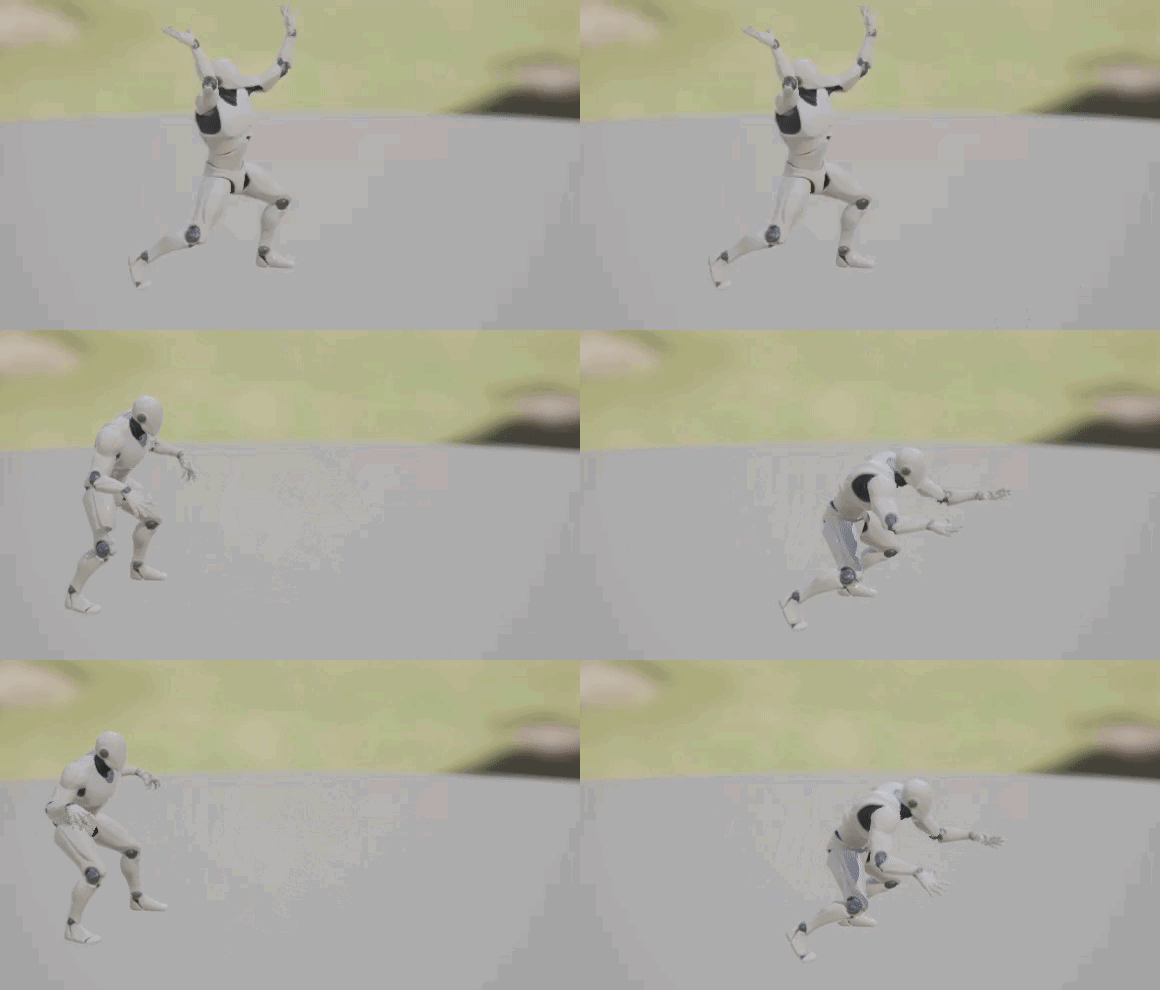
I guess I need the capsule to accompany the mesh somehow
frosty heron
by enabling root motion. The point of the root motion is to drive the capsule.
If you are still rubber banded after enabling root motion, then it's most likely that your animation asset doesn't actually translate the root but it's child (could be the pelvis for example).
narrow pulsar
yea i have root motion enabled
And using UE4 skeleton so it should work regarding the root
since it was made with that exact skeleton

Watch Rubberband by Steeljardas and millions of other Unreal Engine videos on Medal. #unrealengine
 white parrot
Force root lock
random vine
Hey guys I made this Timer macro, and I think it will help you too

No description provided
 last peak
random vine
Hey guys I made this [Timer](https://blueprintue.com/blueprint/g4l1tsxm/) macro,...
last peak
random vine
Hey guys I made this [Timer](https://blueprintue.com/blueprint/g4l1tsxm/) macro,...
What does it do better than the timer thats already in the engine ?
random vine
last peak
What does it do better than the timer thats already in the engine ?
Delta seconds, remaining time, Update, Stop
which are very useful for UI
dark drum
random vine
Delta seconds, remaining time, Update, Stop
which are very useful for UI
In what way? What problem does it solve?
last peak
random vine
Delta seconds, remaining time, Update, Stop
which are very useful for UI
Ehh
Im pretty sure you can do all this stuff with a regular timer too
random vine
last peak
Im pretty sure you can do all this stuff with a regular timer too
yes, but it's more useful to have a macro, so I don't copy code all the time
random vine
dark drum
In what way? What problem does it solve?
it's a ready template, just that
narrow pulsar
white parrot
Force root lock
didnt help
dark drum
random vine
it's a ready template, just that
For solving what problem? You mentioned it was useful for UI but to do what?
last peak
narrow pulsar
didnt help
Is this a anim montage or a regular anim ?
random vine
dark drum
For solving what problem? You mentioned it was useful for UI but to do what?
I use it for my pop up message

I use update & remaining time to refresh text, complete to close the message, Stop to stop the timer when I close the message my self
delta seconds is optional
 narrow pulsar
last peak
Is this a anim montage or a regular anim ?
narrow pulsar
last peak
Is this a anim montage or a regular anim ?
the screenshot is a sequence but im using a montgae
last peak
narrow pulsar
the screenshot is a sequence but im using a montgae
is your default slot hooked up in your anim bp ?
 dark drum
random vine
I use update & remaining time to refresh text, complete to close the message, St...
dark drum
random vine
I use update & remaining time to refresh text, complete to close the message, St...
I'm not sure how useful it would be compared to just using a timer.
 dark drum
narrow pulsar
since it was made with that exact skeleton
dark drum
narrow pulsar
since it was made with that exact skeleton
If it's using the relevant skeleton with a root bone, it means its an issue with the way it was animated. The lateral movement was most likely done using the hips instead of the root bone. (which is why force root lock doesn't do anything)
random vine
dark drum
I'm not sure how useful it would be compared to just using a timer.
no update each second, I'll need another timer with it to update each second passes
also it's a single macro, just a helper, not replacing that
random vine
dark drum
I'm not sure how useful it would be compared to just using a timer.
I mean you can just do this, to develop faster
just a helper
 last peak
random vine
no update each second, I'll need another timer with it to update each second pas...
last peak
random vine
no update each second, I'll need another timer with it to update each second pas...
 narrow pulsar
last peak
is your default slot hooked up in your anim bp ?
narrow pulsar
last peak
is your default slot hooked up in your anim bp ?
i made it fullbody slot but yes
 last peak
narrow pulsar
i made it fullbody slot but yes
last peak
narrow pulsar
i made it fullbody slot but yes
Is the montage playing on that slot ?
narrow pulsar
 last peak
narrow pulsar
last peak
narrow pulsar
What happens if you click the root bone in your skeleton and let the anim play ?

Do you see this red line ?
narrow pulsar
last peak
What happens if you click the root bone in your skeleton and let the anim play ?
 last peak
narrow pulsar
last peak
narrow pulsar
The anim doesnt have root motion
ruby cobalt
Is there a way to pick a variable to update by its name?
I understand handling variables of different type would be messy.. but I can deal with that later..
also maybe having all of those varibles as part of a struct could help?

I'm remote controlling variables that are used as parameters. right now I need to manually parse everything using a switch on name
current workflow looks like this:
my goal is to reduce setup time
 faint pasture
ruby cobalt
current workflow looks like this:
my goal is to reduce setup time
faint pasture
ruby cobalt
current workflow looks like this:
my goal is to reduce setup time
You probably want a map of name to float
royal vale
junior quest
try rearranginging where you run add to viewport and add the delay until next t...
Thanks for the response , i agree with ColdSummer. , i think it would just take one tick even longer until my loading screen gets added . But I’ll try it out anyways just to see haha , i appreciate the input
ruby cobalt
faint pasture
You probably want a map of name to float
ah yeah.. so I'd have to sort the params by type...
but i need to update the values. do map does that?
my input is a osc message including address (name) and values that need to be parsed in a specific way, I get an array containing something like [value, interpolationDuration, interpolationCurve]
and I update my Actor based on that value
in my last screenshot, we see that if name is PhysStr or PhysDamping then different variables are updated.
my current system is fine but i want to simplify this for other users.. ideally i want the creation of a new parameter to require the least new nodes and stuff.. ultimately if everything is procedural, adding a new variable to the actor would expose it to my system and make it editable by name
the system is already like this for MID parameters because the node to update them takes a name input
autumn pulsar
Does the for each loop on an array get a copy or reference?
I'm basically trying to see if an item is already in my inventory, and if it is, increase the stack count, and if it's not then add it to the array
faint pasture
autumn pulsar
Does the for each loop on an array get a copy or reference?
Depends, what is the type it's looping over?
an array of what
autumn pulsar
faint pasture
Depends, what is the type it's looping over?
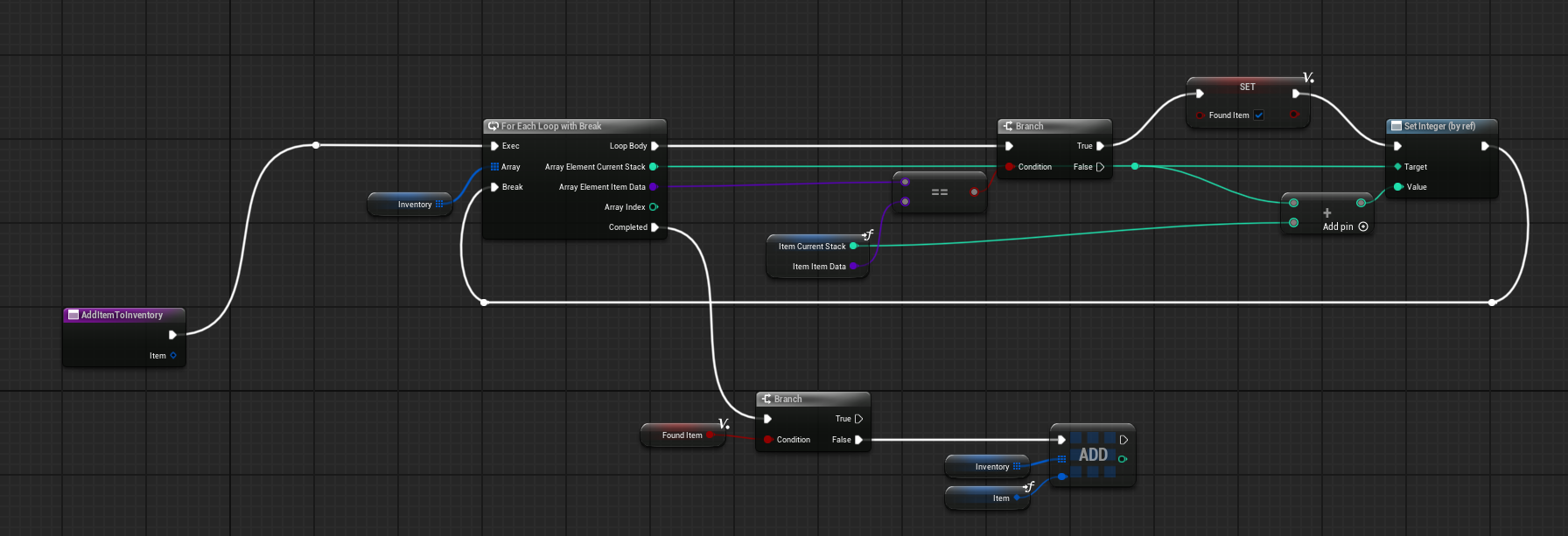


uh basically, is this loop legal
faint pasture
autumn pulsar
https://i.imgur.com/BASOiVR.png
I think that's a copy but not 100% sure now
Test it
Test with a 100% foolproof version of the function like one that adds 1 to all stacks and see if it reflects. I'm 90% sure it's a copy tho
autumn pulsar
I'll just bind to o to add an item lol
crimson briar
Wouldn't it have a diamond pin if it was by ref? In case of simple types like ints, not objects
autumn pulsar
not sure
I guess safer to just key in twice
feels inefficient to use a copy instead of a ref
umbral latch
Hi! Quickly reposting my issue from a few days ago since I’m still stuck.
I’m building a system where my character can loot “times” and circle through them in a dedicated hud.
Right now the looting & displaying system is working well, but the different times are visible in order of pick up, while I’d like to have them always circle through chronologically from earliest time to last.
Any idea how to do that?
 last peak
umbral latch
Hi! Quickly reposting my issue from a few days ago since I’m still stuck.
I’m ...
last peak
umbral latch
Hi! Quickly reposting my issue from a few days ago since I’m still stuck.
I’m ...
What
umbral latch
last peak
What
I meant that I can loot times in any order, (e.g. 12:03. 03:74), but I’d like to circle through them in my hud from lowest value (earliest time) to highest value (latest time)
last peak
What is this datatype `?

Int point`?
Guess you have to sort that manually
if you turn your time int points into floats you can sort the array with the sort array node
umbral latch
last peak
What is this datatype `?
Not sure I fully get the question but the array is fed with floats (hours and minutes) from a struct
faint pasture
last peak
Int point`?
struct by copy either way
faint pasture
umbral latch
Hi! Quickly reposting my issue from a few days ago since I’m still stuck.
I’m ...
Is the array sorted by default?\
umbral latch
Right now the array maintains the exact order in which elements are added
frosty heron
@umbral latch then in your hud, you just have to sort them before displaying.
if you don't know how to sort an array, look up bubble sort.
Also I would just use the time struct that comes with the engine. They probably already have operator to check if one is longer than the other.
umbral latch
I’ll check that thanks!
frosty heron
🤔 drag and drop operation creates the widget infront of my mouse. Anyway I can get my mouse infront? Z-order only seems to work if the widget share the same base.
paper smelt
modest meteor
Could make it so that each time a chunk is removed it minuses 1 from a "health" ...
I thought of that but as its for VR id rather it actually think about its integrity relative to the empty space but ig ill js have to do this for now thanks for responding 🙂
ruby cobalt
what's the remap, rerange, lerp node in BP again?
i can't forgeting its name lol
same as lerp in material
frosty heron
@ruby cobalt what are you trying too do?
lerp is lerp
map range clamped just take 2 range values and clamp them.
How can we do a switch on gameplay tag?
nvm there's a window we can edit to fill in the tags.
errant snow
frosty heron
________
How can we do a switch on gameplay tag?
Just be careful, it only does exact matches. Not hierarchical (which people generally expect).
I wrote one that does work that way that you can steal from my utilities plugin if you want.
frosty heron
thx 🙂
pine carbon
Is there a way to remap a player's enhanced input actions from outside their own blueprint? It seems like it should be so simple but I cannot figure out how.
By remap, I specifically mean change the assignment of the "EnhancedInputAction <Action Name>" event.
 peak cliff
Hi, everytime I do this at runtime my game ends up crashing , "Mesh" is a static mesh object and by default has the pawn channel set to block
 frosty heron
peak cliff
Hi, everytime I do this at runtime my game ends up crashing , "Mesh" is a static...
frosty heron
peak cliff
Hi, everytime I do this at runtime my game ends up crashing , "Mesh" is a static...
this alone shouldn't crash your game 0o.
are you sure that's the cause?
peak cliff
frosty heron
this alone shouldn't crash your game 0o.
Seems to be just this, changing the channel doesnt fix the issue either
frosty heron
peak cliff
Seems to be just this, changing the channel doesnt fix the issue either
I don't know what the issue is, but my guts tells me that changing collision response alone shouldn't crash your game.
unless maybe you are stuck in some kind of infinite loop.
peak cliff
Ill try a different mesh, maybe this would narrow it down
peak cliff
frosty heron
by crash do you mean the application shutsdown?
Yup
This is also a mesh on a chaos vehicle if that narrows things down
frosty heron
I see, well I never touch chaos vehicle / physich, so no clue.
#chaos-physics may have some ideas if no one answer you here.
peak cliff
frosty heron
<#966517078834151484> may have some ideas if no one answer you here.
Thank you! Will check there
maiden wadi
peak cliff
Hi, everytime I do this at runtime my game ends up crashing , "Mesh" is a static...
Also with crashes, it can help if you have the crash report, or an associated .log file. Helps narrow down the issue considerably.
peak cliff
maiden wadi
Also with crashes, it can help if you have the crash report, or an associated .l...
Thank you! Got this solved in #chaos-physics :)
mental bobcat
Hi. I wanted to make somthing like a flowchart from detroit become human that has depth enabled. is there a way to make this in unreal? Thank you.
dark drum
mental bobcat
Hi. I wanted to make somthing like a flowchart from detroit become human that ha...
Can you provide more information for those that haven't played 'detroit become human'?
crimson briar
mental bobcat
Hi. I wanted to make somthing like a flowchart from detroit become human that ha...
Yes. That is all we can say to this question.
mental bobcat
dark drum
Can you provide more information for those that haven't played 'detroit become h...
Its difficult to see but This is the depth I was talking about, it has depth within the ui. IS this possible to achive in unreal?
frosty heron
Unreal is written in cpp, you can do anything as long you can program.
Is it possible? Yes
But you may have to roll out your own implementation.
dark drum
mental bobcat
Its difficult to see but This is the depth I was talking about, it has depth wit...
As already been mentioned yes its doable. From the video it doesn't look like UI in the conventional sense but a 3d mesh that UI is being displayed on.
Off the top of my head, id say a mix of meshes and widget components (set to screen space) that are attached to specific points would do the trick. Then you can either rotate the camera or the root of the visual stack.
mental bobcat
dark drum
As already been mentioned yes its doable. From the video it doesn't look like UI...
Thank you for the reply. how would I achieve this in blueprints? or is cpp the only way?
frosty heron
Last time i see something like that was in UDK scaleform. Pretty sure abbandoned technology.
frosty heron
mental bobcat
Thank you for the reply. how would I achieve this in blueprints? or is cpp the o...
No way in blueprint.
Pretty sure theres a term for what you showing as well.
Something paralax
crimson briar
frosty heron
No way in blueprint.
I mean, you can create meshes by drawing vertices in blueprints, so it is possible. I wouldn't recommend it but possible!
frosty heron
I dont know if you can do much with slate from bp
Even if its possible tp draw something on the screen from bp, i wouldnt do it from bp. Imagine the slow operation and copies.
mental bobcat
crimson briar
I mean, you can create meshes by drawing vertices in blueprints, so it is possib...
Thank you for the reply. What function can I use for drawing vertices?
frosty heron
that's not really 2D
and just rotating the a widget component doesn't make it paralax.
full badge
 frosty heron
not sure if that's related
full badge
orthographic view + rotation achieves that effect
mental bobcat
full badge
mesh + widget component
Thank you for the reply. Mesh meaning static mesh component?
 edgy lark
Does anybody know why in UE5.6 when searching for blueprint variables that have been duplicated its pointing to the old variable?
Ive tried deleting the saved and intermediate folders and refreshing nodes in the blueprint but it's even happening with new variables.
Is there a way to refresh the search cache or something? Or is this just a bug in 5.6?
pine carbon
pine carbon
Is there a way to remap a player's enhanced input actions from outside their own...
Additional information: How does Unreal determine which input devices the Enhanced Input Actions are triggered by? I found I can put the event nodes wherever I want if I disable the context sensitivity when I search for them, and they don't cause errors, but they don't do anything there either.