
#blueprint
1 messages · Page 368 of 1
 ruby shard
 spark steppe
try to append your filename to GetProjectSavedDir()
 lost hemlock
spark steppe
try to append your filename to GetProjectSavedDir()
lost hemlock
spark steppe
try to append your filename to GetProjectSavedDir()
wdym?
 maiden wadi
If memory serves. You need to open your LevelBP in the maps you've already made and reparent them to your new class type, same as you set it in project settings.
lost hemlock
spark steppe
try to append your filename to GetProjectSavedDir()
you mean this?

oh you mean to tell me that I should use that on the import maybe
ok gotcha, I'll try that rn ✅

 drowsy jungle
Any can help with Retarget animations from an Animation blueprints?
Everything is working nicely with the new generated IKs but there is no new animation blueprint exported blueprint


 narrow pulsar
A question regarding multiplayer. Why does the above work on both server & client but if I changed the "SheathWeapon" from "Run on owning Client" to "Run on server" it ONLY works on server and not on client


If I change visibility only on owning client the other players should NOT be able to see it right?
Not really sure how I can fix this one unless I run 2 different events, one on owning client one on server
so I do both at same time
 ornate trail
narrow pulsar
A question regarding multiplayer. Why does the above work on both server & clien...
ornate trail
narrow pulsar
A question regarding multiplayer. Why does the above work on both server & clien...
"Run on owning Client" to "Run on server" it ONLY works on server and not on client" Because you just told it to? you can''t expect things like materials and visibility to automatically replicate plus that wouldn't make much sense. Things like this need to happen on all proxies
 errant mason
i want to add an impulse to a spawned object and i want the impulses direction to always be from my camera forward direction like im throwing something, how do i implement the camera forward direction?
narrow pulsar
How would I run it on both, I don't think multicast is the answer is it?
Isn't that gonna affect everyone else too
ornate trail
no not multicast, in cpp you would use "replicate using" meaning when a var changes it triggers something to happen on a proxy. not sure what the bp equivalent is tho
ornate trail
errant mason
i want to add an impulse to a spawned object and i want the impulses direction t...
camera->Get forward vector X velocity (float)
errant mason
ornate trail
camera->Get forward vector X velocity (float)
i don't really understand what you're saying, but here's what im trying to do. every time i drop the item it just drops to the floor with no impulse at all (even though the spawned actor has projectile movement speed and the impulse in the screen shot)

 woeful mesa
Would anyone perhaps know how to make a "Turn based" locomotion?
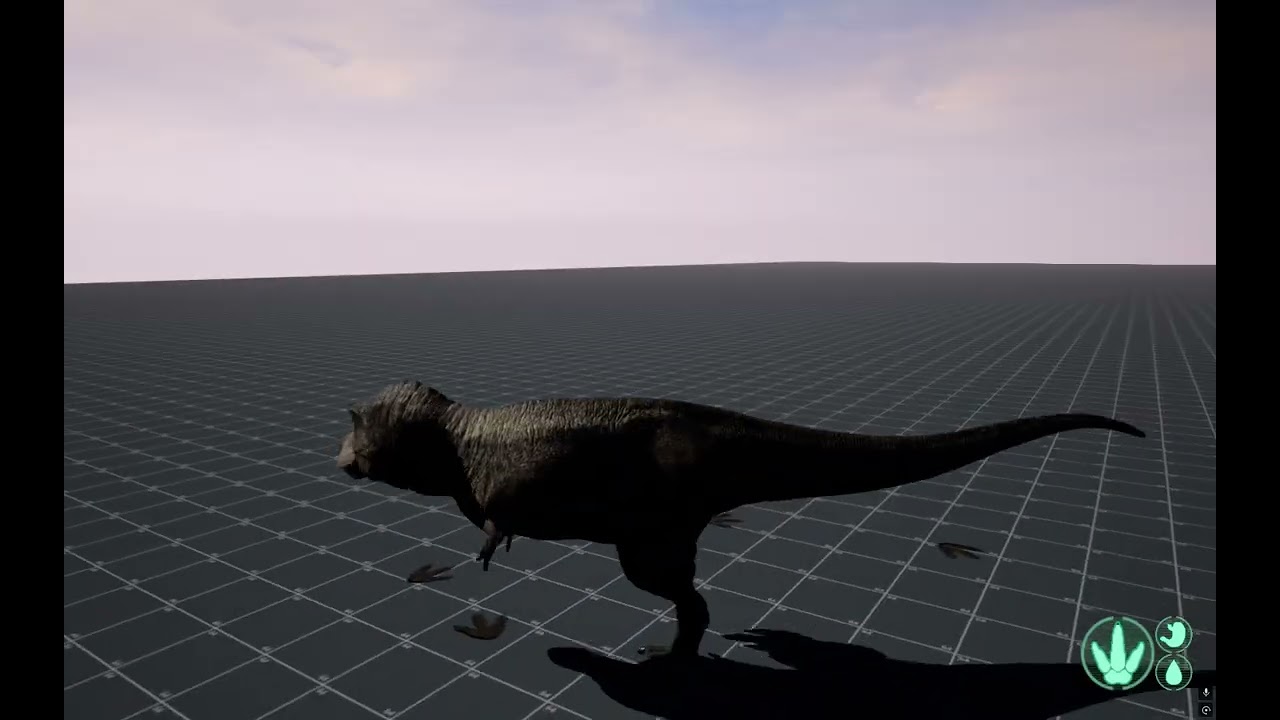
https://youtu.be/PHXinBn1pyA 0:32. You can see here in the video the player must turn in a circle before they walk another direction. It's my first time coding movement, and theres no information about this online.
 next hollow
There’s some like “rotation follows velocity” “rotation follows acceleration”
It makes the player actually rotate.
Rather then the default of snapping to the view of the camera.
 faint pasture
errant mason
i don't really understand what you're saying, but here's what im trying to do. e...
faint pasture
errant mason
i don't really understand what you're saying, but here's what im trying to do. e...
Look at what's feeding the impulse
Impulse = SpawnLocation.Velocity
that makes zero sense, the spawn location's velocity is probably zero
next hollow
woeful mesa
Would anyone perhaps know how to make a "Turn based" locomotion?
https://youtu.b...
Yeah, you want this setup.
Disable controller rotation, and enable orient to movement.
 errant mason
faint pasture
Look at what's feeding the impulse
errant mason
faint pasture
Look at what's feeding the impulse
ye i thought thats what the guy was trying to say to implement. i fixed it. i just removed the impulse and on the spawned actor i enabled simulate physics so the prjectile movement component worked
 crimson briar
narrow pulsar
Not really sure how I can fix this one unless I run 2 different events, one on o...
crimson briar
narrow pulsar
Not really sure how I can fix this one unless I run 2 different events, one on o...
I think it is often how you do rpcs depending on what exactly is the behavior you want.
Calling a server RPC to execute something and then client rpc to make changes based on that execution isn't anything out of the ordinary.
Another approach would be to use a repnotify bool or something and inside the rep function check if the character is locally owned to make changes - but if this information is never used by other clients, it is a slight waste to send the variable for no reason. So a owning client only is a good choice here
 surreal peak
narrow pulsar
A question regarding multiplayer. Why does the above work on both server & clien...
surreal peak
narrow pulsar
A question regarding multiplayer. Why does the above work on both server & clien...
Setting SheathWeapon to RunOnServer mean that it's a ServerRPC at that point. And since you are already on the Server (cause SheathWeapons is also a ServerRPC), it's basically a normal event.
While when it is set to RunOnOwningClient, it will execute on the Client again.
To execute something on "everyone", you'd need to use a Multicast. If you want to limit it to Server + OwningClient, you'd need to manually check if HasAuthority OR IsLocallyControlled.
However, using a Multicast only makes sense if you aren't modifying "State". If what you are modifying is "State" and Clients/Server should react to that, then you are supposed to use a RepNotify variable instead.
The note about the "limit to Server + OwningClient" remains.
Also there is #multiplayer .
 honest bough
lost hemlock
honest bough
lost hemlock
Why not using that one?
 woeful mesa
Would there be any way I could make it so that:
When it is "Evening" in Sky blueprint, aurora blueprint spawns in the sky. Then when its "dawn" in sky blueprint, aurora blueprint despawns?


 shut blaze
woeful mesa
Would there be any way I could make it so that:
When it is "Evening" in Sky blue...
shut blaze
woeful mesa
Would there be any way I could make it so that:
When it is "Evening" in Sky blue...
Use the "Create Actor" node when it's evening, store that variable
Then when it's dawn, "Destroy Actor"
Also, why don't you use Enums to know when it's morning, day etc.? (instead of making a booleon for every state)
woeful mesa
shut blaze
Use the "Create Actor" node when it's evening, store that variable
Then when it'...
idk i dont have much experience generally with unreal engine. how exactly do i store the variable?
 woeful mesa
thank you


 rocky cape
Hello guys
shut blaze
Hi
rocky cape
Can you help me with something
How do I make this a progress bar for my widget? I tried many times in fill image and it doesnt fill the bar

?
So...?
Need time? Alr
maiden wadi
rocky cape
Need time? Alr
You realized you just asked the question two minutes ago and people have to try to make out your literal "screenshot" that isn't readable? Are you used to using AI or something and getting immediate responses so much that it's made you impatient?
shut blaze
Idk how ur doing it, I just do this:
- Create a widget
- Add a progress bar
- on the right panel use the backround image for the depleted bar and the fill image for the full bar
- Then tell it from 0-1
 shut blaze
maiden wadi
You realized you just asked the question two minutes ago and people have to try ...
shut blaze
maiden wadi
You realized you just asked the question two minutes ago and people have to try ...
No problem
Advice: Hey Kroly, use Win+Shift+S on your keyboard to screenshot and also crop your image 🥹
maiden wadi
He doesn't have discord on his laptop.
shut blaze
ah
maiden wadi
Also that material is not UI domain or set up for UI use using UI UVs
rocky cape
How do I do do that? I should set up my bar material into background and also fill image?
shut blaze
Idk how to do that with a material, I just use the progress bar + fill and empty images
rocky cape
maiden wadi
Also that material is not UI domain or set up for UI use using UI UVs
How? Idk how to do that, set up for UI using UI UVs
maiden wadi
Is this a school assignment? If so is that material from the course? Because I'm confused why it's a world space material? Only thing that comes to mind is that someone's doing world space UI.
To use a single material you'd need to place the material in an Image widget as a MaterialInstanceDynamic and adjust a scalar paraemter that drives the masking percentage.
To use it like C37 pointed out with the ProgressBar widget, you need two separate materials. One for the background and one for the green fill area.
For the UI UVs, there's a... Forget the name.
UserInterfaceUVs or somethign node. And the material needs set the UI material domain instead of Surface.
rocky cape
Ok but im not that experienced in ue5, pls tell me step by step guys, my head is gonna get crushed
shut blaze
Well idk what it's for, if it's just a simple fill and empty progress bar, all you need is a widget with a progress bar and 2 images ¯_(ツ)_/¯
I'm assuming it's simple so
I will send pics step by step
rocky cape
Thx bro I appreciate
shut blaze


 shut blaze
rocky cape
Thx bro I appreciate
shut blaze
rocky cape
Thx bro I appreciate
done, hope this works
did not have bar icons so I used some assets left over in my game
 jaunty solstice
Persistent Light Blueprint Actor issue that is driving me bananas!
I've defined a Public Float variable 'Intensity' making sure I click the eye icon to make it public,
But whenever I drag a new instance of this Light Actor Blueprint to my level and then attempt to change the exposed 'Intensity' value in Details panel I am unable to.
What am I missing?
I've also made sure 'Instance Editable' is enabled for this property in the Blueprint!
 tidal ridge
hey did anybody got my message?
rocky cape
I must fill my background image? If no can i simply use a color?
shut blaze
yes, just use a color
shut blaze
rocky cape
I must fill my background image? If no can i simply use a color?
play around with the settings dude ✌️
rocky cape
Bro u see the problem:
 rocky cape
Bro it has not that border i made in my material
shut blaze
do you really need a material?
rocky cape
Yeees?
shut blaze
foooor?
rocky cape
Bro i want to learn how to do that, to level up my skills
woeful mesa
shut blaze
Right click the blue pin then click promote to variable
I see. So with the new variable, I can go into the aurora blueprint and call it from there, then any variable from this sky blueprint?
 shut blaze
ah I see, I'm not a material expert :/ I'm sorry
you could try resizing

make it fit your material pixels
shut blaze
woeful mesa
I see. So with the new variable, I can go into the aurora blueprint and call it ...
yes
rocky cape
A ok sorry for annoying u, thx for helping anyway
shut blaze
rocky cape
A ok sorry for annoying u, thx for helping anyway
no worries, I'm literally a game dev for 2 years and didn't finish any games
it's good to ask for help
woeful mesa
shut blaze
yes
I see. But will the aurora blueprint only be activated/used when the "spawn actor" node is called in sky blueprint (until it is destroyed)?
rocky cape
shut blaze
no worries, I'm literally a game dev for 2 years and didn't finish any games
it'...
🙂
shut blaze
woeful mesa
I see. But will the aurora blueprint only be activated/used when the "spawn acto...
So, when you create an actor
You create an instance of it in your level, the begin play in that blueprint will fire
And if you store a variable to that blueprint even if you delete the instance, that actor will still be in memory until you erase the refference
woeful mesa
shut blaze
So, when you create an actor
**You create an instance of it in your level, the b...
So when the game begins, all blueprints are activated
from the begin play
shut blaze
When the game begins
If you have code in "Begin Play" it will fire for everyone
When an actor is created anytime "Begin Play" will fire for it
woeful mesa
Ok so.
Normally, when the game begins all blueprints are fired from "Event Begin play" node.
UNLESS, if the actor is created at some other point in another blueprint, then the "event begin play node" for that actor only starts when it is called from the other blueprint.
Am I correct?
shut blaze
uhhh don't really understand
When an actor spawns begin play just fires
begin play is called by no one, it's called by the game when an actor spawns
shut blaze
- yes it plays when the game starts
- yes it plays when an actor spawns even after the game started 3 hours ago
woeful mesa
and the "Spawn actor" node places it into the level, which calls the other blueprint which is being spawned.
shut blaze
Spawn Actor: Hello I just spawn the thing
The Thing: Hey I am born, I will begin play
woeful mesa
then "Destroy actor" makes it so that blueprint/actor isnt placed in the level. HOWEVER it is still being run
woeful mesa
shut blaze
Spawn Actor: Hello I just spawn the thing
The Thing: Hey I am born, I will begin...
ok i understand now
shut blaze
Destroy Actor: I am dead, nothing remains of me, nothing runs anymore.
woeful mesa
ah
lol the fact that u had to explain it in children terms really shows how complicated some things can be XD
shut blaze
😂
woeful mesa
One last thing, this new variable "Spawn Aurora" that I created in the sky blueprint. Should I rename it "Sky" because it contains all variables in the sky blueprint?
 shut blaze
You name it whatever you need it too
What is aurora, is it the sky or like a ship?
just name it "AuroraShip"
Important mention:
When you delete an actor and you store a refference to it, it can give you a ton of error if other blueprints try to access it
What you can do:
- Set it to none when deleted
- When you need something from it Use the Grey Is Valid? node
woeful mesa
I have 2 blueprints.
BP_Sky (which contains most things and is called from the very start)
BP_Aurora (which is only going to run when boolean evening in BP_sky is true)
The code where the variable is stored is in BP_Sky. This is also where it spawns BP_Aurora. Whatever function inside of BP_Aurora will be run when it spawns. Do I name the variable "Sky" (because it contains all variables inside BP_Sky) OR "Spawn_Aurora" (because it will be used inside BP_Aurora to get the variables from BP_Sky.)?
 shut blaze
Man, whatever works best for you
Example: Aurora REF; Aurora etc
also
we seriously have to talk about those booleons
woeful mesa
Ok ok. Theoretically I could use the variable in other blueprints right? (such as BP_Fog, which makes fog orange or smth at some time)
woeful mesa
shut blaze
we seriously have to talk about those booleons
What about them?


 shut blaze
woeful mesa
What about them?
shut blaze
woeful mesa
What about them?
you can just do this
- It's more performant
- You don't have to check for every part of the day
- It is smaller and doesn't clog up space as much
- Also easier to read
woeful mesa
I see. So when it's day on enum, it runs the code from this arrow and nothing else
 shut blaze
YES
woeful mesa
ahhh
shut blaze
PERFECT
woeful mesa
thats very good information to know
thanks alot
theres so many different methods
and features
woeful mesa
yeah, i guess its about asking a LOT of people instead of just watching tutorials (they all do the same thing lol)
shut blaze
alr good luck on your project 👋
woeful mesa
Thank you again, Bye
shut blaze
Idk if this works, might be because of the get right and forward vector, in my game I just use the same setup (in my image) with keyboard and works fine


I think it's coz you're not using all 3 axis and it gets buggy
Difference between Get Actor Rotation and Get Controller Rotation?
Get actor rotation is rotation of the actor in the world XYZ
Controller rotation, idk what you mean. if you mean physical controller then X from -1 to 1 & Y from -1 to 1. If you mean the player controller, idk why you'd want it's rotation it's primarily for the player controlling a pawn ¯_(ツ)_/¯
 void jewel
anyone had issues with variable references to widgets randomly breaking/disappearing? i have to re-set them every other time i use the engine
 dark drum
void jewel
anyone had issues with variable references to widgets randomly breaking/disappea...
dark drum
void jewel
anyone had issues with variable references to widgets randomly breaking/disappea...
I can't say I have. How are you setting the refs?
void jewel
dark drum
I can't say I have. How are you setting the refs?

look at the right side. This will randomly reset every now and then. Even when I've not done changes to the widget being referenced. i can't see any pattern to it
dark drum
void jewel
look at the right side. This will randomly reset every now and then. Even when I...
What is class is the variable/property in?
void jewel
dark drum
What is class is the variable/property in?
User Widget. The one needed to reference a widget object
this seems to be similar issue: https://forums.unrealengine.com/t/value-disappears-from-variables-after-random-amounts-of-time-pass/436385
dark drum
void jewel
User Widget. The one needed to reference a widget object
How do you set the ref?
Generally, you wouldn't be able to set a reference to to another widget unless it's placed in the designer view.
void jewel
dark drum
How do you set the ref?
What do you mean? It's the default value that is cleared
The blueprint uses the default value in most cases, a few other sibling actors might set it explicitly
it basically tells the player what widget is to be used for tooltips, which as a ton of parameters that are changed through an interface
dark drum
void jewel
What do you mean? It's the default value that is cleared
What's in the drop down for the default value when you try to set it?
void jewel
dark drum
What's in the drop down for the default value when you try to set it?
like this you mean?

 void jewel
yeah that's the same as in the screen above
 last peak
You could re set it to something else but only if the type is user widget
dark drum
void jewel
like this you mean?
I think you should be using a class ref instead of an object ref.
It'll be referencing the CDO or most likely an instance that gets created for viewing in the editor.
Unless you're using a var that has the 'instance' property flag (which you can only do in c++) it won't be creating an instance.
Use the class ref and then when you need a widget of that type, you create one (at runtime) using the class ref.
last peak
void jewel
where do you set it tho ?
just doing this is not enough
On runtime you will have to create a widget and then you have to set this variable to the instance you created
 void jewel
last peak
where do you set it tho ?
void jewel
last peak
where do you set it tho ?
There's another initialize custom event, but why would this be relevant? Should a variable not keep a default value regardless of what happens later?
void jewel
last peak
just doing this is not enough
On runtime you will have to create a widget and t...
yeah, that's what i suspected (that i'll have to create it using the class). I later use this to check if it's in viewport etc, but should be doable. i can try this
last peak
void jewel
There's another initialize custom event, but why would this be relevant? Should ...
A variable consits of 2 parts
Part 1 is the type thats what youve set but you also need to fill it with something

The good old reliable XD
 pale remnant
Does anyone have an idea why the shaders are compiling every time I open the project?
tidal ridge
shut blaze
I think it's coz you're not using all 3 axis and it gets buggy
Difference betwee...
Well i was Using Character Class, I know you have to use (Get Controller Rotation) For Movement input, like Forward, backwards, Right and left. but i was curious If (Get Actor Rotation) would work in Character Class BP since it is also a Actor i thought it might work the same.
shut blaze
tidal ridge
Well i was Using Character Class, I know you have to use (Get Controller Rotatio...
A character is just a pawn with more code in it
A pawn is just an actor with more code in it
It has to work 😅
maiden wadi
Just be aware that a pawn's Controller's ControlRotation is not the sameas the Pawn's actor rotation. ControllerRotation is the idea of the direction the controller is looking at. Not necessarily the Pawn as well.
Even in an FPS, the ControlRotation doesn't match the PawnRotation. Yaw will match, but pitch for example will not. A pawn doesn't normally pitch but it's control rotation look direction does.
Similarly with like a third person RPG camera style where you can look around while the pawn doesn't rotate at all until you move. ControlRotation here is usually where the camera is looking, not where the pawn is facing.
last peak
Get forward vector should always work
tidal ridge
so Actor Rotation is only for spinning Objects and not Character movement Correct? Because i thought Character Class BP was part Of the actor Hierachy/organization, and when i Put (Get Actor Rotation) in Character BP class Movement Input, Like I put the Actor rotation in Forward and right vector, the only thing was it only made my character spin while trying to go Right?
 hollow river
hey yall i’m a beginner whenever it comes to unreal i have a group project where im in charge of game mechanics for our 2.5D fighting game what would be the requirements of trying to get my two players to move left and right because i have everything else right im assuming but my two players aren’t moving.
shut blaze
tidal ridge
so Actor Rotation is only for spinning Objects and not Character movement Correc...
Alr I'm a little overwhelmed by the amount of text but I'll try to explain.
Rotation ≠ Location
It's not for movement
But the get forward vector, imagine an arrow pointing in the direction the actor is facing.
Add movement input: IN THE DIRECTION YOU WANT IT TO GO, so the forward vector for going front and back
The green pin is just a float from -1.0 to 1.0 which is the speed
Actor rotation, is the Rotation of the Instance in the world
The actor can have multiple stuff inside of it, like the mesh and camera which can have their own WORLD and RELATIVE Rotation
tidal ridge
yeah i can see it know because Vector is the Direction of the character its Facing. so yeah thanks
shut blaze
Ur welcome🙃
 worn kernel
Can anyone tell me why my game keeps crashing when I try to compile.
shut blaze
worn kernel
Can anyone tell me why my game keeps crashing when I try to compile.
||I asked chat gpt:
Unreal Engine Crash Diagnosis Summary
Cause of the Crash: The project is crashing due to a corrupted
Blueprint. The log shows: âPin named âexecuteâ was serialized while
trashed â requesting pin named âthenâ owned by node K2Node_Event_3â
This indicates that an event node inside BP_ThirdPersonCharacter has a
broken or deleted execution pin, causing Unreal Engine to fail when
compiling or validating the asset.
Affected Asset: BP_ThirdPersonCharacter located at:
Content/ThirdPerson/Blueprints/BP_ThirdPersonCharacter.uasset
Why This Happens: - The editor crashed while the Blueprint was being
edited or saved - A node was deleted incorrectly - Hot reload or Live
Coding changed underlying logic - An engine update or plugin update
altered node structure - The asset became corrupted during migration
Fix Options:
-
Restore from Autosave Go to:
Project/Saved/Autosaves/Game/ThirdPerson/Blueprints/ Find the
autosave for BP_ThirdPersonCharacter and restore it into:
Project/Content/ThirdPerson/Blueprints/ -
Repair the Blueprint
- Launch UE with Shift held to avoid auto-loading
- Open BP_ThirdPersonCharacter
- Use: ⢠Right-click â Refresh All Nodes ⢠File â Reparent Blueprint
(choose same parent) ⢠Compile - Delete and recreate the faulty Event node if errors appear
- If the Blueprint Does Not Open
- Try Validate Assets
- Right-click â Delete Unused Variables
- Right-click â Rebuild Blueprint
- Launch editor with: UEEditor.exe -ForceLoadBP
- If All Else Fails
- Restore from backup / version control
- Replace with a working copy from another project
- Recreate the Blueprint manually
Summary: The crash is caused by a corrupted event pin in
BP_ThirdPersonCharacter. Repairing or restoring this BP will resolve the
compile crash.||
Does this solve?
I will delete if not
worn kernel
IT DID thank you
shut blaze
Haha this one's on Gpt 😅
 severe turret
shut blaze
Haha this one's on Gpt 😅
severe turret
shut blaze
Haha this one's on Gpt 😅
technically it's on the collaborative effort of all developers. GPT doesn't do Unreal. So thank yourself also 🙂
 pale basalt
im spawning a tornado where other players can fall in it,but the print string always return "BP_Character_C_1",even if other players spawn the tornado

the tornado event is a overlap
last peak
pale basalt
im spawning a tornado where other players can fall in it,but the print string al...
How can anyone know if you only show half your code
pale basalt
last peak
How can anyone know if you only show half your code
sorry,i'll try to explain it better,here's the tornado actor,where if "Colisão" component gets overlap it will fire a event to the player character BP,and in the character BP,what im trying to do is set the Captured player in the tornado location,but it returns only "BP_Character_C_1,but it does not return BP_Character_C_0 which is another player,in the first printscreen i've tried filter only the actor who is not the controlled pawn
 last peak
pale basalt
sorry,i'll try to explain it better,here's the tornado actor,where if "Colisão" ...
last peak
pale basalt
sorry,i'll try to explain it better,here's the tornado actor,where if "Colisão" ...
are you even sure that you are controlling the second character ?
sometimes the level overwrites the default char that you set
add a prin string in every character on begin play and see if it fres
pale basalt
last peak
are you even sure that you are controlling the second character ?
im playing with "play as Client" and 2 players
pale basalt
last peak
add a prin string in every character on begin play and see if it fres
theres only 1 character,and 2 players in the map using an instace of this character
last peak
ok but then its impssoible
If you have Bp_character_0 and Bp_character_1 spawned in the world other actor would get shown if it overlaps

very odd maybe someone else has a idea
pale basalt
last peak
very odd maybe someone else has a idea
it's very weird,the tornado that is spawned in player 1 gets the mensage that is player 2,and the player 2 also gets the same mensage
 trim matrix
hi. if i have a function in my players begin play to reset puzzles (actor bp’s) based on a bool in the game instance, and the puzzles are tracked w a map variable in my save game bp w a name key for each puzzle how can i reset the puzzles properly? like rn i have a function that resets them and it works, but i can only get the function to work when i dont change levels and i call it on overlaping w another actor and casting to my player, but if i do change levels and call it based on the instance bool being true on begin play, then the puzzle still acts like its solved on game loading even tho i set the bool in the instance and if i set its solved bool value of the map to false. been trying to look into more ab map variables online but i cant figure much more out for my usecase ig. i been trying to figure out a easier way to save the puzzle states aswell but im completely lost. the only reason i need this is bc if the player loses a minigame (which is a seperate level), they get their last 5 completed puzzles reset, but the puzzles arent resetting properly unless i dont change levels, just trying to get this bug sorted its the last part of my games core logic i need to finish, any ideas on a better way to save and load/reset puzzles like that or a way to fix how im doing it w the map variable would b greatly appreciated i been at this all day today and yesterday😭😭
lost hemlock
today we will work on game snapshots for our game saves....this will create a million game screenshot photos on your hard drive probably but we're gonna keep those files small... so my question for #blueprint today is, is there a way to limit how many serialized images get created on your disk drive? this is how I create them...

it creates all these files to my project directory...

although I can probably put them in a folder with string append nodes blah blah blah.. but still look at that... 35KB each... everytime you press your save button you're creating a snapshot & you save that to your slot.... Although I should probably scrap the idea altogether...
 glossy cloak
lost hemlock
although I can probably put them in a folder with string append nodes blah blah ...
glossy cloak
lost hemlock
although I can probably put them in a folder with string append nodes blah blah ...
Is it a snapshot of your game progress? Essentially an iterative save? Or.....
glossy cloak
trim matrix
hi. if i have a function in my players begin play to reset puzzles (actor bp’s) ...
I feel like I keep hearing conflicting info about this, but iirc, you can't serialize a map, meaning it can't be saved. But take that with a grain of salt because it sounds like you're not having an issue with the puzzles state being saved, but rather being reset after.
In which case, it should be rather simple. You'd just loop through your map keys for the levels you want to reset and set each of their bools back to false. Then you'd want to save the game. Otherwise when you change levels (I assume) your game would simply reload the previous state, which had them all complete.
I assume I'm missing something though. Or this simply isn't working.
Personally I wouldn't use a map for this. I'd probably have an array of structs with puzzle IDs (or data assets if you want to get fancy) and any data you need saved for each puzzle. Or you could do the same thing with a map if that seems to be working. Using a struct would let you add all the data you wanted for each puzzle, like a star rating, score, or best time, etc. And this gives you the possibility to save puzzle progress for players to come back to after a break or a crash without losing any progress. Guess it depends on the complexity and length of the puzzles though.
last peak
glossy cloak
I feel like I keep hearing conflicting info about this, but iirc, you can't seri...
You cant save the Map as it is, what you can do is get all elements of the map like actors and then save everything you need like transforms ..... but i think i saw a plugin floating around that does this for you
crimson briar
trim matrix
hi. if i have a function in my players begin play to reset puzzles (actor bp’s) ...
I'm not sure what exact system you have right now. But in general you would assign unique IDs to each instance of the puzzle. Since you want it cross-level, you would need to use a single structure for every puzzle. Keep the save file in the game instance so it is not refreshed when you change levels.
Then the player or the puzzle blueprints pull their data from the game instance on their begin play. The puzzle checks if it's id is inside the save file, for example in an array containing IDs of fixed puzzles or smth like that.
Resetting the five last puzzles could be easly done by keeping another array (not map) in the save file with the last 5 puzzles that were finished.
dark drum
lost hemlock
today we will work on game snapshots for our game saves....this will create a mi...
1 million images is a but ton. Even at 19KB each (the smallest one you showed), that's still over 18GB of data. I would probally look at going down a different route.
However, to answer your question, take a look at the Blueprint File Utils BPLibrary. (Its a plugin you might need to enable) It has a lot of functions that might help.
 hallow tundra
say i wanted to get the relative location of object Bank in my BP. how would I get it? I move the object in viewport and the relative transform node only gives the correct value when you move it inside the blueprint. I tried "Make relative Transform" node but this one gives me 0,0,0

 dark drum
hallow tundra
dark drum
hallow tundra
You need to swap the transforms around. The Get Actor Transform should be connected to the 'Relative To' pin.
Also, there's a 'Get Relative Location' to get the relative location of a component.
lost hemlock
dark drum
1 million images is a but ton. Even at 19KB each (the smallest one you showed), ...
this is the only path tho for serializing render targets, otherwise render target only remains just an instance....
so I have render target parameter inside of a material dynamic instance... and you can't be saving these...
lost hemlock
dark drum
1 million images is a but ton. Even at 19KB each (the smallest one you showed), ...
ok 1 million images was an exaggeration
hallow tundra
dark drum
You need to swap the transforms around. The Get Actor Transform should be connec...
sadly get relative location gives me 0,0,0. when I swap the transforms around it also gives me 0,0,0


they both only work when I move the object in blueprint, is there no way to get it while moving it in viewport?
dark drum
hallow tundra
sadly get relative location gives me 0,0,0. when I swap the transforms around it...
Does it still print 0,0,0 when printing at runtime?
dark drum
lost hemlock
this is the only path tho for serializing render targets, otherwise render targe...
Why are you needing to save them? what are they used for?
hallow tundra
dark drum
Does it still print 0,0,0 when printing at runtime?
i see, it does give the right transform in runtime
hallow tundra
dark drum
Why are you needing to save them? what are they used for?
theyre used for placing pcg cloner on the given location, i was thinking on getting the offset and doing it tht way
lost hemlock
dark drum
Why are you needing to save them? what are they used for?
snapshots of the game from the player perspective to use in the memory image..
dark drum
hallow tundra
i see, it does give the right transform in runtime
Yea it looks like it suffers from the issue with the construction script only grabbing the class default value. (Its a complex issue)
Are you placing the PCG cloner at runtime or are you wanting it at editor time?
hallow tundra
dark drum
Yea it looks like it suffers from the issue with the construction script only gr...
its needed in editor time so im guessing i need to find another way
dark drum
hallow tundra
its needed in editor time so im guessing i need to find another way
If i remember correctly, if you use a 'call in editor' function, it should pull the correct value.
dark drum
lost hemlock
snapshots of the game from the player perspective to use in the memory image..
I would keep an array of the file names they get saved as. This array can be saved in a normal Save Game Object. Then you can cap it at 100 entries and either delete or override older ones.
hallow tundra
dark drum
If i remember correctly, if you use a 'call in editor' function, it should pull ...
ye this works, thanks
 deft solar
mah weapon blueprint is missing in the fps template and doknt know how to get it into scene
i am a noob so pls help
🙏
trim matrix
glossy cloak
Personally I wouldn't use a map for this. I'd probably have an array of structs ...
i was using a struct but couldnt get it to save and load tbe maps were saving and loading but then when id set them to false again it didnt stick and acted like it was solved still, how would i use a struct instead? the puzzles arent complicated they just have a solved bool and an interact interface so the player can set solved to true on interacting
dark drum
trim matrix
i was using a struct but couldnt get it to save and load tbe maps were saving an...
Maps (the property type) save perfectly fine in Save Game Objects. How are you saving and loading the data?
trim matrix
when the player interacts w a puzzle, it sets the bool in the puzzle bp to solved, then casts to instance and calls a function in the game instance “updatepuzzlestate” that takes an input of the puzzle id and the bool, inside the function just gets the save game ref i have in my instance, adds the id and bool to the map variable, then calls save game to slot. and then to load them rn the only way i had it working was the puzzles had a “get puzzle state” event and would get the state of the map variable inside the save depending on the id and then set the bool to solved or unsolved depending on what was saved,
i have a normal save function and load function in my instance that works fine w the rest of the variables i need to save and load (like player transform and stuff) but not all of them need saved when saving wether a puzzle is solved or not, so i wasnt calling them specifically
if using an array or struct is easier or better for this, i dont mind jumping to use that, i just couldnt get it working 100% using a map variable
crimson briar
Most likely it is not a problem with the map but with the way you save. SOmething somewhere gets overwritten or is not updated - either during map modification or saving itself. You should use prints and retrace the saving and loading process
trim matrix
i have been, the values arent updating properly they still print solved when they should be set to unsolved again
dark drum
trim matrix
i have a normal save function and load function in my instance that works fine w...
When you're puzzles loads, they should check for saved data and update accordingly based on the value found. As long as the data is saved, it shouldn't be an issue.
Updating the state from another level just means you update the value in the save which would get reapplied by the puzzle when it next loads.
dark drum
trim matrix
i have been, the values arent updating properly they still print solved when the...
Show how you're handling it.
<@&213101288538374145>
woeful mesa
I have 2 blueprints. BP_Sky and BP_Fog.
Is there a way I can trigger an event in BP_Fog from BP_Sky?
For example, I want it to update BP_Fog everytime function "Time Tick" gets called (e.g. I could try put a call event in "Time Tick" which calls an event from BP_Fog once, then it repeats.
I saw something called "Spawn Actor From Class", BUT I already have BP_Fog in my level and don't want to keep spawning more. I just want it to keep triggering an event in there
 dark drum
woeful mesa
I have 2 blueprints. BP_Sky and BP_Fog.
Is there a way I can trigger an event i...
dark drum
woeful mesa
I have 2 blueprints. BP_Sky and BP_Fog.
Is there a way I can trigger an event i...
I would use an event dispatcher on your BP_Sky, something like 'OnSkyUpdate' which the sky BP calls when ever it gets updated. Then BP_Fog can bind to the event dispatcher and have something happen.
trim matrix
dark drum
Show how you're handling it.


No description provided

No description provided
trim matrix
trim matrix
https://blueprintue.com/blueprint/06yd_kom/
this is what is called on players begin play if the instance bool has been set to true
but it seems to only work properly when using an event overlap without changing the level
n im aware its messy, ive been trying to get this working havent had a sec to clean it up yet
dark drum
trim matrix
https://blueprintue.com/blueprint/06yd_kom/
Can you share a screenshot, blueprintUE is blocked for me. :/

 trim matrix
but it seems to only work properly when using an event overlap without changing ...
trim matrix
trim matrix
but it seems to only work properly when using an event overlap without changing ...
 trim matrix
this is what is called on players begin play if the instance bool has been set t...
trim matrix
trim matrix
this is what is called on players begin play if the instance bool has been set t...
 dark drum
trim matrix
dark drum
trim matrix
Where is this code located? On the player?
trim matrix
that one is the puzzle bp
woeful mesa
dark drum
I would use an event dispatcher on your BP_Sky, something like 'OnSkyUpdate' whi...
I did it wrong... didnt i?

 dark drum
woeful mesa
I did it wrong... didnt i?
dark drum
woeful mesa
I did it wrong... didnt i?
You were close. You need to make sure the bind event actually gets called. If you want it to update on begin play as well. just call the 'SkyFog' function after the bind event.
 woeful mesa
I've done it, however it still doesnt work.
Using breakpoints, I've figured out it doesnt call BP_Fog (it doesnt do eventbeginplay)

 dark drum
trim matrix
dark drum
trim matrix
What is it supposed to do be doing on begin play? This is just doing a cast. Also you should avoid making connections across exec paths.
dark drum
woeful mesa
I've done it, however it still doesnt work.
Using breakpoints, I've figured out ...
Do you set the sky ref to your BP_Sky ref in the level?
trim matrix
dark drum
What is it supposed to do be doing on begin play? This is just doing a cast. Als...
it gets the array from the instance which is added to each time the player picks up a puzzle reward (clip)
ik i shouldnt be using the variable that way i was just testing quick
dark drum
trim matrix
ik i shouldnt be using the variable that way i was just testing quick
And you are aware the 'Restore Recent Clips' wont get called on begin play?
woeful mesa
dark drum
Do you set the sky ref to your BP_Sky ref in the level?
Yes i think


and in bp_sky its toggling breakpoint
 dark drum
woeful mesa
Yes i think
dark drum
woeful mesa
Yes i think
It doesn't look like you have. Set your sky ref as instance editable and then in the level, select the fog BP and in the details panel, select the sky BP instance from the drop down for the sky ref.
woeful mesa
so editable like this. but it doesnt show?

 trim matrix
dark drum
Can you share a screenshot, blueprintUE is blocked for me. :/
trim matrix
dark drum
Can you share a screenshot, blueprintUE is blocked for me. :/
any ideas?
 crude dew
Hi, Can someone tell me if its bad for a task to run indefinitely in a Global Task (Im just messing about and learning and trying to understand State Trees better) 😄 This is the task it works with the OnTick added to it and the Finish Task disconnected but if i connect Finish Task it ofc completes and then doesnt seem to work again. Please. : )

Also on another note, If you have 3 tasks and 2 return Finish Task as False and one as True does this mean the State Has completed or Succeeded?
dark drum
woeful mesa
so editable like this. but it doesnt show?
The instance editable part is right, now select the BP fog in the level. The details panel should update and you'll be able to see the sky ref variable now it's instance editable.
dark drum
trim matrix
any ideas?
I'll be honest, I'm struggling to follow what's going off.
Everything seems over complicated for what it should be.
What's the role of the player character?
trim matrix
wdym
woeful mesa
dark drum
The instance editable part is right, now select the BP fog in the level. The det...
Omg it works! Thank you so much. Unreal engine is SO confusing lol.
crude dew
Hi, Is this transitional rule basically saying check the player spotted condition for true every tick and if its true then move to chase state right please? : )

 lofty rapids
trim matrix
lofty rapids
trim matrix
promote to variable and use the variable in the other event
idk if it will fix any problem
but it looks weird the way you have it
trim matrix
it wont thats not the one giving me the issue, thats the only way i have it working

still works w the overlap, but not when calling from the begin play on player depending on the bool in the instance
lofty rapids
try to save the instance
and then pull the variable after
instead of saving the variable like that
trim matrix
wdym
dark drum
trim matrix
still works w the overlap, but not when calling from the begin play on player de...
It probably doesn't work on begin play because the player character doesn't exist yet.
trim matrix

Hey guys, in today's video, I'm going to be showing you how to save and load if an actor has been destroyed in your game. So if you destroy an actor, i.e. picked up an item, when you leave and re-join the game, the actor will still be destroyed, i.e. it won't be there.
Original Thread: https://answers.unrealengine.com/questions/386168/how-can-i...
would something like this work better?
trim matrix
i was able to get save and loading of the states of the actors working following this, but now the function to reset the puzzle isnt working im not sure what would be a better way of getting the puzzle ids inside the solved array to reset instead of staying solved, i have a mark as unsolved event but its not working properly


the only thing ive figured out for it sofar is length of the solved puzzles array never goes back down to 0 even tho i call the remove node in my unsolve function,
only other thing is the puzzles call this on begin play but it shouldnt be an issue if the id is removed from the array i would think?
 trim matrix
this way of doing the restore function is working, but only the first time if the puzzle is reset again the session id array branch fails. and its not the remove from array inside the restore fucntion bc the puzzle spawns another clip when the puzzle is interacted with again and the player overlapping w the clip pickup adds the id to the array again


 autumn pulsar
Is there a way to get the current resolution of the viewport? I'm trying to make a vector of the mouse cursor relative to the center of the screen
severe turret
autumn pulsar
Is there a way to get the current resolution of the viewport? I'm trying to make...
depends where you are trying to get it. In a widget? In the editor?
Either way look into GetViewportSize and GetViewportScale
autumn pulsar
severe turret
depends where you are trying to get it. In a widget? In the editor?
It's meant to be in-game. Basically I'm trying to move my pawn in the direction of my cursor on screen
severe turret
ahh that is probably going to be a case of using world projection to screen or screen projection to world. Part of the HUD class (or it used to be).
autumn pulsar
I don't want to actually sample the world because traces can get blocked by things like trees and such
so I'd either like to take as a vector from the center where my pawn is, or clip it by a plane defined by my pawn's height
severe turret
well projection is the key here. You need to associate location between world and screen (as player is in the world and cursor is screenspace based). As you don't want to get the value of the mouse position in the world then deprojection is probably the wrong method in this case. So the other option would be more likely to fit the purpose.
autumn pulsar
severe turret
well projection is the key here. You need to associate location between world a...
Well, I can create a vector using the center of the screen and my mouse position, then feed that into the movement vector of my actor, and that wouldn't require any reprojection
since I have a fixed camera
Though would break on FOV/angle changes
severe turret
dot product might help there as it takes two vectors and gives you a direction vector. Probably the most efficient way to calculate such things in math terms. There are functions to do what you need in engine though.
autumn pulsar
severe turret
dot product might help there as it takes two vectors and gives you a direction v...
Yeah, I just need the center of the screen to dot product with
and I need the resolution of the viewport to calculate that
severe turret
GetViewportSize / GetViewportScale are the methods for that
autumn pulsar
in the HUD class?
severe turret
autumn pulsar
in the HUD class?

the hud thing I mentioned was in regards to world projection and screen projection as they are primarily hud functionality
autumn pulsar
hmm seems get viewport size gets the entire editor rather than just the current window
err actually it's correct, get mouse position on Viewport seems wrong
 sick sky
how do you use it
autumn pulsar
sick sky
how do you use it
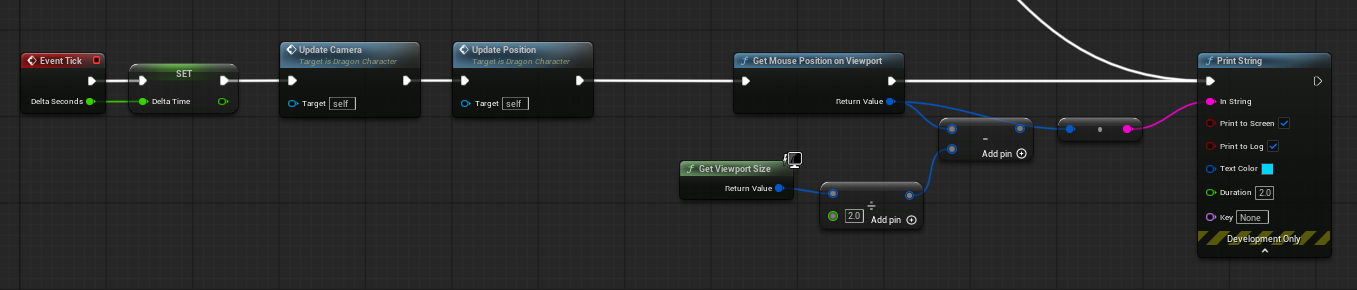
currently just printing it every tick from the pawn
I wonder if it's being affected by the resolution scaling
sick sky
autumn pulsar
https://i.imgur.com/UNvneq8.png
uh whats ur goal here
autumn pulsar
sick sky
uh whats ur goal here
I mentioned it above
sick sky
autumn pulsar
Is there a way to get the current resolution of the viewport? I'm trying to make...
mh, not sure
the position of the mouse is relative to the top left corner
autumn pulsar
sick sky
mh, not sure
the position of the mouse is relative to the top left corner
yeah that's fine
sick sky
MouseLoc - Center should give you the relative pos
autumn pulsar
the issue was that "Get Mouse Position On Viewport" was reporting a lower number than expected
I guess I need to multiply by the scale?
sick sky
if mouse is at 50,50 and center 100,100
you will get -50, -50
and +50, +50 in the other way around
faint pasture
autumn pulsar
It's meant to be in-game. Basically I'm trying to move my pawn in the direction ...
There are infinite directions that meet that criteria. WHERE along the line from the camera through the cursor do you want the pawn to be trying to move to?
I'd start by moving towards the point where that line intersects ground level, whatever that means in your context
autumn pulsar
sick sky
if mouse is at 50,50 and center 100,100
you will get -50, -50
and +50, +50 in th...
I get that, that's not currently the problem I am facing 
 fast wave
Hello guys,Is there any short cut to quickly understand UE material blueprint and create material through AI
faint pasture
fast wave
Hello guys,Is there any short cut to quickly understand UE material blueprint an...
Nope, just takes I
Just learn how it works.
Nothing artificial about it.
autumn pulsar
faint pasture
There are infinite directions that meet that criteria. WHERE along the line from...
Well, I'm trying out two methods. One is to not reproject at all and just use purely relative screenspace information from the center of the screen to create a movement vector, then if that sucks I was going to use the player height as an intersection plane and then calculate a vector from the player to that as the movement input
faint pasture
autumn pulsar
Well, I'm trying out two methods. One is to not reproject at all and just use pu...
Does your ground change z elevation, or does the camera move around or change angles?
What the player intends is "move to the bit of ground my cursor is over"
Keep that energy
autumn pulsar
faint pasture
Does your ground change z elevation, or does the camera move around or change an...
Camera is locked to the player, and I don't want to sample the ground
faint pasture
autumn pulsar
Camera is locked to the player, and I don't want to sample the ground
You don't have to sample, you can just do math
Ground = the plane extending through the characters waist z elevation right now
Then it's line plane intersection, that's just a single node.
autumn pulsar
faint pasture
Ground = the plane extending through the characters waist z elevation right now
That's what I said in my big post
fast wave
faint pasture
Nope, just takes I
Just learn how it works.
Is there any good tutorials for this,for accelerating learning
 faint pasture
fast wave
Is there any good tutorials for this,for accelerating learning
faint pasture
fast wave
Is there any good tutorials for this,for accelerating learning
I have no idea where you're starting, I would just start by googling how unreal materials work. Try to find something that goes over the actual theory, not just click-by-click tutorial.
faint pasture
autumn pulsar
https://i.imgur.com/u3T9huL.png
Yep. I do that all the time. It's especially fun in 3D, Garry's mod style.
autumn pulsar
I was trying to take a shortcut
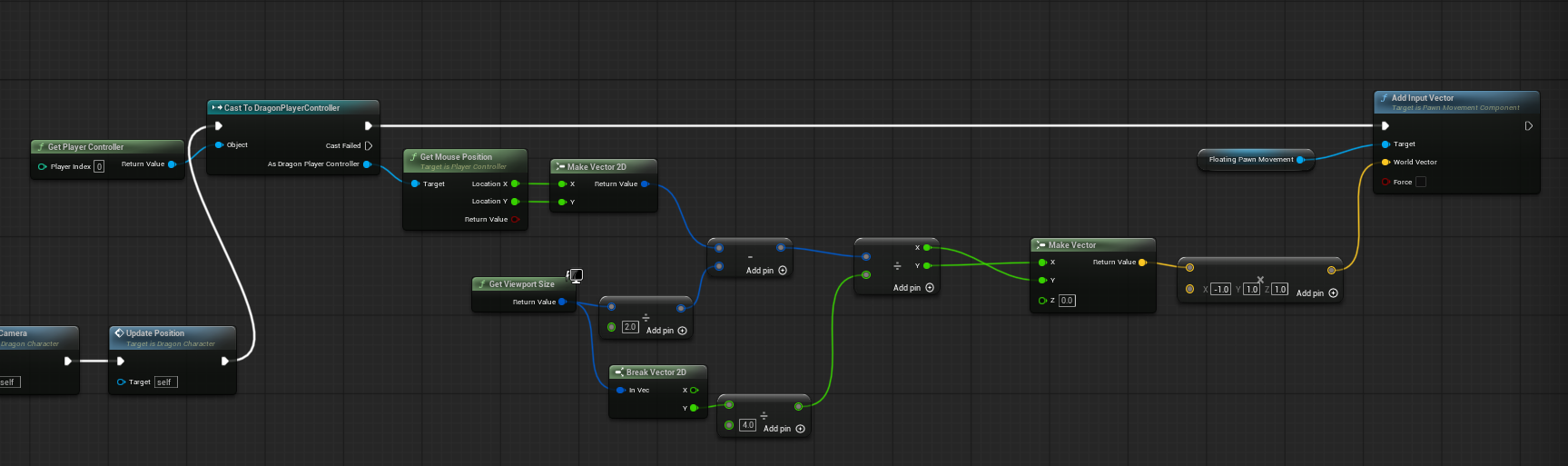
kind of works lol
probably better to project into the world as it's more resilient
autumn pulsar
faint pasture
Yep. I do that all the time. It's especially fun in 3D, Garry's mod style.
Does UE5 have a function to do the clipping math?
faint pasture
autumn pulsar
Does UE5 have a function to do the clipping math?
yes
line plane intersection
autumn pulsar
faint pasture
line plane intersection
thanks, took me a minute to find it
 dry monolith
I'm hoping to a list of actors by distance, I'm surprised that there doesn't seem to be an easy way to do this with blueprints? Any thoughts on how to do this in a low-cost way would be great thanks 🙂
The idea is that I want to get the closest 3 cars to the actor here, with the first item in the list being the closest vehicle, and the third item being the 3rd closest (assuming there are 3 perceived vehicles ofc)
 autumn pulsar
dry monolith
I'm hoping to a list of actors by distance, I'm surprised that there doesn't see...
autumn pulsar
dry monolith
I'm hoping to a list of actors by distance, I'm surprised that there doesn't see...
How many actors are you expecting to hit?
dry monolith
autumn pulsar
How many actors are you expecting to hit?
I reckon a max of 15
autumn pulsar
brute force may be fast enough
faint pasture
dry monolith
I reckon a max of 15
just iterate and choose the 3 closest
dry monolith
autumn pulsar
brute force may be fast enough
hmm yeah I'll try that
 primal hare
How can I make the "casted to" character a variable, so I can change/pick any other character?
 crimson briar
primal hare
How can I make the "casted to" character a variable, so I can change/pick any ot...
crimson briar
primal hare
How can I make the "casted to" character a variable, so I can change/pick any ot...
With the cast - you can't. You can compare classes with other methods, like the IsA(soft) node or by getting the class of the actor and comparing it to another with ==
What do you need it for though? Maybe there is a different way to design it
primal hare
crimson briar
With the cast - you can't. You can compare classes with other methods, like the ...
I have a BP that works with a character and I'd like the flexibility to use this BP with other characters as well.
crimson briar
Are the other characters similar?
primal hare
I did some search and apparently BPI can do this?
crimson briar
If yes, it is usually approached by making the many characters a child of one general character class that has most of the funcitonality
primal hare
crimson briar
Are the other characters similar?
In this immediate case they are, and I think I can make a child parent thing. But a complete break from connection would be ideal
primal hare
crimson briar
If yes, it is usually approached by making the many characters a child of one ge...
yes but that makes the adding new functionality a bit of keeping track kind of work
crimson briar
Not really, Most of the shared functionality you would add to the parent. And the custom functionality of each character you would need to write either way since it would be character dependant.
And if the characters share a lot of the code you won't need to remake it for each one
 sand shore
If anything, it would seem that BPI would require more code duplication
crimson briar
As to how to use the BPI foir it - I guess they are suggesting to make an interface that returns the class of the actor? I guess it could work but unnecessary interfaces are annoying in long term
 gentle urchin
and in such scenario doesnt provide any benefit to the interface at all
primal hare
hmm.. OK I think parent child option is the quicker saner way. Thank you!
gentle urchin
inheritance or composition when its something shared
dark drum
crimson briar
As to how to use the BPI foir it - I guess they are suggesting to make an interf...
You should avoid returning specific object types on interface function. Base classes are generally fine as these would be loaded anyway but others can result in large dependency chains that become a pain to fix.
dark drum
primal hare
How can I make the "casted to" character a variable, so I can change/pick any ot...
This is where Actor Component can be great. They allow you to make self contained systems that you can place on actors. If you want something to call a function on it, you can use the 'Get Component By Class' node to get it from the target actor (be it a character or something else)
crimson briar
dark drum
You should avoid returning specific object types on interface function. Base cla...
Probably, I've never used interfaces in this way anyway so I've never thought about the implications
dark drum
crimson briar
Probably, I've never used interfaces in this way anyway so I've never thought ab...
Yea, its often missed by a lot of people. Especially those that use them to prevent hard references. 😅
They just end up moving the hard ref to the interface that then gets force loaded by multiple actors implementing the interface.
 strange patrol
Hey guys, is there any way to bind the GameplayDebugger keys(0,1,2,...) to the number keys at the top of the keyboard? They only work with NumPad keys and i'm using a 68% keyboard so no numpad.
dark drum
strange patrol
Hey guys, is there any way to bind the GameplayDebugger keys(0,1,2,...) to the n...
Debug keys don't work in a build. You should be using enhanced inputs, of which you can specify any key you like for a given event.
strange patrol
dark drum
Debug keys don't work in a build. You should be using enhanced inputs, of which ...
i'm talking about the debug keys in the editor when you press the apostrophe key. Obviously you wouldn't wanna have debug keys active in the build lol
dark drum
strange patrol
i'm talking about the debug keys in the editor when you press the apostrophe key...
Ahh ok, check in the project settings under Engine -> Input
Edit: Actually no, Engine -> Gameplay Debugger, there might be something in there.
dry monolith
gentle urchin
https://dev.epicgames.com/community/snippets/xBY/unreal-engine-sort-actor-array-...
Thank you!! very helpful 🙂
strange patrol
dark drum
Ahh ok, check in the project settings under Engine -> Input
Edit: Actually no, ...
yoo you're goated i found it🙏 thanks
dark drum
strange patrol
yoo you're goated i found it🙏 thanks
I think its this section specifically.

 patent wasp
This is a hism in a bp, I can ctrl click to highlight just one and move it around. Is there a way to do this in blueprints for a selection and deselection system during gameplay, clicking on one of the instances just gives me this 1m_Cube 0- Instance 0 in the settings, so not a huge amount to go on. For static meshes I can set a custom stencil depth, but that just highlights all hism instances for a hism. Anyone know how to do this highlighting at gameplay, preferably also being able to set different colours.


 patent wasp
fast wave
Is there any good tutorials for this,for accelerating learning
patent wasp
fast wave
Is there any good tutorials for this,for accelerating learning
https://www.youtube.com/watch?v=iZgbzwBQTPY
Also, this guys stuff has a lot of nifty things once you get an understanding
https://www.youtube.com/@PrismaticaDev
And for the pretty much GOAT of all reference for all blueprint, you want Matthew Wadstein, who covers near enough every node, there is material stuff in here as well.

As a reminder folks! I’ve been selected as a judge in the official Honkai: Star Rail 3D Challenge! Make sure to join in on the fun and tune into my livestream on May 17 where I judge the submissions! https://hoyo.link/8sEiFBAL
Add this Master Material to your project right now with 50% OFF this week: https://bit.ly/TheMasterMaterial
Or grab al...

YouTube
Material, Particles, Animation and GameDev guides for Unreal Engine.
My game project, Prismatica, is an indie game currently in development by one human and four cats in Melbourne, Australia.
A challenging RPG experience in a beautifully stylized world that harnesses inspiration from melee combat games such as Mordhau, Mount & Blade and Dark S...

YouTube
This channel is dedicated to exploring Unreal Engine and the Blueprint programming language that it uses. You can think of it as a companion to the API documentation as I try to cover the how and why for what things are used for when using the Blueprint system.
dark drum
patent wasp
This is a hism in a bp, I can ctrl click to highlight just one and move it aroun...
Yea, you can spawn a special highlight actor and set its mesh to match the mesh of the HISM. Then you just set the position to that of the hit instance.
You can enable stencil depth on this. You might get some Z fighting with them being in the same place but you can usually offset this by applying some position offset in the material in the direction of the face. (tiny amount like 0.01)
Other options is using an overlay material if you don't want to use the stencil depth.
patent wasp
Ok, thanks
maiden wadi
Ben Cloward's stuff is really good for graphic stuff from what I've watched. He's pretty expressive with his guides usually.
 small bramble
Is there a blueprint that plays the animation and only continues AFTER the animation has finished playing?
 severe turret
small bramble
Is there a blueprint that plays the animation and only continues AFTER the anima...
severe turret
small bramble
Is there a blueprint that plays the animation and only continues AFTER the anima...
that's usually handled by montages
technically if you know the length of the animation, you could use a delay node with the time set to the animation length, but that isn't best practice really
small bramble
severe turret
technically if you know the length of the animation, you could use a delay node ...
I realised that from expirience lol
severe turret
Anim Notifies can help too but from what I understand you are trying to stall the logic. I'd likely go for montages and anim notifies in such a case. It's usually rare that you want to stall logic because of animations. Event driven logic is best for that
 white parrot
small bramble
Is there a blueprint that plays the animation and only continues AFTER the anima...
white parrot
small bramble
Is there a blueprint that plays the animation and only continues AFTER the anima...
You can bind a delegate when it finishes playing
That’s how montages do it
Not sure if you need c++ for it, I assume you don’t.
last peak
small bramble
Is there a blueprint that plays the animation and only continues AFTER the anima...
Play anim montage
That gives you a pin for when the animation finished playing

 lethal pollen
Hi!
How can I get the reference of a camera actor that I have placed in a level in the Player Controller event graph?


Thanks!
Maybe I can spawn the Camera Actor in the Player Controller instead of placing it in the level manually.
maiden wadi
lethal pollen
How can I get the reference of a camera actor that I have placed in a level in t...
You choice here is mostly to tag it and GetActorOfClassWithTag
lethal pollen
maiden wadi
You choice here is mostly to tag it and GetActorOfClassWithTag
Thank you!
dark drum
lethal pollen
How can I get the reference of a camera actor that I have placed in a level in t...
Not many options. What Authaer said is one though. However, depending on your overall goal, it might be worth making a manager actor component you place on your game state that does some initial fetching so they can be managed more easily.
If you want to share more about your overal intent, we might be able to give more suggestions.
lethal pollen
If IA_Player_Move is Axis2D, can I do this to move forward, backward, left and right?
 dark drum
lethal pollen
If `IA_Player_Move` is **Axis2D**, can I do this to move forward, backward, left...
dark drum
lethal pollen
If `IA_Player_Move` is **Axis2D**, can I do this to move forward, backward, left...
Yes, you'll need to set up some modifiers for some of the keys though to manipulate the 2d vector it'll spit out.
lethal pollen
dark drum
Not many options. What Authaer said is one though. However, depending on your ov...
I'm just doing a Space Shooter as an exercise for a course and I need to get the reference of the zenithal camera
 dark drum
lethal pollen
I'm just doing a Space Shooter as an exercise for a course and I need to get the...
dark drum
lethal pollen
I'm just doing a Space Shooter as an exercise for a course and I need to get the...
Yea a manager type of thing is probably over the top then lol. Just go with what Authaer said.
lethal pollen
dark drum
Yes, you'll need to set up some modifiers for some of the keys though to manipul...
Do you have any example about how to split the 2D vector?
dark drum
lethal pollen
Do you have any example about how to split the 2D vector?
Do you mean the modifier thing?
lethal pollen
dark drum
Do you mean the modifier thing?
Something like this, I suppose:
 woeful mesa
I've got a fog blueprint, and I want it so that every time it becomes evening in the day blueprint, the fog changes colour. I have done this.
Now I'm just focused on optimization. Right now, BP_Day calls BP_Fog every 0.5 seconds, which makes it smoothly change colour using a curve and whatever. BUT I am afraid that it may not be optimized when paired with it being called alot more times, such as by BP_Weather.
Is there a way I could make BP_Fog transition colour smoothly while only being called 1 time every 200 seconds (for example)?
dark drum
lethal pollen
Something like this, I suppose:
Yea
lethal pollen
I'll check it
maiden wadi
woeful mesa
I've got a fog blueprint, and I want it so that every time it becomes evening in...
Shader parameters probably. If you inject a time and a from and to color, it's easy to make the shader itself lerp over this with very little extra cost to the shader and make it insanely cheaper to gameplay code.
 lyric lynx
woeful mesa
I've got a fog blueprint, and I want it so that every time it becomes evening in...
lyric lynx
woeful mesa
I've got a fog blueprint, and I want it so that every time it becomes evening in...
You could call it once enabling a bool that ticks , or starts a timer that lerps the transition and clears and stops timer when done or re-enables the bool
maiden wadi
The thing is that you don't want to tick this on the gamethread. Should handle it entirely in the shader. Forcing a gamethread tick to manage it is major overhead of both the tick function and forcing render queues to pass data more often. Should pass the transition data of time states and colors once and just let it work.
woeful mesa
Ok wait. Is there a way I could do it so that:
in BP_Sky, it becomes day (changes enumerator to day).
In BP_Fog, it calls an event ONLY when enumerator day is on. Otherwise it doesn't call at all.
So like, it only calls an event when a specific thing happens. Similar to the key buttons being pressed, but only when something like an enumerator is "day"
Generally I just want things to be optimized and have values that are easy to change.
dark drum
<@&213101288538374145>
faint pasture
woeful mesa
Ok wait. Is there a way I could do it so that:
in BP_Sky, it becomes day (chan...
An event dispatcher inside whatever controls the day/night cycle, and the BP_Fog binds to it
Assuming material params can modify the fog how you want, I'd do this with a material parameter collection
I'd just make an MPC_DayNightCycle which contains the current time of day, and any materials that want can just use it
 sharp void
When I get into an error state in a blueprint, from a construction script, how do I make it stop running so I can actually fix the problem?

i don't know any way to actually get out of this state besides killing Unreal
i can abort from the blueprint debugger but it just hits the error again and i can't make it stop
white parrot
sharp void
When I get into an error state in a blueprint, from a construction script, how d...
Most likely it means you have a typo
lethal pollen
Hi!
Where do I have to add the mapping context? In the Player Controller? In the player's character?

Thanks!
sharp void
white parrot
Most likely it means you have a typo
i know exactly what the problem is. i just don't know how to get the UI to unfreeze so i can fix it
without restarting unreal
every time i get an error in a construction script the only way to fix it is to restart unreal
i'm asking if there's a way to make the debugger halt and not try to run it again immediately
white parrot
sharp void
every time i get an error in a construction script the only way to fix it is to ...
Stopping PIE isn't 'removing' the debugger?
sharp void
white parrot
Stopping PIE isn't 'removing' the debugger?
i'm not in PIE. this is just in editor
for a construction script for an actor i have in the level
 dusty loom
Yo guysi know this isnt place to ask but
I’m trying to learn Blueprints in UE5, and I’m curious how you learned them.
What worked best for you?
Did you start with videos, documentation, or small projects?
Any channels or tips you recommend
sharp void
dusty loom
Yo guysi know this isnt place to ask but
I’m trying to learn Blueprints in UE5,...
watched the unreal sensei 5 hour tutorial then just started making stuff and looking things up as needed
faint pasture
dusty loom
Yo guysi know this isnt place to ask but
I’m trying to learn Blueprints in UE5,...
I just opened up the engine and started to try to do stuff
I started in 2014 though so there weren't really any materials around, I got the engine the first week it was public.
sand shore
dusty loom
Yo guysi know this isnt place to ask but
I’m trying to learn Blueprints in UE5,...
I had a small project that I knew would take me off the beaten path (no existing tutorials), so I just tried working directly towards it and picking through tutorials and forum posts, etc.
Anyway I kinda kept doing that over the span of years, unlocking new knowledge when I needed it for an idea I had
But also, why isn’t this the place to ask that very question?
Also, what’s currently confusing to you? Might help get better recommendations
ornate trail
sharp void
When I get into an error state in a blueprint, from a construction script, how d...
put a breakpoint before it / start of construct?
 tepid solar
Hey guys. I have created an Actor Component that is called Scanner and basically recasts and saves positions on hit components. I created an event dispatch and now I want an separate actor, that has no dependency with the actor with the scanner component, to access it when it calls the event dispatch get the saved positions in it and then spawn spheres on their positions. Is there a way to get a reference to the actor that triggered the event dispatch?
 gentle quartz
I was wondering.. When I equip an item from a stack of lets say x2 and I only want 1 of the stack to equip.. whenever I hit equip button.. how can I make it to where stacks of one will still equip and remove from the inventory.. but stacks of lets say x2 will only remove and equip one item from the stack.. hope this makes sense
 austere orchid
lethal pollen
Where do I have to add the mapping context? In the Player Controller? In the pla...
austere orchid
lethal pollen
Where do I have to add the mapping context? In the Player Controller? In the pla...
you can do either
as long as you can get the controller, you can add a mapping context
faint pasture
gentle quartz
I was wondering.. When I equip an item from a stack of lets say x2 and I only wa...
have equip take the FIRST item from a stack.
If the stack size is 1 then the first item is the only one.
gentle quartz
faint pasture
have equip take the FIRST item from a stack.
If the stack size is 1 then the fir...
This is how I have it now... but I can equip the same item twice
 faint pasture
gentle quartz
This is how I have it now... but I can equip the same item twice
faint pasture
gentle quartz
This is how I have it now... but I can equip the same item twice
split it up a bit, high level your "equip item stack" should go like this:
- Is this item even equippable?
- Do we already have an item equipped in this items slot?
- Equip the first item in this stack.
assuming items go to slots, if they don't then check "do we already have one of these equipped" if what you intend is to not allow duplicates.
gentle quartz
thanks I will try
 dusky meadow
Hi this is a general conceptual question rather than any specific project but im just wondering if there is an simpler way to make an inventory where items have properties that need editing at run time such as durability. My current method is to have data assets that contain the default stats of items essentially a template for them then when I want to add an item I create a a Uobject that contains the same variables that is then set by a data asset and then functions can be run off that. Just wondering if there is a simpler way since this works but seems overly complex?
narrow pulsar
I need some help, I have this animation that I already retargetted to Quinn Simple Skeletal Mesh / Skeleton. The attacks are perfectly fine and aligned and so are the hands. But when I try them ingame they're off centered and the hands are in the wrong positions. I assume it's something related to my ANIMBP but I already tried stuff and disabling things but nothing seems to affect it. I already tried to skip the layered blend per bone but still same results

 faint pasture
dusky meadow
Hi this is a general conceptual question rather than any specific project but im...
faint pasture
dusky meadow
Hi this is a general conceptual question rather than any specific project but im...
The items can just be structs
dusky meadow
faint pasture
The items can just be structs
Do you mean instead of data assets or the uobjects since i cant edit structs at runtime
faint pasture
dusky meadow
Do you mean instead of data assets or the uobjects since i cant edit structs at ...
sure you can
what do you mean by "edit at runtime", just changing a value or adding an entire named property?
gentle urchin
personally i'd go for a uobject buuut struct is my second option
gentle quartz
Got it figured out. added this bit of code.. Thanks Adriel for pointing me in the right direction
 dusky meadow
if i have a iron sword that has values by default name damage durability etc and the player decideds to rename it or the durability decreases i need to change that
so just changing a value at runtime
faint pasture
dusky meadow
if i have a iron sword that has values by default name damage durability etc an...
trivial
you can do that if its a structure or a uobject or whatever else
dusky meadow
so its fine to use the uobject for the actual item in game and data assets or data tables for the default values ?
gentle urchin
I usually split it between the static and the dynamic data
static is the 'definition'
dynamic is the 'instance'
faint pasture
That's why I like structs.
Data table or a bunch of assets is the definition, its what says what items exist in the game.
Inventory = array of structs.
Item actor = actor with that item struct as a property
Dummy simple. It's all just bags of data. Although it does take some work to do some fancy stuff if your items aren't just bundles o stats.
white parrot
narrow pulsar
I need some help, I have this animation that I already retargetted to Quinn Simp...
The retargeting may have failed you, it might look correct in the animation asset, but not in game, is the source using the same skeleton?
dusky meadow
faint pasture
That's why I like structs.
Data table or a bunch of assets is the definition, it...
If i want to change a variable on an item in the inventory in this system how would i do it ?
faint pasture
dusky meadow
If i want to change a variable on an item in the inventory in this system how wo...
just change it
the same way you change your hp when you get hit
or your position when you move
dusky meadow
I didnt think you could change the variables in a struct at run time what nodes would you use ?
faint pasture
With structs, having an iron sword in your inventory is NOT having a reference to the iron sword row in the data table, it's having a copy of that row which has been modified.
faint pasture
dusky meadow
I didnt think you could change the variables in a struct at run time what nodes ...
set member
Although if you're brand new I'd probably use uobjects or just actors, what's your item situation look like?
gentle urchin
dusky meadow
so the static would by assets/table and dynamic uobject ?
In a pickup scenario, I would create a new ItemInstance, which gets the definition set, and can hold the instance data aswell
faint pasture
I mean hell the list of "every item that can exist in the game" could be an array of actor classes inside a data asset.
And an equipped item can just be an instance of that actor.
that's the simplest approach but obviously not how you'd do WoW or anything with a billion items.
narrow pulsar
white parrot
The retargeting may have failed you, it might look correct in the animation asse...
No it was arms only so different skeleton, the animation looks good after retargetting and if I directly put the animation sequence into my ABP final pose it works well but my montages are not working properly
gentle urchin
even in a strucut scenario you'd want to split it in two struucts
faint pasture
I like the struct approach because it's simple and elegant and very lightweight.
gentle urchin
one "definition" or data table version
faint pasture
gentle urchin
even in a strucut scenario you'd want to split it in two struucts
?
along what boundary
gentle urchin
and one instance type
dusky meadow
My items were defined as data assets all children of a base item data asset and then for each type such as weapons or armour i would have a uobject with the same variables and functions to change the values and then on pickup i created an object of the type of uobject that was the same as the data asset ran a function which took the data asset to set the values on the uobject and then added that to an array for the inventory
gentle urchin
unless you want to 'litter' your DT with all the instance data aswell
faint pasture
gentle urchin
unless you want to 'litter' your DT with all the instance data aswell
Why not, it's the defaults
unless you mean HP vs MaxHP
faint pasture
Can't you just markup as transient? although for savegame you'd want to keep it.
I'd just raw dog slam a copy of the struct in there and call it a day myself.
gentle urchin
i used to do all sorts of hoops to get it to work
like you can include a TMAP
on the data table strucut
which would allow you to add dynamic data to it when needed
white parrot
narrow pulsar
No it was arms only so different skeleton, the animation looks good after retarg...
Oh, then it's definetly your animBP if it's fine as the only source for the AnimBP in PIE, it's injected to the UpperBody slot?
faint pasture
Do you gotta recreate shit or is there a way to "instance" a data asset?
narrow pulsar
white parrot
Oh, then it's definetly your animBP if it's fine as the only source for the Anim...
yes it is, I did try to directly push the upperbody slot into the end pose but then the montages still arent working
may be an issue with turning from a sequence into a montage idk
gentle urchin
faint pasture
Do you gotta recreate shit or is there a way to "instance" a data asset?
this is the uobject part of my proposal.. its just a container for the existing definition, and some additional gameplay data
A struct would achieve the same mind you
maiden wadi
faint pasture
Do you gotta recreate shit or is there a way to "instance" a data asset?
There are people that do this too. But I'm personally against this. A DataAsset is nothing but a UObject with some specific kind of data. They're literally identical to a UStaticMesh. You can create a UStaticMesh at runtime too and push mesh data in it. And then use that in multiple components.
The same idea applies to data assets. You can make them at runtime.
But here's where my disconnect is with that. It's like the concept of making a new static mesh for every tree even if it's identical to one you already have. Their idea is static data.
Which is why what Squize is saying is correct. You should "instance" them as some other UObject class, or even a struct if you want to go that route. The DataAsset is just a static data container.
At the end of the day this is true.
DataAsset == DataTableRow
UObject == Struct
You can use a DataAsset or a DataTableRow for static data. And either of those can be placed in a UObject or a Struct to be carried around.
last peak
gentle quartz
Got it figured out. added this bit of code.. Thanks Adriel for pointing me in t...
Now write it again but good looking 😛 !
How can you look at this chaos and not want to puke nonstop
faint pasture
last peak
How can you look at this chaos and not want to puke nonstop
You may not like it, but this is what peak BP looks like
 gentle urchin
Truth
faint pasture
Although what they should have done is make data flow left to right and execution flow top to bottom
gentle urchin
Except the layering
faint pasture
everything going left to right makes for some degenerate topology
I like to just keep stuff compact once it's kinda settled, makes it easy to see what's happening at a glance
gentle urchin
Fair point
If only it looked better stacked
Especially with execution lines
It becomes messy instantly
Or crowded, atleast
faint pasture
I never stack execution, execution goes right to left all aligned, and each executable node's set of parameters is self-contained, no draping lines all over the place.
I'd love data to flow vertically or execution vertically, but that'd be a bit weird with return values.
gentle urchin
In plc programming it's solved by splitting the graph into 'lanes'
But different rules etc..
faint pasture
gentle urchin
In plc programming it's solved by splitting the graph into 'lanes'
Hmmmm....
What if....
What if comment bubbles were scope
or something akin to that existed
the graph equivelent of a curly brace
last peak
faint pasture
You may not like it, but this is what peak BP looks like
Thats on the edge.... but still 20 times better than what they posted lmfao
faint pasture
last peak
Thats on the edge.... but still 20 times better than what they posted lmfao
nah it's perfect
All the information you need to know what an executable node does is right in front of you. No pins from off screen, no spaghetti loops, it just does what it says on the tin.
last peak
THe lines are criss crossing with the nodes
ugh

This is true perfection, no lines touches a node
Something like this would be acceptable
 faint pasture
last peak
Something like this would be acceptable
faint pasture
last peak
Something like this would be acceptable
I hate reroutes
last peak
 faint pasture
I never use a reroute (except named ones in materials)
 dark drum
faint pasture
I hate reroutes
dark drum
faint pasture
I hate reroutes
Reroute nodes are great when used well, otherwise they're just extra spaghetti.
faint pasture
I've never found a need
and don't even get me started on electric nodes
unreadable crap that plugin is lol

in every situation here it makes it worse
maiden wadi
faint pasture
I hate reroutes
Preeeeach
 maiden wadi
Reroutes should ONLY ever be used if to need something from an executed node's cached output.
If it was from a function argument, or your rerouting some getter variable... Dude. No.
And even from the cached executed node's output, if it's like a pointer to something and in a function scope I'll probably still put that in a local property to use later.

 maiden wadi
True. But this is the cached output thing I was mentioning. First one here is perfectly fine.
sand shore
maiden wadi
Reroutes should ONLY ever be used if to need something from an executed node's c...
People using reroutes for function inputs 
maiden wadi
I have seen people use like a single Component getter. Like getting their SkeletalMesh component in a character. And they'll fucking reroute it out to like seven different nodes rather than just using another getter two screens away.
last peak
Also in executions
 maiden wadi
sand shore
People using reroutes for function inputs <a:ChillBar_angry:890117857189429259>
maiden wadi
sand shore
People using reroutes for function inputs <a:ChillBar_angry:890117857189429259>
Yeah. 😄 I keep imagining that it'd be nice if there was an easier way to grab those properties, like if they could be put inside of the local variables tab list or something. A lot of people learning even today don't know how to get them.
last peak
Beauty
 maiden wadi
Actually. I'd accept that one because that getter can sometimes be expensive. But I'm going to cry my eyes out at you and whine until you right click that thing and show exec pins and make it impure. So that not literally every one of those text setters looks up the component again.
last peak
Haha okok
 maiden wadi
 sand shore
Being able to change one node like that and being done is kinda a minor selling point for having big ol data lines made of linked reroute nodes, though
||except that if you were using a local variable, you could still do that type of change, so this point only applies for event graphs||
last peak
sand shore
Being able to change one node like that and being done is kinda a minor selling ...
I mean a reroute is a doubleclick, a local variable i have to set first then i have to get that variable all the time, with a reroute i can lean back and dont have to type
dark drum
faint pasture
and don't even get me started on electric nodes
Yea I'm not a fan of electric nodes either.
maiden wadi
Too zappy for my taste. Also too annoying to keep moving to new projects.
last peak
How long would you guys need for a Ui with all of these tabs ?


+hud
Only stats and hud connected to the player already
 finite hearth
I have an actor whose beginplay I cannot use. That actor has a widget component and on that component I need to to get a ref to the owning actor. Is there a node for this?
maiden wadi
last peak
How long would you guys need for a Ui with all of these tabs ?
Depends on the graphics provided and how much time I'd need with the artist. Blockout in a couple of days to a week. Art polish can take up to a month of back and forth but should be largely done in another week if we're talking basic static textures. If you add animated stuff that requires special masks and stuff that time can double with implementation and testing.
This is all also assuming that the gameplay systems driving these are working in a way that the UI can just work from it, and in my experience that is literally never the case.
last peak
maiden wadi
Depends on the graphics provided and how much time I'd need with the artist. Blo...
Damn, i really underpriced myself way too hard
Lead bought a ui pack and its the worst crap i have ever seen all the elements on the images i had to manually put together circle, then add the lock ontop for example
Right now im at 15 hours and im almost done but i should have said 30 hours without having to speedrun
 maiden wadi
finite hearth
I have an actor whose beginplay I cannot use. That actor has a widget component ...
maiden wadi
finite hearth
I have an actor whose beginplay I cannot use. That actor has a widget component ...
How do you mean that you can't use it's beginplay?
finite hearth
maiden wadi
How do you mean that you can't use it's beginplay?
It is a replicated actor which is placed in the level manually. BeginPlay is not triggering if replicated.
Not triggering on client**
Normally I would pass a ref of self into the widget on begin play of the owning actor.
maiden wadi
last peak
Lead bought a ui pack and its the worst crap i have ever seen all the elements o...
Yeah these are a big thing for me. I always try to move things like this to materials as much as possible. You almost ALWAYS end up wanting cute little animations on this shit like when unlocking, or like pulsing for unlockable ones etc. And icon buttons like this get exceptionally expensive really fast when you just start layering image after image on top of each other. Background, icon, glow border, lock(if it shows with the icon a lot of times). Lots of widget prepass going on for stuff that can be a single image widget driven by a material.
Not so much an issue on this UI, there's not a lot of them, doesn't look like there's a lot of room for it here. But then... Someone comes to you in three months and goes. "Yeah but I want all of these trees displayed for every class/character/whatever all on a single screen. And suddenly opening that window halves your framerate. 😂
maiden wadi
finite hearth
It is a replicated actor which is placed in the level manually. BeginPlay is not...
That's... Not normal? Beginplay should 100% still run. The only thing that won't run in this case is the ConstructionScript.
finite hearth
maiden wadi
That's... Not normal? Beginplay should 100% still run. The only thing that won't...
That was my understanding too, but I've been poking this for about 3 hours. Maybe a bug in 5.7.1 or something with my Iris config.
BeginPlay triggers for runtime spawned actors, it's only the ones that I drop into the level manually that do not work for Client.
GPT says that's expected. I don't trust it, but I am frustrated enough to find a dirty hack and move on.
 faint pasture
last peak
How long would you guys need for a Ui with all of these tabs ?
faint pasture
last peak
How long would you guys need for a Ui with all of these tabs ?
The structure or polish? I could make it "work" in like an hour
last peak
faint pasture
The structure or polish? I could make it "work" in like an hour
Ye no way
faint pasture
And that's mostly cuz I'd have to remember some stuff, I do very minimal UI
last peak
Thats physically impossible
faint pasture
You said tabs, I'm not talkng about the content
maiden wadi
finite hearth
That was my understanding too, but I've been poking this for about 3 hours. Mayb...
Hmm. Well the short answer is that from the widget there's nothing you can do. It has zero know or care about it's spawning component.
There's a SMALL chance that maybe the component's beginplay might run? If you could subclass the widget component and override it's beginplay instead of the actor's. You could still pass the owning actor via GetOwner to the widget that way.
But yeah that's nasty. It's fully expected for Beginplay to run on a client when the actor arrives and is spawned locally for them. This actually causes beginplay to run a lot for the same actor on clients because it can leave relevancy, be destroyed and respawned on the client later when it returns to relevancy.
next hollow
TBF, even with full setup, that UI ain't exactly crazy.
(Assuming all the data, and other content code is setup (player, items, quests, etc)
faint pasture
last peak
How long would you guys need for a Ui with all of these tabs ?
barebones functionality, probably a couple hours per page, depending on how many of the subwidgets I'd have to make. For example, that character tab is like 7 widget blueprints at a minimum, depending on the data model feeding it.
Most of the work will be in handling the piping of data model to widgets
last peak
Is 20 Hours for all tabs with full functionality ok ?
maiden wadi
I still maintain that blockout would take a couple of days if you're working from zero. There's a lot of UI there to put together and hook up to gameplay systems honestly.
last peak
no polish
faint pasture
last peak
Is 20 Hours for all tabs with full functionality ok ?
In that state or programmer art?
And do you know UMG like the back of your hand or are you learning it at the same time.
 finite hearth
maiden wadi
Hmm. Well the short answer is that from the widget there's nothing you can do. I...
finite hearth
maiden wadi
Hmm. Well the short answer is that from the widget there's nothing you can do. I...
Gah, that's frustrating to hear but I appreciate the info. Ty!
faint pasture
last peak
In that quality
long time
last peak
Thats just the stats screen
faint pasture
also depending on if i gotta make materials and textures and who knows what else
last peak
This is the main menu it has a container for the sub widgets like stats
 last peak
faint pasture
also depending on if i gotta make materials and textures and who knows what else
last peak
faint pasture
also depending on if i gotta make materials and textures and who knows what else
Only pngs for everything
..... god this was horrible XD
maiden wadi
Also really hope you're running CommonUI. Would make those hotkey actions infinitely easier.
faint pasture
last peak
This is the main menu it has a container for the sub widgets like stats
Do you have your own button widget, item icon widget, stat row widget, etc, or are you making an entire panel at one go?
Is this 3 instances of WBP_BlackhandPerk or hard coded 3 boxes with content?
 last peak
faint pasture
Do you have your own button widget, item icon widget, stat row widget, etc, or a...
last peak
faint pasture
Do you have your own button widget, item icon widget, stat row widget, etc, or a...
I created widgets for everything that i reuse
last peak
faint pasture
Is this 3 instances of WBP_BlackhandPerk or hard coded 3 boxes with content?
I made one skill widget but since skills are not setup yet ive had to hardcode these
but its already setup so it pulls informations from a uobject
faint pasture
That's honestly the worst part, the data shuffling
This is about the extent of the UI work I've done, bit of weapon card stuff with dynamic sizing
 maiden wadi
faint pasture
This is about the extent of the UI work I've done, bit of weapon card stuff with...
maiden wadi
faint pasture
This is about the extent of the UI work I've done, bit of weapon card stuff with...
I like this. But the padding is driving nails into my eyeballs.
faint pasture
maiden wadi
I like this. But the padding is driving nails into my eyeballs.
This is the concept, I like the left font the best. Picking a good font is hard.

Middle hurts my eyes, left reads great but looks like Blizzard
maiden wadi
I think a lot of people prefer the left one. I see those thinner, gentler fonts a lot. To me they look kind of pixelated though. I really like the right side best. Kind of consistent and the fonts look clear.
faint pasture
Both are much better than middle, that one is painful. Hard to sell scifi without a painful font.
sand shore
last peak
Is 20 Hours for all tabs with full functionality ok ?
I think it's fine especially if you're starting from nothin
last peak
sand shore
I think it's fine especially if you're starting from nothin
You are working in a Studio right? Im not really a Ui programmer, tbh i really dislike it, its not that its very hard its just so boring but oh well
How long would someone professional take for it?
Just first pass without polish, bare bones minimum like in my images
sand shore
totally clean slate? pro ui programmer, working from a fully thought out prototype? game doesn't ever change after?
working in UMG as a base?
last peak
yes
sand shore
could be 1d to get something real quick in - no special skill tree or character handling tho
edit: actually I think a more reasonable estimate is 2d (there'll be some stuff I didn't account for besides navigation), but the way meetings and stuff creep in I could see something like this getting a (Calendar Time™) 1w estimate internally for the dev
 thin panther
faint pasture
This is the concept, I like the left font the best. Picking a good font is hard...
thin panther
faint pasture
This is the concept, I like the left font the best. Picking a good font is hard...
left is good, though I personally think the name is too fine.
Gives me borderlands vibes and i like it
sand shore
sand shore
could be 1d to get something real quick in - no special skill tree or character ...
like just having the skill tiles be arbitarily hand placed - getting the lines to connect automatically would be tougher
last peak
sand shore
could be 1d to get something real quick in - no special skill tree or character ...
Thats solid
Damn gotta work faster 😄
sand shore
last peak
Thats solid
a lot of its due to having done things like 50 times over, knowing the whole toolbox, immediately seeing patterns that'll help you implement things
last peak
Just the visuals without any code i can probably do in like 8 - 10 hours
But creating controls and child widgets for example for quests, skills etc took me all in all around 20 hours
sand shore
Did you implement navigation fully?
last peak
Problem is right now i mdoing client work and i want to work atleast somewhat professional
last peak
sand shore
Did you implement navigation fully?
yes controller and keyboard
sand shore
ah yeah that's not something I factored in either
I think getting it stood up within 20h is reasonable
just because some folks could do it a little faster shouldn't mean you're "unprofessional"
and implementing something like this in an existing project can actually take longer if you're fighting the existing systems haha
 tepid willow
Hello, does anyone know whether it's possible to add ForceFunction to an interface function made in blueprints? Sometimes I want a function not to be an event, but it won't do that unless it has a return type. In C++ you do meta=(ForceFunction) in UFUNCTION to get that
 blissful grail
sand shore
and implementing something like this in an existing project can actually take lo...
blissful grail
sand shore
and implementing something like this in an existing project can actually take lo...
take longer
ifwhen you're fighting the existing systems haha
Fixed
maiden wadi
tepid willow
Hello, does anyone know whether it's possible to add ForceFunction to an interfa...
Unlikely. But you can add a boolean return to it. Hacky, but functions with returns cannot be events.
 mortal fossil
hello . anny idea about a error node

it s not get or set the array so i dont understand how was made this node that seems i have to redo .... i guess that really basic but dont get it ...
thanks
i changed the variable (name and type) but can figure out how reproduce this node in particular..
last peak
You drag off your loop array element and say get (name of your new cable array)
mortal fossil
i tried but i have no entry
how iget the target pin on the left?

how i fuse those two ?  😆
😆
surreal peak
@mortal fossil Please share the actual error that UE lists you.
gentle urchin
mortal fossil
how i fuse those two ? <:crying:1316599219188011038> 😆
append
mortal fossil
surreal peak
<@116243941300502528> Please share the actual error that UE lists you.
i deleted the node so cant have the exact but was something like "this aray dont exist "
ok after restarting the project dont know why now i could link the blue line .....
maybe was not save or compile lol...
another stuff that should be simple but dont get it

why this trigger only 1 actor of the array ?
 pure gyro
mortal fossil
why this trigger only 1 actor of the array ?
pure gyro
mortal fossil
why this trigger only 1 actor of the array ?
You selected more than 1 right?
 pure gyro
mortal fossil
they are copy past same BP
pure gyro
mortal fossil
they are copy past same BP
Are the other 2 valid?
gentle urchin
do they have the interface?
pure gyro
Sounds like there are not valid
mortal fossil
gentle urchin
do they have the interface?
yes of course
number 3 is working no issue
gentle urchin
sorry but nothing is ofcourse in the world of blueprints
gentle urchin
one could have the interface while the other 2 didnt
mortal fossil
yes true. but they are same stuff just copy past
gentle urchin
i dont know if they share the same class or implement the interface
and assumptions makes for bad help 🙂
dark drum
mortal fossil
they are copy past same BP
As in a new class or an instance placed in the level?
mortal fossil
that just drop copy past copy past
or duplicate sorry
but saying that could be a weird bug i will delet and replace again from the only working one
gentle urchin
whats it doing
manipulating some dynamic material?
if so, it could be a race condition
LightActor -> BeginPlay -> Create Dynamic
SomeLightSwitch -> Beginplay -> TurnOffLight
mortal fossil
it s doing dynamic material and light switch both
gentle urchin
add a delay to verify that it is a race condition
gentle urchin
mortal fossil
delay after beginplay, 1 second or smth
if it now works, you know its a race condition and can take measures accordingly 🙂
mortal fossil
mmmm event with delay same
dark drum
mortal fossil
it s doing dynamic material and light switch both
show the nodes
mortal fossil
that weird i delet the bad one re copy past the working one still same
wich one ?

what i dont understand it s why work for one not all
i just call the interface
gentle urchin
(you cant have a delay inside a forEachLoop)
dark drum
mortal fossil
wich one ?
I was referring to the logic thats setup for the interface event.
 dark drum
mortal fossil
dark drum
mortal fossil
Also, change this back to what you had before. 😅

 gentle urchin
Should still watch out for that race condition
I'd also suuggest doing some multiplayer tutorials, especially regarding stateful replication
the only thing replicated here should imo be a bool
repNotify -> Update vis and material color
mortal fossil
maybe your right because it s start even before i m in game ....
yea i expected will be multiplayer broken but i m not in charge of this . i thought will at least work in solo
gentle urchin
race conditions are still a thing
beginplay is prone to that
there's no guaranteed call order
there's like 50 ways around this ofcourse
one would be to validate the Material Instance when the call happens
if its valid, great, if not, create it and assign it
mortal fossil
thanks for all suggestion i will investigate that
( i have to feed the kid so afk sorry)
dark drum
Just to add to the talk about race conditions. Its important to understand this, especially when you start handling save/load stuff.
Saving stuff is easy but loading and applying saved data can be a pain as it can often require a specific order as your systems get more complex.
mortal fossil
when i look pro BP i buy that clearly another story 🤣

there is always control all other the place
dark drum
mortal fossil
That whole top bit (purple section) doesn't make any sense. 👀
Lets loop through an array of actors like myself, just to find myself. 🤦♂️
The whole thing could be replaced with a simple 'IsEmpty' check on the array and using the return value to set the bool. No need to loop at all.
mortal fossil
dark drum
That whole top bit (purple section) doesn't make any sense. 👀
Lets loop throu...
that was looking weird to me but i too noob to do better. thanks fo rthe comment maybe will tried to eddit that
for my prevous problem i put a big delay and things are going funny lol. like 1 actor dont work at all one work partialy and one work fully xD i will need to put some control all other the place
dark drum
mortal fossil
that was looking weird to me but i too noob to do better. thanks fo rthe comment...
 crimson briar
In case of connected actors IMO it is always the best to let one of them control both of them so you avoid problems
Like the light switch tries to get the light it is attached to in begin play. If it fails, it takes a small delay and loops back to getting it. And only launches inti functions on both of them after it is successful in getting the partner
dark drum
mortal fossil
for my prevous problem i put a big delay and things are going funny lol. like 1 ...
Add a print string like this to see what it says. This should give you the names of everything in the array. Make sure it shows what should be in there.
 mortal fossil
crimson briar
In case of connected actors IMO it is always the best to let one of them control...
mortal fossil
crimson briar
In case of connected actors IMO it is always the best to let one of them control...
was not sur has keep has one or separate for later but good idea

they are all here
ok now i have kind of work the OFF phase . all turn off but when turn ON only one ....
ok.... it s working ]
dont ask me why but it s working lol
i think was messing up durring loading
 verbal kayak
How to use event dispatch on spawn? I want to spawn something and the spawner can dispatch an event to all the spawned ones?
mortal fossil
also my light where ON in editor and was shutting them off on start but i setup them off from start in editor more safe
dark drum
verbal kayak
How to use event dispatch on spawn? I want to spawn something and the spawner ca...
 verbal kayak
what is that create event? I want an event inside of that spawned actor to fire up
and also when ever the spawner decides to do the dispatch all the spawned actors will do the same thing
gentle urchin
so the spawned actors bind to the spawner
verbal kayak
who should have the event dispatch?
gentle urchin
create event iis just a way of getting actor signatures from the input actor
In your case the Spawner
Spawner says Brrr -> all spawned actors say Brrr
dark drum
gentle urchin
Spawner says Brrr -> all spawned actors say Brrr
Brrr! Lol
gentle urchin
So if all spawned actors is bound to the dispatch, all the spawner has to do is call the dispatch!
then the bound event on the spawned actors will trigger
verbal kayak
what do i do in the spawned actors bp
It needs a target
it just doesnt make sense
now i have a spawner event dispatch but then i use bind and i cant use the spawneds target
dark drum
verbal kayak
what do i do in the spawned actors bp
In the Spawner BP, create the event dispatcher. After the 'Spawn Actor of Class' node, create a binding to the event dispatcher (like i showed above). Pull from the event pin (red square) and add a 'Create Event' node. On this node, connect the return value from the spawn actor of class node.
This tells the event node, 'Hey I want to call a function on this object.'
On the create node, you can then select the function that is on the connected actor you'd like to call. Please note however, the functions signature (inputs) must match that of the event dispatcher.
verbal kayak
yeah it does not work 🙁
dark drum
verbal kayak
yeah it does not work 🙁
Show what you're doing.

 dark drum
verbal kayak
dark drum
verbal kayak
Where do you call the 'Color Change' event dispatcher?
verbal kayak
u did not say where to use that CALL
dark drum
verbal kayak
u did not say where to use that CALL
Well that's up to you. 😅 When do you want them all to call the event?
gentle urchin
Spawner needs to call it 😄
gentle urchin
gentle urchin
So if all spawned actors is bound to the dispatch, all the spawner has to do is ...
^ "call the dispatch"
basically send out a broadcast
verbal kayak
so weird system
gentle urchin
"Hey everyone listening! The thing is happenning noow"
Not really
It's like a twitter feed
where the spawned actors subscribe to it
someone still needs to post a new tweet
verbal kayak
create event i thought when i pick the even it will do it
gentle urchin
then all subscribers get notified whenever there's a new tweet
dark drum
Think of an event dispatcher as a bell that makes a specific sound. When you bind, your saying, listen for this sound and when you hear it, call this function on this object.
You have things listening, you just need to ring the bell.
gentle urchin
if you just want to call an event when they spawn, you can simply... invoke that
make sure to tune in to the right frequency tho
otherwise bells will ring all day long
dark drum
verbal kayak
why to bind
You said you wanted to use an event dispatcher. 😅
verbal kayak
If I use BPInterfaces, would this be more performant?
dark drum
verbal kayak
If I use BPInterfaces, would this be more performant?
no, there's overhead for using interfaces. (granted its tiny so negligible in most cases)
gentle urchin
dont optimize something that's not a problem
this is not a problem at all
if you end up spawning hundreds per frame we can talk
verbal kayak
yeah i just like bpi
gentle urchin
bpi is trash imo
verbal kayak
yeah im spawning 100's
gentle urchin
for spawning hundreds i'd start thinking about frame slicing the spawning
verbal kayak
what is that
gentle urchin
spreading the spawn over multiple frames
gentle urchin
frame 1 : spawn 10
frame 2 : spawn 10
frame 3 : spawn 10....
instead of Frame 1 : spawn 100
dark drum
Yea spreading across ticks can be nice as it can prevent lag spikes.
verbal kayak
but isnt spawning always happening frame after frame?
gentle urchin
there's no automatic logic that makes it so
if you ask it to spawn 1000 , it will spawn 1000 that frame
verbal kayak
like if i hook up spawn actor to tick. its spawning after tick
gentle urchin
and delay the next frame untill it is down
gentle urchin
verbal kayak
like if i hook up spawn actor to tick. its spawning after tick
yes then it spawns 1 per frame
(assuming no for loop)
verbal kayak
so how can i even spawn 10 at a time?
gentle urchin
forloop
verbal kayak
lol
gentle urchin
0 to 9
verbal kayak
any other way?
white parrot
gentle urchin
bpi is trash imo
Based
verbal kayak
so forloops loop is happening on one frame?
verbal kayak
is it same for foreach loop?
verbal kayak
so basically complete is always after 1 frame?
verbal kayak
i made one macro foreachloop with delay
lol so if you loop like super big array the complete will always fire after 1 frame?
dark drum
verbal kayak
i thought the bigger the loop the more frames it takes
Just remember delay nodes only actually work in the main event graph.
gentle urchin
gentle urchin
so frame slicing is a manual process
they really should update the default macro library to include a few more but i guess its abandoned
unsure if LE extended has some
verbal kayak
amazingly shitty connections on those prebuilt macros 😄
i mean they look so spaghetti
verbal kayak
i understand, my edited macro also looks like that.
i guess, its like im not cleaning up your mess kinda scenario
and also out of view out of mind.
sick sky
gentle urchin
indeed they do
they are automatically generated iirc so its not a human that did it
verbal kayak
:O?
dark drum
This might be useful as well. This takes an array of primary assets and uses a timer to start loading the next one but only once the current one has been loaded.
 gentle urchin
sick sky
they are automatically generated iirc so its not a human that did it
gentle urchin
sick sky
they are automatically generated iirc so its not a human that did it
yeah i imagined something like that being the case
verbal kayak
wow, this was so helpful.
Learned couple of things additionally for what I asked.
Thank you @dark drum, @gentle urchin
gentle urchin
Makes my procrastination feel justified
verbal kayak
x-D
dark drum
gentle urchin
Makes my procrastination feel justified
Glad I'm not the only one. 😅
gentle urchin
I legit just need a break every now and then xD
been working on a refactor for soon 4 months now
the 'small architectural change' has grown into a behemoth with hydra dna
dark drum
Ooof. Refactoring... The necessary evil.
gentle urchin
the same type of work that made my quest plugin delay indefinitely
it still isnt ready (altho pretty close, finally)
 radiant pebble
Hey, i'm trying to edit options in my game, but when I set a specific resolution, save and restart the game, the game isn't in the resolution i set previously, is that normal ?
I have to go back in my options, apply them (Weird part: when I load them, even if they aren't what I saved, the game show what I saved, not how my game is displayed)
radiant pebble
It's like the game start without my graphics option considered
 frozen hedge
What do you have on your level blueprint or game instance to say check saved settings?
radiant pebble
frozen hedge
What do you have on your level blueprint or game instance to say check saved set...
when I edit an option, raise a bool at true and if i'm trying to leave the screen with this bool at true, idisplay a modal to warn the user, if he want to, he can cancel and it will reset the settings or apply them
 ocean cloak
Why is the Progress Bar ignoring the Fill Color setting when the value is 1.0
faint pasture
ocean cloak
Why is the Progress Bar ignoring the Fill Color setting when the value is 1.0
max hp is 0
verbal kayak
is it ok to have 5000entries in a map?
dark drum
verbal kayak
is it ok to have 5000entries in a map?
entries? Are you referring to actors?
ocean cloak
I did it and it worked, thank you bro
verbal kayak
Type of variable
im trying to generate a 50x50 grid and have individual cordinates to map. .. im getting laggy already at 50
dark drum
verbal kayak
Type of variable
Ah ok. And probably, however, the issue itself tends to lie with using the data as you'd have to potentially loop through them which could hit performance using a BP loop.
dark drum
verbal kayak
So what to do?
Split your grid into chunks. I'd use a custom uobject for it.
verbal kayak
you mean like 50 entries per map something like that?
dark drum
verbal kayak
you mean like 50 entries per map something like that?
I like power 2's so I'd probably do a chunk as either 8x8 or 16x16.
verbal kayak
grid is 50x50 but yeah i understand
how dumb i feel, i thought 2500entries in a map would be cakewalk to loop through
 solar needle
what difference do once and gate
dark drum
verbal kayak
how dumb i feel, i thought 2500entries in a map would be cakewalk to loop throug...
It depends on your CPU. I used to do stuff with 100x100 grids but struggled to go much higher. Loops in C++ are significantly faster though so that's an option as well.
solar needle
it seems the same to me
verbal kayak
and do once closes as it says after first event goes through. gate can be kept open as long as you want.
dark drum
solar needle
it seems the same to me
A do once will only do something once, unless reset. A gate can let the execution pass through while the gate is open.
Just be aware that using them in a function means its state will only apply for a given function call and is reset the next time the function is called.
A gate uses a do once inside it.
verbal kayak
@dark drum so even If I chunk my entries of the map into 50 different maps. Looping them all is still gonna take long?
i need to know what grid position is Available
dark drum
verbal kayak
<@430016173694779402> so even If I chunk my entries of the map into 50 differen...
In a single tick yes, but because you've chunked your data, it'll be easier to spread stuff across ticks if needed.
Also if you want to get/modify the data, this can be faster if there's less in the map your checking.
verbal kayak
i dont mind to do checking across handful of ticks
faint pasture
verbal kayak
im trying to generate a 50x50 grid and have individual cordinates to map. .. im ...
What's getting laggy, iterating over everything in the map?
in BP?
verbal kayak
when im adding my stuff to map in bp
atleast in editor
havent tested in package/standalone
pretty ok cpu
faint pasture
What do you mean by adding stuff, how many things are you adding at a time?
adding to a map should be trivial
verbal kayak
im adding string key and 2d vector as value.
faint pasture
how many
verbal kayak
yeah so divide it to many maps
Would you know how to maybe do that in c++
Im ready to convert the project to c++
relatively new project.
faint pasture
What's the actual thing you're doing, you're generating 50x50 what for what purpose? And it's a map and not an array why?
verbal kayak
i guess its quite basic?
its map cause i want to spawn something on those grid values. Then I want to also know that those grid values are taken by the spawned object. So I check before spawn is it there. Also when I destroy the objects in game, I tell that grid slot to be free again.
faint pasture
is it a dense or sparse grid?
verbal kayak
so my values are like B5 is x-2400 y-2000
faint pasture
is it always 50 x 50 or could you add a thing at 254, 4359 location?
verbal kayak
its always 50x50
faint pasture
in the grid coords, whatever that translates to in world coords
just use an array IMO
I mean at this small of a grid it's no biggie either way
verbal kayak
world coords are same as grid
faint pasture
a map is useful when you want a grid that's large enough to be borderline too large even for an array, and it's sparse (you got a lot of empty cells)
or it's size is undefined and variable
verbal kayak
hmm
2500 entries in array still ok or should i divide that too?
hmm same shit with array.
takes about 20sec to fill 2500 entries in array.
dark drum
Does anyone know if (in BP) it's possible to have an input to a function similar to the 'Set Members in Struct' function where you can specify which members of a struct should be updated?
gentle urchin
Its fine in one array
gentle urchin
dark drum
Does anyone know if (in BP) it's possible to have an input to a function similar...
Not possible
dark drum
gentle urchin
Not possible
I didn't think so but like to check in case I've missed something in an update. 😅
solar needle
dark drum
A do once will only do something once, unless reset. A gate can let the executio...
so i guess when th code looping to reset it is simple gate
faint pasture
verbal kayak
takes about 20sec to fill 2500 entries in array.
that's silly slow
show the code
dark drum
solar needle
so i guess when th code looping to reset it is simple gate
You can double click the macros to see how they're setup if you want more understand of the behaviour.
gentle urchin
Id frameslice it anyways
And do the logic carefully
Only update whats relevant to a change
faint pasture
an array of size 2500 is nothing, that's not the problem.
The problem is a loop of length 2500 happening in a single tick in BP. It's just not made for doing a lot of work all at once like that.
dark drum
verbal kayak
im filling it with timeline
I'm curious now. 😅 Show how you're doing it.
 gentle urchin
faint pasture
an array of size 2500 is nothing, that's not the problem.
The problem is a loop ...
gentle urchin
faint pasture
an array of size 2500 is nothing, that's not the problem.
The problem is a loop ...
Iknow, just general tip with bp loops
faint pasture
verbal kayak
what in tarnation
last peak
verbal kayak
First time ive seen something like this
dark drum
verbal kayak
There's a lot simpler ways to do this.
faint pasture
I think you've made a timer here, just with a lot of extra steps
last peak
faint pasture
I think you've made a timer here, just with a lot of extra steps
Pretty much ye
faint pasture
But you could just do it like this if you wanted to frame slice.
Tick -> done generating? -> no -> generate a bit
-> yes -> ok
or a timer but same idea
verbal kayak
what you mean a timer?
last peak
verbal kayak
what you mean a timer?
set timer by event - runs a event every x seconds
 cold raft
Yo guys how do i make a metahuman eyes track some object?
last peak
verbal kayak
its essentially a tick
Its essentially a timer 😄
verbal kayak
so whats wrong with that code?
dark drum
verbal kayak
This will do what you want in a single tick.
 faint pasture
I mean sure you CAN, but your delay in there is making it a 0.2s timer again
verbal kayak
yeah the timer is there just for me
last peak
verbal kayak
so whats wrong with that code?
Its just very complicated, like a timer would give you the same functionallity with less code but as long as it works who care
faint pasture
So why not this:
Tick -> done? -> no -> generate some
-> yes -> turn off tick (if you care, it doesn't make much of a difference at all)


 faint pasture
His code
 verbal kayak
I mean are you talking about the 0.02 sec delay?
i can take it away, but does that make the code simpler?
it was there beforehand from restructured code for me to know when another coordinate map was created.
faint pasture
why the DoOnce?
it can be as simple as what I posted
if you're not done, do some work
if you are, turn off tick or just do nothing
being done is if the map is of size FinalSize
verbal kayak
i think do once is just to make sure nothing overfills
faint pasture
End = -1
Last = Width x Height - 1
Tick -> if End < Last -> Start = End +1 -> End = Start + 100 -> for loop from Start to End -> add stuff
That'll add 100 per frame until full
gentle urchin
Aka framslicing
ForeachbatchWait does the same thing
But with external coninuation
crimson briar
I don't want to dogpile but this BP above has to be the strangest approach I've ever seen 
faint pasture
gentle urchin
ForeachbatchWait does the same thing
that built in or some community macro?
gentle urchin
Community / mine
gentle urchin