#blueprint
1 messages · Page 366 of 1
 crude dew
 dark drum
crude dew
Or should i put the condition into the transitional rule?
dark drum
crude dew
Or should i put the condition into the transitional rule?
Yes, but you'll most likely need to set the 'Trigger' type to be set to tick so it'll repeatedly check the enum you're using.
crude dew
I just realised that, I made a Global Task from what I understand about these is that they run every time the tree is restarted therefore updating the values from the controller State Enum ? Thanks for the replies btw! , I just got used to Behaviour Tree;s now gotta learn a new system xD

Yup that seems to work thank you!
dark drum
crude dew
I just realised that, I made a Global Task from what I understand about these is...
Whats this tick event inside?
crude dew
Its being run inside a Global Task
 dark drum
crude dew
Its being run inside a Global Task
dark drum
crude dew
Its being run inside a Global Task
You don't need to do that as you can get get it from the AIController when needed.
crude dew
So i wouldnt need to do a tick event to check the value and assign inside the State Tree?
dark drum
crude dew
So i wouldnt need to do a tick event to check the value and assign inside the St...
No, you can just check it in the condition directly.
crude dew
Ahh i see here I am checking the value inside the controller and not the one inside the tree.
 dark drum
I've not specified a specific AIController type but you can select it here.

 crude dew
Ye i have those in the Enter Conditions.
dark drum
crude dew
Ye i have those in the Enter Conditions.
Yea you can do the same thing in the transition conditions. No need to duplicate the data. 🙂
crude dew
Without the tick the tree wont move out of IDLE state when selecting ROAM in the editor for some reason.
dark drum
crude dew
Without the tick the tree wont move out of IDLE state when selecting ROAM in the...
This tick is set for the 'Trigger' type on the transition.
 crude dew
Ahh didnt see theres a tick option in the transition ! Ty!
dark drum
crude dew
Ahh didnt see theres a tick option in the transition ! Ty!
So the trigger type is when should it check the transition when in the state.
dark drum
Ideally you'd use the on event one but it's been a while and I can't remember how to do it. 😅 But as a quick overview, you can have a setter function for your state on the AI controller so when it's update it sends an event so things know they should check the state. This can save having to check on tick.
crude dew
Ye i,ve only recently finished a couple tutorials on it so now trying to implement it into a not tutorial thing only way to learn properly lol
Tutorials are nice but I find if you dont experiment yourself then you kinda end up in tutorial hell and cant get outside the tutorial box xD
dark drum
crude dew
Tutorials are nice but I find if you dont experiment yourself then you kinda end...
I agree, you've got to have a play and just throw some stuff down. Its the best way to see what you do and don't remember.
crude dew
Gonna be fun trying to implement the perception system next 😄
dark drum
It's been a while since I've used state trees, do you know if you can run a state tree in a state tree?
crude dew
I did see you can have Sublinked Trees

So i would guess that would be nice if you have in RTS Scenario, Diffeerent units but they all can wander but some can harvest, others can attack, some might only flee etc.
dark drum
Wonderful! I first looked into state trees not long after it got added and whilst I thought it was good, its the one thing I felt it lacked.
crude dew
Im glad i could be helpful to you 🙂
dark drum
It'll allow you to have different state trees and then a master one to pick which one it should run. Otherwise they'll get very messy. 😅
crude dew
ye true, Thats what i found with behaviour trees also
I know you could link other BT,s inside BT,s
dark drum
You can run a parallel tree as well as a task. 🤔
crude dew
but only recently discovered that 😄
Right time to get the enemy to smell the player XD
dark drum
crude dew
Right time to get the enemy to smell the player XD
Good luck.
crude dew
Thanks Oh btw , Do you know whta the Detect By Affiliation thing works I never quite understood why i have to check all 3 boxes and why i cant say "the player is Enemy" Just a thing which has bugged me for a little while and i never understood it. 🙂
in AI Sight, Sorry i should have specified.
dark drum
crude dew
Thanks Oh btw , Do you know whta the Detect By Affiliation thing works I never q...
Sort of but you can't set the affiliation in BP as far as I know. Has to be done in C++. Only Nuteral works without C++.
crude dew
Ahh ok that explains it then thanks, Never knew it was C++thing.
 hazy ether
When I play my project in standalone, it starts off black, and gets lighter over 15 seconds, why is the eye adaption system to janky! 😂
Anyone know why this could be?
dark drum
hazy ether
Anyone know why this could be?
Have a play with the Exposure settings on the PP volumes. Just note that if you transition from indoor/outdoor, you might need to use different settings.
 hazy ether
I haven't got any PP volumes...
dark drum
hazy ether
I haven't got any PP volumes...
Then it'll use the default PP settings on the camera.
hazy ether
Ahh, yeah... I had adjusted thoes...
Why are they inverted! why on earth does a negative value mean brighter! 😡
dark drum
hazy ether
Why are they inverted! why on earth does a negative value mean brighter! 😡
Physics! You can read about it here but meh. It goes over my head to behonest lol

In photography, exposure value (EV) is a number that represents a combination of a camera's shutter speed and f-number, such that all combinations that yield the same exposure have the same EV (for any fixed scene luminance). Exposure value is also used to indicate an interval on the photographic exposure scale, with a difference of 1 EV corresp...
hazy ether
dark drum
Physics! You can read about it here but meh. It goes over my head to behonest lo...
Huh...
Odd...
 frail reef
Thank you so much for your help yesterday. After sleeping on it and a quick google search I finally figured out that I had to create a custom parameter before I could implement this solution
And now the elevator stops once it reaches the end of its z value. Great!
Now how do I get it back down if I interact with it a second time 
Probably something to do with Event ActorBeginOverlap , so I'll have to look into that later.
 lofty rapids

 sacred linden
Hello, anyone has this problem, where everytime during packaging a project. If recent changes contain change to Structs (BP) then errors appear and you need to go and refresh nodes/ empty recompile blueprints? Is there perhaps some editor tool plugin that can do it instead?
dark drum
sacred linden
Hello, anyone has this problem, where everytime during packaging a project. If r...
Changing a structure doesn't load everything that uses it which would be required to automatically update it. There can't really be any automated way to do as there's no way of knowing what needs doing other than you looking at it.
The best you can do is look at the reference viewer for the struct and open each one and correct as required.
Personally, I would avoid changing a BP structure once you've started using it unless you absolutely have too. Because of the aforementioned, it can cause a lot of issues and even cause some BP to corrupt.
 fleet prism
How do I make a double jump Ability? I've watched two tutorials the first one being on how to make a double jump whare all he did was change the max jump count to two and another on how to make an ability system but I don't know how to connect this things so that you can only double jump after collecting the ability for it. what is the easiest way for me to do this?
 next hollow
I know some plugin exists for force recompile assets for this.
But, like Patty said.
That fixes the red error, but not any actual coding/ programming error incurred.
Such as adding a struct entry, now anything that edits the struct is gonna have issues.
 flat coral
Ok I got a bad case of "Why Collider Not Colliding?!" This is A and B


And this is the code in A. It's consistently returning "true" even though I'm definitely inside the B collider
 lofty rapids
fleet prism
How do I make a double jump Ability? I've watched two tutorials the first one be...
lofty rapids
fleet prism
How do I make a double jump Ability? I've watched two tutorials the first one be...
its built in theres a setting for it
 spark steppe
flat coral
And this is the code in A. It's consistently returning "true" even though I'm de...
spark steppe
flat coral
And this is the code in A. It's consistently returning "true" even though I'm de...
are you spawning in it?
i think in that case it might not recognize it
flat coral
spark steppe
are you spawning in it?
Yeah. What do I do about that, then?
spark steppe
use a method which causes a query, afaik Box/SphereOverlapActors does
and it should have a class filter
flat coral
Yep that works. God that's dumb.
 tropic torrent
hey chat whats up
hoping I can fix this BPC and be free from this section of my blueprints for like
6 weeks
this isn't spawning the projectile when the function is called


supposed to replace everything here up to loop body

the launch isn't needed, so i deleted it (since there is a built in projectile movement component)
tropic torrent
tropic torrent
supposed to replace everything here up to loop body
this old version works, the function version doesn't
tropic torrent
does calling functions from components just not work like that?
 crimson briar
tropic torrent
does calling functions from components just not work like that?
crimson briar
tropic torrent
does calling functions from components just not work like that?
Not sure what you are asking about here, you didn't show how you call the function.
 crimson briar
Also it is a weird way of handling projectiles. Do you always have only one projectile?
tropic torrent
the function is a bpc
tropic torrent
tropic torrent
this isn't spawning the projectile when the function is called
all of this
crimson briar
So you add an actor component for each projectile?
crimson briar
Not really, I'm just asking trying to understand why you made it this way
tropic torrent
crimson briar
So you add an actor component for each projectile?
I have a Blueprint component for summoning and using projectiles so that when im making an ability i can just drag in the component and fill in the variables
rather than copying and pasting the same blueprints every time
why did it work once then stop working 💀
not even playing the level again goes back
okay i deleted something apparently lmao
thank god for ctrl z
its beautiful
it works for the DoT but doesn't work for the fireboll 🥲
 midnight field
Update: It appears that the problem is related to a bone on the original model that's missing from the default mannequin, called "attach". I tried adding the bone to the mannequin and re-exporting the retargeted animation, but this doesn't appear to have worked.
Using the non-retargeted animation now has perfect root motion, but the rest of the animation doesn't play because it's on the wrong slot, hence the need for a retargeted version.
Here's the comparison:

 tropic torrent
so the IsValid prevents it from working
 next hollow
I'm confused.
Are you confused why its not working, because of the isvalid.
Or, are you just stating that its the issue you found, and have now fixed?
tropic torrent
confused why its not working
when it doesn't have the isvalid, it works until the enemy dies
when it does have the invalid, no launch no damage
crimson briar
tropic torrent
so the IsValid prevents it from working
Nothing is connected to the IsValid node. Weird that it didn't cause an error in compilation.
Actually not weird, since it allows NONE to be passed, nothing selected is probably just a NONE anyway
lofty rapids
tropic torrent
so the IsValid prevents it from working
your is valid has nothing plugged into it
 empty marten
Hello everyone,
I have a question I am hoping someone can help me with. When making a Editor Utility Widget, is it possible to create an asset in it like a material instance and have that saved into the content browser? I'm trying to speed up my dev pipeline a little and am curious is all. If it is possible, does anyone have any documentation on the process I can learn from please? Would be appreciated 🙂
spark steppe
empty marten
Hello everyone,
I have a question I am hoping someone can help me with. When mak...
yes, there's a editor subsystem which allows it. Might be Asset Subsystem API doesn't look like it... but i'm kinda sure it was an subsystem
you might have more luck in #editor-scripting
tropic torrent
crimson briar
Nothing is connected to the IsValid node. Weird that it didn't cause an error in...
doesn't need an object to work, it's doing IsValid on the execution line
tropic torrent
lofty rapids
your is valid has nothing plugged into it
It's doing it on the execution line
that works for other things normally
lofty rapids
hmm idk why you think that
empty marten
spark steppe
yes, there's a editor subsystem which allows it. Might be ~~Asset Subsystem~~ AP...
Didn't know #editor-scripting was a channel. Thank you kindly 🙂
lofty rapids
tropic torrent
doesn't need an object to work, it's doing IsValid on the execution line
i don't think so
next hollow
Yeah, IDK what its doing it on the execution line is supposed to mean.
Not like your code can be invalid, or something crazy.
Feel free to show proof of this execution line
But, otherwise.
Yes, the issue is no input, thus it always being invalid.
tropic torrent
the white line
if the white line is not valid, it stops
I use it the same way for other cases and it passes valid with the object unfilled
lofty rapids
thats not how it works tho
the white line is always "valid"
the is valid node checks the object
not the execution flow
tropic torrent
then it should be working, no?
Why would it return valid in other cases, but not valid here, if in both cases the object is unfilled
I'm not concerned about my other IsValid lmaoo
next hollow
Send pic of your other isvalid.
Cuz, there is clearly some confusion going on.
next hollow
You can search all BPs, for usage of the is valid.
Right click the node, and find references.
Depending on your UE version it will have an all button, or you gotta press a little biocular icon, to the right of the search box that appears
tropic torrent
 next hollow
and, you know that works how?
Have you added a print string, or a breakpoint?
tropic torrent
movement speed went back to x2
i can double check with a print string though
sigh
one second
next hollow
tropic torrent
sigh
Yeah, I was gonna say, are you sure the speed ever changed at all, or are you using a big speed value that would even be obvious?
Cuz, if you used this for making it 2x.
Are you doing this same non-working logic on the /2
tropic torrent
tropic torrent
two, this ability stopped working before the isvalid was even referenced, and i removed a single branch and it started working
it uses the manual method instead of the bpc though
i do still need an isvalid in it, but i need to attach it to the array element
isvalid works correctly (no errors when the enemy is dead)
separate issue, first usage of this isn't working, i think it might be the array's fault?

the array comes from this in the blueprint component

and they're not really launching but it be like that sometimes
nothing is in the normalize i know why its not launching dw
tropic torrent
AAAAAAAAAAAAAAAAA okay i found out whats happening but i don't know why
1st: Hit enemies, nothing happens
2nd: Hit anything, enemies from first are hit
 spare tinsel
hi guys. does anyone know why this isnt workin? i cant really see the problem. the content inside the EventIsButtonOn on the Redlight actor never triggering.


 last peak
tropic torrent
isvalid works correctly (no errors when the enemy is dead)
separate issue, first...
last peak
tropic torrent
isvalid works correctly (no errors when the enemy is dead)
separate issue, first...
where does this code live ?
tropic torrent
An ability
The ability is a blueprint (actor I think)
On Event Begin Play-> Spawn Actor by Class (Ability)
Keyboard Event 1 -> Start Ability
last peak
spare tinsel
hi guys. does anyone know why this isnt workin? i cant really see the problem. t...
WHere do you set redlight ?
last peak
tropic torrent
On Event Begin Play-> Spawn Actor by Class (Ability)
Keyboard Event 1 -> Start ...
and whats the problem right now ?
is there even any anymore ?
tropic torrent
last peak
and whats the problem right now ?
is there even any anymore ?
It's fixed , I hope
ended up having to fix it over here with the dispatcher
 spare tinsel
last peak
WHere do you set redlight ?
spare tinsel
last peak
WHere do you set redlight ?
in the level. button and redlight are actors.
i found that if I add the function is active into beginplay. all the sudden the event starts working. however, this isnt sending the value of the boolean from one function to the other

 last peak
spare tinsel
in the level. button and redlight are actors.
i found that if I add the functio...
last peak
spare tinsel
in the level. button and redlight are actors.
i found that if I add the functio...
dont put stuff in the level blueprint
spare tinsel
last peak
dont put stuff in the level blueprint
no i mean the level. theres nothing on the level blurptins
both are individual actors
with their own blueprints
last peak
so where do you set the variable redlight then

 last peak
spare tinsel
last peak
spare tinsel
i dont see you setting redlight anywhere ...
THis needs to get set or you cant use it
 spare tinsel
i dont get it, it has an object reference
 last peak
That doesnt help you
now the object is - Redlight
But you have no clue what specific redlight it is
if you put 2 redlights in a level you have redlight 1 and redlight 2
how does your code know which one you want to change ?
spare tinsel
I only have 1 red light actor. Redlight is the name of the actor. not a light.
so i am making a reference to that object actor
last peak
Redlight is the name of the class
/blueprint
You know you only have 1 redlight in the level
but the compiler doesnt
The very dirty way is this
Get all actors of class Redlight - get 0
This will only work if you have 1 single redlight in your level
you do the get all actors of class before you do that

And you hook up the return of your get 0 to the Is button 1on
last peak
im not sure what you mean with that
spare tinsel
the bpi
last peak
right now your red light is 0
spare tinsel
is on both
spare tinsel
send the info, but it currently isnt
 cobalt bramble
never had this before, cant connect this? asks to find a node when trying to connect to target
 next hollow
cube is a component, you add components to actors.
You ATTACH components, to components, which is your confusion here
 warm python
Guys, Any tutorials I can find of Shotgun reloads??
 prime stump
Hi, I am having an issue with my widgets.. I am creating a widget component as and when its needed to display a widget at the location of an interactable actor to indicate that it can be interacted with, I am playing a simple animation to make it fade in and fade out by changing the render opacity when entering/exiting the overlap of an interactable actor, this works absolutely fine as long as you're looking at it while it happens but if you enter the overlap, it'll fade in the widget, and then you turn the camera so the widget is now offscreen and then leave the overlap it'll call all the code to fade out except it doesn't actually fade out until you turn back around to face the object so its back on screen before it fades..
Anyone know of a way I can fix this cause it looks like shit?


Here's whats happening - https://drive.google.com/file/d/1taYnwZEF77ELQNblhQMF-Zw9Sp7stihT/view?usp=drive_link - as long as the widget is on screen it plays nice and does what its supposed to, but if its called to fade out while its offscreen it'll only do it when its back on screen.. any ideas?
Google Docs
dark drum
prime stump
Here's whats happening - https://drive.google.com/file/d/1taYnwZEF77ELQNblhQMF-Z...
Its most likely down to the 'IsVisible' check you do in your remove indicator. I'm pretty sure it'll be classed as not visible if not on the screen.
prime stump
dark drum
Its most likely down to the 'IsVisible' check you do in your remove indicator. I...
That check fires true every time even when its offscreen, I think thats just checking this, which stays visible until the widget component is removed so the IsVisible check will always be true
 dark drum
prime stump
That check fires true every time even when its offscreen, I think thats just che...
dark drum
prime stump
That check fires true every time even when its offscreen, I think thats just che...
Ahh ok. You could try this on the widget component.
 prime stump
dark drum
Ahh ok. You could try this on the widget component.
prime stump
dark drum
Ahh ok. You could try this on the widget component.
Yeah tried that too, apparently that doesn't apply to widget's in screen space
Didn't work lol
 dark drum
prime stump
Yeah tried that too, apparently that doesn't apply to widget's in screen space
dark drum
prime stump
Yeah tried that too, apparently that doesn't apply to widget's in screen space
I'll be honest, I'm struggling to actually see the issue in your video.
prime stump
watch at the end, I run through the interactable actors and it displays the widget just fine, but when i turn around at the end all of them fade out together all at once instead of when i actually left their overlaps
prime stump
dark drum
I'll be honest, I'm struggling to actually see the issue in your video.
pause around 28 secs, all of them all at once fade out
dark drum
prime stump
watch at the end, I run through the interactable actors and it displays the widg...
Ahh ok, i had to slow the video down to notice. 😅
prime stump
dark drum
Ahh ok, i had to slow the video down to notice. 😅
Yeah so its only doing it because they're offscreen at the time of the fading out being called, but only actions it once they're on screen again
dark drum
prime stump
Yeah so its only doing it because they're offscreen at the time of the fading ou...
Try using this on the widget comp. If it's not visible at all, just remove and don't bother with the animation.
 prime stump
dark drum
Try using this on the widget comp. If it's not visible at all, just remove and d...
prime stump
dark drum
Try using this on the widget comp. If it's not visible at all, just remove and d...
Unfortantely that also fires true even when its offscreen 
dark drum
prime stump
Unfortantely that also fires true even when its offscreen <:crying:1316599219188...
Then this one. It'll still be classed as visible through walls but should be fine for this use case.
 prime stump
dark drum
Then this one. It'll still be classed as visible through walls but should be fin...
prime stump
dark drum
Then this one. It'll still be classed as visible through walls but should be fin...
Still fires true every time lmao, I don't think they check whether they're on screen or not I think they're just checking its visibility setting which is always visible which is why these will always return true if thats the case
IsInViewport doesn't work either cause the widget's in screen space, this always returns false
dark drum
prime stump
Still fires true every time lmao, I don't think they check whether they're on sc...
Last one to try.
 prime stump
dark drum
Last one to try.
prime stump
dark drum
Last one to try.
That just returns False everytime, I also tried IsRendered and thats true even when its offscreen lmao
Unless there is a way that I can explicitly check whether the widget is on screen or not then im not sure I can do it while the animation is playing through the widget, I imaging this not ticking when offscreen thing is a property of these animations that they wont play when offscreen but play later when they are which suuucks lol
There is an alternative which is to have a timeline do the fading in and out but I tried this and its causing me all sorts of problems doing it that way 😂 the problem also is that the actor component (BPC_PlayerInteraction) can't have timelines and nor can the widget itself so it will have to be ran through the pawn that owns BPC_PlayerInteraction
dark drum
prime stump
There is an alternative which is to have a timeline do the fading in and out but...
Updating uses the 'WasRecentlyRendered' function so I'm suprised that doesn't work.

Actually that's world space. 😅
prime stump
dark drum
Actually that's world space. 😅
For some reason everything is against screen space I dont get it 😂
dark drum
prime stump
For some reason everything is against screen space I dont get it 😂
So after going down the rabbit hole, as far as I can tell, when the widget is offscreen, it sets the visibility to collapsed. Granted this is for a screen layer it creates to put the widget in but getting the widgets visibility should still return if its visible or not. 🤔
dark drum
prime stump
For some reason everything is against screen space I dont get it 😂
Have you tried just printing the visibility of the widget to see what it says?
empty marten
Hey peeps,
When using the create asset node to create a material instance, it creates a material interface instead. Is it doing this because I don't have anything connected to the factory pin?
 prime stump
dark drum
Have you tried just printing the visibility of the widget to see what it says?
prime stump
dark drum
Have you tried just printing the visibility of the widget to see what it says?
Yeah, 'Visible' everytime lol
It obviously knows when its offscreen in someway because it knows to only play the animation when its on screen but im not sure I can detect that through any of these checks 😅
 quaint elbow
Hi everyone
I'm doing a student project on ue5, it's my first time working on the engine. We're doing a local coop game where two players control a robot, one player controls the bottom/movement, and the other player controls the top/shooting.
The thing is, I have no clue on how to make each player control their pawns (the robot is two pawns combined), or how to assign a specific gamepad to a specific PlayerController. I tried to look for the platformUserID but I dont understand how it works
 sick sky
quaint elbow
Hi everyone
I'm doing a student project on ue5, it's my first time working on th...
sick sky
quaint elbow
Hi everyone
I'm doing a student project on ue5, it's my first time working on th...
Try #multiplayer since this is more of a multiplayer focused question
 full badge
sick sky
Try <#221799385611239424> since this is more of a multiplayer focused question
full badge
sick sky
Try <#221799385611239424> since this is more of a multiplayer focused question
that channel is mostly for online mp tho
sick sky
local MP follows the MP rules
and people there knows more on how controllers are handled whern there is multiple players on a single device
since its more rare to hit this case in SP games
 oak gorge
hello all,i have an little problem about something i want to achieve : i have created in an Asset action utility an SK To BP blueprint the bp is created from an parent i chosed (with an SK component) but now i want to assign the skeletal mesh component variable from there but that where i block, any idea how to achieve this (i'm in ue5.5.4) thanks for the helps
 hard girder
I gots a question! So i have blue printed to chaze chacater on site
But when the player gets behind the enemy they stop completely
And then go back to searching
prime stump
prime stump
Hi, I am having an issue with my widgets.. I am creating a widget component as a...
@dark drum in case you're curious I fixed it by adding this function to detect whether the actor (where the widget is being displayed at) is on screen or not, if its not then skip animation just set opacity and if it is play anim, seems to work pretty well so far, I had to implement it both when creating the widget and when removing it


 fleet prism
Is anyone able to tell me why this isn't working? I followed a short tutorial on how to change the material of an object in as the game is running and its not switching colors. Its supposed to go from a glowing red color to glowing green.


 lunar sleet
fleet prism
Is anyone able to tell me why this isn't working? I followed a short tutorial on...
lunar sleet
fleet prism
Is anyone able to tell me why this isn't working? I followed a short tutorial on...
The only thing I see wrong maybe is creating the dynamic mat on construction script. The latter can trigger multiple times so maybe that’s causing the issue. Realistically I’d put that on begin play so it only happens once. Otherwise just use breakpoints and see where the code is not executing.
 gentle urchin
prime stump
<@430016173694779402> in case you're curious I fixed it by adding this function ...
gentle urchin
prime stump
<@430016173694779402> in case you're curious I fixed it by adding this function ...
Pretty sure i got some snippet in c++ for this if interested
 maiden wadi
fleet prism
Is anyone able to tell me why this isn't working? I followed a short tutorial on...
maiden wadi
fleet prism
Is anyone able to tell me why this isn't working? I followed a short tutorial on...
99% sure your parameter name is not M_RedGlow_Inst
lofty rapids
fleet prism
Is anyone able to tell me why this isn't working? I followed a short tutorial on...
is the create supposed to assign it ?
because i don't see where you set the mat to the new dynamic material
maiden wadi
Need to see the material itself. Because I'm pretty sure they didn't name the parameter in the material M_RedGlow_Inst to dictate the color.
lofty rapids
if you plug in the source like that it automatically sets it ?
i've always had to set the material to the new instance after
maiden wadi
That just gets the material that they already have specified in the primitive and creates a new instance of it.
Which clearly works. They see red. I assume or they'd be asking why they don't see the beginning color. They're asking why it's not changing.
It's not changing because they're passing the name of the material they created as the paramter name for the color.
lofty rapids
hard girder
But when the player gets behind the enemy they stop completely
what are you using for perception ?
hard girder
The ai preception using a sight cone @lofty rapids
lofty rapids
hard girder
The ai preception using a sight cone <@910231430074859570>
and when you run behind him quickly he loses sight right ?
prime stump
gentle urchin
Pretty sure i got some snippet in c++ for this if interested
Yeah go on, would be interested to see other ways to handle it
lofty rapids
hard girder
The ai preception using a sight cone <@910231430074859570>
are you using a BT ?
hard girder
@lofty rapids at this point no but im thinking it would be best to do that, i was hsving issues that the BT was constantly chasing no matter where i was
 ruby cobalt
RepNotify.. you guys knew about this stuff?
lofty rapids
hard girder
<@910231430074859570> at this point no but im thinking it would be best to do ...
ok its not really necessary, can you show the code you use to make this work, show the on perception update and how your chase
lofty rapids
ruby cobalt
RepNotify.. you guys knew about this stuff?
#multiplayer would know more probably
lofty rapids
ruby cobalt
RepNotify.. you guys knew about this stuff?
basically when the variable changes it runs the notify, and the great thing is when a user comes online he runs that rep notify again thats my undersanding
 harsh remnant
Hey everyone!
Quick question.
I followed a tutorial on YT about a stamina system.
Everything works except that my character keeps running even if the stamina is at 0%
lofty rapids
can't tell anything without code
hard girder
lofty rapids
ok its not really necessary, can you show the code you use to make this work, sh...
thats for the vision

 lofty rapids
hard girder
thats for the vision
lofty rapids
hard girder
thats for the vision
so you set the delay to 5, but it imedialtly roams ?
hard girder
Basically i ger behind him mid chase itll go back to roaming
hard girder
lofty rapids
so you set the delay to 5, but it imedialtly roams ?
2 ticks ill record
lofty rapids
hard girder
thats for the vision
so your using pawn sensing not aiperception ?
hard girder
yeah just realised that my bad
lofty rapids
but its working thats good
so it percieved him atleast
so what i do is when percieved flip a boolean
then flip it back when to roam
 sharp crane
Why do some of my maps not generate a world partition minimap even after selecting the build option?
 ruby cobalt
lofty rapids
basically when the variable changes it runs the notify, and the great thing is w...
ruby cobalt
lofty rapids
basically when the variable changes it runs the notify, and the great thing is w...
i've been using bools and branches on event tick to refresh some stuff when variables changed.. RepNotify would have been soooo much cleaner..
hard girder
lofty rapids
then flip it back when to roam
ive been thinking of moving the sight cone back a bit so if i do get up behind while roaming it will turn towards the player and keep chasing but could mess up down the line
lofty rapids
ruby cobalt
i've been using bools and branches on event tick to refresh some stuff when vari...
its great for multiplayer syncing variables
sharp crane
sharp crane
Why do some of my maps not generate a world partition minimap even after selecti...
It's 50/50 whether the map works or not
 crimson briar
ruby cobalt
i've been using bools and branches on event tick to refresh some stuff when vari...
crimson briar
ruby cobalt
i've been using bools and branches on event tick to refresh some stuff when vari...
RepNotify is mostly for multiplayer.
If you want it's behavior, you can easly make your own. Instead of using a Set node for the variable, make a function/event called SetMyVariable with the new value as an input.
Inside you only need to check if the new value is differnt than the previous one - if yes, set the variable to the new value and proceed with your code that depends on this variable changing.
Then you call this event/function instead of using a Set node
lofty rapids
hard girder
i'm pretty sure what happened is he lost sight of you and then he's not still chasing a bool will fix this
then you just need to figure out when to switch it off
ruby cobalt
crimson briar
RepNotify is mostly for multiplayer.
If you want it's behavior, you can easly ma...
ah that's true.. but i got stuff with multiple variables that needs to be updated with all the new values whenever one of them changes
also using repnotify is 1 click to have the function built for you and already organized to be called whenever another source updates that variable
seems clean
crimson briar
You would still need to write the code inside the repnotify then. Using it instead of a custom event/function only saves you the time it would take to create the function/event itself
hard girder
lofty rapids
then you just need to figure out when to switch it off
So a bool for if sight loss look for x amount of seconds
ruby cobalt
yeah but that code would be the same no which method I use.. atm i'm using event tick + branch so the code is all around that
lofty rapids
hard girder
So a bool for if sight loss look for x amount of seconds
when sense, cast to your player, switch the bool to true
then on tick if the bool is true chase
switch it off anytime you want, after x seconds of no success chase is fine ig
maiden wadi
harsh remnant
Hey everyone!
Quick question.
I followed a tutorial on YT about a stamina sys...
Because you didn't tell it to stop. Without seeing code, that's about the best answer you can get. Do you have a link to the tutorial, or a point in your code where it's supposed to stop running when stamina reaches zero?
hard girder
lofty rapids
when sense, cast to your player, switch the bool to true
then on tick if the boo...
Ill save tbis for later then going to be interesting, mgs style chasing lol
gentle urchin
prime stump
Yeah go on, would be interested to see other ways to handle it
Pretty straight forward
sharp crane
sharp crane
Why do some of my maps not generate a world partition minimap even after selecti...
Would really appreciate help on this, I tried building the minimap for the level that had an old working one and now it's bugged too 

 vestal totem
I have a widget that loads button widgets TWO levels deep. I need the buttons 2 levels deep to be able trigger an event on the top most parent widget, to control which menus to be displayed. These use a DataTable to define the text value and such for each button programmatically, rather than defining each manually.
I am successfully doing this by passing an event delegate up to the middle widget and then up to the parent.
But is there a way to have the parent widget bind to an event dispatcher, or an interface, from the button widget directly? I couldn't figure out how to bind to the calls from 2 children deep. Hence passing up through the middle widget.
Right now most of the buttons just do nothing, or tell the menu to revert back to the Main list. They'll eventually call individual handlers.
WBP_Menu - contains a CommonAnimatedSwitcher with multiple WBP_MenuList instances inside.
WBP_MenuList-contains a VerticalBox and adds WBP_MenuButton widgets inside using a category enum.
WBP_MenuButton-Populates some text and receives onclick events passed down from the WBP_MenuList-calls up through the chain to change the menu


 errant snow
vestal totem
I have a widget that loads button widgets TWO levels deep. I need the buttons 2...
errant snow
vestal totem
I have a widget that loads button widgets TWO levels deep. I need the buttons 2...
You can, assuming that you can access the widget inside the widget.
But what you’re doing right now is actually the right thing to do even though it seems a little silly and extra steps.
It makes it easier to reuse the widgets at each level, it makes it easier to change the implementation of the middle widget and it lets the events that you bind to be more contextually relevant to the event being broadcast.
vestal totem
Hmm. Ok.
Accessing the widget inside the widget has been the roadblock to the idea. I can only seem to get one level deep with things as they are.
Makes it feel less flexible to me, since I could hypothetically change the middle widget around and break everything. If the top and bottom could communicate more directly I could avoid that maybe.
Is it better to use an interface for this vs the delegate (I think) I used?
I use an interface to pass the I lock down but a delegate to pass the menu change up. Tried a few things and this is the last attempt.
empty marten
Hey peeps,
Anyone know why this Create Asset node creates a Material Interface instead of a Material Instance like its suppose to?

Other issue has risen as well
Whenever I open the interface and click save, it then dissapears from the content browser
errant snow
vestal totem
Hmm. Ok.
Accessing the widget inside the widget has been the roadblock to the ...
An interface wouldn’t be appropriate in this case.
It’s not less flexible because the boy thing you have to keep consistent when changing that middle widget is the dispatchers that you bound to. That’s your public API. Every else, including the widgets spawned by the middle widget, becomes an implement detail you should be able to change without the user of the middle widget knowing.
Making changes to the public API, be that dispatchers or regular functions, requires updating the users of that API.
harsh remnant
maiden wadi
Because you didn't tell it to stop. Without seeing code, that's about the best a...
Here is a link from the turorial.
https://youtu.be/cj67xUcc2GQ?si=j-pfoBYnyXHJTeE2
you can also send me a private message

In this video we talk a bit about Component Based Design, and build a Sprint that uses Stamina for our First Person Character. Since we build our Sprint and Stamina as 2 separate components, we can reuse them quickly and easily on other actors!
00:00 - Intro
00:55 - Sprint Input
03:27 - Sprint Component
06:22 - Sprint Structure
09:36 - Sprint F...
maiden wadi
Not even ten seconds in and I'm annoyed with this tutorial. "Do it on components instead of the base blueprint class".
WTF is a "base blueprint class"? Presuming you mean "instead of in the character actor class most people might normally put this logic in".
Like dude. You're making tutorials. Your words actually mean shit. Use them correctly.
Omg, he said it again. FFS. COMPONENTS ARE BLUEPRINT CLASSES TOO.
 dry monolith
what is my best bet for getting a 3D position in screen space? e.g. if the object is on the top left of the camera view, I want to get say (0.2, 0.2)...
I see this node, however I'm not using a player controller, just a camera
 harsh remnant
maiden wadi
Not even ten seconds in and I'm annoyed with this tutorial. "Do it on components...
harsh remnant
maiden wadi
Not even ten seconds in and I'm annoyed with this tutorial. "Do it on components...
What do you suggest om how to do it?
The correct way
maiden wadi
harsh remnant
What do you suggest om how to do it?
The correct way
Stepped away for a few. But watching through it. And while I would do this in GAS. His approach is fine. He just really needs to stop calling the Actor class "base blueprint". It's a drinking game by the time you hit 40 minutes of this.
But for your issue. What you need are some event dispatchers. In your stamina component when it's tick hits zero stamina it needs to broadcast an event dispatcher. Then your character or your sprint system can bind that on beginplay and make the sprint stop.
maiden wadi
dry monolith
I see this node, however I'm not using a player controller, just a camera
I can check in a little bit. But you should still be able to use that node. You always have a player controller. What is the camera in question?
dry monolith
maiden wadi
I can check in a little bit. But you should still be able to use that node. You ...
That'd be really appreciated!
The camera is just attached to an actor, sort of like a virtual photographer. So there's not actual player in the scene, its just a camera attached to an actor that is taking photos to generate a dataset.
maiden wadi
dry monolith
That'd be really appreciated!
The camera is just attached to an actor, sort of l...
But you're wanting this projection based on the camera. Regardless of whether the player is actively looking through that camera?
dry monolith
Exactly. Pretty much the same as that node but with a camera component input rather than a player
It doesn't look like I can do it in blueprint, it's not a biggie as I can work out another solution I reckon
maiden wadi
I'm 90% sure that there isn't a specific node for that. But it's still doable. It's essentially some line plane frustum projections.
dry monolith
maiden wadi
I'm 90% sure that there isn't a specific node for that. But it's still doable. I...
Hmm yeah I think so too, tbh though I have no clue how I'd do those projections
In my animation blueprint I am getting all actors of a class, and setting a referene to an actor placed in my scene. I print out the display name and it prints fine, however, in the update animation event loop it shows as undefined? Any idea why and how is best to set the reference?
I've even tried setting it in the event loop but it also just endlessly shows as undefined!
 crude dew
Hi, I figured I would try to incorporate EQS into a State Tree (Not used EQS before) but am I missing something Im not sure how I get the resulting vector locaiton from the EQS result to go into a MoveTo node please ?
 crude dew
dry monolith
crude dew
dry monolith
I,m no pro but see if i can help 🙂 What are you trying to achieve? I can see you get all actors of Gaze Target ( A BP I assume named Gaze Target)
maiden wadi
crude dew
Hi, I figured I would try to incorporate EQS into a State Tree (Not used EQS bef...
You have to bind the OnFinished or whatever delegate from the Query. From that event you can grab the best location. Forget the names offhand.
crude dew
Have you tried the Try Get Pawn Owner in the Event Initialization ? I assume Gaze Target is the name of the BP this Anim BP is attached to ?
dry monolith
crude dew
I,m no pro but see if i can help 🙂 What are you trying to achieve? I can see yo...
thanks! yeah it’s a blueprint actor
dry monolith
crude dew
Have you tried the Try Get Pawn Owner in the Event Initialization ? I assume Gaz...
so, it’s not the owning actor, it’s just an actor placed in the world
the idea is that the metahuman will always look at this actor
crude dew
maiden wadi
You have to bind the OnFinished or whatever delegate from the Query. From that e...
Thanks i,ll look to see how that works! 🙂
Well do the Find Look At Rotation node inside the actor.
maiden wadi
dry monolith
Make sure you're looking at the right BP. The editor runs a version of the AnimBP that isn't in the level for editor display. And it's usually selected by default.
dry monolith
yeah I thought the same thing, but it’s the same blueprint. It’ll print to the screen etc
dry monolith
crude dew
Well do the Find Look At Rotation node inside the actor.
I need a reference to the gaze point actor for that
maiden wadi
I mean the instance though. There's a dropdown somewhere in the top of the AnimBP that lets you pick the instance displayed for the debugger.
dry monolith
ahh I get you, let me see what instance i’m looking at
but still it’s odd that the blueprint cant set the reference right?
maiden wadi
Well if it's the editor one, then that means there is no Gaze thing to find.
crude dew
Something like this might work inside the actor.
 dry monolith
crude dew
Something like this might work inside the actor.
dry monolith
crude dew
Something like this might work inside the actor.
Thanks for looking into it! The rotation piece I have already got setup, its just the reference setting that isn't working
Thats pretty much what I have at the moment in terms of setting the ref
dry monolith
maiden wadi
Well if it's the editor one, then that means there is no Gaze thing to find.
I don't follow sorry. I have the object placed in the world, its there in editor when I look at the outliner during the session
crude dew
Also when your simulating the blueprint check you have the right one viewed as took me a while to understand you have to get the active one from the drop down
 fleet prism
I made an blueprint that changes the material of an object from red to green and it works but theirs a small issue, Its supposed to be glowing When its red it glows but when it switches to the green its no longer glowing. Is thier like a node I could add to have to glow again or do I have to do something else?
 dry monolith
crude dew
Also when your simulating the blueprint check you have the right one viewed as t...
dry monolith
crude dew
Also when your simulating the blueprint check you have the right one viewed as t...
Ohh I see now, I actually just checked and it seems like the refence is set!
that was so weird, thanks for the help and you @maiden wadi
maiden wadi
fleet prism
I made an blueprint that changes the material of an object from red to green and...
That color is fed into emissive, right? And your green color needs to be above 1.0 if it's not.
crude dew
dry monolith
that was so weird, thanks for the help and you <@143471961723371520>
Feels good to finally be able to help someone after asking for so much help on here on my UE Journey 🙂
maiden wadi
dry monolith
that was so weird, thanks for the help and you <@143471961723371520>
😄 It's because when you test in PIE there are two worlds.
The editor spins up a world for the AnimBP so it can spawn it and display it for you in the little display world when you're editing the animation.
And then there's also the PIE world where you've opened your level with the animation in.
In the editor world where the anim is being displayed for preview, your other actor doesn't exist but in the PIE world it does. If that helps?
dry monolith
crude dew
Feels good to finally be able to help someone after asking for so much help on h...
Haha I appreciate the help! Yeah theres so much to the engine it's easy to get stuck
dry monolith
maiden wadi
😄 It's because when you test in PIE there are two worlds.
The editor spins up ...
That's super helpful, and I didn't know that is how it works! TIL
fleet prism
maiden wadi
That color is fed into emissive, right? And your green color needs to be above 1...
I have separate materials for both emissive colors green and red. The actor itself is set to the red material by default, And in the tutorial I followed he used a lerp node to change the color and showed no other ways of doing it. So I'm not sure on how to get my desired material
maiden wadi
fleet prism
I have separate materials for both emissive colors green and red. The actor itse...
Can you open your green color here in the wheel and show your values?
 crude dew
@maiden wadi Im being either blind or dumb I can only find an Array result from the EQS Query OnQueryFinished event. Thanks for the help

 maiden wadi
crude dew
<@143471961723371520> Im being either blind or dumb I can only find an Array res...
maiden wadi
crude dew
<@143471961723371520> Im being either blind or dumb I can only find an Array res...
There's a "best" or "First" result I think.
maiden wadi
fleet prism
Change your green here from 1.0 to like 20.0
crude dew
These are all the options I can find for the OnQueryFinished.


Im not sure why I do not see a simple "Get Best Result From Query" or something.
fleet prism
maiden wadi
Change your green here from 1.0 to like 20.0
Still nothing
maiden wadi
fleet prism
Still nothing
Can you show the material being used there?
crude dew
@fleet prism
1 : Do you hgave a Dynamic Material Instance with a Parameter named Red_Glow?
fleet prism
crude dew
<@827236846261764126>
1 : Do you hgave a Dynamic Material Instance with a Param...
yes
 maiden wadi
fleet prism
yes
maiden wadi
fleet prism
yes
Can you show the RedGlow material? Where the Red_Glow param is being used?
maiden wadi
crude dew
<@143471961723371520> Im being either blind or dumb I can only find an Array res...
Ah. This is my bad. I was remembering the query setting for all or single best. All you have to do if you want the best is just get index zero of the array there.
fleet prism
 maiden wadi
fleet prism
maiden wadi
fleet prism
Plug Red_Glow directly into emissive.
crude dew
maiden wadi
Ah. This is my bad. I was remembering the query setting for all or single best. ...
Thanks!
fleet prism
maiden wadi
Plug Red_Glow directly into emissive.
Thanks that fixed it, You whuldet mind explaining real quick why exactly that was affecting it?
maiden wadi
fleet prism
Thanks that fixed it, You whuldet mind explaining real quick why exactly that wa...
A value of 1.0 is normal. It won't glow much. As you go over 1, it'll bloom brighter and brighter.
If you look at your multiply, look at the Y value on the other node. You're saying 0.012 * 20. Which is still 0.24.
Essentially the multiply was just making your green value far too small. And it was unnecessary since you want to set the color directly. So putting the color directly into the emissive is good. Another thing you could do is make a scalar multiplier and set it to some 1-50 value, and multiply the color by that and then only set the color in the 0-1 range. That would at least multiply the colors uniformly. But it's not necessary unless that's something you're after, to control the bloom manually.
 plush hornet
Hi all, Is "detach actor" componet bugged or something? It doesn't work when I try and call it in a custom event. Only if it runs in the same event as when I call Attach to parent??
dark drum
plush hornet
Hi all, Is "detach actor" componet bugged or something? It doesn't work when I t...
Not that im aware of, what are you trying to do and whats actually happening?
plush hornet
dark drum
Not that im aware of, what are you trying to do and whats actually happening?
Im attaching an actor to the player as part of an ability when my player is in the air. When the actor hits the ground the attached actor is detached and then destroyed. Spawning in and attaching the actor works fine but it will not detach no matter what I do. I tried making custom events in the Player charecter it doesnt work. I tried making the events in the attached actor it still doesnt work. I used a print string to test if the custom events are being called and they are being called. The only way it works is if detach actor is on the same event as attach actor. Separately it doesn't work. And weirdly enough if I try to detach and destroy it, if it is attached it will duplicate it, but if its ran off the same event no issues.
Im using GAS by the way but that shouldn't impact it surely
dark drum
plush hornet
Im attaching an actor to the player as part of an ability when my player is in t...
Actors wouldn't just duplicate themselves so as a guess I'd say your spawning multiple of the desired actor and when you detatch and destroy, it's only happening on one of them.
Can you show some code for how you handle the spawning stuff and the detatching?
plush hornet
dark drum
Actors wouldn't just duplicate themselves so as a guess I'd say your spawning mu...
I figured it out. Apparently on the landed node it was calling in mulitple so I had to add a do once node, seems to have resolved it. Thanks
dark drum
Does anyone have any idea why I'm getting this message?
Blueprint Runtime Error: "Accessed None trying to read (real) property CallFunc_GetDynamicMaterial_ReturnValue in not an UClass". Node: Set Texture Parameter Value Graph: SetIcon Function: Set Icon Blueprint: W_HB_Element
This widget is used in another place and works perfectly fine but I'm trying to use it in another widget but getting the above.

 ornate trail
dark drum
Does anyone have any idea why I'm getting this message?
Blueprint Runtime Error...
ornate trail
dark drum
Does anyone have any idea why I'm getting this message?
Blueprint Runtime Error...
Isn't it just create dynamic but once it's created you just use the regular get material node? I don't think I've ever used get dynamic
just noticed this looks like a slate function? That might work differently then
dark drum
ornate trail
Isn't it just create dynamic but once it's created you just use the regular get ...
Assuming the image is using a material that node should automatically create a DMI if it needs too. Otherwise it'll just return the DMI it's already using.

I've even tried this but then it just states the DMI isn't valid. 👀
 ornate trail
yeah it's coming back null
dark drum
Yea but even switching to use the DMI variable directly, I just get accessed none. Very confused. haha
 ornate trail
makes me think the resource it null then
since the only way it can return null is if the cast fails
do an isvalid log on the icon before you pass it?
dark drum
ornate trail
do an isvalid log on the icon before you pass it?
Icon is an image added via the designer view.
This widget is used in another widget and it works fine in that one. 🤔 Just not sure what I'm missing.
ornate trail
seems to be this UObject* Resource = Brush.GetResourceObject(); can't get the resource for it
if there's no brush asset there's nothing to set
dark drum
Oh, switching to on initialized instead of pre construct works. 🤔
ornate trail
probably a timing issue, preconstruct you don't have anything to set yet
dark drum
ornate trail
probably a timing issue, preconstruct you don't have anything to set yet
Oh, 🤦♂️ it's because I don't add the widget to the screen until after the function gets called. 😅
Interestingly this still doesn't work. 🤣 Just gets set to white.
 ornate trail
dark drum
Interestingly this still doesn't work. 🤣 Just gets set to white.
ornate trail
dark drum
Interestingly this still doesn't work. 🤣 Just gets set to white.
parameter names match? 🧐
spelling color with a u smh
dark drum
ornate trail
parameter names match? 🧐
Yea, works fine when placed/used in another widget. 🤣

 ornate trail
you'll find it
dark drum
Yea, just one of them days. 😅
ornate trail
tell me about it, control rig hell for me
could have used a blendspace but noooo, had to get fancy
dark drum
ornate trail
tell me about it, control rig hell for me
Yea control rigs are a mine field with sharp pointy objects trying to snag your feet as you walk.
ornate trail
dark drum
Yea control rigs are a mine field with sharp pointy objects trying to snag your ...
truer words have never been spoken
cool when they work tho
 storm stream
It is good to using GetAssetsbyPath and then get correct asset mesh in replacing inventory items? or its only mean to work in editor? I have a problem, in PIE everythings works, i get the item, use it and mesh is found by path then replaced, works as intended, but in shipped project i found a issue, one of my meshes on XX path cant be found (?) its new added mesh, rest of them works fine, only that one cant be found by "Get Asset Registry" (i think its the issue) How data registry works? I need somehow to register my new added mesh to it or what? or its only for development purpose, not for game.
 dark drum
storm stream
It is good to using GetAssetsbyPath and then get correct asset mesh in replacing...
dark drum
storm stream
It is good to using GetAssetsbyPath and then get correct asset mesh in replacing...
It should work but if an asset isn't directly referenced, it might not get packaged automatically. If this happens you might have to manually specify that it should be packaged. You can also run into issues with the path names so personally I would try to avoid it where possible.
Generally for items you'd have something that contains most of the data for an item in a single place such as the icon for UI, mesh/skeletal for how it should show in the world, material overrides etc... Primary Data Assets can be a good option for this and you can use the asset manager to load groups if needed.
The reason i mention this is because manually specifying a path for each item could cause massive issues if a file is renamed or a folder is moved.
storm stream
I using Data Asset, just i have variable name for meshes and then i search for it.
But ye, it issue with registry, my mesh is not packaged automatically, u know where i can add it manually?
 summer tendon
hi editor utility actor can call function from editor utility widget ? how to get reference ?
dark drum
summer tendon
hi editor utility actor can call function from editor utility widget ? how to ge...
Yes but getting the reference would be a pain. Generally the widget would send messages to the world not the other way round.
If you need a call back to update something on the widget, you can have the widget bind to an event dispatcher.
dark drum
storm stream
But ye, it issue with registry, my mesh is not packaged automatically, u know wh...
In the project settings under 'Packaging' i believe.
However, it might be better to use a soft object ref instead of a name variable for the mesh.
 dense rampart
i'm making an enemy ai script for a turn based strategy game but it's just normal movement, is this blueprint right?

i am just shortening on what the issue could be
 surreal peak
dense rampart
i'm making an enemy ai script for a turn based strategy game but it's just norma...
surreal peak
dense rampart
i'm making an enemy ai script for a turn based strategy game but it's just norma...
You are never setting the DestActor to anything. The pin is not connected.
And you have a GetAllActorsOfClass node at the start that you never use the returned array of.
dense rampart
surreal peak
You are never setting the DestActor to anything. The pin is not connected.
And y...
DestActor?
i got the other part sorted
surreal peak
Ah sorry, DestTarget I think.
Names are hard to read in the image.
Oh it's BestTarget I guess.
That one. You are basically setting it to "nothing" every time.
 dense rampart
ok so how do i sort connecting destination?
surreal peak
You just want to connect the Player to it that you found the score for. Although the longer I look at the function, the worse it gets.


And then connect "BestTarget" as a Getter to "TargetActor" on the AI Move node after moving it.
dense rampart
surreal peak
You just want to connect the Player to it that you found the score for. Although...
ok, dw I just overhauled it to something else that's more feasible
now I am wanting to calculate the movement so that if it reaches 100 movement with each step and once it does the enemy stops moving and then the the turn switches back to the player
though I am not sure why the vectors can't subtract
 fleet prism
Ok I asked this question in materials a while ago and no one awnsered me so Im try here. I was making a scan effect and when I was making the material to be able to see scanned objects behind walls and stuff with post processing. And I select my object and set the render custom depth to true instead of getting an outline on the object I just get theis weird green lines on my screen.

 crimson briar
dense rampart
though I am not sure why the vectors can't subtract
crimson briar
dense rampart
though I am not sure why the vectors can't subtract
Mouse over the error to see what it is - it would tell you that the types don't match or something. Because the output is a float, you can't substract vectors and get a float. Disconnect the result and refresh the node so it goes back to a vector
 autumn pulsar
Can I set the animation blueprint for a mesh? I'm trying to make an armor system, and wanted to swap out a mesh with another one with a new animgraph for animdynamics stuff
Additionally, I'll need empty skeletal mesh slots, can I just set those to nothing? or is there a specific thing I need to do
next hollow
All of those should be possibe/ yes.
You can set the anim instance, for the anim BP, and they should be fine as just empty/ null.
autumn pulsar
next hollow
All of those should be possibe/ yes.
You can set the `anim instance`, for the an...
Another thing, I'm trying to make a reference of the mesh slots available on my pawn in the inventory component, and wanted to make a map with them, however it doesn't seem to accept the reference
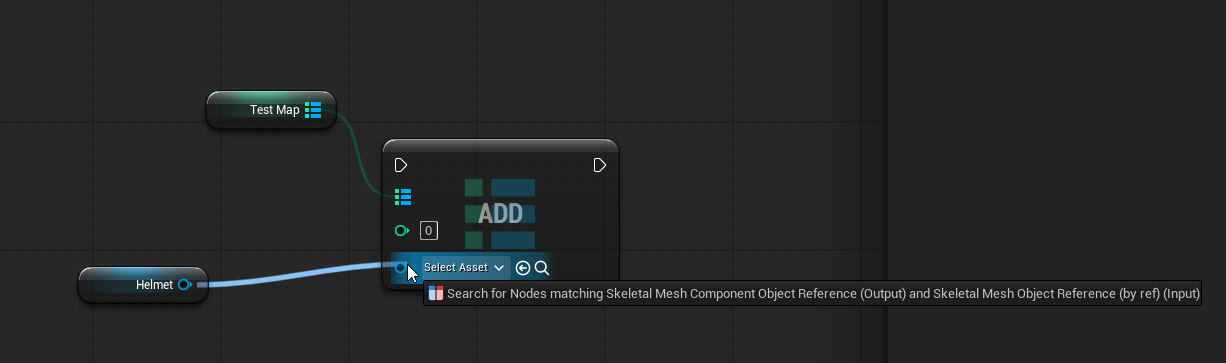 next hollow
One is the component, aka what actually holds the info
One of the mesh, of what to render, in said component.
Sounds like the Map is using the mesh one, and not the component one.
autumn pulsar
next hollow
One is the component, aka what actually holds the info
One of the mesh, of what ...
Well I need to denote the component so I can set the mesh on it
oh I see, I had updated the the map, but didn't update the "add"
so it was asking for the wrong thing
lofty rapids
dense rampart
though I am not sure why the vectors can't subtract
probably becasue a float output to subtracting two vectors doesn't make sense
A – B = (a1 – b1, a2 – b2, a3 – b3)
 dense rampart
lofty rapids
dense rampart
lofty rapids
Oh that one subtracts ok? thank you. I am just so close to of the results I want, I am just now calculating so if the enemy move hits a number range like 100 it stops and the. It switches back to the player’s turn rinse and repeat
lofty rapids
dense rampart
Oh that one subtracts ok? thank you. I am just so close to of the results I want...
it gets the distance, which is what i thought you were looking for.
lofty rapids
dense rampart
Oh that one subtracts ok? thank you. I am just so close to of the results I want...
you have to subtract then get magnitude which is what this node does
most likely
or in bp it's length
 sharp grotto
Is there someone who has experience in ynnk plugin for metahuman and non-meta characters lip sync and facial animation.
I really need help for this plugin how to use it and faced some issues.
Please message me.
Ty
autumn pulsar
So I'm trying to make an inventory system, and I was looking to have item stacks. I have the incoming item class, but I wasn't sure of the best approach to "match" it with my inventory. Would I be better off using an array then cycling through all of it until I find a match, or would I use a map for that?
Additionally would it be better off to grab the class?
Each item should be its own UObject type
next hollow
Your only real bet would be going over the loop of all items.
A Map I guess would work?
But it seems like it’s be a bit too weirdly confusing.
autumn pulsar
I could have a global table of all items, but that makes adding new ones a headache
next hollow
That table would still be an array to loop over anyway
autumn pulsar
yeah and if I wanted to set stack sizes an array would be better
since I can loop to find the next stack
next hollow
It’d be an array no matter what?
An array of item objects, or an array of stacks.
One is just an extra step to change the stack size. (Aka getting the item object)
autumn pulsar
Wasn't sure if "map" was a hashmap in Unreal
next hollow
A map is.
But there’d still be an array of the items.
That be the objects, or the stacks.
autumn pulsar
If I have say itemarmor and itemweapon and they both inherent from itembase, if I do a class check between itemarmor and itemweapon, would that pass?
Does calling a return node break a for loop?
Guess I'll find out
next hollow
Yes.
It ends the function, so sequence, loops, etc end
autumn pulsar
sick
autumn pulsar
https://i.imgur.com/1R1de7H.png will adding an item to an array like this break references if I destroy the parent object later?
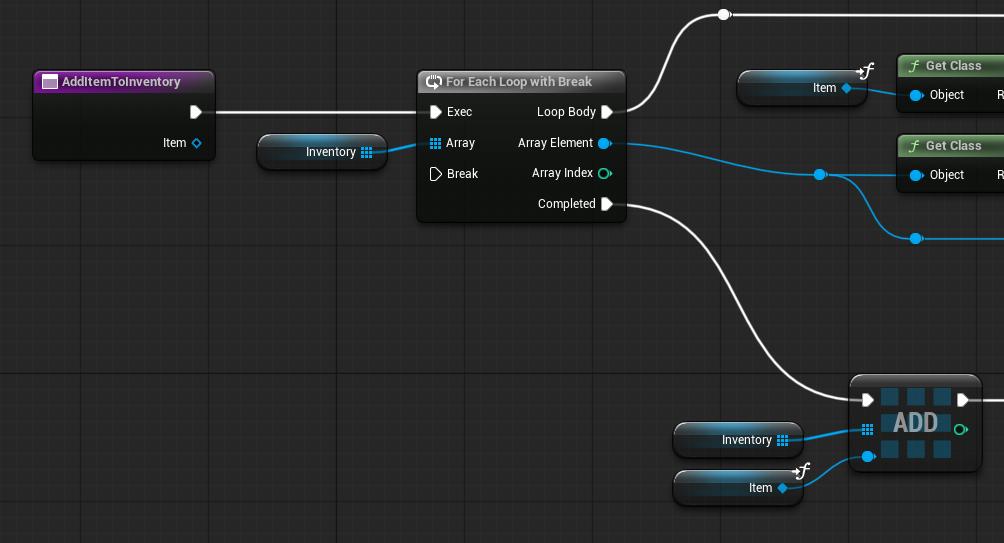
I'd have the sort of "host object" that has the item information in it, and I'm wanting to "yoink" that and attach it to my player
Though it may be better to store as class references instead?
last peak
autumn pulsar
https://i.imgur.com/1R1de7H.png will adding an item to an array like this break ...
no
crimson briar
autumn pulsar
If I have say itemarmor and itemweapon and they both inherent from itembase, if ...
Class check is valid when going up, not sideways. A cow is an animal, a dog is an animal, cow is not a dog
dense rampart
okay I am nearly there but i have set this up and i did have other print strings as far as after the branch however nothing seems to be in affect
 crimson briar
dense rampart
okay I am nearly there but i have set this up and i did have other print strings...
crimson briar
dense rampart
okay I am nearly there but i have set this up and i did have other print strings...
"nothing seems to be in effect" tells us nothing since we don't know what you want to happen and what is not happening. Add prints and go backwards to find the place where the execution stops behaving as it should and start from there
dense rampart
crimson briar
"nothing seems to be in effect" tells us nothing since we don't know what you wa...
to have the the enemy movie with it's call function at the end, i have done a print after the branch but it doesn't seem to clicking into it. i am changing it
lofty rapids
dense rampart
to have the the enemy movie with it's call function at the end, i have done a pr...
so your print string on true and false but it's never true
you print on just true, just false ?
print on both, and see if either show up
autumn pulsar
crimson briar
Class check is valid when going up, not sideways. A cow is an animal, a dog is a...
Cool thanks
 narrow pulsar
Has anyone figured out how to make the crouching of movement component smooth? While still being replicated for multiplayer
 north bobcat
anyone in here know anything about saving variables in ue? It's not working for me for some reason lol
 nova rivet
you have to make a save file blueprint and copy all the variables you want to save to it, if I remember correctly
 tepid willow
narrow pulsar
Has anyone figured out how to make the crouching of movement component smooth? W...
tepid willow
narrow pulsar
Has anyone figured out how to make the crouching of movement component smooth? W...
If you mean that you need a smooth transition, then you need to make a camera modifier that would interpolate between standing and crouching position
 glass blade
does this qualify as a latent(async) node?
 next hollow
Latent, but not “async” in the expected context.
I think async is more like.
Jumps from the node, to a 2nd thread, to then return later.
While timers are you set, and there checked on the main thread per tick.
They also don’t return data.
autumn pulsar
glass blade
does this qualify as a latent(async) node?
Async will have a clock on it iirc
 jovial steeple
That node is not latent or async.
All the node itself does is register a new timer in unreals timer manager.
This action alone is not latent, as it can be completed instantly. Thus it is useable in things like funtions.
It is also not technicly async.
However you can use that node kind of like an async task. You can also use it to get the same functionality as many latent nodes (Like Delay). This is where the confustion comes from. However, that node alone is neither latent or async.
autumn pulsar
The node itself isn't async or latent, but the timer it sets is
So you can accidentally screw up by having a rogue timer set a variable
maiden wadi
glass blade
does this qualify as a latent(async) node?
Don't use this if you can avoid it. Prefer the delegate one with a CreateEvent node instead of FunctionName
narrow pulsar
tepid willow
If you mean that you need a smooth transition, then you need to make a camera mo...
No yea i get that the issue is that using MC's crouch makes it move instantly to the crouch position Z level. Any interpolation I attempt to add simply makes it:
Start crouch -> snap to crouch position -> snap back up -> interpolated character/camera movement until it reaches crouch position
narrow pulsar
Still cant figure out how to get it to work
How it's right now in Play:
https://medal.tv/games/unreal-engine/clips/lB62x3Y8huVxWhTmH?invite=cr-MSxFMTAsMjAwNTA1NDU4&v=6


Watch Camera tiny jump by Steeljardas and millions of other Unreal Engine videos on Medal. #unrealengine
crimson briar
narrow pulsar
Still cant figure out how to get it to work
How it's right now in Play:
https://...
What are the values of eye height, crouched eye height and the timeline curve?
dense rampart
lofty rapids
so your print string on true and false but it's never true
I have done a check and there is something about the controller not being valid, i have made sure the other settings such as ai possess and world and spawned is set on the enemy
narrow pulsar
crimson briar
What are the values of eye height, crouched eye height and the timeline curve?
Eye Height I set at the start of my begin play since I don't know if CMC changes the "base eye height" so I wanted to keep its default value safe, but eye height is 64 and crouched eye height is 32

The timeline:

I did find that if i use a spring arm with camera lag speed turned on it works perfectly even without a timeline but it feels hacky and kinda scared it may affect other things
I think I know what the issue is but I do not know how to fix it. The CMC Crouch moves the camera a tiny bit down (it does not move it from 64 to 32 for some reason dunno why) so what's happening is the crouch happens -> moves camera that tiny bit from crouch -> lerps the rest of the distance between that position until the 32 from "crouched eye height"
crimson briar
Oh, I thought you didn't include the actual crouching yet and were testing the camera on its own- since there is no code triggering the crouch on the screenshots
narrow pulsar
I'm using Ninja Input Plugin, it calls the crouch() from CMC


But even if I did it manually it would be the same issue
crimson briar
Well in this case yeah, you either use the CMC handling of crouching - I believe it has settings for changing the crouch eye level etc. Or you disable it and do your own with a timeline.
dense rampart
still having some trouble, from what the testing is going is that doesn't conisder the ai blueprint as valid though the class settings for the pawn are correct for it so I am not sure on the issue
 crimson briar
dense rampart
still having some trouble, from what the testing is going is that doesn't conisd...
crimson briar
dense rampart
still having some trouble, from what the testing is going is that doesn't conisd...
DId you place an instance of the AIController into the AiController variable, or did you just create it and left it empty?
dense rampart
crimson briar
DId you place an instance of the AIController into the AiController variable, or...
nope

it does reference it
 spring magnet
Something is up with unreal respawning and it's driving me up the wall.
If I have 3 player starts, but I cover 2 of them with a mesh, the engine still rolls the dice and attempts to spawn the player at one of the covered ones, so 66% of the time, the player spawns, immediately gets destroyed, and the camera goes to 0,0,0. How does this make any sense?
crimson briar
dense rampart
nope
Sigh.
A Blueprint/Class is a template for creating objects.
A variable of this type is a container for holding a pointer to once specific object spawned in the game. By default a variable is empty, meaning there is absolutely nothing there so you can't call functions on it.
To execute code on it, you need to get an instance of this type and put it inside the variable.
For instance if it was inside some AI blueprint, you would use a node called GetController (or get ai controller, I don't remember if it was named like this) - this gives you the reference to this AI controller if it has one. You can then put it into a variable for example or use right away.
Since you are iterating through the enemies you probably want to use the Array Element controller, instead of the variable AiController
You just need to cast the GetController to your aicontroller before using it
Or check if there was a Get for AiController specifically, I don't remember
crimson briar
spring magnet
Something is up with unreal respawning and it's driving me up the wall.
If I ha...
It makes sense, you just assumed it works differently than it does. Player start doesn't care if it is covered or where it is, it is a simple point at which players can spawn by default. If you want more control over it, you need to add your own functionality instead of relying on this simple element.
spring magnet
crimson briar
It makes sense, you just assumed it works differently than it does. Player start...
That's fair, I'm currently in the process of just deriving from the player start and adding a check for spawn validity, and if nothing is overlapping, set the PlayerStartTag to Valid, then I'll just spawn using that Tag I suppose?
dense rampart
crimson briar
Or check if there was a Get for AiController specifically, I don't remember
still not working
 mortal palm
spring magnet
That's fair, I'm currently in the process of just deriving from the player start...
mortal palm
spring magnet
That's fair, I'm currently in the process of just deriving from the player start...
Maybe you can override Choose Player Start in the game mode?
north bobcat
nova rivet
you have to make a save file blueprint and copy all the variables you want to sa...
yeah man it dont work lol


just aint happening
it just prints that string on the right picture
crimson briar
north bobcat
What is the name you use, inside the MainGameSaveFile string? ANd is it ever changed?
Also check if the file is created inside the folders. It should be inside YourProjectName/Saved/Game Saves or smth like that
lofty rapids
north bobcat
so the print string is shwing on false ?
lofty rapids
dense rampart
it does reference it
when you say it does reference it, you realize the image doesn't show that ?
thats just the type
you need to actually set the variable
lofty rapids
dense rampart
still having some trouble, from what the testing is going is that doesn't conisd...
is the issue is it's saying "no" ?
dense rampart
lofty rapids
you need to actually set the variable
Strange, I thought I did set it to that
lofty rapids
dense rampart
Strange, I thought I did set it to that
so setting the type doesn't set the value
you need to actually assign it the value
like you can have a variable that is a string, but you have to set it's value
so you can have a variable that is a bp
but you have to set its value
summer tendon
can i call within editor a function to game instance ? or it needs to be done on run time ? (play) ? i wanna store a value there and load another lvl and load it without "playing"
dark drum
summer tendon
can i call within editor a function to game instance ? or it needs to be done on...
No, the game instance doesn't exist until you start playing so there's nothing to call the function on.
summer tendon
dark drum
No, the game instance doesn't exist until you start playing so there's nothing t...
just saw failed cast so i need to find a different approach
dark drum
summer tendon
just saw failed cast so i need to find a different approach
When you say you want to load another level without playing, what do you mean by this?
summer tendon
dark drum
When you say you want to load another level without playing, what do you mean by...
i am making automatic pictures 360 per level so i have already logic to do pictures in the level and before that i have UI where i select levels which i wanna load and do the logic... after pictures in the level are done i want to move in index to another selected level load it and do pictures again so i need to store my "array of levels" and "int index"
all doing outside of play it is inside of editor utility widget
dark drum
summer tendon
all doing outside of play it is inside of editor utility widget
If its editor utility stuff, I believe you should be able to get the level editor subsystem and call 'Load Level'. The editor widget should stay open which you can use to temporarily store the desired levels.
summer tendon
dark drum
If its editor utility stuff, I believe you should be able to get the level edito...
it is not storing i was thinking that but its not
dark drum
summer tendon
it is not storing i was thinking that but its not
What happens to the editor widget when you load the level? Just resets?
north bobcat
crimson briar
What is the name you use, inside the MainGameSaveFile string? ANd is it ever cha...
wym this? It's just empty
 north bobcat
crimson briar
Also check if the file is created inside the folders. It should be inside YourPr...
north bobcat
crimson briar
Also check if the file is created inside the folders. It should be inside YourPr...
it dont create in the folders
dark drum
north bobcat
wym this? It's just empty
That's the name of the file that gets saved to disc, if it's blank it won't create the file.
dark drum
north bobcat
so I just duplicate the variable name there?
Type in what the name of the file should be. 'Game01' as an example.
north bobcat
this will do lol
 summer tendon
dark drum
What happens to the editor widget when you load the level? Just resets?
summer tendon
dark drum
What happens to the editor widget when you load the level? Just resets?
yes resets but now i am trying to move some logic to editor utility actor and there you can actually persists values
north bobcat
I thought the variable name was the name that saves lol
dark drum
north bobcat
this will do lol
I would avoid spaces.
north bobcat
why
dark drum
summer tendon
yes resets but now i am trying to move some logic to editor utility actor and th...
Oh, ok. If thats the case, you can always use a save game object to store it in. These still work at editor time.
last peak
dense rampart
Strange, I thought I did set it to that
does this make sense ?
 dark drum
north bobcat
why
dark drum
north bobcat
why
Some operating systems don't handle spaces in file paths very well. Sometimes gets replaces with %20 i think.
dark drum
last peak
does this make sense ?
It makes sense to me but i'm not sure it would for someone that doesn't already know how instances work.
last peak
Mhm its a confusing thing at first in object oriented programming, its also hard to properly explain haha
dark drum
last peak
Mhm its a confusing thing at first in object oriented programming, its also hard...
Yea, i often tweak how I try to explain it to see what sticks better. 😅
dark drum
last peak
Mhm its a confusing thing at first in object oriented programming, its also hard...
Not sure if this is better.

 ocean cloak
I'm looking to seriously level up my UE5 Blueprint skills. My goal is to gain the professional knowledge needed to build complex systems independently, rather than just repeating steps from specific tutorials.
Could you please help me find the absolute best, most in-depth, and structured video course or series? (It doesn't matter which platform it's on—YouTube, Udemy, etc.)
I need a resource that explains how the whole toolset works and why we use specific techniques (like Interfaces, Casting, and Event Dispatchers), not just what to click.
crimson briar
I doubt you will find a course that will take you to a "pro level" whatever it is. You gain this sort of experience mostly by making systems yourself, failing, and figuring out why it failed.
 loud vessel
Hey, I have a very weird problem.
I just installed UE5.7
and when I tried to package just a default template project, I got these errors.... (Check Image and text file)
Any idea what I may be missing?
Also, I have Visual Studio 2022 Version 17.8.3
(The lastest is 17.14.21 but I don't have it downloaded --> is it Required for whatever the fix is?)
Please @loud vessel Tag me if you know the answer, or what I should do, or need more info.


I tried to search (Youtube/Google), but either couldn't find anyone else with the same problem....
or simply didn't know exactly how to search for this particular error.
dense rampart
last peak
does this make sense ?
So somewhere on the blueprint I should do a begin play and-> set that variable to the ai controller? Just to be more certain
dark drum
loud vessel
Hey, I have a very weird problem.
I just installed **UE5.7**
and when I tried to...
With the type of error messages, id update VS.
last peak
dense rampart
So somewhere on the blueprint I should do a begin play and-> set that variable t...
you need to get the specific npc and from that specific npc you need its controller
then you set your controller variable to that
ocean cloak
crimson briar
I doubt you will find a course that will take you to a "pro level" whatever it i...
I'm fully aware that hitting the "pro level" isn't something a single video can provide; that part is up to my own hard work, practice, and learning from failures. I just need the most reliable starting resource.
dark drum
dense rampart
So somewhere on the blueprint I should do a begin play and-> set that variable t...
Where is the code being called from? (the class)
dark drum
ocean cloak
I'm fully aware that hitting the "pro level" isn't something a single video can ...
I would just learn some C++ core concepts. They apply to BP as well and can help when you want to start doing a little C++ as well.
maiden wadi
I'm not sure there even honestly is a resource on that. It's just pure experience.
ocean cloak
dark drum
I would just learn some C++ core concepts. They apply to BP as well and can help...
I need a resource that will teach me the logic and fundamentals of the entire system (e.g., Interfaces, Event Dispatchers, and Data Structures) without using the C++ programming language.
dark drum
ocean cloak
I need a resource that will teach me the logic and fundamentals of the entire sy...
To clarify I'm not saying to learn how to code c++. Everything in BP follows the same concepts as c++ so understanding the core concepts helps massively.
Hierarchy and composition for example.
maiden wadi
To be fair, having just BP skills is a big 😬.
BP is a scripting language and meant to bridge the gap between designers and engineers. Like even if you're going to be a non C++ tech artist, or a mission designer, or dialogue person, or etc. You still have to incorporate a lot of the other things.
If you're designing systems front to back, you're an engineer, and you NEED C++.
dark drum
I which BP's supported Polymorphism, i feel like being able to overload BP functions could be useful. 😅
 white parrot
For most simple use cases you don't need C++.. you do however need to learn how to program rather than how to code
maiden wadi
dark drum
I which BP's supported Polymorphism, i feel like being able to overload BP funct...
How do you mean? You can do that unless I'm misunderstanding?
dark drum
maiden wadi
How do you mean? You can do that unless I'm misunderstanding?
I don't believe you can have multiple methods for the same function and have it call the relevant one based on the data (properties) passed in.
maiden wadi
Ohh. You're meaning like same name different arguments.
Yeah. The joy of everything being a name lookup mostly.
dark drum
Dual Classes (multiple-inheritance) could be cool as well but you can just use a component in most cases.
dark drum
ocean cloak
I need a resource that will teach me the logic and fundamentals of the entire sy...
Start with this. You don't need to worry about understanding the actual code. (You can skip the polymorphism section)
https://www.geeksforgeeks.org/cpp/object-oriented-programming-in-cpp/
GeeksforGeeks
Your All-in-One Learning Portal: GeeksforGeeks is a comprehensive educational platform that empowers learners across domains-spanning computer science and programming, school education, upskilling, commerce, software tools, competitive exams, and more.
maiden wadi
To be fair you can't do the class thing in C++ either with Unreal. UCLASS is specifically one class. Interfaces are a special case on that.
dark drum
maiden wadi
To be fair you can't do the class thing in C++ either with Unreal. UCLASS is spe...
Yea, Epics way or the highway haha.
Access Specifiers and Encapsulation is probably a big one a lot of newer individuals don't use. 🤔
maiden wadi
Newer. Haha.
I've seen people who've been doing this for nearly a decade who couldn't encapsulate their way out of a wet paper bag.
Getting people to fucking design actual systems and use an APIs makes you feel like that torture guy on the first episode of Alias.
dark drum
I don't like people touching my stuff so it all gets set as private unless I allow them to call something. 😅
I've seen a few examples where someone had a setter function so it would call an event dispatcher but the variable was still public.
I wish you could set properties as protected in BP though. Only being able to set as private can be a pain when dealing with hierarchy.
maiden wadi
Curious if they did that because of the reparenting tool.
Dumb reason, but I'm still curious.
dark drum
maiden wadi
Dumb reason, but I'm still curious.
Who knows. Its always been that way as far as I can remember.
narrow pulsar
maiden wadi
To be fair, having just BP skills is a big 😬.
BP is a scripting language and m...
Just bp is fine for a lot of projects
Its just when the scope because complex that it really requires c++
Even for a lot of complex projects some stuff in bps is completely fine
maiden wadi
That's not even remotely true. You can make a basic game with BP only if you're careful. But you will be cutting corners and ignoring features that even basic C++ allows.
lofty rapids
i'm working on a scripting language that is inside a BFL
basically a VM exposed to blueprints
narrow pulsar
I mean theres games made 100% in bp that are quite complex and have a sht ton of features
lofty rapids
ime c++ is basically required, there are things you literally can't do in bp
and the performance gain on serious tasks is enormous
you can make a full game
narrow pulsar
Bright memory for example
Idk I use both but I feel like I could easily make them in bps alone its just a question of performance and replication/networking issues existing with bps
So no mp games for bps
lofty rapids
i mean i do multiplayer with bp rpc
i just had to expose some stuff
for like timing
so i needed a bit of c++ to expose events but thats it
it seems to run ok for now lol
what part would i need to have in c++ ?
narrow pulsar
For performance any loops
And i havent done much replication in bps at all
I avoided it completely because always heard bad things abr it
Abt
lofty rapids
its just a bit complicated to get anything to work
as far as to get one thing to work you need like four times the code
once you get an idea bout replication its actually nice to have
i've done networking in the past and this makes things very nice imo
last peak
maiden wadi
To be fair, having just BP skills is a big 😬.
BP is a scripting language and m...
After learning bp's you already know a lot of c++ without knowing it yet tho
Like polymorphism, Unreal engine is polymorph heaven
Learning Pointers and syntax is probably the hardest part after bps
full badge
last peak
Learning Pointers and syntax is probably the hardest part after bps
speaking of pointers, they should add pointer supports for bp
last peak
ye 100%
full badge
being not able to pass variable reference through events is kinda pain
last peak
ye i mean you can just send the entire object and then directly manipulate the variable but that brings its own problems with it and is annoying
full badge
yeah
im just sending variable name
then set the variable through set property by name
maiden wadi
narrow pulsar
Bright memory for example
This game requires a source build. So it's not purely BP.
And while I will admit that the game looks very nice from the footage I've seen, from an engineering standpoint it isn't insanely complex. He leans a lot on existing features like the sequencers. It really does showcase the creator's artistic and cinematic skillset. But the programming requirements in this game is not complex.
crude dew
Hi, If i wanted to reevaluate a tree state on every run of the tree to check that a Enter Condition is still true how would i do this please?
The tree is shown below it is checking the Enter Condition of the Chase Node to ensure the CanSeePlayer and Chase is true to enter,
But IF the player moves out of sight then I want the tree to say CanSeePlayer is false and then return to Idle or some other branch plz. Been stuck a few hours on this so thought I,d reach out here. 🙂
This is the chase logic

Updated Tree

 jaunty solstice
How do you get random variation for a float value in a Blueprint Actor?
Can I access the world coordinates somehow and use that as a seed value for a random multiplier?
crude dew
Is this what your after ?
 jaunty solstice
crude dew
Is this what your after ?
jaunty solstice
crude dew
Is this what your after ?
Thanks. I think this might work.
How do you get the current actors location? Is that Get Local Transform or?
Also instead of Make Random Stream should I instead be using Make Random Stream From Location?
Just using regular Random Float in Range won't work because all your Blueprint actors have the same random value unless dynamically instancing at runtime.
crude dew
What exactly are you trying to do just make a random vector for a location in the world ?
Get Actor Location will give the Actors location in the world
jaunty solstice
Yep thanks!
Get Actor Location >> Make Random Stream From Location >> Random Float in Range from Stream
Correct?
crude dew
I think this is what you are trying to do

Ignore the GetControlled Pawn node if you are doing this inside your actor, Then you can put a Min and Max and then it will always return the same value between the min and max depending on the actors location i think.
jaunty solstice
Thanks!!
Had another workflow question>
When creating a BluePrint actor for a Cinematic is it necessary to copy your logic from the Construction Script to the EventGraph (Event BeginPlay)?
Or is this only necessary when making dynamic (runtime) changes from Sequencer?
crude dew
Ah not done any work in Cinematics/Sequencer yet so cant help with that soryr. ; (
last peak
jaunty solstice
Yep thanks!
Get Actor Location >> Make Random Stream From Location >> Random...
what the heck are you trying to do ?
jaunty solstice
last peak
what the heck are you trying to do ?
My solution is working. Just random float values to alter the intensity of a Blueprint light actor.
Next is some random color variation😬
last peak
jaunty solstice
My solution is working. Just random float values to alter the intensity of a Blu...
but why do you need a stream then ?
Ah well
color should work similar
jaunty solstice
last peak
Ah well
random values for actors manually placed
 burnt edge
anyone know why my interface function isn't showing up in the blueprint functions list?
dark drum
crude dew
Hi, If i wanted to reevaluate a tree state on every run of the tree to check tha...
That's not how state trees work. They don't tick like behaviour trees. Instead it traverses the tree until it finds a state it can enter and stays there until a transition is triggered.
If you want to check if the enter conditions are still true, you'd have to add a transaction that checks on tick and specify where it should go.
dark drum
burnt edge
anyone know why my interface function isn't showing up in the blueprint function...
Does the thing have the interfaces added in the class settings?
dark drum
burnt edge
yeah
Is it a child class? If so, you might need to enable show inherited properties.
burnt edge
dark drum
Is it a child class? If so, you might need to enable show inherited properties.
It's implemented directly in this bp, not inherited.
 lost hemlock
Hi, I spent 2 days to write a function in C++ that would serialize my render target so that I can save/load it
this is the file
But I realized my visual studio & visual studio code didn't properly expose my functions to my blueprint
I asked almost 10 people who are really experienced in C++ coding with unreal engine & vs/vsc, but nobody could understand wtf was wrong with my Visual Studio .SLN etc.
so i decided that I must do this in blueprint instead...
 thin panther
visual studio and VSC has no bearing on what gets exposed to blueprints
UHT and UBT is doing the blueprint exposing for you
It might be more helpful to share the code than a chatlog
lost hemlock
thin panther
It might be more helpful to share the code than a chatlog
wtf did I send?
lol, omg
lost hemlock
💀 sorry about that
anyway this is the code I was trying to send, lol
this is how I did it... but It worked only once at first, then it no longer worked...
I think I broke something with my source files...
thin panther
your header is what's important for exposing functions to unreal
send it over in #cpp
lost hemlock
// Fill out your copyright notice in the Description page of Project Settings.

#pragma once

#include "CoreMinimal.h"
#include "Kismet/BlueprintFunctionLibrary.h"
#include "Engine/TextureRenderTarget2D.h"
#include "Engine/Texture2D.h"
#include "Kismet/GameplayStatics.h"
#include "Kismet/KismetRenderingLibrary.h"
#include "GlaxFunctionLibrary.generated.h"


USTRUCT(BlueprintType)
struct FRTColorData
{
    GENERATED_BODY()

    UPROPERTY(BlueprintReadWrite, Category = "RTData")
    TArray<FColor> Colors;

    UPROPERTY(BlueprintReadWrite, Category = "RTData")
    FIntPoint Size = FIntPoint::ZeroValue;
};

UCLASS()
class TERRAVIVE_API UGlaxFunctionLibrary : public UBlueprintFunctionLibrary
{
    GENERATED_BODY()

public:

    /** Read pixels from a render target into a serializable color array. */
    UFUNCTION(BlueprintCallable, Category = "Glax|RenderTarget", meta = (WorldContext = "WorldContextObject"))
    static FRTColorData RenderTargetToColorArray(UObject* WorldContextObject, UTextureRenderTarget2D* RenderTarget);

    /** Create a transient UTexture2D from a color array. */
    UFUNCTION(BlueprintCallable, Category = "Glax|RenderTarget")
    static UTexture2D* ColorArrayToTexture2D(FRTColorData Data);

    /** Fill a render target from a color array. Returns true on success. */
    UFUNCTION(BlueprintCallable, Category = "Glax|RenderTarget", meta = (WorldContext = "WorldContextObject"))
    static bool ColorArrayToRenderTarget(UObject* WorldContextObject, FRTColorData Data, UTextureRenderTarget2D* Target);

};
oh yeah this is also the header
lost hemlock
thin panther
send it over in <#221799439008923648>
i did sent it there too. ppl said it had nothing wrong to do with the code, ppl told me that the code is mostly fine
but anyway, today im planning on doing that in blueprint
thin panther
lost hemlock
i did sent it there too. ppl said it had nothing wrong to do with the code, ppl ...
Do you have a link to the conversation?
ah ok it's recent
Ok, might be worth bumping the conversation, it seems people just went a bit inactive (granted now isn't it's most active time either)
lost hemlock
thin panther
Ok, might be worth bumping the conversation, it seems people just went a bit ina...
You mean you think its worth asking again there?
I think I need to try it in blueprint
Im debating it, although not sure which option would be easier at this point
thin panther
You should definitely ask there. Your issue isn't with the blueprint scripting language, it's an issue with C++
narrow pulsar
So I'm having some issues, how can you make crouch from CMC smooth instead of instantly teleporting your camera? I saw there are some guides on youtube but when I follow them they do not work at all. The screenshot results in the issue in the next video: I found out the issue is because my capsule moves down when crouching and the difference between the standing height & the crouched height is whats causing the instance snap
https://medal.tv/games/unreal-engine/clips/lB62x3Y8huVxWhTmH?invite=cr-MSxFMTAsMjAwNTA1NDU4&v=6

 prisma crag
I'm trying to package my level (which has 3 levels, the main menu screen which is just a UI, the actual game itself called 'Terminated' and an end screen which lets the player close the game) but whenever I try to package it I keep getting this error consistently:
PackagingResults: Warning: Visual Studio 2022 compiler is not a preferred version PackagingResults: Warning: Unable to generate long package name, EndScreen. Input 'EndScreen' is not a child of an existing mount point. PackagingResults: Warning: Unable to generate long package name, Terminated. Input 'Terminated' is not a child of an existing mount point. PackagingResults: Warning: Unable to generate long package name, MainMenuMap. Input 'MainMenuMap' is not a child of an existing mount point.
I've included them all in the Project Settings > List of maps to include in the packaged build and everything works on the coding side.
The build DOES package itself but the main menu doesn't take me to the game (though it works in the editor). Is there something I'm missing? If I need to add any more information please ping me and let me know 

 lusty ginkgo
Hello,
Has anyone worked with the AnamorphicLensDistortion and LensFile nodes within an EventGraph; either for an Editor Utility Widget and/or Blueprint? Specifically when working with the 3DE4 Anamorphic - Standard Degree 4 lens model.

I'm researching how to import and process existing animated anamorphic lens distortion parameter values from a txt file output from 3DEqualizer to auto assign onto an existing Lens File, rather than manually setting Lens Data Points.
If anyone who's used 3DE before, I'd be interested to know what direction was required to process this type of data into UE5.
crude dew
dark drum
That's not how state trees work. They don't tick like behaviour trees. Instead i...
Oh ok, Thanks for the reply I thought things like Evaluators and Global Tasks would cause a re-evaluation of the enter condition but i guess once its entered the state it stays there until Finish Task is called (Which would send it back to a transitional state using (OnStateCompleted) I guess ? So if the AI Move To is called but never finishes (IE, It never reaches the player the tree will never leave the Chase state right because OnMoveFinished never triggers the Finish Task ?
Is this correct? Just thought I would write a thing to see if my understanding of the trees is correct, Once again thank you !
dark drum
crude dew
Oh ok, Thanks for the reply I thought things like Evaluators and Global Tasks wo...
Pretty much yea, it's why state trees can be useful for none AI related stuff too. (I think epic mentioned something about using it for a weather system)
You can always have the state fail if the move to fails as well and do something different.
 hollow drum
Can some tell me what i am missing this is on the Event Tick chain in my playercontroller blueprint. I am making a card game and I want to click and drag the card around the screen and with this I am able to, only thing is when I first click the card to pick it up it lifts to the Z20 which is supposed to happen but it does not just lift straight up and allow me to start dragging from the spot i clicked. It repositions the card so that the point i clicked is under the mouse cursor after lifting the card. I dont want it to do the reposition part. The Return Value on the inverse Transform Location node is connected to new location pin on a Set World Location node
 dark drum
hollow drum
Can some tell me what i am missing this is on the Event Tick chain in my playerc...
dark drum
hollow drum
Can some tell me what i am missing this is on the Event Tick chain in my playerc...
When you first click the card you need to store an offset from its current location and the clicked location. You'd then add this offset to the new location when dragging.
hollow drum
@dark drum Sorry forgot to mention that is what the Relative Grab Location node in the Screenshot is
dark drum
prisma crag
I'm trying to package my level (which has 3 levels, the main menu screen which i...
I think the paths you're using to denote the maps to save is incorrect. (Unless they're in the just the content folder)
You'd normally have something like 'folder name''map name'
You can right click on the map asset and get it's path location to paste in.
dark drum
hollow drum
<@430016173694779402> Sorry forgot to mention that is what the Relative Grab Loc...
How do you set the relative grab location?
hollow drum
it allows me to start dragging from where i clicked it's just when the initial click happens the card is at 1z height and then it moves to the Z20 height and when it moves to the Z20 height the Raycast impact point is no longer directly under the mouse cursor so it repositions the entire card while at the new Zheight so that the original impact point lines back up with the mouse cursor and i dont want it to do that
this is how the Relative Grab location is set

@dark drum I rewrote that last message to better explain what my issue is
narrow pulsar
Has anyone managed to get a smooth camera transition working for crouching when using CMC's crouch()?
dark drum
narrow pulsar
Has anyone managed to get a smooth camera transition working for crouching when ...
Yes, the trick is to enable/disable crouch after the animation has played.
dark drum
hollow drum
it allows me to start dragging from where i clicked it's just when the initial c...
You could try breaking apart the final vector and manually adjust the Z.
narrow pulsar
dark drum
Yes, the trick is to enable/disable crouch after the animation has played.
hmm I thought about this but that means there'll be a 0.3s delay between player pressing crouch & character actually crouching >.<
dark drum
narrow pulsar
hmm I thought about this but that means there'll be a 0.3s delay between player ...
Oh and you'd need to manually adjust the capsule half height as part of the animation.
narrow pulsar
hmm
I guess I could try that
Just not a big fans of delays like that since it'll be multiplayer but yea
dark drum
narrow pulsar
Just not a big fans of delays like that since it'll be multiplayer but yea
Use a timer instead. This will allow you to store the timer handle and clear it if the player tries to do the opposite before the transition has finished.
narrow pulsar
dark drum
Oh and you'd need to manually adjust the capsule half height as part of the anim...
So basically on crouch input trigger -> set crouch variable to play the animation -> play timeline -> lerp capsule -> lerp camera -> on complete = crouch()?
dark drum
narrow pulsar
So basically on crouch input trigger -> set crouch variable to play the animatio...
Pretty much.
prisma crag
dark drum
I think the paths you're using to denote the maps to save is incorrect. (Unless ...
And that would just be the level, right
prisma crag
dark drum
I think the paths you're using to denote the maps to save is incorrect. (Unless ...
I tried that and I got this error
dark drum
prisma crag
I tried that and I got this error
This looks like an error caused by something in the level BP. If I'm understanding it correctly, it's attempting to open the same level or something like that.
prisma crag
dark drum
This looks like an error caused by something in the level BP. If I'm understandi...
Like it's considering MainMenuMap, EndScreen and Terminated all one level?
because my intent was to have the game start at the main-menu (as its own level) and then it goes to the maingame (terminated) and end on EndScreen. The nodes I have to do that are all in different levels to eachother. (Terminated DID have a node that looped back into itself, however i removed it but got the same errors)
maiden wadi
narrow pulsar
So I'm having some issues, how can you make crouch from CMC smooth instead of in...
I've seen this neatly handled by attaching the camera to the mesh on a "camera" bone in the skeletal mesh. Which gets moved only when like crouching or prone.
The other kind of cheap hacky way is just to use some camera interp lag from like a spring arm.
dark drum
prisma crag
because my intent was to have the game start at the main-menu (as its own level)...
Show the logic.
narrow pulsar
maiden wadi
I've seen this neatly handled by attaching the camera to the mesh on a "camera" ...
I was doing the hacky way but found some issues (camera lags a bit when moving, doesn't stop immediatelly as you stop moving, I attempted to simply turn on & off the camera lag before & after the crouch but if you're moving you notice a tiny stutter which is basically the camera "catching up" so thats a no go either.
dark drum
maiden wadi
I've seen this neatly handled by attaching the camera to the mesh on a "camera" ...
Attaching the camera isn't a bad option. However, I found that sometimes the camera might clip through objects for half a second if you're going under something during the crouch. This is because the mesh can exceed the capsule component when it instantly resizes.
If your gameplay allows it, it's definitely the simplest of options.
prisma crag
the first image is my MainMenu - > Terminated one
The second one is Terminated - > MainMenu (Done via a widget that appears on the player's death)
the third one is when the player beats the boss and goes from Terminated - > EndScreen.


 maiden wadi
dark drum
Attaching the camera isn't a bad option. However, I found that sometimes the cam...
maiden wadi
dark drum
Attaching the camera isn't a bad option. However, I found that sometimes the cam...
No I mean like. You put a bone on the mesh itself. Similar to attaching a sword to the "Hand_r" bone. Except this one just doesn't move normally except when you crouch and prone. So the animation itself drives where you want the camera. After that it's all about feelers and tests and such.
So your capsule resizes instantly, doesn't matter so much, but your animation which is already driving the character's visuals can also drive the camera's "desired location".
Would still need extra handling from the manager though. I really should look into that new gameplay camera thing.
narrow pulsar
dark drum
Pretty much.
So I got this working and it works really well except that when testing in multiplayer the client starts kinda spazzing out:
https://medal.tv/games/screen-capture/clips/lBBfRjce0W4QHqopj?invite=cr-MSxrMEMsMjAwNTA1NDU4&v=9
It works perfectly fine for the host though but yea

Watch Weird by Steeljardas and millions of other Screen Recording videos on Medal. #screenrecording
 dark drum
narrow pulsar
dark drum
narrow pulsar
Id try updating the half height on the server side.
narrow pulsar
will give it a test
prisma crag
prisma crag
the first image is my MainMenu - > Terminated one
The second one is Terminated ...
@dark drum sorry for the ping, though this is what you meant by Logic right?
narrow pulsar
dark drum
Id try updating the half height on the server side.
Nope, updating the capsule on the server messes everything up, it still looks a bit funky from the hosts POV of the client and the client the lerp doesn't work properly and its sinking into the floor when crouching for some reason lmao
I'll have to see if I can figure out a way around it
narrow pulsar
dark drum
Id try updating the half height on the server side.
Was the opposite, just had to ensure it was not replicated at all and just a local thing
Since main screen was playing as listen server it was updating in the server and causing the desync
dark drum
prisma crag
the first image is my MainMenu - > Terminated one
The second one is Terminated ...
Not sure to be honest. There's a few issues to consider such as anything after the load level or destroy Actor won't actually get called but I don't believe that would cause your issue.
prisma crag
I managed to resolve it, all I had to do was enable Generate Abstract Class and change the parent class of my level to something else, then switch it back
I don't quite get how it worked but I'm not going to complain
I do have a new problem now, where I keep getting this warning and none of my NPCs are moving in the packaged builds (though it works in editor?)
LogCrowdFollowing: Warning: Unable to find RecastNavMesh instance while trying to create UCrowdManager instance
I have a recastnavmesh in my level, though I don't know why it's not working
 tepid solar
Hi guys. I want to access an actor from another actor. To be precise I want to access an staticMesh that I made to an actor from the player Actor. I tried to get the parent of self and then search for childComponents with a tag I set beforehand but that doesn't work.
dark drum
tepid solar
Hi guys. I want to access an actor from another actor. To be precise I want to a...
So you've spawned in an actor from the player character and what to access the static mesh of the newly spawned actor?
 tepid solar
dark drum
So you've spawned in an actor from the player character and what to access the s...
tepid solar
dark drum
So you've spawned in an actor from the player character and what to access the s...
obove
tepid solar
dark drum
So you've spawned in an actor from the player character and what to access the s...
The world I am using is VehicleBasic. That is also the name of the parent of both actors. The actors exists separately so none is the child of the other and I need a way to trigger a function of the Sphere_blueprint from the player actor.
dark drum
tepid solar
The world I am using is VehicleBasic. That is also the name of the parent of bot...
And whats the relationship between these two actors? Will they both always exist and be preplaced in the level?
prisma crag
is there any way to use my player's variable on the level blueprint?
I'm trying to make a door and a key (the key is the variable on the player) but I'm not quite sure how to call it.
tepid solar
dark drum
And whats the relationship between these two actors? Will they both always exist...
One is spawned at beginplay the other that needs to be accessed is always there
white parrot
prisma crag
is there any way to use my player's variable on the level blueprint?
I'm trying...
You can pass the "key" using an interface
prisma crag
white parrot
You can pass the "key" using an interface
how would I go about doing that, if you wouldn't mind explaining?
last peak
prisma crag
is there any way to use my player's variable on the level blueprint?
I'm trying...
First of all dont use the level blueprint
Second
Get player character - cast to bp player - get variable
and there you go
prisma crag
so just make the door it's own individual script?
last peak
prisma crag
so just make the door it's own individual script?
yes, the level bp is complete garbage
prisma crag
I'm afraid I put all my door-related stuff there already 
last peak
i mean if you are solo in a small project ok go for it but its bad practice
prisma crag
Yeah it's just a solo project, but I'll keep it in mind for future reference
with that in mind, is there any way to do it within there?
last peak
prisma crag
with that in mind, is there any way to do it within there?
Get player character - cast to bp player - get variable
for anything else that is not your player you probably want to use a interface like Pingo said
white parrot
prisma crag
how would I go about doing that, if you wouldn't mind explaining?
You create an interface (instead of creating aBlueprint you create a Blueprint interface). inside you define a function
"Unlock" and add a parameter that matches your key variable Actor/String however you defined it.
In your door BP, class settings -> add interface -> the interface you just created, it will be added to your functions list under the same name "Unlock".
double click to implement it, as in what happens "when you receive that key variable".
assuming you have an overlap event on your door, when the overlap event triggers you dereference OtherActor and call the "Unlock" and pass in the key variable.
white parrot
prisma crag
I'm afraid I put all my door-related stuff there already <:Deadge:11215464345215...
Eh, you better of copy-pasting it into an actual Actor
 maiden wadi
Composition is a wonderful thing.
prisma crag
last peak
i just imagine a entire dungeon where he has to script every single door lmfao
I have 6 doors 
granted their code is copy and paste cause this one is the only one w/ the lock gimmick
last peak
prisma crag
I have 6 doors <:qmikouDead:1341409403965931641>
You are doing object oriented programming here
One Programming Rule
Do not Repeat yourself
why copy paste the crap 6 time if you could just create 1 actor
and place it 6 times in the world
 solemn fog
Hello! I just started learning Unreal Engine. Could anyone recommend a good Blueprint tutorial for beginners?
maiden wadi
To start off with. Literally anything to get used to the engine. What or how your learning matters less than getting oriented. Anything that is like a "build some game style thing" with a bunch of episodes are usually good. They'll run through a bunch of different topics.
Past that you can do more specific implementations.
Casting is not bad. Interfaces are not great. Composition is wonderful. Datatables are okay, DataAssets are better. Make systems and an API. Do not put gameplay logic in Widgets.
solemn fog
@maiden wadi Thanks! This is really helpful. I’ll look for a small game-style tutorial to get used to the engine first. Also good to know about DataAssets, composition and avoiding gameplay logic in Widgets — I wouldn’t have known that as a beginner.
white parrot
solemn fog
<@143471961723371520> Thanks! This is really helpful. I’ll look for a small gam...
Also don't assume paid courses are inherently better than Youtube/free courses, they are usually not.
solemn fog
@white parrot Thanks for the information!
prisma crag
last peak
Get player character - cast to bp player - get variable
Would there be no alternative? I'm trying to get an already-existing boolean from my player character to serve as a condition for a branch in my level design if that helps better explain what I'm aiming to do
last peak
prisma crag
Would there be no alternative? I'm trying to get an already-existing boolean fro...
Thats exactly what you are doing with that
You get your player character - this is your current player character object with that you cast to your player - this is your specific player instance - you get its variable
last peak
Everyone starts somwhere
 sand shore
prisma crag
Would there be no alternative? I'm trying to get an already-existing boolean fro...
sand shore
prisma crag
Would there be no alternative? I'm trying to get an already-existing boolean fro...
Level script can directly reference actors already spawned into the level. You could have the player’s pawn already in the level and possess that after the controller gets set up, to directly reference it in the level scripts.
But then if you change the possessed pawn, then the level scripts will break. Others have already indicated you might wanna avoid the level script, so I won’t lump more of that advice in.
 jovial hemlock
Can you still launch or add impulse to a character if the mesh of that character has simulate physics set to true to make it ragdoll?
 rough pecan
I'm having some troubles here with a weapon pickup system.
The pickup works fine and all, but I can't figure out how to get a reference to the character the weapon is attached to.
I'm destroying the weapon pickup actor, spawning a new actor, then attaching it to the Hand.
But anytime I try to get Attached Parent, Attached Actors, or anything like that it shows None or gives a nullptr.


 last peak
rough pecan
I'm having some troubles here with a weapon pickup system.
The pickup works fin...
last peak
rough pecan
I'm having some troubles here with a weapon pickup system.
The pickup works fin...
Just create a new variable on your weapon actor and make it instance editable and exposed on spawn
THen on spawn actor from class you can set it to whatever it is attached to
rough pecan
last peak
THen on spawn actor from class you can set it to whatever it is attached to
brilliant, tysm
 tribal gazelle
I'm trying to work out the best way to store and retrieve variables like character, mesh etc. and access them via actor components and can't seem to find anything on this. Does anyone have a specific process they do?
last peak
tribal gazelle
I'm trying to work out the best way to store and retrieve variables like charact...
Hmm what do you mean exactly?
Do you want to access the variables from the component
or the other way around
tribal gazelle
last peak
Hmm what do you mean exactly?
I want to store variables like character, mesh, capsule component, player controller in one place which I can access via actor components. I am doing the references in a single actor component but I am getting all sorts of problems doing it that way
last peak
tribal gazelle
I want to store variables like character, mesh, capsule component, player contro...
What problems do you have with that ?
tribal gazelle
last peak
What problems do you have with that ?
Spawning the player as an actor, then setting the references in an actor component on the character.
last peak
tribal gazelle
Spawning the player as an actor, then setting the references in an actor compone...
But what are the problems you are running into ?
tribal gazelle
last peak
But what are the problems you are running into ?
The juggle between controller spawning first then character being spawned then controller possessing character - even if I set the references after the posses it still is not working. (well it does but the controller reference is returning none) I am just assuming there is a much better way to do it.
last peak
Is there a reason why you want to store the controller ref on a component ?
tribal gazelle
last peak
Is there a reason why you want to store the controller ref on a component ?
Because GetComponentByClass is how I reference the reference component (in all other components)
last peak
I mean im not sure if there is a better way i usually tend to store important variables that i want to access somwhere else in a component too and so far i havent encountered any problems with it
tribal gazelle
last peak
I mean im not sure if there is a better way i usually tend to store important va...
Ok, thank you. I haven't had problems before so it's mainly my refactor not working. I'll keep tugging along.
crimson briar
tribal gazelle
I want to store variables like character, mesh, capsule component, player contro...
It is not wise to store references in a single place like this because then you risk binding everything in your game together. Which means it will be harder to reuse elements and more stuff can break when one of the things changes.
As to your problem with the references not being valid - if two actors exist in the world, you don't have a guarantee which one will be created first. So in a case where you need a reference to another actor before the current one continues - you do a small loop in begin play. Try to find the actor -> if it is valid, great / if it is not valid -> delay/timer for 1 second -> loop back to the same code looking for actor
last peak
Wait
last peak
tribal gazelle
Ok, thank you. I haven't had problems before so it's mainly my refactor not work...
Do you want to store all characters in one component?
Thats indeed a bad idea
crimson briar
I think he wants a singular component for storing references to various things so other components can easly pull from it instead of looking/getting them the other way. And yeah, it can be a bad idea depending on what exactly he wants stored there.
sand shore
It feels like this is adding a lot of maintenance complexity for not a lot of benefit
A lot of these references are already cached like the controller’s current pawn
last peak
crimson briar
I think he wants a singular component for storing references to various things s...
I thought he wanted to store variables on a component so it easier for other actors to pull them
sand shore
But then this type of out-of-order initialization will continue to plague this cache component
maiden wadi
 last peak
THe one and only, the most holy god class was born into existence
providing unity in a chaotic environment
maiden wadi
Not even initialization as an issue. It's pure madness. Like you already know you're working with a character clearly. Just get the owner and pull the shit.
And the player controller is gonna suck. Maybe not for a VERY specific game. But playercontrollers on pawns can change. Caching it in relation to a pawn is... 😬
last peak
i once worked together with a guy who did create such a monster, his reasoning was "its easier to get the references this way"
He wnt super angry when i told him that this is complete trash
That garbage bp took 10 minutes to load XD
maiden wadi
I don't even like it when people cache references in like Beginplay a lot of the time. Extra maintenance for no gain drives me absolutely nuts.
 lean flax
Can accessed none crash a packaged game?
 hardy merlin
Is there a BP equivalent to Ensure? Or a plugin for that behavior?
 south obsidian
A new day, a new problem. I have a question. How can I modify/make the doors timelapse to use physics? I mean, stop at obstacles instead of going through them, as I've been doing until now. I've tried to solve something with AI and searched YouTube, but with little success. An example is from a BP vehicle. The vehicle is running on the Vehicle Chaos System

 modern cove
Matter of curiosity: When a game is built with Unreal Engine 5, how many CPU cores does it utilize?
maiden wadi
modern cove
Matter of curiosity: When a game is built with Unreal Engine 5, how many CPU cor...
A couple by default. There's a Gamethread, and now there are two renderthreads. And then how many ever workerthreads it can use to do tasks that are parallel or async. But how actively it uses said worker threads depends on the engineer and game.
crimson briar
lean flax
Can accessed none crash a packaged game?
Yes it can. Blueprints have some guardrails so it doesn't crash in the editor, but there is a big chance it will in packaged game. If you have situations where you are not sure if something will be accessible, add an IsValid node or a validated get before using the variable.
maiden wadi
They won't crash in a cooked game either. They are guarded there as well. It just won't work.
crimson briar
Hmmm, I had one experience where it was not the case. But maybe you are correct and it was related to something different, not just a none reference
dark drum
crimson briar
Hmmm, I had one experience where it was not the case. But maybe you are correct ...
If its an object property used in C++ it will cause a crash if not handled appropriately. If BP only, it just wont work. You can get some cross over where a property is exposed to BP and can be set but has some stuff happen in C++.
This is my experience.
 gloomy swift
Getting this warning which is causing an error with a json function, when starting the project. Refreshing the bp code fixes the issue until project restarts.
Failed to find script package for import object 'Package /Script/JsonBlueprintUtilities'
Changing the JsonBlueprintUtilities plugin to load on PreDefault fixes it but it's not scalable to the team... CommonUI had a similar issue a while ago and I fixed it by copying the plugin and changing the load time, but doing the same with JsonBlueprintUtilities results in unresolved externals
errant snow
hardy merlin
Is there a BP equivalent to Ensure? Or a plugin for that behavior?
Not that I've ever seen. A basic version is pretty trivial to write if your project has any C++. I don't think there's a solution for pure blueprint projects except for finding something on FAB that probably does way more than just provide an ensure.
 woeful mesa
Does anyone know why my code isn't working? I have made it so that every second (dayspeed), 1 gets added to minute. When minute = 60, set minute to 0 and set hour to hour+1. I have printed them and it works, but it wont print the string "Times up" when the time is 13:30 (as hour is 13, and minute is 30)


Oh wait nevermind
maiden wadi
woeful mesa
Does anyone know why my code isn't working? I have made it so that every second ...
At the very least I would swap those == out for Nearly Equals. And realistically for a 'time is up' thought process, always assume it can go over with a >= check.
woeful mesa
Ok thank you
 hardy merlin
errant snow
Not that I've ever seen. A basic version is pretty trivial to write if your proj...
hardy merlin
errant snow
Not that I've ever seen. A basic version is pretty trivial to write if your proj...
Hoping for something that is unmistakable as Ensure. Blueprint-only designers rarely look at the output log. I'll check FAB.
errant snow
hardy merlin
Hoping for something that is unmistakable as Ensure. Blueprint-only designers r...
I’m not aware of anything that will stop execution in blueprint the same way that ensures do in native. If that’s what you’re trying to get at. I’m not even sure there’s anything like that on FAB.
You could probably do an ensure function that routes to the message log instead so that it pops up like when blueprint encounters and skips null dereferences.
 normal raft
normal raft
normal raft
nm... would help if the death impulse wasn't literally knocking him to orbit
but yeh not sure if any ones seen this little issue that you kind of run into with the CMC gravity and the Mesh Simulate physics they dont seem cohesive and at times its really counter intuitive
like stop all camera movement should be a thing
still allowing the gravity to tick
cam movement == your actual movement in planet games
I guess i could redesign the logic of the camera sync .. so it knows that the character is dead and continues to track the carcus
 tropic wolf
I've been using things like Sphere Collision components to visualize functionality that has its own math (not using the Sphere Collision in any logic other than setting a default on Construction), in this case the landing radius for this falling actor.
In this case, the landing position will always be aligned with the landscape, so I only really need a circle shape as a visualizer instead of a sphere. I don't expect it to be completely compiled out, but is there a better way to do these visualizations that doesn't require making custom Static Meshes?

Draw Debug exists but it requires a duration, appears in play, and 0 isn't infinite
crimson briar
tropic wolf
I've been using things like Sphere Collision components to visualize functionali...
Maybe a stencil? They can be projected on the surface. Not sure if it wouldn't be a hassle to use them for simple visualization though
tropic wolf
yeah it's literally just for visualizing the value you change in editor
the moment you hit play, it should not be visible
I'm thinking I may need a custom lightweight component that I code in C++, without any other suggestion
crimson briar
I once made a grid from a tutorial that was a bunch of manually calculated triangles, very efficient etc. You could probably make your own component using this method for visualization too
crimson briar
Triangles for lines. Two long triangles make a line. You could make a semi circle with them too
It is somewhat involved to set it up. At least it was for me, as I don't know much about the actual triangles
Found the tutorial but it was for a grid, not a circle. But it will give you a hint what I'm talking about: https://www.youtube.com/watch?v=Q4AOmT9aOEM

Support the channel through donations. Crypto accepted!
PayPal: https://paypal.me/reidschannel?locale.x=en_US
Patreon: https://www.patreon.com/reidschannel
Bitcoin: 1JFwWHr4X6uAeoZadukzqKjzFBj3Qjy7Sk
Ethereum: 0x2B2Bc108F1Cc0fF899959dEF3226637787d8C3dE
Dogecoin: DNQ33YnhpWoTBokBNVkZP5ub8KTLkpyjpv
Join our community discord!
Discord: https://dis...
crimson briar
Oh yeah, I keep forgetting about it lol
woeful mesa
Does anyone know why I keep getting this error of infinite loop?
I'm making a day/night cycle, and i want it so that day is long, evening is short, dusk is long, night is long, dawn is short, which is why i made all of this.
However, when the time hits 24 hour (which is night begin hour), it causes the error. When i change night begin hour to 0, it crashes when the time is 21 hour.


 brisk glade
what's the best way to have something like a timeline curve, but with a "time"/duration that is editable during runtime?
so let's say I want to always use a "ease in out" curve to interpolate a float, but the time will be different every time
something like lerp + curve asset?
next hollow
Could do scuffed stuff, and change the timeline speed.
brisk glade
how can I do that?
brisk glade
next hollow
Sorry.
`set play rate`
I can only see that for anims
is there one for blueprint timelines?
next hollow
Did you get the timeline?
 soft lion
Hi I'm not sure if this is the right spot anyways, but I'm struggling so bad with a Modular Character I'm not sure why this is happening.
If I have this setup like this in the character, the Chest is the standard Character Mesh and all the other parts are just attached. If I do like this, then my player loses all movement input controls. I cannot move at all, and my breakpoint values it does not seem to recognize the Movement vector. However, I use the FGameplayTagBlueprintPropertyMap from GAS to change booleans inside my anim instance, and when I have it like this, applying the crouch tag successfully changes the boolean, so I can change animation states.

The property map

If I change it to where the Legs are the leader component and the chest is a follower, then I regain input controls and I can move again, however the property map and tags no longer function and I cannot change any animation states

I mean wtf
brisk glade
next hollow
Did you get the timeline?
yeah I just found out now that you can access timelines as variables haha
thanks!
soft lion
soft lion
Hi I'm not sure if this is the right spot anyways, but I'm struggling so bad wit...
When I debug I have direction vectors valid, but when they hit the AddMovementInput they're now ??? ??? vectors

When I add movement input it turns the WorldAccel value to move a direction to 0 0 0
soft lion
nvm something bizzarre is happening I'm reverting my source control. I went back to single mesh not modular and I get no input still
something broke weird
crimson briar
soft lion
nvm something bizzarre is happening I'm reverting my source control. I went back...
Do you have collisions enabled for the bodyparts on the channel that the capsule of the character uses as an object type?
Possibly the capsule collides with the bodyparts blocking the movement
crimson briar
woeful mesa
Does anyone know why I keep getting this error of infinite loop?
I'm making a d...
And wheat follows after the part of ConvertTime you showed? SInce it happens on hour 24, this seems the most important.
Also when showing blueprints:
a) try to not separate one execution flow (event/function etc) into two screenshosts, it is very annoying to follow
b) you can use blueprintue.com for bigger blueprints
soft lion
crimson briar
Do you have collisions enabled for the bodyparts on the channel that the capsule...
I'm not sure but I'm beyond this already I've moved on to trying something different but I appreciate the response.
woeful mesa
crimson briar
And wheat follows after the part of ConvertTime you showed? SInce it happens on ...
I would use blueprintUE.com, but its blocked in my country now :/
Anyways, heres a video to show what is going on. You can see on the first attempt (3:45) it glitches. Then 2nd attempt it works because I change a few things, however it's not returning to the daytime speed. I'm unsure whether to just start over or not. https://youtu.be/FNVaykOUg78

 blissful moat
Heya, I'm trying to make a weak point component for my enemies but I can't seem to make a component from anything with a collision. How do I go about this? I'm working with blueprints only

 next hollow
You just can't in BP.
Your next best would be, use a "manager" component based off ActorComponent and make it find the spheres based on a tag in them.
blissful moat
That should be doable, thank you so much!
soft lion
crimson briar
Do you have collisions enabled for the bodyparts on the channel that the capsule...
So I forgot that in my game I have Data Assets that hold Character info, including their mesh. For some reason in my blueprints I then decided to put all these pieces in there with values as well as load the SoftMesh at BeginPlay, so it was giving a double mesh and idk if that had anything to do with it, but now that I went and changed my Data Asset to just have the modular pieces labeled and then async loaded and such I have no more problems
I made this init

and I can switch on this to get each piece appropriately

The chest is the leader bone and there's an assertion that the leader bone is valid when you set leader pose so I had to make a custom event cuz it async loads sometimes and only after the chest on the primary mesh is loaded and set then I can set Leader Pose
But then I can just come in this asset and label and load them all individually

 cosmic kiln
good evening gentlemen
i need some help, i haven't asked for it here in a long ass time
is anyone available?
it is "simple" to fix i think, i'm just being stupid about it
modern cove
maiden wadi
A couple by default. There's a Gamethread, and now there are two renderthreads. ...
Interesting. Thanks for the insight. I'm making a 2D game that isn't the least bit graphically demanding but it would still help to know ways to utlize the power available. I generally assumed my game logic processes, even some of the longer event ticks were drops in the bucket on today's modern CPUs, but still.
narrow pulsar
Anyone knows how to make arms always stay on camera even as you move camera around? (First person)
next hollow
Attach them to the camera.


 cosmic kiln
errant snow
https://dontasktoask.com
cosmic kiln
errant snow
https://dontasktoask.com
yeah yeah i get it
i fixed it myself by now anyway
crimson briar
woeful mesa
I would use blueprintUE.com, but its blocked in my country now :/
Anyways, here...
Uh it is kinda hard to get a grasp of this code, too many variables and branches for things that are too similar.
I don't know where the problem is but I would suggest changing the code.
- Make one, single, looping timer. Like a DayTick. This timer would trigger every minute - or faster, depending how often you want to check for the day change, might be every second.
- Make an Enumarator containing the times of the day. Like Morning, Dusk, , evening etc.
- Then in the event bound to the timer you increase the time and do your general code that should happen - sun rotation etc. After that you do a switch on the enum. On each pin of the enum you do a simple if with the time check if the time of day should change and change the enum to the next.
- Here you can also do some other code related to the change of the day time.
Another thing I would recommend is to not use variables for the hour/minute/second because resetting them is cumbersome. Make one variable that contains your time in a single float. If you sue seconds, it will contain the number of seconds since you started counting the time. If you only need minutes, then minutes.
And make pure functions that will be called like GetHour, GetMinute, GetDay etc. Each on of them will return what you want based on the calculations from the singular SecondsPassed variable for example. If you don't know how to do it, you use a modulo operator. It gives you the rest from dividing a number by another. For example 140 % 60 would give you 20 - so if the 140 was the number of seconds, it means by doing SecondsPassed % 60 you get the current minute. And by doing SecondsPassed % 3600 you get the hour.
Of course you can still cache these numbers but having a single point that contains the time is less prone to errors than changing several variables individually.
Just a suggestion though.
woeful mesa
crimson briar
Uh it is kinda hard to get a grasp of this code, too many variables and branches...
Ok I will remake it and try do it how you said. I am a bit inexperienced with blueprints (or ue5 in general), so I might be back here tomorrow. For now, thank you for the help
crimson briar
Remember you can just duplicate the blueprint in the content browser, so you can try an alternate version without destroying your code
last peak
woeful mesa
Does anyone know why I keep getting this error of infinite loop?
I'm making a d...
do you have a loop in there somwhere ?
Are you reseting hour somwhere ?
MY guess whats happening is this
Firs iteration is fine
second one hour always seems to be false
so you go in you check day timer the branch is false so it does evening timer the branch is false so its doing night timer there the branch is false too so it checks again for day timer and there is the infinite
The easiest way to check this is with a breakpoint at these branches
 narrow pulsar
I'm making the camera follow my head bone for "true fps" where I can see my feet, legs, etc... However, I don't want my camera to move when the player hit animation happens, is there anyway I can prevent it from moving? (Before you recommend attaching the camera elsewhere, I can't, I need it to be attached to the head since I have heavy body bends, if it doesn't follow the head when I look down it'll see inside my own body or even my back since my body bends forward and the camera isn't going with the head.
last peak
narrow pulsar
I'm making the camera follow my head bone for "true fps" where I can see my feet...
detach it during animation 🤷
narrow pulsar
last peak
detach it during animation 🤷
wont work, player wont stop moving for the duration of the animation so it'll just look weird
 distant grotto
why does get child component not return anything?

 last peak
narrow pulsar
wont work, player wont stop moving for the duration of the animation so it'll ju...
last peak
narrow pulsar
wont work, player wont stop moving for the duration of the animation so it'll ju...
havent you said you want the camera to not move ?
narrow pulsar
I don't want the camera to "play" the hit animation if the head bobs around
last peak
narrow pulsar
I don't want the camera to "play" the hit animation if the head bobs around
so what should it do instead
narrow pulsar
Well ideally I'd figure out a way to have it follow the head without actually being attached to the head
last peak
Im not sure if i understand what you want to do
You dont want it attached and you dont want it to follow the attack animation but you want it to follow the head
But the head plays the attack animation
Do you want it to follow the head or not
next hollow
Sounds like you should add some like "head camera" bone.
So, animate the physical head, but don't animate the head camera.
Still with the body, but also not doing crazy loops, with roll or something?
next hollow
Sounds like he basically.
Wants to follow the head when looking.
but, also not follow when rolling, with a front flip sorta shit.
Locking its rotation, would still make the cameras location do a loop.
hence the idea of a head camera bone.
crude dew
Hi, Could someone tell me the best way to approach setting a widget component set to screen space to not be seen through world objects please.
Option 1 : I do understand that I could use a World Space widget and then update it on tick to face the camera but is this sounds expensive to do?
Option 2 : I know I could also use a line trace from the camera to the actor to test if the player can "see" the enemy and then try to do a add to viewport on a created widget at the actors location in world to screen ?
Am not sure if theres anymore ways to do this though ?
 crimson briar
crude dew
Hi, Could someone tell me the best way to approach setting a widget component se...
crimson briar
crude dew
Hi, Could someone tell me the best way to approach setting a widget component se...
No, ticks are not "too expensive to use". Ticks are there to be used. If something needs to be updated often, tick is often a good place to do it.
Tick itself is not very expensive. The whole "don't use tick" thing is mostly misinformation.
The thing about a tick is that it has some overhead to be called - like every blueprint node has some overhead. It is veeeeeeeeeery small and usually the codee and calculations you do with them are way bigger than the nodes themselves.
If you need the tick - use it.
If you don't - disable it so it doesn't bog the tick stack or whatever it was called.
Updating the position of a few widgets won't have any performance impact on your game. Unless of course you will have 100+ of them on the screen at once. BUT then still it is not certain it will have more impact than the code itself - this is where you profile to see what is the biggest thing impacting performance.
crude dew
I am aiming at possibly 10 max (I doubt the player will be able to see more than 10 at 1 time through line of sight realistically
So based on that would you say Option 1 or 2 is perfectly fine? 🙂
thanks for the replyu btw!
crimson briar
If world space widget can achieve what you are aiming for I would use that. Option 2 if there is more you want to do with it
crude dew
OK thanks !
last peak
crude dew
I am aiming at possibly 10 max (I doubt the player will be able to see more than...
Is there another way that works just as well without tick? if no just use the tick
Prefer other methods over it but its not that bad to use it
narrow pulsar
https://medal.tv/games/unreal-engine/clips/lCmALHnCj8U-Qk_m2?invite=cr-MSxua0gsMjAwNTA1NDU4&v=11 Anyone knows a way to fix this?

Watch Crouch into the floor by Steeljardas and millions of other Unreal Engine videos on Medal. #unrealengine
 crude dew
I tried this Rotate The widget to face the character then asked ChatGPT to advise me on Stat Slate and it roasted me lol
"2. Tick Widgets: 1094 calls per frame
This is the core issue.
No game should tick 1,094 widgets every frame.
Healthy = 10–100
Large MMO = 200–300
Your project = 1,000+
This is why Slate is exploding."
Update : Apparently the editor puts a tonne of overhead on slate, In a standalone game mode the slate is 0.02ms. I never realised this as not looked into profiling before.
This just amused me whilst testing out various things. 🙂
This is the code that caused it and I had about 10 enemies which only 3-4 of them at a time were visible (And WidgetComponent set to Automatic Tick so only tick when visible)
 dark drum
narrow pulsar
dark drum
narrow pulsar
As the capsule half height is reduced, you might need to move the skeletal mesh up or down so that it remains within the bounds of the capsule. When you call crouch/uncrouch, you might need to then reset it.
crimson briar
crude dew
I tried this Rotate The widget to face the character then asked ChatGPT to advis...
Sounds like a ton of crap. LLMs are as good as the data they have access to. I doubt it has enough data to calculate performance costs, since it is not something people document online because it is incredibly case-dependant.
Also testing performance in editor is never a good option. You can use it to roughly compare one solution to another but the actual profiling has to be done in standalone - even better, in a cooked dev package
crude dew
@crimson briar I just uploaded a screenshot of the profiler which is what it got it,s info from , but you are correct about it being case dependant and the LLM is only as good as the data it can scrape from online but I did learn that testing in Editor is a bad idea and didnt even consider the overheads of the Editor, So a valuable lesson learned.
last peak
crude dew
I tried this Rotate The widget to face the character then asked ChatGPT to advis...
where does these numbers come from ?
where are the 1k + calls coming from ?
crimson briar
It is overhead on one side, and preloading on the other. The editor keeps a lot of stuff in memory that the game itself wouldn't
crude dew
I do not know where the numbers come from ChatGPT spat em out at me after i sent it an image of the profiler this is the image it worked from

After testing in standalone which was suggested I got this result which looks a lot better i think.

Sorry I just realised this is the wrong place to put this, Many apologies to the mods.
I kind of went off on a tangent and the Blueprinting from Rotate Widgets fell into profiling.
last peak
crude dew
I do not know where the numbers come from ChatGPT spat em out at me after i sent...
that includes every single thing in your editor
content browser, details panel .................
if you would remove your widget you wouldnt have much less calls
Also you dont have to post your profiling in the profiling channel if we have a discussion here .... that would be pretty weird
crude dew
Ah ok thanks !
dark drum
crude dew
Hi, Could someone tell me the best way to approach setting a widget component se...
What are the widgets for?
crude dew
They are for healthbars above the enemys which are using World Space so they get Occluded by the geometry in the world.
So the player can only see them when they are in view of the camera.
You can see them here.

I wanted to use screen space widgets but i figured that because im not using 100,s of them using WidgetComponents and then updating their rotations wouldnt be too expensive to do and because a lot would be culled by the camera view there wouldnt be too many active at one time, (Unless Im wrong and these widgets are still updating and rotating even when behind geometry, In which case I,ll look to deactivate them if the camera cannot see and activate upon camera visibility)
If i fly around in editor whilst it,s running i can see the widgets are still there will this mean that they are still being rendered even if the player camera cannot see them ? or are they always going to visible when you detach from the player character and fly around in editor?
dark drum
crude dew
I wanted to use screen space widgets but i figured that because im not using 100...
Yea, they'll continue to update when behind objects. I do however believe they wont tick if outside the players view.
Personally, I'd perform some sort of trace on the character and if it finds an enemy it shows the widget and hides the widget comp when no longer in range.
narrow pulsar
So I'm having some stutters when moving backwards, it's really weird, the replication is working flawlessly but the camera is really weirdly stuttering. What could be the cause?


(Idea is to slow down backwards movement), as for why I don't have add input, I handle that elsewhere.
 frosty heron
narrow pulsar
So I'm having some stutters when moving backwards, it's really weird, the replic...
frosty heron
narrow pulsar
So I'm having some stutters when moving backwards, it's really weird, the replic...
If you want predicted (server auth) movement, it's impossible to do it with blueprint.
you have to work with CMC framework by having the state in the movement struct (FSavedMove).
narrow pulsar
oh I see, so gotta move it to c++
frosty heron
narrow pulsar
oh I see, so gotta move it to c++
by packing the data in the movement struct.
doing it any other way outside CMC, you will just end up getting corrected.
narrow pulsar
yea that makes sense why it wasnt working, was actively fighting the server since I send my input data through cmc in c++
frosty heron
Client apply their movement locally, then send the info in the FSavedMove which get send to server.
Server simulate on it's end, if the movement is valid then that's all good but otherwise client will get corrected.
@narrow pulsar https://www.youtube.com/watch?v=17D4SzewYZ0&list=PLXJlkahwiwPmeABEhjwIALvxRSZkzoQpk&index=3

https://discord.gg/uQjhcJSsRG
In this video I setup a new project and create a custom character movement component. I also implement movement safe sprinting which works at any ping.
https://github.com/delgoodie/Zippy
0:00 Create New Project
1:02 Setup File System
02:50 Create Custom CMC
04:43 Saved Move Class
08:37 Compressed Flags
13:35 Client...
narrow pulsar
Thank you! Appreciate it gonna have a look
maiden wadi
crude dew
I tried this Rotate The widget to face the character then asked ChatGPT to advis...
These numbers are 100% bullshit. You don't base this kind of shit off of "good, big MMO, bad." Like how the fuck does MMO even consider into this? What if I make a 4billion player MMO that is nothing but people clicking one button on the screen.
Context is INSANELY important.
Shooters? Much less UI costs usually. UIs are simplified usually. There's not a lot going on realistically.
Adventure games it depends on the complexity, like an RPG can have a ton or be very streamlined.
Strategy games? Lol, 300-1k is kind of normal. There's a LOT of stuff going on here that requires UI presence.
crude dew
maiden wadi
These numbers are 100% bullshit. You don't base this kind of shit off of "good, ...
lol thank you for this input, Its helpful to see these problems with LLM,s this is what prompted me to also post it as I figured some more knowledgeable people than myself might be able to tell me if this is sound advice that I could use as a rough guideline for future projects or complete bs... It also told me that a good point to aim for is 2-3ms maximum for slate calls and that to keep a stable 60 fps I should aim for 16.6ms overall, Is this bs and i should just test or are these reasonable guidelines to aim for? Just wanted to clarify if possible.
Personally I would imagine testing and actually seeing the performance and checking the things manually instead of aiming for some arbitrary numbers from the LLM would be best, But am curious to know the more experienced users opinions and how far wrong/right the LLM is.
white parrot
Aiming for 60 fps / 16.6ms overall is correct, but i wouldn't take the advice of GPT too seriously
maiden wadi
Highly depends on your game. Strategy games for instance can be as low as 30fps. It's less important that things run smooth and more acceptable. Meanwhile on a shooter, 60 FPS is eeek. 60 is a good baseline though for most games to try to hit.
For slate time, Again this varies. If your game has a complex UI and the other game mechanics don't eat up gamethread time. It doesn't matter if your UI time takes 5ms of the gamethread. But there are easily games that will shit themselves if that number even goes over 1ms.
crude dew
Thank you both for your input, I really dont want to rely upon GPT for information on UE but in the same vein I don't like to feel like im bothering people on here all the time xD
maiden wadi
We live to be bothered.
dark drum
maiden wadi
Highly depends on your game. Strategy games for instance can be as low as 30fps....
Just adding to this, you can move some of the calculations from the game thread to the GPU by using materials to combine UI elements instead of having multiple widget elements. This can simplify the slate tree and free up resources on the game thread. Again, use case dependent but good to keep in mind.
maiden wadi
Definitely one of the better ways to considerably drop prepass time too. Less elements overall.
white parrot
crude dew
Thank you both for your input, I really dont want to rely upon GPT for informati...
I would favor LLM that provides you with the source of it's hallucination, then you can verify it's claims at the very least.
maiden wadi
I haven't used it for anything other than specific C++ implementations. Fixing up classes or adding new feature sets. But the new Opus 4.5 is pretty good so far.
And as I usually mention it's worth noting that you should always customize your AI. Make sure it responds to you in the way you need it to. By default they're designed to pick up on what they think you want and frame them in a way that seems appealing. Tailor it to think that it needs to teach you. Have it explain it's answers, show it's sources, etc. It gives it a majorly different tone with the right context that makes it focus on the right things over "flatter user til it subscribes".
 sudden garnet
Hi everyone, quick question please.. I have a variable called "Attack Radius" in the blackboard which I've manually set to be 600, but I'm unable to get this value from the blackboard into this Blueprint Task. Any ideas of what might wrong?
 maiden wadi
sudden garnet
Hi everyone, quick question please.. I have a variable called "Attack Radius" in...
maiden wadi
sudden garnet
Hi everyone, quick question please.. I have a variable called "Attack Radius" in...
I think you're looking to use a blackboard key selector. Then you can just specify the AttackRadius property directly into it I think.
sudden garnet
maiden wadi
I think you're looking to use a blackboard key selector. Then you can just speci...
Thanks! I will try this out
crude dew
Not sure if this is a problem or not but you are telling AIMoveTo TargetActor AND a Destination you only need to feed it the FirstPersonCharacter as a TargetActor not both
maiden wadi
sudden garnet
Hi everyone, quick question please.. I have a variable called "Attack Radius" in...
As a quick example.


 maiden wadi
crude dew
Not sure if this is a problem or not but you are telling AIMoveTo TargetActor AN...
maiden wadi
crude dew
Not sure if this is a problem or not but you are telling AIMoveTo TargetActor AN...
Less of an issue. It'll ignore the vector if there's a valid actor target.
sudden garnet
Thanks, that didn't work but maybe I need to fix something on the AiController or in the Behavior tree