#blueprint
1 messages · Page 364 of 1
 full badge
 crimson briar
Personally I wouldn't trust using a copypaste glitch in my projects
 dark drum
I wouldn't recommend this though. Any nodes that actually require the world wouldn't function.
full badge
they do function for me?
delays works
spawn actor works as you connect get game instance to world context
you can do the same thing to have get gameinstance
dark drum
full badge
they do function for me?
Have you tested in a build?
 graceful mauve
Maybe the only way is to create c++ function wrapper for blueprint function library
Stable way. ProcessEvent?
full badge
the way engine deal with function libraries is by calling functions in the default object of the function library class
maybe get default object manually and call function?
 surreal peak
Yes. One class can create multiple instances, where each instance has its own memory. As long as you keep track of them in variables or an array, you can even have them at the same time. But I assume you would rather just want them to load one, use that, and then later save to one of the 4 slots. Don't think you want to load more than one at a time anyway.
 ocean cloak
Hello, I need help with a Blueprint issue for an automatic door.
I set up an auto-opening door using On Component Begin Overlap and On Component End Overlap events on two Box Collision components.
The door was initially working, but after I changed the Collision Preset on both boxes to 'OverlapAllDynamic', the door stopped responding to the player character approaching/leaving.
How should I correctly configure the Collision Preset for the Box components so that they register overlaps with the player character (Pawn/Character) again?
dark drum
ocean cloak
Hello, I need help with a Blueprint issue for an automatic door.
I set up an aut...
You most likely need to check whats actually overlapping or leaving the collision box. Things other than the player are most likely triggering the events which can result in a situation where the inputs are disabled on the door.
 spiral meadow
Hey, anybody knows of how to make smooth stair walk bp?
 lost hemlock
surreal peak
Yes. One class can create multiple instances, where each instance has its own me...
lost hemlock
surreal peak
Yes. One class can create multiple instances, where each instance has its own me...
I made it work, but somehow I still have the same problem which is hillarious...
- I pick up a rock... 2) I save, 3) I load... then this happens

and note.... this time I have 4 seperate game objects
and also 4 seperate strings of save game files outside

I made it work... but again... im back at zero no matter what I do... :/
surreal peak
- I pick up a rock... 2) I save, 3) I load... then this happens
What is "this", cause I'm not sure what the expected state of that Widget is.
lost hemlock
surreal peak
> 1) I pick up a rock... 2) I save, 3) I load... then this happens
What is "this...
oh the widget is not the problem
the problem is... I have 4 slots on the screen when I load... the data gets loaded
but the data gets loaded once only when I click the first save/load butto
surreal peak
I'm sorry, but you need to try and word this a bit better.
The problem is what? You have 4 slots on your screen. And then?
And what does "the data gets loaded once only when I click the first save/load button" mean?
lost hemlock
 surreal peak
Okay, sure, then you are probably not clearing your inventory first?
lost hemlock
surreal peak
Okay, sure, then you are probably not clearing your inventory first?
when?
surreal peak
Well, when you load any of the Slots, you fill the Inventory with the data that is in the Save Game I assume?
If you allow the player to load while they are currently in a loaded Save Game, then you will need to ensure that the state of the game is reset so you aren't filling the inventory with the next Save Game data while the previous data is still in it.
lost hemlock
no.. what im doing is I create a completelly fresh game
I pick up a work, and then I save,save,save,save... I hit save on all slots
surreal peak
What does save all do?
lost hemlock
so I save the same variables everywhere
surreal peak
Are you collecting the Inventory and add it to the Save Game object?
Sounds to me like you are adding your Inventory into the Save Game Object without clearing/recreating it first. Does it still have the data from the last click on Save in it?
 surreal peak
Okay, and the code?
lost hemlock
surreal peak
Okay, and the code?
 surreal peak
Okay, and what does the Interface message then do?
lost hemlock
 surreal peak
Why are you still using 4 different Object Variables? If you only want to support one Save Game at a time, then that doesn't make sense.
lost hemlock
surreal peak
Why are you still using 4 different Object Variables? If you only want to suppor...
because it will convolute everything
it joins all my inventory items into one
well not always. Only when I specifically click on the 4th, 3rd, or 2nd slot
 surreal peak
But these are Save Games, you aren't supposed to load them without resetting the Inventory first.
- Load Game From Slot
- Clear Inventory
- Fill Inventory From Save Game
Most games don't even allow loading a Save Game without reloading the level.
lost hemlock
my inventory is zero by default
surreal peak
Are you reloading the level or resetting the inventory whenever you press on a slot?
lost hemlock
surreal peak
Are you reloading the level or resetting the inventory whenever you press on a s...
I reset the inventory
surreal peak
lost hemlock
Also this is generally wrong. You are setting the Data on the Object AFTER saving it. You have to do that before saving.
surreal peak
lost hemlock
I reset the inventory
If you are resetting the Inventory, then it shouldn't double it.
Please debug where the doubling comes from. Either the data in the Save Game is doubled or you are loading one Save Game ontop of another the whole time.
This is something you gotta debug yourself.
It's generally not needed to have more than 1 Save Game Object. Maybe 2 if you want to strictly split the currently loaded one from the one that gets saved, but even that is not necessarily useful.
lost hemlock
surreal peak
It's generally not needed to have more than 1 Save Game Object. Maybe 2 if you w...
yeah im just doing that because I needed to try somethign new like pattym & another person here recommended, so I had to give that a go just to exhaust all the possibilities
lost hemlock
surreal peak
This is something you gotta debug yourself.
Ive been doing that for the last 3 days
so I think I might try something different even tho I know it might not resolve my issue I think I might give it a go just to eliminate this as a possible solution... My idea is to try to completelly restructure the way im saving my inventory items.... maybe I should try something else completely different, maybe not even a Tmap but something completely different
surreal peak
-
Player starts game.
-
Game boots into Main Menu.
-
Player chooses Save Game Slot they want to load.
-
Game "Loads Game From Slot" and stores it in a "LoadedSaveGame" variable.
-
Game travels to Map.
-
Game initializes player/itself via "LoadedSavedGame".
-
Player pauses the game.
-
Player chooses Save Game Slot they want to save into.
-
Game creates "NewSaveGame".
-
Game collects data from player/itself and stores it into "NewSaveGame".
-
Game "Saves Game To Slot" with "NewSaveGame".
-
Player puases the game.
-
Player chooses Save Game Slot they want to load.
-
Game "Loads Game From Slot" and stores it in a "LoadedSaveGame" variable.
-
Game travels to Map.
-
Game initializes player/itself via "LoadedSavedGame".
That's the more common flow of Saving and Loading.
crimson briar
I would recommend scraping this system (because you overcomplicated it in so many places and don't know where to even look) then watch a some short tutorial on save/load in unreal - mostly to reset your way of thinking, not to just copy or smth - then try it again tomorrow with a fresh mind.
surreal peak
"NewSaveGame" is only temporary. Don't need to be stored anywhere, despite some local variable in a function. Could potentially override "LoadedSaveGame" with it if wanted.
"LoadedSaveGame" would sit in the GameInstance, and wait remain allocated so you can still use it after the travel.
surreal peak
lost hemlock
Ive been doing that for the last 3 days
Sure, but then you are lacking the basic skills of debugging then. You can't seem to explain to me where and why the inventory is duplicating. All you say is that if you press the buttons it happens. That's basically the first 5 seconds of debugging. You need to place breakpoints and print strings and check what happens when.
What you shared so far is basically an image of a light switch and imagine of a light bulb that is off. And you tell us that pressing the button doesn't turn the light bulb on.
lost hemlock
surreal peak
1. Player starts game.
2. Game boots into Main Menu.
3. Player chooses Save Game...
I dont think there is any problem when im saving....
I save & then all my items are normal
surreal peak
Which can have 1000 different reasons. And only you have access to the whole thing to actually check if the bulb is broken, the cable is broken, the switch is broken, the fuse is broken, etc.
lost hemlock
even my save data is not yet fucked
my saved data only gets messed up when I load from 4,3, or 2nd slot
surreal peak
Sure, okay, let's assume your saved data is fine. Then did you breakpoint the loading? Did you put some print strings up to check if the item count in the Save Game when loading is correct? Did you put some print strings in to check what your inventory is doing before filling it from the Save Game, as well as after?
lost hemlock
crimson briar
I would recommend scraping this system (because you overcomplicated it in so man...
I actually have an empty [project which I try out things, but thats a good idea to try to test this 4 slot thing into an empty level...
surreal peak
That should tell you if there is an issue there.
lost hemlock
I havent tried this on a new empty test project yet
surreal peak
Well this is about debugging your broken code...
lost hemlock
surreal peak
Sure, but then you are lacking the basic skills of debugging then. You can't see...
I basically did all that but if you want I can take you through my debugging process
surreal peak
If you did all of that, then why can't you exactly tell me where the duplication comes from and then resolve it?
If you debugged it and you collect all that information, then you should know better than anyone else here what is going on.
E.g. if you know the bulb is broken, you can replace it. If you know the fuse is popped, then push it back in.
And yes, I know that there might be a point where something is broken that you can't solve by yourself, but so far you haven't really gone to any specifics.
because it will convolute everything
it joins all my inventory items into one
well not always. Only when I specifically click on the 4th, 3rd, or 2nd slot
Like this. That's just saying what is happening, but not why it's happening.
If you now start redoing the system and run into the same or similar issues, you learned nothing and will be stuck again.
lost hemlock
surreal peak
If you did all of that, then why can't you exactly tell me where the duplication...
Ive built a game with a fully functional crafting system with at least 50 items and maybe a 100 different resources, the game also has a ton of blueprint code inside of it, fully working inventory system, fully working saving/loading system, fully working building system, cooking many many recipes, fully working NPCs, fully working farming system, sleeping, day/night cycles, it all works, I save everything else properly. I've been debugging stuff with breakpoints for so long... I've solved a lot of problems so far in my game.... I debug stuff all day but here I can't even explain why this is happening, i've debugged everything & I feel like I tried almost everything.. But I can take you through my debugging process closer if you want... I've probably done this over a 100 times by now on this system alone... for the past 4 days maybe as a whole..
surreal peak
That's all good. I'm just struggling to understand why you can't tell us where the duplication comes from.
It takes a few minutes to breakpoint the save and load stuff and step through it to see what's in the different variables.
You should be able to see where it happens.
lost hemlock
where do you think there is a problem? I will take you through it...
should I show you the saving process ?
loading process?
surreal peak
If the Inventory duplicates, or merges, then this either happens during Saving or during Loading.
If I understand you correctly, it won't duplicate the Inventory if you lead the first slot over and over again?
Which could mean that the data saved into the other Slots is duplicated due to Saving being at fault. But that's only a "could".
That's why I kinda need you to breakpoint and step through and check at which point you start seeing duplicated data.
lost hemlock
surreal peak
If the Inventory duplicates, or merges, then this either happens during Saving o...
I see the structure getting bigger only on the loading...
yeah
surreal peak
Okay, and where exactly in code do you start seeing it getting bigger?
lost hemlock
surreal peak
Okay, and where exactly in code do you start seeing it getting bigger?
oh I just realized that the more saves I create, the bigger that number gets...

I finally figured out by putting a print-string here
lmao, this is crazy... hahaha
I feel finally so relieved but it's weird I didn't see this before
I didn't even check here...
so the more I save, the more problems I create, this is why by the time I reach to my 4th save, I have already pressed the save button 4 times, so when it goes inside of that storage, it will have 4 times the amount

Alright, Thanks, thanks a lot!!!! hahaha
oh my god, I never been so stuck on something for that long
what a silly mistake that was....
but you're 100% right, that can be very easily solved by clearing the array every time I save. I way way way over-engineered this...
I can't believe how simple that was. Clear before saving... I did that for all my other save arrays. And yet somehow I missed this one. I've been really lazy with my print strings because I thought breakpoints solve everything... but they actually don't, they don't show you the variable data sometimes... and I ignored the variables on some occasions where I couldn't see them
 surreal peak
Sounds to me like you are adding your Inventory into the Save Game Object withou...
surreal peak
surreal peak
Sounds to me like you are adding your Inventory into the Save Game Object withou...
Might make you understand why it can be frustrating to try and help someone.
lost hemlock
surreal peak
Might make you understand why it can be frustrating to try and help someone.
yeah I used to help a lot of people with their blueprint, and it always pissed me off how newbies would use print strings for everything and take 30 minutes to construct the perfect print string way way wayyyy over-engineering their text string etc... and I told them just use breakpoints. I had to explain this to someone who had just started out and he took like an hour to understand what breakpoints are or how they work.... and after seeing too many new guys struggle with that I started to associate print-strings with beginners/newbies that take 1 hour to do what I need less than a minute to do with breakpoints and the keys of F11 and F12, so after that point I recently stopped using print strings thinking it no longer has any value for me, and then it worked for a little bit, it felt like im faster, but I was dismissive of 20% of the variables that aren't always displayed when you hover over them with the mouse on breakpoint mode....I became too dogged arrogant with that approach so I never bothered to create print strings ever again since then... I thought I was above them lol...

Their code would look like that when I told them to debug 1 variable... They'd use every string related node in existence and they'd make something like this, they'd call the orchestra when they'd need to play a single note
They'd completelly destroy their graph & break 50 other things just to debug one little obvious variable

I became so allergic to print strings it felt like just adding one would make my eyes swell shut... I also used to use them aggressively when I was starting out for everything and create thousands of messages in my gameplay screen that I couldn't get rid of... so this made them ineffective at some point because everytime I'd play my game I was greeted with 100+ old debugging ghost print-strings haunting the screen
They wired up their graph like they were defusing a bomb just to check a boolean 💣 but its my fault for thinking this & abandoning them
 maiden wadi
Feels like an overly dramatic action on both sides.
You should use logs for sure. Prints are just logs you can see while playing. And you absolutely should log your code. You can often debug things from a log file without even needing to do any real debugging when you log things well. It shows you exactly where issues are.
Not to mention you can't breakpoint everything. Things that happen and change often are hard to breakpoint. Input is one that makes it difficult and where logging is much easier.
But I'm also not sure how adding a few prints to some functions ends up looking like an eldritch monster. That seems... weird.
crimson briar
Prints inside standard execution are more like a preference thing I think. I delete most of mine after I'm sure the system works.
But I would recommend making a function for logging to a file/output log only: I usually give it a string like "bp name, funciton name, x went wrong". And using that to finish off every execution pin that shouldn't be reached under normal circumstances. Like an item name not being found in the datatable. Or an actor being invalid where you would expect it to always be valid.
This will safeguard your code for the future in case at some point you change something that was important. Either by accident or because you didn't remember what it did.
The screenshots above look like someone had no idea how to make reusable code. Or just didn't care.
lost hemlock
maiden wadi
Feels like an overly dramatic action on both sides.
You should use logs for sur...
Not to mention you can't breakpoint everything. Things that happen and change often are hard to breakpoint. Input is one that makes it difficult and where logging is much easier.
thats true that happens a lot in some things like widget tik-bindings...
thats when I had to use print strings some months ago
lost hemlock
maiden wadi
Feels like an overly dramatic action on both sides.
You should use logs for sur...
yeah, thats also a good Idea, I agree, I never used logs, I only read the logs when I package my game
 noble ledge
When a character is updating its skeletal mesh and running through the anim instance to update its bones, pose, anim graph, etc... Is this all done from TickComponent() on the skeletal mesh?
lost hemlock
crimson briar
Prints inside standard execution are more like a preference thing I think. I del...
I don't understand this approach
do you have any video/resources etc. that I can see it in action? Sounds interesting tho
crimson briar
lost hemlock
I don't understand this approach
I mean, there isn't really much to understand.
Example: I have a TavernManager that registers, holds and provides available tables. When the customer leaves, the table is set free there. But I safeguard it with a branch and log file in case anything breaks between the client sitting and being done eating.
This condition should never be met, so there will not be anything printed 99% of times. But let's say in a year I make some feature that makes the table disappear. Then this code would break and write to the error log that there is something wrong here.
Or the third screenshot showing that the item wasn't found. Maybe someone chose a wrong name on the item spawned in the level. or between the game versions the names changed for some reason. This would show you the problem.
It is just making sure you have your exceptions covered in case of something breaking in the future. I'm used to doing it from my work I guess. It can feel pointless right now but once your game grows you will rely on things like this more and more.


And since it is one function, you can easly change if you want a print there, or if you want to change how it is logged
 oblique thistle
is it OK to use event dispatchers to bind animation event graph reacting to logic?
 ornate trail
oblique thistle
is it OK to use event dispatchers to bind animation event graph reacting to logi...
ornate trail
oblique thistle
is it OK to use event dispatchers to bind animation event graph reacting to logi...
I usually do event notifies from the anim graph to interfaces. It's gives more flexibility since can have other objects inherit from the interface as well.
oblique thistle
ornate trail
I usually do event notifies from the anim graph to interfaces. It's gives more f...
well, i am confused since i want to do stuff the correct way, and for example chatgpt says that using event dispatchers for that is bad because "events are not automatically replicated and animations / logic blueprints are not in sync so there can be frame delays" etc.
 white parrot
If you want the correct way, listening to ChatGPT is a bad idea
ornate trail
oblique thistle
well, i am confused since i want to do stuff the correct way, and for example ch...
Are you doing multiplayer? I wouldn’t worry about it too much, setting up replication is a whole topic in and of itself and I wouldn’t trust chatgpt for the real implementation details (the general aspects it knows ok). Having said that I used interfaces from animBP in my multiplayer project and didn’t have any issues.
lost hemlock
crimson briar
I mean, there isn't really much to understand.
Example: I have a TavernManager...
oh nice
and that will allow you to see those errors specifically on logs
maiden wadi
Multiplayer doesn't really have a single thing to do with the AnimBP. AnimBP is cosmetic mostly. It's driven off of data local to that client. So how you communicate really doesn't matter.
 autumn pulsar
lost hemlock
yeah I used to help a lot of people with their blueprint, and it always pissed m...
autumn pulsar
lost hemlock
yeah I used to help a lot of people with their blueprint, and it always pissed m...
I usually use a hybrid of things, also "watch variable"
Do actor components have a constructor?
I'd like to initialize some default values when the actor is created from a table
 midnight field
I'm trying to integrate some of the features of the Game Animation Sample package into Mover 2.0 and GAS, but haven't really done much with root motion or motion matching before.
The two issues I'm having are:
- Control isn't returning to the player soon enough. Naturally I assume this is because of how Mover's root motion node is implemented. I assume it's something to do with these notifies in the montages, but I'm not sure what's supposed to be listening for it.
- The character's position seems to be raised much too far up. The montage looks correct, but the final result is weird. The animations were remapped to the default mannequin so I'm not sure whether that may have anything to do with it.
Would anyone have some insight?
Here's my progress so far:
autumn pulsar
Can I get the count of the amount of elements in an enum?
 steady night

HI how i make a random anim play
this loops them
how do i only make it play once :/ ?
 vagrant notch
So, I have a specific jump height I want my player character to be able to reach. How do I figure out what jump z velocity I need to get that jump height?
midnight field
vagrant notch
So, I have a specific jump height I want my player character to be able to reach...
Pseudo-code here: Sqrt(JumpHeight * GravityMagnitude * 2.0)
vagrant notch
Cool. What are the units of measurement here?
midnight field
It works with any units, but Unreal's standard is centimeters.
vagrant notch
Awesome. Running that through my calculator, I'm getting a Z velocity of roughly 495 to get to 1.25 m with default gravity; does that sound about right?
midnight field
vagrant notch
Awesome. Running that through my calculator, I'm getting a Z velocity of roughly...
Yeah, that looks right. It'd be a good idea to build this formula into a reusable function so you can adjust as necessary.
vagrant notch
Awesome. Thanks for your help!
midnight field
No problem! 😄
 soft wave
steady night
soft wave
steady night
I don't think random sequence player is able to just stop animation at the end after playing it once.
You might be better off using montages for this
 soft wave
I tried copy-pasting just the "trigger" portion of your blueprints, and it's working on my end. I can only move sideways, but yea I can move on the wall.
Problem must be somewhere in wallmovement ig
autumn pulsar
If I set a local Variable in blueprint from a ref, is that variable a ref?
 thin panther
depends what you mean, do you mean a diamond reference pin that you then set into a local, or an object reference.
no to the first, yes to the second
autumn pulsar
thin panther
depends what you mean, do you mean a diamond reference pin that you then set int...
I have a diamond pin, if I use it to set a local variable, does that local variable become a ref as well?
 sand shore
autumn pulsar
I have a diamond pin, if I use it to set a local variable, does that local varia...
sand shore
autumn pulsar
I have a diamond pin, if I use it to set a local variable, does that local varia...
No
surreal peak
midnight field
I'm trying to integrate some of the features of the Game Animation Sample packag...
Iirc the Notifies are needed to blend out the montage early if there is input.
surreal peak
I added something similar when trying out RM and MotionMatching in our own Mover setup, but that wasn't using any of Epic's stuff (our root motion implementation on Mover is much more low level, inside the MoverComponent, StateMachine and SyncState directly.
(I have no idea how I managed to post the second part of that reply into a different channel)
 smoky grail
Hi  So I've been making a roguelike for the past few months, and for the most part everything works perfectly, no big bugs anywhere that cause any issues, but I've had this one for a while that i just can't seem to understand, and I've tried to fix it in so many different ways and nothing seems to work. So I use a Seed for my map gen, before i generate the map I create the seed, then use that seed to create the map. Same thing when you load a save file, the seed is loaded from the save file, then that seed is used to generate the map.
I've had this issue where the map will generate one way when you start a new game, but then will consistently generate a different way every time you load the file (So if starting a new game would generate map A, then loading it would generate map B every single time), and I just don't really understand why it's not saving properly the first time, and was just wondering if Seeds just work strangely with save files  every other piece of data saves perfectly fine so idk why this one is weird
crimson briar
You would probably need to show how you generate, save and use the seed
smoky grail
Oh true mb
this is p much all the important stuff, I've attempted just saving the stream itself, that just had the same issue, thought this way had fixed it for a while but i suppose not


Saving it is just getting the active save file and saving an integer variable in there, then loading the integer to generate a seed again whenever i load the save file
and ik the saving stuff works bc it works fine for everything else 
 meager spade
Not sure what you are doing with those pins but a heads up, they will contain different values since the node is pure
 smoky grail
Yee ik, p sure that all works fine but I have been meaning to rework it
dark drum
smoky grail
Hi <:ALOO:1123281382727221358> So I've been making a roguelike for the past few ...
It'll come down to how a random stream works. When you set the seed, this effectively becomes it's starting point. Every time you pull a value from it, it modifies the seed. This means if you were to start a new game and pull values from it by the times its finished, the seed would be different.
When you then load a game and need to do further stuff with the stream, unless you've set the seed to where it go to, it would just start from the beginning again.
Unfortunately, getting the stream seed at runtime isn't exposed to BP. (not sure why but hey) Here's an example of what happens to the seed as you pull values from it.
(note the get stream seed is a function i created in C++)


And for completeness, this is the main bit on the random stream that changes/mutates the seed as values are pulled from it.
 crimson briar
So he would need to save the stream before actually using it? 
dark drum
crimson briar
So he would need to save the stream before actually using it? <:noted:1345892826...
I would imagine he would need to save it after he's used it so when he reloads, he can load the saved stream. That way when when he goes to use it again, its still at the point it was previously.
A random stream is just a struct so I would assume it would save correctly in something like an SGO.
smoky grail
That's kind of what I do, I'll make sure there isn't anything odd going on when i go back to working later, but the tldr of what I do is I check if the active save file is valid, if it is then i load the stream from it, if it's not then i create a save file, generate the seed, save the game and then generate the map i'm sure I'm just being dumb and doing something in some weird order that's making it happen
dark drum
smoky grail
That's kind of what I do, I'll make sure there isn't anything odd going on when ...
Are you generating the map from scratch regardless of if its a new game or loading from a save?
smoky grail
yee I am
dark drum
smoky grail
yee I am
If thats the case, that would be why. If you're generating from scratch, you don't need to save the stream. As long as it starts from the same seed each time it'll give the same results.
However, if might be worth perhaps saving out what is generated so you can just load and reapply without needing to go through the generation code again. More often than not, this can be faster. (of course it depends on how many calcs there are)
smoky grail

maiden wadi
I would never actually save a stream. Save the integer that creates it and work from that.
surreal peak
dark drum
If thats the case, that would be why. If you're generating from scratch, you don...
I don't think you need to go through the Stream again. You just need to save the Seed at that moment.
The seed number one passes into an FRandomStream gets placed into an InitialSeed and a Seed property. The Seed property gets mutated every time one requests a new random value. The InitialSeed isn't really used, despite when resetting and when printing. If one wants to continue an FRandomStream, one only needs to save the Seed value and later on init it from that again.
But I see you wrote that in a lengthy message further up that wans't on my screen anymore.
 icy imp
Has anyone had the problem in 5.6 with the SceneCaptureComponent2d showing as a sphere and not a camera in 5.6?
 maiden wadi
One more "Lol wtf were you thinking" for 5.6 to add to the board.
icy imp
I am building an RTS and I allow for camera zoom in and out and I tilt the camera up when I zoom in. My question is regarding the minimap and showing an indicator for camera location. I know I could have a quad that moves with the camera. I would like advice on a programmatic way to get the visible area bases on camera zoom and angle.
dark drum
icy imp
I am building an RTS and I allow for camera zoom in and out and I tilt the camer...
I've never done it but (assuming you're using a render target for minimal) I would look at using it in a material that lerps between the mini map and black. You can feed in the look angle and fov to help perform the calcs.
 sacred minnow
i used level variants to change my wall textures and worked perfectly, i tried to do the same to the kitchen but it dosent work, i got no errors popping up

 knotty current
i have a widget. when a button is clicked in it, it triggers a "run on server event" inside the widget, which casts to another player's player state, triggering a "multicast" event inside the target player state.
when the host is the one pressing the button, the change works out, and the multicast works perfect
when the client is the one pressing the button, the multicast deosn't work and only runs on itself. how can i make it multicast in both situations?
icy imp
dark drum
I've never done it but (assuming you're using a render target for minimal) I wou...
That sounds like what I was thinking
 knotty scarab
Hey, is it possible to make a variable thats TMap<struct FKey, TArray<class FString>> without going out of my way and defining some new parent struct that has both of those or something?
iirc internally blueprints can do this just fine
Ive tried pasting the variable into notepad and playing around there, but i cant seem to figure it out
 errant snow
knotty scarab
Hey, is it possible to make a variable thats `TMap<struct FKey, TArray<class FSt...
errant snow
knotty scarab
Hey, is it possible to make a variable thats `TMap<struct FKey, TArray<class FSt...
You can do it that way if you’re okay with it not having the UPROPERTY macro. But that has its own drawbacks. You would use a typedef or using declaration.
If you need it as a property, the only solution is an intermediate structure. (Plus an intermediate structure for the value because you can’t nest containers like that for properties).
icy imp
I am running into an issue with my units/buildings showing on the minimap with a background. I have a pass-through material with additive so that it has a transparent background. However, it is appearing very light on backgrounds.

That is my passthrough material

Without background:

With background:
 autumn pulsar
What happens if you run a for each loop on an empty array?
 last peak
autumn pulsar
What happens if you run a for each loop on an empty array?
last peak
autumn pulsar
What happens if you run a for each loop on an empty array?
it skips the loop and continues on complete
autumn pulsar
I have a structure and a ref, is there a way to only modify a single value in that without using splitting and making the whole structure and connecting all the pins?
crimson briar
icy imp
I am running into an issue with my units/buildings showing on the minimap with a...
Not sure if it applies to render targets too, but it looks like auto exposure to me
crimson briar
autumn pulsar
I have a structure and a ref, is there a way to only modify a single value in th...
drag from the struct and type in Set Member
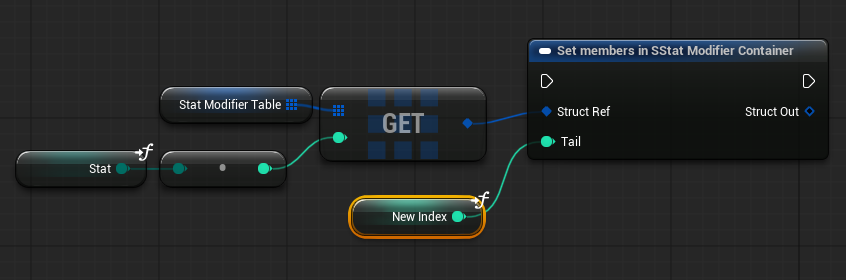 crimson briar
autumn pulsar
so like this?
crimson briar
autumn pulsar
so like this?
Probably. If you used get (by ref) it should work. And no, you shouldn't need to use the output pin. Buuuut I remember this being weird so I would recommend using prints to make sure it behaves like it should
crimson briar
Not having pointers makes it somewhat bothersome at times, so I'm never sure where it uses pointers and where not, even when there are diamond pins there
autumn pulsar
Yeah
Sad I can't have pointers in blueprint
So I could make the get a varaible
Though if I use a function I can do pass by ref

That's some bullshit lmao
 lunar sleet
autumn pulsar
I have a structure and a ref, is there a way to only modify a single value in th...
lunar sleet
autumn pulsar
I have a structure and a ref, is there a way to only modify a single value in th...
Modifying bp structs at runtime is ill advised
autumn pulsar
Mostly just hacking together a prototype
I'll probably rewrite a lot of this in C++ at some point in the future
autumn pulsar
lunar sleet
Modifying bp structs at runtime is ill advised
Is there specific Unreal Issues?
lunar sleet
autumn pulsar
Is there specific Unreal Issues?
Yes sir, partial to complete data loss. I don’t think they’ve fixed them yet
icy imp
crimson briar
Not sure if it applies to render targets too, but it looks like auto exposure to...
Thanks for the reply, it only affects when additive is used. It looks fine without it.
 marble tusk
lunar sleet
Modifying bp structs at runtime is ill advised
marble tusk
lunar sleet
Modifying bp structs at runtime is ill advised
I've never heard of that being an issue. Just making changes to the actual structure's.. well.. structure in the editor. But even then it's a pretty rare issue. Just a pretty big one when it happens
lunar sleet
marble tusk
I've never heard of that being an issue. Just making changes to the actual struc...
You’ve never heard of bp made structs being an issue ? Lol
It’s been fairly common knowledge here for years
marble tusk
Of course I have. Just never heard of setting its value at runtime to be a potential issue
lunar sleet
Afaik that’s usually where the issues stem from. Making any changes to it while the program is running
dark drum
lunar sleet
Afaik that’s usually where the issues stem from. Making any changes to it while ...
I've never had an issue with setting the values at runtime. First time I've heard of it being an issue. 👀
lunar sleet
I guess we’ll find out
autumn pulsar
I’ll just back up every so often 
dark drum
There's definitely an issue when you modify the structure class (Add/remove properties) though. Lol.
 gentle urchin
Same experience here
No runtime issues
Just editor time issues
As in actual struct editing /modification
Renaming variables/ removing or adding them...
knotty scarab
Hey, is there any way on how to edit the Value of a Map's Key without Removing the old & Adding a new key (with the changes value)?
-# image is an example
 gentle urchin
Simply add replaces the existing value
knotty scarab
aha i see, thanks!
 modern cove
What's the best Actor/Blueprint/Object to use if its sole purpose is to spawn other actors in a controlled pattern? The spawner itself will be invisible
dark drum
modern cove
What's the best Actor/Blueprint/Object to use if its sole purpose is to spawn ot...
Actor component on the game mode or game state I'd say. A custom uobjects could work as well if you've got access to c++ to give it world context.
modern cove
I can look into that. I was leaning towards a generic actor and placing it in the level, then setting up a spawning pattern in the blueprint
 paper smelt
Why is this not slicing? it simulates physics and everything as if it did but there is nothing visual showing that it cut...


Nvm I got it
 royal trellis
i have an issue in my unreal 5 project. my main character blueprint seems to be corrupted. all the variables in it, reset to their default value upon closing the editor. for example any floats to 0, bools to false, enums to the first entry. creating new variables work and they are stored, but their initial values also reset to their default value upon closing the editor. Other blueprints, newly created or already old, do not have this issue. all the variables, new or old are stored properly, and their values is maintained even when the editor restarts. Any clue what i can do to fix this?
maiden wadi
royal trellis
i have an issue in my unreal 5 project. my main character blueprint seems to be ...
Are you BP only?
royal trellis
maiden wadi
Are you BP only?
no
but that one was fully created using bp, but the project has some c++ classes
maiden wadi
Is it every single property? Even like loose integers?
maiden wadi
Oof. My initial thought was to check for circular dependencies. Stuff like a struct referencing the character who references the struct can cause derpy loading like this
royal trellis
yeah...
i duped the bp, and everything works...but when i started the process of re-referencing the new one in other bps(a terrible tasks since theres so much stuff with the player and dispatchers...) it eventually crashes the editor when opening
maiden wadi
Definitely getting circular dependencies feel from that. What was the crash though?
royal trellis
theres dfferent ones, but heres the latest:
Assertion failed: !Object->HasAnyFlags(RF_NeedLoad | RF_NeedInitialization)
Object='ELFEN_GAMEINSTANCE_C /Game/_GAME/ELFEN_GAMEINSTANCE.Default__ELFEN_GAMEINSTANCE_C' (0000029A1A319400), Flags=Public | Transactional | ClassDefaultObject | ArchetypeObject | NeedLoad | WasLoaded, InternalFlags=0x04504000
the actual error is pretty big
maiden wadi
Seems like there's a struct with a linker it shouldn't have.
Usually you want to avoid linking to BP classes. Like if you need to save a character class or instance pointer into the struct, you do it at ACharacter level rather than B_MyMainPlayerCharacterThing
royal trellis
can you explain that a bit easier to understand? a struct with a linker?
maiden wadi
The usual case is like... PlayerCharacter is a pretty common one, cause they're used everywhere. So people might make a BP struct with their BP PlayerCharacter referenced in the struct. Then put the struct in the character.
Now you have a struct class that needs the character class, and a character class that needs the struct class.
Struct->Character->Struct->Character etc etc.
You load one or the other, but they need the other loaded first. So you're stuck in a deadlock where it just has to pick one randomly because it has no choice. But it causes issues because they won't load right because of course the class isn't initialized correctly.
This gets even worse if you have multiple circulars. Like abusing the gameinstance to hold data like the character, and having the character use the game instance, and the struct needing the character, but the game instance and the character both need the struct, etc.
royal trellis
ic
i dont think theres any struct that holds the character
in fact from the ones i just checked, theres only one that stores a bp type(missiles)
to spawn a different missile bp
game instance doesnt hold a reference ot the character
but the character does hold a reference of the game instance
i also got a similar error(crashes too) with a an actor component.
maiden wadi
That should be fine. Do the missiles reference anything?
royal trellis
im looking right now, and they dont, they get overlapping actor on impact, cast to capsule component, and then they try to communicate with the actor's (get component by class) for the damage component(this is the component that is also crashing, surprisingly), ttheres also other stuff but im using bpi's
 hardy merlin
This is bizarre. Any idea why my Character is not falling? If I give it no AI Controller it stays up there. If I give it a default controller it can fall.

Okay, looks like it needs SOME kind of controller?
graceful mauve
hi can you play sound in a multi-threaded animation blueprint without animNotify? I want to play footstep when it's detected by the ABP
surreal peak
hardy merlin
This is bizarre. Any idea why my Character is not falling? If I give it no AI ...
Either in the Character or the CMC, there is a checkbox that says something about Run Physics With No Controller or so.
hardy merlin
surreal peak
Either in the Character or the CMC, there is a checkbox that says something abou...
Ahhh. Thank you!
surreal peak
graceful mauve
hi can you play sound in a multi-threaded animation blueprint without animNotify...
Hm. Not 100% sure but don't think so. The AnimGraph is the multithreaded part and that has no Audio Nodes.
 turbid hound
Whats the difference between these 2 blueprint interfaces they both come from the same interface and settings are the same apart from bool and float. But the bottom one never fires. The message is setup the same and also when I delete the top one I cant recreate it and it never fires
 crimson briar
turbid hound
Whats the difference between these 2 blueprint interfaces they both come from th...
crimson briar
turbid hound
Whats the difference between these 2 blueprint interfaces they both come from th...
Top one looks like a custom event, not an interface. Maybe you just happened to name it the same as the interface function
Why the bottom one never triggers, dunno, debug it. Print a string before calling the interface and at the start of the implementation
turbid hound
mm interesting yes the function fires before with the print string but doesnt get passed in to the animationblueprint
had a look i cant rename the top one so i dont think it is a custom event
crimson briar
Maybe something corrupted if you can't neither rename it nor see it to readd it after deleting it. I would try deleting it, recompiling and restarting
turbid hound
yeah if i delete it it comes back with that BPI logo in the right
but the bottom one isnt firing at all and is set up the same
 primal hare
The Construction script in my spline mesh BP is making it very slow. I've turned off "Run on drag" in the class settings already, still slow in compiling, moving in viewport etc.
What could be the issue ? (If I disconnect construction script, the BP goes back to being snappy)
crimson briar
turbid hound
but the bottom one isnt firing at all and is set up the same
Show how you are calling it
turbid hound
 crimson briar
I'm not sure what the GetAnimInstance returns. Did you check there if it casts to your ABP class or fails?
turbid hound
i restarted the editor and it seems to be working now i think. i just have a weird bug with my crouch. but the rest are all working i have succesfully removed 14 checks off tick in the animblueprint giving me nearly an extra 4 fps
dark drum
graceful mauve
hi can you play sound in a multi-threaded animation blueprint without animNotify...
You can add sounds to animations directly. Not sure if that would achieve what you're after.
turbid hound
yes you can make an event notify and then call that inside your blueprint to create the sound so then you can line them up to your foot steps
graceful mauve
I wonder anyone implemented directly in animation blueprint
 tropic torrent
projectile component causing me trouble, wonder if i should do it manually
in the parent (nothing special about it)

This also has the Projectile Movement Component, image 1 is the BP_PA_y_projectile
Image 2 is the character, which sets the ability to whatever ones they have. This has worked before and has executed an ability which increases movement speed, and worked for one that launces the character


however i run into these errors
Blueprint Runtime Error: "Attempted to access BP_PA_y_Projectile_C_1 via property Ability2, but BP_PA_y_Projectile_C_1 is not valid (pending kill or garbage)". Node: StartAbility Graph: EventGraph Function: Execute Ubergraph BP Character Test Blueprint: BP_Parent_Character
and
Blueprint Runtime Error: "Attempted to access BP_PA_y_Projectile_C_1 via property Ability2, but BP_PA_y_Projectile_C_1 is not valid (pending kill or garbage)". Node: Stop Ability Graph: EventGraph Function: Execute Ubergraph BP Character Test Blueprint: BP_Parent_Character
I get one every time I press "1"
any thoughts
dark drum
tropic torrent
however i run into these errors
`Blueprint Runtime Error: "Attempted to access ...
You're getting the errors because you're trying to call logic from 'Ability2' before you've spawned the relevant actor in and set the ref.
 astral summit
Hello, I’m using an event dispatcher for On Click in widget ,
but the problem is it doesn’t send the sender/source variable.
Is there any way to solve this issue? Because I’m dealing with many buttons.
 craggy mantle
Hey, I added a function to a BP that's crashing my UE, and I made the mistake of saving before compiling. Now, if I hover over that BP, I can't even open it, it crashes 😭 Is there any way to open it in debug mode without crashing so I can simply remove the function responsible for all this? (The error displayed is an array with a value of -1 in a min0.)
tropic torrent
dark drum
You're getting the errors because you're trying to call logic from 'Ability2' be...
how would i fix that
this thing works, but has the warning
 crimson briar
craggy mantle
Hey, I added a function to a BP that's crashing my UE, and I made the mistake of...
crimson briar
craggy mantle
Hey, I added a function to a BP that's crashing my UE, and I made the mistake of...
Blueprints are binary files, you can't edit them outside Unreal. The solution to this sort of problem is using version control and going back to the previous version of this file
craggy mantle
crimson briar
Blueprints are binary files, you can't edit them outside Unreal. The solution to...
How do you use Version Control ?
crimson briar
Well if you don't know, it won't help you now. You set it up when you start a project, not when a problem occurs
There are a few methods, depending what you want to use, like guthub or erm... I forgot the other 2 popular services
But the point is, using source control let's you go back to previous versions of files when something corrupts. Game engines these days are pretty reliable but you will still run into something breaking from time to time so you should always use source control.
dark drum
astral summit
Hello, I’m using an event dispatcher for On Click in widget ,
but the problem is...
Have the event dispatcher return some sort of ID like an int or tag. You can then use this to decide what should happen.
dark drum
tropic torrent
this thing works, but has the warning
Considering you call start ability on the projectile, I don't believe having the project spawn another projectile is what you want.
As I've mentioned, you're calling 'Start Ability' on 'Ability2' before you've set the ref to an instance of the projectile. This means there's no projectile to call the function on.
You could do a validity check on 'Ability2' before calling the function which would remove the error but depending on what you're trying to do, you might want to spawn the projectile in if its not valid.
tropic torrent
tropic torrent
This also has the Projectile Movement Component, image 1 is the `BP_PA_y_project...
this spawns it on start game though
it is supposed to spawn multiple, lemme record
astral summit
dark drum
Have the event dispatcher return some sort of ID like an int or tag. You can the...
I’m using the default On Click event,
so I can’t return any values to know which button was pressed
 tropic torrent
this thing works, but has the warning
tropic torrent
tropic torrent
this thing works, but has the warning
this is using this
dark drum
astral summit
I’m using the default On Click event,
so I can’t return any values to know which...
Create your own button widget that has its own on clicked type of event dispatcher. When the default on click is called, call your custom one and pass the relevant data through. You can have this as a var that's instance editable and exposed on spawn. This will allow you to specify the property in the designer view or when you create the widget if spawning at runtime.
Alternatively, you can create a custom uobject to act like a wrapper that binds to the on click event and in turn calls its own event dispatcher which is the one you bind to. This method can be a little less intuative though if you're not familiar with it.
astral summit
dark drum
Create your own button widget that has its own on clicked type of event dispatch...
I didn’t understand the second method. How would I distinguish between buttons if I used a UObject as a wrapper?
craggy mantle
crimson briar
Well if you don't know, it won't help you now. You set it up when you start a pr...
Okay so there is no other way than delete the BP and Re-set it from a previous Save I had done,
Is it even possible to delete a BP from PC Documents ? (BCS I can't click on him inside UE)
I knew about Github but I didn't care much .. I'll set it now 😶
Yeah I don't understand why it break, it's telling me about an Array -1 object in min0 Array but the fct isn't using any array ahah
Thanks for informations
dark drum
astral summit
I didn’t understand the second method. How would I distinguish between buttons i...
By giving them some sort of ID property similar to how you would with the custom button widget. This can then be set when you assign a button widget for it to track.
dark drum
craggy mantle
Hey, I added a function to a BP that's crashing my UE, and I made the mistake of...
Check the auto saves folder to see if there's an older version in there. You'll most likely lose some progress but its still better than all of it.
astral summit
dark drum
By giving them some sort of ID property similar to how you would with the custom...
Got it, I need to spawn a UObject for each button and use it as a wrapper. Thanks
crimson briar
craggy mantle
Okay so there is no other way than delete the BP and Re-set it from a previous S...
Deleting a blueprint from the project should be doable by just deleting the file in the project folder. But I'm not sure if it won't cause some other problems with actors referencing this blueprint, so make a copy of your project before doing it. If you are going to do it that is
dark drum
astral summit
Got it, I need to spawn a UObject for each button and use it as a wrapper. Thank...
Something like this. You might need to store the wrapper objects in an array so they don't get GC'd but this should work.


 dark drum
astral summit
Got it, I need to spawn a UObject for each button and use it as a wrapper. Thank...
dark drum
astral summit
Got it, I need to spawn a UObject for each button and use it as a wrapper. Thank...
You can pop it in a function lib as well to make it easier to use. The owning widget is just used as the outer for the object.

Of course, just creating a custom button widget is easier but the above method can be useful for situations where it might not be applicable.
astral summit
dark drum
Something like this. You might need to store the wrapper objects in an array so ...
It works 👍
I improved the code slightly

 icy imp
Thanks for the reply, it only affects when additive is used. It looks fine wit...
icy imp
icy imp
Thanks for the reply, it only affects when additive is used. It looks fine wit...
I found a solution for the lightness. I changed the blend mode to AlphaComposite and masked out the black with a distance node.
 barren sonnet
Does anyone know if its possible to use the new skeletal mesh wind system in 5.7 without PCG ? If for example I want to place individual interactable blueprint trees in a specific spot.
barren sonnet
Figured it out, you can add a instanced mesh to the blue print which lets you select the wind animation
dark drum
Am i missing something to get the camera to follow the movement of the bone its attached too? I'm disabling 'Use Control Rotation' but the camera doesn't follow the bone.
tropic torrent
tropic torrent
this is using this
funny thing about this, its not doing knockback to enemies- I think my character collision is the issue though lmaoo
I know I'd have to post the blueprints of the launch system though, can't do that right now
last peak
tropic torrent
however i run into these errors
`Blueprint Runtime Error: "Attempted to access ...
Pending Kill or Garbage, i think it means you are destroying the projectile and then you call the ability
You probably have some logic to destroy the projectile when it hits something
tropic torrent
last peak
You probably have some logic to destroy the projectile when it hits something
i think thats built in to the ProjectileMovement component
I did not make the ProjectileMovement, built in to this, added it since I was following a tutorial
last peak
If you just want it to shut up you can do a is valid right after you pressed 1
tropic torrent
below you can see I just launched it manually
tropic torrent
last peak
If you just want it to shut up you can do a is valid right after you pressed 1
it didn't even work lol
didn't launch anything 😂
I'm pretty confident that when I spawn the ability into existence it is literally spawning it on the game start, and thus it can only be used the first time
if i did projectile movement i'd probably need two actors with this method so i don't spawn in projectile movement when i spawn the ability
but I'm not an expert
last peak
this is invalid

whenever you spawn a new projectile you need to set it
to the new projectile
tropic torrent
💀
so in a way, yes, because that is NOT how the dash works lmao
I see what you're saying tho
this, while it works on the dashes, doesn't work here since each projectile is "new"

i'd want to hypothetically have "Projectile" as its own 'Ability' Actor, and the projectile itself as a 'Projectile' Actor that the Ability spawns as I already have it
tropic torrent
last peak
whenever you spawn a new projectile you need to set it
ty for confirming
anyone have a naming scheme recommendation to separate:
Parents
Abilities
Actors created by abilities
I was considering
P_ (Parent)
PA_ (Primary Ability)
_C (Created)
 ocean gate
Hi! I'm in a bit of a predicament, as I'm seemingly unable to change the contents of an array reference if it's modified from within a nested for loop? Is there any way to bypass this behavior, or do I need to rethink my approach to modify the array data?

^ In the above example, I want to modify the actual value of 'S_Mod_Gun_Presets' inside of my 'Main Character BP' actor. But doing it this way results in nothing happening, presumably because it's creating an invisible copy of the array and not actually modifying the original array itself.
surreal peak
Welcome to Blueprints and nested Struct Arrays.
Pretty sure the very first loop on the left is already creating a copy of each element :D
There is a Get (Ref) node for Arrays that takes an index, so you could write a For Each Loop Macro node that provides a Ref instead.
However, when breaking the Ref and getting the Preset Mods array, you gained another copy I believe.
Together with the Get (Ref) node there is a Set Members node that takes a Struct ref and allows setting the values of individual member properties without overriding the others.
That works well if you have one level of Struct Array, but falls apart when you have multiple levels.
For your specific issues I would suggest you store the Preset Mods array in a local variable and modify that local variable.
Then use the Get (Ref) + Set Members combination on the S Mod Gun Presets array to fully override the Preset Mods array with the modified local copy.
@ocean gate
When you reach the point at which you start hating yourself for using Blueprints, you may consider doing this in C++ instead, where it's not creating copies everywhere :D
astral summit
Hello, I need a way to create an event that notifies me when the mouse clicks outside the UI or when it loses focus.
surreal peak
astral summit
Hello, I need a way to create an event that notifies me when the mouse clicks ou...
Eeeeh, that's a pretty annoying thing to deal with, even in C++. What exactly do you need this for, maybe there is a better approach?
A naive approach could be having a Widget that stretches the whole screen and sits below the main UI. You can probably override the MouseButtonDown (or whatever it's called) event in it to react to the click, but also make sure to return "Unhandled", so it doesn't consume the input.
And if your "UI" sits in its own container (another custom UserWidget), then you can potentially check if you can override a Focus Lost function in there and react to that second case.
But yeah, that might not cover all edge cases.
astral summit
surreal peak
Eeeeh, that's a pretty annoying thing to deal with, even in C++. What exactly do...
I use it to hide a menu when I click somewhere far away
astral summit
surreal peak
A naive approach could be having a Widget that stretches the whole screen and si...
Using a Widget to receive clicks causes some issues,
such as preventing the click from reaching lower UIs, or if there are upper UIs, it will block the click from reaching them
dark drum
astral summit
Using a Widget to receive clicks causes some issues,
such as preventing the clic...
There is an on focus lost event that might do the trick.
astral summit
dark drum
There is an on focus lost event that might do the trick.
The event is not working
surreal peak
astral summit
The event is not working
I shall fall back to this:
Eeeeh, that's a pretty annoying thing to deal with, even in C++.
And yeah, you would need to make sure that this "click capture" widget is always at the very very bottom of the UI layers.
With C++ it would be a bit easier, as there are some more callbacks for this crap and access to the viewport (client) etc.
But you might still run into similar issues.
 charred berry
I have a very simple BP in levelBP that uses U to activate a sequece that raises an object ( using sequence not bp), yet in one verison of project that doesn't show a 'sphere trigger', U does nothing, but in OLder project version nearly idential, the trigger isn't there, and U works. I checked and the level BP doesn't even say anything about trigger, and sequence not at all either, how is it working with no visible sphere trigger over mesh ( ive seen this before, sstill makes no sense) ?Trying to make newer version work as Ive made changes I don't want to have to REdo in older one where Lift is working great.
 hard girder
Hey all im hoping this is the best place to ask this im following the couese on the epic site
But for some reason the character wont follow wasd


But if i change it to say t for forward its fine ?
charred berry
url pls
hard girder
@charred berry https://dev.epicgames.com/community/learning/paths/OR/welcome-to-game-development this sbould be it

Epic Games Developer
The Welcome to Game Development learning path is a perfect starting point for those looking to jump right into Unreal Engine for Game Development. You w...
charred berry
cool thx
hard girder
Not dure if its the direct link as it messes up but its module 5 , 5
No problemo just so confuzed
charred berry
ya very odd
so where are you setting the keys , char bp orsomewshere else ?
do you get any errors trying to use asdf
hard girder
The character bp
charred berry
wsad
hard girder
Nope nothing at all i change it to say T instead of W and ir goes
But when its wasd nothing happens
Im guessing theres a conflict some where but not sure where
charred berry
are you sure all keys on keyboard are working 100% : had to ask ;))
5.6 here but I doubt there's much of a diff
hard girder
Yeah, i put a print blue print in just to make sure it was registering thr press
charred berry
ok
I don't know, actions and reactions in UE are just flat weird imho
don't know if I'm dealing with engine bug or *I'm the bug :)))lol
but ya Ive never messed with defaut key settings
i guess go back and check your char BP changes
check bugs for 5.5
ya just never know
ocean gate
surreal peak
When you reach the point at which you start hating yourself for using Blueprints...
I'm past that point but I'm in too deep already! 🤣

Thanks for your help! I figured out how to do it using set array elem, but damn this is such a clunky way to do it. Epic should add a way to modify refs instead of copies in nested arrays lol
steady night
Hi Guys
Im trying to get my AI to Hear my Noise

they have pawn noise emitter / pawn seense component
"can hear" is enabled
but itsn ot working :/
white parrot
steady night
Hi Guys
Im trying to get my AI to Hear my Noise
isn't 100 a very low number? Try 5000.
Increase Range aswell
steady night
i mean that should not matter
well max range only relates to where the noise is comming from what range the hearing range will still snapp it
white parrot
There's also the range of the sense itself that should be high enough, i think the default should be 2000
steady night
thats only the area from where the noise is coming from dosent matter
but i just noticed i used the wrong node
white parrot
steady night
but i just noticed i used the wrong node
Perhaps 'Report noise event' is the right node
barren sonnet
Im trying to add interaction from explosions to the trees in unreal 5.7. Does anyone know if there is a way to feed data into the wind animation system of the new trees per instance ?
 warm hare
What would be the best way to make an interactable object lower the lighting in the level when interacted with? The lights in question are actually a blueprint I created and placed around the level.
dark drum
astral summit
The event is not working
One thing to be aware of is that the widget needs to be focusable otherwise it might not get added to the focus path.
Just to reinforce what eXi said UI navigation and focus is an absolute pain.
Make sure that if the widget fills the screen, (Transparent background) that it's not hit testable. You might have to check this on various elements to ensure inputs can bubble down.
 chrome pumice
Anyone got a solution for this? i wanna add a int to this array in that struct, but if i do it this way, it just simply doesnt add the element. i dont know how to solve this pinwise because set array element doesnt add a variable, it edits one

i thought of smth like this but idk if thats giga dumb
 dark drum
chrome pumice
Anyone got a solution for this? i wanna add a int to this array in that struct, ...
dark drum
chrome pumice
Anyone got a solution for this? i wanna add a int to this array in that struct, ...
You'd need to use the set member node. It can be a little tricky with nested structures though.
chrome pumice
i tried to use set member but its again pinwise not really doable

there isnt really anthing to add it
dark drum
chrome pumice
i tried to use set member but its again pinwise not really doable
It's the node you need to use. It's how you set specific properties in a structure.
chrome pumice
and "add to array" doesnt give an array output
chrome pumice
dark drum
It's the node you need to use. It's how you set specific properties in a structu...
yes yes i know but idk how to use it with arrays
 chrome pumice
i thought of smth like this but idk if thats giga dumb
chrome pumice
chrome pumice
i thought of smth like this but idk if thats giga dumb
Ths highkey crashed my engine
amazing
dark drum
chrome pumice
yes yes i know but idk how to use it with arrays
Store a copy of the array in a local var, modify it and then use the set member to replace the array in the structure.
chrome pumice
yea could be an idea
i just really dont like creating extra variables thats why i try this bs
is there a way to like ehh emegerncy close the editor? XD ithink there is a loop or smth
like without losing the stuff
i hear the game music but everything frozen
💀
 sand shore
chrome pumice
like without losing the stuff
sand shore
chrome pumice
like without losing the stuff
Nah its cooked if it doesn’t eventually recover
chrome pumice
fck
chrome pumice
is it normal that "local variables" are missing?

i was reading abt like variables that can be used for a short time since my character have +120 variables, but there is no trace of such thing
dark drum
chrome pumice
is it normal that "local variables" are missing?
You can only add local vars inside functions.
chrome pumice
ahhh okay thanks
chrome pumice
this is beeing called from a ui. for some reason the server just completly ignores the rpc. had this a couple times now and idk what causes this. this is an actor on the map, the client interacts with it and then updates it. but the update never reaches the server

 molten pike
How can I forcibly change the position of a mesh (setting the Actor location doesn't seem to change where the mesh appears) if I'm not allowed to access it?

 last peak
molten pike
How can I forcibly change the position of a mesh (setting the Actor location doe...
last peak
molten pike
How can I forcibly change the position of a mesh (setting the Actor location doe...
In almost a decade i have never seen this error lol
molten pike
last peak
In almost a decade i have never seen this error lol
I'm on UE 5.4 🙃
last peak
Seems like the mesh was created with c++ and not exposed to bp's ?
molten pike
It is, but: UPROPERTY(VisibleAnywhere) USkeletalMeshComponent* Mesh;
From the header file
switch to UPROPERTY(BlueprintReadWrite)?
Well that didn't solve my problem outright (the position didn't change). But it did compile!
chrome pumice
Anyone knows why it refuses to get that variable?

 next hollow
"get that variable"
As in by reference?
Your passing it through a replicated event, so by ref isn't possible.
That blue warning or whatever tells you
chrome pumice
it didnt work with normal event aswell
you wouldnt belive what fixed it
make it a single variable
and back to array
xDDDDDDD
last peak
Unreal at its finest ......
tropic torrent
sometimes I just want to ask "why is it like this"
I have NO errors this time, but my thing just straight up isn't doing what I want
everything up to this works fine
it does not launch the actor it overlaps with, nor does it apply damage

any movement from Enemies is from the physical sphere itself, not knockback
tropic torrent
w h a t
none of my print strings triggered but it launched, do i not understand how print string works-

NO, THEY'RE GENUINELY NOT TRIGGERING LMAO
welll
tropic torrent
tropic torrent
everything up to this works fine
it does not launch the actor it overlaps with, ...
fixing the cast to character by dragging in a character reference instead of projectile reference does in fact make the print strings work, and the launch STARTED working (once destroy actor was disconnected), but the damage doesn't, and now i'm getting launched when i use the ability
tropic torrent
and now it stopped launching the projectile entirely, instead it just stays there and launches me when im in its path
the path exists somehow
im going to bed 💀
that's not much of a blueprint problem, I'd recommend #ue5-general
 thin umbra
ok
hardy merlin
Any idea why my character is not using the blendspace I set up?
I have an AnimBP where Initialize and BeginPlay are never being called.
surreal peak
hardy merlin
Any idea why my character is not using the blendspace I set up?
Not really. You could have done all sorts of things wrong :D
surreal peak
hardy merlin
I have an AnimBP where Initialize and BeginPlay are never being called.
Did you.. assign the AnimBP to the MeshComponent?
hardy merlin
I found a workaround. TUrns out for some reason if it's AI it doesn't have an acceleration value besides zero.
surreal peak
What does that have to do with the AnimBP not calling Init/BeginPlay? o.o
And yeah, I assume AIs only have Velocity.
Cause Acceleration is usually input-based.
surreal peak
@calm oracle No crossposting please.
 calm oracle
surreal peak
<@947860205079781426> No crossposting please.
calm oracle
surreal peak
<@947860205079781426> No crossposting please.
Oh sry I figured if no one is responding in the ue5-general chat I should try here
surreal peak
Na. Choose one channel and wait. Europe is just waking up. Lots of peeps are getting to work. US is basically in bed by now. You gotta wait to get peeps to answer. You can re-post your question later if it got spammed away fwiw. Or just reply to it if it's very long instead of "spaming" it again.
calm oracle
surreal peak
Na. Choose one channel and wait. Europe is just waking up. Lots of peeps are get...
Yea ur right🥲
I'll just post it again in 7 hrs or whatever
 latent sluice
blueprint gore
 crimson briar
What do you mean. Everyone knows that every additional pixel the blueprint takes adds to the blueprint overhead. You need to always smash the nodes and wires as close together as possible to get better performance
dark drum
chrome pumice
this is beeing called from a ui. for some reason the server just completly ignor...
Not sure if you got a response but this is because UI is only on the client side so there's no server version to RPC to.
 dense rampart
I'm trying to make TBS game, and I am utilizing third person and controls interface format. I found a template on UE4 of a TBS but unsure what elements would porve helpful and which would be helpful but require tweaks to make it work
 sharp sparrow
dense rampart
I'm trying to make TBS game, and I am utilizing third person and controls interf...
sharp sparrow
dense rampart
I'm trying to make TBS game, and I am utilizing third person and controls interf...
Isn't the TBS theme a bit boring?
dense rampart
sharp sparrow
Isn't the TBS theme a bit boring?
turn based strategy is boring?
sharp sparrow
dense rampart
turn based strategy is boring?
Yes, I think it sounds boring. But for me
dense rampart
well it's what i am aiming to make, I was inspired on more mascot based ones and wanted to merge it with a third person camera interface
there are templates and guides but i am not sure how much the third person would change the blueprints
sharp sparrow
dense rampart
well it's what i am aiming to make, I was inspired on more mascot based ones and...
Well, that's another perspective, so it might be interesting.
sharp sparrow
dense rampart
there are templates and guides but i am not sure how much the third person would...
I don't know, I wish you success
Are you trying to develop a game in the style of Wartales?
dense rampart
sharp sparrow
Are you trying to develop a game in the style of Wartales?
more like
codename steam
sharp sparrow
dense rampart
codename steam
I understand, I'm looking forward to it.
latent sluice
does anyone know the difference between these 3 nodes?
 dark drum
latent sluice
does anyone know the difference between these 3 nodes?
dark drum
latent sluice
does anyone know the difference between these 3 nodes?
One sets the map out right, one adds to it. The assign is like a set but for local vars in macros i believe.
dark drum
latent sluice
is there a documentation to this?
👀 Not sure but there isn't not really anything else to know about those 3 nodes. One sets the variable, one sets a local variable (inside a macro) and one adds to it. (this is assuming the variable is map)
latent sluice
variable is indeed a map
I struggled for hours on end to figure out why "find"-ing a map value does not exit. Turns out I'm overriding it this whole time
this is valuable information, yet a great set-back after learning "assign" allows local variable inside macro nodes
dark drum
latent sluice
this is valuable information, yet a great set-back after learning "assign" allow...
Yea, you can take a look at the various forloops to see how its used.
latent sluice
alright
dense rampart
anyone have good knowledge on making turn based strategy games?
dark drum
dense rampart
anyone have good knowledge on making turn based strategy games?
Are we talking total war type of TBS?
chrome pumice
dark drum
Not sure if you got a response but this is because UI is only on the client side...
Yea i know that, i called the event in the actor that is not replicated. And then on the server, cuz that actor is replicated. the screenshot is from the actor, clientside it calls the server event, the server jst ignores it. Calling this event from widget to thirdperson character to the actor doesnt seem to solve that aswell
I just scrapped that mechanic. it was a purchase window for coins where you can unlock a door, clients couldnt pay/open it, but they can open it if the purchase window doesnt pop up, meaning when its 0 coins (it ignores the popup then
crimson briar
chrome pumice
Yea i know that, i called the event in the actor that is not replicated. And the...
Sounds like the actor calling the server rpc is not owned by the client
dense rampart
dark drum
Are we talking total war type of TBS?
no more like code name steam or mario + rabbids?
chrome pumice
No its not, its a replicated actor in zhe map
dark drum
chrome pumice
Yea i know that, i called the event in the actor that is not replicated. And the...
The issue will most likely be down to ownership. RPC's can only be called from things owned/controlled by the player such as the pawn or player controller.
dense rampart
but honestly understanding the basis of TBS can be helpful
like defining player and enemy turns
crimson briar
chrome pumice
I just scrapped that mechanic. it was a purchase window for coins where you can ...
Usually you go around it by having the interaction start on the player.
So instead of calling the rpc on the door "someone clicked on me" you call the rpc on the player "I want to interact with this door"
thin umbra
hey guys, do you think get attached actors maintain the order of attachment and i can rely on it
or do you recommend me to keep track of the attached actor's position explicitly?
 near arrow
thin umbra
hey guys, do you think get attached actors maintain the order of attachment and ...
near arrow
thin umbra
hey guys, do you think get attached actors maintain the order of attachment and ...
I would say it might depend on your usecase but if its consistent and you dont modify it, my simple test says yes it will maintain the order. I tested it by just putting some actors in the world and assigning numbers to them and having a get attached actors with a foreach constantly print the numbers
 echo latch
Hello everyone, I have a question about the proper logic for my blueprint in general
Let's say I have a player character in the map that collects a coin to gain money, is it better that the main code to collect the coin value is located in the player or in the coin ? Which one should collect the collision data about the other ?
thin umbra
near arrow
I would say it might depend on your usecase but if its consistent and you dont m...
ah well it's definitely convenient to take it implicitly rather than keeping track of another variable
thanks for testing
the order info is important here for the game which is why i wanted to make sure i can reliably get it from the attached actors array
near arrow
thin umbra
ah well it's definitely convenient to take it implicitly rather than keeping tra...
Keep in mind I didnt test removing and reattaching actors if that is something you will do
thin umbra
near arrow
Keep in mind I didnt test removing and reattaching actors if that is something y...
yea you're right
i'll get to it when i include detachment too in the calculations
near arrow
echo latch
Hello everyone, I have a question about the proper logic for my blueprint in gen...
Will you pick up more items than just the coins? If its a larger project it might be easier to gather all the pickup code in one place so you dont have it spread all over the place. You can use Blueprint interfaces to check what actors you are overlapping in your "Event OnBeginOverlap" using "Does Implement interface" using this you can put one interface called for example Pickup on all actors you want to be able to interact with.
echo latch
I am not sure actually that it will be the only collectible but I want also the enemy character to collect it (to steal it to the player)
So if I understand, I have to implement my interface on the player and the enemy and make the verification on the coin collider ?
echo latch
near arrow
Will you pick up more items than just the coins? If its a larger project it migh...
*Misses the answer button *
crimson briar
echo latch
Hello everyone, I have a question about the proper logic for my blueprint in gen...
In general terms it is better to keep the functionality of the item on the item. But this example is so simple it might not be ideal for explaining it.
Because if it is money, I often have general functions on the player (or in some stats component) for things like addmoney, addhealth etc - because many things can add money for example, so having one place for it is better, especially when the money is tied to the player.
But I would keep triggering it on the pickup itself. Because later adding more pickups will keep their code on them, the player doesn't need to know what the pickup is, it just has functions for varous general effects when necessary
near arrow
echo latch
*Misses the answer button *
Hmm, I might have come up with a slightly better way, it might easiest to have a blueprint class, called for example pickup with some code that can send over stuff to the character (Could be enemy) that touches it. And then just make child blueprints of that pickup class for all your coins or powerups
 echo latch
Great, Thank you @near arrow @crimson briar I see where I go now !
near arrow
crimson briar
In general terms it is better to keep the functionality of the item on the item....
This ^ is great advice for gameplay systems
Im probably less versed in that since for me most of my projects are obscure enough that I have to hope to find just a SINGLE solution that works.
crimson briar
Also using inheritance for pickups is a good idea too. You only have general functions/events on the main pickup class and then children implement their own effects. Make it easy to call the events without worry what the item actually is. But it all depends on how complex/expandable the system is going to be
dark drum
echo latch
Hello everyone, I have a question about the proper logic for my blueprint in gen...
Just to add to whats already been said, and give another example. Creating systems more often than not tend to be a better solution.
Take an inventory for example. Yes you could code it all in the player character but what if you then want something else to have an inventory such as an NPC or a chest/container.
Creating an inventory component (a custom actor component) allows the logic to be placed on different actors and effectively function the same way. This can lead to more consistent behavior and reduced how much you have to repeat yourself.
The great thing about components is you can use the 'GetComponentByClass' node to get a component from any actor.
Jumping back to the idea of coins. These could be an item that then gets added to the inventory. The item itself would check if the thing doing the interacting has an inventory component and if it does, call the relevant add item function.
echo latch
dark drum
Just to add to whats already been said, and give another example. Creating syste...
I take notes, still learning the nodes that shortens my code, thank you !
dark drum
The next bit is my personal opinion but, BP interfaces can't have default implementations so personally, I would only use these as a last resort. Usually hierarchy and composition will get you 90% of the way there and can lead to more manageable code.
I've come across a few projects where there are just as many interfaces as actor classes and it was awful to work with. Fixing bugs was a pain and often required checking multiple implementation to find the issue. The interfaces were often used in places that just didn't need one.
The reason i mention this is because when you're building systems it's important to take a little time to think about how all the pieces fit together and how the different parts will communicate with each other and what each class would need to know about.
 sudden coyote
hello, i could use some help, I am making a timer for a game that tracks how long the player has been in the game and would like for the timer to stop counting when the game is paused. I am having difficulty getting the function to stop when the game is paused. Here is a screenshot, I'd appreciate any and all help:
 crimson briar
sudden coyote
hello, i could use some help, I am making a timer for a game that tracks how lon...
crimson briar
sudden coyote
hello, i could use some help, I am making a timer for a game that tracks how lon...
I believe Tick pauses automatically when you use the built in PauseGame system. Unless you specifically mark the actor in the details to tick when paused
sudden coyote
it does not pause ticks when using the in-game pause ability
crimson briar
sudden coyote
it does not pause ticks when using the in-game pause ability
What actor is this? And check in the blueprint details if the "Tick when paused" is disabled
O wait, it's UI, just noticed
sudden coyote
crimson briar
What actor is this? And check in the blueprint details if the "Tick when paused"...
will do and this is my main game widget
tick while paused is disabled
crimson briar
You can easly prevent it by using a branch with "IsGamePaused" before your functionality that shouldn't run during pause in Widgets
crimson briar
Widgets tick during pause on purpose, I don't think you can get around it with a setting, you just need to use the IsGamePaused bool
crimson briar
sudden coyote
wait im already doing that
It doesn't need to be dragged from actor though. Not sure if there is a difference there
 sudden coyote
ah
crimson briar
It is a globally accessible function
sudden coyote
that did it, thank you!
 rotund ruin
So i have a door bp master. What if I want to create a storage locker bp with 5 doors. Whats a good way to do this other than child actors (in thr same bp)?
crimson briar
rotund ruin
So i have a door bp master. What if I want to create a storage locker bp with 5 ...
My favourite answer: It depends.
If the Locker is not supposed to be moved during gameplay, you can use Child Actors. It is not recommended to use them, especially not chaining them one attached to another. But with static actors it should be fine.
Another way if it is static is to just mark places for the doors with a scene component and spawn the doors on begin play.
If the building is supposed to be moved during gameplay, I wouldn't recommend child actors.
You can convert the behaviour of the door itself into an actor component. Add door meshes to the actor itself, add a component for each of them, then initialize the components by giving them the corresponding mesh/meshes of specific doors they are supposed to work with.
Another way is to make the doors a child of the StaticMeshComponent class. Then you can position them as standard components and they can have their own additional functionality written.
ANd probably several other options exist
rotund ruin
crimson briar
My favourite answer: It depends.
If the Locker is not supposed to be moved durin...
Appreciate it. I tested child actors but they always self-duplicate in the level and it's unuseable. Nothing will move but I do need to save/load the door state (like open or closed)
I guess i could test spawning them
dark drum
rotund ruin
So i have a door bp master. What if I want to create a storage locker bp with 5 ...
Are you wanting to interact with each door separately?
rotund ruin
dark drum
Are you wanting to interact with each door separately?
yes you could have a locker with double doors or 4 doors or it could be a storage drawer with 5 drawers (that operate on the door master bp)
dark drum
rotund ruin
yes you could have a locker with double doors or 4 doors or it could be a storag...
How is your interaction type event setup? I assume it would pass through the thing trying to do the interact (the player) but does it pass anything else through?
rotund ruin
hmm i dont think so, it uses mouse over events on a trigger to highlight the door, then click to open. but it does use the player pawn to show messages like the door is locked, etc
dark drum
rotund ruin
hmm i dont think so, it uses mouse over events on a trigger to highlight the doo...
Can you show it?
rotund ruin
i dont think so it's too complex. there's only some checks on the player pawn
dark drum
rotund ruin
i dont think so it's too complex. there's only some checks on the player pawn
I only need to see the event that would get called on the interactable to trigger the door to open/close.
Kinda like this. Just need to know what data is available.
 rotund ruin
hmmm
interaction is called On Clicked (for the trigger), then a bunch of checks then the Complete event for the door (which is a child of the master interact bp)
dark drum
rotund ruin
interaction is called On Clicked (for the trigger), then a bunch of checks then ...
For my interaction system I can do something like this. (Just a quick setup)
When the actor is focused, it keeps track of the component that was being looked at. When the interaction is triggered, it can use the active component to perform the rotation on.
This is just a quick setup and probably has bugs but it might give you an idea.
 rotund ruin
Hmm let me see
 narrow pulsar
So I'm having an issue. I created a volume box which will work as the "spawn location" for teams to spawn in (up to 3 players). The issue I'm having is:
I'm creating a "Player Start" object in "OnPostLogin" and then running the Parent "OnPostLogin" so the rest of the regular functions run, the issue is that it isn't spawning me at all in the player start actor I created inside "Spawn Players". All it does is spawn me in my editor camera current location. If I place a "Player Start" actor manually in the map it works but not if I spawn one like this for some reason?

 crimson briar
narrow pulsar
So I'm having an issue. I created a volume box which will work as the "spawn loc...
crimson briar
narrow pulsar
So I'm having an issue. I created a volume box which will work as the "spawn loc...
I don't knwo this particular problem, but why is this not connected?

You are possessing nothing - ergo the default camera
I would expect it to cause an error though, weird
Oh, it is spawning a player start...? Okay, that is some strange code there
narrow pulsar
crimson briar
Oh, it is spawning a player start...? Okay, that is some strange code there
you can ignore the possess, i was testing with spawning bp_playercharacter before and forgot to remove the possess
I kinda figured out the issue although still havent been able to fully fix it
I was using OnPostLogin but the player is being spawned before that even runs so whatever I do there is kinda irrelevant.
But I'm having a hard time figuring out how to force delay the "player start" spawning so the volume box for player spawns loads first
crimson briar
Spawn the player under the map, make a fade from black screen when the player starts the game, spawn the box, then the box teleports the player to the location. Shouldn't take longer than a simple fade in.
narrow pulsar
I thought about that but not sure
I managed to make spawning the playercharacter work tehn possess it
the issues there is that somehow the viewmodels aren't working properly
even though GAS is loading up the attributes just fine
 cunning vapor
Can anyone work out why this is being set as 0 when the save data is not 0 ?
Thanks in advance


 maiden wadi
cunning vapor
Can anyone work out why this is being set as 0 when the save data is not 0 ?
...
maiden wadi
cunning vapor
Can anyone work out why this is being set as 0 when the save data is not 0 ?
...
Put a print node or something after this one and breakpoint on it instead.
cunning vapor
maiden wadi
Put a print node or something after this one and breakpoint on it instead.
I was running before i could walk; thanks and sorry for the silly question 😛
maiden wadi
cunning vapor
I was running before i could walk; thanks and sorry for the silly question 😛
Haha. All good. BP debugger takes some getting used to. Just have to remember that when you break on a node that it is before it's execution. None of it's attached pures have been ran and there will be no valid output either.
 past hull
hello, what do you think of this code in the event tick, is this overkill and poorly optimized ? The code is used to decrease the cone that is used to spread line trace when the player is firing continuously. When player is not firing anymore, decrease the cone size ( weapon half angle )
 tropic torrent
my bind event to on actor begin overlap is causing the projectile I'm working on to occasionally hit the character using it too! Not only that, but it seems to ignore "Do Once" and hits the character several times, instantly killing them! Is there anything I could do?
I tried a branch with if Overlapped Actor = Other Actor is false, and tried with Spawning Character = Overlapped Actor too
uh
It started working on it's own
I just reconnected the =
idk tbh
tropic torrent
What's the disable input equivalent for non players?
dark drum
past hull
hello, what do you think of this code in the event tick, is this overkill and po...
It depends. It'll probably fine.
Personally though, I'd probably have some sort of stop firing sort of event and use a timer for the next tick to update the cone until it reaches the desired size. This just moved it off of tick so it'll only call the code when it needs to instead of all the time.
cunning vapor
one last question of the day; i know the "find" is a copy; so this is just editing a copy; but what is the best way of editiing the "temp details level data" do i have to set members with the break level_data? Sorry; tad confused
 tropic torrent
What's the disable input equivalent for non players?
tropic torrent
tropic torrent
What's the disable input equivalent for non players?
I went down the path of trying to add a stun behavior for enemies and now am in blueprint hell
maiden wadi
cunning vapor
one last question of the day; i know the "find" is a copy; so this is just editi...
You'd need to copy your LevelData after finding it. Add to that copy. Then add that whole struct back to the Level_Save_Data using the same FName key
tropic torrent
this stun is so fucked 💀
my knockback projectile barely worked, now this one won't UNSTUN them!
dark drum
tropic torrent
What's the disable input equivalent for non players?
Enable/disable input is just a way to have an actor receive inputs from a player controller.
dark drum
tropic torrent
my bind event to on actor begin overlap is causing the projectile I'm working on...
Its rumored that a picture can say a thousand words. 😉 But seriously, share some screenshots of what you're having trouble with. 🙂
crimson briar
tropic torrent
I went down the path of trying to add a stun behavior for enemies and now am in ...
Depends what method you use for the AI to function.
When using a Behavior Tree you can call StopLogic and RestartLogic from the AiController->BrainComponent
 modest monolith
I would like to put this mesh as an HUD clock in my game, How can I convert it ? (sorry for wrong channel)
 cunning vapor
maiden wadi
You'd need to copy your LevelData after finding it. Add to that copy. Then add t...
cunning vapor
maiden wadi
You'd need to copy your LevelData after finding it. Add to that copy. Then add t...
Got it working with this; there may be a smoother way of doing it - but this works for the time being; thanks
 tropic torrent
dark drum
Its rumored that a picture can say a thousand words. 😉 But seriously, share so...
tropic torrent
dark drum
Its rumored that a picture can say a thousand words. 😉 But seriously, share so...
I don't even know lmao
tropic torrent
dark drum
Enable/disable input is just a way to have an actor receive inputs from a player...
correct, want an equivalent lol
tropic torrent
crimson briar
Depends what method you use for the AI to function.
When using a Behavior Tree y...
what's a behavior tree? using the third person combat preset, comes with a state tree
 faint pasture
past hull
hello, what do you think of this code in the event tick, is this overkill and po...
faint pasture
past hull
hello, what do you think of this code in the event tick, is this overkill and po...
Absolute nothingburger. I wouldn't even have the branch. It's just complicating things and is probably slower.
faint pasture
tropic torrent
correct, want an equivalent lol
What are you actually trying to do here?
Instead on relying on disabling input I'd just disable the response to the input. But it depends on the situation.
tropic torrent
faint pasture
What are you actually trying to do here?
Stun
faint pasture
tropic torrent
Stun
Yeah just have that block the response to input
faint pasture
However you want. Disable CMC, do whatever else being stunned means.
tropic torrent
what is CMC?
tropic torrent
ah
yeah, rn it calls a custom event on the character blueprint that disables movement, then after a delay it calls a different event to re-enable movement and does a small amount of launch to knock some sense back into the AI
tropic torrent
dark drum
Its rumored that a picture can say a thousand words. 😉 But seriously, share so...
It did end up working on its own, the object nodes just wanted to be refreshed ig
craggy mantle
Hey, im trying something pretty complex and i need you all !

Context: I have a focus, i want to focus the enemy but still get a little camera rotation margin (in the end i want my pelvis and below to be focus on enemy, and my upper body to move a bit with the camera)
How can i add a little Aim input around my control rotation focus ?
tropic torrent
do you have any video examples of a game doing something similar so we can understand better?
faint pasture
craggy mantle
How can i add a little Aim input around my control rotation focus ?
Rinterpto control rotation towards the focus target.
You'll be able to "pull" it with the inputs. Change the interp speed based on if you're adding input or not later to make it interp very fast with no inputs but slower if there are inputs.
craggy mantle
faint pasture
Rinterpto control rotation towards the focus target.
Do you mean like this ? It doesnt work
 faint pasture
craggy mantle
Do you mean like this ? It doesnt work
faint pasture
craggy mantle
Do you mean like this ? It doesnt work
Give it Delta time
You're feeding it a time step of 0
craggy mantle
I found out right after, it work, and so i just need to make linear math to modifie interp speed in fct of the delta btw my camera and the target ? Sound right for you ?
faint pasture
craggy mantle
I found out right after, it work, and so i just need to make linear math to modi...
If probably modify the interp speed based on the input magnitude but it all depends on how you want it to feel.
craggy mantle
ok, modifying Rinterp to wasnt doing good things so i tred "Ease" and it's working, i just need to find the right parameters
dense rampart
I am making a character switcher, I need something to add to this in which it loops back to the first character rather than the button stopping at the last character and it stops working
 next hollow
Just gotta handle it manually.
If current == last index, set to 0.
dense rampart
next hollow
Just gotta handle it manually.
If current == last index, set to 0.
like this?
 next hollow
That set loop is hella wrong, but close. 😛
You use a branch to check that == on true, you set current char to 0
Then, on false you do your ++
and, connect that last index to the Player Characters
dense rampart
next hollow
That `set loop` is hella wrong, but close. 😛
You use a branch to check that `=...
could you show me a visual?
faint pasture
dense rampart
I am making a character switcher, I need something to add to this in which it lo...
Modulo
Index = (index + 1)%size
next hollow
Good ole modulo.
I always forget about that, until I need it for something random. 😛
faint pasture
But careful if you're subtracting, you need to do this instead
Index = (Index + Size + 1) % Size for going up
Index = (Index + Size - 1) % Size for going down
 dense rampart
wait sorry i'm really confused
faint pasture
Say it's size 3 and you're at index 2 and want to go up
(2 + 3 + 1) % 3 = 0
dense rampart
could you give me a visual?
dense rampart
next hollow
That `set loop` is hella wrong, but close. 😛
You use a branch to check that `=...
yeah I'm struggling
like do i put the branch here?
 modern cove
I'm a bit puzzled at something. I have a Stair Step Object. From it, I made 2 Child classes: an Up-Right step and an Up-Left step. The parent object has a hitbox. For the Up-Left step, I moved the Hitbox to the Left to adjust how the player lands on the stairs. But when I try to adjust the Hitbox on the Up-Right Step, nothing happens. I tried moving it far from the center location and it still seems to pick up Overlaps at the center, where the Parent Object has its Hitbox. Any idea why I can move the Hitbox for 1 Child Class but not the other?
dense rampart
dw got it fixed
barren sonnet
Does anyone have any ideas on how to modify the new wind 5.7 tree system per tree? I want try to make trees react to explosions.
 lethal geyser
I lost it. UE5.7 is out now??
steady night
hi
i have a projectile with projectile movement component, i need tips on how to make the projectile stick to the target
(arrow attaching to the character when hit)
lunar sleet
lethal geyser
I lost it. UE5.7 is out now??
Yep
lunar sleet
steady night
i have a projectile with projectile movement component, i need tips on how to ma...
Attach actor to actor
 shut blaze
Hey I saw a tutorial, and he created all widgets in his game in an order
But what if I want to create a widget in my game mid game, and then I open my inventory to find that the newly created widget is overlayed. Is there not a "set Z order for widgets"?
 hollow tendon
shut blaze
Hey I saw a tutorial, and he created all widgets in his game in an order
But wha...
hollow tendon
shut blaze
Hey I saw a tutorial, and he created all widgets in his game in an order
But wha...
there is. you set the Z order when you use the node to create a widget
 next hollow
Its in the add to viewport function
 crimson briar
shut blaze
crimson briar
shut blaze
Click on the small white arrow at the bottom of the node
shut blaze
oooooooooh, thanks guys
crimson briar
modern cove
I'm a bit puzzled at something. I have a Stair Step Object. From it, I made 2...
It should be completely valid to move the components in children. So something either froze in your project - recompiling the parent and/or restarting the engine usually fixes it - or you placed the parent in the level, not the correct child
 barren hollow
where can i learn complete roguelike and roguelite blueprint creation methods and techniques? any source?
lost hemlock
Hi... I've made a new test project to test something out... This problem im testing out on this project is something similar to a similar project I've made on my main project called a canvas-painting saving/loading system but now im doing this to save save/load slot images.... so I've started a new small test project to test from zero without any clutter or complexity... This is what it looks like.
So to put it really simply, this barely even has anything... I just added a big slot image there in the middle to simply test... Only one image should be enough to test
 lunar sleet
lost hemlock
So to put it really simply, this barely even has anything... I just added a big ...
lunar sleet
lost hemlock
So to put it really simply, this barely even has anything... I just added a big ...
Did you have a question about something?
lost hemlock
lunar sleet
Did you have a question about something?
yes im not done
So I filmed a new video of my test project which I made literally within an hour ago to test this problem... It's currently uploading (24.33MB)
modern cove
crimson briar
It should be completely valid to move the components in children. So something e...
You're right. It was the Parent Blueprint in the Level. Grr.
It was the first staircase I ever put into the game, so there's a good chance I made the Child Classes afterwards then never changed the in-level setpieces
lost hemlock
last peak
lost hemlock

Im probably being stupid right now but what is this video supposed to tell ppl ?
lost hemlock
last peak
https://tenor.com/view/confused-no-nope-gif-5413974953753901704
youre right, im not done, I was just waiting for it to load..
so every time I press play it should automatically load that image that I saved...

and this is why it should be doing that ^
this is my instance...


This is my GetSave ^

This is the load inside of the character... but these 2 last functions shouldn't matter as much because Im literally trying to load directly from the game instance... and I go over that one too but it doesn't work properly. I made all this in less than an hour just to start out empty on a clear test project, but when I figure out whats actually happening, it will help me advance on my main-project
last peak
seems like this is maybe invalid
 lost hemlock
The point is that the big white image is white instead of getting the render target it should get and why on my init load it loads an invalid Material Instance Dynamic...
lost hemlock
last peak
seems like this is maybe invalid
it is ... but why?
Im doing this the same way on my main project for a painting system & it works fine, why/how is it not valid here?
crimson briar
lost hemlock
Im doing this the same way on my main project for a painting system & it works f...
Are you also saving the Material Instance inside a save file in the other project? I'm not actually sure if the material instance can be saved, I would need to check
As a side note, why do you have one event for Saving and Loading instead of two, one for save, another for load. It bothers me
lost hemlock
it's only invalid when I try to restart the game... It acts kinda like a temporary tattoo... also I can guarantee you that my game instance is probably not the problem I think...
 last peak
lost hemlock
it is ... but why?
last peak
lost hemlock
it is ... but why?
WHere do you set it ?
lost hemlock
I tried to test the other variables, and they work, all valid except the last one
 crimson briar
lost hemlock
I tried to test the other variables, and they work, all valid except the last on...
crimson briar
lost hemlock
I tried to test the other variables, and they work, all valid except the last on...
Because they are a different type of data.
lost hemlock
crimson briar
Are you also saving the Material Instance inside a save file in the other projec...
yes, im saving material instance dynamics on my other project perfectly
crimson briar
Some variables can't be saved this way - because they are references, not the thing itself, like actors
lost hemlock
crimson briar
Some variables can't be saved this way - because they are references, not the th...
what would be a safer way to save them?
last peak
You have to serialize them
maiden wadi
It depends on the object. Anything that can be looked back up by the same name, like something from the content browser, or an actor spawned with the level rather than dynamically can be looked back up from a pointer easily.
crimson briar
Maybe someone else will have some insight, I never actually tried to save materials
last peak
but i dont know if its the case for dynamic material instances
lost hemlock
last peak
You have to serialize them
export render target? thats one way I can think of
but I wanted to avoid that.. it seems too unecessary
crimson briar
maiden wadi
It depends on the object. Anything that can be looked back up by the same name, ...
Yes, if it was a reference to a material exisiting before play. But he is creating a dynamic one here
maiden wadi
Yeah. Which you could still serialize and recreate, but that requires a small bit of C++.
lost hemlock
last peak
Where do you set the material ?
Ok... so im going to remove everything else... and I'll try to totally isolate that problem. I'll even remove the structure for convenience shake and I'll only be saving that slot image from now on... only 1 variable
it has nowhere to hide
This is what it looks now when I Initialize start game...
 maiden wadi
Are you understanding your issue though?


 lost hemlock
maiden wadi
Are you understanding your issue though?
lost hemlock
maiden wadi
Are you understanding your issue though?
not completelly sure yet
maiden wadi
You need to follow how objects are saved. You're not saving anything on that object. You're saving it's pointer as an outer path.
Pointer being it's location in memory. Outerpath being it's name, and the name of it's outers.
lost hemlock
so when I initialize it the 2nd time... it's also invalid / lost
 lost hemlock
maiden wadi
You need to follow how objects are saved. You're not saving anything on that obj...
lost hemlock
maiden wadi
You need to follow how objects are saved. You're not saving anything on that obj...
so most variables used to be stored and loaded properly from these locations

"1" is the current one im using
and it worked for the other arrays I had... like worked with enum & GUID variable arrays that I had before... everything went well.
I am basically saying: "Hey Unreal, keep this shadow warm for me overnight."
Unreal: "Sure thing bro."
...Morning comes
Shadow: gone...
Unreal: ¯_(ツ)_/¯
anyway I guess I'll try to implement this on my main-project... maybe this test project is just cursed..
maiden wadi
It's not the project.
You just need to understand how objects are saved so you can replace them.
crimson briar
lost hemlock
and it worked for the other arrays I had... like worked with enum & GUID variabl...
There are simple types: ints, structures, strings. Simple data.
Then there are complex types: actors, objects, most things that are created when the game starts -often represented by the light blue color of the pins in unreal.
Unreal knows how to easly save simple types. You just pop it into the save file and it works.
Most complex types don't work this way because they are complex. If you save them as you would an int, you basically save where it is in memory. When you load again, it won't be in memory anymore.
So you need to either break it into simple types - like instead of saving the actor, you save it's class and a transform.
Or make your custom serialization, probably with C++
This is the simplest way I could find to explain it
maiden wadi
To be explicitly clear on this, when you save it, you're not saving a memory location. You're saving the object's FullPath.
PackageName.Outer1Name.Outer1sSubobjectsName.WhateverYouWereSavingsName
And that's why it works when you reload something from the map or something from the content browser. Because even though these would move in memory between runs, their full name is stable between runs so they can be looked back up at load.
 narrow sentinel
Anyone have any idea whats going on, I only get these when I go to make a State Tree

actually hang on I think I was looking at the wrong state tree plugin
lost hemlock
crimson briar
There are simple types: ints, structures, strings. Simple data.
Then there are c...
is render target considered a simple type or a complex type?
I can save render target
maiden wadi
lost hemlock
is render target considered a simple type or a complex type?
The byte array of pixel data from a render target is considered simple type. The render target itself is an object containing that data and a complex type.
narrow sentinel
So got this issue

I'm trying to set the var on the prop ref but the reference pin seems to be doing a different to the enum I've selected

so for some reason it's putting space between word State

yet here it's not and that seems to be the issue

any idea how to fix
 timid relic
Hey guys. Got a hopefully quick and easy question. Basically, I'm making a barebones "drink mixing" simulation where the player pour is pouring black tea and milk tea into a shaker to make milk tea. I set these up as "liquid" structs. I have a Shaker actor, which contains the data for what's inside the shaker, and a ShakerManager actor which handles what's being put inside the shaker and what happens to the liquids when something is poured into it. The shaker actor containts an array of Liquid structs. So when the player pours "milk" into the shaker, the ShakerManager will add a Liquid struct to the Liquid array in the Shaker actor. In thi moment, I also want to check if "black tea" if the Liquid array already contains a struct that has "black tea". If there is "black tea" then the Liquid array will be cleared and instead the ShakerManager will instert a "milk tea" liquid. But if not, then the ShakerManager will place "milk" into the Liquid array of the Shaker.
The issue is that when I put "black tea" into the shaker, then "milk" into the shaker, the code does not see that "black tea" is contained in the liquid array; so I'll have "black tea" and "milk" in the array when it should "milk tea". My guess is that the "Contains" node is checking if the "black tea" struct's reference is the same as one of the ones in the Liquid array rather then checking if the value "black tea" exists in the array. Can someone please explain to me what I'm doing wrong here or if there is a better way. I can probably get away with a "for each" loop since at most there will be 2 or 3 liquids to check, but I just want to see if there is a better way.
 last peak
timid relic
Hey guys. Got a hopefully quick and easy question. Basically, I'm making a bareb...
last peak
timid relic
Hey guys. Got a hopefully quick and easy question. Basically, I'm making a bareb...
Why are the liquids structs?
Just for debug after you get liquids do a for each loop on that returned array in the loop body you add a print string, connect it to the for each loop object
timid relic
last peak
Just for debug after you get liquids do a for each loop on that returned array i...
I also have another struct for "Ingredients" and that holds two amounts "name" and "amount". So I guess it was just to stay consistent. Do you think I should use Enums instead or what would you recommend?
timid relic
last peak
Just for debug after you get liquids do a for each loop on that returned array i...
^
last peak
uobjects
But for your specific problem what you can do is simply creating a string array in your manager
Whenever you put something in the shaker you get its name then you add that name to the array
timid relic
My thought process was that this is just data. It doesn't need to have any functionality. It just represents this liquid or ingredient. Also later on I'll be adding materials and stuff to the struct
last peak
structs are horrible to work with in bp
timid relic
Would it be more reasonable to use C++ in this case? I'm thinking of switching to it after I finish my prototype anyway
timid relic
I guess a better question would be, If I 100% must use structs, then C++ would work better with structs
 eager thicket
is there any way to calculate the force at which an object hits a static mesh?
 rich bridge
Hey everyone, I am struggling to get a MetaHuman's hands not to move during a walking animation, but rather outstretched like they are pushing a cart. Anyone have any ideas why it might not be working? https://forums.unrealengine.com/t/trouble-blending-two-animations-then-locking-hand-positions/2676659

Epic Developer Community Forums
After a few days of pulling my hair out and battling with various AI’s to figure this out, i’m a bit at my wits end and am looking to my colleagues for help. In UE5.3, I have a MetaHuman with a default walking animation, along with a cart. An Event Trigger spawns them together, and they move across the screen, showing the metahuman walking,...
sand shore
timid relic
Would it be more reasonable to use C++ in this case? I'm thinking of switching t...
What other things are part of the liquid struct?
timid relic
sand shore
What other things are part of the liquid struct?
just a string for the name, but I think later on I'll be adding a material variable to the struct when I start doing more of the graphics
sand shore
timid relic
just a string for the name, but I think later on I'll be adding a material varia...
Well I ask because I would use gameplay tags for something like this
But then I suppose you would keep track of individual liquid layers
But imagine a specific layer is both blackTea and milk, but that layer is treated as milk tea
timid relic
sand shore
But imagine a specific layer is both blackTea and milk, but that layer is treate...
well. I'm defining milktea as it's own liquid. When milk is added and black tea is present, I clear the list and add milktea. So it's really just one liquid
I'm making a boba simulator. So in the shaker there will be milk tea, ice, and and an amount of sugar, then the player shakes the shaker. And it will just be milktea that is being poured into a drink cup, which will have it's own list of liquids and ingredients
So I think it's just easier to have a singular milktea liquid
sand shore
Ah that does make sense
timid relic
I can look into gameplay tags. I haven't seen that yet
any good resources you can point me to?
sand shore
timid relic
any good resources you can point me to?
A lot of the resources will be focused on the wider “Gameplay Ability System (GAS)”, but here’s a video that just focuses on the tags part: https://m.youtube.com/watch?v=1T4S2lFf19s

We've all created long lists of bools on our characters to keep track of a bunch of info, but you don't actually need to do that and as a matter of fact, you probably shouldn't! Gameplay tags are a built in system in Unreal engine that allow you do do all that, with much more functionality!
Join the discord for any help you need! : https://dis...

WISHLIST MIMIC
Steam I https://store.steampowered.com/app/2606850/Mimic/
Epic I https://store.epicgames.com/en-US/p/mimic-b2fb65
SUPPORT ME
Patreon I https://www.patreon.com/ryanlaley
Buy Me a Coffee I buymeacoffee.com/RyanLaley
Donations I paypal.me/ryanlaley
PRIVATE 1-2-1 SESSIONS
Email me at support@ryanlaley.com for more information and ra...
 brazen stirrup
guys how do we get a player to face a wall?

this is what ive treid so far
they only work on a wall that is on the x axis but not the y axis!
warm hare
What would I need to do to make this so the intensity lowers if you are idle too long?
 timid relic
@sand shore Finally got the time to implement the gameplay tags. It's so much easier and it works. Thanks for pointing me in the right direction
 crimson briar
warm hare
What would I need to do to make this so the intensity lowers if you are idle too...
crimson briar
warm hare
What would I need to do to make this so the intensity lowers if you are idle too...
You could start a timer with the amount of time you consider "idle". Save the timer handle into a variable. On the timer event lower the intensity.
Then you need to communicate to this code when the idling ends, so it clears the timer handle and/or changes the intensity back.
If you want a gradual change, you could set the timer to a lower value, make it looping and use one of the interp nodes.
 plush galleon
Hi, I got redirected here after posting on reddit. Hopefully you guys can help. What I am originally trying to achieve is to automatically export a rigged MetaHuman (skeletal mesh of head under Metahumans/name/face/ is enough) as FBX with 52 ARKit blendshapes included. This turns out to be really difficult.
I found out that MHs don't have blendshapes/morph targets, they are using a curve-based system, backed by blueprints etc. Completely different. There are assets in Metahumans/common/ARKit/ like a pose asset PA_Metahuman_ARKit_mapping and an animation sequence AS_Metahuman_ARKit_Mapping. The pose asset maps the 52 ARKit blendshapes to the actual curve-based system by applying various components of the curve-based system. You can apply these 52 blendshapes on a preview mesh in its editor. The animation sequence uses this pose asset to show these poses as an animation on a selected preview mesh.
The way I imagined getting an FBX of the plain MH head is now by adding the skeletal mesh of the head to a level, adding the animation to it and setting the animation to each frame (=ARKit pose) one after another. In each step I'd create a static mesh from the actor in the pose and then export the static mesh asset.
However, and that's where the reddit question comes in (https://www.reddit.com/r/unrealengine/comments/1p1yewz/how_to_save_actor_in_a_certain_pose_as_static/), the Python API does not seem to convert the SkeletalMeshActor to a static asset before replacing it with a StaticMeshActor. The StaticMeshActor on stage is just empty. Everything else before works as described.
So it seems the step of creating a static mesh asset has to be performed manually before calling "convert_actors". I just don't see how it can be done with Python. If you know a way to do this in C++, let me know. Maybe I can convert this to Python.
Thank you!
 simple stone
In UE5 Blueprints, I need a dictionary where key is Name and value is List of Integers, but Map doesn't allow Array as value type. What are the alternatives?

Example
Py:
name_to_int_list = {
    "Weapons": [1, 2, 3, 4],
    "Potions": [10, 20, 30],
    "Armor": [5, 15, 25]
}
You can create a structure that has an int array in it as set that as the value type.
 sturdy lynx
I have been stuck on this issue for a while so i thought about reaching out to the community.
I am working on a low budget game un unreal engine 5.5.4 (nanite disabled) and our game requires a mirror to be present in the level, however the performance budget is quite limited. so fancy lumen reflections are not possible.
I came across this post and was trying it out, however I did make some changes to capturing the cubemaps, it should not interfere with the actual logic of showing the reflection.
instead of capturing every frame, we are capturing it on input and saving it as a texture cube.
The material hasn't changed from the one in the blog post.
on blueprint construct I am assigning values to a dynamic material instance of that master material.
In the master it does seem to be showing up, but in the scene it doesn't. Am i wrongly assigning some parameters or is my logic fundamentally flawed?
any help would be super appreciated.


 dark drum
sturdy lynx
I have been stuck on this issue for a while so i thought about reaching out to t...
dark drum
sturdy lynx
I have been stuck on this issue for a while so i thought about reaching out to t...
Whats not showing in the scene?
 harsh nebula
sturdy lynx
I have been stuck on this issue for a while so i thought about reaching out to t...
harsh nebula
sturdy lynx
I have been stuck on this issue for a while so i thought about reaching out to t...
Create your dynamic material instance in the construction script, but don't set the parameter values until after you run the scene capture. Right now you're setting a blank material as the construction script runs before anything else.
 turbid bronze
Hello, I'd like to add fog to the entire map, but only disable it, for example, inside a dome. When you enter it, there's no fog, but outside, the fog is still present. I've tried watching tutorials on YouTube, but it's not really what I want. Could someone please help me?
sturdy lynx
harsh nebula
Create your dynamic material instance in the construction script, but don't set ...
thx for the reply. the scene capture is saved as an asset so i don't want to recapture it unless changes were made to the scene. that's why it is a stand alone event. I'm then assigning that cubemap asset in the blueprint instance in the level. the construction script is meant to have received the values, and create a dynamic material with them.
i fear maybe im not correctly getting the min and max of my trigger box. i will try some stuff out before posting again. will let you know if it worked.

 atomic hollow
hello guys how the physics in unreal works,
Is it asynchronous or when the physics calculation are done,
In the below example the location is only updated by the add force on next tick, both the first print and the last print or same per frame
 dark drum
atomic hollow
hello guys how the physics in unreal works,
Is it asynchronous or when the physi...
dark drum
atomic hollow
hello guys how the physics in unreal works,
Is it asynchronous or when the physi...
Physics is synchronous by default but there is an option to enable it as async on a per asset asset basis.
I believe async physics calcs are still experimental though.
 mint magnet
Does anyone know how I can set these flags on a Geometry Collection from a blueprint? For some reason, I can only see the Breaks but not Trailings and Collisions.

 atomic hollow
dark drum
Physics is synchronous by default but there is an option to enable it as async o...
atomic hollow
dark drum
Physics is synchronous by default but there is an option to enable it as async o...
if it is synchronous by default why both print node print the same thing. but the next frame when the tick runs and the first print is executed the location is updated, i think all the physics calculations are done in end of every frame or done in start of frame
dark drum
atomic hollow
if it is synchronous by default why both print node print the same thing. but th...
There's an order in which things are updated. You can look at tick groups to get a better idea. By default most blueprints run on 'post physics' meaning any actions will be applied at the start of the next tick when it enters the 'during physics' stage.
atomic hollow
dark drum
There's an order in which things are updated. You can look at tick groups to get...
thanks man!
will it change the order on class defaults
 dark drum
atomic hollow
thanks man!
will it change the order on class defaults
dark drum
atomic hollow
thanks man!
will it change the order on class defaults
Yes, thats where you can change it. Just be aware that with your initial example, it will still print the same values. To get two different values you'd need one print string to happen during post physics but as far as im aware, you can't have something in two tick groups.
atomic hollow
dark drum
Yes, thats where you can change it. Just be aware that with your initial example...
there is a node for async physics tick, isn't there any node for ending or starting of the physics if the physics is not asynchronous, because who knows that where is the physics done before doing any other calculations
dark drum
atomic hollow
there is a node for async physics tick, isn't there any node for ending or start...
All stages happen in the same tick (unless you enable async physics), one after another. I'm not sure what you're trying to achieve though.
atomic hollow
dark drum
All stages happen in the same tick (unless you enable async physics), one after ...
Yeah man i now know that all are happening in the same tick but the physics (nodes used for physics ) is not updating the data directly they are kind of working in end or start of the same tick, so is there not such event that when physics calculations are started or when those calculations are ended
dark drum
atomic hollow
Yeah man i now know that all are happening in the same tick but the physics (nod...
What are you trying to do?
atomic hollow
dark drum
What are you trying to do?
i want some data from the physics unreal is doing like previous location from where the velocity is calculated.
as velocity is(currect position - previous postion ) per second
speed is easy because it is the magnitude of velocity
dark drum
atomic hollow
i want some data from the physics unreal is doing like previous location from wh...
As far as i'm aware, it doesn't keep track of previous positions.
Assuming you're on post physics tick group. Just get the current location and store it. If the current position has already been set, set a previous location var to whats stored in the current position before you update it.
atomic hollow
dark drum
As far as i'm aware, it doesn't keep track of previous positions.
Assuming you'...
Oh never thought of that
 storm solar
For widgets is it okay to have it set up as canvas panel -> common border -> canvas panel? Or replace the last canvas panel with overlay?
I have BP that will change the position of certain buttons depending on how many players there are.
crimson briar
If possible you shouldn't use too many canvas panels - like don't use them inside another canvas panel or in widgets that are going to be placed inside another widget with the canvas
In small games it probably won't matter but there are some performance costs to stacking multiple canvases
Also IMO it is easier to position and organize widgets when there is only one canvas in the chain
plush galleon
I am updating the position of an animation applied to a SkeletalMeshComponent using the SetPosition action. "Fire Notifies" is enabled. However, the pose does not update. Which action do I need to call for the editor to update?
ocean gate
Ah, sorry!
astral summit
it possible to create an event in Blueprint that triggers based on a Boolean variable, without using a timer or tick?
next hollow
As in a variable you didn't create?
No.
But, if you created the variable, either make a set function, or mark it as onrep.
astral summit
next hollow
As in a variable you didn't create?
No.
But, if you created the variable, either...
Is it okay to use onrep in a local game?
next hollow
Actually? No
Theres no replication, so not like it'd be doing anything goofy.
But, I feel like some people would probably say, just use a setter function, rather then onrep.
Both work, and have the same outcome
turbid bronze
Hello, I'd like to add fog to the entire map, but only disable it, for example, inside a dome. When you enter it, there's no fog, but outside, the fog is still present. I've tried watching tutorials on YouTube, but it's not really what I want. Could someone please help me?
past hull
hey, I am trying to convert this Finterp to a timeline but I dont understand why its not working :/
Basically, "Current Weapon Half Angle" is a variable that I increase each time I fire a bullet, and it represent the bullet dispertion cone.
"Current Base Weapon Half Angle" switch between "ADS Half Angle" when the player is aiming, and "Hip Fire Half Angle" when player stop aiming.
The timeline is called once OnFire event is finished, in order to bring back the cone to its default value, slowly.
Right now, the cone comes back to the default value instantly, so the timeline is not doing anything

 next hollow
Your not playing from start.
So, once its used/ played one, it will be at the end, and will instantly snap to the end.
past hull
next hollow
Your not playing from start.
So, once its used/ played one, it will be at the en...
oh you're right, it was this thank you
dumb error actually, i need to sleep
past hull
next hollow
Your not playing from start.
So, once its used/ played one, it will be at the en...
Does "play from start" interupt the previously started timeline ? Its working fine with an automatic weapon. hen I hold fire, and then release left click so the stop fire is called once.
But when shooting with a semi auto like a pistol very fast ( faster than the spread recovery ), the cone size value increase, and then goes back. I was wondering if its because the previous timeline is still not finished, so the value are kinda broken
 next hollow
Yeah.
It'll reset no matter what.
past hull
thats my whole stopfire event
 past hull
next hollow
Yeah.
It'll reset no matter what.
past hull
next hollow
Yeah.
It'll reset no matter what.
alright thank you
crimson briar
astral summit
it possible to create an event in Blueprint that triggers based on a Boolean var...
What do you mean exactly. An event that triggers once the value changes or what?
Because if yes, there is a simple way to do it - make the event change the variable and call it instead of using a Set node
astral summit
crimson briar
What do you mean exactly. An event that triggers once the value changes or what?
I mean calling an automatic event as soon as a Boolean variable changes
crimson briar
astral summit
I mean calling an automatic event as soon as a Boolean variable changes
Then you do it as I said. Don't change the bool, make a separate event called something like SetMyBool with a bool input. Check if the bool is not already that value, if not, set it, then execute your code you wanted to execute on value changed.
And instead of using the Set Bool Node, you call this SetMyBool event with the new value as an input
astral summit
Got it, I just thought there might be another way
sand shore
astral summit
Is it okay to use onrep in a local game?
@next hollow I think OnRep may fire even for singleplayer games, but I’m basing it off how that works in BP for variables on the server…
In C++, if you change an OnRep variable on the server, the OnRep function is not called automatically. You would have to change the value and call the OnRep yourself.
In BP for BP variables, at least in multiplayer, setting a variable on the server will also call its OnRep on the server. So it’s worth trying out!
next hollow
I know they do. 😛
I use them like that, every so often.
But, I also feel like someone gonna be like why didn't you make a setting function instead. 😛
sand shore
Yeh I have been told that calling C++ OnRep functions is a smell (even though it can literally reduce duplication or it eliminate the need for an extra function)
astral summit
I need help with this. Is there a way to delete part of a string using indexes?
For example, I want to remove from index 4 to index 9
next hollow
IIRC.
You can only chop both ends, then append them together.
crimson briar
Wasn't there a node to turn a string into an array of characters?
sand shore
You also could use Mid and combine it with a Replace (replace the result of mid with empty string)
Chopping would probably work better though
sand shore
crimson briar
Wasn't there a node to turn a string into an array of characters?
Get Character Array from String?
You can’t go back the other way as easily
plush galleon
Hi. I have a blueprint where I call SetPosition on a SkeletalMeshComponent followed by a CopyMeshFromComponent. However, it seems the result of SetPosition is not seen by CopyMeshFromComponent. Which action can I use to make the UI/the Component or whatever is needed to update/refresh/rerender?
crimson briar
astral summit
I need help with this. Is there a way to delete part of a string using indexes?
...
I found it. There are String Right, String Right Chop - you should find them easly by typing right or left in the search box when dragging from string
Read carefully their descriptions though. Also the order which one you do first will matter, you probably want to start from the left one
In the future, when you want to see if there is some function for stuff like this - Right Click in the graph and just type in String, look for the string category and read through the available functions
eager thicket
timelines can only work on event tick, right?
because they need to continually update
crimson briar
eager thicket
timelines can only work on event tick, right?
Depends what you mean. Timelines don't need to be connected to the Tick event. But they update during one of the ticking groups, yes
sand shore
eager thicket
timelines can only work on event tick, right?
You don’t need to wire anything up for the timeline to tick. Timeline nodes in the graph actually are actor components, and if your actor already ticks then the timeline will automatically work
Possibly the timeline can tick even if the actor doesn’t but I haven’t tested it and don’t expect it will
astral summit
Yes, I heard I should use“chop both ends, then append them”,
but I didn’t understand how to do it. Where am I supposed to put the start index and the end index?
And do I need to put chop in the result of the other chop , or only by itself? And which string am I supposed to append?
crimson briar
astral summit
Yes, I heard I should use“chop both ends, then append them”,
but I didn’t unders...
Experiment and figure it out, it is something you can easly test and see the results
eager thicket
sand shore
You don’t need to wire anything up for the timeline to tick. Timeline nodes in t...
got it, thank you
 raven mantle
hello, its possible remove this cut between the body and the face of myy metahuman ?

 dusky snow
hi how can i change this values in game, i need to lock z location and x rotation at some point

 remote hare
Could anyone help me with a StandardMacro I'm custom making?
atomic hollow
hello guys is it really experimental after 10 years Or unreal just forgot to change?
 hardy merlin
Should I be putting an AI Perception component on the Pawn or on the AI Controller?
lunar sleet
hardy merlin
Should I be putting an AI Perception component on the Pawn or on the AI Controll...
The pawn. You want it to be able to perceive things
lunar sleet
atomic hollow
hello guys is it really experimental after 10 years Or unreal just forgot to cha...
Can be both. Sometimes it’s marked as experimental because it hasn’t been completely tested or polished, sometimes cause there’s work in progress
atomic hollow
lunar sleet
Can be both. Sometimes it’s marked as experimental because it hasn’t been comple...
yeah man may be but 10 years 😵💫
lunar sleet
atomic hollow
yeah man may be but 10 years 😵💫
It is entirely possible they forgot to remove the flag, yes. Some modules did not get much attention for years, such as portions of AI, tho they are starting to look at it again
EIS is still marked as experimental and it’s mostly ok
hardy merlin
lunar sleet
~~The pawn. You want it to be able to *perceive* things~~
Are you certain?
lunar sleet
hardy merlin
Are you certain?
Actually… sorry it’s been a hot minute. You want it on the AIController. If you want an AI perception Source, that goes on the enemy pawn for instance
 vast yacht
Hi everyone, do you know if it's possible to have Object or Data Asset Editable in the detail panel like struct ?
Something like that

istead of this

? Thanks :)
craggy mantle
You create a Struct and set it as the Variable Type instead of "New User def"
Simple efficace @vast yacht
crimson briar
vast yacht
Hi everyone, do you know if it's possible to have Object or Data Asset Editable ...
I don't think so. The point of data asset is to have the data centralized in one asset, not to edit it on different instances
What are you looking to do here? Maybe there is another solution
craggy mantle
Hey !
A bit of Context : I want to create a rock paper scissors like (but with 9 factors) so I think it is better to use Tag in Each anim, which I get with Interface function message,
But my question is :
What is the best way to result ? (Map or Array with every possibility, Enum way, Struct, any other possibilities ?)
vast yacht
crimson briar
What are you looking to do here? Maybe there is another solution
I'm looking to apply composite design pattern to a Data Asset with a list of "Behaviour Data Asset", like you would do with an actor and components
I know its doable in C++ but idk in bp
crimson briar
Hm then I don't know if there is a better way to do it in blueprints. I usually have a data asset for the static data and a struct for modifiers
vast yacht
crimson briar
Hm then I don't know if there is a better way to do it in blueprints. I usually ...
Yeah, IDK if it's possible to add code to a struct or something like that (same, doable in C++idk in bp)
In cpp it's the instanced specifier
Yeah I'll have to use Cpp
 winged zephyr
Why does the camera manager return different rotations even when the camera being used is static in place?
 dark drum
vast yacht
Hi everyone, do you know if it's possible to have Object or Data Asset Editable ...
dark drum
vast yacht
Hi everyone, do you know if it's possible to have Object or Data Asset Editable ...
Yes but not with BP only. You'd have to define a custom uobject in C++ and have the property set as instanced. The uobject also needs to have a constructor.
Self instancing uobjects are pretty cool. I've used them a lot for some projects.
dark drum
craggy mantle
Hey !
A bit of Context : I want to create a rock paper scissors like (but with ...
Can you provide more context for what you're wanting to do? I assume you're currently just referring to how you'd get the relevant animation for the desired action.
latent sluice
does anyone know how this works?
 turbid bronze
In the first image, I'm outside the dome, so the fog is there, but in the second image, I'm inside the dome. How can I disable the fog only inside the dome, while still having the fog outside?


 rose ridge
Hello,
I am just wanting to see if anyone would be able to help me
Fix my setworldlocation thing
As I am trying to make a point and click based game template for my friend and I just need a hand to fix something involving the setworldlocation thing
I made a marker for where the player needs to go but every time I set the setworldlocation to that location
It always sends me underground
It's in I think 4.11 or 4.13
Not sure one of the two
 sudden nimbus
rose ridge
It's in I think 4.11 or 4.13
Not sure one of the two
sudden nimbus
rose ridge
It's in I think 4.11 or 4.13
Not sure one of the two
oh my, that's an ancient engine
it sounds like you may be teleporting a character to an actor location, but failing to take into account that typically the character's location is in the middle of the body, not the feet
rose ridge
sudden nimbus
oh my, that's an ancient engine
It was the only engine I could have given him
sudden nimbus
to test if this is the case, put that actor up in the sky and see if you end up in the sky
rose ridge
I am just trying to help him as his got a disability and all I want to do is help him
Since his a good friend to me
rose ridge
sudden nimbus
to test if this is the case, put that actor up in the sky and see if you end up ...
Already tried that before and it did the same thing
Because I am using a widget
As it's a click and point template I am making
sudden nimbus
show your code
rose ridge
Well i am making a couple of stuff
My hello neighbor fan game and a FNAF fan game
And this template for my friend
But the template is what I am trying to do rn for him
sudden nimbus
nope, just screenshot it
rose ridge
sudden nimbus
nope, just screenshot it
 sudden nimbus
rose ridge
sudden nimbus
rose ridge
set actor location instead of component location
rose ridge
sudden nimbus
nope, just screenshot it
 crimson briar
Shouldn't scale be 1.0, not 0? I mean it might be unrelated and maybe unreal ignores scale 0, but looks weird
sudden nimbus
yeah good point
moving the capsule component like this could do really weird things with the Character movement system
or wait, it might be the root component anyway
but it's still off, you want to set the actor location/transform in situations like this
I'd venture a guess that the scale is the bigger problem though
 glossy cloak
rose ridge
glossy cloak
rose ridge
Also might be worth asking how you're getting the Forward reference. Where are you setting it? because you don't have it exposed on spawn. So it must be being set manually.
sudden nimbus
rose ridge
see how much more effective just asking the question and posting some code was? people love to help when the information is there and it's a scoped and approachable problem
rose ridge
glossy cloak
Also might be worth asking how you're getting the Forward reference. Where are y...
I added my marker for the reference for the forward thing
So if you press the button
It takes you to that location of the maker that's what I am trying to do
glossy cloak
rose ridge
I added my marker for the reference for the forward thing
So if you press the b...
I see you have a variable for it, but you'll need to be manually setting that variable to be the marker you want. What if you had two markers in the world? How would the game know which one you intend to teleport to?
If you don't have a reference to the marker set, it'll send your character to the games origin I'm assuming. Which is 0,0,0 (probably underground) because getting the actor location of "Forward" will return null. Empty.
rose ridge
My phone data is playing up so my responses take a bit
glossy cloak
To test this, you can try two different methods.
-
Add a print string node directly after the set Actor/World Location node. Plug the actor location from Forward into it. That way you'll see if the location printed matches the actual marker's location in your viewport.
-
Drag off of "Forward" and add an isValid? node. Then you can add a print string on false and see if it prints. If so, your Forward reference is empty.
glossy cloak
rose ridge
My phone data is playing up so my responses take a bit
Hey no problem. 🙂
rose ridge
I tried one of the methods and nothing is showing up
glossy cloak
Screenshot maybe?
It really depends on which method you tried to know if nothing showing up is good or bad. Lol
rose ridge
Did it send yet?
glossy cloak
Not yet
sudden nimbus
ya know, discord has a desktop client
glossy cloak
If you used method 2, nothing showing up is good. That would mean it is valid. Otherwise, you should be seeing something print when you test and click. If not, that would be your issue.
sudden nimbus
worth noting that if the actor reference were null, it would show an error in the log and do nothing
glossy cloak
I've found helping a lot of newer devs that they ignore runtime errors because they get so used to seeing them. Lol
sudden nimbus
yeah but the character wouldn't have moved at all
rose ridge
I am trying to connect to my PC using my phone data as it will be better on there
?
Damn it
It's not working

Okay there
glossy cloak
Nice
rose ridge
It's not sending me away I just connected the print string to the getactorlocation and it says 0.00 for all of them
sudden nimbus
rose ridge
change the transform scale to 1,1,1
rose ridge
sudden nimbus
change the transform scale to 1,1,1
I can try that
Didn't work
It just sent me to the ground
Instead of below it
sudden nimbus
rose ridge
It just sent me to the ground
is that not what you want?
glossy cloak
So yeah. Your reference is going to be null if it's printing 000. And I think in this case it will still teleport the player. Because even if the reference was null the set Actor transform is still firing. Just with a null location. And you SHOULD definitely be seeing an error pop up.
rose ridge
glossy cloak
So yeah. Your reference is going to be null if it's printing 000. And I think in...
The error is not popping up
dark drum
rose ridge
Hello,
I am just wanting to see if anyone would be able to help me
Fix my setwo...
You want to use 'Set Actor location' on the player character but adjust the clicked location by the capsule half height.
rose ridge
 rose ridge
dark drum
You want to use 'Set Actor location' on the player character but adjust the clic...
rose ridge
dark drum
You want to use 'Set Actor location' on the player character but adjust the clic...
Wdym
glossy cloak
I highly doubt he's got the forward actor set to 000 exactly here. I really think the issue is the forward variable hasn't been set anywhere.
Especially since he said he moved it to the sky and got the same result
rose ridge
The forward action is just a actor that has a scene component in it
glossy cloak
Right, but it's a reference to it. You need to be setting that reference in the code so the game knows what is a reference to.
rose ridge
 dark drum
rose ridge
Wdym
dark drum
rose ridge
Wdym
Get the player character, set actor location. For the location vector, add the capsule half height to the z value.
Alternatively, you could do a downward trace to find the floor and add the half height to this instead.
rose ridge
It's so hard to understand in text form 😞
Like normally I would have someone guiding me
I get easily confused
glossy cloak
rose ridge
The forward action is just a actor that has a scene component in it
Let's say you have 3 of these actors in your scene. How does the widget know which one to teleport the character to?
rose ridge
 glossy cloak
You need to watch a tutorial on how variables work. You're not understanding that this is just an empty reference to an actor of that type and not a direct reference until you set it.
glossy cloak
The question again is how do you know which actor you'd teleport to if you had 3 of those in your level?
rose ridge
glossy cloak
The question again is how do you know which actor you'd teleport to if you had 3...
I only got one marker actor in there rn
glossy cloak
But if you had 3. Then which would it choose?
rose ridge
glossy cloak
But if you had 3. Then which would it choose?
Probably the one I am trying to get working rn
Idk
glossy cloak
Then your reference is null. Lol you need to go look up a tutorial on how variables work.
You're not setting the variable anywhere so the game doesn't know where to send the character
So it's sending it to 000
rose ridge
glossy cloak
Then your reference is null. Lol you need to go look up a tutorial on how variab...
Are we able to go on vc on here as I don't have the time for a tutorial I want it done and dusted