#blueprint
1 messages · Page 359 of 1
 dark drum
Another thing I can think of is textures that don't use a power of 2 size. (128/256/512 etc...) Granted they don't normally need mips but they might be larger than needed.
Another thing you can do is look at the size map for some of your assets. You might be inadvertently loading them even though they aren't actually being used.
dark drum
 teal dove
I suspect this is a quaternion issue 🙁
teal dove
I suspect this is a quaternion issue 🙁
possibly, it could also be an order issue. If the top bit updates first before the base, it could end up being off.
 violet bison
it seems to a physics thing, and I think it doesn't clamp the angular velocity down to a certain amount
 gentle urchin
teal dove
I suspect this is a quaternion issue 🙁
gentle urchin
teal dove
I suspect this is a quaternion issue 🙁
doesnt FindLookAtRotation already use quats
oh shiet
kismet doesnt
teal dove
gentle urchin
doesnt `FindLookAtRotation` already use quats
Yeah sadly it doesn't 🙁
gentle urchin
sounds like a function lib would be in place
teal dove
You mean create the quaternion rotation nodes in c++ and expose them?
gentle urchin
yeah
thought i had a lib with that already but havnt got my projects in order so cant find it 😛
 ancient iron
Happy Dewali
dark drum
Does anyone have any idea why this sometimes works but doesn't others? (Asset manager stuff) For context, i'm trying to get all the data assets in the given folder.

 teal dove
gentle urchin
thought i had a lib with that already but havnt got my projects in order so cant...
teal dove
gentle urchin
thought i had a lib with that already but havnt got my projects in order so cant...
I know that pain 😄
 summer quest
Hi all! I have a problem with two vectors. The hinge must rotate towards the target, and the muzzle socket must be turned towards the target. When I turn the hinge towards the target using find look at rotation, the hinge turns towards the target as expected, but it needs to be turned further. How do I rotate the hinge? When I do CombineRotators with a yaw of 30.5 degrees at medium distance, it works, but when the target is further away or closer, manual rotation no longer makes sense.

 tight pollen
Hi, is there a way to display the text (subtitles) of what’s being said in a video that’s playing in a material attached to the UI, or do I have to program it myself?
teal dove
summer quest
Hi all! I have a problem with two vectors. The hinge must rotate towards the tar...
The muzzle has the same rotation as the hinge originally, it's location is just a bit above it?
 pallid ice
dark drum
Does anyone have any idea why this sometimes works but doesn't others? (Asset ma...
pallid ice
dark drum
Does anyone have any idea why this sometimes works but doesn't others? (Asset ma...
not sure if this helps but the asset registry offers some different functions
 summer quest
teal dove
The muzzle has the same rotation as the hinge originally, it's location is just ...
summer quest
teal dove
The muzzle has the same rotation as the hinge originally, it's location is just ...
not above
 teal dove
Try when using "find look at rotation", when you input the "turretbody_L" location into the node, you split it and add the amount to the Y that the muzzle is offset from the hinge
You know what I mean?

 teal dove
The hinge does not rotate with the muzzle?
summer quest
rotates, but has turned inside out)
teal dove
Try adding the Y value manually and see if that makes a difference
dark drum
Does anyone know what would cause enhanced input actions to no longer trigger after pressing left/right mouse button? The input mode is set to Game Only so i'm a little confused.
Edit: More specifically, it seems to be the IA using the mouse buttons requiring a double click to activate.
Edit 2: Setting input mode to Game & UI seems to resolve it. 
teal dove
summer quest
rotates, but has turned inside out)
Alright my mistake, what you need to do is to rotate the hinge using the location of the muzzle for the "find look at rotation" ... like in this screenshot.
 summer quest
teal dove
Alright my mistake, what you need to do is to rotate the hinge using the locatio...
summer quest
teal dove
Alright my mistake, what you need to do is to rotate the hinge using the locatio...
thank you)
teal dove
summer quest
thank you)
Does it work?
summer quest
teal dove
Does it work?
Honestly, no(
I created a test hinge on static meshes. Right now, I'm too lazy to deal with all this. I'll continue later. But thanks for your help 🙂
teal dove
Weird, it worked in my blueprint 🙁
Message me again later if you want to give it a try again 🙂
summer quest
teal dove
Weird, it worked in my blueprint 🙁
Please show me on PIE
Maybe I'm not doing it right...
teal dove
summer quest
Please show me on PIE
The white box is the Hinge, the orange box is the Muzzle. I rotate the Hinge using the setup I showed you above and it correctly rotates the hinge so that the muzzle is aligned with the target
 summer quest
teal dove
The white box is the Hinge, the orange box is the Muzzle. I rotate the Hinge usi...
summer quest
teal dove
The white box is the Hinge, the orange box is the Muzzle. I rotate the Hinge usi...
really... it's simple...

Then me should definitely try to be friends with bones
summer quest
teal dove
The white box is the Hinge, the orange box is the Muzzle. I rotate the Hinge usi...
thank you much)
teal dove
summer quest
thank you much)
You are very welcome 😄
 cunning vapor
dark drum
Another thing I can think of is textures that don't use a power of 2 size. (128/...
cunning vapor
dark drum
Another thing I can think of is textures that don't use a power of 2 size. (128/...
Ok; so there is one "full map" thats 4k but the texture is going through a material; ive realised there are 58 4k textures that form the "hidden areas" even though they are 4k it is mostly just transparent bg's; could this be the cause ? also not sure why its being loaded when my map isnt open; thanks for replys


 dark drum
cunning vapor
Ok; so there is one "full map" thats 4k but the texture is going through a mater...
dark drum
cunning vapor
Ok; so there is one "full map" thats 4k but the texture is going through a mater...
58 4k images are most likely the issue. As for why it's loaded, this would be because something in the level is referencing it. You can use the size map on the level to see everything it loads.
 pulsar monolith
cunning vapor
Ok; so there is one "full map" thats 4k but the texture is going through a mater...
pulsar monolith
cunning vapor
Ok; so there is one "full map" thats 4k but the texture is going through a mater...
and you can try changing the scalability settings to low, so you can check it

 ruby cobalt
just so i don't spend too long trying to do this.
I have a macro within a component I want to use in a bp actor.
can that macro be accesible in the bp actor?
dark drum
ruby cobalt
just so i don't spend too long trying to do this.
I have a macro within a compon...
No, macros can only be using inside the thing its created in. You could try a macro library if you want to be able to use them in different classes.
 last peak
ruby cobalt
just so i don't spend too long trying to do this.
I have a macro within a compon...
last peak
ruby cobalt
just so i don't spend too long trying to do this.
I have a macro within a compon...
Turn it into a function and you can use it
ruby cobalt
i'm using the delay function
i was planning to make a function but then realised i can't have a delay function within my function 🙁
 faint pasture
ruby cobalt
i was planning to make a function but then realised i can't have a delay functio...
faint pasture
ruby cobalt
i was planning to make a function but then realised i can't have a delay functio...
What does this thing do
ruby cobalt

simplifies the setup for sending a midi note.. and send a note off right after
midi tends to break when you don't send note offs because it was designed to be triggered manually with keys..
and in many cases you just want to trig something so the note duration isn't that important but it's essential to send a note off
faint pasture
ruby cobalt
Why the delay, why not note off the next tick that the note isn't down anymore?
Tick -> any new notes? -> send a note on for them -> and notes that aren't on anymore? -> send a note off for them
ruby cobalt
yeah i could test that. in some cases i'd need the delay however.
but you're right. i'm sure noteon, note off right away could work in some cases
 olive yarrow
The dang ol' thing doesn't create a log or crash file when it freezes 🙁
 dusky cobalt
olive yarrow
The dang ol' thing doesn't create a log or crash file when it freezes 🙁
dusky cobalt
olive yarrow
The dang ol' thing doesn't create a log or crash file when it freezes 🙁
Are you maybe using Rider or VisualStudio?
olive yarrow
No potato here, cap'n!
There is a new nvidia driver though... lets give'r a go
olive yarrow
dusky cobalt
Are you maybe using Rider or VisualStudio?
never heard of rider and i have the double click to open VS disabled cause it scares me
dusky cobalt
I sometimes get some crazy hitches as well and I then check for logs in Rider and find some callstacks or nullptr calls
olive yarrow
ooooh, you're an actual dev! i'm still a baby
dusky cobalt
olive yarrow
ooooh, you're an actual dev! i'm still a baby
does it happen in just some blueprints?
or in every
olive yarrow
dusky cobalt
or in every
lemme update this nvidia driver and i'll double check, off head it happens inside my levels, and atleast 80% of blueprints if not all
 dusky cobalt
you can do it
olive yarrow
oookay, it froze just trying to move an actor in an empty level so uh... rider... lemme google that and get back to ya
dusky cobalt
olive yarrow
oookay, it froze just trying to move an actor in an empty level so uh... rider.....
So you should be able to check logs in ProjectName->Saved->Logs actually
just open the latest file
olive yarrow
None get created when it hard-freezes sadly
dusky cobalt
and you need to look for errors like that Mon Oct 20 13:51:50 CEST 2025 Error: LogOutputDevice: === Handled ensure: ===
really? hmm
olive yarrow
Yeah tell me about it, i've got crashes and logs in regards to me doing something dumb in another project but nothin' for the 3 freezes i've had this mornin'
holy hell, afternoon
 crimson briar
If you have no logs then I guess Rider is your only option - you can run the engine through it with rider debugging attached, maybe this would show you something
dusky cobalt
If you want you can try to send me your log file on priv or here so we could look at it. If there are hitches something should be logged, if not then it's gonna be crazy. Might be some SSD failure? maybe not enough space on your drive?
cause now looking at my logs it registers everything that I see in console in Rider
olive yarrow
Heard, Rider's installing now - this issues is goin' DOWN

Rider isn't appearing in my source code options 
dusky cobalt
First you need to convert your project to C++ if you didn't ever do it
https://forums.unrealengine.com/t/how-can-i-convert-a-blueprint-project-to-c-project-in-ue5/526755/3

Epic Developer Community Forums
In ue4 i can click “New C++ Class” with path File->New C++ Class to create a C++ class ,but I can’t find same buttom in ue5
basically just need to add one class C++ and then restart
nothing will explode don't worry 😄
olive yarrow
adding code to project
hold on, my camry is no on fire?
rebuilding project
ah, it couldn't... do it
ok ok, source code set to Rider
dusky cobalt
nice, is it going good? if you have any errors or something just post screenshot where you are etc.
olive yarrow
i'm gonna move the item in the empty level again, here we go
We have freeze, but in Rider i'm not sure what to look for
Problems is empty
dusky cobalt
so I'm bad with debugger but I'm sure in #cpp you can ask and someone will guide you where to look at. Also UnrealLink plugin would be usefull so you will have console logs visible there and maybe you will notice some red errors
 rancid aspen
yoooo
i really hope you guys can help me
im following a video and noticed something i dont want:
https://www.youtube.com/watch?v=hFftqas7RFo&list=PLNTm9yU0zou7Z2qFOYjpFQlWajcEqie0-
im reskinning this stuff to make my own game for a uni project, im trying to make the first, in my case, "cheese", invisible cause as theyre spawned and told to follow, theyre all following and duplicating from ONE object, which is the one i want invisible, if i change the visibility then the rest of them are obvs invisible now, how can i make them follow a dummyleader and still duplicate from the ISM for the mesh?

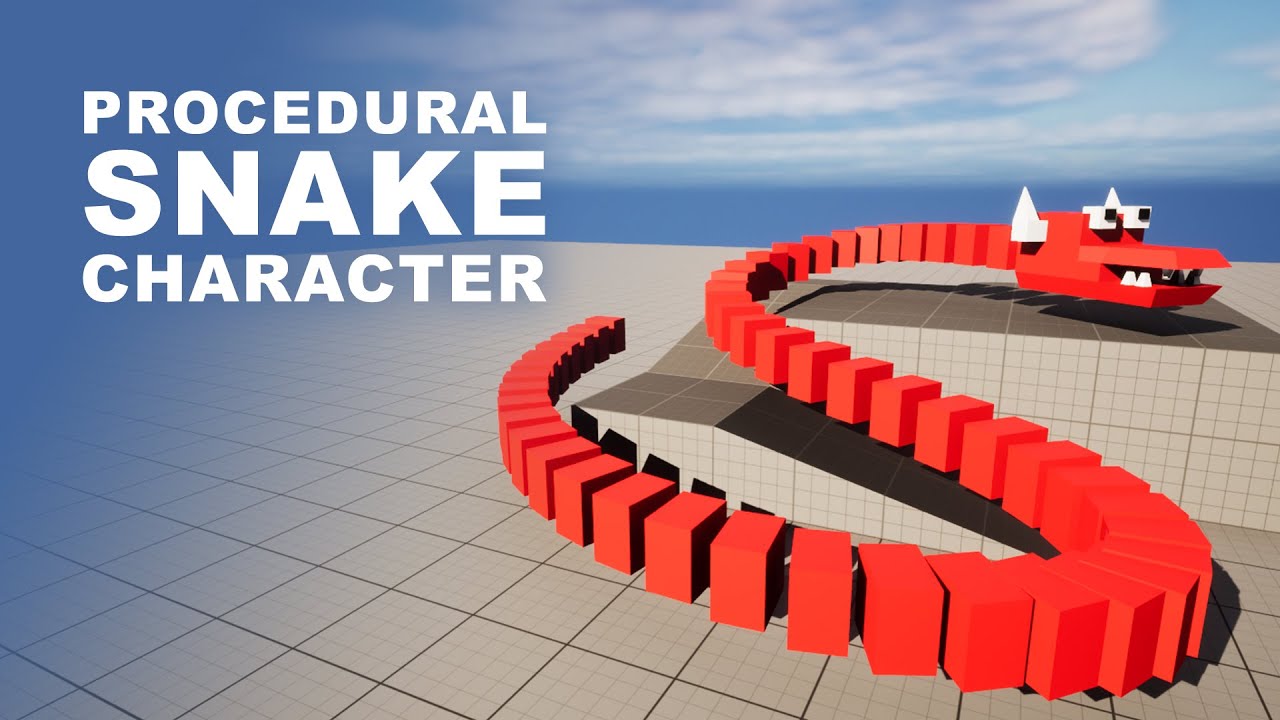
Project Files: https://www.patreon.com/posts/77397429 .
In this unreal engine 5 tutorial, I am going to implement a procedural snake. What meant by procedural is, the snake body will be animated dynamically/procedurally through the code and the length of the body can be adjusted as we need through parameters. Regardless of whatever the path the...
ruby cobalt
hm i think you can make the instance itself invisible
i had this issue i believe
when you add an instance you set its transform.. can you hav eit so the first isntance has a scale of 0??
or maybe you remove instance index 0 after creating the whole thing?
dusky cobalt
you just have to get mesh at point [0] and destroy it
rancid aspen
ruby cobalt
when you add an instance you set its transform.. can you hav eit so the first is...
its only following the actual ISM object instead of one of the new instances
so instance 0 is a follow cheese, not the static one stuck in the player
dusky cobalt
from what you said it's hard to understand what do you want
your first mesh is invisible and because you are duplicating it, they also invisible?
rancid aspen
this is my full event graph

 rancid aspen
dusky cobalt
your first mesh is invisible and because you are duplicating it, they also invis...
rancid aspen
dusky cobalt
your first mesh is invisible and because you are duplicating it, they also invis...
no so this is something ive already tried
dusky cobalt
set invisible of first mesh AFTER you create spline/meshes
rancid aspen
and this is my construction
 dusky cobalt
this guy CodeLikeMe is for sure not using proper ways to do these things.. it's probably crazy forced just so it works
rancid aspen
cause from what i can see when the cheeses are spawned, the first cheese is following my ISM object which is already in my player, and then the rest of the cheeses are following the cheese thats in front of it in the queue
dusky cobalt
and what is the issue?
rancid aspen
the first cheese (my first ISM object) is still there cause its what theyre being duplicated from
so all the following cheeses are duplicates of that first cheese
and then they essentially play follow the guy in front
but the guy in front needs to be invisible
but if i make that object invisible
dusky cobalt
the first ISM object? or the first cheese duplicated?
rancid aspen
the first ISM object

i highlighted the object
so its just making loads of the same object and making them follow eachother
dusky cobalt
spawn chese that you duplicate at 0.0.0 of world and duplicate it, and for the anchor for the other chesses to have object t ofollow create empty actor
if you set invisible of the chesse after all these meshes are duplicated then it will set all instanced meshes also to invisible?
rancid aspen
yessss
so watch this
you saw my previous screenshot
watch when i set the main object invisible
dusky cobalt
so just create other object than the cheese that they Follow
rancid aspen
but then they wont follow my new object, which as you can see is "ISM_Follow"
or i at least dont know how to get them to properly follow
i should include this is probs my first time properly using unreal
dusky cobalt
SetActorHiddenInGame after you know all meshes were duplicated
you duplicate them once right? not on tick?
rancid aspen
well its mainly for when i set up the game, the cheeses wont always be "populated" you could say
rancid aspen
dusky cobalt
you duplicate them once right? not on tick?
when i start yeah
wait that might make sense tbf
dusky cobalt
add them to array and when for loop completes set that mesh[0] or just drag variable from viewport and to SetHiddenInGame on that component
just do it AFTER they are all spawned, unless instanced meshes always change to properties of the parent - didn't test it ever

use Completed in array
it means for loop is completed and now do next action (SetHiddenInGame on ISM)
 dusky cobalt
When you play they also all disappear?
rancid aspen
nah so if i play theyll sit there
until i move
which makes me think its in my eventgraph
dusky cobalt
Yeah it’s how construction script works…
rancid aspen
cause it only activates when my player moves
dusky cobalt
Cause once you moved it you set it to invisible and then the next time loop run they are all invisible
Add the same note for setting invisible
But at the start of whole script
And it’s gonna work
Not saying it’s proper or whatever but it will work
rancid aspen
sorry can you break that down a little for me
dusky cobalt
The same node you have after Completed
rancid aspen
so the one i just added
dusky cobalt
Copy paste it and insert at the start of this whole function
First node after Construction Script
dusky cobalt
rancid aspen
so the one i just added
Yes
rancid aspen
and keep the other one?
dusky cobalt
Yes
rancid aspen
like this?
 dusky cobalt
Because how it works is that you started with actor invisible, you moved it once it disappeared but meshes were visible - which is what you wanted.
But next time you moved them, the actor didn’t set itself back to Visible so all the meshes also were set to invisible.
On game start it runs correctly because it runs once.
rancid aspen
i just clicked play and the same thing still happens
dusky cobalt
Correct, just after completed set NewHidden true or other way around
I don’t remember how this one works. Read tooltip 🙂
First need to be visible and 2nd one invisible.
rancid aspen
yeah the same thing happens as before except if i change the 2nd instance to new hidden then nothing appears
idk why this is so difficult
dusky cobalt
Sorry I had to go but I can try to help you later or maybe someone else will anserw
rancid aspen
thats alright
i think i need a break anyway
i sorta found what i could do
i just have ONE more issue now
and it teleports the first cheese in the index to my ISM location instead of just making it follow
cunning vapor
@dark drum
The 58 masked 4k textures were the root of all evil; I've changed / fixed it a little with this (BP's making it into a dynamic materia bypassing loading them in as full textures) The game now runs without messing up textures and saying "25mb over pool" but the textures still get referenced as full scale from the Data table at 60mb a pop; eesh; would the better way of doing this be making a material out of each one to reference in the data table instead or just simply make lower rez "hidden areas" as i'm still getting 690% over in stat streaming?
Thanks for 'size map' and other troubleshooting; helped me narrow it all down.


 placid elbow
rancid aspen
im following a video and noticed something i dont want:
https://www.youtube.com...
placid elbow
rancid aspen
im following a video and noticed something i dont want:
https://www.youtube.com...
mmmm cheese. Whats the concept for this game?
rancid aspen
ive been tasked to make a snake game
so i wanna make a game about a mouse gettin some cheese
but maybe some rival mice or sumn can follow and try steal the cheese
so youre in a constant battle of cheese and dodging the mice
im just stuck at one road block
 iron idol
is there a simple way to check if a controller is connected?
 uncut elk
how do people typically handle importing characters with customizable parts?
in my context the entire helmet can be swapped out for different ones
I assume you export your rig as you normally would but just without the head, and then add the head as a socket?
Unless theres a more intuitive way , I haven't kept up with all the updates to character related things in UE5

 sand shore
uncut elk
how do people typically handle importing characters with customizable parts?
in...
sand shore
uncut elk
how do people typically handle importing characters with customizable parts?
in...
Essentially yes, you want to break the character into different chunks that can be customized, and you can export each piece with the same rigging as the full character, but layer in the chosen cosmetic, or you can make some way of attaching individual components for each type of mesh relative to your skeletal mesh bone/socket. If you do the latter, generally you want to have "types" of sockets, like helmets, or perhaps like visor + top + side + etc, but all the customizable things in a given type of socket would be exported with the same origin, so you can attach them.
Using the full rig may be more expensive if you have a lot of characters, though, but you might look into Mutable to combine the geometry if you're going to have a lot of pieces or a lot of characters https://dev.epicgames.com/documentation/en-us/unreal-engine/mutable-overview-in-unreal-engine

Epic Games Developer
An overview of the Mutable toolset and how to use it in your projects in Unreal Engine.
uncut elk
sand shore
Using the full rig may be more expensive if you have a lot of characters, though...
Thanks , yea the socket method seems like the best for me, ill just be having different helmets to choose from and itll be simple enough to export them that way as static meshes. tho mutable sounds interesting and worth looking into. been hearing alot about it but forgot the name. thanks again.
rancid aspen
@dusky cobalt quick note, i ended up fixing it, heres a video with the now added animations too
 brittle flicker
sup guys i made an actor that disappears when a player actor touches it, after that i tried to set up a delay so the actor would also disappear if a player actor dosnt touch it but for some reason it just dosnt do that
the code is pretty simple but i am still pretty confused why the actor wont disappear.

 frosty heron
cunning vapor
<@430016173694779402>
The 58 masked 4k textures were the root of all evil; I've...
frosty heron
cunning vapor
<@430016173694779402>
The 58 masked 4k textures were the root of all evil; I've...
By not using hard reference and load it when you need it using Soft reference
 brisk iris
Are there any tutorials available for an immersive sim interaction system like cyberpunk? It's like a context menu without locking your camera or using your mouse
 frosty heron
brittle flicker
sup guys i made an actor that disappears when a player actor touches it, after t...
frosty heron
brittle flicker
sup guys i made an actor that disappears when a player actor touches it, after t...
and which other actor touched it? perhaps they don't collide and the Overlap never gets called. Do a print string and it will tell you just that.
brittle flicker
frosty heron
and which other actor touched it? perhaps they don't collide and the Overlap nev...
i tested it, for some reason it starts working only after the player is touching the actor. so in short until the player touches the collision nothing is happening but when the player touches it it disappears because of the upper part of the code.
i am not sure what the fix could be for that tbh do you have anything on ur mind that cpuld help?
frosty heron
brittle flicker
i tested it, for some reason it starts working only after the player is touching...
If what you want to happend is for the actor to be destroyed when something touches it. You need to debug by doing a print string on the OverlapEvent. If your target actor touches it and it doesn't print. Means you have an issue with the collision that result in the overlap to not happend.
brittle flicker
frosty heron
If what you want to happend is for the actor to be destroyed when something touc...
the actor already destroys itself when it collides with the player actor rn i want the actor to destroy itself/disappear when there is no player actor collision for a certain time. the "count down" only starts when the player actor collides with it and i dont want that because collision will already destroy the actor
sorry if i explained it badly its like 8 am rn i didnt sleep much
frosty heron
brittle flicker
the actor already destroys itself when it collides with the player actor rn i wa...
well, we seems to not be in the same trail :D.
Ok, so when do you want the countdown to start?
brittle flicker
frosty heron
well, we seems to not be in the same trail :D.
Ok, so when do you want the coun...
ig from the moment the item "spawns in" or just loads. i set a really short delay here to see if its working but ig something like 10 sec could also work.
 frosty heron
brittle flicker
ig from the moment the item "spawns in" or just loads. i set a really short dela...
frosty heron
brittle flicker
ig from the moment the item "spawns in" or just loads. i set a really short dela...
Event BeginPlay -> Delay X Seconds -> Destroy actor.
brittle flicker
frosty heron
Event BeginPlay -> Delay X Seconds -> Destroy actor.
thx mate it worked!
im still new in unreal and it got me really confused why my set up didnt work ;3
frosty heron
BeginPlay gets called when the actor is in the world.
brittle flicker
frosty heron
BeginPlay gets called when the actor is in the world.
good to know!
frosty heron
so you can use that to set a timer as soon as you enter the map if the actor is placed in the level.
That will also fire when the actor is spawned.
brittle flicker
my main idea is to use such stuff for NPC drops. if the player aint piicking it up in time the item will be gone
frosty heron
So for that, you can skip all those setup.
You can set LifeTime in the detail panel
brittle flicker
frosty heron
You can set LifeTime in the detail panel
yeah i was thinking about doing that too haha
 brittle flicker
frosty heron
brittle flicker
frosty heron
uh ok i was thinking u ment to use the life span node, i remember i already used it and it also didnt work

i will know now when i do add it to my project
thx again!
frosty heron
brittle flicker
uh ok i was thinking u ment to use the life span node, i remember i already used...
you can just edit in the class defaults =). But no worries, good luck on your project.
brittle flicker
frosty heron
you can just edit in the class defaults =). But no worries, good luck on your pr...
yeah i will learn that later on :3
 hollow maple
AI move to in 5.6 not working i think theres problem with nav mesh volume anyone know the solution?

 paper siren
Does anyone know of how or a tutorial for a room based building system similar to Two Point Hospital or The Sims. The one where you push a button and where every you click and drag with a mouse it crates a room as big as the size you want it to be?
crimson briar
hollow maple
AI move to in 5.6 not working i think theres problem with nav mesh volume anyone...
This is too broad to answer with a fix.
Things to check out:
- make the acceptance radius bigger (like 200 units)
- during PIE detach from the player, turn on navmesh display (P on the keyboard) and check if if the navmesh is generated and if the actor is on it
- check the agent radius and height in the project settings
- make sure the target actor is valid before you call moveto to it
- make sure the AI actor is possesed by the AIController - there is an option on it called Autoposses AI
faint pasture
brisk iris
Are there any tutorials available for an immersive sim interaction system like c...
You don't need a tutorial for this, split it up
make a menu that can be navigated the way you like
then make a system to maintain a SelectedActor and display the menu for it when selected
faint pasture
paper siren
Does anyone know of how or a tutorial for a room based building system similar t...
You don't need a tutorial for that. Start with click and drag drawing a debug box
MouseDown -> record data
Tick -> get mouse world pos -> math -> draw debug box
 lethal pollen
Hi!
I have a Blueprint class which has two Actor Components, but the C++ parent class only has one. How can I fix it?
Thanks!
 merry mirage
lethal pollen
I have a Blueprint class which has two Actor Components, but the C++ parent clas...
merry mirage
lethal pollen
I have a Blueprint class which has two Actor Components, but the C++ parent clas...
Two of the same actor component? Or two separate?
If the component is added via blueprint you can just remove it in the blueprint
 merry mirage
Ah, give the one you want to keep a different name
I think you've managed to give them the same name and the engine kinda doesn't know how to handle it
You'll find that the surplus component will vanish once you do
lethal pollen
There is only one in the C++ class: cpp UPROPERTY(VisibleAnywhere, BlueprintReadOnly, Category = "Components") USAttributeComponent* AttributeComponent;
merry mirage
Yeah, rename the variable
lethal pollen
OK
lethal pollen
merry mirage
Yeah, rename the variable
This is driving me crazy.
 dusky cobalt
How are you creating the default subobject?
Also there is AtrtributeComp not Attribute
You must have 2 variables 1 in header and other probably in constructor
 trail wing
Hi, did you find a solution for that ?
lethal pollen
@dusky cobalt There is only one variable in the C++ header file: cpp UPROPERTY(VisibleAnywhere, BlueprintReadOnly, Category = "Components") USAttributeComponent* HealthAttributeComponent;
@dusky cobalt And the C++ constructor: ```cpp
// Sets default values
ASCharacter::ASCharacter()
{
// Set this character to call Tick() every frame. You can turn this off to improve performance if you don't need it.
PrimaryActorTick.bCanEverTick = true;
bUseControllerRotationYaw = false;

SpringArmComp = CreateDefaultSubobject<USpringArmComponent>(TEXT("SpringArmComp"));
SpringArmComp->bUsePawnControlRotation = true;
SpringArmComp->SetupAttachment(RootComponent);

CameraComp = CreateDefaultSubobject<UCameraComponent>(TEXT("CameraComp"));
CameraComp->SetupAttachment(SpringArmComp);

InteractionComp = CreateDefaultSubobject<USInteractionComponent>(TEXT("InteractionComp"));

HealthAttributeComponent = CreateDefaultSubobject<USAttributeComponent>(TEXT("HealthAttributeComp"));

GetCharacterMovement()->bOrientRotationToMovement = true;

AttackAnimDelay = 0.2f;
}```
dusky cobalt
Hmm, can you try to create new children blueprint of that and check if it will also be added with 2 components?
And 2nd question what is parent for ASCharacter ? is is just ACharacter?
And you are 100% sure later in code on Begin Play or on Initialization event you are not adding other Subobject right?
@lethal pollen
lethal pollen
dusky cobalt
And you are 100% sure later in code on Begin Play or on Initialization event you...
Let me check it.
dusky cobalt
try to find Ctrl+F AtrtibuteComp word in the C++ file
notice you have misspeling there
lethal pollen
void ASCharacter::PostInitializeComponents()
{
    Super::PostInitializeComponents();

    HealthAttributeComponent->OnHealthChange.AddDynamic(this, &ASCharacter::OnHealthChanged);

}```The HealthAttributeComponent is only in the constructor and in the above method.
dusky cobalt
Ok and the misspeling component is not found?
lethal pollen
I will try to add another Blueprint class
lethal pollen
dusky cobalt
Ok and the misspeling component is not found?
No. I searched the name with the typo in the solution and it doesn't find any.
 white parrot
lethal pollen
This is driving me crazy.
white parrot
lethal pollen
This is driving me crazy.
Have you tried to reparent
lethal pollen
dusky cobalt
Hmm, can you try to create new children blueprint of that and check if it will a...
The class declaration is class ACTIONROUGELIKE_API ASCharacter : public ACharacter. I have created another Blueprint class which inherits from this C++ class, and there is only one AttributeComponent.
 dusky cobalt
so it works, yeah try to reparent the old one
something bugged, I would check log command in Rider if you have if it doesn't actually show some error or warning when you start the game about this old b lueprint
or if you don't have much inside it just delete it and move on
lethal pollen
@Pingo, @dusky cobalt After reparent:
 dusky cobalt
nice
lethal pollen
dusky cobalt
something bugged, I would check log command in Rider if you have if it doesn't a...
I use Visual Studio with ReSharper
Thanks a lot for your help.
white parrot
lethal pollen
@Pingo, <@716996204872859659> After reparent:
It’s a corrupt actor comp
Happened to me once after renaming
Not sure what caused it
last peak
U guys encountering many bugs ?
dusky cobalt
tbh I think I never once thought it's like that, it's pretty straightforward most of the time, if something doesn't work there must be a reason, and sometimes it's just lock itself in a bad state that needs to be reseted
last peak
Besides broken structs in bps i dont stumble across too many
dusky cobalt
last peak
U guys encountering many bugs ?
I don't, unless it comes to my game 😄
dark drum
cunning vapor
<@430016173694779402>
The 58 masked 4k textures were the root of all evil; I've...
This is where you should be using soft object references. In the data table, change the type to be a soft ref of the texture 2d. This means it won't force load the textures just by having the DT loaded.
You will however need to manually load the soft references when you need to use them.
crimson briar
last peak
U guys encountering many bugs ?
Working with C++ and Blueprints at the same time has a lot of little asterisks that can cause a lot of different problems. That is the main culprit of the bugs I see here, I think.
last peak
dark drum
This is where you should be using soft object references. In the data table, cha...
A soft reference is basically just a path to a file on your hard drive correct?
I almost never used them and i bareley ever seen other ppl use them
dark drum
last peak
A soft reference is basically just a path to a file on your hard drive correct?
pretty much.
dark drum
last peak
I almost never used them and i bareley ever seen other ppl use them
I use them a lot. Especially for things like meshs, sounds and textures/materials.
last peak
dark drum
I use them a lot. Especially for things like meshs, sounds and textures/material...
If i add a soft reference to a actor does it behave the same as a hard reference just that i have to load it manually ?
white parrot
last peak
I almost never used them and i bareley ever seen other ppl use them
It’s useful for when you don’t need the object to be loaded until a certain point
Like a boss
teal dove
last peak
If i add a soft reference to a actor does it behave the same as a hard reference...
I recommend this very good video on soft-references: https://www.youtube.com/watch?v=aUG54KCP89M

In this episode of be a better game dev, we will be looking into hard and soft references.
Be a better game dev playlist: https://www.youtube.com/playlist?list=PLNBX4kIrA68nX9tTCMbuBM8up9JVq29fv
Join the Discord server here: https://discord.gg/zBeebU7uv3
Support the work of LeafBranchGames on Patreon here: https://www.patreon.com/LeafBranchGames
dark drum
last peak
If i add a soft reference to a actor does it behave the same as a hard reference...
No. When you load it, it'll give you the non soft version as an object type. You'd normally then have to cast to get it in the relevant type. For you're own classes, this is where hierarchy and function only base class are important.
last peak
dark drum
No. When you load it, it'll give you the non soft version as an object type. You...
hmm but then i dont really get the point of it
Like isnt the cast creating a hard reference ?
crimson briar
I often give an example of an enemy manager with references to every enemy possible in game.
Let's say it has an array of enemies, 100 of them. Each one is a child of BP_Enemy class. They have their own models, textures, etc.
It is a lot of assets to load.
Instead, you make a soft reference array with the BP_Enemy class, and put all child classes there.
Then when spawning, you load the asset, cast it to BP_Enemy if necessary, and you can use it.
Your main functionality is on the BP_Enemy class though.
This way you only load the enemies you need right now
dark drum
teal dove
I recommend this very good video on soft-references: https://www.youtube.com/wat...
I'd give it a 7/10. Not terrible but it jumps to using interfaces instead of talking about hierarchy.
teal dove
dark drum
I'd give it a 7/10. Not terrible but it jumps to using interfaces instead of tal...
What do you mean with hierarchy?
last peak
crimson briar
I often give an example of an enemy manager with references to every enemy possi...
But isnt the cast to enemy 1 creating a hard ref to enemy1 ?
So you have to load enemy 1 in your ram too ?
crimson briar
You are not casting to Enemy1
You are casting to the parent, BP_Enemy
Even better if the parent is a C++ class
The child enemies only have different stats/models, maybe some overrides on the parent events
last peak
Ok you are casting to enemy but then you cant access the textures and different meshes from enemy1
crimson briar
last peak
Ok you are casting to enemy but then you cant access the textures and different ...
Why would you need to access them?
dark drum
teal dove
What do you mean with hierarchy?
Class hierachy, so:
Object -> Actor -> Character -> PlayerCharacter
Object -> Actor -> Controller -> PlayerController
Object -> ActorComponent -> SceneComponent -> PrimativeComponent -> MeshComponent -> StaticMeshComponent
last peak
crimson briar
Why would you need to access them?
What are you gonna do with only the base class?
Execute different behaviour ?
dark drum
The area a lot of people go wrong is they overload their classes so all the logic and all the assets are in the same place. Creating a function only base class and then creating a child that allows you to set the assets that would actually be used, allows you to reference the base class without force loading the stuff in the child classes. With good structure, you can still access all your main functions this way.
crimson briar
Well yes? The BP_Enemy has a function Attack.
EnemyArcher overrides it with shooting an arrow.
EnemyWarrior overrides it with hitting you with a sword.
You still can call it through BP_Enemy -> Attack
last peak
dark drum
The area a lot of people go wrong is they overload their classes so all the logi...
I kinda abuse components for that ^^
Put all the logic on a component then you can just get actor - get component by class - execute what you want but dont have the overhead of the owner
teal dove
dark drum
Class hierachy, so:
Object -> Actor -> Character -> PlayerCharacter
Object -> A...
Got it, yeah that video is mainly aimed at beginners. I would say though that hierarchy and soft references are two different topics, that each deserve their own guide.
dark drum
last peak
Put all the logic on a component then you can just get actor - get component by ...
Yea it can be a good option but chances are if its a components it's probably just behavior anyway.
dark drum
teal dove
Got it, yeah that video is mainly aimed at beginners. I would say though that hi...
I like to put them together as i think soft references make more sense when you understand hierarchy. (It also makes it easier to understand when interfaces might be suitable)
A soft reference force loads its class type but not any of its child types. If you're not utilizing hierarchy, it can be more difficult to use soft references beyond the base classes epic use for their systems. (StaticMesh, Texture2d, SoundCue etc)
Doors can be a good example for hierarchy. This might be a little over kill for some projects but its helps demonstrate the point.
If you ever want to reference a door, you can do so as the door base which would have the open/close functions. Maybe even things like lock/unlock and enable/disable.

 jaunty solstice
2 questions about Actor Blueprints
- Is there any way to shift or marquee select multiple static meshes inside an Actir Blueprint?
- Is it possible to somehow ‘break apart’ or export multiple static meshes inside an Actor Blueprint and keep their transforms?
dark drum
jaunty solstice
2 questions about Actor Blueprints
- Is there any way to shift or marquee selec...
First point, no.
Second point, yes, you can convert to a static mesh. (Located under actor on the top menu bar) This will conbine all static mesh components and skeletal mesh components into a single static mesh. This can then be exported out as an FBX.
It can be good when doing blockouts. Convert to a static mesh and hand over to your artist. 😉
 olive crown
So I've been building an inventory system, but I can't seem to get my inventory slots to appear in my inventory widget. I've nailed it down to the fact my W_Slot isn't constructing for some reason. Would anyone have any ideas why this might be?


 lusty delta
trail wing
Hi, did you find a solution for that ?
lusty delta
trail wing
Hi, did you find a solution for that ?
well, not sure. I set a default mesh on the System. I feel like, that reduced crashes. you got the same?
and how do you find this post 4 months later?
crimson briar
olive crown
So I've been building an inventory system, but I can't seem to get my inventory ...
And do you ever add the inventory to the viewport?
olive crown
crimson briar
And do you ever add the inventory to the viewport?
Yeah the inventory box appears just fine. And if I ignore the inventory system itself and just order the W_Slot widget to create with a button press, it does appear.
So there's something in this code that's stopping it from appearing inside the inventory wrap box
last peak
olive crown
Yeah the inventory box appears just fine. And if I ignore the inventory system i...
is the slot valid after creating ?
If yes either the slot widget isnt correctly set up (too small or whatever else) or you dont have a item in your inventory array
If you say it works after button press it would mean your load inventory never gets called
olive crown
Hmm, I added this and it seems like it IS valid
 last peak
now get the length of your items array and print it out
trail wing
lusty delta
well, not sure. I set a default mesh on the System. I feel like, that reduced cr...
We have similar crash and log that is how I found it, did your solution completely resolved the crashes or did it just diminish their amount ?
last peak
last peak
now get the length of your items array and print it out
If its 0 thats your issue
olive crown
Nope, says it's 10
lusty delta
trail wing
We have similar crash and log that is how I found it, did your solution complete...
no idea.
last peak
olive crown
Nope, says it's 10
maybe wrong z order
of the slots
Or the load inventory function doesnt get called when you think it does
Cant think of anything else
dark drum
olive crown
So I've been building an inventory system, but I can't seem to get my inventory ...
How do you have it setup in the slot widget to handle the item data? Perhaps you're setting its visibility if empty?
dusky cobalt
olive crown
So I've been building an inventory system, but I can't seem to get my inventory ...
How does your W Slot looks like? it has any image or text there so you can confirm that it wasn't really created? maybe it's added but it's just empty?
Oh wait, just instead of using Resize, create variable for Inventory Slot Amount and plug it into For Loop
You never set Wrap Box reference?
My bet is that Wrap Box is nullptr
after you create widget, draf from return and set the wrapbox to the one from widget
or after Load Inventory @olive crown
 olive crown
Would this have anything to do with it, that I'm adding the Inventory Widget to the viewport, but not the slot?
 dusky cobalt
I already told you the solution, if after this still doesn't work then you can look further yes
olive crown
I'm just reading it
dusky cobalt
but for now it's impossible to anserw because your Wrap Box is nullptr
dusky cobalt
olive crown
Would this have anything to do with it, that I'm adding the Inventory Widget to ...
This shouldn't cause issues, but you can probably store the Inventory Widget in variable and don't create it on every Click.
Only create it when Inventory variable is not valid.
So the 'first time' and then it will be just used
wait I'm stupid it's not WrapBox, but still confused how do you add this to Viewport anywhere or to some global UI?
oh here ..
iron idol
if you wrap something with a border in a widget, is there a way to make only the border visible/hidden but not the contents that you wrapped the border with
olive crown
Okay so the Load Invetory Function is inside the W_Inventory blueprint, so the wrapbox doesn't appear to be null
And I have a player pawn where I added the logic for adding the inventory to the viewscreen
last peak
olive crown
And I have a player pawn where I added the logic for adding the inventory to the...
Just get your wrap box and do a is valid check at the very beginning to your load inventory
So you know if its null or not
dusky cobalt
iron idol
if you wrap something with a border in a widget, is there a way to make only the...
You can set brush color to 0 transparency so it will be invisible
 dusky cobalt
last peak
Just get your wrap box and do a is valid check at the very beginning to your loa...
dusky cobalt
last peak
Just get your wrap box and do a is valid check at the very beginning to your loa...
nah it's my bad, it's not wrapbox, i got confused where these are created
olive crown
last peak
Just get your wrap box and do a is valid check at the very beginning to your loa...
checked it and it's definitely valid
last peak
olive crown
checked it and it's definitely valid
Show your slot widget then
olive crown
Current W_Slot widget logic
 dusky cobalt
really 😄
dark drum
olive crown
Current W_Slot widget logic
Does the quantity ever print?
olive crown
Nope, which I assume means it's not ever being called
dusky cobalt
if it's Pre-Construct then the Item variable is not set yet probably?
just create new InitializeSlot custom event and call it after you create it
dark drum
olive crown
Nope, which I assume means it's not ever being called
Oh ok, i see whats happening. You're creating two inventory widgets. One gets added to the screen but the other (where you try to update the slots) doesn't.
crimson briar
I think you should use PreConstruct only for things that are internal to this widget and don't rely on any outside data
olive crown
dark drum
Oh ok, i see whats happening. You're creating two inventory widgets. One gets ad...
Ah that helped, thank you!


And thanks everyone else too, really appreciate the input ❤️ got more than I expected
iron idol
dusky cobalt
You can set brush color to 0 transparency so it will be invisible
I should have thought of this. Thanks!
violet bison
btw can you show me how to do it in blueprint?
I couldn't figure it out
 jovial steeple
violet bison
btw can you show me how to do it in blueprint?
I couldn't figure it out
jovial steeple
violet bison
btw can you show me how to do it in blueprint?
I couldn't figure it out
Going to bed rn 😭
It’s vector math on an event tick
Getting the missiles forward vector, getting the vector pointing from the missile towards the following target, using the rotate vector node to rotate the forward vector towards the target.
Maybe later I can show you all the math
 barren tangle
Hi guys, can we avoid to do that? to change the image of a image widget?

is there another direct way?
i mean it's a big block juste to set 1 variable...
last peak
barren tangle
is there another direct way?
just collapse it to a macro then 🤷
 severe coral
Hey, is it possible to make this event fire no more than X times per second? Changing the tick interval (or even disabling tick) doesn’t change the behavior of this triggering event. Or is the delegate not bound to tick at all? Then how could I restrict triggering interval of this comopnent?
 last peak
severe coral
Hey, is it possible to make this event fire no more than X times per second? Cha...
last peak
severe coral
Hey, is it possible to make this event fire no more than X times per second? Cha...
What event?
severe coral
on the screen, "OnAudioEnvelopeValue" from Audio capture component
barren tangle
last peak
just collapse it to a macro then 🤷
but you will do the same inside the macro 😄
last peak
severe coral
on the screen, "OnAudioEnvelopeValue" from Audio capture component
You add a do once right after the do once a timer by event and set it to 1 second, from the timer event you reset the do once
last peak
barren tangle
but you will do the same inside the macro 😄
Ok but why does that matter ?
If your problem is that the block is too big the macro is tiny
severe coral
last peak
Ok but why does that matter ?
But from the performance perspective is this still setting all those variables? or behind the sceenes engine knows it didnt change
last peak
severe coral
But from the performance perspective is this still setting all those variables? ...
Wut?
it will execute your entire code 1 single time then it gives you a 1 second cooldown
severe coral
I mean, is this setting only the one variable he changed, or does it change all variables every time, even the ones that didn’t change?
last peak
severe coral
I mean, is this setting only the one variable he changed, or does it change all ...
Wut????
 jaunty geyser
barren tangle
but you will do the same inside the macro 😄
jaunty geyser
barren tangle
but you will do the same inside the macro 😄
There's a Set Brush From Texture node you can use, iirc there's also Set Brush From Material if you wanna use a material
 obtuse mulch
how can i get random actor in area around character
last peak
obtuse mulch
how can i get random actor in area around character
with a sphere trace
barren tangle
jaunty geyser
There's a `Set Brush From Texture` node you can use, iirc there's also `Set Brus...
thanks!! i was searching for that 😄
severe coral
barren tangle
Hi guys, can we avoid to do that? to change the image of a image widget?
There is "set members" node so it might be helpful in every struct
 obtuse mulch
why i cant split this anymore
 severe coral
because its array
barren tangle
severe coral
There is "set members" node so it might be helpful in every struct
Thanks!! That’s is really good to know!!
 marble tusk
severe coral
There is "set members" node so it might be helpful in every struct
marble tusk
severe coral
There is "set members" node so it might be helpful in every struct
I'm not sure if that would work here since it uses references and the getter is a pure node getting a copy, but I also never use the output of set members to know how exactly it works. Might need to right click and add execution pins to the getter if that's even possible with getters
Wait I might be dumb and that is a reference
Maybe I shouldn't suggest things immediately after waking up
 surreal peak
Depends on how the break node works I guess
Could be a copy, yeah. But it's also possible that the Setter does more than just forward the params.
Could be that it uses the params to initialize something internally. Only changing the struct property directly might thus be bad.
Although I guess that's a split struct pin node and not a break
No idea how they look like under that hood
 polar barn
So I have a Pawn Blueprint where it switches between 2 Cameras and it works using the Y key but I want it to switch Cams using my widget button
is there a way for the the widget button as a button outside of widget blueprints
 last peak
polar barn
So I have a Pawn Blueprint where it switches between 2 Cameras and it works usin...
last peak
polar barn
So I have a Pawn Blueprint where it switches between 2 Cameras and it works usin...
you create a event and you call it switch cam, now you hook it up to the same code as y
Now when you pressed the button in your widget you cast to your player and you call that event
crimson briar
polar barn
So I have a Pawn Blueprint where it switches between 2 Cameras and it works usin...
In the pinned posts look for the one with Blueprint Communication video
polar barn
last peak
you create a event and you call it switch cam, now you hook it up to the same co...
Okay that worked
Thanks a lot!
rancid aspen
yo im getting a weird response from rotating an object costantly for a pickup

it just stops after doing a little bit of rotation
crimson briar
rancid aspen
Try rotating on one axis only, maybe it is hitting the gimbal lock and getting stuck
crimson briar
Yeah seems to be gimbal lock. When pitch is set to 0 it works.
AddLocalRotation doesn't have this problem but I don't knwo the specifics if it does something differently or what.
surreal peak
rancid aspen
Also please make use of DeltaSeconds.
rancid aspen
crimson briar
Try rotating on one axis only, maybe it is hitting the gimbal lock and getting s...
im not sure what it was, i just switched its world rotation instead
 dim crane
I want the character to dodge based on WASD direction; not always forward.
I'm using GASP, and as you can see, dodge happens based on the mouse direction, I'd like it to dodge based on WASD (and only if WASD isn't pressed to move forward). Any idea how to achieve this?
Current behavior: https://www.youtube.com/watch?v=HJoEgs7YM3o

 jaunty solstice
dark drum
First point, no.
Second point, yes, you can convert to a static mesh. (Located ...
jaunty solstice
dark drum
First point, no.
Second point, yes, you can convert to a static mesh. (Located ...
Thanks! Good to know. Working with static meshes in actor BP total PITA in 5.6 Hopefully fixed in 5.7!
 thin acorn
I'm trying to add Steam achievements to my game, but I can't find the correct nodes to use
All the tutorials I've seen use Cache Acheivements node, but it isnt there for me

The only seemingly relevant node I can see is AUTH Set Achievement Unlock on Client
thin acorn
The answer is that such nodes aren't accessible in certain classes.
ruby cobalt
hm I need to calibrate a system that tracks distances between specific bones.. basically i care about the min and max distance those two can get.. I can just repetitively store the lowest and the highest values continuously? is that a good idea?
system would be calibrated after "going through the extremes"?
frosty heron
dim crane
I want the character to dodge based on WASD direction; not always forward.
I'm ...
CharacterMovementComponent -> Get Last Input vector
then make rot from X vector
use that for the set actor rotation
ruby cobalt
runs at event tick.
Is this a bad idea?
the hand bone i check with is the parent so.. i kind of already know the range.. i just want to be more accurate and be able to adapt to a different hand if needed.
maybe i can have it run only when needed and have it disabled most of the time
 frosty heron
What's the actual benefit of macro.
if something need to happend every frame then tick is the place.
the problem lies with what you are doing inside the tick.
ruby cobalt
i'll be running 8 of those
frosty heron
If nothing heavy then you should be fine. C++ may be faster depending on what you are doing,
ruby cobalt
fingers move all the time so it's better to check at event tick. i need to know if they touch the palm or the thumb.. but i don't need to recalibrate every frame
frosty heron
just checking location of the bone should be dirt cheap but if you care enough then profile it.
ruby cobalt
never used c++.. i should learn because i'm really tired of tiding up my nodes around
frosty heron
you will unlock the hidden power too if you do.
ruby cobalt
yeah
i'm a strong believer in slowing down temporarly to go further on the long run
just gotta find the right time for it
 signal bane
Blueprint Dispatcher Question
Say I have ActorA, which has ComponentC
ComponentC has an operation that takes some time to resolve, so it has C_Dispatcher.
Is there a good way to handle binding/unbinding dispatchers so arbitrary code can call ActorA's front for C's operation, and easily get an event callback?
Like do I need to make A_Dispatcher which is bound and called by C_Dispatcher?
sand shore
signal bane
**Blueprint Dispatcher Question**
Say I have ActorA, which has ComponentC
Compon...
I think it's not directly possible. I know that projects which use C++ can do this, but I'm uncertain whether BP will let you do it. But the general concept is that you would create a parameter on ActorA's function that has the type of an event which corresponds to the event dispatcher C_Dispatcher. You wouldn't be able to do this from the drop down menu.
There's a node you can use with dispatchers called "Bind Event to C_Dispatcher" (it's a dynamic name), and you may be able to drag the red wire there onto either the event entry or the function entry node. If dragging the wire from the Bind Event node onto the event/function entry node doesn't work, then you can't do this in BP alone.

In the event that you can't do this in BP, what you want to do is make a C_Listener interface, which has an implementable event that's something to the effect of NotifyComplete. Have ActorA's function/event take a parameter of C_Listener Object Reference, and have ComponentC store an array of C_Listener references.
You want users of ActorA to HAVE to implement the interface, so that's why you don't allow that parameter to be just a plain Object or a plain Actor
If you CAN take the event as a parameter (and therefore, use the dispatcher), then I think you can also clear a dispatcher from BP, so you may not need an unbind function (but can provide one in the same way)
Like do I need to make A_Dispatcher which is bound and called by C_Dispatcher?
This is also a possibility
signal bane
sand shore
I think it's not directly possible. I know that projects which use C++ can do th...
I managed to find a bit of simplification.
When I grab ActorA's variable component reference, I can click the event, and then handle things there.
The result is it does trim down the amount of rebinding I need to handle passing the calls along. There isn't any good way for whoever is talking to ActorA to bind directly to C_Dispatcher (which is probably overall a good thing)

 signal bane
sand shore
If you CAN take the event as a parameter (and therefore, use the dispatcher), th...
signal bane
sand shore
If you CAN take the event as a parameter (and therefore, use the dispatcher), th...
I don't think I understand how to do this.
Do you have an example?
sand shore
signal bane
I don't think I understand how to do this.
Do you have an example?

it may need to be a function, or may not work at all
You can generally do this with any supported variable type in BP
it adds an input of the same type
pulsar monolith
sand shore
yeah it's only work in function
 sand shore
pulsar monolith
yeah it's only work in function
sand shore
pulsar monolith
yeah it's only work in function
@signal bane ah like this
 severe wagon
When I open the city sample project from EPIC and migrate the masscrowd level to a new project. If I press play - the crowd spawns but its grey t pose characters that slide with no animation. when stop and press play again these errors pop up
Does anyone know why you cant migrate epics masscrowd into another project? the mass plugins are all enabled. the error only shows up after pressing play a second time. the first time always works but the crowd is just t posed people with no animation.


oh... maybe i have found some extra plugins missing 😄 nvm that fixed only partial texture issue. still getting the errors above. trying to find where they come from
 thorny pecan
Hi everyone,
I'm developing a tower defense game (inspired by PvZ) and I've run into an architectural problem with my modifier system.
I want my unit selection UI (where the player chooses which units to use for the level) to display the unit's stats with any active modifiers applied (e.g., a "cost reduction" modifier should show the reduced cost in the UI).
But My selection UI is populated using Class References from an array, for each unit. This means the UI widgets can only access the Class Defaults.
My modifier logic is designed to run on the Object Reference after the unit is spawned and placed in the world. I can't figure out how to apply this logic using only a Class Reference for the UI without having to refactor everything tied to either the UI or the Modifiers.
(This is not a problem i thought about since in origin there were no modifiers, just direct upgrades that are another class themselves)
What is the correct architectural approach to calculate or fetch these modified stats for my UI? I'm using blueprints, but if c++ can save me in some way i'm fine with susing it.
Thanks
dusky cobalt
thorny pecan
Hi everyone,
I'm developing a tower defense game (inspired by PvZ) and I've run...
You could have TMap with Class Of Unit as key and Array (must be struct) with Modifiers that are applied.
That TMap would be called ActiveModifiers, **after **you populate UI, you would get that TMap and for class and for each modifier apply the changes on top of UI.
So it's like your UI is already binded to selection and it shows the unit base stats, but then the widget asks 1 more question.
Are there any modifiers active? GetPlayerController->GetAppliedModifiers -> ForEach Class -> get struct -> For Each Modifier-> Type and value add + and then add to displayed stat.
dusky cobalt
severe wagon
When I open the city sample project from EPIC and migrate the masscrowd level to...
Maybe you don't have some plugin turned on?
dark drum
thorny pecan
Hi everyone,
I'm developing a tower defense game (inspired by PvZ) and I've run...
How do you store the data for what modifiers should be applied when the game starts?
thorny pecan
dusky cobalt
You could have `TMap` with `Class` Of Unit as `key` and `Array` (must be `struct...
Yeah, that makes sense, this approach would fix the UI stat issue.
But thinking about it, it wouldn’t solve my later problem with having multiple versions of the same unit (which i forgot to address in my first message). Since the key is the class, they’d share modifiers and i'm not sure if i want that.
So I’m leaning toward switching to object references instead, so each unit setup can have its own modifiers and upgrades.
dusky cobalt
Multiple versions of same unit from one class? Then you need to make something like unique ID, class is just example. The same approach would apply, all you have to do is create for example Unique TAG or ID or FName at worst (I would go with tag because of lack of misspeling issues).
or maybe you should also use Data Assets for displaying your units and then it would be much easier
each Data Asset is different unit and classes use data assets to populate info about them
thorny pecan
dusky cobalt
or maybe you should also use Data Assets for displaying your units and then it w...
I haven’t looked into Data Assets yet, I’ll check them out. using TMap with an identifier makes sense and works, it’s probably faster to implement.
For my case, though, I think switching to object references will be easier in the long run. Keeping class references is starting to feel more complicated than necessary, it worked fine with the simpler mechanics before, but now it’s getting tricky.
dusky cobalt
If you have a lot of units Data Assets are 100% way to go. I don't get how would switching to Object References help? If you have access to each object reference then yeah this is much easier. I thought that you are more like in some place between levels and you don't have access to actor references that are 'spawned', that is why you used class reference.
severe wagon
dusky cobalt
Maybe you don't have some plugin turned on?
i copied the "plugins" folder from the sample project to make sure I wasnt missing anything but I still cant seem to find what i'm missing. I also copied over the defaultplugins.ini and mass.ini for the all zonegraph lanes and stuff to make sure it matched. actually doing this made it no longer even spawn grey people, now it wont spawn anything.
ok so removing the mass.ini lets people get spawned again! just not working the same still.  got a lot of bald men scooting around
 thorny pecan
dusky cobalt
If you have a lot of units Data Assets are 100% way to go. I don't get how would...
thorny pecan
dusky cobalt
If you have a lot of units Data Assets are 100% way to go. I don't get how would...
do you have any resource that you prefer on data assets? i want to look into them
For the place in between levels i was just going to use construct to still have access to the units and making changes directly on them and then use the constructs as base for units to spawn, copying the data
dusky cobalt
thorny pecan
do you have any resource that you prefer on data assets? i want to look into the...
https://dev.epicgames.com/documentation/en-us/unreal-engine/data-assets-in-unreal-engine
Nothing complicated about them, these are just big buckets for variables, then you can have for example UnitDataAsset variable on your class and when you spawn actor from class, you give it data asset and then spawn it, you need to have logic of course inside to 'fetch' that data before initializing, but then changing and adding units is just creating new Data Asset which is neat

Epic Games Developer
Information on Data Assets in Unreal Engine.
You can use them for anything, like storing static mesh for actor, icon, description etc.
first you create PDA (Primary Data Asset) which defines your variables, and then you create Data Asset(which is like Unique Unit in your case) from it
thorny pecan
dusky cobalt
https://dev.epicgames.com/documentation/en-us/unreal-engine/data-assets-in-unrea...
Thanks, now after looking at them for a bit, i have a couple of questions:
1 after making a data asset class for my units then I have to manually make the data assets for each unit i have, right? so if i have like 20 units i have to make 20 manually and fill data manually, and update it if update the unit blueprint? and if i make a new one i have to go and make a new data asset for it, this sounds tedious, especially if i have to do some balance changes i would have to go edit all the variables, please correct me if I'm wrong
2 let's say i have the blueprint for my unit BP_Turret, now normally i only have one so it's no problem, just set the variables and make the functions to edit them if then a modifier is added (like damage up that calls the function apply damage modifer and does baseDamage + damageBonus and saves the new value) but i want my player to use the single BP_Turret to make 2 distinct final units, like to the first there is an upgrade that gives it an elemental attack of one type and on the second another element, both units will be from the BP_Turret but will be different, how would i replicate it with data assets? i can't see the way to
dusky cobalt
-
yes and that is the whole point of data asset, you just go to data asset to fix new balance changes rather than going to class and looking where it might be, also if you architecture it correctly you may not need so many classes as you have right now, cause each unit is just different set of data, you can of course have Class as variable in DataAsset as well
-
data assets are just for INITIALIZING variables, they are not used for storing them 'live', that is what your Actor Reference handles (the spawned actor). So you for example have UI with array of data assets, when you click on icon 1, it get's that Tower1DataAsset reference, passes to function SpawnActorFromClass (+ActorDataAsset) and then your BP_Tower has to get that data and set mesh, set color, etc. If you want any data from that tower, you just get TowerDataAsset on it and you acan access it, you don't have to duplicate the variables. Of course if it's something like health, then you would only fetch the starting value, but then you need 'local' variables for Health and Current health on the component/actor anyway so you can track these.
 sick sky
also making once 20 data assets isnt that bad
you spend a bit of time first then you only have perks
severe wagon
severe wagon
ok so removing the mass.ini lets people get spawned again! just not working the ...
ok its not working because there are a lot C++ elements that dont get migrated when you do Asset>migrate
the parent classes seem to be C++ and then they have blueprint classes attached to them. maybe im understanding it wrong but its how i see it currently. weird that migrating cant bring c++ with it where needed. the crowd character BP is missing its parent which points to a c++ and so theres probably a few other things like this causing the compile errors.
 mild jacinth
is there a reason why sometimes this for each loop node has a wildcard object and even if i pull from it and attempt to cast, its either not available or arrayelement becomes an exec pin?

 crimson briar
mild jacinth
is there a reason why sometimes this for each loop node has a wildcard object an...
crimson briar
mild jacinth
is there a reason why sometimes this for each loop node has a wildcard object an...
Seems like something got corrupted. What is the type of the Array? Did you modify the default macros? And is it pure Blueprint or C++ with Blueprints?
mild jacinth
crimson briar
Seems like something got corrupted. What is the type of the Array? Did you modif...
WBP_EqActiveSlot which is widget bp, havent really modified macros no
should be just bp
I think i fixed it by refreshing the loop nodde but thats so weird i had this happen before too..
i have to delete the loop bc it turns to exec pin with arrow as soon as i compile it lol
crimson briar
I've never seen it before. Maybe it is related to the visual plugin you are using
dusky cobalt
Usually when you are switching things in for loops, you have to unplug both sides and maybe even Refresh Node, cause even if you unplug array but leave Element the old reference will stay, and the other way around. So as Verael said it's probably cached the old reference to something you had in array etc.
crimson briar
Caching is one thing, but being able to connect an output to execution is something else
thorny pecan
dusky cobalt
1. yes and that is the whole point of data asset, you just go to data asset to f...
I can see how It works for the first point, but I'm still lost on the second tbh.
Right now I just use and array of class references to make the list of selectable units and then after choosing the one the player is using.
With the data assets I would have to use the array of data assets right? But then I have to calculate the final stats inside the data assets to show it in the selection UI, right? And then if in my selection UI I want I duplicate of one of the data assets so that I can apply different things to it, how is that going to work? I'm sure I'm missing something
dusky cobalt
thorny pecan
I can see how It works for the first point, but I'm still lost on the second tbh...
No, for election you should use Object References to actors and not their classes. Then from Object References if you need you can access data like Name, Description etc. The calculations if needed should happen on the actor reference as well where you have functions to modify it. Also the Modifiers applications happen in the actor (not specifically class, but just in like BP_Actor, right). Data Asset is just for initializing starting values for variables and also for the Actor to READ them or your UI to read them, but if it's need something to be modified then it (your BP_Actor) needs to create a 'local' variable and functions that work with it.
Like if you upgrade your unit, this should happen in Unit Class like ++ Level, not in DataAsset. And also you are not doing ++ in Class, but in Actor Reference anyway, so you know THIS exact actor is upgraded and not his class.
Right now what you are doing is you are using Base Data of Class to display unit data. You can do it for things like Name, Description or things that don't really change. These could be replaced for Data Assets (so you can read ActorDataAsset -> BasicData (Name, Description, Icon etc). + some structs specific for that class (tower and unit might have different structs based on their functions etc).
But for Runtime data like Currently Applied Modifiers you cannot access Class Defaults, you have to access this Curent Actor Reference and check does he has any upgrades? what level is he?
To make it simplier. To your selection array you should add Actor Reference and then instead of accessing it's ClassDefault (of course you can still do it if you like), you could access ActorDataAsset and then even cast to TowerDataAsset or UnitDataAsset (if they are different), and if your tower and unit are literally the same, then you can just use ActorDataAsset.
 empty crystal
Hello, i'm a total beginner with Unreal Engine. I started to study Game Design but i have a big wall in front of me, i can't really understand how to take my first steps in Blueprints. I never did programming and i think i have a very bad logic brain. Do you have any advice for a stupid beginners like myself?
frosty heron
learn programming
you can just pick up any language that explain the basic of OOP which is what blueprint is.
then make a tic tac toe there.
then you can start in Unreal Engine once you complete a project that uses function, inheritance, polymorphism, conditional loop, and arrays.
learning programming from youtube tutorial that dive straight to some game mechanic is a BAD way to learn how to actually program.
you will just end up copy pasting.
start from the basic and you will actually learn faster than trying to leap frog.
empty crystal
frosty heron
you will just end up copy pasting.
that was exactly my problem. But i would prefer to avoid to learn programming because i think i am not cut for that...
frosty heron
anyone can learn programming. We are just talking about the basic of programming.
At the end of the day blueprint is also programming.
You deal with conditioanl loop, you deal with inheritance, you deal with data types.
empty crystal
Do you have any youtube channel to advice?
frosty heron
You can jump to coding website, they would be a better source than youtube imo.
and honestly you can learn all those basic in less than a week. It's not scary as it sound.
dark drum
empty crystal
Hello, i'm a total beginner with Unreal Engine. I started to study Game Design b...
Adding to what Cold is saying, learn the core concepts of object orientated programming. Blueprints is built on top of C++ so a lot of the concepts still apply.
I only really started learning actual C++ coding (be it loosely) recently but before that understanding the concepts of hierarchy and composition elevated my blueprint based systems.
Beyond that, its just knowing what nodes you have access to and what they do. This is where tutorials can help but just having a play/experimenting can be useful.
frosty heron
I don't know a good place to start with cpp though, people say learncpp.com but it's kinda brutal as a newbie and I haven't even finish everything.
crimson briar
Learning programming is mostly learning how to think in terms of code. You can't really skip that completely. You can get by copying some blueprint code here and there if you are like a part of the team/an art guy, sure. But if you want to make something complete, you will need to learn the basics.
frosty heron
dives too deep for people who just want to dive into Unreal Engine surface imo.
empty crystal
Thank you guys, i will search for something that helps me get "the right mindset". Hopefully in a month i will be able to do at least basic stuff
white parrot
empty crystal
that was exactly my problem. But i would prefer to avoid to learn programming be...
There is no such thing as 'not cut out for that', anyone can learn anything they want.
It boils down to how much you **want **it, so stick with that passion
 winter pebble
I'm making a sidescroller and currently when my character rotates (due to control desired rotation and orient towards movement being checked in class defaults) he rotates away from camera (so his back is turned during rotation). Is there any way to get him to rotate towards camera instead?
empty crystal
white parrot
There is no such thing as 'not cut out for that', anyone can learn anything they...
thanks 🥺
 leaden charm
Hello, i made a data asset to store some constant variables and i want to make some values editable only if some other values equal a specific value. i always do it using EditCondition but i dont know how to use it in blueprint.
dark drum
leaden charm
Hello, i made a data asset to store some constant variables and i want to make s...
Edit Condition isn't accessible from BP, it has to be defined in C++.
paper siren
faint pasture
You don't need a tutorial for that. Start with click and drag drawing a debug b...
what about creating the mesh at the right size with no warping, what about it identifying when there's another wall there to make a door, etc there's more to the system then just drawing and dragging hence the tutorial. Thanks for the commenting and I hope I'm not coming off rude but a tutorial is kinda needed for me so I can get a sense on how it's done
dark drum
paper siren
what about creating the mesh at the right size with no warping, what about it id...
I'm not aware of any specific tutorials covering this, however, the first thing you'd need to nail down is the data structure for how you're buildings will be stored. This could be as uobjects or structures.
This can contain data such as location, size, material, mesh type, variation index. Location and size could be swapped for a start and end, depending on what works best.
When the player goes to build rooms, they would just be generating data that gets added to a list. This would just be line traces from the camera into the world. When the player clicks for example, it sets the start location, when they click again, it sets the end location. Things like the mesh type could be based on a UI button they click on to enter room placement mode.
When a new room is added, you'd refresh the rooms and check for list for overlapping walls to create doors. This would just be checking the data and deciding what mesh should be generated. There's lot of room here for optimization but that can be its own topic.
If you're wanting more free form sort of stuff, you might need to look at procedural mesh generation but this can get complex and not recommended in BP at a large scale.
 lost eagle
hey guys! quick q
for some reason the Set Component Material List crashes my packaged build with a fatal error when run
im passing in an array of materials from a struct within a datatable
the materials live inside the content and it works fine within the editor
any thoughts or similiar past issues?
dark drum
lost eagle
hey guys! quick q
for some reason the `Set Component Material List` crashes my p...
Have you checked the logs for more info on the error message? A fatal error could be anything.
lost eagle
dark drum
Have you checked the logs for more info on the error message? A fatal error coul...
Unhandled Exception: EXCEPTION_ACCESS_VIOLATION reading address 0x0000000000000020
this seems to be the main error which i assume to be a null/not cooked error
but because it works in-game it must be not cooked...
the materials instances i am setting come from the Metahuman/Optional directory within content
 past hull
hello, is it possible to attach a Static Mesh to a Skeletal Mesh socket in a Blueprint ?
In this code I have Gadget 1 and 2 with gadget 1 and 2 socket name. I would like to attach Gadget 1 Static Mesh to the Skeletal Mesh "Mesh"
 lost eagle
the materials instances i am setting come from the Metahuman/Optional directory ...
lost eagle
lost eagle
the materials instances i am setting come from the Metahuman/Optional directory ...
i moved all materials to a runtime folder and still breaks when built
i can only assume that Set Component Material List is editor only?
lost eagle
dark drum
Have you checked the logs for more info on the error message? A fatal error coul...
turns out Set Component Material List was the issue and it must be editor only
instead of just whacking in the array im just doing the classic for each now and the build is fine
surreal peak
past hull
hello, is it possible to attach a Static Mesh to a Skeletal Mesh socket in a Blu...
There should be attach functions for that, yes.
past hull
surreal peak
There should be attach functions for that, yes.
I can only see attach actor and attach component, which can’t take a static mesh as a parameter
surreal peak
past hull
I can only see attach actor and attach component, which can’t take a static mesh...
Oh you mean the Asset itself. Not that's not possible. Has to be first assigned to a Component.
past hull
surreal peak
Oh you mean the Asset itself. Not that's not possible. Has to be first assigned ...
So I need to create a Blueprint for each of my Static Meshes ? Even if they only contain a static mesh ?
surreal peak
Well, not a BP, but you need a Component.
Depends a bit on how you want to design that system. It is pretty common to have Actors for more or less unique "things" and use components to then build those up. Gadgets sound relatively unique, so having a BP_Gadget that other Gadgets can inherit from and that has a StaticMeshComponent sound reasonable.
past hull
surreal peak
Depends a bit on how you want to design that system. It is pretty common to have...
a Gadget in my use case is really only a visual thing. I put them on NPCs randomly to create some variations
surreal peak
past hull
a Gadget in my use case is really only a visual thing. I put them on NPCs random...
Then have a dedicated staticMeshComponent on that NPC that you can assign the Mesh Asset to?
past hull
surreal peak
Then have a dedicated staticMeshComponent on that NPC that you can assign the Me...
yes thats what I am trying to do. I just need to assign this static mesh component to the corresponding socket
surreal peak
If it's added via the Components list, you just drag it below the SkeletalMeshComponent and then select the Socket in the details panel.
Can also re-attach it runtime fwiw.
past hull
surreal peak
Can also re-attach it runtime fwiw.
nice I will figure this out, thank you 🙂
past hull
surreal peak
Can also re-attach it runtime fwiw.
you mean with a BP Node ? Because I have several sockets that I created on my skeletal mesh, depending on the gadget that has been randomly selected
surreal peak
past hull
you mean with a BP Node ? Because I have several sockets that I created on my sk...
Yeah, if you have added the Component upfront, you can find functions/nodes to attach it during runtime to a new Component/Socket.
tight pollen

Add achievements: https://youtu.be/bi6CjcIgCJU
https://docs.unrealengine.com/4.26/en-US/ProgrammingAndScripting/Online/Steam/
0:00 Enable Online Subsystems
0:11 Open Default Engine File
0:16 Paste Stuff To File (In Description)
0:26 Run STANDALONE Game
Crap to paste:
[/Script/Engine.GameEngine]
+NetDriverDefinitions=(DefName="GameNetDriver",D...
i done all
and still I don't see steam
tight pollen
someone can help?
mild jacinth
Is there a way to compare same type structs via == operator, because I cannot seem to be able to use that?
or only way is to compare its contents?
past hull
surreal peak
Yeah, if you have added the Component upfront, you can find functions/nodes to a...
it seems that I cant connect my static mesh to the add static mesh component parameter. Do you know how I can do this ?
 surreal peak
past hull
it seems that I cant connect my static mesh to the add static mesh component par...
surreal peak
past hull
it seems that I cant connect my static mesh to the add static mesh component par...
Well, it's a StaticMeshComponent that has a StaticMesh property that you can set. So you gotta call SetStaticMesh or whatever the method is on the return value of the AddStaticMeshComponent Node.
Also be aware that if you call this multiple times you will keep adding new ones.
past hull
 past hull
surreal peak
Well, it's a StaticMeshComponent that has a StaticMesh property that you can set...
past hull
surreal peak
Well, it's a StaticMeshComponent that has a StaticMesh property that you can set...
But I dont really understand, because I have nothing to identify the static mesh component. After this, how can I set it to a specific socket ? I dont understand

oh my bad, maybe like this
 surreal peak
past hull
oh my bad, maybe like this
surreal peak
past hull
oh my bad, maybe like this
Yeah, like that. But you would want to attach to component and then use the Mesh, otherwise you aren't attaching to the skeleton with the socket.
And you probably also want to keep track of that Component by having a variable so you can choose to destroy it later.
If you call that function multiple times you will keep adding new components.
Also this is runtime adding of the component, so it won't show up in the component list of your BP.
white parrot
mild jacinth
Is there a way to compare same type structs via == operator, because I cannot se...
Not unless you overload in cpp if i recall.
You can just compare the primary member(FName/Id/GameplayTag)
 forest zephyr
mild jacinth
Is there a way to compare same type structs via == operator, because I cannot se...
forest zephyr
mild jacinth
Is there a way to compare same type structs via == operator, because I cannot se...
just make an equality operator overload.
you can also have struct pointers and compare that, but probably what you actually want is overriding the == operator
faint pasture
paper siren
what about creating the mesh at the right size with no warping, what about it id...
If by warping you mean scaling, there certainly is scaling going on in most cases.
Get the mouse to drag the shape of a draw debug box around first. You need to walk before sprinting.
then have it drag around the corner of a cube mesh
then the corners of a room with tall cube meshes as the columns and stretched cubes as the walls
 tidal ridge
hey guys quick question what dose player controller BP class is used for or how can it be used for, is it the same as adding input actions in charactar BP?
dusky cobalt
tidal ridge
hey guys quick question what dose player controller BP class is used for or how ...
depends on the game you are making probably a bit
can be used for inputs yes for example if your game doesn't have character
jaunty solstice
I've started using Packed Level Actors in my world building. But how do you achieve per-instance customization? Is this possible in 5.6?
tidal ridge
dusky cobalt
depends on the game you are making probably a bit
what type of games are we talking?
paper siren
dark drum
I'm not aware of any specific tutorials covering this, however, the first thing ...
Okay cool thanks
 abstract obsidian
Dont mind the error wall at the ending , its just something about the save system xD
The floating planks are triggered by a oncomponentbeginoverlap box trigger, using a timeline
However, when i die , the timeline stop working with the entire trigger system, but if i leave and re-enter the box collision manually , it works
How can i fix it?
I cant find a solution hope if someone can help me I'm desperate xD
I already tried this event in the playerbp (and put it on begin play of the playerbp):
With this, the player can see its inside a collision box on spawn but... then i dont know how to trigger the other bp event...
The fact is that i dont want to put "call event (name) " in my player bp, i wanted to make it more modular if possible
 frosty heron
abstract obsidian
I already tried this event in the playerbp (and put it on begin play of the play...
frosty heron
abstract obsidian
I already tried this event in the playerbp (and put it on begin play of the play...
Overlap only called when there is an actor overlapping, not when something is already inside it.
So to detect actors that is already inside (e.g pre-placed inside the collision box in editor).
You can do what you are already doing. Actor->GetOVerlappingComponents.
If you need to trigger the other bp event, you do have to cast to the bp type and just call the function.
if this is expected behaviour for many actors and they don't share the same base class, instead of nested casting, you can use interface. Or if you have interaction component, I would probably dump it there.
abstract obsidian
frosty heron
Overlap only called when there is an actor overlapping, not when something is al...
HI! I tried to use an interface called: OverlapCheck with a function called: StartOverlapCheck.
Then i made a function in my trigger box blueprint:

Then added the interface in the trigger box blueprint and did the event like this:

The S TART event you see in the picture above its a simple event that just play the timeline from the eventbeginoverlap:

At last i did this custom event in my player bp and called it at begin play

The result its that now , even when my player die and respawn inside the trigger box, it works and trigger the event "S TART" , however , when my player die and respawn inside the triggerbox it seems that the trigger wont works , i have to leave and re enter the box to make it work, so at the start of the level it works but not if i die and respawn
Sorry if its a mess, i'm looking to find a better and less messy way to do this
I Think its a problem with the timeline
Ok i did some debug and now i know that when my character die AND when it respawn/spawn inside the trigger box it give TRUE and FALSE at the same time in this :

but im not sure if its this the problem
abstract obsidian
I'm wondering if i can do this with a timer by event, i cant find much on web about
 pastel apex
question is there a way for the player camera manager to get access to the player's camera?
i know one way would be through the chain of nodes such as getting the owning player controller than the possessed pawn
but was wondering if there's a more direct way
 frigid quartz
Hi everyone! From what I understand, FNames are very efficient after constructed (basically 3 integers), but the construction itself is relatively expensive (needs to calculate string hash first). In C++ it's not usually a problem, as I use FName literals pretty rarely. But what about Name literals in BP nodes? Do anyone knows, if they are optimized under the hood to construct only once, or are they constructing each time the node is invoked?

 steady thicket
Hello!
Is there a way to pause the game but still have a timer-by-event keep running? I'm currently building a reconnecting UI for my game, where a countdown shows how long a player has been disconnected. I pause the game during this, but it turns out that the timer I'm using for the countdown also gets paused.
crimson briar
steady thicket
Hello!
Is there a way to pause the game but still have a timer-by-event keep ru...
I'm not sure with timer. Maybe it is possible through C++, but I didn't find anything related to it in the documentation.
But I believe you can set an actor to tick during pause - whether it affects timers or not I'm not sure (probably not) but you could use the tick instead.
dark drum
steady thicket
Hello!
Is there a way to pause the game but still have a timer-by-event keep ru...
In BP i don't believe there is. Most timers run on the world tick which is what gets paused.
Is this for a multiplayer game?
dark drum
pastel apex
question is there a way for the player camera manager to get access to the playe...
What are you needing it for?
dark drum
abstract obsidian
At last i did this custom event in my player bp and called it at begin play
I'm not sure about you're initial question but I just want to point out that the use of 'GetAllActorsOfClass' here will most likely tank you're performance if called frequently.
BP loops are pretty slow and there can easily be 100's of thousands of actors in a given level. (For fully fleshed out maps) I would recommend removing it as soon as possible.
Back to you're initial question, how are you handling the respawn?
 compact hornet
Quick question. Since the "random int in range" node generate a new number everytime it gets called, this should be safe. Right?

never mind i did it a less convoluted way
dark drum
pastel apex
question is there a way for the player camera manager to get access to the playe...
The camera manager doesn't actually store a reference to the camera being used. Instead, it has something called a view target which has a reference to the actor in question. However, the 'GetViewTarget' function isn't exposed to BP.
In BP only projects, I believe how you're currently doing it is the only way. However, I don't believe this would reflect when using the set view target to have it use a camera in a different actor.
dark drum
compact hornet
Quick question. Since the "random int in range" node generate a new number every...
It would but just be careful where you loop back from the true. If all values end up in the map, it would trigger an infinite loop and crash the game.
compact hornet
dark drum
It would but just be careful where you loop back from the true. If all values en...
yeah I don't expect to be anywhere close to the range limit, but I just added a counter that increment with every trace that gets added instead. don't know why I did it this way to begin with to be honest. Thanks for answering
 patent wasp
If you wanted to highlight the side of a mesh on a blueprint you were looking at, but not highlight or outline the entire mesh, how would you go about doing that? Sort of like how Valheim does for its building system when looking at a snap point
dark drum
patent wasp
If you wanted to highlight the side of a mesh on a blueprint you were looking at...
A quick method might be to use an overlay material. The material can just be a fresnel with a one minus to invert it. This way, the faces closest to the camera would get more of the defined colour.
It won't be perfect but might be a starting point.
abstract obsidian
dark drum
I'm not sure about you're initial question but I just want to point out that the...
Hey, sorry for late answer, my respawn is being handled by the gamemode , removing the player controller and respawning another bp_character actor and posses it, while destroying the precedent
My death managment its a bit long so i'm not sure how i should share it in a screenshot
abstract obsidian
dark drum
I'm not sure about you're initial question but I just want to point out that the...
The GetAllActorsOfClass node is in the begin play of the player character and its false untill it come against an actor with that interface, its still bad for performance?
Should i put the node get overlapping actors instead?
I also added a little delay in the control, so once the player spawn , the control get delayed by .2 and now seems it works
dark drum
abstract obsidian
The S TART event you see in the picture above its a simple event that just play ...
How is the 'Actor Is Player' macro setup?
I have a felling that the overlap event is triggering but there's normally a tick delay for a possession of a pawn to complete. If you're checking for a player controller (or something similiar), this will most likely fail during the initial overlap because the possession hasn't completed.
abstract obsidian
I will send a video of the code for respawn, the death managment
abstract obsidian
dark drum
How is the 'Actor Is Player' macro setup?
I have a felling that the overlap eve...
Oh wait, the actor is player is a macro by unreal
I dint made it
It simply check if the actor has a tag "Player" and do a branch
 neat stream
Can anyone tell me why this isn't working? It seems to not be recognizing the player character or the associated tag. When I add breakpoints it gets to the branch then comes back false, when the other actor does in-fact have the player tag. This exact same setup is also working on a sphere component on another trap.

 last peak
neat stream
Can anyone tell me why this isn't working? It seems to not be recognizing the pl...
last peak
neat stream
Can anyone tell me why this isn't working? It seems to not be recognizing the pl...
You have to debug
first on component begin overlap you do a print string - hook your other actor up to that
And see what it prints
Also you dont have to give the player a tag you can just do
get player character == other actor?
neat stream
Nothing is printing
last peak
neat stream
Nothing is printing
So nothing is overlapping
That points to messed up collision settings
neat stream
I changed collision settings to overlap all dynamic and now it's registering it's own bp as being hit, as well as the BP_Player
last peak
neat stream
I changed collision settings to overlap all dynamic and now it's registering it'...
now you drag off other component and print that
so you see what component of its own bp is overlapping
After the on component begin overlap you can just drag off other actor then != (is not)
neat stream
 last peak
second input for the != is a reference to self
last peak
last peak
second input for the != is a reference to self
Only if thats true you continue your code
neat stream
could two overlapping hitboxes cause this issue?
last peak
neat stream
could two overlapping hitboxes cause this issue?
yes
Wrong collision channels on the different components
They are probably all set to world dynamic
Either changing the collision channels or ignoring self like above will work
neat stream
last peak
Either changing the collision channels or ignoring self like above will work
I changed the collision channels and now nothing is triggering. The trigger or the damage boxes.

 last peak
neat stream
I changed the collision channels and now nothing is triggering. The trigger or t...
last peak
neat stream
I changed the collision channels and now nothing is triggering. The trigger or t...

Collision is a very important part of game development, without it no one would interact with anything! In this video I break down the very basics of how Unreal Engine 5 is setup to handle collision. This includes a brief explanation of object types, collision types, and how to set this up in both blueprints and CPP. This is a small segment of m...
dusky cobalt
neat stream
You need to set on both of them to Overlap each other, right now they are ignoring themselves basically.
neat stream
dusky cobalt
You need to set on both of them to Overlap each other, right now they are ignori...
Still nothing
neat stream
dusky cobalt
You need to set on both of them to Overlap each other, right now they are ignori...
How would I get it to ignore it's own bp?
violet bison
jovial steeple
Maybe later I can show you all the math
no need now
I somehow recalled that cross product existed and did it
 dusky cobalt
neat stream
How would I get it to ignore it's own bp?
dusky cobalt
neat stream
How would I get it to ignore it's own bp?
You would need to check before if the Other Actor isn't the same as Owner of the component and only then let function go to next step
violet bison
make an exposed on spawn variable and put the own bp in it
dusky cobalt
neat stream
How would I get it to ignore it's own bp?
and what are the player collision settings?
neat stream
dusky cobalt
and what are the player collision settings?
It's set to pawn
 dusky cobalt
so how is overlap supposed to happen with player and trap?
dusky cobalt
dusky cobalt
You need to set on both of them to Overlap each other, right now they are ignori...
^
set to custom and set overlap enabled and collision channels as well
pastel apex
dark drum
The camera manager doesn't actually store a reference to the camera being used. ...
nah that's fine. Wanted to make some camera manager that can force the player to lock on to something
and have some accessible means of letting actors send their request for that
i'll probably make the BP class for prototype with that kind of function then and if i like it then i'll turn it into C++
neat stream
dusky cobalt
so how is overlap supposed to happen with player and trap?
Set it to overlap traps and triggers on my character. Nothing happens. Now the trigger won't even fire the spikes.
dusky cobalt
show the current setup, as much as you can
 spice cradle
hi
i made a cube actor, he is made with six planes, but i want the planes to be unrendered when they aren't visible

 slender dagger
anyone know what's going wrong in my game?
I've got 2 characters, both the same class, which each have a gun. When I switch characters however, even though I've print string-ed both the controller's character and weapon references and they appear to be normal, the code for the weapons (firing and reloading in this case) still only fires for the initial character, even though the reference should be outdated.
- character class
- controller class (called on begin play and everytime the weapon changes
- Also controller class


I've attempted to do this via an event dispatcher on possessed in the character, but the bound events never seemed to fire
dusky cobalt
did you try printing anything?
also with showing just the functions and when we don't see where they are (which class) it's guessing game
make screenshots with whole class visible etc.
also you have 2 characters but 1 player controller right?
slender dagger
dusky cobalt
did you try printing anything?
yeah, I've printed the character and weapon at this point in about 40 different circumstances and in the prints it seems to work, but I either get accessed none errors (despite the reference updating on the print) or the weapon from the intial character still gets the fire events.
slender dagger
dusky cobalt
also you have 2 characters but 1 player controller right?
yes
dusky cobalt
show how the firing happens
also wait, you are not calling Call Event Dispatcher anywhere?
after event possesd you should Call Dispatcher
why are you calling function?
 fiery flower
Hi guys, When I press Tab, I make the inventory widget visible. I show the mouse cursor and move it over the widget, but the OnMouseEnter event doesn’t trigger. I have to click somewhere on the screen for events to start firing. What am I missing?
dusky cobalt
that's weird, really a lot of things, either there isn't binding happening, or the binding is not called
slender dagger
the first one is the controller, I've shown you where the weapon ref is set in the above images
 slender dagger
fiery flower
Hi guys, When I press Tab, I make the inventory widget visible. I show the mouse...
slender dagger
fiery flower
Hi guys, When I press Tab, I make the inventory widget visible. I show the mouse...
is the widget focused?
fiery flower
slender dagger
is the widget focused?
yes and it's checked as focusable
slender dagger
dusky cobalt
also wait, you are not calling Call Event Dispatcher anywhere?
I mentioned earlier that I tried it with a dispatcher, but the event that was bound never fired
slender dagger
fiery flower
yes and it's checked as focusable
what happens if you do multiple clicks?
dusky cobalt
slender dagger
anyone know what's going wrong in my game?
I've got 2 characters, both the sam...
where do you set this Controller Ref?
after Possesed you use it, but where is i t set?
neat stream
dusky cobalt
show the current setup, as much as you can
#1 is the Damage trigger
#2 is the Trap trigger
#3 is my player character


 dusky cobalt
neat stream
#1 is the Damage trigger
#2 is the Trap trigger
#3 is my player character
dusky cobalt
neat stream
#1 is the Damage trigger
#2 is the Trap trigger
#3 is my player character
on Pawn you don't have Generate Overlap Events, needs to be checked
neat stream
dusky cobalt
on Pawn you don't have Generate Overlap Events, needs to be checked
Still nothing.
dusky cobalt
slender dagger
on begin play
Can you try to print this variable if it's not null? or check it will Validation Get
dusky cobalt
neat stream
Still nothing.
and every other thing also has Generate Overlap events yes?
slender dagger
dusky cobalt
Can you try to print this variable if it's not null? or check it will Validation...
prints the controller and prints as valid
dusky cobalt
and how does Update Char Ref looks like ?
slender dagger
slender dagger
prints the controller and prints as valid
I should add it prints it twice on the player character and once for the character I have placed in the level
slender dagger
dusky cobalt
and how does Update Char Ref looks like ?
this is also on begin play

this event dispatcher works
ok if I delete this node from the possessed, even though I call it on begin play the controller is a null reference, despite the print string firing for that class that sets the controller up

unreal is being so janky rn
figured out how to fix that one
delay until next tick gave the controller ref time to set
neat stream
dusky cobalt
and every other thing also has Generate Overlap events yes?
With the current setup it's not giving me anything when I print the component or other actor.
 dusky cobalt
slender dagger
delay until next tick gave the controller ref time to set
dusky cobalt
slender dagger
delay until next tick gave the controller ref time to set
but why don't just drag from NewController and get ref to pc?
dusky cobalt
neat stream
With the current setup it's not giving me anything when I print the component or...
how does this traptrigger looks like?
also is player spawned next to it imidiatelly?
slender dagger
dusky cobalt
but why don't just drag from NewController and get ref to pc?
to the character?
dusky cobalt
slender dagger
to the character?
im confused what does ref init do?
 neat stream
dusky cobalt
how does this traptrigger looks like?
neat stream
dusky cobalt
how does this traptrigger looks like?


 slender dagger
dusky cobalt
im confused what does ref init do?
slender dagger
dusky cobalt
im confused what does ref init do?
 neat stream
dusky cobalt
also is player spawned next to it imidiatelly?
neat stream
dusky cobalt
also is player spawned next to it imidiatelly?
no it is not.
neat stream
dusky cobalt
how does this traptrigger looks like?
here's how I set up the object channels.
 slender dagger
slender dagger
slender dagger
the player controller one is a function part of a blueprint function library that basically just casts to the specific class and outputs it.
dusky cobalt
neat stream
do you get 1 print there andn othing else or nothing at all?
neat stream
dusky cobalt
do you get 1 print there andn othing else or nothing at all?
No prints at all.
slender dagger
dusky cobalt
im confused what does ref init do?
also I can't drag from new controller because that's just a generic controller reference that's part of the event so I have to compare it to the player controller first
dusky cobalt
you can just cast there
slender dagger
this works fine for this bit but the problem of the initial character firing is still there
 neat stream
dusky cobalt
try to move check for tag as first thing
neat stream
dusky cobalt
try to move check for tag as first thing
I added a breakpoint to the overlap event and it's not triggering.
 neat stream
dusky cobalt
and how does it look in level?
neat stream
dusky cobalt
and how does it look in level?
Top box is trigger that should tell the spikes to rise up. If the damage box hits it should apply damage.


I can get the spikes to rise up if I revert the collision settings on just the trigger box.
Here's what happens if I set the trigger box to overlap all dynamic.
 slender dagger
this is the print string I was talking about.
It's in the game mode, and I've done both the controller's character and weapon reference, as well as the character's and they all update in the print string but for some reason the firing isn't working when I swap to any other character than the initial one
 spice cradle
eh excuse
hi
i made a cube actor, he is made with six planes, but i want the planes to be unrendered when they aren't visible
but im strugling with this


 ruby drift
spice cradle
but im strugling with this
ruby drift
spice cradle
but im strugling with this
Not sure what you are asking, are you trying to cull the faces on the cube that are not visible by the camera?
spice cradle
yeah
spice cradle
ruby drift
Not sure what you are asking, are you trying to cull the faces on the cube that ...
 ruby drift
Thats already a feature enabled by default in the engine, its called frustum culling. Why do you want to do this?
spice cradle
i want make a minecraft clone
ruby drift
Why do you want to cull the faces of the cube that are not visibile?
spice cradle
to give more performance
ruby drift
nonsense
you dont need to do that to get better performance.
what kind of graphics card do you have?
spice cradle
look
spice cradle
ruby drift
what kind of graphics card do you have?
RX 6600
i still want cull the other faces
ruby drift
Unreal does it automatically
when the camera cant see something its not rendered in engine
spice cradle
i don't think
 maiden wadi
Not per face. That applies to primitives as a whole when occlusion culling is enabled.
spice cradle
i freeze the rendering and still rendered the back side faces
ruby drift
if you want better preformance you either need to upgrade your hardware or downgrade the game graphics.
spice cradle
nope
maiden wadi
The short answer is that you cannot use separate primitives for this if you want to do this. Or you need to swap them out based on their uses. But things like Mincraft tend to be actual voxels which generate a dynamic mesh on top of a voxel system.
ruby drift
If your gonna do voxel I suggest PCG.
 lunar sleet
For the extra challenge 😀
 lunar sleet
Voxel is super heavy on hardware afaik
maiden wadi
Either way. @spice cradle If you want to even consider starting that. I would either start with learning the procedural mesh stuff. You'll need to generate the faces and such at runtime based on data you would normally spawn cubes for.
The only other real alternative is that you can make multiple meshes that is picked based on the availability of neighbor cubes.
And yeah real voxel stuff is a bit brutal to get into. I wouldn't even consider it in BP. Far too much data handling that BP will choke on.
spice cradle
alright
im going start something with rpg maker before it then
just to earn some funds
 cerulean mortar
Is there a way to add more curves in a curve asset?
 tawny harbor
is there is a way for me to pick both without it forcefully selects on it which disables the Box collision's details after i click on one of them?

i can just click again on the box to get it back but is there any time efficient method?
 cerulean mortar
You can right click into the blueprint and search for On Component Begin overlap
And all the other events
signal bane
pulsar monolith
yeah it's only work in function
Thanks! Didn't know you could put delegates in functions.
I'm surprised it doesn't show up in the input type dropdown, but you can drag an event onto it for it to show up, even multiple.
Unfortunately I'm doing async stuff and can't put those in functions, but still good to learn about the events!
pulsar monolith
spice cradle
to give more performance

UE5 Tips & Tricks - Culling & Occlusion in Unreal in under 2 minutes.
Useful to know for performance / optimization. Includes: Distance Culling, Frustum Culling, Precomputed Visibility, Visibility Culling (+ HZB and RRO), Nanite Culling & Occlusion / Visibility Processes.
 storm solar
Is there way to bind any actors animation BP to the dispatcher? I dont want the ABP manny as some actors are going to use other meshe/ animations.

 half scarab
Does anyone have an idea why the map here is empty (Num=0) when it has default values set with 4 elements. This method is executing server side so it isn't a replication issues as far as I can tell.
 sick sky
TMaps dont replicate
half scarab
Why is that an issue here? The function is running on the server so replication shouldn't come into it as far as I understand it.
 odd kiln
Hello all !
I have a question about "Animation Montages Assets" and "hard / soft references"
For my main Character (player), should I still use Hard References for all my animation montages ? (like attacks animations for example)
sick sky
half scarab
Why is that an issue here? The function is running on the server so replication ...
whats running it
you sure its on server ?
and are you clearing it somewhere
odd kiln
Because I guess it's using too much memory to use Hard References but as it's for the main Character (player) I don't know if it's good to load the animations everytime
sick sky
the best is to have soft refs
and to async load them on game start
so when you need them to be used you can instantly play them
odd kiln
sick sky
and to async load them on game start
Ok so let's say that I have differents animations for each weapon.. I should make a "function" to "check" which weapon my Character has on game start and when my Player is changing weapons, and then "async load them", right ?
half scarab
sick sky
whats running it
It is running as part of the BeginPlay of an Actor behind a Switch Has Authority Node, Debug view shows Server . It is still Num=0 if I run in Standalone mode as well.
 sick sky
weird
half scarab
Ok, so not me missing anything obvious then 😁
sick sky
odd kiln
Ok so let's say that I have differents animations for each weapon.. I should mak...
you could async load them all
unless there is some weapons that only gets unlocked later on your game progression
odd kiln
sick sky
you could async load them all
I mean the Player does not have all of the weapons of the game at the beginning
And if I async load them all, they will all be loaded all time, right ? Is it not the same that using Hard References at this point ?
cerulean mortar
cerulean mortar
Is there a way to add more curves in a curve asset?
I don't think that's possible right?... I remember hearing about a plugin that adds that functionality though but I can't find it, I wonder if it's still available
sick sky
odd kiln
And if I async load them all, they will all be loaded all time, right ? Is it no...
- at runtime you wont have hitchs because it will be async loaded and not sync loaded
- in editor you wont have hard dependencies, so faster load time
- more control overall
odd kiln
sick sky
- at runtime you wont have hitchs because it will be async loaded and not sync l...
So it's better to async load them all on game start even if the player does not have all of the weapons ?
I understand the async load to not have "hitches"
half scarab
sick sky
weird
Ended up just re-making the map manually in the constructor, all it is doing is making the same as the editor defaults but it appears to work 🤷🏼♂️
odd kiln
And, obviously, I guess, I will have to "unload" the assets each time I switch to another weapon, right ?
sick sky
odd kiln
So it's better to async load them all on game start even if the player does not ...
no, its better to async load what WILL be needed in the near future
so for example, on game start you async load any weapon the player can use
sick sky
odd kiln
And, obviously, I guess, I will have to "unload" the assets each time I switch t...
not necessarly, especially if the player can switch fast weapons
you unload if you know that you got time before its used again
odd kiln
sick sky
not necessarly, especially if the player can switch fast weapons
Ok so to summarize (many thanks to help me btw..) I guess the best option here is to async load all the weapons that the Player has in his "inventory" each time the game starts. And when the Player finds a new "weapon", I "aysnc load" it.
odd kiln
Thank you very much !
last peak
sick sky
no, its better to async load what WILL be needed in the near future
But what is the purpose of that ?
Like why not load the weapon when it gets equipped
sick sky
because if the player tries to insta shoot right after equipping and the async loaded didnt finish its ugly
can be quit common on low end PCs
last peak
So dont use async ?
sick sky
also, if player cycle a lot through weapons (if its possible in your game) you will do a bunch of async load/release loaded asset and this can cause some lag
sick sky
last peak
So dont use async ?
i mean thats the default option yeah, not great tho
once your prototype is finished you should stop spamming sync loads everywhere if not necessary and use async asset managements
last peak
I still dont get the purpose ....
last peak
Lets say i have a weapon in my inv which is a uobject with all the data i need for a weapon
On equip weapon
I spawn an actor of the given class and fill all the data in
I now have the weapon loaded in my hands
sick sky
yeah
last peak
What does the async load do better is what im trying to get
sick sky
but was the class loaded before ?
if the actor class is heavy it will either hitch (sync load) or spawn delayed (async load)
if not preloaded
last peak
Hmm.... i never had that heavy weapon actors that it would actually give me a freeze frame
sick sky
in standalone build ?
last peak
yes
sick sky
editor can fake the load speed since before PIE it can already be loaded
sick sky
last peak
yes
your actors are either small enough so it doesnt matter or you have a mid-high end PC
last peak
also fully built i have never mentioned any freezes
last peak
sick sky
your actors are either small enough so it doesnt matter or you have a mid-high e...
hmm
so for low end pcs i need async loads
So when my inv loads i can async load all weapons and i wont get a freeze
Because i dont have to load them on equip
sick sky
that would be ideal
white parrot
I assume that loading all of the X weapon related assets can cause a hitch, it could be a large amounts of assets no? sound cues, animations, skm
sick sky
not if async
white parrot
Yeah, i mean in sync
sick sky
but it depends
sand shore
It’s very unlikely that the weapon itself would need an especially large amount of time, but even a small abnormality in game thread frequency might cause artifacts in especially sensitive physics sims.
If you have a sizeable world or lots of dynamic content (and the threshold for this can be small), the issue normally is that when you SYNC load your weapon, the game thread has to pause until the entire async load queue is processed (at least until it gets to your request).
So you need your bullet class to load, but before that can even happen the async thread may need to load all the assets for that biome you happened to get just a lil too close to, and that enemy that’s gonna spawn next wave, and the new set of dynamic music, …
Regardless, stuff loads in the order it was requested, it’s just a question of whether you pause the game thread until then
crimson briar
Tainted grail had a really bad example of not preloading assets. I don't know which engine they used though.
But the start of each bossfight would be a stutter fest, since bosses had unique VFX and SFX. But they didn't preload them, so each time the boss used something new, you got a stutter.
white parrot
So the game thread could spend a large amount of time idling
white parrot
Cool, new information
sand shore
Also, something to consider is the completion callbacks
white parrot
In a sense that after it finishes loading in async, we are still waiting for the callback?
odd kiln
So the best thing is to never use Hard References and always Async Load assets like FX / Sounds / Animations etc.. right ?
crimson briar
odd kiln
So the best thing is to never use Hard References and always Async Load assets l...
Not really. I think about it like "Is this thing expected to always be relevant" - if yes, casting is not a big deal. Like in a game where you always have only one weapon - casting to it doesn't really matter, since it always exists
odd kiln
I'm wondering if the Animation Blueprint's animations are hard or soft references ? Like the Idle / Walk / Run animations I guess it's better to have them fully loaded all time
sand shore
Normally you aren’t gonna finish everything on the same frame, so it wouldn’t matter if you need to send all the new flora instanced meshes in the biome (when that loads), or if you reinstate the enemy wave manager every time you change your loaded enemies (when they load), etc, because generally your biome and wave enemies load on different frames.
That’s not the case if you flush the entire queue. Instead, all the work that would normally be distributed naturally is clustered on one or two frames
white parrot
odd kiln
So the best thing is to never use Hard References and always Async Load assets l...
More like, do you need it in the near future?
sand shore
So you might think a small hitch is acceptable but then you take two hitches on adjacent frames
sick sky
crimson briar
Not really. I think about it like "Is this thing expected to always be relevant"...
its not about casting here
but runtime load
odd kiln
crimson briar
Not really. I think about it like "Is this thing expected to always be relevant"...
It's more about Hard References variables not casting
sick sky
even tho soft asset refs is more an editor thing that is important
odd kiln
But if for example I always have the same FX for my Player the whole time, it's better then to use Hard References for them, right ?
sand shore
odd kiln
But if for example I always have the same FX for my Player the whole time, it's ...
It Depends™
last peak
odd kiln
It's more about Hard References variables not casting
If you are casting you are creating a hard ref
odd kiln
Or is it still better to use Soft References variables and just async load them on Game Starts ?
white parrot
odd kiln
But if for example I always have the same FX for my Player the whole time, it's ...
I think what Fishy meant is even if you would use that sound cue from time 0 in the game till the dawn of time to async load it
sick sky
the safest is to always use soft refs
and if you want it constantly laoded you just sync load
but this means storing the loaded asset in a variable
odd kiln
sick sky
the safest is to always use soft refs
and if you want it constantly laoded you ...
Why "Sync" load ? I could just "Async" load it at game starts no ?
odd kiln
white parrot
I think what Fishy meant is even if you would use that sound cue from time 0 in ...
Ok I get it
odd kiln
But just to be back to the "weapons" thing. If I have like 50 differents weapons in my inventory, then on game starts I "async loaded" them all. So the more the weapon I have in my inventory, the more memory I am using, right ?
Is it not better to async load when I equip the weapon ?
I mean, you see in games like Elden Ring, do you think that they async load when you equip your weapon or all the weapons you have at game starts ?
crimson briar
It is, but the player might see the asset loading in
sick sky
odd kiln
I mean, you see in games like Elden Ring, do you think that they async load when...
neither
odd kiln
Because each weapon has special animations, sounds, fx..
odd kiln
crimson briar
It is, but the player might see the asset loading in
How ? Async load so no hitches
odd kiln
sick sky
neither
So what they do ?
sand shore
sick sky
the safest is to always use soft refs
and if you want it constantly laoded you ...
Actually if you think something should always be loaded the best thing is to have something that keeps it in memory, and which hard references that always loaded asset. But then that asset should never hold references to anything that should have a limited lifespan.
You can use an asset to do that, and the asset can be async loaded (or sync loaded), but the things it references would be hard referenced.
You can also handle this all in code without the extra assets, too.
crimson briar
odd kiln
How ? Async load so no hitches
You can't expect async load to always load instantly.
So the player might see a model show up with a glitchy texture for a split second
odd kiln
crimson briar
You can't expect async load to always load instantly.
Ok I understand, so what triple A games do ? They "sync" load all of the assets ?
sand shore
odd kiln
So what they do ?
I’d guess they async load your loadout when they’re trying to spawn you into the world (loading save, entering a level, etc)
If there’s stuff in the level they async load that stuff too.
odd kiln
I only know 2 ways. Sync load or Async load
sick sky
when you do it is important
crimson briar
I'm not AAA game dev, but there are many methods. Like for example loading a minimal version of the thing and replacing it with a full version when needed. Like having only a low res model in inventory, but loading all the vfx and abilities onyl when it is equipped.
white parrot
odd kiln
I mean, you see in games like Elden Ring, do you think that they async load when...
If you look at death stranding 2 and ask how the load time from main menu to in game in less than 10 seconds, there's no answer.
can't really compare
odd kiln
sick sky
*when* you do it is important
Oh I get it.. !
sand shore
There’s also the matter of “does my load screen or temporary non-gameplay pawn need to WAIT for async loads” vs “this elevator needs to wait to async loads these weapons”
odd kiln
So maybe I could "async load" all my inventory when the player enters in this inventory, instead of async load all of the weapons I have at game starts, right ?
sand shore
It’s not really strictly whether you async, but also what you do while it’s being loaded (if you async)
crimson briar
First you would look at stats if what you are trying to optimize is indeed worthy of optimizing
sand shore
it would annoy players, but you could ALSO pause the game and put a modal up before sync loading lmao
odd kiln
crimson briar
First you would look at stats if what you are trying to optimize is indeed worth...
I'm trying to optimize Disk / Memory usage
last peak
odd kiln
I'm trying to optimize Disk / Memory usage
Premature
odd kiln
My main Character has like 2GB of "Size Map"
sand shore
Well it’s gonna always be loaded cus main char
odd kiln
And I have a lot of Hard References into it, that's why I'm trying to change everything to Soft References
But I understand the key of that kind of optimization. I could async or sync load, the key like Fishy said is.. when I should do that so the player can't see that this X asset is loading
I was just afraid about the "Async load all the inventory your Player has at Game Starts"
odd kiln
sand shore
Well it’s gonna always be loaded cus main char
Yes but I don't need all animations to be always loaded, only the ones that I need atm
white parrot
I think you worry too much
sand shore
odd kiln
I was just afraid about the "Async load all the inventory your Player has at Gam...
If you can make it so there’s always time to swap equipment then it’s somewhat viable to load on equip
dusky cobalt
odd kiln
Yes but I don't need all animations to be always loaded, only the ones that I ne...
what kind of game it is? like genre
odd kiln
dusky cobalt
what kind of game it is? like genre
Action game
dusky cobalt
topdown, first person?
odd kiln
dusky cobalt
topdown, first person?
TPS
dusky cobalt
and so when you packaga game you have problems with fps currently or why do you worry about memory or is it just out of curiosity?
sand shore
Maybe the char needs to enter a defensive stance, remove a pack, physically put an item away, take another out, etc
Well, you could then have the stuff for the equipped weapon be unloaded while they’re putting stuff in the bag; load the stuff you need for the next equipment- the pawn digs in the bag until the next thing loads, then you have all the anim stuff ready to push when the animation stuff finishes.
You need to run GC in there to actually evict memory though
odd kiln
dusky cobalt
and so when you packaga game you have problems with fps currently or why do you ...
Most is for curiosity, but I saw that when I let my UE Editor opens after a while my FPS go down, so I thought maybe it's memory usage and then I checked the Size Map thing
sand shore
All the stuff I described doesn’t mesh with your genre tho
odd kiln
sand shore
All the stuff I described doesn’t mesh with your genre tho
Yes but I got your technique, it could work I guess
sand shore
odd kiln
Yes but I got your technique, it could work I guess
Yeah I’m sure you can adapt that to work (and adjust something design side)
odd kiln
Yes, thank you very much all for the ideas and explanations !
 lost hemlock

Is there a way to open and access a specific data table element with an integer?
and if not what other methods would you use?
last peak
lost hemlock
Is there a way to open and access a specific data table element with an integer?
get data table row
lost hemlock
I can only use "name" if Im gonna use blueprint alone
lost hemlock
last peak
get data table row
yes but I can't use key integer to open the element of the data table right?
last peak
i dont understand
lost hemlock

each level should have it's own contents
it's own data
so im not trying to use row name
Im trying to open it via the level
 last peak
I still dont understand
You put the data for each level in a own row
the ndepending on what level you are in you load that row
lost hemlock
last peak
I still dont understand
im trying to use level integer: 1,2,3,4,5,6... to open a specific type of achievements, different achievements come at different levels.
last peak
from the row you can access the variables
fiery flower
Hi guys i have a question, I made a tooltip widget for items in the inventory. When an item’s OnMouseEnter event fires, the tooltip widget moves to the mouse position every frame. The problem is, once the tooltip moves under the mouse, both the tooltip and the item slot fire OnMouseEnter repeatedly. The tooltip’s event shouldn’t be triggering, I think. What can I do in this case?
https://streamable.com/g1a4fv
 lost hemlock
last peak
from the row you can access the variables
lost hemlock
last peak
from the row you can access the variables
anyway I fixed it, like this

I can probably use the (1,2,3,4,5... etc) integers as IDs for my data tables
so I will convert integer to name 😉
dusky cobalt
just put 1 in the name to get row that has name '1' ?
dusky cobalt
fiery flower
Hi guys i have a question, I made a tooltip widget for items in the inventory. W...
you have to manually tell tooltip to not display, or have boolean / enum for 'state' dragging/picking item, when dragging false = then show toltip, if not then don't do anything
dusky cobalt
fiery flower
Hi guys i have a question, I made a tooltip widget for items in the inventory. W...
also maybe your slots could be buttons t hen you could use OnHover which doesn't fire so rapidly
 brisk pine
lost hemlock
Im trying to open it via the `level`
brisk pine
lost hemlock
Im trying to open it via the `level`
you can probably do a switch and select the correct data table depending on the outcome of the switch
 warm hare
What would be the best way for creating a simple system where my coin pickup can be used to unlock character abilities (double jump, slide, etc). I already have the pickup item created, but am unsure how to create an upgrade system
sand shore
warm hare
What would be the best way for creating a simple system where my coin pickup can...
Create a Gameplay Tag Container variable on your pawn. Where you check if you can double jump/slide/etc, you should check this gameplay tag container for a specific tag. When you pick up something, you should add a specific tag to that container.
So for example, you can only double jump if you’re in the air, you haven’t reached the apex, and if the tag container has “Abilities.Athleticism.DoubleJump”
If you build more and more on top of it, the highest complexity system along these lines is that you use GAS and you have a data asset that defines abilities to grant, Input Mappings to add, UI to spawn, etc- you grant abilities, add UI elements, etc at the same time
Then your pickup can tell your systems that your player needs to have that asset applied
warm hare
sand shore
If you build more and more on top of it, the highest complexity system along the...
Okay so these abilities I want to be purchasable in the shop at the end of each level. Similar to the mirror in Hades, where you can but like a double dash for like 100 darkness.
sand shore
Ahh gotchu
So you probably want to put that in the saves
As well
There’s a few ways, you could have two containers: unlockedSkills and availableSkills
unlockedSkills is on the controller / playerstate, availableSkills is on the pawn
You always save/load the unlockedSkills, but the available skills is created by copying the unlockedSkills when the pawn begins play.
Your gameplay code (djump, slide) always checks availableSkills to see if they can run. That type of code shouldn’t care about unlockedSkills.
This way you can even temporarily remove skills if you wanna take em away you remove them from availableSkills but not unlockedSkills. Or you can temporarily grant them by only adding them to availableSkills
Your mirror skills just add to both
With the basic tag containers these concepts apply to tags and tag containers, but as you add extra stuff you might use assets to bundle things together and then you wanna make containers of the assets instead
@warm hare Does this all make sense, or am I losing ya?
tight pollen
hi, Is there any way to set the game language to the same as the user who downloaded the game?
do I have to use C++?
can this be done in blueprints?
I just want to set the correct language when starting the game
warm hare
sand shore
<@1153717801916309585> Does this all make sense, or am I losing ya?
Oh I am definitely lost, lol. but here is my collectable BP that I want to make a currency. Currently the all the abilities are unlocked by default, so this i where I am starting. I have boolean variables on my character for "has double jump" for example

 rain orchid
Hi there! I have a question. So i'm using Ultra Dynamic Sky as a sky actor and want to control the time of day based on the real time clock. The plugin doesn't seem to have this parameter natively and wondered how i could make one for it. I have been looking around on youtube as how i could make this work and found this plugin
https://www.fab.com/listings/68a3b543-1d9e-4aef-9dab-875c807fa8b9
But the main issue is i don't want it to work only in game mode, i wish to have it to work also in normal viewport

Fab.com
🎞️ Preview: [Watch Video]📖 Documentation: [View Docs]📺 Setup Guide: [Watch Video]🎮 Download Demo: [Windows]📨 Need help? [Email Dyno] or [Join Discord]Step by Step Tutorials:Setup Guide & Usage Tutorials for all included featuresUse time to Update Ultra Dynamic SkyAre you looking to add time to your projects? This easy to use...
sand shore
warm hare
Oh I am definitely lost, lol. but here is my collectable BP that I want to make ...
Alrighty, just take your time and maybe make a backup before getting started (unless you use some kinda #source-control which is a good idea)
Basic simple “Unlockable Player abilities” thread
As you work through this implementation, feel free to use that thread to ask questions (and you can reference the thread out here if you want to ask this channel for help with something in the thread)
Or you can just ask stuff here too- just figured it’d be easier for a long running experiment if you had a thread to keep everything together.
sand shore
rain orchid
Hi there! I have a question. So i'm using Ultra Dynamic Sky as a sky actor and w...
I haven’t used UDS or this Time System… but are you saying that you need to be able to preview things in the editor without playing?
If you feel comfortable modifying these assets you may be able to get what you want (potentially with help here, but be careful you aren’t distributing the assets), but otherwise your best bet is to contact the sellers
rain orchid
sand shore
I haven’t used UDS or this Time System… but are you saying that you need to be a...
Yeah previewing it without having it running is what i meant. I've tried to play around with its blueprint but not getting anywhere since most of it's functions work only on runtime so idk yet
 normal furnace
I've got a problem with the add/subtract nodes for double floats in UE 5.5. When I pull an add node of a double float, it gives me one double and one single float as inputs, and there doesn't seem to be any way to change the single input to a double. This causes all kinds of messy results that don't make sense. Is there any way around this?

 spark steppe
try changing the output to double precision?
normal furnace
spark steppe
try changing the output to double precision?
It is double already, by default.
spark steppe
what happens if you set the 2nd input to wildcard and drag in a double?
normal furnace
If you set it to wildcard, it disconnects both inputs. Then if you drag a double into the bottom input it still returns to single float. If you drag it into the top node it's double like it should be.
If you leave the top input connected to a double, and convert the bottom to integer you can convert it back to a double float, but as soon as you connect a double float to it, it changes back to single again.
spark steppe
i can't even reproduce it here

delete the + node and add a new one (especially if you copy pasted the node from somewhere else)
normal furnace
spark steppe
i can't even reproduce it here
What version is that?
jaunty geyser
rain orchid
Yeah previewing it without having it running is what i meant. I've tried to play...
UDS does have this functionality built-in, and even works in editor. The setting is called "Use System Time" on UDS
spark steppe
normal furnace
What version is that?
5.7 preview
 placid parcel
I haven't been active with UE in over a year and I am trying to get back into it. (UE5.6)
I am trying to get the player character to face where the mouse is without having the camera move. I thought this would do it but it's not working. This is inside a controller bp.
Input is Axis2D (Vector 2D) and bound to Mouse XY 2D-Axis with Swizzle Input Axis Values. Added a debug sphere but it only shows when I click.
Update: Character BP has "Use Controller Rotation Yaw" checked, "Orient Rotation to Movement" unchecked, and "User Controller Desired Rotation" checked.

 sand shore
placid parcel
I haven't been active with UE in over a year and I am trying to get back into it...
sand shore
placid parcel
I haven't been active with UE in over a year and I am trying to get back into it...
control rotation and Set Actor Rotation are conflicting
either you wanna use the control / controller rotation, or you wanna set the actor rotation
(this can be influenced by different tick timing, but only if you're setting it every frame)
If that graph is in the controller, you might look into "Set Control Rotation": https://youtu.be/vszgkMwahDA?t=46
Use Controller Rotation / Orient Rotation To Movement difference: https://youtu.be/L5fRM1_IkmU

What are the Get and Set Control Rotation Nodes in Unreal Engine 4
Source Files: https://github.com/MWadstein/UnrealEngineProjects/tree/WTF-Examples
Note: You will need to be logged into your Epic approved GitHub account to access these examples files. https://github.com/EpicGames/Signup

I couldn't be the only one who struggles to remember what Use Controller Desired Rotation and Orient Rotation to movement do...right? Either way, here's a quick way to remember what they do!
Tags:
ue4 rotate character movement,ue4 c character movement multiplayer,how to edit the movement of your character in ue4,ue4 character movement,gamedev,...
based on what you want, I'd have "Use Controller Rotation Yaw"/etc, orient rotation to movement, etc, on the pawn OFF and you just set the pawn's rotation (although character movement component may be difficult even with all the stuff turned off)
modifying the control rotation could do things like make the input or camera misbehave (trying to move left but you move diagonally up)
placid parcel
sand shore
modifying the control rotation could do things like make the input or camera mis...
huge thanks! I got it working now, idk what my brain was thinking...
 hardy merlin
Are Skeletons really cheap to keep in memory if there's no Skeletal Mesh?
I've got a structure that checks for a character's skeleton and then maps to an animation. I realized that if the animation is in memory then the skeleton will be in memory too, so soft object pointer doesn't help me.
crimson briar
Check the size map of the actor using that structure

 umbral ivy
 scarlet hamlet
anyone knows how to set the EnemyActors which is Array of Actors.
scarlet hamlet
anyone knows how to set the EnemyActors which is Array of Actors.
What are you trying to do with the Set node? to clear the array ? because the following part seems correct : iterate over characters, add them to EnemyActors if hostile, return the array when done
umbral ivy
scarlet hamlet
anyone knows how to set the EnemyActors which is Array of Actors.
From what I see here, ProvideActorSet is a function and EnemyActors is a local variable, so everytime you call ProvideActorSet, EnemyActors will be initialized to an empty array, you can remove this set node and your function will work just fine
scarlet hamlet
umbral ivy
From what I see here, ProvideActorSet is a function and EnemyActors is a local v...

is it correct ?
crimson briar
If by setting the array you want to make it empty - I believe the node is called Clear in blueprints
scarlet hamlet
crimson briar
If by setting the array you want to make it empty - I believe the node is called...
I wanted to initialize an array
crimson briar
scarlet hamlet
I wanted to initialize an array
And by initialization you mean setting the size, making it empty, putting some initial elements in?
crimson briar
scarlet hamlet
Well, anyway. The code above is not entirely correct. You connected the loop, completed and return into one execution path.
Which means you will get at most 1 element in the array
And even if there is no hostile actors, you will always get 1 element in the array.
Add shouldn't be connected to Return. And Completed shouldn't be connected to Add, but to the Return itself