#blueprint
1 messages · Page 323 of 1
 mental trellis
 frail oar
division by a very small number causes floating point inaccuracies. that's what the tolerance is for
 atomic hollow
if the tolerance is checked before the division then no problem
mental trellis
Just provide a smaller tolerance.
frail oar
checking that all axes are zero is insufficient. to avoid the very small number floating point inaccuracies we use the tolerance
mental trellis
A tolerance of 0.01 will match a vector of {0, 0, 0.1}.
If you want to filter smaller numbers, use a exponentially smaller tolerance.
atomic hollow
mental trellis
If you want to filter smaller numbers, use a exponentially smaller tolerance.
how would be that in blueprint
frail oar
If you care about fixing that node perhaps you may suggest to epic that it be called "Square tolerance" than "Tolerance". but again, the correct place to do that is their ticket system, not this discord
mental trellis
atomic hollow
how would be that in blueprint
If you want to filter things below 0.001, for example, use a tolerance of 0.00001.
atomic hollow
mental trellis
If you want to filter things below 0.001, for example, use a tolerance of 0.0000...
thats great but we cannot move below that value even if the tolerance is 0.000001(value come after zero directly in float)
mental trellis
Pretty sure floats can represent values below 0.0000001.
atomic hollow
mental trellis
Pretty sure floats can represent values below 0.0000001.
that would be c++ case. bluerpint just ignores those because they cause precession error
frail oar
single precision floats can represent up to 7 digits with a min exponent of 2^-127 or something like that
mental trellis
-38 😛
mental trellis
I think doubles is something like 127.
frail oar
so as long as the digits you want to represent are all grouped together you can have 30 0's in front no problem
yea whatever it is
let's see
mental trellis
It might just be the case that the BP nodes fail to convert them to floats correctly at such low values.
Or they just display them as 0 because they're too small, but the value is correct internally.
atomic hollow
mental trellis
Or they just display them as 0 because they're too small, but the value is corre...
i think so.
frail oar
so yea square root of that is 10^-20 so you can get some pretty small floats
i imagine you'll be getting division floating point inaccuracies before then
mental trellis
Well before!
atomic hollow
what is InvSqrt in blueprint called i cannot find one.
mental trellis
Inverse Square Root. It may not have a BP equivalent.
atomic hollow
mental trellis
Inverse Square Root. It may not have a BP equivalent.
why
mental trellis
Ask Epic?
frail oar
InvSqrt(x) = 1/sqrt(x)
it's more performant to do these two operations in one step if you're going to do them together
this is the algorithm it uses
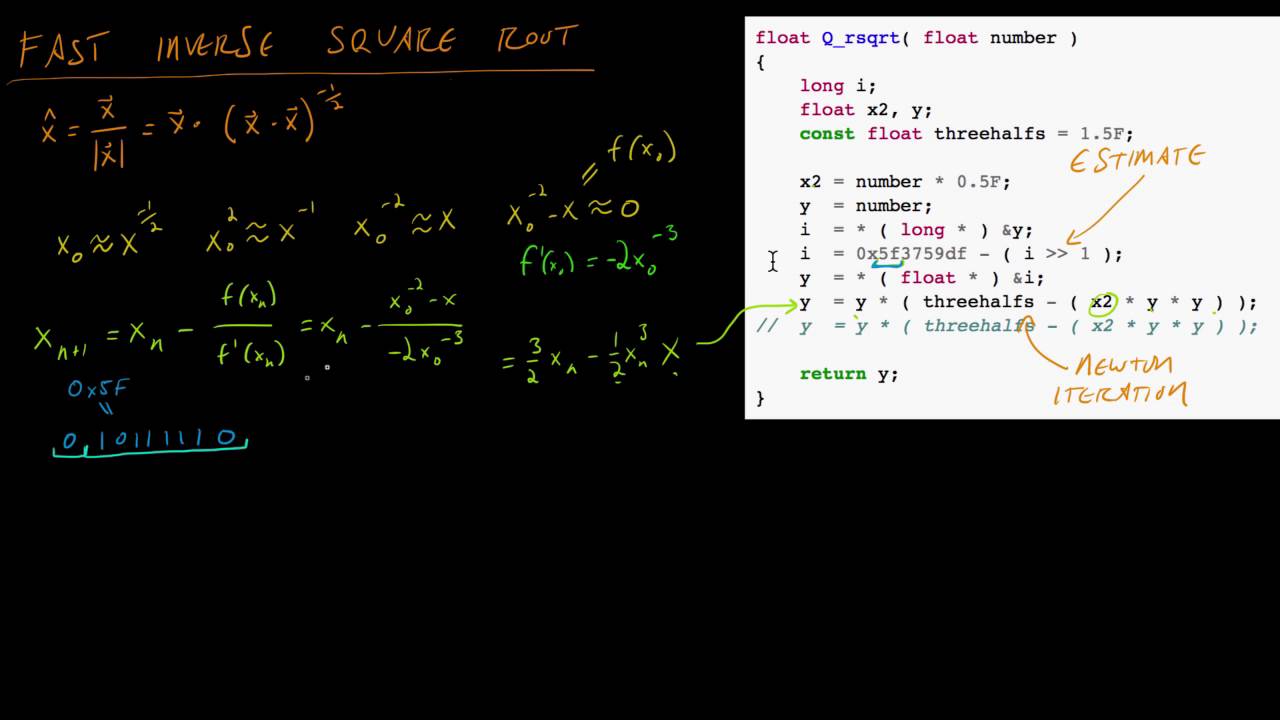
In this video we examine the "fast inverse square root" method developed for Quake 3 Arena. It uses floating point format hacking and Newton's Method to implement a very fast inverse square root method, which can be used for finding normal vectors.
Correction: 2^-6 = 1/64 = 0.015625 not 0.000001 (I was confusing it with 10^-6).
The floating po...
 desert flint
I'm making a code where you can grab objects via a cord that comes out of your hand, and move it around, and this workes all fine until you start moving with it, it springs foward when i want it to keep the same range from the player that there was when you first grabbed it, does anyone know how to fix this (yes i know this is some blueprint spaghetti code)


 autumn pulsar
So I have a rotator, is there a way to locally rotate that rotator?
like I want to rotate on the X axis of that
combine rotators does two world space rotations to the same rotator
 surreal wagon
I have three types of object: Physics object, doors and items. I want every item to be able to be interacted, with a crosshair appearing when hovering it. The hovering system is already implemented, but I don't want to use three separate blueprint interfaces to implement this system. How can I accomplish this?
autumn pulsar
Actor components
Can I set physics on an instanced static mesh?
I'm trying to make a chain, and was wanting it to be somewhat sane
 lethal venture
Hey everyone! Quick question:
When I drag an item from my UI inventory (using CreateDragDropOperation), my player’s line trace stops working so I can’t detect dropping onto a 3D collision box (‘DropZone’).
Is there a reliable way to detect a drag-drop onto a 3D world actor while dragging a UMG widget?
 sage lagoon
I've been following a tutorial in setting up a shop for an RPG in the works. The tutorial playlist applies to UE4, but most of the steps also apply to UE5. But, there are some things of which I am not totally sure. There are a couple of problems that I have not yet been able to resolve.
-
Though the shop widget does show items correctly, it doesn't show the first item on the list. (See the data table screenshot as well the blueprint links.)
-
Thumbnails don't appear and I'm not sure how to set that up properly.
Shop Widget BP: https://blueprintue.com/blueprint/76_hhvun/
Shop UI BP: https://blueprintue.com/blueprint/09t3wl-a/


No description provided
No description provided
I did follow the instructions - https://www.youtube.com/watch?v=IpqRbEptH3Y&list=PL4G2bSPE_8unUV_Imvs8DmH8SRfascs-A&index=3 - but I think some things were off because of version differences and because the video maker might have forgotten to explain a few things.
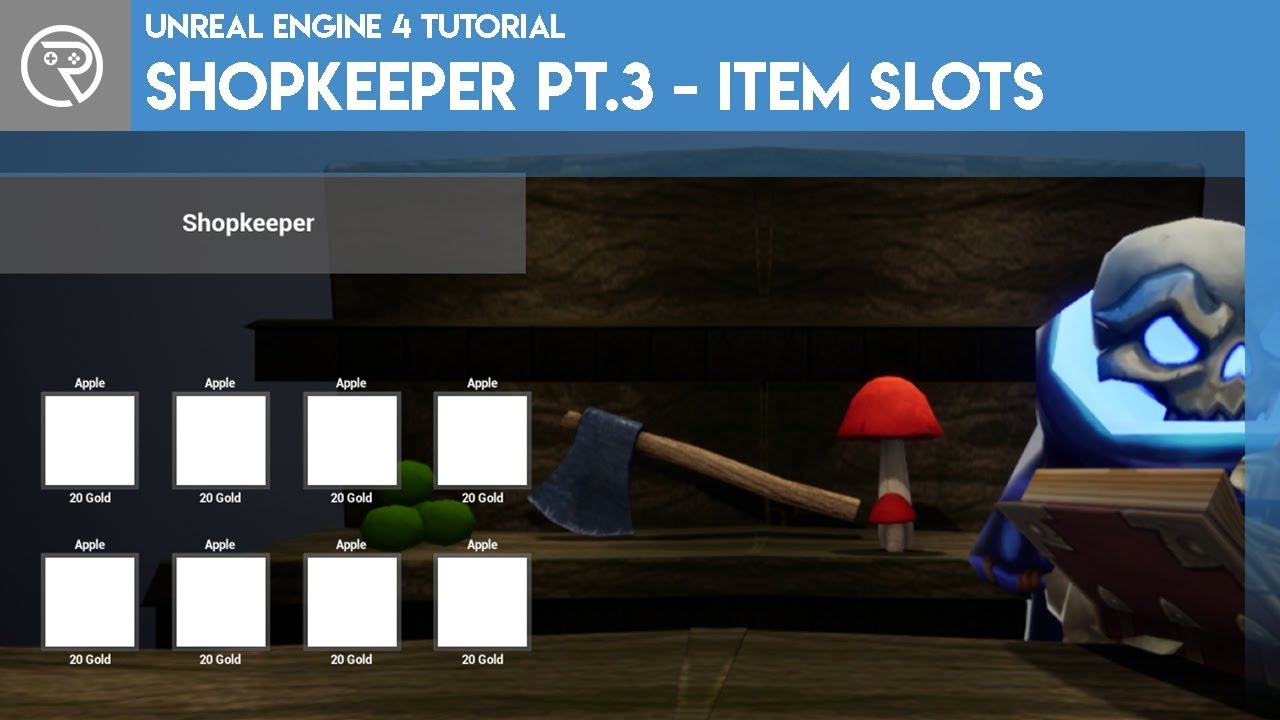
In this series we will be creating an in-game shop with a NPC where you can spend in game currency.
In episode 3 we add item data table and the item slots in the user interface.
Support me on Patreon and get access to videos early, join our developer community on Discord, get exclusive behind the scenes videos on my projects and much more over...
 lunar sleet
#umg might be better suited to answer that tho I’d recommend making it more concise, people don’t really have time to watch a tutorial you’re following
sage lagoon
I don't really expect anyone to watch it. It's just to show what I've been following. I don't know how to make this any more concise, honestly.
Not without the blueprint links and screenshot.
But let's see...
 snow halo
So I have a niagara inside of a blueprint, if this blueprint is out there on the level somewhere, the niagara will start, aka if I place this blueprint on the level etc. water will start spraying

but after I attach this watering can to my player's hand it no longer works
aka when I spawn this blueprint on my player's hand or "attach"

Im using EVERY activation node, NONE of them work
 lunar sleet
snow halo
Im using EVERY activation node, NONE of them work
lunar sleet
snow halo
Im using EVERY activation node, NONE of them work
Have you debugged to make sure the execution reaches that part of the code?
snow halo
lunar sleet
Have you debugged to make sure the execution reaches that part of the code?
yes, everything, breakpoints, print strings, everything.
here is a screenshot of me putting a print string at the end to see the size of the niagara, it's at normal scale (x=1,y=1,z=1)
 lunar sleet
Did you try it with it activated by default ?
And are you attaching it dynamically or from editor
snow halo
lunar sleet
Did you try it with it activated by default ?
yes it's activated by default, only on Blueprint begin play I tried to deactivate it but even that didn't work
if I place it in the world alone unattached from the player then it works
its shooting water now for example because its out of the player's control, and blueprint code seems to do NOTHING.
 snow halo
how?
what do you mean?
these are all soft references
which attach to a bone
but if they attach somewhere on a character then they will stop working
you mean attach the niagara component alone?
or attach the whole blueprint as a child actor component to my first person character?
lunar sleet
snow halo
you mean attach the niagara component alone?
Add the component to the mesh in the panel
snow halo
which panel?
lunar sleet
From the component tree panel, add Niagara System Comp, set it to the desired system
In your char bp that is
snow halo
lunar sleet
Add the component to the mesh in the panel
parented under the mesh as a child of mesh component?
lunar sleet
Yeah
snow halo
ok in editor it looks like it works so far, imma see if it also works in play mode
 snow halo
oh it worked ✅
but the question is why does this work, but it doesnt work while parented under the component tree hierarchy of the watering_can?
lunar sleet
It should work in any bp. Just don’t try to dynamically attach it at runtime maybe
snow halo
lunar sleet
It should work in any bp. Just don’t try to dynamically attach it at runtime may...
but all blueprints in my game are dynamically attached at runtime
oh you mean the component?
the component doesnt get attached manually, the whole blueprint does
the component resides already inside of my watering_wan_Bp
lunar sleet
Then it’s prly related to the attaching
An issue with NS is that if you change its transform normally, all sorts of f-ed up things occur
It’s likely that when you attach it, it’s transform gets affected and it breaks
Chances are it’s active, you just can’t see it because the system is not rendering properly
But I’m not sure how to debug it from there tbh.
Could try #niagara
surreal wagon
I want to implement swimming, but every tutorial I've seen just uses flying instead. Why is swimming on the character component in the first place?
surreal wagon
It works but the character shoots up into the sky
 frosty heron
surreal wagon
I want to implement swimming, but every tutorial I've seen just uses flying inst...
frosty heron
surreal wagon
I want to implement swimming, but every tutorial I've seen just uses flying inst...
Surely you mean the character movement component?
Any movement should be handled there
 surreal wagon
😩
frosty heron
never done any logic for swimming, if it's the same as walking, check for the acceleration value?
 gentle urchin
Isnt it some jump out of water value
 steel shadow
I'm using UE 5.0.3 and I noticed there is no 'set use as occluder' node to change occlusion status of a component during runtime, is there a BP workaround here or do I have to use C++, if it's even possible there?
 astral orchid
So I checked the new template for the 5.6 FPS Arena Shooter, and I'm wondering how does the new camera work?
Because there's just 2 meshs, one is the normal one, and the other has the viewport camera attached to it. The one with the viewport warps weirdly around the camera to get the first person effect to work, whilst the normal one can't be seen by the camera at all. Anyone got an idea?
 copper lion
I have a question, i have this bp_door and i wanted to avoid casting to not load in the memory of the door the bp character using interface, but in the size map i see no difference
i have no variable as bp character in the bp either, just using the output from the interface message


 dark drum
copper lion
I have a question, i have this bp_door and i wanted to avoid casting to not loa...
dark drum
copper lion
I have a question, i have this bp_door and i wanted to avoid casting to not loa...
That's because interfaces aren't for memory management and themselves can load assets.
copper lion
yes but doesnt it load whenever you interact with the actor and not always?
dark drum
copper lion
yes but doesnt it load whenever you interact with the actor and not always?
It'll be loaded as soon as the specific actor is loaded/created.
copper lion
so basically there s not difference between this and using a cast in begin play and store the ref in a variable?
dark drum
copper lion
so basically there s not difference between this and using a cast in begin play ...
Nope, using an interface just adds extra steps.
What you could do in your example though, is connect the 'Get Player Character' directly to the 'GetActorLocation' node. There's no need to cast for this as the returned pawn is a type of actor. Once you've done this, you can remove the 'GetPlayer' node and remove the interface from the BP_Door. The door shouldn't then force load anything specific to the character. If however, you only have one type of character then it'll be loaded anyway so wouldn't really be an issue either way.
copper lion
Oh okay, i thought that using interfaces to get the player was better than just casting in the begin play, so i might aswell cast and make a variable then cuz i need variables from the player character for this bp anyways
dark drum
copper lion
Oh okay, i thought that using interfaces to get the player was better than just ...
Yea, interfaces aren't a replacement for casting. You might benefit from looking into class hierarchy and function only base classes though. There's a lot of concepts that can help structure your classes in a way that will reduce what would be forced loaded. (assuming that's something you're worried about)
 surreal peak
The interface should prevent the loading fwiw
That's one of the main things one can do in BP only to avoid having everything reference everything
I still dislike using it for this
Cause in those cases you kinda know what you will cast to and only one thing will implement the interface anyway
dark drum
surreal peak
The interface should prevent the loading fwiw
He's using it to pass a type specific object ref so the interface ends up loading the asset.
surreal peak
Yeah he needs to add functions to return things from the character and not the character itself
That would solve the reference
In the screenshot it's especially useless cause he's using an actor function
Can just use the result of the GetPlayerCharacter
copper lion
Im not really worried about it, i dont know when should i be worried honestly, my level will be full of doors, but i dont know when i should be worried about performance for this
surreal peak
"I have no variable as BP character". Yes you do. The output pin the of the interface function
dark drum
copper lion
Im not really worried about it, i dont know when should i be worried honestly, m...
To be honest, if it's a smallish game most of your stuff is going to be loaded anyway. 😅
surreal peak
copper lion
Im not really worried about it, i dont know when should i be worried honestly, m...
Not at the start but it's not too bad to think ahead a bit. If you are really worried, use C++
copper lion
surreal peak
"I have no variable as BP character". Yes you do. The output pin the of the inte...
Yeah correct, im still learning and i thought interfaces were better for memory thanks to some "videos" xd, but now i know, i will make it the easy way and in the future, hopefully, if i will have memory issues i will try to solve them then
thanks for the help guys ❤️
 young meteor
Hey folks
Is there a way to export an image/screenshot of the entire Event Graph of a blueprint?
I have too much stuff to fit in a screenshot.
dark drum
young meteor
Hey folks
Is there a way to export an image/screenshot of the entire Event Grap...
I don't believe there's anything built in for it.
young meteor
dark drum
I don't believe there's anything built in for it.
sad :/
copper lion
part by part xd
dark drum
young meteor
sad :/
Yea, i think there's a few plugins for it. Not sure if any are free but it might be worth you taking a look.
young meteor
dark drum
Yea, i think there's a few plugins for it. Not sure if any are free but it might...
Yeah. I might if I start needing it often. For now I'll manage I guess.
Appreciate it though. 🙏
autumn pulsar
So I was trying to make a modification of a cable component to place on an actor, so I set up a blueprint class that inhereted from it. However, in the component list I don't seem to be able to just add it like I can with the normal cable
is there a proper process for that?
 tawny hedge
Why is the trace hitting something? Only happened after I added the progress bar above the character. I tried to resize canvas but it behaves the same.
 frosty heron
tawny hedge
Why is the trace hitting something? Only happened after I added the progress bar...
frosty heron
tawny hedge
Why is the trace hitting something? Only happened after I added the progress bar...
output the object it hit, my guess is it's hitting the widget component.
But a guess is a guess, just print string the out HitComponent and you will find out what you are hitting.
tawny hedge
I know that's what's hitting but I don't understand why is that. It should be the size of the progress bar. even set the canvas size the same
frosty heron
tawny hedge
I know that's what's hitting but I don't understand why is that. It should be th...
you can check the widget component plane size if you select it in the bp assets.
tawny hedge
a lol nvm it was set with collision by default lol
frosty heron
the outline would be highlighted
 frosty heron
yeah if you don't want to enable collision, just disable it.
I found out the hard way. My IK feet kept being lifted above the ground.
couldn't figure out for hours until I found the culprit. Widget component plane, colliding with it.
frosty heron
copper lion
Yeah correct, im still learning and i thought interfaces were better for memory ...
How big in scale is the game? Because if you are working on a large scale RPG, adressing it later may not be viable depending on the ammount of work you have to redo.
I gave up on fixing my first project because of the amount of hard reference.
Loading main menu = loading the whole game and patching them would be like making the game from scratch.
Better practice would be to create a native cpp class and learning soft reference.
tawny hedge
any way to get the dropdown type of get data table row name as a function's input? instead of having to type it manually
 frosty heron
Don't know, don't think so but if you are not fammiliar with gameplay tags, now is the time.
typing = 👎 , it's prone to error
 lofty rapids
tawny hedge
any way to get the dropdown type of get data table row name as a function's inpu...
lofty rapids
tawny hedge
any way to get the dropdown type of get data table row name as a function's inpu...
probably with an enum, then convert it
copper lion
frosty heron
How big in scale is the game? Because if you are working on a large scale RPG, a...
not rpg, is a horror game, but the scale might depends, anyways if the map is going to be too big ill cut it in multiple levels and switch the levels with the flow, the levels shouldnt be that big
tawny hedge
lofty rapids
probably with an enum, then convert it
that wouldn't be too optimal since I have to use both enum and the data table row name to set the data then. and what happens if I have 500 skills for example. I need to manually add them to the enum lol?
lofty rapids
tawny hedge
that wouldn't be too optimal since I have to use both enum and the data table ro...
ya you would need to add it to the enum, definately can be a pain for a lot of row names
dark drum
tawny hedge
any way to get the dropdown type of get data table row name as a function's inpu...
Another option is to use data assets instead of the data table. Each row would become it's own data asset which you could set as a pickable input to a function.
tawny hedge
dark drum
Another option is to use data assets instead of the data table. Each row would b...
I have data assets inside the data table =] i use them in tandem
but even so making 500ish data assets manually doesn't seem optimal
I just want to expose that node as a dropdown instead of typing in, found a workaround but it's not an input variable for the function, just collapse some nodes with the data table row and output the row name to the name input. still beh but better
copper lion
I have this circle for hud and i want this to be full whenever is in range to interact with an item, is it too much if i use a line trace in the event tick to determine wheter or not it can interact?
 dark drum
tawny hedge
but even so making 500ish data assets manually doesn't seem optimal
dark drum
tawny hedge
but even so making 500ish data assets manually doesn't seem optimal
You could make a Editor Utility that creates new data assets and sets the data based on the datatable.
dark drum
copper lion
I have this circle for hud and i want this to be full whenever is in range to in...
Most of my interaction systems perform checks on tick. I've not had any issues with it.
frosty heron
dark drum
Most of my interaction systems perform checks on tick. I've not had any issues w...
same here
copper lion
so using a line trace every tick to determine the item is interactable or not is fine?
frosty heron
doing a sphere trace actually
copper lion
yes sphere trace
frosty heron
well are you taking any performance hit? I don't even suffer a single fps
dark drum
frosty heron
doing a sphere trace actually
I usually do two. 😅
frosty heron
didn't even bother to profile
Yeah I do two
1 sphere trace to get all interactables and a line trace to see if there's any wall blocking.
So I don't interact with lever from another room.
copper lion
ook nice, i thought it was another way :))
dark drum
copper lion
so using a line trace every tick to determine the item is interactable or not is...
Yea it should be fine. Just store what the current hit is and check the new hit with the current. If it's the same, you don't need to do anything. If it's different, update/do something.
copper lion
works like a charm
atomic hollow
Is using pure functions by another pure function inside pure function called that many times how much another pure function uses its value.

@copper lion and @dark drum do you know about this
 ancient dagger
Hey everyone, i’m trying to make a sprinting system, and i added a check so that the character can only sprint forwards, not sideways, nor backwards, i think i did it, but now, i can’t seem to change the speed of the player afterwards, like crouching or walking for example, weirdly, changing the speed worked if i don’t add the check, adding the check seemed to prevent me from changing the speed.


 copper lion
atomic hollow
Is using pure functions by another pure function inside pure function called tha...
copper lion
atomic hollow
Is using pure functions by another pure function inside pure function called tha...
im sorry brother, but i really dont know, im not that advanced
surreal peak
tawny hedge
any way to get the dropdown type of get data table row name as a function's inpu...
DataTableRowHandle or so. Will always be a combination of datatable and drop-down though.
 maiden wadi
atomic hollow
Is using pure functions by another pure function inside pure function called tha...
maiden wadi
atomic hollow
Is using pure functions by another pure function inside pure function called tha...
All of these are ran once per their connection to an executed node.
atomic hollow
maiden wadi
All of these are ran once per their connection to an executed node.
It means that in my case the one I marked red will run 4 times.
maiden wadi
atomic hollow
It means that in my case the one I marked red will run 4 times.
Can you show the rest of the function?
atomic hollow
maiden wadi
Can you show the rest of the function?
The rest is just using the result of those reroute nodes shown at the right side of the pic
maiden wadi
But using them where? A return node or?
Where those are hooked up to determines how many times these are ran.
atomic hollow
maiden wadi
But using them where? A return node or?
Yes as return nodes
maiden wadi
Then everything in thie graph runs once. Because the only "Executed" node is the return.
I can give a better example, sec.
dark drum
atomic hollow
Is using pure functions by another pure function inside pure function called tha...
I'm not sure what your question is.
lofty rapids
ancient dagger
Hey everyone, i’m trying to make a sprinting system, and i added a check so that...
check the result of the branch in the move event, you really shouldn't cross execution like that tho
atomic hollow
dark drum
I'm not sure what your question is.
Pure functions are executed many times if their returns are used in the inputs of the non pure functions (have execution pins) I am saying that will they execut once or many times if their returns are used by many other pure functions inside a pure function
lofty rapids
ancient dagger
Hey everyone, i’m trying to make a sprinting system, and i added a check so that...
also your setting is walking and is sprinting, but there is a change they are both true
dark drum
atomic hollow
Pure functions are executed many times if their returns are used in the inputs o...
Add a print string to the exec path in the pure function and see how many times it spams the logs.
atomic hollow
dark drum
Add a print string to the exec path in the pure function and see how many times ...
Print string have execution pins will it work inside pure function
lofty rapids
yes, you don't have to use pure nodes in a pure function
dark drum
atomic hollow
Print string have execution pins will it work inside pure function
Yea, you can call functions inside pure functions.
maiden wadi
atomic hollow
Yes as return nodes


This might explain it a little better. Each pure node is ran one time per executed node connection when the executed node runs. Anything reused connected to the same executed node will use a cached value and not be reran again until a new executed node uses it.
 slender dagger
maiden wadi
slender dagger
maiden wadi
this is possibly the most easily digestable way I've seen this explained
lofty rapids
the make array example is great, so your saying because its one execution, all values in the array are the same ?
maiden wadi
Correct
atomic hollow
maiden wadi
Correct
That was some great explanation it means that we can reduce the use of execution nodes if using maths functionality
slender dagger
maiden wadi
This might explain it a little better. Each pure node is ran one time per execut...
that clears up a lot in regard to select nodes and switches too. Would I be correct with these comments?
 surreal peak
There are some more examples of it on that blog page.
maiden wadi
slender dagger
that clears up a lot in regard to select nodes and switches too. Would I be corr...
The switch node itself is an executed node, so the bottom only runs once.
dark drum
slender dagger
that clears up a lot in regard to select nodes and switches too. Would I be corr...
All 3 random int nodes would be called once.
ancient dagger
lofty rapids
check the result of the branch in the move event, you really shouldn't cross exe...
Wdym move event? Like the add movement input?
lofty rapids
ancient dagger
Hey everyone, i’m trying to make a sprinting system, and i added a check so that...
in the image on the left, at the top, after add movement input
the red things are events, and i think thats your ia_move event ?
ancient dagger
lofty rapids
the red things are events, and i think thats your ia_move event ?
Yeah
lofty rapids
ancient dagger
Hey everyone, i’m trying to make a sprinting system, and i added a check so that...
store the value in a variable, and use that value in your other event instead of crossing this all over
ancient dagger
lofty rapids
store the value in a variable, and use that value in your other event instead of...
Do I store the 0.999?
lofty rapids
ancient dagger
Do I store the 0.999?
no store the result of if >= as a boolean
and then use that boolean in the other event and do the sprint in the sprint event where it belongs

store the yellow
and move the blue to the green
it might not fix your error, but it will be not crossing execution so it will be more reliable
that would be first thing to fix though if i was debugging
ancient dagger
lofty rapids
that would be first thing to fix though if i was debugging
Like this?
 lofty rapids
ancient dagger
Like this?
lofty rapids
ancient dagger
Like this?
yes close, except see where you dragged out of the set in the top event, and then into the and at the buttom, disconnect that, and drag the variable from the left panel and choose get then connect it to the and
"from the left panel" in the list of variables
i would also do this a bit differently
but see if it works once you figure out the variable and your not crossing execution paths

i would probably just simplify it to something like this
ancient dagger
lofty rapids
Ok I did it, it kinda works, I can change movement speed now, and sprint forwards works as intended, but for some reason, it only works if I’m not sprinting and I try to press sprint backwards, if I am sprinting and I try to press sprint backwards, it still lets me sprint backwards.
 knotty scarab
Does Anybody know why my casts are failing?
I have a BlueprintClass called PlayerPawn_Athena_Generic, it has the parent class PlayerPawn_Athena_Generic_Parent and that one has FortniteGame.FortPlayerPawnAthena as its parent.
My goal is to call a function i've made inside PlayerPawn_Athena_Generic, now i know for a fact that a PlayerPawn_Athena_Generic exists in the world (as a child).
But everything fails, my Cast to PlayerPawn_Athena_Generic should accept anything thats inheriting from it right?
(also i know the blueprint is quite messy, i'm just testing stuff but cant get further.)


 lofty rapids
knotty scarab
Does Anybody know why my casts are failing?
I have a BlueprintClass called `Pla...
lofty rapids
knotty scarab
Does Anybody know why my casts are failing?
I have a BlueprintClass called `Pla...
so it's valid but the cast is failing ?
whats with all the casts in the other picutres, these are your tests ? what prints ?
knotty scarab
lofty rapids
so it's valid but the cast is failing ?
yes
knotty scarab
lofty rapids
whats with all the casts in the other picutres, these are your tests ? what prin...
its just tests
to see if anything else that would make sense is able to be casted
and the print afterwards so i can see what worked
(none did)
lofty rapids
all casts failed ?
knotty scarab
lofty rapids
all casts failed ?
thats whats confusing me, and making me think i set something up wrong with the BP class (PlayerPawn_Athena_Generic)
lofty rapids
somethings wrong
knotty scarab
yeah, but im not sure what
knotty scarab
but it must,
lofty rapids
i don't imagine it being a bug
lofty rapids
knotty scarab
Does Anybody know why my casts are failing?
I have a BlueprintClass called `Pla...
try to geet the class name of the loaded object
see what it says
make sure your data your loading is what you think it is
knotty scarab
ive done that aswell, it returns me
/Game/Athena/PlayerPawn_Athena_Generic.PlayerPawn_Athena_Generic_C
is the problem perhaps that the game is expecting PlayerPawn_Athena_Generic_C instead of my PlayerPawn_Athena_Generic?
I've also looked around, i do the right casting and it wants a AFortPawn or anything in that inheritance chain yet it still fails
so i am 99% sure that something is up with my Blueprint
snow halo
Hi, I have a question, Im making a farming system at the moment, I use a watering can which I fill up with water from the rivers and lakes around
then I use a niagara sprinkle for the effect, and a collision sphere
This is the best I could come up with on top of my head for the collision sphere
on begin play by default the sphere has no collisions
but when you turn on the sprinkle water niagara
it will actually turn it on

but it creates an endless loop
I tried to do it similar to my tree chopping system, where my animation has a notify state that creates a sphere collider that destroys stuff on its path
but unfortunatelly this will actually enable this "growth" interface that exists on literally every plant in my world
I feel like I solved this many times in the past before
like thousand times, but now can't think of anything better xD
thoughts?
 lunar sleet
You’re not showing the actual code where the error occurs
lofty rapids
snow halo
but it creates an endless loop
I tried to do it similar to my tree chopping syst...
click on show, where does it take you ?
snow halo
lofty rapids
click on show, where does it take you ?
nowhere
lofty rapids
click on WateringCan_Item etc...
snow halo

Its on the same BP im on
thats the one im on xD
the code is honestly a little bit, so this is why I only took a little small piece of it
lofty rapids
what does growth phase look like ?
 snow halo
lofty rapids
what does growth phase look like ?
snow halo
lofty rapids
what does growth phase look like ?
It's an interface, it exists on 3 different types of plants

This is what the growth phase looks like in one of my plants 🪴 🫐
lofty rapids
howw long is your timeline ?
this error usually means something took longer then tick to execute
frosty heron
What does longer than tick to execute means?
Infinite loop happends when a function gets called X times within a single frame.
The number is specified in the editor / project settings
frosty heron
The default is 10000 iirc
So honestly it's just bad code that needs to be fixed.
99% of the time its a function calling it self
lofty rapids
ya but even if you go 10000, if it doesn't finish in one tick then it's considered infinite
even if its 5000
frosty heron
Well what function gets called 10k times or more ?
99.99% it's just people accidentally have a function that call it self
Causing endless loop
Ctrl + shift f. Type the problematic function and look at where you call them.
lofty rapids
ya endless recursion can do that for sure
i like how it catches it if it doesn't finish quick enough, it's a pain for big calculations
for big calculations tho you just use c++ and it won't crap out
frosty heron
knotty scarab
Does Anybody know why my casts are failing?
I have a BlueprintClass called `Pla...
Casting is just a type check.
Print string the object and you will see why the cast failed.
knotty scarab
frosty heron
Casting is just a type check.
Print string the object and you will see why the ...
Printing the Object Path String and looking at the end shows me that its a PlayerPawn_Athena_Generic_C_2147483646 which is why this is confusing me
like its the correct class, i really don't know why its failing
dark drum
frosty heron
Well what function gets called 10k times or more ?
The default max function call count is actually 1 million (1,000,000) Before triggering the infinite loop.
(Assuming Epic hasn't changed it since the last time I looked)
dark drum
snow halo
I'm pretty sure when you scale an object it'll retrigger the overlap. (Updates overlap events) That's most likely where your infinite loop is coming from.
 proud magnet
@dawn gazelle I'm so so so sorry to be messaging you again but I'm once again stumped. Fortunately it's not a saving/loading problem.
I'm noticing that when I load back into certain maps (especially ones with lots of assets) in the standalone game, I'm almost always falling through the map. As you can see in the video, this never happens while playing in editor. I can only assume this is due to the game loading me first before loading the map.
I saw someone suggest disabling gravity for a second or two when loading the game so that the character won't fall, but I can't figure out how to get that to work. Do you possibly have any advice?
 dawn gazelle
proud magnet
<@218956378654507008> I'm so so so sorry to be messaging you again but I'm once ...
dawn gazelle
proud magnet
<@218956378654507008> I'm so so so sorry to be messaging you again but I'm once ...
A few things I can think of...
- Your start locations may be right on the floor, which could cause it to spawn the player underneath it. Move it above the ground so the capsule it has is entirely above the floor.
- Make sure you have a default start location if no matching location was found with the tags. This should prevent issues if the save game isn't present or doesn't have a valid value for the map that is loaded.
I would also double check and make sure you are loading a valid start location name during the Choose Player Start function, and if you don't have one, skip the loop you have checking the playerstarts and just choose the one you want them to start at.
proud magnet
@dawn gazelle Wow thank you for such a quick response. The PlayerStart's are all way off the ground so I'm definitely not spawning under the floor, and the start location is being set. I found a workaround by just putting the PlayerStarts in a black box and then teleporting the player to where they need to be based on the checkpoint name.
Do you think I could do this in a cleaner way by using the RestartPlayeratPlayerStart function? I attempted to implement it myself but couldn't get it working.

 dawn gazelle
proud magnet
<@218956378654507008> Wow thank you for such a quick response. The PlayerStart's...
dawn gazelle
proud magnet
<@218956378654507008> Wow thank you for such a quick response. The PlayerStart's...
You should really work towards figuring out why they seem to be falling rather than making a work around. If the map is loaded by the time the player is spawning, there is no reason why they would be getting spawned under the floor/falling through it. However, if you happen to be spawning in the player before the save game does properly set the location for whatever reason, then your players wouldn't have a proper start location unless you've set it up so they have some valid start location in the game mode function.
A valid approach would actually be to prevent players from spawning before you're ready to have them spawn, which means waiting for the save game to load (if you're using Async load for the save game, then it could be loading after the player has already spawned for example). This ensures that you're doing things in the appropriate order.
proud magnet
dawn gazelle
You should really work towards figuring out why they seem to be falling rather t...
Ok I figured that would be the best move, though I'm still a little stuck. I thought Async loading was to load everything and then tell the game to load the player no? I wanted to use Async to delay the player spawn but I wasn't sure how I'd do that. Would I use the Event Dispatcher to tell the GameMode to spawn the player?
 dawn gazelle
proud magnet
Ok I figured that would be the best move, though I'm still a little stuck. I tho...
dawn gazelle
proud magnet
Ok I figured that would be the best move, though I'm still a little stuck. I tho...
Async load means it's non-gamethread blocking. The "Completed" pin triggers after the save game has appropriately been loaded.
proud magnet
I feel like the problem HAS to be that the game is spawning me before the map has time to load, since it only happens in standalone
So wouldn't the logical thing to be prevent the player from spawning until I know the map is loaded?
dawn gazelle
How are you verifying that the save game is properly loaded and the start location name is set before spawning the player?
proud magnet
I'm not too sure how to verify that the start location name is set. I'd pull off of the False in this branch to do so right?

But I'm almost certain it is being set properly since it's spawning me at the correct PlayerStart, I'm just phasing through the floor
dawn gazelle
Just put a print string after the cast there and check and see if it has a value currently and see what it says.
If it says "None" then it isn't being set by the time you're reaching this function which is an indication that it isn't loaded before you're getting here.
dawn gazelle
Alright good stuff, so that rules that problem out.
So it has nothing to do with your save game system.
Are you using world partition or level streaming or something in the level? I'm not sure if that may impact this.
Or Procedural generation?
proud magnet
I'm making heavy use of level streaming in this map.
But on BeginPlay I'm making sure to load the maps first
dawn gazelle
"begin play" might be too late
proud magnet
How would I load them before then?
Almost all the posts I see just say to hide the player and then teleport them to the spawn, though I feel like thats the lazy/inefficient way to do it...
Another post said to manually spawn the pawn and then wait to possess it.
dawn gazelle
Well, you're getting into something I'm not very familiar with myself.... But yea, you basically would need to prevent the game mode from spawning the player until the level is loaded. I'm guessing it's a sublevel you've added to the main level and this kind of functionality probably isn't exposed to blueprints to help check for sublevels being loaded but I'm not sure.
The blackbox workaround may be the way to go unless you want to learn more about the depths of the engine.
proud magnet
dawn gazelle
Well, you're getting into something I'm not very familiar with myself.... But ye...
Yeah unfortunately without getting into gritty details and C++ the workaround is probably going to have to do. Regardless thanks for the help and advice!
proud magnet
dawn gazelle
Well, you're getting into something I'm not very familiar with myself.... But ye...
So sorry to bother again! You said it would be a good idea to make sure the PlayerStartTag was being set and if not I should define which to set. How would I do so? I want the default to be None, so what would I put in the False of the branch if it can't find the right tag?
 dawn gazelle
proud magnet
So sorry to bother again! You said it would be a good idea to make sure the Play...
dawn gazelle
proud magnet
So sorry to bother again! You said it would be a good idea to make sure the Play...
No, you'd want to use the "Completed" of the loop as then you've checked over all playerstarts, at which point you would want some other logic to decide which player start that you want to use.
proud magnet
dawn gazelle
No, you'd want to use the "Completed" of the loop as then you've checked over al...
Ooohhh okay that makes much more sense. Could I implement logic where the return value gets set as None?
Or would not connecting the ReturnValue set it default to None?
Like this?

Because the return value is the PlayerStart that matches the tag right, so theoretically if it doesn't find one it would return None right?
dawn gazelle
proud magnet
Or would not connecting the ReturnValue set it default to None?
You can do this, but then it acts no differently than before. If nothing is found, the function will still end up returning and it'd return None.
You want would want something set in the return value on the completed pin so that it acts as a fallback in case nothing is found.
proud magnet
dawn gazelle
You want would want something set in the return value on the completed pin so th...
Okay I'm starting to get it. Not 100% sure what I'd implement but for now I think I'll just make my name switches have a "None" value in case it doesn't find anything.
 kind estuary
Im making a game where you are in a strategic map, and then when 2 armies meet, it loads a separate battle (different level).
When starting battle level i need the units that are in the campaign to be loaded in battle.
And then when battle ends i need the units results to be loaded back into the campaign.
Should i use SaveGame for this? OR GameInstance? I find these 2 quite confusing
 gritty fiber
kind estuary
Im making a game where you are in a strategic map, and then when 2 armies meet, ...
gritty fiber
kind estuary
Im making a game where you are in a strategic map, and then when 2 armies meet, ...
Game instance
Save game is for saving and loading from a file
game instance persists even when the level changes in memory
kind estuary
gritty fiber
Save game is for saving and loading from a file
🫡
kind estuary
gritty fiber
Save game is for saving and loading from a file
though why not use SavaGame. And then when you load back into the campaign, you load game, and then only have to update the unit changes
Since you are going to need the SaveGame anyways
gritty fiber
kind estuary
though why not use SavaGame. And then when you load back into the campaign, you ...
you logic would still be based on data in the game instance regardless of when you're saving it
well technically you could save it from x level and then load that data in y level
¯_(ツ)_/¯
not to mention theres tmk not partial updates to save game
basically even if you save it depending on checkpoints or autosaving (~every x minutes) theres no point in loading data that can be stored in game instance from a save game
you just need to be able to reconstruct your game from the save game data when you're loading it say after a full game close
kind estuary
¯_(ツ)_/¯
kind estuary
gritty fiber
basically even if you save it depending on checkpoints or autosaving (~every x m...
its because the game should save the game before battle anyways as a back up save. most games do this
so i thought, when loading back to the campaign after battle
we could just load the save game
and then just update the unit stats and voilá ¯_(ツ)_/¯
gritty fiber
well where are you storing the data you load from the save game
kind estuary
gritty fiber
well where are you storing the data you load from the save game
in a SaveGame file
gritty fiber
and how are you applying all the changes stored in save game to your systems
npcs, inventory, etc
cause by the time you apply them to said systems from a reference of the save game
and then you have say an npc move or a unit stats change
and save it again and load it again
there will be some overhead?
tbh tho its probably negligible
kind estuary
gritty fiber
and how are you applying all the changes stored in save game to your systems
those you would load from the game instance
so you do this
gritty fiber
so if you load it into the game instance which is persistent across levels
kind estuary
SaveGame -> Play battle -> Save unit stats to game instance -> Load Game -> Load Unit stats from game instance
kind estuary
😵💫 when you save game instance data, you need to load it later, right?
sorry i dont get it
gritty fiber
So the typical flow would probably be
Load Save Game -> Game Instance -> Propagate wherever you need systems / actors
Then following level changes the game instance still exists
it persists between level changes
so basically whenever you either need to load a save (they want to go back to an older save) or the user closes the game and reopens
you'd need to load the save game
which is serialized to disk
in your circumstance where you transition levels if you have all the data you need already stored in game instance you can just reference it in the new level
what you should do like you were talking about backing it up before they go to battle would just require you to save the game save to a slot
not require loading it again
kind estuary
gritty fiber
what you should do like you were talking about backing it up before they go to b...
🫡 i think i got it now, thanks @gritty fiber
 paper gate
ok im stumped. Ive got a component inside my actor that is set to use world space. And I can't for the life of me get it to move. Rn im just doing some tests and want to to move to a position but use set world location it does absolutely nothing.
Ive tried add world offset, move component to and nothing. Is there something else im missing? Shouldnt setting it to use world space let me then just move it in world space through other means?
 snow halo
dark drum
I'm pretty sure when you scale an object it'll retrigger the overlap. (Updates o...
snow halo
dark drum
I'm pretty sure when you scale an object it'll retrigger the overlap. (Updates o...
I enable the overlap via hardcode, aka begin play = no collision, and later I enable the collision once the water is ready, but somehow it overlaps a million other plants rather than the ones in my close proximity
anyway i will not keep this one, I realized that its gonna be much better if I actually sphere trace or line trace instead
tawny hedge
any recommended tutorials on targeting systems? mostly curious how to handle modular/dynamic way of targeting based on select/switches if skill is AOE, Single Target, Nearest Target, cone shaped aoe, sphere aoe, rectagle aoe etc, and most importantly with both instant cast and casting confirmation with skill aoe shape drawn on ground. I guess I'm mostly interested in the confirmation and shape part before actually casting
 storm solar
https://youtu.be/Fb44C8BXEh8
I have an issue using common user widgets. When Im transitioning from fone widget to another, and mash the accept button, the widget breaks. I think this is because the widgets haven't fully faded in/ out yet before accepting user inputs. How can i fix this?
I've tried these two main setups for getting focus but the same thing happens if I mash,


 atomic hollow
how to create 3 by 3 matrix. the 4 by 4 makes too clutter in blueprints when working with 3 by 3 matrix.
 spark steppe
FMatrix33 or FMatrix3d maybe?!
i don't know their difference, just checked what exists
atomic hollow
spark steppe
FMatrix33 or FMatrix3d maybe?!
3 by 3 matrix
because i want to create rotation matrix in blueprint like how epic did in c++ but for my own purpose some different.
 lofty rapids
atomic hollow
3 by 3 matrix
because i want to create rotation matrix in blueprint like how epi...
lofty rapids
atomic hollow
3 by 3 matrix
because i want to create rotation matrix in blueprint like how epi...
you tried make matrix ?

the top green is the XPlane split, this looks like a 4x4 matrix to me
 raven reef
storm solar
https://youtu.be/Fb44C8BXEh8
I have an issue using common user widgets. When Im ...
raven reef
storm solar
https://youtu.be/Fb44C8BXEh8
I have an issue using common user widgets. When Im ...
Have you tried using do once and resetting the do once when fully loaded.
storm solar
raven reef
Have you tried using do once and resetting the do once when fully loaded.
Do once on what?
If it makes it easier, the "onclicked" dosent fire if pressed too quickly/ mashing.
 raven reef
When you setnthe focus to the new widget put a do once node in front of it then when the widget is fully loaded maybe a retriggerable delay for the duration or even just a frame for it to load and then tie that to reset on the do once so that they cant spam the button to make the widget focused at least based on your pics because they were alittle unclear on what you were doing exactly.
@storm solar
atomic hollow
lofty rapids
I did the 3 by 3 stuff in 4 by 4 one and it worked
lofty rapids
atomic hollow
I did the 3 by 3 stuff in 4 by 4 one and it worked
are you doing rotation matrix you said ?
storm solar
raven reef
When you setnthe focus to the new widget put a do once node in front of it then ...
I have a settings menu that pushes other menus via stacks. If I mash on the button on the new menu before it fully appears it will disappear (as it normally would) but not continue any menu functions.
I tried delay and disable input an neither of them worked.
lofty rapids
storm solar
I have a settings menu that pushes other menus via stacks. If I mash on the butt...
what does the event look like when you click on the menu ? and it's different with keyboard then joystick ?
atomic hollow
lofty rapids
are you doing rotation matrix you said ?
Yes
lofty rapids
storm solar
I have a settings menu that pushes other menus via stacks. If I mash on the butt...
have you tried RVOavoidance ?
storm solar
lofty rapids
what does the event look like when you click on the menu ? and it's different wi...
When i mash with a keyboard it opens the menu multiple times.
When I mash with a controller it will hit the button and fade out but not continue anything.
storm solar
lofty rapids
have you tried RVOavoidance ?
I don't know what that is.
lofty rapids
storm solar
I don't know what that is.
in your enemy character bp, search for avoidance
check the box and see if that helps
you can also adjust the radius
it's worth a shot, the web says it'll do what your looking for
storm solar
lofty rapids
in your enemy character bp, search for avoidance
in my enemy character bp?
lofty rapids
storm solar
in my enemy character bp?
yes
lofty rapids
storm solar
When i mash with a keyboard it opens the menu multiple times.
When I mash with a...
are the keyboard and jooystick not on the same event ?
or they are ?
storm solar
lofty rapids
yes
I see it, but it says its for path finding.
storm solar
lofty rapids
are the keyboard and jooystick not on the same event ?
they are the same events in gameplay, but menu behavior always acts differently.
I.e If i open a menu with a keybord no buton is auto focused.
 thin panther
atomic hollow
Yes
thin panther
atomic hollow
Yes
A rotation matrix is a 4x4 matrix in graphics
Your screenshot even shows that, they're passing in a zero vector for the W component
 stark inlet
hiiii im having an issue currently where my HUD appears from the very beginning (probably due to it being linked to begin-play) but i only want it to appear after i have clicked play/after the loading screen. what recourse do i have here ? obviously a delay node wont work bc it will eventually tick over and the HUD will appear then. my main menu is on level 'firstpersonmap' but it opens up to level 'starlien_level' as someone told me its best to seperate the menu and play levels.
lofty rapids
stark inlet
hiiii im having an issue currently where my HUD appears from the very beginning ...
you can override the HUD class
and in the map you want to have that widget, load it in that HUD class
so for the menu map uses a HUD class that doesn't add the widget, and the regular level uses a HUD class that loads the widget
lofty rapids
stark inlet
hiiii im having an issue currently where my HUD appears from the very beginning ...
beginplay of the character loads in each level, the best place for your widgets imo is the HUD class
lofty rapids
stark inlet
ummm 😭😭😭
do you know about the gamemode override in the world settings ? there is a hud class it loads when that level loads, so for each level they can have there own HUD
stark inlet
lofty rapids
do you know about the gamemode override in the world settings ? there is a hud c...
okay yes i have it set to starlien hud for both firstpersonmap and starlien_level, if i remove it from firstpersonmap (menu lvl) could that fix it ?
lofty rapids
it could if you build out the widget and set its appearence in the HUD
idk how your project is setup and what is happening in the HUD
stark inlet
im not sure either bc i cant change it between levels ? its the same one no matter what lvl i open ;-;
omg wait
lofty rapids
lol infamous wait
stark inlet
i made my first lvl game override as none and my starlienlvl (hud lvl) to the starlien hud
and it works 😭😭😭
thank u my life has been saved...
 umbral pond
I am trying to make a random loot drop system, I just cant figure out how to make it random, all the items in my game are based on data assets, and I have two variables which reference them, ''Items'' which is a struct with the item ID, HP etc, and another which just references the data assets, how would I go about doing this?
 lofty rapids
umbral pond
I am trying to make a random loot drop system, I just cant figure out how to mak...
lofty rapids
umbral pond
I am trying to make a random loot drop system, I just cant figure out how to mak...
so can you use item id to generate an item ?
a weighted random is your best bet for loot
umbral pond
lofty rapids
so can you use item id to generate an item ?
Just need to figure out how to actually randomise the item so when you pickup the orb at the end its a different item each time, but the output needs to be that item struct
lofty rapids
well i don't see where you selected the sphere

In this episode we take a look at how we can use a weighted distribution to have different outcomes happen with different probabilities in Unreal engine 4 and Unreal engine 5.
Join the Discord server here: https://discord.gg/zBeebU7uv3
Support the work of LeafBranchGames on Patreon here: https://www.patreon.com/LeafBranchGames
but i would use some maths and use a map or something that picks it by id
lofty rapids
umbral pond
Just need to figure out how to actually randomise the item so when you pickup th...
so how did you pick the sphere, for instance when you generate the item, how do you pick the one, is it just a variable ?
hardcoded ?
the first thing you need to be able to pick one dynamically
then you can choose one randomly
so you have all the items in an array ?
umbral pond
the way Ive got it working currently is when you walk over the sphere, it destroys the actor, I then need to make it randomly select an item from the data assets, which are the game items, which then goes to a separate thing which adds that item to the characters inventory, I do already have a bp instance for the item rarity probability, which I was going to tie into it later on, I just needed to make it randomly get one of those data assets essentially
umbral pond
lofty rapids
so you have all the items in an array ?
im rather new to arrays, most of the item and inventory stuff was a course I followed, tried looking online to see if I could find anything similar to what I need but I couldnt
lofty rapids
ah i c
umbral pond
as far as I know the item struct does use arrays though
but thats for adding it to the inventory which is already working fine
lofty rapids
and can you show how you spawn the item ?
i'm not quite understanding
i'm not sure i can help much with data assets anyway i never used it
but i been using blueprints for a little while now
still learning of course
umbral pond
yeah items and inventory stuff aint my thing, I mostly do actual mechanics, the add item function in the vid is the whole inventory stuff which is fine
lofty rapids
ok it's a struct great
i would go with a map of integers, to structs
and use weighted random to choose the struct
or you can make an array of structs
and generate a random index
but the weighted random allows you to set precedence on items, like which has more "weight" to drop
just a a random number has no weight behind it
so which way you do this depends on what you want
but i highly recommend weighted even if you just make it equal
umbral pond
alrighty thanks for the help! ill have to look into those
lofty rapids
umbral pond
alrighty thanks for the help! ill have to look into those
looks like the map way has some limitations, but i made an example:
No description provided
here weights and items correspond to each others indexes in the array
so weight at index 0, is item at index 0
but just to show you the maths involved, and since it's a struct you can just output it np
umbral pond
ahh thank you so much, ill try it out
lofty rapids
it's just the basic maths, probablyyy has some bugs i tried to translate from c++ to bp
umbral pond
lofty rapids
it's just the basic maths, probablyyy has some bugs i tried to translate from c+...
its seems to be working, Would I need to manually add all of the item data to the items array?
lofty rapids
umbral pond
its seems to be working, Would I need to manually add all of the item data to th...
you could or could dynamically populate it based on some other data
lofty rapids
umbral pond
its seems to be working, Would I need to manually add all of the item data to th...
yes and also correspond the weight to the item, so same index
for each one add an item to items, and weight to weights
this can be automated if you can pull the data from somewhere else
but with the weights, basically the higher the number compared to the others the more often you'll get it
so you could start off with something like just 1 for all of them
and increase each one so like another type has a better chance raise that weight up
umbral pond
alrighty, again thank you so much for the help, seems like I was just overcomplicating it in my head with it being based on a struct lol
lofty rapids
messing with blueprint structs can cause crashes
it's most often suggested to create them in c++
because they can cause problems
basically jus the editing of the actual struct, so like if you add a value to your struct like newStat or something
this can be a disaster i've seen it on here a few time
umbral pond
oh boy
lofty rapids
just keep backups of your code (every so often back it up)
do you do any source control ?
sc is perfect for fixing these issues where something breaks big time
atleast something to think about
umbral pond
yeah I do regular backups whenever I add a new mechanic or edit something lmao
lofty rapids
i do the same thing just back it up
 wheat forum
Hello everyone I'm making my own game and I really want to implement mechanics like shift in minecraft, when the player does not fall off the ledge in a squat. I've already tried using can walk of edges and custom systems with line traces, but with all this, the player is uncontrollable and shakes violently from side to side, and I want smoothness. Please help me
 frosty rampart
wheat forum
Hello everyone I'm making my own game and I really want to implement mechanics l...
frosty rampart
wheat forum
Hello everyone I'm making my own game and I really want to implement mechanics l...
hey, for minecraft-like edge safety while crouching, try this: use a capsule trace slightly ahead of the player when crouching. if no ground is detected, stop forward movement smoothly using interpolation like "finterpto" on velocity or position. avoid instant stops or hard blocks and blend movement for control. also, make sure ‘can walk off ledges’ is false during crouch only
wheat forum
Thanks for your feedback. When I tried to do this, I had 3 traces: forward, and 2 on the sides: left and right. But I want it to be able to safely move to the sides. I don't want it to just stop. I tried to look for motion vectors along the ledge through the cross, but it starts shaking when the main beam and the side ones alternate activations. Sorry, I'm using a translator.
I also tried interpolating vectors, but it doesn't change the situation much.
frosty rampart
wheat forum
Thanks for your feedback. When I tried to do this, I had 3 traces: forward, and ...
to avoid shaking, try using a single downward trace at each foot to left and right, and only allow movement if both detect ground, instead of forcing direction changes, apply small force or velocity override using "finterpto", and limit input direction based on safe zones. make sure traces aren't firing every frame and try limiting checks with timers or distance thresholds for stability
lofty rapids
wheat forum
Thanks for your feedback. When I tried to do this, I had 3 traces: forward, and ...
it seems like since you said it's switching back and forth then there should be some sort of boolean when one is not hitting the floor that stops movement, and sets back when all are touching the floor ?
it sounds odd that it's going back and forth the stop movements must be seperate on each trace ?
wheat forum
\
lofty rapids
wheat forum
\
tldr
i have a hard time with videos of bp, but i can see by the looks of it what your probably doing
this looks like a classic case of collision where you move forward, but then move backward
so instead of "not moving", you are trying to "negate what you moved"
thats what it looks like in the video
like your moving, but then when that triggers, your bouncing back
i could be wrong but thats what it looked like, i'm still learning and am lazy to watch all the video
wheat forum
I'm trying to calculate a vector along a ledge and move along it
lofty rapids
idk why but i really dislike trying to track a bp in a video
 lofty rapids
ya that looks like #game-math stuff, since your calculation a vector for movement right ?
instead of just stopping moving when you hit a ledge
lofty rapids
as far as the traces and nodes i can see where it's blueprint, but honestly i would share your formulas in the math section see if they are set correctly
wheat forum
Thank you
 jaunty solstice
When calling 'restartlevel' as a console command from my LevelSequence blueprint I always end up crashing with the following obscure error.
 lofty rapids
jaunty solstice
When calling 'restartlevel' as a console command from my LevelSequence blueprint...
lofty rapids
jaunty solstice
When calling 'restartlevel' as a console command from my LevelSequence blueprint...
did you try to stop the sequence first before restarting ?
 sage pecan
Hey! I have a question about GAS and how I can use it to assign multiple abilites to a character at the same time. I have two 'player' abilities I've created using GAS and assigning them to the player character individually works and they activate as expected. Now I've tried - within the third person character blueprint - using the get abilities and find abilities functions to grab all of the abilities at once I want to set but both functions return an empty array. Is there another function I should be using to return multiple abilities or is there something I'm potentially missing here?
frosty rampart
sage pecan
Hey! I have a question about GAS and how I can use it to assign multiple abilite...
you mean game animation sample?
sage pecan
No I mean I'm using the Game Ability System to create and manage abilities for my character, and I've created two abilities that I've tested and proven that they work. That's all fine but the plan is for there to a BUNCH of abilities a player can potentially have, so instead of assigning each ability one by one to the player character, which is what I'm currently doing, I want to grab an array of all the abilities and run them through a foreach loop so I can assign them that way. The problem is both functions I've tried to use from the Game Ability System to grab all the abilities in one array return an empty array.
For reference

Find all Abilites is the other function I've tried with the same effect
thin panther
frosty rampart
you mean game animation sample?
FWIW, the game animation sample is usually abbreviated as GASP to distinguish it 🙂
 worthy frost
sage pecan
No I mean I'm using the Game Ability System to create and manage abilities for m...
worthy frost
sage pecan
No I mean I'm using the Game Ability System to create and manage abilities for m...
look at gameplay ability sets
on my blog
this is Attributes not abilities btw
 sage pecan
worthy frost
this is Attributes not abilities btw
sage pecan
worthy frost
this is Attributes not abilities btw
You're correct, it was my second time grabbing get abilities after trying find abilities so I must have grabbed the wrong one, but trust me it was right the first time and didn't work too 😅
worthy frost
any why would this have any attributes/abilities unless you gave them/granted them
and*
sage pecan
I guess the simple description of what I'm trying to achieve is, I want to grab all the abilities I want to assign to the player in an array and then use a foreach to assign them that way, rather than using give ability for EACH individual ability,
sage pecan
worthy frost
https://www.thegames.dev/?p=89
I'll give it a gander
worthy frost
you make a data asset
with all the abilities
then you just apply that single data asset
sage pecan
Thought there just might have been a prebuilt function to basically grab them like that without having to build a data object but I guess not
worthy frost
grab what?
there is no function to grab all abilities
that wouldn't make much sense
sure you can do it via searching packages
but why would the ASC give all abilities in the project
sage pecan
I was just trying to grab these using an inbuilt function - if it existed which it seems not

Before I was just doing this but obviously this isn't very scalable when I start adding in more and more abilities I want to give the player

Hence trying to find a solution where I can pull all the custom player abilities at once
frosty rampart
sage pecan
For reference
go to beginplay, first call" initabilityactorinfo" and then keep the ability classes you have in an array and add them with giveability in the loop
worthy frost
again why would the ability system component know about any abilities
use ability sets or make an array of abilities as mentioned above
its not magic, its not going to give every ability to created in your project
 summer sail
Hello guys, anyone can help me figure out if my math is correct? I'm trying to implement a target LOCK system,
So this first part I'm trying to find the vector that points to my target then use a crossproduct to get the perpendicular vector so my character will circle the target.
Issue that I'm running into is that my character is running into a spiral instead of a perfect circle, I wonder if my math is incorrect or maybe I'm doing something wrong.
Thank you in advance.
 paper gate
Reposting this cause Ive tried a few more things and im still kinda stumped on it
ok im stumped. Ive got a component inside my actor that is set to use world space. And I can't for the life of me get it to move. Rn im just doing some tests and want to to move to a position but use set world location it does absolutely nothing.
Ive tried add world offset, move component to and nothing. Is there something else im missing? Shouldnt setting it to use world space let me then just move it in world space through other means?
 frosty rampart
paper gate
Reposting this cause Ive tried a few more things and im still kinda stumped on i...
frosty rampart
paper gate
Reposting this cause Ive tried a few more things and im still kinda stumped on i...
let me explain
frosty rampart
paper gate
Reposting this cause Ive tried a few more things and im still kinda stumped on i...
think of it this way, your component is still parented to another component inside the actor so even if you set world space, it’s still acting relative to its parent’s transform if you want to truly move it in world space, first use DetachFromComponent to unparent it make sure to check maintain world position when detaching then use SetWorldLocation and it’ll work properly in world space after that right now it’s probably ignoring your set location because it's still being overridden by the parent so: detach first → then move it
frosty rampart
paper gate
Reposting this cause Ive tried a few more things and im still kinda stumped on i...
and make sure you use SetRelativeLocation in the right place
paper gate
frosty rampart
think of it this way, your component is still parented to another component insi...
ok that makes more sense, kinda figured it would act that way by default if I set it to world space but ok. So if I detatch it. Im effectivly saying just use your own space and movment right? but its still "technically" a part of the actor its inside right?
for context im trying to do this with my player's camera and camera boom. So I can have it move more dynamically, but still have it encapsulated inside the player
frosty rampart
paper gate
ok that makes more sense, kinda figured it would act that way by default if I se...
detach and move in world space, so you are not tied to the boom and you have dynamic control but the encapsulation is not broken because it is still inside the player actor
paper gate
ok cool thats exactly what I was looking for, tho one follow up question you may or may not know. If I detatch the boom would camera lag still work? or would I need to kinda recreate that effect?
cause if not then ya I'll just do it with the camera itself and ditch the boom
frosty rampart
paper gate
ok cool thats exactly what I was looking for, tho one follow up question you may...
if you detach the camera from the boom, all features provided by the boom such as camera lag, rotation lag are disabled because these lag effects only work when the boom is in the component, it is not a physical simulation, it is an offset applied at the tick of the boom, so yes, if you are going to detach it, you need to do that lag effect manually i mean for example, "finterpto" or "vinterpto" to delay the camera to the target position gives the same feeling but you control it
paper gate
and I'm assuming you'd recomend chopping it down to the camera just for simplicity reasons. Rather than needing to account for the boom when making calculations?
frosty rampart
paper gate
and I'm assuming you'd recomend chopping it down to the camera just for simplici...
yeap exactly
frosty rampart
paper gate
and I'm assuming you'd recomend chopping it down to the camera just for simplici...
if you want full control and if you are going to make dynamic movements, using only the camera simplifies things a lot, when you include the boom, you deal with extra calculations such as offset, lag settings, transform chain, but if you work directly with the camera, you control everything one to one, where to look, how to move is completely in your hands
paper gate
cool cool that makes sense, thank you I think you just saved me a bunch of headaches trying to figure out why this wasnt moving lol. Now I just have to actually go make that system lol
but thx again
frosty rampart
paper gate
cool cool that makes sense, thank you I think you just saved me a bunch of heada...
anytime! if you still have any questions, you can ask whenever you want
 hoary sparrow
First time getting blueprint logic to work well for me lol. If anyone has the time and patience, could you give me some advice and feedback on my blueprint? it is for a door interact system for opening and closing and using a key to unlock and such. any feedback is appreciated.

 glass blade
Are IK bones just regular bones named IK or do they posess special abilities that make them "IK"
for example, the left_hand_ik bone has like 1 end on the right hand and the other hand on the proper left hand spot
similiarly to foot ik bones, they both aim at the root
lunar sleet
hoary sparrow
First time getting blueprint logic to work well for me lol. If anyone has the ti...
You don’t need to set time and add delays, just play from start or reverse from end should do it
hoary sparrow
glass blade
Are IK bones just regular bones named IK or do they posess special abilities tha...
IK stands for inverse kinematic. its how engines can determine where to place the bone relative to where it is in the world for example. if one leg is on a stair and the other on the stair below that, both bones will be on each stair seperately.
it can also help with checks and conditions more precisely if im correct
if it was just a regular bone, it wouldnt react to the environment in that way
glass blade
okay but what im wondering about is, how do you specify a bone to be "ik"
so like, the curent ik bones are just regular bones with an "ik" suffix right?
hoary sparrow
glass blade
so like, the curent ik bones are just regular bones with an "ik" suffix right?
no. you would need to go into the animation and select the bones you want to be IK like the foot or hand. you can use FABRIK or just Two bone IK for legs and feet. an example would be, you would us the 'Two Bone IK' node and you would pick the start bone, maybe the thigh and then the end bone which would be the foot and then set the end effector to match the ground. so its more in depth than just having IK suffix
glass blade
hoary sparrow
no. you would need to go into the animation and select the bones you want to be ...
ok so essentially, "ik named" bones are just regular bones, and in order to have IK functionality, you just pick that specific bone with your actual FABRIC ( or any IK ) node
hoary sparrow
if you downlaoded an asset and it already HAS the IK suffix, then it is and IK bone
glass blade
the bones themselves dont have special abilities, what makes them IK is the node you use them with
hoary sparrow
glass blade
the bones themselves dont have special abilities, what makes them IK is the node...
yes however it will be setup in the animation blueprint
 serene canyon
Media Player only plays 1 second of WAV stream and stops – UE5
I'm using the built-in Media Player in UE5 to stream a .wav file from a URL. The actual WAV file is around 6–7 seconds long, but in Unreal it only plays for 1 second and then stops.
I’ve set the stream URL as the media source and call OpenSource() then Play(). No errors show up, but playback ends prematurely.
The same URL plays fine in a browser
Would appreciate tips or workarounds
lunar sleet
serene canyon
Media Player only plays 1 second of WAV stream and stops – UE5
I'm using the bu...
#audio is your best bet
copper lion
hoary sparrow
First time getting blueprint logic to work well for me lol. If anyone has the ti...
Better cast to the character from the begin play and save the variable, but as i can see you dont need actually to cast to your character so might aswell use only get player character so you dont have your character bp loaded in the door.
And for the timeline, you can use an custom event plug in play from start, and when to close in reverse
dark drum
hoary sparrow
First time getting blueprint logic to work well for me lol. If anyone has the ti...
What i've circled in blue (as far as I can tell) aren't needed so you should be able to remove the nodes.
For the 'Set New Time' nodes, these aren't needed in your use case because you already tell it to either reverse from the end or play from the start.
The second 'is unlocked' branch isn't required either as you do the same check before hand so if it's gotten to that point we already know it's false so no need to check again meaning we can just play the sound.
The bit I circled in purple I would do differently. The idea of reducing a float on tick just to stop overlapping sounds from playing seems wasteful. I would just have a bool 'bCanPlaySound' and set it to false when you play a sound and then use a delay/timer to set it to true after x amount of time. This would remove the need for tick and should give the same behaviour.
Hope this helps. 🙂
 dark drum
paper gate
ok cool thats exactly what I was looking for, tho one follow up question you may...
dark drum
paper gate
ok cool thats exactly what I was looking for, tho one follow up question you may...
The 'camera lag' should still work on the spring arm if it's detached from its parent. The spring arm manages its own attach point so if camera lag is enabled, it'll still lerp the previous location to the new location if it's moved, even if it's not attached to a parent.
hoary sparrow
dark drum
What i've circled in blue (as far as I can tell) aren't needed so you should be ...
thanks dude! that helps a lot. I think I get carried away going back and forth testing that i forget to actually go thru my blueprint and take away things that arent needed anymore.
hoary sparrow
dark drum
What i've circled in blue (as far as I can tell) aren't needed so you should be ...
How about my layout? is it acceptable? for example if i work for a dev studio 😆
paper gate
dark drum
The 'camera lag' should still work on the spring arm if it's detached from its p...
Right but if i detach the camera itself from the arm like Val suggested I would loose the auto lag and such right ?
dark drum
hoary sparrow
How about my layout? is it acceptable? for example if i work for a dev studio 😆
It's fine. If I loaded up a BP to make modifications and it looked like that I wouldn't complain in the slightest.
There are things I'd probably change/add but whether or not there actually need would depend on your game.
Such as:
Collapse the open and close door functionality into individual functions. This gives you a way to control the doors externally if needed.
Add event dispatchers for when the door is unlocked and open/closed. This gives you an easy way to have other actors listen in and do something when these events happen.
dark drum
paper gate
Right but if i detach the camera itself from the arm like Val suggested I would ...
Correct, if the camera itself was detached then from the spring arm then it wouldn't have any camera lag until it was reattached.
paper gate
Ok, cause. I get what Val was saying last night to pop the camera out so the math can be simple, so that's what i start building last night
lofty rapids
sprirng arm giving you trouble ?
paper gate
Not exactly, was trying to pop out the arm and camera last night by setting them absolute worl location in their BP and wasn't working then got some other feed back and it started corporaterating
paper gate
paper gate
Reposting this cause Ive tried a few more things and im still kinda stumped on i...
This is my original question and you can see the conversation below if you want
lofty rapids
this component is a spring arm ? you want to move the camera, or the spring arm ?
lofty rapids
paper gate
Not exactly, was trying to pop out the arm and camera last night by setting them...
oh ok "started cooperating" so it works now
 clear ledge
Could someone help me understand how to replicate this? This is purely for prototyping so it doesn't have to be fancy but the way I tried crashed Unreal.


It's spawning them when I press my input for client and server but the actor isn't replicating
dark drum
clear ledge
It's spawning them when I press my input for client and server but the actor isn...
What's not replicating?
clear ledge
**Sorry the CLIENT actor is not being replicated, the server is
frosty heron
Replication only happend from server to client.
if you spawn something as client, it will only exist for that client machine.
dark drum
clear ledge
**Sorry the CLIENT actor is not being replicated, the server is
So when the client wan'ts to spawn something for everyone, it needs to ask the server (via RPC) to spawn it for them.
frosty heron
no one else will ever know about it.
Also damn, you are spawning every frame?
Triggered execute every tick.
dark drum
frosty heron
Triggered execute every tick.
Depends on the trigger in the ICM but if one isn't set then yea, most likely every tick.
frosty heron
Re-iterating what pattym already said.
If you are server , spawn away, it will replicate to client if the actor is marked as replicated.
If you are client, ask the server to spawn it (Only way for client to communicate with server is via server rpc, so do just that).
dark drum
I don't tend to use started and complete much these days. I just use the 'Pressed' and 'Released' triggers so the triggered pin will only fire once. It allows you to apply an accutation threshold which can be nice for gamepads.
frosty heron
Input Pressed -> If Has Authority -> Spawn
If Remote -> Server Rpc (Spawn my building)
dark drum
Something like this.
 clear ledge
dark drum
I don't tend to use started and complete much these days. I just use the 'Presse...
clear ledge
dark drum
I don't tend to use started and complete much these days. I just use the 'Presse...
Thanks for that info. I didn't really think about the gamepad folks. I'll play around with it
@frosty heron @dark drum Thank you guys. I'll give it a shot now. I completely forgot about RPC, to be honest. I'm getting back into this after a very long time.
frosty heron
@clear ledge Server RPC is the only way for client to communicate with server.
so your task is to have the client Inform the server to execute a function (to spawn)
clear ledge
Thank you guys! I got it!
The only problem is that now the clients actor is spawning in the same position as the Servers' last spawned actor.
If server spawns a new actor in a new location, the client will also spawn actors in only that new location instead of where the client is looking
AH! Client is spawning a new actor where the SERVER is pointing.
frosty heron
clear ledge
AH! Client is spawning a new actor where the SERVER is pointing.
You will need to pass some info from the client to the RPC
if you don't pass any parameter then the server is just running a function.
it cannot possibly know the transform the client intend on their end.
clear ledge
Right. just running the function on behalf of the client instead of the client actually influencing it
frosty heron
well it's more about exchanging data
I mean telling the server what it needs to know to do what you have to do.
Would probably do the following as client, you know since delay exist and maybe the placement isnt actually possible in server.
Client Request to spawn a building, client execute server RPC with the building object and it's transform.
Server runs the function -> Checks if it's possible to spawn the building (e.g check if there's any overlap object or anything blocking the spawning point)
-> If all is well, spawn away it will replicate to client.
If not, you can inform the client that the spawn failed via Client Rpc, or just do nothing.
For future reference, head to #multiplayer for better chance to get help.
clear ledge
frosty heron
For future reference, head to <#221799385611239424> for better chance to get hel...
Okay. Thank you!
 hushed igloo
Hi guys nice to meet you all, I'm making a minigame that revolves around my player character scoring goals with a puck, and something that I want to add is a condition that makes the score total decrease or increase based on the color of the goal zone
I'm kinda struggling hard on how to implement said score condition so if you guys could offer some help, it would be greatly appreciated
lofty rapids
hushed igloo
Hi guys nice to meet you all, I'm making a minigame that revolves around my play...
so when he scores in the goal, depending on the type of goal he gets different points ?
you have the score changing at all ?
hushed igloo
Here are the blueprints, I'm a rookie at Unreal Blueprints, which is why its a little sloppy


@lofty rapids yeah, I was thinking something along the lines of, when the goalzone changes to green, the player gains points and when the goalzone changes to red, the player loses points
lofty rapids
hushed igloo
<@910231430074859570> yeah, I was thinking something along the lines of, when th...
i would use a variable on the goal
set the variable when you change the color
hushed igloo
for more context, here is some gameplay:
lofty rapids
hushed igloo
Here are the blueprints, I'm a rookie at Unreal Blueprints, which is why its a l...
so based on this you don't have any points when you score ?
i see you have a points variable you created ?
but i don't see you actually using it when you score a goal
lofty rapids
lofty rapids
set the variable when you change the color
then when you score a goal, check the variable that defines what type of goal it is
other then that you'll have to check the material
and verify the name
or something which sounds a lot worse imo
 lofty rapids
hushed igloo
strange, cause I think I called the score here:
lofty rapids
hushed igloo
strange, cause I think I called the score here:
if your talking about where it says countdown per tick, thats the time left in the match
hushed igloo
okay, ill work on it under the meantime, thanks for your time! @lofty rapids
lofty rapids
ok 👀
jaunty solstice
lofty rapids
did you try to stop the sequence first before restarting ?
No will try
 inland walrus
Anyone know why this is snapping head turns?
 dark drum
inland walrus
Anyone know why this is snapping head turns?
dark drum
inland walrus
Anyone know why this is snapping head turns?
Don't update the head location if the player isn't close otherwise it'll jump to trying to face 0,0,0.
inland walrus
dark drum
Don't update the head location if the player isn't close otherwise it'll jump to...
but the ai doesnt return their head position back to default
 faint pasture
inland walrus
Anyone know why this is snapping head turns?
faint pasture
inland walrus
Anyone know why this is snapping head turns?
because you only do the interpolation when player is close
inland walrus
faint pasture
because you only do the interpolation when player is close
oh wait, I've just removed the branch and now it works fine
how strange, looks like it automatically returns itself to it's default value
thats why it was snapping, it auto returns head to forward vector + I was trying to make it do it too so it was snapping between 2
faint pasture
stop all that wire stretching, just do it nice and procedural.
- cook up Head Location (which I presume is meant to be the position you're looking at)
- Look towards it
EIther smooth the vector in space or the rotation, whichever you prefer.
 ruby cobalt
trying out custom mouse cursor but now I get both cursors...
if i do hide cursor in BP.. it hides both.. how do i hide window's default cursor?
 lofty rapids
ruby cobalt
trying out custom mouse cursor but now I get both cursors...
if i do hide curso...
lofty rapids
ruby cobalt
trying out custom mouse cursor but now I get both cursors...
if i do hide curso...
how are you using custom mouse cursor ?
what nodes are you using ?
ruby cobalt

in project settings
it displays a widget
and i have a way to toggle if i want to use the cursor or not..

 tranquil roost
Hey everyone,
is there anyone here who’d be open to occasionally helping me find the right direction in Blueprint development? I'm working on my own project and, while I try to solve most things with ChatGPT, I keep running into spots where I just get stuck or go in circles. Right now I'm wrestling with interactables and the Enhanced Input system.
I'm looking for someone who wouldn’t mind giving me the occasional nudge or even a bit of light mentorship, just to help me keep moving forward and hopefully finish the project one day. It's not a job offer or a full-time gig – more like a friendly guide every now and then.
I'm open to a small compensation if it makes sense, but I don’t want to turn this into a bidding war or anything like that – just hoping the right kind of person might resonate with this.
Big thanks in advance 🙏
paper gate
Hey I could definitely help ya with an interaction system a little later if you'd like, and ik a but about enhanced input but im no master on the nitty gritty. I'm busy rn but could answer some questions you may have for it
@tranquil roost ^ tho someone else may answer it before im free which is totally fine too
tranquil roost
Hey, that would be awesome, thanks a lot! 🙏 🤩
No worries at all if someone else jumps in earlier – I appreciate any help I can get.
So here's what I'm trying to do:
I'm building a clean and modular interaction system using Blueprint and Enhanced Input. I want to have just one main interaction button (F), which triggers different behaviors depending on the interactable – short press for things like "pick up", "switch" or "open", and long press for more involved actions (like holding a lever or dragging an object).
Each interactable is its own blueprint with editable parameters, and I want the player character (BP_GameplayPlayer) to only handle detection and input logic – not the interaction logic itself (separation of concerns). The idea is to detect the closest valid interactable, highlight it, and then call the proper function (short or long) through an interface - detection is working tho 😄 .
Where I'm stuck right now is:
Setting up the input action properly to detect short vs long press cleanly in one input event
Making sure the right interactable gets selected and that only one is active at a time
Keeping the whole thing scalable, so I can expand it later with minimal spaghetti
If you’ve got any tips, examples, or even just thoughts on structure, I’d be super grateful 🙌
paper gate
Ya for sure, I can go into some more detail later again if someone else doesn't sooner.
A quick thing is most of your issues can be solved through an interface. Have your player look for objects that implement your interaction interface within X radius and send a message to then to do whatever they do
Theres a lot of tuning that can be done but that cleans up a lot of the jank and keeps things modular and scalable like you said because all the actual code is on each object rather than stacking everything on the player
@tranquil roost
lofty rapids
tranquil roost
Hey, that would be awesome, thanks a lot! 🙏 🤩
No worries at all if someone el...
"Making sure the right interactable gets selected and that only one is active at a time" <-- this isn't working ?
dark drum
tranquil roost
Hey, that would be awesome, thanks a lot! 🙏 🤩
No worries at all if someone el...
It depends how modular and how scalable you want it.
Personally, I'd recommend using actor components to save you having to re-implement core logic for each interaction. I tend to have an interaction system component that goes on either the character or controller (depending on the type of game) and an interactable component which does the heavy lifting for the interaction.
The interaction system handles the various linetraces to find a valid interactable. (actor with an interactable component)
The interactable component would handle focus events and triggering the actual interaction using an event dispatcher that can then be implemented in its owner.
It might be worth look into uobjects as well. Whilst they can be limited in BP only projects, they can still add a lot to any system if you're going for a modular approach.
As an FYI, systems like this can take weeks (sometimes months) to setup and fully test to get working how you want so don't get disheartened if it feels like you're not making quick progress.
faint pasture
tranquil roost
Hey, that would be awesome, thanks a lot! 🙏 🤩
No worries at all if someone el...
You also don't need an interface
Presuming your interaction system would ever want some sort of state, just do it all with components
1 component for your interactor, and 1 for interactees
InteractorComponent only ever talks to InteractionComponent, you can just dispatch on OnShortInteract and OnLongInteract to do the bespoke per-actor stuff
lofty rapids
to interface or not to interface, that is the question
faint pasture
the answer is not, if you care about any amount of state
state being, bCanInteract, bSupportsShortInteraction, bSupportsLongInteraction, etc
dark drum
lofty rapids
to interface or not to interface, that is the question
I've not used an interface for months. It's always a last resort for me.
 scenic compass
Hey I currently have a voxel game that works via a world spawner that when placed in level, spawns the chunks of land which is working great so far but I’m looking to implement water into the mix which is far more difficult than I originally thought as it requires collision differences for the water… my first thought was to try by making a simple water simulator that works off of the same voxel mesh that the land is generated from which barley works as is. Ultimately what I want to ask regarding this is what should I do keep trying to make a water simulator that works or am I barking up the wrong tree would it be better for me to remove the water simulator as is and focus on implementing a separate procedural mesh generator that utilizes similar functions as the land but instead works on forming the lakes and oceans and stuff then cuts into the land gen to form a single world of 2 procedural mesh’s making it easier for me to deal with collision as well as make the water simulator independent from the land voxels
God that was a mouthful
faint pasture
scenic compass
Hey I currently have a voxel game that works via a world spawner that when place...
define water simulator
is it just a z height below which you're underwater?
scenic compass
Keep in mind the water simulator I’m looking for is just a Minecraft clone simple nothing crazy
faint pasture
in minecraft water is just a voxel type
with special rules that update it and its neighbors
scenic compass
faint pasture
is it just a z height below which you're underwater?
Honestly haven’t thought that far ahead in challenging myself to prove I can do it
dark drum
scenic compass
Hey I currently have a voxel game that works via a world spawner that when place...
how does your voxel gen work? Marching cubes?
lofty rapids
faint pasture
state being, bCanInteract, bSupportsShortInteraction, bSupportsLongInteraction, ...
because you can store variables in the component and an interface is just functions ?
faint pasture
lofty rapids
because you can store variables in the component and an interface is just functi...
You can think of a component as an interface + state if you like
lofty rapids
i have used components and made one for a project in a tut
faint pasture
just plop the InteractionComponent on any old actor and implement OnInteract in the actor and you're off
scenic compass
I have 3 types from the tutorial I followed one is a basic one that’s just blocks then I have a greedy mesh one that works well then I have a marching chunk one that I have most confusion on how to edit
faint pasture
With components the test for whether or not an actor is interactable is no longer if it implements the interface, it's if it has the component. Or you can just not care about the actor at all, your selection and hightlighting can be vs interactioncomponents
dark drum
lofty rapids
because you can store variables in the component and an interface is just functi...
Also BP interfaces can't have default implementations so you'd be duplicating a lot of work using interfaces increasing the likelihood of bugs.
tranquil roost
lofty rapids
"Making sure the right interactable gets selected and that only one is active at...
Yeah exactly – detection works fine, it selects and highlights the correct actor, but the actual interaction (via interface call) doesn't fire at all. No animation, no print – nothing. The actor is valid, interface is implemented, function exists… it just silently fails. Still digging into why 😅
tranquil roost
dark drum
It depends how modular and how scalable you want it.
Personally, I'd recommend...
@pattym Appreciate the suggestion! I get the benefit of using components or dispatchers, but in my case I’m trying to keep each interactable fully self-contained. We’re planning a ton of unique interactables, so having a clean base like BP_Interact_Press, duplicated and tweaked (different animation, delay, etc.), makes it way easier to manage than juggling component logic per actor. The player just forwards the input to the actor via interface – that’s the idea anyway.
Right now the issue is: Interface function isn’t triggering at all, even though everything seems wired up correctly. Super frustrating.
So far @paper gate approach aligns the most with where I want to take this system – modular actors, interface calls, no spaghetti on the player side. Just need to figure out why those calls aren’t landing 😅
faint pasture
tranquil roost
@pattym Appreciate the suggestion! I get the benefit of using components or disp...
The base can have the component and default implementation
use components, it's much cleaner as you can include the animation and all other data in the component
scenic compass
My current water simulator is just trying to replicate what happens when you place a water block in Minecraft I have a function to modify the voxels of the land and I check if the block being placed is water if it is then enqueue water block after it’s enqued it does some checks then try’s to spread it and I forget the entire math involved cuz I was trying to get it to work more than focusing on how it works
i also have the water simulator being created and shared to the chunks when they are spawned in which works but when I place a cube in another chunk other than the one my actor spawns on initially the water doesn’t spread so ugh I’m so lost and confused I don’t even know where to go
lofty rapids
tranquil roost
Yeah exactly – detection works fine, it selects and highlights the correct actor...
show the code
lofty rapids
scenic compass
My current water simulator is just trying to replicate what happens when you pla...
unfortunately water is difficult
scenic compass
lofty rapids
unfortunately water is difficult
lol didn’t even want insane water just Minecraft water flow and it’s a headache
lofty rapids
i have not done much with water yet, just used the water plugin one time in a project
built a cool island level for an rpg
voxels are cool tho
scenic compass
Water is so cool in games when it’s logic is done right
dark drum
tranquil roost
@pattym Appreciate the suggestion! I get the benefit of using components or disp...
This is what my hyper modular interaction system looks like in terms of the interactable component. Granted I use some C++ but a simpler version using the same concept is possible in BP.
If i want to change what the focus looks like I just make a new focus response object, if I want something new to happen I can create a new Interaction event object. I also have an event proxy that kicks it back to the actor so you can do things more specific to the actor.
 snow halo
Hi I have a question related to optimization
I have a tree blueprint, it spawns fruit components and smaller chunks of wood or branches that come form the inside of it
but the tree component is broken and removed
from that point its up to the player to decide if he wants to pick up the trash that came afterwards
one mans trash is another mans treasure
but ive put a timely event to see that that blueprint is never actually deleted
even if all its components have been removed
that blueprint will always exist but will not be seen anywhere
so my question is should i destroy it somehow?
tranquil roost
lofty rapids
show the code
@lofty rapids @faint pasture @dark drum @paper gate


 snow halo
I grabbed all the components that exist inside of my tree

and i think about doing is valid, is valid, is valid, is valid, is valid, is valid to each and everyone of them
and if all of them are destroyed then I can destroy the blueprint too
but I actually think about doing a timer thing, aka if the player hasn't picked all of them up, then maybe I must destroy it anyway
lofty rapids
tranquil roost
<@910231430074859570> <@127902729677963264> <@430016173694779402> <@175018889720...
is interact press the interface function ?
faint pasture
tranquil roost
<@910231430074859570> <@127902729677963264> <@430016173694779402> <@175018889720...
Why are you implementing press and hold on your own, EnhancedInput can do that for you
faint pasture
snow halo
I grabbed all the components that exist inside of my tree
just get components and check how many there are
lofty rapids
tranquil roost
<@910231430074859570> <@127902729677963264> <@430016173694779402> <@175018889720...
oh i c you called it, cant read it
tranquil roost
lofty rapids
is interact press the interface function ?
It is, yes
 lofty rapids
tranquil roost
It is, yes
lofty rapids
tranquil roost
It is, yes
no print string shows up ?
based on the text in your print strings i'd say your logic is wrong
you say hold at the top, and press att the bottom
tranquil roost
faint pasture
just get components and check how many there are
Just for Hold Complete, and even there where it should not 😄 On every Interactable (BP_Interact_press& BP_Interact_Hold) anytime I hold it a while 😄 But it was not work
 tranquil roost
faint pasture
Why are you implementing press and hold on your own, EnhancedInput can do that f...
tranquil roost
faint pasture
Why are you implementing press and hold on your own, EnhancedInput can do that f...
@faint pasture Yeah, I actually tried using triggers inside IA_Interact at first (Pressed and Hold trigger thresholds), but it was messy in practice – either the triggers fired at the wrong times or they didn’t work well with interface calls.
So now we just use the standard Started, Canceled, and Completed events directly in the Enhanced Input setup, and manually determine if it was a short or long press. Much more reliable so far – or at least would be, if the interface calls actually fired 😅
tranquil roost
lofty rapids
but really thats an implements interface boolean
That means? 😄
lofty rapids
tranquil roost
That means? 😄
that means interactpress with only fire if your holding it down, and it the target doesn't implement the interface
faint pasture
tranquil roost
<@910231430074859570> <@127902729677963264> <@430016173694779402> <@175018889720...
put a breakpoint on those interface calls, is it getting there?
lofty rapids
it means i think your logic is wrong your branch and what it says in print string your doing it wrong i think
lofty rapids
tranquil roost
<@910231430074859570> <@127902729677963264> <@430016173694779402> <@175018889720...
you basically want to switch the branches comming off complete, keep the same logic for both of them, but switch there inputs
faint pasture
 lofty rapids
i would just switch the red inputs in the branches
so that you do a interface check, then if your holding it down
faint pasture
ya that
 tranquil roost
lofty rapids
tranquil roost
lofty rapids
MG! That worked for the Press call 😄 Thanks man a lot! ❤️
But it is still calling Hold Complete even on BP_Interact_Press 😄
faint pasture
tranquil roost
But it is still calling Hold Complete even on BP_Interact_Press 😄
show your current code
lofty rapids
theres probably something off to the right
tranquil roost
lofty rapids
but complete is also running ?
It print the message, but nothing happens. I deleted the BP_Interact_Hold before I went here 😄 I will try to continue and rebuild it again 😄

 lofty rapids
tranquil roost
It print the message, but nothing happens. I deleted the BP_Interact_Hold before...
lofty rapids
tranquil roost
It print the message, but nothing happens. I deleted the BP_Interact_Hold before...
at the end where you set isholding to false
try not to do that from press
disconnect the execution
because you want to press
and then holding complete on long press right ?
its hard to tell what your going for here because the logic was flawed
when do you want isholding to be false ?
tranquil roost
lofty rapids
at the end where you set isholding to false
@engage The intention is that isHolding should be set to false only after the interaction resolves, either:
- after a valid short press,
- after a HoldComplete,
- or if the hold is cancelled early
Eventually, the idea is that each interactable (like BP_Interact_Hold) will define how long it needs to be held, and the system will use that to decide when HoldComplete should fire.
Thanks for catching that – that kind of detail helps a ton
lofty rapids
tranquil roost
It print the message, but nothing happens. I deleted the BP_Interact_Hold before...
it said you interacted with me so we know it's firing
the interface is actually working
it's just it didn't move at all ?
are there any errors ?
faint pasture
use breakpoints
 void crescent
dark drum
Also BP interfaces can't have default implementations so you'd be duplicating a ...
void crescent
dark drum
Also BP interfaces can't have default implementations so you'd be duplicating a ...
I'm no big fan of default implementations of interfaces anyway. I think interfaces loose a good amount of their meaning that way. I never understood why they did not bring some header files into C# (coming from C++). Discovering too much ugly C# sources that just spit public private public blocks into sources that should be scrolled through I finally found peace in interfaces for C# (which even worked fine for mocking unit tests) and lost it after they started adding default implementations as feature into it. For BPs you can use default impementions from base objects. But overall I agree that you are fine with components for interaction objects.
tranquil roost
lofty rapids
it said you interacted with me so we know it's firing
For BP_Interact_press it played animation, and printed messages, it went corectly. I need to rebuilt the BP_Interact_Hold again and try it with your advices!
But no errors so far...
faint pasture
also what happens if selected actor changes during the press time?
tranquil roost
faint pasture
also what happens if selected actor changes during the press time?
Yeah, if the selected actor changes mid-press (e.g. player moves or looks away), the interaction gets canceled. No transfer to the new actor – it just stops and waits for the next valid input.
So CurrentInteractable only matters at the moment of trigger, and if it’s lost during the process, nothing happens.
faint pasture
You could move all this to the interaction component and have the interactor just call InteractionStart and InteractionStop and let it handle the timing and effects
tranquil roost
faint pasture
You could move all this to the interaction component and have the interactor jus...
@faint pasture That actually makes a lot of sense – and I really appreciate you taking the time to go into it 🙏
I can totally see how pushing everything into a centralized interaction component (handling the lifecycle, timing, visuals etc.) can make things cleaner and more consistent – especially if you're working in C++ or with more generalized behaviors.
In my case, I'm sticking to Blueprint-only for now – mostly because I don’t have the bandwidth (or skillset yet 😅) to maintain a custom C++ framework behind it. So I'm leaning on modular actor blueprints that encapsulate their own logic, and the player just triggers them via interface calls.
But the direction you're describing is definitely something I’d want to evolve toward once I get more fluent – thanks a ton for the insight!
faint pasture
you don't need C++ for it
Here's how simple it can be:
InteractorComponent:
Tick -> choose SelectedActor and SelectedInteractionComponent -> if SelectedInteractionComponent has changed, call InteractCancel on the old one.
ButtonDown -> call InteractStart on SelectedInteractionComponent
ButtonUp -> call InteractEnd on SelectedInteractionComponent
InteractionComponent:
InteractStart -> store the time
InteractEnd -> check the time vs stored time, choose to do long or short interaction events, fire dispatchers
AnyActor:
just implement OnShortInteract or OnLongInteract from your InteractionComponent -> do whatever you want
 molten aspen
I'm watching a Udemy video on advanced locomotion and the guy is doing something with interfaces that seems wrong at first glance, but now I'm questioning my own understanding.
He has an interface, let's call it ICharacterMovement and has a ReceiveVelocity function on it. He implements the interface on the AnimBP and then calls the ReceiveVelocity function on a reference to the AnimBP in the Character EventGraph and pushes the velocity value to the AnimBP. This seems bass ackwards to me. However, it gets around an interesting oddity in animation blueprints in UE where you can't call a function on an external blueprint inside the animBP's event graph. So you can, say, press the Tab key in your character BP which then fires the ReceiveVelocity event on the AnimBP which then allows the AnimBP to read the velocity vector value.
Again, this feels wrong to me but it works. Am I wrong? Is there a way to call a GetVelocity function or event on the Character BP from the AnimBP's event graph?
In the words of Weird Al, "Everything you know is wrong! Black is white, up is down, and short is long!"
lofty rapids
are you trying to get the velocity of the character in an animation bp ?

this is what i use for blendspace
maiden wadi
Lol. Making an interface to access a subobject.
molten aspen
lofty rapids
Right! This is how I'd do it. The instructor is creating an interface to implement custom events on his animBP and then calling these interface events on the animBP to update the values. I genuinely don't think this guy knows how OOP works.
I figured it would be good to watch the whole set of videos to get at the meatier bits, but now I'm questioning everything this guy says. I think I'm going to scrap this one and move on.
faint pasture
molten aspen
I'm watching a Udemy video on advanced locomotion and the guy is doing something...
Interfaces really only make sense if you want a common function signature that can be implemented to do bespoke things on disparate classes.
maiden wadi
If it was something less changed than velocity, there is something to be said for only updating said thing when it changes. But velocity is in near constant flux and so you won't get any benefit from not polling it each frame.
However, even for the sake of argument lets say you have plenty of things that need changed semi often and benefit from event driven updates.
For one you can make subclasses of the AnimBP. Templates I think. And put you shit there and cast to them if you want to avoid the skeleton loading, if say you need multiple skeletons in one character class.
But more importantly most of this logic is likely to be handled in the character anyhow and should just have delegates that the AnimBP can bind to and update from the original setter calls.
Zero of this needs anything to do with an interface.
molten aspen
maiden wadi
If it was something less changed than velocity, there is something to be said fo...
Yes.
molten aspen
faint pasture
Interfaces really only make sense if you want a common function signature that c...
In blueprints it also helps you avoid casting.
I'm currently using a state enum that handles animation state transition conditions. Set enum on character bp e voila! you change animation state on the AnimGraph. I was hoping i would get some more in-depth animation info out of this Udemy course, but it seems like that's not going to be the case.
faint pasture
molten aspen
In blueprints it also helps you avoid casting.
Why would I want to do that
molten aspen
faint pasture
Why would I want to do that
Casting can be memory intensive.
void crescent
molten aspen
Right! This is how I'd do it. The instructor is creating an interface to impleme...
It's not necessary for velocity but even no drama. Things change in upcoming UE versions and CharacterMovementComponent is getting replaced sooner or later with Mover. Probably they would change the hole character base class ... probably they don't (as it's actor agnostic afterwards). So if you would use a ABP that should by used by any character afterwards interfaces still could make sense.
faint pasture
if you do things right you really should only be casting to common classes that are loaded anyway
Casting something to YourMainCharacterClass is a total nothing-burger because YourMainCharacterClass is probably already loaded for the obvious reasons.
molten aspen
faint pasture
if you do things right you really should only be casting to common classes that ...
My understanding was that casting created a new object in memory rather than using a pointer. Is that not the case? Should I be using casting then for accessing fields and functions on my character bp since it should be loaded most of the time anyway?
molten aspen
void crescent
It's not necessary for velocity but even no drama. Things change in upcoming UE ...
Right. I think velocity was just a poc rather than an actual implementation for the course. I get that it wouldn't make sense to update velocity on an ABP intermittently. I'm sure there's a use case for it somewhere though.
molten aspen
void crescent
It's not necessary for velocity but even no drama. Things change in upcoming UE ...
Even so, I would implement the interface on the character class not the ABP. That just doesn't seem right no matter how you slice it.
void crescent
molten aspen
Right. I think velocity was just a poc rather than an actual implementation for ...
I rarely use it as it even counts z changes. I've lots of states that only should change if I move something grounded XY.
molten aspen
void crescent
I rarely use it as it even counts z changes. I've lots of states that only shoul...
Falling, flying, or swimming (and probably some other instances I'm not thinking of).
Thanks for the insight, everyone!
frosty heron
molten aspen
Casting can be memory intensive.

Epic Games Developer
Are Ticks really that problematic? Should you make all your meshes Nanite? Is the ChildActorComponent truly cursed? Should you never use Cast?
You've pr...
paper gate
molten aspen
My understanding was that casting created a new object in memory rather than usi...
Casting is to put it in simple terms a pointer to an object. And then you do stuff with that object. If that object is already loaded into memory for whatever reason it is next to no cost to reach over and talk to it.
The danger is if that object ISNT in memory yet and you cast to it. Then you are pulling it fully into memory and taxing your system more than it should be because that object could be really heavy
frosty heron
👀
maiden wadi
molten aspen
My understanding was that casting created a new object in memory rather than usi...
Casting forces the CDO of the thing being cast to when the CDO of the thing casting is loaded. This is one object which is the template for which you make copies of for instances. A cast will not create a new instance. Only ConstructObject, CreateWidget, and SpawnActor can do these things.
frosty heron
Casting is almost free, the issue isnt with casting but the hard reference to blueprint asset.
maiden wadi
paper gate
Casting is to put it in simple terms a pointer to an object. And then you do stu...
You're also misunderstanding. Casting does not do this. Linkers do.
frosty heron
Casting is never been the problem, just stop referencing blueprint asset if you want to manage your memory.
@paper gate
Epic Games Developer
Are Ticks really that problematic? Should you make all your meshes Nanite? Is the ChildActorComponent truly cursed? Should you never use Cast?
You've pr...
paper gate
maiden wadi
You're also misunderstanding. Casting does not do this. Linkers do.
I might be but I ment what it does pull into memory through references
frosty heron
paper gate
I might be but I ment what it does pull into memory through references
Read the article above. Its mandatory read.
Too much wrong information prepetuated by youtuber
paper gate
Ik I have read that and similar articles. I'm not saying casting is evil or anything im just paraphrasing, ik some of it is off rn, im literally on the move rn
I've seen plenty of youtubers who scare newer devs off certain functions that with a little understanding arnt evil
frosty heron
Well if you already read, you should know the common issue with blueprint only users, start pointing the core of the problem which is a reference to blueprint asset which create dependency and force the asset to be loaded.
Because casting it self is not the issue, so I hope people can stop blame casting.
maiden wadi
This isn't an issue with casting though. It's linkers that do this. And linkers can happen many other ways than casting. Casting just happens to get the blame for it usually. The primary issue is that none of this is a "runtime" cost. You can incur this cost immediately as your game loads if your linker web is too large. And then never realize the issue if your game is small enough cause everything is always already loaded.
frosty heron
lofty rapids
it's pretty often to see "casting is bad"
Because thats the front page of youtube
I wish those content creator just take down their casting is bad videoes
Instead it get copy pasted
maiden wadi
It's just another premature optimization issue.
You avoid casting cause it'll cause memory issues, and then interface everything to the point your project isn't fucking readable because no one knows where the shit your logic is going anymore cause it's entirely unclear. But at least you don't have linker issues. Nevermind the fact you'll have 0% chance to finish your intended project.
frosty heron
And 90% of the time, they end up passing reference to the blueprint in the interface  . One example would be smart poly tutorial. Can't believe he charge money for that.
 pliant socket
is there any way to scroll through the blueprint editor other than dragging with RMB? it's killing my arm over the past week. seems like there's no trackpad gestures. but if anyone knows how to make it work with arrow keys or WASD that could help a lot.
lofty rapids
you would probably have to do a source build and edit that yourself
dark drum
paper gate
Casting is to put it in simple terms a pointer to an object. And then you do stu...
Casting is just a type check, 'is this object a chair?' if it is, the cast succeeds and returns an updated type ref.
Classes just load all the other classes they need when the CDO is loaded.
Good hierarchy, function only base classes and soft references are how you manage memory.
lofty rapids
base class ftw
paper gate
dark drum
Casting is just a type check, 'is this object a chair?' if it is, the cast succe...
I know thats how my project is set up. I use plenty of base master classes. I just gave a short form answer (admittedly probably not detailed enough) about casting but I know its a useful tool the real issue lies elsewhere through links and references. I use plenty of casting in my project for various reasons
maiden wadi
Realistically, people have to hit these walls to actually learn. Avoiding them will not give you the necessary understanding of how to avoid them correctly and it'll just pollute your project with a different bad practice. It's better to have bad code in a complex project that you can fix and learn from than have a messy project you don't even understand why it is the way it is cause you just did the things told to do.
paper gate
Agreed
void crescent
paper gate
I know thats how my project is set up. I use plenty of base master classes. I ju...
Yes... so many base classes and then you think hey that asset from the market place could probably save me some time... should I get it. And you finally find yourself casts all over the place and packs where they let you literally Die() in the backbag and have to cut all wires or figure out you wasted your money :). So if those tutorials says casting is a bad thing and may only be used at full moon after you buried a dead cat it's fine for me.. I guess.
maiden wadi
They think it's fine to avoid casting because they can't find a tutorial to teach them how to integrate bad marketplace code with bad tutorial code. So they're going to interface it to death.
void crescent
paper gate
I'm honestly not sure what you're trying to say
As long you are creating everything yourself you can do what you do and stick with base classes. As soon as you merge third party assets into yours casts quickly get very annoying.
maiden wadi
The issue is that most marketplace code is an idea flimsily built on an methodology that is their own. You shouldn't buy marketplace code except to learn from it if you really need to unless it really is an agnostic code set.
Marketplace assets are a different issue entirely and if they're done correctly there isn't usually much issue integrating them.
paper gate
void crescent
As long you are creating everything yourself you can do what you do and stick wi...
Ok.....I mean sure that wasn't what I was originally saying but ok
I made a comment about casting that I shoulda been more clear about i apologize to the unreal gods lol, and we've been been talking about best practices
Thank you tho I guess
dark drum
Maybe I should make a few 'stop using interface' videos to try to balance out all the bad casting ones. 😅
void crescent
maiden wadi
The issue is that most marketplace code is an idea flimsily built on an methodol...
What I learned from it most of the time is that you don't save time but pay time. I remember that one survival pack that I bought years ago that had essential character functions for "easy merge into your project" purposes all into one big spagetti inventory. You could add that one component to your character but it still was a huge mess. You should not learn from such packs. Most of the packs with issues do some Cast BP_DemoThing all over the place and no single point where you can cut and replace.
maiden wadi
void crescent
What I learned from it most of the time is that you don't save time but pay time...
I disagree. You absolutely should learn from bad code. You cannot appreciate or understand why seemingly complex good code is the way it is until you have experienced bad code. And if you have zero idea how to make an inventory in the first place, you're probably going to make something even worse. This is why tutorials exist in the first place. You need starting points. Of course you're not going to be printing "Hello World" to the screen in almost any useful application you create, but learning how to print to begin with is important. This is also the reason you should not simply say casting bad, interface good. Anyone with decent experience can probably take a pack, strip it for what they need and integrate it with their own stuff fairly easily. Anyone with decent experience can correctly use casting, composition, and even interfaces perfectly fine. And anyone with decent experience will tell you that all three are necessary, but also that the BP community's obsession with interfaces is way too far and very bad for project health.
dark drum
Project Sunrise is pretty good for a BP only project. 🙃 It only uses 1 interface (If remember correctly, and yes this is a cheeky plug 😅)
There's a difference between making something do something and making a scalable system.
If you read through enough of the engine classes you start to understand how best to structure things though.
void crescent
maiden wadi
I disagree. You absolutely should learn from bad code. You cannot appreciate or ...
You don't have to pay for bad code to learn bad code. The point to buy something should not be to learn how to not make it but to save some time (and probably learn from it). At least if it's a good asset. Why use UE5 and not create from scratch? I'm learning developing since 40 years now and still learn each day. You never should stop learning. But at some point knowledge is just a further resource and you can't cheat on time. Even if you know how to do it right you still have to do it - or you pay somebody to do it.
maiden wadi
I vaguely agree with that. But I'd never touch marketplace stuff outside of assets. Programming packs are often made with a methodology that is their own. And trying to fit that into your own is usually painful and you are more than likely to spend more time correcting that than you save in the end. There aren't a lot of things in games that are truly time consuming to program if you have the experience. Specially if you've put in the time prior and keep a personal toolset you can work off of.
 idle crescent
Are there any events or anything for when projectile movement hits? Especially that gives where it was going to move to before hitting? I want to model projectile penetration.
pliant socket
is there a way a SceneComponent can get a reference to another SceneComponent in a blueprint by means of the Details panel? i have a SceneComponent that handles grabbing an object in VR and i want to be able to optionally allow for a specified SceneComponent to be an anchor point
void crescent
maiden wadi
I vaguely agree with that. But I'd never touch marketplace stuff outside of asse...
I agree MP assets are often a mess and painful to integrate and it gets even worse if they start bug-fixing it and place screenshots. But that's probably more a limitation of BPs itself. Yet most of the time those casts to their assets made things worse. I don't agree that creating code for games is not time consuming. Probably depends on the game. It's consuming its part of time as well as all other aspects of a game. You can't animate and code at the same time. At least I can't. I enjoy both but I can't clone myself to do it in parallel.
dark drum
pliant socket
is there a way a SceneComponent can get a reference to another SceneComponent in...
Have you tried a scene component soft object ref?
pliant socket
my issue is that i'm getting no results in my instantiated GrabComponent when i try to select another SceneComponent. in my GrabComponent I have a public GrabAnchorPoint field of type Scene Component. when I add my GrabComponent to something, such as BP_Lamp, i'd expect to be able to use the dropdown for the GrabAnchorPoint field to select another SceneComponent in that BP_Lamp
maiden wadi
I heard a rumor that functionality might be put in at some point. No idea how true or when.
pliant socket
how do people work around this? I noticed that in PhysicsConstraint, you're supposed to type the exact name of A and B as strings. do people traverse the blueprint and string compare?
dark drum
pliant socket
my issue is that i'm getting no results in my instantiated GrabComponent when i ...
Ahh yea that doesn't work. Is the grab component your own class?
pliant socket
it's my own class, in blueprint
dark drum
pliant socket
it's my own class, in blueprint
What's the parent class? Actor component?
pliant socket
SceneComponent
maiden wadi
Actually, seems like there is already a struct for it. Not fully implemented by the looks of it though.
maiden wadi
pliant socket
how do people work around this? I noticed that in PhysicsConstraint, you're supp...
Usually getting the other component by a tag specified on the component instance.
dark drum
pliant socket
SceneComponent
You could get the component by tag from the owner if it's in the same actor.
Other options are getting attachment parent or getting children depending on what you're doing. I don't think these will be right but you never know, they might give you an idea.
pliant socket
thanks for the suggestions! i'm thinking i might make an empty SceneComponent class named BP_GrabAnchor
then get owner -> get component by class
i hope they add that functionality at some point. i've been having to do a lot of work creating message buses etc just to get around not being able to reference components in the editor
being able to pass a blueprint-defined callback in a blueprint interface would be really nice as well
i'm trying super hard to keep the reference chains as short as possible but it's not easy
 silk cosmos
pliant socket
my issue is that i'm getting no results in my instantiated GrabComponent when i ...
silk cosmos
pliant socket
my issue is that i'm getting no results in my instantiated GrabComponent when i ...
In c++ you can set up a component picker. There is a marketplace asset that exposes this functionality to blueprints if you really want the feature.
pliant socket
since this project will be handed off to someone else next year i worry about building its foundation on something from the marketplace
if that plugin loses support it'll be harder for them to maintain
silk cosmos
It's actually really easy to use. It's not required obviously but its been really convenient for me instead of doing tag comparisons to fetch components
pliant socket
do you mind linking it? i'd like to take a look 😄
faint pasture
silk cosmos
In c++ you can set up a component picker. There is a marketplace asset that expo...
Why doesn't ConstraintComponent use it?
I havn't found any workaround to using names but then again I haven't tried too hard, names work out fine.
void crescent
idle crescent
Are there any events or anything for when projectile movement hits? Especially t...
You can use the "OnProjectileStop" event and break the hit result if you really would get it from that component but usually ProjectileMovement updates the position of another component with it's own collision and "OnComponentHit" event. My ProjectileMovment-OnProjectileStop never executes because I never stop (but destroy it).
idle crescent
Right. Well, I'm just trying to figure out what will run with the projectile hitting something
void crescent
idle crescent
Right. Well, I'm just trying to figure out what will run with the projectile hit...
What are you moving with your component?
idle crescent
During it's projectile movement, and how far it wanted to go before it smacked into something.
It's a bullet, but I'm trying to make it pass through things if they're not that thick
void crescent
idle crescent
During it's projectile movement, and how far it wanted to go before it smacked i...
At OnComponentHit you only get the hit result and you have the velocity from the projectile ofc. But I think there's no how far it would go before it hit something different. If you would not hit you probably should not (and do some overlap instead with some decrease of velocity based on some phyical mat or something) until the speed is X or you counted too many overlaps.
idle crescent
Ok.
molten aspen
maiden wadi
You avoid casting cause it'll cause memory issues, and then interface everything...
To be fair, this isn't just a problem with UE blueprints. Overly abstracted classes are a problem in OOP in general. I've seen some egregious abuses of inheritance just about everywhere I've worked.
void crescent
molten aspen
To be fair, this isn't just a problem with UE blueprints. Overly abstracted clas...
I never faced too many interfaces in BPs. 🙂 - Probably I never would if they start creating that don't use interface tutorials now. 😔 I only remember about underly abstracted classes (or code where the keyword "class" was like an alien and the ++ from C was meant to be C+std::string). Probably it depends how you got hurt in the past how you would code in the future. I know companies that work on Monolith-NG-NG-NG-NG because they did not get rid of the mess in Monolith-NG-NG-NG.
molten aspen
I've narrowed my ABP issue down to a single state transition and I cannot for the life of me figure out why I have Schrodinger's boolean - it is both true and false at the same time. Anyone have some insight into what's going on here?
 frosty rampart
molten aspen
I've narrowed my ABP issue down to a single state transition and I cannot for th...
frosty rampart
molten aspen
I've narrowed my ABP issue down to a single state transition and I cannot for th...
your problem is very likely related to the reference
molten aspen
frosty rampart
your problem is very likely related to the reference
The character bp reference?
frosty rampart
molten aspen
I've narrowed my ABP issue down to a single state transition and I cannot for th...
the reference you call character actor may be either null or pointing to an incorrect actor, so you see true in one place and false in another place because you are actually looking at two different instances, you are not aware that your problem is very likely related to the reference
frosty rampart
molten aspen
The character bp reference?
there are two different transitions at the same time and one is signing letters to true, the other is signing letters to false since these are checked in parallel, both may seem valid at the same time
also check if the variable is signing letters is properly set from the character blueprint if it is in anim bp
frosty rampart
molten aspen
I've narrowed my ABP issue down to a single state transition and I cannot for th...
also take the character actor reference once and keep it in a temporary variable, then you can always use it, because if you take it again each time, there is a possibility that it will return a different actor
molten aspen
frosty rampart
also take the character actor reference once and keep it in a temporary variable...
The character actor reference is only set on ABP initialization so I am using the same reference. The weird thing too is that this transition works once and then won't work again.
void crescent
molten aspen
I've narrowed my ABP issue down to a single state transition and I cannot for th...
Also enable "Warn About Blueprint Usage" in your anim bp. The way you get your variable in the transition would most likely cause some rant if you enable it.
 frosty rampart
molten aspen
The character actor reference is only set on ABP initialization so I am using th...
frosty rampart
molten aspen
The character actor reference is only set on ABP initialization so I am using th...
hmmm then most probably the "IsSigningLetters" variable is not updated in ABP, so even if you make the value true and false in the character blueprint, this value may not reach the anim blueprint
so bind Try Get Pawn Owner to Cast to IsSigningLetters to the event graph and do this in a place like "UpdateAnimation" that works every frame, not only begin play but even put print string for debug, see "IsSigningLetters" value every frame
molten aspen
I did have some redictor reference update issues a little bit ago that messed up quite a few blueprint references. This may be just another symptom, but fixing it might not be so straightforward.
frosty rampart
molten aspen
I did have some redictor reference update issues a little bit ago that messed up...
if you have reference problems, there are probably redirector remains in the blueprints, that is, there may be nodes inside that still hold old class references, even if you don't realise it
molten aspen
frosty rampart
if you have reference problems, there are probably redirector remains in the blu...
Yeah, that's what I'm afraid of. Is there a good way to determine that?
frosty rampart
molten aspen
Yeah, that's what I'm afraid of. Is there a good way to determine that?
right click in content browser and fix up redirectors in folder
frosty rampart
molten aspen
Yeah, that's what I'm afraid of. Is there a good way to determine that?
also you can try to delete and recreate the "CharacterActor" variable in anim bp
and "Refresh All Nodes" in the blueprint ofc
molten aspen
frosty rampart
also you can try to delete and recreate the "CharacterActor" variable in anim bp
I think this did the trick. I deleted the CharacterActor variable and it came right back on compile. So I deleted it again and created a variable of the same type but with a different name. I'm now replacing all instances of CharacterActor with OwningCharacter.
frosty rampart
molten aspen
I think this did the trick. I deleted the CharacterActor variable and it came ri...
when you replace all of them, fully compile anim bp, then save all then close and reopen the editor completely, then enter the game and check with a print string whether "OwningCharacter" is null or not
molten aspen
Ugh. So the bad references were worse than I thought. Now upon compile I get two instances of my ABP in two different folders. I deleted the unused (but still somehow referenced) ABP instance.
The problem was I renamed the containing folder so the old folder is still hanging around and wasn't truly deleted.
frosty rampart
molten aspen
Ugh. So the bad references were worse than I thought. Now upon compile I get *tw...
hmm
frosty rampart
molten aspen
Ugh. So the bad references were worse than I thought. Now upon compile I get *tw...
find the old folder in content browser and manually right click and delete it, then right click on the project folder to fix up redirectors in folder close the editor, then delete saved, intermediate, "derived data cache" folders from the project folder open the editor again, compile everything again
molten aspen
I see now why I like working in C++ so much better than blueprints.
molten aspen
frosty rampart
find the old folder in content browser and manually right click and delete it, t...
Thanks! This is great!
lunar sleet
Update redirectors after 5.4 iirc
frosty rampart
molten aspen
Thanks! This is great!
you're welcome 🙂 let me know if it works
frosty rampart
molten aspen
I see now why I like working in C++ so much better than blueprints.
exactly 🙂
molten aspen
frosty rampart
exactly 🙂
Once I get our Alpha done, I'm moving everything over to C++.
molten aspen
frosty rampart
you're welcome 🙂 let me know if it works
Will do!
frosty rampart
molten aspen
Once I get our Alpha done, I'm moving everything over to C++.
you should!
lunar sleet
Well, not everything
molten aspen
lunar sleet
Well, not everything
Right.
frosty rampart
hahaha
molten aspen
lunar sleet
Well, not everything
Although technically that should be possible.
frosty rampart
molten aspen
Although technically that should be possible.
yes it is possible, blueprint functions are just wrappers already written in C++
lunar sleet
An 80 20 mix is usually right. You don’t wanna do things like Timelines in cpp for instance
molten aspen
lunar sleet
An 80 20 mix is usually right. You don’t wanna do things like Timelines in cpp f...
 frosty rampart
molten aspen
https://tenor.com/view/nacho-libre-why-but-gif-23595404
frosty rampart
molten aspen
https://tenor.com/view/nacho-libre-why-but-gif-23595404
very troublesome
 honest wraith
Does anyone know how to enable tags in the mutable plugin?
 frosty rampart
honest wraith
Does anyone know how to enable tags in the mutable plugin?
frosty rampart
honest wraith
Does anyone know how to enable tags in the mutable plugin?
check if there is a checkbox like "Enable Tags" or "Enable Tag Support" under experimental settings in mutable plugin settings
frosty rampart
frosty rampart
check if there is a checkbox like "Enable Tags" or "Enable Tag Support" under ex...
but the "Customizable Object" you use in the mutable graph must support the "Tags" system
frosty rampart
honest wraith
Does anyone know how to enable tags in the mutable plugin?
what version are you using?
 left flint
so im trying to set up a camera rotation. i want the camera to rotate when you hold the middle mouse button then drag. but currently, the rotation starts as soon as i start holding middle mouse. im pretty new at this still. i assume its probably something simple. do yall see anything wrong with my input settings?


can share the rotation logic also if needed but i figure the problems more likely in the input settings
since the rotation is technically working its just working at the wrong time
lunar sleet
I used a chorded action iirc
left flint
lunar sleet
I used a chorded action iirc
chorded action under middle mouse? Mouse XY? or both?
lunar sleet
A chorded action requires 2 actions
First is a key, the other can be another IA
So MMB and a separate IA for MouseXY
In my case regular Mouse XY did panning and chorded turned off panning and rotated cam instead
left flint
huh. so a whole nother IA. im guessing id need to change up my BP some in that case?
 true valve
is this about a struct variable not being initialized?
left flint
lunar sleet
I used a chorded action iirc
so i tried it and now my camera doesnt rotate at all. did i do something wrong?


 lunar sleet
left flint
so i tried it and now my camera doesnt rotate at all. did i do something wrong?
lunar sleet
left flint
so i tried it and now my camera doesnt rotate at all. did i do something wrong?
Show your nodes
left flint
lunar sleet
Show your nodes
first one is my player controller. second is the pawn its attached to. I'm using the new strategy template added in 5.6 and these nodes are pretty much all ive added.


oh wait just a sec
i had this disconnected because i was just going to move on for now and come back to it later
 dark drum
left flint
i had this disconnected because i was just going to move on for now and come bac...
dark drum
left flint
i had this disconnected because i was just going to move on for now and come bac...
if you're using triggers on the input action you need to use the 'Triggered' pin. This is what is fired when the trigger conditions are met. Started is when a key assoisated with the trigger is pressed, ongoing is while its still calculating. (like hold before the hold time period), cancelled is triggered before the trigger has completed and completed is when the trigger has completed.
 coral wedge
Hey guys .. I have a hard time finding out why it is that my character are sliding when landing after a jump. Any ideas on how to fix this?
dark drum
coral wedge
Hey guys .. I have a hard time finding out why it is that my character are slidi...
Are you able to show what happens?
storm solar
lofty rapids
are the keyboard and jooystick not on the same event ?
So I figured out the issue to all of this is probably that the widget auto focuses to self when called, not on a specific button, i than have a node that sets focus to a wanted button.
left flint
dark drum
if you're using triggers on the input action you need to use the 'Triggered' pin...
awesome! so, progress. Ive gotten it so it doesn't start until I hold middle click and move the mouse on the XY axis (instead of immediately on click). I'm even able to control it by moving the mouse. the issue is, after it starts when the mouse is at rest it still continues to rotate to the left.
i did switch back to one IA instead of two chorded since chorded wasnt moving at all. i can try switching back
naw i tried again and when its chroded it doesnt work at all...

 faint pasture
 flat raft
How is this useful? (wrapping the BindEvent into a Funtion)
flat raft
How is this useful? (wrapping the BindEvent into a Funtion)
doesn't look like it is
flat raft
Are you talking about my implementation or the practice ? 😄
faint pasture
the practice
flat raft
The Epic folks must allow this for some reason.
faint pasture
I mean they allow it but lots of stuff is allowed
flat raft
true
faint pasture
There could be a reason to use a function if you wanted some smarts to choose what dispatcher to bind to or whatever
but just directly wrapping doing the thing in a DoThing function is just some uncle bob level of silly
flat raft

ohh shiiittzzz... you're right
can choose which dispatcher to bind to

this is interesting also
can bind from an interface?
Is this a new 5.6 thing?
atomic hollow
flat raft
Is this a new 5.6 thing?
No it is pretty old
flat raft
Is bind through an Interface any useful? I mean, I would still need a target
dark drum
flat raft
How is this useful? (wrapping the BindEvent into a Funtion)
Is so that an event dispatcher can be private but still allow you to register a call back. It can be useful to prevent random things from clearing all bindings.
flat raft
Why would a dispatcher need to be private though?
I'd assume if I'm making a dispatcher, I'd want other classes to bind to it.
dark drum
flat raft
Why would a dispatcher need to be private though?
To prevent things from calling it (outside of its owner) or to prevent an external actor from clearing all bindings.
Lets say you create a custom uobject that does a specific task that might take some time and when it's complete you want it to have a callback. The event dispatcher would be private as nothing else should be triggering the callback except the custom uobject when it's completed its thing.
flat raft
Sure... but I can just make a event, and not a dispatcher.
Just looks weird to me I guess. lol
faint pasture
Just wait till you see a nail, then you'll know what the hammer is for
 dark drum
flat raft
Sure... but I can just make a event, and not a dispatcher.
dark drum
flat raft
Sure... but I can just make a event, and not a dispatcher.
Event dispatchers and events are not interchangeable.
dark drum
flat raft
how the heck does this work ?
A delegate is a wrapper for an object and function name. (in its simplest form) When an event dispatcher is called, it goes through all the bound delegates and calls the desired function on the relevant actor.
flat raft
so, for that last pic, what would I put into the Event output?
dark drum
flat raft
so, for that last pic, what would I put into the Event output?
You would use it to bind to an event dispatcher.
flat raft
I've never seen this before