#blueprint
1 messages · Page 320 of 1
 forest tangle
 dark drum
Ahhh, i see.
forest tangle
I don't even have a clue how the json string should be formated so it can be imported
 shrewd mural
Am I insane or is there no way to iterate over or get a value from a set without converting it to an array in blueprints?
 mental trellis
I don't think you're insane.
shrewd mural
Wtf
Well thank you for not thinking I'm insane  but why is that not a thing in blueprints
forest tangle
I just need to know how Json strings would need to be formated so they can be imported in a data table
I may have found out how to do it
dark drum
shrewd mural
Well thank you for not thinking I'm insane <:kek2:944014970901897297> but why is...
Sets aren't indexed so how would you get a value from it without an index number?
shrewd mural
I never specified indexing a set 
mental trellis
It has a c++ iterator, why not a bp one?
shrewd mural
^
dark drum
mental trellis
It has a c++ iterator, why not a bp one?
Doesn't that just convert to an array anyway?
mental trellis
Shrug
 lofty rapids
i can't even find a set as a variable type
 dawn gazelle
It's not like the blueprint array foreach loop is using any C++.
lofty rapids
i didn't know you could have set in bp i thought just array
forest tangle
Honestly, I don't actually feel like dealing with this. Is there something similar to Data Tables I could use? Something I can normally write to?
 hardy fable
There was a pr that got accepted recently that added set and map loops to bp
I don't know if it managed to hit 5.6
dawn gazelle
lofty rapids
i didn't know you could have set in bp i thought just array
It's where you select the single/array/map type... It's the {} one.
lofty rapids
dawn gazelle
It's where you select the single/array/map type... It's the {} one.
oh lol, got it thank you
dark drum
lofty rapids
oh lol, got it thank you
Sets can only have unique values. Useful for unique unordered lists. Doing things like 'Contains' are very quick unlike the array equivalent.
lofty rapids
i am familiar a bit with a set, i've used them in other languages to get unique items out of arrays
lofty rapids
dark drum
Sets can only have unique values. Useful for unique unordered lists. Doing thing...
the lookup time is faster ? thats good to know
dawn gazelle


My guess is this is probably similiar to what the PR that Drakynfly mentioned does XD
hardy fable
The pr for set and map loops is using k2nodes, so it's all cpp
There isn't a to array conversion
lofty rapids
"MySet.Array()" <-- can't use this in k2nodes ?
dawn gazelle
hardy fable
The pr for set and map loops is using k2nodes, so it's all cpp
Oooh nice.
hardy fable
lofty rapids
"MySet.Array()" <-- can't use this in k2nodes ?
You could but it's more efficient to use the set iterator directly
lofty rapids
makes sense
dark drum
lofty rapids
the lookup time is faster ? thats good to know
Yea. When i was doing some procedural gen stuff, switching from arrays to sets for my lists that were unqiue and didn't need to be ordered made a massive difference.
lofty rapids
i think there is a place i can switch out arrays for a set since it's an array of unique ids, and i use contains
nice to know it makes a difference to me i like to micro optimize (i've heard thats bad lol)
dark drum
lofty rapids
nice to know it makes a difference to me i like to micro optimize (i've heard th...
Premature optimization, 1/3 devs suffer from it. (Not real statistics lol)
lofty rapids
i've just been like that for a long time, to me every little bit adds up
and it worked out so far on the one project that actual is somewhat of a game
it runs well
even now i just pick away at adding c++ wherever i can to get an extra ms
forest tangle
forest tangle
Honestly, I don't actually feel like dealing with this. Is there something simil...
So, any suggestions here? Keep in mind that I want to be able to set variables via an Editor Utility
The problem with using a map is that it won't save what I have imported through an Editor Utility
dark drum
forest tangle
So, any suggestions here? Keep in mind that I want to be able to set variables v...
You could try data assets.
forest tangle
dark drum
You could try data assets.
Thought about that already but can't use C++ since I'm making a mod
dark drum
forest tangle
Thought about that already but can't use C++ since I'm making a mod
You don't need C++.
forest tangle
dark drum
You don't need C++.
I need C++ to create a base for the data asset
dark drum
forest tangle
I need C++ to create a base for the data asset
You don't, you create a 'Primary Data Asset'. You can do this in BP.
forest tangle

I think things work different in the UE version I'm using
There doesn't seem to be a default base
@dark drum
shrewd mural
You make a BP extending PrimaryDataAsset then you can make a DataAsset of that type
forest tangle
shrewd mural
You make a BP extending PrimaryDataAsset then you can make a DataAsset of that t...
What do you mean by extending? Making a child?
shrewd mural
yeah
forest tangle
shrewd mural
You make a BP extending PrimaryDataAsset then you can make a DataAsset of that t...
I don't have a BP called PrimaryDataAsset
Maybe I use PrimaryAssetLabel? Is that an outdated name maybe?
 forest tangle
forest tangle
forest tangle
.
shrewd mural
forest tangle
You are not making a blueprint here
That's the dialog for making a data asset
dark drum
forest tangle
.
 shrewd mural
right click content browser > blueprint class > Primary Data Asset
forest tangle
Why is there a Data Asset thing under Miscelainious tho
shrewd mural
Once you've made your PrimaryDataAsset Blueprint, you can make a Data Asset of that type
dark drum
forest tangle
Why is there a Data Asset thing under Miscelainious tho
The primary data asset is like the template. Once created, you can create a data asset using it. The primary data asset is where you would define the data structure that all data assets using it would contain.
shrewd mural
Data Assets and Blueprints are not the same thing. A DataAsset as in asset saved to disk that is of the type UDataAsset (or a child class).
Blueprints are classes (more or less).
forest tangle
I think I got it now. Sorry for my stupidity
dark drum
forest tangle
I think I got it now. Sorry for my stupidity
Also, data assets can have functions which can be useful if you have a lot of data in them (variables) as you can create getter functions to more easily return specific data from it.
forest tangle
Are there no default values for Data Assets?
Doesn't seem like I can do anything at all in the Data Asset itself
Nvm I got it now xD
dark drum
forest tangle
Nvm I got it now xD
The roller coaster of learning something new. 😅
forest tangle
Yep xD
 nova coral
Did they release any documentation for the new templates (other than comments in the BP themselves)?
 kind estuary
i need to spawn a collision at runtime but the collision seems to jump around when spawned, how can i prevent it from reacting like that.
i want to spawn it in place, but it immediately reacts
i need these collisions to spawn next to the floor
not jump around like that for no reason
it seems they are reacting to the actual floor
 faint pasture
kind estuary
i need to spawn a collision at runtime but the collision seems to jump around wh...
faint pasture
kind estuary
i need to spawn a collision at runtime but the collision seems to jump around wh...
show code for where you're spawning them
they are simulting physics and being spawned in a colliding state
either don't sim physics on them or spawn them so they're not colliding
there's an option to try to adjust position
kind estuary
AUnitDynamicCollision* UChargeAbility::SpawnChargingUnitDynamicCollision(UUnitObj* Unit) {
    //if (IsValid(Unit->UnitDynamicColisionRef))
    //    return;
    if (IsValid(Unit->UnitDynamicColisionRef))
        return nullptr;
    FTransform T;
    Unit->HISM->GetInstanceTransform(Unit->InstanceIndex, T, true);
    AUnitDynamicCollision* UnitDynamicCollision = UnitManager->GetWorld()->SpawnActor<AUnitDynamicCollision>(AUnitDynamicCollision::StaticClass(), T.GetLocation(), T.GetRotation().Rotator());
    UnitDynamicCollision->UnitManager = UnitManager;
    UnitDynamicCollision->Destination = Destination;
    //Unit->RemoveFromWorld();
    UnitDynamicCollision->Owner = Unit;

    UnitDynamicCollision_Arr.Add(UnitDynamicCollision);
    FVector Scale = UnitDynamicCollision->BoxCollision->GetUnscaledBoxExtent();
    UnitDynamicCollision->BoxCollision->SetBoxExtent(FVector(50.f, 50.f, 50.f));
    UnitDynamicCollision->BoxCollision->SetSimulatePhysics(false);
    UnitDynamicCollision->BoxCollision->SetWorldTransform(T);
    //if(!UnitDynamicCollision->BoxCollision->OnComponentHit.IsBound())
    //UnitDynamicCollision->BoxCollision->OnComponentHit.AddUniqueDynamic(UnitDynamicCollision, &AUnitDynamicCollision::OnHit);
    //AddUniqueDynamic or AddDynamic both work, but was suggested by Hojo just to avoid the silly error.

    Unit->HISM->UpdateInstanceTransform(Unit->InstanceIndex, T, true);
    Unit->UnitDynamicColisionRef = UnitDynamicCollision;
    Unit->OnMove.RemoveDynamic(Owner, &UUnitObj::MoveTileBased);
    Unit->OnMove.AddDynamic(UnitDynamicCollision, &AUnitDynamicCollision::MoveWithDestination);
    return UnitDynamicCollision;
}
its this mess
kind estuary
faint pasture
they are simulting physics and being spawned in a colliding state
exactly
but if i disable that then it wont work either
because it wont stay on the floor
faint pasture
So then add the flag to adjust collision so it doesn't get yeeted instantly
why are they simulating physics?
what are these things
kind estuary
faint pasture
why are they simulating physics?
because they will collide with other meshes
and get projected
faint pasture
then add the flag to adjust collision so it doesn't get yeeted
kind estuary
faint pasture
then add the flag to adjust collision so it doesn't get yeeted
so baiscally spawn it without physics and without gravity?
and then only later enable it?
idk whats the difference
because when i activate it it will react
faint pasture
kind estuary
so baiscally spawn it without physics and without gravity?
There's functionality to adjust the location so it's not colliding
so it can spawn without waking up in a colliding state and yeeting into the sky
or just spawn above then sweep it down if you want
kind estuary
faint pasture
There's functionality to adjust the location so it's not colliding
🫡
got it, thanks
at the moment i disabled the gravity and the physics
and only enable the physics when it colides
and seems to be working
i hope im not doing something that will mess it up
so just activating the physics right in the moment when it collides
lofty rapids
sounds legit, if it works
kind estuary
though i made this again in super convoluted way
all my units dont have collision
they get collision only when an enemy nearby is about to charge them
hence i called them UnitDynamicCollision
though because of that now its a big headache
 rugged sonnet
Remote Control Web Interface: I’m switching cameras in my Blueprint using custom events and exposing them as buttons in Remote Control it works well. But I’d love to clean it up using an Enum instead, so I get a dropdown for selecting views (Front, Left, Right, Back).
I exposed the Enum to Remote Control, but I realized just updating a variable won’t actually trigger the camera change unless I poll it with Tick or similar.
Is there a lightweight method to detect enum changes without using Tick? Maybe something like a timer or best practice workaround?
Thanks
 lofty rapids
rugged sonnet
Remote Control Web Interface: I’m switching cameras in my Blueprint using custom...
lofty rapids
rugged sonnet
Remote Control Web Interface: I’m switching cameras in my Blueprint using custom...
when you change the enum you run the event makes it very efficient
rugged sonnet
lofty rapids
when you change the enum you run the event makes it very efficient
but in remote control, the fact you change one enum doesn't trigger the event
lofty rapids
can you just run the event after you change the enum ?
rugged sonnet
I'm looking at a video about the set timmer by event, that might work and it's not on tick so might not disturb the rest of my operations
lofty rapids
idk remote control i never used it, i just know a bit about blueprint
rugged sonnet
It works fine with I fire it with a tick but I also have a button to render all the 4 camera and if I have the tick, means my sequencer will be fighting with the tick and renders tend to look moved because the tick is trying to set the camera
lofty rapids
hmm ?
rugged sonnet
lofty rapids
idk remote control i never used it, i just know a bit about blueprint
you should try it out, it's great to get some fast UI using a web browser to control your project
rugged sonnet
lofty rapids
hmm ?
I can show it in action in case you are interested
lofty rapids
set timer by event should work, idk why your tick is messed up if you add it
sounds odd
what are you doing on tick ?
you should be flipping a boolean when the data changes
so it runs on change
rugged sonnet
lofty rapids
set timer by event should work, idk why your tick is messed up if you add it
Sent you a friend request. I would be happy to show, maybe I'm doing something wrong.
lofty rapids
show the tick
rugged sonnet
lofty rapids
show the tick
This only doesn't show the full picture, this will work fine but the problem is when I press another button to fire the shots from the sequencer.
 lofty rapids
rugged sonnet
This only doesn't show the full picture, this will work fine but the problem is ...
lofty rapids
rugged sonnet
This only doesn't show the full picture, this will work fine but the problem is ...
you don't want to do it like that, that is running the code every tick
rugged sonnet
lofty rapids
you don't want to do it like that, that is running the code every tick
exactelly, so I was trying to find another method. The set timer works fine, I have it every 2 seconds and it works and also doesn't interface with the sequencer when I render the views
dark drum
rugged sonnet
Remote Control Web Interface: I’m switching cameras in my Blueprint using custom...
Make the enum private and use a setter function to set the enum. When it's set you can start a timer to update what you need until it's finished. (You could enable tick and disable it when complete)
lofty rapids
 rugged sonnet
dark drum
Make the enum private and use a setter function to set the enum. When it's set y...
rugged sonnet
dark drum
Make the enum private and use a setter function to set the enum. When it's set y...
You realize this is for remote control right? The idea is that the user can use the browser to control the scene .
 dark drum
rugged sonnet
You realize this is for remote control right? The idea is that the user can use ...
dark drum
rugged sonnet
You realize this is for remote control right? The idea is that the user can use ...
Ahh... ok. 🤔
rugged sonnet
dark drum
Ahh... ok. 🤔
It's fine, it's working now with the Set timer and with a 1 or 2 seconds .
 lofty rapids
lofty rapids
lofty rapids
i would do this but if what you have works then go for it
lofty rapids
rugged sonnet
It's fine, it's working now with the Set timer and with a 1 or 2 seconds .
the only problem here is your constantly setting the camera
rugged sonnet
lofty rapids
i would do this but if what you have works then go for it
I will try that, actually looks better then mine
lofty rapids
might get a little better performance and no delay
rugged sonnet
aaaa right I forgot that
I did this some weeks ago and it worked fine on tick but then again, I didn't had any sequencer to get some shots of the asset. https://www.youtube.com/watch?v=7vApvr5FK14

 storm orbit
Sorry, Im just trying to catch up - is this an editor script or a blueprint for an actor/object?
I'm not familiar with remote control stuff so I was curious if this was specifically for the editor
dark drum
rugged sonnet
It's fine, it's working now with the Set timer and with a 1 or 2 seconds .
Could you not add a 'Apply Camera' button to the UI?
rugged sonnet
dark drum
Could you not add a 'Apply Camera' button to the UI?
yes, that works but I think I still prefer the timer with 2 seconds.
rugged sonnet
storm orbit
Sorry, Im just trying to catch up - is this an editor script or a blueprint for ...
The idea is that you can create a simple bp to print a message and fire it using your browser or even remotelly if it passes the firewall
lofty rapids
lofty rapids
i actually do this for a few things on tick in one of my projects works well to do thing when a variable changes
rugged sonnet
ok thanks, I will implement it now and test with the sequencer renders
lofty rapids
you definately don't want to be running the set camera every cycle
thats just a waste
storm orbit
Are you able to listen to any of the property changes for your remote interface? Property change detection should actually be supported (according to the general documentation)
rugged sonnet
storm orbit
Are you able to listen to any of the property changes for your remote interface?...
I don't think we have that option to listen to change , I have tought about that. Yeh if I set the cameras with @lofty rapids method on tick , they work but the sequencer renders get like this because the tick is trying to move the product all the time.

It's fine, I will go with the Set timer by function and update the views every 1 or 2 seconds. 👍🏻
rugged sonnet
Does anyone want to see it , I can jump on a empty voice chat
lofty rapids
go with what works but its a crazy thing you have to do, is there any other place you are setting the camera ?
just putting that code in a tick shouldn't do that to your renders i don't see why it would mess with the camera or product
rugged sonnet
the problem as I see it is that when I press another function to fire my sequencer, some of the seq have other cameras they are rendering and they fight with the tick
lofty rapids
interesting
rugged sonnet
it''s fine, it works so for now I'll move with other areas
thanks everyone and feel free to ping if you need some intro to remote control.I'm no expert but I can get you started
 tiny tundra
UMG question - I have this grey area of my UI, and I want it to be this exact size. I am using Spacers to push it out to the proper percent - a vertical box holds the two blues, in between the blues is a horizontal box holding the red spacers and the grey actual UI. As shown in the diagram I am using Fill Settings to get the proportions I want. This is effective but seems very inelegant. I tried using Scale or Size wrapping around my Grey UI (instead of the vert/horiz boxes and spacers) but couldn't really figure out how to get it to work as desired. What am I missing?

 trim matrix
im trying to make these sliding doors, i slightly have it, rn it just has a trigger box for the player to trigger the open event, but after using once, it no longer smoothly follows the timeline it just snaps to the open location, how could i fix that?


 dawn gazelle
trim matrix
im trying to make these sliding doors, i slightly have it, rn it just has a trig...
dawn gazelle
trim matrix
im trying to make these sliding doors, i slightly have it, rn it just has a trig...
Use a single timeline and use the reverse input for closing.
trim matrix
dawn gazelle
Use a single timeline and use the reverse input for closing.
same issue
storm orbit
Since you're already doing it that way, it'd be cleaner to just use the MoveComponentTo node to handle the movement. It does what you already kind of have here but it has pins for canceling and restarting
trim matrix
storm orbit
Since you're already doing it that way, it'd be cleaner to just use the `MoveCom...
how does using that compare to just lerping? it looks more confusing
storm orbit
It uses a lerp - you can specify easing one either end
 astral flame
Anyone know why my enemy is normal but when it moves it goes into the ground?
storm orbit
trim matrix
how does using that compare to just lerping? it looks more confusing
You could just add a "DoorOpenTarget" component (an invisible sphere or arrow component) and specify the target position to be that components location
trim matrix
i am doing that already
storm orbit
That way you could change it in editor and/or per-instance
trim matrix
 storm orbit
Yep, just us those as the Relative Location
astral flame
This is my BP
 storm orbit
astral flame
This is my BP
storm orbit
astral flame
This is my BP
Is your ai character using flying movement?
astral flame
I dont believe so How do i check for that?
@storm orbit nah I disabled flying and its still doing it
storm orbit
What movement component does it have? the stock one?
Also, you'd need to make sure that the collision settings on that pawn collide with the floor still - Movement commands will still respect collision rules, regardless of movement mode
 storm orbit
Yep that should work, but it might be a bit finnicky. If you have both of those timelines active it might bug out until the one that was executed last wins out.
What I would do is run those both into the same move-to node, but have the "close" one go to the "Return" execution pin - that will make it turn around and go back down
trim matrix
this?
 storm orbit
yeah, that shoudl be pretty sturdy. If you decide to get more fancy in the future (like adding custom curves/ animations etc.) you'll have to do something different, but for simple easing from A to B, this works fine
trim matrix
it opens but then it wont close
storm orbit
Oh true - this will only work for interrupting the animation
You can either use 2 moveTo nodes, or you can set the "DoorMoveToLocation" right before calling the moveTo node
trim matrix
ty using two move to nodes worked
 shut juniper
Hi, I'm trying to learn and practice using Blueprints, and my first simple goal is making a perpetual motion ball that bounces off walls without losing its velocity. And I've tried a few node setups at the suggestion of Ludus AI, but nothing works.
 graceful sage
shut juniper
Hi, I'm trying to learn and practice using Blueprints, and my first simple goal ...
graceful sage
shut juniper
Hi, I'm trying to learn and practice using Blueprints, and my first simple goal ...
Have you tried a projectile?
storm orbit
You will need to get familiar with collision profiles and overlap/hit events. Whenever an object is blocked, a hit event happens where you can grab information like the angle of impact etc. that you can use to do your own "bouncing"
dark drum
trim matrix
im trying to make these sliding doors, i slightly have it, rn it just has a trig...
As an FYI, the only issue with this that you was using two timelines. That's the reason it would jump after being triggered.
Another thing to be aware of is that the collision box will move with the door with you moving the component it all is attached too. This could give strange results if the player ends up out of the box during the move.
 boreal basin
Is there any way to move my general CharacterMovementBlueprint into my BP_ThirdPersonPlayerCharacterController? Its all for this blueprint from said CharacterMovementBlueprint: https://blueprintue.com/blueprint/bec2xiy-/

No description provided
faint pasture
shut juniper
Hi, I'm trying to learn and practice using Blueprints, and my first simple goal ...
Tick -> math -> sweep -> hit? -> math
dawn gazelle
boreal basin
Is there any way to move my general ``CharacterMovementBlueprint`` into my ``BP_...
If you're wanting to move things between different blueprints, there's no automatic way of doing it - you can copy and paste to some extent but you'll have to fix things up as you go (like missing variables, functions, etc.). You could potentially reparent your blueprints which can change the class they are based off of, but if you've already put a lot of work into BP_ThirdPersonPlayerCharacterController it probably isn't the right solution.
boreal basin
dawn gazelle
If you're wanting to move things between different blueprints, there's no automa...
I haven't added anything on the BP_ThirdPersonPlayerCharacterController. Following for this tutorial mainly to connect my GA movement abilites together: https://youtu.be/gWdl4XLdbtU?si=EAJ1IEsQ-yZ5St_Y&t=567

An initial setup video for GAS Companion where I touch on the importance of proper character hierarchy. This should also be applied to things like Items where they inherit functionality from parents (ie equipment-weapon-sword-child).
dawn gazelle
What class is your CharacterMovementBlueprint currently based off of?
@boreal basin ^
boreal basin
dawn gazelle
<@154999389864067072> ^
BP_BaseCharacter.
 sick walrus
Whats the easiest way to do this in Blueprints? Returns enum. When i do this dirty way with a lot of branches it looks very bad. Is there any node for it to make it looks clean?
OfferRatio < 0.5      → Insulting
OfferRatio < 0.75     → TooLow
OfferRatio < 1.0      → LowButAcceptable
OfferRatio <= 1.2     → Acceptable
OfferRatio > 1.2      → Generous
Which I'm guessing goes down to Character, yea?
I'm going to fathom a guess that BP_ThirdPersonPlayerCharacterController is based off of PlayerController?
boreal basin
dawn gazelle
Which I'm guessing goes down to Character, yea?
I'm going to fathom a guess that...
Yep.

 dawn gazelle
boreal basin
Yep.
dawn gazelle
boreal basin
Yep.
Is there any speciifc reason you want to move it to the controller? This kind of input is usually fine to have on your character.
dawn gazelle
sick walrus
Whats the easiest way to do this in Blueprints? Returns enum. When i do this di...
If I remember right there is a compare float node that can let you do a <, = and > comparison all in one which can look slightly better than several branches and comparisons.
boreal basin
dawn gazelle
Is there any _speciifc_ reason you want to move it to the controller? This kind...
As I'm working with GAS for my movement abilites/controls(per suggestion from a friend), I'm looking to many GAS-related tutorials mainly to compile them all together. Currently following this one whereby it tells me I shoud make a PlayerControler for controlling input on all characters(Which is at least good for MMORPGs in the future): https://youtu.be/gWdl4XLdbtU?si=BqQobV5iTSLVFYF0&t=504
An initial setup video for GAS Companion where I touch on the importance of proper character hierarchy. This should also be applied to things like Items where they inherit functionality from parents (ie equipment-weapon-sword-child).
dawn gazelle
boreal basin
As I'm working with GAS for my movement abilites/controls(per suggestion from a ...
"Controlling input for things applied to all characters".
A good example of this would be an input that brings up your menu. Not controlling what happens when Ragnar runs which may be different from how Priscilla runs.
boreal basin
For now it'll be single player first, so that I can at least ensure all systems are functional.
boreal basin
dawn gazelle
"Controlling input for things applied to all characters".
A good example of thi...
So I should keep it as it is?
dawn gazelle
More than likely. Just need to keep in mind that what he may be doing on the controller you may be implementing on the character.
boreal basin
boreal basin
So I should keep it as it is?
As in: Do I not need the PlayerController then?
dawn gazelle
You may want to use one still, but not specifically for this use case.
A better way to think about the difference between Controller and Character is that the controller is like the "Brain" or "Soul" of a player and isn't accessible to anyone but the player themselves and the "god" (server) of the game. The character is more like the "Puppet" or "Avatar" that the Player controls and is the physical representation of the player in the game world. The PlayerController is what manages all inputs but it also automatically routes inputs to its controlled pawn. This gives some flexibility as you may want some controls that are character agnostic, like the menu example I gave earlier.
sick walrus
dawn gazelle
If I remember right there is a compare float node that can let you do a <, = and...
It is not looking clean either sadly. I think only solution is making this function in c++ for making it more clean.
 mint ibex
any fixed to this guys?trace dosnt end
dawn gazelle
mint ibex
any fixed to this guys?trace dosnt end
You've got these functions flipped.
 mint ibex
dawn gazelle
mint ibex
dawn gazelle
sec
mint ibex
dawn gazelle
bro ur genuis thank you so much
 slender dagger
anyone know if there's an equivalent of this node you can use in widget blueprints?

 maiden wadi
slender dagger
anyone know if there's an equivalent of this node you can use in widget blueprin...
maiden wadi
slender dagger
anyone know if there's an equivalent of this node you can use in widget blueprin...
There is not. Widgets don't tick the same way that actors and components do.
 split warren
slender dagger
anyone know if there's an equivalent of this node you can use in widget blueprin...
split warren
slender dagger
anyone know if there's an equivalent of this node you can use in widget blueprin...
Widgets tick when they are drawn onto the screen. That is especially considered when having HUD elements floating out of the screen.
A normal controller blueprint thats "hosting" that widget and does the ticking for it would be one solution.
maiden wadi
There aren't a lot of good reasons to enable and disable a widget's tick at runtime anyhow. They either need it or don't. And if they don't you can turn it off at the class level.
If you need a widget to tick and update data, but don't want it to happen all of the time, you should look into invalidation. But that's a bit beyond a normal BP scope.
slender dagger
atm it's set up so that on tick it updates a radial slider based on a float in a blueprint which also updates on tick. I don't have many being updated at a time so there isn't any performance issues as of right now so right now I'm just deleting and spawning the UI when it needs to be updated.
boreal basin
dawn gazelle
You may want to use one still, but not specifically for this use case.
A better...
Huh, never thought of that before. Though I feel if I don't prepare for it, it'll be harder for me down the line when I want to expand on the Character through the Controller.
 native canopy
can somoene explain this new logic? Normalize and dot

 shy river
hey all, how would I get the Device ID of a quest headset? Something unique like serial number etc. I do not want to use the OculusXR plugin for this. Thanks a lot
lofty rapids
native canopy
can somoene explain this new logic? Normalize and dot
"normalizing a vector means making its length (or magnitude) equal to 1, while preserving its direction."
"the dot product is a mathematical operation that measures the similarity between two vectors, returning a scalar value"
lofty rapids
native canopy
can somoene explain this new logic? Normalize and dot
where are they using strafe ?
 gentle urchin
native canopy
can somoene explain this new logic? Normalize and dot
gentle urchin
native canopy
can somoene explain this new logic? Normalize and dot
this is just an expression of the 'difference' in movement direction vs 'target' direction
 urban yarrow
This is how my attack combo blueprints looks like, I want to add the stamina system to it so when I attack my stamina decreases, and regains when iam not attacking, how should I implement this ?

 lofty rapids
urban yarrow
This is how my attack combo blueprints looks like, I want to add the stamina sys...
lofty rapids
urban yarrow
This is how my attack combo blueprints looks like, I want to add the stamina sys...
do you have stamina already ? does it reload ? or you need to do that ?
native canopy
lofty rapids
where are they using strafe ?
this is ue5.6 template
lofty rapids
native canopy
this is ue5.6 template
lofty rapids
native canopy
this is ue5.6 template
i have not download it yet
urban yarrow
lofty rapids
do you have stamina already ? does it reload ? or you need to do that ?
I have the stamina and I have implemented it Into my dodge, now when I dodge my stamina drains and then regains successfully, I want to do the same with my attack but idk how to
lofty rapids
urban yarrow
I have the stamina and I have implemented it Into my dodge, now when I dodge my ...
does the regains relay on the drain ? did you make some functions like drain(amount) ?
if you have a drain function, then just run it when you attack
lofty rapids
urban yarrow
This is how my attack combo blueprints looks like, I want to add the stamina sys...
drain some stamina on perform attack, unless you want it to be the full combo ?
urban yarrow
lofty rapids
drain some stamina on perform attack, unless you want it to be the full combo ?
https://youtu.be/Hs2sM7eFf6Q?si=q7RZYx-IrgFsoZas
Watch the part of 'stamina stat' I followed the tutorial from A - Z except the Attack combat part so my combat blueprints is not the same as his, I followed the dodge stamina part but I don't know how to add these into my attack blueprints as we have different blueprints and not the same in this video
↪️DOWNLOAD THE COMPLETE PROJECT: https://bit.ly/GorkaGames_Patreon
Hello guys, in this detailed and simple tutorial we are going to learn how to make a full Souls-Like game in Unreal Engine 5.
🔥Discord: https://bit.ly/GorkaGamesYouTubeDiscordServer
📖Download Free Unreal E-Book: https://bit.ly/Free_Ebook_MasterUnreal_GorkaGames
🎁 F...
lofty rapids
idk about watching this video
lofty rapids
urban yarrow
https://youtu.be/Hs2sM7eFf6Q?si=q7RZYx-IrgFsoZas
Watch the part of 'stamina sta...
can you just show the bp that does the drain ?
urban yarrow
lofty rapids
can you just show the bp that does the drain ?
Ye sure lemme turn on my PC
 lofty rapids
urban yarrow
lofty rapids
urban yarrow
this is a bad pictrue i can't see anything
urban yarrow
Wait lemme send it in high quality
urban yarrow
lofty rapids
this is a bad pictrue i can't see anything
Is this better ?
 lofty rapids
ok so you have a stats component ?
urban yarrow
i do
lofty rapids
and i think this increase value is how your draining ?
urban yarrow
yes
lofty rapids
see where you have player, stats, increase value ?
thats your drain
your increase value is actually using a negative number
so it's a bit weird to call it that and use negative but it still works
so you need a reference to the player
then drag out from that get stats
drag out from that and use node increase
lofty rapids
urban yarrow
This is how my attack combo blueprints looks like, I want to add the stamina sys...
what bp is this, the player ?
urban yarrow
lofty rapids
what bp is this, the player ?
That is for my attack combo
lofty rapids
right but what bp is it ?
is it the player ? because if it is then you already got a reference to stats
urban yarrow
lofty rapids
is it the player ? because if it is then you already got a reference to stats
maybe it is
urban yarrow
alright so looking at the pictures I have sent , what nodes should I connect and whee
where
lofty rapids
urban yarrow
maybe it is
this matters, look in the top left of the bp where the components are can you see the stats component ?
lofty rapids
urban yarrow
alright so looking at the pictures I have sent , what nodes should I connect an...
do you want it to drain on each attack, or when the combo is complete ?
urban yarrow
Yes
 urban yarrow
lofty rapids
do you want it to drain on each attack, or when the combo is complete ?
urban yarrow
lofty rapids
do you want it to drain on each attack, or when the combo is complete ?
each attack
i only have 3 attacks
lofty rapids
ok so where it says perform attack
you see the event ?
the red thing that says perform attack on it that executes the attack
you know about events ?
use thats stats component, drag from the component list and place it in the bp
then drag out from that and get increase value function
urban yarrow
Like this?
 lofty rapids
urban yarrow
Like this?
lofty rapids
urban yarrow
Like this?
do you know about the white lines and the execution of events ?
lofty rapids
urban yarrow
Like this?
yes, set value to -however much you want to draing
but you need to actually connect the white lines for it to run
urban yarrow
I can set the bpc stats but cant get it , will this still work I connected the lines
 lofty rapids
urban yarrow
I can set the bpc stats but cant get it , will this still work I connected the l...
lofty rapids
urban yarrow
I can set the bpc stats but cant get it , will this still work I connected the l...
no thats not going to work
i would suggest you looking into how blueprints works, maybe a quick tutorial will help
your missing some fundamentals
but you need the get not the set
and the white lines go into the function
urban yarrow
ye this is my first time working on a game , Iam still a beginner
lofty rapids
ok so you see the node that says increase value ?
it's just sitting there and has no execution going through it
normally when you programming things are top to bottom, but in blueprints you direct the flow which is mostly left to right
urban yarrow
lofty rapids
i would suggest you looking into how blueprints works, maybe a quick tutorial wi...
I will def do that but for the tutorial, can u help in a vc while Iam sharing my screen ? will be alot easier than sending pic each time
urban yarrow
lofty rapids
it's just sitting there and has no execution going through it
Yes I know that
lofty rapids
i don't usually go into vc
urban yarrow
I know what u mean but I guess I dont have a direct reference to get bpc stats
lofty rapids
i just help here in the channel
lofty rapids
urban yarrow
Like this?
you do because it's here in this picture
you drag from the top left
urban yarrow
ok I dragged it but how do i connect perform attack and bpc stats afterwards? there is no nod to connect these both
lofty rapids
the get is just a variable
it doesn't need the execution
it doesn't have the white arrows
it doesn't need execution
you want to connec the function
but honestly go watch a quick video on blueprints in unreal, cover the basics of how it works you'll have a much easier time with this
urban yarrow
lofty rapids
but honestly go watch a quick video on blueprints in unreal, cover the basics of...
alright , thanks for the guide
will update u if I manage to figure it out
lofty rapids
you got the right function, and reference, you just need the basics of how nodes work
the event, when it fires, what the white lines are, variables, etc...
urban yarrow
any video u recommend ?
lofty rapids
you ever programmed before ?
urban yarrow
no First time doing blueprints
lofty rapids
i would just search for blueprints for beginners
it's old, but it will give you some basics
urban yarrow
I can do the 2nd method too , like follow that guys blueprints for attack then I can just pretty much follow him and everything will just work , I just dont know how to make 1 attack into multiple attacks using a selector , only reason I didnt followed his combat part is because he used 1 attack and I wanted to use 3 , whats the way to use multiple attacks ?
lofty rapids
theres many ways to do a thing
looks like the way you have it works
you could copy and paste what they have but your not learning
just copying
it would be a great advantage for you to actually learn how the blueprints work
i can't "help" if you don't know the basics
other then that it's just doing it for you, through the web
urban yarrow
Iam learning tho I learned to how target lock , how to add dodge , how to give my character sword, how to give boss as many attack we like so ye iam learning from the tutorial by just following it
lofty rapids
that a plus, but i can't help if you don't know the basics of blueprints
like what the white line does it the bare minimum to understand
how it works is essential
i'm sure your learning and thats great, but you skipped the basics which you should of started with
urban yarrow
u gotta connect white line for them to execute I know that
lofty rapids
urban yarrow
I can set the bpc stats but cant get it , will this still work I connected the l...
so whats this about because this is way off
urban yarrow
alright , i will just watch the blueprint basics and then get back to you
lofty rapids
urban yarrow
alright , i will just watch the blueprint basics and then get back to you
you can do whatever you want, but i can't really help if you don't get the basics it's kind of a pain directing someone every single little thing to get it done
if you grasp more of the basics, getting the help (if you even need it after that) is much easier
you can follow a tutorial line for line and just copy but you won't be able to do much with it outside of that
urban yarrow
lofty rapids
if you grasp more of the basics, getting the help (if you even need it after tha...
gotcha bro , no worries , Iam gonna be the king of blueprints , lol jk thanks for the help tho
watching some vids now
lofty rapids
you don't even need to know a lot about it or a whole tutorial, just get the basics what nodes do, what are events, functions, execution flow, variables
its called tutorial hell, when your stuck in tutorials and don't know anything outside of that, if it's not your there yet, it will get there
urban yarrow
Your experienced here so I'll listen to you and learn the basics ! Thanks for the help I really appreciate it
lofty rapids
then when you go back to your project
you'll see things and how they work and have a better view of whats going on
if your looking to do custom things it's just a really necessary part
urban yarrow
 lofty rapids
so many good reasons and benefits i could go and on lol
something i've learned from helping people over the years, i'm fairly newer to blueprint but i been programming and helping people program for awhile
urban yarrow
You are doing a good service for the community
slender dagger
to add onto this: If you ever want to find out what certain nodes do or how they work or when to use them, Matthew Wadstein has a huge series on pretty much every node you'd ever want to know about, especially at beginner level.
slender dagger
urban yarrow
You are doing a good service for the community
Another thing: Tutorials are good if you've never attempted building x system before, but I'd suggest fully going through the nodes to understand what each one does. That way if you want to change parts of it to suit your game, you'll know what nodes you need to change. A common thing I saw when I first started using unreal was people not knowing how to edit the code the tutorial gave them. Knowing the why behind a tutorial is arguably more important than the tutorial itself. If you understand the why, you'll also be able to recognise bad tutorials easier too
Over time you'll slowly start being able to recognise when you need to do something one way or another and you'll get more comfortable with the engine. How long have you been using unreal?
urban yarrow
slender dagger
Another thing: Tutorials are good if you've never attempted building x system be...
Probably 3 months
https://youtu.be/gBuwXFVtxI8?si=cfxXWnb4uxdzKJPb
This is the first thing I made inside unreal
 slender dagger
Yeah, at this stage you just wanna get to grips with the engine as much as you can. So like understanding how the blueprint system actually runs and what each variable type is and stuff like that. Eventually there'll come a point where things just "click" in your head how things work and you'll be able to start writing your own code a lot more often. That's where it goes from "I'm a god at unreal" to "I've spent 3 hours debugging something that could've been solved with a tickbox" in the space of 2 days lol
your video looks good tho.
urban yarrow
slender dagger
Yeah, at this stage you just wanna get to grips with the engine as much as you c...
looking forward to that day !! thanks
lofty rapids
debugging is a pain in the ass, but it's part of the way programming works
it's very common to have a problem and need to fix it, debugging helps that process be methodical
slender dagger
lofty rapids
debugging is a pain in the ass, but it's part of the way programming works
tell me about it lmao, just spent about 2 hours debugging something and I still don't understand why it works but it does now. One thing I wish was made a lot clearer was foreach loops that have breaks still going down the completed path when the loop is broken
lofty rapids
careful with the foreach loop in blueprints, it's inefficient you'll get much speed with c++
"I still don't understand why it works but it does now." lol <-- i usually don't have this issue but i see it on discord quite a bit
slender dagger
I'm not getting performance issues as of yet tbh and I'm still just in the "getting things working stage" so I haven't found a reason to convert stuff over into c++ yet, aside from the fact I'm just way more comfortable with blueprints.
lofty rapids
ya if you don't need to convert it leave it alone
i use c++ for performance here and there if there is a lot of computation
slender dagger
lofty rapids
"I still don't understand why it works but it does now." lol <-- i usually don't...
it just started working after I did something but I'm not sure what that exact change was when I went back in the undo. I think it was just one or 2 nodes that were in the wrong order.
lofty rapids
automagically
slender dagger
tbf I do need to actually look at some c++ stuff but I might do a side project where I just try and get to grips with it. I did a bit of c++ a couple years ago that resulted in just understanding the syntax but that's like the only thing I can remember from it. Think it was just a higher or lower clone.
C++ with unreal seems an entirely different beast
lofty rapids
it is
a lot different
i just made a couple BFL and i can access the c++ functions anywhere in blueprints as a node
it's nice and simple
slender dagger
What sort of things would you say are a good intro to unreal c++
lofty rapids
create a blueprint project, create a c++ class (blueprint function library), close the editor, edit the BFL in c++, press f5
run c++ in blueprints
thats all i know about it i never made a c++ complete project
from what i understand you shouldn't use one or the other, but both in your projects for when and where they are needed
but this is more #cpp stuff
slender dagger
yeah I know they work together, but the line between "when is this blueprint or c++" has always been one that I've not fully understood. Like performance wise is the only reason I can think of for making things in c++. Maybe it's something that'll become clearer when I actually do start making things in c++ alongside blueprint
lofty rapids
i would say performance, but i'm pretty sure there is things you absolutely have to use c++ for too
i just don't know what those are, i use blueprints mostly
i have not got there yet
 void crescent
slender dagger
yeah I know they work together, but the line between "when is this blueprint or ...
void crescent
slender dagger
yeah I know they work together, but the line between "when is this blueprint or ...
Working in teams on a shared code base is even easier in any text programming language (C++/C#). If you have to create branches, merge-requests, unit-tests and so on. Think of somebody worked on a new component. He can do that without messing with anybody else component. But when he's done he had to add two lines of code that uses it in a base class. Easy merge in C++ but in BP ... I'm not even sure how to diff properly.
 stone field
slender dagger
yeah I know they work together, but the line between "when is this blueprint or ...
stone field
slender dagger
yeah I know they work together, but the line between "when is this blueprint or ...
Rolling your own custom bp nodes is useful. Making your own SubSystems is very useful.
slender dagger
void crescent
Working in teams on a shared code base is even easier in any text programming la...
Yeah I had a project once that went to hell because we didn’t realise blueprints were binary assets so when we came to merge it was a mess.
stone field
Examples of stuff we have "BranchOnPlatform" node, ConfigSubsystem, StoreSubsystem
slender dagger
stone field
Examples of stuff we have "BranchOnPlatform" node, ConfigSubsystem, StoreSubsyst...
Are those something that you can only make in c++? Or is it just that setting it up in blueprint would take way longer than it’s worth?
stone field
Regarding dev process, I believe almost everybody just devs straight on mainline and rely on perforce file locking to avoid bp conflicts
stone field
slender dagger
Are those something that you can only make in c++? Or is it just that setting it...
Custom BPs can expose stuff that is only available on cpp, or make clean single nodes for stuff that would otherwise be 3 nodes, for example.
Subsystems are great, globally accessible singletons
lofty rapids
"While Blueprints are great for prototyping and quick iterations, C++ provides more control and can be used to access lower-level engine features. "
gentle urchin
stone field
Custom BPs can expose stuff that is only available on cpp, or make clean single ...
manipulating TMaps is one of these things
doing it in blueprint is very tedious compared to c++
also access to other container types like TQueue and TStack and whatnot
tons of integrated algo's, access to tons of free c++ code samples/snippets easily accessible..
AI's can be used to help you write something resembling functional code , while i havn't seen such an option for BP's (yet?)
lofty rapids
ai is mostly useless imo, good for some one offs
but it's still so inaccurate and just bad at things
often ai states things as true when they are false, and it programs things that don't work and not know why
hopefully when it becomes able to do something like blueprints, it will be more reliable, i know they are working on specific programming ai i have never used so there could be a great programming ai out, but i wouldn't trust it with a project yet that i've seen
it's a great tool if you know what your doing so you can spot the problems, but as a beginner it can easily lead you down the wrong path
imo
maiden wadi
I find it works fine within small scopes with decent prompting. If you give it a function with arguments and outs, it can usually write correctly and fill out the function for you.
But it should still be viewed as an advanced auto complete. You shouldn't just take code it gives you and go with it blindly. You still need to be able to read the code and be able to fix it's mistakes
dawn gazelle
If you can review code that AI generates for you and understand what it is trying to do, then it can be pretty powerful as you then can refine and ask questions about what it did and can even fix any mistakes it makes. If you're just copy and pasting what it spits out assuming everything is all good and can't follow along, you're gunna have a bad time.
 zealous moth
all my AI attempts at shaders were pitifully bad
and i find better ideas on Reddit than anywhere else
 unique bronze
Hi, I need help getting Physical Material from a static mesh with an Overlap event from a projectiles sphere collision.
The overlap events generate, they return the actual hit mesh component, but the physmaterial which is inside a map is returning Default and 0.0 (Instead of Feet/Head, and their Health).
My collision Object Types are Enemy and Projectile (custom), both are set to "Overlap" each other and block self.
My phys materials are set in Project settings and applied to enemy static meshes and the materials.
Im still getting Default 0.0 as Overlap event Break Results output despite the other pin saying it detect the right mesh.
I can open up a thread if someone is willing to invest some time finding what I couldnt the last two days. Appreciate it either way!
lofty rapids
unique bronze
Hi, I need help getting Physical Material from a static mesh with an Overlap eve...
" but the physmaterial which is inside a map is returning Default and 0.0 (Instead of Feet/Head, and their Health)." can you show how your getting the data, and what do you mean "is inside a map" ?
unique bronze
lofty rapids
" but the physmaterial which is inside a map is returning Default and 0.0 (Inst...
 lofty rapids
unique bronze
Hi, I need help getting Physical Material from a static mesh with an Overlap eve...
lofty rapids
unique bronze
Hi, I need help getting Physical Material from a static mesh with an Overlap eve...
"My collision Object Types are Enemy and Projectile (custom), both are set to "Overlap" each other and block self. " this shouldn't be a problem if the overlap events generate
unique bronze
I was following a tutorial creating limbs, but adapting it to my own situation with just having two static meshes (the tutorial takes physics assets instead of static meshes).
lofty rapids
unique bronze
is the display name logging correctly ?
and i'm guessing the problem is surface type ?
or the display name is incorrect ?
unique bronze
yes the names of the sm's are these

and log says

(feet.sphere missing, but it was there)
lofty rapids
what is the default: 0.0 that your printing ?
unique bronze
Yes that "Default : 0.0" is the problem.
 unique bronze
lofty rapids
what is the default: 0.0 that your printing ?
unique bronze
lofty rapids
what is the default: 0.0 that your printing ?
Its
 unique bronze
the phys material asset or material of the static mesh?
no instance, just spawned actors (with those two sm's) on a timer
phys mat

mesh phys mat override + mat phys override


(same for head ofc)
the tutorial does it with linetrace, I use a projectile instead, but this shouldnt be a problem since it detects, for some reason returns default values from Phys Mat pin
I tried chatgpt, but this turned out ugly fast 😅
unique bronze
Im also getting Blueprint Runtime Error: "Accessed None trying to read property CallFunc_BreakHitResult_PhysMat". Node: Print String Graph: EventGraph Function: Execute Ubergraph AC Body Part Controller Blueprint: AC_BodyPartController
Which is basically the same, not sure if necessary info
unique bronze
lofty rapids
can you try other properties
what do you mean?
lofty rapids
unique bronze
Im also getting Blueprint Runtime Error: "Accessed None trying to read property ...
ok so this is a problem
and most likely the problem
show what your passing in
unique bronze
I should have started with it, I only understood that it cant get the info about the physmat but we already know that, sorry

 lofty rapids
unique bronze
I should have started with it, I only understood that it cant get the info about...
lofty rapids
unique bronze
I should have started with it, I only understood that it cant get the info about...
ya it breaks everything accessed none is usually a serious problem you need to fix, i'm not sure if it's the physmaterial or the break result thats the issue
unique bronze
(here I wanted to get a sum of total health before changing it, but just once before its event fires, I disabled it and it was still the same)

Projectile code (probably forgot, sorry)

I kinda felt like its exacty there.
lofty rapids
and what does the hit actor look like ?
unique bronze
you mean this?
 lofty rapids
it looks like the error is in AC_BodyPartController
click on the right side part of the error it will take you to the blueprint with the error

 glass blade
material question:
when using the mobile preview, these nodes are greyed out. What should i replace them with?
 lofty rapids
unique bronze
lofty rapids
unique bronze
so i'm guessing that phys material doesn't exist on the hit actor, what actor are you hitting ?
unique bronze
the enemy base blueprint actor which contains 2 static meshes feet and head which were detected
 lofty rapids
glass blade
material question:
when using the mobile preview, these nodes are greyed out. W...
lofty rapids
glass blade
material question:
when using the mobile preview, these nodes are greyed out. W...
#materials might know more about it
unique bronze
Its been plaguing me for two days now, I think its some stupid checkbox or some rookie mistake.
Okay will see if I should ask there, thanks for your time!
lofty rapids
no not you lol, you will probably find help in here it's a normal blueprints issue
for some reason the hit result is comming up with no physical material
so your enum isn't working and everything is crapping out with that error
unique bronze
yup, its like the enum is filled, but either gets emptied or does get read at all
lofty rapids
the phys material isn't on the hit actor
thats what the error is saying
if you disconnect that part from the break hit result
does it still error ?
just to see if the error disappears and thats exactly where it breaks
i'm pretty sure it's right on that phys material on break hit result it doesn't exist
so it's crapping out
unique bronze
If I disconnect it from the ac_bodypartcontroller it still craps out
Blueprint Runtime Error: "Accessed None trying to read property CallFunc_BreakHitResult_PhysMat". Node: UpdateLimbHealth Graph: EventGraph Function: Execute Ubergraph AC Body Part Controller Blueprint: AC_BodyPartController
lofty rapids
click on the link to the right of it
unique bronze
Ill dc it from the other too, but I thikn i tried it already and the error was gone since no access to it was made
lofty rapids
show where it takes you to
ya it's probably the first one
before you pass it through to the next
unique bronze
lofty rapids
click on the link to the right of it
it sends me here then, even disconnected
 lofty rapids
i mean it's all still connected
unique bronze
ah fuck, sec
unique bronze
no crapping out when all disconnected, I actually removed the hit result from enemy blueprint, it was just for debug, so yeah its just in ac_bodypartcontroller
unique bronze
lofty rapids
try this:
enable Return Material on Move on the collision/mesh of your projecti...
I tried it before but I try again in case I messed something up, I need to connect the enum again tho
lofty rapids
ya your not getting the phys material
on the hit result, thats what the error says
feet and head are mesh with material on them ?
unique bronze
yeah I mean its not really an actor which gets hit, it just moves, the feet and head are the sphere and cone with their own functionality which the actor itself can see and act upon. I would prefer to have custom collisions on it, but it was getting messy.


yup
the tutorial did not go into materials phys mat override (inside material), it only did the (physical asset ones), which they used as their collision recognition (it was a character skeleton for realistic limbdmg, my "enemy" is far from that, so just static meshes instead).
lofty rapids
did you make a physical material ?
 lofty rapids
perhaps you can use the physical material override
just choose the right materials
see if it pops up in the hit results
unique bronze
yeah I did
lofty rapids
nothing ?
unique bronze
interestingly, in the projectile actor, the hitresult results in not even Default and 0.0 its just nothing
I guess gamedev happened, but Im sure with some more trying, the error will show itself up. Ill redo the thing once more if needs be, or just switch to linetraces
lofty rapids
i would try a linetrace, see if the same problem comes up
but i would of thought the phys override would of showed the information in the material
as long as the data was set
in it
unique bronze
with phys override you mean this right?
 lofty rapids
right
and when hit that does it show the hit being feet ?
or are you hitting the cone ?
because i saw a lot of cone logged
set it on the cone as well
 lofty rapids
oh ok
unique bronze
but it does so this works at least
So what I understand is that it wants to take the phys material and add it to the limb map of type surface, and its not the adding which fails probably, but the actual reading of phys mat override?
lofty rapids
is it still erroring ?
unique bronze
yeah it does
unique bronze
At least I know Im not insane
yeah it is, sec
Blueprint Runtime Error: "Accessed None trying to read property CallFunc_BreakHitResult_PhysMat". Node: UpdateLimbHealth Graph: EventGraph Function: Execute Ubergraph AC Body Part Controller Blueprint: AC_BodyPartController
but again, thanks, ill rewatch the tutorial, chances are I missed something, but I vaguely picked on some bugs about phys materials, but its probably not since the forums arent full of it. Otherwise Ill do physics assets like he did and add it to the cone and ball and call it a day for now
lofty rapids
atleast theres more info maybe someone will figure it out, i'm still fairly new to unreal tbh
unique bronze
you did your best, appreciate it!
Pinpointing the problem is very good progress, thanks again
maiden wadi
zealous moth
all my AI attempts at shaders were pitifully bad
I've had surprisingly good luck asking it to write HLSL for me. But same rules as I apply to other things. I have to tell it the parameters, desired output and explain what I want it to do. Of course this is UI pixel shader HLSL code. Haven't attempted anything in world space shaders yet. 😄
 willow gate
Hey smart people. So, this might be a dumb question but I can't find anything in the PlayerController that will let me check the current input mode. Obviously I can set input mode but if I want to retrieve that current enum, is there any way to do that?
faint pasture
maiden wadi
I've had surprisingly good luck asking it to write HLSL for me. But same rules a...
Yeah it's pretty good at getting you on the right track, I had a bit of a back and forth with ChatGPT to make a raymarched volumetric projector effect
 dusky meadow
Hi I have a set of widget called dialogue main this has two widgets inside of it a dialogue container and a topic container the topic container populates itself of topic widgets on construction which are simple button how do i use the pressing of the topic to communicate with dialogue main ?
lofty rapids
willow gate
Hey smart people. So, this might be a dumb question but I can't find anything in...
one way to keep track of this is when you set the input mode set something like an enum or string or number that represents which mode your in
willow gate
lofty rapids
one way to keep track of this is when you set the input mode set something like ...
That's what I ended up doing, it just seems silly that you can set this enum but you can't get it.
lofty rapids
dusky meadow
Hi I have a set of widget called dialogue main this has two widgets inside of it...
"which are simple button how do i use the pressing of the topic to communicate with dialogue main" <-- i'm not sure what this means, i'm guessing you want to communicate between widgets ?
dusky meadow
yes
when i click the topic entry widget i want to do something in the dialogue main
lofty rapids
and one widget is in the other ? the topic is in the dialogue main ?
dusky meadow
the topics are created in the container which is in dialogue main
lofty rapids
i usually keep my widget refs all in the HUD
where i can access them from one to another
but if your inside the dialogue you should be able to get a reference
dusky meadow
I have an event dispatcher how do i use this in dialogue main this is the topic entry ?

Can i please have an answer ?
lofty rapids
you would make a custom event
and run that instead of the onclicked event
you may be able to trigger the on clicked from the other
but you need a reference
if you want to call one widget from another you just need a reference to the other
and then use something like a custom event
lofty rapids
lofty rapids
i usually keep my widget refs all in the HUD
this way i can just get the hud, get the widget, call the event from any other widget
 thin orchid
I want to stop my level sequencer every 60 frames till the character interacts with the button again. The entire sequence is 240 frames. Since I will have 3 of the same button I am using another empty blueprint to save the state of the frames (0-0 60-1 and so on) also the playback param i named it frametime on the state manager blueprint. But as it is, the first interaction plays 60 frames and stops then second only 30 and after that it feels like getting less and less. I could'nt figure out where i am calculating it wrong

 inland walrus
Hey can someone send me the down slash, it's like a line if you hold shift and something on the keyboard, kinda works as a text divider
My keyboard doesnt have it and idk what to search xD
lofty rapids
you mean | pipe ?
inland walrus
yeah! thank you 🙂
lofty rapids
alt+124
tiny tundra
UMG question (sorry, that channel isn't very active) - I have a widget (well, a subwidget) and I want to move it under a different Scale Box. So I figure a reparent is in order. My method was - 1. remove from current parent 2. Add as child to new parent. A consideration, this subwidget already is a variable.
My issue is that it is not working. If I Remove from Parent, it seems to simply disappear. If I try to simply skip that step and Add Child, it doesn't actually change its parent. Am I missing a step?
My other alternative is simply hiding and changing a bunch of things, but I have nbeen doing that a bunch and it gets really messy,


edit: I can still print the name of that removed widget after the fact, so I know the reference isn't dead - but it won't attach & I seem to be unable to affect it after removing from parent
stone field
tiny tundra
edit: I can still print the name of that removed widget after the fact, so I kno...
Maybe it would be easier just to have the widget exist in both places, and show/hide as needed?
tiny tundra
stone field
Maybe it would be easier just to have the widget exist in both places, and show/...
can't do that as there are specific variables referenced elsewhere, sadly
 plush ridge
Hey @wet steppe, I can't DM you - sent a f/r
tiny tundra
maybe I need to try and move an intermediary piece..
 dawn gazelle
Why do you even need to do this? Are you doing split screen multiplayer?
storm orbit
tiny tundra
can't do that as there are specific variables referenced elsewhere, sadly
I answered in the umg channel - scale boxes only hold one child. If you were to swap, youd need to remove both widgets from parent first, then add them as children
 steady night
no only splitscreen
my widget componenet is only shown on 1 player
(Enemey hp bar)
storm orbit
You can use GetLocalPlayer. If youre doing local multiplayer, you'd need to know which player index to use, but that depends on your game

 lost obsidian
Does anyone here have experience with "corrupt variables" when upgrading unreal engine version of a project?
I have a problem where my Slate Color variable sets my text color pink (null?) even though the color is black. Sometimes when I rename the variable the code will start working, but when I restart the editor it will go back to being pink again.
Any ideas?
steady night
dawn gazelle
Why do you even need to do this? Are you doing split screen multiplayer?
ideas :/ ?
 sick sky
lost obsidian
Does anyone here have experience with "corrupt variables" when upgrading unreal ...
sick sky
lost obsidian
Does anyone here have experience with "corrupt variables" when upgrading unreal ...
try to clear cache ? something in saved folder
dawn gazelle
steady night
ideas :/ ?
I think you've already found your answer. Most cases you wouldn't be able to have any other context as to which local player you're referring to outside of the widget itself.
lost obsidian
sick sky
try to clear cache ? something in saved folder
Hmmm, yeah, I was also thinking something like this could be causing the problem. Though, I have tried removing the Saved, Binaries, DerivedDataCache, Intermediate folders and solution file, and then regenerated project files, but it didn't work.
I'll try it again just to sanity check.
lofty rapids
steady night
ideas :/ ?
#multiplayer might have a solution also a good place to check since it's multiplayer and your problem is that the second one isn't showing, they might know a way to fix that
storm orbit
steady night
What are you trying to do by setting the owner? Do you have multiple controllers on a single client (local multiplayer)? Is this for a widget component on one of those local players?
Automatically, if you have a widget component on a pawn, the controller is whichever controller that is controlling the pawn that has the component - I'm not sure if you're adding "uncontrolled" widget components to other players (like a team buff or something?)
steady night
split screen, widget component on enemies displaying a (Health bar) when in split screen only shows for player 1...
storm orbit
So, do you have any system that manages player controllers? I.e. somethign that can tell you who player 1 is? If not, when calling GetPlayerControllerByID, they are by default index 0= first controller, index 1 = second controller. You would just need to know which controller index needs to "own" the component
However, I will say that having pawns control other pawn's components is not a good architecture - not only is it (potentially) costly to add/remove components at runtime, it can be a dependency nightmare.
It might be better to have the enemy own whatever component is on it, but have some concept of a reference to who indrectly 'owns' it (for example it could be a simple as storing an integer on that component for the controller index)
That way if the enemy dies, you don't need to cleanup any stored references on other pawns so it can gracefully exit memory
lost obsidian
sick sky
if yes, do you use live coding with reinstancing enabled ?
We have c++ in our project but not in this widget. I think I have live coding disabled.
sick sky
do not disable live coding as this makes things more dangerous
keep it and disable reinstancing, if you ignore live coding nothing will happen
lost obsidian
sick sky
keep it and disable reinstancing, if you ignore live coding nothing will happen
is reinstancing the thing that makes variables become buggy? Like fake classes get assigned and stuff?
lost obsidian
sick sky
keep it and disable reinstancing, if you ignore live coding nothing will happen
I remember I had trouble with live coding replacing the types of my variables to temporary types. Thus I turned it off a while ago.
sick sky
lost obsidian
is reinstancing the thing that makes variables become buggy? Like fake classes g...
reinstancing can cause entire BP corruption if using a c++ class as parent
forcing you to remake it completely
sick sky
lost obsidian
I remember I had trouble with live coding replacing the types of my variables to...
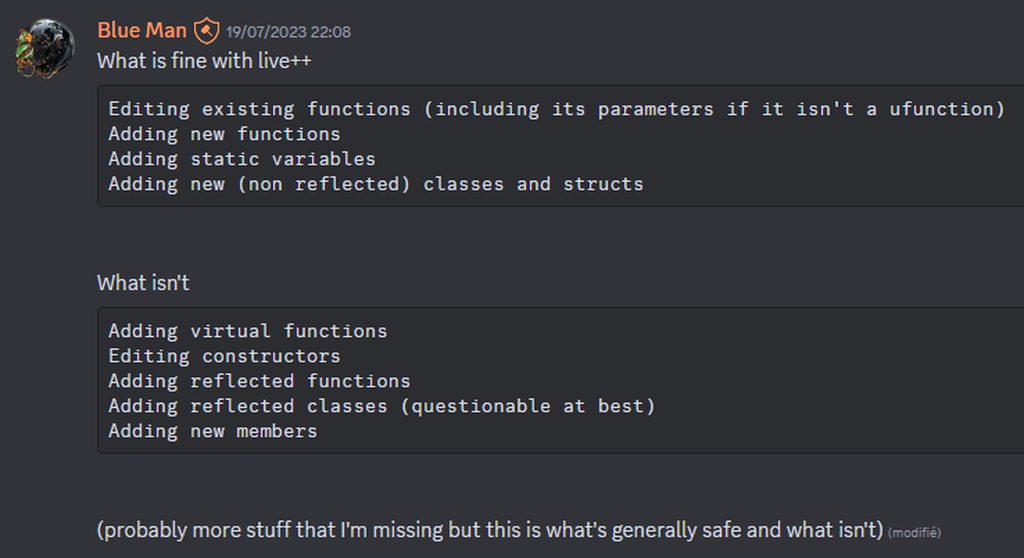
live coding with reinstancing off is safe to use, but it only works for the intended usages, speeds up iteration in simple cases like editing function bodies
 lofty rapids
from what i gather you shouldn't use live coding
close the editor, compile, run it again
sick sky
you definetly should in intended cases if you can
lost obsidian
sick sky
live coding with reinstancing off is safe to use, but it only works for the inte...
Thank you for sharing. I had completely stopped using it because I got scared of it corrupting things haha
sick sky
recompiling from IDE because i edited a line in a function body is just a waste of time
sick sky
lost obsidian
Thank you for sharing. I had completely stopped using it because I got scared of...
no issues, better no live coding that unsafe usage
reinstancing is the corruption causer #1
lost obsidian
sick sky
try to clear cache ? something in saved folder
Sad to say that removing the folders I specified earlier did not solve the issues with the slate color variable/blueprint :(
Here is some more details about the problem I am experiencing #ue5-general message
sick sky
if you create a new BP var do you still have the issue ?
renaming isnt editing the hidden c++ var under
for the new var, dont use the same name, even after deleting the previous one (just to make sure, but should be fine)
lost obsidian
sick sky
if you create a new BP var do you still have the issue ?
Not if I create a very simple new blueprint that only contains a slate color variable and a text field and I set the color of that. Then it works as intended.
But I tried to recreate the whole buggy widget blueprint from scratch, except for the event graph (i copied the nodes) but i recreated the variables. But the error still seems to appear. So i am very confused to how I should debug it.
lost obsidian
sick sky
for the new var, dont use the same name, even after deleting the previous one (j...
This is the weird part. I did this, and it worked for a bit, and then I did something and the new variable started bugging out again.
I can try to create a new variable with a completely new name just to sanity check again.
It was working for a bit, but somehow i managed to corrupt the variable again 😅
 warm basin
How do I fix this issue with my flashlight?
sick sky
lost obsidian
Not if I create a very simple new blueprint that only contains a slate color var...
did you try adding a new BP var for your slate color with a diff name ?
warm basin
it keeps trigging doubles not once
lost obsidian
sick sky
did you try adding a new BP **var** for your slate color with a diff name ?
Now that I created the variable it works. I'm gonna compile, save all files, then restart the editor and see if it survives.

 warm basin
someone help me out
lofty rapids
warm basin
someone help me out
what is happening twice ? and show the code
lost obsidian
sick sky
did you try adding a new BP **var** for your slate color with a diff name ?
Ok, yep, can confirm it still works after restarting. I have 4 more slate color variables that are bugged. I am gonna try to replace them and see if they survive. Thank you for the help so far btw :D
 warm basin
lofty rapids
what is happening twice ? and show the code
warm basin
lofty rapids
what is happening twice ? and show the code
my flashlight isn't turning on and off
from the video it keeps doing doubles when i click F
sick sky
lost obsidian
Ok, yep, can confirm it still works after restarting. I have 4 more slate color ...
yeah somehow the editor is saving incorrectly your var
so its corrupted probably for infinity


 dark drum
warm basin
dark drum
warm basin
As a 'Pressed' trigger to your input action inside the input context mapping.
warm basin
how do I do that?
dark drum
warm basin
how do I do that?
Open up the input mapping context you use to specify the key that triggers the input action and add a trigger to it.
warm basin
thx
dawn gazelle
steady night
split screen, widget component on enemies displaying a (Health bar) when in s...
Yea there's nothing exposed that lets you get a local player object that I can see.... You can probably make a C++ function to expose something so you can at least retrieve it...
ULocalPlayer* UYourBlueprintFunctionLibrary::GetLocalPlayerFromController(APlayerController* PlayerController)
{
  if (!PlayerController)
    return nullptr;

  return PlayerController->GetLocalPlayer();
}
Then trying to get the actual widget component to work would involve spawning multiple copies of the widget component for each local player and setting their ownership to that LocalPlayer.
storm orbit
warm basin
thx
Specifically, The node you have there EnhancedInputAction IA_Flashlight has a little down arrow - open the node up and you'll see the other events. Use "Started" instead of "Triggered" - Started means "once per press", triggered means "run this EVERY TICK that the input is still true"
lost obsidian
sick sky
so its corrupted probably for infinity
I am very confused. I recreated the rest of the slate color variables with different names. I used parenthesis in the name. Do you know if parenthesis will actually still use the same c++ name under the hood, thus corrupting the new variables as well?
Without the parenthesis the name would be the same.


An example of a previous name would be "Number Color Increased"
lofty rapids
are they corrupt again ? they keep changing to pink ?
sick sky
lost obsidian
I am very confused. I recreated the rest of the slate color variables with diffe...
parentheses are fine
did you did anything else special ?
very weird bug
storm orbit
How are you using that slate color? A slate color has 2 sub-properties, color and a color use rule (foreground or specific).
Are you sure you're not leaving the foreground magenta (the default value) and using that value somewhere in blueprint/code instead of the actual color?
sick sky
did you debugged your code to be sure you dont have a fucked up node ?
storm orbit
When you changed versions, you might be using the wrong default values (foreground color) instead of specific color
(@lost obsidian )
steady night
dawn gazelle
Yea there's nothing exposed that lets you get a local player object that I can s...
so this is what im imagening i would need but its not working
 storm orbit
What's not working about that?
steady night
hm the get localplayercontroller from id (1) i just noticed returns 0

im setting the local palyer controller like this is this wrong ./?
lofty rapids
#multiplayer also is a better place because your problem is specifically a multiplayer problem
there may be a better solution
lost obsidian
sick sky
did you did anything else special ?
Literally just created multiple new variable of type slate color. (created the first one from scratch then copied the new variable a couple of times). Assigned the old colors to the new variables by copying the Hex code from the previous variable.
Then I removed the old variables and replaced their references with the new variables manually. When I played it in the editor here then it was displaying the correct color.
I then restarted the editor and then the color in play mode became pink. Note that the default value of the variables are displaying the correct color in the blueprint, but when I play the game the color that the text recieves is the wrong/corrupt one from the Set Color and Opacity node.
lost obsidian
storm orbit
When you changed versions, you might be using the wrong default values (foregrou...
How can i debug/check this?
lost obsidian
sick sky
did you debugged your code to be sure you dont have a fucked up node ?
I could try to remove every single node in the blueprint except for that specific one and see if that solves anything. That way I can find out if it's faulty code or unreal engine being spooky.
storm orbit
Just show a print screen of where you "use" the slate color
lost obsidian
sick sky
by fucked i mean bad code
Yeah, I have source control active so I can easily check it by removing everything nyehehe
storm orbit
like, plugging it onto a set color or reading it somewhere
sick sky
yeah, use a breakpoint to see color value
storm orbit
The magenta color screams "I'm using foreground instead of specific color" That's part of why it's a bight pink instead of white or black as a default
lost obsidian
lofty rapids
are they corrupt again ? they keep changing to pink ?
Sadly yes 🙃
lost obsidian
storm orbit
The magenta color screams "I'm using foreground instead of specific color" That'...
I will try to check this
lost obsidian
storm orbit
The magenta color screams "I'm using foreground instead of specific color" That'...
Could this be the culprit you mean?
 storm orbit
So, yes that's indirectly the culprit - what I mean is that your struct values have the Color Use Rule set to Foreground instead of Specific Color
open the slate color properties and show what the color use rule is
 lost obsidian
 storm orbit
Those properties are Linear Colors (not slate colors)
can you show in blueprint or code where you're grabbing and using these?
Slate color is a wrapper around a linear color
sick sky
usually you use linear colors then convert in code


 storm orbit
You are passing a linear color when it expects a slate color
sick sky
should use the auto convert
storm orbit
drag a pin backwards from In Color And Opacity and do "Make slate color"
lost obsidian
storm orbit
drag a pin backwards from `In Color And Opacity` and do "Make slate color"
This works.
even if i restart
If i hard code it, then it works
storm orbit
You can pass in Text Color to the 'Make Stale Color" node
because THAT ONE is expecting a linear color
lost obsidian
Alright, let me try this x)
storm orbit
Nothing is corrupt, they just might have changd how text handles color input. Widgets use Linear Color, but text still uses slate color
lost obsidian
storm orbit
Nothing is corrupt, they just might have changd how text handles color input. Wi...
If this is the reason then i would be so incredibly happy
I'm gonna try it
I think it might be working

I'mma try the rest of the variables
storm orbit
Looking back at your messages, there's a mix of linear and slate colors in your property list. You should probably convert them all to one type (I don't care which). Operating with both will cause headaches like this occasionally.
Also, I think the ONLY way you could pass a linear color into a slate color is if you changed versions of Unreal. If you try it now, it doesn't allow the connection. I'm suprised it even compiled
(Linear colors are more "portable" than slate colors, so maybe go that way)
lost obsidian
storm orbit
Also, I think the ONLY way you could pass a linear color into a slate color is i...
It only accepts slate colors when I use the Set Color And Opacity node. Does it not do this in you project???
storm orbit
That's what I'm saying - it should only accept slate colors
look back at the previous picture before you made it a slate color - I'm spooked it allowed you to pipe in the linear color without an error
 sly forge
Instanced Static Mesh Component collision doesn't work against player pawn?
lost obsidian
storm orbit
look back at the previous picture before you made it a slate color - I'm spooked...
Ah, they've been slate colors all along. I think unreal engine doesn't display the "specified color" Color Use Rule field when editing the default values.
sly forge
My bad, Had incorrect collision settings
storm orbit
lost obsidian
Ah, they've been slate colors all along. I think unreal engine doesn't display t...
I would just chalk it up to version changing. Shouldn't have to worry about it from now on
 torn ridge
Hello there! Im working on a Bow and arrow blueprint and Im having a problem where my Draw animation on my player is not working just the aiming one, just wanted to know if you guys can help me please.
storm orbit
Show the graph 😄
lost obsidian
storm orbit
I would just chalk it up to version changing. Shouldn't have to worry about it f...
Oh my gawd its finally working!
Thank you guys so much for helping me ❤️ @sick sky @storm orbit
I am so happy I can finally move on to doing actual productive stuff again 😂
torn ridge
Here


 storm orbit
it's unclear from teh graph - does your character aim and then draw? Or draw the bow then aim?
torn ridge
Heres a video
My Aim animation is working but im following a tutorial and in this steps its supossed to do the next animation wich is take the right hand far to simulate the strengh of the shoot dont know if im being clear lol
This is the animation it shoud do
storm orbit
that anim is being piped into a pose - which pose is it on your graph?
torn ridge
how can I confirm wich pose is being piped to?
the pose in my graph is the aiming one and to that one back and forth with a draw bow boolean
aiming is the one in the first video
dawn gazelle
steady night
so this is what im imagening i would need but its not working
Nope. All you're doing here is getting the current owner of the component (which would default to player 0) and setting it back to the same value, you need to be able to set the owner of the component to the other players. You won't be able to do so unless you can retrieve an actual reference to the local player you want to use. Keep in mind the "Local Player" isn't the same thing as "Player Controller" it's a different object entirely.
storm orbit
What is the local player object? The blueprint node as it just typed as a UObject
dawn gazelle
It's an object that only exists on the local machine for any active players on that game instance. Mostly important for splitscreen multiplayer.
slender dagger
Anyone know why my remove from parent is only occuring one out of the 3 times necessary? The blue widgets should be removed but they aren't for some reason. I've breakpointed it and it goes down the exec path 3 times (which the print strings also show) yet it only does it for one of the 3 widgets


 snow halo
All the code inside of the Character Blueprint got randommly deleted

including the functions
file size got from 2,014KB to 16KB
it's not really a big problem, just wondering how I could prevent this from happening more/less often in the future
dawn gazelle
slender dagger
Anyone know why my remove from parent is only occuring one out of the 3 times ne...
There's not enough code here to fully diagnose the problem, but If you're reusing the "Distance Widget" reference each time one is created, that could be part of the issue.
slender dagger
dawn gazelle
There's not enough code here to fully diagnose the problem, but If you're reusin...
this is the full event that handles that in my objective blueprint, so each one has it's own widget, otherwise they would all show the same number I'm pretty sure
This is called on begin play and when objectives change in the game mode.

like it's called for every instance of my objective and this shows when I follow the exec flow with breakpoints
even in the blueprint debugger they have different instance names in the reference variable
dawn gazelle
Is there something on the top path that sets "Active?" false? If it's called multiple times, it'll create multiple widgets but not hold the reference.
slender dagger
this is the function that sets the active bool in the game mode. It also adds and removes the necessary ones from the active array. This is done before the update widget event
 dawn gazelle
What calls "UpdateDistanceWidget"? Can it be called more than once per instance while "IsActive?" is true?
slender dagger
1 is on begin play
2 is when objectives change
Both these are in the game mode


now that I look I've realised it's basically the same screenshot lol. I'm quite tired and want to get this done before I go to sleep
dawn gazelle
Every time "UpdateDistanceWidget" gets called and if IsActive? is true, then a new copy of the widget would be created and you actually lose reference to the old one that was created and added to the viewport, so when "IsActive?" goes false and you call "UpdateDIstanceWidget" again, it'll only remove the last one that was created, not all other ones that may exist on the viewport currently. I'd maybe put a validated get before the creation of the widget and only proceed with creation if its not valid.
slender dagger
dawn gazelle
Every time "UpdateDistanceWidget" gets called and if IsActive? is true, then a n...
lmao it works thanks.
I'm just curious though, if it only stores the reference to the last widget, why when I looked in the debugger did it show each instance of the objective as having separate widget references? Like one was "widgetname1" one was "widgetname2" so I thought that wouldn't be the case.
Also I don't understand how a new one would've been created. It was on the second instance where it was bugging out and should've been removing it so there should've only been one reference created no?
dawn gazelle
slender dagger
lmao it works thanks.
I'm just curious though, if it only stores the reference...
Because you're still creating more instances of the widget whose references are held by the viewport. The "Distance Widget" reference would only hold reference to the last one that would be created by the create widget node, so when you mark it as no longer active, and go to remove it based on that reference, you're only removing that last created instance, while the other two are still held on to by the viewport, but you have no means of properly referencing them to get rid of them.
Other than maybe, get all widgets of class or something.
As for why it keep creating them, every time you go through those foreach loops and the point is active, then you're asking to create another widget.
storm orbit
Garbage Collect gets Queued. It doesn't happen instantly. A widget without a parent is still valid until it's collected, which you cannot guarantee will happen between those calls
 junior quest
Im not sure why this isnt playing the animation montage, i think maybe the soft reference isnt resolving correctly?
slender dagger
dawn gazelle
As for why it keep creating them, every time you go through those foreach loops ...
OH WAIT I THINK I FIGURED OUT WHY IT WAS DOING IT TWICE
I was sat there wondering why it happened twice even though I only called the event once but I think it's because there's 2 for eaches so it basically does it all for the first for each, and then for the next for each so even though the event is called once, the actual update event is called twice for every instance.
Now I'm curious as to why one of them actually did work but I am not spending the rest of the night stuck in the blueprint debugger.
Ok while the validated get thing works and I'm probably gonna keep that in anway, I'm just going to see what happens with both of these ways of writing it because I want to see if I'm along the right track here

forgot the other one lol

yeah they both worked even without the validated gets (though I am going to keep them just to prevent any other finnicky behaviour) so that was what was happening. Thanks
dawn gazelle
junior quest
Im not sure why this isnt playing the animation montage, i think maybe the soft ...
You need to ensure the next thing to happen is done on the "Completed" pin.
 slender dagger
didn't actually realise it was this entire event rather than just the end that was the problem, otherwise that probably would've been way simpler
junior quest
dawn gazelle
You need to ensure the next thing to happen is done on the "Completed" pin.
rip
ty
dawn gazelle
junior quest
Im not sure why this isnt playing the animation montage, i think maybe the soft ...
Also, this isn't even hooked up correctly (this is what is immediately after the async load...)
 storm orbit
junior quest
Im not sure why this isnt playing the animation montage, i think maybe the soft ...
storm orbit
junior quest
Im not sure why this isnt playing the animation montage, i think maybe the soft ...
Also, there's no reason to attempt to resolve the loaded object. Just call async load and if it's already loaded, it skips all the logic and continues immediately (essentially no cost)
junior quest
storm orbit
Also, there's no reason to attempt to resolve the loaded object. Just call async...
Im using hard references in the child bp for testing but its like a just in case I want to use soft refs so it doesnt get too large
junior quest
dawn gazelle
Also, this isn't even hooked up correctly (this is what is immediately after the...
tyty, my eyes are broken
storm orbit
Im saying don't use the isValid part - just go striaght to async loading
(the async node already checks the validity and skips the load if it's valid)
junior quest
i see
junior quest
dawn gazelle
Also, this isn't even hooked up correctly (this is what is immediately after the...
this didnt fix it but you were right about these being wrong, it just never reaches that string
ill keep looking
storm orbit
if you resolve a soft reference and check its validity, it's not the same as asking if it's loaded. It's possible for the isValid check to succeed, but the asset isn't fully loaded so it doesn't play
That's why I say don't use the is valid, because it's tricking you into thinking it means "this is loaded" when it isn't
With the Editor, all your assets are registered and discovered, but not all loaded.
junior quest
i get that
I was trying to use a default montage but my cast to an anim montage is failing
so i think i need to make new ones to test
storm orbit
Did you fix that thing Datura mentioned? you're casting but not forwarding the resulting object to the play montage node
that's not a "failed cast"
junior quest
storm orbit
Did you fix that thing Datura mentioned? you're casting but not forwarding the r...
I did originally but after what you said I changed it and just removed the is valid
im trying to fix it before asking for help again
storm orbit
so, async load, cast to anim montage, and pass that to the play montage node should work. Are you saying it's not casting?
junior quest
yeah, i think whatever was in the starter content, even tho its like an option in the drop downfor the soft ref to an anim montage, its not a valid anim montage
I just made one and it works now
ty tho, you helped too
gentle urchin
storm orbit
if you resolve a soft reference and check its validity, it's not the same as ask...
wait what
it shouldnt pass a valid check if the object being references isnt loaded
dark drum
storm orbit
if you resolve a soft reference and check its validity, it's not the same as ask...
I don't think this is true. The whole point of resolving a soft reference is to see if it's loaded.
gentle urchin
and if its not actually loaded, the resolving will result in a nullptr
as Datura pointed out above the logic we were shown were also bugged
with boad the load (which annoyingly autoconnects to the instant pin, and not the "completed" pin ) , and the cast output not being used
storm orbit
You are correct! I was mistaking that for the other problem - when you resolve the hard reference, it actually forces a blocking load, which entirely usurps the point of having an async load as the "fallback".
I knew there was a reason not to resolve soft refs, I just misremembered the reason haha
dark drum
storm orbit
You are correct! I was mistaking that for the other problem - when you resolve t...
Unless you're correctly utilizing hierarchy and function only classes, using soft references can be pointless.
Assets such as static meshes, materials and animations are always good to soft ref as you'd never cast to a specific type anyway.
junior quest
dark drum
I don't think this is true. The whole point of resolving a soft reference is to ...
its from your tutorial!
im going through that
trim matrix
I'm creating a montage from an rifle attack animation from Mixamo but it shows as T pose and when I play the montage through blueprint nothing happens.
If I open the montage it does show the fire animation being played


 dark drum
trim matrix
I'm creating a montage from an rifle attack animation from Mixamo but it shows a...
dark drum
trim matrix
I'm creating a montage from an rifle attack animation from Mixamo but it shows a...
If it plays when you open it you can ignore the thumbnail. (it happens from time to time) As for why the montage doesn't do anything when you play, this is most likely for 1 of 2 things, either:
A) The montage isn't for the skeleton you're trying to play it on. (It will tell you this in the logs)
B) You don't have the relevant montage slot in the animation BP for the montage to play on.
trim matrix
I used another animation and created a montage from that which works fine
Idk why this particular one doesn't work though
 digital lantern
Hello everyone, yesterday I spent my night on this problem. I can't seem to get the enemy with the least MaxHealth and the one that is furthest along the path to recover, I want these two conditions to be met so that my target is the most consistent in my TowerDefense, separately I know how to do it but when I try to tinker with something to check both I must be missing a step. Please help me and ping me
 dark drum
digital lantern
Hello everyone, yesterday I spent my night on this problem. I can't seem to get ...
dark drum
digital lantern
Hello everyone, yesterday I spent my night on this problem. I can't seem to get ...
The issue is that the conditions will rarely ever be true. Whats the likelihood that an enemy would have the most health and be the furthest along the path?
What you need to do is check each enemy and assign a weight based on their distance along the spline and their health value. Once done, you can use which ever has the highest (or lowest) weight.
You could keep it simple have do something like:
Weight = ((Distance Along Spline / Total Spline Length) + (Current Health / Max Health)) / 2
It might be worth giving more weight to distance along the spline but thats something you can play with. In instances where multiple enemies have the same weight, you could just pick one at random.
digital lantern
To be precise, it's MAX health and not current health that I want to aim for, maybe my logic is a bit weird BTW. But that's what I'm trying to do currently ^^
dark drum
digital lantern
To be precise, it's MAX health and not current health that I want to aim for, ma...
That's fine, it's a little more tricky as you'd need to know the max health of every unit currently in play but the same principle applies. Just finding a way to create a meaningful weight value and picking based on the weight.
digital lantern
Yes, that's what I saw, it's a very good idea, I'll look into it, thank you!
dark drum
@digital lantern You could do it in the enemy but I would probably opt for some sort of manager class that keeps track of it. It could do an update every 0.2 seconds or you could try something a little more dynamic where it keeps track of the order of the enemies along the spline and only updates the weights when the order changes. (The distance would then be normalized from the first and last enemy)
digital lantern
dark drum
<@269602778135920640> You could do it in the enemy but I would probably opt for...
Yes that's what I thought, I have an EnemyManager that already manages the movement of ALL enemies on the Splines, so it would be more efficient to update there directly and retrieve the value already calculated from the tower? Currently I can pop 450/500 enemies that move on a spline and I'm at 80 FPS, I don't know if it's good (rtx 3080, i7 12th)
dark drum
digital lantern
Yes that's what I thought, I have an EnemyManager that already manages the movem...
That sounds reasonable. Also 500 enemies is a lot. 😅
digital lantern
Yes but after that I only manage the towers and the enemies, I don't have a more complex system for the moment even if I don't think I will have one, but it's still satisfying to see 500 enemies moving xD
 young meteor
Hey folks
I feel like I'm starting to have a loading issue with one of my levels, after I inserted a whole lot more meshes. They are Nanite meshes, and I built out additional environment, because I figured I could then reuse the environment for different levels, and just play in slightly different areas in the environment.
Allowing me to copy a level and simply change the stuff I wanted to giving the player a different "map" to play in. Same type of environment but differet layout. Hope it makes sense.
I'm a bit surprised since I reused the same Meshes to simply build a larger environment. So there are basically no new Meshes, just a lot more of them.
Does this sound right? - That the loading time of the Level increases significantly even though it is just a lot more meshes of the same type?
And would it only be in the Editor maybe? Or also in the packaged game?
 indigo gate
What's the best way to create a flying NPC that smoothly follows the player around with a natural floating motion ? Should I use the Character Movement Component's flying mode on the NPC combined with a spring arm with camera lag on ?
maiden wadi
young meteor
Hey folks
I feel like I'm starting to have a loading issue with one of my levels...
If you can, it would be useful if you could do an insights profile during the loading time. If the issue is in PIE, you can just enable StatNamed events here. And then click the little circle in the bottom left just to the right of Trace to start and stop the trace.

 daring trench
hey i have a question regarding arrays within structs. im using a map with actors as keys and a struct as the value. the struct contains arrays of actors and names. finding works, returns true, but i cant seem to add to the array within the struct. i read about limitations of blueprints (you cant put arrays as values into maps) and saw a suggestion to use structs as a workaround. am i doing something wrong or is this something that just doesnt work?
 lofty rapids
daring trench
hey i have a question regarding arrays within structs. im using a map with actor...
lofty rapids
daring trench
hey i have a question regarding arrays within structs. im using a map with actor...
so players is your map with keys, and dice is what you want to alter ?
"the Find node for Blueprints returns a copy of the value rather than a reference"
"If you need to modify a struct inside a map, you might have to retrieve the value, modify it, and then reinsert it into the map."
or make a c++ function that uses ref, "in C++, you can use FindRef instead of Find. FindRef returns the actual value if it exists in the map"
daring trench
lofty rapids
"If you need to modify a struct inside a map, you might have to retrieve the val...
ok, i thought i tried that but maybe i made a mistake, will try again. ty
daring trench
lofty rapids
or make a c++ function that uses ref, "in C++, you can use FindRef instead of Fi...
ty! it worked this time

 fiery badge
I'm trying to make parts of the Cinemachine camera update with inputs in Unreal Engine, but for some reason its a bit difficult to get it to update in time.
The changes are actually applied through the Blueprint, but when it comes time to make the changes in the playmode, they are not properly reflected without having to click on another element and click back on them.
On this note, I also have troubles with changing the main camera of the project. Does anyone know how to do that?
lofty rapids
set view target ?
fiery badge
lofty rapids
set view target ?
I'm a baby to this. What exactly is set view target 💀
lofty rapids
fiery badge
I'm a baby to this. What exactly is set view target 💀
how do you set your original camera ?
lofty rapids
fiery badge
I'm a baby to this. What exactly is set view target 💀
it's a node that lets you switch cameras
fiery badge
lofty rapids
it's a node that lets you switch cameras
Ah okay. So I'm guessing I just add a variable for a camera component expose on start and add a node on scene start to just plug it on, okay.
lofty rapids
get a reference to the camera, and plug it into the set view target node
you can get the node by right clicking on the blueprints and searching set view target
lofty rapids
i think you may need player controller as well plugged into it
fiery badge
How exactly do you find the player controller from the world data?
I set the blueprint variable to be "instance editable" and "expose on spawn", but its a bit hard for me to find exactly what I'm looking for
I'm not too sure what to do
lofty rapids
fiery badge
How exactly do you find the player controller from the world data?
just right click search for "get player controller"
lofty rapids
fiery badge
I set the blueprint variable to be "instance editable" and "expose on spawn", bu...
you only need those for things like spawning a bp, wdym "variable" ?
fiery badge
lofty rapids
just right click search for "get player controller"
When I click on this, this shows up.
 lofty rapids
you are not in a blueprint
 lofty rapids
you may want to go through some blueprint beginner stuff
what is a blueprint, what are events
it involves using most likely begin play on some bp possibly the character
if you don't know what that is i suggest you look up a basic tutorial for blueprints
 fiery badge
Yeah, its running
I just need to choose the Player Controller
Issue is.
I have no clue how to.
Normally it'd just
Show you the element and you'd just click it.
But
lofty rapids
right click, use "get player controller"
fiery badge
Right click where exactly?
lofty rapids
on the graph
get player controller is a node
the same way you got set view target node
right click
fiery badge
got it
it was so simple
😭
Do you have any documentation as reference for this kinda stuff
I tried to look, but its not as clear as Unity from what I find
lofty rapids
i don't know good docs yet
fiery badge
RIP
lofty rapids
i been using it off and on for awhile but not spent enough time
i just studied about blueprints and made a few projects
lofty rapids
i used youtube
lofty rapids
and just went along with it, pausing and trying stuff out
i started a long tutorial it was like 6 hours long i got a few hours into it
learned a lot from that
youtube and this discord
fiery badge
BRO YES
FINALLY
A BREAKTHROUGH IN PROGRESS
THANK YOU
Sorry, this thing just ended up fixing like
20 other problems
lofty rapids
nice, glad to hear its working out
fiery badge
Anyone know how to send OSC Message Address to Unreal?
Oh nevermind. I found a video describing exactly what I was looking for on YouTube.
I'll send it below in case someone had the same question.
https://www.youtube.com/watch?v=S7VaG0buXB8

Short tutorial how you can send a simple OSC message from Blueprints in Unreal Engine 5.
OSC Data Monitor: https://kasperkamperman.gumroad.com/l/icgez
Instagram: https://www.instagram.com/sumatras_studios/
Twitter: https://twitter.com/gjverhoeff
#ue5 #unrealengine5 #osc
 plucky dome
so im using rich text blocks on top of buttons, and some of them can have images in them that seem to swallow mouseover events no matter what. The yellow underline shows the entire rich text block (it's marked as Not Hit Testable). when i mouseover anything in the block, i get my desired behavior - it's specifically when hovering over the image of two swords in the rich text block that mouseover seems to get swallowed (so any area in the red box). Anyone know a workaround?

ope.. well it seems setting to Not Hit Testable (Self & All Children) did the trick
 random pulsar
guys help me plz find scalability settings in 5.6
 random pulsar
thanks
unique bronze
lofty rapids
is it the same error ?
Hi, just to close it up and share the solution: this 2 minute video solved it https://www.youtube.com/watch?v=G1O5G_G1mGM
For some reason not using the Phys Mat Pin, but get material directly from the component (which should, previously it was on get actor by tag, which was wrong since Im hit checking its components), was the solution. (But I think its because the Break Hit node resulted the actors phys mat override, which it cant have, it should have been its two components with two phys mats instead)
Plus not using the Instigator pin on Apply Damage event removed the access none trying to access error (no idea why I would need the pin there, all damage applies properly now and no crapping out. Nvm, it still craps out, but at least the map works now, the access none error is just another issue. Really gotta love those several issues at once, real nice debugging xD
Again thanks for trying last time, narrowing down helped searching at the right places until the right info came along. (Doesnt work on hit events yet though, but its ok)
Have a nice day!

 zenith jungle
hi guys i have a blueprint map going from Enum A to Enum B. This map is prefilled with all the possible keys to return a specific value from Enum B but for some reason when im using the Map.Find node it doesnt return the correct mapped value
it should return Yellow as the value but it keeps returning White no matter what key i provide


you know what, nvm its just the debugger being a 🤬
unique bronze
is it true that ""Accessed None trying to read property" error is often solved by just checking if is valid? It feels so cheaty, like there was an error but now not just because I handled it and its false and its okay nothing crashes, I mean it still spams the console with it, but is this fixed basically? Everything works, so..
Cant shake the feeling of that this is bad practice, it happens probably with like lots of projectiles which didnt hit anything because not all of them are supposed to hit.
sick sky
unique bronze
is it true that ""Accessed None trying to read property" error is often solved b...
Access none error means the object you tried to get is null
Is Valid checks if the object is null (and valid)
So using the check will remove the error, but not your code design issue
 fallow umbra
Hello,
any idea why I don't see the delegate variable type? (ue5.5)
||The only way I could create a variable as a delegate is to drag and drop from a node that has that input||
 sick sky
Its not supported as a BP type
unique bronze
sick sky
Access none error means the object you tried to get is null
Is Valid checks if t...
ah okay so it is bad practice and I should not have the error at all in the first place?
sick sky
Yes, but use IsValid, better safe thzn sorry
Unless your code needs to handle differently the situation if the object is invalid, always use a IsValid check before using an object if its possible that the object is invalid, even if it will always run in the True path
unique bronze
okay then this for now will do, at least I know whats to fix then, thanks!
fallow umbra
sick sky
Its not supported as a BP type
buut ...It is supported, I use it without any issue in multiple places,
Now I just wanted to create it inside a wbp and expose it on spawn - but I'm not able to do the same trick to create it with drag and drop
 unique bronze
yeah all falses are going into nothing, so its okay 🙂
sick sky
fallow umbra
buut ..._It is supported_, I use it without any issue in multiple places,
Now ...
Thats not a delegate but an event
fallow umbra
yeah, an event whatever you wanna call it, the thing is I can use it but cannot find it when I search for it

weird, I thought is a common/known thing wanted just to ask around
sick sky
Usually this kind of stuff is done in c++ with a async node
So idk, never done this in pure BP
faint pasture
unique bronze
ah okay so it is bad practice and I should not have the error at all in the firs...
There are many situations where you'd get that error if you don't check if a thing is valid.
Say you wanted to shoot your gun.
Input Shoot -> get MyGun -> tell it to shoot
What happens if you don't have a gun? Not having a gun IS a state you can be in. You'd get that error if you just blindly told your gun to shoot no matter what. What you need to do is check if you currently have a gun. MyGun.IsValid is that check.
storm orbit
You can't create delegate variables. You can use delegates in your signatures for FUNCTIONS (not events). This is probably because there's lots of blueprint voodoo that makes it so when you create matching events in the event bindings, it can copy the signature exactly.
As stated, If you want full flexibility, c++ has it all available. With Blueprint, it would be too error prone and cause lots of headaches to be able to create your own delegates
fallow umbra
yeah, i figured out by copying this variable out of the function inside the blueprint itself -> right click -> create variable and it didn't let me compile
 fallow umbra
 yeah well, I achieved what I wanted anyway, since - as you stated - it copied the exact signature when you set it as a input on a function
storm orbit
It's perfectly legal and cool to use the "drag a pin into signature" to create delegate handles. It's not like a dangerous practice or anything
If your event changes signatures, you'll have to make sure to change EVERY binding to that event if it passes through that function. You can see where that can get troublesome if you try to scale up
fallow umbra
ye now it makes sense why is not shown in the variable searchbox/field, since it has to copy the params from something
storm orbit
For "signature-less" events, it's easy and safe
and it's reasonably safe to use with epic's stuff like button events which haven't changed in years
fallow umbra
you're right and yeah I use it with epic staff and even when it will become a problem is not a big problem
thanks for the heads up

dark drum
storm orbit
You can't create delegate variables. You can use delegates in your signatures fo...
'Make Event' is how you create delegates. Storing a delegate as a var also wouldn't be a problem, it's just not something epic has setup, after all, it's just an object ref with a function name.
dark drum
fallow umbra
yeah, i figured out by copying this variable out of the function inside the blue...
Passing delegates in can be useful for binding delegates on private event dispatchers. Sometimes they should only ever be called by the owning object.
dark drum
fallow umbra
ye now it makes sense why is not shown in the variable searchbox/field, since it...
A delegate is just an object and a function name. In the editor (and in c++) the compiler just checks to see if the signature matches.
 limpid flicker
Hi friends - maybe a really obvious question (but I'm new):
👉 What's the benefit or difference between making a ControlledPawn variable in my Player Controller vs. just calling GetControlledPawn or GetPlayerPawn?
 storm orbit
Get Controlled pawn is the currently controlled pawn in the controller. In a lot of cases, it's the same, but if you have a game where you swap pawns, it's an important distinction
limpid flicker
storm orbit
Get Controlled pawn is the currently controlled pawn in the controller. In a lot...
ahh I see, I'm making an RTS game mockup - but this is the "pawn" for my floating camera / player. Not sure if that distinction will matter in my case, but I'll play it safe.
@storm orbit thanks<3
I'm trying to piece this together with only docs / the new UE5.6 "Variant_Strategy" template and not watching videos - so I'll prob ask a lot of questions
storm orbit
I'm not sure the best way to do it for RTS, but most of the times each "pawn" as its own controller. You'd probably send those controllers commands etc. to move them.
A controller can only "posses" one pawn, I think
dark drum
limpid flicker
Hi friends - maybe a really obvious question (but I'm new):
👉 What's the benef...
'Get Controlled Pawn' works with any controller, including AI controllers. Get player pawn gets the controlled pawn for the local player controller. (Hence why it requires a player index, in case you're doing local coop)
limpid flicker
storm orbit
I'm not sure the best way to do it for RTS, but most of the times each "pawn" as...
I'm not sure the best way to do it for RTS
Me neither, but I'll piece it together from that template and figure it out as I go lol
limpid flicker
dark drum
'Get Controlled Pawn' works with any controller, including AI controllers. Get p...
Thanks - any reason I might be getting Accessed None trying to read (real) property ControlledPawn in BP_RTSPlayerController_C?
It looks like I have the variable Controlled Pawn defined correctly and I've compiled the Player Controller BP.

I'm just trying to get it to move X +1 despite whatever button I press for now
dark drum
limpid flicker
Thanks - any reason I might be getting `Accessed None trying to read (real) prop...
Just use the 'Get Controlled Pawn'. It's a getter so just returns the var the controller already has for storing what it currently controls.
limpid flicker
dark drum
Just use the 'Get Controlled Pawn'. It's a getter so just returns the var the co...
I could, but I'm curious to learn why that variable is returning as None
dark drum
limpid flicker
Thanks - any reason I might be getting `Accessed None trying to read (real) prop...
As a reminder, object based references are empty/null until you set them yourself.
limpid flicker
dark drum
As a reminder, object based references are empty/null until you set them yoursel...
Looks like I've done that here:

Something else I gotta do to "initialize" it or something I wonder?
dark drum
limpid flicker
Looks like I've done that here:
Creating an object based variable doesn't set it. There could be 20 BP RTSPawns in the level so unless you set it, it'll never know which one it should be pointing too.
limpid flicker
dark drum
Creating an object based variable doesn't set it. There could be 20 BP RTSPawns ...
oooooooo, lemme google how to set it then. Thanks!
I see I see
limpid flicker
dark drum
Creating an object based variable doesn't set it. There could be 20 BP RTSPawns ...
I'm looking in the Variant_Strategy UE5.6 example and can't seem to find them setting ControlledPawn anywhere in the Blueprints. Any idea on where I could look to find this? Just trying to get a hint to help me learn. (:
Just kidding, I learned how to use the BP Node search function lol
 stuck plank
unique bronze
Cant shake the feeling of that this is bad practice, it happens probably with li...
stuck plank
unique bronze
Cant shake the feeling of that this is bad practice, it happens probably with li...
Handling the "isValid" check means you are avoiding executing "broken" code. If the reference is null, then you should never use it, period.
However there can be good reasons something is null. For example, maybe it is just coming into the world and the UI is ticking, but the component isn't valid yet. So using isValid to avoid accessing the variable is really good practice. What you do with the failure side of the check is totally up to you and application dependant. If it is like full-on broken, put a debug message assert to let you know in the editor "Hey, this is not valid and it needs to be!". If is is potentially expected then just quietly fail.
dark drum
stuck plank
Handling the "isValid" check means you are avoiding executing "broken" code. If ...
I wouldn't say is valid checks are to avoid executing 'broken' code. Is valid check are there to prevent you from running code that would otherwise fail because the reference isn't valid. It also allows you to perform different things if a ref isn't valid.
For example, if I want to update a widget, I can do an is valid check (or a validated get) on the widget variable. If it exists I can just update the widget, if not I can first create the widget.
stuck plank
dark drum
I wouldn't say is valid checks are to avoid executing 'broken' code. Is valid ch...
Interesting. So you don’t think it is broken to execute a null reference? I do.
dark drum
unique bronze
is it true that ""Accessed None trying to read property" error is often solved b...
Access None is telling you that you've attempted to call a specific function on nothing. This normally indicates that you've not set a reference somewhere or a reference has since cleared. (been set to null)
It's usually a good idea to look into why these are flagging as access none as it could indicate a flaw in you're logic or object references that are never set/initialized. Whilst you could just do an is valid check, this might not always be desirable depending on what you're doing.
faint pasture
limpid flicker
ahh I see, I'm making an RTS game mockup - but this is the "pawn" for my floatin...
Camera as pawn in an RTS seems totally reasonable
faint pasture
stuck plank
Interesting. So you don’t think it is broken to execute a null reference? I do.
What does it mean to "execute" a null pointer?
dark drum
stuck plank
Interesting. So you don’t think it is broken to execute a null reference? I do.
I just wouldn't use the word broken. You could have a chain of 7 functions and just because the ref is invalid doesn't mean all the logic in the 7 functions is broken.
faint pasture
Checking if a pointer is valid before you use it is like checking if a number is 0 before you divide by it. Makes perfect sense.
There are legal values the thing can be that can break certain functionality, you need to check for that
stuck plank
dark drum
I just wouldn't use the word broken. You could have a chain of 7 functions and j...
Yeah not sure why patty likes doing that. 😂
And code that accesses null references I definitely broken. Just ask your QA team. 😂
dark drum
stuck plank
And code that accesses null references I definitely broken. Just ask your QA tea...
If you have an access none message the issue is what comes before you attempt to call the functions not the functions itself. I don't dispute that you should be using isvalid checks, i'm disputing your description of it to prevent execution of broken code. It could imply there's an issue with the function you're attempting to call on an null ref which generally wouldn't be the case. For someone that's new to UE, this could make them look in the wrong place when attempting to correct.
For example, if I have functions A -> B -> C and get an access none in B, trying to solve the problem by looking in C isn't going to help when the issue is most likely in A.
 barren tangle
Hello I'm looking the template of 5.6

what is that node?
the Set Global Time Dilatation?
dark drum
barren tangle
the Set Global Time Dilatation?
It changes how fast time progresses. 0.5 would mean time passes slower. 2 would make it pass twice as fast.
barren tangle
dark drum
It changes how fast time progresses. 0.5 would mean time passes slower. 2 would ...
thanks
i guess it's interesting to make slow motion and things like that 😄
dark drum
barren tangle
i guess it's interesting to make slow motion and things like that 😄
Yea, as an FYI, the node isn't new. 🙂
barren tangle
dark drum
Yea, as an FYI, the node isn't new. 🙂
yes there are lots of nodes that can be usefull :D, i don't know all of them 🙂
dark drum
barren tangle
yes there are lots of nodes that can be usefull :D, i don't know all of them 🙂
Yea, it's always nice when you stumble across a new one.
stuck plank
faint pasture
What does it mean to "execute" a null pointer?
I just meant executing code with a null reference. In the original example accessing a member variable or function off of a null pawn reference would be an example of executing a null pointer because that method is coming from a 0 memory location.
 spark steppe
not really what happens afaik
 dense hinge
Hello. Is it possible to make a map variable in a data asset? Preferably, I'd love it if I can have it as a separate asset so I can make a bunch of variations and easily swap them
dark drum
dense hinge
Hello. Is it possible to make a map variable in a data asset? Preferably, I'd lo...
Map as in the variable type? The one with a key/value pair?
dark drum
dense hinge
Yes
Yes, you can use all the usually var types in a data asset.
A data asset is just a fancy single instanced uobject. 🙂
dense hinge
Ah, Ok. I was looking at an asse that was an array, so it was greyed out
Thanks for the help 🙂
Can you make a map of arrays?
dark drum
dense hinge
Can you make a map of arrays?
Not directly no, but you can make a custom structure that has an array in it which you can use as the value part of a map.
dense hinge
So to break it down:
- I need a structA with the map variable.
- use structA to make into a Primary Data Asset
- make a structB and structC to use as keys and values?
dark drum
dense hinge
So to break it down:
- I need a structA with the map variable.
- use structA to...
You can't use a structure as the key to a map.
dark drum
dense hinge
So to break it down:
- I need a structA with the map variable.
- use structA to...
Can you describe more of what you're trying to do?
maiden wadi
dark drum
You can't use a structure as the key to a map.
You can, you just need to be careful with it.
dark drum
maiden wadi
You can, you just need to be careful with it.
They need to implement the serialize function on the struct but I don't believe you can do that in BP.
dense hinge
dark drum
Can you describe more of what you're trying to do?
I am trying to make a data asset that works as a PCG grammar criterion
maiden wadi
Yeah, not sure if BP does that by default. Even if it did, still have to only ever use key values in it. Ints, Names, Enums, Tags, etc.
dense hinge
This is what a PCG grammar criterion looks like if you're not familiar. While I can automate the select and < positions, I want to be able to easily replace the values in Key and Grammar
 dark drum
dense hinge
This is what a PCG grammar criterion looks like if you're not familiar. While I ...
dark drum
dense hinge
This is what a PCG grammar criterion looks like if you're not familiar. While I ...
Is floor criteria you're own variable?
dense hinge
Yes. It's a variable set up in the PCG graph itself, but I can easily pull variables from a data asset. The big limitation is that PCG does not support arrays. I will need to set up a function in BP to split it into different attributes, but if I can make the data asset easy to use, the functionality implementation shouldn't be an issue
dark drum
dense hinge
Yes. It's a variable set up in the PCG graph itself, but I can easily pull varia...
Ok, so you'd create a primary data asset (the template), add the variables you want in it. Then you can create a data asset using you're primary data asset and set the data you want in that specific data asset. You can create multiple data assets with different data in it.
dense hinge
dark drum
Ok, so you'd create a primary data asset (the template), add the variables you w...
Ok, got it now. Thank you very much!
barren tangle
dark drum
Yea, it's always nice when you stumble across a new one.
just an idea... when in game they start a "cutscene" for skills, and freeze everything but just the character move during that time.
Is it a Set global time dilataiont set to something like 0.0001 when at the same time they play the character animation at a frame rate of 10000 ? or there is better way to do that?
Is just a question, i dont try to achieve that but was thinking if it was done with that node and they playrate
dark drum
barren tangle
just an idea... when in game they start a "cutscene" for skills, and freeze ever...
I personally would handle it differently. Time dilation can affect everything so can be a little finiky unless you actually want to slow everything. What you described probaly would work though.
barren tangle
dark drum
I personally would handle it differently. Time dilation can affect everything so...
how will you handle it?
 mystic forge
did anyone else notice that animation notify states trigger their begin and end functions each tick on a server or host when "use multi threaded animation updates" is enabled?
dense hinge
dark drum
Ok, so you'd create a primary data asset (the template), add the variables you w...
I'm gonna need a bit more assistance. I have the nested Data Asset working (I can see it in PCG), but I'm not getting the info out correctly in BP. What am I missing? The cast to PDA_BuildingLayout is failing

 drowsy lake
anyone know why in 5.6 we can not do math with Rotators? Rotator type pin is missing.
 lofty rapids
dense hinge
I'm gonna need a bit more assistance. I have the nested Data Asset working (I ca...
lofty rapids
dense hinge
I'm gonna need a bit more assistance. I have the nested Data Asset working (I ca...
if the cast is failing it's not of that class, so the variable in the get is different
lofty rapids
drowsy lake
anyone know why in 5.6 we can not do math with Rotators? Rotator type pin is mis...
can you drag of the control rotation node and insert a new subtraction ?
dense hinge
Is there a way to get all the attributes, then? When I look for BuildingLayout variable, all I see is the Set for it
 lofty rapids
dense hinge
lofty rapids
dense hinge
where do you set the variable ?
dense hinge
lofty rapids
where do you set the variable ?
In a data asset. I have a primary data asset, and inside that primary, I have another data asset variable So it's DA_Building with a BuildingLayout variable (set to a data asset type)
lofty rapids
you set the type, but did you set the variable value ?
dense hinge
lofty rapids
you set the type, but did you set the variable value ?
What do you mean by variable value? BuildingLayout is not an empty variable, if that's what you're asking
lofty rapids
Data Asset is not castable to buildinglayout
is the problem
if the cast is failing
dense hinge
How can I break the data asset to select all children variables, then?
Do I need to break the data asset in a function inside the PDA and just call that function?
lofty rapids
you need the buildinglayout class to be from the data asset variable values class
idk much about data assets tbh never used them, but i can see your problem
if the cast is failing then this is just classic casting not working
so the variable is probably an incorrect thing if the validated get is working atleast it's not empty