#blueprint
1 messages · Page 315 of 1
 maiden wadi
 snow halo
btw I fixed the Create Event thing it was related to not having a target connection
 runic parrot
Hi! does anyone know if there's a way to get a "selection brush" in the editor window? i need to select multiple things and i'm currently selecting them one by one
SOLVED: Alt + Control + left click drag
 maiden wadi
Focus. Or being in the focus path.
 steady night
yeah that was it
maiden wadi
It also needs to not be handled before it reaches this widget. Like if a child in the hierarchy has focus and handles their KeyDown, this widget wouldn't get this call.
steady night
hmm
 somber gate
guys, how do I make a curve in blueprint? Say I have a variable, I want to use it as a curve index for that curve.
oh nvm I figure it
 knotty quarry
Hello, I am trying to pull a random index from an array (by stream), and then I'm printing "chosen index / length of array", for some reason it appears to be choosing a similar number ever single time, and then when I stop using stream it chooses an index properly. Is the stream not picking up on the fact that it's getting used and so the stream's logic is being repeated?
 knotty quarry
Follow-up, the stream is located in the game state, and that stream was being accessed through a function library function. If I directly access the stream by casting to the game state from the blueprint itself, instead of having the blueprint use the library function, it works just fine. So something about the library function is messing with the stream
 dark drum
knotty quarry
Hello, I am trying to pull a random index from an array (by stream), and then I'...
dark drum
knotty quarry
Hello, I am trying to pull a random index from an array (by stream), and then I'...
Show the setup.
knotty quarry
Library Function:

Blueprint (The problem occurs when the Get Seed function is plugged in instead of the direct cast)
 dark drum
knotty quarry
Library Function:
dark drum
knotty quarry
Library Function:
on the get game state not, pull from the world context object pin and search world context. It needs to be connected or it'll never find the game state. Because it never finds it, it always generates a new random stream (of which starts from the beginning)
knotty quarry
Okay let me try it real quick
knotty quarry
dark drum
on the get game state not, pull from the world context object pin and search wor...
I added this, but it still doesn't work

 dawn gazelle
My gut is telling me that the function is returning a copy of the seed rather than a ref to the seed.
maiden wadi
The other thing is, you should not be using a Stream like this. Seed should be an integer on the GameState, not a Stream. The issue with using a Stream here is that if you use it correctly by ref, anything that pulls from it also mutates it. So any new game additions can cause other systems that were generating a specific way for a specific seed to derp out and be different all of a sudden. Each system or function should be able to pull the seed integer and make their own streams for their own use from said seed.
 sharp steppe
Is it possible to access the capsule half height of a Character class through “getClassDefault”? If so how do you access the component without an instance?
 sick sky
sharp steppe
Is it possible to access the capsule half height of a Character class through “g...
sick sky
sharp steppe
Is it possible to access the capsule half height of a Character class through “g...
like you would usually
getClassDefault returns you an instance
getClassDefault -> getcapsulecomponent-> get ...
 atomic hollow
I know how to call on object or on a specific object, what is the other option for and how to use, and also there is the small info in the picture of calling interface function on any object that it is slow, if that is the case then how much are they slow
 maiden wadi
sick sky
like you would usually
maiden wadi
sick sky
like you would usually
You're in blueprint.
maiden wadi
sharp steppe
Is it possible to access the capsule half height of a Character class through “g...
You cannot
maiden wadi
You cannot access the cdo in BP. You can access properties, but not components or anything.
maiden wadi
Kind of. But it's scripter land. And you don't want people changing CDO values and wondering why it breaks every newly spawned thing after it.
sick sky
i would assume you could get a const CDO
maiden wadi
Possibly. I'm curious if BP would respect that or auto convert it to a non const.
atomic hollow
atomic hollow
I know how to call on object or on a specific object, what is the other option f...
@maiden wadi did you know about this
maiden wadi
I mean there's nothing stopping you from making your own function that returns a class's CDO. But it definitely does not exist by default.
maiden wadi
atomic hollow
I know how to call on object or on a specific object, what is the other option f...
The second and third are the same thing for the most part. You have to cast your object to the interface type to use the second one. The third node just does this internally and silently fails if the object does not use that interface.
atomic hollow
maiden wadi
The second and third are the same thing for the most part. You have to cast your...
👍
If it do internally then isn't they performance heavy , Let's assume 20 actors implement the interface if you use the third one it will cast until it founds the right one actor
maiden wadi
I'm not following what you mean? Do you mean 20 classes or 20 instances? Either way the message is the same as the second one. It takes a single reference to an object and tries to call that interface function. There's no searching or anything.
atomic hollow
maiden wadi
I'm not following what you mean? Do you mean 20 classes or 20 instances? Either ...
Yes 20 different classes inherited from Actor
And implementes same interface
maiden wadi
Right. There's no searching though. If you look at the message node it has the interface name on it. It's essentially doing a complicated version of...
if (IMyInterface* ObjectAsInterface = Cast<IMyInterface>(PassedInObject)
{
    ObjectAsInterface ->InterfaceFunctionName();
}```interfaces arent really about performance but design
atomic hollow
maiden wadi
Right. There's no searching though. If you look at the message node it has the i...
Wow! It means that if we cast it to interface and then use the second node or without casting use the third node which do the casting internally to interface and then calling the function from the interface object.
Where you found the code 😉
atomic hollow
sick sky
interfaces arent really about performance but design
But they cast each time once
maiden wadi
Doesn't really matter though. Casting is more or less free.
maiden wadi
Even in BP. You won't see a performance difference if you hook up an object to a pure cast node until around a few hundred thousand iterations.
And the linker issues are not a casting thing. Casting might link things, but a lot of other things link as well. Not good to put the blame on casting or people stop casting and wreck their project with interfaces.
atomic hollow
maiden wadi
Doesn't really matter though. Casting is more or less free.
But it does under the hood and on all over the YouTube they say it don't
maiden wadi
People on Youtube make videos to make money, not to teach people.
sick sky
maiden wadi
Even in BP. You won't see a performance difference if you hook up an object to a...
well if i load a BP thats has multiple unloaded SM this can hold
maiden wadi
They'll say whatever they need to say and make whatever clickbait title they can to get you to watch stuff for over 65% of their video.
maiden wadi
sick sky
well if i load a BP thats has multiple unloaded SM this can hold
I'm not sure what you mean with this? Casting in BP is as free as it is in C++. If I decide to put a construction helper in some class and cast to it in C++, that static mesh the construction helper is using loads too.
You're going to say "You shouldn't use construction helpers." Then I'm going to agree and say "And you shouldn't cast to BPs with static meshes specified, and should instead use parent classes without linked assets."
 mystic blade
maiden wadi
People on Youtube make videos to make money, not to teach people.
mystic blade
maiden wadi
People on Youtube make videos to make money, not to teach people.
see now thats some bullshit
sick sky
maiden wadi
I'm not sure what you mean with this? Casting in BP is as free as it is in C++. ...
oh yeah in BP casting to the c++ class is free, i was more talking about asset references
like if in character BP you cast to everything you have in your game ...
maiden wadi
I am too. But like I said, casting to a C++ class isn't free if it uses a construction helper like that. You're still linking to an asset. It's the same in BP when not casting to a blank parent class.
atomic hollow
@maiden wadi what if I call 20 interface functions each tick and and the interface is implemented by 100 classes, so the final casting per frame is 20 x 100 = 1000 casting, and I think it would be too bad
maiden wadi
Why are you stuck on how many classes implement the interface? That has no bearing here. If you call 20 interface functions per tick, you make 20 casts. And again, casts are practically free. Ignore Noobtube. They parrot shit because they don't understand how linkers work.
atomic hollow
maiden wadi
Why are you stuck on how many classes implement the interface? That has no beari...
Thanks 👍 I misunderstood
maiden wadi
You can test this yourself. Make a looped function that is called like 50,000 times. On one test use your reference to IsValid it and call the function. On a second test use your reference and cast it to something to call the same function. You'll have near identical results. The runtime cost of casting is literally the same as an IsValid check.
 frosty heron
maiden wadi
People on Youtube make videos to make money, not to teach people.
frosty heron
maiden wadi
People on Youtube make videos to make money, not to teach people.
When no one has to prove anything, anyone can upload video and be an "educator".
So we are stuck with noob copying other noob tutorials.
Ohh noes my memory is taking a hit. It must be casting fault! Then the next clueless shit content creator perpetuate it.
sharp steppe
maiden wadi
You cannot
Tried all day and no luck with a solution. I appreciate the replies though
frosty heron
sharp steppe
Tried all day and no luck with a solution. I appreciate the replies though
Why does it have to be a cdo value. Perhaps you can make do with data asset.
Is there specific reason why you want a cdo capsule half height value?
 celest trench
 faint pasture
Can someone tell me why this doesn't work outside of editor?

Is there just a dummy simple way to get all subclasses of some actor class?
 turbid temple
Any help would be appreciated. currently any time i put a delay after my "boomboom" event (green arrow) the delay acts like its the last piece of code (essentially all code after the delay seizes to fire). If i remove the delay (as pictured) I am able to run both of my custom events. I have tried to use an "event by timer" and that prevented anything else from running just like the delay.
 faint pasture
turbid temple
Any help would be appreciated. currently any time i put a delay after my "boombo...
faint pasture
turbid temple
Any help would be appreciated. currently any time i put a delay after my "boombo...
what spawns this thing?
what is it
a buff actor?
What class is this code inside of?
turbid temple
yes it is a buff actor. I have it as a child of my standard collectible (interactable). player would interact with a specific object and be granted the buff.
faint pasture
turbid temple
yes it is a buff actor. I have it as a child of my standard collectible (interac...
When does the buff go away?
"Nothing happens after any amount of time" smells like the thing is destroyed before the time could pass
turbid temple
the buff is persistent. It only goes away once the "endBuff" custom event is called. I would like it to be set up with a delay but that doesn't seem to be working.
.
Currently for testing purposes, i have the buff terminate immediately after the buff is activated.
faint pasture
turbid temple
the buff is persistent. It only goes away once the "endBuff" custom event is cal...
show how the buff is being terminated right now
the entire code path from spawn to destroy actor
 faint pasture

You're destroying self, then trying to do more stuff
the fact that ANYTHING at all happens after that destroy actor node is just because destroying actors is deferred.
turbid temple
so if I need to technically only destory the static mesh component of the colelctible item, would a "destroy component" be the appropriate node to use then?
faint pasture
turbid temple
so if I need to technically only destory the static mesh component of the colelc...
Is this code in the collectible or in the actual buff?
or does the collectible DO the buff logic
faint pasture
turbid temple
so if I need to technically only destory the static mesh component of the colelc...
You can jsut set it hidden in game
then when the buff runs out destroy the whole actor. You have 1 actor that is the collectible and the buff do-er, it's not spawnign a buff actor to do the buff logic.
turbid temple
faint pasture
or does the collectible DO the buff logic
currently the collectible does the buff, but i'm thinking of creating a separate BP to handle the logic. This way i can eventually make it toggleable after collecting the item since the item is setting the bool value
faint pasture
turbid temple
currently the collectible does the buff, but i'm thinking of creating a separate...
Yes i would have a collectible which spawns a buff actor
then they can be independent.
Collect -> spawn BuffActor, giving it a ref to whoever collected the thing -> destroy self
turbid temple
faint pasture
then they can be independent.
Collect -> spawn BuffActor, giving it a ref to wh...
okay thank you for the help! I'm pretty sure i got it from here.
 wind atlas
Hi everyone,
I hope you're all doing well! I was wondering if anyone has encountered an issue where a Geometry Collection works fine in the editor but stops working after packaging the project? I've been trying to figure it out, but no luck so far. Any advice or suggestions would be greatly appreciated!
Thanks in advance!
 kind estuary

why cant i set this variable to the actor that is on the level
this is an actor that i have on the level
i thought i have done something like this in the past
just set it manually
though here when i try to set the actor, it just stays in None
 dreamy marten
kind estuary
dreamy marten
kind estuary
You can't set it from the blueprint editor itself, you need to expose the variable and set it in the actor you placed in the world
kind estuary
dreamy marten
You can't set it from the blueprint editor itself, you need to expose the variab...
ahh got it, dont know why i missed that
i just woke up must be that 😴
kind estuary
dreamy marten
You can't set it from the blueprint editor itself, you need to expose the variab...
thanks king
steady night
When navigation in the widget i can go from my "shoulder(Green border) to the arrows no problem but i cant go from my "mask(top item) to the arrows
is there any way to controll the "flow" or whatever it jus tries to find the item right next to it in line i suppose how do you solve these issue s

 flat jetty
Hey guys. While naming functions in Blueprints, do you put "whitespaces" between words? Like is it ActivateFPSCamera or Activate FPS Camera. What is the known conventions on that?
maiden wadi
steady night
The yellow area around the shoulders and mask should be set to like custom border. And then just return the up arrow. If you would want elements 4-5 in that list there to go to the bottom button you would need to do some screen space Y pixel checks I think.
maiden wadi
flat jetty
Hey guys. While naming functions in Blueprints, do you put "whitespaces" between...
IDoNotDoSpaces. Unreal will do them for you if you caps each first letter of each word. It bothers me when people do that in materials too. Making "Some Parameter Thing" instead of SomeParameterThing. Cause then I write it SomeParameterThing in a SetParameter node or function, thinking it was autospaced by unreal and have to go double check when it doesn't work.
I think the general is that people don't do spaces. But at the same time I highly doubt anyone will say anything about it unless they're having a severe nitpicking day.
maiden wadi
sharp steppe
Tried all day and no luck with a solution. I appreciate the replies though
Pretty much what Cold said. You either need to specify that somewhere like a data asset. Or even as a class property on the actor and not the capsule that updates the class's capsule in the construction script or beginplay.
If you can do C++, as Fishy pointed out, getting a CDO value is pretty trivial of MyActorClass->GetDefaultObject->ItsCapsule->HalfHeight.
But at the same time hard data can be bad. Depending on what you're trying to get this for, you may not want a data asset or the CDO. For example you put it in one of those and query it for some reason in the middle of gameplay. Works great for three months. Then a designer makes a thing that shrinks people by 50% for 10s. When shrunk your capsule may shrink as well. But if you query your thing in that 10s, the data would technically be wrong due to the capsule being smaller at the moment.
So... It depends™️
flat jetty
maiden wadi
IDoNotDoSpaces. Unreal will do them for you if you caps each first letter of eac...
Well it does in Node but not in Functions section. 😦
 willow gate
Hey guys. Quick question about Layer Blend Per Bone: I am having a hard time remembering how I can mask out certain bones from this. If I want to use a dance animation for instance but I want to ignore the arms and only capture spine, neck, head movement, what do I need to research to make this happen?
snow halo
Hi I have a question, im watching a building tutorial made by Ryan Laley, on his video he uses an event tick on his character, and from that he does... sequence -> do once -> spawn actor. Why does he need a do once there? is that preventing the tick from creating more overhead? does that mean only once spawn per tick or only one execution forever until this do once control flow node gets reseted or something else happens?
I dont understand, first of all why need to have this on tick? isn't that bad for performance? and second is he using a method that even tho is on tick is it still better performing in terms of overhead because of this do once?
 maiden wadi
snow halo
Hi I have a question, im watching a building tutorial made by Ryan Laley, on his...
maiden wadi
snow halo
Hi I have a question, im watching a building tutorial made by Ryan Laley, on his...
Is there anything between the tick node and the sequence?
 maiden wadi
Does anything reset that DoOnce ever? I'm a little.. confused by this.
I presume you're about to select PlaceableBlock for the SpawnActor. The short note is that whatever is triggering IsBuilding should likely spawn the actor when that is set to true and destroy/null it out when that is set to false. Tick shouldn't really do anything here except maybe move the block around. And I realize this is a tutorial but it shouldn't be in the character class either.
Simple example, you make building in the character. Then you want to make a machine that builds as well when you possess it. You either have to copy all of the code, and make changes to both sets each time you bugfix. Or you have to route it from the machine to the character, which means keeping the character around when you're not even using it.
More sane would be to just make a component that anything can have and can build through. Each thing can have the same component.
snow halo
maiden wadi
Does anything reset that DoOnce ever? I'm a little.. confused by this.
nope, not yet
snow halo
maiden wadi
I presume you're about to select PlaceableBlock for the SpawnActor. The short no...
where should it be then?
I can put this logic on a structural item blueprint, but that wouldn't be very centralized
dawn gazelle
snow halo
Hi I have a question, im watching a building tutorial made by Ryan Laley, on his...
If you watch the entire tutorial he'll eventually hook up an event to reset the DoOnce and he also explains that he added the DoOnce so that the actor for placement only gets spawned once.
The spawn logic doesn't really need to be on tick really - it could be entirely event driven.
The movement of it following the mouse position would need to be on tick.
dark drum
It would be better to just store the spawned actor in a ref and then use a validated get. If you're in build mode and there's no 'ghost' actor, spawn one in.
This is me ignoring that all the building/placing logic should probally be in an actor component and not setup directly in the player character.
snow halo
dawn gazelle
The movement of it following the mouse position would need to be on tick.
whats the other method without tick?
dawn gazelle
You'd spawn the actor in the same place that you're setting the boolean true
snow halo
dawn gazelle
You'd spawn the actor in the same place that you're setting the boolean true
that wouldn't be a very good building preview
dark drum
snow halo
that wouldn't be a very good building preview
What sort of building system are you going for? Is it just for placing items? structures? or both?
snow halo
dark drum
What sort of building system are you going for? Is it just for placing items? st...
structures is a better word, yes
walls, platforms, doors, windows, something like that.. I will probably adjust building system expectations according to programming reality though as I go on, as I usually do with all systems
dark drum
snow halo
walls, platforms, doors, windows, something like that.. I will probably adjust b...
If your wanting something like the below, Rylan's series will fall short beyond just spawning an actor where you're looking. It should still give you some good knowledge but you won't have a 'building system' at the end of it. Either way, you should get very familiar with using actor components. Doing anything like this directly in the character is going to cause massive problems later on.

 delicate torrent
I have came up with an idea, but idk how to make it work
Line trace that triggers force feedback when it hits something on a car, but idk how to make it into a thing on a controller, much less a steering wheel
delicate torrent
delicate torrent
I have came up with an idea, but idk how to make it work
Line trace that trigge...
it seems that the directinput plugin I use has no blueprint nodes at all, it's supposed to handle force feedback for wheels, that's a bummer, considering I am not proficient in C++ at all
 frail spade
Hello! I'm trying to make a fullscreen/resolution settings menu, but when I apply the settings, it doesn't seem to save. Am I missing something about how this works? The Apply Settings node says it's saved to persistent storage, but when I load the settings on menu construct, it still applies defaults. This is both in the engine and with a packaged version.


 mental rampart
I'm trying to get a static mesh to follow a spline, but on runtime, it dissapears out of view. What am I doing wrong here?
 frail spade
Thread
dark drum
mental rampart
Change the co-ordiante space from local to world when you're trying to get the transform along the spline.
steady night
what dos e the "Event Hit" react to ?
what parameters is it going after not anytihng in the collision right ?
dark drum
steady night
what dos e the "Event Hit" react to ?
It's gets triggered when something hits it. You need to have 'Generate Hit Events' enabled under the collision settings.
steady night
aye solved it it was my collison capsuls height -.-
 dusky meadow
Hi why is my chunking system give such low fps ?
First image is chunk
Second is world
Block is just a simple mesh

 dusky meadow
Hi why is my chunking system give such low fps ?
First image is chunk
Second is ...
dusky meadow
dusky meadow
Hi why is my chunking system give such low fps ?
First image is chunk
Second is ...
Ignore the custom event at the start Ive removed it
 summer coral
anyone know why my control rig would be doing this
maiden wadi
dusky meadow
Hi why is my chunking system give such low fps ?
First image is chunk
Second is ...
They're the same image. But when you say low FPS, you mean consistent FPS after this runs and not just a temporary hitch?
Oh, they are different, nevermind.
But the question still stands. Is it a consistent fps drop or temporary?
dawn gazelle
dusky meadow
Hi why is my chunking system give such low fps ?
First image is chunk
Second is ...
Replicated your setup on my end... Running on an 8 year old laptop with a GTX1070. Ends up spawning a simple actor with a single cube static mesh. If you're talking about FPS running lower than this, then you may have additional logic going on (stuff on tick? something iterating over these actors?)
 dark drum
dusky meadow
Hi why is my chunking system give such low fps ?
First image is chunk
Second is ...
dark drum
dusky meadow
Hi why is my chunking system give such low fps ?
First image is chunk
Second is ...
You'd need to profile to know.
If this is for something like terrain generation, using actors for chunks and blocks isn't a good idea. You're already at around 4k actors and 16 x 16 x 16 is pretty small.
If you made a chunk 16 x 16 x 16 blocks with 4 x 4 x 4 chunks, that's over 260k actors.
snow halo
question, I have mostly 3 types of trees that are important. They get chopped by my axe. I wanna make it so that you can chop things stronger & faster if you have high energy, if you have lower, then chop should be weaker, i can also throw rocks into my game, that is merely a variable there that I can control velocity, my question is how should I change those things? Provided that im following a method which I dont feel very comfortable I know a lot at, what I did before is just get all widgets of class, then I'd open a for each loop, and then id open an event there inside of the widget that would lower or increase a specific statistic. I can still be doing this. The modular method @dark drum recommended doesnt interfere with this process at all. Im just wondering not just about modularity but also about centralization of thigns like tree health, chop axe powers etc. for example axe has an interface or function, and this function contains float, and health of those trees is pretty random, but there's all kinds of different trees shapes and sizes, not sure if its gonna be a lot of work to set a custom amount of float per specific tree, not sure if thinking about any of this is worth including into my game at all tbh
for example, does it really make any difference if player's energy makes your axe do more damage on trees?
or when you throw a rock you can throw it faster and further and stronger? ( my rock doesnt have any function yet in the game, you just throw it and thats it, you can also use rocks as a resource for crafting things that are made out of stone, btu thats pretty much it, stone throwing doesnt do any damage to anyone yet )
so rock & axe is inventory items, then I also have knifes and things too.
another thing that would probably likely affect your central stats could be something like running or jumping (?)
am I turning it too much into an rpg? im not sure
the obvious would be sleeping = increases your energy for example
should I just avoid overcomplicated and only include 1 or 2 character stat progress bars?
I dont wanna get trapped around working on things that will not matter in the great scheme of things

these are all my stat bars so far
 mental trellis
The water one looks odd where it's mostly empty space, where the others aren't.
snow halo
mental trellis
The water one looks odd where it's mostly empty space, where the others aren't.
wdym?
mental trellis
The 3rd icon is mostly empty space. It's like a negative compared to the others.
It has negative space where the others are mostly just black.
snow halo
mental trellis
It has negative space where the others are mostly just black.
thats not really a problem
mental trellis
👍
dark drum
snow halo
thats not really a problem
It is for people who have undiagnosed OCD. 👀
dark drum
snow halo
should I just avoid overcomplicated and only include 1 or 2 character stat progr...
If it's your first time doing anything like this, I would recommend keeping it simple. You'll learn a lot more in the process without tripping yourself up to much. The more you trip, the more likely you are to get burn out and give up.
snow halo
dark drum
If it's your first time doing anything like this, I would recommend keeping it s...
keep it simple in what way?
yes I think it started to get way over-complicated kind of
I mean I have in my hands an open world survival crafting sandbox. It's a lot of things already 😂
dark drum
snow halo
keep it simple in what way?
Ditch the energy variant stuff. Keep it simple, you either have enough energy or you don't.
snow halo
god only knows what it would be like if I start getting more and more RPG elements implemented overtime
snow halo
dark drum
Ditch the energy variant stuff. Keep it simple, you either have enough energy or...
thats a good call
faint pasture
steady night
what dos e the "Event Hit" react to ?
Physics and movement components moving things around
snow halo
dark drum
Ditch the energy variant stuff. Keep it simple, you either have enough energy or...
if you were to do the energy variant where would you keep it? inside of the component? inside of the character? inside of the widget?
what's the uncontroversial way of doing this?
dark drum
snow halo
if you were to do the energy variant where would you keep it? inside of the comp...
What would energy be for? as in the players energy or for something else?
snow halo
oh, it's a message interface
for example, if energy lets 20% do this
60% do this
80% do this. etc.
maiden wadi
Depends on what it's doing.
snow halo
so what I had before is a system like this

If I stop caring about doing things the "proper" way, then I can fix this right now Im just wondering from the perspective of someone from this channel what they think is the correct way of doing those things because it seems ive always been using controversial practices lol
also note, that im a pretty bad designer, so everything I make looks very weird, I just really have an aesthetic eye when it comes to making sexy visually appealing widgets & stuff like this
maiden wadi
Conversations like this always make me love GAS.
In GAS, you would have two attributes. Energy and like a ThrowPower. And you would modify ThrowPower by Energy. So when energy changes, so does ThrowPower. Then whatever needs to use Throwpower just simply uses it and does not care about Energy in the slightest.
snow halo
maiden wadi
In GAS, you would have two attributes. Energy and like a ThrowPower. And you wou...
is that implemented like a component?
dark drum
snow halo
is that implemented like a component?
Gameplay Ability System is an entire framework.
snow halo
or somewhere where things can be centralized or centrally controlled & centrally planned like soviet communism?
one button to rule them all kind of thing
dark drum
Whilst GAS is nice, I wouldn't say it's beginner friendly. All attributes have to be setup in C++ as well. Especially if you want them to do fancy things.
snow halo
or one blueprint to rule them all
I hate having things lost and spread out in 100 different blueprints
maiden wadi
It depends on your game and how you want to specify it. In GAS's case you could put Throwpower in the same attribute set as Energy and when energy is changed, change throwpower. The other option is to make a GE which simply sets throwpower to a value calculated by energy. I'm partial to the second one just because it's more designer friendly and less hard coded.
So in a non GAS setup, it would be partially the same. If you have all attributesson one component then you should have a setter for Energy. When you set it, also set ThrowPower. If you have an EnergyComponent and a ThrowPower component, then Energycomponent would still have a Setter for SetEnergy and likely do a delegate broadcast(event dispatcher in BP), and your Throwpower component can bind that through it's owning actor's energy component to just set throwpower when that dispatcher runs.
snow halo
maiden wadi
It depends on your game and how you want to specify it. In GAS's case you could ...
sounds like GE could be more useful than full-on GAS
maiden wadi
GE is part of GAS though. And like Pattym said, to use it requires a bit of C++. Or the GAS Helper plugin. Cause you have to specify attributes in C++. The plugin does some magic stuff to let you do them in editor I guess.
 lusty birch
how to fuck up in one simple node

 marble tusk
lusty birch
how to fuck up in one simple node
marble tusk
lusty birch
how to fuck up in one simple node
Classic random pure functions 
dark drum
Yea, got to cache that sh...t
lusty birch
cache or die..bug
mental rampart
is there an easy way to detect when a static mesh is moving left or right (relative to its forward vector)?
I'm basically wanting a model of an aircraft to "bank" left or right depending on if it's turning left or right on a spline
dark drum
mental rampart
is there an easy way to detect when a static mesh is moving left or right (relat...
yes, normalize the velocity and compare it to its forward vector. I would imagine dot product. It should give you the angle difference I believe.
vector math isn't my strong point but I believe that's it. 😅
mental rampart
I'll check this out, thanks
mental rampart
dark drum
yes, normalize the velocity and compare it to its forward vector. I would imagin...
unfortunately, the velocity always reads zero because it's moving along a spline
mental rampart
is there anyway to apply a velocity to a static mesh and have that value drive it along a spline?

Currently it's just a static mesh that moves along a spline, and has no velocity what so ever. A float value is making it go forward.
but I'd like it to have a velocity so I can get use the value for other purposes (such as getting the dot in the red circle)
 chrome lance
I'm not sure how to complete this mechanic, idk how to connect the Multi Line trace to the Break Hit Result / impact point to Rotation from X vector
please talk to me like I'm 12, I genuinely have very little understanding of what I'm doing

Additive Context: the chara doesn't slide down, they 180 while falling repeatedly but still able to trigger the Wall Jump
mystic blade
how can i update the amount of keys collected when i collect a key. the 5 on the right is using an array to get all "key" actors in a level. i want to update the left of that so it says 1/5 and then 2/5 each time a key is collected for example


also idk if having multiple text boxes to do this is the best solution or not
 lunar sleet
mystic blade
how can i update the amount of keys collected when i collect a key. the 5 on the...
lunar sleet
mystic blade
how can i update the amount of keys collected when i collect a key. the 5 on the...
On pickup, increase an int by +1 and SET it to itself again.
mystic blade
is the way im using mutiple text boxes the most conventional way tho?
lunar sleet
At this level, it doesn’t matter what the most conventional way is, just making it happen
 floral stump
using Get world delta seconds in a custom loop returns 85fps, and using the tick it returns 70fps

so which one is the right fps, since both depends on the world delta seconds
floral stump
🤔

I can imagine now the issues with unreal engine.
lack of best project managements
somber gate
is there a way to trigger the animation montage to run in blueprint? I mean, my created newly montage doesn't run meanwhile the different montage assets run just fine. Am I missing something?
floral stump
somber gate
is there a way to trigger the animation montage to run in blueprint? I mean, my ...
body slot assignments is missing
somber gate
floral stump
body slot assignments is missing
thank you, could you point me where I can look into it?
I'm trying to do comparison among montages but see no diff 😓
floral stump
somber gate
thank you, could you point me where I can look into it?
just open the montage and select a body slot for it the one which is blending in your character animation blueprint class
it should be called something like upperbody or lowerbody or anything else depending on the montage type
somber gate
I think I found the window for it, thanks, checking it rn!
 gentle urchin
snow halo
so what I had before is a system like this
gentle urchin
snow halo
so what I had before is a system like this
I'd normally just make this into a math function
Throwpower = Energy^2 /100 + Strength*Energy/50
😄

guess it could be improved a bit, to keep the curve from straightening out tdue to the flat addition of strength
 crystal flax
hey anybody knows how can i see this setting in my project setting inisde unreal engine android google play games ouath client id registered for game server actually i am setting up the in app purchase and i need to setup the gooal oth client id in my project the one i followed have this setting in his project setting but i dont have any such thing
somewhere i read they says that the json file i got should be placed inside android folder does it really works or should i mannually entr in default engine using notepad
snow halo
gentle urchin
`Throwpower = Energy^2 /100 + Strength*Energy/50`
or I can do something like this 🤪

this is on my widget at the moment, im not sure if it should be in the stats_component or character
but that's pretty much itt
it will work no matter where i put it
dark drum
snow halo
this is on my widget at the moment, im not sure if it should be in the stats_com...
It depends but just remember though, if its on a widget, then the widget needs to exist to be able to call it. For the most part, you're game should be able to function without a UI.
snow halo
dark drum
It depends but just remember though, if its on a widget, then the widget needs t...
the widget UI always exists though and I only have one player
dark drum
snow halo
the widget UI always exists though and I only have one player
But should it require a UI to function? If the answer is no, you should probally move it. Personally, I would move it to the stats component and have it update the value when the raw energy value is updated.
Having the value based on the percentage from the progress bar adds unnecessary abstraction. If for example someone else jumped on your team, would they know it's set in the widget if they ever wanted to change it? Probably not because it shouldn't really be handled there. 🙂
I think it num pad 5 for the new perception system with the senses. 4 shows stuff for the legacy one I think.
 frail marten
4 shows the senses themselves, 5 shows the systems. It's not an issue with the debugger, I think it's a bug with the engine itself.
maiden wadi
mystic blade
how can i update the amount of keys collected when i collect a key. the 5 on the...
You don't want to destroy the keys here in the first BP. Instead of destroying them, set them to hidden and no collision and put a boolean or something on them to mark them as picked up.
Then in your UI you can get all keys like you already are by getting the length of the valid keys array
Then you can get picked up keys by iterating over them and only incrementing an integer when their checked boolean is true.
And for the text, you can also use a FormatText node. "Keys: {PickedUp}/{AllKeys}" If you put that in a format text you'll see two grey pins show up that you can plug your integers into. Then put that FText into a single textblock.

 pallid ice
its not necessary
 sand yacht
okay thank you
dreamy marten
sand yacht
is this node necessary?
It depends. If the variable "Player Stats" is the source structure variable that must be modified, then you don't need the "Set"
However if that is a copy (like from a function input), you will need the Set to propagate the structure change to the original variable
In your case it looks like you are in the first scenario, so no need for the Set
sand yacht
Okay that makes sense, thanks for the clarification
mystic blade
maiden wadi
You don't want to destroy the keys here in the first BP. Instead of destroying t...
In a much larger game simply hiding an object on collection would be a performance concern. Say I have hundreds of objects that I’ve collected and to get rid of them in world space, I hide them instead of destroy them?
 distant elk
Hello. Noob question: how do I get the path of the current level?
 crude birch
I am using the open URL function from within my game, but it's using the OS default browser - my current game prototype is on Steam though... is there a way to force the Steam browser to be used?
 narrow sentinel
Anyone here worked with Motion warping cause the animation channel seems to have not worked with Motion warping or atleast the people that are trying to help me. When I do my motion warping I can setting the player collision to off and setting movement mode to flying is this normal practise
reason I ask is cause if I leave movement mode to walking the montage motion warping stuff doesn't seem to work
chrome lance
narrow sentinel
Anyone here worked with Motion warping cause the animation channel seems to have...
"the animation NEEDS to contain some root translation and rotation in order to be detected by the motion warper"
chrome lance
thats all i had sorry, not familiar
narrow sentinel
is there a channel at all for motion warping at all cause it seems to be something not alot know about but motion warping i'm sure is standard etc
chrome lance
narrow sentinel
is there a channel at all for motion warping at all cause it seems to be somethi...
do you have Key Frames with rotaion values?
narrow sentinel
i do
the question more so is should I be setting movement mode ot flying when playing the montage, is that normal practise as if I shouldn't be doing that then something is wrong somewhere as the motion warpind only seems to work when the movement mod is set to flying
chrome lance
narrow sentinel
the question more so is should I be setting movement mode ot flying when playing...
found this on a forum:
"Just in case someone else is as dumb as I was, I had this same issue, but in my case it was because I was setting the “Custom” EMovementModel before the play montage. Originally I’d been using Flying, which works fine btw, but switched to Custom somewhere in experimenting, and Custom totally blocked the root motion. I gather you have to implement a node before that does anything at all, including root motion."
i havent made it to animations yet, still trying to get basics down

Epic Developer Community Forums
Hello guys, I’m trying to use the new Motion Warping component included in UE5.0. As you may have noticed, in this release the “simple warp” is not aviable, and you can only use Skew Warp if you want to translate and rotate the character towards a Target Warp point. The thing is that using Skew Warp the only effect I get is the rotation,...
maiden wadi
mystic blade
In a much larger game simply hiding an object on collection would be a performan...
Yes and no. Do consider that people put many dozens of thousands of static mesh actors into levels. They are "Free" in the sense that they don't tick, and have no real code running. Their only major cost is memory. For something like a key pickup, you would need to have a special graphic for every single key and have thousands of keys active at the same time. If you hide them then you'll remove them from rendering, and if you remove collision from them then they will not participate in the collision checks. You can also turn tick off on them at that point as well, or even before that if you don't need it at all. I'm not saying you couldn't make enough keys that it could be an issue, but it would take a toooon of keys. And if that is the concern then destroying them won't help because you'll still have an issue before you start picking them up.
chrome lance
can anyone help me complete this? the connection isnt working and im not sure how to adjust or what the alternative is
 faint pasture
chrome lance
can anyone help me complete this? the connection isnt working and im not sure ho...
faint pasture
chrome lance
can anyone help me complete this? the connection isnt working and im not sure ho...
That output is an array of hits
chrome lance
faint pasture
That output is an array of hits
what should i use instead? (0exp)
faint pasture
What do you actually want to trace for here? The first thing that gets hit, or everything that gets hit?
chrome lance
im trying to have the character recognize a wall so i guess every surface and hold it until it jumps off, right now it 180's repeatedly not allowing the chracter to "slide" but still allowing jumping off
ForEach (Hit in OutHits)
{
BreakHitResult(Hit)
ImpactPoint = Hit.ImpactPoint
ForwardVector = Character.GetForwardVector()
Rotation = FindLookAtRotation(ImpactPoint, ForwardVector)
// Use the Rotation as needed
// e.g. SetActorRotation(Rotation)
}
AI said this but i cant even read this
chrome lance
faint pasture
What do you actually want to trace for here? The first thing that gets hit, or e...
now that im reading it, maybe it should be on the first thing it hits?
chrome lance
 spark steppe
don't use AI if you don't know remotely what you are doing
spark steppe
don't use AI if you don't know remotely what you are doing
understood, but too be fair idk what im doing regardless (not joking or disparaging just factual)
faint pasture
chrome lance
now that im reading it, maybe it should be on the first thing it hits?
ok so then do a line trace, not a multi line trace
faint pasture
chrome lance
im trying to have the character recognize a wall so i guess every surface and ho...
Then you're in too deep
Just learn the engine a little at a time
narrow sentinel
Anyone know why when I do a set view target to change the camera from the vehicle camera back to the player camera why it seems to put it at the root of the player so ground level ?
thats what I'm doing on the player exiting vehicle

they posses the player character and vew blend is done
faint pasture
narrow sentinel
Anyone know why when I do a set view target to change the camera from the vehicl...
Does the character class have a camera component?
narrow sentinel
it does
faint pasture
What does just possessing do?
you sure you're not disabling the camera or anything prior to this?
narrow sentinel
just testing something as found something not right, it might end up being the thing causing the issue
so i've found another issue
when I possess the player character after they get up from the vehicle seat it seems to be that the motion warping that is done is ignored in terms of the player rotation
yet if I delay possessing the player until after their getting up montage is done well the rotation of the motion warping works fine
@faint pasture so it seems for some reason if I have the player character possessed by the player controller before the getup montage is done either that player falls through the world or the Motion Warping Rotation breaks
however if I leave the possess player until after the get up montage is done things work fine but obvs the camera player is looking out of is then wrong
 last peak
narrow sentinel
however if I leave the possess player until after the get up montage is done thi...
last peak
narrow sentinel
however if I leave the possess player until after the get up montage is done thi...
Couldnt you just save the camera position beforehand and when you finished the montage you set the camera to that position?
narrow sentinel
I can do but the issue still remains on when the player gets up from the vehicle and I trigger the possess of the player character they begin to fall through the world for some reason
last peak
how does your entire get up work? doy you have root motion on your animations? Do you set the position manually with set actor location after you exit the vehicle?
could be a few things its hard to tell without all the code
narrow sentinel
so I have my root motion on my player character
I trigger both the vehicle to play it's anim and the player to play their anim montage at same time, the player one is obvs have motion warping
after the player anim montage is ended I set all the stuff needed so actor collision back to normal, movement mode Walking, and posses
obvs for possess the in pawn in player character in this case as their getting up from rover
narrow sentinel
last peak
how does your entire get up work? doy you have root motion on your animations? D...
So i use a scene component for the motion warping target, that scene component is on my rover bp in the place it needs to be in so where the player ends up at the end of motion warping
The issue seems to be this process of possessing either I can do it but getting the camera view back to the player view don't work or player falls through world on being possessed
Is there a guide anywhere for the steps of doing a motion warping montage etc
last peak
Unreal docs are ok on that topic,
https://dev.epicgames.com/documentation/de-de/unreal-engine/motion-warping-in-unreal-engine
In general their docs got so much better with unreal engine 5
If your player falls trough the floor after possesing my first guess would be messed up collisions somewhere or a set actor that puts you halfway in to the ground and lets you glitch trough it, animations might do that too but tis really hard to say whats causing your problem

Epic Games Developer
An in depth look at Motion Warping for animations in Unreal Engine.
narrow sentinel
The issue seems to be the possessing
The fall through world only happens if I possess the player character whilst their playing the vintage
Montage
 flat coral
What's the easiest way to make the result of an input action wait until unpaused? I've got this laser that shows up when the player aims down sights and it's like:
ExecuteWhilePaused=truePlayer can visibly flicker the laser while paused and it's annoyingExecuteWhilePaused=falseif player was aiming while paused then releases it, then when they unpause they're trapped in aim mode
I could put in a one frame delay but I dunno that seems... hacky
Nah actually that isn't noticable at all and it 100% fixes the problem
 pallid girder
Hey There quick question. I'm creating a small project for Unit. For this project we're trying to implement speech to text (and text to speech afterwards) while in the middle sending requests to a webserver/rest api. Currently I am using Blueprints only since preferably I wouldn't blow up the project to requiring compilation from source.
Now to my actual question:
I'm using an audio capture component to start /stop recording and am saving the wav file to my pc (which works great) I also added the http blueprint plugin and tried fiddling around a bit to try and convert the sound wave reference to bytes to send it via http. I also tried looking online but without any success. (I found this article but the Load File to Array function doesn't seem to exist)
Is this at all possible via blueprints and if so how would i go about this or do i need to resort to using c++ (and compile from source)?
gentle urchin
I would think you'd need some c++, but source compilation shouldn't be necessary
you might find some plugin that already does this tho, which can take away some of the c++ work
pallid girder
When i tried adding a simple c++ file it already complained wanting to be recombiled 🤔 Or did it just mean the class i added instead of the entire project.
last peak
pallid girder
When i tried adding a simple c++ file it already complained wanting to be recomb...
If you use c++ you have to restart your project everytime you make a change
 red briar
chrome lance
can anyone help me complete this? the connection isnt working and im not sure ho...
red briar
chrome lance
can anyone help me complete this? the connection isnt working and im not sure ho...
do you need a multi line trace?
chrome lance
red briar
do you need a multi line trace?
Sorry I'm taking a break to hang with the wife, I'll update asap
maiden wadi
flat coral
What's the easiest way to make the result of an input action wait until unpaused...
Depending on the pause, you can flush inputs just after unpausing. This would release the button as if a player did. If you left execute while paused false.
flat coral
maiden wadi
Depending on the pause, you can flush inputs just after unpausing. This would re...
Oh interesting, so it queues up the Release? How do you do that?
 tardy bramble
anyone got a good tutorial on how to set up radial health bars, ive already done the material part.. i just need to blueprint stuff to plug it into my hud system ?
sick sky
pallid girder
When i tried adding a simple c++ file it already complained wanting to be recomb...
when we say "source" here we think about the engine source, which is massive and takes a lot of time to compile after changes
here it sounds like you are talking about building the project source, which is generally trivial for simple things
as Squize suggested you should use c++, to use c++ you must recompile after changes and launch the projects from IDE
if you have other non-programmers in your project, a special setup has to be done if you dont want everyone to launch the project in IDE
maiden wadi
chrome lance
understood, but too be fair idk what im doing regardless (not joking or disparag...
But the issue with this is that AI will make things up. And because you don't know what you're doing, you cannot spot it's mistakes. It's a good tool to use if you know what you're doing and want it to outline something for you, or you want to use it as a targeted search engine. But using it to learn will end up in misery because it has more knowledge and less sense or understanding than people on Reddit.
sick sky
chrome lance
understood, but too be fair idk what im doing regardless (not joking or disparag...
maiden wadi
tardy bramble
anyone got a good tutorial on how to set up radial health bars, ive already done...
If you have a material you just need to apply that material to an Image in a widget, and GetDynamicMaterial on the Image widget and call SetScalar/VectorParameter calls to affect your material.
tardy bramble
yeah ive tried that but im clueless to what blueprint it goes in or attaches too

thisi is my hud blue print
for my health bar
maiden wadi
flat coral
Oh interesting, so it queues up the Release? How do you do that?
It doesn't queue it so much. Flushing "releases" all keys immediately. Uh.. Having trouble remembering if there is a BP call for that. I know in C++ you can directly call it on the player controller.
maiden wadi
tardy bramble
Looks fine. Do you get callbacks on the bottom line? Is it running?
tardy bramble
no this is just my setup for my HEALTHBAR not my radial bar
@maiden wadi
i thought i could just swap out the varaible for healthbarmain to my hud_health_radial
but it wont connect
pallid girder
sick sky
when we say "source" here we think about the engine source, which is massive and...
Yeah i meant the actual source (i have that installed for another project and it's super anoying to deal with). Though i tried just creating a c++ class twice now and recompile (and launch from ide) But i just get compilation errors without even have done anything. Idk what exactly the issue is but i have multiple unreal versions installed on my system (including source 5.4 5.5 aswell as 5.2 and a unreal based devkit so sth there might be intering. Sadly my c++ knowledge also is not quite up to par so the 50+ completly unrelated errors c++ tries to throw at you aren't helping me debug my issues.
maiden wadi
It's identical though. The only change is the material used in the Image widget.
tardy bramble

wont let
this is my radial set up

its not a progress bar its just an image
that i use this is my function for it
 maiden wadi
You'd need to make a second function for your other type.
tardy bramble
yeah im stuck lol
 tranquil hamlet
is there a better way to do this?
 marble tusk
Is there a switch on text node? If so, maybe that
tranquil hamlet
I don't think there is
 hexed igloo
https://i.snipboard.io/sPergF.jpg
This works but if I put it in to a function and make ZoomSens variable local to that function, it does not set the ZoomSens, so it stays at default value. Why?
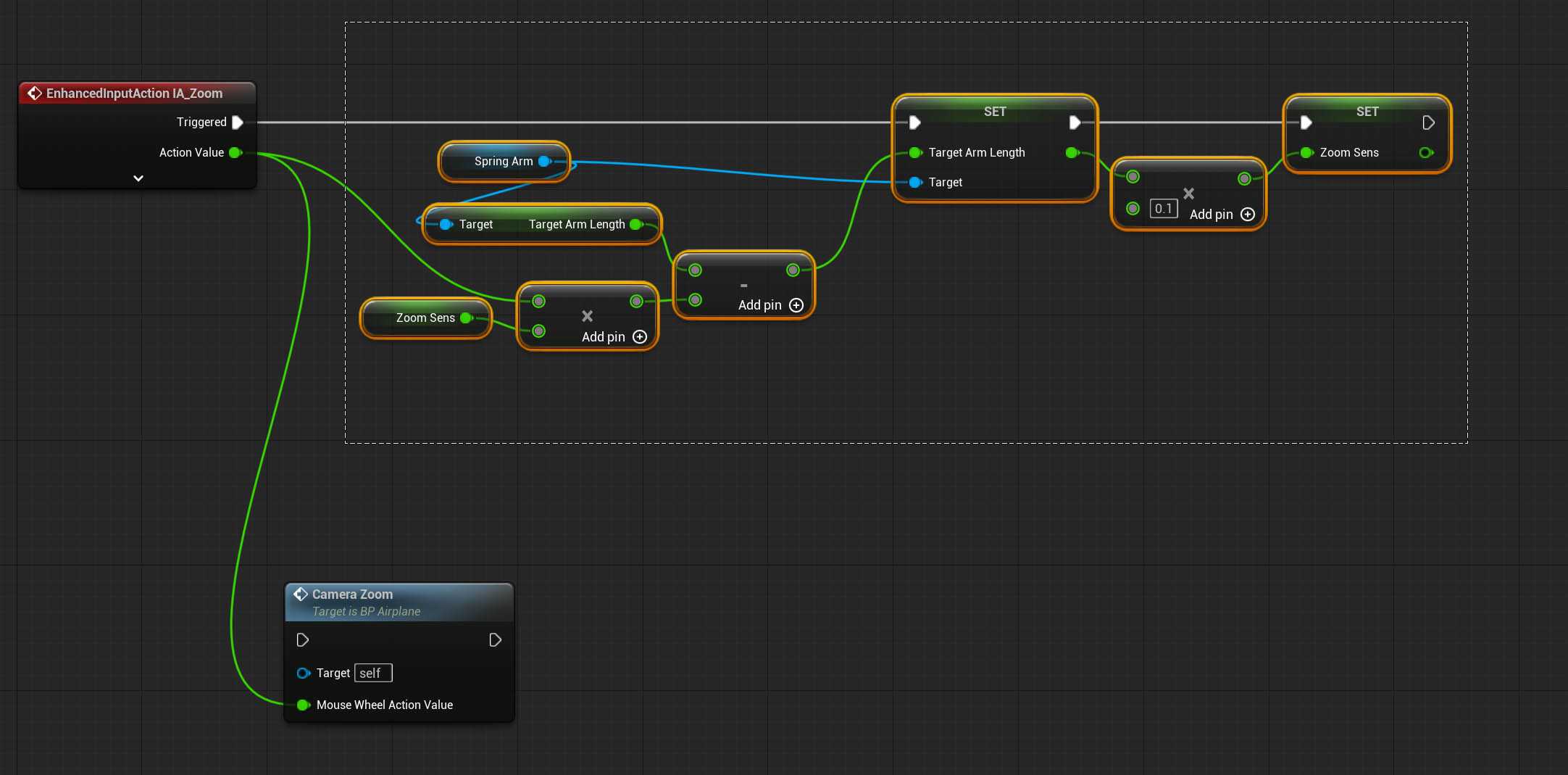 marble tusk
tranquil hamlet
I don't think there is
marble tusk
tranquil hamlet
I don't think there is
Then a switch on string could probably work
tranquil hamlet
yea I kinda committed too much to using text
thanks
could've just converted the getname to string and went about my day like nothing happened
 thin panther
Name = Identifier for objects. Very fast comparison
Text = User facing text. Localizable.
String = Anything that isn't the other two.
And FWIW, that screenshot will never work unless you put an object into that cast :P
tranquil hamlet
i use them interchangeably because im a doof
i do get the concept of using text for component refs and that kind of stuff tho
tranquil hamlet
thin panther
And FWIW, that screenshot will never work unless you put an object into that cas...
yea already did, just sent it a bit early
i was done copying and pasting my logic
dreamy marten
hexed igloo
https://i.snipboard.io/sPergF.jpg
This works but if I put it in to a function an...
That is because local variables are always set to default whenever you call again the function, that is the whole purpose of local variables: Storing variables exclusively during the execution of the function
maiden wadi
tranquil hamlet
is there a better way to do this?
The main issue with this is that if you localize your game. This all breaks. Someone playing in Chinese has 后面板 instead of BackPanel. So it never == true for them.
dreamy marten
dreamy marten
That is because local variables are always set to default whenever you call agai...
Here is the description of local variables from UE Doc: https://dev.epicgames.com/documentation/en-us/unreal-engine/blueprint-best-practices-in-unreal-engine
Local variables are scoped, which means that they only exist where you define them. So, a local variable in a function is only visible to that function, and not to other functions, or the Event Graph. This helps to reduce clutter for things that are only relevant within the context of that function. You can consider local variables a "scratch pad" to work within a function. You can use them to help perform what the function needs to, but they get tossed away after the function has completed.
hexed igloo
dreamy marten
Here is the description of local variables from UE Doc: <https://dev.epicgames.c...
Thanks for explanation.
tranquil hamlet
maiden wadi
The main issue with this is that if you localize your game. This all breaks. Som...
I dont think it should be a problem
Backpanel is a component of a statue that I'll trace to push the statue
If it gets translated for some reason I guess im fucked
hold on ill show you the heirarchy
maiden wadi
It will, unless you specify it not to specifically.
tranquil hamlet
 tranquil hamlet
maiden wadi
It will, unless you specify it not to specifically.
tranquil hamlet
maiden wadi
It will, unless you specify it not to specifically.
is there a node for that?
I don't plan on publishing this but it's good to have good practices i guess
maiden wadi
It's on the part where you specify the Text. So where ever GetDisplayName is pulling it's value from.
tranquil hamlet
thin panther
And FWIW, that screenshot will never work unless you put an object into that cas...
also this is why i sent the screenshot before creating an abomination

I wonder why they refuse to add named reroutes to BPs
tranquil hamlet
maiden wadi
It's on the part where you specify the Text. So where ever GetDisplayName is pul...
hit component after a capsule trace break
maiden wadi
Cause it's not the same as a material graph where there's only one possible output. Named reroutes wouldn't make sense in that they obfuscate the necessity to set them in specific places. In a material you know that if you connect to a name reroute, it has to connect to something else that can pull a valid value of some kind. You can't make the same promise in a blueprint very easily.
Worth noting that you can get a functions arguments by name though.
Not in the event graph, but in functions themselves.
tranquil hamlet
yeah but they can make it a context sensitive thing
I don't imagine it'll be too hard to implement
at least for the devs
maiden wadi
It would be easier to make invisible lines that still connect. And on hover still show where they connect. It would be better UI and infinitely easier to add, if you mostly just care about the lack of wires.
tranquil hamlet
I guess, but then you'll be hovering your mouse over everything in hopes of finding secret connections
if you're working with someone, that is
maiden wadi
Only if it has the endpoint of the special pin type that denotes it's "Wireless"
tranquil hamlet
no but I'm okay with a little cable arrangement
just preplexed as to why they didn't think to add a named reroute
you could technically turn most things that would work into a variable but it feels messy
maiden wadi
It's definitely one of those things that makes BP feel clumbsy over written languages who can just throw around scoped properties easily.
tranquil hamlet
yeah, sometimes I think something then try to figure out how to BP it without creating a sentient entity of chaos
 uncut elk
does anyone know if theres a permanent fix for structs failing on build after you make a change in them, having to go through and recompile every graph youre using them in is insanely tedious. dont mind if its a plug in or something. anything to just not have to recompile everything again honestly.

 rocky grail
Hello, I am trying to program a character that yaw based on my input. So right now my character will automatically reset to a z rotation of 0 when there is no input. Also the rotation is wrong as it gives 90 degrees rotation when i press up and left / right. Is there anything wrong with my calculations as shown in this blueprint?
 frosty heron
uncut elk
does anyone know if theres a permanent fix for structs failing on build after yo...
frosty heron
uncut elk
does anyone know if theres a permanent fix for structs failing on build after yo...
Abandoned blueprint struct, declare them in cpp
uncut elk
what is CPP, unless you mean C++, ive heard of this option but id rather explore other options first before looking into something like that because id still have to restructure a massive part of my project
rocky grail
OK solved the rotation part (i should use the zero vector isntead)
snow halo
are packagign errors always related to things not being valid?
or are there also other problems not just related to blueprint variables?
snow halo
frosty heron
Abandoned blueprint struct, declare them in cpp
my question might also be related to his problem
maiden wadi
uncut elk
what is CPP, unless you mean C++, ive heard of this option but id rather explore...
It is either you make a editor tool that recompiles all BPs, or you move your data sets to C++. It's worth noting that there are redirectors that you could use to redirect references from BP to C++ but I've never personally tested them. And if you do an editor tool that compiles everything it may work mostly, but it may also just leave you with partially broken things that'll cause bugs. But at least you'd get to compile most things quickly.
uncut elk
maiden wadi
It is either you make a editor tool that recompiles all BPs, or you move your da...
I see , thanks.
maiden wadi
It's worth noting also that removing properties from C++ will cause compile errors as well, that specifically is not a BP struct only issue. But BP structs are notoriously unstable at times.
 twilit orchid
Currently playing around with render targets and I'm a little stumped. Would anyone know why my render target is producing different results in the image depending on whether I capture the scene manually through a function vs capturing every frame? (The render target image gets exported, and re-imported and is shown in the bottom left)
crude birch
I am using the open URL function from within my game, but it's using the OS default browser - my current game prototype is on Steam though... is there a way to force the Steam browser to be used?
 astral mist
crude birch
I am using the open URL function from within my game, but it's using the OS defa...
astral mist
crude birch
I am using the open URL function from within my game, but it's using the OS defa...
The Steamworks API does expose ActivateGameOverlayToWebPage
But maybe that's not entirely what you were looking for
Sometimes a bit of glue c++ is required.
crude birch
astral mist
The Steamworks API does expose ActivateGameOverlayToWebPage
well i want to add a link to the main menu of the demo so people can wishlist the full game. if i use open URL, they have to login in that browser first, which seems like a showstopper to me
astral mist
crude birch
well i want to add a link to the main menu of the demo so people can wishlist th...
yup that much I understood. problem is I don't think you can do it directly from within blueprints unless there's some wrapper that exposes it
crude birch
astral mist
yup that much I understood. problem is I don't think you can do it directly from...
oh, okay. damn 🙂
 crystal ridge
I need to apply a constant force to the player in a direction of my choosing. I don't want gradual accelerate. It need to be instance.... stopping can be gradual
Why am I having more trouble than thought doing something so simple.....
faint pasture
crystal ridge
I need to apply a constant force to the player in a direction of my choosing. I ...
Do you know that a constant force = gradually changing velocity?
What do you want to be instant, the change in velocity or the change in acceleration?
crystal ridge
faint pasture
Do you know that a constant force = gradually changing velocity?
In hindsight, I want the velocity to change instantly and stay consistent for a while.
faint pasture
crystal ridge
In hindsight, I want the velocity to change instantly and stay consistent for a ...
Using CharacterMovementComponent or some other way of moving?
Are you trying to do a dash?
crystal ridge
faint pasture
Using CharacterMovementComponent or some other way of moving?
Yes.
faint pasture
What should the movement inputs do during this time?
setting the friction to 0 and adding an impulse should do it
but it 100% depends on all the other ways you want it to behave
crystal ridge
The player input can influence it slightly but overall the player should be forced forward at a constant speed
Abstract wise, it should be like the player is on a converter belt that is faster than them. They can slow down slightly or move faster with input.
faint pasture
For single player you can probably do that with a timeline that applies a force proportional to DesiredVelocity - ActualVelocity
For multiplayer it's not trivial at all, C++ territory probably
 slender dagger
what's the difference between these nodes?

 hardy fable
slender dagger
what's the difference between these nodes?
hardy fable
slender dagger
what's the difference between these nodes?
not much, other than the obvious: the top one is specifically for widgets. the generic Construct node can instantiate almost any UObject that exists (excluding a few that are marked as DontUseGenericSpawnObject).
Curiously, UserWidgets are one of the few that are marked that way, so its surprising it let you make one like that. What is the parent of WBP_Distance?
slender dagger
hardy fable
not much, other than the obvious: the top one is specifically for widgets. the g...
it's just a standard user widget class
hardy fable
then ue goofed, because its not supposed to let you put UserWidgets in the construct node, lmao
anyway, the only real thing that the Widget creator does is make sure that the owner is a player.
slender dagger
hardy fable
then ue goofed, because its not supposed to let you put UserWidgets in the const...
it must've seriously dun goofed then because it allows all my UserWidgets to go in there lmao
slender dagger
hardy fable
anyway, the only real thing that the Widget creator does is make sure that the o...
what if I want the owner to just be an actor?
hardy fable
yeah, thats the thing. widgets can only be owned by:
- Other Widgets
- A Widget Tree
- APlayerController (which is an actor)
- UGameInstance
- UWorld
anything else is banned

99% percent of the time, APlayerController is the correct owner when you are creating a widget, which is why the CreateWidget blueprint node only allows that
sometimes you may want a widget to persist across a level change, in which case you have to use the GameInstance as the outer
slender dagger
so why does it allow you to use a widget component on just a regular actor if it can't be owned by one?
hardy fable
it uses the World

the WidgetComponent is owned by the Actor its attached to, but the Widget itself is owned by the world
 vestal totem
(BP) I'm trying to have an actor (a table in the game) spawn other actors (cardboard) boxes on top of it (for an idle management game).
This works, but now I'm trying to offset the spawn point using the min and max values of the cardboard boxes Local Bounds, from the table actor. That way I can spawn boxes next to each other, back and forth.
I'm not able to figure out how to get the Local Bounds from the box mesh while in the EvnetGraph of the table actor. If I set a variable to an object reference the ref is null when I start the game. If I set it to a class reference, I can't seem to find a way to access the static mesh component of the box actor.
How might I do this? (Without just hardcoding the offsets - making it too reliant on a particular mesh).


 frosty heron
hardy fable
*sometimes* you may want a widget to persist across a level change, in which cas...
frosty heron
hardy fable
*sometimes* you may want a widget to persist across a level change, in which cas...
It still wouldn't presist though?
If you make it shared ptr then yeah it will presist
Otherwise it get destroyed on level change
Widget*
hardy fable
why would it be destroyed. if its stored in a UPROPERTY in a GameInstanceSubsystem, then its kept alive
we do this for a project at my job to make a UMG in a floating window seperate from the game viewport. we call TakeWidget on the uwidget and pass it to a new slate window, to have a interactable panel that persists across level changes.
frosty heron
hardy fable
why would it be destroyed. if its stored in a UPROPERTY in a GameInstanceSubsyst...
I tried it 🙂
If its a raw ptr then it will be destroyed
faint pasture
vestal totem
(BP) I'm trying to have an actor (a table in the game) spawn other actors (cardb...
try get defaults on SpawnItem
that'll let you inspect the default values of properties before spawning the thing
But if you're gonna spawn it anyways you can always just spawn then move
hardy fable
frosty heron
I tried it 🙂
dunno what to tell ya. its been working fine for us for three years.
there is no reason that changing the level would destroy an object created and owned by (and stored in) the game instance
vestal totem
faint pasture
try get defaults on SpawnItem
I'm not sure how to do that?
I've now just spawned one box on begin play and am hiding it before grabbing the offsets.
Feels clugy, but it's technically working.
 left flint
how can i search all my blueprints at once? like if i renamed something and i want to search the entire project for the old name so i can update it?
frosty heron
hardy fable
dunno what to tell ya. its been working fine for us for three years.
there is no...
Well maybe because you made it separate from the game viewport
Any blueprint attempts to make "loading screen" presist, by creating a widget and storing the ref in game instance has been met with failure.
faint pasture
vestal totem
I'm not sure how to do that?
I've now just spawned one box on begin play and am...
Do you ever want to NOT spawn the box?
Or do you always spawn but it ends up in different places depending on its size and what's already there
You can spawn it -> do math -> move it, and it'll never show up anywhere but the final spot you put it (dunno if it'll trigger overlaps and such tho)
vestal totem
faint pasture
Or do you always spawn but it ends up in different places depending on its size ...
Yes, that. I want to always spawn something. But I want to be able to switch the items that get spawned. That said, each table would only spawn one thing. I don't need to switch items on the same table.
So right now I have a "BP_Station" and child "BP_Station_Box" class. And I plan to make a "BP_Station_Cylinder" for example. But I want the logic in the parent class to adjust the spawn location based on the mesh chosen in the child class.
faint pasture
vestal totem
Yes, that. I want to always spawn something. But I want to be able to switch t...
I'd just spawn the thing -> do math -> place it
but have you tried see if get class defaults lets you get the extents?
faint pasture
left flint
how can i search all my blueprints at once? like if i renamed something and i wa...
That should be automagic
renaming something updates it where referenced
vestal totem
faint pasture
but have you tried see if get class defaults lets you get the extents?
I wasn't aware I could access a class defaults node to try that. I'll give it a shot.
left flint
faint pasture
renaming something updates it where referenced
oh really? perfect!
vestal totem
faint pasture
but have you tried see if get class defaults lets you get the extents?
Oh, that just gives me a node with all the variables. That's not really different from what I was dealing with.
My issue is was that I really needed an object instance reference to see the mesh bounds but I don't have an object to look at until I spawn one. I can't seem to tell it what I planned to spawn and look at the properties before hand.
Spawning an item first isn't terrible, but it makes the hierarchical stuff I was trying to do a bit more complicated I think.
Then again, I'm pretty new and might just be doing it poorly. 🙂
faint pasture
vestal totem
Oh, that just gives me a node with all the variables. That's not really differe...
get the mesh components mesh reference
It's probably doable but it'll be easier just to spawn the thing and do it, if you know you want to spawn it just do that
vestal totem
That's what I was trying, and couldn't figure out how to do.
Without spawning one first, at lesat.
faint pasture
I'd just spawn it, because there's another approach you can take
you can move it to a known good place and then sweep
vestal totem
sweep?
faint pasture
if you start in the top back left corner of the box you want to "fill", then sweep down, right, forward, you'll "fill" the box as you spawn more and more of the things
move with sweep on
it's a move from where it is to where you wanna go, stopping on hit
vestal totem
ah ok.
Right now I'm just spawning and dropping it on the table with physics, but I'll look into that.
Much appreciated.
faint pasture
vestal totem
ah ok.
Right now I'm just spawning and dropping it on the table with physics,...
You can do all the sweeping to place it then turn physics on and it'll be in a pretty good place
vestal totem
faint pasture
You can do all the sweeping to place it then turn physics on and it'll be in a p...
Is this in SetActorLocation I'm seeing in Google?
 zealous moth
does unreal have a checkpoint reload system where you can reload an entire game state to a previous state? Or must everything be saved as variables in a save data file?
faint pasture
zealous moth
does unreal have a checkpoint reload system where you can reload an entire game ...
If you count, restarting the level, sure. Other than that you have to do it yourself.
There are plugins that let you opt into certain things, though, I'm sure there's a million of them around
 plain sparrow
howdy, I'm working on a spawner system that will be spawning waves of enemies outside the camera view but relatively close to the player.
The game is 2D so I'm using an orthographic camera attached to the player's character.
I thought the best approach would be to have box colliders situated inside the player's character and position them at the beginning of play so they are outside the camera view.
My problem is I don't know where to find the bounds or extents of the camera view, i got some bounds but I think they are from the camera collider and not what the camera can see in world coordinates. How can I get this information or go about calculating it? I'm relatively new to unreal but not to game dev. How I would normally go about it in other engines would be to get the position of the camera then subtract the extents on either X or Y depending on the direction I want the position to be in related to the camera.
gentle urchin
vestal totem
That's what I was trying, and couldn't figure out how to do.
Get mesh ref -> get bounds ?
 lethal geyser
plain sparrow
howdy, I'm working on a spawner system that will be spawning waves of enemies ou...
lethal geyser
plain sparrow
howdy, I'm working on a spawner system that will be spawning waves of enemies ou...
What about spawning a "ghost" in your world, check if it's sensed by Player Character's AI Perception and then, if not, spawn your enemy and remove the "ghost"
dark drum
vestal totem
(BP) I'm trying to have an actor (a table in the game) spawn other actors (cardb...
You can get the bounds directly from the static mesh (not to be confused with the static mesh component). If the mesh used for the object is a variable you can get it using the 'get class defaults' node.
 waxen coyote
I have a Custom character with a single animation sequence that includes both idle (frames 0–75) and talking (frames 75–175) animations. I've split this sequence into two separate animation montages: one for idle and one for talking.
My goal is to have the character play the talking animation loop when the microphone detects input (i.e., someone is speaking) and revert to the idle animation when there's no mic input.
I'm seeking guidance on how to:
Set up microphone input detection using Blueprints.
Use the microphone input to toggle between the idle and talking animations accordingly.
Any assistance or examples on implementing this functionality would be greatly appreciated.
dawn gazelle
waxen coyote
I have a Custom character with a single animation sequence that includes both id...
I'm not great with the animation part of it, but I imagine you'd want this driven by the animation graph with a boolean value switching between the idle and talking animations.
As for the logical side of detecting the microphone input, it's as simple as adding an "AudioCapture" component to an actor, setting it to active, disabling the "Enable Base Submix" and adding the "OnAudioEnvelopeValue" event to your blueprint. This event will trigger whenever any audio is detected on the microphone. You'd need to have some kind of threshold which you'll check against and set a bool true/false based on whether or not that threshold has been met and this bool is what you'd end up using to help determine your animation in your animation graph.

 terse spruce
How do i get an accurate impact vector without physics collision.
For two moving actors (translation and rotation) I would to have a vector that represents an accurate impulse direction at the hit location given how each was moving.
The thing is, I don't want an actual physics reaction just the information. Additionally, when getting hit results from collisions I only get the normal at the point of impact rather than the actual impulse vector applied.
Example: let's say I hit a sphere tangentially (think of trying to spin a globe) I want the impulse that would send the sphere spinning.
Currently I do it in a roundabout way. When an overlap event start I do a trace to approximate the impact location, then apply an inverse transform to that point to get it's location for the actor's previous transform. Doing that for actor A and B I can sum the resulting movement vectors to get an impact direction.
But I feel like there has to be a backed in way to get that automatically that I don't know about
crude birch
I am using the Launch URL function from within my game, but it's using the OS default browser - my current game prototype is on Steam though... is there a way to force the Steam browser to be used? I want people being able to wishlist my game directly from within Steam, to prevent them from having to login in their internet bowser once more.
I already tried a console command too, not working though:
steam://openurl/https://my-url.com
 raw crypt
i made a slider to change the value for the sound mixer but it keeps reseting to 1 each time i try change it (moving the slider) and i have no idea what causes that, any idea?
 dawn gazelle
raw crypt
i made a slider to change the value for the sound mixer but it keeps reseting to...
dawn gazelle
raw crypt
i made a slider to change the value for the sound mixer but it keeps reseting to...
each time what?
raw crypt
dawn gazelle
each time what?
woops, here sorry misstype, each time i try to move the slider
dawn gazelle
Are you using a binding for setting the value of the slider?
raw crypt
i already did it once and it worked perfectly for footsteps but for some reason it won't with the other class mix

 halcyon vapor
Has anyone made a way to export a spreadsheet row to a data asset in unreal?
Not at runtime, but just to make the data asset creation easier
raw crypt
dawn gazelle
Are you using a binding for setting the value of the slider?
yes? i have no idea, i just use these nodes you see on screen
dawn gazelle
raw crypt
yes? i have no idea, i just use these nodes you see on screen
Ok let me rephrase to make sure I'm understanding...
Currently when you first see the slider it's starting at max (1) and when you adjust it but then release it, it jumps back to max?
raw crypt
though diffrence is that footsteps are being played outside this blue print (an actor plays those sounds) but the background music is whithing the blueprint that also has the nodes that changes it's values

 raw crypt
dawn gazelle
Ok let me rephrase to make sure I'm understanding...
Currently when you first se...
raw crypt
dawn gazelle
Ok let me rephrase to make sure I'm understanding...
Currently when you first se...
yes
dawn gazelle
raw crypt
yes
Ok, and when you have your slider selected in the widget designer, do you have a function for binding its value here? Do you have a similar function for binding on your other slider?
 raw crypt
dawn gazelle
Ok, and when you have your slider selected in the widget designer, do you have a...
raw crypt
dawn gazelle
Ok, and when you have your slider selected in the widget designer, do you have a...
 dawn gazelle
🤔 Do you have any other code that may be trying to set the value of the slider?
raw crypt
dawn gazelle
🤔 Do you have any other code that may be trying to set the value of the slider...
nope

 dawn gazelle
If you have no code that is modifying the value of the slider widget, and there's no binding set up, then the only way the slider value will change is by manually modifying the slider. I'd say try restarting the editor and try again.
 true valve
Do you which BP has the enter and exit car code in City Sample?
distant elk
Hi. Using "line trace by channel", how can I trace only against the landscape? I can collect all other objects and pipe them into "ignore", but that's very slow
 low glade
distant elk
Hi. Using "line trace by channel", how can I trace only against the landscape? I...
low glade
distant elk
Hi. Using "line trace by channel", how can I trace only against the landscape? I...
You mean not hit any other objects ?
distant elk
low glade
You mean not hit any other objects ?
Yes
low glade
distant elk
Yes
You can go into project settings and create a custom channel. You can make a "landscape" channel or whatever and make your landscape collision to only block this channel. Afterwards in your line trace by channel you set the channel to your "landscape" channel
distant elk
low glade
You can go into project settings and create a custom channel. You can make a "la...
Ahh, thank you!
narrow sentinel
Anyone know whats going on here
my motion warping is all setup correctly for the player to translate and the rotate
however when I run it all I get this
where the player character should be rotating etc they don't, the snap rotation at the end can be ignored as thats just from me attaching player to the vehicle actor
so turns out i need to ensure I don't have possesion over the player character if I do it seems to mess up the motion warping
plain sparrow
lethal geyser
What about spawning a "ghost" in your world, check if it's sensed by Player Char...
hey, thanks for answering! Not a bad approach, will give it a try
narrow sentinel
so anyone know how to do this right so player possessing a vehicle where you actually want a montage etc to play out but from the player perspective ??
anyone able to help at all please, having an issue at moment where if I possess the vehicle first and then play player montage the motion warping etc is all fine, it's just the camera stuff thats gets messed up. Where as if I possess the vehicle after the player montage is done I get rotations messed up on the motion warping
 severe coral
Hey. How to get velocity of camera animated in sequencer? I used “get all actors of class with tag” and then “get velocty” but issue with this workflow is that it doesnt account for parents. I wanted to use “get world location” and then with delay node calculate difference but I dont know how to use this delay node with “get world location”. When printing init pos and previous pos are the same, animation is working, cuz value itself is changing, seems like this delay step is not working properly
 tranquil hamlet
is this a 'debugging'
 tranquil hamlet
i need some help
after a trace channel break, im trying to get display name on my hit component, but it returns null, what could be the issue?
the trace is hitting the correct component and getting blocked in simulate
im gonna try just using collision boxes until somebody responds
nope nothin
 midnight field
Is there a way to make an actor with a ProjectileMovement tumble upon collision? Right now I've got a cube-shaped projectile that stays upright at all times, even when I've got Rotation Follows Velocity and Rotation Remains Vertical turned off.
mystic blade
Im able to display the amount of keys in the scene with an array but i cant get the 0 to update when a key is collected


i tried the increment node too
 flint solstice
mystic blade
Im able to display the amount of keys in the scene with an array but i cant get ...
flint solstice
mystic blade
Im able to display the amount of keys in the scene with an array but i cant get ...
Its a bit hard to tell what your expected outcome is from that blueprint.
I would assume the "Set Keys Text" node is updating the string to display the current collected keys.
But when you collect you arent setting the text again. So I would suggest you run the "TotalKeys" Event at the end of the execution of the Keys Collected event.
That way everytime you successfully catch a key, you update the "KeysText"
And then for cleanliness on the format text use a Keys Collected variable as a separate node instead of wiring it directly.
flint solstice
mystic blade
Im able to display the amount of keys in the scene with an array but i cant get ...
Also if you haven't, make sure you do a print string, to see if its firing and your getting the string update, and maybe the UMG isn't refreshing properly. Another way would also be to do the get all keys once at the start of the level, or whenever you first expect there to be all the keys. And capture the length then as a value. And not be doing the get all actors and the loop, because as that is written, you are setting the text as many times as you have keys, which is probably not what your goal is.
mystic blade
yeah that for loop i had was useless since i didnt need to be iterating over anything, just getting the length of the actors array was enough
flint solstice
severe coral
Hey. How to get velocity of camera animated in sequencer? I used “get all actors...
You definitely don't want to have a delay node on the execution path with a timer. Do you need the constant velocity of the camera?
Whatever script that is, run the get actors of class on function you fire once and store the value of that object.
Then on the tick, you will want to check the current position against the "previous position" which you will use with delta seconds to calculate a velocity.
To get that Previous position, you set it with the current location. So the calculation will only be bad on the first tick because previous position would be zero.
Also depending on what blueprint that is you can dial up or down the tick frequency, if you don't need the velocity update as frequently.
 lilac storm
Hello guys how can i can i convert FRotator that hold World Space rotation of the bone to a BoneSpace Value ?
spark steppe
get the parent bone transform/worldRotation and use a make relative node (if that exists for FRotator, not 100% sure)
otherwise you may have to convert the FRotators to FQuat
low glade
Hello, does anyone know the difference between these nodes?

 maiden wadi
low glade
Hello, does anyone know the difference between these nodes?
maiden wadi
low glade
Hello, does anyone know the difference between these nodes?
One uses a key, one uses a hard coded FName. They do the same thing.
low glade
maiden wadi
One uses a key, one uses a hard coded FName. They do the same thing.
What is the benefit of the key if I can just type the name?
maiden wadi
low glade
What is the benefit of the key if I can just type the name?
So I have a blackboard here with a vector value.

This task sets this value from a key and name. Both of these are identical in logic. Changes the BTTask owner's blackboard value. Note the two variables are instance editable.

And in my Tree, I can set those variables. But note I can just pick my property from the blackboard directly with the key in the dropdown. I don't have to type it in.
 low glade
maiden wadi
This task sets this value from a key and name. Both of these are identical in lo...
low glade
maiden wadi
This task sets this value from a key and name. Both of these are identical in lo...
Here what is the use of blackboard field key? I understand a key selector is needed but what does that variable have to do with your blackboard vector?
maiden wadi
It's a key to the property. It's essentially the same as the FName. But it allows me to pick it in editor with the dropdown.
low glade
Ooooh I just looked at the other photo sorry it's kinda late here and I'm a bit off
maiden wadi
Either works. But Keys are usually easier to use. Less error prone from typos, don't have to open the blackboard to copypast the name, etc etc.
low glade
maiden wadi
Either works. But Keys are usually easier to use. Less error prone from typos, d...
I have a blackboard enum value and I want to pass it's state inside one of my tasks, if I use the get blackboard value as enum and just plug my enum into the key, will that be enough to have a refference of it inside the task so I can use it ?
low glade
maiden wadi
Either works. But Keys are usually easier to use. Less error prone from typos, d...
Yeah I get it thanks a lot. I actually used blackboard keys some months ago inside my project and I found them and couldn't remember what they do lol
severe coral
You definitely don't want to have a
 inner spruce
Not sure if this is the right place for this but hoping somebody can help me with this weird animation blueprint issue I'm having.. I'm using a Layered blend per bone with skeleton slots/slot groups to create a draw/sheath weapon animation. It works great at first (idle or running/walking) but once I possess a different character (or sometimes after performing some sort of action with the character) the Layered blend per bone only works when idling - the locomotion just overrides the montage(s) from there-on. The montage is being played from the character's blueprint (maybe thats the problem? But doesn't make sense why it would work at first then stop working) All characters are using the same animation blueprint and I have the same issue no matter which character I possess first (possessing randomly on begin play).

 tiny tundra
Gamepad thumbstick issues! Really basic - I don't have anything unusual setup (that I am aware of) in my input system. I am trying to use a gamepad thumbstick to move something, everything works fine except when I instantiate a certain kind of camera (not sure about the camera so don't ask me.. yet) then it seems to be disabling just these thumbstick events. Other events (mouse clicks, drags, etc) are still working fine. My suspicion is that the presence of that camera is somehow consuming/overriding the general unreal input system and killing these gamepad events in particular.
When I launch Unreal, it gives me that usual "input device ID 0 connected" message as expected. When I run in the editor without that camera mode working, it is fine. When I switch to the special camera mode, and hit Play, I get a similar popup message "input device ID 1 connected" and it won't work as stated. If I stop playing, disable the special camera, then things work. Any ideas what I can do to fix?


sorry fixing events:

 delicate torrent
I forgot how can I cast a pawn to a widget so I can delete the thing and then spawn it again?
Because casting from pawn to widget just fails
 mystic blade
flint solstice
Also if you haven't, make sure you do a print string, to see if its firing and y...
mystic blade
flint solstice
Also if you haven't, make sure you do a print string, to see if its firing and y...
ive cleaned up the blueprint a good amount removing unecessary nodes but and i tried printing if the number was being increased but its not. im probably not reference the "Key" class properly
faint pasture
delicate torrent
You're asking if self is a widget
Am I (an offroad car pawn) actually a WidgetMenu?
the answer is no, obviously.
mystic blade
mystic blade
ive cleaned up the blueprint a good amount removing unecessary nodes but and i t...
should i be casting or should i stick with a direct reference?
faint pasture
mystic blade
should i be casting or should i stick with a direct reference?
You need to know what casting means
delicate torrent
faint pasture
You're asking if self is a widget
fair enough, gotta try find other way to get reference of the pawn to the widget
faint pasture
Why not have the widget do the work.
Imagine you're the widget. YOu wake up, and want to know WHICH offroad car you care about
how would you know?
Your creator (the thing that spawned you) could just tell you, or you could try to figure it out on your own.
Where is that widget spawned?
delicate torrent
faint pasture
Where is that widget spawned?
this widget is the default VR one which is on the VRPawn itself
faint pasture
delicate torrent
this widget is the default VR one which is on the VRPawn itself
and does VRPawn have a reference to the car they're in?
For now the widget can just get actor of class OffroadCar
but that will fail if there's ever more than one OffroadCar in the world
It'll work as a shitty hack for now
delicate torrent
faint pasture
For now the widget can just get actor of class OffroadCar
I mean, yeah, I just wanted to destoy the existing one and spawn another one nearby, this is why I actually would need to get reference of it in the widget
Like, it's a VR game that you walk around(obviously), and you are not linked to the car in any way until you get in, then you gain control of the vehicle
I will worry about deleting the car later, to demonstrate it for the university it'll be enough to just spawn it
mystic blade
faint pasture
You need to know what casting means
ik what casting means i just dont know when i should be using it
you telling me to "know what casting means" doesnt help me
and sometime idk what to pass into the object pin when casting

here's what i had
and here's what i changed

the "KeyRef" variable type is set to an "Object Reference" of "BP_Key"
what im trying to do in "BP_Key" is set a boolean to "IsCollected?" and if that boolean is true, increment the "KeysCollected" int value by 1 each time "
"IsCollected?" is true
 worn dove
So I have a general architecture question. So with the Pawn/Controller pattern, the controller should control the inputs and send them to the pawn, where it interprets them, right? What do you do if the player can possess two very different pawns? If the player has a choice between possessing a vehicle and soldier, then how should the Input Actions Shoot and Brake propagate to the pawns?
faint pasture
worn dove
So I have a general architecture question. So with the Pawn/Controller pattern, ...
Put the actions on the pawns themselves
Typically you want to put inputs in the playercontroller that are common / do not rely on the pawn
 hollow remnant
For some reason when I try to delete an actor using an attempted replicated method nothing happens. I'd be grateful if someone could help me out.


 chilly crane
If I use the open level node, it toally resets all the actors doesn't it? So all info stored in the player character will be lost right? Meaning I have to cache it all in the game instance to transfer necessary stuff between levels
dawn gazelle
hollow remnant
For some reason when I try to delete an actor using an attempted replicated meth...
- You shouldn't be enabling input on random actors - in order for this PickUp input event to work then you would've had to enable input on this actor. Ideally you would be having the input on your character or player controller and having a means to communicate to the actor.
- You don't need to cast character references to character, hence that little "NOTE" on the bottom of the cast. It's pointless.
- You can only send RPCs to the server on replicated actors that are owned by the client. You likely wouldn't have set the ownership of this actor to any particular client, nor would I recommend doing so. You should likely be using the player controller or the character or a replicated component on these to send the RPC to the server for this particular type of actor and interaction.
- If you're trying to destroy a replicated actor, then you should only need to destroy the actor on the server, no multicast needed.
- It looks like you're passing the character reference through and requesting to destroy it.
astral mist
chilly crane
If I use the open level node, it toally resets all the actors doesn't it? So all...
Pretty much yes. The game instance persists.
mystic blade
mystic blade
what im trying to do in "BP_Key" is set a boolean to "IsCollected?" and if that ...
bump
faint pasture
mystic blade
and here's what i changed
None of that code on the bottom half will run
mystic blade
ik im currently moving things around
faint pasture
What are you after? This event UpdateKeyCount, what class does it live in, and when does it run?
mystic blade
i moved the increment stuff for keyscollected to the key blueprint since it made more sense to me to udpate the integer when the boolean is set to true in the key blueprint

instead of doing it in my widget blueprint
still need a way to get the KeysCollected variable in the key blueprint
faint pasture
mystic blade
still need a way to get the KeysCollected variable in the key blueprint
What object should be storing KeysCollected
Pawn probably I'd guess
faint pasture

then set the overlapping players keys collected to be 1 more
or if stuff needs to know about the collection happening, make an event on the pawn to do this instead of directly just setting the number to be bigger
Overlap -> is it a BP_Player? -> yes -> call KeyCollected on it -> hide self etc
Then in BP_Player:
KeyCollected -> Keys++ -> do all the checks and such that need to happen when a key is picked up
chilly crane
astral mist
Pretty much yes. The game instance persists.
No way to transfer selected actors to the new location across levels?
lunar sleet
chilly crane
No way to transfer selected actors to the new location across levels?
Save their settings and spawn them with said settings
frosty heron
chilly crane
No way to transfer selected actors to the new location across levels?
There's should be a way with ServerTravel (Seamless Travel).
but if you are only in blueprint world.
then that's probably off the table. Just store the character state and re-create it.
https://wizardcell.com/unreal/persistent-data/#persistent-objects-on-server-to-destination-map
https://wizardcell.com/unreal/persistent-data/#persistent-objects-on-client-to-destination-map
https://wizardcell.com/unreal/persistent-data/#persistent-non-actor-objects-across-seamless-travel
WizardCell
Compendium for traveling, disconnecting, and persisting data across such scenarios
 broken aspen
Actively trying to do that.
tardy bramble
can anyone point me in the right direction what to add to this to stop my stamina from depleting if i press the run button while standing still

 grave hill
broken aspen
Actively trying to do that.
grave hill
broken aspen
Actively trying to do that.
Turns out it was as simple as doing this
GameplayCameraComponent->AttachToComponent(GetAttachTarget(), FAttachmentTransformRules::KeepWorldTransform, FPPSocket);
grave hill
tardy bramble
can anyone point me in the right direction what to add to this to stop my stamin...
Your IsRunning should be set by something like RunningButtonPressed AND MovementComponent.GetVelocity() > 0
tardy bramble
Makes sense thanks
grave hill
You're welcome, in most cases I'd also add some kind of threshold so that stamina only depletes if speed is above let's say 5 units
 wary leaf

I've created a Dispatcher on my HUD so that I can fire an Event in the Level Blueprint that should change the Widget and Pawn Classes on the press of a button...But it doesn't do anything.
Explorer Actor is a navigation pawn on a 3D map (the level itself) and RIder Actor is the actual Player Character.
spark steppe
Station is the level blueprint?
player character is probably not valid when BeginPlay of the world/level happens
so you should add a delay of 1 tick (in UE4 you probably have to use a normal delay node with 0 as duration)
faint pasture
tardy bramble
can anyone point me in the right direction what to add to this to stop my stamin...
Why do you have a timer and a delay loop calling the same function
choose one
spark steppe
wary leaf
It does nothing. 😕
ok, besides of that it's not good practice to use the LevelBP for stuff, if not necessary.
Your logic looks like it would rather belong into the PlayerController class
if you don't have a custom one, make a blueprint and extend the PlayerController class, then in your gamemode/world settings set the PlayerControllerClass to your custom BP
there you should put the keybinds and the respawn logic
wary leaf
I need to get Transform values from the Level Blueprint for respawning, that's what bothering me the most.
Should I make the Level send Transform data to a Variable on the Player Character ? And they keep exchanging Translation values when needed ?
grave hill
Level shouldn't be sending any data, your transaltions should be stored in some actors (or as actors) and then when you need to respawn, do Get Actor of Class
wary leaf
Transforms I meant, sorry.
spark steppe
the level blueprint is pretty cumbersome for a lot of things, because it's a one way street...
grave hill
Just in general design your code to be not dependent on Level BP
spark steppe
what kind of transforms?! Spawn locations?
wary leaf
Yes. For Spawn Actor.
spark steppe
make actors for that and place them in the level
wary leaf
The thing is, I'm changing the Actor Class when I enter the "Navigation mode", so I destroy actor, Spawn Actor and Possess.
grave hill
How do you calculate the translation? How do you decide where you want to spawn the actor?
wary leaf
I have Player Starts on the map for now but I have to see for multiple locations.
spark steppe
you can make a generic BP_SpawnPoint and put them in the level
wary leaf
I suppose it can be anything on the map like a sphere set to Hidden for example.
spark steppe
if they should only work for a specific actor you can add a class variable/array with a whitelist of allowed spawn actor types
grave hill
I assume you are using Level Blueprint, because you can reference actors(Player Starts in your case) directly from the level there. The better way to do it, and which works out of Level blueprint as well is the "GetAllActorsOfClass"
wary leaf


So I've done that and it works like I attempted using the Level's Event Tick for the lower part, but when the Actor Class changes, I can't move / rotate it.
Looks like the Actor gets locked on the Transform values... but it isn't Ticked... 😕
 graceful holly
Can someone help me understand what is happening and why?
I need to use the Any dmg and apply dmg nodes of unreal but for some reasons the collisions are not always accurate and sometimes the events are not firing even if the node is telling me that it has indeed applied dmg.
I tired fidlding with collision presets and changing the dmg prevention channel but i get the same results


 stone cove
did you ever find a fix for this?
 random pulsar
whats up chat
how can i add dynamically a sphere and set its radius to be the same value as the radius output of the function

 errant raft
stone cove
did you ever find a fix for this?
errant raft
stone cove
did you ever find a fix for this?
i rewrote all of it in cpp by now, but back then I took old version and replaced the new one
stone cove
I'm downgrading to ue 5.4 to get rid of this problem hopefully. I have a big project and it would take ages to manually fix everything.
Edit: Downgrading fixed the problem
low glade
Hello there, I have a question, I have an ai that I want to teleport near the player at some times(imagine a stalking enemy) and at other times completely disappear, like it run off but the player can't find it. I could just spawn and despawn it but the teleport logic is within my behavior tree and if I despawn it the tree doesn't work. The other option would be to just teleport the ai some place very far away which sounds kinda weird to me, is it what people usually do or is there some better way?
pallid ice
low glade
Hello there, I have a question, I have an ai that I want to teleport near the ...
you would be surprised what game devs hide under the maps for resource reasons :p
low glade
pallid ice
you would be surprised what game devs hide under the maps for resource reasons :...
They teleport stuff under the map?
Lol
I assume with gravity disabled?
pallid ice
yep most of the time i disable tick and other stuff aswell, I only do this if i need them again at some point
low glade
pallid ice
yep most of the time i disable tick and other stuff aswell, I only do this if i ...
My enemy's whole behavior revolves around the teleporting and disappearing
So maybe that's would be ideal
Is there some benefit to despawning?
pallid ice
if you despawn and respawn it then its health and other variables are reset no?
it would be an entirely new enemy then
low glade
pallid ice
if you despawn and respawn it then its health and other variables are reset no?
Yeah my enemy is of the invulnerable kind because I'm making a horror game
pallid ice
Reminds me of this
https://youtu.be/g3WAH3cjvEY?si=FBLa-IfAcO2FFTKH&t=259

In Choo-Choo Charles we have a huge open world map to explore. But how does the game work behind the scenes? In this video we'll be heading out of bounds, sequence breaking the game, and looking at all things hidden in Choo Choo Charles!
A big thanks to Two Star Games for giving me a copy of Choo-Choo Charles early! Check out the game here! ►...
low glade
pallid ice
Reminds me of this
https://youtu.be/g3WAH3cjvEY?si=FBLa-IfAcO2FFTKH&t=259
Yeah I've seen this before
Seems like a nice approach, just hide the monster in a box below the ground
low glade
pallid ice
yep most of the time i disable tick and other stuff aswell, I only do this if i ...
Wait can you disable tick only for a specific actor ?
 broken aspen
grave hill
Turns out it was as simple as doing this
`GameplayCameraComponent->AttachToComp...
broken aspen
grave hill
Turns out it was as simple as doing this
`GameplayCameraComponent->AttachToComp...
Nice, I am using blueprint only and this does not work in just Blueprint. I appreciate this though! I may just switch to C++ for this as well.
dark drum
broken aspen
Nice, I am using blueprint only and this does not work in just Blueprint. I appr...
Is this not working?
 broken aspen
dark drum
Is this not working?
broken aspen
dark drum
Is this not working?
No, I just tried it.
dark drum
broken aspen
No, I just tried it.
Odd, it just calls the attach to component function in C++. (the lengthy 300+ line one)
 broken aspen
dark drum
Odd, it just calls the attach to component function in C++. (the lengthy 300+ li...
broken aspen
dark drum
Odd, it just calls the attach to component function in C++. (the lengthy 300+ li...
I think that DOES work but the GCS does not work currently for multiplayer replication so inherently it will not work
astral mist
chilly crane
No way to transfer selected actors to the new location across levels?
Along with the aforementioned solutions consider looking at the problem from another perspective and figuring out if you really need to do what you're doing.
summer coral
so im trying to attach an actor to my main player and then an actor to that actor. (bow attached to a player and an arrow attached to the bow.) however becuse of how transforms inhearit when i do this it requires that my manny not be moved or the second object will try to inherent its transforms. The issue with this is manny is normally moved down 90 units as its feet have the pivot, anyone have any ideas on a fix?
If i move manny to the right spot all my controls get inverted
grave hill
broken aspen
No, I just tried it.
Are you doing it on construction script?
broken aspen
grave hill
Are you doing it on construction script?
No, begin play after a delay until next tick node
grave hill
Hmm.. it should be working then.
I'll test in my project with the blueprint node to see if it works
dark drum
summer coral
so im trying to attach an actor to my main player and then an actor to that acto...
Show how you're handling the attachmet. Also, you normally need to disable collision on things you attach to the character if it would intersect with the capsule component, otherwise it messes up the movement.
summer coral
dark drum
Show how you're handling the attachmet. Also, you normally need to disable colli...
ah, i still had some collision on my arrow mesh dispite me turning off the capsules collision. Its weird that when i offset it the amount of manny it worked lol, guess that was enough of an offset to be out of the capsule
 woven drift
i want to make my custom button class, for now purely to add custom sound and already assigned style, so i can grab it from user created widgets and change it at any moment without changing every copy of this button
but i just cant figure out how to get the OnPressed event of the button visible or make my own which can be accessed
i tried making a child class from Button class but there's just nothing to override in BP

 tardy bramble
@grave hill any chance of dm ?
broken aspen
woven drift
i want to make my custom button class, for now purely to add custom sound and al...
You have to make this logic in the parent class. I have this same issue but you just need to set each button sound to what you need.
maiden wadi
It's nice not having to wrap buttons for this anymore. CommonUI ftw.
mystic blade
i was able to confirm the KeysCollected value was increasing each time a key was collected but im not able to update the text for whatever reason


heres the player code as well for adding the widget to the viewport

i attached a print statement to the KeysCollected in the widget blueprint and the number wasnt changing there
lunar sleet
mystic blade
i was able to confirm the KeysCollected value was increasing each time a key was...
You’re not doing what you were told
mystic blade
??
lunar sleet
Iirc I told you to increase an int and SET it to itself
What your current code is doing is taking int, adding 1 and outputting the resulting temporary value into a print string,
You need to overwrite it each time by SETting it to the new value
mystic blade
like this?
 lunar sleet
Yes
mystic blade
but isnt increment already setting it?
lunar sleet
And if you’re trying to pull KeysCollected from a different bp you need to also make sure you get the proper ref.
lunar sleet
mystic blade
but isnt increment already setting it?
No, it’s taking X and adding 1 to it, then printing out the result
you need to actually store x as x = x + 1 otherwise the actual value of x never changes
X in this case being KeysCollected int
mystic blade
so what does this mean then? just out of curiousity
 lunar sleet
Oh, maybe that’s supposed to do it too then. But you said the value wasn’t increasing ?
mystic blade
it was but the text wasnt updating
lunar sleet
Is the text in a diff bp?
 lunar sleet
How are you getting KeysCollected within that widget
 meager spade
mystic blade
i was able to confirm the KeysCollected value was increasing each time a key was...
meager spade
mystic blade
i was able to confirm the KeysCollected value was increasing each time a key was...
That's not how you are supposed to set text
mystic blade
wdym?
meager spade
Unless UE5 does it differently
lunar sleet
But also you need to make sure the KeysCollected variable is referenced correctly
If you just created a second one in the widget bp and expecting it to update it won’t work
meager spade
Wait, I'm probably misunderstanding here, don't mind me
mystic blade
lunar sleet
If you just created a second one in the widget bp and expecting it to update it ...
im getting the keyscollected variable from the widget in the key bp
lunar sleet
mystic blade
im getting the keyscollected variable from the widget in the key bp
If the addition is not done in the widget you need to make sure the value you’re getting is the latest one
Try printing the KeysCollected value before SetText, in that Event Update Key Count
meager spade
I'm almost convinced the setting text part is the problem
lunar sleet
meager spade
I'm almost convinced the setting text part is the problem
Could be. But also improper bp comms is likely
mystic blade
lunar sleet
Try printing the KeysCollected value before SetText, in that Event Update Key Co...
it prints 0 when the game starts and then doesnt print anything else when keys are collected
lunar sleet
mystic blade
it prints 0 when the game starts and then doesnt print anything else when keys a...
Then that event prly isn’t firing when you want it to
Which makes perfect sense because I only see you calling the event on BeginPlay
lunar sleet
mystic blade
it prints 0 when the game starts and then doesnt print anything else when keys a...
You should call it again on Component Hit, otherwise it’ll only do it the once
mystic blade
call the print again?
lunar sleet
mystic blade
call the print again?
No, the event that updates the key count

 mystic blade
ah
lunar sleet
And also realistically you should prly just do the increase in that update key count event
Unless you need the value in the current bp
 sturdy blade
does anyone have any tools that can generate call graphs or even sequence diagrams for blueprints? I feel a lot of functionality is present with the reference finder and viewer, but i have found anything that takes that step into taking the referenece finder results and outputs them as a graph of connections. I just ask becuase it would be MASSIVELY useful in reverse engineering plugins and assets that I need to modify for projects.
 golden frigate
Hey so I’m trying to develop modular blueprint classes which contain meshes but I run into a problem. I can easily do a SM var with a construct script but if I try to do an arbitrary amount of SM’s the construct script bugs out. Is there a reasonable way to have an array of variables for static meshes?
sturdy blade
a rough work around would be using a structure, are you referring to changes the var type to an array and it bugging out?
golden frigate
I’m referring to when construct scripts generate static meshes, instead of set them, they have clean up issues
Basically set static mesh works but add static mesh has issues, so if I want to dynamically put meshes on an actor they need to be fixed quantities
I think if I move it to the begin play event it would work but it would be nice to see all the components in the editor
sturdy blade
set static mesh is for a single object, add is for arrays, change the static mesh variable from a single object to an array, its on the drop down for defining the variable
golden frigate
so this is totally fine? idk y but ive had issues in the past with something similar to it
 sturdy blade
what error does it return? if that mesh array doesnt have any defaults then you trying add empty references to a new static mesh. also double check the mesh array and make sure they are static meshes not another type
steady night
anyone here good with github ?
 storm orbit
I would not add components to an actor during its construct script. That's just asking for trouble.
Components get registered differently when added at runtime versus being a compiled part of the actor (stuff like added accessors and references).
Instead you could try doing it juat after construction (one frame later) or have an initialize event you manually call after all the meshes get added
golden frigate
storm orbit
I would not add components to an actor during its construct script. That's just ...
ya thats what ive been told which is y i was asking. but i do want to be able to see the meshes in the editor which is the point of using the construct script
i guess ill just try to limit how many of these i use
storm orbit
It depends what your use case is, but you can always put in a few "proxy" components on the actor that can act as slots. That way youre editing a component during xonstruct instead of creating and adding a component
golden frigate
i did that but having a fixed amount of them is not the nicest solution because one thing might need 5 and most need 1
storm orbit
I would stay away from designing anything with dozens of attached mesh components, because the design pattern breaks down quick
Could you get away with 10 slots?
golden frigate
if i make 10 slots then wont ones which only need 1 slot be wasting data
storm orbit
The components themselves arent too expensive. The meshes and the allocation for those are the big cost
So if you leave them blank, its not as bad
golden frigate
i think im fine with doing the add mesh in constructor as long as i dont do anything that builds vars
storm orbit
Your parent actor will have a hard time knowing when those components are initialized and ready to use. You will also cause a frame hitch as each mesh gets instantiated in zero frames consecutively.
Its not that you can't use that pattern, it just has drawbacks
golden frigate
if it slows loading in that wont be a problem cause these actors are just static in the level, im making a generic actor class for things that i want to have toggle states like doors, drawers, etc
but i ran into the issue where some of my meshes have more than 1 component that needs to move in sync
like if i want double doors to open together
storm orbit
For prop animation, there are lots of options.
Is there a reason you can't make a double door actor that inherits from your door actor? The child could have the extra mesh component and you could override whatever animation you're doing
In general, those components should be baked into the actor. Runtime component adding is always going to cause some issues if you're relying on it for any gameplay feedback
golden frigate
im just doing it to make adding new things way easier. i dont want to break out a blueprint editor for each door i add
 odd kiln
Hi all !
Anyone know how to check if the analog is pushed fully ?
I want to execute an event only if the left analog stick is at maximum
storm orbit
It depends how you are currently capturing input. Are you using legacy or enhanced input?
odd kiln
storm orbit
It depends how you are currently capturing input. Are you using legacy or enhanc...
Enhanced
Actually I also use the "InputAxis Move Right / Left" and Forward / Backward nodes
storm orbit
golden frigate
im just doing it to make adding new things way easier. i dont want to break out ...
That's fair. If you're careful with accessing them and you clear the references between levels, it could work fine
odd kiln
I thought about checking the "Axis Value" float if they are greater or less than 1 but if I go diagonally I got like 0.8 and -0.7 values from Left / Right and Fwd / Bwd
storm orbit
odd kiln
Actually I also use the "InputAxis Move Right / Left" and Forward / Backward nod...
You want to process both your right and forward vectors together and get the length. The length of that 2d vector should be about 1
odd kiln
storm orbit
You want to process both your right and forward vectors together and get the len...
Right / Fwd vectors or axis value ?
storm orbit
You can combine the axis values into a 2d vector. If it's nearly equal to 1, you're holding the extents of the analog
Yeah, I meant axis values
This gets tricky if youre doing other stuff on those movement events. You might have to cache values and send that to another function/graph to process them together
odd kiln
It's not very accurate because when I'm holding the extent of analog diagonally I have like "0.94" and "0.65" and when I release a little bit I got like "0.93" and "0.64"
It really depends about the angle..
I need to have fixed values
storm orbit
It kinda depends on the controller, too. I beleve X input does box analog (top, bottom, left, right output 1, corners are 1) other controllers do tblr= 1, corners are ~0.72 i think?
I think theres a way to change how it's input
What outputs do you get at the cardinal directions? Those should be close to 1 if your controller is decently calibrated
odd kiln
storm orbit
What outputs do you get at the cardinal directions? Those should be close to 1 i...
Yes if I put the analog at extent top bottom etc I got 1 or -1
I guess I have to "add" both of input and do something with it
storm orbit
What do you get for each axis at the corners?
odd kiln
storm orbit
What do you get for each axis at the corners?
X = 0.833 ; Y = -0.573 for Top / Left corner
odd kiln
storm orbit
Left should be negative X though
Yes it's minus 0.573 sorry
For Right it's the same but positive
storm orbit
Are you reading these directly from the input axis forward and input axis roght events? Forward and right should be positive values
golden frigate
storm orbit
For prop animation, there are lots of options.
Is there a reason you can't mak...
i think this is a fair compromise. if there is more than 1 mesh it adds, otherwise it just uses the root
 odd kiln
storm orbit
Are you reading these directly from the input axis forward and input axis roght ...
odd kiln
storm orbit
Are you reading these directly from the input axis forward and input axis roght ...
Yes directly from input axis values
Fwd / Right = Positive
Fwd / Left = Y is negative
 peak vale
hellos, I am following this tutorial : https://www.youtube.com/watch?v=R5o2CjPb3Tk&t=1127s but when I press the assigned button to start ragdoll the game crashes I am using custom version of GASP any idea what would cause such a thing?

In this Unreal Engine 5 tutorial, you’ll learn how to create a fully active ragdoll system from scratch on Unreal Engine 5.5 like in ALS.
📚What We’ll Cover Today:
- Creating a Realistic Ragdoll in Unreal Engine 5.5
- Setting Up the Physics Asset (shapes, collisions, constraints)
- Blueprint Logic for toggling ragdoll mode and blending ph...
storm orbit
Does your input mapping have any modifiers or swizzles? Also, does your character move normally haha
odd kiln
storm orbit
Does your input mapping have any modifiers or swizzles? Also, does your characte...
No modifiers and my Character moves normally yes x)
storm orbit
What happens as you go from forward (1) to top right? Does your y value decrease as the x value increases?
odd kiln
storm orbit
What happens as you go from forward (1) to top right? Does your y value decrease...
The inverse. The X values decreases and the Y value increase
Because I put the the Fwd / Bwd axis value into the X of a "Make Vector 2D"
I could inverse the pins but it's the same
odd kiln
Ok not a real problem but I did it
storm orbit
So if you make vector 2d and do getLength, what do you get if you hold forward all the way and rotate at the max? Does it stay almost at 1 (0.95 at least)?
odd kiln
storm orbit
So if you make vector 2d and do getLength, what do you get if you hold forward a...
My god I forgot to do the "Vector 2D Length" ... thank you
When I'm at maximum analog stick, I got 1 or greater than 1 in any direction
And if I release a little bit I got less than 1
All is good now, thank you so much
I can use this value to check if my Analog Stick is at maximum extent or not
storm orbit
Are you using an xbox controller?
odd kiln
storm orbit
Are you using an xbox controller?
No PS5
storm orbit
I think with the windows drivers, that ends up being the same as xbox withe respect to the analog values. You should check with some other usb controller when you have time, just to make sure other controller work too
odd kiln
Ok I will, I have other controllers to check
storm orbit
And also, you'll get some more erratic values when using keyboard/digital inputs
You'll have to process those in a different way if you plan sto support both
(For example, your vector length for diagonals will be like 1.4)
odd kiln
storm orbit
And also, you'll get some more erratic values when using keyboard/digital inputs...
Yes when I use the keyboard I don't have this issue because it's always 1 or greater
But for the moment I will do everything for controllers. I will think about keyboard later I guess
storm orbit
I would also build in a configurable buffer value. Some controllers have toruble getting all the way up to the designed extent
odd kiln
You mean like to control the dead zone ?
storm orbit
I mean the inverse - some controllers might have poor callibration and need a little.more wiggle room to reach max extents
storm orbit
So like, if your're 90% at the edge, thats enough, for example
odd kiln
When I restart my project, I have to reopen all of my montages assets or they don't work
storm orbit
(Having it configurable by the player would be a nice accessibility toggle)
odd kiln
storm orbit
(Having it configurable by the player would be a nice accessibility toggle)
Yes good idea ! Thanks a lot !
storm orbit
How are you accessing the montages? Are you doing any heavy lifting inside those montages or are they just animations and notofies?
odd kiln
I don't know why, I never had this issue before (montages)
Just animations and notifies
I don't have this issue with another montages but the recent montages I imported I have this issue don't know why
Maybe it's because I'm accessing these montages from a "Data Asset" file ?
storm orbit
Likely - data assets arent loaded automatically by the editor
Thats why i asked how are you accessing them
odd kiln
But I have another montages in this Data Asset file and they work immediately
Only some of them needs to be reopened
snow halo
Hi I have a question, im working on a day & night cycle.... im trying to understand this code right there, how do I know when the sun is rotated underneath the earth to the point of lowest light? so that I can set it up in such a way that I control that last node in a way that is connected to where the directional light is at?
 storm orbit
They might be getting loaded because they are directly referenced elsewhere in your project. If they are solely found in the DA, you gotta load it before using
odd kiln
storm orbit
They might be getting loaded because they are directly referenced elsewhere in y...
How to load them ?
In my Character Blueprint ?
storm orbit
Whatever needs to access the data asset. Is it your character?
odd kiln
storm orbit
Whatever needs to access the data asset. Is it your character?
Yes
Maybe it's because I'm using a "Soft Reference" variable ?
storm orbit
I said.data assets arent loaded by the editor by default. You can tell them to load in your project settions under data assets
Add an entry in the assets to load
odd kiln
In the "Game - Asset Manager" ?
storm orbit
You should keep soft references on your character so that when you package your game you can take advantage of the loading structure you want to use. For the editor, you want all those assets at the very least to be registered
Lemme look
odd kiln
storm orbit
You should keep soft references on your character so that when you package your ...
Oh ok so the issue of montages that I have is only for the editor ? When I will package the game will it work ?
storm orbit
snow halo
Hi I have a question, im working on a day & night cycle.... im trying to underst...
I'll take a look in a sec
That entirely depends on how you are resolving your soft references
the editor tries to load and keep EVERYTHING it can so you can work faster. the packaged version needs to follow your loading requests more diligently. The editor might not load the montages because you're not loading them correctly or they aren't registered, but opening the Uasset fixes that
odd kiln
I'm setting up the montages on the Data Asset and then on my Character BP I just get the Data Asset from a Reference Variable and plug the montages into a Play Montage node
storm orbit
odd kiln
In the "Game - Asset Manager" ?
Yep - Primary Asset Types to Scan : add your entry and restart editor
is the reference hard (blue) or soft (aqua/light blue)?
odd kiln
storm orbit
is the reference hard (blue) or soft (aqua/light blue)?
soft
The reference of the Data Asset is blue but of the montage is light blue
storm orbit
are you loading the asset or just pluggin it in and having it "resolve"?
(you could just print screen to show)
odd kiln
storm orbit
are you loading the asset or just pluggin it in and having it "resolve"?
Just plugging the montage (light blue) and it creates a "convert" node from light blue to blue
storm orbit
That is a "resolve" node - it means "gimme the loaded asset or look in the registry and get me this asset". Your asset is neither registered nor loaded.
Use "async load asset" or "load asset (blocking)" to load it before using
odd kiln
So for every montage I have to do that in the blueprint ?
storm orbit
For every time you use a soft ref, yes. I assume you mean every time you interact with a montage, not inside the montage itself
peak vale
peak vale
hellos, I am following this tutorial : https://www.youtube.com/watch?v=R5o2CjPb3...
nvm fixed it, this component doesn't work well with physical animation
 odd kiln
storm orbit
For every time you use a soft ref, yes. I assume you mean every time you interac...
odd kiln
storm orbit
For every time you use a soft ref, yes. I assume you mean every time you interac...
Yes. I can't just load the whole Data Asset file ?
Or I have to not use a soft reference ?
storm orbit
You can load a data asset. but if the data asset has soft references, then that data isn't loaded
odd kiln
So the issue is the soft reference
storm orbit
You need to decide how you're handling loading for your project - you might want to defer loading the montage until later, or you might load it all upfront. If loading upfront, you could opt to use hard refs for now
odd kiln
I tried to use "soft reference" for those recent montages because I read that it's better
I will think about it, using or not the soft references.. thank you !
I'd rather to load all my game once upfront so then everything is loaded
storm orbit
snow halo
Hi I have a question, im working on a day & night cycle.... im trying to underst...
You'll want to break the directional light's rotator and test teh "Y(pitch)" value in isoloation. Test to see if it is either (>180) and (<360) or whatever you decide
storm orbit
odd kiln
I will think about it, using or not the soft references.. thank you !
Using soft references is usually better. Even if you say you want to load everything up front, soft references make you aware of how and when you access the data. Hard references simplify the initial loading, but you're way more likely to forget to clean something up and leave stuff loaded on accident, trust me
odd kiln
storm orbit
Using soft references is usually better. Even if you say you want to load everyt...
It's like for "attack animations" of my Character so I guess hard references is ok for that, isn't it ? But you're right, for other things I guess I will use soft references
storm orbit
What I tend to do is have some important object (game instance, controller or whatever) do all my required up front loading from data assets and soft references before moving forward. This means lots of things get loaded before the game really "starts" but it also means I can start pruning objects and actors and memory will just automatically get freed up as garbage collection rolls around
If I used hard refs, yeah everything would start up the same speed, possibly faster since it won't be async loading, but I basically committed it all to memory and it'll just stay there the entire time my game is running
snow halo
storm orbit
You'll want to break the directional light's rotator and test teh "Y(pitch)" val...
whats the y point where it's directly underneath?
odd kiln
storm orbit
What I tend to do is have some important object (game instance, controller or wh...
Ok so I could load all of my Character's animations into my Game Instance and for example for "Boss enemies" I will load them progressively when I encounter them, right ?
snow halo
storm orbit
You'll want to break the directional light's rotator and test teh "Y(pitch)" val...
 odd kiln
So I need to know what should I unload and load at which time
snow halo
this is by default @storm orbit
storm orbit
snow halo
It depends what other rotations you have on your light. Try zeroing out your light's rotation on all axes - then you can see rotating the pitch means any POSTIVITE value is below the horizon, negativ means the sun it in the sky
storm orbit
odd kiln
Ok so I could load all of my Character's animations into my Game Instance and fo...
That's a good general approach - Defer loading until you're sure you need it. That's not the same as waiting till the last possible second! for example, if you load the "final boss level," you might have a trigger somewhere 30-60 seconds before the player could faseibly reach the boss where you're like "They're absolutley gonna get to the boss", then it's a good idea. Waiting until the boss spawns is technically the last possible second, but that's not as "smooth" for the player
odd kiln
storm orbit
That's a good general approach - Defer loading until you're sure you need it. Th...
Yes and so after he fights the Boss, I need to unload them, right ?
storm orbit
odd kiln
Yes and so after he fights the Boss, I need to unload them, right ?
Yep, maybe even swap the bosses corpse for a similar looking static mesh etc. There's a lot of majestic stuff happenign behind the scenes, but players don't really know/shouldn't care
odd kiln
storm orbit
Yep, maybe even swap the bosses corpse for a similar looking static mesh etc. Th...
Yes of course ! Thank you so much for all your advices !
storm orbit
Loading is complex, and there's many different approaches. The only wrong answer is hitches or crashes 😄
odd kiln
Yes so I will use Async !
storm orbit
There's nothing particularly wrong with loading synchronously, especially in a loading screen. It's only a hitch if it's during gameplay
So if you have important data for your character that must be loaded before the player can assume control, it's probably something you need to load prior to possessing the pawn
(which means it's up to you if you sync/async load)
it's not a silver bullet
odd kiln
Ok I need to organize all of that and choose between sync/async load and Soft/Hard references to optimize my game a maximum
storm orbit
Back to the original thing, though - Add those data assets (with the montages) to your project's data registries. Add a simple "Sync Load (blocking)" to you current montage logic and see if that makes your Play session load correctly WITHOUT opening the montages (i.e. without accidentally forcing a data load/registration)
After you sync load, make sure to cast it back to the asset type (in this case, montage), as the output from any load routine is just "object"
odd kiln
storm orbit
Back to the original thing, though - Add those data assets (with the montages) t...
Ok great I will try, thanks !
snow halo
storm orbit
It depends what other rotations you have on your light. Try zeroing out your lig...
I dont wanna do == I dont just wanna include one stance or directional light rotation pose, I wanna include the whole movement in a way that works like a spectrum, not a black or white ckind of thing
golden frigate
so apparently "Sweep" when moving a static mesh does not work if the static mesh is using complex collisions. awesome
snow halo
storm orbit
It depends what other rotations you have on your light. Try zeroing out your lig...
I wanna simulate all the hours of the day, not just the midnight.
storm orbit
snow halo
I wanna simulate all the hours of the day, not just the midnight.
That's why I said it needs to be between two values
if the light is zeroed out, You can say "Any Pitch >=0 is night time"
as soon as the pitch reaches -90 (darkest point), it'll start coming back down to zero (approaching morning)
golden frigate
is really the only solution to hand make all the simple collisions for things that i want to move?
storm orbit
Are you adding mesh components to try and add their collisions?
golden frigate
I’m moving mesh components and trying to make them stop if they might hit the player
Checking sweep does this but not if ur using complex collisions
I know a possible solution is making 2 copies of the mesh and tons of annoyingly complex and specific stuff but rn the simplest solution seems to be just manually making the simple collision shapes on the meshes
storm orbit
The other thing you can do is make them separate actors and use Attach Actor to Actor. That should preserve the collision setup
golden frigate
Ya but then ur using like double the static meshes which is kinda nasty
storm orbit
Do you have examples of what you're trying to do? Maybe I could help come up with an alternative. I think generally static mesh components is a flawed approach because of how Unreal doesn't want to handle the child collisions
golden frigate
It’s pretty simple. Inputs to the class are Transform Start, transform end, meshes. When the mesh is clicked on (I have an interface setup) toggle between play/reverse on a timeline controlling the transform lerp
Meshes is a variable you specify that way you can use the same actor for any moving object
storm orbit
So, it's like you click to send commands to "child" meshes to move to a location and come back?
(presumably, these meshes are "attached" to the actor/player)
golden frigate
No u just click it and it flip flops between play and reverse on a timeline which lerps a transform
They are just in the world not attached to the player
storm orbit
Is this like a boomerang?
storm orbit
Oh, like a drawer opening
golden frigate
Or a fridge
Yes
But if I use simple collisions u can’t put stuff into the drawer
Unless I manually make the simple collisions work
storm orbit
I would honestly make them actors attached to actors. They seem to have behaviors and logic that warrants being upgraded to a first-class object
golden frigate
they are sometimes
storm orbit
Like, a desk is an actor. It has a "drawer" socket
golden frigate
i made it so the desk actor has 3 child actors, each are these generic actors who are configured to be drawers
here is the generic blueprint

here is an example use case

problem is "sweep" only works with simple collisions
storm orbit
Child actor components are different from actors attached to other actors. There was that myth-busting youtube video that talked about them, and it turns out the myth is mostly true - you should probably not use the child Actor component
Can I ask why it needs physics?
golden frigate
i know about child actor oddities
it does not use physics
i want physics objects to be able to go inside of them
storm orbit
or rather, collision
golden frigate
liek putting a pencil in the drawer
storm orbit
got it
golden frigate
what use is a drawer with nothing inside
storm orbit
Specifically, is the "sweep" not functioning? what is happening that makes it not react the way you intend?
golden frigate
if u have simple collisions, sweep will work properly, preventing the object from moving when the target location is blocked by something else's collision box
so drawer will not open if u stand in front of it
if you set the collision to complex it doesnt trigger at all, and just pushes the player back in a jittery way
it also will straight up phase through walls
cause sweep isnt doing anything
storm orbit
Yeah, I think child actors won't work for this. What is the probelm with using sockets to attach full-fledge actors to?
golden frigate
that has nothing to do with the problem
even if i just put this object in the world not as a child it does the same thing
its a problem with sweep nothing im doing
storm orbit
What is the collision channel on the drawer?
golden frigate
blockall
storm orbit
You say if you make them an actor on their own, they still don't work?
Sweep scene component and sweep actor are different, and if you do sweep actor it will only use the root collision component
I would also consider looking into physics constraints (this one is UE4, but it mostly holds up: https://www.youtube.com/watch?v=YVJp0tL-vro)

Get the Stylised Bedroom Furniture Pack and more from Star Games Studio here: https://www.stargamestudios.com/props/stylized-bedroom-furniture and follow along.
In this video series we go through how to use the physics handle and constraints to make a physics-based interaction system.
In Part 4 we are building drawers and discussing some of th...
(this would make it so you don't need to do the sweeping, which means you can keep complex collisions on)
golden frigate
idk if i want to make my drawers physics based. it can get annoying to work with sometimes
ive gone down the physics route before but its much harder to make modular u will end up making a new blueprint for every single thing
and every blueprint will be different
i also noticed a lot of bugs with the physics system which were visible in his tutorial like at 5:40 where the thing has a seizure
storm orbit
You can just crank up the dampening
golden frigate
to get this semi working u gotta mess with angular forces and it becomes very specific
u get a rats nest of blueprint nodes for every single object in your level
whereas my method the only tedius thing is making sure the collisions are optimized which is a good thing to do anyways
storm orbit
But, I think the main issue is you want complex collisions, but you're trying to set the relative transform without using physics. There's no "complex sweep," and the sweep is hard baked to use simple collisions
You can manually set the collision asset, if you're okay authoring a bunch of BSPs in the editor per-object
golden frigate
for most things its not a big deal and its probably more efficient anyways
like a drawer u just place 5 boxes
storm orbit
Yeah, complex collision is just the auto-generated mesh collision (not needed to be convex). You can slap some boxes in easy
I still think the actor sweep is more robust than the scene component sweep, but you're have to rearchitect your content
golden frigate
and now i found where the thing breaks down :/ sweep dont work with rotations
I’ll look into the physics constraint method again but I do also need to fix all my collisions anyways cause some of these ones in this asset pack r bad
faint pasture
golden frigate
i made it so the desk actor has 3 child actors, each are these generic actors wh...
Get it to work with just components at first
Why must a drawer be an actor?
storm orbit
They are components, i was suggesting making them actors if the complex collision is a requirement
faint pasture
All an actor is is a bag of components, adding child actor component to this just adds complication.
2 drawers + desk should be 3 static mesh components or just a single skeletal with a bone per body. Either way it's 3 things total that can have positions. If physics is how you wanna do stuff then just use constraints for the shelves.
golden frigate
faint pasture
2 drawers + desk should be 3 static mesh components or just a single skeletal wi...
If u have more than 1 type of desk u either need to make a whole new blueprint for the other type or make some highly specialized variables just for desks. It would be nice to just have a modular class of a thing which moves from A to B when clicked on