#blueprint
1 messages · Page 311 of 1
 dark drum
 snow halo
good question, its because furnace is also an inventory item that is placeable, craftable, and interactable, meaning the player is allowed to collect it etc. There's 5 categories of item types.
 dark drum
Also as an FYI, all you're sounds and images in that datatable should be soft refs otherwise you'll force load all of them, even if they aren't being used.
snow halo
I've put my furnace in building because it seems like a furniture type of item that is not gonna be moved much once is stored somewhere in a safe home for example
 snow halo
dark drum
Also as an FYI, all you're sounds and images in that datatable should be soft re...
snow halo
dark drum
Also as an FYI, all you're sounds and images in that datatable should be soft re...
how much is that gonna be a noticeable performance drag? because Im scared if I change something in one place it's gonna create a log of bugs in a million other connected places
 dawn gazelle
It's not really a performance drag, it's a memory issue. Lower end systems may not have the memory to have all that stuff loaded on top of what you need to have your game going properly.
 lunar sleet
Also depends on how heavy the assets are and how many. The more you add, the worse it’ll get
Refactor early so it’s not more painful later on
snow halo
for example even here im not gonna try to change the type, just make an array and then out of this created array im gonna try to duck-tape fix this issue here with a blueprint node rather than change this type that's connected to a thousand things
 snow halo
lunar sleet
Also depends on how heavy the assets are and how many. The more you add, the wor...
snow halo
lunar sleet
Also depends on how heavy the assets are and how many. The more you add, the wor...
noted, thanks memory is a big issue for me, I take this very seriously because my game already is kinda memory intensive
lunar sleet
Bp-only structs may also become a problem tbh
 faint pasture
snow halo
for example even here im not gonna try to change the type, just make an array an...
faint pasture
snow halo
for example even here im not gonna try to change the type, just make an array an...
that has the possibility to be partially or completely full of invalid objects
lunar sleet
At least if editing them at runtime
faint pasture
You will need to loop over it, collect all the valid ones into an array, THEN get a random element
that'll work
faint pasture
lunar sleet
Bp-only structs may also become a problem tbh
Yeah on my latest and Final™️ refactor of my project, no BP structs at all
I have a GameNameTypes file and just shove whatever I need in it
it's also the file with the function library so it's just a 1 stop shop for non-UThingy code
snow halo
lunar sleet
At least if editing them at runtime
editing? bp-only structs like the one im having here?

and what problems can it have?🤔
faint pasture
snow halo
editing? bp-only structs like the one im having here?
fucking with the layout and structure of that is playing with fire
lunar sleet
snow halo
editing? bp-only structs like the one im having here?
Changing any values therein dynamically can cause it to break and lose some or all its data
dark drum
Yep, which you'll need to do to sort out to make the soft refs and turn the sounds to an array of sounds.
Thoughts and prayers. 🙏
dark drum
snow halo
for example even here im not gonna try to change the type, just make an array an...
Don't duct tape unless you're like 90% the way through a project. Doing it this early in development will almost guarantee to cause bigger problems later on.
I had to redesign an entire system once about 2 months before a scheduled release to fix stacked problems. It was a very stressful few days but lesson learnt.
lunar sleet
 dark drum
lunar sleet
https://tenor.com/view/crypto-easy-fix-fixed-job-done-just-a-small-leak-gif-2608...
dark drum
lunar sleet
https://tenor.com/view/crypto-easy-fix-fixed-job-done-just-a-small-leak-gif-2608...
They'll never notice. 😜
snow halo
dark drum
I had to redesign an entire system once about 2 months before a scheduled releas...
can't make an omelet without breaking a few eggs structure types 🍳
faint pasture
But where's the omelet?
dark drum
snow halo
can't make an omelet without breaking a few ~~eggs~~ structure types 🍳
or.... rebuilding an inventory system from the ground up... 🙃
 lunar sleet
In the case of bp structs your eggs will dematerialize and you’ll have no omelette on your plate
 kind estuary
anyone prefers to use bools vs enums? bools are easy to set up. enums always require a new stupid file
lunar sleet
kind estuary
anyone prefers to use bools vs enums? bools are easy to set up. enums always req...
Depends on the use case. Right tool for right job. Bp enums are also similar to bp structs afaik
kind estuary
lunar sleet
Depends on the use case. Right tool for right job. Bp enums are also similar to ...
🫡 though its much more practical to just bool everything
than creating a file
lunar sleet
kind estuary
🫡 though its much more practical to just bool everything
Doubt
kind estuary
for enums
lunar sleet
If you’re doing like 10x branches per execution you have an issue lol
kind estuary
isnt there like a standard way to make enums without the new file
kind estuary
lunar sleet
If you’re doing like 10x branches per execution you have an issue lol
yeah
dark drum
kind estuary
isnt there like a standard way to make enums without the new file
in C++ you can just add it anywhere. 😅 (don't actually do that though lol)
kind estuary
dark drum
in C++ you can just add it anywhere. 😅 (don't actually do that though lol)
you mean you can create it inside a function
?
structs too i think
dark drum
kind estuary
anyone prefers to use bools vs enums? bools are easy to set up. enums always req...
It depends, I use both as and when needed. Sometimes I might even use gameplay tags.
kind estuary
i just dont like bloat. and the pain of creating a file everytime you need a new enum
dark drum
kind estuary
you mean you can create it inside a function
I don't know about that but it wouldn't surprise me if you could but I just put them at the top of the header for the main thing that would would use it.

Need a new one? Copy paste, done lol.
 maiden wadi
And then there's those projects where you open a "Types" file. And that shit has 173 enums and structs littered through it.
dark drum
maiden wadi
And then there's those projects where you open a "Types" file. And that shit has...
I was just thinking that.
lunar sleet
Hey, at least it’s all in one place 😀
 dusky cobalt
maiden wadi
And then there's those projects where you open a "Types" file. And that shit has...
dusky cobalt
maiden wadi
And then there's those projects where you open a "Types" file. And that shit has...
Destroy(self);
maiden wadi
kind estuary
you mean you can create it inside a function
And technically, yes inside of a function. At least in C++, assuming you don't want anything except that one function using it. I have some minimum spanning tree and voronoi handling functions where the function's first twenty lines is defining a few structs in the local scope to be able to organize data better inside of it.
dark drum
Does anyone have any ideas how I could define component classes in a data asset (that should be added to a world item actor) so that I can configure the default values when they are created and added to the actor? It can be C++ solution if it's exposable to BP. (hopefully that makes sense)
dark drum
maiden wadi
And technically, yes inside of a function. At least in C++, assuming you don't w...
That's cool, good to know it's an option.
dusky cobalt
dark drum
Does anyone have any ideas how I could define component classes in a data asset ...
In my case I made these components UObjects and called them Modules. Not sure if you have something that requires it beeing actually Component?
dark drum
dusky cobalt
In my case I made these components UObjects and called them Modules. Not sure if...
Yea, I use that approach for item behaviors but that's the item specifically. (potentially still functional when in an inventory) When it's spawned in the world as an actor, I might want the actor representation to behave a specific way such as having my 'Interactable' component which handles being looked at and the interaction in general.
Perhaps a Component Config object that I can instance and edit inline. 🤔 I've been procastinating on this for a while now haha.
dusky cobalt
I mean you could still have UObject adding something to the Owner that will then broadcast event which the UObject listens to?
I have been also brainstorming this for a long time before I finally went with modules and I'm not saying it's right but its something Im trying right now. So far so good. Components feels easy but just like you I wanted to put ''modules/components' on the actor in Data Asset but also be able to change data for example so I went with UObjects.
So now I have TMap with Tag+Module in Data Asset and I can set it like this.
now I don't have to have Health variable for every DataAsset because it's completly HealthModule that takes care of it

I would love to have something like that with components, so you can put ComponentClass and edit the ''starting'' variables.
The other alternatives feel like you would kind of hardcode everything like make UObject Component, there you would have children each with different variables and different component class, initialize that UObject, and make ActorComponent fetch data at begin play from that UObject as well. Maybe there is better way though.
I also have some modules that have Methods as UObjects so it's UObject inside UObject inside UObject 😄
dark drum
dusky cobalt
I also have some modules that have Methods as UObjects so it's UObject inside UO...
Same lol.
dusky cobalt
dark drum
Same lol.
If you come with something up for components let me know because I couldnt really get anything better 😄
dark drum
dusky cobalt
If you come with something up for components let me know because I couldnt reall...
Errmmm... o.O
 dusky cobalt
will it actually ''spawn'' with these settings then? 😮
dark drum
dusky cobalt
will it actually ''spawn'' with these settings then? 😮
Well with C++, you can just copy. 👀
dusky cobalt
oh yeah xD
 untold ferry
Hey hey all! I’m trying to switch from combat mode which has its own set of animations to move and so on, to an Unarmed state with its own animations at play, I already crafted an unequip/ equip system where the weapon is sheathed but how would I go about implementing it in the event graphs? Also I have the anim for the unarmed state completed
kind estuary
i always get this error when changing a Interface function argument

its quite annoying
tried refresh nodes, doesnt work
dark drum
dusky cobalt
oh yeah xD
I'm about 90% there. 🙂 It just clears all the components if I move it in the editor. 😅
Edit: never mind, it's not applying the data. haha.
 dreamy mountain
I want them to spin to the left and start moving that way but without moving the camera
snow halo
btw @dark drum we talked about soft referencing images/thumbnails ✅
what about classes or other assets? should i make those soft ref too? I dont think they are going to cost more than a few MB though. But for classes I think it's important

some friend told me I should use data assets instead of structures too
 outer brook
Hello fellas. I am currently working on some SaveGame aspects and came across the StaticMeshActors in my game which I would like to save it's material and the material's parameter values.
I would like to know what is the best way to save and load the StaticMeshActor's material properties?
The mesh in the screenshot uses an instance of a selfmade material through which I set the parameter via another BP.
I've provided a screenshot of the logic with which I am currently trying to read the scalar parameter values of each material of the StaticMeshActor. But it seems like this way is wrong in some way which I cannot tell why but observe missing values and params through the debugger.
Anyone here who knows a better way?

 faint pasture
dreamy mountain
I want them to spin to the left and start moving that way but without moving the...
faint pasture
dreamy mountain
I want them to spin to the left and start moving that way but without moving the...
Then just give them the input vector to move in that direction and turn on orient rotation to movement
slow it down if it's too instant
dark drum
snow halo
btw <@430016173694779402> we talked about soft referencing images/thumbnails ✅
...
It can depend what the classes are and whats in them but with them being in a data table, it can be beneficial to have them as a soft ref.
dawn gazelle
outer brook
Hello fellas. I am currently working on some SaveGame aspects and came across t...
You would not be able to directly save a dynamic material instance. You can save data about the material like your parameters, but not the actual material instance.
faint pasture
this is close, just turn down how fast it's allowed to turn and you're done
outer brook
dawn gazelle
You would not be able to directly save a dynamic material instance. You can sav...
That's why I switched later on to "Material"-Reference in my Struct. Later on, when loading the savefile, I then set the StaticMeshActor's Material with the saved one. But at runtime the debugger doesn't show me any parameters from the MaterialInstance, neither on save nor on load

 zealous moth
how do you get/set the values?
outer brook
zealous moth
how do you get/set the values?
Here a screenshot of the processing logic for the ScalarParams.
 zealous moth
so that's how you get it, how do you set it?
 runic parrot
Did they removed the "my library" from the fab window? o.O
 zealous moth
@runic parrot
 outer brook
zealous moth
so that's how you get it, how do you set it?
outer brook
zealous moth
so that's how you get it, how do you set it?
Uhm after you wrote that, I checked the "load" mechanism. I found out that the "save" mechanism saved the wrong materials ("GetBaseMaterial" was the wrong function).
Now my main question is, how do I get the "material" only of the StaticMeshActor? Or more like, "what" do I save to load the correct material later on?
zealous moth
if it's a material instance, you just need to get material at index 0; if it's a dynamic material instance, then you need a reference to that and change the values in that
 noble cape
Hey, is it fine to use the property access node to just access struct member variables?
https://dev.epicgames.com/documentation/en-us/unreal-engine/property-access-in-unreal-engine
Or is it only for when you want to access game thread data during anim update?
I just want to use it because it looks cleaner than using the break struct

Epic Games Developer
Using Property Access Node Functions in Unreal Engine.
outer brook
zealous moth
if it's a material instance, you just need to get material at index 0; if it's a...
Oh god, yes! The first variant saved me. I though I already tried to get and save the material "interface" but saved the "instance" instead in a wrong way. Now it works. Thank you very much!
dreamy mountain
faint pasture
this is close, just turn down how fast it's allowed to turn and you're done
That's with setting the rotation, not adding it
So rather than adding until it hits a target, it sets it straight out, because when I try to add to a target, or set to a target, it just spins for days
Literally rapid spinning
faint pasture
dreamy mountain
So rather than adding until it hits a target, it sets it straight out, because w...
Use the built in orient to movement on character movement component
Just look at the default 3rd person template
 faint creek
Hey guys, it's ok to make something very simple like this? I will have any bug or crush issues using these easy nodes without using the AIBehavior Tree?

 flat raft
i wouldn't put a '?' in your variable name though
faint creek
flat raft
i wouldn't put a '?' in your variable name though
What do you mean? 🙈 Why?
flat raft
"Player is Hide ?"
 dawn gazelle
 terse spruce
Can someone expain how to use these nodes?
terse spruce
Can someone expain how to use these nodes?
The first one gets the location of the actor. The second you are feeding in values into a structure, it is not doing any calculations for anything, you're just supplying it with the value and the buffer size.
terse spruce
dawn gazelle
The first one gets the location of the actor. The second you are feeding in val...
thank you i am asking about the make average over time node specifically. The issue is that no matter what the node only returns the currents value to me
 thin panther
Yes, because that's what Datura is saying. You're just making a struct. It's not doing anything special or magic
 fleet mica
Hi,
I’ve recently started working with Unreal Engine 5 and created a new project using the Game Animation Sample.
I added some functionality to trigger an attack animation when clicking the mouse.
However, the animation isn’t working in multiplayer – it’s not being replicated.
What do I need to do to get it working properly online?
Also, when testing with multiple clients, the animations run at a very low framerate and are not visible to other players. Any suggestions on how to fix this?
Thanks in advance!
 terse spruce
from the name i assumed it returns the average, if i break the struct i have a result output. Clearly i am not understanding how to use it (never used structs before), how do i go about getting an average out of it
 faint pasture
terse spruce
from the name i assumed it returns the average, if i break the struct i have a r...
faint pasture
terse spruce
from the name i assumed it returns the average, if i break the struct i have a r...
probably save to a variable and then get and break out result
or you should make on begin play and then see if there's an add somewhere for it
terse spruce
faint pasture
probably save to a variable and then get and break out result
still nothing
 terse spruce
faint pasture
or you should make on begin play and then see if there's an add somewhere for it
terse spruce
faint pasture
or you should make on begin play and then see if there's an add somewhere for it
an add?
faint pasture
BeginPlay -> make -> set
Tick -> add -> get result
yeah there has to be an AddEntry or something of the sort
dawn gazelle
terse spruce
from the name i assumed it returns the average, if i break the struct i have a r...
A structure only contains data. They can have functions that you execute on them but this one doesn't have any functions that are accessible in blueprints. There also doesn't appear to be any blueprint exposed functions that take this particular structure type as an input.
faint pasture
Yeah im looking and it looks like it doesn't do much lol
dawn gazelle
Based on the name in the source, it looks like it's used for the control rig maybe? I'm not sure.
faint pasture
Which is annoying because there's some great utility struct stuff like the spring damper
faint pasture
terse spruce
Can someone expain how to use these nodes?
What are you actually trying to do?
smooth out a location?
terse spruce
I see, thank you both.
terse spruce
faint pasture
What are you actually trying to do?
smooth out a vector yes, i know i could just do it myself, but i am just trying to use existing nodes
from the name this sounded like it would do it, guess not
faint pasture
terse spruce
smooth out a vector yes, i know i could just do it myself, but i am just trying ...
depending on what you're after, I'd probably just use VInterpTo
thin panther
As a general rule of thumb, if it starts with some odd prefix, like in this case Rig VMFunction, it's probably not that useful from blueprints :P
faint pasture
Tick -> Smoothed = VInterpTo(RawValue)
or

I'd use VInterpTo though, it'll be more robust against framerate changes
terse spruce
i give it a try too, i am testing a few smoothing option
 analog belfry
I have an actor that is supposed to be a collectible item in my game. The blueprint auto receives input from player 0, is at input priority 0 and doesn’t block inputs. The collectibles have no order they are meant to be collected, so setting priorities wouldn’t work for my use case. My problem is that when testing, you can only collect the items in a certain order and the other items don’t take inputs. How do I fix this?
dreamy mountain
how are you doing the collectables? if i were doing it, i would check for collision and then check if the collided actor is the player character
like whats the blueprint looking like
analog belfry
dreamy mountain
how are you doing the collectables? if i were doing it, i would check for collis...
the collectible checks for overlap, and sets a variable if the player is overlapping self
it takes inputaction interact and checks if the variable is true before doing the collect event
analog belfry
dreamy mountain
show us the code
I've got it, I took your advice
now ehenever the player overlaps with the collectible it enables input on self
solution seems so obvious in retrospect lol
thanks<3
kind estuary
Is this what you do when you change animation, and the weapon needs to sit on the should instead of in both hands?
 faint pasture
analog belfry
it takes inputaction interact and checks if the variable is true before doing th...
faint pasture
analog belfry
it takes inputaction interact and checks if the variable is true before doing th...
is collecting an item meant to be "get near it, press interact button"?
kind estuary
it kind of works, though it looks weird
faint pasture
@analog belfryIn that case, just do it like this, it's dummy simple.
Character:
InputAction -> figure out what to try interact with (get overlapping actors, sphere trace, line trace, whatever, filtering by if it implements InteractionInterface or has an InteractionComponent) -> call Interact on it
that's it
on the item, just hook it up like:
Event Interact (from the interface or component) -> do the collection logic
analog belfry
faint pasture
<@988957681542914068>In that case, just do it like this, it's dummy simple.
Cha...
even if i hadnt already gotten a different solution, this one wouldnt have worked for me since i have no access to the character bp. thanks though!
 tiny tundra
I have a User Widget that has a parent class - the Parent is already doing something OnInitialized, but I want to ALSO do something in this particular widget. How can I go about this additively (do the parent's EventOnInit, and then my current Widget's as well?)
 dawn gazelle
tiny tundra
I have a User Widget that has a parent class - the Parent is already doing some...
dawn gazelle
tiny tundra
I have a User Widget that has a parent class - the Parent is already doing some...
You should be able to right click on the OnInitialized event in the child blueprint and there should be an option there "Add Call To Parent" or something like that.
faint pasture
analog belfry
even if i hadnt already gotten a different solution, this one wouldnt have worke...
Yes you do, pass InteractingCharacter over in the interact call
so ThingBeingInteractedWith knows about the Character that's interacting with it
Or do you mean you can't modify the character at all?
What does Interact look like on the recieving end?
analog belfry
faint pasture
What does Interact look like on the recieving end?
this code is attached to the blueprint for the collectible actor
 faint pasture
analog belfry
this code is attached to the blueprint for the collectible actor
faint pasture
analog belfry
this code is attached to the blueprint for the collectible actor
The input is on the collectible? Who designed this lol
tiny tundra
dawn gazelle
You should be able to right click on the OnInitialized event in the child bluepr...
awesome thank you so much 🙂
analog belfry
faint pasture
The input is on the collectible? Who designed this lol
If you can think of any better way I'd love to hear your opinions
faint pasture
analog belfry
If you can think of any better way I'd love to hear your opinions
Just put InputActionInteract on the character, have it figure out what to interact with on Pressed, and call InteractionInterface.Interact on it
Then you can implement Interact on anything and have it just do what it should do when interacted with
analog belfry
i have no access to the character bp
faint pasture
Are you sure the character isn't already doing what I'm talking about?
It's fairly standard
analog belfry
It probably is, but i'd have no access to the interaction interface either
analog belfry
its a mod and we all know how unreal engine feels about being modded :-)
faint pasture
You can probably implement the interaction interface in a mod
 sick sky
whats the link between engine being modded and poor design decision on your systems ?
faint pasture
that's like saying you can't use a mesh from the game in a mod
it doesn't mess with the mesh, it just uses it
analog belfry
i only got into unreal engine at all in order to mod this one game, so i really wouldnt know how to use the interaction interface in my modded content
dawn gazelle
I technically started with Unreal Engine modding Conan Exiles. From what I remember there were some classes that were basically inaccessible and you couldn't really subclass things to modify them how you wanted. :/
So even if you wanted to make your own character class, you couldn't just subclass it to add additional functionality to it but you could add more meshes to a data table and your character could equip them. 😛
kind estuary

im doing something here that doesnt feel right.
When my character changes animation, the weapon position is off relative to the hands.
I'm using a socket, but it doesnt work well for certain animations.
So what im doing is everytime the animation changes i update the weapon position.
Is this the correct way to do it? Something feels fishy.

its also a bit of a pain to create a function to set the position of the weapon for each different animation
but if this is the only way to do it...
 proud notch
Not sure if this is the right channel.
I am working on a Marquee selection tool, but I want the selection to be a circle, not just a rectangle, is it possible to have the HUD to draw circles too?
faint pasture
kind estuary
its also a bit of a pain to create a function to set the position of the weapon ...
author the animations such that the socket/bone is behaving
who made these animations?
runic parrot
zealous moth
<@180365556162101249>
I meant inside unreal engine editor
Can't find my library anywhere
 sick sky
runic parrot
Did they removed the "my library" from the fab window? o.O
sick sky
runic parrot
Did they removed the "my library" from the fab window? o.O
Are you connected ?
runic parrot
sick sky
Are you connected ?
that was it, thanks! i got disconnected for some reason
 little agate
kind estuary
little agate
kind estuary
It will be easier to address the problem by comparing those 2 animations. select the bone where the socket is placed, and check the bone orientation

 astral flame
Is there a better way to do a regen code to check if the player has max health

I want to make it so the system knows okay player took damage...
little agate
astral flame
You can make it as actor component I guess and setup the tick duration there independently if your intention is to make this execution has different tick duration like 0.3s
astral flame
Its for a multiplayer so I feel like if its checking for 16 players health every tick will effect performance?
little agate
astral flame
and also, if you wish to implement this, need to add "do once" node I guess to prevent creating the new delay task on every tick, the actual execution will not executed every 0.3s, it will depend on that tick interval.
You can play around with tick interval I guess, I am not sure if something like centralized heath regen manager will have a big impact to performance though
astral flame
OMG TY
I tried the Takeanydamage
didnt work.
@little agate If i want the delay only to happen once do I put the DO ONCE before the delay or after both ways add the delay for every tick
like old school COD regen, waits a few seconds then regens
little agate
astral flame
like old school COD regen, waits a few seconds then regens
you mean, you want the regen to start if the player have some kind of state, like "not moving"?
dawn gazelle
If you're intending to do multiplayer, you're not going to want to do anything like this directly on tick.
The server should be the only one concerned with modifying variables relating to your player's health, but placing this directly on tick would mean that every client and the server would end up running the code there.
You may have better results with timers, especially if you're trying to do some advanced things like starting and stopping the regen effect as you can use the timer handle to stop it if needed - so when the player takes damage, you stop the regen timer by its handle, and have another timer set up that can be continually restarted as damage is taken and until it finishes set another timer after another desired delay (effectively, the amount of time you want to wait for players to start regenning again after taking damage) and then have that timer start a looping timer that applies the health you want to add.
To simplify:
OnDamage > Clear and Invalidate RegenTimer > Start RegenWaitTimer (non-looping)
RegenWaitTimer > Start RegenTimer (looping)
RegenTimer > Add Health
astral flame
That worked!
little agate
dawn gazelle
If you're intending to do multiplayer, you're not going to want to do anything l...
This one right? neat
 dawn gazelle
Yea but usually the by event is better than by function name as you can make typos and if you happen to rename the function the timers that may call it won't be updated with the new name.
You can always have the timer call a function by using the "Create Event" node and plugging it into the orangey delegate pin.
little agate
dawn gazelle
You can always have the timer call a function by using the "Create Event" node a...
Love this
 kind estuary
faint pasture
who made these animations?
kind estuary
faint pasture
who made these animations?
mixamo
kind estuary
faint pasture
author the animations such that the socket/bone is behaving
so go on the animation in blenderino and change it so that the weapon is in the correct place hmm
kind estuary
little agate
It will be easier to address the problem by comparing those 2 animations. select...
check the bone orientation/location?
then what, change the bone?
or change the socket transform?
the only way to change the socket transform is by setting it by ref
😵💫 hmm
I read in my searches, that the solution for this is to have a data table, and then each gun and each animation will have its own relative offset to the socket
and thats what im doing now. but what a PITA 🍑🔥
little agate
kind estuary
I read in my searches, that the solution for this is to have a data table, and t...
are you using different skeleton for each animation?
faint pasture
kind estuary
so go on the animation in blenderino and change it so that the weapon is in the ...
First check if the anims are consistent about how they move WHateverBoneTheGunIsSupposedToBeAttachedTo
 wide imp
on apply button click ^
second picture is event construct...
why is this not saving the motion blur amount to 0?


 kind estuary
little agate
are you using different skeleton for each animation?
kind estuary
little agate
are you using different skeleton for each animation?
no, its the same skeletone
kind estuary
little agate
are you using different skeleton for each animation?
@faint pasture
tried to make a quick video showing the issue
see im having to update the position of the weapon at runtime when changing animation
and that actually works, but if i dont do it then the weapon goes out of place
so the idle position is okay, but the walking is not
if i place it well for the walking it will be off for the aiming animation and the idle animation
little agate
how the heck the socket offset location change for each animation
kind estuary
little agate
how the heck the socket offset location change for each animation
yeah see 
so maybe there's a problem with the animations you would say?
so this is not normal?
little agate
kind estuary
yeah see <:lurkin:1316599475447402550>
maybe you should try to attach it on righthand instead on lefthand
kind estuary
i just checked it and the socket and hand is correct on both animations
its just that they change position
kind estuary
little agate
maybe you should try to attach it on righthand instead on lefthand
i think it would be the same, but i will try
kind estuary
little agate
maybe you should try to attach it on righthand instead on lefthand
yes that made it much better
though still innaccurate
faint pasture
kind estuary
and that actually works, but if i dont do it then the weapon goes out of place
thats because either the animations are authored in such a way that they aren't consistent about bone placements, or you're attached to the wrong bone
little agate
kind estuary
though still innaccurate
it is like that the animation is not designed for that specific model, might need to add control rig to adjust the right hand bone to a specific socket location on that weapon
or, just modify the animation it self
kind estuary
faint pasture
thats because either the animations are authored in such a way that they aren't ...
ok will do that, thanks 🫡 @keen pollen @faint pasture
snow halo
Hi I have a question. I have a structure/data table for all my game's interactable items, my question is...
can I change or edit data of this data table while on run time
because usually this data table only gives me data, data which I set up before booting the game
but what I wanna do is set up some logic in which on run time I can also send data to this data-placeholder
dawn gazelle
snow halo
can I change or edit data of this data table while on run time
Technically yes, but you wouldn't be able to save that data at runtime. Data Table info is meant to hold static data.
 nimble lichen
snow halo
but what I wanna do is set up some logic in which on run time I can also send da...
nimble lichen
snow halo
but what I wanna do is set up some logic in which on run time I can also send da...
you can make a struct variable and just make an array inside a save object and set the defaults then change this and save it
snow halo
dawn gazelle
Technically yes, but you wouldn't be able to save that data at runtime. Data Ta...
For example this is my base structure for all of my items. Im thinking about adding it a new type that will act as a container. A struct within a struct or something like this.
For example this struct will be called "Higher Item Complexity" for example...
Why do I want this?
Sometimes some items might be also containers, like a chest item for example can contain other items too. So what happens if I press the key to trace it and automatically destroy it? It will just give me 1 item.
What if I have a furnace? A furnace can store frying pans or other kitchen-ware and that kitchen ware can also store food on top of them too. So they stack items. Items stack items too sometimes.
I just feel kinda weird that I can just trace them with the "e" key and just destroy them all just like that
 snow halo
nimble lichen
you can make a struct variable and just make an array inside a save object and s...
snow halo
nimble lichen
you can make a struct variable and just make an array inside a save object and s...
save object?
could you elaborate?
dawn gazelle
snow halo
For example this is my base structure for all of my items. Im thinking about add...
That's not the intended usage of Data Tables.
Data Tables are really only meant to hold unchanging data, stuff that won't be manipulated, and it's usually not information you end up needing to pass around - the only thing you may need to pass around would be the row name which would let you look up the static data of that item.
zealous moth
Datatables are reference tables. You get but don't set data.
To set, in your save game data, make an array ofbstructs or a map by id
snow halo
zealous moth
To set, in your save game data, make an array ofbstructs or a map by id
variable?
snow halo
zealous moth
To set, in your save game data, make an array ofbstructs or a map by id
where would that be stored?
zealous moth
In your save game, add a var that is either an array or a map
Since you can get/set save game data at runtime
snow halo
zealous moth
Since you can get/set save game data at runtime
I dont have a saving system set up yet if thats what you mean
I have a component that deals with trace destruction of items
and adds said items to your inventory
the reason why im getting to this problem in the first place is because of my furnace logic
I could probably simplify it up even more and just let the player break the furnace only if his pancakes are ready for example
zealous moth
Do you need the data to remain after the game closes? If not you can use other means of storing the data like the game instance or the game mode.
snow halo
So I have a furnace that has many uses, at the moment i've invented the use of baking food for example, and I pulled up some pancakes as my first type of food. If you press the keyboard interaction key it will destroy the furnace so i've set up a branch here for certain plans that are not grown yet or certain items as a protective safe to block the player from being able to gather items that are not mature enough or ready to be gathered
 snow halo
zealous moth
Do you need the data to remain after the game closes? If not you can use other m...
snow halo
zealous moth
Do you need the data to remain after the game closes? If not you can use other m...
Im placing a pan on top of the furnace. Then I wanna place a type of food on top of the kitchenware that's situated on top of the furnace
So you can see where it starts to get complex
Every item makes an action

This is also how im doing the logic for the pan. Ive set an invisible static mesh attached to the furnace already
I know logic tells me to use "spawn actor of class" as that will work much better
but I wasn't able to do that for some reason.
So things like campfire wood is placed already in there, just magically make it visible when the right item is being held and create the illusion that it's spawned there or whatever, doesnt matter I guess for the player
as long as the player can see your fire turning on and your food getting cooked & his equipment getting placed/heated & finally picked up that's all that matters from that gamer perspective
So it's kind of a smoke and mirrors technique of faking it til youre making it
you think you're lighting up fire for example, but the fire is already kind of there, you just make it visible, same for my pan placed on top
 warped juniper
Can the CMC be made to walk in close-to-perfect circles around a given point?
 upbeat drift
faint pasture
or
upbeat drift
faint pasture
or
Or you could just do avg += (new_sample - avg) / N; and save yourself one division which is costly
dark drum
warped juniper
Can the CMC be made to walk in close-to-perfect circles around a given point?
There's nothing out the box but you can get something working by adding movement input.
Apply the character forward vector and update it's rotation so that it's left/right vector points to the center.
If you have strafing you could add input on the left/right vector and rotate the character to face the center instead.
warped juniper
dark drum
There's nothing out the box but you can get something working by adding movement...
I tried this but the issue is that you get a stale tangent vector on each tick.
Basically each update the character just moves in a straight line, then the vector updates, but not during that movement
dark drum
snow halo
Im placing a pan on top of the furnace. Then I wanna place a type of food on top...
It might be worth you watching/reading about uobject based inventory systems. I feel like they'll offer more flexibility that your after.
 crude pecan
Is there a way to access the actual material applied to a skeletal mesh from a line trace hit result in blueprint? I can do it fine with static meshes via the collision face index.
For skeletal meshes the closest I can get is the array of materials applied to the skeletal mesh, but I have no way of knowing what the correct element index would be for the hit location
dark drum
warped juniper
Basically each update the character just moves in a straight line, *then* the ve...
Add rotation input as well. The amount it rotates could increase the further away from the desired rotation. That way both the movement and rotation are being driven by the movement component. You could probably add an additional amount (a rotation boost) if required.
warped juniper
dark drum
Add rotation input as well. The amount it rotates could increase the further awa...
Add rotation input? That doesn't seem to be a node...
upbeat drift
crude pecan
Is there a way to access the actual material applied to a skeletal mesh from a l...
like this no?? i haven't checked though
 dark drum
warped juniper
Add rotation input? That doesn't seem to be a node...
dark drum
warped juniper
Add rotation input? That doesn't seem to be a node...
Sorry, I was thinking of the add controller yaw input. (It's still early for me lol)
upbeat drift
Try and retrieve the material applied to a particular collision face of mesh. Used with face index returned from collision trace seems about right
warped juniper
dark drum
Sorry, I was thinking of the add controller yaw input. (It's still early for me ...
My Controller direction is fixed to look at the pivot point at all times
Every tick
crude pecan
upbeat drift
like this no?? i haven't checked though
It doesnt return anything ona skeletal mesh, only on a static mesh
dark drum
crude pecan
It doesnt return anything ona skeletal mesh, only on a static mesh
Hmmm, it do say the node is for primative components so it's odd it doesn't work for skeletal meshes as well.
Is the face index actually returning anything?
crude pecan
dark drum
Hmmm, it do say the node is for primative components so it's odd it doesn't work...
It returns -1 for a skeletal mesh
upbeat drift
someone pls help me as well, its the 3rd day i'm stuck on this 🥹 🥹 🥹
dark drum
upbeat drift
someone pls help me as well, its the 3rd day i'm stuck on this 🥹 🥹 🥹
As far as I'm aware, you just need to see the character to use the control rotation (yaw). If this doesn't work, it might indicate you don't actually add control rotation from your look inputs.
crude pecan
The closest I can get is the array of materials applied to the skeletal mesh via HitComponent>GetMaterial. I've just got no way of knowing the index
 upbeat drift
crude pecan
The closest I can get is the array of materials applied to the skeletal mesh via...
upbeat drift
crude pecan
The closest I can get is the array of materials applied to the skeletal mesh via...
maybe get material from collision face index doesnt return the correct index but maybe the correct material
crude pecan
upbeat drift
maybe get material from collision face index doesnt return the correct index but...
It returns a null asset regardless of the index
crude pecan
Anyways, thanks for the thoughts 
warped juniper
@dark drum I tried a predictive way by calculating vectore distance and all
But nothing seems to work
I even tried to use ChatGPT.
Chat. GPT.
 alpine frigate
This is cool, you've got all the pieces here. Similar to how you're doing, get the actor distance as well as the direction and do distance times a multiplier into velocity. Technically there would be a fairly easy formula and gravity would make the curve non linear. But you could just start with a distance multiplier and possibly get acceptable results.
dark drum
warped juniper
But nothing seems to work
Can you show how you've set it up and what happens?
warped juniper
dark drum
Can you show how you've set it up and what happens?
It's getting late and I'm running out of energy so I have started to shut things off here...
But I can show a video of what happens, and the code used for it
 subtle mirage
Hi. I have a blueprint with a Niagara system and I am moving the system/bp using the ‘Move Component To’ node. I would like to stop it when it has overlaps/hit another blueprint/component. How can I do that?
My bp setup.
 warped juniper
subtle mirage
Hi. I have a blueprint with a Niagara system and I am moving the system/bp using...
warped juniper
subtle mirage
Hi. I have a blueprint with a Niagara system and I am moving the system/bp using...
You could use a Timeline instead, with a lerp to Set Actor Location, for the same movement effect that also allows you to stop the movement at any time you want (in this case when it overlaps or hits)
@dark drum Can't show a screenshot because unreal decided to compile shaders. I dmd a video...
subtle mirage
warped juniper
You could use a Timeline instead, with a lerp to Set Actor Location, for the sam...
Thanks @warped juniper for the suggestion. Could you send a screenshot of the setup, I have only used a timeline for minor animations but never done something like this.
warped juniper
@dark drum This is my current vector movement setup
 dark drum
warped juniper
<@430016173694779402> This is my current vector movement setup
dark drum
warped juniper
<@430016173694779402> This is my current vector movement setup
Wheres the rest of the logic? Can you show how these values are bing used?
warped juniper
dark drum
Wheres the rest of the logic? Can you show how these values are bing used?
Resulting vector is plugged into the AddMovementInput node
Player camera is locked on to an enemy, by constantly updating control rotation to aim directly at target enemy.
dark drum
warped juniper
Resulting vector is plugged into the AddMovementInput node
Player camera is lock...
If the camera is already locked onto the enemy, just add either the left or right vector of the character for movement.
warped juniper
dark drum
If the camera is already locked onto the enemy, just add either the left or righ...
The video I DMd you shows why that is an issue
dark drum
warped juniper
The video I DMd you shows why that is an issue
Not really.
 warped juniper
dark drum
Not really.
warped juniper
dark drum
Not really.
How so? The video is using the method you describe...
Just using right vector creates an unreliable tangent
dark drum
 steady night
is there a way to check "wich player" is pressing the button?
steady night
is there a way to check "wich player" is pressing the button?
I don't believe so. What are you trying to do?
steady night
well im using splitscreen/shared screen) basicly hwne player 1 presses 1 open this widget and when player 2 presses 1 open hes widget
dark drum
warped juniper
How so? The video is using the method you describe...
The video shows the character circuling another actor which is what you asked for. As for unreliable tangents, I'm not sure what you mean. tangent for what?
steady night
they got a shared Hud_screenWidget
warped juniper
dark drum
The video shows the character circuling another actor which is what you asked fo...
It also displays the distance from target on a corner, which slowly increases when they mive
That is not intended, or at least at such a noticeable pace
steady night
@dark drumsolved it
dark drum
warped juniper
It also displays the distance from target on a corner, which slowly increases wh...

 hasty oxide
So I have this problem where I am trying to implement picking up objects in my game but there is jittering. The client and the server pickup the object correctly but there are the following problems:
- When the client pick up the barrel his screen goes crazy and it looks like he is moving left and right really fast but on the server it all looks normal
- When anybody else picks up the barrel he sees that person as moving left and right rapidly again.


Is the server trying to mess with the location of the barrel or what is happening
 celest crown
hasty oxide
So I have this problem where I am trying to implement picking up objects in my g...
celest crown
hasty oxide
So I have this problem where I am trying to implement picking up objects in my g...
my initial guess is that the collisions are fighting with each other (the player one and the barrel one)
hasty oxide
do I have to set the collision both on the client and the server ?
hasty oxide
celest crown
my initial guess is that the collisions are fighting with each other (the player...
yea I think ur right
if I just atach it to the character it flies up in the sky cause it thinks it s actually standing on something
even t hough on the server it s normal
I switched the event to be called from all clients instead
it seems to work
I think
 frank moth
Hello everyone! How can I setup launch parameters for a startup level for both Editor and Packaged game?
Usually this is done in OpenLevel() and adding options, but I want to do it on the startup map that I add in Project Settings.
LogInit: Display: Starting Game.
LogGlobalStatus: UEngine::Browse Started Browse: "/Game/Maps/L_Start?Name=Player"
LogNet: Browse: /Game/Maps/L_Start?Name=Player
LogLoad: LoadMap: /Game/Maps/L_Start?Name=Player
hmm is it possible to check the distance based on X axis and y axis ?
dark drum
steady night
hmm is it possible to check the distance based on X axis and y axis ?
distance 2d if you want to ignore the z value.
steady night
hm yeah but
if plasyer distance between eachother on X axis 3000 do this
or if distance on Y axis is 1500
do this
like that
upbeat drift
Found the real issue, it was in ABP_SandboxCharacter function Update_States where it was setting movement state based on another function IsMoving, I just added a check before it so that it would only go into the moving state when hip firing and the Xdelta from Get_AOValue was greater than a certain amount of degrees (90) or the character was actually moving using the original logic. And obviously add IsHipFiring in addition to CharacterInputState.WantsToAim for the Weapon Overlay Blends. Thank you @dark drum
steady night
@dark drum yeah got it working ty
 slow flint
Hello is there a way to decide how much distance we want from the cursor ? right now my tooltipwidget is directly below the mouse . is there a way to change that ?

 narrow sentinel
is there a way in UE editor to backtrack on what lead up to a breakpoint being hit
kind of like you can in the IDE where you can go backwards to see what happened etc
output log might tell me
maiden wadi
slow flint
Hello is there a way to decide how much distance we want from the cursor ? right...
AFAIK, not without engine edits. You have to do the offset yourself by adding padding in your tooltip itself.
maiden wadi
narrow sentinel
is there a way in UE editor to backtrack on what lead up to a breakpoint being h...
There's a callstack in the blueprint debugger.

 hidden fossil
Would anyone be able to advise on patrol code for a swordfighter? More specifically, he or she follows your avatar while on foot, and if both characters get close enough to each other then you literally get slashed in the face.
maiden wadi
Doesn't sound like patrol code. Sounds like attacking code.
Patrol is moving between a set of points, optionally seeking combat targets.
Attacking is moving to target and then performing an attack ability.
hidden fossil
maiden wadi
Patrol is moving between a set of points, optionally seeking combat targets.
At...
Actually, it's a bit of both. That's to say that if the swordfighter and the player's avatar ain't level with each other, then you don't get slashed.
This way you have a chance to dodge what's coming, and the swordfighter waits for a better opportunity.
In other words, he or she is strategic against the player and thus only takes a complete opening in your defenses
maiden wadi
I'm not really sure that that means. But you have to break this stuff down into tinier chunks.
-
Patrol
-
MoveBetweenPresetLocations
-
FindValidCombatTarget
-
Attacking
-
MoveTo
-
CanPerformAttack
-
PerformAttack
These are two separate exclusive behaviors where attacking takes priority.
Patrol's goal is to just move around and search for combat targets.
Attacking's goal is to try to move into an attack position and then perform the attack. Some of the simplest BTs for this are nothing more than a MoveTo node and a second node doing your attack ability, which checks if it can attack forst or fails out if it cannot. If it fails out restart the tree and try to move to a better position.
hidden fossil
So essentially this would be the attack phase, with the patrol half referring to the proximity response portion.
dark drum
The Get Object Name is a getter function that doesn't pass by ref so it only returns a copy of the object name.
snow halo
dark drum
It might be worth you watching/reading about uobject based inventory systems. I ...
is this uobject a C++ thing?
dark drum
snow halo
is this uobject a C++ thing?
uObjects is the base class from the majority of things in the engine. Every object is a uobject type. You can create you're own classes from uObject but they can't have world context without c++. This isn't always a problem though. One thing that might be a deal breaker though is that replication for BP based uobjects isn't a thing and requires c++ to add a uobject as a replicatatable subobject.
uObjects are very lightweight compared to say actors but there is a slight overhead to create them than compared to structures. However, they allow you to have hierarchy data structures with functions which can be very nice.
Plus if you decide to delve into C++ you're options get even bigger with instanced and edit inline flags.
Just something worth looking at so you can make an informd decision about whats best for you're project.
 steel shadow
Is there a way to override animation Asset set in the editor with a play montage node ?


or do I have to use an ABP ?
dark drum
steel shadow
Is there a way to override animation Asset set in the editor with a play montage...
You need to use an animation BP if you want to use montages.
 dusky meadow
Hi can i create a dictionary where the values are of different types ?
And can i make an array of arrays in blueprint ?
Anyone ?
lunar sleet
dusky meadow
Hi can i create a dictionary where the values are of different types ?
And can i...
Use a struct
dusky meadow
lunar sleet
Use a struct
I am attempting to set up an inventory system and i will be using structs for the items however items of different types weapons armour etc will be in different structs due to having different properties how do i create a struct that contains these different structs ?
dark drum
dusky meadow
I am attempting to set up an inventory system and i will be using structs for th...
You could try using instanced structures but it might be worth looking at uobjects as these support hierarchy.
dusky meadow
dark drum
You could try using instanced structures but it might be worth looking at uobjec...
Whats a uobject and how do i make one ?
dark drum
dusky meadow
Whats a uobject and how do i make one ?
uobjects is the base class for all objects in UE.
dusky meadow
dark drum
uobjects is the base class for all objects in UE.
Doesnt that mean that the component will already be a uobject?
dark drum
dusky meadow
Doesnt that mean that the component will already be a uobject?
Actor components are uobjects yes but, things such as actors and actor components have a ton of logic that runs just for them to exist in the world.
dusky meadow
dark drum
Actor components are uobjects yes but, things such as actors and actor component...
What does that mean for my use case ?
 dusky meadow
dark drum
https://www.youtube.com/playlist?list=PLcwVLBaUNnHoujbPwOAdMgNtq1ShoHIGc
dusky meadow
dark drum
https://www.youtube.com/playlist?list=PLcwVLBaUNnHoujbPwOAdMgNtq1ShoHIGc
I would rather develop a system myself that is why i am simply asking if its possible to do an array within an array or what people mean by making it a struct instead since i am already using structs ?
dark drum
dusky meadow
I would rather develop a system myself that is why i am simply asking if its pos...
Struct based inventories are pretty limited in my opinion. If you want more complex items they become difficult to scale and manage. Their only redeeming quality is they're easier to replicate.
dusky meadow
dark drum
Struct based inventories are pretty limited in my opinion. If you want more comp...
What alternative do you recommend ?
dark drum
dusky meadow
What alternative do you recommend ?
a uobject based inventory with data assets for non mutable data. 😅
dusky meadow
dark drum
a uobject based inventory with data assets for non mutable data. 😅
What does that mean ?
Also looking into data assets they seem to be c++ and i want to stick with blueprints
dark drum
dusky meadow
What does that mean ?
Also looking into data assets they seem to be c++ and i wa...
watch the series above. It'll probably answer a lot of your questions. As for data assets, you can create them in BP. You create a primary data asset to define a new 'template' and then create data assets from them.
 restive dune
Hello, hope everyone's doing well. I'm having issues creating a save and load system.
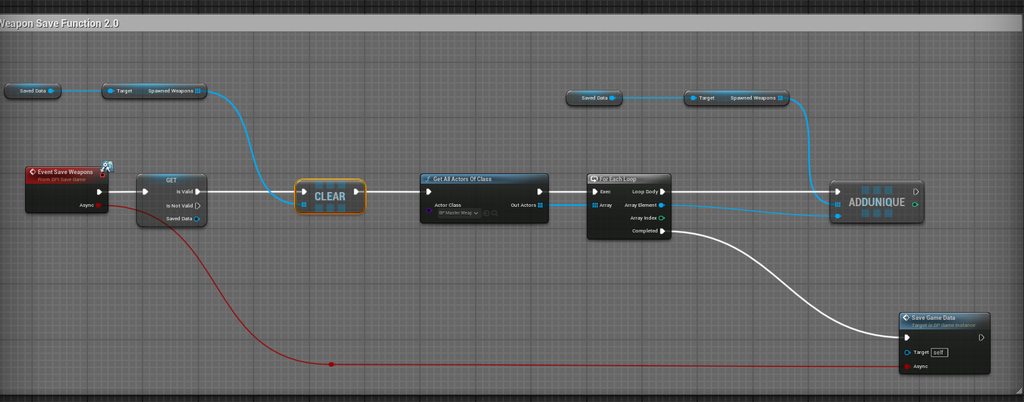
Specifically I'm having issues loading pre-placed actors, as any time I save and load them, there is always a duplicate. But if they're placed dynamically during runtime it's all fine and there is no duplication. Is there a solution for that works for both pre-placed actors and dynamically placed actors? https://imgur.com/a/unreal-engine-weapon-spawning-HPl5xTp for images of the code I'm using what it looks like.
 dark drum
restive dune
Hello, hope everyone's doing well. I'm having issues creating a save and load sy...
dark drum
restive dune
Hello, hope everyone's doing well. I'm having issues creating a save and load sy...
This video goes over handling saving items, you'll probably be able take what it shows and adapt it to your system.

Welcome to this tutorial on how to create an inventory system in Unreal Engine 5! In this video, we'll go over the concepts of setting up an inventory system using Unreal Engine's powerful Blueprint visual scripting language.
In part eleven, we continue setting up the required logic for saving our item data. So whether you're a beginner to Unre...
restive dune
dark drum
This video goes over handling saving items, you'll probably be able take what it...
Thank you. I'll give it a look and see what I can do
dark drum
restive dune
Thank you. I'll give it a look and see what I can do
Saving can get complex but it should give you the general idea of what you need to do. 🙂
 winged glen
hi im having a problem where im trying to rotate a character around (or rotate the camera around the character) in a customisation mode. in my hierarchy i have 2 cameras attached to spring arms. the first camera is for when in customisation mode which is set to active and the other camera is the default follow camera which is currently inactive. instead of just the character rotating, the camera and also character rotates. have would anyone be able to help me with this?

 meager spade
What's the intended way of playing an anim montage on loop? Sometimes this results in like 0.2s where the character will just A-pose (I'm still on UE 4)
I need it to loop until a condition is met where I simply call Stop Anim Montage
 dark drum
meager spade
What's the intended way of playing an anim montage on loop? Sometimes this resul...
dark drum
meager spade
What's the intended way of playing an anim montage on loop? Sometimes this resul...
Inside the montage asset, you can set it to loop.
meager spade
dark drum
Inside the montage asset, you can set it to loop.
Okay so that would be my best option then. Might actually be nice since I can imagine some needs to loop and others are more of do A then B then C then repeat. Will try, thanks
 pearl mason
Hey all I am having an issue with actor rotation not setting properly, its a controlled pawn and I run setactorlocationandrotation from server on the ThirdPersonCharacter blueprint which sets the locaiton just not the rotation. Any ideas?
Here is a snippet of the code

 drowsy gorge
pearl mason
Hey all I am having an issue with actor rotation not setting properly, its a co...
drowsy gorge
pearl mason
Hey all I am having an issue with actor rotation not setting properly, its a co...
Hi
Rotation of a pawn is mainly controlled by ControlRotation. GetController from your pawn, and SetControlRotation on it.
pearl mason
drowsy gorge
Hi
Rotation of a pawn is mainly controlled by ControlRotation. GetController fr...
Can that be done from server or does it need to be done on client?
drowsy gorge
pearl mason
Can that be done from server or does it need to be done on client?
Don't remember. I think if you have CMC Replication enabled, you need to do both.
Try Server only first, if doesn't work, do both on the server and client.
pearl mason
Didnt seem to work
Ik this is messy but just was testing rq

this is happening in a gamemode (serverside), and then the client event is in the player controller
pearl mason
Any ideas?
 final nimbus
I'm trying to get an element within an array and change properties on it, but all Blueprints is autocompleting is "Get Copy". How do I Get Reference?
maiden wadi
final nimbus
I'm trying to get an element within an array and change properties on it, but al...
If it's an object pointer, you cannot. You need to SetArrayElem. If it's a struct there should be a Get (by ref)
final nimbus
maiden wadi
If it's an object pointer, you cannot. You need to SetArrayElem. If it's a struc...
So I could get a copy, change parts of it and then call SetArrayElem?
kind estuary

Is this a viable way to make my character a static mesh character? or should i just create a new pawn
this character is a drone that inherits from a BP_Soldier character and has a skeletal mesh, that i destroy in the constructor, because the drone only uses a static mesh
maybe just make a new pawn for the drone and copy paste all the movement functionality (that is actually the same) ?
maiden wadi
final nimbus
So I could get a copy, change parts of it and then call SetArrayElem?
Yeah, but you shouldn't need to if it's a struct array? There should be the by ref getter.
final nimbus
maiden wadi
Yeah, but you shouldn't need to if it's a struct array? There should be the by r...
It's a UObject array, it's the input to a UListView in UMG
dark drum
final nimbus
It's a UObject array, it's the input to a UListView in UMG
A copy should be fine if it's an object based array. Modifying properties should do so on the object itself.
 mental apex
Confused what to do if this is an array being returned :/
 dark drum
kind estuary
maybe just make a new pawn for the drone and copy paste all the movement functio...
dark drum
kind estuary
maybe just make a new pawn for the drone and copy paste all the movement functio...
Naa, the movement component is heavily tided to the character class, you could just make the drone mesh a skeletal mesh.
kind estuary
dark drum
Naa, the movement component is heavily tided to the character class, you could j...
🫡
mental apex
Ah - think I've sorted it. I need to get response value => as array => for loop => as object from the element node.
winged glen
winged glen
hi im having a problem where im trying to rotate a character around (or rotate t...
could anyone help with this? ;-;
 robust lance
guys im so confused

GetInventoryItemBySlotID is a c++ function. it works everywhere...but for some reason in a loop like this
i get wierd output
if i call that function and statically give it a slot id, it displays the output perfectly
but in a loop like this, its wrong
in this case, im looping 0 to 15 because i know this inventory has 16 slots. i know the inventory has 10 apples in slot 1 and 2, and 5 in slot 3, all the rest of the slots are empty
but in the loop is shows 10, 10, 5, and then 5 for every other slot after that
if call the function like this
oops

like this, not in a loop
i can manually enter 0 through 15 and get the correct output...why is it wrong in the loop wtf
let me simplify it
dawn gazelle
robust lance
guys im so confused
it could be because the function in C++ isn't properly returning the value, so within blueprint it's utilizing the last returned value.
robust lance
bool UVA_IIIInventoryComponent::GetInventoryItemBySlotID(int SlotID, FVA_IIIInventoryItem& OutItem)
{
    FVA_IIIInventoryItem* Item = Inventory.Items.Find(SlotID);

    if (Item == nullptr) {
        GEngine->AddOnScreenDebugMessage(-1, 10.f, FColor::Green, FString::Printf(TEXT("%d: Empty"), SlotID));

        return false;
    }

    GEngine->AddOnScreenDebugMessage(-1, 10.f, FColor::Green, FString::Printf(TEXT("%d: %s (%d)"), SlotID, *Item->ID.ToString(), Item->Amount));

    OutItem = *Item;

    return true;
}```FVA_IIIInventoryItem& OutItem
robust lance
it works everywhere....it works when i call it outside of the loop and manually enter the slot ids
dawn gazelle
It's a reference.
robust lance
but when the slot ids are passed from the loop
dawn gazelle
The reference is being kept in the blueprint loop.
If the code Set OutItem to an empty before returning false, then the problem should go away.
robust lance
but out item is reset on every call
how is it remaining in the bp loop?
returning reference to null still holding the old reference?
dawn gazelle
OutItem isn't set to anything when returning false.
Blueprints like to retain whatever was last set.
robust lance
well it works fine like this.....
one sec

apple, apple, apple, none
as it should be
dawn gazelle
That's not the same node though, each instance of the node is its own thing.
dawn gazelle
For example, if I did something like this, so long as that function generated a valid reference on begin play (and it remains valid), then any time I moved my mouse up or down the Valid path should actually execute.
 dawn gazelle
It's one of the oddities of blueprints. Within C++ you always get a fresh value from the function's call.
robust lance
kinda makes sense though now i know
to help with flow, and perhaps safety
spent the last couple of hours manually entering slot ids and then putting it in a new loop lol
definition of insanity
i mean i have a bool returned to check for success. i put it there. why arnt i using it?

fixed
@dawn gazelle are there any other oddities like this i might have missed?
with blueprint
 raven sparrow
winged glen
hi im having a problem where im trying to rotate a character around (or rotate t...
raven sparrow
winged glen
hi im having a problem where im trying to rotate a character around (or rotate t...
the code seems to be working fine
I did manage to recreate the problem, by unchecking the Use Pawn Control Rotation in the spring arm
maybe that's the problem?
 robust lance
the whole point of the bool was to check validity of the reference within the function to avoid extra functions and checks afterwards...i just forgot to use it:S
dusky cobalt
Does anyone know if its possible to hide variable declared in UObject blueprint from beeing shown in the instance editables? or I have to declare it in C++ so it's not visible here?

 robust lance
but i didnt expect that kind of behavior, was so confusing
dark drum
dusky cobalt
Does anyone know if its possible to hide variable declared in UObject blueprint ...
I think you could add it to a category and then hide the category.
robust lance
i think ill replace the bool return type and have it return the reference and add success and fail execution pins. ive got a bunch of functions like that i need to optimize
dusky cobalt
dark drum
I think you could add it to a category and then hide the category.
How do you hide category? in C++?
robust lance
at least with the execution pins i can force not having to validate after the fact
dark drum
dusky cobalt
How do you hide category? in C++?
In class settings, there's a section for it.
dawn gazelle
robust lance
<@218956378654507008> are there any other oddities like this i might have missed...
This is another bit of odd behavior with blueprints... In the top example, you might expect that when you see "true" being printed, you might expect the "true" path execute but each executed node will evaluate the "Random Bool" node separately, potentially giving you a different value on each.
In the bottom node where I have the random float node hooked up to both inputs, the random float node is only evaluated once, and both inputs would be set to the same random value.
 dusky cobalt
dark drum
In class settings, there's a section for it.
dusky cobalt
dark drum
In class settings, there's a section for it.
Thanks, worked, althought feels hacky 😄
dark drum
dusky cobalt
Thanks, worked, althought feels hacky 😄
I agree haha. I do it from time to time though when there's a ton of stuff that's not relevant.
robust lance
but thats because that node is blueprint pure right? dont those get executed "if" theyre hooked when the node is reached that theyre hooked into?
raven sparrow
dawn gazelle
This is another bit of odd behavior with blueprints... In the top example, you m...
if you ask for the random bool twice in the same node, will it be the same?
dawn gazelle
raven sparrow
if you ask for the random bool twice in the same node, will it be the same?
Yep
dusky cobalt
dark drum
I agree haha. I do it from time to time though when there's a ton of stuff that'...
actually im just gonna leave these variables in that ''children'' in Default and hide Default, it's only widget logic in the children so i guess its nice, but good to know this option, thanks
dawn gazelle
Like this you would end up with two different values.
 robust lance
i dont think i would ever have come across that problem
hidden fossil
Bit of progress since I asked earlier about the patrol/attack matter. Right now, I've set the acceptance radius to 80 with a stop on overlap, pathfinding methods and the destination picked up from a reference to the player's location in the level. However, the swordfighter is still not moving toward his target. (As a side note, I should probably mention that the enemies are at different elevations, so in the context of a medieval species from a distant planet getting isekai'd to present-day New York City, some would be standing atop stalled buses while others are at street level.) What I need now is how to build on this so that the enemies actually start their apporach to the player's location.
robust lance
because i kind of subconciously knew/asumed blueprint pure functions were "conditionally" executed by the node theyre hooked into....since, well, they dont have an execution pin so something has to execute it:D
so blueprint pure breaks the left to right workflow and jumps left for shits and giggles XD
winged glen
raven sparrow
the code seems to be working fine
I did manage to recreate the problem, by unche...
i tried this but the camera seems to rotate around the character in a way that the camera is fixed so you can't see the character until the circle rotation is done, if that makes sense
dusky cobalt
robust lance
so blueprint pure breaks the left to right workflow and jumps left for shits and...
blueprint pure just have different use cases, they are simple getters of the ''most current' value or it gets something that is static or in case random it just gets random value every time
robust lance
yeah thats how ive always written them. although i never read up on how they work, just assumed
and i havnt written many blueprint pure functions
makes sense for stuff that global, say, from your module, game instance or singleton clas
dusky cobalt
yeah or even for variables that you want to make private but are still possible to ''Get''
robust lance
yeah thats a good use case
well no, you could still just have a regular getter
deffo more for global access functions though, for persistent classes or static libraries
just avoids pointless pins
raven sparrow
winged glen
i tried this but the camera seems to rotate around the character in a way that t...
so the camera stays in one spot and only changes rotation, not position
just to make sure, this code is in the character bp?
robust lance
hey why dont we have named reroutes in blueprint?
for ages i always had this idea of these "black holes" you could just plug pins in anywhere on the graph, give them a name
and then pull from them anywhere else on the graph
rather than a wired reroute.....like a wormhole reroute
winged glen
raven sparrow
so the camera stays in one spot and only changes rotation, not position
just to...
yep the camera stays facing forward. its positioned to be at the end of the spring arm so im assuming whats happening is that the spring arm is rotating but the camera itself is completely fixed on forward facing. and yes it is all in my bp_thirdcharacter class
hidden fossil
OK, it's complete
robust lance
like a wireless reroute pin where you can place the opposite end anywhere you want
hidden fossil
Ended up only working if pathfinding was disabled
maiden wadi
robust lance
for ages i always had this idea of these "black holes" you could just plug pins ...
These are called variables.
robust lance
@maiden wadi what about when you need to cross function calls etc?
@maiden wadi you realise materials have this already right?
the named reroute node
maiden wadi
Yeah. But materials aren't ran on the CPU and operate entirely different than a blueprint does. What you're looking for are variables.
robust lance
where things are run is irrelevant though
named reroutes allow you to avoid crossed wires
variables alone dont
maiden wadi
Yes they do?
robust lance
and variables require setters....which when youre setting multiple variables from a single node and have to cross wires because of the output order
think of it like
a wireless sequence
@maiden wadi variables dont allow you to avoid all crossed wires, only creossed wires from variables
untold ferry
Is anyone available to help me out with something? I’m working on a weapon switch system from fist to dual blades, so far I got the weapons to switch but when I setup the animation blend it doesn’t work
robust lance
its particularly annoying in a function with a bunch of local variables where you need to be setting the variables in the function and you have a mix of crossed wires from different function outputs, having to cross the setters, etc
untold ferry
Tried doing it off this tutorial but the guy is not around to help or respond
robust lance
using a sequence lets you clean it up a little
maiden wadi
Named reroutes also require setters in a way. It has to be fed from somewhere. But you can't get that same functionality with an executed node kind of layout. It works in things like PCG and Materials because they're entirely pure. You can't really do the same thing in an executed graph because the execution is what determines what is ran.
robust lance
yet, but they dont have to follow through with execution
its just, here, you go over here into the void until i need you later
then ill pull you from a named reroute
just allows for a lot more organization
and it can prevent from having to manage a shit ton of local variables
cos theres a lot of times you dont need a local variable, but you just have to make one to make your graph clean
maiden wadi
How is that going to manage a bunch of local variables?
robust lance
it avoids a shit ton of setters with crossed wires
yeah youre technically stil setting them
but youre avoiding all the crossed cables
maiden wadi
You want to set properties without an execution line in a language driven by said execution line?
How do you determine at what point they're set? How do you then populate them with something else if you choose to?
robust lance
so your argument is "that isnt how c++ works so that isnt how blueprint should work"?
and its not just about variables
you do realise that the wires in blueprint are not needed right?
im not saying change the order of execution or how anything works....just a new way of visualizing it
like i said, theyve done it in materials....you can plug whatever pin you want into a named reroute, then you can pull from it at any other point of the graph.
in between the in and out of the named reroute, there is no wire
 sand shore
It's definitely true that a "named reroute" concept like what happens with materials ... wouldn't be able to have those same rules in BP, but someone could totally make such a concept
robust lance
@sand shore why couldnt it have the same rules? i mean in materials its kind of a "soft" variable setter
is that what you mean?
sand shore
Execution pins, for one
robust lance
but what its really doing it making an invisible wire between 2 points
it doesnt matter
its 2 points in space, as long as they know what theyre connected to, execution is the same
think of it like...rather than crossing a wire, youre digging a hole and tunnelling it underneath the graph to pop out at another point
the connection is still tehre, its just visual
sand shore
So, just a single input and a single output pin, you mean?
robust lance
i mean you can plug whatever pin into an input, and thats whatever comes out of its output wherever it is on the graph
its still a connection, its just hidden from point a to point b
as in no wire
maybe when you select one of the reroutes you can see the actual wire
how i described it earlier, was a wireless sequence node
sand shore
Actually that's the case that I'm saying would break
robust lance
how?
raven sparrow
winged glen
yep the camera stays facing forward. its positioned to be at the end of the spri...
ok so I poked around in the default 3d person template
and recreated the problem, where the camera is facing forward, and the spring arm seems to be moving around the character:
- in the SPRING ARM, I toggled Use Pawn Control Rotation to off
- in the CAMERA, I toggled the same to on
so the fix could be switching those two, that is, in spring arm to ON and in camera to OFF
if its something else, I have no idea what, but someone else here will definitely know
robust lance
nothing changes in the structure of anything, only the visual representation of the structure
sand shore
I'm not saying that it is going to obviously break, but, having attempted to PR something for K2 pin handling... it just seems like some obscure case will struggle with this
Conceptually? It makes your graph harder to be understandable to new maintainers, and you're going to have non-obvious conveyance of the actual control flow, but yeah what you're saying could work
If you're willing to edit the engine I think you could try it out yourself
robust lance
i guess thats correct yeah, people using it wrong
but, thats the case for unreal engine as a whole, let alone blueprint
simplified its just wireless sequence pins XD
perhaps a different one for execution and access
just a simple example you cant get out of with local variables
 winged glen
raven sparrow
ok so I poked around in the default 3d person template
and recreated the proble...
winged glen
raven sparrow
ok so I poked around in the default 3d person template
and recreated the proble...
i tried this and it still doesnt seem to work ;-; but thank you soooo much nonetheless, i will play around with it some more to see if i can get it working. thank you again!!!
robust lance

shitty mockup, but gives the gist
obvioulsy theyed have to be named...and they could even be full on output reroutes from nodes themselves to reroute all outputs, rather than a reroute for each putput
and you wouldnt lose order, because you could just hover the reroute to show where the original wire would be
snow halo
Is this a good method of increasing the pancakes on top of the pan every time you hit the kitchen stove / pan actor for example?
(I know it's probably not that good )
I could also very well choose the lazy route and just spawn the whole cake on top but for some reason I wanted to do it this way. Not sure if its the best choice tho
Right now Im running down the kitchen line like a stressed out waiter asking each pancake if it wants to be on the plate. And there's a lot of back and fourth between stove & cake logic

 robust lance
its just 2 points that you hide wires between
until you want to see them
not a fix all, but something to ease the spaghetti craphs
@snow halo are you aware of loops?
snow halo
robust lance
<@855871357182410802> are you aware of loops?
good point, thanks
robust lance
huh
snow halo
robust lance
huh
I am yes, good point on that
robust lance
oh sorry i only noticed the first image
maybe your first image could use some "named reroutes" 😉
untold ferry
 maiden wadi
snow halo
Is this a good method of increasing the pancakes on top of the pan every time yo...
maiden wadi
snow halo
Is this a good method of increasing the pancakes on top of the pan every time yo...
Unsure what PanPlaced is for out of these images. But for the branches after that, it should probably be a simple integer incremented. You can place your components in an array in order on beginplay or similar and simply increment the integer. For each loop over the array and if IncrementedInteger > ArrayIndex then set the component visible. Else invisible. Start the integer at zero. On first hit it goes to 1. One is greater than 0 so index 0 is revealed, rest are not. Next hit 0 and 1, etc etc. And you could even clamp that at max so that other logic later can remove them if needed by simply decrementing the integer. Much less complicated state to track and manage than five booleans.
kind estuary

im using this to move a pawn
it moves it too suddenly
its a drone so, id like it to move like a drone, with acceleration
but since its a pawn it doesnt have the CMC
any tips ?
 surreal peak
kind estuary
any tips ?
surreal peak
kind estuary
any tips ?
Isn't there like a flying pawn movement component you can use?
Or floating pawn
Something like that
CMC is not the only one
kind estuary
surreal peak
Isn't there like a flying pawn movement component you can use?
yeah there's the floating point movement
ok will check it
thanks @wild hull 🫡
surreal peak
Other than that, if you want acceleration you gotta code acceleration
kind estuary
surreal peak
Other than that, if you want acceleration you gotta code acceleration
yeah
and that would require the tick event right
dont like to use tick events
surreal peak
kind estuary
and that would require the tick event right
Yeah
surreal peak
kind estuary
dont like to use tick events
Nonsense 😅
Tick is meant to be used for things that change over time. Or happen every frame
So this is exactly the correct thing to use
kind estuary
surreal peak
Tick is meant to be used for things that change over time. Or happen every frame
yeah, though im not always moving the drone
just sometimes
maybe i can use Get World Delta
that might skip the ticks
surreal peak
Doesn't matter. You are updating the acceleration over time
kind estuary
else gonna tick like crazyy
surreal peak
You can optimize it and early out parts of it if you aren't pressing input
surreal peak
kind estuary
else gonna tick like crazyy
That's a stupid thing to get hung up on
You are limiting yourself because you heard somewhere that tick is bad
Your code can always be bad, it's not a tick problem
If you call expensive shit from a button press it isn't any different or better
kind estuary
okay will use the tick event 🫡
surreal peak
Also, you are using tick in your screenshot already
The input is evaluated on tick and triggers each frame
Also unless you are using unreal engine 4, please use Enhanced Input
The old system is not meant to be used anymore
kind estuary
surreal peak
Also unless you are using unreal engine 4, please use Enhanced Input
yup im a UE4 old school rapper
though i think the old system is great
it works
surreal peak
It is simplistic and thus a bit easier to use
I can get behind that
But more complex setups are difficult
And the whole context stuff of enhanced input is absolutely fantastic
But well
Your axis events are evaluated in the tick of PlayerController btw
Or more precisely in the UPlayerInput
So yeah you are already "using tick" in theory
There are only a handful of things you shouldn't do on tick and that mostly resolves around doing things that aren't meant to be there. Otherwise tick is fine
kind estuary
i tried to avoid tick whenever possible. and disable it when the actor is not moving
for example
surreal peak
Stupid example: You want to do something when you press the spacebar. There are people that set a Boolean when the space bar is pressed and check that Boolean on tick to do said something
surreal peak
kind estuary
i tried to avoid tick whenever possible. and disable it when the actor is not mo...
Disabling tick on things that don't utilize it is great
But avoiding it when it's clearly the right choice (e.g. movement) is not great
kind estuary
but i think i have an OCD with the tick
surreal peak
Possible
Lots of things you are using are coming from tick though
Just think about the fact that the gameplay code is just a big loop. Somewhere in that loop it handles ticking actors for that loops iteration. But everything else also executes in that loop. If you press a key every frame (unrealistic but just an example) you also execute the code "on tick"
If there is something that has to be done every frame and you need to account for Delta time. Then you do it on tick.
And if that something sometimes doesn't call, then you just early out your code
kind estuary
so maybe i should skip the input and do the movement all in the tick
surreal peak
The input is needed to know that the player pressed the key
But that's all
CMC only gets an input vector from it
AddMovementInput
That's usually all someone calls in a simple CMC setup in their move axis input events
That sets a vector which is used on tick in CMC
World Space vector fwiw
If two keys are pressed in the same frame it will add to the vector
Whenever the CMC takes the vector to use it it sets it back to 0
And that's as far as the input event goes
The input vector is then used to calculate acceleration
And that is applied to the current velocity
And the current velocity is then used to move this frames distance
kind estuary
yeah got it. thats how its done in the Twin Shooter template
dusky meadow
Hi can i create data assets at run time ?
dark drum
dusky meadow
Hi can i create data assets at run time ?
You can't.
dawn gazelle
Yes, they are objects, however, you can't directly save them, only data about them.
dusky meadow
Im stuck because say i have a sword the data asset or data table would have set values however what if when i place one into a container i want it to have less durability or if i want to change the players weapon to reduce durability how would i do that ?
dark drum
dawn gazelle
Yes, they are objects, however, you can't directly save them, only data about th...
Does it actually work though? I know there's something that just crash the engine unless done a specific way.
dawn gazelle
It's no different from spawning an object.
dusky meadow
dusky meadow
Im stuck because say i have a sword the data asset or data table would have set ...
?
dark drum
dawn gazelle
It's no different from spawning an object.
Interesting, I might have to give it a test. It's always good to use and abuse a system. 🙂
dawn gazelle
dusky meadow
Im stuck because say i have a sword the data asset or data table would have set ...
The Data Asset or Data Table should only be used to represent the static data about the item. Data that needs to be changed about any specific item should be stored within an object, or within its own structure in some other object.
dusky meadow
Ok how do i store that data in its own struct or another object ?
dark drum
dusky meadow
Im stuck because say i have a sword the data asset or data table would have set ...
Generally data assets are used for data that doesn't change. In terms of items you'd probably have a base item (uobject as a parent) that you can then create at runtime. This would contain data that changes like durability, quantity or any other various that might change.
This object would then have a reference to data asset for its static data.
dusky meadow
How do i do that though ?
Create at run time i mean
dawn gazelle
Create a structure, have it hold some values you want. Add that structure as a variable to something.
dusky meadow
dawn gazelle
Create a structure, have it hold some values you want. Add that structure as a ...
Like this ?

 tight pollen
dusky meadow
dusky meadow
Is this the correct way to do it ?
tight pollen
dusky meadow
dusky meadow
Is this the correct way to do it ?
Can someone respond ?
dark drum
dusky meadow
Can someone respond ?
Did you watch that series I sent? It gives you a lot of information regarding building inventory systems that you can built on.
Episode 1 is all about data.
 tropic peak
I'm developing an interaction system. When a trace hits an actor it is supposed to display a tooltip (widget animation fadeIn), and when it loses focus it should do a fade out on the tooltip widget.
New interactable can be either null (trace is not hitting anything) or a new actor (or the one I hit earlier)
My entry point is the result of a function FindClosestInteractable which returns the AC attached to the interactable actor
An interface function SetIsFocused is passing the bool value to an interactable actor widget component, which then either plays a fade in or fade out animation
But I'm stuck at the part in the middle of it because since the interaction detection is based on an event tick it can trigger FadeIn multiple times
What kinda made it work is this flow:

However if the trace does not hit anything I'm setting CurrentInteractable to null, meaning when it hits the part marked with a red arrow - it will throw a null error
(and yeah I know that validated get doesn't make much sense but it's the only way I got it to work..)
This is the result of the above flow, and that's 100% what I want to achieve, but I need to figure out how to fix that validated get is not valid output
maiden wadi
You need to hide the tooltip before setting the new target.
Oh, those are two different pointers, missed that.
Just need a sequence then.
dark drum
tropic peak
If the last interactable is null then there's nothing it needs to do anyway. Also, last interactable is always being set to the current one so the current and previous will always be the same.
I would check the interactable to see if it's the same as the current interactable, if not, then you set the current to the last and then remove its focus if it's a valid actor. Then you would set the current to the new one and update its focus again.
This way you only update the current and previous interactable if the new one is actually different.
tropic peak
Oh man my brain is tangled in the current/previous spaghetti I'm having a hard time understanding what you're trying to tell me, I've been looking at this for too long
maiden wadi
He mostly just needs a sequence.
Hide old tooltip(if valid)
then
Set LastInteractable
then
ShowNewTooltip(if valid)
Rather than putting these all on the same line, this should be sequenced in three separate lines so they don't stop each other since all three need to run.
 maiden wadi
Correct. But you still need the != check before the sequence and you need to set last interactable from CurrentInteractable
 maiden wadi
This all looks correct. Assuming that CurrentInteractable is a local variable and LastInteractable is a class property?
tropic peak
They are both variables (AC_Interactable type)
What ends up happening with these changes:
Oh I'm a fool
duplicated the SetIsFocused node and forgot to change the bool
it works.. you saved me a massive headache. I was losing faith in my ability to think
dark drum
tropic peak
I would do something like this.
 maiden wadi
My actual code for this is the following. Pretty much the same, but with a delegate broadcast at the end.
if (NewHoverTarget != CurrentHoveredTarget)
{
    if (IsValid(CurrentHoveredTarget))
    {
        UpdateHoverForInteractable(CurrentHoveredTarget, false);
    }

    AActor* OldHoverTarget = CurrentHoveredTarget;
    CurrentHoveredTarget = NewHoverTarget;

    if (IsValid(CurrentHoveredTarget))
    {
        UpdateHoverForInteractable(CurrentHoveredTarget, true);
    }

    OnHoveredInteractableChanged.Broadcast(OldHoverTarget, CurrentHoveredTarget);
}```I was getting terribly tangled in the variables for hours, current, previous, last, I couldn't focus on it at all. this was probably my most frustrating coding experience ever
dark drum
maiden wadi
My actual code for this is the following. Pretty much the same, but with a deleg...
Mine is a little more complex. 😅 I do however check for differences in the component or even hit index whilst also finding the closest.
tropic peak
even though the problem wasn't that complicated 
yeah about finding the closest.. do I need that if I'm using traces? after all the trace will only hit the nearest one
dark drum
tropic peak
even though the problem wasn't that complicated <:facepalm:1316599267103604738>
Its one of those things where the order is everything. These can sometimes take time to feel out to get the order.
dusky meadow
dark drum
Did you watch that series I sent? It gives you a lot of information regarding bu...
Im watching it now
maiden wadi
dark drum
Mine is a little more complex. 😅 I do however check for differences in the com...
The full code in that function is more complex. There's a bit before that which determines the hovered component based on the game style. I use the same idea for RTS/TPS or whatever game style. Whether their pawn is looking at something or they're hovering it with a mouse, etc. But the final setter is pretty simple there.
dark drum
tropic peak
yeah about finding the closest.. do I need that if I'm using traces? after all t...
It depends. Using a sphere trace can sometimes give you results that aren't what you expect. I use a thin sphere trace to find a point that i then do a larger sphere trace from and then find the closest to that point.
tropic peak
cool, that's clever
I think for my needs (isometric narrative) what I have now should work just well enough
there's not much need for precission
but seriously I'm so relieved. I couldn't sleep last night trying to figure this out, such a stupid problem
now I just need to integrate my hold/press mechanics into this and I'm done
thank you guys, a massive thank you
dark drum
maiden wadi
The full code in that function is more complex. There's a bit before that which ...
This is probally OTT but... for the sake of a few extra lines, it's nice to know I can do something based on the physics material being different. 😅
 maiden wadi
dark drum
This is probally OTT but... for the sake of a few extra lines, it's nice to know...
maiden wadi
dark drum
This is probally OTT but... for the sake of a few extra lines, it's nice to know...
That's a neat idea. What do you use it for specifically? I haven't gotten that granular yet.
dark drum
maiden wadi
That's a neat idea. What do you use it for specifically? I haven't gotten that g...
I like the idea of being able to have different components in an actor have their own interaction type. So something with 2 buttons for example and depending on the button it might show a different prompt and when interacted with, triggers a different event.
I also experimented with applying interactions to ISM/HISM's where when you look at an instance it can do something specific to that instance. (I could do with doing more experimentation though)
When i applied the idea in C++ i thought I'd add the physics material as well. The first thing that pops to mind is where you're painting a surface and you can paint the unpainted bits where its controlled by a physics material or something.
On my interaction comp, I can control what it specifically can trigger a focus change. It would have been better to have had it on the interactable but I wasn't sure if it was worth the effort to have it on a per interactable level.
I tend to just have it on the actor and component level.
maiden wadi
Hmm. Certainly worth a consideration later if I get into more TPS stuff maybe. ATM I'm debating on pulling the trigger to diving into ECS systems. I've heard rumors that they're making changes to the component movement stuff to make it a lot more performant, but 🤷♂️ Could be 2030 or never before anyone sees it.
dark drum
maiden wadi
Hmm. Certainly worth a consideration later if I get into more TPS stuff maybe. A...
Yea they like to take their time.
Does anyone have any idea why this node would not return a static mesh? (The get component by class node)
 maiden wadi
It should return it if there is one owned by that actor.
It is owned by the actor, not just attached, right?
On a side note. Make sure to show exec pins on that GetComponents call. Save a minor amount of frame time. 😄
dark drum
maiden wadi
It is owned by the actor, not just attached, right?
Yea, it's added in C++.

 maiden wadi
Yeah that's odd. That node 100% should pick that up with UMeshComponent as the class. Should pick up any class that can be cast to that, so self or parents.
dark drum
maiden wadi
Yeah that's odd. That node 100% should pick that up with UMeshComponent as the c...
Yea, after a little more testing I think it might be down to something else I'm doing but I'm not sure why it would affect that node. 🤔
Although I am trying to dynamically add components which could be messing the component list up. 😅
maiden wadi
It shouldn't as long as they're registered.
dark drum
maiden wadi
It shouldn't as long as they're registered.
Anything jump out? This of course could be garbage but i'm effectively duplicating a component from one object to the actor.
Not sure how this would affect already added components but this component stuff has a lot of layers. 😅
 maiden wadi
Actually, jumping through code I'm not even sure they need to be registered as long as they have that actor as the outer.
dark drum
Odd, i have another object (same parent) thats defined in C++ that uses GetComponents instead and that finds it. 🤔
maiden wadi
The copies maybe. I'd be a tiny bit nervous doing a copy before finishing registrations without digging through what all that affects.
Like if there are preregister flags that get set wrong before registration so it doesn't take normal initialization code paths. I dunno.
That's also odd
I'm not sure if I'm reading this wrong, but ForEachComponent_Internal which is used to populate that getter only seems to go through OwnedComponents.
And if you look in...
UActorComponent::PostInitProperties() It doesn't add these if they're "instanced", it relies on something else to add them to that list.
// Instance components will be added during the owner's initialization
if (OwnerPrivate && CreationMethod != EComponentCreationMethod::Instance)
{
    OwnerPrivate->AddOwnedComponent(this);
}```So if you add an instanced component at runtime it may not work.
dark drum
maiden wadi
UActorComponent::PostInitProperties() It doesn't add these if they're "instanced...
I assume that's what the AddInstanceComponent() is for.
maiden wadi
EG owner has already initialized. In comes and instanced component that never gets added.
dark drum
But yea, components have some layers. It's difficult to follow at times.
maiden wadi
That only does this. Which is likely the array the owner's init reads from.
void AActor::AddInstanceComponent(UActorComponent* Component)
{
    Component->CreationMethod = EComponentCreationMethod::Instance;
    InstanceComponents.AddUnique(Component);
}```What hapens if you comment out that line?
dark drum
maiden wadi
That only does this. Which is likely the array the owner's init reads from.
```c...
The component does show up in the details panel. Granted I have to add another component first before it shows up, so i might be missing something else.
maiden wadi
Yeah, but who knows how that was coded. It may not be reading from owned components either in any way.
 turbid notch
hi everyone - im looking to do something thats probably pretty basic but is giving me a lot of trouble. I want to make a window shutter open and close on a slider, but the blade pieces are moving in a spiral and not coming in towards the center as i want. I've been losing my mind here.. any ideas?

 dark drum
maiden wadi
Yeah, but who knows how that was coded. It may not be reading from owned compone...
dark drum
maiden wadi
Yeah, but who knows how that was coded. It may not be reading from owned compone...
It looks like registering them as instances needs to be done so it doesn't mess them up when it runs the construction script with the looks of it.
turbid notch
This is my graph as of right now

 maiden wadi
turbid notch
hi everyone - im looking to do something thats probably pretty basic but is givi...
maiden wadi
turbid notch
hi everyone - im looking to do something thats probably pretty basic but is givi...
IMO you might find it simpler to first set this up as a timeline. But realistically this will be much more performant and easier to use in gameplay code as a simple animation played on a skeletal mesh if you can import it from a 3D program like Blender.
turbid notch
maiden wadi
IMO you might find it simpler to first set this up as a timeline. But realistica...
Thanks for responding - generally yeah but I'd like to it update live in response to a light sensor I'll eventually hook this up to
maiden wadi
I would start with a timeline. You can just manually output your rotations and locations from tracks there for each piece. It won't be the best performance, but it won't be much different than what you have atm.
And if you decide later to redo it into a skeletal mesh and animation, it's mostly deleting the timeline and putting the play animation calls into the same spots logically.
dark drum
turbid notch
hi everyone - im looking to do something thats probably pretty basic but is givi...
The blades actually just rotate around a single point so other than updating their rotation, there shouldn't be anything else you need to do.
dark drum
maiden wadi
Yeah, but who knows how that was coded. It may not be reading from owned compone...
As an FYI, it doesn't seem that code is responsible for that node breaking. I removed it all and same thing so it must be something with how I'm adding the static mesh component is C++ resulting it in not being picked up in BP.
turbid notch
dark drum
The blades actually just rotate around a single point so other than updating the...
Sorry - I'm pretty beginner. When i had one blade hooked up it moved towards the center and back as expected. So I'd ideally like to just rotate that movement around the center so all the other blades do the same thing.
The rotation part is where I'm having trouble
maiden wadi
Lul. 22,640 floating texts. 30fps. I'm normally at ~100fps. But considering I'm shooting for a few hundred entries and not 22k, I don't think I've got much performance worry. 😂
 turbid notch
maiden wadi
I would start with a timeline. You can just manually output your rotations and l...
turbid notch
maiden wadi
I would start with a timeline. You can just manually output your rotations and l...
Hmm. Can you explain why i'd make it an animation if I want it to update live? Would said animation play back and forth on a sensor input if I wanted?
maiden wadi
I'm confused by the question. Animations are meant to update live.
Like running. Even opening a two bone treasure chest, etc.
turbid notch
right right
maiden wadi
It's the same general idea. You make a window thing where each shutter thing has a bone and animate them in Blender. Then it's as easy as calling PlayAnimation in Unreal. And it can play forward or backwards.
Slightly more sane FPS at 558 entries. 😄
 turbid notch
maiden wadi
It's the same general idea. You make a window thing where each shutter thing has...
turbid notch
maiden wadi
It's the same general idea. You make a window thing where each shutter thing has...
hm.. maybe I've been overthinking it
 slender dagger
Is there any sort of way to determine whether something should be stored in the game mode vs having it's own distinct manager class?
turbid notch
turbid notch
hm.. maybe I've been overthinking it
i did eventually manage :)))


 dark drum
slender dagger
Is there any sort of way to determine whether something should be stored in the ...
dark drum
slender dagger
Is there any sort of way to determine whether something should be stored in the ...
Gamemode only exists on the server which can affect the decision.
maiden wadi
One other good case is whether it needs to be modular. It can be nice even on a major actor like GameMode or GameState to make a component the manager if your logic can be generic an reusable in many game types.
pearl mason
Anyone have any idea why I cant rotate a player thats possessed?
Having issues rn, I have tried absolutly everything and cant seem to get it to work
SetActorRotation, SetControlRotation (Server and Client)
robust lance
are there any replication issues when using arrays and maps within structs within structs?
USTRUCT(BlueprintType)
struct FVA_IIIInventory : public FTableRowBase
{
    GENERATED_USTRUCT_BODY()

    // How many slots this inventory has
    UPROPERTY(EditAnywhere)
    uint8 Size = 8;

    // The items held by this inventory
    UPROPERTY(EditAnywhere)
    TMap<uint8, FVA_IIIInventoryItem> Items;
};

USTRUCT(BlueprintType)
struct FVA_IIINestedInventory : public FVA_IIIInventory
{
    GENERATED_USTRUCT_BODY()

    // Child inventories linked by slot id and inventory index
    UPROPERTY(EditAnywhere)
    TMap<int32, int32> SlotInventoryPairs;

    // Private inventories reserverved for specific use cases, such as equipment that requires specific items to function
    UPROPERTY(EditAnywhere)
    TArray<FVA_IIIInventory> PrivateSubInventories;

    // Public inventores accessible and usable by the player
    UPROPERTY(EditAnywhere)
    TArray<FVA_IIIInventory> PublicSubInventories;

    // Parent inventory id if this inventory is within an inventory
    UPROPERTY()
    uint8 PrentInventoryID;

    // Parent inventory slot that this item exists in
    UPROPERTY()
    uint8 PrentInventorySlot;
};```this can potentially create infinitely nested inventories within inventories. am i going to have to handle replication manually?
wide imp
can someone please explain to me what things need to be ran on the server and what things need to be ran on all clients?
robust lance
anything that defines game logic and flow needs to run on the server
you can run on client and server, but the server needs to be the authority for things like player position, health, ammo, calling functions like shooting, etc
thin panther
Except in some cases for Co-op games.
When doing a listen server, they're never really safe as the server is one of the clients, making it susceptible for the host to modify things. If this isn't a risk for your game, or the risk is negligable to player impact, then it can be perfectly acceptable to charge ahead as a client authority with some things to make things simpler.
robust lance
that
basically if something can be manipulated by a player that affects your game as you dont intend, consider that to be server authoritive
wide imp
so for example, i have a player with a replicated health variable, and on event anydamage (server ran) i decremenent their health. this health variable is on rep notify. on rep notify, if the health is <= 0, i want to kill the player. why is the onRep notify for health change being ran for every client when only one of the client's replicated health variable is changing?
robust lance
for example, take left 4 dead. from what i remember shooting AI zombies was entireley client authoritive as there was no delay to them taking hits
thin panther
wide imp
so for example, i have a player with a replicated health variable, and on event ...
Why wouldn't it?
It's pretty common for other clients to view their teammate's health.
Or for the player to die on their end as well
robust lance
or maybe it was client authoritative with some very loos server side distance checks or something
wide imp
thin panther
Why wouldn't it?
It's pretty common for other clients to view their teammate's ...
i thought onRepNotify only calls on the client's replicated health variable is changing
robust lance
it sends to all clients, its updating the game state for everyone. if you only want the player to know about his own health you need tocode that in
wide imp
robust lance
it sends to all clients, its updating the game state for everyone. if you only w...
with is locally controlled right?
robust lance
yeah
wide imp
but regardless the server needs to despawn that player on the server regardless if they are locally controlled
robust lance
i mean its not gonna stop cheaters from still being able to know other players health cos they can intercept that check, the server is still sending the data
robust lance
whats the issue with the hp being replicated to everyone?
wide imp
thats not the issue
robust lance
or do you mean its changing the health of every player?
sand shore
robust lance
are there any replication issues when using arrays and maps within structs withi...
You're going to run into issues with Map being replicated at all
wide imp
so the server sets the actor hidden in game, and then it calls Multicast to set collisions
collisions should be dealt through the multicast not server right?
thin panther
wide imp
thats not the issue
Then I completely misread your problem, apologies :P
robust lance
@sand shore the map doesnt need to be replicated, thats just internal to link slots and sub inventores when something changes
sand shore
well then say it doesn't need to be replicated
robust lance
sorry
sand shore
but it won't be replciated - just fyi
robust lance
ok thanks.
wide imp
quick question, when would i display a UI, server check -> is locally controlled -> call here, OR **multicast ** -> is locally controlled -> call here
for the death screen UI
i assume multicast.
robust lance
so there shouldnt be any issues with items and the 2 arrays of sub inventories even if i have say, infinite(although there is packed efficiency that decreases at every nest so youll never get to infinite)?
sand shore
wide imp
quick question, when would i display a UI, server check -> is locally controlled...
Server -> Execute On Owning Client RPC
You also could have a death multicast and put a Is Locally Controlled check in with all the other on-death things
It's worth weighing the pros/cons of multicast vs OnRep. If players are really far away, their client won't always see the multicast. So if they get really close suddenly, they won't necessarily simulate the death event as you expect.
OTOH, with the OnRep, you just know the state of the variable, you don't know when that state actually occurred. So its possible that somebody could come by the dead player a minute later and then it looks like that player just ragdolled even though they've been dead for a minute
Multicast vs OnRep isn't a right / wrong type of thing, they're both important tools
sand shore
robust lance
so there shouldnt be any issues with items and the 2 arrays of sub inventories e...
I think the net driver will make packets, and that the game client will be able to unpack them... but you may run into performance issues on either client or server
wide imp
my health text binding, why isn't the text updating when the health is decrementing? note: event anydamage is run on server

 sand shore
wide imp
my health text binding, why isn't the text updating when the health is decrement...
sand shore
wide imp
my health text binding, why isn't the text updating when the health is decrement...
Do you have two players in your game right now?
sand shore
Take anything you're using with a PlayerIndex and throw it into the bin.

 sand shore
User widgets have a OwningPlayer which is a controller, You wanna do GetOwningPlayer -> GetPawn -> Cast to BP_FirstPersonCharacter
robust lance
@sand shore thats what i was worried about. i know when it comes to arrays it only replicates the changes right? just wondering how that is handled with nested arrays like this. say i change the bottom most array, does it need to replicate the whole chain or just the bottom one that changed?
sand shore
wide imp
doesn't it take the player owning the widget?
PlayerIndex really only works if you build everything around PlayerIndex, and that's really tricky to do
PlayerIndex's automatic behavior (mostly to support this PlayerIndex 0 use case) makes things more confusing, but it still won't actually help you in your UI
wide imp
okay regardless with that change the health is still not updating on the client ui
is something wrong with this?
 sand shore
wide imp
okay regardless with that change the health is still not updating on the client ...
sand shore
wide imp
okay regardless with that change the health is still not updating on the client ...
how did you specify the binding?
 sand shore
Have you tried the BP debugger?
I would verify that this binding is called, and that the server's AnyDamage is called
wide imp
i shoot a client and its updating the health on the server/client lol
sand shore
When players die, does it immediately unpossess the pawn?
wide imp
for now i just want to setup the health being decremented
on the text
this is running on the server

and this is being called everytime heath is modified

i dont see anywhere where im specifically changing the health variable on that client
sand shore
wide imp
Well this should work, the only reason why it wouldn't work is if that cast failed, or if you're trying to display the health of both pawns on both clients
wide imp
thats all the code for it 🤷♂️
sand shore
Or if the binding isn't set up right - but you say you just created this binding
wide imp
yep
when client A shoots client B the Client C (server) decrements its health from 100 -> 60 on the text
as if it was shot twice
correction
if client A shoots client B nothing happens but if client A shoots the server (client) it works.

well somehow removing this else statement fixed it..
oh because 0 is not > than 0 lol so the first shot sets it to dead
untold ferry
I managed to make a working system, but there is a glitch here in the video that I don’t know how to fix

Also it only draws one blade, how would I be able to sequence both of them
 dreamy nacelle
Sending this here as well, just having a super weird problem with actors not in their original correct locations in the map only in a packaged game, never heard of or seen this before so could use some ideas if anyone has any
 lofty rapids
dreamy nacelle
Sending this here as well, just having a super weird problem with actors not in ...
lofty rapids
dreamy nacelle
Sending this here as well, just having a super weird problem with actors not in ...
are you loading these dynamically ? or are they "placed" in ?
dreamy nacelle
They're placed in, just static actors in the level
The places they appear in when loading into the level is the same spot where they would be if their 'relative' location to the actor they're attached to became 'absolute', so it's like their losing the location that they're supposed to be relative to
 violet abyss
Hi, does anyone have any ideas on how to make a game like openfront.io but in unreal in terms of grids and what not? Its rather simple when it comes to gameplay but Im having trouble finding a good way of making grids and territories in bp.
 wind saffron
violet abyss
Hi, does anyone have any ideas on how to make a game like openfront.io but in un...
wind saffron
violet abyss
Hi, does anyone have any ideas on how to make a game like openfront.io but in un...
ooo yea thats a good idea, i like that game a lot. in a performance side i only know that u would want to try and make it as little draw calls as possible. where each grid point (for examples they are all planes) we can use the material custom data to change colours without using different materials.
for how to create the grid itself. i guess have a manager actor that spawns all the points in.
kind estuary
i have a character that is possessed by the player and then the same exact character is also possessed by the AI. Should i create a new child class just to remove the camera and spring arm? kind of silly
can also destroy component in the construction script
dusky cobalt
why does your parent have already camera/spring arm when then you create children classes of it (something to posses or unit)?
make empty parent, then 2 child classes from it
->camera
->unit
kind estuary
dusky cobalt
make empty parent, then 2 child classes from it
->camera
->unit
thats exactly what i meant. so i meant create a parent with only the unit no camera that is possessed by AI, and the child that is possessed by the character has no camera. the thing i want to know is if this is worth it, or the camera in AI characters is just fine
chatgpt is saying to not worry about it 🤨
dusky cobalt
well chatgpt is giving you anserw based on how you asked the questions and its always very prone to suggestions so it will agree with you instead of giving you real feedback
and yes its a must and it's object programming, i dont understand ''if its worth'' in this case
camera pawn in rts game doesnt need to know shit about rts units/buildings so it can be just pawn itself and d oesnt need to inherit from the same base class as unit
why would you want to have pawn that is split into camera and unit?
snow halo

I have many of these furnace BP instances into my world
I dont to do this logic on all of my furnaces at the same time
Im only looking or working with one furnace for example
kind estuary
dusky cobalt
camera pawn in rts game doesnt need to know shit about rts units/buildings so ...
in this case is not exactly an rts
its like a stealth game like commandos
dusky cobalt
kind estuary
in this case is not exactly an rts
ok need more context then what you really need camera pawn to inherit from the same base class as units or whatever else
kind estuary
dusky cobalt
ok need more context then what you really need camera pawn to inherit from the ...
i dont have a camera pawn. i simple have characters. i will have soldiers, drones, tanks and choppers, for now.
so you are controlling only 1 soldier at the time.
for the drones you have enemy drones that move by checkpoints, because ai wouldnt be able to just use AWSD keys, so it moves them by checkpoints.
but you can also have your own drone, but you move it with AWSD keys.
So they can even be the same class
but i have to destroy the camera at begin play for the AI drones. Makes sense.
And make the drone have both the functions that moves with AWSD and the by Checkpoints, but call them from the controllers
the alternative is to create a BaseDrone, and in this you have only the static mesh and the functions.
then inherit from it a BaseDronePlayer, that is the same but with a Camera.
dusky cobalt
BaseClass for all
->drones
-> all others with camera
your functions from player controller should just be calling to the thing CurrentlyPossesed
possibly by interface if they all have different implementation (drone might have other ''W -Move Forward'' than a Knight
kind estuary
though chatgpt raised a valid concern. what if you capture enemy drones, wouldn't it be nice to then control them ?
hmmm he is right
kind estuary
dusky cobalt
possibly by interface if they all have different implementation (drone might hav...
🫡 exactly
i already have a BPI_Pawns in my baseclass
with MoveForward and MoveRight
dusky cobalt
if you have lots of the same functions for different children i would probably make component and put it on all Controllable pawns, and then inside each class i would bind to the components calls
so component would have MoveForward -> OnMoveForward, and then class would bind to OnMoveForward -> class function
and then you can hve generic logic for ALL and not need to repeat yourself in each class if there are shared parts of logic
kind estuary
dusky cobalt
so component would have MoveForward -> OnMoveForward, and then class would bind ...
🫡 yeah that one sounds great
so in that case you would then just create childs of the actual component not the pawns
the pawns could be different but use different childs of the component that moves
dusky cobalt
you don't inherit from component, component has just events/methods that are called from player controller,and then inside each class (knight,drone) you bind to these events and tell what should happen
and component is put on base class of knight and drone so you dont have to put it2 times
kind estuary
dusky cobalt
and component is put on base class of knight and drone so you dont have to put ...
perfect 🫡 💪
thanks @dusky cobalt
 granite nacelle
my npc only uses one of his attacks in the select node even though there are two of them, pretty sure its the code but I cant identify which part of it
snow halo
Does this node also Get Widget Blueprints?
 lunar sleet
snow halo
Does this node also `Get` Widget Blueprints?
lunar sleet
snow halo
Does this node also `Get` Widget Blueprints?
Widgets are not actors, no
snow halo
lunar sleet
Widgets are not actors, no
gotcha, i was hoping to hit all blueprints with one node, perhaps there's no swiss army knife node for that
lunar sleet
snow halo
gotcha, i was hoping to hit all blueprints with one node, perhaps there's no swi...
You can maybe add all those widgets to an array on creation, and then pull from it
snow halo
lunar sleet
You can maybe add all those widgets to an array on creation, and then pull from ...
of what type?
lunar sleet
Widget probably
snow halo
lunar sleet
Widget probably
but I also wanna work on actors
lunar sleet
What are you trying to do with this wide net
snow halo
anyway, nvm there's probably no one node to hit both birds actors & wb with one stone
Im trying to centralize this code even more


one interface to kill them all
I'll just create a new interface for all these named "KillAll_Interface"
sand shore
snow halo
anyway, nvm there's probably no one node to hit both birds actors & wb with one ...
Is there a “GetAllObjectsWithInterface”?
But also, why does it look like you put all the executable nodes on the same height, even the Completed wires?
How do you keep track?
snow halo
sand shore
But also, why does it look like you put all the executable nodes on the same hei...
- There is no Get Objects unfortunately
- what's the problem with this?
sand shore
Dang
At first I thought you were getting all actors every single time you found a widget. But then it seemed like maybe that wasn’t it- hard to tell what’s connected to what
 thin umbra
Are there any unreal discord servers besides this one for dev?
sand shore
sand shore
At first I thought you were getting all actors every single time you found a wid...
And you’re either putting everything on one line or those completed pins are also calling the loop body
 gray stag
Hello everyone, so I'm super new to unreal. I'm trying to set up the controller to have a pitch, yaw and role so simulate more or less how an airplane flies. I am able to give it that function in a character blue print using the "Add Controller Pitch/Yaw/Roll Input" however they do not function as expected. For example, if I role the then try to pull up, the player would move up but relative to the world, not he objects current location.
sick sky
thin umbra
Are there any unreal discord servers besides this one for dev?
there are others, but honestly this one is the most active and with the most helpful people
sick sky
gray stag
Hello everyone, so I'm super new to unreal. I'm trying to set up the controller ...
Add Controller stuff is in world coords
if you want it to be relative you need to use something else OR modify the values
gray stag
I'm currently trying to use "Combine Rotators" with the "Set Relative Transform" but it doesnt seam to be working.
 solar bone
I'm trying to get input running in my 2d game sequencer so I can make cutscene. I have dialogue system running and I want a cutscene where if I press X then the dialogue continues. Is this even the correct way to use sequencer for this type of cutscene with dialogue system?

 pseudo otter
is there really no method on adding images directly to blueprint graphs? sometimes algorithms are hard to explain in text, or there are visualizations (eg, boss phases, please do not question why I am not using ai trees)
that I have to go back and forth in gameplay to make sure i got things right
adding an image comment or video to the blueprint graph will make things so much more designer friendly, and maintaince friendly, similar to general flowgraphs
pseudo otter
solar bone
I'm trying to get input running in my 2d game sequencer so I can make cutscene. ...
make a blueprint function library, In case you have to make a script change
include those functions in there
 primal tangle
Hey, is there a way to finish timelines early in blueprint ?
I know there is a stop event, but where the hell does the execution flow go afterwards ?!

 hardy merlin
Is there an easy way to mark multiple anim sequences as Root Motion at the same time?
dawn gazelle
primal tangle
I know there is a stop event, but where the hell does the execution flow go afte...
 hardy merlin
dawn gazelle
hardy merlin
dawn gazelle
from experience, Finished only is called when the timeline hits the end.
hardy merlin
hardy merlin
Is there an easy way to mark multiple anim sequences as Root Motion at the same ...
Yes there is: the Property Matrix, found under the Asset Actions header.
primal tangle
hardy merlin
from experience, Finished only is called when the timeline hits the end.
Yea finish is not called, but it just doesn't make sense that stop doesn't have an execution flow
hardy merlin
primal tangle
Yea finish is not called, but it just doesn't make sense that stop doesn't have ...
Timelines are pretty weird. You should be able to work around it with a Sequence node.
primal tangle
makes it kinda useless, but it can't be that useless rlly
hardy merlin
 primal tangle
I'm in a situation that I want the Player to face a specific direction, let's say another actor when He overlaps with a box collision.
so I didn't want to set the player's camera rotation instantly, so I decided to use a Timeline.
and I need the character to play an animation right after facing the other actor, and the timeline length is 1, but sometimes the player's rotation is not that different the LookAt rotation, and Player ends up facing the other actor before the timeline finishes, So in that case I want the Timeline to be finished early
but I don't know how
primal tangle
hardy merlin
I don't think this will work properly in my case
hardy merlin
primal tangle
I'm in a situation that I want the Player to face a specific direction, let's sa...
What you're describing can be handled by the Rotation Rate of the Character Movement Component. You just need to approrpriately turn off "Orient To Movement Direction" and "Use Controller Desired Rotation".
You could also do it manually, increasing the character's rotation each frame until they are facing the direction you want.
primal tangle
hardy merlin
You could also do it manually, increasing the character's rotation each frame un...
but then the code is in tick, i don't want to use tick.
this is how I'm doin it,
 hardy merlin
primal tangle
but then the code is in tick, i don't want to use tick.
this is how I'm doin it,
hardy merlin
primal tangle
but then the code is in tick, i don't want to use tick.
this is how I'm doin it,
Why not use tick? Tick is for things that have to happen on every frame, and movement interpolation is part of that.
What if you used a Task instead?
primal tangle
and it works really, but not in all cases, cuz right after I'm playing a Montage, and if the ControlRotation only differs a little with the desired one, Player Ends up facing the desired direction earlier than 1 sec(the length of timer). I'm just lookin for a way to finish it early
hardy merlin
What if you used a task instead?
primal tangle
what task
primal tangle
hardy merlin
What if you used a task instead?
like this ?

or you mean somethin else specifically
hardy merlin
You're not going to get around using a tick here because you need the character to change a little every single frame. But a task can let you wrap that behavior and interrupt when appropriate.
pseudo otter
ah nvm
primal tangle
hardy merlin
You're not going to get around using a tick here because you need the character ...
I know like there are AI Move To tasks, that we can use, but I think I'm gonna have to make them in c++ if I want a custom one. haven't done it before tbh
 warm notch
Hey all, hopefully this is a really quick/easy question - if I have a basic function like this and I only passed in 1 of the 2 inputs (lets say walk speed) when calling it - what would happen to the second 'set' node that didn't receive an input (lets say crouch speed)? Would it be ignored or would it set to a default value? If its to a default value, what would be the appropriate boolean check to see if the input was present with a branch in order to choose which to set (i.e. as we only recieved walk speed, ignore the 'set' for crouch speed)?
 dark drum
warm notch
Hey all, hopefully this is a really quick/easy question - if I have a basic func...
dark drum
warm notch
Hey all, hopefully this is a really quick/easy question - if I have a basic func...
It'll get set to the default value assigned to the input. (Most likely 0 unless you changed it)
dark drum
primal tangle
I'm in a situation that I want the Player to face a specific direction, let's sa...
I would ditch the timeline and create two functions. One called 'start look at' and 'perform look at'.
Start look at would set the desired rotation and then call the perform look at function.
In the look at function it would check if the actors rotation is nearly equal to the desired rotation, if it isn't it would then update the rotation using the rinterp node followed by a set timer next tick which would then schedule the perform look at function to be called again the following tick.
This will continue to happen until the rotations match (or are close enough) and then stop the look at.
warm notch
dark drum
It'll get set to the default value assigned to the input. (Most likely 0 unless ...
thanks 🙂
primal tangle
dark drum
I would ditch the timeline and create two functions. One called 'start look at' ...
this actually works, but the problem is, I lose control of the control flow. I need to make a wrapper latent action for it.
dark drum
primal tangle
this actually works, but the problem is, I lose control of the control flow. I n...
I assume you mean so you know when it's finished right?
primal tangle
dark drum
I assume you mean so you know when it's finished right?
exactly, I need to know when it's actually facing the actor
Timeline's are like that by nature they stop the exec flow and continue afterwards
dark drum
primal tangle
exactly, I need to know when it's actually facing the actor
I would just use an event dispatcher. Call it 'OnLookFinished' and set it to private. Then in you're start look function, just before you call the perform look function, bind to the event dispatcher and connect the delegate to the start of the function to create a delegate input.
In the perform look function, when the rotations match, call the event dispatcher followed by an unbind all.
When you call the start look at function, you'll be able to define a function/event that will be called when it finishes.
primal tangle
dark drum
I would just use an event dispatcher. Call it 'OnLookFinished' and set it to pri...
I did it like this and it works

then I just call StartFacingGoddess where I want and then I can have all the other logic afterwards hooked to OnFinished, what do you think >?
I just tried it with actual code and it's workin! thx for the insights man!
dark drum
primal tangle
I did it like this and it works
In terms of what i described something like this. It also includes an option to choose between the control rotation or the actor rotation.


 dusky meadow
Hi in unreal engine 4 i want to make an open world game where the open world is one level and the interior's are separate levels like in skyrim what would be the best way to achieve this ?
Eg moving the player through keeping consistent time of day etc
 inland walrus
Whats an optimized way to make it so that I don't have line trace on tick? I need to constantly check what is in front of the player
Would making it on a timer only when player collision is being overlapped be good?
dark drum
inland walrus
Whats an optimized way to make it so that I don't have line trace on tick? I nee...
It would be to line trace on tick. 🙂 If it needs on tick, it needs to be on tick. If it doesn't need to be responsive, you might be able to get away with a looping timer at about 0.2.
inland walrus
dark drum
It would be to line trace on tick. 🙂 If it needs on tick, it needs to be on tic...
Got you, what about making it on a timer and trigger when player collision is being overlapped? would that be better for optmization?
dark drum
inland walrus
Got you, what about making it on a timer and trigger when player collision is be...
Probably wouldn't make much of a difference. That's me assuming if it doesn't actually hit anything then nothing is really going to happen.