#blueprint
1 messages · Page 293 of 1
 autumn pulsar
 jovial steeple
You can just then make child classes of this uobject in bluprint.
You litteraly have to override one function in cpp.
autumn pulsar
A: is there a way to do this via Blueprint since I've written a bit already,
B: If not, do you have an example of this?
jovial steeple
autumn pulsar
A: is there a way to do this via Blueprint since I've written a bit already,
B: ...
A: no, you cannot do this in blueprint.
B: Its so easy that if you wanna hop in a call ill show you how.
autumn pulsar
I'm familiar with C++ and Visual Studio
jovial steeple
autumn pulsar
I'm familiar with C++ and Visual Studio
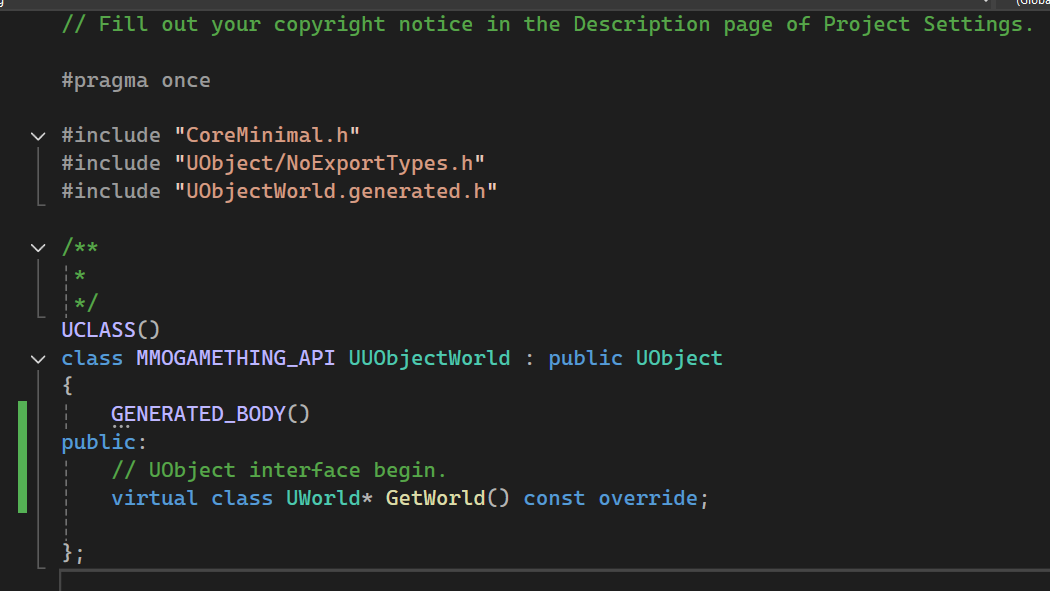
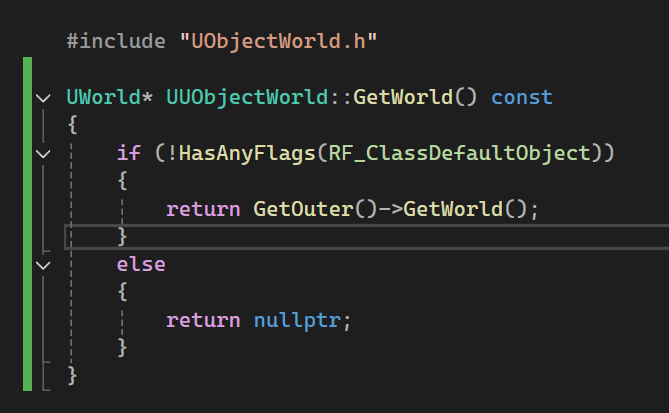
Then just make a new UObject class. Mark it as Blueprintable. And override the GetWorld function.
Header
UCLASS(Blueprintable)
class EVENTCORESYSTEM_API UEventCore : public UObject
{
    GENERATED_BODY()
public:
    // UObject interface begin.
    virtual class UWorld* GetWorld() const override;
}
CPP
UWorld* UEventCore::GetWorld() const
{
    if (!HasAnyFlags(RF_ClassDefaultObject))
    {
        return GetOuter()->GetWorld();
    }
    else
    {
        return nullptr;
    }
}
Yea
In unreal if you just make a new cpp class. it will create all of that.
After doing this, the uobject just uses the same world as its Outer.
So make sure when you run ConstructObjectFromClass you give it a outer which has world context.
Any actor works.
After doing this, if you make a subclass of this in blueprints, you will be able to access all of the nodes that require world context inside of it. Like SpawnActorOfClass for example
autumn pulsar
Damn Unreal takes so long to build
jovial steeple
Also btw, you can do other stuff like this to. Like if you need a UObject to have a tick function.
yea L
 jovial steeple
autumn pulsar
Do I need more than this for it to show up in bluepint?
jovial steeple
autumn pulsar
Do I need more than this for it to show up in bluepint?
yes UCLASS(Blueprintable)
You need to add blueprintable
autumn pulsar
oops just read that now
jovial steeple
MMOGAMETHING 💀
autumn pulsar
it's not an actual mmo
basically messing around with creating mmo like mechanics in a singleplayer context
 restive bone
Hey guys, I have a blueprint that's become corrupted, any time I try to open it, UE5 crashes. Is there a way I can remove the offending part of my blueprint outside of the UE editor so I can access my BP again? I know exactly what's causing the problem, and have exported the BP as a T3D file. I've removed the portion that's causing the problem ( I think ) but now how do I get this back into Unreal?
 jovial steeple
idk man just use source control
restive bone
That's not really helpful... lol
jovial steeple
I used to just remake the blueprint 💀
autumn pulsar
jovial steeple
idk man just use source control
that's what git is
jovial steeple
yea
autumn pulsar
restive bone
Hey guys, I have a blueprint that's become corrupted, any time I try to open it,...
uh unfortunately there's not tooo much you can do about it if Unreal crashes when loading it
if you're dedicated with a hex editor maybe you can surgically remove the offending content
but try checking the Saved\Autosaves folder
and hope Unreal was cool enough to make you a backup
restive bone
Autosaves might have saved me... About to give that a try. thank you.
Thankfully there was a copy there that was just BEFORE it became corrupted. XP
autumn pulsar

restive bone
I would have DIED if I had to remake this dumb blueprint all over again Lmfao.

 prime fulcrum
@frosty heron@dusky cobalt turns out I was calling the server event from the UI i saw that changed it to be called from the controller now it works thanks for the help
restive bone
For reasons unknown to me, trying to use set leader pose component causing unreal to crash with an error about array indexing out of bounds.
 tough badge
So I'm having a conceptual issue. I have a grid system that's based on transforming vectors to int point indexes (row, column) but I'm having trouble thinking of a way of marking tiles as having certain properties (walkable, double cost, etc.) and where to store that data. Anyone know of any ideas there?
jovial steeple
autumn pulsar
can I not bind events in a macro?
You cant, gotta be in a function or in the event graph.
jovial steeple
restive bone
For reasons unknown to me, trying to use set leader pose component causing unrea...
Could be a million things, that error is pretty generic in programing. We would need to see a crash report. Or you would need to have unreal source code to debug it in real time.
 dawn gazelle
autumn pulsar
can I not bind events in a macro?
dawn gazelle
autumn pulsar
can I not bind events in a macro?
You can. Use a "create event" node and plug it in.
Then select an appropriate event or function to have it bind to.
jovial steeple
You cant access any "BindTo" functions from within a macro.
They work differently and some things like the bind to nodes arnt available.
iirc its something todo with how they lack execution context.
dawn gazelle
Man I must've misread that... I thought he was asking about within functions. yeah macros no go.
dawn gazelle
Oh wait...
 jovial steeple
hm
dawn gazelle
No compile error... Funny enough you can't create them in there looking them up... i wonder if it actually works tho <_<
jovial steeple
I wonder
dawn gazelle
It does
jovial steeple
Its probably just a bug with how unreal finds available nodes for a graph.
Since alot of them need weird context in order to be available.
dawn gazelle
Wierd because you can't copy and paste them into the macro, and you can't look them up with a right click.
But dragging the dispatcher in lets you do it. XD
autumn pulsar
cursed
Today was
painful
but I got my spell system finally sort of working
I just need to fill up the classes then abstract some things
I also updated my targeting system to be more robust
using screen weights and target distance
jovial steeple
tough badge
So I'm having a conceptual issue. I have a grid system that's based on transform...
You could put a gameplay tag container inside your FGridTileData struct (Or whatever equivalent you have).
Would be pretty simple. Gameplay tags are easy to use.
tough badge
jovial steeple
You could put a gameplay tag container inside your `FGridTileData` struct (Or wh...
That's a good idea! The issue I have though is I have a few million tiles in my game and there's no actor to attach the tags to
I also don't store any information about tiles currently, it's all generated when the player clicks a location
jovial steeple
tough badge
That's a good idea! The issue I have though is I have a few million tiles in my ...
What do you mean no actor to attach the tags to? How are you storing the grid information?
I see
autumn pulsar
Is there any issue if I bind an event to an actor, and that actor gets destroyed?
tough badge
jovial steeple
What do you mean no actor to attach the tags to? How are you storing the grid in...
When the player clicks a location in the "Grid" I take the location and clamp it to a cell size (like 100 units) and get the location within the "grid" actor itself
the grid can be arbitrarily large, the only information it really stores is the amount of rows and columns I want
well and cell size
jovial steeple
Typically a grid based game is designed in multiple layers. You seem to have the top layer and not the underlying data layers.
tough badge
yea that underlying layer is what I'm struggling with
I've never made a grid based game before so it's an effort for me lmao
jovial steeple
Do you wanna hop in a call. Way easier to explain this kinda stuff over voice.
tough badge
oh no worries I'm good thank you though!
Just brainstorming ideas. One idea I had was to use a texture that's color coded per pixel and store the info that way
I was thinking about using excel as a map editor to paint a map that way and export it as a texture
then when the player clicks a tile, get the color of the texture at that location and use that to define its properties
jovial steeple
You can make the underlying data layer in many ways, in the end its just some sort of array. Each element of the array contains some sort of ID correlating to the tile type.
Sometimes each element may contain another array that acts as a list of that tiles properties. A GameplayTagContainer would be that.
Sometimes people don't even store the additional information about a tile in the array of all grid tiles.
tough badge
Gotcha, I'll have to play around with gameplay tags
if it wasn't so late I'd fiddle with it now, that gives me a good starting point for tomorrow though
thank you for your help! I appreciate ya
 snow halo
Why is this false?

 lunar sleet
snow halo
Why is this false?
lunar sleet
snow halo
Why is this false?
Prly cause you’re trying to attach the player char to itself (also without checking if the player char is valid at that time might give you errors in the future)
 gusty folio
Hi everybody. I have a vehicle where the player can possess and unposses. When the player unposseses the vehicle I turn off simulate physics for the vehicle so that the player doesn't push the vehicle when exiting. Turning off simulate physics gives me this message in the log. Since I couldn't find another option besides turning off simulate physics, how concerned should I be with this message?

 runic terrace
gusty folio
Hi everybody. I have a vehicle where the player can possess and unposses. When t...
runic terrace
gusty folio
Hi everybody. I have a vehicle where the player can possess and unposses. When t...
It's not an error, but simply add a check to make sure the vehicle is simulating physics before applying any force to it. That should get rid of the warning
gusty folio
runic terrace
It's not an error, but simply add a check to make sure the vehicle is simulating...
However if the player leaves the vehicle during the vehicle is in motion, I still end up turning off simulate physics while its being applied.
runic terrace
Doesn't matter, if you turn off physics the force will do nothing anyways. Add a check for it right before you add force to get rid of the warning
gusty folio
runic terrace
Doesn't matter, if you turn off physics the force will do nothing anyways. Add a...
Thank you 🙂
 unique dew
Anyone know the best way of going about making a hacking minigame? Something like the trespasser from R&C. Options ive seen are doing it within UI or doing a blueprint class with a scene camera.
runic terrace
Making it in the UI might get cumbersome if it's not a very simple minigame
I'd probably do it inside an actor and just point an ortographic camera to it to make it look like 2D
unique dew
Yeah awesome the more i search the more it seems inside an actor is the way to go. Im happy for it to be 3d. Would like the player to be able to very slightly rotate the puzzle board to give it some movment and life
 flat jetty
Hey everyone! How Developers handle about loot "count" optimization in Survival Games? I mean there are many many objects like wood, collectible items, chests in the world. Do they simply place them, or are there any "must-have" techniques to follow? I am creating a co-op survival games, and will place loots in the level.
runic terrace
flat jetty
Hey everyone! How Developers handle about loot "count" optimization in Survival ...
As long as you don't have them tick they don't really take up that much performance other than memory space.
You could divide your world into chunks may load/unload depending on player distance
You can save sections of the world and only load them in when you need them
flat jetty
runic terrace
As long as you don't have them tick they don't really take up that much performa...
I am planning to use World Partition for that, i hope it works for multiplayer too. Really? Memory space is fine as long as its not too much. 😛 Anyway game will be stylized so not high-scan textures on them. I will create a grid 16x16 with landscape mode, this will be enough for my game since it has many biomes to loaded by level system. SO i can simply place them in world? I am a mobile game developer in Unity and that is really me stressing out. 😂
flat jetty
runic terrace
As long as you don't have them tick they don't really take up that much performa...
How does the load/unload work? What are the advantages of unloading it? I mean they dont allocate memory as they are loaded? Or are they not affecting draw calls etc. ?
runic terrace
Draw calls is already handled by the engine, it doesn't render stuff behind walls and behind the camera
Advantages of unloading is that you don't have to have an empty bottle inside of a building 10km away from the player taking up space in the ram
flat jetty
Since game will be co-op, the all loots should be replicated right? I was wondering this would an issue. I am looking for industry starndard solutions on projects like Dont Starve Together, Valheim etc to handle loots. I think as you said, chunks would be useful here.
runic terrace
For multiplayer take a look at relevancy
flat jetty
runic terrace
Advantages of unloading is that you don't have to have an empty bottle inside of...
Hmm, But it would still allocate the ram "a liitle" anyway right to be loaded? I want to know so that i can master on it.
runic terrace
Loading IS allocating memory to it
You're reading data from the disk and putting it inside of a game object, and that game object lives in the ram
flat jetty
runic terrace
Loading IS allocating memory to it
I meant, are unloaded items that far away still allocate memory even though if its small? Or it completely ignored?
runic terrace
Depends on your implementation, but yes they still take up space in ram*
snow halo
lunar sleet
Prly cause you’re trying to attach the player char to itself (also without check...
But character is valid actually
 flat jetty
Hmm, I will use built-in solution with World Partition. Thanks for your time on that mate.
jovial steeple
snow halo
But character is valid actually
Your litteraly saying Attach (PLAYER01) to (PLAYER01)
lunar sleet
snow halo
But character is valid actually
You missed the first part of the answer
jovial steeple
How can you attach PLAYER 01 to PLAYER 01
Makes no sense
Something cant attach to itself.
lunar sleet
I wasn't saying it not being valid is the reason, only that it's likely to cause you further issues if you don't have a check in place
snow halo
oh so target will be self actually
lunar sleet
attach actor to actor is used to attach Actor A to Actor B
you're currently doing Actor A to Actor A
not a valid use
 chilly crane
Why am I getting this? Is it something with my blueprint? It's supposed to align to the ground, and it's annoying that it's not, as I might as well place them myself at this rate



No description provided
jovial steeple
flat jetty
Hey everyone! How Developers handle about loot "count" optimization in Survival ...
Assuming your making a open world survival game set on a pre-defined map, there would be multiple layers to this game world.
-
Pre-Defined Map
This would be your games pre-defined game level. The world map you create in the unreal editor, along with every tree/ building you place in it. World partition would manage loading different sections of this pre-defined map. This should already exist in your game. Important to note that this layer exist independant from any dynamically spawned objects in your game. -
DynamicallySpawnedObjectDatabase
This is a backend database of all dynamically spawned objects in your game world. This dataset would be saved to the disk, so that when you close and reopen the game, you can respawn all of the dynamically spawned objects. Or if you leave a section of the map and return to it, you can reload all of those dynamically spawned objects in that area again from the disk. This could handled using SaveGames in unreal engine blueprints. -
NearbyObjectLoader
This is a class which would constantly check the player position and load relevant objects from theDynamicallySpawnedObjectDatabase. This class would maintain its own dataset of all dynamically spawned objects in your game world that are nearby players and are loaded from the disk. This class can also spawn in / de-spawn the actual actor representations of those dynamic objects when needed. -
Actors representing the dynamically spawned persistent objects.
These are just the actor representations of those dynamic objects that exist in your game world. They are spawned/deleted from theNearbyObjectLoader.
There is a lot of complexity to set something like this up. Especially if your talking about multiplayer.
If your talking about optimizing the amount of loot on the ground, the NearbyObjectLoader would handle this as well.
flat jetty
Oh man, thanks for your time on this! I will have a pre-defined maps, with many different biomes. I will only load level. I dont need to spawn dynamic loot objects. They will exist in editor. So World-partition would be enough for me? Its not exactly open world, but our player travel through biomes around 16x16 size with landscape.
I prefer to put all the loots by manually, because of the level design.
jovial steeple
Probably not. I should have wrote this talking about persistency more as well.
If you want a chest to remain looted, even after you have left the area and came back, you will need aditonal custom data layers as well.
flat jetty
Hmmm. Thats whole another problem.. 😢
jovial steeple
It would be the same system that handles dynamicly spawned objects as well.
flat jetty
Wouldnt relevancy, and Unreal's built'in distance checker handle that 😦
jovial steeple
No, i think your misunderstanding what actor relevancy does.
Actor relevancy describes a function where a game server determines which actors to "replicate" to each client.
Thats all that is.
flat jetty
Yeah maybe, I loaded my brain with a lot of info, and feel scary about multi now. I am in a threshold where i create interaction, inventory system and doing it all in blueprint, now i am not sure if i can handle that with only blueprint.. There are courses who handle multiplayer survival with blueprint only but.. IDK man. I am scared now. 😂
flat jetty
jovial steeple
If you want a chest to remain looted, even after you have left the area and came...
I couldnt understand why the chest wouldnt remain looted? If I loot chest, and send RPC to server & then clients. Wouldnt it just loot for all and stay like this?
jovial steeple
You honestly should probably be. If I were to be honest, I believe your way in over your head.
Multiplayer open world is kinda a joke for game developers at this point. Beginners always come in and want to make them, and it never works.
But if its what drives you to make games just do it, its fine
flat jetty
Yeah maybe. Anyway, i have time to learn it. I will be in try n fail loop for a while.
For example, 2 players exist in world in different places, and first player loot some item in area and destroy it with RPC. So the second player's client wouldnt just destroy the item even its far away for example ?
flat jetty
jovial steeple
But if its what drives you to make games just do it, its fine
Yeah, anyway its not really huge open world, i will try my best. The one thing that scares me is the "counts".. high counts of loots.. "high counts" of bullets etc.
I dont need fastest sync. Just need proper replication.
Since it will be friendly co op
jovial steeple
flat jetty
I couldnt understand why the chest wouldnt remain looted? If I loot chest, and s...
If the chest is getting loaded and unloaded constantly, you will need to create custom logic to handle this.
So that when its loaded again, the values persist.
That part has nothing todo with multiplayer.
flat jetty
Hmm, you are right actually. I will think about it. I have kinda knowledge in Unity with RPC's and network variables, but confused about in Unreal Engine.
jovial steeple
Also in the context of multiplayer, the way you described it to work, doesn't work either.
flat jetty
Aha you mean, it should be locally handled with persistent data? But it should be same with the other client
jovial steeple
Assuming you have actor relevancy culling the object for specifc players...
There is alot going on, but I would honestly recommend forgeting that multiplayer exists for awhile.
I would recommend first making a system where a chests values persist even after it is loaded and unloaded by world partition.
Gotta start somewhere.
flat jetty
jovial steeple
There is alot going on, but I would honestly recommend forgeting that multiplaye...
Do you recommend prototyping my game for singleplayer, then try to convert it to Multiplayer? It wont last long.. Maybe around 1 month.
jovial steeple
Yes.
flat jetty
I also want to keep learning GAS, which stephen ulibarri provided, i already in the half of the course. Maybe it will be useful for my game with all the attributes i have.
Health, Stamina, Hunger, Thirst, Radiation, Armor..
Maybe it would be a little bit relieving to not trying to replicate this all manually.
😄
 dark drum
flat jetty
Aha you mean, it should be locally handled with persistent data? But it should b...
dark drum
flat jetty
Aha you mean, it should be locally handled with persistent data? But it should b...
I'm doing multiplayer, generally the item data should only exist server side and be replicated when needed by the clients.
Setting up a robust save system for your items would be required so that the data can be saved to disc and unloaded when not needed.
flat jetty
Thanks man. I will keep doing it for single until Prototype, then handle it. But one thing scares me is, I am going fully blueprint.. I am not really afraid of c++ because of +6 years of c# knowledge and already know some stuff, I feel find fast for prototyping and see it visually. its really strong one.
I am not sure if i should create the prototype with c++, But if i create it bluprint, and have hard times replicating it.. Ah shit. 😄 I dont need custom movement or smth.. But aahh my braint melt. 😄
flat jetty
dark drum
I'm doing multiplayer, generally the item data should only exist server side and...
Sure, That save system should be also exist in server?
dark drum
Be aware of mutable and immutable data. Generally immutable data wouldn't need to be replicated as this should already be on the client. These are things like static meshes, sounds etc...
Mutable data that would need to be replicated would be quantity, durability. Pretty much anything that can change at runtime.
flat jetty
I dont even want to get inside, when 2 player play the game, take loots to inventory.. and leave the game.. On the next time, they both need to load their persistent data.. How its handled in multiplayer games?
jovial steeple
flat jetty
I am not sure if i should create the prototype with c++, But if i create it blup...
No games are made in either BP or CPP, you use them both. If your not afraid of CPP, you should try it out with unreal and learn it.
dark drum
flat jetty
Sure, That save system should be also exist in server?
The data only needs to be saved by the server.
flat jetty
dark drum
Be aware of mutable and immutable data. Generally immutable data wouldn't need t...
You mean if immutable data is replicated, can cause performance on internet or etc.?
flat jetty
jovial steeple
No games are made in either BP or CPP, you use them both. If your not afraid of ...
Then its time to convert my Interaction & Inventory system to C++ in my game.. 😂
jovial steeple
Inventory is what I always start with when teaching cpp system programing.
Do that.
dark drum
flat jetty
You mean if immutable data is replicated, can cause performance on internet or e...
It could, it's just not data needs to be sent over the internet. A simple approach can be to use data assets. Then the server can be like, 'spawn an item using this data asset and apply this data.'
flat jetty
I believe I can do that! I am self-concious and going to handle multiplayer! There are many multiplayer games around in the steam all around the world and i can handle that too! I just need more time to learn it. I will check sources for multiplayer like shooter c++ multiplayer of Stephen Ulibarry.
flat jetty
dark drum
It could, it's just not data needs to be sent over the internet. A simple approa...
Thanks man, never thought that way
dark drum
I'm currently working on my own c++ inventory system. So I've spent the whole week thinking about it. 😅 Not sure if I want to do multiplayer myself but damn it's gets complicated fast. 😂
flat jetty
For now, I will just try to finish my game prototype with single-player, and try to convert it to CPP for replications.. But going to be a hard way.
flat jetty
dark drum
I'm currently working on my own c++ inventory system. So I've spent the whole we...
Yeah, its confusing. But i think there is a threshold. Once we pass that threshold.. There is nothing we cant do.
And i am not even close to that threshold.
😄
dark drum
flat jetty
Yeah, its confusing. But i think there is a threshold. Once we pass that thresho...
How are you planning to structure your items? Uobject or structure?
flat jetty
I have created Primary Data Assets for my items, with id, icon, display name, and soft class reference to the blueprint of it.
How to debug replication in Editor? IF i start PIE window with 2 player, as listen server. One will be listen, and other client.. What about editor? Is editor a server so that i can check values if they are replicated, for example if client has items. What are the ways of debugging it?
Is that a good/fast way of replicating, if we dont mind about cheating etc? I first set visibility on local, then send to server. Server then will later handle for other clients etc.

What guideline i should follow for that kinda of changes? For example, material, mesh change.
jovial steeple
flat jetty
How to debug replication in Editor? IF i start PIE window with 2 player, as list...
you can use print strings to print the entire inventory, the print stirng will display the player printing it before the message. You can also use debug breakpoints and to inspect the inventory value. You will be able to see which client is currently break pointing on the toolbar.
jovial steeple
flat jetty
Is that a good/fast way of replicating, if we dont mind about cheating etc? I fi...
RPCs only execute one, to all relevant players.
If a player enters after the RPC is called, it will not have the visability propertly set.
flat jetty
Yeah, I learned that in hard way with Unity. 😂
jovial steeple
Or even if a player becomes relevant by coming in range after the RPC is called, it wont have the proper visability.
runic terrace
Yeah use rep-notify variables for state information (if you want it to change mesh etc)
jovial steeple
You should use a replicated variable instead.
flat jetty
In Unity, we could only replicate properties with value types (well with serialization you can also ref types), Is it same with Unreal? If I for example replicate a property of Mesh material etc.
flat jetty
jovial steeple
Or even if a player becomes relevant by coming in range after the RPC is called,...
Ah, i understand now.. Thats not a good thing for me. In Coop, 2 player wont be together always.. And player can update its inventory and equip items etc.. So the other player wont get RPC from others? Resulting of not seeing proper visual? 😄
jovial steeple
You can replicate any variable type. If you are replicating a reference to a dynamicly spawned object however, it may not replicate properly without aditional setup for some objects.
runic terrace
flat jetty
In Unity, we could only replicate properties with value types (well with seriali...
You can, but it's probably better to represent that as an index
So it's cheaper to send over the network, the client can just use that index to find out what material/mesh to set
flat jetty
Understood, The less byte data, means much proper networking.
flat jetty
flat jetty
Ah, i understand now.. Thats not a good thing for me. In Coop, 2 player wont be ...
What about that?
What is this actually called, by not syncing with far away objects in Unreal Engine?
runic terrace
Yes, unless you set the players actors Always Relevant, players far away won't receive RPCs
And replicated variables will only send their latest value once they get in range again
Don't set to Always Relevant though, if you do everything properly you shouldn't have to
flat jetty
What about remote clients in our game?
For example Only owner should have "Interaction component" and not the other replicated players. But i directly add component to player in editor mode, Are there any best practice of doing that? In Unity, I would remove the component if its not the owner.
dark drum
flat jetty
I have created Primary Data Assets for my items, with id, icon, display name, an...
Just be wary of using an actor to store all your item data. You need a more abstract way of doing it as having 10,000's of actors half which aren't visible can start to impact performance.
The approach I prefer is to use a uobject based item class. These are lightweight and aren't as heavy as actors. This allows you to have access to the data when inside an inventory without needing to spawn an actor into the world.
However, there isn't a way to directly replicate uobjects in BP only so would require some C++.
Other methods involve using structures to store your data but this can get tricky when you need data hierarchy.
flat jetty
runic terrace
Don't set to Always Relevant though, if you do everything properly you shouldn't...
Hmmm. Thats a bit confusing. For example, If players are far away, and player decides to change its outfit, they wont be taking RPC, which causing an issue? Then how would i implement this system?
runic terrace
Keep state information like equiped items etc as replicated variables
They send their latest values whenever in range
even reliable RPCs will be dropped when not relevant, but replicated variables will update (when in range again)
jovial steeple
RPC
- When an RPC is called, the event and its data is sent to all relevant clients at that moment in time. No other clients will ever know about this RPC at any time ever. These are best used for fire and forget events that only matter to the imediente relevant clients.
- EX: Spawning an explosion particle on all nearby clients.
Replicated Variable
- When a replicated variable is set on the server, the value will be sent to all relevant clients at that moment in time.
- When a actor becomes relevant to a client and its loaded into the clients system, the server will send the value of all replicated variables to that client along with it.
- EX: The players currently equiped item.
Rep Notify Variable
- When a rep notify variable is set on the server, the value will be sent to all relevant clients at that moment in time. A repnotify function will also be called on all relevant clients to let them know that this value has changed. In blueprints, the repnotify function will also be called on the server as well.
- When a actor becomes relevant to a client and its loaded into the clients system, the server will send the value of all replicated variables to that client along with it.
- EX: The player currently equiped item works for this to.
flat jetty
runic terrace
Keep state information like equiped items etc as replicated variables
hmm, thats much more understandable. Maybe i can save their id in a list or smth equippedItemIds etc. Would Unreal can automatically send their latest values in range? Or i need additional setup?
Its much more clear guys, thank you very much your effort on this, Its very valuable for me.
I cant find those infos in everywhere.
runic terrace
It's also better to use replicated variables when you're dealing with larger data, as far as I know replicated variables send deltas (only sending changed values) over the network, while RPCs send the whole data
 tired knoll
Hi,
How to create a Widget (like a notification) at the center of the screen
Mine is stuck at top left corner
Thanks
runic terrace
jovial steeple
**RPC**
- When an RPC is called, the event and its data is sent to all relevant ...
To add to that, on blueprints, Rep-Notify also runs on the server along with the clients. On C++ it only runs on the clients and not the server.
flat jetty
jovial steeple
**RPC**
- When an RPC is called, the event and its data is sent to all relevant ...
GOLD.
jovial steeple
runic terrace
To add to that, on blueprints, Rep-Notify also runs on the server along with the...
Actualy are you sure? Iirc it doesnt get called on server, even in blueprints?
flat jetty
jovial steeple
**RPC**
- When an RPC is called, the event and its data is sent to all relevant ...
You are like ChatGPT man. With examples, you have provided very valuable infos.
Thanks again guys.
runic terrace
Rep-notify runs on everyone including the server in bps
When I want to do something only on clients I have to check authority first in bps
jovial steeple
I guess so.
flat jetty
What are the naming conventions for Custom events that is for RPC? For example RunOnServer, Client etc.
In blueprint side.
jovial steeple
Im not sure of any widespread naming conventions for it.
runic terrace
I'd like to know that too, I just suffix _ROS _MC etc but that's more just what I do
flat jetty
Hmm. Maybe ServerChangeMaterial idk. What happens when we call a Multicast RPC inside a client? Since server should only send it? It throws error etc?
F... I am so excited to learn all of these.. MY ADHD triggered. 😄
flat jetty
Is this RPC & networked values are same in all Multiplayer services? For example, In Unity Netcode, there are RPC & Networked Variables, here we have replicated variables and RPC's. I think its an industry standard solution for game networking right?
There are photon, Mirror, Fishnet etc. inside the Unity. I think they all use same methods.
runic terrace
Not sure if it's exactly a standard, I'm sure it has some differences
But they're probably more or less the same in terms of how they work
flat jetty
So simple **usage **would be for nearby users to show some effect
Send RPC to server.. Then Server Multicast to the clients.. then logic goes here like activating particle.
runic terrace
Yeah, if it's just a visual thing you can also run it on the client and at the same time calling the server rpc
so on the client that triggers it there would be no latency to the effect
flat jetty
If i do the logic locally, then send Server RPC and server then multicast and the logic, that would cause 2 times working for "server host". right?
flat jetty
runic terrace
Yeah, if it's just a visual thing you can also run it on the client and at the s...
Yeah, but after server multicasts it, wouldnt i cause to set it multiple times?
For example, we set local, then send to server, then server multicasts it, and all the clients take it again
runic terrace
You'd have to account for that
flat jetty
Maybe i can check isLocallyControlled or smth like that?
In Unity its IsOwner check, how its in Unreal engine?
Has autority?
runic terrace
Yeah that's what I do for player characters, isLocallyControlled works fine
flat jetty
So that owning client wouldnt get the RPC.
runic terrace
Has Authority is to check if it's a server or a client
flat jetty
Because he already set it in LOCAL. Thats best for me because i dont mind cheating etc. I need instant reaction on local.
flat jetty
runic terrace
Has Authority is to check if it's a server or a client
Aha, So its simply IsServer bool. Alright.
runic terrace
flat jetty
So that owning client wouldnt get the RPC.
It would get the rpc, but you can just not do anything with it if it's local
flat jetty
If its not incrementing any value or smth. I dont mind changing multiple times anyway.
 frosty heron
flat jetty
What are the naming conventions for Custom events that is for RPC? For example R...
frosty heron
flat jetty
What are the naming conventions for Custom events that is for RPC? For example R...
ServerRPC : Server_MyFunc
flat jetty
frosty heron
ServerRPC : Server_MyFunc
What about Multicast?
frosty heron
I dunnoe, probably Multicast_SomeFunction
almost didn;'t have any multicast
maybe only 1 - 2 atm.
another tip
Never ever use multicast for stateful behavior
so that accounts to 90% of what you are doing.
Multicast is okay to fire a one time event that can be forgotten.
E.g. Teleporting everyone to a portal
or playing special effects that is initiated by server.
frosty heron
If you don't need to remember the chat history then MC away
who cares if late joiners didn't know previous chat messages.
flat jetty
Right, I dont mind that, I mind the distance though. 😦
runic terrace
flat jetty
If players are far away, they wont take that right?
You'd keep that in somewhere that's always relevant like the game state
flat jetty
frosty heron
Never ever use multicast for stateful behavior
Whats the other option? Can you give me some examples of stateful behaviour? I feel like Im talking to chatgpt. 😄
 maiden wadi
Component on game state.
flat jetty
frosty heron
A door being open or close
Aha, I understood, late joiners would see the door closed even if it active.
flat jetty
runic terrace
You'd keep that in somewhere that's always relevant like the game state
Hmm, thats a really good tip. For global things, I can use GameState etc. Really good one.
Like requests party etc.
 flat jetty
Anyway, its time take my hands dirty. Thank you guys! ❤️
runic terrace
frosty heron
https://cdn.discordapp.com/attachments/221798862938046464/1345549290503934012/im...
is it the colors being washed out?
frosty heron
yeah, but it's already set to Unlit
runic terrace
I think there was a checvkbox like gamma correction or something
i dont remember the name
on the widget component
frosty heron
it's not just the color though
dark drum
frosty heron
Left is screen space the right one is world space 😦
Could it be caused by AA? You could try disabling/changing it.
frosty heron
the image is pixelated as hell.
flat jetty
One last question is; Is it possible to send RPC's to private clients? For example a private message to a player. Since Multicast sends to all clients.
maiden wadi
Hmm. Almost looks like mip mapping
frosty heron
flat jetty
One last question is; Is it possible to send RPC's to private clients? For examp...
Ye, client RPC
flat jetty
frosty heron
https://cdn.discordapp.com/attachments/221798862938046464/1345549290503934012/im...
Can you give more information what this UI is used for? What does it represent? Rank etc?
flat jetty
frosty heron
Ye, client RPC
Isnt it sending for just Owning client?
frosty heron
flat jetty
Can you give more information what this UI is used for? What does it represent? ...
just a place holder but it would be the overhead
frosty heron
flat jetty
Isnt it sending for just Owning client?
Player 3 -> Server RPC (PlayerToSend[] Player, message)
Server -> For each Player in PlayerToSend -> Client RPC (msg)
runic terrace
flat jetty
One last question is; Is it possible to send RPC's to private clients? For examp...
You'd use Run on Owning Client
maiden wadi
Lol... ESO did that. Anti-Aliasing totally screwed it.
 flat jetty
frosty heron
just a place holder but it would be the overhead
flat jetty
frosty heron
just a place holder but it would be the overhead
hmm, I meant placeholder of what? I cant seem to understand what is UI for, maybe we can make it look more
frosty heron
flat jetty
hmm, I meant placeholder of what? I cant seem to understand what is UI for, mayb...
Text, Images, or anything you put in widget looks like crap when you convert it to world space out of the box.
flat jetty
Ah, Understood now.
frosty heron
and there isn't erally an answer on the internet
the Material provided isn't doing it's job
flat jetty
Thats like pixelart blurry issue 😄
frosty heron
maiden wadi
Lol... ESO did that. Anti-Aliasing totally screwed it.
I see, so I have to change the Anti-Aliasing? but does that mean I have to adhere to that specific Anti-Aliasing for the entire game as opposed to per material?
maiden wadi
Worse than that, you'll also blow it up with upscaling.
Pretty much anything related to 3D stuff can break it. Do not advise using 3D widgets for widget stuff.
dark drum
maiden wadi
Lol... ESO did that. Anti-Aliasing totally screwed it.
Couldn't you keep it in screen space but do something with scene depth to give the effect you're looking for?
maiden wadi
Screen space takes it out of the 3D rendering path though.
frosty heron
like if you want parts of the UI to be masked when there is a wall
or door
that's kinda why I want world space
dark drum
maiden wadi
Screen space takes it out of the 3D rendering path though.
Just spit balling but render the depth pass to a render target and use that?
maiden wadi
I think it's 5.5, you can access the post process buffer at least. I'm sure there's a smart way to manage that somehow. Maybe some form of card at the player's location that can be masked to screen space?
frosty heron
This game can do it 😦

bless those who knows chinese and have access to chinese community, I heard the articles is top notch
dark drum
maiden wadi
I think it's 5.5, you can access the post process buffer at least. I'm sure ther...
I'd say this sounds like the most viable solution.
dark drum
frosty heron
This game can do it 😦
This is on the market place but it seems do go down the same root.
https://www.fab.com/listings/91ecded3-08dd-466e-875f-d36d7002ede6

Fab.com
Bake SceneTextures so that they can be used for UI materials.Youtube tutorial video: link Bilibili tutorial video: linkFeatures:Support five types of most useful SceneTextures: SceneColor、SceneDepth、CustomDepth、CustomStencil(UE5.2 or later), FinalColor.Provide "SceneTexture For UMG" material node.Enable/Disable SceneTextures for UMG in Project S...
maiden wadi
Yeah, a lot of these were prior to the 5.5 change. So do be sure you can't do this in engine already.
dark drum
frosty heron
oh so it will be material
Apparently, the best UI's are materials. 😅
But it looks likes it uses a render target for the depth and exposed it to the material editor for easy access.
maiden wadi
dark drum
Apparently, the best UI's are materials. 😅
Truth on this one. 😄
I've put together three UIs, five if you count that one of them was redone twice. All of them were largely texture based not using materials. But having dabbled a bit with materials. If you want any sort of neat, non static UI, you need them. And the best part is, the material work for them really is simple once you grasp the basics. Plus you get a ton of performance bonuses.
flat jetty
So if one person connects to game, and spawn a crafting table on the ground, and send RPC, late joiners wont see that. Then how to handle situations like this, spawning & existing even later joiners can see? REP Notify?
maiden wadi
RPCs are instant and non stateful.
Replication is tiered by a priority system but will always eventually replicate to anyone whether it's from a late join or through the actor going out of and returning to relevancy.
dark drum
flat jetty
So if one person connects to game, and spawn a crafting table on the ground, and...
You would save the data for all items spawned in which the server stores. When a new player joins, the server passes the data to the client so it can spawn them on their end.
For context, there's a reason the save files for Minecraft worlds can get so big. Every change has to be saved whether it's adding a new thing or removing one.
flat jetty
What kind of data structure i should follow for that for optimized way? I mean what data i should save. Vector3, id etc? Arent there any easier ways? Because if both clients exist in the world, do i have to do the same?
Maybe i can simply create lobby system and late joiners wont be alloved.
maiden wadi
For spawning a crafting table for example, as a client.
Client RPCs to server to ask it to spawn crafting table.
Server spawns a crafting table for itself. Crafting table is a replicated actor. It simply replicates to any client in range.
frosty heron
Client request to Server, Hey can I buy this meat?
Server Check the inventory of the player in the server machine. If the player can pay for it, then add one meat to inventory.
The inventory will be replicated down to client.
More than worrying about what RPC to call, you should write on paper the flow of the game first.
maiden wadi
Generally speaking. While you're learning. I very strongly discourage the use of Multicasts. There are some good cases for them but they are MUCH rarer than a lot of guides would have you believe.
dark drum
Yea inventories can get beefy as it is without multiplayer. Understanding what it should be doing first makes it easier to figure out the bits that should be replicated.
flat jetty
frosty heron
Multicast to spawn actor 🤢
Exactly man. I have been following many tutorials, I am glad i asked here.
frosty heron
95% of bp youtube tutorial got it wrong
not even jocking.
Actually soo wrong, but many victims thanking the content creator.
flat jetty
For example, If i spawn craft table while other players away, wouldnt i cause an issue not replicating on the other away players?
dark drum
frosty heron
95% of bp youtube tutorial got it wrong
That's because most of them just copy each other. :/
flat jetty
Some player will be in base, while other keep looting.
So if I create crafting table with RPC, would it replicate on far away players? seems like NAH.
Maybe a global game state or crafting manager which is always relevant should do that.. IDK.
frosty heron
How many players do you intend to support?
flat jetty
I am confused about "Spawning and persisting" things, I have already base building, and crafting items and placing in ground.
frosty heron
I personally don't think I will be doing much optimization. (Relevancy, Dormancy, etc.)
dark drum
frosty heron
How many players do you intend to support?
MMO 😉 Beginner goals. 😛
flat jetty
I intend to support max 3.
dark drum
flat jetty
I intend to support max 3.
A nice respectable number. 🙂
frosty heron
flat jetty
I intend to support max 3.
so why do you worry about the range?
just keep them relevant all the time.
Don't think making rust is an easy feat, especially with bp only.
flat jetty
frosty heron
so why do you worry about the range?
just keep them relevant all the time.
Someone mentioned that if you do things right, you wont be necessarily need making it always relevant. So I try to follow best practices? You mean players should or anyone who create crafting table should be always relevant? Not the crafting table itself?
frosty heron
imo try to lower your expectation for your first multiplayer game.
flat jetty
frosty heron
imo try to lower your expectation for your first multiplayer game.
you are right.
dark drum
You'll most likely end up scrapping you're first inventory system. 
frosty heron
flat jetty
Someone mentioned that if you do things right, you wont be necessarily need maki...
It's up to you how you want to design your game.
flat jetty
And i dont know about that range. Maybe my map is even not problem about this range problem
frosty heron
At the end of the day, all the values are stored in the server.
maiden wadi
The simplest, shortest answer is that if you want something to happen, do it on the server and let it replicate to clients. Clients never have the real view of the game, server does.
frosty heron
when actor become relevant, you will get the latest values.
flat jetty
So, to place items in the ground and sync all over the players (max 3) should i just make the player always relevant, and send RPC to server then multicast? (assuming not having late joiners)
snow halo
Hi I accidentaly deleted a blueprint. Has anyone had this problem where after you try to paste the file into your file explorer with the right name and everything, it still sometimes doesn't appear into your Unreal Editor's content browser? For example here, I've pasted this Saved-AutoSaves packup file that Unreal automatically generates. This is the exact location I want to spawn it at.
 dark drum
Just throw stuff down, see what works and what doesn't. You'll figure out what you do and don't need. It can be too easy to get caught up planning for every situation (I do it do) but sometimes you don't actually know until you're making and testing.
flat jetty
dark drum
Just throw stuff down, see what works and what doesn't. You'll figure out what y...
You are actually right, i am trying to plan this even before i try..
 surreal peak
flat jetty
So, to place items in the ground and sync all over the players (max 3) should i ...
surreal peak
flat jetty
So, to place items in the ground and sync all over the players (max 3) should i ...
No.
flat jetty
Maybe just i need to encounter with the problem, and fix it.
flat jetty
surreal peak
No.
Ups.
frosty heron
you don't need to involve multicast
surreal peak
snow halo
Hi I accidentaly deleted a blueprint. Has anyone had this problem where after yo...
Usually only had this when the version of the file you are trying to copy is from a new version of UE.
Or rather saved with it.
Also please use #source-control in the future.
You should not work on Unreal Engine Projects without #source-control being set up.
There are free options for this too.
flat jetty
frosty heron
you don't need to involve multicast
Hmm, because of spawn logic? I heard if crafting table is replicated, we only call RunOnServer, andd it will be spawned in both
surreal peak
flat jetty
Hmm, because of spawn logic? I heard if crafting table is replicated, we only ca...
Did you read the Multiplayer Network Compendium pinned to #multiplayer ?
frosty heron
flat jetty
Hmm, because of spawn logic? I heard if crafting table is replicated, we only ca...
Imo. you should try exercises first and read the pinned material.
surreal peak
Because you are asking very basic questions, which are answered by that and by testing a bit.
frosty heron
read the pinned material then try to sync a door.
if you can't do that, don't work on your system yet imo.
flat jetty
You guys are right. I have been theorically learn and trying to find solutions that dont exist yet. Anyway, i will check it out. ❤️
maiden wadi
flat jetty
So, to place items in the ground and sync all over the players (max 3) should i ...
Don't ever assume that you won't have late joiners. You're shooting yourself in the leg if you do. Simple case. Player disconnects. You have no late joiners, they have to completely restart their progress.
flat jetty
maiden wadi
Don't ever assume that you won't have late joiners. You're shooting yourself in ...
😄 Upssie
Ah shit.. Then i have to ask myself while replicating, would it need to be sync for late joiners or not.. Then behave like tihs.
maiden wadi
You don't have to ask yourself that. Just let the actor replicate. The engine handles everything else for you. Just don't multicast anything.
surreal peak
For Bandwidth and Performance reasons you'd adjust Net Relevancy Range of actors too. So it can totally be that people run out of relevancy range.
flat jetty
maiden wadi
You don't have to ask yourself that. Just let the actor replicate. The engine ha...
😄 Its good to know that, like the guys said here, all of the tutorials are full of multicasting.
Thanks for letting me know early of this.
flat jetty
surreal peak
For Bandwidth and Performance reasons you'd adjust Net Relevancy Range of actors...
Thanks btw, I read your docs on this. I found the compendium. I am more a video guy to learn but anyway i should dig this into whole way.
surreal peak
Yeeeeaaaah UE Tutorials tend to more often be a miss.
maiden wadi
Like I said, there are some good cases for multicasting. 95% of the cases you'll see them used in tutorials are not good cases for it.
surreal peak
flat jetty
Thanks btw, I read your docs on this. I found the compendium. I am more a video ...
Check the resources at the end of the compendium. There should be videos too.
Not by me though.
flat jetty
maiden wadi
Like I said, there are some good cases for multicasting. 95% of the cases you'll...
Understood, for nearby players to affect some explosion etc might be a good thing for example.
frosty heron
someone posted Matt Aspald tutorial...
He did server RPC for damage and then he did Client RPC to update health
surreal peak
Yop. One time events that don't need to retrigger when someone connects or gets into range.
Sometimes even those you hide in an OnRep.
flat jetty
surreal peak
Yop. One time events that don't need to retrigger when someone connects or gets ...
I will remember that guys. Thats all i should remember i think about multicasting.
maiden wadi
~GAS enters the room right on cue~
surreal peak
By adding some ServerTimestamp and then just checking if it was recent enough. E.g. if you have an Array of completed Quests, and you don't want to also multicast for the notification that the Quest is complete, it might be viable to add a Timestamp to it and then decide based on that if you want to show the notification still.
But that's just an ass-pull of an example.
flat jetty
At least now i know i definitely shouldnt open my doors with RPC only. 😂
surreal peak
The Door example is just a funny little thing that will break you.
frosty heron
surreal peak
By adding some ServerTimestamp and then just checking if it was recent enough. E...
I never thought about doing such approach 0o
experience speaks volume
flat jetty
Do you think its worthwhile learning about GAS for attribues and stuffs in my survival game? Even if its single at first?
frosty heron
You don't make multiplayer game from a single player game
flat jetty
frosty heron
I never thought about doing such approach 0o
I didnt even try to understand that because idk what server time stamp is, i got a whole way on me.
surreal peak
Cause it sounds so innocent, yet it's a lot of work to figure out how to:
- Actually tell the Server to open the Door
- A lot of people will try to RPC in the Door and get a reminder that Ownership is required for a ServerRPC
- Replicate the actual process of the door currently opening
- Replicate the final state of the door being open, so that other don't see it "re-open" when they join late
- etc.
You might even, in your days of gaming, have seen things like this in other games.
flat jetty
surreal peak
You might even, in your days of gaming, have seen things like this in other game...
Yeah, definitely.
surreal peak
Where you come close to something that already happened for your friends, only for you to see it again.
surreal peak
flat jetty
I didnt even try to understand that because idk what server time stamp is, i got...
Server Timestamp just means a float variable that the Server progress (like Seconds since it started the Game), and replicates to Clients.
GameState already has access to a very simple version of that.
flat jetty
frosty heron
You don't make multiplayer game from a single player game
Yes, also confused on that. But until prototyping, maybe i can go as single. Because while thinking multiplayer, i cant seem to even add proper mechanics to my game..
surreal peak
Server can set a variable with that, and Clients can then compare that variable to what they locally get for GetServerTimeSeconds.
And then know how old that is
flat jetty
surreal peak
Server Timestamp just means a float variable that the Server progress (like Seco...
Wow, that is definitely a good topic. Because my game will have a countdown. I am also scared on these because a value is constantly changing in frame, and syncing.
surreal peak
flat jetty
Yes, also confused on that. But until prototyping, maybe i can go as single. Bec...
Problem will be that you will have to re-code it almost from scratch if you do that.
dark drum
frosty heron
You don't make multiplayer game from a single player game
Well you do if you're new but double you're dev time. 😅
frosty heron
complete different architecture
surreal peak
dark drum
Well you do if you're new but double you're dev time. 😅
Probably 2.5 to 3 times dev time.
It's not like the Multiplayer version will be the same workload
flat jetty
Hmmmm.. Then i will try to implement logic with multiplayer at first. Even though it means a lot of work to do. Its better. I need to encounter with problems to solve.
surreal peak
Well, actually, depends on what you compare the dev time too I guess.
flat jetty
You guys are right. I am +6 years old Unity game dev working on a company, but it still suprises me how multiplayer is another world.
surreal peak
I would suggest you to come up with a few examples for Replication so you fully understand what RPCs and OnReps do and where to use them.
And then also examples that make you use the Game Framework classes
Such as GameState, GameMode, PlayerState etc.
Make these examples small and try to figure them out.
If you can deal with those, you can work on your project.
maiden wadi
It gets even more fun when you complicate things with an initial only replication and stateful multicast changes. 😂
flat jetty
surreal peak
I would suggest you to come up with a few examples for Replication so you fully ...
You are right. Are there anyways to see "Print Text" outputs in game view? So that i can debug easily with logs when I open PIEwindow?
surreal peak
Otherwise you'll probably run into overcomplicated systems you wish to create
surreal peak
flat jetty
You are right. Are there anyways to see "Print Text" outputs in game view? So th...
PrintString should already print into the screen?
flat jetty
surreal peak
PrintString should already print into the screen?
Aha, does it do in the game view too? I thought it was going only in scene editor window
Never tested, sorry.
surreal peak
Any window in theory
flat jetty
I have been playing in editor until multiplayer 😄
dark drum
surreal peak
Such as GameState, GameMode, PlayerState etc.
This reminds me of a reddit post I read yesterday with someone advising to store inventory on the game instance. 🥲
maiden wadi
🤦♂️
flat jetty
dark drum
This reminds me of a reddit post I read yesterday with someone advising to store...
I am so sad that i cant even understand if its so bad or not. 😄
surreal peak
That reminds me of these meme images where some people say something really stupid about math and physics and the other panel has like Einstein being held back by 2 others.
dark drum
flat jetty
I am so sad that i cant even understand if its so bad or not. 😄
When you brush up on the game framework you'll know why lol.
surreal peak

Now just picture me being held back there and the top being a GameInstance Inventory.
flat jetty
surreal peak
Otherwise you'll probably run into overcomplicated systems you wish to create
You are right. I should be really aware of what to replicate or not. I dont want to replicate unnecessary things. .
 indigo zenith
thekrocker maybe ask chatgpt
indigo zenith
exi u need to learn the ai
flat jetty
I tried ChatGPT before i come here, And now learning a lot of whole world.
indigo zenith
ur a god
surreal peak
We have documentation written by actual humans that know their shit.
dark drum
indigo zenith
thekrocker maybe ask chatgpt
ChatGPT for syntax only, beyond that it just makes stuff up.
indigo zenith
maybe u should be hooked up somehow to the chatgpt
maiden wadi
"You're absolutely right, I was wrong and incredibly stupid for repeating the random stuff people on the internet parrot without any context, here's another completely useless bullshit example I just got from parrots on the internet!"
flat jetty
NVM the ChatGPT, what about this question?
"In Unity, Owning player would have "interaction component"" and I would remove that component from other replicated clients so that in my instance, othe clients dont do update check locally etc.
In my game, now i have interaction component where i check overlaps, but other spawned client dont need that. What can i do for that? Should i just simply remove it etc?"
indigo zenith
i mean we can get a neural implant for exi, so he can feed us 24/7 knowledge
surreal peak
flat jetty
You are right. I should be really aware of what to replicate or not. I dont want...
You can usually ingore the Component being on everyone. If you want to limit things to Server or the local Client, there are ways to figure out where you currently are. Especially if you have those Components on the Pawn/Character, you can get the Owner if the Component and check if its local Role is Autonomous Proxy. Or if you cast it to Pawn you can just if it's LocallyControlled.
indigo zenith
its like reverse matrix
flat jetty
surreal peak
You can usually ingore the Component being on everyone. If you want to limit thi...
Aha, exactly what i needed.
surreal peak
You can mark the as Replicated if you want to place replicated variables and RPCs into them too, but if you don't need that you can just leave them non-replicated.
Components are Subobjects of the Actor, so even without marking them as replicated they will exist if the Actor exists.
indigo zenith
i mean, if the matrix was true i rlly want to be upside down in the pod
surreal peak
You can even reference them across the Network because they are Stably Named Subobjects.
flat jetty
Yeah, thats what i meant, for example if I do raycast in update in InteractionComponent, other player objects will be also calling that update in my instance.
surreal peak
So Components really only need to be marked as replicated if there are Replicated Properties or RPCs needed in them.
frosty heron
flat jetty
Aha, exactly what i needed.
Try reading the pinned material 12 times followed by some practices. That's how it clicked for me.
indigo zenith
like the only one up side down from those biljons
flat jetty
Well , its not really to be concern though.
surreal peak
flat jetty
Yeah, thats what i meant, for example if I do raycast in update in InteractionCo...
Yeah that's why you check the Owner.
flat jetty
frosty heron
Try reading the pinned material 12 times followed by some practices. That's how ...
Which one you meant
frosty heron
This compendium is meant to give you a good start into multiplayer programming for Unreal Engine.
Wizard's tips and trick is good read too.
surreal peak
void UInteractionComponent::TickComponent(...)
{
    if (GetOwnerRole() == ROLE_AutonomousProxy)
    {
        /// Trace only on local Client.
    }
}
Aha, its already open in my screen now. I will do that. Thank you guys. I am really really appreciated.
surreal peak
Also possible in BPs of course.
dark drum
Normally when i create an interaction system the component tends to handle a lot of stuff beyond just a line trace. Just a case of setting you're logic up with the right authority checks.
flat jetty
surreal peak
```c++
void UInteractionComponent::TickComponent(...)
{
if (GetOwnerRole() =...
Can I just remove that component if its not the owner? Because it will still check on the update, i dont want it all. Well, if i dont need any of these.
surreal peak
Yes, in theory you can detroy it from within your Actor. But it's a bit tricky to know when and why.
On BeginPlay of your Pawn you can't know if it's locally controlled yet.
flat jetty
surreal peak
Yes, in theory you can detroy it from within your Actor. But it's a bit tricky t...
You are right, if some cases i need that component. It would be disaster. 😄
surreal peak
So finding the right time might be tricky.
flat jetty
surreal peak
On BeginPlay of your Pawn you can't know if it's locally controlled yet.
Yes, I had hard times on that actually.
surreal peak
Having it tick if it doens't need to is obviously not that good, but I wouldn't worry about that for now.
As long as you guard your code that shouldn't execute your are mostly fine for now
flat jetty
surreal peak
Having it tick if it doens't need to is obviously not that good, but I wouldn't ...
You are right, I am now stopping asking questions, and get my hands dirty.
frosty heron
@flat jetty big part of multiplayer is knowing which machine does what.
So it's absolutely necessary to know the following.
Local Roles,
Remote Roles,
Switch Has Authoritry,
IsLocallyControlled
flat jetty
Thanks for your time guys ❤️
surreal peak
You already seem to have a better understanding than most beginners anyway. At least based on how you answer about this stuff.
Just try around a bit. I needed a long time to understand it all and my old code is absolute garbage.
flat jetty
As soon as i play as client, my TPS character was giving error, before I check "Is Locally Controlled". here.
 surreal peak
Yeah that's a good example. If you do that on BeginPlay you would get a problem not knowing if it's the Local Player.
flat jetty
surreal peak
You already seem to have a better understanding than most beginners anyway. At l...
Thank you man, I had a chance to create a small multiplayer game in Unity with social deduction theme. Thats why i have knowledge but, Its super complex in Survival game for me. 😦
surreal peak
So you need to have a function to react to the Controller becoming valid.
That function you are using is correct. That actually didn't exist for years in Blueprints, so you are lucky that you don't have to deal with that problem
flat jetty
One day, i will pass the multiplayer threshold.. And going to come back here and thank you for that you all.
surreal peak
But that function calls for Server and Client (as those two have access to the Controller of a Client)
That's why you need the IsLocallyControlled part, so the Server doesn't call that for other Client's Pawns.
flat jetty
surreal peak
That's why you need the IsLocallyControlled part, so the Server doesn't call tha...
Yes, it was giving an error because of other pawns didnt have.
Its a bit heart-breaking though, since TPS character is already replicated, i thought those are also set correctly.
surreal peak
One huge thing about Learning something new is to not overburden oneself.
Especially if what you are learning is very complex.
Back in school we learned basic math before the complex shit too.
If you put yourself directly into complex problems and you don't even know how to solve the basic ones, then you get quickly frustrated and stop.
It's important to realize that this takes time, and I know how hard it is to accept that and not manage to solve all problems in one day (ADHD says hi).
flat jetty
Yes, I got diagnosed with ADHD one month ago as you might guess already.. 😄
Alright, I will go simple on multiplayer side, I can go whole complex in singleplayer side and create mechanics and i really enjoy them. But its time to R-R-REPLICATE.
Thanks for the free resource with your compendium btw.
surreal peak
Good luck & have fun. And if you are unsure about how to tackle something, post your progress and ask for help.
But then in #multiplayer please (:
flat jetty
Its such a valuable docs.
surreal peak
No worries, that's why it exists :P
flat jetty
You are right, I came here for Survival game loot system to populate many loot items , then evolved into multiplayer. sorry.
dark drum
flat jetty
You are right, I came here for Survival game loot system to populate many loot i...
Loot tables are fun. 😅 They can get surprising complex very quickly.
Like sure, adding a specific item to an inventory is easy enough but what if you want random amounts. What if you want it to choose x amount of items from a pool. Random items with different attributes. Conditions based on player level. Environmental or world based conditions... The list goes on. Lots of fun to be had tackling this one. Haha
 remote belfry
@next hollow @runic terrace Good ideas. I found "bugscreenshot " which does fine. However you have given me an idea about when to take the screen shot. I spend so much time trying to figure out the how part it fried my brain. Thanks!
 gray lantern
I'm dead stuck, I can pass in my array when I create my widget but then im trying to pass an entry down to a child widget and nothing works
Passing current card down to CardSlot 01 does nothing?

 dusky cobalt
gray lantern
I'm dead stuck, I can pass in my array when I create my widget but then im tryin...
dusky cobalt
gray lantern
I'm dead stuck, I can pass in my array when I create my widget but then im tryin...
If it's on pre-construct maybe your Card Slot 01 doesn't exists yet and then when it exists it's not triggered again.
dusky cobalt
or even custom event like ''Initialize this widget''and call it when you know things should be ready
dusky cobalt
also what are Card Slots? they are created in the same widget since you have their reference here?
gray lantern
Yeah theres like HUD has 5 card slots, cards slots each have 1 card WidgetBP
gray lantern
yeah added in the designer
dusky cobalt
you need Initialize Card Slot event
and instead of ''Set'' as you do it right now, you get that Card Slot, you call on it Initialize Card Slot and you pass Card Array[index] struct
gray lantern
Yeah working now thank you 😍
Why can't I do it all on construct?
it's trying to set something before it exists?
dusky cobalt
Do you have any logic in the WBP Card Slot also on pre-construct?
dusky cobalt
gray lantern
it's trying to set something before it exists?
so this is the anserw probably
because basically they are both getting called at the exact same time so the thing later on the sequence doesnt know that something is trying to change it
gray lantern
Right yeah makes sense thank you!! building just a little card game project to learn more about UI stuff
Done some tuts but trying to go through an build it again from scratch 😅
dusky cobalt
when you create initiz event, you break that and only one thing decides for everything down the line
dusky cobalt
no problem 🙂
 granite nacelle
Could someone help me with this fuse box blueprint? what I want to do is to make the lab door open when all fuses are in the fuse box, the blueprints that you see in the video are the door open and fuse box blueprints
 patent plinth
I'm trying to turn my pawn into another pawn. I set the first one up so that it'd spawn the other pawn, give me possession of it, and destroy itself, then when the other is possessed it should set up input mapping etc, but it doesn't seem to work. The first pawn is properly destroyed and the second properly spawned, but I either don't possess it properly, or the input mapping doesn't get setup properly (I'm pretty sure the first one, as the camera just freezes in place).
Any idea what i'm missing ?


 wanton remnant
Hello, I have a level sequence that i am playing when i interact with an object, but the sequence is resetting once it has been played. How can i make it so it ends on the last frame and stays that way.
dawn gazelle
granite nacelle
Could someone help me with this fuse box blueprint? what I want to do is to make...
Well, you have this in there already. You should trigger the door opening when this is true.
 autumn pulsar
Is there a way to override root motion?
 zenith pond
Is there a way to clean this up and make it more flexible? I'm animating cars along a spline using a timeline with a random delay for picking a car and using a boolean to not pick cars in use.
The issue I'm having is 1. I need a timeline for each car so I can't really have a variable amount of cars, and 2. Is there a way to feel what interger it selected through the graph behind it so I don't have to manually put in the 0,1,2,3,4?


 sweet jetty
is there any way to get a characters player controller from an overlap event ?
 distant sparrow
I'm at a loss. I have been updating some data that is in my data assets for items in my game. The primary data has all of the relevant variables, and the data assets are all filled out correctly. However, whenever I restart the editor the values that I have added (in this case a mapped array of stats and values) all reset back to the default of an empty map array.
Is this a common issue? I did some google work and I couldn't find anything particularly helpful.
 final berry
Okay so now I got a bunch of soft reference stuff, which is great for my sizemaps. but when clicking to build a tower it might take a couple seconds before the tower is loaded in, which might be very confusing for players. How do I make sure that everyone that might be used is already loaded in the level. Or should I handle stuff differently?
lunar sleet
final berry
Okay so now I got a bunch of soft reference stuff, which is great for my sizemap...
If it’s something that needs to already be loaded don’t use a soft ref for it
Or if you want to spread out the loading you could async load it once the player clicks on the corresponding icon or w/e
final berry
lunar sleet
If it’s something that needs to already be loaded don’t use a soft ref for it
I use a softref beacuse its in a datatable with information that is also reachable from another level (just the info about the building), but when the building is able to be build in another level it uses the softref in that same datatable to actually place it
final berry
lunar sleet
Or if you want to spread out the loading you could async load it once the player...
Well I do that now, but it might be confusing because it takes a sec to load
lunar sleet
If you’re doing all of this in blueprint and it takes too long to load it, might be time to do it in cpp
 woeful dawn
Hi everyone, currently learning the basics of Unreal I was learning to setup movement and I was wondering, why do tutorials say to get the Z and X for the right vector, for the X value of the movement input? Dont u just need Z?
 lunar sleet
woeful dawn
Hi everyone, currently learning the basics of Unreal I was learning to setup mov...
lunar sleet
woeful dawn
Hi everyone, currently learning the basics of Unreal I was learning to setup mov...
A good way to learn how things work is to try it and see what happens
woeful dawn
ahh I just noticed the difference now xD
final berry
lunar sleet
If you’re doing all of this in blueprint and it takes too long to load it, might...
This part apparently takes a second to load in the first time its called for each actor that has BP_Tower_base_Parent as its parent. How would CPP change that? It still needs to load the asset in, no?
lunar sleet
final berry
This part apparently takes a second to load in the first time its called for eac...
Cpp is roughly 10x faster
The gap has narrowed a bit over time but it’s still very much there
Also if the parent was loaded, it doesn’t need to be loaded again, unless you unloaded it somehow
final berry
No, but the meshes and its materials of the child are what is taking a sec to load in 🤔 Or are we just talking about different things here?
lunar sleet
final berry
No, but the meshes and its materials of the child are what is taking a sec to lo...
You mentioned everything that is a child of that parent takes a while to load which seemed to imply the parent is the issue. Only pointing out why that would not be the issue after the first load
Alternatively you can just async load all this stuff on level load. Kind of defeats the purpose a bit but might be worth it if you don’t want to touch cpp. Ofc it all depends how much stuff and how heavy it all is
final berry
lunar sleet
Alternatively you can just async load all this stuff on level load. Kind of defe...
Well doesn't entirely defeat the purpose. The reason I have softclass refs is because its part of a datatable, the data in that table needs to be reachable from any elvel, but the actual tower only from 1 level. So if I load in every available tower for that level in when loading that level it does exactly what it needs to do 🙂 So yea that is what I was looking for. Now to find the "correct way" to do it 🙂 Cheers
 blissful grail
Is there a node to make a linear color using the color wheel?
Seems like I can only get it if I have the linear color as a variable.
 lethal pollen
Is it possible to spawn an actor deferred in Blueprint?
blissful grail
That's what Spawn Actor of Class does
lethal pollen
blissful grail
That's what Spawn Actor of Class does
I'm asking to do this AActor* SpawnedActor = GetWorld()->SpawnActorDeferred<AActor>(SpawnedActor, SpawnTransform);, and after that SpawnedActor ->FinishSpawning(SpawnTransform);. Is that what you mean? Thanks.
blissful grail
Yes. I know what you're asking. And yes, that is what that node does.
You can look for yourself.
lethal pollen
I don't think so. It returns the actor spawned.

You can look for yourself holding Ctrl + Alt keys to see the documentation.
blissful grail
I don't care what the docs say. Look at the source code.
It is a k2 node. UK2Node_SpawnActorFromClass
The ExapndNode function call specifically
It first collects the parameters, then it does BeginDeferredActorSpawnFromClass(). Then it sets those params. Then it calls FinishSpawningActor()
 orchid wagon
Hi! Is it possible to force UE5 to run the logic from the Player Controller before the logic from the Player Character? I'm getting one frame of input lag for no reason. I tried to add the Player Controller as a prerequisite, but that's not possible, since it's not an actor. Is there any way to fix this? Thanks!
blissful grail
Player Controller is an actor
I believe the only dependencies you can set up is tick dependencies. And that has to be done in C++ as far as I know.
lethal pollen
If I am asking this question it is because I want to do something before spawning it. I thought it was over-understood.
maiden wadi
lethal pollen
Is it possible to spawn an actor deferred in Blueprint?
Not really. Not in the way you want. It's probably not advised either though there are some plugins that have done it. You shouldn't really be doing anything more than setting default properties on the actor, and for that you can use ExposeOnSpawn
lethal pollen
And with that Blueprint node, I can't do it. In C++, I do it before SpawnedActor ->FinishSpawning(SpawnTransform);.
orchid wagon
blissful grail
Player Controller is an actor
Oh, that's a bit of a surprise to be honest. Nonetheless, I just tried to add it as a prerequisite to my Player Character, but nothing changed. :/
 lethal pollen
maiden wadi
Not really. Not in the way you want. It's probably not advised either though the...
lethal pollen
maiden wadi
Not really. Not in the way you want. It's probably not advised either though the...
Great. Thanks. Finally someone who understands me. 😂
orchid wagon
For some reason player character will always tick before the player controller, which I don't think make any sense, as you get free input lag for no reason.
lethal pollen
maiden wadi
Not really. Not in the way you want. It's probably not advised either though the...
I will use ExposeOnSpawn then.
orchid wagon
Am I missing something important here or is this some sort of oversight from Epic?
blissful grail
lethal pollen
Great. Thanks. Finally someone who understands me. 😂
I don't know what you mean. I understood you pefectly. Your only question was if you could do a deferred spawn. I told you that is what the spawn actor from class already does.
Told you how the node worked as well. Told you where to find the answer on how the node works as well. And the thanks is a remark like that? Wild.
flat jetty
I am trying to toggle my Inventory by opening and closing it, but since I set mode to UI only, this is causing an issue for not working input. My IA_Inventory wont work. How to solve situations like this, where you open UI with some input, and then toggle it with same input?
 maiden wadi
flat jetty
I am trying to toggle my Inventory by opening and closing it, but since I set mo...
maiden wadi
flat jetty
I am trying to toggle my Inventory by opening and closing it, but since I set mo...
This is a non trivial question that is currently best solved with CommonUI. But short of going down that learning path. You can either have your inventory handle on key down and make sure that it or a child of it is always focused to catch the key and close the widget if that key is pressed. The other alternative is to use GameAndUI and manage context mappings or disable the player's look/move inputs
 barren tangle
Hey, is there a node to shake an object?
chilly crane
chilly crane
Why am I getting this? Is it something with my blueprint? It's supposed to align...
Someone mind explaining this to me?
autumn pulsar
Is it possible to get a raw path from AI navigation? I have car-like movement from AI, and the MoveTo function in the blackboard doesn't fit my needs
 bold moat
You should be able to activate Electronic Nodes and Darker Nodes on every project by turning the "Enable by default" option of these plugins to true. (https://github.com/hugoattal/ElectronicNodes/wiki/FAQ#how-can-i-make-electronic-nodes-to-be-applied-on-every-project)
This shouldn't update your uproject file. Hope this help 🙂
 rocky ravine
Hey, I was wondering if anyone can help me, I don't even know if I am approaching this the right way 😄 I have a directional light, and I want to rotate it differently for every client based on the client's player position, is that at all possible? After several YT tutorials nad googling, I am not any where closer to figuring this out 😄
I want to fake the sun's path changing based on position on planet, and since the world is flat, all I do is rotate the sun's path the further I go north, it works but i can't figure out how to make it work with 2 or more players 😄
Maybe it just isn't possible to have the directional light rotated differently on each client?
dark drum
rocky ravine
Hey, I was wondering if anyone can help me, I don't even know if I am approachin...
As long as the light isn't replicated, you just need to have it face a direction based on the local controlled pawn/character.
rocky ravine
Hmm, how do I get the local controlled pawn/character?
I tried all of these 😄

And they get me a list of all players, unreliably too, sometimes the server is index 0, sometimes the client
Maybe it is wrong that I do this from a BP actor in the world? That references the directional light?
 fiery swallow
Depends on who's calling it. If it's a client it'll always be correct unless you've got a split screen multiplayer game
If it's the server, then you'll need to take a few extra measures
rocky ravine
Well...How do I know who is calling it 😄 I'm lost I feel like tryng to play 5d Chess, first time ever tryng to do a miltyplayer project because I thought it'd be fun
...And it is. Just man is it breaking my mind
fiery swallow
There's a hundred million ways to figure out which controller is yours.
Just depends on the situation
What's yours?
rocky ravine
Well, I've set Number Of Players to 2, and I press Simulate, and I have a BP actor placed in the world, that targets the directional light, also placed in the world ((Which I now know is different from creating it in runtime at least)) and I was hoping that I guess I could get my BP to run on the clients, and just get the client's player pos, and rotate the directional light on the client
surreal peak
I'm surprised the node gives you different results. It uses the LocalPlayer array. So it can't really be different if called twice on the same machine.
fiery swallow
Not quite sure I understand, maybe exi's got you
surreal peak
If you rotate the light to the GetPlayerPawn0 on tick, it should rotate for the local client just fine
rocky ravine
More like it's possible I didn't answer your question right
surreal peak
+- checking if it's valid
I wrote this some time ago #multiplayer message
It's a bit technical but comes down to the BP node giving you the local player if called on client or ListenServer
flat jetty
bold moat
You should be able to activate Electronic Nodes and Darker Nodes on every projec...
Game changer.. thanks man
rocky ravine
So if I do this,

I should just see the player's position printed on every client's screen?
surreal peak
Well if we ignore the editor printing always on all screens ,yes
surreal peak
Well it prefixes the string with who is printing it
rocky ravine
Yeah that threw me off
surreal peak
Client0, Client1, etc
surreal peak
Ah yeah no, play in editor, by default, share the process
You can disable that or test in standalone, or even packaged
But usually it's fine to just play with one process in editor
rocky ravine
Ok let me wire it up, I mean I should have done this instantly lol all I ahd to do is wire the rotation to the position and I'd have seen that it's different on every client window 😄
rocky ravine
Omg it works 😄
Thanks for the time @surreal peak and @fiery swallow
And it's a pretty trippy effect too it's fun, really makes the 2 players feel on opposite sides of the world 😄
chilly crane
chilly crane
Why am I getting this? Is it something with my blueprint? It's supposed to align...
 topaz goblet
I have a parent 'Character' blueprint class that is an NPCTemplate. From that, I spawn a child blueprint called NPC1.
On the child (NPC1) I can see the components I put on the parent (NPCTemplate). Additionally I can see the Interfaces. But, if I implement the interfaces on the parent, I don't see those implemented on the child.... Is this by design, or am I doing something wrong?
maiden wadi
topaz goblet
I have a parent 'Character' blueprint class that is an NPCTemplate. From that, ...
What do you mean by don't see them implemented on the child. You mean that you don't see their functions?
topaz goblet
maiden wadi
What do you mean by don't see them implemented on the child. You mean that you d...
In the parent, I created the flow / implementation. Shouldn't the child receive this?
Like, put the logic in, return value.
maiden wadi
@frosty heron So I did some checking on the ability to hide screen space UI based on depth. It appears that you cannot do this yet. Emphasis on "yet". They are looking at adding a depth pass in the new slate rhi buffers. but who knows when that will happen. But if it does. You could depth alpha a UI based on passing it's intended draw location to the material and just doing a simple distance check for the pixel in question to mask it or not.
maiden wadi
topaz goblet
In the parent, I created the flow / implementation. Shouldn't the child receive...
Make sure this top checkbox is enabled here.
 topaz goblet
maiden wadi
Make sure this top checkbox is enabled here.
topaz goblet
maiden wadi
Make sure this top checkbox is enabled here.
Thank you. I'll take a look and screenshots to better illustrate what I'm talking about.
 inland walrus
Anyone know a way to check if the player is still moving outside of input, i.e. If they are ragdolling across the map, how to check when they stop/slow down a lot
maiden wadi
Velocity mostly. Semi sure the skeletal mesh has a velocity when it's ragdolled.
topaz goblet
Before I do screenshots and everything, I was thinking about it, maybe I'm implementing this incorrectly.
My goal is to have a main NPC type blueprint that I can spawn various NPC off of, changing stats / skills, and mesh. I thought I'd have a Parent class, and then from that I'd create child classes for the various NPCs?
A couple things I'm thinking about on this.... either the call in NPC1 to CanBeAttacked is just returning default value and not sending call to the parent. The other thought is that the component that stores the variable is on the parent, which isn't getting set to true. And, the function call on the parent is reading the value in the parent, rather than the child.
Any chance that's correct?


 maiden wadi
I haven no idea how interfaces work in this regard, but given your code I would be more inclined to assume the function is not even called. You should put a breakpoint inside of the parent's interface function and run this on the NPC1 and see if it breaks and see what that component returns.
Realistically though, this is a really bad use of interfaces. Almost everything in your interface should be data driven or ran by a component instead of interfaces. Take this with a grain of salt though. I'm exceptionally bias against interface use. It is literally the last thing I would consider using in most implementations.
topaz goblet
Thanks!
I'll put a break point in there.
I'm pretty new to it all, so I was going off what I saw suggested / the way they built it. For sure I'll keep that in mind!
When creating units, how are they usually 'spawned'? Is it off a base template that is duplicated? Or, are the units created as children of a parent template?
Ah, okay. Not sure if anyone else will find this later... but, my issue was due to the boolean 'CanBeAttacked' being in two locations. One in my character struct, and one stored as a variable on the blueprint. My function was returning the variable of the blueprint, not what was in the character struct.
That 'add breakpoint' is something I didn't know about! Very very useful. And, allowed me to inspect the variables
autumn pulsar
Should I use AI tick? or is it better to let the pawn do the ticking and just pass what the AI needs to the pawn? Or is it a ~it depends~
maiden wadi
autumn pulsar
Should I use AI tick? or is it better to let the pawn do the ticking and just pa...
AI ticks AI logic. Pawn ticks pawn logic.
This is the same as...
PlayerController ticks player input, possessed pawn ticks pawn logic.
topaz goblet
https://www.youtube.com/watch?v=o3uFXnNxwKE
And
https://www.youtube.com/watch?v=EQfml2D9hwE
Were the two videos that made me start looking at interfaces the way I have been.
I've only started learning the blueprint system / UE5 about 2 weeks ago. And, have only been able to put maybe 8-10 hours of time learning / playing with it all. haha. So, far it's neat.
Just trying to learn all the aspects of it and features.
I've previously done Unity and Godot.

Chapters
00:00 Intro
01:41 Creating Blueprint Interface
03:44 Creating Structure DamageInfo
09:40 Applying Interface to Player
11:42 Creating the Actor Component
14:48 Using the Actor Component
15:30 Implementing Heal Function
18:47 Implementing TakeDamage Function
37:25 Creating the Enemy Actor
38:45 Creating an Attack Function
44:30 Ragdoll on...

Interfaces & Event Dispatchers are both methods of enabling decoupled communication between different parts of your game.
Understanding them is essential for writing clean and well structured code.
This video explains both interfaces and event dispatchers, when to use them, and most importantly, why use them at all.
Sign up for the free chat ...
This may just by my lack of understanding in the UI.
This is working as expected. It's returning True.
But, when inspecting during the break, the sheet shows 'True', but hovering over the boolean of the broken out struct, shows false...?


As I stepped forward, the returned value was 'True'. Very weird
granite nacelle
dawn gazelle
Well, you have this in there already. You should trigger the door opening when ...
I tried this but it didn't work for some reason, and I got a error that's the reason I'm using the is valid node
 maiden wadi
topaz goblet
https://www.youtube.com/watch?v=o3uFXnNxwKE
And
https://www.youtube.com/watch?v=...
maiden wadi
topaz goblet
https://www.youtube.com/watch?v=o3uFXnNxwKE
And
https://www.youtube.com/watch?v=...
The thing with interfaces are that a lot of people in the Unreal community abuse them. ABUSE with all caps and multiple emphasis marks. They started to "Shine" because people started to use them for "decoupled" code, and to "avoid casting". In reality they've just found out how to make the most convoluted bullshit coding practice to follow and they haven't solved anything. Anyone who states either of these things being true about interfaces does not actually know what they are doing and are a huge red flag. It gets repeated a lot like parrots.
Interfaces serve a single purpose. Allowing non state based similar functionality that can be changed by the using class. I stress the non state based part of that. They cannot hold variables, and anything requiring state shouldn't be in a system designed using an interface. A good example is your BCP character system. It's already a component. You can pull off any actor pin and GetComponentByClass->GetCanBeAttacked. The interface here just adds an unnecessary layer on top.
You wanna know what that function is going to return? Get the actor with the component, find the component and look at it's state. Instead you have to debug first through possibly multiple interface layers and then into the component.
topaz goblet
maiden wadi
The thing with interfaces are that a lot of people in the Unreal community abuse...
Oooo, I didn't know that.
I appreciate the information. I'll have to try it that way.
For sure was doing some mental gymnastics getting my head wrapped around the interfaces and how to implement them and all that. GetComponentByClass seems much easier!
lunar sleet
maiden wadi
The thing with interfaces are that a lot of people in the Unreal community abuse...
lol "debug interfaces" is virtually an oxymoron
autumn pulsar
maiden wadi
AI ticks AI logic. Pawn ticks pawn logic.
This is the same as...
PlayerControlle...
I guess for more context, I'm making a BTTask that provides an input direction to my pawn, but as the actor moves I need to update that input direction
which requires a tick. I'm not sure if it's more efficient to let the pawn update that, or constantly provide the pawn with a new direction using RecieveTickAI in the BTTask
Like I know it's generally good practice to not tick actors when they aren't doing anything, but I wasn't sure if that was the same for ai controllers/Behaviour Trees

 lunar sleet
, bp struct ?
lunar sleet
snow halo
what is k2Node?
Kismet 2 (almost every node you put in bp is a K2 node)
 autumn pelican
I'm working on my first serious project in Unreal and trying to implement a grappling hook. I'm manually calculating the force needed for a pendulum effect and using AddForce to apply that force to the character's collision body. However, I've encountered an issue: when the player is near the ground but the cable doesn't actually reach it, the player snaps to the ground. I'm using the default third-person template character, and I'm not sure if this snapping is caused by the engine's ground collision handling or if it's an issue with my physics calculations. Interestingly, when the cable length is sufficiently short, it works correctly. I'd love to hear the thoughts of someone experienced on what might be causing this.
blissful grail
Not sure what your issue is. Feel like you're reading way more into this stuff than you should.
 dim siren
autumn pelican
I'm working on my first serious project in Unreal and trying to implement a grap...
dim siren
autumn pelican
I'm working on my first serious project in Unreal and trying to implement a grap...
Not sure, but looks like it could be due to the control rig in the animation blueprint. Try to skip the control rig node in the anim graph and see if it changes?
dark drum
autumn pelican
I'm working on my first serious project in Unreal and trying to implement a grap...
Adding a little more context to what Mana said. In the animBP provided in the 3rd person template, there's a control rig used for foot IK. This is normally disabled while falling. You most likely need to disable it while grappling as well.
 dreamy mountain
hey, im going to try and make an ingame world editor where you can place meshes, like the sims, or rct2; is there any sort of stuff i can use as a reference, like a tutorial or something for how to do this?
dark drum
dreamy mountain
hey, im going to try and make an ingame world editor where you can place meshes,...
Im not aware of any myself. Depending on you're overall goal could determine the direction you go.
dreamy mountain
im wanting to make an arcade tycoon, so i need to have a grid based in game world editor
 left carbon
Hello! Has anyone had success using the merge tool in UE5 (5.3)? Whenever I try to get a diff between two versions, I get an error.
In UE4, it works like a charm.

 thin panther
dreamy mountain
im wanting to make an arcade tycoon, so i need to have a grid based in game worl...
thin panther
dreamy mountain
im wanting to make an arcade tycoon, so i need to have a grid based in game worl...
It depends if you want to be able to share or not. Whether you do or don't depends heavily on implementation and simplicity
If you don't it can be as simple as looping through all objects, picking the ones you placed and saving their class and transform, respawning them on load. Saving is always the most complex bit of an editor I find. For actually just placing, read what pattym said
dark drum
dreamy mountain
im wanting to make an arcade tycoon, so i need to have a grid based in game worl...
It would just be a case of tracing into the world and adjusting the hit location to determine where the thing should be place. When placing you can go with two option, place a BP where it's location is adjusted to a grid or using instance static meshes.
It would just be a case of tracing into the world and adjusting the hit location to determine where the thing should be place.
dreamy mountain
thin panther
It depends if you want to be able to share or not. Whether you do or don't depen...
id want to be able to share levels, yeah
thin panther
dreamy mountain
id want to be able to share levels, yeah
I'd implore you at this point to pick up some C++ knowledge.
Otherwise you'll be using some combination of the json plugin and file utility to get all your placed objects into a json file that can be loaded
dreamy mountain
ok, thanks
 ruby ivy
Is there a single node in UE5 that counts how many times a specific element appears in an array?
frosty heron
not that I know but you can easily create a blueprint library function that do just that.
ruby ivy
frosty heron
not that I know but you can easily create a blueprint library function that do j...
I copy for each loop and create it thanks
ruby ivy
How can I ensure that 4 variables are equal to a previously specified int value in at least two variables?
 sand yacht
is it possible to visualise the radius of the noise you're making with the Make Noise node?
 errant raft
Does anyone know how can I debug editor freezing when clicking certain folder?
 dusk star
Is there any way to set up a reference from one component to another component in the same parent from the details panel? I can drag an instance that's in the level, or I can dynamically set up tags and look up the reference on BeginPlay, but it would be nice to just drag a reference to a sibling into the field.
maiden wadi
dusk star
Is there any way to set up a reference from one component to another component i...
Not currently. Though there is a bit of chatter about redoing the reference system a bit. It could be a feature in a year or three.
maiden wadi
errant raft
Does anyone know how can I debug editor freezing when clicking certain folder?
If it ever unfreezes, you can profile the freeze with insights.
errant raft
well it doesn't
maiden wadi
Unsure then. Hard to know without having a debugger attached to see what it is currently doing.
errant raft
IDE doesn't tell me anything
dusk star
maiden wadi
Not currently. Though there is a bit of chatter about redoing the reference syst...
Gotcha! So using component tags or wiring up on BeginPlay is the way to go! Thank you so much.
errant raft
"[2025.03.03-16.19.10:224][ 7]LogChaosDD: Not creating Chaos Debug Draw Scene for world World_1" Thats the last message that I see in log
maiden wadi
errant raft
IDE doesn't tell me anything
Attach a debugger to the editor, and pause execution. And look at the gamethread, see what function you land in. It can sometimes help with debugging infinite loops or code that is taking an insane amount of time to run.
maiden wadi
Right. Look at the Gamethread though.
Usually at the top in the threads list, at least it is for me in Rider.
errant raft
Oh it stopped at linetrace code which I run OnConstruction
I guess I will have to exclude that from running when opening the blueprint in content browser....
thanks for help
 hexed owl
So I have guns (WPN) and I am trying to switch the mesh of them via interface but the issue that I am having is I cannot reference the child actor directly that is attached, it's not being recognized as the WPN class?

on the guns, I made the function to switch the mesh and projectile, but again, I can't get it to recognize the component properly, and casting is not helping either bc WPN does not inherit from my mech class.
 proper hull
hexed owl
So I have guns (WPN) and I am trying to switch the mesh of them via interface bu...
proper hull
hexed owl
So I have guns (WPN) and I am trying to switch the mesh of them via interface bu...
What is the class of the WPN R and L objects ? Do they inherit from Weapon Base ?
hexed owl
second, unreal crash 😛
reloading.

WPN are setup to be child actors of the base weapon class.
I know the mesh switching works, already have all the other components switching, but playing with child actors is new territory 😛
proper hull
Oh ok, I never use Child Actor sorry (are they not unstable ?)
hexed owl
I was trying to be cheesy, but looks like i'm going to have to make actors for each gun 😛
This is what I have going so far.
proper hull
Hello, I need some help with BoxTraceByChannel that seems to have unpredictable result when the Start location is inside a mesh
For example, LineTraceByChannel always ignore the mesh if it begins inside it but I need to have a big range of trace so I would really like to fix this problem
Can anyone help me please ?
 proper hull
hexed owl
This is what I have going so far.
proper hull
hexed owl
This is what I have going so far.
Uuh that's so cool 🔥
I love it
 hexed owl
proper hull
Hello, I need some help with BoxTraceByChannel that seems to have unpredictable ...
hexed owl
proper hull
Hello, I need some help with BoxTraceByChannel that seems to have unpredictable ...
What does the trace BP look like?
proper hull
hexed owl
its working now.
oh nice
nothing fancy, Start is the ActorLocation, End is ActorLocation + ForwardVector * 500

I am testing by moving a little the actor to the right or the left (but still inside the mesh) so I suppose it's just a little buggy with the calculation and I can't do anything about it
hexed owl
im not a professional by any means, lol. But perhaps playing with the trace channel, or creating a new channel specifically for the trace you are looking for?
What is the purpose of the trace, what are you looking for?
autumn pelican
autumn pelican
I'm working on my first serious project in Unreal and trying to implement a grap...
@dim siren ,@dark drum thank you guys so much, yes it was from foot IK 🙂
 leaden raven
does anyone know why my characters outline and widget component (arrow on the floor) have an emissive glow to them on one map but not another? For reference, I do not want the emission. I made a new map (the one with the emission issue) because everything originally was placed in a persistent level and i wanted to unload the level when UI was displayed (main menu). I don't have a post process volume in my level, I did but it didnt have bloom or anything enabled
screenshot 3 is the master material for the outline, screenshot 4 is the material I'm using on the widgets attached to my player, except for the arrow, that is using the default "Widget3DPassThrough_Masked_OneSided"


 drowsy gorge
leaden raven
does anyone know why my characters outline and widget component (arrow on the fl...
drowsy gorge
leaden raven
does anyone know why my characters outline and widget component (arrow on the fl...
2-nd one doesn't look like it's using Lumen, double check that you don't have post process in either of the maps.
Almost definitely a lighting issue. Either Global Illumination, or Exposure.
#lighting
 trim matrix
Get Ori Tab Widgets.Ori Tab Widgets is not blueprint visible (BlueprintReadOnly or BlueprintReadWrite). Please fix mark up or cease accessing as this will be made an error in a future release. Get Ori Tab Widgets
Why I'm getting this error in blueprint guys? The code have no source of C++, just this function.
 drowsy gorge
trim matrix
```
Get Ori Tab Widgets.Ori Tab Widgets is not blueprint visible (BlueprintReadO...
drowsy gorge
trim matrix
```
Get Ori Tab Widgets.Ori Tab Widgets is not blueprint visible (BlueprintReadO...
You can't Set an output of a function. You set it with the return node.
So remove your Set OriTabWidgets
And the Add
You need to create a local variable of the same type (same map)
Add to it
Then on the return node connect that map.
leaden raven
drowsy gorge
2-nd one doesn't look like it's using Lumen, double check that you don't have po...
youre right it was the GI. I had reflections and GI set to none, but it was either those 2, or my exposure and lighting forcing the widgets and outlines to compensate the lighting. Sorry for not putting it in the right channel but thanks for the help 👍
 tropic token
is there any better way to do it?

I would love to get Abilities.Common.Direction and then switch on it :/
frosty heron
tropic token
is there any better way to do it?
Take it with grain of salt but you can do a switch on tags.
tropic token
I know
but how can I do it? It's container
Would be great to get Abilities.Common.Direction any child of this and then do switch :/
frosty heron
I don't have editor rn but perhaps a select node will make this cleaner.
Actually I am not sure.
Nvm it won't.
frosty heron
tropic token
Would be great to get Abilities.Common.Direction any child of this and then do s...
You can do that afaik, that's what make gameplay tag great.
tropic token
oh..
frosty heron
You can get the sub tags. But I never done it my self. I would assumed there's a helper function for it.
tropic token
I have no idea how to do it, it seems lile all methods return booleans
 olive yarrow
I'm trying to let the player draw a spline (end intention is to then have the spawned NPC's follow the players created spline in intervals; press A to advance to next point for instance)
I'm not being met with any errors, but i am not seeing a spline be created.... Anybody got a Tutorial stored away I could follow? or... if you can help me yourself 

 tiny shale
This might be a stupid question, but Im trying to build a system where I can pull from a data table for an item, and then store a change to it - basically, I can read a book in my game and it will unlock an item to become craftable. I have a DT of items and a bool 'is unlocked' in the DT but obviously I cant update the DT at run time. How would I go about doing this? Can I use a struct and just store data in that? Does it need to be an array if so?
dawn gazelle
tiny shale
This might be a stupid question, but Im trying to build a system where I can pul...
The better way to do this would probably be to use an array of FNames that keep track of which of the data table rows you have unlocked.
Then you use save game system to write and read values to that array if you want to persist through game sessions.
proper hull
hexed owl
What is the purpose of the trace, what are you looking for?
(Sorry I forgot to check Discord)
No it has nothing to do with the channel
I want to detect the obstacle, it almost works but sometime the point is not at the same location for no reason, I don't think there is a solution
 faint pasture
proper hull
Oh ok, I never use Child Actor sorry (are they not unstable ?)
faint pasture
proper hull
Oh ok, I never use Child Actor sorry (are they not unstable ?)
Child Actor Component and Child Classes or subclasses are not the same thing
faint pasture
hexed owl
I was trying to be cheesy, but looks like i'm going to have to make actors for e...
Your attachments each being actors can work, that's what I'm doing for my modular vehicle game
It's just a PITA for design time as you can't really make a "prefab" of a mech + loadout in stock Unreal
hexed owl
faint pasture
It's just a PITA for design time as you can't really make a "prefab" of a mech +...
Yeah, the fact that it doesnt really exist is what drives me to make it. Going for a modular mech/rampage style game.
faint pasture
hexed owl
Yeah, the fact that it doesnt really exist is what drives me to make it. Going f...
I've been down that path plenty, just spawn actors and attach if that can work for your design. You won't be able to see a full mech at design time but that's fine. You can set up a mech then save that "recipe". If you want a trick to get things from your "Mech Editor" to a saved thing like datatable or data asset, both runtime and editor utilities can access SaveGames, so you can use them as an intermediary.
Runtime: Edit mech -> save to savegame
Editor Utility BP: Read savegame -> edit datatable or whatever
Quick and easy vs trying to make editor extensions.
hexed owl
im not savvy enough for extensions or modifying unreal itself yet 😄 i'm what I like to call an expert intermediary.... I can poke around long enough to figure it out now in most cases and I find that I am beyond most youtube tutorials at this point. not in a conceited way, just after you watch 5+ yrs of them, they all sorta look alike and get the same points across 😄
or rather all of my challenges now are not found in youtube tutorials because i'm trying outside of the box finally 😄
olive yarrow
olive yarrow
I'm trying to let the player draw a spline (end intention is to then have the sp...
https://www.youtube.com/watch?v=kygjxzIlWJA incase anyone ever needs something similar i found a tut

Use Splines in the Event graph so the player can manipulate a feature at runtime. You might have a feature building fences and roads or to draw-out and highlight an area. Let me know in the comments if this was helpful for you and I'd like to hear about how you end up applying it. Thanks for watching!
 left jay
Chasing two mechanics that I'm not finding a solution to. When I have a Cable formed between two actors, and want to (1) set a maximum length on the cable that (2) allows one actor to pull (apply force) on the other, how would I set that distance limit and create the ability to pull on an actor? Background: I am attaching 3 actors together using a harpoon with cable mechanic (attach actor to actor on hit). Character--(cable)--Harpoon-->Actor
faint pasture
left jay
Chasing two mechanics that I'm not finding a solution to. When I have a Cable f...
What's doing the moving for the target actor?
physics, your own movement component, what
Which actors should this harpoon influence the movement of as well, character and target or only one of them?
left jay
faint pasture
What's doing the moving for the target actor?
Player is Movement Component; Target Actor is Behavioral Tree AI with physics. Goal is for each to be able to apply force to the other...a "tug-a-war" dependent on max velocity settings. I pondered a physics constraint...but have not tested that solution yet...seems inflexible (cable joke...couldn't help it 😄 )
 wary current
Hi Guys, Im having a bit of a problem trying to create my variable from my mesh. It's not inheriting the anim Instance which I assume it's what is not letting variable connect to my "ProceduralRecoil" Function which I made in my ABP. I'm wondering if there's some step I missed or am doing wrong. Engine is at 5.5


 maiden wadi
wary current
Hi Guys, Im having a bit of a problem trying to create my variable from my mesh....
maiden wadi
wary current
Hi Guys, Im having a bit of a problem trying to create my variable from my mesh....
You cast to the wrong type. CBP != ABP
 indigo gate
How come the split string node returns empty strings on both sides if the input delimiter was not found instead of the original string like the tooltip suggests ?
 fiery swallow
indigo gate
How come the split string node returns empty strings on both sides if the input ...
fiery swallow
indigo gate
How come the split string node returns empty strings on both sides if the input ...
"not updated if return is false"
It doesn't suggest that it'll return the full string
indigo gate
To me it suggests it'll return the input not updated
fiery swallow
not updated means it'll return the default value, which in this case is nothing because the default for Left S and Right S is nothing
that's probably more of a coding thing
indigo gate
Okay thanks, tooltip is a bit misleading
wary current
indigo gate
How come the split string node returns empty strings on both sides if the input ...
thank you!
topaz goblet
Trying to use this as a base:
https://www.youtube.com/watch?v=MrLC0kou9k8
And, looking to have the damage numbers appear above an actor in a top down game.
Doing all the debugging I can... I am able to see the flow all the way up to the creation of the NiagaraFX. But, I don't see anything on the screen.
In terms of the 'TopDown' template, is there anything special that would need to be done to get the FX?
And, are there any useful methods to debug the NiagaraFX system? For example, I am curious if the FX are actually spawning, and I just can't see them based on my viewport (terminology?), or if they're just not spawning at all.
Also... is this the right place for this, or should I have it in a different channel?

I'll show you how to build a simple and versatile "floating numbers" system to represent attack damage, spell damage, healing or any other events in your game!
Download the digit textures used in the video if you don't want to make your own:
https://drive.google.com/file/d/1QzsMER2rzQQKg7-lRk7ymkm4rGFLO01q/view?usp=sharing
 modest monolith
There's a bug in my game where people say that they can't run after booting up the game for the second time. What can it be? I play my game and the bug doesn't happen..
It's weird. They can run but then they close the game and play it the day after idk and running doesn't work anymore
topaz goblet
Replying to my own thing. I discovered that My empty emitter didn't inlcude a Particle state, or a Sprite Renderer. Added both of these seems to have made the numbers appear
 dark blade
Hey everyone, I’m trying to build my first game from scratch on my own with UE 5, currently I’m working on developing the smaller quality of life aspects of the game such as a cellphone that has utilities like paying bills, handling employees etc. I have a static mesh that I imported and I have a UI for buttons laying on top of it so the player can utilize it to do different things. Problem is I want to use TAB key to toggle the phone appearing in the screen and going away. But I’m having trouble in the event graph with the logic for it. I just can’t seem to figure out how to get the logic to make the UI widget and the static mesh disappear simultaneously. Any advice would be great thanks.
dark blade
dark blade
Hey everyone, I’m trying to build my first game from scratch on my own with UE 5...
The right now I have a 3D cell phone model that’s a whole static mesh, then I made a widget blueprint for the buttons and wrapped it in a canvas panel. Then I added the widget UI as a component to the cell phone blueprint and made it flush with the screen so it looks like it’s one whole thing. I’m not sure if that’s the smartest way to go about what I’m trying to do but that’s where I’m at lol. And id prefer it to kinda slide off the screen but for the sake of getting the toggling feature done right now I don’t really care.
 stuck sparrow
Hey all. For some reason these "unknown class" things have been popping up all over my project. Anyone know what this is and how to fix it?
 maiden wadi
stuck sparrow
Hey all. For some reason these "unknown class" things have been popping up all o...
maiden wadi
stuck sparrow
Hey all. For some reason these "unknown class" things have been popping up all o...
Usually means the property isn't set. Rarely means BP debugger cannot read it.
stuck sparrow
Its so weird. Im absolutely setting it... but for some reason it doesnt stick
for lack of a better term
maiden wadi
The cast is failing?
stuck sparrow
Yeah
For reference, heres where I set it

and I can 100000% breakpoint and reach here
maiden wadi
That won't work. You're setting a copy.
maiden wadi
Realistically, I think you would be better off just making a setter similar to your getter here that sets all of the data for your ID thing.
 blazing crater
hi , so basically , i have a datatable , which have float value , i need it to show in unreal UI so i bind then to a variable. So i get datatable value as String , and re cast it to float. It work but it only worked for like inside unreal. When i build it for linux. the String data in datatable show but not the float data

 violet bison
I can 't seem to jump high on a object with interp movement with tick stopped
does anyone know how to solve it? (or make players jump the same height regardless of the interp movement)
stuck sparrow
maiden wadi
Realistically, I think you would be better off just making a setter similar to y...
Looks like similar things happen when packaging...
 frosty heron
Unknown struct error normally refers to blueprint struct corruption.
It is one of the reason to never use blueprint struct.
They need to be declared in cpp.
The awful thing is they break silently. Mostly when you add, remove or change the order of the bp struct.
In that state you can't package your game.
One thing you can do is to rename the bp struct but that will pretty much reset all the work you've done (default values)
The real solution here is to not use bp strucrt. Download visual studio and learn how to declare struct in cpp. It's not hard and doesn't really require you to know the language as your bp struct asset has a header file you can copy paste.
stuck sparrow
Yeah, thankfully the broken structs are not for data tables and dont really have any default values
stuck sparrow
frosty heron
The real solution here is to not use bp strucrt. Download visual studio and lear...
Im very familiar with CPP. This was a weekend project, wanted to just get it done in BP Quickly. Thats what i get for trying to take a shortcut, lol
I didnt know the BP versions were less stable though. I guess that checks out
frosty heron
It's been unstable for a decade.
stuck sparrow
lol
frosty heron
Don't use child actor component if you need it to sriliaze and don't use bp struct.
2 no no things to use in this engine.
stuck sparrow
Even weirder. I got the project to compile, and now I get this:
Assertion failed: IsInGameThread() || IsInSlateThread() [File:D:\build\++UE5\Sync\Engine\Source\Runtime\SlateCore\Private\Widgets\SWidget.cpp] [Line: 1255]
Slate can only be accessed from the GameThread or the SlateLoadingThread!


Crash in runnable thread Foreground Worker #0

Literally the only thing I do in that function is modify a combobox
frosty heron
Run in debug mode and watch the call stacks
stuck sparrow
Its only doing that if I actually package it and run it stand alone
works fine in the editor
unique dew
Anyone know a more efficient way to loop through multiple actors to check a boolean variable in each of them? This is the only way I have been able to do it, but its not very modular and becomes tedious if I want to add more actors to the loop. Other ways I have tried always just returns the first value and that is all.
 frosty heron
Make a function that loop through a given an array of puzzlekeyBP
If activate = true then carry on with the loop.
If false then break and set the output of the function to false
On completed return true.
unique dew
So to carry on with the loop after the branch do I have to put another node? I struggle with loops haha!
leaden raven
Does anyone know how i can hide and unhide widgets through stacks when i press a button? I'm trying to remake my UI using Common UI so a controller can be used. Each button apart from Play and Quit will have a menu it opens, but Whenever I use push widget, it just overlays the sub menu on top. I can't find anything in documentation or even user posts on reddit or UE forums, im pretty stumped
 unique dew
frosty heron
On completed return true.
unique dew
frosty heron
On completed return true.
It worked, I love you
maiden wadi
leaden raven
Does anyone know how i can hide and unhide widgets through stacks when i press a...
Which PushWidget are you using?
leaden raven
sorry im dumb. I followed a tutorial and it was main menu stack, then a popup stack for "confirm yes or no" type things
maiden wadi
Ah. Yeah. 😄 By the sounds of it you're mostly looking for a WidgetSwitcher.
leaden raven
I'm using Common UI, would that still apply?
maiden wadi
Of course. CommonUI even has it's own animated switcher that activates and deactivates the shown widgets if they're activatable.
leaden raven
💀 ive wasted so much time
maiden wadi
Primarily speaking. Most UMG stuff still applies with CommonUI. The main differences are:
You need to know and understand how to use the activated widget stack to manage your gamepad's intended focus area. As when activating a widget, if it becomes the primary leafmost activated widget it will set your gamepad's focus to the new widget's desired focus target.
CommonUI's activated widgets also affect your input mode, so you should absolutely never manually call SetInputMode on the controller.
You should favor using a subclass of the CommonButtonBase instead of the UMG button.
Some major containers have new CommonUI variants that help fix bugs and have better handling than their default UMG counterparts. Primary example of this is like ListView/TileView where the hover effects don't even correctly work in them without some shitty code. CommonUI's function automatically.
leaden raven
im currently using a base button I made using the button base the plugin comes with, I think the same for text and borders (tutorials am i right?) I was using stacks up until now, but now im switching everything to a widget switcher. My main priority is just UI being controlled with a controller which so far it is, ive just got to replace my old UMG code for this new one. Honestly im not entirely sure what the different is between UMG and CommonUI, i just know i can use a controller with common 😅 im also yet to sleep so im gonna struggle to understand stuff 😭 I appreciate you trying to help me and trying to help me understand stuff
maiden wadi
You can use a controller without CommonUI too. But the automatic focus handling CommonUI gives is very invaluable for easier handling.
leaden raven
everywhere i searched for some form of guide just recommended UI Navigation 3.0 instead of standard UMG. But tbh either UI Nav or Common UI has had me remake all my UI, so idk what would have been the better alternative to be honest
maiden wadi
It's a pain to learn at first, for sure. Shifts a lot of your thinking. I redid all of Red Solstice 2 with already implemented UI to a full convert to CommonUI. Rough times. But doing it from the ground up is much easier.
leaden raven
how would i get the activatable widget switcher to focus on the main buttons of each menu? it just seems to ignore controller input now
just checking auto activate seems to fix it... im too tired for this 😂 im sorry for all this hassle
 young meteor
Hey folks
I'm trying to make a short "slow down" or "slow-motion" effect.
It seems I still don't understand this FInterp To node, because this setup is not working. It slows down global time, but never really gets back to normal time dialation it seems.
Any tips?

 manic quartz
Hey guys, new to Unreal. Just wondering if there was a way to organize an array or map by a value? I'm trying to make an XCOM style game and part of combat is organizing which character takes their turn through a stat called "Alertness." So a Sniper character would have a higher Alertness than a Gunner character, so the Sniper would take their turn first. That kind of thing.
Is an Array or Map even the correct method? I'm an Artist swimming in the programmer pool, so any help is very much appreciated.
jovial steeple
manic quartz
Is an Array or Map even the correct method? I'm an Artist swimming in the progra...
Yes youd need an array of all characters. You can then sort that array based on the characters alertness. There is alot of sorting algorithms but the simplest one is called bubble sort. You can look it up, its a common thing.
manic quartz
jovial steeple
Yes youd need an array of all characters. You can then sort that array based on ...
Thanks for letting me know. I haven't heard of bubble sort yet. I've been taking courses and using tutorials but that has never come up before.
 waxen ice
young meteor
Hey folks
I'm trying to make a short "slow down" or "slow-motion" effect.
It se...
waxen ice
young meteor
Hey folks
I'm trying to make a short "slow down" or "slow-motion" effect.
It se...
Because u probably firing it once with ShortTimeStop event. Tick is connected to nothing
young meteor
waxen ice
Because u probably firing it once with ShortTimeStop event. Tick is connected to...
You probably have a good point.
I only fire it once at the moment.
jovial steeple
young meteor
Hey folks
I'm trying to make a short "slow down" or "slow-motion" effect.
It se...
The way you are using the FInterp Node isn't correct. A FInterp node takes in the Current value, and returns a new value that is slightly closer to the Target value.
If you do this every frame (On EventTick) the result is that, every frame, the Current value gets closer to the Target value. This is that smooth transition we are after.
jovial steeple
young meteor
I only fire it once at the moment.
Yes, and you are trying to transition the current global time dilation *.2 to the current global time dilation. This makes no sense in the context of an FInterp.
(CurrentGlobalTimeDialation x .2 ----> CurrentGlobalTimeDialation) each frame.
young meteor
Yeah. This setup seems to work better. Not sure if it the way I'm supposed to do it, but at least is getting close to the effect I wanted.
 jovial steeple
young meteor
Yeah. This setup seems to work better. Not sure if it the way I'm supposed to do...
jovial steeple
young meteor
Yeah. This setup seems to work better. Not sure if it the way I'm supposed to do...
This still doesnt make much sense. Your attempting to recreate timeline like functionality with a FInterp. Ill make an example of how to use FInterp correctly real quick.
jovial steeple
young meteor
Yeah. This setup seems to work better. Not sure if it the way I'm supposed to do...

You simply change the FInterp Target, then the FInterp does the rest of the work each frame.
I have the FInterp target as that variable TargetTimeDialation.
Note that this code would break if you set the TargetTimeDialation to zero.
You would need to setup some aditional logic if you wanted to use a FInterp to come out of global time dialation being zero.
young meteor
Oh wow, thank you for a great explanation
The "Get World Delta Seconds" node is the same as you would get from "Delta Seconds" from the Event Tick node?
jovial steeple
young meteor
The "Get World Delta Seconds" node is the same as you would get from "Delta Seco...
Bassicly yes. But there is a slight difference.
EventTickDeltaSeconds = TimeInSecondsItTookToRenderTheLastFrameOfGame * GlobalTimeDialation * ActorCustomTimeDialation
GetWorldDeltaSeconds = TimeInSecondsItTookToRenderTheLastFrameOfGame * GlobalTimeDialation
young meteor
Ah okay. So assuming there is no Time Dilation for the specific actor, it should be.
jovial steeple
In your case, as of right now, there would not be a difference, as you arnt even using ActorCustomTimeDialation. But its probably best to use the get world varient, as if somehow in the future, you used ActorCustomTimeDialation on that actor, it would cause issues.
young meteor
It is done in my "GameState" BP, so I don't even think it is possible.
jovial steeple
young meteor
It is done in my "GameState" BP, so I don't even think it is possible.
I beleive its possible, all actors should have a CustomTimeDialation variable in them
young meteor
Oh okay. I can just add a comment to be safe then.
jovial steeple
 jovial steeple
young meteor
Once again, a big thank you for the help. 🙏
jovial steeple
young meteor
Once again, a big thank you for the help. 🙏
Removing anything about time dialation, this is how you would generaly use an FInterp.
 final berry
lunar sleet
Alternatively you can just async load all this stuff on level load. Kind of defe...
final berry
lunar sleet
Alternatively you can just async load all this stuff on level load. Kind of defe...
How would I approach this? Not sure which nodes to use, could you give me some pointers? I also read something about a primary asset list, is that something I could use? 🤔
jovial steeple
Anywhere in your code, you can set that TargetFInterpValue, and the rest would be handled by the event tick.
It would just start smoothly transitioning the value.
young meteor
jovial steeple
Removing anything about time dialation, this is how you would generaly use an FI...
Yeah. It just creates an issue if I call the event again before the delay time has passed right?
jovial steeple
Yes.That can be fixed with this.

It will just restart the delay, if its called again.
young meteor
What. Did not know that node existed.
jovial steeple
I didnt for along time to lol
young meteor
Always did the event by timer. Good to know 😄
lunar sleet
final berry
How would I approach this? Not sure which nodes to use, could you give me some p...
Take a look at the Cropout sample project it does some sequential async loading
 tawdry iris
Hi everyone Soo im kinda new to game dev and i got inspired by Tekken and SF and I'm working on a Tekken-style combo system in Unreal Engine 5 using Blueprints. My goal is to handle multiple combo sequences, not just a single predefined string. I want to support:
✅ Branching combos (e.g., Light → Heavy → Special OR Light → Back Light → Heavy → forward Light )
✅ Different combo paths based on player input
✅ Juggles, cancels, and stance-based attacks
I’ve already tried the common approach:
- Data Table (DT_ComboGraph) storing moves and their possible follow-ups
-ComboNode structure (ST_ComboNode) with an array of NextMoveRows
-Handling input dynamically → Checking NextMoveRows, finding the next move, and updating CurrentComboNode - Playing animations via Montages
note:
(clunky and needs more wors as it doesn't even work as intended )
This works for a single sequence, but I need a more flexible way to handle branching combos dynamically, like in Tekken.
How should I structure my system to allow for:
More complex branching paths?
Handling stance changes in a combo?
Interruptions (blocks) affecting the combo?
Any advice, critics or examples videos would be greatly appreciated thanks a lot
jovial steeple
tawdry iris
Hi everyone Soo im kinda new to game dev and i got inspired by Tekken and SF and...
This is how id do it, brainstorming based of previous action combat game experience.
There would be multiple layers to this system. The first layer is a AvailableMoveManager class. This class puts different move into "Slots". You could make each slot corresponds to a button input you can press. You would then be able to query the AvailableMoveManager in order to find the highest priority move in a given slot. As you write logic for certian actions, such as holding forward on your control stick, you would add/remove available moves from the AvailableMoveManager.
Contents of the MoveSlotsArray, containing basic moves you can do from idle.
MoveSlotsArrayIndex01
{
  SlotID = "FaceButton01"
  AvailableMovesArray =
  {
    AvailableMovesArrayIndex01
    {
      MoveID = "NormalPunch"
      MovePriority = 0.0f
    }
  }
MoveSlotsArrayIndex02
{
  SlotID = "FaceButton02"
  AvailableMovesArray =
  {
    AvailableMovesArrayIndex01
    {
      MoveID = "NormalKick"
      MovePriority = 0.0f
    }
  }
}
Maybe the end goal is to change the punch button to do something different while holding forward. The logic would go like so:
- You press forward on the control stick now
- You can run the function
AddAvailableMovein order to put a new move called "ForawrdPunch" into the "FaceButton01" slot. - You would set the priority of the "ForawrdPunch" move to be higher than the "NormalPunch" move.
The resulting data might look like so. Contents of the MoveSlotsArray, containing moves you can do while holding forward.
MoveSlotsArrayIndex01
{
  SlotID = "FaceButton01"
  AvailableMovesArray =
  {
    AvailableMovesArrayIndex01
    {
      MoveID = "NormalPunch"
      MovePriority = 0.0f
    }
    AvailableMovesArrayIndex02
    {
      MoveID = "ForwardPunch"
      MovePriority = 1.0f
    }
  }
MoveSlotsArrayIndex02
{
  SlotID = "FaceButton02"
  AvailableMovesArray =
  {
    AvailableMovesArrayIndex01
    {
      MoveID = "NormalKick"
      MovePriority = 0.0f
    }
  }
}
Now if you queried the AvailableMoveManager class for the highest priority move in the "FaceButton01" slot, it would return "ForwardPunch".
This is the core of this system. If you went into a different stance, you would just run the AddAvailableMove function and add some punches/kicks specific to that stance with a higher priority than the "unstanced" moves.
If each move has a corresponding AnimationMontage attached to it, you can use events within that animation montage to add new available moves during specific portions of that montage.
For example, during the second half of the punch attack, you can use the special button to follow up with another super punch.
AddAvailableMove(SlotID = "SpecialButton01", MoveID = "SuperPunch", Priority = 2.0f)
You could make a custom AnimNotifyState class which adds the available moves when the notifty state starts, and removes them when the notify state ends.
tawdry iris
jovial steeple
If each move has a corresponding AnimationMontage attached to it, you can use ev...
oh wow thanks for the detailed reply, i was trying to use a data table to handle what you have AvailableMoveManager do , ill have to try this myself and see how it works, it looks like it works on paper tho as it builds on priority-based move selection instead of just following a rigid combo tree also from what i see
jovial steeple
tawdry iris
oh wow thanks for the detailed reply, i was trying to use a data table to handle...
Not like ive programmed tekken, but id imagine the combo list in tekken is simply a user friendly way to display the different combos to the player. The game under the hood is likely not programmed anything like that. Id imagine its a lot more manual, such as custom programing each punch and deciding exactly where the next move inputs become available, like how this AvailableMoveManager would be used.
tawdry iris
jovial steeple
Not like ive programmed tekken, but id imagine the combo list in tekken is simpl...
thanks for the insight , i just felt they had a data table of possible follow up combos
jovial steeple
It would be pretty hard to setup more complicated input sequences that way, which is what I beleive is what your experiencing now.
tawdry iris
jovial steeple
It would be pretty hard to setup more complicated input sequences that way, whic...
yeah makes sense
ill try this out and give my feedback later
jovial steeple
I could go on an on about more things regarding a setup like this. Like having each move be its own object, instead of just an ID, where you can implement custom logic that gets taken into account when querying. Can even use this as the same object which handles the move execution logic, such as playing the montage, doing any other custom logic for that move. But it starts to get more and more complicated.
final berry
lunar sleet
Take a look at the Cropout sample project it does some sequential async loading
I'll take a look, appreciated!
 lyric rapids
How do u bind to an event dispatcher from the scene blueprint
dark drum
lyric rapids
How do u bind to an event dispatcher from the scene blueprint
As in an event dispatcher on the level BP?
lyric rapids
dark drum
As in an event dispatcher on the level BP?
Yes
dark drum
lyric rapids
Yes
With great difficulty and even then, I'm not sure its actually possible with BP only.
Whilst it is possible to get the level BP instance, there's no way to cast to it meaning you would be able to get the event dispatcher to bind to it. If using C++ you might be able to create an interface that allows you to pass a delegate but that's not possible in BP.
In short, you want to avoid using the level BP unless there's no other viable option.
What the event dispatcher for?
jovial steeple
There shouldnt be any reason to bind to it anyways, there really isnt a reason to ever use the level blueprint.
Aside from super niche cases, using the level blueprint is considered pointless and bad practice.
dark drum
jovial steeple
Aside from super niche cases, using the level blueprint is considered pointless ...
I wouldn't say pointless or bad practice, just misunderstood. The level BP is great for things that are only ever specific to a given level. However people often use it for things that they would really want to be reusable and should be in its own BP that can be used in other levels.
The level bp is just an special type of actor called a 'Level Script Actor'. You can technically spawn and place components on it and other things. Once you get a reference to the script actor, you can get the components if needed. You just can't directly cast to it.
jovial steeple
Can use it if you want. I see no point though as you can simply just put the same logic in a normal actor, and you can reuse it. Most of the logic in a game ends up being needed again at some point in the future, even if it doesnt need to be used twice at the moment.
dark drum
jovial steeple
Can use it if you want. I see no point though as you can simply just put the sam...
I agree, I tend to avoid it where possible but you can do more with it than you'd think.
jovial steeple
The only benefit of the level blueprint is the ease of use.
Asside from that, its simply cons
In scenarios where I only care about ease of use yea.
During my hour game challenge ofc.
dark drum
Wait til you learn you can use interfaces to trigger events on the level BP. 😅
You can also sub class it and define the default class it uses.

Still 99% of the time its used, it should probably be put in a normal actor.
jovial steeple
Best use ive ever gotten is to throw a main menu widget on the screen for the start level.
 hushed orchid
Hi All,
I am trying to record in game sequence in LyraStarterProject using take recorder… I have added Player as a Source and recorded some footage. While the recording is being done, its failing to save the recorded sequence with the warning:
Warning: Can’t save ‘…/Takes/2025-02-18/Scene_1_25.uasset’: Illegal reference to private object: ‘StaticMeshComponent /ShooterMaps/Maps/UEDPIE_0_L_Expanse.L_Expanse:PersistentLevel.BakedStaticMeshActor_C_UAID_E04F43E623D4FEF700_1435396366.StaticMeshComponent0’ referenced because it is an archetype object (private object belongs to an external map).
Can anyone please help me fix this…
Thanks!
dark drum
hushed orchid
Hi All,
I am trying to record in game sequence in LyraStarterProject using take...
It looks like you have something that belongs to another level. Are you able to locate the actor it referes too?
 undone sequoia


 hushed orchid
dark drum
It looks like you have something that belongs to another level. Are you able to ...
hushed orchid
dark drum
It looks like you have something that belongs to another level. Are you able to ...
hi, i tried to add a third person template to this lyra and tried to record and even then same issue comes. if i delete all static meshes, no error. somewhere in lyra, this static mesh component is referenced or being locked whether in bp or c++ .. which i have no clue
 random pulsar
guys wassup can yall tell me how can i cancel take damage event here?

 maiden wadi
Save the timer handle from the SetTimer node, you can use that to ClearAndInvalidate it.
random pulsar
maiden wadi
Save the timer handle from the SetTimer node, you can use that to ClearAndInvali...
wow
promote to variable and then drag from that get variable and clear and invalidate?
maiden wadi
That should work, yep.
random pulsar
maiden wadi
That should work, yep.
yeah nice,thanks for mini lesson)
random pulsar
guys ,how does begin play work i don't fully understand
how is it able to listen to dispatchers even after some time from start of the game?

 wooden cedar
Hi Everyone. I have just watched a video that suggests using a sequence node instead of putting nodes in series to make event graph more compact horizontally and make sure that all nodes are called in case an if valid check or cast fails. I can see that this would be very useful but I want to know in what situations if any I should avoid using them please
 spark steppe
random pulsar
guys ,how does begin play work i don't fully understand
how is it able to listen...
spark steppe
random pulsar
guys ,how does begin play work i don't fully understand
how is it able to listen...
it adds your actor/object to a list of the thing it suscribes to
so your HealthComponent has your HandsFromGround on it's own list, and knows it has to call the callback method on it
maiden wadi
wooden cedar
Hi Everyone. I have just watched a video that suggests using a sequence node ins...
Really just depends on your coding style. Logically speaking there isn't really a good use case to avoid them. But on the other hand sometimes it's nicer just to have a clean line left to right of your major functions in order. I use them often. My major case for them is if I have a branch that I don't want to route the false case around it. I can sequence, let the branch take care of itself and do whatever afterwards.
wooden cedar
maiden wadi
Really just depends on your coding style. Logically speaking there isn't really ...
Thanks very much
 hidden plover
Wondering if anyone can help... I have tried making a RVT so I can use a spline to make road lines.. getting very close now but I don't understand why my mesh is not bending along the spline

I literally used the blueprint set up from prismaticadev (https://blueprintue.com/blueprint/aa_wf3nm/)
 storm solar
I want to make an item menu like the attached pic.
How do i dynamically add an interacatable button to a menu based off a variable (like an item array)?
 final berry
I'm really struggling to get a consistent system to be able to do this. Especially because it can also be overriden by a popup dialog where the cursor always should be visible.
 maiden wadi
final berry
I'm really struggling to get a consistent system to be able to do this. Especial...
maiden wadi
final berry
I'm really struggling to get a consistent system to be able to do this. Especial...
I would say maybe try to just swap the cursor to an invisible one for that red zone. There's a setting for it in widgets, so you could apply it directly to your HUD widget where that red area can be defined in.
Should be able to do this with both hardware and software cursors I think.
final berry
maiden wadi
I would say maybe try to just swap the cursor to an invisible one for that red z...
And how would I determine the red zone, is that just based on location of the mouse and some constants? that seems hacky. Do you have another suggestion for that?
maiden wadi
I mean have a widget for it. Like some sort of canvas panel or similar that takes up that space in the hud. Cause you can specify the cursor type on that widget itself and it'll just handle it automatically for you.
final berry
maiden wadi
I mean have a widget for it. Like some sort of canvas panel or similar that take...
Oohh, I see what you mean. Lemme try, cheers!
maiden wadi
storm solar
I want to make an item menu like the attached pic.
How do i dynamically add an i...
You are meaning the bottom row of actions?
maiden wadi
final berry
Oohh, I see what you mean. Lemme try, cheers!
Hope it works out. 😄
storm solar
maiden wadi
You are meaning the bottom row of actions?
No. Creating additional buttons in a menu depending on a variable (list of items)
maiden wadi
storm solar
No. Creating additional buttons in a menu depending on a variable (list of items...
I'm sorry, I'm not understanding. Are you trying to recreate the top row of filters, center items, or bottom actions?
final berry
maiden wadi
Hope it works out. 😄
I added this UI with the cursor as none, but it's still visible on the entire screen 🤔
wooden cedar
I am setting up my first animation, Is there a meta for how many frames to leave between each step of an action?
maiden wadi
final berry
I added this UI with the cursor as none, but it's still visible on the entire sc...
You won't be able to use None. That'll set it to default. You'll have to set it to some other cursor type you may never use in game I think and override that cursor's display in your project settings.
final berry
maiden wadi
You won't be able to use None. That'll set it to default. You'll have to set it ...
Ah i see, got it!
storm solar
maiden wadi
I'm sorry, I'm not understanding. Are you trying to recreate the top row of filt...
Im trying to create a menu that would display all of the players items.
With this menu the player would be able to move the controller to select diffrent items.
Im trying to figure out how to dynamically populate this menu w/ the players inventory.
How do I just display and show 2 items. How do I do that for 100?
maiden wadi
Depends. Are your items structs or UObjects?
storm solar
i haven't gotten that far. But probably structs.
maiden wadi
The usual case for this will be to use a Listview, or TileView. If your items are UObjects you can use them directly in either with SetItems.
If your items are structs, you can also make a UObject wrapper for them and still use either.
The primary benefit of them is that they virtualize. So you're only paying for the ones actually on screen. The rest aren't considered rendered.
If for some reason you cannot use either of these, a dynamic entry box will allow you to create a widget per item as well, but it will not virtualize so you'll pay prepass costs even on widgets car below the scrollable view area. The tradeoff is that you can use more than one widget class here but usually for an inventory that isn't useful as one widget often is enough to display every item.
final berry
maiden wadi
You won't be able to use None. That'll set it to default. You'll have to set it ...
That worked perfectly without any blueprint shenanigans, appreciated!
maiden wadi
Happy it worked out. 😄
random pulsar
hey,math knowledge problem here 🙂
how can i fix it so it gets the current z location of the sprite and rize the hand?
now it working but its getteing the z start value in timeline


 storm solar
maiden wadi
The usual case for this will be to use a Listview, or TileView. If your items ar...
storm solar
maiden wadi
The usual case for this will be to use a Listview, or TileView. If your items ar...
Found this form to make an item list and ran into an issue.
https://forums.unrealengine.com/t/quick-start-guide-to-list-view-widget/738161
For Add an Entry to the List View section.
I cant add List view widget -> list view 26 to add item target. Because list view is a list entry object ref.
Im not sure what to do because list view only has listentry as a variable.
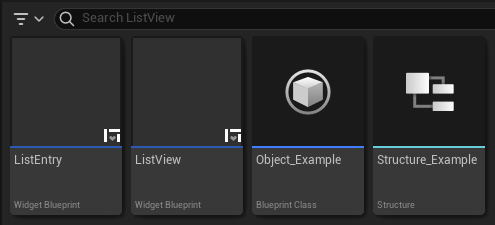
Epic Developer Community Forums
This post is intended to be a quick-start guide to get List View up and running with simple add, edit, and remove functionality. For more advanced stuff, you may have to find another forum post to help with that. None of this will be groundbreaking information, it’s mostly information that me, from 2 weeks ago, would’ve liked to have as a refer...
faint pasture
wooden cedar
I am setting up my first animation, Is there a meta for how many frames to leave...
That's entirely up to your art direction. Anywhere from 0 to 1000