
#blueprint
1 messages · Page 292 of 1
 stuck sparrow
 hasty flame

Hi everyone, This issue appears on UE5.5.3 with latest update, Item type with ForEach loop is unrecognized, But when I am using ForEachWithBreak it works properly, I think someone from epic should look at this, Thanks in advance!

With ForEachLoopWithBreak, Element type is recognized!
I tried with several class type even with vectors, Integers, Floats and others still have same issue!
 surreal peak
hasty flame
Hi everyone, This issue appears on UE5.5.3 with latest update, Item type with Fo...
surreal peak
hasty flame
Hi everyone, This issue appears on UE5.5.3 with latest update, Item type with Fo...
If it's an engine bug then you'll need to report it via UEs bug report form or whatever they use by now
As a work around you can probably force the pin type by connecting something to it that matches the array type
hasty flame
surreal peak
As a work around you can probably force the pin type by connecting something to ...
I tried but it doesn't worked properly
I was receiving an error which was saying the node is not connected
surreal peak
Right ok
 near wolf
Hi

No description provided
I'm not a blueprint guy, I found this logic that is supposed to break a bp with child actors into individual meshes in the level
and it does, but once it breaks, it just creates empty actors ? Am I doing something wrong
like this

 olive sedge
can someone tell me why Length is 0 here?
 hasty flame
surreal peak
Right ok
hasty flame
surreal peak
Right ok
Would you please share the ue-bug-report channel link, I couldn't find the channel.
 dark drum
olive sedge
can someone tell me why `Length` is 0 here?
dark drum
olive sedge
can someone tell me why `Length` is 0 here?
I believe you should be connecting the enhanced input local player subsystem to it.
surreal peak
hasty flame
Would you please share the ue-bug-report channel link, I couldn't find the chann...
There is no channel. This is an in-official Discord Server. You need to report this via Epic Games Bug Report Form, possibly findable via google.
surreal peak
olive sedge
can someone tell me why `Length` is 0 here?
Probably cause you aren't forcing it immediately.
Changes to the IMCs are queued iirc.
dark drum
hasty flame
Would you please share the ue-bug-report channel link, I couldn't find the chann...

Unreal Engine
Unreal Engine is the world’s most open and advanced real-time 3D creation platform for photoreal visuals and immersive experiences.
 tropic token
guys, I have this trace here. It hts some sphere component, later on I try to get hit actor and it's null for some reason. Why it happen that way? oO

 surreal peak
olive sedge
can someone tell me why `Length` is 0 here?
surreal peak
olive sedge
can someone tell me why `Length` is 0 here?
If you delay by a frame you should get a value, or try setting the Immediate boolean on the options struct.
surreal peak
tropic token
guys, I have this trace here. It hts some sphere component, later on I try to ge...
Can you use "IsValid" on it and print for the two cases. The debug might be misleading.
surreal peak
dark drum
https://www.unrealengine.com/en-US/support/report-a-bug
Thanks, I was too lazy to look for it.
dark drum
tropic token
guys, I have this trace here. It hts some sphere component, later on I try to ge...
You normally need to step passed a node for it's values to have been checked/evaluated. It could just be that. Step forward and see if it goes to the cast failed pin.
tropic token
yes, it goes to the cast failed pin, but BP implements required interface :/
surreal peak
Please use IsValid and see if it's actually invalid.
And if the Cast fails even though it is valid, print the display name and check if it's actually what you think it is.
dark drum
tropic token
I wonder why cast fails then
Whats the actual cast node you're using? (Not clear from the image)
olive sedge
surreal peak
If you delay by a frame you should get a value, or try setting the Immediate boo...
I moved this to the player controller and forced it immediately. I now wait a second before I call GetAllPlayerMappableActionKeyMappings but the result is the same
tropic token
dark drum
Whats the actual cast node you're using? (Not clear from the image)

how do I call interface method differentaly?
dark drum
tropic token
So you're hit actor isn't an interface so the cast would fail. An interface is a collection of functions, if the hit actor implements the interface, just call the desired interface function. (search for the name of the function you want to call)
 runic terrace
tropic token
how do I call interface method differentaly?
runic terrace
tropic token
how do I call interface method differentaly?
You don't need to cast for interfaces
Just call it on the actor directly
The whole point of interfaces is so you don't have to cast to use the function
tropic token
I don't get it
dark drum
runic terrace
The whole point of interfaces is so you don't have to cast to use the function
That's not the point of an interface. 😅 The point of an interface is to allow classes that don't share a common parent to have/use the same set of functions.
tropic token
it's just AActor
I have a method in PC to interact with object that implement specific interface
I can't feed it AActor
runic terrace
dark drum
That's not the point of an interface. 😅 The point of an interface is to allow ...
That's kind of the same thing, you're not bound by class types
dark drum
tropic token
I have a method in PC to interact with object that implement specific interface
Whats the name of the function you want to call from the interface?
tropic token
Method is being called inside the PC method that I pass interface to 🙂
dark drum
tropic token
Method is being called inside the PC method that I pass interface to 🙂
Show the inplemented function.
tropic token
I mean this function

It clearly wants Interactable that implements this interface
I'm not calling interface method directly
this is BP_MagicBall and this is the ActorInTheWorld
UCLASS()
class CUBESOFREALITYPROTO_API ACOR_ActorInWorldBase : public AActor,
                                                      public ICOR_InteractableInterface
{

Why wouldn't it cast to interface?
dark drum
tropic token
Why wouldn't it cast to interface?
It might be worth reading the Interface section near the bottom.

Epic Games Developer
Examples of how to set up and use different methods of Blueprint Communication.
tropic token
It's not blueprint interface, it's CPP interface
runic terrace
tropic token
I mean this function
Is this not an interface function
I dont think it is
tropic token
runic terrace
Is this not an interface function
it's not 100% 🙂
the problem is why I can't cast hit actor to CPP interface
runic terrace
because an actor is not an interface
tropic token
I don't get it 😦
Actor implements this interface
Should be possible to cast to it, why not?
 indigo zenith
question is why u need to cast in the 1st place
runic terrace
Try simply dragging from the actor and searching for your implemented interface function
You don't need to cast it
 thin panther
Or if you want to check, use Does Implement Interface, as I mentioned yesterday
dark drum
tropic token
Should be possible to cast to it, why not?
Because an actor isn't an interface. The actor might use an interface but it doesn't me it is the interface.
tropic token
But I can't pass abstract actor to function that wants object with specific interface
dark drum
Think of an interface as an special component you add to you're actor. When you call an interface function, it checks if the special component is on the actor, if it is, it'll call the function.
tropic token
void ACOR_PlayerController::WhatEverFunction(AActor* SomeActor)
{
    ICOR_InteractableInterface* Interactable = Cast<ICOR_InteractableInterface>(SomeActor);
    if(Interactable)
    {
        InteractWithInteractableObject(Interactable);
    }
}
I want this 🙂
what is so strange about it?
 frosty heron
You are in bp world
Simply plugging the object to the interface
The underlying interface will do the rest
tropic token
Simply plugging object to interface..
frosty heron
If you need some guard check then like cupa said. Use does implement interface.
Yeah the target can be anything right?
tropic token
Yea, I just don't get how to do this thing xD
How do I call method on interface in BP
I'll gop read Pattym's link
frosty heron
Do what? Just pull the interface and pass the actor
You want the node with the letter icon on top right
tropic token
pull from where?
frosty heron
Right click empty space, type your interface function
Get the one with letter icon
Not the one above
tropic token
I'm not calling interface function :/ I call method that wants object of specific interface
frosty heron
Then you simply pass the target actor
tropic token
 runic terrace
I think you put an interface type as an input on that function
And that function is also not an interface function
tropic token
yes, I did 🙂
thin panther
Just pass an actor into that function
Change the input type
Messaging an interface does not require the yellow interface type
tropic token
What input type can I use instead?
it's TScriptInterface<ICOR_InteractableInterface> now
dark drum
tropic token
it's TScriptInterface<ICOR_InteractableInterface> now
AActor most likely.
frosty heron
What is your interactWithInteractableObject even look like
Why is it asking for an interface
tropic token
It can look like anything really. Something that will work with Object of specific interface
frosty heron
I don't understand what you are trying to do.
tropic token
it's more theoretical question now. I'm just wandering why it's not possible to cast to interface in BPs. what's so wrong about it 🙂
frosty heron
Why can't you just do
GiveMeAnObject->DoThisFunction if implement interface.
tropic token
because it's PC. I can't interact directly. it's multiplayer
frosty heron
That's got nothing to do
thin panther
You can't cast to interfaces implemented in BP
tropic token
It calls server RPC
I need someobject that is owned by connection
this object I want to interact with is owned by the server
frosty heron
Whats that got to do with interface though
thin panther
Laura's (Mostly) Unreal Blog
Gain months’ worth of Unreal C++ experience in a single article.
tropic token
I told you
thin panther
Pass in an actor and check if it implements your interface
tropic token
I wanted more type safe code in BP
that's why I do parameter of specific type
I don't want to get AActor and cast it inside
ofcourse I can do it this way
frosty heron
There's no casting involved though
thin panther
You can't do it that way
frosty heron
At least in the bp
thin panther
It physically doesn't work
You cannot cast if an object implements the interface in BP. That cast in C++ will not work
 thin panther
If you want to check the interface in BP, use does implement interface
But your c++ function is inherently broken
tropic token
but I can't cast to interface anyway 🙂 it doesn't make sense
I have to stick to object type instead of interface, I have no idea why it is limited like this in BP
any ideas?
frosty heron
Interface is just multiple inheritance isn't it ( not exactly but sort of , except the functions are virtual and must be implemented in the object that inherited the interface )
You really don't need to do w.e you doing right now.
Just get hit actor-> highlight
If it implement highlight interface it will do its implementation, otherwise it will simply do nothing.
And if you need to check for example error logging, use does implement interface.
tropic token
I have an Actor owned by the server. I need to interact with it via Server rpc. I can't call Interact method directly on that object.
frosty heron
Get the interaction logic going on server then.
tropic token
I have method to interact like that in my PC 🙂
frosty heron
Client tell server, hey I interact with this actor (via server rpc)
tropic token
yes
frosty heron
Then server do the logic and replicate w.e it needs to back to the client. E.g inventory
frosty heron
Yeah but this got nothing to do with interface it self.
That's just rpc and ownership
tropic token
It can nothing to do with interface
UFUNCTION(BlueprintCallable)
void InteractWithInteractableObject(TScriptInterface<ICOR_InteractableInterface> Interactable);
but now the function is this. it's 100% legit, right?
frosty heron
tropic token
```
UFUNCTION(BlueprintCallable)
void InteractWithInteractableObject(TScriptInte...
I don't understand this at all, but then my cpp skill is almost non existence.
But my money is on you probably not doing it right passing that as an argument.
Can always ask the other channel.
But multiplayer wise, I can say calling the interface it self got nothing to do with networking.
At the end of the day you want to know the part where the server do stuff and client do stuff.
@tropic token do you care about cheating?
If you go with trust me bro approach then you can just server rpc with the interacted actor as the parameter
runic terrace
tropic token
I have to stick to object type instead of interface, I have no idea why it is li...
It is not limited in bps, you're trying to use a regular function as if it's an interface
 lethal pollen
Hi!
tropic token
runic terrace
It is not limited in bps, you're trying to use a regular function as if it's an ...
Man, I'm trying to use function:
UFUNCTION(BlueprintCallable)
void InteractWithInteractableObject(TScriptInterface<ICOR_InteractableInterface> Interactable);
there's nothing wrong about it really 😉
runic terrace
That is a function declaration that takes an interface type as an input
Not an interface by itself
thin panther
I've told you that function doesn't work
It can't work
It's got a cast inside it for starters
lethal pollen
I'm trying to understand how Projectile Movement Component works. To do it, I'm checking the FPS template. On the BP_FirstPersonProjectile, the Projectile Movement Component has this velocity. Does this mean that it will only move along the X-axis?

Thanks!
runic terrace
lethal pollen
I'm trying to understand how Projectile Movement Component works. To do it, I'm ...
Yep
If it has gravity enabled that's only its initial velocity, it might change the velocity later depending on gravity and what it does
tropic token
runic terrace
That is a function declaration that takes an interface type as an input
if you're interested, problem solved. I just recreated the Cast node. So it was just a BP bug 🙂
thank you people. I hope we all learned something new today
 lethal pollen
runic terrace
Yep
lethal pollen
runic terrace
Yep
So, how does it work? I can shoot in any direction and the projectile keeps moving in that direction, it does not change to move along the X axis.
frosty heron
Shoot it to the direction that you want.
runic terrace
tropic token
if you're interested, problem solved. I just recreated the Cast node. So it was ...
That cast can't succeed
tropic token
runic terrace
That cast can't succeed
sorry to dissapoint you 😉
 runic terrace
Do you have an Actor class named COR_InteractableInterface?
tropic token
ahha, good one 🙂
runic terrace
But that is not an interface
tropic token
// Fill out your copyright notice in the Description page of Project Settings.

#pragma once

#include "CoreMinimal.h"
#include "Items/COR_ItemInfoDataAsset.h"
#include "UObject/Object.h"
#include "COR_InteractableInterface.generated.h"

class ACOR_CharacterBase;
struct FCOR_ItemInfo;
// This class does not need to be modified.
UINTERFACE(MinimalAPI, Blueprintable)
class UCOR_InteractableInterface : public UInterface
{
    GENERATED_BODY()
};

/**
 *
 */
class CUBESOFREALITYPROTO_API ICOR_InteractableInterface
{
    GENERATED_BODY()
public:
    virtual bool CanInteract(ACOR_CharacterBase* Instigator);
    virtual void Interact(ACOR_CharacterBase* Instigator, bool bIsChained) = 0;
    virtual void Highlight(bool bIsEnabled);
    UFUNCTION(BlueprintImplementableEvent)
    void HighlightEvent(bool bIsEnabled);
    virtual bool IsInteractable();
    virtual bool GetIsActivated();
    virtual void SetIsActivated(bool bInIsActivated);
    virtual const FCOR_ItemInfo& GetActivatorItem();
    virtual void SetActivatorItem(FCOR_ItemInfo Activator);
    virtual TArray<ICOR_InteractableInterface*> GetInteractionChain();

private:
    FCOR_ItemInfo DefaultItemInfo;
};
that's the interface
runic terrace
What's the point of having this if you're not going to use the interface
And name your Actor class ''interface''
tropic token
man, it's UInterface 🙂
lethal pollen
frosty heron
Shoot it to the direction that you want.
Yes, I know that. I'm asking about how it works. What I don't understand is that if it only moves along the X-axis, because its velocity only has a value on the X-axis, when I shoot towards Y+, the projectile moves along the Y-axis if it has no velocity on the Y-axis.
tropic token
look, interface
 runic terrace
tropic token
man, it's UInterface 🙂
runic terrace
tropic token
man, it's UInterface 🙂
Yes the CUBESOFREALITYPROTO_API is an interface, and you're not using it
You're simply implementing it
Does it have any interface functions inside?
tropic token
runic terrace
Yes the CUBESOFREALITYPROTO_API is an interface, and you're not using it
implemented method
 frosty heron
lethal pollen
Yes, I know that. I'm asking about how it works. What I don't understand is that...
frosty heron
lethal pollen
Yes, I know that. I'm asking about how it works. What I don't understand is that...
Set the value to the direction of your choice.
If your issue is resolving the value, you have to ask more specifically
lethal pollen
frosty heron
Set the value to the direction of your choice.
I don't have to set any value of the direction of my choice because now it is doing what I want. The think is that I don't understand how it does it.
tropic token
runic terrace
Yes the CUBESOFREALITYPROTO_API is an interface, and you're not using it
CUBESOFREALITYPROTO_API it's not interface, sorry
nevermind man. it works fine
lethal pollen
No, I'm not going to ask more now. Thank you.
runic terrace
tropic token
CUBESOFREALITYPROTO_API it's not interface, sorry
nevermind man. it works fine
Please for the love of god change your class names
It's so confusing
 barren tangle
Hi, is it possible to create a timeline for one run and destroy it? i mean create a timeline during the process and destroy that timeline when it's completed?
i have created one function to modify the color of an element inside a table

but i notice that when i call the function second time when the first one is not finish then the timeline stop for the first one 😄
that's logic because they share the same timeline
so my question is, is it possible to create a timeline object with a curve associated or something like that
runic terrace
barren tangle
so my question is, is it possible to create a timeline object with a curve assoc...
You can add curves inside the timeline
If you want the timer to run once you can simply use a DoOnce node before it
Or use the Play instead of Play from Start
barren tangle
no no i want the timeline completed for that ongoing object
but when a second object call the timeline to also start from start and goes until the end in parralle with the first one
the solution that i see here is to have one timeline per object...
but it's a little bit hardcore 😄
runic terrace
You can't do that with a single timeline
barren tangle
is there any workaround or existing process for what i'm trying to achieve?
runic terrace
Why not have the lines have their own timers timelines to control their own colors?
That way they wouldn't be dependent on the same timeline
barren tangle
and the function will just: play and stop the timer? that's the idea?
runic terrace
yeah pretty much
barren tangle
but how about the timeline transition
because the timeline is there for the lerp between the old and new color
not for the fact to switch the color
runic terrace
You can pass the new color as a variable with the event you're calling
barren tangle
 runic terrace
barren tangle
runic terrace
barren tangle
Just like you do in this example, but for the individual lane
barren tangle
with the Elapsed time ?
runic terrace
barren tangle
and the function will just: play and stop the timer? that's the idea?
Timeline, timeline!**
Sorry I meant timeline not timer
barren tangle
runic terrace
Why not have the lines have their own ~~timers~~ *timelines* to control their ow...
yes that is what i think but i try to keep generique and simple, i have 6 lines = 6 timelines.
If i decide to add 4 new lines > i have to create 4 new timeline..
So that was the idea of my question, if we can create a kind of timeline and put a curve... and do it dynamicly on call, and delete the timeline when not needed anymore
runic terrace
barren tangle
yes that is what i think but i try to keep generique and simple, i have 6 lines ...
No what I'm suggesting isn't to create a new timeline for each lane.
But to have each lane have their own timers inside their own blueprints
barren tangle
no it's one blueprint with all lane
runic terrace
Ah
barren tangle
the approche with 1 bp for a lane was rejected for i don't remember which reason 😄
but yes if it was 1 lace inside the BP. it could have work like that
the function will be inside the BP so they will all have they own timeline. that's a valid point. but i can't use it
runic terrace
Then you need to use a continuous event to manage all of the lane colors at once
barren tangle
yes reason was, i was not able to use the construction script to spawn the BP 😄
so i was not able to use the BP on the level editor
barren tangle
runic terrace
Then you need to use a continuous event to manage all of the lane colors at once
what means a continuous event?
runic terrace
barren tangle
so i was not able to use the BP on the level editor
Could've added the lanes to the array during runtime though, or by adding them to the array manually by hand
runic terrace
barren tangle
what means a continuous event?
Like a timer
barren tangle
runic terrace
Could've added the lanes to the array during runtime though, or by adding them t...
yes but to be able to design the level correctly it was more easy to have the lane visible
runic terrace
Because you have to manage multiple lanes at once, you can't have them start and stop the process at different times
runic terrace
barren tangle
yes but to be able to design the level correctly it was more easy to have the la...
It's possible to place the actors in the level, then in begin play simply loop through all the actors and add the lanes to the array
Or selecting them and adding them to the array by hand in the editor, before the game starts
barren tangle
runic terrace
It's possible to place the actors in the level, then in begin play simply loop t...
yes but to see it you need to run the game
or there is another possibility to be on editor and see begin play even without runing the game
runic terrace
If you place the lanes in the level you can already see them, don't need to wait for the game to start
Begin play would only find them and set the references
barren tangle
runic terrace
If you place the lanes in the level you can already see them, don't need to wait...
but i can because it is with spawn actor. > active on runtime no?
BP_Road > Begin play > Spawn BP_Lane
it will be only visible on runtime no?
if i put the BP_Road into the map
runic terrace
Ah I see, you hand place the roads and the lanes get generated in
Alright yeah hand placing lanes is not an option then
barren tangle
yes it's to be able to build the level with the BP_Road, and see visual with landscape and so one
if i goes with being play, need to run the game, each modification, it's annoying 😄
i can see the lanes and the color like that
barren tangle
runic terrace
In the construction script?
it's just static mesh cube, yes
into the constructor, it's visual element for me it can be into the constructor
there is not game logic into it, just visual stuff
runic terrace
Ok I see, it makes sense
So yeah probably using a timer and interpolating the colors for each lane there would work
barren tangle
and i can select the number of lane, or the lenght
or disable those i don't want, allowing me to build my level
build a level like that with code is possible... but really annoying
barren tangle
runic terrace
So yeah probably using a timer and interpolating the colors for each lane there ...
So each lane should have it's own timer. then i get the delta of the timer and make a lerp base on that. yes that could work
will see if it works 🙂
thanks for your help 🙂
runic terrace
You can do it in the same timer and loop through all the lanes
basically interpolate their colors to new ones when they change
runic terrace
barren tangle
So each lane should have it's own timer. then i get the delta of the timer and m...
Wouldn't need the elapsed time either
olive sedge
anybody know why this is 0?
been trying to figure this out forever now


 barren tangle
the lerp need a time, no? is there a lerp without time input?
barren tangle
runic terrace
interpolation is continuous
delta is optional?

 trail terrace
When I play a montage, and that montage gets interrupted, if I try to apply an impulse to the character during the blend back into my ABP's idle, the impulse simply doesn't happen.
If the montage doesn't get interrupted and makes it to the end, if I apply the impulse during the blend back into idle then, the impulse works fine.
Does anybody know why?
runic terrace
barren tangle
delta is optional?
It's your timer's interval
DeltaTime is how much time has passed in between executions
runic terrace
trail terrace
When I play a montage, and that montage gets interrupted, if I try to apply an i...
Root motion overrides physics
barren tangle
runic terrace
It's your timer's interval
was thinking something like that no?
 runic terrace
barren tangle
was thinking something like that no?
runic terrace
barren tangle
was thinking something like that no?
No that returns how much time has passed since the timer last ran
runic terrace
Yeah, set it the same value as the Time of the Timer
trail terrace
runic terrace
Root motion overrides physics
Do know how I can disable root motion during an interrupts blend? I don't know where the logic for blend from montage into ABP is defined
barren tangle
olive sedge
anybody know why this is 0?
been trying to figure this out forever now
what are you trying to achieve?
runic terrace
trail terrace
Do know how I can disable root motion during an interrupts blend? I don't know w...
You can set the blend time in the montage asset itself
Not sure if that affects root motion though
olive sedge
barren tangle
what are you trying to achieve?
I want to make my controls mappable, I want to get and set the keys for a profile..
but I just realized. Register Input Mapping Context returns false..
barren tangle
olive sedge
but I just realized. Register Input Mapping Context returns false..
what is priority 1 ?
trail terrace
runic terrace
You can set the blend time in the montage asset itself
Not sure if that affects ...
Yeah but I need to keep blend time because I still want it to blend out to idle as long as it doesn't get interrupted. Maybe there is a stop root motion node that I can call once the interrupt happens?
runic terrace
Once it's interrupted the montage already stops, and root motion stops with it
olive sedge
barren tangle
what is priority 1 ?
well, it seems its because of notify user settings and force immediately.. then register returns false because it's already registered I guess..
olive sedge
barren tangle
what is priority 1 ?
not sure about the question tho.. I just wanted a non 0 prio
trail terrace
That's why I figured it might not be a root motion problem, because even if I turn off root motion in my montage, it still won't launch during the blend
barren tangle
olive sedge
not sure about the question tho.. I just wanted a non 0 prio
So you PC has already an enhanced input mapping into the slot 0. and you want to create anew one in slot 1.
After i guess you want to switch from slot 0 to slot 1 ? that is what you are trying to achieve?
olive sedge
barren tangle
So you PC has already an enhanced input mapping into the slot 0. and you want to...
I just want to map keys.. I created an IMC, added an IA to it, set the PMKS for it, added those to the subsystem and registered them with the settings.. but then I ask the .. ok. by explaining it I found the issue. I have to connect the EILPS instead..
thanks!
trail terrace
@runic terrace nvm you were right i think. calling this and setting it to anything other than "Root Motion from Everything" before the impulse applied the impulse correctly. I'm still not sure what root motion it was trying to do but oh well
 barren tangle
olive sedge
I just want to map keys.. I created an IMC, added an IA to it, set the PMKS for ...
barren tangle
olive sedge
I just want to map keys.. I created an IMC, added an IA to it, set the PMKS for ...
waht i dond't understand is what you mean by map key. If you mean for example, i want to press on the button W of they keyboard. and then it trigger the W button event... they you have to much node for what you are trying to achieve. because if it's just for that : that is enough. So my question was what are you trying to achieve with all those complexe node :D. But if you find the solution it's good 😄
 barren tangle
hey i'm inside a bp, and the tick event is not called...

any reason why?
was unchecked

 snow halo
Hi im trying to spawn some items from my inventory, some spawn and work properly and some others dont, does anyone know why?


i can see things get created properly and those Custom Hand Actor variables do get populated properly but not all items work
 waxen ice
is there a way to sort components in blueprint?

 dusky cobalt
waxen ice
is there a way to sort components in blueprint?
dusky cobalt
waxen ice
is there a way to sort components in blueprint?
Unfortunately no, if you want them to be in some kind of order then you have to reattach them in order.. and I believe you have to start from the last one first and the first one should be attached last.
waxen ice
dusky cobalt
Unfortunately no, if you want them to be in some kind of order then you have to...
Damn, id rather not to attach them because of sorting needs. 😛 But thanks
dusky cobalt
If you want it to be consistent where you are looking for some compoonent that is on X place, then you probably want to make array and add them manually etc.
dark drum
snow halo
Hi im trying to spawn some items from my inventory, some spawn and work properly...
I'm not sure specifically but looking at your code, the switch looks redundant. for the most part. I'd do all your spawning stuff before the switch and then have it at the end to wrap up and specific settings. Should tidy you're logic up and hopefully make it easier to spot the issue.
Edit: I think the only bit that changes based on the switch is if you enable collision or not.
barren tangle
dark drum
I'm not sure specifically but looking at your code, the switch looks redundant. ...
i was thinking the same
barren tangle
snow halo
look if the object is spawn but if it diseappear into the darkness of the game because there is no collision?
snow halo
dark drum
I'm not sure specifically but looking at your code, the switch looks redundant. ...
but i dont wanna have all of them hard spawn on memory
snow halo
barren tangle
look if the object is spawn but if it diseappear into the darkness of the game b...
it does have collisions
dark drum
snow halo
but i dont wanna have all of them hard spawn on memory
Im not sure what you mean.
snow halo
dark drum
Im not sure what you mean.
right now i soft spawn them right?
actually my bad, im not soft spawning them
i thought i was
dark drum
snow halo
actually my bad, im not soft spawning them
Even if you were, you'd still be able to move the switch. With a soft class reference, you can load it and then cast to the base class and use it for spawning using only one spawn actor of class node.
snow halo
dark drum
Even if you were, you'd still be able to move the switch. With a soft class refe...
move it before the garbage cleaner and have the garbage cleaner come after every switch instance?
dusky cobalt
sounds like over-optimization creep
also if you have a lot of items it would be probably better to use object pooling than spawning and destroying them
dark drum
snow halo
move it before the garbage cleaner and have the garbage cleaner come after every...
No, as in move the switch all the way to the end so you spawn you actor first and do all the stuff thats the same regardless, and then at the end use the switch to specify if collision should be enabled or not.
snow halo
dusky cobalt
also if you have a lot of items it would be probably better to use object poolin...
do you mean have them on but invisible and then visible again and then invisible again etc.?
dusky cobalt
snow halo
do you mean have them on but invisible and then visible again and then invisible...
yeah, and it doesnt even have to be a big pool if you can have 1 item at the same time, like just spawn all the tools and then swap them as needed
dont spawn and destroy everytime you change the tool
snow halo
dark drum
No, as in move the switch all the way to the end so you spawn you actor first an...
but i wanna add as much as 8x5 items, that means at max I would have 40 items
dusky cobalt
just so you know, the most what takes of your cpu usage here will be spawning and destroying, its a expensive action
and then the worse part is memory allocation because if you spawn and destroy in random places then you start to have empty memory but it's harder to allocate new things to the ''now empty'' memory
dark drum
snow halo
but i wanna add as much as 8x5 items, that means at max I would have 40 items
I'm not sure what relevance the number of items has on my recommendation. I would assume all items would need to be spawned the same way.
snow halo
dark drum
I'm not sure what relevance the number of items has on my recommendation. I woul...
Im trying to also think about memory optimization
dark drum
snow halo
Im trying to also think about memory optimization
Again, i'm still not sure of the relevance. My recommendation would still function if using soft class refs.
snow halo
cool, but wouldnt that cause a lot of those things still somehow having to be in memory
dusky cobalt
so far your logic doesnt work as you have problems with spawning some of the items, so focus on one thing first, if you want optimized system and right memory allocation you have to start with creating Pool System and it's probably bigger system than just spawning and destroying items
snow halo
i dont understand a lot about memory optimization but it sounds like they would also have to be hard referenced
even if initially being soft spawned
dark drum
snow halo
even if initially being soft spawned
I wouldn't worry about that until you've gotten a good grasp of some of the core fundamentals. Tackling memory issues is more about how you structure you're classes to be honest. Things like having function only classes that you create children of.
dusky cobalt
hard referencing is more about not having an reference to something that is in level 50, in your player controller for example... while playing level 1
like you gonna need axe, pickaxe and sickle in your level 1 right? so dont worry about not hard referncing them
and when you use pool system, suprise, you spawn them at the start of the game
but its better to allocate memory for these at the start and have things organized, than reallocating memory all the time and spawning and destroying
you just have to think if the item you are spawning doesnt have some stupid hard reference to the thing that is in 50level
it depends on game you are building, I can guess there are some games that have all the things from the first level at all times because of the genre
snow halo
dusky cobalt
like you gonna need axe, pickaxe and sickle in your level 1 right? so dont worry...
I most likely not gonna go for a level system, at the moment im just going for a minecraft style where level has less of a connection to inventory
 tranquil hemlock


A simple tutorial on how to change post-process effect in runtime for the character. This covers how to toggle one or more post process effects if you have stacked multiple as well so you can choose when certain post processes are active such as for when you enter certain areas.
*✨ SUPPORT M...
Hi again! Why does this timeline not work correctly for me? It jumps from 0 to 1 without fading/blending in.
Followed this tutorial with a custom PostProcess Material instead
barren tangle
hi we can't instancied a timeline object?
a timeline component

that allow me to execute the same as the timeline but... will make sens only if i can instancied the table with a new Timeline
but why will we have that Add Interp Float node with an interp function... if we can't instancied a timeline component...
tropic token
people, can you share some BP magic with me
what's wrong with it? number of ballz is local function variable

 barren tangle
tropic token
people, can you share some BP magic with me
what's wrong with it? number of bal...
barren tangle
tropic token
people, can you share some BP magic with me
what's wrong with it? number of bal...
show the variable setting
tropic token
barren tangle
show the variable setting
it's local variable, yea
if I change it to class variable, it works
barren tangle
tropic token
if I change it to class variable, it works
no question was it's local ok, but what was the variable parameters, is it set to read only or something like that
tropic token
barren tangle
no question was it's local ok, but what was the variable parameters, is it set t...
Nah, purely default. There's not many things you can set up for local variable
 barren tangle
but local variable have a V on them
 barren tangle
 tropic token
maybe you have some plugin? 🙂
barren tangle
ha maybe it's a new thing on UE5.5
 tropic token
oh damn, lol
it works now
love bps
I always forget that if you see an error or don't see something in debugger it doesn't mean much
barren tangle
good 😄
 blissful grail
barren tangle
ha maybe it's a new thing on UE5.5
blissful grail
barren tangle
ha maybe it's a new thing on UE5.5
Yeah, it is a new thing.
 dawn gazelle
tropic token
people, can you share some BP magic with me
what's wrong with it? number of bal...
dawn gazelle
tropic token
people, can you share some BP magic with me
what's wrong with it? number of bal...
I believe the problem happened because you were using the variable named "NumberOfActivatedBallz" which is also the name of the return value of the function. You somehow managed to "Get" the return value variable which isn't meant to be directly edited or accessible, it's meant to only have a value fed into it in the return node.
tropic token
dawn gazelle
I believe the problem happened because you were using the variable named "Number...
yea, most likely. ty
 storm solar
https://youtu.be/3cmbMlWWe1A
Im having a lerp timeline issue for updating camera rotation. Any ideas what the issue is?
 dawn gazelle
storm solar
https://youtu.be/3cmbMlWWe1A
Im having a lerp timeline issue for updating camera...
dawn gazelle
storm solar
https://youtu.be/3cmbMlWWe1A
Im having a lerp timeline issue for updating camera...
If you want to reuse the timeline, you have to plug in the execution path to "Play from Start"
storm solar
dawn gazelle
If you want to reuse the timeline, you have to plug in the execution path to "Pl...
Oh duh. But, whats going on with the camera freaking out?
The lerp is A: Cam z rotation to B: Cam z rotation
dawn gazelle
Since you're setting relative rotation, the Roll and Pitch value being set to 0 could be influencing some of it. You may want to get the current relative rotation and plug in the values for these axes into both the A and B part if all you're wanting to manipulate is the Yaw.
storm solar
i tried plugging in those before for x and y that didnt work.
but it works for the enemy just fine.
 onyx token
are there general tutorials as to how to make unreal engine 5 games with foliage and everything for low end hardware? like 120fps, 1080p on a GTX 970 or so?
There must be a way... It can't be that it's just no longer possible to make low end unreal engine games without using Forward shading?

 maiden wadi
onyx token
are there general tutorials as to how to make unreal engine 5 games with foliage...
maiden wadi
onyx token
are there general tutorials as to how to make unreal engine 5 games with foliage...
Unsure about tutorials. But it's just about allowing the user to pick their graphics settings. And despite stuff like Nanite making LODs no longer useful when you're using it, you should still set up LODs on your meshes so that you can allow a user to turn off Nanite use. You don't need to use Nanite, Lumen, TSR, etc. They're just defaults.
onyx token
maiden wadi
Unsure about tutorials. But it's just about allowing the user to pick their grap...
well i mean proper low end.
Like 2011 skyrim
i wonder if that's still possible or if all of those ambient occlusion / anti aliasing / lod methos are just depcreated in unreal 5 and gone and forgotten...
maiden wadi
If it was possible in UE4, it's possible in UE5.
 jovial steeple
Unreal 5 is just unreal 4 with a couple new checkboxes ticked. Just untick those boxes and your back.
maiden wadi
Nothing has been removed in 5. There's just been a lot of changes and updates. The new systems will actually function faster on more complex scenes than the old systems. The new systems just have a higher baseline cost.
onyx token
because like- if you draw up a third person character template, and you uncheck lumen, and global illumination, and you go back to SSAO-
it still struggles to reach 60 on low end hardware... and that's with almost nothing in the scene 
i wonder if there's projects that are proper low end
maybe it's worth opening an old ass unreal version, making a demo template project there, and then opening that one up with ue5
maiden wadi
Also be sure to profile as well. Make sure you're not being limited by VSync, framerate limiters, the game thread, etc.
onyx token
sure sure, but im just saying- i got a laptop with a 2080 mobile i think in it- and that thing struggles to reach 60 on the demo scene on 1080p.
And i feel like that's kinda... hm. 
barren tangle
hello so the UE block the instanciation of a Timeline?
onyx token
barren tangle
hello so the UE block the instanciation of a Timeline?
ye i think it does
dawn gazelle
storm solar
Oh duh. But, whats going on with the camera freaking out?
The lerp is A: Cam z r...
Only other thing I can think of is that the control rotation could be interfering with it as well. May need to disable it while the timeline is playing and re-enable it afterwards, or take it into account. Otherwise, it's something to do with the values you're feeding into the Lerp.
jovial steeple
onyx token
sure sure, but im just saying- i got a laptop with a 2080 mobile i think in it- ...
You’d probably get 60 in a properly packaged build. In editor always runs a lot worse.
storm solar
dawn gazelle
Only other thing I can think of is that the control rotation could be interferin...
i think i got it.
The lerp returns it as xzy instead of xyz.
onyx token
jovial steeple
You’d probably get 60 in a properly packaged build. In editor always runs a lot ...
right, but even so - let's say i get 70 in packaged-
the scene contains nothing
I should get 400fps in it...
barren tangle
onyx token
ye i think it does
the reason?
onyx token
i wonder if there's just a way to blanket disable a bunch of stuff without touching the deferred renderer and kinda... nuking half the features you have access to
maiden wadi
onyx token
sure sure, but im just saying- i got a laptop with a 2080 mobile i think in it- ...
Is this in the third person template's default map?
onyx token
maiden wadi
Is this in the third person template's default map?
sure
maiden wadi
You have a different problem then. Your 2080 mobile is more powerful than my 2060 desktop GPU. I just started a new BP based third person template project and I'm capped at 120fps in editor.
onyx token
maiden wadi
You have a different problem then. Your 2080 mobile is more powerful than my 206...
on fullscreen? 
like 1920 x 1080?
did you do nothing except disable lumen?
 onyx token
 you get 120fps on fullhd with lumen enabled??
i don't even get that on my normal pc with a 3060
maiden wadi
It's a fresh project. Default settings. I'm running a 5900x cpu and a 2060 rtx gpu. 🤷♂️
jovial steeple
Joby running in debug editor or something
onyx token
 ok somethings fuckd with my pc then
maiden wadi
Like I said. 😄 Profile and see what it actually is. May not even be GPU related. Who knows.
onyx token
wait i'm running on a self built version of 5.5.1 - does that have worse performance?
barren tangle
maiden wadi
It's a fresh project. Default settings. I'm running a 5900x cpu and a 2060 rtx g...
with cinematic scalability?
lethal pollen
This node returns local rotation or world rotation?
 onyx token
lethal pollen
This node returns local rotation or world rotation?
onyx token
lethal pollen
This node returns local rotation or world rotation?
world i think
jovial steeple
World yea iirc
lethal pollen
Thanks!
maiden wadi
barren tangle
with cinematic scalability?
This was on Medium. I'd personally never use cinematic. There's no visual difference for it in most games.
barren tangle
maiden wadi
This was on Medium. I'd personally never use cinematic. There's no visual differ...
im 60fps on medium xD, Rip my desktop 😄
maiden wadi
It's also worth noting not to test Standalone with the new systems. It'll cap out your GPU. If you want to test real FPS, cook the project and close the editor or you'll pay twice the cost.
PIE is a semi good indicator though.
barren tangle
so i guess i have to give up that approach if we can't instanciate a timeline
 onyx token
maiden wadi
It's also worth noting not to test Standalone with the new systems. It'll cap ou...
onyx token
maiden wadi
It's also worth noting not to test Standalone with the new systems. It'll cap ou...
true, but to be fair-
if my target is like 400 fps on a blank project so i can start building from the ground-
200 fps with stuff running in the background is probably fine
i've just drawn up a new demo template, i get 90fps on a 3060 full hd
fair- that is with lumen, which i'd always disable
thin panther
It's useless trying to target fps for a game with nothing in.
Target requirements for your actual game
tropic token
guys, why doesn't it show any members to set? I need to change one field, but.. how? 🙂
 maiden wadi
IMO, I wouldn't recommend disabling the new stuff personally. Not unless you're trying to very weak systems like mobile. The new tools and scene complexity allowance allows faster development and nicer looking scenes at higher framerates. So unless you're catering to CSGO nerds who need 320FPS to get autosniped by bots, I'd just focus on reaching the recommended 45-75FPS and go with it.
@onyx token If you haven't seen them. I recommend running through these. They are very insightful for the new systems.
https://dev.epicgames.com/community/learning/talks-and-demos/Vpv2/unreal-engine-optimizing-ue5-rethinking-performance-paradigms-for-high-quality-visuals-part-1-nanite-and-lumen-unreal-fest-2023
onyx token
maiden wadi
<@359809433771180033> If you haven't seen them. I recommend running through thes...
hmmm thank u i'll take a look at it 
runic terrace
tropic token
guys, why doesn't it show any members to set? I need to change one field, but.. ...
check the ones you want to set in the details panel after you select the node
tropic token
runic terrace
check the ones you want to set in the details panel after you select the node
thanks!
 buoyant drum
Ok. Hopefully quick question. I made a 3rd person template and copied the third person character. I have been working on it for a bit now and since I'm new decided to "clean up" the code and debug some glitches by making a new copy and only moving in the stuff that works. I had made a new Input map and when I attach it to my new character none of the controls work. I even tried to copy paste from my first character (where it works) to the new one and it still will not work. So long setup I know but here is my question, why would it work on the first one and not the second?
dusky cobalt
What do you mean by you made new Input Map and that you attached it? You have to Add Mapping Context on Begin Play probably in that new class so the game will know to use that Input Actions from that Mapping Context
jovial steeple
onyx token
true, but to be fair-
if my target is like 400 fps on a blank project so i can s...
I opened a new third person project, took a few minutes to "disable all the nonsense to make it like skyrim", and have 270 fps in editor at 1440p.
Im on a 1070
Just go into the project settings and do simple things, then put a generic old school stlyle skybox
buoyant drum
Here is where I load my input map. I copied IMC_Default and named it IMC_Default_TPC. IMC_Default_TPC works on character 1 but not character 2
 dusky cobalt
are you sure it's _TPC or it's just Default there?
also you can click on it and Add Break Point and then play and see if it's getting executed
buoyant drum
On char 2 if I load IMC_Default character moves. IMC_Default_TPC nothing happens. But again same code and IMC works on first character. I did do a break point and it "loads"
dusky cobalt
and how does your IMC_Default_TPC looks like?
maiden wadi
Don't add IMCs on pawn's beginplay. Do it in ReceiveControllerChange behind an IsLocallyControlled check.
buoyant drum
This is the code on character 1 (Works)

Here is the code on character 2 (Does not work)
 maiden wadi
You can't promise that a character will have a controller at beginplay. Move the code to ReceiveControllerChange behind an IsLocallyControlled check.
buoyant drum
Like this? Still not working
 maiden wadi
Can you breakpoint there and make sure the controller is valid and that this is getting called?
buoyant drum
 maiden wadi
Generally input debug steps will be... Make sure you're getting any gameplay input and you're not in Menu mode. But your other character works so I doubt this. Your pawn is Possessed, your have an InputMappingContext applied with the InputActions specified, and your pawn has the IA's in it's event graph.
dusky cobalt
Hmm, maybe you didn't set new Pawn or something in the GameMode?
buoyant drum
Would that be the case if movement works when I change the mapping contect to IMC_Default?
blissful grail
Generally input debug steps will be
"Am I getting input? Annnnd debug step done" 😅
dusky cobalt
buoyant drum
Would that be the case if movement works when I change the mapping contect to IM...
Nah, then it's not it
buoyant drum
Maybe this will help narrow down the possibilities. I just went onto the stock third person character and swapped the mapping context to my new one and it does not work. Why would this mapping context work only on my first character?
buoyant drum
This seems to be more complicated than I thought it would be. Thank you so much for your help. No it's got several actions. I made that IMC by copying the original and adding my own controls to it. I have made sure to only edit copies since I am so new.
I find it most confusing that it works on my BP_NVR_Character but on no other character.
I'm trying to make a new IMC see if that works
dusky cobalt
maybe it's something with your character class, you sure it is in the game? maybe you have both classes in game and they both load different input context mappings, but because they have same priority the new one you added doesnt work? try to add priority higher to one of these if they override
barren tangle
buoyant drum
I find it most confusing that it works on my BP_NVR_Character but on no other ch...
other character?
barren tangle
buoyant drum
Like this? Still not working
is the pawn possessed by the controller you try to add the input context on?
are you in local???
your player 2 is a local player?
i guess yes, then you need to create a local player controller, and posses the pawn then you will be able to get the controller and attach the enhanced input
maiden wadi
Given that they are copies, it's worth asking, that the IAs and the IMC were both renamed to something else, right?
Or were the characters copies, not the input stuff?
buoyant drum
@barren tangle When I switch my context mapping to the default controls work, when I switch it to the mapping context to the copy of the original I made and added controls to it does not work. I have 2 characters and my new mapping works on the first character but not my second.
And both of my characters are coppied from the template character
dusky cobalt
ohh, then it's more problem with how you try to implement the multiplayer and not why it doesn't work because you copied it
buoyant drum
Looks like making a whole new mapping context worked.
dusky cobalt
if it works on 1st player but not on the 2nd player
buoyant drum
Still confusing why the one works on 1 character but not the second. Thank you all so much for your help.
barren tangle
buoyant drum
Looks like making a whole new mapping context worked.
so it works now?
buoyant drum
Not my first mapping context. But the new one I made is working on the new character.
barren tangle
buoyant drum
Not my first mapping context. But the new one I made is working on the new chara...
so you can controll your 2 characters and your problem is solved correct?
buoyant drum
It is. With my third context map. I still don't know why my second context map does not work on anyone but my first character. But at least I can control the character, yes.
 patent plinth
So I'm working with a physics based pawn actor that can extend and retract, roll left/right, and pitch forward. It works fine when it's in its small state, but whenever I try to rotate while elongated the clipping is atrocious, especially while on the ground (https://imgur.com/a/hMsATiF).
So far to try to remedy this, I set up box traces on the top and bottom to prevent rotation if both are true, to prevent clipping into walls, a box trace inside my pawn that returns true if there's hit (so if it's clipping), and flips around the timeline for the growth if its true
Anyone has any idea if there are other settings or ways I can fix these issues and make this feature more consistant ?
I tried rotating my pawn around the scenes that handle the top and bottom box trace when they're true instead of the middle of the pawn, but it was rotating/flipping wildly
 onyx token
jovial steeple
I opened a new third person project, took a few minutes to "disable all the nons...
onyx token
jovial steeple
I opened a new third person project, took a few minutes to "disable all the nons...
 what does "disable all the nonsense" mean?
So- no lumen, no nanite ofc - no global illumination AO - instead SSAO.
That's doable on the post processing component
Then no distance field AO via r.distanceFieldAO 0
Anti aliasing TSR? Or did you go full send and do r.AntiAliasingMethod 1 FXAA ?
Alright, no skybox or cubemap on the SkyLight component
And that's it? 270fps?
r.vsynch 0 and t.maxpfs 0 gets rid of the fps lock right?
 charred berry
using bp is it possible to asign a collision set on or off to a specific part of a mesh , or do I just need to separate that from the mesh ?
lethal pollen
I'm trying to understand how projectile movement component works. In the FPS Template, the **BP_FirstPersonProjectile ** has this velocity. To spawn the projectile it uses this code. So, it add the rotation to spawn it. Now it comes my question: Is there a rule that the X-axis is to move forward, the y-axis to the right and the Z-axis to the top? Thank you.


 faint pasture
onyx token
<:mgtySus:1126982910357012480> what does "disable all the nonsense" mean?
So- no...
faint pasture
onyx token
<:mgtySus:1126982910357012480> what does "disable all the nonsense" mean?
So- no...
Theres a base cost to deferred rendering, you could switch to forwards
but above 240 hz what's the point
faint pasture
lethal pollen
I'm trying to understand how projectile movement component works. In the FPS Tem...
Yes, forward is LOCAL x
lethal pollen
faint pasture
Yes, forward is LOCAL x
I think this is a standard or a rule in Unreal, isn't it? Thanks.
 final heath
Hey so im having an editor issue, I have a door asset that looks like this normally, however I'd like it to be a bit bigger. Whenever I try to scale the blueprint up, though, the components of the blueprint don't scale proportionately, rather they seemingly scale individually?

 final heath
I made another blueprint with similarly parented components and they scale just fine???
ok I think it has something to do with my construction script which basically opens/closes the door in editor
 elder jetty
anyone happen to know why an animation asset would play in simulation / actor already placed in world, but not on the same BP/character spawned in on play?
onyx token
faint pasture
Theres a base cost to deferred rendering, you could switch to forwards
well sure, but that's the nuclear option
 olive yarrow
These definitely aren't the same distance,how could i go about getting target distance wiser?

Get actor is definitely the issue, but if i try and get the owning player of the widget i just get back None, even if i use an Actor Obbject Reference as the target
 stone ivy
does anyone have experience line tracing from the new GameplayCamera Component? https://i.vgy.me/Z73jOe.png

I want to do the typical line trace from the camera, but this new component is weird and the line isn't coming from the player's pov
olive yarrow
does the trace come from this camera? (or is that the POV?)
stone ivy
The trace is coming from somewhere way off to the side
I think this component is like a camera manager of sorts, and does some weird stuff
which is why its not coming from the player's pov
olive yarrow
Mind showing me the trace in your graph?
stone ivy
olive yarrow
Mind showing me the trace in your graph?
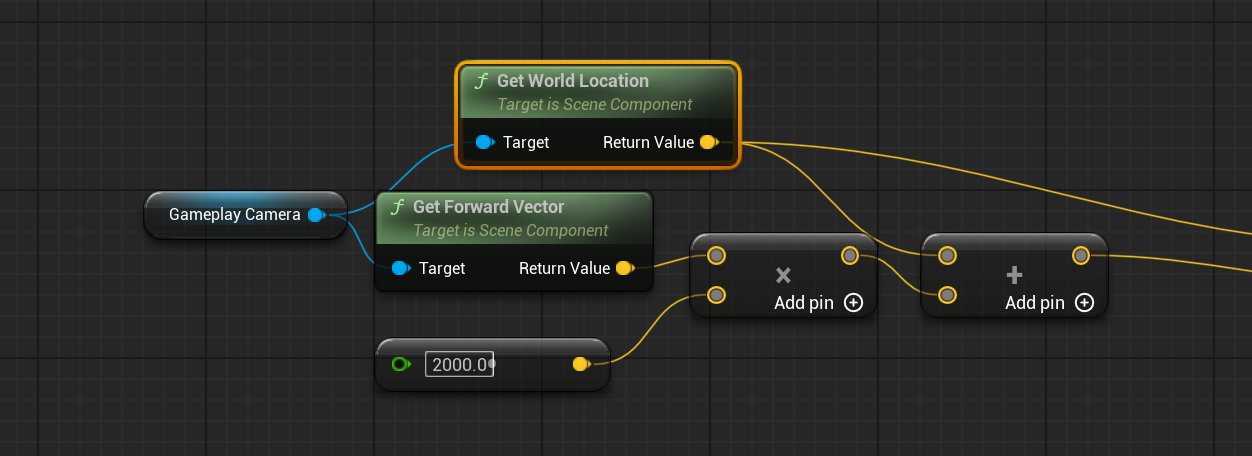
The typical
Mb it is actually coming from the camera position, rather than the pov
 olive yarrow
These definitely aren't the same distance,how could i go about getting target di...
olive yarrow
olive yarrow
These definitely aren't the same distance,how could i go about getting target di...
This works, buuuuut the same issue persists
 stone ivy
which is here
olive yarrow
hmmm, lets see
 olive yarrow
get your foreward vector from the world location
OH! That looks pretty good, would you mind explaining the issue again?
stone ivy
olive yarrow
get your foreward vector from the world location
What's the math on that one haha
olive yarrow
Also, here's how i usually trace?
 stone ivy
olive yarrow
OH! That looks pretty good, would you mind explaining the issue again?
stone ivy
olive yarrow
OH! That looks pretty good, would you mind explaining the issue again?
Its coming from the character's torso, rather than the camera pov
olive yarrow
If you broke the Location and Start, you could add to the Z axis prior connexting to Start
stone ivy

if I point the camera towards the sky, the trace is only coming from the torso plane haha
olive yarrow
That wasn't an issue prior switching to a diff forward vectoR?
stone ivy
It was
Same issue
I think this new camera component is painting the pov on from somewhere else
Not from the actual world position of the camera
Its from the epic GASP project
olive yarrow
Ah,.... any chance you could use your reticule as the end point? I used to put in an arrow to mimic the "location" of my reticule widget
stone ivy
Ive tried to look what they did with it, but not quite gettinng where the camera view is coming from
stone ivy
olive yarrow
Ah,.... any chance you could use your reticule as the end point? I used to put i...
This could be doable
I tried deprojecting the crosshair from screen space to world space but it was ever so slightly off and changed when moving around
olive yarrow
that'd drive me nuts, if i'm not trying to make some ARMA reticule then it better not move
stone ivy
Yep 😭

Epic Games Developer
Overview of the Gameplay Camera System in Unreal Engine.
Maybe you have a better eye for how I could extract the current camera from this
I was thinking maybe its the rig that has the actual world position
olive yarrow
what in the great fuck
stone ivy
Yeah its some brand news bs 
olive yarrow
yeah i'ma stick to the basic cameras 😂
stone ivy

 frigid jasper
olive yarrow
yeah i'ma stick to the basic cameras 😂
frigid jasper
olive yarrow
yeah i'ma stick to the basic cameras 😂
yea same, i tried it out a few days ago but i couldn't even get movement to work, like the way the input axis change compared to standart third person is really weird
olive yarrow
not knowing like.. anything about that snazzy new camera - i'ma ask the dumb question 'cause i always overlook small stuff. Is the Orient/Rotate checked correctly, and in your player BP{ it your Look event set up right?
olive yarrow
frigid jasper
yea same, i tried it out a few days ago but i couldn't even get movement to work...
do not want
frigid jasper
which is a shame really cuz it has some really nice ideas and groundwork for working with cameras but ig i'm now back to implementing my own camera manager lol
frigid jasper
olive yarrow
not knowing like.. anything about that snazzy new camera - i'ma ask the dumb que...
it shoud've, i tried out every setting i and deepseek could come up with, dunno it was really weird, especially since i'm currently still on the third person template input code
olive yarrow
stone ivy
<a:ExplodingJoy:798304531557122098>
Ohp, that was meant to go to this definitely not a terrorist - but shit if it didn't work for you :/
stone ivy
olive yarrow
not knowing like.. anything about that snazzy new camera - i'ma ask the dumb que...
Yep its all setup fine
It does work when I switch to the old camera system, but I don't want to use it haha
I gotta dig deep into this documentation ig 😭
olive yarrow
Best of luck, mate. Back to trying to figure out this distance issue i go
olive yarrow
solved my issue, everyone else doin' alright?
frosty heron
stone ivy
Not from the actual world position of the camera
if you need to get the position of the camera.
GetPlayerCameraManager->GetActorLocation
 marble badger
Add / Edit / Remove nodes freezes the engine 5 seconds per interaction...
how to fix this
Impossible to code
maiden wadi
Profile it. See what is taking up frame time.
marble badger
maiden wadi
Profile it. See what is taking up frame time.
This happens if there are more than 40 nodes in the graph. Each interaction refreshes the entire blueprint, which is not at all efficient.
maiden wadi
Which should not take 5 seconds even on some 10 year old shit PC. You need to profile it to get a correct answer.
 grim crypt
Does anyone know how I can get distance on one axis in relative space? I need to know the distance from this cube to the selected object in the local Y as if the the selected object represented a whole parallel axis to the cube, so the distance added to the cube should get it it to where the red line is pointing.
 maiden wadi
grim crypt
Does anyone know how I can get distance on one axis in relative space? I need to...
maiden wadi
grim crypt
Does anyone know how I can get distance on one axis in relative space? I need to...
Not sure if I'm fully understanding. But would GetPointDistanceToLine help?
Like do you just need the distance as a float, or do you need the delta vector?
grim crypt
maiden wadi
Not sure if I'm fully understanding. But would GetPointDistanceToLine help?
I did not know about this. I'll look into it and try it out right now. Effectively I'm trying to mirror the Cube along a relative axis, so I think I just need the float value.
dark drum
grim crypt
Does anyone know how I can get distance on one axis in relative space? I need to...
I think there's a node to get node to get the intersect point on a plane. IIRC, you supply a starting location, a direction and the axis of the plane. This would probably help. It might be based on 0,0,0 though so you'd need to normalize your start location.
 pulsar osprey
has the "HideExecPins" option always been a thing?
and does it actually make the function not pure?
patent plinth
so I was trying to use IsFalling for my physics based pawn, and, as it wasn't doing what i wanted to do, I realised while debugging that it never actually returns true. Any idea why ?
maiden wadi
pulsar osprey
has the "HideExecPins" option always been a thing?
It does change the purity of the node. And it's new in 5.5. EG if you have a Pure node returning an array and you don't want it to rerun the function every iteration of a ForEach loop, you can show the exec pins and hook it up to execution. Because it's an executed node now, it runs then and caches the output same as any other normal executed node. Same idea for Random functions that are pure as well.
pulsar osprey
maiden wadi
It does change the purity of the node. And it's new in 5.5. EG if you have a Pur...
cool!
i used to define c++ functions that called pure functions but cached the value quite a bit. this removes the need
maiden wadi
Yeah. I have a lot of old BP functions that I've wrapped for that reason. 😄 Specailly in UI with like GetChildren calls.
pulsar osprey
lovely GetComponentByClass 🙂
maiden wadi
I just ran into another one of those wtf why moments with BP exposure. Not being able to set up a SmartLink at runtime in scripting code. FFS.
grim crypt
maiden wadi
Not sure if I'm fully understanding. But would GetPointDistanceToLine help?
It looks like this is exactly what I needed. Thank you so much - I didnt know this was a function.
grim crypt
dark drum
I think there's a node to get node to get the intersect point on a plane. IIRC, ...
It looks like the GetPointDistanceToLine function does the math. Thank you for the help
 soft estuary
im trying to make Tree Wind System work with UDS (Ultra dynamic sky/weather) and it does when i place the static mesh down etc,But When using it as a foliage and place as auto material the wind does not work no more?
how would i implement this into the auto material system to use wind?
 hazy tiger
I come with a new query
jovial steeple
hazy tiger
I come with a new query
Are you trying to ask a question? Just ask it
hazy tiger
Yeah
I'm trying to use the spawn actor of class node but when I spawn the actor in the game, it isn't interactable even though its literally the same as other ones in the level before the game is started
I can't even imagine what the problem would be since it's literally the same
 maiden wadi
hazy tiger
I'm trying to use the spawn actor of class node but when I spawn the actor in th...
maiden wadi
hazy tiger
I'm trying to use the spawn actor of class node but when I spawn the actor in th...
These are AI, correct?
hazy tiger
 maiden wadi
Open up their blueprint. Look in their class defaults for Controller or similar. There's a setting near that which defines if it gets a controller when coming with the level or spawned. There's a setting for both, the default is only with level.
hazy tiger
oh my okay
maiden wadi
soft estuary
im trying to make Tree Wind System work with UDS (Ultra dynamic sky/weather) and...
Unsure what auto material is? This issue sounds similar to settings in PCG for whether or not it is allowed to evaluate world position offset. A lot of stuff has this off by default for performance costs.
soft estuary
maiden wadi
Unsure what auto material is? This issue sounds similar to settings in PCG for w...
Worked
thank you 🙂
maiden wadi
🥳
soft estuary
 frosty heron
DCS plugin 👀
soft estuary
was mesing with uds with auto material,auto material is like it makes the foliage for you
ye indeed
added a cusom robot with dcs ai system
frosty heron
expecting some kind of combat then
soft estuary
indeed i have some of the bots ai working with dcs i can show ill have to clip it
hazy tiger
maiden wadi
Open up their blueprint. Look in their class defaults for Controller or similar....
i cant believe it was that simple, thank you!
maiden wadi
Glad it worked. 😄
soft estuary
 hazy tiger
soft estuary
hazy tiger
soft estuary
need to download gold
soft estuary
maiden wadi
Unsure what auto material is? This issue sounds similar to settings in PCG for w...
what about for collision?
it does not work when using auto so how can i call it
maiden wadi
That I'm unsure on. We use PCG mostly. I don't have much experience with foliage from materials.
 hoary junco
If you have a material that's made out of a composite texture like this, how do you tell a mesh what part of the material you want it to use?
 maiden wadi
hoary junco
If you have a material that's made out of a composite texture like this, how do ...
maiden wadi
hoary junco
If you have a material that's made out of a composite texture like this, how do ...
UVs mostly. In your modelling program when you make the mesh you can UV it to only use a specific area of the texture you apply.
hoary junco
maiden wadi
UVs mostly. In your modelling program when you make the mesh you can UV it to on...
is there a way to do that from within unreal engine?
maiden wadi
Not really. I mean you could make a material with some UV zooms and panning and pick it manually I guess. Can I ask why the need to pack the texture like this though? Seems a bit old school.
hoary junco
maiden wadi
Not really. I mean you could make a material with some UV zooms and panning and ...
because I imported one of the synty asset packs that I've had sitting around for this project, but if I make the floor of my level out of a bunch of floor static meshes like you're supposed to, I can see seams between the meshes even if there's 0 gap between them, so I wanted to make 1 big mesh that has a tiling texture like you can do in the modelling mode with world scale UVs but that doesn't work either because they use that composite material.
hoary junco
maiden wadi
Not really. I mean you could make a material with some UV zooms and panning and ...
any ideas on what to do here? Or maybe to get rid of the seams?
maiden wadi
Personally. I would just cut out the textures from that and import them individually.
hoary junco
I have no idea why they would even bundle them up like that if it's just going to break everything...
jovial steeple
hoary junco
I have no idea why they would even bundle them up like that if it's just going t...
Its called a texture atlas. It is a well known optimization strategy that's been around forever. It can help boost performance. It is not as simple as putting textures together = more performance though. Don't even bother if you don't understand what your doing / why your doing it. Also most people don't bother to make texture atlases nowadays anyways, especially not for desktop targeting unreal engine games.
hoary junco
jovial steeple
Its called a texture atlas. It is a well known optimization strategy that's been...
unfortunately it seems all the synty asset packs use texture atlas
jovial steeple
Thats pretty annoying, and super odd for an asset pack.
I just imagine someone using one or two assets from the pack in a scene.
The engine has to load the whole texture just for those two assets.
hoary junco
and of course it means you can't do what I've wanted to do which is use the in-engine modelling tools and then put the texture onto the modelled item with world scale UVs to make it tile properly...
jovial steeple
oml
I dont even wanna think about how todo UV inside of unreal
Its such a pain
Even in blender a pain
hoary junco
I mean just to get a texture to universally tile it's literally 1 check box.. that's all I need it to do
jovial steeple
well thats good
hoary junco
it just means my choices are either just deal with the seams between all the meshes making up the floor put the texture into photoshop, cut out the segment I need, make a texture then a material out of it, and rebuild my floors.
 kind estuary
I'm making a prototype where you throw around arrows.
There are 2 ways of doing this.
1- Predict Projectile Path, then vinterp the Arrows into its destination (sounds more performant), though harder to set up. Doesnt need Physics.
2- Set simulate physics on, then use Set Physics Linear Velocity (needs physics on).
Which one of these is best considering its for a strategy game where the arrows dont need collision and wont be hitting anything.
Seems to me it is worth it to just vinterp it
 flat jetty
Greetings everyone, Today, i am starting a long-term project in Unreal Engine. Its going to be typical survival game, with elements like "Crafting, Inventory", attributes like "health, thirst, stamina". The game will be co-op multiplayer..
---- QUESTIONS ----
1- Do you think its worth to learn GAS for that kind of game since i will have attributes, interactions and abilities gained from survival crafting.
2- Is there any way to test the co-op games with my friend easily. DO I need to setup Peer 2 peer? Since we can easily test in local with 2 clients, i need it to test it with different pc and internet too.
3- This is a technical question and not about project, I have some plugins like Electronic Nodes and Darker Nodes which is installed in Engine itself, but to activate i need to activate it from plugins inside the Project. This causes a change in ".uproject" file and it shows up in Github Desktop which i need to push or discard, or untick.. which is not a solution for me. If i push, my friend will have an error of missing plugins, if i discard, my plugin deactivated, if I untick, this is a potential conflict issue if we need to add another plugin which is need to be distributed in both.. So how to solve that?
 trim matrix
hazy tiger
trim matrix
hazy tiger
Do you know cropout sample?
barren tangle
hey is there a kind of named node (like into materials blueprint) to continue an input variable to the other side of the blueprint graph?
frosty heron
Left one is screen space, right one is world space. Anyone know how can I get the same quality as the screen space for world space widget?
Increasing the resolution doesn't help.

 dusky hemlock
flat jetty
Greetings everyone, Today, i am starting a long-term project in Unreal Engine. I...
dusky hemlock
flat jetty
Greetings everyone, Today, i am starting a long-term project in Unreal Engine. I...
-
yes
-
You can test multiplayer on your own machine. There are some really nice settings that allow for fake lag and packet loss. Otherwise you would need the project on two seperate machines and if they are not in the same network you must forward your port. If you are local you can connect via localhost afaik
-
idk, don't use them if they make problems?
frosty heron
- Your team / other machine also need the plugin. You can just share it via Plugins folder in your content folder and add it to the version control.
surreal peak
frosty heron
Left one is screen space, right one is world space. Anyone know how can I get th...
I don't think that is very easily doable.
The World Space one is literally a Material on a Mesh.
It can receive light etc. (that's why it's not so dark) and what not.
In theory you would not want WorldSpace unless you are working in VR.
Only thing you can try to get the resolution up is to play with the render size and the scale of the component.
One down and the other one up
frosty heron
not doing VR. I've been using screen space all along but it would be nice to see some clipping when going to walls, etc.
I see, I see, guess im gonna stick with Screen space
surreal peak
Probably better. The size vs scale stuff is easily testable fwiw
That's how I usually got that stuff sharper in VR games
frosty heron
 surreal peak
Probably size up and scale down.
frosty heron
but doesn't work for me, not sure why it work for some people.
surreal peak
No clue, that goes beyond my knowledge
dark drum
frosty heron
Left one is screen space, right one is world space. Anyone know how can I get th...
Not sure specifically but you could try making a custom material that's used for it. You might be able to do something that sharpens it.
frosty heron
dark drum
Not sure specifically but you could try making a custom material that's used for...
I duplicated the one from the engine and tick the settings suggested by reddit.
but as with reddit, if it work 50 / 50 of the time, that's good enough already,.
in my case didnt work.
I've tried changing to Unlit and translucent too.
but somehow it's still brighter than screen space
and ofc still pixelated as f 😦
dark drum
frosty heron
and ofc still pixelated as f 😦
It could be down to PP. With them being in the world they get all that stuff applied as well.
frosty heron
could be
but there's no good answer out there 😦 and it's been decade since obviously people have the same problem.
hazy tiger
trim matrix
Do you know cropout sample?
Yeah
 random pulsar
guys i dont know how to solve this bug i tried a few times and nothing worked
so the issue is that if i shoot knives at a kigher speed
they somehow block each other
so i checked if player projectile blocks player projectile and it ignores it
i checked maybe the sprite is blocking cuz it has also collision channel,i disabled the generate hit event for sprite,set it to player projectile channel and custom checked the ignore on everithing
that also didnt work


 barren tangle
Hey, i did that.

i notice that a timeline overwrite the input given to the macro
is there a way that function have it's own thread when call by the specific timeline?
inside the macro i did that


it's not supposed to be multithread already?
when i press on they keyboard 0, or 1 or 2 i call that with the specific switch
but if i press 0 and 1 quickly the timeline of 0 is stopped
is the index from the Macro is affected/overwrited by the new value.
yep i guess it's that
i change the index of the first timeline as well 😢
random pulsar
random pulsar
i also switched to overlap ,and changed collision settings to overlap
and if i shoot now
1st projectile overlaps and destroys ass supposed but the second passes through which is not supposed
also when i spam the click button for throwing knives,some of the destroy +- exactly after spawning
dusky cobalt
Does anyone know if this Register Input Mapping Context is the same as Add Mapping Context?
Does it make the new Input Context Mapping beeing active? Or it just registers it so we can access and modify the bindings?
 frosty heron
random pulsar
i also switched to overlap ,and changed collision settings to overlap
and if i s...
frosty heron
random pulsar
i also switched to overlap ,and changed collision settings to overlap
and if i s...
Pretty sure Hit is triggered from blocked not overlap.
 glass blade
will my child class automatically use its own version of the inherited variables? ai is telling me to mark them as editable and exposed
dark drum
glass blade
will my child class automatically use its own version of the inherited variables...
Yes, marking as instance editable just means you can edit the values via the details panel when placed in the level for that specific instance. Exposed on Spawn just makes the value show up on the Spawn Actor node allowing you to set the value as you spawn it for that instance.
random pulsar
frosty heron
Pretty sure Hit is triggered from blocked not overlap.
Yeah from how I said maybe we misunderstood.It was hit and block.First projectile was ok but if I shoot the second it was in the world blocking the enemy and just stays on place.
I thought if I change on overlap the whole logic it will work
But first knife overlaps and destroys and second flies through the enemy.And if shooting really fast knife disappears a few moments after spawn
 lofty rapids
glass blade
will my child class automatically use its own version of the inherited variables...
lofty rapids
glass blade
will my child class automatically use its own version of the inherited variables...
if your talking about the parent variables then i'm pretty sure its it per child class
 gusty shuttle
Question: Using a nav mesh proxy, my character is trying to get through a doorway but keeps glitching out. Any fixes?
This is the simple script to get AI to follow
 lofty rapids
gusty shuttle
Question: Using a nav mesh proxy, my character is trying to get through a doorwa...
lofty rapids
gusty shuttle
Question: Using a nav mesh proxy, my character is trying to get through a doorwa...
as far as fixes you need the green part to go through the door, how are your collisions set up ?
i think you can do this by making custom collision where get rid of the actual collision and add some boxes, or you can do it in the model editor
 narrow sentinel
can anyone help with where the tick box is for physical material to be returned on line traces ??
dark drum
lofty rapids
as far as fixes you need the green part to go through the door, how are your col...
If they did that there wouldn't be any need for a nav proxy. The nav proxy is supposed to tell them they can walk from A to B in a straight line, to traverse across an unmapped area.
gusty shuttle
lofty rapids
as far as fixes you need the green part to go through the door, how are your col...
Collisions are open and fine. The NavLink is meant to be used in situations like this. It works sometimes but not reliably

 inland walrus
Any idea how I could make a blueprint that lets me change the modular road pieces without having to swap them out? (as if it's instance editable, only issue with that is, is that it isn't instant, only when game is running)
 dark drum
gusty shuttle
This is the simple script to get AI to follow
dark drum
gusty shuttle
This is the simple script to get AI to follow
Add some print strings so yo know when the move starts and finishes (or fails).
gusty shuttle
Aye. It's like it's trying to get to a sweet spot then it will execute
gusty shuttle
inland walrus
Any idea how I could make a blueprint that lets me change the modular road piece...
You could make your road a spline. Then you can select specific spots along your spline and change the mesh manually.
inland walrus
gusty shuttle
You could make your road a spline. Then you can select specific spots along your...
Doing it that way I'd have to increase the edges in order for it to bend but it's a low poly game
gusty shuttle
inland walrus
Doing it that way I'd have to increase the edges in order for it to bend but it'...
What do you mean increase the edges?
inland walrus
I'd have to add edge loops all around it in order for it to bend around the spline without the bends being super sharp
I'm fine manually placing/changing each road as it's modular, but I thought it'd save me some time having to repositioning it every time
 mild pine
Is there any way to make my BoxOverlapActor rotate? When Im running, it's getting the location & extent of the collision box I have in the actor, but there's no input for rotation 🤔 I guess the same counts for Capsules aswell. Is stacking multiple Spheres along a line my only way to amke this work for an actor like a Firewall which needs to deal damage in a certain axis? 😆
dark drum
mild pine
Is there any way to make my BoxOverlapActor rotate? When Im running, it's gettin...
I'm not sure what you mean by BoxOverlapActor? As in box collision?
mild pine
dark drum
I'm not sure what you mean by BoxOverlapActor? As in box collision?

A box collision that I run every second on a timer
dark drum
mild pine
A box collision that I run every second on a timer
Id use a box trace instead.
 mild pine
Hmm, Multi Box Trace gets every single actor that's hit, right, in comparison to BoxTrace which just gets the first one it hits? This is for an AoE mechanic, so I guess MultiBox would be the way to go then
 jolly jolt
Hi! I having problem with translucent materials. I wanted to make a ghost effect but the hairs keep showing in front of the face. They are two different materials. How to fix that?

 final berry
What is a good way to make a flickering text of a user widget? I used to do it on a seperate BP, but I heard that a BP shouldn't know the user widget. I used a timeline + lerp on the BP to do it, but I believe I cant add a timeline to a user widget blueprint, is that correct? How would I recreate a flickering text on an user widget?
dark drum
final berry
What is a good way to make a flickering text of a user widget? I used to do it o...
Depends, if it just needs to flicker, you could use a material to drive it.
final berry
Ah well it's for a when a error message pops up (for example when not enough resources when clicking a build button). It becomes visible and flickers then disappears again
It's not nesecarry to do, but I want to do it so I know how to do it 😉
dark drum
final berry
It's not nesecarry to do, but I want to do it so I know how to do it 😉
Yea, material affecting the opacity would probably be the most performant option.
final berry
Which then has some parameter that can be adjusted to make it flicker? or?
dark drum
final berry
Which then has some parameter that can be adjusted to make it flicker? or?
You'd create a master material and then create an instance and use it for you're text.
snow halo
I changed the pivot origins via modeling tool, but why is there still such crazy high fall off in the spawned item?

 high ocean
snow halo
I changed the pivot origins via modeling tool, but why is there still such crazy...
high ocean
snow halo
I changed the pivot origins via modeling tool, but why is there still such crazy...
How/where do you spawn it? relative to what? Are you spawning it in world space? Collisions enabled? it is colliding with your character? Lots of questions here...
snow halo
high ocean
How/where do you spawn it? relative to what? Are you spawning it in world space?...

its not colliding with the pawn
high ocean
snow halo
can you check what the transform/location of the shovel is? is it 0,0,0?
after spawning I mean
Either way, I'm not sure why you are attaching the shovel to "actor" without providing one, and then attaching it again on the component. Attaching it to the component is enough - maybe this is causing the bug because you provided no actor to attach the actor to. Not sure
 snow halo
high ocean
Either way, I'm not sure why you are attaching the shovel to "actor" without pro...
snow halo
high ocean
Either way, I'm not sure why you are attaching the shovel to "actor" without pro...
it works with all my other items
high ocean
but... why?
snow halo
i can remove it, thats not the issue tho
high ocean
it makes no sense to attach something to "nothing" then attach it again on a component of something.
high ocean
snow halo
i can remove it, thats not the issue tho
Yea, got the issue now. Does it simulate physics and has gravity enabled? If so, you need to play with physics constraints.
snow halo
high ocean
it makes no sense to attach something to "nothing" then attach it again on a com...
im attaching something to my own character, not nothing
high ocean
snow halo
im attaching something to my own character, not nothing
Nope, you are attaching it to nothing:
 high ocean
snow halo
i thought target is where you attach it
high ocean
snow halo
i thought target is where you attach it
if there's a pin and doesn't say "self" or something else next to it, it requires an input.
I'm surprised the node doesn't return an error.
snow halo
should i just remove it and keep the next one?
high ocean
Yea, but that's not your problem now 😅
So, if the static mesh is the root of your item blueprint & it has gravity enabled/simulates physics, it will fall at world gravity scale speed.
snow halo
high ocean
So, if the static mesh is the root of your item blueprint & it has gravity enabl...

default scene root is root
snow halo
high ocean
So, if the static mesh is the root of your item blueprint & it has gravity enabl...
but yea you're right
I just disabled physics
snow halo
high ocean
Yea, but that's not your problem now 😅
you said also something about physics constraint earlier? Will that help the fall-off?
high ocean
snow halo
you said also something about physics constraint earlier? Will that help the fal...
Yea, here:
https://www.youtube.com/@Lusiogenic
Best channel to learn physics in UE imo

The basic gist of it is that physics "don't know" they are supposed to be "held" by something unless you add specifics to "tell the physics body" that something should prevent them from falling (in ur case).
dark drum
snow halo
I just disabled physics
As an FYI, if you want an item to have physics it's best to have mesh component be the root of the actor. Otherwise, it'll simulate inside the actor. This can result in some weird behavior at times.
maiden wadi
flat jetty
Greetings everyone, Today, i am starting a long-term project in Unreal Engine. I...
I will second the use of GAS. For this or almost any other type of project really.
And you can test with your friend easily. But both of you need a cooked game of the same version to test correctly. If you keep the null subsystem enabled, one of you can host and the other can connect via IP directly through using "open FriendsIPAddressHere:7777". You can also test through Steam using the spacewar thing I think, but there won't be any difference through Steam except if you need to test session searching and whatnot. But the game itself won't run any different.
 hot inlet
hello
can someone help me to make something like this (https://www.youtube.com/watch?v=pjXRV8eROOY
)

Just a simple mechanic I made while learning the Unreal engine
flat jetty
maiden wadi
I will second the use of GAS. For this or almost any other type of project reall...
I will check this out! I thought I need to create lobby system or some kind of p2p system to test with my friend. Can he also connect with different internet, i mean not LAN ?
maiden wadi
flat jetty
I will check this out! I thought I need to create lobby system or some kind of p...
Of course. Though do be aware that whoever the host is will need to do their own port forwarding on the 7777 port. Steam relies on a nat punchthrough to avoid this, but direct IP connection can't do that.
I have also heard that if you're running through Steam at the moment, you can also open to the other user's Steam ID, same as the IP. Like "open 2345643263411" or whatever ID and it'll work, but I've never personally tested that one. I can at least confirm direct IP through null subsystem though.
That said. I also advise pulling the CommonUser stuff out of Lyra and using their CommonSessionSubsystem. It makes it insanely easy to host and search generically regardless of whether you're using lan, steam, eos, on a console, etc.
flat jetty
Hmm. I am just in the start of the project, and I constantly need to try with friends. So steam wont be available for me. Maybe its bettere to do port forwarding at first. I will check it out, if you have any resource on that, iw ould like to see! ❤️
 wraith loom
Hello, does UE5 have any floating-point arithmetic issues, or are those problems abstracted away? What I'm asking is do I need to manually fix floating-point arithmetic issues or not?
thin panther
It does. You're never going to escape them. Always use nearly equals to check float equality, and don't go to their limits of imprecision and you'll be fine
 autumn pulsar
wraith loom
Hello, does UE5 have any floating-point arithmetic issues, or are those problems...
autumn pulsar
wraith loom
Hello, does UE5 have any floating-point arithmetic issues, or are those problems...
what's the context?
wraith loom
autumn pulsar
what's the context?
I'm just using the float arithmetic nodes in UE5 (add, subtract, multiply, divide) in order to set the location of an actor, and I need the actor to be set at a very exact location.
maiden wadi
wraith loom
I'm just using the float arithmetic nodes in UE5 (add, subtract, multiply, divid...
There is no such thing as exact with floating point math. You should always assume a minor deviation which is why nearly equal and such functions exist.
autumn pulsar
wraith loom
I'm just using the float arithmetic nodes in UE5 (add, subtract, multiply, divid...
afaik actor locations are stored as doubles in UE5?
wraith loom
same thing right?
dawn gazelle
Double the number of bits. Higher precision because of it.
autumn pulsar
A Double is a much higher precision float
dawn gazelle
Yep, how they work is the same.
autumn pulsar
Same operations, but the precision is different
which is something to keep in mind
but basically you can store much larger distances more accurately with a double
There's still precision loss, but it's much less noticeable
that being said, that doesn't mean you can stick stuff a morbilion units away
UE5 isn't really designed around open worlds, and as such there's some issues you're going to run into with streaming
if you're just making a single level with a large landscape vista though, I wouldn't worry about it too much
dawn gazelle
Except it will probably be more like morbillion, 6 quintillion, 34 quadrillion, 5 million point 1 rather than exactly morbillion 😛
autumn pulsar
https://youtu.be/9hdFG2GcNuA probably my favorite video on floats, what they are, and why floating point precision loss is a thing.

I explain how floats work, also known as floating point numbers. Floats are a type of variable, which are used to approximate real numbers. Other types of variables, such as bytes, shorts, and longs, can only represent integers. So in SM64, those are used to represent Mario's lives, Mario's coin count, Mario's HP, angles, timers, vertices of lev...
So if I want another component to listen to an event on another component, I'd set up a dispatcher on the first component, then use bind event on the second component?


like so?
 remote belfry
I'm trying to make thumbnails for save game slots that include the HUD/UI, but when I do that I just end up taking screenshots of my save menu (cus duh). Can someone point me me the right direction? I've tried messing with the menu widget visibility but the screen shot doesn't happen fast enough and I have to slow it down so much you visibly see the menu get hidden. Any help would be great
runic terrace
remote belfry
I'm trying to make thumbnails for save game slots that include the HUD/UI, but w...
Instead of screenshotting the player's screen you could use an external camera with a render target
dawn gazelle
autumn pulsar
So if I want another component to listen to an event on another component, I'd s...
Yes, that is how you can attempt to bind to an event dispatcher within a component.
However, it's generally not a great idea to have a component that requires another component in some way as that then means that the component with the dependency isn't really functionally a thing on its own which is what components are supposed to be - modular bits of code you can add to an actor and off it goes and does its thing. This could be a case where you should consider creating a child class of the first component and have the additional functionality of the second component built upon it, or, have all the features within one component class and have ways of enabling what you need. This likely saves slightly on memory and CPU usage, and you don't need to remember to grant both components, only the one which is required for the particular actor.
flat jetty
For an inventory system and items, Which one I should prefer, Data Tables, or Data Assets? Which one is more scalable for a survival game?
 odd kiln
Hi all
In the "Control Rig" I don't have the option to use a "Trace Complex".. is it normal ?
With the "Sphere Trace by Trace Channel" node
Anyone knows how can I trace only the complex collisions of "Stairs" for my IK so ?
remote belfry
runic terrace
Instead of screenshotting the player's screen you could use an external camera w...
The project have anything that exists in 3d space. Everything takes place on the HUD.
odd kiln
Or can I make that a specific "Trace Channel" only traces complex collisions ?
dusky cobalt
odd kiln
Or can I make that a specific "Trace Channel" only traces complex collisions ?
Yeah, you should do i t this first, then if you want even more specific actor you could use check like has tags or check on gameplay tags, up to you.
odd kiln
dusky cobalt
Yeah, you should do i t this first, then if you want even more specific actor yo...
But how can I do it ? Can't find the parameter for that
dusky cobalt
You have to set trace channel and then set that things to block this channel, only these things will be provided then by hit results.
then for each of that hit result you check has tag and add it to array of found actors.
odd kiln
Yes but my mesh is stairs with a Simple Collision (a ramp)
I set my Stairs to block the "IK" channel but I only want the complex collision of the Stairs to block this IK channel, not the Simple Collision
 digital glacier
if i casted to pawn, can i get CharacterMovementComponent since pawn is a parent of character? or must i cast to character?
dusky cobalt
you can just get component by class and find character component, if that thing you are casting to has it
dusky cobalt
odd kiln
I set my Stairs to block the "IK" channel but I only want the complex collision ...
show code
digital glacier
dusky cobalt
you can just get component by class and find character component, if that thing ...
tryign to undertstand OOP
odd kiln
dusky cobalt
show code
This is in the Control Rig asset

There is no "Trace Complex" option
flat jetty
If I create variable ID for Data asset, and I have +100 Data assets with that type, how could i remember the last id i created and increment it? Or can i jsut create random ids inside data asset?
dusky cobalt
odd kiln
This is in the Control Rig asset
but you are already specifing the trace, why you care if it's complex or not?
odd kiln
dusky cobalt
but you are already specifing the trace, why you care if it's complex or not?
Because I have a simple ramp for my Stairs collision so the IK is hitting the ramp
 winged glen
hi i have a question about interface widget blueprints, are they able to be stacked over each other? or would all ui features have to be put onto one blueprint
odd kiln
I want it to hit the complex collision
dusky cobalt
odd kiln
I want it to hit the complex collision
separate then ramp collision to be ramp channel and stairs to be stairs channel
odd kiln
dusky cobalt
separate then ramp collision to be ramp channel and stairs to be stairs channel
How ? As I did my simple collision (the ramp) in Blender
dusky cobalt
create new trace channels and set them to be blocked on corresponding meshes
and then use that channel you want
autumn pulsar
dawn gazelle
Yes, that is how you can attempt to bind to an event dispatcher within a compone...
Well it's more for organization, and it's only relied upon it if you use the functionality of it
odd kiln
I can't set a channel for the ramp and for the stairs separately as they are in the same mesh asset
autumn pulsar
I guess could be better but since I'm the only developer go with what works I guess
odd kiln
dusky cobalt
create new trace channels and set them to be blocked on corresponding meshes
The ramp and the stairs are the same mesh. I don't have access to the ramp collision alone
dusky cobalt
Literally the same mesh?
odd kiln
So you mean I can't do my simple collision on Blender ? I need to have 2 distinct meshes for that ?
odd kiln
dusky cobalt
Literally the same mesh?
Yes. I did my ramp collision in Blender using the UCX_ prefix
So when I imported my stairs, the ramp collision was in the same asset
dusky cobalt
odd kiln
So you mean I can't do my simple collision on Blender ? I need to have 2 distinc...
Honestly I never tried that and my guess would be no but yeah worth waiting maybe someone else can help.
I cannot come up with a way to split 1 mesh to have 2 collision ''channels'' or separating it to simple/complex.
you could try to move the logic of tracing the channel into different place
odd kiln
dusky cobalt
I cannot come up with a way to split 1 mesh to have 2 collision ''channels'' or ...
In a simple blueprint I can use the "Trace Complex" boolean but in the Control Rig blueprint there is no Trace Complex option
dusky cobalt
odd kiln
In a simple blueprint I can use the "Trace Complex" boolean but in the Control R...
so move it to some kind of owner b lueprint of that thing
and handle it there
odd kiln
Ok I will try that. Thank you
dusky cobalt
winged glen
hi i have a question about interface widget blueprints, are they able to be stac...
you can add as many as you want to the actor/component, based on different category etc.
 next hollow
remote belfry
I'm trying to make thumbnails for save game slots that include the HUD/UI, but w...
next hollow
remote belfry
I'm trying to make thumbnails for save game slots that include the HUD/UI, but w...
Why not just take a pic on widget initalized.
and, store that for usage when making saves.
The saving UI has yet to exist, so it won't block the view, and no hacky render targets
winged glen
dusky cobalt
you can add as many as you want to the actor/component, based on different categ...
thank you
frosty heron
winged glen
thank you
UI shouldn't have interface, this sound like a common bad design pattern.
You shouldn't have anything telling the widget what to do, it's the other way around.
everything should work with or without UI
winged glen
frosty heron
UI shouldn't have interface, this sound like a common bad design pattern.
oh! im new to unreal so all i know rn is from youtube tutorials
frosty heron
UI just is just to read only
frosty heron
winged glen
oh! im new to unreal so all i know rn is from youtube tutorials
no worries, but this is what I really really wish to know when I just started, let me find a decent video that I didn't watch my self but I think explains it.
winged glen
okay thank you so much 😄
frosty heron

The Observer Pattern:
Software Design Patterns are like a manual on how to write good code, whether you're using Blueprints or C++, knowing good software practices is a MUST!
I hope this first video in the series gives you a good intro on what design patterns are and how the observer design pattern can be used.
This will be done through the u...
took me years before I start decoupling my U.I.
I really hope you can do this early on to avoid debugging hell 🙏
 spare tinsel
how can I get the value of slected experience and use it on another widget?
i want to make that on play it uses that value and then do stuff

 frosty heron
You do normally have a master widget that contain child widgets.
Information can be send to the master and passed down to other child widget by master widget.
winged glen
frosty heron
<@334435391929319424> https://www.youtube.com/watch?v=YFtLd-bKl-U&ab_channel=Ali...
thank you!! i will keep this in mind 😄
frosty heron
not sure how Lyra do their stuff
You probably should look for the object that calls this. No idea if it's a button or what.

 prime fulcrum
I am using the execute console command to send players to the game level but instead they are being sent to the main menu
 frosty heron
prime fulcrum
I am using the execute console command to send players to the game level but ins...
frosty heron
prime fulcrum
I am using the execute console command to send players to the game level but ins...
JoinGame? is this Multiplayer?
prime fulcrum
frosty heron
JoinGame? is this Multiplayer?
yes
frosty heron
that's not how you Host or Join a game
you need to Travel
First time host or joining = Hard Travel
From there on it's Server Travel
ServerTravel can only be done after the player is in the game, is that the case atm?
prime fulcrum
yes they are all sitting in a lobby
frosty heron
so they already join the same session?
prime fulcrum
yes
prime fulcrum
yes it just sends them to the main menu after i use this piece of code
 wanton remnant
Hello, I am having a hard time trying to figure out something. I want an object to move when i interact with a physical button in my game world, I already have an interaction system in place that works, but i cant figure out how to make an object move when interacting with the button. I dont want an animaton of the object moving. I just want to change its location and rotation. Could anyone help me out on this?
dusky cobalt
- ALl Players Join.
- Call ServerTravel on server (gamemode for example).
3.Server moves all the players to the next level.
If you call server travel on client, it won't work.
prime fulcrum
this is in my lobby gm
frosty heron
clients*?
frosty heron
Well server travel internally just call ClientTravel on all clients.
what about using the node instead of console command?
dusky cobalt
first player creates session, all players join session, then you call ''Play'' on one of the clients (host preferably) it calls to gamemode (server) and ServerTravel, ServerTravel takes all to the new level.
spare tinsel
frosty heron
You probably should look for the object that calls this. No idea if it's a butto...
from what i could see there are some event dispatchers here
 flat jetty
Anyone has issue of Player Controller error on **Client **when stopped the game? I simulate as client, and when I stop the game i get error..
"Blueprint Runtime Error: "Accessed None trying to read property CallFunc_GetLocalPlayerSubSystemFromPlayerController_ReturnValue". Node: AddMappingContext Graph: EventGraph Function: Execute Ubergraph BP Third Person Character Blueprint: BP_ThirdPersonCharacter"
prime fulcrum
@dusky cobalt @frosty heron i will try both
frosty heron
spare tinsel
from what i could see there are some event dispatchers here
So what you want is stored in that ExpereinceWidgets at index 0.
You can just do the same for your widget. Get a ref to W_ExperienceList then access the ExperienceWidgets. Bind it or read, do w/e you like.
prime fulcrum
and report back
dawn gazelle
flat jetty
Anyone has issue of Player Controller error on **Client **when stopped the game?...
Probably doing something on begin play that isn't meant to be done while in multiplayer.
flat jetty
dawn gazelle
Probably doing something on begin play that isn't meant to be done while in mult...
I do nothing, I only created a new character inherited from BP ThirdPersonCharacter, and started as client
frosty heron
that's still something though
flat jetty
Here is this is what it leads
 frosty heron
Client doesn't know any other player controller.
flat jetty
I dont even have Begin Play both on TPS and inherited class
frosty heron
and you are attempting to do that on every Character in the map in your machine.
Filter it with IsLocallyControlled
flat jetty
frosty heron
Filter it with IsLocallyControlled
Why Unreal Engine Devs didnt do that as default when character movement is replicated etc
frosty heron
flat jetty
Why Unreal Engine Devs didnt do that as default when character movement is repli...
why would they catter to multiplayer? for a barebone project.
runic terrace
remote belfry
The project have anything that exists in 3d space. Everything takes place on the...
Hm, maybe capture the screenshot beforehand? Like when you press ESC right before the menu shows up?
dawn gazelle
ReceivedControllerChanged triggers on both the server and client. The server won't have the Local Player Subsystem for the client player controllers.
flat jetty
frosty heron
why would they catter to multiplayer? for a barebone project.
Hmm, so what should i do? Should i add branch for new controller to check is Locally controlledf?
flat jetty
Sorry, i am very new to multiplayer and testing things out.
 lunar sleet
It is? 😅
flat jetty
So something like that?
I am kinda have knowledge on Unity side about RPC's and replicated variables like network variables, but kinda confused in here. Would it be hard to implement multiplayer for a simple survival game on Blueprint side only?
 dawn gazelle
lunar sleet
It is? 😅
dawn gazelle
lunar sleet
It is? 😅
Tick replicated on actor, mark a variable as replicated. Set variable on server. Replication made simple!
frosty heron
flat jetty
So something like that?
I am kinda have knowledge on Unity side about RPC's an...
Blueprint multiplayer is very limited, some feature is impossible in blueprint. For example Networking sprinting and other movement requires C++ already.
lunar sleet
dawn gazelle
Tick replicated on actor, mark a variable as replicated. Set variable on server...
Feels a bit oversimplified but I trust your word on it hehe
flat jetty
dawn gazelle
Tick replicated on actor, mark a variable as replicated. Set variable on server...
Do you guys have any resource for multiplayer to share? Like a tutorial series etc on Blueprint?
I create a survival game with many attributes and stuff. Do you think its worthwhile learning GAS to not get dirty with replication?
frosty heron
#multiplayer
Pinned channel
frosty heron
flat jetty
Do you guys have any resource for multiplayer to share? Like a tutorial series e...
I look up the sky everyday and thank GAS exist.
dawn gazelle
lunar sleet
Feels a bit oversimplified but I trust your word on it hehe
extremely so XD
flat jetty
So simply, if we are the client, we can send RPC to server, and then server can execute it and distribute it to clients right?
frosty heron
Datura do you know what I can do with world space widgets looking like a piece of ** =(?
 flat jetty
Normally in Unity, we would add [ServerRPC] to method send to server.. then server would validate and call a method that flagged with [ClientRPC]
dawn gazelle
flat jetty
So simply, if we are the client, we can send RPC to server, and then server can ...
If you want the client to tell the server to do something yes. The server can also do things on its own and replicate stuff down.
frosty heron
flat jetty
So simply, if we are the client, we can send RPC to server, and then server can ...
biggest tip that I found is.
The only way for client to communicate with server is through Server RPC.
Multicast = Server telling every client to run a function
ClientRPC = Run function on the owning client.
flat jetty
dawn gazelle
If you want the client to tell the server to do something yes. The server can a...
In Survival Game, I dont mind if they cheat or not, I want to the fastest "sync". So what do you recommend for that?
flat jetty
frosty heron
ClientRPC = Run function on the owning client.
Oh, But who calls that ClientRPC? I thought ClientRPC would send to all the clients. 😂
frosty heron
flat jetty
Oh, But who calls that ClientRPC? I thought ClientRPC would send to all the clie...
No, that's server to owning client
Server RPC is Client telling server, hey do this.
a bit confusing but it is what it is.
Server telling to all clients would be Multicast
flat jetty
Yes, Someday, i will completely understand those.. and create seamlessly. Now even if I understand the concepts, my brain is still melt. Anyway, i dont mind client predictions etc. for now for that kinda of co op game. So i think it would be enough for me to handle with those.
flat jetty
frosty heron
Server telling to all clients would be Multicast
Hmm, so main difference is Multicast is distributing to all clients including owning, Client RPC is only sending to the "owning client". What do you mean by that? For example if Server is not the client (dedicated for example), wouldnt it affect anyone?
Thanks for your time on this guys. I am really confused.
Multiplayer in Unreal Engine: How to Understand Network Replication : going to watch that video soon too.
I am also confused about, should i just make the prototype singleplayer, then try to convert to replication.. Or from stratch, i should care about it.
dawn gazelle
flat jetty
In Survival Game, I dont mind if they cheat or not, I want to the fastest "**syn...
Even if you don't care if they cheat, you want to try and do your best to maintain state on the server otherwise everyone could end up with different values all over the place, and nothing really lines up, and then you'll probably have trouble finding out where bugs are, etc.
Client prediction is a thing. Basically allowing clients to perform actions and change values locally on the client side, but then the server verifies and sends corrections back to the client if the server disagrees, and otherwise set the replicated value and send out to everyone else. It's more work to handle this of course, but probably less work than trying to maintain a client authoritative mess.
flat jetty
Once I get the all those multiplayer concepts, A new world will be shine upon me.. A game dev +6 years of experience has lack of knowledge about Multiplayer a lot..
flat jetty
dawn gazelle
Even if you don't care if they cheat, you want to try and do your best to mainta...
Those are gold informations. Thank you
BTW, I really loved GASP and its replicated in 5.5 (even though some rotational bugs on remote clients which mouse rotations recognized as rotation causing flickers) and thinking to use it as main character.
autumn pulsar
frosty heron
<@334435391929319424> https://www.youtube.com/watch?v=YFtLd-bKl-U&ab_channel=Ali...
Useful video in general for understanding events and delegates thanks
flat jetty
@dawn gazelle Any practices to get better in multiplayer you recommend? You can give me homework to test things out simply. 😛
dawn gazelle
- Make a replicated actor move around the scene - the code to do so should only be executing on the server rather than each client moving them around individually. (Having the server run code that replicates changes to client)
- Using client input on a character, make that same object move around instead. (Learning how to RPC to the server and having the server make changes)
- Change the color of a texture of a character with a button press on one of the characters. The change needs to happen on all clients. Move that character very far away from other clients and move them back - the color change should still show. (Learning how to properly use replicated variables)
- Create a little chat window and use it to send messages to all clients. (A simple use of multicast)
- Figure out a way to make that same chat window be able to send a chat message to a specific client. (Using RunOnClient correctly, and discovering how to utilize PlayerStates to reference players)
flat jetty
Btw, when I start PIE windows as server listen with 2 player, It creates 2 window, one is server and one is player, What about editor? Does editor is a server? I add some items to my inventory and send it to server, and i cant seem to see it in editor view. Do i need to watch value and debug from blueprint?
flat jetty
dawn gazelle
1) Make a replicated actor move around the scene - the code to do so should only...
Thanks man! ❤️
flat jetty
dawn gazelle
1) Make a replicated actor move around the scene - the code to do so should only...
I saved them and going to make throughout on my progress! I am very appreciated for your effort on this. Have a good day.
For now, I have tested a simple case, setting my character to invisible. Is that a good way of doing it? First I disable my character directly on local, then firing event. What are the best practices of it? 🙂
 autumn pulsar
Is there a way to see what objects are Garbage Collected?
Also, what's the "Meta" way to create particles on an actor?
like charging up a fireball
autumn pulsar
When I need multiple references to the same actor, is it better to cast every time or just store that as a variable?
 dim agate
autumn pulsar
Is there a way to see what objects are Garbage Collected?
dim agate
autumn pulsar
Is there a way to see what objects are Garbage Collected?
I don't think so. BPs that are UObjects are automatically garbage collected though. You may have to use breakpoints to check at points where you want to see if something has been garbage collected or not.
jovial steeple
autumn pulsar
Is there a way to see what objects are Garbage Collected?
I don't know of a tool that shows this. I have used the obj list command though to identify a memory leak before though.
Since it just logs all objects and there counts.
Idk what your trying todo.
dim agate
autumn pulsar
Also, what's the "Meta" way to create particles on an actor?
Niagara component on the actor that is your fireball or on the character if you want that Dragonball vibe.
dim agate
autumn pulsar
When I need multiple references to the same actor, is it better to cast every ti...
If you're going to cast repeatedly in the same BP for the same result you may as well make it a variable after the first cast, no?
Bear in mind casting forces what you're casting to in to memory so you need to not be too liberal with it.
autumn pulsar
dim agate
If you're going to cast repeatedly in the same BP for the same result you may as...
That's what I was thinking, I just didn't want a bazillion blueprints parroting data
Any idea why my event dispatchers don't show up when I cast?
actually that's a dumb question
maybe?
jovial steeple
autumn pulsar
Also, what's the "Meta" way to create particles on an actor?
There's no "Meta" way. There is a lot of ways and they all serve there purpose. You decide which one to use based on the situation.
-
Fire and forget
SpawnParticleAtLocationnodes. Allows for multiple of the same particle to be spawned in at once. Each time you call this, another particle is spawned. Its also best to use this when you don't need to communicate with spawned particle and can just forget about it.
EX: You press the gunshot button and each time, a new gunshot line comes flying out of your gun. -
Make a fire and forget actor class which contains a particle component. This is so that the actor class can contain additional logic which controls the particles property's dynamically. You can simply spawn this actor and forget about it, the actor will play the particle effect, the actor will control the particle properties and delete itself when the particle is finished. This is nice because you can still spawn multiple of the particle actor in at the same time. You can also pair other gameplay logic in with this actor if you wanted to.
EX: You press the homing missile spell, each time a missile comes out of the staff which dynamically path finds towards the target. -
Add a particle component to the character actor directly. This is not a fire and forget style of particle, as the particle component will always be apart of the character. Also, since there is only one particle component, you couldn't play multiple of this particle on the character at once (obviously unless you just added a bunch of duplicate components, but that's pretty dumb). The nice thing about this is that its pretty easy to dynamily control this particle on the character. Its best used for particles that the character would reuse often.
EX: The character has a powerup mode he can go into, where glowing fire surrounds him. The fire gets dimmer based on how long you have remaining in powerup mode.
autumn pulsar
jovial steeple
There's no "Meta" way. There is a lot of ways and they all serve there purpose. ...
Well I more meant, using "construct" is probably the wrong way to go about things, what specifically should I use to spawn a system in blueprint and attach to an actor. But this is useful still so thanks for writing it
"Spawn System Attached" seems to be what I want for Niagara
I was wondering why I couldn't find it
jovial steeple
Yes SpawnSystemAttached is it.
autumn pulsar
Do you happen to know where it spawns if the socket is invalid?
I'm assuming component origin
jovial steeple
autumn pulsar
I'm assuming component origin
Looks like it wont spawn at all, and it will just log an error.
UNiagaraComponent* UNiagaraFunctionLibrary::SpawnSystemAttachedWithParams(const FFXSystemSpawnParameters& SpawnParams)
{
    LLM_SCOPE(ELLMTag::Niagara);

    UNiagaraComponent* PSC = nullptr;
    UNiagaraSystem* NiagaraSystem = Cast<UNiagaraSystem>(SpawnParams.SystemTemplate);
    if (NiagaraSystem)
    {
        if (!SpawnParams.AttachToComponent)
        {
            UE_LOG(LogScript, Warning, TEXT("UGameplayStatics::SpawnNiagaraEmitterAttached: NULL AttachComponent specified!"));
        }
        else
        {
                // The spawn code continues here!
                }
        }
}
oh that's annoying
autumn pulsar
jovial steeple
Looks like it wont spawn at all, and it will just log an error.
```cpp
UNiagaraC...
actually that's the wrong thing
jovial steeple
Actualy in that code, it will just log error if the attach to componet is invalid.
not talking about the socket.
jovial steeple
Ill look in that then.
autumn pulsar
Component is the Skeletal mesh
jovial steeple
autumn pulsar
Component is the Skeletal mesh
Idk the attach code is confusing just test it.
jovial steeple
autumn pulsar
When I need multiple references to the same actor, is it better to cast every ti...
You should get rid of the mindset that there is a blanket "best method" todo anything. In software design there is basically never a blanket "best method". There is a million ways and the relative "best method" changes in every minor implementation.
Each method always has pros and cons relative to the current situation.
autumn pulsar
jovial steeple
You should get rid of the mindset that there is a blanket "best method" todo any...
You're never going to find the best way to dig a hole, but a shovel is clearly better than a garden spade
I just want to make sure I'm not doing things the hard way when a simpler way exists
Also figuring out what's micro optimizing and what's just being sensible
jovial steeple
autumn pulsar
You're never going to find the best way to dig a hole, but a shovel is clearly b...
If you need a 2 inch hole, a garden spade is better and a whole shovel will be a pain to use. If you need a 2 foot hole, a shovel is better. There are times when its better to cast each time, and times when id say its better to make a variable. Times when id say making a variable should be avioded etc.
Im trying to point out that there isnt a one size fits all solution to anything in software design.
And you have to know the benifits of each method, then make the desicion again each time.
autumn pulsar
I'm aware there's a time and place to cast, such as when you have to worry about stale references
but for example I'm trying to get the skeletal mesh from the host of this actor component
and I don't have to worry about a stale reference
jovial steeple
Just that context alone helps a lot.
autumn pulsar
it's more convenient to store as a variable, but feels wasteful especially if I need to grab other components
as then I'm just parroting data
jovial steeple
Do what is most convenient and enables you to have the functionality you need.
jovial steeple
autumn pulsar
but for example I'm trying to get the skeletal mesh from the host of this actor ...
What is trying to to gets whos skeletal mesh component?
autumn pulsar
I have a component that handles animation related stuff
such as events and whatnot
That actors can bind into
jovial steeple
Yea in that case, it would be pretty convenient to just store a reference.
Since they are just both componnets on the same actor, theres no reason the reference would ever change.
autumn pulsar
might be better as a variable, as then the actor can supply it on construct
and it'd be abstract
jovial steeple
yea a reference variable.
autumn pulsar
aw this is going to be horrible
Uobject doesn't get the world state, so I need something that does to do things for me
which means I'm going to bounce back and forth between the uobject and my component
jovial steeple
autumn pulsar
Uobject doesn't get the world state, so I need something that does to do things ...
You can set this up using CPP super easily, a Uobject class that has world context.