#blueprint
1 messages · Page 291 of 1
 marble badger
 runic terrace
Im not against the idea of Python, in fact I'd probably prefer if it was a built-in feature, but blueprints are way more intuitive than any written code for non-programmers
It makes sense Epic went with blueprints
marble badger
runic terrace
It makes sense Epic went with blueprints
But in short, originally the idea was not to remove the blueprints, the interface still exists, but instead of graphical nodes, you have a screen similar to VsCode instead of the event graph, and you would need to import the specific path for specific reference and all functions / variables / classes would have the same name as the nodes.
runic terrace
But then it's just blueprints with a Code theme
I'm surprised there are no plugins for that yet lol
marble badger
runic terrace
But then it's just blueprints with a Code theme
basically yes
 woven lark
is there any more fast and efficient way to deform a skeletal mesh other than morph targets? i tried to use insta deform component plugin but it doesnt seem to work correctly for me
 frosty heron
Because of the reason stated already. Player character would have input with addMoveInput.
A.I on the other hand using AiMoveTo moves the character not by input. So the last input will always be 0, 0. 0
 dawn gazelle
Ideally you're not directly modifying engine classes. You can compile your own C++ classes and your own child classes of the existing engine classes in relatively little time (I'm working off of an 8 year old mid-high tier laptop and it can compile my own stuff within 30 seconds)
marble badger
dawn gazelle
Ideally you're not directly modifying engine classes. You can compile your own ...
While I currently use an old turtle HD running Visual Studio and UE5 simultaneously to compile C++, but about 5 NVME SSDs running in RAID 5 would do this in 5 seconds.
dawn gazelle
As a comparison... I have used the exact same computer to compile the engine while mucking about with it, and It takes well over an hour and a half to do it, which yea, is not worth the time XD But if you're only making your own C++ classes and extending the built in stuff, and so long as you're not running on like an i3 or worse with very limited RAM, then it shouldn't take much longer than a few minutes even when using an HDD.
 tiny tundra
I have a blueprint with a Static Mesh Component, with a variable assignment. At runtime, I want to make a copy of this component (and be able to assign that to a different variable, so I can do other things with it). Again, in Unity this is super easy - possible to do with BP?
 autumn pulsar
tiny tundra
I have a blueprint with a Static Mesh Component, with a variable assignment. At ...
autumn pulsar
tiny tundra
I have a blueprint with a Static Mesh Component, with a variable assignment. At ...
not sure if BP has a copy constructor
You might need to do this in C++
If Get Socket Transform doesn't find the socket, what does it return?
 pine sail
I am trying to make my textbox widget communicate with my player blueprint and just print a string, but it's not working and I can't find good documentation on this.
These are the node setups I am using (Left is widget, right is character blueprint):


When I type into the text box and press enter, nothing happens.
Does anyone know the correct way to do this?
runic terrace
Do you set your player reference variable?
pine sail
runic terrace
Do you set your player reference variable?
Yes, I created a variable that references the character BP in the widget event graph.
 runic terrace
That doesn't set the reference by itself, you're only setting the type of the variable there
It's still referencing nothing
Since there could be more than one instance of that type of actor, you need to tell the game which specific actor you want
pine sail
And, how would I do that?
runic terrace
You can check the variable as ''expose on spawn'' on the details panel, which will then make it possible to pass your reference while creating the widget.
Are you creating the widget in your player bp?
pine sail
I created a new UI widget with a text box the user can type into. I'm wanting to get the text they entered and send it to my character blueprint to reference.
runic terrace
And where are you creating this widget?
pine sail
I'm creating it inside my character blueprint.
runic terrace
Alright, then try setting your reference variable to ''expose on spawn'', compile and open your character blueprint where you're creating the widget. There's gonna be an additional option to pass the player reference
pine sail
Here's where I'm creating the widget in my character BP.
 runic terrace

You can drag and search for ''self''
This will make a reference to your player that is running this code
pine sail
Ok, I did this.
I'm still not getting the print string yet when testing, but I think I'm getting closer. Thanks for your help btw.
runic terrace
Where do you call the print string?
pine sail
 runic terrace
And this is in begin play?
pine sail
Yes
runic terrace
Then that print string will be called when you start the game and never again
Even when your string variable changes
pine sail
Oh, I get it.
Okay, well if I hook it up to event tick, it works, but it just keeps spamming the same message. But at least I know it's working and can probably take it from here.
Thanks a ton for the help!
runic terrace
pine sail
Okay, well if I hook it up to event tick, it works, but it just keeps spamming t...

By the way you don't need to cast here as you already set what type the variable is
pine sail
Yes, I tried that, but it gives me an error when I try to do it that way. But I'll circle back to that, thanks!
runic terrace
It was probably giving the error saying it can't find the reference, since now you're passing the player reference it should work
pine sail
Actually, I tried again and now it works. You're right yet again!
runic terrace
The cast wasnt throwing an error because it handles the error by executing the ''Cast Failed'' pin
pine sail
Now I'm going to create a custom event, then pass that to the blueprint so that every time this is triggered, it runs the print string
runic terrace
You can also just call the print string in the widget after setting the string, it makes no difference
But if you're gonna implement some logic that needs to run when you set the string then yeah do that
pine sail
Awesome, I used an event dispatcher setup and it's now working. Thanks again!
 mortal canopy
So I'm trying to make a slippery ice system like the minecraft ice boats, that lets you accelerate alot, I have the slippery part working with this blueprint setup on a box collider, any ideas on how to add the acceleration bits?
Image
 mortal canopy
figured it out
frosty heron
mortal canopy
figured it out
Thanks for not sharing
frosty heron
autumn pulsar
If Get Socket Transform doesn't find the socket, what does it return?
Double click the node and find out 🙂
 hardy elk
Can someone please explain how to make my player do animations
I don't need a stat machine because I'm wanting to make my player controls move not ai
frosty heron
The easiest would just make do with anim blueprint state machine.
And it makes no difference if you are using A.I or not
My anim blueprint for A.I and my player is almost 1 to 1
Look into third person template for some example
 dark drum
I like the idea of being able to define friend classes in C++. Would be nice to be able to do in blueprints.
frosty heron
dark drum
I like the idea of being able to define friend classes in C++. Would be nice to ...
hmm from what I read, the usage of friend class is shunned.
and implied bad design.
with the only exception that, we are the user of a system made by someone else and the class we want to access is private.
it's like using const_cast, I guess it's okay to break promise as long you are not the one that make the contract.
a lot programmers protect internal functions from designer already because they don't trust them.
dark drum
frosty heron
hmm from what I read, the usage of friend class is shunned.
Maybe but I like it. 😅 It allows me to keep specific functions private but have the class I intend to call them still be able too. haha.
 remote meteor
-# you guys have friends? 
dark drum
remote meteor
-# you guys have friends? <:crying:1316599219188011038>
No, that's why I like the idea of making them. 🥲
Talking about things I'd like in BP. Being able to define UPROPERTY meta would be cool. You can use it for so much. The below is just defines if it can be edited/visible based on another var. There's another one that can limit that gameplay that can be selected as well which is super useful when you have hundreds of gameplay tags.
UPROPERTY(EditDefaultsOnly, BlueprintReadWrite, Category="Inventory", meta=(EditCondition="InventoryType == EInventoryType::Grid" , EditConditionHides="InventoryType != EInventoryType::Grid"))
Yeah, can look at GameplayCue for the meta
dark drum
frosty heron
Yeah, can look at GameplayCue for the meta
It was the Gameplay Cue that made me realize it was even possible. Just a shame you can't define it in BP though. I'd be happy with just a 'Meta' field that you can type them into. 😅
frosty heron
dark drum
It was the Gameplay Cue that made me realize it was even possible. Just a shame ...
sounds to me like a bp only user problem 👿
remote meteor
dark drum
Talking about things I'd like in BP. Being able to define UPROPERTY meta would b...
UPROPERTY(EditDefaultsOnly, BlueprintReadWrite, Category="Inventory", meta=(EditCondition="InventoryType == EInventoryType::Grid" , EditConditionHides))
the EditCondition hides can be empty if you want it to follow EditCondition, and hide when it is false
also try looking up InlineEditConditionToggle 😉
 dark drum
remote meteor
also try looking up `InlineEditConditionToggle` 😉
dark drum
remote meteor
also try looking up `InlineEditConditionToggle` 😉
That looks cool, so i assume if unticked, it just uses the default value?
remote meteor
it doesnt, but you can enforce that in PostEditChangeProperty
since under the hood its actually a bool and a float, you can do a custom getter (look BlueprintGetter)
return bShouldFlap ? FlapPeriodSeconds : 0.f
 solar bison
i'm using common ui -- i've setup my input data Bp with TabLeft and TabRight (with the appropriate gamepad shoulder buttons)
why when i try to use them in my menu, it doesn't navigate between the tabs? i've bound the tableft and tabright in my input action data
 modest monolith
I have a bug in my game. People say that after a few hours of gameplay they can't run anymore and so they can't finish the game.. how tf am I supposed to fix that? lol
dark drum
modest monolith
I have a bug in my game. People say that after a few hours of gameplay they can'...
I would ask them to be more specific. Was it just movement that stopped working or all controls in general. Was it more of a freeze/lockup. Assuming you have saving, does the issue resolve if loading from a save. Saying they can't run any more isn't really anything to go on.
Just to add, time might not even be a factor. They might have done something that is only accesiable if you've played for some time.
autumn pulsar
frosty heron
Double click the node and find out 🙂
Forgot you could do that, wish you could preview the header in the editor
 mental token
This method breaks all my code, and I still can't do what I want
I can't save it as an asset because it's of type UObject, and I can't use it easily.

But if it were a data asset, I could easily select my pickaxe item
Where do you store the items in your games?
dark drum
mental token
But if it were a data asset, I could easily select my pickaxe item
I'd assume you need to create the item first.
mental token
how
 neat stream
Any idea as to why my widget in world automatically detruct on Clients ?
dark drum
mental token
Where do you store the items in your games?
My inventory is still a WIP but like this. I have a function that constructs the item object using the data asset. This is then a new instance that can be passed around and stored in an inventory. The data asset is just in immutable (non changing data) for the item which would be the same for all the items of a given type.
 dark drum
neat stream
Any idea as to why my widget in world automatically detruct on Clients ?
dark drum
neat stream
Any idea as to why my widget in world automatically detruct on Clients ?
Not really, can you provide more context?
mental token
Does "Create new item" come from a blueprint function library?
neat stream
dark drum
Not really, can you provide more context?
 dark drum
mental token
Does "Create new item" come from a blueprint function library?
dark drum
mental token
Does "Create new item" come from a blueprint function library?
No, that's a custom c++ function but give me a sec and i'll wip up a quick BP version as an example.
neat stream
this is called automatically on clients
 mental token
dark drum
No, that's a custom c++ function but give me a sec and i'll wip up a quick BP ve...
mental token
dark drum
No, that's a custom c++ function but give me a sec and i'll wip up a quick BP ve...
Can you share images forum your system of data assets and object classes? It would help me understand better
 solemn helm
Come try your hand at answering a question that has stumped epic staff(up until now): Please Help

Epic Developer Community Forums
Hmm. The solution to this still isnt jumping out at me, even with the debugging. Anyone you know that you could CC in on this with more experience with this type of jazz?
dark drum
mental token
Does "Create new item" come from a blueprint function library?
This is the general gist of the function. The item object (a uobject class) also has a variable for storing the item definition.
In C++ i also have function on the item object called 'InitializeFromDefinition'. This allows me to pass in the item definition and store it as well as pulling and default values for mutable data such as the item name. (if you want players to beable to change it per instance) I don't have these functions exposed but you can create yours in BP.
Edit: Item Class is just the item base class. I just have it as a var incase I want to have child version for specific items. Normally this wouldn't need to change.
 dark drum
neat stream
this is called automatically on clients
dark drum
neat stream
this is called automatically on clients
How do you create the widget?
mental token
dark drum
This is the general gist of the function. The item object (a uobject class) also...
Thanks, I'll give it a try
dark drum
mental token
Thanks, I'll give it a try
If it helps, this is the C++. It might give you the general idea.
UItem* UInventoryComponent::CreateNewItem(UItemDefinition* Definition, UObject* Outer)
{
    if (!IsValid(Definition)) return nullptr;

    UItem* NewItem = nullptr;

    if (const TSoftClassPtr<UItem> DesiredItemClass = Definition->ItemClass; DesiredItemClass.IsValid())
    {
        if (const UClass* LoadedClass = DesiredItemClass.LoadSynchronous())
        {
            NewItem = NewObject<UItem>(Outer,LoadedClass);
            NewItem->InitializeFromDefinition(Definition);
        }
    }
     return NewItem;
}```

This is the InitializeFromDefinition function.

```CPP
void UItem::InitializeFromDefinition(UItemDefinition* InItemDefinition)
{
    if (!IsValid(InItemDefinition))
    {
        UE_LOG(LogTemp, Error, TEXT("ItemDefinition is invalid, unable to initialized item!"));
        return;
    }

    ItemDefinition = InItemDefinition;
    ApplyDefaults();
}```it's assigned directly in the widget in world... I thing it just hides automatically but I never hide it...
dark drum
neat stream
it's assigned directly in the widget in world... I thing it just hides automatic...
I'm not sure what you mean.
 queen cape

hey dose anyone know why i am getting this error? I opened it up and just moved some nodes around. I didnt add or remove or change anything besides that.
 dusky cobalt
Don't you have two instances of unreal engine open?>
neat stream
dark drum
I'm not sure what you mean.
Well I'm going to say it more plainly:
It's a lobby.
When player connects, a spawn point is assigned and the spawn goes from actor hidden in game to not hidden in game (this works well)
The same spawn point has a widget component, where it displays player name ....
-> When server connects it works perfectly
-> When clients connect we can briefly see the widget components but then they disappear
autumn pulsar
What would be the best way to notify another pawn if an actor gets destroyed?
For example I have a projectile targeting system and I pass it an actor reference
Should I just check if it's valid every time?
 river cairn
hi! so i have this "F for flashlight on/off" blueprint here - works really well. but how could i modify this, so that the flashlight moves first, and then the head follows? right now its the opposite. an example would be this video https://youtu.be/Fn9M77PW9oA

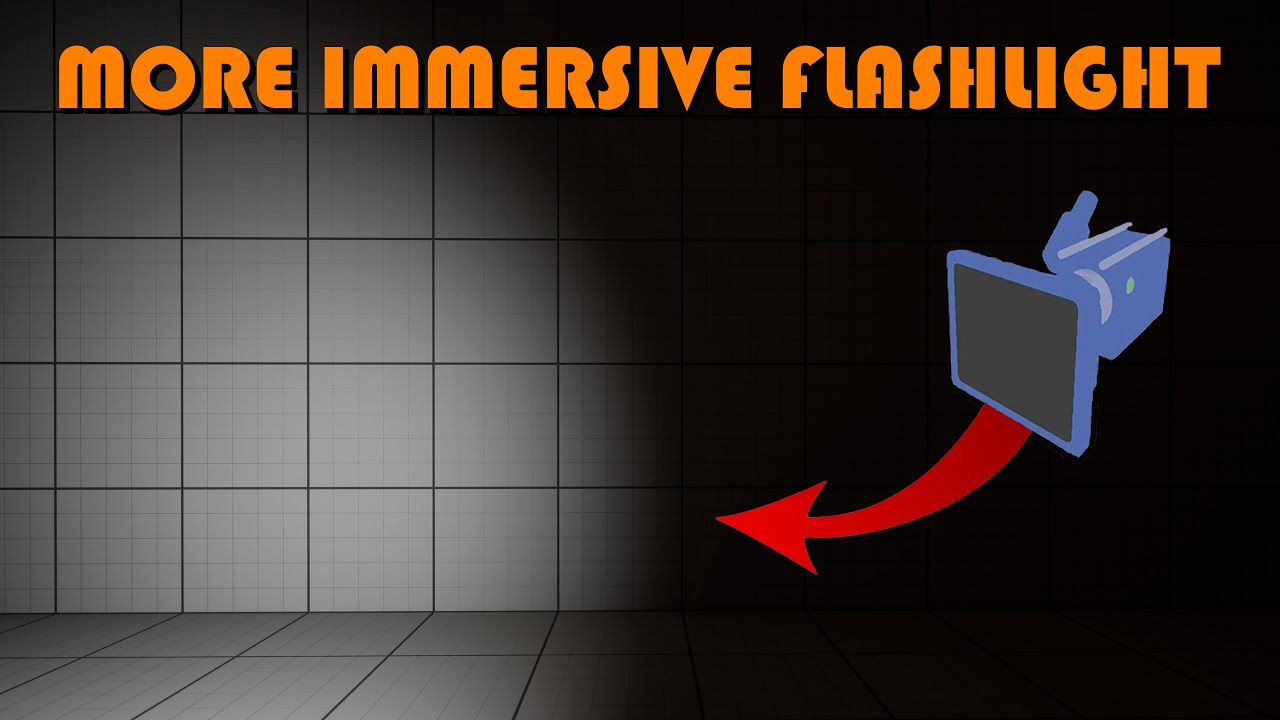
Hey guys, in today's video I'm going to be showing you how to create a more immersive first person flashlight. This allows the player to move the flashlight more independently from the camera, but still have them linked.
Get access to the project files and more on my Patreon: https://www.patreon.com/MattAspland
#UE5 #UnrealEngine5 #UE5Tutorial...
autumn pulsar
river cairn
hi! so i have this "F for flashlight on/off" blueprint here - works really well....
They show you how to do it in the video 
river cairn
autumn pulsar
They show you how to do it in the video <:lizThink:650028618134847513>
they do, but i cant use event tick since its already tied to something else, and also not optimized, and also not F button for it
 river cairn
autumn pulsar
in the spring arm component
river cairn
autumn pulsar
in the spring arm component
yep, i did that, put it to 21 but that makes the light lag behind, not my head, for some reason
autumn pulsar
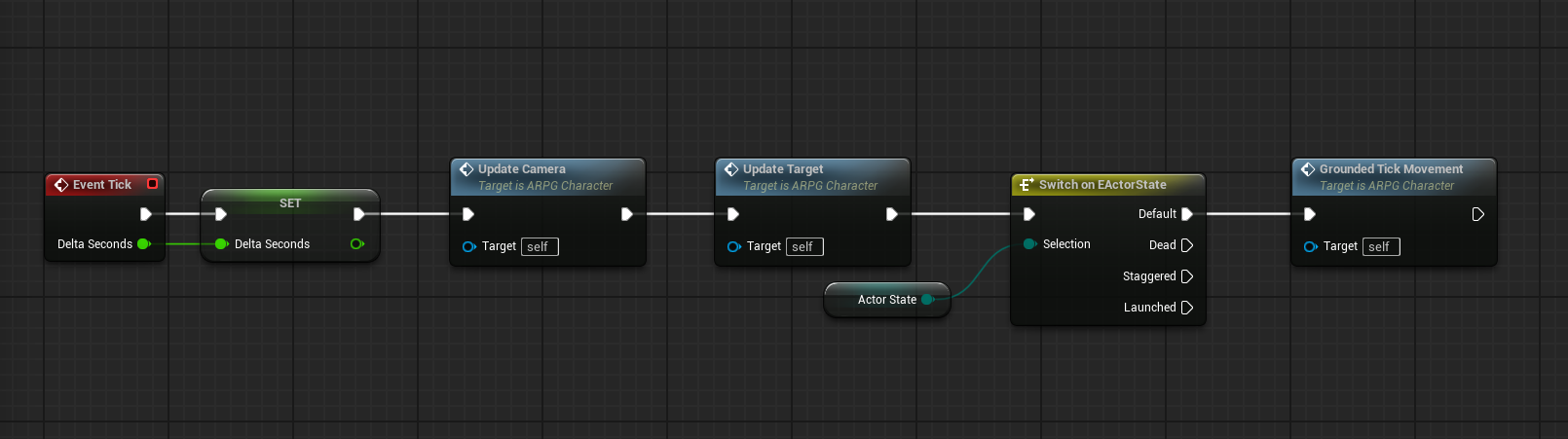 autumn pulsar
river cairn
yep, i did that, put it to 21 but that makes the light lag behind, not my head, ...
autumn pulsar
river cairn
yep, i did that, put it to 21 but that makes the light lag behind, not my head, ...
Is the flashlight tied to the spring arm?
river cairn
autumn pulsar
Is the flashlight tied to the spring arm?
it is yup
autumn pulsar
That's why
river cairn
autumn pulsar
That's why
oh? it needs to be somewhere else?
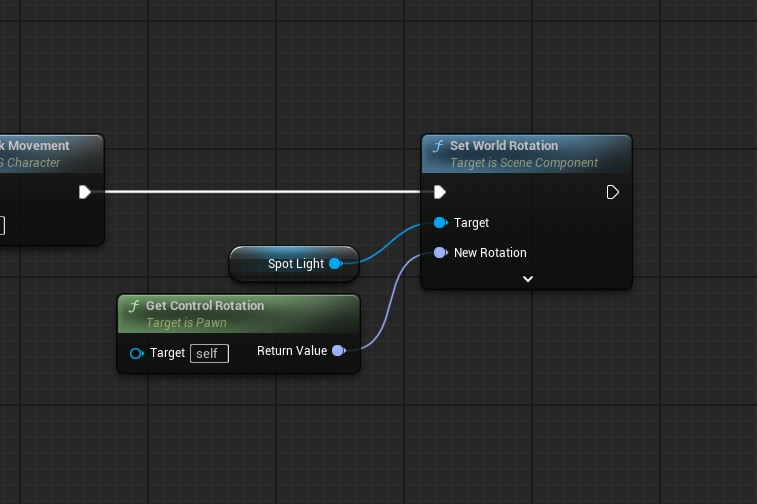 river cairn
autumn pulsar
then just run this every tick
river cairn
autumn pulsar
then just run this every tick
via the event tick node?
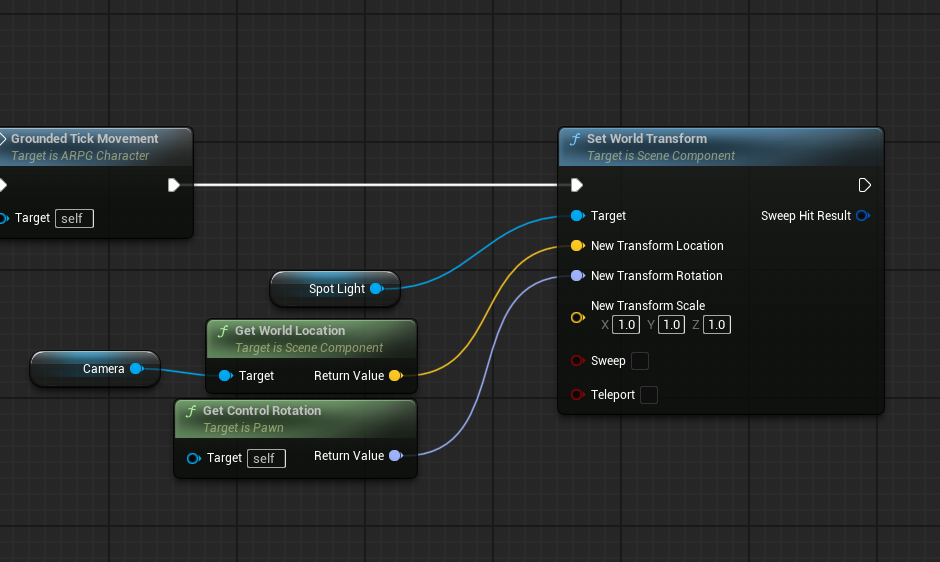 river cairn
my event tick is here, how can i branch off it to make those?
 river cairn
autumn pulsar
append to the end
river cairn
autumn pulsar
append to the end
like this? sorry im a beginner
 autumn pulsar

river cairn
😭 😭
 river cairn
autumn pulsar
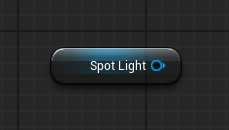
So right click and search for your spotlight component
river cairn
autumn pulsar
So right click and search for your spotlight component
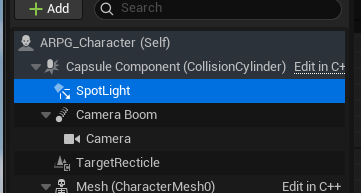
got it, made sure to parent it to the capsule component too
 river cairn
 autumn pulsar
in the list here it'll be underneath the capsule component
yup
now you can drag and drop it into the event graph
river cairn
got it
autumn pulsar
and you'll be given the blue node
from that node drag off and search "Set World Transform"
river cairn
just transform or (message)?
autumn pulsar
transform
river cairn
got it
river cairn
autumn pulsar
https://discord.com/channels/187217643009212416/221798862938046464/1344359625792...
yeah i tried to do that but my node didnt look like-
ohh orange?
 autumn pulsar
you can right click it, and select "Split Structure Pin"
river cairn
ahhh awesome
autumn pulsar
You already posted this
river cairn
hows that?
 autumn pulsar
Should work, plug it into tick
river cairn
... as soon as i figure that out 😂
autumn pulsar
Add it to the end
river cairn
like this?

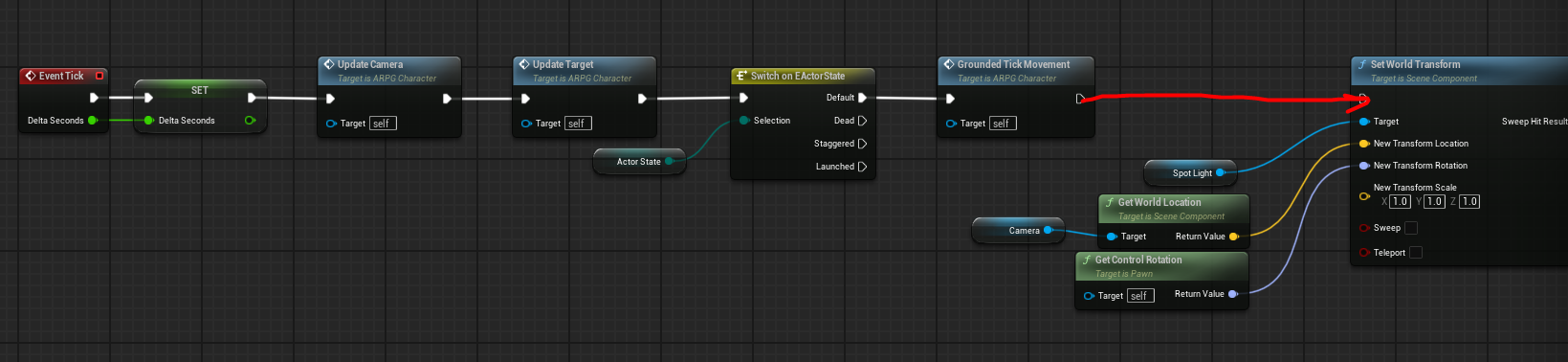 river cairn
and initialize crouch will go to set world transform?
 autumn pulsar
river cairn
and initialize crouch will go to set world transform?
autumn pulsar
river cairn
and initialize crouch will go to set world transform?
yup
river cairn
autumn pulsar
So how nodes work is it's a sequence of instructions
ahhh, i see i see
autumn pulsar
you're basically just saying, "After the crouch step, do this next"
river cairn
i gotchaa
now when i get my flashlight on, its perfectly centered alltime, do i have to change anything else or did i do it wrong?
river cairn
alrightyy
autumn pulsar
Do you have a camera boom component?
river cairn
i dont, but i have a spring arm
 autumn pulsar
Then you should be able to set the camera lag on it
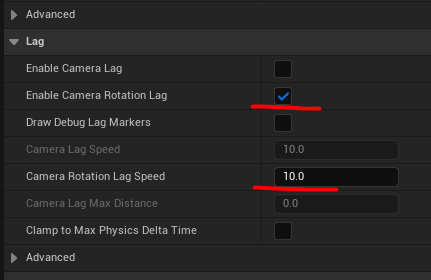
make sure "Enable Camera Rotation Lag" is set
river cairn
i got it, i think its aaalmost working - i see the flashlight moving a bit faster than the head, but not much
not as much as in the video
autumn pulsar
you can adjust the lag value
 lost sierra
Hi all, currently setting up a turret, however I'm having the issue that whenever multiple enemies walk into it's radius, it swaps between all of them. I'm trying to use an array to solve this, adding each sensed enemy to the array. I haven't played around with arrays much and don't know how I would essentially tell the turret to focus on the first item in the array (the first enemy sensed) before removing it from the array, and focusing on the new first enemy. Any help would be appreciated
river cairn
yess i am
autumn pulsar
lower means slower
autumn pulsar
river cairn
doesnt work 😢
What does it look like?
river cairn
autumn pulsar
What does it look like?
theres no change i feel like
autumn pulsar
lost sierra
Hi all, currently setting up a turret, however I'm having the issue that wheneve...
Are you wanting a focus on the first target and not care about the rest?
How are you doing it currently?
lost sierra
it would ideally, focus on the first target, kill it, remove it from the array, and then focus on the new first target (whatever is now highest in the array). Currently, it's just a concept as I have no real idea how to work this out, and from the tutorials on arrays that I'm looking at on youtube, I don't know how I would be able to do it for this idea
mainly as I don't know how to make it focus on the first item in the list
autumn pulsar
Usually it feels better to do things based on proximity
lost sierra
I can do it that way, however as it is a tower defence, I'd prefer it to focus on whatever is furthest ahead on the track, which most of the time will be whatever it senses first coming towards it
autumn pulsar
I see
autumn pulsar
lost sierra
I can do it that way, however as it is a tower defence, I'd prefer it to focus o...
I'd make the target logic seperate from the list logic
I'd use the begin overlap to add objects to a list, then end overlap to remove them from a list
but hmm
managing the list would be a challenge
modest monolith
dark drum
I would ask them to be more specific. Was it just movement that stopped working ...
That's the problem. Everyone is complaining about this bug but no one is helping me solving it. they just say " I can't run 🤓 ". Well I played my game and was pretty fine.. I don't understand and I can't fix it
lost sierra
yeah, i'm not exactly sure how to do it, which is why it was mainly just a concept. I'm sure it's possible, I just unfortunately don't have the knowledge to do it. If you can think of any better ways to handle this, that would be fine too
autumn pulsar
I'm actually thinking a global list might be better
lost sierra
sorry, what do you mean by this
autumn pulsar
Actually nevermind
Trying to think a little bit about what makes a good tower and what also runs efficiently
Because what you can do is have something keep tally of what position an actor is on a track
then when a tower wants to target something, it just runs down the list and finds an actor in range and sets that as its targeet
lost sierra
i see, that would work well
autumn pulsar
then it holds that until the target moves out
It's something you might need to profile
lost sierra
ok. Do you know how I would get started with this? I'd assume it would still be an array, but do you have any suggestions of tutorials I can look at to get a good idea of how to do this?
autumn pulsar
A more straightforward approach would be to do on Begin Overlap, Cast to your Monster or whatever, then add it to an array
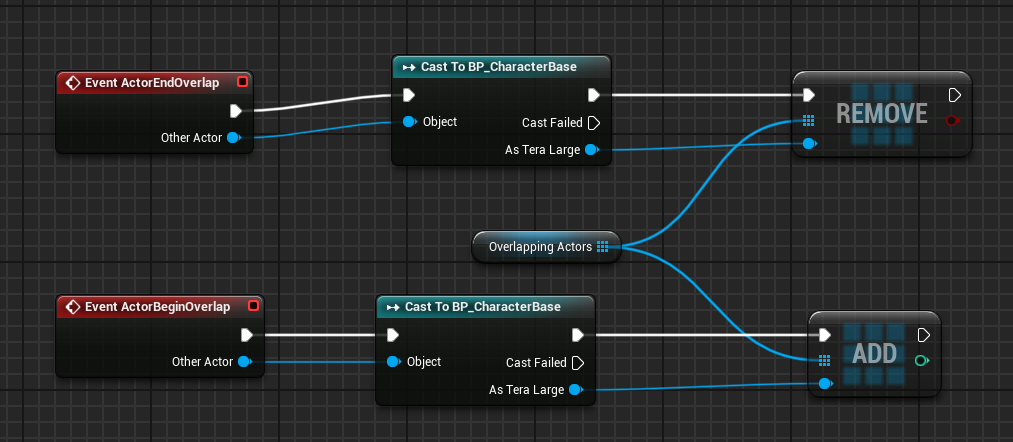 lost sierra
yeah, I had this little bit set up originally, but I'm not sure how to then make it focus on the first actor in it's range. I'd assume it's something to do with the find item, and then setting it up to the first sensed enemy, but this is the point where my knowledge falls off as I don't know much about arrays, sorry.
I could use find nearest item, but again with it being a tower defence, I don't think this would be the best way to do it
autumn pulsar
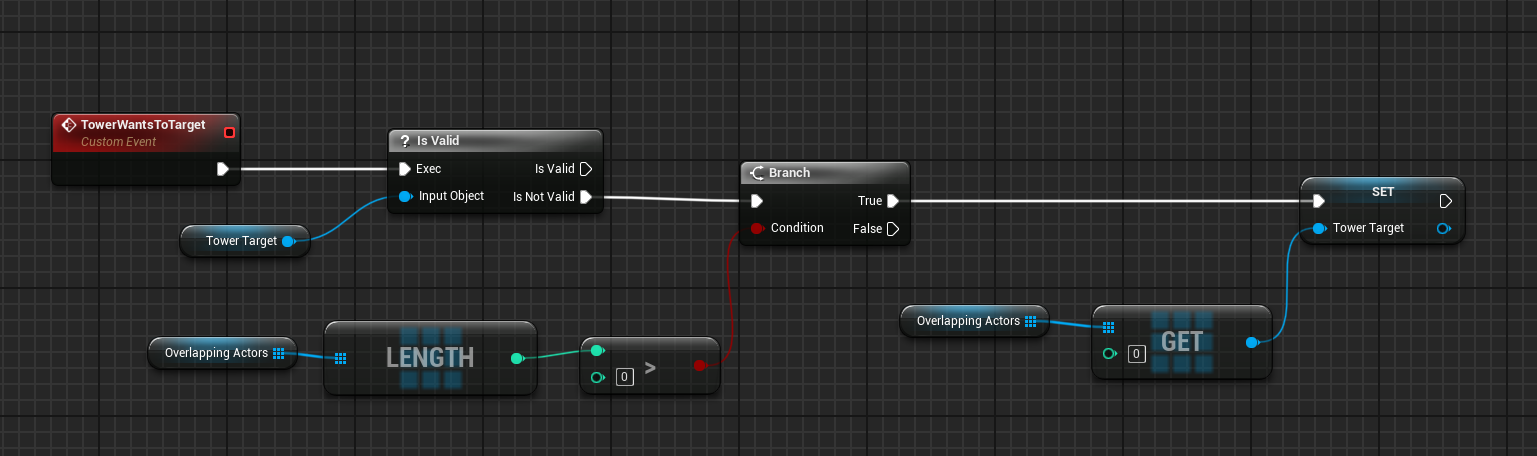
Actually might be as simple as this
Then you'd run this every tick
Then when the actor dies, or goes out of range, you'd set tower target to nothing
Basically we check to see if our tower target is valid, if it is we do nothing
lost sierra
I see. Thank you for this, I know it hasn't been the easiest thing to figure out, but your help is much appreciated
autumn pulsar
If it isn't we check to see if there's anything in the overlapping array (We see how long the list is and if it's empty return false)
If there is something there, we get a reference to it and set that as our target
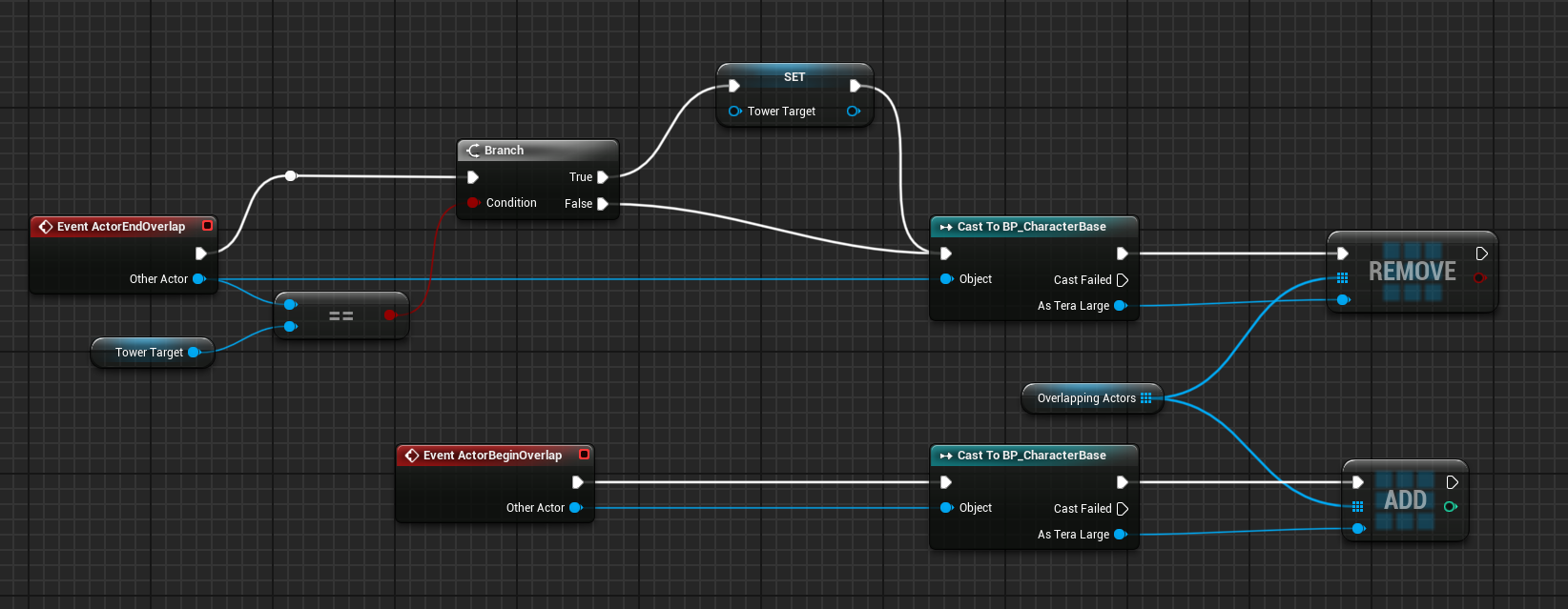
You can add this to end overlap
This way when our actor leaves our zone we stop targeting it
lost sierra
Right now I am using pawn sensing, would it be better to use overlap instead due to the remove overlap?
autumn pulsar
I'm not sure what the difference is tbh
lost sierra
ok, no worries
dusky cobalt
autumn pulsar
https://i.imgur.com/EHwO6nh.png
The problem with overlap like this is, if the target leaves the tower, and there are already 4 enemies in the overlap, they won't trigger the ''new'' overlap I believe. It's better to set up timer by event or tick that will just scan for targets all the time, and as you said in first thing, if targets leave, and it ''scans'' it will detect nothing, set target as nothing and won't attack.
dusky cobalt
lost sierra
Hi all, currently setting up a turret, however I'm having the issue that wheneve...
Are you clearing array everytime you add new target or you check for new targets? Maybe add only the new target if it doesn't contain, if you clear array, then add all enemies sensed it might give you different target every time.
Probably the best would be to to make it straightforward:
No target -> Start Looking
Target Found -> Attack it
It depends if you also want to attack the closest enemy, or etc. If you show your code right now probably it's easier to help.
lost sierra
so what I have been doing is adding the enemy that was sensed using pawn sensing to an array. My issue from there was that I didn't know how to make it focus on the first target within the array, and so I asked here. I am currently trying to work off of the code that Stuffy360 had sent, however this isn't going too well right now as the turret shoots once and then stops, so I am in the process of bringing back the old code where the turret just fired at whatever enemy it sensed at the time. As of right now, the only code i have to show on the targeting is the image below, but I am going to try and use the Find Item and see if I can work out how to use that with Actor Object References,

I'm trying add unique as that means that it won't constantly add the same enemy that it senses (if i'm correct)
 wind sandal
Hey folks! I created a simple BP to make a Sphere track the Look Vector for the center of the player camera. I added a 'VInterp To' node to have a smooth translation of the Sphere as the character looks around. I am able to get the smooth transition in the Vertical Axis, but the Sphere is locked to the Horizontal and does not provide the same smooth transitions. Here is a snapshot of the Event Graph as well as a quick video showing the issue. Everything is currently on Tick for troubleshooting and I made the Interp Speed very slow to demonstrate the effect working Vertically but not Horizontally. Any ideas as to what I might be doing wrong? Any and all help is greatly appreciated!

I originally had the sphere as part of the Character BP but thought that the issue might be due to a parenting constraint, so I moved the sphere to a separate BP and just spawn it on BeginPlay in an effort to avoid any weird parenting/constraint issues
 indigo gate
Quick question, I assume that nodes for loading soft object/class references will execute instantly if the object class already happens to be loaded in memory right ?
 outer brook
Hello fellas. Can anyone tell me if there is a "DetachComponentFromActor"-Function, where i can detach a "specific" component attached to an actor?
I am wondering why there are only the "DetachFromActor" and "DetachFromComponent" which detach ALL attached components/actors.
 runic terrace
outer brook
Hello fellas. Can anyone tell me if there is a "DetachComponentFromActor"-Functi...
runic terrace
outer brook
Hello fellas. Can anyone tell me if there is a "DetachComponentFromActor"-Functi...
This will only detach this component from its parent, not the actor

 high gale
Hi all. I am trying to make all my AI Enemies reduce their sight range when my player crouches and I need to find a way to shoot a message to all the AI controllers when the player crouches and uncrouches.
This is my code for it now as an interface but it is not working. The actual crouch mechanic works so the code is going through but something is wrong with the target and I can't figure out what


 final berry
Following up on this, where do I create this UI_ErrorMessage if the BP should not know it? 🤔
runic terrace
indigo gate
Quick question, I assume that nodes for loading soft object/class references wil...
Yes it doesn't have to load again, it just pulls from the existing memory
outer brook
runic terrace
This will only detach this component from its parent, not the actor
Hmm, the more i think about what I want and what these functions do, the more I realize that I am doing it wrong.
Thank yo for your answer anyway.
runic terrace
high gale
Hi all. I am trying to make all my AI Enemies reduce their sight range when my p...
Are you looping through all the enemies and calling the interface?
high gale
runic terrace
Are you looping through all the enemies and calling the interface?
should I make the variable an array and then loop through?
 surreal peak
That variable is probably empty, right?
I also don't see much value in telling every AI that you crouch/uncrouch.
Why can't the AI that sees the player at normal distance not just check if the player it sees is crouching and then ignore the player if the distance is too high?
runic terrace
Yeah you're setting the type of the variable, that by itself doesn't set the reference to that actor
Even if that worked you'd still be sending an interface message to the actor, not its controller
surreal peak
On top of that, if one would actually want to do that they would probably have ea Delegate on Crouching and have AIs listen to that, not the other way round.
runic terrace
Yep it's better to think backwards on this, make the AI check for itself and decide what to do instead of the player telling them to reduce vision
surreal peak
Probably good to learn how to utilize Delegates/EventDispatchers.
But for this here I would still argue that it doens't make much sense.
I would just filter in the AI that senses the Character.
 compact tinsel
Just popping in to share how I solved my issue. By changing the tick group for the player's mesh from "Pre Physics" to "During Physics". Everything seemingly behaves like expected now.

 compact tinsel
(using an animation montage just produced the same issue, by the way)
autumn pulsar
dusky cobalt
The problem with overlap like this is, if the target leaves the tower, and ther...
So there's a running list of actors in the array
so when an actor leaves, it zeroes out the target and the tower will then seek a new target
it'll then access the first index on the list again, which should be the next object that came into range
dusky cobalt
yea i see, makes sense now

 random vine
for the first time I enabled all of these properties
 autumn pulsar
Does Uobject not have a construction script?
 timid cedar
Need help figuring out my blueprints for a widget display on entering a collision box
I'm starting to learn Unreal for the first time with 0 coding experience. I'm following various tutorials and also setting myself tasks each day to force myself to figure stuff out.
I made a simple door interaction and a widget that appears when the player enters the collision box of the door showing the 'E' key for interaction. To make the widget appear and disappear I learnt to use the 'Set Visibility' function (if that's the right word, I'm still learning). All works fine. The widget is also 'in world' if that is the right way to say it. So it appears as if it's attached to the item I'm looking to interact with.
Today's task was to make the widget fade in and fade out instead of just popping in. So in the widget itself I made an 'event construct' that leads to a 'play animation' tied to a 'fade in' animation that I made. And did the same for the 'event destruct' with a 'play animation' tied to a 'fade out' animation.
The fade in works beautifully but the fade out doesn't work at all. I eventually realized that it obviously won't work this way as the 'event destruct' inside of the widget won't get triggered until after the 'set visibility' is set to 0 again. So by the time the fade out animation should play the widget is already no longer visible. I've tried messing around with delays but nothing I can come up with worked. There has to be an elegant way to do this.
Basically i want for the 'fade in' and 'fade out' to be intrinsic to the widget itself. So that I can use that widget with any object and the same functionality is maintained.
If anyone is willing to help I'd really appreciate it.
I've attached the blueprints here. One is the blueprint of the widget and the other is the door.

 autumn pulsar
Is there a way to pass the constructor script a variable when spawning an actor?
runic terrace
autumn pulsar
Is there a way to pass the constructor script a variable when spawning an actor?
You can expose variables. Check the ''Expose on Spawn'' option in the variable details, it should then show up as an option when spawning the actor
runic terrace
timid cedar
Need help figuring out my blueprints for a widget display on entering a collisio...
So there is no issues with the door, but the widget
And you want to make sure the widget finishes its fade out animation before it gets hidden?
timid cedar
runic terrace
And you want to make sure the widget finishes its fade out animation before it g...
Yes. I basically want to be able to use this widget with any object that I will be able to interact with. And when the player enters the collision box of an item, the widget to fade in. And when I leave the collision box I want the widget to fade out.
runic terrace
You can create a delegate (Event Dispatcher) in the widget and call it when the fade out animation finishes. (There is a ''Play Animation with Finished Event'' node)
Then you can bind that delegate in your actor that would hide the widget component.
But keep in mind that this might cause a bug if the player enters the box again while the fade out animation is still playing, so you need to account for that by making sure the player is indeed not in the box before hiding the widget component
timid cedar
You can see in this quick video. When I approach the door or that hat on the floor, the 'E' appears with a nice quick fade in. (I made it 0,25s long). But it makes for a nicer more polished look. But when I step away the 'E' just disappears instantly without a fade out.
I think my problem is that the 'set visibility' to 0 function when I leave the collision box makes it so that the 'E' disappears before the 'fade out' animation can occur. I don't know how to circumvent that.
runic terrace
runic terrace
You can create a delegate *(Event Dispatcher)* in the widget and call it when th...
Like this
 wind atlas
Hey yall! I have a quick question aboout GameInstace. I am trying to implement a system where whenever the play start launching the game, the game instance will load the saved level (in save game slot) and open that level at the start for game. My code worked fine in PIE mode, whenever I press play , it will open the saved level that the player was last in. But when i test it in standalone mode or packaged version, it is not working at all and only load the first level.
Hope someone can guide me through this and thank you!
 runic terrace
timid cedar
I've attached the blueprints here. One is the blueprint of the widget and the ot...
runic terrace
timid cedar
I've attached the blueprints here. One is the blueprint of the widget and the ot...
Also I just noticed you're using the event deconstruct, this will not fire when you set the widget component hidden Nevermind apparently it does?
autumn pulsar
runic terrace
You can expose variables. Check the ''Expose on Spawn'' option in the variable d...
I was just spawning the actor in a blueprint. I guess it makes more sense to have child blueprints with the modifiied values instead
I've constructed an object in blueprint, but I can't seem to find a way to destroy the object?
timid cedar
runic terrace
~~Also I just noticed you're using the event deconstruct, this will not fire whe...
What should I use instead of 'event destruct'? I assumed it should work as it is the opposite of 'event construct'. And for the 'fade in' part of it that works well. (Sorry if I'm being a noob).
runic terrace
Can you make sure those fire when intended by hooking up print strings to them? Im not exactly sure if Unreal automatically destroys the widget object when you hide the widget component
If they do fire then you don't need to change it
timid cedar
runic terrace
Can you make sure those fire when intended by hooking up print strings to them? ...
Awesome idea! I'll do that
runic terrace
autumn pulsar
I've constructed an object in blueprint, but I can't seem to find a way to destr...
You can't in blueprints. But simply removing all references to an object will make it get destroyed by the garbage collector after a while
Make sure the object doesn't continue to run code after you're done with it, and then you can simply remove all references to that object and assume it's destroyed.
autumn pulsar
runic terrace
Make sure the object doesn't continue to run code after you're done with it, and...
Sick
I guess I'll need to make it accommodate interrupts
siince I plan to run some latent nodes
timid cedar
runic terrace
Can you make sure those fire when intended by hooking up print strings to them? ...
So I hooked up a print string to the 'Event Destruct' inside the widget. And it works
runic terrace
Yeah nice then apparently Unreal does destroy the widget object when you hide the component to optimize it.
Then you can use deconstruct no problem
timid cedar
so the problem is simply that by the time the 'fade out' animation is triggered the widget is already invisible
runic terrace
runic terrace
You can create a delegate *(Event Dispatcher)* in the widget and call it when th...
Try this approach
This is not the only way to do it though, don't assume this is the only correct approach
And apply that to every tutorial you watch too, especially if youre learning from scratch
timid cedar
runic terrace
Try this approach
I don't think I've done this right 😅

this 'create event' is the only thing that shows up if I type "Event Dispatcher"
runic terrace
Then this might be a good time to learn about dispatchers, there are some short tutorials on Youtube
Once you learn about them you'll be using them a lot
timid cedar
On it. Looking them up now.
runic terrace
timid cedar
I don't think I've done this right 😅
The finished ''event'' is simply the ''Finished'' pin on the node
it fires when the animation finishes
timid cedar
runic terrace
The finished ''event'' is simply the ''Finished'' pin on the node
I tried the event dispatcher method. Doesn't seem to work as I can't access it between the door BP and the Widget BP. So step by step: I went to my door BP and created an event dispatcher. Named it 'FadeOut'. Then I dragged it in and selected 'Call Fade Out'. I attached it right before the 'set visibility' so that it gets called before that. Then when I go to my widget BP and I try to 'bind to FadeOut' that option doesn't appear...
runic terrace
timid cedar
I tried the event dispatcher method. Doesn't seem to work as I can't access it b...
You need to create and call the dispatcher in the widget, and assign an event to it in the door
You're trying the opposite
timid cedar
runic terrace
You need to create and call the dispatcher in the widget, and assign an event to...
I've sent you a friend request so we can message in private as I feel bad I'm taking over the entire thread.
Of course if that would be ok with you.
dusky cobalt
runic terrace
You need to create and call the dispatcher in the widget, and assign an event to...
Isn't it better though to have event dispatcher on the object and then other things binding to it ? so we can have multiple things listen to doors beeing opened for example
runic terrace
He wants to set the widget component invisible when the animation in the widget finishes playing
So it's the door that's depending on the widget
dusky cobalt
ohh i see
runic terrace
For other stuff yeah it makes more sense to have a dispatcher for onOpened onClosed events
dusky cobalt
but then when he creates widget in the door, he could sent ref to the door itself, and then just in the widget have ref to door and call on it set invisible like Get Door > Get Widget Component > Set Inv
runic terrace
That would work but creates a two-way dependency
You might want to use this widget elsewhere but doing that would also load the door unnecessarily
dusky cobalt
yeah if its used by other classes then true
runic terrace
That method would probably work with a generic actor variable though, you can just call find component by class to find the widget component, make sure it exists, set it invisible. But setting component visibility in a widget is still not very clean
dusky cobalt
event dispatcher is 100% to go here if want to make this generic
if widget should be reused
runic terrace
Even if not, avoiding two way dependencies whenever possible is a good habit
 tranquil hemlock
Hi! Why does E event trigger even if player is outside this preset collision box here?
On Component Begin/End Overlap to enable/disable input respectively seems to get entirely ignored and E fires anywhere in level. Any easy fix?
EDIT: Set up a simple gate for E to trigger once input is enabled and I'm still getting it

 frosty heron
tranquil hemlock
Hi! Why does E event trigger even if player is outside this preset collision box...
frosty heron
tranquil hemlock
Hi! Why does E event trigger even if player is outside this preset collision box...
Are you following a tutorial?
tranquil hemlock
frosty heron
Are you following a tutorial?
not really, just trying to do a simple collision check to enable player input then if player is standing within it enable E key and on press transition to a new level
frosty heron
tranquil hemlock
not really, just trying to do a simple collision check to enable player input th...
Frankly this is a terrible way of going about it.
You shouldn't handle input in the door actor
My suggestion would be to look for example or guide on how to set up interaction with an actor component.
That should be good enough for you to press input and instruct the interacting actor ( e.g door ) to do something.
tranquil hemlock
frosty heron
You shouldn't handle input in the door actor
I'll search for a tut but where is it typically done, the weird thing is this exact same code works on another gate mesh
frosty heron
tranquil hemlock
I'll search for a tut but where is it typically done, the weird thing is this ex...
I don't want to be mean but the code is better off refactored.
Imagine handling input in the door. Why do you want 100 door to listen to you pressing E?
This will end up opening all 100 doors in the map.
The most common way is to handle interaction from the source. E.g your player character.
How you define the interaction is up to you.
Example, by radius or by line trace.
tranquil hemlock
i guess that makes sense, E key is called a lot
frosty heron
tranquil hemlock
i guess that makes sense, E key is called a lot
Even calling it twice is red flag already 🙄
This will cause debugging nightmare
tranquil hemlock
haha ty i'll find a proper way to do it ;~;
frosty heron
tranquil hemlock
haha ty i'll find a proper way to do it ;~;
Imo a guide on how to set interaction with actor component. Should that doesn't exist, then try interface.
Do a simple print string. Once you got that working, you are probably good to go to handle the rest of the logic.
tranquil hemlock
will do thanks for the guidance 🙂
 topaz condor
hey everyone, does anyone see an infinite loop happening here? im blanking out
 runic terrace
topaz condor
hey everyone, does anyone see an infinite loop happening here? im blanking out
runic terrace
topaz condor
hey everyone, does anyone see an infinite loop happening here? im blanking out
Where does this function run
topaz condor
its set on a custom event on the event graph on this bp, and then clicked on a widget event graph


excuse the mess, just debugging
frosty heron
Have you tried doing breakpoint?
runic terrace
Yeah that's the correct way to debug. The infinite loop error doesn't always point to the correct cause for some reason
topaz condor
ahh nevermind, i was calling the function twice on my buttons crashing it.
 teal tendon
Hey guys I wanted to implement a system where you can see constellations and bright stars from a handheld telescope as a mechanics. So I asked this before whether should I use a masked texture on sky dome or do I render it inside the telescope. So someone suggested that I should make it using the post process material with stencil depth and all. but here is a thing, it does not make the plane transparent on its own and when I try to use the masked texture inside the plane they conflict with each other. Also it did not look as realistic as I thought as well. SO are there any other logics or methods I can implement a similar system where you can see constellations and bright stars from a handheld telescope. IF you got any ideas on this please help me out here
here are the materials I tried to simulate the above system by the way


 sour valley
Is it a life cycle problem? Animation bp fires before the ai controller bp's beginplay?
frosty heron
@sour valley print string the ai controller object and the cast failed.
This could run way before the ai controller is spawned.
The term is called race condition
 mighty cipher
Hey folks. I upgraded my project from 5.4 to 5.5 and now I'm having intermittent issues with CharacterMovement GetCurrentAcceleration returning as 0 on all axis even though the ai character is moving. Anyone have issues like that?

 tulip anvil
mighty cipher
Hey folks. I upgraded my project from 5.4 to 5.5 and now I'm having intermittent...
tulip anvil
mighty cipher
Hey folks. I upgraded my project from 5.4 to 5.5 and now I'm having intermittent...
My best guess is 'acceleration != velocity'
 snow halo
hi i wanna ask a question
i soft spawn a class
and inside of that class there will be a rock
and inside of that rock i have an event i call via an interface
after this inferface is being called i have a line of code that i wanna throw this rock basically but its not working properly, why?
mighty cipher
tulip anvil
My best guess is 'acceleration != velocity'
correct. acceleration is not velocity - it's the rate of change of velocity. this was working flawlessly before switching to 5.5 btw
mighty cipher
mighty cipher
Hey folks. I upgraded my project from 5.4 to 5.5 and now I'm having intermittent...
I think I got it - for whatever reason in my child blueprints in character movement "Use Acceleration For Paths" was turned off.
 obtuse mulch
is it possible to select the camera if the character have 2
 dark drum
obtuse mulch
is it possible to select the camera if the character have 2
dark drum
obtuse mulch
is it possible to select the camera if the character have 2
Sort of, as far as I'm aware, it will use the first enabled one it finds. If you disable one, it'll use the other.
obtuse mulch
how to disable it?
frosty heron
set active to false on the one you want to disable
obtuse mulch
oh auto activate
frosty heron
and set active to true to the one you want to enable
obtuse mulch
ty got it working
 solemn shale
When and where using this is useful?
 frosty heron
solemn shale
When and where using this is useful?
frosty heron
solemn shale
When and where using this is useful?
When you need to wait a frame.
solemn shale
frosty heron
When you need to wait a frame.
enghlighting
sour valley
They are the same enum type, why do i need to convert to a numeric value?
 frosty heron
sour valley
They are the same enum type, why do i need to convert to a numeric value?
frosty heron
sour valley
They are the same enum type, why do i need to convert to a numeric value?
You are probably pulled out the wrong equal operator and trying to compare byte instead
Delete it, drag from the enum and type equal again and see what the options are
dark drum
solemn shale
When and where using this is useful?
There's also the timer by event next tick which is useful when you're not in the main event graph.
solemn shale
dark drum
There's also the timer by event next tick which is useful when you're not in the...
thanks im gonna check it
 young meteor
Hey folks
I'm using Timelines to set (update) a relative position of a static mesh when my Actor fires.
It works fine except it often has "janky" movement instead of the smooth movement it should get based on the Timeline Track curve.
To try and elaborate on "Janky".
- It seems like it either starts over and plays the timeline in the middle of already playing it (Tested for this with breakpoint, and does not actually seem to be the case)
- Or it seems like it is not getting the value from the timeline and setting the location to 0 for a frame or two, and then goes back to calculating and setting the correct position based on the curve with the multiplier shown.
Any idea why this might happen?

The curve in case it matters:

 faint pasture
young meteor
Hey folks
I'm using Timelines to set (update) a relative position of a static m...
faint pasture
young meteor
Hey folks
I'm using Timelines to set (update) a relative position of a static m...
Why are you making this thing frame rate dependent?
young meteor
faint pasture
Why are you making this thing frame rate dependent?
Not sure how I'm doing that
Not running on Tick if that is what you mean
faint pasture
young meteor
Not sure how I'm doing that
Setting play rate based on framerate
Timelines tick anyway. Update runs per frame
The timeline will already take the same amount of time, no matter your frame rate. Just play the timeline and do the thing on update. That will be butter smooth
young meteor
faint pasture
Setting play rate based on framerate
How else can I control the time it should be played over dynamically?
faint pasture
Why would that depend on frame rate?
I could see it being faster for different guns but not for different frame rates.
young meteor
If players upgrade towers firerate I need the "animation" to be shorter.
faint pasture
Why is that variable called current frame rate? Is current frame rate based on some stat for a tower or is it based on the frame rate of the game? It should not be based on the frame rate of the game.
young meteor
faint pasture
Why is that variable called current frame rate? Is current frame rate based on s...
You mean "Current Firerate"?
faint pasture
Anyways, the reason it is jerky is because you play from start every time, causing it to go back to zero displacement. You will probably be better off with some sort of a tick-based approach that adds to some value when the thing fires and decays towards neutral over time
faint pasture
young meteor
You mean "Current Firerate"?
Whoops, could have sworn it said frame rate. That bit is fine then.
young meteor
Trying to make the "animation" take about 1/3 of the towers "cooldown" before it fires again
faint pasture
Your timeline will work if time zero is the back bit of your animation. The jerk happens because you snap from the extreme back portion to neutral, then interpolate to back
Or you can leave it as is but introduce a interpolation term so it smoothly transitions from one shot to the next.
young meteor
faint pasture
Your timeline will work if time zero is the back bit of your animation. The jer...
Not sure I fully understand. The track in the Timeline has a value of 0 at both ends, and are not called again in the middle of playing.
faint pasture
Show a clip of it
young meteor
Should maybe also mention it does not happen every time but often.
Will try and capture a clip. Sec
So all this is about the recoil of the tower by the way. Might help see what I'm talking about.
When the tower fires, the "body" of it has some recoil. Meaning it quicky moves back a bit, and the goes back to neutral position according to that timeline track curve.
dark drum
young meteor
The curve in case it matters:
You could try ticking, the diamond with the line. It'll make the length match the last key frame. Beyond that, it could be that you're updating the play rate whilst it's still playing which causes it to update based on the new play rate for that split second before being told to play from the start.
I would probably update the play rate separately and only when the fire rate changes Instead of everytime you go to play it.
young meteor
Just made a clip where I 10x'ed the movement to make it much more clear to see. Third shot and some of the last shots have the issue in this clip
young meteor
dark drum
You could try ticking, the diamond with the line. It'll make the length match th...
I tested with a breakpoint to try and see if the Playrate was called 2 times (meaning called again in the middle of playing)
I was not able to detect it being called again, before the tower did the next shot.
young meteor
dark drum
I would probably update the play rate separately and only when the fire rate cha...
That is maybe a good thing to do anyway 🙂
young meteor
dark drum
You could try ticking, the diamond with the line. It'll make the length match th...
Not sure what you mean by "ticking, the diamond with the line".
You mean make sure the last key frame (diamond) is exactly equal to when the timeline ends?
dark drum
young meteor
Not sure what you mean by "ticking, the diamond with the line".
You mean make su...
Yea. that one.
@young meteor Another thing you could possibly look at is the tick group. It could be the timeline updates first and then in the same tick, you update it's play rate and then tell it to start again.
young meteor
Tried just setting playrate once at begin play. Just in case calling playrate right before was the issue.
Did not help. Still have the wierd behavior.

 undone sequoia
Guys how it is possible that my IF pass in behaviour tree even value is false and it is written there it is failed and it still runs i dont get it
 dark drum
undone sequoia
Guys how it is possible that my IF pass in behaviour tree even value is false an...
dark drum
undone sequoia
Guys how it is possible that my IF pass in behaviour tree even value is false an...
The condition checks if a value has been set, not if it is true or false. It's tripped me up a few times.
undone sequoia
its clearly true now i tried delete all other ones
 undone sequoia
dark drum
The condition checks if a value has been set, not if it is true or false. It's t...
undone sequoia
dark drum
The condition checks if a value has been set, not if it is true or false. It's t...
hmm
frosty heron
Where would be a good place to inject logic to dynamically change CMC braking for something like a MoveStop.
I want to apply braking according to the velocity. Not sure how to network this though to not cause de-sync.
It goes beyond simple boolean toogle check when velocity is introdced 😦
undone sequoia
dark drum
The condition checks if a value has been set, not if it is true or false. It's t...
so i should change this?
 surreal peak
young meteor
Tried just setting playrate once at begin play. Just in case calling playrate ri...
surreal peak
young meteor
Tried just setting playrate once at begin play. Just in case calling playrate ri...
Are you sure this is coming from the Timeline and not from a different rotation overlapping and causing issues?
Have you tried playing the timeline without rotating the tower to the current target?
surreal peak
frosty heron
Where would be a good place to inject logic to dynamically change CMC braking fo...
CalcVelocity in c++?
dark drum
undone sequoia
so i should change this?
Im not sure, I've not used BT's for a while.
frosty heron
surreal peak
CalcVelocity in c++?
I am gonna attack this on the weekend, just hoping it doesn't cause de-sync
undone sequoia
dark drum
The condition checks if a value has been set, not if it is true or false. It's t...
then its not making sense for me that it can be true or false lol
surreal peak
frosty heron
I am gonna attack this on the weekend, just hoping it doesn't cause de-sync
If the Boolean is changed from outside it will most likely desync
undone sequoia
if it will jump in tree
frosty heron
previously I can change movement speed onMovementUpdate but that's only based on boolean.
but if velocity become part of the equation, I have anxiety
surreal peak
undone sequoia
if it will jump in tree
That Blackboard filter is not checking against true or false.
young meteor
surreal peak
Are you sure this is coming from the Timeline and not from a different rotation ...
Can setting a rotation cause issues with setting the location from the timeline?
surreal peak
Idk, but you seem to rotate the actor or whatever to the target while also playing the timeline Rotation
I would try to isolate this first
young meteor
surreal peak
I would try to isolate this first
Right. Worth a shot to test maybe.
dark drum
undone sequoia
then its not making sense for me that it can be true or false lol
So the question is, "Has the value not been set". As you've set the value, the answer is true to being set meaning it fails the condition. Remember, it's not checking the value, just if a value was not set.
frosty heron
is that what it does 0o? I always thought not set = false, set = true
dark drum
frosty heron
is that what it does 0o? I always thought not set = false, set = true
If you have an object ref and you set it to null, it would return true if checking if set. 😅
frosty heron
I see, I only use bool soo far for the set or not set haha
young meteor
surreal peak
Idk, but you seem to rotate the actor or whatever to the target while also playi...
You sent me down the right path indirectly, so thank you.
Was setting a relative position in parrent BP xD.
frosty heron
though what you said totally make sense.
good to know before going deep into more BT
dark drum
frosty heron
I see, I only use bool soo far for the set or not set haha
The same thing with bools, if you set a bool to false, it would return true if checking if set lol.
frosty heron
kinda a miracle that I haven't come accross bug yet then 😄
young meteor
dark drum
The same thing with bools, if you set a bool to false, it would return true if c...
Haha tricky one. It is True that it is "set", but it is "set" to "False" 😄
 radiant pebble
Hey, I'm trying to display a video using Common UI and it's CommonVideoPlayer but when I'm playing a media source dynamically, once it's not showing, twice it stays in black screen and finally the third times it's finally playing, it's kinda like the video is not loaded. anyone has an idea ?
 faint creek
Hi guys, is possible to abort a Delay?
dark drum
faint creek
Hi guys, is possible to abort a Delay?
No, but you can stop a timer.
faint creek
dark drum
No, but you can stop a timer.
Could you explain please? 🙂
dark drum
faint creek
Could you explain please? 🙂
Instead of using a delay, start a timer and store the timer handle. If you want to stop it, you can clear and invalidate the timer handle.
faint creek
dark drum
Instead of using a delay, start a timer and store the timer handle. If you want ...
Like a "Timer by event"?
dark drum
faint creek
Like a "Timer by event"?
yea.
faint creek
dark drum
yea.
Like this?
 dusky cobalt
you need 1 event to Start Timer and 2nd event to Stop Timer. On Start Timer you start timer by event and on Stop Timer you clear the timer by handle
and call them accordingly
dark drum
faint creek
Like this?
Something like this.
 faint creek
Thanks 🙂
I noticed an interesting thing: if I keep pressed a button on the event tick, the timer don't execute the event until the button will be released. I don't understand why 🙈
dark drum
faint creek
I noticed an interesting thing: if I keep pressed a button on the event tick, th...
If you call a timer again before it's completed, it just starts it again. Hence why I check if the timer is active. 🙂
 buoyant oar
Not sure if this is the right channel, but If i wanted to associate some extra data with a world asset like a display name or loading screen image how would I go about doing that?
Ideally I dont want to actually load the full UWorld asset to access the extra data, but im not particularly fussed
faint creek
dark drum
If you call a timer again before it's completed, it just starts it again. Hence ...
Woooo, thx
I noticed that it works also if I use “do once” however maybe this method is uncompleted.
Your is clearer 💫
 ruby cobalt
hello. question about random. see how i use the same node for 2 operations.. that cook from the same execution (how do i say that in BP language??)
this will result in 2 different random floats, right?

 proper flower
Hey! wich node does an ordered list of element sequence? pin2 starts when pin 1 is finished?
the sequence node I think not
some suggestions?
dusky cobalt
ruby cobalt
hello. question about random. see how i use the same node for 2 operations.. tha...
either just copy paste the node and use it 2 times if you want 2 different floats, if you want one and use it for two, then promote that to variable, set it as random and plug it where it should be used so then you will get 1 random number that can be used in different places, but yeah if you connect it to two things these may get 2 different results
dusky cobalt
proper flower
Hey! wich node does an ordered list of element sequence? pin2 starts when pin 1 ...
you can just use event driven approach and call event after event
proper flower
and for struct ordered SET of array? how can I do it?

I mean setting every "value" of every element
dusky cobalt
you need to use Set Member in Struct and ''for each loop'' handles that (will iterate trough whole array of structs, and set Value to for example 10 in each struct)
if you want for it to increase every for each then you just need to add logic after Loop Body
so instead of breaking struct, get Set Member
proper flower
I did not understand. the set member shows a blue rhombus, but i need the green value to be modified in blueprint
okay understood
 ruby cobalt
dusky cobalt
either just copy paste the node and use it 2 times if you want 2 different float...
ruby cobalt
dusky cobalt
either just copy paste the node and use it 2 times if you want 2 different float...
ok thanks yes!! i just was curious to know if it would spit different values whenever data is pulled out of it
different values each cook but.. same value to all its connections
dusky cobalt
proper flower
okay understood
when you click on Set Members node, on t he right you have panel and you can toogle variables to show to change
dusky cobalt
ruby cobalt
ok thanks yes!! i just was curious to know if it would spit different values whe...
no, i dont think you get the same value to all connections, each connection will trigger this again and will get random int
also the best is to probably just print it and everything will be clear
ruby cobalt
ahh ok ok
proper flower
thanks
 ruby cobalt
this is what i suspected then.. it's useful to have different values tho
if i want the same values i can store to a variable first
 low crescent
hi i'm making a vr project and i have a widget component in the vrpawn so that it's always visible but in the blueprint when i try casting to the widget class to be able to call events from the pawn class it doesn't work (is valid node returns not valid), are there any ways to call events from the widget class in this way?
 trim matrix
hey ive made these warp box objects that i can set to a "locked" state but im now stuck on how i can unlock them using another object/objects ive placed in a level once the player collects them. how would i go about doing that?

 dusk star
If i have a readonly variable in a struct, shouldn't it be hidden from the defaults in the blueprint?

 faint pasture
dusk star
If i have a readonly variable in a struct, shouldn't it be hidden from the defau...
faint pasture
dusk star
If i have a readonly variable in a struct, shouldn't it be hidden from the defau...
pretty sure that's at run time
in editor you can mess with it
at runtime, BP code can't mess with it
dusky cobalt
dusk star
If i have a readonly variable in a struct, shouldn't it be hidden from the defau...
you would need to make it private, but then you are not able to ''get it'' unles you make a function in cpp that will be a Getter, if you make it read only, then you can get it in blueprints, but you cannot set it in blueprints
remote meteor
dusk star
If i have a readonly variable in a struct, shouldn't it be hidden from the defau...
the EditAnywhere tag is the important one here, if you dont want it to be configurable, maybe use Visible ones
 narrow sentinel
Anyone know why when I set a breakpoint to happen and I know it's being hit yet it not do the normal thing a breakpoint does ?
 olive sedge
hi!
https://blueprintue.com/blueprint/lkp07h4q/
can someone tell me why there are no player mappable action key mappings in this key profile?

No description provided
 dark drum
 tropic token
guys, how do you properly do it?
tropic token
guys, how do you properly do it?
What var type is color?
tropic token
dark drum
What var type is color?
oh, color actually
dark drum
tropic token
oh, color actually
Use linear color.
tropic token
dark drum
Use linear color.
hmm, but there's no method to set linear color parameter 😦
 indigo gate
So by default the character movement component prevents uncrouching if there isn't enough space to do so. However calling Uncrouch in that situation still set the value of WantsToCrouch to false and then automatically uncrouches the moment we slide out of the restrained space. How can I check if the player isn't currently able to uncrouch using what's already built-in ?
I know I can technically make my own trace check above capsule, but I'd be doing an additional check that the built-in component already does on its own
One of the forums mentioned the built-in check from the movement component does something like OverlapBlockingTestByChannel
runic terrace
indigo gate
So by default the character movement component prevents uncrouching if there isn...
I havent tried this, but if WantsToCrouch is false while isCrouching is true, then it means the character is unable to uncrouch
indigo gate
Well wants to crouch becomes false after uncrouch has been called, and once uncrouch has been called it's already too late
runic terrace
Does calling unCrouch make isCrouching false even if the player is unable to? I'd have assumed isCrouch would stay True until the player is able to uncrouch.
indigo gate
Yes isCrouch stays true even if you call uncrouch when not enough space
If I slide into a narrow gap while never letting go of down (and never calling uncrouching) then sliding out keeps me courching as expected. However if I slide into the gap, stop, then release down while inside of it (which calls the uncrouch function)no matter what I do after that sliding out will result in me automatically uncrouching the moment there is enough space again
Even if I call crouch after calling uncrouch in that gap it's still too late
It's as if calling uncrouch even when not able too still changes something in the state of my character in the background
dawn gazelle
Not sure about this... I imagine OnEndCrouch would only be called when the crouch starts to end.

Not sure if that'll mess with your sliding logic either
indigo gate
Well this would be easy if I had a way to get a boolean from that built-in check
runic terrace
dawn gazelle
Not sure about this... I imagine OnEndCrouch would only be called when the crouc...
Good idea, Im not sure if it would produce a jitter for a frame when it instantly goes from crouch to uncrouch to crouch, but if it doesn't it might work
indigo gate
WantsToCrouch is always false when checking it on EndCrouch
indigo gate
runic terrace
Good idea, Im not sure if it would produce a jitter for a frame when it instantl...
Yeah I just tried that it jitters at the start
Do we know what the internal check is exactly ?
outer brook
Hello fellas! Is there a way to detect if a simple Actor (not a character) is in air/falling?
runic terrace
outer brook
Hello fellas! Is there a way to detect if a simple Actor (not a character) is in...
You could check if it's velocity in the Z axis
if it's negative it's either falling or descending
Then you can make an additional check to see if it's close to the ground with traces to make sure it's not on a descending platform of some sort
That would mean it's falling
If it's not on the ground and z velocity is positive then it's in the air but not yet falling
indigo gate
If I had a way to set WantsToCrouch manually that would also probably fix my issue
outer brook
runic terrace
You could check if it's velocity in the Z axis
Nice, i can work with that! Thank you very much.
runic terrace
indigo gate
If I had a way to set WantsToCrouch manually that would also probably fix my iss...
Why not make your own bool for it
And set it on player input
It would do the same thing
indigo gate
It wouldn't help because the engine reads directly from WantsToCrouch to determine whether to stay crouched or automatically uncrouch when space becomes sufficient again
runic terrace
Ah, tbh I would just make my own crouch logic at that point
No need to fight the engine for it
The solution is probably to modify the character movement component's source code, Im not sure if it would worth the hastle just for crouching
indigo gate
runic terrace
Ah, tbh I would just make my own crouch logic at that point
For just that little quirk alone that seems a bit extreme
Every other aspect works fine
Okay new idea, how can I view what code the engine uses to check if space is sufficient or not ?
runic terrace
indigo gate
Okay new idea, how can I view what code the engine uses to check if space is suf...

Edit in C++
you can also double click the uncrouch node
that will take you to its function directly
 broken valve
I'm using a camera shake for my player, and my interact widget is set to screen space. However, when the camera shake occurs, the widget moves along with the camera.
I don't want to switch the widget to world space, as I need to set its rotation dynamically on tick. How can I keep the widget in screen space while preventing it from being affected by the camera shake?
indigo gate
runic terrace
It's weird clicking on that option in the component takes me to the Character.h file instead

Double clicking on the uncrouch function just pops this up and nothing happens

 stone ivy
what's the correct event to add a widget to vieport? Im getting an "accessed none" error from the BeginPlay event
outer brook
I have another question. I need to set the Constrains of my StaticMesh dynamically in blueprint. Is that possible?
 outer brook
stone ivy
what's the correct event to add a widget to vieport? Im getting an "accessed non...
outer brook
stone ivy
what's the correct event to add a widget to vieport? Im getting an "accessed non...
Did you define your WidgetClass for the Widget-Component in your actor?

 stone ivy
Does anyone know how to get the line trace to come directly from the camera ( where the user is looking), I've tried from both of the cameras on the CBP Sandbox camera, but it comes from somewhere weird

 stone ivy
outer brook
Did you define your WidgetClass for the Widget-Component in your actor?
stone ivy
outer brook
Did you define your WidgetClass for the Widget-Component in your actor?
Yes, it's showing up fine, just must be trying to access it too early, leading me to think beginplay is the wrong event


 stone ivy
outer brook
Did you define your WidgetClass for the Widget-Component in your actor?
stone ivy
outer brook
Did you define your WidgetClass for the Widget-Component in your actor?
https://i.vgy.me/gYBg86.png this is how im doing it for testing purposes atm
 proper flower
I have the exact setup but mine reference not working
ahh! isn't created yet xD
my bad
outer brook
@stone ivy @proper flower you two are missing this

 outer brook
Well, it definitely is necessary.
 outer brook
proper flower
I do not get this.
outer brook
proper flower
I do not get this.
as for this error in the screenshot
the WBP_Main_Lab in your BP_WidgetManager (that has been instantiated correctly) hasn't been defined yet. Look into the logic of that class.
outer brook
proper flower
no I have it
ah ok nice
outer brook
stone ivy
Didn't fix it 😭
you have the error log to share?
proper flower
how come? what's causing the problem?
I created the widget, setup the variable, called blueprint actor reference, called widget reference, but result none
 outer brook
"CallFunc_Create_ReturnValue" seems odd. What's that function? Is that related to creating your widget?
stone ivy
Im assuming the return value going into add to viewport is empty at beginplay

there's nothing else related to it
outer brook
proper flower
I created the widget, setup the variable, called blueprint actor reference, call...
I cannot tell. But the solution to the error lies within BP_WidgetManager BluePrint and the creation of a WBP_Main_Lab Reference
proper flower
I'm investigating
stone ivy
btw has anyone used the CBP_SandboxCharacter?
outer brook
stone ivy
Im assuming the return value going into add to viewport is empty at beginplay
Oh yes, that's the create function! Hmm... odd
stone ivy
I want to line trace from the camera, but with the GamePlay camera weird component, I can't get the forward vector
outer brook
stone ivy
I want to line trace from the camera, but with the GamePlay camera weird compone...
Well for that problem: Did you try this?
 stone ivy
outer brook
Well for that problem: Did you try this?
stone ivy
outer brook
Well for that problem: Did you try this?
Nice just did it
Its close to the crosshair, but seems to be coming from somewhere weird rather than the camera itself

I think the camera manager is different on this CBP_SandboxCharacter than the usual thirdperson character
its from the GASP sample proj
outer brook
stone ivy
I think the camera manager is different on this CBP_SandboxCharacter than the us...
I would say so too. The other screenshot you provided with the camera-component in your actor has an icon i have never seen before.
stone ivy
Yep, that's what really confusing me haha
outer brook
stone ivy
its from the GASP sample proj
I never worked with that, sorry
stone ivy
It must be something new they've added
stone ivy
outer brook
I never worked with that, sorry
All good, no worries
outer brook
outer brook
I have another question. I need to set the Constrains of my StaticMesh dynamical...
Anyone here who can help me with this problem maybe? 😅
stone ivy
I am not sure haha 
proper flower
now I'm stuck at this why my anykey event doesnt start?

it's a classic actor blueprint, i called this event and doing some code

neither part of the branch works
the previous problem was an override, solved. but now cannot end anyway , because of this
previously the anykey was in level blueprint, and worked, I copied the entire code and pasted inside the actor
don't work here
I deleted the anykey and recreated another, but same result
solved.

needed the input wiring
tropic token
guys, how bad is to put that code to PC on tick?
No description provided
 fervent jolt
outer brook
I have another question. I need to set the Constrains of my StaticMesh dynamical...
fervent jolt
outer brook
I have another question. I need to set the Constrains of my StaticMesh dynamical...
pretty sure you can do that like this, you can lock X, Y or Z by using the options (I.e YZPlane locks X since if you hover over it, it says it only allows movement on the YZ plane.)
 dusky cobalt
tropic token
guys, how bad is to put that code to PC on tick?
https://blueprintue.com/bluepr...
dusky cobalt
tropic token
guys, how bad is to put that code to PC on tick?
https://blueprintue.com/bluepr...
probably chill but why are you using interface and still casting? and you are checking is valid interface after you cast to it? just call Highlight (true ) or Highlight(false) as interface event already. No need to cast. After you unhiglight you need to also set current higlight actor to null. And you might want to do check If Current Actor = Hit Actor, don't do anything anymore, when Hit Actor changes then Highlight new one and Unhiglight old one.
tropic token
dusky cobalt
probably chill but why are you using interface and still casting? and you are ch...
Ehm, I'm trying to call interface function that is not blueprint event
ph, wait
how can I avoid casting? I need to know it's this interface
outer brook
Interface-Functions get triggered directly as long as the actor inherits from given interface. no need to cast. has nothing to do with events.
dusky cobalt
create Blueprint Interface with Higlight (boolean) function and add that interface on objects.. just do some lessons on interfaces
outer brook
waht you need is the "Hit-Result > HitActor"
drag from HitActor the "HighlightInteractable"-Function out and use it
outer brook
fervent jolt
pretty sure you can do that like this, you can lock X, Y or Z by using the optio...
Thank you. I will try that.
tropic token
dusky cobalt
create Blueprint Interface with Higlight (boolean) function and add that interfa...
I have interface on base cpp class
outer brook
Well, cpp might be a little bit more complicated. Try asking the cpp-Channel maybe?
tropic token
yea, sure. I will just figure that out. my concern was about having this code inside the tick 🙂
but I will chill for now, there're numerous ways to do it differently if I decide to optimize it
outer brook
tropic token
yea, sure. I will just figure that out. my concern was about having this code in...
oh yeah to answer that question: Casting within tick is not very best-practice. It costs some processing power. but in your case, since it is only one cast per tick, it might be OK.
tropic token
it's game make o'clock now 🙂
 thin panther
proper flower
now I'm stuck at this why my anykey event doesnt start?
thin panther
proper flower
now I'm stuck at this why my anykey event doesnt start?
Not all actors receive input. I advise doing this sort of logic inside of the player controller or a pawn class that is possessed.
You can enable input on actors, but it gets very annoying to track down everywhere it's used
thin panther
tropic token
yea, sure. I will just figure that out. my concern was about having this code in...
Casting in tick is absolutely fine, don't worry unless it becomes a problem.
Your biggest issue with casting is improper usage of a hard reference
tropic token
thin panther
Casting in tick is absolutely fine, don't worry unless it becomes a problem.
Yo...
can you give me a hit on correct way? 🥺
but the highlight works 🙂
thin panther
tropic token
can you give me a hit on correct way? 🥺
Huh? Correct way? You mean with references?
tropic token
thin panther
Huh? Correct way? You mean with references?
yep
outer brook
thin panther
Huh? Correct way? You mean with references?
hoodooz provided this code btw: https://blueprintue.com/blueprint/8rdpvuqd/
No description provided
tropic token
(btw, it has error in it, that I already fixed 🙂
thin panther
tropic token
yep
Ah, it's pretty simple really. If the cast is to a class that might not always be loaded, try to ensure you cast to either the highest possible C++ class, or a blueprint base class that contains no references to assets.
That's pretty much it, and you'll negate pretty much all issues 🙂
tropic token
thin panther
Ah, it's pretty simple really. If the cast is to a class that might not always b...
But I cast to interface in this case..
it's highest possible thing it seems xD
thin panther
Then you don't worry :)
Although it doesn't seem it's necessary, you can use "Does Implememt Interface"
There's nothing inherently incorrect with your method though
frosty heron
stone ivy
@outer brook this is not soo much about the cross-hair. If it's in the middle then it's not the cross-hair fault. You can't just trace your cam forward vector and expect to get to hit where the cross-hair is looking.
trim matrix
Looking for any optimization documentation, site, book for reading. Anything acceptable, if you know many sites or many things it is also ok, I will be waiting! Thanks in advance . If you want like me actually you can DM me, I know some places
frosty heron
@stone ivy i would say get the centre position of your screen.
Get screen position X/ 2, y/2 . Then deproject screen space to world space.
frosty heron
trim matrix
Looking for any optimization documentation, site, book for reading. Anything acc...
Are you using cpp at all? If blueprint only then optimisation was never the goal.
trim matrix
frosty heron
Are you using cpp at all? If blueprint only then optimisation was never the goal...
I am now learning, like literally NOW
frosty heron
That's would be the first step imo.
Everything in blueprint is copy by values
And bp loop is he'll slow
Like 100x slow in some context.
trim matrix
yeah I watched how these are working in one place, and that is sooo much slow than I expected.
frosty heron
I don't know any optimisation book but there are methods you can use to make your game run smoother.
One of them would be on how you load your assets.
Get familiar with primary data assets and async loading
trim matrix
That's why I started learning the basics of C++, then I will move unreal but I want to have got source from beforehand
frosty heron
Source is learncpp.com
trim matrix
frosty heron
I don't know any optimisation book but there are methods you can use to make you...
I know some places, lemme send
trim matrix
frosty heron
Source is learncpp.com
Yeah I am now using that :DDDDD, I literally printed every site, it is 2500 page, I am now at 100
frosty heron
You can do object pooling, bp or cpp
trim matrix
https://www.tomlooman.com/wp-content/uploads/2022/11/Unreal-Engine-Game-Optimization-on-a-Budget.pdf
https://zuru.tech/blog/real-time-rendering-and-unreal-engine-4
https://tonetfal.github.io/posts/2024/12/Unreal Engine 5 For Static Game Worlds/
https://unrealartoptimization.github.io/book/profiling/passes/
Thx to @tepid willow

Blog - ZURU Tech
An overview of the real-time rendering pipeline in Unreal Engine 4
Tonetfal
Sharing some progress in optimization in my upcoming title
frosty heron
Also becareful with bp cast
trim matrix

This week we’ll be diving into a topic that is near and dear to all developers hearts; optimization & profiling! We’ll be taking a look at some of the new features of Unreal Insights - a telemetry capture and analyzing suite that provides you the capability to capture events from the application at high data rates, making it an incredible tool f...
These are the places which I know for now, I someone knows more, I would be glad to see!
trim matrix
frosty heron
Also becareful with bp cast
you mean just simple casting?
frosty heron
trim matrix
you mean just simple casting?
Blueprint cast
Wait i will give you a very useful article
trim matrix
frosty heron
Blueprint cast
I am using interface generally for communication, I am also moving slowly to dispathers also
frosty heron

Epic Games Developer
Are Ticks really that problematic? Should you make all your meshes Nanite? Is the ChildActorComponent truly cursed? Should you never use Cast?
You've pr...
trim matrix
frosty heron
https://dev.epicgames.com/community/learning/tutorials/l3E0/myth-busting-best-pr...
Thanks!
frosty heron
trim matrix
I am using interface generally for communication, I am also moving slowly to dis...
Interface is NOT a replacement for casting.
Don't listen to youtubers
proper flower
thin panther
Not all actors receive input. I advise doing this sort of logic inside of the pl...
don't worry, My game is widget based, no movements
frosty heron
Casting is fine but casting to blueprint asset is not. Cast to native class.
Reason is specified in the article.
trim matrix
frosty heron
Interface is NOT a replacement for casting.
yeah yeah, I am using casts sometimes also for unreal's itself things, not the things which I implemented in project
there is also gameplay tags for communication if needed
 hazy tiger
can i get some help with something?
dawn gazelle
Possibly, but you'll need to tell people what it is you need help with in order for someone to potentially help you.
hazy tiger
right
here's my situation, i'm pretty new to unreal and learning as i go, so bear with me.. I'm working on an RTS project and i have the ability to select units with Left click and left click somewhere on screen to tell them where to go, and double clicking left click clears all selected units. i would prefer currently selected units NOT move to another unit when i select it
 tropic token
is there any way to debug this sphere trace?
 hazy tiger
ive provided the blueprint and a short video of the bug
tropic token
hazy tiger
ive provided the blueprint and a short video of the bug
do trace under cursor and make sure there's no other actor
tropic token
hazy tiger
ive provided the blueprint and a short video of the bug
like this, or by object
 hazy tiger
hm
hazy tiger
I just have to figure out how to implement this now
 autumn latch
tropic token
is there any way to debug this sphere trace?
autumn latch
tropic token
is there any way to debug this sphere trace?
Not directly using that node I guess, you should use DrawDebugSphere
dusky cobalt
hazy tiger
here's my situation, i'm pretty new to unreal and learning as i go, so bear with...
Left click should add unit to selected, but if you click not on unit it should clear these unit selected, and right click should send command to move the selected units. Otherwise as you use Left Mouse Button, you need to check Is what I clicked crab? If yes then select it and nothing else, and if i dont click crab, it means i maybe clicked on the ground, so tell them to go to clicked location. But as you can see it's gonna get quickly crowded with all the branches if you have to check is resource, is building etc..
 ruby tendon
Trying to make a smooth 360 pawn movement, for a spaceship controller. problem im facing now is that from the first angle it works. but when the mesh is rotated it just uses roll for some reason. I have no clue how I can fix this I have been banging my head on my desk for so long someone please help
 tropic token
autumn latch
Not directly using that node I guess, you should use DrawDebugSphere
tropic token
autumn latch
Not directly using that node I guess, you should use DrawDebugSphere
The sphere is in the right spot, I wonder what else can be wrong here. I try to find actors of specific interface, is it actually possible?

seems like it's not possibe to find it by interface
autumn latch
So if you leave Actor Class Filter empty, you have the results?
dusky cobalt
tropic token
The sphere is in the right spot, I wonder what else can be wrong here. I try to ...
Do yours all items that can be interactable inherit from this class?
this Filter is not looking for interface classes
 civic cloud
Hey, I feel like I’m going crazy as in my head this seems like it should be a really simple solution lmao.
Basically, I have my enemies setup using a base blueprint class with all the logic and then I’m using actor components to add to certain individual enemies to give them the ability to use that system. E.g. an enemy that should be able to shoot has a “shooting component”, an enemy that has a melee attack needs a “melee component”
My components are setup to drive the logic based on structs that contain the variables needed to decide how that specific component behaves. E.g. the shooting component has “FShootingStruct” that contains an enum of “EFiringType” which contains Burst, Automatic etc. this struct is exposed on spawn and instance editable so that the data can be passed in when the component is added to an actor.
The problem I’m having trouble getting my head around is that if I was just having child actors of my core enemy blueprint, I could add the components in the scene hierarchy in the blueprint and then configure the struct values directly in the details panel. But I’ve been wanting to use data tables so that I have all of my enemy data in one place. So I assumed that if I had an array of actor components in the struct of my data table, I would be able to add the components here, just like you can in a blueprint actor class, and automatically have the exposed on spawn variables of that actor component show up within the data table editor, under the array index.
This isn’t the case and I assume there’s problem something I’m not quite getting, but I can’t for the life of me figure it out. The whole point of trying to get this to work is so I have a central place for all enemy data but if it’s going to cause more problems than it solves trying to get this to work, am I better off just making child classes and adding the components directly in each enemy blueprint?
If anyone has any insight it would be greatly appreciated :)
autumn latch
ruby tendon
Trying to make a smooth 360 pawn movement, for a spaceship controller. problem i...
The issue here is that the pawn is rotating in world space, so the rotation will be applied on the same axis independently by which direction the pawn is facing. So if you're moving your mouse up, the pawn (with rotation 0) will rotate forward, but if you look left and move the mouse, the rotation will still be forward, but now the forward is on your right, you got it?
This kind of problem is already managed by the engine, you should just use "AddControllerPitchInput" and "AddControllerYawInput" and should work fine
ruby tendon
autumn latch
The issue here is that the pawn is rotating in world space, so the rotation will...
Is it possible to still interpolate that movement? or make it smoother another way
dusky cobalt
civic cloud
Hey, I feel like I’m going crazy as in my head this seems like it should be a re...
It's easy, you are trying to ''feed'' the component the data straightforward. Change perspective.
Make the component get that Data himself. For example by Interface. Simple Get Attack Data. If this struct/data is in Data Table in the main object, you just plug that to this interface. Component on the Start/Initialization get's that data from owner and there is no problem. You can have different owners, even item can shoot now as long as you provide data in the interface so the component can fetch it.
Also your approach of creating components from array is fine.
civic cloud
dusky cobalt
It's easy, you are trying to ''feed'' the component the data straightforward. Ch...
Ohhh okay I see what you mean, so how would I set up my data table struct for this, would I just have it contain all the component structs I want available and then have booleans for whether to use them or not?
autumn latch
ruby tendon
Is it possible to still interpolate that movement? or make it smoother another w...
You can either smooth with an FInterp, like you did for the rotation, or use a simple trick: you can attach the camera to a SpringArmComponent, set the arm lenght to 0 and enable Camera Lag, then adjust the Lag Speed
dusky cobalt
civic cloud
Ohhh okay I see what you mean, so how would I set up my data table struct for th...
If it's data driven then yeah. You would need to categorize your structs to either be more modular or based on componentsm you construct your data assets so it contains loose variables + structs + whatever you need, or if some component needs 2 types of structs it's also not problem then you just make at begin play Get Struct 1 and Get Struct 2(interface events)... if you want you can even feed whole data asset (Get Data Asset/Table) for the component and then inside component access whatever you need and set all variables.
hazy tiger
tropic token
like this, or by object
I figured it out and it works, thank you!
dusky cobalt
Just keep in mind sometimes its not bad to have different classes for different things, I dont have that much experience but you are not limited to use ONLY class inheritance OR ONLY data approach. I believe you can MIX these and create new classes that also use data to ''create'' themselves while each can have individual behavior. Sometimes it's needed. Sometimes everything can fit into component and you dont need inheritance at all.
 dreamy yacht
Hi. Could you please help me ? I try to learn arrays, but I really suck at those. I want to create a custom function, that adds one element ( one piece of random weapon ) to my existing weapons array choosing from the range 0-2, let's say 0 is machinegun, 1 is mortar, 2 is missle, - each time I fire the function

And then I want to scan and print out the value of each index
 civic cloud
dusky cobalt
Just keep in mind sometimes its not bad to have different classes for different ...
civic cloud
dusky cobalt
Just keep in mind sometimes its not bad to have different classes for different ...
Thank you so much that’s super helpful!
dark drum
dreamy yacht
And then I want to scan and print out the value of each index
Pull for a ref of your array and add a for each loop.
 glass blade
How do i get this node after "Get Local Role"
 narrow sentinel
Anyone know what could cause the saving packages to hang and take quite long on 0% before moving on ??
read online somewhere it can be caused by materials or somthing like that. I have quite a large landscape with materials on so just wondering could that be it ?
dusky cobalt
glass blade
How do i get this node after "Get Local Role"
Get Owner target must be Actor
glass blade
target is actor
dusky cobalt
then fix your question, because not sure what you mean
 onyx token
is it possible to have things like grass automatically adjust towards the ground? I can't use the landscape brushes because my terrain doesn't use a heightmap but is meshbased...

i guess i'd have to instanciate the individual blades within unreal... i wonder how expensive that's gonna be
 summer plinth
I'm trying to call an interface function from a character on spawn
widget is created in PlayerController, call is from a character that is placed in world with a delay, but I can't get anything out of it...
I have another interface working with no issues between characters but this one is between a character and a widget with no luck so far


 granite stratus
Did you end up finding a solution to this?
 simple drift
Can someone help me with a Python API problem. How do I add an input variable or output variable to a function through Python? I have a feeling it doesn’t exist.
I’ve been searching for 8+ hours without luck. Thanks!
 warped juniper
Hey there... In this function from a custom library, how can I set it up to specifically have a default value Self in the Actor inputs?
 runic terrace
warped juniper
Hey there... In this function from a custom library, how can I set it up to spec...
runic terrace
warped juniper
Hey there... In this function from a custom library, how can I set it up to spec...
You can't in blueprints
I wanted to do the same thing before turns out you can't
warped juniper
runic terrace
You can't in blueprints
Well dang
I mean this isn't gonna be a make or break tbh
It's just a single mindless step that takes 2 seconds
runic terrace
Yeah it's just a minor inconvenience
undone sequoia
guys any tips? i am inside node I have print there just after start of this function but its not being printed, very weird


 lunar sleet
undone sequoia
guys any tips? i am inside node I have print there just after start of this func...
lunar sleet
undone sequoia
guys any tips? i am inside node I have print there just after start of this func...
What task is that on the right ?
undone sequoia

But weird is this one is yellow and still like not executed
when i try print something
in other cases this works but in one specific scenario this bug happens
undone sequoia
lunar sleet
What task is that on the right ?
.
lunar sleet
Use visual logger to determine what’s failing
undone sequoia
what?
 fossil vessel
Hi people, Im trying to implement a WallJump, for some reason using LaunchCharacter needs huge force values to work, am I missing something, do I have to recheck some values on my character controller, Im using gravity scale = 7, tried lowering it but still feels awkward, my reference is katana zero. Reference wall jump at the end of the vid.
You can see the force vector in magenta, its crazy large
runic terrace
That's normal, since you are working with very high gravity (Walljump is sideways, gravity shouldn't affect it) and that force also needs to account for the character's mass
You could lower your character's mass if you want to reduce that force
You might also want to check your air deceleration
It might be counteracting your velocity in the air, making the jump seem weak
autumn pulsar
Can I pass variables to an event dispatcher?
runic terrace
Yes, just add inputs to them like you would to functions
autumn pulsar
runic terrace
Yes, just add inputs to them like you would to functions
doesn't seem to provide me that option
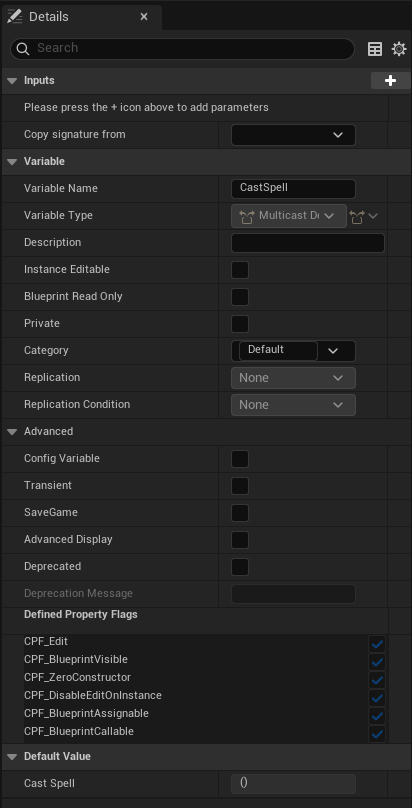 runic terrace
At the very top
autumn pulsar
oh that's a strange place to put it
usually for functions its at the bottom
thanks
 autumn shell
granite stratus
Did you end up finding a solution to this?
autumn shell
granite stratus
Did you end up finding a solution to this?
Unfortunately not, no one was able to point me in the right direction so I'm stuck to just using blueprints
granite stratus
autumn shell
Unfortunately not, no one was able to point me in the right direction so I'm stu...
:(, yeah i just rebuilt the thing I had as a level instance as a blueprint with child actors lol
seems kinda crazy there's no straightforward way to work around it
it looks like someone at epic tried to create a solution because there's an experimental checkmark in editor settings for property overrides for level instances, but according to someone on here they gave up implementing it cause it was really buggy
autumn shell
granite stratus
:(, yeah i just rebuilt the thing I had as a level instance as a blueprint with ...
Right?? It's a great solution, especially for level testing, baking lights, etc... but just doesn't have the basic support needed
That makes me sad to hear :/
granite stratus
@somber falcon was the one talking about it, he said they're going to just redo stuff with scene graph which I guess is currently in UEFN, but i dunno
autumn shell
I wish they'd pick it up again, makes a world of difference in terms of performance
granite stratus
i feel like just give me a way to assign an ID to the level instance or something I can reference
then i can work out the rest, but even that seems difficult
 carmine scaffold
dawn gazelle
carmine scaffold
carmine scaffold
dawn gazelle
carmine scaffold
Half-Life 1 UI? 😛
Are you certain you're not somehow calling AddWidgets more than once or you're creating and adding the same UI in another place?
runic terrace
That theme actually looks cool lol, now Im wondering if I should steal it
 kind estuary
Why is GetActorsOfClass discouraged?
I have my Units and i need to get a unit manager. Normally i store these manager classes as a reference at Begin Play. Now i have other managers for attacks and effects.
I was wondering if it is fine to just GetActorOfClass everytime i need these, which are less common.
carmine scaffold
its getting all actors of that class
runic terrace
kind estuary
Why is GetActorsOfClass discouraged?
I have my Units and i need to get a unit ma...
Because it's expensive
It's better to call it once and then store the result somewhere for future use, instead of calling it again and again each time you need it
kind estuary
runic terrace
Because it's expensive
Why though
isn't it the same as looping through my actors in my level
i have like 30 actors only
dawn gazelle
kind estuary
Why is GetActorsOfClass discouraged?
I have my Units and i need to get a unit ma...
It can be bad depending on how you use it.
GetAllActorsOfClass and selecting "Actor" as the class = not great.
GetAllActorsOfClass and selecting a specific actor class with limited numbers on the scene = not the worst.
Using GetAllActorsOfClass on tick, regardless of what class selected = not great.
carmine scaffold
if my level has 1000 actors of that class its calling those 1000
kind estuary
dawn gazelle
It can be bad depending on how you use it.
GetAllActorsOfClass and selecting "Ac...
So just using it once is fine?
i mean once to spawn an attack
dawn gazelle
Sure, if its only done on begin play or something... Or just infrequently, it's usually not a problem.
If you have literally 1000s of that particular actor class in your scene though... It's not great.
kind estuary
dawn gazelle
Sure, if its only done on begin play or something... Or just infrequently, it's ...
🫡 🫡 🔰
runic terrace
kind estuary
So just using it once is fine?
Yeah it's not like it's gonna kill your game if you use it. Just make sure to use it sparingly
carmine scaffold
why not some sort of trace
 bold plover
onyx token
i guess i'd have to instanciate the individual blades within unreal... i wonder ...
bold plover
onyx token
i guess i'd have to instanciate the individual blades within unreal... i wonder ...
I think the foliage brush usually lets you paint on a mesh? If you can't get that to work there are prolly better workarounds, but if you do end up manually generating/placing them make sure they're instanced (ism component or other means) and not just individual actors or meshes.
carmine scaffold
you need every actor of that class in the level to do something?
onyx token
bold plover
I think the foliage brush usually lets you paint on a mesh? If you can't get tha...
oh it does? 😮
carmine scaffold
carmine scaffold
nope, when i remove this function from begin play it doesnt spawn
@dawn gazelle
runic terrace
carmine scaffold
Could you be spawning the ui multiple times by accident?
It wouldnt be noticable as they'd overlap
carmine scaffold
nope as i explained above if i remove the add widget from the event begin play it doesnt spawn
runic terrace
put a do once node at the start of the begin play and try again
Do you spawn the UI in the character bp?
carmine scaffold
do once doesnt work and yes i spawn it in the character bp
runic terrace
check if there are any other characters in your map
autumn pulsar
Does BeginPlay get called after the construction script?
 fiery swallow
autumn pulsar
Does BeginPlay get called after the construction script?
fiery swallow
autumn pulsar
Does BeginPlay get called after the construction script?
ye
kind estuary
i cant spawn actor from a UObject in blueprint... Though this is possible in C++. What can i do to spawn actors in a UObject in BP ?
autumn pulsar
For particles, is it better to use Cascade or Niagara? or "Depends"
dawn gazelle
autumn pulsar
For particles, is it better to use Cascade or Niagara? or "Depends"
Cascade is the old way.
autumn pulsar
If I want to spawn a particle system at a specific spot, for an explosion, what's the intended way of doing it?
 mystic blade
how can i use a launch node on a custom player pawn?
autumn pulsar
Niagara doesn't seem to have something comparable for "spawn emitter at location"
summer plinth
does using an interface for widgets require attaching it to a game instance?
 zenith moss
I understand that garbage collection cannot run during function execution, if the function executes in one tick. However would it be possible for GC to occur during a function that contains latent calls, such as delays? A friend is insisting this cannot happen.
Not asking for any particular reason other than trying to understand GC better
 dawn gazelle
kind estuary
i cant spawn actor from a UObject in blueprint... Though this is possible in C++...
dawn gazelle
kind estuary
i cant spawn actor from a UObject in blueprint... Though this is possible in C++...
The Spawn Actor from class node requires a world context and UObjects doesn't have it. You'd have to make a UObject child in C++ that overrides the GetWorld() function and gives it a world context from another source.
dawn gazelle
zenith moss
I understand that garbage collection cannot run *during* function execution, if ...
Latent actions also execute during a tick. That Delay Node communicates to the world timer manager and it keeps track of how much time is remaining until its delegate (the "Completed" pin in this case) needs to trigger, and then triggers it when the amount of time elapses (the timer manager runs on tick to do so). If the object no longer exists, (ie. it was destroyed) then the Timer Manager wouldn't call the delegate after the elapsed time.
dawn gazelle
summer plinth
does using an interface for widgets require attaching it to a game instance?
No. Interfaces are a means of communicating to a variety of classes that don't share a common class. That said, you really shouldn't need to use interfaces with widgets as you probably don't have a variety of widgets that would need to share similar communication.
autumn pulsar
I'm trying to spawn a homing projectile from a player, and I want to construct the object with a projectile target ref, Would this be the way to do it or is there a better way?
https://i.imgur.com/4s0H99J.png
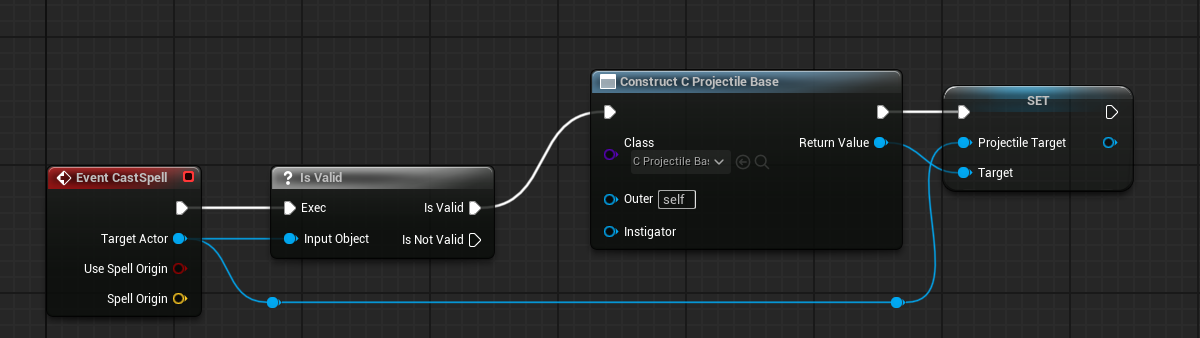 zenith moss
dawn gazelle
Latent actions also execute during a tick. That Delay Node communicates to the...
zenith moss
dawn gazelle
Latent actions also execute during a tick. That Delay Node communicates to the...
I see, so it wouldn't be possible for a GC pass to occur during the delay, since the delay is running on tick in the game thread for the entire duration? Would that mean if I set a timer for 5 minutes, GC wouldn't occur for the entire 5 minutes?
summer plinth
dawn gazelle
No. Interfaces are a means of communicating to a variety of classes that don't ...
I want to add a character to a list view widget when it spawns, if not interfaces how should I do that?
dawn gazelle
autumn pulsar
I'm trying to spawn a homing projectile from a player, and I want to construct t...
A projectile sounds more like an actor than an object. You'd probably want to spawn an actor.
dawn gazelle
zenith moss
I see, so it wouldn't be possible for a GC pass to occur during the delay, since...
If there is no references to the object with that delay anywhere, then GC can still remove it. The TimerManager only has a reference to the delegate, not the object itself.
kind estuary
dawn gazelle
The Spawn Actor from class node requires a world context and UObjects doesn't ha...
I tried something like that. So here UnitManager is an Actor. So shouldn't this actor be able to spawn a BP ? hmm
 autumn pulsar
dawn gazelle
A projectile sounds more like an actor than an object. You'd probably want to s...
autumn pulsar
dawn gazelle
A projectile sounds more like an actor than an object. You'd probably want to s...
that is an actor
dawn gazelle
autumn pulsar
that is an actor
Then you shoudln't be using Construct.
autumn pulsar
What would I use instead?
dawn gazelle
Spawn Actor From Class
autumn pulsar
I don't seem to have that available to me
kind estuary
dawn gazelle
Spawn Actor From Class
that doesnt work because it doesnt exist even though i the actor reference in my uobject.
autumn pulsar
I'm calling this from a uobject
kind estuary
 zenith moss
dawn gazelle
If there is no references to the object with that delay anywhere, then GC can st...
zenith moss
dawn gazelle
If there is no references to the object with that delay anywhere, then GC can st...
Ok, so gc CAN occur during active timers? In other words, just because a timer is running on the game thread, that won't prevent GC from occurring during the duration of the timer
dawn gazelle
summer plinth
I want to add a character to a list view widget when it spawns, if not interface...
Begin Play > Signal to GameState "Character" spawned feeding reference to Character > GameState calls Event Dispatcher OnCharacterSpawned feeding in reference to Character that Spawned.
UI Containing List View (On Initialized) > Get GameState > Cast To Your Custom GameState > Bind to OnCharacterSpawned and use the passed through Character reference.
 naive herald
Hello I'm making a widget that follows niagara.
I have to follow the Niagara projectiles every frame, do you have any good solutions?
 kind estuary
So what im doing is, created a BlueprintNativeEvent in C++.
Then in my UObject in Blueprints call another event in my UnitManager actor, called Spawn Actor of Class for UObjects. ♻️ 🍝
Then there it spawns the actor. Kind of tricky and hacker, but it is what is.
kind estuary
autumn pulsar
oh this is literally being discussed lol
 i feel you bruh
dawn gazelle
Exactly 😛 But no, you cannot spawn actors from an Object because in order to spawn an actor within the world, you need a reference to the world, and objects by default do not have that reference.
kind estuary
dawn gazelle
Exactly 😛 But no, you cannot spawn actors from an Object because in order to s...
so all we needed is for the actor to have a GetWorld in BP
ahh in C++ UObject cant also spawn actor
it needs a reference of an actor to do it too
though blueprints doesnt work even with a reference to an actor. you have to create an actual function in the actor reference that will spawn the actor for you to hack it
dawn gazelle
zenith moss
Ok, so gc CAN occur during active timers? In other words, just because a timer i...
Ehh... I'm 90% on it... There may be something within the timer manager that keeps reference, but it definitely will not allow the execution of the delegate if the object was marked to be destroyed.
autumn pulsar
well that throws a wrench in what I was doing lol
I guess I could callback to the projectile owner and let it actually handle the spawning
oh that's going to get messy real fast 
frosty heron
Whats the goal here?
autumn pulsar
Currently just learning making systems
But I'm trying to make a sort of generic spell system
Animation spawns a spell, then a spell runs its own logic
so could be a fireball, a meteor, a mine, or something simple like a bow and arrow
then the spell should be able to spawn projectiles
projectiles being actors that do things
I was using a UObject for the spell, but I might have to change it to be an actor instead
so it can run semi-indepently
runic terrace
I think you can still workaround this, have a spell manager actor or actor component.
That spell manager could have custom functions for spawning vfx, projectiles etc that you can call from the spell objects
So the manager actor or actor component depending on your needs, would spawn the actor for the object
autumn pulsar
Yeah I was looking at using event binding, but might be better to just reference an actor component
Actors are the only things going to be casting spells anyways
frosty heron
If you want to make it generic you should make playing the anim a spell
The anim can run a notify that sends a gameplay tag to its owner.
Then the spell can react to each tag freely.
autumn pulsar
Well, I have a skill system, the skill specifies the animation, and if there's an associated spell with it
The spell is spawned when the animation starts, then the "Fire Spell" Animation event causes the spell effect to trigger
autumn pulsar
I know there's GAS
but I'm kind of wanting to suffer the pain just to get the brain juices flowing
runic terrace
autumn pulsar
but I'm kind of wanting to suffer the pain just to get the brain juices flowing
This is the way
People get mad at me when I say don't start with GAS
frosty heron
Even if you want to make your own just for the purpose of studying, you will end up rolling a shitter wheel.
autumn pulsar
I'll eventually learn GAS
frosty heron
At least look how it's done on their end.
runic terrace
Learning to make your own systems makes you less dependent on libraries or plugins. You can still learn GAS afterwards
frosty heron
Then you can take inspiration for your project
autumn pulsar
frosty heron
Even if you want to make your own just for the purpose of studying, you will end...
it's a shittier wheel, but I'll know how to make a better one in the future
And there's lots of random knowledge you pick up along the way
frosty heron
My way of learning is by seeing what other experienced people do.
Then use it as inspiration
Fine tune or perhaps modify for my project.
That's what in doing with my combat rn.
autumn pulsar
And I was kind of hitting a motivation brick wall
frosty heron
First I used a plugin, learn everything in it. Then I make everything from scratch for my new game.
frosty heron
autumn pulsar
And I was kind of hitting a motivation brick wall
Ye I get it. But learning wise may not be beneficial imo.
But if that's what keep you going then use what ever way to keep going.
frosty heron
Ik learning something that we preceive difficult hits out motivation.
I almost gave up on multiplayer many times.
Just to find the solution in the last minute.
runic terrace
The way I learned to make systems was to brute force it, I tried making a system I didnt make before, failed, started from scratch, did a bit better, got stuck, started from scratch again, did that probably countless times for multiple projects until I came up with a very versatile and stable system.
I did that for managing skills etc, later found out the system I made was basically how GAS worked lol
frosty heron
runic terrace
The way I learned to make systems was to brute force it, I tried making a system...
Just don't stop your self from looking at other people code base.
runic terrace
Not the most efficient way, but I wouldnt trade my failures if I started again
autumn pulsar
frosty heron
My way of learning is by seeing what other experienced people do.
The thing is eventually you'll hit a limit when you encounter a situation that no one has done before. I think learning how to chart your own course is valuable in a way
runic terrace
frosty heron
Just don't stop your self from looking at other people code base.
Yeah no look up and research whenever you get stuck, just dont make it a habit to rely on others' code
frosty heron
runic terrace
Yeah no look up and research whenever you get stuck, just dont make it a habit t...
Lol never rely or copy paste, that won't even work for non identical project.
Just take it as inspiration.
Don't stop your self from learning or see other people work. Especially done by a group or big studio.
autumn pulsar
runic terrace
Yeah no look up and research whenever you get stuck, just dont make it a habit t...
from the Free UE projects, I quickly learned those are kind of terrible
autumn pulsar
frosty heron
Don't stop your self from learning or see other people work. Especially done by ...
most big studios don't release their code surprisingly
frosty heron
And he keep doom posting saying he doesn't think he will get hired.
Don't try to invent everything by your self.
At the end of the day, you want to have your game up and running.
autumn pulsar
currently at this point there's no real game goal
just learning Unreal and how to go about actually making systems
runic terrace
Yeah there is a difference between reinventing the wheel and learning how to make a wheel
Depends on what your goal is
If its to publish a game asap then go with the libraries and plugins, but if you just want to learn and improve maybe try to make it yourself
You kind of need to balance that
frosty heron
I don't really like plugins.
mystic blade
can i override the capsule component in the player blueprints and use a box collision instead?
frosty heron
They are not really generic most of the time.
autumn pulsar
I want to eventually make a game, but I kind of hit the point where I realized I was going to end up redoing 90% of what I wrote
autumn pulsar
mystic blade
can i override the capsule component in the player blueprints and use a box coll...
not with CMC
frosty heron
Certainly going to make my own inventory system
mystic blade
autumn pulsar
not with CMC
i have a cube character so its kinda weird
frosty heron
You probably can but it's not gonna give you the result you want.
Because capsule collision is hard wired in cmc
 vapid ledge
whether or not you use someone elsees code or your own you still have to learn exactly how it works 😉
it is VERY .. rare that someone elses code works exactly as you want
mystic blade
i tried using a pawn blueprint and setting that as my player but i couldnt find a way to use the launch node the way i was using it in the player blueprint
frosty heron
mystic blade
i have a cube character so its kinda weird
You won't have much luck having a good movement for a tank or dragon using cmc.
autumn pulsar
I think my brain full tonight
frosty heron
mystic blade
i tried using a pawn blueprint and setting that as my player but i couldnt find ...
I dunno much about pawn. Have you try addImpulse?
runic terrace
vapid ledge
it is VERY .. rare that someone elses code works exactly as you want
I agree, every developer has their own style of making things and that doesn't match when you have stuff from multiple people
mystic blade
frosty heron
I dunno much about pawn. Have you try addImpulse?
literally does nothing
frosty heron
mystic blade
literally does nothing
Try a very high value, if that doesn't nothing then i dunno.
runic terrace
mystic blade
literally does nothing
If you want to add force to a pawn you need it simulating physics
frosty heron
Also I think that may have to be done on the component level
runic terrace
Pawns are just actors you can possess
mystic blade
runic terrace
If you want to add force to a pawn you need it simulating physics
I did
i wish i could use the launch node in a pawn blueprint
thats how im doing my movement
runic terrace
AddImpulse on the root component of a pawn should do the same thing as LaunchCharacter
mystic blade
runic terrace
AddImpulse on the root component of a pawn should do the same thing as LaunchCha...
cant drag off the root component to add impulse
literally wont connect
mystic blade
 runic terrace
Drag your cube to the DefaultSceneRoot to make it the root of your pawn
mystic blade
still cant get it to move
runic terrace
Any warnings on the output log?
mystic blade
no
runic terrace
How are you trying to move it?
mystic blade
the player?
runic terrace
yeah
mystic blade
with the impulse. i was using the launch node in the player blueprint to simulate like a pogostick kinda movement
i can show how i have the blueprints set up for movement
runic terrace
yeah thatd be great




 runic terrace
Check Vel Change on the impulse node, and multiply the impulse by some large value
Then later you can adjust the force
It's probably doing the impulse but is too weak
mystic blade
im getting the force with the node to the left of add impulse
thats what those 2 int variables are storing
runic terrace
Oh wait you have the floating pawn movement component
that probably overrides your physics
mystic blade
i figured as soon as u mentioned it
but thats also how i can check if the player is falling
runic terrace
You can just check if the velocity in the z axis is negative
and do a simple trace below the player to check if it's grounded
if not grounded and the velocity z is negative then it's falling
 granite frost
Hello guys. I got a weird problem. I have a widget component attached to an actor with the widget space set to screen because worldspace don't follow the camera but after implementing camera shake on my player camera. At runtime when I look at the widget while my camera is waving up and down. The widget looks like its jittering. I mean when camera is going down while shaking, the widget doesn't move smoothly but like moving in grid, snapping to the position. Could someone tell me why is it like this?
 stuck sparrow
Hey. would anyone know why my character is spawning in the ground, despite using the adjust collision property on spawn?


I know the characters origin is in the middle of the capsule, but this should adjust for that right?
runic terrace
Like it says, it tries to adjust it, but it's not a guarantee
stuck sparrow
Seems pretty unreliable then
runic terrace
It's reliable enough to push out characters when you spawn them in the same spot
But you still need to account for floors and thick walls
stuck sparrow
Would be easier if i could somehow make my characters origin the bottom instead of the middle
thatd solve... every problem
runic terrace
you could just add an offset to the spawn position
stuck sparrow
Seemed scuffued, but thats what I ended up doing as a bandaid fix
I cant say im surprised that something as simple as spawning a character during runtime has some sort of hiccup
Average Unreal experience
runic terrace
That's something you have to deal with in all engines
stuck sparrow
Ugh, one more. Anyone know how to fix this "Unknown class" thing when trying to "set by-ref" var in a struct