#blueprint
1 messages · Page 290 of 1
 runic terrace
 surreal peak
Not sure, they have a getter for an ACWidgetComponent in their Screenshots.
 dusky cobalt
Oh, it's my actor component that is on HUD class. It's a bit like manager for these small widgets to add them to the main ui.
surreal peak
That's not HUD Component though
What about the ACWidget one
Does AC stand for ActorComponent or is that the prefix for you classes?
surreal peak
Either way, in theory, if you only ever want one of those widgets on your Screen, it's usually cleaner to only have one and have that update based on whatever context is currently going on,
But I know almost nothing about your setup there, so hard to make any good suggestions.
runic terrace
Do you have an actor component for each type of user widget you need to manage?
dusky cobalt
Yeah, the theory is good, but I guess it breaks when I have 5-10 ''panels'' that need to be updated with data based on what was selected. Like it's my conclusion as I'm trying to do it that way. So if I will just nicely make widgets collapsed and removed from parents as I don't use them currently then it should be enough for it and much easier to setup.
dusky cobalt
runic terrace
Do you have an actor component for each type of user widget you need to manage?
I would need to have in this setup. To make it modular and each component would have it's own HUD version.
surreal peak
but I guess it breaks when I have 5-10 ''panels'' that need to be updated with data
Maybe? Not even sure what your panels etc. are
Right now the setup looks overly complicated
dusky cobalt
It's like you know when you Select Unit it has different panels that Buildings for example. Like Unit might have Stats, Abilities meanwhile Building has Units to Produce
runic terrace
dusky cobalt
I would need to have in this setup. To make it modular and each component would ...
That is not a good setup, you definitely don't need many actor components for just managing user widgets
surreal peak
dusky cobalt
It's like you know when you Select Unit it has different panels that Buildings f...
Then why does the thing you click on not just return a WidgetClass that has everything it needs?
I don't see the need for all the Component stuff.
runic terrace
yeah same
dusky cobalt
I had it that way tbh before and I just overthinked it like idiot I see now
glad I asked you guys
surreal peak
Like, I assume you have some designated spot in your HUD for that kind of information or not?
Some slot that you display the information into.
 prisma iris
at the moment its simple stuff.
I have a placeholder animation that i made inside UE, that basicaly its the right hand touching the chest (like pressing a flashlight button)
Since its just the right arm, i want to be able to run the animation while doing everything else that GASP alows u to do.
So, following some stuff i discovered about the possibility of filtering only one part of the animation to blend (that's being the Layered blend per bone)
I added it with the animation in loop and it works. But the animation keeps looping, so the idea was to make it work input based.
Press button, animation toggles to layered blend per bone and animation starts, end animation? Go back to Default.
tried doing via Active Enum Value, making a variable "animation overlay" with the: "none" and "flashlight" options.
But now i am kinda of stuck here because animation doesn't play. If i just do a Play Anim montage will break all GASP.
surreal peak
And it's probably reasonable to assume that you don't have that many different overarching types of things you can click on.
prisma iris
that's the prints of the stuff that i made
surreal peak
Unit, Building, probably 1 or 2 other things.
So you can make some Widgets that are exactly for that type of actor, and then have it fill the information.
dusky cobalt
Before I had it like that for example:
Building (Main Widget)
1st component (Add this component's widget to Main Widget)
2nd component (Add this component's widget to Main Widget)
3rd component (Add this component's widget to Main Widget)
Then display Main Widget and that's it.
then I started overthinking about if I have 50 buildings... they have Widget... each is updating in the background the recruiting of units etc. etc. 😄
surreal peak
prisma iris
at the moment its simple stuff.
I have a placeholder animation that i made insid...
This should be a Montage though.
Montages have Groups you can assign them.
And those groups you can feed through your layered blend.
E.g. an UpperBody Group or a Right Arm Group.
prisma iris
surreal peak
E.g. an UpperBody Group or a Right Arm Group.
OOOOOOOOH
that's something new to me
surreal peak
dusky cobalt
Before I had it like that for example:
Building (Main Widget)
1st component (Add...
So a given Actor (e.g. Building), can have multiple Components (ActorComponents in that case but also whatever you label a Component), where each provides some different information?
That still sounds like you can build up a widget dynamically.
The Actor that has those components can query them and grab their widgets and build up the main widget.
runic terrace
You can create a widget class for displaying building info, and make it take a building reference.
Then loop over your buildings and populate a list (maybe a vertical box) by creating that widget for each of them and adding into it, passing the building reference in loop body.
Widgets dont need to update when not in viewport, you don't even need to have them exist at all
They're just visuals that can be recreated
dusky cobalt
Yeah, looks like I tried to overenginier it today but I learnt some things and sometimes you gotta give it a try because maybe that is ''IT". Not today though.
Like based on what you guys say my setup before was ok. Each Actor Component creates widget for it's functions, add it to the Owner ''Main Widget'' and then that Main Widget is displayed and that's it.
surreal peak

Depending on what Actor_1, it would use a different "Layout" Widget.
The Components can the be queried for their inner Widget, which can have a custom Layout too.
runic terrace
dusky cobalt
Yeah, looks like I tried to overenginier it today but I learnt some things and s...
Yeah that was my original suggestion, it would work reliably, not the best or the most efficient way but I don't see a reason to overcomplicate it
surreal peak
Obivously following some rules to fit the Slots.
The 3 Slots can also be Tabs fwiw.
If your Actor has no Icon or Description, it gets a different Layout Widget.
Or you just hide them if you can generalize it enough.
But in theory, you have one Widget Class that the Actor (Building, Unit, etc.) provides.
You have some kind of layout in it to show the Information of that Actor (Green, Red, Darkblue).
And you have some kind of space/tabs/slots for the different Widgets the Components provide.
Or maybe Actor info is Tab 1, and the other 3 Tabs are then for the Components.
Whatever works for you.
And that thing is then somewhere in your Main HUD. Your Main HUD can listen to a Delegate of some system that handles you selecting something.
And that Delegate can provide you with a generic Actor pointer.
 barren tangle
Hey, Is it a good way of working?
 surreal peak
And then some SelectionInterface to query the Widget, which the Actor can then construct itself fwiw.
runic terrace
barren tangle
Hey, Is it a good way of working?
Don't unbind all events, unbind that specific event (Otherwise if two boxes were intersecting, leaving the previous one would also unbind the one you're currently in)
dusky cobalt
Thanks Cedric ❤️ glad I asked here
runic terrace
barren tangle
Hey, Is it a good way of working?
Depends on what you need it for
barren tangle
runic terrace
Depends on what you need it for
But it's a good way of working? or i should save the actor into an array and make a foreach on that array when i need to notify all the actor that are inside the array, and remove them from the array when they are out. I was thinking the bind/unbind was maybe more efficient?
runic terrace
That would be overcomplicating it, binding it is fine (And more efficient)
barren tangle
but i can't execute function from the actor...
runic terrace
You can call the delegate from within the actor after the color changes
barren tangle
i did a mistake, in fact i can't bind to the actor from the cast

ok got it
mmm no looks not possible
runic terrace
What's the context, can't really help without knowing what youre tring to achieve
barren tangle
A BP_lane, with a collision box that check if an actor (Vehicle) is inside of it.
If yes the BP_Lane need to notify that overlapping actor (vehicle) if the BP_Lane has changed its color.
i was going to first create a list of overlapping actor that i add, and remove and notify all actor into that list... but was thinking it was possible with notify (bind/unbind)
runic terrace
barren tangle
Okay, what actor is this graph in?
barren tangle
it's the Lane
runic terrace
barren tangle
Hey, Is it a good way of working?
Then this approach would've worked already
oh sorry no wait
barren tangle
runic terrace
Then this approach would've worked already
i made a mistakes with the bind
i rename it because i had the same name for both : OnColorChanged (into the vehicle and into the Lane) i rename them OnVehicleColorChanged, OnLaneColorChanged
i think i have to sent the lane reference to the Vehicle
and bind the vehicle to the lane into the BP_Vehicle
but that doesn't make sens
runic terrace
So you have a car that can change lanes, and needs to be notified when the color of the lane it's on changes
correct?
barren tangle
yes, because the car calculate his speed base on the lane color.
but the lane color can be modified
when it's happend i need to notify cars that are on that lane
to recalculate the speed
runic terrace
I see, why don't you keep a reference to the lane in the car actor?
When you overlap a new lane you can update that variable to the new lane, and the actor can just pull its color from that variable
barren tangle
runic terrace
I see, why don't you keep a reference to the lane in the car actor?
what will happend if i overlapp 2 lanes?
that's the most annoying part overlapping 2 lanes
runic terrace
How are you handling changing lanes?
barren tangle
it's a simple vertical movement

i can go up and down.
but here i'm overlapping 2 lanes
so i was thinking to save the actor into the lane and notify him if the lane change
runic terrace
Do you want the lane speeds to average out if you're overlapping 2 lanes? Or do you want only one of them influence the speed?
prisma iris
surreal peak
This should be a Montage though.
am i too dumb?


 barren tangle
runic terrace
Do you want the lane speeds to average out if you're overlapping 2 lanes? Or do ...
barren tangle
runic terrace
Do you want the lane speeds to average out if you're overlapping 2 lanes? Or do ...
only the good one, not both of them that's the annoying part, i can't find a good solution for that
runic terrace
barren tangle
only the good one, not both of them that's the annoying part, i can't find a goo...
Then why allow the player to stand in the middle of two lanes, just force it to move to the center of the lane.
prisma iris
im just not understanding how to split parts of the body to make anim run while locomotion work
runic terrace
prisma iris
im just not understanding how to split parts of the body to make anim run while ...
Whats your layered blend per bone settings
barren tangle
runic terrace
Then why allow the player to stand in the middle of two lanes, just force it to ...
because you overlap more one lane than the other, i try to create on the vehicle a box collision like that
 barren tangle

for me should be the center of the vehicle to determine on which lane it is
but even if my box collision extend = 0.01 i'm wondering if i can overlapp 2 lanes
runic terrace
barren tangle
for me should be the center of the vehicle to determine on which lane it is
Make the last lane you overlap take precedence
You can also just handle lane changes by an index value and not physical overlaps
And update the position according to that index
Or lane references, if you dont want to use indexes
runic terrace
prisma iris
tinker with the blend depth
barren tangle
runic terrace
And update the position according to that index
that was my last approch, but if i have zone with lane then i need to check on X and Y axis to check if i'm inside the Lane Area
and if i want to have zone with different number of lane... then calculation become annoying
runic terrace
Then as I said you can use a list of lane actor references, you can still pull their coordinates if you prefer and can increase the number of lines
You'd still have their indexes in the array to keep track on which lane youre on
I think you could still go ahead with the overlap method though, just make the last overlap take precedence and maybe nudge the player to the center of the lane so they don't keep moving in the middle?
barren tangle
runic terrace
I think you could still go ahead with the overlap method though, just make the l...
i think i will try that one first and see how it feels to play like that
prisma iris
runic terrace
tinker with the blend depth
i guess that the problem isnt on the layered blend per bone because if i just tag it to run in loop it works, like:
 prisma iris
runic terrace
https://tenor.com/view/no-pixels-cant-see-ben-chang-community-ken-jeong-gif-1736...
prisma iris
runic terrace
https://tenor.com/view/no-pixels-cant-see-ben-chang-community-ken-jeong-gif-1736...
isnt to see the nodes, its just to show it working
the nodes i can just send a print
 surreal peak
prisma iris
the nodes i can just send a print
surreal peak
prisma iris
the nodes i can just send a print
You do know that if you play the Montage that you should not have the Sequence in there anymiore, right?
 prisma iris
surreal peak
You do know that if you play the Montage that you should not have the Sequence i...
prisma iris
surreal peak
You do know that if you play the Montage that you should not have the Sequence i...
no?
surreal peak
Pretty sure all you need is the Cached Pose (twice), the LayeredBlend and the Montage Slot.
Playing the Montage already includes the Sequence that is in the Montage.
If you'd still need to put the Sequence into the graph then that would not scale well
prisma iris
Ok it works now but now my arm it is stiff without any anim
surreal peak
Hm, fair I guess. I thought the Cached pose would just go through the Slot unchanged otherwise.
Theeen ,let's see.
Can you show me what you have atm?
prisma iris
surreal peak
literaly this
 surreal peak
Ah then you didn't follow properly.

Duplicated that one and feed it into the Source of the Montage Slot.
barren tangle
but functionnaly i think that my lane should not know who is ridding on it, and just call the actor, so i guess interface + overlapping actor should be the best functional approach
prisma iris
now i have a base to add new anims into it
 wraith loom
I thought a UE unit is 10 cm, but I did some testing and it seems like location units are 1 cm (one tenth of a UE unit)? This is confusing
 silent plaza
hello friends 🙂 when I want to switch from the player's camera to a camera in a level sequence, I get a very weird camera shake.... I'm using ALSV4 and I don't know the FOV of the system camera, so I tested with 75 which seems to be the right FOV. I don't want to have black bands so I removed “Contraint Aspect Ratio” but now I get shakes (when I check Override Aspect Ratio) or pops when the camera goes from one movement to another.... What is the best setting to have a smooth Camera Gameplay > Level Sequence Camera transition, without black bars, shakes or pops?
Thanks a lot!
 runic terrace
You could try the Set View Target With Blend node, on the player controller
Not sure if it would help with black bars though
 inland walrus
Any idea how I can make the ball only play the sound when hit something?
 ruby ivy
I have a stamina system like this. How can I make jumping consume stamina?

 heavy lion
So, I have a struct, which holds faction data.
Name, ID and Rank.
The rank is integer mapped to names.
I then create a data table from this struct.
And I add this character Info struct to the character as a variable.
How do I then get that information from the player as text or string anywhere?
I have never used maps before


 ruby ivy
I tryed this its not working because time line set stamina directly
inland walrus
ruby ivy
I tryed this its not working because time line set stamina directly
How come timeline is setting stamina?
wraith loom
heavy lion
So, I have a struct, which holds faction data.
Name, ID and Rank.
The rank is i...
Maps are key-value pairs, where the key is sort of like an array's index, and the value is, well, the value. So use "get value" if the names are the value.
ruby ivy
inland walrus
How come timeline is setting stamina?
i cant found good replicated stamina system its only way work very well
 pastel apex
did want to ask, is it faster to check the value of a variable from another class than it is to call a function or are they virtually identical?
heavy lion
@wraith loom Should I be comparing the characters local variable to the data table?
Should I just use row name instead of the faction ID?
Having both row name and ID seems redundant
wraith loom
heavy lion
<@809365299052544031> Should I be comparing the characters local variable to the...
tbh I don't know what you're trying to do or what these structs are for, or what the relation between FactionData and S_charinfo is.
heavy lion
Neither do I 😭
ruby ivy
Is there anyone who knows how to create a replicated stamina system in the most efficient way?
barren tangle
Hey, we can't spawn actor inside the construction script?
i try the child actor approach, but there is only 1 visible

 frosty heron
Don't use child actor
barren tangle
and it doesn't allow me to update the class.. so i'm stuck even with that child actor

it's annoying
i can say it's a blueprint that i want to see on the map... without running the game
is there another approach to achieve the same?
frosty heron
Same what? If you want to attach actor to actor do it on begin play.
What reason do you need that you have to do this in game time.
If this is for item don't attach other actor to w.e it is. Just have a data sets that determine the visual and content of the item.
barren tangle
frosty heron
Same what? If you want to attach actor to actor do it on begin play.
What reaso...
It's a "level" component. It's the road where i will ride on. I want to be able to build the map with them, so i need to visualy see them. To adjust the size their position with the editor and see how it looks with the map.
Positioning everything with code it's annoying...
and to test you need to run the game all the time...
what do you mean by smooth?
you need a Linear Interpolation, or a time line, to go from Current Position > Target Position (During an ellapse time)
if you use a timeline + a lerp it's easy
make a float from 0 to 1 into the timeline, and you use that alpha for your Lerp


something like that
barren tangle
frosty heron
Don't use child actor
Why not use the child actor?
frosty heron
barren tangle
Why not use the child actor?
Seriliziation problem, even epic employee said to not use it.
Read ari article "unreal myth buster".
It's pinned in #ue5-general
 snow halo
Hi, would you guys say data assets can be used in place of library functions if library functions begin to look a little bit too messy?
barren tangle
frosty heron
Seriliziation problem, even epic employee said to not use it.
Read ari article ...
héhé will watch
 frosty heron
barren tangle
héhé will watch
frosty heron
barren tangle
héhé will watch
Most broken feature in unreal engine.
None of the veteran dev usses it and even epic them self says to avoid it.

Epic Games Developer
Are Ticks really that problematic? Should you make all your meshes Nanite? Is the ChildActorComponent truly cursed? Should you never use Cast?
You've pr...
barren tangle
frosty heron
Most broken feature in unreal engine.
None of the veteran dev usses it and even...
he say only for visuals, want to display the grid is not visual?
Let's assume you create a grid of block. you can do it into the construction.
But instead of block you want a Custom Block. (the Custom block is a block with a function)
is it not visual? in that case to want to use the Custom Block instead of the Block?
frosty heron
I would probably create an actor with buttons to create those grid.
dusky cobalt
You should handle spawning Custom Block already in a actor that spawns grid like Grid Manager
barren tangle
even in my case it doesn't work because i can't cast to my class then retrieve my function
frosty heron
That would be my go to approach.
And the actor hold the ref of the grids or w.e visual need to go with it.
So I can just refresh them, randomise, etc.
Might want to look at editor utilities or editor function
 tropic token
GameState doesn't have BeginPlay event? It doesn't fire it up for some reason
barren tangle
tropic token
GameState doesn't have BeginPlay event? It doesn't fire it up for some reason

yes there is
tropic token
nono, it's okay
it's me stupid, forgot to switch from my cpp class to BP in gamemode 🙂
sorry for bothering you 🙂
barren tangle
frosty heron
Might want to look at editor utilities or editor function
he said to use attach.. and in fact Attach give same result as childComponent

those 2 are attached, other are child
frosty heron
Same result different mean
tropic token
gamestate runs on each client?
frosty heron
You can shoot your own foot if you like, nothing stopping you from doing it
By same result i mean the child actor component will still end up broken
barren tangle
no it doesn't help what i was trying to achieve
let's assume i need to have 1000 lanes... i will spawn 1000 actors...
that's not good
 thin panther
frosty heron
thin panther
frosty heron
That's what I suggested earlier with editor functions
barren tangle
will check that now : Might want to look at editor utilities or editor function
frosty heron
Why would it be bad? You are dropping them to the world manually they still an actor
Anything that you place in the world is an actor
barren tangle
frosty heron
That's what I suggested earlier with editor functions
you told me to watch the video, i watch it and try what he said 😄 now i will try what you said 😄
barren tangle
frosty heron
Why would it be bad? You are dropping them to the world manually they still an a...
first time i create the game i got like 10.000 lanes actors
performances wise it's not good if i remember (last year)
frosty heron
Wether that's stress your limit or not I'm just saying it's no different placing them manually or spawning them through code
barren tangle
frosty heron
Wether that's stress your limit or not I'm just saying it's no different placing...
yes that's correct
frosty heron
If you need that much actor you might want to tap into instanced static mesh
barren tangle
need to think more about new solution
barren tangle
frosty heron
If you need that much actor you might want to tap into instanced static mesh
yes i have already try to approach with instanced static mesh
it help in some way, but brings some troubles, as well. I will think about a new solution
 dark drum
barren tangle
it help in some way, but brings some troubles, as well. I will think about a new...
dark drum
barren tangle
it help in some way, but brings some troubles, as well. I will think about a new...
I'd go down the ISM route if you're needing bulk. What problems were you having?
barren tangle
dark drum
I'd go down the ISM route if you're needing bulk. What problems were you having?
I need to be able to manipulate the material associated to the instance static mesh. I need to get that material and communicate with the players, but when you don't know where is the real instance. i had to calculate the position of the instance base on the position of the players, and try to get the correct instance juste to get the material color for that instance... i have a game logic attached to that block. it's not just a like inside boomberman where i show or hide those block. i have game logic inside of them...
so the HISM approach was really hard, but at then end, when i was able to get the information about the correct instance... it block me on the gameplay side
because of that i have modify the initial gameplay, and try to find solution with new needs
dark drum
barren tangle
I need to be able to manipulate the material associated to the instance static m...
You could look into swapping out ISM instances for an actor version when near the player. When out of range add to ISM and destroy the actor.
I did something similar when looking at using ISM's for items scattered across a level that could be picked up.
You could even experiment with making a child of the ISM comp to add additional logic.
barren tangle
dark drum
You could even experiment with making a child of the ISM comp to add additional ...
i'm not so good. it's a cpp approach i guess 😄
barren tangle
dark drum
You could even experiment with making a child of the ISM comp to add additional ...
but i got the idea. will check and make some search about that
because in a way it's true... if i was able to create a custom IMS... with my game logic i will know that all my instance have that logic.
dark drum
barren tangle
because in a way it's true... if i was able to create a custom IMS... with my ga...
Potentially yea. What sort of logic is it?
barren tangle
return the color, lerp on the color current > target, notify actors when the color has changed.
dark drum
barren tangle
return the color, lerp on the color current > target, notify actors when the col...
So the colour would be the same on all instances or would you use the per instance data to control it in the material?
barren tangle
dark drum
So the colour would be the same on all instances or would you use the per instan...
will be different per instance.

here 1 lane = 1 instance
but to make some game variation i want to be able to remove a lane during a part of the map, put it back
i have some condition where regarding the color of a lane
for exempl i have to have 4 different colors
dark drum
It sounds like a custom ISM comp might be a good route to go down. You might need some c++ to get the control you need but it could be worth seeing what you have access to in BP.
barren tangle
 barren tangle
dark drum
It sounds like a custom ISM comp might be a good route to go down. You might nee...
barren tangle
dark drum
It sounds like a custom ISM comp might be a good route to go down. You might nee...
yes it might, i will take time to investigate that path and see if i can put it in place
barren tangle
dark drum
It sounds like a custom ISM comp might be a good route to go down. You might nee...
Each instance does not exist as a separate Actor, so you don’t get “per-instance overlap events” or normal blueprint “BeginPlay”/“Tick” for each instance.
so no overlap event... i can't notify the actors 😄
dark drum
barren tangle
so no overlap event... i can't notify the actors 😄
What's the overlap for? To know the player is standing on them?
barren tangle
dark drum
What's the overlap for? To know the player is standing on them?
yes
because when it change color, player on them need to be notified
i can't imagine all instances, make a get all actors of class 😄
dark drum
barren tangle
yes
Don't use an overlap and instead create a second component that you can place on the character that just traces to the ground. When it hits one of your ISM's it can keep trace of the instance and component. If it changes then it can trigger something.
dusky cobalt
Multi/Single Sphere Trace vs Sphere Overlap. Which is cheaper? I read like 10 discussion and every discussion ends with different anserw 😄
dark drum
dusky cobalt
Multi/Single Sphere Trace vs Sphere Overlap. Which is cheaper? I read like 10 di...
Traces are generally cheaper. Can depend what you're doing though.
dusky cobalt
I need to check for enemies around the unit as it is moving. Not on tick but i will do it on timer by event by like 0.2/0.3 depending on how reaction feels
and Im also considering just doing like 360* line traces around the targer or sphere tarce or overlapping
 crimson talon
This feels incredibly cursed but I havent worked with Montages and AnimNotifyStates enough to think of a better implementation so I'd love to hear how someone else would implement this. What is happening is I am mixing different animations together to create a whole sequence in one montage, the preperation, labeled as default, the end (will rename to loop later) which is the continuously held single frame that is looped until reaching the ground, in which the end section plays via play montage section node. The reason why there is a fourth animation in here is because I could not put my gravity toggle right where the loop section ends and the final section occurs because it would repeatedly play the begin notify gravity toggle in every iteration of the loop, which I do not want as that gravity toggle should only occur in the section played once the character hits the ground. So for now I have a single frame of a T-pose in a null section, which should never play, which I suppose works, but doesnt sit well with me and I want to do this properly.

 calm sluice
yo yo yo yo what's up guys!!
Does ANYONE know how to Roll the camera spring?
I've got a character in flyin mode that can roll with 'q' and 'e' but the camera wont roll with him?

 dreamy ice
Still having issues that when the left mouse button is clicked, if I release the keybind for this event it doesnt hide the inventory

Any ideas?
A print string under the canceled exec pin also doesnt register when that happens so the game literally isnt registering that the button is released
OKAY! So just for anyone who finds this -- Cancelled only calls if the action is cut short, so I needed to hookup cancelled and completed from the keypress to ensure that the menu closes consistently
crimson talon
crimson talon
This feels incredibly cursed but I havent worked with Montages and AnimNotifySta...
replying to my own post but I think I found an efficient workaround. what I am now planning is to merge these sections into a single animation sequence and use the montage sections to divide the functionality
I think what I want is something called animation composites?
That seems like it is used for merging different bodypart animations into one but it sounds like it could also do what I need
dark drum
calm sluice
yo yo yo yo what's up guys!!
Does ANYONE know how to Roll the camera spring?
I...
If it's set to use the control rotation you might need to add to the control rotation instead.
 unborn goblet
Hey guys, could somebody tell me why it doesnt work. The idea is just to set a mesh invisible and another one visible like so:

Visible and not

So I have:


I can click here all day and it just show me the same mesh
Where is it wrong? Thanks a lot in advance
 fathom basin
Hi guys. As you know, I haven't used Unreal Engine 5 for a while, even I haven't done any blueprinting at this point as well. I still wanted to develop games with this software; however, that means that I have to go back and watch the entire tutorial where I have regained my knowledge on blueprinting. Last time I employed that concept was for a University project, which I have to admit it didn't go well. Sure I could just go back and watch other 1 hour long tutorials to learn blueprint all over again (however, I did watched other videos that provide tips for using unreal engine), but I wanted to gain some suggestions from you guys so I can take in case if I ever wanted to go back and use unreal engine 5. What are your suggestions, guys? (Note: I copied and pasted this message here from the 'general' section, because I wanted to gain more suggestions from other sections of this community)
fathom basin
-
Creating events that requirimg complicated blueprint structure.
-
time management (I get that the work is needed to be done, but do you agree we shouldn’t work on it too much if u get where I am coming from?)
-
tips for practicing Unreal Engine 5 in your own if you do not want to go back and learn over and over.
inland walrus
Easy way to pause the world whilst the player uses UI?
note: I'm also using a camera on the player character, so I need everything to pause apart from the player character
 hushed fox
calm sluice
yo yo yo yo what's up guys!!
Does ANYONE know how to Roll the camera spring?
I...
hushed fox
calm sluice
yo yo yo yo what's up guys!!
Does ANYONE know how to Roll the camera spring?
I...
Easiest way to do that would be a sequencer made camera shake where the camera rolls on a timeline and you put it as a animation notify on the roll animation(or where ever the roll code is)
 prime fulcrum
When I go through the code it either skips current tile index[0] or doesn’t even reset I’ve tried moving parts of the code around but I can never get back to the beginning of the array for the map

 summer plinth
for an attack animation montage, is it better to do it in a child BT or a child BP(where the BT calls for it)
I wanted to reuse the same behavior tree for multiple characters but they have different animation montages for similar behavior

 autumn pulsar
With CMC, is there a way to accept input during root motion? I'm trying to add a sort of slidecast effect
 celest lotus
if the time passed here is zero, the event bound by this will be triggered?
 autumn pulsar
celest lotus
if the time passed here is zero, the event bound by this will be triggered?
autumn pulsar
celest lotus
if the time passed here is zero, the event bound by this will be triggered?
yes
celest lotus
but it didnt...
autumn pulsar
keep in mind it runs an executes independently of the logic chain
additionally the "Time" value is the amount of time it takes
so if you put in 5, it will execute in 5 seconds
celest lotus
after 5 seconds u mean?
celest lotus
Okay
I was changing the value of boolean through that event, but it wasnt working only when i passed the time as 0. I will try once again to see whats wrong
autumn pulsar
you shouldn't be setting the time to 0
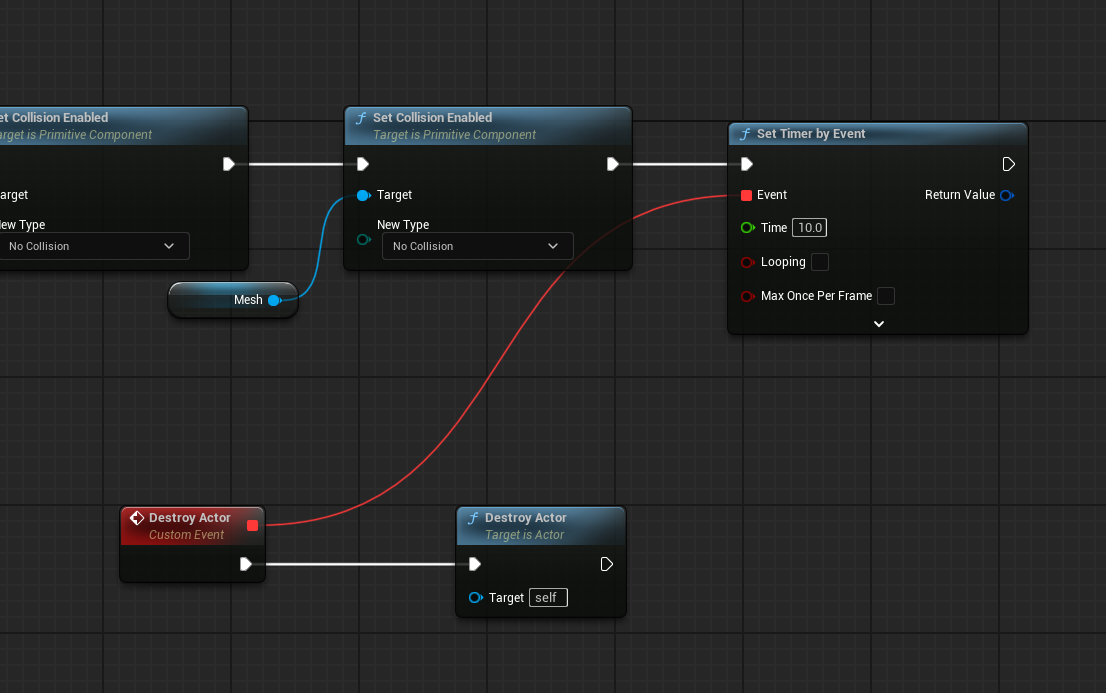
that's basically all you need for a timer
you need to make sure the logic chain is only called once, otherwise the timer will be reset
celest lotus
autumn pulsar
you shouldn't be setting the time to 0
oh...that was my question like what if the time is 0
autumn pulsar
afaik it just executes the logic instantly
in which case why are you using a timer
autumn pulsar
so you're taking an input value, and using that as the set time?
celest lotus
for now im checking if the time is 0 im directly calling the event
but wanted to know if im missing something or its built like that
celest lotus
autumn pulsar
so you're taking an input value, and using that as the set time?
yes
im setting this from the game
 paper gate
Hey guys, need a hand with something (sorry about the photo internet is shot right now). I'm building a "launcher" combo system. Right now I'm following a solution i saw online but its very finicky. Does anyone know of or have a sugestion on how I might do it better? I'm just trying to have the player launch into the air smoothly (preferably with some hang time) and then come back down with gravity.
The issue is doing any input or not setting the mode to flying makes the player snap back to the original position as soon as the timeline is done.
 autumn pulsar
paper gate
Hey guys, need a hand with something (sorry about the photo internet is shot rig...
autumn pulsar
paper gate
Hey guys, need a hand with something (sorry about the photo internet is shot rig...
if you hit printscreen on your keyboard, you can paste it into mspaint and crop the image
might be easier than using your phone
unfortunately not familiar enough with timelines to provide an actual solution
 harsh nebula
celest lotus
im setting this from the game
harsh nebula
celest lotus
im setting this from the game
If you want to change the time variable for the timer then you will need to activate the set timer on your key press or whatever event you have. Then when the timer executes use the clear and invalidate timer in the event your timer called at the end of that logic. Then when you change the time variable and trigger the key press or event the timer will reset to your new time variable.
paper gate
autumn pulsar
if you hit printscreen on your keyboard, you can paste it into mspaint and crop ...
I wish it could rn, had to use the phone because my internet decided to die in the middle of night unfortunately
celest lotus
autumn pulsar
unfortunately not familiar enough with timelines to provide an actual solution
Thank you for the reply, but this is not needed for my scenario. Im setting the time and spawning a sphere collision actor and after the defined time is passed im changing the value of generate overlap events boolean as I wanted to detect overlapping after defined time, and this will be only called once I will spawn a new actor if I want to change the time.
but whenever i set the time as zero the event bound by timer doesnt gets called
harsh nebula
celest lotus
but whenever i set the time as zero the event bound by timer doesnt gets called
Just set it at 0.01 then. If 0 then timer has nothing to do.
frosty heron
What are you trying to achieve gameplay wise.
You might as well just do it on tick
Time = time + delta time.
celest lotus
frosty heron
What are you trying to achieve gameplay wise.
I want collision spehere to detect overlaps after defined seconds
but that collision sphere is not reusable
frosty heron
Why not just use a sphere collision at the time you are trying to do the overlap?
Project a sphere collision*
frosty heron
celest lotus
how does that work?
There is box overlap node. I would guess there's the same counter part first the sphere one.
Try typing sphere trace
 celest lotus
uh... sphere trace will only detect hits when its traced. I wanted to start checking overlaps after the given time is passed since the timer is started.
anyways i think checking if the time is zero or not and calling the set timer based on that will be better solution for now
frosty heron
The trace happens when you call it
Has nothing to do with time as you can call it whenever. Perhaps you ought to describe what it is you really trying to do gameplay wise.
Like detecting melee hit or something?
celest lotus
detecting cars passing through after time is passed
frosty heron
Why not just use begin overlap?
And check if it need to do something based on the time.
Begin overlap -> if time > treshold-> do something
celest lotus
wouldnt it better if i just set the bool to generate overlap events to true after the time is passed? instead of checking time everytime something overlaps it. How can I check the time passed without using tick
frosty heron
celest lotus
wouldnt it better if i just set the bool to generate overlap events to true afte...
? Why does it matter
What are you worried about with checking everytime the overlap happened.
Why re you even trying to google the generate overlap 👀 👀 👀 👀 👀 👀
Tbh i think you are shooting your self in the foot with something that doesn't really affect you
If you think that cost even a micro second of your fps then just profile it.
But running overlap event is peanut and can't get any more efficient.
celest lotus
okay....I dont mind checking time passed everytime the overlap happened, but how can I do that?
frosty heron
Define the time passed? It's just a float you need to set.
Begin play, set time passed = 5.f
celest lotus
yes....but how can you know 5 seconds have passed
frosty heron
Overlap check, if current game time > time passed -> car passed
Check the game time?
Get current game time
Or delta time.
A lot of things to use.
celest lotus
frosty heron
Get current game time
it this a variable?
 frosty heron
Should you not want to use the current game time then just define your own time and increment it.
E.g. on tick if round started -> roundTime = round time + delta time.
Begin overlap -> if other actor is car and round time > passing time -> car passed, do something.
@celest lotus this is compulsory reading when you have time.
https://dev.epicgames.com/community/learning/tutorials/l3E0/myth-busting-best-practices-in-unreal-engine
Epic Games Developer
Are Ticks really that problematic? Should you make all your meshes Nanite? Is the ChildActorComponent truly cursed? Should you never use Cast?
You've pr...
Often youtuber pin their wrong doing on tick or cast when it's really just them not understanding how to use the tool properly.
If things need to happen every frame then use tick.
Timeline running on tick btw and doing it with 0.001 is actually more heavy than just using tick.
And if optimisation is at utmost priority well can't use blueprint only for that.
celest lotus
frosty heron
Begin overlap -> if other actor is car and round time > passing time -> car pass...
So let me be 100% clear, Im spawning an actor with sphere collision , then setting its properties through UI, i.e is the "delay"(name of variable) and then setting its location to wherever I want and calling an event when the location is set, so I want the sphere to start checking overlaps after the time is passed since the location is set. Current game time does not works witht this as it will return the time passed since game started and adding time with delta time on tick wont work it too as im spawning the actor early. I cant spawn the actor when the location is set because someone else did this code and I cant change it, so I have to use delay or timers here thats the only two options i can think of for now and timer is better compared to delay node so yea thats why im using timers. Ik spawning the actor directly when the location is set and calculating the current time on tick and then comparing it with the defined delay everytime something overlaps is better but I cant change the code and i also dont know why that person did this so yea.I will check out the article u sent tho
frosty heron
Read above about defining your own time.
You can absolutely use tick, it's no different than a timer except its more accurate.
I don't get the issue. You have full control on how to start checking the overlap simply by understanding the suggestion above.
Ultimately what you ask is dead simple. Check for overlap after X seconds. What ever your thoughts are I think you are conjuring non existent problem.
On tick if location is set, myCustomTime = myCustomTime + delta time
Begin overlap ->If myCustomTime > passed Time -> car passed. Do w.e you want.
celest lotus
oh this will work
Yes it does....I was overthinking stuff my bad. Thanks for ur time @frosty heron
frosty heron
celest lotus
Yes it does....I was overthinking stuff my bad. Thanks for ur time <@10509542299...
We all tried to make things in a better way but sometimes the simplest and more straight forward approach does the job. Imo
 blazing rain
Thanks for your help me friend ❤️
Could you please tell me ho to install the plugin into the project because I have tried once but the hole project didn't work because of an error said something about an missing files in the plugin
and thank you
Like this 🥲
 dark drum
blazing rain
Like this 🥲
dark drum
blazing rain
Like this 🥲
Once you've added the plugin to the plugin folder, you'll need to rebuild the project for it to be picked up. Building through an IDE is normally best but sometimes you can get away with right clicking on the project launcher file and selecting rebuild in the menu. (If it's even there)
unborn goblet
unborn goblet
Can somebody please give some help?
barren tangle
Hey, We can't create a map with a field + an array ?
 vague moth
can someone tell me if its possible to access the "on button clicked " event when putting a widget inside of another widget?
I'm trying to avoid duplicating the same structure over and over again and would rather be able to make a dummy which I can use anywhere

 barren tangle
vague moth
can someone tell me if its possible to access the "on button clicked " event wh...
barren tangle
vague moth
can someone tell me if its possible to access the "on button clicked " event wh...
yes it's possible 😄
vague moth
can you tell me how?
barren tangle
So inside your Custom button

you create a Event Dispatchers : On Button Pressed
And that even should appear into the list of event

and you redefine the action that you need
vague moth
nice it worked
 barren tangle
And you redefine the action : Call the button even On Click
like that when you click it call the button click event...
vague moth
thank god i thought i needed to duplicate the structure over and over again
Thank you so much
barren tangle
vague moth
nice it worked
just standard is to call the Dispatch Even: "On Pressed" 😄
"On...."
unborn goblet
This supposed to work right?


The idea is to check a box an change one mesh for the other, but it doesnt do anything...
barren tangle
unborn goblet
The idea is to check a box an change one mesh for the other, but it doesnt do an...
into the game or the editor?
on runtime? if it's not on runtime you will not see anything exept if you put the same logic into the construction script
then when you change the value of the Full House you will see change into the Viewport
 floral stump
they did removed the set rotation function from the controll rig class?
 frosty heron
unborn goblet
The idea is to check a box an change one mesh for the other, but it doesnt do an...
frosty heron
unborn goblet
The idea is to check a box an change one mesh for the other, but it doesnt do an...
Begin play runs in game time btw, not editor.
surreal peak
blazing rain
Thanks for your help me friend ❤️
Could you please tell me ho to install the plu...
The Plugin is vastly outdated. I don't suggest using it anymore. I mainly posted it to show that there was a free alternative a few years ago.
I took it offline cause I can't support it anymore and it wasn't that well written anyway.
barren tangle
i try to build a logic based on the child component but i need to have my child component ordered

is there a way to have them correctly ordered?
i would like to have scene acting like an array.


because when i diable it... it's not the Road0 which is disable but the index 0 so here the Road1 ...
 pallid ice
For stuff like this i usually generate those components in construction or create my own static mesh array cause i don't trust how unreal orders things, it changes sometimes
barren tangle
pallid ice
For stuff like this i usually generate those components in construction or creat...
this is what i have noticed... sometimes it change... lol 😄
barren tangle
pallid ice
For stuff like this i usually generate those components in construction or creat...
i will go with manual construction
unborn goblet
frosty heron
Begin play runs in game time btw, not editor.
What should I use for working on editor? Thanks
If it is possible...
frosty heron
unborn goblet
If it is possible...
click on the mesh component , go to the detail panel and change it's vissibility?
ok I read your earlier message.
so you want to change the visibility of one mesh in detail panel and have the other mesh will have the visibility changed too ?
That's easily doable in cpp, there's no blueprint for this.
There's the construction script for blueprint but I don't personally like to do things there.
unborn goblet
What is CPP?
dusky cobalt
unborn goblet
Just put this logic in the construction script
pallid ice
unborn goblet
What is CPP?
c++
I am not quite sure what you are trying to do here,
Just move the code in your screenshot to construction script,
also note 'propogate to children' means it sets the visibility for its children component too, while in your screenshot you already set the visibility of the child component to the opposite?
I mis read
dusky cobalt
It's in the left panel under Functions
Also it's better for each node to have ''new variable'' as it improves readibility.
 unborn goblet
dusky cobalt
It's in the left panel under Functions
unborn goblet
dusky cobalt
It's in the left panel under Functions
THANKS A LOT!!!!!!!!!!!!!
pallid ice
dusky cobalt
Also it's better for each node to have ''new variable'' as it improves readibili...
Yes but i am lazy if i have to do this hundreds of times 😅
runic terrace
dusky cobalt
Also it's better for each node to have ''new variable'' as it improves readibili...
Fun tip: You can also do this

It took me so long to figure out this feature existed lol
dusky cobalt
runic terrace
Fun tip: You can also do this
I think by record I plugged like 8 things into similiar node 😄
runic terrace
Before I realised this was a feature I thought it was a glitch whenever I accidently made it
 dusky cobalt
no way this works? xD
barren tangle
Hey i'm trying to manually create an overlap event based on a list of box collision

so how can i know which collision box i have overlap?
runic terrace
frosty heron
I swear I tried doing this but failed!? but apparently it works lol
you learn every day
barren tangle
i guess it's the output : Overlapped Component
runic terrace
Yes it is
 spice viper
barren tangle
Hey i'm trying to manually create an overlap event based on a list of box collis...
spice viper
barren tangle
Hey i'm trying to manually create an overlap event based on a list of box collis...
The "overlapped component" should be component that got overlapped, so you should be able to get parent actor on that component if you need actor level
barren tangle
spice viper
The "overlapped component" should be component that got overlapped, so you shoul...
you mean the get parrent should give me the box collision?

and i can't cast
i guess i have to do something like that
 frosty heron
barren tangle
and i can't cast
frosty heron
barren tangle
and i can't cast
reason?
 frosty heron
@barren tangle
 barren tangle
ha thanks!!
 summer tulip
Hey everyone! Got stacked with text variable here and need a bit of a help please
I expected to see the field here where I can enter the text but I have this and have no idea what I can do with it, any suggestions?

 fickle rampart
frosty heron
fickle rampart
frosty heron
What?! Holy crab is am so glad I looked randomly into this channel today hahaha
pallid ice
barren tangle
the cast doesn't appear into the list
can't you just find in the 'box collision' array?

 dapper fern
Hey, something doesn't click in my mind about tick and time dilation and how time works in UE (wether it's tick or timers).
I tried using world delta seconds with a timer to enable a sphere trace and obviously it was dependant on time dilation (which I use for slowmo debugging right now).
I found it weird that my trace was dependant on that so I used tick (after another user's recommendation) but it's the same, here's the visual with3 different speed.
What am I doing wrong here? Or is it supposed to work like that ?


Here's my previous implementation


 runic terrace
dapper fern
Here's my previous implementation
runic terrace
dapper fern
Here's my previous implementation
Plugging world delta time to the timer won't turn it into a tick
It would only pull the value when it's created
So it would only use the first value of the world delta time
dusky cobalt
Also as you slow the time, it's possible to have more ''ticks'' during that time because if before you had 1s for whole combo and it made 8 spheres in that time, then after you dilute time 1s = 4s ''in reality'' which lets it create more spheres
dapper fern
Ok ok I think I'm getting it but I'm honestly not sure.
But I got a question if you don't mind: Should I even care about the number of sphere trace for an attack ? I encountered this since I put this slowmo effect for collision debbuging and found it weird that more traces were done.
Should I handle that with a calculation on the elapsed time since the last sphere or just leave it like that ? (it's for another real project, this one is for testing purpose)
dusky cobalt
I think you are overthinking it. Does it work? let it be
dapper fern
Yeah you're right, thanks
 nova ledge
am i doing something wrong somebody knows why Rinterp node is not working?


 rare shore
Please anyone help me I am defeated and have no else to turn, internet and chat gpt cant help me with this one i guess.. Its simple, i want my Input Touch pressed to print string when it senses a touch. But i have a widget that i need to click and i also need it to register the touch pressed. When the widget is set to visible, the widget works, but the touch pressed doesnt fire. When the widget is set to anything other then visible, the widget doesnt work and the touch pressed works. So please guys what do i need to do to make the widget accpet the touch and also input touch pressed to register the touch at the same time? THANK YOU!!
barren tangle
When i do that, the Actors is a copy or a ref? is it a way to make it a reference and not a copy?

when i modify Actors, it doesn't modify List Overlapped Actor
dark drum
nova ledge
am i doing something wrong somebody knows why Rinterp node is not working?
Current never changes. This would normally be the current rotation of the character for example, so the next time it's called it'll be the new rotation value.
dark drum
rare shore
Please anyone help me I am defeated and have no else to turn, internet and chat ...
Are you using the OnTouchStarted event in the widget?
dark drum
barren tangle
When i do that, the Actors is a copy or a ref? is it a way to make it a referen...
The joys of structures. Getting a value from a structure is always a copy as far as I'm aware. To edit the structure, you need to use the set member function.
 narrow sentinel
anyone know how I can solve this little problem, I need the data table find row thing to allow the data table to be changed to different Data Tables

if I put it as a variable it doesn't like it cause it can't then set what the wild card should be
but with how it's kinda forcing me to do it there I would have to make multiple Widget
pallid ice
like this?
 narrow sentinel
pallid ice
like this?
narrow sentinel
pallid ice
like this?
yeah
pallid ice
The thing only compiles for me if the row struct is determined
narrow sentinel
if I do that it gives me error
pallid ice
so you should be able now to promote to variable
narrow sentinel
hmm thats wierd
pallid ice
if its disconnected you indeed get this
 narrow sentinel
so if I set the data table on it directly then compile and save and then swap to use the variable and compile and save it's fine I get no warning
the think is the error isn't very clear as it doesn't say to connect something to Out Row but just to the Get Data Table Row as if it'll set wild card for you etc so that must just be a wierd Epic thing haha
atleast Ive found the work around
 solemn shale
Should i make different animations for first person character and player sees them?
2 different animation set
 wanton sedge
Can someone tell me what's happening here? Directional light is driving me insane. I've got a timer in my level blueprint that makes the directional move to simulate the daytime. I've got an issue with the brightness "at night" currently. When I rotate the directional light to not have an effect on the level before I start the game, then I can't see my title screen, but the brightness outside at night is correct (in my screenshot, the first/left case)
Vice versa the opposite problem. When I rotate the directional light to have an effect on the scene, so I can see the title screen properly, then the "night brightness" is incorrect (in my screenshot, second/right case).
It should be noted that in both cases the directional light has the same rotation when the "day-timer" ends.
I tried directly setting the rotation to the rotations that I've previously set in the scene. Meaning I've tried to "On Begin Play" set the rotation for the title screen, and as soon as the player hits "New Game", the directional light rotation gets set for the "correct night-brightness". But that also doesn't work, ends up in the same problem as case 2/right in my screenshot.
 dark drum
solemn shale
Should i make different animations for first person character and player sees th...
dark drum
solemn shale
Should i make different animations for first person character and player sees th...
It depends, sometimes it might be necessary but for the most part you should be able to use the same animation. (assuming the skeletal meshes use the same skeleton)
 ruby cobalt
hey how do i create a map as an asset instead of creating it within a BP?? I'm thinking an Enum?? basically I want a variable that gives me a menu but in the BP side of things I want it to output an int
 granite frost
I am using the wrap function I gave it min and max of 0 and 8 and when I put in 9 I expect it to become 0 but its giving me 1. Why?
dusky cobalt
granite frost
I am using the wrap function I gave it min and max of 0 and 8 and when I put in ...

Epic Developer Community Forums
There are at least two pull requests I could find trying to address this. https://github.com/EpicGames/UnrealEngine/pull/7825 https://github.com/EpicGames/UnrealEngine/pull/10048 My take on why neither was merged is that the function is intended to be used with floating points (where Min != Max) rather than integral types. So rather than chan...
tldr: use other function, probably just min or just max if you want other behavior
granite frost
So I should create my own function? and there is not function that can do it?
dusky cobalt
check Min or Max functions
if they are what you are looking for

or you are probably looking for clamp
 spiral widget
Hi ❤️ I am trying to set a custom near clipping plane for my basic scene capture BP. For context, I'm trying to capture a top down orthographic view of a very large landscape. However, no matter what value I set for the custom near clip plane it doesn't affect the render target

 wind sandal
Hey all, quick question. I am working with the Gameplay Camera systems in 5.5 and come across a bit of a snag. It doesn't appear that the gameplay camera component I'm using is following the player's view correctly when playtesting. I added a line trace to debug if the forward vector followed the camera and it does not. The camera looks up and down but the line trace stays locked in the X axis. I copied the same script into a non-Gameplay Camera Blueprint and it does follow the camera in both X and Y. I am assuming this is because I am not accessing the Camera Rigs directly but I haven't found a way to do so through Event Graph nodes. Any ideas? Here are a few examples to show the graph and the issue.
 ruby cobalt
granite frost
I am using the wrap function I gave it min and max of 0 and 8 and when I put in ...
ruby cobalt
granite frost
I am using the wrap function I gave it min and max of 0 and 8 and when I put in ...
and does inputing 8 gives you 0? maybe set it between 0 and 9? like maybe the max value isn't included
dark drum
granite frost
So I should create my own function? and there is not function that can do it?
Yea you'll need to create you're own. The min and max are treated as the same number so when you go 1 over, it'll return 1. They same will happen in reverse. Using 0-5 and supplying -1 would give 4. 6 would return 1.
This confused me as well when I tried to use it lol.
 flat coral
What's the right class for a throwaway object which only has the job of holding a single function and gets thrown away after its executed?
(It feels like it's probably Object but in the past I've regretted using object directly and so I wanna double check)
surreal peak
flat coral
What's the right class for a throwaway object which only has the job of holding ...
In Blueprints, an Object is probably fine.
blazing rain
dark drum
Once you've added the plugin to the plugin folder, you'll need to rebuild the pr...
Ahh it is not there 🥲
prisma iris
Hello, im trying to use Capsule Trace for Objects in Game Animation Sample and when getting in front of any object of Brush type, it identifies, but when in front of a Levelblock it doesn't, why is that?


nvm i think that i got it, gonna leave it here
https://www.youtube.com/watch?v=zDGqbKBfxr4
What is the Capsule Trace For Objects Node in Unreal Engine 4
Source Files: https://github.com/MWadstein/wtf-hdi-files
a LevelBlock it is considerated an Actor?
It is considerated a WorldDynamic
dusky cobalt
depends how you set up collision settings on it
prisma iris
dusky cobalt
depends how you set up collision settings on it
GASP
cool to know that all my questions are here on this Discord
paper gate
Hey guys, I'm trying to use a timeline to smoothly move my character during an animation, but for some reason its very inconsistent. I think it has something to do with other actions while the timeline is being played. Right now the animation toggles input through a notify and at least the first time it plays normally and transitions into the wall slide, other times it "resets" down to the ground once the timeline finishes and I cant figure out why.

It also does the reset thing every time if I dont toggle the movement mode
blazing rain
blazing rain
Ahh it is not there 🥲
So how to rebuild the project files? 😕
 dawn gazelle
paper gate
Hey guys, I'm trying to use a timeline to smoothly move my character during an a...
dawn gazelle
paper gate
Hey guys, I'm trying to use a timeline to smoothly move my character during an a...
Probably to do with root motion on the animation. If you're wanting to move the character I think you want root motion enabled on the montage (I think, animation stuff isn't my forte)
If you're handling movement outside of the montage, then you'd probably want it off.
paper gate
dawn gazelle
Probably to do with root motion on the animation. If you're wanting to move the...
ya Im not using any root motion animations yet, all the movement is being handled by that set actor location and the timeline. Thats why I dont understand why its jumping back at the end
Presumably I would think it would just get set to that new location and then start falling because of gravity, but apparently not for some reason
 nova grotto
How do I make a hitbox actor ignore the hurtbox of its owner for collision overlap
dawn gazelle
nova grotto
How do I make a hitbox actor ignore the hurtbox of its owner for collision overl...
On the overlap check if Other Actor != Owner and only perform actions if true (false would be executed if the "Other Actor" causing the overlap was the "Owner".)
inland walrus
I beg someone help me solve this, been at it all day
On button press it's going through the data table rather than the players owned items😭
 dawn gazelle
inland walrus
I beg someone help me solve this, been at it all day
On button press it's going...
dawn gazelle
inland walrus
I beg someone help me solve this, been at it all day
On button press it's going...
This is a redundant check. You're getting a value from the array then checking if that same array has the value. It will always be true.

You're using the "Hat Index" of the hats the player has, you should be using the Player's Owned Hats array here, not the full list of possible hats.
 inland walrus
So I need a new variable?
inland walrus
dawn gazelle
You're using the "Hat Index" of the hats the player has, you should be using the...
Oh wait I think I tried that and it still didn't work
I'll try again and show result
inland walrus
dawn gazelle
You're using the "Hat Index" of the hats the player has, you should be using the...
Now it's not switching to any
dawn gazelle
Are you adding the actual hat row name to the owned hats array?
When you pick it up I mean
inland walrus
dawn gazelle
When you pick it up I mean
This is where I am adding it

A bp that when player overlaps it does the above ^
 final berry
Im replying to this one, because it seemed very relevant 🙂
How would I apply this when having the following situation:
Should I create an event dispatcher on UI_ErrorMessage and call that on BP_PopupMessageHandler? Seems like its quite a dependency alltogether:
UI_Menu knows about BP_TowerManagement and that one knows BP_PopupMessageHandler and that one on its turn also knows UI_ErrorMessage.
Or am I missing something?
 dawn gazelle
inland walrus
This is where I am adding it
dawn gazelle
inland walrus
This is where I am adding it
Get rid of this check for now and try again.
 inland walrus
dawn gazelle
Get rid of this check for now and try again.
inland walrus
dawn gazelle
Get rid of this check for now and try again.
Still nothing
dusky cobalt
inland walrus
Still nothing
How are you getting Player Reference ? Can you check in debugger if its valid?
dawn gazelle
It would be valid as they were getting the hats displaying before.
frosty heron
final berry
Im replying to this one, because it seemed very relevant 🙂
How would I apply t...
The bp should never know your widget. But widget can know the actor/ object
Use event dispatcher
inland walrus
dawn gazelle
It would be valid as they were getting the hats displaying before.
Yeah
frosty heron
If you want to go a step further epic uses some global listener with gameplay tag for their lyra project.
dawn gazelle
inland walrus
Still nothing
What is the default value of the Current Hat Index?
inland walrus
dawn gazelle
What is the default value of the Current Hat Index?
0
 dawn gazelle
Ideally the UI also wouldn't be in charge of that variable... it should likely be something on the player themselves.
final berry
frosty heron
Use event dispatcher
But by binding the BP knows about the widget right? This is the part thats confusing me. 🤔
inland walrus
dawn gazelle
Ideally the UI also wouldn't be in charge of that variable... it should likely b...
I can change that but I don't think that'd be the fix
dawn gazelle
Probably not, but it is introducing something extra that causes problems if you're destroying the widget and displaying it again. You'll have the value desynchronized from what the player currently has on.
inland walrus
dawn gazelle
Probably not, but it is introducing something extra that causes problems if you'...
Alright I'll switch it now real quick
 summer coral
so this is driving me nuts. I have a parent class that im trying to repairent a bp to but its not poping up as one of the options. The parent class is called 'shipbase' (not BP_shipbase)
I was able to do it the other day with no issue but i can't seem to get it to work today. The option for the parent doesn't even show up in a BP that is already parented to it

 frosty heron
final berry
But by binding the BP knows about the widget right? This is the part thats confu...
frosty heron
final berry
But by binding the BP knows about the widget right? This is the part thats confu...
No??? The widget gets the ref to the bo and bind the event.
dusky cobalt
final berry
Im replying to this one, because it seemed very relevant 🙂
How would I apply t...
What I would do, but it my be wrong so take it with grain of salt.
In the Tower Management after the function that checks if enough resources, i would Get Hud or Manager and call event dispatcher on that is on it ''Not Enough Resources as message'' which is just a variable with empty text that I enter in that place that sends the ''message as value''. (The event dispatcher is created in the manager or in the hud, that is why it's confusing, because the manager ''binds to itself'', then other things just call there).
The manager or HUD just displays that widget with that message on screen.
You can Call it from everyhere by getting GetHUD or GetManager.
Other way what I would maybe do is just create widget inside tower management which is ''Not Enough Resources'' and when it should show up just add that widget to the UI Panel somewhere in your ''main widget''. This also requires you to call to the manager or hud with event there like ''Add Message to Message Panel'' and you pass message to show.
frosty heron
On construct -> get owner -> cast to my bp -> bind event.
For example.
inland walrus
dawn gazelle
Probably not, but it is introducing something extra that causes problems if you'...
Replaced them
Anymore ideas on the fix?
dusky cobalt
summer coral
so this is driving me nuts. I have a parent class that im trying to repairent a ...
Maybe one is actor component and one is actor?
dawn gazelle
inland walrus
Replaced them
Last things to check are the actual names of the hats being assigned to the objects and what you're getting in the UI.
summer coral
they are both actors. ShipBase is a c++ actor

and BP_ShipBase is a BP with shipbase.cpp as its parent as well but with some extra stuff that i don't want for this actor
frosty heron
You already parent the bp to shipbase
Why do you expect to see the same class in the drop down?
dusky cobalt
inland walrus
Replaced them
also here you need to -1 from lenght before you compare it to the index
 summer coral
no, i parented it to BP_Shipbase, thats a different class that im looking for. I have a different bp that is parented to shipbase (second image) correctly and it should apear in the drop down still dispite it already being parented
frosty heron
Do you build with the editor closed?
summer coral
for example, this BP has the parent of bp_baseship and when i attempt to build the class it is still in the drop down
 frosty heron
Also add a meta specifier on the UClass
It's either blueprintable or blueprintType can't remember.
Don't have editor on me
dusky cobalt
@inland walrus btw you are adding TEST and not Hat1 or Hat2 to your array so not sure if you also call name rows in data table like this?
frosty heron
@summer coral UCLASS(Blueprintable)
dusky cobalt
summer coral
for example, this BP has the parent of bp_baseship and when i attempt to build t...
add this before your class
UCLASS(Blueprintable)
frosty heron
0o it's not a component though
Not sure if you want to include anything other than Blueprintable
runic terrace
dusky cobalt
also here you need to -1 from lenght before you compare it to the index
I don't think he needs it, he's overriding it if it's overbounds
frosty heron
You need blueprintable to extend to bp
summer coral
frosty heron
<@330591162228277248> UCLASS(Blueprintable)
I have other classes that don't have that yet i can make child classes from them so i guess im just confused on what exactly that specifier does.

 frosty heron
But you have abstract specifier in your gun class.
Abstract in cpp is a class that can't be used by it self and must be inherited.
Just try man
summer coral
summer coral
they are both actors. ShipBase is a c++ actor
correct, i did have that on this class before to but commented it out to see if that was the issue (as you can see here) but ill try it again, maybe its an editor thing
it does work, its just a little confusing i guess of why it suddenly switched to needing that. Perhaps i did have it it there before and then swapped it. TY for your help
frosty heron
summer coral
it does work, its just a little confusing i guess of why it suddenly switched to...
You always need it if you want to see the drop down for the reparent afaik.
dusky cobalt
If you want to see anything in the blueprints that you do in cpp you have to expose it like events, variables etc.. by default they are not visible.
frosty heron
UPROPERTY
summer coral
but i could see the gun dispite it not having any blueprintable option in the UCLASS
frosty heron
summer coral
but i could see the gun dispite it not having any blueprintable option in the UC...
It has an abstract specifier in the gun class.
Take it away and you also can't see gun anymore.
Abstract = can't be used on its own. Must be extended to be used.
surreal peak
Blueprintable is pushed into child classes
And AActor has it by default, so will your child classes.
UObject, on the other hand, doesn't by default, iirc.
I think there is a NotBlueprintable one to override it fwiw.
summer coral
frosty heron
Abstract = can't be used on its own. Must be extended to be used.
ah, i understand
frosty heron
Is it possible to add impulse when a character in a root motion?
surreal peak
Abstract shouldn't necessarily used to hide it in class drop downs.
summer coral
someone changed my ship to not be an actor anymore so it doesn't get that by default
surreal peak
And there should be a HideInDropdowns or so too
surreal peak
frosty heron
Is it possible to add impulse when a character in a root motion?
Hm. Probably not.
Would need to check, but I think RM takes over.
 lime yoke
This is the first time something like this happened. I implemented an interface to a Widget Blueprint but it's not showing the interface panel at all. Do anyone know why this is happening?
Edit: Wait... Is it because of the function override?


 mossy nymph
Heyo, so I'm trying to use the new first person camera settings in 5.5 to avoid weapon clipping into walls, but I'm having a weird issue where the lighting kinda bugs out when im standing near the edge of a shadow. Any ideas?
frosty heron
Whats the idea with widget having interface though.
Might not approaching the problem correctly
mossy nymph
mossy nymph
Heyo, so I'm trying to use the new first person camera settings in 5.5 to avoid ...
these are the camera settings in the blueprint
 frosty heron
You want the dependency to go one way. When you realised that, your system will be prone to less bugs and scales well.
Widget job is to read
lime yoke
Okay, I fixed it. The problem was literally the editor. I just restarted and now it's fixed.
Somehow it wasn't showing the interface panel. Weird.
frosty heron
lime yoke
This is the first time something like this happened. I implemented an interface ...
I would suggest to have your attribute as a component.
On ValueChanges-> Broadcast event.
Then the widget just listen to the event to update its visual.
mossy nymph
@frosty heron you got any idea whats going on in what i sent?
surreal peak
Is your game using Lumen? Maybe something related to that?
mossy nymph
surreal peak
Is your game using Lumen? Maybe something related to that?
yea, lemme try turning it off & see, one sec
mossy nymph
surreal peak
Is your game using Lumen? Maybe something related to that?
i turned off lumen and it still happens
surreal peak
Hm. Yeah was worth a shot. Not sure. Haven't used that feature yet
mossy nymph
surreal peak
Hm. Yeah was worth a shot. Not sure. Haven't used that feature yet
there is a different way of fixing the weapon clipping that i tried, but it had it's own issue. maybe you could help me fix that? lemme get a video one sec
i used this tutorial: https://youtu.be/MCT5pSxgexY?si=QdsD72KXlw3TvHEJ

Join this channel to get access to perks:
https://www.youtube.com/channel/UCFjBMoGhlEum8jRgPvmWpJg/join
Use a separate camera to render your First Person Arms and Weapon to fix weapon clipping and give you full control over things like FOV and Post Process effects.
issue is, when i move, a noisy texture appears over the scene capture like this
pretty subtle, but its very noticeable irl
prisma iris
mossy nymph
issue is, when i move, a noisy texture appears over the scene capture like this
whaaaat
surreal peak
SceneCapture is pretty expensive tbh
mossy nymph
surreal peak
SceneCapture is pretty expensive tbh
oh, i didnt know that. i should probably try fixing the issue with the new first person camera stuff instead then
surreal peak
Youd need to capture at a pretty high resolution every frame and that can tank performance quickly. It's basically rendering twice at that point
mossy nymph
ah
surreal peak
Marvel Rivals tried SceneCapture stuff for the Dr Strange portals and quickly gave up
mossy nymph
mossy nymph
Heyo, so I'm trying to use the new first person camera settings in 5.5 to avoid ...
ima see if i can fix this instead then
surreal peak
So yeah, try to stick to the first person view for now
mossy nymph
surreal peak
Marvel Rivals tried SceneCapture stuff for the Dr Strange portals and quickly ga...
yea i remember they were really laggy early on cuz i played in the closed alpha & closed beta
surreal peak
Yeah but they did a lot of heavy lifting in c++ to hijack the Split screen logic for the portals. Bit beyond the scope of what you want
mossy nymph
yea
mossy nymph
mossy nymph
Heyo, so I'm trying to use the new first person camera settings in 5.5 to avoid ...
@surreal peak if i disable "Ray Traced Shadows" in project settings, it makes the lighting bug a bit less harsh, but its still there. plus id really like to have ray traced shadows
 outer topaz
Hello! Anybody mind helping me with my issue? I basically have this UI_Slot bp widget in which i have function drop all.. then i have ui_choose in which i want to cast the dropall function... both of them are Widget Blueprints


 autumn latch
Hey guys, in the last days i'm making large of use of Rewind Debugger, but I found out that every recording creates a file in the user local folder 🫠 Causing lots of gb used for nothing.
Is there a way to either automatically clear this cache or not allowing the rewind debugger to save files in my pc? Thanks
 prisma iris
I am trying to follow a guide about sneak / cover, but i am on GASP and the tutorial uses the base 3rd person base.
How can i achieve the same?
i tried using the X value of movement input scale value but doesn't work

 autumn latch
outer topaz
Hello! Anybody mind helping me with my issue? I basically have this UI_Slot bp w...
autumn latch
outer topaz
Hello! Anybody mind helping me with my issue? I basically have this UI_Slot bp w...
I'm not getting the issue, don't you already have the variable UISlot in the UI_Choose bp?
autumn latch
prisma iris
I am trying to follow a guide about sneak / cover, but i am on GASP and the tuto...
ActionValue is a FVector2D struct: on X component you have right/left (+/-) input value and on Y component you have up/down input value (depending on how your Input Context is set), you can break the struct and use those values
outer topaz
autumn latch
I'm not getting the issue, don't you already have the variable `UISlot` in the U...
I do I added it by myself to try if Call Function would work, but it does not
autumn latch
Well you need to have a way to get the reference of the UISlot widget from UI_Choose, it depends on how and where you placed those widget in your UI
 leaden raven
i have these input receiver blueprints which are essentially just placeholder players so you can pick a skin for the actual player, but when the player spawns I want them to be destroyed. im only able to destroy 1 maybe 2 of them at most, but regardless of that it doesnt start from 0 again, which i believe is causing issues because they aren't associating with the right player start tag. how do i get them to be destroyed completely and be created starting at 0 again?

 autumn pulsar
surreal peak
Marvel Rivals tried SceneCapture stuff for the Dr Strange portals and quickly ga...
autumn pulsar
surreal peak
Marvel Rivals tried SceneCapture stuff for the Dr Strange portals and quickly ga...
deferred rendering moment
 vapid ledge
Where would I find the definition for these variables in my landscape material blueprint?

They're defined, and theyre using variables but i can't see where they get defined
There's also this input and an output node which are blank i haven't a clue
 leaden raven
vapid ledge
leaden raven
vapid ledge
need to create the material as a dynamic material instance then use the material reference as the target for set scalar parameter value. make sure to use correct spelling, caps/lower case for the parameter names. might want to switch out any spaces for _'s as im not sure how spaces work

 vapid ledge
leaden raven
need to create the material as a dynamic material instance then use the material...
vapid ledge
leaden raven
need to create the material as a dynamic material instance then use the material...
im not sure what you mean
im asking how do i read this code, its in someones auto material from youtube and the procedural generation isnt working
but i changed everything over to virtual textures and i think its having a hard time reading it because the variables arent the proper sampler type but i have no idea what its referencing

so i click this node
"procedural foliage"
and i get all this
 leaden raven
oh my bad i thought you were asking how do you access the variables/parameters in a blueprint. im not sure sorry, thats my bad for replying to something at 2am
 undone bluff
vapid ledge
Where would I find the definition for these variables in my landscape material b...
undone bluff
vapid ledge
Where would I find the definition for these variables in my landscape material b...
for the record, this is not blueprints, it's material graph which just so happens to also be node based
TopMaterial and so on are simply named reroute nodes
they have a counterpart somewhere
vapid ledge
undone bluff
they have a counterpart somewhere
kk
do you know how to search for it? i tried to search but nothing came up
feel like im missing something
undone bluff
just double click should get you there
vapid ledge
it just opens this

clicking on any of these does nothing

I understand its a parameter, but it looks like this is some sort of encapsulated function? How do I find out where/what is being passed into it?
undone bluff
these just allow you to read information from painting on the landscape
undone bluff
vapid ledge
it just opens this
odd, double clicking the node itself should work
vapid ledge
undone bluff
these just allow you to read information from painting on the landscape
oh so the actual name of the landscape
layer*
undone bluff
undone bluff
odd, double clicking the node itself should work
actually the output of the named reroute doesn't give you this details panel, so you must have the input selected, so it should really have worked
 dry summit
Hello, I'm trying to create a basic rollerblading game and I hoping someone can provide some insight on how I can implement launching off ramps like a quarter pipe similar to Tony Hawks Pro Skater games. I am using the CMC and I've already got basic spins, flips and grinds, but cant figure out ramps. So far I've tried a simple trigger box on the ramp but this isn't really working that well and seems impractical for a few reasons. I've also tried using line traces to launch but haven't been able to get that to work.
I also played around with a separate physics based sphere that works great but haven't figured out how to switch out that sphere for my character as I've never messed with physics like that which is why I'm working with the CMC. If this seems like a better option then I can try to work with physics but if anyone has some advice or insight on doing this, it would be greatly appreciated. Thank you.
@waxen sorrel I came across a post you did for your Rollerdome game, would you be able to provide some insight on how you did the ramp logic?
 quartz bough
ok ill move my question from general chat to here, since this seems more appropriate
the gist of what im trying to figure out - how do i setup couple boolean arrays so they are accessible pretty much everywhere and their value can be edited in editor and at runtime
frosty heron
quartz bough
the gist of what im trying to figure out - how do i setup couple boolean arrays ...
Easily developer settings
Cpp only
There's no bp equivalent
quartz bough
is there no blueprint class that doesnt need runtime to spawn in?
i was looking at cheat manager but seems that also spawns in at runtime
quartz bough
would a data asset work?
quartz bough
i dont really need the values to persist, its for a custom debug system im trying to make
just as long as i can toggle those booleans through my blueprints
frosty heron
Yeah that's totally the job of developer settings
My draw debug is in dev settings
Can be accessed editor and run time
You can try data asset and editor utilities
If bp is truly the only option
quartz bough
yea i am trying to kinda have toggles for different debug types and separate them by system and then toggle them through editor utilities or cheat manager
ok thanks for the help, ill look into dev settings too, see if i can set the array there and access through blueprints
didnt know something like that even existed
frosty heron
quartz bough
ok thanks for the help, ill look into dev settings too, see if i can set the arr...
It's a class that is supposed to be extended and loaded on start up module.
If you go to project settings, on the left side. Those are dev settings.
quartz bough
okie thanks
uhh guess there is no easy way to reference a data asset in function lib
dark drum
quartz bough
uhh guess there is no easy way to reference a data asset in function lib
Add an input var to the function that's for a specific type of data asset. When you use the function, you'll be able to specify the data asset to use.
quartz bough
oh yea i meant no easy way for what im trying to do
i basically just want a way to have an array of booleans and be able to get that data into my blueprint funciton library
be able to read/edit that array in editor and runtime
if i have to make an input to take the data asset to get that array, it defeats the point
 young meteor
Anyone good at math, or just with a good idea, who can suggest a better way of having a mesh "hover" in mid air?
Right now I just have it go up and down in a 5 second cycle with a Sine function. I would like to randomize it a bit to not make it as obvious it is a perfect Sine function.
(Can't be too random either since it is part of a structure. So should not start to drift away slowly, or have "janky" movements)


 spark steppe
or store the multiplier and set a new one every 5 seconds
ah yea, phase addition as Doku suggested should work if you want variation in the wave rather than on each iteration
young meteor
Uh, those are some great ideas. Testing..
dark drum
young meteor
Uh, those are some great ideas. Testing..
You can use Desmos to help work out the math. I use it to show the different sin waves and how they stack up.

Desmos
young meteor
dark drum
You can use Desmos to help work out the math. I use it to show the different sin...
Smart
 tight pollen
hi everyone!
the dialog system is a bit complicated when it comes to localization, wouldn't it be better to do everything in a DataTable with a variable of type "Map" and for each language find a specific audio track in the map variable?
it seems simpler to me, maybe I missed something


if the player selects Spanish, the system will find the audio track with the given localization
it seems easier to me than using the default dialogue system in unreal
especially when it comes to playing monologues
can anyone give me some advice? is there anything i should look out for?
the downside of this solution is that all sounds are then loaded into memory
Is there anyone here who worked on the dialogues?
but in general can make Sof References
frosty heron
don't use hard reference in Data table if you don't want them loaded.
use soft ref so you can load them at will
tight pollen
what do you think about Dialogue Wave and Dialogue Voice
frosty heron
no comment, I don't use them.
tight pollen
is it worth it
frosty heron
no idea what they even do
 mental token
I update the values of variables in the data assets I created in the editor during the game, but after closing the game, the edited values remain in the editor's asset as well. Is there a way to prevent or reset this?
 plucky veldt
Hello guys. I am making a plugin from ue5. It makes some changes in actors basicly. It finds all components of Actors and change some value of these components. I can access the components added from the Blueprint only with USCS_Node in C++. Here is the problem.Let's say we have a blueprint named BP_Parent, there are components in it. When we apply the operation to the child of this blueprint in the plugin, no component can be found as USCS_Node.
ClaudeAI said : "The component hierarchy of the parent blueprint is passed down to the child blueprints at runtime, but is not always shown in the SimpleConstructionScript editor view."
But I couldn't find anything on the internet, not even where it came up with this conclusion.
So basicly: How can I access a blueprint component from C++? This component may have been added from C++, added from Blueprint, or inherited from another bp.
Hope right place to post
frosty heron
mental token
I update the values of variables in the data assets I created in the editor duri...
I don't think so, afterall you are editing the asset not instance of it
Data asset purpose is to be read only
mental token
frosty heron
I don't think so, afterall you are editing the asset not instance of it
So, what can I use instead of a data asset that can hold functions and variables while allowing collective editing like a data table?
frosty heron
data table cannot hold functions
0o?
maybe you mean classes?
Normally you would use Data Table or Data assets to initialize default values.
if they need to be saved, hold it somewhere else, e.g. save game object
you shouldn't edit the DA or DT internal values
that will defeat the purpose of having DA/DT
frosty heron
plucky veldt
Hello guys. I am making a plugin from ue5. It makes some changes in actors basic...
Declare a pointer and just set the reference at Construction script
though why not create the comp in cpp
also don't use A.I, they speak a lot of bs. Just ask in #cpp
you will need a native class for your blueprint component. There are probably work around but it's not worth the trouble. BP doesn't exist at the time CPP gets compiled.
mental token
What I mean is that I can store variables and functions inside PrimaryDataAssets and then use with Data Assets. However If I use structure, I won't be able to define functions specific to each item/asset
frosty heron
mental token
What I mean is that I can store variables and functions inside PrimaryDataAssets...
I am not entirely sure about the question but Data Assets can have functions.
personally for me, nothing more than simple init function
mental token
frosty heron
I am not entirely sure about the question but Data Assets can have functions.
Yes, I'm already using that
I can't store them in structures, so I'm looking for an alternative
frosty heron
store what exactly? function?
mental token
functions and variables
mental token
yes, I know
frosty heron
They technically can hold functions too, but not in bp
mental token
frosty heron
They technically can hold functions too, but not in bp
how
frosty heron
but why are you doing anything with the DA? you should have an object or manager that does things with the struct
frosty heron
mental token
how
Sturct is essentially just a class with public specifier as default
so you can still have functions in struct but only in cpp land
not supported in bp
mental token
frosty heron
but why are you doing anything with the DA? you should have an object or manager...
I'm making Inventory items, and I want to handle it internally rather than externally like set_durability() for each item
frosty heron
that should be the job of your Item class
Item class can hold a struct that contain the item information
but setting the values, etc is done by the Item class, the struct should be treated as data types, not a class.
just my personaly opinion
mental token
I didn't fully understand, what should the type of the Item class be?
frosty heron
at the lowest level Object
if you need to have physical representation then actor
or you can have both, 🤷♂️ where one contain the item data and the Item_PickUp is the physical representation.
there's not one answer to do inventory system. A lot of people do it differently
mental token
I used UObject for inventory slots, but if I use UObject for items, how can I store them as assets in my project
frosty heron
some people also just use a Struct
frosty heron
mental token
I used UObject for inventory slots, but if I use UObject for items, how can I st...
you don't, is this the goal all along?
to generate an asset?
not sure what your goal is at the moment
some editor utilities that generate an asset from a given actor?
mental token
All I want is to create assets like data assets, but only be able to modify their instances
 frosty heron
DA is not instanced though
at least to my understanding
hence why editing the asset, will change the asset
The normal workflow is just to create a DA for every item
DA_Sword, DA_Axe, DA_Potion, etc.
and why wouldn't you?
mental token
So where should I store changeable values like durability?
frosty heron
DA to initialize default values
anything run time can go to save game object, stored as a struct or other data types
but you are not generating any assets
you are storing the information of the axe you upgraded to your computer
and next time you load your game, you load the save file to get the durability and all the values that the axe you last possess was.
mental token
So, should I create a seperate save object for each item, referance the data asset inside it, and store values like durability within save object?
frosty heron
creating a seperate save object for each item is wild, I don't think we are still in the same page.
you still think you have to create an asset to store those values
you don't
think of save file as .txt
You store every bits of information of your inventory as an array to the txt file
next time you load PlayThrough 1, you load PlayThrough1.txt, get all of the items information and spawn those items based on the values from the txt for your character.
 compact grove
Anyone have experience with PAK loading.
I want to load a level from another project but the mount points keeps getting messed up.
I have to split my PAKS into 2GB less chunks because of the HTTP limitations in unreal.
When I load the chunks in it messes up mount points
I purchased the pak loader plugin to help but same thing
dark drum
frosty heron
creating a seperate save object for each item is wild, I don't think we are stil...
I've actually just finished recording a tutorial for saving a uobject based inventory system in BP lol. (about 3 hours of video) But yea, each item as it's own SGO is wild. I tend to lean towards each inventory system having its own SGO with a seperate one for all the items physically in the world.
frosty heron
mental token
So, should I create a seperate save object for each item, referance the data ass...
if you are not exposed to saving and loading yet, you probably should do an exercise. It should give more insight on how to store data of your items and reloading them.
 tropic peak
Guys is there ANY difference in how these are executed?
 dark drum
tropic peak
Guys is there ANY difference in how these are executed?
dark drum
tropic peak
Guys is there ANY difference in how these are executed?
With two entries in the enum, not really.
tropic peak
thanks
frosty heron
tropic peak
thanks
why do you need enum if you just have 2 states?
tropic peak
because i'm special, and it's more readable for me like this
frosty heron
the top one says if Ignition Enum is Ignition on then do X on true and Y on false
dark drum
Yea, readability. I'm to lazy to do it myself and I'd just use a bool lol.
frosty heron
just use the switch at this point imo
dark drum
Ignition Warming Up. 👀
tropic peak
¯_(ツ)_/¯
I'm forcing myself to make the code easier for me to read, so focusing on macros quite a bit now
I know it can be done differently, I chose not to
dark drum
tropic peak
I'm forcing myself to make the code easier for me to read, so focusing on macros...
I don't use macros that often. I use the local vars in functions to much.
frosty heron
dark drum
I don't use macros that often. I use the local vars in functions to much.
I have 0 
dark drum
frosty heron
I have 0 <:kappa:230139910307315712>
Mines not much higher. 😅
When i first started I used them a ton but when I started utilizing hierarchy and child classes, functions just made more sense.
frosty heron
what's the actual usage I wonder. I hate how they can only be used in the class the macro is declared
dark drum
frosty heron
what's the actual usage I wonder. I hate how they can only be used in the class ...
Same, if you could atleast use them in a child as well then I'd probaly use them more.
frosty heron
I rather make a function library
frosty heron
dark drum
Same, if you could atleast use them in a child as well then I'd probaly use them...
oh damn, not even inherited
dark drum
frosty heron
oh damn, not even inherited
Nope, I've been stung by this a few times. 😢
Anyways, does anyone have any ideas on how to make a modular inventory system where you can choose if it should be a grid based one or just a list?
 remote meteor
frosty heron
DA is not instanced though
remote meteor
frosty heron
DA is not instanced though
the "instance" of DA is the Asset that you created in your directory 😆
they are the instance of the definition you created in cpp
remote meteor
just think of DA this way, they are container of info about an "entity" in your game
-# actually i should probably read the conversation before jumping the gun 🫣
frosty heron
Nah you are probably correct. Kinda throwing things that i am not sure my self
remote meteor
well well
let me introduce
LyraInventory
Item definition and Item instance
they should be separated
dark drum
That Lyra gets about a bit.
remote meteor
ItemDefinition can be a DataAsset about the info this item should have, e.g. icon, name. these will be static data to act like "entity" in the game
ItemInstance (can be a UObject/Struct, recommended UObject because of blueprint support) is created when you "instanciate" this item definition into an inventory slot, any runtime data like durability can be stored here
inventory slots holds ItemInstance, and ItemInstance should have a reference to the ItemDefinition data asset to get any static data
frosty heron
What are fragments in lyra
remote meteor
basically modularizing your item definition
frosty heron
I'm about to yoink the loading screen plugin. Inventory next.
But afraid the item is over engineered.
I guess I will find out
remote meteor
want some name? add name fragment
want some description? add desc fragment
want some category info? add some fragment
want some default stats? add some fragment
then from your item definition, call getfragment of your relevant info then do your stuff
frosty heron
I see...
remote meteor
the idea here is to be game design agnostic, so you can use the same inventory in any situation
you just need to create the "fragment" for your game
remote meteor
frosty heron
I guess I will find out
its quite incomplete in some sense, item stacking isnt done yet for example
but basic item + equipment is good enough of an implementation to go well with GAS too
i equip this item, this item has an equip definition, the definition also says what ability sets to give to owner
dark drum
remote meteor
its quite incomplete in some sense, item stacking isnt done yet for example
Does it not? How does it handle the grenades? I thought you could have multiple of those, or does it litterally create a new instance for each?
remote meteor
wear item = grant ability
frosty heron
remote meteor
wear item = grant ability
This is pretty neat actually
remote meteor
dark drum
Does it not? How does it handle the grenades? I thought you could have multiple ...
for munitions, they use "ItemStatStack" in the item instance to track the count
dark drum
remote meteor
for munitions, they use "ItemStatStack" in the item instance to track the count
Ahhh ok.
remote meteor
a custom ability cost to go to SourceObject (which is the EquipInstance, to find the ItemInstance) to adjust the stack count
the idea is neat, but you probably need to make your own version out of it
granite frost
my line trace by channel Visibility is acting weird. Its not detecting a table. I tried setting its collision profilte to block all where the visibility response was set to block and even enabled generate hit and overlap events. Buts its not detecting this table. What are the conditions that needs to be met to allow the line trace to detect a collision
I tried trace complex as well
dark drum
granite frost
my line trace by channel `Visibility` is acting weird. Its not detecting a table...
Make sure collision is enabled with one of the query options.

 remote meteor
have you also checked that this table static mesh actually have collisions? open up the static mesh, one of the options is to show simple collision
granite frost
remote meteor
have you also checked that this table static mesh actually have collisions? open...

I believe there is some really simple problem here but I don't know what
Also I should mention that there are other collision shapes that are overlapping with it
but there collision is off and only query is active
dark drum
granite frost
Also I should mention that there are other collision shapes that are overlapping...
When you attempt to trace, does it pass through it or is it hitting something else?
granite frost
dark drum
When you attempt to trace, does it pass through it or is it hitting something el...
it passes through this table and there is nothing in between the final object and this table
It hits other objects like walls and ground
and door
Please let me know whichever property you wish to see
Its colliding with other bodies
Just the line trace is not detecting it

Just passes through it even though it should be detecting it
Visibility response is set to block
dark drum
granite frost
Are the collision settings correct on the specific instance placed in the world?
remote meteor
could you drag a new table as a static mesh actor and see if it would trace it?
granite frost
 granite frost
dark drum
Are the collision settings correct on the specific instance placed in the world?
granite frost
dark drum
Are the collision settings correct on the specific instance placed in the world?
I tried default, block all and overlap all but not working with anything
 granite frost
remote meteor
could you drag a new table as a static mesh actor and see if it would trace it?
granite frost
remote meteor
could you drag a new table as a static mesh actor and see if it would trace it?
let me try
dark drum
granite frost
I tried default, block all and overlap all but not working with anything
I get that, but if you change it in the BP, it doesn't always update the instances already placed in the world unless they were set to the default values.
remote meteor
hm, are you tracing long enough? you are only tracing until the "ui scene", i assume this is the "E" button?
granite frost
remote meteor
hm, are you tracing long enough? you are only tracing until the "ui scene", i as...
yes. The item its hitting is the table drawers which are behind the place I am standing so it should be going through it
granite frost
dark drum
I get that, but if you change it in the BP, it doesn't always update the instanc...
oh let me try both approachs
granite frost
remote meteor
hm, are you tracing long enough? you are only tracing until the "ui scene", i as...
ok so its detecting the plain table static mesh
granite frost
dark drum
I get that, but if you change it in the BP, it doesn't always update the instanc...
I tried placing a new instance but still not detecting it
I wonder what properties are wrong here
I can show all the properties that you wish to see
dark drum
granite frost
I tried placing a new instance but still not detecting it
Do you have any logic that might disable or change the collision at runtime?
granite frost
I have been stuck with this for 2 days now. I just want a solution
remote meteor
probably double check your construction script/beginplay if there is anything that adjust collision
granite frost
dark drum
Do you have any logic that might disable or change the collision at runtime?
There is one that changes the response of one channel specifically but its not applied to the table but the drawers
The only code in the begin play is applying to the drawers and not on the table
and constructor is empty
This is at runtime
 granite frost
ok so its detecting the plain table static mesh
granite frost
granite frost
ok so its detecting the plain table static mesh
.
ah
wait
I think I found out the problem
yupe
I am an idiot
Sorry for wasting your time.

dark drum
granite frost
I think I found out the problem
What was it?
dark drum
granite frost
Actors to ignore
Yea, that'll do it.
remote meteor
-# 
dark drum
 jade inlet
Are there any Blueprint system related Unreal Engine developers here?
dark drum
jade inlet
Are there any Blueprint system related Unreal Engine developers here?
maybe, ask what you're wanting and see who responds. 🙂
jade inlet
dark drum
maybe, ask what you're wanting and see who responds. 🙂
A few weeks ago I made a similar request but did not receive a response. I would like to set the unit type of an integer or float to square meters, but this option is not available under units. I would like to know why these units are missing and if they can be implemented in a future update?
 astral granite
hi everyone, how can i add widget navigation by game pad?
dark drum
jade inlet
A few weeks ago I made a similar request but did not receive a response. I would...
you'd have to ask the person who set it up why it's not in the list but I'd imagine there's a list somewhere. Not sure if it's hard coded or uses a config though.
jade inlet
dark drum
you'd have to ask the person who set it up why it's not in the list but I'd imag...
That's exactly what I try to achieve! 😅
wanton sedge
Can someone here help me with a widget in my level? The "Search..." bar in the screenshot is an Editable Textbox. It is a child actor of my "Terminal"-Blueprint.
Everything worked just fine up until yesterday. Since I've tried to build my game, for some reason I can't click on the editable textbox anymore, I can't change it's content anymore. Literally nothing changed, except for the attempt of building the game.
I feel like I've checked everything... I'm really at a loss here. Help would be greatly appreciated!
Update: I actually did change something else. Swapped my default pawn for a meta human, which is kinda the reason for my issue. I don't really know how to fix it, but found a way around it for now

 trim matrix
ive made this node setup where each node is a level, making a world map system, i have this widget added to it, but im not sure how to make the widget text only update w the level name for the specific node the player is in the interaction area of, since im plannig on having different names per level for one map, what would be the best way to do that?

 dark drum
jade inlet
That's exactly what I try to achieve! 😅
dark drum
jade inlet
That's exactly what I try to achieve! 😅
They're defined in the UnitConversion.cpp not sure how easy it would be to add new ones, but this would be where you do it.
It's interesting that all the unit types are defined in an enum though.

 jolly jolt
Hi! I was trying to replicate the image 1 player animation but my result was the image 2. I enabled "Use Controller Rotation Pitch" to move the mesh along with the camera movement. How to fix that? I want only to rotate the player's back bone.

 mental token
frosty heron
if you are not exposed to saving and loading yet, you probably should do an exer...
mental token
frosty heron
if you are not exposed to saving and loading yet, you probably should do an exer...
I'm not sure if I was able to explain what I want to do. I don't want to save it at runtime using a save game object; I want to store it as an asset in an organized way.
dark drum
mental token
I'm not sure if I was able to explain what I want to do. I don't want to save it...
This: #blueprint message
narrow sentinel
Anyone know how I can see what the mouse is seeing when over the screen ?
jade inlet
dark drum
They're defined in the UnitConversion.cpp not sure how easy it would be to add n...
I'm very new to UE and try to avoid using cpp (means coding the traditional way) or customizing UE files
narrow sentinel
I have a actor that I attach to player and when I bring it infron of player camera to use it the mouse doesn't seem to be affecting the 3d Widget
however if I don't pick up the actor and just force mouse to show I can see it correctly affecting the 3D Widget
sorted, i had collsions incorrectly
mental token
dark drum
This: https://discord.com/channels/187217643009212416/221798862938046464/1343932...
Oh, I didn't see it. I got it, thanks @frosty heron
 lament spear
Hello everyone. I have question regarding connecting APIs with unreal engine. I am currently trying to fetch an API that has a self signed SSL. The problem is that unreal is not able to fetch the API and is giving an error related to the SSL. My question is: How can I modify my code so that unreal skips the SSL verification.
P.s. I am using the VaRest plugin
 dusk star
If an actor component implements a blueprint interface, does that mean that the attached actor also implements it? Or no, because the component is technically just another actor?
dark drum
dusk star
If an actor component implements a blueprint interface, does that mean that the ...
Just the actor component implements the interface. Actor's and Actor Components don't have a common parent other than uObject.
 silk rampart
Something weird is happening and I am not sure what to do. I have an actor that basically, when I ask it, will search for other actors of the same type. Whenever the event is called it looks around for all the same actors in it's influence then adds them to an array, then pulls randomly from this array for an interactive scene.
The weird thing is, lets say I have five actors standing near eachother. When the event fires, the first actor will list "SUCCESS" for the four other actors around it being in overlap range. However, the SECOND one will list "SUCCESS" 3 times and "FAILURE" 1 time, then the next one will list "SUCCESS" 2 times and "FAILURE" 2 times. I think you can see the pattern, but once it gets to any more the last one will always just be failures. Does anyone know why this is happening?
silk rampart
Well seems I fixed it. Seems the issue was too many actors trying to run the logic at the same time. Replacing "For Each Loop" with "For Each Loop With Delay" with even the most miniscule delay possible fixed the issue
 languid furnace
Hey does anybody happen to know how can i make detailed graphic settings on blueprint. i've currently got a "okay" graphic settings but i feel like it does not affect much

this is the current state
 sweet frigate
I have been trying to add the default ABP_Manny to a skeletal mesh Manny_simple.
If I duplicate my BP_ThirdPersonCharacter to BP_ Enemy, remove all logic from it and use AIMoveto to move it to my player. It works perfectly.
If I create an blueprint class --> character and add the ABP_Manny and SKM_Manny_simple... it does not do the animation blueprints.
What could be the issue? It only works If I duplicate my thirdpersoncharacter bleuprint.
 frosty heron
sweet frigate
I have been trying to add the default ABP_Manny to a skeletal mesh Manny_simple....
frosty heron
sweet frigate
I have been trying to add the default ABP_Manny to a skeletal mesh Manny_simple....
Look into the anim blueprint graph.
It's probably trying to grab values from the default third person character blueprint.
You want that to point to your custom class instead or w.e the owner bp is.
sweet frigate
The way it is made in ABP is dynamic. It gets the owning actor.
When I switched my player to BP_enemy, the animation worked when I controlled it. But not working with AImoveto.
Does it not create different copies of ABP for each instance?
 frosty heron
They do get different copies
Not sure what this got to do with aimove to
Those are tied to the ai controller class
Check your bp enemy Ai controller
Ai move to would work even without abp
sweet frigate
Yeah, I know AImoveto will work without ABP. It is working fine. But the running animation just doesn't work.
If I create character blueprint from scratch, it does not work.
If I duplicate thirdpersonchracter blueprint and switch it to BP_enemy, then it works.
I am trying to figure out why?
frosty heron
@sweet frigate was on the way to work. That's easy one since you describe the problem.
AI don't use input at least no input is simulated
In the should move bool, for the A.I character remove it. Just use ground speed
sweet frigate
Yeah, AI does not use Input. I get it.
But if you check this video.
There are character that is sliding and character that is animating.
The different is simply, I copied BP_thirdpersoncharacter and removed spring arm, camera and all blueprint logic. Only added AImoveto to my player.
For the sliding characters, I did blueprint --> character --> selected skeletal mesh --> ABP_manny. And did the same AImoveto to my player..
What setting I am messing is confusing to me.
sweet frigate
frosty heron
In the should move bool, for the A.I character remove it. Just use ground speed
I did get it to move by removing should move and switching it to ground > or <...
But I don't know why it was doing when duplicating but not when I did from scratch,
Thanks
 compact tinsel
I'm having an issue with set location and changing an animation at the same time. What happens is that the player snaps to the location, but stays on the old animation for one frame before changing. Does anyone know why that happens and how to fix it? ("Can Move" is a condition that triggers an animation change, transition duration is set to 0)
 runic terrace
compact tinsel
I'm having an issue with set location and changing an animation at the same time...
runic terrace
compact tinsel
I'm having an issue with set location and changing an animation at the same time...
Is the animation a montage?
If so make the blend in time 0
If it's not change the blend time in the animation blueprint where you assign conditions
Ah nvm didnt see the note
compact tinsel
Blend duration is already set to 0, and I'm not sure what a montage is. They are just imported animations that are part of a state machine in Locomotion.
 runic terrace
Try changing the animation, then teleport the next frame by using delay until next tick
It might be checking the condition the next frame you set the variable, after you already teleported.
If it works correctly then you can be sure if it's a timing issue or not
You can also create a montage from the animation and call play montage on the mesh to make it play immediately (Might not be ideal for state animations)
compact tinsel
By the way, here's a gif of the issue. It happens as it snaps to the ledge (slowed down to see it better).

I will try your suggestions.
trim matrix
compact tinsel
By the way, here's a gif of the issue. It happens as it snaps to the ledge (slow...
this looks rly cool bugs aside. are you using a tutorial? id love to implement something similar in my game😭
compact tinsel
Thanks! I watched this video to get a grasp of the concepts, but I have since modified the code to fit my own game (and fixed some bugs he didn't address lol).
https://www.youtube.com/watch?v=wMzKJ1GsExM

Ledges!! for a surprising amount of genre's you'll likely have to do SOMETHING with them for how your character interacts with them. Today we're taking a look at one of the simpler -but useful- things you can do, that being grabbing onto them!
Get the project files here : https://www.patreon.com/posts/unreal-engine-84366058
Join the discord ...
compact tinsel
I was not able to solve my issue, but I will go to sleep now and try again tomorrow.
 marble badger
Blueprint could be Python, why not?
marble badger
Nodes are very weird to work with, you don't type anything, you have to keep dragging them around to organize them, and then they don't fit in their place, you have to drag and pull cables.
Some pure nodes don't give you an idea of whether they are being executed synchronously or asynchronously, they are more complex to organize.
On the other hand, with C++ you need a server with a lot of computing power to have to compile the entire robust part of the engine involved in the modified class in a reasonably short time.
Why didn't they just create a Python that balances the practicality and efficiency of both models (Blueprint / C++)?
 muted halo
Hey everyone, does anyone know why when having shadows enabled that my "was actor recenetly rendered" node always return true? If I disable shadows in my level it works as intended but would like to have shadows in my game lol
runic terrace
marble badger
Nodes are very weird to work with, you don't type anything, you have to keep dra...
When you get the hang of it working with blueprints is very similar to working with written code.
You're doing the same kind of programming, just like you have to organize and keep your written code tidy the same applies to blueprints
Pure nodes execute whenever they're accessed, they are syncronous
runic terrace
muted halo
Hey everyone, does anyone know why when having shadows enabled that my "was acto...
Because for it to cast shadows it needs to be rendered, if you're seeing its shadow then it's being rendered
marble badger
runic terrace
When you get the hang of it working with blueprints is very similar to working w...
I've been working with blueprints since 2016, I've never adapted, but with code like C#, PYthon, it's more practical, just Enter / Shift Enter, Ctrl + X and Ctrl + V.
And just text, you can have thousands, blueprints need to be collapsed into a macro or this will cause a bottleneck in the graphical interface.
runic terrace
If you need to render thousands of nodes in a single screen then you're doing something wrong in the first place
just like you don't want to have thousands of lines of code in a single class you don't want to have that in blueprints either. Don't create god classes
muted halo
@runic terrace thanks for the replay. I have my project setup where if my camera cant see an actor it will unload it. So the was actor recently rendered works perfectly when I just look away from the actor but then with shadows on it still returns true even when not looking. Can I have shadows be removed when the actor get un rendered? if that makes sense
marble badger
runic terrace
just like you don't want to have thousands of lines of code in a single class yo...
Thousands in the figurative sense, but 40 together already causes a bottleneck.
runic terrace
I never had that issue
Python would have been cool though, but blueprints also act as a bridge between artists and programmers. Python is still written code which can still be overwhelming for people with no programming experience.
marble badger
I think I'll join this project, maybe a plugin could make the game fully programmable in Python without touching a blueprint node just by manipulating the BP uasset from afar.
marble badger
runic terrace
Python would have been cool though, but blueprints also act as a bridge between ...
Yes, but it is still necessary to learn the basics of programming, object orientation, optimization, classes...
for _Actor in GetAllActorsOfClass(ThirdPersonCharacter_C)):
    SetWorldLocation(_Actor, f_x,f_y,f_z)
Not hard...
runic terrace
Yes but that's only if you want to use blueprints for actual programming
Artists that just wants to turn on a light when you overlap a box can still do it with blueprints without knowing about classes etc
runic terrace
marble badger
Yes, but it is still necessary to learn the basics of programming, object orient...
Okay but how are you going to deal with asset references that may change names, folders etc in written code?
Whenever you want to pull an asset in C++ you create a hard reference, blueprints can reference the asset itself directly.
For artists that deal with a lot of assets it would be a nightmare
You'd have to workaround that by adding features to handle this and soon enough you end would up with something like Scratch
marble badger
runic terrace
Okay but how are you going to deal with asset references that may change names, ...
Simple, you will have to do it manually, but a tool that warns you about this, just press Ctrl + F in VsCode and replace everything that was changed, about the folder path, the blueprint behind it would do this for you
Just an example
runic terrace
You'd still be creating hard references that may cause more problems in the future