#blueprint
1 messages · Page 289 of 1
 dry sleet
 sour smelt
I want to make like an automation , where the media capture starts when I hit play but then it's not working and showing capture failed , The error in terminal is : cannot start the the capture . The media output is invalid , do any of ya guys know how to solve it , this is my current blueprints

 vital cargo
Hey all, I'm having a little issue and I can't find a fix right now. When I change a skeletal mesh blueprint animation via BP "Set Anim Instance Class", it crashes UE5. Does anyone know how to change animation blueprint without UE crashing?
 tropic token
Guys, is tehre DisplayPriority=30 thingy for BP properties? Couldn't find it :/
 dusky cobalt
If I make variable private, but before I make it private, I actually use it in blueprint, will it make this not work?
Like I dragged Details Widget, then I set it in the component to private, it didn't dissapear but if I wanted to take it again it wouldn't work. Is this just for visibility purposes or this variable won't actually work?

Nevermind, plugging it actually shows error 😄
SKEL_AC_WidgetsComponent_C.Details Widget is private and not accessible in this context. Please fix mark up or cease accessing as this will be an error in a future release. Get Details Widget
Any way to make this thing not visible in the Details but still possible to access ? Only in C++?
 frosty heron
dusky cobalt
Any way to make this thing not visible in the Details but still possible to acce...
frosty heron
dusky cobalt
Any way to make this thing not visible in the Details but still possible to acce...
possible to access from where?
dusky cobalt
to set and get in blueprints
frosty heron
okay? so where do you want it to be hidden? Just the detail panel?
dusky cobalt
yes
frosty heron

ben🌱ui
Sample code, screenshots and comments for all specifiers, including undocumented ones.
dusky cobalt
thanks
 olive yarrow
How would I go about making sure my players forward speed does not diminish if they are moving forward while pushing against a wall?
olive yarrow
Here"s what i got right now. CharacterMovement remains generally unchanged - when i jam left and right quickly the player slows. When i hit the invisible barriers on the side, the player slows.
How can i stop that?

 mental rampart

is there a way to interp from one value to another without needing to constantly re-set the "current" value?
the way it works now, it gets stuck at a certain number because it always thinks it's setting 1.0 to 2.0
But I just want it to go from 1.0 to 2.0 at the set interp speed
 surreal stratus
Hello. I am new here I wanted to know I have a problem in the blueprint code can I ask questions?
tropic token
surreal stratus
Hello. I am new here I wanted to know I have a problem in the blueprint code can...
yep
 junior juniper
Hey guys, short question:
Can the "new" modular control rig even be used for game character foot placement in the anim blueprint? It seems like it can´t be used with the IK Rig node in the AnimGraph 

 wraith knot
To my knowledge you can blend poses from the control rig in your anim BP
I've seen it done for procedural animations and specifically IK handling
surreal stratus
I created: St_anomaly for the structure and DT_anomaly for the data
my two monsters BP_Monster1 and BP_Monster2
then the class blueprint in actor.
in the graph
begin play -> Get data table row name +DT anomaly
-> for each loop connected to get data table row name
-> loop body -> get data table row name
-> array element -> get data row
-> get data row -> ADD array
-Function created
but when I launch, it doesn't spawn any monsters
 wraith knot
In the code you provided you're looping through and adding a bunch of classes to an array.
If these are actor classes you still need to spawn them with Spawn Actor From Class
junior juniper
wraith knot
To my knowledge you can blend poses from the control rig in your anim BP
I've se...
Thank you. Good to know that its generally a thing. I can´t find any tutorials or manuals on this so I might just have to try for a while
wraith knot
Here's the general documentation for that function

Epic Games Developer
In this How-To guide, you will create your own Actor to spawn, and aActor Spawner which will spawn your Actor at the click of a button.
 true valve
I am trying to use Cull Distance Volume on my static mesh actors. But it's not working. Anybody knows what could be the reasons.
 visual ember
Found a strange behaviour. I make a BP class inheriting from Actor. No components added. I add one float variable named "Lifespan". I set its default value to e.g. 5. I compile and save the BP.
Then I close and open the project again. In result, the value of my Lifespan variable somehow gets transferred to Actor's in-built variable "InitialLifeSpan" (this is the internal name, checked the header to be extra sure it's not simply "Lifespan" in C++ that could lead to some weird name collision). I am doing nothing else beyond what I wrote
I am on 5.5.3.
Can anyone reproduce this?


 mild pine
Hey guys. This is giving me some strange results:
I have a first person camera and a third person camera. It looks like the third person camera is rendering the mesh even though it's Deactivated when Im in first person camera view. Do you have any idea what could be causing this? Using this for a Weeping Angel mechanic, where the AI moves up on me when it's not rendered.
If I view it's shadow that counts as rendering the mesh, I guess, but the issue occures even when I'm not looking at its shadow. It seems to go false when the third person camera unrenders the mesh.

It seems that disabling all of it's shadows solved the problem, it was not related to the camera settings at all. I wonder if there's a workaround to that 🤔
 coral gate
How to add Dynamic Material Instance of post process material (Outline offect) to object?
I need to able change color and OutlineThickness for each object
 dark drum
mild pine
Hey guys. This is giving me some strange results:
I have a first person camera...
dark drum
mild pine
Hey guys. This is giving me some strange results:
I have a first person camera...
Think of the Recently Rendered as 'Was it recently passed to the GPU'. There's no way of knowing if anything is occluded without doing a line trace. With Occlusion Culling, it won't be sent to the GPU if outside the area (which is the point of it), but beyond that, you'll need to line trace.
dark drum
coral gate
How to add Dynamic Material Instance of post process material (Outline offect) t...
Create you're DMI and then add it to the relevent PP. If you have multiple PP materials, you might have to do some more work.

 barren tangle
hey, i see there is a Math Expression node. Is there a way to put some conditional? to write some modfier to a value?
i see into the doc that there some logical expression
 mild pine
dark drum
Think of the Recently Rendered as 'Was it recently passed to the GPU'. There's n...
mild pine
dark drum
Think of the Recently Rendered as 'Was it recently passed to the GPU'. There's n...
Thanks for the explanation! 👌
So what you’re essentially saying is I should find a different method of doing this? 😊 It works somewhat fine when shadows are out of the picture, but then again without shadows they’re not grounded
dark drum
mild pine
Thanks for the explanation! 👌
So what you’re essentially saying is I should fin...
Yea lol. Have the weeping angel do a sphere trace every x amount of time. If a player is inside it, activate movement checks. When this is active, do a line trace to the player, if they hit the player, check their rotation to see if it's look at rotation is towards the weeping angel, if it is, don't move.
 glad prairie
Hey i got a pretty big question. I made an online leaderboard using Dreamlo for my speedrunner Game. Problem with dreamlo it saves player name and Score from Highest to lowest witch dosnt make sense if you scoreboard goes for who is faster. So i tried to reverse the array before sending it to my For each loop so it gets sortet Low to high BUT somehow nothing gets displayed. what is more bizzare it works completly fine when i dont reverse it. Can someone please help me?


 dawn gazelle
glad prairie
Hey i got a pretty big question. I made an online leaderboard using Dreamlo for ...
dawn gazelle
glad prairie
Hey i got a pretty big question. I made an online leaderboard using Dreamlo for ...
You'll need to figure out your data structure and ensure you're set up to display it as you need it.
Like right now, your array seems to contain multiple data types. Each index of the array technically should be one entry for your leaderboard. Then you can reverse that. Once you've done that, then you can split it out for the data for each entry as needed.
 glad prairie
Thanks i try it
mental rampart
can someone confirm... is this the correct blueprint node to handle the parameters on the right (both of which seem to originate from the niagara emitter)
 dusky cobalt
mental rampart
can someone confirm... is this the correct blueprint node to handle the paramete...
dusky cobalt
mental rampart
can someone confirm... is this the correct blueprint node to handle the paramete...
if these are USER exposes variables then it should work
mental rampart
dusky cobalt
if these are USER exposes variables then it should work
is there an alternative i can use?
is this user exposted variables here?
 dusky cobalt
yes
dusky cobalt
yes this is the way
 humble sleet
mental rampart
humble sleet
mental rampart
I believe you have misunderstood how the interp nodes work
mental rampart
is there a correct way to use them?
I do feel like i'm always using them the wrong way, even if they kind of get what i want
humble sleet
mental rampart
is there a correct way to use them?
just getting an example, sec
basically, the node will take whatever you put into Current and move it closer to Target based on Interp Speed
if you were to run this on tick, Camera Zoom would get interpolated towards zero

you need to store the output of your interp node somewhere and feed that stored value back into the interp, that way the interp will change the stored value every frame
 cerulean sonnet
help !
in the Game Animation Sample, it uses a Gameplay Camera (UE 5.5.2) and I was wondering if anyone knew how I can transform this into a normal Camera. Deleting it and creating a normal camera doesnt work, there are apparently many many other files referenced by the Gameplay Camera, and for some reason it'll never want to use a normal camera. The whole reason why i want a normal camera is because i cant use it in nodes like you see in the second pic.
Anyone know about this? Ive been stuck for days lol.


 dreamy mountain
is there a way to get the actual name of a variable, not the contents, but the actual name?
humble sleet
dreamy mountain
is there a way to get the actual name of a variable, not the contents, but the a...
what are you trying to do?
or rather, what do you need the name of the variable for?
I'm not sure there is a way, it's not like an actor where you can get the display name
dreamy mountain
im making it so each machine i have, i can set the textures by machine as a variable, but i was thinking if i could use the variable name for the MID parameter name
 dreamy yacht
Guys - got a simple question. I am working on a simple powerup logic ( those who played classic Death Rally will know ) - where there is a pickable powerup ( let's use a repair wrench for purpose of this case ). The powerup icon shows up for 21 seconds, when it's fully opaque, then it is hidden and replaced with scalar vector billboard material, that represents flickering behaviour for next 7 seconds and then it dissapears for next 10 seconds, which is cooldown time before restart ( the actor doesn't get destroyed from the level, but get's hidden 4 some short time instead and the overlap behaviour get's deactivated for the cooldown time ) . What i've done so far is a "set timer by invent" + "clear and invalidate timer", because i want the display / flicker / hide logic to happen in a loop, but i also want to be able to stop the loop when I overlap the powerup actor with my car. When my actor overlaps - the display / flicker / show logic should stop immediately or almost immediately and resume back after 10seconds. >>>>> The current node logic doesn't work because when i pick the powerup, the loop is still running and goes on till it finishes. I am looking for a solution, that would check the "isCurrentlyPicked?" variable state - let's say each second, but at the same time I want to keep it as light as possible, because there might be like 20 actors on the level at the same time...


Or maybe should i count the duration of each state / per each second and do the boolean check ? If the isCurrentlyPicked? var is true -> stop and fire cooldown ?
 crisp geode
One question for the more experienced guys out there. Let's think of pokemon, you walk into grass and a turn based pixel fight start. How would you go about it? I would like to not transition to a different level only for the fight, at the same time I cannot add flip books to a widget. I was thinking of adding the flip books directly onto the camera. What are your ideas?
 vale monolith
Any reason why I keep getting this error? It still works and Teleports me just fine...

 dusky cobalt
vale monolith
Any reason why I keep getting this error? It still works and Teleports me just f...
dusky cobalt
vale monolith
Any reason why I keep getting this error? It still works and Teleports me just f...
Do you have a lot of Player Starts in level and yet they have different tags?
vale monolith
dusky cobalt
Do you have a lot of Player Starts in level and yet they have different tags?
Soo, I didn't actually realise this until now.... but there are two tags for playerstart's. I was using the Player Start Tag, not the Gameplay Tag.....
dusky cobalt
Also both these events are running at begin play ? And is the error when you start level or when you stop playing?
vale monolith
dusky cobalt
Also both these events are running at begin play ? And is the error when you st...
No, they are trigger boxes to set respawn points. Is it a good idea to have a "LastRespawnPoint" transform variable saved within the player state? or should i save that somewhere else?
dusky cobalt
vale monolith
No, they are trigger boxes to set respawn points. Is it a good idea to have a "L...
Multiplayer?
vale monolith
dusky cobalt
Multiplayer?
Yes, will be multiplayer.
dusky cobalt
Yea Player State can be used for it to save spawn/base location of the player. Also your player start should be handled in the GameMode
and make sure you use correct Gamemode and Gamestate
Also if you want for example to get all player spawns, you can do it in the construction script, and then use that array to give player different spawn points.
vale monolith
dusky cobalt
and make sure you use correct Gamemode and Gamestate
Yup! I have the gamemode playerstart all setup! I found a great YT vid that showed me pretty much what you just described. Do people use different GameModes for MainMenus or Lobbies before they join sessions?
dusky cobalt
They may, not always necessary, and you probably want to get familiar with Level Travel and Seamless Travel if you want to use lobbies and need some player choices to persist. If there is not much that player can change then you don't need this, just go straight to the level and Game Mode will handle ''fresh'' start.
vale monolith
dusky cobalt
They may, not always necessary, and you probably want to get familiar with Level...
Sounds good! Thanks for the insight!
dusky cobalt
vale monolith
Sounds good! Thanks for the insight!
also there is #multiplayer and this is a must-read https://cedric-neukirchen.net/docs/category/multiplayer-network-compendium/
This compendium is meant to give you a good start into multiplayer programming for Unreal Engine.
vale monolith
dusky cobalt
also there is <#221799385611239424> and this is a must-read https://cedric-neuki...
I actually have that bookmarked as well☺️ I am focusing on the Main Game mechanics first and will start to worry more about the multiplayer stuffs later on. It won't have too much in terms of PVP at the start, so i am not to worried about making things super smooth right off the bat. I do network communications as a full time job so I am fairly confident in my ability to figure out the replication and server stuffs. My current real fear is the GAS.....
dusky cobalt
vale monolith
I actually have that bookmarked as well☺️ I am focusing on the Main Game mechan...
If you understand networking then GAS won't be a problem. It's just a big plugin that does a lot of usefull things that you would have to create yourself. If it's a multiplayer game then it's really usefull because of replication. If it would be smaller scale and not multiplayer then probably it's better to build something yourself (if you are not familiar with it), but GAS itself is not hard.
vale monolith
dusky cobalt
If you understand networking then GAS won't be a problem. It's just a big plugin...
I figured I was mostly overthinking it. I started this project about 6 months ago with a story board, lots of excel sheets, google drawings.. ETC. Just started actually developing it about a month ago, figured it was time and now that I am doing it I am having a blast! I laugh at myself cause I am just learning all the bluprints and buttons as I need them.... Example being I didn't realise there was an "Expose Variable on spawn" check box..... You don't want to know what I went through to spawn in some actors with modified variables without using that button. I still give a good chuckle each time I check that box.
 desert juniper
vale monolith
I figured I was mostly overthinking it. I started this project about 6 months ag...
desert juniper
vale monolith
I figured I was mostly overthinking it. I started this project about 6 months ag...
It's also normal to do some initialization on an object / character after it's been created / spawned. For instance, in CPP there's no such thing as "Expose Variable On Spawn" (when creating a new C++ object / actor)
An initialize method is standard practice
dusky cobalt
Yup, and sometimes more reliable than trusting that variable will get set before Begin Play 😄
desert juniper
of course in BP you have convenience of using that checkbox, but it's not a silver bullet. a lot of time you have more initialization to do than just setting variables
I believe that checkbox is basically spawning the object deferred, setting those variables, and then finalizes the spawning. though i haven't looked at the SC to verify
vale monolith
Ill be sure to remember that.... Right now I don't think i have anything to complicated going on, but later down the line Ill prolly find more effective ways to go about things. I am still learning the difference betweem the player pawn, character and controller... Know of a simple blueprint combo ot get this damn follow camera to move with the actor rotation when teleports? The actor follows my arrow component, but camera doesn't even when i add a "Set Control Rotation"
vale monolith
I have solved my rotation issue....
 mystic blade
how can i smoothly increase the amount the progress bar is being filled? currently it only goes up to the fill amount based on how many seconds a button is held down. 3 seconds fills it up all the way which is what i want


however many seconds the button is held, it fills up immediately and not gradually
 lost hemlock
Why is this cast failing.?

 wraith loom
lost hemlock
Why is this cast failing.?
wraith loom
lost hemlock
Why is this cast failing.?
You're not supposed to spawn actors like that
 faint pasture
lost hemlock
Why is this cast failing.?
faint pasture
lost hemlock
Why is this cast failing.?
What are you feeding it?
show more of the code
wraith loom
Is there really no way to rotate billboards? I never even tested whether it was possible because I just assumed all actors could be rotated
hours of work down the drain
Actually wait
frosty heron
Isn't billboard screen space
wraith loom
frosty heron
Isn't billboard screen space
Not sure what that means
Anyways I need to figure out how to rotate materials
lost hemlock
wraith loom
You're not supposed to spawn actors like that
why not?
wraith loom
lost hemlock
why not?
Because you can just select a value from the drop down. But maybe you have an unconventional usecase, you'll need to show the rest of the code. What are you passing into the cast?
mystic blade
mystic blade
how can i smoothly increase the amount the progress bar is being filled? current...
anyone got anything?
wraith loom
mystic blade
anyone got anything?
So you still want the total time to be 3 seconds, but you want it to start slow and speed up?
wraith loom
mystic blade
at one speed
are you using the progress bar widget?
mystic blade
yeah
mystic blade
mystic blade
how can i smoothly increase the amount the progress bar is being filled? current...
^
bottom right image
i have the function for it too
wraith loom
okay, so just increase the percent
make sure to check "is variable" at the top of the details panel
and then go to the widget's graph
get a reference to the bar
and increase the percent
mystic blade
its increasing with the button press but i dont see it until i let go of the button

i think this is 2 seconds hold time
3 is full
wraith loom
You'll have to make a timer that increases the percent every fraction of a second. or just use tick.
When the player starts holding down the button, you start the timer
wraith loom
no I wasn't thinking of binding
here let me do something real quick to show you what I mean
mystic blade
wraith loom
no I wasn't thinking of binding
the function i have as an image is a binded function
lost hemlock
wraith loom
Because you can just select a value from the drop down. But maybe you have an un...
its basically for a soft cast
wraith loom
mystic blade
the function i have as an image is a binded function
tbh I've never binded anything before. I was thinking of just doing it in the graph


 wraith loom
lost hemlock
wraith loom
lost hemlock
okay, so why not pass the class in without casting?
lost hemlock
wraith loom
okay, so why not pass the class in without casting?

I never thought of that lol
and I was also getting this error
and ever since then I was always using this purple cast
wraith loom
 lost hemlock
because you cant plug class of this node called "Async Load Class"
yes
now im not even using that node either
wraith loom
oh so then you need you cast to be more specific
lost hemlock
the problem now is that inside of each of these blueprints
I wanna add a "left mouse button" click event but it doesn't activate
basically a rock, you wanna throw it
so the throw ejection event calls itself from its own blueprint
its like this rock will know when to turn on it's internal rocket booster system to fly away
and will listen to my click event
wraith loom
lost hemlock
the problem now is that inside of each of these blueprints
inside of which blueprint?
lost hemlock
but since they dont what I decided to do is to put this left click on my Central_UI widget since thats where I got some other input keyboard events
so I told myself that I should use an interface function event
and so I did but it doesnt send anything either
on the other end
lost hemlock
wraith loom
inside of which blueprint?
rock_bp for example
wraith loom
I'm confused. does this have anything to do with the classes or is this another problem?
lost hemlock
yes, and yes
lost hemlock
wraith loom
I'm confused. does this have anything to do with the classes or is this another ...
it does have to do with the classes, and it is another problem
wraith loom
lost hemlock
I've been looking at this thing again, why not make it so that the async function's output is an actor instead of an object?
lost hemlock
wraith loom
I've been looking at this thing again, why not make it so that the async functio...
Im already plugging the purples from the purples directly

 stuck sparrow
Hey all. Feel like im struggling to do something very simple. Im trying to give my character a speed boost. I understand I can increase the max walk speed, but since my character by default has low acceleration, he takes a while to actually get to that speed. I need a sort of "Instant speed boost"... think hitting a boost pad in mario kart. Is there a parameter akin to the "add force" function I can use to just... increase my characters current speed? Do i directly edit the velocity vector? That approach seems a bit backwards
wraith loom
lost hemlock
and will listen to my click event
I'm trying to understand the problem here... are you just trying to get left click to trigger something?
lost hemlock
wraith loom
I'm trying to understand the problem here... are you just trying to get left cli...
yes, now thats the next important step im ***really ***trying to get at, its why i came here mainly
wraith loom
lost hemlock
yes, now thats the next important step im ***really ***trying to get at, its why...
alr. do you have one of these things?

I'm just wondering if you have input actions/input mapping contexts set up
lost hemlock
wraith loom
but I can make it with this too right?
 lost hemlock
wraith loom
I'm just wondering if you have input actions/input mapping contexts set up
lost hemlock
wraith loom
I'm just wondering if you have input actions/input mapping contexts set up
yes but not always
wraith loom
lost hemlock
but I can make it with this too right?
maybe... never tried it. Does it work?
lost hemlock
sometimes im using just simple key event, sometimes im using mapping, sometimes im using IA.
lost hemlock
wraith loom
maybe... never tried it. Does it work?
idk whats the difference 😂
wraith loom
Okay. So do you know how to create a new IA and add it to the mapping context?
lost hemlock
wraith loom
Okay. So do you know how to create a new IA and add it to the mapping context?
yes
wraith loom
so just do that then
 final heath
hey so im having an issue with the built version of my project, for some reason whenever i deal damage to an enemy the screen goes completely black for a bit. I've done some testing and it isn't related to niagra particles since I disabled them and it isn't related to camera shaking since other instances of camera shake work fine. Anybody have an issue like this before, where the screen goes black in the built version of a project but not in the editor?
here's a video showing what I mean
i know it could obviously be any number of things with this game's specific setup, but just any ideas as to what might be causing this kind of bug would be really appreciated
for comparison, this is what it looks like in-engine
we're doing a playtest for this game tomorrow, so i really would like to get this fixed ASAP
 dim halo
Does anyone know why my data asset that im changing at runtime is saving after i quit out and even close the editor
 bright peak
Hi guys, not too sure which channel to post this into so I thought I would put it here as my project is solely a blueprint project.
I am receiving this error message when I try to package my game up:
UATHelper: Packaging (Windows): Running: C:\Program Files\Epic Games\UE_5.4\Engine\Binaries\ThirdParty\DotNet\6.0.302\windows\dotnet.exe "C:\Program Files\Epic Games\UE_5.4\Engine\Binaries\DotNET\UnrealBuildTool\UnrealBuildTool.dll" CharacterControl Win64 Development -Project="C:\Users\***\Documents\Unreal Projects\CharacterControl\CharacterControl.uproject" -Clean -NoHotReload "C:\Users\***\Documents\Unreal Projects\CharacterControl\CharacterControl.uproject" -NoUBTMakefiles  -remoteini="C:\Users\***\Documents\Unreal Projects\CharacterControl"  -skipdeploy  -log="C:\Users\***\AppData\
Roaming\Unreal Engine\AutomationTool\Logs\C+Program+Files+Epic+Games+UE_5.4\UBA-CharacterControl-Win64-Development.txt"
UATHelper: Packaging (Windows): Log file: C:\Users\***\AppData\Roaming\Unreal Engine\AutomationTool\Logs\C+Program+Files+Epic+Games+UE_5.4\UBA-CharacterControl-Win64-Development.txt
UATHelper: Packaging (Windows): Cleaning CharacterControl binaries...
UATHelper: Packaging (Windows): Visual Studio 2022 x64 must be installed in order to build this target.
UATHelper: Packaging (Windows): Took 0.50s to run dotnet.exe, ExitCode=6
UATHelper: Packaging (Windows): UnrealBuildTool failed. See log for more details. (C:\Users\***\AppData\Roaming\Unreal Engine\AutomationTool\Logs\C+Program+Files+Epic+Games+UE_5.4\UBA-CharacterControl-Win64-Development.txt)
UATHelper: Packaging (Windows): AutomationTool executed for 0h 0m 2s
UATHelper: Packaging (Windows): AutomationTool exiting with ExitCode=6 (6)
UATHelper: Packaging (Windows): BUILD FAILED
PackagingResults: Error: Unknown Error```


Even with VScode installed, I get the same errorVisual studio 2022 and visual code are different. Install the correct software.
dark drum
dim halo
Does anyone know why my data asset that im changing at runtime is saving after i...
Because you're editing it and then saving it. Data assets can be edited during runtime while playing in the editor.
dim halo
by saving it do you mean just setting a value in the data asset
dark drum
dim halo
by saving it do you mean just setting a value in the data asset
Yes. Setting a value, this then edits the DA which can be saved. Via the editor. If you have the DA open you can see the changes happen.
dim halo
i see thank you
dark drum
dim halo
i see thank you
As an FYI, this doesn't happen in a build. The changes can only be saved because you're playing in the editor.
 zealous fog
I do my best to keep my blueprints nice and tidy and then every time I accidentally open a blueprint from Epic thats already in the engine it looks like this lmao

 dark drum
zealous fog
I do my best to keep my blueprints nice and tidy and then every time I accidenta...
dark drum
zealous fog
I do my best to keep my blueprints nice and tidy and then every time I accidenta...
Epic employees are human like us all. Clearly got pushed to everyone before they had time for the tidy pass. 🙄
dim halo
dark drum
As an FYI, this doesn't happen in a build. The changes can only be saved because...
i see so i wouldnt have to wrry about that once the gmae is published?
dark drum
What BP is it? I'm curious as to how old it is. Lol
 median kiln
I am having trouble with the error Accessed None, when trying to get my widget reference (Health Bar). I am having the same error with the ABP reference, but I moved it up in the timeline of initializing things, and added a small delay to referencing it somewhere else in my character. (Still having the same issue).
Not sure what I should do here for the W Hud Reference!


 dark drum
dim halo
i see so i wouldnt have to wrry about that once the gmae is published?
dark drum
dim halo
i see so i wouldnt have to wrry about that once the gmae is published?
Correct. You can sill change the data in a data asset but without the editor, loose any ability to save them. This means they'll reset when the game is restarted.
dim halo
ok ill keep that in mind
tropic token
Moving nodes in blueprints is the worst part of making stuff work using blueprints. It's so annoying. I would be so happy if they would be somehow arranged automatically 😦
 granite frost
There is no cone collision shape in unreal. Is there a way I can import one and use? I could probably use a box or sphere collision too but cone collision would just still well
dark drum
tropic token
Moving nodes in blueprints is the worst part of making stuff work using blueprin...
Q straightens the selected nodes. I use it a lot.
tropic token
dark drum
Q straightens the selected nodes. I use it a lot.
heh, one of the worst xD
dark drum
tropic token
heh, one of the worst xD
There are also various align and distribute options as well. I'm not sure if there're any shortcut keys but you can get them in the right click menu. 🙂
barren tangle
@surreal peak I'm starting to try to add some kind of multiplier to my speed.
But before starting to make some complexe logic.
Is there another secret node that will be help me to achieve that easily?
 bright peak
dark drum
Visual studio 2022 and visual code are different. Install the correct software.
bright peak
dark drum
Visual studio 2022 and visual code are different. Install the correct software.
yeh i have got both (blue and purple)
still giving me the issue tho
 crisp depot
Hello! 🙂 BP beginner here
super simple question: i trigger an event in sequencer to get all point lights in my level to set visibility to true, but my event isn't fully firing and stops at the for each loop
my goal here is that i have a street lamp blueprint with point light components scattered in my scene and this blueprint which should look for all point lights in the scene an set them to visible
 oak juniper
ok guys id like to hear if you have any ideas on other ways to execute the screenspace light trail from the reddot
so far i tried to update already created particles of the ribbon niagara system, but it always works like shit,
i fee like since its a single very simple thing i might do a skeletal mesh sausage that is dragging behind the dot in camera space
barren tangle
is there a node that return the values according to the boolean?

 maiden wadi
barren tangle
is there a node that return the values according to the boolean?
maiden wadi
barren tangle
is there a node that return the values according to the boolean?
Select
 barren kestrel
hi guys, anyone know why this is returning false even though both variables are equal

 maiden wadi
I usually prefer a nearly equals or < Can cover your floaty edge cases. 😄
dreamy yacht
dreamy yacht
Guys - got a simple question. I am working on a simple powerup logic ( those who...
Can someone help ?
*Help with this powerUp logic
barren tangle
hi, i cant do that?

modifier the value of Speed Up, inside the function?
i try that

not possible to do that?
i didn't know but i had to check

Pass By Reference
wraith loom
lost hemlock
still doesnt work
This is how I'm doing it. Make sure you added the IA to the IMC and selected left click, and make sure you've added the mapping context.


 quiet stag
where would you put a pure function without having to hook up an execution pin/output value, to add the integer? 🤣 🤣 🤣

 final heath
hey so im having an issue with the built version of my project, for some reason ...
final heath
final heath
hey so im having an issue with the built version of my project, for some reason ...
ok so breakthrough(?) with this, ive disabled all of the cosmetic parts of the damage functions, so it's just a change in values, and it's still broken. However, it does NOT happen if I package the build in DebugMode???
dreamy yacht
dreamy yacht
Can someone help ?
????????
 gusty shuttle
dreamy yacht
????????
gusty shuttle
dreamy yacht
????????
I think it's because you're using delays through your timer. Delays don't care and they'll still function unless the actor is destroyed
dreamy yacht
Yeah, i got till this point, but how could i replace them with ?
quiet stag
whats your fav way to add an integer?
 gusty shuttle
More timers. Use timers over delays
Delays cause all kinds of problems. Use them only if you know something won't be called again or for one-off things. Other than that, use timers because you can have more control over it. You can stop timers, but can't stop delays. It does clog things up but the extra control is worth it @dreamy yacht
@quiet stag Red, if it's just one, then ++
quiet stag
gusty shuttle
<@245789334156869634> Red, if it's just one, then ++
But what if its 2?
gusty shuttle
Still red, but that could be because I didn't really know about blue or white
quiet stag
i really like the blue i think its pretty clean and easy to read
dreamy yacht
gusty shuttle
Delays cause all kinds of problems. Use them only if you know something won't be...
Some other widget as showcase. I have created simple event, that works as times and reduces float value
 gusty shuttle
quiet stag
i really like the blue i think its pretty clean and easy to read
gusty shuttle
quiet stag
i really like the blue i think its pretty clean and easy to read
True, looks cleaner
dreamy yacht
when each value comes to zero, I am gonna switch to next billboard
gusty shuttle
dreamy yacht
Some other widget as showcase. I have created simple event, that works as times ...
That's an infinite loop unless you null out that widget at some point
Also, if it's just minus 1, instead of a float, that could be an integer
quiet stag
dreamy yacht
Some other widget as showcase. I have created simple event, that works as times ...
brilliant!🤣
gusty shuttle
I have a question about efficiency
Is there a better way to sort through different arrays housing data than this?

I'd have to make a struct, nesting structs. I don't think that's efficent unless you guys have a better idea?
dreamy yacht
gusty shuttle
Also, if it's just minus 1, instead of a float, that could be an integer
I will set the event / or boolean when it equals zero -> and then switch to next counter. I guess it will be usefull to create another boolean, that pauses the timer when the powerup gets collected ? I could use it to controll ( stop / resume ) the timers and add the cooldown somehow
gusty shuttle
dreamy yacht
I will set the event / or boolean when it equals zero -> and then switch to next...
Now you get it!
 sturdy cove
gusty shuttle
I'd have to make a struct, nesting structs. I don't think that's efficent unless...
sturdy cove
gusty shuttle
I'd have to make a struct, nesting structs. I don't think that's efficent unless...
This is the way IMO, it will also let you expand the array as necessary
gusty shuttle
sturdy cove
This is the way IMO, it will also let you expand the array as necessary
Aye, thanks for looking. I think that's what I'm going to have to do. Just double checking if there was a better way. Thanks
gusty shuttle
@sturdy cove Seems like the struct(s) within a container struct isn't viable?

In this example, I'd like to add more structs inside index 0. Is this possible?
More members*
sturdy cove
Yeah there’s a node called “add array element by ref” or something that allows you to tick whether to expand the array if the index is outside of its bounds
Or the Add node
gusty shuttle
humm, I'll give it a go
Man, what I'd need is the Index 0 to have a plus button so I can add members to the index. I looked for "Add Array Element by Ref" and didn't find anything. There' SET array element, but that's different.
 past compass
is there a simple way to remove numbers from a string ? im attemtping to get a object name and it returns with "_3" or any number and i'd like to be able to remove this when i get the object name
dark drum
gusty shuttle
I'd have to make a struct, nesting structs. I don't think that's efficent unless...
I'd probably look at using uobjects to house the data. The uobjects can then have helper functions for getting or manipulating the data.
gusty shuttle
dark drum
I'd probably look at using uobjects to house the data. The uobjects can then hav...
Thanks for the suggestion. I'm using blueprints currently and uobject (actor?). I'm doing this inside a actor class currently. Still working on it
Container struct
Index 0
Member 0
Member 1
Member 2
Index 1
Member 0
Member 1
Member 2
Member 3
Index 2 yadda yadda is what I'm trying to do
dark drum
gusty shuttle
Thanks for the suggestion. I'm using blueprints currently and uobject (actor?). ...
An actor is a child of UObject. UObject is the similest of objects you can go. You construct them and then store data in them or setup functions. If using just BP, they don't have world context though but if its just to help manage data, it's not normally an issue.
gusty shuttle
dark drum
An actor is a child of UObject. UObject is the similest of objects you can go. Y...
Good to know, in this instance, I want the actor in the world so I can call it easier (I also use it to put a waypoint down on a objective. Do you have any tips to better array nesting or do something different?
dark drum
gusty shuttle
Good to know, in this instance, I want the actor in the world so I can call it e...
the UObject would just replace the array you have. So instead of having an array of arrays, you'd have an array of UObjects that contain your data.
gusty shuttle
Humm. I'll have to study this technique more.
dark drum
gusty shuttle
Humm. I'll have to study this technique more.
Think of them as Structures with functions. You just have to construct them first. Pretty easy to pass around as well as it's just a ref to an object.
gusty shuttle
They sound useful, do you have any keywords I can use to search and study this technique more
dark drum
gusty shuttle
They sound useful, do you have any keywords I can use to search and study this t...
Just UObject. I've not really come across any tutorials or guides that show how to use them in BP. I did a lot of experiementing. You'll probally find a few from a C++ perspective. Data Assets for example are pretty much uobjects with extra stuff to work with the asset manager.
gusty shuttle
I was thinking of data assets too haha. I'm watching a youtube vid now on a dude setting up uobjects to pass data. @dark drum
 livid flare
Hey guys I'm facing an issue on the main map of a project where things works fine in the viewport but not in packaged game. Moving things in the default TP map, make the packaged game working again
gusty shuttle
@livid flare In your preferences > maps and modes > game default map...is it the right map to start with?
Perfect
livid flare
So I'm trying to debug why the main map isn't working, I also tried to migrate on a new project without success, the issue persist
gusty shuttle
Are you falling through the map? Is it just a black screen?
livid flare
basically I have implemented a quest system and only works in viewport, in the packaged game the quests aren't working but the game running fine
gusty shuttle
What does your output log say? You'd have to find it in your project folder
livid flare
no errors
gusty shuttle
Perhaps you have to fix your redirectors? Right Click on your content folder, Fix redirectors then try in viewport again
If it then fails in viewport, then you have to dig deeper
livid flare
it works in the viewport
I just modified the package settings including only one map to be included but I guess that doesn't matter
I'm wondering if there's a way to debug what happens in the packaged game, I don't see any errors so I would like to avoid massive deletion of actors just to find out the issue... in one of my test I ended deleting even the landscape 😄
 agile moss
I have some basic code to make the actor look in a certain direction, how do I make the pawn move in that direction
 livid flare
agile moss
I have some basic code to make the actor look in a certain direction, how do I m...
livid flare
agile moss
I have some basic code to make the actor look in a certain direction, how do I m...
Have you tried Ai move to?
you also need a navmesh I guess
agile moss
yeah, it didnt work, (my pawns are always in the air btw if that can cause issues)
how to use nav mesh?
livid flare
agile moss
how to use nav mesh?
Just add a navmesh in your scene, scale it and press p to print the area covered, it results green
crisp geode
crisp geode
One question for the more experienced guys out there. Let's think of pokemon, yo...
Guys can anyone give me a hand on this?
agile moss
livid flare
Just add a navmesh in your scene, scale it and press p to print the area covered...
only the ground seems to become green, I will try anyway
nope didnt work
livid flare
agile moss
only the ground seems to become green, I will try anyway
to be fair I have no idea for flying pawn, I'll send you a link
agile moss
ok
livid flare
@agile moss Have you tried with Move to location or Actor
agile moss
yep, now i asked chat gpt, im trying to figure it out im almost there
livid flare
or move component to, selecting character capsule as component
ah I guess hence is flying you need to add force or impulse
livid flare
agile moss
yep, now i asked chat gpt, im trying to figure it out im almost there
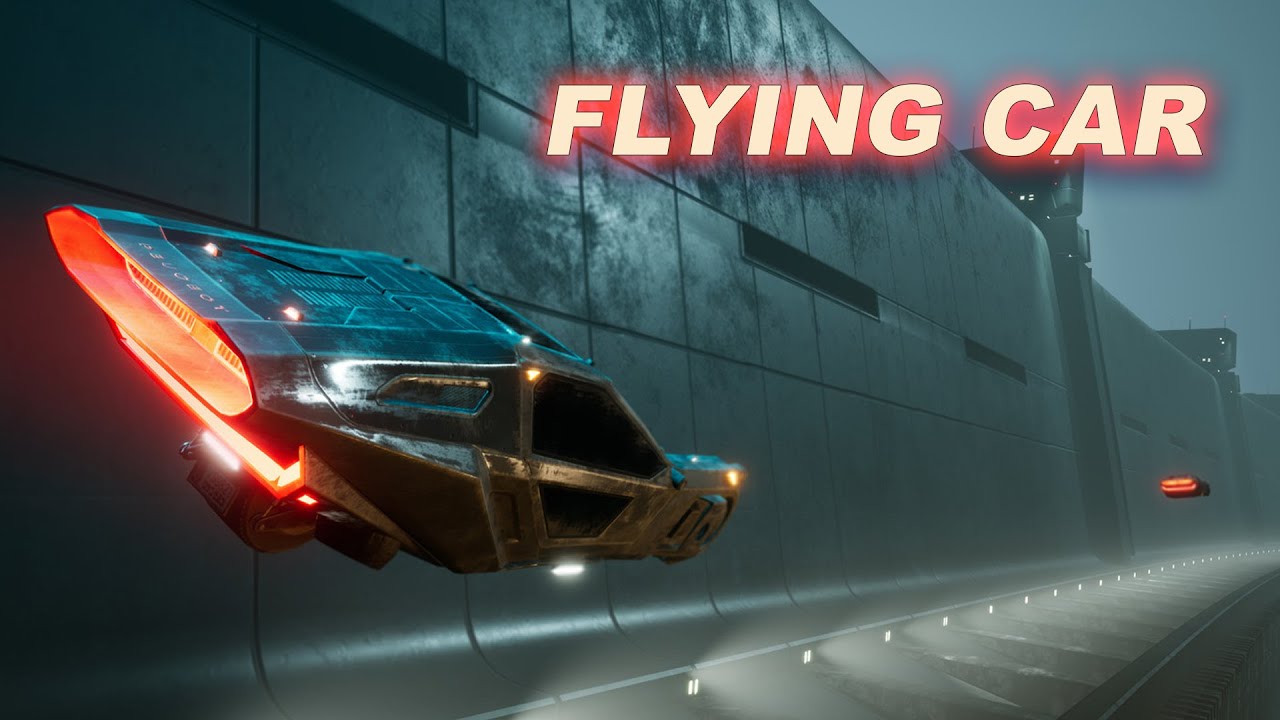
Project Files : https://www.patreon.com/posts/50072920
In this tutorial, I am going to implement a bladerunner/cyberpunk style flying car in unreal engine. We can use this car to fly around the game world. In the first episode, I will implement the car using pawn class as the parent class and add the car mesh and work on movement and turning inp...
have a look, sure the guy show how to make it move 🙂
agile moss
that is only for the character bp, im using pawn, lol idk it refuses to work might use character

lol, it works with character, pawns r useless XD
 pulsar osprey
pawns are great. they just don't move unless you set them up to do so
dark drum
agile moss
lol, it works with character, pawns r useless XD
I'm not a fan of pawns. They don't handle root motion. That itself is handled in the movement component.
agile moss
Yeah
I used an actor instead
I just find the roation I need
Then to move it
I add "self location" with "self forward vector"
I can ulso multiply the forward vector with a float for speed
 surreal wagon
I have two variables squintingFOV and CrouchingFOV affecting the camera's FOV. I have tried doing a WorkingFOV where each fov ''contributes'' to, i have also tried doing a select float, where the different booleans change how the other variable works. Nothing works. I'm stuck


 inland walrus
Any methods on adding seconds over a minute
example:
Player has 52 seconds left on the countdown timer (Seconds Variable and Minutes Variable) > They pick up a +10 seconds (setting their timer to say 00:62.. How do I make it check if over 60 and how much by, converting that over to 01:02?
 remote meteor
inland walrus
Any methods on adding seconds over a minute
example:
Player has 52 seconds left...
remote meteor
inland walrus
Any methods on adding seconds over a minute
example:
Player has 52 seconds left...
seconds = second % 60
minutes = second / 60
Format text with {Minutes}:{Seconds}
inland walrus
remote meteor
seconds = second % 60
minutes = second / 60
Format text with `{Minutes}:{Seconds...
Thanks for the help but I don't follow
 spark steppe
use a timespan instead of a float variable...

 sweet jetty
surreal wagon
I have two variables ``squintingFOV`` and ``CrouchingFOV`` affecting the camera'...
sweet jetty
surreal wagon
I have two variables ``squintingFOV`` and ``CrouchingFOV`` affecting the camera'...
wow how do i make my unreal look like this it looks sick
faint pasture
sweet jetty
wow how do i make my unreal look like this it looks sick
That's Electronic Nodes and I hate it lol
faint pasture
Like this, at a glance you can't be sure which float is going where
 dusky cobalt
because he positioned it poorly 😄
 faint pasture
 dusky cobalt
this plugin above is different than electronic nodes I think, unless they have other mode for this ''color''
faint pasture
What a nightmare
sweet jetty
faint pasture
i see 🤣
sweet jetty
sweet jetty
do u mind helping me with this ?
quiet stag
sweet jetty
do u mind helping me with this ?
looks like you need to learn the basics here
sweet jetty
yes i am beginner
quiet stag
how long you been trying to figure it out for?
sweet jetty
like 10-15 mins
quiet stag
welcome to game dev 🙂
you are better off figuring it out yourself would you like a good tutorial by epic games that teaches basics of blueprints?
quiet stag
you gotta learn how to figure out stuff on your own in this industry..its a part of the job..
okay ill get you the link 🙂

Announce Post: https://forums.unrealengine.com/showthread.php?101051
This Training Stream takes a look at Blueprint Communication. We find that Unreal Developers of all levels can sometimes struggle through the concepts behind moving data between objects. So in this video we'll take a look at the different ways to make Blueprints talk to one an...
**its an old video so some basic things might not match up with unreal 5+ if you are having trouble matching it up with the tutorial feel free to send a message here and we can help you match it up or you can download the same engine version in the video…which is prob what you should do so it wont be as frustrating
for example..math operations work a little differently in unreal 5 compared to 4..
quiet stag
sweet jetty
sure
either find out what engine version is in this tutorial or use 4.27..you should be fine with 4.27 but you will encounter issues using 5..
the knowledge you learn in this video will transfer to 5+
good luck!! ^^
sweet jetty
arigght
quiet stag
please take my advice and use unreal 4 not 5
when u are learning following that video..its a really good one
 thin panther
there's literally no reason to use 4 over 5
all the new materials are made in 5 for a start
quiet stag
read my comments please
thin panther
still
sweet jetty
oh god wat have i caused 
thin panther
it is, but if we're at the stage where the wildcard math operators are confusing there's probably a couple to hit first, like the First Hour In Unreal :P
it's an amazing tutorial for learning about references
quiet stag
5 is deff better than 4 i was just saying use 4 so he can smoothly follow the tutorial that is all
 hoary junco
so, this is a bit more of a maths question but if you know any blueprint nodes that will shorten this process I'd like to know
I'm trying to have a character using click to move stop in the middle of a square, I can get them to stop on a waypoint using ai move but I want them to stop at x=150 y=150 or x=250 y=150 or something like that
the way I've done this before is I made them stop every 100 by getting the location the mouse clicked, dividing the X and Y by 100, rounding, then multiplying by 100 to form the final location but, idk if this is exactly efficient and also I want to be able to adapt it to other grid sizes
Any help?
like I want to be able to click, it correct the value, then send the character to the corrected location
quiet stag
sweet jetty
oh god wat have i caused <:lurkin:1316599475447402550>
all good man..if someone links a unreal 5 basics blueprint tutorial that is the equivalent in quality by all means go for 5..i just been using unreal for 10+ years so been a while since i needed a basics video
thin panther
My personal order of reccomendation is to go for First Hour in Unreal first, it covers the absolute basics
Then follow that amazing resource linked
quiet stag

In this course from Epic Online Learning, we cover the high-level basics of Unreal Engine 5.2. Learn to create new projects using project templates and add custom or premade assets with the Content Browser. Easily add Actors to levels and modify their properties with the Details panel; gain control of environmental lighting and effects with Ligh...
is that it?
hoary junco
a lot of these tutorials will need to be rebuilt now given the while changes to importing assets thing
anyone who's new to this won't have been able to get the free quixel assets
quiet stag
yeah..in my opinion he should stick with learning blueprint logic first instead of worrying about assets
hoary junco
speaking of blueprint logic, any help to the question I asked earlier?
quiet stag
tag it
hoary junco
hoary junco
so, this is a bit more of a maths question but if you know any blueprint nodes t...
this
quiet stag
kk reading..
hoary junco
in summary I'm making the click to move adhere to a pseudo-grid system and say the player clicks at x=105 y=90 it would correct to x=150 y=50 because I want it to round to every 50
I've had it rounding to every 100 before but I've been mathing it out and idk if there's perhaps a node or set of nodes I could have done to make this more efficient
quiet stag
ah too complicated of a question rn for me been up for 24+hrs..i could barely read through it hehe
sorry 😦
hoary junco
ah...
hoary junco
quiet stag
maybe turn the rounding into a function or macro?
I have done but I can't for the life of me figure out how to math it so it only goes to numbers ending in 50, because if I just divide by 50, round, then multiply by 50 it won't get the desired effect, then it will have 50, 100, 150, 200 etc as acceptable values, I want it to just be 50, 150, 250, 350 etc
quiet stag
ahhhh haha ask chat gpt?!
hoary junco
chat gpt is shit at math
quiet stag
it gives you good ideas if you ask it for a formula or something
hoary junco
also I had thought of adding or subtracting 50 from the value but that wouldn't be rounding so would cause some weird movement
hoary junco
wait I'm fucking stupid I think I figured it out
quiet stag
cool!
hoary junco
((ROUND((X-50)/100))*100)+50
quiet stag
nice congrats
hoary junco
it means the function I made is going to look even more messy but oh well
if you can't see the literal spaghetti code inside the function it can't hurt you
 zinc swift
hoary junco
it means the function I made is going to look even more messy but oh well
zinc swift
hoary junco
it means the function I made is going to look even more messy but oh well
you can use the "math expression" node

there you can type your expression and can connect the variable with your stuff
 hoary junco
zinc swift
you can use the "math expression" node
hoary junco
zinc swift
you can use the "math expression" node
with math expression how would you tell it to round a value?
or would I need a second node for that?
zinc swift
Right, I didn't quite think about it, rounding values doesn't work with it
hoary junco
zinc swift
Right, I didn't quite think about it, rounding values doesn't work with it
actually, it does, I just tried it out

this setup returned the correct values
hoary junco
I wish I had known the math expression node existed a hell of a lot sooner XD
zinc swift
haha
hoary junco
thanks for the help
zinc swift
with pleasure
hoary junco
so, question about inputs
I want to make a system where if I right click and then move the mouse the camera rotates around the character
thing is I know the third person template already has this system so I was just going to borrow how they did it, except thge way the third person template does it, is the act of moving the mouse is what triggers the camera movement via enhanced inputs, I don't want that, I want it to be locked so that way when you hold down the right mouse button and then move the mouse, that's when the camera moves.
I was thinking of having a system where it tracks mouse movement but doesn't move the camera until right mouse is held but that feels inefficient because you have the game constantly reading the mouse movement which is resources wasted
is there a way I can make it so it doesn't start tracking the mouse movement for camera rotation until the right click is held?
dusky cobalt
Set Timer By Event can work like tick and can be turned on and turned off on demand (cleartimer by event), so you would start timer by event on click, and when you let go it invalidates it and stops the ''tick''
and if you want something to happen really really smooth then just enable/disable tick of that actor
don't be afraid of enhanced input system, it's a must and you need to understand how it works
hoary junco
I know.. that's why I asked
like what I'm wondering is, is there a way of setting in enhanced input a way to where you require 2 different inputs at once to make something work.. surely that's a thing right?
like if a game has an input of ctrl+1 it does a thing
in this case if the game has an input of right mouse button held + mouse xy 2d-axis move it does a thing
maiden wadi
It's always worth reminding people that every Unreal game, even singleplayer who will literally never have more than one player, tick, every frame, to check if it should split the display for a second player.
I'm semi curious if chorded inputs work with that.
Never tried it with mouse movements. Only with two pressable keys. 🤔
maiden wadi
Yep. Seems to work just fine.
So I have this normal look function here. Was set up for first person looking.

I added a Chorded Action modifier to it. Made a new IA and applied it as well, and set that new action as the chorded action. The new action is set to middle mosue button. I can now no longer look unless I'm holding middle mouse.
 hoary junco
maiden wadi
So I have this normal look function here. Was set up for first person looking.
hoary junco
maiden wadi
So I have this normal look function here. Was set up for first person looking.
I was literally about to ping you to say I just tested it in the third person template and got the same result XD
it does work
yet another feature that I would have probably never found without help 😛 learning a lot today
maiden wadi
Yeah. Always nice to learn something new. But for real, don't be afraid to just piece stuff together. You can always modify stuff later. A lot of people get bogged down in making things perfect. And as we all know, there's no such thing. Would have been mostly the same to make a second IA set a bool you could check. Internal code is essentially doing the same thing.
hoary junco
well the thing is, the reason I ask so many questions here, is because I want to know all the tools I have available to me, there's so many nodes that I don't know shit about or that I don't know exist and asking google or chatgpt never takes me to the right place
it's not necessarily making it perfect but more knowing everything I can do in this engine so that way I have the ability to mess around with it more.
Like imagine having a box that was held together with screws.. you can throw the box around, you can look at it, you could maybe draw on it, but until someone hands you a screwdriver, you can never really take it apart to find out what's inside.
maiden wadi
For sure. 😄 I mostly meant that in regards to your inefficiency point. A lot of people get bogged down by the tiny details that don't matter as much. Which is a lot more inefficient than a tick check.
hoary junco
well sure but, returning to my point, in trying to make things more efficient, you tend to discover new tools
like that math expression node, if I wasn't trying to make my rounding function more efficient I would have never found out about it, now I shortened down a really messy function into something really neat thanks to it and I know a new node exists now
 wind sandal
Hey folks! Wasn't sure if this would be best in the 'Animation' or the 'Blueprint' tab, but hopefully I picked the right place. I am primarily an environment artist, so, my knowledge on topics like blueprinting/coding isn't as up to par as it ought to be.
I'm looking to use the Game Animation Sample as the foundation for locomotion in my project. I'd like the camera to be first person, however. Two main goals are to have the camera positioned (roughly) at the character's head and have the character turn in place as the camera rotates, similar to how the character does while 'aiming' with the default BP in the sample.
I've found many tutorials and resources to do this in 5.4 that seem to work well, but the backend has changed a bit in 5.5 that seems to have made the 5.4 method obsolete. Even when moving the camera in position where I'd like it and parenting the Spring Arm to the head joint, the camera returns to the default position as soon as I hit play. I've broken and restarted the BP about a dozen times going through the event graph and assets such as the Camera Rig Prefabs but haven't found a solution.
It's clear to me that something in the script is overriding the manual camera position but I haven't been able to narrow down the culprit. Haven't had much luck with enforcing the character rotation with camera a la the 'aimed' mode either. Any ideas as to what I am missing or resources I could be directed to? Thanks in advance for any and all help!
Example of camera position differences between compiled BP and the view when playtesting
 lost hemlock
I can't see the shovel actor static mesh on my player's hand socket, even though I can see every other item. I tried to play around with scale, location, and rotation, nothing shows up. All other items work except shovel item.
For example, you order an Amazon package, get tracking updates, and the delivery guy says it’s at your door...but when you check, there's nothing there. Whats the cause behind this mystery?

this is closer zoom in if the text isnt visible
 kind estuary

cant set Parameter in MPC in a UObject
Function ' Set Scalar Parameter Value ' is unsafe to call from blueprints of class ' UCamera Base Obj '.
[0254.61] Compile of UCamera3DIsometric successful, but with 1 Warning(s) [in 41 ms] (/Game/Landscape/Grid/BattleCamera/UCamera3DIsometric.UCamera3DIsometric)
Unsafe?
can i just ignore this warning?
 steady badger
Hello, in my ue5 project, the lights are normal before the build, but after the build is received, it darkens, is there a solution for this?
faint pasture
hoary junco
so, question about inputs
I want to make a system where if I right click and th...
that's an absolute nothing burger
just tick -> branch -> move camera or don't
hoary junco
faint pasture
that's an absolute nothing burger
why is it a nothing burger to learn about how the engine works?
faint pasture
hoary junco
why is it a nothing burger to learn about how the engine works?
The cost to read the mouse movement even if not directly using it is zero
hoary junco
faint pasture
The cost to read the mouse movement even if not directly using it is zero
still, I learned about chorded inputs.. so it wasn't a nothing burger, no need to have that attitude
 misty coyote
Guys, when I destroy and respawn my actor. There's a lot of broken references. It seems casting to BP_ThirdPersonCharacter fails after the respawn
Any ideas
faint pasture
misty coyote
Guys, when I destroy and respawn my actor. There's a lot of broken references. I...
show the code
what reference are you casting to BP_ThirdPersonCharacter
misty coyote
BP_Character death:
After respawn and possess, this cast is failing


It's an XP component, from another class that is failing. That's a component in the HUD. which I have under event beginplay
 dusky cobalt
Get HUD and call to it manually AFTER you respawn. Don't use OnInitialize. Create your own event ''Initialize XP Component'' and in the On Posses > Get Hud > Get Component By Class XP > Initialize XP Component
 frosty heron
hoary junco
still, I learned about chorded inputs.. so it wasn't a nothing burger, no need t...
frosty heron
hoary junco
still, I learned about chorded inputs.. so it wasn't a nothing burger, no need t...
He is saying that your statement that "it's a waste resource" doesn't carry weight since the cost is next to nothing....
hoary junco
frosty heron
He is saying that your statement that "it's a waste resource" doesn't carry weig...
the way it came across was as if asking the question was the nothingburger or that it was a stupid question.
frosty heron
absolutely doesn't sound like that at all
you are falling into the state of pre-optimizing.
The answer is to profile if you really think it cost anything.
hoary junco
frosty heron
absolutely doesn't sound like that at all
considering what he replied to was the base question and not me asking about efficiency yes it does.
frosty heron
This is the same like how people are worried about line tracing on ticks
which cost nothing even tens thousands of them in a frame
and ofc these kinds of idea will be met with disagreement
because some people already know the actual cost of such operation
which bogged down to, you are not really being more efficient
I even heard of funny ideas like, instead tracing on tick, use timer at period of time to trace for hit item 🤷♂️
hoary junco
I mean it's not like it matters considering I have it figured out with chorded inputs and I now have a new thing I can use to make combo button inputs easier to implement and potentially rebindable
that said there's an unconnected issue I'm running into, with the right click and move camera system the mouse cursor is still moving across the screen, I want it to stop moving while I'm moving the camera, how would I do that?
faint pasture
@misty coyote you're better off having your game state not care about UI
Have your HUD handle all the transitions. You can bind events to dispatchers in the pawn to detect death etc
misty coyote
Move all XP components to Third person character maybe?
faint pasture
misty coyote
Move all XP components to Third person character maybe?
What does the xp component do?
misty coyote
Just calculates XP, shows progress bar and adds levels
faint pasture
And should it survive death/respawn?
misty coyote
yeah
faint pasture
Throw it in player state then
misty coyote
but it seems to be resetting when I initialize the widget
faint pasture
Either that or have it on the pond and have a mechanism to carry over when you get a new pawn
The widget should just be a display of XP, it shouldn't be where XP lives
faint pasture
Also, you do not need to destroy the pawn on death, death can just be a state. Then you can just have a reset /respond event that resets stuff
maiden wadi
hoary junco
that said there's an unconnected issue I'm running into, with the right click an...
That will be capture. If you're using CommonUI, your activated primary widget can specify it as CaptureDuringRightMouseDown. If not you'll need to do SetViewportMouseCaptureMode with the same setting, but it's harder to maintain because anything setting an input mode can accidentally override it sometimes.
 solemn helm
If anyone cares to take a look Link
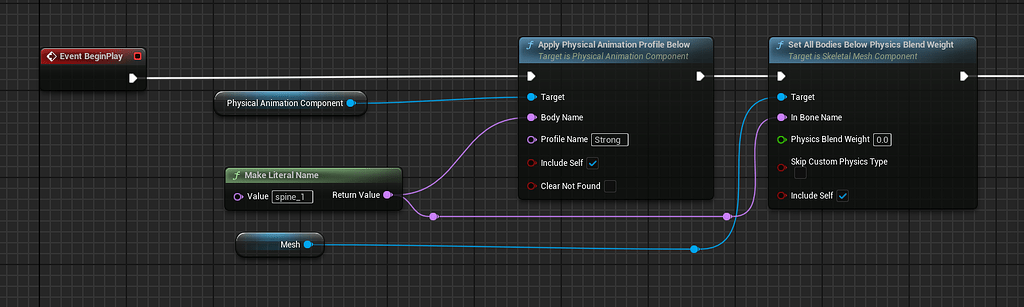
Epic Developer Community Forums
Like the title poorly describes, I’m having an issue with the physical animation component on my character. For some reason unknown to me, everything about the process works, until I need to blend my character back to its rigid kinematic state away from its simulated state. I have a physics asset set up with a physics profile that I call “strong...
 ruby glade
I'm trying to make a steering wheel animation and I have two problems, please help.
Is it possible to somehow make it rotate along its X axis because in the photo the steering wheel is tilted and there is no axis and because of this it looks strange
The steering wheel hardly turns and does it very abruptly
I would be very grateful for help

 river arch
Is there no way to access and change variable on a child actor component from within the parent blueprint IN THE EDITOR? I see that i can do it and the changes are reflected on event begin play, but not in the editor. Is this possible?
 harsh nebula
river arch
Is there no way to access and change variable on a child actor component from wi...
harsh nebula
river arch
Is there no way to access and change variable on a child actor component from wi...
First thing you need to understand is that blueprints are basically code, and that code does not run until you "play" the level.
river arch
harsh nebula
First thing you need to understand is that blueprints are basically code, and th...
thanks for the response - so is there a way to trigger or refresh the variables of a child actor? i have a car blueprint that is comprised of child blueprints, one of which is is the exterior with a variable for the paint. is there a way to force the variable to update when i change the variable on the parent blueprint?
river arch
harsh nebula
First thing you need to understand is that blueprints are basically code, and th...
also isn’t editor tick essentially running the code every tick? or am i misunderstanding that
harsh nebula
river arch
also isn’t editor tick essentially running the code every tick? or am i misunder...
If you use tick then yes. For example the begin play node only fires once, so unless you add event triggers or similar then anything in begin play will run and then stop.
Say you had an array of colors for the exterior paint and you want a random color. If you code this in the normal graph you won't see any changes until you play the level. But if you add it to the construction script then every car you add to the level will show with different colors, and in some cases the color would change even when you move the Blueprint. I hope this gives you an avenue to research.
river arch
harsh nebula
If you use tick then yes. For example the begin play node only fires once, so un...
o7 commander
harsh nebula
river arch
o7 commander
o7
 autumn pulsar
river arch
thanks for the response - so is there a way to trigger or refresh the variables ...
autumn pulsar
river arch
thanks for the response - so is there a way to trigger or refresh the variables ...
With an object reference, you can directly change variables on the child

for example here, I spawn a healthbar, then set a reference to it
then when I want to change it later, I can use that reference and either call a function to update the value, or just directly access it
 tough atlas
Using the physics handle for my Left click and right click functionality which works fine, Just trying to add the ability to press middle mouse button while right clicking, to allow me to rotate the object to my desired position with the mouse input
The rotations are fighting and im a little confused as to my next steps
Anyone got any ideas?


 autumn pulsar
tough atlas
Using the physics handle for my Left click and right click functionality which w...
autumn pulsar
tough atlas
Using the physics handle for my Left click and right click functionality which w...
You should probably have the rotation code run in tick or have something call an update, then have a "desire" rotation it rotates to possibly
then inputs just add or subtract from it
also you're using "set target rotation"
your input is going from 0-1
you need to add it to the current rotation
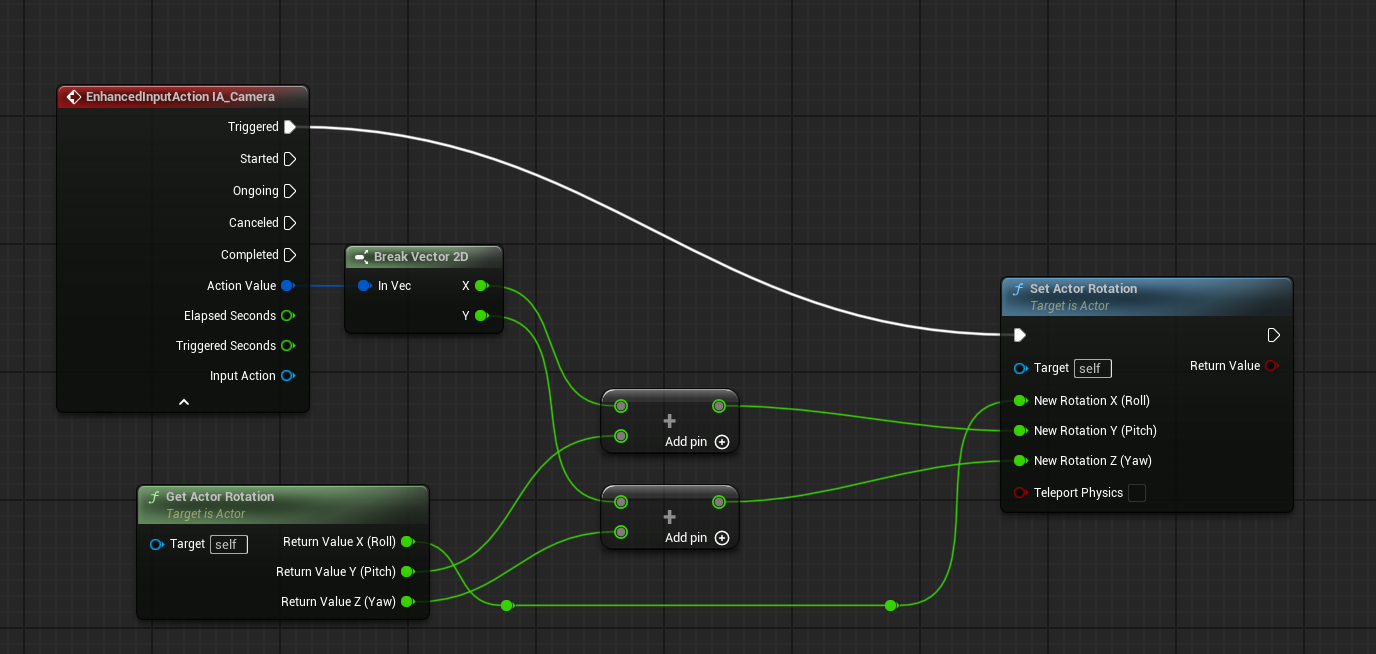
You may need to do some fucky stuff as well depending on how you want it to rotate
mystic blade
what object do i need to pass when casting to a widget blueprint?

 eager mantle
Yo, which one of these two is better for performance? Does it even make a difference? Is there an even better way?


 tired hollow
Should I use Gameplay Tags to control game logic?
Like different sections of a game?
autumn pulsar
tired hollow
Should I use Gameplay Tags to control game logic?
Like different sections of a g...
One of those depends
Tags are useful due to their abstract nature and not really requiring too much of an object to implement
 waxen ice
eager mantle
Yo, which one of these two is better for performance? Does it even make a differ...
waxen ice
eager mantle
Yo, which one of these two is better for performance? Does it even make a differ...
Get Player Pawn is slightly faster
 bleak fog
This is really weird, DelayUntilNextTick did not delay until next frame to execute. Do anyone know the reason?


I tried a small example where I print 3 logs for each frame and use unreal insight to check if it's played correctly. But print string 1 and 2 happen inside a tick.
I figured it out, the print happens BEFORE the tick so it will eventually run again when a tick ends (in 1 frame)

 jagged carbon
Is it safe to call a Blueprintimplementable event from a non-game thread?
frosty heron
bleak fog
This is really weird, DelayUntilNextTick did not delay until next frame to execu...
For future reference you can also get the frame count. Append that with the string to see at what frame the node is executed.
frosty heron
eager mantle
Yo, which one of these two is better for performance? Does it even make a differ...
The two doesn't even do the same operation
The cast is type checking while the 2nd picture is comparing a reference.
eager mantle
frosty heron
The two doesn't even do the same operation
Ah yes, sorry, in this case I just want to use either one of them for the purpose of checking if the overlapping actor is the player to then execute any following nodes afterwards.
waxen ice
eager mantle
Ah yes, sorry, in this case I just want to use either one of them for the purpos...
I'm that case maybe u should consider using interface
frosty heron
eager mantle
Ah yes, sorry, in this case I just want to use either one of them for the purpos...
It's still doing different operation.
The cast check for the actor Type, so if player 2 or 3 or any actor that derived from the said class will pass the check.
While the 2nd one, only pass the check if and only if the actor is the player pawn player 0 currently controlling.
Don't use interface for this.
I don't see the point
to do what exactly?
checking if the actor overlap is the player pawn?
then just get player pawn 0
if you want to check if the overlap actor is of type Player character then just cast
waxen ice
It depends on what he wants to do after
frosty heron
again, if you want to check the type then use cast
if you want to check if the actor == the player pawn then do the obejct ref comparsion
interface have nothing to do with anything above
your itention may be good but the advice is not on point
also interface is used for the wrong reason many many times.
You use interface when you need to communicate between classes that doesn't share the same base class.
and for what he requested
Interface doesn't come to mind
waxen ice
Ok my assumption about using interface may be too far into the future
But @eager mantle what exactly u want to do after checking if overlapping actor is player?
 dapper wraith
Hi folks, does assignment of object reference in blueprints with another object reference considered to be a full copy assignment of the data structure or just an assignment of a pointer?
frosty heron
dapper wraith
Hi folks, does assignment of object reference in blueprints with another object ...
Object reference = blue pin
95% of the times pretty sure everything in bp is by values / copies.
there are pass by ref but that's like edge case
if you got a snippet of your blueprint, it will be clearer
Anyway in the case of obejct reference to another object reference it doesn't matter at all.
a size of pointer is soo small, it would be the same as copying an int values
dapper wraith
Yes, that's what I'm trying to understand. Does object reference assignment (blue pin) is equivalent to:
SomeClass* A = B // in cpp
or
SomeClass A = B
By your comment I understand its the first
dapper wraith
Cool, thanks!
maiden wadi
mystic blade
what object do i need to pass when casting to a widget blueprint?
I recommend sitting through this.
https://www.youtube.com/watch?v=EM_HYqQdToE
Casting is taking the reference you save and attempting to turn it into something else. You probably did a CreateWidget somewhere when you created the widget, the blue pin on the right of that is the reference, or pointer returned. You can save that into your own variables. Your own variable is what you'll either use directly or cast. Usually easier to read the Cast To as Treat As. You're taking a pointer and trying to treat it as a different class.
Announce Post: https://forums.unrealengine.com/showthread.php?101051
This Training Stream takes a look at Blueprint Communication. We find that Unreal Developers of all levels can sometimes struggle through the concepts behind moving data between objects. So in this video we'll take a look at the different ways to make Blueprints talk to one an...
 outer brook
Hello fellas. I have a question regarding CharacterMovements in UE 5.4.
Currently, when I walk forward with my character and suddenly switch into let's say the right-direction, the character turns "instantly" to the right. I would like to have a smooth transition in which the character e.g. lerps/interps to the new direction instead of instantly turn there.
Is there any way to accomplish that in UE with the internal mechanics?
P.S.: Currently, MotionMacthing is no option unfortunately.
outer brook
OrientToMovement ist already ticked.
TurnRate is currently 360.
This somehow works fine with the Animation, but not for the physical movement itself which still turns instantly to the direction. Did I do something wrong maybe?
outer brook
Well, my question is related to another game I am currently analyzing.
Right as I was ready to prepare an example video of the movements in that game I realized that what I thought was happening is in fact not what it does.
The only thing worth mentioning of what I see in that game is that when I want to move in a "<=90 degree" direction relative to the forward of the actor, the character smoothly rotates towards that direction, no matter how fast/short/long/slow I move the left-stick. As soon as the movement is finished, the character is facing that direction.
I attached a video as a reference to what I mean.
I am wondering how that is done...
frosty heron
Yeah that's the same as whutering waves
what do you struggle with atm?
I attempt to do the above btw, but don't have a good animation so I kinda just drop it.
Gonna work on 180 degree turn though for sure
So detecting the direction is as simple as getting the last movement input vector
for me, since I am just using keyboard. I will just detect if the last direction input is north and the current input direction is south. Then do the turn animation
perhaps some turn in place videos may help but I never personally look at any of those tutorials.
outer brook
Well that's a coincidence. 180 degree is another topic that would came next for me.
Do you trigger montages for the 180° turns or do you do that completly in AnimBP?
frosty heron
"Gonna work on =)"
got other priorities atm.
So I was gonna use montage
but that means the direction is locked....
frosty heron
I examined wuthering waves
which is made with unreal engine
and they can rotate the character while in the 180 degree turn
well movement is locked for some micro seconds but rotation is always facing the input direction
So maybe I will use Anim asset but honestly no idea what I end up using until it's time.
kinda have to make mine multiplayer, so if playing montage cause correction and locking the rotation, then I would have to use animation in the anim bp
outer brook
wuoah I get the goosebumps hearing multiplayer hahaha. well thank you for your help so far!
frosty heron
doesn't feel great when locked
I want to be able to rotate
so yeah I think gonna use animation
outer brook
but it looks great for sure so far
frosty heron
not great yet =(, but gonna work on the movement a lot
need vaulting , climbing, etc.
I think that's what make a game feels good
outer brook
Don't be too hard to yourself, everything could get better with enough time and effort but it realy looked great so far.
 blazing rain
Hi dude it has been a while
but the video used a paid plugin and I don't want to use paid plugins so do you know a solution?
and thank you
 primal smelt
Good afternoon. Could somebody clarify something for me please. For a while I assumed that within an actor bp (Pre-Physics tick group) has a box collider with component tick group set to 'During Physics', any code within the actor bp that sets a new location for the collider wouldn't update until said tick group is executed. I've done some tests and this is clearly not the case as immediately after the set world node I can print a correct result (in this case using an overlapping actor node). I double checked by having a scene component bp that also prints a correct result in the 'Pre-Physics' tick group.
So am I correct in saying that the component tick group is only relevant when it's a component that has a bp and can run code (eg. actor/scene component) and any primitives will just move at whatever tick group is set for the bp that attempts to move it?
 surreal peak
primal smelt
Good afternoon. Could somebody clarify something for me please. For a while I as...
surreal peak
primal smelt
Good afternoon. Could somebody clarify something for me please. For a while I as...
Location isn't updated on tick. So I don't think the tick group matters here. It's only interesting for code that runs on tick
hoary junco
hey so I have a question about controlling a camera attached to a character that isn't the player character
so I have a system set up with a dummy pawn that spawns in as the game starts, it spawns in the actual player character, the AI controller that controls it, and then sets the view target to the character's camera, and now I want to be able to control that camera but various methods I've tried like the one posted below don't seem to work. Any help?
It is registering the inputs btw it's just not moving the camera
 surreal peak
If you would update the location on tick then it probably would change what you see
surreal peak
hoary junco
hey so I have a question about controlling a camera attached to a character that...
If the Character that has the Camera on it isn't possessed then it might not work with the UseControlRotation or whatever you might have ticked.
hoary junco
surreal peak
If the Character that has the Camera on it isn't possessed then it might not wor...
so how would I achieve this same effect with a character that isn't possessed?
surreal peak
Why are you even splitting everything up like that?
hoary junco
surreal peak
Why are you even splitting everything up like that?
because the game I'm working on sorta replicates runescape or MOBAs in its movement, it's point and click movement, but in order to make that work properly simple move to isn't good enough because the character will stop short, if I want to use proper pathfinding and also have the character stop on top of the waypoint set I need to use AI move to so I can edit tolerances, so I need the player character to be controlled by an AI controller
surreal peak
Singleplayer?
surreal peak
That will be some really juicy input lag
hoary junco
just so I can learn how this all works
surreal peak
The Character won't be able to predict movement like this and the ai controller is server only. So you will have to RPC everything and wait for the movement to replicate back. Just fyi
hoary junco
ok well this is the only method I know of to have a character that actually stops on top of the waypopint instead of stopping short which is very much what I need for this to work I can't have it stopping short so if you know another method of achieving this without the input lag then I'd like to hear it
surreal peak
If you want to control the camera like that I would advice using the PlayerCameraManager
There you are free to return the transform of the camera based on whatever logic you want
Then you can add rotation pitch and yaw in your own pawn or as a second variable or so and pull that into the update camera function
It has access to the viewtarget
surreal peak
hoary junco
ok well this is the only method I know of to have a character that actually stop...
Stopping short sounds like the acceptance radius.
hoary junco
surreal peak
Stopping short sounds like the acceptance radius.
which is something you can't edit on simple move to
and every other move to node that I know of is ai controller only
surreal peak
hoary junco
which is something you can't edit on simple move to
And you can't use C++?
hoary junco
surreal peak
And you can't use C++?
I don't know much C++ so I wouldn't know how to do this in C++
surreal peak
hoary junco
I don't know much C++ so I wouldn't know how to do this in C++
Uff
Multiplayer without C++?...
Welll
hoary junco
surreal peak
Uff
I've been trying to learn C++ but, it just doesn't stick :/
surreal peak
Not sure then. Try the camera manager
hoary junco
like I'll finish a project from a set of tutorials, go back through and have no idea what any of it means
surreal peak
To fix your camera issue
surreal peak
hoary junco
like I'll finish a project from a set of tutorials, go back through and have no ...
Yeah, just multiplayer without C++ will be a pretty shitty experience
dusky cobalt
Multiplayer as a first game will be pretty shitty experience as well 😄
primal smelt
surreal peak
Location isn't updated on tick. So I don't think the tick group matters here. It...
Thank you, I potentially need to use all tick groups available for what I'm doing and I've been leaving During Physics free because I thought I needed a window for primitives to update!
hoary junco
dusky cobalt
Multiplayer as a first game will be pretty shitty experience as well 😄
it's not my first project.. but ADHD being ADHD means I've ended up abandoning a lot of the ones I've done so far, as I said before though the test version I'm working on right now is built for single player and I can worry about converting to multiplayer once I actually have something built ya know?
surreal peak
dusky cobalt
Multiplayer as a first game will be pretty shitty experience as well 😄
Yop, but that's an ever repeating story. There is always one person that thinks it will work out and then you never hear from them again 
hoary junco
I have 2 projects going right now, one is a runescape-esque RPG and the other is a narrative driven comedy game in a similar vein to the stanley parable or the corridor
surreal peak
You can try it all, use the Camera Manager as I told you
hoary junco
surreal peak
Yop, but that's an ever repeating story. There is always one person that thinks ...
I mean, I've been bashing my head against the brick wall of unreal engine for about a year and a half now and I'm still here.... as much as people in this discord probably wish I wasn't from time to time given how much I'm in here asking questions XD
surreal peak
I meant more that the project isn't getting anywhere
Blueprints aren't meant for this
hoary junco
gotta start somewhere though right? I've been trying the C++ tutorials from stephen ulibarri while working on this to see if I can get a grasp of it, this is like my 4th runthrough of his C++ series to try and get it to stick.. it should at some point right with enough repetition?
dusky cobalt
Everyone learns other way so it's hard to say if something that worked for me will work for you for example. It depends. For me I was afraid of C++ first months, then I slowly started looking here and there and now I'm able to understand where things are, where I can edit things etc. Never did it as a must, it just came naturally after I started getting comfortable with blueprints. Also it came with a examples of me trying to ''add'' and do stuff like. Hmm, how would it look if I made this but in C++? What would I need.. and step by step you got it right.
hoary junco
I don't get why code is so difficult for me, like I know the logic, I know what I want it to do, but I forget so easily the syntax or, in blueprints, the nodes and what they do, like I filled a big notebook full of notes about what the C++ syntax does and I still don't fully understand it. It's like having subject specific amnesia.
I know blueprints will never be as good as C++ but it's so much easier to grasp. Reading a flow chart of nodes no matter how complex is more graspable than even a simple function in text format
frosty heron
It's like learning a language.
More than memorising you keep practising and learning to build intuition.
Ofc your ide helps too, if i were using vanila studio i would have the editor keep screaming syntax error
And it is what it is. A lot of stuff just not possible to do in bp.
 storm solar
Is there a way to get it to play the "airbornnotify" event if I start the animation at "air" in the montage group?
Or, how do I call a notify event when one is already running?
The issue is I want to check it in the air when canceling this move into itself. But It only hits the notify trigger once.
 thin panther
hoary junco
I don't get why code is so difficult for me, like I know the logic, I know what ...
thin panther
hoary junco
I don't get why code is so difficult for me, like I know the logic, I know what ...
It's also worth pointing out you might just be trying the wrong things for you.
If it's your fourth time using the same resources and it isn't clicking, it's probable that it just isn't the best resource for you. Try other ones.
Most importantly, try to learn c++ at a basic level outside of unreal. Jumping straight into learning a new thing by using it in something that assumes you already know it is not a good move.
You wouldn't learn to swim by going on deep sea expeditions, and you wouldn't learn to walk by entering a marathon :P
maiden wadi
hoary junco
I know blueprints will never be as good as C++ but it's so much easier to grasp....
Style helps with this a lot I feel. C++ examples in engine are usually easier to read than vanilla C++ examples online, which is one reason I cringe when people in the C++ channel tell people to learn C++ outside of Unreal first. And like Cold said, it's a lot of intuition. It's like learning a spoken language, you do need to memorize some stuff of course, but you still have to immerse in it and keep trying to use it to get more and more comfortable with it or it never gets easier.
Also if you want to learn easier, consider picking up Rider. You still need VS and it's toolchains installed to compile, but you never need to open them. And you can use Rider instead to edit your code. Which will help considerably since it doesn't have a lot of the same errors and such and has better code completion.
But also just style. Bracket placements, naming, indentations, etc. It's no different than BPs. No one wants to read a graph written by dragging lines everywhere and no order, and chaotic placements. Brackets, simplifying logic into nicely named functions, and being verbose are good things so that you are basically reading a book.
 lofty rapids
basically instead of following the bp lines in c++ so just go top to bottom
 wicked surge
Hello, I'm trying to work out what "Unrotate Vector" and "Inverse Transform Direction" are actually doing...i.e. what is the "formula" they use under the hood? In the above image, "RotationDeltaVersion" is what I'm assuming the UnrotateVector node is doing...is that near the mark? However, I can't work out what it would mean to apply the "location" component of the transform in an "inverse" way.
 wicked surge
hoary junco
hey so I have a question about controlling a camera attached to a character that...
wicked surge
hoary junco
hey so I have a question about controlling a camera attached to a character that...
Off topic, but how do i get these nice blueprints?
solemn helm
Please help anyone that knows anything about the physical animation component: Link
Epic Developer Community Forums
Like the title poorly describes, I’m having an issue with the physical animation component on my character. For some reason unknown to me, everything about the process works, until I need to blend my character back to its rigid kinematic state away from its simulated state. I have a physics asset set up with a physics profile that I call “strong...
hoary junco
wicked surge
Off topic, but how do i get these nice blueprints?
a couple of paid addons called darker nodes and electronic nodes
https://www.fab.com/listings/7fcc3b88-bddc-4ac7-8132-1be496bb3caf
https://www.fab.com/listings/d6148766-27b1-47db-a730-832c53b7a895
wicked surge
hoary junco
a couple of paid addons called darker nodes and electronic nodes
<https://www.f...
thanks!
hoary junco
maiden wadi
Style helps with this a lot I feel. C++ examples in engine are usually easier to...
I do actually have Rider already. And the C++ tutorials I was talking about are specifically for unreal engine 5, they aren't for C++ outside the engine
dawn gazelle
blazing rain
Hi dude it has been a while
but the video used a paid plugin and I don't want t...
Sorry, I was just answering your question about whether it was possible or not and as I showed, it definitely is possible and I'm not familiar with any audio importing plugins myself.
surreal peak
There should be free plugins too
I know I originally made the one that allows importing .ogg files. To get around the one in UE that only works in the editor.
It's not available anymore but others should have taken over
If all that exists is a paid one now that would be sad

GitHub
This is an Unreal Engine 4 plugin that loads .ogg files at runtime and analyzes them to get the frequency spectrum to control gameplay, visualization and more. - amstaddigital/eXiSoundVis
Someone forked the repo at some point I guess
But it's pretty outdated
There should be free alternatives
inland walrus
Does anyone know why the head isn't constantly facing the player?
it's almost as if it's reversed
like minus coords
barren tangle
I have an issue with my data table.
i'm on the path : Found
But all data are empty...


any idea why? I have my record into my table
 random pulsar
wassup
i try to make this feature
I overlap with a potion actor ,it attaches to my players scene component
then i have to choose who do i heal ,myself or another character by overlapping with him
the attach works but the heal no,i might have made a mistake somewhere


 barren tangle
random pulsar
wassup
i try to make this feature
I overlap with a potion actor ,it attaches to ...
barren tangle
random pulsar
wassup
i try to make this feature
I overlap with a potion actor ,it attaches to ...
that doesn't make sens
 random pulsar
yeah ,i agree made a mess,do you know how can i fix this?
barren tangle
random pulsar
yeah ,i agree made a mess,do you know how can i fix this?
is the healing occurs at the same time has the overlap of the potion?
random pulsar
no ,only when you press the ctrl you can heal the player
inland walrus
why she no want to look at me 😢
random pulsar
random pulsar
no ,only when you press the ctrl you can heal the player
so i just tested it and it seems that the heal is working,but the actor is still attached to players head
and that error just shows that potion holder variables is empty maybe?
barren tangle
random pulsar
and that error just shows that potion holder variables is empty maybe?
yes (null)
but it's confusing
barren tangle
barren tangle
but it's confusing
In the Item : Potion Holder = Player
ok in your Player : Potion Holder = Healing Potion..
lol
so in summary... you don't use the potion... you just heal the character 😄
Ok i got it 😄
you set Potion Holder of your Healing Potion, instead of the Potion of your Player !!
So you use the wrong set Potion Holder!!
you need to use the one from the Player to and use the self reference for the potion itself
barren tangle
random pulsar
and that error just shows that potion holder variables is empty maybe?
name things properly it will avoid you those kind of mistakes
Same name for 2 different concept... of course you will fail 😄


So in summary: In BP_Healing : Use Set Potion Holder (from the Player and not from the Healing Potion)
random pulsar
Wow,thanks for help.I will try it tomorrow,cuz the lights went out.
autumn pulsar
How would I get an actor component to listen for an event on the main actor?
barren tangle
autumn pulsar
How would I get an actor component to listen for an event on the main actor?
same as usual
barren tangle
autumn pulsar
How would I get an actor component to listen for an event on the main actor?


you get the owner, you cast it to the type of your BP and then you bind it (inside the component)
and where you need, you call the dispatch even
 dark drum
autumn pulsar
hmm
dark drum
autumn pulsar
hmm
What's the goal? What's the event dispatcher?
autumn pulsar
I'm making a health component and was trying to make it a bit generic
I guess I can just let the cast fail if the owner doesn't have what I'm looking for
maiden wadi
barren tangle
I have an issue with my data table.
i'm on the path : Found
But all data are em...
You are sure that you have the correct row, and there isn't some blank row in the table?
It's been a long while since I've used datatables, but they were always pretty reliable.
barren tangle
maiden wadi
You are sure that you have the correct row, and there isn't some blank row in th...
But it goes on the path : Found something 😄
it's by name... so if it doesn't find the row... that means it goes on Row Not Found???
 warm hare
I have a countdown timer set to a specific area, but I am lost on how to stop the timer when I hit the pause button, and when I am out of the time limit area that the timer just goes away.

 maiden wadi
barren tangle
it's by name... so if it doesn't find the row... that means it goes on Row Not F...
maiden wadi
barren tangle
it's by name... so if it doesn't find the row... that means it goes on Row Not F...
I meant, do you have any datatable row entries that are empty?
barren tangle
maiden wadi
I meant, do you have any datatable row entries that are empty?
i have only 1 entry for the moment which is filled
 barren tangle
warm hare
I have a countdown timer set to a specific area, but I am lost on how to stop th...
barren tangle
warm hare
I have a countdown timer set to a specific area, but I am lost on how to stop th...
First don't put a timer into a tick event and use a timer event
maiden wadi
warm hare
I have a countdown timer set to a specific area, but I am lost on how to stop th...
Timers would be better. But even in cases where you don't want a timer, don't literally count down. When you star the "countdown", you should simply set two floats. GameTimeStarted, and TimeNeeded. GameTimeStarted can be gotten from GameState, GetTimeSeconds. Then your tick function just updates the display by mathing out how much time goes from the saved GameTimeStarted and time needed with the GetTimeSeconds.
warm hare
barren tangle
First don't put a timer into a tick event and use a timer event
Im confused, This is from a tutorial I followed. So basically I need to scrap my logic?
barren tangle
warm hare
Im confused, This is from a tutorial I followed. So basically I need to scrap m...
lot of tutorial doesn't make any sens but allow you to understand how UE works 😄
warm hare
barren tangle
First don't put a timer into a tick event and use a timer event
Also this is in a certain area of a level, so not the whole level. Not sure if that atters
hoary junco
so I'm running into an issue when it comes to clicking and holding the right mouse button while rotating the camera, and that is even if I set show mouse cursor to false while right click is being held, it still moves in the background so runs into the side of the screen and stops movement. The only way I've found so far to fix it is in gamemode on beginplay setting a node of "set input mode to game and ui" and then enabling "hide mouse cursor during capture" but I don't really want that for all situations, I only want it for when I'm rotating the camera, I want the mouse to stay on screen whenever I'm doing left click and drag
barren tangle
warm hare
Also this is in a certain area of a level, so not the whole level. Not sure if t...
doesn't matter but look how i did
 visual ember
warm hare
Also this is in a certain area of a level, so not the whole level. Not sure if t...
visual ember
warm hare
Also this is in a certain area of a level, so not the whole level. Not sure if t...
what do you mean by area? do you have some trigger/collision box?
why not use actual timer? what do you want to achieve?
 visual ember
use a timer like Reitoken showed
barren tangle
and then each tick of the timer, i reduce the countdown until i don't need it anymore
the widget only display the timer on the screen, and it's not aware about the timer
visual ember
also, why STATE has logic? put that in game manager or maybe a level bp
barren tangle
my widget function is just that :

And if you put the game to pause, the timer should also be pause
warm hare
visual ember
what do you mean by area? do you have some trigger/collision box?
why not use a...
Yes. I have a trigger box for when you enter the maze in the level. Basically the goal is when you enter the maze, the timer starts. So you have a time limit to finish the maze otherwise it is game over. When you leave the maze, the timer stops and you can continue on your journey
barren tangle
warm hare
Yes. I have a trigger box for when you enter the maze in the level. Basically th...
try to avoid game logic into widget
maiden wadi
Or more correctly put. Don't try. Do not.
visual ember
^ widget should work as "you want me to display this? ok"
barren tangle
so why do i have an empty data table when it said it found something?? 😄 that's the question
maiden wadi
Essentially the maze is your gameplay thing. You could make it an actor with the box component that sits around some obscure idea of a maze, so that the logic doesn't even have to be tied to the maze design, so that you can reuse the timer and death logic over and over and a level designer can just plop the BP in and size it around their maze.
The MazeBox BP can start a timer when the player overlaps it, and then push a widget to screen. The widget can just display the time left, but the game ending logic can stay in the mazebox BP.
maiden wadi
barren tangle
so why do i have an empty data table when it said it found something?? 😄 that's...
I would print stuff personally. BP debugger is not trustworthy.
barren tangle
maiden wadi
I would print stuff personally. BP debugger is not trustworthy.
ok will try
the engine didn't like your idea!! it crashes 😢
maiden wadi
Yeah, it does that when you're trying to be sensible.
warm hare
barren tangle
try to avoid game logic into widget
Okay. So do I get rid of the timer logic in the widget? i am still kind of new to all if this, so some stuff is over my head
I assume I place the timer logic in the level blueprint, since that is whre it will be used
visual ember
widgets are your interaction and presentation layer. all the logic should be outside of it
warm hare
maiden wadi
Essentially the maze is your gameplay thing. You could make it an actor with the...
The trigger box around the maze is in the blueprint. Originally it was set up On overlap, the timer starts via widget
visual ember
it "complicates" things, but in the end is easier to maintain and debug
warm hare
Sounds like the only thing I may have gotten correct is the trigger box
visual ember
also, in a "perfect" solution, your game logic doesn't know about widgets. it's widgets that hook to the logic
warm hare
Okay, so break it don for someone who is still new and dumb to all of this. I build the logic you showed in level BP?
visual ember
(or you use some decoupling messaging system)
simple solution with least classes/objects would be in level bp. but you might want to have an actor with collision box and there have begin overlap event
maiden wadi
Make BP, add Box Component, Override it's Overlapped, check for player, start timer and add widget to screen, on timer end, remove widget and kill player. On overlap end stop timer and remove widget. Make widget take in the timer handle and tick it's text based on the time left from the timer handle.
visual ember
it's almost no additional work, but you already package that in something specific
maiden wadi
Drop BP in level, resize BP, done.
visual ember
so then you can place multiple of those as different triggers
hoary junco
hoary junco
so I'm running into an issue when it comes to clicking and holding the right mou...
sorry to cut in but, anyone got an idea as to how to fix this?
 marble badger
"steamns"
hoary junco
<@&213101288538374145>
marble badger
scam
 pastel apex
marble badger
"steamns"
pastel apex
marble badger
"steamns"
steamns hanms
hoary junco
pastel apex
steamns hanms

ok this is getting really frustrating now... so I've set up my project settings to only capture the mouse on right click and then hide cursor on capture but it's still disappearing my cursor when left click is clicked or held....
how can I make it stop capturing left click and only capture mouse on right click
barren tangle
maiden wadi
I would print stuff personally. BP debugger is not trustworthy.
Don't know why i have replace by a soft reference and now it works...
 barren tangle
visual ember
widgets are your interaction and presentation layer. all the logic should be out...
barren tangle
visual ember
widgets are your interaction and presentation layer. all the logic should be out...
Grok 3 should be good to help you to structure correctly your projecT. where to put what. And understand the roles of the Game Mode, Game State, HUD, Player controller, Game Instance...
I don't have real use case where a logic should be put inside the level blueprint
 ruby apex
Anybody aware whats that "GuidedTutorials" thingy and how to remove/fix/hide it? Shows every launch. UE 5.5
 visual ember
barren tangle
Grok 3 should be good to help you to structure correctly your projecT. where to ...
visual ember
barren tangle
Grok 3 should be good to help you to structure correctly your projecT. where to ...
never said it should be. not sure why pointing this at me
ruby apex
ruby apex
Anybody aware whats that "GuidedTutorials" thingy and how to remove/fix/hide it?...
Its not just disturbing, its literally 80% of my logs flooded with that thing so its difficult to find any meaningful stuff there
Not a single google entry on that :(
barren tangle
visual ember
never said it should be. not sure why pointing this at me
when you are new on that domain it's good to understand first te role of each element of the game
inland walrus
inland walrus
why she no want to look at me 😢
Bump
barren tangle
why on the game mode and not on the game state? why on BP_Maze instead of the Game State? technically you can do everything into 1 blueprint. Grok 3 is free for the moment so it's a good oportunity to use it to understand the basic role of each element, that will help you to make decision
maiden wadi
ruby apex
Anybody aware whats that "GuidedTutorials" thingy and how to remove/fix/hide it?...
Given that it is an editor thing, I would consider file checking your editor.
ruby apex
maiden wadi
Given that it is an editor thing, I would consider file checking your editor.
Thanks I'll try
misty coyote
I have an XP system that keeps breaking everytime I destroy an actor. I need 15 minutes of someones time. Can paypal 10 euro for a screenshare and quick tutorial
dark drum
misty coyote
I have an XP system that keeps breaking everytime I destroy an actor. I need 15 ...
How would an XP system break when you destroy an actor. 👀
misty coyote
When I destroy and respawn the third person character it breaks the XP system
just getting null references. I've tried to save the variables but it's not working correctly
I feel I'm missing some fundamentals so just trying to pay for someones time to get a better understanding
dark drum
misty coyote
just getting null references. I've tried to save the variables but it's not work...
null refs for what? I can't think of any reason why an XP system would need to reference an actor specifically.
barren tangle
dark drum
null refs for what? I can't think of any reason why an XP system would need to r...
if the xp system is inside the third person character... then it will be destroy with the actor and respawn 😄
i can assume that the xp system is inside the character when i read the issue
dawn gazelle
If the XP system was inside the character, like as a component, then when that character gets destroyed, the component goes with it unless it gets moved to a different actor before destruction.
barren tangle
dawn gazelle
If the XP system was inside the character, like as a component, then when that c...
Why will he put the xp system inside the Character?? that is the question 😄
after it's just assumption... maybe it's not that
is there a way to do a For Each on a map?
barren tangle
 barren tangle
remote meteor
Keys > for each > find
barren tangle
remote meteor
Keys > for each > find
thanks
remote meteor
as for editing the value, you have to add it back to the map
or if you only need to loop through the "values" you can just use Values > For Loop
depending if you need to know the "keys"
barren tangle
good to know
inland walrus
Does anyone know a node in which off the false branch I can make the NPC look directly forward again? Currently the NPC has a slight turned head

 remote meteor
inland walrus
Does anyone know a node in which off the false branch I can make the NPC look di...
remote meteor
inland walrus
Does anyone know a node in which off the false branch I can make the NPC look di...
change GetPlayerCharacter to GetOwningActor/TryGetPawnOwner
 fiery swallow
something something GetActorLocation + GetActorFowardVector
inland walrus
remote meteor
change `GetPlayerCharacter` to `GetOwningActor/TryGetPawnOwner`
Neither worked
fiery swallow
that's the lookatlocation
GetForwardVector does not return an actual usable location
inland walrus
Ah okay
fiery swallow
so you need to combine it with the location of whomever you're getting the forward vector of


 fiery swallow
let me check it out give me asec
inland walrus
Appreciate it
fiery swallow
try adding a GetActorForwardVector * 100
inland walrus
like this?
 fiery swallow
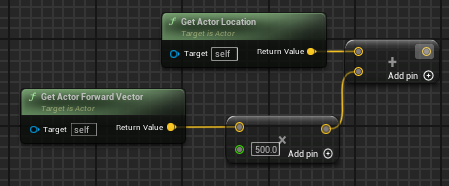
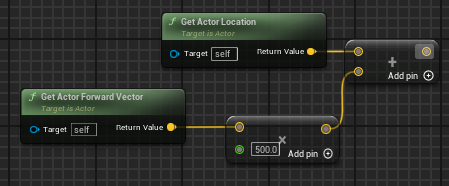 inland walrus
fiery swallow
https://i.gyazo.com/79e350b38a8900a289f7fa2417aaf4d3.png
inland walrus
fiery swallow
https://i.gyazo.com/79e350b38a8900a289f7fa2417aaf4d3.png
Great, this works! Thanks
fiery swallow
great, keep in mind the higher the float value, the "further" forward you're getting
inland walrus
Got you, pretty simple game and super simple AI so should be fine
autumn pulsar
Can you provide a variable to an event dispatcher?
 runic terrace
autumn pulsar
Can you provide a variable to an event dispatcher?
runic terrace
autumn pulsar
Can you provide a variable to an event dispatcher?
Yes, add it on the details panel
autumn pulsar
are gameplay tags stored as strings? I was wanting to use it as a lookup into a datatable
remote meteor
autumn pulsar
are gameplay tags stored as strings? I was wanting to use it as a lookup into a ...
They store as FName, you could do that as datatable rownames are also FName
autumn pulsar
coolio
 frigid jasper
does anyone know if there is a significant performance difference between 5-10 line traces or one capsule trace?
fiery swallow
frigid jasper
does anyone know if there is a significant performance difference between 5-10 l...
Depends on the size of the trace
Small traces are cost next to nothing
frigid jasper
fair point
it's for an interaction system, so about 1.5m
frigid jasper
tyy
autumn pulsar
If you're only firing it when you're interacting I wouldn't worry about it
fiery swallow
It's really not an issue regardless, if you've ever played a game with auto vaulting/ mantling. They're doing multiple traces per frame
fiery swallow
Pretty much 🤣 really just depends on the size of the trace
If you're doing a ginormous box trace you're gonna have a ginormous problem tho
frosty heron
You kinda have to know what you are doing.
How the hit is called and how latency exist.
Right now that code is "packed" to all machines. Not sure if that's intended if only the host or server machine needs to do the check.
@fiery swallow i was on the edge to give up on multiplayer again.. keep getting corrected and my animation cancelled when casting spells.
Turns out it was a "fix" ini settings i got somewhere else.
Listen server will have player too just so you be aware
If you want to filter between server and remote then you can use switch has authority.
Client may be authority on some edge case like if the actor spawn locally
U gotta know what they do...
Key point for multiplayer is to understand communication between the server and client.
And understand the flow and what gets called.
I can't say things will work or not from a code snippet.
If you can't replicate a state between computers then you should read the pinned material 12 times, practice, fail then repeat.
Takes a while to click but once you know it, replication is easy to understand.
In fact they are the least of your worry in multiplayer.
pulsar osprey
the check will always run if you bind to that delegate on client and server. if you only ever want the check to run once, check if you have authority and then bind to the delegate
fiery swallow
frosty heron
<@135505411779461120> i was on the edge to give up on multiplayer again.. keep ...
Really, what fix? Was this for the combat youre making? Haha
frosty heron
Animation was jittering before, the ini kinda dissipate it but it breaks cmc at least with my settings.
 polar wing
hi, im very new to unreal and have just been following tutorials and such to get the grasps of things. how would i go about editing the default values of this? for example on defeating an enemy setting the value of an ability to true.
 frosty heron
That's a map type. A map consists of key and value pairs.
You use the key to do the look up for the values.
Drag from the map and type map if you want to add / modify a new key value pair.
Also a map can only consist of unique keys. So if you want to change the value of existing key, use the add node and plug the key for the look up.
polar wing
so if i wanted to change for example the curse to true would it simply be this?
 fiery swallow
Yup
I can almost gaurantee at some point a map won't be enough though
I usually just take that extra step and make a struct
 gritty sphinx
If I want to have a few hundred actors at the same time that are static meshes which are pressure plates that detect whether or not the player is on them, and beep when the player gets close, how can I optimize this to allow for more static meshes?
'

There are a lot of mines and the amount of actors is eating up a lot of fps
I have no clue what is causing this and how I can fix it
 proud salmon
Will they always be close-ish together?
gritty sphinx
yes, sort of in a grid pattern
gritty sphinx
proud salmon
Will they always be close-ish together?
I saw your edit, and yes, they will be spaced in an equal grid as seen above, but I wish to have a higher quantity in the final product
the current quantity causes my game to throttle to around 60fps at high settings
with just the actors and no level design
the level consists solely with those mine actors currently
proud salmon
So what I'd recommend doing is this:
- Make it a single actor that uses an instance static mesh instead of a static mesh.
- On begin play or construction, write a quick script to add instances every X/Y, etc however you want it setup.
- Instead of detecting on the mine that the player hit it, detect on the player that it hit a mine. Fire a trace down on movement, cast to InstancedStaticMesh, if valid, do whatever you want it to do and then remove that instance (Hit Component--> Remove Instance --> uhh...it's the int off the break results, can't recall hit number maybe?).
This will let you have a single actor with instanced meshes, which is far more performant.
gritty sphinx
Will I still be able to recursively call functions upon the nearby mines, for example if one of them blows up, I want a 3x3 grid of them next to the one that blew up to also clear.
polar wing
thank you both moxie and coldsummer 🙏
proud salmon
You fake it.
You know the mine you hit, you know the location of that mine, so you can do stuff with it. It's just not as simple as doing it directly on the actor because you need to do it at the instance and then remove the instance. Adds a little bit of complexity but not much
If you want to do the "Beep when the player gets close", you can use a sphere trace in addition to the downward line one with a radius of how far out you want.
Hit sphere trace, make beep, hit line trace, go boom
gritty sphinx
I see
Ok
currently I have effects on the static meshes which causes them to glow as well, is it possible to replicate that glowing/blinking effect, I use a dynamic material for that

 proud salmon
no, you can't do that directly on the instanced mesh because they are all the same thing, so if you change one you change them all.
You'd need to convert it to it's own actor to do that.
Pretty common functionality for large scale things to be instanced static mesh and then "convert" to an actor when you get close, return to ISM when you move away, etc. For example, large forests where you can chop down all of the trees.
gritty sphinx
OK
I think I understand now
So I can do a sphere trace from the player and turn those into the actor versions
proud salmon
One thing you could try is putting a sphere collision around the player that is your "Range" and then anytime it hits an instanced static mesh, convert it to an actor. On "end overlap", convert it back.
Really depends on what you want to do
gritty sphinx
and the rest I can keep as the instanced static meshes
proud salmon
As long as you're not flipping 50 of them back and forth every second when you run through it, you should be fine
gritty sphinx
probably not, but I will have them most likely chain together if they get cleared
like if one clears then if that mine is unarmed then the rest also clear with an effect
would I just convert the ones being cleared to actors?
or not
I could also just play effects to simulate them blowing up from far away
@proud salmon One last question, should I use hierarchal static meshes or regular instanced static meshes?
I appreciate your support btw
it helps alot
proud salmon
I believe Hierarchal are if you need LODs
proud salmon
no worries, hopefully that helps!
autumn pulsar
Is it possible to modify how UE5 extracts root motion on an animation?
I have a model that the root bone is the pelvis rather than elsewhere, and it's messing up the root motion extraction
was wondering if I could only extract root motion on specific axis and ignore others
junior juniper
Hey, can somebody guide me into a rough direction how I could approach an interpolation for my foot ik node? Currently the feet instantly jump to the offset. I´d like them to interpolate there though so my IK looks less buggy and jumpy on larger offsets / steps
 frosty heron
Just look at the third person template foot IK implementation.
It's working fine as it is.
visual ember
barren tangle
when you are new on that domain it's good to understand first te role of each el...
but I am not new. I'm not sure you were reading me correctly. the other dude said he was new to all of this
frosty heron
Using A.I to build blueprint kinda mean the user is new to Unreal.
Anyone know their way enough will know A.I speak a lot of bs
Just read documentation when it comes to what each component does.
 civic oar
Why would my character bounce up and down only when going over jumps and landing?

 dreamy ice
Releasing TAB does not always close the widget that is shown. What could be causing this? I assume it is because the widget is grabbing the input but it doesnt always refuse to close
It appears to be that if the game is receiving any input from the mouse at the time of releasing the key that is supposed to close the widget it doesnt call the input for the released key
frosty heron
Afaik tab is reserved when the widget is open.
It is used to toggle between active some widget elements like the grid elements.
dreamy ice
None of my widgets are focusable though so I don't believe that is causing this
This issue only occurs if LMB is down or if the mouse is moving.
frosty heron
Not sure if any widget being present matters as long the widget is up
Have you tried using other keys instead of tab?
Quickly change that to something else and see how that go.
dreamy ice
It is persisting and I changed it to T
 snow halo
Hi, Someone told me about making my code more modular with library functions. So as to control the functions through this library function, I just write my function like a book and if i need to borrow books (functions) I just take them from the stock there and making any updates will automatically update all these functions & nested functions of nested functions or whatever, so I did that, but the code started to get reaaaaaally really ugly like this.
It's definitelly better than before because I now don't have to make changes on sooo many collapsed graphs, I just have it all in one library function and hopefully make it work that way, but I had to re-write my entire code and it's still not completelly bug free, I had to rewrite the functions from the buttom up and it fails along the way somewhere in there already

For example you are forced to use local variables to work with library functions, so what I decided to do is I just deliver those variables like packages to the doors of these functions
and pass them through the function that way
but it ended up looking a lot like a spaggheti inside. I ended up with more work than I started.
dreamy ice
frosty heron
Not sure if any widget being present matters as long the widget is up
So I am showing and hiding the widget from the character. However, it seems that if theres alternative input the game doesn't register that the show widget button has been released.
It could be that it is due either from running the input from the character or that Game and UI Only input means that if UI is recieving any input then the game cannot recieve input from other keypresses
frosty heron
Game input = the ones in your character etc.
UI input = on key press down etc. In the widget.
dreamy ice
Yeah
Yes. The problem being that it doesn’t seem to be able to capture input for the ui and the game simultaneously
frosty heron
I don't remember having problem with simple hide and unhide with character key press for prototype.
I got like 0 widget in my new game but I think I will handle all UI input in UI
dreamy ice
Yes. The problem being that I would like my character to still be able to move while interacting with the widget.
frosty heron
Just do a print string. Are you sure your game character input stops working when the widget is added to the viewport?
I can test when I get home
dreamy ice
The widget closes sometimes. However if left mouse is pressed then the widget will not close if tab is released. I think I may need to disable the mouse inputs on the character when the tablist is up.
frosty heron
It sounds like a widget is consuming that key press
Could be your canvas panel or anything
I suggest to turn on widget reflections
You don't want your mouse to hover any click able widget, that would be my guess.
Anything hit testable even an image or a canvas panel.
dreamy ice
I appreciate you chatting this out with me. Not sure I have a solution yet but I’ll work with it tomorrow.
frosty heron
dreamy ice
I appreciate you chatting this out with me. Not sure I have a solution yet but I...
There is a frequent blueprint channel visitor that help a lot. He happens to be a UI engineer in a game studio. If you see a person with hamster pf in this channel. Perhaps you can ask him about the issue.
hoary junco
would having enemies that can walk around a level block a navmesh be a bad idea?
like if I want to navigate to a space but an enemy is standing there, have the enemy block the navmesh so the player can't stand in that location (I'm using point and click movement)
I'm trying to think of a way to do if an enemy is in a space, stop before it and attack it, if not walk to the location and stand on it...
the other idea I had was draw a line trace from the player to the clicked point, and if it hits an obstacle, stop in the nearest space closest to the impact point...
runic terrace
civic oar
Why would my character bounce up and down only when going over jumps and landing...
I think it's your character's animation blueprint
It may be doing some ground checks to align the animation to the floor
If you look at the capsule it doesn't move up and down, only your character mesh does
barren tangle
visual ember
but I am not new. I'm not sure you were reading me correctly. the other dude sai...
Yes sorry I reply to the wrong person 😅
 dapper fern
Can someone please explain me what makes the rate of the trace differ when I change the time dilation with the set global time dilation node ?


 barren kestrel
its because event tick is dependent on your characters time dialation not the worlds
or so i think
 prisma iris
Hello, do anyone knows where can i find stuff related to Game Animation Sample?
Like a in-depth explanation of how it does work.
I am a somewhat newbie into Unreal and i was experimenting in animating some basic stuff inside Unreal and adding those animations as actions.
I made the animations and they work when i blend them with Layered blend per bone.
but i am running into the problem of how to make a function to swap between the layered blend per bone and the cache pose?
Like: when press that button use that anim blend, else use default
barren kestrel
dapper fern
Can someone please explain me what makes the rate of the trace differ when I cha...
if you slow your actors time dilation your tick will also slow down
prisma iris
prisma iris
Hello, do anyone knows where can i find stuff related to Game Animation Sample?
...
The only thing that i know is that i don't have something that can swap those poses, because idk how to do it yet, trying to understand how atm
 dapper fern
barren kestrel
if you slow your actors time dilation your tick will also slow down
dapper fern
barren kestrel
if you slow your actors time dilation your tick will also slow down
Ok i get it thanks
maiden wadi
barren kestrel
if you slow your actors time dilation your tick will also slow down
@dapper fern This isn't true. Careful with mixing words. Tick has nothing to do with that timer. Tick does not slow down or affect that timer. It runs once a frame. You will have a lower DeltaTime from the tick, but the tick will not slow. Timers are not managed by tick.
Timers are handled from a TimerManager that belongs to World. So when you lower global time dilation, you'll also be slowing the world's rate of timers.
 signal perch
Is it more efficient to set a 50-element array continuously at 15fps, or to use a timer for each actor and set them separately at 15fps?
dapper fern
maiden wadi
<@459281312633847809> This isn't true. Careful with mixing words. Tick has nothi...
Yeah thanks I was confused cause I wanted to avoid ticking by doing that.
You have a recommendation to implement collision on a specific rate that I could set up dynamically for different attacks ? And that wouldn't be modified by the game dilation time. If I want to debug or just make a slowmo effect, it shouldn't effect the tracing of the spheres
surreal peak
prisma iris
Hello, do anyone knows where can i find stuff related to Game Animation Sample?
...
YouTube has a 40 minute video by epic and a 2.5h live stream.
maiden wadi
dapper fern
Yeah thanks I was confused cause I wanted to avoid ticking by doing that.
You h...
IMO, you're expecting a timer to run at the same pace as tick. So I would just use tick. There's no difference of performance between the two if you're literally running a timer every frame.
surreal peak
signal perch
Is it more efficient to set a 50-element array continuously at 15fps, or to use ...
I would assume that 50 timers is less efficient, as the timer manager would need to handle those in addition to the code you call. But not sure there is a big diff in the end
maiden wadi
Memory allocation is probably the biggest issue there. But won't be a factor if it's not really resizing the array. Curious what the need for it is though.
dusky cobalt
If I have 1 Widget that needs to work with different actors and it requires for the Widget to Bind to events from that actor (from his component) when I ''Initialize'' it each time to display it, should I unbind first and then bind these events? Or does binding them again to different actor/component overrides these?
I'm trying some things and I'm not sure how it exactly should work.
Like Actor is Selected > Component reacts and tells HUD to Display ''component's data'' in the Widget (created in HUD), and then HUD finally adds it to the Panel.
It seems that once binded this cannot be that easily overbinded right?

 runic terrace
You can bind a single event to a dispacher only once per (event or dispacher) instance
Binding it again to the same event would have no effect if thats what youre asking
If it's a different event or the same event in a different instance, then it will also get binded, they both will be called
signal perch
surreal peak
I would assume that 50 timers is less efficient, as the timer manager would need...
This is the cost of continuously looping through 50 actors at 15 fps using a single timer and only setting the variables.

this is the cost of continuous variable setting with 50 separate timers 15fps
 dusky cobalt
runic terrace
If it's a different event or the same event in a different instance, then it wil...
dusky cobalt
runic terrace
If it's a different event or the same event in a different instance, then it wil...
so I have to basically unbind it first from the previous object and then set new object and bind it again for it work?
runic terrace
Yeah pretty much, if you dont unbind it it would also get updates from the previous object as well as the new one
dusky cobalt
Okay just tested, yeah it's good direction.
dusky cobalt
runic terrace
Yeah pretty much, if you dont unbind it it would also get updates from the previ...
Thank you for help 🙂
livid flare
Hello I have an odd situation in my level, hope someone can point me out on the solution.
I have a boat with buoyancy parked in a harbor if I get on board with the character works fine, If the character possess a vehicle and try to enter the boat, the boat start sinking, but when I exit the vehicle, still inside the boat, the buoyancy starts working again, and from then if I go in and out(also entering and exiting the vehicle) into the boat with a vehicle it works properly, so it only fail the first time I enter the boat with a vehicle
runic terrace
Im not very familiar with bouyancy stuff but try checking the physics sleep treshold settings of the boat
livid flare
runic terrace
Im not very familiar with bouyancy stuff but try checking the physics sleep tres...
Hey thanks for reply, I just checked and I have this settings at default, I never played with this can you please elaborate how the sleep threshold works?
runic terrace
The game optimizes physics by basically pausing simulation for stuff that are just sitting still or moving slowly for a while, that may then be causing a spike when you awaken it again by interact with it.
Setting the sleep family to Custom and setting the Custom Sleep Treshold to 0 makes sure that object will never go to sleep.
But not sure if that's the solution to your problem, but it might be
surreal peak
signal perch
This is the cost of continuously looping through 50 actors at 15 fps using a sin...
Interesting. Can't say that makes much sense to me haha
prisma iris
I am a somewhat newbie into Unreal and i was experimenting in animating some basic stuff inside Unreal and adding those animations as actions on Game Animation Sample.
I made the animations and they work when i blend them with Layered blend per bone.
but i am running into the problem of how to make a function to swap between the layered blend per bone and the cache pose?


 prisma iris
surreal peak
YouTube has a 40 minute video by epic and a 2.5h live stream.
prisma iris
surreal peak
YouTube has a 40 minute video by epic and a 2.5h live stream.
btw i saw those videos, they don't show much stuff about adding this (idk even the name of what i am trying to do)
That's more about technical depth about how the motion matching locomotion works
runic terrace
prisma iris
I am a somewhat newbie into Unreal and i was experimenting in animating some bas...
Just drag and drop your variable into the animation graph, and plug the enum in
surreal peak
Right, but that's the important part or not? The rest is just generic AnimBP stuff.
What exactly is the issue with what you coded?
prisma iris
surreal peak
Right, but that's the important part or not? The rest is just generic AnimBP stu...
im a newbie alot of stuff doesnt make much sense to me but i think that im understanding, but at the same time no, kinda bashing my head agaisnt the wall until i get it
livid flare
runic terrace
But not sure if that's the solution to your problem, but it might be
Hey thanks a lot! It wasn't the solution but that solved another issue I had with the boat!
surreal peak
prisma iris
im a newbie alot of stuff doesnt make much sense to me but i think that im under...
Yeah so what's not working with what you are doing atm?
dusky cobalt
It's obviously better to have 1 Widget that Updates current selected thing that we see on the screen than having each thing have it's own widget and updating it even when we don't see it currently on the screen. Would it be correct to say it is like that or actually when the widgets are not on screen they are not ''lowering'' the performance?
Just thinking because it's way more faster to make each thing create it's own widget and get that widget to display itself on screen,* than* setting up so we have 1 widget and it reads the data from the thing that we selected.
I wonder how big difference in performance it is. Because if it casues any performance ''usage'' when each thing has it's own widget and it takes resources in the background even when not on the screen, then I guess it's a worth a lot to make it with 1 widget and dynamically update it with binding and unbiding and all that gymnastics.
Just takes a lot of more setup because each Component that before required it's own widget (which then was added to Main Actor Widget, and we only displayed Main Actor Widget), now has to have 2nd blueprint component version sitting on HUD class so there we create widget of that class only once, and the components on the actors all communicate there''On Selected'' (like each components needs to bind to OnActorSelected.
Does it make ANY sense?
I'll post some screenshots so it's easier to picture it.
Name convention will be probably changed to be more consitent and nicer but it's just for really fast iteration and testing currently.


 prisma iris
runic terrace
Just drag and drop your variable into the animation graph, and plug the enum in
prisma iris
runic terrace
Just drag and drop your variable into the animation graph, and plug the enum in
like that?
 runic terrace
dusky cobalt
It's obviously better to have 1 Widget that Updates current selected thing that...
runic terrace
dusky cobalt
It's obviously better to have 1 Widget that Updates current selected thing that...
Widgets don't tick when not in viewport, you can have each of your components have their own widgets stashed in a variable and they won't lower performance in any meaningful way. Just add them to viewport when you need them
The additional stuff and delegates you're executing probably more costly than just storing a few widget objects in memory
surreal peak
dusky cobalt
It's obviously better to have 1 Widget that Updates current selected thing that...
If you care for performance then:
- Don't use WidgetComponents.
- Make sure Widgets that are not used but also not removed from the Viewport are set to Collapsed, not Hidden.