
#blueprint
1 messages · Page 288 of 1
 trim matrix
 thin panther
disable the shadow and use a fake one.
Those sorts of shadows in old games aren't shadows at all
trim matrix
thin panther
Those sorts of shadows in old games aren't shadows at all
ik. but how would i go ab doing it in unreal? i already have the dynamic shadow disabled
 surreal peak
I decal I guess.
 dreamy yacht
Hey pls help me because I can't figure it out on my own. I need some old / classic Death Rally based powerup behaviour, where powerup shows up for 21 seconds, then the powerup image ( billboard ) starts to flicker for 7 seconds and then dissapears if not collected by actor within that time. When an actor picks the power up, the powerup doesn;t get destroyed and removed from level, but gets hidden for 10 seconds

And then respawns ( it's still there but the overlap behaviour is disabled for the cooldown duration )
I can't freakin figure it out

Because I guess the respawn logic has to be driven by the code "set timer by function name or so "

This is working respawn logic, but it's old and doesn't take flickering effect into account.
21 seconds pass - main billboard gets hidden
7 seconds pass - flickering material based billboard shows up and gets hidden after 7 seconds
everything is hidden until next 10 seconds pass ( respawn cooldown ), the overlap reaction is turned off
until cooldown is finished
not collected - everything is
visible
 crystal ridge
Slowing down the character gradually over time. The character slows down significantly over a period of 0.05 seconds. This is for initial wall running contact. It roughly mimics euler formula. It is very smooth. Roast me, I got time learn how to not be stupid.
- Custom Event fire when player touches wall
- Player is slowed over time.

 hollow prawn
cant you just use a curve?
crystal ridge
hollow prawn
cant you just use a curve?
A wat?
 shy matrix
crystal ridge
Slowing down the character gradually over time. The character slows down signifi...
shy matrix
crystal ridge
Slowing down the character gradually over time. The character slows down signifi...
All those delay in a sequence are calling for this to misbehave. Better applying a force or modifying velocity on tick or timeline
 scarlet root
Can someone explain me, how to prevent wrong rotation when a SplineMesh has a looping?

 crystal ridge
shy matrix
All those delay in a sequence are calling for this to misbehave. Better applying...
crystal ridge
shy matrix
All those delay in a sequence are calling for this to misbehave. Better applying...
How would you slow down the character over a period of time easing into it?
shy matrix
As said: over tick or timeline you want to reduce velocity
You can do that directly subtracting velocity during the ticking time or accumulating a negative force
crystal ridge
shy matrix
As said: over tick or timeline you want to reduce velocity
I don't understand. Do you mean a gameplay tick? I need to do it over time inrespective of the game
shy matrix
Oh you want it framerate independent
You can set a timer
Maybe there's better way for that though but not sure why you need it like that?
crystal ridge
shy matrix
Oh you want it framerate independent
Yeah, I didn't want to pair this with the frames of gameplay but time itself
I did try to use a timer but I couldn't get it to work.
shy matrix
There is a way to use substepping but I have never used it myself. Maybe worth looking into that
crystal ridge
Sub stepping doesn't working in UE5... Oh well.
 barren tangle
Hey is it correct if i say :
Triggered = Started + OnGoing + Completed?

what do they mean by :

how can you cancel without completed the trigger?
shy matrix
crystal ridge
I did try to use a timer but I couldn't get it to work.
But timer should work. I'm not sure it's a proper solution but...that is by definition independent of tick
crystal ridge
Do you have an example? I would love try a few more things with a timer if I had a bit of guidance on it utlization.
 dusky cobalt
crystal ridge
Do you have an example? I would love try a few more things with a timer if I had...
dusky cobalt
crystal ridge
Do you have an example? I would love try a few more things with a timer if I had...
Set timer by event, loop, timer 0.02. On the 'Event' you plug, you add Vector by x amount. You also need Duration and Current Duration to ''stop'' the timer when it reaches full. If you want for it to last 1s, your Duration is 1s, when Current Duration reaches Duration, you clear the timer and set Current Duration to 0. Each ''tick'' you have to add 0.02 (can be promoted to variable).
crystal ridge
I remember struggling to use that node, I guess it is worth more struggle. I will struggle for a bit longer today. Thank you both.
dusky cobalt
Just imagine it's tick on demand.
dreamy yacht
dreamy yacht
Hey pls help me because I can't figure it out on my own. I need some old / class...
Anyone ?
 kind estuary
Whats the difference between these 2 bad boys 🐈 . They seem to accomplish the same thing.

 minor mortar
If I'm storing a DateTimeStruct in my level blueprint, should I make an interface for the level blueprint in order to modify those values, or is there a more straightforward way of accessing that variable?
dusky cobalt
minor mortar
If I'm storing a DateTimeStruct in my level blueprint, should I make an interfac...
just cast to it, no point in using interface for level blueprint
 split dagger
kind estuary
Whats the difference between these 2 bad boys 🐈 . They seem to accomplish the s...
split dagger
kind estuary
Whats the difference between these 2 bad boys 🐈 . They seem to accomplish the s...
I don't know the differences but here's all the info on them: https://dev.epicgames.com/documentation/en-us/unreal-engine/BlueprintAPI/Physics?application_version=5.4

 marsh sonnet
Trying to make a sprite flash red when they're in the death state--I feel like all the videos I've found are making it too complex. Isn't there some way to just do this with sprite color, maybe a flip flop? Any help appreciated

 shut lantern
Hello, I'm Having issues with my player menu blueprint where pressing tab should bring up an equipment screen and Q and E are used to navigate to other pages. Currently when pressing tab the menu doesn't show. I am very new to this, and could not find tutorials based on the exact feature I wanted and have been piecing it together slowly from what I've learned so far, so any help would be great.


 wanton sedge
Not rly Blueprint, more like UI, but someone got a quick solution for this? I selected "Size to content" for the container, which is a scrollbox (the text right in picture) which works good up until the point where I have 2 different lengths of texts for my options. How can I make the button with less text scale not as much as the button with more text?
 wanton sedge
shut lantern
Hello, I'm Having issues with my player menu blueprint where pressing tab should...
wanton sedge
shut lantern
Hello, I'm Having issues with my player menu blueprint where pressing tab should...
From what I can see in your screenshots, you're not adding the Widget to the player's viewport. Could be that you're doing that somewhere else though?
shut lantern
wanton sedge
From what I can see in your screenshots, you're not adding the Widget to the pla...
I don't think I did, there's a good chance I missed that. I did something similar with my health/stamina/magic, I'm assuming it would have to be called on this event graph since I'm already using my health one on BP_ThirdPersonCharacter right? Figured it out, thanks.
dusky cobalt
wanton sedge
Not rly Blueprint, more like UI, but someone got a quick solution for this? I se...
Fill it Horizontaly
 unreal island
Does anyone know why this wouldn't be working?
I have my AI set to move to the player when they are not "within combat range" (determined by a sphere collider outside the enemy). If the player is outside this sphere, the enemy shoudl find the players location and move to it
Is there something wrong with my code here?

 mystic blade
trying to launch a character like a pogostick. short distance forward. long distance up

no matter the values i put in the multiply node, going up doest work
 civic oar
Can anyone tell me why my character is almost like elastically attached to the socket on the vehicle pawn, bouncing up and down when going over bumps?
 civic oar
mystic blade
trying to launch a character like a pogostick. short distance forward. long dist...
civic oar
mystic blade
trying to launch a character like a pogostick. short distance forward. long dist...
I'm a noob, but shouldn't that multiply node be an add node?
mystic blade
civic oar
I'm a noob, but shouldn't that multiply node be an add node?
that did the trick alright
i got the solution from some random unreal engine forum post
im dog ass at math
civic oar
XD
mystic blade
kinda
theres also the problem of pressing space again in the air to get a double jump which is not intended. double jump disables jumping altogether
ok kinda fixed that
 ancient siren
why is this widget offset? ive researched and tried everything, just not sure what the problem is


 granite frost
Thats a plugin called "flat nodes"
 next hollow
ancient siren
why is this widget offset? ive researched and tried everything, just not sure wh...
next hollow
ancient siren
why is this widget offset? ive researched and tried everything, just not sure wh...
Turn off player viewport relative
Its what I do.
All I do

Convert, and project do the same exact thing BTW, so no reason to switch nodes.
But, there is no reason for that viewport scale stuff.
scarlet root
Good morning.
Anyone?: #blueprint message
 hard sinew
why is this happening
 lime tide
Hello, i have a quite difficult question.
im relatively new and idk how to approach this:
tldr; monte carlo neutron simulation
I want to "Simulate" neutrons in a reactor by distributing points in the reactor, moving the "neutrons" to a random position and get which component its on: e.g. if its on a fuel rod, it adds 3 new neutrons, for control rods it deletes the neutron
Does anyone know how to approach this?
 gleaming island
Goodmorning all ... anyone happen to know how the heck I am supposed to get the world object reference into a widget blueprint ?
I am trying to get the current state of a data layer (unloaded, loaded, activated) and it's getting the better of me.
From Data Layer Subsystem, I can only SET states. There is a Data Layer Manager node from which I can Get Data Layer Instance Runtime State , but it needs a World Object reference.
 frosty heron
gleaming island
Goodmorning all ... anyone happen to know how the heck I am supposed to get the ...
frosty heron
gleaming island
Goodmorning all ... anyone happen to know how the heck I am supposed to get the ...
World context object or world object reference? Show screen shoot
gleaming island
sure, give me a second as Unreal just crashed
Some more context in the meanwhile, I have a Data Layer called Truck, and I want to toggle it's Loaded/Activated state with a button from my Widget Blueprint UI


but any other way to get / set the state of a Data Layer (as long as it's in Blueprint) is fine (if I am doing it wrong, currently)
frosty heron
@gleaming island world ref is not exposed to bp out of the box.
I would check for example on how to implement w.e you are trying to do. What does epic doc has to say about it?
 dark drum
gleaming island
dark drum
gleaming island
I'm pretty sure 'get world' returns the world obj.
frosty heron
dark drum
I'm pretty sure 'get world' returns the world obj.
Ye but not blueprintable right?
dark drum
I might be thinking of get level. 😅
frosty heron
World is level
 solemn shale
My ping value returns 0 all the time. How can i fix that? Score and player name is correctly working

 frosty heron
I don't know about getting a hard ref to a level too. Sounds cursed as f.
frosty heron
solemn shale
My ping value returns 0 all the time. How can i fix that? Score and player name ...
In lobby or in game?
dark drum
solemn shale
My ping value returns 0 all the time. How can i fix that? Score and player name ...
Are you testing on the same machine? No latency if it doesn't need to cross the internet. 😉
solemn shale
frosty heron
In lobby or in game?
in game, print string debug in playerstate shows the latency around 10 - 16 ms but i can't get the value in the second pic. it returns 0
frosty heron
solemn shale
in game, print string debug in playerstate shows the latency around 10 - 16 ms b...
And when do you update the ping on the 2nd pic?
solemn shale
dark drum
Are you testing on the same machine? No latency if it doesn't need to cross the ...
im testing on listen server
frosty heron
You might be running it once and too early.
Why are you storing them in a struct?
Just get the ping when you want to access it.
solemn shale
frosty heron
Why are you storing them in a struct?
to show in scoreboard
 frosty heron
Have your scoreboard attempt to update ping every X seconds.
You might be getting the ping way too early, I dunno.
solemn shale
frosty heron
You might be getting the ping way too early, I dunno.
this might be right but im waiting 5-10 seconds to see if it gets the correct value or not
frosty heron
Why do you have to wait that long
solemn shale
and im setting in widget bp
 frosty heron
But you are just updating that struct once?
Wouldn't update for anything
Every X seconds, get player state , get ping in ms. That's the value you want to use to update.
solemn shale
oh i think you ask the right question
im updating everytime player joins
i think i should more often
update*
frosty heron
Yeah and you might be calling that get ping in ms when it's too early and still 0
Perhaps you can just pass a reference to your user display widget. The ref to the player state.
And from there get the corresponding player state every X seconds and get the ping
solemn shale
im also updating scoreboard everytime i get score. it update the ping value when i get score
 frosty heron
I wouldn't wait to update ping only when the player scored.
solemn shale
frosty heron
And from there get the corresponding player state every X seconds and get the pi...
good idea thanks
frosty heron
it should be contained to it's own logic.
 keen robin
why I do not have async load asset?
 dark drum
keen robin
why I do not have async load asset?
dark drum
keen robin
why I do not have async load asset?
They can only be placed in the main event graph with it being a latent node. (The thing calling it also needs world context, just in case you're using custom uobjects)
keen robin
ah ok, now it explains everything
 livid flare
Hi how can be set the run input to keep pressing a button to sprint, like GTA
I only found this in C++
https://community.gamedev.tv/t/how-to-speed-up-character-by-tapping-a-button/159037/3

GameDev.tv
Hi sorry for the late reply. I want the player to go faster depending on the speed of the button tapping. if the tapping is slow then the speed will be slower, So yeah similar to GTA.
dusky cobalt
livid flare
Hi how can be set the run input to keep pressing a button to sprint, like GTA
I ...
On click increase movement speed, set timer by event, set timer by event after 1/2s will reduce movement speed to the default one. Every time you click it refreshes the movement speed boost.
If you need it to slow down in time, then you need to activate another timer by event that will lower the speed over time(10movement speed every 0.1s for example)
livid flare
dusky cobalt
On click increase movement speed, set timer by event, set timer by event after 1...
Hey thank you! I'm gonna try this out
dark drum
livid flare
Hi how can be set the run input to keep pressing a button to sprint, like GTA
I ...
Something like this would probally work. (not actually tested)
 frosty heron
no experience here but suprised if Enhanced input doesn't come with something that you can use on Triggered
dark drum
frosty heron
no experience here but suprised if Enhanced input doesn't come with something th...
It does but they want it where each tap increases the max walk speed a little until it reaches the desired max walk speed.
dark drum
frosty heron
I don't remember having such mechanic in GTA V
San Andreas lol. (The most iconic of the series. 😄 )
@livid flare Needed to store the timers so this is a revised version. (Tested)

I wonder if I can do a GAS version. 🤔
dark drum
A GAS version if that's something you're into.
All the functions used are the same as the events in previous image. This is just the setup for triggering them when the ability is first activated and if it's then triggered again (via a gameplay event) if it's already active. It'll probally need some tweaks if you want it to consume stamina but might be a helpful starting point.

Oh, one minor tweak would be to check if the character is falling. This way we can avoid changing the max walk speed mid air. (I think it looks weird)

 oak juniper
whats the best way to make object 3 invisible in an area that is created by object 1 and 2 overlap in screenspace? (object 1 and 2 are in random position, not nesesseraly in front or behind of object 3)
ive seen one solution based on the target that you calculate an angle to from the camera, but i want my overlap to be more intuitively adjustable, and have a custom shape.

i want to basically make a mw2019 scope but with more scifi shapes.

 scarlet root
When doing SplineMeshes for a rollercoaster like track, Unreal does support ALL staticMeshes, but only Non-Nanite meshes can actually bend along the spline.
Does one know when this is possible or how to workaround that?
- Maybe someone here knows a solution for this: #blueprint message
livid flare
dark drum
<@993021555464491008> Needed to store the timers so this is a revised version. (...
hey @dark drum Thanks a lot man! I'm gonna try it rn
frosty heron
Anyone work with wind before? is the force always global?
 languid pendant
Hello I have an issue with attaching an actor to a component on the player character. The first time it works perfectly but once I drop it and pick it up again instead of going to the position of the component it goes to the same place just like idk -50 underneath it. Does anybody know what could be causing this?
livid flare
@dark drum I'm in stage two checking why isn't working, I used 100 as Speed increment and not sure about the alpha value, currently when it reach max speed it won't decelerate when I release the key
frosty heron
if you simulate physic to a component, it will detach from it;'s root.
languid pendant
frosty heron
if you simulate physic to a component, it will detach from it;'s root.
I tried doing this but it doesn't seem to fix it
 dark drum
livid flare
<@430016173694779402> I'm in stage two checking why isn't working, I used 100 as...
dark drum
livid flare
<@430016173694779402> I'm in stage two checking why isn't working, I used 100 as...
The speed alpha goes from 0 - 1 one so you're increase and decrease values should be less than one. I used 0.1 for increase and 0.01 for decrease in my testing.
How can I get the pitch value from the controller to go from -90 to 90 instead of 270 to 90. Having a blank moment. o.O
dark drum
dark drum
How can I get the pitch value from the controller to go from -90 to 90 instead o...
I got it.
 livid flare
dark drum
How can I get the pitch value from the controller to go from -90 to 90 instead o...
livid flare
dark drum
How can I get the pitch value from the controller to go from -90 to 90 instead o...
Still not decreasing.. sure I missed something, I'm having a blank moment too 😄 I'll double check what I did wrong
frosty heron
dark drum
How can I get the pitch value from the controller to go from -90 to 90 instead o...
Map range clamped?
dark drum
livid flare
Still not decreasing.. sure I missed something, I'm having a blank moment too 😄...
Share how you set it up. 🙂
dark drum
frosty heron
Map range clamped?
I got it it. Need to add 90, mod 180 and then subtract 90.
 balmy trail
Anyone know what could be causing this error? I've been stuck on this for a few days now, maybe there's something basic I'm not understanding? 
It's related to a wolf enemy, pretty sure I've narrowed it down to the AnimBP?
Assertion failed: !Pose[ParentIndex].ContainsNaN() [File:C:\me426\Engine\Source\Runtime\Engine\Public\BonePose.h] [Line: 633]

 merry mirage
Hoi! Does anyone have any good resources on how to apply custom gravity onto non-Character actors? Is there such a thing, or would we have to apply force each tick to "simulate" additional gravity?
dusky cobalt
merry mirage
Hoi! Does anyone have any good resources on how to apply custom gravity onto non...
Just set timer by event and each tick increase gravity. By tick I mean the timer tick you set up yourself (how often you want it to update). If you want it to stop just clear timer.
merry mirage
I was specifically asking if anybody knew of another solution though, but I appreciate it :b
 pale obsidian
Is there a way to prevent my bloated struct from displaying variables so literally?

Struct = (bool + struct(3 floats) x 4)
 dry sleet
lime tide
Hello, i have a quite difficult question.
im relatively new and idk how to appro...
dry sleet
lime tide
Hello, i have a quite difficult question.
im relatively new and idk how to appro...
I would not use Unreal's collision for this.
It seems like you'll sum up to quite a few 'neutrons' and actual UE collision checking adds quite a bit over overhead.
Although... I guess it's fine as long as you just treat the neurons as points.
 solemn helm
Im gonna throw this back out here. Looking for help with this issue, getting desperate haha. Not getting any responses on forums post is making me sweat: Unreal Post

Epic Developer Community Forums
As the title says. Im trying to implement a physical animation component into my character, but for some reason when I try to apply an impulse at a location on my mesh after I enable collision mode, its telling my I haven’t activated physics on the skeletal mesh?!? For the most part, it seems to work. I can get the chararcter to go ragdoll with ...
surreal peak
pale obsidian
Is there a way to prevent my bloated struct from displaying variables so literal...
I don't think that's usually a good sign if the starts expanding the Struct name.
Blueprint structs have often corrupted in the past, so be careful :P
Source Control and C++ Structs are your friends.
surreal peak
solemn helm
Im gonna throw this back out here. Looking for help with this issue, getting des...
Well did you enable SimulatePhysics on the MeshComp?
 copper chasm
I know this is more design related, but I like the answers I get here the best and it’s tangential re: actor components
I’m building the character for my Pathfinder based RPG, and I want to make sure the structure makes sense. I started with one big component for everything (the entire character sheet), but slowly realized there were certain things I needed to reference more often than others and it got spaghetti’d, so I’m refactoring.
What are the downsides to using different actor components for slightly related things on the same actor? Like, stats will not change nearly as often as hp or inventory, but hp max is reliant on a stat and the inventory may impact stats, etc
(sorry for wall of text)
solemn helm
surreal peak
Well did you enable SimulatePhysics on the MeshComp?
This should do it should it not?
 surreal peak
solemn helm
This should do it should it not?
surreal peak
solemn helm
This should do it should it not?
What makes you think that?
solemn helm
An assumption, based on the title that says SetAllBodiesBelowSimulatePhysics.
which I dont think is misplaced
surreal peak
Hm, I know that the SkeletalMeshComponent itself overrides SetSimulatePhysics.
And that that call already does what you are doing there. + a bit more.
So I would suggest you call that too or only that.
Specifically his only calls for Bodies
While SetSimulatePhysics also does things to the main BodyInstance
Not sure they contain oneanother.
 tired hollow
Hey guys, I'm trying to replicate smooth but yet slow flashlight movement, but I thought this would work but it doesn't. How can I do this?

 maiden wadi
copper chasm
I know this is more design related, but I like the answers I get here the best a...
maiden wadi
copper chasm
I know this is more design related, but I like the answers I get here the best a...
I personally always think it's best to simplify this down into systems. GAS is a good example here maybe. It has an AbilitySystemComponent. The Component itself manages like your applied buffs, granted abilities and such and gives you a window to affect those things like activating abilities, or applying buffs. It also maintains AttributeSet subobjects that hold stats the buffs can affect.
If you weren't using GAS, I could see maybe making special components for related attributes if they make sense to group. EG Health, MaxHealth, HealthCap. Or MovementSpeed, MovementSpeedMultiplier. Etc. But I'm not sure I would advise putting the handling for those things there.
GAS does this kind of nicely where everything is picked based on the buffs applied and it tells the attribute set what value it wants to set. And the attribute set can allow or overwrite it. An example with Health. You're at 450 health. Your max is 500. You get healed for 200. The AbilitySystem simply tells the attribute set that it wants to set health to 650 now. That's all it cares about. But the attribute set gets to set the rules that health cannot exceed max health. So it takes in that 650, clamps it to 500, and only allows it to be set to 500.
You could mimic this with components I think. Where you have a primary component that accepts buffs, either instant or with duration, and tries to set values on your attribute components. And then your attribute components are more or less free to be bound in UI or elsewhere for gameplay effects. EG a healthbar can just listen to an actor's HealthAttributeComponent's delegate for OnHealthChanged, etc.
 dreamy mountain
hey, trying to make a panel for arcade machine, when you press a certain button, the corresponding button on the machine presses
it currently doesnt do that, im using tags on a child actor to do that, but it isnt working


it prints nothing for the tags
maiden wadi
tired hollow
Hey guys, I'm trying to replicate smooth but yet slow flashlight movement, but I...
You need interpolation between current and target values.
tired hollow
maiden wadi
You need interpolation between current and target values.
Okay so timeline I guess
maiden wadi
No. Interpolation.
 faint pasture
oak juniper
i want to basically make a mw2019 scope but with more scifi shapes.
faint pasture
oak juniper
i want to basically make a mw2019 scope but with more scifi shapes.
You aren't going to be diffing shapes like this, but what are you actually after here? Show a render of something similar
maiden wadi
FInterpTo
 maiden wadi
For starts, ControlRotation is in world space, not relative. And you don't have the Target for Pitch hooked up.
 sudden briar
I am using a root motion animation for climbing a ladder, my problem is the character slowly goes towards the left, adding keys is being a bit of a pain so is there a way to disable root motion in the x axis?
oak juniper
faint pasture
You aren't going to be diffing shapes like this, but what are you actually after...
oh i remember you, you saved me the last time
btw, check this out

hehehe

Medium
In this post I’ll assume that you are already familiar with UE4 editor basics, material basics, scene depth and post process materials. If…
solemn helm
surreal peak
Hm, I know that the SkeletalMeshComponent itself overrides SetSimulatePhysics.
I tried implementing this and got the same result.
surreal peak
If the skeletal mesh has physics enabled it shouldn't print the warning. I would suggest you check where the warning is printed in c++ and potentially breakpoint that to see what's going on
livid flare
dark drum
Share how you set it up. 🙂
 dark drum
livid flare
dark drum
livid flare
🤔 Not sure, it looks right to me.
livid flare
dark drum
🤔 Not sure, it looks right to me.
Did you set something inside the input actions? Perhaps I have something interfering, I'll give a try on a fresh project
trim matrix
hey, not sure if this should be in here or in #enhanced-input-system but, how can i make my character's walk speed change depending on how far they have the stick titled? like have it be if a player uses a controller they tilt the stick the whole way to run and just a little to walk. but then keep the shift input for keyboard controls for running
 digital glacier
how do i know whether im approaching/making blueprints the best way there, such as making it less cluttered or more optimized
dark drum
livid flare
Did you set something inside the input actions? Perhaps I have something interfe...
No, just a standard bool IA.
livid flare
dark drum
No, just a standard bool IA.
I tried on a fresh pj and nothing changed, I'll keep you updated If I make it works thanks ❤️
dark drum
digital glacier
how do i know whether im approaching/making blueprints the best way there, such ...
It's hard to say. Depends what you're doing.
dark drum
livid flare
I tried on a fresh pj and nothing changed, I'll keep you updated If I make it wo...
You might need to play with the BP in the background so you can see what's happening.
dusky cobalt
digital glacier
how do i know whether im approaching/making blueprints the best way there, such ...
If they look nice, it's probably already good :D. Use comments. Separate logic for each step with comments. Use colors. Use functions for repeated code. Don't cross connect variables. Just make sure your code is easy to understand, keep the naming convention and just be consistent with standards that you set for yourself. There are general good practices for unreal, each team can have their own practices as well. But the questions is very general and would require probably listing like 50 things andsome of these can be personal (everyone does something on their own and it's not wrong if they are consistent etc.).
Avoid loop into loop in blueprints, these can get heavy (not saying you cannot use loop AFTER loop (on completed) but rather to not For Each into For Each etc.
digital glacier
dusky cobalt
If they look nice, it's probably already good :D. Use comments. Separate logic f...
thank you 🙂
really helpful
dusky cobalt
Also you can always post your code and let us judge it 
 faint python
In my animation blueprint off the event BeginPlay() node I was grabbing my custom character movement component but if I don't delay it a couple seconds it's invalid. Where would be a better place to get this?
Edit: Dumb fix my bad: #blueprint message
dark drum
dusky cobalt
Also you can always post your code and let us judge it <:mindblown:1316599500432...
 dark drum
faint python
In my animation blueprint off the event BeginPlay() node I was grabbing my custo...
dark drum
faint python
In my animation blueprint off the event BeginPlay() node I was grabbing my custo...
There should be an ininitalized type event. On Animation Initialized (can't remember the name).
livid flare
dark drum
You might need to play with the BP in the background so you can see what's happe...
looking good when debugging, I mean I see all the event properly fired
faint python
dark drum
There should be an ininitalized type event. On Animation Initialized (can't reme...
Ahh saw that one but In my head I read it as something else completely misunderstanding it haha. Thanks! I will move it there.
Edit: Dumb fix my bad: #blueprint message
faint python
dark drum
There should be an ininitalized type event. On Animation Initialized (can't reme...
So I threw it on there but still have the same problem where its not valid, but if I throw it in tick its invalid once then next time it is valid. Any other places I could get it? I don't love getting it in Tick aha.
Edit: Dumb fix my bad: #blueprint message
faint python
faint python
So I threw it on there but still have the same problem where its not valid, but ...
Figured out problem. I created a custom character movement component and set it as the default character move comp on character class. Then I also added a UBBMoveComp* property which I set to the character's move component in its BeginPlay(). This was causing it to not be set before the anim BP ran it. Removed property and just casted character movement component to my class and it works now. Dumb mistake my bad.
 storm solar
Any idea on how to set up aerial combat for my action game?
https://www.reddit.com/r/unrealengine/comments/1irl7i6/tips_for_aerial_combat_for_action_game/
Reddit
Explore this post and more from the unrealengine community
 nova grotto
Im having an issue where im trying to fire an event and the first time the event just doesnt happen for some reason but the second time onwards it works everytime how should i try to figure out whats going wrong
balmy trail
Anyone know what could be causing this error? I've been stuck on this for a few days now, maybe there's something basic I'm not understanding?
It's related to a wolf enemy, pretty sure I've narrowed it down to the AnimBP?
Assertion failed: !Pose[ParentIndex].ContainsNaN() [File:C:\me426\Engine\Source\Runtime\Engine\Public\BonePose.h] [Line: 633]
 dark drum
balmy trail
Anyone know what could be causing this error? I've been stuck on this for a few ...
dark drum
balmy trail
Anyone know what could be causing this error? I've been stuck on this for a few ...
You're trying to update the bone location while passing a translation (vector) thats not a number. (hence the NaN)
balmy trail
Do you think maybe it could be the LegIK node or one of the Transform Bone nodes?


Hopefully I'm not doing something terribly wrong there?
 celest trench
In BP data assets is it possible to expose parameters only when a condition is met? For example make it so that I need to enable a toggle on a bool before seeing an option to select an enum? Or like a new dropdown list appears if the bool is enabled?
Or does it just have to always show every available option no matter what? It just feels messy
 worthy tendon
celest trench
In BP data assets is it possible to expose parameters only when a condition is m...
worthy tendon
celest trench
In BP data assets is it possible to expose parameters only when a condition is m...
it is possible in c++, not in BP afaik. pretty easy to do in c++ too. (just EditCondition and EditConditionHides meta properties)
celest trench
worthy tendon
it is possible in c++, not in BP afaik. pretty easy to do in c++ too. (just `Edi...
Thank you for the info 😄
So I could inherit from the C++ and it would work in BP visually to hide when I check/uncheck? I don't mind making the base class if that is possible!
 dry socket
Hey all. I'm modifying the 3rd person template character into a dolphin, and struggling with the Character Movement component. The screenshotted script works as expected, but when I jump out of the water and switch my Movement Mode to "Falling", my player controller pitch (Y rotation, nose up/down) snaps to horizontal. When I fall back into the water, it snaps back to previous orientation.
It seems like both Falling and Walking states lock pitch at 0, but I can't find anywhere to change that.

 worthy tendon
celest trench
Thank you for the info 😄
So I could inherit from the C++ and it would work in B...
worthy tendon
celest trench
Thank you for the info 😄
So I could inherit from the C++ and it would work in B...
yes, i know two ways.
1- make the whole data asset in c++ inherit UDataAsset. with this approach you can't modify or inherit data asset from blueprint.
2- more flexible way is to make a simple c++ struct, then make a blueprint inheriting PrimaryDataAsset, in the blueprint add that c++ blueprintable struct variable. then you can create data asset of that blueprint type.
celest trench
Awesome thank you so much!
worthy tendon
celest trench
Awesome thank you so much!
there is a tool to quickly make the c++ struct too. then you can modify it.
 mystic blade
cant figure out how i can prevent the player from pressing space again while in mid air. my current solution of using a boolean to check doesnt seem to be doing anything

unless im using isFalling wrong
unless theres a better way to disable a single key input
dusky cobalt
i mean this event doesnt last long after you click it, and also you are checking if its failing and it might work at 3rd click of the input key if you are lucky, because 2nd jump will launch character, then set it to cant launch and 3rd jump wont actually work
just check if its falling at the start
if its not = let jump
if its failing dont do anything
mystic blade
that did it alright
thanks homie
i figured my solution was absolutely dumb as hell
theres always an easier fix
solemn helm
I got a pretty general question maybe someone here can give me a solid example of how to fix. So I have a melee fighting game, and its online multiplayer, im running collision calculations from the server, and multicasting the hits to the client, its all working fine. EXCEPT one issue, the client very visibly slightly lags behind(Which is something I expect is common just due to the nature of networking), my question is, is how to fix it?
Im running my windup and followthrough attack animations directly on the client and server at the same time, so that the client has a more seamless feeling for when they interact with a character(rather than having to wait on RepNotifies/multicasts).
frosty heron
Multicasting the hit?
Multicast only have a place for the special effect for damage.
Everything else don't need RPC
And aside from that. Get familiar with latency and round trip time.
Damage is server only so for client the attack came from the future.
So server have to allow some windows for client to respond.
How long is the Windows is up to you and your game feel.
I'm planning to have my limit set for 75 ms - 100 ms
solemn helm
Im calculating the damage on the server, and then multicasting an impulse for the hit, if I was unclear
frosty heron
That sounds like the wrong way to do it
Like 99% sure
Don't multicast anything stateful
You apply the impulse on server, it will replicate to client if you are using CMC
frosty heron
I can't get that to work for pawn controlled by AI controller though
Still trying to work it out.
solemn helm
I do use a CMC
 spare tinsel
Hi, I wonder if anyone knows what is happening.
This shows both my approaches. the thing is that I want to setup a delay before the stamina regen GE
What's happening is:
First time:
Sprint ends
2 second delay works
Stamina recharges
Subsequent times:
Sprint ends
Delay is skipped/ignored
Stamina immediately starts recharging
I don't know why this happens. any idea?


 languid hemlock
Should I worry about not clearing an actor reference from the arrays after destroying it? My actor exists in many different actor arrays. When it is destroyed, do I have to remove from all of them one by one, or will the garbage collector take care of it by itself?
trim matrix
how could i recreate a camera system like this in my game? https://youtu.be/-linPnvpX3U?si=zLqA5OTZ2HvnfDVL

In this video I talk about all the improvements I've made to the camera in Nectar.
Referenced in this video
50 Game Camera Mistakes: https://www.youtube.com/watch?v=C7307qRmlMI
Music by Madison James Smith
madisonjamessmithcomposer@gmail.com
https://www.youtube.com/@madisonjamessmithmusic3641
Steam Page: https://store.steampowered.com/app/259...
 manic vessel
In an attempt to get away from child actors I created a scene component that I want to be able to add components to the owning actor on a button press. But its not working in the actor BP when I press the button. what Am i not understanding.


 lime tide
dry sleet
I would not use Unreal's collision for this.
lime tide
dry sleet
I would not use Unreal's collision for this.
i have absolutely no idea how id even start, like how would i even detect on which elemnt an neutron is rn
manic vessel
Anyone see the issue with my editor events not adding components
surreal peak
languid hemlock
Should I worry about not clearing an actor reference from the arrays after destr...
You don't have to remove it but you have to be aware of the entry becoming null
surreal peak
manic vessel
In an attempt to get away from child actors I created a scene component that I ...
Not sure if those nodes work outside of the ConstructionScript. I would simply suggest turning your Hand Mesh into an Actor and spawning that one. That still avoids the ChildActorComponent but will work a lot nicer
After spawning you simply attach the Actor to the one you are in.
manic vessel
I just got it spawning in the Scene , but cant seem to destroy them
 surreal peak
Hm the DestroyComponent call in BPs checks that only the owner can destroy their components.
manic vessel
How does spawning an actor over using a child component actor differ
surreal peak
Your ActorComponent isn't the owner of the SkeletalMeshComponent
surreal peak
manic vessel
How does spawning an actor over using a child component actor differ
ChildActorComponents are the buggy shit
That's kinda all
manic vessel
k thanks for the feedback
surreal peak
Like they both spawn an actor but ChildActorComponents are known to be buggy and thus should be avoided
There is nothing wrong with spawning an actor in general though
manic vessel
I have been using them without issue, this was just an experiment to find if I could switch it to a sc
surreal peak
If you want to destroy the SkeletalMeshComponent you might need to move the DestroyComponent call into the owner
manic vessel
ok
surreal peak
Or change the owner to be the ActorComponent. But not sure that works.
It's a strange limitation of the DestroyComponent function they specifically coded for blueprints
manic vessel
think Is My goal is to turn these on \off in the owners BP scene for setting up hand positions and such
problem with actor component is I cant have many
surreal peak
You could simply set the visibility or HiddenInGame property instead of fully destroying them
surreal peak
manic vessel
problem with actor component is I cant have many
Why not
SceneComponents get expensive, sure, but ActorComponents are fine
manic vessel
they are more arkwars to position on the owner
surreal peak
Hm
manic vessel
I will give that another shot
 frozen wren
something about math...how do you balance odd numbers
example 3 by 2 is 1.5
i want to save this value so that one variable will set 2 and the other 1 instead of getting 1.5...if u understand what i mean
in more details i have 3 bots i want them to team up divided by 2....so A team will be 2 bots and B team will be one bot
 dawn gazelle
frozen wren
something about math...how do you balance odd numbers
example 3 by 2 is 1.5
i wa...
dawn gazelle
frozen wren
something about math...how do you balance odd numbers
example 3 by 2 is 1.5
i wa...
You kind of need to decide that yourself what happens. Your best bet in this case is probably to look over the current number of any players in a team, and join the one with the least amount of players, if the number of players on the teams are equal, then you can either join team 1 or do a random between the two.
frozen wren
dawn gazelle
You kind of need to decide that yourself what happens. Your best bet in this ca...
is there a way to get an exact nom
i do 3/2 i get 1
its an int
found a way
dawn gazelle
An exact number for what? Right now based on your example, you're diving the number of bots by the number of teams - which as you're finding you can't really use to try and equally distribute them. You'd have to convert to a float and then use either floor or ceiling then convert back to an integer again which is just kind of messy and not what you actually need to do.
The way to approach it is that if you have a bot that you want to fill in a team, you just check how many players are on each team and choose the one with the lowest amount of players, otherwise, just choose one of the two teams at random.
frozen wren
convert to float
so 5/2 equal 2.5
team a is 2.5 - .5 + 1 which equals 3
team b is 2.5 - .5 which equals 2
makes sence?
dawn gazelle
Again messy way to figure it out rather than just relying on the counts of the players in the team itself.
dry socket
dry socket
Hey all. I'm modifying the 3rd person template character into a dolphin, and str...
Self-update: found the C++ code that's responsible, though I haven't worked with the code side of Unreal before.
 dawn gazelle
0 players in the game... First bot joins, sees that both teams are equal... Joins team A.
1 player in the game (the bot on Team A)... Determines that Team B has less players, Joins team B.
2 players in the game (the two bots, one on Team A, one on Team B)... Determines that the teams are equal... Joins Team A.
You now have 3 bots "evenly" distributed between two teams without worrying about how many bots need to be divided by the number of teams there are. This can also scale in case you ever want to have more than 2 teams... It might be hard to figure out how 8/3 can equate to which team the bot should join.
dawn gazelle
dry socket
Self-update: found the C++ code that's responsible, though I haven't worked with...
Yea.. The CMC is meant more for handling bipedal characters... A dolphin, especailly if you're wanting them to be able to do flips in the air or something, doesn't really match too well with it.
 sturdy cove
Quick question for those well versed in widgets and performance... I want HUD indicators of some set of actors. I can use Project World to Screen and dynamically add image widgets to the canvas and destroy them on the next frame, or update their position somehow, but this sounds very heavy on performance. Is there a better way?
dry socket
dawn gazelle
Yea.. The CMC is meant more for handling bipedal characters... A dolphin, especa...
Honestly I've gotten about 90% of what I want out of it; the biggest unsolvable problem is the capsule, but I'm not being too precious about clipping geometry.
If I can turn off this pitch restriction while falling I'll be like 98%.
dawn gazelle
sturdy cove
Quick question for those well versed in widgets and performance... I want HUD in...
Things that need to update every frame so it's in the right spot need to update every frame. I wouldn't destroy and recreate them every frame.
sturdy cove
dawn gazelle
Things that need to update every frame so it's in the right spot need to update ...
That's my intuition as well. Guess I'll need to figure out logic for counting the existing widgets from last frame and adding/destroying as necessary
Do you think using render targets would be a good idea? I have almost no experience using them
dawn gazelle
My gut says no, though I could be thinking that specifically because of SceneRenderComponents that are usually used along with them which are definitely taxing.
dawn gazelle
dry socket
Honestly I've gotten about 90% of what I want out of it; the biggest unsolvable ...
In order to do so with the CMC, you'd have to use C++ to create your own child component of the CMC so you can override that function and then create a seperate C++ character class that implements it, then reparent any blueprints you have to then use your new custom C++ character class.
 ruby cobalt
hmm an BP with compile error will absolute not run at all, correct?
I got errors atm related to a missing class but that shouldn't affect what i'm doing and I want to bring back the missing class later..I don't want to delete the errors... what can i do??
dusky cobalt
ruby cobalt
hmm an BP with compile error will absolute not run at all, correct?
I got error...
unplug execution
dry socket
ruby cobalt
hmm an BP with compile error will absolute not run at all, correct?
I got error...
In Editor Preferences you can keybind disable/enable blueprint nodes (I believe they're unbound by default), and disable nodes you don't want to run in the short term.
 ruby cobalt
i don't use keybind very much but i believe they won't work in any BP.. I think what works best is having this stuff in your pawn or in the game mode?
i use midi and osc the most so i don't really ahve to tackle this stuff
dry socket
ruby cobalt
i don't use keybind very much but i believe they won't work in any BP.. I think ...
it works in blueprints. I'm not a big keyboard shortcuts person either but adding to the right-click context menu is more complicated. But if your blueprint is throwing an error and you want to avoid that without deleting the nodes, you either need to disconnect them as Amberleaf suggested, or disable them.

 carmine scaffold
hey im using common ui and enhanced inputs to handle my input remapping, i want to know if its possible to use icons using an image to show the input instead of using a text block?
ruby cobalt
dusky cobalt
unplug execution
ahh thanks
ruby cobalt
dry socket
In Editor Preferences you can keybind disable/enable blueprint nodes (I believe ...
ohh thanks.. I realize now that I was discussing something else from another UE server here.. sorry for the confusion
dry socket
ah, I see - not like that. You need to go to Edit > Editor Settings and search for the keybind, like in my screenshot. (searching for "able node" will find both Disable Node and Enable Node)
ruby cobalt
yeah sorry about that!! haha
both discussion refered to key binding so i got confused
so disabling the node and unpluging execution are two really good solutions! thanks
dawn gazelle
Instead of destroying the actor, use the "Apply Damage" node and be sure to give it a damage value (it can't be 0 or it won't trigger). On the actor that would be receiving the damage implement the "Any Damage" event and then manage whatever you want to with the damage value you've passed through.
 obtuse violet
Hiya! I'm trying to do some UI blueprint stuff to make an options screen that'll let you access a PNG that shows the controls and credits,
The controls work fine! But for some reason the game won't let me see the credits? Even though their setup is the exact same as the controls!
Could I get some advice please?


Wait a damn minute

That's embarrassing
 tiny tundra
Hi! I want to do what is shown here, BUT keep collision/etc. Only want to control the visibility (so that nothing is being drawn) but I don't want that geo/etc to no longer be interactive.. make sense?
 frosty heron
@tiny tundra iirc toggling visibility doesn't modify the collision. If that doesn't work, tick hidden in game instead.
tiny tundra
frosty heron
<@918362895203573830> iirc toggling visibility doesn't modify the collision. If ...
it does modify when you are selecting the level. I guess I gotta select all the actors from the level and perform an action on them
 unkempt valley
hi! i need help making it so when my character's health reaches zero, it spawns a new character and becomes that one. I have a health system and the new character made. 😄
tiny tundra
tiny tundra
it does modify when you are selecting the level. I guess I gotta select all the ...
this ended up working -

 sharp sable
hi everyone, can someone tell me how cooked i am with this code ?

its supposed to : make sure i loose stamina while sprinting, verifie if im sprinting to not add stamina, make sure i cant sprint if i dont have stamina anymore...annnnnd idk , forgot
just made the code, idk if it works x) it look fun cause there is so much line xdd
frosty heron
Using delay to do something over time is horrendous in the first place. A timer would be a better alternative.
sharp sable
'timer' ? wdym
and actually it work, and i learn something interesting : if it works, dont touch it.
so i will not touch it again. never.
here is the 'final' code for this. it works, pls dont tell me to change anything


 pulsar osprey
why post it if you dont want to listen to what people have to say?
sharp sable
bcs i posted it just to show it cause it looks hilarious how dumb i made my thing
can't i ?
 tough badge
sharp sable
'timer' ? wdym
tough badge
sharp sable
'timer' ? wdym
The "Set Timer By..." nodes can do something every X amount of time you specify. So if you have an event "Subtract stamina" and set the timer to 2s, it will Subtract stam from your character every 2s until you tell the timer to stop
sharp sable
yeah i know but to be honest, im scared of this cause if it does not work im more then cooked
tough badge
You can just disconnect the pins on this implementation, move it to the side, and try out the timer thing
sharp sable
but lat's take a look , ill try
tough badge
if it doesn't work how you like delete it and reconnect the old way of doing things
sharp sable
yeah why not, you right
so you said, timer by event right ? but idk what exactly to do..
tough badge
lemme show a example give me a sec
sharp sable
okay thks
 sharp sable
okay this looks pretty nice but what is the clear and unvalidate timer.. ?
tough badge
just stops the timer from firing
when you do the "Set timer by..." n odes they fire until you clear them
if you set them to looping
sharp sable
okay okay but with this node how does the game knows when to clear and invalidate ?
tough badge
Depends on how you have the sprint set up
if it's held down then when they release you tell it to clear the first timer
sharp sable
oh okay, im watching your screen, taking the time to understand all that
tough badge
when stam reaches max stam then clear the add stam timer
So I guess for you using the regular input system on released is when you invalidate the subtract stam timer
tough badge
np
sharp sable
the only thing is i use the input i made on 'projet settings' you know, could it work the same ?
tough badge
Ye it should
sharp sable
okay.. thks
frosty heron
sharp sable
the only thing is i use the input i made on 'projet settings' you know, could it...
You shouldn't use legacy input.. they are inferior in every possible way.
Anyone serious about their project should use enhanced input.
sharp sable
As you say “anyone serious about their project” but I’m a beginner in blueprint, even in just “programming” that why I do… dumb things, just cause I’m learning, also… idk what you talking about “legacy input”
frosty heron
Legacy input is what you are using. Beginner or not is irrelevant. It's just what anyone would advice when they see an ancient deprecates system being used.
You can follow epic doc to set up enhanced input. It's not hard to set up.
Even comes with example when you create a template project.
nova grotto
im trying to do a sphere trace on begin play and for some reason its not getting a hit but if i do it manually it works no problem is there something im missing abouit begin play
frosty heron
Show code
nova grotto
frosty heron
Show code
ok this is the game mode begin play
 frosty heron
Are you doing multiplayer?
nova grotto
frosty heron
Show code
and this is the lockon code
 nova grotto
frosty heron
Are you doing multiplayer?
nova grotto
frosty heron
Are you doing multiplayer?
will be but not there yet
frosty heron
Wdym by manually btw? Perhaps the hit actor wasn't spawned yet at the time of the trace. It's hard to tell.
Try adding artificial delay just for sanity sake and see if it's hit anything.
nova grotto
frosty heron
Wdym by manually btw? Perhaps the hit actor wasn't spawned yet at the time of th...
oh my b i set up a debug key
 frosty heron
By "doesn't work" do you mean you actually don't get any hit trace or your lock on simply doesn't work?
Because game mode only exists on server.
So you are trying to do lock on on the server copies. This is probably a mistake.
nova grotto
frosty heron
By "doesn't work" do you mean you actually don't get any hit trace or your lock ...
i dont get a trace hit
frosty heron
Locking should be done locally imo. Not server initiated
Well no more idea at this point. It's too hard to debug without having the project at hand.
I can only advise to debug and perhaps try to do it outside game mode and do a test on single player. Purely with just actor and another actor and trace on begin play of the test actor.
nova grotto
ya im super confused on why this is acting the way it is
nova grotto
frosty heron
I can only advise to debug and perhaps try to do it outside game mode and do a t...
just tested that and got the same result
frosty heron
I will check after work
nova grotto
frosty heron
I will check after work
thank you
 tawdry osprey
Someone possible help me with enabling and disabling the physical constrains node. I’m trying to achieve a wobble effect on weapons that are holstered. I have functions I can call inside my weapon blueprint, where the physical constraint blueprint is located, for equipping and un-equipping. I figured it would be as simple as activate and deactivate but it’s not seeming like that. I’ve tried setting the values to 0 and locked off the event for equipping and un-equipping. And still won’t work out how’d I like it. I’d like to have where when I have the weapon equipped the constraint isn’t active and opposite when it is holstered.
TLDR: how can I enable and disable my physical constraint inside my weapons blueprint.
Thank you
 autumn parrot
hey anyone ever ran into this issue, my meshes are like scattered in the viewport, how do i put them together, its a building that i am adding to my game?

need like a shortcut or something
 true valve
I added a cull distance volume. And I placed a static mesh barn actor in my map. I tried various setting but not effectin my actor. Any idea>
 uncut shale
why does vinterpr just teleport? I have messed with both values for the past 2 hours, but nothing works

I want to move an enemy towards a stationary object, but no tutorial has helped me out thus far
maiden wadi
You didn't give it a correct delta time.
uncut shale
maiden wadi
You didn't give it a correct delta time.
what would be the correct delta time?
i have conneccted it before with event tick, but it still teleports
maiden wadi
DeltaSeconds from the Tick node. To interpolate correctly, the math needs to know the time from last frame to this frame, which will be your delta seconds.
uncut shale
maiden wadi
DeltaSeconds from the Tick node. To interpolate correctly, the math needs to kno...
still just teleports
maiden wadi
Lower the interp speed.
uncut shale
maiden wadi
Lower the interp speed.
huh that wasnt working before. Btw is there a way to only change the X and Y? the enemy keeps sinking below the ground
if not, ive literally just been messing with the Z value, its ok if that was the solution
maiden wadi
Hmm. You can do some stuff with breaking and remaking the vector with the original Z. Like after the Interp, breakVector and then MakeVector. Use the X/Y from the Interp's Break. Then break the GetActorLocation and it's Z value.
uncut shale
maiden wadi
Hmm. You can do some stuff with breaking and remaking the vector with the origin...
my next question would be how would I get my turret to face an enemy?
right now its just an arrow, and every time i want the enemy to come into range, i want the turret to look at that enemy and fire a bullet
scarlet root
Good morning.
Is there really no one who can help me here?: #blueprint message
frosty heron
uncut shale
right now its just an arrow, and every time i want the enemy to come into range,...
break down your problem into smaller task first.
- Rotate turret to look at enemy
- Use interpolation to rotate so rotation doesn't snap
- Fire the bullet when the turret face the enemy
- Add offset to shoot ahead accounting for distance and velocity. Add some randomness so the it is not always 100%
starting from your first task, you can look up online ways on how to rotate an actor to another actor.
another countless tutorials but I would advise to just understand vector math.
uncut shale
frosty heron
break down your problem into smaller task first.
* Rotate turret to look at enem...
honestly the bullet firing would be on a cooldown. I think if I get some sleep, I can come back tomorrow refreshed, as trying to get the enemy to move to the tower was the difficult part lol
frosty heron
Hold your horses on firing when your turret hasn't face the target yet
uncut shale
frosty heron
Hold your horses on firing when your turret hasn't face the target yet
yeah
i know how to fire it, its the rotation that will kill me
frosty heron
the rotation isn't that difficult
there is even a helper function already
FindLookAt node
uncut shale
frosty heron
FindLookAt node
would that work with a component?
 carmine prawn
scarlet root
Good morning.
Is there really no one who can help me here?: https://discord.com...
carmine prawn
scarlet root
Good morning.
Is there really no one who can help me here?: https://discord.com...
I can't claim to know the answer, I have saw a few people over the years encounter this. I'd hazard a guess and say you'll have to add some kind of sanity check on your spline and check the rotation of each spline point using something like Get or Set Rotation at Spline Point. Like I said it's only a guess though. However, it may not be related to that, it could be something else.
uncut shale
@frosty heron gonna test tomorrow, but this is the blueprints I have. Every time the enemy enters the enemy array, and the turret is constantly "looking" at the enemies. After I make sure this works, I will have firing happen on a cooldown

 dark drum
scarlet root
Can someone explain me, how to prevent wrong rotation when a SplineMesh has a lo...
dark drum
scarlet root
Can someone explain me, how to prevent wrong rotation when a SplineMesh has a lo...
You're top spline point probably needs rolling 180 to maintain the correct rotations along the spline.
scarlet root
dark drum
You're top spline point probably needs rolling 180 to maintain the correct rotat...
thought so, too
But no..
I think this happens because of the Up vector of Splines, not correctly dealing with Gimbal lock :/
dark drum
scarlet root
thought so, too
But no..
I think this happens because of the Up vector of Splin...
Rotate it in the opposite direction?
 tight pollen
can someone help me?

what exactly is up with AssetThgumbnailPool? I've never had this happen before while playing
scarlet root
dark drum
Rotate it in the opposite direction?
Nope - result remains.. it always twists at the point where the verctial-roll meets the up vector..
And it seems like this value cannot be changed that easily..
hmm...
Maybe i will go for predefined pieces, done in Blender.. Possibly easier to handle that in curves..
 kind willow
I want to have a weapon that deals more damage the longer you hold the trigger, the issue is that you can let go of it just as the firing animation starts and the start holding it immediately again, allowing the player to charge the weapon while the gun is in the firing animation. Is there a way to reset this value or should I make a custom variable instead and zero that?
 dark drum
tight pollen
what exactly is up with AssetThgumbnailPool? I've never had this happen before w...
dark drum
tight pollen
what exactly is up with AssetThgumbnailPool? I've never had this happen before w...
FAssetThgumbnailPool is a class for managing thumbnails for assets. Whats the issue?

 dark drum
dreamy mountain
anyone know how to fix this when possessing a pawn?
dark drum
dreamy mountain
anyone know how to fix this when possessing a pawn?
How do you set the camera position?
 dusky cobalt
i mean you are possesing camera that is somewhere in the level and your viewport just goes there.. not the other way
dreamy mountain
so how would i fix it? i cant figure out why being close to it and possessing it doesnt set it to the camera
dark drum
dreamy mountain
so how would i fix it? i cant figure out why being close to it and possessing it...
Is the camera set to use the control rotation or anything like that?
 woeful pilot
does anyone know if you can create level instances from a blueprint? Get all Level Actors Convert to Level Instance kind of thing
dreamy mountain
dark drum
Is the camera set to use the control rotation or anything like that?
i dont think so?

 narrow sentinel
anyone know if theres a way to get from the string a specific string
well part of it to pass through to the switch
I bassically want to strip out the found bit

leaving say if it says AudioSlider_Main it would leave Main to continue on
dry sleet
woeful pilot
does anyone know if you can create level instances from a blueprint? Get all Le...
Not much help here with regards to Blueprint, but the function invoked by the context menu seems to be:
ENGINE_API ILevelInstanceInterface* CreateLevelInstanceFrom(const TArray<AActor*>& ActorsToMove, const FNewLevelInstanceParams& CreationParams);
sadly it doesn't seem to be exposed to Blueprint at all

It would probably be fairly straightforward to make a simple wrapper to call this function from Blueprint, but you'll need to ask in #cpp .
narrow sentinel
nevermind sorted it
ruby cobalt
I get this crash error when trying to open one of my BP:
Assertion failed: BoundProperty [File:D:\build++UE5\Sync\Engine\Source\Editor\GraphEditor\Private\KismetNodes\SGraphNodeMakeStruct.cpp] [Line: 398]
problem is.. D: drive is actually a midi controller lmaooooo
i tried getting rid of the D drive completely.. no luck.. what is this
granite frost
my line trace is working weirdly. For this specific item. Its hitting an object at mid here and showing that it has hit the item it was supposed to reach but the fun fact is that actor is set in actors to ignore. So it should not be hitting it. I want using it to detect if the interactable item is not behind another item.
its working with other actor
line trace channel is visibility
 vapid ledge
How do I check if a parameter exists and use it in an if else statement in a material layer?
Is this even possible?
I'm trying to make a master material for my landscape but there are several different formats textures come in with depths rgb orm ordp etc..
Is this REALLY the meta for materials??...
No way to do this in C++ or something? this feeels so bad
vapid ledge

See how these are enabled with checkboxes? How do I get that variable "is enabled" from within the material graph?
thin panther
You don't, it just falls back to its default in the parent iirc.
Also material graph is not #blueprint
vapid ledge
What is it ?
 dim agate
Tilt your object and then add relative rotation.
narrow sentinel
Anyone know whats wrong here ?

I have set the Prompt text table thing to something valid but when I compile and save it moans that I need to connect something ot the get data table row which I have
my data table also has valid entries so
wait nevermind
I think I sorted it, on the get data table row I need to select the asset rather then using the variable
 high iris
Say you're not planning to reuse your actor components on your ACharacter busclass, but you mostly use them to split up the main player class into smaller chunk that you can check out and work on separately. Do most people eventually get to the point where they have so many ACs on their player that it actually becomes hard to reason about what component does what?
surreal peak
Possibly? Dividing it too much isn't helpful either.
dusky cobalt
high iris
Say you're not planning to reuse your actor components on your ACharacter buscla...
Give some examples because if you can divide some logic into components and reuse it, i don't see a problem. Myself I don't think even 15 components is bad. Imagine you put that 15 components logic into one file and imagine digging that 😄
 desert juniper
It may be coming from the extreme composition that some unity devs who watched the SO GDC talk like to push
a health component, a sprint component, a stamina component, etc
dusky cobalt
Once you start using components there is no coming back 😄 everything is a component xD
languid hemlock
surreal peak
You don't have to remove it but you have to be aware of the entry becoming null
GPT said that unless I remove the actor from the arrays, the garbage collector will not handle it and will cause a memory leak. I'm not sure if that's true or not. I am now removing it from the arrays to be sure though.
frosty heron
languid hemlock
GPT said that unless I remove the actor from the arrays, the garbage collector w...
That's bullshit
But you don't want null unless intended ( maybe like a slot bars where the slot can be null )
dusky cobalt
There might be situation like when you have actor in array, it's destroyed and you might try to access it and it may fail. It can actually happen.
but just checking if it's valid should be ok
surreal peak
languid hemlock
GPT said that unless I remove the actor from the arrays, the garbage collector w...
(: ChatGPT sucks.
If an Actor gets destroyed, it will get cleared out of the Array.
Or rather the pointer will be nulld.
It's pretty normal actually that you might have an Array somewhere that you don't actively manage, that could potentially have a nullptr in it then.
An AI could have a List of Actors that it has AggroValues for. If an Actor dies it would have a nullptr entry.
So in those cases you just check if the entry is valid before accessing it.
If you really want to you can always bind to Destroyed methods of actors you keep track of and clear their entries when that calls.
narrow sentinel
Anyone know what could be going on here ? I'm trying to open a level but have it where it blocks any further exection until it's loaded the level to then set the player location etc

at the moment it doesn't seem to be loading me into the level
i've checked and I'm giving it the correct level name
 bronze mirage
hey dudes, anybody here using world partition w/ BP actors? how do you prevent world partition streaming from constantly firing off the construction scripts on actors in the editor? on my project pretty much every time somebody works on a world partition level they're getting revision control "unsaved assets" for actors that have re-generated and are now "changed" as far as perforce is concerned
 dim agate
Didn't work in what sense? Post your BP if you can.
faint pasture
 snow halo
without casting
snow halo
without casting
you need to at least cast to Actor
you don't KNOW it's an actor yet
just that it's an Object
snow halo
faint pasture
you don't KNOW it's an actor yet
but if I cast then whats the point of soft referencing?
I guess its something different if you use purple cast
faint pasture
snow halo
but if I cast then whats the point of soft referencing?
I'm pretty sure you have Actor loaded lol
snow halo
faint pasture
I'm pretty sure you have Actor loaded lol
I dont have actor loaded yet
faint pasture
yes you do
snow halo
but this is async
faint pasture
you're saying there's zero actors in your entire game at this time?
snow halo
and its soft ref
faint pasture
Actor as in the class Actor which is the base class for damn near everything
you need to be sure it's at least an Actor, you don't need to know the specifics beyond that, because you can't spawn a Texture or a Connection or an Animation into the world, you can only spawn Actors
 snow halo
oh i see
This is what a friend of mine told me earlier
Dude if u cast your foing thr opposite of a async load lol
...
...
Anytime you cast your making a hard ref to that. If you spawn actor, that is also naming a hard ref. Spawning from a soft class avoids the hard ref if you do it right but loads during the async load
...
faint pasture
A hard ref to Actor is fine, you're trying to avoid a hard ref to Actor -> ??? -> ??? -> YourSpecificActorClass
snow halo
faint pasture
A hard ref to Actor is fine, you're trying to avoid a hard ref to Actor -> ??? -...
true, I guess casting is fine If I just cast to actor then
dim agate
Which part doesn't work? The angle or is it not spinning/rotating?
trim matrix
i have this signpost bp made, and an interact interface added to it that displays a widget with an array of text assigned to it, but im having some issues im not too sure how to fix, when the player does interact with it, the text dosnt display properly, instead inserts a blank page after the final array, and then i cant reactivate the signpost after ive interacted once


 surreal peak
trim matrix
i have this signpost bp made, and an interact interface added to it that display...
surreal peak
trim matrix
i have this signpost bp made, and an interact interface added to it that display...
Index must be less than length, not <=
And you probably want to reset the index back to -1 at the end
Also based on your video your index seems to start at 0 and you instantly increment it
That means you are skipping index 0
Array indices are from 0 to Length-1
So you want to set its default value to -1 too
 errant violet
Unsure if this needs a really long complex answer but I am unsure how to effectively google this so I have come up with 0 helpfull results thusfar. I am mainly looking for a global/fundamental answer rather than super specific
For a gamejam my project will contain the same house except for different events happening, different item locations, and some stuff like that (Think 2016 Tattletail or P.T.). Initial idea was to create a level with the house, and then duplicate that level and make changes there to what I need it to be. Problem with this is that if I make changes to 1 level (let's say I change an entire room after testing) I would have to repeat this same change over multiple levels rather than just changing it in one place. How could I create this to where I only have to change 1 thing, but it updates everywhere?
trim matrix
surreal peak
And you probably want to reset the index back to -1 at the end
so after i set the text set the index to -1 again
surreal peak
trim matrix
so after i set the text set the index to -1 again
Set it to -1 when you close the widget
And its default value too
And change the <= to <
trim matrix
now the widget isnt displaying at all 😭
 surreal peak
errant violet
Unsure if this needs a really long complex answer but I am unsure how to effecti...
surreal peak
errant violet
Unsure if this needs a really long complex answer but I am unsure how to effecti...
LevelStreaming
trim matrix
 surreal peak
trim matrix
surreal peak
trim matrix
You mixed up the < condition
trim matrix
i see that now 😭
surreal peak
TalkIndex < Length
surreal peak
errant violet
Unsure if this needs a really long complex answer but I am unsure how to effecti...
Your House can be in the persistent level, rest of the things that should change can be in various streaming levels that you can load and unload
trim matrix
the pages are now working, but i still cant reactivate the sign after i have read it once
errant violet
surreal peak
Your House can be in the persistent level, rest of the things that should change...
aaaah I see I see, interesting. I'll look into that then thanks! A direction is all I needed haha
surreal peak
trim matrix
the pages are now working, but i still cant reactivate the sign after i have rea...
It's because you aren't setting the widget to null after removing it from parent
The pointer is still valid so it calls set text on it instead of creating a new one. And since the IsValid checks skips the Add to viewport it will also not re-add.
So simply set the widget variable to null/none after removing it from parent should help
trim matrix
how do i set it to null?
surreal peak
Just set it without connecting anything to it
trim matrix
so just another set ui variable?
surreal peak
Yes
After the Set TalkIndex -1 or before it. But generally after the Remove From Parent call.
sturdy cove
Is there any reason a widget would invalidate a reference coming into it? I'm sending a BP_PlayerState to a widget and TeamID defaults to 0, and player name is empty. The player state is valid coming from the player pawn, where the event is called
For context, this is so players see the IDs of players on their team

 trim matrix
oki ty that is now working, where in my setup would i add some logic to lock the players input to only the sign until they finish reading it that way they cant walk away with the sign ui
surreal peak
sturdy cove
Is there any reason a widget would invalidate a reference coming into it? I'm se...
Depends on how you time this. PlayerState being spawned doesn't mean it instantly also replicates to the client. If you directly call an RPC it might still be invalid locally. And if it's valid then the second thing that can be is that you are setting the team id and then instantly RPC
In theory you'd need to wait for this stuff to replicate before doing anything with it
Which would be for with a RepNotify variable
 next kite
hey guys, is it possible to use a cine camera during gameplay? (its for a pause screen)
mystic blade
so what im trying to do is increase the forward and vertical launch distance while the key is being held. default for forward is 100 and default for vertical is 300. i think its working the way im wanting it to but not entirely sure


instead of adding i changed it to multiply and it seems to be exactly what i wanted it to do
if anyone has a better solution, ill take what i can get
trim matrix
trim matrix
any idea why when i duplicated the blueprint for my sign the duplicate dosnt display the ui but all i changed was the mesh in the duplicated blueprint
 civic oar
Having issues with getting into and out of a vehicle.
https://blueprintue.com/blueprint/qhnz4du1/
Above is the code in the Character Controller/Blueprint (edited)
https://blueprintue.com/blueprint/jevpoomd/
Above is the code in the Civet Pawn blueprint. Below is what is happening. The character will not abandon its collision with the vehicle and so instead of being placed on the vehicle on the "Seat" socket, the character is placed above it. Finally, exiting the vehicle leads to the camera no longer centering around the character.

No description provided
No description provided
trim matrix
trim matrix
any idea why when i duplicated the blueprint for my sign the duplicate dosnt dis...
the original sign has the same nodes, and it works
 mystic blade
trim matrix
the original sign has the same nodes, and it works
mystic blade
trim matrix
the original sign has the same nodes, and it works
how can u even tell what the hell is going on with that blueprint?
trim matrix
bc i just made it.. 💀 i havent had time to clean it up yet, my focus is getting it working lmfao
mystic blade
oh
 vapid sedge
Hello, why is my Widget Object reference not visible in my data table?

 dusky cobalt
trim matrix
any idea why when i duplicated the blueprint for my sign the duplicate dosnt dis...
dusky cobalt
trim matrix
any idea why when i duplicated the blueprint for my sign the duplicate dosnt dis...
I think if it's valid you are not adding it to viewport so when you try to remove there is nothing to remove?
trim matrix
but its working just fine in the other blueprint
trim matrix
dusky cobalt
how does your sign knows which widget belongs to it?
bc theres only one sign widget
 dusky cobalt
add break points and debug it, add print strings
trim matrix
the only thing its erroring is the remove from parent node, but the other blueprint has no errors
dusky cobalt
vapid sedge
?
try to change it to User Widget
 prime fulcrum
I am trying to get an object to float up and down but it is moving to the end position instantly
 unkempt valley
sooo im def dumb but this works perfectly for the host however not the other players, how can i fix this 😄

when you shoot the item that has the tag you take 5 damage. works for host, not anyone else
sorry here is full thing
 frosty heron
Any idea how navmesh stops working in package?
For the creation type, i need it to be static.
sturdy cove
How can the array of structs be empty if I just added to it? (the custom struct is an array of BP_PlayerStates, and the code is being run on server in BP_GameState). The same behavior occurs whether Teams is replicated or not.
 frosty heron
Why is client telling a server if "a player joins"?
Oh by join you mean in the context of team.
Nothing is plugged on the add node btw
sturdy cove
Oh what the absolute
sturdy cove
frosty heron
Nothing is plugged on the add node btw
I can't believe I missed something so simple, for hours. Thanks
Oh no I unplugged that intentionally earlier. still doesn't work
frosty heron
You probably need to cache the index out of the random node.
It might be running per execution
So what you add and when you access may be different jndex
sturdy cove
"array is empty"
And playerJoins is being called from GameMode onPostLogin

Seems like this should work right?
frosty heron
Don't know but it's weird that you are calling server rpc
I don't know how player join is called
Game mode is server only already
If you want to handle it on server side then don't need any rpc.
You use server rpc when the client needs to tell the server something.
sturdy cove
Yeah, GameMode is calling that to the GameState. and the same behavior occurs with no replication
frosty heron
Print string the player state and the content of the struct after adding.
sturdy cove
I did a "get player name" which returned OK
 whole anchor
hi all, i've been messing around trying to make a physics based floating capsule character in blueprints, but im having some trouble creating a good feeling spring-iness to the floating capsule at the moment. I'm basically trying to do the math described at the timestamp in this video here: https://youtu.be/qdskE8PJy6Q?si=Cbjdub5SrPTn6ckr&t=115, and I thought that the vector Spring Interp node would be what I'm looking for, but I'm honestly just not sure how this thing works. Does anyone have any info on this node?


A detailed look at how we built our physics-based character controller in Unity for our game Very Very Valet - available for Nintendo Switch, PS5, and Steam
BUY NOW!! https://toyful.games/vvv-buy
~ More from Toyful Games ~
- Animation Deep Dive mentioned in the video - https://toyful.games/blog/character-animations
- Custom Car Physics in Unity...
sturdy cove
frosty heron
Print string the player state and the content of the struct after adding.
I'm iterating through everything in the array, and it doesn't see the added data at all. It's OK coming in, so the "Add" node must be where it's failing.
 tough badge
sturdy cove
I'm iterating through everything in the array, and it doesn't see the added data...
tough badge
sturdy cove
I'm iterating through everything in the array, and it doesn't see the added data...
Maybe the random node is getting called twice? Giving you a different team by the time you get to the branch node? Try doing a sequence where the random team and cache happen then on the second pin do the rest and see if that changes anything
sturdy cove
tough badge
Maybe the random node is getting called twice? Giving you a different team by th...
This function prints everything in the datatype. If that were the case, it would tell me
sturdy cove
sturdy cove
"array is empty"
And playerJoins is being called from GameMode onPostLogin
And it's cached here
tough badge
The cache doesn't matter if the random node is called twice before it gets to the branch
sturdy cove
tough badge
The cache doesn't matter if the random node is called twice before it gets to th...
Maybe. But after inserting, there’s nothing in the array, random or not
tough badge
Yea that makes me think the array it's checking is empty, but your function prints an array that's full of info
makes me think you have two different arrays here, not the same one in a super position of empty and full
Print the index of the array when it's cached and print the index when it gets to the branch to make sure it's the same array
sturdy cove
tough badge
makes me think you have two different arrays here, not the same one in a super p...
Right after Add, I’m doing PrintAll with Teams
Maybe it’s adding to a copied array?
digital glacier
is this the best way to do this
 frosty heron
digital glacier
is this the best way to do this
frosty heron
digital glacier
is this the best way to do this
No, stop using flip flop node outside prototype.
Even with prototype you can just use a bool
digital glacier
frosty heron
No, stop using flip flop node outside prototype.
wdym?
frosty heron
Sure but you can't access the internal bool
The difference is the state is locked
Let's say you crouch with flip flop
How can you save the state of crouching?
If you still gonna use it at least know its limitation
If you don't know how to flip boolean, just set it to its own value but flip it with not boolean node.
uncut shale
for some reason, whenever an enemy enters the collission sphere, it adds 2 to the array, any reason why this would be the case?
 frosty heron
Add unique won't add the same reference anyway.
You should check the content of your array
uncut shale
i have 0 clue why its adding each enemy twice
@frosty heron would it add twice because its a sphere?
because i have 0 clue why it is adding it twice, when its only one enemy
frosty heron
Maybe you overlap something that has matching tag. Enemy or not.
 sturdy cove
"array is empty"
And playerJoins is being called from GameMode onPostLogin
sturdy cove
sturdy cove
"array is empty"
And playerJoins is being called from GameMode onPostLogin
I think I need to get Teams[x], add Player to that array, and assign Teams[x] with the result. So the player is explicitly added. Sanity check anyone?
uncut shale
ah yep thats what it was, the object inside the actor was generating overlap
frosty heron
uncut shale
It's most likely you have 2 actors that check for the overlap
Append the string with a reference to self.
uncut shale
frosty heron
It's most likely you have 2 actors that check for the overlap
nope, the object inside was causing overlap
frosty heron
uncut shale
nope, the object inside was causing overlap
Just print string self along the reference
uncut shale
anyway, im struggling with the logic of my firing event
I want every 10 seconds for the turret to fire, but idk how
loops only do it for a set # of things, but i want the turret to constantly be firing
frosty heron
You will have issues too if you don't know how many actors you expecting to check.
uncut shale
frosty heron
You will have issues too if you don't know how many actors you expecting to chec...
I already fixed the issue
frosty heron
I will strongly advice you to print a reference to self on top of the print string
uncut shale
the issue is fixed bro
frosty heron
Add unique does not add the same element
uncut shale
DUDE
THE ISSUE
IS
FIXED
the issue was that the object inside of the enemy was creating collision events
frosty heron
And I'm showing you a way you can easily check this
But what ever
I don't want to argue
uncut shale
frosty heron
And I'm showing you a way you can easily check this
I was already checking it
i want this to constantly be looping, but every single time i try, unreal freaks out and says it creates an infinite loop

how can i go about making this repeat constantly
frosty heron
By knowing how to use timer
Look on any video online
You got nothing hooked to the event
Also you are calling it self every frame
Hence infinite loop
A function that call it self is generally no no for this exact reason
frosty heron
Connect the red event delegate to a function.
When the timer reached 0, it will fire the event you connect.
uncut shale
frosty heron
When the timer reached 0, it will fire the event you connect.
so the event Fire will happen every 10 seconds then with this logic?

 teal tendon
So guys could you help me out with this one? I wanted to implement a mechanic where a player would have a telescope that could look into the sky, stars and constellations. If he looks below the horizon he would see the zoomed land perspective from where he is looking and while looking up in the sky he would see stars and constellations. The thing is I was thinking of implementing it not on the sky dome but rather locally inside the telescope to save performance and effort. So first of all I want to ask which option which would be better projecting inside sky dome or the telescope for the current scenario and second how could I implement them logically in Unreal 5. And if there is better method than both of them , please help me out here
 wicked violet
Does anyone have any resources for creating a turn circle/fixed turn radius for an animal character in UE5? Preferably in such a way where the movement is oriented to the where the camera is pointing if that makes sense
wicked violet
Nevermind, finally found a great tutorial for this https://youtu.be/KZvGTbYQlyI?si=_uqW8FSfFxh9Ss30

A simple tutorial video explaining how to restrict a character's turn radius in unreal engine.
https://www.patreon.com/OurFantasy
https://bsky.app/profile/redlionroan.bsky.social
dark drum
teal tendon
So guys could you help me out with this one? I wanted to implement a mechanic wh...
I feel like a post process material might be the best option. Possibly using the stencil depth to control where it should overlay the constellations.
 leaden peak
im getting a there can be no null modifer but i havent gotten any null modifiers here so im confused
 frosty heron
leaden peak
im getting a there can be no null modifer but i havent gotten any null modifiers...
frosty heron
leaden peak
im getting a there can be no null modifer but i havent gotten any null modifiers...
show the error log
leaden peak
frosty heron
show the error log
 frosty heron
leaden peak
im getting a there can be no null modifer but i havent gotten any null modifiers...
frosty heron
leaden peak
im getting a there can be no null modifer but i havent gotten any null modifiers...
are you sure this is the whole Mappings?
leaden peak
frosty heron
are you sure this is the whole Mappings?
yup
frosty heron
So you don't have anymore binding? Just IA_Move?
leaden peak
yep thats it
frosty heron
can you collapse it and take a picture of the whole assets
the only way I can reproduce your error is if I add a mapping with null Input action
dusky cobalt
either this error is already outdated (happened when you deleted it) or just try to restart editor and see if it still is there
frosty heron
collapse this and show more
 leaden peak
so its saved when i pressed save all
like in editor hang on im restarting editor

its fine after editor restart bit of a strange error hope they fix this soon
dusky cobalt
it showed probably for a second when you didn't have modifier yet, after you click save all it doesn't refresh the errors or make them go away, they will persit in the error log until you clear it, even if they are not existing anymore
granite frost
Hello guys. I am facing a problem with combing blueprints I learned about child actor component and I can use it to add blueprint as child of another blueprint but Now I am facing a problem with it. First I can't seem to edit the components of the child actor. Its becoming hard to do so since I was gonna edit those components for each different blueprint so then I thought of using vairables and making them instance editable but I can't even see those properties in the editor, even for stuff like actor references that I am supposed to refer in variables of those child actors. I can't see the variable and thus can't fill them too, they're visible in the blueprint viewport and not on the editor but I need to fill them on the editor
Is there a way to tackle these or the only way ia to make a setup function of sort and get all those values by making another variables in the main blueprint and then pass them on?
frosty heron
I would advice to not use child actor component at all. They are broken in nature and never been fixed for a decade.
Even Epic employee says to not use child actor component. It was used as far as to spawn special effects in fort night but it will never have place for important gameplay.
dreamy mountain
anyone know how to make this replicate?
like what settings do i need enabled for the material, and the blueprints to replicate
the joystick and buttons are all their own bp
 torn kettleBOT

MannyBot#9382
Version: 3.1.3
Last Login: <t:1738908619> • <t:1738908619:R>
Heartbeat: 73ms
Memory Usage: 117.52 MB
—
Source Code • Report a Bug • Contribute
dreamy mountain
seperate from the machine, but are child actors on it, and the screen is just a material over a plane
dusky cobalt
granite frost
Hello guys. I am facing a problem with combing blueprints I learned about `child...
Don't use child actor component. Also if you want to even access the variables from the class of childactor you would have to Get Child Actor Class and then cast to the class you need (after you assign it in the details panel). You can also Set Child Actor Class, and then access that class. Generaly from what you are writing it doesn't make sense and 100% you can make what you need with components or with something else.
granite frost
dusky cobalt
Don't use child actor component. Also if you want to even access the variables f...
I am trying to merge 2 different blueprints. To make it act as one. So its easily to move them around and treat as a single entity.
Is there no option to merge 2 blueprint's?
Is inner heirarchy really not possible?
dusky cobalt
If you are forcing some things it means you are probably using wrong tools for the job that needs to be done
Find the right tools for what you are trying to achieve
granite frost
I don't understand. What do you mean by tools?
dusky cobalt
Why do you need to merge 2 blueprints?
granite frost
Redundancy.
dusky cobalt
Find other way / workaround for what you are trying to achieve
You are trying to fight redundancy with trying to merge 2 blueprints?
Sounds like job for Actor + Components with functionality that needs to be ''merged''
granite frost
Basically. I created an actor. And I have a special case where I need to use more than one. To be specific. I am creating a table and its drawers.
It has 5 drawers all of them interactable to be opened. I created a class for items that can opend and make all 5 drawers as that blueprint and now I want them as part of table. As single unit
I don't want to define same like for kitchen drawers, table, cabinet, almirah as so on which has varying number of door and orientation to open.
So I created an opening blueprint and want them as doors and be part of the whole furniture blueprint.
dusky cobalt
Sounds like you want 1 Static Mesh for a frame of the table with 1-5 static meshes for the Drawers. When you click each Static Mesh, it opens (Add Offset with Interpolation). If you need additional things to happen you need to somehow make each drawer have ID or just use Drawer as Key for TMap and then for example access TMap [Drawer][Struct with Data (items)]. Probably other ways to do it as well but would need to know what you really need, because if it's just for click - open and show widget with items inside then something like above would work with a bit of adjustment to what you already have (where you store info about items in that drawer etc).
If you want to literally just put things into the drawers, just need proper collision so these things will move together with you opening the drawer.
dreamy mountain
dreamy mountain
anyone know how to make this replicate?
any ideas on this? ive set everything to replicate but it doesnt replicate any movement or material stuff
most look like this
 dusky cobalt
dreamy mountain
most look like this
dusky cobalt
dreamy mountain
most look like this
This compendium is meant to give you a good start into multiplayer programming for Unreal Engine.
Good luck 😄 and also #multiplayer for these questions is right place
 granite frost
dusky cobalt
Sounds like you want 1 Static Mesh for a frame of the table with 1-5 static mesh...
granite frost
dusky cobalt
Sounds like you want 1 Static Mesh for a frame of the table with 1-5 static mesh...
In any case, I have made it work. Just what exactly is broken about child actor? Please let me know so I can weight up my advantages and disadvantages?
dusky cobalt
I recommend doing your own research, its easy to find info about it in unreal forums and examples how people wanted to use it and were told to use something else.
livid flare
Hey @dark drum about the run input code you posted, can you please check if you had something on tick?
I'm still trying to figure it out why isn't working 🙂
maiden wadi
granite frost
In any case, I have made it work. Just what exactly is broken about child actor?...
In short, map serialization. You won't get a clear answer on this because not a lot of people use them, and even fewer people deal with file saving. But they have problems with being saved into maps. EG you put a child actor component on an actor, place tha actor in the map, and then save the map. Known bugs are that occasionally the actor doesn't spawn anymore. Other times it spawns multiple of the same actor in the same place.
I use ChildActorComponents at the moment, but I'm only using them as a temporary measure until I finish writing my actor customizer. And I only ever spawn them at runtime, they are 100% never, ever, for any reason serialized into maps or savegames.
dark drum
livid flare
Hey <@430016173694779402> about the run input code you posted, can you please ch...
No, nothing on tick.
 silk cosmos
granite frost
Basically. I created an actor. And I have a special case where I need to use mor...
silk cosmos
granite frost
Basically. I created an actor. And I have a special case where I need to use mor...
This is where you would fine use in something like an actor component as an alternative to an actor. I would create an actor component called OpenAndClose and move this logic to exist in there. You can assign tags to your drawer meshes and fetch a reference to those meshes and cache it on begin play inside of the actor component. Add a component for each drawer and you don't need the head ache of child actors
granite frost
I see so in short the answer is to create a component. I see thats a good solution. I am idiot for not realising it sooner. Thank you guys, actor component would fit my need perfectly!
ruby cobalt
I need a system that can receive either a static mesh or a skeletal mesh. I'll use something at construction or at beingplay to cast it and handle it properly. I'm thinking of doing this instead of making two very similar child classes.. the same class can handle both.
What kind of component i can use as a variable to set the asset i want
dark drum
ruby cobalt
I need a system that can receive either a static mesh or a skeletal mesh. I'll u...
I believe both static mesh and skeletal mesh components are a child of 'MeshComponent'. Not sure if you're referring to the asset itself though. If you're on about the asset itself, i believe that's 'UStreamableRenderAsset' but not sure if that available in BP.
solemn shale
Guys, after my respawn event my Healthbar and ammo UI not updating correctly what might be the reason for that. I created my UI in character BP beginplay and im handling the deathevent in Event Anydamage


 trim matrix
hi i have made a ui health widget that appears when the player takes a hit or gains a health point, but i want it to then go back to being hidden again until the player gets hit or ups their health again, but im not sure how to make it go back to being hidden after a few seconds since i cant use a delay in my function (first bp is in my player, second is in the widget)


this is what it does rn
ignore the audio fully forgot obs is capturing it too lmao
trim matrix
how do i use that? just like where i would put the delay normally?
surreal peak
Yes
But you connect an event to it that gets called instead of the exec pin being the delayd call
Make a function or an event that has no parameters and no return value, e.g. "OnHideHealthBar" and then drag the red square pin of the set timer node out and search for "Create event". That should give you a little node with a drop down that lets you select the function/event you wish to call when the time finishes.
The returned TimerHandle can be used to cancel the timer in case it's running and you get healed/damaged again
So it's usually useful to save that to a variable so you can reuse it
Fwiw setting the timer again will simply reset it. So the timerhandle isn't always necessary
trim matrix
surreal peak
Make a function or an event that has no parameters and no return value, e.g. "On...
should i do this in my player or in the ui itself
surreal peak
trim matrix
should i do this in my player or in the ui itself
UI
trim matrix
surreal peak
UI
so like this?
 surreal peak
Yeah, now you need to set the time to something other than 0.0 and you need to click on SelectFunction to select a function that you made that then hides the UI
trim matrix
oki i got that working now trying to make it if the players health is only 1 the ui for the meter will not dissapear and will flash instead until they heal, i made a bool for it and have it being set to true when the players health is equal to 1, and then set to false when they heal or respawn/die. but im not sure what to do for the rest of it
ok whatever i was trying broke it 💀
trim matrix
i have it slightly working now, but if the player stays in the damage hitbox, the ui goes hidden
 dusky cobalt
If Health > 1 -> Hide Health
trim matrix
dusky cobalt
If Health > 1 -> Hide Health
?
dusky cobalt
Your logic reads right now if the hp is higher than 1, hide health bar.
trim matrix
i want it to be hidden and only show when a health point goes up or down
but, when the players health is only at one, i want it to stay on screen and play the flashing animation, but then go back to how it was when they increase health
dusky cobalt
trim matrix
i want it to be hidden and only show when a health point goes up or down
First of all, if you post a screenshot, you can also show your tabs so we know exactly which class the code is in (so we don’t have to guess).
Second, try to arrange your Blueprint nodes more neatly so it’s easier to read. I know you’re prototyping, but it’s a bad habit to just connect things randomly (look at your True/False pins crossing—it makes it harder to follow at first glance).
Third, get familiar with breakpoints and the editor debugger. You can see live what’s happening on the graph as you move your character, so you’ll notice things like:
“Wait, it’s already 0 HP but this got executed?”
“Why did this trigger if I’m at 2 HP?”
“Why did this execute so late when I’m already at 3 HP?”
Fourth, in the situation you have now, the event is set to execute in 2 seconds. So something might have happened at 0.5 or 1 second, but because the event already fired, it still gets executed with a delay. That’s why you’re getting the output you see.
Lastly, it’s really good to sit down and write a “recipe” in plain words, then go step by step, checking if each part is in your code or missing. Make sure your recipe isn’t just “Bake cake”; instead, it should be more like “Add flour, then mix; if mixed, add salt,” etc.
trim matrix
i have been going through my code tho, thats how ive gotten it to this point lol
trim matrix
i did, but ok
 civic quartz
Am I correct, that there's still no Blueprint only solution to read parameters from Project Settings like "Use Hardware Ray Tracing If Available", so I still need to make a C++ function?
tough badge
So I saw a tutorial on a guy who uses a procedural mesh to to make a grid for a grid-based game. I was wondering how a non-actor based grid even works? Does anyone know of any resources on the topic because I'm struggling to come up with ways of doing, for example, pathfinding on a grid like that
dusky cobalt
tough badge
So I saw a tutorial on a guy who uses a procedural mesh to to make a grid for a ...
Non-actor grid is just lines, rows and columns, vectors, and a bit of math. There are 2 OK videos about it, although they’re very basic and you’ll have to build on top of them and adjust them to your needs:
https://www.youtube.com/watch?v=DwPHsLJv5Gw
https://www.youtube.com/watch?v=Q4AOmT9aOEM&t
The first video is part of a bigger tutorial about building placement. The second video is focused just on making a grid.
The concept of programming for a grid doesn’t stop at Unreal, and is probably well documented in other non-gamedev areas, so it’s also good to look at it from a math point of view. Good to see both sides (implementation in Unreal, and documents in other areas).
In this video I make a grid system in our world that will be used for snapping objects, roads and buildings to each other!
00:00 - Intro
01:00 - Creating the Grid Manager
09:00 - Creating a Grid Cell
11:30 - Snap Buildings to Grid
Leave a comment below for...

Support the channel through donations. Crypto accepted!
PayPal: https://paypal.me/reidschannel?locale.x=en_US
Patreon: https://www.patreon.com/reidschannel
Bitcoin: 1JFwWHr4X6uAeoZadukzqKjzFBj3Qjy7Sk
Ethereum: 0x2B2Bc108F1Cc0fF899959dEF3226637787d8C3dE
Dogecoin: DNQ33YnhpWoTBokBNVkZP5ub8KTLkpyjpv
Join our community discord!
Discord: https://dis...
tough badge
dusky cobalt
Non-actor grid is just lines, rows and columns, vectors, and a bit of math. Ther...
Oo gotcha! I'll give those videos a look and see if I can't find more info on it elsewhere. Thank you!
languid hemlock
I’m trying to understand how Data Table Row Handlers work. I want to create an array variable to store my initial inventory items. To do this, I need to enter a Data Table Object Reference for each item. Does this mean that multiple Data Tables will be held in memory, or will only a single Data Table be referenced regardless of how many items I add? Shortly, i wonder if that affects optimization.
Sorry if this is a dumb question 😬
 dusky cobalt
tough badge
Oo gotcha! I'll give those videos a look and see if I can't find more info on it...
dusky cobalt
tough badge
Oo gotcha! I'll give those videos a look and see if I can't find more info on it...
Good start to see how it's done. Your own implementation can use a bit of it and add to it make some changes. Also after you got it how it's done in unreal I would also even check how someone did it in other engines (because C++ C# will follow the same logic) and other engines / areas might have this covered in a more advanced way.
tough badge
dusky cobalt
Good start to see how it's done. Your own implementation can use a bit of it and...
Oh for sure. I initially got interested in it because of Epics Cropout sample project had a purely vector based grid and I had never tried that before
I appreciate your help!
dusky cobalt
languid hemlock
I’m trying to understand how Data Table Row Handlers work. I want to create an a...
Doesn’t matter how many times a Data Table is referenced for memory—it’s the same whether it’s the first or second time. What really matters is what the Data Table is referencing later on and whether those references are already in the game, or if they will still take up memory even though those classes are not yet spawned in the game.
barren tangle
hi, do you know if the Lerp is a function that to be executed inside a loop?

i need help i guess

when i press UP or Down i want to make a smoth rotation of my character
i try with a Timeline
but the issue that i have is if i put 3 timelines
the fact that they can be triggered at the same time (meaning before one complete) it's an issue
also i don't know how i can recenter my character, when i stop pressing the button
so for me it should go forward when it's pressed and backward when it's released but should act same with both direction
surreal peak
trim matrix
i have it slightly working now, but if the player stays in the damage hitbox, th...
The issue is simple: When you take damage it shows the Widget, and the Timer of 2 Seconds starts.
When you take damage again within those 2 seconds, you only start the Animation due to being now on 1 HP.
You need to also cancel the timer that is still going.
That's what the TimerHandle is for that the SetTimerByEvent node give you.
Save it to a varaible and then Clear the timer when you start the Animation.
trim matrix
i fixed it a differnt way already
surreal peak
Oki
trim matrix
i made it so if the player has only one health, a bool is set, and it makes the ui always visible so even if the player hits a hitbox in the time the timer is going the ui will stay on screen, since the player wasnt getting damaged twice only the uiwas fucked
surreal peak
barren tangle
so for me it should go forward when it's pressed and backward when it's released...
You'd need to handle this in the Tick function of your Actor.
barren tangle
surreal peak
You'd need to handle this in the Tick function of your Actor.
it's a bad idea to try to do it with Timeline?
surreal peak
You can do it with a Timeline too, but as you mentioned you'd need to ensure it stays one Timeline.
Otherwise it can play multiple different transitions.
dusky cobalt
trim matrix
i made it so if the player has only one health, a bool is set, and it makes the ...
Probably the best way if you not plan on implementing more than 3 health, just make switch on INT and provide what exactly needs to happen on each int individually.
barren tangle
and that's not good
surreal peak
Yeah, but it should be fine using one Timeline, or?
Timeline just needs to spit out an Alpha Value that goes from 0 to 1.0
And the 3 different options you have then set a Start and a Target Value.
And then you lerp in the Timeline from Start to Target with Alpha coming from the Timeline.
barren tangle
ChatGPT told me that using the tick of actor it's not dangerous for those kind of calculation. is it correct? because it's to rotate the character, if i have 6 character doing the same? I'm not yet a profiler guy (when i try i don't understand anything)
so i try to limite to overload all tick even
surreal peak
Things that have to update every frame are totally fine to be placed on Tick.
Especially something as simple as the updating of some rotation.
The Timeline is also driven by Tick anyway.
barren tangle
surreal peak
The Timeline is also driven by Tick anyway.
yes but during some timeframe limitation, the timeline duration, that is why i lock the logic into a on time trigger event, instead of a loop
ok i will try again just with the alpha and lerp inside the tick
surreal peak
Again, you can do it with the Timeline too if that works better for you
I don't see the problem with the Timeline atm.
You shouldn't need 3 Timelines.
barren tangle
i don't find the logic with the timeline 😄
how many timeline should i have, how should i act with them
that simple process is difficult to handle 😄
because if i have 1 timeline for the 3
i will jump from up rotation to bottom rotation
surreal peak
Depends on what you want to do tbh. You have 3 direction, Up, Center and Down.
I assume you can go from Up to Center or Down directly, right?
And I assume you can change direction while the value is going from one to another?
barren tangle
yes, i just want to rotate smothly between the 3
surreal peak
Should the transition from Up to Center take the same time as Up to Down?
Should it take the same time if you go from Up to Center and in the Middle of that transition change it to Down?
barren tangle
if i rotate up and press down i want to go from the up rotation to the bottom roation
surreal peak
Right, then the Timeline is actually not the right thing I guess.
Then on Tick makes more sense.
It's pretty simple, I can show you how in a minute.
barren tangle

 barren tangle
surreal peak
It's pretty simple, I can show you how in a minute.
barren tangle
surreal peak
It's pretty simple, I can show you how in a minute.
yes please
kind estuary
My collision when colliding with an enemy sometimes makes the unit go below the floor (physics)
Even though the floor has collision...
Is this a typical bug, or im doing something wrong?
It doesnt happen always only sometimes
surreal peak
@barren tangle

That should more or less do the trick.
Idk what values you want to set the Direction float to, so I left them 0.0 in all 3 cases.
But this should ensure that it interpolates from Current to Target, so if you change Target at any point it will start interpolating the current value to it.
And you then use the Current value to do whatever you need to do.
barren tangle
hooo

i try that 😄
i will try yours because it seems to be more easy to understand
surreal peak
kind estuary
Is this a typical bug, or im doing something wrong?
It doesnt happen always only...
Could be a typical bug. Physics is freaky. Idk if the "CCD - Continious Collision Detection" boolean still exists on the Collision components but if it does, try setting that.
Where did that #multiplayer question go?
kind estuary
surreal peak
Could be a typical bug. Physics is freaky. Idk if the "CCD - Continious Collisio...
the unit is sometimes projected below the floor, as if the floor is porous...
it only happens sometimes
but when it happens the unit goes forever down
barren tangle
surreal peak
<@209619984006119425>
Thanks it's perfect!! i didn't know that FInterp to Constant node!! it's really usefull$

 solar badger
Hi all,
Orient rotation to movement appears to be set to true, use controller yaw is unchecked, yet in some cases my character does not Orient their rotation to movement.
Any thoughts?
barren tangle
solar badger
Hi all,
Orient rotation to movement appears to be set to true, use controller ...
print the rotation movement + print the the code that you think update the rotation
solar badger
The code that updates the rotation (to orient rotation to movement) prints true
But the character does not orient their rotation to movement
barren tangle
solar badger
But the character does not orient their rotation to movement
i had the same issue some moth ago.. but i don't remember how i fixed it 😄
and even today i have change my approach
but i saw that it was updated

don't think 360 was the default value
solar badger
Mine is set above 360. It doesn’t appear to be a rate of change problem.
dreamy mountain
anyone got any idea why this doesnt work?
https://blueprintue.com/blueprint/sbwq0sdw/ - check for direction


No description provided
it was working fine until it wasnt
trim matrix
why does duplicating a blueprint break it? when the nodes are the exact same in each 😭 didnt change anything. and the original blueprint is working just fine with the setup there

 dreamy mountain
im using it as a child actor component on the arcade machine base blueprint, i didnt touch shit and it just broke
all of that code was working beautifully like an hour ago
 dry hatch
Hey I'm having this problem with a knock back system for my 2d pixel art game. I want the enemy to be launched backwards, but the way I set it up it will only launch them to the right side of the screen, is there a way i can get the direction of the enemy character to launch them the opposite direction? Any help would be greatly appreciated
 dreamy mountain
i think i know whats broke mine, nevermind
barren tangle
dry hatch
Hey I'm having this problem with a knock back system for my 2d pixel art game. I...
a dash, there is the youtuber Cobra
that help to create a dash system with C++ for blueprint to launch character
very usefull
 cobalt plover
Not sure of the best channel to ask this -- when using Gameplay Cameras, is there a way to get the current blend weights between a transitioning camera?
I'm looking to get them into the character BP if possible.
 dry hatch
barren tangle
that help to create a dash system with C++ for blueprint to launch character
dry hatch
barren tangle
that help to create a dash system with C++ for blueprint to launch character
I'll try and find that video thanks!
dusky cobalt
trim matrix
why does duplicating a blueprint break it? when the nodes are the exact same in ...
It's the same thing as before. In your logic if your widget is already created, you don't add it to viewport. So there is nothing to remove. If it's valid you skip Add to Viewport. Also because you are cross using the variable UI from ''Set'' node, which in case of valid UI is not executed, means it's probably nullptr. Stop cross using variables. Copy and paste it. Rules is simple: new node, new variable node (even if it's next to it and it's the same).
So to fix your problem just grab Get UI and plug it to Remove from Parent.
Also you still didn't get familiar with editor debugger which would make things much easier for you to find ''Why''.
trim matrix
dusky cobalt
Also you still didn't get familiar with editor debugger which would make things...
i sat here and breakpointed it. the only one that had an issue was the remove from parent 😭
dry hatch
barren tangle
a dash, there is the youtuber Cobra
Do you remember what video of his he talk about this? I can't find it
trim matrix
dusky cobalt
It's the same thing as before. In your logic if your widget is already created,...
your fix, ive tried multiple times lol, and shouldnt have to fix since it already works perfectly fine in the other blueprint
the original sign is working, but copying it, even using new variables, dosnt change anything
dusky cobalt
trim matrix
the original sign is working, but copying it, even using new variables, dosnt ch...
Print some strings here and hereto see ifit's even getting called at all. and where did you add breakpoints?
trim matrix
i added them on the nodes after setting is busy to true
dusky cobalt
and its getting executed but gives error? and the widget doesn't dissapear or itdoesnt even appear inthe first place?
also show your current code and breakpoints
trim matrix
the widget dosnt appear in the duplicated one, but it works perfectly fine in the original,
 autumn pulsar
Is there a way to make a widget invisible to the player that's possessing the pawn?
 faint pasture
autumn pulsar
Is there a way to make a widget invisible to the player that's possessing the pa...
faint pasture
autumn pulsar
Is there a way to make a widget invisible to the player that's possessing the pa...
how is the widget created to begin with?
or do you mean widget component which shows a widget in the world
dusky cobalt
trim matrix
did you remove adding widget to viewport?
trim matrix
u can see what is there?
 subtle ocean
Hi guys ! Is it possible to add notification to a niagara system ? (quite like there is in animation montages) ?
dusky cobalt
subtle ocean
Hi guys ! Is it possible to add notification to a niagara system ? (quite like t...
All I know that yes it's possible but cannot tell you how.
 past hull
hello, can someone help me understand why my NPCs are falling trough the floor please ? I was playing around with the collision channels but I have broken them 😦

 autumn pulsar
faint pasture
how is the widget created to begin with?
autumn pulsar
faint pasture
how is the widget created to begin with?
I have an actor component that spawns a widget component
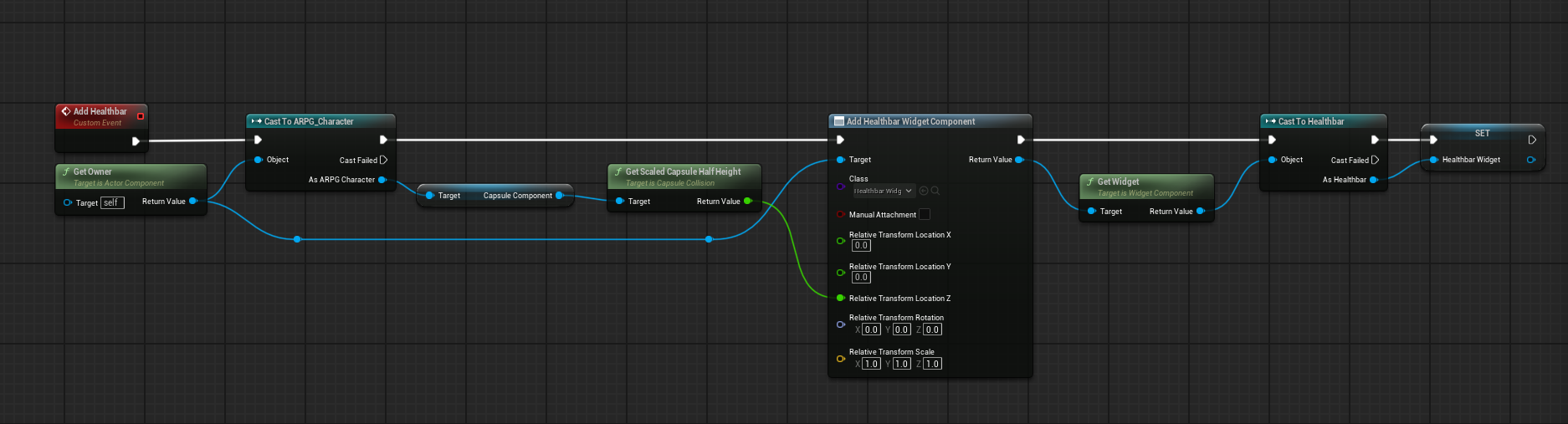
so it should be owned by the actor
and I meant a world widget not a HUD one
dusky cobalt
autumn pulsar
I have an actor component that spawns a widget component
so get component by class, get healthbar widget, set visibility to collapsed?
autumn pulsar
dusky cobalt
so get component by class, get healthbar widget, set visibility to collapsed?
well I guess where I'm struggling is getting the current player viewport
err
you shouldn't be able to see yours, but others should be able to see it
dusky cobalt
oh its multiplayer?
autumn pulsar
no, but you can swap possession
so I need to check if it's owned by the local player I guess?
dusky cobalt
so who is othersif its not multiplayer? 😄
autumn pulsar
Just kind of fumbling through the logic
I guess I'm not sure how to get the local player controller to see if the pawn is possesed by the current player
dusky cobalt
if you posses next things that doesnt change which player you are
autumn pulsar
yeah I get that
faint pasture
autumn pulsar
I have an actor component that spawns a widget component
just do that or don't do that based on if owner is locally controlled
autumn pulsar
get owner doesn't seem to have the "is locally controlled" function
I guess I have to cast to pawn?
faint pasture
autumn pulsar
I guess I have to cast to pawn?
you already are doing a cast which at least includes pawn so just do the check after that
ARPG_Character is a pawn
autumn pulsar
I was going to do it in the health component I was adding, so I wanted it to be more generic
oh hmm, AI controllers also register under "locally controlled"
dusky cobalt
just so you know, if AiController controlls pawn, it's owner is not Player Controller that you plugged when you spawned it, i learnt hard way myself 😄
it overrides the owner and AiController is owner of that pawn
 sweet jetty
hello can anyone help me i am making a multiplayer game i have multiple different character blueprints and want to spawn a random one when the player connects
subtle ocean
dusky cobalt
All I know that yes it's possible but cannot tell you how.
Okay I found a workaround ! thanks for helping, hopefully this knowledge might help you in the future (?) https://www.youtube.com/watch?v=aA_8NLzbUTA

In this video we'll talk about Exporting Particle Data from our particles systems to use in our blueprints for Niagara in UE4.
UE4 Playlist: https://www.youtube.com/playlist?list=PLomQNLPOWtzbpKLbhlyYYneuoPfMgfE9f
Unreal Website: https://www.unrealengine.com
Chapters:
0:00 Intro
0:31 Setup
1:38 Niagara System Collision Test
2:00 Niagara Syste...
autumn pulsar
sweet jetty
hello can anyone help me i am making a multiplayer game i have multiple differen...
You're kind of asking for the moon in terms of implementation, but you might be able to make an array of classes to use when constructing the actor https://i.imgur.com/uFrY70H.png
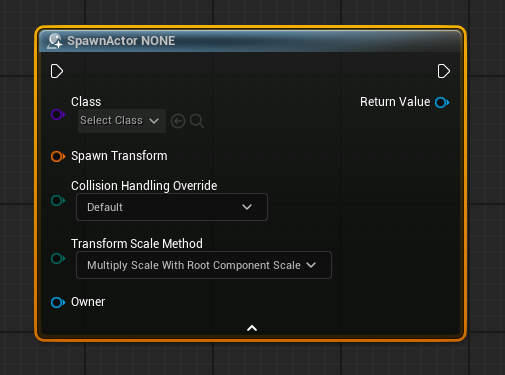 subtle ocean
dusky cobalt
All I know that yes it's possible but cannot tell you how.
subtle ocean
dusky cobalt
All I know that yes it's possible but cannot tell you how.
The idea for me was to set up an "Export Particle Data to Blueprint" on particle spawn (my explosion). I then link it to my blueprint thanks to user parameters, then, when I receive the data package, I don't do anything with it but I just call the function I implemented.
This is is probably shady information but let me know if you want deeper explanation
autumn pulsar
maybe not use the spawn actor mode
dark drum
autumn pulsar
you shouldn't be able to see yours, but others should be able to see it
I believe there's an 'owner no see' option on components. I'd imagine widget components would have it as well.
I'd imagine just enabling it would do what you're wanting.
dusky cobalt
subtle ocean
The idea for me was to set up an "Export Particle Data to Blueprint" on particle...
Thank you! That is interesting approach. You didn't find anything built in the particle or this is actually the way to hack it?
subtle ocean
dusky cobalt
Thank you! That is interesting approach. You didn't find anything built in the p...
Actually there is a cleaner way to do it with "Niagara System Data Channels" but it is also way more complicated, and is mainly meant to spawn new NS in case something happens for the first one (collision with environement for example). NSDC is a VERY huge performance gain (compared to spawn at location), but is also very low level to use, and require high knowledge of the engine and niagara data package (which I don't have after 2 months using the engine u_u)
NSDC is for communication between niagara system to an other Niagara System, but could also be used to blueprint and from blueprint to trigger specific event in the Niagara System implementing the NSDC
I don't know much about its utilisation though. It look super powerfull but also very specific and complex to use, which is why I prefer my workaround (my issue was only about my NS send a notification to his parent, not building a whole factory for a NS)
dusky cobalt
subtle ocean
I don't know much about its utilisation though. It look super powerfull but also...
Haha, makes sense, good that it works 😄
faint pasture
sweet jetty
hello can anyone help me i am making a multiplayer game i have multiple differen...
override GetDefaultPawnClassForController in GameMode
 misty coyote
Guys! need some help with ragdoll. Once my ragdoll is finished, I set the actor location/teleport to a new point.. It seems that during the ragtime the camera keeps moving. So when the actor respawns, there is a disconnect between camera and player
I tried to disable input on death, but this doesn't seem to fix it
 opaque mauve
hello, anyone have any experiences with the mirror control function blueprint?
for some reason when i use the mirror control, my IK hand twisted in a weird way

althought it behaves like a mirror(the translation/rotation), but the starting position always inverted like in the picture

seems to be twisting other bone too
 autumn pulsar
dark drum
I believe there's an 'owner no see' option on components. I'd imagine widget com...
autumn pulsar
dark drum
I believe there's an 'owner no see' option on components. I'd imagine widget com...
That was the first thing I tried
but it didn't seem to work
sweet jetty
im unable to move due to enchanced input mapping when spawned how do i fix this ?


 bold sluice
Trying to make a health bar progress bar (Or, rather, fix the one I've had for a month that randomly broke).
Using this code, for some reason, it keeps outputting the progress bar result at 1.0, instead of any other value, no matter how much damage the character takes, would anyone know any sort of fix?

 solid needle
solid needle
solid needle
i make a convert seconds to day hours mins thing
the values print as normal

when i set it as a value, it completely breaks
just sets to 0
prints numbers correctly
when i combine it into a data time struct it goes to 0
i dont get it
bold sluice
bold sluice
Trying to make a health bar progress bar (Or, rather, fix the one I've had for a...
I've checked the health values, those aren't the problem. It's just the UI that doesn't properly update
It was working perfectly a month ago, it just randomly broke when I converted the health variables on the BP_ThirdPersonCharacter to that of a component's health variables from the BP_ThirdPersonCharacter
dawn gazelle
solid needle
A Date Time is a specific date. You may be wanting to use a timespan which is just an amount of time.
dawn gazelle
You may need to change your "Average Time" variable to a TimeSpan and you can also use a "Make TimeSpan" node to populate it.
solid needle
dawn gazelle
You may need to change your "Average Time" variable to a TimeSpan and you can al...
sorry forgot to thank you, thank you it works :)
autumn pulsar
If you clear and invalidate a timer, does the event it's supposed to execute not get executed?
frosty heron
Well you clear and invalidate it so it won't hit the event
 subtle granite
So Ive been fooling around a bit with unreal, blueprints and such and getting familiar with the engine itself, I recently watched a tutorial and Ive edited the BP from the tutorial a bit but the only issue I have ran into is that the camera occasionally will go into a mesh, Ive tried changing a line trace to a sphere trace to see if that corrected the issue but it doesn't.I used breakpoints but everything seems to be firing correctly So I assumed it may be on the logic. I'm pretty knew to this and am really trying to get a grasp for how to go about fixing this. Any help would be awesome!

 frosty heron
@subtle granite it seems you uncrouched when there is a roof on top of the character
go to your crouch function and do a trace to determine if you can crouch or not
 median plaza
Hi All,
I am trying to record gameplay in LyraStarterProject using take recorder… I have added Player as a Source and recorded some footage. While the recording is being done, its failing to save the recorded sequence with the warning:
Warning: Can’t save ‘…/Takes/2025-02-18/Scene_1_25.uasset’: Illegal reference to private object: ‘StaticMeshComponent /ShooterMaps/Maps/UEDPIE_0_L_Expanse.L_Expanse:PersistentLevel.BakedStaticMeshActor_C_UAID_E04F43E623D4FEF700_1435396366.StaticMeshComponent0’ referenced because it is an archetype object (private object belongs to an external map).
Can anyone please help me fix this…
Thanks!
subtle granite
frosty heron
<@378263605982003201> it seems you uncrouched when there is a roof on top of the...
Wouldnt that be this though? Sorry for the extra questions Im just really trying to soak up any knowledge I can!

I originally had used a line trace by channel instead of the sphere trace by channel.
 boreal saddle
I want to create blueprint system for summoning a flying mount from a third person character, does anybody know of any good resources for such a task?
 topaz condor
can someone here help with something, i followed this guys tutorial https://www.youtube.com/watch?v=5nMKEKV0acI&t=203sstep by step on adding steam listen servers to my game and it works perfectly in PIE but when i go to stand alone and click create session it goes from main menu to thirdpersonmap back to main menu

This video covers how to set up Steam Multiplayer in Unreal Engine 5.5 using Blueprints.
It covers all of the setup steps, how to create and join sessions, as well as testing the game works over steam (even when you only have access to one computer through the use of Sandboxie).
If you enjoyed this compact tutorial, please comment below what yo...
 tropic token
how do you add custom category for BP type here?

And maybe it's possible to hide some standard ones I don't need for particular type?
tropic token
surreal peak
Needs to be done through C++ iirc.
is it some kind meta information parsing extension?
strange that it's not standard thingy 🙂
should be very usable by artist folk
 burnt rose
Hi guys, in UE5.5 there is no target arm length under spring arm details. May I know how to change target arm length now?

Oh I found it, my eye is blind 🙂
Never mind.
dry sleet
tropic token
strange that it's not standard thingy 🙂
It is pretty strange, but yes, sadly it's C++ only. Here's a guide on how to do it:
https://zomgmoz.tv/unreal/Editor-customization/Custom-Property-Editor-Sections
An alternative might be to use this plugin:
https://zomgmoz.tv/unreal/Plugins/zomg's-editor-addons
The plugin does not allow you to add those section buttons, AFAIK -- but it allows you to sort the details panel so that your categories end up at the top.
As much as I like that plugin I don't think any option is ideal -- hopefully Epic will make it easier in the future because the amount of clutter in the details panel can get ridiculous.
tropic token
dry sleet
As much as I like that plugin I don't think any option is ideal -- hopefully Epi...
yea, it's very project specific. and for my project, for level designer, 100% of standard properties are junk for several common objects. it's painful to dig them out
dry sleet
yup yup -- I find myself using the Favourite property option more and more
but that, too, is a pain
barren tangle
surreal peak
I had code for that once.
what you show me yesterday is just amazing 😄

all of that just replaced by

lol
that's the issue with blueprint there are to much usefull blueprint that we don't know 😢
 cobalt lynx
Any idea why I get empty texts on the random bot names? The Array has 100 entries...
 maiden wadi
cobalt lynx
Any idea why I get empty texts on the random bot names? The Array has 100 entrie...
maiden wadi
cobalt lynx
Any idea why I get empty texts on the random bot names? The Array has 100 entrie...
You would need to debug it. Not enough info here. If there are 100 entries in that BotNames array, and you are 100% sure of this, then you've done something wrong with it after passing it to that function.
surreal peak
tropic token
is it some kind meta information parsing extension?
Sort of yeah. It's an Editor Module on our project that calls FindOrCreateSection on the FPropertyEditorModule when it starts up.
And to make that configurable we added a DevSettings class where one can configure the Sections and set them up.
Works most of the time.
tropic token
surreal peak
Sort of yeah. It's an Editor Module on our project that calls `FindOrCreateSecti...
but it's not open source I guess? 🙂
surreal peak
I would need to copy paste this all in here, as it's part of the project. You should be able to find similar stuff on the net.
tropic token
okay, thanks
surreal peak
It's really not much, you should already be 80% there with just the two things I listed.
true valve
I tried cull distance volume on my actors. How come it's not working?
I have actors with some static meshes.
cobalt lynx
maiden wadi
You would need to debug it. Not enough info here. If there are 100 entries in th...
Nope. Entries Exist and If I add a manually random string it also works correct
tropic token
dry sleet
It is pretty strange, but yes, sadly it's C++ only. Here's a guide on how to do ...
works like a charm. thank you so much 🙂
 dry sleet
Nice! Thank zomg :D