#blueprint
1 messages · Page 285 of 1
 spiral ridge
 faint pasture
spiral ridge
Is it possible to run blueprint in edit mode ?
faint pasture
spiral ridge
Is it possible to run blueprint in edit mode ?
You can make editor utility bps
what are you trying to do?
spiral ridge
faint pasture
what are you trying to do?
I built a level from draft static meshes. Now I want to replace them(SM) with art ones, using randomness. I have a blueprint for this, but it only works in playmode.
spiral ridge
faint pasture
You can make editor utility bps
Thank you, now I finally know what to look for.
 fiery anvil
i dug into it, i have it sort of working, options is working, but i cant figure out how to make the pause menu close on tapping escape again.

 digital glacier
the white text below the RULES text is HTTP requested off the internet, so it could be of various size, but my question is how do i make it always fit within this black border? as in auto size, etc

do i use widgets?
 maiden wadi
fiery anvil
i dug into it, i have it sort of working, options is working, but i cant figure ...
maiden wadi
fiery anvil
i dug into it, i have it sort of working, options is working, but i cant figure ...
In CommonUI you never set InputMode commands yourself. You put ActivatableWidgets up and Activate them. The "Leafmost" activated widget, usually the one on top of the rest, sets it's input config. So when you start the game and your main hudwidget shows, it sets an input config. When you open escape menu it sets an input config. When you open Options menu it sets it's input config. When you deactivate Options, Escape menu becomes the active leafmost again so it sets it's input config, when you close it, the hudwidget becomes the leaf most and sets it's input config.
fiery anvil
maiden wadi
In CommonUI you never set InputMode commands yourself. You put ActivatableWidget...
so what should i do
 autumn pulsar
Do animation blueprints not have interfaces?
faint pasture
autumn pulsar
Do animation blueprints not have interfaces?
what are you trying to do
autumn pulsar
Let my main blueprint inform the animation blueprint of events that happened
like if I landed on the ground
so it can change states
faint pasture
why not have the animbp just check like normal?
autumn pulsar
checking every frame seems wasteful?
I suppose it's checking its own variables every frame
faint pasture
autumn pulsar
checking every frame seems wasteful?
something somewhere is always checking every frame
autumn pulsar
but having a laundry list of things being passed to the animation feels clunky
so wasn't sure if there was a more proper way
faint pasture
I'd keep dependencies going one way, you can always use delegates too
animbp knows about pawn, pawn doesn't need to know about animbp
autumn pulsar
partly why I was thinking about an interface
but I suppose the leeching effect would allow for multiple abps to mooch off the same pawn
 novel dune
Hi Anyone know how to pause the run animation ( Event tick ) for 5 seconds the beginning of the start game until the count will be from 5 seconds to 1 done then game will start
faint pasture
Can alwyas use a dispatcher if you want it to actually be eventful
faint pasture
novel dune
Hi Anyone know how to pause the run animation ( Event tick ) for 5 seconds the ...
you can start with tick disabled or just don't set CanMove to true until you want to
autumn pulsar
I guess I'm struggling to manage the overall pawn state and communicate that to the animation
faint pasture
autumn pulsar
I guess I'm struggling to manage the overall pawn state and communicate that to ...
look at the template projects
autumn pulsar
the default Unreal projects are kind of rough, and feels like it's code made to be simple rather than practiical
faint pasture
just tick for now
you're already reading data each frame, might as well get IsOnGround while you're there
it'll cost nothing
autumn pulsar
for example, I'm in an attack animation, and I sort of want to "lock-in" that state so things don't interrupt. but using either bool or switch feels like a rough and thorny path.
There's also the issue that the animation state doesn't properly switch if you're in a montage
novel dune
faint pasture
you can start with tick disabled or just don't set CanMove to true until you wan...
I am making running game like subway surfers but I would like to add 5 seconds to count 5 to 1 second then game will be run but when the count happened then player start to run and I was trying many ways but for nothing
faint pasture
autumn pulsar
There's also the issue that the animation state doesn't properly switch if you'r...
what doesnt switch
faint pasture
novel dune
I am making running game like subway surfers but I would like to add 5 seconds t...
start by getting print strings to happen like 5 4 3 2 1 Go
hell you could do it with delays
or a timer
novel dune
faint pasture
start by getting print strings to happen like 5 4 3 2 1 Go
Let me try hopefully will work thanks Adriel
autumn pulsar
Uh for example, I have a run state and a walk state in the animation. And once the speed goes below a certain amount it swaps to the walk state. If I run, perform a montage, and then at the end of the montage the character comes to a stop, the blending update happens after the montage
faint pasture
autumn pulsar
Uh for example, I have a run state and a walk state in the animation. And once t...
that's on you. At end of montage, what do you want to blend to?
autumn pulsar
so it blends into the run animation for a split second before updating to the walk animation
faint pasture
You want that to happen or to blend to walk from montage?
autumn pulsar
Well, if I'm exiting the montage with a velocity, I should exit in the run state, and if I exit without velocity, into the walk state
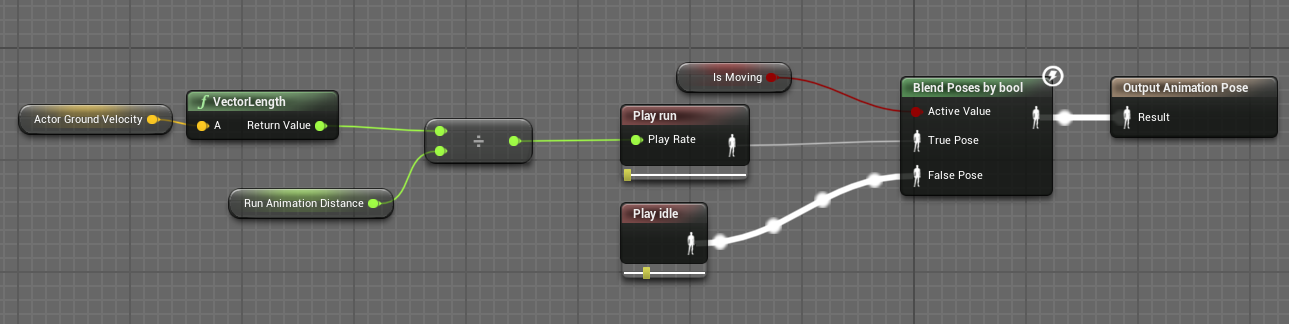
but this logic chain doesn't update until after the montage has played
faint pasture
autumn pulsar
https://i.imgur.com/yukAm9g.png
or does actor ground velocity not update during a montage?
gotta debug that
autumn pulsar
I grab it from the pawn
faint pasture
wait you don't have a run and walk, just a run
you mean run and idle?
your locomotion should just be a blend space anyway TBH
It's probably doing exactly what you tell it to do. the char is moving during the montage, so the blend is on the run side, then you blend out of montage, into run side, THEN into idle.
just put all your locomotion in a blend space so you can smoothly transition from idle to run without having to use that bool
autumn pulsar
faint pasture
your locomotion should just be a blend space anyway TBH
issue with blend spaces is they don't properly sync leg motion
faint pasture
autumn pulsar
issue with blend spaces is they don't properly sync leg motion
wat
sync with what
autumn pulsar
so if you're going slightly below the top speed you end up doing a bit of a shuffle
rather than a slower run animation
autumn pulsar
faint pasture
you can have the speed depend on the input to the blend space
right, but if you're going 300 our of 600, you get a blend that's halfway between idle and run, and that's an odd shuffle motion
faint pasture
autumn pulsar
right, but if you're going 300 our of 600, you get a blend that's halfway betwee...
don't do that
have run start at 100
100 to 600 is all run, at different speeds, for example
autumn pulsar
I know that amounts over the max increase the speed of the animation, but if the animation travels at 600 uniits per second, you'd need 600 to be 1.0 animation playback speed
and I'm not sure if a blendspace would support 1.0 playback for idle and 0.167 for run
faint pasture
autumn pulsar
and I'm not sure if a blendspace would support 1.0 playback for idle and 0.167 f...
just tested, works fine
 tropic kite
how would someone handle being able to perform an action within at a specific time window?
faint pasture
tropic kite
how would someone handle being able to perform an action within at a specific ti...
explain more of what you're trying to do
where does the time window come from
tropic kite
Action > 1 second timer > .1 second window (looking for button press) > true = execute new move // false = do nothing
faint pasture
at the input level or gameplay level?
what's the actual mechanic
you can do that with a timeline but could also do it many other ways
tropic kite
its like in any actionable follow up to a previous move
faint pasture
is it always 1 second and 0.1 second or does that vary?
tropic kite
but there's a specific amount of frames that the 2nd action can come out
tropic kite
faint pasture
is it always 1 second and 0.1 second or does that vary?
just example numbers
could be anything
faint pasture
you could do it with anything with some sort of duration
the details will depend on the specifics
could be an anim montage, could be some input system
tropic kite
its not tied to an animation
faint pasture
What are you trying to do, like action chaining or a general input queue or what
Give an actual example in your project. You press button and what happens?
tropic kite
so I have a dash and after a second I want to have the abilty to have a bigger jump if timed correctly
if you press the button correctly within the set window
 chilly osprey
am i going insane or is this all the same? beacuse when i run the program the enemy doesnt follow the player charecter. i have the navmesh and the seeing component but the enemy just doesnt move i swear i copyed everything...

 tropic kite
but that window doesn't happen right away
faint pasture
tropic kite
so I have a dash and after a second I want to have the abilty to have a bigger j...
what does the definition of your abilities look like?
is there a way to check the remaining duration on an ability?
faint pasture
Show the implementation of your dash
faint pasture
chilly osprey
am i going insane or is this all the same? beacuse when i run the program the en...
check that the thing can navigate to anything at all
chilly osprey
the navmesh looks the same as in the video supposedly it can but it doesnt
i saw that in the video he had a move charecter component on the enemy charecter but when i searched for it i didnt find anything
 pastel tulip
chilly osprey
i saw that in the video he had a move charecter component on the enemy charecter...
pastel tulip
chilly osprey
i saw that in the video he had a move charecter component on the enemy charecter...
what blueprint class is your enemy character?
novel dune
faint pasture
start by getting print strings to happen like 5 4 3 2 1 Go
I was trying the character was pause but the run animation still working
chilly osprey
pastel tulip
what blueprint class is your enemy character?
its a pawn
pastel tulip
chilly osprey
its a pawn
yeah, it won't have the character movement component when you search for it then, because that is inherited from the character blueprint class, not for the pawn class. try setting it up with a character instead, and if you want to change the mesh for it, delete the skeletal mesh and add a static mesh instead (that's just for visuals), and then give it a go.
chilly osprey
ok got it
 azure haven
Is there a way of making a Float go from 0 to 1 over time?
 kind estuary
I have a pawn that is the player pawn, and i need to have different cameras that will switch at runtime.
How do i make a separate camera actor, that becomes the camera, without leaving my current pawn? So far all that works is by possessing an actor with a camera
 frosty heron
Look into lyra's camera manager.
faint pasture
kind estuary
I have a pawn that is the player pawn, and i need to have different cameras that...
have you tried set view target?
 spring magnet
I'm curious if anyone has any input on the decision between GameInstance or GameState or other when it comes to storing and managing a QuestSystem.
This is for a multiplayer game where the quests' progression belongs to the host (clients are just tagging along).
 surreal peak
frosty heron
Look into lyra's camera manager.
surreal peak
frosty heron
Look into lyra's camera manager.
Ah come on, that's a strange suggestion.
We are in #blueprint and Lyra stuff may very well be in C++. And that question really just needs the SetViewTarget call :D
frosty heron
surreal peak
We are in <#221798862938046464> and Lyra stuff may very well be in C++. And that...
I only say it because he is a frequent visitor in #cpp
And I thought using set view target does not give you the ability to move it around? I could be wrong here.
surreal peak
They never said it has to be controlled
frosty heron
That's how I understand it 
surreal peak
spring magnet
I'm curious if anyone has any input on the decision between GameInstance or Game...
GameInstance shouldn't really hold gameplay state.
If it's a shared quest system then GameState.
frosty heron
I'm reading the part where he says "switch". If it's just fixed camera for cinematic then yeah set view blend it is
surreal peak
Even without cinematic
If they want to control it they can still do that too via some simple enabling of input and adding IA to it fwiw
frosty heron
Cool, I never know that
surreal peak
But given they want to keep the pawn active it sounds more like only the view should change
frosty heron
Thought we are always locked to the view
surreal peak
Hm na, input is a stack.
You can put all sorts of actors into that stack if they should process input
Not always ideal but possible
frosty heron
Awesome, sorry for the bad suggestion, it was said with the best intent
Just misunderstanding on my part
surreal peak
It's more the "Look at Lyra" part that, I guess, annoys me
frosty heron
In my experience to "switch camera" I had no other thing that I know can do that.
surreal peak
Unless it's a very specific question that is really hard to answer and Lyra has the exact setup to solve that issue and it's not otherwise available
frosty heron
Except the camera mode from that project
surreal peak
Like, pointing someone to UT code for predicted projectiles
surreal peak
frosty heron
Except the camera mode from that project
Fair enough I guess
PlayerController has a boolean "AutoManageActiveCameraTarget" or so
If you turn that off and possess a pawn the ViewTarget will even stay on the PC
Input will still be on the Pawn by default of course
Doesn't really have much to do with each other
frosty heron
I c i c
autumn pulsar
Can I pad out an array with null references?
frosty heron
I'm sure you can
frosty heron
No reason that you can't.
Use the add and add nothing
Or for init and all empty. You can use set size
autumn pulsar
oh set array element has size to fit, cool
Trying to do a jank input system lmao
Was thinking enum into an array would be simplest
I wanted something I could iterate over, and map doesn't like that
frosty heron
Arrays if you need to know the index
Never touched sets, but I think it's a list but each element has to be unique
Could be wrong though let me google that
autumn pulsar
Well, I was going to have a skill bar like an mmo
so I needed a way to match each slot with a button or whatever
but when you get new ones I wanted to just slap something in the first available slot
frosty heron
Hmm it does look up with keys, so yea I guess the key can't have duplicate
Kinda like map then
autumn pulsar
So I just have an enum I'm basically using as a map into an index
frosty heron
autumn pulsar
Well, I was going to have a skill bar like an mmo
I think array is valid here
As for the slot, maybe uobject
frosty heron
I would probably just map the index with the slot index
So the first element of the array 0 represents slot 0
autumn pulsar
frosty heron
So the first element of the array 0 represents slot 0
That's what I'm doing
then just having an enum so I can have a name for it
since it's just an int under the hood
chilly osprey
it didnt work
frosty heron
Yeah enum is just a named int
But perhaps using gameplay tag allow your system to be more flexible
Can't think much on top of my head atm though
autumn pulsar
frosty heron
But perhaps using gameplay tag allow your system to be more flexible
I wouldn't really need more than 5 bars or 50 elements lmao
frosty heron
Yeah but 5 slots or 50 slots is more or less the same
You can get away doing things manually for a few slots only project but it helps creating code that scales
E.g. instead dropping the slot bar manually to the widget designer, you create them at run time depending on the number of hot bars you specify.
autumn pulsar
Well, realistically this project isn't actually going to end up as anything
mostly just me playing around and learning things
I'll definitely look into tags more later, but this is good enough for now
I think FF14 has pretty hardcoded hotbars
I shiver to meet a person with more than 5
chilly osprey
i changed the pawn for a charecter blueprint but it didnt work.
autumn pulsar
Does UE4/5 have "Soft Collision" ?
As in, Actors can be inside of each other, but you get gradually pushed out
or is that something I'd have to do myself
faint pasture
You could probably get that behavior by tuning the physics engine but I wouldn't rely on it
how gradually are you talking
autumn pulsar
As in push each other in opposite directions until you’re no longer inside each other
I guess I could do a capsule overlap and just apply impulse every tick
faint pasture
you'd want it to be a force but yeah
spring magnet
surreal peak
GameInstance shouldn't really hold gameplay state.
Hmm, so I guess I'm having trouble differentiating things that should and should not be on the GameInstance then, because it's my understanding that multiplayer subsystem logic should be there, but is that all? Because I feel all these big systems could just exist on GameMode and GameState (and even just on Actors), where SaveGames answer the persistence of data between level transitions.
frosty heron
It's not hard really
spring magnet
I guess another way to ask it would be: for a game like a co-op multiplayer rpg, which systems, if any, would best fit within the GameInstance?
frosty heron
Game instance is presistence object, you used it to store "carry data" that would otherwise be lost when using non presistence object.
Game state like the name suggest.
Is the state of the game.
Like what round is the game currently at
spring magnet
I find there to be a lot of subjective overlap between what "carry data" and "game state" is though
frosty heron
Time remaining. How many players are playing. Etc.
frosty heron
spring magnet
I find there to be a lot of subjective overlap between what "carry data" and "ga...
Read my example
Game state is the state of the game
Also game state is replicated
Game instance is per machine and not replicated
The distinction is crystal clear at this point
On how they are used in multiplayer setting
spring magnet
Right, I've read those examples through documentation as well, but I disagree on the distinction being crystal clear. I understand the functional difference (game instance is persistent, gamestate is replicated, etc) but the implementation of larger systems is still unclear to me. For example, a QuestSystem would contain data that must persist, I would expect the quest data (which would influence essentially everything in the game) to be persistent between levels, but I am being told that it should instead be on the GameState, because it describes the "state" of the game
frosty heron
I mean if you understand their life time and usage, it's crystal clear.
How they are incorporated to system is highly dependent on your project.
Going by your question with quest system, if we are talking about the nature on how the quest is stored or read.
Then that's highly dependent on your game.
For example, Wether you want to store the save game locally or have them on the cloud.
If you want to go like baldurs gate route
Where client just keep copies of their save file, then you can use game instance to store the save data.
spring magnet
In my example, all save data is stored locally on the host machine, and the clients read and contribute to that save data
frosty heron
Right, so any specific issue?
I am saving locally too at this moment until I got AWS working
I am doing rpg co op too if that helps
spring magnet
I'm not hitting a specific issue, I'm moreso worried about digging myself into a hole*. I'm in charge of developing the foundations of these systems, and right now, the entire SaveGame management and QuestSystem exist within the GameInstance
frosty heron
You can make this simpler
Because you said you only care about the server's quest yea?
spring magnet
That's right
The clients are aware and will be seeing all the relevant information, but the progression of quests and what happens from that is all handled and saved on the host's machine. Clients have very little progression-related data (but still have some) that they will take with them upon disconnecting and playing on their own
frosty heron
So you can ignore everyone save that is not related.
The easiest way to show this is by only letting client to inform server of their own data where needed.
This is how I load my player cosmetic atm.
Each player have their own save file, pertaining their progress and their cloths/ equipment.
Client join -> client send cloths data -> server replicate to everyone.
So you can simply just not do anything for the progress on the client part
Have client get the their save data and inform server what it needs to know
spring magnet
frosty heron
So you can ignore everyone save that is not related.
The easiest way to show th...
Yup, I have something similar happening in my project as well, so far everything is working just fine, like I said, I just worry that continuing to develop such systems in the incorrect location will eventually have me kicking myself in the ass
frosty heron
I don't know about incorrect but there are cons of course
Since the save file is local then anyone can tamper with it
Preventing cheaters would be impossible task
spring magnet
Yup, and that's okay for this project, it's a casual co-op project so cheating isn't really hurting anyone
frosty heron
Wdym by incorrect place anyway?
Your quest shouldn't be in game instance btw
Why would it be
spring magnet
frosty heron
Wdym by incorrect place anyway?
Well I'm not saying I know it to be incorrect, I'm just worried about eventually finding out that may be the case
frosty heron
Game instance just there to read the save file
Which you can then use to send server data
The quest manager or anything else shouldn't be in game instance if that's the question
spring magnet
Yeah, it's the majority of my concern. eXi had mentioned moving it to the GameState
frosty heron
I agree 110% too if that's the quest where everyone sees the same quest (in this case the server)
If everyone can have their own quest then I do say player state
But if the game share the same quest between all players then game state
spring magnet
And then I am forced to utilize SaveGames to temporarily store all of the quest data that I need to persist between level loads, but I guess that's not terrible?
frosty heron
It depends on your project and when you want to save
At check points you can just tell every player to make a new save file or to overwrite the last save file they used
Or if you want, you can also have server grab all the necessary data at the start, e.g. cloths stat, equipment etc.
spring magnet
Well, can I ask then, in your opinion, if a game like Animal Crossing had a bit more of an involved co-op experience (because currently it's basically non-existent), and we use that as the example, what would you put on the GameInstance?
frosty heron
Then that can be stored in the server game instance
When game ends, server propagate players data to client and tell them to save it to their machine
I never play animal crossing 😔
spring magnet
Hmm, Stardew Valley?
frosty heron
Neither but I would use game instance to read save and load data, nothing more.
spring magnet
How about online subsystem logic?
frosty heron
Client load game-> client send server, their data from their save game -> server store the info in its machine -> server replicate to everyone.
frosty heron
spring magnet
How about online subsystem logic?
Hmm I mean it's fine, maybe? Might want to ask other opinion on that .
I only have join search and host, and they are stored in the lobby game mode but it could be anywhere imo.
spring magnet
Yeah I'm currently supporting joining mid-session so the logic needs to exist somewhere always accessible
(which, currently seems to work fine being on the GI)
frosty heron
Yeah, I am not entirely sure for anything more involved
GI may be fine if you can't encapsulate it somewhere else.
I probably will make a subsystem out of GI
But if blueprint only option then GI should be fine
Might do that actually, if I need to do stuff like grab friends avatar etc.
Doesn't make sense to keep it in my lobby game mode
faint pasture
with saving and loading it gets a lot looser. I don't really see anything you can do with GI that you can't do with GS + save/load
spring magnet
I looked into it doing subsystems but I tend to stay in BP until it's necessary to not
spring magnet
frosty heron
Doesn't make sense to keep it in my lobby game mode
I ended up having an "EventGraph_Online" for all of that within the GI, and put all the variables/functions in their own Category, kept it feeling "kind of" like a separate subsystem lol
spring magnet
faint pasture
with saving and loading it gets a lot looser. I don't really see anything you c...
Yeah I may shift a lot of my stuff into GS after these conversations, I rarely use GS tbh so I'm hoping I'm not going to be misunderstanding how to properly utilize it
If i recall correctly, GS can be specified per GameMode, right? And so I could probably also take advantage of inheritence and write all of my OnlineSubsystem logic in a master level GS, and then use Children of that in my GameModes..?
frosty heron
Does other player need to know about the data ? Then game state as that is replicated
faint pasture
spring magnet
If i recall correctly, GS can be specified per GameMode, right? And so I could p...
why do you have so many gamemodes?
frosty heron
Server -> get game state -> set current quest to feeding cat
Client game state will have their quest updated to feeding cat.
Profit
spring magnet
faint pasture
why do you have so many gamemodes?
Base game is sort of like an OpenWorld exploration mode, but there are mini gamemodes that the party can opt into and then begin
spring magnet
frosty heron
Server -> get game state -> set current quest to feeding cat
Client game state ...
I like that your example is feeding a cat, my game's characters are cats, lol
frosty heron
Can you even change game mode at run time?
spring magnet
frosty heron
Can you even change game mode at run time?
You can change it per level
frosty heron
spring magnet
You can change it per level
Totally but yea was wondering if you want to change it when the players want to start a card game in the same level
spring magnet
I typically use a special gamemode dedicated to MainMenu stuff, and then another GameMode for all "in-game" stuff
spring magnet
frosty heron
Totally but yea was wondering if you want to change it when the players want to ...
Ah, yeah I don't think so
And even if I could, I'd be too scared to do something like that lol
frosty heron
spring magnet
I typically use a special gamemode dedicated to MainMenu stuff, and then another...
Same here
It's just a handy actor that get spawned for that level
Beats level blueprint anyday
spring magnet
Agreed lol, okay so I guess from this conversation, I'll be moving my QuestSystem to the GameState, and I would like to try to move my OnlineSubsystem stuff into the GameState as well, but at a higher level of inheritance.
SaveGame stuff could be done on the GameInstance, but, I think that might also be worth putting on the GameState too?
frosty heron
To me GameState hold the state/object/variables that repretenst the state of the game.
You don't neccesarily want to place the entire system in the GameState.
I would have manager or component for the actual system.
the manager / component can propagate the data to game state which will then be replicated to client
spring magnet
frosty heron
the manager / component can propagate the data to game state which will then be ...
I've typically avoided doing this because I like to encapsulate things as tightly as possible, but maybe i'll be better off doing it like you're suggesting
frosty heron
spring magnet
I've typically avoided doing this because I like to encapsulate things as tightl...
Try asking in #multiplayer for sanity check 🙂 . My journey has been nothing but trial and error
 thorny forge
Hey erm is the only way to interact with an interface via overlap collision or line trace?
I just want to do a key press on my keyboard that will turn all actors with this bp interface hidden, but then if I press the key again they will all reappear.
The actors are placed in the world and have the interface in class settings, the event has the set up to set hidden on flip flop.
I press a key, call the interface function message but nothing happens :S
frosty heron
interface is interacted with function call.
Basically do X on this object if it implement the said interface
thorny forge
That's what I thought
frosty heron
and that's how it work.
thorny forge
But literally nothing happens
 bleak mica
are they all the same actors
thorny forge
I'll have to explain I'm away from pc.
Yes they are all the same actor and pawn is firing the key press to call the interface function
This actor in the world is duplicated several times
But it doesn't receive the call
bleak mica
and you want to just push a button and they hide/show without having to look at them
thorny forge
Yea
frosty heron
Get All Actors of Class -> BaseClass -> For each loop -> Does Implement interface? -> Toggle vissibility
thorny forge
So I have to get all actors of class then
autumn pulsar
Is there a way to forcibly prematurely end a montage playing on an actor?
frosty heron
there are many ways
but why are you afraid of get all actor of class
do the actors share a base clas at some point?
frosty heron
autumn pulsar
Is there a way to forcibly prematurely end a montage playing on an actor?
stop montage
thorny forge
I wanted to avoid any get all and casts just for cleanness and simplicity
autumn pulsar
frosty heron
stop montage
What has access to that
thorny forge
I thought the interface function would just receive the call
frosty heron
thorny forge
I wanted to avoid any get all and casts just for cleanness and simplicity
how are the actors that implement interface spawned?
autumn pulsar
anim instance?
frosty heron
autumn pulsar
What has access to that
hmm do you want to do it per component or via anim instance?
i think both has it
thorny forge
They are just in the level
frosty heron
thorny forge
They are just in the level
They can register them self to some sort of manager
BeginPlay -> Get MyThingManager -> Add self to an array
now you don't have to use get all actor of class
simply when you want to toggle,
Get MyThing Manager-> Get Array -> Does implemnet interface ? -> Toggle
thorny forge
Oh that is such a good point. Nice I'll go with that manager method
So can you guys explain why the other doesn't work?
frosty heron
not without looking at the code
thorny forge
You know not using get all actors of class. I was under the impression anything with that interface should listen to the call regardless
bleak mica
or on begin play do one get actor of class and add them to array then on on button press access the array to get the actors. that way there is only one call but others as cold summer stated
frosty heron
get actor of class will give you a random one from the level
thorny forge
I mean the interface is just there in the class, so I expected the actors with the interface to just receive the call to function regardless of how I call it wether it's a key press or overlap
frosty heron
thorny forge
I mean the interface is just there in the class, so I expected the actors with t...
the key press and overlap is just the mean to call the function
that's irrelevant
thorny forge
Exactly
frosty heron
so the problem lies elsewhere
and we can't say without looking at the code
for all we know, maybe your input isn't even working to begin with.
this requires you to debug on your end
thorny forge
The input works I can see it firing in debug
frosty heron
yeah but we can't be much of help without looking at the code
thorny forge
It's the actors they don't receive in debug, the lines don't glow
frosty heron
Something->RunFunctionInInterface works if that something implement the interface
period.
thorny forge
That's what I thought. It's so weird because I didn't think I'd need to get all actors or add them to some kind of manager.
Basically the best way I can describe it is like this
frosty heron
that's misunderstanding, nothing is listening, neither the interface is a global accessor kind of thing.
interface is probably close to multiple inheritance
except it can't hold state
thorny forge
Pawn: AI_hide key press > interface function "hide actor".
That's it for pawn.
For actor it's:
Interface event "Hide actor" > flipflop > A = hide, B = Hide off (set hidden node)
That's literally it
Ofc actor has the interface implemented
frosty heron
Just because I do MyFood ->Implement Highlight -> Highlight
Doesn't mean every singl;e thing in the world that implement highlight will get highlighted
spring magnet
thorny forge
Pawn: AI_hide key press > interface function "hide actor".
That's it for pawn....
The interface function is only firing on the pawn. If you want it to fire on the other actors, you need to get a reference to those actors and call the interface function with them as the target
like GetAllActorsWithInterface, then ForEach, call your interface function
thorny forge
spring magnet
The interface function is only firing on the pawn. If you want it to fire on the...
Right, so I need to get a reference like that then. Thought I could avoid it to be clean and easy with no getting all process
Alright fair enough, thanks for the education everything I understand now
Everyone*
autumn pulsar
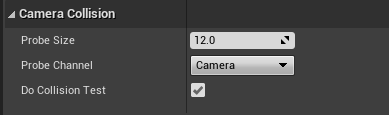
Is there a way to change what ECC_Camera collides against? it's colliding against pawns and physics body which I don't want
frosty heron
Make the pawn and physic body ignore / overlap camera?
autumn pulsar
Not sure where II'd change that. I don't see the Camera Collision channel in the collision settings of the project
frosty heron
in the pawn details panel or am I misunderstanding something
 autumn pulsar
*spring arm
is what I meant
but Camera is called "ECC_Camera" and is the default probe channel
spring magnet
autumn pulsar
https://i.imgur.com/XpKW1Zb.png
The DoCollisionTest is what makes the camera collide with things. The test uses the Camera Trace channel. You'll have to toggle that off on every component that you do not want to collide with the camera's (spring arm's) collision test.
 velvet trout
Can someone please help me? I'm creating a subways surfers type of game in Unreal, but I don't know how to make it so the player speed would slow down for a few seconds when they hit the obsticle
frosty heron
Go to the pawn and set the collision to ignore / overlap camera
do it for the capsule component and the skeletal mesh comp
or any other comp you don't want to block
autumn pulsar
okay I think I finally understand how this works
frosty heron
velvet trout
Can someone please help me? I'm creating a subways surfers type of game in Unrea...
OnHit event is called when you make contact
autumn pulsar
Thanks
I thought the trace would choose what it hits, not that the receiver would choose what it gets hit by
bleak mica
ok now for my beginner level question. how do you properly attach and detach actors/components and then give it physics when its detached. so like it falls to the ground. images of code used


 autumn pulsar
bleak mica
ok now for my beginner level question. how do you properly attach and detach ac...
autumn pulsar
bleak mica
ok now for my beginner level question. how do you properly attach and detach ac...
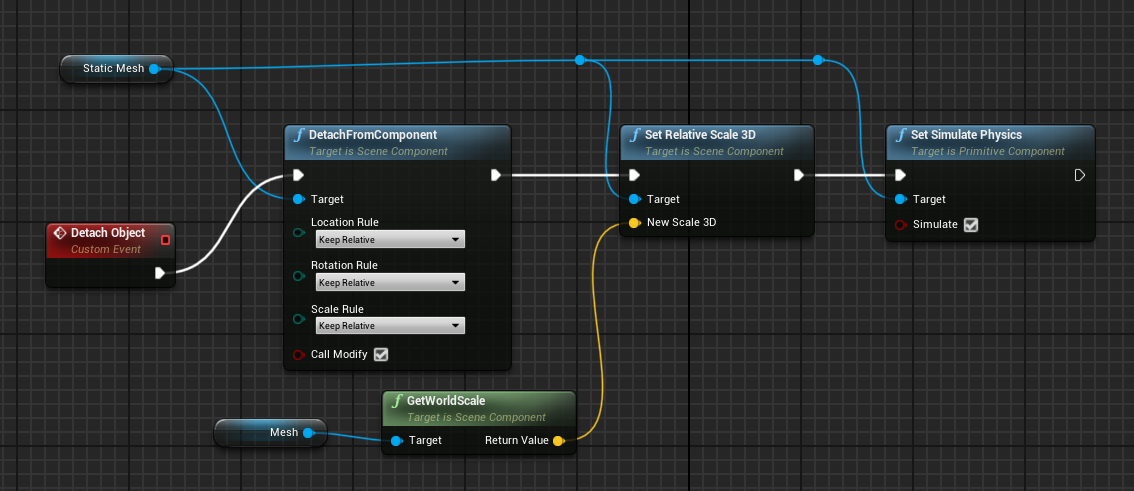 bleak mica
currently the actors just stay in place once i call the detach function
autumn pulsar
bleak mica
currently the actors just stay in place once i call the detach function
well, currently you have nothing actually plugged into the detach node
bleak mica
that part of the code is in the actor to be detached so its reference to its self
autumn pulsar
does the event even fire?
velvet trout
frosty heron
OnHit event is called when you make contact
I don't see the Onhit event with I right click search on the event graph
also ty
autumn pulsar
Try setting a breakpoint
bleak mica
i call the damage panel interface from the first person projectile bp
autumn pulsar
Well, I'd check if it even fires first with a simple breakpoint
if it does you know the issue with the logic is beyond that breakpoint
velvet trout
nvm I forgot to complie
bleak mica
short vid
the code functions and the actor does get detached it just doesn't get any physics
and second vid. just switched detach location from keep world to relative. i guess it retains the original spawn location. but still no physics
kind estuary
faint pasture
have you tried set view target?
that seems to work, but it doesnt inherit the controls (inputs) of the camera
kind estuary
faint pasture
have you tried set view target?
So i do the Set View Target As, and it now uses the other camera, but the way the camera moves its still the same way as the old
So i cant really change from isometric to 3d to 2d
because these cameras move and behave differently
 tropic token
guys, what is the best way to organize binding and unbinding delegates in blueprints? like I have this kind of event and to unbind it I need to drag this event pin only god knows where, I mean it's usually not next to binding. any way to simply it? :/

can I get ref to this event somehow?
kind estuary
tropic token
guys, what is the best way to organize binding and unbinding delegates in bluepr...
there is something called Create Event
tropic token
kind estuary
there is something called Create Event
yea, can't make it work, no drop down with events appear :/
 glass blade
i created a blank function in a parent which i override in a child ( this is where the logic is), but the logic never reaches the child. what am i missing?
 glass magnet
im using the find location closest to world location, and getting all the actors of my spline bp, however whenever I teleport it goes to the first point on the spline and not the nearest, can anyone tell me what I may be misunderstanding here
this is what I have set up right now

 livid flare
tropic token
guys, what is the best way to organize binding and unbinding delegates in bluepr...
livid flare
tropic token
guys, what is the best way to organize binding and unbinding delegates in bluepr...
Have you tried this https://www.fab.com/listings/2d251ddd-5bed-4a7b-b506-71b72238c0a4
(free plugin)

Fab.com
📘 Documentation | ☕️ Discord CommunityOur free easy-to-use plugin leverages the powerful capabilities of Unreal Engine Subsystems to introduce a streamlined method for communication between Blueprints.This simplified approach helps you avoid creating dependencies between Blueprints, making asset migration easier and enhancing your Blueprint work...
livid flare
glass magnet
im using the find location closest to world location, and getting all the actors...
Have a look at this, perhaps it may help
 glass magnet
livid flare
Have a look at this, perhaps it may help
glass magnet
livid flare
Have a look at this, perhaps it may help
for sure!
should I use a function here?
glass magnet
livid flare
Have a look at this, perhaps it may help
Also, when you get the chance would you mind explainin this function a bit
livid flare
glass magnet
should I use a function here?
you can try to use your logic using with some of the nodes in the function and se what it is printing about the spline points location, the logic is commented already, try to play and see what happens
 vague moth
Does anyone know how I can make it that, when I create the widget on the left, as a child of another widget, that the widget will be spawned at the center of the anchor point and not on to the right of it?
I looked around for options but can't find them :(


 dusky cobalt
vague moth
Does anyone know how I can make it that, when I create the widget on the left, a...
dusky cobalt
vague moth
Does anyone know how I can make it that, when I create the widget on the left, a...
Did you set pivot to be 0.5 0.5 in the main widget?
glass magnet
livid flare
you can try to use your logic using with some of the nodes in the function an...
wdym see what it is printing abt the spline points location
maiden wadi
glass magnet
this is what I have set up right now
Your first issue is that you're using GetActorForwardVector instead of GetActorLocation. The second issue is that you need to loop over all of the splines and do a distance compare to find the closest point or you'll always reset onto the first spline.
glass magnet
👍 lemme check this out
vague moth
dusky cobalt
Did you set pivot to be 0.5 0.5 in the main widget?
Do you mean the child, or the one the child spawns in?
I‘ll test it out once i‘m home
Thanks dude :^)
frosty heron
tropic token
guys, what is the best way to organize binding and unbinding delegates in bluepr...
Drag from the bind event pin and select create event.
You can then chose matching function from the drop down.
tropic token
frosty heron
Drag from the bind event pin and select create event.
You can then chose matchi...
Thanks. Found it!
glass magnet
maiden wadi
Your first issue is that you're using GetActorForwardVector instead of GetActorL...
so for each loop and get distance do compare with these actors?
dusky cobalt
vague moth
Do you mean the child, or the one the child spawns in?
I‘ll test it out once i‘m...
Probably both in your case 😄
maiden wadi
glass magnet
so for each loop and get distance do compare with these actors?
I would personally separate it out a bit further. Always make as generic of ideas out of your functions as you can so that they're reusable.
First create a function like FindClosestLocationToLocation in some blueprint library related to math or vectors. Make it take in an array of vectors, and a single vector and output a single vector. In this function loop over the vectors and do a distance check to the single input vector. At the end of the loop return the closest one from the array.
Then go back to your spline checker. Now all you need to do is ForEachLoop over these splines and dump the found closest location to them into a local array, and call the findclosest function you make with that array and player location.
glass magnet
this idea is gettin a bit too complicated for me do you have any recommendations for what I should do research into to better understand it?
maiden wadi
Do you know how to make a blueprint function library?
glass magnet
I had made one before, but im not sure what theyre for
ohhh
I think I get it
However I am gonna do research into functions and vectors/floats
frosty heron
There's already a helper pure function that return the closest actor given an array of actors
maiden wadi
He needs to compare locations though. He's getting points from splines.
 stark pier
Hey, on a side note, I am trying to use OnBeginCursorOver on a sprite but it triggers only when I click it. I activated OnMouseOver, I tried to use an alternative collision shape and I tried putting the widgets in Self Hit Test Invisible
surreal peak
spring magnet
Hmm, so I guess I'm having trouble differentiating things that should and should...
The thing with the GameInstance is that it's not locked to a UWorld lifetime.
UWorld being your level fwiw. Anything Gameplay related is usually build around Actors which are bound to the UWorld.
Doing anything like this in teh GameInstance is thus not right. The GameInstance is for things that affect the whole game for its entire duration.
You can use it to "carry data over from level A to level B" but even that is in theory "not correct".
Especially in multiplayer games. Saving and Loading is usually the better way to structure this.
You should usually concentrate your gameplay code around AGameMode, AGameState, APlayerState, APlayerController and classes that those utilize.
The multiplayer compendium pinned to #multiplayer has an overview of the Game Framework classes with some examples and explanations.
A lot of beginners have no idea how to solve some of the headache that comes with traveling between levels.
They often work in Blueprints (Multiplayer will need C++ eventually!) and don't know enough about the Engine yet to know what options there are to solve their problems.
And then you will find them noticing that the GameInstance survives level changes, so they start offloading a bunch of stuff into it, sometimes even too much (e.g. Actor references that just die on travel anyway).
And if those people then never learn anything else and start sharing that info via forum, youtube, etc., then you end up having a bunch of people confused.
 restive radish
hey, i need a little help,
I add a component to my player of an actor with attached widget, when i close the widget, i want to destroy the component, but, the component is not being destroy..
the code does reach and pass the "Destroy Component" node, but i can see in the inspector that it remains on the player..
help ?! 🙂
 surreal peak
Is that Component part of the Actor that calls DestroyComponent or part of another Actor?
 surreal peak
But that's a Widget. Where is the Component code?
 surreal peak
Yeah so the Owner is whatever Component you are in
DestroyComponent in BPs doens't allow destroy calls from anyone else but the Component or its Owner.
restive radish
i checked, and the owner seems to be the player
surreal peak
Unless the Owner was never specific, which I think isn't an option with AddChild.
restive radish
or the controller
surreal peak
Also ChildActorComponent for a runtime spawned Actor is just redundant.
Spawn the Actor and attach it. Don't use the ChildActorComponent.
Beyond it being redundant to be used here, it's also known to be buggy as hell.
restive radish
i just want to keep the player's code clean
surreal peak
The code remains clean either way.
restive radish
yea but for optimization purposes, isnt it better to destroy the component on the end of it's use instead of leaving it there?
surreal peak
For Optimization it's better to not use that Component at all.
The more SceneComponents you add to a Character the more expensive each recursive transform update of the hierarchy gets
Attach the Actor won't solve that I guess. Just try to avoid the Component. You really don't need it here.
SpawnActor -> AttachTo
restive radish
so how would you do a system which shows you information and then disappears until you need it again?
surreal peak
Save result to a Variable and call functions on the Journal Actor
Just destroy the actor later
restive radish
hm
restive radish
trying to make an implementation to another project easy 🙂
surreal peak
Please just trust me that the Component the way you are using it is absolutely redundant.
The Component will spawn the Actor class you set there.
You are attaching the Component and you later want to destroy it with the Actor togehter.
The Component is not needed.
Spawn the Actor, Attach it, and Destroy the Actor later.
restive radish
ok, ty
surreal peak
If you want to ensure that a System integrates nicely with another, make sure to abstract things away.
EventDispatchers/Delegates and Interfaces are usually the way to go.
But this has nothing to do with the Component stuff atm.
restive radish
got you.
tyvm
@surreal peak found the solution, just had to destroy the actor of the child actor
 surreal peak
😅 shows even more how unneeded that component is
restive radish
its just a component that automates the journal's entry and exit and then destroys itself
again, for implementation purposes
glass magnet
maiden wadi
I would personally separate it out a bit further. Always make as generic of idea...
I dont think I understand what you meant by that last bit, I think I got the function set up properly
maiden wadi
glass magnet
I dont think I understand what you meant by that last bit, I think I got the fun...
Your primary function should end up looking something like this. You loop over your actors, get their spline, find the closest point and add it to an array of points. After the loop use that array of points to find the closest one.

 spice shell
Hey folks - anyone actually figured out how to get the various User Game Settings nodes to function correctly?
Primarily, using the Apply Settings or Save Settings nodes doesn't actually seem to save the .ini file... Which means the data I load at game start isn't correct. Settings do apply for the duration of the session where they're set, but they're lost after that.
maiden wadi
spice shell
Hey folks - anyone actually figured out how to get the various User Game Setting...
I have quite a bit of experience using it. You shouldn't have to do anything but set settings on the GUS and then call ApplySettings. Which undirties it and should write to the ini.
spice shell
maiden wadi
I have quite a bit of experience using it. You shouldn't have to do anything but...
That's what I thought, but I can literally see the .ini contents don't change...
glass magnet
how would you have set up the finding closest function?
this is what I had gone for
 spice shell
and when it's read in a new session, the info is incorrect.
maiden wadi
Is it, or the folder structure it's in somehow readonly?
spice shell
I'll check, but it's just the default game AppData folder structure, so I don't see how
It doesn't work correctly in-editor either
maiden wadi
glass magnet
how would you have set up the finding closest function?
this is what I had gone...
Pretty much exactly that. But you can simplify ont tiny thing with Distance (Vector) function.
glass magnet
instead of subtract vector length
maiden wadi
Also make sure that your closest distance is set really high to start.
spice shell
maiden wadi
Is it, or the folder structure it's in somehow readonly?
Ok, the folders are actually read-only, which I suppose explains it. But how can this be? I didn't set it manually, so how is modifying the .ini file ever supposed to work?
maiden wadi
Unsure. Are you using source control? Perforce for instance can be aggressive about making things readonly.
spice shell
I am but that folder is the Steam packaged game's folder
Well, I should say, it's in AppData
but it's the data for the Steam version of the game
maiden wadi
Ah. I'm unsure then. I don't remember anything making those readonly by default.
spice shell
I mean, every single game folder in AppData/Local is read-only it seems

So I just... can't change the GUS? 🤔
maiden wadi
TBF that just means one some of the files are readonly.
spice shell
maiden wadi
TBF that just means one some of the files are readonly.
Sure, but here for example:

The Eternal Cylinder is a UE game, same Saved folder structure as my game
Read only
glass magnet
I oughta sleep and figure this out tomorrow lmao
maiden wadi
But open that and go to the GameUserSettings.ini. It won't be readonly. So I doubt your issue is that.
Do you have C++ access? To debug breakpoints and such?
spice shell
maiden wadi
But open that and go to the GameUserSettings.ini. It won't be readonly. So I dou...
But you mentioned the folder structure 😅 Like I said, the file itself isn't readonly
spice shell
maiden wadi
Do you have C++ access? To debug breakpoints and such?
Unfortunately not
BP project
maiden wadi
Oof. Sec. Let me see if there are any decent logs.
Doesn't seem like there are many there. :/
spice shell
Ok I may have something, I went in and just removed any calls to the GUS except the actual Apply Settings node in my settings menu where the save should be happening, and it looks like the file is now being saved correctly
So something about actually applying the settings on game start was messing with it?
maiden wadi
What do you mean by applying the settings on game start? How early?
Usually you don't need to apply them at start or anything. It just loads them up into the GUS when it's created. Which is super early.
spice shell
maiden wadi
What do you mean by applying the settings on game start? How early?
Only once you pass the splash screen
spice shell
maiden wadi
Usually you don't need to apply them at start or anything. It just loads them up...
Wait, it applies them automatically?
maiden wadi
Yeah, it's just a config setting.
When you load a class, it'll first load the class, then if it has config properties it'll overwrite the class defaults with the config settings, then it will be usable.
GUS does the same thing in this case. Anything written to the ini is pretty much already set by the time you as a user ever use it.
glass magnet
maiden wadi
Your primary function should end up looking something like this. You loop over y...
Is the Return value in this case the closest point
maiden wadi
glass magnet
Is the Return value in this case the closest point
Correct
glass magnet
Hm
spice shell
maiden wadi
Yeah, it's just a config setting.
When you load a class, it'll first load the c...
Ok well that would explain some weirdness then, I had been applying the settings e.g. resolution, VSync, whatever on game load. I hadn't assumed that anything automatic would be happening in the actual engine itself...
So anything in the GUS, like graphics settings etc. just applies automatically?
That's awesome in that case, for once UE actually doing something for you 😂
maiden wadi
You'd be shocked how much Unreal actually does for you. 😄
spice shell
maiden wadi
You'd be shocked how much Unreal actually does for you. 😄
I'm always more shocked by what it doesn't 😂 Thanks for the assist, should be sorted from here! Appreciate it.
tropic token
hey guys, can I spawn actor in construction script?
pastel tulip
tropic token
hey guys, can I spawn actor in construction script?
no. the purpose of a construction script is to establish logic you want to apply to a particular actor before spawning into your scene. I'd only use it to set up data for an actor that you know you'll need before it spawns. if you want to spawn an actor into your scene as the very first thing that happens in your project, do it on "EventBeginPlay", inside of the Event Graph of your actor
 flat mortar
does anyone know how I could check if a ragdoll has stopped moving? I tried putting get velocity of mesh into a branch but I can't seem to get it to work. Thank you ^^
tropic token
hey guys, is there blocking volume component I can use in blue print actor?
 modern root
tropic token
hey guys, is there blocking volume component I can use in blue print actor?
modern root
tropic token
hey guys, is there blocking volume component I can use in blue print actor?
You just use "Box Collision" or "Capsule Collision"
 thorny forge
@spring magnet @frosty heron @bleak mica Thanks for your help last night guys I've learned how it's supposed to work now thanks to you all.
 drowsy rivet
Hi everyone! How to make the barrel explode to fractures? I used chaos and blueprints but it is not working. The barrel lights up and makes sound but not breaks up into pieces


 potent orbit
Is there a way to constrain spectator cameras? Or perhaps get a player camera drone with constraints? I tried to make collision volumes to constrain the spectator camera but it just goes through
maiden wadi
drowsy rivet
Hi everyone! How to make the barrel explode to fractures? I used chaos and bluep...
If you have fractured the mesh, then you need to create a field. There's a doc about this.
 solemn shale
Guys how can i control jitter click when shooting? it is currently connected to weapons fire rate but if i jitter click i can shoot faster then fire rate

 modern root
solemn shale
Guys how can i control jitter click when shooting? it is currently connected to ...
modern root
solemn shale
Guys how can i control jitter click when shooting? it is currently connected to ...
you would want to setup your CanFire() function to check to see if the that fire rate timer is still active, and if it is return false to prevent it from triggering probably
 past hull
hello,
Can someone help me trying to understand why my Report Damage Event is not working here ? The code is in my BP_Weapon parent class, on the OnFire customEvent triggered when player fire the weapon. The line trace is working fine and the damage sense perception also because the second screenshot is working as attented

 solemn shale
modern root
you would want to setup your CanFire() function to check to see if the that fire...
solemn shale
modern root
you would want to setup your CanFire() function to check to see if the that fire...
do you mean pure function? i'm checking if i can fire or not but im not sure is in the right place

 chilly sundial
Currently, I have an Enemy Base BP, which is a child of Character. I don't need the Character Movement Component for my stationary enemies (turrets).
Should I restructure it because Character Movement Component is heavy or can you ignore it for ~ 50 actors?
How would I restructure it?
Pawn -> Enemy Base BP -> Enemy Character Base BP (with Character Movement Component) -> Moving Enemy 1 BP
Pawn -> Enemy Base BP -> Enemy Stationary Base BP -> Stationary Enemy 1 BP
Would this even work as Enemy Character Base BP is not a child of Character? (stuff missing from Character which I need?)
drowsy rivet
maiden wadi
If you have fractured the mesh, then you need to create a field. There's a doc a...
how to do that?
 signal rapids
Hello, I was wondering if someone could help me. I'm trying to setup the Behavior Tree A.I. quick start guide but the enemy character will not move. I have screenshots but I don't want to flood the chat, is there someone who would be able to DM me?
Basically what is happening is that it will not move when it has line of sight, and from what I can see watching the behavior tree light up there is a quick flash over the patrol sequence tasks, but nothing happens, and then it just waits. Rinse and repeat.

 gleaming wolf
chilly sundial
Currently, I have an Enemy Base BP, which is a child of Character. I don't need ...
gleaming wolf
chilly sundial
Currently, I have an Enemy Base BP, which is a child of Character. I don't need ...
if thats something like a turret or something, I would rather make a separate base classes for them
gleaming wolf
signal rapids
Basically what is happening is that it will not move when it has line of sight, ...
how are you setting the bHasLightOfSight from
signal rapids
These are the blueprints for the controller, which is what sets line of sight

 gleaming wolf
past hull
hello,
Can someone help me trying to understand why my Report Damage Event is n...
gleaming wolf
past hull
hello,
Can someone help me trying to understand why my Report Damage Event is n...
given the use case, you dont really need the Report Damage Event... you can simply use the ApplyDamage() node
past hull
gleaming wolf
given the use case, you dont really need the Report Damage Event... you can simp...
I need to call the sense damage event to use AI Perception component so the ennemy can target the player whenever he receives damage
my take damage function only affects HP
gleaming wolf
signal rapids
These are the blueprints for the controller, which is what sets line of sight
have you debugged this to see whether its really reaching the set node
gleaming wolf
past hull
I need to call the sense damage event to use AI Perception component so the enne...
hmm... you didnt pass either of the values the instigator or the location... have you tried plugging them i
chilly sundial
gleaming wolf
if thats something like a turret or something, I would rather make a separate ba...
Yea probably. Anything which is shared between both base classes I could put in actor components.
past hull
gleaming wolf
hmm... you didnt pass either of the values the instigator or the location... hav...
it seems they are optionnal as the second screenshot works as intended
signal rapids
@gleaming wolf Not yet, I'm new to A.I., how would you suggest doing that?
gleaming wolf
past hull
it seems they are optionnal as the second screenshot works as intended
also... it seems like you dont have any actor class selected either... so essentially even the damaged actor is being passed in with a null value
gleaming wolf
signal rapids
<@754799340576440320> Not yet, I'm new to A.I., how would you suggest doing that...
use a breakpoint on that node and re run the game and trigger this
modern root
solemn shale
do you mean pure function? i'm checking if i can fire or not but im not sure is ...
from what I can tell, you have your Flip Flop that's clearing your shooting state, which means everytime you release the trigger faster than the fire rate you're clearing the state and telling it it's good to fire again.
You would need to restructure your branches so that releasing the trigger doesn't clear the timer that's controlling your firerate, and it needs to clear itself so when you press rapidly it's not releasing the firerate every time
past hull
gleaming wolf
also... it seems like you dont have any actor class selected either... so essent...
you're right i didnt even paid attention, but for a reason it is still working
 cedar sparrow
I'm trying to create a Dynamic Material Instance of a material on a decal component of the blueprint. Any thoughts on why this works perfectly in the construction script but not on begin play? It should display a green circle. The SetDecalMaterial node is what bricks it from a circle to that square.


 signal rapids
@gleaming wolf Ok, I used the breakpoint and triggered it. The game paused and took me to that node so I think it is being triggered
drowsy rivet
drowsy rivet
Hi everyone! How to make the barrel explode to fractures? I used chaos and bluep...
How to fix it?
signal rapids
Anybody else that can help?
cedar sparrow
cedar sparrow
I'm trying to create a Dynamic Material Instance of a material on a decal compon...
I figured this out by the way. The construction script sets the variable and then BeginPlay has trouble accessing it. A simple is valid check fixed this:
 drowsy rivet
maiden wadi
If you have fractured the mesh, then you need to create a field. There's a doc a...
drowsy rivet
maiden wadi
If you have fractured the mesh, then you need to create a field. There's a doc a...
where can I find the documentation?
glass magnet
maiden wadi
Correct
Hey I figured it out, I found a mistake in my connections which was messing my logic but thank yu so much
maiden wadi
drowsy rivet
where can I find the documentation?
There are plenty of videos on it. There's a chaos system overview doc somewhere too. Just google like UE5 Chaos fracture mesh with fields or something.
digital glacier
the white text below the RULES text is HTTP requested off the internet, so it could be of various size, but my question is how do i make it always fit within this black border? as in auto size, etc

should i use widgets?
maiden wadi
digital glacier
the white text below the RULES text is HTTP requested off the internet, so it co...
What are you using right now to display it?
 glad mesa
Does anyone might know why this is false?

 dreamy mountain
hey, im trying to make a rollercoaster in ue5, but i dont know how id do movement along a path. im guessing it would be with a spline actor, but i cant find how to make it have multiple points along the spline
pastel tulip
dreamy mountain
hey, im trying to make a rollercoaster in ue5, but i dont know how id do movemen...
im working with something similar to this rn with an LGS framework i'm making. the basic idea with the spline actor is that you first need to add it as a component within an actor, just like you would with adding a static mesh, skeletal mesh or any other component. once its attached, drop the actor into your scene and you'll be able to click on the end point of the spline. by holding ALT and dragging from the end point, you'll create another point that can be placed somewhere else in your scene. when it comes to movement however, there's a little more to it that involves timelines. here's a quick video from "Gorka Games" detailing the process: https://www.youtube.com/watch?v=jjvPoTSTjsw

Hello guys, in this quick and simple tutorial we are going to learn how to move a character along a spline in Unreal Engine 5!
↪️Join my Discord Server, NOW: https://bit.ly/GorkaGamesYouTubeDiscordServer
Check out my Steam Game! https://bit.ly/3rVlXU1
Follow me on Twitter: https://twitter.com/GorkaGames
Follow me on Instagram: https://bit.ly/In...
autumn pulsar
So I'm trying to do something like a stun animation for an npc, and I was wondering what would be the best way to set something like that up. Would I be better off doing something like that with Montage or state in the Animation Blueprint?
pastel tulip
autumn pulsar
So I'm trying to do something like a stun animation for an npc, and I was wonder...
if its just one animation that you want to play to indicate the stun, use a "PlayAnimMontage" node to play after you've set your stun logic.
autumn pulsar
Well I have start stun, stun loop, then stun recover
basically loop the stun until a flag is set then it can exit
I guess Montage Sections?
 tired hollow
Got a question. For my game, I want to, lets say pour dog food into a food bowl, but like here's what I want, I hold down my interact input action, and then it pops up a timer, if I keep it held when the timer is up, dog food appears, and my dog food bag detaches from my FPS hand and the dog food bag actor disappears. Is this hard to do?
pastel tulip
autumn pulsar
Well I have start stun, stun loop, then stun recover
i'll be honest, montage sections are a brand new bit of info. for me as well, and its a bit over my head atm. have you tried looking into building a simple anim state machine for your stun effect?
maiden wadi
tired hollow
Got a question. For my game, I want to, lets say pour dog food into a food bowl,...
Initially speaking, you can hack it together fairly easily. Probably dozens of tutorials around about it. Realistically though if you wanted to make it well, you're looking at learning to make a few different systems. Interaction, Equipment, Abilities for start.
autumn pulsar
pastel tulip
i'll be honest, montage sections are a brand new bit of info. for me as well, an...
Yeah, the issue I'm having is the state machine doesn't handle interruptions
So if I was mid attack I'd have to stop all the montages so it can swap state, and that can get kind of clunky
I also wanted root motion and if I do states I can't do root motion for a selection of animations, it's all or nothing
 rigid bay
I need some help. I'm trying to implement an enemy lock-on system, and I'm trying to set up a system that searches for an enemy that scans the camera view to find the enemy closest to the center of the camera. I was thinking about something like a screen cast that would scan the screen vertically starting at the center, and alternating a vertical scan to the left and right of the already scanned areas, but I don't know if there's a better way to do that. Any thoughts?
autumn pulsar
rigid bay
I need some help. I'm trying to implement an enemy lock-on system, and I'm tryin...
I'd do sphere overlap, get your camera forward direction, get the actor location, subtract the actor location from your camera, normalize the result, then do a dot product with it and the camera and use the difference to determine if the actor is on screen
the closer to 1 the dot product result is, the closer it is to the center of the screen
 rigid bay
I'm trying not to call another actor in code, because all my enemies will be using individual bp's with the tag 'Enemy'. I should also mention that after getting the actor closest to the center of the screen, I want to then get the actors to that actors left and right, so you can press a button to switch to another actor as the target. Also, some of the enemies will be flight capable, so I wanted it to be based more on the enemies location on the screen in the horizontal position, moreso than the Vertical. I'm thinking about it slightly differently now, and I'm thinking of a different approach. Is there a way I can use the screen to find the enemy closest to the center?
autumn pulsar
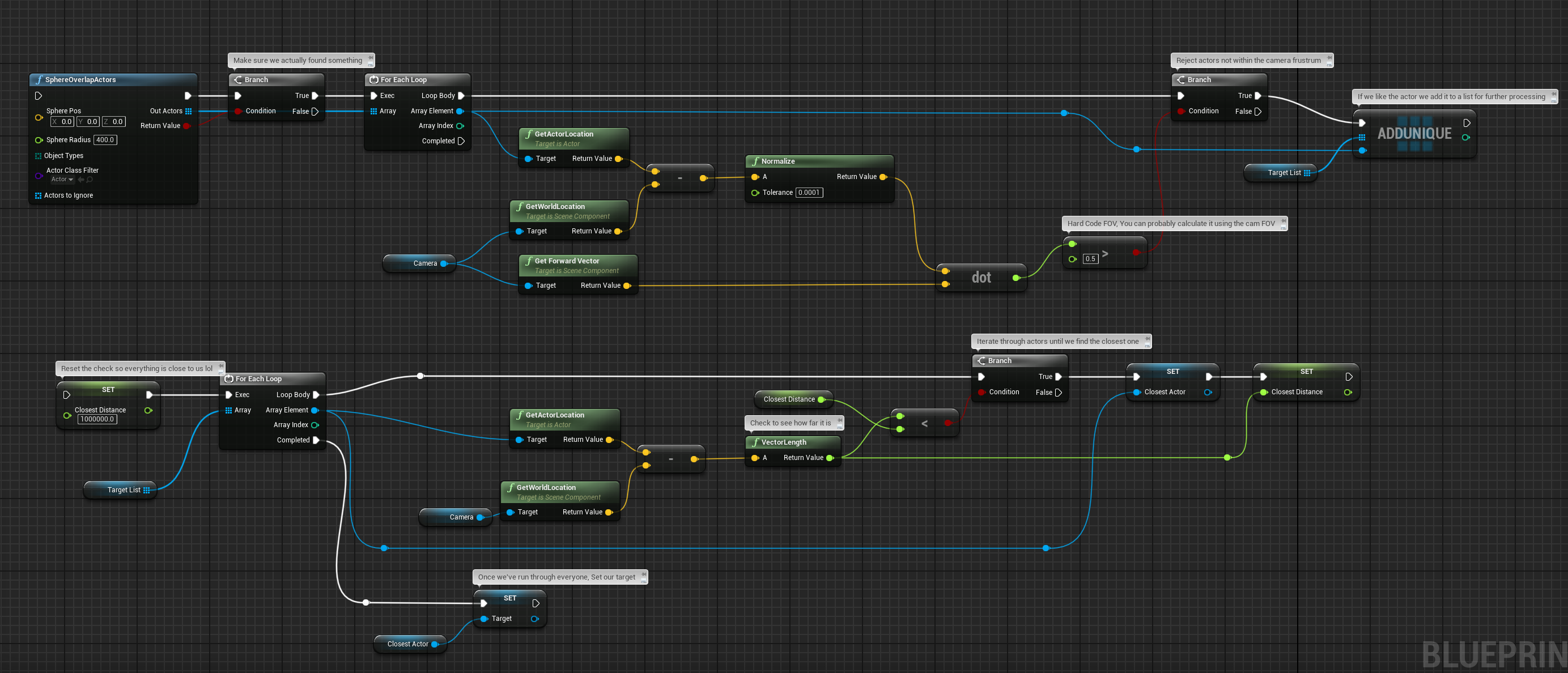
 hollow falcon
Hi, newbie to Blueprints here and I'm getting this error when running the code:

 autumn pulsar
rigid bay
I'm trying not to call another actor in code, because all my enemies will be usi...
autumn pulsar
rigid bay
I'm trying not to call another actor in code, because all my enemies will be usi...
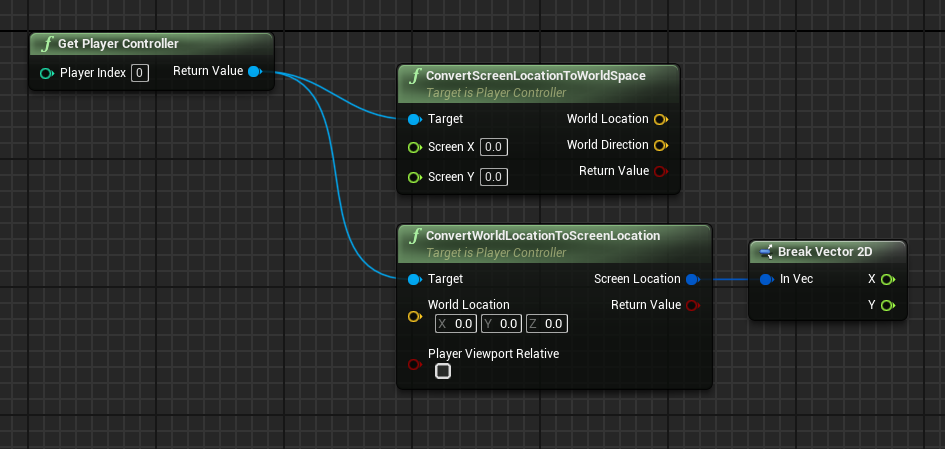
Try these
rigid bay
hollow falcon
Hi, newbie to Blueprints here and I'm getting this error when running the code:
You can add break points to the nodes to figure out what is working and where it breaks
rigid bay
autumn pulsar
https://i.imgur.com/weJUbBR.png
That's closer to what I'm looking for. Thanks.
hollow falcon
I'll give that a shot, it's just a bit confusing to me because the code does what it's supposed to do when I simulate it, but I still get the error
rigid bay
hollow falcon
I'll give that a shot, it's just a bit confusing to me because the code does wha...
Remove the link from the exec pin on then 1 on the sequence node and run the game to see if it gives an error
hollow falcon
also it says the breakpoint is on the Create Widget node, I'll try and see what's going on
hollow falcon
rigid bay
Remove the link from the exec pin on then 1 on the sequence node and run the gam...
It works and there's no more errors in the log, ty! The breakpoint still says it'll break on the Create Widget node but I'm assuming I can ignore it?
rigid bay
Did you right click on the create widget node to add the break point? A break point only pauses the active game when the code reaches that point in the script.
hollow falcon
Yeah I tested it without the breakpoint and got no error logs, then re-enabled the breakpoint and it paused the game
I did a double check and I did get the error again, but only once instead of the numerous times from before, probably because I just tied the code to an Input instead of Beginplay
rigid bay
Try unlinking all instances of 'max ult charge' along the path of 'then 1', and replacing it with 100. Run it again and see if it gives you an error
hollow falcon
I did that and it still gave me the errors
 rigid bay
Can you show me the BPI_Master?
hollow falcon
Not sure if this is what you're looking for, but I just have one output on all of the "Ult Charge" functions

and it's just implemented in the BP like this

This could possibly help, but I did some research earlier and someone had a similar problem

Since I'm fairly new I don't know what to make of this
rigid bay
Disconnect the function from the event graph for now, and add this to event tick, but add your BPI_Master to the is valid node
 rigid bay
hollow falcon
This could possibly help, but I did some research earlier and someone had a simi...
rigid bay
hollow falcon
This could possibly help, but I did some research earlier and someone had a simi...
For this, have you used c++ coding in your project? Or have you just been using blueprints?
hollow falcon
just blueprints, I thought that maybe the problem was similar in some way so I shared it
 lofty rapids
hollow falcon
Hi, newbie to Blueprints here and I'm getting this error when running the code:
lofty rapids
hollow falcon
Hi, newbie to Blueprints here and I'm getting this error when running the code:
are you destroying your character ?
autumn pulsar
How does "Owner No See" work, what determines if something is an owner or not?
rigid bay
hollow falcon
just blueprints, I thought that maybe the problem was similar in some way so I s...
While possible, I doubt it.
maiden wadi
autumn pulsar
How does "Owner No See" work, what determines if something is an owner or not?
This is a badly named variable now that really has nothing to do with Ownership. This is based on whether the object is the view target or not.
hollow falcon
lofty rapids
are you destroying your character ?
The only actor I'm destroying is this Cam Animation BP
 hollow falcon
rigid bay
Disconnect the function from the event graph for now, and add this to event tick...
hollow falcon
rigid bay
Disconnect the function from the event graph for now, and add this to event tick...
Also it returns false
autumn pulsar
maiden wadi
This is a badly named variable now that really has nothing to do with Ownership....
Viewtarget?
rigid bay
hollow falcon
Also it returns false
If it's returning false, that means your character isn't using the BPI_Master. You need to add it to the character.
autumn pulsar
I guess for context, I have a healthbar attached to an actor. I want the players to not see the healthbar of an actor they possess
lofty rapids
hollow falcon
Hi, newbie to Blueprints here and I'm getting this error when running the code:
what bp is this in ?
maiden wadi
autumn pulsar
Viewtarget?
By default your viewtarget is set to the actor you're possessing. If no possession it is set to the PlayerController. But you can set it for any Actor. It's also used a lot for spectating, like to see what a player would see.
autumn pulsar
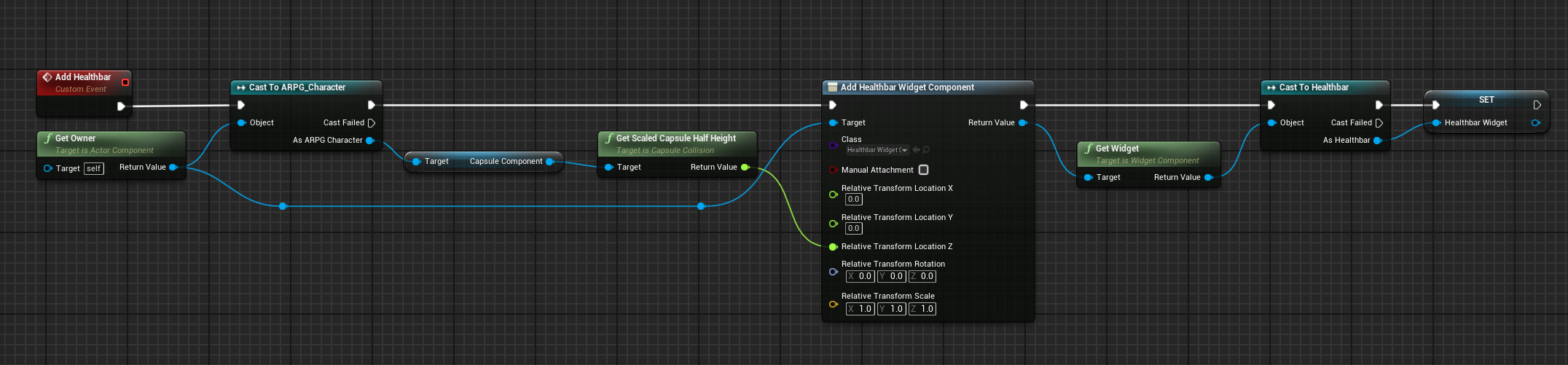
this is how I'm spawning the healthbar
but for some reason I can see it on my player despite owner no see checked
I was assuming if it was attached it would inherit the viewtarget
hollow falcon
rigid bay
If it's returning false, that means your character isn't using the BPI_Master. Y...
Just to make sure I'm doing it right, I tried both these options and the first one doesn't return anything, while the second returns "No". Also by adding it to the character you mean implementing it in class settings right (third pic)


 hollow falcon
lofty rapids
what bp is this in ?
hollow falcon
lofty rapids
what bp is this in ?
This is in the character BP
rigid bay
You shouldn't need to cast to it. In class settings, search for 'interface' in the details panel, and add it to 'implemented interfaces'.
autumn pulsar
I'd suggest just using the "Does Object Implement Interface" node
rigid bay
Nevermind. I saw you did that. I don't know why it isn't saying it's valid.
autumn pulsar
Also, an interface can be implemented, but it's worthless if you don't implement the functions
rigid bay
So they need to implement the functions in the bp?
autumn pulsar
 hollow falcon
autumn pulsar
I'd suggest just using the "Does Object Implement Interface" node
hollow falcon
autumn pulsar
I'd suggest just using the "Does Object Implement Interface" node
This is weird, it returns False using this node too
maiden wadi
Interfaces 🤮
autumn pulsar
Interface is basically a promise that the object in question has this function
maiden wadi
Not necessarily.
autumn pulsar
It's useful if you need something generic like a "use" function
maiden wadi
Just because it implements the interface, doesn't mean it overrides the default function.
maiden wadi
Should use components with delegates.
Interfaces fall flat on their face the moment you need anything with state. Interaction can always be defined by the same set of rules. Time needed, amount of people allowed to interact at once, amount of uses. And you can incorporate all of this into the same class on a component which you can then simply add to any actor and set some properties on.
The moment you add even one of these things with an interface based system, you're copying state for every single thing that needs it.
autumn pulsar
maiden wadi
Interfaces fall flat on their face the moment you need anything with state. Inte...
I kind of struggle to think how'd you'd make something like entering a door and reading a book with the same button using only actor components without a single interface 
maiden wadi
How do you do it with an interface? You implement it on the actors.
So instead of adding the interface, add a component.
Instead of calling the interface message. GetComponentOfClass->Interact
autumn pulsar
Well I get that part, but then you're kind of "trapped" within the component, and unless you implement every possible interaction in the component itself, you can't really inform the actor what to do when it's been interacted with without some kind of interface
maiden wadi
No.
autumn pulsar
not trying to argue here, genuinely asking
maiden wadi
You put a delegate on the component that runs when interaction is finished. This can be instant if there's no time required or only run after interacting for n seconds.
Once you've added this component to an actor, you simply bind the delegate. Same as you do for like a specific component's hit events.
Like uh... Sec. In a new project, need to set up a showcase.
So like this component here. I put this event dispatcher on it and called it immediately on start interaction. You could code in timers and stuff here. But keeping it simple.

I add this to an actor, and note I can call it directly from this in the events list.

And here I have two different actors that can print a different message based on which one I interacted with.

 autumn pulsar
Oh I see
It's similar in nature to an interface
but I guess it's more generalized?
what picks up the call? just anything up the stack?
or the owning actor
maiden wadi
But the thing is that I can put all of the code I need for interaction into the component. Time it takes, interact only works for owner's team, amount of people required for interaction to complete, amount of people allowed to interact at once, amount of times this thing can be interacted with. All of this can be generalized into this one component that I can place on anything and set some properties on in the details panel.
And that is the other thing. This delegate can be listened to by anything. Primarily the owning actor cares about it since it has to do something when it finishes. But any supporting actor can also listen to it as well. For example if you have a lever actor, and you want a drawbridge to lower when it's pressed. You could code the drawbridge to listen to it's associated lever's interaction completed delegate.
autumn pulsar
That makes a lot of sense, thanks for taking the time to explain it!
was baffled by those for a while, now it's starting to click
maiden wadi
Composition makes developer's lives much easier than interfaces usually. 😄 Specially when state becomes involved. Because interfaces cannot hold state, you have to put it on the thing implementing the interface, which sucks because then two different hierarchies of classes now have to implement their own state, and are probably copying code to handle it the same way and now you have two places to update things for bug fixes, and such.
autumn pulsar
I saw someone use interfaces for communicating between the actor components and the actor
maiden wadi
 autumn pulsar
How would you make an actor wait for a call on a different actor?
since you mentioned the lever and the bridge
maiden wadi
Unsure what you mean?
Like how does the bridge know the lever has been interacted with?
autumn pulsar
yeah
You could code the drawbridge to listen to it's associated lever's interaction completed delegate.
this bit
maiden wadi
The bridge just has to have an instance editable actor pointer. Which you can set to the lever in your editor. On it's beginplay you can get the lever actor, get it's interaction component and bind it's interactioncompleted delegate to a function in the bridge itself.
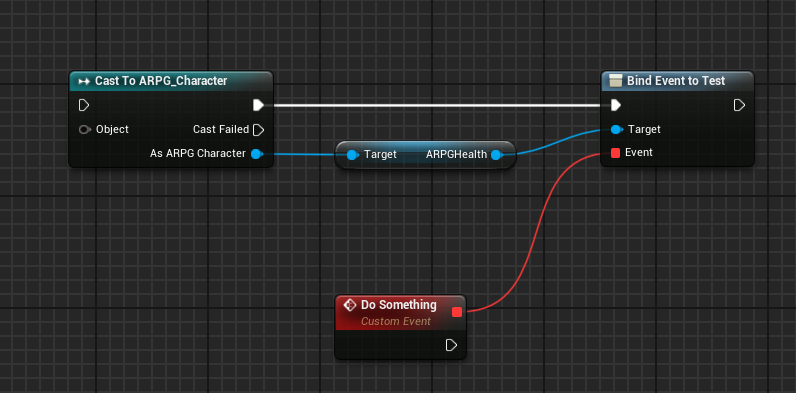 maiden wadi
Sure. You could do it without the cast though. Just some actor pointer and a GetComponentOfClass call.

 sharp condor
Is it a bad idea to put a speed run leaderboard in a horror game? Cause I'm not seeing horror games with leaderboards
autumn pulsar
sharp condor
Is it a bad idea to put a speed run leaderboard in a horror game? Cause I'm not ...
I don't see why it would be
It's kind of just down to the time you want to spend on it
When using montage sections, I have a section that's set to loop. Is there a way to exit out of this loop once I'm done?
 thin panther
sharp condor
Is it a bad idea to put a speed run leaderboard in a horror game? Cause I'm not ...
thin panther
sharp condor
Is it a bad idea to put a speed run leaderboard in a horror game? Cause I'm not ...
I'd say so. The point of horror is to be immersed and to build atmosphere. A speedrun leaderboard kills any semblance of that
They're not games that are marketed for speedrunners.
You add features for your target audience and genre. If it was some fast paced run-n-gun parkour shooter, sure.
Plus, unless you have some world class anti cheat, you are going to have that leaderboard filled with cheated scores on day 1
 hallow gate
thin panther
hallow gate
thin panther
I highly recommend not adding features for the sake of adding features. Sometimes it can be fun to experiment and sometimes it works of course, but it often leads to lost meaning and overscoping.
Think about it this way: A horror game is meant to be suspenseful, thrilling and probably most importantly scary. Sometimes they're quite story-rich too. Does a leaderboard help with any of those qualities? No.
sharp condor
Thank you so much for the feedback I'm learning so much on the player's perspective, Greatly appreciated ❤️
digital glacier
maiden wadi
What are you using right now to display it?
text renders
autumn pulsar
I'm trying to cleanly jump to the exit part of my animation montage, and currently I have this setup. https://i.imgur.com/9M01kxC.png
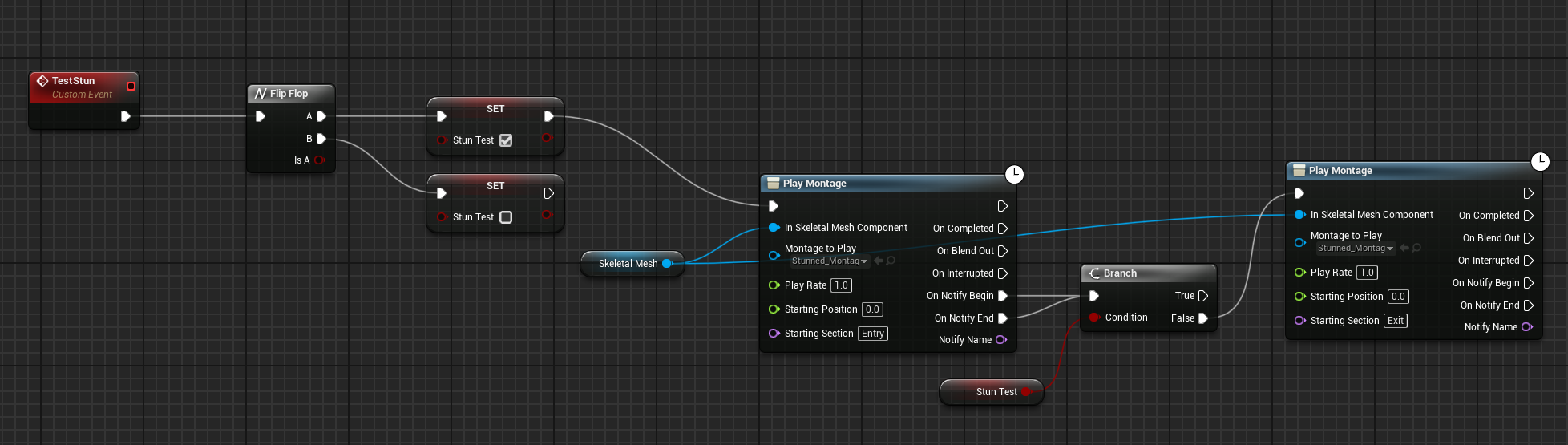
Is there a better way to do this?

basically I only want it to swap at the end of the loop section
frosty heron
You should just execute a code that set the next montage section
autumn pulsar
frosty heron
You should just execute a code that set the next montage section
I was having trouble finding that
is it a part of the montage sequence?
frosty heron
Try anim instance
autumn pulsar
frosty heron
Try anim instance
Awesome, that works. Thanks
I knew there had to be something
 gaunt stirrup
does anyone know why my clothing textures in ue5 keep turning black 💔
frosty heron
More chance if you show the assets
 normal cargo
can I make this a resusable component? For example, an NPC could inherit the same properties? I dont want them on the BP_ThirdPersonCharacter


While we are add it, if you guys could answer some more questions.
How can I map the input key 1 to the index 0 of the the array?
How can I dynamically create the right Hand Mesh component for each socket, eg, right hand socket, left hand socket etc
 errant canyon
I have inherted Yaw, Roll, Pitch (as you can see on right bottom) but my camera does not seem to inherit them, anyone has fix?
 jovial steeple
normal cargo
can I make this a resusable component? For example, an NPC could inherit the sam...
jovial steeple
normal cargo
can I make this a resusable component? For example, an NPC could inherit the sam...
Yes all logic could be encapsulated into some sort of component which manages the visuals of equipped items.
- If you want to map input key 1 to index 0 of the array, simply do this. ArrayIndex = InputKey - 1.
- You can add another static mesh component to an actor at runtime using the
AddStaticMeshComponetnode. You could then set the static mesh of that component to display the desired mesh. You could also just create a separate actor class that represents each different "Held Item". This actor class with contain all the visuals for the held item. You can then spawn this actor in and attach it to the hand slot. I generally prefer the latter solution as allows for more flexibility, especially as the project grows in scope.
 warped juniper
Have any suggestions for doing an inventory system? I have never done something like that before... I'm unsure how to tackle storing the items to begin with. Thought about maybe using something based on Object class BPs stored somewhere in the player actor
jovial steeple
warped juniper
Have any suggestions for doing an inventory system? I have never done something ...
Nothing wrong with using object class BPs to store a single instance of item data. A simpler alternative is to use a structure to store a single instance of item data. I would recommend the latter if you are unsure an exact reason why you are designing the system to store item data instances using objects in the first place.
Storing the list of all items directly on your player character would be a mistake. It would be far superior to store the list of items inside some sort of reusable component, or even an object class itself. This way you can easily add an inventory to more things than just your player character. A chest for example would need its own inventory component. If you are familiar with objects and components both and can use them effectivly, i do recommend putting the inventory logic inside of an object class rather than an actor component. It simply increases the reuseability of the inventory system. Now things that arnt even actors can have inventorys as well. If would recommend using an actor component to store the inventory list if you are unsure or are learning.
warped juniper
jovial steeple
Nothing wrong with using object class BPs to store a single instance of item dat...
Alright, this is good insight...
My system's main needs are limited slots, separating items between organization categories (non stackable, stackable, and durability based)
Also will need to make ammo items that get properly consumed on reloading the weapon, as well as different ammo type classes
I would like to use the object based method though... Maybe also use something with a Data Asset based system for quick and simple setup
jovial steeple
warped juniper
I would like to use the object based method though... Maybe also use something w...
Regardless of where you store the items/how you store the item instances, you can program the systems game logic to function like how you described.
If you are familiar with cpp, using a UObject class for the InventoryManager that stores a list of ItemInstanceDataObjects would be a good approach.
If you are attempting to do this all in blueprint, using a uobject class for the inventory manager will come with some limitations regarding multiplayer support mostly. And data assets have to be setup in cpp. So I would not recommend this if you are not familiar with cpp.
At least if you are trying to build your "reusable master inventory system" that you can use on all projects moving forward.
warped juniper
jovial steeple
If you are attempting to do this all in blueprint, using a uobject class for the...
Game is explicitly singleplayer without any plans for mp of anh kind
However for flexibility sake I could make a header class in cpp
Also afaik Data Assets are very much doable in bps
jovial steeple
warped juniper
However for flexibility sake I could make a header class in cpp
You shouldn't have any issues then, if the game is singleplayer, and your only worried about the project your working on, it really does not matter which method you use.
warped juniper
I would like to do it with cpp though
jovial steeple
warped juniper
Also afaik Data Assets are very much doable in bps
Maybe they added support for it, I could be going off of outdated learning.
warped juniper
I have been wanting to implement it more
warped juniper
jovial steeple
Maybe they added support for it, I could be going off of outdated learning.
At least in 5.4 they are fully supported
jovial steeple
warped juniper
I would like to do it with cpp though
If your working with UObjects, do it in cpp yes.
blueprint just has basic support for them.
cpp will solve all those issues.
warped juniper
Do you have some suggestions for what to read and look into for making this?
Just so I don't ping you nonstop and so
jovial steeple
I do not, i learned myself over years of iteration. Never had a good source to read on anything.
frosty heron
there is a source to read
frosty heron
I mean if you have 0 idea on how to do inventory, some marketplace plugin can give you idea.
learnt from Dynamic combat system for my first projects
for my latest one, I will see how Lyra does inventory because that should be the benchmark for industry standard.
but keep in mind that inventory is very project oriented
warped juniper
Ehh maybe... I will still try to check how to work it better
warped juniper
For instance, using Structs to store item instanced
What would be some limitations for that? How should I approach it?
frosty heron
using Uobject made it easier to pass it to UI from what I heard.
but struct is also a valid approach
there's no right or wrong and perhaps in the end you wont be able to make that perfect inventory system
it takes trial and error
warped juniper
Hm the struct can hold a texture variable regardless
frosty heron
both are valid approach
 obtuse kiln
I've debated revisiting my inventory before I get too far along with it. Using gameplay tag stacks, each gameplaytag can be used to look up the item it represents in a data table. Doesn't seem terrible, but I get nervous when I know I'm doing something 'weird'.
jovial steeple
If your using cpp with a competent programing ability anyways, there really isnt any major limitations you will run into with either approuch.
warped juniper
Okay. I wanna make it object based so I can make things that are not actors hold an inventory
Mostly because I need a Resident Evil type storage system, where several Boxes each share the same inventory
frosty heron
warped juniper
Okay. I wanna make it object based so I can make things that are not actors hold...
how would struct stops you from doing that? just wondering
trying to understand the idea
jovial steeple
Talking about actor component inventory manager, regards to UObject inventory manager.
frosty heron
to me having a UObject advantage probably just mean, you can change the outer / owner easily.
perhaps ther's more to it but I dunnoe
jovial steeple
You know i am a preacher of uobject inventory managers lol
frosty heron
haven't work on inventory yet
warped juniper
frosty heron
how would struct stops you from doing that? just wondering
Not the inventory item itself but how they are stored
frosty heron
obtuse kiln
I've debated revisiting my inventory before I get too far along with it. Using g...
1 tag per data table row?
1000 items = 1000 tags?
not saying it's not valid
just wondering if that's viable
I know hojo tries to generate dialogue as gameplay tags
he has thousands and still working well apparently
@jovial steeple I guess you still use struct to serialize the item right?
warped juniper
@jovial steeple I still am not sure how to do the UObject inventory class with cpp... Could you explain in layman's terms?
maiden wadi
I went full data asset on mine and cut out the tags.
obtuse kiln
to be clear I don't think my game will have more than like 50 items. I'd have to try really hard to make a system that was unworkable
no equipment
no crafting system
just potions and ammo and catalysts (spell ammo)
jovial steeple
frosty heron
<@1277781732036317292> I guess you still use struct to serialize the item right?
My current system does the list of items as a TArray<FInventoryElement> so yea. FInventoryElement stores a data asset reference along with some other data like AmountOfItemsInStack.
warped juniper
maiden wadi
I went full data asset on mine and cut out the tags.
Hmm yeah Data assets probably do the same as structs
frosty heron
warped juniper
Hmm yeah Data assets probably do the same as structs
DA to get immutable values
you will still need to have structs / UObject
warped juniper
Yeah naturally
maiden wadi
warped juniper
Hmm yeah Data assets probably do the same as structs
Not quite what I meant though.
You still need a Struct, or a UObject to hold runtime data.
frosty heron
maiden wadi
You still need a Struct, or a UObject to hold runtime data.
do you use both?
my bp only project went full on struct
warped juniper
Alright then
frosty heron
I have to tackle inventory system next month, would love to hear opinion
warped juniper
No idea how to make that UObject exactly
maiden wadi
All UObjects. I don't use structs for serialization either... Technically. It's just serialized to a byte array.
frosty heron
warped juniper
No idea how to make that UObject exactly
for every item that exist, just create a UObject version of it
frosty heron
maiden wadi
All UObjects. I don't use structs for serialization either... Technically. It's ...
🙇♂️ gonna keep this in mind,.
rip to blueprint users I guess?
no access to FArchieve
warped juniper
frosty heron
for every item that exist, just create a UObject version of it
Okay I guess that makes sense yes
And stacks of an item are an int in the item
frosty heron
warped juniper
Okay I guess that makes sense yes
I think I will attempt authaer approach
since you want to use some C++
jovial steeple
I literally just think constructing a struct is easier then constructing a uobject, so i use that to store the item stacks. Not really much difference in the end. Using UObjects can make the blueprint interface for the system a bit easier to work with though depending on the design.
drag of ubobject ref and call a function.
so easy
warped juniper
I would rather do the cpp based method for learning sake
frosty heron
warped juniper
I would rather do the cpp based method for learning sake
its not really bp vs cpp based method though
warped juniper
I will, however, need a lot of hand holding as cpp is black magic to me
frosty heron
but serializing UObject requries some cpp
frosty heron
warped juniper
I will, however, need a lot of hand holding as cpp is black magic to me
https://www.tomlooman.com/unreal-engine-cpp-save-system/
Good read if you want to learn how to save things to bit array.

UE4 SaveGame system to save player data and world state to disk. Including all source coded needed to get started.
you will need that to save your UObject (items)
maiden wadi
The general thing is though is that anything that is a "definitions of a thing" is a data asset. Meaning that if it's a thing with a name, possibly an icon, description, etc, then it is a data asset. This is each item's static data. Apple, Sword, Boots, etc. And also anything that is an items stat key is a data asset. Because things like Durability, StackSize, etc all have icons, names, descriptions etc as well. And because it's an asset it can == the same as a gameplay tag.
And then items are just UObjects with a pointer to their item definition and an array of StatDefinitionAsset/Float for runtime data.
warped juniper
Alright, so a DA holds names, icons, concrete classes and some static parameters
Still have a lot to know thougj
For example, how to make an inventory that can belong to an actor and a non actor
maiden wadi
In general, why would you want one for a non actor? Curious of your use case.
warped juniper
maiden wadi
In general, why would you want one for a non actor? Curious of your use case.
Have you played Resident Evil?
frosty heron
I have
maiden wadi
Few thousand years ago, but I get the idea of it.
warped juniper
Well the game has a storage system with safe boxes
warped juniper
And each safe box shares an inventory
maiden wadi
Like are there more than one safe box in the level? Cause you can always put that on a global actor like the player's Playerstate, or even just some special actor you make to hold the inventory and then redirect the inventory component getter to that from the safebox actor.
Yeah
warped juniper
maiden wadi
Like are there more than one safe box in the level? Cause you can always put tha...
Well they exist across levels
frosty heron
imo it can just be an array of items in your inventory GI subsystem
level is irrelevant at this point
it can be accessed anytime
warped juniper
Hmm maybe. I did feel making the inventory object based could be more versatile but again, I never made an inventory
jovial steeple
Ive found over the years that by switing logic from components and into objects, ive had to rewrite logic/ make weird work arounds way less. An easy way of making re-useable code is removing limitations. Simply not having an inventory coupled to an actor allows me to architect the game in any way i please, and the inventory will always fit. It also allows for unexpected use cases to.
For example, the GenerateRandomLootDrop function just returns a inv object
In my current game, i achitected the player data to be seperate from actors. To allow for very dynamic player switching
Inventory object just fits into that
Only downside is that it takes a few minutes of time to recreate that component-like functioality using a the DiscoverableInventoryInterface each time. If its even needed.
warped juniper
You mean implementing the code?
jovial steeple
and ofc, its more complicated to code the uobject based inventory manager in the first place
warped juniper
Hmmm
Then, maybe I should make the simplest method first
I will rework it when needed but atm, I want a prototype above all... If it's that much harder I should delay learning that
jovial steeple
Yes thats kinda whast i was saying eailier anyways, i recommend just making it a simple actor component if your unsure or learning.
Esp if your goal is just a simple inventory manager for this project
warped juniper
Haha, thanks regardless...!
jovial steeple
And not tryna program the last inventory manager you ever need to make.
warped juniper
I still will have to see how to make inventory for a bit
I guess I should check some tutorials
frosty heron

Basic inventory tutorial made in Blueprint for Unreal Engine 4.
in before youtube tutorials
just something to draw inspiration from
frosty heron
I think he did more advance one too
warped juniper
The main challenge I feel I need to tackle is separating what each item does, specially ammo...
frosty heron
fyi he worked as university tutor and in epic
warped juniper
That sounds reliable enough!
maiden wadi
warped juniper
The main challenge I feel I need to tackle is separating what each item does, sp...
I'm not sure I would put this on the inventory system though. Keep things contained. Your inventory system is just that. It's just a box that you can put stuff in. It's up to the other system to tell the inventory system it's taking ammo out of the box.
At large the inventory system should only contain data and allow it to be manipulated with functions. It in itself doesn't really need to have much functionality past that.
An example of this might be allowing the weapon firing to have inventory itself. When you reload, you pass an item from the pawn inventory to the item inventory. When the weapon fires, it will get it's own inventory and find the required item and lower it's stack size.
 glass badger
Hi, anyone have any idea why this isnt letting me reference BP Game Reference its ruining my change player name function
 glass badger
dont worry i figured it out
maiden wadi
glass badger
Hi, anyone have any idea why this isnt letting me reference BP Game Reference it...
PlayerName already exists in the player's PlayerState.
 brave pilot
So I'm trying to create a material that simulates heat on the actor its applied to.
Goal: The material should gradually becomes brighter on the side of the actor that is hit by sunlight. The side that's in shadow should remain the brightness indicated by the base heat of the actor (local variable stored in the actor called "Heat"). If the actor is turned, the side/vertecies/poligons/pixels/watever that is now turned towards the sun should become brighter as that side warms up, and the side that is now in shadow should gradually become darker until it reaches the base brightness based on the Heat variable.
Current implementation: Been having AI try to help me figure this out and it's idea was to use a Render target in order to capture which pixels or vertecies were directly hit by the sun and then use that as a mask to color the material. It's not very successfull as the render target just ends up being one uniform color as you can see from the picture. I also calculated the sun direction manually, which is probably not the best way to go about it since i could probably just use the Atmosphere sun light vector for the exact same effect, but it's not really the issue at the moment.
If anyone have any idea how to achieve the effect I'm after I'm more than happy for the help. I'm not married to this render target idea so if you have other options I'm all ears. If not then getting this to work properly would be a good start.


(I should mention the sunlight mask from the forth picture is working. It's just the render target that is messing up the visuals of the sphere).
It's just that the information on where on the sphere different heat values shoudl be is not stored so if the sphere turns it will not have the gradual heatup/cooldown effect i'm looking for.
drowsy rivet
Hi everyone! I am making explosive barrels in ue5.5.2 and I found a tutorial about that but the video is based on ue4 and it uses apex destruction, I used fracture instead and this is how my blueprint had to look like

But I did not found the apply radius node and I am stuck in that stage
 drowsy rivet
maiden wadi
There are plenty of videos on it. There's a chaos system overview doc somewhere ...
drowsy rivet
maiden wadi
There are plenty of videos on it. There's a chaos system overview doc somewhere ...
I tried to do that but the methods did not worked
 storm solar
Does anybody know how to rotate a sprite so it can be rotated 90 degrees on the z axis(parallel to ground) and still be visible?
Im trying to have a shockwave effect play. The first niagara node is a 2d sprite that animates correctly, the second one is a mesh renderer where there is no animation of the shockwave expanding.
The red circle (the first node) expands like a shockwave but cant be rotated. The green circle(the second node.) the mesh can be rotated but does not expand.

 tight pollen
why this doesn't work

I want add new row, byt DataTable is still empty
(Utility Widget)
maiden wadi
You need to call modify on it after adding a row.
You may or may not also need to close the table editor and reopen it.
 tight pollen
maiden wadi
You need to call modify on it after adding a row.
tight pollen
maiden wadi
You need to call modify on it after adding a row.
how
Save Asset Is True
but the new row does not appear in the DataTable
 hazy ether
Anyone know why this wont work? The camera isn't in the Character
 thin panther
The camera you see through is going to be part of rhe first person character. Which that camera variable is not
hazy ether
thin panther
The camera you see through is going to be part of rhe first person character. Wh...
Plus, I am looking through that camera as I have the set active and it follows the rotation
hazy ether
thin panther
The camera you see through is going to be part of rhe first person character. Wh...
Im already setting it to view through that camera, so it should be that one!
tight pollen
tight pollen
why this doesn't work
someone?
 stiff fulcrum
We have bridges in our game that have changing sizes based on our Spline length.
Since we are trying to build bridges in the game, they shouldnt be visible from the start.
I couldn't find a way to make our Spline Meshes Invisible and visible again during runtime, is there a way to do this?
also change working collision settings


 celest crown
How can I create an Asset Action that works on content browser folders?
 final heath
bit of a player controls quesiton, but how would i go about increasing the rising speed of the player's jump without increasing the jump force (and subsequently increasing the player gravity to compensate, since it makes other instances of falling feel weird)
hazy ether
Can you change the gravity value from a blueprint?
I have this train, running on tracks, and I need a way to adjust the balance of the train as its a major part in the game im working on!

And so far, nothing ive tried has changed the result
 low crescent
Hi i'm working on a scene viewer that connects to a second app in a phone via TCP. The scene has an HDRI and i want to add buttons and control to change the hdri from a daylight texture to a night time texture, but the "set cubemap" node in the blueprint class isn't doing anything. The functions fire when i enable the debug viewer so it is going through, the cubemap texture just isn't changing. Am i missing anything? (Also i forgot to mention that yes, i'm using the hdri backdrop plugin for the hdri)
 mental rampart
is it possible to quickly create the freecam (what you automatically pilot when there's no other pawns to pilot) in blueprint form as an actor? Something where I can edit the focal length etc?
autumn pulsar
mental rampart
is it possible to quickly create the freecam (what you automatically pilot when ...
Probably character blueprint, set movement mode to flying, then rotate your input with the control rotation and add movement with it
 pine ingot
Has the lifecycle of the blueprint construction script changed?
I could swear that in earlier version of Unreal, the Blueprint Construction Script ran not only when an actor was added to, or modified in, a level, but also when level was played. With Unreal 5.5 is seems as those the construction script no longer runs when the level is played, but only when actors are added or modified in the viewport.
It seems as though there are others who have noticed this behaviour change in the forums: https://forums.unrealengine.com/t/construction-script-no-longer-working-after-update/2271076

Epic Developer Community Forums
For some reason, my construction script in the blueprint is no longer working after updating to version 5.5. It was working fine in version 5.3. There is an exposed position preset, and after changing its value, the meshes should rotate, but nothing happens.
 pulsar osprey
pretty sure it gets run when the actor gets constructed. if you've placed it in the editor, it's getting constructed, therefore the script runs at editor time
pine ingot
Yes, and it still does that correctly. It's just that before it also ran when playing a level. I've gone back and checked some screen recordings I have of Unreal 5.2 and 5.3 and seen that this used to be the case.
pulsar osprey
out of curiosity, you see the script get run if you're a client on a dedicated server, right?
pine ingot
Not working with it in a multiplayer or client/server project atm.
final heath
hey so im having a bit of a confusing issue, I made a blueprint that is a child of the Widget Component bp so i could give it its own custom code, but it isn't showing up, whereas the old normal widget component still renders fine, any ideas as to what might be the issue?
the same widget class is being used and the draw size is the same as the old one. and I dont think it's an issue with the base widget since it still doesn't render regardless of what I set it to
 autumn pulsar
pine ingot
Has the lifecycle of the blueprint construction script changed?
I could swear ...
autumn pulsar
pine ingot
Has the lifecycle of the blueprint construction script changed?
I could swear ...
Does the behavior change if you spawn in the actor instead of placing it?
pine ingot
autumn pulsar
Does the behavior change if you spawn in the actor instead of placing it?
The construction script correctly runs when the actor is spawned. Honestly, this feels like the correct behaviour for the construction script to only be run on construction and not on begin play. It just confused me as I swear that the construction script also used to run on begin play.
 desert juniper
pine ingot
The construction script correctly runs when the actor is spawned. Honestly, this...
desert juniper
pine ingot
The construction script correctly runs when the actor is spawned. Honestly, this...
I just make a custom event that runs whatever logic i need
then call the event on both begin play & construction
I've done that since 4.xx days, so idk how far back it may be the case that they changed it, if ever
final heath
final heath
hey so im having a bit of a confusing issue, I made a blueprint that is a child ...
like I genuinely think the blueprint has to be corrupted or something I even created a new widget component child class and it renders fine
pine ingot
desert juniper
I just make a custom event that runs whatever logic i need
then call the event o...
I think I've tracked down the issue, it's not related to the version of Unreal but instead to the type of level I'm working with. When I start with an empty level and build up from there, the construction script does not run on begin play. However, if I use Unreal's default "Open World" level the construction script will be called on begin play. The open world level uses world paritioning, so maybe it respawns the level and all its actors, hence forcing the construction script to run?
Answering my own question: It is the world partition level that is causing the actors to be re-constructed on begin play. This is due to the "Is Spatially Loaded" flag being set. I can display this flag on the actors in question and their construction script will no longer run on Begin Play.
pulsar osprey
ahhh yeah I'm pretty sure it streams the world in
autumn pulsar
Is it better to build an actor from say a dataasset, or make multiple children of an actor and set the settings there?
Or does it not matter too much and more just pick your flavor
dusky cobalt
autumn pulsar
Or does it not matter too much and more just pick your flavor
yeah mostly pick your flavor, now thinking probably setting up things from the class itself is much better, because you dont have to worry so much if something will ''fetch'' from data asset just on time or it's gonna be 0.1s delayed or anything, but data assets are still usefull for populating widgets with info etc. just a bit more work with setting up each class than filling up data asset and making it work out
probably a lot of depends on scale etc but generally its up to you
final heath
final heath
like I genuinely think the blueprint has to be corrupted or something I even cre...
I have absolutely no idea as to what is happening here, I literally restarted from scratch and it was working fine, but then I ran the game and all of a sudden the widget component stopped working
autumn pulsar
dusky cobalt
yeah mostly pick your flavor, now thinking probably setting up things from the ...
I’d need to fetch all that info anyways when constructing the actor
With async I could at least delay the spawning a bit until its all ready
dusky cobalt
autumn pulsar
I’d need to fetch all that info anyways when constructing the actor <:lizThink:6...
This stuff I would say is to make your life easier not harder, so use it as you wish and as it's better for you to organize things.
Just be consistent kind of
autumn pulsar
Issue is I have a bit of data split between the actor components and the actor itself. So it makes tweaking values a bit annoying as you have to chase the info down in several random locations
dusky cobalt
if you have like 50-60 things then probably class + da is okay,if ytou would have like 100-300 things then using only data assets would make it much easier for you and for your designers
final heath
final heath
I have absolutely no idea as to what is happening here, I literally restarted fr...
I've tried reloading the asset but then it just breaks all the references to it while still not fixing the issue of it not actually rendering
Like im so confused are widfget components just buggy or something??
autumn pulsar
I’ve always had weird struggles with widgets
 plush hornet
Hi all, I have a main actor and have made 3 child actors from it. When the level starts all 3 child actors are spawned in. I've setup a custom Player controller where I can switch between which of these child actors I control. When I transfer to a new level it will always go back to the default actor. How would I set it up that it would remember which of the spawned actors I control? I tried setting up something in the game instance but it didnt work. Thanks
 coarse yew
Anyone have any idea on why I cannot call his function from a "Cast to ISM_Block" node?
 dusky cobalt
plush hornet
Hi all, I have a main actor and have made 3 child actors from it. When the lev...
dusky cobalt
plush hornet
Hi all, I have a main actor and have made 3 child actors from it. When the lev...
Game Instance is good place to set it and then get from it.
dusky cobalt
coarse yew
Anyone have any idea on why I cannot call his function from a "Cast to ISM_Block...
maybe it's pure or you didn't compile?
coarse yew
dusky cobalt
maybe it's pure or you didn't compile?
Its compiled, and I have tried with it being pure and not pure both. Still no results
dusky cobalt
coarse yew
Its compiled, and I have tried with it being pure and not pure both. Still no re...
Can you show any screenshots how are you trying to get it somewhere or something more?
This is actor component?
use then Get Component by Class instead of casting 🙂
coarse yew
Its an Instance Static Mesh
 faint pasture
hazy ether
I have this train, running on tracks, and I need a way to adjust the balance of ...
faint pasture
hazy ether
I have this train, running on tracks, and I need a way to adjust the balance of ...
what do you mean adjust the balance?
dusky cobalt
yeah, instead of casting to Object, get Object and Get his Component By Class,choose class of component and then you can access everything
hazy ether
faint pasture
what do you mean adjust the balance?
Its fine, I got a working method
plush hornet
dusky cobalt
Game Instance is good place to set it and then get from it.
How would setting it in the game instance work? calling the variable doesnt seem to work. How would i keep track of which spawned actor i'm controlling? I already know how to set variables in the game instance btw
coarse yew
dusky cobalt
yeah, instead of casting to Object, get Object and Get his Component By Class,c...
Using a Component by Class and it still isn't showing up
 dusky cobalt
plush hornet
How would setting it in the game instance work? calling the variable doesnt seem...
dusky cobalt
plush hornet
How would setting it in the game instance work? calling the variable doesnt seem...
How are you doing it then? You need to set it there, and when coming to the next level you need to fetch that variable before you set new character as ''this'( from previous level).
dusky cobalt
coarse yew
Using a Component by Class and it still isn't showing up
You maybe have 2 classes that are similiary called?
or Access is private?
coarse yew
dusky cobalt
You maybe have 2 classes that are similiary called?
It is the only one, and access specifier is set to public

 dusky cobalt
coarse yew
It is the only one, and access specifier is set to public
dusky cobalt
coarse yew
It is the only one, and access specifier is set to public
sorry i have no idea then
coarse yew
dusky cobalt
sorry i have no idea then
Thanks for trying to help. I have no idea why I cant acess any fuctions on it
autumn pulsar
coarse yew
Its an Instance Static Mesh
Have you tried searching for individual words rather than the whole function?
coarse yew
autumn pulsar
Have you tried searching for individual words rather than the whole function?
Yes, still not showing up
autumn pulsar
What kind of object is get component by class returning?
coarse yew
"ISM Block Object Reference"
The function is inside of ISM_Block
autumn pulsar
Hm
Try saving compiling and restarting Unreal
What kind of component is ISM_Block?
Actor Component?
coarse yew
Its an Instance Static Mesh
coarse yew
autumn pulsar
Try saving compiling and restarting Unreal
No luck
autumn pulsar
Try making another ism object with a function just to sanity check
coarse yew
It worked right away, I may try recreating the original one and see if that fixes it
hazy ether
Is there any way to lock roll be allow Pitch and yaw?
so something can fall fowards but not sideways?
autumn pulsar
hazy ether
Is there any way to lock roll be allow Pitch and yaw?
I’m confused by this question
Is this a physics object?
hazy ether
Yeah
Basically, I want a train to be able to pitch when going uphill, but not fall over when going around tight corners
autumn pulsar
When using Data Asset, Is it better to use a soft reference to a data asset with hard references to objects within? or is it better to have a hard reference to the data asset then async load all the individual stuff?
 shy patrol
hey been working a 2d game in unreal engine but today I realize that in order for "AI move to" and such commands to work I would need to have the game flat on the ground with a plane underneath, unfortunately I have already made most of the game floating on a wall, I know there probably isn't but figured I'd ask, is there a way to be able to rotate everything in the game or rotate the game itself so that I won't have to manually go rotate everything 90* by default.


 worthy tendon
tired hollow
What am I doing wrong here?
worthy tendon
tired hollow
What am I doing wrong here?
you probably want to connect Branch-False pin to Reverse and not Reverse from End.
also your Curve goes from 0 to 2. I'm guessing your actual height is more than 2cm, so either modify the curve or multiply the Crouch Height output by some value.
 tiny tundra
Hey, simple-ish math problem here. I feel like this should be really elementary but I think I've been staring at it too long, ANYWAYS.. .so I have a beam object, S is the Start point and E is the End point. There are components at each point that I can measure against. When an object (green ball in illustration) enters the beam, I want to give it a percentage chance of being killed - if the object is at End Point E, it gets 25% chance of getting killed. If the object is at point S, it gets 100% chance of getting killed. Obviously I would run this on the overlap; how can I make this in a Blueprint?
 frosty heron
So distance based?
You can use map range clamped and have distance from source to target as the input value
frosty heron
tired hollow
That's a weird z value..
faint pasture
tiny tundra
Hey, simple-ish math problem here. I feel like this should be really elementary ...
That's a 2-part problem.
Cone test, do that with a collider or a sphere + dot product test
Distance to chance mapping, do that with a MapRangeClamped as ColdSummer said, like:
Timer -> Alpha = DistanceFromS / EDistanceFromS -> DeathChance = MapRangeClamped(Alpha, 1, 0, 1, 0.25)
MapRangeClamped is the most useful math node in the entire engine
 solemn helm
Any help is appreciated: #ue5-general message
tiny tundra
@frosty heron & @faint pasture looks like I got my solution, thanks for your help!
I get Distance (vector) from Start & End positions, and I get Distance (Vector) from Start position & Green Object.
Then using Map Range Clamped, I feed this data in:
Value = Distance of Start & Green
Range A = 0
Range B = Distance of Start & End
Out Range A = 100
Out Range B = 25
The yield of this is the percentage that Green Object will be killed. Thanks for your help!
frosty heron
Not sure if that's correct but can't tell
It should be current distance as the value
Range A is minimum so 0
Range B is maximum distance
Out range is 25 if value is minimum or less
Out range B is Max or 100 percent if value is max distance or more
Half of the distance will result in a value between 25 and 100
 flat raft
hey hey! Anyone tried setting up Timers in a Object class? Only Function Timers are available, and it seems to be broken. Unless I'm using them incorrectly. When I call Clear and Invalidate Timer, it keeps going. Is that right? Doesn't behave like this in a Actor Class.
hmm.. Maybe I need to call Pause, then Clear, then Invalidate?
 steep wind
here is the code for my movement... for some reason when I use my joystick it budges for a brief moment and then stops moving, as if I was pressing a button instead of actually holding it, making it so that I have to flick my thumbstick like 5 times for every inch I wanna move, I do not have any clue why it does this and switching from trigger to ongoing just causes it to not do ANYTHING
 frosty heron
flat raft
hey hey! Anyone tried setting up Timers in a Object class? Only Function Timers ...
frosty heron
flat raft
hey hey! Anyone tried setting up Timers in a Object class? Only Function Timers ...
In theory you should be able to iirc. My experience is constructing timer with actor component.
jovial steeple
Ive never had an issue using timers in bp object classes
flat raft
yea me also. Object threw me a curve ball 😂
steep wind
my input:
 flat raft
If I call Clear and/or Invalidate, the timer should stop right?
frosty heron
Sure if you call it on the right handle
If something is wrong step one is to show code
frosty heron
That sound suspicious
I can try after work
I don't see why doing it from actor or from object matters
flat raft
it's also late night, so.. maybe time to stop lol
yea, take a look when you have time. Maybe you'll be weirded out like me
jovial steeple
flat raft
it's also late night, so.. maybe time to stop lol
Try clear timer by function name instead of using the handle.
I dont even see the "ClearAndInvalidate" function inside a uobject. I only see invalidate
Which isnt enough.
It looks like ClearAndInvalidateTimerByHandle needs world context.
Which means you would need to setup the UObject class in cpp, and override the GetWorld function, then make a BP child class of that cpp class in order to use ClearAndInvalidateTimerByHandle in a blueprint uobject.
flat raft
There is no handle in Object