You can create blueprint actor ''Location'', put these locations at the world in different places. Then in ''SpawnManager'' you can get all these locations (you can get them either with placing spawn manager in to the world and then droping each location to created array Locations (adding it in the editor) or from blueprint inside by get all actors of class node), after u get all locations, For Each Loop Location, get again Array Of 4Actors (fill it up manually or figure out how you want to decide what actors to spawn) and then in the same loop you For Each 4Actors > Get 1 > Spawn Actor. It's very raw idea though not sure what kind of system you really need. But s imple anserw is Locations Array, Actors to Spawn Array, and for each loop x2
#blueprint
1 messages · Page 279 of 1
 dusky cobalt
 past compass
Once I find something that I understand and it works I will use that typically always but I just actually used event delegates for the first time for real and I feel like I have done many things where this would have been lightyears simpler. I like event delegates now. Ty for listening
 inland walrus
Does anybody have any experience with the DaySequence plugin? I'd like to figure out how to get these as variables


I'm wondering if the only way to do it is by using the level blueprint
 neat stream
Do you know how can I make my pawn behave like my Character class. When I drag and drop it does not align with floor the Character class any idea?

 pulsar osprey
does it have collision? how are you moving it if not using the character movement component?
 dark drum
neat stream
Just looking in the CMC the drag and drop in editor event
dark drum
neat stream
Just looking in the CMC the drag and drop in editor event
I would assume it does a trace down to find the ground and the sets the locations with an offset based on the size of the capsule.
 eager thicket
is there a way to capture the camera view of a BP actor with explicitly possessing it?
dark drum
eager thicket
is there a way to capture the camera view of a BP actor with explicitly possessi...
Set View With Blend node I believe.
 copper chasm
I don’t know if I’m wording this correctly or if it should go here or cpp, but are there any thoughts about using cpp to enhance common blueprint functionality? Google is unhelpful and I don’t really know how to articulate my meaning
Instances where you’ve been like “man this default functionality sucks” and made some boilerplate thing in cpp that you use in blueprint over the default
But like, SPECIFICALLY for that purpose
dark drum
copper chasm
Instances where you’ve been like “man this default functionality sucks” and made...
It's pretty common to create child classes that override specific functions that exposes new functionality to BP. You've just got to use your new child class instead.
You can of course download the source and make changes. Just be aware, that this could make migrating to a newer engine version more difficult as you'd need to maintain those changes yourself.
copper chasm
Oh yeah I’ve got no intention of compiling from source any time soon, I’m miles away from needing that amount of control
dark drum
copper chasm
Oh yeah I’ve got no intention of compiling from source any time soon, I’m miles ...
Yea, sometimes just overriding a function might not be enough though but yea, creating a child and overriding would be the main way to go.
copper chasm
Like I said, maybe I just don’t know how to properly explain myself, because what I’m describing is kind of just how using cpp works most of the time, but I’m bored at work and my brain was wandering
I’ve been frustrated with timers lately, maybe I’ll try tinkering in there 🤷♂️
eager thicket
dark drum
Set View With Blend node I believe.
this works, but it means if i possess something else, the view doesn't change to the newly possessed thing
how do i fix this?
 maiden wadi
copper chasm
Instances where you’ve been like “man this default functionality sucks” and made...
maiden wadi
copper chasm
Instances where you’ve been like “man this default functionality sucks” and made...
I'm unsure if there's anything I do that overrides a default behavior. 🤔 I'm pretty lazy about stuff like that. If it exists I'll usually use it. I use C++ a lot to extend BP functionality. The closest I could even come to is like... Spawning meshes along a spline? I have functions written in C++ for that with like spacing or randomization settings. Cause setting that up in BP over and over is really annoying. But I'm not sure if I'd even classify that as overriding default behavior so much as condensing an idea into a single bp function.
 normal epoch
Hey everyone! I’m new here, so if I’ve posted this in the wrong channel, please let me know.
I’m running into an issue with line tracing and could use some help. For some reason, the trace goes straight through the static mesh components in a blueprint I’m working on. The components have "Generate Overlap Events" enabled, collision set to "BlockAllDynamic," and active collision as far as I can tell.
Interestingly, if I create a standard blueprint with a static mesh component, the line trace works fine. The only differences in my blueprint are that it includes a state tree component and implements an interface. That said, I’ve tested a normal blueprint with the same interface, and it works perfectly. However, my blueprint with a different static mesh doesn’t work.
I’ve tried everything I can think of to fix it, but I’m stuck. Any help would be greatly appreciated 🙂


 trim fable
Can anyone please help me in creating dynamic overlay setup for player based on teams
maiden wadi
normal epoch
Hey everyone! I’m new here, so if I’ve posted this in the wrong channel, please ...
If a line trace is not hitting a primitve, you have to check three main things. Is the collision set to allow query? Is the querying channel blocked on the primitive's collision preset, and does the primitive itself have collision? If the first two are correct, then open up your door static mesh in an editor and enable your collision display.
Under Show, you'll find Simple Collision. Enable this and you should see some form of this green wire mesh here.


 maiden wadi
normal epoch
maiden wadi
normal epoch
And you see the debug trace going through the door mesh?
normal epoch
yep, just red lines no green
maiden wadi
Have you disabled collision on the actor itself somehow?
If the actor has no collision, it won't register it's components either.
normal epoch
how can I check if that is the case?
 pastel salmon
Hi! sorry if I'm interrupting..? edited can anyone explain why i can't create an Actor Component with a parent class of Scene Capture 2D?
maiden wadi
normal epoch
how can I check if that is the case?
I don't think it is exposed to editor except for it's setter, SetActorEnableCollision. I don't know of anything else that causes that behavior. If collision channels and settings are correct, trace channel is blocked, actor has collision enabled, and the mesh actually has collision.
normal epoch
yeah its a weird one
maiden wadi
pastel salmon
Hi! sorry if I'm interrupting..? *edited* can anyone explain why i can't create ...
The short answer is just that the component isn't blueprintable. Whoever designed it wanted it that way. For the why... 🤷♂️ Usually you edit their instances when you put them in actors and such.
pastel salmon
maiden wadi
The short answer is just that the component isn't blueprintable. Whoever designe...
oh ok. I got confused because I'm playing around with this stuff while trying to wrap my head around class inheritance and I thought it might be related to something I'm trying to understand. thank you
 heavy lion
Currently I have a map/level which loads on game startup which displays the menu.
This level uses a front end game mode and front end player controller, separate to that of the main gameplay game mode and player controller.
When I click new game or load game, it loads the player into the main world level which has a different game mode and controller etc.
I'm wondering how best to have the main menu level exist in the game world.
Would it be best to switch the game mode and whatever on new game, or reload the level?
Just trying to think of the best way to achieve having the front end background be the world itself.
pastel salmon
what's the background? an image, or a 3d scene?
maiden wadi
You don't make the main menu exist in the game world usually. If you need it in the game world, it should just be a widget you can push to screen regardless of the level it's in.
pastel salmon
I think maybe they are loading their widget over a scene and they want the scene to persist into the new game mode?
copper chasm
maiden wadi
I'm unsure if there's anything I do that overrides a default behavior. 🤔 I'm pr...
Maybe I meant extend functionality. I might try building a timer that takes a gameplay tag and sets itself up via info from a data asset or something
Although I’ll have to build a “turn based” timer anyway, so maybe I’ll just add that to that
 neat cosmos
can anyone help? the textures do not get imported

 weary wave
A materials question please, I need to create a 20x30m artificial turf:
I had color, normal, roughness and displacement maps, I need to tile to make the resolution match grass blade sizes. I wanted to use texture bomb, but I am getting strange artifacts, I'm not sure what could be the cause:
I also have a non-bomb tiled texture, scaled as needed, but here the tiling pattern is noticeable:
Does anyone know what the artifacts from the bomb version are? I have tried various values for Tiling/ Offset, but all seem to come with a similar grid pattern.

 dusky cobalt
weary wave
A materials question please, I need to create a 20x30m artificial turf:
I had co...
eager thicket
dusky cobalt
weary wave
A materials question please, I need to create a 20x30m artificial turf:
I had co...
eager thicket
do delays pause when the game pauses?!?
maiden wadi
I think they normally do. I believe there are some contextual reasons why some things they're ran on don't do it, but normal actors, components, and such should if I recall correctly.
 lost thorn
hi! does anyone know how to change the camera transition time in GASP? I wanna reduce the transition time (speed the transition up) when changing from balanced to aiming
 tawny kestrel
Any android developers about?
I can't figure out why this simple keyboard button press won't work on Android, but does on windows

here i'm trying a custom inputAction, as well as my first try with the A press
i've tried 3 android devices, all the same
on each, i've confimed the bluetooth keyboard i'm using is working on AndroidOS, by typing in search bars etc
the presses just aren't getting through to UE
 haughty crown
hello there
i'm trying to update skm component in runtime but it doesn't work. Searching i found this article
https://dev.epicgames.com/community/learning/knowledge-base/JPve/unreal-engine-tech-note-skeletal-mesh-asset-on-skeletal-mesh-component-cannot-be-set-from-construction-script
So how i can create mb a custom event that will call when i change skm or what i can do? I think the utility editor blueprint is not i looking for
(static mesh is updates)
 normal epoch
maiden wadi
I don't think it is exposed to editor except for it's setter, SetActorEnableColl...
normal epoch
maiden wadi
I don't think it is exposed to editor except for it's setter, SetActorEnableColl...
Forgot to hit send - thanks anyways @maiden wadi I'll keep digging 🙂
 karmic bone
Anyone know why these won't connect?


 dawn gazelle
karmic bone
Anyone know why these won't connect?
dawn gazelle
karmic bone
Anyone know why these won't connect?
Because they're not the same thing.
One is a "Weighted Blendable" the other is a "Weighted Blendables"
"Weighted Blendables" is just a structure that contains an aray of "Weighted Blendable"
 dawn gazelle
haughty crown
hello there
i'm trying to update skm component in runtime but it doesn't work. ...
dawn gazelle
haughty crown
hello there
i'm trying to update skm component in runtime but it doesn't work. ...
Just create a function that you can then call to change the mesh and execute whatever you want when you change the mesh. Make sure that if you're changing the mesh you always use that function.
 snow halo
Im trying to implement mode-based logic in this visual programming interface
Each number in index will correspond to a mode inside of an enum
I made a dictionary but I was out of ideas

All the ways I think of will not be very programmically optimized
dusky cobalt
what is mode? is it if i'm in offensive E key does attack, if I'm in food E key does eat?
snow halo
Action event will probably happen on left mouse click
dusky cobalt
im asking about the concept and how u want this thing to ''work''
is it based on the ''mode'' you want the same key E for example, do different things?
snow halo
dusky cobalt
is it based on the ''mode'' you want the same key E for example, do different th...
yes
dusky cobalt
so just use input context mappings, create modes, and for each mode create input actions
snow halo
all on same button?
dusky cobalt
then when you want to ''enter'' mode you just add context mapping as priority to consume input
so you have something like that:
IMC_FarmMode
IA_GetCrop
IMC_AttackMode
IA_Attack
when FarmMode is added to as context, E will GetGrop
if it's AttackMode, E will Attack
snow halo
snow halo
Im trying to implement mode-based logic in this visual programming interface
Ea...
Id still need to pass references to this BP
and i gotta pass them then I need to use event interfaces, and IMC_Defaults are also gonna be events
dusky cobalt
thats architecture question 🙂 input actions should be probably on player controller
snow halo
and you cant connect event to event
dusky cobalt
there you call event and you can call to this widget after u get reference to it
dusky cobalt
snow halo
and you cant connect event to event
you can Event Pass Info 2 from Player Controller, or from somewhere player controller can acces the widget
your widgets should be more or less passing HUD so there you should have access to them
snow halo
dusky cobalt
you can Event Pass Info 2 from Player Controller, or from somewhere player contr...
ok so controller will be on the receiving end
dusky cobalt
controller accepts inputs, there you will have input actions and also you need input actions for switching modes
so you need 1 more
IMC_Modes which holds
IA_FarmMode
IA_AttackMode
IA_AnythingElse
these input acttions add context mapping, which then works with your QWERT making different things based on what you click
you might also put these probably in 3rd person character if you use it
snow halo
so mode int should set consume input priority
dusky cobalt
but what you were trying to do.. and do it in the widget it's not the way to do it
more or less, you can also remove input action context
add, give it high priority, when not needed remove
but this you need to figure out how to ''toogle'' them between
like you when u set one, u can set variable as Current Mode, then whenever you activate new one, first you remove current one
snow halo
I have this ActionControlUI, and inside of it I spawn this 4 slot WB_radialMenu

on 'Q' key
set render scale tho makes some of these text characters render blurry when you select them tho
dusky cobalt
create this in hud, set as ref and u can access it easily from player controller or anywhere u want
u can call getpc from anywhere mostly and from getpc u can always get hud
dusky cobalt
but where you create ActionControlUi?
or you just add it to the viewport on begin play inside widget?
snow halo
dusky cobalt
but where you create ActionControlUi?
character
dusky cobalt
then whats the problem>? you can access it from character.. but widgets place is in hud class
character should not care about it
snow halo
dusky cobalt
so you need 1 more
IMC_Modes which holds
IA_FarmMode
IA_AttackMode
IA_Anythin...
IMC_Modes = scroll ?
dusky cobalt
its up to you how you will set them
 native bison
Hello guys. I trying to connect this node. But i get this error. Can anyone please help me? (I'm watching a tutorial and i do everything correct. But at this point, this is happening.) *Tutorial is at the UE4, not 5
 karmic bone
dawn gazelle
Because they're not the same thing.
One is a "Weighted Blendable" the other is a...
karmic bone
dawn gazelle
Because they're not the same thing.
One is a "Weighted Blendable" the other is a...
Datura saves my dyslexic ass once more
dusky cobalt
native bison
Hello guys. I trying to connect this node. But i get this error. Can anyone plea...
you are trying to contect different types, you need to change variable to the same type in the node
dusky cobalt
Guys, when you create Primary Data Assets, first you create them in C++ and then you create child of it in blueprint so you can edit things in the editor? or not really? my guess is not but just wanted to make sure
 flat coral
I've got this pawn that's CLEARLY bouncing off a surface in physics-enabled mode, but yet I'm not getting any hit event? This breakpoint never breaks, nothing ever prints.

The actor is a little complicated, for arguably good reasons (EG my hitbox is not the same as the collision mesh, and because this actor jumps at you, I need two different hitboxes)

But I swear all this has "collision sends hit events" enabled. The code above is meant to be a fallback to debug what the hell is wrong with my impacts and even that isn't working
^ This was a weird one. I 'fixed' it by deleting the pawn in level and just making a new instance of the BP and that WORKED but I have no idea why and I suppose I've destroyed the evidence now. Ah well
 hardy merlin
In level blueprint, how can I detect when an additional player character is spawned? I need to grab them and put them in a specific spot, and they dont exist on Beginplay.
(this is for debugging I know I shouldnt use level blueprint)
dawn gazelle
hardy merlin
In level blueprint, how can I detect when an additional player character is spaw...
Create an event dispatcher in GameState called soemthing like OnPlayerCharacter spawned, include a character input on it.
On Begin Play of your character class, call to your gamestate and execute the OnPlayerCharracter event dispatcher feeding in a reference to "self" (which would be the character)
Within Begin Play of the level blueprint, bind to the event dispatcher in the gamestate and then you can execute what you need from there and it would give you a reference to the character that was spawned.
Generally using the level blueprint isn't the best idea as you're creating code that is specific to that one level and that logic can't be used anywhere else meaning you may be duplicating code if it's logic that could exist in multiple levels. You're usually better off creating a separate actor that can manage the logic your level bluepint may have and then just have that actor placed into any levels that require the logic.
hardy merlin
See my second message where I say this is for debugging and I shouldn't normally do this. 😛
dawn gazelle
Sorry... Force of habit... My mind just ran with what I usually say XD
 hexed oasis
Just making sure.. if I want a component to notify it's owner actor when something happened I need to implement an interface on the actor?
dawn gazelle
hexed oasis
Just making sure.. if I want a component to notify it's owner actor when somethi...
An interface isn't strictly required for this. You can add event dispatchers in your component which your actor class that has the component can then bind to and you'd call those dispatchers in the component when you want its owner to react to it.
hexed oasis
ohhhhhhhhh right right forgot about that, thanks
 cold moat
First off I'm like 1 day into using unreal engine so any tips are welcome but basically I'm creating a 2d side scroller to learn and I'm running into an issue where the arrows I'm shooting aren't colliding with the tilemap.
Things I've checked:
the Tilemap's collision is set to "BlockAll" as well as the layer that has the platforms is set to "Layer collides".
The arrow blueprint's capsule(collision) is set to block on the world static section.
I'm attaching screenshots of the arrow BP event graph as well as the components, let me know if any other info is needed to get assistance.
I'm also happy to jump in a call and stream it really quick.


I also made sure they were in the same "play area" by checking their Y coords and the collision thickness.
dusky cobalt
Can you show collision settings on tile and on arrow?

 dusky cobalt
try to set on tile:World Dynamic overlap
and arrow: world static overlap
cold moat
for the tile would that be: OverlapAllDynamic?
dusky cobalt
just choose Custom
so you can set as you wish
but wait actually leave it like this
in Tile settings search for ''hit''
and set Simulation Generate Hits
and see if it helped
cold moat
still passes through
heavy lion
pastel salmon
I think maybe they are loading their widget over a scene and they want the scene...
Exactly this. I couldnt think how to word it.
dusky cobalt
how does your tile bp look like?
cold moat
I don't have a BP for the tile map
dusky cobalt
oh so its like landscape or something?
cold moat
yeah it's like: right-click > paper 2D > Tile Map
and then that can just be placed into the world and acts as the world map
(probably a bad description) i'm new to this swapping over from Unity.
dusky cobalt
is the arrow collision settings you showed the Capsule settings?
or just the default root
cold moat
yes those are when I click on the capsule (collision) component.
dusky cobalt
is it possible to set coliision settings for root or bp_projectile ? or these dont have ? also is it printing anything or not firing at all?
also both objectsshould have generate hit events on
cold moat
Okay so I realized the way I set up my player blue print, the capsule collider was the root
so i made my capsule collider on my arrow bp the root and now collision is working but for some reason my arrow got rotated to point straight up, and is flying diagonally up/right instead of straight haha but I should be able to trouble shoot that.
Do you know why the root needs to be the collider for it to work properly?
dusky cobalt
it probalby doesn't need but it might have its own collision properties
cold moat
hmm interesting
eager thicket

when i try to extract seconds from a time, it removes the minutes (i.e, 1:30 becomes 30 seconds)
how do i get 90 seconds from 1m30s?
and put that to text
 little helm
Is there any way to use navmesh in vertical planes ?
 lunar sleet
little helm
Is there any way to use navmesh in vertical planes ?
lunar sleet
little helm
Is there any way to use navmesh in vertical planes ?
Not out of the box no
lunar sleet
eager thicket
Pull minutes, x 60, add to seconds
cold moat
I'm making a 2d sidescroller and I'm trying to create a custom event that rotates the shootpoint (or the point that i'm instantiating an arrow from) dynamically in the event tick. Initially i was just using 1 Get hit result under cursor by channel and then grabbing the rotation to set the shootpoints new rotation based on the cursor location. but then I ran into the issue that it was only detecting hits on objects that had collision (so when i was hovering my background it didn't track) so I added a plane for it to detect hits on but it's not working for me.
I'm super new so I'm probably just doing this horribly wrong but if anyone has some tips of:
- Should i do this completely differently
- If not, how can i make the shootpoint pivot around the archer properly based on mouse location.
Let me know what you need to see, I'll go ahead and attach the section of this blueprint relating to the RotateShootPoint event i created.

 granite nacelle
have a problem with a double door, cant figure out why its going into the opposite direction

 pastel apex
question, if a character is not actively being possessed, can their velocity still be set?
dawn gazelle
granite nacelle
have a problem with a double door, cant figure out why its going into the opposi...
Probably because you've given it some rotation to begin with, and the timeline then is repositioning that rotation to 0 when it starts.
granite nacelle
dawn gazelle
Probably because you've given it some rotation to begin with, and the timeline t...
yes, I turned the left gate around to match the other one in the viewport and put its lerp to -90 and the other one to just 90
could that cause the problem? and how should i go about it
dawn gazelle
With your current code yes - because you're using "Set Relative Rotation" the first instant the timeline executes, you're setting the relative rotation back to 0.
I think what you need to do is have a secondary float called "Rotation Offset" which you use in the Construction Script to adjust the base rotation of the gate.
Within your timeline, you'd add "Rotation Offset" to the Lerp'd float value and set that as the relative rotation of the gates.
granite nacelle
dawn gazelle
With your current code yes - because you're using "Set Relative Rotation" the fi...
ngl I've never been inside the construction script before, been using ue5 for 5 months now so I wouldn't know where to start. is there a way to set that up in the event graph without getting any issues?
dawn gazelle
Well, I suppose on begin play you could get the current relative rotation and store it in "Rotation Offset".
 faint pasture
granite nacelle
have a problem with a double door, cant figure out why its going into the opposi...
faint pasture
granite nacelle
have a problem with a double door, cant figure out why its going into the opposi...
save initial rotation/position/whatever on begin play, and interpolate from that to the open position in your timeline
open is initial + SomeOtherRotation
use combine rotators
 frosty heron
I need a pair of eye... the map already define a value...
Why do I still get 0 🤔

it's weird, I also print the bool, the key is found, but the value extracted is always 0
ok nvm... ofc it's the instance
had to re-place them on the level
pastel apex
pastel apex
question, if a character is not actively being possessed, can their velocity sti...
found my answer

the answer is yes
but it won't run physics if they have no controller
 versed solar
Hi, I have a ball and 2 players both aiming at the same goal, i think i've made it so that a player gains ownership of the ball on hitting it, but how do i get the goal to detect who the owner of the ball is on ball/goal overlap?
frosty heron
Get A ref to the ball -> Get Owner
altough giving ownership is a very questionable to begin with
versed solar
i wasn't sure how else to differentiate the goal knowing who the ball was coming from
frosty heron
Ownership as in granting ownership in multiplayer context.
you can instead just have a variable in the ball blueprint which points to the owner of the ball.
and on overlap, check the value of owner from the variable.
frosty heron
are you doing local multiplayer?
like split screen
in multiplayer ownership grants authority (with the set owner node)
You don't want the player to have authority over the ball, just the server
versed solar
ok
frosty heron
multiplayer is a can of worm though
won't advice to do it for someone new to programming
versed solar
i can't say i was thinking that far ahead
frosty heron
you should consider limitation too. If your game have physich and they have to be networked... well then... that's a mammoth task even for veteran dev
versed solar
i followed a pong tutorial and it succeeded, so tried to make it again but without walls, characters mounted on a spline that circumevents the play area
but ran into a road block with having only one effective goal encompasing the arena
i thoguht i could solve it by the ownership thing, but i didnt realise that had other ramifications :)
frosty heron
doing pong in multiplayer might be tricky too. If you haven't test with emulation then you should
the easiest multiplayer to tackle is turn based game
versed solar
i will google how to do that
frosty heron
anything that depend on lag, you will have to address
open console NetEmulation.PktLag x
replace x with the numbner of ms
and play as client
since server don't have delay
versed solar
ok thankyou
 mortal coral
I am noticing that enabling Nanite on some meshes results in collision that is ~5-10x the size of the actual mesh. Disabling nanite fixes this (these meshes are from Brushify, for whatever it's worth).
 lament crown
Hello all, I am new to UE and I am trying to make BP for open/close doors.
I did chcek some tutorials on youtube and I could make it work, but the problem is it works only for one original door.
Lets say I want to have hallway with multiple doors which can be open/close independently of each other. When I duplicate the BP it always works only with the first door, which makes sense because that's what is mentioned in BP.
Does it mean I have to create new BP and Sequence for each door? Or is there a simpler way how to make it work?
 maiden wadi
Generally speaking, you shouldn't need sequencer for this. You should just have a BP_Door or similar and on interaction it should get it's current Open/Closed state, toggle it and then trigger the visual update change.
 surreal shore
Does anyone know why this "loop" is running only for 0.1 seconds instead of updating every 0.1 seconds?

 ashen brook
i want help with my game ,i am having a problem. Its only a two player game which i run as a listen server, I want that the character who wins the game will spawn a widget component above his head (just like a health bar) but i want to spawn widget having his name on top of his head . But the problem i am having that when the client wins and i spawn the widget over his head the server is not able to see the widget but the client can, but when the server wins and then i spawn the widget over his name both the client and server can see the widget . I just cant figure out why on spawning the widget over the client the server is not able to see . Also what i am doing is when i game ends i check in the game mode which character wins i call its player controller and from that player controller i call the events which spawns the widget over the character that is in the characters blueprint
ashen brook
surreal shore
Does anyone know why this "loop" is running only for 0.1 seconds instead of upda...
instead of using timer use event to deplete stamina with a delay and then call the event again while checking the neccessities
frosty heron
ashen brook
i want help with my game ,i am having a problem. Its only a two player game whi...
You will need an event that is fired both on the server and the client that sets the vissibility of the widget
ashen brook
frosty heron
You will need an event that is fired both on the server and the client that sets...
what i do is from the player controller of character who wins i call a run on server event in the character blueprint and from that i call a multicast event which is also in the characters blueprint and in that multicast event i am creating the widget and setting it to the widget component in the character, i already tried the visibility method but it is the same i am getting the same result
frosty heron
ashen brook
what i do is from the player controller of character who wins i call a run on se...
Winning / losing is server business
so the event should be initiated by the server where clients call a function too
OnServer : RoundOver->Get All players -> Run client RPC (Spawn your widget)
for easy mode you can just have the widget created already but invisible by default.
then when it's time to display the widget, you can just OnRep_WidgetVissibility
and your widget simply display a replicated variable
ashen brook
frosty heron
Winning / losing is server business
ohh so when the game ends i have to run through all characters in the game mode and check who wins and then from the game mode i will call the event in the character blueprint. Is that what you mean
frosty heron
Actually when I think about it, this is extremly simple
you don't want multicast
or client Rpc
simply just have the widget spawned in every machine
then toggle their vissibility via OnRep
where Server the one that sets the vissibility.
ashen brook
but how will toggle the visiblity of the widget that is on the client
should i send you a screenshot
frosty heron
ashen brook
but how will toggle the visiblity of the widget that is on the client
from a Replicated bool variable
I think vissibility is also replicated actually , you dont need to make your own variable
just tick, Component replicates to true
then from there, just set the vissibility
ashen brook
and all this from the game mode
frosty heron
can be from anywhere, doesn't matter
so long the server the one that sets it
Since replication work from server to client
changing a value as client will only apply to it self
ashen brook
so how will i spawn the widgets over the player at the first place
frosty heron
arn't you using widget component?
ashen brook
yeah
frosty heron
just set that to your NameTag
frosty heron
post it here or #multiplayer
i'm going for dinner
also other people may benefit from the issue
- more people can chip in
ashen brook
ok
 gray lantern
Im just learning an playing around, I building kind of a simple JRPG mechanic, I have these 3 enemies objects I want to put into my level and access there health to damage them an such with my character, where would I put the array, in the level or the game mode or somewhere else? then how might I access it from the player character? or would I put both enemie and player objects into another bp?

kinda making a turn based mechanic for context
 quartz tusk
I have blueprints which functions like whenever ever I kill an enemy ai , it will destroy that enemy ai , and then will respawn it after a delay of 5 sec. But when I kill a enemy ai and kill another enemy ai before it respawns then it will only spawns the last enemy ai that I killed
It won't spawn the first bot I killed
dusky cobalt
gray lantern
Im just learning an playing around, I building kind of a simple JRPG mechanic, I...
The better question here is what is going to be next, because how and where from you can access enemy is key to making the system usefull for you. Just for prototyping purposes, you can create BP_Enemies with event Add Enemy To Array (Array Enemies), put it into the world. If you have your BP_Enemy, you can on begin play Get Actor Of Class (BP_Enemies)(it's kinda like manager) and call function on there Add Enemy (with reference to self). This will add all the BP_Enemy units that are spawning to this array.
Then inside BP_PlayerController/Character you can Get Actor Of Class (BP_Enemies) (the manager one), and access that array of enemies. But then it still depends what is next that you want to build, how you want to choose ''which'' enemy is hit.. which enemy to dmg.. this ''system'' and manager is not solution to that probably. Still good to see how bp comunicates between each other. Also mostly you don't really use Get Actor Of Class, but sometimes when you have managers where you know it's only 1 in the game, it can be really usefull.
gray lantern
I seeeee
dusky cobalt
quartz tusk
I have blueprints which functions like whenever ever I kill an enemy ai , it wi...
Are you doing all of this in the blue print of the ''enemy ai'' ? the one that you spawn?
gray lantern
I'm just learning atm an building random stuff
I'm gunna do that JRPG tutorial next jsut wanna try build this first with out tut
dusky cobalt
gray lantern
I'm just learning atm an building random stuff
Yeah for exercising purposes it's good to build something like that and then maybe even add some more things to it 🙂
quartz tusk
dusky cobalt
Are you doing all of this in the blue print of the ''enemy ai'' ? the one that y...
no its in main character bp
dusky cobalt
quartz tusk
no its in main character bp
and main character bp is ''enemy''? or it's you?
quartz tusk
me
dusky cobalt
show the code
quartz tusk
its in my friends device, give me a min
dusky cobalt
but overall, you should have BP_EnemySpawnManager that takes care of it, hold info who is alive, when enemy is dead it communicates there that it died and initiate respawn of that enemy
maiden wadi
Just need an AI manager or something that binds it's spawned AI's destroyed event. On destroy, drop it's class into an array and start a timer. At the end of the timer spawn one and remove it from the array. If there are still array entries, start the timer again.
quartz tusk
yeah, I think I understand it now thank u @maiden wadi , @dusky cobalt
gray lantern
dusky cobalt
Yeah for exercising purposes it's good to build something like that and then ma...
So it's okay to do this if I know there will only ever be 1 enemy manager?

 jade inlet
Is there a way to run code inside the construction script via a button?
dusky cobalt
gray lantern
So it's okay to do this if I know there will only ever be 1 enemy manager?
yes, but you can use single node get actor of class, not all, my bad I think 😄
gray lantern
🙏
gray lantern
dusky cobalt
yes, but you can use single node get actor of class, not all, my bad I think 😄

heh thanks 🙏
dusky cobalt
looks good
jade inlet
Another thing I would like to know is if there's a way to set the units of a variable to square meters?
maiden wadi
jade inlet
Is there a way to run code inside the construction script via a button?
Make an editor callable function. Call that from the construction script, and it'll also be a button when you click an instance.
jade inlet
maiden wadi
Make an editor callable function. Call that from the construction script, and it...
I just have to create an empty function and then connect it to the desired code in the construction script?
Okay, I know have a button, which is really nice so thank you for the tip! 😍
But is there also a way to arrange its position? I want it to be positioned between two variables
maiden wadi
I can't say for certain but initially I want to say no. I think you would need a custom proeprty thing for that.
 stone field
tawny kestrel
the presses just aren't getting through to UE
stone field
tawny kestrel
the presses just aren't getting through to UE
No clues here.
I see in source there is a thing called "Android.EnableHardwareKeyboard" but not sure if that is in any way related
jade inlet
maiden wadi
I can't say for certain but initially I want to say no. I think you would need a...
Ah okay, but I probably won't be able to achievable this via BP nodes or?
maiden wadi
I don't believe so.
jade inlet
Okay thanks
tawny kestrel
stone field
No clues here.
I see in source there is a thing called "Android.EnableHardwareK...
thanks for getting back to me, perhaps there's a frontend checkbox i'm missing
 oblique smelt
Hi guys, super new to this but building my first game.
I'm attempting to make a Blacksmithing minigame where the player refines metal on an Anvil. Currently part way through, but I've setup the item check and minigame trigger.. or atleast I thought I had.
When i'm triggering my hasitem function, it seems like its not reaching the True/False branch as the strings don't print, however all the other strings come back and I can't for the life of me understand why it can't check? Anyone have any ideas?


 snow halo
so what im trying to do is pass off this data
select says it all
i have 4 images/buttons into my widget
and also 5 categories
 past hull
hey, I am having an issue with my NPC blueprint, I last time i closed my project everything was fine but today I launch my project and the mesh has just disapeared. I dont understand why, and I cant delete anything in the BP
 frosty heron
past hull
hey, I am having an issue with my NPC blueprint, I last time i closed my project...
frosty heron
past hull
hey, I am having an issue with my NPC blueprint, I last time i closed my project...
full screen shoots
past hull
frosty heron
full screen shoots
I think I fixed it by changing parent class and changing it again to character but I still need to put all my parameters back by hand on the components... Really strange idk what caused this
frosty heron
past hull
I think I fixed it by changing parent class and changing it again to character b...
that's blueprint corruption unfortunately
Reparenting sometimes "fixed" it but I was told bp corruption is terminal. Something may gone wrong in the future again.
also re-parenting pretty much wipe the work you done in that bp class
I also had bp corruption recently, in my case I was simply deleting a component
but I was also told that bp corruption can happend anytime
sometime you can fix it with Durroxigar's plugin, worth a try for future reference
past hull
so you think it would be better for me to redo my whole blueprint ? I dont have too much to do but its scary
dusky cobalt
past hull
so you think it would be better for me to redo my whole blueprint ? I dont have ...
tbh yes
past hull
dusky cobalt
tbh yes
alright thank you
dusky cobalt
and get used to redo blueprints and system haha 😄 one day system fits your needs, other day you need to rebuild it, unless you do components then these are very universal 😄
but this is not from technical point or bp corruption side of things
maiden wadi
Source control is free as well if you use something like Azure DevOps and GitDesktop.
frosty heron
Yeah I also have source control but the issue with bp corruption, it occurs silently
so you don't know how far back you have to revert
past hull
maiden wadi
Source control is free as well if you use something like Azure DevOps and GitDes...
yeah i already use github desktop but my last commit was some days ago unfortunatly
 solemn shale
have anyone tried to implement csgo like bunny system in ue?
 proud solstice
Hey there
I would like to know if there's a way to detect the navlink connected to the nav area of where the player click ?
For example, for this zone, I got two navlinks connected to it. I would like to restrict these navlinks to specific units. But, how can I "get" the navlinks connected to that green area when I click in it ?
I couldn't find a lot about navlinks online...
thanks
 maiden wadi
proud solstice
Hey there
I would like to know if there's a way to detect the navlink connected ...
maiden wadi
proud solstice
Hey there
I would like to know if there's a way to detect the navlink connected ...
Why do you need to get the navlinks? You shouldn't care so much about the navlinks. Navlinks use an enabled area class to determine their type. This is NavArea_Default by default. If you want only a certain type of AI to use them then those AI should have a special nav area enabled by their AI controller and things that should not use them should not have this nav area enabled. At which point the basic pathfinding would simply ignore said links for the not allowed ones. They would never find a path there and would never attempt to use the links.
karmic bone
When I load up a new Behaviour Tree, it 'remembers' choices I've made in a previous BT and jumps forward to that event. Does anyone know how I can "Flush" the choices I've made when a BT is finished? The choices are stored as Integers in the assigned Blackboard.
proud solstice
maiden wadi
Why do you need to get the navlinks? You shouldn't care so much about the navlin...
Thanks!
I will check navarea 😄
dusky cobalt
karmic bone
When I load up a new Behaviour Tree, it 'remembers' choices I've made in a previ...
Clear blackboard key? It's Clear Value node
or you could probably also create new blackboard for this behavior tree so it's clean when it launches
 final heath
I am having an absolutely baffling problem right now, I'm trying to get one of my animations to play via animation montage and it just refuses to work. If I switch this montage out for a different one I've made some time ago it works perfectly fine??


The two montages are practically the same, too, they're both in the DefaultSlot and everything
And I can get the base animation sequence to play just fine by using play animation on it
maiden wadi
If one works and one doesn't, then it'll be the montage asset broken. Ignore the animbp and the playing code here and focus on anything different in the two montages starting from if they're even allowed to play on the same skeleton.
 marble badger
Hello
About the "call in editor" function, how do I keep it saved when adding hierarchical instance meshes?
For example, I have a "call in editor" function that creates houses using instantiated static mesh, but if I call it in the editor and save, it doesn't hold if I play the game, I need to call it in the begin play event or in the construction script.
final heath
maiden wadi
If one works and one doesn't, then it'll be the montage asset broken. Ignore the...
Ok, I remade the montage from the animation sequence and even gave it a new name and it still doesn't play
marble badger
marble badger
For example, I have a "call in editor" function that creates houses using instan...
Is there any way to keep the instanced mesh generated by function in the editor saved in the level?
final heath
final heath
Ok, I remade the montage from the animation sequence and even gave it a new name...
The only real difference I can find is that the montage that works has some notifies in it for i-frames and disabling certain move inputs during the animation
And copying those over to the animation that doesnt work doesnt help
 broken roost
Hello, im using ue 5.4.4 and got weird issue. I use soft class ref in my actor but when i check its references in the reference viewer - it marks it as a hard reference. Is it a bug or i do smth wrong?

 proud solstice
maiden wadi
Why do you need to get the navlinks? You shouldn't care so much about the navlin...
proud solstice
maiden wadi
Why do you need to get the navlinks? You shouldn't care so much about the navlin...
just made it work with another nav area, thanks again!
maiden wadi
broken roost
Hello, im using ue 5.4.4 and got weird issue. I use soft class ref in my actor b...
You don't want to use the specific class as a soft ref. You want to use a parent class that has less assets references. Usually the one that you'd need to initialize it. Commonly Actor, UserWidget, etc.
 vernal snow
Hi everyone, so i was messing around with Blueprint function libaries to learn how to use them more.
Went ahead, made a basic "Turn Torch Light on / Off" on the player.
Found out that in the Function Library it does it twice
But in the player Class it does it once.
I was just wondering if anyone had any idea why - or is this something that all function libs do?
The Get Player in Func Lib is a Cast To the spefific player class that has the torch.


 glass blade
Guys, how do i connect these 2 bp's? I want spawn actor node to happen in my modular rifle bp instead


 tropic kite
is there a node or setup that allows me to define separate x, y values?
like a graph point w/o a graph
lunar sleet
glass blade
Guys, how do i connect these 2 bp's? I want spawn actor node to happen in my mod...
I don’t think you can SpawnActor from inside a component tho
glass blade
lunar sleet
I don’t think you can SpawnActor from inside a component tho
thats not a component
thats a regular bp actor class
lunar sleet
Oh ok. So what are you trying to do then, just move the code over?
glass blade
is to have them connected, so when you execute the code on the main fire arm class, it would go into bp_rifle
lunar sleet
You can make a call to the parent
glass blade
glass blade
Guys, how do i connect these 2 bp's? I want spawn actor node to happen in my mod...
look you have the white line thats going into the spawn actor node
lunar sleet
If it’s begin play you just right click call to parent
If it’s a custom event you can call it from the context menu
glass blade
mind showing a quick example if you are at your pc rn?
just a print string or anything
 lethal coral
Been following a tutorial from this video https://youtu.be/hz3L1k0qi5k?si=WDN9AlftrolID__1
And I'm having trouble trying to figure out what I'm doing wrong here. Any help is appreciated


In this series we are making a turn based JRPG such as Final Fantasy.
In Part 6 we build and animate the target list menu to appear after you select to attack a target.
You can follow along and download the starter project files from the following link (8.22GB): https://1drv.ms/u/s!AvfMAVHw1KCiwNUC7xXoGpm73Iw4DQ?e=zWgPjw
Gold and higher Patr...
frosty heron
lethal coral
Been following a tutorial from this video https://youtu.be/hz3L1k0qi5k?si=WDN9Al...
the error says it all, you are trying to pass an Actor Object when the Unit variable type is UnitBaseObject reference
lethal coral
@frosty heron So I need to change the object type, ok I'll give a try thanks
frosty heron
lethal coral
<@1050954229902213150> So I need to change the object type, ok I'll give a try t...
that or you can cast if you are sure that the enemy units are all of Unit Base object
lunar sleet
glass blade
mind showing a quick example if you are at your pc rn?
I’m not. Just make a custom event in the parent with a print string. Then go to the child and look for that event in the right click menu, call it on begin play or w/e. Watch the inheritance magic happen
lethal coral
@frosty heron Ok thanks again
glass blade
lunar sleet
I’m not. Just make a custom event in the parent with a print string. Then go to ...
will try it, ty sm
 warped juniper
How do you check throughly the overall cost to run a function / event? It's an area I feel I haven't properly learned enough or seen many sources on it
pulsar osprey
warped juniper
How do you check throughly the overall cost to run a function / event? It's an a...
you implement it in your game and profile your games performance. it will give a breakdown of how long everything takes to run
warped juniper
pulsar osprey
you implement it in your game and profile your games performance. it will give a...
So it only can be measured while in game, yes?
Would it be worth it checking both running in editor and a build or is it enough to just check in editor
pulsar osprey
a packaged build would probably give more meaningful results
you really only need to do this if something is noticably slow though
obviously be aware of performance pitfalls but don't worry about optimization
tropic kite
I have this angle logic that orients the player to the ground, this works great. I want to use the same logic to generate more / less speed based on the angle of the slope.


 warm elm
Bonjour people
I come in peace
I'd like to lerp between post process settings
I have a workaround, would it be possible to improve it?
 mortal coral
I am noticing that enabling Nanite on some meshes results in collision that is ~5-10x the size of the actual mesh. Disabling nanite fixes this (these meshes are from Brushify, for whatever it's worth).
Any idea why this might be happening? They seem like pretty normal meshes
 pliant totem
if anyone needs i can make a good kicking system for like 5$
warped juniper
warm elm
I have no idea what any of this is, could you explain how anything of the nodes is supposed to work?
faint pasture
warm elm
I have a workaround, would it be possible to improve it?
Yes, make a c++ function. I bet it already exists though.
 blazing yarrow
If I want to move characters without possessing them, am I going to have to use an AIController?
 gentle parcel
Any suggestion about how to reference a SpringArm/CameraBoom into a component like in the snapshot down below without getting that error? It's meant to connect to a character's head turn towards a target.
 dusky cobalt
This is component that is on the camera pawn?
gentle parcel
Inside the character BP, but I think I've found the solution right now and it seems easier that I thought
dusky cobalt
try to Get Character then
gentle parcel
That one was the function that sets up / initialize the camera, I had to simply connect the CameraBoom from the character calling the function inside the component I created
 dusky cobalt
yeah thats proper
 velvet pendant
Widget dosen't update on Client [only on server] any ideas?
 pliant totem
if anyone needs i can make a good kicking system for like 5$
gentle parcel
Is there any tutorial about how to create a timeline that works directly within a component? Currently timelines cannot be added within components, which is pretty annoying.
 thin panther
gentle parcel
Is there any tutorial about how to create a timeline that works directly within ...
thin panther
gentle parcel
Is there any tutorial about how to create a timeline that works directly within ...
no, since timelines are components themselves
if you just need simple easing, use an interpto, or sample a float curve on tick
or, execute the timeline in the main actor, and call a function on the component
 fiery swallow
velvet pendant
Widget dosen't update on Client [only on server] any ideas?
fiery swallow
velvet pendant
Widget dosen't update on Client [only on server] any ideas?
not enough information at all my man
velvet pendant
Found the problem
the problem was that i didin't replicate the component
at all
just the variable in it
ofc could not work
:)))
 sonic vine
anyone have any suggestions on a better method to alter a map to increment one of the values vs breaking and making?
 glass blade
anyone know how to rename this montage notify? I need it to be a specific name

regular notifies i can name when creating but montage notify i cant
fiery swallow
glass blade
regular notifies i can name when creating but montage notify i cant
there should be no consequences for deleting and re-creating it
there's nothing special about those type of notifiers
glass blade
What do you mean?
glass blade
fiery swallow
you don't see the rename option at all?
detail panels was hidden 
 digital glacier
how do i get this weapon to spin indefinetly
 thin panther
rotating movement component or you can do it in materials
cold moat
anyone here amiliar with working with 2D games in unreal?
oblique smelt
cold moat
anyone here amiliar with working with 2D games in unreal?
Currently working on one
cold moat
I'm trying to set up a system in mine where my Archer (player) aims at the cursor location and fires in that direction.
And I can not get the logic working at all
oblique smelt
Wait are you working in 2.5d? I'm trying to visualize your idea
thin panther
you can project the mouse cursor to world, giving you a hit location in world, then get the unit vector pointing towards it
should work with 2d afaik
dawn gazelle
What you're comparing to there is the blueprint assets, what you probably mean to be comparing to is if hit actor is of a specific class.
cold moat
nah so it's a 2D side scroller. And the issue I ran into going the hit route (but i couldn't set it up wrong) is that when i'm hovering my background tiles as they aren't collision tiles they don't give a "hit" and in turn don't project a location.
So the method i'm attempting right now is:
Add a spring arm called ShootPointArm with a child scene component called ShootPoint (so i can spawn the arrows here instead of the center of my character).
Then I was attempting to convert the mouse location to world space, and then use find look at rotation with the archers location to get the rotation i would need to fire the arrow at the cursor. then update my ShootPointArm to march that rotation.

that's where I'm at right now ignore how ugly it is i'm like 4 hrs deep of different methods lmao
@oblique smelt
& @thin panther
oblique smelt
I'd setup your mouse position as its own variable
and then create a function for firing at it
cold moat
I'm happy to jump in a call or provide any screenshots you may need lol I'm really new to Unreal just made the swap from Unity.
okay I'll try setting that up first
 devout crown
hello Unreal community
i was reading this article on the unreal website
https://dev.epicgames.com/community/learning/tutorials/dpM4/unreal-engine-create-your-own-asset-library-for-your-teams#quickstart
does anyone know if we can have this access to a folder on google drive or any other cloud storage inside the game after packing ?

How to create an asset manager for Unreal Engine
thin panther
can you show us the output? It's quite hard to visualise the output without knowing what it's doing
thin panther
devout crown
hello Unreal community
i was reading this article on the unreal website
https://...
why would you want to? You cook the content and it's shipped with the game
devout crown
thin panther
why would you want to? You cook the content and it's shipped with the game
because i want my customer to be able to have access to lots of object inside the showroom realtime
not to pack thousands of them with it
and download and import any of them that he wants to the game environment
cold moat
That's the current output @thin panther ( don't have it shooting yet ofc, I'm just using prints to check if it's trackign the X & Z values properly.
and it's printing the result from the Find Look at Rotation right now.
thin panther
your shooting direction should be as simple as normalize(world space mouse location - player shooting location) off the top of my head
cold moat
Alright I'll give it a try, and then I would just set the world location of my shootpoint using the result of that right?
thin panther
no, a normalized vector is around world origin. You'd multiply it by the distance you want and add it to the starting location.
if it doesn't work, you'll have to excuse me, it's 2am and I'm running on fumes 😆
cold moat
np at all i appreciate the tips i'll keep at it. Have a good night
thin panther
let me know how you get on, I might have more tricks up my sleeve :P
 hollow tendon

Why in the loop it prints the json but in the finished exeuction lane it prints nothing
digital glacier
do i need to cast here? can i just get gun type by getting a reference of the target?

this is where gun type is stored btw
 frosty heron
digital glacier
do i need to cast here? can i just get gun type by getting a reference of the ta...
frosty heron
digital glacier
do i need to cast here? can i just get gun type by getting a reference of the ta...
casting is just a type check so no if you already got the reference
altough having the gun Type in the widget is 🤮
it should be part of your weapon / combat component (an actor component in your character)
thin panther
since guns often have different shooting behaviour and properties and animations, is there any reason your weapon isn't separate actors that you attach?
cold moat
Expected output: My ShootpointArm (spring arm) and shootpoint (scene component) will rotate to point towards my mouse location. When I click an arrow will spawn from the ShootPoint and fly towards my cursor.
Result: The debugs I've drawn look like my shootpoint is actually rotating to be on the inverse point of my mouse position and also isn't aiming the arrows in the proper direction? (video attached)
Any help would be greatly appreciated I'm so lost lmao


 cold moat
@bold plover this is where i ended up so far
 wind atlas
Hey everyone!
I have a quick question about the Projectile Movement Component. Is there anyway I can speed up the speed of the projectile after the projectile actor had spawn?
I tried this but it is not working:
thank you in advanced!
 frosty heron
@wind atlas what if you change the velocity?
not velocity in local space
just change the velocity variable in the projectile movement component
frosty heron
well did you change it exceeding your max speed?
frosty heron
I mean, I didn't check. just making guesses atm
wind atlas
am testing rn will lyk if it work
wind atlas
frosty heron
I mean, I didn't check. just making guesses atm
i did this. still wouldnt work tho.

 wind atlas
frosty heron
I tested and it work for me
wind atlas
frosty heron
I tested and it work for me
let me try again!
frosty heron
slowed it down after 0.2 sec
wind atlas
frosty heron
I tested and it work for me
in this code ur projectile slow down after 0.2 second after it spawn right?
i see
wind atlas
frosty heron
omg ur game look so cool!
still doesnt wokr for mine tho (test slow down like ur code too). what am i doing is that the projectile will overlap with a power up and then it will speed up mid fly
Idk if that affect anything or if changing some of the details setting affect it
frosty heron
wind atlas
omg ur game look so cool!
still doesnt wokr for mine tho (test slow down like u...
have you checked if the set velocity executed at all?
do a print string
also you can change the max speed to 0 if you don't want a limit.
wind atlas
message was printed. but bullet did not slow down/speed up. set max speed to 0 too when tested speed up
 frosty heron
sorry I am out of ideas, the only difference I can spot soo far is that I don't have gravity enabled (sets to 0) and also no bounce.
which I don't think is related but sometime shooting in the dark can hit a mark
if you can take a video, that might give some picture too
wind atlas
yeee i will try to figure it out! Thank you for the help! Will send a video if i am super super stuck!
 devout oak
How would i get a on component begin overlap to constantly check for a players state? ex. if the player is crouched or not
i currently have it going through a event tick for this instead of an overlap
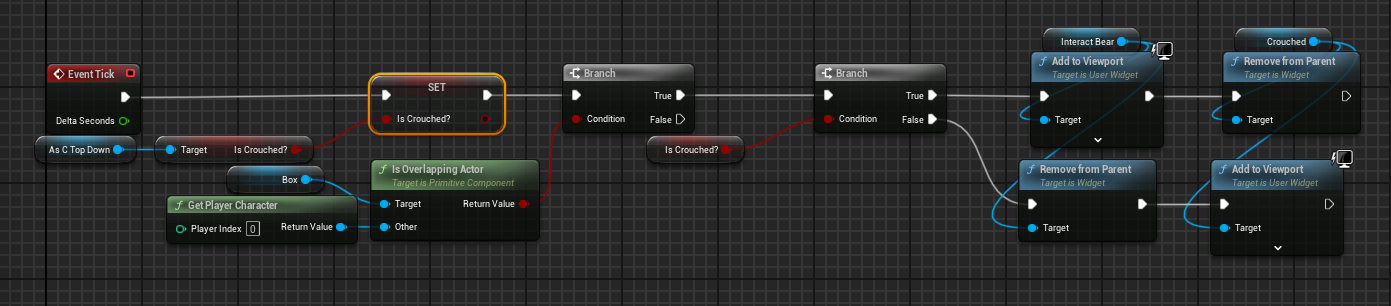
im trying to swap it off event tick cause now all of a sudden im getting this error https://i.imgur.com/DeMedHO.png

 jovial steeple
devout oak
i currently have it going through a event tick for this instead of an overlap
jovial steeple
devout oak
i currently have it going through a event tick for this instead of an overlap
A OnComponentBeginOverlap node cannot "constantly run" anything. The OnComponentBeginOverlap node simply fires once when something overlaps with the component. If you want to "constantly run" logic (run logic each frame of the game) you will need to use the EventTick like you have done. Event tick is called every frame of the game.
This is an example of how begin overlap and event tick are used together.
 jovial steeple
devout oak
im trying to swap it off event tick cause now all of a sudden im getting this er...
jovial steeple
devout oak
im trying to swap it off event tick cause now all of a sudden im getting this er...
The error you are getting is saying that the reference to your player character is invalid. You have probably hooked up the light blue lines (references) incorrectly. If you show your code, we should be able to see the cause right away.
devout oak
the only thing i dont get is earlier it was working fine no errors and now all of a sudden im getting them
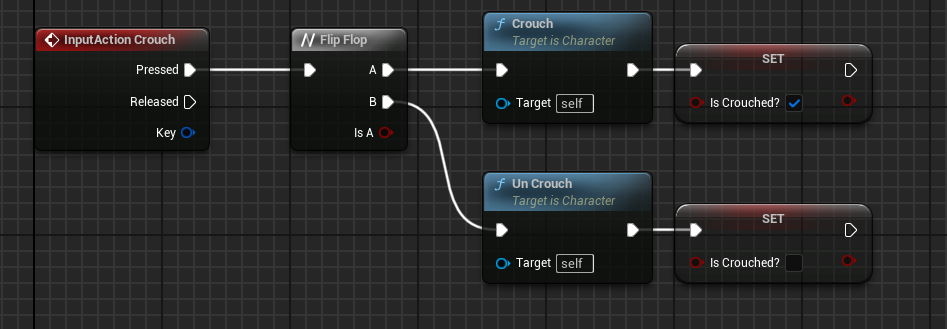
there is my crouching in my character bp
jovial steeple
I see your AsCTopDown is actually a variable on that blueprint. It must not be getting set properly.
devout oak
its an object ref to my character bp
jovial steeple
It is invalid at some point, whenever that code is called.
Invalid meaning, its equal to "None" and doesnt reference your character.
fiery swallow
devout oak
https://i.imgur.com/tswNuVJ.png
btw there's already a crouch bool in the movement component, you don't need to create one
https://i.gyazo.com/f036647c2bc1635e78729c0bf0415caf.png
 jovial steeple
Do you understand how reference variables work in the first place? Many beginners struggle with this.
jovial steeple
If you wanna call, I will help you fix it.
maiden wadi
Too much complication and tick for a simple event driven two variable state machine.
digital glacier
anyone know how i can get like a youtube video for example to load in unreal engine? ive seen it done before with google drive mp3 links, thats fine as well, i just have no idea where to even start with that
fiery swallow
digital glacier
anyone know how i can get like a youtube video for example to load in unreal eng...
browser widget, in the umg
you just need the browser to link to the Embed youtube video
 spiral ridge
Hello! Need your help. How can I add new one tag to existing list, and delete another one?
solemn shale
im creating widget on beginplay, but it creates 2 times when i try listen server with 2 player
 wind atlas
frosty heron
sorry I am out of ideas, the only difference I can spot soo far is that I don't ...
wind atlas
frosty heron
sorry I am out of ideas, the only difference I can spot soo far is that I don't ...
i cant believe this is the problem.

 humble wigeon
spiral ridge
Hello! Need your help. How can I add new one tag to existing list, and delete an...
humble wigeon
spiral ridge
Hello! Need your help. How can I add new one tag to existing list, and delete an...
is this an Actor tag? or an Actor **Component **tag? What do you mean existing list? Is this supposed to happen **programmatically **at runtime? Or do you want to do this before the game runs in the Editor?
spiral ridge
humble wigeon
is this an **Actor** tag? or an Actor **Component **tag? What do you mean **exis...
I have Actors with tags added before the game start (in the Editor). I want to change the tags during the game process (at runtime). I only found how to exchange all list of tags (as seen in the picture), but I can't work with tags individually by their names.
 warped juniper
spiral ridge
I have Actors with tags added before the game start (in the Editor). I want to c...
warped juniper
spiral ridge
I have Actors with tags added before the game start (in the Editor). I want to c...
Have you tried maybe Gameplay Tags instead of Actor Tags?
spiral ridge
warped juniper
Have you tried maybe Gameplay Tags instead of Actor Tags?
No. I don't know Gameplay Tags at all. I was hoping that the problem could be solved by Actor Tags.
humble wigeon
spiral ridge
I have Actors with tags added before the game start (in the Editor). I want to c...
I've never done this before so I might be wrong, but seeing how this is an array, are you not able to use the array.find method, **get **the tag you want to **remove **and then just **add **the one you want to add?

You might wanna check if the retuned index from the Find function is -1 to check if the tag was actually found
spiral ridge
humble wigeon
You might wanna check if the retuned index from the Find function is -1 to check...
Thank you, I'll try
humble wigeon
spiral ridge
Thank you, I'll try
 spiral ridge
My solution (not elegant, but it works). First I check what the beam hit (by tags).
Then I send a signal to a specific blueprint via the interface.

 dusky cobalt
Why are you just not remmoving the tag name from the Array?
dusky cobalt
spiral ridge
My solution (not elegant, but it works). First I check what the beam hit (by tag...
Imagine you have 500 tags
Interface is the way to go
humble wigeon
spiral ridge
My solution (not elegant, but it works). First I check what the beam hit (by tag...
Oh nice, i wasn't aware of the contains function 👍🏻
spiral ridge
dusky cobalt
Why are you just not remmoving the tag name from the Array?
I dont know how work with strings in array separately
dusky cobalt
You Hit Actor, and send event Yo, you just call it to everything you hit, BUT if it doesn't implement interface, it's not gonna get the event trough(it's like you didn't connect cables to that villiage yet, so they cannot watch the tv). It means you can implement that interface only on things you actually want to HEAR you. Even better, all these things can do different things! Lava might say Hi, Block may say Hello, Button might Run.
you can also tell these things you hit, Hey bro, give me your ID! and if it implements that interface and event, it will have to give his ID (so you can use Get Tag).
humble wigeon
dusky cobalt
You Hit Actor, and send event **Yo**, *you just call it to **everything** you hi...
@spiral ridge yeah I'd also advise doing this it's much cleaner code and it scales much better than just checking for every possible actor tag
frosty heron
wind atlas
i cant believe this is the problem.
believable :D, nice to see you solved it.
wind atlas
frosty heron
believable :D, nice to see you solved it.
decided to just add impulse based on the mesh velocity. Not as good but similar to what i want
frosty heron
spiral ridge
My solution (not elegant, but it works). First I check what the beam hit (by tag...
Use Gameplay Tags instead of FName
dusky cobalt
Is it common practice to for example use different class of Playe State in Main Menu and different one in the ''game'' or ''level''?
Or mostly PlayerState doesn't matter in the main menu, so it can be used the same as the one already in the level? I ask mostly about singleplayer. Multiplayer probably has it's own nuances... or would be easier to say different Player State for different ''GameModes'' (even if they are exact the same, maybe would be good to create children of each Player State for different GameModes). I'm looking for examples how you guys do it or what are the practices.
 dapper fern
https://blueprintue.com/blueprint/7-e3jsvv/
Why when I want to draw a debug shape on the HitResult's Location and Impact, it draws it in the center of the world ?

No description provided
frosty heron
Check if you hit anything to begin with.
maiden wadi
dusky cobalt
Is it common practice to for example use different class of Playe State in Main ...
In single player you won't really need a special class of PlayerState more than the original APlayerState in the main menu. The most you'll use it for is to get PlayerName from it for like someone's Steam name or console specific GamerTag. In a main menu you will rarely need much more than a special playercontroller and HUD, and with that a GameMode to specify both of them. HUD you can also kind of get away not using too since it'll mostly just be pushing the main menu widget to viewport. The PlayerController is a bit necessary for initializations as far as console go. Less important for PC.
And to add to that, even in multiplater, the basic PlayerState is fine in main menu. Cause you're still singleplayer at that point anyhow.
dusky cobalt
Thanks, that helps!
dapper fern
frosty heron
Check if you hit anything to begin with.
Damn you're right, I tought I was hitting the thing but not at all...
 primal hare
How can I fire up multiple, separate chains inside a BP, when one thing happens (ie a custom event) ? I can connect them all and end up with spaghetti, How to avoid it? Something like "named node" in the Material Editor .
dusky cobalt
primal hare
How can I fire up multiple, separate chains inside a BP, when one thing happens ...
Sequence node
s + left mouse click
primal hare
yes but that does the same spaghetti thing
dusky cobalt
you can probably then create custom events for each of the separate chain and then just call these events
primal hare
hmm yes, line them up in a chain
I don't know why I feel there was amore elegant way, but I'm forgetting or mistaken.
snow halo
Hi I wanna ask a question
why is this able to change test_image

but doesnt work on this image inside of that thing

Test_image is that big white thing top left
I guess it's because its transparent right?
maiden wadi
 autumn pulsar
Does UE have a sort of "Noclip" movement mode?
autumn pulsar
Does UE have a sort of "Noclip" movement mode?
Depends on the collisions you want to ignore. If you just want to fly and ghost, easy. If you want to walk on landscape, but walk through walls, your walls need to not share the same type as your landscape and the capsule needs to block landscape and not the other for example.
autumn pulsar
I guess I'll be more specific, I'm trying to do a ledgegrabbing system, and I'm trying to come up with a way to actually handle movement on the ledges themselves
As well as transitioning to the spot
humble wigeon
snow halo
is this like a radial menu Widget? And are the nodes in the first picture inside this Radial Menu Wdiget graph?
Might be a stupid suggestion but maybe you have to connect the TestImage node to the Set Brush from Texture node?
humble wigeon
autumn pulsar
I guess I'll be more specific, I'm trying to do a ledgegrabbing system, and I'm ...
So how does that relate to ignoring collisions?
autumn pulsar
humble wigeon
So how does that relate to ignoring collisions?
I have to get pretty close to the wall
I don't actually care too much about my pawn collision since I'll be driving a lot of the movement via trace validation
humble wigeon
autumn pulsar
I have to get pretty close to the wall
Not very knowledgeble about this to be honest 😅 but you could try having a look at Collision Presets and Collision channels inside the Pawn class you're trying to implement this into and uncheck the check mark under "pawn"
See what that does maybe?
 languid hemlock
Is there a way to read .sav (SaveGame Object save file extension) in packaged game?
I have a house architecture project and i want to export the houses i made and import the other houses with .sav files. I can achieve this by pasting the file into the Saved folder, but it needs to be done in an easy way from within the game, not manually. I guess its not possible with blueprints. Is there a plugin for that?
dusky cobalt
Can I send player choice to the GameInstance to be read by Player Controller when setting things up?
Like I open level by gameinstance and at the same time I could set variable like weapon that player chose, and then read it in Player Controller, by Get GameInstance > Interface Get Weapon > and inside Player Controller, spawn that weapon in Player hands or something like that. Is this valid approach? For context, player can chose ''weapon'' before starting mission.
autumn pulsar
languid hemlock
Is there a way to read .sav (SaveGame Object save file extension) in packaged ga...
You'd probably have to write your own parser
maiden wadi
languid hemlock
Is there a way to read .sav (SaveGame Object save file extension) in packaged ga...
It's a file just like any other. So if you're looking to move the file into the project, you can use file utility functions to copy/move it there from where ever else. But if you're looking for something more like copying a test file and parsing it, you'd have better luck using something more like json.
autumn pulsar
try checking your compression settings and make sure it's set to UI
wasn't sure if it was a texture or not
What does the font look outside of game?
oh weird
maiden wadi
dusky cobalt
Can I send player choice to the GameInstance to be read by Player Controller whe...
I'd recommend some sort of savegame in the game instance that can house the state of player chosen things. If you keep their progress in a savegame, you can also write their choices there. Since the savegame is held in the GameInstance it won't need to be loaded every map change and you can just pull whatever data you need out of it for initialization in the map. This is how I do pretty much any singleplayer stuff that transitions to another map. Like in my mech project I have to set up a player's company and other data in a widget in the main menu. This just writes data into a new USaveGame which is set as the ActiveGameSave in a subsystem of the game instance. When loading into the "world" map, it can choose to initialize the game based on the fact that data is missing from the savegame which then sets said data. And the same savegame is used through the game to save general and specific map data.
dusky cobalt
maiden wadi
I'd recommend some sort of savegame in the game instance that can house the stat...
Hmm, so that's more or less good direction I wanted to chose. For more context, before every mission you can choose different faction you start as. When player starts, it get's teleported to starting location, and in player controller I spawn starting buildings and other things. Now I need to change what is beeing spawned based on what player choose. So would be saving this choice be okay in the Game Instance (since this is first player ''contact'' with any blue print trough Start Game button which is calling to GameInstance where is event Open Level. So with the same event that opens the game (by Start Game button) I could also send variables player chose (let's say faction, difficulty level, and maybe something else..), then when player is getting spawn by Game Mode (pawn possesing), at the end Game Mode calls to Player Controller and Player Controller can grab info from Game Instance? Would that be correct flow? If it would be multiplayer does it get much more complicated?
maiden wadi
Maybe. I'm reluctant to say put it in the gameinstance directly. The thing is that you need this information in the game anyhow and it needs saved if you choose to allow them to save their progress. So it makes sense to turn it into a savegame with the data instead of putting it directly in the game instance.
For the multiplayer aspect, that depends. Stuff like this is more like a lobby. And a lot of people do this by seamless travel and passing data through the playerstate's copyproperties. But you can also do it by the same savegame/globalobject method by mapping a player's picked choices to their unique net ID which is infinitely safer due to connectivity frailty issues.
 slender harness
any one use enhanced input mapping yet?
digital glacier
can i use 2d meshes on this? or would i just scale one of the params to 0? this is a widget pointer, its a ball but i want it to be a 2d icon or sum beause this is a bit ugly

 fading raptor
Hello everybody ! I'm trying to make a platformer 2.5D & I'm on the part in which I'm trying to get the player to move in the depth with the help of splines (and it works pretty well) so I can make visually appealing things later on. The problem now is that I can enter the spline on one side only and same for the exit. I was thinking of making a check in which if the player has the boolean isIsSpline activated it gets him off the spline & inversely. But it does an instant on off, I was then wondering if there was a way to check on which side the player enters the collision boxor if there's another way of doing that. Thanks in advance !

 dawn gazelle
fading raptor
Hello everybody ! I'm trying to make a platformer 2.5D & I'm on the part in whic...
dawn gazelle
fading raptor
Hello everybody ! I'm trying to make a platformer 2.5D & I'm on the part in whic...
Each collider can have its own overlap event.
You do have the right idea I think... Just have a bool that checks whether or not they are "in the spline" and if so, exit, otherwise enter, and you can adjust the direction of traversal along the spline based on which collider they entered with.
fading raptor
dawn gazelle
You do have the right idea I think... Just have a bool that checks whether or no...
I already have it but I still have the on off instant problem so now I'm setting up boxes on sides of the main ones to tell the direction the player is coming from to get in/get off (a bit clunky but that might solve my problem for now)
 dawn gazelle
Plug in "Player Ref" to the target here to retrieve the bool just to ensure that you're going to have a valid reference to use regardless of which side you enter the spline from --- right now it would only ever work correctly if the "In Box" was triggered first.
What you may be seeing with the instant on/off problem is that there could be multiple components on the player that can be triggering the overlap events, potentially solved by checking if the root component of the character is == to the "Other Comp" and only proceeding with the rest of your logic if so.
 fading raptor
dawn gazelle
Plug in "Player Ref" to the target here to retrieve the bool just to ensure that...
fading raptor
dawn gazelle
Plug in "Player Ref" to the target here to retrieve the bool just to ensure that...
oh ok thanks !
 storm solar
how do i make all objects attached to an actor dissapear when using a disolve material?

 faint pasture
storm solar
how do i make all objects attached to an actor dissapear when using a disolve ma...
faint pasture
storm solar
how do i make all objects attached to an actor dissapear when using a disolve ma...
Where's the part where you gather all the objects?
snow halo
isn't this interface supposed to be passing the data?

Im already populating it

I tried print string, nothing comes out the other side
storm solar
faint pasture
Where's the part where you gather all the objects?
Realized I'm asking the wrong question.
Im trying to get an actor to fade out. I'm using a disolve material and it's okay, but I have to apply each material to every object attached to the actor. Also the material changes the original color of the actor. Is there...
- A way to fade out the actor and all objects attached to an actor without individually adding them.
- If i need to go the material route, have the material im adding to an actor be the same properties as the actor?

 wide condor
can enyone join my the 1 voice channel and help with my blue print i am really stuck with my item inspection system it would really help
 tropic token
is there any way to do regexp in blueprints? like check if text has letters only?
solemn shale
Where is the best place to create widget like ammo, healthbar and other stuffs in multiplayer? Playercontroller? CharacterBP? or HUD maybe
 graceful gust
i have an issue with saving post process settings. whenever i save them, then when the game is loaded the next time the screen is black. changing fov fixes the issue for some reason. This issue does not come from loading the settings, it just appears from saving them.
hollow tendon
wide condor
can enyone join my the 1 voice channel and help with my blue print i am really s...
sure
graceful gust
the settings are chromatic aberration and film grain. doesnt matter if they are turned on or off, just saving them makes the screen black next time.
slender harness
anyone run into an issue in PIE where, if you use a mouse command like right click, it works, but doing again doesnt. But if you bring up your console, and then close that console the mouse event works again once.
graceful gust
graceful gust
the settings are chromatic aberration and film grain. doesnt matter if they are ...
this is how the saving looks

im so confused
faint pasture
storm solar
Realized I'm asking the wrong question.
Im trying to get an actor to fade out. ...
You will need to recursively gather all attached objects
This is a good usage of some project-specific master material
faint pasture
solemn shale
Where is the best place to create widget like ammo, healthbar and other stuffs i...
HUD is probably best but PlayerController can be fine too
hell even Character can work if you're carefu
 drowsy rivet
Hi everyone! can someone help with that problem? I overrided get aiming rotation but parent node did not showed up

 storm solar
faint pasture
You will need to recursively gather all attached objects
storm solar
faint pasture
You will need to recursively gather all attached objects
Is there a way to do this with a function or do I have to do this manually for each object attached to the actor?
 mystic blade
Is creating cube world like terrain generation feasible with just blueprints? I don’t mean like Minecraft terrain where you can break every block. The only layer you will see is the surface, lakes, oceans, mountains and dungeons that go below the earth. No mining.
faint pasture
storm solar
Is there a way to do this with a function or do I have to do this manually for e...
You can get attached child scene components from the root on down and gether them that way
mystic blade
mystic blade
Is creating cube world like terrain generation feasible with just blueprints? I ...
No smart ass responses please
faint pasture
mystic blade
Is creating cube world like terrain generation feasible with just blueprints? I ...
ehhhhhhhhhh probably not. It's just a LOT of data.
mystic blade
faint pasture
ehhhhhhhhhh probably not. It's just a LOT of data.
I mean I’ve seen it done before
storm solar
faint pasture
You can get attached child scene components from the root on down and gether the...
So it’s called something like “get child scene components”?
mystic blade
Pure blueprints with reasonable framerate
faint pasture
I doubt it was full BP. I mean it could be, but that'd be a really awkward way to do it. BP just doesn't like scaling to heavy systems like that.
faint pasture
dungeon?
mystic blade
Just that and oceans
thin panther
That's still a considerable amount of data. One of BP's biggest weaknesses is large loops, which this is
Better off just buying some out of box generation system imo
Or learning the C++
drowsy rivet
drowsy rivet
Hi everyone! can someone help with that problem? I overrided get aiming rotation...
can someone help?
faint pasture
Basically BP is almost full-featured, it's just about 100x slower than C++. Whether or not that matters depends on how much work you're doing. With stuff like this, it's a good bit of work.
dusky cobalt
snow halo
isn't this interface supposed to be passing the data?
you need to implement interface on something, go to that event, plug data, and then call it from anywhere when you ''hit'' or interact with that item that has this interface, you call to it Pass Info (better would be Get Info) from that thing you just hit. ANd that thing you just hit, had that interface, with plugged data inside.
faint pasture
snow halo
Im already populating it
does Pass Info 2 even get called?
dusky cobalt
drowsy rivet
can someone help?
You are calling function, where you plugged again this function. So if you call it first time from somewhere, it will be calling first the event, and then 2nd node (which is again itself), so it's infinite loop.
faint pasture
drowsy rivet
can someone help?
You need the override to call the parent class's version of the function, not itself (which is why you have an infinite loop)
drowsy rivet
faint pasture
You need the override to call the parent class's version of the function, not it...
I have done it and I need the rotation pin to plug the break rotator, is there an alternative?
drowsy rivet
dusky cobalt
You are calling function, where you plugged again this function. So if you call ...
how to solve it? I need a node so that i could plug the break rotator node
dusky cobalt
drowsy rivet
how to solve it? I need a node so that i could plug the break rotator node
add variable to Input node that can be passed to this function

when you can Get Aiming Rotation just provide rotation from outside
drowsy rivet
dusky cobalt
add variable to Input node that can be passed to this function
it did not work
 mystic blade
You guys act like blueprints run like dog ass compared to c++
Compile time is for sure slower
 cursive cosmos
Anyone know how I can centre the white square to my Cursor instead of it having this offset? https://gyazo.com/ec0acf2aaec93daf8f0ab6b6b0fe16b8
 mystic blade
But actual game performance is probably not very noticeable
cursive cosmos
 faint pasture
mystic blade
Compile time is for sure slower
faint pasture
mystic blade
Compile time is for sure slower
BP compile faster though...
and BP does run like dog ass, but whether or not that matters depends on what you're doing.
mystic blade
:(
faint pasture
it won't matter for some input routing and simple logic, even a bit of physics on tick is fine.
if you need to do a LOT of something REALLY FAST then it's not the place for it.
mystic blade
I’ve seen really performant games made with BP. Punch a Bunch is an example
faint pasture
and I'd know, I've implemented some pretty crazy stuff in BP while prototyping. Moving them to C++ made them about 100x faster
Punch a Bunch is doing nothing in BP, pretty much
the actual number crunching is in the physics scene and all handled C++ side
drowsy rivet
dusky cobalt
add variable to Input node that can be passed to this function
the guy in youtube overrided the function (I did the same thing) and got parent get aiming rotation and puged every node to that node

 dusky cobalt
drowsy rivet
the guy in youtube overrided the function (I did the same thing) and got parent ...
dusky cobalt
drowsy rivet
the guy in youtube overrided the function (I did the same thing) and got parent ...
it's not the same thing
call to parent and calling the same function
faint pasture
drowsy rivet
the guy in youtube overrided the function (I did the same thing) and got parent ...
This needs to be a Parent: version
 dusky cobalt
if you want call to parent right click on node and call to parent
drowsy rivet
dusky cobalt
if you want call to parent right click on node and call to parent
yooo! Thank you so much! Your the best!
drowsy rivet
faint pasture
This needs to be a Parent: version
thak you your the best!
dusky cobalt
it's because if you have parent class that implements interface and parent class has already some code for this function, and then you have children class of the same function, **you can either override it completly **and make it ignore the parent ''logic'' or you might want the children class to actually first check if the first logic in parent class is ok, and then add new logic on top of it (like 2nd check, )
drowsy rivet
I have beedn trying to find that parent but just made the loop for 30 minutes
thank you!
dusky cobalt
example Parent Class checks Is this thing yellow? and Children Is This thing green? you can shape it in a way it either checks if both are ''true'' or only the more ''close'' one (only children) if you don't call to parent
snow halo
faint pasture
does Pass Info 2 even get called?
On this image it's getting called?

If not then it's called on this image

true?
snow halo
dusky cobalt
you need to implement interface on something, go to that event, plug data, and t...
i am implementing it on both of these BPs
faint pasture
snow halo
If not then it's called on this image
Does the execution actually MAKE IT THERE?
put a breakpoint, or a print string
snow halo
faint pasture
put a breakpoint, or a print string
I said no
faint pasture
snow halo
If not then it's called on this image
How far does the execution get in this path?
print the value of Action Control UI
what do you get
snow halo
nothing
faint pasture
does a print string Hello after the interface call even print?
snow halo
you mean this?
 faint pasture
no
faint pasture
snow halo
If not then it's called on this image
Make sure all of this works
put breakpoints, put prints strings, make sure it works


 solemn shale
faint pasture
HUD is probably best but PlayerController can be fine too
solemn shale
faint pasture
HUD is probably best but PlayerController can be fine too
thank you


 dusky cobalt
ok I see Person Character and Radial Menu, who actually has info (variables on this event)?
snow halo
dusky cobalt
ok I see Person Character and Radial Menu, who actually has info (variables on t...
inventory has info
snow halo
 dusky cobalt
ok, but it's not this event
ths is Check If Item handheld
you need to go to interface Pass Info 2
On the left in inventory you ahve category Interface
and there is Pass Info 2
click 2 times on it
and here you connect all the data.. when you do it ping me, well do it step by step
snow halo
faint pasture
Print this
 snow halo
dusky cobalt
and here you connect all the data.. when you do it ping me, well do it step by s...
snow halo
dusky cobalt
and here you connect all the data.. when you do it ping me, well do it step by s...
 dusky cobalt
ok, just to make sure, you want to extract data FROM inventory system in OTHER PLACES ?
so other places can ''read'' it
like they are supposed to call, hey inventory show me what u got
ok, go back to your Blueprint Interface
you have wrong outpots/inputs then
just create new event maybe at this point
for ''testing'' so you can see
you need to create all these variables as OUTPUTS
dont create any input
when u do it, click 2 times on the interface event in the inventory system
the new one you created
you will delete the old one later
 dusky cobalt
nice, now here in this place you feed the data
snow halo
dusky cobalt
nice, now here in this place you feed the data
i dont have em there
I got em here

 dusky cobalt
go b ack to event and add 2 inputs (as in the purple node), and then connect everything again in same way, just in this new place

i think you have to think more about the architecture of this system, i can show you how to extract data, but i can already see some things not making sense
snow halo
dusky cobalt
go b ack to event and add 2 inputs (as in the purple node), and then connect eve...
 dusky cobalt
you need to feed data it now, so we can call it in other places and extract it
you will have to somehow Get InventorySystem > For Testing ( call ) and it will give you that data inventory system has at that time
snow halo
 dusky cobalt
now go to wheel
do you have reference to inventory there?
nice, get it, drag from it and call For Testing
no
dont implement interface on it
Get Inventory System variable
drag from it and find For Testing (Message)
snow halo
 dusky cobalt
here you go
snow halo
dusky cobalt
i think you have to think more about the architecture of this system, i can show...
architecture?
dusky cobalt
snow halo
architecture?
i mean they way you want this thing to work
looks a bit like you want to do 12 things at once
break it into small parts
think where you store data and how to access it
did you understand how this interface event was the wrong ''way''? or it didn't help you ?
 winter plume
am rapidly starting to understand how unreal wants me to think. also am i completely neurotic about routing? lol

question for yall, what's the distinction and use cases for event dispatchers vs interfaces? because it seems to me i can almost use them interchangeably
 high gale
I am trying to make a widget be visible when an AI controller sets its state as "chasing" but when I try to cast it keeps asking for a wildcare object and I dont understand what it wants

 compact trail
just starting out, and have tried searching unreals documentation, as well as youtube videos. i need help with programming projectile for 2d top down game obviously firing in whatever direction player character is facing at moment its not 8 directional at the moment. TIA
 olive yarrow
any ideas how i could make my spring arm bouncy? I've got a car driving along a flat surface and the cam lag helps a lot but im missing that "oomph" y'know?
Any cheap ways to go about it? I'm thinking of offsets clamped in ranges.... but... idk..
winter plume
olive yarrow
any ideas how i could make my spring arm bouncy? I've got a car driving along a ...
depends on if you want it to be like a reactive game element or just like an effect. cause you can lerp its position and handle easing and all that if you don't need it to deal with physics
olive yarrow
winter plume
depends on if you want it to be like a reactive game element or just like an eff...
I suppose it is reactive, at least in my mind - it tils currently with offsets when moving and the cam lag helps that look hecka nice.
But that is kinda just an effect I guess...
 dim siren
Maybe a vertical cam shake with a dynamic scalar based on the vertical velocity of the car.
winter plume
yeah you might not be looking for a solution to the spring arm at all. you can have the lag be the sort of base and applying a game shake will give the oomph
olive yarrow
winter plume
yeah you might not be looking for a solution to the spring arm at all. you can h...
you talkin like the CameraShakeSource?
winter plume
olive yarrow
you talkin like the CameraShakeSource?
not experienced enough in unreal to say honestly sorry. just talking conceptually
olive yarrow
No worries, every bit helps! Sometimes i overlook the simple stuff and just shootin' the breeze here helps
winter plume
i know what you mean. i like just talking through stuff as well. i've got 10 years of experience in game dev and am like brute forcing my exposure to unreal because there's a job i would really like to get
and it's low key maddening being able to conceptualize whole systems and spend 4 hours dicking around with simple stuff
olive yarrow
i have never felt more in agreeance with something so heavily in the last few days than i do now
snow halo
dusky cobalt
did you understand how this interface event was the wrong ''way''? or it didn't ...
btw it doesn't work


I guess I'll just use cast, since it's not all that bad if its in memory
because this is about a quick action/selection or item UI in the form of a radial menu
high gale
I am trying to make a widget be visible when an AI controller sets its state as "chasing" but when I try to cast to the widget it keeps asking for a wildcard object and I dont understand what it wants
 dawn gazelle
high gale
I am trying to make a widget be visible when an AI controller sets its state as ...
dawn gazelle
high gale
I am trying to make a widget be visible when an AI controller sets its state as ...
You need a reference to the object that you're trying to access (in your case, a reference to your widget) and you probably don't need to cast. A cast is like a type check, it sees if what you plug into it is of the type you're casting to, and if so, allows you to access the variables and functions that are available at that class.
high gale
how do I get a reference to it?
dawn gazelle
The reference is created when you use the create widget node. The return value is the reference to the "spawned" widget.
So depending on where you store it, you'd have to either access it from the place you're storing it, or pass along that reference to other objects so they can access the reference.
high gale
I have the widget stored in my enemy base and want to pass it to my ai controller
dawn gazelle
So you have two options... You can pass the reference to the AI controller from the Enemy Base, or you have to get a reference to the Enemy Base from your AI Controller and then you can access the widget variable from the Enemy Base reference.
Assuming "Enemy Base"'s controller would be your AIController, then from your AIController you should be able to do a "Get Controlled Pawn" cast that to your Enemy Base class, then if you're storing the widget as a variable in there, you should be able to get it from there.
high gale
dawn gazelle
So you have two options... You can pass the reference to the AI controller from ...
sort of like this?

then do I cast again as the enemy base to the widget?
I have the widget as a variable in that enemy base but I don't understand how to get that variable out of it?
out of the cast node I mean
frosty heron
drag that and type your widget variable

but honestly this is bad design, why should anyone know about the widget..
Having an object telling the widget what to do is beginner trap.
Instead the widget should read from it's source or owner
establishing one way dependency
so Your character doesn't need to know about the widget
its' the widget job to read the character's HP
high gale
Well my idea was to have a widget that is set to hidden by defaut, then when the enemy spots the player the widget would be set to visible and would chase the player
its an exclamation mark widget
for a stealth game
frosty heron
Character -> Take Damage -> Widget -> Set Hp 🙅♂️
Below is better
Widget Created -> Get Owner -> Bind to Take damage event
Character -> Take Damage -> Broadcast Take damage event
Widget -> Update Visual
frosty heron
high gale
Well my idea was to have a widget that is set to hidden by defaut, then when the...
The widget can listen to the character property that state if the character spot someone or not
and update it's visual accordingly
same principle above
high gale
I can see your point but I am curious to know why this method is considered bad practice though? If it is because of casting it should be fine since its an enemy to the enemy AI so they are already going to be dependent on eachother
This is my graph for reference
 frosty heron
Nothing to do with casting
You want to establish one way dependency
as stated above
Your character doesn't need to know about the widget
it doesn't need to tell the widget what to do
The key point here is widget just read
If you do that, you will have a self contained codes that is scaleable and prone to less bug
dusky cobalt
it's very good advice, these are just good programing practices
high gale
So how would I do this then, with event dispatchers you think?
dusky cobalt
your way works too, but you will realize very quickly the mistakes of your system
high gale
I have been using youtube tutorials my entire experience with Unreal and this is my first function of sorts that I am making without a video to follow
frosty heron
high gale
I have been using youtube tutorials my entire experience with Unreal and this is...
This is the time where you unlearn shit practices from youtube.
I been there too and done the same (Having bad design until I was adviced otherwise by nice people here)
dusky cobalt
high gale
So how would I do this then, with event dispatchers you think?
he already wrote to you how 🙂 if you don't know anything about dispatchers go watch some tutorials about basic and if you still dont understand them come back and well help, if we give you solution you will not learn
learn the tools, not the ''tutorials''
not how to, but why
high gale
I have a small understanding of event dispatchers so I could try to do some of that here
dusky cobalt
dispatchers are go to 99% of time for health changes or similiar
high gale
So I have this "On Spoted" event called when the AI sees the player in my AIC then in my enemy base I have this. It is giving me an error though and I don't really know what to do with this now

This is in my AIC
 frosty heron
high gale
So I have this "On Spoted" event called when the AI sees the player in my AIC th...
frosty heron
high gale
So I have this "On Spoted" event called when the AI sees the player in my AIC th...
On Widget construct, you need to grab a reference to the AI controller
and bind the event from there
high gale
frosty heron
On Widget construct, you need to grab a reference to the AI controller

the return value isint going into the bind event from here
did I put it in the wrong place?
frosty heron
high gale
You don't bind it here
Yes
create a variable in your widget, call it AI controller of your type
then make it instance editable and expose on spawn
when you create widget , pass the ai controller
Then Widget OnConstruct -> Get AI Controller -> Bind OnSpoted event
high gale
frosty heron
create a variable in your widget, call it AI controller of your type
create the variable in the widget? You cant be refering to this screen right?

ik the widget looks like shit, I will change it later lol
frosty heron
Go to the graph tab
snow halo
Is there any better way to do this instead of making 8 seperate functions for setting the textures into these ones

and making 8 seperate functions for checking if they are already having a texture, and if not then have them opacity 0 etc.
I already have a crapton of functions from trying to set individually the visibility of each slot's selection indicator . etc.

which is not as bad as some other things I tried earlier
that would not even be possible to fit in here in one screenshot
or even 100 screenshots for that matter xD
I dont even remember why I created this one but it looks like mode changes the category of each of these visibility switches
 warped juniper
So I have a simple but tricky issue I'm unsure how to sort...
If I want the actor's forward vector to change instantly to match up with their current movement direction, how can I set it up in such a way it actually reflects it visibly?
Currently the test mesh just isn't turning around. (I know a turn around animation will be needed but that's a later issue...)
 boreal crypt
I mean you can SetActorRotation, but if the actor is using rotation from controller then you’ll need to set the controller rotation.
autumn pulsar
snow halo
I dont even remember why I created this one but it looks like mode changes the c...
you can bitmask this bit here
 coarse tide
I'm trying to make a projectile (2 arrows) fire faster. Any idea on how to do that? I've tried a few things..
 open dune
❗Hi! I'm doing a Turn-based game project and I got some error about when a player's turn, player and enemy's character will get data from a structure and database. After got data it will spawn actor for each actor's character. So what happened was It's not spawn a enemy actor and has a collision error and I try change a "Collision handling Override" , It's spawn a actor but didn't bring a data to my battle actor Component. Anyone can give me a advice? 😅


 rough cedar
Hi! I'm trying to spawn an actor (not player character) and find out what the nearest spline point is to where they spawned. I can only seem to convert world location to distance and location along spline, but id really also like to take that data and get the the nearest spline point as well
 frosty heron
coarse tide
I'm trying to make a projectile (2 arrows) fire faster. Any idea on how to do th...
frosty heron
coarse tide
I'm trying to make a projectile (2 arrows) fire faster. Any idea on how to do th...
use projectile movement component then change the velocity
coarse tide
frosty heron
use projectile movement component then change the velocity
Thanks. I'll mess with it tomorrow. That will speed up the projectile itself? Basically I want fast laser type thing for my drone.
frosty heron
coarse tide
Thanks. I'll mess with it tomorrow. That will speed up the projectile itself? Ba...
you can set the initial velocity
and freely change the velocity after
coarse tide
frosty heron
you can set the initial velocity
Ok cool. Thanks for the help
maiden wadi
rough cedar
Hi! I'm trying to spawn an actor (not player character) and find out what the ne...
I don't think there are built in functions for that. You could make a library function that takes in the spline and a location and returns an integer. And then just loop through the spline points to distance compare them to the input location. Return the closest index.
frosty heron
Trying to find a way to push NPCs around my character if i bump into them. Is there other way instead of using sphere collision?
 runic ore
frosty heron
Trying to find a way to push NPCs around my character if i bump into them. Is th...
runic ore
frosty heron
Trying to find a way to push NPCs around my character if i bump into them. Is th...
first I'd check if CMC has smth that could be used. otherwise, can't you use the collision event from your capsule and just apply a smallish impulse on the npc?
(I mention CMC as it also applys an impulse on dynamic objects you stand on)
runic ore
frosty heron
hmm add force and add impulse don't seems to do anything 🤔
hm maybe you need to call smth different for characaters. (so no physics impulse, but smth the cmc can handle) so maybe have a look on the Launch smth smth function ACharacter provides I use it to jump, but I think it can be also used for pushing (maybe there are mor explicit functions)
frosty heron
oh wait, add impulse works
but i have to multiply a normalized vecrtor by 10k for a minimum force
runic ore
hmm I currently don't know the metrices for forces in UE, so either it's very big, or expected 😄
frosty heron
runic ore
hmm I currently don't know the metrices for forces in UE, so either it's very bi...
tyvm regardless, I got something I can use to start with
maiden wadi
frosty heron
but i have to multiply a normalized vecrtor by 10k for a minimum force
You can also try to pitch up the force a little. Part of that is because the perpendicular sweeps often still just hit the floor without enough force. Another hacky way to do it is to lift up the character by 1 or 2 cm and then apply force. Just to get them off of the ground.
 balmy onyx
is there a way to connect both layerblends to the base colors at once?
 frosty heron
balmy onyx
is there a way to connect both layerblends to the base colors at once?
frosty heron
balmy onyx
is there a way to connect both layerblends to the base colors at once?
that wouldn't make any sense and no
balmy onyx
so i gotta create all the pins in one?
frosty heron
I don't know what your node is doing but your base color takes in 4 param. R,G,B,A
 hollow bane
Hi I have a little math issue i need help with. I have three vectors I want to use to calculate a circumcenter of the circle they are surrounding. Is there any video or guide on how to achive this in blueprints?

i want to set an actors location based on that circumcenter vector i would get
frosty heron
@hollow bane #game-math got math nerd if no one answer you here.
hollow bane
frosty heron
<@323907999255232512> <#1174844469850419241> got math nerd if no one answer you ...
thank you, i was looking for the channel, couldnt find it 😄
 vital adder
How can I get an array of all the actors curreny visible on screen?
line traceing will not work in this scenario
because level can be big
hollow bane
vital adder
because level can be big

I want to check if the player camera is able to see the actor. The methods I’ve tried have either detected the actor through walls or doesn’t account for the up/down angle of the camera. What method can I use to properly check the line of sight between the camera and an actor?
 olive ferry
Hello,
What is a good solution to handle "hide floors" mechanics? Are data layers good for that? I can hide layers content in runtime
Maybe some alternative options?
vital adder
hollow bane
maybe this helps https://forums.unrealengine.com/t/check-if-actor-is-visible-to-...
not really, this is something different
vital adder
hollow bane
maybe this helps https://forums.unrealengine.com/t/check-if-actor-is-visible-to-...
 fiery swallow
vital adder
How can I get an array of all the actors curreny visible on screen?
fiery swallow
vital adder
How can I get an array of all the actors curreny visible on screen?
WasRecentlyRendered us a function you can call on an actor
But there's no built in function that will automatically return every actor that is currently rendered (I'm pretty sure anyway)
You can make it yourself by iterating through every single actor in the world yourself, but ofcourse that can be hard on your cpu
Oh hey I totally forgot about that haha, what was your solution?
frosty heron
Baked the points X_X
fiery swallow
Or rather, what was wrong with the way you were doing it
O
I remember you not wanting to do that
frosty heron
So using anim notify state, I sliced them
then for current time, replay everything that hasn't been simulated yet
Yeah, but I can't find other solution, so this will do for now
fiery swallow
Glad you got it working atleast, I'm expecting elsword 2 from you in a few years 🤣
frosty heron
fiery swallow
Glad you got it working atleast, I'm expecting elsword 2 from you in a few years...
maybe 10 years later
 gentle urchin
fiery swallow
WasRecentlyRendered us a function you can call on an actor
gentle urchin
fiery swallow
WasRecentlyRendered us a function you can call on an actor
does that really work for this tho ?
I had various results using WasRecentlyRendered
maybe i just had inferior function calls
fiery swallow
It worked for me when I used it a few years ago 🤔 I had the tolerance set to 0.2 or something like that
Tbh, I used it in a very simple way, I have no idea what it's limitations are
frosty heron
Squize sorry to bother you, are you deep into EQC?
vital adder
fiery swallow
You can make it yourself by iterating through every single actor in the world yo...
do know by any chance know any plugin?
fiery swallow
Honestly I'd be surprised, I don't think there's an efficient and easy way to return a list of actors that are actively being rendered on screen
Might be more helpful if you explained what you needed it for
There may be alternatives
 civic sundial
Silly n00b question: I want to align a pawn's location to an actor's location, but I don't want to align the pawn to the pivot of the actor. Can I add some kind of dummy to the actor blueprint and get the location from that, or is the best solution to just add an offset to the pivot location instead?
I guess I could add a bone to the actor's mesh and use that 🤔
Ah, it will need to be a skinned mesh component in that case, and that sounds like a silly workaround
Awright, figured out that a SceneComponent is probably the way to go
snow halo
So I got this array, it takes name properly from my inventory data like for example rock, but then can't find a thumbnail for it?

and then how does it know which thing to set it to if I can't connect to it an array element reference?
although it should probably be image, not CustomShapeButton

oh so now it's getting the SET reference

but it doesn't work because it says 'Brush Image' and 'Texture' shows no debug data by the time I get to the last node, which indicates those light blue lines (texture image references) are just empty
although note that image is inside of a nested hierarchy like this

it's also using a button plugin called (CustomShapeButton) for those buttons, instead of regular buttons
if I drag in an image outside and use that then im 100% sure it's gonna work, a test_image outside of any of those hierarchies will actually begin to work and get populated by any set texture2d, not sure if it would work with my data table loop though
but something about nested images inside of this CustomShapeButton hierarchy causes them to not work for some reason
and its like that my data-table loop is also wrong because thumbnail and array element always says "no Debug Data"
maiden wadi
Drag off of the array element and do SetBrushFromTexture and plug the thumbnail into it.
snow halo
maiden wadi
Drag off of the array element and do SetBrushFromTexture and plug the thumbnail ...

oh it works!
but it's populating every single one of those

I guess I'll make an find slot function similar to my inventory system
and use the index or find index etc.
frosty heron
@snow halo they should be a child of something
then you can just get children of that and store the result to an array
snow halo
frosty heron
then you can just get children of that and store the result to an array
I already solved the hierarchy problem
frosty heron
snow halo
but it's populating every single one of those
this is kinda nasty
you can make image a custom widget too
you get all the widgets and storing the one that is your custom type
snow halo
dont need to add any more visual complexity, trying to keep the code simple and readable at the moment because it will get more complicated down the line
frosty heron
work smart not hard
populating them one by one is laborous task
and not scaleable
snow halo
I'd be having to do that anyways though
frosty heron
not really
you can iterate over a parent and just get the one that you want (your custom image)
snow halo
So anyways, now I made a function that will check if the Item already exists and it will begin at the start of every item. I guess this function should only continue to the return node only if row is not found?

or do a thumbnail !== to a similar thumbnail already contained in our array
Something like this


it still fills them all up
but then it doesn't fill them up with anything new, because earlier without this it would actually go ahead and replace all the slots with a new thumbnail if picked different one
stone field
snow halo
So anyways, now I made a function that will check if the Item already exists and...
Best practice is to always explicitly add a return node for every control path. Also it seems you are not actually returning a boolean, you probably want that
snow halo
stone field
Best practice is to always explicitly add a return node for every control path. ...
lol
snow halo
stone field
Best practice is to always explicitly add a return node for every control path. ...
!= is returning a boolean
stone field
No, it just doing return. It is doing the same return for both true and false, one explicitly shown with a node, one by default. You need to add an Out variable
Then read the out variable with a Branch over in the EventGraph
snow halo
oh youre right because even if it's false it will still escape the function, this is not a macro
although now that i think about it in macros that also happens
stone field
All function nodes will continue execution once ended as far as I remember
snow halo
macros are not functions though, I usually use them instead of functions and they dont automatically assume you wanna continue after the macro is done
meaning you have to create an execute
stone field
Hmm, possible. I avoid macros since you can't debug them
snow halo
otherwise its empty on the other end
true, anyway
it looks like now I just disabled replacement
stone field
So, did you add the Out variable boolean
 stone field
all righty, you should be a step closer to what you want at least now : )
snow halo
I tried to debug what the name of that thumbnail is

and all I got is empty print strings
literally empty
I wonder if its comparing the names of those Texture2D files or what
I also think of an other idea, which is to literally assign a name to each slot
or I could also make a dictionary variable that will hold a reference to everything directly
or make some new enums or switch-selectors for my thumbnails.
to avoid making too many branches & too many functions like I would do before
which is an improvement, im also kind of scared of using too many for each loops, as i wonder if thats gonna cause FPS slowdowns
but its only 8 slots, so it's not too bad
stone field
Using breakpoints to debug-step through your code may help figure out what is going on - hard to tell at a glance remotely




 stone field
snow halo
It only populates one slot
stone field
snow halo
It only populates one slot
I would recommend using Print Strings and/or debug breakpoints to figure out what you are doing, rather than stick in a DoOnce without really understanding what is going on
snow halo
I will arrange these from the index I want them to start, because it looks like it's populating first the 6th slot. etc. Where I will make it start from top left
 snow halo
stone field
I would recommend using Print Strings and/or debug breakpoints to figure out wha...
snow halo
stone field
I would recommend using Print Strings and/or debug breakpoints to figure out wha...
what do you think this one is then?

All this time im using breakpoints
and before I tried print stringing the return values of those thumbnails
and nothing came out
which is why im not using any more print strings
they say no debug data but they actually DO indeed have data
stone field
I gotta move along, good luck : )
A thumbnail isn't a string, you might be able to getName or something though
snow halo
they just are too shy to tell me their name
snow halo
stone field
I gotta move along, good luck : )
A thumbnail isn't a string, you might be able ...
GetDisplayName
is automatically
generated as an intermidiary
whenever you connect that thumbnail to the print string
I know what my code is doing
I am just thinking about how to jump to the next step thats all
the do once is just used to test what I want the thing to look like, nothign more
Ok so I did something like this to only get an index of the thing

And it looks like this
 marble badger
Please help me, the attenuation volume has no effect, it always has a distance of approximately 5 meters, no matter how great the distance I set.
 solemn shale
after i open widget i can move my character with right click of mouse? how can i fix that


okey i fixed it with switching "Set Input Mode Game and UI Only" to "Set Input Mode UI Only"

 silver pewter
Hello. I copied all content into a new project, changed C++ class API name, but all blueprints and data assets still broken. How can I import them properly?
 tropic peak
What nodes do I want to use to spawn meshes on the spline? I want to spawn a starter mesh at position 0 of the spline, and finisher mesh at the end of it. Kinda struggling atm.
final heath
Hello! So I've been creating a system for disabling certain actions during animations (ie making sure you cant attack out of a dodge roll) and I've gone about this by creating a struct with a series of bools, then creating an anim notify with a parameter that takes one of those structs, which then updates a struct on the player BP that disables those input flags. For example, I disable all other actions at the start of the dodge roll so the player is commited to the animation, then re-enable them once the animation is over. However, whenever I re-open the project, the parameters of the notify reset to their default values (all being enabled). I've never seen something just not save itself like this before, so any input would be very helpful.


 dusky cobalt
final heath
Hello! So I've been creating a system for disabling certain actions during anima...
dusky cobalt
final heath
Hello! So I've been creating a system for disabling certain actions during anima...
Move your structs to C++, they get bugged all time like that in blueprints. Or whenever you make change to struct you would need to save it, exit editor (don't save anything that pops up), and enter again, then maybe it would work.
and making structs in c++ is pretty easy
drowsy rivet
Hello everyone! I am trying to add an event called set aiming rotation, but when I click on that action button, it does not create a node of event but transfers me into another tab. event and tab are shown below

 drowsy rivet
Anyone?
dusky cobalt
Your action button is like Input Action key? and you can see it fires? but i don't understand it does not create a node of event? Did you try to debug it with breakpoints? Also what do you want to happen? This looks like it's interface or function/event and it's getting called to parent first.
 muted halo
Hi everyone, I need some help with an oddly specific task. I have a drone I can fly around my project and Im wanting it to "detect" object blueprints in my scene. I have the current setup tested on a cube where if the object is frame AND within 500 units to print out a success message. However, the part Im having trouble with is what if I want multiple objects in my level and not just this cube that I have hardcoded in my blueprint? Lastly lets say if object_02 gets detected I need it to make a call to that object_02 blueprint to display a specific stat about that object. Im planning on having 20+ objects in the level so I need a decent way to reproduce this and be unique to each object bp. If anyone thinks they can help with this let me know, much appreciated!
 graceful gust
what is the issue here?
 drowsy rivet
dusky cobalt
Your action button is like Input Action key? and you can see it fires? but i do...
drowsy rivet
dusky cobalt
Your action button is like Input Action key? and you can see it fires? but i do...
action button I meant the add event set aiming rotation, I just don't know how to call it. I overrided the function but it did not give me event node. and below is the image of how the blueprint should look like, I don't have event node though. Also, I did not tried debugging
 graceful gust
when i save i get black screen next time
dusky cobalt
drowsy rivet
action button I meant the add event set aiming rotation, I just don't know how t...
Do you mean it didn't give you output node?
drowsy rivet
dusky cobalt
Do you mean it didn't give you output node?
if it is event node then yes
dusky cobalt
muted halo
Hi everyone, I need some help with an oddly specific task. I have a drone I can ...
use Interface, create event in the Interface, then implement that interface on all objects you want this event to fire, object doesn't implement interface = we don't care, implements? we send event to them.
Each object can react differently to this event because they implement it on themselves.
also you might want to just use Set Timer By Event with like 0.03/0.04 it will be a bit cheaper than Event TIck but effect should be the same and you can turn it on and off as you need or not durin the game
dark drum
graceful gust
what is the issue here?
You've not really stated what it's supposed to do but this might have something to do with it. You're attempting to get data across execution paths. This either never works or is unreliable. In essence, if the get all actors of class hasn't been called by the time the click event fires, the return value will be null. If it has fired, the cached ref could have been cleared, especially if it's been a few ticks since it was last called.
 dark drum
dusky cobalt
use Interface, create event in the Interface, then implement that interface on a...
dark drum
dusky cobalt
use Interface, create event in the Interface, then implement that interface on a...
Or... It could be a components that can be placed on actors. I'd hate having to setup the interface on more than 2 actor. BP interfaces should be a last resort in my opinion as you cant define default behaviour. It'll become a nightmare if you want to tweak how it works slightly.
graceful gust
thing is, the screen isnt entirely black, it occasionaly has colour flashes. the settings save also has FOV information, and changing fov in game makes the vision normal again