#blueprint
1 messages · Page 277 of 1
 autumn pulsar
 faint pasture
is it 1 ignore set per hitbox or 1 ignore set per animation?
autumn pulsar
per hitbox
faint pasture
What I'm getting at is, is there any way at all for an actor to get hit more than once by an animation, and is that what you intend?
autumn pulsar
so you don't get hit by the same motion twice, but you can get hit by a subsequent motion
faint pasture
motion being some section within an animation i guess
autumn pulsar
yeah
faint pasture
as long as the hitbox lifetime matches what you want then that'll work
 radiant talon
Hey I have a issue with sliding down a slope. Im trying to have it realistic when going down it curves. Let me know if this is possible with this thanks!
 autumn pulsar
like if you swing left then swing right, in an animation, the swing left is one motion, and the swing right is another
autumn pulsar
radiant talon
Hey I have a issue with sliding down a slope. Im trying to have it realistic whe...
could probably lower the friction so it feels a bit better
faint pasture
like a 3 spin move would be 3 hitboxes over time, and you can get hit by all 3 times the hitbox spins through you right?
faint pasture
radiant talon
Hey I have a issue with sliding down a slope. Im trying to have it realistic whe...
why are you adding impulse and force
autumn pulsar
faint pasture
like a 3 spin move would be 3 hitboxes over time, and you can get hit by all 3 t...
yeah, if you got hit by the first spin, you can't get hit by it again, but you can still get hit by the second and third
radiant talon
faint pasture
why are you adding impulse and force
I found that fonction was working well until that occured
faint pasture
radiant talon
I found that fonction was working well until that occured
impulse is for 1-offs, like knockback. You want to use add force or you'll be framerate dependent
You shouldn't have to be adding force at all, I think you can get your sliding movement just by tuning control and friction. Depends on what you're after.
autumn pulsar
You could probably set the walkable slope angle really low
radiant talon
Just a smooth sliding
autumn pulsar
then let physics drive it lol
faint pasture
it looks to me like you have high sliding force and high friction. Try no sliding force and very low friction
radiant talon
Ive tried it but it does not look smooth
Okay ill try tuning the control but i want it when pressing ctrl you slide down
faint pasture
first try to set friction to 0 when you press ctrl
radiant talon
How could i do that what function should I use?
radiant talon
Okay thanks ill try that
faint pasture
see if that even slides at all, if it does then you can tune from there. I'm not 100% sure if the cmc behaves like that, I pretty much only use physics for my projects.
 faint pasture
radiant talon
Did it but nothing happened <@127902729677963264>
faint pasture
radiant talon
Did it but nothing happened <@127902729677963264>
is that the only friction value?
try change the walkable floor angle to 0 too
 dusky cobalt
Does it make sense to add all ''functionalities'' to the parent and then create childrens and switch the functionality with true/false? Would help me to make things not reduntand, but at the same time, putting everything in 1 place. Alternative is components but take a bit more time to setup than just switching booleans and actually providing variables for that functionality. Any red flags with this approach?
faint pasture
dusky cobalt
Does it make sense to add all ''functionalities'' to the parent and then create ...
what type of functionality are you talking about
dusky cobalt
so context is a building that:
produce units (recruiting)
another my produce resources
another may have ''upgrades''
another may attack (tower)
and because I need to kind of first create children of building as ''faction'' specific and then on top of it build if its tower,barracks or farm
faint pasture
dusky cobalt
and because I need to kind of first create children of building as ''faction'' s...
faction should be data
dusky cobalt
mostly it is, im just talking about base functions of faction kind of, like all buildings of one faction will be able to self construct for example
and that is why i want to have child of building faction specific first
faint pasture
I would probably do it all as 1 base building class, and a bunch of data only subclasses with components
The self-building attack tower would be a Building with a different mesh and stats and a SelfBuildingComponent and RangedAttackComponent
you'd still end up with 1 class per building but it'd be data only pretty much
as a bonus, the rangedattackcomponent can literally be the same thing that's on your ranged units
assuming your units are actors, dunno your setup
dusky cobalt
yeah so far they are characters but i will probably switch them to actors, that is why im changing a bit architecture and i think if go as childrens or components
faint pasture
I'd do components
if you do it right you can literally just put a bunch of components on a thing and it'll do the things
dusky cobalt
the only thing is that if i have 5 buildings of same faction and they all self construct, then i have to create child for each building anyway, and then add 5 times this component
but i might change my mind
faint pasture
dusky cobalt
the only thing is that if i have 5 buildings of same faction and they all self c...
just copy paste and swap stuff around
its not hard
dusky cobalt
yeah true
just need to set myself up in one direction and im considering all the ways
 warm hare
Any idea why my door blueprint stops working in new level. But was working in my "debug" level just fine? Did several tests, and it seems to only work in my debug level but not when I place it in a new level.
 wraith loom
If I call this for loop, will it do all of the async calls in one tick, or will every loop wait for "Completed" before the next loop?
 faint pasture
warm hare
Any idea why my door blueprint stops working in new level. But was working in my...
faint pasture
warm hare
Any idea why my door blueprint stops working in new level. But was working in my...
shwo code
faint pasture
wraith loom
If I call this for loop, will it do all of the async calls in one tick, or will ...
You will call the load x times in 1 tick
now what it'll do on completed I'm not sure
wraith loom
faint pasture
You will call the load x times in 1 tick
okay thanks!
faint pasture
I'm guessing you'll only get the 1st or last slot you call it with but give it a whirl
warm hare
faint pasture
shwo code
In my default map (where I test everything) it works fine.
 faint pasture
warm hare
In my default map (where I test everything) it works fine.
faint pasture
warm hare
In my default map (where I test everything) it works fine.
why do you have actor begin overlap triggering it to stop?
that'll trigger it to stop if ANYTHING AT ALL overlaps it. Not sure if that's your probem but it certainly looks sus
warm hare
faint pasture
why do you have actor begin overlap triggering it to stop?
Checking now
warm hare
faint pasture
that'll trigger it to stop if ANYTHING AT ALL overlaps it. Not sure if that's y...
Still no good
Basically you need a key to open the door, but for whatever reason when I place the BP in a new level it simply doesn't work when I have the key
faint pasture
warm hare
Basically you need a key to open the door, but for whatever reason when I place ...
none of your code is checking if the interacting character has the key
I'd pass InteractingCharacter as a parameter in your Interact interface then the recieving thing (the door in this case) can check stuff on it
This stuff in general is sus, why would HasKey be a bool on the door? The character has the key or doesn't, not the door. Also why is there a door interface, that doesn't make any sense.

 gentle urchin
faint pasture
You will call the load x times in 1 tick
gentle urchin
faint pasture
You will call the load x times in 1 tick
The regular async load assets allows multiple queued calls in singular frame ( to my surprise)
Wouldnt surprise me if this does too
faint pasture
gentle urchin
The regular async load assets allows multiple queued calls in singular frame ( t...
I wonder how that works on the back end, what is the thing that's being instanced per call?
warm hare
faint pasture
This is literally code I used while following a tutorial with how to use a key for a door
faint pasture
that tutorial sucks. All of them do, until they prove otherwise.
Anyway, first check that it works without the key check. If it does, then implement the key mechanic in a sane way.
bHasKey on YourCharacter can work for now
just add an InteractingCharacter parameter to your Interact interface call and pass self over when you interact with something. Then, the reciever can look if the character has a key, or whatever else it'd want to do.
warm hare
faint pasture
that tutorial sucks. All of them do, until they prove otherwise.
Anyway, fir...
yeah, that is what I am realzing. A lot of weird ways to do things and some of these tutorials don't have a clear guide on why you are doing it that way
wraith loom
faint pasture
I'm guessing you'll only get the 1st or last slot you call it with but give it a...
BTW if you wanted to know it printed everything perfectly, not just first or last
faint pasture
Now somebody explain why delay doesn't do that
warm hare
faint pasture
that tutorial sucks. All of them do, until they prove otherwise.
Anyway, fir...
Okay, slow up. I am still very new to this. This is my code for the key pickup. So where am I placing the bHasKey? once I have made it?
 warm hare
faint pasture
that tutorial sucks. All of them do, until they prove otherwise.
Anyway, fir...
warm hare
faint pasture
that tutorial sucks. All of them do, until they prove otherwise.
Anyway, fir...
nevermind, I figured it out. I did what you suggested. Working way better now.
faint pasture
warm hare
Okay, slow up. I am still very new to this. This is my code for the key pickup. ...
What a key pickup should do is set InteractingCharacter.bHasKey to true, then destroy self
what a door should do on interact is check InteractingCharacter.bHasKey
 zealous moth
I need a clue or keyword. I see tons of showcases where folks will click on a skeletal mesh and interact with the bones. Any ideas?
 stark patio
does anyone know if unreal has a good built in spatial partitioning system? im trying to improve the preformance of my 3d boids. Currently i have tested using this plugin https://github.com/BenVlodgi/UE-DynamicOctree (upgraded it to 5.4) but it has 0 documentation so i haven't gotten anything to work

GitHub
Unreal Engine Plugin providing easy to use Octree. - BenVlodgi/UE-DynamicOctree
 frigid iris
i'm losing  , Key3 gives me random number around 1-3 but string type as (( [1][2][3] )) number prints string okay but , Key3 always print fail with [1].. is this about using numbers with string?

url number generator
key2 always true , so i don't think string numbers problem

 gentle parcel
Hello Sourcers. Any tip or suggested video on how to use this node for a toggle system? Thanks in advance!

 dawn gazelle
gentle parcel
Hello Sourcers. Any tip or suggested video on how to use this node for a toggle ...
dawn gazelle
gentle parcel
Hello Sourcers. Any tip or suggested video on how to use this node for a toggle ...
What that node does is choose one of the values based on the input of the select.
In this case, because you're using a bool to control it, then if the input is true, the return value will = 1. If the input is false, then it'll return will = 0.0.
So if you were toggling a bool true and false and using that bool as the input of the select, then the return value would change between the true and false value depending on what the bool is.
gentle parcel
dawn gazelle
What that node does is choose one of the values based on the input of the select...
I understood the way it works from that point of view, what I didn't get is how to actually make it work. What I'm trying to do is to make a switch of values in ABP_Quinn_PostProcess using a toggle event via Character BP but doesn't seem to work. Hence I hoped to find some sample but couldn't find any specific one yet.
dawn gazelle
Here's an example.
When the "IsPC bool" is false then it is returning the value in the "Initiative" variable, otherwise, it's rolling a dice and returning that value, and then this value is fed into the return value of this function.
The output of the select has to be connected into something that executes - in my example here, it's plugged into the "Return Node" which has an execution input and thus it'll calculate the select and then feed it into the "Initiative" output.

 deep geode
anyone know how i can predict how long it'll take an actor to go from a given origin to reach a given destination if i'm using this each tick? i cannot make out what Interp Speed actually means here

VInterp To Constant is simple enough, just not this one
 crude tartan
deep geode
anyone know how i can predict how long it'll take an actor to go from a given or...
crude tartan
deep geode
anyone know how i can predict how long it'll take an actor to go from a given or...
I’ve not used that node but I expect Interp Speed is how fast you want to go from your current vector to your target vector. Delta time you prob just want to plug in your delta time output from tick and this will mean the speed of the interp will be the same even if frame rate changes. Test different interp speed variables and see what happens. If a float variable of 3 moves from current to target in 3 seconds then you’d have your answer of time to take to destination. Of course this assumes you dictate the speed and time which may not be what you want.
 grave apex
Anyone know why Get Overlapping Actors doesnt detect anything? Ive made sure overlap events are enabled for the waypoint actor


 thin panther
does the waypoint actually have any collision primitives for it to overlap though?
grave apex
yeah, it has a cylinder component, and it has these settings enabled on it


(plus the cylinder itself's OnComponentBeginOverlap() function works for detecting when the player walks into it)
I dont get why it wouldnt be able to be detected by another actor
 hushed fox
deep geode
VInterp To Constant is simple enough, just not this one
hushed fox
deep geode
VInterp To Constant is simple enough, just not this one
That one used a spring style animation where it starts fast and slows down the closer it gets to the final value. You would just have to make the interp value a float and track it, ChatGPT could probably make a math formula for how to extract the remaining time based on the delta time and its interp value
gentle parcel
dawn gazelle
Here's an example.
When the "IsPC bool" is false then it is returning the value ...
I managed to make it work, in the meanwhile, but the way I made it is not as clean as I wished because of the too many functions I had to create. I'd like to keep it simpler and cleaner, but at least now it does work so at this point I keep it as it is, because I have something else even more annoying to fix.
grave apex
thin panther
Try setting it to moveable if so
It's already set to movable
 hushed fox
grave apex
Anyone know why Get Overlapping Actors doesnt detect anything? Ive made sure ove...
hushed fox
grave apex
Anyone know why Get Overlapping Actors doesnt detect anything? Ive made sure ove...
I think overlaps have to trigger through movement first, if they spawn inside the collider then it won’t trigger
thin panther
no
not by getting overlapping on tick
well, shortly after begin play sorry
it should work
grave apex
yea, I thought to put a delay after begin play just to make sure
thin panther
try move the logic to tick, does it work?
grave apex
let's see...
thin panther
I've recreated the setup 1:1 but am printing a string on tick and it works. I doubt it will be specifically with begin play
grave apex
nah, still not detecting
thin panther
yeah it was a long shot
grave apex
I think it might be something with waypoint, i tried looking for any actors at all, and put a cube in there, and it detected earlier
lemme try again though...
thin panther
what if you remove the class filter?
grave apex
I dont think it lets you
thin panther
it could, I guess, be technically two similarly named classes that you forgot about
thin panther
so the cylinder component is using the default engine cylinder mesh?
thin panther
quick sanity check, open up the cylinder mesh and screenshot this
 grave apex
does it have to have no holes?
thin panther
grave apex
does it have to have no holes?
no, but it's possible you've imported the mesh to have no collision, thus no updates
grave apex
it uses this

 thin panther
ok, now zoom out, click Show, tick simple collision and take a screenshot of the full window
As an example, this is what my cylinder looks like
 grave apex
 thin panther
ok, collision is slightly wonky, but definitely there
Is the actor set to moveable as well as the cylinder component?
grave apex
yep
thin panther
I'm running out of ideas, not going to lie
grave apex
check this out

I added this sphere collider to the actor and tried again
and it worked
:P
guh
thin panther
Ok, show the collision panel for Cylinder again, and show what the Static Mesh is set to
 thin panther
well that's one half :P
everything good there, it's definitely using the right mesh
 thin panther
No, in the blueprint
grave apex
this one?
 thin panther
And could you show the same for the box that has the getoverlapping actors on please?
grave apex

I wonder if the entire collision mesh has to be inside of it in order for it to detect an overlap 🤔
thin panther
No, it doesn't, at least not on my end 😆
I'm out of ideas though unfortunately
I have it recreated exactly unless I'm glossing over something glaringly obvious
grave apex
np thanks for all your help! I'm stumped as well lol
thin panther
an odd one indeed
grave apex
at least I know a quick and dirty way to make it work via sticking a collision mesh on
thin panther
hope you can solve it soon!
 tiny steppe
Would anyone be willing to point in the direction or try to explain using Perlin noise for terrain and biome generation? I'm struggling to put together in my head how I can use Perkin noise and tweak it to make large continents and islands. Along with using it for marking biomes and such.
I've currently got my terrain and everything set up using one Perkin noise that generates mountains and valleys. But I'm unsure of how to tweak it so I can get large land masses with islands. Along with using another noise to make biomes.
 maiden wadi
Mostly the ones I outlined to Squize. UObjects are lighter in general. They're a bit smaller. They work well for small things that don't have a ton of direct functionality like inventory items or such. They're not really meant to be something like a modular character class. If someone is a professional and recommending them for characters I'd want a sanity check on them honestly because it's just a very round-about way of doing it. If you need the numbers, you go to a real ECS system like Mass or Flecs to save the costs. If you don't, there's no point in complicating your systems unnecessarily because most of the engine, even AI code, assumes it'll he controlling some sort of Pawn, which is an Actor.
maiden wadi
tiny steppe
Would anyone be willing to point in the direction or try to explain using Perlin...
I'm not sure if I would use it for biomes, not entirely anyway. Using it for landscape is good to get some randomness to it. And like for mountains since perlin generates a nice smooth gradient over an area. For Biomes I'd be more inclined to rely on something like voronoi. Maybe you could warp the voronoi with perlin same as the landscape but either voronoi or something like a floodfill algorithm would be better as the initial biome finder.
 past compass
Is there any reliable way to know if a character is inside something vs outside? This would be to ideally change camera and audio related things but mainly camera as audio can be dealt with many ways.
Trying to get better interior camera essentially
grave apex
is this the right way to search for all actors containing gameplay tags?

(District.MidTown is a tag I created that Im trying to search for)
 dull crest
hey, so what I'm trying to achieve is to get a number of equally spaced points along a specific edge of a given mesh as it is animated during runtime.
To do this thus far, I've been using a spline along side the get location at distance along spline blueprint.
However, given that a spline is, well, sploinky, for lack of a better term, the returned points are not physically equidistant despite being fed equally spaced distance values.
Does anyone have any better ideas for how to approach this? The less setup required when authoring the assets that would use this point-calculation stuff the better.
Thank you!

 kind estuary
maiden wadi
Mostly the ones I outlined to Squize. UObjects are lighter in general. They're a...
kind estuary
maiden wadi
Mostly the ones I outlined to Squize. UObjects are lighter in general. They're a...
I was thinking. Why not instead of a GAS system. Just make an array of AttackTypes in each Unit.
Then have the CurrentAttackType.
So like Spearmen have SpearSlash and SpearThrust.
Archer has KnifeSlash, and ShootingArrows.
Knight has SwordSlash, SwordThrust, LanceCharge, and Unmount.
So each unit when it attacks , you just call the function Attack(CurrentAttackType).
And then have a switch statement that handles the attacks. Or spawns AttackComponents.
Then if you need to change attack, call ChangeAttack(AttackType) {CurrentAttackType = AttackType}
Something like this.
Sound way more simple 💪
maiden wadi
kind estuary
Sound way more simple 💪
It is simpler. Initially. Now. Do that for every other type of unit. Now finish the next year or two of your game and do not touch this system for any reason so that it stays simple.
gentle urchin
Hmmm
turns out i swapped back to AActor at some point
which i obv can't recall right now
probably something stupid like just being able to get transforms etc
maiden wadi
That's the issue with "Simpler" ability systems though. People treat GAS like it's some giant monster and it's really not. It really can be easily broken down into the four basic things I usually mention. And like I said you're going to end up making those four things in any good ability system. Some might be more monolithic than others. But you still need the actions, data, definitions, and displays. If you find GAS too complex, it's because you're following some derpy tutorial that is making it harder than it needs to be. Like the people who read through Tranek's github thing thinking you need to retain every facet of information there just to start using GAS. You make attributes to define gameplay state, you make effects to affect them. You make abilities to apply effects, and you make cues to display things. Then you simply grant the attribute sets and abilities to the actors that need them and activate them when needed. GGEZ
kind estuary
maiden wadi
That's the issue with "Simpler" ability systems though. People treat GAS like it...
yeah that made my mind now
kind estuary
maiden wadi
It is simpler. Initially. Now. Do that for every other type of unit. Now finish ...
though here you would just set each unit in the data table with an array of AttackTypes
sounds quite easy actually
then the CurrentAttackType just selects and sends it to the function Attack
you are done 🎯
gentle urchin
Thats how any complex system starts out
"its just A"
"ohh, right, I need to have some B in here aswell, well thats easy! "
"hmm, how's C gonna fit in here?"
"oh derp, i forgot E and G, need those too! "
kind estuary
gentle urchin
"oh derp, i forgot E and G, need those too! "
this highly resonates with me 💀
im looking at C++ tuts of GAS, what a mess
so much stuff to keep track of
maiden wadi
I don't even use C++ that much with GAS personally. Not initially. I do Attributes there. And I did some targeting subsystem things that aren't directly related to GAS but are used in some abilities. But like 95% of my abilities are blueprinted.
 pulsar osprey
traneks docs are really nice, but I really only consult them when needed
and you don't really have to use c++ at all unless you want to define attributes and target data afaik
if you know what the ability component, ability, effect, and attributes are, that's most of gas
beyond that it's just ensuring replicated code works right but that's beyond the scope of most tutorials
gas is honestly why I committed to using unreal longer term. the way it encapsulates logic really resonated with me
i wish every engine had it
 untold sparrow
Pretty sick of having to put IsValid/Bool checks after so many of my blueprint functions.
e.g. make a custom GetTargetable function - have to validate that the target it returns is valid.
Would love to combine it so that there are just separate output pins for the valid/invalid case to tidy things up. I guess you can build nodes like that in C++ but not in blueprint? (looking for a proper solution rather than something like wrapping those two nodes in a macro)


 dark drum
dull crest
hey, so what I'm trying to achieve is to get a number of equally spaced points a...
dark drum
dull crest
hey, so what I'm trying to achieve is to get a number of equally spaced points a...
You can use time, something like get distance at time and then use that to get the location. You can specify the duraction of the spline, so how many seconds to go from start to finish. This defaults to 1 so you can just use specific time steps from 0-1.
dusky cobalt
When using components, how do you guys choose if you add the component manually on ''main'' actor or you add it with Add Component node? Is there any good practice to only do it with nodes?
If I understand I have two ways:
Add Component in the editor, drag it and Get. Then inside component I need to have event Initialize, which I would call from the main actor (owner), this event can also have some variables that I provide from the ''owner'' to the component.
The 2nd thing is I can just Add Component with node, and because my variables were exposed I just set them here.
So both of these have same outcoms after a bit of tweaks, but what is the good practice?
For context it's a building class, which will get component Recruitment (which takes care of recruting units after providing list of units etc.) If any building will need to recruit units I'm just gonna add this component.
 dry sleet
I always add them in the blueprint editor (unless it's some sort of construction script affair).
Lets you override properties in the details panel on placed actors.
And generally just lets you view the details better.
dusky cobalt
wait, what, you can click on the component that is added to main actor and edit this on the right
i also guess if this is a component that you add ''forever'' on actor it's just better to add it in the blueprint editor, makes sense
gentle urchin
untold sparrow
Pretty sick of having to put IsValid/Bool checks after so many of my blueprint f...
Validated gets for variables
dusky cobalt
dry sleet
And generally just lets you view the details better.
thanks for help
gentle urchin
Think that requires it being a variable tho
untold sparrow
gentle urchin
Think that requires it being a variable tho
I do like those for tidying up variable use a little bit, but yeah, I was hoping for directly using my function output knowing it's already valid
dusky cobalt
Any idea why it doesn't show the Building References? (left is building with component, right is component variables).
Nvm I guess it's just set it on initialization


 remote meteor
untold sparrow
Pretty sick of having to put IsValid/Bool checks after so many of my blueprint f...
remote meteor
untold sparrow
Pretty sick of having to put IsValid/Bool checks after so many of my blueprint f...
this does require cpp, its doable
 weary wave
Hi, my material instance is not showing parameters, can anyone advise?
Parent:
Instance:
Thanks

 remote meteor
untold sparrow
Pretty sick of having to put IsValid/Bool checks after so many of my blueprint f...
remote meteor
untold sparrow
Pretty sick of having to put IsValid/Bool checks after so many of my blueprint f...

 weary wave
Hi, my material instance is not showing parameters, can anyone advise?
Parent:
I...
weary wave
weary wave
Hi, my material instance is not showing parameters, can anyone advise?
Parent:
I...
Fixed by changing the node, the default one is Substrate UE4 Default Shading, changing to Substrate Shading Models fixes it
untold sparrow
remote meteor
EDIT: Missed your other mesage that its C++ only yeah. Was looking for a way to do it for blueprint defined stuff, but it's looking like it doesn't exist.
stark patio
Does anyone know if ue5 has a decent built in spatial partitioning system?
dry sleet
I know SmartObjects use some form of spatial part.
So the answer is definitely "yes" -- in fact I wouldn't be surprised if there are multiple systems that have been developed for separate modules lol
But I can't tell you an exact name or API, but maybe check the SmartObjects module
 kind willow
Unreal doesn't have a select node for text variables?

All I wanted to do is change "grenade" to "grenades" when you pick up more than 1 at a time
stark patio
dry sleet
So the answer is definitely "yes" -- in fact I wouldn't be surprised if there ar...
Ye the engine has so many niche features that are almost impossible to find, I’ll try looking in to the smart objects you mentioned
 marble tusk
kind willow
Unreal doesn't have a select node for text variables?
marble tusk
kind willow
Unreal doesn't have a select node for text variables?
You're looking for just "select". It has wildcard inputs, so it'll adapt to what you plug into it
kind willow
marble tusk
You're looking for just "select". It has wildcard inputs, so it'll adapt to what...
oh, right. I forgot there's a neutral version of it. Thanks for a reminder
kind willow
marble tusk
You're looking for just "select". It has wildcard inputs, so it'll adapt to what...
"Pin has an unexpected type: wildcard" :(
I guess this setup works...
 dusky cobalt
Okay I tried a lot of things and I need confirmation to not waste time. I cannot really create unique Timers with Set Timer bby Event because each time I want to ''add'' new timer, it actually resets the old one?
Imagine each time I click something, I start new timer by event, which should get new input from variables. In reality what happens I feel like this timer by event works only with the latests provided variables. So there is not really Event 1 (x,x,x), Event 2(z,z,z), Event 3(y,y,y). Its only the last event with (y,y,y) variables and by clicking again to Set Timer by Event, it starts Event 4 with (s,s,s) variables, and also cancels the previous ones? Or I'm tripping and it actually simultaneously works with 4 timers?
so the solution to this would be creating ''new actor'' instead of ''new timer'' and there run timer by event or w/e with that logic so each of them has its own timer...?
dawn gazelle
dusky cobalt
Okay I tried a lot of things and I need confirmation to not waste time. I cannot...
Set Timer By Event nodes link the delegated event to the world TimerManager within the engine and the TimerManager can only have a single binding to a delegate, so any futher calls requesting to bind to the same delegate within the same actor will override the previous binding.
You can use another actor to handle additional timers, but I think you could pobably construct something lighter weight like an object too.
 eager thicket
how do i get these overlap boxes to be more colored in? The problem is, if I make them really big, they are much harder to see because they're outlines
 dusky cobalt
dawn gazelle
Set Timer By Event nodes link the delegated event to the world TimerManager with...
dusky cobalt
dawn gazelle
Set Timer By Event nodes link the delegated event to the world TimerManager with...
Thanks, i know couple of ''work arounds'' (create actor or move this functionality on unique actors) but needed to hear that. Ugh wasted like 1h fighting this adding timers to arrays and what else 😄
 narrow pendant
I remember seeing something about setting blueprint variable values via a console command, does anyone know that command?
gentle urchin
kind willow
I guess this setup works...
Theres a neat trick for text formatting here
Where you can parse the count value and give it a plural option
Inline with the text
Syntax is a bit weird tho
 sterile quest
I am trying to use a input key to lock the rotation of a socket that is spawned at BeginPlay. I think I am partway there but I am having trouble with what I am missing from the graph.
Help is appreciated, thank you.

I.e. This actor has 5 sockets, so I'd need to be able to lock each of them individually using the number keys 1-5.
 wicked thorn
Hi, is there someone who is willing to help me with my musicplayer blueprint ? I have a problem updating the text for each song in the widget.
dusky cobalt
sterile quest
I am trying to use a input key to lock the rotation of a socket that is spawned ...
I think you should create 2 Input Action mapping with keys 1-5 and then do function that just changes based on input (on each key you can set variable to be 1-5 before you do function.
sterile quest
Are you talking about the old system Input Action? Or the new Enhanced Input system?
I am using the new Enhanced Input system for this.
dusky cobalt
new Enchanced Input System
 ruby cobalt
I'M trying to do different things based on which class an actor is but I want to avoid checking for classes all the time. So here I intend to check only once at begin play and then use an Enum and a switch on enum as a tag.
I need advice on this.. and also I'm not sure how to properly convert class to enum without making a big chain of branches and a bunch of "Make F OSCActors" with the correct enum

 sterile quest
dusky cobalt
new Enchanced Input System
sterile quest
dusky cobalt
new Enchanced Input System
Okay. Just making sure.
dusky cobalt
like create more input actions events instead of trying to switch on that value

each event can do something else or set variable to different value
sterile quest
dusky cobalt
like create more input actions events instead of trying to switch on that value
The thing is is that the IMC is setup like this:

Each key (1-5) uses a Scalar Modifier.
dusky cobalt
Is there any reason why it must be like this?
sterile quest
Which is shown for 5 there.
wicked thorn
Is there someone who is willing to help me with my musicplayer blueprint ? I have a problem updating the text for each song in the widget.
sterile quest
dusky cobalt
Is there any reason why it must be like this?
Simplcity. Making an new IA for each key overcomplicates it imo.
sterile quest
dusky cobalt
like create more input actions events instead of trying to switch on that value
I still need help with the actual function btw.
dusky cobalt
So you have a bit wrong approach. TurretControll should be name of Input Context Mapping, which hold then Input Actions.
You should call your input actions like:
IA_TowerAction_01
IA_TowerAction_02
IA_TowerAction_03
IA_TowerAction_04
and then Input Mapping Context is -IMC_TowerControls
and then add all the IA_TowerAction_XX to the IMC_TowerControlls
assign 1 key only to each Input Action
sterile quest
Except you don't assign the keys to Input Actions. You assign them in the IMC
dusky cobalt
that way player can rebind from 1-5 to qwerty or any other keys in the future
sterile quest
Okay
dusky cobalt
sterile quest
Except you don't assign the keys to Input Actions. You assign them in the IMC
yes, my bad in wording
sterile quest
And the rest of the function? I still need help figuring out how to do what I mentioned in my initial post. Thanks.
dusky cobalt
sterile quest
Simplcity. Making an new IA for each key overcomplicates it imo.
not really, it's like you should have InputAction for every action even if its the same key... and then you can rotate Input Context Mappings
wicked thorn
where i can find help for my blueprint ?
dusky cobalt
sterile quest
And the rest of the function? I still need help figuring out how to do what I me...
 sterile quest
dusky cobalt
not really, it's like you should have InputAction for every action even if its t...
sterile quest
dusky cobalt
not really, it's like you should have InputAction for every action even if its t...
So like this?
 dusky cobalt
sterile quest
So like this?
dusky cobalt
sterile quest
So like this?
yeah just would work on naming convention but that's for later
sterile quest
Okay. 👍
sterile quest
dusky cobalt
While I appreciate the drawing, it doesn't answer how I lock the rotation of the sockets.
sterile quest
dusky cobalt
Also when you drew "Set 1, Set 2, etc etc" what am I setting?
sterile quest
dusky cobalt
need more context with this, are they rotating on their own?
They are rotating based on mouse aim.
dusky cobalt
you se variable that then is contected to index of array
sterile quest
dusky cobalt
you se variable that then is contected to index of array
Ah okay. So create a new variable and then set it. Got it
dusky cobalt
yes, and then get it again when you trying to access index of array
this fixes the thing with accessing different sockets based on what you clicked
dusky cobalt
sterile quest
They are rotating based on mouse aim.
so are you a tower yourself or it's like from top-down where you select the tower of the socket?
sterile quest
It's a naval combat game. So the Turrets are attached to a naval ship at BeginPlay. Then the turrets take rotation input from the Actors Camera that is attached via a Spring Arm
dusky cobalt
Do you have set Use Controller Rotation Yaw?
sterile quest
dusky cobalt
Do you have set Use Controller Rotation Yaw?
No. It's based on a line trace that then is set as an aim point.
Actually take that back. Apologies.
It uses the ship camera which does use Pitch and Yaw.
 wicked thorn
sterile quest
It uses the ship camera which does use Pitch and Yaw.
wicked thorn
sterile quest
It uses the ship camera which does use Pitch and Yaw.
You should guys talking in pv. I'm looking for help too and if you guys are talking specefic here my message for the community can't be seen.
Is there someone who is willing to help me with my musicplayer blueprint ? I have a problem updating the text for each song in the widget. Thanks!
sterile quest
wicked thorn
You should guys talking in pv. I'm looking for help too and if you guys are talk...
Dude, you can't tell others when not to talk. This is the appropriate channel for this discussion.
Please be more respectful. Thank you. 🙂
My experience with this Discord server is you often have to ask your question multiple times before someone who can help can see it. Telling others to basically shut-up and go else where is quite rude.
wicked thorn
sterile quest
Dude, you can't tell others when not to talk. This is the appropriate channel fo...
There no dude man... Do i said to shut up and not talking ? That's not what i said at all. Look with your eyes what i said.
sterile quest
You didn't say those words, but your message came across in such a way that that's how it read.
sterile quest
dusky cobalt
Do you have set Use Controller Rotation Yaw?
Did you by chance see my reply? It looks like I use Add Controller Yaw Input.
Not sure if that's what you mean or not.
wicked thorn
sterile quest
You didn't say those words, but your message came across in such a way that that...
Man you are fragile as fuck.
 atomic salmon
Folks, can you please respect each other? @wicked thorn it is normal for technical channels to go into lengthy discussion, so be patient and re-ask your question after a bit. I am sure someone will help.
sterile quest
Thank you Marco and I will try and do better.
 dusky meadow
Hi how do i reopen the options menu on a component like text in a widget because i accidently closed it and now it doesnt show up ?
kind willow
dusky meadow
Hi how do i reopen the options menu on a component like text in a widget because...
If you closed a window, you should be able to re-open it using the "window" button at the very top
wicked thorn
atomic salmon
Folks, can you please respect each other? <@578461361089282059> it is normal for...
I have absolutly no problem being patient, but when people talking specific and i need to repost my message each minutes because they are not talking in pv. It is not being rure other people too need help.
dusky meadow
kind willow
If you closed a window, you should be able to re-open it using the "window" butt...
thank you it worked
ruby cobalt
Hello! I'm trying to do different things based on which class an actor is but I want to avoid checking for classes all the time. So here I intend to check only once at begin play and then use an Enum and a switch on enum as a tag.
I need advice on this.. and also I'm not sure how to properly convert class to enum without making a big chain of branches and a bunch of "Make F OSCActors" with the correct enum


 surreal peak
wicked thorn
I have absolutly no problem being patient, but when people talking specific and ...
surreal peak
wicked thorn
I have absolutly no problem being patient, but when people talking specific and ...
I don't see any issue with what they are discussing in this channel.
If at all they could be using a Thread. But even that isn't mandatory.
So yeah, again, gotta wait and repost later.
surreal peak
ruby cobalt
Hello! I'm trying to do different things based on which class an actor is but I ...
That setup is never good. Doing something different based on the class is done by either:
- Having a common parent class that provides the function and your other classes inherit from it
- That's usually done if they are all the same type, like a Weapon, Character, Pickup, etc.
- Having an Interface that the different classes implement and override the function that way
Either way, you do the "different stuff" in the child classes via an overridden method.
wicked thorn
surreal peak
I don't see any issue with what they are discussing in this channel.
If at all t...
Alright, i will reposte each minutes... then you will say that i'm spamming ? What's next ?
ruby cobalt
this works.. but I agree.. I know it's not how i should be using unreal but i'm trying to figure it out!

This is for an OSC server where messages are received. So I use BPI to do most of the work within each of my actors.. but I still need to reroute the received data to the correct actor
surreal peak
ruby cobalt
this works.. but I agree.. I know it's not how i should be using unreal but i'm ...
Yeah that's terrible
ruby cobalt
the messages have to be received somewhere.. i can't just create one receiver per actor
atomic salmon
wicked thorn
Alright, i will reposte each minutes... then you will say that i'm spamming ? Wh...
The suggestion is different. Better to wait for a long thread to finish and then post. Do not post multiple times in the middle of the thread just to get attention, that would indeed be spamming.
surreal peak
ruby cobalt
the messages have to be received somewhere.. i can't just create one receiver pe...
Point is to handle it in the Actor
narrow pendant
http://shootertutorial.com/2016/03/20/get-set-variables-by-name/
is this possible to do in bp? (or some other way)
 dark drum
wicked thorn
Alright, i will reposte each minutes... then you will say that i'm spamming ? Wh...
dark drum
wicked thorn
Alright, i will reposte each minutes... then you will say that i'm spamming ? Wh...
Some people do scroll up to read previous comments. I've gone back an hour or two sometimes. 😉 Just post what your issue is and some one will answer when they can.
surreal peak
Also, one should usually post a lot of info about one's problem and not just a general "i got a problem and need help" message.
surreal peak
narrow pendant
http://shootertutorial.com/2016/03/20/get-set-variables-by-name/
is this possib...
Not dynamically.
What do you need that for?
narrow pendant
I remember seeing something about a console command being able to do that
debug utility stuff
ruby cobalt
surreal peak
Point is to handle it in the Actor
Yes most of my code is in the actor. but I receive something like this:
camera1/focallength [0.1, 2, 28]
I have to parse that and send that to my camera actor..
surreal peak
ruby cobalt
Yes most of my code is in the actor. but I receive something like this:
camera1...
This should work differently. Send it as an InstancedStruct and send it to all of them.
Then only let the ones deal with it that expect the given type of struct
ruby cobalt
it looks like this. the OSC Get Float is my macro to parse the message and reroute it to the BP camera
 surreal peak
ruby cobalt
it looks like this. the OSC Get Float is my macro to parse the message and rerou...
surreal peak
ruby cobalt
it looks like this. the OSC Get Float is my macro to parse the message and rerou...
Can't the cameraactor do this logic?
ruby cobalt
I agree that the parsing for each msg could be done within BP camera.. but I still need a receiver/router somewhere
that's true
surreal peak
ruby cobalt
I agree that the parsing for each msg could be done within BP camera.. but I sti...
Yeah not sure about blueprints, but in theory you could have some TMap<FString, SomeStruct> and SomeStruct can have an Array of Actors.
ruby cobalt
i also have a parent for functions that are shared between let's say a camera and light.. because both have a transform.
surreal peak
And then Actors can register themselves to messages
e.g. focal
And then focal comes in, you can tell all actors in that array
ruby cobalt
i've never done C++ unfortunately..
ruby cobalt
I can move some of my logic in the actors BP.. but the problem remains, I need a way to associate a string (my osc msg address) with the correct actor..
ruby cobalt
i guess that actor is where I'm doing my parsing already.. it's my osc server to send receive msg
autumn pulsar
When using the "play montage" node, what defines an "interrupt" ?
 warped juniper
autumn pulsar
When using the "play montage" node, what defines an "interrupt" ?
warped juniper
autumn pulsar
When using the "play montage" node, what defines an "interrupt" ?
Usually when they cannot be played for some reason. Most commonly when manually stopped
autumn pulsar
if you play another montage from the same slot, does that cause an interrupt?
warped juniper
That also counts as interrupt yes
Only the newest can play
Playing multiple montages at once requires multiple slots / groups
You can try to make a small test prints to see for yourself
 mental trellis
If a node uses a world context input and that input is hidden, is there a way to it to show up so you can provide one?
E.g. Play sound at location
dark drum
autumn pulsar
if you play another montage from the same slot, does that cause an interrupt?
Yes, even playing the same montage at a different section counts as an interrupt.
dark drum
mental trellis
If a node uses a world context input and that input is hidden, is there a way to...
Not without c++.
warped juniper
Iirc, the actor being destroyed also counts as an interrupt
mental trellis
dark drum
Not without c++.
Well that's shitty design. Thanks.
warped juniper
Tbf 50% of unreal bp is tucked behind a single line of cpp
dark drum
warped juniper
Tbf 50% of unreal bp is tucked behind a single line of cpp
Yep. 😕 I think adding world context to a uobject is about 3 lines haha.
mental trellis
I'm now considering if I should advise the guy to add a world pointer and make getworld return that instead of null or create a wrapper function.
The first one horrifies me, but at least it would allow the use of any world context function.
dark drum
mental trellis
I'm now considering if I should advise the guy to add a world pointer and make g...
You can just give a class world context so there's no need to specify. It can defer it from its outer which would normally go back to the root of the world.
mental trellis
He's using a cdo.
 jolly cipher
Hello newbie here, using the lush environement asset to setup my Mesa style world.
Noticing the cliff material is stretching in bigger cliffs but does anyone know how to fix this?
autumn pulsar
dark drum
Yes, even playing the same montage at a different section counts as an interrupt...
Awesome, thanks
autumn pulsar
jolly cipher
Hello newbie here, using the lush environement asset to setup my Mesa style worl...
You can either use triplanar mapping, which is hella expensive and I wouldn't recommend, or use the classic "cover it up with rocks"
 rocky ravine
Hey all, a long time ago I saw a blueprint with an exposed value, that acted as a drop down list, auto populated with a data table rows, and I could pick which data table row to use in the blueprint, does anyone know how to do that? I can't get google to understand what am I even asking 😄 I want a user editable property in a BP that lets me chose which data table row is used in the BP
I know I can do it with an index, but typing 1 , 2 and so on is lame, and I remember seeing this work once somewhere, where the drop down list, automatically got the data table row names
rocky ravine
Guess I'll dig for that ancient project see how it was done heh, thx
maiden wadi
mental trellis
He's using a cdo.
I do this with some throwaway scripter code. There's a class of object that does small scripter things that can't easily be hooked into normal systems without it being at a scripter level. So I just set a UWorld pointer on the CDO and run the execute function on it. Works just fine.
mental trellis
Yeah, that's what I told him to do. It's a stupid hack, though. Stupid that it's required by epic.
dusky cobalt
What are the alternatives to ''characters'', if I plan on making units mostly stylized/fantasy like (but also some of them would be ''humanoid'' like. Can I just use simple Actor with Floating Pawn Movement? I don't really ''care'' about perfromance yet, but generally I have a nice parent for most of my objects in game, and would like to change my Character (units) to preferably Actor (so I can make Unit as child and avoid some redundancy
rocky ravine
Actually I was wrong, there's an enumerator that they write the row names into xD
mental trellis
Make your own pawn movement component?
maiden wadi
dusky cobalt
What are the alternatives to ''characters'', if I plan on making units mostly st...
Multiplayer game?
dusky cobalt
mental trellis
Make your own pawn movement component?
Uhh, that sounds like black magic
dusky cobalt
maiden wadi
Multiplayer game?
focus is on single, if the game sells then may be upgraded to multiplayer (if even possible)
mental trellis
Never do that. Mp is a completely different paradigm. You will rewrite 99% of your code because it won't work.
maiden wadi
Generally speaking if you need jump or walking style movement, most games use Character for it because it already exists and also because character movement is replicated.
dusky cobalt
yeah so we are talking if it makes 5m then I might consider doing multiplayer version of it haha which would mean rebuilding it, but so far need to keep scope small, means I would love to add mutliplayer if the game is succesfull, but at this moment I treat it as single, just for the sake of ever finishing it
dusky cobalt
maiden wadi
Generally speaking if you need jump or walking style movement, most games use Ch...
hmm, don't plan to making the units doing anything crazy than just mostly moving on the ground and respecting obstacles
so would Actor + Floating Pawn Movement be mostly enough?
maiden wadi
Floating pawn movement can kinda work for that. But realistically you can just make everything a character in the end too.
dusky cobalt
like the first class make as character but with some elements missing, and then add them back to the unit?
maiden wadi
What do you mean by some elements missing? Or better question. What are the units that are not characters and why are you considering not making them one?
Also in general not AActor for anything aI related. If you're going to have AI, their base should probably be at least Pawn since it's the class that defines possession.
dusky cobalt
So for more context. First class is Actor then it's BP_Selectable (handles all combinations of objects getting clicked on, selected, hovered), based on that are Resources and Buildings, and also want to change my Characters (BP_Units) to use it as Parent
WORST case I don't mind making some redundancy for units in case of ''selecting'' functionality but having this as base class makes things so much easier
dusky cobalt
maiden wadi
Also in general not AActor for anything aI related. If you're going to have AI, ...
hmm that's good to know, kind of completly deleted idea about my units deriving from the actor as parent class
maiden wadi
Eh, you should use composition or an interface for selection/hover stuff. Not a base class. Case, every actor class regardless of hierarchy can contain components and house identical features because of it. You need characters and other actors to be clickable, selected, etc. (though actor already does clicked and hovered I believe)
dusky cobalt
so my idea would be to start with ACharacter, delete most of the things from the child of it, make it BP_Selectable and then create Resources, Buildings and Units on top of it. In case of Units just add back Skeletal Mesh component and Character Movement?
dusky cobalt
maiden wadi
Eh, you should use composition or an interface for selection/hover stuff. Not a ...
I agree, just there are certain things that are identical for all of these things which are literal base of these objects, and it's nice* to have 1 main class of everything,* (makes adding changes to everything that derives from it crazy good) but I guess I could make it into components... just a bit harder to override some things in case one of the class does something different when these functionalities are in components, and not everything you can make in components, and but but but.. yeah
maiden wadi
Why is that harder?
Give me an example of something that would be harder to do with a component than inheritance as far as say overriding behavior for a specific class.
dusky cobalt
For example I cannot add Static Mesh or Event On Clicked (on that static mesh) inside component.
maiden wadi
Consider a different method though. You usually trace to find an interactable thing, yeah? This is regardless of whether you're in first or third person in a shooter or some RTS moving a mouse around. Usually you're tracing to find the things that are interactable.
So the things in the actor that dictate what are used for interaction can simply block a special interaction trace channel.
In the actor you can have a component that has delegates for Hovered, Selected, etc. And when you look at or hover a thing it hovers it. If you click it it selects it. What is selected or hovered should not belong to anything but the player though so you should have like an interaction manager component that belongs to your player that determines what is hovered and selected. And then put a component on things that can be hovered and selected and make their components block that channel.
Now you can program your interaction stuff in the interaction manager thing to determine how you should pick things. And then each actor class with that component can override the delegates for their own interaction component and do whatever they need to do when they're hovered or selected.
 ocean gate
Hi! I want to make bullets in my game to activate a "On Hit" event whenever they hit an object (They simulate physics) but I don't want them to actually apply any physics interaction with whatever they're colliding with. How can I do this?
warped juniper
dark drum
Yep. 😕 I think adding world context to a uobject is about 3 lines haha.
Lol I mean you could write it as a single line!
But yes some cpp is vital for EXCELLENT bps
dusky cobalt
maiden wadi
Consider a different method though. You usually trace to find an interactable th...
Is it actually usual for the games like rts to check what is under the cursor 24/7 and shooting line trace? I'm using tracing but it's mostly only on clicks. This functionality which is On Mouse Over was really helpfull and made things directional without me needing to think when to stop trace (on click hold?). I think I don't really get the concept of ''delegates'', i guess it's missing part of puzzle for me. Like is this concept any different than fire line trace 24/7, and Selectable Component just has interface event Hover This which then calls to Get Owner Hover This? Pretty sure I don't get it right, because in this case is still makes me put Hover This logic on every object.
Oh, it's more like I Add Component, and then in the actor I bind to event dispatchers that are inside Component?
 pulsar axle
hey question, assuming the arrays carry the same component types, is is possible to subtract one array from another?
dusky cobalt
with for each loop yeah
pulsar axle
sweet
dusky cobalt
Would it be crazy bad practice if I create first parent class as ACharacter even for the static objects that would inherit from it?
 lunar sleet
dusky cobalt
Would it be crazy bad practice if I create first parent class as ACharacter even...
lunar sleet
dusky cobalt
Would it be crazy bad practice if I create first parent class as ACharacter even...
Yeah, the CMC is extremely bloated so if you have a lot of actors in your world inheriting from char you will start seeing perf issues
If you just want them to share logic you can always use a shared actor component
autumn pulsar
For something like a weapon, is it better to use a blueprint or a data asset?
specifically something like a sword where for the most part it's just a stat table and visual model
pulsar osprey
you can put stats and other things that are the same for all weapons in a DA if you really want. but you dont really get any advantage doing that over just using a BP imo. all you're doing is changing where the data points to
autumn pulsar
I suppose a blueprint would allow for some individual flair to something
like making a sword that's on fire lol
dusky cobalt
autumn pulsar
For something like a weapon, is it better to use a blueprint or a data asset?
You kind of need both, like you need BP_Weapon and you need to configure this bp to use Data Asset and do things with that data, the one thing is that instead ofcreating BP_Weapon_Sword you justspawn BP_Weapon and you provide DA_Sword as variable.
you can still use inheritance and create BP_Weapon_Sword_01 which will have some extra functionality with firing shit and Data Asset will just fill his 'base'' data stats
it lets you have data for that specific thing in one place
instead of wondering, hmm did I actually set attack damage for THIS sword ? let me check in blueprint...
 tight pollen
why I can't destroy component, I attached this to Character and after 5 sek I wand delete it


someone can help? 🙂
dusky cobalt
tight pollen
why I can't destroy component, I attached this to Character and after 5 sek I wa...
Promote it to variable and then dtry to destroy
autumn pulsar
tight pollen
why I can't destroy component, I attached this to Character and after 5 sek I wa...
what's the complete logic?
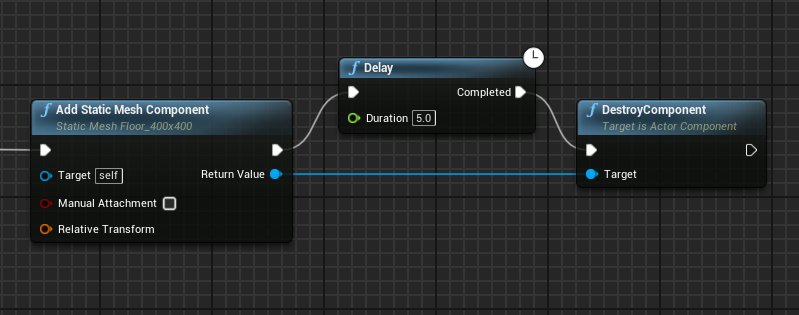
this for example works for me
 digital glacier
how do i get good at blueprints 😢
autumn pulsar
digital glacier
how do i get good at blueprints 😢
practice
and knowing Object Oriented Programming helps
 pallid dagger
digital glacier
how do i get good at blueprints 😢
pallid dagger
digital glacier
how do i get good at blueprints 😢
depends on what do you mean by bad/good
digital glacier
as in be able to do what i think of
pallid dagger
digital glacier
as in be able to do what i think of
too abstract..
some examples:
- BP gets too bloated so I struggle to understand my own code
- I poorly know
Engine's APIso I'm relying on hints(RMB suggestions dropdown) too much. - I'm bad at syntax (how to make variables/functions/macro/event dispatchers etc)
autumn pulsar
digital glacier
as in be able to do what i think of
The essence of programming is taking something abstract and writing down all the steps you need to get there
as an abstract example, say you need to go to the store, it sounds simple, but then you need to realize all the steps you need to get there. You might need to grab your keys first. Then your wallet, then put on your shoes, then open up the door. But how do you open the door? you might need to turn the deadbolt and twist the knob
basically just breaking things down
Something that kind of helped me along, was to just see what other games do
and how they appreached things

Mortal Shell is a ruthless and deep action-RPG that tests your sanity and resilience in a shattered world. This week on Inside Unreal, co-founders Andrew and Anton are joining us to take a look at how Cold Symmetry used Unreal Engine to develop their creative vision. We'll cover Blueprint in multi-platform projects, lighting challenges, animatio...
Unreal Engine has a lot of good talks and breakdowns
Does Unreal have a "calculate projectile path to point?"
I have a desired start and end point, wondering if I can calculate a path to it
dawn gazelle
autumn pulsar
as an abstract example, say you need to go to the store, it sounds simple, but t...
Jokes on you. First you need to know where your wallet and keys are. Then you also have to figure out how to tie you shoe laces. Don't get me stated on getting in the car and driving if you don't have a store anywhere close.
autumn pulsar
oh neat, there's a suggest Projectile Velocity
pallid dagger
autumn pulsar
Does Unreal have a "calculate projectile path to point?"
it has predict path node
 autumn pulsar
pallid dagger
it has predict path node
autumn pulsar
pallid dagger
it has predict path node
That requires a launch velocity
Basically trying to calculate that from a start and end position
 crude helm
Have anyone messed with orienting the character along with the spring arm and the camera, when changing graviry direction?
No, not rotating like left right, actually spinning the pawn sideways, or upsidown, like set the character gravity direction -1 on Z will flip it upsidown, and make it "falls up".
But that sticks with the spring arm and camera not rotated with it, which leads to the controlls to be inverted. At first, I made a variable to check which direction gravit is, and invert all the inputs from movement when this variable is set, which works, feels like just like when playing in normal axys, the character stands up and the world is upsidown, but if you go and chance to a different axys, like Y or X, then you have to remap all directions again.
I was expecting when the physics orient the character to the right gravity direction, it would also do it to the controls, but it doesn't. I could make the camera actually rotate with the character without any code, by uncheking the "Use pawn control rotation", but unchecking that make you also lose total control over the camera, checking or unchecking below overrides on x, y and z, did nothing


 autumn pulsar
crude helm
Have anyone messed with orienting the character along with the spring arm and th...
autumn pulsar
crude helm
Have anyone messed with orienting the character along with the spring arm and th...
You'd probably be better off orienting controls based off the character location and rotation rather than control orientation
then using the mouse to directly add rotation to the camera arm component
crude helm
autumn pulsar
You'd probably be better off orienting controls based off the character location...
what am I missing to set this? I have use controller desired rotation off
 autumn pulsar
crude helm
what am I missing to set this? I have use controller desired rotation off
autumn pulsar
crude helm
what am I missing to set this? I have use controller desired rotation off
You'll need to go into your input events
and instead of "add controller input" you move the camera every event
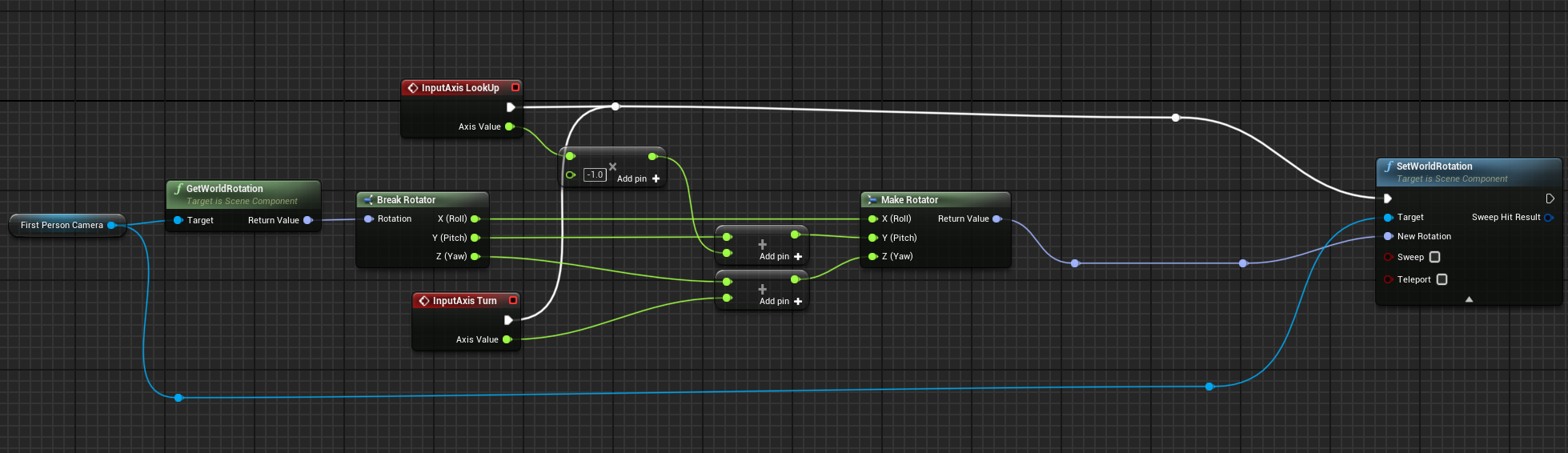
Though, with 6dof, you might need to have fun with Quaternion rotation
Any ideas why my camera boom is colliding with my projectile?
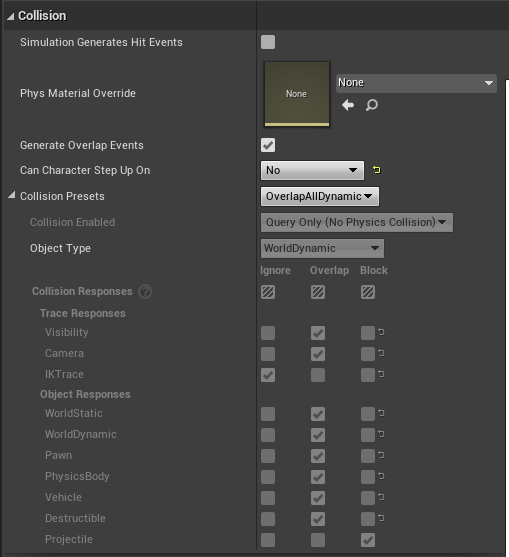
This is the collision I have set up
 lusty birch
autumn pulsar
https://i.imgur.com/a8vp2cb.png
lusty birch
autumn pulsar
https://i.imgur.com/a8vp2cb.png
you have projectile response set to block
autumn pulsar
lusty birch
you have projectile response set to block
but not for camera 
 cold laurel
hey guys, im having trouble understanding why I have to do "Set Input Mode to Game and UI" (I want to use UI Only). Previously i was running into a bug where I clicked my inventory display and I couldn't close it with my InputAction (the "I" key) so I had to switch it from "UI Only" to "Game and UI". im reading that another widget could be consuming the input? I am clicking on the Inventory Widget and the Inventory Display widget ( the parent). I set a print string where I press I (the onKeyDown function defined for Inventory Display widget) that executes until I click on the UI . The inventory display widget then would still close if I press "I "again but there is no print string as if onKeyDown wasn't called (the inputaction i defined in my player controller handles the closing im assuming)


 mental trellis
dark drum
Not without c++.
mental trellis
dark drum
Not without c++.
UCLASS(BlueprintType, meta = (ShowWorldContextPin))
 midnight kiln
Does Epic still not have a way to properly organize bound events?

you know, like binding to a custom event by name
autumn pulsar
midnight kiln
you know, like binding to a custom event by name
You can bind event by function name
midnight kiln
sadly also doesn't work when you need to use exec pins because Epic hasn't bothered to build a proper blueprint flow for async work & macros suck
autumn pulsar
I’ve never messed with event binding
Seems kind of neat
What’s the primary use of it even?
midnight kiln
I'm sure you've used events before like on input & on hit / overlap. There are always things you need to execute based on happenings of the game. You could do it in reverse, like have the inputmanager go and call functions on every class in your game that needs to run code when a key is pressed, but that means the inputmanager has to take a dependency on all of those game objects. That's not possible for Epic code (Unreal can't know in advance every class that everyone will make/use in their game), and in firstparty code in your own game events help you with dependency management (improve load/build times, prevent people on your team from doing dumb stuff, easier to work on smaller pieces instead of having mega classes that need to update everything)
and in Unreal specifically it helps with Unreal-isms like certain functionality only being available in the event graph (anything with an exec pin) or macros (which are dogshit and can't be called by external objects anyway)
dawn gazelle
midnight kiln
Does Epic still not have a way to properly organize bound events?
Just use "Create Event" node and plug it in to the delegates you want to bind. It requires selecting an appropriate event or function that already exists or creating a new one.
midnight kiln
dawn gazelle
Just use "Create Event" node and plug it in to the delegates you want to bind. ...
Ah, perfect. Thanks! Based on the earlier reply it sounded like it was restricted to functions only but looks like it takes existing events too
autumn pulsar
For projectiles, if I want a projectile to die on contact with the world, would I have it generate an overlap event with World Static?
 pastel apex
is there a function in blueprints that will let me change the order of these?

 inland walrus
How do I make a reference to a widget?
pastel apex
inland walrus
How do I make a reference to a widget?
as in widget to BP?
inland walrus
pastel apex
as in widget to BP?
yeah
pastel apex
this is the basic boilerplate widget ref

when you instantiate a widget via the create widget
 inland walrus
Ah got you, I was doing it this way but wasn't 100% sure if it was working properly
thanks
pastel apex
np
if you get null references even when you do that, check the execution order of the function
inland walrus
Sweet
midnight kiln
Is there a reason Epic put the player controls in the character rather than the charactercontroller? They set up the input mapping in BeginPlay as well, rather than OnPossess. It seems like it would work better in the controller for if you swap out the controller (e.g. player for AI controller to let AI control it)
dawn gazelle
midnight kiln
Is there a reason Epic put the player controls in the character rather than the ...
Because sometimes you want controls specific to the character. It also makes it easier than having all input set up on the controller and then having to tell the possessed character to do things.
 unique harness
autumn pulsar
You can bind event by function name <:lizThink:650028618134847513>
unique harness
autumn pulsar
You can bind event by function name <:lizThink:650028618134847513>
You should never do this btw
 granite nacelle
So here's the thing I want my Xbox controller to be able to interact with my inventory item as in rotate it with the right analog stick on the x and y axis, how could I go about doing this?
 muted halo
Hi everyone, Im currently working on building a flying drone in ue5. I currently have it setup to fly around using various mapped controls on my keyboard but moving left /right or forward /back there isnt any momentum. I was wondering if anyone knew how I can add some tilt to the drone so say when they move left, the drone tilts a bit to the left and then gradually back to the default position when the user lifts off the key. Thanks!
warped juniper
granite nacelle
So here's the thing I want my Xbox controller to be able to interact with my inv...
Do you want it to rotate by fixed increments? Across what axis? Should it return to its original position by itself while not receiving input?
warped juniper
muted halo
Hi everyone, Im currently working on building a flying drone in ue5. I currently...
You can add a basic tilt function that rotates the mesh across the XY axis based on current velocity
Since it's cosmetic it should be safe to do that every frame for something this simple
granite nacelle
warped juniper
Do you want it to rotate by fixed increments? Across what axis? Should it return...
I want it to rotate on both axis, I already have the rotation functionality but its for my keyboard and mouse its the blueprint that you saw in the video. and it doesn't have to return to its normal position when not rotating
 warped juniper
Alright. So you're using a Render target to show the item on screen yes?
granite nacelle
warped juniper
Alright. So you're using a Render target to show the item on screen yes?
don't remember, the inventory that I have is from a tutorial from a unreal university course
warped juniper
Can you find how exactly it appears on screen then?
I wanna assume render target
You can also just share what part exactly gets the item to display
granite nacelle
Here's a video example of the keyboard and mouse controls, these are the things I want my gamepad to do
granite nacelle
warped juniper
You can also just share what part exactly gets the item to display
will do
warped juniper
Okay, so for starters... You are using the EIS system?
I have not seen the events for them here
granite nacelle
warped juniper
Okay, so for starters... You are using the EIS system?
not for the item rotation that's all
warped juniper
Okay, do you have an Input Action set up for the right? stick
granite nacelle
warped juniper
Okay, do you have an Input Action set up for the right? stick
yes I'm using it to move the character and nothing else, I did try to do it in the rotation blueprint for the inventory item but i couldn't figure it out
warped juniper
So plugging in the Input Action event does not work?
granite nacelle
warped juniper
Alright. So you're using a Render target to show the item on screen yes?
so what I saw in the video is that he made a reference to the inventory item in the player character viewport, so as to set the distance the player can view the item from
granite nacelle
warped juniper
So plugging in the Input Action event does not work?
it could only go into one pin at a time and when I tried one it didn't work so no, or maybe I just don't know how to set them up
warped juniper
You have to plug the pins one after another for that to work
granite nacelle
warped juniper
You have to plug the pins one after another for that to work
Here's a photo of it how should I go about it?
 warped juniper
Create an Event for the Input Action you have assigned the Right Stick movement to
And plug it into it
If you had used Enhanced Input Action this could have been done automatically though
granite nacelle
yeah I'm really messing up now I used the ia_move that I have and now the the left analog have to be push up before it can rotate and the keyboard or mouse wont work on it
 warped juniper
granite nacelle
yeah I'm really messing up now I used the ia_move that I have and now the the le...
warped juniper
granite nacelle
yeah I'm really messing up now I used the ia_move that I have and now the the le...
This is the ideal scenario for using Enhanced Input. By binding the mouse and gamepad input to the same Input Action they both work identically as the same event
So if one works, the other does
granite nacelle
warped juniper
This is the ideal scenario for using Enhanced Input. By binding the mouse and ga...
got the right stick to work alone
warped juniper
granite nacelle
got the right stick to work alone
Are you gonna use the Input Action that has both mouse and stick now?
dull crest
dark drum
You can use time, something like get distance at time and then use that to get t...
Same issue 😦
see how the traces closer to the character are tighter-spaced than the ones further away? That's the problem I'm trying to eliminate, I presume it's caused by the spline being curved, and stretched to accomodate this

I'd really much prefer to use the mesh edge directly if anyone has any idea how to accomplish this
(BIG bump)
granite nacelle
warped juniper
Are you gonna use the Input Action that has both mouse and stick now?
this is the solution I came up with its good now thanks👌
 warped juniper
granite nacelle
this is the solution I came up with its good now thanks👌
warped juniper
granite nacelle
this is the solution I came up with its good now thanks👌
This is just a very weird way of doing what I told you... It doesn't seem viable
This would break if the player were to touch their mouse and gamepad at the same time
It "works" but is capable of bugs
granite nacelle
warped juniper
It "works" but is capable of bugs
true i didnt understand your method
warped juniper
You have an IA_Move on the same graph. Have you not set up Enhanced Inputs? Or a Mapping Context?
granite nacelle
warped juniper
You have an IA_Move on the same graph. Have you not set up Enhanced Inputs? Or a...
yeah
warped juniper
Yeah as in you have, or yeah as in affirmation you haven't?
granite nacelle
yes i have enhanced inputs
warped juniper
Then why not use an Input Action with both the gamepad right stick and the mouse axis
granite nacelle
 warped juniper
That way a single event gets both inputs and you only need to fire it once
granite nacelle
warped juniper
Then why not use an Input Action with both the gamepad right stick and the mouse...
that would be the ia_look that I have, but when I tried it only the controller was working
granite nacelle
warped juniper
That way a single event gets both inputs and you only need to fire it once
yes i understand
warped juniper
granite nacelle
that would be the ia_look that I have, but when I tried it only the controller ...
How was only the controller working?
What is the setup for ia_look
granite nacelle


 granite nacelle
warped juniper
How was only the controller working?
granite nacelle
warped juniper
How was only the controller working?
not sure but it happens whenever I unpin the axis values for the mouses
warped juniper
The issue is that you are getting the XY values of the mouse together
Yo uare supposed to do it ike the controller, the X and Y as separate inputs
Getting the XY 2D axis all in one go only works in few and specific scenarios
granite nacelle
dang, ill try it out
granite nacelle
warped juniper
Getting the XY 2D axis all in one go only works in few and specific scenarios
didn't work out
warped juniper
Did you remember to add the swizzle?
granite nacelle
warped juniper
Did you remember to add the swizzle?
yeah
warped juniper
Hmm that's odd
 primal hare
Is there an "Event" which corresponds to an object being "on screen" "off screen"?
Would like a BP animation to stop playing when it is not on screen.
granite nacelle
warped juniper
Hmm that's odd
i think its the code
gentle urchin
dull crest
Same issue 😦
see how the traces closer to the character are tighter-spaced tha...
this looks pretty inaaccurate compared to what the spline looks like
especially the starting part

is straight as an arrow (assuming its still this weapon)
an alternative is two sockets
and just treating every blade as if they were straight
dull crest
gentle urchin
is straight as an arrow (assuming its still this weapon)
sorry bro i dont mean this in a bad way but i have no idea what you mean
gentle urchin
im just saying the start part of the spline is straight (not squigly)

and thus getting the distance along spline should be fairly accurate
dull crest
gentle urchin
and thus getting the distance along spline should be fairly accurate
the curve is whats squiggling it, i cant explain it, but just from my familiarity with splines and how they are calculated, I know the curvy bit is somehow stretching the line; either way, getting equal distance points doesnt work as expected :
 dull crest
gentle urchin
an alternative is two sockets
dull crest
gentle urchin
an alternative is two sockets
this might be the move, but would mean I have to "connect the dots" if a weapon has more than 2 sockets
i.e. to capture the curve of the sword, I'd need at least 3
gentle urchin
does the curve actually matter is a question
dull crest
I'd like it to, better hit fidelity
gentle urchin
hits gonna be slow ?
dull crest
Also, some weapons will have "dull" parts that should do less damage
gentle urchin
otherwise im not sure it matters
dull crest
gentle urchin
hits gonna be slow ?
i would say relatively
gentle urchin
dull parts can be calculated
'

looks pretty accurate to me
only skewed part is the curve itiself

but its not because of the distance

its more because distance is no longer straight in one direction

I think your math really just is wrong
distance / index would return you;
0 = 0
1 = 1/1 distance
2 = 1/2 distance
3 = 1/3 distance
and so on
and as you can see distance between 2 and 3 is < distance between 1 and 2
I used a fixed distance to figure out amount of points
 dull crest
gentle urchin
distance / index would return you;
0 = 0
1 = 1/1 distance
2 = 1/2 distance
3 = ...
dull crest
gentle urchin
distance / index would return you;
0 = 0
1 = 1/1 distance
2 = 1/2 distance
3 = ...
LOL
hahahahah
you're totally right
im glad I posted that screenshot
nice catch man!!!
i gotta go atm so i cant test the fix ( distance = ((index/total) * total distance) ) but im 100% sure you're right and this is the issue
you're a legend, thanks again! big derp moment
gentle urchin
alternatively you can divide the length by the amount of points you want, and use that in the multiplier
distPerPoint = length / Points
pointLocation = Point * distPerPoint
dull crest
That's a way better idea, multiplying instead of dividing
(does the old "multi is faster than division" thing hold with blueprints/UE?)
maiden wadi
It's not really an unreal thing, it's a computing thing. Any processor will be able to solve multiplication faster than division. How much it matters probably varies. You'd probably end up with a lot more overhead from blueprints overall than that will ever solve performance wise. But good habits are still good habits.
gentle urchin
cpu cycles are cpu cycles 😄
save 10 here so you can afford the 21000 from bp existence alone /jk
maiden wadi
Lol, some days not a joke.
gentle urchin
whats also not a joke is turn based for some reason
sounds so simple in my head
but it has some weird details to it
well.. to make it more player friendly, anyways
taking player out of it ofcourse keeps it easy
maiden wadi
I don't know if it's changed these days, but when I was learning, I was really shocked by how little tutorials utilized renderthread/gpu stuff. Like I feel like half of my job is pushing stuff off of the gamethread onto those two things.
maiden wadi
Making an inventory slot widget with quality displays, hover effects, animations, destroyed effects, cooldown timers, etc etc. All with two textblocks and a single image for the win. 😄
I should find a nice way to remove the textblocks too. Haven't quite gotten to numbers in shaders yet, mostly a flipbook I guess. Textblocks are so expensive. 😬
maiden wadi
In a way. 😂 That originally came about from supporting old consoles.
 vernal igloo
Sorry for interrupting, does anyone know how to add a repeating texture to a cable? I'm using a cable as a grappling hook, because of how it stretches the material also stretches. Any help/ideas?


 leaden cave
hello guys iam using metahuman face and iam attaching an hijab around it using skeleton mesh, but its not working fine can any one help me?
its stretching out and i used set leader pose component in construction

 gentle urchin
vernal igloo
Sorry for interrupting, does anyone know how to add a repeating texture to a cab...
gentle urchin
vernal igloo
Sorry for interrupting, does anyone know how to add a repeating texture to a cab...
setting it to tile + UV manipulation if i'm not mistaken ?
guess it depends, you might need to mask it too for a nice visual
leaden cave
leaden cave
hello guys iam using metahuman face and iam attaching an hijab around it using s...
can any one help me?
primal hare
Using a "event dispatch" coming from movement input key instead of Tick. Is it cheaper?
gentle urchin
not if its called on tick anyways
as in, movement is ticking, so depending on your trigger and input setup, it might be less calls
but generally movement related stuff should be tick based anyways
primal hare
So at least it's not expensive. Then when the player's not moving game logic can have a nice glass of water?
gentle urchin
the dispatcher overhead isnt expensive in isolation , no
you can give the game logic a glass of water anyways
EventTick -> Branch(InputVector.Lenght() <= 0) -> DrinkWater()
primal hare
Drink water given = thrown back on my face = I needed a bath anyways
 violet bison
I have a ladder that makes the player using fly mode on begin overlap
but sometimes the momentum get carried over and the player started drifting after using the ladder
is there a way to brake X/Y axis movement after begin overlap?
dark drum
violet bison
I have a ladder that makes the player using fly mode on begin overlap
but someti...
There's a stop movement node that should do the trick. Just call it before you set the movement mode to flying.
 bright peak
Hi guys, currently creating a jetpack for class using blueprints, i just wanted to know how i could add some more left and right movement to my setup, Ive never used blueprints before so any help would be really appreciated :)

 bright peak
violet bison
have you visit the template's pawn controls?
bright peak
violet bison
have you visit the template's pawn controls?
yes, i’m just wondering now if i put a branch connection in, and said if jetpack mode active then multiple left and right movement.
do you think this would work?
violet bison
multiple left and right movement?
bright peak
violet bison
multiple left and right movement?
multiply**
violet bison
if I'm guessing correctly you want the movement to have the same vector length if the player goes straight up, strafe left/right
I'd use unit vector after combining left and up vector in that case (although it might have guessed wrong)
bright peak
violet bison
if I'm guessing correctly you want the movement to have the same vector length i...
at the moment, the strafe left and right is basically none existent whilst using the jetpack, the movement is really minimal, so i just wanted to increase it so the player has more control whilst flying
violet bison
oh you're meaning that
just multiply the float connecting to the scale value until you get your desired speed
bright peak
inside the movement input section?
or is it in the screenshot that i sent where i adjust that
violet bison
sth like this
 bright peak
violet bison
sth like this
bright peak
violet bison
sth like this
okok, and would that affect walk speed as well as flight movement?
violet bison
I think so
if you don't want it to affect walk speed then add a branch
branch is connected to jet packing or not
 bright peak
violet bison
I think so
if you don't want it to affect walk speed then add a branch
branch is...
bright peak
violet bison
I think so
if you don't want it to affect walk speed then add a branch
branch is...
so i’ve added that in, just sending a screenshot now, it hasn’t really changed anything though

here’s the setup that I have
gentle urchin
bright peak
this wont work
Unless I'm mistaken lol
tried looking at source, was sure scale was normaliized
bright peak
gentle urchin
this wont work
how do i make it work?
gentle urchin
I could just be mistaken tbh
i'd probably make it physics based but that's very different ofc 😄
bright peak
yeh all i need is a simple mechanic for class so i think ill stick with how it is right now, it works great as it is atm for forwards and backwards movement, but the left and right movement is just hardly moving me at all
bright peak
gentle urchin
in the CMC ?
what is CMC 😭
gentle urchin
character movement component
bright peak
oh yeh that’s what i’m working in, there is also a bunch of air control nodes

so it would be a setter, but how would i apply this to work?
 gloomy hare
guys, i need some help with Dungeon Architect, im using flow grid, and want to use the city of brass template as well.
im confused on how to edit and work on them, like i created flow grid blueprint, but when using the assets of CoB it does get along correctly...
any tutorial out there for UE5 ?
narrow pendant
for plugin specific questions it's usually best to contact the dev directly
gloomy hare
narrow pendant
for plugin specific questions it's usually best to contact the dev directly
how can i do that?
narrow pendant
gloomy hare
how can i do that?
they have a discord and an email
 gentle urchin
gloomy hare
im confused on how to edit and work on them, like i created flow grid blueprint,...
gentle urchin
gloomy hare
im confused on how to edit and work on them, like i created flow grid blueprint,...
you should check out the tutorials first
there's quite a few from Ali on youtube covering different aspects
beyond that it's just some trial and error to get the gist of it
complex things are still complex, and can be hard to figure out. There's samples for many of the things that exist
 young meteor
Anyone have a good idea or a "standard" setup for how to handle camera shakes?
I can make the camera shake, but I'm thinking more in terms of controlling WHEN to actually do it and how much.
That could be based on when a camera shake was last done. How many was recently done. Scale the shake amount based on damage relative to highest damage done or average damage done.
Things like that.
I'm making a tower defense and don't want to shake the screen every time any tower fires. Thinking there might be some template/standard approach to handle this kind of stuff?
 split wasp
young meteor
Anyone have a good idea or a "standard" setup for how to handle camera shakes?
...
split wasp
young meteor
Anyone have a good idea or a "standard" setup for how to handle camera shakes?
...
I don't think there is a "standard" for it, as it is a visual feedback tailored specifically for the games visual style
however, it is an effect that should be used sparingly as it may cause motion sickness for some people
as of where to do the code for it, camera manager would probably be the best place for it
young meteor
split wasp
as of _where to do the code for it_, camera manager would probably be the best p...
Might be a stupid question, but is "camera manager" different from my camera blueprint?
I guess some games would have multiple cameras they switch between, and therefore a "manager" class above the camera blueprints?
split wasp
it's just specified behavior for that (type of) camera, and depending how the levels are set there might be several viewpoints player sees over the course of gameplay loop, like pre-game and post-game views
young meteor
Right okay. Thank you.
sterile quest
sterile quest
I.e. This actor has 5 sockets, so I'd need to be able to lock each of them indiv...
Is there anyone available to help me with this? Still stuck with the latter part of the function. Thanks!
 devout oak
Im trying to setup an Array of lights for my BP_lightswitch, I am able to toggle the intensity with it being a Point Light Object Reference Single but when i change it to an Array im no longer able to connect it to the Set Intensity any ideas on how to fix this issue?
 lofty rapids
devout oak
Im trying to setup an Array of lights for my BP_lightswitch, I am able to toggle...
lofty rapids
devout oak
Im trying to setup an Array of lights for my BP_lightswitch, I am able to toggle...
you want to toggle the intensity on the whole array ? or are you choosing an element from the array to toggle ?
are you saying wjhen you get 0, it won't plug in ?
devout oak
the whole array of lights that i have selected per lightswitch
so like if i flip the lightswitch up x lights turn on
down x lights turn off
lofty rapids
loop through and turn each on/off
i'm not surprised you can't plug the array into it
do a foreach and toggle each one
lofty rapids
if it doesn't work post it and maybe someone can help
but thats probably what you want to do
loop through and toggle each one
devout oak
that did work
lofty rapids
sterile quest
I am trying to use a input key to lock the rotation of a socket that is spawned ...
so the first part, you got it detecting the keys you pressed ?
and now you just want to lock a socket in place ? and this code is what your missing ?
i see you did a get
 hushed topaz
How to End Task or Stop Listening on the Gameplay Message System? Can't find a 'stop' function anywhere in the Async Action

 open furnace
Do you know if this is going be called only once or do I have to pass result of break to local variables?

 gray lantern

Is there a list somewhere of what these icons mean?
found one no worries!
Still don't fully understand blueprint interfaces 😭 even after a couple videos,
it's a set of function signatures I can add to any other blueprint?
 buoyant moat
An interface is a contract (whatever implements it "must" define a set of functions)
lofty rapids
gray lantern
it's a set of function signatures I can add to any other blueprint?
yes and then you override that function in the specific bp, so each bp has it's own override
buoyant moat
Blueprint interface kinda sucks compared to how they would be used in code cuz the node is essentially : check if the object passed in implements said interface and call a given function. If it doesn't then bust
lofty rapids
it's good to have a common call on different bps
buoyant moat
Interfaces are useful, I am saying the node Unreal provide is sus because it acts as a "Try"
It's a recipe for things to silently fail
dark drum
I rarely ever use interfaces. There's normally better options.
gray lantern
Forgive me im still not quite getting it, I add this interface to my blueprint, if I double click the function it takes me to the inface that just has a greyed out graph, what logic am I actually calling
lofty rapids
you want to override the function in the bp your calling it on
so each one has it's own custom version of the function in the interface
dark drum
gray lantern
Forgive me im still not quite getting it, I add this interface to my blueprint, ...
Do you understand object orientated programming and how classes work? If not, I'd suggest learning that first. Interfaces kinda become self explanatory after that.
gray lantern
yeah I understand OOP but, you say it needs to be overridden, theres no function overriding it here on the left? shouldn't there be something in functions?

this is a project i've brought *
buoyant moat
Open class settings and add the interface there
dark drum
gray lantern
yeah I understand OOP but, you say it needs to be overridden, theres no function...
In the class settings, add the interface you want to impliment and the functions will show up for you to override.
buoyant moat
In the image you are "calling" the interface function
Open the Game Instance BP
This is where the interface should be implemented
At least judging from the image since the target pin has the game instance connected to it
Once you open a blueprint that implements an interface you will see a section for interfaces on the left side where you see functions and variables
buoyant moat
Cheers
gray lantern
so this is calling the attempt save on my game instance object?
buoyant moat
Correct
gray lantern
💯 got it ty
buoyant moat
Note that it will silently do nothing if you pass on an object that doesn't implement the interface
If you want to try plug in some random input like your character and it will do nothing and return the default values (if the function returns anything)
sterile quest
lofty rapids
so the first part, you got it detecting the keys you pressed ?
Atm getting help from another person. Thank you for the reply. 🙂
buoyant moat
dark drum
I rarely ever use interfaces. There's normally better options.
It's a tool that has its use, but ppl abuse it a lot, even more when they are new to programming.
In code it sees more usage
dark drum
buoyant moat
It's a tool that has its use, but ppl abuse it a lot, even more when they are ne...
yea, in C++ you can define a default implementation which would be nice. interfaces in BP is just repetition overload so tends to be used as a last resort for me. I lean more into good hierarchy and components so my need to use them tends to be low.
 wild pumice
Hi all, I'm pretty lost on this. I have an Input Mapping Context that is being resitered and removed via blueprint. One of the context works initially but when I remove it and add it again it stops working. I have a different IMC that is removed and added with the same function and works properly.
Is there a way to check if an IMC is registered/active?
 forest spade
How do you guys handle delays between firing a weapon and the impact logic (enemy reactions, decals, niagara etc) when the weapon is hit-scan. I don't have physical bullets with travel time, so firing the weapon and getting a reaction is instantaneous. Throwing a delay node in there with a distance calculation somehow seems wrong.
gentle urchin
Sounds about right to me 😆
Depends if it can be fast firing
Its gonna be less good
Also if you have damage numbers
faint pasture
forest spade
How do you guys handle delays between firing a weapon and the impact logic (enem...
why would you want a delay?
you want instant hits, but for it to seem like they're not instant?
That just results in a bad feel IMO
dry sleet
well I assume the question is how to use hitscan but still emulate bullet travel time?
forest spade
Right, exactly. It feels bad having the weapon animation, particle effects, sounds and hit reaction all start in the exact same frame
For example, when you fire a weapon there's some recoil. Without any delay, the impact decal and blood niagara system starts playing at frame 1 of the recoil which is way too early
AKA before the player even feels the recoil of the weapon there's already a hit and a reaction from the enemy. Just looks odd. It works OK with a delay node, but I'm wondering if there's a better solution
faint pasture
dry sleet
well I assume the question is how to use hitscan but still emulate bullet travel...
You can have something instanced that does a delay
delay is easily calculated
faint pasture
forest spade
For example, when you fire a weapon there's some recoil. Without any delay, the ...
It's easier to just design the FX to have natural timing IMO
your impact particles shouldn't be at full bloom in 1 frame
forest spade
I appreciate your input, but I don't think building the delay into the particles and sounds and animations is the right way to go. Those assets need to be re-used elsewhere and the delay might need to ve variable based on weapon type. All of those assets obviously have start, middle and end sections, they're not full blast right from frame 1. Its the fact that they start right away that's the issue. I'll stick with the standard delay I have that's calculated based on the distance between the player and the impact point, but might need to figure something else out in the long run.
faint pasture
If it's singleplayer just have actual time of flight IMO
it's simple and a better experience
depends on the project though, idk if you're doing something super arcadey or more of a sim or what
forest spade
There's no time of flight, these are not spawned projectiles. It's hitscan with a line trace.
autumn pulsar
Does Unreal have a sort of "Soft Collision?" Like with friendly characters in TF2, you can walk through them, but if you try to occupy the same spot you get pushed out gently
forest spade
@faint pasture Here's a demo of what the issue is. Probably easier if you see it. Game speed is at .1 so it's very clear. This is without the delay in place. https://streamable.com/8u6nil
 faint pasture
forest spade
<@127902729677963264> Here's a demo of what the issue is. Probably easier if you...
faint pasture
forest spade
<@127902729677963264> Here's a demo of what the issue is. Probably easier if you...
your muzzle flash is much later than your hit test
where does the timing of things come from? Are you basing anything off an anim notify or does it all kick off at one time?
autumn pulsar
forest spade
AKA before the player even feels the recoil of the weapon there's already a hit ...
I mean, that's kind of how bullets work in IRL, they travel faster than the speed of sound
autumn pulsar
forest spade
How do you guys handle delays between firing a weapon and the impact logic (enem...
What I'd do is fire the trace immediately, then when actually doing the damage/impact step, you add a delay to it
I will say I don't think the delay will feel good as players expect immediate impact
faint pasture
I would fire the trace at the same exact time as the muzzle flash, however that's done
 blissful grail
autumn pulsar
Does Unreal have a sort of "Soft Collision?" Like with friendly characters in TF...
blissful grail
autumn pulsar
Does Unreal have a sort of "Soft Collision?" Like with friendly characters in TF...
Not that I know of, but you can fairly easily script this.
Overlap the pawns and then when the overlap begins, start checking periodically if they are still overlapping and don't have a velocity. This means they stopped. Then just give them a slight nudge. If you decide to do the nudge with velocity, then you need an additional check at the start to handle being nudged and having velocity.
For the teams, have a collision channel set up for pawns on Team A and pawns on Team B. When they pick a team, assign the correct collision team settings. Can even make a profile for this.
 slender harness
@dusky cobalt i wanted to give you a huge shoutout, i went with the 3d model instead of the 2d interface. I like it a lot better. Here is the result of what i got, 🙂
 forest spade
faint pasture
I would fire the trace at the same exact time as the muzzle flash, however that'...
forest spade
faint pasture
I would fire the trace at the same exact time as the muzzle flash, however that'...
Unfortunately that's not possible either. Because of the recoil moving the player's aim, firing the line trace any time after they actually fired will have the impact be in a different place than where they were aiming. The trace has to happen at the same time as the input to fire. @autumn pulsar I'm doing exactly what you're saying, my initial question was if the standard Delay node was the right way to go, or if there was a better way to delay hit effects
maiden wadi
Generally speaking if you want travel time, you should program that in by making traces over multiple frames instead of one trace in one frame. If you only care about the particle, I'd do as Adriel mentioned and just fake it with some form of startup delay in the particle.
wraith loom
I remember there being a setting for components that allow the components to inherit a lot of their settings from the parent. What was that setting called? I can't find it anywhere.
Like I think the child component's collision settings could be the same as the parent's
autumn pulsar
forest spade
Unfortunately that's not possible either. Because of the recoil moving the playe...
Delay is fine, but might cause some issues as iirc you can’t interrupt it
You could use a timer so you can clear and invalidate if needed
gentle urchin
Timer/delay need instanced object to have several running timers etc tho
Or c++ access
wild pumice
I was doing a tutorial for a highlight outline around pickup items and they had this code run off the Event Begin Play with a looping Set Timer by Event to continuously line trace.
Any reason why this wouldn't just be on the Event Tick? I haven't seen this method before and am geniuly curious why they did it this way.
 inland walrus
Does anyone how I'd do this? I need it so that the last clicked button is highlighted/different colour. The issue is, this button is created as it's own widget into another widget


 gentle urchin
wild pumice
I was doing a tutorial for a highlight outline around pickup items and they had ...
gentle urchin
wild pumice
I was doing a tutorial for a highlight outline around pickup items and they had ...
no reason for it not to be on tick, no
Usually it's some bogus reason like "Event tick is bad, use timer on tick instead! Saves performance!:heat:"
wild pumice
gentle urchin
Usually it's some bogus reason like "Event tick is bad, use timer on tick instea...
I see. It caught me off guard since I hadn't done it like that before.
 meager spade
inland walrus
Does anyone how I'd do this? I need it so that the last clicked button is highli...
meager spade
inland walrus
Does anyone how I'd do this? I need it so that the last clicked button is highli...
The way I've implemented this where needed, I have the parent widget know of all buttons and also listen to all buttons click event, when a button is clicked I set all of them to the "non highlighted visual" and then lastly set the clicked one to be highlighted. For this I've used a delegate in the button class that sends the button to the parent widget
dusky cobalt
inland walrus
Does anyone how I'd do this? I need it so that the last clicked button is highli...
My idea:
- Create Event in HUD:
Set Current Selected Widget (Widget Reference)> Set this widget as Currently Selected Widget (variable)
Clear Widget Selection > Get Current Selected Widget and Disable Higlight (event on Widget).
In all the widgets you can add Disable Highlight -> Set Color / Set Visibility of this thing.
And when user clicks on button you Get Hud > Set Current Selected Widget
You can also use interface so you can pass User Widget a s reference instead of ThisExactWidgetClass
also the one above idea is really good and scalable
inland walrus
Thanks guys I'll have a pop
 ionic palm
https://blueprintue.com/blueprint/lz8gs5fy/
Hi Guys, I am struggling to work out how to save my basic farming system
My saving system works, as simple as it is, but it just seems to respawn the first item in the array, although it is remembering it's state upon saving (Plant at half growth loads at half growth not the full plant it was before reloading after the save point)
I am unsure where I would find a releveant tutorial for this would love any tips or a point in the right direction for how to learn saving a basic farming system
PS: I am certainly missing something obvious I haven't worked with arrays in awhile



No description provided
 solid needle
hey all


this happens when the rotator goes over 180, gets changed tot -180, then back to 180 and then back to -180 etc
any way to fix it
autumn pulsar
solid needle
this happens when the rotator goes over 180, gets changed tot -180, then back to...
You're encountering Gimbal lock
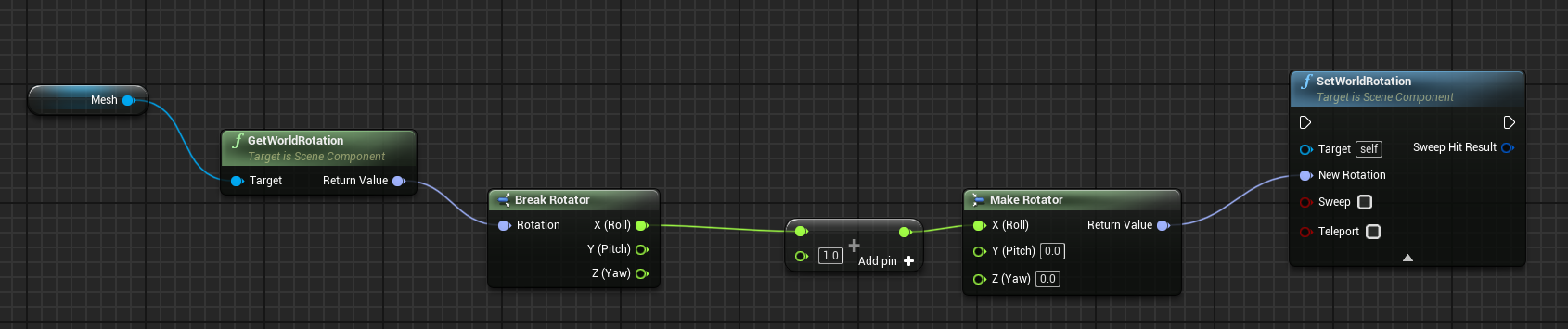
Give this a try
though in your case, use the pitch axis
 autumn pulsar
there you go
solid needle
autumn pulsar
You're encountering Gimbal lock
i wasnt aware it had a name
autumn pulsar
Gimbal lock is the loss of one degree of freedom in a multi-dimensional mechanism at certain alignments of the axes. In a three-dimensional three-gimbal mechanism, gimbal lock occurs when the axes of two of the gimbals are driven into a parallel configuration, "locking" the system into rotation in a degenerate two-dimensional space.
The term gim...
it's complicated lol
Usually rotator is supposed to accommodate for that
but I guess add relative rotation doesn't
Hey, so I'm kind of working on a sort of skill/weapon system for characters, and I was thinking of having a Weapon, and then on that weapon would be an array containing skills. Skills being small blueprints with a "Use Skill" function that runs whatever logic it's going to do. Is this a good kind of design structure for this sort of thing?
(Yes I know about GAS but I want to program this just for learning)
inland walrus
Does anyone know how to add a line break from a datatable text?
autumn pulsar
\n ?
 gusty shuttle
Quick question guys: I'm brainfarting on pushing my character to the left or right (y axis) but I seem to beam to 0,0,0 or so. Any tips?
 inland walrus
autumn pulsar
\n ?
inland walrus
autumn pulsar
\n ?

 autumn pulsar
gusty shuttle
Quick question guys: I'm brainfarting on pushing my character to the left or rig...
autumn pulsar
gusty shuttle
Quick question guys: I'm brainfarting on pushing my character to the left or rig...
That delta time input is sus
gusty shuttle
autumn pulsar
That delta time input is sus
Standard 0-1 setup
faint pasture
forest spade
Unfortunately that's not possible either. Because of the recoil moving the playe...
recoil and hit should not happen before the muzzle flash, just make the recoil start + muzzle flash happen on frame 1
https://youtu.be/sINLJA60r08?si=xJyt_epuhC9_ktzz&t=21

Shooting Guns with the Phantom v2512 the World's Slowest Slow Motion Camera.
We have the pleasure of using the World's Fastest High Speed Camera, capable of up to 1,000,000 Frames Per Second.
Today we were shooting at 70,000 FPS.
Feel free to subscribe and see the world's slowest color slow motion videos on Warped Perception !
When he was walki...
autumn pulsar
gusty shuttle
Standard 0-1 setup
not sure how the node operates, but interp to runs on individual time steps
So it's expecting a delta time of 0.0167
and to be pulsed every frame
if the timer is accumulating every frame until 1
then that's just making the number bigger and bigger
and eventually just yeeting you
gusty shuttle
That would expalin some things haha
inland walrus
Does anyone know how to add a line break from a datatable text?
faint pasture
gusty shuttle
Quick question guys: I'm brainfarting on pushing my character to the left or rig...
why do you have a timeline and a vinterp to
just have timeline output a 0-1 axis and vinterp, not vinterp to
although you don't really need a timeline, what are you actually trying to do here?
what you have there is trying to interpolate from current location to 50,0,0 with a time constant of 1 second and with an apparent delta time of that float output. Wrong in about 3 different ways.
gusty shuttle
Agreed. I removed the timeline
faint pasture
What's the general mechanic you're trying to accomplish?
gusty shuttle
Balancing beam, if player is to far on the left or right, it pushes the player off gently on either side they're on the extreme of
I got it working but it's locked on the world Y location, I need to somehow use forward vector and push on the local y from there?
faint pasture
gusty shuttle
Balancing beam, if player is to far on the left or right, it pushes the player o...
yeah tick for sure
using Character or your own movement system?
gusty shuttle
Character
faint pasture
Yeah just Tick -> calculate force as some function of position -> add force
branch by balance mode if this is rare
Tick -> is balancing? -> yes -> map range float YOffset into ForceStrength -> add the force
gentle urchin
faint pasture
recoil and hit should not happen before the muzzle flash, just make the recoil s...
considering its the expanding volume from the explosion in the chamber that gives the bullet its speed, i'd be surprised if the bullet left the chamber at a far higher velocity than the fire itself
gusty shuttle
I have the balancing part good, what I don't have is the force. I tried adding it but maybe I needed to jack the numbers up?
faint pasture
gentle urchin
considering its the expanding volume from the explosion in the chamber that give...
The gasses that did the pushing aren't visible, just the stuff that's burning after
or rather aren't necessarily visible
sometimes the flash starts before the bullet leaves but the flash never happens 100ms after bullet left that's for sure
gentle urchin
exactly
it can start pre bullet exit, due to forces, inertia, design etc i suppose
faint pasture
thats why the video above looks goofy, the hit happens long before the flash/recoil
gentle urchin
normally there wont be much deviance between them tho
yeah
you might be able to design a gun that way, but it sure ain't common from what we normally see
gusty shuttle
@faint pasture The solution was far more simpler than it needed to be haha. This works as intended. Thanks for a second pair of eyes. I still have a very bad habit of using timelines and plugging them into delta time
 faint pasture
gusty shuttle
faint pasture
gusty shuttle
why timeline tho
gusty shuttle
I didn't want to run branches and stuff to a tick
This is a free tick for x seconds
faint pasture
so are you only ever balancing for x seconds?
and it's an EXTRA tick for that amount of time, if perf is your concern it's a non issue
gusty shuttle
I'm falling off if I get to a threshhold, if the bar goes into the red, this triggers and "pushes" the character either left or right based on where they're looking
Or falling as well
 fiery swallow
gusty shuttle
I didn't want to run branches and stuff to a tick
fiery swallow
gusty shuttle
I didn't want to run branches and stuff to a tick
a function probably handle whatever concern you're having
I wouldn't put that logic on a timeline that's forsure
definitely a tick thing
gusty shuttle
Interesting, I'll consider it indeed! Any particular reason why the timeline isn't the best for a few seconds of tick action?
gloomy hare
any tutorial on making a space (room or cave for example) that locks you in and it only opens up after you clear the enemies that spawn (on locking)
faint pasture
gloomy hare
any tutorial on making a space (room or cave for example) that locks you in and ...
You don't need a tutorial
when you spawn an enemy, add it to some array
when they're killed, remove them (however you want, either with a dispatcher or by polling)
when they're all gone, open door
dusky cobalt
meager spade
The way I've implemented this where needed, I have the parent widget know of all...
Hey, if i could ask question to this. Is the parent widget like widget that is a wrapbox and there you have delegates, and when you create button and add it to the wrapbox it then communicates to that logic in the parent widget? or is the parent widget literall parent of the class(as base class) that buttons? in other words, is ''parent widget'' a base class of buttons (but you still use it as widget/panel in the PlayerUI), or it's a blueprint and you would call it BP_WidgetContainer1Manager
dusky cobalt
gusty shuttle
Interesting, I'll consider it indeed! Any particular reason why the timeline isn...
harder to debug etc. if u worry about using tick, then dont. just use set timer by event, which you can toogle on/off when its not used (clear and invalidate), and by setting the timer to run at 0.01/0.04 (depending on how reliable must be functionality) you save a bit of performance
meager spade
dusky cobalt
Hey, if i could ask question to this. Is the parent widget like widget that is a...
Parent is the widget that has the buttons in it, so in the case of a menu it's the menu window etc
gloomy hare
faint pasture
when they're all gone, open door
luckily im already using the array, have only one problem, sometimes the doors dont open or lock properly, so i thought of following exact steps then having more headache, yet i guess its something i need to learn myself alone
 proper tulip
is there any node that can trigger an event upon just looking at a mesh.. i know its vague. basically i want to look at a static mesh, and activate a 2d widget
a 3d widget sorry
just from using a third person controller
gusty shuttle
dusky cobalt
harder to debug etc. if u worry about using tick, then dont. just use set timer ...
Timers are a great alt to it. I can get behind the difficult to debug issue. Example, I started my project up this morning and the timeline graph inside the timeline was deleted somehow? haha. All good, I appreciate the wisdom. I got my example to work well
dusky cobalt
proper tulip
is there any node that can trigger an event upon just looking at a mesh.. i know...
yes, it's called trace by channel/for objects
faint pasture
gloomy hare
luckily im already using the array, have only one problem, sometimes the doors d...
show how you're checking if all the enemies are dead
proper tulip
dusky cobalt
yes, it's called trace by channel/for objects
did he do this in level blueprint?

Epic Developer Community Forums
I’ve made a line trace blue print that allows me to click on an object which opens my widget. See blueprints and gif below. I can then press E to escape the widget once making my changes and return to the player view. Now I want to make it so that I can use a tick event to have the trace looking for objects and when an object is found my w...
dusky cobalt
I need to reset values in Child Class to the Parent Class values, is there any easy click? (variables, components... )?
proper tulip
so i followed the code from the link.. my multiply has x y z values where as his has a number input..
dusky cobalt
proper tulip
https://forums.unrealengine.com/t/how-to-access-widget-after-successful-line-tra...
its in playercontroller probably
or camera
proper tulip
dusky cobalt
its in playercontroller probably
ok so casting the line trace by channel to a blueprint actor with my mesh in it? then create widget?
dusky cobalt
there is tons of videos, line trace is a laser that points on some things (can be at location, can be in some direction) depending on what you need, then if it hits something you can check if its that thing and if yes you can do something in that thing (call events on that thing)
proper tulip
ok thanks
do yo9u mind helping still, would i put the uh.. code in the level blueprint or in the actor?
sorry im on brain rot at this point lol
ill see some vids, appreciate it
 rich birch
Hi everyone! I need some help with an issue.
I’ve created an inventory system in Unreal Engine 5. I’m using Drag & Drop to move items, but every time I open the project, it doesn’t work correctly unless I ‘Refresh All Nodes.’
For example, when I drag an item, it disappears from the inventory, and the slots don’t update properly.
After refreshing all nodes, everything works perfectly.
How can I fix this so I don’t have to manually refresh every time?
 lunar sleet
rich birch
Hi everyone! I need some help with an issue.
I’ve created an inventory system i...
lunar sleet
rich birch
Hi everyone! I need some help with an issue.
I’ve created an inventory system i...
Bp structs break constantly. Making them in cpp will prly fix your issue
rich birch
One of my end-of-year goals is to learn cpp 😦
lunar sleet
rich birch
One of my end-of-year goals is to learn cpp 😦
You can even Google how to setup a cpp struct in UE and just copy paste the code
You don’t need to learn much cpp to do it, just do some basic setup
faint pasture
Honestly the important thing is to just get your feet wet
start with a BP Function Library
rich birch
This solved my problem.
 gentle urchin
gusty shuttle
Interesting, I'll consider it indeed! Any particular reason why the timeline isn...
gentle urchin
gusty shuttle
Interesting, I'll consider it indeed! Any particular reason why the timeline isn...
When you need tick just use tick imo
Any debug stuff you need can mostly be drawn or printed
Gating it with some flow control nodes is easy as pie
Timeline for some dynamic length action just sits wrong
maiden wadi
It really bothers me that the subtract node doesn't default to 1 anymore. 😦
gentle urchin
-- doesnt always work well either
They tend to reset types aswell
Left and right
maiden wadi
Yeah, I use it a ton on like splines and stuff where you have to get the spline point num, then subtract one to use it in a for loop. Just one of those small things that was really nice in 4.
Thinking on it more. Kind of curious why they didn't do For Loop similar to other coding languages. StartingIndex and NumberOfLoops instead of StartIndex and LastIndex.
maiden wadi
Yeah. :/ Oh well.
gentle urchin
Feels like (probably not true but) most of the decisions made for BP stuff is some sort of guard rail
ensuring that its 'easy' to understand and hard to really mess up ? idk 😄
kinda surprised they allowed references at all /jk
maiden wadi
I also just stepped in the same bullshit pile of spline code I do every time. >.<
gentle urchin
-2 ?
maiden wadi
GetSplinePointAt doesn't return world points correctly.
maiden wadi
The only thing it uses the world coords for is rotation.
gentle urchin
oh lol
maiden wadi
:/
 gentle urchin
huh
that's weird,
im sure that has worked for me 😮
or maybe im just using one of the other nodes
ah yeah i do, and prob not for the same thing
im reversing it i guess

or rather, figuring out a distance based on a world location input
I hate how this project is shelfed xD
 shy matrix
Hi! Im running into an issue I dont really understand: if I "Show mouse cursor" it seems to gobble up any LMB Input action after the first. You can see my setup in the picture. Im then using one of the new IMC input action mapped to LMB fire a simple Hello Print String. It prints only once. All further clicks are somehow ignored...The issue is gone as soon as i dont run the "Show Mouse cursor" node. any idea what's going on?


im not showing any widget on screen or anything
devout oak
im trying to get a wbp to be removed after a short duration after interact but what i have isnt working
 shy matrix
devout oak
im trying to get a wbp to be removed after a short duration after interact but w...
shy matrix
devout oak
im trying to get a wbp to be removed after a short duration after interact but w...
its because you are destroying the actor running the logic before it can run it
devout oak
so should i destroy the actor at the end?
shy matrix
yep
devout oak
thank you
 chilly crane
can someone help explain why the hair is clipping like this? The model on the right is in blender, and obviously a lot more detailed


I feel like there might be some issue with the hair binding, as the groom asset in UE looks fine as well
dark drum
devout oak
thank you
Also, have the widget handle removing itself automatically if it's like a quick popup type thing. It means it won't need to rely on another BP to do it.
 mental panther
Can anyone try this and see if you get the same debugbreakpoint/editor crash?
- Make a blueprint class derived from "CameraComponent"
- Place out an actor in a level and add your newly created blueprint class on it
- Compile that blueprint class.
I get an error here in SceneComponent.cpp
 maiden wadi
shy matrix
Hi! Im running into an issue I dont really understand: if I "Show mouse cursor" ...
maiden wadi
shy matrix
Hi! Im running into an issue I dont really understand: if I "Show mouse cursor" ...
Presumably if your mouse cursor was hidden, you're in GameOnly input mode like an FPS/TPS game? If so, try changing this to GameAndUI input mode.
 livid spade
I Have to find images of crockery does anyone know where I can find the dataset for it, I Have to use them as a reference for making the blueprints
shy matrix
maiden wadi
Presumably if your mouse cursor was hidden, you're in GameOnly input mode like a...
Did try that and didn't work. I figured out that if I set the viewport capture mode to: CapturePermanently_IncludingInitialMouseDown then it works. But I'm not sure why... I mean the state the game is in before switching to this input system is also using click events so the viewport should already be set to that...
 desert moss
I'm trying make a simple camera swap happen for a dialogue system. I have a camera in a bp that is attached to the dialogue characters mesh. My issue is that I can not seem to attach the camera to the set view target node. Does anyone know what is happening here?


 merry mirage
desert moss
I'm trying make a simple camera swap happen for a dialogue system. I have a came...
merry mirage
desert moss
I'm trying make a simple camera swap happen for a dialogue system. I have a came...
It tells you exactly what's up. "New View Target" requires an actor reference not a Camera Component Object Reference. Get the reference to your Dialogue Character instead of your camera
desert moss
Will it automatically find the cam in the components that way?
desert moss
merry mirage
It tells you exactly what's up. "New View Target" requires an actor reference no...
oh it did, neat.
Thank you so much
merry mirage
np
 snow halo
am I doing this async load right?
 merry mirage
Just hmu if you have any other issues
merry mirage
snow halo
am I doing this async load right?
You should plug "Construct Object" into completed rather than the top input.
Now you're constructing an object before it has had the chance to load asynchronously
maiden wadi
You also do not construct widgets.
You cast that loaded object class to UserWidget class, and call CreateWidget.
snow halo
maiden wadi
You cast that loaded object class to UserWidget class, and call CreateWidget.
but I wanna do asynchronously
maiden wadi
It's still async.
snow halo
soft ref?
snow halo
maiden wadi
You cast that loaded object class to UserWidget class, and call CreateWidget.
but you use cast
maiden wadi
On UserWidget class
UserWidget is a small class. It doesn't matter if it's already loaded. In fact it is already loaded because you have a CreateWidget function in your graph which already outputs a pointer to a UserWidget. Cast is not the only thing that causes linkers for things to be loaded.
But in this case it doesn't matter if UserWidget is loaded. We just want to avoid loading YOUR userwidget class. So we asynd load YOUR class, cast it to userwidget and then create it without ever hard referencing your class.
Your softpointer cannot be the class of your userwidget either. The Softpointer needs to be UserWidget level, not your class. And then you populate your class in it.
snow halo
maiden wadi
UserWidget is a small class. It doesn't matter if it's already loaded. In fact i...
 snow halo
maiden wadi
But in this case it doesn't matter if UserWidget is loaded. We just want to avoi...
snow halo
maiden wadi
But in this case it doesn't matter if UserWidget is loaded. We just want to avoi...

Oh I see!!!

ok cool
maybe class

?
can you do this for all widgets?
 snow halo
maiden wadi
But in this case it doesn't matter if UserWidget is loaded. We just want to avoi...
snow halo
maiden wadi
But in this case it doesn't matter if UserWidget is loaded. We just want to avoi...
doesn't work
 dark drum
snow halo
can you do this for all widgets?
dark drum
snow halo
can you do this for all widgets?
Async loading tends to be more complex as you have to account for load order. This might get you started but how you set it up can ultimately depend one what you're trying to do.
 maiden wadi
Yeah. Need to use the completed pin. Can't do something with an unloaded object until the load completes.
dark drum
snow halo
but you use cast
As an FYI, unless you're utilizing hierarchy, (data only type base classes) using a soft ref doesn't instantly prevent it from being loaded as it will still force load the var type class. If however, you set the default value to a child of said type, it won't load the child but will load the parent.
Because of this, using a soft ref can just add unnecessary steps for no gain.
snow halo
dark drum
As an FYI, unless you're utilizing hierarchy, (data only type base classes) usin...
i see
 flat mortar
Hello, I'm trying to destroy a actor when I click it, but keep getting this error. I've been trying days to figure this out myself but I really dont understand what I'm doing wrong. Any help would be greatly apreciated
Also the actor im trying to destroy spawns multuple times, so I'm not sure if that needs some special code to get working


 vague bramble
flat mortar
Hello, I'm trying to destroy a actor when I click it, but keep getting this erro...
vague bramble
flat mortar
Hello, I'm trying to destroy a actor when I click it, but keep getting this erro...
Isso é porque não está conseguindo encontrar o actor que deve ser destruído
flat mortar
vague bramble
Isso é porque não está conseguindo encontrar o actor que deve ser destruído
¿Hay alguna manera de poder destruir la instancia en el nivel?
Lo siento si está mal traducido
vague bramble
I would have to take a closer look at what you are trying to do so I can know what is going wrong.
but I think Unreal is not detecting the actor
try to change in this "Make Array" maybe it will not be pawn
flat mortar
vague bramble
try to change in this "Make Array" maybe it will not be pawn
Alrighty I shall give it a go
tbh I dont know how to work the array in, I'm happy to show you what I'm trying to do though.
can I pm you so I dont spam this chat?
vague bramble
flat mortar
can I pm you so I dont spam this chat?
Send me on DM
inland walrus
Looking for tips on the best way to switch levels via fast travel.
Situation:
The player will be on their spaceship (spaceship not controllable, only fast travel). They will go to the pilot seat and choose their destination via widget then loading screen.


 long stratus
Hi I'm new to unreal and I want to do something really simple but can't figure out how to do it. Here I have a delay and I want to be able to skip the delay by pressing space.
Can someone please help me on how this can be done? 
 surreal peak
dark drum
Async loading tends to be more complex as you have to account for load order. Th...
surreal peak
dark drum
Async loading tends to be more complex as you have to account for load order. Th...
Would async load call completed if the object is already loaded? Is it really needed to split this?
I barely do that stuff in Blueprints and the asset manager callback stuff looks a tad different in cpp
 outer grail
long stratus
Hi I'm new to unreal and I want to do something really simple but can't figure o...
outer grail
long stratus
Hi I'm new to unreal and I want to do something really simple but can't figure o...
loops, if press space go directly to setmovementmode, else delay 1 second
surreal peak
long stratus
Hi I'm new to unreal and I want to do something really simple but can't figure o...
Might be easier to do that with a Timer instead. You can save the returned timer handle and cancel it on Space Press.
And then call the function that the timer was supposed to call directly
Can also check first if the timer handle is valid and running as a built in check to ensure you only clear it and call the method if the whole logic is running
surreal peak
snow halo
Did you try simply ensuring that the control rig and the rest of the setup are setup from the same set of files? It reads like you are mixing assets
surreal peak
inland walrus
Looking for tips on the best way to switch levels via fast travel.
Situation:
T...
Loading Screen can be done in a bit of manual way via widgets, or the more proper way via MoviePlayer (C++ or Plugin required).
Rest is just calling open level with the new map the player chose
snow halo
surreal peak
Did you try simply ensuring that the control rig and the rest of the setup are s...
do they have to though?
surreal peak
snow halo
do they have to though?
Based on that warning I assume so
 runic portal
I'm feeling really stupid right now...
I want the mesh to face the direction of the velocity when going forward/left/right and rotate the inverse of left/right when going backward. ( basic sterring behavior)
Is there a way to avoid the spinning when going from -0...1 to 0...1?

 snow halo
surreal peak
Did you try simply ensuring that the control rig and the rest of the setup are s...
snow halo
surreal peak
Did you try simply ensuring that the control rig and the rest of the setup are s...
but the control rig and the abp are by definition different set of files
do you maybe mean that the parent of those files right now could be different?

So far this never had any problems