#blueprint
1 messages · Page 275 of 1
 warped juniper
 hard sinew
https://astricx.is-from.space/2025-01-14_10-59-19.mp4
Why exactly is my location not being set? Is it because you apparently have to do this in the character blueprint or because when I log out theres not enough time to save the game?
 faint pasture
if it's always the same duration, sure
if not, just use tick. You can toggle tick on and off
 queen nexus
Got it, thanks. Just wasn't sure if a timeline was overkill for a "basic" movement or not.
faint pasture
queen nexus
Got it, thanks. Just wasn't sure if a timeline was overkill for a "basic" movem...
If what you wanted was:
On click, move towards location at x speed
then I'd use tick as the duration is unknown.
You'll get all sorts of nice behavior like changing course during a move for free.
queen nexus
OK thanks - the movement is always a constant, so I always know where it will move, duration, etc.
 frosty heron
You need to have input parameter in your delegate
Then pass the index to the input param
 normal cargo
I have the following event on the ThirdPerson BP. How can I take it out of the ThirdPerson bp? I am currently casting to the TP BP and calling the event from there in the BP's that need it. I tried to make an actor component but I dont have access to the Add static mesh component

 faint pasture
normal cargo
I have the following event on the ThirdPerson BP. How can I take it out of the T...
faint pasture
normal cargo
I have the following event on the ThirdPerson BP. How can I take it out of the T...
sure you do
you just can't add a static mesh component to a component, from the POV of the component you're making, you want to add the static mesh to it's OWNER
faint pasture
normal cargo
I have the following event on the ThirdPerson BP. How can I take it out of the T...
What are you actually trying to do/make?
normal cargo
faint pasture
What are you actually trying to do/make?
I have a bunch of equipable items that Im attaching to the character, e.g, hat, or bow.
faint pasture
normal cargo
I have a bunch of equipable items that Im attaching to the character, e.g, hat, ...
Are they just meant to be static meshes or actors?
What is a bow in the world, is it a bow actor or just a static mesh with a bow mesh
normal cargo
faint pasture
Are they just meant to be static meshes or actors?
They are actor BP's
faint pasture
ok then just spawn the actor
spawn actor, attach at socket
Why are you trying to move the "attach an item" code out of the character BP?
 autumn pulsar
CMC has an event "OnWalkingOffLedge" Is there another event that happens before this is called?
normal cargo
faint pasture
Why are you trying to move the "attach an item" code out of the character BP?
dont yell pls, but each of the items are taking over 700mbs of memory because each of them are individually casting to the third person.
I made some changes since my prev message where now I have a Equipable_BP that takes a variable of a mesh and socket name that is editable at spawn. So instead of possible dozens of individual BPs, now I only have one. Not sure if that makes a difference to the memory tho
faint pasture
normal cargo
*dont yell pls*, but each of the items are taking over 700mbs of memory because ...
Why does an item care about characters at all? Also there's no way that 700 mb is correct.
normal cargo
the BP_ItemEquipe for example is loaded wherever the TP_BP is used.

 thin panther
First of all, you may be looking at disk space, second of all, that is a shared cost, you don't get a new load for each asset
faint pasture
In my opionion, and people differ on this, you should have references that flow one way. Character knows about their items, but items don't know anything. They just sit there and do what they're told (activate, etc)
thin panther
Yup, detachment like that is just good design. Your items shouldn't need a specific character to function
same with UI. UI should be a layer on top and the underlying system should be independent of it. keep things 1-way
normal cargo
thin panther
Yup, detachment like that is just good design. Your items shouldn't need a speci...
thats what Im trying to do, I dont want the item to be coupled with the TP_BP at all
faint pasture
normal cargo
thats what Im trying to do, I dont want the item to be coupled with the TP_BP at...
I'm assuming that's your character?
Why is it?
normal cargo
faint pasture
I'm assuming that's your character?
yes the default third person character from the third person starter content
faint pasture
Ignoring animations and other stuff, and also formulating items as subclasses of BaseItem, and assuming items exist in the world before being equipped, it should be this simple.
BaseItem
whateverdata
Activate()
Item_Gun extends BaseItem
Activate() override
ShootBullet()
Character
OnOverlapOrWhatever
cast OtherActor to BaseItem
EquipItem(OtherActor)
EquipItem(Item)
attach item based on whatever data
set whatever refs for ItemInHands etc
UseItemInHands()
if ItemInHands.IsValid
ItemInHands.Activate()
DropItemInHands()
if ItemInHands.IsValid
Drop logic
ItemInHands = NULL
Something in the shape of that
at no time does an item know anything, its just along for the ride and does its job when told to by Activate()
BaseItem knowing about BaseCharacter is no problem though, there's plenty of reasons to do it
I think it's cleaner this way though
normal cargo
faint pasture
at no time does an item know anything, its just along for the ride and does its ...
I have something similar, the character doesnt know about the items right now but they items do which i dont like.
Here is the code InteractionComponent(Checks for overlap and adds the E key), BP_EquipableItem (takes mesh and socket name and calls Equip event from EquipableComponent


Idk if Im thinking too much into
faint pasture
normal cargo
I have something similar, the character doesnt know about the items right now bu...
You need to at least reverse that
how does a character use anything if it doesn't know about it?
normal cargo
faint pasture
how does a character use anything if it doesn't know about it?
calls the interact interace thats implemented by the item
faint pasture
BaseItem can know about character though, it'd be useful like:
Character.Interactionkey -> select InteractionComponent -> Interact with it
InteractionEvent -> tell InteractingCharacter to equip self
normal cargo
 faint pasture
hey mr interactor, I'm an item, equip me plz
normal cargo
am I doing it wrong right now?
 warped plume
frosty heron
Then pass the index to the input param
warped plume
frosty heron
Then pass the index to the input param
Like this? It seems then I have to store the index in the button itself.

 maiden wadi
warped plume
Like this? It seems then I have to store the index in the button itself.
maiden wadi
warped plume
Like this? It seems then I have to store the index in the button itself.
Correct. Or you can save a map here as a Button/Index and use that for lookup and pass Self back through the MainMenuButtonClicked as well.
warped plume
Thank you!
autumn pulsar
Is it possible to get the bounding box of a triangle I hit?
 odd kiln
Anyone has huge FPS drops with SceneCapture2D ?
I'm trying to make "snow deformation" for my landscape (with RVT + Heightfield Mesh) and my FPS go from 100 to 60..
Any help to understand that will be really appreciated, I don't know how to do I'm kinda stuck atm
frosty heron
odd kiln
Anyone has huge FPS drops with SceneCapture2D ?
Sure it's a very expensive operation
autumn pulsar
Is there a vizualization mode for surface normals?
odd kiln
frosty heron
Sure it's a very expensive operation
So no other ways to make "snow/mud trails"
?
frosty heron
odd kiln
So no other ways to make "snow/mud trails"
I am not familiar with deformation, but 2d scene capture is an expensive operation. I don't think that's how others do it.
Most of these stuff probably belong to the shader so it can be offloaded to the GPU
frosty heron
autumn pulsar
Is there a vizualization mode for surface normals?
Epic game math video shows the normals of surfaces. Might want to look at it
maiden wadi
odd kiln
I'm trying to make "snow deformation" for my landscape (with RVT + Heightfield M...
What is the scene capture for? Usually this is just something drawing to a render target for z offsets or similar.
odd kiln
maiden wadi
What is the scene capture for? Usually this is just something drawing to a rende...
I capture my Character to draw on render target
Then I use that "Render Target" texture in my Material for the "World Position Offset" of my Heightfield Mesh
I heard that "black myth wukong" made the snow deformation with Heightfield Mesh and Render Target
And all tutorials are using a Blueprint Actor with a SceneCapture component for that
maiden wadi
The heightfield and rendertarget are fine. That's intended. But I'm a little caught up on the scene capture. O.o
odd kiln
How to capture my character movement without a Scene Capture ?
How to draw my movements into a render target
maiden wadi
Like at a simple level you can just draw a circle on the rendertarget from a space projection from the character's location to the RT's space.
 lunar sleet
So...if I have 2 overlap events causing issues because they occur too close to each other, I suppose that means I should be rewriting the code in cpp because bp is too slow to compute it eh?
maiden wadi
What are the overlaps doing?
lunar sleet
quite a bit tbh 😅. Might be too much logic within for the 1st one to finish before the 2nd one is triggered.


I'm shooting a cannon round through a wall into another room that contains a water system. First overlap event that gets past the cast makes the wall break, second one needs to start the water leak, which is all the way at the end
May need to rewrite the logic or move some of it onto the recipient maybe
make the water detect the bullet so the bullet doesn't have to, may be worth a shot
odd kiln
maiden wadi
Like at a simple level you can just draw a circle on the rendertarget from a spa...
So in my blueprint I have to convert my Character location to the RT's space ?
maiden wadi
lunar sleet
quite a bit tbh 😅. Might be too much logic within for the 1st one to finish bef...
BP is thread blocking. The second won't start until everything not async finishes in the first one, and every single thing it calls, etc.
lunar sleet
maiden wadi
BP is thread blocking. The second won't start until everything not async finishe...
I see. There's nothing async in there until the very last overlap which only happens after the first 2.
but I've seen collision cause all kinds of issues when you're overlapping multiple things in a tick.
like if I turn off generate overlap events on the water system, the first overlap will instantly work as intended - but that leaves the second one not working obviously 😄
maiden wadi
This is one reason I commonly rage about damage systems and people putting stuff like damage indicators directly off of damage application events and such instead of registering it with a system that handles it later.
You get a ton of branching code like the apply damage first affecting health, which changes UI from a delegate and plays hit reacts somewhere else, and causes potential shader argument updates, and then goes on to create a damage number popup which causes widget creation code, initialized, setters, invalidations in the canvas it's added to, maybe even scene component creation if people are using widget components. Then we move on to death checks, which can potentially cause yet another UI update for health status, more hit indicators if you have death ones, more particle effect creation, more shader argument sets, more animations triggered. Oh wait game mode needs to know this thing died to check a bunch of missions, lets run through all of those, but only after we set some player related stats. Wait those stat changes triggered a bunch of things....
Etc etc etc. Okay next damage application target.
OOP programming is fun.
lunar sleet
I mean I have zero damage involved in this logic tbh
but I sort of get what you mean
faint pasture
maiden wadi
OOP programming is fun.
OOP would be so good if caches weren't a game mechanic irl
maiden wadi
It was more a point about the fact that blueprint is thread blocking. And all of that stuff has to run from a single damage application event before the next one even triggers because none of it is async.
faint pasture
pop this up no wait play that sound no wait change that health no wait play that animation no wait destroy that actor no wait you can't yet
frosty heron
I'm currently async load my vfx and sfx. Wondering if it would have any bad implication
maiden wadi
Nothing wrong with it. Though bundling can probably help a lot with that.
frosty heron
I made no use of asset managers 🥹 surely it will bite me one day. I'm just not sure how to use it.
Does it just load something based on the ID (string). But how would I bundle my objects.
Like I don't have a clear goal what sfx of vfx I want to load when I am doing it on demand.
odd kiln
Ok so now I'm stuck on how to convert my player location to my Material Vector4 constant
 austere void
Do anybody know, Is there a way to bind a single delegate created in cpp with a Blueprint function on event graph ?
 pulsar osprey
austere void
Do anybody know, Is there a way to bind a single delegate created in cpp with ...
pulsar osprey
austere void
Do anybody know, Is there a way to bind a single delegate created in cpp with ...
i believe you can pass the BP function by name and bind it that way; can't immediately remember the syntax
also probably a way to do it without passing just the function name
austere void
Okay , I'll try that out
odd kiln
It seems so complicated to transform a world location to a -1 ; 1 value to draw on render target
if anyone has an idea
frosty heron
I thought bp is multicast delegates only
maiden wadi
frosty heron
I thought bp is multicast delegates only
Dynamic are the BP delegates. Can be single or multicast.
I think the dynamic just references the function by name instead of by direct function pointer.
maiden wadi
austere void
Do anybody know, Is there a way to bind a single delegate created in cpp with ...
I don't know what you're doing specifically, but for an example of using a delegate for a predicate function in BP.
DECLARE_DYNAMIC_DELEGATE_OneParam(FForEachSelectedActor, AActor*, SelectedActor);

UFUNCTION(BlueprintCallable)
void ForEachSelectedActor(FForEachSelectedActor PredicateDelegate);

void UAuthaerPlayerInteractionComponent::ForEachSelectedActor(FForEachSelectedActor PredicateDelegate)
{
    for (AActor* SelectedActor : SelectedActors)
    {
        PredicateDelegate.ExecuteIfBound(SelectedActor);
    }
}```
 frosty heron
Learning c# recently. Nice to see events and delegates are native to the language
maiden wadi
This would loop over my SelectedActors array, and run this BP function for each one of them.
frosty heron
Cpp on the other hand requires function pointer
Well it's probably the same underneath
maiden wadi
Heard good things about C#. I'll probably never use it. 😄
maiden wadi
Supposedly. But it won't help my personal productivity any. 😄 Sounds like one more thing to manage when some U# dev wonders why stuff isn't working and I have to fix it. Personally I'm fine with BP and C++ now that I've found a nice balance.
 lost eagle
maiden wadi
It was more a point about the fact that blueprint is thread blocking. And all of...
lost eagle
maiden wadi
It was more a point about the fact that blueprint is thread blocking. And all of...
what’s the best way or approach to avoid endless branching from a single event / thread branching
lost eagle
frosty heron
UnrealSharp is a thing apparently
is this just c# with a sprinkle of verse or whatever it’s called
i didn’t know there was a u# at all
 surreal peak
lost eagle
is this just c# with a sprinkle of verse or whatever it’s called
surreal peak
lost eagle
is this just c# with a sprinkle of verse or whatever it’s called
No Verse. Just C#
maiden wadi
lost eagle
what’s the best way or approach to avoid endless branching from a single event /...
Depends on the system involved. For a simple example related to that specific topic, consider the damage numbers. These are usually basic numbers, sometimes text, that are drawn on screen for n seconds, sometimes animated upwards, or whatever.
Consider that creating slate and UMG widgets costs prepass and invalidates already created stuff when placed in parents or moved, etc. When you have a lot of moving things on screen UI wise that you can simplify, it's better to draw it every frame because there is none of this going on. No creation cost, no movement cost, no invalidation and prepass cost. So rather than tell the damage system to spawn a new widget for a canvas and have it initialize and play an animation, etc etc. Consider simply placing some values at the end of an array. Early on in your frame your damage application simply applies new entries to this array, later when UI code comes alone, the canvas responsible for this draw can simply clear out finished entries, then draw still active entries. You get memory contiguous operations, and a ton less branching code.
The same thing could be said for any form of mission system relying on a player's stats or similar. Rather than making stat changes directly trigger mission updates, make the stat changes simply trigger a state that tells the mission system to update when it's pass comes around.
Everything still gets done, it just gets done in neater logical order and faster. The only drawback is of course designability.
 pulsar axle
any idea what is causing this error?

 burnt rose
Hi, could I know why the text "Taylor Swift" is not printed in output log?

print to log is checked.
 trim matrix
Am a programmer and graphic art create custom work for game which means! i make uiux design logos for game publish etc.feel free to dm me
pulsar axle
pulsar axle
any idea what is causing this error?
turns out append nodes really don't like having exec pins
lunar sleet
trim matrix
Am a programmer and graphic art create custom work for game which means! i make ...
Read #rules and stop crossposting and advertising
 tame pecan
lost eagle
i didn’t know there was a u# at all
tame pecan
lost eagle
i didn’t know there was a u# at all
👀
Love seeing when the plugin gets brought up in random channels 😄
 sturdy sorrel
out of curiosity do you guys use the default user settings when you save game options or do you create your own save game options bp?
 lost hemlock
why do some inputs work on BP_FirstPersonCharacter
but don't work on my widget blueprint

 limber furnace
Does anyone know why the Line Trace hit actor info, when going through an event dispatcher, goes from being the actor hit by the line trace, to the actor that the line trace blueprints are within?
(I have print string right before the event dispatcher on the BP, and right after on the receiver of the event dispatcher with two different prints)
I feel like i'm missing something obvious (it usually always is lol)

 gentle urchin
Gotta show us some more of that
 dusky cobalt
Is it possible to create map with key as Name and Array as element?
like: [ Name ] [ X X X X X X ]
My gues is struct?
limber furnace
gentle urchin
Gotta show us some more of that
LineTrace Code: https://blueprintue.com/blueprint/7khh7q2x/
(the spaghetti at the end i haven't touched up since i've been trying a lot trying to figure it out)
Linetrace testing/spawning code:
https://blueprintue.com/blueprint/nip9us80/
Adding a delay right before the call seemed to work
odd kiln
Anyone can help me to get the my Actor World Location into a Render Target ?
I watched videos of painting on a Render Target at runtime with the mouse (line trace) but I don't find how to convert my actor location to this target
The goal is to draw my Character movements on a Render Target
Without using a "Scene Capture Component"
lost hemlock
Hi can I aks a question??
why do some inputs work on BP_FirstPersonCharacter
but don't work on a widget blueprint <---- ????
Like for example say a Hotbar widget <-----
limber furnace
lost hemlock
Hi can I aks a question??
why do some inputs work on BP_FirstPersonCharacter
but...
(I could be wrong)
But BP_FirstpersonCharacter have players (such as player0) as the controller, other widgets or BP's don't by default have a controller.
lost hemlock
limber furnace
(I could be wrong)
But BP_FirstpersonCharacter have players (such as player0) as...
For example say you got these on character <---

 lost hemlock
limber furnace
(I could be wrong)
But BP_FirstpersonCharacter have players (such as player0) as...
lost hemlock
limber furnace
(I could be wrong)
But BP_FirstpersonCharacter have players (such as player0) as...
thats true
I got an Object reference in my widget blueprint
and inside of that widget blueprint I have the bp character reference
 limber furnace
(I could be wrong)
But BP_FirstpersonCharacter have players (such as player0) as...
limber furnace
limber furnace
(I could be wrong)
But BP_FirstpersonCharacter have players (such as player0) as...
While I don't recommend having controller inputs within the widgets necessarily, and i'm not experienced with widgets too much, that's the only thing I could come up with that allows/disables input keys on other BP's. Since the key inputs require an active controller (effectively the 'player') to have ownership for them to work.
frosty heron
dusky cobalt
Is it possible to create map with key as Name and Array as element?
like: [ Name...
The value can be an array if that's what you want.
dusky cobalt
frosty heron
The value can be an array if that's what you want.
That's what I want but how can I choose it?
frosty heron
dusky cobalt
That's what I want but how can I choose it?
Chose what?
A map is key value pair
dusky cobalt
I cannot set Actor to be Array/Single
 maiden wadi
You need a struct that has that array in it.
dusky cobalt
Yeah I'm trying to make it work with struct
Thought Im missing something that there is a way to make actor into array from the start
Hmm, so what I'm missing here when I'm trying to get Array of Units and sort it by ''Tag'' and add each type of unit to array of the corresponding key?
Like this debug doesn't show anything was added as value to the key. I'm trying to also print the values and they are empty. Any ideas what to look into?

 golden shale
Hello. I'm brand new to Unreal Engine 5 and Game Development in general, so I may have some misconceptions and I'm looking for assistance. (VR for reference)
The Goal: I am trying to add a togglable variable that would allow the player to choose between using head based locomotion (if you push forward, you go in the direction you are looking) or controller based locomotion (If you push forward, you go in the direction your controller is pointing)
The Problem: This select node won't allow me to link both "Camera" and "Motion Controller Left Grip" citing "Motion Controller Component Object Reference is not compatible with Camera Component Object Reference."
My confusion: Both of these components independently link to "Get Right Vector" without any problems, so why do they have a problem linking to something that would select between the two?
If you'd like to add an explanation to your answer as to why my understanding is incorrect, I'd really appreciate it. Thank you!
 trim matrix
golden shale
Hello. I'm brand new to Unreal Engine 5 and Game Development in general, so I ma...
trim matrix
golden shale
Hello. I'm brand new to Unreal Engine 5 and Game Development in general, so I ma...
they are different type of things, in more accurate, They are not Exactly the same
they can both may have vectors besides that
golden shale
What would be the correct solution to choose between these two components based on a variable, in order to link them to the "Get Right Vector" node?
 dark drum
golden shale
Hello. I'm brand new to Unreal Engine 5 and Game Development in general, so I ma...
dark drum
golden shale
Hello. I'm brand new to Unreal Engine 5 and Game Development in general, so I ma...
Connect the select node to the get right vector node first while it's still in it's wild state. This should update the type to be 'scene component' which the other two will then be able to connect to.
 hoary hedge
does anyone any know how to add low health indication in unreal engine ?
I've searched everywhere but couldn't get any and my blueprints are spaghetti so if you can help please join me in the VC
frosty heron
dusky cobalt
I cannot set Actor to be Array/Single
Has to be struct
odd kiln
Is it possible to draw Locations to a Render Target without a Scene Capture ?
lost hemlock
limber furnace
While I don't recommend having controller inputs within the widgets necessarily,...
but controller is not the same as character
oh and by the way i found a way to fix that empty character reference in some of my functions xD
I just moved those functions away from character and transfered them directly into the widget blueprint itself locally
But I still have this problem where some of these references need to stay there
so I still need to reference properly in a valid way to character
 normal raft
any ideas why this causes my WASD arrangement to be inverted wsad.. w/s keys.. end up being left and right and a/d keys end up... being forward and backward

after switching from 3rd person
hoary hedge
normal raft
any ideas why this causes my WASD arrangement to be inverted wsad.. w/s keys.. e...
it might be a wrong camera rotation ?
 undone sequoia
guys if I add child component to actor and I have there variables which are exposed to spawn and editable shouldnt I be able to edit them on map ? like there were in main actor ? because i dont see them
i dont have it here

like in default
normal raft
hoary hedge
it might be a wrong camera rotation ?
that camera is mounted to the metahumans spine in FPS mode.. so i rotate the character mesh which in turn rotates the camera .. and this results in the direction in game being good.. its just the keys dont go the right direction
so i was thinking just make a seperate FPS key mapping unless you can spot some obvious mistake i am making
the reason I use the MGT_rotate is its part of gravity template and his rotation will apply gravity for us
hoary hedge
normal raft
so i was thinking just make a seperate FPS key mapping unless you can spot some ...
oh no I'm sorry for that cause I'm still totally new but you can go and experiment until someone gives a better solution
dark drum
undone sequoia
guys if I add child component to actor and I have there variables which are expo...
No, you can't modify the default data when using an 'Child Actor Component'. You'd have to get the actor from the component and set them either via the construction script or on begin play.
frosty heron
@undone sequoia any reason on using them at all? Even the guy at the epic said to avoid it and none of the experience dev touch it at all.
Child actor component is easily the buggiest crap in unreal engine
maiden wadi
I'm using it. But it is strictly a visual actor. Zero logic or gameplay effect and I know it's quirks. 😄 That said I would never advise it normally. But our maps are entirely generated, so I have little fear of it ever having serialization derps with maps.
frosty heron
Fair
dark drum
maiden wadi
I'm using it. But it is strictly a visual actor. Zero logic or gameplay effect a...
I think that's all I've used it for. Some lights that flashed on and off in a specific way that I wanted multiple times but also part of other actors.
maiden wadi
I have a gameplay actor that has no meshes of it's own. But it needs a visual mesh to be clicked on. But the issue is that it gets upgraded to different things. And it is easier to let a designer make a whole actor with all of the meshes and such and swap out the class than anything else.
undone sequoia
frosty heron
<@542784659675938849> any reason on using them at all? Even the guy at the epic ...
I have path points where my actor is moving between and I wanted attach them to actors ( ships) so they would aligne with ships
dark drum
undone sequoia
I have path points where my actor is moving between and I wanted attach them to ...
You can just attach them to the actor, or make a custom scene component if its just for a location.
frosty heron
undone sequoia
I have path points where my actor is moving between and I wanted attach them to ...
Cac comes with issues. Just a friendly reminder.
 storm solar
in my game I have characters special moves displayed on screen (like in the pic).
This is done with widgets. If another special move is used when one is being displayed the first move moves up (like in the pic)
If a third move is done, the top most displayed move moves off screen, the second one is moved upwards and the third one is moved below it.
This is all done by manually placing the widgets each time this happens.
Somebody mentioned that I could make some type of widget box that would handle the positioning and placement automatically. Is there something I could look up as an example?

 undone sequoia
dark drum
You can just attach them to the actor, or make a custom scene component if its j...
undone sequoia
dark drum
You can just attach them to the actor, or make a custom scene component if its j...
i will propably attach
 fossil crystal
Anyone using AI or know of one that works with blueprints?
frosty heron
fossil crystal
Anyone using AI or know of one that works with blueprints?
What AI and for what purpose? Can you be more specific?
If you are talking about chat gpt and the like for blueprint then it's absolute a** so save your self the time.
fossil crystal
thats what ive been telling my coworkers but they have a hard time believing it
dark drum
frosty heron
If you are talking about chat gpt and the like for blueprint then it's absolute ...
Yea id imagine the uscript used for the nodes throws a spanner in its works.
frosty heron
fossil crystal
thats what ive been telling my coworkers but they have a hard time believing it
If they are programmer, how do they have a job?
fossil crystal
artists
frosty heron
dark drum
Yea id imagine the uscript used for the nodes throws a spanner in its works.
It's learning from the Web and being a language model it's just gonna hannucilate over saying I don't know
That and mixture of bad answers from the web
 little helm
Anyone know how to disable Montage Interruption ?
gentle urchin
By code ypu can chevk if any is running
golden shale
I have a convoluted question and I'm not sure exactly how to word this.
I am using the VR Template provided with UE5, and I'm playing around with adding settings to the menu. I currently have a checkbox that I'd like to modify a variable within the player's VRPawn. How would I send this variable from the checkbox, to the VRPawn, and visa versa?
little helm
Animation Montage of player and zombie is interrupting. I want to disable it.
I've tried to disable collisions but its not working
 river wigeon
has someone else problems with c++ and collision profiles? i made 2 objects "player" "interact" both blocking eachother, both have collision on, and i made collisions. but somehow my character mesh (and even pawn, which is blocked too) can run through the interact object.
 granite pewter
Hey everyone 👋 any unreal engine developers here who could help me on my problem? been at it a minute and cant fully sus it out. in this video (i'll link below) they have a flashlight mechanic and its seperate to the player camera movement. I have got it working seperately so i can control the flashlight on its own but the issue is the flashlight can go offscreen and that then messes up my overall camera in sense. I need it so i can control the flashlight but it stops at the end of the screen and turns the player, I imagine this is done with clamping but when ive added clamps i get no success! TIA!!
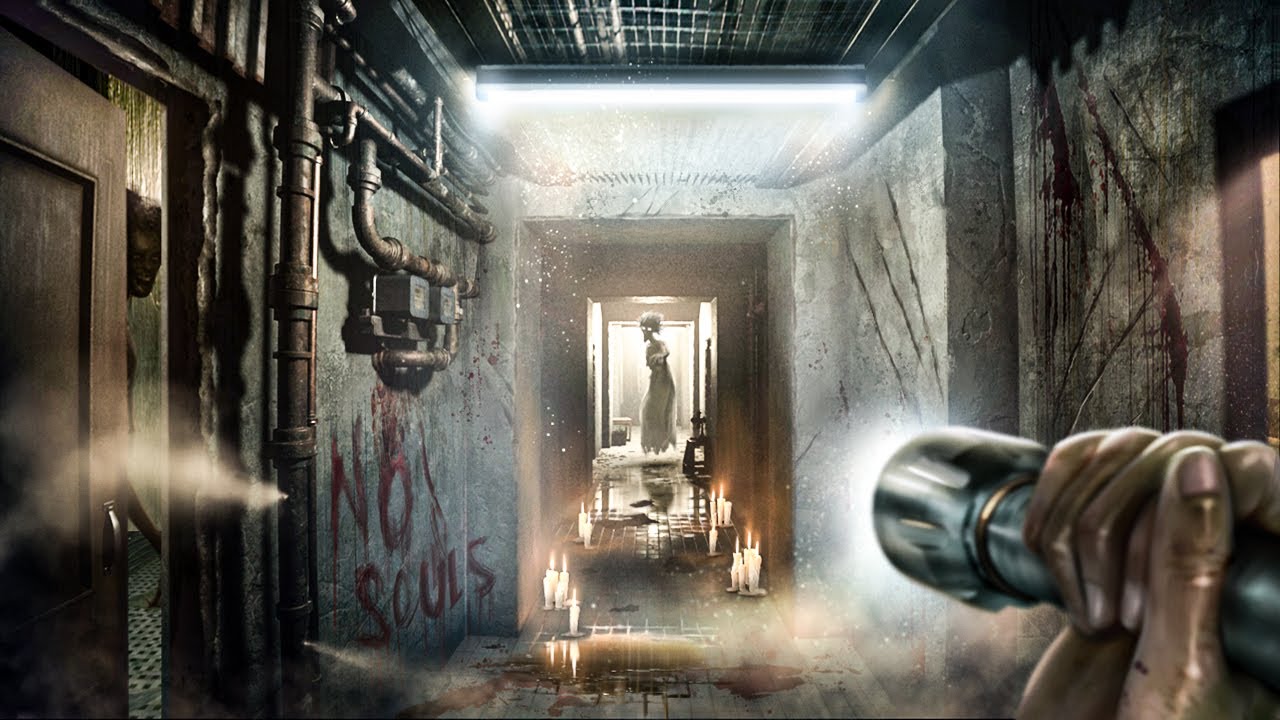
I have honestly been putting off playing this because so many of you said it would have a similar effect on me like From The Darkness did... and you weren't kidding
Follow Me Here:
➜ Twitter: https://twitter.com/thafooster
Support Me:
Moov Studio (Where I Get My Graphics) ➜ https://bit.ly/3sxUiZW
10% Off G-Portal Servers ➜ https://www.g-portal...
pulsar osprey
do bp breakpoints not work in editor when they are triggered by an animation?
having an issue where this node always returns 0

guh, just going to have to do a source build
faint pasture
odd kiln
The goal is to draw my Character movements on a Render Target
Have you tried any of the drawing nodes?
 autumn lagoon
Greetings everyone!
I have a problem with movement mechanic.
If actor facing straight forward or backward - everything is fine, but if it facing any other direction - everything goes wrong (video).
I've spent two days trying to fix this, but i can't understand what's wrong, please help.
("Altitude" is medium of all line trace distance, "Velocity" nodes attached to function, "Input" nodes attached to buttons output, multiplied vector goes in "Add Force" with "Accel Change" enabled)


 ruby badge
I'm trying to make a count down clock but the Text Render Components wont update. I'm not sure how to wire everything up. Can anyone tell what I'm doing wrong here?

 ionic saffron
Hi everyone!! Im new here and new to UE 5. Have any of y'all created a slime playable character and slime monsters?? I have a decent slime material and threw it on a sphere. I have the VERY basic of basic movements for the player but cant seem to get the slime monsters to move or do anything. Ive set up an AI, behavior tree, and blueprint but no dice.
 past hull
hello, any idea why my montage is not playing ? The animation is working as intended on the preview. The print string is also working

 dusky maple
Hey everyone, I was trying to follow this tutorial: https://www.youtube.com/watch?v=QrEY8n8zSag&t=241s but I am using buttons for my UI instead of (flat/normal widgets? not sure what the correct term is here). I have seen some stuff that UE4 buttons could not handle drag and drop but I have found no resources as to if UE5 buttons can do drag and drop functionality like this video. any shot someone knows if it is even possible to do in UE5 or if i should just abandon the buttons in the UI?


In this video we will learn how to Drag and Drop from a widget to local world to drop 3d sofas using the spawn actor from class node
also our previous tutorial to switch between the sofas using widget buttons
 lilac storm
hey guys , sorry for noob question, i am a bit new to unreal, can someone please explain why blueprints compilation time is much faster than c++ , isint bps get compiled to c++ ?
 broken wadi
lilac storm
hey guys , sorry for noob question, i am a bit new to unreal, can someone please...
broken wadi
lilac storm
hey guys , sorry for noob question, i am a bit new to unreal, can someone please...
Blueprints let you make changes and "instantly" see them in action whereas with c++ you make changes then wait while it compiles then have to wait again while UE loads up before seeing the changes (unless you use hot reloading).
But c++ runs "faster" so most devs spend time building and adjusting with blueprints and move the heavier logic over to c++ later on.
You can make your entire game using blueprints without touching c++ or vice versa
lilac storm
broken wadi
Blueprints let you make changes and "instantly" see them in action whereas with ...
yeah , but you don’t necessarily need to close and reopen engine while compiling c++ classes , you can “Build” with already open editor , but even then compilation takes so much time even if edited one symbol , and i am wondering why it is so. with bps you can edit whole class and compilations takes one second
pulsar osprey
blueprint isnt compiled into c++. its compiled into an internal language that unreal understands
broken wadi
lilac storm
yeah , but you don’t necessarily need to close and reopen engine while compiling...
that's called hot reloading and it can lead to file corruption so use it carefuly, especially if you don't have any version control
pulsar osprey
also, c++ isn't exactly slow to compile. the issue is that your compiler is checking every file to make sure they are up to date. if you change one line in one c++ file, the actual compilation and linkage is pretty fast if it isn't frequently used
broken wadi
I just find it much easier to translate an idea in my head using blueprints and then play testing it while being able to quickly make changes to variables. Then sometime later maybe days, weeks, months I'll return to that thing and realize it doesn't need to be changed anymore so I'll consider which if any parts could be optimized by migrating it to c++.
But you can always still make changes to it in c++ but ya, that's just my workflow.
 tropic kite
hey! I've been cranking away at unreal and blueprints for a month now. Is there some master documentation that explains everything?
even for elements like the details panel for built in components
that have a ton of baked in options
pulsar osprey

broken wadi
tropic kite
hey! I've been cranking away at unreal and blueprints for a month now. Is there ...
you mean like the docs?
the same docs that everyone else uses ---> https://dev.epicgames.com/documentation/en-us/unreal-engine/unreal-engine-5-5-documentation

Epic Games Developer
Complete resources for learning to use Unreal Engine 5
tropic kite
yeah this is decent. But stuff like a more detailed breakdown of prebuilt components
like you have so many powerful options in the character movement component
and there are tooltips
but more granular description of whats goign on under the hood
broken wadi
the source code is available on github https://github.com/EpicGames/UnrealEngine/ you just have to request access
tropic kite
ah that's a good point
thanks!
I'm an artist vet - been grinding hard at learning unreal / blueprints
getting over the hump where I feel like I can really implement ideas is a huge undertaking
the initial fundamental stuff was great tho - really loving unreal so far
coming from over a decade of unity
broken wadi
Epic Games Developer
Epic Developer Community Learning offers tutorials, courses, demos, and more created by Epic Games and the developer community.Learn UE and start creating today.
pulsar osprey
there are actually some reference docs made by some very nice people
quite a few in the pins in #blueprint and #cpp
you'll probably never find a handbook that describes everything, unfortunately
tropic kite
broken wadi
https://dev.epicgames.com/community/unreal-engine/learning is also great
holy crap
tropic kite
pulsar osprey
you'll probably never find a handbook that describes everything, unfortunately
I want it lol
thank you so much!
pulsar osprey
the actual unreal website is pretty awful for browsing docs
tropic kite
ha
yeah its a little clunky
are there any good math fundamentals when it comes to platforming?
pulsar osprey
i'd look into easing curves
tropic kite
cool - in which context?
pulsar osprey
they can be used to make certain movements feel a lot snappier or organic. like a jump that sorta "hovers" at the peak and then rapidly falls
 tepid turtle
(Direct me to another channel if it makes sense but I'll ask here first)
I'm trying to use DataRegistryIds and restrict them with the meta=(ItemStruct="MyStruct"). It seems like only UObject properties work with this. UPARAMs, or struct properties don't seem to use the customization (or at least they don't properly pass the meta tags). On the other hand FGameplayTag customization handle all these cases. Whats up with that? Can I get it to work with FDataRegistryIds pass into BP nodes or BP created structs? Any ideas?
tropic kite
pulsar osprey
they can be used to make certain movements feel a lot snappier or organic. like ...
this is exactly what I'm looking for
haha
is there a specific way to search for it?
 pseudo cradle
Hey all i followed a video on how to make a level change BP for instance go from open world to small tunnel so the video works great and my player does go threw the open world to the tunnel
But now its not replicated at all as both server and client go to the tunnel level at the same time does not matter if client or server goes threw the door
Anyone that can maybe help me with some advice to get it replicated please so only 1 player goes threw the portal and not all players?
I am new to UE so not sure if its a replication issue
pulsar osprey
i thought all clients traveled at the same time
 proud salmon
As far as I'm aware, there is no simple solution for this. You'd need to have multiple levels loaded at the same time on the server and know which/when to move players from one to the other.
 fervent heart
I am trying to use use a Dataprep Operator blueprint to swap out a static mesh with a blueprint actor during the Dataprep import pipeline. I found this BP someone else made, and it seems to closely follow the logic I was trying on my own.
https://blueprintue.com/blueprint/vgb-p5j8/
I am getting lost when the "Create Actor" node is looking for an actor class and then casting to that same actor class a few nodes later. I assume that the "Create Actor" class input is not looking for the BP Actor I am trying to add to my scene in the place of a static mesh. Does anyone know how to explain the logic that is happening here?


No description provided
 mellow pike
how do I delete unloaded assets ?
 tropic kite
pulsar osprey
i thought all clients traveled at the same time
tropic kite
pulsar osprey
i thought all clients traveled at the same time
hey would you be open for a DM? I have a quick question.
tropic kite
okay I'm trying to set 2 animations based on speed

it technically works
but when it hits that max speed it sort of glitches out - I konw I'm missing something
I can't tell exactly what's happening but it's like it's trying to either return to idle or reset the pose
 brittle oxide
Hihi, If I simulate 6 apples falling from a tree, then run away pretty far, save the game and restart the PIE and go back, there are only 3 apples sometimes less or more... why?
frosty heron
pseudo cradle
Hey all i followed a video on how to make a level change BP for instance go from...
You can't have multiple world, that's not supported out of the box in unreal.
Only one world at a time in multiplayer.
You can only do server travel which will takes every single player to the designated level.
You can't have different player on different map.
 wild pumice
Hi all, so I currently have a simple Lock on for my player with the "Set Control Rotation" node. It stays focused on the target at all times so there can be a lot of sporadic camera movement sometimes.

Is there a node that can help with getting this type of lock on? It allows the target to be offset a bit from the center before it starts rotating and it even allows you to be right next to the target without rotating unless the target becomes really offset.
frosty heron
tropic kite
Use blend space
 hallow compass
I want to make some big modular buildings that can show/hide stuff when a character enters. What's the preferred workflow for this? I thought about using level instances, and using the level instance blueprint graph to script the building logic. The downside of this seems that you cant have any kind of inheritance or common shared logic among level instances. I guess the alternative is a blueprint actor, but it seems pretty annoying to build up a modular building in a blueprint viewport
 astral ravine
Hi, I have this wall spline blueprint that I'm using, but the textures are being repetitive and it looks sloppy

is there a way I can randomize the settings of the material so one is missing some tiles, another more, etc etc
these are the three settings
 odd kiln
faint pasture
Have you tried any of the drawing nodes?
odd kiln
faint pasture
Have you tried any of the drawing nodes?
The problem is I don't know how to convert my actor location to my render target :/
faint pasture
odd kiln
The problem is I don't know how to convert my actor location to my render target...
math
how do you INTEND the actor location -> render target thing to work?
odd kiln
faint pasture
how do you INTEND the actor location -> render target thing to work?
I have a Vector4 parameter into my Material (a "brush") called "offset". I guess I have to take my actor location and convert it to this parameter (offset) so my "brush" is moving on my Render target. But for that I also need to tell what is the radius that it can capture around my Actor
I know it's math but I'm kinda lost
faint pasture
What world location corresponds to the center of the render target?
odd kiln
faint pasture
What world location corresponds to the center of the render target?
My Character has to be the center of the render target
odd kiln
faint pasture
you want to leave steps behind you right?
Exactly to show trails like for snow or sand for example
faint pasture
yeah you'll have to have some copy stuff
basically each time you draw the new stuff to the render target, you've moved a bit, and if you want the character to always be in the center then you'll have to copy the old one but offset
I'm pretty certain you can't read and write to the same RT at once so you'll need a secondary one
It'll be a bit like this:
TimeToDrawAFootstep -> OffsetCopy OldRT into NewRT based on how much you moved since last draw -> Draw footstep at center of NewRT -> copy NewRT into OldRT
Then any material can use NewRT to do their thing
odd kiln
For info I made it work with a "Scene Capture" Actor and so I add an actor local offset etc... but how to do that without a scene capture is driving me crazy
faint pasture
you don't need a scene capture with this
but you do need to understand what you're doing
do you know what UV coordinates are?
odd kiln
Yes
faint pasture
The material for Copy will just be:
Emissive -> Emissive
The material for OffsetCopy will be:
Emissive(UV's offset from a parameter based on math) -> Emissive
say you moved 1m in x and 1m in y, and you intend for the UV space of the RT to be 100 meters, then you'd offset the UVs for sampling OldRT by 0.01, 0.01
you moved 1% of the UV->world size, so offset the UVs by that much
odd kiln
So I need to do the math into the material to convert world location to UV space and not in my Character Blueprint ?
faint pasture
odd kiln
So I need to do the math into the material to convert world location to UV space...
either or

This is what I'm talking about
upper is RTNew, lower is RTOld
down arrow is copy, diagonal is copyoffset
each time, copyoffset feeding how much you moved since last, draw at center, copy to old (to copyoffset next time)
that's someone walking slightly diagonally up
 inland walrus
This is rough atm but just needing advice as I am new to data tables
I want it to some how go if X is == to X, then set row name to X

Any ideas that aren't too complex?
faint pasture
inland walrus
This is rough atm but just needing advice as I am new to data tables
I want it ...
Can you even change data tables at runtime anyway?
I thought you couldn't
inland walrus
Oh
faint pasture
I mean don't quote me but my impression was that data tables are meant to be how you shovel data into the game, not to act as a database or anything else editable at runtime
inland walrus
I'm not sure, I'm new to DT's
Would I instead do multiple of this node for each time I want to call from it?
 faint pasture
inland walrus
Would I instead do multiple of this node for each time I want to call from it?
faint pasture
inland walrus
Would I instead do multiple of this node for each time I want to call from it?
What are you trying to do here
inland walrus
faint pasture
What are you trying to do here
 faint pasture
ok so what's the problem here
odd kiln
faint pasture
either or
Ok I understand the concept of Copy to another "Render Target". But with Scene Capture I just had to set this first "Render Target" into the Scene Capture itself
inland walrus
faint pasture
ok so what's the problem here
I basically want it to do a check if X is == to X then set row name to X
odd kiln
This is my "Move Capture" function. First thing : I "Add Actor World Offset". For Scene Capture into another Actor it's ok but not if the code is in my Character Blueprint
 inland walrus
I basically want it to do a check if X is == to X then set row name to X
inland walrus
inland walrus
I basically want it to do a check if X is == to X then set row name to X
So if the are on quest 1, show quest 1 row info
if they are on quest 2 show quest 2 row info
etc
odd kiln
I don't need a SceneCapture but I need a second Actor to attach it to my Character and drawing its location into the first RT?
faint pasture
inland walrus
I basically want it to do a check if X is == to X then set row name to X
you can't
why are you modifying row names?
inland walrus
faint pasture
why are you modifying row names?
To call upon a different row
faint pasture
like a quest chain?
what are you actually trying to end up with?
are you trying to read all quests?
get data table names -> for each -> get data table row
inland walrus
So currently, I want to store each quest info in the data table and then call it by setting the text on this UI on the right
 faint pasture
inland walrus
So currently, I want to store each quest info in the data table and then call it...
faint pasture
inland walrus
So currently, I want to store each quest info in the data table and then call it...
get data table row names -> for each -> get data table row
a data table is a hashmap / dictionary. The row name is the key, the stuff there is the value
get all keys, for each key, get value
 inland walrus
inland walrus
inland walrus
Can you explain a little more in basic terms, how would I use this?
faint pasture
That's a loop, you'll get each data table row which has all the data you want
so for each row at the end, add a widget to your bounty board
inland walrus
So I wouldn't be able to set text, I'd have to have X amount of widgets for each quest?
 faint pasture
you don't modify the data table at runtime, you use it to fill up other things like the widgets
the text comes out of the data table and into the widget
you make a widget QuestInfoWidget and feed it different Description text
inland walrus
I already have those widgets/variables for text no?
faint pasture
Looks like you do
IDK what you're stuck on
but modifying a data table is not it
if your list widgets on the left need to know what entry they corrospond to you can store the data table row name
inland walrus
Where would I call a different row?

 faint pasture
Right now it's reading every row
you just only have 1 row
and it's doing it on tick for some reason
inland walrus
So if I had another row it'd show duplicate? & It's only on tick temporarily whilst I test
faint pasture
inland walrus
Where would I call a different row?
what object does this code live in?
inland walrus
Widget blueprint for the terminal that the player will be able to select their bounties
faint pasture
ok so it should be filling a list up, one widget per row
and don't do it on tick unless you want 1,000,000,000 widgets
You can spawn and add these when the board is opened
 inland walrus
faint pasture
You can spawn and add these when the board is opened
inland walrus
faint pasture
You can spawn and add these when the board is opened
I'm not sure how without setting visibility
faint pasture
then figure out how
that's how you do this stuff
unless you only intend for the board to have a set number of them
inland walrus
I know to add to parent etc but my issue is with figuring out how the data tables call per row etc
faint pasture
and randomly pick from the data table or whatever
This will run 1 time per row

do with that what you will
inland walrus
faint pasture
unless you only intend for the board to have a set number of them
Yeah their will only be X amount avialable per player level
astral ravine
astral ravine
is there a way I can randomize the settings of the material so one is missing so...
Anyone?
odd kiln
So this is what I made for my First "RT" so my Actor is always on the center, but it does not work as intended, the "spots" are drawn on the whole RT as I move (like steps) or it should stay on the center..

Maybe because I have to "Offset" it but I can't "Offset" my own Character it will be weird
faint pasture
astral ravine
Anyone?
who made that material?
I see a MissingTiles parameter, oncorporate some UV into that and it'd probably work.
faint pasture
odd kiln
So this is what I made for my First "RT" so my Actor is always on the center, bu...
Why do you need math? Just draw at 0.5, 0.5
odd kiln
faint pasture
Why do you need math? Just draw at 0.5, 0.5
Ok so for the first RT_Capture I draw a simple "spot" at 0.5, 0.5. Then how to "offset" for the second "RT_Persistant" ?
In my old code I was using "Add Actor Local Offset" to my "Capture Actor"
But now the code is on my Character itself
faint pasture
odd kiln
In my old code I was using "Add Actor Local Offset" to my "Capture Actor"
add math to UV
 rotund barn
am i missing something? my variable called "text" somehow gets set to index 1 of that array instead of 0 and im going crazy.
 odd kiln
faint pasture
add math to UV
odd kiln
faint pasture
add math to UV
In the Material ?
maiden wadi
rotund barn
am i missing something? my variable called "text" somehow gets set to index 1 of...
How are you testing this?
rotund barn
maiden wadi
How are you testing this?
the variable called "text" is directly tied to a text element in my widget
maiden wadi
Through a binding?
Then you have something else setting Text after this first tick(cause do once). Or if it's through a binding you have something setting text directly on the textblock which will break your binding.
faint pasture
odd kiln
In the Material ?
probably, I'd just feed the material HowMuchIMovedThisStep
say you moved 100 X and 200 Y in the time between placing footsteps
just feed it 100,200
and have it do the math to convert to UV
it'd just be a multiply
rotund barn
maiden wadi
Through a binding?
i directly select the variable instead of a function in the text element bind. and if i try to do 1 or 2 on the get from the array, the screen stays blank, only at 0 it displays a text, but index 1 somehow.
faint pasture
rotund barn
i directly select the variable instead of a function in the text element bind. a...
race condition? where does this array come from
or is it static
rotund barn
faint pasture
or is it static
its static, i manually added 4 elements to it
odd kiln
faint pasture
probably, I'd just feed the material HowMuchIMovedThisStep
This is how I actually feed my Material (2048 means the "capture size")
 faint pasture
odd kiln
This is how I actually feed my Material (2048 means the "capture size")
faint pasture
odd kiln
This is how I actually feed my Material (2048 means the "capture size")
sure, however you want to do it
odd kiln
But I need to multiply this "Move Offset" variable to something to make it move
So I need to find the "HowMuchIMovedThisStep" you said
faint pasture
odd kiln
So I need to find the "HowMuchIMovedThisStep" you said
WhereIAm - WhereIWasLastTime
 autumn parrot
i want to package my ue5 game and export it but i keep getting this error
 odd kiln
faint pasture
WhereIAm - WhereIWasLastTime
odd kiln
faint pasture
WhereIAm - WhereIWasLastTime
Sorry to bother you again but I tried this code and my "Spot" is moving and returning to center immediately in my second RT
 faint pasture
odd kiln
Sorry to bother you again but I tried this code and my "Spot" is moving and retu...
faint pasture
odd kiln
Sorry to bother you again but I tried this code and my "Spot" is moving and retu...
Does MoveOffset ever change?
odd kiln
faint pasture
Does MoveOffset ever change?
MoveOffset changes like this

"256" is my RT size and "2048" is my Capture Size
I guess I don't need this "Move Offset" into my Draw Persistant
frosty heron
autumn parrot
i want to package my ue5 game and export it but i keep getting this error
Reading the error helps. It literary tells you what's required.
maiden wadi
I'm not sure that is the actual error
frosty heron
Can't package without installing vs and it's cpp components
maiden wadi
Ah, that. I normally scroll up to find the walls of red text. 😄
faint pasture
odd kiln
MoveOffset changes like this
no
faint pasture
odd kiln
I guess I don't need this "Move Offset" into my Draw Persistant
nope, you just need to send the shader the distance moved either in world coords or UV coords and let it handle it from there
I'd send in world coords
then your shader can auto-adjust for different texture sizes
odd kiln
faint pasture
nope, you just need to send the shader the distance moved either in world coords...
So I send to my Material "Get Actor Location" - "Last Loc"
And then in my Shader I need to convert this to a UV space ?
faint pasture
yeah that's just a multiply
maiden wadi
rotund barn
i directly select the variable instead of a function in the text element bind. a...
Unsure then without being able to debug it personally. IMO I recommend not using the binding. Just set your textblock directly from your tick function.
odd kiln
faint pasture
yeah that's just a multiply
This is my shader, I already have a -1, 1 multiply, it's not that ?

The "Texture Sample" node is my "RT_Capture" not my "RT_Persistant"
faint pasture
odd kiln
This is my shader, I already have a -1, 1 multiply, it's not that ?
do you intend the ratio between cm in the world and your entire UV space to be 1?
1 cm = moved off the texture
odd kiln
Yes
faint pasture
the multiplier should be like 0.0001 or something
odd kiln
I just don't understand one thing is that in my old code I had a "post process" material for "Depth Check" that I put into my Scene Capture PP Material and in this "Depth Check" I have my "RT_Persistant" but atm I don't use this PP material
faint pasture
think of the RT like a minimap. How far should it represent in the world?
you're in the middle, how far away are the edges in cm?
odd kiln
faint pasture
you're in the middle, how far away are the edges in cm?
This is my "2048" setting in my code
The "radius"
odd kiln
The RT is 256x256
odd kiln
I set the RT to 256x256 to save performance
faint pasture
anyway, just use the same ratio to draw as you have to render on whatever is using this thing
you already have some way to go from world space to UV space, use the same math but opposite
autumn parrot
frosty heron
Reading the error helps. It literary tells you what's required.
im installing visual studio 2022 now
frosty heron
autumn parrot
im installing visual studio 2022 now
You will also need to tick the required component. Make sure to read official doc
autumn parrot
frosty heron
You will also need to tick the required component. Make sure to read official do...
got it
odd kiln
faint pasture
you already have some way to go from world space to UV space, use the same math ...
Sorry I'm kinda lost about this "Draw To Persistant" shader
Where my "Offset" parameter Vector is
faint pasture
make those numbers really small
 autumn parrot
frosty heron
You will also need to tick the required component. Make sure to read official do...
autumn parrot
frosty heron
You will also need to tick the required component. Make sure to read official do...
i can see that the version is 17.4 but the one i installed is 17.12
faint pasture
Probably lose those

show the shader that is actually USING this RT to show something on screen
and i'll tell you waht numbers to use
odd kiln
faint pasture
Probably lose those
Note that in this Screenshot the Texture Sample is the first "Render Target", not the "Persistant"
little helm
little helm
Animation Montage of player and zombie is interrupting. I want to disable it.
How can I get rid from this issue ?
faint pasture
doesn't matter
odd kiln
faint pasture
show the shader that is actually USING this RT to show something on screen
I don't know where to use the second "Render Target" which is "Persistant"
faint pasture
one should be a straight copy
autumn parrot
autumn parrot
i can see that the version is 17.4 but the one i installed is 17.12
new error now
 faint pasture
copy with offset old to new
draw the next step at center
copy new to old
autumn parrot
autumn parrot
new error now
@frosty heron
autumn pulsar
when capsule trace hits an object, and I ask for the normal of the object that it hit, does it return the normal of the first triangle it hit?
odd kiln
faint pasture
copy with offset old to new
draw the next step at center
copy new to old
This is the shader which actually use my "RT_Persistant". It is just drawing on a plane

This is when you say "Copy" that I don't get it. I should do this in my Blueprint code I guess?
 normal furnace
Anyone know if there's a way to stop UE from auto-showing pins of new struct members in the struct break/make nodes? There are graphs where I have 60+ break/make nodes, and adding members to a struct means I have to go back and remove those pins on every single one of those nodes. Drives me nuts!
frosty heron
autumn parrot
<@1050954229902213150>

Epic Games Developer
Tips, tricks, and techniques for setting up Visual Studio to work with Unreal Engine.
Modify vs from vs installer and check the msvc version according to the doc
autumn parrot
frosty heron
https://dev.epicgames.com/documentation/en-us/unreal-engine/setting-up-visual-st...
i did all of the tics from a -z, i have to figure out a way to change the version i think thats what its telling me
Detected compiler newer than Visual Studio 2022, please update min version checking in WindowsPlatformCompilerSetup.h @frosty heron
frosty heron
Just told you what to do above
You are using incompatible compiler version
Though I never had the error my self. Try following docs when installing
inland walrus
Anyone know how to call an "On Clicked" Event from a child button?
frosty heron
inland walrus
Anyone know how to call an "On Clicked" Event from a child button?
Use event dispatcher that broadcast event when the button is clicked
You can then bind it from anywhere
inland walrus
Thanks I will try that
Actually I need to set visibility of UI in the parent WBP, so I don't think that'd work
maiden wadi
It'll work
That's how you use buttons anyhow. Button just says "Hey, I've been clicked." Anything that cares can do something about that.
maiden wadi
normal furnace
Anyone know if there's a way to stop UE from auto-showing pins of new struct mem...
Is this a C++ or BP struct?
normal furnace
maiden wadi
Is this a C++ or BP struct?
BP
maiden wadi
Then not really, no. C++ structs have a metadata you can tag them with that'll automatically hide them until you unhide them in the struct. BP structs don't really offer that.
normal furnace
maiden wadi
Then not really, no. C++ structs have a metadata you can tag them with that'll a...
Ok, Thanks for the response. Much appreciated.
lost hemlock
Why is this for each loop empty? I also feel like the cast is unnecessary there

 unique harness
lost hemlock
Why is this for each loop empty? I also feel like the cast is unnecessary there
unique harness
lost hemlock
Why is this for each loop empty? I also feel like the cast is unnecessary there
what do you mean empty?
lost hemlock
unique harness
what do you mean empty?
Maybe not empty, but zero
 unique harness
Show HorizontalBox0 in the Design view
lost hemlock
unique harness
Show HorizontalBox0 in the Design view
 unique harness
so something is probably clearing those children
so the count is 0
also, unless you need to do something to all the slots, you can do GetChild and pass the slot index
lost hemlock
unique harness
also, unless you need to do something to all the slots, you can do GetChild and ...
There is no GetChild
 unique harness
GetChildAt is what you want
tropic kite
frosty heron
Use blend space
it definitely worked - but it seems I can't snap (step interpolation) between each state
lost hemlock
unique harness
GetChildAt is what you want
and then you would make array?
 unique harness
What exactly are you trying to do?
lost hemlock
scroll selection
unique harness
the branch indicates you only want to manipulate the selected item
So just manipulate it
instead of trying to find it in the list of childen
and then manipulating it
skip the loop
connect the return value of GetChildAt to the Cast
and pass the slot index into the Index pin
 bronze mirage
anybody know if linked anim class layers stack? if i'm creating a layered animbp for different stances do i first need to unlink the previous class or does the new one just replace it?
lost hemlock
unique harness
and pass the slot index into the Index pin
but top is still zero and bottom is changing


This was supposed to work
maiden wadi
lost hemlock
Maybe not empty, but zero
Break on the Cast node here, not the loop or the function start.
lost hemlock
I guess Ill use +1, -1 instead of increment or decrement
autumn parrot
autumn parrot
i did all of the tics from a -z, i have to figure out a way to change the versio...
@edgy ingot i was able to install correct version fully configure this time/ it ran for quite a while and then failed now its giving a new error
 lost hemlock
maiden wadi
Break on the Cast node here, not the loop or the function start.
lost hemlock
maiden wadi
Break on the Cast node here, not the loop or the function start.
breaking on branch
 maiden wadi
What is in the array at this point?
From GetChildren I mean
Also if you're on 5.5, you should right click that, and Show Execution Pins and hook it up to the execution flow. Fucking pure nodes returning arrays. :/
lost hemlock
Oh I found something

Array now is 2, and variable is also 2
So maybe im comparing the wrong thing
lost hemlock
maiden wadi
Also if you're on 5.5, you should right click that, and Show Execution Pins and ...
wdym?
 maiden wadi
Sec. I only have 5.4 open.
You were doing this before.

Right click the GetAllChildren and ShowExecPins.

So that it looks like this. That way it only gets this array once instead of every loop iteration, and it'll be ready by the time you break on the loop so you can see what is in it.
 unique harness
lost hemlock
but top is still zero and bottom is changing
unique harness
lost hemlock
but top is still zero and bottom is changing
yea 0 is the index the item was added to
lost hemlock
unique harness
yea 0 is the index the item was added to
there is no item
its a slot indication, my plan is to use an Opacity, color and Scale node later
to indicate which button is selected
unique harness

You're adding something to the array
it's being added to slot 0
which is why it returns 0
lost hemlock
since doing add all the time can be wrong I made a duplicate of this and replaced add with remove, so far ADD seems to work just fine as I see it, the branch ends up being always true and both compare the same number every time
lost hemlock
unique harness
are you sure?

The problem is with this one
oh wait
I think I should use a clamp on that array as well
ok maybe not clamp but branches
odd kiln
I don't understand how to copy old RT to new RT with offset without a depth persistent buffer on a post process material :/
maiden wadi
What do you mean by with offset? Not quite envisioning what you're after.
odd kiln
maiden wadi
What do you mean by with offset? Not quite envisioning what you're after.
I mean I have 2 Render Targets : 1st to be at center (the center is my Character), and the 2nd should be the "persistent" render target
When I move my Character, I need to draw a "trail" on my Persistent Render Target
So I'm doing an "offset" with my "Actor Location - Last Location" and set this parameter (vector) to my Shader where my 1st Render Target is
But then, I'm stuck on how to copy this RT_01 with his "offset" to my RT_02 to have a "trail" effect
Before I used a Scene Capture with a Post Process Material but the performance was quite bad so I'm trying to do that without a Scene Capture but the method seems more difficult
With the old method, on the "Scene Capture" I just set my RT_01 and my Post Process material with my "RT_02" and it worked fine. But now that I don't have my Scene Capture I'm really lost lol
normal raft
I still remain stuck on this issue of not being able to orientate my controller to same rotation as my mesh faces for my FPS mode ... any ideas?
When i try and feed "Set Controller rotation" the new rotation that works for the mesh/camera it doesnt result in the desired effect.. it glitches out the movement.. why cant i do this seemly straight forward thing? .. simple enough isnt it... rotate mesh+camera .. set controller rotation to that new rotation.. be happy
I tried with the pawn rotation also that completely bombs
 daring bison
normal raft
I still remain stuck on this issue of not being able to orientate my controller ...
daring bison
normal raft
I still remain stuck on this issue of not being able to orientate my controller ...
Are you using a pawn actor class or character actor class?
if ur using a character actor class then thats your problem
normal raft
yeah its technically a character "pawn"
but i thought... this just means that set actor rotation functions and such just references "self" as the BP is the controlling pawn/character
daring bison
problem with character classes is that when you hardcode rotation its fighting with the inherent movement component
character classes imo is better for NPC
or multiplayer sync for anims and other actions that behave on multiple timelines
then the movement component is actually nice as you only have visual feedback to worry about not actual functionality
odd kiln
I wonder if I need a camera below my Character to save his location into a Render Target hmmm..
lost eagle
maiden wadi
Depends on the system involved. For a simple example related to that specific to...
got it. thank you for your detailed response, i appreciate it
lost hemlock
maiden wadi
Right click the GetAllChildren and ShowExecPins.
Im doing something like this
 lost hemlock
unique harness
lost hemlock
unique harness

But now the problem is it will select them all with your scroll wheel or unselect them all sometimes
where's I want the selection to always be only on one thing every time
so only the currently selected thing needs to be selected
normal raft
daring bison
problem with character classes is that when you hardcode rotation its fighting w...
ok i switched to the pawn class now and it didnt seem to damage to much stuff that cant be mended
normal raft
hmms... still couldnt get that to work as it breaks another part which is dependdant on the movement component ....
see i think its these settings here that are the problem but its going to almost imposible to debug probably

they are virtually every where
1 in the boom
1 in the camera
1 in the movement component
1 some where else
daring bison
normal raft
see i think its these settings here that are the problem but its going to almost...
yeah checkbox debugging is tough
daring bison
normal raft
hmms... still couldnt get that to work as it breaks another part which is depend...
maybe you can replace it or use the pawn char move component
normal raft
hmm ok yeah let me look at that as a option
dusky cobalt
Anyone had problem where packagedversion of game behaved differently than the one in the editor? I have a bug I have no idea how to check since everything seems to be working correctly (the flow in blueprints etc.) Is it maybe because I'm packaging game in the same place and it overrides some files but not others? Maybe I should package game into a different folder everytime?
daring bison
dusky cobalt
Anyone had problem where packagedversion of game behaved differently than the on...
yes, what is the bug?
dusky cobalt
daring bison
yes, what is the bug?
Ugh, so on the editor version when I select something (tree, gold, building, unit) I get ''details panel'' basically just a info about what I clicked added to the UI. Deselecting works etc.
And now in the packages version:
I can select units, but when I deselect them once I cannot select tree,gold,building etc.
and then When I select unit and then without deselecting it I click on anything else (tree,gold,building), it works.
How do I destroy it so it's also not working in the editor? packaging game every 1 change is not really time efficient.
daring bison
dusky cobalt
Ugh, so on the editor version when I select something (tree, gold, building, uni...
do you get any reference errors in the message log when ur playing in editor?
dusky cobalt
Nothing
daring bison
is this a 100%bp project?
daring bison
hmm thats a hard one, ive never had a packaging bug that was purely logic related, more like engine settings
dusky cobalt
but i'm kind of noob with the C++ side of the project so maybe I forgot I also have to rebuild or something the project before I package it?
daring bison
I dont use c++ so Idk
i only do 100% bp games
it could be focus or input mode related, but idk
in my game I overrided the default mouse button down func of ue to handle deselecting and it never caused problems
Are you using Enhanced Input Actions?
Also is the bug present on standalone mode?
dusky cobalt
daring bison
Also is the bug present on standalone mode?
let me see
dusky cobalt
daring bison
Are you using Enhanced Input Actions?
yes
astral ravine
faint pasture
who made that material?
It’s an asset author off of the marketplace. He made it with the ability to do it Im just not sure how.
dusky cobalt
daring bison
Also is the bug present on standalone mode?
it works on standalone, but i think i will try to package game into a new folder, but yeah this one is tough, at least it's good idea for me to open it in standalone so I can see the blueprints working or not, if you have any other ideas go ahead, i will try to work it trough somehow
astral ravine
astral ravine
It’s an asset author off of the marketplace. He made it with the ability to do i...
I assume it has to be a randomizer in the blueprint
daring bison
dusky cobalt
it works on standalone, but i think i will try to package game into a new folder...
yeah good luck, only thing I can think of is testing whether it happens in both shipping and development packages
 outer brook
Hey, does anyone know why there is no "Construction"-Function for plain Object-BluePrints??? Or did I just miss it somehow?
I cannot find where to create the function and I realy could need a constructor like function for one of my BPs inheriting from "Object"
outer brook
outer brook
Hey, does anyone know why there is no "Construction"-Function for plain Object-B...
Ok nevermind. I found out that the "Construction"-Function is only meant to be used in Actor-Blueprints... The alternative would be to create a C++ class inheriting from Object.
 little prism
Hi All,
How can I add a description to custom actor component so I can read it when adding to actor? Similar to StaticMesh?

I mean text "StaticMeshComponent is used to create..."
nevermind, found it
surreal peak
Did having a Variable of Type BP_XYZ cause BP_XYZ to be loaded actually?
Guess even if the variable doesn't, I would need to cast to BP_XYZ to set the variable, and I would be back in load hell. Ah well.
lost hemlock
Hi, why would this not work in removing the scale of the unselected items??? Is it related to indexing?

I already got this


The 2nd group of pictures is for selecting and unselecting things
But the unselection only works if you go over the hotbar with the scroll wheel
 lofty rapids
dusky cobalt
but i'm kind of noob with the C++ side of the project so maybe I forgot I also h...
lofty rapids
dusky cobalt
but i'm kind of noob with the C++ side of the project so maybe I forgot I also h...
i just packaged from the editor, works np
compile, run editor, package
lofty rapids
lost hemlock
Hi, why would this not work in removing the scale of the unselected items??? Is ...
this throwing an error ?
 lofty rapids
lost hemlock
Hi, why would this not work in removing the scale of the unselected items??? Is ...
lofty rapids
lost hemlock
Hi, why would this not work in removing the scale of the unselected items??? Is ...
i feel like the logic is wrong, you cast in the true, but if you go through false, then your pulling from true when it never runs
lost hemlock
lofty rapids
i feel like the logic is wrong, you cast in the true, but if you go through fals...
wdym?
lofty rapids
lost hemlock
wdym?
your pulling from a cast that happens on a different execution path
gentle urchin
Thats a big X
lost hemlock
lofty rapids
your pulling from a cast that happens on a different execution path
oh youre right

@lofty rapids but its not
its not coming from a previous cast
and even if it does
then whats the problem with that?
lofty rapids
lost hemlock
then whats the problem with that?
a lot of times you'll get empty values from pulling off a different execution path
because it may not have even ran, and your using a value that doesn't exist yet
lofty rapids
lost hemlock
Hi, why would this not work in removing the scale of the unselected items??? Is ...
why do you have a condition that does the same on false and true ?
odd kiln
Anyone (maybe) knows how to paint a Render Target with full intensity ?
normal raft
ok so i think i found a solution to my problem ppl ... but now of course unreal is doing this thing where it stops firing the input axis event for my "Turn" stuff.. what could cause that now?
odd kiln
I mean, when I paint my RT, I have to paint again to make it really opaque
(the draw)
And when I do it, my draw got thicker.. I can't figure out why :/
normal raft


initially prints stupid but then just stops after a few seconds
input mode isnt overridden
 frank olive
I'm making an isometric game. How could I make a zomboid style crosshair? I just want a vertical line going from the floor to gun muzzle height.
trim matrix
frank olive
I'm making an isometric game. How could I make a zomboid style crosshair? I just...
search online website for crosshair examples
or a mouse cursor, then use it if it is royalty free
or draw yourself, or maybe draw to GBT or gemini
trim matrix
frank olive
I'm making an isometric game. How could I make a zomboid style crosshair? I just...
wait, I do not get final sentence
what do you mean by that? any simplification?
frank olive
trim matrix
what do you mean by that? any simplification?
Basically this,like the project zomboid crosshair

 normal raft
ah i was just looking at something that does a line trace from underneath the cursor
trim matrix
draw line trace from above
hard sinew
Okay, I'm having an issue where I have an actor but i would need more than one of the same actor, but I can only change the variables to the original actor, why's that? And are there any videos/ways to fix that?
trim matrix
to buttom
frank olive
trim matrix
to buttom
how can I do that?
trim matrix
line trace by channel node
give an starting point and ending point (Only the Z values is chaning)
and try to draw it by yourself, next thing that animation, maybe also you can is have got an niagara effect like this and set visibilty when mouse touches somewhere
normal raft
Get Hit Result under Cursor for Objects is the nodes that might help you
trim matrix
there is several options
trim matrix
hard sinew
Okay, I'm having an issue where I have an actor but i would need more than one o...
check instance editable
frank olive
Thanks a lot guys, that wasn't that hard, just gotta configure it correctly now
 trim matrix
for variables that you want to differentiate from other instances
trim matrix
frank olive
Thanks a lot guys, that wasn't that hard, just gotta configure it correctly now
if you want to move to that location, just make that coordination variable and move to that place
for that location break hit result, there is impact point vector
hard sinew
trim matrix
check instance editable
Its already enabled. It's basically a plant and I would like to have multiple actors of the plant
lofty rapids
hard sinew
Okay, I'm having an issue where I have an actor but i would need more than one o...
you mean when you make a copy, the variables don't show up ?
should be in defaults
hard sinew
I found out it's how I reference the actor
I used getactorofclass but that only gets a reference of the first instance only
 leaden raven
im using pretty much the default character movement (ignore the comment) but im trying to change it to work solely on 1 joystick. so forward and back moves it forward and back, left and right rotates the character in the respective directions
the thing is, while it does rotate the character, its rotating it at an offset, so the character turns in a circle as if the centre point is behind it (sorry i cant show a video im not on a personal pc) if i use a mouse for the rotation or a separate joystick, it doesnt have this offset and rotates from the centre of the character, is there a way to fix it to only use 1 joystick?

so its turning/rotating from the red dot rather than the centre of the character like it usually would, only when i use the same joystick for movement and rotation
 frank olive
The space between the bullets and the vertical line is inconsistent, even though I made sure the bullets are flying straight, and have a constant height, the further away I'm aiming the larger the space and depending on which way I'm looking it crosses the vertical line


I suspect the camera angle and ortographic camera could be the culprit, but idk how to get it to look accurate to where the bullets are going
normal raft
man these cosntant issues jesssusss christ!
does any one actually have a game that actually works 😅
frank olive
normal raft
does any one actually have a game that actually works 😅
No game is ever fully functional, it's a never ending battle to get a step closer to completion
normal raft
the only battle is with unreal editor it self
not doing 1 single thing ever that it claims on the tin
 merry mirage
I feel like that's just how software behaves in general no? :b
normal raft
these days for sure
frank olive
I didn't really want to resort to such, but it's easier if I just make the bullets go towards the point of aim instead of actually going exactly towards where the gun is facing, it'll look good enough, probably
 shadow flame
I'm having some trouble dealing with video textures.
I have a mediaplayer object, a media texture object, and a material that takes the media texture in to use for a UI object.
I have a folder in my saved files where I want to pull my videos from (They need to be easily interchangeable).
I'm currently passing them through this function to load them into a set of playlists.
However, I can't seem to get the videos to display during runtime
 normal raft
I wrote a audio encoder software in QT its absolutely pristine... but havnt released it in over 6 months because i simply wont release it till its absolutely complete and perfect because I know there what am doing there is leading up to every thing getting completed reliably to a satisfactory level
unreal like a alien world in comparsion to that
 raw pilot
Guys anyone know why my instancing don't work? each of these actors constructs a widget with its variants.
And on a selected Variant its actor's mesh should change to that color. but no matter on which of the 4 im on, it only changes the color of 1?


also tried without casting btw but i had the same result
lofty rapids
what does call change color do, and is that even being called ?
lofty rapids
but it's not changing ?
raw pilot
it is, but they all just change the color of the first product actor in my level
instead of their actual parent
lofty rapids
raw pilot
Guys anyone know why my instancing don't work? each of these actors constructs a...
i c, probably because you get actor of class, this gets the first one
shadow flame
shadow flame
I'm having some trouble dealing with video textures.
I have a mediaplayer object...
Adding some clarifications. The status prints "true" when adding the file, however the texture doesn't display the loaded contents.
raw pilot
lofty rapids
raw pilot
right i c, so it's changing only the first one
thats because you get actor of class, which gets the first one
raw pilot
yeah but im tryna make it so that it just changes the one its in range of kinda
idk how to do that i thought casting maybe but im clueless
lofty rapids
possibly some casting, but do you have a current item reference ?
usually when you interact with items theres some sort of reference to the one your currently interacting with
raw pilot
yeah the first time i did have to reference it, doing it this way worked just fine
lofty rapids
raw pilot
Guys anyone know why my instancing don't work? each of these actors constructs a...
what bp is variantselected on ?
raw pilot
 raw pilot
lofty rapids
what bp is variantselected on ?
raw pilot
lofty rapids
what bp is variantselected on ?
WBP_Product
so the widget created by the Actor
unique harness
lost hemlock
But now the problem is it will select them all with your scroll wheel or unselec...
Sounds like you want a scroll box or list view rather than a hbox
lofty rapids
raw pilot
so the widget created by the Actor
you might want a global, for the current item your "using"
hard sinew
lofty rapids
i c, probably because you get actor of class, this gets the first one
This is my issue as well
lofty rapids
you need to get proper references
it depends on where and what your trying to cast to
raw pilot
when i tried promoting the return value to a var and using that get it always returned Null or None found
lofty rapids
get actor of class only gets first one
hard sinew
raw pilot
When you duplicate actors in a level, they're instances, getactorofclass only works for the original instance
lofty rapids
you want a reference to the current item your interacting with
how you get that depends on how things are built
when do you "select" an item that your trying to change ?
hard sinew
Gotta use interfaces
raw pilot
lofty rapids
when do you "select" an item that your trying to change ?
hmm my Actors know that a player is in Range when Sphere collision is overlapped
most of my ui communicates with each other through callbacks and event dispatchers
lofty rapids
ok right, so ya definately a global
or a variable
that is the reference to the current item your interacting with
raw pilot
yes
lofty rapids
you can put it anywhere, but i would put it in game instance
but you could put it on the player
interactingObject or something like this
and when you overlap
set that reference
lost hemlock
lofty rapids
why do you have a condition that does the same on false and true ?
I changed that
So now it goes in only after the false

but now the problem is that
I dont have any size indication for any selection at all whatsoever
raw pilot
lofty rapids
set that reference
so what your saying is getting this variable into a GI or my player?
 lost hemlock
everything remains the same, selected or not, it looks like scrollwheel doesnt do anything at the moment
perhaps i think it could be something to do with that nested branch
lofty rapids
raw pilot
so what your saying is getting this variable into a GI or my player?
where is this overlap event, what bp ?
raw pilot
lofty rapids
where is this overlap event, what bp ?
BP_ProductChildActor, the ones you see in the world
lost hemlock
there is a nested branch inside of the branch. I think the 2nd one is failing somehow
maybe related to the array
I also have a feeling that it could be related to index
but I wonder if I could give a specific number to each slot and only use the scroll to go to the actual corresponding number or string/name/ID of the selected slot
though that would mean that I would have to remove all these functions I made here
@lofty rapids
lofty rapids
raw pilot
BP_ProductChildActor, the ones you see in the world
then set the global to self
if other actor is player
raw pilot
lofty rapids
then set the global to self
im not sure if i get what you mean by this
but yeah i debugged and the other actor is the player
lofty rapids
raw pilot
im not sure if i get what you mean by this
so thats where you get the reference
you know now i'm overlapped self
which is the thing you want to change color
so set a variable in the player, or game instance, that is a reference to self in that self is the one that is overlapping player
lofty rapids
lost hemlock
So now it goes in only after the false
again, you don't want to cross execution like that
it's not good and can cause weird behaviour
lost hemlock
lofty rapids
again, you don't want to cross execution like that
wdym
lofty rapids

you have two paths
the bottom path skips all the other stuff and sets at the end
the circled part may or may not ever run
so if you go to false
your trying to pull from something that may or may not have run on true
if current slot <= total, = false, then your pulling from something from never ran
it's also just confusing to do this
lofty rapids
raw pilot
but yeah i debugged and the other actor is the player
that means the bp is the one you want to "change color" because you interacted with it, so you want that reference
consider that if this was on the player, the other actor would be what your looking for
but since the collision is on the item itself, self can be used
you wouldn't need to cast to anything if you set the reference to that specific kind
but if you made it a general actor, set self to it, then you would have to cast to that kind
raw pilot
i got somewhere with your method
they now all change to black if u walk in em, but changing still only changes the first
 final berry
Hello! So I have a game where the mouse is replaced by a 3d model that functions as a mouse, however I also have a menu on the left and right side of the screen, when moving the mouse I only see the hover animation of the buttons, but no mouse which makes it pretty tough to click the right button. What would be a good way to get the mouse to be visible when near the menu's. I tried a greater than x mouse position on event tick, but that seems a bit excessive. Any suggestions are appreciated 🙂
raw pilot
because An Actor type isn't the same as the ProductActor Type i needed to cast it kinda
lofty rapids
raw pilot
because An Actor type isn't the same as the ProductActor Type i needed to cast i...
right, if your variable type is just a general actor, you'll need to cast to use the function
raw pilot
It works kinda weirdly now but is there a way to get the parent from my custom event as a Getter so i can keep the Change Color Call down there?


First 2 screens is the actor, the other 2 is the ui btw
lofty rapids
raw pilot
It works kinda weirdly now but is there a way to get the parent from my custom e...
whats with the get actor of class and product info ? this is on event construct ? what are you trying to do here ?
raw pilot
aight so basically for more context
lofty rapids
this event construct is where ?
raw pilot
lofty rapids
this event construct is where ?
Theres the ProductActor class which Is NOT written by me that does some C++ fetching the product details from a json file. base off that i made the child bp,
But every instance of a ProductActor can contain a diff mesh and product info which is all recceived by just the ID which is handled by the ProductActor Class.
So to make sure each instance contains its own info i did it on Construct since it just makes a widget each time

since those variables in the screen are gotten from the Parent Actor, not the actual child
they're just automatically set there.
lofty rapids
raw pilot
Theres the ProductActor class which Is NOT written by me that does some C++ fetc...
one thing is you didn't check for that you overlap player
lofty rapids
raw pilot
It works kinda weirdly now but is there a way to get the parent from my custom e...
what are you trying to do with get actor of class ? isn't that the same class as the bp your in ?
raw pilot
lofty rapids
one thing is you didn't check for that you overlap player
? that logic used to be in the C++ class but i moved it to the child instead with those events
lofty rapids
it seems like a bunch is weird about this code
raw pilot
lofty rapids
what are you trying to do with get actor of class ? isn't that the same class as...
No the get actor of class is in my Widget because
ChildActor -> Product_Widge
raw pilot
lofty rapids
it seems like a bunch is weird about this code
yes its a weird set up i know, but it works 😭
lofty rapids
raw pilot
Theres the ProductActor class which Is NOT written by me that does some C++ fetc...
is other actor what you were trying to do that i suggested ?
raw pilot
lofty rapids
is other actor what you were trying to do that i suggested ?
yeah thats your method
lofty rapids
ok but other actor is local to self
it's not on player or game instance
because you need access to it
when you run the other code
you want to use other actor
but it has to be in scope
raw pilot
im ngl i had a refferencing problem with my cart widget too, i just put it on my player controller and get it from there
lofty rapids
whatever works
raw pilot
but i lowkey still dont get what your saying
lofty rapids
but i would also check that your colliding with the player on overlap
raw pilot
i did a few mins ago
but i set the Other Actor variable to Self right
then i pass that onto my widget through that Update Prod Info event
lofty rapids
raw pilot
but i set the Other Actor variable to Self right
yes but the issue now is that it's only a variable local to that bp
raw pilot
that way i can access it in my widget
raw pilot
Yeah this way it just passes that on to the just-instantiated widget

Then i do it again here. in my Wiidget IM starting to doubt why twice, but its functional
 lofty rapids
raw pilot
Then i do it again here. in my Wiidget IM starting to doubt why twice, but its f...
lofty rapids
raw pilot
Then i do it again here. in my Wiidget IM starting to doubt why twice, but its f...
your not doing anything with parent
raw pilot
yeah cause i squeezed this after my Set Text but then it happens like everytime the character moves

but i need the Call to happen here instead of there

but that creates the problem of how am i gonna get that Parent from Up there, all the way down to that cast for my Target 😭
lofty rapids
i'm actually really confused at what your even trying to do
take a second, you want to change the color correct ?
raw pilot
Yes, but only when a variant is Selected that requires input from the player
not everytime the widget detects your in range (which is what update info does, i think)
lofty rapids
raw pilot
Yes, but only when a variant is Selected that requires input from the player
see where you call change color from the cast, this should be from the "global" i was talking about
you set the global
then call change color on that specific one
raw pilot
wdym by global though its a event dispatcher created in the actor
frank olive
Both of these should result in the bullet projectile going the exact same path, except the second one goes further right?

 lofty rapids
use a "global"
put a variable on your player
or game instance
that is the reference
i can only say it so many times i don't know how to explain any better
 lofty rapids
you know how you have variables on bp ?
raw pilot
yeah, some of em exposed on spawn and instance editable
lofty rapids
create a variable on your blueprint that holds the current thing your interacting with
so you can change its color
lofty rapids
lofty rapids
that means the bp is the one you want to "change color" because you interacted w...
^
raw pilot
ah
lofty rapids
but instead of using other actor that is local to the item
set the variable on the bp you can access it from where you want to call change color
you mau need to do some blueprint tutorials or learn more to get proper help
raw pilot
so your saying something like this

so i can then just Get it down there
the Set Selected actor for example
but then on the player
so its even more global than just this bp
lofty rapids
sure if that gives you access to it where you call the color function
then use that reference
and call change color on that
you need access to the reference at the point you want to make the call
i think your missing some key info that would really of made this a lot faster
dusky cobalt
So I have 2 different actors, both have Actor Widget Details which I get by interface i take this widget and put it into UI. Now I realized that from one actor I can clearly see the widget details in the editor.
Meanwhile if I click on different kind of actor the widget that should be taken is unknown, which is 99% why it doesn't work in shipping version. Funny thing is that even though it shows Unknow, in editor it works and shows anyway. Any ideas why is it like that?

 raw pilot
shi i broke some else but i can fix that
faint pasture
dusky cobalt
So I have 2 different actors, both have Actor Widget Details which I get by inte...
Why not just put the details in a component?
then you can just Actor.GetComponentByClass(detailscomponent) and read the data
tropic kite
I want to manually build what a blend space does - but without the actual blending. For instance building speed for multiple animated poses
idle > run > sprint as velocity builds
I have a branch setup to play through run - but that next speed I cant figure out
also my idle isn't playing here for some reason

any other aniamtion I plug into the false value plays fine
except that one lol. So random
 slim fable
Hello. I have a problem with getting mouse/right thumbstick to work as a camera rotation
It works in one BP_player actor but It no longer works in another
No clue why
slim fable
nvm, found out.... SprinArm was not using "Use Pawn Control Rotation"
 flat mortar
Hello! I have a actor that spawns on repeat, but I keep getting this error. I've tried googling and using the 'is valid' node to no avail, Is there something wrong with how im spawning my pawn?


 peak zodiac
Is there some sort of event, or delegate that can be subscribed to, for a player changing grids in a world partition?
peak zodiac
flat mortar
Hello! I have a actor that spawns on repeat, but I keep getting this error. I've...
You should be validating your hit result before casting, and then validating and using the cast object reference beyond that.
flat mortar
peak zodiac
You should be validating your hit result before casting, and then validating and...
Cheers, appreciate the help ^^
slim fable
G'day I want to create a simple drone blueprint where It has 4 directional animations (fwd,back,left,right)
I'm struggling with creating Animation Blueprint
tropic kite
tropic kite
also my idle isn't playing here for some reason
okay now none of the animations are firing
if I hook up the same animations in a blend space (or in the viewer) they play correctly
 safe holly
Hi, I'm working on an Unreal project and I went against this problem.
Can anyone tell me what's the problem? I really have no idea what's the matter with World Partition grid


Another thing I don't understand is why it unloads some blueprints that aren't checked as "IsSpatiallyLoaded" and that aren't neither in data layers.
Thanks in advance

 strong halo
how viable would it be to use EQS to determine enemy spawn location and will I have to make the spawner a pawn to do it?
The use case would be to spawn enemies on a certain distance from the player in places that aren't visible but have an actual path to the player
inland walrus
Anyone know a better way to do this? I'm basically going to have to have a new row per quest and that's a lot of copy and paste
 lofty rapids
inland walrus
lofty rapids
inland walrus
since your doing totally different things on each path theres not much you can do, in almost any structure you'll have some sort of branching to get the sequence right
dark drum
inland walrus
Anyone know a better way to do this? I'm basically going to have to have a new r...
You can get the row names for a data table and do a for each loop.
dark drum
strong halo
how viable would it be to use EQS to determine enemy spawn location and will I h...
An EQS can be run from anything. The short answer is very viable.
strong halo
dark drum
An EQS can be run from anything. The short answer is very viable.
sorry for a dumb question but how would I do that from a game mode or an actor for example?
dark drum
strong halo
sorry for a dumb question but how would I do that from a game mode or an actor f...
There's a run EQS node. You can then bind a delegate that gets called when it's complete. It'll pass the found data through to the delegate so you can decide what you then want it to do. (So probably pick one of the found locations and spawn an enemy)
strong halo
dark drum
There's a run EQS node. You can then bind a delegate that gets called when it's ...
that requires an AI controller iirc
 austere ingot
Is there a way to change the default 'load in location' for a player controller that doesn't have a pawn? By default it's 0,0,0 so the camera just shows itself sticking in the ground or wherever that is on your map.
trim matrix
so does green, without a trigger input, trigger continuously?

ah I see, if it's const it doesn't have a trigger
huh, okay
normal raft
pritty much
after exhausting all avenues
and yeah i been there
i've been every where
completely buggered is what we call that epic/unreal
just make one thing work .. add input yaw
oh nooo
surreal peak
Hm. Not entirely sure what your issue is.
normal raft
the fact that yaw is completely screwed for every value of Z
surreal peak
trim matrix
ah I see, if it's const it doesn't have a trigger
It's more the BlueprintPure part usually
surreal peak
normal raft
the fact that yaw is completely screwed for every value of Z
But what does that have to do with EnhancedInput
normal raft
not being funny but would you like me to kind of spell it out ..its kind of obviously every ones getting a different version of it
its not consitent
surreal peak
I have 0 clue what the hell you are on about tbh. I can try helping but only if you actually explain what the issue is and share what you are doing.
Cryptic ranting is fine too, but then I can't really help
surreal peak
You are still just writing cryptic stuff.
normal raft
yeah if its that cryptic
surreal peak
But well, ping me when you actually wanna talk about whatever you struggle with with EnhancedInput
normal raft
then try rotate the controller and see if it behaves correctly in 5.1
surreal peak
You never even explained that you are trying to do that
 stone field
it's very good to practice forming clear, concise questions which include all relevant information. Many times when you do that, you may even stumble on an answer as you go through the process of forming a clear question.
 pulsar orchid
Anyone mind telling me how to get a character to stop pending kill after being set to hidden in game? Just having it set so the character goes hidden in game when F is pressed, which causes it to be pending kill and no longer reference-able.
normal raft
No its just me been here for days in various channels asking for hours and debuging for hours and never getting any where
dont you under that?
stone field
I can see venting. If you can show a 100% clear question, great. This remains a purely random forum where somebody who has a clue may or may not ever see your question no matter how well formed.
 shy matrix
pulsar orchid
Anyone mind telling me how to get a character to stop pending kill after being s...
shy matrix
pulsar orchid
Anyone mind telling me how to get a character to stop pending kill after being s...
Wait, no. Setting an actor hidden in game will not cause it to be killed out of the box. There must be something else you are doing there
surreal peak
Then link to the message where you fully explained what you are doing, where you shared the code etc. it's not like I'm aware of everyone's messages every day, every hour.
I gladly try to understand the issue and help you, cause you gotta admit that other's don't seem to have those issues, otherwise you would have found similar problems being addressed already
normal raft
there is clearly something wrong with the controller component
surreal peak
pulsar orchid
Anyone mind telling me how to get a character to stop pending kill after being s...
Multiplayer?
normal raft
it refuses to orientate it self to the metahuman
pulsar orchid
surreal peak
Multiplayer?
Not multiplayer
normal raft
thank me later when some fixes that
pulsar orchid
shy matrix
Wait, no. Setting an actor hidden in game will not cause it to be killed out of ...
This is what I'm doing.
 surreal peak
Hm, then not sure. Multiplayer it would become unrelevant and respawn locally
pulsar orchid
When the player presses F the bot starts "StartHideTimer"
surreal peak
pulsar orchid
When the player presses F the bot starts "StartHideTimer"
Wait, did you use the Lifespan variable that comes with actors?
pulsar orchid
Which should reset it to not hidden. When the character is added I add it to an array, if I press F a few times it says (after the first hide timer) it is pending kill.
surreal peak
That thing actually causes them to be destroyed if you set that to a number
pulsar orchid
surreal peak
Wait, did you use the Lifespan variable that comes with actors?
No, this is a Float I created.
surreal peak
Hmmm
pulsar orchid
Blueprint Runtime Error: "Attempted to access ResetBot_C_0 via property CallFunc_Array_Get_Item, but ResetBot_C_0 is not valid (pending kill or garbage)". Node: Reset Graph: EventGraph Function: Execute Ubergraph BP Third Person Character Blueprint: BP_ThirdPersonCharacter
shy matrix
How/where are you calling those events?
pulsar orchid
This is the error I get when trying to recall the array
I am calling those events in the character's BP
Event Graph
When the player presses F it runs this...

To spawn a bot, for debug purposes I have the print string to check what is in the array - that's what's spitting out the pending kill error when completed as the reference becomes nothing.
shy matrix
Uh there is a lot of stuff going on there. Why are you so sure that the problem is the hidden flag? I would go into all this logic to hunt for destroys or setlifespan
tropic kite
Here I made a video showing off this very strange animation issue I'm having. I'd really like to understand what could be happeninghttps://www.dropbox.com/scl/fi/o28560kprt73dt1nefll7/2025-01-15-13-50-07.mp4?rlkey=dj71pgc52wuh8phs2pgr18ph7&dl=0
 pulsar orchid
Off the wall test I decided to check my reset event being called. It has a "set Actor Locationa and Rotation" node. If I skip that, it works... So something with that reset isn't working.
OMG, I might have an idea... 1 sec...
I think I have it...
dark drum
strong halo
that requires an AI controller iirc
Not that I'm aware of.
strong halo
dark drum
Not that I'm aware of.
didn't notice there was another one which seemingly works fine
pulsar orchid
Got it. So, the issue appears to be that I'm stupid. So when the bot executes that "Reset" event it uses a "Set Actor Location and Rotation" node, but when the bot is spawned I was never passing along the location and rotation, so it was setting the actor location/rotation to 0,0,0
Which is outside of my map, thus the pending kill.
surreal peak
So it basically fell and eventually hit the ZKill height?
pulsar orchid
Yup. Or was outside of navigation and the engine then culled it. Something along those lines. No clue how I missed that.
At least I haven't been trying to figure this out for an hour... Yeah, definitely not...
surreal peak
tropic kite
Here I made a video showing off this very strange animation issue I'm having. I'...
You aren't really supposed to do it like that.
What you are doing there is what a AnimationBlueprint should be for.
The Two different Animations you are playing should be part of the StateMachine of the AnimBP.
It might be that you triggering the Animation EVERY frame actually don't play it properly.
tropic kite
but certain aniamtions do play properly
which is why it doesn't make sense
when I change them out
surreal peak
Are you sure it's not jsut the first frame of the anim being set?
Either way, you should probably move to using an AnimBP.
tropic kite
I did have great functionality when I set it up in blend space. But i dont want any blending
surreal peak
Pretty sure you can control blending in the AnimBP
tropic kite
to the point of turning it off?
surreal peak
I'm sure there are settings on the States, the AnimSequences, and the Transitions to alter that.
I doubt Epic would take away the option to instantly swap to an Anim if they wanted to
 mild jacinth
I used search on discord regarding the Child actor component and everyone says it is so buggy and to avoid it. why is it buggy exactly?
 pure jolt
Hello guys, I have a question regarding a mechanic I want to create for my game. How can I swipe on my screen (mobile game) and once done swiping throw/launch the object to that direction of swiping and have a speed regarding the speed of the swipe aswell?
inland walrus
Can someone help me figure this out. The player is level 1 (the print string blue = player current rep level and the print string pink = required level for that specific quest)
for some reason I can see both quests even though I should only be able to see 1


 austere matrix
mild jacinth
I used search on discord regarding the Child actor component and everyone says i...
austere matrix
mild jacinth
I used search on discord regarding the Child actor component and everyone says i...
It has some issues with serializing the dynamically spawned actor, sometimes properties just choose not to update/save/load. Sometimes the entire actor will just fail to spawn.
Sometimes their lifecycles dont sync up completely perfect
And personally to me they just feel clunky to use.
They aren’t broken by any means, and it’s a tool you can use. Just gotta be aware it’s not perfect, like many other things
odd kiln
Can I create a render target in my Blueprint and set it to an existing Render Target asset ?
With the "Create Render Target 2D" node
stone field
pure jolt
Hello guys, I have a question regarding a mechanic I want to create for my game....
Cache the start and end points ( and times ). Then math : )
pure jolt
How do I do that though. Like add the swipe so I can get the start and end points?
Thanks aswell for the help!
stone field
pure jolt
How do I do that though. Like add the swipe so I can get the start and end point...
this video might get you started perhaps
https://www.youtube.com/watch?v=yFbWZfOVZpg

In this video i am going to show you how to create swipe controls like in SUBWAY SURFERS for example! Hope You Enjoy! ㅤ
ㅤ
- LIKE and SUBSCRIBE if you enjoyed the video =)
Patreon https://patreon.com/JemGames
Discord https://discord.gg/9N7w49AwKR
pure jolt
Perfect! Thanks a lot
Just a question, is there a way to get the speed of that though. Like how fast I swipe?
to set the speed of launching etc
I want to create a basketball game
so you swipe and throw the ball in
stone field
pure jolt
so you swipe and throw the ball in
speed is a very relative term. You may have to factor in things like screen size.
Basically you can't just say "1000 pixels per second = my game speed x".
You will likely have to think in terms of fractions of screen height.
Or you might just say time => speed, and swipe => direction
( where => I mean "is relative to" )
pure jolt
Okay got it! Thanks a lot for everything!
stone field
Hard to say, I've never made a 'flicker' : )
But good luck
thin panther
mild jacinth
I used search on discord regarding the Child actor component and everyone says i...
I disagree with Dr. Elliot in some regards. They are definitely buggy, and have caused me issues in the past including crashes. So much so that Epic officially don't reccomend them outside of basic visual usage
https://dev.epicgames.com/community/learning/tutorials/l3E0/myth-busting-best-practices-in-unreal-engine#"don’tusechildactorcomponent",trueorbust?
stone field
thin panther
I disagree with Dr. Elliot in some regards. They are definitely buggy, and have ...
nice link. That is pretty fresh info, and AriA is a solid source
thin panther
It's one of the best newer resources. I might be partially biased because I was partly in on the community event here while Ari was talking about and asking opinions on what to include :P
That was such an interesting event, I wish I could have been longer, but Ari did some great work on the UnrealFest presentation and on the forum post
stone field
thin panther
That was such an interesting event, I wish I could have been longer, but Ari did...
Super good fellow. I am in Finland so I've visited him irl a few times and consulted several times : )
thin panther
Oh that's pretty neat!
He seems like a super nice guy from the limited interaction I've had
Also very good at making terse and boring topics easily digestible
austere matrix
thin panther
I disagree with Dr. Elliot in some regards. They are definitely buggy, and have ...
That’s kind of what I said though, same as the article says.
“* If you do use it, use it only for very simple uses cases like attaching a visual object to an actor.*”
They’re buggy and I don’t use them, but people do and lots of people don’t have issues depending on their use-case. I’m not a fan of blanket statements of saying “never do this”. Everything can have a reason, even if there’s better choices. 
stone field
"at your own risk" : )
austere matrix
Exactly
inland walrus
Anyone know how to make these values the same? everything works correctly up until the red circle, then the data there is printed incorrectly

 austere matrix
If you use a rusty old screwdriver in place where a wrench makes more sense, you’ll always have a bad time
thin panther
austere matrix
That’s kind of what I said though, same as the article says.
“* If you do use ...
That's why I only partially disagreed :P
I was mainly saying that I disagree with saying they aren't broken, because they quite are. To me at least, having to tiptoe around and only use for the most basic cases, otherwise risking crashes and other issues is them being broken, kind of like the water system :P.
My favourite one was it spawning null actors that crash when interacted with on more than one occasion :P
I do look forward to giving scene graph a good and proper test
austere matrix
I suppose my definition of broken is more direct.
But yeah either way, I would recommend other choices. But whatever makes a game
stone field
inland walrus
Anyone know how to make these values the same? everything works correctly up unt...
- Maybe log the values at steps along the way?
- What does "printed incorrectly" mean? Not what you expected?
thin panther
austere matrix
I suppose my definition of broken is more direct.
But yeah either way, I would ...
Yeah, perhaps we just have different interpretations but mean the same general sentiment. 🙂