#blueprint
1 messages · Page 266 of 1
 gentle urchin
 kind estuary
gentle urchin
Not that i know what this is but
kind estuary
gentle urchin
Not that i know what this is but
yeah that didnt explain much... it would need an if statement to check if the current level is "House"
 meager spade
https://www.tomlooman.com/unreal-engine-cpp-save-system/ This should make your life easier

UE4 SaveGame system to save player data and world state to disk. Including all source coded needed to get started.
(It's not a bonfire specific save system) It's core is extremely useful for saving variables on any type of actor without caring about what the variable is
 normal raft
well i crashed my PC three times in the last 12 hours after letting instanced meshs and timers run riot 😅
3rd i forgot to turn the timer off and went to bed
woke up the machine was fuming LOL
graphics all in safe mode fans screaming and whole lot of hatered as some cascading things must of leaked the ram and just tore the whole machine to bits
seriously thinking i need allot more vram and something with more grunt
a 16GB willl require a Mortgage
but yeah on to something there just got to work out how to make it work with out exhausting the vram and get the hit location to be more accurate somehow
gentle urchin
How many instances ? 😆
normal raft
not to sure i put the timer so it did one randomized axis per timer call and multiline trace
so it was spawning interactive grass mesh
for many hours
the is after i adjust the clip plane stuff so its also always visible
oh you mean in the ISMs
yeah like the grass one has 5 meshs
of the same type just random sizes and stuff
 astral orchid
Quick Question: Does this node return the entire function?

 crystal ridge
astral orchid
Quick Question: Does this node return the entire function?
crystal ridge
astral orchid
Quick Question: Does this node return the entire function?
looks like it only returns an instance of an actor.
astral orchid
crystal ridge
looks like it only returns an instance of an actor.
sorry, i meant to ask if it returns the entire array
gentle urchin
No
The entire array is the first thing
The get only returns an element of the array
 silk hinge
hey !
I got an issue with something normally simple, I attach an item to a player socket, both replicated, replicating movements, always relevant.
The event is fired inside a Rep notify variable, the item is replicated at runtime normally, orientation of the item snapped to the socket orientation / location is verry well.
Then I reconnect one client, and from what I could test, The socket transforms did not moved, but the item is rotated 50°+ on the wrong side, not matching the socket orientation, impacting anyone reconnecting can anyone explain me this ? Tyty
It's like the "Snap to target" rotation setting is just not impacted by the rep notify into the C++ Unreal code ???
Only this small rotation detail is not working properly, but I need it
UE5.3


Yellow is my item transforms and pink the socket transforms
 faint creek
Hi guys, why is Event Thick bad for performance?
What is the cases that is good to use it?
Thx
 crystal ridge
faint creek
Hi guys, why is Event Thick bad for performance?
What is the cases that is good ...
crystal ridge
faint creek
Hi guys, why is Event Thick bad for performance?
What is the cases that is good ...
I heard it runs every frame of gameplay but not everything need to be processed so frequently. I use event ticks for my player characters camera align since it needs to smoothly follow the follow the head mounted display in VR. otherwise I use other stuff like overlap/custom. I am not good at this.
gentle urchin
Movement/animation/lerping are some of the things that require tick or close to tick for smooth behaviour
 lofty rapids
i don't think tick is inherently bad, it's just that if you put a lot of work on the tick it might slow down
gentle urchin
Epic just had a talk about it where they briefly went iver it
lofty rapids
honestly i have done a bunch on tick with no problem
gentle urchin
Define a bunch , and no problem
It eats of your frame budget
Id you got high end cpu or big budget, it might not matter
But if you aim for mobile / last gen consoles, it matters way more
 copper chasm
All of my mappings have input actions. Thoughts?


 copper chasm
you're uh, doing get all actors of class on tick?
lofty rapids
yes it's a parent class
gentle urchin
Instead of traces?
faint creek
lofty rapids
honestly i have done a bunch on tick with no problem
What is your cpu, gpu and ram?
lofty rapids
when running it takes a bunch of cpu
faint creek
I have no problem in my pc
But I want that there aren't issues in low pc
gentle urchin
Soooounds like potential for improvement
lofty rapids
i'm doing more than all that as well
thats just for my position on the map
it's a sidescroller
gentle urchin
Also depends on size of array and whats going on but mostly tick foreachloops deserve some c++ love 😆
lofty rapids
and that checks if i have passed each item
so i need to get all the placed objects, and see if i have passed them
gentle urchin
Why not regular overlap?
lofty rapids
ig i would have to add something in each class that is a placeable
copper chasm
google suggests I'm going to have to just delete and redo all my enhanced movement stuff
gentle urchin
In the parent class?
lofty rapids
hmm'
faint creek
@lofty rapids @gentle urchin @crystal ridge thanks ✨
lofty rapids
maybe i could put something in the parent that when you overlap it might be more performant can looping over everything
still have a bunch of stuff to do to fix the cpu, i'm offloading what i can to c++
gentle urchin
lofty rapids
maybe i could put something in the parent that when you overlap it might be more...
It definetly will be
silk hinge
gentle urchin
It definetly will be
any idea for my issue ? x)
gentle urchin
Replicating movements what does that mean? If you OnRep the attachment wouldnt you just setup the snap to target in the onrep function?
And let it resolve locally?
silk hinge
gentle urchin
Replicating movements what does that mean? If you OnRep the attachment wouldnt y...
movement replicates, is just the option into the replication section of a class
this is fired into a rep notify, the snap to target is setup there, but the rotation is not correct on reconnect

This rep notify is fired again on reconnect, but the object rotation is just not matching the socket rotation, thats what I posted above
 lost hemlock
Any suggestions on how I could go about this?

So far I've been reliant on this to test things out on the developer side but I need to implement it with some kind of quick selection system like this. I need a clean and easy or simply way free of too much headache
experienced blueprint devs here can give some suggestions/advice
And this is the quick selection system Im developing to implement it with the other stuff. The entire switch on selection event needs to go and be replaced by something else, something better, something that makes more sense on the player side. Though Im not much of a designer and I dont know how I should be fitting 10 people on one small car for a road trip

but this widget could be multi-purpose too, although it feels like one office Printer/Scanner/Fax trying to handle all the needs of the entire building
 surreal peak
@lost hemlock Well you are already kinda indicating that you have multiple systems in one place.
A good start would probably be removing the code from the FirstPersonCharacter BP and putting it into different Components that take care of the different actions.
You'll still need to hook up the 8 options to the specific Component Code at some point, so the Switch based on the Quick Selection Wheel isn't really going anywhere.
Fwiw you can cast the Mode Int to the Enum Byte to skip the strange Int -> Select -> Switch setup
If you use an Array somewhere in that setup you could also just have the 8 slots of the array be mapped to the Mode int
Then you don't even need a Switch and just access the entry of that Array.
You could, for example, have a UObject based setup, where you make something like a BP_QuickAction (inherits from Object). With C++ you could make them instanced by default, in BP only land you could set up an Array of BP_QuickAction classes and simply spawn/create each entry into a second array of BP_QuickAction objects.
Then you could dynamically fill your QuickAction UI by looping over that array and filling in each of the 8 slots with data from the BP_QuickAction object, such as Icon, FriendlyName and what not.
When the user then selects e.g. slot 3, you would get index 3 of the array and call a function on it (e.g. PerformQuickAction).
PerformQuickAction would then be something you can implement and override in BP_QuickAction child classes.
Such as BP_QuickAction_SpawnWheat. This would then get the Farming System Component (from the above suggestion to split the code apart) and call the function to spawn Wheat.
The BP_QuickAction could then also provide functions such as CanPerformQuickAction so each action can dynamically return true or false based on the game's state to disable the option and display it grayed out or so.
With a bit of planning you can probably also figure out how to make this work with sub-menus, so that if the user selects option 3, it then shows all Farming Actions. That would give you 8 quickactions for 8 different "categories".
idk if that's what you want. If not, then you'll have to be a bit more specific about your current setup and goal.
copper chasm
I cannot for the life of me figure out how to wrap the text inside the size box

 iron geyser
 autumn turtle
Maybe try DLSS?
autumn turtle
Maybe try DLSS?
Yes, it can be used for game projects, but since I am currently making it as an asset for the marketplace
copper chasm
gentle urchin
wasn't there a bug/trick to get that to work
i just did manual wrapping for now, annoyed
 chilly crane
so then why does it only fail once? And if I were to insert that object, how do I get the appropriate one?
I can't delay in a function though...
gentle urchin
chilly crane
I can't delay in a function though...
swap to an event?
Seems like the function is called before a playercontroller exist
 ancient dome
copper chasm
I cannot for the life of me figure out how to wrap the text inside the size box
ancient dome
copper chasm
I cannot for the life of me figure out how to wrap the text inside the size box
on that note, anybody have a trick to make chat like that but flow further?
Like in overwatch, the text continues at the bottom, I guess they have it easier since it is one color

we have 3 and my janky system to add spaces is not ideal
so since we have 3 text boxes and the text itself is a separate one, and the textbox is well a box
it's not intuitive to make it flow
so either I need to make a textbox that leaves some space, or be able to change the color of text within one textbox
copper chasm
What's it look like in your game? Cause I don't know if I get what you're asking
you can wrap the text boxes, and you should be able to put space in between them when a new one spawns underneath
ancient dome
yeah the question is not really directed at u, just thought of it while seeing ur screenshot
one sec

our chat looks like this, but when the text is long

it should wrap like this
since it is multicolor, it's 3 textboxes
I guess I could also ask this in UMG, but ehh, it's code in the end
copper chasm
you could make it one text box and use append or something to insert the time and name ahead of the text output, and then use wrap, one sec
ancient dome
yeah, that doesn't solve the 3 colors
that's the dilemma the UI artist gave me
if it was 1 color, ez pz
3 colors, 3 textboxes, unless a textbox can somehow have mutliple fonts/colors
I could definitely just write my own textbox to achieve this, that when the text wraps, just outputs the text to be wrapped to another textbox, but it's such a stupid thing, I just feel like there has to be another way
 dawn gazelle
ancient dome
since it is multicolor, it's 3 textboxes
dawn gazelle
ancient dome
since it is multicolor, it's 3 textboxes
This is part of the problem.
Each text box has its own positioning and when wrapping a text box, it's not going to wrap underneath other textboxes, it would only wrap within itself and the box would expand downward, not below the other text boxes.
You may want to look into RichText as that would allow you to have multiple styles within the confines of a single text box and allow for the wrapping that you desire.
ancient dome
oh so richtext has it, I took a glance at it to see if it would
but didn't see it, well that solves it then, will look more into it
thx
usernames and timestamps are not a problem, since they have a maximum length that is predictable
but a person could write a 300 character essay, so the message is problematic
 hidden fossil
Speaking of text boxes, does anyone here any idea of how to manipulate them to spell out their content in the context of a mid-level cutscene?
In other words, it's spelled out one letter at a time to signify conversation between the characters.
copper chasm
Could also probably do something with an overlay and a grid panel, but I have to finish a thing before my wife wakes up so I'm not 100% sure how it would implement lol
ancient dome
hidden fossil
In other words, it's spelled out one letter at a time to signify conversation be...
I mean, write a function?
you can convert a text to string and split the string
then spell it out in a loop with a delay or timing or whatever
 autumn pulsar
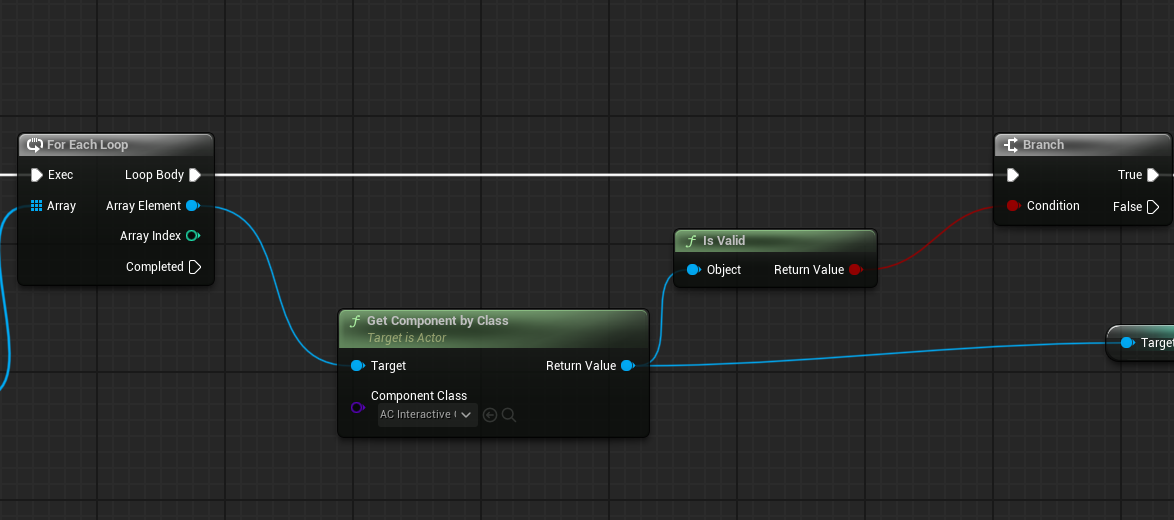
I'm trying to filter out actors that have a certain actor component class, what's the best way to go about with that?
copper chasm
hidden fossil
Speaking of text boxes, does anyone here any idea of how to manipulate them to s...
There are a few tutorials for this on youtube, would be a matter of a custom event in your widget to write if not writing, and looped by a characterspersecond float variable
hidden fossil
Thanks
ancient dome
autumn pulsar
I'm trying to filter out actors that have a certain actor component class, what'...
as far as I know, a loop
I would probably make the target actors apply a tag to themselves, the ones that have the component
and then loop over the actors and check if actor has tag
gentle urchin
ancient dome
I would probably make the target actors apply a tag to themselves, the ones that...
Let the MyUndesiredComponent add tag to the owning actor sounds just as reasonable..less checks etc
autumn pulsar
gentle urchin
Let the `MyUndesiredComponent` add tag to the owning actor sounds just as reason...
That's what I was thinking
Would I use a gameplay tag?
gentle urchin
I wanna say yes
You can still push that to the regular tag list of an actor !
Which is just a FName if im not mistaken...
autumn pulsar
I think checking by tag would end up being a for loop anyways 
gentle urchin
For sure
autumn pulsar
wonder if it's faster to just check if I get a null value and then operate on the ones that aren't
autumn pulsar
 gentle urchin
Thats also and iterator
Thats what i ment with less checks
A bit vague, ill admit
So now your doing a nested forloop
 heady grove
Hi guys, sorry for the silly question, but do you know how I can save the motioncontrollerrightgrip of the vrpawn in a variable to use it in another blueprint? this is what I did but I have no idea why it doesn't work.
 dawn gazelle
gentle urchin
So now your doing a nested forloop
dawn gazelle
gentle urchin
So now your doing a nested forloop
(twice if it is valid even!)
copper chasm
gentle urchin
I wanna say yes
i know you would
autumn pulsar
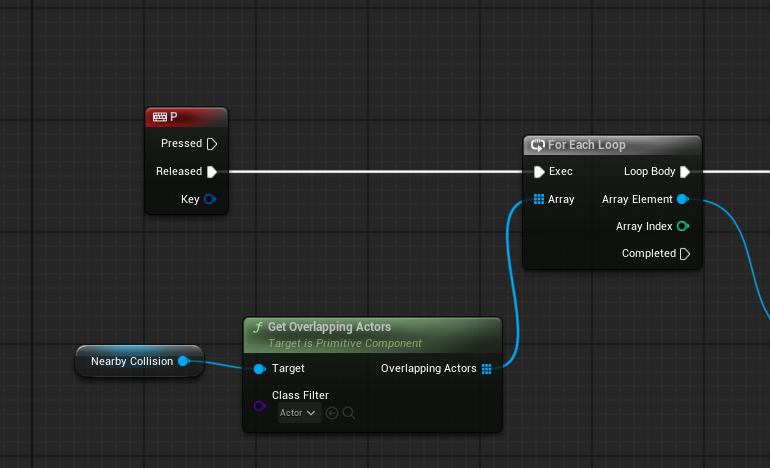
I guess for context, I'm trying to get objects in a specific range, and get info from them, like where they are located, what their distance is, can I interact with them, can I look at them, etc
and was using an actor component as a sort of container
gentle urchin
Reading the tag of the actor is pretty much way faster
autumn pulsar
 gentle urchin
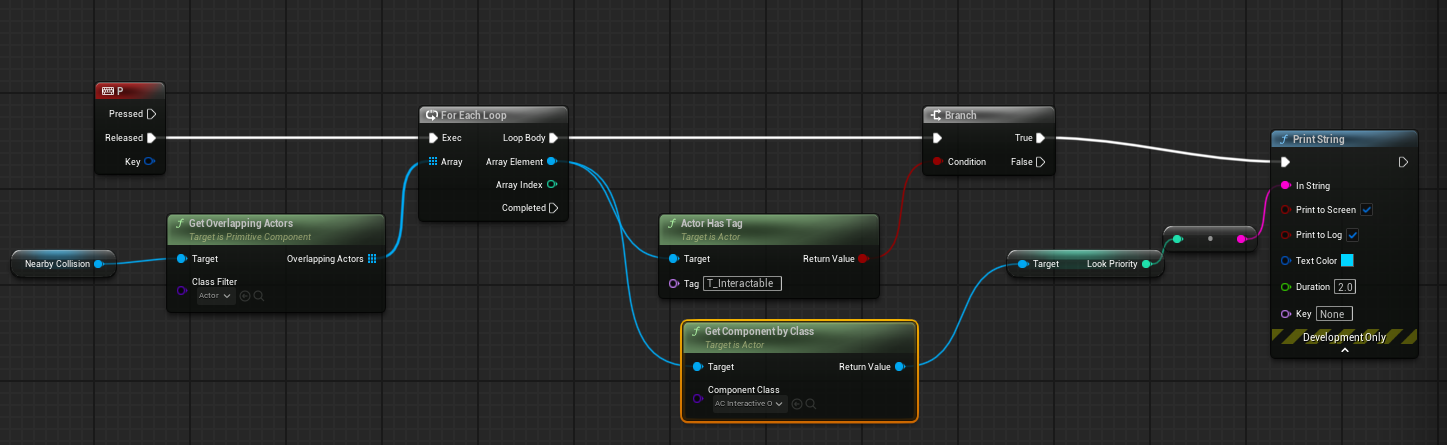
So id say , as dust syggested :
Let the component add a tag to the owners tags
Preferably a GameplayTag which is converted 🙂
So you check the actor for that specific tag
dawn gazelle
Reality is, if it's just checking a small area for actors, and most of these actors aren't going to have a ton of components, and seeing as this is triggered by an input.... It probably doesn't really matter if he's iterating over the components of a few actors. 100% optimized for best performance? No. Will it work and get the job done? Certainly.
autumn pulsar
I'm running this per tick
was just using P as a test button
I'll try the tag method just to learn about them
gentle urchin
Its pretty straight forward
autumn pulsar
What's the function to get the parent actor of a AC?
gentle urchin
GetOwner
autumn pulsar
Would I use set tags?
gentle urchin
On Comps
Beginplay -> Get Owner -> get Tags -> Add (GameplayTag->ToDebugString->ToName)
Or along those lines
autumn pulsar
does the comp's beginplay fire when the actor is initialized?
ancient dome
autumn pulsar
does the comp's beginplay fire when the actor is initialized?
Well your question boils down to is beginplay fine, the answer is yes to not overcomplicate it
gentle urchin
Beginplay is very likely fine
ancient dome
I would toss it into the function that adds the component, if there is none beginplay is fine, although u could just add the tag manually at that point
gentle urchin
99.73% fine
autumn pulsar
ancient dome
Well your question boils down to is beginplay fine, the answer is yes to not ove...
I just didn't know if it would fire if I say, made a spawner that created an actor
dawn gazelle
Actually... Wouldn't this be bad in itself thanks to the strange nature of the for each macro... Basically it would do the collision check twice for each item in the array?
 gentle urchin
Yepp
I heard some rumors about forcing pure nodes to be unpure in bp, but i found nothing
autumn pulsar
I'll probably do a rewrite at some point in C++
I'm currently just familiarizing myself with the engine
dawn gazelle
gentle urchin
I heard some rumors about forcing pure nodes to be unpure in bp, but i found not...
5.5

 autumn pulsar
and programming theory
 fiery swallow
Always do a rewrite at some point i c++ 🫡
dawn gazelle
Not sure
gentle urchin
If not, then its useless
someone please test 🫢
Tick -> random float with exec -> print string -> print string
autumn pulsar
I was thinking of just adding actors to a pool instead of using getoverlapping actors, but the overlap events can't be made to work indivually unless they're a seperate object
ancient dome
ur first approach should always just be code the simple way and see if it works if you're unsure
gentle urchin
🥁 🧻
ancient dome
if you're not working on 100s of actors, whatever
gentle urchin
Profile is the true answer in most cases
autumn pulsar
probably not
ancient dome
keep it stupid simple
unless u need to complicate for performance
my motto at least
autumn pulsar
I'm just doing it overkill just to think about it
more thought exercise at this point
ancient dome
I'd rather have a slighly inefficient function which I can easily edit later, than start out with overcomplication
autumn pulsar
This is true
 maiden wadi
dawn gazelle
5.5
maiden wadi
dawn gazelle
5.5
I just found out about that the other day. 😄 Am in love with that for all of the stupid pure nodes that return arrays, or randomization functions.
dawn gazelle
gentle urchin
Tick -> random float with exec -> print string -> print string
It does.
dawn gazelle
Yea
ancient dome
dawn gazelle
It does.
oh great, no more writing functions to deal with this bs
gentle urchin
ancient dome
I'd rather have a slighly inefficient function which I can easily edit later, th...
I walk into this trap over and over still
Eager to do stuff in c++
ancient dome
now I can get all actors of a level on tick in peace
gentle urchin
Ends up wasting half my day compiling bullshait i do to quickly
Like the input crap i was convinced lived best in c++
5 minutes in bp and its working
(Auth opened my eyes)
ancient dome
idk, I got used to watch out for the pitfalls, I will not see the unchecked tickbox for 3 hours, but will notice when I fall into that pure pitfall
it's kind of the ketchup in the fridge meme
whenever I encounter a bug / performance drain
(referring to this kind of meme)

 maiden wadi
ancient dome
(referring to this kind of meme)
maiden wadi
ancient dome
(referring to this kind of meme)
Can't see and shit at giving directions?
400 yards in which direction, past what trees?
gentle urchin
any tree
ancient dome
My calls out in games be like "over there"
autumn pulsar
ancient dome
My calls out in games be like "over there"
My favorite callout is "popdog"
gentle urchin
I tend to point at my screen "right there!! Cant you see!?"
ancient dome
autumn pulsar
My favorite callout is "popdog"
in cs2 popdog is not the same anymore
ancient dome
heady grove
Hi guys, sorry for the silly question, but do you know how I can save the motion...
anyways this poor soul still needs help and I have no clue
all I see is an exec node dragged across the globe south to north
never did VR
maiden wadi
OtherActor probably was the VRPawn, not it's owner. It's owner was probably a PlayerController.
chilly crane
gentle urchin
Seems like the function is called before a playercontroller exist
that would make sense as it only happens once, and then right after the game starts. Will it cause a packaged game to crash?
How would I swap to an event when I'm using a BPFL? Or should I use a MCFL?
ancient dome
my guess is promote to variable
ancient dome
chilly crane
that would make sense as it only happens once, and then right after the game sta...
have a boolean
toss it in there
call it a day, once initialized just set the boolean to true and then attempt to get the player controller reference
this will not cause a crash most likely, but should be adressed
never ignore errors
maiden wadi
@chilly crane I'm more curious what GraphicsLogic is?
ancient dome
or just toss in a valid check for the playercontroller, might still throw the error
might fix it
generally would not advise doing it in that way at that point
maiden wadi
But what does the PlayerController have to do with graphics? Of any kind. It's an input an network handler.
chilly crane
maiden wadi
<@884302078510505984> I'm more curious what GraphicsLogic is?
an actor component
maiden wadi
Doing what?
chilly crane
which is attached to the player controller
chilly crane
maiden wadi
Doing what?
handeling all graphics in the game
ancient dome
then why is it not getting owner
chilly crane
AA, resolution, upscaller, etc.
ancient dome
but playercontroller at index 0???
maiden wadi
Stop worrying about the controller.
The real issue is that you're not using GameUserSettings.
This has pretty much all been done there already.
chilly crane
maiden wadi
The real issue is that you're not using GameUserSettings.
sigh I'm using that, but the issue is where all that is being executed is in the actor component
not the widget
maiden wadi
No, I'm saying you don't need a controller, or component, or anything.
chilly crane
I was told a million times that no code should be put in a widget, and I should use a actor component instead
ancient dome
block the person that told u this wth
maiden wadi
GUS is loaded early on from a config and sets stuff. It's the only object you should be caring about. If you have a widget that sets settings for it, that widget should get and use GUS.
ancient dome
gameusersettings does not care, put it wherever
maiden wadi
chilly crane
I was told a million times that no code should be put in a widget, and I should ...
I'm curious, who said this? Because there's no way a sensible person said this with the right context of what you're trying to do.
ancient dome
just don't make a component for it
chilly crane
maiden wadi
I'm curious, who said this? Because there's no way a sensible person said this w...
I don't remember exactly, just got told that widgets should never have critical code like this, and to modulise things as much as possible so that it's easy to recreate widgets as necessary
maiden wadi
GUS is handling the critical code already. You don't need to wrap it in a component to use it in a widget.
chilly crane
maiden wadi
GUS is handling the critical code already. You don't need to wrap it in a compon...
true
ancient dome
u can put whatever clientside into a widget
chilly crane
unfortunately GUS doesn't handle any advanced settings though
so AA methods, ray tracing, path tracing, upscallers, etc.
ancient dome
idk, my game has like 3-4 things that GUS does not handle?
those I tossed into my character
maiden wadi
You should generally just extend GUS with your own. Requires C++ though.
chilly crane
maiden wadi
You should generally just extend GUS with your own. Requires C++ though.
tried that and it didn't work how I wanted, so i found an easier work around with a big struct db
ancient dome
in the end, it will work
whatever, but if the component is in the playercontroller, just get owner
issue solved
maiden wadi
What didn't work?
ancient dome
Maybe he has a use case with a post process volume from some random plugin like we have
it was easier to just toss it somewhere separately
chilly crane
maiden wadi
What didn't work?
it wouldn't display in blueprints properly, the automatic execution logic was getting very messy, it was hard to make a central controller for all the values, etc.
maiden wadi
It's easy, you just make a child class of GUS, set that in your project settings as the game user setting class. And in your own sublcass, make UPROPERTY(Config) marked variables.
chilly crane
maiden wadi
It's easy, you just make a child class of GUS, set that in your project settings...
well someone like you also said that, and it took me 8h to get a result I didn't want. I don't know C++ and this is too much for me
maiden wadi
I wonder what it would take to make GUS BPable.. Curious. I've never tried.
chilly crane
ancient dome
Maybe he has a use case with a post process volume from some random plugin like ...
I try not to use PPV and have global settings instead, but yes, DLSS, XeSS, FSR, unique AA methods don't integrate with the gus at all
ancient dome
Yeah idk, for me it is usually just dealing with some bs that an artist is doing
and then it's easier to just deal with it with 4 bp nodes, rather than explain it to them
and argue about it
a little bit of jank is required sometimes
ancient dome
chilly crane
well someone like you also said that, and it took me 8h to get a result I didn't...
As for this, anything C++ will be too much for you until you learn it
and ppl open unreal and think u can just use blueprints
but you cannot and at some point you need c++, rather learn it now than later
autumn pulsar
BP got way way easier for me when I learned C++
ancient dome
just 3 cents of advice
autumn pulsar
C++ has a really tough learning curve
ancient dome
that 4h of janky bp advice could be instead spent learning c++ to do it, you still use up the 4h, but the next time you will not
autumn pulsar
but once you get past a certain level it gets way easier
ancient dome
a macro for a macro of a macro in a macro
but oh well, I just learn the bits I need as I go, in the end code is code
the boilerplate is just difficult for me personally
 ancient dome
and knowing all weird unreal quirks
my game is like 80% blueprints, then 20% C++
if it wasn't networked it would be like 95% bp
autumn pulsar
currently just brute forcing it, but I don't plan to have more than 20 actors in the same spot
ancient dome
can't wait to translate it all into C++, ehhhhhh
working solo bps are cool
but now 3 years deep, they are so damn unreadable
and every laziness I did to use bp instead of c++ now costs me time
maiden wadi
Lol. So you can make a BP GUS just by making a child C++ class and marking it Blueprintable.
maiden wadi
The same thing you can do in C++. Make settings, and save them to config.
ancient dome
it just works?
maiden wadi


 autumn pulsar
ancient dome
and every laziness I did to use bp instead of c++ now costs me time
autumn pulsar
ancient dome
and every laziness I did to use bp instead of c++ now costs me time
comments as well
ancient dome
ah well, I only do comments where I do something that is not explained by the code directly
stuff like math and why
autumn pulsar
BP is great when you're working on something and can visualize all the nodes, but then horrid to revisit because the information os so loose
chilly crane
well I personally like blueprints, and I don't like any C language. Fundamentally blueprints use C, so it's not got a major difference. I'm not doing any networking stuff, it's all going to be solo, so blueprints are absolutely fine. Also, what is to say I can't make the game and then later revisit it and make C functions when I'm ready & more confident
copper chasm
You can absolutely build a game using just blueprints, especially if it's offline single player, double especially if it's a smaller project
Is it almost always easier to work from a C++ base and tweak things in Blueprint? Sure, but if you manage your code well (putting non-input things in the controller is not that) and keep your stuff from spaghetti-ing, you can build something that works.
maiden wadi
The issue is though is that even in singleplayer, there's a lot of things that aren't exposed to BP. So while you "Can" do it all in BP, C++ will make your life a lot easier even if you just learn a few surface level things to be able to expose more stuff to BP.
chilly crane
copper chasm
You can absolutely build a game using just blueprints, especially if it's offlin...
my plan isn't small that's for sure, which is why I need to setup a large graphic control interface and use stuff like DLSS, but offline singleplayer is 100%. I hate the modern trend of large MMOs that want you to spend a fortune to win in a game you already bought
I just want to know what to do to fix that error, not to be told that I should be doing everything in C++
 mystic light
Hmmmm;
I have a simple print node that's printing out the rotation of my character:
But,... for some reaosn every seocnd line it prints the 'default' value of the variable (2.00)
What's going on here?

 dawn gazelle
mystic light
Hmmmm;
I have a simple print node that's printing out the rotation of my charac...
dawn gazelle
mystic light
Hmmmm;
I have a simple print node that's printing out the rotation of my charac...
Probably printing out from the default animation instance if you have one running in the background.
autumn pulsar
What's generally the best way to deal with a variable that might be empty?
just run isvalid everywhere?
 brazen stirrup
what would be a good way of making dishonored like bullet damage ( using immersive sim logic)
I was thinking of putting the bullet health damage in the player
but if I do that, the bullet will only affect the player
so would an interface be feasable in this case? or should the bullet projectile have logic that can check if the hit actor is damageable , then damage it?
autumn pulsar
Could do an actor component
- an interface
Create a struct for a damage, such as damage amount, damage type, etc
Then when you fire a trace, check if the object implements the interface, then have a function that passes the struct
from like a datatable
Then the actor component will accept that damage and do logic like if the enemy is resistant to fire cut down the damage 50% or so
Then anything with the actor component and interface can take and handle that damage
then you just expose variables to the editor so you can configure it
brazen stirrup
hmm I see
but would that count travel?
or well is that negligable?
nvrmind I think I mightve been overthinking this hehe
autumn pulsar
If you’re doing “hitscan” you usually just do a linetrace by channel and then break the hit
brazen stirrup
also another thing is slowing down time will be a feature in my game
so I was going to avoid raycasts so players see bullets in slomo
but I might do a hybrid approach ig
autumn pulsar
To do that you can take the camera rotation, get the forward vector, then multiply that by like a million and set that as your end hit location
Raycasts usually feel better
You could just shift the logic to create physical bullets in slowmo
Or just make them visual
brazen stirrup
yeah I was thinking that might work too
autumn pulsar
Like you do the raycast, spawn a bullet, calculate the travel time then do the the damage after that amount of time passed
brazen stirrup
like maybe I do a hitscan for 5-10 meters, then spawn the bullet
or that
right because bullets will be caught in the slomo bubble if they hit after the player uses slomo
dawn gazelle
autumn pulsar
What's generally the best way to deal with a variable that might be empty?
For a reference variable, yep, checking if it is valid before accessing it is the way. An alternative would be to make a function that checks if the variable is valid and if so, just returns that variable's value, and if not, retrieves what you're hoping is contained in that variable for you and setting it. You'd probably still want to make sure it's valid before using it though.
 cobalt plover
Game Animation Sample Project / Chooser question -- I'm trying to add a "handedness" output variable to my traversal animations, and I've added an output to each animation.
On the motion matcher node, though, while the Result of matching montages can be output as an array, the output struct seems to be locked to the first result. So I'm not getting the right handedness on the selected animation, I'm just getting the handedness of the first in the list of animations.
Am I missing some way to output variables as an array, or is this just a chooser design flaw (which will hopefully be fixed in the next version of UE)?

 maiden wadi
chilly crane
my plan isn't small that's for sure, which is why I need to setup a large graphi...
maiden wadi
chilly crane
my plan isn't small that's for sure, which is why I need to setup a large graphi...
Most games don't do this. It isn't a trend. Most games allow you to pay for DLCs or cosmetics, which are put there only to extend dev support. Games that are pay to win aren't new, they've been around a while. No one likes them which is usually why they die off or are facebook moneygrabs. And games you have to pay for after buying them are pretty old as well. Ultima Online at least was like that and it was released in 1997. Generally speaking, most MMOs are pretty fair. Even on the edge of them, you see people who can unlock stuff earlier with paying like Planetside, but a lot are generally pretty fair minded.
autumn pulsar
dawn gazelle
For a reference variable, yep, checking if it is valid before accessing it is th...
Yeah that's what I was thinking so I don't have to check if it's valid every time
err
don't have to recreate the logic every time
brazen stirrup
alright thanks!
 dusky maple
Hey everyone happy holidays! I was hoping someone could help me out, I am being really dumb as I come back to UE5 after a 3 month break and this is confusing again.
In the first image I have a widget with hopefully a global variable named spawn volume. I have sub-widgets that are linked to buttons that spawn an actor.
In the second image, I am trying to control the volume of any spawned actor individually. I can already control the sound individually but I cannot for the life of me figure out how to pass the "global" variable from the first image to the second image.
any help would be greatly appreciated and thanks in advance!

 lost hemlock
surreal peak
You'll still need to hook up the 8 options to the specific Component Code at som...
lost hemlock
surreal peak
You'll still need to hook up the 8 options to the specific Component Code at som...
Yes I have 8 buttons in that WB_QuickMenu but not all of these 8 buttons need to be a specific mode, thats the thing that confuses me, It needs to be a static mesh spawner where I can rotate between holding an axe, or a hammer, or any other tool/weapon kinda like you do in minecraft, but not all of these 8 buttons need to be a specific mode of system
So im not sure really how to arrange that quick selection thing, but im trying to somehow to make it playable and coherent
 frosty heron
dusky maple
Hey everyone happy holidays! I was hoping someone could help me out, I am being ...
frosty heron
dusky maple
Hey everyone happy holidays! I was hoping someone could help me out, I am being ...
They all can read and write from the same source.
Game instance is one potential candidate.
frosty heron
chilly crane
well I personally like blueprints, and I don't like any C language. Fundamentall...
Famous last word. Blueprint doesn't scale well, like it or not. No one tells you to make everything in cpp, the ratio varies from project to project. The bigger the scale the less bp should be used.
Bp run on virtual machine btw, it comes with overhead. It is not the same.
Just because something is slow it doesn't mean it's useless. If that were true, no one will write in python.
At the end of the day the right tool for the right job
And 100% bp comes with great pain. As you don't make native class, so your bp asset will be loaded when you have a hard ref in some bp.
That, slow loop, No access to libraries and broken bp struct to name a few.
chilly crane
frosty heron
Famous last word. Blueprint doesn't scale well, like it or not. No one tells you...
if this is the help I'm going to get, then I might as well move to somewhere more beginner friendly like Godot. If I want to use BPs, then I'm allowed to use BPs, I'm asking how to do something in bps, not whether I should use that or C++.
I appreciate the advice, and I'll make my own individual decision based off of multiple sources. The immediately issue that I posted is what I'd like help with
frosty heron
chilly crane
if this is the help I'm going to get, then I might as well move to somewhere mor...
You are free to make statements online but anyone can also respond to that.
I am just trying to be formative not adhere to anyone bias.
You can use what ever you want, you don't need anyone permission.
What is the issue? I scrolled up long enough and didn't see your problem.
Right I have read it and authaer have answered
chilly crane
this fails just once when the game starts, other then that it's fine
 chilly crane
frosty heron
Right I have read it and authaer have answered
chilly crane
frosty heron
Right I have read it and authaer have answered
which was?
frosty heron
chilly crane
which was?
I'm reading game user settings question
Authaer says to extend it
chilly crane
which I'm not going to do at this point as I already tried & failed at it. I found the best tutorial available, followed it, and got laughed out of the C++ channel for doing everything wrong. Spent a further 8h fixing it up as best I could with no clear information, and ended up with something that semi worked
a complete waste of time seeing as what I currently have works almost the same in blueprints, but much quicker to implement
frosty heron
I don't know about being laughed at, I sincerely hope that don't happend
chilly crane
the only thing I'm needing to work out now is cross component communication, which would be the same in C++. I effectively need to work out how to communicate between multiple modules that each do their own chunk of work, also as I posted in #umg why does an event dispatcher work, but a BPI doesn't?
frosty heron
You should always be ready for critique though
chilly crane
frosty heron
I don't know about being laughed at, I sincerely hope that don't happend
well it did, so I'm not doing anything with C++ for quite some time, I might as well give up at that point seeing as I've been working for nearly 2 months on this UI and backend settings module
chilly crane
frosty heron
You should always be ready for critique though
critique is different from telling someone to help themselves via following all the tutorials on YT, and then laughing when something doesn't work, and saying that the whole tutorial is wrong. How is that supposed to help me?
frosty heron
I don't know who tells you to look at tutorial on YT
A lot of them are aweful
Wrym by cross component communication
Who wants to talk to who?
chilly crane
frosty heron
A lot of them are aweful
ikr 🙄 , I have to read between the lines of like 20 of them to get the gist of what goes on, and then trial and error my way through to mixed understanding
chilly crane
frosty heron
Who wants to talk to who?
so in this particular instance, I have a bpc that handles all the logic for updating graphics settings, whether gus or custom it doesn't matter. When the texture settings are set to a certain value, I want to trigger an event in the current instance of my optionline widget, to update the value visually
there are 30 instances of this optionline that are all located within the main graphics options menu
frosty heron
Normally you will use game settings for that. But they probably don't cover everything you need.
Normally just texture, shadow, etc.
chilly crane
exactly, I can't do stuff like DLSS, so I have to put in my own systems for that.
frosty heron
Anything else will require you to extend the game settings like suggested previously.
chilly crane
Would it be easier if I VC and show you what I mean?
chilly crane
there is not, and DLSS (and equivilants) are a bit too complex to simply make a new node in an extended gus
frosty heron
Saving other settings like volume or any primitive object would be easy. You can just use save game object
chilly crane
it needs its own logic to execute
frosty heron
I don't know how you going to tackle this. If I were in your foot, I would probably do what authaer says. Can't really think of any work around.
For graphic settings you do want it to be implemented in the game settings as it will write to the .ini file.
So any changes will presist.
Saving a value to save file is janky as you have to apply the settings when the game boot.
chilly crane
frosty heron
Saving a value to save file is janky as you have to apply the settings when the ...
still works though
frosty heron
So I never try to do it so I don't know for sure but you may be hitting the bp limit
I dunnoe, it would be the same as applying a screen resolution everytime the game starts
chilly crane
that's what dynamic code is for, I've a little experience with that from web dev
chilly crane
can I screenshare for a couple of minutes to illustrate what I need help with in the BPI?
chilly crane
😂 OK
chilly crane
frosty heron
I can hit you up if I figured it iut
however best works for you!
frosty heron
I have never implement dlss or any setting outside of game settings out of the box
chilly crane
I've got a system that handles the backend, that's not the issue, the issue is communicating those settings to the user visually in teh UI
chilly crane
frosty heron
I have never implement dlss or any setting outside of game settings out of the b...
I'm not finished either 😅, I need to do XeSS, FSR, & if I can't find an AA method that gives me the quality I want, I'll need to try my hand at one of those. I'll try to find another language other then C++ that I understand, and then port it to C++ if necessary.
or maybe I can stand on my head, clap my hands, and sing an opera to make it happen in bps
😂
dawn gazelle
chilly crane
this fails just once when the game starts, other then that it's fine
The error reason you're getting right now for the failure is that the player controller it's getting is invalid, indicating that there is no player controller at the time.
The world context object is usually passed in from whatever object calls the function, but that only works if that object has a world context and not all objects will have a world context.
Is there any place you may be calling this where a player controller may not yet exist? For example on Init of GameInstance, or one of the earlier functions of GameMode?
chilly crane
dawn gazelle
The error reason you're getting right now for the failure is that the player con...
petty sure not, but I'll double check. Is there any reason it could be called when the game starts without needing express instruction?
dawn gazelle
No, since it's a custom function it would only ever be called based on where you call it.
Could always try doing a search for the function name and see where it is being called.
chilly crane
this is probably the culprit then?
 dawn gazelle
Yea you'd want to make sure that you're not calling that during design time.... But I'm not certain that would throw an error otherwise.
chilly crane
dawn gazelle
Yea you'd want to make sure that you're not calling that during design time.... ...
so I should try moving it to the standard construct and see if that makes a difference?
nope, still threw an error
dawn gazelle
that would help prevent it from accesing a player controller that wouldn't exist at design time, sure
chilly crane
dawn gazelle
that would help prevent it from accesing a player controller that wouldn't exist...
still caused the same error
there's only 3 places, here, the preconstruct (now on construct), and in a different widget on deactivated (game is definitely loaded if the user has time to open a widget, and then close it again)
 dawn gazelle
graphicfunctions is a blueprint function library, yea?
chilly crane
dawn gazelle
graphicfunctions is a blueprint function library, yea?
yes
if it's easier, I can VC, show everything quickly
dawn gazelle
I'm not able to duplicate any error popping up using a function library function that calls Get Player Controller within a widget, whether on construct or pre-construct.
There must be something else calling that function - if that error occurred, using the return value like you are would also return an error as it would be an invalid reference.
I could get an error to pop up if I happened to call that function on Init of GameInstance for example.
But only if I was using a non-standalone netmode
chilly crane
dawn gazelle
I'm not able to duplicate any error popping up using a function library function...
Hmm, this is weird. Can you join a VC & I'll show you?
dawn gazelle
chilly crane
Hmm, this is weird. Can you join a VC & I'll show you?
Sorry, I don't do VC stuff and I don't think it would be much help in this scenario.
If you have your find results showing all instances of that function throughout your project, that should be sufficient to track down where the problem is stemming from.
If you are absolutely certain that you are calling that function only in those 3 specific places throughout your entire project, then there is no reason it should be erroring out and I'd chalk it up to some weird bug and maybe all that is needed is a reset of the editor. Failing that, I'd say try recreating that function, replacing your known calls to it with the new one, and after doing so, see if you still get an error but in the new function.
frosty heron
Ctrl f, type the function. Then hit the binoculars buttons.
chilly crane
dawn gazelle
Sorry, I don't do VC stuff and I don't think it would be much help in this scena...
Followed @frosty heron's approach and it returns the same 3 spots I previously had. I'll try recreating it/moving to a macro library at some point, if it's not going to cause immediate crashes, it's not of the top priority
frosty heron
chilly crane
Followed <@1050954229902213150>'s approach and it returns the same 3 spots I pre...
I would probably unpin them one by one until the error is gone
Process of elimination
Since you only have 3, it should be easy to know which one causing problem
chilly crane
frosty heron
Since you only have 3, it should be easy to know which one causing problem
alright, I'll try. The error msg takes me directly to the function itself
frosty heron
I don't suppose there is call stacks in bp debugger
chilly crane
huh, seems to be the preview key down one
orrr not
and yet more confusing, now it seems to work after I disconnect & reconnect the nodes?
Am I missing something with how BPIs work?
I can't get the widget to receive a function call, but it can issue them. Unless it recieves an event dispatcher, and then it will work
chilly crane
frosty heron
Just get the object and tell it to do something
so an event dispatcher then?
frosty heron
chilly crane
so an event dispatcher then?
nah, just get a ref to the object and set the value
if this is a widget changing a setting, then just do so
Button Press -> Dlss Mode 0
Button Press -> Dlss Mode 1
preferably, Button Press -> Get User Setting -> Dlss
chilly crane
frosty heron
nah, just get a ref to the object and set the value
so the logic currently works like this:
Button press > Call actor component > Get current state > Set new state > Call UI update
The bolded part is the issue, I can't get the UI to update for elements that were not part of the widget that contains the button that was pressed. I can update the text in the widget that does contain the pressed button.
frosty heron
from my perspective, I don't like how actor component inside player controller is used to store or set any values related to game settings
Game settings should be a sub system
aka Game User Settings
that's their responsibility
updating UI is the easy part
UI just read
Get Game user Settings -> Get Texture Value -> Set text / button / what ever you use to represent the value
I got menu on my own and I only put forward what ever available in Game settings
chilly crane
frosty heron
updating UI is the easy part
could you explain why the UI wouldn't be able to receive the values I want? I'll figure out how to implement the system if I know why a particular communication method does/does not work.
Also, why is it so bad to place all the game user settings logic in a seperate component so I can reuse the code in other widgets as well?
frosty heron
you already got an object that is responsible for exactly the task
which is to set the value and to write it to the disk
so the value is presist even after you restart the game
With game user settings, it will write to .ini file
your logic doesn't do that
does your component write the value somewhere?
if not, how can you get the value then?
the janky way is to use save game object to store the value
but it will just be a value, your setting it self wont presist
you will have to load the value and apply it at the start of the game
reading from Game user settings

 chilly crane
frosty heron
you will have to load the value and apply it at the start of the game
chilly crane
frosty heron
you will have to load the value and apply it at the start of the game
that is actually how I do it, but there's more then just setting the new values, there's also a need to apply various UI updates, and interlock various settings together, stuff that is best placed together. When I added it all up, it was enough for a small struct db to ensure all the info was tied to where it needed to be
frosty heron
saving to save objects
 frosty heron
chilly crane
that is actually how I do it, but there's more then just setting the new values,...
frosty heron
chilly crane
that is actually how I do it, but there's more then just setting the new values,...
UI just read, what's the issue?
You set the value somewhere
UI just get that value from where ever you set it
chilly crane
frosty heron
UI just read, what's the issue?
maybe it's easier if I stream a showcase?
frosty heron
I don't do vc
chilly crane
frosty heron
I don't do vc
I don't either, I just need a live video to show you
still use text to communicate
frosty heron
No sorry, just post it here so others can see and help you
chilly crane
alright, let me take a video rq
frosty heron
frosty heron
saving to save objects
damn, I want to nuke my own code
at least I learn something new today
just extend Game user settings and add what ever I need there
fiery swallow
You not using CVars to save these settings? 
frosty heron
nope, skill issue
gotta nuke this later
I also ahve to re-do my save system....
and loading screen
Always something to the list
 fiery swallow
Well if you ever want to make your own CVars I can send you my c++ code I made for it. Mine saves to GameUserSettings.ini atm
fiery swallow
frosty heron
Always something to the list
woo, elsword 2 let's gooooo
chilly crane
so here I've shown you all my systems. In the playthrough the first one is my new UI that is much simpler in the background workings, more lightweight. However in the second one you can see how I want to get the issue where if I adjust any texture settings it sets the overall preset to custom, and if I adjust the overall preset it sets the corresponding options, etc.
I also have other uses for it as well
frosty heron
fiery swallow
Well if you ever want to make your own CVars I can send you my c++ code I made f...
that will be very helpful 🤩
frosty heron
chilly crane
so here I've shown you all my systems. In the playthrough the first one is my ne...
these interface just adding a layer of abstraction, making it harder to understand the code
chilly crane
this is the 1st UI, which is very hardcoded, undynamic, not scalable, and much bigger in data size
 chilly crane
frosty heron
these interface just adding a layer of abstraction, making it harder to understa...
chilly crane
frosty heron
these interface just adding a layer of abstraction, making it harder to understa...
it makes perfect sense how the code is dynamic & reusable?
frosty heron
reuseable in what sense though. Where do you want to reuse setting an option?
Anyway
You want to load your data first
chilly crane
If I ever want to remove/add options it's very very simple to do
frosty heron
before you spawn your widget
frosty heron
Load Data -> Spawn Widget -> Widget On Construct -> Initialize Values ->
For each setting -> Get Your component -> Get the value -> Set text / button / color
chilly crane
frosty heron
Load Data -> Spawn Widget -> Widget On Construct -> Initialize Values ->
For ea...
you can dynamically add widgets into another widget?
frosty heron
That's not what I suggested
gentle urchin
fiery swallow
Well if you ever want to make your own CVars I can send you my c++ code I made f...
I forward this offer to myself
frosty heron
Load your data first. Ensuring everything is loaded.
Only then you can spawn your widget settings
Then in your widget setting construct -> Run a function that initialize the values for the setting since the value is ready to be read from your loaded component
chilly crane
frosty heron
Load your data first. Ensuring everything is loaded.
Only then you can spawn you...
yeah, which is what I'm doing already. The issue is updating the widgets after spawn when they are not the primary focus target it seems
frosty heron
them being primary focus or not doesn't matter
the widget is the one that going to tell the component to update anyway
Arrow Left -> Get your component -> Set graphic lower -> Update the slider / number
chilly crane
so when I click the A/D keys to change the value, the only optionline that does anything is the one that is focused....
chilly crane
so it would seem that in order to set the value of other widgets, I need a loop in the parent widget where it sets the new focus, calls the update function, and then resets the focus on the original one
frosty heron
Press A -> Get your component -> Set Graphic lwoer -> Update the text to low graphic
chilly crane
frosty heron
Press A -> Get your component -> Set Graphic lwoer -> Update the text to low gra...
that works, I've got that sorted
frosty heron
Press D -> Get your component -> Set Graphic higher -> Update the widget text to high graphic
For reading or initializing value #blueprint message
nothing else to this imo
chilly crane
frosty heron
Press D -> Get your component -> Set Graphic higher -> Update the widget text to...
so here you can see I can set the values up/down by clicking left & right. However my issue is is say I adjust the "Graphics Preset", I can't make it update all the other settings that come under "presetable" (if you like) values. Same in reverse, I can't set the preset value to custom when something else gets adjusted.
I swear to God, if I make a successful game studio that makes profit, I'll dedicate a portion to making a comprehensive guide to using Unreal Engine in all of it's unqiue quirks. And cover everything from BPs, to C++, with options for both, and an AI troubleshooter (maybe even an AI code debugger)
frosty heron
chilly crane
so here you can see I can set the values up/down by clicking left & right. Howev...
so when you change a setting, you want it to affect other settings?
or something like Change Overall Quality to Standard -> Change all the settings to medium (Medium shadow, medium texture, etc)
if that's the goal use event dispatcher and bind it to master widget
master widget listen and apply settings accordingly
master widget being the widget that have all the buttons/settings
chilly crane
frosty heron
or something like Change Overall Quality to Standard -> Change all the settings ...
correct 
chilly crane
frosty heron
master widget being the widget that have all the buttons/settings
so image # 1 or 2?

 frosty heron
didn't think this were the problem all about
chilly crane
frosty heron
but cant believe it take hours to come to the issue
same, I must not've been explaining it well
frosty heron
Image 2 is the master widget
it have all reference to your settings
Image 1 is where you have the event dispatcher
Image 2 -> On Construct -> Get all Settings -> Bind On value Changed
Run event On Value Changed -> If Object is Global Illumination and value is 1 -> Get Reflection sets value to 0, Get Shadow -> Set value to 0
Just example
chilly crane
and given that the text in the subwidget isn't directly editable in the master widget, how would you go about setting it?
chilly crane
frosty heron
you can, why not?
please tell me how, it would make my life a lot easier 😂
frosty heron
it contain the reflection, the GI, the shadow, the effect and so on
Just set the text? Wdym you can't?
chilly crane
yep, so how to set the text of each individually?
frosty heron
to change the shadow text
Get Shadow -> Set text
to change the GI text
Get Gi widget -> Set text
i don't know what's missing from your point of view that you can't do that

all of those widget lives in your master widget
chilly crane
so I'll need to make them all back into variables, and manually construct the widget?

is how I currently construct my array
 frosty heron
they are all derived from the same class
you can just Get All Child of (What ever hold the widget) and add them to the array
instead manually hooking node on by one
chilly crane
ohhh, so I could get the widget by class (optionline), and then get all the children of?
frosty heron
you can get the children of any widget with get child node
im gonna attack my problem, good luck
gentle urchin
frosty heron
saving to save objects
Guess we both learned something today 😅
gentle urchin
You rarely should compare floats directly
lost hemlock
Why is this one not working?

oh wait it's because Set Color and Opacity sets color of that particular button that is already invisible in terms of its RGB Opacity so it would never do anything
What Im trying to do is do the same thing but on the outside button
how can I affect the bigger button via hovering on the smaller one?
because target is Button????

but wait, target is hooked up to the right thing
so why is it not working?
 scarlet root
 trim matrix
Is there any one online?
trim matrix
Is there any one online?
maybe
 silk belfry
trim matrix
Is there any one online?
silk belfry
trim matrix
Is there any one online?
no i am sleeping
 bronze lily
he'll jump to another sever in a minute got the same message in 5 servers then he leaves ..
scarlet root
if he hasn't any other hobbies 🤷♂️
trim matrix
Does input Acton , input mapping context , blueprints to add the inputs enough to make inputs work ?
I’ve watched YouTube tutorial I did the the same
But it doesn’t work
 scarlet root
You create an Input Action as NameHolder and Event for your Input.
Then you create an Input Mapping Context for specific situations (one for movement, one for camera, one for combat..etc) holding your Input Actiond and the tied keys - and the player mappable stuff if wanted.
Then you need to add thr Mapping Context to your PlayerController's EnhancedInputSubsystem, in order to make it working.
Noe you can either drag & drop the Input Action Asset to your Graph or wrote the Name of it into the Context Browser, to add the event of it..
scarlet root
trim matrix
Casting GetPlayerController to PlayerController is redundant.
trim matrix
scarlet root
Casting GetPlayerController to PlayerController is redundant.
That entire blueprint didn’t print the string
scarlet root
how is the setup of your Input Action and the Mapping Context?
Has the PlayerController or this Actor Inputs enabled (search its Class Settings for "Input"). The Actor containing the Input Action Event has to set Inputs enabled.
Ps.: Just as Tipp:
Get yourself the (free!) "Graph printer" Plugin of Fab.com or github.. making HD Screenshots of whole graphs.. cause your posted Screenshot is barely readable..
normal raft
hey can any one help me make GoodSky2 better ?
was having trouble with it at planetry scale despite it supporting spheres/hemispheres it just cant comprehend a big planet ... so i played around with the scale and reduced it because they where making hudge out of the bp box ... that made things a little bit better .. so i decided to open the bp and have a look .. i see they are using a weird star sprite to do the stars its ugly .. so i decide to change it to a plane like the ring they use for the sky .. and put a 8k star material on it .. but this didnt work
trim matrix
scarlet root
Ps.: Just as Tipp:
Get yourself the (free!) "Graph printer" Plugin of Fab.com ...
Does graph printer work in version 5.5 ?
scarlet root
yes
And it is open source (available on Github), too
so one can recompile it for any engine version
 restive snow
How do i filter Items on the Search Bar by column?


The Continent Value is what I want to filter by, so when one of te two arrows is clicked, It is going to filter by a continent. So Asia will show only Asian countries. The Issue is that I don't know how to replicate the filter on the Search Bar, I'm trying to do an Integer filter method but the Conitnent Value is Text.


 lofty rapids
restive snow
lofty rapids
restive snow
does that branch just set to false and show error ?
theres nothing going into the boolean value to check
it's just set to false
restive snow
I tried to put the boolean, but I have nothing to add there
lofty rapids
restive snow
is filter continent what you want to use ?
where you pick a catagory ?
restive snow
yes this is what, is in the Function
 restive snow
lofty rapids
where you pick a catagory ?
restive snow
lofty rapids
where you pick a catagory ?
yeah
lofty rapids
restive snow
yeah
so this filter function actually works ?
you can link your indexes to the indexes in an array that have names
so you have right and left change the index
then you have an array of strings with something like array[0] == "somePlace"
then you just plug array[index] into your function
restive snow
ok
restive snow
lofty rapids
then you have an array of strings with something like array[0] == "somePlace"
Well I pretty much ahve a Switch on String

 lofty rapids
idk what rep notify is or hhow that relates to plugging into the filter function the correct index that your shifting left and right
iss this a multiplayer thing ? or single player ?
ancient dome
rep notify is a multiplayer thing
lofty rapids
it looks like that is different from the actual filter you want to do ? that is just executing if the string is a "valid" one ?
 faint pasture
restive snow
Well I pretty much ahve a Switch on String
faint pasture
restive snow
Well I pretty much ahve a Switch on String
You should be using GameplayTags
restive snow
this is the Rep Notify, IDK i just added it
 restive snow
yes this is what, is in the Function
restive snow
restive snow
yes this is what, is in the Function
When I Search up "Asia" It shows only Asian countries in the search bar, I used this method, but idk how to make it switch continents with the arrows.
 lofty rapids
restive snow
this is the Rep Notify, IDK i just added it
lofty rapids
restive snow
this is the Rep Notify, IDK i just added it
so your picking a random country here
you probably don't want random, and just use the index that your changing
restive snow
do i connect switch on string to this?
 restive snow
lofty rapids
you probably don't want random, and just use the index that your changing
restive snow
lofty rapids
you probably don't want random, and just use the index that your changing
^
scarlet root
And remember - Index do start at 0, not 1
lofty rapids
restive snow
Would that work?
i would think just take out the random part and do that random when you need it instead
without the random it should just take the value
and then plug that response into the filter function ?
 floral stump
possible to make a bp component derived from wind directional?

only cpp class available

also found a bug, when you click show internal classes it not updates the check mark click the settings again it updates 😄
this is how fancy interface works 😄
dawn gazelle
trim matrix
Does input Acton , input mapping context , blueprints to add the inputs enough t...
Mostly. You also need to ensure:
- Your inputs are placed on an actor that the player controller has input enabled on. By default this is usually just the Player Controller itself and its possessed pawn, or components of these actors.
- Your mapping context is appropriately being added with nothing potentially blocking it being added. Assuming your code is on your character, what you have here should be sufficient (you don't really need that cast there as "Get Player Controller" returns a "PlayerController" reference anyway).
- Your game mode is appropriately set up with the correct player controller/character that has your input actions & context.
- If you've created a custom gamestate that it is either based on GameStateBase o GameState based on whether or not your custom GameMode is based on GameModeBase or GameMode.
autumn pulsar
Does UE5 have a ballsocket physics constraint? I was wanting to make a grapple hook
 inland tide
Currently trying to get this holding item state boolean working with the GASP from FAB, any ideas on how to get it connected without breaking the flow?
 floral stump
inland tide
Currently trying to get this holding item state boolean working with the GASP fr...
floral stump
inland tide
Currently trying to get this holding item state boolean working with the GASP fr...
cach pose
 twin shale
Does anyone know if there's a way to bubble this binding button up to a widget's parent?

 gentle urchin
No , you rarely if ever want to use bindings tho (pb might be a suitable use, but only might)
twin shale
gentle urchin
No , you rarely if ever want to use bindings tho (pb might be a suitable use, bu...
Oh? What's the reasoning behind that? I'm currently implementing MVVM and it seems pretty slick so far
gentle urchin
Mostly its ticking nature and the cost that comes with it
twin shale
It was my understanding that MVVM only updates during a notify event, is that not the case?
gentle urchin
with MVVM you're refering to the field notify system ? If so, then that's what i've heard aswell , but i thought those were setup differently?
I could be wrong tho, have stayed away from bindings ever since it was known to me
twin shale
Yeah, field notify. Once you set up the MVVM object it looks like you just attach a normal binding to UMG assets from what the documentation suggests
gentle urchin
twin shale
Yeah, field notify. Once you set up the MVVM object it looks like you just attac...
pretty sure these bindings are the old kind tho

certainly looks that way
twin shale
gentle urchin
That one does look like the original style. The new one looks like this

 barren tangle
when i disconnect that node, i don't have that issue
gentle urchin
twin shale
That one does look like the original style. The new one looks like this
Oh dang, Unexpected to see them put in the very same list as the old stuff
I stand corrected then
twin shale
It's okay, this is all new to me too lol 🙂
gentle urchin
Havn't actually gotten to a point of implementing them (yet)
twin shale
They're really, really cool from what I can tell so far. I have pretty limited experience with them so far but essentially I can do all my stat conversion math in one spot in a convenient actor component and just bind the values to multiple UMGs to the exact same data. If field notifys work the way I assume, I just update the MVVM and all UMGs displaying the data get updated and I don't have to go change a bunch of junk every time I have an update
gentle urchin
that does sound incredibly useful
twin shale
The only down side is I have some scenarios where I want to bubble a binding up a level...Which does not seem to be possible or I'm missing something
This is more of an architecture issue though I guess
maiden wadi
gentle urchin
Oh dang, Unexpected to see them put in the very same list as the old stuff
It's because they're still bindings. Just instead of being polled every frame, they are usually event driven. Much more like the TooltipWidget one, except these work on any property.
gentle urchin
So can you set them up with similar events as before aswell, but only have them called when notified?
I assume that's a no
maiden wadi
Correct. MVVM bindings only run when changed. Or when their view model tells them to more specifically.
gentle urchin
If only I had more hours in the day (only me, no one else lol) so I didnt have to feel like the engine is outpacing me in releasing new stuff compared to me catching up to it
twin shale
gentle urchin
If only I had more hours in the day (only me, no one else lol) so I didnt have...
I feel this lol
maiden wadi
Lol. MVVM is nice, but it only really works in big teams IMO. It's not a good fit right now for solo devs or small studios where one person does all of the UI. It just complicates the workflow for extremely little gain right now unless you really need the UI to be full decoupled.
gentle urchin
See, If I had more hours, I'd already known* that instead of now thinking it might be awesome regardless 🥲
gotta study all these new toys and see how they can be played with, and if they fit for solo micro studios 😄
twin shale
maiden wadi
Lol. MVVM is nice, but it only really works in big teams IMO. It's not a good fi...
Personally I care less about decoupling the UI and care more about it allowing me to centralize data and updates. I set up a few key models for different types of character data and now I just create a new barebones UMG for any purpose, grab the VM, and just pop in the bindings. I use the same data for the player HUD, status indicators for other players (multiplayer health bars, etc), world widgets, info pages, the list goes on. I suppose I could have done something similar with a custom component/object on the player but I find this pretty easy to use...and I no longer have to worry about writing OnUpdate code all over the place
maiden wadi
twin shale
Personally I care less about decoupling the UI and care more about it allowing m...
Which sounds nice in theory. But then you look at your workflow and realize that you're still doing OnUpdate code. You're just adding a fancy middleman that disconnects the UI. It's all the same logic in the end. The only thing you gain is maybe modularity or organization when in a small team.
 swift bough
I feel dumb, while debugging a blueprint in a function library, sometimes I get a "Default_BPFL" debug object that lets me hover the variables and see what's happening to debug in real time, and then other times I run the game I have no debug object options. Is there a way to always get that default?
I read online that the blueprint has to be in your level to show up, but you can't put a function library into a level so I don't know what that's supposed to mean.
twin shale
twin shale
The only down side is I have some scenarios where I want to bubble a binding up ...
Apparently this is possible. My editor crashed and when I reopened the editor it looks like the bindings to the child properties all work. I tested it out and they work great.

 sweet jetty
hello i have a simple enough question for someone i have a sniper and when i right click it creates a crosshair widget but i can still see the sniper how would i go about toggling the sniper visibility on and off
surreal peak
sweet jetty
hello i have a simple enough question for someone i have a sniper and when i rig...
Set the mesh component visibility to false
 rotund harness
Hi, does anyone know how I could implement a mirror that detects the items that are visible in it from the perspective of the player, taking in account that not all of the mirror might be in view.
And of course display the reflection on the surface of the mirror
faint pasture
rotund harness
Hi, does anyone know how I could implement a mirror that detects the items that ...
not 100% bulletproof but a good start would be to do some line traces and some vector math
you'd want to transform the item position to where it would appear to be when mirrored, cook up where it'd be on the mirror, trace from player cam to that spot, then from that spot to the item
if both traces don't hit anything else, it's visible
or rather, that point is visible

as long as Trace(Eye, ObjectPositionMirrored) hits the mirror, and Trace(WhereHitOnMirror, ObjectPosition) hits the object, the object is visible in the mirror
 peak cosmos
How do i fix this
frosty heron
peak cosmos
How do i fix this
This is because you used animation with root motion but don't have root motion ticked.
So you just got rubber banded back when the animation finished
peak cosmos
frosty heron
This is because you used animation with root motion but don't have root motion t...
Is that a setting on the blend space or the animations themselves
frosty heron
Turn on the collision like adriel says and the problem will be see
rotund harness
faint pasture
as long as Trace(Eye, ObjectPositionMirrored) hits the mirror, and Trace(WhereHi...
To be honest I'm not sure what you mean. If maybe I wasn't clear I have a first person player and a mirror and want to find an array of the objects visible in the mirror by the player, maybe by using cameras or something
faint pasture
rotund harness
To be honest I'm not sure what you mean. If maybe I wasn't clear I have a first ...
define "visible"
it's not trivial
is something visible if a line from the viewer to the things origin doesn't hit anything else?
rotund harness
Visible as in reflected on the surface of the mirror
faint pasture
how much of it?
frosty heron
peak cosmos
Is that a setting on the blend space or the animations themselves
Well, I don't know if you actually want a root motion animation for locomotion. Not sure how those are implemented for movement. Root motion will drive the capsule component.
It is a tick box in the animation asset.
At least for my setup. I don't use any root motion for movement.
peak cosmos
frosty heron
Well, I don't know if you actually want a root motion animation for locomotion. ...
So how would you go with making the character move and jump
faint pasture
peak cosmos
So how would you go with making the character move and jump
look at the 3rd person template project
rotund harness
faint pasture
how much of it?
That's something I can decide really depending on what's easier to make. For convenience let's say any amount of it is visble
faint pasture
rotund harness
That's something I can decide really depending on what's easier to make. For con...
that's not convenient at all
that's very hard to do
frosty heron
peak cosmos
So how would you go with making the character move and jump
Using animation that is in place. And yeah look at 3rd person template. My anim blueprint 80% like it. Just extended.
peak cosmos
frosty heron
Using animation that is in place. And yeah look at 3rd person template. My anim ...
I did start with that i just want my own character
frosty heron
peak cosmos
I did start with that i just want my own character
Yes, look how they are implemented and keep in mind the answer given to you about in place animation and root motion.
rotund harness
faint pasture
that's very hard to do
One way of doing it I saw is to use a custom post processing effect that makes the object that we are trying to see if is visible one colour and the rest another and see the amount of pixels of the first colour on the baked image (from the perspective of the mirror). And then basically do the same thing with the mirror from the players perspective. But it didn't seem like the best solution also because reading all the pixels is quite heavy
faint pasture
rotund harness
One way of doing it I saw is to use a custom post processing effect that makes t...
Yeah anything that reads back data from GPU is a no-go if you're new I think
frosty heron
Your issue is the character animation track is animating the root. So when the anim plays, it goes beyond the capsule. Once the animation finished the root of the char will get rubber banded back to the original place.
So turn your animation in place instead ( no root anim )
rotund harness
faint pasture
Yeah anything that reads back data from GPU is a no-go if you're new I think
I tried something similar for another mechanic and it took a few seconds to bake without slowing down the game significantly
But I need the final array basically instantly so it's not the best solution
faint pasture
rotund harness
I tried something similar for another mechanic and it took a few seconds to bake...
yeah no shot, I'd just do some traces
what are these things
spherish, characters, what
rotund harness
Anything really
frosty heron
Adriel can I have some opinion with melee trace syste?
faint pasture
frosty heron
Adriel can I have some opinion with melee trace syste?
never done that but sure
lemme guess traces are missing at low framerate
frosty heron
My combat is quiet fast paced, I tried to do it on frame line trace and tracing back for accuracy on lower fps
But even with high fps it isn't acceptable, in 100 fps the attack only have 12 frame windows.
Let me find the result
faint pasture
One of my friends worked on Hogwarts, he has an approach where they bake the attack frames into a path
faint pasture
although that falls apart if you have anim blending
peak cosmos
I turned off root motion and use normalized root motion scale and it’s still broken i also when trough the third person blue print and used it as a base and nothing working am i forgetting something
faint pasture
why is 12 frames too short?
show the animation
and where you're tracing
just visualize traces
frosty heron
Not a smooth arch 
I'm thingking maybe I should just pre baked the location. And every frame evaluate how much of the entire array should be simulated.
But I think even with this approach there must be some drawback.
The code already run on tick and I'm just tracing from current to previous location
Feels like I'm already hitting the limit if I chose to go with anim notify
frosty heron
peak cosmos
I turned off root motion and use normalized root motion scale and it’s still bro...
Don't change settings you are not sure imo. Put back the normalised root motion scale or w.e that is.
Try to tick the box in the animation to force root lock or something along those lines.
peak cosmos
frosty heron
Don't change settings you are not sure imo. Put back the normalised root motion ...
Ok i will try thanks for the help btw
peak cosmos
frosty heron
Don't change settings you are not sure imo. Put back the normalised root motion ...
It worked thanks
faint pasture
frosty heron
I'm thingking maybe I should just pre baked the location. And every frame evalua...
there's probably a way to just get that from the anim data
frosty heron
faint pasture
there's probably a way to just get that from the anim data
Right now I'm trying to create a custom editor window with a button to slice the anim notify states in the montage and add the socket location to some array for every slice.
But this feels... too much work for little gain.
Can I somehow get the data by specifying the anim pose or play time without rendering it?
frosty heron
nvm I am overcomplicating this. Just gonna spawn an actor for the baking
sweet jetty
surreal peak
Set the mesh component visibility to false
yes but i cant because i dont know how to from third person character
frosty heron
sweet jetty
yes but i cant because i dont know how to from third person character
post your attempt
Aiming -> Get Sniper Mesh Component -> Set vissibility
that's all there;s to it
 final ferry
im checking to see if an actor is within a widget image (green semi rectangle) and i did this with this code
it works but only on the left top and bottom side and the right side is off by quite a bit, the image is in the center as well

 craggy flicker
Can't seem to call the Interact interface event on the hit actor. I verified it prints "hit object" so the object is valid. I also verified it has the interface. The event interact is implemented on the 2nd picture, not sure why it's not printing "item: name"


is there something im missing here with interfaces
frosty heron
I would use component for interaction
 digital palm
any idea why the value is different between the first and second rotation here?
 frosty heron
craggy flicker
Can't seem to call the Interact interface event on the hit actor. I verified it ...
frosty heron
craggy flicker
Can't seem to call the Interact interface event on the hit actor. I verified it ...
Why is it a bit runabout anyway
craggy flicker
frosty heron
I would use component for interaction
instead of hit actor?
frosty heron
why can't you just do this?
 frosty heron
craggy flicker
instead of hit actor?
frosty heron
craggy flicker
instead of hit actor?
Nah, like not using interface entirely and just use component
craggy flicker
frosty heron
why can't you just do this?
im fairly new to this
craggy flicker
frosty heron
why can't you just do this?
this worked lol thank you
so i dont need to check if the object and interfaces are valid to call the interface?
frosty heron
craggy flicker
so i dont need to check if the object and interfaces are valid to call the inter...
only if you specifically need to have a callback if the actor doesn't implement the interface
craggy flicker
gotcha
frosty heron
otherwise it's redundant, the interface will simply not run on actor that doesn't implement the interface
craggy flicker
you're able to create an event on the interface that'll return details of an actor right
implemented on the actor itself
frosty heron
sure but I can't think a lot of instance where you need that
craggy flicker
i got an item system, each item has a ItemStructure data structure, would be nice to universally retrieve item data without checking for different types and actors
the ItemStructure has attributes for name, type, price, volume, etc.
frosty heron
and I assumed you use component to store the items
craggy flicker
yes
frosty heron
so just get Component By Class -> Filter My Item Component -> Get Items
don't use interface
 cosmic cairn
I'm looking for suggestions for implementing multiplayer ragdoll physics Context: I am creating a gang beasts inspired foot racing game and I’m looking for a simple way to have players hit by a car and ragdoll.
I understand there are pitfalls to trying to replicate chaos physics in Unreal but it doesn’t need to be perfect, as long as it’s reliable and enjoyable for the players.
The best I’ve achieved so far is having the player execute when to enter ragdoll mode while the server handles moving the collision capsule, but it’s still choppy and inaccurate.
What should be executing what code? I’ve done plenty of research but as always the tutorials don’t address my nuanced situation.
Thanks in advance!
 warped juniper
When making a function for a library, is there a way to set an input value to select "self" as a default?
chilly crane
Real quick question. What can I do to stop a click event being processed in a widget to ensure my selected option doesn't loose focus?
dawn gazelle
warped juniper
When making a function for a library, is there a way to set an input value to se...
The only reason you usually see the "self" for a target on functions is because those functions belong to a specific class and you'd be executing that function in the context of a spawned object of that class - if the function is called within the class itself, you'd be able to leave it blank and see the "self" but call it from a different class and you'd need to give it a target reference of the appopriate type.
Function libraries contain static functions that don't have a spawned object associated to them, so there is no real "target" to execute on, thus you'd never see a "self" target on them.
You could theoretically use the "World Context Object" within the function library function if nothing is fed in, and that WCO should be the object the function was called in. You could do something like below.
 warped juniper
dawn gazelle
The only reason you usually see the "self" for a target on functions is because ...
warped juniper
dawn gazelle
The only reason you usually see the "self" for a target on functions is because ...
Ah, that's an interesting way to go at it! Thank you, this is good stuff...
 languid swallow
Launch Character makes character falling for a moment?
At least I have that and trying to figure it out, huh.
maiden wadi
Unsure what you're trying to say. If you mean that it puts the character's movement mode to falling then that is intentional.
lost hemlock
Hi. Ive been slapping this together on the dev side just to test & to make it work, duct tape and dreams. But now I need to plug it into a quick selection system like this. And when I say quick selection, I mean something that doesn't make me want to scream into a pillow when I look at it.
Oh, and about that whole 'switch on selection' thing. This messy developer debugger code, needs to be replaced by something that actually respects the player's brain cells. I just have no idea how to make it work smoothly.
So, any blueprint wizards here wanna save me from turning this into a coding horror story?
Are there perhaps any tutorials I should follow to learn how to go about this one?


 languid swallow
maiden wadi
Unsure what you're trying to say. If you mean that it puts the character's movem...
languid swallow
maiden wadi
Unsure what you're trying to say. If you mean that it puts the character's movem...
Yes, this is what I mean. Oh. Ok then. Thanks.
final ferry
i have a variable in an actor bp called health, and in another bp i got all actors and found the nearest one and put that in a variable called target,
then i tried to get my *health *from the nearest actor through target but it doesnt let me saying Actor Object Reference is not compatible wiht my_bp Object Reference what should i do to get the health variable? thanks!
frosty heron
why is health an actor bp
why not a property (variable)?
health normally just represented as a float value
 maiden lily
I've been trying to do this very basic, but apparently impossible thing 🤔 (Which I've already done multiple times in the past, but every time I had to figure out from scratch, for some reason 😅 )
I need to make a Editor Utility where you can right click on a texture (either Virtual or not) and the BP draws it on a Render Target, easy in theory. Can't get it to work.
If I run this code on a Virtual Texture, the RT comes out very low res (2nd Screenshot), I think it's actually rendering a 128x128 version of the texture (I've eyeballed it) which gives me the hypotesis that it's only rendering the lowest VT MIP maybe, as the pages are 128x128 🤔
If I run it on a non Virtual Texture, it just does this (3rd screenshot): either black, or a random solid color like this.
I'm surely missing something, but can't figure out what 😂 Anyone can help?
Moreover, since my final objective is to be able to resize a texture at the source (not just giving it a MIP Bias) so I can export it with the updated size, if there was a way to just call this function from BP (4th screenshot, can't use code on this tool I'm making), I could avoid the RenderTarget altogether 😄


 maiden wadi
maiden lily
I've been trying to do this very basic, but apparently impossible thing 🤔 (Whic...
maiden wadi
maiden lily
I've been trying to do this very basic, but apparently impossible thing 🤔 (Whic...
What does your material look like?
final ferry
frosty heron
health normally just represented as a float value
it is, the variable is inside the actor bp
final ferry
 frosty heron
You should start learning OOP and one of it's key concept. Polymorphism.
Actor is an object that can be placed on the level. Everything you place on the level is an actor.
Including BP_TestEnemy is also an actor
But it's not vice versa.
Look into inheritance and Polymorpism.
Animal -> Cat
Animal -> Human
to access cat properties, you can't use the animal because the property is inside the cat.
@final ferry So you have to do a type check there. Target -> Cast To BPTestEnemyObject Reference then get the health from the result.
A lot of thing to improve / scrap btw. For learning then don't matter but if this is a proper project, you want to keep those attributes like healths in component.
maiden lily
maiden wadi
What does your material look like?
That's it (just realized that the non Virtual Texture doesn't work because of the sampler 😅 )
But still, I need the VT to work mainly
 maiden wadi
maiden lily
That's it (just realized that the non Virtual Texture doesn't work because of th...
maiden wadi
maiden lily
That's it (just realized that the non Virtual Texture doesn't work because of th...
Does it work better if you force mip level 0?
maiden lily
maiden wadi
Does it work better if you force mip level 0?
It's already forced, no it doesn't change
maiden wadi
The third image makes me wonder if it's only sampling a single pixel somehow. Not as familiar with VT stuff yet.
maiden lily
maiden wadi
The third image makes me wonder if it's only sampling a single pixel somehow. No...
If I could disable the Virtual Streaming from the Editor Utility it would be fine, as now that part is working, but can't be done apparently 😢
final ferry
frosty heron
You should start learning OOP and one of it's key concept. Polymorphism.
Actor ...
thanks for the explaination, ill look more into those
 sweet frigate
I am trying to create an animation where the keys of the keyboard go up when touched by box collision.

But I am not able to make the animation work individually for each key static mesh.

Anyway to do that? Cannot make the timeline into function as its not possible.
 lunar sleet
sweet frigate
Anyway to do that? Cannot make the timeline into function as its not possible.
lunar sleet
sweet frigate
Anyway to do that? Cannot make the timeline into function as its not possible.
Each key should be an instance of an actor with a SM using a different asset
sweet frigate
This is what i have done. i have made each key different mesh.
Is there an easy way to make each key an actor?
 lunar sleet
sweet frigate
This is what i have done. i have made each key different mesh.
Is there an easy ...
lunar sleet
sweet frigate
This is what i have done. i have made each key different mesh.
Is there an easy ...
No, not a separate component
Make a bp with a single static mesh
Then place instances of the same bp and change the asset for each one
sweet frigate
ok, got it. I was hoping there to be an easier way but I'll just dothat
lunar sleet
I mean that’s as easy as it gets
on a side note a timeline is a latent action and bp functions usually try to run in one tick, which is part of the reason why you can’t put it in a function
sweet frigate
Yeah, I was hoping to not having to manually change each static mesh. But I'll do do it.
sweet frigate
Thanks for the help, with reference, I was able to spawn each mesh as actor.
Saved lots of time instead of manually doing.
 digital palm
any idea why the value is different between the first and second rotation here?
 sweet jetty
frosty heron
post your attempt
sweet jetty
frosty heron
post your attempt
The sniper is a separate blueprint along with different weapons
I'm trying to set visibility from my main character blueprint
frosty heron
You get a ref to the other bp instance
If you don't know what instances r , now is the time to find out.
Your bp is just a template, they get created (instantiated) at run time
sweet jetty
frosty heron
Watch blueprint communication video by matthew
What is this on ?
frosty heron
Youtube
sweet jetty
Ok I will give it a go
Any idea how I would go about setting it invisible when zoomed in but still visible to other players viewing the sniper
frosty heron
My 2 cent is don't do multiplayer yet
You don't know what cans of worm they are
The short answer is you just make it invisible on the local machine
Don't make the vissibility replicated
But it's insane to go multiplayer when you don't even know how to communicate with different instances
sweet jetty
Tbh I'm 2 months in the project and watched a shit ton of tutorials don't know how I'm this far but I'm leaning as I go
frosty heron
Right and yt tutorials not gonna help you with mp. If anything they will teach how to do things incorrectly (90% of bp mp tutorial pretty much)
sweet jetty
But then how should a begainer start 🤣
frosty heron
Learn OOP. get to know the nodes. Don't do multiplayer
Function, events, data type, instances, polymorphism, inheritance, components. They are bare minimum
Matthew yt video explained most common useful nodes
If you finished epic blueprint coms video, you probably can fly on your own to write the logic
sweet jetty
Aright
 tight pollen
hello,
I have a boolean variable (RepNotify) in a component assigned to a player character. When this variable changes, I want to hide the widget for players who are not associated with the owner of this component at that moment (the association is stored in a replicated variable called "Player").
So, to check whether a player is associated with another player, do I need to iterate through the Player Array in the GameState, or is there another way?
this is the player name in "Widget Component" I just want to hide this widget, for players who are not related to each other
some ideas?
should I use Get Player Controller (index 0) in RepNotify?
frosty heron
never use the index in mp
the index refer to different controller depending on whos calling it
and the number is not dependable either. A client loading faster than server will shuffle the order already
tight pollen
frosty heron
the index refer to different controller depending on whos calling it
so if I use it in RepNotify where it will be triggered locally for everyone, it should probably be ok?
frosty heron
I don't know the context
but using the index is not okay

WizardCell
Good practices to adopt, and bad habits to avoid when doing online multiplayer in Unreal Engine
tight pollen
so it's better to take the entire list of players from game state and check one by one?
frosty heron
I don't know what you want to do
don't understand "players who are not related to each other"
tight pollen
I want to hide the component widget for players who do not match the Player (Character) variable
this variable is in component
assignet to character
frosty heron
maybe talk about the gameplay
like what you want to do
e.g. I want to display name tag only for my own character
or hide name tag for my character but show it on all other player's character
tight pollen
@frosty heron 😄
 frosty heron
On who's perspective?
everyone running their own instance
lets talk about you as player 1
there are 3 characters in the world
you, your teammate and Non-Teammate
which widget can you see as player 1?
tight pollen
teammate
frosty heron
so only teammate?
tight pollen
yep
frosty heron
and you want to hide your own?
tight pollen
yep
frosty heron
IsLocallyControlled will filter so it runs only on the locally controlled actor.
In other word, this will filter code to run only on the character you own.
So IsLocallyControlled = True -> Get Widget Comp -> Set Invisible
for your team mate, you just do a check using what ever replicated variable you used to represent allies / teammate
If Teammate -> Set visible to true else set visible to false
tight pollen
ok, but to check if he's on the team, I need to get a player reference
Get Game State >> For Each Loop or Get Player Controller (0)
frosty heron
your game state can hold a replicated array
Team 1 -> Holds you and your team mate
Team 2 array -> Holds team 2 characters
Your character can just Get Game State -> If self is in allies Team -> Set visibility to true, else false
frosty heron
tight pollen
Get Game State >> For Each Loop or Get Player Controller (0)
gonna drop this again https://wizardcell.com/unreal/multiplayer-tips-and-tricks/
WizardCell
Good practices to adopt, and bad habits to avoid when doing online multiplayer in Unreal Engine
it's at the top section
Why you shouldn;'t use the index
tight pollen
so it's just about the server Controller, because the Server has access to all clients' controllers, and clients only have access to their own, sometimes on the server, the client may have index 0 and when I want to get the controller in RepNotify (function) server player using index 0, then it can be a client controller instead of a server controller, right?

on clients it will be fine, but on the server it may be problematic
inland tide
floral stump
`cach pose`
Cool! I got it to connect and not break, but the isEquipped? part doesn't work somehow

 storm solar
Is there a way for a widget to face the camera, but not move with it when the camera moves? Like w/ damage pop ups. I have damage number spawn above the target hit. But if the camera moves the pop up also moves and that can cause the number to be nowhere near the target.
frosty heron
screen space or world space?
floral stump
inland tide
Cool! I got it to connect and not break, but the isEquipped? part doesn't work s...
your isequipped is connected to false
also check if the montage you want to play is using the slot you are blending
inland tide
floral stump
your isequipped is connected to false

montage looks good, but im just still in that constant state of holding it
@floral stump is this what you mean by false?
frosty heron
you don't understand what you dropping do you?

@inland tide What is your goal? You want to be able to move while playing montage?
if that's the case, the anim slot looks to be in the wrong place
inland tide
im trying to have an item in my inventory equip to the hand and then play attack animations to mine a resource is the ultimate goal
no idea what im dropping, only got about a month of experience XD
frosty heron
why do you want blend by bone?
inland tide
idk its what the tutorials ive been watching said to do
frosty heron
you require an animation where you can still move but have the upper part still able to play a montage?
inland tide
yeah the animation right now is focused on lowerarm_r
currently its holding the item equipped, but i cant seem to switch from normal to equipped states
frosty heron
@inland tide Put this back, not gonna fix your other problems but at least it will not be stuck at false

you need to set that variable when you equip your items
EquippingItemFunction -> Set Item Equipped to true
inland tide

 frosty heron
🙈
inland tide
Yes!!! Thank you so much!!!
frosty heron
nothing is connected to the layered per bone now, I suggest to understand what that node actually does
it filters the anim into 2 posses and you specify a bone where the filter take place
if you filter from the hip bone, you can have 2 states. One for the upper part of the body, the other is the lower part.
Normally upper part, you can use montage slot to play animation like, punching or Mining
where lower part will be your Locomotion movement
This is normally done if you need to move around while playing a montage (E.g. let the player moves as it punches)
inland tide
ah ok gotcha
so if i wanted to add the attack/ mine animation i would put that into the layered blend pose 0?
frosty heron
One of the section will be the upper part
the other should handle movement
So one pose for your walk/run
the other is where you inject your montage
inland tide
ooooo
frosty heron
But why do you need is Equipped in here
is the state somewhat different when a player equipped something?
this is more correct imo
 inland tide
yeah it is in the GASP normal idle pose. then once i open the inventory to equip an item, it goes into the holding pose

seems to break the flow this way
frosty heron
this is incorrect anyway
I don't even know how to doodle this, there is not enough space

you need to cache the pose even before the layered blend per bone
the blend posses by bool will go to blend pose 0
where if True -> Hold Animation -> lowerarm_r -> Blend pose 0
false -> Cached Pose -> Lowerarm_r -> Blend pose 0
ok, imma sleep. Gl
inland tide
Thank you!
normal raft
how can i make a static mesh have more triangles
i saw a dude make a sphere have moar resolution
just cant remember how he got into the static mesh settings
 faint yew
Is it valid to use UFUNCTION(BlueprintNativeEvent) or BlueprintImplementableEvent inside UActorComponent derived class?
The method BP implementation doesn't seem to get called for some reason. So I thought I'd ask if this is even fine to begin with, before trying to get it working.
EDIT: Nevermind, works fine now.
 mellow pike
any one know why my print is null?
it seems some textures are lorded correctly while others return null even though all the indexes have something (I checked).
I can only asume it has somting to do with the soft to hard ref

 frosty heron
mellow pike
any one know why my print is null?
it seems some textures are lorded correctly...
frosty heron
mellow pike
any one know why my print is null?
it seems some textures are lorded correctly...
Resolving soft ref will return null if the object is not loaded.