#blueprint
1 messages · Page 261 of 1

 dawn gazelle
 lost hemlock
Do you think the problem is in that function?>
lost hemlock
Do you think the problem is in that function?>
Check your inputs first in the GetText0 function.
Also these conversion from soft to hard refs you're using aren't good to use...

 warped juniper
Thank you for the in depth explanation. I'm currently using Ints for the values given a strict design choice but it should be convertible to floats in UI for interpolation purposes...
I appreciate the thorough insight on this very much!
lost hemlock
dawn gazelle
Check your inputs first in the GetText0 function.
Im putting a break point here but this get text 0 is never getting called
 dawn gazelle
Put the breakpoint on the next node within the function
If it doesn't break there, then you haven't set up the binding on the text to call GetText0.
lost hemlock
dawn gazelle
If it doesn't break there, then you haven't set up the binding on the text to ca...
 lost hemlock
dawn gazelle
Put the breakpoint on the next node within the function
lost hemlock
dawn gazelle
Put the breakpoint on the next node within the function
okay, but im still getting nothing
lost hemlock
dawn gazelle
Put the breakpoint on the next node within the function
Im now having a break point on the second node in the fuction

 trim matrix
dumb question. but i have a game idea where the player has two screens (vertical but was also thinking possibly some horizontal) and can travel from one screen to the other for things like, digging under an obstacle or enemy, falling down a hole in the top screen and being stuck in a new area thats on the bottom screen, etc. kinda thinking like how ds/3ds games are layed out ig is a way i could describe it, is there a way i could do something like that in unreal? (image just for layout reference)
 dawn gazelle
lost hemlock
Im now having a break point on the second node in the fuction
dawn gazelle
lost hemlock
Im now having a break point on the second node in the fuction
In 5.5.1 when I breakpoint on a node within a widget binding, it forces my view to where that breakpoint is when I run the game, but it doesn't show the big red arrow.
lost hemlock
dawn gazelle
In 5.5.1 when I breakpoint on a node within a widget binding, it forces my view ...
Mine is 5.4.4, but why are the breakpoints not working?
 dawn gazelle
lost hemlock
Mine is 5.4.4, but why are the breakpoints not working?
dawn gazelle
lost hemlock
Mine is 5.4.4, but why are the breakpoints not working?
Gettin same behavior in 5.4.1, so it's something on your end.... Maybe try restarting the engine? Re-set the bind?
warped juniper
Question about performance / organization
I have a system where enemies have 3 body parts each with a Condition (CON) value
Attacks target 1 or more conditions.
To deal damage to them, I'm trying to access the according variable for that part (Ideally also supporting some form of damage modification to be added later down the line)
What would be better:
A) Single switch at the start that changes the Set nodes based on what is getting damaged
B) A system with Select nodes that pick variables based on Enum
 dawn gazelle
warped juniper
Question about performance / organization
I have a system where enemies have 3 b...
dawn gazelle
warped juniper
Question about performance / organization
I have a system where enemies have 3 b...
At a fundamental level, selects are better for performance as it's a "non-branching" style of logic but I'm not sure how well that applies from blueprint logic. In reality, the difference between blueprint branching and selects would be absolutely negligible in the grand scheme of things unless you have literally thousands of these things running the logic every frame.
In terms of organization, if the logic required for each of them is all similar but just what variables are being manipulated are different, then selects are usually the way to go since they can produce less node clutter overall, but also have the slight disadvantage that it can make the logic slightly harder to follow, especially by those who don't work with selects all that often. If you end up having lots of select nodes as things vary between what is being selected for, that then can make it very confusing.
lost hemlock
dawn gazelle
Gettin same behavior in 5.4.1, so it's something on your end.... Maybe try rest...
Still, doesnt work
warped juniper
dawn gazelle
At a fundamental level, selects are better for performance as it's a "non-branc...
Got it. I'm not sure if there's a way to change the Set with something other than a switch at the very end... Or is there a select variable to set node workaround?
dawn gazelle
warped juniper
Got it. I'm not sure if there's a way to change the Set with something other tha...
Set by-ref
You'd end up selecting the variable to use based on the enum, and plug the output into the set by-ref target.
dawn gazelle
lost hemlock
Still, doesnt work
Are you actually clicking Play or are you simulating, or..?
warped juniper
dawn gazelle
You'd end up selecting the variable to use based on the enum, and plug the outpu...
Thank you very much!
lost hemlock
dawn gazelle
Are you actually clicking Play or are you simulating, or..?
clicking Play
But I can scrap the tick-binding all together and make it something more efficient

Something like this
warped juniper
Alright I revamped the code and it works better, looks better. Thanks!

 dawn gazelle
lost hemlock
dawn gazelle
lost hemlock
Sure.... Ideally you'd use an.... Event dispatcher... Which your UI can bind to and you call when your inventory changes... Then your UI can just update itself when it receives the message. But for now... This will do so you can at least troubleshoot your problem if the binding isn't working for whatever reason.
lost hemlock
dawn gazelle
Sure.... Ideally you'd use an.... Event dispatcher... Which your UI can bind t...
But now it's all blue @dawn gazelle and it's all unchanged like 3/5, blue color indicating that something is affordable, and 3/5 indicating no change on the binding. Also Im still not getting it called... even tho i have breakpoints


 dawn gazelle
With the game running, look for this drop down near the play button when you have the widget event graph open....

 lost hemlock
New
 lost hemlock
dawn gazelle
lost hemlock
dawn gazelle
click on what?
Still... No change, and no break-point call either.

The numbers stay unchanged
so in conclusion I've taken out of the tick-binding function that block of code, and i've put it on the construct of my widget and have it connected to a recurring timer that connects to a custom event that finally connects to this block of code in purple and then at the end of everything I've connected this logic at the end to set the text because now im trying to use an exposed variable rather than a widget tick-bind
dawn gazelle
When running the game... Click on the Drop Down near the top where the play buttons are.
Select the first instance.
lost hemlock
 dawn gazelle
This means you don't have any of these on the screen
 dawn gazelle
I don't see any.
lost hemlock
oh you mean the ingredients list
 lost hemlock
But I dont see anything, they seem idle

 dawn gazelle
Click on the C7 instance.
lost hemlock
those white cables are supposed to visualize the transmition of electricity
dawn gazelle
Wait. It should break point on it.

 dawn gazelle
put a print string immediately after the timer event.
right here

check in the output log for the name of the widget where the log is coming from.
 meager spade
Did you create your own set tool tip text function or are you calling the default one?
Target is Widget makes me think what you are really doing is setting the text that will appear when you hover the border/widget, no?
lost hemlock
meager spade
``Target is Widget`` makes me think what you are really doing is setting the tex...
No this should update automatically every single second (almost)
lost hemlock
dawn gazelle
put a print string immediately after the timer event.
thats a good idea
meager spade
lost hemlock
No this should update automatically every single second (almost)
Sure, but aren't you setting the wrong thing here?
lost hemlock
dawn gazelle
put a print string immediately after the timer event.
It's not printing anything
lost hemlock
meager spade
Sure, but aren't you setting the wrong thing here?
what do you mean?
dawn gazelle
You're setting the tooltip text, not the text box text.
lost hemlock
Even if it's setting the wrong thing, it still doesn't work
in the first place
the events dont work at all
meager spade
lost hemlock
what do you mean?
Can you show the widget hierarchy of the Widget that has "Wood 3/5"
 meager spade
Instead of calling Set Tooltip Text Call Set Text(Text)
Also, I have no idea if this will help or not, but save the return value from the timer. Not sure if blueprint will prevent it or not by not saving the handle but I would consider it good practice
lost hemlock
meager spade
Instead of calling ``Set Tooltip Text`` Call ``Set Text(Text)``
no change
meager spade
lost hemlock
no change
Then it's the event not firing, but it's the correct function I can assure you that
lost hemlock
lost hemlock
Im now having a break point on the second node in the fuction
Earlier I was doing something like this, so instead of an event, it was a function, it would have the ability to change stuff within the 3/5 number here, but we would not be able to have Unreal Engine force my view to where that breakpoint is when I run the game. And that was crucial because I needed that to debug why the numbers weren't working properly


dawn gazelle
Out of curiosity... if you go to here... and change the class.... Do you have two different WB_IngredientSlots classes?
 lost hemlock
dawn gazelle
Out of curiosity... if you go to here... and change the class.... Do you have tw...
lost hemlock
dawn gazelle
Out of curiosity... if you go to here... and change the class.... Do you have tw...
I just changed it, I guess I'll also refresh this node now because i got all these input errors

Everything went on panic red alert mode as soon as I did that

I guess I'll just refresh the node
lost hemlock
dawn gazelle
Out of curiosity... if you go to here... and change the class.... Do you have tw...
This is how it looks like now.


so now it created more of the same ingredients clone widget or smth
dawn gazelle
The real question is whether or not you have more than one WB_IngredientsSlot classes.
 dawn gazelle
When you click the drop down, do you see more than 1 WB_IngredientsSlot in the list?


 lost hemlock
dawn gazelle
When you click the drop down, do you see more than 1 WB_IngredientsSlot in the l...
lost hemlock
dawn gazelle
When you click the drop down, do you see more than 1 WB_IngredientsSlot in the l...
no
dawn gazelle
The only thing I can chalk it up to is corrupted blueprint. There's no reason why you shouldn't be hitting the breakpoint in there, nor is there any reason why the print string isn't printing from the timer.
lost hemlock
Damn it🥲
lost hemlock
dawn gazelle
The only thing I can chalk it up to is corrupted blueprint. There's no reason w...
Should I remake just this blueprint?
anyway at least now we know it's something to do with that blueprint 👍
dawn gazelle
Why not try simpler first... Create a very simple blueprint that has a timer in it that prints... add it to viewport somewhere... Test it out... See if you can get a breakpoint to fire in it.
Maybe even try adding a WB_IngredientsSlotWidget on its own somewhere?
Feed in some random data.. see what happens
 autumn pulsar
In a singleplayer game, what's the way to get the current player?
and the class of the pawn?
dawn gazelle
autumn pulsar
In a singleplayer game, what's the way to get the current player?
Current player what? PlayerState? Character? Controller?
Do you really need to get the class of the pawn?
autumn pulsar
I'm trying to get data off the actor component off of my player character
autumn pulsar
yeah
dawn gazelle
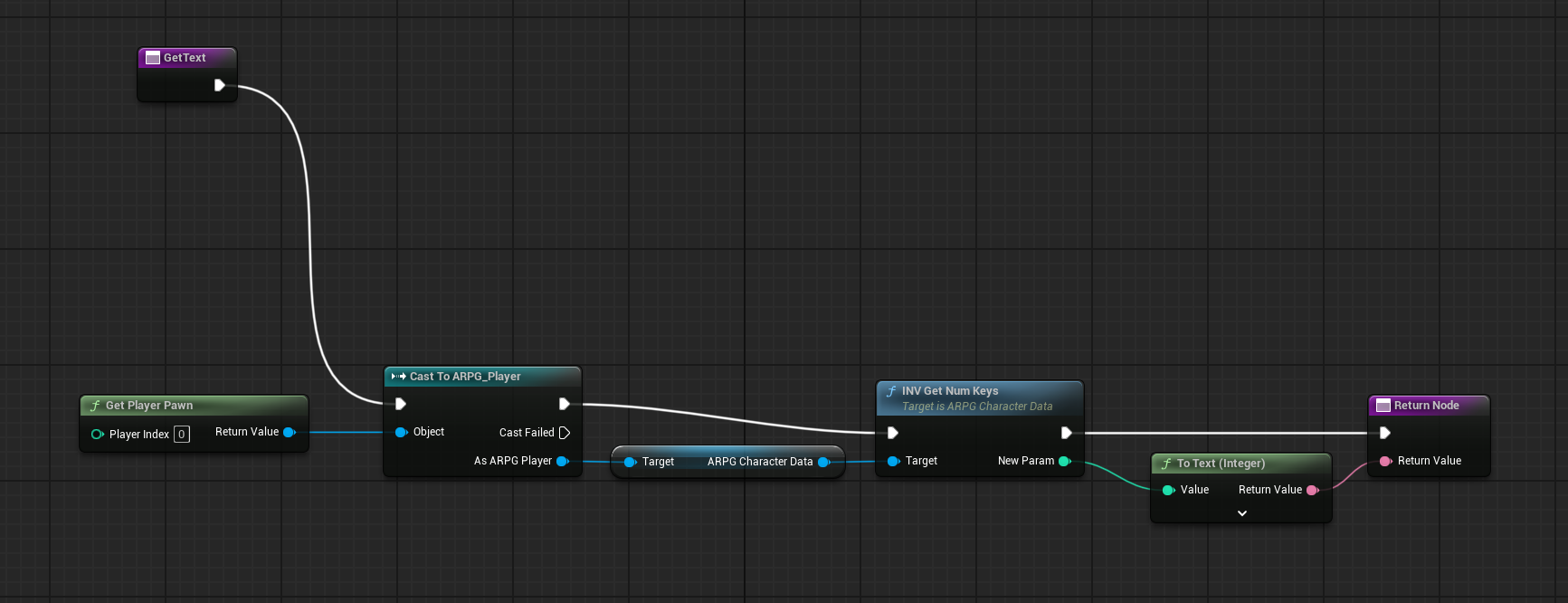
Get Owning Player Pawn > Get Component By Class > Select the class > You can now access the contents of that component.
autumn pulsar
 autumn pulsar
dawn gazelle
Get Owning Player Pawn > Get Component By Class > Select the class > You can now...
autumn pulsar
dawn gazelle
Get Owning Player Pawn > Get Component By Class > Select the class > You can now...
awesome thanks
What's usually the best way to sanitize an overlap event so I only grab the player character?
 frosty heron
autumn pulsar
What's usually the best way to sanitize an overlap event so I only grab the play...
frosty heron
autumn pulsar
What's usually the best way to sanitize an overlap event so I only grab the play...
The player character class or specific player character?
There could be more than 1 player character in the world depending on the game.
autumn pulsar
frosty heron
The player character class or specific player character?
it's singleplayer so just the player character class
dawn gazelle
Can always do Other Actor == Get Player Character 0 if you don't want the hard ref too.
autumn pulsar
well I'd hope it's loaded if it's generating an overlap event
frosty heron
If you want to always grab the character the player possess, you can do what datura says. Get player character 0
autumn pulsar
yeah I'd prefer to do it that way since I plan to make a few versions of the player character
 dull crest
total noob question, what's the correct way to have a blueprint thats just a basic class?
I want to define a data type that TLDR stores a float, but also features a bunch of helpful functions for converting other forms of data to a float.
Basically what I'm trying to achieve, is have a centralized place to transform between various definitions of rotations to.. what I can best describe as "screen space", i.e. imagine an origin at the center of your monitor, with the "0 degree" definition going upwards vertically from it, with positive angles going clockwise.
This has been elusive since my main use case for this involves deriving this angle from mouse movements, but by default (atan'ing the delta of the mouse) defines the zero-degree axis as going horizontally left from the center of the screen
autumn pulsar
dull crest
total noob question, what's the correct way to have a blueprint thats just a bas...
Actor Component
dull crest
i assume this is schizophrenically hard to interpret. What i'm trying to achieve is basically like
class AttackAngle {

  public float angle

  public AttackAngle FromMouseInput(float deltaX, float deltaA) {
    ....
  }

  public AttackAngle FromControllerInput( ...) { ... }
}
I see that this still brings with it a bunch of stuff regarding lifecycle etc, is there truly no way to get basically a struct that has functions?
autumn pulsar
it lives and dies with the actor afaik
dull crest
is this just how UE handles garbage collection? I'm not super familiar with C++ yet
autumn pulsar
I think if you want something persistent you'll need to make a manager actor
dawn gazelle
dull crest
total noob question, what's the correct way to have a blueprint thats just a bas...
I'd think the functions themselves would probably be best suited in a function library if you intend to just be able to use these functions anywhere, and then you can feed them whatever float value.
dull crest
hmmmm I might be approaching this wrong to begin with tbh; thanks for answering, I think you've given me the "right" answer
dawn gazelle
They don't.
dull crest
dawn gazelle
I'd think the functions themselves would probably be best suited in a function l...
Maybe this is a wiser approach. I'm just somewhat wary of using singletons/static helpers over objects due to it bloating the namespace but thats probably an unreasonable concern in this case
autumn pulsar
structure class
dull crest
I think maybe you're right and I should just add util functions and store the actual data I need with primitive floats
for context the problem I'm dealing with is that I'm finding myself "handling" the differnet axis definitions in many places and am certain im gonna end up repeating myself
autumn pulsar
function library sounds like what you want
dull crest
like it's already making maintenance a headache, I'm trying to experiment with changing how I define the initial "angle" being dealt with and its cascading and busting a whole bunch of other stuff
forgive me for being vague btw i am kind of sick with covid atm and im struggling to communicate
i appreciate your help a lot guys
autumn pulsar
no worries
dull crest
(all of this is made way harder by me not having version control btw 🙃)
still havent quite figured out how to set up p4 without building an onprem server or pay for cloud hosting xd
(nevermind how much p4 itself costs, absolutely struggling to find that info)
but thats off topic
autumn pulsar
Version control? what's that? 
dull crest
fun fact I left Roblox dev for Unity because i couldnt work without version control anymore
then Unity did the thing so now im a UE dev
and now i dont have version control again

autumn pulsar

I've never actually worked in a proper version controlled environment
Data hosting is so expensive
I ought to version control locally
Wrapping my head around doing doors
autumn pulsar
I think I'm overcomplicating it
dull crest
doors?
autumn pulsar
I'm trying to make a door base
but when you try to open one, a door can do many different things
slide up, slide to the side, etc
dull crest
oh literal doors LOL
dull crest
autumn pulsar
but when you try to open one, a door can do many different things

intuitively I'd say you actually just need a base class right
autumn pulsar
A wall is just a door that doesn't realize it yet
Was thinking maybe a door container BP that has the visual door BP
dull crest
Door -> SlidingDoor, SwingingDoor, VerticalDoor
class Door {

  bool currentlyOpen

  default void toggle() { }
}
etc
dull crest
yes
c#
😬
 dull crest
i think theres multiple ways to slice the door onion, personally I'd probably give it state ("open?") meaning i'd use a base class
rather than an interface
btw for extra thoroughness I WOULD give it an interface for player interaction though
autumn pulsar
Well, I have a button
and it could open a door
or trigger something else
so I want to use an interface for that
dull crest
I_PlayerClickable
that has a function onClick or something
that then is overriden on the doors such that it routes to the door's open() method orwhatever, y'feel me?
autumn pulsar
yeah that was my plan to have an interaction interface
dull crest
sound plan as far as I can tell 🙂
what are you struggling with? were you venting or did you want my 2cents?
autumn pulsar
feels weird to have an interface for one thing though 
dull crest
one function does not mean one implementation 😉
ive been doing professional SwEng for a bit now and I can tell you that the more things an anything does the more i hate it
personal take tho
autumn pulsar
Mostly just trying to figure out a sane way to do this
I think the simplest would be a double BP
one to handle the IO and then the other for the visuals
dull crest
dont forget theres more than just visuals
they kind of have a state
open or closed
and that im guessing has physics implications for your scenario
autumn pulsar
well my doors are planned to be kind of cinematic open and closing
dull crest
i cant say that i remember the last time i programmed a door though so grain of salt etc
autumn pulsar
physical doors 
autumn pulsar
you can put BP inside BP
but my main goal is to let the door do its thing, then I can just cast any interactions to its parent
dull crest
you've lost me here
i suspect at this point im making the situation worse rather than better
 maiden wadi
dull crest
and now i dont have version control again
maiden wadi
dull crest
and now i dont have version control again
If you want an okay source control, you can always use Azure DevOps, along with GitDesktop. Free and fairly easy to use, reliable source control.
lost hemlock
dawn gazelle
Why not try simpler first... Create a very simple blueprint that has a timer in ...
So I duplicated the same thing, and somehow now this works, ( not the function though )
 maiden wadi
dull crest
do blueprints support multiple inheritance?
maiden wadi
dull crest
do blueprints support multiple inheritance?
And no. Nothing in Unreal does really. Interfaces sort of are, but you can't put variables in an interface.
lost hemlock
I think it would be more efficient if all the updates were being done inside of the same Update event that resides in the main menu as well.
 dawn gazelle
lost hemlock
So I duplicated the same thing, and somehow now this works, ( not the function t...
dawn gazelle
lost hemlock
So I duplicated the same thing, and somehow now this works, ( not the function t...
So yea.. Some kind of corruption or something then.... At least now you have some breakpoints you can use... Check the inputs on there during the breakpoint and see what those values are.
 lost hemlock
Like a centralized update system, rather than tick-bindings
lost hemlock
dawn gazelle
So yea.. Some kind of corruption or something then.... At least now you have som...
Im thinking about this
 dull crest
maiden wadi
If you want an okay source control, you can always use Azure DevOps, along with ...
dull crest
maiden wadi
If you want an okay source control, you can always use Azure DevOps, along with ...
Does git play well with UE? Seems everyone uses P4, isn't the reason for it something to do with large files/binarization in a way that Git LFS cant handle?
dawn gazelle
lost hemlock
Im thinking about this
Fix your current problems first.
maiden wadi
dull crest
Does git play well with UE? Seems everyone uses P4, isn't the reason for it some...
I use the setup I recommended for my personal projects outside of work. I've never had issues with it so far. 🤷♂️
lost hemlock
dawn gazelle
Fix your current problems first.
I think there still might be something wrong with the update though, it looks like after I destruct the menu widget, thats when the break points start to wake up. Maybe Im wrong


The Item Amount Needed seems correct
dawn gazelle
What about the inputs
 lost hemlock
dawn gazelle
What about the inputs
lost hemlock
dawn gazelle
What about the inputs

 copper chasm
I feel like I am overlooking something very simple: When my gamelog prints an entry to my UI, I have a text block that will capture a timestamp in a datetime structure. But as I print more entries, the time on ALL of them updates to the time on the most recent one
dawn gazelle
lost hemlock
Ok so right now your WB_IngredientsSlot widgets are showing 0/#, right?
copper chasm
copper chasm
I feel like I am overlooking something very simple: When my gamelog prints an en...
I got it, don't turn the ints to a string use a datetime function
lost hemlock
dawn gazelle
Ok so right now your WB_IngredientsSlot widgets are showing 0/#, right?
yes exactly, it works somethign like this, the name displays the name from the thing which you pick up

numerator/denominator <-------- Only the **denominator **changes, but the denominator shouldn't change
It's actually the opposite, and I did all this by following everything the person in the tutorial did, and still came out wrong, so it looks like it should be the opposite, **denominator **should be fixed, and **numerator **should be affected every time you pick up something.
dawn gazelle
That' not what your problem is right now.
Your function isn't returning values.

the inputs were important to check because we needed to make sure you were passing legitimate values to it.
I wanted to verify what you're seeing... You should see 0/<whatever value is required for the craft>
which should change at least once from the original value of 3/5 (the default text you had in the field
SO.. the problem lies in your inventory system.
So now you need to check how items are are searched for in your inventory, and that items are properly being added to your inventory.
lost hemlock
It seems like this function node is also called down here

So this function has a branch which seems more like an airport security, but this security lets all the data pass anyways no matter what happens

(This is from my InventorySystem Component blueprint)
dawn gazelle
So the very first item doesn't match, it'll return anyway.
disconnect the false execution to the return node and run it again.
lost hemlock


So they are all "Names" now
but why is this not changed?
All my items names are literally names of type name
where's before here I was using string type. Comparing it to Name Item ID..

So now on this function im comparing Name to Name

 rugged junco
new on here and have been doing reworks on my project. how do i notify when the character hits the ground once they finish a jump? i want it so the character cannot dodge in mid-air and i've been trying to use gameplay tags to do this, but can't seem to have it so it removes the tag after the character lands. any advice?


 autumn pulsar
types are weird like that
lost hemlock
oh wait I think it's a different struct
dawn gazelle
Text values are supposed to be something that is localizable. So when you have text you want displayed, that's when you use Text as if you ever want to release your game in different languages you'll be able to easily replace the text with a localized version.
Names are effectively "named values" - in the background names are stored as numbers but are human readable otherwise - this is part of the reason why it doesn't convert from text.
lost hemlock
dawn gazelle
Text values are supposed to be something that is localizable. So when you have ...
should i change everything to text instead?
or everything into string
 pulsar osprey
names very efficient to pass around! you can explicitly convert them to text iirc
dawn gazelle
Of course, you're not prevented from doing some monstrosity conversions, but those end up costing more in the background to do...

And no, you don't want to just convert all to one or the other.... You want to use the appropriate type for what it is you're trying to do.
Name = Good for IDs for things.
Text = Good for displayed text that can appear in UI and the like.
For an item definition, you'd want to probably use both. One as the means to identify, the other as the displayed text whenever you need to display it to the user.
dawn gazelle
rugged junco
new on here and have been doing reworks on my project. how do i notify when the ...
If you're using the character class, you can add this event
 autumn pulsar
Finally got my doors working in a sane manner, so proud https://cdn.discordapp.com/attachments/755254770301665290/1319526011599065199/UnrealEditor_zmuTnrbT8H.mp4?ex=676647dc&is=6764f65c&hm=2114aec43bad79cbb4d9b89f06ee389a87706a68e4811b8c84118e78f5701bb7&
lost hemlock
dawn gazelle
Name = Good for IDs for things.
Text = Good for displayed text that can appear i...


This works !
Kinda
dawn gazelle
Bytes | Type
16 | FString
12 | FName
24 | FText
lost hemlock


It seems like it's aware of when it should let me craft and when not, but seems now only the number display is the last missing piece of the puzzle
lost hemlock
dawn gazelle
Bytes | Type
16 | FString
12 | FName
24 | FText
Is there a difference?
 nova grotto
is there a way to constrain a springarm to a plane?
dawn gazelle
Yea it's all to do with how they're stored.
FName is smallest because it's not really storing the name as a string itself... it's storing a value associated to the name.
String has to store a series of characters. I'm 99% sure it can actually go beyond that 16 bytes for how long the string actually is.
FText is set up to store a table and ID so that it can locate the appropriate text to be used with the particular field. It doesn't normally directly store any text.
rugged junco
dawn gazelle
If you're using the character class, you can add this event
thank you so much! exactly what i was looking for!
lost hemlock

I found out that by connecting these, I no longer have the color indication of when I can afford to make something
but now by connecting this cable, you get back the number indications
they are working fine, only thing is they are in reverse

*So now you're getting no color indication, it always stays red, and the numbers get passed on the *denominator
numerator/denominator <----
denominator should be fixed at /1, numerator can be any number over zero.
dawn gazelle
Are you sure about that.... Usually it'd be indicating current amount in inventory / amount needed for craft
lost hemlock
dawn gazelle
Are you sure about that.... Usually it'd be indicating current amount in invento...
yes but I feel like they could be stored into the wrong variables, so they could be reversed somehow right now. But then the other problem remains that zero is never getting away. That would be explained if HasItem? was always false, but thats not the case.
 dawn gazelle
lost hemlock
yes but I feel like they could be stored into the wrong variables, so they could...
dawn gazelle
lost hemlock
yes but I feel like they could be stored into the wrong variables, so they could...
That's a pretty big assumption. Look at what the flow says and that will tell you where the problem is.
I'll give you a hint. It has something to do with this variable.
 lost hemlock
dawn gazelle
That's a pretty big assumption. Look at what the flow says and that will tell y...
lost hemlock
dawn gazelle
That's a pretty big assumption. Look at what the flow says and that will tell y...
Earlier I tried to pass the Quantity straight to the >= but that didn't get me very far either
 lost hemlock
because it should be connected
thats passing the values directly
to the ingredients calculator system
from the inventory
dawn gazelle
You're running the IsItemInInventory function which returns true if the inventory has the item, and also the quantity of those items in the inventory but you don't have the quantity hooked up anywhere.
Right now, what value is being passed into the text display?
lost hemlock
Oh wait I think I know why, maybe its because I didnt have this connected earlier. Maybe

 dawn gazelle
It's not reversed. Your branch there doesn't look right.
You're checking if Quantity in Inventory >= Item Amount Needed.

 dawn gazelle

You're only proceeding with the logic if this is false.
You want to proceed with the logic if it is true...
 gentle urchin
The branch would mostly be a color selector, and first false disables craft button?
lost hemlock
So perhaps this branch would be crossing it's legs there?

But it still doesn't work
no change noticed
gentle urchin
Theres also a ton of data being pushed all over the place
dawn gazelle
That's because that's not what I was saying at all.
lost hemlock
dawn gazelle
That's because that's not what I was saying at all.
the 2nd branch?>
dawn gazelle

See this one here/
It's only executing if false.
You want this one executing when true.
lost hemlock
I did try that one as well.
gentle urchin
You want it on both, dont you?
dawn gazelle
Not "as well". Only.
lost hemlock
 gentle urchin
Ignore me
dawn gazelle
You know you have the item in the inventory.
Therefore, you want to know whether or not you have >= to the required number of items in your inventory, and IF TRUE set the colors and use the appropriate formatting for the text.
 lost hemlock
dawn gazelle
You know you have the item in the inventory.
Therefore, you want to know whether...
lost hemlock
dawn gazelle
You know you have the item in the inventory.
Therefore, you want to know whether...
yes but its not working
dawn gazelle
Let's see what you have for your screenshot currently.
Sorry for my confused wording.... I've been fighting a headcold since early morning yesteray.
lost hemlock
 dawn gazelle
So now back to breakpoints. There's probably something wrong in your inventory that it's not returning the correct numbers.
gentle urchin
(Dont think the last branch is necessary really.. quantity should return 0 if item wasn't found ...)
dawn gazelle
ALSO... Going to suggest this... Disconnect the completed pin from this return node. Add a second return node and leave it all disconnected except fro the execution path from completed to it.
 gentle urchin
You also shouldnt be using the same return node
Always use explicit return nodes when using fast tracked returns
lost hemlock
dawn gazelle
So now back to breakpoints. There's probably something wrong in your inventory ...
 lost hemlock
dawn gazelle
ALSO... Going to suggest this... Disconnect the completed pin from this return n...
lost hemlock
dawn gazelle
ALSO... Going to suggest this... Disconnect the completed pin from this return n...
I dont have a function
Im using an event
dawn gazelle
I'm talking about in the IsItemInInventory function.
lost hemlock
 lost hemlock
dawn gazelle
ALSO... Going to suggest this... Disconnect the completed pin from this return n...
lost hemlock
dawn gazelle
ALSO... Going to suggest this... Disconnect the completed pin from this return n...
oh you're right
dawn gazelle
That won't fix the problem, but it's makign sure you're not returning values that shouldn't be returned.
lost hemlock
dawn gazelle
That won't fix the problem, but it's makign sure you're not returning values tha...
Empty?
 dawn gazelle
Yea, connect the completed pin to that empty one.
lost hemlock
gentle urchin
Is items unique in inventory?
not always unique
dawn gazelle
Well, right now he's not even registering any items at all, let's see if we can at least get him a number to be displayed.
Hit play, gather some rock or wood or whatever... bring up your crfting window where it's displaying the items needed to craft, then put a breakpoint on the for each loop in that funciton. You should then be able to inspect the contents of your array there.
lost hemlock


 dawn gazelle
No they are not.
dawn gazelle
You have 5 wood in your inventory but it displays 1 on there.
you have 4 rock, but it displays 3 there.
lost hemlock
Thats a different play run-time
dawn gazelle
Well part of the problem is this.... Why is your inventory saying item amount needed based on the contents of the iventory?

How is this even updating... I don't know.
gentle urchin
😆
lost hemlock
dawn gazelle
Well part of the problem is this.... Why is your inventory saying item amount ne...

Hello everyone,
Welcome to the next part of our series on the Unreal Engine 5 crafting system!
In this video, we are going to update the Ingredients Widget, show the item Amount that is needed to craft and also show if we have enough items in the inventory by a red border.
Previous video: https://youtu.be/KTtoLPpg49w
Discord: https://discord.g...
gentle urchin
Amount required should come from the recipe
lost hemlock

He shows the result of each video at the start, at first on the first few seconds of the video he gives an explanation for what its gonna be about
gentle urchin
Current Quantity -> is requested from Inventory
Required Quantity -> is requested from crafting recipe
lost hemlock
dawn gazelle
Well part of the problem is this.... Why is your inventory saying item amount ne...
Im trying to fix this part where the names and numbers and color indication is displayed properly, no need to worry about the update
because the update will get taken care of in the next parts
on part 9 he says is where he guides through the update
but I can't move on with the update if I first dont fix the other more basic stuff
dawn gazelle
But the numbers and color indication won't work correclty if you're not getting the values right.
You're doing this bit on construct, that means it'll set that value one time.

But then you're saying you're seeing it increment the "Item Amount Needed" each time you pick something up....
HOW can it being doing that if you don't have logic changing it somewhere else?
gentle urchin
There is only one answer to this riddle
dawn gazelle
Do you still have a bind set up on that text field?
Are you setting that value somewhere else?
lost hemlock
dawn gazelle
Do you still have a _bind_ set up on that text field?
no
actually i do have a bind on it
but it doesnt work, right?
dawn gazelle
If you ahve a bind set up , the bind would end up taking precedent since it executes every frame.
lost hemlock
dawn gazelle
But then you're saying you're seeing it increment the "Item Amount Needed" each ...
im setting it, but am I incrementing it? Incrementing would Imply that Im using a ++ node before the connection to that SET
dawn gazelle
I didn't say you were incrementing it somewhere... just that you're seeing it increment.
lost hemlock
dawn gazelle
I didn't say _you_ were incrementing it somewhere... just that you're seeing it ...
true
lost hemlock
dawn gazelle
_HOW_ can it being doing that if you don't have logic changing it somewhere else...
are you asking how am i Incrementing this?
or where am I incrementing?
 gentle urchin
Lol
This is the correct function to use
Im confused why you have the other one at this point
Especially since it returns what looks like quantity. But its really "QuantityInFirstFoundSlot"
dawn gazelle
lost hemlock
are you asking how am i Incrementing this?
Where are you setting this variable in the WB_IngredientsSlot2 blueprint

other than on the construct of the widget
God my spelling is so bad right now too @_@
lost hemlock
dawn gazelle
Where are you setting this variable in the WB_IngredientsSlot2 blueprint
Here

oh wait thats not a set
dawn gazelle
OH... You're deconstructing the widget entirely?
 rich coral
why im only can get the state weight (cover walk left)? but i have cover walk right or idle too
 lost hemlock
dawn gazelle
OH... You're deconstructing the widget entirely?
lost hemlock
dawn gazelle
OH... You're deconstructing the widget entirely?
Im never setting it

only once
gentle urchin
lost hemlock
oh wait thats not a set
This sets the exposed variables. You dont need to update itemAmountNeeded on construct
Remove that chain of logic
 lost hemlock
This is no longer in use though
 lost hemlock
gentle urchin
Remove that chain of logic
lost hemlock
gentle urchin
Remove that chain of logic
This chain? I get that I gotta remove the last SET, but the whole chain? ⛓️ ⛓️💥
 gentle urchin
The last two nodes are bs
dawn gazelle
Yea you don't need these

Then replace this function with "Get Item Amount From Inventory"

Remove the first branch. The second branch true goes to top, false goes to bottom.
Then it should work.
lost hemlock
This is almost fixing it

But right now I've picked up more than 4 rocks and some wood
but no response
gentle urchin
It disturbs me that you use hand typed identifiers for items
When gameplaytags exists
A silly typo would break this setup
dawn gazelle
lost hemlock
But right now I've picked up more than 4 rocks and some wood
And I'm wondeinrg if that's happening because you're using conversions for the name field
lost hemlock
ok I think you're right, I could use actor has tag to make a comparison and then work with them that way? @gentle urchin
dawn gazelle
GameplayTags != actor tags
lost hemlock
I already had problems earlier when I tried to change "Rock" name to "Stone" and the color indicator thing didnt work on the rock but everything else
frosty heron
Comparing hard coded characters in 2024 
 jaunty jolt
Can anyone explain me why the random changes twice ?
 frosty heron
The moment you need to rename it you will have to go through dozens of bp as well
frosty heron
jaunty jolt
Can anyone explain me why the random changes twice ?
It will be evaluated per white pin
If you want to use the same result, cache it
(Promote to variable)
jaunty jolt
so each white pin it executes all the code before????
gentle urchin
Pure nodes connected to it.
frosty heron
You might want to read about pure nodes
jaunty jolt
frosty heron
If you want to use the same result, cache it
though i cant do that because im in a Collapsed Node
frosty heron
jaunty jolt
though i cant do that because im in a Collapsed Node
That's got nothing to do with how pure node works
jaunty jolt
gentle urchin
Make a function instead
ok will do that
gentle urchin
It was for the cachimg part with local vars
Collapsed are still just regular event graph, so no local variables
jaunty jolt
so collapse nodes have this flaw
frosty heron
Oh yeah, local variable would be a available for function
But you will lose the ability to do latent action
Pros and cons I guess
gentle urchin
I never ever do collapsed 😆
jaunty jolt
its great
frosty heron
I did in earlier days, now I don't do anymore logic in bp
Only prototype stuff
That bp corruption experience terrifies me
gentle urchin
Gotta burry the axe with it
frosty heron
But only happend because I did cpp stuff I guess
gentle urchin
Stay safe with backups
frosty heron
Never had problem when I did bp only
gentle urchin
gentle urchin
Stay safe with backups
Coming from the guy with 0 backups
I have to much faith
jaunty jolt
macros also dont allow local variables?
gentle urchin
jaunty jolt
macros also dont allow local variables?
They do but they're different
gentle urchin
frosty heron
Back up doesn't help when it break silently
Stay alert ! 😆
gentle urchin
frosty heron
No source control 👀👀
Nada...
frosty heron
I can't believe it 🥹you out of all people
gentle urchin
Only 1 of my 4 active projects got source control
frosty heron
I see
gentle urchin
Which ofc is bad
Stupid as hell
Its what happens if you drive your car 2 million miles and you never have a flat tire
frosty heron
Stepping on a minefield is a wakeup call
frosty heron
Yup, until the day it break 🤣
 gentle urchin
Right click in the graph
Local integer/float or smth
Afaik locals in relation to macros isnt really locals
They're just hidden member variables
jaunty jolt
so only function will work in this situation
gentle urchin
No, it will work for a random node
Also
In 5.X they added an option to convert pure nodes to unpure ones if im not mistaken
jaunty jolt
gentle urchin
Local integer/float or smth

this seems to be what you are referring to
gentle urchin
Thats prob true 😕
Prob local string tho
If you really wanted to..
But
Youd save the local index
Not the name
And get the name from the name array with the index
jaunty jolt
ahh i can just use the integer of the first array
gentle urchin
Peeersonally, unless latent, id put this in a function instead
Macros are like.
Code templates.. when you use it you 'paste' the code template into the code where you use it, resulting in more code to compile and execute
Compared to a function which only exists in one place in memory, is compiled once, and is reused every single call
jaunty jolt
gentle urchin
Macros are like.
Code templates.. when you use it you 'paste' the code templat...
okay thanks
gentle urchin
Only caveat being functions are required to return instantly, and thus cant be latent / delayed in any way
jaunty jolt
though this set by ref var is amazing
gentle urchin
Its usefull for maany things
That along with a select node can be pretty powerful in terms of code cleanliness and readability 😄
Also GameplayTags are worth getting used to. Predefined hieriarchal list of tags with a bunch of utility functions and typo safety !
jaunty jolt
gentle urchin
Also GameplayTags are worth getting used to. Predefined hieriarchal list of tags...
im on it 💪
jaunty jolt
gentle urchin
Also GameplayTags are worth getting used to. Predefined hieriarchal list of tags...
it seems these are like some sort of global bools
frosty heron
jaunty jolt
it seems these are like some sort of global bools
Global bools? That would be material collection param but global is pretty bad in general.
Nothing to do with gameplay tag though. Gameplay tag is basically FName on steroid.
lost hemlock
dawn gazelle
And I'm wondeinrg if that's happening because you're using conversions for the n...
Yes but it's already converted

Oh wait

This is my struct
frosty heron
Why is the rarity a byte 🫠
Also hard reference in data table is bad.
You will end up loading all the icon/image on the entire DT.
lost hemlock
dawn gazelle
And I'm wondeinrg if that's happening because you're using conversions for the n...
 gentle urchin
jaunty jolt
it seems these are like some sort of global bools
gentle urchin
jaunty jolt
it seems these are like some sort of global bools
I use them for IDs of almost anything
Stats, quests, npcs, scene cameras, you name it, i got a tag for it
lost hemlock
dawn gazelle
And I'm wondeinrg if that's happening because you're using conversions for the n...
All I did was to change this one, and everything is broken

I'll put it back 👍
 untold fossil
Hello. Is there a way to find out how much seconds have passed using the time nodes? I want to include a timestamp into a spawned actor and then I want to later check the actor's timestamp against the "Now" node to find out how many seconds have passed. How would I do this?


Would this work?
gentle urchin
On spawn -> save now to a variable
Yepp
I thiiiinkn
It returns the full thingn
So youd need to combine everything bigger than and including seconds
 gentle urchin
Yepp
 tiny tundra
is there a way to check if an actor doesn't have any tags?

 normal raft
array length
tiny tundra
yeah just figured it out. if length == 0. But thank you
frosty heron
tiny tundra
yeah just figured it out. if length == 0. But thank you
Is empty()
gentle urchin
10 ways to skin a cat plushie lol
 kind estuary
I have a function in one Widget called Deliver Medicine.
So when i click on a button in my widget it delivers medicine.
But then i need this function also in another widget and in a character.
So i just copy pasted it in 3 places.
Obviously this is not a good practice
What should i do here. BlueprintFunctionLibrary sounds too much and not necessary
frosty heron
the issue is why the function lives in the widget to begin with
widget just read and display info, the sooner you accept this workflow the less stress you will have.
 gentle urchin
pastamaker will make pasta
frosty heron
called from the widget doesn't mean deliver machine need to live in widget...
get a ref to an actor that is actually RESPONSIBLE for delivering the machine
Widget->GetTheDeliveryMan->DeliverMachine
stressing this again
#blueprint message
kind estuary
okay so i put it in the character and then cast it then deliver medicine
frosty heron
well does it make sense for the player to deliver the machine?
really depend on the context
frosty heron
or just an actor manager
kind estuary
uobject, create uobject, MedicalStuff->Deliver
frosty heron
again, depending on the goal....
 dark drum
kind estuary
okay so i put it in the character and then cast it then deliver medicine
dark drum
kind estuary
okay so i put it in the character and then cast it then deliver medicine
Adding to what Cold said, doing it this way, you'll also find you wont need to repeat functions in different BP's any where near as much. It helps keep things more consistent and less prone to bugs. (Granted you'll still have plenty of bugs lol)
frosty heron
like if you have a BP that can edit rooms and have functions like deleting walls or adding props.
Then widget just go ButtonClicked->BP_RoomManager->DoIt'sThing
@gentle urchin I'm gonna try to attack the dot product today
kind estuary
dark drum
Adding to what Cold said, doing it this way, you'll also find you wont need to r...
yeah just need to pass reference to the blueprint of my Character. which is a bit annoying
gentle urchin
frosty heron
<@231467939734355969> I'm gonna try to attack the dot product today <:lurkin:131...
you got this champ!
Meanwhile im doing stupid shit with my cameramanager
inflicting pain and suffering on my pc
frosty heron
no pain no gain
dark drum
Does anyone know what I'm doing wrong? The cursor is on the stump but the trace hits the ground to the right. (The cursor doesn't show when I do a screen grab lol)


I thought I might need the position scaled by DPI but it gives the same result.
dark drum
Making the window smaller makes it worse. (cursor still on the stump)
 gentle urchin

they're always so sneaky
GetHitResultAtScreenPosition is what they use in c++ 😄
not bp exposed, ofcourse
who'd ever need such a thing
internally they seem to be what you're doing in the end
return GetWorld()->LineTraceSingleByObjectType(HitResult, WorldOrigin, WorldOrigin + WorldDirection * HitResultTraceDistance, ObjParam, FCollisionQueryParams(SCENE_QUERY_STAT(ClickableTrace)
just went thru the function, it looked like it does exactly the same thing
gentle urchin
only differencei can see is mouse position
if (LocalPlayer->ViewportClient->GetMousePosition(MousePosition))
I find it funny how we all went and looked at the player controller class. 😅
dark drum
frosty heron
just went thru the function, it looked like it does exactly the same thing
Yea, that's what I noticed. I'd love to know what the difference is with what i've done.
gentle urchin
//BP node:
FVector2D MousePosition = FSlateApplication::Get().GetCursorPos();
FGeometry ViewportGeometry = GetViewportWidgetGeometry(WorldContextObject);
return ViewportGeometry.AbsoluteToLocal(MousePosition);

// cpp :
FIntPoint MousePos;
Viewport->GetMousePos(MousePos);
if (MousePos.X >= 0 && MousePos.Y >= 0)
{
    MousePosition = FVector2D(MousePos);
    bGotMousePosition = true;
}
so BP gets it through slate
while cpp gets it from viewport
which uses some CachedGeometry
dark drum
Using the wrong 'Get Mouse Position' node it seems haha. You know because there's 3 of them. o.O
 frosty heron
does it work now?
dark drum
frosty heron
does it work now?
Yea lol.
dark drum
gentle urchin
let's givie them options lol
They do like to throw some red herrings in there. 😅
gentle urchin
keep it spicy 😄
dark drum
Pick you're poison.
 kind estuary
frosty heron
get a ref to an actor that is actually RESPONSIBLE for delivering the machine
kind estuary
frosty heron
get a ref to an actor that is actually RESPONSIBLE for delivering the machine
i realized why i didnt do it that way before. its because this is part of a dialog system. So you are talking and then there is an option in the Widget to Give Medicine. And others like Bye, and others. So this is why its in the widget
Because after you Give Medicine, there's a new dialog message, and this is called from the widget
Cant be called from the character
frosty heron
kind estuary
i realized why i didnt do it that way before. its because this is part of a dial...
there is no reason for any gameplay to be in the widget. Only logic widget should contain is the logic to display the info. E.g, go to next page, etc.
If it's part of the dialogue system, then make the function in the dialogue manager.
then Get the dialogue manager and call it to do it's thing
dark drum
kind estuary
i realized why i didnt do it that way before. its because this is part of a dial...
Event dispatchers are great for things like this. It can allow for the UI to do things without it ever knowing about the thing it's caused.
dark drum
kind estuary
i realized why i didnt do it that way before. its because this is part of a dial...
If it helps. If you add an event dispatcher to a widget, it's like giving it a specific sounding bell. Then you can tell things to listen for that specific sound. When the widget rings the bell, anything listening to it can choose to do something.
kind estuary
frosty heron
there is no reason for any gameplay to be in the widget. Only logic widget shoul...
i think i will pass the widget itself into the function in my character, and that way i can deliver medicine and then keep going with dialogue after
frosty heron
kind estuary
i think i will pass the widget itself into the function in my character, and tha...
no comment without knowing the architecture
 wide beacon
Hello, im creating a point and click adventure game for my uni project, im struggling finding a way to create a simple inventory system that stores the items, so when i interact with a pedestal at the end it takes those items and completes the game. i was wondering if anyone could guide me in the right direction when it comes to using blueprints like this. thanks!
 thick flame
Hey! hoping to get some advice here. Im trying to make it so the player can "push off of" surfaces in a zero gravity environment. It mostly works at the moment, but sometimes the player will just start moving in a circle rapidly. Is there a way to make the movement only a straight line?
 dark drum
kind estuary
i think i will pass the widget itself into the function in my character, and tha...
dark drum
kind estuary
i think i will pass the widget itself into the function in my character, and tha...
I tend to include initialization functions with delegate inputs for event dispatchers. When you create the widget, you can call the initialize function and decide what event should trigger when it's called.
 dark drum
wide beacon
Hello, im creating a point and click adventure game for my uni project, im strug...
dark drum
wide beacon
Hello, im creating a point and click adventure game for my uni project, im strug...
Are you wanting to be able to view said items? drop them or anything like that?
thick flame
wide beacon
Hello, im creating a point and click adventure game for my uni project, im strug...
have you looked into Data tables? thats how ive seen them handled. You can have the data structure contain all the important info for each item, and all your game systems can reference the table or the structure
lost hemlock
Does anyone know what this is?
 wide beacon
dark drum
Are you wanting to be able to view said items? drop them or anything like that?
wide beacon
dark drum
Are you wanting to be able to view said items? drop them or anything like that?
so the idea is to collect 3 artefacts and have them seen on the screen as you keep exploring to find them. once you have all 3 in inventory you return to the pedestal that sent you to find these, then ypu click it an it places all 3 on there and takes from inventory.
its not meant to be complex but im just so new to all of this
thick flame
thick flame
have you looked into Data tables? thats how ive seen them handled. You can have ...
to iterate- afaik it would be best to have two data tables, one that contains all the items in the game, and then one that is the players current items. The second one would point to the first for information about each item
wide beacon
wide beacon
so the idea is to collect 3 artefacts and have them seen on the screen as you ke...
which finishes the game
dark drum
wide beacon
so the idea is to collect 3 artefacts and have them seen on the screen as you ke...
I'd go down the uObject route. Pt 1 - 3 in this series. You can probably ignore the other parts. Part 4 might be useful as it shows you have to display the data in the inventory.
https://www.youtube.com/playlist?list=PLcwVLBaUNnHoujbPwOAdMgNtq1ShoHIGc
 wide beacon
dark drum
I'd go down the uObject route. Pt 1 - 3 in this series. You can probably ignore ...
wide beacon
dark drum
I'd go down the uObject route. Pt 1 - 3 in this series. You can probably ignore ...
okay thank you very much!
dark drum
wide beacon
okay thank you very much!
That's assuming you actually want to learn how to make an inventory system. With what you've described, you could probally just get away with an array on the player character using gameplay tags.
wide beacon
dark drum
That's assuming you actually want to learn how to make an inventory system. With...
yeah im not trying to create an advanced system, my lecturers said keep it simple due to the time frame, how would i go about this array? i think its to create more of a trick as the inventory wont ever be accesible its just there to display what you have.
frosty heron
thick flame
to iterate- afaik it would be best to have two data tables, one that contains al...
Can I see your data table?
Data Assets are prefered majority of the time.
thick flame
frosty heron
Can I see your data table?
I havent actually made one 😅 not for an inventory system, ive just seen it in videos
frosty heron
the pitfall with data table for most new comers is they use hard reference on their DT
and they end up loading the items in the entire game when they just need to display a few
thick flame
last DT i used was for a camera position table
frosty heron
Youtube videos are notoriously a bad trap for such important system
dark drum
wide beacon
yeah im not trying to create an advanced system, my lecturers said keep it simpl...
Actually, just follow pt 1 - 3 lol. I've just thought you'll need to have the other data such as icon images and possibly the mesh to display and other things. It should only take you about 90 mins to watch the first 3 parts. 🙂
thick flame
frosty heron
Youtube videos are notoriously a bad trap for such important system
ive found its very hard to get any information on unreal, tbh
frosty heron
written articles are normally a great source of info
youtubers tend to copy other youtubers
wrong information passed around
thick flame
it sucks that the official documentation is so outdated
frosty heron
we have victims saying oh don't use cast use interface on daily basis
@gentle urchin sorry to bother you, what would be the range for the dot limit?
thick flame
ive heard that too- ive been trying to get away from casting, bc like a lot of beginners i used it for everything. I just saw interfaces but havent used them
frosty heron
thick flame
ive heard that too- ive been trying to get away from casting, bc like a lot of b...
You shouldn't get away from casting though... You can stay away from interface, you can live without them.
@thick flame https://dev.epicgames.com/community/learning/tutorials/l3E0/myth-busting-best-practices-in-unreal-engine
If you are looking for a well documented info about common myths prepetuated by bad actors.

Epic Games Developer
Are Ticks really that problematic? Should you make all your meshes Nanite? Is the ChildActorComponent truly cursed? Should you never use Cast?
You've pr...
dark drum
thick flame
ive heard that too- ive been trying to get away from casting, bc like a lot of b...
Casting is fine as long as you're using good hierarchy. Over using interfaces can be problematic and make managing systems difficult in the long run.
thick flame
frosty heron
You shouldn't get away from casting though... You can stay away from interface, ...
when i need to cast, ill cast. but ive seen other people in uni or myself in older projects casting with every action
thick flame
dark drum
Casting is fine as long as you're using good hierarchy. Over using interfaces ca...
good to know
thick flame
frosty heron
<@385934974391418880> https://dev.epicgames.com/community/learning/tutorials/l3E...
gonna take this, ty
dark drum
thick flame
good to know
Function only base classes that you then create children of is the way to go in my opinion. Casting to these types of base classes are pretty much free as they would most likely already be loaded.
gentle urchin
frosty heron
<@231467939734355969> sorry to bother you, what would be the range for the dot l...
whatever you want it to be
-0.7 was suggested
goes from -1 to 1, in full range
frosty heron
gentle urchin
whatever you want it to be
sorry I mean, the value does it range from -1 to 1
ahh yeah, thanks
thick flame
thick flame
Hey! hoping to get some advice here. Im trying to make it so the player can "pus...
bumping this
dark drum
thick flame
Hey! hoping to get some advice here. Im trying to make it so the player can "pus...
How do you know this is making the character rotate?
thick flame
dark drum
How do you know this is making the character rotate?
This is the only code within the first person character i've created. It didnt do this until this point. I had flying working with normal wasd controls
dark drum
thick flame
This is the only code within the first person character i've created. It didnt d...
It might be worth trying to add velocity instead of impulse. As a guess, I would say the impulse (if not being applied perfectly central) would impart some rotation movement.
thick flame
dark drum
It might be worth trying to add velocity instead of impulse. As a guess, I would...
so that didnt help, but it definitely seems to have to do with collision. At certain angles, the player will start spinning around a central axis faster and faster, even without any input.
it could be that the when I look around, im clipping the characters hitbox into the ground? its a first person game so its a little hard to tell
lost hemlock
How is it possible that the top part is 5 and the bottom part is 1 and this is FALSE?


 dark drum
lost hemlock
How is it possible that the top part is 5 and the bottom part is 1 and this is F...
dark drum
lost hemlock
How is it possible that the top part is 5 and the bottom part is 1 and this is F...
From the screenshot it looks like it hasn't evaluated the >= node yet. You need to step ahead so it's calculated.
 dark drum
normal raft
dark drum
normal raft
What are you trying to do?
normal raft
create a array of weapons from a structure
 dark drum
normal raft
create a array of weapons from a structure
dark drum
normal raft
create a array of weapons from a structure
For what purpose? We require more context.
normal raft
First so i can define custom weapons in the graph
then so the player can switch between them in the game
 tropic token
normal raft
tropic token
normal raft
you don't need this set members. you aready created it with Make node
thick flame
thick flame
it could be that the when I look around, im clipping the characters hitbox into ...
very strange- it seems to be almost random angles that the character starts to shake or rotate around a point. not sure how to even go about fixing this
dark drum
normal raft
First so i can define custom weapons in the graph
It sounds like you should be using data assets or at the very least a data table. The weapon obj would most likely need to be a soft class ref so the relevant class can be spawned at runtime when needed.
gentle urchin
frosty heron
sorry I mean, the value does it range from -1 to 1
Let me know when it works lol 😄
normal raft
ok let me check into those two concepts
frosty heron
gentle urchin
Let me know when it works lol 😄
I'm trying to add a slider to an actor component atm, skill issue is on the way
dark drum
frosty heron
I'm trying to add a slider to an actor component atm, skill issue is on the way
Slide to an actor component? Sounds interesting.
frosty heron
In this talk, Tanglewood Games will present how to add extra functionality to the Unreal Editor by leveraging its existing framework, enabling the creation of tools that feel native and intuitive to use, and that are tailored to custom projects, modular, and easy to maintain.
These frameworks will be presented through a series of practical e...

just more editor utility stuff
gentle urchin
Ohh fancy that
I just left it as an input field
You can specify min max values there
frosty heron
yea I should probably just leave it as input field
gentle urchin
And it has built in slider
frosty heron
I don't know why I am even trying with this , pretty sure I don't even know how to save the value.
dark drum
frosty heron
just more editor utility stuff
Yea it's pretty cool stuff. I wish there was a way to make custom BP graphs and nodes without having to jump into C++. That stuff is wild haha.
frosty heron
dark drum
Yea it's pretty cool stuff. I wish there was a way to make custom BP graphs and ...
There's some degree of support with editor utility blueprint I think
normal raft
ah and yep all it needed was "Add BP Weapon Component" noded to make it logical
frosty heron
normal raft
ah and yep all it needed was "Add BP Weapon Component" noded to make it logical
kinda questionable
not that I have done my own weapon system
you probably want to create the UObject when you initialize an item from a data asset
gentle urchin
dark drum
Yea it's pretty cool stuff. I wish there was a way to make custom BP graphs and ...
just dive into c++ and get custom nodes 😄
dark drum
gentle urchin
just dive into c++ and get custom nodes 😄
It feels more like falling from the top of a tree and hitting every branch on the way down to make custom event graphs and nodes lol.
normal raft
yeah lol i had a little tour of that recently just slap functions in the h file and get nodes like @gentle urchin says
gentle urchin
dark drum
It feels more like falling from the top of a tree and hitting every branch on th...
just keep it simple in the start 😄

it's pretty awesome once they work
dark drum
gentle urchin
it's pretty awesome once they work
I can imagine.
thick flame
it starts out so well....
frosty heron
got it working but I am really wasting my time doing something I don't need

 clever comet
Is there a way to fix an actors capsule component inplace during a root motion animation? 🤔 So that essentially the root moves but the capsule doesn't
 pallid dagger
frosty heron
got it working but I am really wasting my time doing something I don't need <:lu...
pallid dagger
frosty heron
got it working but I am really wasting my time doing something I don't need <:lu...
What it does? I guess first vector is forward of owner, who is the second?
frosty heron
pallid dagger
What it does? I guess first vector is forward of owner, who is the second?
I don't have any logic yet, Squize is helping me out with the logic
gentle urchin
frosty heron
got it working but I am really wasting my time doing something I don't need <:lu...
common trap
frosty heron
i'm trying to filter out targets that is behind my characters
pallid dagger
frosty heron
i'm trying to filter out targets that is behind my characters
and how it goes?
frosty heron
pallid dagger
and how it goes?
in progress 🐱 I am slow as hell
pallid dagger

 thick flame
Hey! hoping to get some advice here. Im trying to make it so the player can "pus...
thick flame
thick flame
Hey! hoping to get some advice here. Im trying to make it so the player can "pus...
heres a video of whats happening. I already tried selecting true on velocity, thats the same outcome.
gentle urchin
frosty heron
you want the player to bounce when colliding?
Dont get distracted ! Stay focused !
frosty heron
brb 2 hours
gentle urchin
Its not a perpetual motion machine you're making 😅🤔
thick flame
frosty heron
you want the player to bounce when colliding?
the player bounces, and they can also push off the wall by clicking. but theres some spasming happening randomly and im not sure why
 manic orchid
Hi chads! Just wanted to make a quick line trace function that checks if certain Interface is implemented onto an object.
My Idea was to pass interface reference as input parameter of the function, but this doesn't seem to work... Why is that? What type do I have to choose for it to be compatible?
 lost hemlock
Why does this number always remain stuck?

 frosty heron
Why are they in different order?
 gentle urchin
But whyyyy u do this in cpp 😂
frosty heron
I'm using the same function..
gentle urchin
You couldve asked and i couldve sent you the snippet 😂
Im using it for my custom world space screen space widgets 🤣
Oh well wheres the fun in not making it yourself !
frosty heron
@gentle urchin having the visual... I kinda understand it more....
so one arrow that goes from -1 to 1 (clock wise)
and another arrow that goes from -1 to 1 (ccw)
gentle urchin
Yepp
meanwhile trying to implement my first pathfinding algo
wanna avoid copy pasting from the interwebs
so i truly have to grasp the fundamentals 😄
gentle urchin
not using EQS
I already have an array of my tiles (its a grid based game)
so it should be fairly simple to implement pathfinding really
frosty heron
@gentle urchin ty for the codes, I might have to ask you about tiles next time 😅 . I would need to use that for dungeon generation
gentle urchin
Im using DA for that
gentle urchin
frosty heron
<@231467939734355969> ty for the codes, I might have to ask you about tiles next...
Nice !
I got some easing aswell
Priority / Soon Irrelevant / No Priority
So basically 2 dot values to check for using it as an alpha for widget opacity
maiden wadi
EQS is fun. Wrote a bunch of that lately for AI.
 vagrant remnant
trace ✅
differenciating wall and floor ✅
setting cube's position to impact location ✅
rotating it along the impact rotation thingy ❌
how can I get the needed rotation for my cube without making my brain explode of hard math?
gentle urchin
maiden wadi
EQS is fun. Wrote a bunch of that lately for AI.
Oh yeah i bet, its just one of those things i havnt gotten to yet 😂
maiden wadi
They're surprisingly easy to write. Funny enough the logic they need is harder than the test code. Pathfinding ones get a little iffy, but like basic target selections and stuff are a breeze.
maiden wadi
vagrant remnant
trace ✅
differenciating wall and floor ✅
setting cube's position to impact loca...
Unsure what you're after?
copper chasm
Physics, I think? 😅
vagrant remnant
maiden wadi
Unsure what you're after?
rotating the Red cube to make it fit to the trace impact normal
I am just playing around with the engine since I'm a newbie 😅 there needs to be a lot of fixing for this
copper chasm
gentle urchin
Im using DA for that
I went alllllllll the way back to start to try and include replication for the gamestate and include a logging system I can use in game and for debug, might revisit your suggestions for grid generation - might actually make some headway
maiden wadi
vagrant remnant
rotating the Red cube to make it fit to the trace impact normal
You mean so that the cube will fit up against the wall correctly?
vagrant remnant
maiden wadi
You mean so that the cube will fit up against the wall correctly?
yep
currently I'm tracking the Location and the Normal of the trace hit
maiden wadi
Should be all you need, mostly. Just need to set the cube's world rotation to the Normal converted to a rotator.
vagrant remnant
sounds like it makes sense
what is the trace's normal btw?
is it the normal of the face it Hit?
I'm not on my pc currently
maiden wadi
Yeah. If you want something more normalized on a messy wall you would need to do more traces after the initial to establish more points to normalize against, but for an initial implementation the original normal should work.
vagrant remnant
nah this is just for fun and even if it was a game I would make extra hitboxes for it
vagrant remnant
maiden wadi
Yeah. If you want something more normalized on a messy wall you would need to do...
for a messy wall some sort of "slime" that adapts to the geometry would look better though
New project idea :)
frosty heron
@vagrant remnant https://www.youtube.com/watch?v=A_3mvosV_oU
You will have a tough competition

update on my Slime game💚
You sent your trusty minion into the nearby human city to gather intel. But it's summer.. keeping that slime hydrated is a serious commitment
vagrant remnant
frosty heron
<@1284169316257763442> https://www.youtube.com/watch?v=A_3mvosV_oU
You will have...
that is so cool :O
 austere vapor
Hi all! I'm working on a rail shooter where you travel through an endless maze, with each room containing enemy spawns, traps, etc. What would be the best way to go about creating a map that can fetch and spawn/insert these pre-made levels? Some of these rooms are themed, so I want to be able to select from a few at a time. I've seen a lot of different stuff like level instancing, level streaming, world partitioning, packed level blueprints, theres a lot! And I dont know which would be best for me! Obviously not looking for any grand tutorials, but which method sounds best for what I want?
 maiden wadi
Initially sounds like a case for level instancing. Your main map would just be blank mostly and then you'd have logic somewhere that manages streaming in a level. When done with it you stream that level out and then put a new one in.
normal raft
hey .. i managed to get it working ... if any ones curious.. I just dont like that is not explicity a "new" instance the way that looks to me but let me know 😄

 maiden heath
Hi everyone, a question in Unreal is it possible to modify the Physics of the "Skeletal mesh" in runtime?
normal raft
i think that comes under ragdoll physics stuff
maiden heath
Example if I enlarge only the hands of my Unreal mannequin how do I change the size from the standard to the ones I modified
maiden heath
maiden heath
Example if I enlarge only the hands of my Unreal mannequin how do I change the s...
 normal raft
not sure i fully understand what you want to do but do you want to transform the bones perhaps?
I saw some stuff in the graph nodes about that comming of the SkeletelMeshActor
maiden heath
normal raft
not sure i fully understand what you want to do but do you want to transform the...
I would like to make a test that if I enlarge the hands or lengthen the arms of my metahuman the physics changes along with the modification
normal raft
yeh theres a bunch of physics stuff on skeletelmeshactor also
 civic halo
I spent 2 hours creating a Dynamic Material because I'm trying to change the color of a mesh to tell it's attacking.
I have the Material but I don't know how to get the changing part
I have a Boolean (bIsAttacking) so I'm trying to sent a Event tick Branch = True but I'm not sure where to go from there
maiden heath
normal raft
yeh theres a bunch of physics stuff on skeletelmeshactor also
Ok where can I find to make sure to change physics in Runtime

 muted socket
Sorry I just started today with blueprints so bear with me.
I have a LP player in my scene and I added two buttons in world space on top of it, one for "play/pause" and one for "skip song".
I made an actor for the button and in there I have a variable to distinguish between them.
I want the player to be able to walk up to it, when he's close the buttons show up, and when he looks at one of the buttons and clicks the corresponding action gets triggered. To do this I trace a line every Tick out from the player camera, check if it's intersecting with the button, if it is get the button name, check which button it is and then either play the song or skip the song. It's working properly now but it just looks convoluted, so I was wondering if there's a more straight forward approach to this.

I guess what I'm asking is: is this normal for such a simple scenario?
 normal raft
thats not too bad is it 😄
muted socket
normal raft
thats not too bad is it 😄
I don't know, that's why I'm asking, since I'm learning on my own I want to get on the right path from the get go
normal raft
no i dont think so some of these graphs get kind of insanely large 😄
muted socket
ok thanks 🙂
normal raft
I swear unreal needs to allow us to zoom out more then -12
like i fear having to do endless if statement in graph i would absolutely be running the visual studio hills at that point
but the good thing about that in theory is you can just make the first condition in graph then go find that bit of code and implement in a c++ function node
normal raft
civic halo
I spent 2 hours creating a Dynamic Material because I'm trying to change the col...
sounds like a job for event overlap / hit
civic halo
normal raft
sounds like a job for event overlap / hit
I have this here for Dynamic mesh

and im trying to create something like this to change the color

Butim not 100% sure how to do so
bIsAttacking comes from this

 north bobcat
does anyone know how to make quake and halflife movement like air strafing and surfing in ue5 blueprints?
maiden wadi
civic halo
bIsAttacking comes from this
You can remove most of this code and just change your update function. Then you just need to change the boolean and call the update function.
 dark drum
Does anyone know why this would be triggering before I've released the button? My understand of the released trigger could be wrong.

 crude helm
Any ideas on why I can't draw a rect on tick on this hud class? Sample I'm folowing is drawing a rect on tick of the hud class. Don't quite get why mine says it can't draw outisde DrawHUD event...

even if I have fixed values..
 maiden wadi
crude helm
Any ideas on why I can't draw a rect on tick on this hud class? Sample I'm folow...
maiden wadi
crude helm
Any ideas on why I can't draw a rect on tick on this hud class? Sample I'm folow...
The warnings at the bottom will tell you.
copper chasm
dark drum
Does anyone know why this would be triggering before I've released the button? M...
From what I understand, released causes it to fire started and ongoing when you press, and then it’ll be ongoing for every tick it’s held down, then it’ll be triggered when it’s released
Without seeing the inputaction node or the code, idk what it’s actually doing vs what you want it to do, but I’ve had my ass chapped by connecting started and triggered and making assumptions about how things SHOULD work 😅
 charred cobalt
hey does anyone know if there's a way to get the max walk speed to not apply while in the air (I am very new)
normal raft
perhaps look at a gravity system
dark drum
copper chasm
From what I understand, released causes it to fire started and ongoing when you ...
Thanks for the explanation. I know what I've done wrong now lol.
crude helm
maiden wadi
The warnings at the bottom will tell you.
that doesn't help.
Even using the Event **ReceiveDrawHUD **it still spam the same warning
 dark drum
charred cobalt
hey does anyone know if there's a way to get the max walk speed to not apply whi...
dark drum
charred cobalt
hey does anyone know if there's a way to get the max walk speed to not apply whi...
You can change air control on the movement component.
dark drum
crude helm
that doesn't help.
Even using the Event **ReceiveDrawHUD **it still spam the sa...
There's an event you override I believe.
crude helm
dark drum
There's an event you override I believe.
as far as I understand, this is the event that need to be used
Event receiveDrawHUD
It draws, but also spam gazilhon warnings
maiden wadi
dark drum
Does anyone know why this would be triggering before I've released the button? M...
It shouldn't. But Mouse buttons can be finnicky too given viewport capture and such. Try it with a keyboard key to see if it stops firing too soon.
normal raft
see this is why i dont get ue sometimes.. why is this being made so stupid! ... it so obvious and fairly trivial what i am trying to do... but it refuses to work .. as soon as you attempt to optimize any thing

 vagrant remnant
thanks @maiden wadi <3
dark drum
maiden wadi
It shouldn't. But Mouse buttons can be finnicky too given viewport capture and s...
It's ok, I was using started instead of triggered. 🤦
dark drum
crude helm
as far as I understand, this is the event that need to be used
**Event receiveDr...
Ahh, sorry, I was thinking of the one inside widgets.
muted socket
I'm trying to cycle through a list of sounds. It works except for a small detail, when I first click on the "next" button I have to click twice to reach the second song, after that it cycles perfectly. I'm guessing that it's because it plays the sound first and only then it changes the current sound index. How do I fix it?
 maiden wadi
If you play the sound automatically, the starting index should be 1 instead of 0.
muted socket
I don't, the player has to move up to it and hit "play". Plus I'm not sure why it should be 1 in that case? It's still playing the first song in the array, right? But it does work if I set it to 1, I just want to understand why
 dapper fern
I might be too burnt out to see it and I need help, it's a simple combo logic but I can't manage to go past the first anim montage I'm supposed to play
 maiden wadi
muted socket
I don't, the player has to move up to it and hit "play". Plus I'm not sure why i...
maiden wadi
muted socket
I don't, the player has to move up to it and hit "play". Plus I'm not sure why i...
When you click play. Do you set CurrentSound to 1?
muted socket
Wait no I see it
maiden wadi
Because your logic right now is Play. Which probably plays track 0. Then you cilck next. Which plays DefaultValue, and then adds 1 to that default value. If DefaultValue is 0. Then your next button causes it to play 0 on the first click before adding 1 to it.
 maiden wadi
Also an option
muted socket
it makes sense, first you change the index, then you play the sound
maiden wadi
dapper fern
I might be too burnt out to see it and I need help, it's a simple combo logic bu...
InstancedPerActor or InstancedPerExecution?
dapper fern
maiden wadi
InstancedPerActor or InstancedPerExecution?
The master is instanced per Actor but the child is instanced per execution (The parent being the Ability that holds the logic and the child, the one that holds the montages to play)
Ah fuck, thanks dude
maiden wadi
Parent setting doesn't matter. The child is setting it to per execution. Which means that it's a new instance every time. 😄
dapper fern
It was indeed the problem
maiden wadi
🥳 Glad it works.
 olive yarrow
*big fan of the physics, less a fan of the player physics.
How do i stop the ragdolls from freaking out the player while still interacting with the player?
maiden wadi
What causes the player to jump and turn like that?
Is that an onhit/overlap in the player's BP?
dawn gazelle
lost hemlock
Why does this number always remain stuck?
In case 1, where "IsItemInInventory" returns true, you're using the value "ItemAmount" in your append. If you don't manpulate this variable anywhere then it's going to use its default value of 0.
In case 2, where "IsItemInInventory" returns false, you're declaring 0 as the value in your append, so therefore it'll display 0.
 vagrant remnant
do blueprints not support hierarchy? 😭
 lofty rapids
olive yarrow
*big fan of the physics, less a fan of the player physics.
How do i stop the ra...
lofty rapids
olive yarrow
*big fan of the physics, less a fan of the player physics.
How do i stop the ra...
maybe give the thing some weight ?
olive yarrow
lofty rapids
maybe give the thing some weight ?
I'll give it a go! thanks
dawn gazelle
vagrant remnant
do blueprints not support hierarchy? 😭
They do... I can create BP_Vehicle and make a child class of BP_Car of it. BP_Car will have all the same properties and functions of BP_Vehicle.
vagrant remnant
dawn gazelle
They do... I can create BP_Vehicle and make a child class of BP_Car of it. BP_Ca...
nono I dont mean inheritance
I wanted to check if the actor I hit with my trace was inside the SimulatedCubes Folder
lofty rapids
i would just make a tag probably or just make them all child of some parent
vagrant remnant
lofty rapids
i would just make a tag probably or just make them all child of some parent
they are the child of the folder though
and I don't want to apply the tag to each cube manually
can I make cpp functions inside my blueprint?
maiden wadi
Folders are an editor construct for organization. They don't really exist at runtime gameplay.
vagrant remnant
oh
lofty rapids
vagrant remnant
can I make cpp functions inside my blueprint?
ya you can run cpp and make a blueprint function library where you can nuse it anywhere in your game, but can you check for getpathname node ?
you can probably parse that
vagrant remnant
lofty rapids
you can probably parse that
Authaer said that it won't exist in-game anyways so
are tags the only solution for this?
pulsar osprey
you can call c++ UFUNCTIONs in BP, but you can't define a c++ function in blueprint
 zealous moth
you can also just use parent-child and test for the parent
pulsar osprey
vagrant remnant
I wanted to check if the actor I hit with my trace was inside the `SimulatedCube...
that seems like a bad idea
vagrant remnant
pulsar osprey
that seems like a bad idea
why? 😭
pulsar osprey
that folder is just getting filled with different cubes that have nothing in common with each other
vagrant remnant
yea, so?
zealous moth
I missed a bit, what do you have in that folder?
pulsar osprey
if you want similar behavior between them, make a baseclass, or use tags (which also aren't great)
also, that folder will no longer exist when you make a standalone build afaik
vagrant remnant
zealous moth
I missed a bit, what do you have in that folder?
first person preset, just the cubes (StaticMeshComponents I think)
zealous moth
I'd go for a tag and if you have further interactions a BPI
vagrant remnant
pulsar osprey
if you want similar behavior between them, make a baseclass, or use tags (which ...
I just want to get if the actor my trace hit is one of those cubes
pulsar osprey
then use a tag
zealous moth
or a parent
pulsar osprey
^
vagrant remnant
seems stupid for a project of larger scale
pulsar osprey
what
vagrant remnant
zealous moth
or a parent
what do you mean by that?
zealous moth
reparent your cube actors to a common actor
pulsar osprey
having functionality based on filepath is maybe the least scalable option
vagrant remnant
pulsar osprey
having functionality based on filepath is maybe the least scalable option
that's what we did in roblox studio so I thought it worked the same here
vagrant remnant
zealous moth
reparent your cube actors to a common actor
what should this actor be?
vagrant remnant
zealous moth
reparent your cube actors to a common actor
like this?
 zealous moth
create new actor of class actor, then name it something like BP_Cube_Parent and then in your cubes, reparent them to BP_Cube_Parent.
Then, in your trace hit, check if the actor is of class BP_Cube_Parent either as a cast or boolean
wait what
show whole hierarchy?
vagrant remnant
zealous moth
show whole hierarchy?
 zealous moth
huh... ok, you meant in the level editor, i thought you meant in the general directory
then tags
you can select them all and add the tag
normal raft
man why does the undo history also have to be such a lag fest
vagrant remnant
normal raft
man why does the undo history also have to be such a lag fest
big data
vagrant remnant
zealous moth
you can select them all and add the tag
component tag or Tags under the advanced section?
zealous moth
i did a test on this, i think it's actor tags
you can try both and see which ones work
lofty rapids
i like the parent class approach it has other benefits but tags also works
usually if your children all have something in common you can make a parent
olive yarrow
lofty rapids
maybe give the thing some weight ?
made that sumbitch heavier but physics assets still make the player start breakdancing. preciate the advice regardless!
north bobcat
does anyone know how to make air strafing and bhopping in ue5 blueprints? dm me plz
 regal frigate
north bobcat
does anyone know how to make air strafing and bhopping in ue5 blueprints? dm me ...
regal frigate
north bobcat
does anyone know how to make air strafing and bhopping in ue5 blueprints? dm me ...
you need Jumping Mechanic , true ?
maybe this will do the trick

 rigid bay
I want to set up a character that can run and walk, depending on whether the alt key is pressed, or whether the movement stick is in a certain range. I already figured out how to do it, but the way I did it is pretty complicated, and doesn't work with the wasd keys. Is there a simple way to set that up?
wide beacon
does anyone here have any idea how i can reference this key to this door so it unlocks it? ive been trying for a while and have gotten no where.


 ruby cobalt
hello. simple question.. just not used to do this kind of stuff in BP.
I want to modify a string.. discard any characters to the right of "_r"
solved, thank you
dawn gazelle
wide beacon
does anyone here have any idea how i can reference this key to this door so it u...
If the goal is to have the door be flagged as unlocked when you interact with the key, you're close if you're intending to set which door the key unlocks within the level editor on the key itself.
You'd have to implement the Pick Up Key interface in your BP_Door and that can set an "unlocked" bool to true which you can then plug into your branch.
wide beacon
dawn gazelle
If the goal is to have the door be flagged as unlocked when you interact with th...
thats exactly what im going for, i have an inventory system and im trying to make them work together.
wide beacon
dawn gazelle
If the goal is to have the door be flagged as unlocked when you interact with th...
i have it implemented, however i dont really understand how to set it as an unlocked bool.
 obtuse gale
Hello, I'm trying to make a game, where player can throw grappling hooks at different objects and interact with them: move them around, switch levers, pull down ladders etc. I have several actors that share the same parent class and I'd like to specify a point/component where my hook should attach to upon collision. I was thinking about adding a mesh/component variable to the parent class, and select it manually for every type of actor, but I can't can't set it's value, since the list is always empty, even though actor has mesh components. Is there a way to reference a component in a class, or should i go for a different approach. I'm new to OOP, so sorry in advance xd


 velvet wigeon
is there a way to rotate a 3rd person camera to a desired rotation within a single frame?
ive tried set control rotation, but it sets the camera's rotation the frame after, and ive tried attaching the point of rotation to a component and rotating that but the result is different from the camera's rotation when moving naturally
regal frigate
wide beacon
does anyone here have any idea how i can reference this key to this door so it u...
maybe it helps you
copy this go to unreal and click ctrl+v
that is door and key blueprint
velvet wigeon
velvet wigeon
is there a way to rotate a 3rd person camera to a desired rotation within a sing...
nvm, ive found a workaround
dawn gazelle
obtuse gale
Hello, I'm trying to make a game, where player can throw grappling hooks at diff...
You can't populate that variable with a default value as it's not something that can exist at editor time. Create a pure function in your parent class called "GetComponentToAttachTo". Override it in child classes and grab the component you want to attach to and plug it in to the return value. You can now call this function when needed on any of the child classes to get their desired component to attach to.
 dire vale
I've looked everywhere and I'm sure it's something simple I'm overlooking. I can get screenshots once I'm back at the desk.
I've got a character that has a sash that is rigged. I've set up the skele for physics sim on those bones. Looks great in the physics asset simulation.
Added rigid body in the animation box right at the end before pose.
However the sash turns into a thin line but the constraints still look to be correct.
I'm thinking it's a scaling issue but I can't figure it out.
 faint pasture
wide beacon
does anyone here have any idea how i can reference this key to this door so it u...
faint pasture
wide beacon
does anyone here have any idea how i can reference this key to this door so it u...
Why is pick up key an interface?
Start with the data
what does it mean to "have" a key?
WHO (which actor) has WHAT data
obtuse gale
dawn gazelle
You can't populate that variable with a default value as it's not something that...
Wow, thank You so much! I wouldn't have thought about that 😄 OOP is hard to get used to xD
faint pasture
obtuse gale
Hello, I'm trying to make a game, where player can throw grappling hooks at diff...
That's a good fit for a component
you can make a custom component and have it do many jobs. The component is the thing that the hook is looking for, it's the thing you give an actor to give them hook interaction, and it can be the location/hitbox for the hook to hit
I'd subclass USphereComponent, you can do that in bp
you'll basically make a sphere collider with extra stuff (the hook grabbing bit)
obtuse gale
faint pasture
you'll basically make a sphere collider with extra stuff (the hook grabbing bit)
Would it be possible to parent this component to other component actor has? For example if I'd like to attach my hook to the "lever" part of the lever actor, that can be pulled, changing position of the attachment point?
faint pasture
obtuse gale
Would it be possible to parent this component to other component actor has? For ...
yes it can do anything a sphere can, plus some (the bits you add)
you might want to consider what you subclass, you could subclass static mesh or whatever, depends on how you intend to do the pulling stuff
IDK if you're using physics or what
but this component can be how you add "hookness" to an actor, just plop the component on it, implement OnHooked (for what the actor does in response to being hooked), if needed, and voila, you're done
Just like how an HPComponent might be how you add Healthness to an actor, and Damagability
regal frigate
wide beacon
does anyone here have any idea how i can reference this key to this door so it u...

No description provided
wide beacon
regal frigate
https://blueprintue.com/blueprint/tkpqslvu/
im not sure if this helps, im trying to make the door unlocked once the key has been picked up, could it be becasue im using an object and an actor?
regal frigate
wide beacon
im not sure if this helps, im trying to make the door unlocked once the key has ...
To tell you the truth, I don't know much about blueprints, but I had such a code, so I thought I'd post it, maybe it would help.
faint pasture
wide beacon
im not sure if this helps, im trying to make the door unlocked once the key has ...
What do you mean by "once it's been picked up"?
obtuse gale
yes it can do anything a sphere can,
faint pasture
does the act of picking up the key unlock the door, or is the door openable if you "have" the key?
is there only one key and door per level?
wide beacon
faint pasture
What do you mean by "once it's been picked up"?
when the player presses lmb on the "key" it is destroyed and then should unlock that specific door. however it does not unlock the door.
faint pasture
wide beacon
when the player presses lmb on the "key" it is destroyed and then should unlock ...
That should be simple. Have a bool on the door actor BP that says if its locked or not, and have a Door actor reference on the key BP.
on pick up of key, tell door it is now openable
set the reference in the editor, basically telling a key in the world what door in the world it cares about.
KeyBP
DoorRef MyDoor //set this in the world editor
OnPickup -> MyDoor.Islocked = false
DoorBP
bool IsLocked = true
OnTryToOpen -> if !IsLocked -> Open
Done.
wide beacon
faint pasture
That should be simple. Have a bool on the door actor BP that says if its locked...
i really appreciate you writing that out, is there anyway you could visualise it for me, it helps me understand better.
faint pasture
start by making sure your door has a bool representing if its locked or not, and that your key has a door ref so it knows what door it cares about
1 variable each
wide beacon
?
 wide beacon
ive got that already

 faint pasture
wide beacon
the door public?
faint pasture
wide beacon
the door public?
the door
so you can set what door a key cares about in the world editor
wide beacon
faint pasture
so you can set what door a key cares about in the world editor
ive done that
faint pasture
k so show your current setup. Show the key bp, the door bp, how the character interacts with the key, and the fact that the key door ref is set on the key instance in the world
wide beacon


i think the problem is my key is an object type and my door is an actor, so i cant pick the door with key with that object if that makes sense?
does my key have to be an actor too or can it be an object?

 faint pasture
why do you have a BP_Key object and BP_Key1 actor classes?
just do it all with actors for now
wide beacon
the actor was a test, i have other items. but if it isnt a problem ill use the actor version of the key and keep these other items on this separate thing.
faint pasture
you need to decide on what your system is
I wouldn't go straight into using UObjects if you haven't done a super simple actor based approach yet
what does it mean to have an item in your system?