#blueprint
1 messages · Page 260 of 1

 frosty heron
thansk for sharing, I understood the task but how to detect if the target unit are between/inside the two debug lines
 gentle urchin
depending on the direction, in your case you want to check that the dot product is < -0.7
if it is, then it's inside


i got lots of noise in the background, so not super easy to see xD
randomly spewing out vectors to test. Green are "outsidie" and red are "inside"

last spammy video lol
 fiery swallow
that's actually pretty neat
frosty heron
Thanks, I will try them.
 wide beacon
does anyone here possibly know why my charcter will move with code using the top down gamemode, but not with any other gamemode? my blueprints for the character are the same for each project. but i just cant find what im missing. thanks
gentle urchin
top down uses the controller to move doesnt it
wide beacon
yeah the movement ive created is point and click. the code is attached if youd like to look.
 gentle urchin
does locaiton circle spawn ?
wide beacon
yes it does
wide beacon
gentle urchin
does locaiton circle spawn ?
this might sound stupid, but could it be the fact my charcater is just a cube? or would this not make a difference.
gentle urchin
IIts still a Character, right?
wide beacon
yeah it has the character movement component etc
im so confused as it works with the other project and the topdowngamemode, just not in this on but i really cant see anything different. the only other thing is does the topdown gamemode have anything in it my gamemode doesnt?
wide beacon
wide beacon
im so confused as it works with the other project and the topdowngamemode, just ...
theyre all set to the same options i believe though.
gentle urchin
logs saying anything?
frosty heron
wide beacon
yeah the movement ive created is point and click. the code is attached if youd l...
and has it ever been called?
wide beacon
frosty heron
and has it ever been called?
well the circle spawns so i assume so? what would i loom for in the logs?
frosty heron
wide beacon
well the circle spawns so i assume so? what would i loom for in the logs?
don't guess, print something to make sure
also not sure if you need a valid navmesh for the move to, to work.
you probably do
wide beacon
frosty heron
you probably do
ive got a nav mesh what do you mean by valid?
 frosty heron
wide beacon
ive got a nav mesh what do you mean by valid?
frosty heron
wide beacon
ive got a nav mesh what do you mean by valid?
means having the green area for the move to work
not sure if it matters but it seems you are standing on invalid nav mesh (look at the gap under the character)
try making sure that the character doesn't affect navmesh
wide beacon
okay, i used print string at the end of the code, it prints everytime and spwans the circle. ill give that a go
frosty heron
ye try unticking affect navmesh for your character
wide beacon
frosty heron
ye try unticking affect navmesh for your character
youre a bloody legend
 spark steppe
does anyone know if there's a way to use smaller values than 0.000001 in math nodes?
gentle urchin
damn thats a small value

seems you can get smaller results

Seems its only the input field that's limited in that regard
the actual used values can be smaller
gotta do an ugly division or power of negative thing tho
 remote meteor
you can use very small decimals from floats, provided the whole number part is 0, or closer to 0
gentle urchin
yeah but the input field is limited to 6th decimal position
gentle urchin
spark steppe
does anyone know if there's a way to use smaller values than `0.000001` in math ...
(1.000000 / (pow(10, 10)))
returns 0.0000000001
10th decimal < 6th decimal 😄
seem to work up to 18th decimal
spark steppe
yea screw it, i'm gonna do it in cpp
frosty heron
gentle urchin
randomly spewing out vectors to test. Green are "outsidie" and red are "inside"
wish I can try this today, but been trying to fix git for the past 3 hours 
 willow gate
Hey guys. So I came up with a simple solution for a "load screen" but it only works in PIE and not in Standalone. I'm simply creating a "loading screen" widget and adding it to the viewport before I start my server travel command. Can someone tell me why it might not show up for me in standalone?
 maiden wadi
willow gate
Hey guys. So I came up with a simple solution for a "load screen" but it only wo...
maiden wadi
willow gate
Hey guys. So I came up with a simple solution for a "load screen" but it only wo...
Probably gets auto removed would be my first guess. Most widgets do on map change unless you create them specially. I'd recommend just pulling the CommonLoadingScreen plugin out of Lyra. It's as easy to set up as specifying your loading screen widget in a project setting.
 exotic pond
Hi, i am creating an endless runner prototype, currently i am having problems with obstacles. Here i created lane patterns. Determining which lane is having obstacle or not. Even though i set patterns to atmost 2 lanes will be possesed by an obstacle, when playing sometimes there are 3 obstacles in 3 lanes simultaneously. What am i missing here?

 solemn helm
Would anyone here know how I can properly replicate this in blueprint? (I dont mean network replication, i just mean the process of getting the proper these MovementVector.X andMovementVector.Y values).
 frosty heron
solemn helm
Would anyone here know how I can properly replicate this in blueprint? (I dont m...
frosty heron
solemn helm
Would anyone here know how I can properly replicate this in blueprint? (I dont m...
show your attempt
solemn helm
frosty heron
show your attempt
The majority of my attempts are gone sadly. Wiped away by frustration. I got my stuff to a stopping point last night and left it there.
Im trying to do this similar process, but instead of getting my Value from the FInputActionValue
Im trying to do this for simulated proxies on my client end
but I dont get their nice movement input data from enhanced input systems
All I get is their movement components velocity/rotation values.
which doesnt jibe 1 to 1 with the way you can do things in the C++ back end.
Every attempt I've had at taking the movement velocity getting its yaw value and dot producting it with the controllers yaw (Almost work), but I get some wierd results with clamping the values between -1 to 1
I always end up with these situations when my x value goes to 1, my y value for some reason wants to go to <= .00005 and vice versa, so if im moving 1 on the Y, ill get wierd floating point issues with the X value being <= .00005
but this screws with my blend space for walking/running
which relies on -1 to 0 to 1 values
which I was previously getting from replicating the value, but the replication was a bad idea because those are all values the movement component is already sharing in one way or another.
I just didnt know if there were any nodes that made the process any more straight forward in blueprint
frosty heron
solemn helm
Im trying to do this for simulated proxies on my client end
not sure with the context but if you are using CharacterMovementComponent, the only thing you have to do is applying movement input as the local controller
everything else including simulated proxies are handled by the CMC
simulated proxies just simulate the incoming values from the server
solemn helm
yeah I get that
Im trying to find a good scheme using those values
to flip some booleon switches in my animation blueprint
so that the animations will play for my simulated proxies
instead of having to replicate some booleons over and over and over again
frosty heron
what booleans are you trying to flip? what animation specifically?
solemn helm
there are a few bools and floats that I was using
but I was replicating it every single tick of my movement enhance input
frosty heron
Only thing I replicate is the direction for the blend space
solemn helm
Im just trying to figure out how to get a proper xaxes and yaxes value for those blend spaces
cause you have to pass an x and y axes into those in the anim bp
and im trying to set those x and y values in the anim bp, based on the sim proxies move component values
frosty heron
what's the blend space for? There might be already variables replicated for such casses
solemn helm
I have my aim space set up already
frosty heron
solemn helm
walking and running
so you want to toggle between running and walking?
solemn helm
no, I have that set up in my custom movement component already
all I have to do is hit shift for that now
frosty heron
yea you would just toggle the bit flag from FSavedMove
solemn helm
im still really new to the movement component systems still
you taling about the FLAG_Custom-0
and such
?
frosty heron
solemn helm
Ok, I still don't understand wha tyou are trying to get
if you need to send GetControlRotation, you can just use GetAimBase or something like that
The rest of the code is just getting the right vector and the forward vector
which is just a hard coded value of 1,0,0 for forward vector
and 0,0,1 for right vector (i think)
don't have editor open right now
solemn helm
see thats what I need to k now how to do proper
im rusty as hell on my linear algebra
frosty heron
ok but what do you actually need to send?
solemn helm
I just need to get the 1 0 or -1 value from the forward or right vector like you said
currently the way I have it set up
WSAD will move you forward/bac/left/right
frosty heron
solemn helm
I just need to get the 1 0 or -1 value from the forward or right vector like you...
I don't do math but that doesn't make sense to me
ok
solemn helm
but the mouse controls the look around
frosty heron
so you want to pass your IA values
frosty heron
so what's stopping you from using the IA_Move
that will have the input action values
you can just server RPC that
that 1 0 or -1 value is stored here
 solemn helm
I did that, and someone else on a diff disc, told me thats bad practice, and that everything I should need, should be in the movement component.
and that I shouldnt be calling RPC so rapidly
because its screwing with my netcode
and im getting TONS of server corrections to my location
frosty heron
context needed
personally, I never need to send that info soo far
I don;'t know what game you are making
things that needs to be send frequently should be send frequently
e.g. movement
not doing so will result in a less responsive visual
solemn helm
Movement is automatically replicated within the movement component from my understanding
frosty heron
CMC does most of the work
solemn helm
This is a convo I was having with another guy in a disc specifically for the movement component stuff
 frosty heron
I still don't see how you need the input values for anything animation blueprint wise
what sort of Blend Space need the input values?
for aiming, you will just get the direction and control rotation
solemn helm
 frosty heron
direction can be calculated locally, for control rotation, there are replicated variable already
solemn helm
Its not the aiming I need fixed
its the keyboard input
the aiming is in my mouse
my character doesnt turn when pushing A and D
frosty heron
what's the walk blend space looked like?
solemn helm
he just strafes
frosty heron
i do just base that off the character speed
solemn helm
 frosty heron
So this is for starfing?
you just need the direction
I will run my editor, almost finished conmpiling
solemn helm
this is for forward/left/right/back walk space
all together
in one space
its also for the 45 degree angles as well
 hoary junco
You dont have to get the rotation from input if that is the problem here
frosty heron
I just use the direction for the blend space
solemn helm
Forgive my ignorance in the subject, because I've been taking this guys class on udemy on animation pipeline to unreal
and this is the direction he took me in the course
this is how we set up the blend space
any better suggestions are appreciated
hoary junco
Get the actual direction of the movement and put that in the blendspace as a was it... -180 ~~ 180 degrees
Not the input
frosty heron
hoary junco
Not the input
This 100%
Direction = UKismetAnimationLibrary::CalculateDirection(
        GetOwningActor()->GetVelocity(),
        GetOwningActor()->GetActorRotation());
 solemn helm
hmm, if nots too much to ask, could I see you implementation for it in blueprint/animbp
I just want to see what nodes I'm needing to plug where
frosty heron


#blueprint message
direction
0 replication, we are just setting the value based on velocity, which already replicated.
This already work for multiplayer
with lag or not
solemn helm
yeah this is exactly what I needed to see
one more question
that tag for the Direction you linked up above
is there a blueprint version of that node I can use?
 solemn helm
nice
frosty heron
this will give you a value of 180 -180
solemn helm
ill definitely be implementing this later
frosty heron
then you just plug the relevant animation
Walk Forward, Walk left, walk right, walk front right, walk back right etc
The ground speed is optional, if you don't need to have a faster version of the blend space
solemn helm
Curious question, how much experience do you have with the CMC stuff?
frosty heron
if you do then you will ahve Run Forward, run left, run right, etc
frosty heron
solemn helm
Curious question, how much experience do you have with the CMC stuff?
not much, just enough to copy del goodie tutorial and implement the networked movement.
solemn helm
see thats EXACTLY what I did
and I still get jitter
and I went on their discord
the guy I linked the pics from earlier is actually a mod of that disc
hoary junco
solemn helm
and I still get jitter
Without emulating ping?
solemn helm
hoary junco
Without emulating ping?
no ping emulation at all, and I get jitter every millisecond while running
the server is is always like 1 cm behind my character
and I see a billion capsules when running p.NetShowCorrections 1
frosty heron
that's odd when there is no ping
solemn helm
Im doing my testing on a dedicated server im running on my machine while running my client in stand alone mode in the editor while connecting to it
thats the only time I see the jitter
when I play with 2 players in "client" mode in the editor I dont really see the jitter, BUT the p.NetshowCorrections 1 still shows they are happening
frosty heron
well, all I can tell you is im no programmer but following del goodie tutorial, I can get it to work without jittering even with 500 ms.
solemn helm
I thought I had it fixed when I implemented delgoodies stuff
frosty heron
crouch and sprinting both work with no issue
solemn helm
It makes me feel like something else is my issue then
frosty heron
you just need to flip the bit in FSavedMove
solemn helm
and im having such a hard time isolating it
frosty heron
then use that to change the character speed
solemn helm
see it happens with my base wlaking as well
hoary junco
Are you changing the movement speed?
solemn helm
not just when activating sprint
frosty heron
well how did you actually change the movement speed?
hoary junco
Your client and the server have different speed
solemn helm
one sec
frosty heron
if you don't change it via FSavedMove then you are doing it wrong
frosty heron
you will only change the value locally, the server will just correct you when it disagree and send back the real info on where you actually positioned.
solemn helm
here are my omvement component code, and my character
the characters a little janky cause hes a WIP, but the movement code should be almost 1 to 1 with delgoodies stuff
I followed this Vid

https://discord.gg/uQjhcJSsRG
In this video I setup a new project and create a custom character movement component. I also implement movement safe sprinting which works at any ping.
https://github.com/delgoodie/Zippy
0:00 Create New Project
1:02 Setup File System
02:50 Create Custom CMC
04:43 Saved Move Class
08:37 Compressed Flags
13:35 Client...
The mod over at delgoodies disc looked at it, and said everything looked set up right
hoary junco
Is it multiplayer specific
solemn helm
yes
hoary junco
Idk watch something else. Gotta go
solemn helm
I've been face rolling my keyboard for weeks over this.
lulz, well thx for the help anyways
frosty heron
You can look at GAS github
hoary junco
Multicast is a very basic way to do it if you dont care about client prediction
frosty heron
it implement a very bare minimum for sprinting
frosty heron
hoary junco
Multicast is a very basic way to do it if you dont care about client prediction
Movement without client prediction would not be a game worthy to be played. Just my 2 cent.
X_X
hoary junco
Gas source is too advanced for this guy
solemn helm
yeah thats my conclusion as well
Well I've been a dev for 10+ years, h opefully not too advanced ;p
frosty heron
hoary junco
Gas source is too advanced for this guy
Yea but if we just look at the sprint part, it's actually only a few lines of codes afaik
solemn helm
but I am novice to unreal in a lot of ways
hoary junco
frosty heron
Movement without client prediction would not be a game worthy to be played. Just...
But for the movement speed change only
Because he is just trying things out
Simple way to get it working is to just change it on a multicast and if you want you can do the speed change on the local client first but that is just extra
There a many tutorials about "unreal engine sprint multiplayer" on YouTube
frosty heron
https://github.com/tranek/GASDocumentation/blob/master/Source/GASDocumentation/Public/Characters/GDCharacterMovementComponent.h
Either this or redo delgoodie tutorial. I have no other sources

GitHub
My understanding of Unreal Engine 5's GameplayAbilitySystem plugin with a simple multiplayer sample project. - tranek/GASDocumentation
 haughty ember
if I call a pure function that has 2 output pins, and I use them on 2 different nodes; is the pure function going to be called twice?
e.g.
Start Node -> Print String: output of Foo().Var1 -> Print String: output of Foo().Var2
Foo() is the pure function
 dawn gazelle
haughty ember
if I call a pure function that has 2 output pins, and I use them on 2 different ...
dawn gazelle
haughty ember
if I call a pure function that has 2 output pins, and I use them on 2 different ...
Yes
haughty ember
@dawn gazelle what if that function has a Random method in it, and the 2 outputs rely on each other? does that mean the output can then get undesired results?
e.g. imagine the screenshot as Foo(); if I'll use it, and then try to use Anim Montage pin and Play Rate pin - it won't work, right?
Or perhaps it will only work if used with the same node?
 dawn gazelle
Yes. Both pulls from the node would end up calculating the random item from the array.
If you plug both outputs to the same node (not a macro mind you, would need to be another function) then it should be a single call to the pure function.
haughty ember
then it should be a single call to the pure function. - should? is it not guaranteed or.. ?
dawn gazelle
I'm just not 100% sure, but I'm fairly certain.
I recall hooking up a random int node multiple times to a single node and it always got the same value for both inputs.
haughty ember
And just to verify I understood correctly:
A - Bad
B - Good
Right?
 dawn gazelle
B would still recalculate.
haughty ember
😮 are you sure?
dawn gazelle


 haughty ember
Actually according to this: https://medium.com/unreal-engine-technical-blog/pure-impure-functions-516367cff14f
Specifically what you're doing should return the same value in both params
Medium
The concept of pure and impure nodes are, at their very core, super simple and really intuitive after a few sessions of playing with the…
wait not that, hold on xd
according to this: https://xuhe-games.medium.com/unreal-pure-functions-your-tricky-friend-3c7e69b8f67
 gentle urchin
dawn gazelle
I recall hooking up a random int node multiple times to a single node and it alw...
gentle urchin
dawn gazelle
I recall hooking up a random int node multiple times to a single node and it alw...
Yes this is fact
Whaaaat no
dawn gazelle
Actually yea, testing it, B seems like it'll work. So long as the end result is going into the same execution node.
gentle urchin
Depends on randomize internals
haughty ember
@gentle urchin yeah it's inside the article too, but it uses random, "caches" it (local variable), then calculate the 2 other outputs according to it, and return all 3 values
 twin shale
Anyone know why I can't get actors that are inside a data layer that is loaded at runtime? I'm trying to get a reference to any of them but nothing seems to work on them. GetAllActorsOfClass does not return them, they do not return on collision or line trace. I can find literally anything else in the level, but nothing that is within a data layer that is enabled during runtime. Is this intended behavior? If so, that makes DataLayers pretty useless from BP.
 odd compass
Does anyone know why I can use a child class of the sandbox character from the animation sample, and setup AI to work fine, but when I duplicate the sandbox character and set everything up, the character doesn’t move at all. Just wondering if anyone has had the same problem or knows how to fix this
 dark drum
odd compass
Does anyone know why I can use a child class of the sandbox character from the a...
dark drum
odd compass
Does anyone know why I can use a child class of the sandbox character from the a...
Because a child has a link to the parent class. If you duplicate the parent, it becomes its own entity. This means anything that would cast to the parent class would fail.
odd compass
dark drum
Because a child has a link to the parent class. If you duplicate the parent, it ...
I knew that, but it confuses me because I’m not using the sandbox character anywhere with AI
I might put print strings throughout the BT and AI controller and see what does and doesn’t fire off
dawn gazelle
As an example in the ABP for the sandbox character...

So if you duplicated "CBP_SandboxCharacter" and were expecting to use this ABP, this cast would fail.
 molten tinsel
I have a folder of bricks. How can I by using Get Children Component smoothly animate each of those moving downwards 500 units over 1s? And the best would be if there was small delay in between of them.
I tried timelines, ticks and other stuff... But I always endup with problem, that I can do it for one component, but don't know how to handle all of them. It would mean I need x amount of timelines for each component...

 crystal ridge
molten tinsel
I have a folder of bricks. How can I by using **Get Children Component** smoothl...
crystal ridge
molten tinsel
I have a folder of bricks. How can I by using **Get Children Component** smoothl...
Is this a particle effect?
molten tinsel
crystal ridge
Is this a particle effect?
static meshes.
molten tinsel
crystal ridge
Is this a particle effect?
https://www.youtube.com/watch?v=MyMbbmWVCDw&t=15s
I pretty much want to achive this effect, but with the Children Components in my BP.
Since my BP is like a room, made out of bricks.
crystal ridge
I saw a castle a shrink with random bricks coming out it. It seems like a particle effect unless those bricks were apart of the castle mesh and it crumbled away.
dark drum
Does anyone know how to get the mouse axis events to trigger without having to click (left/right) while the cursor is visible?
Edit: actually it doesn't matter. When there's a corded action on the ICM, it doesn't seem to matter for my use case and works as I would expect.
odd compass
dawn gazelle
So if you duplicated "CBP_SandboxCharacter" and were expecting to use this ABP, ...
I think that’s the exact reason why this isn’t working 😅, thank you
 autumn pulsar
Is there a list of all the functions in CharacterMovementComponent and a Blurb on what they do? I know there's some in the editor, but that's a bit annoying to work with
dark drum
autumn pulsar
Is there a list of all the functions in CharacterMovementComponent and a Blurb o...
You can look at the C++ and header files. There full of various comments.
autumn pulsar
dark drum
You can look at the C++ and header files. There full of various comments.
Do you know which file that's in?
dark drum
autumn pulsar
Do you know which file that's in?
You can right click on it and click edit. If you have an IDE setup, it normally opens it.
autumn pulsar
Cool I'll take a look then
 dull flame
Can someone give me a quick pointer of why this cast fails?
 molten tinsel
dull flame
Can someone give me a quick pointer of why this cast fails?
molten tinsel
dull flame
Can someone give me a quick pointer of why this cast fails?
connect other actor to object from cast
 weary hearth
I have a little problem finding the right nodes for a simple BP script. In C++ I have
UStaticMesh* theMesh = Cast<UStaticMesh>(StaticLoadObject(UStaticMesh::StaticClass(), nullptr, *path));
and I'd like to have an BP equivalent.
dull flame
molten tinsel
connect other actor to object from cast
Still fails
i think based off what you said i can come up with a fix
autumn pulsar
dull flame
Can someone give me a quick pointer of why this cast fails?
Was the car key object ever set?
dull flame
autumn pulsar
Was the car key object ever set?
It's set in the blueprint that it's trying to grab from
oh you mean the object my bad
autumn pulsar
dull flame
It's set in the blueprint that it's trying to grab from
as in, the current blueprint or the other object?
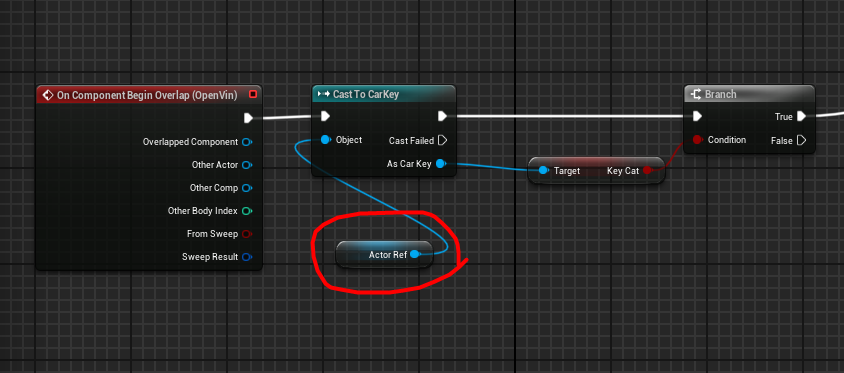
This value
weary hearth
@dull flame is Actor Ref compatible with Object? I think another cast is needed.
autumn pulsar
weary hearth
<@237277692557262848> is Actor Ref compatible with Object? I think another cast ...
probably just a variable name
dull flame
its a variable yes
autumn pulsar
You can use the "Is Valid" function to make sure you have a valid object
which is good practice especially if you're checking variables that don't have a default valid object
But I'm assuming the player picks up car keys at some point
so you can probably have it when you pick up the car keys it sets this variable to itself
But you might create a car key inventory object
 autumn pulsar
Is this when you pick up a car key object?
dull flame
Yes
dull flame
Lol i think i mispelled my blueprint name and never changed it its suppose to say cat key
autumn pulsar

dull flame
basically i just want to have this key be picked up and be able to be used to open a door if the key has been picked up on overlap with the player
it sets the value to true properly
autumn pulsar
The easiest way to do it, but not the best way, is to have the keyobject generate an overlap event with the player, and when it does, it finds the player that touches it and sets the "Cat Key" Bool to true
Then if you want the player to open a door, you can either use a trace or an overlap event
dull flame
So the player holds the boolean instead of the key?
dark drum
dull flame
So the player holds the boolean instead of the key?
As stuffy said, that's usually best. When an actor is destroyed so is all it's data. Data such as collectables are normally best stored in places that aren't likely to be destroyed such as the player character or maybe even the player controller.
autumn pulsar
Another approach would be you create an inventory array on the player, and create the key as an inventory object instead of a variable
Are you familiar with Blueprint interfaces?
dull flame
I am a little familar
autumn pulsar

You can add an interface to the player with a "Add item to inventory" function and make the key object call it on the player before destroying itself
Or if you want a more simple approach, you can create a "Add Car Key" function instead that only sets the car key bool
or if you want to be really direct
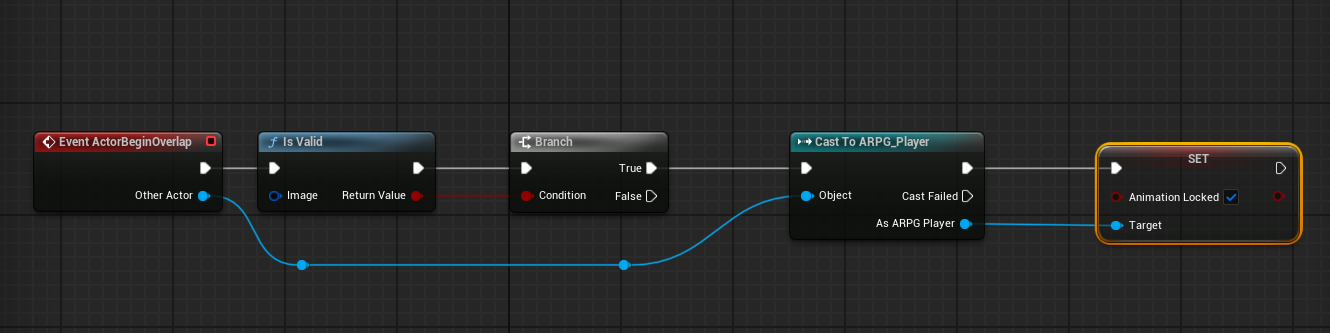 dull flame
For now I think I'm going to use the boolean setting, because this project is currently for a school project. But once I reach my requirements for the project Im gonna go back and use the interface system so I can understand it better. I got it working using the boolean set up! thank you very much
autumn pulsar
Keep in mind the latter half is a bit dirty
for example if a rogue actor touches the key it would also delete itself
dull flame
I have a tag on my player for checking if the overlap is the right type of collider
autumn pulsar
There you go
dull flame
Thank u very much for your help I'll make sure to come back to interfaces later to clean it up
🫡
autumn pulsar
A TL;DR, Interfaces are basically just a list of functions an object is garuanteed to have
So say you have a "Damage" interface with "On Damage" If you want to damage an object you can see if the object implements that interface and then run the on damage function on it as it's guaranteed* to have an implementation of it
(it's up to you to make sure everything DOES have an implementation lol)
dark drum
dull flame
Thank u very much for your help I'll make sure to come back to interfaces later ...
To be honest inventories are best done using an actor component. This allows you to give inventories to other things if required without having to re-implement multiple interface events. Get component by class is very powerful, you've just got to remember to check if it's valid. (as in it found the component before you do anything)
Interfaces are often over used and for the wrong sorts of things. Interfaces are for when you have two different classes that don't share a common parent but need to have/use the same functions. Unless you're working on some sort of plugin or some rare edge cases there's normally a better option than interfaces for most things.
autumn pulsar
dark drum
To be honest inventories are best done using an actor component. This allows you...
There's a lot of different approaches to the same thing. A lot of it is down to the scope of what you're making and preferred workflow
inheritance is fine and dandy, but can quickly become a mess
Like, if a player has a fixed inventory, might be better off just setting bools on the player
but if you've got 1000s of items, then you need a more robust solution
dark drum
autumn pulsar
inheritance is fine and dandy, but can quickly become a mess
Whilst I agree that are different approaches, an inventory system using interfaces very quickly becomes a mess, especially when you decide you want to have something else be an inventory.
Components are great because they allow you to reuse logic and improve consistency. The thought of having to go through and update 20 actors so the interface events function the same just sends shudders down my spine.
autumn pulsar
Ah, I'm rereading what you said, and having a dedicated "bag holder" component is a solid idea
autumn pulsar
dark drum
Whilst I agree that are different approaches, an inventory system using interfac...
Yeah that makes sense
I guess in a sense it's basically like an interface, but has consistent logic between all components
interfaces being when you want different actors to handle the same input differently
like a slide door vs a rotating door
dark drum
autumn pulsar
I guess in a sense it's basically like an interface, but has consistent logic be...
Yea, i believe C++ interfaces can have a default implementation but we don't get that in BP. If someone is using C++ interfaces they might be able to have it work pretty well.
remote meteor
in that example, i would suggest having a DoorBase instead
dark drum
Actor components and event dispatchers. God Tier.
remote meteor
on top of my head, i currently see less usage of interface except for an Interact Interface maybe
autumn pulsar
remote meteor
in that example, i would suggest having a `DoorBase` instead
I agree was just a basic example
Better would be having an action command picks up a rock vs talks to an npc
or a button make an object do something
dark drum
remote meteor
on top of my head, i currently see less usage of interface except for an `Intera...
I use actor components and event dispatchers for my interaction systems. Works a treat.
autumn pulsar
remote meteor
yeah "interact"
I'm a slow typer
Still currently trying to learn a lot of stuff myself
dark drum
an Interface interact is good for a really basic interact but the moment you want a move to or some sort of interaction animation or other things, actor components tend to be better as you don't have to repeat yourself 600 times. lol.
autumn pulsar
Yeah that makes sense
dark drum
I can't actually remember the last time I created an interface haha.
I think it was for same save stuff so an actor component could get data from its owner.
autumn pulsar
I think I need to make a test game just to learn what shit actually does
dark drum
autumn pulsar
I think I need to make a test game just to learn what shit actually does
There's a wonderful series on YT called 'Stop Repeating Yourself' you should check it out. It's not my video or anything. 😛
autumn pulsar
link?
remote meteor
Same Feature, Same Functionality = ActorComponent/Inheritance
Same Feature, Different Functionality = Interface
i think of it that way
odd compass
autumn pulsar
link?

In this video, I take a fresh dive into actor components, exploring practical, hands-on examples that show how to create powerful, reusable logic. But that’s not all—get ready for an exciting bonus as I unravel the flexibility of uobjects and how they can supercharge your projects!
So, grab your favorite snack, sit back, and let’s dive in!
Wan...
autumn pulsar
awesome, thanks
dark drum
remote meteor
Same Feature, Same Functionality = ActorComponent/Inheritance
Same Feature, Diff...
Same Feature Different functionality could also be AC and Event Dispatchers. There's other options as well such as using uobjects for complete modularity and reusability.
autumn pulsar
I think I also need to do a writeup for all my stuff
and what basic functionality I want
remote meteor
well if the AC need to process something before calling the dispatcher, that process would be the same functionality
if the AC does nothing by itself, might as well use an interface
dark drum
remote meteor
well if the AC need to process something before calling the dispatcher, that pro...
Definitely yea.
remote meteor
object, most of the time i only have to use it for one reason, i need to instance some delegate
else, component + struct is mostly enough
dark drum
Im to indecisive though so I might not think it'll do anything else but then change my mind lol. I tend to just use an AC for when I inevitably want to add something new so I don't have to swap out all the interface events.
dark drum
remote meteor
object, most of the time i only have to use it for one reason, i need to instanc...
I use uobjects so much.
Like little biscuits of swappable logic you can throw around haha.
remote meteor
technically GameplayAbilties are UObjects so perhaps i still use them alot
dark drum
remote meteor
technically GameplayAbilties are UObjects so perhaps i still use them alot
Yea, learning a bit about GAS is what made me fall in love with uObjects. I don't use GAS but the concept of having a uobject with a simple run function that you can set logic up and then swap around at runtime was an eye opener for me.
Does anyone have any idea why my 'OnMouseUp' event in a widget suddenly requires a double click?
 remote meteor
is MouseDown fired on the first click?
dark drum
remote meteor
is MouseDown fired on the first click?
good question, one sec.
remote meteor
Up events requires Down event to happen first
dark drum
remote meteor
Up events requires Down event to happen first
Yea, the down event triggers.
Hmmm not a focus issue either. 🤔
remote meteor
Handled on MouseDown?
dark drum
remote meteor
Handled on MouseDown?
Bingo that was is. It makes me wonder if because it wasn't being handled, the scroll box was consuming the down event preventing the up event.
 dusky geyser
i got a problem so im trying to make a wave spawning mechanic for a shooter im working on and i have a timer running on event tick that when the timers target time has been reached fires off some code to spawn in enemies
i found from print debugs it fires off the loop more then it should the index returning more then one number (about 3 times)


i tried using the do once and adding delays in there but it didnt fix it
dark drum
dusky geyser
i got a problem so im trying to make a wave spawning mechanic for a shooter im w...
index 0 is still a loop. So if you want exactly 20 enemies the last index would need to be 19. You probally just need to subtract 1 from the number of enemies you want to spawn.
dusky geyser
dark drum
index 0 is still a loop. So if you want exactly 20 enemies the last index would ...
yeah the issue is its spawning more then just 1 enemy its like spawning double for some reason
ive only got it incrementing by 2 each pass and for some reason it jumps to a lot of enemies
il see if i can grab a quick screenshot
 dark drum
dusky geyser
ive only got it incrementing by 2 each pass and for some reason it jumps to a lo...
dark drum
dusky geyser
ive only got it incrementing by 2 each pass and for some reason it jumps to a lo...
I can't see all the logic. Condense more of it into a single image where possible removing empty space.
dusky geyser
dark drum
I can't see all the logic. Condense more of it into a single image where possibl...
sure il send the timer first where its calling the enemy spawn event i only sent half
thats everything running in the widget (where the enemy spawn event is being called)
heres everything in the enemy spawner (red being the event being called)

sorry i just managed to condense the logic a bit more
the timer where the event above is being called
 dark drum
dusky geyser
the timer where the event above is being called
dark drum
dusky geyser
the timer where the event above is being called
That delay on tick isn't doing what you think it's doing. As lAska said, use an actual timer. You can store the timer handle in a var as well which will allow you to pause or stop altogether if needed. Plus it has a looping option.
remote meteor
i know what you are trying to do, but first up to remove confusion, change to Timer method for the behavior first
dusky geyser
remote meteor
i know what you are trying to do, but first up to remove confusion, change to Ti...
like this?

il look more into it to get some understanding about it
dark drum
dusky geyser
like this?
Something like this.
On begin play start a timer. Every 12 seconds, it'll call the event. The timer handle is stored so we can stop or pause it if we need to later.
 dusky geyser
ohh i see
that simplifies my code by a lot lmao now i dont have to have it running in a widget and can have it running in the actual spawner itself
yep it all works now thanks!
i spent years of existance trying to debug this (2 days)
 frail grail
I read that I have to use quaternions to avoid gimbal lock. So I convert the rotator made by normal to a quaternion, and then I'm stuck to know how to make that debug draw to face where the character rotates while the Y and Z would follow the slope. How do I do it? Previously I was able to do it by flipping the z-axis of the socket, but now I have a quaternion, and I don't know what to do.
 dark drum
Epic... Why you do this? lol.
 gentle urchin
dark drum
Epic... Why you do this? lol.
gentle urchin
dark drum
Epic... Why you do this? lol.
😂 they realized their mistake and forgot to update the legacy code
dark drum
gentle urchin
😂 they realized their mistake and forgot to update the legacy code
Most likely lol. I can't say anything. I'm probably just as bad. 😅
gentle urchin
My tiles in my grid game has changed tile numeration 4 times lol
Probably some old functioms using earlier versions still
dark drum
gentle urchin
Probably some old functioms using earlier versions still
Lets call them easter eggs. 😄
gentle urchin
Happy huntin' 😂
 lost hemlock
Hi @gentle urchin So I got more clues as to where my problem could be coming from. As soon as the game starts my AC_Crafting "All Craftable Items" name array contains 2 things by default. But they are not getting displayed properly because somewhere in that process the communication of data is lost. How should I pass this data?

 dawn gazelle
lost hemlock
Hi <@231467939734355969> So I got more clues as to where my problem could be com...
dawn gazelle
lost hemlock
Hi <@231467939734355969> So I got more clues as to where my problem could be com...
You need to trace from where its coming in and figure out where you need it to go, and verify what may be manipulating that array along the way to where its going, all while making sure it's the right sequence of events to get your desired result.
twin shale
twin shale
Anyone know why I can't get actors that are inside a data layer that is loaded a...
...Welp...After a lot of trial an error I discovered that if you place an actor inside of a Data Layer and load/unload it at runtime WILL NOT fire any of their BeginPlay/Endplay/Components/Detect collision/etc unless you restart the editor after adding an actor into a data layer. I'm assuming this is some kind of bug because I remember doing this in the past, but the actors do not seem to actually be fully present in the world when you add them to a data layer without restarting the editor. There might be other ways to work around this issue, but this is one solution. Using Unreal 5.5.1 at the moment. I just wasted a lot of time figuring out what the actual problem was.
 rugged sonnet
How do I bind my level variant manager to my BP_Cube? Manually I just right lick on the level variant manager were it says BP_Cube and re-bind and point to BP_Cube but how to do the same in blueprints?
 maiden wadi
dark drum
Epic... Why you do this? lol.
maiden wadi
dark drum
Epic... Why you do this? lol.
Technically right, technically wrong. The Viewport stuff for whatever reason does this in the idea of pixels. Which kind of makes sense, but will also break any sort of interpolation stuff.
dark drum
maiden wadi
Technically right, technically wrong. The Viewport stuff for whatever reason doe...
I mentioned it on bsky and Ari said it actually fetches an integer and then converts to a float and pointed to it being legacy code lol.
spark steppe
sometimes i wonder why they don't get rid of those things
i think for BP they figured out to automatic remove type casts if they aren't necessary anymore
and for C++ i think they could deal with the fact that devs get a few build errors and have to change their code from float to int (for the getter)
 thin quiver
I'm making a Wall Generator using dynamic mesh and append buffers to mesh.
how do i do the normals?
there needs to be the same amount as vertices and I believe the normals are supposed to be the direction of the said vertices?
I got the direction but The lighting is weird and I'm not really sure what im doing.
lost hemlock
dawn gazelle
You need to trace from where its coming in and figure out where you need it to g...
I know where its coming from now but idk how to make sure this data is being passed properly
maiden wadi
dark drum
I mentioned it on bsky and Ari said it actually fetches an integer and then conv...
Yeah, cause PlayerController is a derpy idiot that goes through viewport code. Real mouse handling is through FSlateApplication. Which if you look at Viewport stuff, it calls back into SlateApplication and converts the integers it uses back to floats.
In the end it should all be floats. But FSceneViewport is a derp.
I'm not even sure why Playercontroller does that. Would be much simpler and faster if it just simply managed it's shit through FSlateApplication.
 worldly bramble
Can someone explain me how collision enabled setting all options work (no collision, physics only, query only, collision enabled, probe only, probe and query). I mean howeach option affects to collision, physics and their simulation, traces, world. And does the character class affect it in any different way?
 tough fern
Hi, im making a first person game for university, and i need to have a pickable flower in the scene. Once i pick up flower with E when in range, i would like it to** dissappear**, and sequencer to play (picking up flower should trigger ending cinematic)
Right now I tried to only hide the flower, but it doesn't work ): Widget showing up on screen works tho. Any help would be greatly appreciated, thank you 😄
 worldly bramble
tough fern
Hi, im making a first person game for university, and i need to have a **pickabl...
worldly bramble
tough fern
Hi, im making a first person game for university, and i need to have a **pickabl...
A możesz wziąć kwiatka?
Bo ta interakcja powinna być w blueprincie Twojego gracza
Bo nie zadziała inaczej
Możesz w blueprincie gracza to dać, ale musisz zmienić troszkę.
Wstaw to wszystko, ale w blueprincie gracz
a
tough fern
jestem nobkiem zupelnym jak o blueprinty chodzi, tylko gdzies z tutoriala to wzialem i srednio dziala haha
worldly bramble
tylko wtedy zrób może casting do blueprinta kwiatka
tough fern
worldly bramble
A możesz wziąć kwiatka?
ja chce zeby on tylko zniknal, nie zeby sie go faktycznie podnosilo
worldly bramble
no właśnie
 silent shuttle
Hey all. I'm trying to make two pods on the front of my ship turn ever so slightly in response to overall ship movement (I'm evoking SW EP1: Racer as a learning project.) At some point in creating this, I got completely lost.
I know there has to be a better way of doing this (that actually works, lol) but I'm way too inexperienced to know how badly I've messed it all up.
Could anyone give me some pointers/direct me to some learning materials?
Thank you.
 worldly bramble
tough fern
ja chce zeby on tylko zniknal, nie zeby sie go faktycznie podnosilo
worldly bramble
tough fern
ja chce zeby on tylko zniknal, nie zeby sie go faktycznie podnosilo
takie coś zrób w blueprincie gracza

a tamto w tamtym blueprincie usuń
lost hemlock
Data isn't passed properly between my two blueprints
 maiden wadi
lost hemlock
Data isn't passed properly between my two blueprints
maiden wadi
lost hemlock
Data isn't passed properly between my two blueprints
Breakpoint on the Set node after the event. BP debugger breaks before the function is "called", so it has no valid populated arguments until the next executed node is ran.
lost hemlock
maiden wadi
Breakpoint on the Set node after the event. BP debugger breaks before the functi...

 dawn gazelle
lost hemlock
Data isn't passed properly between my two blueprints
dawn gazelle
lost hemlock
Data isn't passed properly between my two blueprints
How do these two things even relate? There's nothing within the "Calculate Unlocked Items" screenshot that calls "Update All Crafting Slots" --- How does this event end up being called and how does it get the array?
 faint pasture
stop thinking in roll pitch and yaw
if you need to do fancy rotation stuff think in vectors and cross products and rotation delta/combine
The one thing that doesn't change in your scenario is the characters rotation.
So the rotation of the foot scene is such that its up is the surface normal, and its right is the characters right
those 2 vectors are enough to define a rotation
MakeRotFromYZ(Character.Right, SurfaceNormal)
lost hemlock
dawn gazelle
How do these two things even relate? There's nothing within the "Calculate Unlo...
 maiden wadi
I am so baffled by enhanced input's ToWorldSpace modifier. I have a vector that outputs at 1x0y... Add a ToWorldSpace modifier, and it changes to 0x1y.... My pawn, and camera are both facing 1x0y...
lost hemlock
dawn gazelle
How do these two things even relate? There's nothing within the "Calculate Unlo...
 lost hemlock
dawn gazelle
How do these two things even relate? There's nothing within the "Calculate Unlo...
lost hemlock
dawn gazelle
How do these two things even relate? There's nothing within the "Calculate Unlo...
I think it doesn't get the array but I need to find a good way to pass it.
lost hemlock
dawn gazelle
How do these two things even relate? There's nothing within the "Calculate Unlo...
Actually I think this is where it should get it from

but we removed the interface event because you told me to and then I wasn't sure what you told me to replace it with, i was so confused since I dont understand much about event dispatchers but you told me its a good idea to use an event dispatcher there, right?
And that event dispatcher you told me to use was supposed to communicate with this button slot, but I was confused because there are no buttons or slots in the first place, so that was very confusing. It’s kinda like frantically trying to patch a leak in a boat that hasnt even been built yet, while ignoring the fact that the shipyard is on fire..
 dawn gazelle
lost hemlock
Actually I think this is where it should get it from
dawn gazelle
lost hemlock
Actually I think this is where it should get it from
#blueprint message #blueprint message
You have to bind the event dispatchers within WB_CraftingMenu to then call this code here.
lost hemlock
dawn gazelle
https://discord.com/channels/187217643009212416/221798862938046464/1318825821942...
yes but I want individual buttons
dawn gazelle
When you construct the individual buttons or whatever it is you want to do, then you have to bind them in order to call that bit of function
lost hemlock
dawn gazelle
When you construct the individual buttons or whatever it is you want to do, then...

@dawn gazelle so this bind should also replace all of these things here?
 lost hemlock
<@218956378654507008> so this bind should also replace all of these things here?
lost hemlock
lost hemlock
<@218956378654507008> so this bind should also replace all of these things here?
Oh wait nevermind I think that one is totally not related
silent shuttle
silent shuttle
Hey all. I'm trying to make two pods on the front of my ship turn ever so slight...
Updated mess. Same problems, lol.

 mortal coral
This ended up requiring some hoops to jump through but ultimately it worked.
Not easy to set a breakpoint that was sufficiently conditional to only fire when i needed it, in this case
If I have an instanced static mesh with a bunch of individual foliage meshes, how would i go about deleting some of those meshes based on a collision check?
In general my understanding of how to work with instanced meshes is poor
 fossil patio
I created this function to select a random footstep sound but never repeat the last entry. For some reason though, even with only 2 sounds, it's still repeating previous entries, is there something wrong with my logic?
 mortal coral
fossil patio
I created this function to select a random footstep sound but never repeat the l...
mortal coral
fossil patio
I created this function to select a random footstep sound but never repeat the l...
Your loop doesn't go back in time far enough to regenerate the random value. Or maybe it does? In general, the behavior of this working but sometimes repeating values is extremely odd
In fact, I'm confused as to why this isn't an infinite loop
dawn gazelle
silent shuttle
Updated mess. Same problems, lol.
These types of nodes with the white arrow pins require you to connect those white pins up to execution paths otherwise they don't execute. What event you'd want to connect it to is probably whatever event you're pulling the green wires from off the screen from.
 fossil patio
mortal coral
~~Your loop doesn't go back in time far enough to regenerate the random value.~~...
fossil patio
mortal coral
~~Your loop doesn't go back in time far enough to regenerate the random value.~~...
it would be without the empty branch
dawn gazelle
fossil patio
I created this function to select a random footstep sound but never repeat the l...
Each pull from a pure node to a different execution node is recalculated.
So here... You'd end up pulling two different values.
 fossil patio
dawn gazelle
Each pull from a pure node to a different execution node is recalculated.
fossil patio
dawn gazelle
Each pull from a pure node to a different execution node is recalculated.
oh, so the set pin is what's doing it? that makes sense
this is inside of an animation notify BP, if i create a variable in here will it retain the set values?
dawn gazelle
Don't think so
fossil patio
hm ok, thank you for the help. im pretty sure i know how to fix this now
silent shuttle
dawn gazelle
These types of nodes with the white arrow pins require you to connect those whit...
Hmm, I think I'm seeing the issue. (I'm pulling the delta seconds from tick off screen). I suppose this means I should create new actors for the cubes as opposed to just building them 'inside' of the main ship blueprint? And then redirect these endpoints to those new actors? (I don't know if I'm using the most precise terms, I'm sorry.)
Like the pods should be seperated from this instance?
 fossil patio
dawn gazelle
So here... You'd end up pulling two different values.
fossil patio
dawn gazelle
So here... You'd end up pulling two different values.
Fixed! Works like a charm, thanks a ton!
 dawn gazelle
silent shuttle
Like the pods should be seperated from this instance?
dawn gazelle
silent shuttle
Like the pods should be seperated from this instance?
Not necessarily, but your event tick should probably be attached into the two nodes I highlighted earlier.
silent shuttle
I'm unsure if this is what you intended:

Everything to the right of this controls the main ship, I'm trying to get these two actor to have an over-exaggerated turn to give an appearance of independence.
dawn gazelle
You need to connect the output > from Event tick to the input > of one of those nodes, then connect its output > to the input > of the other node. Then you can have that output > go to whatever else you need executing on tick.
 silent shuttle
Yes! Thank you so much!
lost hemlock
@dawn gazelle I cant connect this Crafting Ref to self. It looks like It cant be the same thing, right?
 dawn gazelle
You don't need to.
The event dispatcher is calling on self.
You'd be binding to it within your WB_CraftingMenu.
This whole problem came about, beause "Crafting Ref" isn't set anywhere. It has no value.
You couldn't call your interface because of that.
With an event dispatcher, you dont' need it. This WB_CraftingSlot will trigger an event dispatcher and you can have the WB_CraftingMenu listen for when that dispatcher is called.
lost hemlock
dawn gazelle
With an event dispatcher, you dont' need it. This WB_CraftingSlot will trigger ...
And then the other thing is you said I also need to replace this with a mouse click?

But this blueprint is not made to handle the slot clicks, because there are none
 dawn gazelle
lost hemlock
And then the other thing is you said I also need to replace this with a mouse cl...
dawn gazelle
lost hemlock
And then the other thing is you said I also need to replace this with a mouse cl...
No, that will be what you would you bind the event dispatcher to call.
lost hemlock
It’s like going to the living room to fix a leaky faucet in the kitchen
dawn gazelle
No... It's like sitting in the living room and waiting to listen for the faucet to start leaking.
lost hemlock
dawn gazelle
No... It's like sitting in the living room and waiting to listen for the faucet ...
oh ok I get it now
but how can I create an event to communicate with that one?
dawn gazelle
I keep repeating myself.
You either have to do something like this to bind the events (it doesnt have to look exactly like this, the important bit is having a reference to the button you care about and calling the Bind Event To... nodes and calling them when you need them called) #blueprint message
OR...
You have to select the button within the WB_CraftingMenu and bind to its dispatcher like so: #blueprint message
 bronze mirage
anybody here use construction scripts in a world partition level? having an issue where world partition is constantly loading/unloading actors causing their construction scripts to fire, which flags the asset as 'unsaved', which is a pain in the ass on a large team working in source control. wondering if there's a workaround or if we should just avoid using construction scripts...
lost hemlock
But this not really showing how to call this bind from another blueprint
dawn gazelle
You are not calling the bind from another blueprint.
You are binding to the event dispatcher in another blueprint.
lost hemlock
dawn gazelle
You are not calling the bind from another blueprint.

This bind exists on WB_CraftingSlot
dawn gazelle
That is calling the event dispatcher. That is correct.
Now you want your WB_CraftingMenu to listen to when that is called.
and you do that within WB_CraftingMenu.
 normal raft
any one got a elgant solution to print the variable name/type of what ever trigger the hit event?
lost hemlock
dawn gazelle
and you do that within WB_CraftingMenu.

But im trynna bind it through here, not through this way you showed
normal raft
or just for a line trace to act as what your looking at
dawn gazelle
You need to bind it to either:
A) Bind it on construct of the WB_CraftingMenu widget, using a refernece to the WB_CraftingSlot widget you wish to bind to (assuming you've placed them manually in WB_CraftingMenu)
OR
B) Bind it on the construct of one of your WB_CraftingSlot widgets when you're constructing them within WB_CraftingSlot so you have a proper reference to use when it gets constructed. (Assuming you're spawning them dynamically within WB_CraftingMenu)
lost hemlock
lost hemlock
can you just give me the easiest solution that is easier to implement and understand, how can i make an event and what event do i need to create there? This block of code seems to be handling the Name Arrays for the slots, so it looks like without this I would never be able to have slots
dawn gazelle
The easiest solution would be for you to watch that video I sent you yesterday.
You're missing fundamentals.
You have references to WB_CraftingSlot. You can bind to event dispatchers that exist within them.
You can bind to them wheneer you wish.
You can have the event bound do whatever logic you want.
Unforutnately, I don't understand your full setup, and I don't know if you're generating WB_CraftingSlot or placing them... If you're placing them manually, you can do exaclty what I showed in this earlier image.

That red event at the bottom is what you'd end up connecting up to your logic.
Ok.. So when generating them, you just need to do something like this:

Again the red event would be the thing that can call the next set of logic.
lost hemlock
dawn gazelle
Again the red event would be the thing that can call the next set of logic.
This is the one doing the generating

And this is the function making the phone call to the mr. generator function

It's a function inside of function inside of function inception
but essentially thats where the slot widgets are created
dawn gazelle
lost hemlock
This is the one doing the generating
Ok, because this is in a function, you can use a "Create Event" node.
 lost hemlock
yes but do I need to do that in the event graph or in this function?
dawn gazelle
If you click the drop down, there will be an option to "Create a matching event" and that'll give you the appropriate event you need to connect to the rest of your logic.
You do the binding wherever you are creating the widget.
lost hemlock
yeah i know, but the bind will come after the widget creation I guess
okay
gotcha
autumn pulsar
For things like a User interface for my player, is it better to just directly access the variables of the pawn, or use a getter function?
lost hemlock
dawn gazelle
If you click the drop down, there will be an option to "Create a matching event"...
But I cant find this thing being called inside of my function
 dawn gazelle
autumn pulsar
For things like a User interface for my player, is it better to just directly ac...
dawn gazelle
autumn pulsar
For things like a User interface for my player, is it better to just directly ac...
Depends if you ever want to have some kind of calculations involved later on. If you use a getter at least if you do decide later to modify things then you won't have to rework how the UI retrieves the info
dawn gazelle
lost hemlock
But I cant find this thing being called inside of my function
You don't do it there. You create the bind where you create the widget.
Oh sorry I see...
You need to drag off from the Return Value of Create Widget node then you can bind to it.
 lost hemlock
dawn gazelle
lost hemlock
dawn gazelle
should I just make a random event and attach to it?

anything will work right?
dawn gazelle
No, drag off from the event pin and do a "Create Event"

That'll give you a little green node attached to it. In that, you can click the drop down and select "Create a matching event" and that'll give you the correct event with parameters... You just need to put it where you need it and hook it up.
You can rename it and move it, just make sure that the bind's create event still lists it as the event to use.
lost hemlock
dawn gazelle
You can rename it and move it, just make sure that the bind's create event still...
I guess now I can use this interface?
 dawn gazelle
No. Don't use the interface.
autumn pulsar
Bit of a question about paradigms, but is making a bunch of small functions really a good idea? for example if I'm adding a key to my inventory, is it really worth making a key add function
I guess it does make things more straightforward if I change things down the line
like if I store it differently
dawn gazelle
Again depends on if you may want more things to happen whenever a key is collected... Having a function to do it means later on if you need to adjust it, you only need to adjust that function rather than in any other places that may end up adding a key.
frosty heron
@autumn pulsar don't repeat your self
autumn pulsar
frosty heron
<@151046841830473728> don't repeat your self
?
frosty heron
autumn pulsar
?
That's the concept when deciding Wether to put things as a function or not
autumn pulsar
ah gotcha
frosty heron
If you are in a position where you repeat the same code, then that's when you know you should turn it into a function.
lost hemlock
dawn gazelle
No. Don't use the interface.
I guess I'll copy paste the entire thing from the event graph into a function like this then


And I also linked that function to the bind event
dawn gazelle
Congrats. Any of those WB_CraftingSlots should now call that function when you click their button.
lost hemlock
dawn gazelle
Congrats. Any of those WB_CraftingSlots should now call that function when you ...
But they're still not appearing , lol
 dawn gazelle
Well again.. I was going after the wrong problem as the issue wasn't really communicated right.... You need to fix those category buttons too so that they properly retrieve whatever it is when you click them.
So these clicks here I believe they were?

You need to re-retrieve whatever is supposed to be displayed.
lost hemlock
dawn gazelle
You need to re-retrieve whatever is supposed to be displayed.
retrieve in what way?
dawn gazelle
Whatever values you need for your Craftable Items array and the data table to use. That click needs to reset those values I imagine.
lost hemlock
autumn pulsar
Is the HUD object created when a game starts?
no that's not a hud, it's a crafting menu
dawn gazelle
autumn pulsar
Is the HUD object created when a game starts?
HUD is created by the PlayerController in APlayerController::PostInitializeComponents(), but only if it is locally controlled.
lost hemlock
dawn gazelle
Whatever values you need for your Craftable Items array and the data table to us...
yes but the default is armor for some reason, instead it should be "Unlockables"


 lost hemlock
dawn gazelle
Whatever values you need for your Craftable Items array and the data table to us...
lost hemlock
dawn gazelle
Whatever values you need for your Craftable Items array and the data table to us...
yes but I dont see anything wrong
all of these functions just lead back to the bind event
Which is now a function. (Not an event)
 autumn pulsar
dawn gazelle
HUD is created by the PlayerController in APlayerController::PostInitializeCompo...
autumn pulsar
dawn gazelle
HUD is created by the PlayerController in APlayerController::PostInitializeCompo...
is it by default bound to a player? I'm trying to figure out the best way to link it so I can update relevant data
I guess just use the getplayercharacter function?
dawn gazelle
autumn pulsar
is it by default bound to a player? I'm trying to figure out the best way to lin...
Yes, the player controller creates its own hud. Each player controller in a local multiplayer game would have their own HUD object for example. Within the HUD you have "Get Owning Player" and within widgets you have Get Owning Player and Get Owning Player Pawn. When contructing a widget you declare which player controller is the owner, but this again is mainly for local multiplayer, not online.
autumn pulsar
does the HUD object tick every frame? Wondering if it's a good idea to add an update HUD so it's not constantly polling values that aren't going to change unless something happens
dawn gazelle
I think you can make it do so... You're usually better off doing event driven UI rather than polling values so you can avoid using tick.
autumn pulsar
Yeah that's what I was thinking
Sorry for asking so many questions. https://i.imgur.com/4P5RFAO.png I have this get text function in the blueprint, wasn't sure how to properly call it so it can update the value accordingly
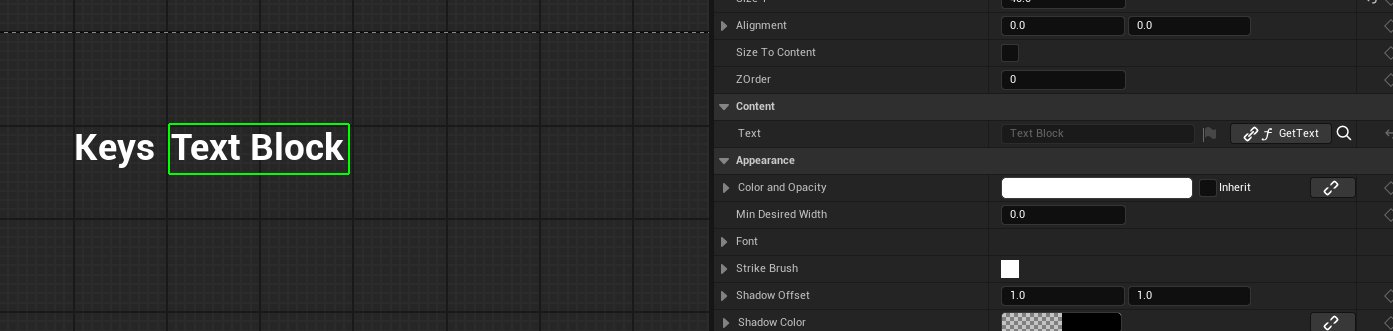 dawn gazelle
autumn pulsar
Sorry for asking so many questions. https://i.imgur.com/4P5RFAO.png I have this ...
dawn gazelle
autumn pulsar
Sorry for asking so many questions. https://i.imgur.com/4P5RFAO.png I have this ...
Those are polling functions that are executed automatically every frame to retrieve the value based on what is set up in the function.
If you wanted to design something event driven, then you'd probably want to use some event dispatchers in the relevant actors or components and have your widgets bind to those dispatchers on their construction to then update whatever fields you want updated with the appropriate value and ditch these function bindings entirely.
The function bindings are good for testing things out and quick iteration though
 proven loom
i wanna plug in an int here. can i create a constant int in blueprint?
 dawn gazelle
proven loom
i wanna plug in an int here. can i create a constant int in blueprint?
dawn gazelle
proven loom
i wanna plug in an int here. can i create a constant int in blueprint?
If you right click the pin you can use the "Convert to Int" and it'll let you input an integer.
proven loom
ty!
normal raft
i dont need to reset that right?

because rockspawn1 is spawned else where damagecount should be unique?
dawn gazelle
normal raft
i dont need to reset that right?
Each spawned RockSpawn1 would have its own values.
normal raft
tnx
dosnt fully help but i think if i use less fracture on my geometry it should be ok
kind of haps got that chaos stuff works a hell of allot better using when using physical materials
man sleep will now commense


 compact fable
Does anyone have some good tutorials on how to get started with a basic dialogue system? Nothing special, no multiple choice stuff
dawn gazelle
lost hemlock
Keep going backwards. Trace why the array being passed around is empty.
lost hemlock
dawn gazelle
Keep going backwards. Trace why the array being passed around is empty.

This was empty before and I created this variable... This entire crafting button event was at first on the controller blueprint, but I moved it on the AC_Crafting for reasons.

So thats pretty much when you press the button to create this crafting menu


dawn gazelle
lost hemlock
If you put a breakpoint on the "Update All Crafting Slots" node here and look at what the array has, what's it have?
 gentle urchin
Damn, you deserve a patient contributor award Datura 😅 Golden standard right there
lost hemlock
dawn gazelle
If you put a breakpoint on the "Update All Crafting Slots" node here and look at...

I guess I'll just remove the validated get 
and make it simple get
dawn gazelle
"Accessed: None" incoming.
lost hemlock
or I'll connect both outputs
dawn gazelle
Orrrrr you can figure out why it's invalid.... Like maybe it's not being set?
lost hemlock
Why is it not though?
dawn gazelle
Are you calling a "Set" of that variable anywhere?


 dawn gazelle
lost hemlock
Why is it not though?
dawn gazelle
lost hemlock
Why is it not though?
Object reference variables - the blue ones - can hold a reference to an instance of an object. Setting the "Type" of the variable to "Character Movement Component" doesn't mean that the reference is set, you're just defining what that variable can hold - it's no different than saying a variable is an integer or a bool - you define the type but you also need to set the values. So if you create a blue variable but don't have a "Set" anywhere that populates it, then it'll almost always be empty, unless you are able to set a default value which you usually cannot for most objects that would be spawned at runtime and don't exist at editor time.
For example, if you have a Texture2D variable, it'll be blue, and it'll let you set a default value as it's looking for an asset reference, which exists at editor time. If you have an "Actor" variable, you can't populate it in the editor with anything until runtime.
gentle urchin
Appreciate Daturas incredible patience is what id do 😅
They're basically containers for something that can link to an instantieted asset
They're empty by default, and most of them (except assets) needs to be filled in at runtime
lost hemlock
dawn gazelle
Object reference variables - the blue ones - can hold a reference _to an instanc...
thats why I initially had it on the first person character blueprint
lost hemlock
dawn gazelle
Object reference variables - the blue ones - can hold a reference _to an instanc...
thanks !!!
lost hemlock
dawn gazelle
Object reference variables - the blue ones - can hold a reference _to an instanc...
So in conclusion, blue variables are like empty coffee cups? you define what kind of coffee they can hold, but until you pour something in (usually at runtime), theyre just sad, empty vessels of potential? ☕

 solar badger
Hi devs, making a save system here
need enemy spawners to know when an enemy is dead and spawn them dead on load
my setup works great for the player
but for some reason wont do what i need for these spawners

here is my setup for the actual save. the struct contains some basic info including IsEnemyDead

when an enemy dies they set the variable was killed to true and run the save event
dawn gazelle
lost hemlock
So in conclusion, blue variables are like empty coffee cups? you define what kin...
 solar badger
the spawner gets and uses that save on level start

get


use
any help on this would be greatly appreciated....
its been a bugger and i feel like im missing like a single thing to make this happen right
lost hemlock
solar badger
but for some reason wont do what i need for these spawners
can you post a short video visualization or image of what it's actually supposed to look like when it materializes properly or what its doing rn?
you want to save the location after the zombie is dead?
and its not saving properly?
solar badger
i want to just tell the spawner "this guy has been killed already" so if you quit and return they spawn and then die
that spawn dead part works effectively
the spawn and die thing kills everyone if i just set "spawn info was killed" to true
the only thing not working is the actual save functionality
which again, with the same setup (minus the loop) does work for the player

this loop also prints correctly
if i kill an enemy
it shows that "was killed" is true for that enemy and thus its spawner
if killed > set waskilled to true > save waskilled > on spawn if waskilled is true > kill on spawn
if killed > set waskilled to true (works)
save was killed (seemingly not working)
on spawn if waskilled is true > kill on spawn (works)
 surreal peak
@solar badger how are you mapping the save games back to the spawners when loading?
Did you give them any unique Id or so?
solar badger
this function here gets the spawner for that specific enemy and sets it to was killed

do i need to have some id in the array to save/load them correctly?
solar badger
surreal peak
<@305795664262987780> how are you mapping the save games back to the spawners wh...
could be what im missing
surreal peak
solar badger
do i need to have some id in the array to save/load them correctly?
I mean you are looping all spawners and you add them to the save game array to save them via a struct each
Somewhere you must grab that same (loaded) savegame and use that array to set the state on the spawners again
And there you must have a way to map the savegame array entries to the spawners.
Looping them again with the get all actors function won't guarantee that you get them in the same order iirc
solar badger
Hmmm
That sounds right, but I don’t know exactly what I would do to put that into action
 lost eagle
does anyone know if you can have multiple OSC servers running in one scene
lost hemlock


Something is wrong here with my recipe system 😭
For example I need 0/0 materials to build this axe

and it's red, indicating that I can't afford those materials.
Same for the other slot

and it doesn't matter how much material I collect it will always say some outlandish number
And I also have this (although more irrelevant)


 chrome pumice
guys for some reason since some days i have massive fps drops in editor (max 20 fps) no matter how high or low my graphics are. the project is almost blank and i cant find any solution for this. Anyone had this aswell and knows the solution? My version is 5.4.4
 little prism
Hello, quick one - it really should be simple... I am trying to add border around my image but when I change colour (Brush) of the border it affects tint of the image... It doesn't do it to a text box, just image... any ideas how can I avoid it?
frosty heron
little prism
Hello, quick one - it really should be simple... I am trying to add border aroun...
show pictures of your attempt, also #umg people may know the issue more
 frosty heron
little prism
you can see the image get's tint with no change to "content" brush
frosty heron
little prism
you can see the image get's tint with no change to "content" brush
what content?
like the text?
the tint should only affect the border or the child at best
 hardy elk
Hi can anyone please help me or show me how to blueprint I'm making a super hero game but just testing I just want to have him fly and be invincible heat vision can someone please help me thanks
little prism
frosty heron
what content?
no, there is a border attribute "content color and opacity" - I've not changed that
gentle urchin
I always disliked that with borders
hardy elk
There must be something I can do to figure out what to follow
lost hemlock


Why is the recipe materials stuck on zero?
and why is it always red? Indicating that you can't afford any of these, even though I can pick up stuff, it will still stay stuck at zero
little prism
how do you call Get Text 0?
lost hemlock
little prism
how do you call Get Text 0?
 little prism
so looks like UI "thinks" there is no item in the inventory? I would print to screen to check it
lost hemlock
little prism
so looks like UI "thinks" there is no item in the inventory? I would print to sc...
there are lots of items, for example...
lost hemlock
little prism
so looks like UI "thinks" there is no item in the inventory? I would print to sc...
right now im holding many items into my inventory

Enough to build something
 little prism
lost hemlock
right now im holding many items into my inventory
little prism
lost hemlock
right now im holding many items into my inventory
check if "IsItemInInventory" returns something, maybe you have logic error there
lost hemlock
 little prism
add some break points and step through your code - looks like you compare "Name" to "ID"... I don't know your data model so maybe it's correct but it stands out
 pure jolt
Hello guys, does anyone have experience in multiplayer projects? I have an issue with my project if anyone could hop on a call with me to help me out. Brief description of the issue: Im trying to have AIs fill in the teams if no online players join the session and remove the AI in replace of the online player if joins later on while the game is in progress. I would appreciate your help
lost hemlock
little prism
add some break points and step through your code - looks like you compare "Name"...
I think it should be the same, because F_Slot_Struct contains Name and Integer

and it compares it to the F_Item_Struct which contains it's name as a string

 vagrant remnant
I don't get the blueprint workflow of working with other objects/actors
example: Button that deletes a wall
how can this be achieved?
have the Button and all other Buttons in the player blueprint?
do I have to have the wall as a component in the same actor as the button?
vagrant remnant
is a class a instance?
vagrant remnant
doesn't the method get All actors?
vagrant remnant
gentle urchin
It finds an inatance of a specific class
So I can have
class wall
class button - can access wall
class player - accesses button?
I'm sorry if I Sound stupid but this is very complicated for me
gentle urchin
Check the pin about blueprint communication
Button would be detected by a trace from the player
vagrant remnant
gentle urchin
Check the pin about blueprint communication
oh my bad, thank you :)
frosty heron
Have an actor that manage spawning or deleting the walls or other props.
Have functions inside the manager to delete the walls.
Widget simply get the manager to do it;'s thing.
W_RoomEditor -> B_RoomEditor -> Delete Wall/Walls
gentle urchin
Then button either uses getActorOfClassWithTag or has a hard reference linked in editor to the wall
Or 7 other ways of communicating
vagrant remnant
frosty heron
Have an actor that manage spawning or deleting the walls or other props.
Have fu...
this I understand but what if I want just this single use?
little prism
lost hemlock
but that's FSlotStruct.. I think you're comparing 2 different things
vagrant remnant
gentle urchin
Make sure you tak the actor in the scene
what do you mean by scene here?
frosty heron
the actor in the level/scene
lost hemlock
little prism
but that's FSlotStruct.. I think you're comparing 2 different things
yeah but it's the same thing
vagrant remnant
So just have it in the outliner
frosty heron
lost hemlock
yeah but it's the same thing
string and name is not exactly the same
not saying the = doesn;'t work,. Maybe it does
little prism
well, not really what I can see... FSlotStruct has ID and Quantity - Item struct has more properties... step through code and add some Print Strings to get more insight
vagrant remnant
gentle urchin
Button would be detected by a trace from the player
does the interact logic Happen inside the button class or in the player class?
this is the part I'm most confused with
frosty heron
vagrant remnant
So just have it in the outliner
there's many way to get and pass reference, it's hard to tell which approach is the best without knowing the context of what you are doing.
but knowing blueprint communication helps
lost hemlock
But the problem is this is bringing "No Debug Data. @little prism
 frosty heron
you want to grab the wall in the level. Well did the wall get spawned at some point at run time? Or is it placed it the editor?
Do we want to go with reusability? Are we able to change to different walls? etc etc etc
lost hemlock
It's like waiting through a cold storm-rainy day for the pizza delivery guy, he finally arrives at your doorstep but there is no pizza at the pizza-box
frosty heron
You can set reference when the wall is spawned, or if it's pre-placed in editor, you can use the eye dropper tool.
Or like Squize says, you can also add a tag to the wall and just use get actor of class with tag.
vagrant remnant
thank you very much
I come from roblox studio where you just accessed everything from their outliner 😅
frosty heron
vagrant remnant
I come from roblox studio where you just accessed everything from their outliner...
not always the ideal approach if you want it to be reuseable
you pack them as a class instead, e.g. BP_Door
so you can just drop a BP_Door to the world and have the logic to open and close
that would be better than coding a single door to open / close
gentle urchin
You can expose an instanced variable, and make the connection in-editor
If they both exist as instances at editor time
vagrant remnant
frosty heron
so you can just drop a BP_Door to the world and have the logic to open and close
that's where I just made a script that handles the logic for every instance (door) inside a collection (doors folder)
vagrant remnant
gentle urchin
You can expose an instanced variable, and make the connection in-editor
I think I've tried that before but it didn't work and I got frustrated
gentle urchin
It works once you setup the link
maiden wadi
I got so triggered by this tooltip last night that I had to write an input modifier that does what this tooltip says it does.
 maiden wadi
It swaps X and Y on the vector. :/
It was designed for controllers I think. Cause Controllers manipulate Y for forward X for sides due to 2D vector thought processes. So it changes those to be more oriented with X forward, Y sideways. BUT THAT IS NOT WORLD SPACE
Like. if I'm looking at -1,-1. Which could be considered north west. And I press forward to go towards the control direction 1x,0y in local space... With that thing I start running back and to the right... Cause it just goes 0x,1y which can be considered east. Cause it just swaps X and Y.
So I wrote a version that gets the player's camera manager instead and uses the camera's transform to manipulate control directions with optionally flattening pitch.
gentle urchin
-1,-1 would be SouthWest
On my screen atleast 😅
But that makes sense, setting it relative to camera
Maybe as an optional tickbox on the world direction
Not that i can think of a reasom NOT orienting it to camera but...
maiden wadi
I think in widget space and my world orients that way. 😄 So to me up and left is northwest. Like minimap sorta.
gentle urchin
Its only confusing when its not relative 😅
Up and left is indeed northwest,
But north is + on X axis 😆
maiden wadi
Not on a widget. 😄
normal raft
i was wondering if its possible to bake the smaller geometry collection crumble children into another mesh dynamically??
.. copy original, delete original, bake copy into mesh, delete copy
could just delete copy and original at the end .. but just curious if that is possible because there fairly small bits of mesh children

in the bake step there could be a smoothness / roughness / settle age or some such to make it just look like a load of scattered rocks that are now part of the landscape
this is just from one laser/particle/blast from weapon the GC spawn

they collect them or blast them 1 or 2 times then the rest of the crumble should be lost / deleted/remeshed
normal raft
today i think i am going to try something kind of crazy put GC_METEORITE_BP in the game so it will spawn near the voxel MGT gravity and travel the player spawn point with the multiplier so it kind of near by vector .. not sure if that will work but should create a good meteor debris field if it does
they game will probably break my pc but fuck it lets try
 gritty raptor
hey guys, can someone help me understand why wouldnt my slot update its texture? ( i have inventory system with vertical box wich has horizontal boxes wich have some slot widgets)
 dawn gazelle
gritty raptor
hey guys, can someone help me understand why wouldnt my slot update its texture?...
dawn gazelle
gritty raptor
hey guys, can someone help me understand why wouldnt my slot update its texture?...
Not sure why you're looping here? OnDrop is called on the widget that received the drop operation so you shouldn't need to check the location of each slot widget and you should just be able to use the variables that are present in this current widget (ie. self).
Apart from that, verify if your cast is failing and make sure to return true otherwise I believe this operation will try to find somewhere else to trigger the OnDrop.
gritty raptor
dawn gazelle
Not sure why you're looping here? OnDrop is called on the widget that received ...
I'm still not sure why i wouldnt need to loop through the slots, how can i reference the slot its being dropped into if the drop logic is written in the parent widget of that slot?
dawn gazelle
Ah I see. I still think you'd probably want that programmed in your slot widgets rather than some other container that holds the slots, otherwise you end up having to recreate the drop logic if you use those slots in different places.
Regardless, double check if the cast succeeds and verify you're actually getting passed your branch by putting a breakpoint on the Set Brush node.
gritty raptor
Thanks, i got it working after some testing. I was setting opacity to 0 if the image doesnt have a texture and after dropping the image into the slot the opacity never got updated so it appears as an empty slot. I really need to go to breath some fresh air after missing such thing haha.
 vapid sedge
Hello guys,
so i am currently trying to do an key system, where each key has a unique id and the car (which needs to be unlocked) has the same id. Everything works fine, but when I ask for the values inside my array it says that its empty (via Print String)? I am working with blueprint interfaces and as I said the communication works fine, the only thing that doenst work is the array. Basically I need to get the array values from the left picture to the right picture. As I am quite new to arrays and stuff I probably forgot something to add (see pictures). Thanks for you help! 🙂

 dawn gazelle
Don't cross execution paths.
Pass the values through the events if need be.
For example here.... The value being added is pulled from off screen on some other event I imagine.... It may not have the value you're expecting when you call this interface.
 vapid sedge
It does
dawn gazelle
And then here... The lower interface call has no execution, but you're trying to pull a value from it.
 vapid sedge
I tested it with print string hahaha
vapid sedge
dawn gazelle
And then here... The lower interface call has no execution, but you're trying t...
This doenst work ig?
dawn gazelle
It can work, but it's not good practice to program like this as you may expect that it is working, but in reality it may not have the value when you're calling for it.
Makes things harder to track down too.
dawn gazelle
Well this here is part of the problem too.
 vapid sedge
oh oh
dawn gazelle
You're "Adding" to a copy of an array. so nothing actually gets added to anyhting.
You need an array defined somewhere, probably on your playerstate or some kind of component or something, and you'd manipulate that array when you add a key.
When you want to check if the player has the key, you need to also read from that array.
vapid sedge
Yeah that was what Im trying to do, but I think I lost the vision haha
vapid sedge
dawn gazelle
You need an array defined somewhere, probably on your playerstate or some kind o...
but im afraid of casting and things like that which need to be done here i think
 thin panther
why?
dawn gazelle
Casting isn't bad, and interfaces are actually worse to use than casting in terms of performance and they're meant to be used in specific circumstances - namely if you want to have some kind of easy to call function that is shared among classes that don't share a hierarchy, and each class can have their own implementation of that interface so they can do whatever it is they need to do.
vapid sedge
dawn gazelle
You need an array defined somewhere, probably on your playerstate or some kind o...
acutally because of you
thanks
dawn gazelle
What is bad with casting, is if you're casting to objects that aren't always loaded and those objects have lots of visuals like meshes and materials, sound effects and the like.... Casting creates a hard reference which means that in order to load the blueprint that has the cast in it, it has to load whatever it is casting to as well..... It's not so bad if you cast to classes that don't have these visuals instead....So for example.... having your BP_Character casting to BP_Car is probably ok, but casting to BP_LamborghiniDiablo is probably bad... Same in the reverse.... If BP_Car is casting to BP_Character that's probably ok, but casting to BP_SuitedUpAssassin is probably bad.
normal raft
using the events per bp is working out allot nicer for me
the oop hierarchy feels more logical .. wheres int main() btw lol never asked this before
narater: sadly all stanley can do is create lifeless planets with very nice destruction elements .. but should i remake his level some how with out him having the finaces to pay for that pesky voxel plugin?
maiden wadi
vapid sedge
but im afraid of casting and things like that which need to be done here i think
Just to also solidify on what Datura said, for sure don't be afraid of casting. Youtube and lazy teachers, or teachers that don't know wtf they're teaching spew that out because either they're repeating stuff like a parrot, or they're lazy and don't want to explain things in depth. Both of which are detrimental to learning. You can easily end up with the same problems with interfaces that you do with casting because it really has nothing to do with them specifically but linkers to other classes. And you're never going to learn how to be careful with it until you have to fix it as a problem so that you can understand the issues.
normal raft
look to tbh it just like normal C++ etc
you can cast to any thing
you just need a notion of "self"
or target
or parent
etc
the only differenece is in C++ is you start casting garbage to garbage kablewy
maiden wadi
It's not really the same thing though.
C++ can't link to assets to force them to load unless you use construction helpers and the like. A BP can easily link to heavy assets. The primary issue is that casts output a type, and that function output to the type causes the linker, so it's super easy to cause massive linkers chains that take up 10-20 gigs in a normal project.
It's relatively easy to avoid by creating a set of code only base classes you link to, or using composition style handling on stuff. But it's the reason everyone's so scared of casting. Just wasted effort making interfaces for something so simple to avoid.
normal raft
yeah i totally get what your saying your looking for optimization
but yeah i totally want to get this bloat ware under controll my self
dark drum
Function only classes for the win. 🙃
maiden wadi
Bloatware?
normal raft
every single aspect of unreal engine is bloat ware
dont get me started or the the "market place"
maiden wadi
Lol? You're aware you don't actually have to use it right?
I mean there are literally showcases in things like some of the gamejams where you have to make a game under 100mb.
normal raft
nope but i am going to any way
just because i can and it supposed to be a game engine
maiden wadi
But how does that... make.. the entire engine... bloatware?
normal raft
because you build one single thing outside any ones examples ... then your entire computer explodes generally speaking.. after downloading 100000 gbs of shit and recompiling shaders 32563 amount of times and then shatting all over the SSD ram IO levels through the the roof..
then niagara dosnt work
nothing basically works
if you cannot understand that then i am very sorry
 lusty birch
WTF
maiden wadi
I.. don't understand that actually. Cause you're kinda just throwing out gibberish. 🤷♂️ I mean I work with the engine professionally. Niagara works just fine. And if you are having massive trouble with shaders, then you need to make better master shaders. Another one of the issues with using premade packs.
normal raft
stop spamming the log for a start then
and interrupting the editor
Narator: Ncoredump ticked them off
normal raft
not sure my cat is happily sleeping on my old bmw car mats
 chilly crane
I just discovered this plugin, it looks amazing: https://www.fab.com/listings/2d251ddd-5bed-4a7b-b506-71b72238c0a4

Fab.com
📘 Documentation | ☕️ Discord CommunityOur free easy-to-use plugin leverages the powerful capabilities of Unreal Engine Subsystems to introduce a streamlined method for communication between Blueprints.This simplified approach helps you avoid creating dependencies between Blueprints, making asset migration easier and enhancing your Blueprint work...
any reason not to use it?
maiden wadi
chilly crane
I just discovered this plugin, it looks amazing: https://www.fab.com/listings/2d...
It's probably fine. I personally prefer GameplayMessage stuff from Lyra though. They both do the same thing, but the GameplayMessage stuff allows a struct of any kind to be passed instead of having to create and pass a data object. And it allows you to tag the events with gameplay tags instead of having another asset as an identifier. Which also allows you to listen for both specific tags, and any parent tag. The one you linked largely does the same thing in practice, it's just a bit more restricting.
dark drum
chilly crane
I just discovered this plugin, it looks amazing: https://www.fab.com/listings/2d...
Personally I don't see the point but there could be some use cases. You can set you're own system up within a few mins though to be fair.
chilly crane
maiden wadi
It's probably fine. I personally prefer GameplayMessage stuff from Lyra though. ...
I'll have a look at the Lyra one then. The reason I'd use this is the zero setup part
maiden wadi
They both do the same thing mostly. 😄 So just down to personal preference.
lusty birch
Can you copy lyra plugins to your project and use it without rest of lyra?
maiden wadi
You can.
I wish they would have made the indicator stuff a plugin. I love it and I wish more people could use it.
vapid sedge
Hello, i need to call and event in another actor but the object reference does not work? what do i need to put in there?
 dark drum
vapid sedge
Hello, i need to call and event in another actor but the object reference does n...
dark drum
vapid sedge
Hello, i need to call and event in another actor but the object reference does n...
How do you set the ref 'Target'?
vapid sedge
Promoted it as a varaible and set it as the car bp object reference
maiden wadi
Worth the question of why is something else telling the vehicle it's out of fuel?
vapid sedge
its the ui
maiden wadi
Why is the UI telling the car it's out of fuel?
vapid sedge
but actually a good thought lol
dark drum
vapid sedge
its the ui
Shouldn't the car tell the UI it's out of fuel? Or at least the UI should be reading the var from the vehicle.
dark drum
vapid sedge
Promoted it as a varaible and set it as the car bp object reference
As for your issue, prompting to a variable just creates an empty box that only a specific type of object can go in. Until you put something in the box it's empty.
vapid sedge
and how do i do that?
maiden wadi
This is usually worth the time to go over.
https://www.youtube.com/watch?v=EM_HYqQdToE

Announce Post: https://forums.unrealengine.com/showthread.php?101051
This Training Stream takes a look at Blueprint Communication. We find that Unreal Developers of all levels can sometimes struggle through the concepts behind moving data between objects. So in this video we'll take a look at the different ways to make Blueprints talk to one an...
vapid sedge
Watched it already, but I think its time to refresh
gentle urchin
keep in mind that ui is 99.97 % only a conveyor of information
it shouldnt do anything gameplay related to any extent
kinda atleast
dark drum
gentle urchin
keep in mind that ui is 99.97 % only a conveyor of information
To add to this, or a notifier to say 'Hey somethings been clicked'.


 gentle urchin
now that'd be a car i'd buy
dawn gazelle
Oil companies hate this one crazy trick!
vapid sedge
So I fixed it now, added the Fuel variable to the car not UI which is pretty logic honestly hahaha
lusty birch
go electric
vapid sedge
But I have another "bug" which is not communication related
When I disable my inputs via a node, the last input "stays"
lusty birch
gentle urchin
*kinda* atleast
it shouldn't but meanwhile testing some stuff and month later logic is still in ui...should i refactor this? oh wait, maybe later
vapid sedge
For example my car ran out of fuel -> disable inputs
but when I pressed W while it ran out of fuel the car keeps accelerating (even when inputs are disabled)
gentle urchin
lusty birch
it shouldn't but meanwhile testing some stuff and month later logic is still in ...
depends on the definition of gameplay stuff
it's fine for it to trigger something from a hotbar
which one could say directly interacts with gameplay
dark drum
lusty birch
it shouldn't but meanwhile testing some stuff and month later logic is still in ...
If multiplayer yea, if singleplayer... Sorry did you say something? 🙉
gentle urchin
along with some designated hotkley
maiden wadi
vapid sedge
For example my car ran out of fuel -> disable inputs
but when I pressed W while ...
Input wasn't flushed.
Did BP ever get access to that?
dark drum
maiden wadi
Did BP ever get access to that?
Yea. Been in a while i think.
 maiden wadi
Yeah that. @vapid sedge call that thing after disabling input. It should stop the W stick.
vapid sedge
Works for my UIs nows but not for my car hmm
normal raft
god i hope they give us a solution to stop the asset editor view being "ontop"
dark drum
There isn't an option you have to enable for actor mouse over and click events to fire is there?
vapid sedge
But still dont know why flush input didnt work
maiden wadi
dark drum
There isn't an option you have to enable for actor mouse over and click events t...
In the PlayerController.
vapid sedge
No
dark drum
maiden wadi
In the PlayerController.
Just these right?
 maiden wadi
Yeah I believe so. And then of course whatever trace channel you have specified in that controller needs to be blocked on the primitive of the actor for the event.
frosty heron
normal raft
god i hope they give us a solution to stop the asset editor view being "ontop"
I hope you sort out your skill issues
dark drum
maiden wadi
Yeah I believe so. And then of course whatever trace channel you have specified ...
Yea that's what I thought. 🤔 I guess I won't be using that, I feel like it would be quicker to setup my own trace system than figure this out haha. Oh well.
frosty heron
dark drum
Yea that's what I thought. 🤔 I guess I won't be using that, I feel like it wou...
Does the actor you want to select have collision?
maiden wadi
I usually do. Not a fan of the built in one. Specially since I tend to want to handle logic where the mouse over is happening.
dark drum
frosty heron
Does the actor you want to select have collision?
Yea, its fine though, I'll just make my own system. I wasn't after anything fancy so thought it might have saved me half hour lol.
 main widget
Good evening, can someone help me with some foot rotation ? I'm trying to make my foot ik rotate around a surface to face its normal with Atan2 but its only work in one direction. If I turn around then it's no longer working. Btw is there a way to make a rotation work in world space instead of additive ? I managed in location but not rotation. I tried to project on a plane my forward along with the normal then reuse it in a lookRotation with the result of the projection but its not working. Maybe because of mixamo skeleton though.
chilly crane
I'm planning to set the value in another bp, probably a bpc or a bpfl, but I can pass the ref there if needed, I just need to know how to make the set to begin with
dawn gazelle
You'd need to make the selected widget a variable, then you can manipulate its contents, including the option value.
 chilly crane
dawn gazelle
You'd need to make the selected widget a variable, then you can manipulate its c...
chilly crane
dawn gazelle
You'd need to make the selected widget a variable, then you can manipulate its c...
so the only way is to have a huge "makearray" node for all 29 options...
dawn gazelle
Otherwise, you'd have to do some foolery with getting children and the like, and casting to the appropriate type of widget to manipulate them.
Or you build your settings widgets so they can retieve and submit whatever values to some other object.
 narrow sentinel
This is a really odd one but does anyone know if theres a way to alter the contents of a .sav file ?
the idea is I alter data within a .sav outside the engine and utalise it within the engine
I'm having to do this in this manner due to me not be dev of the game or having access to source to implement other options. I only have option of BP and well save game files can be useful
dawn gazelle
chilly crane
I'm guessing these settings are meant to act as forward and backward buttons? Perhaps you can expose an FText array that has each of the options you may want to display. When the option get changed to the next value, then you just get the corresponding array element.
dawn gazelle
narrow sentinel
This is a really odd one but does anyone know if theres a way to alter the conte...
Alter contents in what way? Adding additional values you want to save?
narrow sentinel
dawn gazelle
Alter contents in what way? Adding additional values you want to save?
so someone wants to inject live weather into the game, there is console commands to do this where you can set Rain etc however yesterday we were on about how they could get the data in
and I mentioned one method might be via a sav file, as the other two methods mentioned werenot the best, one was something to do with images and the other was going into the method the BidStack thing does it
I was reffering to a method of them through some sort of program modifying the data within a .sav file and then in game it loads from slot the save file
chilly crane
dawn gazelle
I'm guessing these settings are meant to act as forward and backward buttons? P...
correct, and I have a method to retreive the correct text string to insert, my only issue is how do I actually set the text for just that singular instance without having to make a massive "makearray" node for all 29 options?
dawn gazelle
narrow sentinel
I was reffering to a method of them through some sort of program modifying the d...
I don't think this would be a good approach as you're manipulating something that the game would be expecting as a certain structure.
.sav files are binary files and you can't just inject values into them and expect to somehow read them within the engine.
narrow sentinel
dawn gazelle
I don't think this would be a good approach as you're manipulating something tha...
yeah thats something I realised after looking into things a bit more
you'd have to some how ensure length of stuff doesn't change etc. tbh I don't think they will be able to do it
unless there is something that can force into the game where it'll see it to be able to use it
dawn gazelle
If you're not the game dev, and don't have access to manipulate how the game works, you can't just force the game to do what you want. The dev would have to have some form of API or mod tools available.
Or otherwise you'd have to manipulate the game's memory while it's running
narrow sentinel
dawn gazelle
If you're not the game dev, and don't have access to manipulate how the game wor...
yeah DTG are working on API but don't think they'll get much luck
shame though as their idea to get live weather in some how would be good. Just maybe not current in terms of with game in it's current state
dawn gazelle
chilly crane
correct, and I have a method to retreive the correct text string to insert, my o...
So again, you'd build your setting widget in a way that you can make it identify itself to be able to retrieve the appropriate value assigned to the setting, and provide some kind of listing of what those values translate to (like an array of FText)
Value changes > Read the array assigned to this widget > Display the text assigned to that value
All done within the widget itself, not the parent
 warped juniper
What do you suggest is most reliable for increasing a resource over time. Think stuff like health regen, mana regen etc.
On tick + delta time seems obvious but I'm unsure. Timers could work but I don't know if it suits the behaviour... Delay node is a rotund no, ofc.
Before I jump to doing it every frame I just wanna hear your thoughts. The goal is to make it always increase at the same rate regardless of framerate.
maiden wadi
warped juniper
What do you suggest is most reliable for increasing a resource over time. Think ...
Timer for gameplay, tick for UI.
maiden wadi
warped juniper
Before I jump to doing it every frame I just wanna hear your thoughts. The goal ...
To elaborate more. You never rely on a consistent value change from gameplay. It should be more than enough if your health, stamina, etc, regens at 0.2s pace or even as slow as 1s. To compound on this for multiplayer, a client isn't going to be getting an update for this 120 or even 60 times per second anyhow, so your UI is going to need to do some interpolation regardless of how fast it runs on the server.
For UI if you don't want jump bars and such, you can interpolate them quickly to give the slight illusion of frames between. A fast enough interpolation means a smaller lag.
But anything updating faster than maybe 0.2 is a waste of CPU time mostly in non ECS systems and isn't likely to offer much as far as playability difference.
That said if your game is singleplayer, and you aren't going to have more than 20 enemies or things regenning at a time, moot point, you'll have much bigger issues than 20-30 things updating a float every frame.
 tribal ether
can someone explain how is this logical?
the print string is printing the list and yet the designer show like this

 maiden wadi
tribal ether
can someone explain how is this logical?
the print string is printing the list a...
maiden wadi
tribal ether
can someone explain how is this logical?
the print string is printing the list a...
Can you show ButtonWB's BP where you're setting the text?
maiden wadi
Also on a side note, this is going to blow up if you ever try to localize your game, if that is what this is for.
tribal ether
wanting to understand some stuff first

this is it
nothing more
the print string works but after that no idea where and how such a simple task is failing
a Preconstruct should show the list in the designer
but this one fails to do so
maiden wadi
tribal ether
wanting to understand some stuff first
Put this logic on PreConstruct. Construct does not run in the designer.
tribal ether
I already tried both
was thinking I miss a node or a setting
logicaly shouldent but I might mistaken something
maiden wadi
No, the button's SetText just needs to be ran on PreConstruct. Both BPs then need to be recompiled. And then it should show up fine in the editor.
dawn gazelle
What is your default value for this variable?
 lost hemlock
Hi, I seem to be having a problem with my crafting system.


No matter how many things I collect this yellow thing on the left will always be zero. The only thing that changes is the number on the right side
dawn gazelle
Something in your material perhaps?
 tribal ether
dawn gazelle
Something in your material perhaps?
tribal ether
dawn gazelle
Something in your material perhaps?
I thought Is a stupid mistake like that, I'll buy you a coffee, Thank you.
dawn gazelle
lost hemlock
Hi, I seem to be having a problem with my crafting system.
Work backwards from where you know it's not working. If it's always returning 0 / whatever then you know at point 1 is where it's not reporting right.... That means you need to check the inputs 2 and 3... If those are ok, then you have to go into your IsItemInInventory function and trace further from there.
