#blueprint
1 messages · Page 248 of 1
 odd kiln
 kind willow
Oh, I see. You'd have to use event tick to continuously check the actor forward vector with the spline forward vector. When they arent the same, start rotating it on Z axis as for the X, you coould either use remap to remap the Z difference to X rotation to have it be procedural or use a timeline to have it be fixed
odd kiln
kind willow
Oh, I see. You'd have to use event tick to continuously check the actor forward ...
What do you mean by "remap" ? To make it reset his X rotation ?
 odd kiln
Of course my Spline has multiple points curved etc... But I need to check the whole Spline forward vector ?
kind willow
odd kiln
Of course my Spline has multiple points curved etc... But I need to check the wh...
Only the point you are rotating around
odd kiln
kind willow
Only the point you are rotating around
So when I reach this point I need to check for the next point, again and again.. right ?
kind willow
odd kiln
So when I reach this point I need to check for the next point, again and again.....
Yes, it's a per point thing. Thats why we run it on actor tick. I believe the way you'd go around checking spline vector would be to get a look at rotation between spline point A and B, but I don't work with splines much so I might be mistaken
odd kiln
kind willow
Yes, it's a per point thing. Thats why we run it on actor tick. I believe the wa...
Ok thank you. So maybe I need to check the "angle" between my Actor Foward Vector, and the "Next Spline Point". It sounds good isn't it ?
kind willow
Yeah, you'd have to compare Actor rotation with where the spline is pointing, then rotate it slowly to aim at that point. I believe Finterp node can do that automatically
odd kiln
I'll try things ! Thank you so much !
 odd kiln
kind willow
odd kiln
kind willow
But how to get the two values Actor angle and Spline point angle ?
kind willow
odd kiln
But how to get the two values Actor angle and Spline point angle ?
For actor you just get actor forward vector, for the spline you either do the same or use "get look at rotation" from first to second spline point. I don't use splines often so I'm guessing here a bit
odd kiln
kind willow
For actor you just get actor forward vector, for the spline you either do the sa...
But the Actor Forward Vector is not a float
kind willow
odd kiln
But the Actor Forward Vector is not a float
Yeah, it's a vector lol
You can convert it to rotator with the "rotation from X vector" node
odd kiln
kind willow
Yeah, it's a vector lol
You can convert it to rotator with the "rotation from X ...
I need to convert it to a float to get the angle no ?
Maybe like this

What do you think ?
kind willow
odd kiln
I need to convert it to a float to get the angle no ?
Rotator is just 3 floats wearing a trench coat :)
 odd kiln
Oh and I only take the Z axis ?
kind willow
You use Z axis for rotating the actor and then use the X axis for your airplane rolling effect
odd kiln
kind willow
You use Z axis for rotating the actor and then use the X axis for your airplane ...
My Actor is already rotating on the Z axis as he is following the Spline Rotation on Z
kind willow
odd kiln
My Actor is already rotating on the Z axis as he is following the Spline Rotatio...
Depending on how your logic for that looks, you just use the float remaping to convert your Z rotator into X rotator and add it along side your rotation logic
kind willow
odd kiln
So in your example I need to get the X axis on the Finterp
Yeah, just keep in mind it needs to run continuously to work, so probably on event tick
odd kiln
Yes on Tick ! Thanks !
 light summit
This is a weird one,
I'm working on a vehicle system that doesn't use physics, how would I have the car rotate towards a slope?
 faint pasture
light summit
This is a weird one,
I'm working on a vehicle system that doesn't use physics, h...
faint pasture
light summit
This is a weird one,
I'm working on a vehicle system that doesn't use physics, h...
What info do you have?
you doing any traces, anything like that?
light summit
faint pasture
you doing any traces, anything like that?
I'm moreso asking what the best solution would be before I actually start on it
faint pasture
What do you have right now in total? How much of this vehicle system do you already have?
and how realistic do you need it to be
light summit
faint pasture
What do you have right now in total? How much of this vehicle system do you alr...
I'm gonna have to work on it a bit more so I can actually show it
light summit
faint pasture
and how realistic do you need it to be
Not too realistic; the slopes aren't super big
faint pasture
I mean are you intending to implement grip calculations, suspension, or is it just a thing that moves around where it's told, no questions asked.
light summit
faint pasture
I mean are you intending to implement grip calculations, suspension, or is it ju...
The latter
faint pasture
You can do a trace from the center of the vehicle down and get the normal of the ground there. That'll give you the Vehicle.Up direction
Vehicle.Forward will be its velocity projected to the plane defined by that Vehicle.Up
and that's enough to cook up a rotation
kind willow
light summit
This is a weird one,
I'm working on a vehicle system that doesn't use physics, h...
line trace and align it to floor normal?
If I undertsand what you're going for
light summit
That should work
kind willow
If you want I have code like that already
I can send you a screenshot
You'd just have to attach it to tick/movement input
light summit
kind willow
I can send you a screenshot
Do
kind willow
light summit
Do

 faint pasture
The basics of any sort of movement system goes like this.
- Aight its a new frame, where do we WANT to go? (math)
- OK we want to be there, now where SHOULD we go? (traces, sweeps, etc)
- Aight go there.
 grim crypt
I have a blueprint creating spline meshes and assigning Custom Primitive values to them. Everything works correctly in editor mode, but when I simulate/play test it seems to erase the values. Anyone know why this could be happening?
 versed crypt
Hey, i have 5 horizontal which has 10 buttons each, and im trying to make a one big array from all of those, but wasnt successful yet... what can i use? (basically should end up having array of 50 button ref) :/

^ is only posiblity, is to append each of 5 into one empty array, no easy way where you connect all 5 of em?
 dusky gale
Hey mates, I made a Switch system BP, that works. I duplicated it to make it work with a door that works differently in the game. on the second blueprint the problem i encounter the problem i cant figure out how to call the switch 3 that i made


 misty viper
anyone know the math for interp speed on the interp to constant functions?
For instance, on Rinterp to Constant, Interp Speed values are equivalent to what? degrees per second?
 dawn gazelle
misty viper
For instance, on Rinterp to Constant, Interp Speed values are equivalent to what...
dawn gazelle
misty viper
For instance, on Rinterp to Constant, Interp Speed values are equivalent to what...
Amount of change desired per second.
If you enter in 1.0 for the interp speed, then every second it should be moving towards the target value by 1.0.
dawn gazelle
versed crypt
Hey, i have 5 horizontal which has 10 buttons each, and im trying to make a one ...
Create one "Master" array variable, then use an "Append" node to join the other arrays to that one.

 icy gust
Anyone know of a way to make a trigger volume unload sublevels on overlap? Essentially doing the opposite of a Level Streaming Volume? I just want to unload a bunch of stuff when I enter an interior...
Using UE4 btw
 kind estuary
why do we use HUD class for Widgets and not some other class? Like im spawning my widgets from the GameMode
 thin panther
kind estuary
why do we use HUD class for Widgets and not some other class? Like im spawning m...
thin panther
kind estuary
why do we use HUD class for Widgets and not some other class? Like im spawning m...
Well you should definitely not do that. Widgets aren't replicated and are client only. GameMode is server only.
HUD class makes sure you can't screw up. It too is a non replicated class, making it a nice convenient client only place to store your widget references
 chrome pumice
guys i just did a root motion animation but for some reason it launches me to space, anyone knows whats going on?
kind estuary
thin panther
Well you should definitely not do that. Widgets aren't replicated and are client...
i didnt know gamemode is server only. So that means im doing it wrong because im storing All_Players array and All_Units in there
actually im not storing it in there, im storing it an Actor that is spawned in the world but its only reference is in Gamemode
is this a bad idea?
dawn gazelle
kind estuary
actually im not storing it in there, im storing it an Actor that is spawned in t...
If you're calling the "Create" node within the GameMode, then only the server would end up creating that widget.
Sorry.. I misread what you were saying... Anything you marked as replicated in the game mode will not replicate out to others.
kind estuary
dawn gazelle
If you're calling the "Create" node within the GameMode, then only the server wo...
no, that actor is in the world, but its stored as a reference in the gamemode, and all classes get it from there its called GameMapManager. so when i want to get the class from the playerpawn, i getgamemode() and then get GameMapManager
dawn gazelle
AllPlayers is also not really necessary. The GameState has a "Players" array which is a locally managed list of all PlayerStates in the game. From the PlayerState you can get reference to their controllers and their controlled pawns.
If you are calling GetGameMode from a client, it will return null and fail, so it's not possible to get any references to any actors stored in the game mode on clients.
kind estuary
dawn gazelle
AllPlayers is also not really necessary. The GameState has a "Players" array wh...
though i remember the playerstate was painful because the AI doesnt naturally have playerstate
dawn gazelle
If it's stored on some other replicated actor, technically it should work.
kind estuary
dawn gazelle
If you are calling GetGameMode from a client, it will return null and fail, so i...
this is importnat and yet i missed it all this time
so where would you store classes like for example MapBuilder
BattleManager
DiplomacyActor
GameState?
dawn gazelle
kind estuary
though i remember the playerstate was painful because the AI doesnt naturally ha...
If I remmeber right, AIController has a variable for creating a PlayerState that is set false by default which you can set true in the constructor.. bWantsPlayerState
kind estuary
these are classes that need to be accessed by all kinds of stuff here and there
kind estuary
dawn gazelle
If I remmeber right, AIController has a variable for creating a PlayerState that...
yes that was it. oh much pain that gave me. its a super specific thing
dawn gazelle
It depends on what these things do and if there is any replication from clients to server with them. Some may be better as components rather than just straight up their own actors. DiplomacyActor itself sounds like it maybe could be a component added to specific actors. BattleManager sounds like it could be part of a GameState rather than its own thing.
kind estuary
dawn gazelle
It depends on what these things do and if there is any replication from clients ...
i thought gamestate was more like something used to save and load stuff
but i guess its better as something global
kind estuary
dawn gazelle
It's replicated to everyone too.
🫡 though for now my game is single player. But this is important to know to keep good practices
in the future i will store my references in the gamestate
 vivid quarry


Would anyone have any ideas for why this interface event is not triggering? I have it set up same as usual for events I have gotten working. The sender is the AI controller BP, target is of BP Enemy Base with its corresponding object type plugged in, and the interface is implemented in both the AIC blueprint and the target actor which is BP Enemy Base
I have debugged up to the branch in the first image, in other words I know that everything leading to the message node is triggering, only that the message is not reaching the target BP
dusky gale
Can anyone suggest me a way that i can match this to the state that my torch is running out ? (the life of this games mechanic is that you need to keep your torch alive, so you pick up items to get fire max along the way)
 dawn gazelle
vivid quarry
dawn gazelle
vivid quarry
Are you sure you've set a value into the "BP Enemy Base" variable?
 burnt citrus
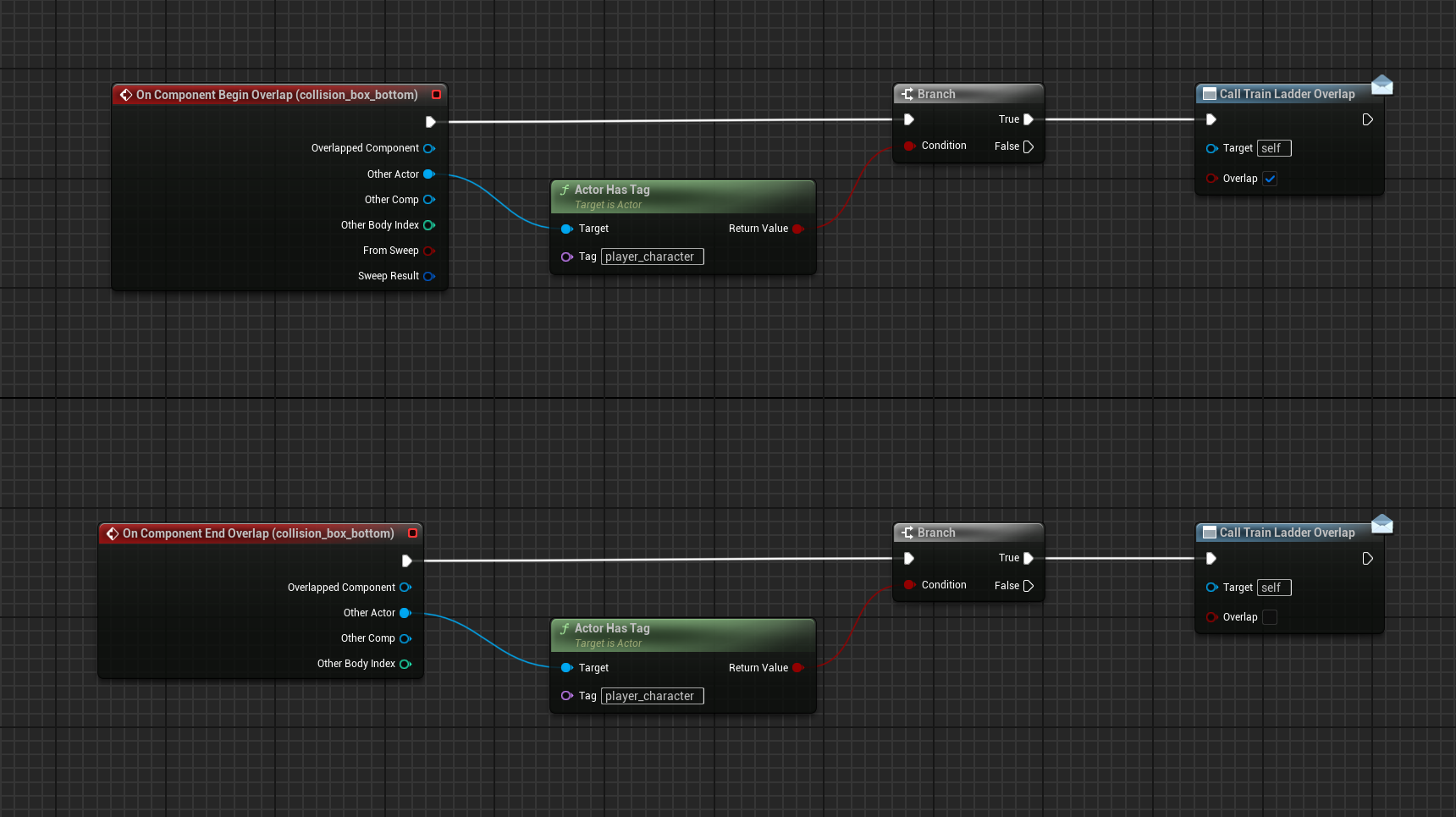
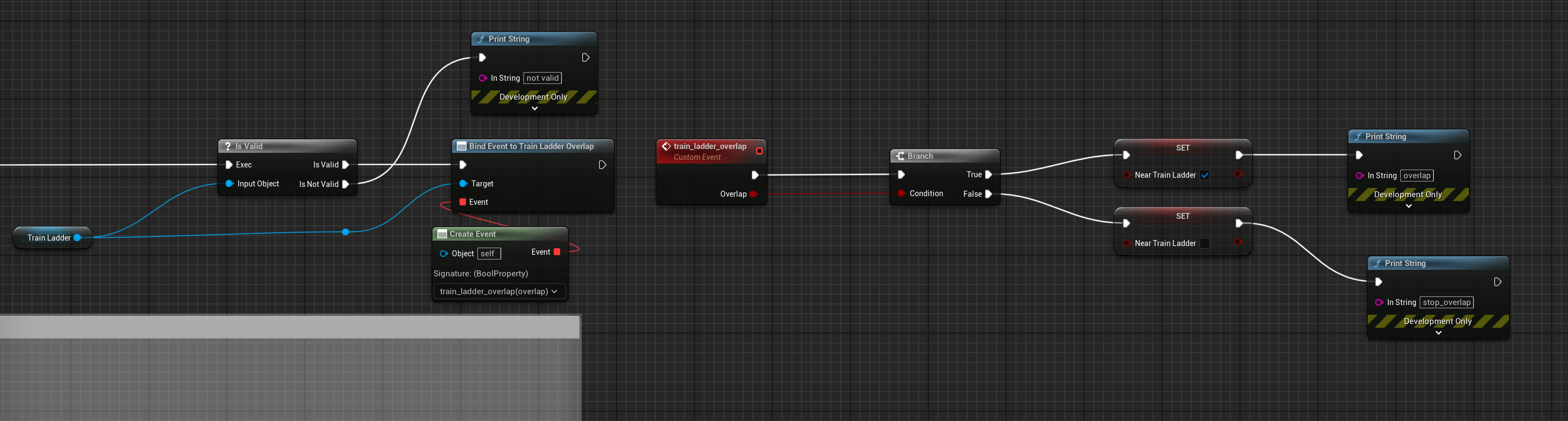
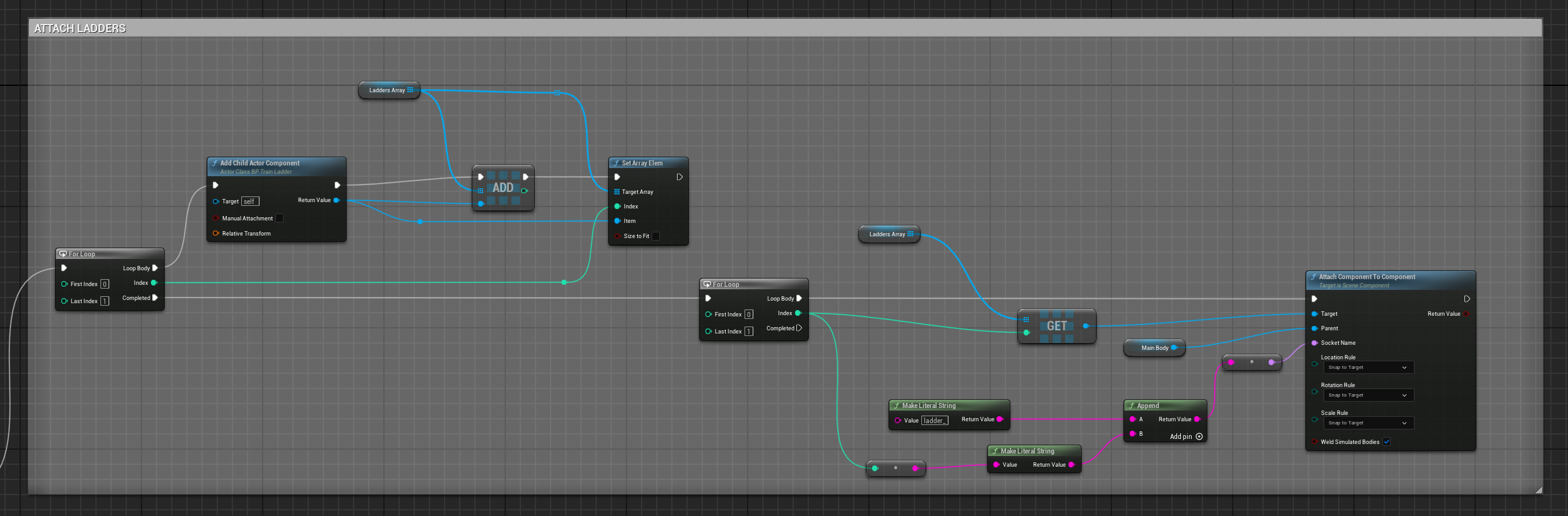
I'm trying to set an event dispatch from a blueprint to my character, the blueprint is a ladder and i want to fire an event when the player collide with it. the problem is that the ladder blueprint is a component of another train blueprint, and i assembled the ladders on the train in the construction script of the train BP. So probabily when i set the reference needed to fire the receiving event it's not valid (i used a direct object reference of the ladder blueprint)
so, what i need to do to get a correct reference of a blueprint that is a component of another blueprint that is built in construction script?
sorry for the headache lol
this is on the ladder BP https://i.imgur.com/qzwRYfZ.png
this on the character BP https://i.imgur.com/XaNFB0M.png
and this is how i built the ladders on the train BP https://i.imgur.com/1dNQPWl.png
 dusky gale
need some help with BP here:
I am trying to get this logic to be displayed in a UI element (bar) its supposed to show the intensitity


 neat oriole
Hello! I'm trying to create a building system, and my goal is for this to be as modular and adaptable as possible. For now I have an actor component "BP_BuildComponent", which is supposed to be the entry point of any controller/owner (i.e. it handles "equipping" a building for displaying a preview, firing a place/build event, etc.). The issue I'm currently stuck at is related to handling the spawning of a building. The idea is that I don't want the building component to be dependent on a specific implementation of a building. This is because I've previously required different buildings to be initialized in different ways, and thus, I want to move this responsibility to the building itself (or some other object). I've therefore created an interface "BPI_Buildable", which the building component references for the preview and so on. My buildables are implemented as data assets and inherit from a base "BP_Buildable" which implements the BPI_Buildable interface. Since my buildables are data assets, I cannot spawn an actor from a function inside them. I've therefore added another interface "BPI_BuildableSpawner" that is supposed to handle the spawning of a buildable, which each buildable references. This is where I'm having trouble atm. I created an actor BP_TestBuildable which implements the interface BPI_BuildableSpawner, but I'm unable to select this as the spawner reference in the data asset.
I'm attaching some images below to try clear up the specifics. The purple boxes in the class diagram are supposed to belong to the system, the rest are uses of the system and the red dependency is where the trouble is. EDIT: Actually, the BP_Buildable class doesn't necessarily belong to the system as you might want to use another data representation for the buildables than data assets, but that's beside the point


 ancient moth
is it possible, to create custom event or function, that will show expose on spawn variables of a class? or do i need to do this in c++?
 mental trellis
No
You have to mark variables as expose on spawn.
Or erm, do you just want a list of them?
You'd have to do that in c++ I think.
ancient moth
i want to list them
mental trellis
You'd need to iterate over the class properties in c++.
ancient moth
Thats unly, I wanted to do soemthing like the construct widget or construct object function that lists the expose on spawn variable
but it's good to know that i have to use c++ thanks! 🙂
 dusky meadow
Hi i followed the quickstart behaviour tree tutorial and my enemy doesnt do anything can anyone help me ?
dusky meadow
Anyone ?
 acoustic osprey
Hi. I have buttons that I placed in the world in Unreal Engine 4.27. The buttons work properly for the server player, but they do not react at all for the client player. What could be the problem and how can I solve it?


 kind willow
acoustic osprey
Hi. I have buttons that I placed in the world in Unreal Engine 4.27. The buttons...
kind willow
acoustic osprey
Hi. I have buttons that I placed in the world in Unreal Engine 4.27. The buttons...
I believe you have to use custom events for multiplayer replication
dusky meadow
dusky meadow
Hi i followed the quickstart behaviour tree tutorial and my enemy doesnt do anyt...
Can someone help me please ?
 upper jolt
Hey, im very new to unreal and was following a tutorial but decided I'd try to do smthn different. The current result of playing my game is that the winning condition works and so does the timer which begins at 15 once the user moves or shoots (set by a variable I declared in the FirstPersonCharacter Blueprint) and eventually reaches 0.
My issue is I need to access the value of notTimerRanOut (variable in Timer_UI widget) in order to be able to show the losing condition widget. I'm just unsure of how to get the value since my reference object is trapped after a do once (bringing it to the front and running a sequence to print the values of seconds also just prints the initial value).
Sorry my issue is so annoying but if anyone could help that would be amazing.


 maiden wadi
upper jolt
Hey, im very new to unreal and was following a tutorial but decided I'd try to d...
maiden wadi
upper jolt
Hey, im very new to unreal and was following a tutorial but decided I'd try to d...
Your timer should be somewhere more global, and not in a UI class. Something like the GameState. UI should never house any sort of gameplay state. It should only ever display or allow input to affect it. Gameplay state should go on a gameplay class like an actor or actor component usually.
kind estuary
i always use Get Player Index 0

is this a bad thing?
i remember something about this being bad
ancient moth
Is there some way I can group arrays, or do I have to build that custom?
 stone field
ancient moth
Is there some way I can group arrays, or do I have to build that custom?
stone field
ancient moth
Is there some way I can group arrays, or do I have to build that custom?
You can have a Map of Arrays
ancient moth
And populate it through a for loop right?
ancient moth
i see
mental trellis
E.g. an array of a struct. The struct has an array on it.
ancient moth
🤔 hmm
mental trellis
If you want the sub-arrays to have different types, the map idea is good.
If you want it to be dynamic, that is.
Or you could just make a struct that has a bunch of arrays on it if you want a static list.
ancient moth
i mean the map will also fail as soon as I'm grouping by multiple fields
kind estuary
Is this a case for a WorldSubsystem?
Im making a game like risk. You move your pieces around. If you come accross a territory with enemy units. It should trigger a battle.
So for that i must create a BattleManager actor? Or its better to create a WorldSubsystem?
mental trellis
ancient moth
i mean the map will also fail as soon as I'm grouping by multiple fields
C++ to the rescue.
Or just make the key a struct.
kind willow
kind estuary
is this a bad thing?
Only if you're making a split screen multiplayer game
kind estuary
kind willow
Only if you're making a split screen multiplayer game
if you are doing a multiplayer game then what do you do instead
kind willow
kind estuary
if you are doing a multiplayer game then what do you do instead
Then you have to use actual controller ID instead of just 0 as 0 is only player 1
mental trellis
Any time you use get player controller / character with the index parameter is wrong, unless you can say why it isn't.
 lunar sleet
Cause single player game? 😛
mental trellis
And even if you can legitimately say it's correct, there are better alternatives.
mental trellis
lunar sleet
Cause single player game? 😛
It's still just bad practice.
kind willow
mental trellis
And even if you can legitimately say it's correct, there are better alternatives...
Like for example?
mental trellis
The only real place I'd use it would be for split screen single player games, but there are better methods I can't remember that somebody pointed out.
lunar sleet
mental trellis
It's still just bad practice.
Yeah I try to use getController but noticed it doesn’t always show up
mental trellis
Then you need to find or create the link to get that data in the correct way. Not just half arse it.
Every use of those methods if half arsing it.
lunar sleet
I probably just have things in the controller that could be somewhere else
mental trellis
mental trellis
The only real place I'd use it would be for split screen single player games, bu...
Maybe it was in the local player subsystem somewhere?
kind willow
mental trellis
Every use of those methods if half arsing it.
The best method is one that gets your game released and shipped instead of ending up in "New Folder (1)" for the rest of eternity
lunar sleet
You don’t name your folders? 🙃
mental trellis
The best method is the one that doesn't lead to bugs you can't explain like most of the games released today. I'm not suggesting you spend 6 months looking for a better solution, just using the one that very easy to use.
kind willow
mental trellis
The best method is the one that doesn't lead to bugs you can't explain like most...
But even you forgot what that solution was
mental trellis
Because I don't really make games any more.
kind willow
Ah
lunar sleet
He makes wizards
lunar sleet
 mental trellis
Most things that need the player controller have ana ctual method to get the player controller, it just doesn't have the index parameter, so you know you're getting the right one. Pawns, widgets, etc.
If you don't have that option, the local player subsystem or whatever is rigth there.
kind estuary
mental trellis
Most things that need the player controller have ana ctual method to get the pla...
🫡
so im in HUD

i think i got it
kind willow
kind estuary
so im in HUD
I think "Get owner" can work in that
kind willow
Although I recall having issues with that. I don't remember what but I remember I had to replace it in my latest project
Still, you should give it a try
At worst you can replace it with get controller later
kind estuary
but if even NeoExciduos was not getting this right then its understandable 🤨
dusky meadow
Hi how would i get the right value for an add local offset so this pistol's y value is in the exact middle of the camera ?
 kind willow
dusky meadow
Hi how would i get the right value for an add local offset so this pistol's y va...
kind willow
dusky meadow
Hi how would i get the right value for an add local offset so this pistol's y va...
Sicne the origin seems to already be in the middle, offset here would be 0
dusky meadow
kind willow
Sicne the origin seems to already be in the middle, offset here would be 0
that sets it far to the right
actually it doesnt move it
kind willow
Well, you could either move the origin to the gun's middle to fix it permamently or, if you can't, use get bounding box to find the meshe's center point
dusky meadow
how would i do that because i set the Origen correctly in blender but it didnt transfer other ?
kind willow
dusky meadow
how would i do that because i set the Origen correctly in blender but it didnt t...
Did you apply the transforms?
dusky meadow
yes
kind willow
Then do that in Unreal instead. You can change origin in the modeling tools
dusky meadow
kind willow
Then do that in Unreal instead. You can change origin in the modeling tools
thank you it works now
ancient moth
mental trellis
C++ to the rescue.
yea true, I tried to do a generic thing in c++ but it didn't work out quickly, so maybe I'm just doing it justom in blueprints instead of writing a library for it but we will see 😅
kind estuary
broskis you have 2 armies clashing in your risk game.
so a battle will start ⚔️ , do you create a separate actor to manage this battle?
If yes where do you store the reference to this actor?
Or you do this in gamestate or something?
kind willow
kind estuary
broskis you have 2 armies clashing in your risk game.
so a battle will start ⚔️ ...
Either a seperate actor or gamemode
depending on the functionality you need
faint pasture
kind estuary
broskis you have 2 armies clashing in your risk game.
so a battle will start ⚔️ ...
all depends
I'd probably make a Battle actor tho
or a Battle can just be a struct.
GameState:
TArray<FBattle> CurrentBattles;
kind willow
I know Team Fortress 2 handles all its game mode logic trough map entities
kind estuary
kind willow
I know Team Fortress 2 handles all its game mode logic trough map entities
map entities are uobject?
kind willow
But if you don't need much modularity you canb handle it all in gamemode
thin panther
kind estuary
broskis you have 2 armies clashing in your risk game.
so a battle will start ⚔️ ...
Does a battle need to live in the world though? It seems generic to me. Something managing things in the world.
Lets say for example, your battle is a simulation, no actual closely controlled combat. Break it down bearbones.
Lets say a battle, and it's function of winning, each unit has a value. Whoever has the highest combined value in that area wins the battle. Lets say a battle consumes resources, and each unit of troop needs x unit of resources. If an area has only 90% of the resources to support a battle, maybe they lose a lot of units. Maybe 20% of resources results in failure.
None of that seems to live in the world, it can be managed by a third party. If this is multiplayer, you could do something in the game state for example, and have a battle merely as a function that takes both sides and calculates losses and victories.
If it's singleplayer, you could have it in a subsystem.
kind willow
kind estuary
map entities are uobject?
Map entities are in Source Engine, which Tf2 is made of. Unreal equivalent would be actors
faint pasture
thin panther
Does a battle need to live in the world though? It seems generic to me. Somethin...
Could make sense for visualizaton on a game board
kind estuary
thin panther
Does a battle need to live in the world though? It seems generic to me. Somethin...
so a worldsubsystem is not good for multiplayer? its singleplayer though. so you spawn uobjects that autoresolve this battle. And where do you store it?
thin panther
It could, which is why as you said, it all depends, and why I asked if it needs to live in the world.
thin panther
kind estuary
so a worldsubsystem is not good for multiplayer? its singleplayer though. so you...
A worldsubsystem can't be replicated.
A battle seems like something that should happen on the server and replicate down
faint pasture
I'd start with an actor since it can make sense to have a battle have a location and it can be the container for the battle widget components and dust cload particle FX
kind estuary
thin panther
A worldsubsystem can't be replicated.
A battle seems like something that should...
yeah i want to do the unreal engine correct way. so it seems its best to just spawn an actor
faint pasture
later you can make it a uobject or struct if needed
thin panther
If I was handling a battle in a single player game, for me I'd make a battle manager world subsystem that tracks all the battles and resolves them, and possibly handles spawning visualisations if needed. You can do it however you want though. There's no right way to do it.
Any solution voiced here is equally as good. There's no "correct" way to do a battle in unreal, it doesn't know, nor care what a battle is. Do what makes most sense for your design and your requirements.
kind estuary
i think ill go with the world subsystem, not because its easy but because it is hard
kind estuary
i never worked with world subsystem, so its a good opoortunity i tihkn
faint pasture
kind estuary
i never worked with world subsystem, so its a good opoortunity i tihkn
theyre great
thin panther
Personally, it's a workflow I'm used to, which is why I'd use it.
You should pick what makes most sense to you. Does it make sense for you for each country to have a battle actor, a manager that spawns a battle actor, or an object that handles things.
It's really up to you. Make whatever is most maintainable for you, fits your needs, and makes the most sense to you.
faint pasture
kind estuary
i never worked with world subsystem, so its a good opoortunity i tihkn
How much of your project is C++ right now?
kind estuary
faint pasture
How much of your project is C++ right now?
like 95%
faint pasture
yeah you're fine
thin panther
I only voice subsystems because I know they use C++, they're pretty regular in that channel :P
faint pasture
IDK if it'd make a BattleSubsystem, I might make a subsystem representing the entire state of the world
although at that point why not just slam it all in GameState
if it's Risk or close to it
kind estuary
faint pasture
IDK if it'd make a BattleSubsystem, I might make a subsystem representing the en...
could make a world subsystem like worldmanager, and then inside it have a uobject or actor component BattleManager
kind estuary
faint pasture
if it's Risk or close to it
its like risk yes
faint pasture
kind estuary
could make a world subsystem like worldmanager, and then inside it have a uobjec...
Could just have
TArray<Army> Armies
TArray<Battle> Battles
TArray<Territory> Territories
void StepBattles()
thin panther
I personally like the separation. It makes things easier to keep track of mentally for me. It also makes it easy if I ever make something that works similarly but doesn't have battles or w/e.
Compartmentalization is my jam :P
There is something to be said about separation to the point of meaninglessness though.
faint pasture
I have a ton of UWorldSubsystems that act a bit like Systems in the ECS model
but they also contain the data and entities.
faint pasture
faint pasture
Could just have
TArray<Army> Armies
TArray<Battle> Battles
TArray<Territory> Ter...
Something liek this could be useful if you want the sim and the visuals to be separate. Like if you wanted to have a huge sim but only see some of it at a time
thin panther
I always model mine to be as plug and play as possible. So for example if I wanted similar battles in another game I could just lift the subsystem out directly, copy it over, and maybe tweak a couple of bits of the logic and boom! I've got battles for my castle siege game, or battles for resource war type games, etc.
thin panther
faint pasture
Something liek this could be useful if you want the sim and the visuals to be se...
Yeah I often like separating logic from visuals for much the same reason. I'm probably not going to care about the particle effects on the next continent over.
faint pasture

Hmm but what IS the Platonic ideal of a Battle?
I've done plenty of thinking like that. What is the Platonic ideal of a chunk of air in a mechanical system?
 ruby venture
Is it possible to export the data of a struct to a .json file at runtime and then use that file later to import it over a data table row in the editor?
kind estuary
faint pasture
Something liek this could be useful if you want the sim and the visuals to be se...
🫡 yes its very ECSy
kind estuary
thin panther
I always model mine to be as plug and play as possible. So for example if I want...
im doing that with a different level and new gamemode
so like what happens in mount and blade. you are with your party going around
you meet an enemy party
then battle question pops up, "you want to autoresolve, or fight battle?"
i want to fight battle -> so i open level for battle
but in my current scenario im autoresolving for now
 steady night

is there a way to check for anywhere in arrray `?
the Get class equal to
it want an index but is there a way to check if its inside the array at all
kind willow
steady night
it want an index but is there a way to check if its inside the array at all
Isn't the're a node like "find"?
steady night
hmm
kind willow

 plain cypress
How can I solve somethine like this? :
A BP_Actor that has a Capsule 'Begin Overlap' to activate Events, and 'End Overlap' to desactivate.
You place Two Instances of this BP_Actor in the World, both next to each other where the Capsules of both BP_Actor are Overlapping
So when you Enter the 1st Instance Capsule and move to the 2nd one then Exit the 1st Instance, it will 'End Overlap' the 1st Instance Events but will also at the same time desactivate it for the 2nd one
-- how can I avoid this so the 2nd Instance events would stay on when you exit the 1st one?
 tropic wolf
Hi there, I have a blueprint that modifies a player characters camera based on an overlap event.
Unfortunately, when introducing multiplayer I need this silly check in the middle to confirm that the play character is, in fact, YOUR local player character. Is there any way to get rid of this without the events modifying all clients cameras?

Open to any criticisms as well, I'm quite new to BP
faint pasture
tropic wolf
Hi there, I have a blueprint that modifies a player characters camera based on a...
is locally controlled
Overlap -> is it a YourCharacterClass? -> is it locally controlled? -> do the thing
although it shouldn't matter, just modifying the camera of the character that overlaps it is good enough
it'll only do something visible when the local players character overlaps but it won't do anything goofy
tropic wolf
The camera is stored on the character, the logic for the camera is in a separate BP
for some extra context
tropic wolf
faint pasture
although it shouldn't matter, just modifying the camera of the character that ov...
it affects all multiplayer cameras
faint pasture
why does every character have a ref to the camera and not just the locally controlled one?
tropic wolf
the camera component itself is on the character
but the logic is separate because source control
tropic wolf
tropic wolf
it affects all multiplayer cameras
getting an example
faint pasture
so is the camera a camera component on character or a separate actor?
tropic wolf
component
faint pasture
Why would it affect all cameras on all machines then? Every machine has 1 camera component per character, and they only "see" through the one on their possessed character
tropic wolf

this is the behavior without the ==PlayerController[0] check. I'm launching play mode in Listen Server
faint pasture
tropic wolf
show your code for this as-is

 weak holly
Can someone please help me with my problem with replectation. I made a interaction bp and everting is fine on the server, but the rotation of the camera is not working is expected on the client, the client cant look up and down when interacting


 tropic wolf
weak holly
Can someone please help me with my problem with replectation. I made a interacti...
tropic wolf
weak holly
Can someone please help me with my problem with replectation. I made a interacti...
#multiplayer for replication help
Oh you already posted there
thanks for stomping me
tropic wolf
tropic wolf
Here is the printed result when one character walks in
 faint pasture
tropic wolf
faint pasture
tropic wolf
Can you show the component layout of the character BP?
tropic wolf
yeah
 faint pasture
wtf that makes zero sense that it'd do anything on the other machines
tropic wolf
left to right is: player character, camera logic that interacts with PC components, overlap event logic
 faint pasture
what is BP_Camera?
tropic wolf
I just said
faint pasture
a custom subclass of camera component?
tropic wolf
its just an Actor
faint pasture
show its guts
tropic wolf


still working here
I'm going to assume for now that Is Locally Controlled is what I should test
faint pasture
tropic wolf
What happens if you disconnect that tick
tropic wolf
even though I'm not actually eliminating any steps from my current workaround
tropic wolf
faint pasture
What happens if you disconnect that tick
the camera change will never occur
thats the logic for setting an finterp between 2 camera values
faint pasture
this camera manager actor is def your problem
tropic wolf
it has to be a separate bp
I didn't get the issues when it was local to the player character
but I'm literally just casting here lol
faint pasture
tropic wolf
show the guts of those blend functions

 faint pasture
tropic wolf
faint pasture
tropic wolf
What happens if you go up to the overlap with the client
tropic wolf
same thing for both
faint pasture
show how BP_Camera ref gets set in the character
 faint pasture
gated by locally controlled or anything or just raw? I'm guessing you end up with 2 BP_Camera actors per machine?
tropic wolf
Yeah same amount of player characters
faint pasture
You really oughta put this in a subclass of PlayerCameraManager
that's what it's for
tropic wolf
Yeah I don't mind changing my approach if theres a clear goal or advantage
faint pasture
The camera actor is def your problem though, I'm trying to sort out exactly how
ah i think i know how
you're spawning 1 per character
but they both set character 0 as their character to drive the camera of
so both BP_Camera actors control Character 0's camera
if you don't need other players BP_Camera actors around just only spawn it locally, i.e., gate it by LocallyControlled
but just use the PlayerCameraManager for this though, it's way cleaner
tropic wolf
I'm experiencing both characters cameras being affected though, and my original fix is actually comparing to Character 0
faint pasture
Local character IS character 0 on each machine
tropic wolf
right, but how come gating it to player character 0 prevents it from firing incorrectly then 😭
faint pasture
there won't be a BP_Camera to do anything with for any character besides the locally controlled one
tropic wolf
tropic wolf
this is technically a solve
faint pasture
tropic wolf
right, but how come gating it to player character 0 prevents it from firing inco...
This will be invalid for anyone but the local character

But I'd reformulate to use PlayerCameraManager
tropic wolf
I'm just unsure how every client being PC0 also means the solve is a check to see if PC0 is being overlapped, wouldn't it still fire off True in both cases?
this manages to filter out the wrong player characters

but removing it (not checking for PC0) reintroduces the issue?
I feel like I'm missing something here

confirming this also works, and is a good bit cleaner
looking into PCM now
ancient moth
I have some nodes that show a "In use pin no longer exists" but when I refresh the node and compile the blueprint, it works fine.
But after every restart of the editor I get the editor again, what can I do about it?
kind estuary
Broskis Im so cooked 🔥
When my armies meet. I spawn the typical pannel asking if you want to fight battle, or autoresolve.
So, from the ABattleManager im calling HUD function that spawns this Widget with the buttons yes or no (fight battle). Now once i click Yes, should i call a function from the ABattleManager to start the battle? ♻️
Should i pass the army struct also as arguments to the button itself? So that the button can then call the function for the battle with units and all? How confusing is this ♻️
thin panther
Doesn't seem that confusing.
Battle scenario happens. A button is used to instigate the battle. In order to instigate the battle, something needs to know what the battle is, which is passed forwards by the button.
I mean you could avoid this, by say, the ABattleManager storing a reference to the current battle and it's needed information. If the button is clicked yes, the ABattleManager just takes the current battle information and proceeds with the battle. If no, no matter, next time a battle comes around it's auto resolved
ruby venture
ruby venture
Is it possible to export the data of a struct to a .json file at runtime and the...
Figured out how to do it with an Editor Utility Script
 frosty heron
tropic wolf
this manages to filter out the wrong player characters
frosty heron
tropic wolf
this manages to filter out the wrong player characters
never get the player character with index in multiplayer
remember the overlap happend on both server and client since you don't filter it.
So player controller 0 in server (most of the time) is the server's character if it's a listen server
odd kiln
Anyone knows how to detect the "end / edge" of a wall ?
I have a line trace and when I hit an object, I want to spawn an Actor at the end of both sides, right and left
mental trellis
Use math and the mesh's dimensions.
odd kiln
mental trellis
Use math and the mesh's dimensions.
Get bound component ?
mental trellis
Sure
odd kiln
mental trellis
Sure
But I don't understand this node because it gives me "Radius" and "Box Extent"
mental trellis
Radius is there sphere box collison radius. You can ignore that.
odd kiln
And if my mesh is not geometry shape ?
mental trellis
Box extent is the size of the mesh from the center to teh edge.
odd kiln
Oh ok thank you
mental trellis
I would just add sockets where you want to place these things.
Then find the 2 closest ones.
odd kiln
It's not a bad idea.. thank you so much !
tropic wolf
frosty heron
never get the player character with index in multiplayer
What's your go-to alternative?
I haven't found a super reliable way
frosty heron
@tropic wolf it just means you have not understood the way of multiplayer,
the basic is covered in the pinned section in #multiplayer
Read exi's compedium dozens of times and also wizard tips and trick.
Server have everyone's controller, but clients only have their own controller.
Check the diagram in the pinned section
You need to know how to filter your codes to ensure who does what.
In saying that you need to know how to use isLocallyControlled, SwitchHasAuthority, Remote and Network roles, etc.
chrome pumice
guys my hand is parented to my root, any way to parent it to my arm without using blender? if i go to blender it needs to stay unparented bcz of ik rigs
 kind estuary
thin panther
Doesn't seem that confusing.
Battle scenario happens. A button is used to instig...
kind estuary
thin panther
Doesn't seem that confusing.
Battle scenario happens. A button is used to instig...
🫡
odd kiln
mental trellis
I would just add sockets where you want to place these things.
The issue is when I add sockets, if I scale the Mesh, the sockets has more and more distance
I can't set the socket always on the edge
 tepid willow
Hello, does anyone know why local temporary variables AKA UK2Node_TemporaryVariable can be only invoked in macros? Sometimes I would like to use them in the event graph or collapsed nodes because I don't want to bloat my blueprint with variables, so I end up creating a temporary macro, copying the LocalWildcard and AssignWildcard nodes over to the other graph, and use them there. I don't know whether it can lead to any undefined behavior, but so far it didn't give any trouble
 ashen flame
Is there a way for a custom function to start when the game begins without having it connected to construction script or event begin?
thin panther
ashen flame
Is there a way for a custom function to start when the game begins without havin...
What's wrong with the above. That's how you're meant to invoke custom behaviour.
What are you trying to do and why is the above not suitable?
ashen flame
thin panther
What's wrong with the above. That's how you're meant to invoke custom behaviour....
I wanted to see if I can call my weapon bp with different inputs instead have it being changed in the blueprint screen everytime
thin panther
Sure you can, but I'm not sure how the above helps you do that?
You can just have parameters you set in the details of the weapon bp
Or if it's via a spawn actor node, expose certain things on spawn
unless you literally mean different inputs, as in enhancedinput, in which case I'm still not seeing how the above helps that
ashen flame
Im just having trouble calling a weapon bp from an inventory bp
thin panther
Does your inventory BP need to call into the weapon? Shouldn't an inventory just be holding items?
Why don't you show code and describe your problem.
ashen flame
So I have a function to test the weapon bp which is show on this picture, it will automatically load the select weapon class when the game start
 thin panther
You could just have a class variable on the character that you set in the editor, if your character is physically placed there.
ashen flame
And this what I had which didnt work for me
 thin panther
I understand your problem here, you want to (I'm assuming) change that construction script var without reopening the bp, however how does this relate to the original problem. I'm sorry, still struggling to understand.
dawn gazelle
tepid willow
Hello, does anyone know why local temporary variables AKA UK2Node_TemporaryVaria...
I'm guessing this is related to the "Local Bool" and "Local Integer" and those types of nodes that you can put in macros. I may be wrong about this, but as I understand it, it's because a local variable is supposed to be within the scope of something thereby making it local. The event graph doesn't really have a scope other than the class itself, so it can't really have local variables other than the classes own variables. Functions and macros can have their own local variables, as the variables only exist within the execution of that function, and macros do something similar with each call of a macro being its own unique "container" of that macro, giving it a scope of its own.
ashen flame
thin panther
I understand your problem here, you want to (I'm assuming) change that construct...
something like this to answer the orginal question
 thin panther
And you just want to be able to use different keys without recompiling the BP?
thin panther
Use enhanced input and make it an input action
thin panther
Show the BP itself then, your current issue will be unrelated to the inputs thing
Enhanced input will let you change the input from the project settings.
The mesh thing is a separate issue
tepid willow
dawn gazelle
I'm guessing this is related to the "Local Bool" and "Local Integer" and those t...
The event graph doesn't really have a scope other than the class itself
But I need those local variables inside that class and nothing else
dawn gazelle
tepid willow
> The event graph doesn't really have a scope other than the class itself
But I ...
Then those would just be regular variables.
tepid willow
But I don't want to bloat the namespaces with even more variables for things I use as a temporary variable
thin panther
Stick em under a new category you can collapse then :P
dawn gazelle
If it's a "temporary" variable then it sounds like it should be encapsulated in a function, or have some function that can determine what that value should be for you based on whatever actual values you don't consider temporary.
ashen flame
This is the blueprint I have, I think I just to find another way to call it
 thin panther
No i mean how you're constructing the mesh
For what it's worth, for logical purposes child actor component shouldn't be used
It's an incredibly buggy thing and is best kept to no use at all, or visual things only
ashen flame
ok
thin panther
Best off for your weapon keeping them in separate actors, and spawning them and attaching them to the player
thin panther
You can then specify a weapon class to pass through in an ExposeOnSpawn variable
chrome pumice
guys anyone knows how i reimport my skeletons when i did little changes to it?
kind estuary
Are UObjects saved in GameInstance accross levels?
Im setting it but when i open another level it no longer exists
spooky stuff 👻
dawn gazelle
kind estuary
Are UObjects saved in GameInstance accross levels?
No. Basically everything but the game instance (and its subsystems) are removed from memory when moving to a new level. I imagine a way around this would be to use level streaming instead. The arrays may be the right size, but the reference to what was in the array would no longer be valid.
kind estuary
dawn gazelle
No. Basically everything but the game instance (and its subsystems) are removed...
yes but thats what im doing im setting it in game instance
though it doesnt survive
dawn gazelle
kind estuary
yes but thats what im doing im setting it in game instance
You might be setting a reference to something in the game instance, but the thing itself stops existing when you move to another level.
kind estuary
dawn gazelle
You might be setting a reference to something in the game instance, but the thin...
argh must be exactly that
how do i go around this?
im cooked
maybe like making a struct
do struct survive?
dawn gazelle
Values will be retained. References are not.
kind estuary
so this also applies to actors
dawn gazelle
Yes
kind estuary
will try an array of structs maybe that will do it
then place all the data in the struct
and in the other level rebuild the UObject
dawn gazelle
If the data is references it won't be retained.
If it's just values, then yea, should work.
kind estuary
though in blueprints we cant really control what they are
dawn gazelle
Not sure I understand.
Values = things like integer, float, bool, transforms, etc. The game instance can hold these without any problem.
References = things like "Object", "Actor", "Character", "Actor Component", etc.
The only type of reference that the Game Instance can retain is to assets, in other words, things that are stored on disk like Sound Effects, Niagara Systems, Data Assets, etc.
A structure is just a data container, it can hold a whole bunch of things in one package, but if you're trying to persist an "Actor" reference in the structure, that too will fail as the Actor will still cease to exist when transitioning to a new level, so the reference will be invalid if read after moving to a new level if it was set prior to moving to that level.
kind estuary
dawn gazelle
Not sure I understand.
Values = things like integer, float, bool, transforms, et...
🫡 arigato sensei
kind estuary
dawn gazelle
Not sure I understand.
Values = things like integer, float, bool, transforms, et...
though the Save Game saves the actors
it will be a bit annoying to make a struct out of every Uobject and actor that i need to transmit accross levels
dawn gazelle
kind estuary
though the Save Game saves the actors
No it doesn't. Save Games can't save references to actors.
A reference is just a pointer to a memory location.
When the game stops, the memory is cleared, so the actors no longer exist at that memory location.
When you go to load up that reference, you're trying to load something at a specific memory location, but that actor would no longer exist at that memory location.
https://wizardcell.com/unreal/persistent-data/
If you want to maintain references "between levels" then you may want to look into level streaming.
frosty heron
dawn gazelle
No it doesn't. Save Games can't save references to actors.
A reference is jus...
0o, I thought they can be serialized
dawn gazelle
frosty heron
0o, I thought they can be serialized
Sure, but that's not the same thing as saving an actor reference and I'll admit, I'm not super familiar with serialization in general, but serialization is literally taking something and recreating it in a transportable format. From what I know, an example blueprint serialization method would be to use structures to represent the data of the actor to save it, and then recreate the actor based on the data in the structure. I'm not sure if there is anything built in to serialize actors in blueprints.
frosty heron
dawn gazelle
Sure, but that's not the same thing as saving an actor reference and I'll admit,...
yeah, I am not fammiliar either but Authaer mention a very handy way in cpp.
Btw I am in a pickle here, wondering if you have some pointer for me.
dawn gazelle
APlayerController*
frosty heron
I am using GAS and I am playing a montage with Montage and Wait on Activate Ability.
So that's fine, no issue but now, I need to send input direction as the player that activate the ability.
I'm using ability task to send the target data, and when the server receive the input direction, it will then rotate the character and play the montage with Montage and wait.
However doing it with this approach cause de-sync on the root motion as the montage don't get played right away since the server has to wait for the input direction to arrive.
Any ideas on how to tackle this?
 tepid willow
Does anyone know whether local wildcards can store references? I have this code, but when I try to modify the output result, it doesn't affect the array. It does find a valid struct, so I should be modifying the array element

If I modify it to returns the found index, and use that to access PlayersCompletedRoutine after the macro call with Get (Ref), it works just fine, but ideally I would like to have the macro encapsulate that call

 gentle urchin
Pro tip: you can return mid loop (atleast in functions) to avoid using the break foreachloop
Sounds like your macro should work aside from that tho
Id personally have it in a function instead 🙂
maiden wadi
tepid willow
Does anyone know whether local wildcards can store references? I have this code,...
I'm with Squize on this. The macro isn't necessary here I don't think as long as functions can return by ref. I think they can, I don't use by ref a ton in BP. But you don't need a local ref for this. You can do everything directly from the array. Even if you leave it as a macro, toss the local variable and return the ref directly from the array same as you're getting it to assign it.
 willow gate
Hey smart folks. I'm leaving a question here for anyone who might have an answer while I finally get some sleep. I'm trying to add "hold to interact" functionality, using enhanced input but I want that functionality to be contextual from actor to actor based on a "hold duration" float variable. I know I can use a "hold" trigger in Enhanced Input but that doesn't allow for contextual changes since the hold time in the input has to be set in the input action actor. Does anyone have a good method for accomplishing this? Thanks.
gentle urchin
Count the holdtime in the actor being interacted with
Start-interact
End-interact
On start, start a timer (or custom counter)
If timer completes -> Do the actual interaction thing
If end interact gets called, stop interacting,and stop the timer if its still in progress
 dim siren
There's also a "triggered seconds" float in every enhanced input node if you drop down the menu.
gentle urchin
I keep forgetting about that, not really used Enhanced Input to any extent yet
dim siren
Easy to forget, I just happened to be messing around with it yesterday.
maiden wadi
This is usually less done on input's side. Input is usually just a Start/Stop. You usually handle this via interaction telling the interaction to start or stop and the interaction component or interface on the actor handles the timer based on those events.
frosty heron
Authaer, I need some opinion if you don't mind 😔 , been banging my head around it.
how would I play montage with GAS predictively if I need to send Target Data?
Right now, if I don't need to wait for target data, I can just play montage on client on activate ability, and the server will play it too, no de-sync.
but if the server has to wait for the target data, the client will get constantly corrected
1st image, will cause de-sync, 2nd one won't.


 royal verge
Hey can somebody help me?
How to prevent an object from flying too far after being released in Unreal Engine 5?

 left carbon
Does anybody know if it's possible to edit a component variable in multiple blueprints at once?
Blueprint matrix does not allow me to edit components. Opening and editing them one by one would be very long. I have like 200 blueprints.
maiden wadi
frosty heron
but if the server has to wait for the target data, the client will get constantl...
What is causing the desync? Like the corrections I mean. There shouldn't be much correcting there I wouldn't think unless something is overriding the anim on the client?
left carbon
And, for some reason, when I reset the variable in parent blueprint, all children do not reset this variable as well, which looks like a bug.
maiden wadi
left carbon
Does anybody know if it's possible to edit a component variable in multiple blue...
Editor utility probably. Unsure if you can do it without C++ though.
left carbon
maiden wadi
Editor utility probably. Unsure if you can do it without C++ though.
Yeah, I tried to find something which allows me to edit or reset a variable, but no luck. It looks like I need to use C++ then
maiden wadi
You can do all of it in BP, except for getting the component from the class.
frosty heron
maiden wadi
What is causing the desync? Like the corrections I mean. There shouldn't be much...
The correction happen when for the server, instead playing the montage on activate ability, the server waits for a target data to be replicated before playing the montage.
The attached is when the montage gets played on activate ability, which doesn't come with the issue.

Now the problem is when the client, needs to send target data.
And if I get the server to play the montage, after it gets the replicated data. You can see de-sync below.

So I just watched video game confered related to GAS. They have the same use cases with me where they need to send input direction for the dodge.
Their method is to Send Gameplay Event with payload.
I will attempt this tomorrow, but I didn't like to use Gameplay Event because I found it unreliable.
If I spam click, there are times the ability doesn't get activate 😦 (with send gameplay event to actor)
left carbon
maiden wadi
You can do all of it in BP, except for getting the component from the class.
I can reset variables in BP? How?
maiden wadi
frosty heron
I will attempt this tomorrow, but I didn't like to use Gameplay Event because I ...
Never had that issue I don't think, as long as I made sure the ability ended correctly when failing out or succeeding. :/ But yeah that might be a better way to go about it. But I'm still not sure why the desync. I'm curious if it's playing the anim twice on the owning client? Does it desync on a second client that isn't the user if you run three instances?
maiden wadi
left carbon
I can reset variables in BP? How?
Sec. Editor isn't open.
maiden wadi
frosty heron
I will attempt this tomorrow, but I didn't like to use Gameplay Event because I ...
What I mean by twice, is if it locally runs the target function, and then again when server replicates it? If a second client doesn't have the same issue watching the first client attack then I'd assume that's your cause. You could find a way to avoid running it twice on the owning user.
frosty heron
Yeah, I totally get what you mean. But I tested with print string and it only print once on the client and once on the server.
trying with 3 players now
the de-sync only happend to the predicting client (the client that activates it) 😦
I will try to send data with pay load and play the montage once I receive the event. I will see how that go.
My guess is that there is a window where the server technically should already play the montage to keep it in sync. But I delay it by waiting for the replicated data. And that tiny difference cause cascade of correction for the client.
If I can't get it to work with payload as well, I might have to reconsider going back to single player 🥹
maiden wadi
@left carbonActually I'm mistaken. Some stuff has changed since I last dove into editor BPs. You can do this entirely in BPs now.
So I made this to test it out.

It's an asset action utility that sets a BP's static mesh component's static mesh back to null
I set this BP's static mesh as an arcade sphere. Save. Close it entirely.

Right click it in the content browser and run the asset action. You can select multiple things before the right click here.

Open it back up and empty static mesh.

 pulsar vigil
hey guys i know its a basic question answered billion of time but just to try to understand it better despite everything i saw,
if i cast to my game instance in my player character for example, i believe that when u cast, one of those "game instance" or "player character" bp will need to be loaded all the time by the game to work, my question is wich one will need to be loaded permanently in memory ? is it permanent ? I dont understand precisely the problem with a cast
 languid hemlock
Why are Pass-by-reference parameters are ReadOnly? If I can't modify them, why should I use pass-by-reference?
 pulsar vigil
languid hemlock
Why are Pass-by-reference parameters are ReadOnly? If I can't modify them, why s...
pulsar vigil
languid hemlock
Why are Pass-by-reference parameters are ReadOnly? If I can't modify them, why s...
Read-Only in Certain Contexts: In some cases, particularly with Blueprint events or replicated variables, Unreal may restrict changes to read-only. This can happen if:
The variable is set to "Expose on Spawn" in a Blueprint.
The variable is marked as const (constant) in C++, which restricts it to read-only access within functions.
chat gpt say this for pass by reference
pulsar vigil
pulsar vigil
hey guys i know its a basic question answered billion of time but just to try to...
chat gpt answered my question lol mb
languid hemlock
pulsar vigil
Read-Only in Certain Contexts: In some cases, particularly with Blueprint events...
Purpose of reference parameters is to be able to modify parameter variable directly, am i wrong?
languid hemlock
Okay i achieved it in a bit different way
pulsar vigil
languid hemlock
Purpose of reference parameters is to be able to modify parameter variable direc...
i dont know just ask chat gpt it might put u on a track of a solution but pass by reference are not read only
 rancid quartz
Hi Castineiras,
I'm wondering if you ever solved this? I'm experiencing the same problem. 🤔
 wraith minnow
I've made an Asset Action Utility that creates a data asset in the current folder. Is there a way I can run this without having to right click an asset? I just want it to create the asset in whatever content browser I am in. Or by right clicking a folder/folders
 stark patio
does anyone know if it is possible to combine the output of 2 cameras but make one of them more transparent than the other, so you basically see from two cameras at the same time
 shadow holly
rancid quartz
Hi Castineiras,
I'm wondering if you ever solved this? I'm experiencing the sam...
shadow holly
rancid quartz
Hi Castineiras,
I'm wondering if you ever solved this? I'm experiencing the sam...
Hey I did eventually get it fixed but it was so long ago since I did it I can’t remember how at all sorry
rancid quartz
Well, I'm glad it was solvable at least. Thanks for responding.
 jagged wharf
Hello everyone
I just buy this asset https://www.fab.com/listings/196c70cd-1283-4249-bf6b-c3019d1cbe11
water is not simulating in this level flux waterfall map


Fab.com
Before purchasing, kindly review the limitations chapter in the [Documentation]Ensuring the product meets your expectations is crucial for the [Refund Policy]Support [Reporting bugs]Videos: [Waterfall], [Coastline], [River], [Beach], [Cross-Section], [Stormy Ocean], [Playground]Download executable: [itch.io] [Demo UE5.32], [Demo UE4.26][Video Tu...
 eternal atlas
hey guys I have done followed a tutorial that allows me to gradually increase fov when I am running, tho there is a problem with this, whenever I release W key before I release Shift the fov gets stuck in the sprinting fov until I update my character again by starting to run and then stop again, does anyone know a way to fix this?
 kind estuary
dawn gazelle
Not sure I understand.
Values = things like integer, float, bool, transforms, et...
kind estuary
dawn gazelle
Not sure I understand.
Values = things like integer, float, bool, transforms, et...
@dawn gazelle I found a way to pass the UObjects. All i need is to Construct the Object again inside the GameInstance. And it will be passed to the other level. This is simpler than creating a struct to every actor and uobject you want to pass to another level. And that would be a lot of plugging 🔌
willow gate
maiden wadi
This is usually less done on input's side. Input is usually just a Start/Stop. Y...
@dim siren @gentle urchin Solved it. It's a little more complex because I'm replicating it but the timer tip is what I needed. Thanks
odd kiln
Hi all !
In my Actor I added a new "Collision Component" but it does not collide with anything (wall etc..)
Only the root component can collide ?
dawn gazelle
odd kiln
In my Actor I added a new "Collision Component" but it does not collide with any...
If you're trying to block your player's movement, it's all based on the capsule component and the character movement component.
odd kiln
dawn gazelle
If you're trying to block your player's movement, it's all based on the capsule ...
The problem is that my Root Component is a Capsule (the default one) but this capsule is "vertical"
Or my Actor is horizontal, like a wolf
So I tried to add a new Capsule Component as a child so I can rotate it
dawn gazelle
The CMC is meant for upright walking actors. It's not designed for something like a wolf.
odd kiln
So if I want to control something that is not humanoid (walking) I need to use another Class ?
dawn gazelle
No, but you're limited to utilizing the capsule component as it is with the CMC.
There are plugin available like the General Movement Component that provide a movement component that has a horizontal capsule but I've never used it myself.
https://www.fab.com/listings/7e786da1-35e1-458e-96e0-7b1bdb333b39

Fab.com
🎥 DEVELOPER SHOWCASE - Check out this showcase of GMC-based games made by our community.🎞️ TRAILER - Watch the original GMC release trailer.🎮 DEVLOG - Hear about indie developer Rory's experience with the plugin (not sponsored).🏄 SURF DEMO - Surfing GoldSource physics demonstration.🐇 BHOP DEMO - Bunny Hopping GoldSource physics demonstration.🎓 F...
odd kiln
I wanted to use the CMC because I want to control it so I thought it would be more simple for me to make a "Character BP"
600$ my god
dawn gazelle
The other way around this is to create your own movement component.
odd kiln
Ok I will think about it now that I'm sure that only the Root Component detects movement collisions
Thank you so much
 haughty crypt
Hey all, was wondering, is there a way to list all the variable names from a cusrtom data asset to an array?
kind of want to have my ui change whenever I add something new in the custom data asset
I'm assuming this might be a c++ thing
 jovial steeple
haughty crypt
I'm assuming this might be a c++ thing
jovial steeple
haughty crypt
I'm assuming this might be a c++ thing
Yea your gonna have to use CPP to do this.
Oh no datura misremembered how garbage collection work.
haughty crypt
haughty crypt
I'm assuming this might be a c++ thing
Thanks
 north torrent
I am trying to generate an array of coordinates clockwise until a certain number is reached, example: 0.0 / 1.0 / 1.1 / 0.1 / -1.1 / -1.0 / -1.-1 / 0.-1 / 1.-1 / 2 .-1 / etc.... and if the beginning variable is 10 then it goes until 10.10 essentially. any ideas? i tried for loops and i can get the list of all coordes but they go from -10/10 to 10/10 instead of starting from the centre. any ideas or tips?
lunar sleet
dawn gazelle
The other way around this is to create your own movement component.
Well… there’s also Mover 2.0 now , tho still experimental @odd kiln
lunar sleet
north torrent
I am trying to generate an array of coordinates clockwise until a certain number...
Could try #game-math
 fading sail
world partition: I need to place-in-world (not spawn from code) movable spatially-loaded assets that the player can however nonetheless possess/enter and then move around the world. but spatially loaded also means spatially unloaded, by default — game freezes the moment the (now driven by player) asset would unload — so: is there a way to tell such an object from BP to "from now on: dont unload, just remain loaded even as you're moved across regions/tiles/proxies until destroyed manually"?
lunar sleet
fading sail
**world partition:** I need to place-in-world (not spawn from code) movable spat...
Well you could prly turn off the spatially loaded bool dynamically if that does the job
But otherwise if you attach it to the player or possess it shouldn’t be getting destroyed on its own
 clever roost
Hi all. Is there a node, similar to clamp, that doesn't have the max value attached? I basically wanna do value.clamp([specific number], [infinity])
if not I'll just make the functionality myself
fading sail
lunar sleet
But otherwise if you attach it to the player or possess it shouldn’t be getting ...
yeah that's weird then, those aircraft blueprints are Pawns and entering them does possess them. but still, when marked spatially-loaded, game freezes up when you fly them out of their WP tile/cell/whatever. so here's hoping turning the bool at runtime will do the trick then..
lunar sleet
clever roost
Hi all. Is there a node, similar to clamp, that doesn't have the max value attac...
Min
clever roost
lunar sleet
Min
doesn't that just return the minimum of 2 values?
lunar sleet
clever roost
doesn't that just return the minimum of 2 values?
You’re right. On second thought tho I don’t think any type allows you to store infinity
 crisp sandal
what is the best way to implement code from an abp to a bp or c++
(wanna implement fall damage)
 clever roost
I'm not interested in storing infinity, I'm just interested in not having to give the clamp a max value
lemme explain what I'm doing in a bit more detail nevermind
mental trellis
If you want to ensure a number is between a minimum value and infinity... use Max(your number, min number)
clever roost
mental trellis
If you want to ensure a number is between a minimum value and infinity... use Ma...
ok yea that'll work XD
cheers
crisp sandal
crisp sandal
what is the best way to implement code from an abp to a bp or c++
(wanna impleme...
Daekesh what do you think about this? 😊
frosty heron
crisp sandal
Daekesh what do you think about this? 😊
You have on landed event from cmc don't you?
crisp sandal
frosty heron
You have on landed event from cmc don't you?
cmc?
frosty heron
Not like abp should deal with your fall damage
lunar sleet
mental trellis
If you want to ensure a number is between a minimum value and infinity... use Ma...
I’m still trying to wrap my head around this sentence lol
frosty heron
Abp just deal with the animation
crisp sandal
frosty heron
Abp just deal with the animation
yeah 🙂
frosty heron
crisp sandal
cmc?
Character movement component.
crisp sandal
frosty heron
Character movement component.
but isn t that just abp or what is the difference?
frosty heron
?
Abp is anim blueprint
Character movement component is a component in your character class, responsible for the character movement.
lunar sleet
lunar sleet
I’m still trying to wrap my head around this sentence lol
Ah, it’ll never reach Min so therefore infinity, got it. Christ this brain is going
crisp sandal
frosty heron
Character movement component is a component in your character class, responsible...
but abp does
crisp sandal
frosty heron
What r you even talking about? 😭
i dunno what you are saying 🤪
frosty heron
There are events you can use afaik, for when the character land, when it start jumping etc.
Use that for your fall damage logic
lunar sleet
frosty heron
What r you even talking about? 😭
Hehe, you’ll come to understand that is a lost cause
crisp sandal
frosty heron
Use that for your fall damage logic
but that is in the abp i think
frosty heron
crisp sandal
but that is in the abp i think
You are just saying things, no. That event comes from your character movement component.
I think there's even apex event (before you start falling after jumping?)
You can just get the current location then on landed, see the delta between that and the z location of the player when they land.
Then apply damage accordingly
In other words your fall logic is in your character bp
 lunar sleet
 crisp sandal
lunar sleet
https://tenor.com/view/you-will-learn-sweeney-todd-you-are-young-gif-16068729682...
crisp sandal
lunar sleet
https://tenor.com/view/you-will-learn-sweeney-todd-you-are-young-gif-16068729682...
you like malicious pleasure?
crisp sandal
frosty heron
In other words your fall logic is in your character bp
Coldsummer?
frosty heron
crisp sandal
Coldsummer?
I don't know what else you want me to say.
crisp sandal
frosty heron
I don't know what else you want me to say.
yeah are saying it is in here but i don t see it 
frosty heron
crisp sandal
yeah are saying it is in here but i don t see it <:sweeney_activate:989354162393...
Right click and type it
crisp sandal
frosty heron
Right click and type it
oh seems like a build in func
that is why i was confused
frosty heron
Confused with what?
crisp sandal
frosty heron
Confused with what?
cuz didn t write it myself so didn t understand why it would work and haven t tocuhed this project for 2 motnhs cuz i was bu8ssy with a ml project for uni
 obsidian tartan
PLS help me!!! REALLY !!! https://forums.unrealengine.com/t/help-waring-with-forces-directions-i-come-from-unity/2114818?u=markage_14

Epic Developer Community Forums
WARNING MASSIVE BUG I am stuck on this for 1h know, I come from unity, I can’t understand why using the root component forward vector does not apply on that location. What am I doing wrong??? PLS HELP v v v SOLUTION v v v …Thanks ChatGPT… I never has used AI to help with unreal blueprint system cause I really think that he just couldn’t...
I think i discover a MASSIVE BUG on Unreal 5.4.4!!!
lunar sleet
obsidian tartan
I think i discover a MASSIVE BUG on Unreal 5.4.4!!!
You probably didn’t!!!
obsidian tartan
lunar sleet
You probably didn’t!!!
can u help me?
lunar sleet
Hard to know what the problem is in that nebula of a post. You’ve got 4 neurotic edits, and one of them mentions fixing the problem using ChatGPT which can almost never help you fix UE related stuff. You also mentioned you’ve only been at this for one hour yet you’re freaking out, and 1h is a very small amount of time to troubleshoot in an Unreal issue when you’re first starting out. If you’ve got that little patience, you might be in for a rude awakening when it comes to gamedev
obsidian tartan
lunar sleet
Hard to know what the problem is in that nebula of a post. You’ve got 4 neurotic...
the thing is do u see anything wrong?
I use the same logic on Unity, and im sure that I already use the same logic another time in unreal
AND even if my logic is Wrong Explain this: HOW is possible that as disconect or delect a unconected node makes it stop/start work????? pls explain me
I swear I'll pay for an answer, seriously
lunar sleet
obsidian tartan
AND even if my logic is Wrong Explain this: HOW is possible that as disconect or...
You’d have to show what you’re disconnecting exactly. Also you should learn how to use breakpoints so you can actually see what the code does and what values come through on the pins at runtime
obsidian tartan
lunar sleet
You’d have to show what you’re disconnecting exactly. Also you should learn how ...
bro, it was to a unconected node
lunar sleet
obsidian tartan
bro, it was to a unconected node
These words mean nothing
On a side note I usually use actor’s forward vector not the mesh’s but I haven’t dabbled much in the add force stuff either
obsidian tartan

 obsidian tartan
lunar sleet
These words mean nothing
obsidian tartan
lunar sleet
These words mean nothing
did u even wath the record?
unfortnly the end part of not working was not recorded may be to the way I enter playmode
lunar sleet
Are you saying when you delete those unconnected nodes, something stops working ?
obsidian tartan
again, YES
lunar sleet
Again? This is the first time you’ve made sense so far, plus you haven’t actually shown what’s “not working”
There are many issues in your project as evidenced by the warnings
obsidian tartan
in fact it stops working as soon as I disconect the "GetMass" node from the already unconect nodes
lunar sleet
Ah ok
So you have nodes connected to nodes on a different execution path that’s not connected at all
you will def have issues when you write code like that
obsidian tartan
I can record but basicly the ship can only move fowards and backwards align with the world axis - not talking about rotation, im talking about moving tro addForrce
obsidian tartan
lunar sleet
you will def have issues when you write code like that
bro, no, and besides thats it was when it was working
versed crypt
I foreach many buttons (mapping) assigned each one to like 1, 2, etc... (levels stuff), but also want to bind event, so it opens a level 3 if its a button saying "3". The issue here, I think when I bind even on click, it binds to each button seperately, but can i pass the index of 3 so it stays inside this custom event so button 3 knows it needs to open level 3?
 obsidian tartan
as soon as I clean my Bps it stops
obsidian tartan
lunar sleet
You’re deleting Get IA_Accelerate
?
lunar sleet
That explains why when you delete “unconnected” nodes which are actually connected, things change
obsidian tartan
what?
lunar sleet
obsidian tartan
?
In your video
obsidian tartan
print , im not understanding
this is my current set up, is just more align than the video and nothing has changed

this event is called every physic tick
so if IA_Accelerate is 0 it just dont add force, but thats besided the point, the point is the force direction
EVEN if i delete an unconect PrintScreen node it stops working
 void jewel
is there some sort of limit to component overlap, like maximum amount of overlaps registered? im sending a flat cube through 10 actors but it's really random how many/who gets overlapped. As if it can't detect simultanous overlaps or something?
kind estuary
Combining the Data tables with Data assets its actually the best thing.
You have Instead of putting the mesh or texture in the Data table, that would load all those assets in the game, you place the data asset reference in the data table.
That way you can simply get the row Panda, and then get the data asset Panda
@errant snow
is this how its done?
 warped saddle
can someone explain to me why this is shown as hard referance? i marked it as soft class ref in my gamemode and even then it shows as hard ref in my referance viewer, and i have no other instances of this in my bp...

 thin panther
warped saddle
can someone explain to me why this is shown as hard referance? i marked it as so...
thin panther
warped saddle
can someone explain to me why this is shown as hard referance? i marked it as so...
Do you cast to it?
It's not just variables. It's anything with a hard reference of that type
 mild galleon
Hello, i am having the same issue here as this poster, sadly no one replied.
https://www.reddit.com/r/unrealengine/comments/ydbr2q/when_i_hover_with_widget_interactor_it_both/?show=original
Reddit
Explore this post and more from the unrealengine community
is this an easy fix?
hover /unhover fires permanently, perhaps line trace triggered.
just want the buttons to be more "solid" (on /off like, i actually didntmove my mouse away and it still triggers on and off like crazy)=
and apparently i wasnt the only one

is it maybe because my button is on top of an image?

that he kind of looks through the transparent button and therefore always triggers yes and no?
lunar sleet
mild galleon
that he kind of looks through the transparent button and therefore always trigge...
 proven loom
how do i get the straight wires rather than the curved ones? i'm sick of the curved ones
thin panther
proven loom
how do i get the straight wires rather than the curved ones? i'm sick of the cur...
Buy the electric nodes plugin
 red pike
Hi, can anyone help me figure out which node to use to configure the values of a user parameter in Niagara? I though by using a Vector 3 node, I'd be able to set the values of the X, Y, and Z for the sprites. I'm new to blueprinting.

Nvm, I ended up using Vector From Float (in niagara) and it gave me a single value which is what I wanted! 🙂
 zealous moth
is there a way to attach a skeletal mesh to another and have that child simulate physics without falling off?
 sharp epoch
Does anyone know how to check if a DLC is installed? Currently, I'm working on the dlc as a plugin which should release as separate .pak files. Plz no ue4 marketplace plugins that cost money, thx!
The only theory I have is checking if a specific .pak file exists in a directory, which might not work for most cases.
zealous moth
sharp epoch
Does anyone know how to check if a DLC is installed? Currently, I'm working on t...
there are a few ways. You could use a patch or some sort of website fetch and check.
sharp epoch
zealous moth
there are a few ways. You could use a patch or some sort of website fetch and ch...
website fetch?
I've heard of pak patching or smth like that, but idk how that could be used
zealous moth
like, have a weblink somehwere that can validate a response and your game can check for it
as in patch 1.01 has a pak file
alternatively, you can make your main game have local bool checks
sharp epoch
zealous moth
alternatively, you can make your main game have local bool checks
what does that do?
zealous moth
like the DLC will change a bool to true and unlock a feature
 proud salmon
Does anyone know if it is possible to create/edit actors through a blueprint in editor that you can "save" in the level once the blueprint is done running?
For example, spawn an actor, add an instanced static mesh component to it, add instances to it, save the actor.
Now I have an actor in the world with an instnaced static mesh component and instances on it. There is no dependency on the thing that ran it/created it. It's as if I added it manually to the level.
It gets added like this but I don't want the dependency 🤔
 sharp epoch
zealous moth
like the DLC will change a bool to true and unlock a feature
sharp epoch
zealous moth
like the DLC will change a bool to true and unlock a feature
oh wait idk how to do that
sorry
I need it to already know if the dlc is installed before trying to load it
 rotund compass
Hey i have a problem with my crouching effect my camera doesn't have a collision when I crouch pls i really need help
Here's the blueprint code

 surreal peak
rotund compass
Hey i have a problem with my crouching effect my camera doesn't have a collisio...
surreal peak
rotund compass
Hey i have a problem with my crouching effect my camera doesn't have a collisio...
Your camera has no collision either way. You probably don't lower the camera enough to match the new capsule height.
rotund compass
So I need to create a new timeline to lower the camera? But then my character will be too small, right?
surreal peak
Your camera should in theory match some fake eye height.
The default of that being the one when you are standing.
If you crouch and you lower the capsule half height to pass below obstacles, you need to lower the camera Z too to a new, matching eye height.
Your character being too small is part of your capsule half height changes and totally in your control
@rotund compass
If you play in the viewport you can pause and detach at the top where the play button is.
Then you can look at your character while it crouches from outside and check where the camera and the capsule size are at
Maybe that shows you something you didn't expect
rotund compass
Oh ok I understand so the solution is to change the location of the camera in the z axes when my character is crouching
surreal peak
Yes
rotund compass
Ok thanks!
 surreal carbon
I noticed at lower a framerate my character will move slower is there any fix for this?
maiden wadi
 lost hemlock
Anim looks fine since it's making it to Idle in the state tree. Only thing that comes to mind is checking that the setter is setting the boolean on the correct animbp. Cause that boolean set will still trigger a breakpoint even if the animbp is invalid or the wrong one somehow. It works fine if you start with this boolean as true in the anim bp by default? If so it has to be the setter.
 keen sun
Anyone can help me with additive hit reacts like I have a hit react animation montage that I play but I cannot play that each time being hit because it interrupts the whole action for a long time
 tardy ingot
hello can anyone help me please!
I have a puzzle grid generated in my PuzzleInterface BP Class which generates a bunch of switches (static mesh of the PuzzleLogic BP Class) -> And with an onclicked event for the switches, it will enact all the logic / restrictions for the puzzle.
I want to change the onclicked event to one where upon clicking, it will check if your mouse is held down and you can drag across the grid to fill it out -> on mouse click release it will stop checking.
Ive seen some videos about click and drag logic but I am still kinda lost haha.

 rotund compass
surreal peak
Yes
rotund compass
surreal peak
Yes
Eh there's a probleme cause i'm a begginer and i don't know how to do it with my blueprint 😅
 devout oak
Im trying to setup a checkpoint bp and this is the code inside but anytime my player overlaps the collision box nothing happens not getting anything from the print string either
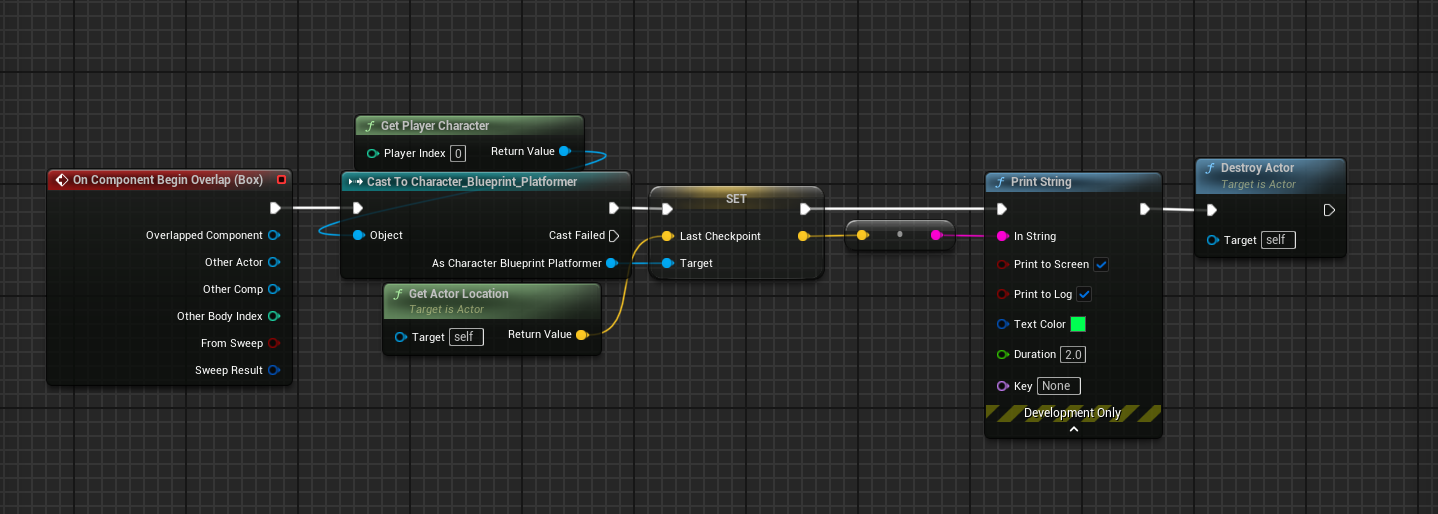
 main lake
devout oak
Im trying to setup a checkpoint bp and this is the code inside but anytime my pl...
main lake
devout oak
Im trying to setup a checkpoint bp and this is the code inside but anytime my pl...
don't use GetPlayerCharacter, instead connect "other actor" from the "OnBeginOverlap" event to your cast
devout oak
ive tried that it still didnt work
main lake
devout oak
ive tried that it still didnt work
show your character class
and also the collision setup for the "Box" collision
devout oak


that is my character bp
after that delay it just goes into a consolecommand to restartlevel
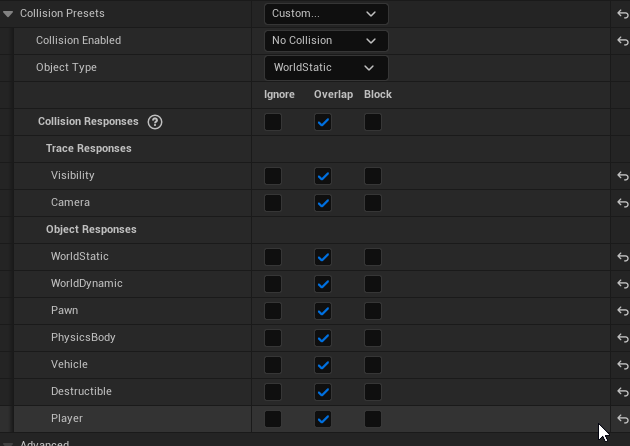 main lake
devout oak
main lake
devout oak
I want to see the class not the blueprints, I mainly want to see from what your character class is inheriting from and the name of your class
main lake
devout oak
https://i.imgur.com/Vfy9w7h.png
in the collision Preset use the one named OverlpaOnlyPawn or something like that
Also a good thing to do is to put a print in the Failed output of the Casting node to see if the issue is coming from the cast or something else
devout oak
if i use the overlaponlypawn i cant go through it
main lake
devout oak
if i use the overlaponlypawn i cant go through it
show me your collision presets please
devout oak
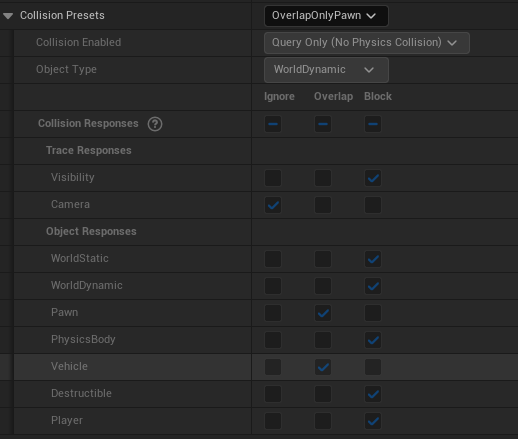 main lake
And by character class Imean your character blueprint like where you took the screenshots of your blueprint graph but I want to see the full class so take a screenshot of the fullscreen of that blueprint
devout oak
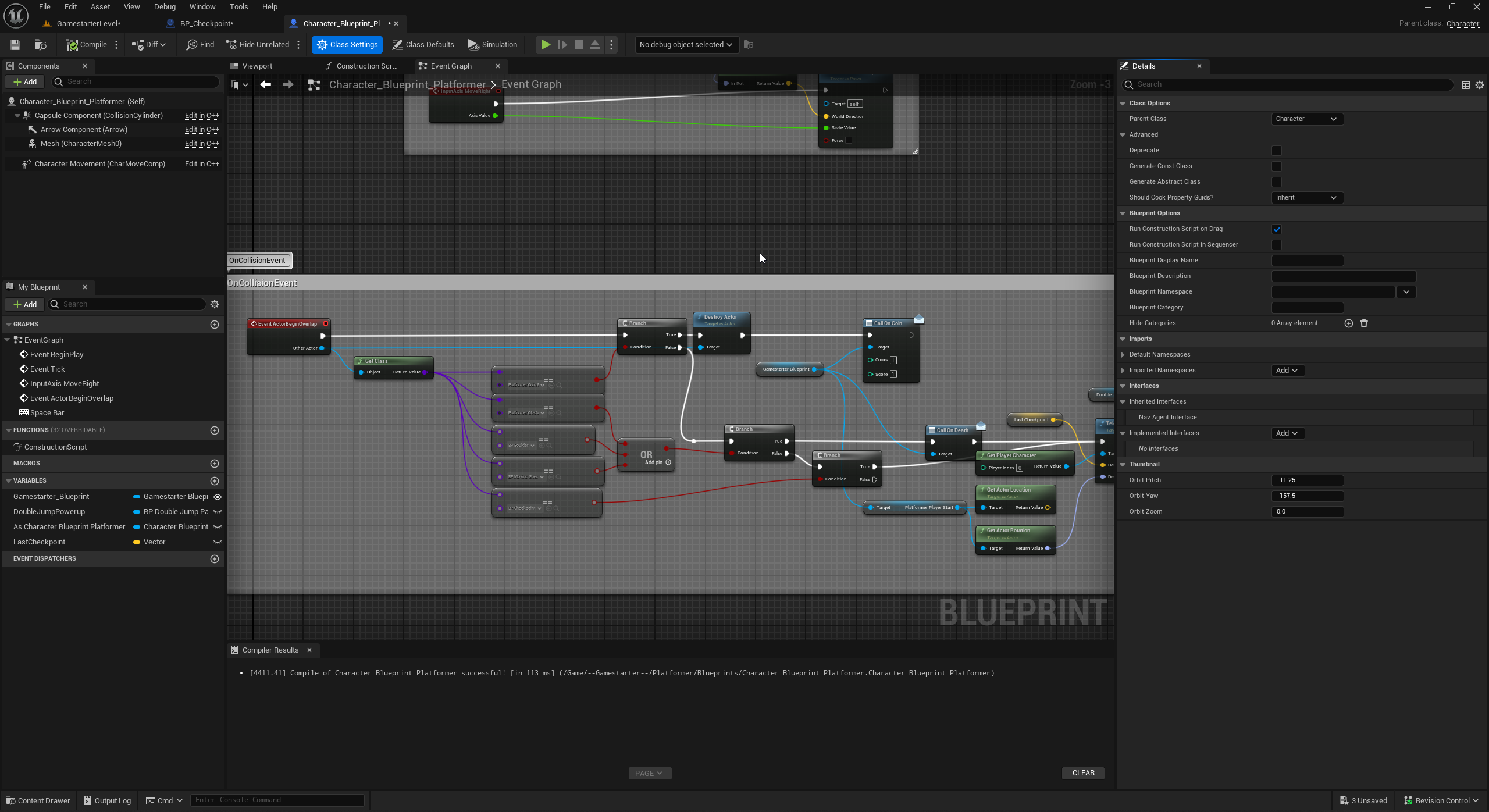 main lake
devout oak
https://i.imgur.com/XU1IY6r.png
main lake
devout oak
https://i.imgur.com/XU1IY6r.png
oh you have a collision channel named "Player", so put it back to custom and change only the Player channel and set it to Overlap
main lake
devout oak
its running the code now
so problem solved ?
keen sun
keen sun
Anyone can help me with additive hit reacts like I have a hit react animation mo...
.
 dry sleet
Annoying that BP JSON Tools' "Get Field" node has a 'success' return, yet if the field is missing it spams the output log with:
LogScript: Warning: Script Msg: Field 'state' was not found on the provided JSON object.
LogScript: Warning: Script Msg called by: BP_ItemFuse_C /Game/Scenes/Game/HomeStretch/LV_Home_RailMaintenance_Statics.LV_Home_RailMaintenance_Statics:PersistentLevel.BP_ItemFuse_C_1

/rant
So you need to clutter your graph with "HasField" as well
 dark drum
devout oak
https://i.imgur.com/Vfy9w7h.png
dark drum
devout oak
https://i.imgur.com/Vfy9w7h.png
As an FYI, you're issue was just that you had the 'Collision Enabled' set to 'No Collision'. When you changed the collision preset, it would have changed this for you.
 marble tusk
dry sleet
Annoying that BP JSON Tools' "Get Field" node has a 'success' return, yet if the...
marble tusk
dry sleet
Annoying that BP JSON Tools' "Get Field" node has a 'success' return, yet if the...
I had an issue where when the field returns a struct if any field names in that struct have a space in them then it wouldn't work in a packaged build. It would work just fine in the editor though. 
 thick prairie
Hey guys. I'm trying to follow simple tutorial where you add/create widget component in actor component blueprint. I have this very simple setup but unlike in the tutorial, it shows me this error ... I don't know how to fix it

 spark steppe
did you copy that node from another graph?
because it's the wrong for a ActorComponent BP
even tho, they have the same name iirc
frosty heron
You need to use Get Owner function from the Actor Component

Not the actor method, since it's not an actor.
thick prairie
spark steppe
did you copy that node from another graph?
I didn't copy anything :S
thick prairie
frosty heron
You need to use Get Owner function from the Actor Component
how do i do that? :S
frosty heron
right click on empty space and type get owner
tick the box where it says context sensitive
thick prairie
ahh found it. Thank You 🙂
 willow herald
Hi there. Has anyone dealt with platform-specific BPs yet?
maiden wadi
willow herald
Hi there. Has anyone dealt with platform-specific BPs yet?
In what way?
willow herald
maiden wadi
In what way?
As in a BP node would leverage a feature that is only available on a specific platform. Building for a different platform would not build the underlying code in question.
maiden wadi
willow herald
As in a BP node would leverage a feature that is only available on a specific pl...
BPs don't normally work that way. If they're linked, they're built. Since they're assets. In C++ everything is built, but you can use preprocessor macros to effectively delete code.
For BPs, like... Off the top of my head something like a main menu that differs for mobile and PC. You'd make two entirely different maps which link to two different sets of BPs. When you build for the mobile platform, it would use one map which links to different assets than if you build the PC version.
 errant raft
Is there a guide somewhere on how to do advanced search in blueprints?
Im trying to find if specific function is within specific folder (containing some blueprints) for example
 floral stump
upgraged to 5.5 and that fabrik node crashed the editor, but when i click continue it just works fine the next time
this never happened in 5.4
not sure if 5.5 is broken or it doesn't like the way my project works 🤔

 runic ore
(isn't 5.5 still in preview and thus it's likely stuff is more broken)
floral stump
runic ore
(isn't 5.5 still in preview and thus it's likely stuff is more broken)
yeah i upgraded to the main branch, but yeah i still have a reserved copy for 5.4
runic ore
main branch is even more broken. if I'd use the 5.5 branch
floral stump
runic ore
main branch is even more broken. if I'd use the 5.5 branch
time to downgrade untill a stable 5.5 released , Thanks for the suggestions
runic ore
I mean, I'd just use 5.5, if you want to test some features, but actual dev should be done on your 5.4. Likely to be more stable in general
 dreamy mountain
hey, is there a node that im just completely missing to make paperzd characters face the active camera all the time?
im making a game with 2d characters set in a 3d world, but i dont know how to make them face the camera at all times for when the camera gets rotated
 digital palm
any idea why it goes always in false branch in editor? (we are in game instance here)
 spark steppe
my personal guess is that 5.5 drops in the next days
git stalled for a week
and 5.5 seems pretty stable to me, way better than 5.4
spark steppe
digital palm
any idea why it goes always in false branch in editor? (we are in game instance ...
are you ever saving it?
creating a save game doesn't save it
digital palm
spark steppe
are you ever saving it?
I added this one, but same result
 spark steppe
that should work the 2nd time you run it
digital palm
spark steppe
that should work the 2nd time you run it
indeed
 high frost
So I have some actors that denote areas on level (i call them world locations) by a box component. Currently the only way to select one in editor is to click on the billboard component, but there are getting a lot of them in the level already and it becomes hard to see them. How can upgrade my world location actor to be more readable and so that this extra information is only visible in editor, but not in game? I tried to add a widget component with a screen space widget that shows a name and description of the area ||which is filled in in actors contruction script|| but for some reason the widget isn't displayed in editor at all when it is in screen space, and displayed with default text in textblocks when it's rendered in world space
 obtuse mulch
how to block space button on widgets without disabling isFocusable?
 cobalt iris
why wont my game unpause when i press J again 😔
 dawn gazelle
cobalt iris
why wont my game unpause when i press J again 😔
dawn gazelle
cobalt iris
why wont my game unpause when i press J again 😔
Is the "J" key press set to allow activation during pause?

 maiden wadi
obtuse mulch
how to block space button on widgets without disabling isFocusable?
maiden wadi
obtuse mulch
how to block space button on widgets without disabling isFocusable?
How do you mean?
dusky meadow
Hi why does my image display in the wrong location ?

 faint pasture
What should happen after the overlap event? Because right now, nothing is
dreamy mountain
anyone got any idea on how to make it so that i can look up and down? it just does the same thing if i move my mouse left/right or up/down

 pulsar osprey
dreamy mountain
anyone got any idea on how to make it so that i can look up and down? it just do...
pulsar osprey
dreamy mountain
anyone got any idea on how to make it so that i can look up and down? it just do...
 faint pasture
The easist approach will be to:
Event Tick -> get overlapping actors -> for each -> do the move
dreamy mountain
pulsar osprey
yes
only image i had on hand
just trying to work on something to repurpose in a later project, making all actors with this custom component face whatever the active camera is
 oblique wasp
Any idea why this is not working? When I put character in editor and use script I show - everything work fine - but when I spawn actor and use "Return Value" node from "Spawn Actor..." character spawn but not move into location 😦

This is NOT working version:

OMG - sorry.
dawn gazelle
oblique wasp
Any idea why this is not working? When I put character in editor and use script ...
In the first instance, you may be spawning a "Custom Character", but you're using a reference that already exists in the level, so it's not the same object.
In the second instance, you're using the spawned actor reference, but there's no guarantee that there's an AI Controller associated to that spawned actor. There is a setting on Pawn type actors that can auto possess if the class is set up that way, or alternatively, you can use the "Spawn AI From Class" node which would spawn and possess the Pawn with an AI Controller.
 oblique wasp
I should use Spawn AI 😄
Ok - you 100% right Datura - sorry for bothering - feel stupid now 😄
dawn gazelle
Don't feel stupid. Lots of odd bits of things to learn here and there throughout the engine.
 agile moss
I do not understand why it's not valid

 thin panther
agile moss
I do not understand why it's not valid
thin panther
agile moss
I do not understand why it's not valid
Because in that screenshot it's never set.
So your blueprint goes like this.
Create a variable that's an actor reference. Don't put anything in it.
Wait a second.
If that variable contains a valid actor, bind an event
agile moss
So how do I do it. I folowed a tutorial and it worked the same, but I tried to do it again simpler aaaaand now idk
 tawdry crater
Hello, I wonder if anyone has experience with Fractured objects, I have a bullet made with chaos geoCollection that is spawned by a drone, sometimes works properly and flies to the target without breaking in pieces, sometimes is not shot and simply falls and then gets broken. Long story short, either way works 50%, either is moving properly and not breaking or is breaking properly but is not following the projectile direction.
thin panther
agile moss
So how do I do it. I folowed a tutorial and it worked the same, but I tried to d...
You set the New Var 0 to a valid instance of something in the world
Take a look at the video pinned here on blueprint communication
agile moss
ok
 little prism
Hi All,


I am getting infinite loop error but I can't locate it... I can't see that I'm looping anywhere...
can anyone see anything obvious?
It seems only be happening when character is moving
dreamy mountain
im guessing because its spawning a torus in the box, and checking for an overlap which matches the torus
meaning itll loop endlessly
little prism
it's spawning it 15 units before
but torus moves towards to box quite quickly... can that be it?
 deep lagoon
does anyone know of any code bases, tutorials and other resources for created card game like projects?
trying to look for what i don't know i don't know in terms of architecting
 fluid lagoon
Ok so I ran into something very interesting which Idk if its me or a UE bug. The A input on the * is connnected to a timeline which goes from 0 to 1, and the current speed upgrade Var is set to 400, but when compiling and hovering my mouse over the input, it says its 5000 D:

Also, here is the A input details

This is the timeline that the A input is connected to


If anyone has any ideas, It would alleviate the massive head trauma Im dealing with hahaha
Ok Im an idiot
Never mind
I had the "Current Speed Upgrade" as instance editable and somewhere down the line, I must have put 5000
Sorry everyone


 lunar sleet
did you make sure BaseballBat implements that interface?
pulsar osprey
 wise ravine
I'm having an interface issue
wise ravine
I'm having an interface issue
need to set the target, no?
wise ravine
lunar sleet
did you make sure BaseballBat implements that interface?
for a second i thought you got me
but yes it does implement that interface
wise ravine
pulsar osprey
need to set the target, no?
wdym?
lunar sleet
Did you make certain Inspected Item is BP_BaseballBat when the breakpoint drops?
 lunar sleet
that's a mesh...
you need an instance of BP_BaseballBat not the static mesh component
wise ravine
lunar sleet
you need an instance of BP_BaseballBat not the static mesh component
i thought the purpose of interface was I didn't need a direct reference to the receiving blueprint
lunar sleet
wise ravine
i thought the purpose of interface was I didn't need a direct reference to the r...
sure, but it still needs to be a blueprint instance that implements the interface
you're looking for a house ref and you're giving it the "chair inside the house" ref
pulsar osprey
the component doesn't implement the interface
the actor the component is attached to does implement the interface
lunar sleet
wise ravine
I'm not exactly catching on
ok, let's try this again
thin panther
little prism
Hi All,
You never set Is Extractor On in there.
wise ravine
pulsar osprey
the component doesn't implement the interface
the actor the component is attache...
yea I'm just confused bc I don't need that variable for this to work

or am I wrong in understand that?
thin panther
While loops are blocking. They execute back to back. Nothing else is processing or being called at the time. Your variable never gets chance to update
lunar sleet
wise ravine
or am I wrong in understand that?
no, I misread one small detail in your screenshot, @pulsar osprey was right
The item is fine, but your Target cannot be self
Interfaces let you send out a message to a target agnostic of whether or not that target knows what the hell you're asking it to do
but you still need a target, can't just send a message out into the void
lunar sleet
and the node should probably have the envelope (Message) icon
wise ravine
yea i was thinking that too
lunar sleet
wise ravine
so what should the target be exactly?
a ref to BP_BaseballBat (can also be just any actor but it needs an instance)
wise ravine
I don't think I'm understanding the concept of interfaces then
lunar sleet
for example, you can do ActorBeginOverlap, otherActor - > RespondToInteraction.
wise ravine
Doesn't that undermine the use of interfaceS?
Why should I go out of my way to avoid referencing sender and receiver if i need a reference of the receiver to send the message
lunar sleet
you shouldn't
interfaces have their uses but that aspect is often misunderstood
for example, I have an interface because it's easy for me to get actors implementing interface to get refs to all of those
instead of getting all actors and casting individually or whatnot
there's also a soft ref aspect of them in that they don't necessarily keep the receiver loaded in memory
wise ravine
Ah so I'm misusing it
 sick sky
lunar sleet
for example, I have an interface because it's easy for me to get actors implemen...
sick sky
lunar sleet
for example, I have an interface because it's easy for me to get actors implemen...
You're using GetAllActorsWithInterface ?
lunar sleet
it's easy to misinterpret their functions
pulsar osprey
wise ravine
Why should I go out of my way to avoid referencing sender and receiver if i need...
the concern isnt having a reference to the receiver. you will always need a reference in some way shape or form to call a function on something
an interface just abstracts the function. you are basically saying "i dont care what this is as long as it is interactable"
lunar sleet
sick sky
You're using GetAllActorsWithInterface ?
yeah, once, in a controlled environment
wise ravine
So how could I get a reference to BP_baseball bat inside of BP_InteractItem
 wise ravine
beingoverlap wouldn't work because the actor never overlaps anything
pulsar osprey
could do a line trace
lunar sleet
the InspectedItem suggests you're interacting with the object in some way
pulsar osprey
thats probably most common for an interaction system
lunar sleet
sick sky
https://tenor.com/view/burn-gif-20530397
don't worry, it's something where only 10 actors or so can ever exist at one time that implement that and it is called once, not on tick or something crazy lol
wise ravine
Well BP_InspectItem creates a blueprint in which the character can interact with an item

Rotating it etc.
BP_Baseball Bat is the actual item in the scene
What I'm trying to do is have an event in the level trigger once the player stops interacting with BP_Baseballbat specifically.
pulsar osprey
are you trying to implement a sort of resident evil system where you pick it up and turn it around and do things to it?
wise ravine
I'm writing the logic in BP_InteractItem because that is where everything is handled like closing the interaction window
wise ravine
pulsar osprey
are you trying to implement a sort of resident evil system where you pick it up ...
yes
pulsar osprey
"Item" is a reference to an interactable, right?
wise ravine
pulsar osprey
"Item" is a reference to an interactable, right?
sorry it's the static mesh that the player will view
pulsar osprey
might want to change the name
regardless, you can get a components owner by calling GetOwner on it
but i imagine if you have a static mesh component then you probably had its owner at some point in the past
wise ravine
pulsar osprey
but i imagine if you have a static mesh component then you probably had its owne...
sorry what do you mean by owner?
wise ravine
right that makes sense
I've got to go, I'll come back to this at a later time. Thanks for the help up to this point though!
 sonic hare
hi, how can i set a nav mesh bound volume after my random map generator code? i cant get it work.
little prism
thin panther
You never set Is Extractor On in there.
No, i do it on the mouse press and set to false on release
thin panther
Yes, that's my point
A while loop isn't letting other things continue on
It's halting things while it executes
Your mouse press cannot fire because you cannot possibly press the mouse while it fires and have the variable change.
 noble ledge
If I had a "modular" character setup where It is composed of like 10 skeletal meshes (pants, boots, shirt, gloves, etc). Does it require more resources to run than if those meshes were all merged into one?
kind estuary

Oh there is this Set Brush from Soft Texture
It comes in very handy 🙂
no need to do the whole Async Load shananigans
lunar sleet
@frosty heron what did you use to port Lyra's Common Loading Screen plugin over? I copied over the folder into Plugins directory but not sure how to go about the LyraModuleRules
frosty heron
lunar sleet
<@1050954229902213150> what did you use to port Lyra's Common Loading Screen plu...
I have not sorry, only portrd the camera system
lunar sleet
frosty heron
I have not sorry, only portrd the camera system
oh mb, I misremembered
lunar sleet
frosty heron
My own implementation not good enough
yeah I tried a free loading screen plugin and it was horrid, so I trashed it 😄
 rocky grove
Has anyone here read this book here? I have a question about Chapter 8

I'm trying to set a variable in my player character object from another object (targets) but this cast variable reference and the increment function isn't adding to the variable (it keeps reading target elemenated variable as zero)

Anyone know what the problem is?
faint pasture
rocky grove
I'm trying to set a variable in my player character object from another object (...
does it work if you just set targets eliminated = targets eliminated + 1?
rocky grove
faint pasture
does it work if you just set targets eliminated = targets eliminated + 1?
It works inside the target object (target object adds to the target eliminated variable) but reading the same variable in the player object, it still reads as 0
 bleak meteor
hi everyone im searching for some tips on how to implement a charging projectile like metroid in my fps project but i can find any good stuff about this the reason of me here i started with a tutorial from RIMAYE on youtube since it was the only one that i found showing some logic and mine pretty much is base on is which works pretty well but to follow all the steps we are stuck to buy the vfx assets so thats where i need help how you you guys would deal with this im more a modeler than a programmer but it would help for learning heres my weapon component BP and the modification that i did for my muzzle i think thats where i should start

 proven loom
does anyone know how to recover a c++ component within a blueprint that does not want to show its details panel? i really do not want to create a new blueprint and migrate all of the data over
frosty heron
proven loom
does anyone know how to recover a c++ component within a blueprint that does not...
Character movement component bug?
Or is it some other comp
Normally reparenting can work, but commit to your source control. I bare no responsibility 😅
Or ask duroxigar, I think he has a repo that deals with this issue to some extend
proven loom
i was able to figure it out. it was a bad class redirect. i still remade the blueprint because i had not yet figured it out and that solved the problem but that was the root cause
 ionic quiver
Does anyone know a way to hide the cursor immediately? I thought setting the player controller's show mouse cursor to off would work. But it only really works AFTER you move the mouse to update it.
It's that last part that I specifically need to figure out a workaround for. I need to be able to set cursor visibility and have it update without needing to move it.
lunar sleet
ionic quiver
Does anyone know a way to hide the cursor immediately? I thought setting the pla...
setting bSetShowMouseCursor to false should work immediately, if it does not you're doing something wrong
ionic quiver
I agree it SHOULD. But until I move my mouse it doesn't realize it's hidden.

If I'm not moving my mouse and press the button, the mouse won't disappear. Once I move it a bit, then poof, gone as it should.
ionic quiver
Made some progress trying to bebug this. If I press the keyboard button, then it disappears immeditely when in game only mode. But controller triggering the same input makes you move the mouse. Issue persists for both in UI cause it's not game only.
lunar sleet
ionic quiver
Made some progress trying to bebug this. If I press the keyboard button, then it...
Do you have a set input to game mode and UI node anywhere ?
ionic quiver
No, I use game only and UI only
lunar sleet
And also you should be using Started if that pause button is set to Down or no trigger
lunar sleet
ionic quiver
No, I use game only and UI only
That could very well be your problem.
ionic quiver
The problem is that I have UI somewhere in the game?
I have menus. I'm not accessing them. Just running the hide mouse there.
lunar sleet
ionic quiver
The problem is that I have UI somewhere in the game?
No, that’s not what I meant, just that I’ve seen set input nodes cause all sorts of weird things, including bugs with showing and hiding the mouse cursor
In my case I had to SetInput to Game and UI once and not change it anymore
ionic quiver
Unfortunately the only place I was changing it to UI was off of the original code from that Pause. I detached for the test. So it's not being set to UI anywhere in this scenario.
lunar sleet
Try adding one that sets it to both, to test
ionic quiver
Tried it, didn't change it anything unfortunately. It's late so I'll do more testing tomorrow to see if I can figure something out.
lunar sleet
lunar sleet
And also you should be using Started if that pause button is set to Down or no t...
Bear in mind triggered fires on tick
ionic quiver
I also noticed that in editor it works for keyboard, F10 works for keyboard, F11 doesn't.
So... 🤷♂️
lunar sleet
Test in standalone, PIE has some keys in use
ionic quiver
Yeah, standalone didn't work either
All sorts of weird, oh well. I'll try bashing my head against it a bit more in the morning. lol
Thanks for trying
 true valve
How can I make my player place his hand on an object without any animation? I will be using idle animation but I want his hand over an object.
For example when I'm on a boat and standing next to the padel.
I know if I attach a static to the player you can use FABRIK to move arms.
But my case is different.
frosty heron
true valve
How can I make my player place his hand on an object without any animation? I wi...
You can modify the bone transform
The logic not soo different with how people apply ik hand to hold guns
true valve
frosty heron
You can modify the bone transform
I wonder if I have the location and rotation, if I could use FABRIK or do I need to use full body IK
 torpid imp
Hey guys, I'm very confused about a video tutorial, how did he create that array?


I created one in the variable, but it doesn't allow me to add any static mesh
frosty heron
torpid imp
I created one in the variable, but it doesn't allow me to add any static mesh
it's an array of reference
you cannot add anything as there's no static mesh in existance on editor time.
you grab them at run time
 frosty heron
or if you want to add in editor time, you need to place the actor that contain the array to the world
so now it has reference to the world
frosty heron
torpid imp
I added static mesh, but don't know how to let the reference recognize them
I think you are confusing a reference and an asset
they are not the same
torpid imp
Yea, I agree, I'm totally confused what should I do
frosty heron
torpid imp
I added static mesh, but don't know how to let the reference recognize them
you can add it on begin play or construct
torpid imp
I want to make a spline actor to generate a road with different mesh variable

This is what I have so far, but I want it has different meshes
 dry sleet
noble ledge
If I had a "modular" character setup where It is composed of like 10 skeletal me...
dry sleet
noble ledge
If I had a "modular" character setup where It is composed of like 10 skeletal me...
Dunno if you ever got an answer, but the answer is 'yes', by a fair bit.
It is much more expensive to update 10 SKM's than a single one. However, if you use Set Leader Pose, it's still okay performance wise.
frosty heron
 silk mantle
Hey all!
Do you guys know what is the best way to get a "static class variable" behaviour in blueprints?
I mean I want a variable that will be shared between all instances of a certain class independent of the game instance and all that.
frosty heron
silk mantle
Hey all!
Do you guys know what is the best way to get a "static class variable" ...
wdym by the game instance?
instance in what context?
having variable in Game Instance is probably the closest you can get to "static variable" if you are using blueprint only
silk mantle
frosty heron
having variable in Game Instance is probably the closest you can get to "static ...
Yes that's exactly what I meant 🙂
I want it to be independant of the game instance, player contoller or other spawnable objects. So currentley I'm using a reference to a data asset to resemble a static varaible. Would you say its a good solution?
frosty heron
silk mantle
Yes that's exactly what I meant 🙂
I want it to be independant of the game insta...
I don't think DA are meant to be used that way. Always see the purpose for read only. But if it your purpose then 🤷♂️ .
If I need a static variable I will just declare it in cpp. global" variable is mostly frowned upon in many cases.
silk mantle
frosty heron
I don't think DA are meant to be used that way. Always see the purpose for read ...
I agree it feels like a sketchy solution, that's why I'm asking 🥲
Seems I can't get away with just blueprints.
I'll look more into the Primary Data Asset class and it's usages because it does have a Setter for the data it holds which in my case it holds just a reference to a widget
frosty heron
silk mantle
I agree it feels like a sketchy solution, that's why I'm asking 🥲
Seems I ca...
hitting blueprint limit is extremely fast It was never designed to be the tool that can do everything.
silk mantle
frosty heron
hitting blueprint limit is extremely fast It was never designed to be the tool t...
Thank you 🍺
 primal summit
hi guys,
i've made this Ice Spike's niagara effect: https://www.youtube.com/watch?v=kS4Y5DKqsAI
I wanted to ask you guys, what's the best way to get collision on a niagara effect?
My goal is to check if the animation hit the player.
I've already tried to use the collision on the emitter and send the info to the blueprint but it dont get called when it hits the player, using a trace line.

Let's see how a simple Ice Attack effect can be done with Niagara particle system in Unreal Engine 5! Enjoy.
Free meshes here: https://www.patreon.com/posts/unreal-engine-98397695
00:00 Intro
00:45 Spike Niagara Emitter
01:28 Fresnel Material
03:01 Ice Spike Emitter Improvements
07:17 Ice Attack Niagara System
07:51 Ground Ice Emitter
11:02 I...
 hollow bane
Hey guys I have a small question. I am trying to read incoming string sent via the Serial COM plugin. How do I listen properly to this? I use a timer set by function name right now. Is there a way to only listen when a message is recieved?

 atomic salmon
primal summit
hi guys,
i've made this Ice Spike's niagara effect: https://www.youtube.com/watc...
atomic salmon
primal summit
hi guys,
i've made this Ice Spike's niagara effect: https://www.youtube.com/watc...
There should be an example in the Content Examples project, but in short you need to activate the necessary collision modules in the Niagara Emitter and then set up the receiving end in your BP code
primal summit
atomic salmon
There should be an example in the Content Examples project, but in short you nee...
sei italiano?
atomic salmon
primal summit
sei italiano?
By origin yes, but this is irrelevant to this technical channel and to Blueprints in general. Except maybe when it comes to spaghetti Blueprints. 😉
stone field
hollow bane
Hey guys I have a small question. I am trying to read incoming string sent via t...
I'm pretty rusty on that stuff but I think you just have to listen to it all the time.
Typically programs will have "Start" and "Stop" buttons for manual control.
You might be able to tweak things a bit, like have a lazier listener waiting for a wakeup signal and switch to the full-power listener when you get a wakeup signal.
primal summit
atomic salmon
There should be an example in the Content Examples project, but in short you nee...
anyway i already implemented it and it works but it still doesnt work when a player hits it.
I tried changing the cpu collision trace channel with a custom trace channel but still nothing
atomic salmon
primal summit
anyway i already implemented it and it works but it still doesnt work when a pla...
You are probably missing something. Check this out:
 primal summit
atomic salmon
You are probably missing something. Check this out:
primal summit
atomic salmon
You are probably missing something. Check this out:
could it be that im using a mesh renderer instead of a sprite?
or it doesnt matter?
hollow bane
stone field
I'm pretty rusty on that stuff but I think you just have to listen to it all the...
in that case it means listen on tick?
and thanks for the reply ^^
stone field
hollow bane
in that case it means listen on tick?
yeah, like read once per x seconds until wakeup, then switch to tick
you might miss some data. depends a lot on what you are doing, can you communicate with the device sending etc
atomic salmon
primal summit
could it be that im using a mesh renderer instead of a sprite?
You need meshes are sprites in general have no collisions. I would suggest you check out that example I pointed you to and compare it with yours.

You see it is establishing a BPCallBackHandler
primal summit
yes i did the same
thanks for the help so far, i really appreciate you
i will try again and let you know


 hollow bane
stone field
you might miss some data. depends a lot on what you are doing, can you communica...
hollow bane
stone field
you might miss some data. depends a lot on what you are doing, can you communica...
for now the timer seems to work better. the tick is too fast i assume somehow. I use an esp to send for floats over to unreal. Maybe I gotta switch back to udp.
thank you anyway!
silk mantle
frosty heron
I don't think DA are meant to be used that way. Always see the purpose for read ...
Ended up reparenting the component to a custom C++ class where I threw in the static variable like you recommended. Don't know why I was banging my head against the wall, stubborn to keep it in blueprints.
Cheers!
frosty heron
silk mantle
Ended up reparenting the component to a custom C++ class where I threw in the st...
Nice, but I don't think static variable is exposed to blueprint
silk mantle
frosty heron
Nice, but I don't think static variable is exposed to blueprint
True, but just using a setter and getter works from my testing
primal summit
atomic salmon
found the problem, on the collision tab under collision radius, the mesh dimensions wasnt set as the mesh approx size
 dusk star
Does MultiLineTraceByProfile only work for object collision, not actually tracing?
I have two tests, with the profile I'm tracing and the target both set to the same collision profile -- and it doesn't hit. If I do a MultiLineTraceByChannel, it hits.

