#blueprint
1 messages · Page 233 of 1

 warped juniper
Could this be a case of BP corruption...?
 dawn gazelle
Probably has nothing to do with your code being displayed here. How are you checking the value of the health?
warped juniper
I have aconstant display of player health
 maiden wadi
 pallid oxide
😭 aw man didn't fix it
pallid oxide
😭 aw man didn't fix it
This looks correct though?
 thin raptor
Trying to pass the owner of a projectile so I can get a variable from the owner but I'm get a error. Is this because the projectile is destroyed on hit?

 warped juniper
okay I found something interesting
When taking 2 damage
The player heals back both over time, and with a fixed delay between heals independent from when they take damage
dawn gazelle
thin raptor
Trying to pass the owner of a projectile so I can get a variable from the owner ...
It's because you're casting on only one path of the branch, but attempting to access the value on both of them.
Oh wait nvm
I thought they were both connected to the compare colors node.
 dawn gazelle
Ok based on the error, it's because you're attempting to access the value from a "Cast to TurretProjectile" node but it's invalid - it wouldn't make sense based on the code you've shown here - the only time you're doing that cast is immediately on the overlap, but the cast wouldn't succeed if it wasn't valid at this point and you're not attempting to access anything from the displayed cast after this point if it was invalid. Perhaps the cast node that is throwing the error is actually within the collapsed sections?
thin raptor
the error is pointing to the cast
It says specifically that that cast node is the problem idk
warped juniper
@dawn gazelle No idea where the code breaks here
thin raptor
it's definitely not succeeding thats for sure. maybe I used the wrong node
warped juniper
All I know is that it ain't the player...
Is there any way to know for sure what causes a variable to change when updated externally?
I don't recall adding any code that did this.
thin raptor
I suppose I can just give the turret proj a color property on spawn and use that
dawn gazelle
thin raptor
it's definitely not succeeding thats for sure. maybe I used the wrong node
If the cast doesn't succeed, the rest of the code won't execute, if it does succeed, then the value from the cast should still be valid unless there is something latent happening. Are you perhaps handling the overlap of the projectile with another actor and destroying the projectile in some other actor?
thin raptor
the projectile destroys itself
dawn gazelle
warped juniper
Is there any way to know for sure what causes a variable to change when updated ...
Search for all references to the variable itself. See what makes any sets to the value.
dawn gazelle
thin raptor
the projectile destroys itself
That's probably the problem then. The projectile overlap is likely triggering at the same moment and is destroying itself in the same frame.
warped juniper
@dawn gazelle Found it. Apparently the coins that heal the player are bugged and healed them regardless of distance
dawn gazelle
The workaround I can think of is to instead of destroying your projectile, stop all its movement, make it invisible, etc, basically make it completely inactivated, and then set the actor lifetime to a short value like 0.1.
thin raptor
yeah that worked! thanks
thin raptor
Oh wonderful now my enum equals is not working for some reason
Enum Equal returns true if the enums match but they don't and it returns true anyways 🤨
Yeah that makes zero sense. I deleted the node and replaced it with the same node and now it magically works?
 wild pumice
I can't find any tutorials anywhere. Does anyone know or have any guides on how to create and enemy viewer where you can rotate the model. Like in an RPG enemy encyclopedia where you see all their stats and weaknesses. I want them to be able to look at and rotate the enemy character models.
thin raptor
load the mesh asset
wild pumice
would there be a big performance hit or lag when switching enemies? This will have a bunch of monsters, is it ok to load so many when the menu is opened. Sorry fairly new to this.
thin raptor
unload one and load in the new one? not like they will all be loaded at once
wild pumice
got it so don't think of it as loading up the whole encyclopedia at once. Just one model at a time.
thin raptor
Yeah when you open the viewer have a text scroller on the side with the names of the monsters. click on it and it unloads CurrentMonster and sets CurrentMonster to whatever the new monster is
load that in
 faint pasture
wild pumice
would there be a big performance hit or lag when switching enemies? This will ha...
faint pasture
wild pumice
would there be a big performance hit or lag when switching enemies? This will ha...
Is there a big performane hit when you spawn a skeletal mesh?
thin raptor
smth like that
faint pasture
now the rendering might be tricker, with different lighting and such in each "window"
wild pumice
yeah it'll be just the skeletal mesh with the idle animation playing.
wild pumice
faint pasture
now the rendering might be tricker, with different lighting and such in each "wi...
lighting will be static in the menu, if I'm understating this correctly.
Basically this but with a 3d mesh
 wild pumice
So from my understanding now, loading and unloading the meshes and animations shouldn't cause much lag or delay when cycling through enemies in the menu
Cool, will do. Thanks.
 inland walrus
is there a node to make sound go louder the closer you get? the thing is my actors location will be updating
faint pasture
inland walrus
is there a node to make sound go louder the closer you get? the thing is my acto...
just use spatialization on the audio component
it's already built in
inland walrus
faint pasture
just use spatialization on the audio component
I cant get it working

 balmy viper
inland walrus
I cant get it working
balmy viper
inland walrus
I cant get it working
Go to the sound's Attenuation Settings and add an attenuation asset. You can control the radius at which it plays with full volume, and the outer radius where there is 0 volume

Parent the sound to your actor
(if you want the sound to follow them around, like they are the SOURCE of the sound)
 arctic glen
I’m currently working on a Clicker game and came across the following issue:
I want certain Events to happen when the Resource that you gather reaches a certain amount.
-
I only want each Event to trigger exactly once and then be removed from being checked
-
I don’t want to use Greater-Equal and Branches since it would probably kill the games performance to run hundreds of those each second. The Integer Variable of the Resource is updated each second and on reaching Milestones (100, 1.000, 10.000, 100.00) it is supposed to trigger Achievements and Story Sequences, unlock new Upgrades and Buildings and add/remove text strings to an array.
Are there any nodes or settings that I am not aware of that I could use here?
 desert juniper
arctic glen
I’m currently working on a Clicker game and came across the following issue:
I ...
desert juniper
arctic glen
I’m currently working on a Clicker game and came across the following issue:
I ...
every time the value is modified, fire an event>
your listener is listening to when the values change. if it is above an unmet threshold, then apply your achievement
data assets are a good way to create a data driven achievement system. they're just holders for the requirements needed to complete the achievement
dawn gazelle
arctic glen
I’m currently working on a Clicker game and came across the following issue:
I ...
A simple integer comparison, even if you have hundreds of them happening in a single frame, shouldn't be taxing on the system.
 dull hare
Hi, need help with door opening/closing direction logic, (right now if character is facing door left mouse movement opens it and right closes, inverted on opposite site, X Value) is there any smart way to invert direction depending where character is standing and interacting with actor? images of spots to be inverted, I want to simulate hand that is pushing or pulling the door


 plain cypress
Is it possible to expose a Visible parameter but on the Blueprint itself (BP Details) and not on the Static Mesh? Like an Editable Variable would do, but not as an Event - just some toggle, as a Tool in the Editor when placing Blueprint
 dawn gazelle
plain cypress
Is it possible to expose a Visible parameter but on the Blueprint itself (BP Det...
dawn gazelle
plain cypress
Is it possible to expose a Visible parameter but on the Blueprint itself (BP Det...
Add an "Instance editable" boolean to your blueprint. In the construction script, use the bool's value to do what you want when you're toggling it on and off.
plain cypress
dawn gazelle
Add an "Instance editable" boolean to your blueprint. In the construction scrip...
Oh ok nice, I'll look into this thanks
plain cypress
dawn gazelle
Add an "Instance editable" boolean to your blueprint. In the construction scrip...
so it has to be built in the Construction script instead of the Event graph
 copper chasm
you might get a kick out of this - I finally got into it after getting it to compile. I haven't looked at the actual code, but you're essentially just converting the tag to an fname and comparing it to the row name, only it's all done inside that plugin node instead of externally
I waited with excitement all day to see if this would help, and it's just the same damn thing with more steps lol
plain cypress
the 'Default' title name when using editable vars, is it possible to change it to something else?

 lime yoke
I'm trying to launch my character in the air with constant velocity. If I call this timeline while in the ir it works well, but in the ground, it won't launch my character at all. Do you happen to know why? It's like there's something that's pulling me down.
Fixed: I need to set my character mode to Falling.

 gentle urchin
wild pumice
So from my understanding now, loading and unloading the meshes and animations sh...
gentle urchin
wild pumice
So from my understanding now, loading and unloading the meshes and animations sh...
For cycling some enemy book i'd suggest attempting to work a tad pro actively aswell to minimize loading times on meshes
You can tell which FF titles didnt bother with this for example
wild pumice
Yeah I've seen some 3D enemy encyclopedias in games where loading the next entry takes a couple of seconds 3+. This is what I was thinking of avoiding. Thats why I initially thought, load up all the meshes somewhere and have references. But that might be too expensive. Lets see how it works with swapping meshes out 1 at a time.
gentle urchin
Exactly. Loading the next/last few entries might solve 80% of it
Hard to avoid it when the player fast scrolls
(But then you can avoid it by not showing the mesh , while the player is in the 'overview')
 graceful sage
everytime i compile my waterbodylake bp the instance of it shows a gray mesh on top and I have to disable and reenable enable static mesh bool. Is there normal?
is this normal*
 shy temple
Hello! Was just wondering if anymore was able to help me with a problem Im having 🙂
Ive built this grapple hook system that pulls you towards a location but at the moment if you are going to fast the grapple line acts like a rubber band and stretches instead of having a fixed pull length. Any ideas on what I could do to fix this? Thanks!

 native canopy
why when i trying to crouch the character jumping?
 silent stag
native canopy
why when i trying to crouch the character jumping?
silent stag
native canopy
why when i trying to crouch the character jumping?
Your character's capsule component is probably causing this
native canopy
silent stag
Your character's capsule component is probably causing this
the collision is normal i not hcange anything
silent stag
native canopy
the collision is normal i not hcange anything
try adjust this
 native canopy
silent stag
try adjust this
native canopy
silent stag
try adjust this
not working
 glossy cloak
native canopy
why when i trying to crouch the character jumping?
glossy cloak
native canopy
why when i trying to crouch the character jumping?
It's probably your animation.
Open your animation and see if it's doing that as well
Try turning off gravity on your character and starting in the air. See if it still does it or if it only happens when you're on the ground.
 west crescent
Has anyone ever used the Add Level to World node?
I am trying to use it in an Editor Utility Widget BP to add a Level to another Level and it won't save my BP, saying:
Can't save ...: Graph is linked to object World
If I can't directly reference a World Asset in BP, how is this node supposed to be used?

 wooden widget
native canopy
glossy cloak
Try turning off gravity on your character and starting in the air. See if it sti...
wooden widget
native canopy
glossy cloak
Try turning off gravity on your character and starting in the air. See if it sti...
turn off gravity isn't work, after debugging in ABP the crouch is normal, the problem in the collider i think
glossy cloak
west crescent
Has anyone ever used the Add Level to World node?
I am trying to use it in an E...
Does it need to be used in a function library?
glossy cloak
native canopy
turn off gravity isn't work, after debugging in ABP the crouch is normal, the pr...
Did you double check the animation? It seems like the animation isn't centered or something. Pay attention to where the root bone is.
Compared to your idle animation
native canopy
like when the character start crouch that start from half
native canopy
glossy cloak
Did you double check the animation? It seems like the animation isn't centered o...
root bone in the center and not moving, in bones debug
west crescent
glossy cloak
Does it need to be used in a function library?
Will try that
glossy cloak
native canopy
like when the character start crouch that start from half
Are you using the built in crouch logic?
 dark drum
native canopy
like when the character start crouch that start from half
dark drum
native canopy
like when the character start crouch that start from half
Show the logic for handling the crouch.
west crescent
glossy cloak
Does it need to be used in a function library?
Actually, the node can only be used in Editor Blueprints because it is in Editor Level Utils I think
glossy cloak
west crescent
Actually, the node can only be used in Editor Blueprints because it is in Editor...
Ah right. Are you just trying to load a level via logic at runtime?
A sublevel*
west crescent
Oh there is an Editor Function Library, hold on
west crescent
glossy cloak
Ah right. Are you just trying to load a level via logic at runtime?
I am trying to add a new Level as a Sublevel of a Persistent Level
dark drum
glossy cloak
Ah right. Are you just trying to load a level via logic at runtime?
Editor Utility functions can't be called at runtime.
west crescent
No need for runtime here, it's for an Editor Tool
native canopy
glossy cloak
Are you using the built in crouch logic?
no
glossy cloak
Oh. Well then That's exactly what that node is for. Are you not working in an editor utility widget or bp?
glossy cloak
native canopy
no
Then let's see the code, friend.
native canopy
glossy cloak
Then let's see the code, friend.
only this
 glossy cloak
native canopy
only this
glossy cloak
native canopy
only this
Oh. That is the built in crouch.
west crescent
glossy cloak
Oh. Well then That's exactly what that node is for. Are you not working in an ed...
I am working in an Editor Utility Widget. The same thing happens if I use a function library. It compiles fine but it won't save because of the map reference
glossy cloak
west crescent
I am working in an Editor Utility Widget. The same thing happens if I use a func...
Maybe you need to get the current map somehow instead of a direct reference to a specific map? I'm pretty rusty with the editor utilities. Haven't made one in forever.
native canopy
glossy cloak
Oh. That is the built in crouch.
i have a lot of code about capusle component height (the code never connect to begin play or tick, just same input with the crouch)
glossy cloak
native canopy
i have a lot of code about capusle component height (the code never connect to b...
You're modifying the capsule height when you crouch? Manually?
native canopy
glossy cloak
You're modifying the capsule height when you crouch? Manually?
no, i just usign get scaled capsule half height
west crescent
glossy cloak
Maybe you need to get the current map somehow instead of a direct reference to a...
Yeah this compiles and saves fine but I need to add it to multiple different maps that are not the current map. I guess that might not be possible
 glossy cloak
west crescent
Yeah this compiles and saves fine but I need to add it to multiple different map...
glossy cloak
west crescent
Yeah this compiles and saves fine but I need to add it to multiple different map...
I'm not sure it's possible to modify maps that aren't open since they likely aren't in memory
(I don't know C++ so I'm entirely guessing)
dark drum
glossy cloak
I'm not sure it's possible to modify maps that aren't open since they likely are...
I would lean towards this response as well. Maps can be 10's of GB at times, trying to load a few into memory would most likely crash the editor lol.
west crescent
That makes sense. I might try opening them first but if that doesn't work we might have to add them manually. Thank you!
 proud bridge
Hey all, I am attaching a spawned actor to a component in my character but I dont want this actor to use the rotation value of the character. What can I do? Should I do some logic on the spawned actor event beginplay to set some kind of rotation mode to be off?
dark drum
native canopy
only this
If this is all the logic for the crouch, it's very odd that it moves the character up. I'm not aware of a situation where just this logic would cause it.
dark drum
proud bridge
Hey all, I am attaching a spawned actor to a component in my character but I don...
What sort of rotation are you wanting the attached actor to have?
proud bridge
dark drum
What sort of rotation are you wanting the attached actor to have?
After spawning, set the rotation to whatever the character has once, then the rotation should stay unchanged. But the problem is that i m attaching this to a component so the actor is rotating with the character
dark drum
proud bridge
After spawning, set the rotation to whatever the character has once, then the ro...
So you still want it to move with the character but just not rotate?
proud bridge
dark drum
So you still want it to move with the character but just not rotate?
Right
dark drum
proud bridge
Right
You might be able to just set the rotation to absolute (might be world) which might fix the rotation. If not, you'll have to add some logic to the BP that updates its rotation to a desired rotation each tick.
proud bridge
dark drum
You might be able to just set the rotation to absolute (might be world) which mi...
I cant use tick. Also, where do I set the absolute rotation? In the actor bp? Or from the reference of the spawned actor? It doesnt matter ig?
This actor is being replicated using a RPC inside the character and not by self replicating. So i cannot use tick in the actor bp to set the desired rotation
dark drum
proud bridge
I cant use tick. Also, where do I set the absolute rotation? In the actor bp? Or...
If the actor is spawned in, you might have to do it with the mesh component instead. This however might not be a good option though.
 proud bridge
Trying this, thanks man
proud bridge
dark drum
If the actor is spawned in, you might have to do it with the mesh component inst...
Why not? I want to learn the reason
dark drum
proud bridge
Why not? I want to learn the reason
You don't get the option to set the rotation if the mesh component is the root.
proud bridge
So if i jst use a scene component and under it I place all the meshes? Make the scene component the root
dark drum
proud bridge
So if i jst use a scene component and under it I place all the meshes? Make the ...
Potentially. Doing this might not work though depending what the BP does. If it should have physics, not having the mesh as the root can cause issues.
proud bridge
dark drum
Potentially. Doing this might not work though depending what the BP does. If it ...
Doesnt have physics, doesnt have collision
dark drum
I don't believe there's a way to set the rotation type at runtime unfortunately.
dark drum
proud bridge
Doesnt have physics, doesnt have collision
You might be ok to do it this way then. But setting it to world normally fixes it to that specific value.
proud bridge
dark drum
You might be ok to do it this way then. But setting it to world normally fixes i...
Yea i m trying this rn
Thanks man, appreciate the help
 tight moon
@dark drum left you there, regarding my drawer concern.
dark drum
tight moon
<@430016173694779402> left you there, regarding my drawer concern.
Yea, yesterday I was thinking if it would be worth recreating the grab component as a static mesh component so the thing you grab is the component but I'm not sure how viable it is as a solution. If it's possible, it would mean you just add the custom grabbable component and specify the mesh. The could be do in the editor just by selecting an actor in the world and adding one which would allow the most flexability.
Again not sure how feasible it is as I'm not too familiar with how the Vr grab system is setup. Just food for thought lol.
tight moon
The whole grab component is a blueprint itself, that's only made of graphs to attach the concerned meshes to the hands and simulate the meshe physics.
I'm not sure if what you're thinking about is doable 😅
dark drum
tight moon
I'm not sure if what you're thinking about is doable 😅
I'm pretty sure it would be. Take this part for example, all it's doing is getting the parent component (so the component the grab component is attached too) and attaches it to the motion controller.
Remaking the grab component as a child of static mesh would just mean you would tell it to attach itself as apposed to it's parent. This of course would limit it to just static meshes as you wouldn't be able to use skeletal meshes.
 tight moon
Atm I don't know how this could help : we would still end up with multiple elements to duplicate at once 🤔
maiden wadi
copper chasm
you might get a kick out of this - I finally got into it after getting it to com...
Oof. 😦 Sorry that didn't work out. Pretty sure it's possible though if someone really wanted to do it. But the biggest issue comes from imports. If you export the data, and someone adds more rows with tag names that you don't have in the project, what do you do? Just don't import those rows, or spam the tag manager with possibly bad tags? And since tags convert to FName easily. I think most people just opt to fix possible typos. And like I said, some of us don't even use datatables much anymore. 😄
 raw sleet
Hey there! Got a little problem with rendering. I use the scene capture component 2D and use a render target as the texture target. Everything works perfectly fine, but there is one single problem. When disabling "Capture Every Frame" in the scene capture component, the renders look much darker than before. I don't want the renders to look dark, but I also don't want the component to capture the scene every frame. I already enabled "Always Persist Rendering State" but that didn't help either.
With capture every frame enabled:

Disabled:
 dark drum
raw sleet
Hey there! Got a little problem with rendering. I use the scene capture componen...
dark drum
raw sleet
Hey there! Got a little problem with rendering. I use the scene capture componen...
Whats the render target for?
raw sleet
dark drum
Whats the render target for?
To turn the picture into a material and cast it onto something that can move
I want to make pictures during runtime, to make cutscenes that are comic-like
dark drum
raw sleet
I want to make pictures during runtime, to make cutscenes that are comic-like
Would they be fullscreen?
raw sleet
dark drum
Would they be fullscreen?
Almost. not completely

Kinda like this game (also made in unreal btw)
The reason why I want this to be done during runtime, is to make it possible for the player to customize their character, and keep those customizations even during cut-scenes.
It even works pretty well when enabling "Capture on every frame", but I only want pictures and no videos. And when disabling, the pics get dark and ugly
maiden wadi
Looks like four RTs if you want to do it same? Two RTs for backgrounds. Capture the original character without showing it so that it gets it's general backdrop. Then two more RTs of animated characters that can be stuck in like boxes somewhere. Then your material can just overlay those and a UImage widget can show them.
The background RTs can just snapshot probably. The two capturing the animated character can probably just run every frame, won't cost that much I don't think.
dark drum
raw sleet
The reason why I want this to be done during runtime, is to make it possible for...
Whats the capture source you use for the capture component?
raw sleet
maiden wadi
The background RTs can just snapshot probably. The two capturing the animated ch...
Yes that would potentially work! I would just have to make sure that there is no quality loss when doing that.
raw sleet
dark drum
Whats the capture source you use for the capture component?
You mean this?
 dark drum
raw sleet
You mean this?
dark drum
raw sleet
You mean this?
Yea on that.
 dark drum
raw sleet
dark drum
raw sleet
You could try changing that to one of the other final color options. Alternatively, there is the various show flags on it as well. There's one for eye adaption, you might want to check that it's enabled.
raw sleet
dark drum
You could try changing that to one of the other final color options. Alternative...
Tried every option. Every other one looked worse
The show flags are all enabled (except motion blur and Path Tracing)
dark drum
raw sleet
Tried every option. Every other one looked worse
What if you have it update every frame for a second or two and then disable it?
raw sleet
dark drum
What if you have it update every frame for a second or two and then disable it?
That could actually work! I would have to see if that eats up too much performance. That is why I am asking here for a safer option
 brittle orbit
Hi, I'm troubleshooting an issue I ran into while following this tutorial: https://www.youtube.com/watch?v=o3uFXnNxwKE
Basically I've attached an interface the BP_Player blueprint as instructed, but it's not showing up in the bottom left of the blueprint panel like it shows in the video. Attached is a screenshot of the bottom left panel of the blueprint window on my end, and there's no interface section nor do any of the entries show up there. Any ideas?

Chapters
00:00 Intro
01:41 Creating Blueprint Interface
03:44 Creating Structure DamageInfo
09:40 Applying Interface to Player
11:42 Creating the Actor Component
14:48 Using the Actor Component
15:30 Implementing Heal Function
18:47 Implementing TakeDamage Function
37:25 Creating the Enemy Actor
38:45 Creating an Attack Function
44:30 Ragdoll on...

 keen forge
Hello fellow unreal users i have a brain scratcher here i'd like some thoughts on:
so for my horror game you will have to manage a labyrinth ish corridor system that has no indication where you have to go
only indication you have is where you are on a gridmap
so it says basically
"you are here on C-4"
but basically what i am wondering is what would be the best way to create this type of system, would making a working grid in UMG be it or doing it via blueprints?

basically think this
and it would say like

it would be like this
PLAYER = YELLOW
OBJECTIVE = GREEN
and i need to be able to randomize what grid the objective is in so it can jump around and not be at the same place all the time.
the game is an actual first person so this is a map you can just bring up to navigate yourself.
so TLDR:
What would be the best way to setup a grid-based map system in unreal engine?
The reason why this mind boggles me is because i need to somehow get the index of each square in the grid so i can place the objective there
so i'd need to be able to somehow
- get world location of the grid i want to place the objective actor in
- set it to that location
my ideas i had was making a grid thing in unreal that generates let's say i have arrow components
i place generate these arrow components with a INT and use a index so i can generate how many i want, then i use that world location of the component to place the objective on it.
I think that would work.. why didn't i think of that.. jesus
tight moon
I'd like to know, is it possible to have the Child Actor Template visible in the editor ? The left screenshot is from the blueprint, the second from the editor.

 dark drum
keen forge
The reason why this mind boggles me is because i need to somehow get the index o...
dark drum
keen forge
The reason why this mind boggles me is because i need to somehow get the index o...
You could probably simplify it further. If you have the space available defined as a square in the UI, all you need to do is place a dot in that square that's proportionate to where the objective is in the available space. The grid lines and marks would just be visual fluff to help the player but not actually required for the system to work.
 olive crown
So I'm trying to create a Mario style backflip, and it seems to work when I haven't rotated my character, but if I turn any direction and try to backflip it reverts back to the starting rotation and flips backwards in that direction?
Am I missing something here? How can I fix this?

 steady night
hey im spawning this speical effect but the "pivot point" is on the edge of the effect i want it to spawn in the middle like this


how can i acieve this by moving the spawn loc
dark drum
olive crown
So I'm trying to create a Mario style backflip, and it seems to work when I have...
Personally, I would handle it using root motion.
But, how do you set the 'Pre Backflip Yaw Value'?
dark drum
steady night
hey im spawning this speical effect but the "pivot point" is on the edge of the ...
You could get the right vector of the actor and multiply it by and offset and add it to the actors starting location.
olive crown
dark drum
Personally, I would handle it using root motion.
But, how do you set the 'Pre ...
I just get actor rotation and store it as a variable before the timeline, I wasn't sure if the timeline was affecting it somehow so figured saving the variable beforehand and placing it there might work
steady night
dark drum
You could get the right vector of the actor and multiply it by and offset and ad...
aye solved it ty
 lethal pollen
Hi!
If I have two player starts in a level, how can I select one of them to make the player appear there?
Thanks!
 mental trellis
No. Unless you create a sprite sheet kind of thing and use uvs to animate it.
I think the paper2d plugin probably has something?
dark drum
lethal pollen
If I have two player starts in a level, how can I select one of them to make the...
I believe there's a function in the game mode you can override that's used to determine spawn loctations.
lethal pollen
dark drum
I believe there's a function in the game mode you can override that's used to de...
Thanks! I'll check it.
thin raptor
trying to prevent switches from deactivating when another actor is already activating it. I thought I might be able to use "is overlapping Actor" but that doesn't seem to work.
thin raptor
wait does unreal not have collision tags like unity
thin raptor
nevermind Im dumb
thin raptor
yeah I'm at a loss at how to fix this issue. I need a way to keep track of all actors colliding with the button and only deactivate when all actors are off the button
gentle urchin
Whats the issue
World placed button?
Tracking overlapping actors is prob the easiest solution
thin raptor
If I have a button that is pressed, when the player walks on and off it deactivates the button
lemme get a recording
gentle urchin
So you just wanna see if other actors are overlapping the button still
Before deactivating
dark drum
thin raptor
When something overlaps, add it to an array. When it ends the overlap, remove it from the array and check if the array is empty. If it is, deactivate. If not do nothing.
thin raptor
Ok yeah that sounds about right
maiden wadi
You don't need your own array either. There are overlapping queries you can use that already handle the array for you.
thin raptor
I tried that but it didnt seem to work
gentle urchin
Just gotta filter it i guess
thin raptor
this was the logic I was using

if the length of the array is = or greater than 1 it should prevent the switch from deactivating when the overlap ends but it would permanently activate the switch
only other thing I could think of was doing a check every game tick but that seems excessive for this problem
oh I'm dumb.
I'm checking the length and not if it's empty
it kinda works but it also kinda doesn't
thin raptor
I have it set to ignore world static and world dynamic collisons
the issue is it needs to refresh itself, but it sort of works as intended
It correctly prevents the player from deactivating the switch but the first removal of the box afterwards doesnt register
 golden lotus
I'm having an issue with 5.4 not updating an image brush properly. When I change the image to a new one via a button press, the old one remains on screen.
Anyone have any ideas?
I've updated the BP setup in different ways with the same result each time.
- I've set the brush from material
- and when that didn't work, I tried to use two separate images and hide the original image when I make the new one visible, but this way isn't working either (same result)
I am trying to improve on a system I previously setup in 5.3, but this code is blocking me right now, and the brush/image update seems to work just fine in 5.3...I wanted to check here to see if anyone had any ideas before I run off and submit it as a bug to unreal.

 keen forge
dark drum
You could probably simplify it further. If you have the space available defined ...
keen forge
dark drum
You could probably simplify it further. If you have the space available defined ...
So you'd recommend doing it in an UI? The way I have it now is I have a instanced mesh grid layout then I just randomize the int on the index. Get that indexs world location and spawn the objective actor there.
It feels very hacky. Works, but messy. Maybe I'm missing something obvious.
dark drum
keen forge
So you'd recommend doing it in an UI? The way I have it now is I have a instance...
Yea, the UI would only need to know the overall size of the space and the world location of the objective. You'd be able to work everything else out in the widget itself.
 chilly narwhal
Hi there!
I have a question about modular characters.
How can I assemble different parts of characters (clothes - hat - hair etc.) which share the same skeletal mesh within the UE5?
Should I use blueprints?
 remote meteor
chilly narwhal
Hi there!
I have a question about modular characters.
How can I assemble diffe...
remote meteor
chilly narwhal
Hi there!
I have a question about modular characters.
How can I assemble diffe...
Epic Games Developer
Create modular characters by combining multiple dynamic skeletal mesh components in Unreal Engine.
most of the stuff about modular characters are explained here
chilly narwhal
remote meteor
most of the stuff about modular characters are explained here
rly tnx 🙏
keen forge
Would you be able to give me an example? I understand if not! I'm just having a hard time to convert the world spaces from the real world to the UI.
@dark drum
Forgot to reply. Sorry for mention
dark drum
keen forge
Would you be able to give me an example? I understand if not! I'm just having a ...
So lets say you have an area that is 10m by 10m (1000 by 1000) and an objective at 225, 650.
We know that the object is at 22.5% of the x and 65% of the y. We can use this to calculate where a dot should be drawn in the widget based on it's size. So if the map was 200px by 200px, we can have the dots location be at 45px and 130px. If you need to, you can always round the location to the nearest grid size if needed.
You can then just have an image with a material that just generates a grid based on the grid size. This could be under the dot.
keen forge
dark drum
So lets say you have an area that is 10m by 10m (1000 by 1000) and an objective ...
Ahh! I appreciate you taking your time man for explaining it, thank you! i will look into using this!
 steady kindle
Hey. I'm looking at a pickups system in a world partition level. For example, coins scattered around the world. Currently if any player picks up a coin, it hides itself and should not reappear for the rest of the match.
However, because it's world partition level, if the player goes out of streaming range of the coin's location and then returns, the actor is reset and the coin appears again. Variables on the blueprint actor are also discarded, so you can't set an "isCollected" variable on the actor and expect it to keep its value when you go out of range.
The solution is probably to store whether the pickup has been collected or not somewhere else, like GameInstance. I'd create a set variable and add a reference to the actor if it has been collected, then the actor can query that on BeginPlay to see if it should make itself visible. But how do I get that reference to that coin actor that will remain valid after streaming out and back in again? Is a soft reference safe?
gentle urchin
Game state would probably be a better fit
steady kindle
gentle urchin
Game state would probably be a better fit
Sure, but what am I tracking?
 surreal peak
Unsure if you could reference it by path due to being hand-placed.
But if not, other idea is to have each coin assign itself a GUID if not already set.
And use the GUID to identify them.
steady kindle
Get Actor GUID returns 0 on builds, and the other editor identifiers don’t work either. I think I’m going to need C++
surreal peak
Idk if FGuid is exposed to BPs
Might be
If not, then yeah, you'll need to make an FGuid property in C++
steady kindle
It’s hard to test because if a blueprint is streamed out of a level and then back in before it’s garbage collected sometimes it seems to keep some of its old state, so sometimes it appears to work.
 modern hemlock
Hi guys, I have a problem that when my character die, his hp displays 0/0 and I don't know how to fix that
 devout tide
Show your blueprints
modern hemlock
 devout tide
surreal peak
Idk if FGuid is exposed to BPs
devout tide
surreal peak
Idk if FGuid is exposed to BPs
it actually is

 devout tide
that doesnt seem related to showing character hp at all
where and how are you setting the hp
modern hemlock
It's from school and it's pretty hard for me to navigate, it's my first time in ue5

 devout tide
i suppose what happens is your widget loses its reference to the player character blueprint, you can try destroying and recreating the hud widget or re-referencing your character blueprint after death spawn
 narrow sentinel
Anyone know if with UE4 I can find out where this is - Error: [Callstack] 0x00007ff8450275b3 TrainSimWorldPublicEditor-CoreUObject.dll!UnknownFunction []
specifically the Hex
could I use the hex to find the function maybe in the .exe of the game ??
modern hemlock
devout tide
i suppose what happens is your widget loses its reference to the player characte...
how can I re-reference my character blueprint?
narrow sentinel
I don't have the source files etc so I can use that
devout tide
check the logs instead, they usually show some errors too
I would suggest to destroy the hud widget on death
and spawn a new one on spawn
would probably be simpler at this point
modern hemlock
okay, I'll try, thank you
 dire valley
I am new to blueprints, When I crouch, I want my camera to switch (smoothly transition) into a more close up view, When I uncrouch, the camera should transition into it's normal state. But i cannot seem to find the right way to do it.
I might be making basic mistakes, just point them out so i can improve

 hollow cove
dire valley
I am new to blueprints, When I crouch, I want my camera to switch (smoothly tran...
hollow cove
dire valley
I am new to blueprints, When I crouch, I want my camera to switch (smoothly tran...
view targets with blend i would use if i wanted to switch between two cameras
what you probably want to do is change the fov to something smaller or something similar to that on the current camera
hollow cove
dire valley
I am new to blueprints, When I crouch, I want my camera to switch (smoothly tran...
here ya go

 sour anchor
How do I change the MeshBuildSettings for a Procedural Mesh Component? I found the Make MeshBuildSettings node but I can't find anything obvious that lets me get the MeshBuildSettings of the mesh component created by Add Procedural Mesh Component.
 tight pollen
hello
some tutorial about VOIP talker
voice chat
or documentation
Has anyone dealt with this?
and can a private conversation between two players be created only with BP?
e.g. there are 50 players and 2 of them talk to each other via VOIP
 cyan spire
Hello, maybe someone is smarter than me. Has someone a logic to check how big the possible crafting amount is if the item is craftable? I store : Current Quantity and Needed Quantity (recipe quantity).
 sour anchor
How do I change the MeshBuildSettings for a Procedural Mesh Component? I found t...
sour anchor
sour anchor
How do I change the MeshBuildSettings for a Procedural Mesh Component? I found t...
I guess, what I actually need to do is to set use full precision UVs on a procedural mesh. Is there another way to do this?
 pulsar geode
Hey, I am trying to have a moving actor always turn to face the player but slowly, as in it would take time for the actor to catch up to looking where the player is. Any idea how to do this?
I originally thought a lerp would work but it is very jump and I need it to constantly be updating to the players position.
 sleek barn
Hello i am newbie in ue5. Can some1 help, I want to create Cast to first person character but in interface. I just need in interface create output to Object Reference BP First person character, or i do it wrong ?
devout tide
I suppose thats to avoid donig a cast and directly passing the object ref via interface? Just do a cast once and cache it somewhere
 thin panther
But it's still incurring the "cost" of a cast
I'm assuming it's because of some myth that casting is expensive, from some resource online, but this method doesn't even avoid the cost
devout tide
Not sure if its exactly the same or not but definitely sounds like too much work for something that simple
Yeah, the internet is really hating on casts rather than explaining on how to use them
thin raptor
Can I generalize a function using tags? like say I want to take in any class with a specific tag as an input
devout tide
You can make a tag input and iterate through a class array to find it
Classes have Class Defaults where you could store your class tag
thin raptor
does UE5 have interfaces like c#? then I could just have both classes inherit the interface and accept the interface maybe
devout tide
There are interfaces but Im not sure you can check whether a class implements that interface, you sure can from objects but thats not your case
At least in blueprints that is
thin raptor
I'm casting to specific object types so maybe it will work
devout tide
then you can check with "Does implement interface"
thin raptor
bleh I should have just used inheritance. this is what I get for being lazy
devout tide
but having interfaces per different object types sounds too much, maybe make an interface return a tag container and compare that instead
thin raptor
the best solution is probably to just suck it up and redo everything with inheritance, then I can just accept any object that inherits from the switch main class. I'm so dumb bruh
 silver gale
i need to rename s_struct to fix depency package error but when try to rename getting crash on 5.4 how i can fix this any thoughts ?
faint pasture
thin raptor
the best solution is probably to just suck it up and redo everything with inheri...
What are you actually trying to do?
thin raptor
It's fine I just need to waste many hours fixing my mistake
faint pasture
I mean what's the actual mechanic or design?
You want a lot of things to do XXXXXX
thin raptor
I made the mistake of not just using inheritance from the start
maiden wadi
Composition is also an option for that.
faint pasture
Yeah I'm thinking composition but with no clue what the actual problem is who knows.
sleek barn
sleek barn
Hello i am newbie in ue5. Can some1 help, I want to create Cast to first person ...
Just wanna do spots where player get some damage, and if i do cast and plays like 20 spots it will cost to much data
devout tide
sleek barn
Just wanna do spots where player get some damage, and if i do cast and plays lik...
you can simply call ApplyDamage on any actor, no casts needed
then the receiver can implement ReceiveAnyDamage event to receive it and subtract from health etc.
faint pasture
sleek barn
Just wanna do spots where player get some damage, and if i do cast and plays lik...
You want areas that damage whatever's in them?
Simplest approach would be to:
Tick -> get overlapping actors -> foreach -> apply damage
Then set the tick rate to however fast you want it to do the thing. Quick and dirty
or you could use a timer
or delay loop
thin panther
Is the pain causing volume still in? That's another option
sleek barn
Do this today,but i have problem to cast damage to charachter
 faint pasture
sleek barn
Do this today,but i have problem to cast damage to charachter
faint pasture
sleek barn
Do this today,but i have problem to cast damage to charachter
that thing doesn't damage the character on a timer
it damages WHATEVER IS OVERLAPPING IT
think like that
faint pasture
sleek barn
Do this today,but i have problem to cast damage to charachter
If you want it to work like that you need to set character ref by casting when the overlap begins
sleek barn
but i watch videos and they sad casting BAAAD
faint pasture
but that's pretty gross, it's better to just have a timer running and damage everything overlapping it
faint pasture
sleek barn
but i watch videos and they sad casting BAAAD
no
sleek barn
so i want to learn how to avoid it
faint pasture
sleek barn
so i want to learn how to avoid it
Begin Play -> start timer
Timer -> get overlapping actors -> for each -> apply damage
doesn't care what they are, they all get damaged
faint pasture
sleek barn
so i want to learn how to avoid it
no
sleek barn
K,thx for help
devout tide
It's absolutely fine to also just cast to the player character, promote it to a variable and then use that when applying damage
faint pasture
Make sure you understand what casting actually is
devout tide
maybe use interfaces for teams etc. if you want to avoid it, but doing anything ti avoid it is just wrong
faint pasture
If I have an Animal, and I want to tell it to Bark, I need to cast it to Dog (check if it's a dog and let me treat it as a dog), since Dogs can Bark but Animals can't.
so a cast is a type check + gives access to the thing as that type
Begin Overlap tells you what Actor overlaps, but you don't know if it's a Character unless you cast
so if the rule is "Any Character that overlaps this gets damaged" then you'd cast to check
but the rule can just be "Anything that overlaps this gets damaged" then it can just be fire and forget
sleek barn
but, if i cast character to damage zone it cast all data
maiden wadi
Technically if you have an animal and want it to bark, you just tell B_Animal to "Speak". The dog can bark, the cat can meow, the jackass can EEEEAAAHH.
faint pasture
sleek barn
but, if i cast character to damage zone it cast all data
wat
that doesn't make any sense
You really need to understand what casting is
maiden wadi
It makes sense to newer people who don't understand pointers. You wouldn't belieeeeeve the bullshit on the net about casting. They say some serioualy wild stuff.
faint pasture
I swear I've had this conversation 30x, we really need a 0-100 on pointers/references somewhere
devout tide
Just people not knowing stuff about casting making tutorials hating on them
They created a whole community of cast haters
maiden wadi
The problem is that it's a complex problem. 😄 Like, it's so simple, but you have to understand the surrounding stuff before it really clicks.
sleek barn
Ok,thx for help.Mb u know some good channel in youtube with stuff for newbie ?
thin raptor
Tyring to get this event to work with both switch classes but its accessing none for some reason, I'm passing in the static mesh to be used as the target

On the child blueprint I pass in the scene component
 faint pasture
thin raptor
faint pasture
thin raptor
how many button meshes are there
thin raptor
only one
thin raptor
no because the button is a different shape in each child class
if the parent class has a button that would be an issue
 devout tide
where do you set the button variable?
thin raptor
in the child class
thin raptor
I did. the press button event is in the parent class, the button mesh is in the child class
devout tide
no you didnt, where do you get this Button from? Is it a component? is it a variable you set in code?
thin raptor
Its a component
devout tide
a child actor component?
thin raptor
yes
devout tide
button -> get child actor is the actor you need to move
faint pasture
basically the thing you're calling button is not the button actor
devout tide
so the input would be of actor object reference and Set Actor Relative Location instead
faint pasture
it's a child actor component which SPAWNS the button actor for you
i mean i think moving it should move the thing visually but that's a different matter
devout tide
does it? in PIE after spawning it probably detaches it from that comp
thin raptor
nothing is spawning it. I place them in the world
devout tide
you said you are using a child actor component, a child actor component is spawning the actual actor
so if you are moving that component, you are possibly not moving the actor its actually spawning
so instead move the actor by Child Actor Component -> Get Child Actor and move that one
thin raptor
that would move the whole thing not just the button component
thin raptor
Im trying to move the scene component
devout tide
just try moving the child actor of the child actor component and you will see
Child Actor Component -> Get Child Actor and then pass this into that event you have, which will require a change in how you set location, I believe it would be Set Actor Relative Location in that case
thin raptor
not working idk
 coarse condor
I'm trying to get a bit of text on screen to reflect a int number but it keeps giving accessed none error. I'm not entirely sure why it's not able to access it or how to worka round this.


 devout tide
do you have that counter actor placed in your level?
coarse condor
Yes
thin raptor
yeah its not working. whatever
devout tide
@thin raptor as long as you are accessing and moving the child actor of the child actor component, it should work. If not, you are doing something wrong
devout tide
coarse condor
Yes
are you sure its in the level and nothing is destroying it?
 meager spade
coarse condor
I'm trying to get a bit of text on screen to reflect a int number but it keeps g...
meager spade
coarse condor
I'm trying to get a bit of text on screen to reflect a int number but it keeps g...
No idea but if you uncheck "UseGrouping" you don't have to use that replace node
sour anchor
Maybe what I should do is make my own procedural mesh class
maiden wadi
Why? DynamicMesh and Procedural mesh work well?
sour anchor
maiden wadi
Why? DynamicMesh and Procedural mesh work well?
I need full precision UVs
And I can't figure out how to set that on a procedural mesh
Maybe dynamic mesh has that ability? What is the difference?
thin panther
DynamicMesh is ProceduralMesh's successor
sour anchor
Interesting, I'll look into that and see if it can do the full precision UVs
 lethal venture
Hi, I have implemented delta time to update the position of character. How can I test if its actually working? I am not really seeing much of a difference
dire valley
hollow cove
here ya go
OHHH Thank you very much
 autumn pulsar
I'm trying to rotate a rotator along a specific axis of it, say the forward vector. Is there a node that does that?
dire valley
hollow cove
view targets with blend i would use if i wanted to switch between two cameras
Alright, Well another thing I would like to ask. When i am using this blueprint that i shared, my camera switches to first person view, even though the blueprint does not have action to do so. Is it the default view when using View target ?
autumn pulsar
dire valley
Alright, Well another thing I would like to ask. When i am using this blueprint ...
do you have a first person camera?
dire valley
autumn pulsar
do you have a first person camera?
No, I was using third person
autumn pulsar
it's possible the camera arm is getting blocked by the pawn itself
or the collision
dire valley
autumn pulsar
it's possible the camera arm is getting blocked by the pawn itself
There is no 2nd camera, Still this happens. It might be the default state of View target with blend maybe ?
 crimson talon
I've been using Convert world location to screen location for my 3rd person camera to make sure the player is still in view but I've noticed there doesnt seem to be similar logic in Blueprints with the same functionality but for an npc/actor besides the player controller
Is project world to screen what I'm looking for?
graceful sage
Has anyone here used the water plugin and adding swimming to it?
 inland sandal
so far I've been able to get the object to highlight at a certain proxmity but I want to make it so that it ONLY highlights when the character is close enough AND has the mouse cursor hovered over the object, haven't been able to figure out the second part : (


here's what I have so far, any help would be appreciated!
sour anchor
thin panther
DynamicMesh is ProceduralMesh's successor
what is the dynamic mesh equivalent of Create Mesh Section?
thin raptor
So I made an interface and for some reason one blueprint implements it as an event and another does not?
glossy cloak
thin raptor
So I made an interface and for some reason one blueprint implements it as an eve...
What does it do instead? Function??
glossy cloak
Hmm. Probably just a bug.
 marble tusk
I think you can right click them and change between function and event
thin raptor
nope
it only wants to be an event
very strange indeed
gosh I sure do love interfaces and code reuse
thin raptor
oh great now my switches are buggy even though I didn't change anything
 drowsy anvil
Hello, any ideas how I could get my keypress when held down do this:
spawn object 1 instantly, or wait 0,5 seconds to spawn object 2 instead,
and after 1 second you miss the change to spawn anything
maiden wadi
drowsy anvil
Hello, any ideas how I could get my keypress when held down do this:
spawn objec...
What kind of systems are you working with atm? Are you running GAS or any other ability system?
proud bridge
hey this may be extremely advanced but I was wondering how I can make a system for shader pre-compilation? much like games like HogwartsLegacy where the game needs to pre-compile the shaders in order to play the game. Can anyone tell me what to look for or what to search, what to learn to know more about this?
drowsy anvil
maiden wadi
What kind of systems are you working with atm? Are you running GAS or any other ...
not sure what those mean, but it's for to summon a bomb. if you press and instantly release the button you get a weak bomb, but if you hold the button down a second, you get rewarded with a strong bomb instead
here is my code for it so far:
 maiden wadi
Do you only need them spawned on button release?
drowsy anvil
yeah
maiden wadi
Pretty easy then. 😄 Sec. Editor warming up.
99% sure this will get you roughly what you're after.

Oh, woops. Sec
There. Forgot to kill the timer if it was active at release. 😄
 maiden wadi
proud bridge
hey this may be extremely advanced but I was wondering how I can make a system f...
maiden wadi
proud bridge
hey this may be extremely advanced but I was wondering how I can make a system f...
This is probably a good read for you. It covers a couple bases. Recorded/Bundled PSOs is what you're looking for, but as Tom states here it can be good to use both systems together that he covers
https://www.tomlooman.com/psocaching-unreal-engine/

Unreal Engine titles have faced stutter issues on PC with DirectX 12. These hitches primarily stem from inefficient handling of Pipeline State Objects (PSOs), which preconfigure GPU states but suffer from on-demand compilation delays. Unreal Engine 5.1 introduced PSO Precaching to preemptively compile PSOs, but issues persist with partial covera...
proud bridge
maiden wadi
This is probably a good read for you. It covers a couple bases. Recorded/Bundled...
looking into this, thank you so much for the guide
drowsy anvil
maiden wadi
There. Forgot to kill the timer if it was active at release. 😄
hype this works perfectly, thanks for the help a lot, very happy rn 🙂
the print string help text was nice too to understand
maiden wadi
Happy it helped. 😄
 heady lantern
Cross-posting a link to my question about parallax backgrounds, bc not sure if it's more of a Blueprint or a Material question tbh:
#materials message
 ionic quiver
If I have a pyramid with a sphere collision, then on begin overlap it swap the entire actor for another, lets say a cube that also has a sphere collision with an on end overlap that swaps it back to the pyramid actor. Is there a situation where it could trigger entry but not exit somehow?
Effectively I'm trying to figure out a good way to swap an actor for another at a distance but don't want to do tick / timer based distance checking if I can avoid it.
 queen heron
is there a way to make the line trace get a hit with the backface of the object and not get the hit event where it starts?
 glossy cloak
queen heron
is there a way to make the line trace get a hit with the backface of the object ...
glossy cloak
queen heron
is there a way to make the line trace get a hit with the backface of the object ...
Like when you trace from inside the object??
glossy cloak
Oh okay. And was it possible? Lol
queen heron
the solution was to enable Double Sided Geometry
queen heron
it was that simple 😅
glossy cloak
Nice. We love simple don't we? Lol
steady night
when changing the "axes throw intervalle" in a timer event loop it dosent change the current loop time since its already been run is there a way to change the loop ?
 queen heron
steady night
when changing the "axes throw intervalle" in a timer event loop it dosent chang...
queen heron
steady night
when changing the "axes throw intervalle" in a timer event loop it dosent chang...
you need to fire the Timer Event again to get the changes of the float variable
maiden wadi
ionic quiver
If I have a pyramid with a sphere collision, then on begin overlap it swap the e...
The only way that I'm aware of is if it never entered. Or if your collision bounds are much larger than you're aware of. Overlaps are all component based. Actors simply listen to their owned component's overlap events to broadcast their own. The overlapping other components are stored in an array on the primitive component and removed on end overlap. If you do find some way to fully repro an issue with it though, it's definitely bug reportable. 😄
steady night
queen heron
you need to fire the Timer Event again to get the changes of the float variable
hmm dosent work tho
queen heron
how are you changing the float variable?
steady night


i mena i could just workaround and not make it loop but call it again after another set timer by event
but good to know in the future if i can manipulate it somehow
i mean this would solve it i guess

i was wrong i was not callening the changing event ...-.ä
steady night
yeah i dident call the update spawn axe intervalle...
yeah running with just the loop now it worked
 cyan scroll
uuh stupid question, but how do i get a vector transform of reference objects? i am missing some node that does that
 cyan scroll
get relative location node helped me
tight moon
#virtual-reality message
I'm bumping this here in case anyone can help, but I'm having these issues when trying to apckage the game, anyone knows what to do for them ?
 stuck hedge
is there any way to view post process settings runtime in blueprint, or will I have to make a c++ function and expose it?
 potent socket
Hi, I'm trying to have a interaction between a sphere trace and and launch character in the blueprint character (big punch projecting the other player), but in the hit result I have an actor ref, but Launch demands a Character ref. The problem is maybe also from the fact that is local multi player and both player use the same character blueprint. Any idea how to deal with that ?
 formal narwhal
Does anyone know if Draw Texture on a RenderCanvas can draw a sub region of the input texture?
formal narwhal
nvm figured it out
 desert sigil
Hey guys. Do any one knows why Set Time by function or event execute twice ? at the same time. As I use once in begin play. Also I'm calling it from Game Mode
glossy cloak
desert sigil
Hey guys. Do any one knows why Set Time by function or event execute twice ? at ...
Set timer, I assume you mean? It definitely only gets called once for me. I use them everywhere.
Are you working in multiplayer?
glossy cloak
Put a print string on it and see if it's being called by a client and the server.
Are you testing in multiplayer?
desert sigil
glossy cloak
Are you testing in multiplayer?
Yup
desert sigil
glossy cloak
Put a print string on it and see if it's being called by a client and the server...
Yeah I tried this , I'll send you a picture one minute
glossy cloak
If it should only be a server call then just stick a "has authority" check before it and that'll stop the clients from calling it.
Then just make sure you're not trying to run anything local on it and you should be set.
desert sigil
I'll show you the error

at the beginning he start as once
after that he keeps twice
it dosn't start as twice
glossy cloak
Show the code?
desert sigil
sure
Beging Player


the function


In specific time I Unpause the Timer
Firstly I tried with Unpause . Direct Start so I made some change to try another way
desert sigil
I still didn't set a time to pause it
I'm trying to fix this problem to keep
For more information, I'm trying to make a game Timer for all player. When the game should end how long
so if you have a better way , then thank you
glossy cloak
So you're pausing it right at the start, but it's still triggering first? And triggering twice?
If it were me, I would just start the timer when you actually want to start it rather than pausing and unpausing it later.
desert sigil
Yeah I tried that , but I thought this is the problem so I tried to pause and unpause
glossy cloak
This is in your game mode?
desert sigil
Yup
glossy cloak
Hmm.
I'd guess your logic is wrong somewhere else because everything I'm seeing looks fine
desert sigil
desert sigil
glossy cloak
I'd guess your logic is wrong somewhere else because everything I'm seeing looks...
I think would be good if I tried it in another game mode
 digital robin
Hey ! Is there a way to detect if the current "Audio Output Device" is using Bluetooth (for Android/iOS/PC) ?
I can't find any suitable method or doc for this
desert sigil
desert sigil
Also what make me so upset why there is looks like two different value of the float , at the end both of them the same value
if it executed twice as normal maybe I can figure what this
glossy cloak
desert sigil
Also what make me so upset why there is looks like two different value of the fl...
Well if it executed twice then it would have counted up the second time. So that makes sense.
And it executed 1s after the first one. So... Where is your code for unpausing it?
 glossy cloak
What is the value of your "game duration" variable?
desert sigil
Ohhh I forgot that I'm really set an end time 😅
desert sigil
glossy cloak
What is the value of your "game duration" variable?
10
glossy cloak
Then it should just keep counting up until 11.
Because you put the increment and the print BEFORE the check. So it'll increment one more time.
Oh no it won't. I'm dumb.
Lol sorry
desert sigil
You are right it will stop at 10 because Equalr or Greater than
desert sigil
I figure something even it called twice but at the end it will only end up as 1s function

I set print message after it end
and it just sent once
I think , I don't need to fix it
glossy cloak
¯_(ツ)_/¯
 lusty mulch
Good morning! I'm curious, is it possible to modify a custom ini file from within a blueprint or editor utility widget?
dark drum
Does anyone know what would cause a soft object reference to be different even though it's for the same actor?
maiden wadi
How do you mean by different?
 fiery swallow
lusty mulch
Good morning! I'm curious, is it possible to modify a custom ini file from withi...
fiery swallow
lusty mulch
Good morning! I'm curious, is it possible to modify a custom ini file from withi...
modify it how, you can create variables in blueprints and set them to be config variables, blueprints in itself have no nodes to directly write to any files iirc. But there are quite a few free marketplace assets that allow you to
lusty mulch
fiery swallow
modify it how, you can create variables in blueprints and set them to be config ...
yeah so I have a custom ini file that I use to store some information. Wanted to be able to add new lines to the ini from an editor utility widget if possible. hope that makes sense.
dark drum
maiden wadi
How do you mean by different?
The bottom is picked via the editor using the eye dropper, and the bottom one is getting the actor and converting to soft ref at runtime.
 maiden wadi
One is a PIE path Same map, same object, but one is from a play in editor world.
Unsure if BP exposed, but I know World has a function to removed PIE stuff from paths. What issue are you having with it?
fiery swallow
the tiniest amount of c++ could help you achieve that, or alternatively download a plugin off the marketplace which will also allow you to do that
https://www.unrealengine.com/marketplace/en-US/product/read-write-text-file/reviews
this mentions reading and writing to txt files, but .ini files are basically the same thing? So I'd imagine you can write to it just fine
but it really depends on how the code was written
dark drum
maiden wadi
Unsure if BP exposed, but I know World has a function to removed PIE stuff from ...
I'm storing some soft object refs in an array and then when I'm check if the array contains the soft obj ref, it fails because of the difference. :/
lusty mulch
fiery swallow
the tiniest amount of c++ could help you achieve that, or alternatively download...
ok thank you, I will look into trying to do this in c++
fiery swallow
if you don't know any c++ then you're probably better off with a plugin
fiery swallow
dark drum
I'm storing some soft object refs in an array and then when I'm check if the arr...
are you able to even compare soft objects references that way? o.O
maiden wadi
Btw @gentle urchin You were asking about something we were doing in Atre at one point. I think it was about the flowgraph stuff. Not flowgraph related but we did a livestream last night with Epic about how we use PCG for procedural levels. https://www.youtube.com/watch?v=MSEc-Ur1Ek4

This week we'll be sitting down with some of the talented team Ironward, the minds behind the stunning Atre: Dominance Wars. We'll discuss some of their unique uses of the recent PCG tools, how they approached their tech art, and more - all as an indie studio. As always, don't forget to participate in our live Q&A!
Steam Game Page: https://stor...
fiery swallow
like you can compare a soft object class reference, but an actual soft object reference doesn't actually exist, you would load it if it wasn't already loaded and then check against that
maiden wadi
dark drum
I'm storing some soft object refs in an array and then when I'm check if the arr...
I've only dealt with this path issue for Savegames. Saving stuff by pointer saves as path and it has the same issue of not being able to load in a normal game. So you have to clean the path with the uworld function.
Even if you had the cleaner in BP, I'm not sure if you can even do that though. I'm not sure if you can set a SoftObjectPtr from a path like you can in C++?
dark drum
maiden wadi
Even if you had the cleaner in BP, I'm not sure if you can even do that though. ...
Yea I don't think you can, I believe the only way to get a soft object ref is this. :/

I'd imagine it would be fine in a build but it's not much good if you can't test in the editor. Hmmm... I guess I'll have to change how I'm handling something.
dark drum
fiery swallow
are you able to even compare soft objects references that way? o.O
Yes you can... If UE doesn't decide to prefix it with PIE. 🥲
fiery swallow
dark drum
Yes you can... If UE doesn't decide to prefix it with PIE. 🥲
seems like an easy work around would be to just get the name of the two objects you're comparing, and filter out UEDPIE_0_ , and then compare the two names together
you wouldn't be able to use the "contains" node anymore, but you can just check yourself through a foreachloop
it's pretty much the same thing anyway
dark drum
fiery swallow
it's pretty much the same thing anyway
Yea but BP loops are slow lol. I'll probably have a separate array that converts the soft object to a string. Probally my best option at this point lol.
fiery swallow
dark drum
Yea but BP loops are slow lol. I'll probably have a separate array that converts...
Slow how? are you planning to loop 1,000+ times every frame or something?

Anything in blueprints is slow relative to probably every other programming language
 woven turret
Seeking help on a bit of a "dynamic camera" for a sidescroller character that I'm attempting.
I've created a pure function to check which direction the player is facing (left or right), which works great after testing it hooked up to my movement Input Action, with print strings that confirm which direction I'm facing
I then set up a simple Set Socket Offset on my Camera Spring Arm which is called every time my movement Input Action is triggered.
I tested this too and it worked great together with my Get Player Facing Direction function to change whether the offset should be positive or negative. The camera offset successfully snaps ahead towards the correct direction, depending on whether the player faces left or right.
To create a smooth transition I've added a Timeline which contains a simple float track going from a value of 0-1 over 1 second, which I use as the Alpha on a FInterp, this works good, however after the camera moves to one offset, every time I change direction from then on it snaps in place rather than using the timeline.
I can guess the issue here is that the timeline Alpha value is technically still at 1, since I don't Play from start each time, however I also tried with a branch before the Timeline that checked the player's facing direction, where True would go into Play, and False would go into Reverse, but this causes even more unexpected camera movements where it works towards the left, but not toward the right, and then only snaps again like the other method without the branch.
Is there some logic I'm missing here for this to work? I'd like the camera to smoothly change direction without any snapping, even if it's currently in the middle of moving and the player decides to change direction, but I don't quite understand what's going wrong or missing here. Without the timeline and Finterp everything works great, apart from the instant snapping which I'm trying to solve.

 dark drum
fiery swallow
https://i.gyazo.com/9e692b55b38e870e7c3e9cf0a1a7df8f.png
dark drum
fiery swallow
https://i.gyazo.com/9e692b55b38e870e7c3e9cf0a1a7df8f.png
yea this is pretty much what I've done for now. And I don't expect 1000's but I like to keep my options open lol.
fiery swallow
woven turret
Seeking help on a bit of a "dynamic camera" for a sidescroller character that I'...
for starters, you should only be calling a timeline once, and not every frame which is what it looks like you're doing, You can check if it's already playing and what direction it's playing in, and if it's already playing in the direction you want it to then do nothing. I'd also use some print strings or breakpoints to ensure that FInterp Ease Inout is always giving the results you're expecting
steady kindle
dark drum
I'm storing some soft object refs in an array and then when I'm check if the arr...
Just out of interest, does that happen if you store them in a set?
dark drum
steady kindle
Just out of interest, does that happen if you store them in a set?
The issue isn't how its stored by how the hard ref is converted to a soft ref. When playing in the editor, it prefixes UEDPIE_0_ to it which is different when manually adding one to the list via the editor.
 fiery swallow
woven turret
Seeking help on a bit of a "dynamic camera" for a sidescroller character that I'...
fiery swallow
woven turret
Seeking help on a bit of a "dynamic camera" for a sidescroller character that I'...
https://i.gyazo.com/203e5fc34185740f8f1bfe61640ab261.png
my money is on either the ease in out, or you calling the timelines functionality on input, it's possible that reverse and play are being calling on the same frame potentially, or something else similar, it's hard to really know what your issue is without being able to debug it myself
 tight pollen
what will be better:
- Sphere Trace on client and send overlap Actors to server
- Sphere trace on server and just get overlap actors
fiery swallow
tight pollen
what will be better:
1) Sphere Trace on client and send overlap Actors to server...
depends on what you value, smoother experience for individual players, or not being able to cheat
if it's smoother experience, then option 1, if you care more about people not being able to cheat, then option 2
options 3 is do both with time stamps and rolling back the server to see what the trace would have hit at that time stamp the client sent
option 3 is quite advanced 😄 but you avoid cheating, and maintain a smooth experience for individual players
steady kindle
dark drum
The issue isn't how its stored by how the hard ref is converted to a soft ref. W...
Yes but I’m wondering if maps and sets do this differently since they do an implicit hash on the object. The hashing code could potentially resolve the pie and non-pie objects to the same thing.
dark drum
steady kindle
Yes but I’m wondering if maps and sets do this differently since they do an impl...
Ahh, I see what you mean. The values are originally stored in a map before being converted into array (The values in this case).
steady kindle
dark drum
Ahh, I see what you mean. The values are originally stored in a map before being...
Ah.
 brittle wind
Heyas, anyone familiar with loading promary assets?
I've got this blueprint issue I'm not sure how to fix, or if im doing it right

So I call into BP, which loads an asset, and calls my C++ function when done
BUT, I'm also passing "Load Params", which just contains some extra info to pass along with the loaded item
I'm not sure how variables work much in blueprints, will this cause issues?
maiden wadi
Little weird, but should be fine. Why not just load it in C++ instead of passing this into BP?
brittle wind
Ah, I'm actually using a script plugin for easier coding, so it's not specifically C++ and doesn't allow async functions.
 frosty heron
Authaer, any pointer on how can I activate an ability from an ability in GAS?
brittle wind
So that's my way of for example, loading a monster along with it's spawn location. So when it loads it knows where to spawn
brittle wind
maiden wadi
Little weird, but should be fine. Why not just load it in C++ instead of passing...
The issue is when I go into standalone, all the monsters get the exact same load params. For some reason the variable is no longer separated there
So I'm not sure how to use blueprints to properly load something, and then handle it
maiden wadi
Are you trying to load too many at once? Cause this will rerun the same async node. And just use the latest load params.
So if you immediately call three times. The params for 1 and 2 are ignored and they all use 3. Cause it was the last thing the event cached.
maiden wadi
frosty heron
Authaer, any pointer on how can I activate an ability from an ability in GAS?
Sure. What context? Like what ability is activating what other ability?
frosty heron
hmm, 👉 👈 might be a bit confusing since I am quiet lost here.
Basically I have an attack ability, but it doesn't do much other than sending attack input to the combo manager ability.
I'm trying to figure how to activate my combo manager from my attack ability.
brittle wind
maiden wadi
Are you trying to load too many at once? Cause this will rerun the same async no...
Yeah that's exactly the issue. PiE works fine, but Standalone does this that you described
frosty heron
I know how to get instance of the Gameplay Ability and I can use TryActivateAbility but im wondering if there is a simpler built in way
brittle wind
maiden wadi
So if you immediately call three times. The params for 1 and 2 are ignored and t...
This is very knowledgable of you! I'm not too familiar with the workings of Blueprint, do you know a better way to handle this situation that you may suggest?
maiden wadi
brittle wind
Yeah that's exactly the issue. PiE works fine, but Standalone does this that you...
You likely already have these loaded in PIE. So the Async node finishes same frame, thus uses correct parameters.
frosty heron
@brittle wind I would suggest downloading Laura's coroutine
brittle wind
frosty heron
<@571171741435428865> I would suggest downloading Laura's coroutine
whodat
maiden wadi
In general, the only way to keep what you have in BP, is to make a map of assetID to Parameters/Delegate. Add it to the map immediately before calling the async node. After the async node use the values for that assetid in the map(s) and then remove them.
frosty heron
1 line code

if you want to check https://github.com/landelare/ue5coro

GitHub
A C++20 coroutine plugin, offering seamless integration with Unreal Engine 5. - landelare/ue5coro
brittle wind
Oh wow
maiden wadi
frosty heron
hmm, 👉 👈 might be a bit confusing since I am quiet lost here.
Basically I hav...
What is the combo manager? What is it on? Like how is it associated to the player using the attack ability?
brittle wind
So I guess I would re-write my enemy loader in C++?
Like is this possible to be used in BP?
frosty heron
maiden wadi
What is the combo manager? What is it on? Like how is it associated to the playe...
I'm still brainstorming but trying to figure out how to make my Gameplay Ability talk to each other
maiden wadi
But what is the combo manager? Is this some global actor or is it per player?
frosty heron
It's an ability too that exist per actor
not global sorry
It's a UGameplayAbility with instance per actor as the policy
so there is one combo manager per Character
brittle wind
maiden wadi
In general, the only way to keep what you have in BP, is to make a map of assetI...
Hey sorry to bother ya, but this would not be possible if all assets had the same ID Right? Like loading the same enemy/item 50 times
I'd have to implement another thing that checks if they are already loaded and just use that directly?
maiden wadi
Why would you load the same thing 50 times?
In general, I recommend preloading assets as best you can and not doing it in the middle of gameplay. It's a much better way to not end up with waits and hitches in the middle of gameplay, and still get the benefit of softrefs. Like if you have a list of enemies that will be in a level. Load them at map start behind a loading screen or something before starting play. Then even if someone is playing on a 40 year old hard drive, they don't get long waits for stuff to load up in the middle of the game and they get the same experience as other players, sans a longer loading screen.
tight pollen
hi, I have a replicated actor attached to PlayerCharacter, and I want it to be visible to players who were in scope of SphereTrace, I have an Array with players who were in scope and I now want to display this actor for them, how can I do this? without using multicast
brittle wind
LoadEnemyAsync ->Spawn
I just call that for ease of use, even if there's 50 enemies, they all just call that, thus attempting to load and immediately finishing/spawning
 main solstice
I have this blueprint I am trying to scale my item as it is picked up but everything I can find on google says to use this scale function but when trying to connect it nothing connects just keeps giving this error
 frosty heron
main solstice
I have this blueprint I am trying to scale my item as it is picked up but everyt...
frosty heron
main solstice
I have this blueprint I am trying to scale my item as it is picked up but everyt...
The white pin is execution pin, it's how the program flow.
You are trying to connect the program flow to a variable that takes static mesh object reference. That's not gonna work.
brittle wind
maiden wadi
In general, I recommend preloading assets as best you can and not doing it in th...
Ah it's an open world game like minecraft with low poly, so loading on the fly isn't an issue and there could be inifnity different enemies lol. But yeah I see your point, preload and then spawn
main solstice
frosty heron
The white pin is execution pin, it's how the program flow.
You are trying to con...
This is how I currently have it working and it works great for picking up the item just is super small. So I was trying to add that scale function in. Are you saying I need it to go to the top pin on the return node
 frosty heron
drag from the blue pin and type set scale
 tight pollen
hi, I have a replicated actor attached to PlayerCharacter, and I want it to be v...
tight pollen
tight pollen
hi, I have a replicated actor attached to PlayerCharacter, and I want it to be v...
someone?
frosty heron
why don't you just run the logic locally to set the vissibility on each machine
since Sphere Trace is replicated anyway.
maiden wadi
frosty heron
so there is one combo manager per Character
This sounds to me like an event activation maybe?
frosty heron
maiden wadi
This sounds to me like an event activation maybe?
maybe! will look into events!
main solstice
frosty heron
drag from the blue pin and type set scale
Nothing comes up. Sorry I am new to unreal coming from unity
 frosty heron
@main solstice

set world scale 3d or set relative scale 3d, depending on your use case.
main solstice
frosty heron
<@163170005935063041>
I left both in the screenshot to show and I tried both but it doesn't seem to affect the size at all
 frosty heron
@main solstice I recommend watching some intro videos on blueprint.

you seems to go blindly
main solstice
Yeah you are right
maiden wadi
frosty heron
maybe! will look into events!
It's just a similar way to activate abilities, except by tag and with event data. Such as...
Look at the event name and the bottom right. The AbilityTriggers.

Then you can just activate it by running that on the actor that owns the ASC
 frosty heron
@maiden wadi Thanks, didn't know there is AbilityTriggers for this purpose
maiden wadi
Yeah. This should trigger the ability same as other methods, on client and server. EG I can run that OnClicked from a client and it'll still activate that event both on the client and server.
 silver pewter
Hello, is there a way to create a vector with custom names like Length, Width, Height instead of default X,Y,Z? Not a custom structure, but vector in structures
frosty heron
silver pewter
Hello, is there a way to create a vector with custom names like Length, Width, H...
vector is structure tho 0o?
what's wrong with a custom structure anyway
silver pewter
frosty heron
what's wrong with a custom structure anyway
It creates an extra file and you need to get properties like from a dictionary by name, not 3 in a row
frosty heron
do you have some example? I don't quiet follow
 spark steppe
silver pewter
spark steppe
silver pewter
if you use default Vector or Vector2 etc, you can get a Vector structure in a PCG graph: "X = 100, Y = 100, Z = 0". But if you are using custom vector-like structure e.g. "ValueA, ValueB, ValueC", you'll get them separately, no?
frosty heron
the Value A, value B and value C is contained within a structure. Though I don't get why you don't just use the vector if you need 3 values
just pretend X is the width, Y is the lenght and Z is the height
silver pewter
frosty heron
just pretend X is the width, Y is the lenght and Z is the height
Yes, but I'd like to clarify the names.
maiden wadi
Can't really do that without making your own struct. Which usually isn't worth it. Most people just understand that length is X, forward backwards like a spline. Width is left right from that perspective so Y, and height is Z
I mean you can if it helps you tremendously. Go for it. But it just requires your own code around that to either convert it to normal vector and back if you want vector functions, or you have to rewrite all of the vector related functions you need for your own struct type.
 past compass
if trying to create a custom dynamci camera system, would using tick for these things be a bad idea? not sure how extreme this might be
maiden wadi
I would also recommend checking out the PlayerCameraManager. It has an update function it runs internally that you can use to affect the view as you like.
Lyra for example pushes and pulls views through this manager as subobjects to change view types. But you can do it without that if you only have one view, or want to use an enum switch or something.
past compass
cool thanks will check out both of these
frosty heron
not in blueprint unfortunately X_X
maiden wadi
You can still get away with it in BP. But C++ does make the implementation a ton better.
past compass
frosty heron
not in blueprint unfortunately X_X
lmao figured that. but i think i could manage some copy/pasting and just testing via trail and error
frosty heron
past compass
lmao figured that. but i think i could manage some copy/pasting and just testin...
Honestly I don't understand much of it, especially the penetration feeler
i just copy paste, pray and luck smiled on me
past compass
lol not sure if sarcasm, but that's how i cpp
frosty heron
I bite the bullet when I'm told spring arm will never do a decent job
 queen vault
What node would I use if I wanted to make a condition based off a float variable. Ex: If float = 1 then do this, if float = 2 then do this, etc.
Nvm I found it. Pretty sure I'm looking for switch on int. I just gotta change my variable to integer.
past compass
frosty heron
I bite the bullet when I'm told spring arm will never do a decent job
does this mean you don't use spring arm ?? i thought that was just the standard thing now
frosty heron
past compass
does this mean you don't use spring arm ?? i thought that was just the standard ...
I deleted it and never look back
past compass
frosty heron
I deleted it and never look back
i'll learn this today, but how much changing will need to take place for me to add the lyra camera ? currently searching for a tutorial
https://www.youtube.com/watch?v=IHnMhFv9GuY
this looks promising
nvm this seems like it uses GAS
def does
frosty heron
Well if you understand how the code work, you can just skip the GAS part but lyra do assign Camera mode using GAS
so you just have to write the assignment your self, but at the end of the day the most important part is the penetration feeler and the UpdateCameraView in the player camera manager (which is dictated by camera mode afaik)
the system uses curve, it's pretty powerful and you can edit it at run time to get the desired view you want
e.g. for aiming
past compass
frosty heron
Well if you understand how the code work, you can just skip the GAS part but lyr...
yea i def don't fully understand what going on here in this vid and wouldn't be sure where i'd replace the GAS stuff, unless that's just inputs and i could just use my current inputing to change things for aiming or something
past compass
frosty heron
e.g. for aiming
yea this will 100p make my setup better, i do have aiming and works fine but i'd llike to update
frosty heron
with only spring arm, aiming not gonna work decently. There needs to be more work when it comes to corners. I think lyra shoot traces, predict where the camera will be and adjust accordingly to maintain the view.
past compass
frosty heron
with only spring arm, aiming not gonna work decently. There needs to be more wor...
yea always slightly lagged if moving fast , etc. the location always behind
need it lol will have to figure this out
frosty heron
or go through walls
 tidal marlin
I'm sorry, I can't not share. Getting an Impact Point for a mesh with a Material World Position Offset without UE code editing.
maiden wadi
tidal marlin
I'm sorry, I can't not share. Getting an Impact Point for a mesh with a Material...
That's neat. What was your method?
tidal marlin
maiden wadi
That's neat. What was your method?
Niagara with a custom script to get a trace in depth (a slightly cropped RayTrace node, which does not work for me) and return via Blueprint Handler.
maiden wadi
Ah, async from the renderthread?
tidal marlin
maiden wadi
Ah, async from the renderthread?
Yes.
maiden wadi
Nice. 😄 Will have to keep that in mind if I ever need it.
gentle urchin
maiden wadi
Btw <@231467939734355969> You were asking about something we were doing in Atre ...
Ty, ill be sure to check that out! Wondered how i could use pcg for my level generation, this might help ! 😁
maiden wadi
Was fun to talk about when the nerves went away. 😄
olive crown
Hey folks, so I'm thinking of adding a kind of two camera system in my game, one with ghost of tsushima like properties, (pause game move around etc), and one more like wind waker, (attached to the player, facing them in selfie mode)
my initial thoughts are the best system would probably be to have a separate actor for the Ghost of Tsushima type, and a simple attached camera for the Wind Waker type. Doers this sound about right to you?
maiden wadi
I'm inclined to say the same thing as above. Use the camera manager's Update function. Based on what mode you're in, you either need a basic follow cam looking at your pawn but facing their input mode direction, or a camera mode that uses the pawn's forward vector inversed to look at them.
 lyric quiver
Anyone know why the player variable is not valid?
 maiden wadi
lyric quiver
Anyone know why the player variable is not valid?
maiden wadi
lyric quiver
Anyone know why the player variable is not valid?
Make sure you're looking at the correct anim instance here. The editor always has a dummy instance running for the editor preview. Beyond that, you'd be using this AnimBP on a skeletal mesh that belongs to a different actor than a BP_FirstPersonCharacter
lyric quiver
maiden wadi
Make sure you're looking at the correct anim instance here. The editor always ha...
How do I know if it is the correct anim instance?
maiden wadi
There's a dropdown at the top of the BP when you have it open. I don't remember what it's named offhand. Editor not open atm. 😄
lyric quiver
is there a way I can set it to the player's instance?
 maiden wadi
Do you have a game running in PIE?
lyric quiver
ah
ionic quiver
If I wanted to show / hide many objects based on distance from player, is the best way to do this using a sphere collision with a begin / end overlap setup? Or are there better ways for something like this?
maiden wadi
Like just visually hide them?
ionic quiver
I might do something else, but whatever it is would be distance from player based.
I didn't want to tick / timer it as it seemed like a waste, but a massive sphere collision might not be great either. I'm not sure on that one.
 blissful grail
How big are your levels? How many objects do you expect there to be? Any reason occlusion or frustum culling won't work for you?
lyric quiver
maiden wadi
Do you have a game running in PIE?
thank you for your help! I fixed my issue
ionic quiver
blissful grail
How big are your levels? How many objects do you expect there to be? Any reason ...
One of the things I need to do is spawn enemies inside the frustrum. Currently they spawn everywhere. If there is a way to find out if an actor is seen inside the frustrum then that also would work. Even better actually.
maiden wadi
Am not fully following, how does this apply to hiding things at a distance?
ionic quiver
Well, I didn't think of being able to cull by frustrum before this as I don't know a way to do it. So if I do it by distance then it'll do a similar thing. 😅
So if there's a way to tell if an actor is visible in the frustrum then that'd be the best. lol
blissful grail
I don't recall there being a nice way to check if something is within the frustum. I know people have tried some of the API functions that seem like they should work, but it always ended up being wishy washy. So you can calculate it yourself. A simple way would be to get the player's forward vector (or the camera's, depends on which you actually want). Then get the player's FOV. From there, you can try to build out the shape of their actual view. You can look at the sight sense in the AI Perception system on how to do this most likely.
Then, you pick a spawn spot in front of the player using a dot product. Check if that vector is within the the region for that other calculation
A large part of this can most likely be copied from that AI sight sense
ionic quiver
Intersting, I didn't think of possibly using AI sight senese for this. That's a clever idea. I'll look into it. Thanks!
blissful grail
That's just a quick idea. Might be better ways. Might be an actual function that can help. But it should get you started.
ionic quiver
Yup, a direction is great. Really appreciate it! 🙂
tight pollen
how would you solve this, I have a list of players and I need to check if they are Online or Offline, how would you do it, I have the ID of each player and at the moment I store the ID of all Online players in a replicated Array variable (RepNotify) in GameState. Each player listens for any change in this variable using Bind Event To
is there a better solution?
I was also thinking about Event End Play, each player would create a Bind Event To On End Play for each PlayerState
maiden wadi
All online players have PlayerStates in the GameState's PlayerArray. Simple iteration over them to see if the ID matches any of the players should do.
silver pewter
blissful grail
I don't recall there being a nice way to check if something is within the frustu...
Is it kinda solipsism there? If you don't see it - it doesn't exist?
blissful grail
I don't see the point of commenting that.
tight pollen
maiden wadi
All online players have PlayerStates in the GameState's PlayerArray. Simple iter...
- Bind On Event End Play
silver pewter
I just want to check if I understood the mechanics right
tight pollen
tight pollen
+ Bind On Event End Play
from player state
blissful grail
Commenting about the existence of an API, or lack thereof, is not a check on the understanding of the mechanics. It is a check on the API.
 tawdry ivy
Hello everyone, I have a separate blueprint responsible for making API calls with an Event delegate bound with a custom event call, which can be called from another widget blueprint when the user enters the data.
I tried debugging it, the call to that event delegate is being made, but the custom event which is bind to that event delegate is not getting called. Any help?
steady night
hey im having issues with my game that my mouse leaves viewport (Screen) clicking outside all the time any one else had this issue ?
on all "set game mode UI/Game" im locking Always
maiden wadi
tawdry ivy
Hello everyone, I have a separate blueprint responsible for making API calls wit...
Can you try to show what you're doing?
maiden wadi
steady night
on all "set game mode UI/Game" im locking Always
You're not using CommonUI, right?
steady night
hm how can i se which onje im using ?
maiden wadi
You would know if you're using CommonUI. You have to make special ActivatableWidget and such.
steady night
aye no im not
maiden wadi
InMouseLockMode is on LockAlways?
steady night
is that in pController ?
maiden wadi
 tawdry ivy
This is where I am calling my event dispatcher

This is the place where I have bound the dispatcher with a custom event
 maiden wadi
Uncheck TopLevelOnly. Chances are you're not getting anything to bind.
tawdry ivy
I am expecting the event dispatcher's bind event to be called on the button click, which is currently not happening
Oh, Ok
Unchecking the "TopLevelOnly" did the trick for me. Much thanks!
steady night
maiden wadi
aye its on lock always
thin raptor
does get attached actors not work in the construction script?
I have some code that should be changing the color of an object based on the color of an attached actor but it doesnt seem to work. it works with event begin play though
 muted otter
hiii!
I wanted to ask in case someone knows how can I apply the run benchmark of the game user settings but only the first time that the game launches. I just want it to run the first time to not override the player settings if it changes the values
 pine trellis
please help, I cant pack my project, I think its become corrupted

the blueprints compile fine I dont understand I am on 5.4.4 source
whats this mean Error: FCompression::UncompressMemory - Failed to uncompress memory (131001/131072) from address 00000BFFA8F60000 using format Zlib, this may indicate the asset is corrupt!
does that mean my entire project is corrupt?
steady night
something is happening when im clicking on viewport i cant use mouse left btn 1 anymore, ive looked everywhere cant find anything related to left clicking, is there a way to debugg or refrenceview when left btn is pressed ?
maiden wadi
steady night
something is happening when im clicking on viewport i cant use mouse left btn 1 ...
That's usually related to your capture mode unless you specifically have something like a widget or some other input is handling it.
steady night
yeah i know but ive look everywhere cant find anything related to it
checked all widgets but cant find anything t.t
maiden wadi
What is your capture mode?
steady night
when i start the game it works but when i click it just stops
game mode only when starting
and just by clicking on the ground it should not change anything
(cursor is not visible) im rotating my character when moving mose
mouse*
but the rotation input just stop working
maiden wadi
What input mode?
maiden wadi
I mean which input mode are you using? GameOnly or GameAndUI?
steady night
gameonly
but im switching when doing certain stuff
but just by clicking it shouldent do anything

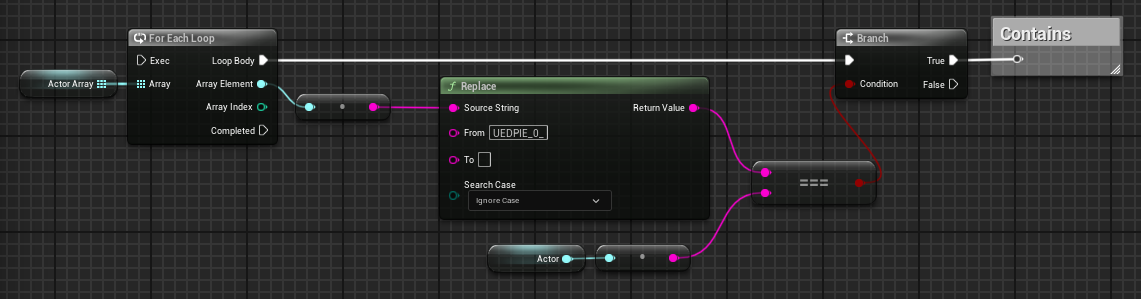
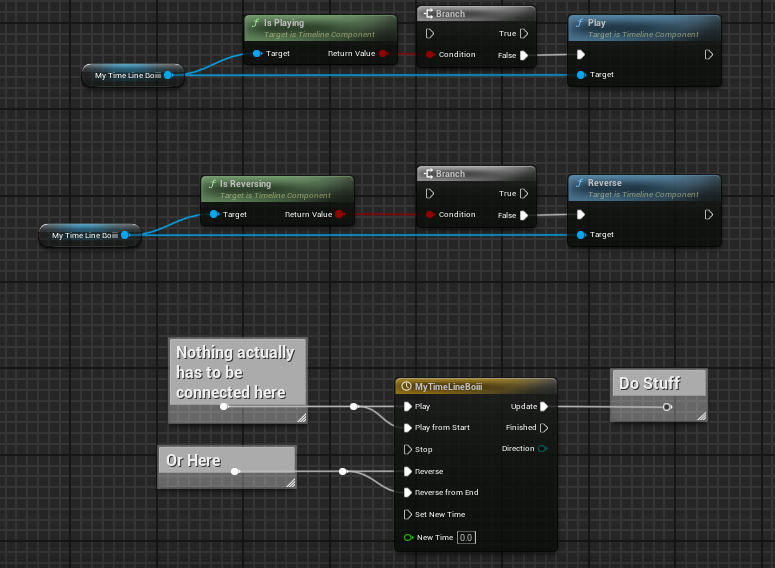
when im rotating now, is when im holding down Rmb
which has no relations with the rotation part
but its like when im pressing that button it "focuses" or something
pressing down LMB dose nothing
i know its information thats specific but im just in a puddle rn
its like when im LMB its capturing the screen even tho i have no events or w/e that should do that
this is really messing my project <.>
when switching back to game mode only it works, but there should be nothing on start changing to set input game mode
is there a way to check "What game mode is on" ?
like can i print what game mode game and ui/ game only is active ?
 last abyss
im pretty sure thats on the playercontroller
steady night
yeah but is there a way to get a ref to the current game modfe
narrow sentinel
I need massive help, does anyone know if there's a way to ensure something is running on the game thread
Is there something I can add a component or something that would force it to run on game thread cause at moment
The actor I place in the world at runtime the timer on it is getting the isongamethread crash
 queen valley
narrow sentinel
I need massive help, does anyone know if there's a way to ensure something is ru...
queen valley
narrow sentinel
I need massive help, does anyone know if there's a way to ensure something is ru...
All blueprints generally run on the game thread
narrow sentinel
queen valley
All blueprints generally run on the game thread
Is there something that can happen that could for some reason have it not run on game thread ?
Maybe a function call out of oddity doesn't run on game thread ?
last abyss
steady night
yeah but is there a way to get a ref to the current game modfe
hmm I guess not in blueprint unless you set up your own variable for it, if you need to track the current state of it
queen valley
narrow sentinel
Is there something that can happen that could for some reason have it not run on...
well afaik only bps like async load asset do not run on game thread
so if u used async loading thats what it is
narrow sentinel
queen valley
well afaik only bps like async load asset do not run on game thread
So if an asset is loaded via async load it won't be on game thread ?
How would I know of something is loaded via async load
queen valley
narrow sentinel
So if an asset is loaded via async load it won't be on game thread ?
once it is loaded, it is on the game thread
queen valley
narrow sentinel
How would I know of something is loaded via async load
well because you will have to specifically load a bp using async load node
queen valley
narrow sentinel
So if an asset is loaded via async load it won't be on game thread ?
if you send a screenshot of bp maybe i can see whats the problem, i dont think it is not running on game thread if its finished loading tho
maiden wadi
steady night
https://gyazo.com/e5114f1cbc4dc7604627f19266cf17a3
This working when RMB is used and not LMB sounds a lot like you LMB isn't allowing captures for some reason. This is usually due to what you specify when youcall SetInputModeGameAndUI. Normally mouse is always captured in GameOnly as it is an implied state. :/
steady night
exactly
i opened a previous version form a few days ago and everything looks the same
so somewhere its disabeling capture from LMB for some reason
when i LMB the mouse leaves the viewport also so something is happening i just dont know how to debugg it really
mb some project settings or something im comparing everything i can :/
narrow sentinel
@queen valley
 narrow sentinel
queen valley
if you send a screenshot of bp maybe i can see whats the problem, i dont think i...
narrow sentinel
queen valley
if you send a screenshot of bp maybe i can see whats the problem, i dont think i...
hmm
steady night
@maiden wadi
 narrow sentinel
so the interface event is what is being called
steady night
this is weird same project on backup folder only a few days apart same project setting same search but dosent look the same ?
narrow sentinel
so could it be that the interface trigger is being called just as it's loading ?
maiden wadi
Scroll down slightly on the left.
queen valley
narrow sentinel
<@524294998309601281>
im pretty sure timers run on the game thread
weird
steady night
oh i highlighted the wrong one,...
yeah thats the one i meant it dosent have the clickable option
queen valley
narrow sentinel
so could it be that the interface trigger is being called just as it's loading ?
wdym, where do you call the event trigger
steady night
but when i search for it its there with same settings tho,... just weird
narrow sentinel
@queen valley

reason I'm using soft references is because the editor isn't my creation nor the game I'm doing this on do theres a chance if I do a hard reference it might fail to work
queen valley
i just dont know how the error can be that it isnt on game thread thats weird
its not the timer
it is some task in the timer
narrow sentinel
queen valley
i just dont know how the error can be that it isnt on game thread thats weird
same, I can't work it out either
queen valley
its some task thats not on game thread probably
waitttttttttttttttt...
ur using soft references
so if assets dont finish loading
narrow sentinel
that was the log I got
queen valley
they are not on game thread
so if they are called while still loading, they are not on gamethread
narrow sentinel
queen valley
so if they are called while still loading, they are not on gamethread
arrrr, so some how I need to check if their loaded
queen valley
narrow sentinel
arrrr, so some how I need to check if their loaded
is valid
but you already have one
narrow sentinel
i would have thought tbf the resolve soft reference would in part check it's loaded
queen valley
you might be missing a isvalid somewhere
queen valley
narrow sentinel
i would have thought tbf the resolve soft reference would in part check it's loa...
not sure never tried
steady night
shit idnno how to solve this ./
narrow sentinel
queen valley
not sure never tried
well I have a is valid on the resolve soft reference
not the is valid on the soft reference
queen valley
add it and try
narrow sentinel
but then looking at the soft reference to object thingy it does say it will return none if it's not loaded
queen valley
narrow sentinel
but then looking at the soft reference to object thingy it does say it will retu...
maybe it returns none and crashes lol
narrow sentinel
well i'm running a test now where I've replicated the situation to see what happens, if there is no crash would you say something else is going on ??
Nope crash
LoginId:9749a163424ff0b7f4e7989891d5ab8d
EpicAccountId:

Assertion failed: IsInGameThread() [File:F:/DEV/ND24-BuildPublicEditor-EpicRelease/Engine/Source/Runtime/Engine/Private/TimerManager.cpp] [Line: 458]

TrainSimWorldPublicEditor_Core
TrainSimWorldPublicEditor_Core
TrainSimWorldPublicEditor_Engine
TrainSimWorldPublicEditor_Engine
TrainSimWorldPublicEditor_Engine
TrainSimWorldPublicEditor_CoreUObject
TrainSimWorldPublicEditor_CoreUObject
TrainSimWorldPublicEditor_CoreUObject
TrainSimWorldPublicEditor_CoreUObject
TrainSimWorldPublicEditor_CoreUObject
TrainSimWorldPublicEditor_CoreUObject
TrainSimWorldPublicEditor_CoreUObject
TrainSimWorldPublicEditor_CoreUObject
TrainSimWorldPublicEditor_CoreUObject
TrainSimWorldPublicEditor_CoreUObject
TrainSimWorldPublicEditor_CoreUObject
TrainSimWorldPublicEditor_CoreUObject
TrainSimWorldPublicEditor_CoreUObject
TrainSimWorldPublicEditor_CoreUObject
TrainSimWorldPublicEditor_CoreUObject
TrainSimWorldPublicEditor_CoreUObject
TrainSimWorldPublicEditor_Engine
TrainSimWorldPublicEditor_Engine
TrainSimWorldPublicEditor_Engine
TrainSimWorldPublicEditor_Engine
TrainSimWorldPublicEditor_Engine
TrainSimWorldPublicEditor_Engine
TrainSimWorldPublicEditor_Engine
TrainSimWorldPublicEditor_Engine
TrainSimWorldPublicEditor_Engine
TrainSimWorldPublicEditor_TS2Prototype
TrainSimWorldPublicEditor_TS2Prototype
TrainSimWorldPublicEditor_TS2Prototype
TrainSimWorldPublicEditor_TS2Prototype
TrainSimWorldPublicEditor_TS2Prototype
TrainSimWorldPublicEditor_TS2Prototype
TrainSimWorldPublicEditor_Core
TrainSimWorldPublicEditor_Core
TrainSimWorldPublicEditor_Core
TrainSimWorldPublicEditor_Core
TrainSimWorldPublicEditor_Core
kernel32
ntdll```well, try to add an isvalid to the soft refrence
if you didnt already
narrow sentinel
queen valley
well, try to add an isvalid to the soft refrence
gonna try that now
steady night
@maiden wadiYes! found IT!
i have my options Widget that was on "hidden" had a mouse down event i diddent know it would consume inputs while it was hidden tho!
narrow sentinel
@queen valley so doing is valid on the soft reference just does that so makes sure it's valid

where as that one does the thing you mentioned so still bit confused whats going on there
 queen valley
so you still get the crash
maiden wadi
steady night
i have my options Widget that was on "hidden" had a mouse down event i diddent...
😄 Yeah. Usually best to avoid hidden visibility except in the rare case you need it to save it's layout space. Collapsed has a lot of performance benefits too.
narrow sentinel
queen valley
so you still get the crash
just trying it now
I've also added a delay before I call the interface function, delay of 5 seconds
my thinking is if I am resolving the reference and then imediatly trying to do something with it my thinking is it's trying to do it on same frame or something
thin raptor
is event tick the best place to do a raycast if you want to always know if the player is on top of something?
narrow sentinel
@queen valley bare with me, the editor crashed with Exception Stack overflow so just need to reload it
queen valley
narrow sentinel
<@524294998309601281> bare with me, the editor crashed with Exception Stack over...
well something is causing stack overflow, still not great
narrow sentinel
queen valley
well something is causing stack overflow, still not great
yeah, it's something thats out of my ability to resolve as I believe it's something with their editor causing that
narrow sentinel
queen valley
well something is causing stack overflow, still not great
This is what I'm doing in my BP actor, the one where Set Timer by Event is being called on - https://blueprintue.com/blueprint/5ywhzkbt/

No description provided
queen valley
narrow sentinel
This is what I'm doing in my BP actor, the one where Set Timer by Event is being...
idk, maybe someone else can jump in and help
narrow sentinel
queen valley
idk, maybe someone else can jump in and help
So to show you, the actor is loaded in the world, and so is the event trigger

 narrow sentinel
queen valley
idk, maybe someone else can jump in and help
narrow sentinel
queen valley
idk, maybe someone else can jump in and help
okay so I didn't get a crash this time, now question is tommorow is that cause I delay calling the interface function by 5 seconds after resolving the soft reference or is something else at foot
maiden wadi
thin raptor
is event tick the best place to do a raycast if you want to always know if the p...
Depending on your settings you can simply use this.
 narrow sentinel
now in my head, why would delaying by some amount before calling interface function mean I don't get the is on game thread crash, @queen valley would this seem logical to you. If a lot of stuff is loading when I try resolving the soft reference, could that in theory delay the soft reference being resolved and possibly the interface call being done too quick ??
reason I say this is I read something online about resolving soft references you have to keep in mind delays as that isn't done for you or something, rather then hard reference obvs already being loaded and ready to go well should be loaded and ready to go
maiden wadi
Stackoverflow means you're in an infinite loop and calling the same function over and over and over basically. Maybe not directly but you have a repeating loop somewhere. Delaying it even by 0 causes it to wait for a frame before continuing processing which breaks your loop for the frame.
narrow sentinel
maiden wadi
Stackoverflow means you're in an infinite loop and calling the same function ove...
Hmm well this is the thing because on our end we don't have the pbd for the editor the log for us doesn't have anything useful in
And that's what causes the frustration with the stack overflow error, on a link above though I've put the code I'm running on my spline following actor thingy so feel free to take a look to see if you see anything thay could be causing an issue
maiden wadi
@narrow sentinel The 5s delay on Beginplay is the one you mentioned that stops it?
narrow sentinel
maiden wadi
<@1258928379822870583> The 5s delay on Beginplay is the one you mentioned that s...
??
Sorry you've thrown me haha
maiden wadi
narrow sentinel
okay so I didn't get a crash this time, now question is tommorow is that cause I...
This, your 5s delay that stops you from crashing
narrow sentinel
maiden wadi
This, your 5s delay that stops you from crashing
Nope so putting a 5 second delay between the soft ref being resolved and the interface function being called on the resolved soft ref
This is the is in game thread we're referring to yeah ?
maiden wadi
The interface function is the EventTrigger?
narrow sentinel
Yeah
narrow sentinel
maiden wadi
The interface function is the EventTrigger?
Yeah
maiden wadi
I'm not really sure how this loops with that delay in the middle of it. With or without a delay. :/ Are you putting the delay in this blueprint on the EventTrigger, or somewhere else that is calling the trigger?
narrow sentinel
maiden wadi
I'm not really sure how this loops with that delay in the middle of it. With or ...
I'm lost sorry, we on about the stack overflow issue ?
If so that seems to happen randomly and can happen even when I don't have anything of my creation in the level
narrow sentinel
maiden wadi
I'm not really sure how this loops with that delay in the middle of it. With or ...
The issue of is in game thread I seem to have solved by having a delay between soft ref being resolved and the interface function being called on the resolved soft reference
thin raptor
I got it so the raycast works and toggles the player's ability to pickup the box, but you can still fly using another box which is a bit problematic
guess I need to lock it's position until the player leaves the box
how do I lock position? there doesn't seem to be a way to do this?
thin raptor
how do I access these with blueprints?
 devout tide
in the character blueprint -> Get Character Movement component -> search for constraint and see the different options it gives you
pine trellis
I need some help, I dont know if my project has been corrupted but unreal is saying it cant find some varibles there are there! Why is this happening to me?c

I get all kinds of errors
devout tide
Missing plugin or mismatch in unreal/project version?
dawn gazelle
Why are you using a separate actor for replicated health?
pine trellis
its a health pick up
thats not the only error I get many of my blueprints have errors and when I check they all work
look at this says it cant connect the pins but the pins are connected

 hazy linden
pine trellis
look at this says it cant connect the pins but the pins are connected
hazy linden
pine trellis
look at this says it cant connect the pins but the pins are connected
have u tried File->Refresh All Nodes and then compiling your BP.
inland sandal
hello im trying to make a line trace and I cant get through this step of connecting set visibility target is widget, I checked my blueprints and they are all under the right class, but when trying to find the node to connect it too it won't appear, not sure what went wrong, here's what is looks like so far, and the second image is what Im trying to get to


 visual ember
inland sandal
hello im trying to make a line trace and I cant get through this step of connect...
visual ember
inland sandal
hello im trying to make a line trace and I cant get through this step of connect...
"it won't appear" - what? the widget from the hud?
you sure the hud is your hud class and not the base type?
 vernal fox
I'm having trouble getting a decorator to fire in a behavior tree. The decorator is nothing more than a print string. This node is attached like so in the behavior tree and that node gets correctly called - but the print string never shows up. Is there another node I should be using other than "perform condition check ai"? Ideally I would want this node to fire until it returns false - but i'm trying to get it to print first 💔


 woeful pike
So I am trying to understand blueprint interfaces more. I am referencing this video "https://youtu.be/5-UJT4U-jeg" and it works. But I do have a question for around 8:14. Code tells stuff what to do. We have an interface implemented in a door and an "activation" (key) in the default ue5 blueprint that checks if another blueprint has a an interface and then it runs from the key to the message (character blueprint) to the interface event (in the door actor) and runs the door code. But they only put a bounding box within the door blueprint as the check with seemingly no code to tell the character to be interacting via the bounding box. Is interaction via bounding boxes inherent to one of the nodes like the node where it checks if a blueprint implements an interface? Or is there some other part of the default character blueprint that lets it interact with any trigger box inside of actor blueprints? Or are trigger boxes somehow inherently interactable. How come it seems like in some videos you need to specify collision is interactable and sometimes the collision seems to be inherently interactable? How can you tell the difference?

Hey guys, in today's video I'm going to be showing you how to create and use a blueprint interface. In this example, I will be creating one to interact with different blueprints as my player character.
#UE5 #UnrealEngine5 #UE5Tutorial
00:00 - Intro
00:19 - Overview
00:5...
hazy linden
woeful pike
So I am trying to understand blueprint interfaces more. I am referencing this vi...
If you do not want the bounding box, you can linetrace or spheretrace forward and call the interface function on the hit actor. The bounding box is just there to define the space that the door should be interactable within. If you have any confusion about interfaces itself, I highly recommend you try to understand what is "Multiple Inheritance" Interfaces work with that principle internally.
In the above example, you can put any primitive component as long as the collision is set to allow overlapping of pawns it should work. you can even have an opaque sphere with collision set to OverlapAll. Or as i told u, do a linetrace
Hope this helps : )
 rapid lava
This works when server interacts, but crashes when client interacts. Why?
 woeful pike
@hazy linden Doesn't that just say whether it is interactable. Is the overlapping (matrix) inherent to the pawn/character class on what can and can't be interacted with? Or is there a snippit of code within a pawn or character class that is basically saying "if pawn/character capsule overlap within trigger box, then "pass on?" interact function."
Eventually I want to get to the point of having a number of different kind of projectiles hit the character an all cause differing damage to the character's "health pool." But I am beginner and am trying to understand things one at a time. Such as communicating between blueprints.
hazy linden
woeful pike
Eventually I want to get to the point of having a number of different kind of pr...
For this one, you'd just define a damage value inside your projectile blueprint/C++ class. When the projectile hits, you can get the corresponding damage value and subtract that much health,
hazy linden
woeful pike
<@442335410144804874> Doesn't that just say whether it is interactable. Is the o...
The capsule itself will be blocking in general. So you will only get hit events. When u make the box overlapping, that is when u will be able to generate those events. You can take a look at the collision preset of the capsule to know more.
So when the capsule overlaps the box, the overlap event is generated
hazy linden
hazy linden
For this one, you'd just define a damage value inside your projectile blueprint/...
In this case, you can have an interface called Damagable with a method called "Damagable" (say) and implement it in ur character. Then, in the hit event of ur projectile or whatever logic ur using, you can call the interface function "DamageActor".
woeful pike
@hazy linden can you explain more about event generation based on overlapping? Is it like on event begin overlap. Or would you need a custom event for every projectile?
hazy linden
This way, it is also reusable. Lets say another actor (say a vehicle) can take damage. You wont have to re-code your logic, instead, just implement the Damagable interface in the vehicle and you're done. Rest is ur creativity : )
In the video you sent, he used "Get Overlapping Actors" at around 4:08 . Actually, when you overlap, unreal automatically stores the actors which are overlapping any given actor.
you can utilize that
if you print on begin overlap and then print overlapping actors.. you will notice that the newly overlapped actor is added. Once you go out of the box, it is removed
woeful pike
@hazy linden huh. That's interesting. A lot of videos that deal with a health/damage system. They like to use the event "On any damage." to help calculate damage. Does it factor into collisions at all? If so, how does it. I know that it references some kind of default damage actor reference that basically contains a whole bunch of variables on various damages types. But beyond that, I am unsure of what exactly the that default event does. Can you clarify?
@hazy linden Thank you very much for your help and clarification. I will see about implimenting something basic by next week. Or at least come back next wee if I am in a bind. Have a nice time and thank you for your help.
hazy linden
woeful pike
<@442335410144804874> huh. That's interesting. A lot of videos that deal with a...
Damage events are completely independent of collisions. They are just called when u call the "Apply Damage" or similar nodes. Collision will be used as a criteria to trigger the damage events
ofc you can use the built in damage events, but since you did ask about interfaces, I mentioned the way you would approach the damage system with it. Also, if you are using an interface as i told you, you also have full control over what parameters you want to or not want to pass. And you will also have control over which actors implement them.
 rough cedar
what would be the easiest way to do what this node is doing but on a controller analog stick?
 inland sandal
visual ember
"it won't appear" - what? the widget from the hud?
inland sandal
visual ember
"it won't appear" - what? the widget from the hud?
thanks for replying this is one of my first bps so im not well versed in the terminology, by "it" I meant the set visibility node for the widget, it doesn't pop up when I try to add it to thirdpersoncharacter bp, and what do you mean by hud class and base type? when i check the bp it says the parent class is user widget
pallid oxide
Been stuck on this for a couple hours now, How on earth do I dictate what direction to use for my mouse movement to get this function to work? I can't stack enums because the Enum only takes one connection at a time, maybe I am thinking too much on this?


less cropped version oops
ok maybe Get will work...

safe to say I think that fixed it
sometimes I wish I was born with a bigger brain where this stuff didn't take 2+ hours to debug
glossy cloak
pallid oxide
sometimes I wish I was born with a bigger brain where this stuff didn't take 2+ ...
Why are you using a temp enum variable? Just set the actual variable.
Also this is probably going to cause some weird issues for you. Because this implies the mouse is only moving in one direction at a time. But your mouse will very likely never move perfectly straight up or down.
Depending on what the enum is being used for.
pallid oxide
glossy cloak
Depending on what the enum is being used for.
Being used to play an animation for each direction, so it shouldn't be an issue I think
might have to add some form of deadzone later though to make sure rights turn into rights and not ups or downs
basically this if for mount and blade directional strikes
glossy cloak
Nice. Glad you got it working.
But I stand by removing the temp variable. That's just redundant. 😉
pallid oxide
Will do right now 😎
trust me this is just the hood, under the hood is complete insanity of nodes for debugging and nothing is organized, looks like modern art
oh nvm forgot I cleaned it an hour ago, been in the statemachine so long I'm seeing animations instead of nodes
 glossy cloak
rough cedar
what would be the easiest way to do what this node is doing but on a controller ...
glossy cloak
rough cedar
what would be the easiest way to do what this node is doing but on a controller ...
If you're still stuck on this, I'm here to be the bearer of bad news. I don't think it's possible because an analog stick works completely differently. The analog stick doesn't have a screen position. It's just simply inputting a value between -1 and 1 in both the x and y axes. So the best you could do would be to translate that to screenspace and then to world space.
glossy cloak
pallid oxide
oh nvm forgot I cleaned it an hour ago, been in the statemachine so long I'm see...
Lol I've been there
glossy cloak
pallid oxide
oh nvm forgot I cleaned it an hour ago, been in the statemachine so long I'm see...
You've got some dangerous stuff going on in here. It's good practice to never cross wires between different events. If one event hasn't fired yet then you're going to get an accessed none runtime error.
Instead, promote important things like widgets to variables and use that variable as the reference.
pallid oxide
glossy cloak
Instead, promote important things like widgets to variables and use that variabl...
after I get the prototype fully working I'll come by and clean it all up, most of the stuff is just UI debugging
glossy cloak
pallid oxide
after I get the prototype fully working I'll come by and clean it all up, most o...
Fair enough. Just thought I'd do the whole "if you see something, say something" good neighbor bit to try to save you some headache later on. Lol
pallid oxide
glossy cloak
Fair enough. Just thought I'd do the whole "if you see something, say something"...
don't worry, as soon as I wake up I'll refactor. I got the combat anims working (even if they don't set back to idle after the attack) so my nightly objective is complete
 agile moss
I recoded this 3 times 😭 . Pls how do I make a widget that just has to adjust opacities if a boolean is true or false.

if false it just flashes from 0 to 1. If true just 1
its supposed to be smooth
The forward and reverse work perfectly fine, it's just they get glitched when I add them both
help :(
maiden wadi
agile moss
I recoded this 3 times 😭 . Pls how do I make a widget that just has to adjust o...
Is the boolean that branch on the left?
maiden wadi
😄 It happens. Can I ask why simply playing forward and playing reverse doesn't work?
agile moss
Well
maiden wadi
EG button hover code.
 agile moss
maiden wadi
EG button hover code.
agile moss
maiden wadi
EG button hover code.
U think I didnt try that
maiden wadi
This seems like your boolean is triggering too much.