#blueprint
1 messages · Page 218 of 1
 storm shale
 warped juniper
Well not quite
The thing interacting with them is a separate class called blast, with a sphere radius
Bombs create an actor that is a child of it with their own settings and parameters. There are other actors that create other types of blasts
This is because each one has a unique behaviour but tbh, I may end up scrapping them so a single class for each blast will be doable.
storm shale
SO blast is parent class.
And then it has child classes for different types of blasts?
You could either detect in blast class what is it that you are interacting with; so the specific blast decides how it wants to interact with players and environment
warped juniper
Yeah, but like I said the game might just take a turn in design and there would be a singular type of blast
storm shale
OR use an interface
either ways it works
Either way it works, up to you and what you prefer and what's most straight forward for the way you plan on designing stuff
warped juniper
Right. Currently the blast checks for overlaps with components based on a tag they have + interface implementation. Then it will attempt to run the event for the reaction
The function just sends the event + a float and a bool
 violet bison
thanks for everything, I think I know inheritances, but I just need to transfer some variables from a modular component that get casted on to the actors the component is attached to, like the actor components function ran on them
guess it's back to yt tutorials
warped juniper
Though I have a small issue with the bombs that isn't game breaking but it still returns an error.
The bomb destroys breakable obstacles, naturally, but then it will try to send the event to them a second time...
I feel this might be because the blast actually has a radius expansion after it's spawned, just to make it match up better with the niagara particle effect
storm shale
warped juniper
I feel this might be because the blast actually has a radius expansion after it'...
I mean ye that's just a bug
warped juniper
So nothing to worry about?
storm shale
I mean; the way you describe it it could be anything; but I don't see how it could be related to what you were asking about; communicating in-between blueprints
warped juniper
Yeah... It's just a case of an actor trying to communicate to another that is scheduled to be destroyed
I could maybe make set it to ignore actors it has successfully executed the event ofm but that feels like optimisation for later
storm shale
it will try to send the event to them a second time...
First it would be understanding why that is happening; you can know for sure through print strings.
then u just fix that!
If it's not game-breaking you don't need to fix it immediately, but for sure understand why
cuz the why could be huge and smth that will come to bite u later
warped juniper
Yeah I definetly want to, since it could potentially cause FPS drops depending on how many times it can happen a tick
Just... a bug to squash later.
I will note it down and go back to it in the future
storm shale
When it comes to that.
Just think about how you want designing your 'blasts' to be.
How many will there be; a set amount, or smth that continously gets added.
Stuff like that.
Then you can think of how you want the creation process for these blasts to be so to speak.
For example; you may want to have a couple variables with some parameters; and a couple functions for stuff blasts can do.
So that child blasts can use all of that and making them is ez so to speak.
IF there were only 3 blasts; or 4 types; then best advice would be just getting to it and not overthinking it XD
cuz in that scenario optimizations that will only optimize the development process cannot possible pay off if there's such a short amount so to speak
warped juniper
Yeah I perfectly get that
And admiteddly I only needed different subclasses for blasts because I tried some different stuff
For example, a blast with a different collision shape, or a blast that would create more blasts
But trying them out they don't add as much as I wanted and thus may end up getting scrapped, and then I might as well clean up after them
 graceful gorge
How do I make a delay between each number and another, between 1 to 100 in this example?

 surreal peak
graceful gorge
How do I make a delay between each number and another, between 1 to 100 in this ...
surreal peak
graceful gorge
How do I make a delay between each number and another, between 1 to 100 in this ...
iirc you can make your own For Loop Macro (basically a copy past of this) and add the Delay node into it.
If not, then you'd need to create the loop manually, by having an Event for the LoopBody, at which end you call a DelayNode (or Timer) that calls the LoopBody again if you haven't reached the MaxValue yet.
surreal peak
graceful gorge
How do I make a delay between each number and another, between 1 to 100 in this ...
Yeah I just tested it, you basically copy paste the For Loop out of the StandardMacros Library into one of your own, add a float input for the Duration and plug the Delay node after the "TRUE" ping of the Branch you can find in there.
That will make sure that there will be a delay between each call, despite the completed pin (that's the "FALSE" pin).
I do think this adds an initial Delay though, so you might want to add something that checks if the "LocalInteger" is == FirstIndex if you don't want that.

Tried to clean it up a bit. Despite the Reroute Nodes and the Delay part, this is basically the For Loop Macro (double click the one in your screenshot to see the standard one)
If you want to skip the initial delay for the first element ,you could add this stuff to it

The red stuff. Green outlines are just to help seeing what it's connected to
graceful gorge
This is a lot deeper than I expected! I thought I would add a node or two to the series. I'll give it a try. Thanks.
surreal peak
Yeah you can try to add the Delay to the LoopBody pin, before the PrintString, but you'll notice, that this won't work.
The reason for that is that the Loop will go through the 1 -> 100 indices in 1 frame, triggering the DelayNode 100 times in one frame, which will simply restart it and you only get one single Delay and print.
If you plug the Delay into the Macro, it will consider the Delay every iteration.
graceful gorge
surreal peak
Yeah you can try to add the Delay to the LoopBody pin, before the PrintString, b...
that is what I tested.
surreal peak
You will notice that the version with the Delay node gets a Clock Icon, which means it's "Latent" and isn't guaranteed to finish in the same frame.
That will also remove the option to use that node in Functions (which are, by definition, required to start and finish the same frame).
 storm shale
surreal peak
You will notice that the version with the Delay node gets a Clock Icon, which me...
storm shale
surreal peak
You will notice that the version with the Delay node gets a Clock Icon, which me...
how do you put the M?
in the icon
surreal peak
The M in the Icon?
storm shale
 storm shale
surreal peak
Also.. is that a Ligma joke in your name?
storm shale
surreal peak
Also.. is that a Ligma joke in your name?
ye
 frosty heron
Macro
graceful gorge
storm shale
in the icon

Join the Discord: https://discord.gg/mTb62g2
Follow us on X/Twitter: https://twitter.com/AuroraGameworks
Like us on Facebook: https://www.facebook.com/AuroraGameworks
Aurora Gameworks is an indie game studio run by Andrew Welsh. I use Unreal Engine to create fun, high-quality games. Follow me on other platforms for more updates.
SYSTEM SPECS:
...
surreal peak
I didn't put that M there
surreal peak
That's just the Macro doing its thing
storm shale
surreal peak
That's just the Macro doing its thing
oh ok, mine shows a gear
surreal peak
Might be cause I made my macro in a random BP that I had at hand
It's not in a library
 faint violet
do interface chains complete on same frame [will they hold up the frame]?
 spark steppe
i'm not sure if for loops with delay should exist... 😄
faint violet
actually, wouldnt they be good for spawning lots of object/enemies?
spark steppe
i dont think so
if you have an spawner actor, you can also spawn the enemies on tick and change the tick interval
and disable tick/destroy spawner when it should stop spawning
you could also wrap that in a actor component, if you want to put it on static actors and maybe a boss which spawns raccoons to fight you
faint violet
maybe it would make more sense if spawning them with a noticeable delay. as it would be time>fps based.
I was thinking pacing out mass objects, but doing it time based to avoid fps drop delay, would probably just drop the fps more as it cant keep up
 gentle urchin
I think they have their purpose ,
And helps overcome some of the loop issues with bp
Frame slicing is a good principle even in bp
faint violet
how does multithreading work in bps anyways?
faint violet
so, all bps run on the same thread? what about inbuilt systems like animation graphs and other graphics systems?
actually lets say I use replication with a sever, wouldnt the server run on a separate thread, even in singleplayer?
storm shale
gentle urchin
Frame slicing is a good principle even in bp
frfr
gentle urchin
faint violet
so, all bps run on the same thread? what about inbuilt systems like animation gr...
all bp's generally run on the game /main thread yes ,
some systems use multithreads
animations can use it, if you build your animBP correctly
faint violet
hm ok
 boreal laurel
Hello. Manny Tearson here. Er... Am I allowed to link a YouTube video for what I'm about to ask? Came on here to figure out if the name changed 'Set View Target with Blend'. I'm using the latest UE5 version. If this is simple enough to understand, I don't think I need to worry about the video. Lol.
And yes, complete noob here. 👋
... Kind of weird to find a Bot with the same first name as I. 😅
 lunar sleet
boreal laurel
Hello. Manny Tearson here. Er... Am I allowed to link a YouTube video for what I...
lunar sleet
boreal laurel
Hello. Manny Tearson here. Er... Am I allowed to link a YouTube video for what I...
Better to just ask the question. Not sure what “name changed” follows by a node name means
boreal laurel
lunar sleet
Better to just ask the question. Not sure what “name changed” follows by a node ...
I mean, I don't see it anywhere. I'm wondering if the name of that node changed or if I'm simply overlooking something.
lunar sleet
boreal laurel
I mean, I don't see it anywhere. I'm wondering if the name of that node changed ...
Nope, still the same node
You’re probably dragging off the wrong thing
boreal laurel
lunar sleet
You’re probably dragging off the wrong thing
Maybe? I don't know. Was just following this YouTuber. This is mine, btw.

I even tried without dragging.
lunar sleet
- Don’t use level bp
- Right click the graph instead of dragging the pin
Player controller is probably a good place to do it
boreal laurel
Alright. Thanks. I'll just dig around and see what's all needed. Though... Player Controller for a Main Menu scene?
frosty heron
boreal laurel
Maybe? I don't know. Was just following this YouTuber. This is mine, btw.
Set View Target with blend is a function from controller
not camera
boreal laurel
Ah. Alright. No idea how that YouTuber got it to work, though. Lol. Been at it for a few hours. 😅
frosty heron
It's a function from controller
so pull out your controller
Get Player Controller -> Set View Target with blend
boreal laurel
If... you don't mind me asking, where can I find this controller? 😅
Or better yet, is there a guide somewhere that I can read upon?
I found the controller but... I just don't get it. Now I can't add the camera. 🤷
frosty heron
boreal laurel
I found the controller but... I just don't get it. Now I can't add the camera. �...
Show your attempt with the controller
the function takes an Actor as argument
what are you trying to plug?
boreal laurel
I'm just trying to follow the tutorial on YouTube. This one.
https://www.youtube.com/watch?v=JuZVAZPROAM
boreal laurel
By dragging.
 gentle urchin
frosty heron
I'm not watching YT tutorial
gentle urchin
frosty heron
I'm not watching YT tutorial
Gotta stay clear, or else we might get infected :p
frosty heron
boreal laurel
By dragging.
You can't drag level actor stuff into your blueprint class, the blueprint template exist without a level, hence it will not know the camera you are trying to drop
boreal laurel
gentle urchin
Gotta stay clear, or else we might get infected :p
I'm not that bad, I can promise that much. 😅
frosty heron
what you can do here, is to create a variable of type camera actor in your blueprint class
make it instance editable and expose on spawn
drop your blueprint to the world so the world will have an instance of your blueprint class
there set the camera variable to the camera in your level
after that you can use the camera variable
gentle urchin
Oooor
Create a global camera manager
And subclass camera with YourCameraBP which auto registers to the manager with something easily identifyable
Like a GameplayTag
TownName.Building.SomeCameraName
Gamestate could hold the manager
If its a one-off thing, manager is ofc not necessary but
The concept is usable for other things too
 coarse lava
Quick question: How would I set up a "threshold" for a random float in range? Say I get a random float between the range of -180 and 180. I'd like to have it so that with a threshold of 0 the random float between -180 and 180 would be totally random but the higher the "threshold"-variable would be, the random float between -180 and 180 would be "less random"?
It would be easy if I could get the min/max values straight from the parameter slider range/value range. Then I could just modify those with the threshold. Also, I know I could just set up separate variables for min/max values and then use those in the same way but... the problem is that the thing I'm working on huge number of variables and manually making min/max variables for each variable would clutter the BP a lot. I was wondering if there's any "math trick" to get similar results?
Basically I'd like to find a "math way" to adjust the outcome from "random float in range" somehow (or something similar). Any ideas would be greatly appreciated! 🙂
boreal laurel
frosty heron
but prob too overwheling when one doesn't know blueprint coms
Lol. If all this was made via Python with UE elements, I'd probably be a god in comparison of now. I lost internet. Will check these options out. Thank you, ColdSummer and @gentle urchin. I appreciate your help.
frosty heron
If you know OOP you should know what instances and what class are
 timber basalt
question for all does the debug for this sphere trace will persist after i build the game ?

or it will remove itself or set to none
gentle urchin
Debug is remived during shipping afaik
 iron furnace
I might be an idiot, but this has worked for me a thousand times before. When checking if the player character is in range to draw a widget, i compare the other actor to the thirdpersoncharacter and if its true, i set the widget to visible. My current issue is this just straight up is not working for me. the overlap detects thirdpersoncharacter0 and sets the branch to false. What am i doing wrong here?

 dawn gazelle
iron furnace
I might be an idiot, but this has worked for me a thousand times before. When ch...
dawn gazelle
iron furnace
I might be an idiot, but this has worked for me a thousand times before. When ch...
What you're doing here is checking if the "Other Actor" reference is equal to the "BP_ThirdPersonCharacter" blueprint, which it will never be true as you're comparing against an asset, not a spawned actor instance. One way of correctly doing this is by casting "Other Actor" to BP_ThirdPersonCharacter in which case it'll succeed if the thing overlapping is an instance of "BP_ThirdPersonCharacter".
 fallow current
I've been working on an animation blueprint for some time and randomly it keeps on spawning these preview instances. How do I get rid of them and how does this keep happening?
 iron furnace
dawn gazelle
What you're doing here is checking if the "Other Actor" reference is equal to t...
iron furnace
dawn gazelle
What you're doing here is checking if the "Other Actor" reference is equal to t...
lmfao i skipped that step, i am an idiot
got it working now, tired brain doesnt always work out
 bold phoenix
Hello everyone, is there a way to subscribe to an event dispatcher without knowing its existence ? Here's my problem : I have an input action event inside my player pawn and I want to trigger an event inside an actor component attached. However, because this actor component will be part of a plugin it must not be aware of the event / event dispatcher inside of the player pawn blueprint ( in order to prevent dependencies ).
 ruby tendon
I am using this exact method to clamp my physics linear velocity. However I want the z velocity to be clamped to something bigger. And I was wondering how I can do this. I tried what the description says but I cant figure it out

 woven hearth
Hey there, I wanted to know. Is there a way to negate a boolean when using the Enhanced input system? IA_Ventilation is bool type, I did try using the negate modifier but it still outputted "True"

 maiden wadi
coarse lava
Quick question: How would I set up a "threshold" for a random float in range? Sa...
maiden wadi
coarse lava
Quick question: How would I set up a "threshold" for a random float in range? Sa...
Need more details on this. ATM I assume you want basically 0 input to randomize from -180 to 180. And then if a value is at -180 or 180 it will pretty much be -180 or 180? If its at -90 or 90. It randomizes somewhere between -135 and -45 or 45 to 135, but with a scaling favor towards -90 or 90?
 tawdry walrus
woven hearth
Hey there, I wanted to know. Is there a way to negate a boolean when using the E...
tawdry walrus
woven hearth
Hey there, I wanted to know. Is there a way to negate a boolean when using the E...
You can get the action value in the blueprint and add "not boolean" node
woven hearth
Yea, but I want to only negate the value if the "S" key is pressed. If I do it like you described then I would negate even the "W" key
maiden wadi
bold phoenix
Hello everyone, is there a way to subscribe to an event dispatcher without knowi...
Simple answer is no. You either need to put the input in the component, or you need to set it up so that the users can simply call a function on the component.
gentle urchin
coarse lava
Quick question: How would I set up a "threshold" for a random float in range? Sa...
Random(max-treshold)+treshold? And some trick to make sure negative stays negative
tawdry walrus
woven hearth
Yea, but I want to only negate the value if the "S" key is pressed. If I do it l...
So you can make the type float 1D and make the "S" key negate and in blueprint add check if the action value less then zero and add not boolean node
woven hearth
Oh, thank you
 dark drum
Would anyone have any ideas why this less than node would be false even though the time of day is smaller than the end time? The restrict time span just removes the day and milliseconds.

 gentle urchin
So if you breakpoint andninspect themz thats really the case?
Logic seem a bit off but guess that depends om what you're trying to achieve
dark drum
gentle urchin
So if you breakpoint andninspect themz thats really the case?
yea, time of day was 22:xx:xx and the end time was 23:59.
gentle urchin
And you're on the false route ?
dark drum
gentle urchin
And you're on the false route ?
Yea
gentle urchin
Of the endtime < start time ?
If endtime is 23.59
I doubt its less than start time
Oh right
Mb yes , brain gymnastics
dark drum
gentle urchin
Mb yes , brain gymnastics
Yea it accounts for wrapping so if the start was 22:00 and the end was 03:00 lol.
gentle urchin
Id prob do that differently


 gentle urchin
If startTime > time of day then
Duration = end time - time of day
dark drum
gentle urchin
Id prob do that differently
I'm open to suggestions lol.
dark drum
It's some logic I set up months ago but for some reason as started acting up for some reason. 🤷
gentle urchin
Engine update?
dark drum
gentle urchin
Engine update?
No, still rocking 5.1. (Nearing a launch date so won't be upgrading)
Omg!! I've just spotted the issue. 🤦♂️
The end time is 23 minutes not 23 hours
gentle urchin
if (TimeOfDay >= StartTime)
{
 if (EndTime < StartTime)
 {
 return Endtime > TimeofDay - StartTime);
 }
 return EndTime > TimeOfDay;
}
I feel like this could be a one liner 😆
But it should be accurate and account for wrapping as is
Wrap it in a pure function so it looks nice 😏
 dire frost
gentle urchin
```cpp
if (TimeOfDay >= StartTime)
{
if (EndTime < StartTime)
{
return Endtim...
dire frost
gentle urchin
```cpp
if (TimeOfDay >= StartTime)
{
if (EndTime < StartTime)
{
return Endtim...
return ((EndTime > (TimeOfDay - StartTime)) * (EndTime < StartTime))*(TimeOfDay >= StartTime);
there, now i gotta take i shower...😣
 mental trellis
But why?
dire frost
that's a really good question
mental trellis
Just makes the code much harder to read.
dire frost
and i think the compiler would optimise it to something like that anyway?
but i just done for the sake of it.
mental trellis
Plus in the original it's not actually returning in all cases, so you can't really start with 'return'...
dire frost
well because Squize said it could be a one liner
mental trellis
You could maybe use ?! to optionally return.
dire frost
mental trellis
Plus in the original it's not actually returning in all cases, so you can't real...
yeah i was about to mention it might return a 0 which may not be something you'd want but again...this wasnt meant to be taken so seriously 😅
?
 empty marten
It wasn't until I read this message from you that I thought you were asking why he was gonna take a shower....

@mental trellis
mental trellis
Lol
empty marten
You can see my mistake lol
coarse lava
maiden wadi
Need more details on this. ATM I assume you want basically 0 input to randomize ...
Hi! Thank you for your thoughs/suggestions. My initial thought was something similar to gaussian normal distribution so that if the threshold is 1, for -180 and 180, the output would be zero (the average of the two) and if the threshold is half (0.5) it would mostly give some random values between -90 and 90. And if the threshold would be 0 it would be totally random between -180 and 180.
@maiden wadi @gentle urchin
coarse lava
Thank you! That would be much easier to implement than an actual normal distribution using wikipedia. 😄 I'll look into this but by the looks of it, it seems solid. But like you said, perhaps needs a bit of math magic when it comes to negative values.
gentle urchin
It'd work the same both ways
But you could also do range 0 to max and randomly multiply by -1 after
Id expect rangw to be -max to max here tho
 barren tangle

does that node trace a line from the center of my actor. to the center of the target actor?
but after finding the center of the target actor goes 2 times further?
because even like this, i don't feel like it goes from the center to the center

what i would like to do is to trace a line from the center of my actor passing though the center of the target and going a little bit further

and get the purple circle location
 fiery swallow
barren tangle
what i would like to do is to trace a line from the center of my actor passing t...
fiery swallow
barren tangle
what i would like to do is to trace a line from the center of my actor passing t...
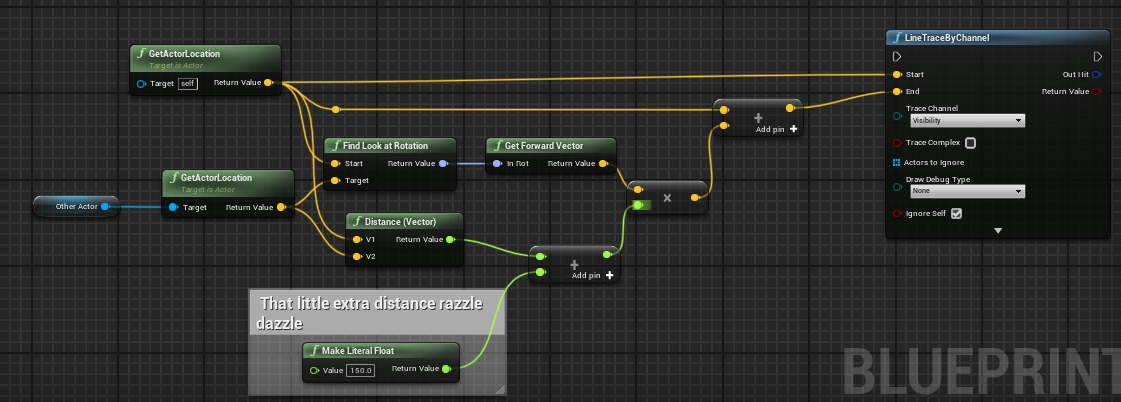 barren tangle
fiery swallow
https://i.gyazo.com/a01e050e8873c7ea1954706ae73bda91.png
barren tangle
fiery swallow
https://i.gyazo.com/a01e050e8873c7ea1954706ae73bda91.png
thanks but why it's not just 2 positions to uses?
mental trellis
Why are you using rotation at all? Why not (location target - location source).normalise * 150 + location target
Or whatever number you want.
fiery swallow
I figure there's 100 ways to achieve the same method, find look at rotation -> get forward vector translates the easiest for me
fiery swallow
-.-
because then where are you telling the computer to add the extra distance to get to the purple circle you mentioned
barren tangle
but if i multiply x and y by a float it should be the offset that i need no?
is it because the world position bring negative value as well
and my calcul is not correct anymore?
fiery swallow
barren tangle
but if i multiply x and y by a float it should be the offset that i need no?
it's really just a math problem so unfortunately I cannot explain why your method doesn't work the way you think it should
I believe it has something to do with the way you have to consider a 3d world
barren tangle
but i set the Z axis to 1 to keep it on the same level of the target z position
so it's more like a 2d world
 visual ember
still, position of actor is relative to world origin, not to the other actor
fiery swallow
yeah but I meant more so in the world of relativity. adding a vector + vector
oh
yeah what mars said
visual ember
so you were initially extending other actor's position vector, not vector from A1 to A2
barren tangle
ok
visual ember
take pen and paper
barren tangle
got it
barren tangle
i was drawing a 2d axe with 0,0 as center and target actor at 10,10
and by multiply on that draw it was correct
fiery swallow
on another note. This was the method Daekesh mentioned, which also worked just fine
https://i.gyazo.com/7a35fa586a0e9824261f381e84535696.png

if you don't want to bother with the finding look at rotation stuff
his is objectively better actually
gentle urchin
GetUnitDirection^
fiery swallow
oh my god whatever xD insert 97 more ways to compute this problem
barren tangle
fiery swallow
on another note. This was the method Daekesh mentioned, which also worked just f...
yes that one is good 🙂
fiery swallow
they're both fine, his might save you like 0.002ms though
visual ember
I would say use the most easy to understand solution. so when you get back to it after 6 months, it doesn't take too much hair off your head
fiery swallow
gentle urchin
GetUnitDirection^
https://i.gyazo.com/6ed76502aa94c63f5a34ebacff97353a.png
this one made me laugh a little

It's a straight upgrade from the method I used
gentle urchin
😅
 dull hare
Hi, applied force to door but without checked Accel Change they don't work, I already tried to lower mesh mass, disable physic constraint
 dark drum
dull hare
Hi, applied force to door but without checked Accel Change they don't work, I al...
dark drum
dull hare
Hi, applied force to door but without checked Accel Change they don't work, I al...
Is the door set to simulate physics?
dull hare
yes ofc
 eager thicket
is there a correct way to close down a widget to ensure it isn't interacted with by the player? (for instance, pulling up the options menu and then closing it again - in the main menu)
like do I hide + deactivate or something
gentle urchin
Collapse usually does the trick
Revert any game mode changes and cursor visibility if necessary
spark steppe
which is where you begin to write a wrapper around that whole half assed UMG/UserInput/Cursor nonsense
 drowsy steppe
hey guys, i'm getting an "accessed none trying to read property Timeline" do anyone knows how can i fix this?
gentle urchin
Make sure your Timeline component reference is valid
drowsy steppe
i tried putting it in another actor and it works, but in the other it doesn't, but i set them up the same
 ashen tide
Hello everyone, I hope it is the right place to ask, I am trying to incoporate the motion matching from the GAS project in my character and I have a couple of issue, first when I use some animation like crouching I get extreme clipping into wall, from what I understand it is because of the root offset function, and I indeed don't have any clipping when I disable it. I want to know if any of you managed to fixed the clipping issue ?
Thanks 🙂

 young meteor
Anyone here good at math with vectors?
I'm trying to set up a function to detect if one actor is facing another actor straight on with a tolerance of "Front Angle Degrees" specified in degrees (not radians).
I've set it up like this, and it seems to work but it has surprised me so many times that I'm a bit confused. Can anyone confirm or debunk please?

(Dividing by 180 instead of multiplying Pi by 2 first and then dividing by 360)
gentle urchin
Dot vector
 rugged wigeon
young meteor
Anyone here good at math with vectors?
I'm trying to set up a function to detec...
rugged wigeon
young meteor
Anyone here good at math with vectors?
I'm trying to set up a function to detec...
 gentle urchin
There we go
rugged wigeon
also it looks like you're setting yourself up to try and get the angle between the forward vector of two actors, which is wrong
gentle urchin
Wait, does that work?^
 young meteor
Normalize does what? Just gets a vector 1 long with the direction of the original vector?
rugged wigeon
yes
rugged wigeon
also true, but he's wrong for using two forward vectors to begin with
young meteor
rugged wigeon
You don't want the angle between 1 and 2. You want the angle between 1 and 3
I don't understand why I want it between 1 and 3 instead.
gentle urchin
So
Angle = ACosd(Dot(ForwardVector, DirectionVector))
young meteor
I don't really care about their location reletive to each other. Only if they are facing each other or not (with the tolerance described)
rugged wigeon
young meteor
I don't understand why I want it between 1 and 3 instead.
If you're standing in front of me looking to the right, we are looking 90 degreess different directions. But you're 0 degrees in front of me
gentle urchin
DirectionVector = (ActorLocation-TargetLocation).Normalize()
young meteor
rugged wigeon
If you're standing in front of me looking to the right, we are looking 90 degree...
yeah. So the 90 degrees is what I'm after
rugged wigeon
I really don't think it is. If you're standing in front of me, and we're both looking north, then we are not facing each other
"Are we facing each other" is asking about two different peoples perspectives
you need to check if BOTH actors are facing the other unit
gentle urchin
Facing would be Dot = -1
young meteor
I'm not convinced what you are saying is what I need.
I specifically care if the two actors are facing each other.
rugged wigeon
then you need to check if A is facing B AND is B facing A
young meteor
I tell the player shooting an enemy from the front deals more damage.
rugged wigeon
it is not a single angle difference
then you're phrasing your question wrong. What you want to know is whether two actors are facing the same direction. Not whether they are facing each other.
young meteor
I don't see why it would not be a single angle difference.
rugged wigeon
young meteor
I don't see why it would not be a single angle difference.
then you're phrasing your question wrong. What you want to know is whether two actors are facing the same direction. Not whether they are facing each other.
in which case just use my function above with the two forward vectors.
young meteor

Facing each other like this. Not sure if I'm writing it wrong.
But if the above is the actual situation I want a True statement from my function.
rugged wigeon
"Are we facing the same direction" is not the same question as "Are we Not facing each other"
young meteor
But none of those statements are what I'm after. I'm after "Are we facing each other".
gentle urchin
So... you wanna dot product your forward with their forward
young meteor
Your second statement could be true in that case, but could also be a 90 degrees situation.
young meteor
gentle urchin
So... you wanna dot product your forward with their forward
Right. Is what I was thinking too.
rugged wigeon
young meteor
But none of those statements are what I'm after. I'm after "Are we facing each o...
 gentle urchin
Just Abs for the angle check
rugged wigeon
These two guys are facing the same direction
young meteor
rugged wigeon
These two guys are facing the same direction
Agreed
rugged wigeon
If you want to explicitly check if two actors are facing EACH OTHER
You need to check is A facing B and is B facing A
young meteor
Don't agree. Or maybe I indirectly agree and would just assume it is done in 1 math operation.
rugged wigeon
well, you're wrong
 lost steppe
Try using dot or dot product
rugged wigeon
That fails my picture where both are facing left
gentle urchin
Both facing left means 1
1 facing left and one right, means yoi're not hitting them
And thus this chevk never happensn
The chevk only happens when you hit them
rugged wigeon
 young meteor
gentle urchin
`Dot(MyActor.ForwardVector,TargetActor.ForwardVector)`
young meteor
gentle urchin
`Dot(MyActor.ForwardVector,TargetActor.ForwardVector)`
Right. That is basically this first part of my function right?
Now I just need the flexibility of being "off" by X degrees (not in radians)
 gentle urchin
So a precondition is that ome of them guaranteed looks at the other
The Dot product will be -1 if you're aiming at their front
rugged wigeon
if you want to magically assume that at least one of them is facing each other then sure
gentle urchin
When you aim at someone, you must
rugged wigeon
just pipe the dot through acosd
young meteor
rugged wigeon
if you want to magically assume that at least one of them is facing each other t...
Ah okay. Good point. It's a tower defense so my own tower will indeed always be facing the target. (they rotate)
gentle urchin
Abs solves that
Altho you need to know that the angle was negative
Or is negative
So perhaps not abs it
rugged wigeon
ACosD will convert the dotproduct of two normalized vectors into the unsigned angle difference between them
young meteor
rugged wigeon
ACosD will convert the dotproduct of two normalized vectors into the unsigned an...
what does an "unsigned angle" mean? English is not my first language sorry.
rugged wigeon
a signed number is marked as positive or negative
an unsigned number is not. So it won't differentiate between 5 degrees left or right
gentle urchin
Front or back either
rugged wigeon
front or back is effectively just a question of whether the degrees difference is greater or less than 90 degrees.
which is 1:1 with whether the dot product is positive or negative
So just to recap, since you are assuming that A is facing B. You can assume that if A is facing the same direction as B, that A is aiming at B's back. And if they are facing opposite directions, that A and B are facing each other.
Get the angle between A's forward vector and B's forward vector as I showed you.
You can do your backshot logic with that angle difference. If the angle is 0, they're facing the same way and A is aiming straight at B's back. If A < 90 it's at least a back shot in some form but it could be a very steep angle.
gentle urchin
They want the angle to be atleast 180-treshold
But you're right. Yupp
My brain is fried
young meteor
rugged wigeon
Get the angle between A's forward vector and B's forward vector as I showed you.
Thank you. So you showed the ACOSd node. So I could do it like this?
This would mean they are what I call "Facing each other" within an angle tolerance of 20 degrees?
 young meteor
 gentle urchin
= 180- degrees
rugged wigeon

that's what you're doing right now, and it's probably ok. But 20 degree radius is a little small. I would bump it up to 45 maybe
 rotund barn
is there a way to sort a float array? every solution ive found requires adding them to a new array, but i need them to stay in the same array. (more specifically its a structure array, but will be sorted by a float it contains, but thats not a problem)
young meteor
rugged wigeon
that's what you're doing right now, and it's probably ok. But 20 degree radius i...
But that is a flexible parameter that can be modified by the player.
rugged wigeon
yes, I'm just saying consider a bigger one so it's easier to test.
gentle urchin
rotund barn
is there a way to sort a float array? every solution ive found requires adding t...
You add it back to the original array
young meteor
He/She will at least know it is 20 degrees.
young meteor
rugged wigeon
yes, I'm just saying consider a bigger one so it's easier to test.
ah, okay
rugged wigeon
to be clear it's 20 degrees either way. so a 40 degree window
but that's still smaller than intuition would tell you.
young meteor
Think ChatGPT confused me. Looked like opposite direction would be in the negative
 rotund barn
gentle urchin
You add it back to the original array
rotund barn
gentle urchin
You add it back to the original array
i want to scream rn. WHY DIDNT I THINK OF THAT. but thank you sir
young meteor
rugged wigeon
to be clear it's 20 degrees either way. so a 40 degree window
right
rugged wigeon
young meteor
Think ChatGPT confused me. Looked like opposite direction would be in the negati...
Well that chart is irrelevant because you're piping your dot product into another function now, ArcCos
young meteor
Something is backwards. I'm getting close to 180 when trying to get a "head on" or "Facing each other" angle from that function:
 rugged wigeon
ugh, hold on
this is the degree difference in the facing directions of the two units:
 gentle urchin
0 to 180
rugged wigeon
 young meteor
Right. So 180 - X (tolerance in degrees) like Squize suggested would be the solution?
rugged wigeon
 gentle urchin
young meteor
Right. So 180 - X (tolerance in degrees) like Squize suggested would be the solu...
gentle urchin
young meteor
Right. So 180 - X (tolerance in degrees) like Squize suggested would be the solu...
Yepp
A for effort tho
Its good to know why it is like that
rugged wigeon
Think carefully about what you want to do. Because the answer probably isn't asking "am I facing them". If you say your threshold is 45 degrees to determine if someone is facing another person; then you'll say you're "not facing them" if they're 50 degrees.
That's not a great definition for a "back shot". Because you're not even behind them.
 tiny monolith
why my editor's language changes and not my game's
 young meteor
rugged wigeon
Think carefully about what you want to do. Because the answer probably isn't ask...
young meteor
rugged wigeon
Think carefully about what you want to do. Because the answer probably isn't ask...
Right. I get your point.
young meteor
gentle urchin
Yepp
Ah, got to be a "greater equal" sign too right?
it's less than right now.
gentle urchin
If you want a "facing" shot, yes
young meteor
Sorry you could not see that in the screenshot 😄
gentle urchin
Facing would be >= 180-tolerance
Backshot would be <= tolerance
young meteor
Right. Massive thanks to you both.
gentle urchin
Side shot would be anything else
young meteor
And the order of two vectors does not matter to be clear?
Forward vector A Dotted with forward vector B is the same as B then A?
gentle urchin
Yepp
young meteor
Thank you.
 olive yarrow
Anyone got an interact widget/interface i can steal? Mine occasionally wont trigger anything when firing and if im sprinting and touch something interactable im simply unable to interact 🤦
At this point ive messed with my functions and widgets enough i probably coulda just make a whole new interaction system
 gentle urchin
Isnt it just trace -> hit -> interractable?
olive yarrow
gentle urchin
Isnt it just trace -> hit -> interractable?
maaaaaybe.... at this point my brains starting to fry but im too stubborn to take a break
surreal peak
olive yarrow
Anyone got an interact widget/interface i can steal? Mine occasionally wont trig...
I feel like your can interact function should return a Boolean or not? And actually be used while using the actor
olive yarrow
surreal peak
I feel like your can interact function should return a Boolean or not? And actua...
Just a simple canInteract?
 loud tree
olive yarrow
Just a simple canInteract?
loud tree
olive yarrow
Just a simple canInteract?
Yes
olive yarrow
lemme see if i can't wrangle something outta this smooth ol brain with a bool
Interacting seems more consistent (so far) but im still having some issue while sprinting into interactable objects....

 wild pumice
So I believed my journey to achieving frame independent physics would be a simple one. But now I'm in a rabbit hole of UE4 sub-stepping and UE5 Event Async Physics Tick. I'm finding it hard to find resources on what the later is. Can someone help me find explanations on how to properly use the node "Event Async Physics Tick". Im more confused now than when I started trying to use frame independent forces to move my vehicle.
loud tree
olive yarrow
Interacting seems more consistent (so far) but im still having some issue while ...
Disable sprint while this bool is active is one possible fix
gentle urchin
olive yarrow
Interacting seems more consistent (so far) but im still having some issue while ...
you're struggling a bit if several interactables are nearby
then you'll be deactivated, while still having interactable objects nearby
you'd want to store them all in some array
and check the array's length before deciding not to interact
as for which one to interact with you'd do some magic with the listed interactables, using some dot product of the direction vs view direction and decide from there
so it's mostly
OnOverlap -> Implements Interactable ->  Add To Interactables
OnEndOverlap -> Remove (Interactables)

Tick (or some function of move/rotation) -> Loop Interactables -> Pick the closest one to the center of the screen/aim direction
 queen vault
Is it ok to use tick for something like a projectile always rotating by a certian degree to give it a spinning effect or should I set it up in a different way?
mental trellis
Yes
It is perfectly okay to use tick for things that should happen every tick.
That's what it's for.
queen vault
Ok I'm just making sure. I know using tick isn't always the best option.
mental trellis
If it's abused, it's bad, for sure.
queen vault
Got it. Thanks!
olive yarrow
gentle urchin
so it's mostly
```
OnOverlap -> Implements Interactable -> Add To Interactables...
There's gotta be a dumber way 🤦🏿♂️ though i also need to get better
gentle urchin
if you're using sphere overlaps, this is about as dumb as it gets without having major issues
otherwise you'll have to always guarantee that no two interactables ever get close to overlap at the same time
 vernal lotus
why is the async load causing so much stutter?
as soon as I try to load 5000 transforms it chokes
olive yarrow
gentle urchin
if you're using sphere overlaps, this is about as dumb as it gets without having...
fair, thanks Squize. Any chance youve got a visual tutorial for such laying around in the memory banks?
gentle urchin
olive yarrow
fair, thanks Squize. Any chance youve got a visual tutorial for such laying arou...
Hmm... I used to do
i can slap together an example i guess
olive yarrow
gentle urchin
i can slap together an example i guess
Please  visual learner, arguably really need a functioning interact system to continue
 olive yarrow
gentle urchin
olive yarrow
gentle urchin
bare with me - my first project was SOLELY using widgets so it was pretty easy...
Is this in my player or my ParentInteractable_BP?
with my horrid current set up it seems to be a-okay if im looking to sit - but once its an NPC proper it starts pooping the bed
gentle urchin
this would be in the character, assuming the character has the interaction collision volume
olive yarrow
The interaction collision WAS on my player - but im open to changes
would you recommend starting my interact system fresh?
 olive yarrow
gentle urchin
I'll leave that up to you 😛
olive yarrow
gentle urchin
I'll leave that up to you 😛
at this point i probably should, my brain is STRUGGLIN to imagine the fix up
gentle urchin
added a shortcut in-case there's no sorting necessary

messed up the order

its from us, to them
result
 quartz quest
Is there a (functionally correct) way of changing between default pawn classes in game? Like if I wanted a first/third person hotswap?
olive yarrow
gentle urchin
added a shortcut in-case there's no sorting necessary
😵💫 what if uh, what if i never have interactable objects near each other
f*** nvm,. the chances or two villagers passing eachother and the player is too high
ok i gotta start from scratch 😦
gentle urchin
the rest of the logic can prob be the same
so its just thse 3 small things
overlap -> add to array
endoverlap -> remove from array
tick -> check best interactable
olive yarrow
i wish we could speak with thoughts and imagery
human conciousness limitations
though i did figure out the sprint issue is cause i had it on Triggered not Started. Rookie mistake.
 marsh sonnet
Prob an easy question for an experienced person but I am a newbie: I am making a beat em up and I don’t want my villain parentage to get too complex, so I want different parents based on if they’re melee or ranged attackers—but for my hero to hit, I have them casting to the melee villain blueprint, so now that I’ve added ranged villains, I’m confused as to how to do this—cause I want hero to be able to hit any villain
loud tree
marsh sonnet
Prob an easy question for an experienced person but I am a newbie: I am making a...
A couple options I can think of
-
Keep them under the same parent. Separate damage code by booleans or something if you want it to be different and create individual programming in the children.
-
Use interfaces
 timber crystal
I would like to send something to the level BP_interface, but does anyone know how to have the level as a variable? Is that even possible?
 dry sleet
vernal lotus
as soon as I try to load 5000 transforms it chokes
dry sleet
vernal lotus
as soon as I try to load 5000 transforms it chokes
What do you mean by 5000 transforms?
Actors? Instances?
dry sleet
Do they have collision for some reason?
vernal lotus
no collision
dry sleet
5000 instances shouldn't be a problem at all, but if they're being added to the physics scene it would be a different story
dry sleet
Hm.
Shouldn't even have an effect in my experience, pretty sure adding a ISM isn't time sliced to begin with.
You'll have to verify with Insights then, I suppose.
vernal lotus
it's loading the data from disk that's the problem
I could do nothing to the array after it loaded and the hitch still happens
surreal peak
olive yarrow
Just a simple canInteract?
No, I mean your Interface call. What does that even do? You call "CanInteract" on the Interactable.
 hidden rampart
Is there a way to manually call a drag and drop after clicking?
I need to have the item widget created and attached to the cursor when clicking on an item in the world, but It doesn't seem to be possible to create drag and drop operation without triggering OnDragDetected and I couldnt manage to manually trigger that.
 mild ice
quartz quest
Is there a (functionally correct) way of changing between default pawn classes i...
mild ice
quartz quest
Is there a (functionally correct) way of changing between default pawn classes i...
Instead of changing the pawn class, you could add a third person skeletal mesh component that is invisible and toggle visibility on/of between the first person skeletal mesh and third person skeletal mesh when switching perspectives. Many games do this now because you can do cool things like displaying the shadows on the invisible third person mesh while in first person.
nice Shart pfp btw
quartz quest
mild ice
Instead of changing the pawn class, you could add a third person skeletal mesh c...
Do you think it'd work the same in VR? Like being the character and transitioning to a third person perspective for some scenes?
And thanks! BG3 has amazing facial rigging.
mild ice
quartz quest
Do you think it'd work the same in VR? Like being the character and transitionin...
If it's not for gameplay then what I said doesn't apply. Look up some vids on using Sequencer to create cut scenes.
 haughty snow
look for some input on execution for a dialogue system. my end state is a fixed size dialogue window where the NPC dialogue and player responses are populated. the text would flow from bottom -> top as new responses are added. I'd also want the movement of the text boxes to be smooth rather than jumping up positions. Is this something I should do using a vertical box, for example? Or do you think I should make my own container that animates Text objects directly?
olive yarrow
surreal peak
No, I mean your Interface call. What does that even do? You call "CanInteract" o...
I tried to figure that out.
I thought I had migrated my interact system from Campfire Stories prior file corruption - but now I'm doubting it. Can't even find any recent tutorials having been watched so I'm genuinely stumped as to where my interaction system even came from
quartz quest
mild ice
If it's not for gameplay then what I said doesn't apply. Look up some vids on us...
It is for gameplay! I'd assume you'd just hide the not active mesh, but would you just have like a "InVR" bool to toggle the different gameplay?
 bold wedge
Anyway to hide an event dispatcher from the details view, they show up as buttons?
 lilac hill
I'm having a hard time attaching a player to an object using a skeleton mesh rope. It has bones and physics etc. Which all works great.
I spawn the rope, set physics constraints from the player to one end of the rope, and set a physics constraint for the world attachment object to the other end of the rope. I am physically restrained as expected, however, the end of the rope that is supposed to be attached to the world object, is just attached to the world at the tip where it spawned.
I've tried to do "attach component to componenet" or other variations without any luck. The top end of the rope does not want to go where i want it in the world.
Is there something obvious i have not tried?
Here with a fancy illustration

 grizzled beacon
how can I know from an animgraph when an animation is over? 100% played?
 plush hinge
When trying to reparent a BP from original to a duplicate of that original, I am getting this:
error: [File:D:\build\++UE5\Sync\Engine\Source\Runtime\CoreUObject\Private\UObject\UObjectGlobals.cpp] [Line: 3401] Objects have the same fully qualified name but different paths. New Object: B_MannequinPawnCosmetics_C /FRAGG/Character/FB_Hero_Shooter_Mani_Hardcore_Instagib.FB_Hero_Shooter_Mani_Hardcore_Instagib_C.PawnCosmeticsComponent_GEN_VARIABLE Existing Object: LyraPawnComponent_CharacterParts /FRAGG/Character/FB_Hero_Shooter_Mani_Hardcore_Instagib.FB_Hero_Shooter_Mani_Hardcore_Instagib_C:PawnCosmeticsComponent_GEN_VARIABLE
Can't figure it out for the life of me. I feel like I'm close, yet so far -.-
Using Lyra, 5.4.3
 leaden sail
Hello guys i am trying to get my character on the motorcycle but when he plays the animation the character stays on the position
how do i get the character to move with the motorcycle ?

wrong video sorry
 inland walrus
Blueprint Runtime Error: "Accessed None trying to read property CallFunc_GetGameData_SaveGameData". Node: Load Player Skill Tree Graph: EventGraph Function: Execute Ubergraph WB Skill Slot Blueprint: WB_SkillSlot
anyone know how i go about fixing 'access none' ? seem to have this issue after migrating
fiery swallow
inland walrus
Blueprint Runtime Error: "Accessed None trying to read property CallFunc_GetGame...
You tried to access a reference that didn't exist boss
empty marten
inland walrus
Blueprint Runtime Error: "Accessed None trying to read property CallFunc_GetGame...
Remember what I said about Accessed none.
fiery swallow
You Need to load your save game first
And then cast it to your save game object
And then save that variable and use it
empty marten
leaden sail
Hello guys i am trying to get my character on the motorcycle but when he plays t...
You might need to use AttachActorToComponent instead of attach actor to actor unless you want to reference socket bone names and attach instead.
inland walrus
I'm not sure how to go about it, I've been trying for hours and can't hack it
leaden sail
empty marten
You might need to use AttachActorToComponent instead of attach actor to actor un...
thank you
empty marten
leaden sail
thank you
Also use the Pelvis socket instead of left thigh if you are lol
inland walrus
It all works in the other project, it's when I migrate it to a different one it's not working. So I don't think that I need to change the nodes
empty marten
leaden sail
thank you
Are you referencing the player character btw?
empty marten
inland walrus
It all works in the other project, it's when I migrate it to a different one it'...
Then you're forgetting something.
 inland walrus
empty marten
Then you're forgetting something.
inland walrus
empty marten
Then you're forgetting something.
I've checked mate, I am comparing both projects side by side and they look identical
empty marten
inland walrus
I've checked mate, I am comparing both projects side by side and they look ident...
At least it aint my code you broke lol
inland walrus
empty marten
At least it aint my code you broke lol
xD
loud tree
inland walrus
I've checked mate, I am comparing both projects side by side and they look ident...
Have you referenced your output log? Not the message log.
Another thing would be to run debug to see what's happening.
Also would be beneficial to post pictures of the code that's failing.
 hearty lake
Hi, Im a bit lost but very interesting into learning how to create a tiny but modular(such as placing objects, biomes andbeing walkable) planet (Like the tech-demo/game by Oskar Stålberg called "Planet", but without auto generating tiles), anyone got some tips or pointers where to start, Voxel plugin or something else, trying to create this using Blueprints in UE5.4. Thanks in advance.
 chilly geyser
Hello, Im trying to follow this tutorial :
https://dev.epicgames.com/documentation/de-de/unreal-engine/respawning-a-player-character
But I cant figure out how to get the right variable type for character


 undone bluff
what's the issue
 undone bluff
just for the record, strictly speaking the type is a pointer, you want a variable for storing a reference to the ACharacter class (the A for Actor prefix is left out in the engine)
unless you have made another class that is simply called Character (not advisable), that is it
oh are you concerned about the icon
chilly geyser
undone bluff
oh are you concerned about the icon
yes
undone bluff
I have no idea why but Unreal Engine is just inconsistent like that sometimes
don't worry about it
it doesn't show up for me either
if it gives you confidence it does have a tooltip when you hover over it

 undone bluff
yep
 native vector
Anyone know how to tie the opacity of a widget to the player's health? I feel like its simple but I can't find anything helpful online
undone bluff
you want a reference to an instance of the character class so you can specify which character to respawn by reference
chilly geyser
undone bluff
you want a reference to an instance of the character class so you can specify wh...
object refrence or class refrence?
chilly geyser
native vector
Anyone know how to tie the opacity of a widget to the player's health? I feel li...
can you show the widget youre trying to change the opacity of?
undone bluff
native vector
Anyone know how to tie the opacity of a widget to the player's health? I feel li...
get the health and divide it by the max health that will give you a range for 0 to 1
chilly geyser
 native vector
yeah im actually not home right now but its a widget bp with a simple red vignette png anchored to the whole screen
native vector
undone bluff
get the health and divide it by the max health that will give you a range for 0 ...
in what context? im sorry im still kinda new and also a little stupid
get the health where? in the player bp?
undone bluff
wherever it is
native vector
i need to bind the opacity somehow, right?
undone bluff
ah right the binding thing in widgets
native vector
i mean i assume i need that, i dont really know
undone bluff
yea you could just cast to whatever holds your health and grab the variable there
native vector
but the opacity binds to a function, not a variable
undone bluff
that doesn't really matter
but I'd discourage the use of them as they are a pain to debug and super unperformant
the bindings update on tick
native vector
how would you do it then?
undone bluff
Epic Games Developer
Learn how to optimize your UI elements by driving updates through the use of Events in Unreal Engine.
rotund barn
im slowly going insane, if i manually type the string into the struct, everything works as its supposed to (its for an UI element that displays nearby NPCs names above their heads), but if i get it from the input of the function (that i confirmed works as seen by the print string there), its not working/giving its value to the struct
 native vector
i understand how to get it to tie in with the progress of a bar, but how do you tie it to the opacity?
undone bluff
undone bluff
https://dev.epicgames.com/documentation/en-us/unreal-engine/driving-ui-updates-w...
(example 3)
native vector
oh i see, alright cool
undone bluff
native vector
i understand how to get it to tie in with the progress of a bar, but how do you ...
the progress of a bar is a parameter of the bar class, the opacity of your image is a parameter of the image class
it's really the same thing
undone bluff
native vector
i understand how to get it to tie in with the progress of a bar, but how do you ...
got a whole function just for setting the opacity
 native vector
so i need to get the health and plug it into the "in opacity"?
or wait i need to divide right
 mellow pike
so im creating a dynamic material instance to set the color of my mesh, right now its only effecting 1 of the 4 categories, while setting up some pint strings to get to the bottom of that I notice the instance count keeps going up ?

am i at risk of stack over flow doing this ?
 waxen fog
How can I get UE5 to work with PlayStation 4 controller?
undone bluff
native vector
or wait i need to divide right
your current health divided by the max health will give you a decimal percentage value from 0 at no health to 1 at full health
opacity too is a float with 0 being fully transparent and 1 being opaque
empty marten
mellow pike
so im creating a dynamic material instance to set the color of my mesh, right n...
How are you creating the material instances?
empty marten
mellow pike
am i at risk of stack over flow doing this ?
If you are consistantly creating material instances, eventually you will run out of memory.
empty marten
waxen fog
How can I get UE5 to work with PlayStation 4 controller?
Either use a USB cable or pair using bluetooth to your computer.
Install controller drivers
Enable input from the controller in your input settings in Project Settings
Setup your input mapping
Test
You should be good to go.
mellow pike
empty marten
If you are consistantly creating material instances, eventually you will run out...
its creating a new one with on value change (on slider calls)
how might I change that to over ride the last instance instead of making copies ?

 empty marten
waxen fog
How can I get UE5 to work with PlayStation 4 controller?
empty marten
waxen fog
How can I get UE5 to work with PlayStation 4 controller?
When you enable the input from the controller, check UE5 is picking it up. Normally driver install is required for that. DS4Windows is normally the tool for using PS4/PS5 controllers on Windows PC. Assuming you're using windows?
waxen fog
empty marten
Either use a USB cable or pair using bluetooth to your computer.
Install contro...
It seems like I need to get this plugin called DualShock for windows
empty marten
mellow pike
its creating a new one with on value change (on slider calls)
how might I change...
OK. So the Set Mat Color, is that being executed from an event tick?
waxen fog
empty marten
When you enable the input from the controller, check UE5 is picking it up. Norma...
Yes
empty marten
waxen fog
It seems like I need to get this plugin called DualShock for windows
That's DS4Windows....
undone bluff
mellow pike
its creating a new one with on value change (on slider calls)
how might I change...
just... don't create anymore
empty marten
DS = Dual Shock. 4 = For. Windows = Windows lol
mellow pike
empty marten
OK. So the Set Mat Color, is that being executed from an event tick?
Yeah it's call when moving the slides of the first screen shot
undone bluff
you have a stored reference to the one you made and are setting this parameter in it

just set the parameter
that's all there is to it
empty marten
So like Scaith said, you need to stop calling the function otherwise it will just constantly create more instances.
empty marten
waxen fog
Yes
I've not used DS4Windows but heard it is just a download and install software so straight forward.
mellow pike
Ok I see so I would just make the current mat in a start or constructor and just refrance that when needed on the slider change
waxen fog
empty marten
I've not used DS4Windows but heard it is just a download and install software so...
Ok sick! Hopefully i dont have to create new mappings and it just works with regular gamepad mappings.. I’ll lyk how it goes
mellow pike
Well I will need to rework to other functions first then
undone bluff
mellow pike
Ok I see so I would just make the current mat in a start or constructor and just...
yep
mellow pike
Thanks
empty marten
waxen fog
Ok sick! Hopefully i dont have to create new mappings and it just works with reg...
Well I'm heading off to bed so won't see your message until tomorrow XD
waxen fog
empty marten
Well I'm heading off to bed so won't see your message until tomorrow XD
Ah alright goodnight! Sadly it’s not working out the box
frosty heron
mellow pike
its creating a new one with on value change (on slider calls)
how might I change...
Have a variable of type dynamic material instance,
Whenever you want to access it, check if it's null. If null create dynamic material and set the return value to the variable (object ref).
If already valid, simply get the variable and set the value.
Or create one and apply to the material somewhere and when you want to change the value, simply get the variable so you are editing from the same ref
undone bluff
thorough explanation, only thing I'd add is to place the reference, right click > convert to validated get
chilly geyser
Anyone know why this crashes UE
 lunar sleet
chilly geyser
Anyone know why this crashes UE
lunar sleet
chilly geyser
Anyone know why this crashes UE
Where is this code, what bp?
chilly geyser
lunar sleet
Where is this code, what bp?
Trying to setup a respawn when falling too far, every tutorial ive tired or help ive looked for hasn't worked yet
lunar sleet
chilly geyser
Trying to setup a respawn when falling too far, every tutorial ive tired or help...
Answer the question
chilly geyser
lunar sleet
Answer the question
Guess I didn't understand, BP_ThirdPersonCharacter
lunar sleet
chilly geyser
Guess I didn't understand, BP_ThirdPersonCharacter
So, your code says “when the player character gets destroyed, try to get the player character, destroy it, and run some more logic on it”
chilly geyser
lunar sleet
So, your code says “when the player character gets destroyed, try to get the pla...
Thats the only way that let me compile it, when i delete the destory actor part and try to connect the logic, it crashes
lunar sleet
chilly geyser
Thats the only way that let me compile it, when i delete the destory actor part ...
I guess you didn’t understand again
chilly geyser
Maybe not
lunar sleet
Did you read the tooltip for Event Destroyed ?
 lunar sleet
Ok. So you’re trying to destroy something that’s already been destroyed
chilly geyser
no
lunar sleet
No, that’s what you’re doing.
lunar sleet
I mean you could have bp corruption too for all I know, but at this point I would get rid of that logic entirely.
 lunar sleet
That ref is not connected to anything
chilly geyser
I cant ref third person character, idk how
lunar sleet
Your target needs to be a Player Controller
The nifty little text under the node name that says “Target is…” tells you what to plug in
player character != player controller
The latter is what controls the former
 lunar sleet
Ok
This code runs on Destroyed which means it prly no longer has a player controller
Try to get player controller (with no target connected) before destroying it, and promote that to a variable
So that it is cached prior to it no longer being there
Then use that saved controller as the target for your possess with a simple GET
chilly geyser
! Thank you! This fixed it !!! -

so it was crashing because it was refering to a player controller that got destroyed?
lunar sleet
Well you didn’t quite do what I said but removing the target from get player controller was the right first step
chilly geyser
nevermind, it crashed again, lol
lunar sleet
chilly geyser
so it was crashing because it was refering to a player controller that got destr...
Well the code wouldn’t compile because you were using get player state to get the controller which is wrong
lunar sleet
chilly geyser
nevermind, it crashed again, lol
Try remaking the char bp altogether, you may have some corruption
And also restart PC for good measure
chilly geyser
Ill try to restart first.... brb in like 10-15...
lunar sleet
chilly geyser
Ill try to restart first.... brb in like 10-15...
As for what I had said, you still need to replace the Possess target with InitialPlayerController
On a side note, it might be easier for you to just turn the visibility off and on (and setting actor location to the desired xform in between the 2) for the character rather than trying to destroy and respawn it
chilly geyser
lunar sleet
As for what I had said, you still need to replace the Possess target with Initia...
Still crashes when i try to compile it 😢
 lunar sleet
Try it in a different character class
If it compiles fine, then this one is corrupted
chilly geyser
Can I create a new project and merge the BP_ThirdPersonCharacter over to override?
Edit : Migration
lunar sleet
chilly geyser
Can I create a new project and merge the BP_ThirdPersonCharacter over to overrid...
If you migrate a corrupted asset you will likely encounter the same issue
chilly geyser
From a new project
lunar sleet
Oh, yeah that’s probably fine but I doubt it lets you overwrite directly, I can’t rmbr tho. It might just create a _1 duplicate or such
chilly geyser
It let me and asked to override
Im thinking its something specifically with that code thats crashing it
Im going to try on a brand new project
yeah, this crshes it even on a new project
 lunar sleet
Well normally you shouldn’t run any logic on a bp after calling Destroy, so it’s likely the Event Destroyed event doesn’t let you run much logic on it
Try what I said as an alternative
chilly geyser
lunar sleet
Well normally you shouldn’t run any logic on a bp after calling Destroy, so it’s...
Tried to read what you put a few times, I'm still having trouble grasping it. I'm not trying to destroy the actor, I'm trying to run logic when this happens
 lunar sleet
chilly geyser
Tried to read what you put a few times, I'm still having trouble grasping it. I'...
lunar sleet
chilly geyser
Tried to read what you put a few times, I'm still having trouble grasping it. I'...
I’m saying don’t destroy it
Just fake it
visual ember
what about this. turns Kill Z off and uses custom box collision
https://www.youtube.com/watch?v=DH-O_d9N3K4

Hey guys, in today's video, I'm going to be showing you how to make the player teleport back to their last known safe location if they fall out of the map. Essentially, we are changing the Kill Z to teleport the player instead of killing them.
#Ue4 #UnrealEngine4 #Ue4Tutorial
_____________________________________________________________________...
might be better than messing with actor lifecycle with limited engine knowledge
chilly geyser
Found something and started reading on it. Theres something called FellOutOfWorld the overrides Actor destroyed. I cant find it anymore. I might just take your suggestions but I wish there was a better way to do it.
lunar sleet
chilly geyser
Found something and started reading on it. Theres something called FellOutOfWorl...
No need to destroy a char when it falls through the map, just teleport it back up
chilly geyser
lunar sleet
No need to destroy a char when it falls through the map, just teleport it back u...
Is there a way to do it off of the "kill z" in world settings so I don't have to use a volume?
lunar sleet
Maybe. I haven’t checked
chilly geyser
Not Ideal... But No Volumes...

 spring magnet
Anyone have an idea on how you can divide the blueprints of a Game Instance between separate classes?
I have multiple people on a team who prefer blueprints, and they will all be working on systems that reside within the Game Instance. It would be nice if I could encapsulate them within UObjects or something inside the Game Instance, but UObjects don't have world context so they're quite limited.
frosty heron
spring magnet
Anyone have an idea on how you can divide the blueprints of a Game Instance betw...
The answer to that is Game Instance subsystem. It is cpp only unfortunately.
Having multiple GI, with each doing a separate task is fairly common. I have game instance for loading screen and for saving.
With blueprint only however you can only have 1 game instance
spring magnet
frosty heron
The answer to that is Game Instance subsystem. It is cpp only unfortunately.
H...
I have seen people derive a custom class from UObject with a custom implementation for satisying the World Context problem, and then that allows them to use their own UObject without the limits. That sounded tempting, but I've heard it's a bit finicky.
spring magnet
gentle urchin
Or Components?
The Game Instance can use Components?
gentle urchin
Sure, why not
Unless
Wait it might not
Because of it not being an Actor
Yepp thats the case, my mistake
Subsystems it is
Or the UObject singleton path i suppose
Which reminds me i probably should stray onto the subsystem path at some point in the not so distant future..
violet bison
how do I fire event in owner (spawner) from children (spawned actor)?
gentle urchin
Dispatchers
Owner spawns child -> binds to childs dispatcher
Child simply calls dispatcher
Owner knows what to do
 brittle raptor
hello. im trying to set the boolean as false and pass the variable to animation bp. how do i do that?
im using paperzd and it kinda confusing me here
 gentle urchin
Wouldnt you do this in the animbp directly?
guess i'd do a timer or just do it on tick tho
Tick -> isMoving?
-true> reset IdleTime
-false> accumulate IdleTime
surreal peak
brittle raptor
hello. im trying to set the boolean as false and pass the variable to animation ...
Well, one step would be actually using the SetTimerByEvent node. Cause you aren't atm.
frosty heron
brittle raptor
hello. im trying to set the boolean as false and pass the variable to animation ...
Adding to what exi says about you are not even using the timer ( look up on how to use timer, you don't have anything connected to the event pin ).
You should never pass anything to your anim blueprint. It goes the other way, the anim blueprint reach its owner and read its properties.
violet bison
could there be any circumstances that the client and the server replication fk up the outcome of the code?
it is programmed to do only once (for each instance, which I had 3), and then when I print strings both client and server
how do I set that only server/which client should run the blueprint?


this actor should destroy itself so there after dying so there should be no 'you shouldn't see this' or negative digit hp right?

 frosty heron
You can filter with is locally controlled / switch has authority / is server, etc etc depending on who needs to run what.
Only server should handle destruction of replicated actor
Client have no business calling destroy on actors that is replicated from server
 hollow bane
quick boolean question: when i have 4 conditions that all have to be true for my branch to go on why can i not just use three AND boolean Bps?
somehow i get a false statement
the individual and give me true tho
 brittle raptor
frosty heron
Adding to what exi says about you are not even using the timer ( look up on how ...
brittle raptor
frosty heron
Adding to what exi says about you are not even using the timer ( look up on how ...
ooh i see
sorry if my question sounded dumb im pretty new to ue after trying to migrate from unity
after some small testing, yeah i needed to have the animbp to read the variables instead
hollow bane
i just saw i could add more pins to the AND but didnt help. also dragged in the bool values to get them but didnt also help
any help?
frosty heron
hollow bane
What you are doing here make no sense at all
TLDR do not cross pins
Don't do this.
2) Get the variable for the and Check
 hollow bane
 frosty heron
example if P1LeftActive and P1RightActive then fo X
hollow bane
i want all four variables to be true to trigger the variable
if only two are active it works
regardless which player, but if i mix the inputs from the two players it doesnt
frosty heron
debug, make sure all the bool are set to true
 cosmic dirge
Hello, how do i use eNum on a switch node, i have a widget with 2 buttons, if i click button 1 they will be in team A , if i click button 2, they will be in team B.
And i want different things to happend from the switch on the enum.
But the Switch node is always printing what i have selected in the input, i just want to have the 2 output, if Team A do this, if team B , do this
 frosty heron
cosmic dirge
Hello, how do i use eNum on a switch node, i have a widget with 2 buttons, if i ...
frosty heron
cosmic dirge
Hello, how do i use eNum on a switch node, i have a widget with 2 buttons, if i ...
you can plug the input as variable
which you can set (e.g. changing the value on button click)
cosmic dirge
Should i convert the input to a variable, use the enum i have or create a new enum variable ? maybe it doesnt matter
frosty heron
 frosty heron
cosmic dirge
Should i convert the input to a variable, use the enum i have or create a new en...
frosty heron
cosmic dirge
Should i convert the input to a variable, use the enum i have or create a new en...
does the same thing
 cosmic dirge
frosty heron
does the same thing
cosmic dirge
frosty heron
does the same thing
okey, then in my widget, i dont know how to set the value


If this happens, i want Set to TEam A, for example
but enums doesnt work like that it seems, and that confuses me
frosty heron
cosmic dirge
okey, then in my widget, i dont know how to set the value
You have to get the Team selection from where it is declared
cosmic dirge
Thats why i casted to aic enemybase first, i created it as a variable in there
frosty heron
casting is just a type check
it does nothing here
you don't need to cast, you can just get direct reference
cosmic dirge
okey, i tought i had to cast to get the variable instance
how can i find the variable ?
cosmic dirge
Okey, thanks so far! 🙂
frosty heron
Team selection sounds like something that is attributed to a player
so player controller may be a decent place (assuming you don't want to use player states and other functions)
cosmic dirge
The creeps that i send, just belongs to a player, nothing is controlled, there is no player
There is no player character*
frosty heron
well you will need to pass that information to the creep
whom it belongs to
then the widget reads from the creep
cosmic dirge
My idea was, Press Button 1, spawn Actor A, set gameplay tag Actor A to Team_A, set Enum Team A
and for each creep with gameplay tag A, do this,
but i dont only want tag, because maybe it directs with other things that are already spawned
or smth
frosty heron
if you don't know how to pass variable to instances, then blueprint communication video by matthew should help
gentle urchin
Is there a Bug with setSphereRadius for collision volumes? Seems its setting it in diameter...
Sounds super strange
I set it to 5000, yet when i enter its radius, im at ~2500
 magic summit
how do I put already rendered screen into render target? scene capture would need to rerender again what I have already rendered in main game camera so thats off the shelf
frosty heron
isn't RT just outputting what Scene capture is rendering?
gentle urchin
gentle urchin
I set it to 5000, yet when i enter its radius, im at ~2500
I may have missed checking the scale on it
That was it lol
maiden wadi
magic summit
how do I put already rendered screen into render target? scene capture would n...
What are you trying to do exactly? What is the implementation for?
 unreal onyx
When using Set Relative Transform to move an object, it's setting the scale of the object to default as well despite me editing it in the blueprint. Is there something I'm missing? Or do I just need to actually make a mesh and leave the scale at default for this to work?

 maiden wadi
If you're just moving it, then set it's relative location, and not Location, Rotation, and Scale.
unreal onyx
Thanks, the tutorial I was watching used transform so I assumed that was the only way for all 3. I found the node you're talking about instead. Much appreciated! 😄
 manic vessel
Im trying to make a stealth game and Im trying to get this system working where I use a scene capture to look at this shape and try to get the brightest and darkest pixel or an avarage but I'm hitting a wall in the BP

 frosty heron
manic vessel
Im trying to make a stealth game and Im trying to get this system working where ...
frosty heron
manic vessel
Im trying to make a stealth game and Im trying to get this system working where ...
what do you hope to achieve with delay on tick?
its not gonna run it every 0.2 second you know
you can print string and check
manic vessel
thought that might be needed to update in in realtime
frosty heron
to update what?
manic vessel
the render target
frosty heron
I'm kinda lost
manic vessel
so am i
frosty heron
The issue that I see in your code is you add delay in tick
if you think it will run every 0.2 seconds, you are mistaken
manic vessel
dont worry about the tick, I just want to know how I could get the brightness value from a pixel. I tried and could no find any output I could use
frosty heron
what does the output return?
manic vessel
Looks like 27 is the maximum and 6 is the lowest I can get from this


 magic summit
maiden wadi
What are you trying to do exactly? What is the implementation for?
magic summit
maiden wadi
What are you trying to do exactly? What is the implementation for?
it doesnt really matter, I will find tons of uses for it, like shader stuff effects anything else
same as textures can be used for many things
frosty heron
manic vessel
Looks like 27 is the maximum and 6 is the lowest I can get from this
it seems to me that you are just reading the blue channel value of pixel 0,0

Epic Developer Community Forums
The reason RGBA8 works is because it and FloatRGBA are the only supported texture formats for these functions. Here’s a relevant code snippet: FColor UKismetRenderingLibrary::ReadRenderTargetPixel(UObject* WorldContextObject, UTextureRenderTarget2D* TextureRenderTarget, int32 X, int32 Y) { TArray Samples; TArray LinearSamples; switch (Read...
gentle urchin
Hopefully your anim dont do any damage
surreal peak
In theory, if you have an AnimNotify driving Collision, you would store who you hit during the Anim and Reset the List at the end (or start, fwiw).
And then only deal damage if the target isn't already in that list.
You are probably dealing damage more than once cause the Collision overlaps different Components of the Target
gentle urchin
OnOverlap -> HitActors.AddUnique(Other Actor) -> Index > -1 -> ApplyDamage
On CollisionEnable you clear the HitActors Array
 balmy jackal
Hey everyone, got a real specific problem I didn't know how to look up but feel like has a simple answer. Making an array out of static mesh components that are being spawned in a bp. In another BP I'm destroying said components but it doesn't delete the original static mesh components. I'm sure it's an easy fix but thank you for reading and any help is greatly appreciated
 visual ember
balmy jackal
Hey everyone, got a real specific problem I didn't know how to look up but feel ...
visual ember
balmy jackal
Hey everyone, got a real specific problem I didn't know how to look up but feel ...
doesn't delete how / from where?
balmy jackal
Sorry, literally just solved it by messing with it, was deleting it from another BP. Put the delete function within the og bp and had it called by the other bp and it works perfectly now
 odd crow
I'm an absolute beginner and currently making a key and door system. I'd like to display a key image in the top corner of the screen when the player has picked up a key (by pressing E). I have a widget with the key image. Does anyone know how to make this?
 steel shadow
in what blueprint do you register your key collection
You will need to do some kind of overlap check for that.
Then in your controller, you can do create widget > add to viewport
gentle urchin
Id let my main widget listen to my pawns "OnCollectedItem" ang create a WBP_Item_Entry that gets added to some Horizontal Box depending on type or something
 lyric basin
Good day all. I have a question regarding adjusting a material blend weight (I think) based on distance to/from an object. I just don't know the correct nodes to use. I have the material applied to a post process volume and I can get it to turn on and off based on collision with a box. That part is easy. But the tricky part I have run into is getting the weight of the post process to change based on how close or far the player is from the object. The closer they are, the more pronounced the ppx will have on the screen. Any suggestions? I have tried adjusting the blend weight directly, but it only operates on a 0 - 1 scale and it appears to just be on and off from testing
the actual effect is static that gets stronger the closer you get to the object and it lessens when you move away from it. I have tried getting the distance between the two and using some math to generate a float between 0 and 1 and then plugging this into the blend weight to set it, but again, it appears to just toggle on and off.
 raven gyro
is there a way to change the path of highresolution screen shot in blueprint?
 round elk
hey im really confused
I added a piece to a character's hand, it caused the camera to be slightly tilted and move a bit to the side, even though it had to collision, so I undoed back to before I added it, and the tilt and movement stayed.Help?
lyric basin
round elk
I added a piece to a character's hand, it caused the camera to be slightly tilte...
you need to share some screenshots of the components section to give us a better idea of what happened
round elk
lyric basin
you need to share some screenshots of the components section to give us a better...

 ivory shadow
Whats a good way to expose class defaults of an actor component in a details panel of a data asset?
 obtuse current
When I make an interface in C++, in BP its a pure function, when I make it in BP, it's not pure; any way to make my interface function called as pure if I define it in BP?
lyric basin
ivory shadow
Whats a good way to expose class defaults of an actor component in a details pan...
click the little eye icon next to the variable
round elk
it was an actor reference
the blueprint for the actor has no collisions
and I deleted it from the character
but the camera still tilted
lyric basin
show where you added it?
 mellow pike
undone bluff
yep
mellow pike
undone bluff
yep
so appantly the variable refs I make at the start are not being accessed ?
the first 2 screen shots is what I had and it works however this next 2 are modified to use the array of dynamic instant mats that are made on start (were as the first 2 use an array of the original)
my guess is the arry elements are not storing due to the soft ref so here is a thought


would I use all memory if i set current mat to null by the end ?

 cedar sparrow
What's the best way to make something always face something else? I'm thinking of on tick having a ActorA's rotation always face the location of ActorB, but i dont know if there's a node to do that
dry sleet
There's nodes to get LookAt direction at least.
cedar sparrow
dry sleet
There's nodes to get LookAt direction at least.
That worked. Thanks!
round elk
also the entire viewport is slightly rotated
its not just when I use PIE

i tried bugit 0 0 0 0 0
no help
mellow pike
just want to fact check this, is this info accurate ?
In Unreal Engine, local variables like your "current mat" within a Blueprint function do not require manual memory management as they would in lower-level programming languages. Unreal Engine's garbage collection system automatically handles memory management for objects, including dynamically created instances.
Here's how Unreal Engine manages memory for your local variable:
Understanding Unreal Engine's Memory Management
Garbage Collection:
Dynamic Material Instances: When you create a new dynamic material instance (UMaterialInstanceDynamic) in a Blueprint function, this instance is automatically managed by Unreal's garbage collection system. As long as there are no other references to this instance, it will be cleaned up by the garbage collector once the function scope ends, assuming the instance is not being stored in a class member or globally.
Local Variable Scope:
Function Scope: A local variable within a function is only valid for the duration of that function call. When the function finishes execution, the variable goes out of scope. If no other references are held to the dynamic material instance (current mat), it will be eligible for garbage collection.
Best Practices to Ensure Proper Memory Management
Avoid Unintentional References:
Ensure that you do not unintentionally store a reference to the dynamic material instance in a class variable or any other persistent storage that could prevent garbage collection.
Clear References:
If your function creates and uses a dynamic material instance but needs to ensure it is cleaned up immediately, you can manually clear any references to it by setting them to None if you have any way of holding references beyond the function scope.
Check Reference Handling:
In cases where you're passing references or storing them in other objects, make sure to properly manage and clear those references if they are no longer needed.
Example Blueprint Implementation
Here's a simplified example of how you might use and ensure cleanup for a dynamic material instance in Blueprint:
Create Dynamic Material Instance:
In your function graph, create a new Dynamic Material Instance and store it in a local variable.
Use Dynamic Material Instance:
Use this local variable to apply changes or settings as needed.
Function Ends:
When the function execution ends, the local variable current mat will go out of scope. If no other parts of your Blueprint are holding onto this reference, it will be marked for garbage collection.
No Additional Cleanup Needed:
As long as your Blueprint does not keep any persistent references to the dynamic material instance, you do not need to perform any additional cleanup manually.
By following these guidelines and understanding Unreal Engine's garbage collection system, you can rely on it to handle memory management for dynamically created objects like your dynamic material instance.
 astral tinsel
Is it more appropriate to set up a melee system in a State machine or using the Play Montage node? Most of the YT tutorials use anim montages but that doesn't seem right to me
 stable birch
Generally with montages

 nova scarab
Hello where do ask help for on how to modify your actual game in Unreal Engine 5.4.3 ??
ah it uses blueprints
 spare sentinel

 round elk
um what
nova scarab
In ue5 the mod does not detected as in this video https://www.youtube.com/watch?v=SRVjv02cS7Y

Next Episode: https://www.youtube.com/watch?v=KK9HgQ2ZGgk
Patreon: https://www.patreon.com/illusorysoftware
Tools used in this video:
UModel: https://www.gildor.org/en/projects/umodel#files
Unreal Mod Unlocker: https://illusory.dev/index.html
Unreal Engine 4 Editor: https://store.epicgames.com/en-US/download/
Join our Discord: https://discord...
lunar sleet
nova scarab
In ue5 the mod does not detected as in this video https://www.youtube.com/watch?...
That’s probably cause it’s a UE4 mod
lyric basin
round elk
okay am I fricking insane or is this tilted/slanted
looks straight to me
lyric basin
nova scarab
Yehhh but how to achieve the same in ue5
ue4 and ue5, for all intents and purposes, are two completely different products. A lot of the code is different while a lot is the same. Just because something works in a previous version of Unreal does not mean it will work in newer versions. This is why you see every single asset available for UE will have the versions that are supported.
You gonna have to look to see if the dev implemented a workaround or if a community member has an unofficial fix/patch
 nova scarab
Ok
lyric basin
emphasis on the you portion
I have no idea
there isn't a single on stop shop method to make things forward compatable
nova scarab
Ok
 atomic pelican
Hello Guys,
I am trying to use Mass Ai Crowd and Vehicle from Matrix Project, I am getting this Breakpoint. Does Anyone could help me solving this issue.
AI Crowd are spawing as well as Vehcile, but issue is Vehicle are crashing into each other, and i assume this solving this break point issue could solve that.
 empty marten
atomic pelican
Hello Guys,
I am trying to use Mass Ai Crowd and Vehicle from Matrix Project, I...
empty marten
atomic pelican
Hello Guys,
I am trying to use Mass Ai Crowd and Vehicle from Matrix Project, I...
This might be better posted in #cpp
Feel free to leave it in here though as well.
Someone still might be able to help.
 steady night
hey need tips on how to make a character transparent ?
mental trellis
Set their mesh to invisible?
lyric basin
ba-dum..tsst!
maiden wadi
steady night
hey need tips on how to make a character transparent ?
The only thing that actually displays anything are materials. Like Daekesh said you can set the component or actor to invisible or hidden in game which entirely stops it from being rendered. Or you can alter it's material to be transparent.
steady night
aye im more after "transparancy" or rather 50% or something
spark steppe
like everything else
dawn gazelle
transparent = clear, effectively "invisible"
translucent = passage of light without a clear view of something beyond
spark steppe
you change the material to a translucent one
steady night
translucent then ok
ill testt
is it better to change a value (param) bia Bp or changing to anothermaterial thats already translucent
spark steppe
later
dawn gazelle
probably changing a parameter
steady night
xD
spark steppe
if you don't need translucent always, i would advise against rendering it with 100% opacity
it still costs more
dawn gazelle
I'm not a material expert so I'd say go with Ben on this one
inland walrus
Any ideas why this doesn't like getting reference?

 steady night
ok so changin the material
replacingÄ
even if i do it every 2 seconds
back n forth
spark steppe
this is very much depending on the use case, etc.
and changing materials back and forth should cost pretty much nothing (i'm not 100% aware of the actual cost...)
steady night
okok
 dawn gazelle
inland walrus
Any ideas why this doesn't like getting reference?
dawn gazelle
inland walrus
Any ideas why this doesn't like getting reference?
If you're getting an "Accessed None" error that means you haven't set the "Sky Reference" variable with a value.
 sharp void
inland walrus
sharp void
inland walrus
What value do you expect that property to have, and what causes it to have that?
inland walrus
 inland walrus
dawn gazelle
If you're getting an "Accessed None" error that means you haven't set the "Sky R...
inland walrus
dawn gazelle
If you're getting an "Accessed None" error that means you haven't set the "Sky R...
I'm unsure
dawn gazelle
That may have set the type as BP_Day but that doesn't mean you've gotten a reference to the actual object that is spawned.
inland walrus
dawn gazelle
That may have set the _type_ as BP_Day but that doesn't mean you've gotten a ref...
How would I do that?
sharp void
inland walrus
How would I do that?
You set it to the value you want it to have, whenver you want it to have it. What do you want SkyReference to point to, and when?
Where does the value come from?
dawn gazelle
inland walrus
How would I do that?
How are you spawning the BP_Sky blueprint? Are you placing it in the level? Are you using spawn actor from class?
inland walrus
sharp void
Where does the value come from?
 inland walrus
dawn gazelle
How are you spawning the BP_Sky blueprint? Are you placing it in the level? Ar...
inland walrus
dawn gazelle
How are you spawning the BP_Sky blueprint? Are you placing it in the level? Ar...
Placing it in level
dawn gazelle
inland walrus
Placing it in level
So how do you normally get a reference to an object you've placed in the level?
inland walrus
dawn gazelle
So how do you normally get a reference to an object you've placed in the level?
Ah so I need to get it from the level?
sharp void
inland walrus
Placing it in level
I think you want a BeginPlay event that does BeginPlay -> Get Actor of Class (BP Sky) -> Set SkyReference
dawn gazelle
I'd also advise again using tick to check the boolean. Use an event dispatcher in your BP_Sky blueprint and bind to it on begin play of anything that needs to listen to the value, and read the current value on begin play as well.
inland walrus
sharp void
I think you want a BeginPlay event that does BeginPlay -> Get Actor of Class (BP...
Like this?
 sharp void
inland walrus
Like this?
sharp void
inland walrus
Like this?
yes. but you need to connect the return value from Get Actor to the Set
inland walrus
sharp void
yes. but you need to connect the return value from Get Actor to the Set
My bad, newbie moment from me😅 Thanks man this is working
inland walrus
dawn gazelle
I'd also advise again using tick to check the boolean. Use an event dispatcher ...
Thanks, I will look into it
 wooden stratus
Hi there,
I want to add a bit inertia/"a little push" to my character when he is walking above a certain speed and suddenly changes direction into the opposite direction. He should not turn immediatly but keep a bit momentum into the direction he was walking before changing direction.
I already have the needed checks in place but cant seem to add a little push to it.
I tried to change the "Ground friction" and "Braking friction factor" of the character movement component but the issue with those is that if I set them on "true", it will apply after the character has already changed direction because the character changes direction before the new friction values get applied.
Any ideas on how I would let the character keep momentum when changing direction?

Basically like in mario games where if you turn around approx. 180 degrees while walking fast, mario starts sliding a bit with momentum and walks into the other direction afterwards
empty marten
wooden stratus
Hi there,
I want to add a bit inertia/"a little push" to my character when he is...
What you'd essentially need to do is store your previous velocity when you change directions so that you can then use a lerp node to blend between the previous velocity and the new movement direction. You then apply the result of the lerp back into your character movement velocity.
 dry socket
hi, longtime lurker/first time cry for help.
I'm making a twin-stick shooter, but with the option to play local co-op where player 1 drives and player 2 shoots. To do this, I have the game detect if you select 1 or 2 players, and assign different pawns and IMCs for each player (player 2's pawn is invisible/immortal, and sends "shoot" events to player 1's pawn).
All of this works correctly in PIE. But in the shipping exe build, Player 2's joystick doesn't work.
I've seen some online posts about 4.27 and later UE failing to handle two controllers correctly, but few solutions (and none successful for me). Anyone run into this/know a solution or where to start looking?
wooden stratus
dry socket
hi, longtime lurker/first time cry for help.
I'm making a twin-stick shooter, b...
Does player 2 work with keyboard on the exe
dry socket
P2's IMC isn't set up with keyboard inputs. But that's a good idea for debugging I guess.
wooden stratus
This is a far reach now but I once did a small local coop project and the issue with blueprints was that if you wanted the game to be playable with multiple gamepads, you needed to write a custom assignment/mapping for this
Or else keyboard for one player and gamepad for the other was used
buuut this was on ue4, dont know how if it was changed up
 limber topaz
Hello! I just starting using Unreal around 3 days ago and have been trying my hand at a 2.5D side scroller
I set up transitional animations for turning from left to right, but I can’t seem to match them with the way the character turns currently
Anybody have any ideas how I could fix this? Thanks
 dry socket
for now I can at least check KB bindings. I think the IMC is getting assigned (the player's pause button works?), but for some reason the joystick is failing.
wooden stratus
limber topaz
Hello! I just starting using Unreal around 3 days ago and have been trying my ha...
Do you mean that you want to match the motion of the animation to the character turning around?
limber topaz
wooden stratus
Do you mean that you want to match the motion of the animation to the character ...
Like, instead of just snapping to the left and right poses, it plays a short transitional animation
Does that make more sense?
wooden stratus
Wouldnt that be just another state in your animation blueprint where if you turn into the opposite direction, your character enters that "transition to the other side" state which results in the animation playing and than you fire an animation notify event at the end of that transition animation to go back to your default pose
limber topaz
wooden stratus
Wouldnt that be just another state in your animation blueprint where if you turn...
Could you put that in blueprints- 😭 I think I’m stupid
empty marten
limber topaz
Could you put that in blueprints- 😭 I think I’m stupid
You're not stupid. You're just learning something new. Don't be discouraged 🙂
We all started somewhere with UE 🙂
limber topaz
I tried the animation transition in the abp but since the sprites are also flipped it made it snap weirdly and flickered lol
Plus
When I first move it plays the turning animation as well which looks silly lol
I tried replacing the rotating for just making a new set of nodes that would play different sprites depending on if I pressed the a or d key it was very messy, if I held down both keys it would play the walk cycle in place and if I pressed a key before pressing the other the character would move in the idle anim
wooden stratus
You could perhaps create an animation montage of your animation
and play that montage when your character turns direction
inland walrus
What could I use instead of event tick?
 limber topaz
wooden stratus
You could perhaps create an animation montage of your animation
limber topaz
wooden stratus
You could perhaps create an animation montage of your animation
Oooo I haven’t tried that yet
I’ll try tomorrow :3
Thank you!
wooden stratus
inland walrus
What could I use instead of event tick?
when the game starts, get the current state of the day and tell your AI to either "roam" or "night"
Create an event which only triggers if the day state has changed and then let your AI do the opposite thing
wooden stratus
empty marten
What you'd essentially need to do is store your previous velocity when you chang...
Thanks, that was it!
 empty marten
wooden stratus
Thanks, that was it!
empty marten
wooden stratus
Thanks, that was it!
No probs
 pure garnet
Anyone here ever add DLSS 3.7 scalability to a main menu before? Been trying to do it for a bit now not much for resources on it that I found. But i've sort of mashed together a few things i've seen in attempts to get it to work with nothing yet working. https://blueprintue.com/blueprint/nxbqhcz4/
Closest thing I found to a guide https://www.youtube.com/watch?v=NDPXKEfPH0o
 true ocean
hey everyone, i am trying my first event dispatcher and i can't figure out why it's not triggering the custom event, any ideas?
 empty marten
pure garnet
Anyone here ever add DLSS 3.7 scalability to a main menu before? Been trying to ...
empty marten
pure garnet
Anyone here ever add DLSS 3.7 scalability to a main menu before? Been trying to ...
Might it be because you're reference DLSS MOde Set and not your combo box which outputs the index number which your switch should be using as a switch on int instead of switch on UDLSSMode like in the video you linked?
empty marten
pure garnet
Anyone here ever add DLSS 3.7 scalability to a main menu before? Been trying to ...

 agile moss
how
do I reset the fade manualy so that it doesn't show only the animation at the end

 mild jacinth
hello
anyone got experience with 'LogRenderer: Warning: GPU-Scene Instance data overflow detected, reduce instance count to avoid rendering artifacts.'?
To me this looks like an error for too many instances of actors on the level which drag down the GPU power, causing low FPS?
empty marten
true ocean
hey everyone, i am trying my first event dispatcher and i can't figure out why i...
In order for this to work the process is, Event A) OnInventoryChanged has to happen so that Event B) InvetoryChangedHandler executes which then goes to Event C) UpdateGrid. If Event A does not happen, event B and C don't get executed.
empty marten
true ocean
hey everyone, i am trying my first event dispatcher and i can't figure out why i...
Try stepping through your code using break points to see what is and isn't being executed as something might be holding it up.
empty marten
agile moss
how
do I reset the fade manualy so that it doesn't show only the animation at t...
Is this in a widget?
empty marten
And which one would that be?
agile moss
"Remove from parent"
Im gonna test it out
I want to create a new widget each time and the old one is deleted
empty marten
Ah fair
agile moss
All that hours wasted just to find out that there is acctually a node to remove a widget from the screen
 pure garnet
empty marten
pure garnet
empty marten
Whats the node coming from the selection type into branch?
empty marten
pure garnet
Whats the node coming from the selection type into branch?
Not equal
pure garnet
What do I change to get the drop down menu?
inland walrus
is it possible to save player location from a struct?
empty marten
pure garnet
What do I change to get the drop down menu?
oh sorry, you want not equal (enum)
Then change the drop down to direct

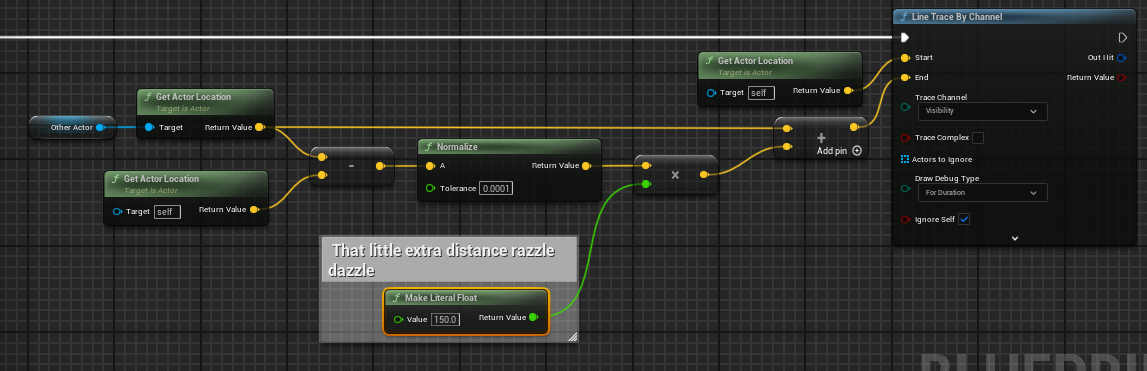
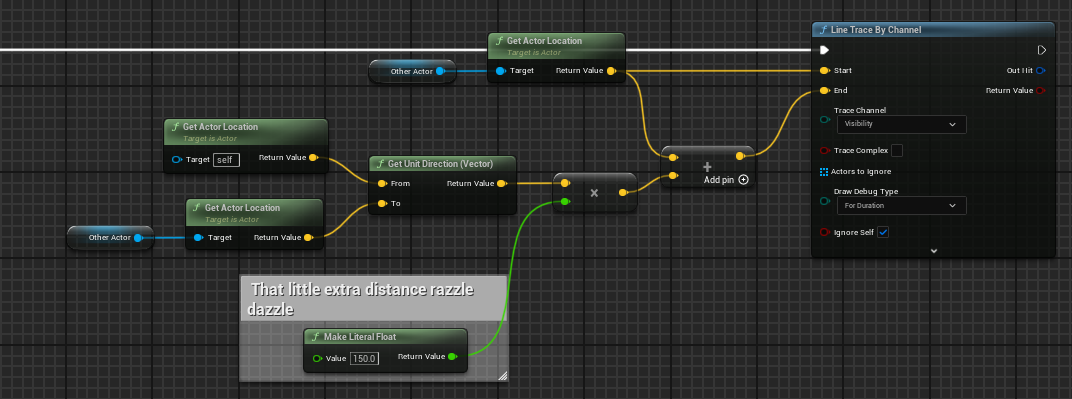 mild jacinth
inland walrus
is it possible to save player location from a struct?
mild jacinth
inland walrus
is it possible to save player location from a struct?
use set members in struct node

 lament iron
Hey everyone, im facing a bit of a challenge here i guess.
Im working on simulating a cable by stacking capsules as a skeletal mesh. The setup works perfectly in the physics simulator, but I'm encountering an issue when moving the start and end points of the cable. Once the cable reaches its limit, it begins to jitter, unlike the cable component, where I can smoothly control both the start and end points.


the cable should stop when it reaches its limit ( that what I want to do)
true ocean
empty marten
Try stepping through your code using break points to see what is and isn't being...
Oh yeah sorry that's what i was trying to indicate with the purple notes, it does get called, but the handler doesn't for some reason
 sand warren
Hello quick question, i follow a video about stopping attack moves when weapon is not equipped but i'm not sure the reason the code don't work (i can't attack with and without weapon) ?
 empty marten
true ocean
Oh yeah sorry that's what i was trying to indicate with the purple notes, it doe...
empty marten
true ocean
Oh yeah sorry that's what i was trying to indicate with the purple notes, it doe...
Might it be because you have it executed from Pre-Construct so its not getting a chance to call yet?
empty marten
sand warren
Hello quick question, i follow a video about stopping attack moves when weapon i...
Your active weapon has nothing to check against.

 upper stump
is there a node that would allow me to pick the component i want to add?
Working on a weapon system and i'm looking for a way to customize this , or maybe is there a better way of doing it

nvm, just realized its add component by class..
empty marten
upper stump
nvm, just realized its add component by class..
....
sand warren
empty marten
Your active weapon has nothing to check against.
hey @empty marten, the video i watched stated that by doing this, you are doing if active weapon == none then you can't attack
upper stump
empty marten
....
sorry, was sure it has to be add skeletal component
empty marten
Oh sorry. I misread.
empty marten
sand warren
hey <@299670901555986443>, the video i watched stated that by doing this, you ar...
Do you have a link to the video?
sand warren
empty marten
Do you have a link to the video?
yea here: https://www.youtube.com/watch?v=dpt3BC8kkmQ&list=PLiSlOaRBfgkcPAhYpGps16PT_9f28amXi&index=34
Hello guys, in this quick and simple tutorial we are going to continue with my UE5 RPG Tutorial Series in Unreal Engine 5!
↪️Project Files: https://bit.ly/GorkaGames_Patreon
➡️Whole Series: https://www.youtube.com/watch?v=FNTyIWkv5k8&list=PLiSlOaRBfgkcPAhYpGps16PT_9f28amXi
Discord: https://bit.ly/GorkaGamesYouTubeDiscordServer
Patreon: https:/...
empty marten
Time stamp?
sand warren
starts at 7:21
empty marten
Also I assume you've checked all your variables are getting the right value at the right place as I'm noticing a few booleans that might get mixed up easilly.
sand warren
i've made sure that can attack? is set to ON
empty marten
So something you could do is print out the value of that boolean and see what value its getting (true or false)
So just do something like this quick. That way you can see if its staying as 1 value or constantly switching between 2 values.
 sand warren
ill try now
true ocean
empty marten
Might it be because you have it executed from Pre-Construct so its not getting a...
I tried moving the binding to construct in case it was some kind of too early binding and that didn't help, and the event doesn't get called until a player clicks a button, so there should be plenty of time for it to get setup before OnInventoryChanged is ever called
sand warren
empty marten
So just do something like this quick. That way you can see if its staying as 1 v...
when i do it with the can attack varible, i get true when i tick the variable ON and false when i tick it OFF
empty marten
sand warren
when i do it with the can attack varible, i get true when i tick the variable ON...
Sorry I think you've mis-understood what I was triyng to explain. I mean like this. Get the event tick, get the value coming out of the == and put that into the print string to see what you get.
 sand warren
empty marten
Sorry I think you've mis-understood what I was triyng to explain. I mean like th...
sand warren
empty marten
Sorry I think you've mis-understood what I was triyng to explain. I mean like th...
oh ok one second
sand warren
empty marten
Sorry I think you've mis-understood what I was triyng to explain. I mean like th...
i did it and i end up getting False
 empty marten
So you know CanAttack? is getting set to false but is it consistant to that? Try setting up the Event Tick like this to see if CanAttack? stays at false.
 sand warren
empty marten
So you know CanAttack? is getting set to false but is it consistant to that? Try...
sand warren
empty marten
So you know CanAttack? is getting set to false but is it consistant to that? Try...
it does stay at false
empty marten
OK so we know the variable is fine. Where is the code where you equip a weapon?
And then set CanAttack? when a weapon is equipped.
sand warren
empty marten
OK so we know the variable is fine. Where is the code where you equip a weapon?
here is the blueprint for item pickup
 empty marten
OK but where are you setting CanAttack? after a weapon is equipped?
At the moment CanAttack? is always false so you won't be able to attack.
sand warren
empty marten
At the moment CanAttack? is always false so you won't be able to attack.
i only use can attack in my attackingsystem
 empty marten
I was just reading through the comments section of the video and someone has reported an issue with setting teh CanAttack? with the == on BeginPlay.
This is what they wrote.
setting can attack with the == on begin play doesnt work. in the bpc equipment system your setting can attack to true everytime you open and close equipment panel. so basically you open inventory with or without picking anything up your enabling can attack and you play sword attack animation. so delete can attack from the false branch. in bpc attack system on begin play set has bow and can attack variables to false. on q key set has bow and can attack to false, then drag from can attack and get the unequip bow in hands plug characterbp into it. drag from character and get equipped weapon, from that drag and set visibility to false and make sure its hooked into the unequip bow. so the q key should have 5 nodes {q key, has bow, can attack, unequip bow in hands, set visibility. now in wb_equipment panel drag from character cast and get bpc attack system, from that set has bow connect it into the end of equip melee item leave it false, from has bow drag from bpc attack system and set can attack and check it true. right click get the 1 keyboard key and hook it into the beginning of can attack you just hooked to false has bow. from that can attack call unequip bow in hands and drag from character cast to the target of unequip bow. from unequip bow drag from bpc attack system again and set can attack to true and set has bow to false. so from equip melee item you should have 6 nodes. from the ranged weapons-equip bow set can attack to false and set has bow to true. search for the 2 keyboard key hook it into the set has bow and then from the set has bow call the equip bow in hands and hook the character into the target. so now when you select from your inventory your setting your weapons and when you close you can now use your 1 and 2 keys as hot keys to swap from melee to bow and vice versa without having to open your inventory and reselecting a weapon. and when you press Q everything cancels and your back to regular walking. then just press the 1 key and bam, you automatically have your sword, press 2 and it switches to the bowstuff. of course if you plan on adding a pick axe or axe or gun you will have to add more stuff to that code. but i just showed you how to cycle 2 weapons! you will also notice that the 1 and 2 keys will not work until youve selected from your inventory. so its almost like playing a real game but still a few bugs. the main bug ive found is, well let me back up here. items in games that have inventory or in this case an equipment panel acting as your inventory {backpack} are only suppose to be activated when you open your inventory and select an item. my method does this flawlessly. you cant equip the bow or sword without setting it in your inventory. the inventory system recognizes this perfectly. the only thing i cant figure out is when you pick up the sword and the bow, then open your inv and select just the sword it works, but, you can also press 2 and it equips the bow without it ever being set in the slot. but it also doesnt activate until you pick it up and set one or the other. thats the road block ive hit. it still functions as it should, but its more like an auto set has been created once you pick up an item. so it isnt that bad or gamebreaking its just a bug ive found.
spark steppe
xD
lunar sleet
TL;DR
empty marten
XD
sand warren
empty marten
This is what they wrote.
setting can attack with the == on begin play doesnt wor...
ill try this now
empty marten
sand warren
ill try this now
After this point I won't be able to advise much more without going through his entire video and attempt to replicate his code myself.
sand warren
empty marten
After this point I won't be able to advise much more without going through his e...
i understand because i only followed his attack system and not the rest of his stuff
empty marten
sand warren
i understand because i only followed his attack system and not the rest of his s...
Then there's a chance you're missing something else he implimented elsewhere.