#blueprint
1 messages · Page 210 of 1
 quaint fable
 faint pasture
In what specific location?
faint pasture
In what specific location?
A specific coordinate? is that possible?
faint pasture
quaint fable
A specific coordinate? is that possible?
Sure, but what coordinate?
How is the coordinate defined
Just explain in plain English what you want to have happen, and when you want it to happen.
quaint fable
it's defined by (x,y,z). Here's some more context. I have a different triggerBox called "BP_TriggerBoxSpawnTallBoi". This trigger box spawns "BP_TallBoi" at the location of (1347.130096, -11558.598918, 295.0). I placed the "BP_TriggerBoxTallBoiChase" in front of the "SpawnTallBoi" Trigger. So I want the "TallBoiChase" to check if "BP_TallBoi" is spawned in that location so that it can trigger an animation. If it's not spawned in that location, then it should do nothing.
Did that make sense the way I explained it?
 lyric basin
Lets just say that there are a number of tuts and such that I watched and they generally say stay away from editing in the level bp. or at least using it for stuff. I have a sound effect cue playing on spawn, but thats it. But thats what I am trying to figure out, the best way to go about doing this. The effect of destroying all of the current actors in the level is triggered when a collision box is hit (which exist inside of another actor in the level)
So what function or call would I need to use to reference them all or at least have access to them
 slender dagger
quaint fable
it's defined by (x,y,z). Here's some more context. I have a different triggerBox...
slender dagger
quaint fable
it's defined by (x,y,z). Here's some more context. I have a different triggerBox...
just try and simplify what you want, because that's way too many names to keep track of when you haven't really explained what you're going for in a clear way. Just do it in a pseudocode way (example: when player hits trigger, trigger spawns object) . The coords and the blueprint names aren't really that relevant. Just say what you want to happen
faint pasture
lyric basin
So what function or call would I need to use to reference them all or at least h...
I already told you, get actors of class. But destroying all actors in the world might not have the effect you want. There's a lot of things that are actors that aren't necessarily what you want to destroy. Why are you doing this?
faint pasture
quaint fable
it's defined by (x,y,z). Here's some more context. I have a different triggerBox...
Why not just check if its location is near the other things location?
If (thing.location - otherthing.location).length < somenumber
quaint fable
slender dagger
just try and simplify what you want, because that's way too many names to keep t...
okay, let's see. Right before the player enters this one room I want the creature to spawn in a corner. Then as they walk through the door I want the creature to play a specific animation.
quaint fable
faint pasture
Why not just check if its location is near the other things location?
I think that makes more sense than what I'm trying to do. Let me try that
lyric basin
faint pasture
I already told you, get actors of class. But destroying all actors in the world ...
I didnt see the response below the image someone posted. and I am aware of how to grab the actor and place a reference into the level BP. I am doing this because the actors form a backdrop that I just want to remove. its a small alley, so not too many things, less than a dozen. but they are all different so if I did get all actors of class, that would require multiple calls to the same function, no?
faint pasture
lyric basin
I didnt see the response below the image someone posted. and I am aware of how t...
It will return an array of all actors of that class. Then you can just for each on it and call destroy actor. Don't do it on the base class of actor unless you want literally your entire world to go away, including game mode and game State LOL
slender dagger
quaint fable
okay, let's see. Right before the player enters this one room I want the creatur...
and the player, creature and trigger are all separate blueprints?
quaint fable
slender dagger
and the player, creature and trigger are all separate blueprints?
Yeah they're all seperate
lyric basin
faint pasture
It will return an array of all actors of that class. Then you can just for each ...
but again, this would require mutiple Get all actors of class nodes, correct?I have used this before so I am familiar with it.
and from where are you saying this would be done? inside the level bp?
or wherever
faint pasture
lyric basin
but again, this would require mutiple Get all actors of class nodes, correct?I h...
No
Why would it.
Which actors are you trying to destroy here?
And why?
Get actors of class actor will return an array containing ALL actors
lyric basin
nvm, I dont think you are understading what I am trying to do. I will just stick with the method I have implemented since it works. thanks
quaint fable
Okay so this might be sloppy code but it works. I placed a cube mesh in the same location as where the creature spawns, which I have hidden in game and collision set to overlap. Then I just check if the creature is overlapping the cube
slender dagger
quaint fable
Yeah they're all seperate
ok so in the trigger, you cast to the player on the begin overlap event. If the cast succeeds, you then spawn the creature at said coord and store the reference. You might have to have another trigger on the opposite side of the door if the player can walk back out of the room, but if the player can't exit the room, then on end overlap, cast to the creature using the reference you stored when it spawns and run the code that happens for playing the animation (I'm assuming you want more things to happen than just the animation)
quaint fable
slender dagger
ok so in the trigger, you cast to the player on the begin overlap event. If the ...
Yeah I do have another trigger if the player tries to go into the other room
that helps, thank you
slender dagger
I'd recommend making it a child of the other trigger if it isn't already so that you still have the reference to the creature and then overriding the begin overlap event with the code to run the animation code
quaint fable
@slender dagger that makes sense. Why do it this way? Just to save on processing power?
 untold fossil
Hello. Does anyone know of a way to decrease a kill count exactly after 5 seconds of it being increased? Like for example, a kill is registered and the counter goes up with 1. Then I want the kill to be removed after 5 seconds. (Working on a double, triple, quadruple, ... kill announcement system) But I can't find a way to have multiple delegates running in a single blueprint without one overwriting or resetting the previous one. How is this normally done?
Delays, timelines and timers by event all reset when they are retriggered
slender dagger
quaint fable
<@443662664766586900> that makes sense. Why do it this way? Just to save on proc...
Wdym? Thats just the simplest way to do it. Using cubes can work ig but if you want to build more functionality into the trigger you’re better off just using a collision box, that’s kinda what they’re there for
untold fossil
The only way I can currently think of is to spawn a blueprint that has it's own counter for each kill. But this seems very messy and overkill.
slender dagger
untold fossil
Delays, timelines and timers by event all reset when they are retriggered
Retriggerable delay?
untold fossil
slender dagger
Retriggerable delay?
No because then the kill never gets removed when the player keeps making kills within the 5 seconds
I need to have endless delays running sequentially
for each kill
What I'd essentially need is some sort of delay that is created on a layer or thread or whatever and for each time the delay is called it creates a new layer
But not sure if that's even possible
I've tackled the most difficult and complex challenges in the last 8 years of being a game dev and this is where I struggle xD
slender dagger
So the timer lasts independently of the other kills?
slender dagger
AFAIK I think you’d have to create separate timers
untold fossil
Hmm but that would be limited no? What if the player makes a 16 kill combo 😛
Unlikely, but still possible. I'd rather have an endless possible kill combo amount
slender dagger
I’m sure there’s probably some way to do it. I could try booting up unreal and seeing if there’s something I’ve missed
untold fossil
That'd be really great, but no pressure. I don't want to take up your precious time
slender dagger
lmao I'm just waiting on some food while watching TBBT. If I'm ever looking through here, I either have a bug of my own or time to kill
 trim matrix
The ball goes through the wall, where did I make a mistake?
 untold fossil

Epic Developer Community Forums
When I run my event, it starts with a delay. When I run the event a second time, the run is ignored because of the delay. Is there a way to run it a second time but with a different instance or create events at runtime? I tried the set timer by event but it does not let me have inputs on the event.
this seems to be the same issue
 frosty heron
It's natural behavior
slender dagger
untold fossil
That'd be really great, but no pressure. I don't want to take up your precious t...
just a quick question, is there anything you want to during the kill timer during it or is it fine just being a flat delay?
untold fossil
So it's like I thought, the only solution is to create / spawn a seperate actor per kill with it's own delay / timer
untold fossil
slender dagger
just a quick question, is there anything you want to during the kill timer durin...
just a flat delay should be enough
frosty heron
Try not to use delay, just use timer
You can create a component that manage time if you need instances of said timer
Either component or UObject
untold fossil
Yeah adding a component can work
But is adding many components to a single blueprint through code bad performance wise?
frosty heron
At the time of creation you bind the delegate inside the comp or the UObject
untold fossil
Isn't actors more performant?
frosty heron
No performance issue what so ever from my end
 rugged wigeon
can't imagine how actors would be more performant
untold fossil
I've always heard you should avoid adding too many components to an actor
frosty heron
Then use UObject if that make you sleep better
untold fossil
Yeah that's the most stripped down object right?
Ok I'll try some stuff and do some profiling
Thanks people
frosty heron
For a kill timer? Don't bother
untold fossil
lol ye maybe it's overkill to worry about performance for this xD
frosty heron
I've done the object and component. Not even 1 fps drop what so ever.
untold fossil
But I'm a bit of an fps whore lol
slender dagger
I think you'd have to create a timer manager BP and then add and remove each timer from an array
untold fossil
I think just making a kill manager component should work
And is gonna be the easiest
untold fossil
I just add a component for each kill. Inside component a timer runs down 5 seconds, when timer is done, remove kill from parent actor
frosty heron
The idea is a new instance per timer
untold fossil
ye
frosty heron
Yeah when timer done it just execute what ever it's binded to
 neon lion
I made a new version of a widget blueprint from scratch because my old one wasnt working right
New one works great, so i did a delete and update references on the old one
but now i cant rename the new one to the name i was using
, it still thinks the old one exists, it does not
 slender dagger
if you're fine with it being a flat delay you can get by using this. If you're using timers you might have to do it using C++
 slender dagger
untold fossil
ye
slender dagger
untold fossil
ye
turns out you can do this instead lmao (this may need tweaking)
 plush hornet
Hi al, hope your well. Ive set up a damage over time effect as an Actor component. How would I check that it has been spawned/That the effect is active so it doesn't keep stacking? My set up is below. Thanks

 undone bluff
trim matrix
The ball goes through the wall, where did I make a mistake?
undone bluff
trim matrix
The ball goes through the wall, where did I make a mistake?
you need a collision volume to be the root of the actor for the movement component to use it, right now it's just a generic scene component
 lunar musk
Idk why my spline not curve on obstacules
frosty heron
slender dagger
if you're fine with it being a flat delay you can get by using this. If you're u...
Don't do this...
Also no , they can be done entirely in bp. I've done it using timer with comp or uobject
Stop using delay for the wrong reason and stop looping your pins
 versed sun
plush hornet
Hi al, hope your well. Ive set up a damage over time effect as an Actor componen...
versed sun
plush hornet
Hi al, hope your well. Ive set up a damage over time effect as an Actor componen...
After you spawn your component , promote the Return Value to a variable
Then , BEFORE you spawn the component, Check to see if the Variable is valid
If it IS valid, then dont spawn a new one(Or remove old first)
Else if NOT valid , then spawn one and cave Return to Variable
slender dagger
frosty heron
Stop using delay for the wrong reason and stop looping your pins
it seems to work here. Delays are used for this exact kind of reason no?
frosty heron
Not at all
untold fossil
slender dagger
turns out you can do this instead lmao (this may need tweaking)
Does that work though? Doesn't triggering the same timer get ignored?
slender dagger
well I'm still working on the next bit (I may need to move some nodes around to get the correct exec flow first)
slender dagger
frosty heron
Not at all
how so?
slender dagger
it sounds like delays might as well just not exist within the engine then
plush hornet
versed sun
After you spawn your component , promote the Return Value to a variable
Then , B...
Great thanks🤗 =
untold fossil
I don't think it's possible within the same blueprint mate. It's a hard limit.
Delays are def still handy for other stuff. But for multiple undefined amount of layered timers they are not useable within the same blueprint space
Anyway, I got it working
with components
slender dagger
well the problem with the way I've tried by using timers is that it doesn't create a new timer to add to an array,
I attempted doing it via a timer manager class but the timer handle doesn't create a new handle.

this is something I'm doing to try and learn something new as well so I thought I'd give it a crack


 buoyant moat
Anybody know how the Custom Colors of the Curve Editor User settings work ?
I am looking for a way to change the float curve default color (that is quite hard to see against the grid lines)
 untold fossil
slender dagger
well the problem with the way I've tried by using timers is that it doesn't crea...
untold fossil
slender dagger
well the problem with the way I've tried by using timers is that it doesn't crea...
Same problem. Anything with a latent timer (delays, timelines or timers by event) face the same issue
they can not be stacked
You need a separate blueprint per timer to stack them (actor, object or component)
slender dagger
untold fossil
You need a separate blueprint per timer to stack them (actor, object or componen...
could that not be a timer manager though that's on the right?
unless I've done the stacking wrong
untold fossil
Not if it's within the same blueprint space I'm afraid
frosty heron
I don't see any point adding timer to array either
slender dagger
wdym blueprint space? They're different blueprints if that's what you mean?
frosty heron
It should just be destroyed when it's done it's job
untold fossil
I think it's a hard limit of how blueprints are built. They can only use the delays that are manually placed within them, they can not create more than you placed / stack them
Don't ask me why that is though xD
slender dagger
Wait do you mean creating a new blueprint when a new timer activates?
frosty heron
If you need multiple timer running the same event, create them per instance of uobject or component.
Path of least resistance.
untold fossil
frosty heron
It should just be destroyed when it's done it's job
Right, thanks for reminding me lol I forgot about that 😂
frosty heron
slender dagger
Wait do you mean creating a new blueprint when a new timer activates?
Create a new comp or uobject at run time to start the timer
Your comp or object needs a delegate that the initator can bind to
 frosty heron
untold fossil
frosty heron
untold fossil
I would still use timer here
untold fossil
timer by event you mean?
frosty heron
Which destroy it self after broadcasting
untold fossil
Sure, can change it
frosty heron
untold fossil
The logic shouldn't be placed here for your kill thingy
slender dagger
frosty heron
Create a new comp or uobject at run time to start the timer
so create another instance of the timermanager class?
frosty heron
If you use event dispatcher you can decouple the logic
So you can reuse the component whenever you need multiple timer
untold fossil
 frosty heron
For anything
untold fossil
Yeah IK have to move the actual kill subtracting to the parent actor still
just placed it here for testing
 midnight knot
That works perfectly and it was a one hundred times easier than what i was trying to do, thank you so much
frosty heron
untold fossil
So I would remove the kill count part and move it to where ever this logic should be and replace the removed part with event dispatcher
untold fossil
ye will do
frosty heron
slender dagger
so create another instance of the timermanager class?
Create an instance of uobject or actor component that has the timer manager class yes.
frosty heron
untold fossil
ye will do
Also I would create a function to initialise the timer. Like a param I can pass, e.g start time / length
untold fossil
 frosty heron
untold fossil
frosty heron
untold fossil
Can still be better, atm just not reusable
untold fossil
Yeah the timer length can be a parameter
frosty heron
Change the function name to , timer ends
Don't call remove kill here, use event broadcast instead.
untold fossil
But isn't binding an event per kill a bit much?
frosty heron
Parent create timer, parent bind OnFinished delegate.
On finished -> remove kill
frosty heron
untold fossil
But isn't binding an event per kill a bit much?
You are binding to timer end event
untold fossil
Isn't it more performant to directly talk to the parent actor?
frosty heron
The idea is you want to create a component that is reusable
And nothing about performance is affected here
untold fossil
Yeah, it could be reuable and more open ended sure
frosty heron
Second of all you are using blueprint. You already give up most of your performance.
untold fossil
True lol
frosty heron
Replace begin play with init timer imo which takes input for timer length
Use event dispatcher when timer ends
 frosty heron
Better, now you can use that timer component for other bussiness
frosty heron
Gn, sweet dream
slender dagger
so using that method I got the same thing working this way
 frosty heron
slender dagger
so using that method I got the same thing working this way
frosty heron
slender dagger
so using that method I got the same thing working this way
Yup but I would suggest making it an object as they are more light weight
slender dagger
I thought you couldn't make object classes?
frosty heron
Yes you can
slender dagger
I thought the highest class you could make is actor?
frosty heron
The node is construct object in blueprint
And to make thr abstract class. Create blueprint class -> uobject
slender dagger
this?

I'm assuming the fact it doesn't have an instigator has something to do with that?
 slender dagger
Yeah I get that.
How do components differ? afaik components are only part of actors
frosty heron
Actor component is something you attach to an actor
Object doesn't take space in the world, it has no transform
And it's the base class of almost everything
slender dagger
yeah I've just tried to put it in the world and saw that. Do you know anywhere I can look to find out more about actor components?
frosty heron
https://dev.epicgames.com/documentation/en-us/unreal-engine/components-in-unreal-engine
I never read it my self, gonna take a look
Epic Games Developer
An overview of Components in Unreal Engine
slender dagger
just another question, do you know why objects don't have the "get player character" node?
 gloomy holly
hello, does anyone here know how to make a rotating 3D object as a selection UI image for a building?
frosty heron
slender dagger
just another question, do you know why objects don't have the "get player charac...
Need world context afaik
Object can exist without world, soo..
I don't know how to explain it properly sorry
Kinda like how blueprint class can't reach level assets if you don't drop them into the world.
slender dagger
yeah I think I understand what you mean by world context
frosty heron
gloomy holly
hello, does anyone here know how to make a rotating 3D object as a selection UI ...
Too vague, do you mean you want to display unit icon live?
slender dagger
Is it possible to give objects world context in blueprint?
gloomy holly
frosty heron
Too vague, do you mean you want to display unit icon live?
So if I select a unit or building, I was hoping to get a rotating object of it in the bottom left UI
frosty heron
slender dagger
Is it possible to give objects world context in blueprint?
I'm not sure but for timer you just want to call delegate.
All the world stuff logic or anything that the timer should execute should be placed else where.
frosty heron
gloomy holly
So if I select a unit or building, I was hoping to get a rotating object of it i...
Scene capture 2d
But kinda expensive
And not possible in blueprint if you want to render them from separate world
slender dagger
frosty heron
I'm not sure but for timer you just want to call delegate.
All the world stuff...
fair enough. I think I'll stick with using actors until I cover objects and components a bit more in depth.
I can't imagine using actors for smallish projects would have a noticeable impact on performance anyway
frosty heron
You can get away by spawning the actor beneath the world and drop a scene capture that only render the target actor.
But it comes with limitation as it is bound to the same world lighting and post process
gloomy holly
frosty heron
And not possible in blueprint if you want to render them from separate world
Even if its just a video of the object rotating, is that possible?
frosty heron
slender dagger
fair enough. I think I'll stick with using actors until I cover objects and comp...
Performance wise, I doubt it matter yeah. But it's totally worth to look at actor component.
Inventory manager? Component
Combat ? Component
Dialogue? Component
Even interaction for some. Etc
slender dagger
I'll have to ask someone who knows a lot more about it than I do in person when I get the opportunity, which shouldn't be too long
frosty heron
gloomy holly
Even if its just a video of the object rotating, is that possible?
Make up your mind first if you want to display a video in the widget or you want to capture a scene from the game world
Then research what you need
There are materials for either approach
gloomy holly
frosty heron
Make up your mind first if you want to display a video in the widget or you want...
Literally just a rotating version of the model I am selecting, so it can be seen rotating in 3D if you get me, I just want the model, nothing else
So if a video of the model rotating achieves that then I am happy
frosty heron
Then you will need a video for every single unit
If there are 100 units then you do male 100 videos
Mapping each unit to a video file
gloomy holly
Could it be done with an animation?
frosty heron
Other way is to capture the scene live using scene capture
@gloomy holly I suggest to look at scene capture
gloomy holly
Scene capture?
 spiral kite
I want to set text empyt if what I looking at empty for 1 second. how can I do it
 frosty heron
spiral kite
I want to set text empyt if what I looking at empty for 1 second. how can I do i...
frosty heron
spiral kite
I want to set text empyt if what I looking at empty for 1 second. how can I do i...
If it's already empty, why do you have to empty it again?
What's the actual goal here
spiral kite
I try to print it to my UI
if what I looking at is empty for 1 second
I want to set empty text in UI
frosty heron
Is this something that runs every frame? Like a line trace that check what it's looking at?
spiral kite
yes
frosty heron
The logic is flawed to begin with tho
You are saying if it's empty, make it empty 2 seconds after
You are already setting name text before the branch
Which already set to empty anyway if it's empty
spiral kite
so 2 seconds after looking at the blank, the text in the UI should be set to blank.
frosty heron
But what ever you do before the branch, pretyy sure that's a mistake
Check if what I'm looking at is empty (without setting just check)
Yeah you will need a timer
Check if what I'm looking at is empty, start a timer if one didn't exist. 2 second, set text
If a timer already exist, do nothing
If there is a text in what I'm looking at, clear timer if there's any
spiral kite
but it only trigger hen hit a person. I couldn't figure out how to empty it from here.

 rose bobcat
HI! Hope everyone is having a good day today?
Can someone please explain to me how to use the "break hit point" component to target specific parts of an actor?
Im trying to make a lock on system and I cant figure out how to target for example the head of an enemy, by either using hit bone name node, or by using arrow components in the target model to target, then connect from hit target component node.
current working blueprint for the target actor: https://blueprintue.com/blueprint/0a6r0km3


No description provided
spiral kite
is it wrong

 lofty rapids
spiral kite
is it wrong
lofty rapids
spiral kite
is it wrong
use out hit blocking hit
lofty rapids
make a custom channel default it to ignore, and set it to block on the character
 odd kiln
Hello all !
Anyone know if I can use the "Launch Character" node but smoothly ?
For the moment when I use it, it's pushing my Character linearly
Do I have to use a "Timeline" ?
frosty heron
You use timeline when you want to do something on a fixed time as you are constrained by the time length.
E.g. going from point A to B in X seconds
In case of jumping or being catapulted, I don't think you want to use timeline
odd kiln
My Character is being pushed by a "kick" in his Forward Vector so it's not in Z but I can't make the "Launch Character" smooth
frosty heron
Wdym by smooth
 weak flint
Is casting not as expensive if you dont do anything with the “As x” pin?
frosty heron
weak flint
Is casting not as expensive if you dont do anything with the “As *x*” pin?
Cast has no cost, it's the hard reference you have to worry about
The blue pin to be exact
In blueprint, having hard ref will load them into memory
So you will have memory issue if you have don't design your project with good architecture
In general, always cast to the base class when possible. It's not silver bullet but essential
odd kiln
frosty heron
Wdym by smooth
I mean when I "Launch Character" in Forward Vector * 3000 (for example) my Character stops instantly
I want him to "Slide" a little bit at the end
frosty heron
odd kiln
I mean when I "Launch Character" in Forward Vector * 3000 (for example) my Chara...
No idea, never try to do anything like that.
Cmc is too big, there are a lot of settings to play around with.
odd kiln
Ok I'll try something with the Deceleration maybe thank you !
frosty heron
odd kiln
Ok I'll try something with the Deceleration maybe thank you !
Try to up the value, but hopefully someone whom done simmiliar things can come forward
And I assumed the char not simulating physichs?
There is add impulse but that might be for when physich enabled?
odd kiln
Ok. In fact, I did not know that the CMC settings impact the "Launch Character" node
Physics is not enabled yes
weak flint
frosty heron
In general, always cast to the base class when possible. It's not silver bullet ...
Ahh thank you
I imagine I can worry less about referencing the character’s blueprint/components often since they’re always loaded?
 storm shale
HALP I DID an accidental keyboard shortcut idk what

AND NOW IT"S TINI
I don't know how to turn it back, in view options; the scale thing doesn't apply for those.
I think it was something that had to do with the arrows in the keyboard; for now I'll play on hardmode I guesh
 graceful sage
weak flint
Ahh thank you
I imagine I can worry less about referencing the character’s bluep...
graceful sage
weak flint
Ahh thank you
I imagine I can worry less about referencing the character’s bluep...
You can use soft objects references and load things when needed
frosty heron
weak flint
Ahh thank you
I imagine I can worry less about referencing the character’s bluep...
Yup, unless you have multiple characters then you want to rethink
weak flint
Thank you both
odd kiln
Can I determine how much space vertically a Mesh is taking on my screen ?
frosty heron
odd kiln
Can I determine how much space vertically a Mesh is taking on my screen ?
What is the specific goal? Maybe there are other ways to do what you want.
odd kiln
frosty heron
What is the specific goal? Maybe there are other ways to do what you want.
I want to zoom out my Camera if my "Target" Actor is taking too much space vertically
I mean I always want the same "space" on my screen above my "Target Actor"
 warped juniper
I have a problem with BPs
I made a function in a library, but for whatever reason, the function does not work
However, if the function is recreated within an actor, it works perfectly fiine.
The source of the issue seems to be on the nodes that require a reference to self. I tried plugging one in, but it doesn't fix it
frosty heron
odd kiln
I want to zoom out my Camera if my "Target" Actor is taking too much space verti...
How about just doing it based on distance?
There is also screen space, but I'm not sure how those number are exposed.
odd kiln
frosty heron
How about just doing it based on distance?
I'll try this, thanks !
 mighty crown
midnight knot
That works perfectly and it was a one hundred times easier than what i was tryin...
mighty crown
midnight knot
That works perfectly and it was a one hundred times easier than what i was tryin...
woo congrats. Glad it helped
odd kiln
How can I determine if my Character is on the Right or Left side of another Actor ?
My goal is : If my "Target Actor" is on the Left side of my Character (on the screen) I want to make an action
Ok I guess I have to detect if my Target Actor is on the Left side or on the Right side of my screen
Ok so I discovered that I need to know this related to my Camera and not my Screen
odd kiln
I guess I found it, thanks anyway guys ^^ !
 spark steppe
storm shale
spark steppe
storm shale
check view options in the bottom, there should be the scale setting
and/or CTRL + mousewheel might work
storm shale
spark steppe
check view options in the bottom, there should be the scale setting
scale setting and CTR + mousewheel apply to tiles; not to columns.
spark steppe
all in the view options
 hallow spruce
Anyone got a way I can go around this without having to change class?
 spark steppe
yea, use the correct node
that one clearly wants an actor and not an actor component
hallow spruce
Oh yeah I'm a little blind, my bad
 indigo stratus
Hey guys, I have an enemy character class that I can chase around. It's basically looking for a location on the navmesh that is pointing away from my main char. (ai move to)
The problem: At the end of the navmesh, the enemy just stops and after a few seconds the "on fail" of the ai move to node fires with the result "blocked".
but there is nothing that could block it. literally nothing but the floor. I debugged that the location, that it tries to go to, and it's is always on the edge of the navmesh.
what could be a reason for that?
the nav agent settings are like on every other character and those work.
There is no mesh or anything on the character other than the skeletal mesh and that has no collisions.
 surreal bridge
I am running into some issues regarding Date Time structures.
Currently, when the player starts the game it sets the Game Date to the current day and time using Now
Then, this method is called every on tick and (should) add around 30 seconds to the Game Date
However, when I had printed them out, the Make Date Time was showing just Jan 1, 1, 12:00:00 AM instead of Jan 1, 1, 12:00:30 AM

 queen heron
I seem to be doing something wrong here
I'm not seeing the spline anywhere around the scene with Unlit rendering

 gilded jewel
could anyone help me out with a UI/Gamepad issue - I have a level select menu where as the level name is hovered/highlighted it displays an image of the level and description.
It works fine with mousehover , but I can't get the gamepad focus to work. I am using has keyboard focus .. will show BP's below

 queen heron
I seem to be doing something wrong here
I'm not seeing the spline anywhere aroun...
queen heron
queen heron
I seem to be doing something wrong here
I'm not seeing the spline anywhere aroun...
one thing I have not mentioned is that I'm using the Add Spline Component node inside the gamemode blueprint
maybe its probably cause of that.....
 barren tangle
can we do that? A dispatcher event on a forEach ?

 tacit moth
barren tangle
can we do that? A dispatcher event on a forEach ?
tacit moth
barren tangle
can we do that? A dispatcher event on a forEach ?
yea this works
 hollow temple
Hey! Very new to Blueprints and I'm probably missing something very simple here, but I need to define the "target" in a variable to trigger a scalar parameter change in a dynamic material instance. If anyone can help a fellow noob I'd really appreciate it!

Here's the event that should be triggered
 graceful sage
hollow temple
Hey! Very new to Blueprints and I'm probably missing something very simple here,...
graceful sage
hollow temple
Hey! Very new to Blueprints and I'm probably missing something very simple here,...
Target is your character.
Since that's where that function exists
hollow temple
Thanks, that's what I thought but where do I define the character variable?
graceful sage
Initialize animation event
It's like beginplay for anim bp
I always forget the name bit type in initialize and should be something like that
hollow temple
Aha so I'm this anim bp I'll create something like a initialize to a get "charactervers2" and then put into the variable for the event to follow
 obtuse oriole
idk where to even begin making this thing so I made this to visualize my intend. How do I make a square on the player widget (a canvas or image) to follow and scale up and down in order to target an actor/component?
 graceful sage
hollow temple
Aha so I'm this anim bp I'll create something like a initialize to a get "charac...
graceful sage
hollow temple
Aha so I'm this anim bp I'll create something like a initialize to a get "charac...
Yeah get a reference to your character. Initialize -> get owner -> cast to your character -> promote to variable
hollow temple
Thank you so much for this help! I'm at the stage where I'm still learning the fundamentals, so little tips like this really help me wrap my head around it 🙂
I'll have a try when I'm back to work 🖥️
frosty heron
barren tangle
can we do that? A dispatcher event on a forEach ?
Ofc
 tropic peak
how based on the code attached would you monitor if an hour has passed?

 compact lava
hey pookies, is there any way to manipulate the Character's Movement gravity to enable vertical and even upside-down movement like this?
frosty heron
compact lava
hey pookies, is there any way to manipulate the Character's Movement gravity to ...
Looks like just a ramp to me?
Character looks like it just walk normally
If you need to change the maximum slope, there's the setting in the character movement component iirc
compact lava
Walkable Floor Angle? It can't go over 90.0 degrees so if i try to reproduce the ramp, the character will still be blocked by the wall instead of rotating + walking vertically 😦
 fiery moon
The character starts walking on the wall, I think he didn't see that, I didn't notice at first either.
 final berry
Are timelines outside of the normal node chain or something?
compact lava
fiery moon
The character starts walking on the wall, I think he didn't see that, I didn't n...
And on the roof as well!
fiery moon
compact lava
Walkable Floor Angle? It can't go over 90.0 degrees so if i try to reproduce the...
Anyway if you want wall walking you'll probably need to disable the default Z gravity and apply gravity yourself, then also rotate the pawn based on said new gravity, and those slopes would just gradually change the gravity.
versed sun
obtuse oriole
idk where to even begin making this thing so I made this to visualize my intend....
check out these nodes
 compact lava
fiery moon
Anyway if you want wall walking you'll probably need to disable the default Z gr...
compact lava
fiery moon
Anyway if you want wall walking you'll probably need to disable the default Z gr...
Hmmm, i've fugired... thank you so much!
versed sun
obtuse oriole
m...
grab that off the box extent? Whatever x,y,z is largest is how big the red box is
 obtuse oriole
alright then, I'll try it
versed sun
Also, the distance you are from target actor should scale box size
frosty heron
compact lava
And on the roof as well!
You can look at how people do wall climbing or wall surfing
 vocal mirage
Hey, I'm a bit stumped and thought I'd try here.
I'm trying to create a base 'button panel' widget with some base button widgets I've already made. My goal is to have the buttons initialised by the PreConstruct event, based on an array - the 'ButtonStyle' struct on the left - wherein it creates as many buttons as there are elements in the array, and gives them the correct names, colors etc. I've got that part working.
I now want to bind events to each of the buttons dynamically, so if there are 3 buttons in the panel, there are 9 events (hovered, unhovered, and clicked for each.) I'm not sure if that's possible in blueprints, so I decided to try using each button's event dispatchers, and linking them to another dispatcher in the button panel (the On Button Clicked etc.) and then pass in a reference to which button has been clicked. The issue is that this returns the last button in the array, no matter which one has been pressed, since by the time everything's finished being constructed, the loop is only returning the last element in the array.

Anybody know a way to sort this? Best option would be if I could somehow pass the event dispatchers from the buttons to the button panel on a per-instance basis, but I don't even know if that's possible. Thanks!

If it helps with clarification, here's what I'm doing with it
obtuse oriole
versed sun
Also, the distance you are from target actor should scale box size
is there something that I misunderstood? Because right now it is doing the opposite where getting far from the actor makes the image larger and vice versa
 vocal mirage
The size is scaling proportional to the distance there
So if you do 1/distance it should work
(i think)
vocal mirage
obtuse oriole
is there something that I misunderstood? Because right now it is doing the oppos...
As in 1 divided by the distance from the node
versed sun
you can do
 vocal mirage
versed sun
you can do
vocal mirage
versed sun
you can do
Yeah I was gonna say clamp it so it never gets smaller than a set size
fiery moon
compact lava
Hmmm, i've fugired... thank you so much!
I just noticed that the CharacterMovementComponent has built in support for Gravity changing, so its even easier, just set the gravity on the CharacterMovementComponent (assuming you are using it)
obtuse oriole
it's doing the opposite of what I want
versed sun
change these numbers around

so it is bigger when you are close , and smaller when far
and im just guessing on the 200 - 5000
obtuse oriole
is there other way to get the bound size on the screen, I'm starting to realize this method won't work with different object sizes. I'm trying to replicate this
 fiery moon
Project all corners of the bounding box into screen space, then add them to a box? (use the extremes of all of them)
faint pasture
obtuse oriole
is there other way to get the bound size on the screen, I'm starting to realize ...
I'd start with the bounding box of the thing
I bet if you got the bounding box and then rotated it to align with the camera and used the corners of the face now facing the camera, that'd get you pretty close
Or find a bounding rectangle on screen for the bounding box
lunar musk
Hi! I have a problem with movement through splines. I have a logic to make a path of splines following the cursor. My problem is that my player not follow the path, he goes to the last point directly
lunar musk
lunar musk
Hi! I have a problem with movement through splines. I have a logic to make a pat...

 spiral kite
my character's head goes into the wall because of the aimoffset I put on my character, how do I fix this?
 wicked cairn
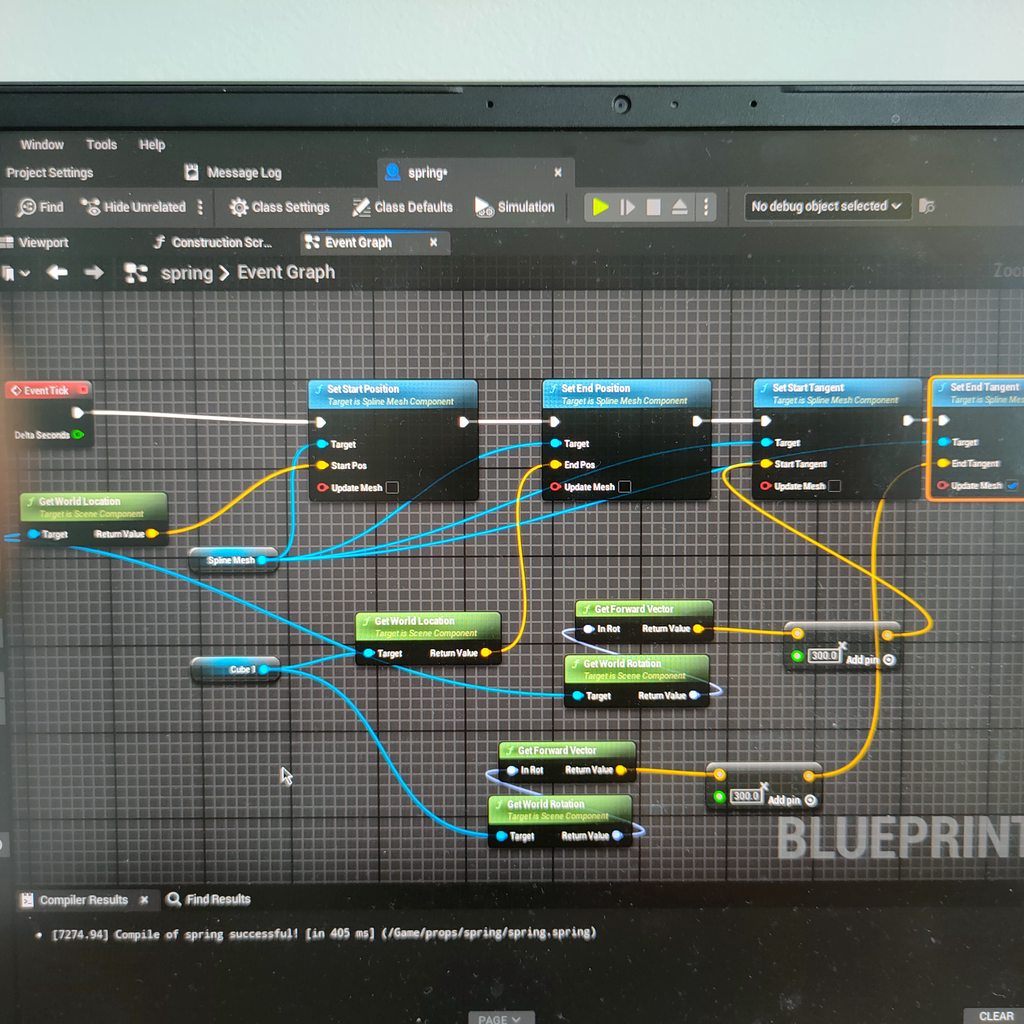
So i was following this tutorial https://youtu.be/Yzz-2yV0Of4?si=TIrCdei_JivPBwRR
But i ran into a problem the spring(spline mesh) is not staying like i put it in the bp
https://imgur.com/a/Iugmhgo

Physics Assembly System
https://www.youtube.com/watch?v=ozkiA3qoTcc
 pallid nest
hey guys Im having issues debugging this data structure, isn't this the correct way to manipulate and add +1 integer ? Im printing this specific integer but it is kept at 0 all the time (it is triggered in an actor with an overlap and the whole code works as except of this and breakpoints are also working
What im trying to do is an stat system so everytime something overlaps adds +1 to these integers

 mental trellis
compact lava
hey pookies, is there any way to manipulate the Character's Movement gravity to ...
mental trellis
compact lava
hey pookies, is there any way to manipulate the Character's Movement gravity to ...
The CMC does not behave at all well except at standard orientation.
 primal hare
Weird things happen with BP, events stop happening sometimes. And then if I restart after rechecking, it would work again.
Now, the Widget BP stays put and is not removed.
Is this error something to do with it?
PIE: Error: Blueprint Runtime Error: "Accessed None trying to read property CallFunc_Create_ReturnValue". Node: Add to Viewport Graph: EventGraph Function: Execute Ubergraph BP TEXT B Blueprint: BP_TEXT_B
LogScript: Warning: Accessed None trying to read property CallFunc_Create_ReturnValue
BP_TEXT_B_C /Game/_2_D3_GAME/LEVELS/Anand/UEDPIE_0_Start_B_02.Start_B_02:PersistentLevel.BP_TEXT_B_C_1
Function /Game/_2_D3_GAME/LEVELS/Anand/TEXT/BP_TEXT_B.BP_TEXT_B_C:ExecuteUbergraph_BP_TEXT_B:0093
PIE: Error: Blueprint Runtime Error: "Accessed None trying to read property CallFunc_Create_ReturnValue". Node: Remove from Parent Graph: EventGraph Function: Execute Ubergraph BP TEXT B Blueprint: BP_TEXT_B
LogUIActionRouter: Cleaned out [0] inactive UI action bindings
It had been working absolutely fine uptil now
 glacial notch
compact lava
hey pookies, is there any way to manipulate the Character's Movement gravity to ...
glacial notch
compact lava
hey pookies, is there any way to manipulate the Character's Movement gravity to ...
If you're using 5.4 then there's a node SetGravityDirection - otherwise I think you're stuck implementing your own gravity somehow https://dev.epicgames.com/community/learning/tutorials/w6l7/unreal-engine-custom-gravity-in-ue-5-4


Epic Games Developer
Unreal 5.4 introduced support for custom gravity in the CharacterMovementController. See how to take advantage of it and do cool things like gravity puz...
 crisp hawk
Hey all, does anyone have experience with this node? I'm not sure if I'm doing something wrong, but it doesn't seem to get the widget visuals written to it.

 undone sequoia
guys I have attached bombs on my plane and I am using function inside bomb to throw it, because they have disabled gravity to fly with plane and this is function nothing complicated , its called when I throw it it sets velocity and activate gravity , problem is that sometimes like 2 throws from 10 bomb is stucked in air not falling down, when I tried to debug it and printed gravity state or velocity it was set but bomb was stucked in AIR , any recomendations how to solve this problem?
 glacial notch
pallid nest
hey guys Im having issues debugging this data structure, isn't this the correct ...
glacial notch
pallid nest
hey guys Im having issues debugging this data structure, isn't this the correct ...
SetMembersInStruct - in the details you can set which stats you want to expose n change, leaving the rest untouched. https://youtu.be/JXtYHQLp4Yw?si=DkxuMmym4_FguKlp
I think it will also fix your issue as structs are a little weird I find when setting them off of a previous set node

How to get one value from a struct? How to set one value on a struct? How to hide unwanted struct pins?
Welcome to How to... a snack-size video for a snack-size question in Unreal Engine 4.
SUPPORT ME
Patreon I https://www.patreon.com/ryanlaley
Buy Me a Coffee I buymeacoffee.com/RyanLaley
Donations I paypal.me/ryanlaley
PRIVATE 1-2-1 SESSIONS...
glacial notch
undone sequoia
guys I have attached bombs on my plane and I am using function inside bomb to th...
may be a collision error? try keeping collision disabled, and if it works, it may be that the bombs are getting stuck on each other
pallid nest
glacial notch
SetMembersInStruct - in the details you can set which stats you want to expose n...
many thanks, really appreciate it. The thing is that is working but it keeps reseting to 0 somehow and I don't get why because I just created this and is only in this blueprint

 glacial notch
pallid nest
many thanks, really appreciate it. The thing is that is working but it keeps res...
glacial notch
pallid nest
many thanks, really appreciate it. The thing is that is working but it keeps res...
your welcome! hmm, try pulling the break node to debug straight from the GameStats variable instead of the struct out - if that doesn't work try setting GameStats to the struct out node
pallid nest
glacial notch
your welcome! hmm, try pulling the break node to debug straight from the GameSta...
Nope, it is working fine but it seems something else is reseting to 0. I did use the "save game" and "editable" , could it be any conflict with that one ? Something I notice is that even if I modify the default value it works as intended but it is reset to its default value (if I set up default 1 it will be 1 on tick all time , when i overlap will be 2 but next tick 1)

 glacial notch
pallid nest
Nope, it is working fine but it seems something else is reseting to 0. I did use...
glacial notch
pallid nest
Nope, it is working fine but it seems something else is reseting to 0. I did use...
just doing this works perfectly for me - after 4 seconds its permanently +1 of default value - try replicating this and see if it works? or maybe don't have any pins shared between the tick and the setting - so duplicate the shared nodes

 pallid nest
It is very odd, I had to remove the delay you had (not the one event tick) because if I do it will be aaaall the time in 0. After removing the delay it works as before, it fires 1 when I overlap but then 0 just after. I thought maybe it was the overlap and used a "do once" but nope something is reseting it to 0

It has to be the overlap because when I do add that code on event begin plays it is kept at 1
 paper latch
So I have two niagara systems, one geared for cinematics, one geared for games, and I would like to toggle between the two as such. Performance wise, is this a good idea? Or would it be better to have two separate blueprints for this? One blueprint that is set up for cinematics alone, and another for games

 pseudo pasture
Morning folks. Do y'all have any ideas for using a widget or the like in Screen space as a hitbox, or to at least emulate one? I'm making a top down shmup, and I want to be able to have enemies be free to move where they like on the Z axis, but still always be hittable. I tried duplicating their hitboxes and locking it to the Z level of the playing field, and that sort of works, but due to perspective, the locked hitbox doesn't line up with the enemy like you'd expect.
 wraith loom
pseudo pasture
Morning folks. Do y'all have any ideas for using a widget or the like in Screen ...
wraith loom
pseudo pasture
Morning folks. Do y'all have any ideas for using a widget or the like in Screen ...
It sounds like you’re asking two different questions. I’m not sure what you mean by using the screen as a hitbox. As for the z level issue, you could easily just manipulate the x and y values (since you’re already manipulating z) so that the hitbox looks like it’s above the enemy. You should be able to find the angle the camera is at and use that to calculate the precise x and y values.
 agile ember
hi, guys I get a problem about third person blueprint movement, Is anyone free to chat with me?
 eager thicket
will this work if the actor of class that is overlapping is a child actor of said class

 dawn gazelle
eager thicket
will this work if the actor of class that is overlapping is a child actor of sai...
dawn gazelle
eager thicket
will this work if the actor of class that is overlapping is a child actor of sai...
If you're wanting to check if the "Other Actor" is of a certain class, you may as well just cast.
eager thicket
ok
rugged wigeon
agile ember
hi, guys I get a problem about third person blueprint movement, Is anyone free t...
post problem
pallid nest
glacial notch
just doing this works perfectly for me - after 4 seconds its permanently +1 of d...
Hi mate thanks for your help earlier, finally solved it. I don't know what the issue really was but when I move the logic to my character blueprint (it was in my actor) it seems to add it and doesn't reset it anymore. I thought to explain the issue here just in case someone else get this issue (data structure reset to default value)
undone sequoia
glacial notch
may be a collision error? try keeping collision disabled, and if it works, it ma...
i tried put it all ignore but yea no effect always happens atleast once
undone sequoia
glacial notch
may be a collision error? try keeping collision disabled, and if it works, it ma...
nah they are not i am throwing one by one
 fathom cobalt
can someone help me please?
Is there an NPC version of the MoveForward/MoveRight input nodes?
Like if an AI were to move forward, is there a way to make the system input a value for 1 for forward and -1 for backwards?

 willow gate
Hello smart people. I wondered if there is a way to search all of my blueprints to see which ones use a specific enumerator I created. I added stuff to the enum and I want to make sure I have accounted for the changes across any bps that use it.
 stone field
willow gate
Hello smart people. I wondered if there is a way to search all of my blueprints ...
stone field
willow gate
Hello smart people. I wondered if there is a way to search all of my blueprints ...
Does "Find in Blueprints" not work?
 lunar sleet
willow gate
Hello smart people. I wondered if there is a way to search all of my blueprints ...
lunar sleet
willow gate
Hello smart people. I wondered if there is a way to search all of my blueprints ...
Ctrl+shift+F
faint pasture
fathom cobalt
can someone help me please?
Is there an NPC version of the MoveForward/MoveRigh...
those are input axes
you are getting the value of the input axis named MoveRight
willow gate
lunar sleet
Ctrl+shift+F
Thanks. I tried that though. It gives me no results unfortunately.
willow gate
stone field
Does "Find in Blueprints" not work?
Apparently not. Nothing comes up.
faint pasture
willow gate
Hello smart people. I wondered if there is a way to search all of my blueprints ...
reference view on the enum asset
willow gate
I tried that too but perhaps I don't know how to use it? All I see is where it is used in a struct. Maybe that's it
Yeah that was it. I was getting it confused with another Enum that I use. Thanks guys.
fathom cobalt
faint pasture
those are input axes
i know its an input axis, so i was wondering if AI has something like it
like, does the AI have its own version of it?
or at least some kind of float value indicative of whatever direction it's going in?\
willow gate
fathom cobalt
or at least some kind of float value indicative of whatever direction it's going...
You're trying to get the AI's move vector? Could you tell us what you're trying to do? Might help.
faint pasture
fathom cobalt
or at least some kind of float value indicative of whatever direction it's going...
you can give it one
fathom cobalt
willow gate
You're trying to get the AI's move vector? Could you tell us what you're trying ...
well in a nutshell I'm trying to make an AI that can climb on walls

Today in the spider pawn series, we are going to continue with the on wall movement system. as of the previous version, spider bot can move on any surface. but when the angle between the current surface and the next surface is larger than 180 degrees, it had troubles identifying next surface. As a result, it was not able to climb up a ledge even...
but I'm stupid so my best option is to take this thing and convert it into an AI
well im sure i can think of something, this just seems to be the most optimal solution
willow gate
fathom cobalt
https://www.youtube.com/watch?v=Wwj6LwUQ1aU&t=212s
So in this tutorial, the creator is using input axis values for locomtion.

 willow gate
Sorry. Get Move Forward and Get Move Right are what is directly tied into the input axis correct?
fathom cobalt
willow gate
Sorry. Get Move Forward and Get Move Right are what is directly tied into the i...
i dunno

maybe custom events?
willow gate
fathom cobalt
i dunno
Can you show me the "GetMoveForward" and "GetMoveRight" functions?
fathom cobalt
willow gate
Can you show me the "GetMoveForward" and "GetMoveRight" functions?
these?

I think they're native to the engine
it says this when I try opening them
 willow gate
Ah. My bad. I've never used those nodes so I wasn't tracking. I'm not seeing the problem here. That system should work as intended even on AI. Are you struggling with how to give the AI "input" for locomotion?
I think this is a symantics problem so I'm just trying to figure out what you actually need. 😉
faint pasture
fathom cobalt
this is the thing im trying to replicate
so replicate it
inputaxes -> math -> add movement input //player driven
AI controller -> math -> add movement input //ai driven
if you want to make it really agnostic as to who's driving:
InputAxisEvent -> math -> set DesiredMovementVector
AIController -> math -> set DesiredMovementVector
Pawn.Tick -> feed DesiredMovementVector to movement component
in what way?
you can call an event on something from a static function
but a static function has no "this" so there's no implicit object to call an event on
show your code
Why is this a static function?
So why not do this in GameMode or whatever
what class is this in right now?
What are you actually trying to do?
surreal bridge
surreal bridge
I am running into some issues regarding `Date Time` structures.
Currently, whe...
Does anyone know why this would be happening?
lunar musk
lunar musk
Hi! I have a problem with movement through splines. I have a logic to make a pat...
Any idea about this?
 marble sky
I have a character I am trying to clean up the movement on.
There is a fixed camera and the inputs are set to only control the pawn, not the camera. When I use the left stick the character turns and moves in the direction I aim. I am trying to find out how to set the right stick up to 'only' control the actors rotation, so that I can rotate the character in a specific direction without them actually moving. Is there something I can do to achieve this?
would just using 'use controller yaw input' work?
Because using that, I can only get the camera to rotate.
 rapid hollow
I want it to rotate 90° counterclockwise every time I interact but it keeps going back and forth. And I can't seem to find a way to fix it.
 faint pasture
marble sky
I have a character I am trying to clean up the movement on.
There is a fixed c...
faint pasture
marble sky
I have a character I am trying to clean up the movement on.
There is a fixed c...
Built in, there are 2 clean ways to orient a character, either oriented to movement or using Control Rotation.
check your CMC settings
versed sun
rapid hollow
I want it to rotate 90° counterclockwise every time I interact but it keeps goin...
try a Wrap

and Force Shortest Rotation Path
 marble sky
It's set to orient rotation to movement. if I disable that though, it stops rotating the character when I use the normal 'movement' controls.
rapid hollow
versed sun
try a Wrap
didnt work
marble sky
Just trying to find a way to rotate the character 'in place', based on the mouse axis or the gamepad axis, but also retaining the normal movement functionality.
This 'kind of' works, but it still rotates the camera instead of just the mesh & capsule


 gentle urchin
combine rot is pretty important as it uses quats behind the scenes 😄
not everything else does
faint pasture
marble sky
It's set to orient rotation to movement. if I disable that though, it stops rota...
well, which do you want?
do you want the character to orient to movement or orient to control rotation?
marble sky
I am not sure which one does what. Under 'normal' movement, I want it to work like it currently is. When I use the right analog stick on the controller, I want to be able to rotate the player. So that I can turn in place.
This is how it currently is, on keyboard. It's a bit better on gamepad, but I want the player to also be able to 'rotate' their character around in place, so they can face another direction quickly if they want to, instead of having to gain some distance on enemies, turn around, then use the strafe key to walk backwards to hit them.
Maybe what I am trying to do isn't possible with the built in movement system/character class 😦
spiral kite
I assigned colision to my head so that my head would not go into the wall during aim offset, but it did not help. why?
 gloomy holly
@frosty heron thank you for telling me about scenecapture
 dry sleet
spiral kite
I assigned colision to my head so that my head would not go into the wall during...
dry sleet
spiral kite
I assigned colision to my head so that my head would not go into the wall during...
The character movement component only considers its capsule collider for collision.
You will probably need to give it a larger radius.
gloomy holly
anyone here know how to make this appear in a sphere?
 gloomy holly
the material is a render target
marble sky
You should still be able to apply a mask to it?
If not, then you can probably just create another image that overlays that one and put the mask on that one.
gloomy holly
they have an option to draw as rounded box inside the UI image
marble sky
Did that work for you?
gloomy holly
yeah, exactly what i was after, unsure why videos on youtube dont tell you about that option
marble sky
Awesome. Videos on Youtube tend to only focus on ONE thing they are talking about.
gloomy holly
well this one stated a circular overlay on UI elements
 rancid quartz
Hello, I have a question about collision on static mesh components. 👋
I'm using AddStaticMeshComponent in an actor to add some meshes that include box colliders to the root. The root of my actor is a box collider that is simulating physics. Now, while in game, the added boxes generate overlap events, they fail to block the movement of other actors. The root does block the movement of other actors and the added boxes are set to the same collision profile as the root.
I understand that there are some rules in Unreal about how the root has to be a primitive and etc. for sweeping to work, however, I believe I have fulfilled those requirements.
Any advice would be appreciated. 🙂
Cheers.
 junior prairie
So I have this blueprint code that moves and actor from point A to point B in an arc, it's something I use with navlinks. The thing is, I don't fully understand it and am terrible with vector math. I want to add a third input to the event that's essentially an optional modifier to the height of the arc the actor moves in, any idea how I would accomplish this?
 versed sun
No description provided
junior prairie
Thanks, I actually just figured it out right after I posted it as so often happens
All I had to do was increase this value

so I can continue being bad at vector match >:D
 maiden wadi
You should be able to have as many as you want.
 abstract schooner
Now this will be a longshot, but I'm hopefull..
I'm tryign to add a Var to a Struct and it continouessly keeps crashing my editor.. these are the last parts of the crash log.
I'm doing this all in Editor in BP.
[2024.08.09-22.49.24:513][321]LogClass: UUserDefinedStruct.Serialize 'STRUCT_REINST_Struct_Saved_Buildables_4' validation: Struct 'UserDefinedStruct /Engine/Transient.STRUCT_REINST_Struct_Saved_Buildables_4' is empty
[2024.08.09-22.49.24:583][321]LogClass: UUserDefinedStruct.Serialize 'STRUCT_REINST_Struct_Saved_Buildables_5' validation: Struct 'UserDefinedStruct /Engine/Transient.STRUCT_REINST_Struct_Saved_Buildables_5' is empty
[2024.08.09-22.49.24:599][321]LogClass: UUserDefinedStruct.Serialize 'STRUCT_REINST_Struct_Saved_Buildables_6' validation: Struct 'UserDefinedStruct /Engine/Transient.STRUCT_REINST_Struct_Saved_Buildables_6' is empty
[2024.08.09-22.49.24:614][321]LogClass: UUserDefinedStruct.Serialize 'STRUCT_REINST_Struct_Saved_Buildables_7' validation: Struct 'UserDefinedStruct /Engine/Transient.STRUCT_REINST_Struct_Saved_Buildables_7' is empty
[2024.08.09-22.49.31:662][321]LogOutputDevice: Warning:

Script Stack (0 frames) :

[2024.08.09-22.49.31:670][321]LogWindows: Error: appError called: Assertion failed: ContainerPtr [File:D:\build\++UE5\Sync\Engine\Source\Runtime\CoreUObject\Public\UObject\UnrealType.h] [Line: 610]

[2024.08.09-22.49.31:670][321]LogWindows: Windows GetLastError: The operation completed successfully. (0)
Anyone can point me in a direction? I have installed the Editor Debugging Symbols, but I'm not sure how to use them..
 thin panther
abstract schooner
Now this will be a longshot, but I'm hopefull..
I'm tryign to add a Var to a St...
thin panther
abstract schooner
Now this will be a longshot, but I'm hopefull..
I'm tryign to add a Var to a St...
Yep, they'll do that. Structs should only be made in C++
You'll need to follow some rigamerole of closing every asset editor that isn't the struct, edit the member, save the struct, exit without saving, then reopen and manually go through and refresh every usage of the struct across bp's
Then, only then, does it have a chance of not screwing everything
abstract schooner
thin panther
You'll need to follow some rigamerole of closing every asset editor that isn't t...
Yeah I wouldn't mind that, the issue is, that even when I open the editor clean, and the only thing open is the Struct, and I try to just even click Add Variable, it crashes the editor..
And I don't know where or what is causing it, I'd like to try to somehow follow it to where the issue starts. BUt I don't know how.. 😅
Otherwise I'll just have to try another way of checking a bool for each of my items in the DT..
thin panther
The issue really just starts and ends at the fact that bp structs are super, duper broken, and shouldn't really be modified unless you can absolutely avoid it
abstract schooner
thin panther
The issue really just starts and ends at the fact that bp structs are super, dup...
Ugh.. Yeah I was afraid of that, It's just too bad it used to work before.. (In this project)
How dangerous/risky would it be to edit the Struct in a different smaller project and migrate it over to the current? 😅
And if I were to explore this option, what kind of preperations should I do with perforce? 😛
thin panther
Personally I wouldn't bother. It's far easier to copy paste what's in the header preview into a c++ file than to piss around with that.
versed sun
If you migrate it , it still wont be the SAME struct
thin panther
If you want to redo all your references every time though, and change every variable type, go ahead. Make sure you have a solid CL to revert to though
abstract schooner
thin panther
Personally I wouldn't bother. It's far easier to copy paste what's in the header...
What does thiss mean? (I have 0 experience with C++, but am very much starting to be willing to learn with all the issues I have..)
versed sun
Easier to make a new struct in C++ and replace it
 thin panther
abstract schooner
What does thiss mean? (I have 0 experience with C++, but am very much starting t...
thin panther
abstract schooner
What does thiss mean? (I have 0 experience with C++, but am very much starting t...
You can right click a struct and preview a header.
For structs it's nice, because it gives you in totality all the code you need, so you can male a new c++ file, paste the text in there, press f5 and away you go.
There may be some teething issues and the top pin of #cpp is always worth a read, but it's generally pretty simple even with no knowledge
abstract schooner
thin panther
You can right click a struct and preview a header.
For structs it's nice, becau...
You make it sound so easy! 😛
I might need a bit more handholding, but if I'm askign too much, please also let me know, I can always see what ChatGPT can spit out. 😇
However I'm a quick stufy and am motivated, so if you have a few more steps in detail on how to set this up (Or a tutorials elsewhere) I'd gladly have a go at it! 🙂
thin panther
Basically, have a stable CL in perforce.
Download vs2022 and follow epics setup guide on it.
Add a new c++ class from the editor. Do this only once.
For the purposes of this you can delete the .cpp it makes.
Delete the contents of the .h, paste in what the header preview gives you, press f5, and send any errors.
That's the short of it. ChatGPT won't be of much use. You'll also want some basic understanding of c++ data types to extend them, and I'll gladly help where possible. #cpp will tell you to follow learncpp.com up to chapter 28, but it's not necessary for only structs. However, I still advise it, because this tends to be a great starting point for jumping into C++ with unreal, and unlocking the full power of the engine.
If you want a little bit more in depth, this is a rare case where I'd be glad to take this to dms to get you up to speed. I don't think it's fair to ask you to do weeks of learning for this
frosty heron
gloomy holly
anyone here know how to make this appear in a sphere?
Mask it. You will need to create a custom UI material
abstract schooner
thin panther
Basically, have a stable CL in perforce.
Download vs2022 and follow epics setup...
Thank you so much! I appreciate that ALOT!
Well, I added the Struct, wanted to build it threw errors, than I wondered if my Visual Studio was set up correctl;y (I think so,) and I closed the project, now I get the famous [Missing {Project} modules... Would you like to rebuild them now?? (Click yes) Error, try rebuild from source..
How do I open my project now? 😛
gloomy holly
frosty heron
Mask it. You will need to create a custom UI material
I figured it out, you can draw it as a rounded box, instead of a normal box
thin panther
abstract schooner
Thank you so much! I appreciate that ALOT!
Well, I added the Struct, wanted to b...
You need to fix the errors. (That's why they're build errors :P)
What you need to do is post those errors
Also now, you get the huge benefit of a debugger, so always launch the project from visual studio
Also right click your game project in the solution explorer and click "set as startup project"
mental trellis
His name is not Bob. He cannot build it.
abstract schooner
thin panther
You need to fix the errors. (That's why they're build errors :P)
What you need t...
Okay First updating Visual Studio and making sure I have all the dependencies I need.
I have some Experience with Python, KQL, Bash, PowerShell etc.
So from a few errors I can already make up that it can't find certain packages or dependencies. So that's step on! 🙂
mental trellis
The vs setup instructions on the epic website are surprisingly accurate.
thin panther
abstract schooner
Okay First updating Visual Studio and making sure I have all the dependencies I ...
Post the log verbatim. If you've followed epic's guide you'll have all needed packages
BAsically .NEt development, Desktop C++ development and Game development with C++
abstract schooner
thin panther
Post the log verbatim. If you've followed epic's guide you'll have all needed pa...
Yeah I think so now! 😛
I'm now changin all the Spaces in the Vars to underscores..
 thin panther
no need to, just keep it in UpperCamelCase/PascalCase.
IsASplineBuilding, ExtensionMesh
Your DisplayName param is what you see in bp
abstract schooner
thin panther
no need to, just keep it in UpperCamelCase/PascalCase.
IsASplineBuilding, Extens...
So just take the spaces out?
thin panther
yep, and capitalise every word
frosty heron
Unreal use b as prefix as standard convention for boolean
bInAir
bShouldAddExtensionInAir
Even in blueprint, I never use space, it kinda scares me
mental trellis
bUseSpaces = false
thin panther
Note, C++ Doesn't care what it's called as long as it's one unbroken word, but PascalCase, camelCase, snake_case are all popular. Epic convention says the first one, so it's what I'll reccomend too :P (It's also what I'm used to for UE :P)
marble sky
Hmm, is there a performance impact of using destroy actor in a blueprints construction graph to destroy itself under specific conditions? Or is there a better way to do it?
I have some enemies that should only spawn when the difficulty is at a certain level. I place the actors in the map manually in editor and on play the game instance tells everything what difficulty the game is at.
mental trellis
CamelCase is the way. Use or or Tim gets the hump.
marble sky
Or is there a better way to handle that, without relying on spawn points spawning multiple mobs on play ?
frosty heron
marble sky
Hmm, is there a performance impact of using destroy actor in a blueprints constr...
The better way is instead destroying, it assign attributes at the start according to difficulty.
marble sky
I don't want them visible at all under certain difficulties.
frosty heron
why do you need multiple class for each difficulty?
Enemy_1_Easy
Enemy_1_Medium
Enemy_1_Hard ?
marble sky
There's not. It's the same class. But higher difficulties have more mobs in the level
frosty heron
marble sky
I don't want them visible at all under certain difficulties.
just spawn what you need?
I tend to spawn them at run time instead manually placing in the level
marble sky
So some of the mobs that are placed in editor are only relevant at certain levels. Was trying to avoid creating a spawner object as there can be multiple mob types in the level and wanted to be able to specify which mobs are where
abstract schooner
thin panther
Note, C++ Doesn't care what it's called as long as it's one unbroken word, but P...
Check got it, okay, now I pressed F5 and it still has errors.
 frosty heron
if you also intend to re-use the level, probably not best to place them in editor
frosty heron
abstract schooner
Check got it, okay, now I pressed F5 and it still has errors.
Don't look at the error list, ever. Next to the error list you can see Output
Click that instead
abstract schooner
thin panther
Note, C++ Doesn't care what it's called as long as it's one unbroken word, but P...
Would it be smart now to maybe oppen a thread or go into DMs?
thin panther
abstract schooner
Check got it, okay, now I pressed F5 and it still has errors.
Post the build output, not the error log.
The reason I reccomend Epic's setup guide for VS is because it tells you how to turn off that useless window
I don't mind either
Up to you which one works best for you
marble sky
frosty heron
just spawn what you need?
Would placing an empty actor down with a specific class to spawn to represent each mob, and using that empty actor to spawn one individual mob based on condition work?
I'm not sure if there's an impact difference between placing them directly in editor versus placing an actor and having the actor spawn them. It seems like they'd be the same impact?
frosty heron
never done a proper spawning system, I'm probably not the person to ask.
It really depends how complex you want it to be. e.g if you need pooling, if you need some events to be driven, etc.
If you are just making a simple game and placing it in editor (less re-useable) works for your use case, then it's probably fine.
but if your game is quiet big in scale, having better architecture (normally data driven) is more scaleable
marble sky
It's literally spawning them in level start and that's it. Once the mobs are spawned, they don't respawn and no other mobs respawn until the level is reloaded.
I think I'll try an empty object with a difficulty integer and a class variable on it and on begin play I'll compare to the game instances value and spawn actor if the conditions are met
spiral kite
what is wrong about it

I try to connect aim offset's pitch to capsule component radius but when I lean forward I'm going into fall mode
I just wanted my head not to go into the wall, but that problem was not solved, but new problems arose.
frosty heron
I don't understand the code
at best the only thing that it does is just making your capsule bigger and bigger everytime it's called
so you will end up as a giant within a certain time
just increase the capsule radius default value to a fix number
spiral kite
the code takes the pitch value of the aim offset and adds it to the value of the capsule component so that the head does not enter the wall when leaning forward, but my head still enters the wall and I fly
I forgot to decrase the value when he puts his head back up, but I still don't understand why his head goes into the wall
After all, the capsule component has grown, shouldn't its head not go into the wall anymore?
frosty heron
Have you even test the values? Don't think what you are doing is a solution but what if pitch is negative?
-+ is -
You will end up with smler capsule than what you start with
Although, I don't see why you don't just make the radius big enough at the start
spiral kite
because I only want it to grow as much as I lean forward. and is there no possibility to extend the radius in one direction only.
 iron idol
Hey, everyone. I'm having a problem that I was hoping I could get a little help with. I have a game that swaps between two different levels each with their own game mode. One is a battle system that uses ai pawns and the other uses a typical first person single BP. I've created a save system for stats and a seperate one for the other game mode, and I cant seem to get my player to load into position when switching back.

I was trying to load back in with this
I've also got some code in the Game mode that looks like this

Anyone know what I might be doing wrong here?
frosty heron
iron idol
What ever you have after open level will not be called.
When you hard travel (open level) you destroy the current world. Hence nothing after open level node will get executed.
iron idol
oh that does make sense
do you have any advice on how to best call it when loading into a new level
frosty heron
You load your save file in the main menu
Load once
W.e u doing atm is a mistake to me
You don't load your save file everytime you open a new map
Think of any generic game
Resident evil for instance. In main menu you pick your save game, load that and that's it
iron idol
I'm not trying to load a save per say i'm trying to get the game to remember the position the player was in after transitioning. instead of just putting the player at player start every time
frosty heron
Sure but why creating new save game object everytime you open the level?
frosty heron
You are
iron idol
i was trying to save on exiting the location and load the position when returning
frosty heron
Load from slot creates new save game object
I know what you are trying to do, I am just saying that is not the way
You should pre load the save file through game instance since it's a presistence object.
That way no matter what level you have open. You will always reffer to the same savegame object.
iron idol
so i am using a game instance for my stats in the other game mode
would it be fine to use the same game instance and save system for both game modes
frosty heron
Proper workflow is to make a subsystem game instance
You can then make one for each game modes
Your only option if using blueprint only is to dump it in your only Game Instance
iron idol
I was able to get it working by removing it from the widget it was in and putting it in begin play in the level bp. thanks for the advice.
frosty heron
iron idol
I was able to get it working by removing it from the widget it was in and puttin...
Don't do that
level bp is not to be used for 99% of the case
you cannot communicate your abstract class with level bp
iron idol
Huh? I got the recommendation from the UE Forums. Why shouldn't I do it? It seems to be working fine.
frosty heron
can you link the article? I would be very shocked anyone would recommend level bp
that's a common noob trap
iron idol
 iron idol

Epic Developer Community Forums
Hi, how can I save player position in different levels? This doesn’t work. What am I doing wrong here? I would be very happy if someone could show me. Thanks in advance!
frosty heron
just forget that level bp ever existed
frosty heron
"works"
you will still end up referencing different save game object everytime you load a new level.
Even WORSE, you cannot get that reference you created in level blueprint
lunar sleet
 frosty heron
this is youtube tier shit where people use level blueprint and they end up being stuck later on
the problem is simple, the communication goes one way only
iron idol
I'm not saying you are wrong
iron idol
i'm just not understanding the problem i think
you say i am referencing different save game object every time?
frosty heron
sure, because there's no way to access the level bp from other bp classes
it's unreachable
Everytime you run LoadFromSlot you are creating a new object
when what you should really do is Load it once and use the SAME object whenever you want to Save
there's no escaping GameInstance for your save/load
they need to presist between levels
lunar sleet
iron idol
Yea what Todd said haha
That was sarcasm. Todd is an idiot
Level bp “works” like Starfield and Fallout 76 launch “worked”
iron idol
i'm still not sure I'm fully following. So I start the game. it loads my last position. transition into my combat game mode. exit the combat game mode which loads the level and thus recalls my last position and there I am. What problems can I expect to run into if all I'm going to use the level blueprint for is this action.
lunar sleet
Runs, but it’s garbage.^
iron idol
lunar sleet
That was sarcasm. Todd is an idiot
I got the joke haha.
lunar sleet
The main issue with level bp is you can’t communicate with it at all
So if you ever need to talk to it to grab a ref or w/e good effing luck
iron idol
does this matter if all I need from it is this one thing?
or are you saying doing this will prevent anything else from communicating with it?
lunar sleet
You can’t communicate with level bp
iron idol
btw i'm not trying to be rude, just understand
frosty heron
yes
go write a code from other bp classes or actor to get a value from the SaveGameObject you load in the level bp.
suddenly you can't
there is no GiveMeMyLevelBlueprintActor node
iron idol
hmm okay I'm not sure I totally follow but I think I mostly get it
where would you suggest calling it.
frosty heron
Load and save from Game Instance
iron idol
okay, I'll try that. thanks for the info!
 hexed nest
I'm setting up an options menu and I've noticed the node "Get Screen Resolution" will return the scaled value, ie I'm using a 4k monitor with 175% scaling and so if I set the window to 1920x1080 this node actually returns 2194x1234...
This is for a resolution select dropdown, I guess one other option would be to just take this value, add it to the combo box and set it as selected
not sure if that would cause an issue though
surreal bridge
Does anyone else have an issue with making a date / time structure and only adding seconds / minutes?
It doesn't work for me for some reason
frosty heron
surreal bridge
Does anyone else have an issue with making a date / time structure and only addi...
post code
surreal bridge
 primal hare
Weird things happen with BP, events stop happening sometimes. And then if I rest...
primal hare
primal hare
Weird things happen with BP, events stop happening sometimes. And then if I rest...
I think I solved it by adding a DoOnce with a reset after some time, so it doesn't get triggered multiple times in a row.
Is this a common issue with Widgets not getting removed?
surreal bridge
Currently, when the player starts the game it sets the Game Date to the current day and time using Now
Then, this method is called every on tick and (should) add around 30 seconds to the Game Date
However, when I had printed them out, the Make Date Time was showing just Jan 1, 1, 12:00:00 AM instead of Jan 1, 1, 12:00:30 AM
frosty heron
primal hare
PIE: Error: Blueprint Runtime Error: "Accessed None trying to read property Call...
You are trying to remove a widget that doesn't exist (yet or never)
I would suggest to check how you creating the widget and when you are reading from it
the order matters
if the widget is not valid yet, don't read from it and if that widget should have existed at the time of reading, figure out why you are trying to read from the widget before you made an instance of it.
frosty heron
surreal bridge
Currently, when the player starts the game it sets the Game Date to the current ...
Tick runs every frame btw
so I assume seconds is delta time here?
your code are flawed already as far as I see
surreal bridge
Its the delta time, multiplied and end up adding about 30 seconds each tick
frosty heron
you rounding float to second, when your delta time is probably like 0.01 or something along those lines depending on frame rate
surreal bridge
No, the delta time is multiplied by 300 and then a variable that is currently set to 4
I have already printed the seconds it is trying to add and it is usally between 25 seconds and 35
surreal bridge
This isn't to keep track of irl time, its to keep track of the in game day / time cycle
and I don't want the in-game cycle to take 24 IRL hours for a day
frosty heron
that's got nothing to do with inreal life time or the 24 hours format
Delta time is just the time it takes from last frame to current frame
you are running on tick, but I don't think you understand the context
surreal bridge
The issue isn't what I am doing with the delta time, it was the same when I had it running only on the game start. It still didn't work as expected
surreal bridge
frosty heron
you are running on tick, but I don't think you understand the context
I know what the tick and delta time is, I am using it to progress the time in game and to move the sun and directional light actor.
I had tried to just make a date / time structure with seconds and minutes and when printed out or added to anything, nothing changed.
But when I set the year to 2024 then the structure was working but it changed the year to 4048
If nothing else, I will just create my own date / time structure. It's not too hard.
This is the code running at the start of the level.
The top Date / Time structure has 15 seconds in it.
The second one has 1 month and 1 day.
Both of those, when printed and added together, return the same thing.
Jan 1, 1, 12:00:00 AM

 frosty heron
surreal bridge
This is the code running at the start of the level.
The top `Date / Time` stru...
frosty heron
surreal bridge
This is the code running at the start of the level.
The top `Date / Time` stru...
need valid Year Month and day
they cannot be 0 for some reason
If you have them at 0, the seconds will be 0 no matter what number you put
surreal bridge
But if I have a year set, then it messes with the date.
Would I have to make the one with seconds add a year + seconds and then have another one subtract that year from the result?
frosty heron
@surreal bridge

 gentle urchin
hexed nest
This is for a resolution select dropdown, I guess one other option would be to j...
gentle urchin
hexed nest
This is for a resolution select dropdown, I guess one other option would be to j...
isnt there a "Get supported resolutions" node

 timid wigeon
Hey folks, have anyone had experience using these two editor utility nodes? I can't seems to get the add data table row to work for some reason...
I saw an post in the forum saying this node wasn't working from years ago, I thought the save asset would solve it, but it didnt :( I printed out the struct in Json, it is there and the data is correct, it's just not adding to the data table...
 frosty heron
@timid wigeon is the struct created in BP?
timid wigeon
indeed! the struct is a blueprint struct. Does it have to be in C++?
frosty heron
timid wigeon
indeed! the struct is a blueprint struct. Does it have to be in C++?
It make sense, the C++ won't know the existance of the blueprint struct
 frosty heron
not that I ever use the node anyway
timid wigeon
maybe I just write a custom node then
frosty heron
you should never use blueprint struct anyway
they are broken
create the struct in C++ and expose it to blueprint
timid wigeon
:( They can be helpful when I'm not ready to settle things yet
frosty heron
ahh yeah but it is what it is 😦
timid wigeon
thanks for the tip! I will try making a C++ struct or make my own function. btw do you have any recommendation on saving to data table? just make my own function then maybe?
frosty heron
I'm not sure the #cpp folks would know. I do imagine it's as simple as marking the asset dirty and calling the Save
gentle urchin
pretty much ^
there's native functions for it. AddRow
There's some additional shenanigangs you need to do if you're viewing the table in question
There's some datatableutilities for helping with that stuff
gloomy holly
Hello, so you know when you make a animated UI using the scenecapture2D do you have to have the object In the level, or can it be hidden so its not seen when you press play?
timid wigeon
For now, I did a hacky thing with Json string using the json util, will investigate more! :P
frosty heron
gloomy holly
Hello, so you know when you make a animated UI using the scenecapture2D do you h...
it would be hidden in the scene capture 2D too
your best approach is just to spawn it way under the level or somewhere that can't be seen
the alternative is to create another World, that's not blueprint territory and not easy to setup.
 floral stump
how to get a static mesh from the child actor?

i can cast and then get but this is not what i want
i want direct access to the component exists in the child actor
||BP_VaultWindow||
gloomy holly
frosty heron
your best approach is just to spawn it way under the level or somewhere that can...
which one effects the performance the least?
lunar sleet
floral stump
how to get a static mesh from the child actor?
That’s a child actor component. Their use is discouraged
dry sleet
But if you want to use it at your own peril, you need to retrieve the spawned actor via the GetChildActor node, cast that to the correct class, and store a reference to it.
floral stump
lunar sleet
That’s a child actor component. Their use is discouraged
yeah its a cild actor, so i can't get any of its member without casting?
dry sleet
If you're making buildings you might instead look into Level Instances though? :)
they're pretty much for that exact use case
Much better for clumped actors
floral stump
i am adding these actors to premade buildings
dry sleet
Don't see how that affects things?
Just make a level instance with the premade building and the windows you're adding
A LVI is pretty much a reusable group
floral stump
its unreal, levels oftenly breaked, i don't have the energ to place those actor for hundreds of windows if level breaks
putting them in the building is a great choice for sure
just grab the building and windows are ready
dry sleet
The only time I've had issues with Level Instances was when I triggered a bug by changing the AWorldSettings, which was fixable by doing ResaveAll on the levels.
dry sleet
floral stump
just grab the building and windows are ready
Well, yes, that's how it works with LVI:s too -- drag it into the scene and there you have it.
Except the actors in that LVI are actually stored in the level (they have a consistent path), not spawned at runtime.
That makes it much easier if you want those actors to contain SaveGame data (one of the biggest issues with Child Actors is that they're respawned at unpredictable times)
But up to you
floral stump
the problem is I have one base window with all functionality and every building have different sizes of slots for windows
i have to resize the static mesh in the window actor, i need to access the static mesh
floral stump
i can , but the actor has the collision box too, which is used to trigger vaulting
dry sleet
Ah, then I'd make a subclass I think.
floral stump
if i resize the actor, the collision box will also be resized
so i can't do it with one actor right?
have to two seperate actors
dry sleet
Mind you, this is another strong point of LVI:s. You can actually modify actor components per instance, do all the resizing and moving you need, and it will be stored in the level instance.
floral stump
one with window mesh and the second with the trigger
dry sleet
That's super annoying to do with Child Actors because they spawn from a template, the components aren't exposed at all.
floral stump
this solved the issue thanks
dry sleet
Nice
final berry
Hello! I've got an issue with Level streaming, I have a main level where I load and unload levels in. So at the start I load in my Main Menu, then when clicking a level I unload MainMenu and Load in the level. However when I use my pause menu button to go back to MainMenu the unload level stream node completes and then stops doing anything afterwards (like loading in the "level" MainMenu), which is confusing to me because when I start the game it loads MainMenu just fine, and I can also go from one level to another using the same function, but going to MainMenu breaks stuff. Does anyone have a suggestion on where to look for this problem?
 faint violet
If I enable Simulate Physics on my player character, would I have to remake the functionality of the Character Movement Component?
[Character Movement Component with physics knockback (spheres colliding, no ragdolls)]
mental trellis
Probably.
faint violet
overlap collision triggered momentum transfer and restitution might be more performant anyways, so nvm
gilded jewel
does OnFocusLost not work from a child button , the on focus does, it does say it doesn't bubble but I thought the child would run that itself
for context

 steel crag
Hello Team ! Does anyone knows how to define a target from my mouse position during an input in a widget Please ! ! ! Context : I need to define what i am clicking on in my inventory. So something like a mouseoverlapping on widget thing !
frosty heron
steel crag
Hello Team ! Does anyone knows how to define a target from my mouse position dur...
on Hover?
thin panther
floral stump
one with window mesh and the second with the trigger
If you're looking for a unity prefab-like workflow, but can't use the child actor component for obvious reasons, and don't want to use level instances, you might want to take a look at the prefabricator plugin. It's a pretty nice one
dry sleet
It doesn't seem to like Timelines.
Then again, Unreal itself doesn't seem to like Timelines either.
Weird things.
thin panther
Timelines are a weird one because they're this pseudo-temporary component
dry sleet
Yeah
Still, Prefabricator asserted a lot for me because of that.
But maybe it's been updated since I tried it!
gloomy holly
hello, how do i make the UI on the lower left display the colour of the player:
 frosty heron
assign the same material to the mesh being displayed
gloomy holly
well i have that set, but the colour is changed when the player teams are chosen, then, but it does not change the render in the corner
frosty heron
is your render updating or not?
you need to update the render after you update the mesh material if not
either manually or by ticking render every frame
 ocean gate
I'm very confused. For some reason, when opening a level from my title screen specifically, the camera's field of view gets changed to a really high value when the player is loaded in the next level. This does not happen anywhere else, or if the map is loaded directly by bypassing the titlescreen level altogether. Why is this? The aperture and focal length values are identical between all the rooms, and never changes (even though it looks like it absolutely does when this problem occurs)
gloomy holly
frosty heron
is your render updating or not?
i dont know how to make the render change with the material coloour
frosty heron
gloomy holly
i dont know how to make the render change with the material coloour
think of your renderer as a camera...
if you don't set it to take picture all the time
you will not see the update on the static mesh since you haven't take a new photo
gloomy holly
so use and event tick?
frosty heron
so the question is how do you update your scene capture?
frosty heron
gloomy holly
so use and event tick?
there is a setting called Capture by frame or something
obtuse oriole
I have a Input Action for all the number keys which I set in my Input Mapping Context with all the numbers on the keyboard (0 to 9). But now how do I differentiate between keys when the input action event is called?
my config
 frosty heron
obtuse oriole
I have a Input Action for all the number keys which I set in my Input Mapping Co...
frosty heron
obtuse oriole
I have a Input Action for all the number keys which I set in my Input Mapping Co...
Different IA for each key?
IA_Interaction_Number_1
IA_Interaction_Number_2
and so on
obtuse oriole
key value
damn
I guess I have 10 different input action events each only do a single thing which is change an integer value
gloomy holly
frosty heron
there is a setting called Capture by frame or something
its got capture every frame enabled
frosty heron
gloomy holly
its got capture every frame enabled
then you didn't actually update the material of the mesh that is being captured by the camera
gloomy holly
frosty heron
then you didn't actually update the material of the mesh that is being captured ...
i thought it did that automatically, how do i set it up?
barren tangle
Does the node "Set Actor Enable Collision" affect one of those parameters?


IF i call those node, i can hide and remove the collision
frosty heron
gloomy holly
i thought it did that automatically, how do i set it up?
what automatic? Go show me the blueprint
there's no magic wand
barren tangle
but i would like to do it on the Editor before going into the Blueprint, like that into the blueprint i can display and activate the collision, and when i doesn't need it aymore i can hidde it and remove the collision
gloomy holly
frosty heron
what automatic? Go show me the blueprint

 barren tangle
but i would like to do it on the Editor before going into the Blueprint, like th...
barren tangle
barren tangle
but i would like to do it on the Editor before going into the Blueprint, like th...
Or maybe it's not possible if i manipulate a static mesh instead of an actor?
gloomy holly
frosty heron
So where does it update the material?
lol, i thought it just did it xD
frosty heron
gloomy holly
lol, i thought it just did it xD
wdym
if you want the skeleltal mesh that is being captured by the camera to have purple color, then give him the purple color material
gloomy holly
but the colour is set after the player spawns
frosty heron
clearly you didn't do it for the unit that is being captured by camera
play in editor, eject from the controller. Then select the target actor, check the material
@barren tangle ```cpp
void AActor::SetActorEnableCollision(bool bNewActorEnableCollision)
{
if(bActorEnableCollision != bNewActorEnableCollision)
{
bActorEnableCollision = bNewActorEnableCollision;
    // Notify components about the change
    TInlineComponentArray<UActorComponent*> Components;
    GetComponents(Components);

    for(int32 CompIdx=0; CompIdx<Components.Num(); CompIdx++)
    {
        Components[CompIdx]->OnActorEnableCollisionChanged();
    }

    // update overlaps once after all components have been updated
    UpdateOverlaps();
}
}
It's a flag that notify every component in the actor that the Collision has been enabled.
The function called is virtual, meaning different component may implement the function differently.I'm very confused. For some reason, when opening a level from my title screen specifically, the camera's field of view gets changed to a really high value when the player is loaded in the next level. This does not happen anywhere else, or if the map is loaded directly by bypassing the titlescreen level altogether. Why is this? The aperture and focal length values are identical between all the rooms, and never changes (even though it looks like it absolutely does when this problem occurs)
barren tangle
frosty heron
<@209619984006119425> ```cpp
void AActor::SetActorEnableCollision(bool bNewActor...
so it's not something that we can directly call from the editor
frosty heron
barren tangle
so it's not something that we can directly call from the editor
you can, that's literary the function in cpp when I click the node
barren tangle
yes i can throu blueprint, but there is no Enable collision check box into the editor?
frosty heron
it's probably not exposed by default, no reason to change the tick box
barren tangle
i mean here
 frosty heron
you enable or disable through the public function (SetCollisionEnabled)
barren tangle
Maybe you modify the Collision Preset only to no collision to the disired collision
 proud epoch
Howdy - How can I "dock" an actor running off a spline to another actor
i.e. a bus (the moving actor) moving along a in-game procedurally created spline and having the last spline point connect to a bus stop, and then have that bus actor stop at the bus stop for a few seconds
RTS based and having mouse channel traces
WOuld I need to have an overlap box on the Bus stop or the Bus actor?
barren tangle
I have assigned to my BP a list of actor

in my BP i add a bind event

when a monster is killed it will call the Open Door event

Into the open door, i remove the monster from the list
The first monster is correctly removed.
The second monster is not removed.
any idea why?
 gloomy holly
frosty heron
clearly you didn't do it for the unit that is being captured by camera
gloomy holly
frosty heron
clearly you didn't do it for the unit that is being captured by camera
yes you are right, so the units that spawn are called "Unit Style 1" where as the render is using the skeleton mesh for the "Unit Style 1"
frosty heron
barren tangle
very hard to read, try to clean up and make the wire neater. use re-route nodes
 dark drum
barren tangle
dark drum
barren tangle
The remove node is using a var connection from a different execution chain. This means it'll just use the last array element from the for each loop each time.
Your 'OnKilled' event dispatcher should pass the monster that was killed so it can be used by the open door event. (All though I would have a seperate function for removing the monster from the list)
barren tangle
dark drum
The remove node is using a var connection from a different execution chain. This...
Ok, i was thinking it find the good actor directly
final berry
Hello! What is the best way to find a specific reference inside an actor?
My reference viewer states it references a certain actor, but I can't find it in the event graph/functions
dark drum
final berry
Hello! What is the best way to find a specific reference inside an actor?
My ref...
Have you tried just searching for the name?
barren tangle
I was assuming an item was an actor, and by providing the actor it will remove it from the list
 final berry
dark drum
Have you tried just searching for the name?
final berry
dark drum
Have you tried just searching for the name?
I have, it does not pop up inside the actor 🤔
dark drum
final berry
I have, it does not pop up inside the actor 🤔
Try fixing up redirectors and restarting. Sometimes the reference will show connections/refs that are still in the undo buffer.
final berry
dark drum
Try fixing up redirectors and restarting. Sometimes the reference will show conn...
Fixing up redirectors? What do you mean with that?
dark drum
barren tangle
I was assuming an item was an actor, and by providing the actor it will remove i...
You would have the enemy return self when they call the 'OnKilled' event dispatcher.
 dark drum
final berry
Fixing up redirectors? What do you mean with that?
dark drum
final berry
Fixing up redirectors? What do you mean with that?
A redirector is created when ever you move or rename an assets. This is because it can take time to update all the references on a large project. This means when you fix the redirectors, it actually goes through and updates the references to the new locations instead of using the redirector.
 barren tangle
dark drum
You would have the enemy return self when they call the 'OnKilled' event dispatc...
barren tangle
dark drum
You would have the enemy return self when they call the 'OnKilled' event dispatc...
Ok i need from the Dispatch Event to provide the reference to the actor at the same time !! ok
frosty heron
dark drum
You would have the enemy return self when they call the 'OnKilled' event dispatc...
^ Make it readable like this!
barren tangle
dark drum
You would have the enemy return self when they call the 'OnKilled' event dispatc...
Thanks it works with the reference. 🙂
final berry
dark drum
A redirector is created when ever you move or rename an assets. This is because ...
That didn't work, but I think the reference is "reversed" Finding (Actor A reference viewer sees Actror B, but A does not have references to B, but B does have references to A) I guess that also pops up in the reference viewer of actor A, even though you can't ctrl+F the name of actor B 😅
hexed nest
gentle urchin
isnt there a "Get supported resolutions" node
Yep the "Get Supported Fullscreen Resolutions" is what I'm using to initially populate the list, and it will return all my monitors true supported resolutions - but the problem is when I'm trying to get the currently set resolution and the computer has Windows scaling on, ie this setting.
This setting is used by most people who have 4k monitors, and many that have 1440p as well. Just trying to figure out how to handle this because when trying to get the current resolution of the user when this "Make everything bigger" is used causes it to return the scaled resolution size, like for example as I said before if I select 1920x1080 to run the game in the current screen resolution via "Get Screen Resolution" is returned as 2194x1234 (on 175% scaling in Windows).
I'm positive UE can deal with this as many people game on 4k monitors with scaling on and UE is commonly used for AAA games that seamlessly deal with resolution, just not sure the proper way to go about it

For now I think I'm just going to try my idea of getting the current resolution and adding it to the list, I think that's how some games deal with it, so it would have the full list of "supported resolutions" and then also add the currently used "scaled resolution" via the Get Screen Resolution node
final berry
My size maps are massive, but I'm pretty lost how to reduce those 😦 What creates a reference? Is that only Casting? or?
maiden wadi
final berry
My size maps are massive, but I'm pretty lost how to reduce those 😦 What create...
Linkers of any kind.
The linker is a hard ref. AKA the output type on a cast node. It's the same when you use the hard ref to a type as a property or the input to a function.
final berry
Well for example for my Tower Defense I have a Tower parent blueprint, to get enemies to target I use overlapping actors like in the screenshot. Is that enough to get the entirety of the BP_Enemy_Base in my sizemap? because it currently is
 maiden wadi
Yes. because both that purple pin and the output type of that node which is autocast to the purple pin type, will create a linker. BUT. You named that class "base". Why does your base class have or link to something that has a large sizemap?
final berry
Probably because I did it wrong 😛
Pretty much every actor (towers and enemies) know off every tower and enemy and with that also their static meshes and materials. The biggest sizes are all the textures...
maiden wadi
The general rule is that you should carelessly cast to and link to a set of code only class. These should be max a couple mb themselves, not including what they link to. You can end up with a few hundred mb set of code only classes with enough of them and some smaller always loaded stuff. This isn't a big deal usually. You just simply always avoid linking to a class with textures/sounds.
obtuse oriole
how do I make physics handle also gives weight feedback to player character as well doesn't have infinite strength? I am thinking of like Half Life grab system where when the object is too heavy your player character pretty much won't move or when it is heavy but still movable player speed drops accordingly to the object's weight. And also not able to hold up in the air which self explanatory
maiden wadi
You avoid linking your core/base classes to textures/sounds by softreffing them. Like.. Your EnemyBase for example should have nothing specified by default for textures/sounds. It's children can and you should softref the children to load before you spawn them, but the base class should be clean, along with anything the base class links to.
final berry
So how do you make the children have their respective static mesh and stuff?
maiden wadi
obtuse oriole
how do I make physics handle also gives weight feedback to player character as w...
Semi complex topic, the the TLDR is that you maintain something like a weight carried stat, and scale your max movement speed down based on it.
maiden wadi
final berry
So how do you make the children have their respective static mesh and stuff?
Normally, you just specify them, that isn't the issue if it's in the children.
The base class though should not have that and should not care about the children's mesh/material/texture/sounds
hexed nest
hexed nest
For now I think I'm just going to try my idea of getting the current resolution ...
If anyone is ever trying to do this it works, idk if it's the best solution but it does work in the same way I've seen it happen in many games I've played (this blueprint snippet is AFTER you've already added the supported resolutions to the combobox when constructing it)

 final berry
Oh so an empty static mesh component in the parent and then in the child select the mesh you need?
maiden wadi
final berry
Oh so an empty static mesh component in the parent and then in the child select ...
Correct
If you need to know about that static mesh in the parent anyhow. If not it doesn't matter if it's in the parent or child.
final berry
Yea fair, but I use generic logic to rotate the static mesh to the enemy, so the parent does need to know the static mesh component
but not which static mesh is inside of it
maiden wadi
Yeah, that should be fine.
final berry
I also have a struct that might be an issue with references. I have all the info for all towers in there, including the class to spawn the tower I need, like so:
I guess that';s not good too then 😅
 obtuse oriole
maiden wadi
Semi complex topic, the the TLDR is that you maintain something like a weight ca...
obtuse oriole
maiden wadi
Semi complex topic, the the TLDR is that you maintain something like a weight ca...
how about holding the object upward? Basically lifting it off the ground
spiral kite
when I am in the game menu, the menu game mode is active and I can access it with get game mode, but I want to access the ingame game mode for the game from the menu, how do I do this?
frosty heron
Get game mode then cast
maiden wadi
obtuse oriole
how about holding the object upward? Basically lifting it off the ground
Like limiting how high you can move your camera while holding the item in hand, or?
spiral kite
I try to set spawn rate but it doesnt work

 obtuse oriole
maiden wadi
Like limiting how high you can move your camera while holding the item in hand, ...
obtuse oriole
maiden wadi
Like limiting how high you can move your camera while holding the item in hand, ...
well I don't want the camera pitch to be limited or any player input, more like this
maiden wadi
final berry
I also have a struct that might be an issue with references. I have all the info...
My initial guess would be that the class itself is causing issues. You could try swapping that to a softclass and doing a load class blocking, and cast that return to the base class before spawning it.
frosty heron
spiral kite
I try to set spawn rate but it doesnt work
debug and print values, your slider may return 0 - 1
spiral kite
slider between 8-16
spiral kite
I try to print last value of spawn rate it print 1
frosty heron
sounds like your slider value is 0 - 1 then
why dont you just print the value of the slider? You won't have to guess anymore
spiral kite
 frosty heron
break point, print
don't see how the Spawn rate in the game instance is connected to the second picture either.
maiden wadi
obtuse oriole
well I don't want the camera pitch to be limited or any player input, more like ...
That looks like basic weight. EG you have the ability to put so much force on something and it's weight will counteract that.
obtuse oriole
I already tried put like black hole weight to a cube but the physics handle still manipulate it weightlessly
mass to be exact
spiral kite
frosty heron
don't see how the Spawn rate in the game instance is connected to the second pic...
second photo in ingame gamemode fisrt photo in lobby UI
floral stump
thin panther
If you're looking for a unity prefab-like workflow, but can't use the child acto...
currently using two actors, one for trigger and second for window

works perfectfully
thin panther
Awesome, glad you've found a solution
Still highly reccomend looking into prefabricator at some point if you want actor prefabs
It can be useful, and worth some experimentation, especially if you want randomization
floral stump
Ok, i will look

 pale obsidian
Are you using default game mode or did you create your own
thin panther
that means you aren't using the game mode. Check the gamemode in maps and modes in the project settings, and make sure you don't have an override specified in the world settings
spiral kite
I thought so too, but cold summer told me to cast it only with get game mode.
how can I do that
pale obsidian
 thin panther
What Coldsummer said doesn't contradict what we said
That's how you would indeed cast to the game mode, but you need to actually use it for that to work
thin panther
pale obsidian
game mode, not instance :P
spiral kite
Is it not possible to do it without using it?
pale obsidian
Its in the same area of project settings tho
thin panther
spiral kite
Is it not possible to do it without using it?
Well no. You can't get or use a game mode if you're not actually using it
There would be no point making a game mode class if you're not using it
Also, is this multiplayer?
spiral kite
yes
thin panther
That call will always fail on a client. Clients don't have a game mode, only the server does
spiral kite
then how can I set spawn rate in game mode
will only be able to set the server anyway
clients won't be able to change it
thin panther
You'll need to gate it with an authority check, but this will always fail unless it's a listen server.
I'm assuming you want the lobby host to change some settings?
Is this a listen server or dedicated server?
spiral kite
listen server
thin panther
Then gate it with an authority check and it should (touch wood) work
You still need to make sure you're using the gamemode class though
spiral kite
then do I need to create as children of a parent class
how can I change it from the lobby :/
thin panther
no, you've got a custom game mode class already, you just need to actually use it, either in the project settings > maps and modes, or in the world settings of your level
spiral kite
but I need to use menu game mode in the lobby
thin panther
Well you can't set a value on a game mode that doesn't exist.
You could pass that information through the options string of the level load, and parse it in the other game mode.
You could also preserve the game mode via a server travel or something.
I'm not a multiplayer expert, so it's best checking in #multiplayer for the best way to get your spawn rate from the main menu level to the game level
spiral kite
ok ty
gentle urchin
hexed nest
Yep the "Get Supported Fullscreen Resolutions" is what I'm using to initially po...
Not a fan of the scaling at all but surely one can get the scaling value and do the math to get the correct one
hexed nest
gentle urchin
Not a fan of the scaling at all but surely one can get the scaling value and do ...
I think it would be possible in C++ probably to get, but I can't find a way in BP.
As far as not being a fan its just a fact of life for 4k users, if you don't use scaling on 4k the text in Windows will be super tiny and cause eyestrain, so that's why this scaling was introduced - this will become more standard as 4k starts to replace 1080p as the norm, and as high end PC users start using 8k for gaming
 tight pollen
why this doesn't work

in Runtime
not change blend space
but it change in Event Graph
 maiden wadi
hexed nest
I think it would be possible in C++ probably to get, but I can't find a way in B...
maiden wadi
hexed nest
I think it would be possible in C++ probably to get, but I can't find a way in B...
More likely newer Windows will adjust when mainstream tech changes. That said. Were you testing this code in Standalone, cooked game, or PIE?
hexed nest
I'm gonna say you aren't a 4k user, windows has been using and updating this setting for a very long time, many Linux distros have started to implement it as well, it is the standard already
 hexed nest
I've tested in new viewport and standalone, not in cooked game yet
but I do have the workaround that's working to just add the current resolution so I think that's going to be the solution, I know some games do it this way from experience, I can't be sure what they're doing on the backend but implementing this way seems to work same as I've seen it
 grand surge
hey i created time line to start and reverse camera can anyone help
me
but i seted it to sprint like when sprint time line while start i used spring arm
so it bugging
like when i am presing sprint input it was starting a little but moved in position
pale obsidian
Spring arm is notoriously buggy
gentle urchin
hexed nest
I think it would be possible in C++ probably to get, but I can't find a way in B...
Im sure theres a scale node in bp aswell
Yeah im afraid so, altho you lose the newly gained screen real estate by using scaling 😅
hexed nest
gentle urchin
Im sure theres a scale node in bp aswell
Yeah im afraid so, altho you lose the...
There are scale nodes for scaling the game, but this would be to get the operating system setting for scaling
gentle urchin
Yeah im aware, was fairly sure it was exposed already
https://www.reddit.com/r/unrealengine/comments/ntg7i5/unreal_engine_resolution_affected_by_windows/ for the editor its a setting
Reddit
Explore this post and more from the unrealengine community
hexed nest
Yeah saw that thread but it looks like they're only talking about editor scaling and not game scaling
steel crag
frosty heron
on Hover?
Yes i do know about on Hover but i can't think of a way to define what the target is to my functions.
gentle urchin
hexed nest
Yeah saw that thread but it looks like they're only talking about editor scaling...
Weird how no one has this in a forum post tbh
I can try some later tonight
You do any c++?
hexed nest
Yeah it's weird, I think I have it figured out now but it's just strange that this isn't well documented
I know C++ yeah, my character is coded in C++ but I'm trying to use BP more unless I run into some kind of performance concern
I'm a solo dev and it is just easier for me and less stressful, maybe its because I code all day for my job so it's nice to use something else lol
gentle urchin
Visual scripting is nice 🤷♂️
But if bp option doesnt exist a tiny function in a bpfunction library would suffice
hexed nest
Yeah if I run into any issue with the way I'm doing it now I could look up how to grab what I need in C++ and just expose it to BP
gentle urchin
How did you solve it now ?
hexed nest
First I get the supported resolutions and add them to the combo box, then I set the currently selected item in the combo box to the current resolution, then to check if the current resolution was one of the supported I check if the combo box selected resolution string is empty, if it is empty I add the current resolution to the combo box and set that as selected
gentle urchin
Hmmm... i would think youd want to run everything in native resolutions regardless of what scaling windows got going
hexed nest
the issue is that games don't actually run at their native resolutions in windowed fullscreen with windows scaling, UE does adjust for this automatically when you set windowed fullscreen (it just sizes it to the window), but it's just one niche scenario with detecting the size of the window
REALLY I think you could even leave the box blank in that scenario and its not a problem, but I just wanted to display it lol
I have seen released games on steam that do it both ways, box shows blank on first startup or on windowed fullscreen or it shows the actual scaled res
gentle urchin
Ah yeah for windowed its an issue
hexed nest
Right, but it's not really a functionality issue its just how you want to display the current res to the user
hexed nest
Okay I found a way to just display the native resolution when in windowed fullscreen instead, it seems windowed fullscreen ignores the current resolution in game settings so what you can do is set the combo box selection to just be the desktop resolution and it fixes the jankiness you see in just displaying the setting in that scenario, I need to clean it up but basically like this

So basically if you're in windowed fullscreen and the displayed resolution doesn't equal the desktop resolution, set it to that, this way the user sees their native resolution when they select windowed fullscreen
barren tangle
Hi, is there some case where that Bind couldn work?


I'm inside the collision box. so the overlapping event should be triggered and a bind should be done betwen the door and the main character
lunar sleet
barren tangle
I'm inside the collision box. so the overlapping event should be triggered and a...
Wrong
barren tangle
but when i perform the action, sometime it works and sometime not
lunar sleet
BeginOverlap won’t fire if you’re already in the box
barren tangle
no, that's not my question