#blueprint
1 messages · Page 207 of 1
 hearty veldt
 mild ibex
anyone used this node before? Trying to convert srgb to linear colors

 elfin hearth
mild ibex
anyone used this node before? Trying to convert srgb to linear colors
elfin hearth
mild ibex
anyone used this node before? Trying to convert srgb to linear colors
don't know this node but you can try to disable " is srgb" in your texture if that's what you're looking for
that's what I do when i get linear textures looking weird
mild ibex
its not a texture. I'm creating a color with some floats
I think I just have to do some gamma conversion which is fine, just not sure how to use this node.
hearty veldt
no idea about that node, but you can try this https://lettier.github.io/3d-game-shaders-for-beginners/gamma-correction.html
By raising the color values to the power of 2.2, you're converting them from sRGB to RGB or linear color space. This conversion has the effect of darkening the colors.
The 2.2 value is known as gamma. Loosely speaking, gamma can either be 1.0 / 2.2, 2.2, or 1.0.
 rotund barn
wait so how did you create that thing that contains 3 data types per index? i tried using maps but those can take only 2 data types/variables.
hearty veldt
rotund barn
wait so how did you create that thing that contains 3 data types per index? i tr...
like I said, it's a Struct, you can put whatever number of items you want in them, and then make an Array of that Struct
Maps can work in your case as well, but keep in mind that the index, the first item, has to be unique, they're like a Dictionary in that regard
elfin hearth
for some reason my mesh is rotating at the opposite of the sun. I added rotator so it's pointing to the sun but it is still inverted when sun goes toward the ground, the panel point to the sky
 mild ibex
I've just gone with this. The resulting rgb is a number or two off out of 255 which is a margin of error I can live with.
 rotund barn
hearty veldt
like I said, it's a `Struct`, you can put whatever number of items you want in t...
rotund barn
hearty veldt
like I said, it's a `Struct`, you can put whatever number of items you want in t...
yeah i already concluded maps wont work cause i need way more than just 2 data types. but so do i need to create a struct for every item? and can i add structs inside of other structs or is this bad practise?
hearty veldt
no, you don't need 1 for each item, you can just have a generic one
 modest compass
Does anyone know of a way to make a Level Snapshot through Blueprints? I would like to use that system as a way of saving states of my "game"
rotund barn
hearty veldt
no, you don't need 1 for each item, you can just have a generic one
im probably doing something wrong, my struct doesnt let me group things like in the picture you showed. i can only add the different variables but they would all be together, not like for you they had an index per 3 of those variables.
hearty veldt
you mean the Make and Break nodes?
you can also right click and choose break if you don't want another node, it's just like split on vectors for example, I'm just not a fan of it cause it makes a mess, especially if I have a lot of data in a Struct and makes it harder to see just my own data

 crude dew
Can someone tell me how you can adjust a Projectile Movement's speed during runtime please? Set Initial Speed and Max Speed are all calculated upon spawning if im right and Set Velocity seems to do nothing.
rotund barn
hearty veldt
you can also right click and choose break if you don't want another node, it's j...
no but like you had 3 data types grouped together with one index per 3 variables. or do i need to create an array of structs?
hearty veldt
yeah, that's just an array
rotund barn
hearty veldt
yeah, that's just an array
im sorry im so confused, how can i create an array of the struct?
 willow gate
So I'm running this right in the player controller and setting variables OnBeginPlay which I pull from the other BP but it's just returning 0,0,0 no matter what I plug in to ConvertScreenLocationToWorldSpace
Tried it in the EventOnPossess node as well
hearty veldt
crude dew
Can someone tell me how you can adjust a Projectile Movement's speed during runt...
you can set the Velocity of the Projectile Movement itself, which is just direction and speed, you can try to multiply your speed with the forward vector, see how it goes, never needed to modify speed after launching them before 
hearty veldt
willow gate
So I'm running this right in the player controller and setting variables OnBegin...
probably because the cam is not there yet, might not be initialized, or moved in its position yet I tested it while playing, when I had the regular view of the game and the cam and everything already running
try doing it while playing first, and then fiogure out what's the best place to move it to
willow gate
hearty veldt
try doing it while playing first, and then fiogure out what's the best place to ...
Roger. I'm moving it into the Character BP to see if I can do it there after seting the view target to the spawned camera.
hearty veldt
whenever I test something I use debug keys like this, so all systems are already running, and then I worry about moving the logic

 fathom widget
Does anyone know why "Add Data Table Row" Doesn't do anything? I've looked on the forums, but can't really find an answer.
https://forums.unrealengine.com/t/set-data-table-row/85844
This kind of addresses it, but it appears most people are having the same problem as me and it doesn't actually do anything. I am even saving the assest after I add the rows I need, but it's not doing anything. When I check back in the editor, it's unchanged. Any help would be appreciated.


Epic Developer Community Forums
Hi, I have a data table that is connected to a struct. Now I know that by calling the node “get data table row” will get the row from the data table. Now is there a way that I can write into the data table? I cannot seem to find a node that allows me to change a variable in the data table. Thanks.
willow gate
hearty veldt
probably because the cam is not there yet, might not be initialized, or moved in...
Cool. That's working once everything is up and running so I know where to call it from. I either need to make separate actors for my two corners or I need to figure out how to convert world location to relative.
crude dew
hearty veldt
you can set the `Velocity` of the `Projectile Movement` itself, which is just di...
Thanks, I was looking to do like a projectile attack but the player can control the projectile whilst in motion which also provide a speed boost to it. 🙂
willow gate
hearty veldt
probably because the cam is not there yet, might not be initialized, or moved in...
So it's returning strange numbers. Is there some conversion I'm missing here? Moving my colliders to the cordinates in the screenshot is obviously just a very small area that doesn't actually reflect a bounding box that covers the whole screen space.
 willow gate
hearty veldt
probably because the cam is not there yet, might not be initialized, or moved in...
willow gate
hearty veldt
probably because the cam is not there yet, might not be initialized, or moved in...
I'm trying line traces from those corners but they don't want to go straight down from the camera, they want to seek the center of the camera it seems. Or else they are just so close together and I don't know the math to acount for the distance between the "floor" and the camera. This is one of those unreal engine frustrations to me where I feel like it should be simple but its not.
 marble tusk
hearty veldt
you can also right click and choose break if you don't want another node, it's j...
marble tusk
hearty veldt
you can also right click and choose break if you don't want another node, it's j...
Yeah, I'd recommend using the make and break nodes for custom structs instead of splitting pins. I've had it happen too many times where I make a small change to the struct and everywhere I split the pins now has broken connections. Doesn't seem to happen at all with make and break nodes though
rotund barn
hearty veldt
ah, i feel so dumb now, i was trying to do it inside of the struct. but thank you very much for your time.
 proud bridge
Hi, is there any console command to change engine scalability settings?
 gloomy holly
hello all, so i am wondring if anyone here is able to help me?
i have this issue:

i want to be able to choose between these UV maps in unreal engine
Here in unreal engine you can see it has the texture and the UV number is set to zero, which is the colour brown, when i change the UV to 1 it goes to blue, when i change it to 2 it goes to yellow, 3 is red, but when i change it to 4 it goes blank, can anyone help me?

ok, so i have just retested and it allows me to go up to 7 and changes the colours correctly, can anyone help me to make a blueprint that allows me to choose the colour at random?
 frosty heron
fathom widget
Does anyone know why "Add Data Table Row" Doesn't do anything? I've looked on th...
frosty heron
fathom widget
Does anyone know why "Add Data Table Row" Doesn't do anything? I've looked on th...
You most likely need to pass a ref for the row handle. Show your code
 rose bobcat
I am trying to make the flying movement go in any direction like in viewport mode. So I want the character to fly up if I am looking up by pressing W. Right now it only moves on a 2d plane.


 hearty veldt
willow gate
I'm trying line traces from those corners but they don't want to go straight dow...
hearty veldt
willow gate
I'm trying line traces from those corners but they don't want to go straight dow...
you shouldn't need any conversion, that node I showed already returns world coords
if you can't figure it out, I'll try to dig out an Unity project where I was doing the exact same thing in order to spawn enemies outside the camera view frustum, and see if I can port it over to blueprints, but that might be tomorrow, not making any promises
proud bridge
proud bridge
Hi, is there any console command to change engine scalability settings?
. Anyone pls?
willow gate
hearty veldt
you shouldn't need any conversion, that node I showed already returns world coor...
Appreciate it. I think the problem is that it's getting world coordinates for the literal lense of the camera where I need it to be projected down to where the player is standing.
hearty veldt
crude dew
Thanks, I was looking to do like a projectile attack but the player can control ...
in that case you REALLY need to set Velocity, otherwise you can't modify rotation, direction, they get overwritten, if you hover over the ProjectileMovement it gives some details about this
updates the position of another component during its tick
hearty veldt
proud bridge
Hi, is there any console command to change engine scalability settings?
have you tried Scalability #? 
like for example Scalability 0 up to 3 if you have the default ones, not sure, mess around with them
hearty veldt
gloomy holly
ok, so i have just retested and it allows me to go up to 7 and changes the colou...
https://www.youtube.com/watch?v=EI0j3pCAT0U just change the loop at the end with a random
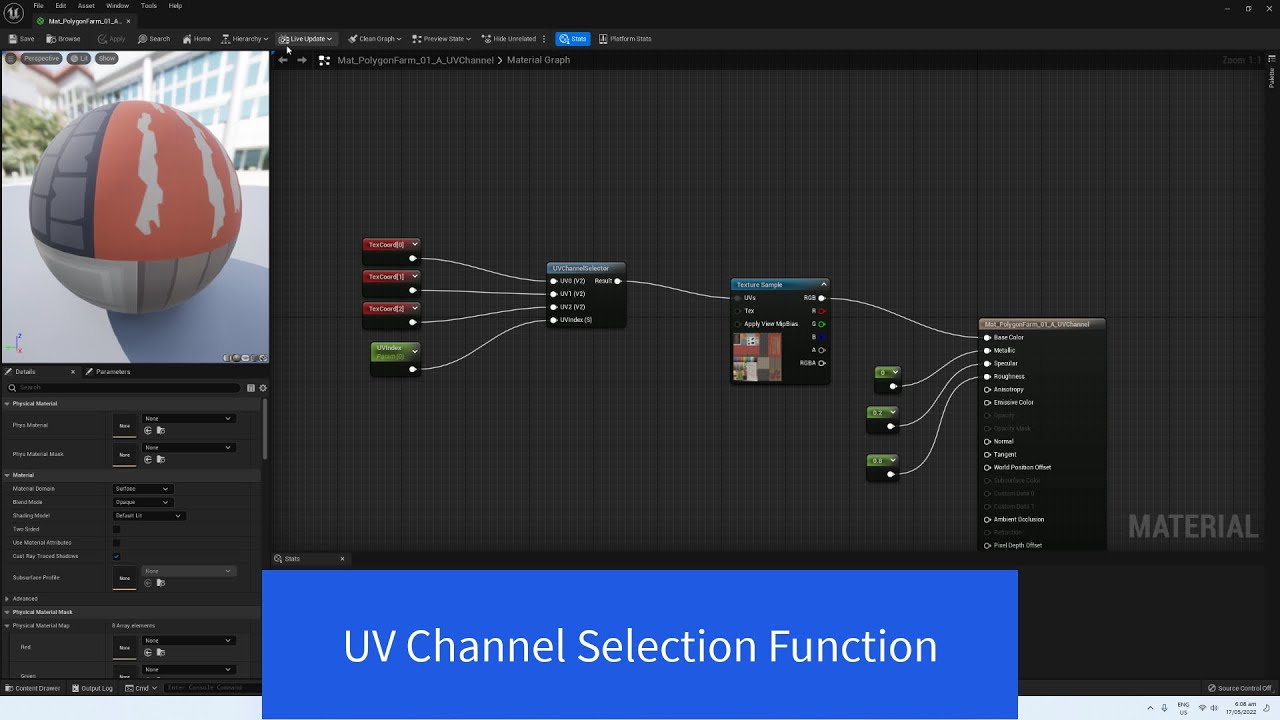
In this tutorial we change the color of assets from the Synty Farm Pack. Or any other UV mapped to texture Asset.
We do this by Creating a Material Function That takes an index to choose the UV Mapping to use.
gloomy holly
hearty veldt
https://www.youtube.com/watch?v=EI0j3pCAT0U just change the loop at the end with...
thank you very much, literally watching this video now, i am trying to make it so when a player spawn into the level he gets one of these colours at random
 ornate trail
why would a camera shake be rotated? like I don't see it unless I move the mouse to see it from the side
gloomy holly
i currently have this for spawning player colours:

where would i add in the UV selector random generator for player colours?
hearty veldt
ornate trail
why would a camera shake be rotated? like I don't see it unless I move the mouse...
maybe you're shaking on only that one axis? or maybe the effect kicks in when you rotate? use some breakpoints and prints and check if it works when you want it to, before you move the mouse
ornate trail
hearty veldt
maybe you're shaking on only that one axis? or maybe the effect kicks in when yo...
I was using the tree I was hitting, changed it to the owner location and it works
hearty veldt
serves you right for hitting trees then 
 pearl flame
Hi! So I've made in UE 5.2 a mouse over event, and somehow it just stopped working in 5.4, do you have any idea how could it happen? (mouse over events are enabled)
 pulsar vigil
im currently using a set timer by event for one of my system but i have to change the time the event tick dynamicaly what solution do i have ? Like the frequency has to be updated almost on a frame tick
 lunar sleet
pulsar vigil
im currently using a set timer by event for one of my system but i have to chang...
lunar sleet
pulsar vigil
im currently using a set timer by event for one of my system but i have to chang...
Restart the timer after changing the interval
pulsar vigil
lunar sleet
Restart the timer after changing the interval
thx i saw it was the comon solution but it might not work realy well for me cause its a lot of logic to handle to be reset on frame maybe does that sound a bad idea then ?
lunar sleet
pulsar vigil
thx i saw it was the comon solution but it might not work realy well for me caus...
How is it a lot of logic? Change a variable, fire the set timer by event again
It’s not rocket surgery 😀
pulsar vigil
lunar sleet
How is it a lot of logic? Change a variable, fire the set timer by event again
yeah ur right i just imagined it being weird somehow thx ❤️
 queen vault
Is there a mid overlap event for a box collision? I want the event to run anytime the player is overlapping with the box collision. (Never mind, I figured it out)
hearty veldt
while inside of it? there is one, but can't remember the name rn
queen vault
There is no while inside of it.
mild ibex
im trying to index 50 actors, some blueprint and some niagara actors, each with a unique position with a slightly different name relating to that position but I'm not too sure the best way to go about it.
I do not want to go through each actor and tag them incase I swap levels and the name doesnt persist. I know I'm going to have to manually go to each actor but I'm curious what the best method is.
my current plan is to go through and make an actor component with an enum but that doesnt seem like too much of a good idea, im not too sure.
pulsar vigil
hearty veldt
why you need it every frame tho?
lmao that was my next question cause indeed it reset the timer and the tick never happen -_- and i need a solution for that, i need to refresh it everytick cause the tick rate change depending of the current speed of an anim montage play rate wich is himself updated by a timeline its a bit weird
pulsar vigil
hearty veldt
just do a delay till next tick
i need to do a delay till next tick sync with the previous time of the timer, idk if its understandable
@lunar sleet @hearty veldt the thing is i need to update the tick rate on a almost frame tick of an event ticking himself between 0.5 and 1 second each time, so it will probably constantly reset im assuming
hearty veldt
queen vault
Is there a mid overlap event for a box collision? I want the event to run anytim...
indeed, there isn't, Unity has it, Unreal doesn't, but you can just keep track of what's inside, with on begin and on end, have a bool, an Array, depends how many actors you need to keep track of
be careful how often you run the logic on them tho, try not to use Tick, instead have a delay and run it a few times per second
hearty veldt
mild ibex
im trying to index 50 actors, some blueprint and some niagara actors, each with ...
I'd let them register themselves when they initialize and then unregister when they're destroyed / despawned / whatever other logic you're using
this way they're calling home and you don't have to add anything special to them, besides that code
pulsar vigil
@lunar sleet @hearty veldt i know what to do i confused myself because there is multiple thing ticking for not the same purpose
queen vault
I've been trying to get this loop on begin play but it doesn't work. How do I do it? The reset happens at the end of the event. I thought do once made it so you can loop it.
 hearty veldt
every 0.5s means a lot of ticks, a tick is a frame, not a second, which is why using ticks is frowned upon
pulsar vigil
hearty veldt
every 0.5s means a lot of ticks, a tick is a frame, not a second, which is why u...
yeah but i dont know how to call it cause that tick to even if its not a frame tick
hearty veldt
are you trying to make an idle clicker?
pulsar vigil
hearty veldt
are you trying to make an idle clicker?
who ?
hearty veldt
you
that's the only reason I can think of where you'd need a lot of timers and they'd constantly change
pulsar vigil
hearty veldt
you
nah im doing an input that control the speed of the current anim montage playing but also inmpacting the damage taken during the animation montage
its like a system of damage if the anim montage is playing that is updated in function of the playrate
hearty veldt
and you need ticks for animations? just how fast are these animations? 
pulsar vigil
hearty veldt
and you need ticks for animations? just how fast are these animations? <:mopD:10...
hmm what do u mean ? the input directly update the speed so it has to run fast to look smooth
pulsar vigil
hearty veldt
and you need ticks for animations? just how fast are these animations? <:mopD:10...
concretly i press space bar and the animation go gradualy faster with a progress bar showing the speed acceleration, and the damage system need to be updated with it
hearty veldt
if you're using input why you need delays? input already has its own events raised when you press the key
pulsar vigil
hearty veldt
if you're using input why you need delays? input already has its own events rais...
cause while the input is pressed the logic stay active this is where the thing need to be updated
pulsar vigil
hearty veldt
if you're using input why you need delays? input already has its own events rais...
i mean i might not be able to explain it simply but its like the more u hold space bar the more it accelerate if u let the space bar go it gradualy decelerate to origine
pulsar vigil
hearty veldt
still, must be a better way than abusing the poor delay
yeah i mean im not gonna use delay ur right since its driven by event too and i just have to update it every time the first event on timer occur as u suggested even if i dont know u made it on purpose
hearty veldt
surely there must be an easier way, I'll give it some thought, not something I ever had to deal with before
pulsar vigil
hearty veldt
surely there must be an easier way, I'll give it some thought, not something I e...
what im doing is not extraordinary technicaly im pretty sure but its clearly weird lmao
hearty veldt
yeah you're just thinking about the entire thing wrong, in 12 years of programming I concluded that if something doesn't make sense it's probably cause you're approaching it the wrong way and there are many solution way way easier
this is one of the reasons why I switch between projects, so I work on multiple projects at the same time
otherwise I start not seeing clear solutions anymore and I burn out
pulsar vigil
hearty veldt
otherwise I start not seeing clear solutions anymore and I burn out
yeah ur right but i didnt fixed it yet i tell u if its working as intended which it should dw
 frail onyx
is it normal for the blueprint menu to be kinda laggy if ur zoomed out all the way?
 daring merlin
frail onyx
is it normal for the blueprint menu to be kinda laggy if ur zoomed out all the w...
daring merlin
frail onyx
is it normal for the blueprint menu to be kinda laggy if ur zoomed out all the w...
if you're using a shitton of nodes yeah
consider splitting up your graphs into multiple graphs (or collapsing certain parts into functions)
daring merlin
pulsar vigil
what im doing is not extraordinary technicaly im pretty sure but its clearly wei...
Tbh I don't see anything wrong with the timer approach you got suggested at the beginning
frail onyx
daring merlin
if you're using a shitton of nodes yeah
this is the one that's kinda laggy its my main player bp
 pulsar vigil
daring merlin
Tbh I don't see anything wrong with the timer approach you got suggested at the ...
pulsar vigil
daring merlin
Tbh I don't see anything wrong with the timer approach you got suggested at the ...
it work perfeclty thx to the suggestion of @lunar sleet and @hearty veldt ( ijust tried and it work that why i say that) i thought i would have to change a lot of code ngl im happy :p
daring merlin
frail onyx
this is the one that's kinda laggy its my main player bp
yeah that looks about right, still consider making multiple event graphs based on functionalitites and their categories/types c:
 odd kiln
Hi all
frail onyx
daring merlin
yeah that looks about right, still consider making multiple event graphs based o...
ok thanks
odd kiln
Anyone knows if I can change the "Lighting Channels" checked by default ?
 quaint fable
Hey! I was wondering if anyone could help me understand arrays better? I was reading up on the basics, but I can't seem to get it to work right.
I'm trying to create an array that references 4 specific objects/blueprints in the level. Then I'm trying to plug said array into a for each loop, with the array element getting a variable from each object. Let me know if you need more details
 odd kiln
Or do I have to modify each Mesh one by one ?
daring merlin
quaint fable
Hey! I was wondering if anyone could help me understand arrays better? I was rea...
yeah what's the question? c:
daring merlin
odd kiln
Or do I have to modify each Mesh one by one ?
You can write an editor utility blueprint to gather all desired actors from a scene (you can filter them any way you like) and apply your changes to them automatically, otherwise I'd guess yeah, gotta change one-by-one
quaint fable
@daring merlin oh yeah my bad. How can I make it so the array is referencing these 4 objects while also getting the variable "Activated", which is a variable in the object blueprint? I'm working on making it so you have to activate all 4 of these objects in order to open a door
odd kiln
daring merlin
You can write an editor utility blueprint to gather all desired actors from a sc...
Ok thank you I'll try that!
daring merlin
odd kiln
Ok thank you I'll try that!
Look into "Editor Utility Widgets", there's quite some content on youtube of them already c:
 dawn gazelle
quaint fable
Hey! I was wondering if anyone could help me understand arrays better? I was rea...
dawn gazelle
quaint fable
Hey! I was wondering if anyone could help me understand arrays better? I was rea...
This is how you loop through the entries of an array allowing you to access each "Generator" in the array one at a time in the "Loop Body". If you're having trouble connecting the "Generators" array into the For Each Loop it's because it doesn't match the expected type of your target array element. If you change the type of Generators array to match then you should be able to connect it.
What you would likely want to do is have this in a function that returns false if "Activated" is false but returns true if the loop gets completed. Then you can call this function to check if your generators are all set to true or not.
odd kiln
Ok thanks a lot ^^
quaint fable
dawn gazelle
This is how you loop through the entries of an array allowing you to access each...
Thank you! I'll try that
quaint fable
dawn gazelle
This is how you loop through the entries of an array allowing you to access each...
That's basically what this guy was saying from this link https://forums.unrealengine.com/t/how-do-i-open-a-door-with-multiple-switches/758696/2

Epic Developer Community Forums
This is the simplest method I can think of: On the switch, make sure to make the player unable to un-interact with it. Make it a one-way interaction. In the door blueprint, make sure to have an array of switches that it’s linked to, and a bool for whether the door itself is open. Make sure associated switches array is visible so you can set i...
So basically what I'm having trouble with is figuring out what to set as "type" for the variable
daring merlin
quaint fable
So basically what I'm having trouble with is figuring out what to set as "type" ...
The array? It's the type of your base class (for anything interactable you want to include in this), where you put your Activated bool.
quaint fable
daring merlin
The array? It's the type of your base class (for anything interactable you want ...
the parent class for the "Generator" says actor, which is what I have the array set as. I have it set as array object reference
daring merlin
quaint fable
the parent class for the "Generator" says actor, which is what I have the array ...
Then Generator is your baseclass
wherever you put your Activated variable
You want to use the classes that are the most 'generic' that still have all the info (variables) you need. For future reference, interaction based stuff would most likely be done via interfaces, but this should work for now.
 mossy lantern
anyone know how to do a RGB loop on a widget?
hearty veldt
quaint fable
So basically what I'm having trouble with is figuring out what to set as "type" ...
You don't need inheritance here. I'd use an Interface something like BPI_Interactable, and when you try to interact with them, if they have that interface implemented the code will run, otherwise it won't, and then simply have somewhere in a persistent / global manager the state of your .. generators you said they were?
Since this is something that is found in a level and maybe never again, or next time it might work in a different manner, I would put the tracking logic on whatever it is you're trying to unlock. Could be as complex as keeping track of each individual generator or as simple as having an int and when it reaches the max value, it runs the unlock logic.
When you'd interact with a generator, you'd tell the whatever it is you try to unlock to do a ++ on that counter int, and check if the counter is high enough. Also flag the generator as used / not interactable anymore, so players won't spam the same one.
hearty veldt
mossy lantern
anyone know how to do a RGB loop on a widget?
you mean animating a bunch of colors / gradients on a widget? look into UI Material Lab has a lot of eye candy samples like that
you can find it on the marketplace, is a free sample project from Epic
hearty veldt
queen vault
I've been trying to get this loop on begin play but it doesn't work. How do I do...
I find DoN and DoOnce to be wonky, if a regular ForLoop won't cut it for you, try a Gate, something like this - except the bool at the end there, that's not needed, it's a leftover from something else

also here's a quick explanation of how it works, so I won't have to type it https://www.youtube.com/watch?v=utMuBhYLPMo

What is the Gate Node in Unreal Engine 4 Blueprints?
Source Files: https://github.com/MWadstein/wtf-hdi-files
 rigid summit
So I know that casting causes the game to load everything that the particular blueprint may reference. While it may not be best practice for every use case, would casting to player character, controller, state, game mode, state be "fine" since it is always loaded?
daring merlin
rigid summit
So I know that casting causes the game to load everything that the particular bl...
Yeah casting to base classes is fine c:
lunar sleet
rigid summit
So I know that casting causes the game to load everything that the particular bl...
Yes
daring merlin
Imagine responding after 25 mins in the same second 🤔
lunar sleet
Casting in general is fine unless that class has some very heavy refs you don’t want loaded
 vocal ferry
I’ve been banging my head against this wall for some hours now and I just can’t figure this out. I am using this method to add weapon trails and it was fairly straightforward.
When I try to do the same thing with a muzzle flare by spawning at location, it says the type is incompatible.
I can connect the pin straight from the array into the emitter spawner just fine as shown, but using that method I would be unable to address the UserColor parameter to change the color before spawning it.
Can anyone help me get understand how to get these to work together, or simply how to use a “Cascade Particle System Component Object Reference” to spawn at a location?
Many thanks in advance!


 lunar sleet
vocal ferry
I’ve been banging my head against this wall for some hours now and I just can’t ...
lunar sleet
vocal ferry
I’ve been banging my head against this wall for some hours now and I just can’t ...
Cascade is a diff system, precursor to Niagara I believe. Try spawn system at location or spawn system attached
Not sure if they’re compatible but yeah, worth a shot
vocal ferry
Yeah, I've tried pretty much every variation of those that I can find. If I had to guess, it seems to be an issue with the systems being stored as a component within the character's blueprint
 graceful sage
vocal ferry
Yeah, I've tried pretty much every variation of those that I can find. If I had...
graceful sage
vocal ferry
Yeah, I've tried pretty much every variation of those that I can find. If I had...
I'd personally just move it to a niagara system but thats up to you
im not too familiar with Cascade but looks like you're setting the template then trying to spawn another one?
 maiden plinth
End Goal: Use the color of the material under my character to change the color of a blowing dust particle effect that is part of my character blueprint
What I am trying: Line Trace by Channel to ground directly below character. From Hit Component, Get Material from Hit Face Index (this is returning the correct Material). Then I have tried one of two methods for getting that Material to a Render Target; Draw Material to Render Target, and Begin Draw Canvas to Render Target -> Draw Material -> End Draw Canvas to Render Target. I then test if it has written things properly by Setting the Render Target Texture of a Material visible during runtime to the new Render Target texture and by also using Find Collision UV -> Read Render Target Raw UV (yes, i have the appropriate setting turned on for this to work). I have set all Clear Colors on my Render Targets to non-black to eliminate that as a problem.
Result of my attempts: The Render Target is only being filled with an all black texture.
Questions: What am I doing wrong? What am I missing? Is there an alternate solution to achieve my goal?
lunar sleet
maiden plinth
End Goal: Use the color of the material under my character to change the color o...
Does your dust particle effect not use a material?
Why not just use a Mat instance and change the color parameter to match the color you want
maiden plinth
lunar sleet
Does your dust particle effect not use a material?
It does use a material, but I am trying to capture the color of the ground under the character's feet so i can then forward that color to the dust material
lunar sleet
You said that part is fine tho
The mat color is captured yes?
My point being do you need to use render target or can you just change the mat parameter on the particle directly
maiden plinth
it gets the correct material during the scan, but i am then using Render Target and Read RenderTarget Raw UV to get the color of the pixel directly under the character
lunar sleet
Ah I see
I’ve only worked with RenderTarget briefly but yeah I had all sorts of issues
maiden plinth
i simply am trying to get the color of the pixel at the hit location of the line trace
i feel like this should be super simple... especially considering it is done over and over with raytracing in a way
lunar sleet
Idk that the inner workings of ray tracing are simple heh
maiden plinth
well, not super simple, but what i mean, is that because raytracing exists, such a function to find a color at the end of a line trace should already exist somewhere in code and thus should be somehow available to get through a standard line trace
 sharp totem
how would i go on creating a system where my master item class calls an id from a data table and gives the player the item? is it easily achievable with bp or do i need another system?
 hearty veldt
depends on what kind of items and system you have in mind, but if you already have access to a DataTable, just store soft references to the items themselves, and when needed spawn them using AsyncLoadAsset
also nice
graceful sage
Is it really possible to use enhanced input to show a widget when holding input then removing when releasing?
I can't seem to get it to work correctly
vocal ferry
graceful sage
I'd personally just move it to a niagara system but thats up to you
I did. I didn't realize you set the color parameters of emitters AFTER calling them, which feels weird but whatever, it works. Thank you
 raven gyro
how come i can connect my material array but not my skeletal mesh? D:
 hearty veldt
graceful sage
I can't seem to get it to work correctly
hearty veldt
graceful sage
I can't seem to get it to work correctly
why not? where you got stuck?
lunar sleet
maiden plinth
well, not super simple, but what i mean, is that because raytracing exists, such...
There’s a get linear color value function that might help you but 🤷♂️
 iron idol
This is probably a stretch as it might be too specific of a problem. But does anyone know why calling this widget might be firing not valid?

 maiden plinth
lunar sleet
There’s a get linear color value function that might help you but 🤷♂️
maiden plinth
lunar sleet
There’s a get linear color value function that might help you but 🤷♂️
that is unfortunately a function related to color curves
hearty veldt
iron idol
when you create the widget you need to pass in the PlayerController so it knows to what player it belongs to
iron idol
this is why i said it might be a bit specific. there is no player controller in this sense
it a turn based party rpg where the "Player" is ai pawns
so player controller wont work
hearty veldt
there's always a PC, even if you're not casting to a specific one, just do GetPlayerController
iron idol
Its unfortunately not my system, but i'm trying to figure it out and am at a total loss. Get player controller has not worked solving any problem in this project thus far, but I am more than willing to give it a try
where do you think i should plug get player controller into?
on setting widget in the second picture?
graceful sage
hearty veldt
why not? where you got stuck?
erm, I kinda got it all messed up now but basically sometimes it wont remove
Alittle confused on accuation time
hearty veldt
graceful sage
erm, I kinda got it all messed up now but basically sometimes it wont remove
here's a quick, basic example, without many checks and bells and whistles, so it's easy to grasp, and then it doesn't matter if you call it from input, enhanced input, debug keys, it's all the same

 iron idol
@hearty veldt In the "owning Player" pin?
hearty veldt
yeah
iron idol
yea, it doesnt work. I believe thats why there is the unit pin which comes from a variable in the widget
graceful sage
hearty veldt
here's a quick, basic example, without many checks and bells and whistles, so it...
im specifically trying to get it to work with enhanced input
hearty veldt
disregard the 1st node, that's just something temporary till I have a save system, regardless if I plug the generic or casted version it's the same thing, however it won't work at all without it
 iron idol
i get you but it doesnt work that way with this system
lemme show you

this is the same code but from a different project
remove from parent works in this project with this set up
I've replicated it exactly the same in my current project but do not get the same results
iron idol
lemme check

its a new game mode
not the base one
I do see that pawn is set to BP_FP so i do wonder if thats the reason
but i am unable to call the combat player controller from this pin and it isnt set up that way on the previous project which i sent an example of
hearty veldt
in my case it works regardless what PC it has connected to the node, just needs one
however it doesn't work if the GM has no PC assigned to it, the empty one doesn't work
this base pawn is not possesed currently?
iron idol
so what i'm trying to send the command to isnt "player" and there isnt really any possessing.
they are basically ai pawns that i give commands to
if that makes sense
so i think this system was not set up with a central "player" in mind
which is why i am struggling so hard to figure it out
hearty veldt
do you need that widget on every AI?
iron idol
yes essentially
like a jrpg for instance
it allows you to give commands such as attack
hearty veldt
but that doesn't mean they each need their own
iron idol
they dont have thier own
hearty veldt
you can just have 1 and move it around, change skills etc
iron idol
its a central widgit, my bad i misunderstood

in this example it works
this is from a separate project that used the same tutorial and i have confirmed that it is functioning
but yea, its one widget that just uses the variables of the pawn whos turn it currently is
just for ease of comparison this is the code where its not working

at a total loss because cross refrencing the projects, the code is essentially identical
hearty veldt
wait, I just noticed you call triggered and started
iron idol
not sure i follow
 hearty veldt
well doesn't seem to be here anymore
I opened it in browser cause text was too small and forgot to close it
but you removed it from here
iron idol
i'm confused? Do you mean an example i shared? I haven't removed anything
graceful sage
does anyone know how to have widget show will holding input then remove when release?
iron idol
haha, idk, thats not from me
graceful sage
because im trying different ways and was an old attempt
hearty veldt
oh
graceful sage
either it keeps adding and removing or it wont remove when i release the input
hearty veldt
I showed you the basic code to create it and toggle it
and it works just fine
I used the jump as an example
stays on as long as jump is pressed
you don't even need that cast to a PC when creating the widget, that was just for testing if both ways work, and they do
hearty veldt
the jump IS on enhanced input in that video
you can see the name of the node
and the pins
graceful sage
okay so use pressed and released triggers instead of hold
hearty veldt
no idea what hold does, but if it's like Unity, then it's for long clicks or long touches
not holding down a keyboard button
could be wrong tho
a quick google says it's for mobile for long taps
I guess it can work if you want to do something like long jumps, usually in platformers you can jump higher if you keep the button pressed down for a bit
but if you say you just want to display it while the key is pressed like a map or score, you don't need it
graceful sage
its for a radial menu im just trying to display and remove that seems to work better.
hearty veldt
if it's something used often, just hide it, don't have it created and removed all the time, cause it won't eat a lot of memory, but will eat more CPU to generate and destroy, it's the same idea as pooling
iron idol
Not to interrupt you guys but I may have found a lead into my issue. I think I set some stuff up in game mode for the default controller instead do of my new contoller. not sure how fucked I am but you sort of lead me in the right direction of solving the problem so thanks for that
hearty veldt
iron idol
Not to interrupt you guys but I may have found a lead into my issue. I think I s...
was gonna get back to you and look through the images, see what's what
iron idol
hey, man no worries. Let me extend a thanks from the entire community for trying to juggle issues and help people. you're a champ
I might be able to handle it from here, or at least I see some differences in the two projects and that might be where the issue is.
hearty veldt
well I don't really see anything that could be problematic, besides not hooking any PC when creating the widget, which doesn't work in my case, but if you say it works in the other project
nvm, now it works for mine too 
iron idol
yea, idk. I'm guessing theres a chance the issue lies with some code in the game mode and not what I have referenced
I think i might have an idea to what the issue is, but i'm just going to pretend that I'm probably right and call it a victory for a few hours before I let UE curb stomp me and put me my place again
sometimes you just gotta let yourself feel a little victory before jumping back in the trenches. 😂
hearty veldt
my guess is that something becomes null or not set to the active thing somewhere
maybe an unit, maybe the widget
iron idol
there are some casts to bp_fpc in my game mode which is problematic due to what i mentioned earlier about it needing to not run on default controller
i'm not positive, but when i cross refrenced it with my old project, the old one was casting to my combat controller
sounds like it might be a lead
eitherway if it is the reason, then even though you didn't directly have the answer, your questions lead me on a better path for solving the problem, so thanks.
elfin hearth
my solar panels meshs are following the sun rotation but for some reason my mesh is rotating at the opposite of the sun. I added rotator so it's pointing to the sun but it is still inverted when sun goes toward the ground, the panel point to the sky. Anyone can help? I'm looking for inverting the source rotation data

 tough creek
Is there a blueprint node that can help with reseting a component attribute to it's default value?
I have some kinda bug that causes None values in both transform & static mesh.
Trying to create an actor action which resets the values back to their default.

 raw sleet
Hey there! Is it safe to add variables to the Level Blueprint? I want a blueprint to detect which type of level we are in, to select different things
With safe, I mean, does eat up much performance or break the game?

 fallen glade
I'm looking for a better way to conform my meshes to a spline. What I'm doing right now is to get tangents from the spline and scaling them by the mesh length but the meshes aren't conforming perfectly to the spline, it can be better seen when different sized meshes are overlapped. Any other way to do this?


This is the spline in this case

Yeah ok I'm dumb I was normalizing the tangent vectore before multiplying it to the mesh length while I should have simply clamped the value
 waxen blaze
Hi, is there please a way to create a timer in BP without a function or event. I noticed that using Set timer by .. nodes need a function/event input otherwise the timer doesn't start.
I only need a timer I don't need it for an event or a function but I can't find a way, please?
 versed sun
what do you want to happen when your timer is complete?
gloomy holly
Does anyone here know how UVs work in unreal in regards to models and multiple UVs?
waxen blaze
I could setup a dummy function to run at the end which does nothing but it feels weird.
versed sun
Why would you want a timer that does nothing when finished?
waxen blaze
versed sun
Why would you want a timer that does nothing when finished?
It's a cooldown, I just check if it's running, if it is then I don't allow another function call.
 gentle urchin
Capture current time on start
And add the cd for the end time
(Still you usually want an event to update UI etc)
waxen blaze
I see, that's a way to do it too thanks.
waxen blaze
gentle urchin
(Still you usually want an event to update UI etc)
Not in this case ;).
Thanks!
gloomy holly
Is anyone here got experience with UV maps in unreal engine, I've imported a model, it only had 4 UV maps, inside unreal I added more and copied them and changed their location, to represent player colours, but the UV maps don't seem to apply to the model, am I doing something wrong?
versed sun
sounds like a gate might be more simple @waxen blaze

 hexed cosmos
hi guys, how can i fix this?
 undone sequoia
Guys I have problem I have bombs on plane when I am throwing them i am detaching them from my actor and turning on gravity on them + adding them plane velocity sometimes happens that bomb is not falling even this process didnt fail but they will stay in the air , like stucked it happens maybe 2 times from 10 times idk what can be problem i printed all stats of bomb and gravity is activated and velocity added i dont know how to solve it
 brazen pulsar
I'm not sure where I would even ask this, I'm trying to put in a minigame into my game- sort of an arcade shooting gallery thing that comes up in dialogue like in danganronpa- I have NO idea where to even start
rotund barn
brazen pulsar
I'm not sure where I would even ask this, I'm trying to put in a minigame into m...
if you are fine with loading screens it should be relatively easy. just load a new level which is the minigame
brazen pulsar
rotund barn
if you are fine with loading screens it should be relatively easy. just load a n...
I'd rather not, I'd prefer to have little to no transition, just mid dialogue with a character when an option pops up that says 'I know you killed them' or something like that
 sour moat
The camera component in one of my actor didn't show the mesh, I add a new camera in this actor and some other actors, only this one can not show the mesh. I did nothing in this actor, dont know why it happend.

 vital coral
Anyone got any advice, tutorials to watch or documentation to read about how to get an AI dog to walk on a leash with a player?
rotund barn
brazen pulsar
I'd rather not, I'd prefer to have little to no transition, just mid dialogue wi...
i hope someone can give you a better advice, im still relatively new. but can you somehow pre-load the level, and then be able to switch to it with basically no loading times, just some kind of transition. im not sure i understand what kind of minigame you mean, but im guessing it would not be in the same environment right? also you may be able to just have a fully hidden room/area below the floor or somewhere near, and just teleport the player there. but that may not work if you need completely different mechanics that would require a different character blueprint
and to add, i have no idea if you even can pre load levels, but i think you should be able to. it feels like a very basic feature that should exist
brazen pulsar
I think if the level is small enough you can transition with basically no loading screen, but I’m talking more like the lockpicking mini game in Skyrim. Like a popup in the UI
proud bridge
I have a signIn level which is loaded on game start. When sign in is success, it uses open level function to open the mainmenu level. I m using AWS GameLift. When i use my command to connect to the server map from mainmenu level, the input is disabled, but if I use my command to connect to server map from the signin level, everything works fine. I m unsure as to maybe the problem is using the open level node? Both signin level and mainmenu uses the same gamemode. Can anyone help?
 crude pike
gloomy holly
Is anyone here got experience with UV maps in unreal engine, I've imported a mod...
crude pike
gloomy holly
Is anyone here got experience with UV maps in unreal engine, I've imported a mod...
In the material, are you using a tex coord node and changing the index?
typically you would change the Coordinate Index on the TexCoord node to determine which UV channel a texture should project to.
gloomy holly
crude pike
In the material, are you using a tex coord node and changing the index?
I have this set up, but receive this error, I am unsure why
 crude pike
gloomy holly
I have this set up, but receive this error, I am unsure why
crude pike
gloomy holly
I have this set up, but receive this error, I am unsure why
Inside the material function, check that something is plugged into the Result output node
looks like it might be disconnected
gloomy holly
crude pike
Inside the material function, check that something is plugged into the Result ou...
This is inside the material node
gloomy holly
crude pike
Inside the material function, check that something is plugged into the Result ou...
You mean inside the UV selector material node?
crude pike
gloomy holly
You mean inside the UV selector material node?
yeah, inside the function's graph, it looks like nothing is connected to its output
 storm solar
I finished leafbranch's RPG tutorial series and I must of missed something.
There are two meele attacks setup that characters can do, one disables movement and the other doesn't and Im not sure why that is.
I checked the animation montage and the attack BP but haven't found anything related to movement or input.
Any suggestions on where to look?
 frosty ingot
Can somebody tell me how i can stop my camera from twitching when jumping from one platform to another as seen in the last minutes of the video
 unique rock
does any one know how to fix this
Fatal error: [File:D:\build++UE5\Sync\Engine\Source\Runtime\CoreUObject\Private\Templates\Casts.cpp] [Line: 10] Cast of LinkerPlaceholderExportObject /Game/ThirdPerson/Blueprints/NewFolder/Player1.PLACEHOLDER-INST_of_Player1_C_2 to Actor failed
 wheat citrus
There is a nice function to get a Random Unit Vector in Cone in Degrees which gives a uniform distribution of vectors (first picture). But there doesnt seem to be a function to do so with a normal distribution towards the center (second picture). Is there an easy way to make this happen? Im using this for bullet spread and I think it would feel better for the player if most their shots landed closer to where they were aiming.

 frosty ingot
how to change the capsule component to make it more accurate to the character so the collision is not gonna act weird, but without scaling the character itself

 plucky quest
frosty ingot
how to change the capsule component to make it more accurate to the character so...
plucky quest
frosty ingot
how to change the capsule component to make it more accurate to the character so...
If you go into the details of the capsule component look for capsule half height and capsule radius
 young meteor
Unreal warn this node is expensive and I'm using it a lot at the moment.
Would it be way cheaper to get a variable that is an array of all the actors this node would find anyway? (So I would build the variable once in game instance and get it, but it would have the same amount of actors the "Get all actors of Class" would find)

 silent drift
I have a weird thing, or maybe not weird, but I don't get it.
I have a character. The max walk speed is 800 cm/s, the max acceleration is 2048.0, according to my math to reach full speed it should take 0.391 seconds. However, when I do a loopable counter, I get to 800 in only 0.23 seconds.
What am I missunderstanding?
This is not crucial for my game or anything, I am just trying to understand how it works and such
 pastel garnet
young meteor
Unreal warn this node is expensive and I'm using it a lot at the moment.
Would i...
pastel garnet
young meteor
Unreal warn this node is expensive and I'm using it a lot at the moment.
Would i...
if the type you are looking for is dynamically spawned in the level then don't bother. but if it is preplaced in the level and you want to get all of them then storing it would be a good idea.
don't do it in the game instance, do it in either game mode or game state.
I might be wrong so if anybody could weigh in that would be great.
 mild jacinth
hey
there used to be "fix up redirectors" option but now in ue5.4 i see "update redirector referencers". when i click the update one then should i press "keep"? is that equivalent to "fix up rediectos"?
rotund barn
what type of asset do i need to make out of a PNG to connect it to a variable in my struct? also what type of variable, there is one called image, but should it be object or class, and soft reference or not. i need will be passing that variable from my item to eventually into my inventory UI, where ill display it in a slot. its already functional so i only need to somehow get the image there
 stone field
rotund barn
what type of asset do i need to make out of a PNG to connect it to a variable in...
stone field
rotund barn
what type of asset do i need to make out of a PNG to connect it to a variable in...
Probably a Texture
rotund barn
stone field
Probably a Texture
ah, it was a texture, but i was using the "image" datatype, but it seems there was also an option for texture. thanks
stone field
mild jacinth
there used to be "fix up redirectors" option but now in ue5.4 i see "update redi...
At least in the old version we have "Fix up" and "Fix up ( keep redirector )" - I always pick the one which doesn't keep
wheat citrus
Is there a way to restrict input on a macro? I want to make a macro that only compiles if both maps have the same key and value types. Is this possible or can I only throw an error at runtime?

 pine creek
wheat citrus
There is a nice function to get a Random Unit Vector in Cone in Degrees which gi...
pine creek
wheat citrus
There is a nice function to get a Random Unit Vector in Cone in Degrees which gi...
Can you square the vector components and then divide by the diameter of your target spread? I think something along those lines will pull a lot of the points in to the center.
wheat citrus
pine creek
Can you square the vector components and then divide by the diameter of your tar...
hmm yea that might work, thanks
pine creek
wheat citrus
Is there a way to restrict input on a macro? I want to make a macro that only co...
Can you do a "get" on the first index of each, the get class of those and see if the class is equal? It wont stop it from compiling but you could have a "is valid" bool output
wheat citrus
pine creek
Can you do a "get" on the first index of each, the get class of those and see if...
yea thats fair, was thinking of doing something like that but would have prefered to have it just not compile like with built in nodes
pine creek

something like this maybe? i'm not sure I follow exactly but this is my thought
or this if you mean keys A need to be the same type as keys B, and values A with values B

 spark steppe
get first element of both and try to assign it to the same variable
connect that whole logic on the false logic of a branch which is always true
that way it might do the compile check without additional runtime cost 🤷
wheat citrus
Thanks for the inputs, seems like what im trying to do isnt possible anyways
for some reasons macros dont let you do wildcard logic, you always have to imply a type
wheat citrus
give me a sec I'll post a screenshot of the error
 spiral plinth
Hello! I was wondering if anyone knows if its possible to modify landscapes in a blueprint component.


 dark drum
wheat citrus
dark drum
wheat citrus
Yea, there are no many unknowns. For example, if the two inputted maps have different key and value types it can't function.
wheat citrus
dark drum
Yea, there are no many unknowns. For example, if the two inputted maps have diff...
I mean yea sure but couldnt it just throw a compile error the moment you put those in instead and run if you put in two of the same?
 dry sleet
mild jacinth
there used to be "fix up redirectors" option but now in ue5.4 i see "update redi...
dry sleet
mild jacinth
there used to be "fix up redirectors" option but now in ue5.4 i see "update redi...
Yes, it still fixes up the redirectors (updates the assets referencing the redirector). I tend to keep the redirectors because in the event we roll back an asset from source control for instance, it won't break.
dark drum
wheat citrus
I mean yea sure but couldnt it just throw a compile error the moment you put tho...
It's already throwing a compile error based on the rules epic has setup so unless you jump into C++ and edit some engine code I don't believe there's anyway to do what you're wanting.
dry sleet
spiral plinth
Hello! I was wondering if anyone knows if its possible to modify landscapes in a...
Dynamically modifying landscapes is, I believe, one of those things you wish was easy but tends to be less-so :)
At least with ALandscape.
Could be wrong, I don't use it that much.
wheat citrus
dark drum
It's already throwing a compile error based on the rules epic has setup so unles...
yea I mean for my usecase I can just make it typed but I just wanted to create a macro to append one map to another so I can do it in other places in the future too, but guess ill have to do it over each time for each new map type
mild jacinth
Since the topic went slightly on redirectors. I have seen an issue happen now many times with structs, specifically that structs dont like being moved around to different folders while being referenced in other bps. Anyobe know of a way to fix this, rather than just creating a new struct actor with variables?
dark drum
wheat citrus
yea I mean for my usecase I can just make it typed but I just wanted to create a...
Yea, macro can't even do this unfortunately. :/
 dark drum
mild jacinth
Since the topic went slightly on redirectors. I have seen an issue happen now ma...
dark drum
mild jacinth
Since the topic went slightly on redirectors. I have seen an issue happen now ma...
Save all, fix redirectors, save all again, move structure, save all, fix redirectors, save all again. Not perfect but it can help a lot.
mild jacinth
dark drum
Save all, fix redirectors, save all again, move structure, save all, fix redirec...
Believe me ive tried
5/10 times a bug happens where it causes unfixable redirector bug even after rebuilding from source
Packaging yields unknown struct error ("is the struct in redirectors list?") which is referencing broken struct
"Using fallback struct"
dark drum
mild jacinth
5/10 times a bug happens where it causes unfixable redirector bug even after reb...
Another possible cause if using source control can be when all the files aren't actually being pushed. Sometimes modified files aren't detected and never get pushed. If someone else then pulls, makes changes and pushes, you pull and boom, everything is broken.
plucky quest
I have a nav mesh in an area that goes through a door but when the door opens the nav mesh doesn't update so there's a line with no nav mesh where the door used to be, making it so the ai cant pass through the door. How can I update the nav mesh after the door is opened?
quaint fable
hearty veldt
You don't need inheritance here. I'd use an `Interface` something like `BPI_Inte...
How would I store the state of my generators in the level blueprint?
spark steppe
plucky quest
I have a nav mesh in an area that goes through a door but when the door opens th...
you need a dynamic nav mesh
or at least one which supports modifiers
which you can dynamically place/remove when opening/closing the door
hearty veldt
quaint fable
How would I store the state of my generators in the level blueprint?
don't use level BP, it's hard to access, you might forget it's there or you might need the same logic in another level, just store it on whatever object it is you want the generators to open, since they're directly related, and make the system self contained instead of having spaghetti mess
in general you don't really want to put stuff inside the level BP, there are some exceptions, but that's once in a blue moon, most of the time you're better off not doing anything in it
plucky quest
spark steppe
you need a dynamic nav mesh
I was stressing over that all morning, thank you that fixed it!
stone field
hearty veldt
in general you don't really want to put stuff inside the level BP, there are som...
totally agree. We opt to have an "BP_EntryPoint" in each level instead, working as the base of operations for launching the scene. Avoiding LevelBlueprints like the plague
quaint fable
hearty veldt
in general you don't really want to put stuff inside the level BP, there are som...
Thank you! I figured out how to get these switches to work. I just made a for each loop that checks if all the generators have been activated. I used Get All Actors of Class, and if all actors of the "Generators" class are activated, then it shows that the gate is open.

The only thing I have running in level blueprint right now is a jump scare which only happens on that level. In the future, should I do what you mentioned instead? @stone field
hearty veldt
oh that's really bad, tick is bad, looping through literally everything is also bad, and looping through everything every tick is worse
quaint fable
@hearty veldt Is there a better event I could use?
 fiery swallow
hearty veldt
oh that's really bad, tick is bad, looping through literally everything is also ...
fiery swallow
hearty veldt
oh that's really bad, tick is bad, looping through literally everything is also ...
None of these are inherently bad, it's just bad in his case because he doesn't need it. Wanted to make sure that was clear
hearty veldt
like I said best case would be Interfaces, if you don't want that, at least do a direct reference to the gate, and keep track of opened generators, that way code only runs once when a generator is activated, and when all are activated gate opens
fiery swallow
Looping things on tick is fine, tick is fine, and looping through arrays is fine
hearty veldt
@fiery swallow oh, I didn't mean looping in general, as in that for each, I meant looping through all actors, just to get the ones you want, the for each only loops through a few so that's fine, it's everything before that that's bad, you can have hundreds if not thousands of actors in a level and looping through all of them is unnecessary, unless is done once on init, altho even that can be avoided
spark steppe
i wouldn't even make an interface for that
just link the generators to the gate
and notify the gate when an generator got activated
or add the generators to an array in the gate, and make an event dispatcher on the generator which triggers when they activate
hearty veldt
spark steppe
i wouldn't even make an interface for that
just for this no, but something for all sort of things that can be activated with a generic output, I'm sure a horror game has a lot more interactables than just this scenario
stone field
quaint fable
The only thing I have running in level blueprint right now is a jump scare which...
It's not like it's a total no no for messing around, but since you are grabbing direct references to the scene, it gets messy.
The idea of the EntryPoint system is not to control stuff like what happens in the game, say a jumpscare. The EntryPoint initializes the scene and ui as needed.
A jumpscare should optimally be it's own BP_JumpScare, something that you can re-use anywhere in future to trigger whatever your scare is for that particular point in the game
quaint fable
thank you!
 primal crown
Anyone have an idea on how to like Vertex displace vertices in a triangle or well / using 3 points A B C
as you can see Non works fine
and A and B works but as soon i try to edit C anyone know how to "maybe kinad fix this"


 frozen wren
how would some one get animation play rate based on character speed
spark steppe
nah, we close at 8pm
 sharp cloak
I cannot succeed to detect a collision between an actor and a brush box
sharp cloak
spark steppe
nah, we close at 8pm
On the General Channel, they dont reply when we ask for help so ...
spark steppe
do brush boxes even have collision settings?
sharp cloak
 spark steppe
so no
then they also don't have a physics body, and therefor no collision response
you would need to use a box collision for that
you can most likely at some point (e.g. begin play) copy over the box extends etc. from the brush box to the collision box
sharp cloak
oh... but how to use boxes to make good sized texture on wall ? I used box brushed especially to make me able to positionate correctly my textures on walls ...
spark steppe
oO
sharp cloak
when i put a texture on a box and then i extend the box, the texture extends too
spark steppe
use proper uv unwrapping or make a material which does rely on world "UVs" rather than object UVs
because you stretch the UV of the mesh when stretching the mesh
a brush box isn't the solution to your problem
sharp cloak
oh ... so its very strange ... when to use box brush ? 😄
So, i need to make boxes in my walls to make a collision ? 😄
lol
😢
spark steppe
you should solve one problem after another
so either collision or texture first, decide
spark steppe
for collision your mesh needs a collision body, which you can setup in the mesh viewer in unreal
guess there are some tutorials for that out there... on youtube or the unreal learning portal
sharp cloak
can you apply collision on brush ?
spark steppe

do not use brush ffs
if you want to create walls in UE use the modelling tools of unreal
sharp cloak
spark steppe
do not use brush ffs
ok.. so i have to change all my level ...
sharp cloak
spark steppe
if you want to create walls in UE use the modelling tools of unreal
really ? how to do that ? Do you mean : modeling mode ?
 spark steppe
With the Epic MegaJam just around the corner, this week we wanted to focus on the groundwork - how to prototype quickly so you can get to the detail work fas...
 high iris
Got a little pickle here I could use help with. There's a variable in a BP class that seems to always reset back to null whenever I restart the editor. Doesn't matter how many times I tried to save it, make sure source control had it set, every time I open the editor I have to set it back to a value again. I hear that's a bug that occasionally some assets get into?
If so, any clever maneuvers one could try to fix it?
sharp cloak
spark steppe
https://www.youtube.com/live/3iIAcOtPJZg?si=3smykZ4h_dVJTzKt&t=2733
Omg thank you for this solution guy, i learn another good tool in unreal 🙂
sharp cloak
spark steppe
https://www.youtube.com/live/3iIAcOtPJZg?si=3smykZ4h_dVJTzKt&t=2733
Im going to rebuild my level with that tool, even if that will be long ....
sharp cloak
spark steppe
https://www.youtube.com/live/3iIAcOtPJZg?si=3smykZ4h_dVJTzKt&t=2733
and to apply the texture well on the walls of Grid, how can i do ? 😦
sharp cloak
sharp cloak
and to apply the texture well on the walls of Grid, how can i do ? 😦
ok i think that will apply automatically correctly , right ?
 maiden wadi
young meteor
Unreal warn this node is expensive and I'm using it a lot at the moment.
Would i...
maiden wadi
young meteor
Unreal warn this node is expensive and I'm using it a lot at the moment.
Would i...
There is no cheaper way except if you already have them in an array somewhere. And this node is not inherently costly. It scales based on how many actors there are of the type that you return. Getting a few isn't really going to cost anything. Few dozen even isn't so bar. When you get into triple digits, it's time to start considering a registration system where the objects can register themselves to a manager and you can pull the array from there.
GetAllActorsOfClass pulls from a map basically of Class/InstancesOfClass. And iterates over them to dump them into an array of that type for you and return it. The most costly part of this operation is the array allocation. Smaller arrays tend to trigger memory reallocation less. Larger arrays need more contiguous memory to exist in, so as the array grows it can end up being move a couple times if the numbers are big enough.
So like pretty much anything, it depends on what you're using it for and the scale you need to use it on.
 lavish ore
Hi, how do I set the "sound" value of the synesthesia, using blueprints? 🤔
So for example when the game starts it will select an audio wave variable and place it in the "sound" slot.


I have tried this. However, it won't let me change it.
 maiden wadi
lavish ore
I have tried this. However, it won't let me change it.
maiden wadi
lavish ore
I have tried this. However, it won't let me change it.
Epic Games Developer
An overview of how the Audio Synesthesia plugin produces audio metadata that can be used in Blueprint scripting.
lavish ore
maiden wadi
https://dev.epicgames.com/documentation/en-us/unreal-engine/audio-synesthesia?ap...
Only in editor? So you can't change it out mid game. 😭
Do you know any alternatives?
@maiden wadi
maiden wadi
Depends. Can you create one of these dynamically? Some things can be created dynamically as well as created in the content browser.
lavish ore
I will need some way to check the waveform of the audio, actually in game.
The synesthesia would be perfect if it didn't analyse the waveform before you play.
rigid summit
Quick question. How do I "Add distance" to a location? Gaol is a line trace from my gun to the center of the screen. I do a 1st line trace from the camera to the middle of the screen, then taking that impact point as the "end", start another line trace from the muzzle of my gun to that impact point. However, the impact point sometimes falls shy of triggering a hit, so I want to add some length along the location, how would I add math to that?

I tried getting a forward vector from my camera, multiplying it, and then adding it to the impact point, but it makes the trace off centered
maiden wadi
rigid summit
Quick question. How do I "Add distance" to a location? Gaol is a line trace from...
You don't really want to add to the distance so much. Not quite anyhow. You should use the camera trace hit/end point as a Target. Use the muzzle as a Start. With that you can use the... GetUnitVector or whatever it's called. This is a 1.0 length vector in the direction from your muzzle to the hit point. This you can multiply by some really large number like 100,000, and after multiplying that, add it back to the muzzle location
 peak pier
Anyone familiar with Orthographic camera's in Unreal? Noticing weird behavior where I can't add translation to the camera when the "Auto Calculate Ortho Planes" checkbox is checked, I can't modify the translation of the camera. This is in UE 5.4.3.
 primal hare
How to make box extent of a Collision box public?
If I turn a TriggerBox into BP the box extent is available to edit in the editor. I'd like the same for the Collision boxes I add in a BP.
spark steppe
you have to select the component in the details panel, then you should be able to edit them
how they are exposed to the actual actor for the trigger thing, is afaik only possible with C++
primal hare
hmm so I guess I'll stick to turning Trigger boxes to BP. Having box extent exposed is very useful
spark steppe
yea, or declare them in C++, it might be UPROPERTY(meta=(ExposeFunctionCategories="abc")) where abc is the category name that you want to expose to the actor details
primal hare
C++ is like swedish to me, can't even sauy hello
 surreal carbon
hey is there any way to check if the user has alt tabbed or if the window is not in focus
raven gyro
any tips on how to make this into an array that reads all of the targets and materials?
 lunar sleet
raven gyro
any tips on how to make this into an array that reads all of the targets and mat...
lunar sleet
raven gyro
any tips on how to make this into an array that reads all of the targets and mat...
Are you looking for a Map?
raven gyro
the dynamic material instance can only connect one skeletal mesh target
is there a way to connect all of them into that ?
lunar sleet
Oh. Make array, for each loop, create dynamic mat inst
There’s probably a function to get all bones if that’s what you’re going for
raven gyro
well im doing a button to fade out all the bones except for the one that i pressed
lunar sleet
Yeah so if you can get the array of all bones, find the ones you want to remove from it, remove them, iterate over the rest


 sweet imp
Hey guys! I am trying to use navmesh walking movement mode for my enemies, but the collisions do not work with environmental objects. In the description of navmesh walking it says that if I have generate overlap events, it'll trace for collision, but even though I have this enabled it still doesn't. Unfortunately there doesn't really seem to be any documentation on this online that I could find, so if anyone here knows how to help I'd really appreciate it!

 lethal coral
anyone know how to do a backwards solve for finger controls?

 fickle lichen
How do you manually reset the velocity of a character movement component?
 silk cosmos
fickle lichen
How do you manually reset the velocity of a character movement component?
silk cosmos
fickle lichen
How do you manually reset the velocity of a character movement component?
Get the movement component ref -> set velocity
 lethal pollen
If I have applied a material instance to a material, can I change the value of its parameters or do I need to create the material instance dynamically?
Thanks!
iron idol
been stuck on this problem for about 3 days now and unable to move forward in my project. Would appreciate it if there is someone on here can figure out whats going on that would be great. To summerize I'm trying to remove a widget from a party member in my turn based game. Despite the game seemingly knowing who the widget is attached to, it is firing "not valid" when I try to remove it as it says its accessing none.

the widget is set here in the image below within a funciton in the same component

I've had multiple people look at it and no one has been able to figure out what the problem is
stone field
iron idol
been stuck on this problem for about 3 days now and unable to move forward in my...
If you debug step to the GET, what is the state of the "Unit Action Command Window" variable when hovered?
If it is indeed null, check that it is set correctly on creation. Then ponder sequence of events, or if the variable is cleared somewhere etc
iron idol
@stone field Not sure I've tried the apporach in your first comment? I take it I don't just hover over the variable?
stone field
iron idol
<@127136722419974144> Not sure I've tried the apporach in your first comment? I ...
You know how to debug blueprints? If not, it is time to start
https://dev.epicgames.com/documentation/en-us/unreal-engine/blueprint-debugging-example-in-unreal-engine?application_version=5.3
Epic Games Developer
Pause execution using Breakpoints to inspect graphs and the values of variables.
iron idol
I've used various methods such as prints and debug keys, but nothing beyond that. If this is somethign else entirely then I would love to learn.
stone field
iron idol
I've used various methods such as prints and debug keys, but nothing beyond that...
Yes indeed, this is super useful to figure out why things don't work, and much more expedient than printing to console
iron idol
Would it be possible to bother you with an image example? I unfortunately learn better from visually seeing than reading
of the method you were suggesting
stone field
iron idol
of the method you were suggesting
right click the node, add breakpoint, play until it triggers
iron idol
thanks
that summery might help
i appreciate your time
omg, I just realized this degualt value field had been blank this whole time

literally 3 days lol. The widget is still for some bizarre reasom is still not getting removed from parent despite not getting errors, but maybe this had something to do with it
stone field
iron idol
omg, I just realized this degualt value field had been blank this whole time
very common to dig around and forget to start tracing right at the very beginning : )
frosty ingot
How to make sure that my character is always (nearly, because i like a bit of camera lag) centered and the camera does not get stuck behind things like the door or the platform as shown in the video
iron idol
I dont know, but I do want to say I love your lil dude
stone field
frosty ingot
How to make sure that my character is always (nearly, because i like a bit of ca...
locate the code which controls the current following system and start tinkering with it?
frosty ingot
iron idol
I dont know, but I do want to say I love your lil dude
thx lol
frosty ingot
stone field
locate the code which controls the current following system and start tinkering ...
i dont think there is any code related to any following system i just use a spring arm component
stone field
frosty ingot
i dont think there is any code related to any following system i just use a spri...
ah, I see
I haven't really used those for a while, but checking docs and setup first thing https://dev.epicgames.com/documentation/en-us/unreal-engine/using-spring-arm-components-in-unreal-engine?application_version=5.3
iron idol
You could maybe remove the spring arm all together and have the camera follow your character using vector?
like have a seperate camera entity. not one connected to your character/
silent drift
Hello! Anyone know if there is a way to make the character deaccleration slower? I tried changing the "Braking Deceleration Walking" both up and down, but I still go from speed 1400 to 600 in an instant. (I slide down a slope, fast and want to get back into my walk speed but not in an instant).
 grave relic
Guys, I just need confirmation that what I did is going to work.
I have in my game a check that is done on the version number.
I have a JSON file on my WEB server.
In the game, I retrieve the JSON code then I compare it to check if it is strictly equal to the number that is on the server.
Since this is an offline game and I want to keep the game in good condition, I want to force updates on the client side. Which means that between two or more versions, I have a single file on the WEB server with the current version number.
Will the code I made below do what I want and not block or cause problems for people?

 grave relic
versed sun
what if they dont have internet connection ?
grave relic
versed sun
what if they dont have internet connection ?
Yes, I thought about it, I know.
But with the Internet already, does it work?
versed sun
Looks like it would , just have to test it
grave relic
It was mainly the logic that I wanted to know 👌
Afterwards, I don't know if I block people without internet? Knowing that they are on Steam, I don't know...
 thin panther
grave relic
Afterwards, I don't know if I block people without internet? Knowing that they a...
thin panther
grave relic
Afterwards, I don't know if I block people without internet? Knowing that they a...
An online required single player game is a surefire way to guarantee your game's failure
versed sun
I wouldnt force an update on an offline game
thin panther
The joy of single player offline is not needing Internet or required updates
I get you want to deliver the best experience, but let your customers choose what they prefer
It hurts literally no one
versed sun
Unless they are competing for leaderboards or something
grave relic
Should I remove it then?
versed sun
just dont force it
If no interned > Main Menu
and , in Update widget , also option for Main Menu
thin panther
Personally I'd remove it.
Your platform handles forced updates anyway
You can make an update required on steam, with the bonus that people in the know can downgrade if they like
grave relic
In this case I change my loop to “False” and make sure to tell them that an update is available
In lobby?
Here
 thin panther
Again, steam can handle all this for you, I'm not sure why this is necessary
grave relic
thin panther
Again, steam can handle all this for you, I'm not sure why this is necessary
With SDK?
thin panther
No, by just pushing an update
 thin panther
No, you dont need to handle updating in game at all. In fact steam advise against it
You just push an update and you can't launch through steam until you update anyway
grave relic
I'm going to change all that.
I'm just going to make sure to add the update widget to the lobby. The player will only update if they want to. As long as it is on the current version, nothing is displayed in the lobby, otherwise, I just display a small message.
thin panther
Or the steam cli
fiery swallow
anyway, you're both right
thin panther
grave relic
Except I will use the Steam SDK for the next game
Steam sdk has some pretty nifty things in it
grave relic
Yes I looked a little, but since my game is not necessarily online, I have planned that for the next one. We'll start on a complete basis with the Steam SDK
thin panther
Yeah definitely a good idea.
Though you'll still want the sdk for stuff like achievements
Or the subsystems etc.
grave relic
Yes, I saw that, I'm saving my magical ideas for next time
 vast vapor
Hi ! I'm trying to migrate my pawn from using a FloatingPawnMovement to using a CharacterMovementComponent.
In both my BP I have an "Add Movement Input" node, that takes the same parameters and in my floatingPawn, the speed is capped as it should be and my character travel at normal speed
But on the other side my character won't stop building up speed...
I wish you can help 🥹 Thanks !
It seems that if I put a speed limit it actually won't pass it, but then my custom made acceleration systeme has no use.
I might say that I use the default flying mode in my CMC
fiery swallow
vast vapor
Hi ! I'm trying to migrate my pawn from using a FloatingPawnMovement to using a ...
are you using a character class? or a pawn?
CMC only works with an actual character class
 gilded jewel
hey all, has anyone seen anything either plugin or examples of a UI widget that displays analog controller feedback ?
vast vapor
fiery swallow
are you using a character class? or a pawn?
I created a brand new character class
My old class was a standard pawn class with a floatingPawnMovement component slapped to it
grave relic
I saw a problem this morning while I was playing with the requests from the "Http Post Request" node, I just saw that when the request takes the output from the "Request Was Not Successfull" node, the game crashes and so does Unreal Engine .
I didn't say anything this morning, because there you go, but I have a colleague who has the same problem and even worse, when people play his game, on certain clients, the firewall blocks the request and crashes their game .
How can we solve this problem?

If you want to test add a fake URL and you will see your game crash, how can we fix this?
stone field
grave relic
If you want to test add a fake URL and you will see your game crash, how can we ...
That seems very unusual. Engine version, any special use case, platform, can it be reproduced in a blank project?
stack trace would be good also
install editor debug symbols if it crashes editor
to get proper trace
grave relic
stone field
That seems very unusual. Engine version, any special use case, platform, can it ...
It's from the node, it's Epic Games who did something wrong in it...
stone field
grave relic
It's from the node, it's Epic Games who did something wrong in it...
no matter, show stack trace
grave relic
stone field
no matter, show stack trace
What? trace
stone field
- go to epic launcher, pick your engine in Library, little down arrow, Options -> "Editor symbols for debugging"
Then if Editor crashes, you should see proper error log in the crash window

 grave relic
Yes i found
 grave relic
stone field
1) go to epic launcher, pick your engine in Library, little down arrow, Options ...
grave relic
stone field
1) go to epic launcher, pick your engine in Library, little down arrow, Options ...
Should I launch it right after?
stone field
grave relic
Should I launch it right after?
restart editor, trigger the crash, copy the error log in the crash window
grave relic
stone field
restart editor, trigger the crash, copy the error log in the crash window
EpicAccountId:1febfbc733a8410b92c4d08da6e179ea

Assertion failed: IsValid() [File:D:\build\++UE5\Sync\Engine\Source\Runtime\Core\Public\Templates\SharedPointer.h] [Line: 1113]

UnrealEditor_HttpBlueprint!UHttpRequestProxyObject::ProcessComplete() [D:\build\++UE5\Sync\Engine\Plugins\Web\HttpBlueprint\Source\HttpBlueprint\Private\HttpRequestProxyObject.cpp:40]
UnrealEditor_HttpBlueprint!V::TBaseUObjectMethodDelegateInstance::ExecuteIfSafe() [D:\build\++UE5\Sync\Engine\Source\Runtime\Core\Public\Delegates\DelegateInstancesImpl.h:665]
UnrealEditor_HTTP!TDelegate<void __cdecl(TSharedPtr<IHttpRequest,1>,TSharedPtr<IHttpResponse,1>,bool),FDefaultTSDelegateUserPolicy>::ExecuteIfBound<void,0>() [D:\build\++UE5\Sync\Engine\Source\Runtime\Core\Public\Delegates\DelegateSignatureImpl.inl:570]
UnrealEditor_HTTP!FCurlHttpRequest::FinishRequest() [D:\build\++UE5\Sync\Engine\Source\Runtime\Online\HTTP\Private\Curl\CurlHttp.cpp:1322]
UnrealEditor_HTTP!FHttpManager::Tick() [D:\build\++UE5\Sync\Engine\Source\Runtime\Online\HTTP\Private\HttpManager.cpp:475]
UnrealEditor_Core!TBaseRawMethodDelegateInstance<0,FTSTickerObjectBase,bool __cdecl(float),FDefaultDelegateUserPolicy>::Execute() [D:\build\++UE5\Sync\Engine\Source\Runtime\Core\Public\Delegates\DelegateInstancesImpl.h:518]
UnrealEditor_Core!FTSTicker::FElement::Fire() [D:\build\++UE5\Sync\Engine\Source\Runtime\Core\Private\Containers\Ticker.cpp:157]
UnrealEditor_Core!FTSTicker::Tick() [D:\build\++UE5\Sync\Engine\Source\Runtime\Core\Private\Containers\Ticker.cpp:110]
UnrealEditor_Core!`FTSBackgroundableTicker::FTSBackgroundableTicker'::`2'::<lambda_1>::operator()() [D:\build\++UE5\Sync\Engine\Source\Runtime\Core\Private\Containers\BackgroundableTicker.cpp:28]
UnrealEditor_Core!TBaseFunctorDelegateInstance<bool __cdecl(float),FDefaultDelegateUserPolicy,TFunction<bool __cdecl(float)> >::Execute() [D:\build\++UE5\Sync\Engine\Source\Runtime\Core\Public\Delegates\DelegateInstancesImpl.h:863]
UnrealEditor_Core!FTSTicker::FElement::Fire() [D:\build\++UE5\Sync\Engine\Source\Runtime\Core\Private\Containers\Ticker.cpp:157]
UnrealEditor_Core!FTSTicker::Tick() [D:\build\++UE5\Sync\Engine\Source\Runtime\Core\Private\Containers\Ticker.cpp:110]
UnrealEditor!FEngineLoop::Tick() [D:\build\++UE5\Sync\Engine\Source\Runtime\Launch\Private\LaunchEngineLoop.cpp:6162]
UnrealEditor!GuardedMain() [D:\build\++UE5\Sync\Engine\Source\Runtime\Launch\Private\Launch.cpp:180]
UnrealEditor!GuardedMainWrapper() [D:\build\++UE5\Sync\Engine\Source\Runtime\Launch\Private\Windows\LaunchWindows.cpp:118]
UnrealEditor!LaunchWindowsStartup() [D:\build\++UE5\Sync\Engine\Source\Runtime\Launch\Private\Windows\LaunchWindows.cpp:258]
UnrealEditor!WinMain() [D:\build\++UE5\Sync\Engine\Source\Runtime\Launch\Private\Windows\LaunchWindows.cpp:298]
UnrealEditor!__scrt_common_main_seh() [D:\a\_work\1\s\src\vctools\crt\vcstartup\src\startup\exe_common.inl:288]
kernel32
ntdll```Wow too long sry
grave relic
It's only when the request is not made
stone field
I can see something in UDN related to 5.3 or less and WinGDK builds, not sure if related
Can you try it by setting default value of FWinGDKPlatformHttp::bUseWinHttp to true, or pass in runtime args as -UseWinHttpGDK ?
grave relic
Nothing could be simpler for it to crash, I put a URL as if I had made a typo by simply adding an extra m to url.com.
So it goes to the exit of the "Request was not successful" node and it crashes.
stone field
Also a post of something similar on Mac, but I guess this is on Windows
grave relic
stone field
I can see something in UDN related to 5.3 or less and WinGDK builds, not sure if...
That's to say?
stone field
no solid clues yet, just looking around
grave relic
Yes I didn't find much too
Because if my clients stay stuck like that, it's a shame.
And Epic Games isn't going to update, I think they have other things to do
stone field
well, this does look like a pretty nasty bug, surprised nobody else has stumbled on it if so... i gotta head out but might try to repro it tonight for the helluvit
 mental thicket
Hello - environment artist grappling with blueprints here. I've created a packed level artist with HISMs that provides some variation/randomisation to roof tile pieces on each run of the construction script (when the asset is moved or altered). Figured that out fine and got some nice variation going! My problem is that now I am attempting to give the end user the option to lock in and prevent further randomising via a boolean tickbox (RNG Frozen? in the screenshot).

Currently, when the user ticks RNG frozen, the blueprint will re-randomise once more before freezing further alteration. I need it to freeze it immediately, without that additional round of randomisation. I hope that makes sense. If anyone can advise if this is possible, please let me know. Cheers!
 old sonnet
for default Character controller. Is thee a way to have character automove? like autorunner
dark drum
mental thicket
Currently, when the user ticks RNG frozen, the blueprint will re-randomise once ...
I would look at using random streams. This allows you to have the way it looks based on a number. (the seed) That way if you want it to look different, you just update the seed the stream uses.
dawn gazelle
grave relic
I saw a problem this morning while I was playing with the requests from the "Htt...
It's an experimental plugin as far as 5.4.2 goes which means it's not ready for use and you really shouldn't be using it for anything that is going to be released.
The issue is with line 40 of HttpRequestProxyObject.cpp which appears to attempt to reference "InResponse" and call the function "GetContentAsString()" but if that InResponse is invalid (which it likely isn't if it failed to find the website in the first place) then it can't access that function which would cause a crash since the reference is null.

 mental thicket
dark drum
I would look at using random streams. This allows you to have the way it looks b...
mental thicket
dark drum
I would look at using random streams. This allows you to have the way it looks b...
Thank you, I'll research random streams
grave relic
dawn gazelle
It's an experimental plugin as far as 5.4.2 goes which means it's not ready for ...
How can I patch this myself on the node?
dawn gazelle
You can't fix it within blueprints alone.
The only fix in blueprints is to not use this node.
grave relic
dawn gazelle
You can't fix it within blueprints alone.
Yes but in the code of the node the C++
grave relic
dawn gazelle
The only fix in blueprints is to _not_ use this node.
How do I do it then?
dawn gazelle
Find some other plugin that provides HTTP Post functionality (there's plenty of them out there) or write your own.
 hollow tendon
Cast to actor -> get the result actor and set it as a vatible.
use the new actor vatible and access its data.
the question is. Each time you access that actor which you casted to and settted it. does that consider as a cast when you access its data from the vatible that you set?
grave relic
dawn gazelle
It's an experimental plugin as far as 5.4.2 goes which means it's not ready for ...
How did you get the code here?
dawn gazelle
grave relic
How did you get the code here?
It's within the Unreal Engine source code, under Engine/Plugins/Web/HttpBlueprint/Source/HttpBlueprint/Private (as it states in the error message)
mental thicket
dark drum
I would look at using random streams. This allows you to have the way it looks b...
This took all of five minutes to research and succesfully implement, so I want to say again -thank you- for your help - this could have had me stumped for hours otherwise
dawn gazelle
grave relic
How did you get the code here?
A potential fix that may correct it could be as simple as changing it so that function looks more like this:
    FString ResponseString = InResponse ? InResponse->GetContentAsString() : "Invalid Response";
    OnRequestComplete.Broadcast(ResponseString, bInSuccessful, MoveTemp(CachedHeader));
This changes the function to check if InResponse is valid first before attempting to access the GetContentAsString function, and if it isn't valid then it'll populate the ResponseString variable with "Invalid Response" and changes the delegate to then use the ResponseString variable, which should then give you a correct response or "Invalid Response".
If you're not familiar with using C++ and finding errors or making changes to code and compiling, I'd highly recommend against using Unreal's experimental plugin as it's not ready for primetime if it crashes like this just because the URL couldn't be reached.
There's probably more landmines in the plugin if a glaring one like this is in there.
 gaunt stirrup
hi guys
can anyone help me with a game menu mechanic please?
im trying to have my character select, song select, and map select depict which level loads lol lowkey having trouble
each mode select is in a different widget
im thinking , before you press play if i have a series of true/false nodes with the conditions of each mode it can sort which level you should be in
but im having trouble routing the conditions - how can i reference variables from other widgets?
should i make it all into one widget ?
stone field
gaunt stirrup
but im having trouble routing the conditions - how can i reference variables fro...
One option is to use GetAllWidgetofClass
Or you might have some logic BP and the widgets talk to that
grave relic
dawn gazelle
A potential fix that _may_ correct it could be as simple as changing it so that ...
I looked, I tried something else, it doesn't work. No need to rebuild or whatever? Just save the file and restart UE5 for the changes to take effect?
gaunt stirrup
stone field
Or you might have some logic BP and the widgets talk to that
do you know how i can do this
dawn gazelle
grave relic
I looked, I tried something else, it doesn't work. No need to rebuild or whateve...
Do yourself a favor, and look for an alternative plugin.
grave relic
dawn gazelle
Do yourself a favor, and look for an alternative plugin.
I already have Va Rest, is that good?
dawn gazelle
Try it out. See if it fits your usecases.
Probably more stable as it has been around for some time too.
 maiden wadi
gaunt stirrup
im trying to have my character select, song select, and map select depict which ...
maiden wadi
gaunt stirrup
im trying to have my character select, song select, and map select depict which ...
This sounds like a lobby. Make a lobby component or actor somewhere in your lobby map. Set selected state on it, Then all widgets have access to it globally.
dawn gazelle
grave relic
But I can't find an equivalent to Epic's node
Read its documentation for how to use it.
hollow tendon
hollow tendon
Cast to actor -> get the result actor and set it as a vatible.
use the new actor...
?
dawn gazelle
hollow tendon
Cast to actor -> get the result actor and set it as a vatible.
use the new actor...
No, casts only happen when they are executed. That said, casts are essentially "free" so it really shouldn't even be worried about in terms of performance.
maiden wadi
👀 Someone say casting was expensive again?
dawn gazelle
Assuming so based on the question 😛
stone field
dawn gazelle
It's an experimental plugin as far as 5.4.2 goes which means it's not ready for ...
nice catch : )
maiden wadi
There are some ways to do this, but I don't remember off hand. I know level instances are one. You stream them in when desired which async loads them. But there was also some new thing with 5.+ I think which allows you to do some type specific things to levels. EG hiding and showing decorations for different seasons kind of thing. Unsure if it's async or not though, but assume it is. 🤷♂️ Can't remember the name though.
dry sleet
Isn't that Data Layers?
I don't work with WorldPartition so I haven't explored them, but I recall that term at least.
 eager thicket
is there a way to get a physics object to stay completely still until another physics object collides with it?
Set simulate physics on/off is ineffective for this task honestly
gaunt stirrup
maiden wadi
This sounds like a lobby. Make a lobby component or actor somewhere in your lobb...
wait what state do i set it to?
maiden wadi
The stuff you want it set to?
hollow tendon
dawn gazelle
No, casts only happen when they are executed. That said, casts are essentially ...
cast is free? all this years i hear it is not free and it is in fact expensive. even a big devs here i remember from another server said it is expensive
such as @glad cloak, you or all this people who says it is expensive
so whom i believe
 glad cloak
hollow tendon
such as <@107794086563446784>, you or all this people who says it is expensive
glad cloak
hollow tendon
such as <@107794086563446784>, you or all this people who says it is expensive
Huh?
hollow tendon
glad cloak
Huh?
You once talked about casting in the past
and others too, in a way that might effect performance
so whom i believe now, is cast expensive or not
dawn gazelle
hollow tendon
cast is free? all this years i hear it is not free and it is in fact expensive. ...
The act of casting itself is so cheap it only really factors in if you're casting tens of thousands of times a frame. The real "cost" of casting in blueprints comes from now having a hard reference to that other class that you're casting to in your blueprint, which means that in order for you to load the blueprint that has the cast in it, it also requires you to load the class you're casting to, even if you never reach the point of actually casting in your code, so it becomes something extra loaded in to memory because of a dependency. With enough casts being spread out through your code base, a single class could end up loading all sorts of blueprints into RAM even if they're not actively being used.
hollow tendon
you are contradicting your self Datura. what if you use casting in event tick
glad cloak
hollow tendon
and others too, in a way that might effect performance
It’ll likely have an impact every tick but minimal in isolation, more of a death by a thousand cut things
Additionally can cause issues with dependency chains
hollow tendon
yeah
glad cloak
But every tick for one object is minimal
 pallid sphinx
can i rotate the camera around the player with my mouse without setting use pawn control rotation to true on the spring arm?
im trying to replicate the World of Warcraft camera system and ive got everything working apart from holding left mouse to freely move the camera
 trim matrix
How to add a function category? (Where you can store variable in a grouped place)
I do not see the option..
Secondly, is there a way to attach the CMC to a mesh inside an actor(on the z axis only)?
pallid sphinx
pallid sphinx
can i rotate the camera around the player with my mouse without setting use pawn...
fixed it
trim matrix
trim matrix
Secondly, is there a way to attach the CMC to a mesh inside an actor(on the z ax...
So basically a way to change the CMC position
Without moving the entire actor
 quick rampart
how to make score system for quiz ? i need a help
 rugged wigeon
trim matrix
How to add a function category? (Where you can store variable in a grouped place...
rugged wigeon
trim matrix
How to add a function category? (Where you can store variable in a grouped place...
You just click into the category property and write a new one
rugged wigeon
trim matrix
So basically a way to change the CMC position
The CMC does not have a position so that question is meaningless
trim matrix
rugged wigeon
You just click into the category property and write a new one
I dont see that property tho
rugged wigeon
It is the second property in Graph under Description
trim matrix
rugged wigeon
The CMC does not have a position so that question is meaningless
Mhm then how would it be possible to attach the mesh(rootbone) to the cmc
rugged wigeon
it would not be possible
trim matrix
There must be a way... at the end of the day, its code
rugged wigeon
nope
what you're asking to do is completely nonsensical in the context of what these things are
trim matrix
Where is the setting to change the auto jump height? That maybe could fix it if i enter a big number
rugged wigeon
you would have to change the definition of these things in order for that to be feasible
what do you mean "auto jump height" do you mean "jump z velocity"?
trim matrix
The setting where when you only press W, the cmc can still go on it(without pressing the space bar)
spark steppe
step height
trim matrix
Im going to show to the problem clearly soon
trim matrix
this is what is happening... im not so sure how to fix that problem

@spark steppe @rugged wigeon
The cmc doesnt go up when the mesh does
rugged wigeon
the cmc is not there because the cmc does not have a position. it is not anywhere
you might mean the capsule collider
spark steppe
why am i not surprised by that kind of "screenshot" from you....
trim matrix
rugged wigeon
you might mean the capsule collider
Yes, that's the correct name
spark steppe
the actor root is there
rugged wigeon
the cmc is the character movement component and is a different thing
spark steppe
and you moved the mesh up, relative to the actor root
trim matrix
So i should just setup the mesh as the root component?
trim matrix
rugged wigeon
the cmc is the character movement component and is a different thing
I completly forgot.. thx for reminding me
trim matrix
spark steppe
you would move the capsule up
How would that be done? Since the control rigs is the one grabbing to upper stuff
 trim matrix
Seems impossible to me lol
The control rig moves it... so i cant block it in the root capsule..
Ben, thx for your help
rugged wigeon
pretty sure the control rig just needs to move the root component of the skeleton and it'll move the capsule
spark steppe
i don't think so, but what do i know...
after all the mesh is child of the capsule, not the other way around
rugged wigeon
Yeah but that's just how root motion works, isn't it? The animation logic passes root motion, aka the literal motion of the root of the skeleton, back to the capsule? Idk, I haven't done much control rig stuff.
but that's the essence of what must be happening in a root motion montage
spark steppe
yea, but they didn't say that they use root motion
which may induce other side effects
 torn kettleBOT
:question: should he use root motion?
:8ball: Outlook good.
spark steppe
that depends on your project
 raw spindle
are there any built-in utilities for formatting blueprint code?
trim matrix
rugged wigeon
Yeah but that's just how root motion works, isn't it? The animation logic passes...
Mhm interesting, i didnt know about that
Im not so sure if thats the problem tho
 pale remnant
I have a strange bug. When I have a main menu level and I load the game level after a button pressed the player pawn gets possesed but the camera is wrong (You can see the character reacts to my input after eject from the pawn). I have a view from the origin 0,0,0. When I play in editor without changing levels everything works fine. Does anyobody has an idea what could cousing it? I placed the character BP directly in the world with auto possessing as player 0
stone field
raw spindle
are there any built-in utilities for formatting blueprint code?
Recommended plugins: BluePrintAssistant, NodeGraphAssistant, AutoSizeComments
raw spindle
stone field
Recommended plugins: BluePrintAssistant, NodeGraphAssistant, AutoSizeComments
Thanks, I'll take a look!
also, I've seen some people with different (straighter) wire styles - is that an option somewhere, or are they using plugins?
stone field
raw spindle
also, I've seen some people with different (straighter) wire styles - is that an...
plugins also i believe, last i saw unreal doesn't provide out of the box.
one of those plugins has 3 or 4 different style options, don't remember which assistant
raw spindle
https://www.unrealengine.com/marketplace/en-US/product/electronic-nodes/questions?sessionInvalidated=true this one looks pretty nice

Unreal Engine
Improve the wire style of Blueprint, Material, Animation, Niagara, Control Rig and Gameplay Ability editors.
stone field
The main advantage of auto-formatting is just not having to waste time fiddling with placing the damn nodes
I love that, and try to enforce others to use it too so that bp readability is consistent
 pallid nest
how does really the size map works? I dont understand why some of my blueprints in my size map has some actor components that I didn't add. It also happens with characters even when I dont have casting :/
raw spindle
stone field
I love that, and try to enforce others to use it too so that bp readability is c...
love which? the plugin I linked?
stone field
raw spindle
love which? the plugin I linked?
no, I don't really care about the wire styles. I love having AutoFormatting, from Blueprint Assistant
raw spindle
ahhh ok
trim matrix
Is there a node to set the root component in BP like in cpp ?
can't find anything when typing "set root component"
stone field
trim matrix
can't find anything when typing "set root component"
If it hasnt been made into a node, you always have the option of making a custom node yourself to do it. It is not terribly difficult
trim matrix
stone field
If it hasnt been made into a node, you always have the option of making a custom...
Ikr, was just asking if there was one available.
stone field
If you can find the c++ function, and look at the header, one might assume that it has not been made blueprintable
trim matrix
stone field
If you can find the c++ function, and look at the header, one might assume that ...
And what if it has been made into a K2 function inside a statics/kismet library ? 🙂
That's indeed why I am asking if there is one
Anyway
raw spindle
stone field
no, I don't really care about the wire styles. I love having AutoFormatting, fro...
https://www.unrealengine.com/marketplace/en-US/product/blueprint-assist is this the one you use?

Unreal Engine
Adds useful keyboard shortcuts related to Blueprint creation. Auto-format Blueprint nodes as you create them.
stone field
trim matrix
That's indeed why I am asking if there is one
I assume they are named intelligently, like "K2_SetActorRotation" and "SetActorRotation" so if you search for one you will find the other
 autumn kestrel
Hey guys!
Has anyone worked with VARest plugin before?
autumn kestrel
sorry my bad!
 narrow pendant
is there functionality to copy the contents of one enumerator to another? I have it referenced in a ton of places and I don't want to replace those, just replace its contents
maiden wadi
narrow pendant
is there functionality to copy the contents of one enumerator to another? I have...
Why not just copy the enum then?
narrow pendant
maiden wadi
Why not just copy the enum then?
because it's referenced in a ton of places and I don't want to switch it out
 cedar sparrow
Is there any actually difference between macros and functions except that functions cant use latent nodes? Why would you ever use functions over macros?
maiden wadi
narrow pendant
because it's referenced in a ton of places and I don't want to switch it out
Which is why I said copy the enum. A Copy is a new class with the same values and a different name.
trim matrix
cedar sparrow
Is there any actually difference between macros and functions except that functi...
Macros are not available every where
narrow pendant
maiden wadi
Which is why I said copy the enum. A Copy is a new class with the same values an...
you mean copy like this, right? I'd have to replace the references to the old class then, no?
 trim matrix
Macros are not available every where
trim matrix
trim matrix
Macros are not available every where
Macros dont have all nodes and are more complex to work with
maiden wadi
cedar sparrow
Is there any actually difference between macros and functions except that functi...
Functions and enums are entirely different. In reality you should prefer functions over macros just because of the general way that programming works.
Macros are nothing but a set of copy pasted nodes. They are basically the same thing as a collapsed graph more or less. They have minor uses, but they're not that great.
trim matrix
Enums?
cedar sparrow
Ah i see
maiden wadi
narrow pendant
you mean copy like this, right? I'd have to replace the references to the old cl...
Only if you want to use it there? Your question now confuses me. If you don't want to replace it but want different values, you need to edit the enum you have. If you want a whole different enum with the same values you can use in new places, copy the enum.
narrow pendant
I want to copy all the entries inside enum A and paste them into enum B so I don't need to replace all the references to the class of B in my bp
maiden wadi
That I'm not sure you can do. Hand editing all the way. #DesignerLife
narrow pendant
alright thanks anyway
maiden wadi
Might be some C++ magic. But by the time you write it, you'll probably be done editing it.
stone field
cedar sparrow
Is there any actually difference between macros and functions except that functi...
can't debug step macros either, which is one reason i disklike them intensely
lunar sleet
stone field
can't debug step macros either, which is one reason i disklike them intensely
Wdym by debug step
stone field
lunar sleet
Wdym by debug step
stone field
hmm, so is there a trick to it? do tell
lunar sleet
F9 on the macro itself, then step into
stone field
Thanks, will try it out next time I need to : )
lunar sleet
Least it worked last I checked
trim matrix
Harder than a normal fonction tho since the pin are weird in macros
stone field
I still don't really get why people would want to use them, except maybe to take advantage of the multiple out pins
lunar sleet
Yeah I only use them for that nowadays
 rare gale
If I used Set Members in a struct, should those changes persist until the game is shut down? I'm having trouble with an Enum staying set using this method and not sure how to debug it
gloomy holly
does anyone know how to set a team number to random for a "setup player start"?
this is how i have my starting player setup, but it generates random team numbers for different models
 stone field
rare gale
If I used Set Members in a struct, should those changes persist until the game i...
stone field
rare gale
If I used Set Members in a struct, should those changes persist until the game i...
as long as the Actor who owns the BP which holds the struct variable exists, it will remember it I think? Why wouldn't it?
rare gale
stone field
as long as the Actor who owns the BP which holds the struct variable exists, it ...
That's been my experience in the past so not sure why this is different. I create an array of structs from a DataTable and store that array in the Game Instance. I have a function library that has a short function to pull out the one I need (Ref, not copy) by array index and set members on that. I really have no idea why it isn't retaining that change
maiden wadi
Would need to see the function to speculate further.
rare gale
I'll put together some screen shots
rare gale
stone field
as long as the Actor who owns the BP which holds the struct variable exists, it ...
GameInstance runs this function to create the Array on Init... I know this works by printing the list on start
 stone field
gloomy holly
this is how i have my starting player setup, but it generates random team number...
stone field
gloomy holly
this is how i have my starting player setup, but it generates random team number...
Not sure exactly what is the problem here, but I would start by cleaning up that flow into a more readable state, now it's a bit of stuff crossing over here and there. Not sure if the long green line from "Then1" works as intended if it is used in "Then0" either
rare gale
rare gale
GameInstance runs this function to create the Array on Init... I know this works...
Component on an object the player can interact with in the world creates the QuestInfoBox widget and passes along the QuestListInt for the quests to pull from the Array in GI
 rare gale
Component on an object the player can interact with in the world creates the Que...
rare gale
rare gale
Component on an object the player can interact with in the world creates the Que...
QuestInfoBox on init, creates the WListedQuest widgets and passes along each QuestIDInt
 rare gale
QuestInfoBox on init, creates the WListedQuest widgets and passes along each Que...
rare gale
rare gale
QuestInfoBox on init, creates the WListedQuest widgets and passes along each Que...
On init, the WListedQuest widget gets the correct struct from the array and sets info based on its QuestState

Finally, back in the QuestInfoBox, when the button to Accept the quest is pressed, the state is changed and the UI is cleared. When I return to the quest giver and open all the UI again, the state is back to the original Active state rather than the changed state of In Progress
 rare gale
Finally, back in the QuestInfoBox, when the button to Accept the quest is presse...
rare gale
rare gale
Finally, back in the QuestInfoBox, when the button to Accept the quest is presse...
I'm not changing this state anywhere else so I'm not sure what gives 😦
rare gale
rare gale
I'm not changing this state anywhere else so I'm not sure what gives 😦
Does set members require setting the referenced struct with the StructOut afterwards?
stone field
rare gale
Finally, back in the QuestInfoBox, when the button to Accept the quest is presse...
I don't see the SetMembers here
stone field
I will open my project and check how we do SetMembers
maiden wadi
SetMembers works fine. But I'm 99% sure there's something else the matter.
rare gale
stone field
I don't see the SetMembers here
Wrong screenshot for the last one...

 stone field
Pass by value vs Pass by reference classic by the looks of it?
rare gale
maiden wadi
In the function it is a Ref...
 marble tusk
And it's getting a new copy each time it's called since it's a pure function
maiden wadi
You're getting it by ref. But look at the out pin.
Ref is diamond. Copy is circle.
So you're copying your ref.
marble tusk
Functions can't return by ref. Only the inputs can be
rare gale
Ohhhh, I didn't know that. So I can't do that as a function? I have to do the same thing each time?
Good info on the triangel vs circle... never knew that
How did y'all know that? Seems important 🙂
Well, that fixed it. Thanks a ton, I've been banging my head against this stupid wall for 3 days.
stone field
just looking around now to see if there would be a nice infographic on this subject somewhere
There's a ton of hidden stuff hardly anybody knows about : P
maiden wadi
Yesterday I learned you can drag a pin and just press R to drop a reroute.
stone field
yeah, tons of nice shortcuts and stuff which are hard to find
maiden wadi
I've been draging, drop, type rer, enter, rearrange... FFS
stone field
That said, with BlueprintAssistant I hardly think about all that anymore, just make the stuff then autoformat it

Unreal Directive
From the basics to best practices, this is what you need to know about Blueprint Functions.
 gloomy holly
stone field
Not sure exactly what is the problem here, but I would start by cleaning up that...
gloomy holly
stone field
Not sure exactly what is the problem here, but I would start by cleaning up that...
well here is the issue im having

im trying to generate random player colours for each unit, but for some reason i am getting this result
here is the BP i have set up
 stone field
gloomy holly
im trying to generate random player colours for each unit, but for some reason i...
stone field
gloomy holly
im trying to generate random player colours for each unit, but for some reason i...
I would try debug stepping through the code you have and figuring out what is going on that way
right now that last image, you create a material but don't use it for anything.
i can't tell from the screenshot if the final setMaterial is different for the 3, but I assume they are
debug stepping and/or logging tends to be the best way to figure out what is really happening in this sort of situation
gloomy holly
stone field
right now that last image, you create a material but don't use it for anything. ...
each material is for the UV's sets for player colours
 half sage
hi guys, hoping someone can bonk me on the head and get me headed the right direction. Finally cracked ball cam with 6 degrees of freedom. Only problem is, when I introduce a lerp to transition between the views, it gets very wonky and jittery. First half is with it instantly cutting between camera modes, then I show my BP, then the second half is where it gets weird. Happy to answer any other questions about this, and explain any other logic going into this. Been stuck for a good minute.
gloomy holly
stone field
debug stepping and/or logging tends to be the best way to figure out what is rea...
how do i do this?, i only started using unreal on sunday
raw spindle
half sage
hi guys, hoping someone can bonk me on the head and get me headed the right dire...
echo arena remake? 🙂
half sage
gloomy holly
how do i do this?, i only started using unreal on sunday
add print screen and attach your variable to the output
half sage
raw spindle
echo arena remake? 🙂
Exactly
raw spindle
good stuff!
half sage
been wanting this on my couch for 10 years and no one is doing it
half sage
raw spindle
good stuff!
much appreciated
stone field
gloomy holly
how do i do this?, i only started using unreal on sunday
yeah adding print nodes is a solid start, but it gets tiresome in the long run. I would say it's never too early to learn to step through with breakpoints
https://dev.epicgames.com/documentation/en-us/unreal-engine/blueprint-debugging-example?application_version=4.27
basically you just add a breakpoint, play until it triggers, then you can inspect values and step forwards node by node
super helpful to really understand what your noodles are doing
raw spindle
Is there a way to export a timeline to an asset somehow? I have an old in-place timeline in one of my blueprints, and I would like to make it re-usable
half sage
stone field
basically you just add a breakpoint, play until it triggers, then you can inspec...
would this work to inspect my lerp? idk if u saw my above vid, but the camera guys absolutely wonky switching to ball cam. maybe this would help me inspect whats going wrong there
raw spindle
raw spindle
Is there a way to export a timeline to an asset somehow? I have an old in-place ...
looks like maybe the answer is no, but you can export the individual curves
half sage
raw spindle
Is there a way to export a timeline to an asset somehow? I have an old in-place ...
you could call the same timeline in multiple places but I'd prefer to have separate ones for more control
raw spindle
Yeah I want to actually make it into an asset though
seems like you can only do curves
stone field
half sage
would this work to inspect my lerp? idk if u saw my above vid, but the camera gu...
Possible, though time-related stuff can be clumsy with breakpoints. Still, to ensure the flow is correct, yes.
Usually when I have to debug something that happens over a period of time longer than 1 frame, I will leverage print strings more, but use breakpoints to ensure that nothing unexpected is happening
half sage
stone field
Possible, though time-related stuff can be clumsy with breakpoints. Still, to en...
it's definitely when lerp is enabled which makes it tough. gotta be something to do with breaking gimbal lock i'd reckon. it's happy once lerp is done though even when inverting. real head scratcher
stone field
half sage
it's definitely when lerp is enabled which makes it tough. gotta be something to...
yarr, gimbals can be nasty
basically if you are using yaw pitch roll ( Euler ), you are going to die on gimbals
quaternions work better
depends a bit on what you are up to, but if you already suspect gimbal lock then thats probably what it is
there's always ways around things though, like if you show your case, can think of something perhaps
or learn quaternions, but that's something I'm pretty rusty with, havent needed to think about them for years
Add Local Rotation might save you perhaps
I think that uses quats
gloomy holly
im trying to set a "TeamColourNumber" for a player to recieve when a new player hosts or joins the server but for some reason it remains at 0 and is not increasing
 stone field
gloomy holly
stone field
gloomy holly
you set it to 0 at the beginning of every pass through this function, which seems like it might cause the problem
gloomy holly
stone field
you set it to 0 at the beginning of every pass through this function, which seem...

so this seems to make the colours change now
but on the 3rd player only 1 of 3 characters changes colour
 lusty hedge
i have a very big issue with my game. when too many enemies are hunting the player through a nav link, they get stuck and push each other into walls


any ideas?
stone field
gloomy holly
but on the 3rd player only 1 of 3 characters changes colour
log the number being set for each char, will perhaps give you a clue
marble tusk
stone field
The only problem with the diamond pin is that there are some cases where a circle pin is still pass-by-ref. One example being struct break nodes
stone field
marble tusk
The only problem with the diamond pin is that there are some cases where a circl...
good to know
marble tusk
At least the blue colored custom struct break nodes. I'm not sure about the built-in green ones like break vector. Those might not
stone field
lusty hedge
any ideas?
you probably need to make them a bit smarter : )
like if there's too many neighbours, figure out if you are not first in line to go, idle or backtrack a bit
willow gate
Hey guys. General editor question here. I'm experiencing an annoying issue where my gamepad controls the editor menus while I'm previewing in a standalone build. So I'll press directional controls on my gamepad and the editor will also focus on individual windows and even the close button often so that when I press the jump or attack keys on my gamepad, it'll close those BP's in my editor. Is there anyway to completely disable gamepad interaction within the editor? I don't use it unless I'm playtesting so I have no need for it to be able to manipuate things in the editor at all. (I found a joystick setting in Editor Preferences > Level Editor > Viewports but it didn't fix the problem).
stone field
willow gate
Hey guys. General editor question here. I'm experiencing an annoying issue where...
perhaps this
https://www.reddit.com/r/unrealengine/comments/bmibsu/how_to_disable_default_gamepad_behaviour_in/
Reddit
Explore this post and more from the unrealengine community
willow gate
stone field
perhaps this
https://www.reddit.com/r/unrealengine/comments/bmibsu/how_to_disabl...
Hmmm. I'll check it out but I doubt it. It's not just widgets. It's the editor.
marble tusk
stone field
https://unrealdirective.com/articles/blueprint-functions-what-you-need-to-know
I actually learned something new from this. I didn't know you could make compact functions in blueprint. I thought it was a C++ only thing
 wraith loom
How do I turn off the collision of a component? "Set Collision Enabled" only works for primitive components, and I'm using scene components.
maiden wadi
wraith loom
How do I turn off the collision of a component? "Set Collision Enabled" only wor...
??? Uh.. you can't have collisions on a scene component. Hence why it doesn't have the function.
For starts, you're in the wrong channel. And second before you go to C++, make sure to get the build errors and don't use the error list.
I feel you. 😄
wraith loom
maiden wadi
??? Uh.. you can't have collisions on a scene component. Hence why it doesn't ha...
Ah I thought my primitive components were scene components because I was able to add the primitive components to a scene component array.
maiden wadi
wraith loom
Ah I thought my primitive components were scene components because I was able to...
They are. Primitive components are Scene Components. But Scene Component has no idea about collision. It only houses location data. If you have a scene component array and want to set collisions for the primitive components in that array, you need to loop and cast each element to PrimitiveComponent and make your settings. This will skip over non primitives.
 frank sigil
Im currently stuck with this error log saying that it Accessed none trying to read the components to my player character. im sure that its something to do with my character BP but i dont know how to fix it. any ideas?

 maiden wadi
frank sigil
Im currently stuck with this error log saying that it Accessed none trying to re...
maiden wadi
frank sigil
Im currently stuck with this error log saying that it Accessed none trying to re...
I don't think that error is coming from anywhere in your left screenshot.
frank sigil
It’s coming from my player bp
 limber parcel
frank sigil
Im currently stuck with this error log saying that it Accessed none trying to re...
limber parcel
frank sigil
Im currently stuck with this error log saying that it Accessed none trying to re...
your components dont exist at the time your actor is spawned
frank sigil
How would I fix it
limber parcel
spawning actor components before the actor would be kinda silly, no?
you can fix it by using a delay (not recommended) or by using delegates
frank sigil
By components I was referring to like my character bp variables functions etc so would it be different?
I’m probably reading this wrong so forgive me
limber parcel
i cant see that function in the blueprint you posted
 limber parcel
might be helpful when the error is crying about your character blueprint
frank sigil
its a little scuffed in terms of organization but it should help
 limber parcel
probably your car is spawned before the player spawns
frank sigil
limber parcel
probably your car is spawned before the player spawns
its already there.
i use line trace to possess the car when I play it
limber parcel
it says your player doesnt exist though
frank sigil
and i read it wrong again
frank sigil
limber parcel
it says your player doesnt exist though
how do I fix it
rotund barn
what does this mean? "cannot parse value. property ENUMitems String: "NewEnumerator0" but i have no enumerator0
 limber parcel
drag from the pin where u get character and search for "is valid" and add that to your code before using the character
frank sigil
limber parcel
drag from the pin where u get character and search for "is valid" and add that t...
thanks
raven gyro
is there any way i can tell it to use all indexes? instead of just one number?
 rotund barn
raven gyro
is there any way i can tell it to use all indexes? instead of just one number?
rotund barn
raven gyro
is there any way i can tell it to use all indexes? instead of just one number?
for each loop, i think
raven gyro
i put it for each loop but it only register the last number D:
 stone field
raven gyro
i put it for each loop but it only register the last number D:
stone field
raven gyro
i put it for each loop but it only register the last number D:
you can pull a foreach directly from the SkeletalMeshArray
but if you want specifically 0 to 16, that should really work. put a breakpoint there and step to check what is going on...
lusty hedge
stone field
you probably need to make them a bit smarter : )
like if there's too many neighb...
sounds like i based my entire project on something too complex
 lusty hedge
stone field
let's see:
https://dev.epicgames.com/documentation/en-us/unreal-engine/using-avo...
lusty hedge
stone field
let's see:
https://dev.epicgames.com/documentation/en-us/unreal-engine/using-avo...
i give it a read. thanks
stone field
 radiant wren
r-click and add categories or something like that it was?
radiant wren
r-click isn't doing anything
lusty hedge
stone field
let's see:
https://dev.epicgames.com/documentation/en-us/unreal-engine/using-avo...
thats wizardry
radiant wren
er, well it doesn't have catagories:
 lusty hedge
thanks ill give it a shot
radiant wren
ah found it, it's this:
 stone field
radiant wren
ah found it, it's this:
stone field
radiant wren
ah found it, it's this:
ah yeah, wasnt r-click there
raven gyro
stone field
but if you want specifically 0 to 16, that should really work. put a breakpoint ...
i tried all kinds of loop and not working QQ
stone field
raven gyro
i tried all kinds of loop and not working QQ
use breakpoints and/or prints to debug and understand what is happening.
Perhaps the array actually doesn't contain 16 elements? Perhaps something else is going wrong and stopping execution?
limber parcel
radiant wren
by setting the category
radiant wren
Oh yeah I got it, thx 🙂
 tawny ginkgo
I want to create a drive-able shopping cart, could someone point me to the resources that can help me understand how to create one from scratch? Thanks!
 sharp temple
for some reason i can't figure this out but i have a random integer in range that goes into a append so it's integer to string because i this is for a mission in my game it appends the random number into the rest of my mission string and then at the end i have a integer variable to store the randomly generated number ready for the mission reward but yet for some reason the random number generated and used in the append is different from the print string of the stored value from the set integer variable first image is what the integer to string shows which is the Cosmic Points value for the mission and second image is the printing of the integer variable


 stone field
sharp temple
stone field
sharp temple
get the random once to a local variable, and set that to the two places. Now each time it gets called it gives a new rand
radiant wren
So got another question and also felt this one to be best explained via video XD
sharp temple
stone field
get the random once to a local variable, and set that to the two places. Now eac...
will try that out now thanks
thin panther
Each wire off a pure node calls the thing again
sharp temple
thin panther
Each wire off a pure node calls the thing again
even with a do once?
thin panther
One of the big reasons why you don't directly hook the result of a getactorlocation into a lerp
thin panther
sharp temple
even with a do once?
Well you can't hook a do once to the pure node, so yes
Each wire is a new call to that pure node
After your do once, you have two wires from that random int, so that's 2 different random ints
sharp temple
thin panther
Well you can't hook a do once to the pure node, so yes
i know but a pure node can be executed in the same line as a do once
only reason i am using a do once is because of the for each loop before it because it's adding the challenges in a list
worked like a charm thank you so much @thin panther and @stone field
blows my mind that it was is that small thing great thing to know now
stone field
radiant wren
So got another question and also felt this one to be best explained via video XD
Still a bit unclear to me what is the objective. If one rotates, the other should rotate as well? Why does the pivot have to change
radiant wren
So that piece is supposed to be a lever, I want the lever to rotate around its own center instead of around the whole blueprint's center
sharp temple
radiant wren
So that piece is supposed to be a lever, I want the lever to rotate around its o...
have you tried using blender going into edit mode and center it in edit mode
stone field
radiant wren
So that piece is supposed to be a lever, I want the lever to rotate around its o...
Optimally the model is created and imported with the correct pivot from the start. I've always found fiddling with pivots in the engine a pain
radiant wren
yes, the origin is where I want it to be in Blender, yet when I imported it, the origin was at the blueprint's origin
stone field
don't know why it's so hard, but then I never really dug deep into how models and stuff work
radiant wren
I made sure that "apply transform" was off when exporting
stone field
maybe just fiddle with the import settings until you get a clean item with correct pivot right off the bat
sharp temple
Some tips. Tutorial. How to export FBX from Blender to Unreal Engine with the correct pivot point.
Assets from: https://www.bigmediumsmall.com/mechsquad
more content you can find on
https://www.instagram.com/zhoslenmakoev/
https://www.artstation.com/zhoslen
radiant wren
OH that looks like exactly what I need, thx
sharp temple
radiant wren
OH that looks like exactly what I need, thx
np
sharp temple
radiant wren
heh... that's stupid... it's a checkbox XD
it always come down to it 😄
stone field
Unreal Motto "there's a checkbox for that"
sharp temple
usually if everything is setup perfectly it should just work but nothing usually just works
stone field
it's been a subject of much discussion over the years
https://forums.unrealengine.com/t/how-to-permanently-change-the-pivot-of-a-static-mesh/279376/59

Epic Developer Community Forums
I found a solution, completely for free with few clicks, no Plugins or Addons needed: Place the Mesh somewhere in your world RightClick on your Mesh where you want to set the pivot and say “Set Pivot Offset Here” Click on the newly set Pivot and say “Set As Pivot Offset” Select the Mesh, go to the Details Tab, search for “Pivot” and copy t...
sharp temple
would be really nice as it has a lot of uses if you could just do it on the fly
thin panther
Fortunately you can bake pivots in ue5 modelling tools
sharp temple
you can do it briefly by holding i think alt+left click on the point of the model
stone field
aye the forum post has several angles of attack, but best is always to have them right from the start if at all possible, then resort to meddling

 sharp temple
radiant wren
so..... now the mesh is gone XD
sharp temple
radiant wren
so..... now the mesh is gone XD
is it just really really small? 😄
can you show the model in blender?
radiant wren
I mean... it is small..... but I've looked, it isn't there and confirmed by the content browser:
 radiant wren
no it's exported correctly, cause when I import it with that checkbox checked it works fine:

the checkbox that applies the origin
sharp temple
what about the scale in blender because unreal engine can scale it different from blender if not setup correctly
radiant wren
seems all good on Blender's side:
 sharp temple
should be 0.001 or something
spark steppe
no, your scene settings should be different
and use 0.01m in blender instead of 1m
or you import with 100x scale
which can cause other issues tho
radiant wren
oh....... I see....
XD
I know I once knew how to change the units in Blender but I've forgotten how
ah got it
 inner eagle
Is it possible to populate an array during runtime with the .wav files that are in a folder (already imported into ue5)?
radiant wren
still didn't work but I gotta go now, will continue fighting with this tomorrow I guess XD
sharp temple
radiant wren
still didn't work but I gotta go now, will continue fighting with this tomorrow ...
good luck come back with a fresh mind put things back to default on the import settings of unreal engine that you changes and tripple check blender
radiant wren
alright, will do, thx 🙂
maiden wadi
inner eagle
Is it possible to populate an array during runtime with the .wav files that are ...
Sure. As long as they're set to cook and exist. There is an asset registry that has some functions you'll be looking for to get assets by path or whatnot.
inner eagle
maiden wadi
Sure. As long as they're set to cook and exist. There is an asset registry that ...
Alright, I'm glad that you confirmed that it's possible, been stuck for 2 days on this now hah and started to question everything. Would you mind giving me an example of how this could be done?
maiden wadi
Something similar to this. Pulled it off of the forums.

There are a few different variations of those GetAssets functions.
lusty hedge
stone field
let's see:
https://dev.epicgames.com/documentation/en-us/unreal-engine/using-avo...
i added it 🙂

it was litterally a bool i had to check
they have the avoidance built into unreals movement component
INSANE
magic
the one enemy is still getting stuck on the window so i think its a different problem
inner eagle
maiden wadi
Something similar to this. Pulled it off of the forums.
Thank you, I've played around a bit with these nodes but haven't really gotten the result I want, but that's due to me being a complete beginner. My goal is to populate "WaveAssets" in my metasoundsource with the files added in the content browser in this specific folder.
Then I could during runtime change the integer (IndexYo) using UI buttons. The only step I have left to do this is to actually populate the WaveAssets array with the sound files. Please let me know if you have any direct solution in mind, I'll give GetAssets a few more tries!


 surreal bridge
So, I am currently working on setting up an actor to dynamically create splines to other actors.
The splines will need to be having points along the circumference of a circle with a variable radius
The direction around the circle is dependent on where the target actor is in relation to where the current actor is facing.
For some reason, after all of that, I still have to change to the angle for the points on the circle. If it is rotated 0 degrees, I have to add 270, if it is facing -90 I have to add 90, but if it is facing 90 or 180 I don't need to add anything. Not really sure why
However, the issue I am having is that these will only work if the current actor is facing a cardinal direction because I have used a few float switches to get certain outputs related to the rotation.
I feel like I am overthinking some things and I would like to see if anyone can help me with this in the DMs
 dim halo
if i wanted my ai to stop focusing on a target momentarily will it is attacking. is there a way to momentarily pause set focus if it is being used in the behavior tree
 paper smelt
How would I go about setting a varuable from a child actor thing from another blueprint?
rugged wigeon
dim halo
if i wanted my ai to stop focusing on a target momentarily will it is attacking....
Set Focus is a one time operation, not something that is happening continuously. It does not make sense to "Pause" it. You might mean clearing the focus and then restoring it later
rugged wigeon
paper smelt
How would I go about setting a varuable from a child actor thing from another bl...
You have to call GetChildActor on the Child Actor Component. That will give you a reference to the actual actor.
rugged wigeon
surreal bridge
So, I am currently working on setting up an actor to dynamically create splines ...
I'm not really sure what you're trying to do but it sounds like you're trying to figure out if you should route clockwise or counter clockwise around a point based on some sort of faced direction rule.
You probably want to check the sign of some dot product depending on whatever rule it is you want to be doing.
e.g. if DOT(A's forward vector, B's right vector) is positive, that means A is facing some vector that is at least partially to B's right. And if it's negative then it means they're facing at least partially to the left.
surreal bridge
rugged wigeon
I'm not really sure what you're trying to do but it sounds like you're trying to...
Yeah, I have most of it working, but it just seems like something must be wrong with what I am doing to have that odd issue with things needing to be rotated again.
I am mainly wanting to have someone look over what I have and see if there are any issues or any way to make it better.
rugged wigeon
well, try to use vectors to determine your rotation needs, not the current state rotation values, which have awkward issues flipping signs
I would advise against putting yourself in positions where you need to get the rotation of an actor to calculate logic. Almost always getting the forward/right/up vector will lend to simpler calculations
surreal bridge
Alright, I will give that a try. Though it's a lot to change so I will be rewriting it and avoid using the actor's rotation
 cold lion
Hi does anyone know why my BP doesnt toggle correctly on each click? I have the same logic for the flashlight but this one takes 1-3 taps to actually toggle the speed?
 frosty heron
cold lion
Hi does anyone know why my BP doesnt toggle correctly on each click? I have the ...
frosty heron
cold lion
Hi does anyone know why my BP doesnt toggle correctly on each click? I have the ...
Don't use flip flop and that will be an imporvement already.
issue with flip flop is that it remember the state, so you can't force alter the state when you need to
cold lion
oh okay