#blueprint
1 messages · Page 205 of 1
 neat sinew
 thin panther
I believe it's GDScript. Saw some benchmarks a while back
 waxen quarry
Whats the performance difference between using WidgetComponents with ScreenSpace versus just adding the widget to the viewport and controlling its locations from there?
I find that moving widgets on the viewport lag behind the game very slightly
 pulsar geode
Hey all, I am currently working on a save/load system. While it works for the player information and location, I have been having trouble figuring out an efficient way to do enemy locations and stats for larger amounts of enemies.
Does anyone know any good resources on this or video/topics to review?
 odd kiln
Anyone knows how to avoid FPS drop the first time I activate a Niagara System ?
I mean, how to Asynchronously load all of my niagara assets when my Game is loading ?
Also maybe how to cache shaders ?
 midnight field
I'm making a multiplayer lobby. Where's a good place to store a list of playable characters so that the UI and player state have access to the data? 🤔
 maiden wadi
midnight field
I'm making a multiplayer lobby. Where's a good place to store a list of playabl...
maiden wadi
midnight field
I'm making a multiplayer lobby. Where's a good place to store a list of playabl...
PrimaryDataAssets
midnight field
Cool, I was considering something like that. Glad to know I'm on the right track. 😄
maiden wadi
midnight field
Cool, I was considering something like that. Glad to know I'm on the right trac...
The general reasoning is that you can async load them easily and if you put an entry in the Project Settings under AssetManager for them, you can easily get them by GetPrimaryAssetIDList. You async load the return of that. Filter, sort, pass to a tile or listview and gg done.
waxen quarry
Ignore my response I misread
 mild jacinth
its probably asked million times but how can i rotate material texture sample using nodes
90, 180 etc, custom values
maiden wadi
mild jacinth
its probably asked million times but how can i rotate material texture sample us...
Which nodes? Material or Blueprint?
mild jacinth
material itself
mild jacinth
maiden wadi
Which nodes? Material or Blueprint?
i understand its through customrot but i havent used materials for long time so cant recall whats the easiest approach

dynamic instance material shows them in wrong rotation
maiden wadi
You don't need most of that. There is a Rotator node.
TBF Though that's easier with the customrotator I guess.
mild jacinth
maiden wadi
You don't need most of that. There is a Rotator node.
its originally for animating i see, but if i disable spinning then what would i put in for x and y, its at .5 default
midnight field
maiden wadi
The general reasoning is that you can async load them easily and if you put an e...
One other question, what sort of pointer would be best for a compendium like this? Something like TArray<TObjectPtr<UCharacterData>> perhaps?
maiden wadi
mild jacinth
its originally for animating i see, but if i disable spinning then what would i ...

 maiden wadi
midnight field
One other question, what sort of pointer would be best for a compendium like thi...
maiden wadi
midnight field
One other question, what sort of pointer would be best for a compendium like thi...
Compendium?
midnight field
maiden wadi
Compendium?
A compendium of playable character options. It would act as a list to select from.
maiden wadi
IMO I wouldn't do that. It makes datadriven design much more difficult. A designer shouldn't have to care about your list. They should just be able to make a new charactardata asset, set some values in it and it should show up in the list. You get this by using the asset manager and gathering them as PrimaryAssetIDs
Like...
midnight field
Ah, I think I see now. I'll read up a bit on the asset manager then.
maiden wadi
In it's simplest form, you get to do this in your UI.

To get that. All I do is set it as an asset in my asset manager. It gathers up any UCultureDefinition types that are in that folder.

 willow topaz
I seem to really not understand UI updates.
For some reason I keep encountering the issue where despite updating my UMG the changes are not being reflected in the UI
I know the values are changing but it seems that other processes are itnerfering with the update of my UI
I know they are changing because the UI will update briefly before seeming to fall behind other processes. For example I have my http request prompting an event where the event updates my UI with the current upload process
mild jacinth
if i have a new random image each time to put on a static mesh with dynamic instance, lets say 1024x1024, what would be the best way to make an example image fit to the middle with correct size and scaling... like what do i have to keep in mind. Blender and Unreal Engine scaling conversion?
because with UV scaling its kind of weird, right side is missing of image, then its left one missing, etc etc
 maiden wadi
mild jacinth
if i have a new random image each time to put on a static mesh with dynamic inst...
maiden wadi
mild jacinth
if i have a new random image each time to put on a static mesh with dynamic inst...
There is no scaling conversion. The UV Unwrap on that is wrong if you want it to show the whole image on that block there.
Unreal's default shader will go from 0,0 top left to 1,1 bottom right. That is without any sort of UV scaling or anything in the material.
mild jacinth
so its a blender mesh issue i guess?
i simply used E and then scaled the front mesh..
 viral kettle
trying to get an enemy to back up if too close to the player
but it just causes this weird seizure like animation.


 pseudo pasture
Got a brain twister of my own.
I'm currently working on a railshooter. And I want to have a consistently active soft lock, that takes the actor closest to the center of the crosshair, and sets it as the current target for the guns.
I want it to also recognize other actors within the lock radius, but only prioritize the target closest to the center.
Then, if there's no actors in the radius, or the current locked actor leaves the radius, clear the target, and have the guns take their default rotation.
As it stands right now, I have a multi sphere trace incrementing a few times that's looking for actors. I'm not sure if that's the correct way to go, but it's what I got so far. Any ideas would be greatly appreciated.


 elfin mist
Dumb question about the save system. I have a BP_Interactable item (my own base class) that has a HasInteracted boolean. I have a subclass "door" that sets that flag and a save system that reacts to that that saves an array of "interactables".
When I load the interactables, the boolean is not set and I don't know if this is a stupid user error. I have "SaveGame" checkbox for those variables checked in the BP_Interactable class.


Do the saved classes always need to be the class actual or can the parent class saving work? Maybe I just have some error somewhere.
 low tiger
How to set function values without overriding others?
like i dont want set anything in boolean, not true, not false, i dont want it to change. What do i do?
 willow topaz
is it possible to use Unreal insight to identify why my UI isnt updating?
I was thinking to look for the Slate:Tick in the profiler and see where it is getting interrupted but I cant seem to spot where the slate tick is in the first place?
What am I missing?

 clever roost
Hi all. Can someone explain to me what event dispatchers are? Explain to me like I'm 5 - all explanations on the internet confuse the f outta me XD
Cheers
 round elk
hello, does anyone have any idea why root motion isnt working here. its enabled, force lock is off, but when I play the montage my character sits still and plays the animation weirdly
 frosty heron
low tiger
How to set function values without overriding others?
like i dont want set anyth...
frosty heron
low tiger
How to set function values without overriding others?
like i dont want set anyth...
Create another function that does not take the boolean (toggle signal)
elfin mist
clever roost
Hi all. Can someone explain to me what event dispatchers are? Explain to me like...
If you ask this very question from GPT-4, it'll do a pretty good job (incl. the "like I'm 5 years old" part).
That said, they're effectively a way for you to define an "event" that's something that happens. You can then "invoke that event" (i.e. something happens... say a player dies).
Separately, you can have things subscribe to an event (or register in unreal terms). That gives you an exec pin (the white thing) that gets called whenever that "event" happens.
Voi'la, you got decoupled components! The thing telling an "event" happened does not need to care if anyone cares about it or is reacting to it. It just tells it happened. And the things reacting to them can do what ever... or not. Compared to directly calling another function where it would expect the recipient to exist... and you'd have to call a specific recipient.
So for example, your UI could be waiting for player dies event to show a "Game Over" notification. Elsewhere you could have a timer that restarts the level. When the player dies, it invokes the event and those things happen.
Or you can delete them from your level and everything still works (although obviously you won't get restart and the dialogue). This is generally good practice in many cases because it reduces dependencies and creates less coupled / spaghetti code that breaks if you remove, disable or break something somewhere in there.
frosty heron
willow topaz
is it possible to use Unreal insight to identify why my UI isnt updating?
I was...
You are looking all over the place. If your Ui is not updating, either you haven't call the node to update the UI (set text or w.e)
Or your value did not change, or you have something fighting each other.
Eg you bind a function to the text. Something updated it for a frame but get override again from the bind
First check if you are getting the correct values, just print string and don't worry about UI yet.
elfin mist
Think I'm getting closer.... Why would get "added" flag here be false and the input true?!
 frosty heron
round elk
hello, does anyone have any idea why root motion isnt working here. its enabled,...
frosty heron
round elk
hello, does anyone have any idea why root motion isnt working here. its enabled,...
Check if there is any root motion to begin with. Open your animation assets, select your root.
Play the animation.
If you don't see a red rubber band then there is no root motion.
 narrow sentinel
Is there a way I can make this array pin be optional to be filled in ?

thats inside the function
 frosty heron
Extra bool that determine if it should be filled or not?
Are you getting error or something if you didn't fill it?
And what's the point of the function if you are not accessing the array?
If you have a function that does something globally , make it a separate function and call each one accordingly
willow topaz
frosty heron
First check if you are getting the correct values, just print string and don't w...
Oh I'm 100% updating the UI I have already printed statements and set breakpoints in my UI to confirm the values are changing
frosty heron
And how do you update it?
If you said the value changed to its previous value, it could be that you are binding a function to it and make more than one setter fight each other
Eg getting a value from the http request but the function binding override it with other value anyway
 undone thicket
I'm trying to get score system going without casting. I'm VERY new, and I'm stuck on the interface.
The score variable updates on blocking projectile, it works fine (print string shows increasing numbers, as intended)
But for some reason BPI I set up didn't update the number in widget (it stays on big white zero)
any advice on where I went wrong would be greatly appreciated


 true timber
idk what channel is correct to ask this. If I've created an actor with a procedural mesh, why would it disappear when I try to move the actor? Is that expected?
willow topaz
frosty heron
If you said the value changed to its previous value, it could be that you are bi...
The past couple things have been either to call an event in the function which updates the value, to bind the property to a value, or to have a eventtick function which constantly tries to update the values
That's every single way that I'm aware of updating the UI outside of c++
 past hull
hello,
Is this overkill if I want to show a widget everytime the player aim at an item ? Its in my character BP


I am talking about sending the event every tick
thin panther
line trace on tick is pretty common
frosty heron
@willow topaz don't need to bind property to value imo.
Just initialise the value when bringing forth the widget. Then you can bind your update call which updates the the value and the text widget
That should be it?
willow topaz
frosty heron
<@214789881640124417> don't need to bind property to value imo.
Just initialise...
I'm not at my computer rn but when I get home I'll post a screenshot. I thought I was already doing as you described.
past hull
thin panther
line trace on tick is pretty common
thank you, is it usually how "interact with item" are working ?
frosty heron
@willow topaz yes, post a screen shoot. You will give materials for other to work with and perhaps someone can spot the problem.
 faint pasture
undone thicket
I'm trying to get score system going without casting. I'm VERY new, and I'm stuc...
faint pasture
undone thicket
I'm trying to get score system going without casting. I'm VERY new, and I'm stuc...
What's wrong with casting?
Explain in plain English how your score system is meant to work.
undone thicket
faint pasture
Explain in plain English how your score system is meant to work.
I have a character with damage system, and projectiles that damage him.
at eventbeginplay he spawns a sword with damage system that is set as non-damagable. It has it's own hitbox.
When projectile hit the sword, my score value in sword BP goes up
when projectile hits the player character, his HP goes down
if I use casting on PC, score goes up no matter if a sword or the PC got hit
If I cast on sword, other issues arises (projectile BP stops working on PC, etc)
so i just want to get the number I get from sword (katana in screenshot) to my UI
cause its already working
thin panther
past hull
thank you, is it usually how "interact with item" are working ?
Pretty much. Then caching the hit object in a variable and on interact, trying to call an interface/component function on it. Something of that nature
undone thicket
and I want to learn more about using interfaces in process, since I'm really new
true timber
how does your UI call get text?
undone thicket
undone thicket
cause its already working
well, it's "working" in print string, the numbers goes up
undone thicket
true timber
how does your UI call get text?
it calls "katana score" interface

I feel like I'm missing a step here
like the score updates only in katana BP, and not actually saving anywhere in the interface to call for in other places
 rotund barn
once the "VInterpt To" reaches its target, will it kind of keep running/eating performance if its getting triggered by the event tick? currently it wouldnt happen, but im trying to implement the reverse, like when its not aiming, but it would keep getting triggered by the event tick 24/7 whenever im not aiming.

 spark steppe
no, it wont be executed if Aim? is false
rotund barn
spark steppe
no, it wont be executed if `Aim?` is false
yes, as i said it currently wouldnt happen, but i need to implement the reverse, like from the false id do another VInterp to return the offset to the not aiming position
frosty heron
Shouldn't be scared of tick either. If you need to do something every frame, then tick is the place.
Just place the offset back to default value when not aiming
Interpolate to it obvs
rotund barn
frosty heron
Shouldn't be scared of tick either. If you need to do something every frame, the...
technically i dont need to do it every frame, just every frame whenever transitioning to aiming and vice versa
frosty heron
I'm doing the same thing for head tracking
rotund barn
frosty heron
Interpolate to it obvs
is there a better way to interpolate it than the VInterp that needs the tick?
spark steppe
frosty heron
I'm doing the same thing for head tracking
 frosty heron
spark steppe
https://tenor.com/view/bruh-meme-gif-26978290
frosty heron
spark steppe
https://tenor.com/view/bruh-meme-gif-26978290
You are many times wiser than me, let me know if I'm doing something wrong.
spark steppe
rotund barn
is there a better way to interpolate it than the VInterp that needs the tick?
the vinterp wont be your main concern about performance, don't worry about that
spark steppe
frosty heron
You are many times wiser than me, let me know if I'm doing something wrong.
it's fine and was sarcasm
frosty heron
I have my entire logic in anim bp
rotund barn
frosty heron
Shouldn't be scared of tick either. If you need to do something every frame, the...
and im trying to avoid tick as much as possible because the current planned scale of the game is massive. my roadmap shows itll take like 6 or more years to finish it.
frosty heron
rotund barn
and im trying to avoid tick as much as possible because the current planned scal...
I would like to release my game within 3 years. As much as I would like a massive rpg, I down scaled to multiple levels and closed space.
My advice is as you get better you probably end up remaking the entire project again. Start smaller and finish something imo.
rotund barn
mine is like 200 sq km open world scifi fantasy action rpg
frosty heron
Saying this as someone whom been reaching for soo long and in the end I only have 1 early access after 10 year of game dev.
rotund barn
frosty heron
My advice is as you get better you probably end up remaking the entire project a...
cant keep motivation like that, i did make some practise projects tho but yeah
rotund barn
frosty heron
Saying this as someone whom been reaching for soo long and in the end I only hav...
yeeah, but i will be cutting tons of corners whenever i can
spark steppe
if you are concerned about vinterp, you got to learn a few more years for a 200sq km game
frosty heron
You should define what massive is because blueprint can be very limiting
rotund barn
frosty heron
You should define what massive is because blueprint can be very limiting
well i mean i am also learning c++, so if theres something i cant do or eats ALOT of performance in BP, ill make it in c++ closer to the end when i am proficient in it
but anyways so VInterp doesnt eat much performance?
rotund barn
okay
spark steppe
the overhead of all those BP nodes costs probably more performance than the VInterp math
rotund barn
frosty heron
But then again I don't have 200 npcs
and i found a plugin that allows like 20k npc loaded at the same time running at like 500fps (if theres nothing else in the game)
frosty heron
I'm playing it safe man
Just doing what I can do
Not using hard features like mass or plugins
spark steppe
some marketplace assets should be taken with caution... treat them like someone selling things on the shopping tv channel
frosty heron
I end up not using 90% of the plugins I bought
They r okay for me to learn tho
Not a programmer so I learn by looking at other people code
rotund barn
frosty heron
I end up not using 90% of the plugins I bought
i havent bought any yet, but the npc one is currently this months free thingy. price wouldve been 160€
frosty heron
Personally I wouldn't use it and just downscale my expectation.
That plugin afaik, have different interpretation of rendering or representing skeletal mesh.
You need to be aware of the pros and cons
spark steppe
and it's most likely just using engine features
which you might have to use anyways with your expectations of scale
so you better learn them
frosty heron
Never do mmo as your first project.
rotund barn
oh yeah i wont be touching multiplayer possibly ever
willow topaz
willow topaz
The past couple things have been either to call an event in the function which u...
If it was because I set my widget somehow to manually redraw I am going to lose my mind
rotund barn
but yeah im maybe doing half of the map first (the other half would be accross an ocean anyways). and half of the story which would be located just in that one country
willow topaz
I will legit be the happiest that I found the problem but also pull out all my hair that I didnt think of it sooner
undone thicket
frosty heron
Never do mmo as your first project.
I'm doing basically 1990 nintendo game and i'm stuck with SCORE of all things(
frosty heron
undone thicket
I'm doing basically 1990 nintendo game and i'm stuck with SCORE of all things(
You don't need interface
Can place the score widget in your hud
undone thicket
I did
frosty heron
Anything that wants to access it just get the hud then get the score widget
Then even more reason to not use interface
Also can't understand the interface call with self as the target
undone thicket
or maybe i dont get what you mean by placing widget in the hud, sorry
frosty heron
undone thicket
or maybe i dont get what you mean by placing widget in the hud, sorry
Hud as in the player HUD class
You can grab it with get hud node
undone thicket
frosty heron
Also can't understand the interface call with self as the target
ok, the idea - and it might be wrong - was to get an integer in the BPI. and get that integer from variable in the katana blueprint.
basically I plugged the BP variable into BPI implementation in the same BP, hoping other things could read the BPI and get the variable of the BP
seems like I dont have enough understanding yet
frosty heron
Not sure that I understand what you are saying but interface is as simple as running a function on a given object if the object implements the interface
If projectile overlap with sword, update score and broadcast
Widget listens to the update event and update the text
You want to use event dispatcher here imo.
undone thicket
frosty heron
If projectile overlap with sword, update score and broadcast
so no way I can use the score I already get from katana_BP itself?
willow topaz
Well ok turns out I was waaaay overcomplicating it and somehow my UI was set to manually redraw which is why it was updating randomly
So yeah, woohoo I guess 🙂
frosty heron
undone thicket
so no way I can use the score I already get from katana_BP itself?
Score should live in an object. Like what scores do you want the widget to display?
Pick an object that make sense, bp katana doesn't sound like an ideal place
Normally score is tied to the player or character
undone thicket
frosty heron
Score should live in an object. Like what scores do you want the widget to displ...
it blocks projectiles, the number of projectiles blocked is the score
frosty heron
undone thicket
it blocks projectiles, the number of projectiles blocked is the score
But you will still be setting the same score, afterall there is only one score?
undone thicket
if use player char for score, it will count all hits, on katana and on PC char itself
I want to only count the numbers that overlap katana
frosty heron
You can do a check on that
There's no limitation that if you place the score in your character the game breaks.
That's just the way you write your codes that causes the bug or undesired result.
Your weapon can broadcast event that it overlap projectile
Character can be notified and update its scores accordingly
If you are not familiar with event dispatcher, now is probably a good time to explore them.
undone thicket
frosty heron
If you are not familiar with event dispatcher, now is probably a good time to ex...
yep, I guess I just need to go teach myself a lot more stuff before trying to build some dumb ideas myself
I'll look into event disp, thank you
frosty heron
Different tools for different solutions. The more tools you have in hand, the easier it gets.
Gl
pulsar geode
Hey all, I am currently working on a save/load system. While it works for the player information and location, I have been having trouble figuring out an efficient way to do enemy locations and stats for larger amounts of enemies.
Does anyone know any good resources on this or video/topics to review? Do IDs need to be manually assigned to each enemy in order to have its information accurately stored?
pulsar geode
yeah, after i posted in both
elfin mist
elfin mist
Dumb question about the save system. I have a BP_Interactable item (my own base ...
I dumbed this down by a ton... I basically added a single reference to BP_Bonfire and I store it. BP_Bonfire has a variable called "Test" that is set to SaveGame.
The reference to BP_Bonfire stores correctly but when I load it - the value of Test does not. I don't understand... if I am storing actors, does it only store the actor reference but does not serialize the actor inside of it? Am I daft?! Help. 😢


Am I supposed to store Map<BP_Bonfire, Bool> to get it to serialize 😂
(in 5.3 if that's relevant)
frosty heron
@elfin mist can't serialise run time object in bp
When you exit the application or when the world is destroyed ( e.g. change level), that reference is lost
elfin mist
@ColdSummer So it appears that the reference persists though. Like if i store an array of that I get with GetAllActorsOfType, after loading those references work. These are not dynamically spawned objects runtime but exist in the level.
frosty heron
As previously stated only for the one spawned at run time.
elfin mist
It does appear to ONLY store references and not actually serialize the objects
frosty heron
Object placed in the editor is fine
elfin mist
Right. All objects i try to store are in the level. The references store fine.
The problem is that the objects themselves do not serialize their properties.
I.e. Array<BP_Bonfire> is just a list of references. Guess that is intentional and I should instead be storing some structs with a reference + value?
The problem is essentially: I want to save a list of all doors and whether they are open or not.
Doors, chests, etc. That all have a common BP_Interactable baseclass.
Could serialize a map with booleans i guess with ref as key. 
frosty heron
I am not versed on this subject. As blueprint is my only tool until a few months ago, I never attempt to save any object reference to my savegame object.
I know for a fact tho, that you can serialise objects, run time or not
But that's cpp
Seen people doing it.
elfin mist
The variables have a SaveGame property which is supposed to mark them for serialization but I only get a list of references so I am probably doing it wrong.
frosty heron
elfin mist
The variables have a SaveGame property which is supposed to mark them for serial...
Yeah that tick box afaik is for cpp use.
elfin mist

frosty heron
But I could be wrong
elfin mist
Ye not sure.
frosty heron
Just relying stuff that I read in the past
Because I haven't make an attempt my self
thin panther
it is
frosty heron
The wise panda have spoken @thin panther
Btw since you are talking about bone fire. There is a cpp turorial that cover serializing dark soul bone fire saving style
I didn't have it saved tho
elfin mist
frosty heron
Because I haven't make an attempt my self
I did just find some supportive evidence of precisely this. Says i should be using structs in BP. I will probably just do this bit in C++ as it seems easier. Thought I could just check a box and be done. XD
elfin mist
frosty heron
Btw since you are talking about bone fire. There is a cpp turorial that cover se...
🫨
frosty heron
I'm using structs in bp for my old game. Deffinitly trying to serialise objects for my current project when the time comes
 chrome river
Hey all, I've implemented mouse and gamepad sensitivity in my game, but due to my implementation it only works on my character (via enhanced input). I would prefer a more global solution so players get immediate feedback after playing with the sliders, but not sure how to approach this. Could someone point me in the right direction? Any help would be greatly appreciated.
 gaunt lion
I want my character to not be able to jump while crouched but Im having a hard time figuring it out can someone help me

 elfin mist
Yeah I had a backlog item to store all interactables in a way. I mean I could just have reference list to all interacted objects and consider the bool true for anyone in the list...
frosty heron
elfin mist
I did just find some supportive evidence of precisely this. Says i should be usi...
The checkbox is just a mark for the variable to support serialisation or not iirc. Still gotta work to do afterward
thin panther
frosty heron
Btw since you are talking about bone fire. There is a cpp turorial that cover se...
You mean the one I just linked in #ue5-general for someone else talking about saving :P
elfin mist
That would actually short cut it altho it is not pretty xD Just put an array of all interacted references in there.
elfin mist
frosty heron
The checkbox is just a mark for the variable to support serialisation or not iir...
Aight.
thin panther
elfin mist
I did just find some supportive evidence of precisely this. Says i should be usi...
Side note: BP structs are hella broken, declare them in C++
frosty heron
thin panther
You mean the one I just linked in <#846520322642411570> for someone else talking...
That's the one! Saving it
elfin mist
Interesting. I have been doing them in CPP but did not know they have probs in BP
elfin mist
thin panther
You mean the one I just linked in <#846520322642411570> for someone else talking...
Lol that is a convenient timing. Thanks!!
thin panther
No problem!
Side note that it mentions at the end is that it doesn't handle destruction of editor-placed objects, but it's certainly enough to go from.
 versed sun
thin panther
Side note: BP structs are hella broken, declare them in C++
versed sun
thin panther
Side note: BP structs are hella broken, declare them in C++
Side Side note : this make it super easy

 elfin mist
Yeah I can figure it out. I thought i was using it correctly but I was not. Definitely able to work through it now. Thanks!!
gaunt lion
gaunt lion
I want my character to not be able to jump while crouched but Im having a hard t...
can someone help me please im new
thin panther
versed sun
Side Side note : this make it super easy
Side side side note: I second this. Just copy paste it into a .h. Super useful
elfin mist
That is hecka brilliant. Love life quality features like this.
undone thicket
frosty heron
Gl
hell yeah, I added ED on blocking in the katana BP, and called it on event tick of a widget to set a score in widget itself.
IT WORKED
I have no idea how bad it is for perfomance, but it should be ok for prototyping
thank you for the idea to look into ED
 frosty heron
undone thicket
hell yeah, I added ED on blocking in the katana BP, and called it on event tick ...
frosty heron
undone thicket
hell yeah, I added ED on blocking in the katana BP, and called it on event tick ...
You should just bind once instead doing it every frame.
Might sound a bit complicated if you just start but the widget should look thru all the object it need to listen to then bind once.
If there is a run time object that the widget need to listen to but hasn't spawn yet. Then you will need to register it upon the object spawning.
As for performance, contrary to what you read out there. Do not replace casting with interface and you should not avoid tick and casting but to use them where they are needed.
For example, you do not need tick to register your katana to the widget. Bind the delegate on widget creation and for a new object that is spawned
undone thicket
frosty heron
You should just bind once instead doing it every frame.
Might sound a bit comp...
binding on event constract also works
thanks a lot for all your advice, I'll gonna learn a lot more
frosty heron
undone thicket
binding on event constract also works
Yes but that's provided that the object already exist in the world.
I would advise to not use get all actor of class unless you need to iterate every actor of the type you are seaeching, instead knowing how to pass references between blueprint classes because that's essential.
Gotta run to work now. Gl
 shut quarry
I had a general question regarding this node (img) On Comp Begni Overlap
Say I have 10 enemies overlap this around the same time, give or take a second.
And essentially the code after this is like wait 1 second, kill player, wait 1 second, give player coin.
Will each of part of the code work properly? Or will it like cancel the task bcuz another enemy entered the sphere collision, recalling the func.

*give or take a couple seconds
Point im tryna make is the function is gonna be recalled before its execution finishes, due to the delay node
frosty heron
Have the function to give coin and kill player inside that object.
On overlap, if coin, call giveCoinAndDestroy function from the overlapped coin.
shut quarry
so ur saying, instead of my current strat of doing tasks in the current event graph (current as in the one with the on component begin overlap node)
I call a function on the "other actor" which'll handle the rest?
If so, is there any other method that could work? I'd much rather handle the logic in the cur event graph
shut quarry
frosty heron
Have the function to give coin and kill player inside that object.
On overlap,...
^
frosty heron
shut quarry
so ur saying, instead of my current strat of doing tasks in the current event gr...
You can do it where ever you like, though encapsulation should be implemented to keep code neat and readable
Giving score when a coin is overlapped sound totally something that should be written in coin
 dreamy totem
Hey guys, I'm having some issues receiving a directional light component from directional lights. How can I receive a directional light component for use in a blueprint? The picture is an example of another user with the light component
 frosty heron
@dreamy totem show your blueprint class?
dreamy totem
frosty heron
<@186512185940246528> show your blueprint class?
The light or the receiver?
1)I'm using Ultra Dynamic Sky for my lighting/atmosphere
2)My blueprint class is trying to receive the light but I don't have a light component.
*edit: I restarted my UE5 and my base game directional light for trouble shooting now has a light component. I still can not find one in Ultra Dynamic Sky however.


This video I'm working in relation to just sets the tag in Ultra Dynamic Sky: Sun: Tag: Sun and it works without selecting a light component, however my blueprints can't receive it from Ultra Dynamic Sky
frosty heron
Receiver?
If you need to get the component that reside from other bp, get the instance of the bp -> get the directional light comp
rotund barn
how can i do a for loop without an array? cant seem to find a node for it
or should i just loop it back manually and check the variable every time manually?
dreamy totem
frosty heron
If you need to get the component that reside from other bp, get the instance of ...
Sending the Sun directional light only gives me a Directional Light Object. I need to get a component like this to reference in my component by tag.

I'm getting the same error with the Directional Light.

 frosty heron
@dreamy totem you need to set the object reference at some point.
That error indicates that you do not know how references work. I suggest to watch blueprint communication video.
frosty heron
rotund barn
how can i do a for loop without an array? cant seem to find a node for it
For loop
dreamy totem
frosty heron
<@186512185940246528> you need to set the object reference at some point.
That...
Thanks for the help.
rotund barn
frosty heron
For loop
it seems i was confused by the "index" in it, didnt realize it was the variable of the for loop
 opal snow
How do I go about changing the first person camera perspective? I tried setting both world and relative rotation for it but it doesn't seem to work
faint pasture
opal snow
How do I go about changing the first person camera perspective? I tried setting ...
It does work, but it's being clobbered as your cam probably uses control rotation
Control rotation is just a rotation owned by controllers that can be opted in to be used for things.
 wicked violet
Does anyone know how to like, simulate momentum for a flying creature? So I’ve got like all the turning, flying up and down code etc. done in my BP, but it’s missing the crucial aspect of “swooping” (similar to the swooping mechanic of the Ark Griffin, with some differences). Ima be honest I don’t know where to start with getting this swooping mechanic, so if anyone has any ideas or suggestions etc. that could help, please help me lol
If ya need images of my code I will provide that
 maiden plaza
Seeing an interesting error when I attempt to build my project. I'm curious what might be causing something like this given that I haven't touched the control rig? I have imported some animations from Cascadeur recently though. Any ideas?
Error: appError called: Assertion failed: Element [File:D:\build\++UE5\Sync\Engine\Plugins\Animation\ControlRig\Source\ControlRig\Public\Rigs\RigHierarchyElements.h] [Line: 660]
faint pasture
wicked violet
Does anyone know how to like, simulate momentum for a flying creature? So I’ve g...
How is it doing the movement?
 faint pasture
 steady night
how would i launch the player "Away" from the impact point
steady night
how would i launch the player "Away" from the impact point
(Character location - impact point).Normalize x HowFastYouWannaGo
steady night
@faint pasture and xy,z override if i wanna set or add the velocity obvi ?
 steady night
ah right u jump about 700 right ?
faint pasture
You probably want to add some vertical too so the knockback always puts them in the air a little bit
steady night
aye
faint pasture
I'd do 1000 x direction + 0,0,1000 to start
 faint pasture
I'd probably just do a vector add instead of splitting but yup
 quartz field
Looking for some general advices, I have a decent computer but I reached a point where is too much stuff in my bp_controller, and creating / modifying anything is becoming quite laggy (in game it's fine though), for example is it more optimized to have functions over custom events?
 steady night
@quartz field use components
my computer is a tad on the lower end i have to use components unworkable otherwise x)=
 pallid gorge
https://gyazo.com/4ae080fc0b1999507e41298ba1c23f57
Anyone know how to fix the jolting of the camera when attacking? It's happening because the camera rotation is being set by a lock-on system but then when I throw an attack I have it set up to try and lerp my rotation towards the target, problem being it also tries to rotate the camera with the rest of the character before it gets set back on target making that weird jerking motion

 lunar flower
How is this possible? The default unreal engine IsValid node is giving errors "Accessed none trying to read"
 quartz field
steady night
my computer is a tad on the lower end i have to use components unworkable otherw...
quartz field
steady night
my computer is a tad on the lower end i have to use components unworkable otherw...
As a rule of thumb which types of functions would you consider for components?
steady night
im to unxeperienced to comment on that really in my case depends on what kind of game your doing, and if its singelplayer its just abit more referensing but really at 0 cost and improves the workspeed alot for me so
i just runn with it
i divide stuff as much as i can obviously
quartz field
good to know, thanks!
frosty heron
lunar flower
How is this possible? The default unreal engine IsValid node is giving errors "A...
You are trying to read null object
Btw the error isn't there look around your blackboard
 dark drum
quartz field
As a rule of thumb which types of functions would you consider for components?
dark drum
quartz field
As a rule of thumb which types of functions would you consider for components?
You can do most things as a component so it's more of what makes sense for what you're trying to do it. I tend make components based on the overall functionality of specific logic.
If it helps, these are the components I currently have on my player character.

 tame flower
Hi, how can i make my character only run forward?
 tropic peak
Right it's me again with a long ass description of a problem. I have a class BP_PizzaPrep that is a child of BP_FurnitureParent. My BP_PizzaPrep has a socket with an actor attached to it. I am passing player ref & interactable mesh (of BP_PizzaPrep, that has a socket) to a function in BP_FurnitureParent.
I need to GET what is attached to that socket in InteractableMesh.
GetChildComponent returns a scene Component Object Reference
 rose crest
tame flower
Hi, how can i make my character only run forward?
rose crest
tame flower
Hi, how can i make my character only run forward?
only add movement where forward vector points
frosty heron
tame flower
Hi, how can i make my character only run forward?
are you using CMC?
tame flower
frosty heron
are you using CMC?
What's that?
 fiery swallow
tame flower
Hi, how can i make my character only run forward?
fiery swallow
tame flower
Hi, how can i make my character only run forward?
https://i.gyazo.com/f3b4de270f7565485bb0fb13f3d1c54b.png
Essentially, you just need to check that you're actually moving relative to the direction you're looking at. This is achieved by getting the actors forward vector, and the actors velocity....
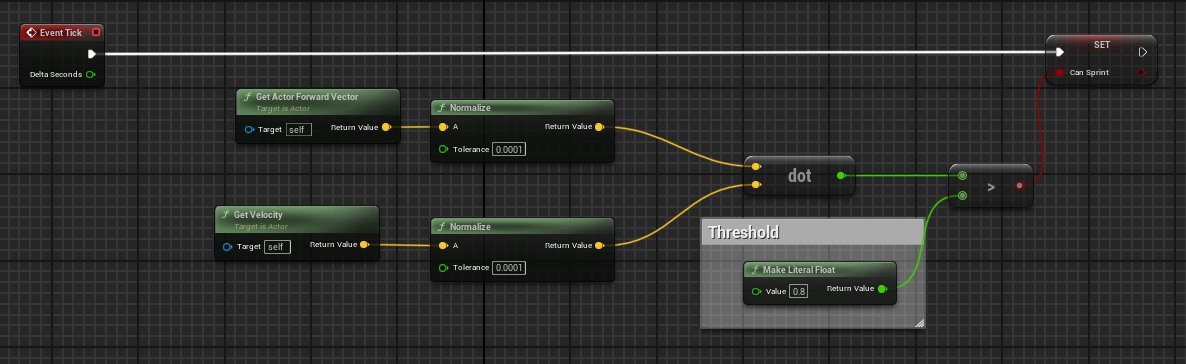
It's not necessary to do this on tick but you can if you want to
frosty heron
tame flower
What's that?
character movement component
tame flower
fiery swallow
https://i.gyazo.com/f3b4de270f7565485bb0fb13f3d1c54b.png
Essentially, you just n...
thanks that worked
but now when i run i can still go backwards
fiery swallow
tame flower
but now when i run i can still go backwards
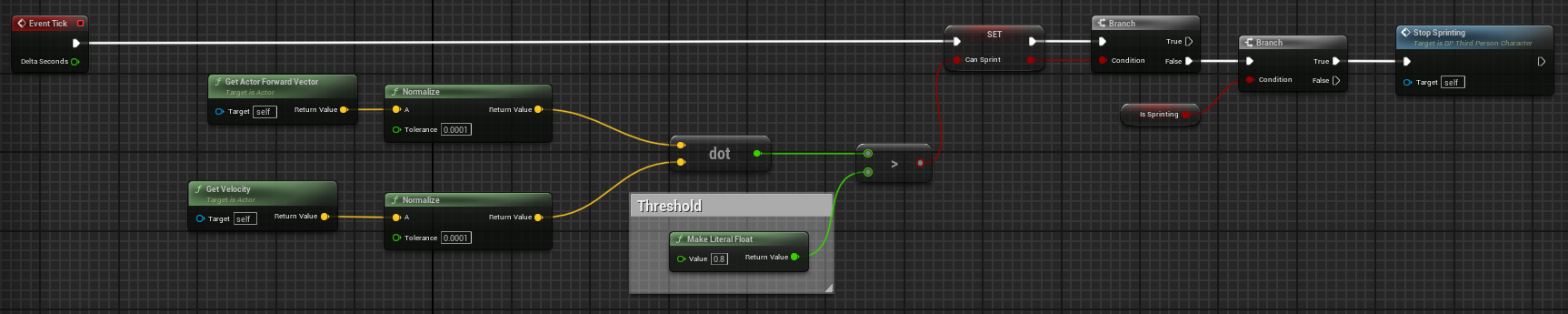
Improvise my friend, you can do it.
tame flower
fiery swallow
https://gyazo.com/9ff814c8ff93b8c2e505526123677ce7
tyvm
 dim hearth
Does anyone know how to lower a car pawn?
My skeleton hitboxes have been configured to match the shape of my car, but my car still floats.
I have changed the wheel radius to be 1/3 the original size, but nothing changes when I press play.
But despite all this, my car can still drive around, so I don't know what's making it so "tall"

 frosty heron
dim hearth
Does anyone know how to lower a car pawn?
My skeleton hitboxes have been configu...
frosty heron
dim hearth
Does anyone know how to lower a car pawn?
My skeleton hitboxes have been configu...
the capsule component perhaps
if you are using character as the parent
show your blueprint class
 frosty heron
dim hearth
This?
frosty heron
dim hearth
This?
when you play in Pie, open console and type show collision
 marble sky
hmm, anyone know what would cause an actor with 'projectile movement' to go 'up' instead of forward when it's spawned?
 marble sky
Nevermind, I am stupid. It would help if the component transform it's spawning from was pointed in the right direction 😦
frosty heron
dim hearth
I would suggest spawning it in a new fresh level with just a floor
see how that goes
dim hearth
Nothing changes
dim hearth
frosty heron
see how that goes
I wanted to suggest offsetting the car, but since the car drives at that height, that wouldn't work, would it?
 final berry
Hello! I've got a weird issue, I've got an actor with an implemented interface event, it works fine, but when I restart Unreal Engine for whatever reason it changed the interface event to a custom event and stuff breaks because of it. I need to delete the custom event reimplement the interface event everytime I reboot. What's going on there?
dark drum
final berry
Hello! I've got a weird issue, I've got an actor with an implemented interface e...
Just the engine telling you you don't need to use an interface. 😛 lol. On a more serious note, yea, try that first, sometimes, you might need to remove the interface and readd it though. Make sure you do a save all afterwards as well. Fixing up redirectors might help as well.
 spice sequoia
I have a BP that creates/adds a load of static mesh components during gameplay - how would I create hit events for all these components so that when any one of them is hit it triggers the same custom event?
dark drum
spice sequoia
I have a BP that creates/adds a load of static mesh components during gameplay -...
Bind to the relevant on hit event when you create/add them.
 ornate trail
should I be able to get active actor tags through class defaults of a class reference?
dark drum
ornate trail
should I be able to get active actor tags through class defaults of a class refe...
active actor? And possibly but it would only be the default tags so wouldn't account for any changes made at runtime. Not sure if its something you can get BP only though.
ornate trail
it's for a HISM replacement, just want to check it's a pickup without having to cast
and currently only storing the class ref so makes it harder to get the tags
dark drum
ornate trail
it's for a HISM replacement, just want to check it's a pickup without having to ...
Just cast to the HISM component, there's no reason to not cast to it. If it's just an actor ref you have, you can get component by class from the actor for the HISM. (if it's not valid there it doesn't have one)
spice sequoia
dark drum
Bind to the relevant on hit event when you create/add them.
Thanks - like this - or do I need to generate a different event for every mesh created?
 dark drum
spice sequoia
Thanks - like this - or do I need to generate a different event for every mesh c...
dark drum
spice sequoia
Thanks - like this - or do I need to generate a different event for every mesh c...
Yea like that.
 jagged moss
Im doing this to have a spotlight follow the player, but is there a way to make it look like its controlled by a human? having some random movement, delaying movement etc?
 jagged moss
I managed to make it rotate slower with the Rinterp to, but anyone have any tips on making it go a bit to far sometimes too, its tarting too look good tho
faint pasture
jagged moss
Im doing this to have a spotlight follow the player, but is there a way to make ...
spring damper model maybe
I know there's a linear one, probably is an angular one too
 olive yarrow
Anybody aware of anyway to play an mp4 or gif or hell, flipbook in the UI? I can't even find anything in the marketplace let alone a tutorial.
I found one tut for animating textures but it's near bloody 30 nodes long!
spice sequoia
What is the best way to animate a static mesh movement without using timelines etc - I want to be able to animate multiple static meshes within a BP, ideally within a function without having to set up multiple timelines?
 willow gate
Edit: Answered my own question and it works.
Good morning! Hey I'm working on a blink system. It's very simple. I'm just using the player's forward vector and location and multiplying by a float, adding them together (just like doing a line or a sphere trace) and then setting the player's new location (using sweep to avoid blinking through walls/objects). I have camera lag on my spring arm and it's working fine but I get an abrupt/choppy camera transition when I blink. I'm sure that's because the spring arm is moving along with the player and as a result, the lag doesn't matter. Anyone have an idea of how to fix this? Maybe detach the spring arm from the player and reattach after blinking?
rotund barn
my landscape isnt triggering hit events, i googled this and did everything (enabled physics and hit simulation). do i need to do something else too?
marble sky
willow gate
Edit: Answered my own question and it works.
Good morning! Hey I'm working on a...
I was going to suggest detaching springarm and reattaching after but seems you already answered it yourself 🙂
willow gate
marble sky
I was going to suggest detaching springarm and reattaching after but seems you a...
haha indeed. And it works like a charm. 😉
faint pasture
spice sequoia
What is the best way to animate a static mesh movement without using timelines e...
where would the animation come from?
You can just
Tick -> call function to update position of meshes
but that's basically a timeline with extra steps
spice sequoia
faint pasture
where would the animation come from?
Feeding in start/end locations & rotations per mesh. I can't use timelines as I have a lot of meshes that need to animate on demand and the timings will overlap, so need to be able to do it with a function. Tick-function seems like a good idea unless there are any better ways
 near wolf
yo, anyone got 5-10 minutes for a very quick paid help?
 proper tendon
Hey,
I'm having some issues with UMG text wrapping.
As you can see in one scenario the text is being cut short and in the other scenario the text is not wrapping at all.
In both scenarios the text belongs in different containers, the one where it get's cut off is a scroll box and the other one where it overflows is a vertical box.
The actual chat messages are their own User Widget which consist of a canvas panel -> Horizontal box -> Sender Name text & SenderMessage text.
Any help would be appreciated!


 frail onyx
Hi, does anyone know how to solve this issue with the character movement component? Im trying to add a grapple ability and basically i've set my falling lateral friction to 5 so my player can have more control while moving in the air but if i grapple now and let go of the grapple i wont keep any momentum because of the falling lateral friction being set to 5. Anyone know a better way of going about what im trying to achieve or if its better to somehow make the falling lateral friction 0 when i grapple and then as soon as i land again make it 5
proper tendon
frail onyx
Hi, does anyone know how to solve this issue with the character movement compone...
Have you increased air control?
it's a setting in the character movement component
frail onyx
proper tendon
Have you increased air control?
Yea air control is at 1
proper tendon
and you still don't seem to have enough control?
frail onyx
Not really it doesn’t feel like snappy or responsive enough
Just kinda smooth ish and floaty
proper tendon
what you could do is while the player is in the air just increase the gravity scale by 5 since you increased the grapple friction
change the values depending on your state
dark drum
frail onyx
Hi, does anyone know how to solve this issue with the character movement compone...
Personally I would probally look at setting the movement mode to flying instead while grappling and then set to falling when they let go. Setting it to flying would also allow you to rotate the whole character on the pitch and roll if needed.
frail onyx
dark drum
Personally I would probally look at setting the movement mode to flying instead ...
That’s what it is at currently but the second it gets set to falling all momentum stops because of the falling friction
frail onyx
proper tendon
what you could do is while the player is in the air just increase the gravity sc...
What would changing the gravity do though? Wouldn’t the falling lateral friction still stop the momentum when I stop grappling
dark drum
frail onyx
That’s what it is at currently but the second it gets set to falling all momentu...
Get the current velocity before you switch and then reapply after.
proper tendon
frail onyx
What would changing the gravity do though? Wouldn’t the falling lateral friction...
I interpreted the issue as "I'm falling slower because I increased the friction to have more control"
I'm not actually sure what your issue is exactly
ah your speed drops because of the friction?
frail onyx
proper tendon
I interpreted the issue as "I'm falling slower because I increased the friction ...
Oh no it’s the horizontal momentum that is getting stopped
proper tendon
ah, yeah well same concept applies, multiply your speed by the friction while you're in the air
frail onyx
dark drum
Get the current velocity before you switch and then reapply after.
Would that be better to do than setting falling lateral friction to 0 while grappling and then use the on landed event to set it back to 5
proper tendon
you can try both
frail onyx
dark drum
Get the current velocity before you switch and then reapply after.
i just tried that but it didnt seem to fix the issue at all
dark drum
frail onyx
i just tried that but it didnt seem to fix the issue at all
How did you set it up?
frail onyx
dark drum
How did you set it up?
 dark drum
frail onyx
dark drum
frail onyx
Try using these. Store the velocity in the current velocity var you have and then use it to set the velocity in the movement component.

 frail onyx
dark drum
Try using these. Store the velocity in the current velocity var you have and the...
frail onyx
dark drum
Try using these. Store the velocity in the current velocity var you have and the...
hmmm it still doesnt seem to work
the falling lateral friction still makes all the momentum stop the second i stop grappling
dark drum
frail onyx
the falling lateral friction still makes all the momentum stop the second i stop...
Show you're revised setup.
maiden wadi
Well. The simplest fix is making your own for each loop macro with a by ref getter instead of the copy one.
The better approach is not using structs, but using UObjects to hold the mission state.
And regardless of which one you go with, I strongly recommend splitting up your static and runtime data. Things like names and stuff is static. You should be able to get it from an associated datatable or data asset related to the mission. The runtime data should have a link to that datatable or data asset, and only what you need to change at runtime like the mission progress and runtime changable state.
frail onyx
dark drum
Show you're revised setup.
 dark drum
frail onyx
dark drum
frail onyx
try adding a 1 tick delay before setting the velocity back.
frail onyx
dark drum
try adding a 1 tick delay before setting the velocity back.
how would i do that? just a delay node with .1 seconds?
 frail onyx
oh wait nvm theres a node for that
maiden wadi
@somber torrentThe main point with my previous point is that static data tends to change over a mission's lifetime. Names get corrected, FText gets invalidated and such. Right now if you save your structs, you're saving the mission names and information. If you let a person play your game and they save it and then you change that stuff in a patch, your mission texts will be wrong for that person forever. If you keep that somewhere static where the mission can look it up, it just has to look up the changed value.
frail onyx
dark drum
try adding a 1 tick delay before setting the velocity back.
nope it still doesnt work ):
dark drum
frail onyx
nope it still doesnt work ):
You could try the add impulse instead.
 frail onyx
is there a better way to make air control feel better without having to set falling laterial friction to a number above 0?
 lyric basin
You mean more control over the player when they are in the air?
lyric basin
frail onyx
yea
Air Control

crank it up to like one or something and you should notice a difference
frail onyx
lyric basin
Air Control
do u know what the max number is? Cause i set it to one, but it still doesnt feel like how i want it to
lyric basin
frail onyx
do u know what the max number is? Cause i set it to one, but it still doesnt fee...
340282346638528859811704183484516925440.0
like, literally, that is the highest value lol
so you an do like 300 or something
it scales linearly I think so you might need to fine tune it a bit once you find the range of control you want
frail onyx
i set it to like 50000 but i didnt notice a different between the two really
lyric basin
how high are you jumping?
frail onyx
if i dont put lateral falling friction to like 5 or something it kinda just feels like if i were to have ground friction set to 0 like im sliding on ice but in the air instead
my jump velocity is 800
and gravity is 2.5
lyric basin
well thats why
you are using a higher gravity with only a slightly higher jump velocity.
you're making your character goku on the way to namek
set gravity to like .5
frail onyx
the jumping feels fine though, its just the side to side movement while in the air that i cant get to feel right
lyric basin
what do you have the air control set to?
frail onyx
1
lyric basin
set it to 1000000
frail onyx
hmm it doesnt feel any different than 1 for some reason
lyric basin
your guy is coming down too fast to the air control to actually do anything
frail onyx
any below 1 feels different but nothing higher
lyric basin
it takes fiddling with but those are the settings you want for sure
 empty marten
Hello peeps,
I'm hoping someone here can help me out. I'm working on a ball game which I'm using the default physics ball setup for. I've had to rotate the camera by 45 degree to get the desired angle for my game but now the way the controls work is how I've got it previewed on the left but I desire to get it so the controls work as they appear on the right. I'm not good with vector maths so was wondering if anyone here knew how I could change the defaul ball blueprint code to work with the desired controls?


 gusty mist
is it possible to do async physics in BP or do i need to use c++ because when I enable it and use the asynctick event nothing happens. (yes its enabled in the project)
 faint creek
Hey guys is possible to use AI Perception without using the Behavior Tree?
 limber parcel
faint creek
Hey guys is possible to use AI Perception without using the Behavior Tree?
limber parcel
faint creek
Hey guys is possible to use AI Perception without using the Behavior Tree?
yes
 marble tusk
empty marten
Hello peeps,
I'm hoping someone here can help me out. I'm working on a ball game...
marble tusk
empty marten
Hello peeps,
I'm hoping someone here can help me out. I'm working on a ball game...
One way would be to take the vector and do 'rotate around axis' where the axis is Z=1 and the angle is either 45 or -45
I'm thinking it might be -45 if it's exactly like that image
empty marten
So like this then
 empty marten
marble tusk
One way would be to take the vector and do 'rotate around axis' where the axis i...
empty marten
marble tusk
One way would be to take the vector and do 'rotate around axis' where the axis i...
Just tested and you were absolutely spot on!
Thank you so much 🙂
I don't know what it is but normal maths I'm fine but as soon as any vector maths comes in my mind just switches off lol. I should really study it more lol.
 fluid silo
hello, i got a question about general use of blueprint, how to use the Child actor component inside a bp ? ( my problem is : a chain should stuck to a spline, in viewport that works, when i wanna make a bp with that chain and her behaviour, in a bp i can't interact with the chain spline anymore)
lyric basin
fluid silo
hello, i got a question about general use of blueprint, how to use the Child act...
What is your current BP layout?
you would probably need something like this:

this is called from my main character and the Rifle Child is a scene component which uses a Child component that has a separate Child BP set as its Child Actor Class. This Child BP has a parent BP (Weapon_Base) from where I have all my code (Fire)
Fire being a function inside of the parent BP Weapon_Base
fluid silo
lyric basin
What is your current BP layout?
none i'd say, my chain adapts to a spline in a logic in her bp, the only thing i want is make a bp where that logic with the spline works and I can freely move the chain as it'll stick to it's position in the rock bp (here are screens of what i'm trying to do but rn it's 2 separate objects) The chain bp code is just "makes a chain out of 1 chain part, along the spline"
 lyric basin
you're gonna have to pick that asset pack apart and look at the code that controls this.
There are probably tutorials that can teach you how to pick up one end of the spline without detaching the other end
 crude dew
Hi, Can someone point out to me what im doing wrong here please? I have a Vector Array of possible move positions which are being populated here.

The current position index is becoming the Number 2
as you can see the Get Node is spitting out 0,0,0 not sure why though, Any ideas?

oh looks like it looking at Item[3] instead of item[2], Im still not sure why its mysteriously adding +1 to what im requesting from the array.
Current Position Index starts at 1, so 1+1 = 2 not 3.
 timber sable
off by one error?
maiden wadi
crude dew
Hi, Can someone point out to me what im doing wrong here please? I have a Vector...
You call this a "CurrentPositionIndex". But then you're adding 1 to it. So if your Index is 2...
Can't speculate much without seeing more. 🤷♂️
crude dew
Yes but number 2 in the Get Node as you can see Element [2] has a value in the array which is what is baffling me 🙂
Current Pos starts at 1 then I add 1 and Set to Current Pos and then use this value to search the Array using the Get Node which should return Array Element[2] Or am i reading this wrong, Dont mean to sound rude or anything, Appreciate the reply 🙂
I did notice it says "Call func Get Array Item 3" which ofc doesnt exist.
 pastel garnet
crude dew
Yes but number 2 in the Get Node as you can see Element [2] has a value in the a...
pastel garnet
crude dew
Yes but number 2 in the Get Node as you can see Element [2] has a value in the a...
is it starting at zero? and you can add a check after incrementing the index ( check if the current index is greater than the last index ) or add a clamp from 0 to last index
crude dew
So Current Pos is 1 which becomes 2 but it uses Get Array Item 3
Ahhh ofc... Array Element[1] is 0
crude dew
2
maiden wadi
Then yeah that makes sense. Num = Index+1
pastel garnet
crude dew
2
its going out of range, maybe the function is being called multiple times so its incrementing more than expected
crude dew
I checked the value in the details it starts at 1, and increments by 1 upon a single press of X on the keyboard.
 maiden wadi
pastel garnet
its going out of range, maybe the function is being called multiple times so its...
maiden wadi
pastel garnet
its going out of range, maybe the function is being called multiple times so its...
It's not out of range. It's the number of the index. An array with Indexes 0, 1, and 2, has 3 items. Getting Index 2 will give you the number 3 item.
crude dew
so sending a 2 into the Get would get the 3rd element which starting from 0 would be Element[2[
maiden wadi
It's confusing, but understandable.
crude dew
Or am i misunderstanding?
maiden wadi
The main thing is. What is the actual value returning? Can you print it?
crude dew
The value returning from the Get is 0,0,0
and its Getting Array Elem [3] from what the node says
which is why im huh ?? array element 3 would be sending a 4 into the get not a 2.
0,1,2,3 <-- 4th element
Something odd going on here. xD
pastel garnet
crude dew
Something odd going on here. xD
put a print string after the increment and then another one on the get and show me what the output get is plugged into
or just do this
 crude dew
This is the print out
 maiden wadi
So where are you getting the 0,0,0 from?
pastel garnet
maiden wadi
So where are you getting the 0,0,0 from?
lol
crude dew
lol im not sure now it seems to be working randomly now i havent changed anything i think /mindblown....
maiden wadi
crude dew
and its Getting Array Elem [3] from what the node says
Also the 3rd element is not [3]
crude dew
no 3rd ele will be index 2
maiden wadi
Were you breakpointing too early and examining the Get node?
crude dew
Thats a possibility.
maiden wadi
I find debugging in BP futile without prints. Trying to get pure node values can be annoying with the breakpoints.
crude dew
This is the final part of the code which just does a transition from 1 location to the other.

its a bit messy atm 🙂
thank you for the help and replies!
I,ll have to add a check to make sure that it does go outside the bounds of the array , Would IsValidIndex node be ok for this?
like so ?
 pastel garnet
crude dew
This is the final part of the code which just does a transition from 1 location ...
pastel garnet
crude dew
This is the final part of the code which just does a transition from 1 location ...
that is the problem
you are using the return value on different nodes which means they need to be calculated again when that node is called
crude dew
Oh, SO by connecting 2 wires from the same node can give 2 different results?
Would using a reroute node fix that?
pastel garnet
and the time line makes it so you can press the key to increment the value and then the node needing the return value will recalculate to get the value which will be out of range
pastel garnet
crude dew
Oh, SO by connecting 2 wires from the same node can give 2 different results?
ideally you would save the result from the get to a local variable or a different variable and then use that instead of connecting the get directly.
and like i said add a check for when the incremented value goes out of range
crude dew
I added a check using the IsValidIndex
if that fails it wont try to move anywhere.
but i do see a problem I increment the Current Position THEN check if its valid which will still increment the Current Pos so I will need to make sure that I revert the Current Pos back to its old value before it was incremented.
pastel garnet
crude dew
but i do see a problem I increment the Current Position THEN check if its valid ...
is that the functionality you want? then just clamp it. less nodes for you
pastel garnet
pastel garnet
or just do this
this is what i mean
crude dew
Thank you !
gusty mist
How can i draw a raycast that starts from the bottom of my actor and always goes straight down (the actor's down)?
pastel garnet
gusty mist
How can i draw a raycast that starts from the bottom of my actor and always goes...
GetActorLoaction + GetActorUp * Trace Distance * -1 .
Get actor location is the origin so you could use a scene component placed at the actors bottom (foot etc) and get world location instead
gusty mist
Ty!
 silver garden
I've been trying to set Sound Mixer volumes on Game Instance "Event Init", but it is not working.
However, if I call the function that sets all Mixer's classes volumes from the Game Mode on "Begin Play", it does work.
How do you guys manage this, loading and initializing sound?
gusty mist
pastel garnet
GetActorLoaction + GetActorUp * Trace Distance * -1 .
Get actor location is the...
i just realised i did almost exactly this earlier this week and totally forgot
nice one me, you already wrote this code
pastel garnet
gusty mist
i just realised i did almost exactly this earlier this week and totally forgot
lol always happens to me too
 eager thicket
does play "sound at location" only happen once?
pastel garnet
eager thicket
does play "sound at location" only happen once?
as long as the sound is not looping then yes
eager thicket
thnaks
 open garden
How do you use this Camera Animation Sequence Subsystem? I heard it can be used to play back camera animations.
I literally went through the entire internet and no one has any info about it.

 pastel garnet
open garden
How do you use this `Camera Animation Sequence Subsystem`? I heard it can be use...
pastel garnet
open garden
How do you use this `Camera Animation Sequence Subsystem`? I heard it can be use...

Play Camera Animations using the gameplay cameras subsystem
and edit Camera Animations inside level sequences.
Joing the Discord server!
https://discord.gg/jTPwvwFF
#ue5 #unrealengine #unrealengine5 #unrealengineblueprints
i use mine like this


 ancient siren
can anybody help me slice a skeletal mesh by its bones? i am trying to make a dismemberment system and i cant seem to figure out how do it.
this is exactly what i need (19 seconds) https://www.youtube.com/watch?v=nGa9HNIKybc
attachment 1 is my code (which is a function inside of the parent weapon blueprint. each enemy has their own bone health map (attachment 2)
TLDR, i need to dismember skeletal meshes modularly like the video attached


 open garden
pastel garnet
i use mine like this
open garden
pastel garnet
i use mine like this
Nice, I'll watch the video and try it out
Much thanks
 graceful sage
hey all, I'm trying to get my prediction to go to center of screen. I got the arrow going to center of screen but I can't seem to get the rotation for the prediction correctly?


the last screenshot is firing the arrow which does go to the center but the first one doesn't seem to line up correctly for the prediction
 lyric basin
could use a little more context... what do you mean prediction?
graceful sage
predict projectile path by trace channel
im thinking because the socket's rotation I attach the arrow to is off actually
this is my closest result

 ancient siren
can anybody help me slice a skeletal mesh by its bones? i am trying to make a di...
ancient siren
ancient siren
can anybody help me slice a skeletal mesh by its bones? i am trying to make a di...
bump!!
 fallow elm
I'm getting this really weird issue with my debugging, anyone know what could be the cause? Let me know if you guys need to see more code for any reason
the execution wires not lighting up properly
in some blueprints it doesnt light up whatsoever
even though the debug filter is correct
fallow elm
fallow elm
This should be impossible right? Wire feeding into sequence not lighting up but "Then 1" is lighting up?
I've already tried restarting the engine
this also
frosty heron
fallow elm
the execution wires not lighting up properly
use break point
I don't think those lit up wire are to be relied upon
fallow elm
alright will do, thanks
frosty heron
How to randomize something but with seeds?
 merry marsh
how i can fix this , what happend is -> i added a trigger box and tried to animate a sequence but the in normal animation play it is getting stuck , but in this cast to third person it only applying to body not cloth which is torso which i am using a metahuman

i am total beginer
 lunar sleet
frosty heron
How to randomize something but with seeds?
lunar sleet
frosty heron
How to randomize something but with seeds?
There’s a random seed from stream node and then you can change the var that goes into the stream on tick or timer iirc
 bronze lily
Hello,
i have a bunch of weapon blueprints all children of a master bp all different sizes long sword short sword axe etc. ive seens a few different ways of creating the trace. For example a arrow at top and bottom a scene added and the referenced and my personal fav sockets in the static mesh of each weapon. Is there a way of applying a blanket get top of weapon and bottom in my master item/weapon and using this or do i have to add it to every weapon individually?
 dry sleet
lunar sleet
There’s a random seed from stream node and then you can change the var that goes...
dry sleet
lunar sleet
There’s a random seed from stream node and then you can change the var that goes...
You don't need to change it, the seed is only the initial seed -- every time you pull a number from it you get a new random result.
versed sun
bronze lily
Hello,
i have a bunch of weapon blueprints all children of a master bp all diff...
Something like this might work:
Assuming your weapon is rotated like this

 bronze lily
versed sun
bronze lily
versed sun
was reading this almost cried when it wnet away lool
versed sun
haha , little edit
bronze lily
versed sun
haha , little edit
no that looks even better now thank you
versed sun
better visual
if the mesh it is rotated , it wont work, so make sure you use saved values and not remaking them while equipped in your hand
 bronze lily
versed sun
if the mesh it is rotated , it wont work, so make sure you use saved values and ...
bronze lily
versed sun
if the mesh it is rotated , it wont work, so make sure you use saved values and ...
my understanding of this, please forgive me only been trying past few months, is that the mesh atatched in the bp as long as that matches the rotation of the code above and master is fine to rotate the weapon socket inside the charecter skeleton? is that correct?
pastel garnet
graceful sage
this is my closest result
instead of using the forward vector of the arrow * the speed, you could use the control rotation ( where the screen is facing ) the forward vector * a distance
 versed sun
bronze lily
my understanding of this, please forgive me only been trying past few months, is...
versed sun
bronze lily
my understanding of this, please forgive me only been trying past few months, is...
I myself would just go thru each mesh and add 2 sockets to each mesh
 bronze lily
versed sun
I myself would just go thru each mesh and add 2 sockets to each mesh
bronze lily
versed sun
I myself would just go thru each mesh and add 2 sockets to each mesh
yea that was my default but im allways interested to see if there's a betetr way or something different that could save time. The sockets method makes it pretty accurate though for say axes where you only want the metal rather than the holder. appreciate you taking the time to think about it 🙂

 final berry
Hello! I'm confused about my Set Array Elem node.
I use it to update an item in an array. The array I want to update has 1 item in it. TO update that single item in the array I use Set Array Elem with index 0 (the index that I get from the foreach when it itterates through that single item). But for some reason it doesn't update the item in the array.
Am I missing something?

I can put a breakpoint on the Set Array Elem and it does break there, so I know it reaches it
graceful sage
pastel garnet
instead of using the forward vector of the arrow * the speed, you could use the ...
here's my result

the arrow doesn't make it from this distance which is okay. But the prediction isn't going far enough, perhaps I need to set something in projectile movement correctly?
final berry
final berry
I can put a breakpoint on the Set Array Elem and it does break there, so I know ...
Never mind I found. Dumb mistake on my end which had nothing to do with the set array elem, that worked fine
versed sun
final berry
Hello! I'm confused about my Set Array Elem node.
I use it to update an item in ...
I dont have the same struct as you , but...
Try pulling off Array Element and type Set Member in S_DebuffConfig
You can choose what pins you want to change
not sure if this will help or not
 marble tusk
FYI, that won't work because the For Each Loop returns a copy. You'll need to use a separate GET(ref) and plug the Array Index into it
 marble tusk
👍
I actually copied the For Each Loop macro to my own macro library and replaced the copy with a ref just to do stuff like this easier
It's also just nicer to use since it's not wasting resources copying stuff all the time when it doesn't need to be
versed sun
marble tusk
It's also just nicer to use since it's not wasting resources copying stuff all t...
Neat!
 graceful sage
can you not add a spline component to character in a static mesh component?
 vale pine
Is there a persistent class I can derive a BP from that's an Object, but can use latent nodes?
Basically I have some behavior that COULD be handled in the GameInstance, but I'd rather keep it in a more appropriate, specified asset.
spark steppe
marble tusk
It's also just nicer to use since it's not wasting resources copying stuff all t...
that's pretty smart 👍
maiden wadi
vale pine
Is there a persistent class I can derive a BP from that's an Object, but can use...
Not in BP alone. This is easy, but requires a C++ UObject inheritor with an overridden GetWorld()
vale pine
maiden wadi
Not in BP alone. This is easy, but requires a C++ UObject inheritor with an over...
Thanks! That seems to confirm my googling
spark steppe
also hit me if im wrong, but the whole foreach-thing can be simplified?

it feels like two variables for the loop/index count are unnecessary?!
final berry
versed sun
I dont have the same struct as you , but...
Try pulling off Array Element and ty...
Oh cool, that sounds interesting

 copper chasm
If I wanted to generate a line from the player in a top down game to "trace" a movement path (like in a top down RPG) - is that just a line trace from player to mouse? Am I overthinking this?
Like, if Movetime = True, generate line trace from mesh to pointer?
spark steppe
actually...
we can use for loop like this?!

am i missing smth? why is the engine version of foreach so weird?
maiden wadi
If you wanted a copy those would work. But your simplified ref one is really good.
 maiden wadi
I profiled your one above.. Uhh..
maiden wadi
spark steppe
This one.


Yours is the last one. Pretty good number over the original for each loop.
21% less time.
spark steppe
i bet there's more way to improve this 😄
keep this open xD
i wonder how these two differ


how did you get that small profiler? i don't really wanna launch unreal insight for this now 😄
marble tusk
I should've added I had put them on the Dev site as snippets. https://dev.epicgames.com/community/snippets/aOD/unreal-engine-more-performant-for-each-loop-variants
Epic Games Developer
The standard For Each Loop macro visually cleaned up with the addition of storing the array length as a local int. This prevents calling array length wi...
spark steppe
do you know why they dont use the for loop under the hood?
180 (ue) vs 167 (no cached length) / 160 with cached length
also used insight, to only account for the time spent on the actual loop
so "only" 10% faster on my cpu
considering that it spends 160ms on a stupid loop 😄
ancient siren
im trying to slice my skeletal mesh. this has taken me so long. i first had to copy the skeletal mesh to a procedural mesh, and now that i have that, i realized that slicing it slices the whole mesh- which should be obvious. heres an example when "dead bone" is spine_002. i really want to only isolate and slice the bone that i hit

 spark steppe
yea you need more than just a slice for that
namely something that takes bones and the bone weight of the vertices into account
ancient siren
spark steppe
namely something that takes bones and the bone weight of the vertices into accou...
so do you think i should make that "copy skeletal mesh to proc mesh" really only take in a bone name and try and only copy over the hit bone and the children of it?
spark steppe
i don't have experience with procedural mesh and what it can do, so i can't help you further on that
spark steppe
made a slightly changed "normal" foreach by copy alternative which is also 180ms vs 165ms

so even that can be improved apparently
and i think they all need an is empty check
unless last index is -1 on an empty array, so that's covered
final berry
versed sun
I dont have the same struct as you , but...
Try pulling off Array Element and ty...
I tried this, but it doesn't seem to update 🤔
I tested it with a test value, but the struct stays on its original value EDIT: I'm inside a foreach so it was a copy and not a ref I tried update. I've used a get(ref) now it works. Thanks!
 maiden wadi
spark steppe
how did you get that small profiler? i don't really wanna launch unreal insight ...
maiden wadi
spark steppe
how did you get that small profiler? i don't really wanna launch unreal insight ...
It's Stat Raw
spark steppe
it's bugging me that there's no benefit of just switching to the for loop
as it eliminates one variable assignment each operation
i would have thought that would have some influence already
maiden wadi
I'm almost curious what the cost of Ramius's for loop is.
spark steppe
is that public available?
maiden wadi
It's part of this
https://github.com/MagForceSeven/Starfire/tree/main/StarfireUtilities
I haven't installed it yet. Less interested in it due to doing most of my heavy stuff in C++, but he pointed it out to me when I was curious about why you can't make a map macro with a wildcard value. He made a native for each map. But I am pretty sure there's a normal for each loop in there too.
spark steppe
yea it says that in the description...
K2Node_NativeForEach.h/cpp, Starfire K2 Utilities
A reimplementation of the For Each macro for iterating a TArray
since i'm at it... might aswell try that now 😄
spark steppe
tho it doesnt show up
mild jacinth
how can i use bp nodes to create an effect where camera with its springarm rotates around the player smoothly and then also moves up as final thing?
like in ability attacks you can see how camera rotates around player in videogames, for an example if you activate special ability
most are done in movie cutscene ways but how can i make it using blueprints?
I thought about using cinematic sequence but it wouldnt suit my needs because im moving character around a lot.
i dont want it to happen in just 1 fixed place
maiden wadi
sequencers don't need to be fixed. You can make them relative. And they also have their own graph you can code in.
spark steppe
Authaer are you sure that this was supposed to be a replacement for the BP version?
it sounds like he reimplemented it so that he can use it for the TMap/TSet iterator
maiden wadi
Pretty sure it was. There's a note there that he hid the original though or something?
Let me glance at it's code though.
 tight pollen
on 3D widget i can't create drag drop operation?
spark steppe
@maiden wadi yea the node is hidden from the context menu
pasting this may work
or crash, idk
tight pollen
tight pollen
on 3D widget i can't create drag drop operation?
Is possible or not?
spark steppe
@maiden wadi 177ms (UE) vs 155ms (rama)
maiden wadi
tight pollen
Is possible or not?
Anything is possible to do with enough persistence. Easy to do? Far from.
spark steppe
i feel like the purpose of this node wasn't to be faster
but to make it possible to create the forEach tmap/tset variants
and i think what makes it faster is that it unintentionally caches some of the input data?!
this actually seems to "spawn"/use hidden BP nodes
maybe @dense mica can confirm this? (sorry for ping, context: does this do something similar to a collapsed node graph / macro?) https://github.com/MagForceSeven/Starfire/blob/d4ea5ea949a5468ef3c4048d7e0bcc9cf4943edf/StarfireUtilities/Source/StarfireUtilitiesDeveloper/Private/K2Nodes/K2Node_NativeForEach.cpp#L180
empty marten
Hey peeps,
I revived an old project which was created using the RollingGame template in an old engine version. I'm trying to find the Game Instance BP so I can do a few thigns with it but can't find it. I always thought game instance was listed in the game mode classes? Anyone know where it is?

Never mind peeps. I went into project settings and noticed its using the default game engine game instance and switched it with my own. It's all good now.
 dense mica
spark steppe
maybe <@748517221608980631> can confirm this? (sorry for ping, context: does thi...
dense mica
spark steppe
maybe <@748517221608980631> can confirm this? (sorry for ping, context: does thi...
this sounds like @errant snow's work
ForEachLoop node written in K2Node instead of a literal BP macro
mild jacinth
how can i rotate camera with springarm around an actor.
i dont see that rotation values change anything
 errant snow
spark steppe
this actually seems to "spawn"/use hidden BP nodes
errant snow
spark steppe
this actually seems to "spawn"/use hidden BP nodes
Custom K2 nodes in native have two possible implementations. One is a direct byte code generator (that I'm still not clear on how to make) and one is equivalent to blueprint macros, except done in C++. However there are significantly more tools/hooks available in C++ when making a node than are available in blueprint macros which make it possible to to create something like the TMap ForEach there but not in blueprint. You can also create C++ functions that are blueprint callable but only for custom nodes and not blueprint end-users.
It is possible to write a TSet ForEach in blueprint but doing PR's & git stuff with binary assets is a PITA so I avoid it.
spark steppe
from all tested variants yours turns out to be the fastest tho 😄
so exposing it to users might not be a bad idea!?
errant snow
maiden wadi
I haven't installed it yet. Less interested in it due to doing most of my heavy ...
That node was from an earlier implementation of the TMap ForEach because I wasn't as versed in CustomThunk land so I needed an array for-loop in native to do the "get all keys, for-each key, access value". You can't (easily?) use blueprint macros from native so I rolled my own.
Based on someone else's PR for a TSet foreach, I recently refactored the implementation to not need the TArray ForEach anymore.
errant snow
spark steppe
so exposing it to users might not be a bad idea!?
I gets a little confusing for there to be two array for each's in the node list. I don't mind it for myself, but it seemed less helpful for others.
I would not have expected a perf difference between mine and the blueprint macro
I do like mine better with the always available/hidden 'Break' pin over the macro library two nodes though 😉
spark steppe
i think yours may do something similar to this: #blueprint message
which may introduce the performance benefit
errant snow
spark steppe
i think yours may do something similar to this: https://discord.com/channels/187...
I think you're right. Maybe I'm not so surprised that it's a little faster:
The left is the expansion of the blueprint macro and the right is what mine expands to.
They've separated the loop counter from the array index for some reason (maybe they're doing what you're doing using a for-loop node).
Whereas mine (since I don't have the for-loop) creates the loop manually

 spark steppe
they don't use the for loop
but they "query" the array length each iteration (which may add overhead in BP) and they have 2 variable assignments (loopcount/index) instead of one (loopindex increment)
the biggest improvement in my tests was caching the array size
i guess BP does some wild stuff for each array access
errant snow
I query the length each time, so it can't be that.
🤷 I'll take the win I guess, but it definitely wasn't my intention.
spark steppe
do it, that may make your version even faster 😄
errant snow
spark steppe
the biggest improvement in my tests was caching the array size
at the cost of not allowing array modifications while looping (which has it's uses)
spark steppe
people should always reverse iterate for modifications imho (even the BP version has a warning to not modify the array)
errant snow
That only fixes removals. There are algorithms where you add to the end of an array and you want to process those within the same loop.
In C++ it's one of the times I fall back on classic for( int i = 0; i < array.num( ); ++i ) over for ( var : array )
spark steppe
ok, fair argument
 obtuse kiln
I always hate putting up a screenshot of something very simple that doesn't work, since I'm almost certainly about to learn something very very basic that my piecemeal self-education skipped, but, uh, why's this fail?
there's only one object in there at the moment while I'm figuring this out, is valid was saying it was valid, so...?
 maiden wadi
obtuse kiln
I always hate putting up a screenshot of something very simple that doesn't work...
maiden wadi
obtuse kiln
I always hate putting up a screenshot of something very simple that doesn't work...
Casts will fail if the pointer is not valid, or if the item you're trying to cast is not of the type or does not inherit from the type you're trying to cast it to.
What is your object in the array?
obtuse kiln
the BP_ObservationObject parent by default (just an object containing a few variables at the moment), and a single child of it on a zombie enemy I'm testing
both spit out the not happening when I'm looking at whatever (the zombie or any other observable)
the idea was that this component I'd attach to anything the player could observe would be where I could go put all the relevant observation objects for that observable thing in an array, then I'd figure out which one to load up at a time and how to pass them to the player journal later, but I got stuck here
I would probably be better off with structs I guess but I know BP structs are cursed and touching CPP if I can possibly avoid it gives me hives
 dawn gazelle
obtuse kiln
the BP_ObservationObject parent by default (just an object containing a few vari...
dawn gazelle
obtuse kiln
the BP_ObservationObject parent by default (just an object containing a few vari...
How are you adding the value to the My Observation Objects array?
obtuse kiln
just setting it as default in the component (and setting a different default in the zombie actor). I had the variable as an array of generic objects. I thought that was the problem but changing it to an array of BP_ObservationObjects doesn't let me set anything as a default.
Guessing that I'm missing about working with something with objects that aren't actors?
dawn gazelle
obtuse kiln
just setting it as default in the component (and setting a different default in ...
Can you show a screenshot of the default values of the array?
obtuse kiln
trying to change the variable type to an array of "BP_ObservationObject"s doesn't let me set the generic one, the zombie one, or another test one. I'd imagine this is related to whatever I'm tripping over here.
 dawn gazelle
obtuse kiln
trying to change the variable type to an array of "BP_ObservationObject"s doesn'...
dawn gazelle
obtuse kiln
trying to change the variable type to an array of "BP_ObservationObject"s doesn'...
What is the parent class of your zombie?
obtuse kiln
The zombie is a character and the various interactables are just actors, all with the same widget component handling making the observation pop up
I thought maybe doing it in a widget component might be the issue but redoing the logic on the zombie's blueprint didn't result in anything different
dawn gazelle
Ok, but is a zombie a "BP_ObservationObject"?
Part of the confusion here is that when you select "Object" as the type for an array, it allows you to effectively store everything in the engine in that array including assets - and what you've done in the screenshot is store a default value to the BP_ObservationObject blueprint which isn't a spawned copy of a BP_ObservationObject which is what would allow that cast to succeed.
obtuse kiln
ah, got it
dawn gazelle
You normally can't set default values in references as they don't exist until runtime. The exception to this is if you set the reference in an exposed variable which you can then modify when you select a placed actor and then manipulate the exposed variable. This still requires the reference you want to use to be placed in the level as well.
obtuse kiln
Hm, so is using non-actor objects like as boxes of variables like that just a nonstarter?
Guess I'll need to engage with structs after all, since tossing everything onto the enemy would kind of make it a pain to pass the set of information containing the type of observation, what was observed, and the text of the observation over to the player to put in their journal
hm, do I want to brick my project with BP structs or by flailing blindly with CPP...
 void hemlock
How can I make the energy beam follow the mouse cursor?
 lunar sleet
void hemlock
How can I make the energy beam follow the mouse cursor?
lunar sleet
void hemlock
How can I make the energy beam follow the mouse cursor?
Probably set the beam end location to the mouse position on tick
maiden wadi
void hemlock
How can I make the energy beam follow the mouse cursor?
@lunar sleet For a better solution on this. You should only do this in one location like your PlayerController, and set it inside of an MPC as a Vector Parameter. Niagara and shaders both can globally reference MPC values
lunar sleet
MPC?
maiden wadi
Material Parameter Collection
void hemlock
maiden wadi
Material Parameter Collection
I'll give it a shot. (I have never done it before)
maiden wadi
I normally have two. One for screen space, and one for a general point traced to a world location.
 merry chasm
I have a camera which follow a car and I have some trouble with temporal sample and motion blur..
Here is an example, one with spatial sample, and one with temporal sample.
any idea whats happen here, and why the motion blur and temporal sample create this ghost effect?
SPATIAL SAMPLE:


TEMPORAL SAMPLE:

 void hemlock
maiden wadi
I normally have two. One for screen space, and one for a general point traced to...
void hemlock
maiden wadi
I normally have two. One for screen space, and one for a general point traced to...
This seems like it's going to take too long. I need an easier method.
merry chasm
merry chasm
TEMPORAL SAMPLE:
As you can see with temporal sample everything got a ghost effect, but in reality only in the wheel should get motion blur
pastel garnet
graceful sage
the arrow doesn't make it from this distance which is okay. But the prediction i...
going to have to increase the range or use the same value from the arrow bp. its speed, does it have gravity? the gravity force etc
maiden wadi
void hemlock
This seems like it's going to take too long. I need an easier method.
It is a couple of nodes on a tick function in a BP, and two extra assets in your content browser.
You literally cannot get an easier method to passing a global param to niagara emitters.
Well, technically one asset. You don't need the shader stuff.
spark steppe
@errant snow @maiden wadi i was curious about how fast it could get, changed the K2 implementation of ramas code to cache the array length, and we are at 25% perf increase over default UE foreach loop.
Now the custom K2 version should be equivalent to my macro and is still at least 10% faster, and idk why?! shouldn't it come down to the same speed?
maybe some editor/debugger overhead? maybe in a cooked build the macro reaches the same performance?!
maiden wadi
I doubt that cooked will be much different than Standalone. Easier test.
@spark steppe One other curiosity I have is if there's a difference to the loop limit in BP. I imagine even your macro would go a long way to cutting down the counts of loop functions called, allowing more loops than the original.
spark steppe
i'm not sure if there's much difference tbh
using the for loop is just a bit cleaner, but comes down to almost the same amount of nodes
the only thing that it's saving is the increment of the 2nd loop count variable
wait nvm
it's also not calling the array length thing every iteration, so yea, maybe there will be noticeable difference
but usually people run into the issue with the normal for loop
when they do stuff like grids in BP loops
 raven gyro
anyone know why my X and Y axis mapping alwasy triggering even though im not moving my mouse?
 maiden wadi
raven gyro
anyone know why my X and Y axis mapping alwasy triggering even though im not mov...
maiden wadi
raven gyro
anyone know why my X and Y axis mapping alwasy triggering even though im not mov...
Because that is how the old input system works. EnhancedInput won't do this. Is there a reason you're still using the old system?
raven gyro
oh D: dang thats new i dont even know
the enhanced doesnt give me an axis value any more
 maiden wadi
raven gyro
the enhanced doesnt give me an axis value any more
maiden wadi
raven gyro
the enhanced doesnt give me an axis value any more
Enhanced Input will do the same thing if you set up your Input Action correctly.
You can even make it one InputAction.
Editor isn't open but if you make a single IA of like MouseMovement. And in that IA change it's type to Vector2 or Axis.. 2 something
It should show up on the node outputting a vector. And you can use the Triggered pin to AddControllerYaw and AddControllerPitch at the same time by just breaking the vector and getting the X and Y
raven gyro
sorry first time newbie to this enhanced input thing, have 0 understand what you just said :D, just fiddling around now
raven gyro
dam so confusing 😦
graceful sage
pastel garnet
going to have to increase the range or use the same value from the arrow bp. its...
I use the value if it's speed of arrow. Gravity rate is 0.9
frail onyx
Anyone know how to modify this switching weapon tutorial so i can equip more than 2 if i want or be able to change what guns are in my main and secondary slot and also be able to pickup guns to equip them and save their ammo if i drop and pick them up again? https://www.youtube.com/watch?v=94HpeqlgKAs&t=621s

We continue on in our FPS tutorial series. In this episode we cover one way of how to switch weapons; from a main primary weapon, to a sidearm.
Support me on Patreon and get access to videos early, join our developer community on Discord, get exclusive behind the scenes videos on my projects and much more over at https://www.patreon.com/ryanlal...
 scarlet zodiac
Hi guys, I have this piece of code that should limit my character to move from -250 to 250 on the Y axis, but it doesn't work... I guess it's because when the key is held down it doesn't check if the character's location is between those values, but I have no idea how I can fix this, can anyone help pls?
 lunar sleet
frail onyx
Anyone know how to modify this switching weapon tutorial so i can equip more tha...
lunar sleet
frail onyx
Anyone know how to modify this switching weapon tutorial so i can equip more tha...
Not likely someone’s going to watch an entire shitorial for you just to tell you how to modify it to do all these things. That part is your job
lunar sleet
scarlet zodiac
Hi guys, I have this piece of code that should limit my character to move from -...
Start by printing or watching the value of Y at runtime so you can see what is happening
lunar sleet
raven gyro
dam so confusing 😦
You can use the templates to orient yourself and see how it’s setup
frail onyx
lunar sleet
Not likely someone’s going to watch an entire shitorial for you just to tell you...
True, main problem is it’s using a blueprint structure to store the ammo count and weapon actor class for the main slot and secondary which doesn’t allow for other weapons to be added while also being able to store ammo, is there a better alternative than using a structure with a variable for main slot and secondary slot for the weapon swapping
lunar sleet
frail onyx
True, main problem is it’s using a blueprint structure to store the ammo count a...
I use Data Assets to quickly make new weapons
 steep oyster
lunar sleet
Not likely someone’s going to watch an entire shitorial for you just to tell you...
steep oyster
lunar sleet
Not likely someone’s going to watch an entire shitorial for you just to tell you...
Shitorial pretty much nails it
raven gyro
does anyone know how i can pull this from the enhanced in put?
 versed sun
raven gyro
does anyone know how i can pull this from the enhanced in put?
versed sun
raven gyro
does anyone know how i can pull this from the enhanced in put?
If you search for you Input Action's name , you should see your Values that you can get
 raven gyro
versed sun
If you search for you Input Action's name , you should see your Values that you ...
raven gyro
versed sun
If you search for you Input Action's name , you should see your Values that you ...
👍🏽
 celest oar
i have a mesh component that i am trying to use for collision, if i do the same custom collision setup on the root component it works but if i dot it on the mesh component it doesnt? what am i missing here?
raven gyro
maiden wadi
Enhanced Input will do the same thing if you set up your Input Action correctly.
my actor/camera spins like crazy D:

 tall geode
not sure if this should be here or animation section but the character is moving the same as the direction it is going to. what could the probelm be?
I used this for running . did not use action mapping from ue5.4 because it did not work for me
 graceful sage
tall geode
not sure if this should be here or animation section but the character is moving...
graceful sage
tall geode
not sure if this should be here or animation section but the character is moving...
in character movement check use controller desired rotation and uncheck orient rotation to movement
tall geode
graceful sage
in character movement check use controller desired rotation and uncheck orient r...
thank you body ... it works
 visual crest
I am having a bit of a weird problem I am trying to combine items on the ground if they can be and delete the extra one. But with this they just delete each other lol. How do I fix this?

 idle vigil
in my game i created a struct to hold information about different bullet types, such as regular bullet, armor penetrating etc. Is there a way to create a preset struct instance that I can see in the content browser etc? The weapons will be able to hold different types of bullets in the same magazine so I was thinking I create an array of structs to hold the presets
 trim matrix
Hello. I have an array. This array contains characters. How can I identify the character that is closest to the center of my camera? This was question 1. My second question is:
How can I identify the two characters that are closest to the character identified in the previous question but only at left and right side (also ı want to ignore forward, backward and z axis in this distance calculations). Additionally I need to know which one is on the right and which one is on the left.
 finite hearth
Is there a datatype that supports linebreaks? Or should I just jank together an array of strings?
 timid wigeon
Hello folks, I have a quick question about soft object references as I’m trying to be more cautious when starting a new project:
Am I understanding it correctly, that I should not use soft object references to refer to instances of an object?
Everything I read so far is leading me to believe that soft object references points to asset stored in the disk. So I shouldn’t be able to point a soft object reference at something like an object that only gets constructed after begin play. Am I understanding it correctly?
timid wigeon
finite hearth
Is there a datatype that supports linebreaks? Or should I just jank together an ...
Text and String should both supports line break. You can use \n to writing in line breaks in string. You press shift enter to make line breaks in Text
timid wigeon
idle vigil
in my game i created a struct to hold information about different bullet types, ...
Subclass an object or use data asset, you can put a struct as an variable in an object, and make further subclasses and change its default values to have your desired preset, this is often called Data Only BP or Raw Object. Alternatively you can make a data asset.
Look into this might be helpful. https://dev.epicgames.com/community/learning/tutorials/Gp9j/working-with-data-in-unreal-engine-data-tables-data-assets-uproperty-specifiers-and-more

Epic Games Developer
Working with Data in UE5- Data tables, Data Assets, UPROPERTY specifiers and more!
fiery swallow
timid wigeon
Hello folks, I have a quick question about soft object references as I’m trying ...
What do you mean by instances of an object?
Soft pointers don't really have anything to do with instances, atleast for blueprints.
Honestly think they can be useless a lot especially when you don't properly utilize parent classes or dare I say it... interfaces
Soft pointers (references) give you more control over when an object is allowed to be loaded into memory. All it does is tell the engine that it's expecting BP_InsertclassHere... but don't actually load it if it hasn't been loaded already. It's got a pretty niche use case assuming you're already doing things properly...
timid wigeon
fiery swallow
Honestly think they can be useless a lot especially when you don't properly util...
Now that I thought about it slightly more, it doesn't make sense to use soft object references on anything that's not a class default / data on disk, unless I'm 100% sure the reference is held somewhere else... I think. I don't even know if soft reference acts like weak pointer.
I found soft references can be useful to keep the code clean and modular, have less circular references or dependency on things. By instances i meant objects that are instantiated from a class after the game instance start. Also yes, assuming I'm trying my best with other good practices regarding inheritance & interface.
frail onyx
Anyone know how to make it so i can swap weapons like this and also be able to drop them while saving the current ammo and max ammo on each gun?
 dark drum
frail onyx
Anyone know how to make it so i can swap weapons like this and also be able to d...
dark drum
frail onyx
Anyone know how to make it so i can swap weapons like this and also be able to d...
Personally, I store my item data in a uobject that get stored in an inventory system. When I spawn a held item, I spawn the relevant actor and pass the uobject to it. When the actor shoots, it modifies the data in the uobject, that way if I destroy the weapon (in the case), the item data is stored separately so no need to handle saving the data at that point.
dark drum
timid wigeon
Hello folks, I have a quick question about soft object references as I’m trying ...
Soft object references in BP are more for when you are using level streaming where you might have a pre placed actor in the level that might not be loaded. (Streaming in)
There are some special, self constructing objects such as data assets where the engine only ever creates one instance of it (such as data assets, static meshes and skeletal mesh (not to be confused with the component)) which you can also use soft object references for to control when it gets loaded. (if not already loaded)
When using soft references, the main one you'll probably use is soft class references which would be used when spawning stuff at runtime. That way, you can load the class only when you need to spawning it in the level.
pastel garnet
graceful sage
I use the value if it's speed of arrow. Gravity rate is 0.9
and it worked right?
since you don't know the end location this might not be what you need as different arrows might have different speed which affects the velocity so you might want to calculate the velocity of the projectile if it was to be shot and use that to suggest the path
 timid wigeon
dark drum
Soft object references in BP are more for when you are using level streaming whe...
timid wigeon
dark drum
Soft object references in BP are more for when you are using level streaming whe...
this helps a lot, thanks!
frail onyx
dark drum
Personally, I store my item data in a uobject that get stored in an inventory sy...
Ok thanks, I’ll see if I can try that
mild jacinth
if i spawn an actor what is the best way to keep track of it in a 'actor1', 'actor2' sense...? so that i could maybe use a function which will look for a specific actor with corresponding order number and then return it to me
i know i could do this with an array somehow but how would i identify each of them
dark drum
mild jacinth
if i spawn an actor what is the best way to keep track of it in a 'actor1', 'act...
You can use something like this.

Welcome to this tutorial on how to create an actor manager system in Unreal Engine 5! In this video, we'll go over the basics of setting up the system using Unreal Engine's powerful Blueprint visual scripting language.
Whether you're a beginner to Unreal Engine or an experienced developer looking to better manage actors at runtime, this tutoria...
silver garden
I'm trying to create independent spawn timers for the main actors in my game each time they die. I'm doing it by setting new timers and adding them to an array of Timer Handle. Later, when the spawning function kicks in, I just remove that timer from the array.
The issue is: When 2 actors die almost at the same time, one of the timers, usually the first one, stops working, and that actor never spawns again. And that timer can bee seen in the array, forever.
My question would be: Is this logic (the way I'm handling Timers) wrong? Or am I missing something?

 normal viper
hello
can anyone pls explain to me why the my loading screen is basically pointless since after i click on new game button on the main meny level i added a widget and then open a new level and after that level is opened and the loading screen is gone then the level start loading
i tried to use async plugin as well didnt still the same probleme
 young meteor
Hey folks
Getting an infinite loop error (sort of downstream from what is in screenshot)
Just wanted to be a 100% sure that if I run the "For each loop with break" node, and I then break it like halfway trough.
What then happens if I run the "Exec" pin again a bit later?
- Will it continue the array from where I last hit the "break" Pin?
- Or will it run the array from the very top again?

 kind willow
young meteor
Hey folks
Getting an infinite loop error (sort of downstream from what is in sc...
kind willow
young meteor
Hey folks
Getting an infinite loop error (sort of downstream from what is in sc...
it will run it from the beggining
silver garden
young meteor
Hey folks
Getting an infinite loop error (sort of downstream from what is in sc...
The Break pin stops the execution of that Loop. The Loop doesn't store any information, it just loops the container you privide it with.
If you would like to "start it from where it stopped", you would:
- first: use a regular for loop with indexes, not a For Each loop.
- Use a local
integervariable to store the current loop index. On each "loop body" execution you would increase thisintegervalue by 1.
To re-run it again, you will have to run the for loop again, feeding it the local integer variable in the "First Index" input.
PS: Of course, you would have to reset this local variable somewhere, so that it can start from 0 at some point again.
 kind willow
silver garden
The Break pin stops the execution of that Loop. The Loop doesn't store any infor...
kind willow
silver garden
The Break pin stops the execution of that Loop. The Loop doesn't store any infor...
I was writing my own response, but his one's much better 👍
young meteor
silver garden
The Break pin stops the execution of that Loop. The Loop doesn't store any infor...
Thank you for elaborate explanation. 🙏
I do not want it to continue from where I hit the break.
I wanted to make sure it ran the array from index 0 again next time I execute it, since it would otherwise explain my infinite loop error.
Guess I have to search for my issue elsewhere.
silver garden
silver garden
I'm trying to create independent spawn timers for the main actors in my game eac...
Anyone can help me with this? Is about Timer Handles, and mulitiple of them at the same time.
round elk
hello, I wanted to make a system that checks the static mesh of an object that is already in the players hand, and component list, and then reference the mesh against an array, and then perform an event
normal viper
normal viper
hello
can anyone pls explain to me why the my loading screen is basically point...
pls
silver garden
young meteor
Thank you for elaborate explanation. 🙏
I do not want it to continue from wher...
I can't help you further without knowing what is happening in each loop iteration and what is happening before you enter the For Loop.
I you could provide with a screenshot that would cover more in that Blueprint, maybe I could help you more 
silver garden
normal viper
pls
I read it, but I couldn't understand it.
Could you rephrase your paragraph? Since it a bit weirdly written.
normal viper
ok
so i have a an empty level as a main menu and when i start the game i creat a loading screen widget and after that i open the gameplay level and then i remove the widget
as soon as the loading screen widget is gone and the gameplay level is visible the gameplay level is still not loaded

i even tried to use load stream level
 young meteor
silver garden
I can't help you further without knowing what is happening in each loop iteratio...
young meteor
silver garden
I can't help you further without knowing what is happening in each loop iteratio...
You are very kind to offer that. 🙏
It's a pretty big BP though, and this would have just been an obvious issue if that was how it worked.
Think I found a different potential issue. Testing.
silver garden
normal viper
Ah.. I see. I would suggest looking at this page to get more knowledge about Unreal's Gameplay Framework -> https://dev.epicgames.com/documentation/en-us/unreal-engine/gameplay-framework-in-unreal-engine
I also suggest downloading and taking a look at how the Cropout Sample Project handles loading screen and Level transitions. It is a great reference project to learn! -> https://www.unrealengine.com/en-US/blog/cropout-casual-rts-game-sample-project
Where are you doing this logic? In a Game mode? In the Level Blueprint?
Because if you are, all this stuff is getting deleted on "Level Load". Again, the documentation about the Gameplay Framework will teach you this!
What you would like to do is to create this widget on the Game Instance, and control its visibility from there. Since the game instance data doesn't get destroyed on Level Load.
Again, try to download the Cropout Sample, you will learn a lot from it in regards to this topic and many others.
normal viper
silver garden
Ah.. I see. I would suggest looking at this page to get more knowledge about Unr...
ok thanx ill take a look at it
 rugged wigeon
normal viper
ok
so i have a an empty level as a main menu and when i start the game i creat ...
rugged wigeon
normal viper
ok
so i have a an empty level as a main menu and when i start the game i creat ...
It's probably not the sort of thing you need to solve for immediately but the general idea is you want to load a small level that immediately puts the loading screen ui up; and then, while it's blocking everything, you start streaming in the the level behind it.
if you have a big ass level already made, you can just convert the stuff in it to a "level instance" that gets streamed in after the loading screen is shown
normal viper
rugged wigeon
if you have a big ass level already made, you can just convert the stuff in it t...
ok ill look into that as well and one more thing why the shaders wont get included in the loading screen
round elk

why no worcc please

hey does anyone know how I can get this to output a blueprint
instead of a static mesh
 pulsar vigil
hello guys anyone had trouble with timer handle not pausing even if it successfuly go throught the node ?
the same timer handle work fine but the second time in pass trhought doesn't work
and im not clearing or changing anything,
if i look at the timer handle while debugging with break point it crash the engine
round elk
 proud bridge
change the type in the output
proud bridge
change the type in the output
yes but to what
silver garden
round elk
Where is that return node from?
Is it from the node Set Static Mesh from your previous screenshot?
If that is the case, you can't modify it.
round elk
silver garden
Where is that return node from?
Is it from the node `Set Static Mesh` from your ...
just from this

in short I want to be able to click on an item on a table and have it be added to the players hand, a bit like phasmophobia
pastel garnet
I have base animBP that does all the calculation and I'm inheriting from it to make other animation BP but child animBP doesn't run(work)

 silver garden
round elk
silver garden
round elk
I'm guessing that is from a Blueprint Interface you created.
In that case, is as simple as clicking the Return Node and then going to the Right panel that should've appeared, and then just change the return type of that Output.
Please, next time just share a screenshot of the whole window.
 round elk
silver garden
I'm guessing that is from a `Blueprint Interface` you created.
In that case, is ...
round elk
silver garden
I'm guessing that is from a `Blueprint Interface` you created.
In that case, is ...
here ya go
proud bridge
yeah set the type to whatever type of blueprint u want to, example (actor, playercontroller, etc)
 radiant wren
Which type of Blueprint should I use if I want to make a Railroad Turntable that can be controlled by the player? Like it'd have a little switch in the control booth and if the player moves it the turntable spins sorta thing.
 proud bridge
radiant wren
Which type of Blueprint should I use if I want to make a Railroad Turntable that...
proud bridge
radiant wren
Which type of Blueprint should I use if I want to make a Railroad Turntable that...
actor
rugged wigeon
Pawn is for something that the player directly controls
proud bridge
radiant wren
so in what cases would I use the others?
every different type has their own functions.
rugged wigeon
Character is largely for pawns that are like humans / humanoids
proud bridge
jst make the logic code in the actor bp, transact informations using an interface, control using ur char bp then
rugged wigeon
The rest of those “common” options are important but not for generic “stuff” that appears in your level
proud bridge
proud bridge
actor
u will require 2 actors btw, one for the turntable, one for the switch, or u can jst activate the switch with a box collision and player input
radiant wren
alright... so I guess it's like... pawn is a car, character is... well a character or NPC, and Actor is everything else pretty much?
rugged wigeon
Pretty much
proud bridge
radiant wren
alright... so I guess it's like... pawn is a car, character is... well a charact...
Anything that does any logic inside the level is an actor
rugged wigeon
Character is a pawn, and a pawn is an actor
radiant wren
alright that's simple, I was afraid anytime I wanted to add something I was gonna have to be like "ok now which blueprint should I use?"
proud bridge
fr example, a tree is a not an actor, but a tree which chops itself down when u approach is an actor
rugged wigeon
… no a tree is an actor
proud bridge
how is a static mesh an actor?
rugged wigeon
It’s a “static mesh actor”
proud bridge
yea but,
rugged wigeon
Which is a basic type of actor that just had a static mesh
radiant wren
I think what Laniakea is saying is like if it's just a static mesh that doesn't do anything and will never do anything is not an actor, right?
 hallow compass
I have an issue with camera manager fades / sequencer fades. During a level sequence, I want to make the initial fade from black to transparent based on camera manager's start camera fade, and then the other fades based on the sequencer fader functionality.
the problem is that if there is a sequencer fade track, it will override camera manager functions. Can the two cohexist somehow, or is there a better alternative?
proud bridge
radiant wren
I think what Laniakea is saying is like if it's just a static mesh that doesn't ...
mm, i see it that way, i can be wrong. i tend to classify my stuffs as performer or non-performer. that way i can distinguish between logics and statics
rugged wigeon
radiant wren
I think what Laniakea is saying is like if it's just a static mesh that doesn't ...
Not correct. You cannot place a “static mesh” into a level. When you drop it in the level you are creating a “static mesh actor” that has that mesh
proud bridge
rugged wigeon
Not correct. You cannot place a “static mesh” into a level. When you drop it in ...
yea this is true, it does spawn a static mesh actor only
hallow compass
radiant wren
I think what Laniakea is saying is like if it's just a static mesh that doesn't ...
anything that exists in the world, has a gizmo and isnt a scene component parented to something else is an actor
proud bridge
but it has no logical code
radiant wren
rugged wigeon
Not correct. You cannot place a “static mesh” into a level. When you drop it in ...
 hallow compass
proud bridge
but it has no logical code
hallow compass
proud bridge
but it has no logical code
it has code, you just dont see it in blueprint. for it to exist it the world, some code must be written 😉
radiant wren
that's a static mesh^
proud bridge
hallow compass
it has code, you just dont see it in blueprint. for it to exist it the world, so...
yea not talking abt engine codes that drives the whole thing. jst talking abt game related logical codes
rugged wigeon
No, that’s a static mesh actor. You can see it has a “static mesh component” which references the mesh you dragged into the world.
radiant wren
oh
proud bridge
radiant wren
oh
if u create a bp actor class, add a static mesh component. its pretty much the same thing. only now, u can add ur own logic to the static mesh
 proud bridge
radiant wren
yay fun spinny thing XD
proud bridge
radiant wren
yay fun spinny thing XD
use a timeline to interp the speed of the rotation
so the transition will be smooth
radiant wren
The issue there is I want it to be controlled from this:

I want the player to move that, and the table spins accordingly
proud bridge
radiant wren
The issue there is I want it to be controlled from this:
add a box collision there, then onBeginoverlap, perform ur logic
proud bridge
radiant wren
I want the player to move that, and the table spins accordingly
for this i think u need to change the rotation of the character as well which will come from the same timeline
radiant wren
proud bridge
for this i think u need to change the rotation of the character as well which wi...
So I want it to behave like this: https://www.youtube.com/watch?v=PzTSiUbWc7o&t=960s
Today, I'm driving very sensibly. I'm going to finish the mission and make the big bucks in Derail Valley. Just need to stop off for some extra fuel along the way, and might as well flip the train around the right way while I'm at it. The new floral update for Derail Valley has landed and I'm exploring the lovely wonderland of green loveliness. ...
proud bridge
radiant wren
So I want it to behave like this: https://www.youtube.com/watch?v=PzTSiUbWc7o&t=...
Pretty standard.
radiant wren
alright... is there a tutorial you know of that could give me a push in the right direction?
proud bridge
radiant wren
alright... is there a tutorial you know of that could give me a push in the righ...
Theres no tut for this ig, jst learn about blueprint interface and timeline. BPI will help u interact with player, timeline for smooth rotation
radiant wren
BPI?
proud bridge
radiant wren
BPI?
Blueprint interface
radiant wren
ah
do you know how to make a static mesh a dynamic mesh? It won't let me put the turn table mesh into the "rotate mesh" block XD
oh wait there's an add local rotation...
 serene sandal
Is there any way to query data assets from code from a specific ID or tag? Kind of like a Blueprint Map. Or should I create a Data Asset List?
rugged wigeon
serene sandal
Is there any way to query data assets from code from a specific ID or tag? Kind ...
What do you mean data asset?
There’s data tables which are just maps of name keys to structs under the hood.
Trying to find actors in a scene based on data is very expensive generally
thin panther
serene sandal
Is there any way to query data assets from code from a specific ID or tag? Kind ...
primary data assets do
You can load them in bundles for instance
 woven drift
is there a way to change a single item in an array of a save game?
i have an array of items and i want to change just a single item with the array remaining the same, and all this then goes into a save file
i know how to do such thing with structures, just break and make, simple as that, but i cant figure out how to do the same with an array
the array is in the structure btw
rugged wigeon
I find altering structs in BP to be very sketchy. It’s possible to get properties as a reference and change them but when you start talking about elements in arrays in structs in an array you’re just begging for something to go wrong. It’s a good point to consider dipping your toes in cpp and writing some simple bp nodes to modify your struct.
woven drift
im begging but it kinda worked out

 gusty shuttle
Is there a magic volume that I can slap in my world to get a section cutout, or cross section type system? If not, any key words? I've looked up occlusion and dissolving, but I'd have to tamper with the receiving materials...each one of them. I'd like to avoid that. Any tips?
rugged wigeon
woven drift
im begging but it kinda worked out
The biggest problem with this sort of thing is that if you change the struct, like you add a field to it, all of your code where you made that struct is now subtly wrong
rugged wigeon
gusty shuttle
Is there a magic volume that I can slap in my world to get a section cutout, or ...
Like carving a chunk out of a piece of rock? It’s going to be involved. Not an easy drop in to do it well.
rotund barn
what am i doing wrong? it doesnt always destroy those actors.
 gusty shuttle
@rugged wigeon Something like this
 rugged wigeon
Fancy material stuff can do it
rugged wigeon
rotund barn
what am i doing wrong? it doesnt always destroy those actors.
When you loop over an array of actors and destroy them, they get removed from the array so your for each skips things over
Do a reverse for each loop
gusty shuttle
Aye, from what I can tell, id have to take a material function and put it into every single mat I'd like it to effect which is hardcore
There's also stencil passes too but what I tried didn't work so far
Ah well
Thanks anyways
rotund barn
rugged wigeon
When you loop over an array of actors and destroy them, they get removed from th...
ohh okay, thanks. so even tho the array is classes and im destroying actors, it deletes the classes from the array too, did i understand that correctly? just making sure cause it feels counterintuitive and im sometimes a bit dumb.
maiden wadi
gusty shuttle
Aye, from what I can tell, id have to take a material function and put it into e...
This is one reason you do things based on Material Layers. You can affect each layer individually and do generic special effects. Fortnite I think had a thing on this with their elemental like effects and spawn ins and such.
rugged wigeon
rotund barn
ohh okay, thanks. so even tho the array is classes and im destroying actors, it ...
The problem is occurring on the for each loop using the array of actors from “get all actors of class”
rotund barn
rugged wigeon
The problem is occurring on the for each loop using the array of actors from “ge...
okay, so if i used the "get actor of class" insteas of "actors", it wouldnt delete the contents of the array? in theory there should ever be just one of those actors in the world at a time, but i used the gets actors and the second loop, just to make sure if somehow more got spawned, theyd be destroyed too
rugged wigeon
Get all actors of class looks at every actor in the world and returns the list of them that matched your class. It’s just a one time check. If you called this and then spawned a new actor of that class it wouldn’t magically appear in the array.
I don’t really get your question. If you used get actor of class you wouldn’t be making an array at all.
 lunar rose
can anybody tell me why my walk animation works only when im not moving?
 timid wigeon
rotund barn
what am i doing wrong? it doesnt always destroy those actors.
timid wigeon
rotund barn
what am i doing wrong? it doesnt always destroy those actors.
Could be that your array is not properly cached or you are changing the array while looping over it?
rotund barn
rugged wigeon
I don’t really get your question. If you used get actor of class you wouldn’t be...
its difficult to explain everything shortly, but basically i have 4 spell slots (0,1,2,3), and the array is type class. in a widget (inventory), im sending an ENUM and an index through an interface. then in BP_thirdpersoncharacter in the interface function im setting the the class variables into the array based off of the ENUM and index. and in event graph when i scroll my mouse up or down, it switches between those 4 spells, each time it changes it triggers what you saw there, and then from the for loop completed it spawns actor from class using the array and attaches an invisible actor to me, which then contains all the spell logic.
timid wigeon
perhaps you can try reverse iterating over the array. it's pretty easy to do in written code, in BP you would have to recreate that with some numbers.
rugged wigeon
timid wigeon
perhaps you can try reverse iterating over the array. it's pretty easy to do in ...
BP has reverse for each built in
timid wigeon
oh right
rotund barn
rugged wigeon
It’s the changing the array while looping
but oh okay, i need to try it without the "get all actors" soon. just started cooking
timid wigeon
to explain it a bit Niko - when you are destroying actors, it removes it from the array and mess up your current iterator, because the total length of the array has changed.
rugged wigeon
rotund barn
its difficult to explain everything shortly, but basically i have 4 spell slots ...
It’s possible you have additional problems. I’m just telling you now that if there are three instances of A and you say get all actors of class A, and then do a for each to destroy them…
It will delete the first one, and then it will try to delete the second one. The problem is that since you deleted the first one, the second one is now the first one and the third one is now the second one. So you have skipped over the instance of A that was originally in the second slot of the array.
timid wigeon
you should be able to do the get all actor from class thing, it doesn't really matter in this case i think. Spywaregorilla is right, just use an reverse array loop instead of a normal array loop
rotund barn
ohhh that makes sense. should i just do it manually then? like without loops.
timid wigeon
it's generally a bad idea to remove or add items to an array when iterating over it.

 timid wigeon
type in reverse for each loop
the reason why reverse works is because when you are doing backwards to forward, the index in the front remains unaffected
rotund barn
is there a reason not to do this? i didnt even think of this before, i thought the destroy actor wouldnt accept an array directly

but yeah ill try the reverse loop
rugged wigeon
That… shouldn’t work
timid wigeon
im honestly not sure if the destroy actor works in this circumstance, i'd think it shouldn't work but maybe it does
rugged wigeon
Not sure how you got that
rotund barn
rugged wigeon
That… shouldn’t work
damn i must have hacks or something
frail onyx
Anyone know how i can use this system I'm currently using (swapping the child actor class on the child actor component) without having to completely redo it to be able to make it so when player equips the weapon that is currently in the main weapon slot or the weapon that is currently in the side weapon slot, it will remember the ammo that is in that weapon no matter what happens, even if i switch the gun or drop the gun or a new weapon gets equipped in the main weapon slot

 rugged wigeon
frail onyx
Anyone know how i can use this system I'm currently using (swapping the child ac...
rugged wigeon
frail onyx
Anyone know how i can use this system I'm currently using (swapping the child ac...
Setting a child actor class like that isn’t really going to work. I would say don’t use a child actor at all. Just spawn it each time and attach it wherever.
frail onyx
rugged wigeon
Setting a child actor class like that isn’t really going to work. I would say do...
Would i have to change anything with my parent gun bp or my child gun bp's that i currently have? Or i would i just need to do this all in the player
rugged wigeon
Probably not much. You’re just replacing “set class” on the child actor component to “spawn actor from class” and then “attach actor”
frail onyx
this is also the current way im activating shooting/reloading/aiming down sights also. not sure if this would need to be changed also, since i wont be using a child actor component
 rugged wigeon
When you spawn the gun, set a reference to it and use that instead of gun -> get child actor -> cast to
frail onyx
rugged wigeon
When you spawn the gun, set a reference to it and use that instead of gun -> get...
ok, also do know how i would replace the part where i press 1 and set the class to nothing which basically makes it no im not holding anything anymore
And would i still be needing to use my Blueprint structure variable of MainWeapon and SideWeapon
rugged wigeon
Just destroy whatever is currently set to the gun reference
Or make a new type that has no mesh so it looks like you’re not holding anything
The ammo thing should probably be something like a map of gun type to a struct containing max ammo and ammo reserves
frail onyx
rugged wigeon
The ammo thing should probably be something like a map of gun type to a struct c...
ok thanks, i have this so far atm. How would i make it so when i destroy the previous one when i switch slots?
 rugged wigeon
frail onyx
ok thanks, i have this so far atm. How would i make it so when i destroy the pre...
rugged wigeon
frail onyx
ok thanks, i have this so far atm. How would i make it so when i destroy the pre...
I’m guessing the Gun variable is just some sort of slot to put the gun? Rename it gun slot.
Make a new variable of the class of your parent gun class. Set it to the newly spawned gun whenever you make one.
When you press a new weapon button, destroy it before spawning the next one if it’s valid.
frail onyx
rugged wigeon
I’m guessing the Gun variable is just some sort of slot to put the gun? Rename i...
did i do this correctly?

 jade bane
Does anyone know what is this node?
grabbed from a video 🤦♂️
 maiden wadi
jade bane
Does anyone know what is this node?
grabbed from a video 🤦♂️
maiden wadi
jade bane
Does anyone know what is this node?
grabbed from a video 🤦♂️
Divide
thin panther
rotund barn
is there a reason not to do this? i didnt even think of this before, i thought t...
No reason not to.
Internally it does a for each loop
Plugging an array into those pins works
maiden wadi
Yeah. It's perfectly fine. Older users will be weirded out by it though.
thin panther
Or some newer ones that haven't found it yet :P
maiden wadi
It never ceases to amaze me how stagnant some programmers can get. They see new features and think it's spooky instead of just using it. 🤷♂️
rugged wigeon
frail onyx
did i do this correctly?
No. You made a variable to store the class of the gun spawned. You want to just get a reference to the gun itself. You want the variable type to be the parent gun class so that all your different guns can go in it.
frail onyx
rugged wigeon
No. You made a variable to store the class of the gun spawned. You want to just ...
im not sure i understand, i think thats what i did, this is the variable details
 rugged wigeon
The best part of a visual programming language is the discoverability of the engine and the clarity of data flows imo. This thing clearly breaks those assumptions with an input implying a single reference that accepts an array.
rugged wigeon
frail onyx
im not sure i understand, i think thats what i did, this is the variable details
It should be an instance reference to bp gun parent (blue). Not a class reference (purple).
maiden wadi
I would partially agree up to the point that it should make data flow clear. But then plugging an array of objects into a function for them makes perfect sense. Run this function on each object in the array. It's the kind of shortcuts you can afford in scripting languages. You don't need to be so verbose and literal as in a strict programming language.
frail onyx
rugged wigeon
It should be an instance reference to bp gun parent (blue). Not a class referenc...
is this correct now?
 rugged wigeon
frail onyx
is this correct now?
rugged wigeon
frail onyx
is this correct now?
Yes
You could make it even better by making it an event that you trigger with a different class. Because you’re now writing the same code multiple times for each button with the only difference being the class being used.
raven gyro
can anyone help me with this? I set it up just like in tutorial but my camera/actor spins like crazy
 lunar sleet
raven gyro
can anyone help me with this? I set it up just like in tutorial but my camera/ac...
lunar sleet
raven gyro
can anyone help me with this? I set it up just like in tutorial but my camera/ac...
Depends on what that shitorial is teaching you but you can try reducing the rotation speed
raven gyro
its at .01
 oak gust
Guys I just realized that having a scene component as root in blueprint disable collision, but I have a base actor class that all my skills inherit and an actor bp always have a scene as root, how can I remove it for child for example and set a box collision or a mesh ?
frail onyx
rugged wigeon
You could make it even better by making it an event that you trigger with a diff...
should i put it in an event or function?
thin panther
oak gust
Guys I just realized that having a scene component as root in blueprint disable ...
You don't. Perhaps don't have all skills rely on being the same actor class
 hidden peak
Can someone help me find a solution for my problem, im trying to attach my enemies leg to my players hand when the player is coming near with enemy and pressing the "F" button, but the main problem is that the mesh is not moving but the component is attaching so i guess its because my enemies body is simulating physics after his death, so i cant find the solution how can i realize it.
thin panther
Not if they need to have different component hierarchies to the base class
oak gust
but why I should choose the root on the base class ? I could have a projectile having a box collision or a sphere collision depending of the projectile
hum
hard one
but again
if I have a base class for ability
I will have to choose the root in the base class
thin panther
Have you just tried doing what you want to do?
oak gust
what do you mean ?
atm I have a base class for my skill actor that are spawned by my abilities
I never use blocking collision until to today cause I need to for a spell
and this is now that I realized that collision don't block anything if the root component is scene
 jade breach
when i try to import an image to the widget it shows just a white image when i run the game. does anyone know how to fix it?
thin panther
Give me a while, I'll see what I come up with
oak gust
thin panther
Give me a while, I'll see what I come up with
Ok let me know 😉
rugged wigeon
Events. Use events to do stuff. Use functions to calculate stuff.
rotund barn
thin panther
No reason not to.
Internally it does a for each loop
oh okay, thank you
maiden wadi
jade breach
when i try to import an image to the widget it shows just a white image when i r...
Need code to speculate. No one can really say anything other than the image is null.
jade breach
maiden wadi
Need code to speculate. No one can really say anything other than the image is n...
so i just imported the png image as texture in the content folder
then added image to the canvas in widget
and selected the texture for image
maiden wadi
Does it show fine in the editor?
jade breach
yes
maiden wadi
Sounds like caching, which I thought UE5 got rid of.
IMO I'd restart your editor and see if it fixes, if you haven't already.
jade breach
ill try that thanks😭
it didnt fix it
it works when i remove binding though
could it be the set visibility messing something up because i used that to show the image when i do certain action
and it shows white
maiden wadi
Visibility shouldn't affect it showing blank. Should either affect it being invisible or not.
jade breach
oh...
round elk
hey anyone know what I might have done wrong
my character keeps moving to the left whenever its moving forward
backward is fine though
maiden wadi
round elk
my character keeps moving to the left whenever its moving forward
Initial assumption is collision. Anything attached to the character?
 simple hill
Just wondering if anyone knows of a blueprint tutorial for creating interactable shelves liek the type seen in Grocery Simulator games? Anything would be a great help.
Not for my game but looking to help a friend with thiers
round elk
maiden wadi
Initial assumption is collision. Anything attached to the character?
yup there was a tiny ass indicator that had collisions
that i made
and forgor about
frail onyx
rugged wigeon
Events. Use events to do stuff. Use functions to calculate stuff.
i did this but i can i change the class to be either one?

if i promote it to a variable it removes the connection from return value on spawn actor to set held weapon
rugged wigeon
The purple node that is set to bp gun fully automatic; drag that backwards onto the equip weapon node
@frail onyx by doing this you make the class of the gun to be spawned an input of the event. Then you call this event with a different class for each key down
Also minor nit; you probably want to grab the transform of gun start and pipe that in directly rather than just getting the location. This way if your character is facing a different direction when the gun is spawned, the gun will use the same rotation too
frail onyx
rugged wigeon
The purple node that is set to bp gun fully automatic; drag that backwards onto ...
when i put it in it disconnects from the set node and wont let me plug it in?
 frail onyx
rugged wigeon
Also minor nit; you probably want to grab the transform of gun start and pipe th...
frail onyx
rugged wigeon
Also minor nit; you probably want to grab the transform of gun start and pipe th...
ooo ok
rugged wigeon
frail onyx
when i put it in it disconnects from the set node and wont let me plug it in?
It might be that dragging the node onto the event isn’t specific enough. Click on the event and look at the inputs. Make sure it’s set to a class of parent gun bp specifically
frail onyx
rugged wigeon
It might be that dragging the node onto the event isn’t specific enough. Click o...
ahh that was it thanks
rugged wigeon
Your screenshot shows the exec pin that should go to save game to slot is actually going to something else off screen to the right. You sure it’s being called?
Can you show the whole graph though
I would also check if maybe that cast failed pin is firing if loading seems to do nothing
So what exactly is the problem