
#blueprint
1 messages · Page 203 of 1
 merry chasm
 spark steppe
there's no table
wrong channel
and most likely that's just how the thin faces on the sign look like
as the DOF is fine on the post
 sacred birch
Alright. Will be doing that.
 limpid nebula
But how do I make him turn smoothly during navigation and also when using set focus and default focus?
 lunar sleet
limpid nebula
But how do I make him turn smoothly during navigation and also when using set fo...
lunar sleet
limpid nebula
But how do I make him turn smoothly during navigation and also when using set fo...
Change the turn speed
There’s a setting in the CMC for it
limpid nebula
lunar sleet
Change the turn speed
But will it work when the inherit controller rotation yaw is set to true?
merry chasm
spark steppe
there's no table
Yes, that was a typo; my apologies. Thank you for the tip. I reduced the aperture, and it has improved. Do you believe that the sign edge is physically accurate in terms of depth of field, or is it a limitation of the engine when using thin faces?
spark steppe
the side of the sign just looks like ass in the asset (my guess)
might be a mix of material and mesh issue 🤷
 fallow estuary
Left is my screen Missing the blueprint section and right is the person who I am watching the tutorial to make a game project
I can't find the "my blueprint section" I am a complete beginner never used Unreal before So If anyone can help in telling me how Can I get the "my BP" thing

 dark drum
It comes down to what you're casting too. If the actor would be loaded anyway then it wouldn't make a difference. Learn about class hierarchy, it'll help you greatly when it comes to better memory management.
dark drum
fallow estuary
Left is my screen Missing the blueprint section and right is the person who I am...
Under the 'window' menu on the top nav bar there should be options to show the different sections of the UI. There should be one for my blueprint.
As FYI, if the actor is a child actor component, if the pawn is destroyed, the actor will be destroyed as well. This of course might not be an issue but just something to be aware of.
fallow estuary
dark drum
Under the 'window' menu on the top nav bar there should be options to show the d...
Yes thanks!
 silk bay
I disabled some Virtual Textures but the materials didn't recompile correctly. Is there a batch way I can do this? I tried "recompileshaders all" console command but that didn't work. I'm getting this error when packaging: is marked for virtual streaming but virtual texture streaming is not available
limpid nebula
lunar sleet
Change the turn speed
But he is turning instantly when using default focus. Any idea?
 grave relic
Guys, how do I destroy a Spawn 2D sound? I can't find how to do it?
 maiden wadi
grave relic
Guys, how do I destroy a Spawn 2D sound? I can't find how to do it?
maiden wadi
grave relic
Guys, how do I destroy a Spawn 2D sound? I can't find how to do it?
The pin that it returns is a component. You need to call Destroy on that.
grave relic
maiden wadi
The pin that it returns is a component. You need to call Destroy on that.
Yes but it's not working or am I doing something wrong?
 maiden wadi
grave relic
Yes but it's not working or am I doing something wrong?
maiden wadi
grave relic
Yes but it's not working or am I doing something wrong?
Unsure. Try also calling "Stop" before the destroy.
grave relic
maiden wadi
Unsure. Try also calling "Stop" before the destroy.
I'll explain, so you can see the code.
Basically, I have a button in the lobby that displays the "Credits" widget.
In the lobby, I have the music that Unreal Engine offers "Starter Music".
On the Credit Widget, I have another music.
So I have to ensure that when the player clicks on the "Credits" button it deletes the music from the lobby and starts the credits music.
When the credits animation is finished, I have to destroy the credits music and put back the lobby music.
If, on the contrary, I leave the credits with the "Back" button I destroy the credits music, hide the widget and restart the lobby music.
maiden wadi
I can generally see that. The AudioComponent has a function called Stop. You should try calling this before calling Destroy, to see if it stops the credit music.
grave relic
maiden wadi
I can generally see that. The AudioComponent has a function called Stop. You sho...
It stops the music when I do "Back" but on the other hand, the lobby music does not come back
maiden wadi
Are you using CommonUI?
grave relic
Huh?
maiden wadi
I'll assume no. RIP. In that case you need something like a dispatcher in the credits widget to let other things know when it's removed. EG The lobby widget can bind to that and when the credits are removed, it can restart it's own music.
Otherwise you need to make a system someplace global like an AHUD or similar where you can push and pop widgets and their music on a priority list and update the music when the list changes.
 maiden wadi
Could also work, yeah. Changing it based on the index.
grave relic
Yeah
 faint pasture
Do you know anything about programming at all?
Like, do you know what a variable, function, class, instance are?
If you know those basics, just familiarize yourself with the framework then start trying to make the computer do something cool.
https://dev.epicgames.com/documentation/en-us/unreal-engine/gameplay-framework-in-unreal-engine
Epic Games Developer
Unreal Engine provides several core game systems such as game mode, player state, controllers, pawns, cameras, and so on.
grave relic
maiden wadi
Could also work, yeah. Changing it based on the index.
So I changed and it tells me the same thing as before "Blueprint Runtime Error: "Accessed None trying to read property Lobby Audio Components". Node: Stop Graph: EventGraph Function: Execute Ubergraph WBP Main Menu Blueprint: WBP_MainMenu"
The music stops fine though, I also tested with the destroy but it's the same thing.

 versed sun
grave relic
So I changed and it tells me the same thing as before "Blueprint Runtime Error: ...
versed sun
grave relic
So I changed and it tells me the same thing as before "Blueprint Runtime Error: ...
It is probably the first time you run it , the Lobby Audio Components doesn't exist
Try Convert to Validate Get and do this

If it Exists , Stop it and move on
If not , move on to next thing
grave relic
Yap Good!
It works for that, I'll see if the rest of the code works, I'll keep you posted
grave relic
versed sun
It is probably the first time you run it , the Lobby Audio Components doesn't ex...
With this it only works once.
No problem with the credits, but on the other hand the music in the lobby works once. That is to say that if I do it a second time, I have duplicate lobby music and so on...

 versed sun
Are you spawning each sound as needed?
grave relic
I only have two sounds at the moment.
That of the lobby and that of credits
versed sun
I would have Lobby music just spawned once and never make a new one or destroy it, Just Play and Stop it
when you want credits:
Stop Lobby
Spawn Credits and Play
Back to Lobby:
Stop and Destroy Credits
Play Lobby
 versed sun

or try

for lobby
you can pull off of your Audio Component and type 'audio' so see all the nodes you can run with it
Fade In and Out might be cool
Pause can retain your play position

 storm vigil
whats the difference between pre-event graph and thread safe when using property access in the animBP. I mean are they both optimized and have their own path? Thanks
 native canopy
someone can help me with this? i think the problem in the Level, but after i search the white screen problem come from blueprint, hiding ui not working, change from cine camera to normal cmaera not working


 silk bay
 raw steeple
Why is my reference to the player invalid
raw steeple
Why is my reference to the player invalid
are you making a multiplayer games?
raw steeple
single player
 final berry
Hello! I have defined a custom event in a parent class, now I want to expand on that cusotm event in a child. So when that event is called in the child it executes the parents logic attached to that event as well as the new logic in the child. If I implement the custom event in the child it seems to override the logic in the parent 🤔 Does anyone have a suggestion on how to achieve this without overriding the parents logic in that event?
 autumn pulsar
dark drum
As FYI, if the actor is a child actor component, if the pawn is destroyed, the a...
autumn pulsar
dark drum
As FYI, if the actor is a child actor component, if the pawn is destroyed, the a...
yeah that's fine, thanks for the heads up
 narrow sentinel
anyone know if theres a way to uncook a cooked piece of content ?
would it involve altering the source of UE to make it happen or is there another way it can be done ?
I'm bassically trying to uncook a simugraph asset which is you are aware of DTG and simugraph that they put together. Thats what I'm trying to uncook
maiden wadi
final berry
Hello! I have defined a custom event in a parent class, now I want to expand on ...
Right click the function. There should be something about adding a call to the parent function. Will make an orange node of the same name.
final berry
maiden wadi
Right click the function. There should be something about adding a call to the p...
Ah there it is, was trying to find that (like BeginPlay etc has by default if its a child, but couldnt find it 😅 Cheers!
faint pasture
raw steeple
Why is my reference to the player invalid
because pawn owner doesn't exist in the animbp editor
raw steeple
faint pasture
because pawn owner doesn't exist in the animbp editor
Yup I understood the issue later thanks for the help by the way
 wary phoenix
is it possible to connect a transformation of bones from one skeletal mesh into another that have the same name as the bone?
 wise ravine
Hi can someone help me understand why my character isn't tripping off this door's hitbox?
 tropic peak
show your on overlap event
 rose crest
cast fails?
 crimson crest
wise ravine
Hi can someone help me understand why my character isn't tripping off this door'...
crimson crest
wise ravine
Hi can someone help me understand why my character isn't tripping off this door'...
Have you tried with On Overlap?
 trim matrix
wise ravine
Hi can someone help me understand why my character isn't tripping off this door'...
trim matrix
wise ravine
Hi can someone help me understand why my character isn't tripping off this door'...
What he said ^ , also if that doesn’t work, try getting player character instead of pawn. I’ve had issues with overlaps and the Player Pawn before.
wise ravine
Yeah for some reason On Hit wasn't working
On overlap works tho so thanks both of yall
wise ravine
trim matrix
What he said ^ , also if that doesn’t work, try getting player character instead...
I cast to the pawn so the BP doesn't have to reference the character which takes up memory. I actually don't know why, but when hard refing the pawn it doesn't appear in memory
 grave relic
Quick question, is there a way to find out the minimum and recommended requirements for an Unreal Engine game? Is this possible with direct Unreal Engine or not?
For my game
maiden wadi
Profiling and testing different hardware. 🤷♂️ I'm sure there are overpriced services out there that'll do it too.
grave relic
Unity offers something like that, Unreal Engine doesn't?
 tribal flume
I have this set of nodes that try to spawn a series of actors by taking each tuple from a map, with an vector as the key and the actor class as the value; it iterates through the map and tries to spawn an instance with the class set as the value, at the location set as the key for the map container. However nothing is spawning. I have printed out the spawned instances to confirm if they have spawned and apparently they have. But for some reason, I can't see those spawned actors

Am I doing something wrong
 lofty rapids
tribal flume
Am I doing something wrong
lofty rapids
tribal flume
Am I doing something wrong
is the display name printing ?
maiden wadi
grave relic
Unity offers something like that, Unreal Engine doesn't?
I'd be curious to know how they do it. Because unless it is ran on a cooked game build and profiles it through a bunch of actual gameplay, it isn't possible.
lofty rapids
tribal flume
That's what's confusing me
print string the class from the find and the array element
make sure what your looking at is correct
 narrow pendant
I have noticed that draw debug [shape] tends to lag behind the actor / component location slightly, should I worry about that?
tribal flume
lofty rapids
make sure what your looking at is correct
It's printing the classes and instances fine. But still not spawning anything
Maybe I'm storing the vectors wrong?
No, I'm storing them correctly. I just printed them out at runtime
Wait is this happening because I called a function right after changing level?
 odd kiln
Hi all !
Anyone know how can I stop all animation from Animation Blueprint and play a Montage ?
I tried to use "Set Anim Instance Class" to "null" then use a "Play Montage" node but it's not working
I also tried the "Set Animation Mode" node but not working neither
maiden wadi
Why do you need to stop other animations? Montage should override them with it's own stuff.
odd kiln
Ok I found the issue sorry I had another "Play Montage" in my "Event On Landed" node
Sorry guys !
lofty rapids
tribal flume
Wait is this happening because I called a function right after changing level?
maybe the data is resetting ? are you populating dynamically ?
 gusty shuttle
Quick question: How does one enable and disable a checkbox using a dynamic material instance? Is there a specific node to look for? I'm used to changing scalar parameters and vectors but not true or false systems in a mat instance

 supple dome
gusty shuttle
Quick question: How does one enable and disable a checkbox using a dynamic mater...
supple dome
gusty shuttle
Quick question: How does one enable and disable a checkbox using a dynamic mater...
cant
gusty shuttle
supple dome
cant
Aye, thanks for answering
supple dome
quick workaround is creating two instances and swapping
gusty shuttle
Humm, would be wonky but workable. I'm just thikning of changing the colors to black than white-ish haha. It's for a lightbulb flashing
supple dome
you can use a lerp with 0-1 instead of a bool
gusty shuttle
Yeah, that'll work
supple dome
bools are evaluated at compile time and will discard everything from the other branch
 mild jacinth
is it possible to display the high res screenshots that were taken using "HighResShot" console command
like if I use widgets for this, what am I looking for exactly to load these images?
is there a function which returns an array of screenshots?
 pulsar vigil
hello i have an error of access about a blueprint function library function that i use and work perfectly fine but this error pop for no reason any idea from ur magic hat guys ?
 dreamy sail
is there a way to load a different map as default after a certain event happened in the game ? And if so, in what blueprint ? does eventbeginplay have priority over the project settings? I tried doing it in the player character BP, but once the level opens it freezes
 pulsar vigil
hello i have an error of access about a blueprint function library function that...
pulsar vigil
pulsar vigil
hello i have an error of access about a blueprint function library function that...
i found the exact point where the error pop but i dont even know why xD
dreamy sail
I want to change the default map with a different one after the player has reached a certain level, i have all the logic for that already, but I don't know how to make it actually work
 shut tinsel
Hello, is it possible in the editor to set the equivalent of a "data breakpoint"? I'm trying to figure out where the location is being set of my Player Pawn on startup from a downloaded sample project.
trim matrix
Can someone help me with this?
I am new to Loops. The issue I am having is that when the event is called, it completely skips my delay, shoots out a line trace and breaks the loop even though the trace didnt hit the actor I have it set to

 old aspen
trim matrix
Can someone help me with this?
I am new to Loops. The issue I am having is that...
old aspen
trim matrix
Can someone help me with this?
I am new to Loops. The issue I am having is that...
More that your delay node is making your loop asynch. So youre getting a 1000 5s delayed bits and your loop still goes. This thread has more details and some ideas on how to get what youre after: https://forums.unrealengine.com/t/how-do-i-add-a-delay-to-each-iteration-of-a-foreachloop/284709/3

Epic Developer Community Forums
Why do we still have to do that? Is there a reason for not being able to perform a delay in a loop’s body?
Basic question but one I havent dug into in awhile. Do Boolean nodes in BP support early exits? like if the top condition is simple to calculate and returns False, will an AND nod bypass computing the other half?
 lunar sleet
old aspen
Basic question but one I havent dug into in awhile. Do Boolean nodes in BP supp...
lunar sleet
old aspen
Basic question but one I havent dug into in awhile. Do Boolean nodes in BP supp...
Why would an AND node bypass the second condition?
 thin panther
lunar sleet
Why would an AND node bypass the second condition?
thin panther
lunar sleet
Why would an AND node bypass the second condition?
if condition 1 is false, it can never be true so you can exit early. It's called short circuiting, c++ has it, bp on the other hand, no idea
lunar sleet
thin panther
if condition 1 is false, it can never be true so you can exit early. It's called...
Ok, but you’re never reaching the AND node then
You’re skipping it, technically
 eager thicket
is it possible to change the simple collision of a static mesh at runtime (change its position etc)?
lunar sleet
thin panther
if condition 1 is false, it can never be true so you can exit early. It's called...
Anyways make more sense the way you put it lol
thin panther
eager thicket
is it possible to change the simple collision of a static mesh at runtime (chang...
no
It's a static mesh
lunar sleet
I don’t think it exits early tho, based on my xp using breakpoints on AND-chained branches
Least it doesn’t look like it skips anything as the bool pins show actual values not out of scope or anything
 onyx bridge
Hi I got a Marketplace Asset that I'm following a tutorial on how to merge with my cuurent project and I get this error message when adding the BPI Interface to the Player Character

 silk cosmos
Your character must already has a function called GetSpeed. i.e. you have naming conflicts
onyx bridge
oh so that's what it is?
naming conflicts only? So I have to change the naming conventions?
onyx bridge
silk cosmos
Your character must already has a function called GetSpeed. i.e. you have naming...
TY man
 torn urchin
Does anyone know if it's possible to make this sort of game in ue? I'm trying to add this sort of mechanic to my game but I don't how or where to start. I already have side scrolling mechanics and I want the player to be able to interact with an area and transition to this management style

itch.io
Work as a doorman in a building infested with doppelgangers.
thin panther
Of course. UE is just an engine, you can do whatever you want with it.
old aspen
lunar sleet
Least it doesn’t look like it skips anything as the bool pins show actual values...
Yeah I was pretty doubtful it would, and yeah Acuppa certainly explained it better then I did heh
torn urchin
thin panther
Of course. UE is just an engine, you can do whatever you want with it.
yea, I just don't know how to get started with implementing this sort of mechanic 🤔
thin panther
Well it depends what mechanic you want from that game. If you just want the perspective, it's just a pawn that never moves, and a bunch of things that respond to click events.
torn urchin
hmm, and would I have to create a new game mode or level for this?
thin panther
Not necessarily. It could be a streaming level, an area in the map you teleport to, or a seamless in level transition. It's up to you
 copper chasm
Does anyone have any resources for learning casting/event dispatchers in BP? I'm trying to have an element show up in my overlay when you mouse over an object, but I'm in the weeds on which BP should be casting to which BP. Every time I think I've made progress, I realize I'm just making spaghetti
 foggy escarp
Where are you constructing the widget for the overlay? @copper chasm
copper chasm
Like, the overlay widget itself, or the widget I want to go inside the overlay? 😅
foggy escarp
The overlay
copper chasm
The HUD constructs the overlay widget in CPP atm
checks the widget class, the controller class, then constructs it and assigns the widget controller
foggy escarp
Are you also doing the hover trace in the controller?
copper chasm
It doesn't look like it, so I was just calling overlap in BP
foggy escarp
This is a overlap interaction? So the player walks near a object and a overlay pops up?
copper chasm
mouseover interaction
foggy escarp
Ah, ok
Where ever you are doing the trace you can construct the widget while while. You are looking at the object. Because you are constructing it you already have the reference, you just need to save it as a variable.
If you need to add the widget as a child to another overlay widget, you can add it instead of adding g to viewport separately. It depends on how you are creating that initial widget.
copper chasm
i found the cursortrace, it's in the player controller, and i see what you mean re: looking at the object
I already have a function to put a highlight around the target, I can build on that to get the info
foggy escarp
I'd recomend to first get a print string to make sure the hover trace is working as expected, then work to the next Iterative step.
copper chasm
Well, the highlight functionality works, wouldn't that suggest the trace is working?
foggy escarp
Yeah.
So you want to add it as a child to a different widget?
thin panther
copper chasm
Does anyone have any resources for learning casting/event dispatchers in BP? I'm...
Casting is quite simple and overcomplicated by lots of people.
It's a type check. Checking if a type is a specific child class so you can access things specific to it.
For instance, imagine you have a person, and you want to check if it's a friend. You could cast the reference to the person to a friend, and if it succeeds, you know you can access things that you should only be able to access from a friend.
Another example might be. You have a reference to a piece of furniture. You specifically want to check if it's a chair so the player can sit on it. You could cast the furniture reference to the chair class, and if it succeeds, it gives you a nice casted reference to a chair, that lets you do chair specific things with it.
copper chasm
I made a healthbar, and I want it to show up on my overlay only when I'm hovering over an enemy, and be destroyed when I stop hovering the enemy
I might be better suited to just try and add it in to the CPP, I just thought it might be easier to conceptualize with bp
copper chasm
thin panther
Casting is quite simple and overcomplicated by lots of people.
It's a type chec...
I'm gonna save this and put it in my notebook
thin panther
Another thing to add there, is an important caveat. If the class isn't already loaded, it force loads it's default object into memory, which is expensive if the class has assets, like models, textures, sounds, etc.
Always make sure you have a base class, that only has the code, soft references to assets, or empty hard references to assets (hard references are the blue ones). That way, you pretty much nullify the potential cost of casting to classes that aren't guaranteed to be loaded.
For some classes, this matters less (things like the game mode, the player, the HUD, etc.)
 shy herald
can some one help me out im trying to change a image on a widget but i cant figure out how

how can i use this funcion in a different blueprint
can someone help me out
with thsi
this
 small coral
shy herald
can some one help me out im trying to change a image on a widget but i cant figu...
small coral
shy herald
can some one help me out im trying to change a image on a widget but i cant figu...
Have you tried using the set brush from texture node?

 graceful sage
shy herald
its not letting me use that anywhere in the blueprint
graceful sage
shy herald
its not letting me use that anywhere in the blueprint
Drag off the image widget reference
small coral
graceful sage
Drag off the image widget reference
@shy herald
small coral
Drag off the image variable that you have
shy herald
i moved from unity so im still learning
small coral
and select Set Brush from Texture
small coral
shy herald
i moved from unity so im still learning
It's all good
 brazen stirrup
 shy herald
how do i make a image ref
brazen stirrup
anyone know whats going on here?
brazen stirrup
brazen stirrup
I renamed a asset, and now it has two references
 graceful sage
shy herald
how do i make a image ref
graceful sage
shy herald
how do i make a image ref
When you put image in your hierarchy of the widget make sure is variable in checked in top right when you select that then in the graph you can drag off ans set brush from texture
 graceful sage
brazen stirrup
I renamed a asset, and now it has two references
graceful sage
brazen stirrup
I renamed a asset, and now it has two references
Redirexfors are created when moving or renaming an asset. You can filter to see these in content browser by selecting show redirectors
shy herald
small coral
this?
 graceful sage
Then you can right click and update redirectors on the file of folder containing it
brazen stirrup
graceful sage
Redirexfors are created when moving or renaming an asset. You can filter to see ...
I see, thanks so much!
shy herald
so can i only change a image using blueprint inside of a widget blueprint?
small coral
shy herald
so can i only change a image using blueprint inside of a widget blueprint?
Yes
shy herald
got it
graceful sage
shy herald
got it
Of course if you have a reference to the widget in.another bp you can change there
 frank locust
Any navmesh chads in the building? I'm generating a grid of instanced meshes and I'm trying to figure out how to make certain tiles navigable or not. Everything I've found on navigation has been things that have to be done in editor, not with code or blueprints
Is it actually as simple as just using two different instanced static meshes with one allowing navigation data in its properties and the other one not?
 chilly gazelle
I'm running into an odd issue where I'm trying to update the max walking speed on my AI, but it isn't working. They're performing the action, but the speed won't update. I am trying to set the movement component speed in the parent class, which is where the action is created and configured. Every other aspect of it works though. Any thoughts?
graceful sage
chilly gazelle
I'm running into an odd issue where I'm trying to update the max walking speed o...
Screenshots?
chilly gazelle
graceful sage
Screenshots?
so this is how I'm setting it. So the third screenshot switches the walk speed when sprinting, but that doesn't seem to work. I'm about to follow up tho and make sure i didnt do something dumb. I know its unconnected atm tho, that was for testing


 graceful sage
chilly gazelle
so this is how I'm setting it. So the third screenshot switches the walk speed w...
graceful sage
chilly gazelle
so this is how I'm setting it. So the third screenshot switches the walk speed w...
Where do you set the repnotify bool?
Also ai only exist on servers
chilly gazelle
graceful sage
Where do you set the repnotify bool?
ah good point, I'm testing that now. I'm only doing SP but this asset is set up for MP as well
ok, so they think they're sprinting (i did a print stmt) but the speed just isn't updating in their movement component
graceful sage
Can you show more context
Where the function is called and is sprinting is set
I could be wrong but ai only exists on server so I'm not sure a repnotify would be appropriate
chilly gazelle
sure, so i have an event that the AI handler exectures to start a bayonet charge. You can see that here. The setup bayonet charge node is where the speed is set (shown above but can send again if needed). Everything else works perfectly, its just this interaction with the character movement component.

and the above shown event sits on the AI character BP
graceful sage
I still don't see where you set the repnotify bool
chilly gazelle
graceful sage
I still don't see where you set the repnotify bool

this method works fine for my character with no problem, and I also set up print statements to make sure its firing on the AI and it is
graceful sage
Try without the switch or try authority
Have you tried breakpointing to see if it gets called
chilly gazelle
graceful sage
Have you tried breakpointing to see if it gets called
yes I just tried this. And no dice on removing the switch, nor on using authority.
 frosty heron
chilly gazelle
this method works fine for my character with no problem, and I also set up print...
frosty heron
chilly gazelle
this method works fine for my character with no problem, and I also set up print...
have you tried introducing delay when testing your game
that should not work
may seems working when doing fake test (0 latency)
but the moment some ms is introduced you will get de-sync
chilly gazelle
frosty heron
have you tried introducing delay when testing your game
no i haven't. I'm just doing singleplayer, this asset is just made for either MP or SP.
frosty heron
SP and MP are just architecturally different, you probably should just get a SP assets or roll your own imo
chilly gazelle
huh, so I just printed out all the values, and its being set, they're just not walking at that speed for some reason.
 boreal crypt
When using a spline mesh, is there a way to control how many meshes it places? I have a mesh that is being warped, but it would look great if I could get it to repeat the mesh more often
okay, nevermind, I realize it is not at all stamping the mesh multiple times, just extruding the single mesh along the entire spline 🙂 I'll adjust to stamp my own mesh along the spline at a given sample rate
 astral orchid
Question: is there a good tutorial or documentation that teaches you how to use the GameMode class (not GameModeBase) and it's match states to create, let's say a TDM?
storm vigil
are collision/trigger boxes always on tick? as they always check if there is an overlap? Thanks
 vagrant cobalt
an error that is bugging me for a while, maybe you can find an idea of what could cause this problem... I have an array of platforms information that I fill in when the level opens that keeps the transform of platforms then I destroy the actors. For some reason, some of the platforms will show as if they are at the center of the world.
 lunar sleet
vagrant cobalt
an error that is bugging me for a while, maybe you can find an idea of what coul...
lunar sleet
vagrant cobalt
an error that is bugging me for a while, maybe you can find an idea of what coul...
Is your collision set to default on the platform spawn?
 crude dew
Hi, Does anyone know how to "restart" a specific Timer Handle please? I have a Damage Over Time system which applys the damage every 3 seconds but if the enemy is hit again I am finding that its starting a second Timer By Event function, Which leads to having overlapping DoT's, Where as if the enemy is hit again I want to add more damage to the already existing DoT Timer Event.
I,ve tried a if the enemy is affected by DoT boolean which turns on when a DoT is applied and then when the timer expires it resets it to false and then checking that bool to find out if need to apply a new DoT or just restart the current DoT system and increase it,s damage but this doesnt seem to work this way
 lunar sleet
Interesting, so you’re only getting 0,0,0s before destroying them or are they spawning at 0?
vagrant cobalt
lunar sleet
Interesting, so you’re only getting 0,0,0s before destroying them or are they sp...
before
 lunar flower
Anyone know how I can change this actor to allow AI to move to the mortar? Not sure why the actor changes the navmesh so much
 frosty heron
Adjust the nav mesh setting. Play around with the radius, etc
 warm python
Hello. I'm trying to spawn an actor from a class (a projectile) but the spawned actor isn't simulating physics. it's stuck in the air.
frosty heron
Are you using projectile component for your projectile?
More info and screen shoots would be helpful
 frosty heron
I never use impulse but my guess is you probably have to simulate physics on the component of the actor you want to launch
 hushed berry
Hello, I've been told that (get all actors of class) is terrible performance-wise and I should use something else, for example (get actors with tags), but trying to look into it, I found this. https://forums.unrealengine.com/t/get-all-actors-of-class-vs-get-all-actors-with-tag/155107/3 which states that not only is it not better, it's also almost 4 times slower. I also heard that (get all actors of class loops through all the actors in the level and checks if they're of a certain class). From the statements in this forum post, that seems also to be not true. Right now, I'm pretty confused, as it's the only source that contradicts a statement that is repeated on almost every forum/reddit etc. post.

Epic Developer Community Forums
Researched this a long time ago here is the post: https://www.casualdistractiongames.c…tallactorswith tldr - Internally, on each class, UE4 maintains a hashmap of all instances of it. afaik GetAllActorsFromClass should be orders of magnitude faster than GetAllActorsWithInterface and GetAllActorsWithTag, since it utilizes that class specific H...
frosty heron
@hushed berry it should just iterate over the given type
So for player character, it will just iterate through all the player characters in the world
The question is why do you need to use it most of the time?
You can use it when you actually need to get every single actor of the type. But when you don't need every actor of the type in the world, don't use the node?
hushed berry
frosty heron
The question is why do you need to use it most of the time?
You can use it when...
Well, it's pretty self-explanatory. You use all actors when you need all actors, but I don't get the stigma this node gets and all the shmacky workarounds people do to get the same result.
frosty heron
Most newbies use it when they don't know how to pass references
And their game breaks for obvious reason
If you do need to get all actors of a certain type, just use that node imo.
If you don't suffer from fps drop then all is well
hushed berry
frosty heron
If you do need to get all actors of a certain type, just use that node imo.
Will do that 😄 Thanks
frosty heron
hushed berry
Will do that 😄 Thanks
Ppl are scared of the node comment that says its a slow operation when you hover over it.
But if I can recall some cpp guys said otherwise
It will just iterate over the type instead going thru all unrelated actors iirc
hushed berry
Yes that's in the article inside the forum post.
crude dew
Anyone know how we can print values over as the integer max is 2,147,483,647, So even if i tried to multiply this value by 2 and print it out it wouldnt work properly, So how does Diablo do this please? I tried changing from Int to Int64 but it still fails to print out values higher than 2,147,483,647
Or that 259,140,553,035,177,000,000 Damage is in reality 259,140 and they just assign a bunch of random stringed digits to the end of it, So actually "lying" to the player about the actual damage being done? JUst as thought?
 versed sun
Floats go higher

 frosty heron
That's a lot of damage 🤣
versed sun
I would prefer looking at 4-6 digits and an Exponent
 next hollow
hushed berry
Yes that's in the article inside the forum post.
next hollow
hushed berry
Yes that's in the article inside the forum post.
The way I've seen it, and made me like fully understand it.
The node itself GetAllActorsOfClass is stupid performant.
But, the stuff you do with the output matters.
Sure, you can instantly get all your enemies.
Getting 2K enemies will be instant.
But, then your own custom code will loop over those 2K enemies to do stuff.
Similar to the "issue" with GetAllActorsWithTag, has to loop over 2K actors dynamically.
TLDR:
You can get 2K enemies, but it'll cost performance to tell 2K enemies to all attack, or move somewhere
crude dew
versed sun
Floats go higher
Ah thanks.
grave relic
Hey, I have a question, do you know when to start Fortnite? You have the SlashScreen which is on Unreal Engine. Except that when I do it and launch the .exe of my game, the SplashScreen is not displayed! For what? How to display it?
 crude dew
versed sun
Floats go higher
crude dew
versed sun
Floats go higher
I changed to using a Float Variable which gets passed to a Floating Combat Text but the text still shows -2,147,483,648 when it comes up not sure if its a limitation of Text when converting Float To Text?
 versed sun
try Float to String, String to Text ?
crude dew
as you can see the value passed is negative.
 frosty heron
Convert it to string and pass a string instead?
crude dew
But that will still show a negative value wont it ?
but just as a string because you are converting "-2147483648" to a string value.
I know Unsigned ints can go higher but maybe thats not available inside a blueprint?
frosty heron
crude dew
But that will still show a negative value wont it ?
Don't pass a float, pass the string
For the input param
spark steppe
crude dew
Anyone know how we can print values over as the integer max is 2,147,483,647, So...
do you think that players want to read such numbers?
someone started with this stupid shit and now people copy it
frosty heron
spark steppe
do you think that players want to read such numbers?
I would think the game dev doesn't know how to balance
crude dew
spark steppe
do you think that players want to read such numbers?
Most likely not but I like to try and challenge myself, So i challenged myself to recreate a damage which "could" show Diablo style damage.
spark steppe
you challenge yourself by asking for a solution here?
crude dew
well isnt this a discord for asking advice and help when you get stuck? as there is a lot of helpful people who are far more knowledgeable, And I have tried googling for an answer to no avail.
spark steppe
ok... use a uint256 and make a custom text formatter
the max value is 115792089237316195423570985008687907853269984665640564039457584007913129639935
crude dew
Ok, So i,ll have to use some C++ for this then, Thank you for the answer, So looks like Blueprints limit your int values if you want to print them.
crude dew
I tried changing to a int64 but it showed the same value of negative.
need to pop out back a bit later thanks for the info!
mild jacinth
is there a way to see what cascade particles are being triggered with their display names visible
like collision box debug draw
frosty heron
@crude dew


scrap the idea tbh
Why would anyone want to see zillions damage
This works too, the issue was you are converting number to text, which has it's own formatting

just convert to string and call it a day
 jolly delta
i am having some issues with the collision of my character with the bullets. I have set onactorhit event in the bullet class. And a check (with component tags == 'ignore') whether the other component hit is the capsule or the mesh, as I want it to hit on the mesh only. On the capsule too, I have set 'generate hit events' to false, and true on the mesh.
But when I draw a small debug sphere at the Hit.ImpactPoint I see its only on the capsule. Not on the mesh. The collision settings are also attached above.


 limber parcel
frosty heron
But if I can recall some cpp guys said otherwise
limber parcel
frosty heron
But if I can recall some cpp guys said otherwise
i guess most cpp guys also use cpp base class though, which makes a big difference
next hollow
crude dew
as you can see the value passed is negative.
Also, just because that Set Damage Text is a float, doesn't mean it will magically work.
Whats that come from?
If thats coming from an int at any stretch of logic its "broken"
 past hull
hello,
Do you know whats wrong with this logic to display a simple " Press F to pickup " when player is near a weapon ?
When player already have a weapon in his hands and try to pickup an other one, the widget is still stuck on the screen no mater where i move

 silver bough
When i package my project i get this error saying its requesting 4 bytes when 0 remnain anyone help?
please
 rugged wigeon
past hull
hello,
Do you know whats wrong with this logic to display a simple " Press F to ...
rugged wigeon
past hull
hello,
Do you know whats wrong with this logic to display a simple " Press F to ...
promote the widget to a variable and reference that. Don't reference data pins from other execution chains.

Node A should not use the data from pin B because it is made on the execution logic chain C
past hull
rugged wigeon
promote the widget to a variable and reference that. Don't reference data pins f...
like this ? I have the same issue.
Sorry I am new to Unreal and Blueprints

I also tried to move the function on the child class because I have a PickupMaster ( Parent ) and a PickupWeapon
rugged wigeon
yes that is better
whats probably happening now is you're creating multiple Press F to pick up widgets. Your code is only going to delete the last one created. If you ever create a second before you delete the first due to stopping overlap, the first will be forgotten and never deleted
past hull
oh yeah I see I think this is the issue thank you
mild jacinth
hi
 jagged moss
crude dew
frosty heron
Why would anyone want to see zillions damage
jagged moss
crude dew
frosty heron
Why would anyone want to see zillions damage
I do plan to scrap the idea of zillions of damage, It was more about finding out "why" I couldnt put that number into a Widget more than the "I must use it", After all knowledge is power and if I ever come into a situation or someone else asks me "Why cant I do this", I can then pass on the knowledge. 🙂, If that makes sense, Thank you to everyone for their input and explanations. 🙂
raw steeple
How to get the nav mesh to go till the bottom in this one
 maiden wadi
next hollow
The way I've seen it, and made me like fully understand it.
The node itself `Get...
maiden wadi
next hollow
The way I've seen it, and made me like fully understand it.
The node itself `Get...
This kind of depends. The main thing about GetAllActorsOfClass is that it allocates an array copy. For a lot of things it's really quick in most gameplay code. But when you start hitting thousands of things, you'll be paying for that.
maiden wadi
crude dew
I do plan to scrap the idea of zillions of damage, It was more about finding out...
The why is both because computer numbers don't normally go that high, and because it's super annoying to see on screen. Outside of some amusing cinematic, nothing good comes out of having that large of numbers spewing about your screen.
 kindred galleon
Trying to follow instructions from unreal engine docs(see image) on how to work with an Ik retargeter. So I created a new IK retargeter and opened it but It has no dialogue message popping up that says "Pick IK Rig to Copy animations from". I just get the IK retargeter window
 next hollow
maiden wadi
This kind of depends. The main thing about GetAllActorsOfClass is that it alloca...
next hollow
maiden wadi
This kind of depends. The main thing about GetAllActorsOfClass is that it alloca...
I know a game they does 20K, with no direct impact from the node itself.
Only when you suddenly deal 1 damage to 20k actors
 idle crescent
Hey. What's the max limit of actors? I'm thinking of one without tick functions, in fact it's literally just a static mesh
maiden wadi
next hollow
I know a game they does 20K, with no direct impact from the node itself.
Only wh...
They are lying or don't understand how profiling works then. Because that node creates an array copy. It has a cost. Just depends on how much you deem acceptable for the ease of use tradeoff.
idle crescent
Just a plane
 smoky solstice
Hey, I'm still really inexperienced with UE and this project that I'm working on (ignore the super ugly placeholder materials) has a bug where if I press dash it teleports me to who knows where and if I click escape, which I set up to close the game, it doesn't work. I found out that this only happens when I have this timeline to adjust my fov while the dash is happening is active so I can fix the bug by getting rid of the timeline that adjusts my fov but I'd like to keep the fov adjustment so does anyone have any ideas on how I can fix this?


 dawn gazelle
idle crescent
Hey. What's the max limit of actors? I'm thinking of one without tick functions,...
dawn gazelle
idle crescent
Hey. What's the max limit of actors? I'm thinking of one without tick functions,...
Probably somewhere between 3 and about 2.1 billion.
The real answer is as many as your game can support on a specific hardware set up.
idle crescent
Mmmmm. I think I had an epiphany with making my own terrain system, just using planes and moving the corners based on things.
Perhaps that's an awful idea, and I will learn shortly after I try but it's a thought to me now.
Even tris, I know that's literally just how an engine works and all, but I could make it make holes so like you could do ditches and trenches and things.
maiden wadi
idle crescent
Mmmmm. I think I had an epiphany with making my own terrain system, just using p...
While I applaud anyone's desire not to use ALandscape and the default landscape solution. I would strongly recommend checking out the Cropout sample project for a showcase of the GeometryTools stuff and the DynamicMeshComponent.
idle crescent
First I'm hearing of Cropout
I'm thinking of runtime terrain deformation is why.
As one reason anyhow
maiden wadi
You might be able to do that with the dynamic mesh stuff. Though personally I would still lean towards trying out a voxel solution.
idle crescent
Eh. I was hoping Voxel Plugin 2 to happen soon, but that was a while ago.
I was thinking of making a Sims like game and it may work with the plane thing for terrain deformation at least.
dawn gazelle
smoky solstice
Hey, I'm still really inexperienced with UE and this project that I'm working on...
I believe this is happening because you're launching your character with your velocity x 5 on effectively tick as the update path on a timeline executes like this. Instead, place the launch before the timeline play input.
Don't bother putting a delay within the timeline's update path either. You can use an "Event Track" in your timeline to trigger things to happen at certain times too.
 storm kestrel
Hey ! How can I save player's resolution, player's statistics, etc ?
As you can see I already saved his audio
 smoky solstice
dawn gazelle
I believe this is happening because you're launching your character with your ve...
smoky solstice
dawn gazelle
I believe this is happening because you're launching your character with your ve...
So is this better?
 grave relic
Hey, I have a question, do you know when to start Fortnite? You have the SlashSc...
grave relic
grave relic
Hey, I have a question, do you know when to start Fortnite? You have the SlashSc...
Anyone have an idea for this?
 fiery swallow
raw steeple
How to get the nav mesh to go till the bottom in this one
fiery swallow
raw steeple
How to get the nav mesh to go till the bottom in this one
It's not possible. AI have a maximum slope level they can walk up or down
I believe the default is like 50 or something, and the maximum doesn't even reach 90 degrees. That means it can't go up a straight wall for example
You can however make your own OR fork over $90 USD for the plugin someone created to allow AI to walk on any surface
maiden wadi
storm kestrel
Hey ! How can I save player's resolution, player's statistics, etc ?
As you can ...
Try to make a single SaveGame with all of the options instead of a savegame per option.
storm kestrel
maiden wadi
Try to make a single SaveGame with all of the options instead of a savegame per ...
That's way better indeed, but how can I do that ?
maiden wadi
You've already made one. It's the same idea, except that you add more properties to it and don't make it audio specific.
storm kestrel
maiden wadi
You've already made one. It's the same idea, except that you add more properties...
So I create a "load game from slot" function for each property ?
maiden wadi
The preferable thing would be to load and put the save somewhere global. GameInstance isn't a bad place in BP. Then your widgets can simply grab it and read from it. When a setting is changed/accepted, you savegame to slot, but keep the settings in gameinstance so that gameplay stuff that might also need it can use it.
 queen jacinth
Hey y'all. I'm pretty new to game dev, I have a concept that I want to make a POC/MVP for, and I've hit a snag.
Long story short - I've got it so that I can change the player character's gravity, and the character will then move around properly, but I can't seem to change the perspective of the player (aka the camera) in the process. I've tried a few different things, but I'm running out of ideas. I'm almost certain I'm just missing something. Anyone have any insight? Feel free to DM if you'd rather.
 open garden
When to use Blueprint Component (Actor Component) vs Blueprint Interface?
Obviously if you need to add functionality then you use BPC
But let's say you want to guarantee that an Actor has a Stats struct
You can add the Stats struct in the character blueprint then BPI_Stats implement the interface with a Get_Stats
Or I noticed you could just make a BPC_Stats with the Stat struct inside and then just attach it to the character blueprint
If you ever need to get the stats anywhere, you can easily use GetComponentByClass to get the BPC and its Stats
Both works, but I was wondering which is cleaner?
 hushed hinge
I'm currently trying to build triggers that do " cinematic " actions in my levels. Like when a user completes an event it changes the camera over to something and does an action
Is there generally a best practice for structuring these things, should I be using a sequencer, should logic live on the level itself
If anybody has any good resources or guides on best practices regarding that stuff I'd love to see it
hushed hinge
open garden
When to use Blueprint Component (Actor Component) vs Blueprint Interface?
Obviou...
I like to think about two separate concepts
Behavior
State
If it's important to me that something has some sort of state, generally in this case I would use a component.
If I'm expecting something to have some behavior then I will utilize an interface
For example if I want my player to have an inventory, I'm not going to have it implement some inventory interface per say, I'm going to use a component because that just makes more sense and then the inventory component could potentially implement a container interface that allows me to actually interact with the inventory in a standardized way
Now, let's say I have a bunch of props in my scene that the user can look at get some status text on the screen of what the item is, I might implement an interface that returns some examine text because to me that is a behavior of being examinable
 rotund barn
this is basically working, all the time. but occasionally i get "accessed none...." error, which doesnt affect gameplay. the destroy is still working just fine. am i doing something wrong? or can i just ignore the error
 versed sun
check to see if it is valid before deleting it
 open garden
hushed hinge
I like to think about two separate concepts
Behavior
State
If it's important t...
open garden
hushed hinge
I like to think about two separate concepts
Behavior
State
If it's important t...
I understand, but let's talk more about your props in scene example
So you're saying you'll have an interface like BPI_Description that has a Get_Description function
Then your BP_Prop_01 implements BPI_Description and will implement Get_Description to return "Prop #1"
Makes sense so far, and this is actually what I would do as well
Now just as a hypothetical scenario
Let's say that we use blueprint components instead,
It's possible to have BPC_Description and have a string member variable Description
So then you would add BPC_Description to BP_Prop_01
If anywhere else wants to get BP_Prop_01's Description, all you need to do is Get Component by Class of the BPC to retrieve the BPC and then get the Description
Both should work, but I was wondering if the BPC is cleaner, since Description is cleanly stored inside BPC instead of BP_Prop_01
rotund barn
versed sun
check to see if it is valid before deleting it
thank you, seems to have gone away now
 blissful jolt
Anyone got a minute to help me out with a player stat issue I'm having 😔
For some reason no matter what i do the open level bp wont use destination tags and keeps sending me to random start points on the map https://imgur.com/a/HhmnN73 here are the bp's for my interaction system the door and gamemode
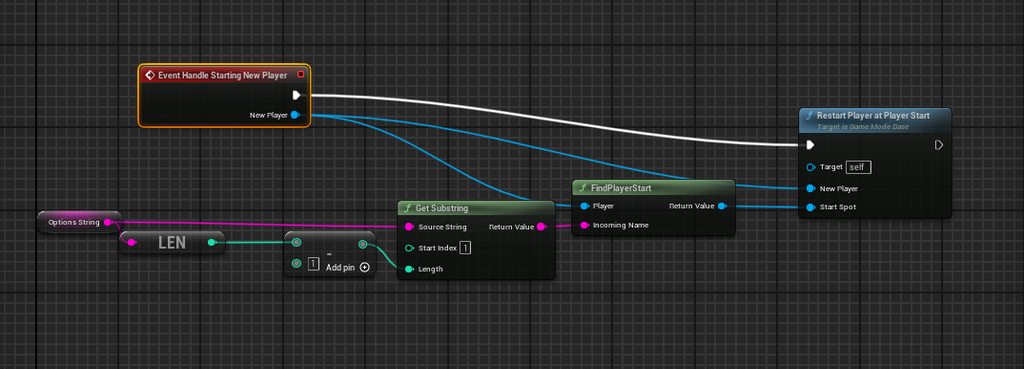 versed sun
What is the Parse Option Node in Unreal Engine 4
Source Files: https://github.com/MWadstein/UnrealEngineProjects/tree/WTF-Examples
Note: You will need to be logged into your Epic approved GitHub account to access these examples files. https://github.com/EpicGames/Signup
 teal widget
heyy, I have a UI that toggles visibility, though there's a bit of an issue with that when it toggles, nothing is hover tested until I click on the UI, and when I disable the UI after clicking the UI my keyboard controls for my player don't do anything until I click
hushed hinge
open garden
I understand, but let's talk more about your props in scene example
So you're s...
Yes but then you are stuck with only having a description
I specifically have an examinable interface
This allows me to determine what on each object's state I want to actually be the examined text, it doesn't have to be a simple description
It can be the object's name and stats, it can be the objects name and some sort of internal description, in contain additional state to actually render a widget instead that has additional information
I'm not directly tying behavior to state, I'm saying hey you need to implement this behavior and however you do that is fine
 primal crown
what have i done to cause this xD
Draw debug string wont be visible


 primal crown
no thats the sphere
i want the debug string to be visible
as in 2nd image its dont exist xd
maiden wadi
Oh. I read that wrong. What version are you on? I remember there being some issues with that.
maiden wadi
I can at least test on 5.4 in a sec.
primal crown
that be nice
im on 5.3.2*
i kinda forgot cus i just usaly run the project xD
even just setting a cordinate in it dont work so its not the for loop
maiden wadi
5.4 is drawing at least.


 keen tinsel
i have an actorthat highlights when overlapping with character , using poste process volume , by enabling "infinite extent (unbound)" , but the issue is that this makes the highlighted actor show through walls , is there a way to acheive the same effect but without the see-through-walls ?
smoky solstice
smoky solstice
Hey, I'm still really inexperienced with UE and this project that I'm working on...
I asked this earlier and someone gave a suggestion to put the launch character before the timeline play input and it didn't fix it but it helped a bit. Now instead of the fov change just throwing my character into outer space it just activates for a split second and then de-activates. This bug only happens on the first dash, after that no fov change happens at all. Any ideas on how I can fix this?


 tropic peak
While spawning an actor, if I do this it should pass the variable value to the newly created actor?
 merry chasm
Is there anybody here who use nanite + RT shadow + foliage with WPO? If I use nanite with ray traced shadow I got this weird shadow artifact 🥲🥲🥲
storm kestrel
I have a very basic question : I created a settings menu but right now it is in the middle of the game, how can I make it visible only when the button is pressed?
keen tinsel
storm kestrel
I have a very basic question : I created a settings menu but right now it is in ...
disable the widget by default , and then enable it/show it on key press
keen tinsel
tropic peak
While spawning an actor, if I do this it should pass the variable value to the n...
yes , sets a new value of the sapwned actor by the getter
storm kestrel
keen tinsel
disable the widget by default , and then enable it/show it on key press
Thank you, where can I disable it by default ?
tropic peak
keen tinsel
yes , sets a new value of the sapwned actor by the getter
thanks, it was the sequence issue 🙂 I expected the item to set its name on spawn, but the variable wasn't set until after it was created
keen tinsel
storm kestrel
Thank you, where can I disable it by default ?
infact , check your BP , u might have added the create widget + add to view port in the begin play somewhere
remove that and put the create widget +add to view port nodes on the key press :
1-"Button" on pressed -> create widget of class ->"promote it to a variable" ->add to view port
2-on released : get "your widget bp variable" Getter ->remove from parent
storm kestrel
keen tinsel
infact , check your BP , u might have added the create widget + add to view por...
Yes I have create widget + add to view point in the begin play of the level
keen tinsel
yeah , activate it through player controller
storm kestrel
keen tinsel
yeah , activate it through player controller
but if I remove that from the begin play of the level, players won't be able to have music and SFX anymore no ?
keen tinsel
those settings are unrelated to the ui , u can activate them whenever , but the settings ui is what u r after
so u can modify the sfx and all through the ui
storm kestrel
keen tinsel
those settings are unrelated to the ui , u can activate them whenever , but the ...
so I can activate them in the game instance for example ?
keen tinsel
well , i dont know much about that , but i think u add those on the level blueprint
assuming theres music for main menu level , and different sfx for different levels
 ivory spoke
Hey, actually I rework some functions and stuff (based on Items and Tool Interaction that I reworked for UObject Approach for Items)
Now I want to Rework/ Include this on my Harvestables (Stones, Ore, Trees) that can be Harvested by specific tools
At this moment I have Stone and Tree Actors and I think about to make an Harvestable Actor where I can choose its A Tree or A Stone (later other can be added)
Because the Logic within the actor is the same (only the loot and the tool needed will differ)
I hit it with specific tool, they lose live, if live is 0 they spawn loot (base functions)
On the Rebuild process of the Item Stuff, I liked to work with UObjects.
My Question is: does it make sense / is it legit to do it also with a UObjects (harvestable) where I can setup specific things (is it a Tree Level 1 or Tree Level 2 (do you need a more powerfull tool?)
What is the loot, what mesh does it have, how many life and so on...
The Actor Holding the Ubjects can respawn on Map (with persistence till they get harvested). Maybe someone has some thoughts on it :)?
storm kestrel
keen tinsel
well , i dont know much about that , but i think u add those on the level bluepr...
They are already in the level blueprint right now
I can send screenshots if you want
 fallow epoch
How do I change the player start location after run time in the Game Map BP?
thin panther
what's the game map bp?
And why do you need to change the location after the game starts, it's too late then
Also, read the #rules
Delete your crosspost
keen tinsel
storm kestrel
They are already in the level blueprint right now
yeah then link those sfx to ur game settings , so whenever a player wants to change something , they would activate the settings ui , and lower/mute ..etc the sounds
dunno how to do that , ima just leading u
thin panther
don't do music in the level bp
put your music anywhere else, like in the level itself
give it a sound mix, and apply a sound mix modifier.
Plenty of tutorials on the subject
frosty heron
keen tinsel
dunno how to do that , ima just leading u
Leading to a wall unfortunately. Level blueprint cannot be referenced by other bp classes. Hence do not use level blueprint
 rough wing
Why do I need to test validity for this code? When I run as client it complains "accessed none" but still works

(error happens if I DONT test validity)
dawn gazelle
rough wing
Why do I need to test validity for this code? When I run as client it complains ...
Because those errors means you're trying to do something when something isn't valid. The IsValid check prevents you from accessing a null pointer.
You're probably doing this on Begin Play of some replicated actor while "Running As Client" and this actor exists on both the server and client. As you're "running as client" that means you're launching a dedicated server which likely doesn't have the Enhanced Input Local Player Subsytem nor can it create widgets (it's meant to be headless, so no UI stuff).
frosty heron
Try to not use get player controller with index in multiplayer
If that's the character blueprint then just use get controller
Also seeing you are trying to add UI. Make sure to guard with is locally controlled so you don't make duplicate UI for every character in the world.

 versed sun
right click these and Find Reference

Go to each one and find what is changing the Rotation X, or something like that

Maybe a screen shake that didnt complete?
 round elk
its every time
im just gonna
add 4 degrees
and fix it later
thats the programmer way
none of them
have any rotation
rough wing
frosty heron
Also seeing you are trying to add UI. Make sure to guard with is locally control...
Thanks I swapped indexed controller to get controller and tested for locally controlled and no more errors
round elk
there are only 3 references
lunar sleet
That’s the Crowdstrike way 😀^^^^
 mellow coyote
Beginner here, question about Attach Actor to Component. Is the attached actor supposed to follow the component around when it moves? Because when I move the plate after attaching the tuna the tuna stays where it was after I attached it (there is only one instance of plate and one instance of tuna at a time which is why I used Get Actor of Class)

 pastel apex
what's the difference between elapsed seconds and triggered seconds?
 maiden wadi
mellow coyote
Beginner here, question about Attach Actor to Component. Is the attached actor s...
maiden wadi
mellow coyote
Beginner here, question about Attach Actor to Component. Is the attached actor s...
It should follow plate. Is the plate reference valid? Is anything detatching Tuna anywhere else? Is this logic actually being ran?
smoky solstice
smoky solstice
I asked this earlier and someone gave a suggestion to put the launch character b...
I feel bad reposting my post over and over but I'm really stuck on this and I would appreciate any help ( again I'm really sorry about all the reposts, I've tried to leave large gaps between when I repost so people have time to respond but still )
 mellow coyote
maiden wadi
It should follow plate. Is the plate reference valid? Is anything detatching Tun...
mellow coyote
maiden wadi
It should follow plate. Is the plate reference valid? Is anything detatching Tun...
Just checked if the plate reference is valid, apparently it is. I also did print string connected to the return value of attach to component and that came out as true. This must mean something is detaching the tuna somewhere else then? I cant imagine what could be doing that. I guess I'll do a deep look through my blueprints then
maiden wadi
mellow coyote
Just checked if the plate reference is valid, apparently it is. I also did print...
Do you do any sort of SimulatePhysics calls or anything?
maiden wadi
pastel apex
what's the difference between elapsed seconds and triggered seconds?
Elapsed time is the time the input has been started and ongoing or triggered. Triggered time is only for time it's been triggered.
EG an input action that has been held for 2 seconds and has a 0.5 second hold timer before triggering would have a 2.0 second elapsed time and a 1.5 second triggered time.
mellow coyote
maiden wadi
Do you do any sort of SimulatePhysics calls or anything?
I used to but those are long gone
pastel apex
maiden wadi
Elapsed time is the time the input has been started and ongoing or triggered. Tr...
ah ok makes sense
so meaning on normal actions as soon as the input has been pressed it will count up until you let go
but for inputs with delay that's where they differ
 harsh comet
Has anyone set up these level instance actors to be used with standard level streaming, rather than having to use World Partition?
 maiden wadi
mellow coyote
I used to but those are long gone
maiden wadi
mellow coyote
I used to but those are long gone
AttachActorToComponent will take the actor's RootComponent, the very top component in it's component list in the BP, and it wil attach that component to the parent component.
So your code there is taking Tuna's root scene component and attaching that to the Plate component.
If for any reason you simulate physics, detatch it etc it won't follow the plate anymore. Also to note. Your Root might still follow, but you could have detached a static mesh display of the Tuna from the root as well, which would cause the "Tuna Actor" to follow Plate, but note the static mesh component representing Tuna's visuals.
Either way though, attachment should definitely cause it to follow.
maiden wadi
pastel apex
but for inputs with delay that's where they differ
Pretty much
mellow coyote
maiden wadi
AttachActorToComponent will take the actor's RootComponent, the very top compone...
Thanks for the info, I think I figured it out. Pretty sure something is detaching it in my "pick up objects" code, I'm gonna rework it and see if it works any better
 mystic canopy
@help
I'm using this code as a double jump in my game, it adds 700 velocity on the second jump to the players z access.
My problem is that if i double jump quickly it send the player flying up. I believe because the initial velocity is high at the beginning of the jump the second jump adds +700 on top of the original velocity. i just want the second jump to be the same as the first jump. is anyone able to help me?

 languid spear
mystic canopy
@help
I'm using this code as a double jump in my game, it adds 700 velocity on ...
languid spear
mystic canopy
@help
I'm using this code as a double jump in my game, it adds 700 velocity on ...
you could try using a clamp node to make sure velocity doesn’t exceed a certain amount
mystic canopy
languid spear
you could try using a clamp node to make sure velocity doesn’t exceed a certain ...
thankyou ill give that a go
crude dew
maiden wadi
The why is both because computer numbers don't normally go that high, and becaus...
Indeed just like in DIablo 4 theres no way to tell how much damage your doing accurately because theres A : 1000 Damage widgets all on screen at once or they are so long you cant read them in time anyway xD
 stuck fossil
Hello, hope you all are having a pleasant evening. I have a question hopefully someone knows the answer to and I'm just being dumb.
In the blue box I have a system to check for interactable actors within range of my player. In the other screenshot I have a demo of one of the base objects, (in this case, a key) with an editable text variable. With this line trace, is there any way to try and snag the information in that text variable so I can pass it in to my player character? I'm drawing a blank.

 graceful sage
stuck fossil
Hello, hope you all are having a pleasant evening. I have a question hopefully s...
graceful sage
stuck fossil
Hello, hope you all are having a pleasant evening. I have a question hopefully s...
On the trace break thr hit result to get s reference to hit actor
 tough frost
how do i enable/disable a component in the child actors all at once?
 frosty heron
What does enable and disable even do in this context?
tough frost
object is grabbable or not
frosty heron
I would just not use child actor component all together, they are known to break.
tough frost
what would you suggest?
frosty heron
For?
I don't know how your ladder is designed
If I have to do it I probably have sockets in the static meshes, these would be the point where the character can grab onto
dark drum
tough frost
what would you suggest?
Actor component, you can create a child of the static mesh component (if it needs to have a visual aspect) and then add additional logic. In the latest first person template, epic do this for the gun and it's logic.
tough frost
hmm ill have a look at that template for referemce
 hidden peak
How i can to attach actor which is simulating physics to my right hand socket, i wast trying to make attach actor to actor/component component to component but when this actor is simulating physics his mesh is not moving
dark drum
hidden peak
How i can to attach actor which is simulating physics to my right hand socket, i...
Whats you're end goal?
hidden peak
dark drum
Whats you're end goal?
To attach enemies leg to my right hand to hide enemies body
sacred birch
faint pasture
Do you know anything about programming at all?
I know some basics though
dark drum
hidden peak
To attach enemies leg to my right hand to hide enemies body
It sounds like you might need to use physics handle component. This allows you to 'Grab' a physics actors and move it around while it still simulates physics. (in relation to the grab point)
hidden peak
dark drum
It sounds like you might need to use physics handle component. This allows you t...
I know this way but it looks kinda weirdo
I need exact to attach actors 1 thing to move him away
I already made this one thing that you said
sacred birch
Can someone tell me what type of technical and non- technical questions can be asked regarding blueprints to a Game Designer Intern and Junior Level Designer? I am a fresher with no company experience prior, just completed my degree, just landed 2 offers due to my individual works..
hidden peak
sacred birch
Can someone tell me what type of technical and non- technical questions can be a...
Where are you posting your invidual works to get offers?
sacred birch
hidden peak
Where are you posting your invidual works to get offers?
Applied through LinkedIn and surprisingly got selected
hidden peak
Wow gratz 🙂
sacred birch
hidden peak
Wow gratz 🙂
Thank you but kinda difficult to crack interview due to no experience
hidden peak
sacred birch
Thank you but kinda difficult to crack interview due to no experience
Just say everything what you know
That`s the key to succes on interview i guess
sacred birch
That's why I wanted to know what type of questions can be asked
hidden peak
dark drum
It sounds like you might need to use physics handle component. This allows you t...
So do you know any other solution
sacred birch
hidden peak
Just say everything what you know
But technical round is what seems difficult
hidden peak
dark drum
It sounds like you might need to use physics handle component. This allows you t...
Also one more issue with this solution is that only mesh is moving but capsule component is still staying there
hidden peak
sacred birch
But technical round is what seems difficult
I guess if you got selected you will handle it
sacred birch
hidden peak
I guess if you got selected you will handle it
Hoping for the best
 zealous forge
can someone help me with turning Reids channel blueprint into a simultaneous turn based?
i was thinking of adding a 3rd player that does all the turn executions, but it breaks the template
hidden peak
As you can see it`s kinda weirdo
rose crest
Hi. Is there a way to force rotation adjustment only 1 way? CW only not shortest route
dark drum
sacred birch
Can someone tell me what type of technical and non- technical questions can be a...
I would imagine this would depend on the company. Personally however, other than being able to modify default values in blueprints and place assets in the level I probably wouldn't expect them to know more than that as most of the design work would be done outside UE. After all, designing and implementing are very different parts of development. Granted the lines can get blurry, especially in smaller companies.
The job application would probably shed more light in terms of what the company would be expecting though.
tropic peak
Is there a node that checks if a socket is occupied?
merry chasm
Hi guys 🚀 ,
Is there anybody here who use Ray Traced Shadow + Nanite + Foliage?
I have this issue:
https://forums.unrealengine.com/t/weird-shadow-with-nanite-rt-shadow-foliage-wpo-ue-5-4-3/1945306

Epic Developer Community Forums
I got weird shadow if I use foliage with ray traced shadow and nanite. Any idea why?

 spare sentinel
hey i have a huge problem
i need to set every player controller a TEAM in LOBBY
then when i start the game on event begin play i need to get every team of every controller
how can i do that?
rose crest
merry chasm
Hi guys 🚀 ,
Is there anybody here who use Ray Traced Shadow + Nanite + Foliage...
its because shadows are based on normal mesh, nanite is skipped and you have miss alignment. theres vide on UE channel explaining this behaviour
rose crest
spare sentinel
then when i start the game on event begin play i need to get every team of every...
use player state
spare sentinel
i set variblae in player state? and on event bgein paly i can read every team from every controller?
rose crest
you can access all playerstates array and loop for team variable to do whatever you want
merry chasm
rose crest
its because shadows are based on normal mesh, nanite is skipped and you have mis...
So currently there is no fix for this?
What about nvrtx branch?
rose crest
merry chasm
So currently there is no fix for this?
I don't know if there's workaround
spare sentinel
andaron can you explain how can i do this? im nooby^^
rose crest
you're doing multiplayer, so you can use player state to keep information about individual players. then game state have access to all PS array and you can make function in game state to assign team or whatever you want.
because it should be game state (server) that decide who scored etc.
and inside multiplayer game player controller shouldn't contain any crucial information. its local only
The following pages will explain some of the most Common Classes in Unreal Engine's "Gameplay Framework". It will also provide small examples of how these classes would be used.
dark drum
versed sun
How did you get two return nodes with different return values showing?
 woven pond
Not sure if this should be here or in Multiplayer (I asked in both after seemingly being passed over in the other) but it is for blueprints so here goes. (Context: turn-based multiplayer ability/action) when selecting an ability/action is it best to spawn a separate actor with collision and a decal for target previewing on the player controller for owning client and pass through a location/transform and class for the server to spawn effects/tags on targets etc.... or should the spawned actor be run on the server from the player controller and looped through by the server for actors of class to spawn effects/tags and show/hide the decal as appropriate...
TLDR - should spell previews be a seperate actor or not from the ability/action? (for extra clarity well maybe.... think the building preview before placing a building in an rts e.g spawn and just change material or have 2 actors one local for preview and one spawned on server for placement)
spark steppe
dark drum
How did you get two return nodes with different return values showing?
probably copy pasta
rose crest
woven pond
Not sure if this should be here or in Multiplayer (I asked in both after seeming...
I'd say SFX on client via multicast, results with rep/notif
and if it's actor spawned (skill) then server
now it depends of your gameplay, do you want other players to see preview?
it not then do it locally
maiden wadi
odd kiln
Anyone has good tips / tutorials for a "saving" system ?
Are you C++ capable?
odd kiln
maiden wadi
Are you C++ capable?
Is C++ better to save things ? Even if I made all my game in Blueprint ?
woven pond
@rose crest thank you, the skill part would be the effects/tags and will be on the server as for gameplay yes others to see but i was just thinking of multicasting within the Action/ability actor once placed to show the team a transparent version of the decal preview
confusion for me comes from having a decal for the preview/targeting and matching collision to this then doing it again later when activated for applying/spawning effects/tags to the same set of targets once activated
spark steppe
odd kiln
Is C++ better to save things ? Even if I made all my game in Blueprint ?
yes and no
odd kiln
Because I also want to make it "Aysnc" so I can use a "Loading Screen" and a "Saving..." text (UI)
maiden wadi
odd kiln
Is C++ better to save things ? Even if I made all my game in Blueprint ?
Sort of. It mostly has access to a specific function BP does not named Serialize.
I wrote these recently which I should also tag @dark drum for.
https://brandtborges.wixsite.com/authaer/post/saving-games-smartly
https://brandtborges.wixsite.com/authaer/post/uobject-serialize
Authaer
A cornerstone to games is the ability to save and load them. This is true whether you use a simple checkpoint system or a full blown full world saver that saves everything down to the current animations playing.Saving a game can be a daunting task if you're new to the idea though. Consider all of the things that make up your game. Everything fro...
Authaer
The Serialize function from the UObject class is a key feature in the engine that surprisingly few people know about. It isn't talked about much despite how powerful it is for game design. More specifically saving a game smartly.Serialize is a very simple function that performs two basic tasks.It takes properties from a UObject and writes them i...
odd kiln
maiden wadi
Sort of. It mostly has access to a specific function BP does not named Serialize...
So "Serialize" makes Saving easier and it's only available in C++ if I understand correctly, right ?
maiden wadi
odd kiln
So "Serialize" makes Saving easier and it's only available in C++ if I understan...
Correct. To paraphrase what I wrote in those blog posts. It simply takes the desired data from a UObject. Which means any UObject, including Actors, and Components. And it writes their data to a generic byte array. And it also reads from a byte array and restores the data back to the objects.
It keeps you from creating specific structs and having to do a lot of upkeep.
spark steppe
downside of that is that it saves pretty much everything (which can bloat your save game size)
odd kiln
spark steppe
downside of that is that it saves pretty much everything (which can bloat your s...
Why is it a bad thing to save everything ? I mean in which situation I would not like to save everything ?
maiden wadi
spark steppe
downside of that is that it saves pretty much everything (which can bloat your s...
It does not save everything unless you specify for it to.
spark steppe
i think it would even serialize default values!?
spark steppe
maiden wadi
It does not save everything unless you specify for it to.
ok, thought it would save anything but Transient uprops
dark drum
spark steppe
downside of that is that it saves pretty much everything (which can bloat your s...
Only variables marked with the 'SaveGame' flag ticked from my understanding.
maiden wadi
You make an ArchiveProxy struct which you define yourself and you can tell it to only save SaveGame marked properties. Which you can mark in BP as well.
odd kiln
maiden wadi
You make an ArchiveProxy struct which you define yourself and you can tell it to...
When you say "SaveGame" marked, you mean each variable in my Character Blueprint will have this "checkbox" that I should check/uncheck, or the whole Blueprint Actor has this checkbox ?
maiden wadi
SaveGame is third from the bottom.
 odd kiln
What I clearly want to do is to save all of my variables of all of my actors in my game, and their positions etc...
So I will have to check this for all of my variables
maiden wadi
If you want to save everything, you can do that with specifying IsSaveGame in the archive proxy as false. This will save everything.
odd kiln
That I want to be saved
So in the end you recommend me to use the "Serialize" thing and save everything by default ?
Or is it better to check manually what I want to save ?
spark steppe
dark drum
Only variables marked with the 'SaveGame' flag ticked from my understanding.
but what about things where you can't control it? as inherited variables
maiden wadi
The general idea with this is that you would save a struct of data relating to the object. Their Class, Name, Location(if they have one), and a TArray of uint8 as a byte array that saves everything else about them.
With the name, class and location, you can respawn them as the same class, at the same location. After you have spawned everything back in, you can run back over them and restore all the rest of their data.
odd kiln
Ok. I was just thinking about why it's not good to save "everything" by default
For example, all of my "walls" etc... that I don't need to "save"
maiden wadi
Depends on game size and how you structure the game. Saving everything can lead to some massive files sometimes. In other games saving everything doesn't mean much since it's only a few things.
odd kiln
It's a big open world game so I guess it's better to use this "SaveGame" flag
I just need to set some "TriggerBoxes" so when my Character overlaps them it saves his location etc..
maiden wadi
Still depends on how you structure the game. >95% of your open world is loaded from the map. You only need to save the dynamic stuff you spawn in, or affect on the default map and gameplay systems around it.
Consider a game like Skyrim. You enter a city. It unloads everything outside of the city. It doesn't exist at the moment except for some simulated stuff that doesn't exist in the world. You leave the city. You spawn stuff in around the city, but all the city stuff is unloaded and no longer exists except for simulated stuff.
You only save what is necessary to restart at that point. You won't save a massive map with hundreds of thousands of actors.
odd kiln
So now I don't know... is it really necessary to use the "Serialize" whereas I just need to save my Character variables and some actors variables ? Is it worth it to use C++ also ?
I mean I could make a "Struct" for my Character, and then a "Struct" for each actor that I want to be saved ?
Or one "Struct" for my Character, and one "Strcut" for all other actors ?
 paper yacht
hey I'm spawning Bomb (Actor)
using simple logic. which is working perfect. but suddenly sometimes. Bomb getting destroyed within second.
First image spawning from PAWN
Second image Bomb complete blueprint.
it's weird problem. what can be reason of disappearing actors.
it's spawning correctly but sometimes it's instantly getting destroyed. without effects and all

 odd kiln
maiden wadi
Still depends on how you structure the game. >95% of your open world is loaded f...
odd kiln
maiden wadi
Still depends on how you structure the game. >95% of your open world is loaded f...
So for example if I am in a "City" and I do some actions, I only need to save all the Actors in the "City", it's unnecessary to save again the whole game, right ? Or should I only save the Actor related to the action I just did ?
maiden wadi
Can't exactly answer that easily without knowing project structure. Cause if your city is all just simulated. And you drive that off of some property somewhere in like a primary actor or subsystem. And interaction with an NPC does stuff that doesn't require the NPC to be saved, then there's no point saving the NPC. Just restart it and update the sim time and reset the other stuff.
You won't find many guides on how to save a large world like that. It's far too complex of a topic and personal to the project.
But the serialize function at least gives you the ability to generically save the things you do choose to save and restore. No need for a lot of extra structs and conversion functions for each one around your save system.
odd kiln
maiden wadi
Can't exactly answer that easily without knowing project structure. Cause if you...
Ok I understand I will investigate on this. I just don't know if I have to make only ONE "Struct" for all of my "Actors" except my "Character" or ONE "Struct" by "Actor"
maiden wadi
You mean to use the serialize stuff?
odd kiln
maiden wadi
You mean to use the serialize stuff?
I don't know if it's worth it
And if I use the "Serialize" stuff it will save all the data with the flag "SaveGame" set to true so if I only want to save the "NPC_01" in the "City_01" it won't be possible
maiden wadi
You pick which actors to save yourself. the SaveGame marker is on the properties in the actor.
odd kiln
maiden wadi
You pick which actors to save yourself. the SaveGame marker is on the properties...
So even if I have 5 Actors in the City with the SaveGame marker set to true, after an action I can save only one of the 5 ?
odd kiln
maiden wadi
You mark properties on the actors.
Ok I understand. The good thing with the "Serialize" thing is that I wouldn't have to do a unique Struct by Actor
I guess
Because I have to name all of the variables in each Struct etc..
maiden wadi
Correct. It cuts out a massive portion of the dev complication and upkeep. Which also cuts out possible bugs and whatnot as well. For example if I wanted to save my PlayerCharacter, GameState, and GameMode. I would do something like this. In my system that takes in an array of objects of any kind and calls serialize on them to add them to an array of FSavedObjectData structs like I mentioned above with the Name, Class, Location, and TArray<uin8>.
 odd kiln
maiden wadi
Correct. It cuts out a massive portion of the dev complication and upkeep. Which...
odd kiln
maiden wadi
Correct. It cuts out a massive portion of the dev complication and upkeep. Which...
Ok I guess I have to test it right now. I will look for a tutorial
 willow gate
Hey folks. Random, general question to ask you:
Which BP do you generally play your level music on? In the past I have just put an audio actor in the level and used that but would best practice be to place it in the GameInstance maybe?
odd kiln
maiden wadi
Correct. It cuts out a massive portion of the dev complication and upkeep. Which...
I don't find any tutorial of Serialize for saving game data.. do you have one maybe ?
 wild sage
Hello, i'm using SceneCaptureComponent2D to create a minimap, but now the performance is really poor, what the best pratices and config to create a mini-map without performance impacts?
 minor geyser
Hey everybody, I have a quick question about categories that I have never been able to figure out. I am in UE5.1 using blueprints but some of the engine categories are showing before my custom category, is this fixable? I have a picture below showing the "Replication" category which is an engine category not custom appearing over my custom category called "my category". I know how to reorder categories that I made but I don't know how to do it when it's UE's categories

 harsh coral
Quick question...in hindsight I think I may have made a mistake using a normal "blueprint actor" class for our modular character setup and I might have done better using the "charactor actor blueprint".
For example: I can´t simply add an animation track to the blueprint, when I add it to the sequencer, I either have to use the lead pose components skeletal mesh or add all skeletal meshes separately.
I also have issues with the lead pose component crashing unreal with Unreal 5.4 and I have to use a workaround now.
I was originally planning to add other stuff like light fixtures and backgrounds that I removed later on.
I still have a couple of empty actors I use to mass resize linked skeletal meshes.
Can anybody tell me wether its possible to change the blueprint class after creation or how I could salvage what I´ve already built (with dozens of variables and functions...)
?
 outer terrace
ok.. this is really bothering me now.. anyone know how to save default locations for blueprint window? somehow my event graph and construction script tabs are default split screening with my viewport... even if i move them back up top .. when i close and reopen any blueprint it defaults to this location.. this is on a brand new computer with a new install of UE..

even if i save / load default layout it goes back to this.. and if i save a custom layout it still goes back to this.. so idk if theres a corrupt setting thats not loading .. but i'm not getting any errors on starting a project.. (launching from Rider)
 stable bane
Hi! Can anyone tell me how to avoid this issue? Trying to add a random rotation to a selected static mesh from my array. Fairly inexperienced with Construction script. Any help appreciated :) Please tag @ me if you respond. Thanks! <3
 dark drum
stable bane
Hi! Can anyone tell me how to avoid this issue? Trying to add a random rotation ...
dark drum
stable bane
Hi! Can anyone tell me how to avoid this issue? Trying to add a random rotation ...
You array is an array of static mesh objects. These aren't spawned in the world. You'd need to either set the relative rotation of the static mesh component or the actor it's inside.
stable bane
dark drum
You array is an array of static mesh objects. These aren't spawned in the world....
Ah, that worked I believe. Though It seems I have a new issue. I want to add random rotation to my meshes but it simply wont work. Just doesnt do anything (no error or something). Any idea?
 narrow pendant
I am trying to make a custom gravity system where gravity can point in a random direction.
I am having trouble orienting the pawn towards the gravity direction while still allowing for player input to turn the pawn on its local Z axis.
I have this setup which sort of works but there's a ton of jank when gravity points in certain directions (1,0,0) and (0,1,0) and a moderate amount of jank otherwise 😄
Video 1: rotation with world up direction (0,0,1) (working as intended here)
Video 2: rotation with world up direction (1,0,0) (things are going wrong)
Video 3: rotation with random world up directions (kind of works but pretty janky)


 mighty crown
are inherited interfaces broken? I have some BP code on a child class but my inherited interface isn't triggering it's event. I can see it as an inherited interface on the child class and I'm still calling it properly. Not sure what's up.
round elk
um elaborate
dark drum
stable bane
Ah, that worked I believe. Though It seems I have a new issue. I want to add ran...
If the component is the root of the actor, use set actor location instead. (leave the target as self)
dark drum
mighty crown
are inherited interfaces broken? I have some BP code on a child class but my in...
If you use the interface in a child and still what the logic to call from the parent, you need to add a call to parent node. (right click on the event to find the option)
dark drum
narrow pendant
I am trying to make a custom gravity system where gravity can point in a random ...
The character movement component handles gravity direction to keep the capsule component upright. You'll need to update it to have the character orientated correctly.
Alternatively, if you set the characters movement mode to flying, you can rotate the character freely if you want to handle it yourself.
 narrow pendant
dark drum
The character movement component handles gravity direction to keep the capsule c...
narrow pendant
dark drum
The character movement component handles gravity direction to keep the capsule c...
I'm aware of cmc handling gravity direction however I'd like to replicate it with pawn class
so I guess the more general question would be, how do I orient a pawn in some direction while also allowing user input to further add to that orientation?
round elk
 white thicket
add default slot in animation bp
white thicket
add default slot in animation bp
what
 round elk
im using a montage
dark drum
round elk
im using a montage
Montages play on slots that you add to your animation BP. Without a slot, the montages have nothing to play on.
 frail onyx
Anyone know how to fix Aiming down sights with my weapons? So if i have one weapon equipped and i play the timeline to move the weapon into the center to aim down sights and then i switch to my other weapon and then let go on my aiming down sights input it wont stop aiming down sights
im using inheritance for it and was mostly following this tutorial and whole series to try and figure it out https://www.youtube.com/watch?v=94HpeqlgKAs&t=550s

We continue on in our FPS tutorial series. In this episode we cover one way of how to switch weapons; from a main primary weapon, to a sidearm.
Support me on Patreon and get access to videos early, join our developer community on Discord, get exclusive behind the scenes videos on my projects and much more over at https://www.patreon.com/ryanlal...
round elk
dark drum
Montages play on slots that you add to your animation BP. Without a slot, the mo...
thank
frail onyx
frail onyx
im using inheritance for it and was mostly following this tutorial and whole ser...
My main goal is i want the player to be able to hold down the ADS button to ADS on one gun and then switch weapond and stay ADSing if they are still holding down the ADS button but then if the player lets go it will stop the ADS
 remote rapids
hey i have question

so in out 0
i want that until this branch is true Out 1 is not going to exeute
can i do that? and how?
odd kiln
Does anyone already made a Save System with Serialize stuff ?
smoky solstice
I have a sound that I want to loop when you start sliding and stop when you stop. How can I disable this loop at the point I want to?

 barren tangle
hello
mighty crown
dark drum
If you use the interface in a child and still what the logic to call from the pa...
I fixed it. I just had a stale reference to my anim BP that was the target to my reference. Thanks
round elk
dark drum
Montages play on slots that you add to your animation BP. Without a slot, the mo...
could you elaborate how to add one
maiden wadi
round elk
could you elaborate how to add one
https://dev.epicgames.com/documentation/en-us/unreal-engine/animation-montage-in-unreal-engine
https://dev.epicgames.com/documentation/en-us/unreal-engine/animation-slots-in-unreal-engine
Epic Games Developer
Animation Montages are animation assets that enable you to combine animations in a single asset and control playback using Blueprints.
Epic Games Developer
Insert entry-points within your Anim Graph to play animation from using Slots.
narrow pendant
round elk
could you elaborate how to add one
https://youtu.be/9a1xpCA6maI?feature=shared
right click in the ABP and search for "default slot" it should come up

 round elk
narrow pendant
https://youtu.be/9a1xpCA6maI?feature=shared
right click in the ABP and search f...
round elk
narrow pendant
https://youtu.be/9a1xpCA6maI?feature=shared
right click in the ABP and search f...
i know im being dumb but whats wrong here, it still doesnt work

the skeletal mesh im using looks like this


this is the code
ignore the branch
 versed sun
dark drum
How did you get two return nodes with different return values showing?
versed sun
dark drum
How did you get two return nodes with different return values showing?
ha , looks like an accident
I wanted a Static Mesh Input but made it an output before compiling
narrow pendant
@round elk
go through this course
https://dev.epicgames.com/community/learning/courses/kry/unreal-engine-build-a-third-person-character-from-scratch/LL96/unreal-engine-build-a-third-person-character-from-scratch-overview

Epic Games Developer
Using the "Stack O Bot" project to build a third-person character that includes movement, cameras, animations, and a jetpack.


 dire light
my enemy doesn't take damage when bullets touch him. can anyone help?


 round elk
it was helpful
 rancid monolith
Is there a viewer for .uasset files to see for example the blueprint nodes and components (I have an Unreal Project but cant open it rn but still want to have a look at the contents)
round elk

um
i followed the course
however
im using the horrorengine character
and for some reason it isnt animating at all
nevermind
I was being stupid
i got it
tysm
narrow pendant
round elk
im using the horrorengine character
the pawn was not valid? 😄 not sure what horrorengine char is but glad you figured it out. stick with the epic courses over youtube tuts, they're really good and the info you get there is 100% true and probably best practice
round elk
yeah
nah its just got its own stupid walkspeed variable
rather than the default
and I also attached the blueprint to the wrong mesh
so
yeah
 abstract pine
the data type of variable in event didn't match with the original. When Event being called, UE automatic change the data type.
The "Target " original suppose to be Object Ref type but when event ROS_Intereact being called UE change the data type of "Target" to Blueprint First Person Object Reference.
The data type didn't match with each others, I couldn't connect return value of "Get Overlapping Actor" function to ROS Interact because data type being change automatically from " Obj Ref" to " Blueprint First Person Object Reference"
How do I fix this ? thank you

The data type of Target in ROS_Interact suppose to be Object Referece no matter what ? It just change to "Blueprint First Person Object Reference" when being called
spare sentinel
im traveling with 2x different game modes 2x differnt palyer controllers
but the event ---" on swap palyer controllers"" ing game mode doesnt fire
why?
abstract pine
abstract pine
https://youtu.be/aMDuEYf9j3c
here is how it should look like from the instructor course . thank you
 grave relic
Hey!
I have a system where I pick from the ground of life.
However, when I pick up life on the ground, my life bar only updates if I take damage.
Which means that if I am at 50 life points, I pick up life on the ground which gives me 20 life points, from that moment on, my life bar does not update.
I have to take damage to see the 20 extra health points displayed. For what?
I have two classes for characters. A parent class "BP_Character" and the child "BP_Hero".
The hit point system is in the parent class.
In the "BP_LifePickup" file which is the object on the ground, I do the following code:
 lunar sleet
Show the code in the parent class
spare sentinel

im traveling from 1 map to another map
the ecent on swap player controllers doesnt start?
lunar sleet
spare sentinel
the ecent on swap player controllers doesnt start?
Probably not what that event is for
Try OnPossess
spare sentinel
i want igve variable from lobbycontrolelr to gameplaycontroller?
grave relic
lunar sleet
Show the code in the parent class


 dawn gazelle
- used to swap a viewport/connection's PlayerControllers when seamless traveling and the new GameMode's
- controller class is different than the previous
So seamlessly travel and have a different player controller class than the previous level
lunar sleet
spare sentinel
i want igve variable from lobbycontrolelr to gameplaycontroller?
Nvm it finally computed lol
Anyways when you open a new level you’re probably destroying one and spawning another not swapping, like Datura pointed out
spare sentinel
im seamles traveling from 1 map to antoher
with different controllers
the event doesnt fire
grave relic
grave relic
Did I do something wrong?
spare sentinel
her iam traveling

this event dont print string hello
i have 2x different player 2x different game mode
 odd valve
How do I keep this from overlapping with the box collision twice?
 versed sun
Check the Component against something on the projectile
It fires on each component that collides, Mesh and Collision I'm guessing
You can turn the collision off on the projectile's Static Mesh
 vast flume
So basically my goal is to change the default gun in the fps template to a different gun instead of writing a whole lot of code and what not, so im going to change it to a pistol and i guess change the projectile as well. My only issue is the way the player will hold the gun, a pistol is way smaller than a ball launcher so is there a simple way to make the hand to a part of the gun using its skeleton???
it probably sounds lazy but its part of a challenge between me and a few of my classmates. Thank for any help, even telling me what to search on the web for would help as well.
versed sun
I believe there are free assets on the marketplace of Manny arms holding pistol animations
vast flume
versed sun
I believe there are free assets on the marketplace of Manny arms holding pistol ...
so here is my issue, how do i impliment those assets?
versed sun
I haven't done animations or first person stuff since learning years ago I just remember using the assets for similar purpose
vast flume
thin panther
read the <#809148428922781737> as well. Crossposting is not allowed
i thought the other didnt go thru since i had bad connection, just a mistake
 winged zephyr
How do I enable enhanced input on my camera actor as it does not seem to know the IA_Look listener?
 vast flume
versed sun
I haven't done animations or first person stuff since learning years ago I just ...
vast flume
versed sun
I haven't done animations or first person stuff since learning years ago I just ...
thank you i will google a tutorial, whats the gist tho? am i replacing default animation? or am i calling on a animation when the gun is attatched to me
versed sun
You use a different animations that adjust your hands and fingers to look like you are holding a pistol, and firing , and reloading
thin panther
vast flume
i thought the other didnt go thru since i had bad connection, just a mistake
Makes sense! Discord can be a real pain sometimes lol
vast flume
thin panther
Makes sense! Discord can be a real pain sometimes lol
do you know how to change the mesh of the default gun for the fps template
thin panther
Yeah, you can just go into it and swap the skeletal mesh for a new one.
It's going to be more complex than this though. As mentioned you'll need a new set of animations, in some cases have to adjust some IK, and make sure the animations you have fit the skeleton
vast flume
https://forums.unrealengine.com/t/how-do-i-swap-out-the-default-fps-gun-mesh-for-my-own-custom-imported-gun-mesh/633813
seems like this forum has it fixed but im not sure if its uptodate
https://www.youtube.com/watch?v=Kys22RDQecU
same issue here, seems to be out of date as well
thin panther
You'll either need new animations, or target your mesh to the existing ones
For a pistol, you'll need new ones
vast flume
thin panther
Yeah, you can just go into it and swap the skeletal mesh for a new one.
It's go...
do you mind joining the vc, becuase I was able to replace the gun, but once i run over it and pick it up, it change back do the original BP even if I set to be hidden in game. Before pick it up, my model, after picking it up, old one!
thin panther
Unfortunately I don't do VC
check the gun's logic for picking up, it's probably spawning a different actor, would be my guess.
 keen kite
Does anyone know how come actors are repeated in my array? I tried using the "add unique" array node, but it still sometimes prints repeated entries. I thought Array + CONTAINS + NOT boolean would keep repeated instances from being added.
 vast flume
hmmm, where can i find the actor? so i can just force it to call my pistol mesh
thin panther
Find the actor that the pickup is, and you'll be able to find it's bp
vast flume
thin panther
Find the actor that the pickup is, and you'll be able to find it's bp
what do you mean? ive went and serch around for where it says which weapon to pick up
ive even tried changing the skelaton mesh to my piston but its till not working
 thin panther
Notice how that pick up spawns a BP Weapon Component
Sure enough, if you open it, you see a skeletal mesh in there
And sure enough, changing the mesh there changes the pickup

However, again, if you want it to really work you're gonna have to have new arm animations, some weapon animations, and whatnot
vast flume
got it
do you think it might me smarter to just make a system for shooting projectiles and then adding a pistol anim?
thin panther
I would ask firstly if you need actual projectiles at all.
In any case, I would not piggyback off the first person template. It does things very unusually.
vast flume
thin panther
I would ask firstly if you need actual projectiles at all.
In any case, I would...
hmm...
if i am being serious, i just need to get a pistol that shoots something. fastest, easiest, laziest way possible. do you have any suggestions?
50$ riding on this compition 😭
thin panther
vast flume
if i am being serious, i just need to get a pistol that shoots something. fastes...
Buy a premade pack
However fast, easy and lazy don't win competitions :P
vast flume
thin panther
Buy a premade pack
like what do you mean? from the marketplave
thin panther
yeah
vast flume
damn this is going to be a search ngl
what should i search becuase everyting i fiund is too much for what im going for, i just need to able to shoot a pistol lol
thin panther
It will be too much
You aren't going to find exactly what you want. Exactly what you want isn't worth hosting on the marketplace, there's going to be extras
But you don't have to use it all
vast flume
yea im just thugging it out on yt
last resort is paying someone to make a simple pistol shooting
grave relic
I have a system where I pick from the ground of life.
However, when I pick up life on the ground, my life bar only updates if I take damage.
Which means that if I am at 50 life points, I pick up life on the ground which gives me 20 life points, from that moment on, my life bar does not update.
I have to take damage to see the 20 extra health points displayed. For what?
I have two classes for characters. A parent class "BP_Character" and the child "BP_Hero".
The hit point system is in the parent class.
In the "BP_LifePickup" file which is the object on the ground, I do the following code:


 gaunt lion
Hey im wondering if someone could help me change the camera with the scroll wheel. When I scroll in I want it to be first person and when I scroll out I want it to be third person. I want to do this with 2 separate keys not just with one. If someone could help me that would be great. If there are any videos that would help or anything feel free to send a dm ( FIXED )
 gusty dragon
with displacement in 5.4 how do I make footprints in the ground? is it possible
 grand surge
IN game animation sample i wanna implement a feature to aadd when player runing it will play a voice after 4 seconds than players stops voice speed will become slower and for 2 seconds
barren tangle
hey, i see that i can modify the lenght of a timeline

can i also add a track and point to that track??
because i would like to add 2 points one at 0 value 0 and the other one at Speed value 1
or it's not possible?
 steady night
is there a way to check which level is opened ?
fiery swallow
steady night
is there a way to check which level is opened ?
"Get current level name"
steady night
ty
 dense garnet
Hello. How are you? Hope, this is the right place.
So, I have been trying for 2.5 days to figure this out. I have researched every "solution" I can think of. I have even ask 4 AIs too but the "solutions" they all gave. Did not work for me. I feel I am close but I am no longer sure how to fix it. I would be very grateful for your help.
Please see video.
What is Purpose/Goal of Ball???
-The ball launch forward (or backward if player desires) in the direction of the camera not the world axis.
Here is blueprint. Thank you. 🙂
 barren tangle
dense garnet
barren tangle
dense garnet
it's not the camera
it's the pawn
are u sure that ur pawn rotate correctly and not just the camera?
if your camera rotate over your invisible pawn
the get forward vector will be on the same direction
reason why you are pushed back instead of forward
barren tangle
dense garnet
try something like that
 dense garnet
barren tangle
try something like that
dense garnet
barren tangle
try something like that
O_O trying now..
Sorry, still kinda new at this. Only started in mid-May
barren tangle
we are all new 😄
dense garnet
barren tangle
we are all new 😄
I guess. I am new-er 😛 hahaha
barren tangle
i guess into your add movement input
dense garnet
barren tangle
i guess into your add movement input
Did not work 😦

Still launches in the world direction/axis.. not the camera direction/axiws
barren tangle
?but you are into a dash function or in your movement function?
barren tangle
dense garnet
Did not work 😦
and if u try to multiply your impulse by ur forward vector

before adding it to the impulse?
dense garnet
barren tangle
and if u try to multiply your impulse by ur forward vector
Still no work. 😦 lol
 dense garnet
barren tangle
no our old implementation
dense garnet
barren tangle
no our old implementation
 dense garnet
barren tangle
no our old implementation
dense garnet
barren tangle
no our old implementation
Oh... okay, I will try again
barren tangle
or the camera movement attached to an invisible pawn?
dense garnet
"Add Movement Input" is a function/node.
I saw it in one of the "solutions" I reseaarched.
I am not entirely sure if it will help.
dense garnet
barren tangle
yes i know
Did I answer your question? 😦
barren tangle
because it's attached to self
dense garnet
Aaahh... the ball???
dense garnet
barren tangle
so self = the ball?
 barren tangle
k
 faint forge
Basic question about flow in BPs:
in my GameMode I´m calling a Component´s function, which has a **ForEachLoop **and a **bool ** and a return node on complete.
After I use this function in my GM, Im getting a correct check of the variable as true, but I wonder if I am just lucky or really the flow is happening after the foreach.

 dense garnet
barren tangle
k
dense garnet
barren tangle
k
Sorry for wait.
Had to re-record. Size too big.
barren tangle
dense garnet
Sorry for wait.
Had to re-record. Size too big.
so to clarify
you want to have a dash when you press a key?
correct?
dense garnet
barren tangle
so to clarify
No, I want to have dash
in direction of camera.
barren tangle
when you press a key
dense garnet
barren tangle
correct?
Yes.
Dash is working when I press key
But problem is
it only dash-ing in direction of World
not camera
barren tangle
it's more clear now
dense garnet
barren tangle
it's more clear now
-nods- sorry. I was not clear early
dense garnet
barren tangle
it's more clear now
I can voice chat you
If you want
maybe easier for you? 🙂
I can share screen
brb quick pee
back
barren tangle
dense garnet
back
still there
dense garnet
barren tangle
still there
OH tyes... sorry...
Just had to talk to someone..
lol. .wait.. I'm trying to figure out how to call 😛
dark drum
dense garnet
No, I want to have dash
in direction of camera.
This should be all you need to have the ball move in the direction of the camera.

If you want to ignore the pitch on the camera (so it only dashes along the x and y plane), you can do this.
 steady night
@fiery swallow is there a way to chick if u are "in editor mode" :/?
dense garnet
dark drum
This should be all you need to have the ball move in the direction of the camera...
O_O trying.. now..
fiery swallow
steady night
<@135505411779461120> is there a way to chick if u are "in editor mode" :/?
in blueprints by default? No, but there is this free godtier plugin that exposes the function to blueprints. if you download the plugin the functions name is "with edtor" and it returns a boolean
https://www.unrealengine.com/marketplace/en-US/product/low-entry-extended-standard-library
steady night
ah ok ill check it out thanks
 west crescent
Heya, I want to spawn Level Instances on a landscape. These Level Instances will consist of any amount of Actors. Is there an easy way to make all of the Level Instance nicely snap to the Landscape so the seperate Actors are not buried in it or are spawned in midair?
maiden wadi
Unsure how level instances manage their own actors, but if you could get all actors of the instance, you could project them with a simple line trace once the instance is finished loading.
west crescent
Yeah that's the only solution I have come up with so far. I don't know about Level Instances managing their Actors either so I'll have to look into that
 fallow gulch
Hello guys
I want to destroy the red actor, when the yellow actor (player) touches it

I've watched some tutorials, they all say cast the other actor (red obstacle) to the player class, then destroy it, like this, btw this is in the yellow actor blueprint (player)

 kind willow
fallow gulch
I've watched some tutorials, they all say cast the other actor (red obstacle) to...
kind willow
fallow gulch
I've watched some tutorials, they all say cast the other actor (red obstacle) to...
Your "Destroy actor" node is connected to the player, not he red thing
THis will destroy the player
fallow gulch
kind willow
Your "Destroy actor" node is connected to the player, not he red thing
well, neither of them get destroyed
kind willow
fallow gulch
well, neither of them get destroyed
Can you at least try destroyong the red actor first?
fallow gulch
I tried destroying both
 mental trellis
kind willow
Your "Destroy actor" node is connected to the player, not he red thing
mental trellis
kind willow
Your "Destroy actor" node is connected to the player, not he red thing
Even if it was connected directly to the red thing, it will always only destroy a player because it has to pass a cast check.
fallow gulch
they both do have colliders, and generate overlap evebts
fallow gulch
mental trellis
Even if it was connected directly to the red thing, it will always only destroy ...
I don't mind that, I just want to know why they don't get destroyed
kind willow
mental trellis
Even if it was connected directly to the red thing, it will always only destroy ...
No? Cast check only checks for validity, you can put anything past it
kind willow
fallow gulch
I don't mind that, I just want to know why they don't get destroyed
Can you try doing something else to the actor, like move it or change material? Just to make sure your cast works
mental trellis
kind willow
No? Cast check only checks for validity, you can put anything past it
The destroy node is gated by a cast check to his pawn class. So if it's not that class, the destroy node will never get called.
fallow gulch
let me try this
 kind willow
mental trellis
The destroy node is gated by a cast check to his pawn class. So if it's not that...
kind willow
mental trellis
The destroy node is gated by a cast check to his pawn class. So if it's not that...
Oh, yes, that's true, but I hoped URoni would know what class to cast to, so it wouldn't matter
fallow gulch
yeah same, it just went through the red actor
kind willow
No change?
Can you check the collisions settings?
And make sure overlap events are enabled
fallow gulch
kind willow
And make sure overlap events are enabled
they are, the yellow player has block all collision preset, and the red one has overlap all dynamics
kind willow
fallow gulch
they are, the yellow player has block all collision preset, and the red one has ...
player is a pawn type, not dynamic, unless I missunderstood?
fallow gulch
kind willow
player is a pawn type, not dynamic, unless I missunderstood?
player is a pawn, yes
kind willow
Also, you can try adding a break to the "Begin actoroverlap" to make sure it triggers
Right click > Add break node
It will add a red octagon on the node
When it triggers, the game will pause to let you know
fallow gulch
i got it working
 iron idol

Watch Untitled and millions of other Unreal Engine videos on Medal, the largest Game Clip Platform.
anyone have an idea as to why I'm starting offset from my player start?
kind willow
iron idol
anyone have an idea as to why I'm starting offset from my player start?
It will try to move you to a side if there's something in the way. Are you sure there's nothing colliding there?
fallow gulch
kind willow
Also, you can try adding a break to the "Begin actoroverlap" to make sure it tri...
From the beginning, I wanted to destroy players, as I want this to be something like an endless runner game.
All I had to do, is change the player's collision preset from block all, to overlap all
Looks like blockall preset never triggers overlap
iron idol
kind willow
It will try to move you to a side if there's something in the way. Are you sure ...
This is a good theory. I think the only thing i could be colliding with is the ball actor. I don't think so, but I iwll check
steady night
hey im having issues with the Ai move to some of my Npc is getting the resault "aborted" need tips on how to trubbleshoot why its getting aborted if anyone knows ??
the same npc Bps 4 works 2 dosent so its not related to Conditions or anything it must be something more specific maybe in the cmc or something ??
 fallow gulch
iron idol
https://medal.tv/games/unreal-engine/clips/ikepuGEit13KCKJ2f/d1337YXMsdaa?invite...
fallow gulch
iron idol
https://medal.tv/games/unreal-engine/clips/ikepuGEit13KCKJ2f/d1337YXMsdaa?invite...
Go to game mode, and change default pawn class to your player's class
iron idol
fallow gulch
Go to game mode, and change default pawn class to your player's class
It is
 fallow gulch
iron idol
It is
fallow gulch
iron idol
It is
Try making a new game mode base
barren tangle
hi i don't understand what Curve Id is

 bold phoenix
Hello everyone, I'm trying the cropout UE sample project as a base for another project. However there seems to be a problem with the overlaping... Inside the function, the "hello" string is shown in the log but no the two other ones. Even though the legth of the array is always greater than 1 when it is being called. Any idea if this is just a log printting issue or if this just cannot work ?


 remote marten
Hello I have a small question : I want to bring a data asset definition file into a blueprint and parse its content. What should be the type set to for this to work ?

thank you
it is sitting on a spline bp
barren tangle
why do we have a set timeline lenght if we cant add a key??

 verbal kayak
how to pan a material to right? I dont want it to animate. Just adjust.
gusty dragon
with displacement in 5.4 how do I make footprints in the ground? is it possible
steady night
anyone got tips on how to debugg AI ??
steady night
well the problem is its just instantly aborting the command
i cant really trubble shoot >:>
barren tangle
is there a way to know the surface of a box collision
maiden wadi
barren tangle
is there a way to know the surface of a box collision
What do you mean by surface?
barren tangle
the minimun point thar let me know what are overlapping the box
because i would like to know what is inside my box.
and i can"t use the overlap event
because i need to find the instanced static mesh inside of it
and instanced static mesh doesn't work with overlap, so i need to know exactly where i need to search for those meshes.
maiden wadi
This is where I'm confused though. What does this have to do with the surface? Your end goal is to get the ISMs within a box collision?

 lament nebula
huh... funny, i came in here wanting to ask basically the same question-ish x3
maiden wadi
Is it all one component, or multiple ISM components?
barren tangle
grass is one, but i can have multiple ISM inside of the box
maiden wadi
Cause ISMs are represented by their instances. You'd need an array of ints basically and a reference to the ISMComponent.
barren tangle
yes
maiden wadi
So To start you'd need a struct that has an array of ints. And you'd make a TMap out of that with ISMComponent/StructWithArrayOfInts.
barren tangle
 maiden wadi
Then there is.... Sec
barren tangle
i have all there istance number
and i link each instance to a transform? and after i check which instance is inside my box?
so i guess i take the get actor world location + ??? + ??? to know the surface where i need to check, the limite transform where i need to check
maiden wadi
Something like this, maybe. Then you can associate each array of instances with it's component in the map.

 lament nebula
So might be related, im trying to make a construction method that subdivides the bounds of an actor (for visualization’s sake its adding box components) now i want to remove all the subdivision nodes that are not overlapping with the mesh, i tried using the get overlapping components on the boxcomponents (the mesh and box should be children of the same parent) but that gives 0 results.
Any ideas how to tackle it next?
 dark drum
barren tangle
sounds good
dark drum
barren tangle
sounds good
As an FYI, if you plan to remove any instances, this will mess up all the indexes you might have stored somewhere.
dark drum
lament nebula
So might be related, im trying to make a construction method that subdivides the...
What's your end goal? Why are you needing to subdivide the bounds?
lament nebula
dark drum
What's your end goal? Why are you needing to subdivide the bounds?
i guess im trying to get a kind of bastardized octree representation of a mesh so i can hang a bunch of params on the nodes to eventually add other functions to so i make stuff happen more detailed on a mesh rather than happen on the entire mesh at once, if that makes sense?
or maybe even better, if i made a fire system with it, i want it to propagate slowly over the mesh, but players have influence on what parts are wet or already burned for example
could prob apply it to somekind of creeping goo too
dark drum
lament nebula
or maybe even better, if i made a fire system with it, i want it to propagate sl...
So what I would do is create an array of box variables. (The structure that was shown above for something else) This take a center and the box extent.
You would start from the bounds center and extent and check if it's overlapping anything. If it is, remove the entry from the array and add 8 new ones to replace it where the center and extent is updated accordingly. Repeat on all entries that overlap until you reach some defined limit. (4 subdivisions for example)
lament nebula
dark drum
So what I would do is create an array of box variables. (The structure that was ...
yeah, but the problem im currently having is that im not getting any results on the overlap checks
barren tangle
dark drum
So what I would do is create an array of box variables. (The structure that was ...
is there a condition to the overlap?? like 100% into the box?
versed sun

 versed sun
lament nebula
So might be related, im trying to make a construction method that subdivides the...
versed sun
lament nebula
So might be related, im trying to make a construction method that subdivides the...
Something like this ?

 lament nebula
versed sun
Something like this ?
lament nebula
versed sun
Something like this ?
you did that quick... but yes
I went around it sort of similar 😛
 rotund barn
how do arrays work in blueprints? ive used them in programming, but like lets say i have a boolean array, will it basically only store 1s and 0s (true and false), or does the variable im using to set an index in it, matter somehow? to simplify my question, is there ANY other bits of stuff/information in a BP array other than just index and the values. sorry if this is a dumb question.
lament nebula
versed sun
Something like this ?
what are your graph spline settings btw?
lament nebula
rotund barn
how do arrays work in blueprints? ive used them in programming, but like lets sa...
Just like a regular array, collection of indices and values of whatever type you instantiate them with
rotund barn
oh okay, thanks
versed sun
lament nebula
what are your graph spline settings btw?
Default Electric Nodes Plugin
dark drum
lament nebula
yeah, but the problem im currently having is that im not getting any results on ...
Are you after something like this?
 lament nebula
dark drum
Are you after something like this?
lament nebula
dark drum
Are you after something like this?
yeah, but i think i have it figured out now
dark drum
The octree is just stored as box variables.
 rotund barn
would there be a difference in using these two? should i opt for the non-cast one when possible?
 frosty heron
There is a clear difference, mesh exist in Character level but you will not be able to access ThirdPersonCharacter member variable without casting.
Say you have hit point variable that is declared in ThirdPersonCharacter, you can't reach it without casting when the object you are trying to pull it againts is not the type you are after.
maiden wadi
rotund barn
how do arrays work in blueprints? ive used them in programming, but like lets sa...
I don't know what language you're used to. But there's no difference from BP arrays than most other language's array. It's just a list of a type of data.
frosty heron
GetPlayerCharacter will return Character reference
rotund barn
maiden wadi
I don't know what language you're used to. But there's no difference from BP arr...
thanks
rotund barn
frosty heron
There is a clear difference, mesh exist in Character level but you will not be a...
okay, thanks. so basically in this specific case, where i just need the mesh reference, i dont need to cast. but if i need a variable from thirdpersoncharacter blueprint, ill need to cast, right?
frosty heron
rotund barn
okay, thanks. so basically in this specific case, where i just need the mesh ref...
Yeah and when you are casting, try to go as generic as possible
lets say third person character have more child like bp_Goblin or bp_Archer
but you just need to access member variables in thirdpersoncharacter
then you just cast to thirdpersoncharacter
rotund barn
oh okay, thank you. i always try to google everything first but i usually get stuff completely unrelated to my search. i need to improve my googling abilities
frosty heron
asking questions like that are perfectly fine
you will get quick answer most of the time
dark drum
lament nebula
yeah, but i think i have it figured out now
Just in case you want an alternative method.


 iron idol
Is it possible to make an actor have no collision with the player but can still be detected by sphere trace?
frosty heron
Look up collision channels
lament nebula
dark drum
Just in case you want an alternative method.
thanks!
lament nebula
hmmm i had hoped it would catch some more detail, but this seems to just be htting the simple collision
 dark drum
lament nebula
hmmm i had hoped it would catch some more detail, but this seems to just be htti...
dark drum
lament nebula
hmmm i had hoped it would catch some more detail, but this seems to just be htti...
You can set the collision on the mesh to use complex but that might not be ideal. The only other thing to do is make custom collision for the mesh that better conforms to the shape.
lament nebula
dark drum
You can set the collision on the mesh to use complex but that might not be ideal...
where can i find that setting?
dark drum
lament nebula
where can i find that setting?
double click the static mesh in the asset browser
lament nebula
oh, i see it
barren tangle
i have my grass (ISM) inside the box. but the overlapping actor doesn't found it

how can i check if the grass is really there?
 fringe junco
hmm so Im trying to build a utility AI but Im having an issue wherein the score variable seems to be global for a single category of uobjects ie the uobject behaves like a singleton. Is there an alternate way to structure this? or what datatype should I use instead of a uobject?
faint forge
How I jump in AnimBp to the code "behind" this node?
 steady night

im trying to reduce world scale from 100% to 0,25 over the timeline duration
what am i doing wrong
thin panther
you're lerping from the current to the desired value which is ever changing
every time that lerp is called you're lerping between different values
thin panther
yes it should
I.e. cache that scale ina variable before the lerp is called
So in this case, before the timeline plays
 thin panther
It would, but that breaks if the object is not at scale 1
steady night
well it is
but its not working hmm
hm its not changing

not changing the values at all
i must be missing something O,o
ah okey i was lerping normals....
lament nebula
I am clearly missing things here, but i feel the complexity is already getting out of hand, can anyone help me brainstorm on this fire system and point out any bears on the road?
- game start
- collect all flammable objects in the level into an array
- divide all objects into a grid of nodes that can catch on fire
- if a node on an object is on fire, the nodes send events within a radius based on details
- nodes that can burn will constantly be listening for the event, take damage, catch fire, become event emitters
One issue i see is that i think the CPU wil catch fire with 100000's of events screaming every step (to be determined, not every simulation step)
faint pasture
lament nebula
I am clearly missing things here, but i feel the complexity is already getting o...
how many nodes we talking about?
lament nebula
faint pasture
how many nodes we talking about?
im not sure yet, but optimistic estimates are probably about 400k-600k "nodes"
faint pasture
lament nebula
im not sure yet, but optimistic estimates are probably about 400k-600k "nodes"
uh yeah, that's 100% C++ territory
lament nebula
well yeah, but more trying to figure out if this is the right path
faint pasture
It can work. What's the goal, simulating fire propegation in 3d?
lament nebula
yeah
faint pasture
are the nodes all the same size and spacing? Like, is it basically just a 3d voxel grid of On Fire / Not On Fire?
lament nebula
thats the current plan yeah