#blueprint
1 messages · Page 187 of 1
 ruby apex
 twilit granite
Does Common UI or Unreal itself have an implementation of RadioButton or something similar?
 astral pine
Is there a way to get a text representation of an event graph? Or some sort of pseudo code?
 tame pecan
astral pine
Is there a way to get a text representation of an event graph? Or some sort of p...
tame pecan
astral pine
Is there a way to get a text representation of an event graph? Or some sort of p...
Nope, only header
that's the worst thing with BPs, not diffable
astral pine
tame pecan
Nope, only header
Found the documentation... Wow... amazing! this was exactly what I was trying to do in the end.
 near wolf
Hi, Can someone help? My character is being spawned far away from the map and I'm trying to understand why. How can I use a PlayerStart to select the spawn location?
 astral pine
tame pecan
Nope, only header
astral pine
tame pecan
Nope, only header
How can I get the c++ header preview for a blueprint that's not saved as a file, but attached to a level?
tame pecan
astral pine
How can I get the c++ header preview for a blueprint that's not saved as a file,...
what
Attached to a level?
astral pine
tame pecan
what
Epic Developer Community
The Blueprint Header View is an editor tool to provide you a method to convert Unreal Engine Blueprint Classes,Components and Variables.
Or is that not a thing?
tame pecan
astral pine
Or is that not a thing?
yes it is, but what do you mean with attached to a level
astral pine
tame pecan
yes it is, but what do you mean with attached to a level
I opened a levels blueprint. I'd like to get a C++ header preview.
tame pecan
astral pine
I opened a levels blueprint. I'd like to get a C++ header preview.
c++ header preview of the level?
astral pine
tame pecan
c++ header preview of the level?
Of the attached blueprint.
tame pecan
astral pine
Of the attached blueprint.
the level blueprint?
astral pine
tame pecan
the level blueprint?
Correct
tame pecan
astral pine
Correct
You can only do it with stuff from the content browser, unless you write a tool for it
And don't use the level BP.
tame pecan
It'll just show the vars of said BP
astral pine
tame pecan
It'll just show the vars of said BP
Would be nice to see
 bright dove
Hi does anyone know how to make the camera stop following hmd device in Collab viewer VR template. In the normal VR template I have an option to disable lock to hmd but I can’t find something similar here
 devout oxide
Asking here as well.
Is it possible to debug blueprints in an Unreal build?
I know you can attach to process from the IDE to debug the code when running a build, but not sure about BPs
 full venture
is there a way to make this async load stuff work without c++? completed callbacks get last DartPart param that event was called with, breaking the intended behavior obviously

 eager python
Anyone able to explain why I get multiple loops of output to my console log when I compile a non-looping blueprint with only one actor placed in the level? I've Googled it and only been able to find conflicting or uncertain information. Most reasonable answer I can find indicates that UE thinks there are multiple instances of my Actor, but it doesn't go into more detail than that.

And even then, that answer wouldn't explain why some instances are listed multiple times per compile.
 south raven
Hello I'm trying to do something strange, when user grabs a component and removes it from the collision in the image I'm uploading I want to do something/function/rest of the Blueprint. Now I know I have to use OnComponentEndOverlap but I've used this method with different Blueprints. For example I had a keycard system which when player grabs and brings BP_Keycard to BP_Door's box collision(which is the scanner) it opens the door by using Other Actor, but I couldn't figure how can I use it with the mesh that I've already have in the same blueprint.

this is my BP_Door's event graph

or is it possible to use with mesh at all?
 frosty heron
full venture
is there a way to make this async load stuff work without c++? completed callbac...
frosty heron
full venture
is there a way to make this async load stuff work without c++? completed callbac...
may or not may get the last dart
the order is unreliable here, it is what ever get loaded first, pretty much
You can probably do this with a component. Create a new component and do the async load stuff there and bind delegate on completed
otherwise use CPP and make use of Handles
full venture
frosty heron
otherwise use CPP and make use of Handles
c++ is the plan now, thanks! though didnt consider the temp component route, might give it a shot
 tropic peak
building a simple game clock/calendar/daynight cycle. I have this bit to update the minutes variable, and when I'm inspecting the values in the bp they are changing but when I check the actor in the game level and its variable details it's not updating at all.
 frosty heron
full venture
c++ is the plan now, thanks! though didnt consider the temp component route, mig...
frosty heron
full venture
c++ is the plan now, thanks! though didnt consider the temp component route, mig...
Some good samaritan helped me implement it if you want to look at the code
The code will let you load the last one that you set. Because if it's currently loading something, we just cancel the process and start loading the latest soft ref. This is done by getting the handle which isn't exposed to bp afaik
frosty heron
tropic peak
building a simple game clock/calendar/daynight cycle. I have this bit to update ...
Make sure the actor have tick enabled then print string delta seconds
tropic peak
that?
 frosty heron
Aside from that the code doesn't make sense to me
frosty heron
tropic peak
that?
Nah
Type tick in detail panel and look around.
Then print strings delta second to see the value
tropic peak
oh yeah. start with tick enabled is checked
frosty heron
Print string the delta seconds then
tropic peak
I'm printing and it's fine
but it doesn't reflect in the variable value in the editor when the game is running
frosty heron
And don't rely on watch, they r pretty buggy. I never use it my self
Just look at the print string and move on
tropic peak
well at some point I will want to adjust it manually to test the daynight cycle stuff
but I guess I can do that in a different way
also, what was the node that could combine multiple inputs into one string output?
i'd like to get ss:mm:hh printed out together (for now)
 hushed berry
tropic peak
also, what was the node that could combine multiple inputs into one string outpu...
hushed berry
tropic peak
also, what was the node that could combine multiple inputs into one string outpu...
append?
frosty heron
Delta seconds is the time it take between last frame and current frame.
So you can get time by doing
Time = time + delta second.
Minute is just time / 60
I would just use the in built date/time variable for this.
tropic peak
frosty heron
I would just use the in built date/time variable for this.
and how to calculate it?
frosty heron
Get seconds/minutes/hour or something you will have to look at it
tropic peak
I think it's just a matter of storing the data, it works with separate ss:mm:hh variables too, but I guess DateTime is cleaner
however for some reason can't add the values to it yet

No description provided
Am I updating the values of CurrentTime the wrong way or something?
if seconds >= 60 -> add 1 minute to currentTimeMinutes
oh well I'll just stick to the separate variables for the time being. this is a little too confusing.
 dusky cobalt
tropic peak
oh well I'll just stick to the separate variables for the time being. this is a ...
dusky cobalt
tropic peak
oh well I'll just stick to the separate variables for the time being. this is a ...
Maybe this will help you a bit

 quaint ravine
Do Input Actions work inside CineCameraActor event graphs? The BP is compiling but when I go into gameplay the controls don't seem to work.
tropic peak
dusky cobalt
Maybe this will help you a bit
hey that's awesome, thanks
 cerulean mango
Hey, I would like to make a "fear" bar system, what I mean by that is a gauge that increases depending on the number of enemies and the distance, if for example an enemy close to the character is filled the bar at 50% I would like 3 enemies rather far away to fill the bar at 50% too. My first idea was to do a get all actor of class of my enemies and then compare the 2 distances, the problem is that it would have to be done in the event tick and in terms of performance it would be catastrophic
tropic peak
onoverlap
make a sphere around your character and spheres around your enemies. when enemy sphere overlaps the player sphere it adds +1
 lofty rapids
cerulean mango
Hey, I would like to make a "fear" bar system, what I mean by that is a gauge th...
lofty rapids
cerulean mango
Hey, I would like to make a "fear" bar system, what I mean by that is a gauge th...
you could use an overlap, and just loop through the ones that are overlapping
frosty heron
Get ref to your enemies, loop and check on tick. You shouldn't get any "catasthropic" performance issue.
Your assumption must have been based on youtube myths.
Checking the distance ? Tick
Fill up bar? Tick
lofty rapids
i mean get all actors of class on tick can be tough if you got a bunch in the level
seperating them with a collision box that surrounds player sounds better
cerulean mango
I don't have much enemies in my level, something like 10 or 15 but the map is huge, with a lot of asset
frosty heron
Just get a ref to your enemies. Store them in array or w.e. you shouldn't get any performance issues. If you do profile it
Then don't matter
You are only getting actor of the enemy class
lofty rapids
what if you have 200 enemys, and you calculate all the distances
sounds inefficient
ig it doesn't matter but would probably see performance boost if you have a lot of enemies with some sort of proximity
frosty heron
200 enemies you do be looking at other things to optimise
Animations, material, etc
Just profile and check your fps
Im looping thru 30 enemies, I didn't lose 2 fps
cerulean mango
@engage my map is kinda big, is that not a problem cause the overlapping sphere will overlap a lot of actor
frosty heron
Doesn't matter how big your map is tho
cerulean mango
it was more to say that the spheres will be huge and that there will be a lot of actor overlap
frosty heron
Meh
cerulean mango
But thanks you guys for your quick reply i'll try both solution anyway !
frosty heron
How big is your overlap, a dome?
And even then prob no performance concern
Just try it first, if no performance issue. Don't micro optimise
Ppl get sacred with even line trace on tick
Which is relatively cheap
tropic peak
you could also shoot line traces from enemies towards your character and check their length I guess
tropic peak
frosty heron
Ppl get sacred with even line trace on tick
can confirm
lofty rapids
i do a lot on tick and it's pretty smooth
cerulean mango
I was kinda scared cause i have arround 70fps on viewport ,it's the first time i'm working with a bigmap( the same size has the openworldmap template)
tropic peak
having something like this to have a button to set the time to "h:18" should work out of the box or do I need to put that function somewhere in the event graph of a blueprint?
 lofty rapids
cerulean mango
I was kinda scared cause i have arround 70fps on viewport ,it's the first time i...
lofty rapids
cerulean mango
I was kinda scared cause i have arround 70fps on viewport ,it's the first time i...
save a backup, give a try you won't really know untill you test it
cerulean mango
Yup i'm working on it ! 🙂
lofty rapids
if your sphere is huge and just about the size of the level then idk if that would be more efficient
the point was to try and get the loop to be smaller
 glass reef
Could someone please help me with this? I have a bodywork that is like a child actor, everything works correctly except that it seems to have a “tick” at some moments, I don’t know what could be causing it, if anyone knows about the subject I would greatly appreciate the help
lofty rapids
glass reef
Could someone please help me with this? I have a bodywork that is like a child a...
are you talking about the sound ?
oh i c it's glitching
glass reef
There is like a momentary delay at times in the bodywork, if you look at the video you can see that there is like a strange movement in this
lofty rapids
glass reef
Could someone please help me with this? I have a bodywork that is like a child a...
what sort of camera setup you got ?
it looks like i have seen the spring arm collision glitching ?
but it's just a guess
glass reef
I don't know what it could have to do with it but here it is.

 lofty rapids
glass reef
I don't know what it could have to do with it but here it is.
lofty rapids
glass reef
I don't know what it could have to do with it but here it is.
in your spring arm search collision
is do collision test checked ?
lofty rapids
glass reef
I don't know what it could have to do with it but here it is.
its possible it's the spring arm collision making it go forward then back real fast
tropic peak
dusky cobalt
Maybe this will help you a bit
🙂
 glass reef
ah, no no, it's a problem with the physics of the bodywork, I've already tried most of the configurations that I know but nothing works, tick group, constraints, configurations with the collision, substeps, I really don't understand what it could be
 lofty rapids
did you try to uncheck do collision test ?
glass reef
of the spring arm? yes, I just did it, it doesn't work either 😦
lofty rapids
hmm
glass reef
I could package the project so you can see what it could be, I have no problem with that
lofty rapids
well the video is enough, i know very little about physics
the only thing i could of thought was that spring arm colliding
glass reef
I remember that I had the same problem with version 4.27, my solution was to put the bones of the bodywork in the base mesh, that is, that of the vehicle, but it doesn't seem to me to be the correct way
I'm sorry if I'm not understanding anything, I'm translating this to comment haha
lofty rapids
glass reef
I'm sorry if I'm not understanding anything, I'm translating this to comment hah...
you may have better luck in #chaos-physics channel
glass reef
ok thanks
 trim matrix
Hello, how can I replicate 'MaterialParameterCollection' for multiplayer? I've been trying for 2 days and couldn't find any solution or resources. Can you help me?

 maiden wadi
trim matrix
Hello, how can I replicate 'MaterialParameterCollection' for multiplayer? I've b...
maiden wadi
trim matrix
Hello, how can I replicate 'MaterialParameterCollection' for multiplayer? I've b...
Put a value in the GameState that is replicated. OnRep set the MPC value.
trim matrix
maiden wadi
Put a value in the GameState that is replicated. OnRep set the MPC value.
Unfortunately, it didn't work out. I am getting the same result again.
maiden wadi
Did you set it on the server?
trim matrix

 faint pasture
frosty heron
Ppl get sacred with even line trace on tick
faint pasture
frosty heron
Ppl get sacred with even line trace on tick
I do over a thousand per tick no problem
faint pasture
trim matrix
that's in C++ tho
ye
But it's not that hard to move systems to C++
it's the glue code that's annoying to deal with in C++
 final berry
Hello! What is the best way to do a nullcheck in blueprints for an actor variable? 🤔
This one?
 lofty rapids
IsValid is pretty good, theres also the not pure one
 waxen fog
final berry
Hello! What is the best way to do a nullcheck in blueprints for an actor variabl...
waxen fog
final berry
Hello! What is the best way to do a nullcheck in blueprints for an actor variabl...
I like the IsValid Exec (grey one) cuz then u don’t need to do the branch node as well
 thorn fiber
Anyone ever encounter a component not saving on a blueprint? Aka there when you add it but after saving, closing editor it is gone.
 lunar sleet
Could be some form of bp corruption. Is the bp a character ?
thorn fiber
yeah, from the 5.4 FPS template C++ version
lunar sleet
thorn fiber
yeah, from the 5.4 FPS template C++ version
Is the CMC details panel blank by chance?
thorn fiber
lunar sleet
Is the CMC details panel blank by chance?
no, but it is doing it with a custom C++ class, but that was working fine/saving fine in all versiosn prior to 5.4 I guess I'd have to make a new project to see if something is up with my custom C++ component and 5.4
lunar sleet
Either way, try remaking the char bp. And if using cpp, make sure hot reload and re-instancing are disabled in settings
lunar sleet
thorn fiber
no, but it is doing it with a custom C++ class, but that was working fine/saving...
See above
thorn fiber
Yeah if I make another pawn it does seem to save it there
and if I add the component via C++ via the Characters C++ class it shows it there and the regular BP added way shows up then as well
lunar sleet
Prly just bp corruption from a hot reload then
maiden wadi
Sounds like load order issues of some kind, somehow. EG component not available when BP is loaded, so not added?
 meager acorn
ok, so im very confused. I'm trying to package game with exclude editor content. I don't use anything from editor but i got this problem:
UATHelper: Packaging (Windows): LogCook: Error: Content is missing from cook. Source package referenced an object in target package but the target package was marked NeverCook or is not cookable for the target platform.
UATHelper: Packaging (Windows): Source package: /Game/ThirdPerson/Blueprints/Assets/Terrainmat
UATHelper: Packaging (Windows): Target package: /Engine/EditorResources/S_VectorFieldVol
UATHelper: Packaging (Windows): Referenced object: /Engine/EditorResources/S_VectorFieldVol
but in that material isn!t anything like that
meager acorn
meager acorn
ok, so im very confused. I'm trying to package game with exclude editor content....

 remote meteor
meager acorn
ok, so im very confused. I'm trying to package game with exclude editor content....
remote meteor
meager acorn
ok, so im very confused. I'm trying to package game with exclude editor content....
something is referencing this texture in your material, find it and remove it.
 meager acorn
I already did but still same
 devout vector
DOes anyone know how i can make this work? im working with VR and im trying ti make it so that if you;re overlapping with the poster AND grabbing on the controller, it deletes the actor

im very new to unreal so im kinda noob
 hollow arch
I want to show the amount of money I have to each of my widgets. I have a integer variable (money) that's binded to text. How can I commicate this to my other widgets by using other binded text on the other widgets.
Ive tried to research widget/blueprint communication but every video just shows a player character casting ui method and I dont have that. My game doesnt have a character. (its 2d with a bunch of images and buttons)
I am new to unreal engine, so hopefully I am thinking in the right direction, and hopefully my explanation made sense.


Left - money system that gives you auto money for purchasing a multiplier and it subtracts the amount purchased from the total.
Right - integer var (bacoins is the money) binded to text
lunar sleet
devout vector
DOes anyone know how i can make this work? im working with VR and im trying ti m...
Use get overlapping actors instead, with a for each loop where the element is plugged into the cast . Your event overlap is not connected to anything so it won’t run
maiden wadi
hollow arch
I want to show the amount of money I have to each of my widgets. I have a intege...
Even though it's 2D and probably entirely UI. You can still use gameplay actors for things. EG you still have a player controller and a PlayerState. And you can store money on them. For example if you store money on the PlayerState, Any widget related to that player can access it via GetOwningPlayer->GetPlayerState->CastToYourCustomPlayerStateThatHasMoney->GetMoney
Even in a fully UI game, UI is still the same as like a particle, or decal. It's visual and should not hold gameplay critical state.
 eager thicket
Need help! I like to organize my UE static meshes into folders that I then collapse. However, if I select a static mesh in the world, it automatically uncollapses that folder in the outliner.
How do I turn this off? It's so annoying and it makes keeping the outliner clean and easy to manage impossible
 dreamy mountain
hey, trying to launch a blueprint character using the launch character node but it doesnt launch anything but the player. any help?
lofty rapids
hollow arch
Left - money system that gives you auto money for purchasing a multiplier and it...
so your bacoins variable is on the widget ?
lofty rapids
hollow arch
I want to show the amount of money I have to each of my widgets. I have a intege...
probably store the money in game instance so you can access it from any bp
hollow arch
alr ill try that
tropic peak
I'm missing something. My time system starts from 00:00:00 whenever I launch the game and increments the seconds/minutes/hours properly. I wanted to have a "button" to increase the time by 1h each time I press it for the purposes of testing my daynight system. The button does in fact increment the hours by 1, but after I restart the project the variable values in inspector don't reset and start from 0.. what am i doing wrong?


the same issue - the variable doesn't update in the inspector for minutes/hours/seconds like it does "behind the scenes". am I missing some variable setting/parameter or something?
 rose crest
Hi. Any idea why groom binding doesn't work?


 flat raft
How does BP deal with Circular Dependency ? For example Gamemode <- PlayerController <- Gamemode. I took a look at Lyra and Cropout, and they don't seem to mind this kinda dependency.
 abstract terrace
IIRC, the engine didn't support that many versions ago. It was later added and is primarily handled by the underlying loader. Do you really want the gory details?
flat raft
LOL, no.... i'll let the engine handle it
just making sure I won't have complie errors when I go to publish my project
 somber elbow
Hey guys! I want to replace my score digits with fancy images with digits. But i cant find any information about it. All i can find are youtube videos about setting up custom fonts. But i need this. How should i google it? Maybe it has specific keywords? I do understand i should tell untreal somehow that 1 = image with digit 1 somehow. But i dont know how. Do you have any ideas ore experience in such things?

 broken wadi
dreamy mountain
hey, trying to launch a blueprint character using the launch character node but ...
broken wadi
dreamy mountain
hey, trying to launch a blueprint character using the launch character node but ...
Launch uses the character movement component so it won't affect other actors that don't have it. You can use an impulse for those / instead.
 thin panther
somber elbow
Hey guys! I want to replace my score digits with fancy images with digits. But i...
thin panther
somber elbow
Hey guys! I want to replace my score digits with fancy images with digits. But i...
If you've got the images, set these up in a custom font
you don't replace a font with individual images, you only see custom font stuff because that's how you do it
somber elbow
@thin panther the thing is that if you use font it jist white black text. You can color it but what if i want digits like these?
 thin panther
somber elbow
<@462353459111264256> the thing is that if you use font it jist white black tex...
thin panther
somber elbow
<@462353459111264256> the thing is that if you use font it jist white black tex...
says who?
 somber elbow
i know it sounds silly, i ve just never worked with fonts before in unreal
so how can i onvert these separate images into a new font?
thin panther
There'll be plenty of guides for font creation online
It's not something I have experience with personally, never needed it
I just know you can
broken wadi
somber elbow
You can use them as a sprite sheet, but if you want a real font to handle variable text then you need to use an actual font file type.
somber elbow
but overall its possible to convert this images into fancy font with digits and it will be like UNCLE SAM above?
thin panther
It should be afaik
somber elbow
so i should google pipline of turning my pngs into font?
broken wadi
Converting images (with watermarks) into a font seems kinda sus. Why not just buy the font?
somber elbow
i just spent the whole day asking ai how to do that and it suggested me to create dynamic material and bind it with digits
thin panther
broken wadi
Converting images (with watermarks) into a font seems kinda sus. Why not just bu...
the cookies were an example, the real images were above
somber elbow
broken wadi
Converting images (with watermarks) into a font seems kinda sus. Why not just bu...
nah its just an example i will not steal those
broken wadi
ahhh
dreamy mountain
broken wadi
Launch uses the character movement component so it won't affect other actors tha...
it does have the character movement component though?
 eager python
...and my Blueprint is corrupt again
Is this a common thing that happens?
Twice in 3 days
broken wadi
dreamy mountain
it does have the character movement component though?
The target dummies have that?
dreamy mountain
yep
rose crest
eager python
...and my Blueprint is corrupt again
never happen to me
broken wadi
dreamy mountain
yep
Are they simulating physics?
They should not be simulating physics...(I think)
frosty heron
eager python
Is this a common thing that happens?
No, only have issues when dealing with physich assets and bp structs.
 fleet trail
hello I add a boat at my project and it can swim at ocean but I wanna move it with left click button. I tried many things but I couldnt can anyone help me about that ?
 fleet hemlock
fleet trail
hello I add a boat at my project and it can swim at ocean but I wanna move it wi...
fleet hemlock
fleet trail
hello I add a boat at my project and it can swim at ocean but I wanna move it wi...
how do you wanna move the boat? is it like a drag and drop situation or are you making it so the boat moves forward while holding the left click?
fleet trail
actually I want click and point + holding left click both
they will be there, but the choice will be in the hands of the user.
fleet hemlock
so you want the boat to either be able to path to a location that you set by clicking, or you can control the boat yourself by using the mouse to steer it and left click to move it forward?
am i understanding this correctly?
fleet trail
yes yes both of them
 ivory spoke
hey, I want to spawn rnd amount of items (actors) after a stone is destroyed
the items should dropped like a "fontane"
so a bit pushed in diffent directions
maybe someone has a tip how to do such stuff?
fleet hemlock
fleet trail
yes yes both of them
okay, so the pathing would be some sort of ai, so i'd recommend you look in #gameplay-ai or look for youtube tutorials on that. as for the second option, the most basic thing i can think of would be rotating the boat alongside a camera that your mouse controls and then adding impulses to the boat actor. There are also most likely good tutorials on that on youtube as well, but that's the first thing I thought of.
 astral wyvern
Is there a way to set multiple values in an array without having to chain them like this?
 fleet hemlock
ivory spoke
hey, I want to spawn rnd amount of items (actors) after a stone is destroyed
fleet hemlock
ivory spoke
hey, I want to spawn rnd amount of items (actors) after a stone is destroyed
I know you can have a for loop in blueprints that you can hook up to a "random integer" block to spawn a random amount of items, and you can hook that up to an event that is sent when the stone is destroyed. Then you can add random velocities to them if you'd like a "fountain" effect.
fleet trail
fleet hemlock
okay, so the pathing would be some sort of ai, so i'd recommend you look in <#22...
dude I really couldnt find any tutorial. Actually I found I applied them on my project correctly but it didnt work. I couldnt apply move and gravity on ocean both
probaply my blueprint mistaken
ivory spoke
I have all of this, only the velocity stuff is missing
frosty heron
astral wyvern
Is there a way to set multiple values in an array without having to chain them l...
Loop and select node
 mild jacinth
question about this "LineOfSightTo". How can I modify the radius?
 frosty heron
Though if you have something like socket one, socket two socket three .... socket six, it sounds like a design problem.
ivory spoke
@fleet hemlock haha, my actually test was funny now the mesh of the actor are flying around but the widget (loot text) hanging around on its origin
fleet hemlock
ivory spoke
I have all of this, only the velocity stuff is missing
there's a way you can make a velocity vector from floats, and then you can hook up random floats in range blocks to the three pins so you can have "random motion". Or you could have one motion (that looks like a fountain) and then have the velocity be rotated around the yaw axis. So you'd get the fountain motion but have the items go in different directions.
You might have to enable gravity on the actors for this effect to work tho, idk.
flat raft
@astral wyvern

 tawny nebula
how would i add a boost jump for when my character shoots his weapon in the air?
ivory spoke
fleet hemlock
there's a way you can make a velocity vector from floats, and then you can hook ...
yeah, thanks for the input - it works I will try to adjust some things
astral wyvern
flat raft
<@110848134153805824>
ohh nice
ivory spoke
this is my itemspawn function

I have a random for loop
where 2-5 items are spawned
but they stick together
xD
i can loot the items 5 times but they stick together
fleet hemlock
ivory spoke
but they stick together
sounds like your items can collide with each other, try looking into your collision settings for the items and maybe even add a specific category just for items, where they can collide with all the normal stuff but can't collide with each other (use ignore, unless you're planning on doing specific things when the items collide, overlap doesn't really do much for you that ignore can't)
fleet hemlock
oh
mild jacinth
how can i set parent socket for the camera actor inside character blueprint
when there is no skeletal mesh in the first place for the mesh so ithas no sockets either to recognize
like if I have a parent character class, and child class needs the camera to be attached to the head socket. for some reason I cannot modify the child parent socket
 ivory spoke
in my head this stuff was so easy 🙂
ivory spoke
fleet hemlock
sounds like your items can collide with each other, try looking into your collis...
I got it
ivory spoke
fleet hemlock
sounds like your items can collide with each other, try looking into your collis...
I set the physics stuff after the spawn
its not perfect but at the moment the best way
 crude helm
is it possible to add sub levels to a main level dynamically?
I mean, you start with only the main level, and at runtime it spawn a new sublevel as part of the main level
most stuff shows sublevels and level streaming from the editor as static, I would like to make it more randomized.
Currently I'm spawning a blueprint, and the blueprint itself is the level, which I guess has the same effect
dusky cobalt
crude helm
is it possible to add sub levels to a main level dynamically?
I mean, you start ...

Here's how to dynamically load and unload sublevels at runtime in your Unreal Engine 5 projects!
Get access to the project files and more on my Patreon: https://www.patreon.com/MattAspland
Check Out My Game Studio: https://www.copagaming.co.uk/
#UE5 #UnrealEngine5 #UE5Tutorial
__________________________________________________________________...
crude helm
dusky cobalt
https://www.youtube.com/watch?v=z5Yjnr7ryuA&ab_channel=MattAspland
this still static set at the editor, already watched
dusky cobalt
you want it to be procedurally generated?
crude helm
yes, that is what I mean when I said I'm using blueprints as the level for now.
I make my main level, which is just empty with sky, then I have a blueprint that generate the ground, and use some pcg to add other blueprints around, like hose and other stuff.
which will be the entrance for the next level, but for that I need to dynamically add the levels as sublevel to the main level.
At the editor time, the main level is blank, has nothing in it.
everything leaves at runtime
broken wadi
"blueprints as the level for now" that isn't a level, that's just a blueprint.
It's a blueprint that generates a bunch of stuff to make up what you'd call a level sure, but it isn't technically a level as far as ue is concerned.
But if you were to make empty levels with those blueprints inside of them then you can follow that tutorial and just instead of hard coding the level name you can replace it with a variable, but you'd still have a finite set of levels.
You'd still have to save the levels as something like "level1", "level2", "level3" ... etc or whatver naming convention makes the most sense.
@crude helm
 fiery oriole
does anyone have experience with making crafting recipes only appear in the crafting ui when the player unlocks them? i tried adding a IsUnlocked bool to the struct for the recipes but i must be implementing it in the wrong spot because it turns all the recipes on when unlocking one
crude helm
broken wadi
But if you were to make empty levels with those blueprints inside of them then y...
would that allow me to "move" the level? because if I can't place them where they need to be, it won't work.
I was hoping we could just spawn a sub level just like we can spawn anything else from blueprints.
With your suggestion I could have like 50 levels or any number and randomly choose some of them to make the level string name
but I still need to place them at the right location
 strong lodge
So I'm having a weird problem, for some reason when I remove the repetitive eqs query and add the one time one, it works, but like this it fails. Does anyone have any ideas? (also also do ping me if you have a response please)
 broken wadi
crude helm
would that allow me to "move" the level? because if I can't place them where the...
broken wadi
crude helm
would that allow me to "move" the level? because if I can't place them where the...
Well there's this way to load a level and set its location but it doesnt use streaming.
 broken wadi
strong lodge
So I'm having a weird problem, for some reason when I remove the repetitive eqs ...
broken wadi
strong lodge
So I'm having a weird problem, for some reason when I remove the repetitive eqs ...
Try asking in #gameplay-ai
strong lodge
gotcha thx
 autumn pulsar
What's the proper way to set up a timer in UE4? I'm trying to have an elevator wait at a station for a period of time before returning back to the previous station.
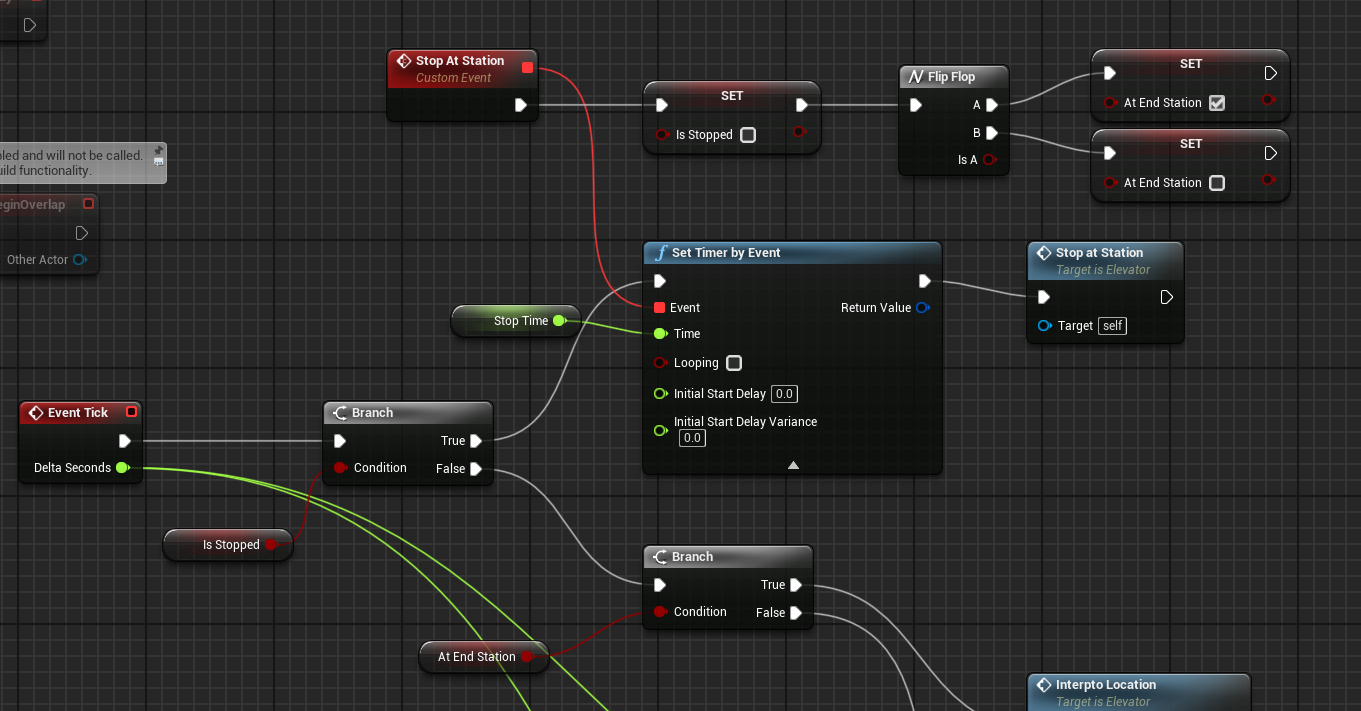
Not sure if this is correct
broken wadi
crude helm
would that allow me to "move" the level? because if I can't place them where the...
and since your level could be ultra light with just a blueprint maybe its not so bad, either way if the blueprint uses PCG to generate stuff there's gonna be some sort of hitching while that runs as you scale up the complexity
 spark steppe
I was about to try your plugin, will this work in packaged builds, too? I've noticed that the module is only loaded in "UncookedOnly" according to the uplugin file!?
broken wadi
autumn pulsar
What's the proper way to set up a timer in UE4? I'm trying to have an elevator w...
You don't need to run it on tick just call the start timer event when you want it to start again.

 inland crystal
spark steppe
I was about to try your plugin, will this work in packaged builds, too? I've not...
inland crystal
spark steppe
I was about to try your plugin, will this work in packaged builds, too? I've not...
That's how K2Nodes are set up, I am not an expert on the system but basically K2 (or Kismet) is a compiler, the switch nodes ultimately compile down to a series of "bool terms", if you'll look at the rest of the k2 nodes (like the regular switches) they're also in uncooked only modules, I think.
spark steppe
ok, i thought it would maybe at least need the static bool methods (i'm not familiar with K2 stuff)
also thanks for sharing
tho, currently running into a crash with it 😄
inland crystal
Really? Well that sucks, well, probably not something that'd interest the rest of the channel, if you could DM me the crash details I'd definitely look into it.
broken wadi
autumn pulsar
What's the proper way to set up a timer in UE4? I'm trying to have an elevator w...
Or actually for something like an elevator that continuously runs with pauses on either end I would use a timeline for that with a float value which lerps the Z position of the elevator. You could make it loop back into itself once it completes the route. The curve value would start at 0 and remain there for 10s then after 30s it goes to 1 then stays at 1 for 10s before returning to 0 after another 30s.
autumn pulsar
broken wadi
Or actually for something like an elevator that continuously runs with pauses on...
I'm having it interp to a Goal helper
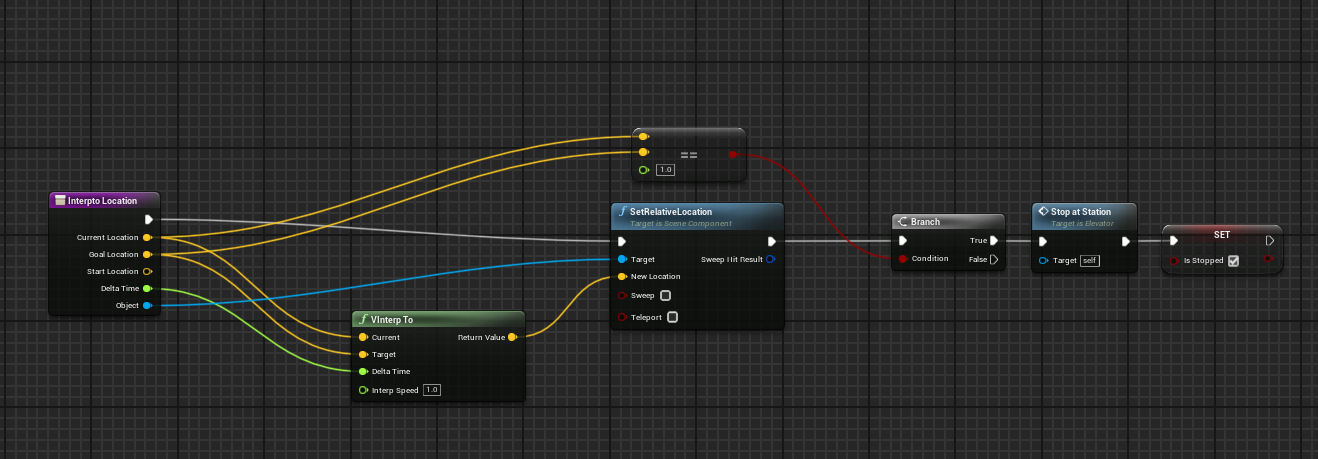
Trying to engineer an ease in and ease out system
basically making something that can be an elevator or moving platform
or both
interp to is nice, but it kind of rockets from the start
only an ease in system
oh, there's a whole goddamn node that does that lol
though, doesn't seem to accept time
so not sure how that works
ivory spoke
Hey, I build a Top Down Prototype and search for a smooth solution for objects and trees to fade / or / highlight the player character

I work with a marketplace camera and that have a blend mode
thats the actual result

do someone know a strategy to take a look? maybe with some videos for explaination / tutorials
frosty heron
You can dive into their material and look
autumn pulsar
Tick is Miliseconds since the last frame right?
ivory spoke
frosty heron
You can dive into their material and look
Ok so next big step is Take a Look into Materials
Assets are actualy only placeholders
dreamy mountain
Hey, is there any way for me to check if multiple keys are held down? I'm just fucking about with unreal, there's no proper use case here yet, but basically, there's input actions for E, R and F; how would I make it so that I can hold down all 3 and do a unique event basically
So I can still have 3 individual events for E, R and F, but if all 3 are held down, a unique 4th event fires instead
The only proper use case I could see is for a special cheats menu for testing, or for some sort of like password thing maybes? Idk
autumn pulsar
figured out the ease node, I was just being dumb
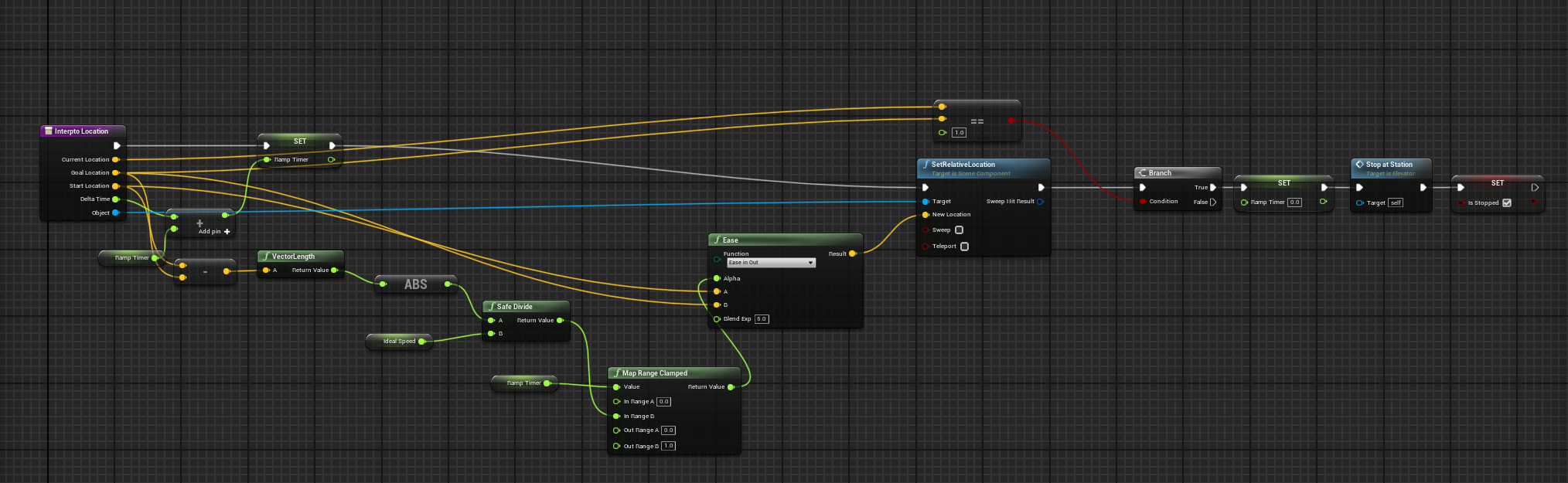
this seems to work well
now I need to figure out how to do a starting offset
 mild ibex
is there a way to trigger multiple animations in BP using one timeline node? for instance 5 different meshes that move at different points using the same timeline?
 raw pilot
Why does the button of my WBP only switch materials of 1 BP Light Actor even when there's multiple in the scene and i've made sure it gets all Actors of class with an for each loop??


im confused do i need to use the Get Components by Class which isn't available in Widget Blueprints? in the array instead for it to work because this should already right?
frosty heron
Can be simpler with select node I reckon
Don't need to make array
And don't need to declare variable either
Yeah select node will deffinitly eliminate 30% of the code here
I see that you fixed it too. At least the random point is not set only at begin play anymore but before spawning
Pretty bright for someone that only done blueprint for 3 days
 dawn gazelle
raw pilot
Why does the button of my WBP only switch materials of 1 BP Light Actor even whe...
dawn gazelle
raw pilot
Why does the button of my WBP only switch materials of 1 BP Light Actor even whe...
Because the button doesn't loop through anything. In its current state it's basically using the last cached value from the loop that was executed on construct.
raw pilot
yeah i just realized the array elements weren't getting saved anywhere 😭
i fixed it tho

kinda
 abstract crater
Is it not possible for a BP variable type to be of an Interface type?
i.e. here:
 lunar sleet
abstract crater
Is it not possible for a BP variable type to be of an Interface type?
lunar sleet
abstract crater
Is it not possible for a BP variable type to be of an Interface type?
I don’t think so. Why would you need to create an interface variable ?
abstract crater
I guess to guarantee that the instance variable is referring to something of that interface. That's how I would code in C++ I guess.
Is the convention just to assume it's hooked up correctly and call the interface method anyway in the Blueprint? I know it's a no-op if it doesn't implement that interface.
lunar sleet
abstract crater
I guess to guarantee that the instance variable is referring to something of tha...
Yes, if the interface is not implemented it’ll just fail silently. If you want to make sure it’s implemented you can use doesImplementInterface
frosty heron
abstract crater
Is it not possible for a BP variable type to be of an Interface type?
Wdym by that?
Interface never been a variable even in cpp
It's pretty much just a class
And you implement it to your class via multiple inheritance
 ripe sun
hi, I want B to call a function/event that is in A, this event will take a while and return an result to B. How should I implement this
functions don't support delays, you can't pass values in timers
macros have local variables but they make the graph very messy
you can't have outputs for events
maybe use global variables instead? will that also be messy? especially if you have 10+ graphs with their own variables
 balmy onyx
how do i set a limit for how many enemies can exist at the same time ?
 frosty heron
balmy onyx
how do i set a limit for how many enemies can exist at the same time ?
frosty heron
balmy onyx
how do i set a limit for how many enemies can exist at the same time ?
You can simply count how many enemies exist and check if it's more than the allowed number before the spawn.
Get all actor of class and get the length to get the number of enemy.
Compare that with an int variable and use the condition to decide Wether to spawn the enemy or not
 frail sleet
hello, does anyone know where i can find this content sample? i get 404ed on the link, or a similar course covering blueprints that is from epic, besides stack o bot,content examples,blueprint communication?
https://marketplace-website-node-launcher-prod.ol.epicgames.com/ue/marketplace/en-US/product/working-with-data-in-blueprint-part-one

Unreal Engine
Check out the description for more information about this course project from Unreal Online Learning.
abstract crater
frosty heron
Wdym by that?
Like in C++ you can have a function signature where the param is of MyInterface or a member variable of type MyInterface.
abstract crater
lunar sleet
Yes, if the interface is not implemented it’ll just fail silently. If you want t...
Yeah that makes sense. Does that never cause problems in practice? I guess it shows up quickly in gameplay.
But I like invariants
abstract crater
abstract crater
Like in C++ you can have a function signature where the param is of MyInterface ...
whoops sorry I meant MyInstance -> MyInterface
frosty heron
abstract crater
whoops sorry I meant MyInstance -> MyInterface
I have no idea what this is
astral wyvern
Anyone encountered this bug?
frosty heron
To implement interface for a class
Class AMyActor : public AActor, public IMyInterface
{
}
abstract crater
frosty heron
I have no idea what this is
class IShape {
public:
    virtual ~IShape() = default;

    virtual double area() const = 0;
    virtual double perimeter() const = 0;
};

class ShapeContainer {
public:
    ShapeContainer(std::unique_ptr<IShape> shape) : shape_(std::move(shape)) {}

private:
    std::unique_ptr<IShape> shape_;
};
Like you can specify the member variable implements an interface
abstract crater
Oh sure. If you can't do it in BP not a big deal
frosty heron
I have nothing declared in bp personally
abstract crater
Oh really? My use case is that I have a Lever that connects to a OpenableInterface. I made a variable in the BP so that in the editor I can connect each lever to like a Door or a Chest.
How would you implement that without declaring variables?
frosty heron
astral wyvern
Anyone encountered this bug?
I don't see any bug
You are trying to connect an input param to another input param
The f
frosty heron
abstract crater
Oh really? My use case is that I have a Lever that connects to a OpenableInterfa...
The door or chest can have an actor variable
Then you can point to your lever
When you want to use the lever, in your bp door just get the actor -> interact/use
astral wyvern
frosty heron
The f
No, I’m dragging from the initial pin
And for some reason it’s selecting the pin from another node
frosty heron
All I see in the video is you are trying to connect an input param of a pure function node to another input param of another function node.
astral wyvern
I’m clicking on the normalize A pin that you see in the beginning, but the cable that shows up is one from another normalize node
frosty heron
I see
Compile your blueprint and try again I guess
If presist, meh just plug manually
tropic peak
This is my "time manager"

now, whenever I want to add hours/minutes manually it doesn't act like I'd expect it to
For example, I want to have some logic to "prepare a new day"
like setting the hour to 12:00:00 when a new day starts

so I'm triggering it in Event BeginPlay
and it does literally nothing
what am I not seeing here?
balmy onyx
frosty heron
Get all actor of class and get the length to get the number of enemy.
Compare t...
preciate it this works great. is there a way to visibly show the radius of my spawner tho?
 woeful girder
So I am working on a metroidvania game and trying to implement an equipment system starting with a sword. What would be the easiest and most optimal way to implement a system like this? The equipment would add stats to the character and the way I have it set it up (for now) is to create a parent BP for the equipment and then add the stats to it
tropic peak
tropic peak
what am I not seeing here?
something tells me it's the "Get game time in seconds" is the issue here, because even if I add something to "hours" variable it's overwritten with the next pass of UpdateTime. How can I resolve this?
lunar sleet
tropic peak
something tells me it's the "Get game time in seconds" is the issue here, becaus...
That begin play function call is pointless because you’re immediately overwriting it in UpdateTime every tick
tropic peak
yeah. because of Get Game time in seconds node
lunar sleet
Yes
tropic peak
I need to calculate the passing time in a different way
lunar sleet
Yes, get game time returns how long the game has been running for
tropic peak
I'll calculate it with delta seconds
lunar sleet
You can ADD that to an int if you want to start at 12:00 I guess, but that won’t roll over when it reaches 24h
lunar sleet
tropic peak
I'll calculate it with delta seconds
Calculate what?
tropic peak
well I really need to have the doors open whenever I need to modify the time
tropic peak
lunar sleet
Calculate what?
time passing
frosty heron
balmy onyx
preciate it this works great. is there a way to visibly show the radius of my sp...
For debugging or visual for the player?
balmy onyx
frosty heron
For debugging or visual for the player?
for debugging
lunar sleet
tropic peak
time passing
I mean that does it for you, but not sure what exactly you’re trying to do with it
frosty heron
For debug, draw debug sphere for something with radius, for visual, you do have to look at special effects materials
tropic peak
lunar sleet
I mean that does it for you, but not sure what exactly you’re trying to do with ...
I want to set up the game each day the player wakes up, it has to start at certain time, and I also want to tie the daynight system to this timeManager BP I'm working on. I need to be able to speed up the time as well, so I need to have the control over the SS/MM/HH variables
lunar sleet
I mean time dilation is a thing but yeah, for prototyping just do it manually.
tropic peak
I can't if I use the node I mentioned earlier 😉
lunar sleet
I’m saying Don’t.
frosty heron
You can
 vestal copper
hi, does someone have any idea on how to make the AI climb the wall? the "move to" doesnt work....
frosty heron
You can get the second, time, min, hour , day from the variable
 limber parcel
i dont think AI can "climb walls" by default
lunar sleet
Use something simple for the time being, like a Timeline that changes the hours using an int track, so you can tie it to your day time cycle
lunar sleet
vestal copper
hi, does someone have any idea on how to make the AI climb the wall? the "move t...
See #rules on crossposting
vestal copper
Im sorry for that, I just needed to know
tropic peak
frosty heron
You can get the second, time, min, hour , day from the variable
even if I add "10" to hours the "get game in seconds" will do its own thing and disregard those added hours
frosty heron
tropic peak
even if I add "10" to hours the "get game in seconds" will do its own thing and ...
I don't know what you do tho
tropic peak
tropic peak
This is my "time manager"
this stuff
frosty heron
But the variable is just a structs
tropic peak
basically I want to be able to interact with my time system manually and change the values of Hours/minutes when I need to
frosty heron
Then do so, btw why do you have individual variable for second day etc
lunar sleet
frosty heron
I don't know what you do tho
He is overwriting the variable instead of using a +
frosty heron
I advice to get fammiliar with structs before tackling your date system
lunar sleet
Regardless using that function will not do what he wants, not at this level
tropic peak
yeah I figured it after a while
frosty heron
Make your own time variable
I already tell you before tho
🦕
Time = time + delta
Do that every tick
tropic peak
I have difficulties with attention/focus, if I missed something I'm sorry
lunar sleet
frosty heron
Time = time + delta
Don’t you have to multiply it by delta and add it to the time ?
frosty heron
You can have a setter too for the time
frosty heron
lunar sleet
Don’t you have to multiply it by delta and add it to the time ?
Don't think so
Delta is the time it takes from previous frame to current frame
vestal copper
vestal copper
hi, does someone have any idea on how to make the AI climb the wall? the "move t...
No help?
lunar sleet
frosty heron
Don't think so
🤷♂️ I haven’t dabbled with delta in a bit, timelines are frame independent if done right so I tend to use those
faint pasture
If you want your game time variable to be in real time seconds then that'll work. It'll be equivalent to just getting game time in seconds.
faint pasture
vestal copper
No help?
There's nothing built-in to do that.
You'll have to make that movement mode
vestal copper
any idea how I could make my own version of soemthing like that?
faint pasture
vestal copper
any idea how I could make my own version of soemthing like that?
Depends on how you're wanting to do your movement to begin with. Physics, CMC, Mover 2.0, custom movement component, fully custom system, etc.
frosty heron
faint pasture
If you want your game time variable to be in real time seconds then that'll work...
Yeah but he wants to change the time to anything he want
So setting the time to game time all the time not gonna work as that is fixed
faint pasture
Yeah you'd need an offset for that
lunar sleet
frosty heron
So setting the time to game time all the time not gonna work as that is fixed
*Waits 12h IRL to debug” 😀
vestal copper
faint pasture
Depends on how you're wanting to do your movement to begin with. Physics, CMC, M...
I want the AI to come to player and If i am on the build I want the AI to start climbing the build I have set up the state switching
faint pasture
vestal copper
I want the AI to come to player and If i am on the build I want the AI to start ...
How is the AI going to be walking to begin with?
What is your movement system.
vestal copper
faint pasture
How is the AI going to be walking to begin with?
by using AI "AI move to" just simple character movement system
faint pasture
vestal copper
by using AI "AI move to" just simple character movement system
Yeah you won't be climbing walls like that.
tropic peak
oh balls I wish I hadn't deleted the system I made yesterday, the entire thing I got working now will need to be scrapped.
vestal copper
faint pasture
Yeah you won't be climbing walls like that.
yea I figured that out,
faint pasture
You'll have to really dig into movement components or the character movement component.
I think Ai Move To basically commands the movement component and it does the pathfinding. I'd start there.
Although, you can probably do some hacky shit like making the climbable areas technically walkable
So climbing is just walking with different animations. Not sure if it's doable but maybe.
vestal copper
faint pasture
I think Ai Move To basically commands the movement component and it does the pat...
yea and it can only if it is navigatable and the walls are not considered navigatable
lunar sleet
faint pasture
Although, you can probably do some hacky shit like making the climbable areas te...
Heheh it’ll look like absolute shit but maybe with increased step height, tho that has limits iirc
faint pasture
They aren't considered navigatable because of your maximum slope. You can maybe do some hacky stuff to get around that but at the end of the day, adding climbing is pretty tough.
vestal copper
faint pasture
Although, you can probably do some hacky shit like making the climbable areas te...
yea by leaning it so the "nav mesh bound" treat it as navigatiable point but sadly I cant
lunar sleet
Could maybe use a climbing animation, stop the movement, animate, nav link proxy
vestal copper
I have shitty vague idea, what if I attack a socket to the root and once I am near the player I run an event and inside that even you move the socket to the player (by timeline or something) and while you do that animation would play
faint pasture
Yeah it's tricky. If I was to try to tackle climbing, I would first just start with the actual movement. Make it to where a player controlled character can climb. Then I would worry about introducing pathfinding
frosty heron
The generated doc is always garbage
lunar sleet
It’s meh. Not much more garbage than before but now it looks like a forum which is weird
vestal copper
limber parcel
is it just me or is the new wiki/documentation total garbage?
always has been
limber parcel
it doesnt even find nav link for 5.3 or 5.4 lol
vestal copper
faint pasture
Yeah it's tricky. If I was to try to tackle climbing, I would first just start w...
hm.... I would have to look into it
limber parcel
vestal copper
always has been
anyhow, maybe this helps
https://docs.unrealengine.com/4.27/en-US/Resources/ContentExamples/NavMesh/1_2/

An overview of the NavMesh example level, example 1.2: Nav Link Proxy.
vestal copper
yea i know this, but its not what I want tbh
it would fit for mantle and stuff like that
frosty heron
What your asking is too specific, you won't really get a real help on such matters.
The only thing you can do is figuring out the movement code and navigation by reading the source code and then implementing your own algorithm / math
vestal copper
frosty heron
What your asking is too specific, you won't really get a real help on such matte...
yea that would the last option
limber parcel
maybe it will be best to get it working for the player first, and then derive an AI version from that
vestal copper
but I see a ton of vids and example of people making movement like this but all in UE4
frosty heron
Relying on tutorials will only get you soo far.
Once you have to do things on your own, you won't have the skill set to problem solve
vestal copper
frosty heron
Relying on tutorials will only get you soo far.
Im not relying on tutorial but my brain is stopped on how to do that
limber parcel
yeah, dont be like the KSP2 devs lol
vestal copper
I dont know what I dont know
frosty heron
It takes a lot of reading, research them implementing on your own.
Read read read
EqS, navigation, path finding, how movement is done
lunar sleet
limber parcel
yeah, dont be like the KSP2 devs lol
“Trust me bro, this is just a simple rocket ship game with realistic graphics, physics and functionality”
frosty heron
What do you want to do anyway? Wall running? Wall climbing?
vestal copper
frosty heron
Once you have to do things on your own, you won't have the skill set to problem ...
i am making a VR game and there is barely any tutorial about VR
vestal copper
frosty heron
What do you want to do anyway? Wall running? Wall climbing?
wall climbing
limber parcel
vestal copper
i am making a VR game and there is barely any tutorial about VR
VR is kinda a dead end in terms of game development imho
lunar sleet
Gimmicky af
limber parcel
nice for engineering, but not for gaming
lunar sleet
But hey, join the hordes ig
frosty heron
Does your character use character movement component?
vestal copper
limber parcel
VR is kinda a dead end in terms of game development imho
Most people dont even have a clear defenetion of "Dead" and attach it to end of anything the dont like/have
limber parcel
 vestal copper
limber parcel
nice for engineering, but not for gaming
vestal copper
limber parcel
nice for engineering, but not for gaming
most people who overcome the starting motion sickness of VR cant get back to playing flatscreen game
limber parcel
people who like complex games cant play VR because its so dull
lunar sleet
Most people don’t want to shell out a grand or so to play a handful of “decent” games
vestal copper
limber parcel
people who like complex games cant play VR because its so dull
kinda true since it doesnt have that much button, but games like "Rumble" which has gesture are something which flatscreen game can never have
limber parcel
sure, there are some things that work nicely for vr, but in general, its inferior to normal gaming
vestal copper
limber parcel
sure, there are some things that work nicely for vr, but in general, its inferio...
somewhat true for current time, but im sure not for future
lunar sleet
Yes, gimmicks tend to have unique features but still gimmicks
Fidget spinner of gaming basically
lunar sleet
You’re right, idk what I’m talking about, like I said join the hordes
limber parcel
vestal copper
only if there was something which could hold those claims
i mean, the lack of tutorials speaks for itself, its not like VR is new
vestal copper
limber parcel
i mean, the lack of tutorials speaks for itself, its not like VR is new
lack of something doest make it worse
vestal copper
lunar sleet
You’re right, idk what I’m talking about, like I said join the hordes
Like sheep.
frosty heron
limber parcel
i mean, the lack of tutorials speaks for itself, its not like VR is new
Well it's not like devs that actually publish a decent game, implement their system with YouTube tutorial
VR hype is sort of gone imo, but some things are just better there.
limber parcel
 frosty heron
I have like 4 to 5 sets of vr headset, dusting in the shelf
vestal copper
frosty heron
I have like 4 to 5 sets of vr headset, dusting in the shelf
I had that stage too, but once i got over motion sickness it was very fun
vestal copper
frosty heron
Well it's not like devs that actually publish a decent game, implement their sys...
yea lol
frosty heron
vestal copper
I had that stage too, but once i got over motion sickness it was very fun
I played Arizona Sunshine with a mate for 4 hours straight
lunar sleet
frosty heron
I have like 4 to 5 sets of vr headset, dusting in the shelf
Ugh why so many lol
frosty heron
The moment I took the headset off I get really sick
 dark drum
I can remember working with the original oculus dev kit (v1) when it was first released when I was at Uni. Its very easy to trigger motion sickness for most people if your not careful.
frosty heron
lunar sleet
Ugh why so many lol
I was in the hype train way before vr is a thing lol
limber parcel
lunar sleet
Ugh why so many lol
he fell for the hype and bought all the shitty headsets 😛
vestal copper
limber parcel
he fell for the hype and bought all the shitty headsets 😛
bruh chill out
lunar sleet
I hear if you get any fps drops it’ll make you nauseous instantly
frosty heron
Headsets get better and better so naturally I buy a new one 🥳
lunar sleet
dark drum
I can remember working with the original oculus dev kit (v1) when it was first r...
So you’re saying it can be used as a weapon 😈
lunar sleet
frosty heron
Headsets get better and better so naturally I buy a new one 🥳
Kinda need the hardware to support it too
dark drum
lunar sleet
So you’re saying it can be used as a weapon 😈
No comment. 😅
limber parcel
i still hear my brother running into his furniture from time to time 😛
vestal copper
frosty heron
Headsets get better and better so naturally I buy a new one 🥳
yea and thats why in future VR is going to be the future
lunar sleet
Cool story
vestal copper
limber parcel
i still hear my brother running into his furniture from time to time 😛
Skill issue
frosty heron
Who knows
lunar sleet
Just like the Zuck you don’t understand the simple concept of freedom
vestal copper
lunar sleet
Just like the Zuck you don’t understand the simple concept of freedom
what is freedom...?
tropic peak
right how do you guys feel about coming back to the subject of calculating time in bps'
;D
 lunar sleet
Most people don’t care for the complete sensory deprivation and lugging a headset on your head
There may well be things that replace KBM and controllers in the future but VR headset is doubtful. Unless it becomes microscopic
frosty heron
tropic peak
right how do you guys feel about coming back to the subject of calculating time ...
You already given the formula many times
lunar sleet
Maybe Neuralink games lol
limber parcel
lunar sleet
Maybe Neuralink games lol
haha was about to say lol
lunar sleet
tropic peak
right how do you guys feel about coming back to the subject of calculating time ...
Yeah good point we’re way off topic
tropic peak
frosty heron
You already given the formula many times
yeah, but I have a different question.
lunar sleet
tropic peak
right how do you guys feel about coming back to the subject of calculating time ...
Anyways like I said start with small steps.
frosty heron
Ask the question then
 frosty heron
Write it on paper
tropic peak
I'd like to keep the from seconds/break timespan nodes in just for clarity, but
vestal copper
do you want to get how much time/second has passed?
dark drum
tropic peak
Is there a reason you're not just using a timespan to store the time? It makes it easier to add and remove time from it.
tropic peak
no reason, seconds, hours and minutes will never be a float
frosty heron
Seconds is a float
It needs to be a float or it will not work, for the representation you can round it or w.e
tropic peak
dark drum
Is there a reason you're not just using a timespan to store the time? It makes i...
lack of knowledge most likely
vestal copper
do you want to store the second?
 lapis haven
Does anyone have any idea why I can't see the parameters from my shader in my material instance? Honestly, I don't know anything about programming and Unreal Engine is new to me. I'm learning environment creation from a course and didn't realize that any programming would be necessary. I'm trying to convert blueprints from UE4 to UE5, and everything was going well until I encountered Absolute World Position. I had to use a component mask R G because I had issues with vector 2 and 3 that the previous author in UE4 didn't have. Everything compiles without errors, but I can't see my scalar parameters in the material instance that I wanted to modify in my shader. Could anyone help me? 🥺

 vestal copper
if you want to do that you can use something like this. it will add 1 after every second has passed.
 tropic peak
I want to store seconds, minutes, hours, days. I'm creating a daynight system and it will also include a callendar system. I also want to be able to manually affect the time (add x hours/days via a function).
and I made it too complicated in my mind
limber parcel
tropic peak
I want to store seconds, minutes, hours, days. I'm creating a daynight system an...
why are u using all this integers instead of a timespan variable?
vestal copper
vestal copper
if you want to do that you can use something like this. it will add 1 after ever...
you can use this but just change the delay duration
tropic peak
limber parcel
why are u using all this integers instead of a timespan variable?
I don't know, never heard of it
ints and floats seemed like the way to go
limber parcel
tropic peak
I don't know, never heard of it
you literally got one here
 tropic peak
thought you were talking about the variable type
limber parcel
yes
vestal copper
its so confusing what youre doing
limber parcel
just make your own timespan variable, then u dont need all the ints
dark drum
tropic peak
right, I'll give it a go
This will do time. It uses a 'DateTime' variable so it'll automatically wrap the values so 60 seconds will add 1 to the minutes etc....
 faint pasture
tropic peak
I want to store seconds, minutes, hours, days. I'm creating a daynight system an...
faint pasture
tropic peak
I want to store seconds, minutes, hours, days. I'm creating a daynight system an...
What's your desired time ratio? Is it at real time, 10x faster, 60x faster, what?
limber parcel
adriel coming with the big guns
faint pasture
dark drum
This will do time. It uses a 'DateTime' variable so it'll automatically wrap the...
For real time this is perfect. Multiply tick time by your desired ratio if you want it to be faster.
Add a timespan struct for the start time if you want to start at a certain calendar date.
tropic peak
faint pasture
What's your desired time ratio? Is it at real time, 10x faster, 60x faster, what...
about 20-30x, and I need to be able to set the time to a specific hour manually
faint pasture
Tick
GameTimeSinceGameStart += Ratio x delta time
GameTime = GameTimeSinceGameStart + GameTimeAtGameStart
Break out GameTime, trigger dispatchers if the Day has changed etc
That way you don't start at January 1st 1970 every single time you fire up the game.
tropic peak
I want to be able to set the date & time when the game starts, as well as each start of the ingame day
faint pasture
Set GameTimeAtGameStart when the game starts
Have event dispatchers that fire when crossing over midnight etc. Done.
tropic peak
right I need a minute to process
limber parcel
 tropic peak
dark drum
This will do time. It uses a 'DateTime' variable so it'll automatically wrap the...
tropic peak
dark drum
This will do time. It uses a 'DateTime' variable so it'll automatically wrap the...
In that screenshot Time is of DateTime type?
dark drum
tropic peak
In that screenshot Time is of DateTime type?
Yea
tropic peak
dark drum
Yea
I can't use "add" for DateTime
dark drum
tropic peak
I can't use "add" for DateTime
You add a time span to the data time. (thats the + node) The from seconds creates a timespan which is added to the date time.
tropic peak
dark drum
You add a time span to the data time. (thats the + node) The from seconds create...
 dark drum
tropic peak
dark drum
tropic peak
You want to make sure you're using the right add node. There's two add nodes and they look the same. When you hoover over the bottom pin it should show it's a timespan instead of date time.

 quaint fable
I'm encountering a couple things, so I'll just start with the main bug I'm having trouble figuring out.
I'm creating a 2D platformer. The player can fire a projectile, however it only fires in one direction, to the right. I've tried all the suggestions in different forums, but I believe the way my code is built, the typical get actor rotation, forward vector, etc, wont work?
Here's screenshots:
"Seed" is the projectile


 tropic peak
dark drum
You want to make sure you're using the right add node. There's two add nodes and...
tropic peak
dark drum
You want to make sure you're using the right add node. There's two add nodes and...
oh, awesome, I didn't know about this. thanks
limber parcel
quaint fable
I'm encountering a couple things, so I'll just start with the main bug I'm havin...
i dont see you setting the speed or direction anywhere
quaint fable
The other issue is that when I jump, it only plays the "Jump right" animation, regardless of the direction the player is facing. I'm certain this was working properly before I added the projectile mechanics. I'm using paperZD animation Instances.
 quaint fable
limber parcel
i dont see you setting the speed or direction anywhere
quaint fable
limber parcel
i dont see you setting the speed or direction anywhere
I have the projectile speed set in a projectile movement component. As far as direction goes, how would I implement that with the code I have?
 limber parcel
quaint fable
I have the projectile speed set in a projectile movement component. As far as di...
limber parcel
quaint fable
I have the projectile speed set in a projectile movement component. As far as di...
no idea, never worked with that plugin
maybe you can invert the speed or something
quaint fable
limber parcel
no idea, never worked with that plugin
hmm.. I'm not sure. I'll try what I can. As far as changing the direction, that would be done in the projectile blueprint though right?
sorry, I meant the character blueprint
limber parcel
actually the projectile movement component should have a direction setting
quaint fable
limber parcel
actually the projectile movement component should have a direction setting
I found "rotation follows velocity". Unless it's one of these other settings


could it be possible using a "tag"?
limber parcel
thats the direction
 quaint fable
or "on component activated"?
limber parcel
just change the X to -1 and it will go the other way
quaint fable
I was thinking that, but when I do that it just makes it so the projectile only fires to the left
limber parcel
well, yeah, the idea is to dynamically set that variable based on where you want to shoot
quaint fable
limber parcel
well, yeah, the idea is to dynamically set that variable based on where you want...
would I use "get velocity"?
limber parcel
no, you would use set velocity after spawning the projectile
bruh i think i actually messed that up in my project lol
quaint fable
limber parcel
no, you would use set velocity after spawning the projectile
in the projectile blueprint?
limber parcel
quaint fable
in the projectile blueprint?
here
 quaint fable
limber parcel
here
quaint fable
limber parcel
here
I see, so I just see the option of "set velocity in local space"
limber parcel
i think u need to get the projectile movement from that and then set velocity there
gotta go now though
quaint fable
limber parcel
i think u need to get the projectile movement from that and then set velocity th...
Hey thank you, you've got me pointed in the right direction!
 balmy kelp
hi, does anyone know what node i can use to condition a specific component?? exaple only open door when interaction is with specific door component and not the door frame
i know i can make separate blueprint for door and give the interaction to that but there must be a way to do it with only one blueprint
to have better perspective on it, im making fuse box but whenever i interact with any part of the fuse box the door opens. but im planing to put bottons inside and i dont want the door to close every time somone miss click on the box boddy
 balmy onyx
how do i disable the dialogue widget from getting created when pressing the talk button before the shop widget is closed?

 wild crater
We are having some physical animation issues where the characters are flopping around for some users with bad performance. However, by artificially tanking our framerate we couldn't replicate the issue. Does anyone know more about this? What are the things to look into/account for here?
dark drum
balmy onyx
how do i disable the dialogue widget from getting created when pressing the talk...
At the start of the 'Talk' event, add a check to see if the shop widget is valid. If it is then do nothing, if it's not valid, proceed with the dialogue.
faint pasture
balmy kelp
to have better perspective on it, im making fuse box but whenever i interact wit...
Pass the hit component over in the interact call
"hey actor, I want to interact. I am me (pass over pawn ref of self), and I hit this component (pass over primitive component ref)"
Then the actor can know what component the caller is interacting with and proceed
balmy onyx
dark drum
At the start of the 'Talk' event, add a check to see if the shop widget is valid...
how exactly? tried this before but it does not work

 shy sable
So I have a problem as you can see I’m the video I have put a collision to set destruct on the ball once it hits the collision but it doesn’t delete itself also I want to respawn it at a set point can anyone help me?
 dark drum
balmy onyx
how exactly? tried this before but it does not work
dark drum
balmy onyx
how exactly? tried this before but it does not work
If you don't clear the ref when the shop widget is closed, you could instead check if it's in the viewport.
 waxen sorrel
Is there a way to force a call to the constructor or so ?
dark drum
waxen sorrel
Is there a way to force a call to the constructor or so ?
You can't call the construction script via BP. You can however, pop everything you want to call in the construction script in a function and call the function instead. 🙂
waxen sorrel
My issue here is I want a thing for the marketplace, without using C++, and got some splinemeshes here, but once I call for example a exposed function to the details panel (a button) the construction isn't called, so the splines etc don't refresh
dark drum
waxen sorrel
My issue here is I want a thing for the marketplace, without using C++, and got ...
You could use a call in editor function the user can click on to refresh the actor when the make some changes.
waxen sorrel
yeah the only way is to add a bool or so, right ?
dark drum
waxen sorrel
yeah the only way is to add a bool or so, right ?
Pretty much. There might be a way if you're using blueprint editor utilities though as that does give you more flexability for doing stuff just in the editor.
shy sable
So I have a problem as you can see I’m the video I have put a collision to set destruct on the ball once it hits the collision but it doesn’t delete itself also I want to respawn it at a set point can anyone help me?
limber parcel
quaint fable
Hey thank you, you've got me pointed in the right direction!
did u figure it out?
quaint fable
limber parcel
did u figure it out?
No, but I think I may be on the right track. I found this thread:
I'm not sure what to do with this "Actor moving right" variable I made though
 limber parcel
quaint fable
No, but I think I may be on the right track. I found this thread:
I'm not sure ...
limber parcel
quaint fable
No, but I think I may be on the right track. I found this thread:
I'm not sure ...
i guess its exposed on spawn and then set before the projectile spawns
best to just watch some tutorials and learn how all this stuff is used
quaint fable
limber parcel
i guess its exposed on spawn and then set before the projectile spawns
thank you sir
 charred berry
it needs to be there to say, 'this' character,Bp is messy tho hard to read
so like a
side step or something 🙂
tropic peak
what is the better practice:
- keep mechanics related to rotating the directional light inside of my TimeManager blueprint
- create a separate blueprint that will have a directional light that will be rotated based on a variable value taken from TimeManager?
dark drum
tropic peak
what is the better practice:
- keep mechanics related to rotating the directiona...
I would keep them separate and have a BP specifically for the sun. The 'TimeManager' can have an event dispatcher that is called when ever the time is updated that the 'DayNight' BP can bind to. It can then handle what it should do when the time changes.
This also allows other systems in the future hook into the time system without it all becoming a spaghettie mess.
tropic peak
Yeah I need to read about event dispatchers a little..
tropic peak
I now have a directional light inside of a blueprint but when I start the game the light is not visible. I did troubleshoot the visibility, rotation etc. It shows in the editor, but not in the game..
faint pasture
tropic peak
what is the better practice:
- keep mechanics related to rotating the directiona...
If a lot of related things are going to care about time (and weather etc) it can make sense to make an EnvironmentActor
which contains the sky, sun light, fog, post process volume, all sorts of stuff
that can contain the time logic or just hook into it.
Also you'll want to look into Material Parameter Collections
you can publish the time to an MPC and any material can just opt in to it
tropic peak
It's bizarre because even if I adjust the parameters manually in the inspector when the game is running it's not affecting anything.
faint pasture
tropic peak
It's bizarre because even if I adjust the parameters manually in the inspector w...
probably because it's being instantly set back
tropic peak
but when I inspect the values they do change inside the blueprint, and that's not reflected in the inspector
faint pasture
show a screenshot
 faint pasture
If you have a logic chain like:
Tick -> update time -> set directional light rotation based on time
Setting the directional light rotation manually will be overridden next tick
tropic peak
unless I should be rotating the parent not the directional light
faint pasture
what are you trying to do?
tropic peak
I'm trying to tie the directional light to current hour to immitate a daynight cycle
faint pasture
tropic peak
And this doesn't do it?
tropic peak
nope
faint pasture
what does it do?


 faint pasture
btw I think yaw is the only euler angle you can smoothly keep incrementing to make a thing spin
tropic peak
as you can see it's very bright in the editor and game window looks dark
I have no idea where this discrepancy comes from
ok there has to be something wrong with the rotation script. when I unplugged it and tried rotating the sun it does rotate the light properly.. I need to go get the kids, and when I come back I'll try to figure this out.
 lost hemlock
help?

I cant connect anything to the target on that Set Text, its not letting me do that btw
wild crater
If you have a blueprint with components and you move components in editor, how does this work in relation to the construction script? Is it called after the translations or before? I get the impression that it is before?
lofty rapids
lost hemlock
well you got two problems, you try to cast the player character to a game mode, and you need a target in that set text, are you trying to set the text of a widget ? i think it's a different node but you need the reference to the item
it's saying self isn't a valid target
you need to pass it the actual component
lofty rapids
lost hemlock
I cant connect anything to the target on that Set Text, its not letting me do th...
get the reference to the component, drag out and do set text
thin panther
It looks like they want to set text on a widget element, so it's just the wrong node
that "target is X" is telling you what the node is for.
If it isn't what you want, you've got the wrong node

 wild sage
How to use D-Pad to switch between UI elements?
D-Pad from console joysticks like Dual Sense etc
lofty rapids
I don't think there is anything built in normally, but i have heard common ui has it
but you'll have to build it on your own ig if your using normal ui
bright dove
Hi does anyone know how to make the camera stop following hmd device in Collab viewer VR template. In the normal VR template I have an option to disable lock to hmd but I can’t find something similar here
maiden wadi
lofty rapids
I don't think there is anything built in normally, but i have heard common ui ha...
No need for CommonUI on that. It works by default if you just set focus.
 gloomy pilot
Hi guys the delay node I was using with sucess in widgets to delay certain processes before blue print continues. I moved this logic to an object but objects do not support delay node. on objects what can I use to delay the event from conitueing?
faint pasture
gloomy pilot
Hi guys the delay node I was using with sucess in widgets to delay certain proce...
What are you using this delay for?
 native wigeon
you could set a timer?
gloomy pilot
faint pasture
What are you using this delay for?
basicly just a pause of for all the tick timers to completely stop before the next battle starts, idle fighting between character and NPC
 faint pasture
gloomy pilot
basicly just a pause of for all the tick timers to completely stop before the ne...
faint pasture
gloomy pilot
basicly just a pause of for all the tick timers to completely stop before the ne...
There's no reason for that delay to be built into your UI
the SOURCE of that delay should be somewhere in the game-controlling code
The UI should just show state, not be the source of state
gloomy pilot
understood, but I moved this logic now to an object, and the delay node is not available to create on there. is there better way to delay something for instance doing a post with http connection to db and setting a delay
dark drum
gloomy pilot
understood, but I moved this logic now to an object, and the delay node is not a...
Timers. They allow you to call a delagate/function after x amount of time. (even loop if needed)
gloomy pilot
dark drum
Timers. They allow you to call a delagate/function after x amount of time. (even...
I will give timers a try, I havent worked with it yet, thanks
dark drum
wild sage
How to use D-Pad to switch between UI elements?
Adding to what Authaer said, UI navigation it handled by giving something focus. UE already has keys setup to handle this automatically. You just have to make sure the relevant widgets are focusable.
If you want to change the default UI keys, you'll either have to jump into C++ or get a plugin that allows you to do it. (They are hard-coded unfortunately)
lofty rapids
probably set timer by event, move it on the timer, clear and invalidate on completed
or tick with a bool
dark drum
lofty rapids
probably set timer by event, move it on the timer, clear and invalidate on compl...
You can't clear and invalidate timers from a uobject. 😦
gloomy pilot
I can clear timers on player controller and get reference of the variable to clear it. or will figure something out
lofty rapids
gloomy pilot
basicly just a pause of for all the tick timers to completely stop before the ne...
is this on tick ? wdym "tick timers" ?
i usually use booleans to switch things on and off on tick
dark drum
gloomy pilot
I can clear timers on player controller and get reference of the variable to cle...
That's what I normally do. Outsource the clearing to somewhere that can lol.
lofty rapids
timers ftw
 hard estuary
Do someone know how i can make a chair slide with physics unreal
lofty rapids
well a couple things, but for one your timer is 0.0
another thing is thats not how you clear a timer

promote to variable the return value which is the timer handle
then when you want to shut it off pass the handle to the clear node
it will shut it off
somber elbow
Hey guys! Im trying to allign my images inside the horizontal box and i want them to be right side alligned, but they are all left side alligned. And i cant do anything with it. All the images have right allinging switched on.

 lofty rapids
somber elbow
Hey guys! Im trying to allign my images inside the horizontal box and i want the...
lofty rapids
somber elbow
Hey guys! Im trying to allign my images inside the horizontal box and i want the...
#umg maybe
the return value from the set timer
 quartz spoke
I've created an Actor Component, and added an interface to the component. Is there a way to automatically give that interface to actors that have the component? Rather than manually having to add the interface to the actors?
faint pasture
that's not timeline territory
that's tick territory
timeline implies a constant time for the thing to happen
you want the thing to happen until you let go
The general form should be a bit like this:
Tick -> fork position += bool * ForkSpeed * DeltaSeconds //You can just get axis values, not sure if you can just get action values but if you can then do it like this. If not, just set ForkSpeed based on input
tick
no timers for this
you want it to be smooth right?
lofty rapids
ig if your timer is close to tick, might as well use tick
faint pasture
lofty rapids
ig if your timer is close to tick, might as well use tick
But some youtuber said tick and cast was bad
faint pasture
That was sarcasm, if only people knew how much work gets done on tick in the engine already
lofty rapids
tick is pretty much the core tech in most engines, at some point theres a tick going on that you use
quartz spoke
took me too long to realize tick is fine :\
avoided it like the plague for like 2 years
lofty rapids
as long as you try your best to make it efficient, and it isn't actually effecting the fps that much
pretty much good to go, might as well try it before you just believe what is said
 quartz spoke
true, i just assume that people who speak on things are knowledgable :P
faint pasture
lofty rapids
https://tryitands.ee/
I love that so much
lofty rapids
i mean theres legitimate reasons why doing too much on tick can be bad
or even not that much code but it's inefficient and doing a bunch
people probably just don't understand the reasons and say it's bad
 flat coral
Can anyone confirm that this is enough to turn a SceneCaptureCampera OFF off?
I've gonna have a lot of these but only one needs to be active at a time, so in theory the perf is no worse than having just one active all the time... assuming I can turn them "off" enough that they aren't using resources

 clever gust
Do you think it's possible to export light maps from UE5 in formats like PNG or TGA? For example, through Blueprint or C++?
I tried creating a Blueprint that captures information about light maps using a render target and material, but I'm a complete beginner at this and couldn't get it to work. Has anyone encountered a similar task? My goal is to export baked light maps as textures.
Here are my attempts using Blueprint:

As a result, I just get a transparent texture. I understand that I'm very far from the right direction, but maybe someone has already managed to do something similar and knows how to export light maps in a proper format?
I created a test scene with one material on static objects. The material has a default gray texture, and I baked the light.


 winter pebble
Is there any way to manually set the "isfalling" variable, or manually tell the blueprint that your character has landed on something?
lunar sleet
winter pebble
Is there any way to manually set the "isfalling" variable, or manually tell the ...
You might be able to set isFalling but if your char is still in the air, your CMC will prly override it
You want it to land, make it land by blocking its collision
winter pebble
Yeah. The problem I'm having is I want the character to mount the vehicle via jumping, but if the character can collide with the vehicle then it impedes the vehicles movement (cause it's a physics actor and I'm using physics to move the vehicle)
lunar sleet
I wonder if the CMC stops operating when you unpossess the char
Tho tbh using physics to move the vehicle might not be ideal
eager python
Anyone know why I get four blocks of output per compile, and only one of them has the correct variables in it? Closest answer Google finds me is something about running a client and a server, but my brain tells me that only implies TWO blocks and therefore isn't the whole story.
Weird to me that 3/4 of the output blocks are throwing the same values (4 is the default MinArea, but RandArea 7 is supposed to be a seeded random integer so it's extra weird that it'd be the same in three random instances).
 winter pebble
lunar sleet
Tho tbh using physics to move the vehicle might not be ideal
winter pebble
lunar sleet
Tho tbh using physics to move the vehicle might not be ideal
I'm getting that impression as well. Guess I should do some more research into how vehicles are normally handled in Unreal and see if that can handle my case. Thanks anyhow 🙂
lunar sleet
winter pebble
I'm getting that impression as well. Guess I should do some more research into h...
Look into chaos vehicle
winter pebble
lunar sleet
Look into chaos vehicle
Thanks! I'll look into that ^.^
ivory spoke
Is IT possible to make Gras generated by Landscape cuttable?
And that IT can be regenerated after x time? Or after an Event?
charred berry
well I know, as in 5.4 snow is going to generate vertically as in additive, don't see why grass wouldn't also.
so you'd just tap into that system, and remove Xx
quartz spoke
I've created an Actor Component, and added an interface to the component. Is there a way to automatically give that interface to actors that have the component? Rather than manually having to add the interface to the actors?
quaint ravine
In my level I spawn a car pawn which, in turn, spawns an array of cine cameras attached to the car. I would like one of those cameras to automatically be Previewed and pinned, just like when you click on it in the Outliner. Can anyone guide me on making this happen?
faint pasture
quartz spoke
I've created an Actor Component, and added an interface to the component. Is the...
no
why did you add an interface to it?
what does this component represent?
quartz spoke
It's an "interaction" component, the actors I give the component to are meant to be interacted with in some way (picked up, activated, etc.) and I want the actors to implement their own logic for what happens when they're interacted with
 mental trellis
Why do you need a component at all in this case?
Why not just add the interface to the actor?
 fiery swallow
quartz spoke
It's an "interaction" component, the actors I give the component to are meant to...
fiery swallow
quartz spoke
It's an "interaction" component, the actors I give the component to are meant to...
yeah you just described an interface
lunar sleet
Imagine that, Epic made that for you already
quartz spoke
yea i said im giving it an interface, i already have the interface, i want the component to give/grant the interface to the actor
I dont know how else to say that'
lunar sleet
Ah, taking the venereal disease approach
You want your component to infect the actor with an interface
But at that point I’d prly just have the component call a dispatcher event, which is implemented on each actor however you want
quartz spoke
so is the thing i want to do not possible?
fiery swallow
I'm confused, you can't add a BPI to an object at runtime
lunar sleet
quartz spoke
so is the thing i want to do not possible?
Yeah, it is not.
fiery swallow
are you making your own kind of interface?
quartz spoke
ok
lunar sleet
But it doesn’t have to be possible really
 wild moth
I think what you need to do is rethink the solution to your functionality
because the way you're looking at it atm isn't correct
lunar sleet
You can have BPI_InteractionInterface on all actors the can be interacted with and have whatever logic within them already
Your component can just send the message then
wild moth
Why need a component at this point to handle interaction? if each actor has the interface with the proper functions
lunar sleet
Idk, there was talk about components and BPIs
wild moth
I'm asking him x)
lunar sleet
I think he wants something that can be dynamically attached
 wise ravine
anyone know anything about audio components?
fiery swallow
wise ravine
anyone know anything about audio components?
what about em 🤨
wise ravine
fiery swallow
what about em 🤨
do yk how to stop the audio from cutting out whenever i leave it's attenuation radius?
 fiery swallow
make the outter attenuation radius bigger
there's 2 attenuation radius's
you have inner radius, and falloff distance
falloff distance is where you draw the line
 mossy nymph
Hey, I'm using the "Launch Character" node to make the player jump for a wall jump. I've run into an issue where fluctuating FPS will cause the z-axis of the "Launch Character" node to be inconsistent. I'm pretty sure this is because that node is run every CharacterMovementComponent tick. is there any alternative or way to fix this?
wise ravine
fiery swallow
falloff distance is where you draw the line
oh alright then
i just wanted the player to be able to go in and out of the range with the audio still playing
but it's fine, not a big detail anyway
fiery swallow
wise ravine
i just wanted the player to be able to go in and out of the range with the audio...
I'm confused, why not just make the falloffdistance really big?
Itd make things much louder the closer you get but you counter that by changing the inner radius, it's usually just finding the right balance
Unless you are some attenuation master and are willing to play with the 100 other settings
ivory spoke
charred berry
well I know, as in 5.4 snow is going to generate vertically as in additive, don'...
how is this feature be named? actually I work on 5.3 because of some systems that are not updated at the moment
ivory spoke
charred berry
well I know, as in 5.4 snow is going to generate vertically as in additive, don'...
thanks for your answer 🙂 I will read this later because I will sleep for now
 leaden dune
Does anyone know how I would go about creating something like this?
It'll be an app to create cards using different formulas to calculate how much the card would
Is this even something I should even be doing in unreal?
 wise ravine
fiery swallow
Unless you are some attenuation master and are willing to play with the 100 othe...
wise ravine
fiery swallow
Unless you are some attenuation master and are willing to play with the 100 othe...
😂 it's fine dw I just expanded the outer radius
it makes sense
I just thought about it a different way
thanks tho 🙏
dusky cobalt
What could I spawn that is the most light thing in the world in thousands of numbers? I want to spawn something like grid over the top of my map, and when the unit collides with one of the tile, it set's that tile to be invisible. Basically fog of war system. I tried with render target and on a big map fps drop is from 45 to 5 which makes it unplayable. I think this is similiar approach to the one in league of legends, but they are using something like triangles? Like they spawn triangles and set visibility of them as well. Maybe I shouldn't really care about the spawning because it will get handled by loading the game, and once it's loaded then that's it? Can someone point me?
 fiery swallow
dusky cobalt
What could I spawn that is the most light thing in the world in thousands of num...
fiery swallow
dusky cobalt
What could I spawn that is the most light thing in the world in thousands of num...
The lightest thing that can be spawned is an object, but that doesn't exist as a physical object in the world, the second best thing is a blank actor, which would still cause a notable frame drop during the spawning process. There's no simple solution to spawning thousands of actors without some loading process happening either before the game starts, or during the game.
The approach I'd use is to load a certain amount of actors per second
it avoids issues where the game freezes for x amount of time due to loading everything on the same frame
dusky cobalt
fiery swallow
The lightest thing that can be spawned is an object, but that doesn't exist as a...
Makes sense. like the process of spawning we can just simply take care in the loading screen, I just wonder if having like 100 000 actors that are empty with just material and static mesh (or something else?) will cause big fps drops?
fiery swallow
someone at some point will probably tell you that you should be using niagara instead
dusky cobalt
hmm, can I spawn 100 000 of niagara ''tiles'' ?
fiery swallow
I don't know anything about niagara, except it's often used in place of spawning 100,000 actors
I don't know the limits of how many actors unreal engine can have idle before it poops itself but I'd imagine the number is pretty high assuming you use as little as possible
dusky cobalt
yea i saw somewhere videos about spawning big armies with niagara, hmm that could be usefull
fiery swallow
assuming you use Hierarchical instancing for the static meshes with like no collision at all, I think you might have a chance
dusky cobalt
and are you familiar with triggering niagara on overlap or something like that?
the only collision would be on a collision sphere on unit, it would trigger event overlap which would hide actor
fiery swallow
I do know, fortnite has over 100k actors in the level, but a lot of that is likely unloaded on players when they aren't near/looking at it.
You could apply the same concept to your game
fiery swallow
dusky cobalt
the only collision would be on a collision sphere on unit, it would trigger even...
your performance is gonna be annihilated sucessfully
dusky cobalt
fiery swallow
The approach I'd use is to load a certain amount of actors per second
btw how would you achieve that? i tried spawning once like 50k actors and the lag was hard, and you cannot really put delay into forloop right?
spark steppe
spawning them at once sounds like a bad idea to begin with
doing that in BP sounds even worse
dusky cobalt
lol 😄
fiery swallow
dusky cobalt
btw how would you achieve that? i tried spawning once like 50k actors and the la...
you can
dusky cobalt
so how would you deal the spawn time between like each 100 actors?
fiery swallow
your real problem is thinking you can get away with 100,000 sphere collisions all running overlap checks
I'll show you the node
dusky cobalt
fiery swallow
your real problem is thinking you can get away with 100,000 sphere collisions al...
but if they are not overlapping then they are still ticking?
fiery swallow
dusky cobalt
but if they are not overlapping then they are still ticking?
if they aren't checking for overlaps they wouldn't know they've been overlapped
so yeah
dusky cobalt
maybe instead sphere collision I could do sphere trace or even line trace
fiery swallow
dusky cobalt
maybe instead sphere collision I could do sphere trace or even line trace
100,000 line traces per frame will still obliterate your frames
fiery swallow
dusky cobalt
btw how would you achieve that? i tried spawning once like 50k actors and the la...
No description provided
dusky cobalt
but it would be units shoting line trace and if they hit tile, it would turn invisible
fiery swallow
This is a macro I created to allow me to for loop x amount of times, after that number has been reached it will delay x amount of seconds, and then continue
you can apply this same logic to a foreachloop if you want
but considering you are spawning things, you'd want a for loop, not a foreach loop
so you can literally just copy paste this code into a macro and it should work for you
setting the delay to 0.0 would essentially be per frame
dusky cobalt
im gonna start testing this tomorrow. if anyone also has any tips on spawning tons of actors/tiles with material to be changed on runtime ill be happy to hear, i tried doing this fog of war with render target but seems like it works on small maps only, or my other option is to divide fog of war ''managers'' into smaller chunks
fiery swallow
dusky cobalt
but it would be units shoting line trace and if they hit tile, it would turn inv...
if you really wanted to try, I'd start by creating a grid of actors across the entire map, and designating the spawned actors to each grid actor. the grid actors would act like managers to be incharge of the smaller actors or whatever... Whenever the player was standing close to a grid, that grid would then start checking the distance of the player and the nearby actors it owns, if the player was within a good range of the actor, the grid would turn on/off that actor
idk if that's hard to understand
frosty heron
@fiery swallow would line trace in cpp be cheaper than if it were to be called on bp?
People mention about bp overhead but I am not sure what the cost actually is
fiery swallow
dusky cobalt
im gonna start testing this tomorrow. if anyone also has any tips on spawning to...
https://i.gyazo.com/8238a6a70217d98cbb822ff00be4ef4a.png
this is kind of what I meant
 fiery swallow
frosty heron
People mention about bp overhead but I am not sure what the cost actually is
fiery swallow
frosty heron
People mention about bp overhead but I am not sure what the cost actually is
so I think it's pretty small, but the overhead is real, have you ever taken a look at erins github about what's actually happening behind blueprint code?
 gloomy swift
Rotators: I'm trying to get D such that A+D=B. Is D=delta(A,B)? And is it correct for combine(A,D)=A+D?
frosty heron
fiery swallow
so I think it's pretty small, but the overhead is real, have you ever taken a lo...
Nope but I doubt I would understand with my very limited understanding of cpp right now 😔
fiery swallow
the overhead is so small it's incredible, but when you get into 100,000 lines, I'd bet c++ would make the difference
fiery swallow
frosty heron
Nope but I doubt I would understand with my very limited understanding of cpp ri...
Credit to: @dense mica
https://intaxwashere.github.io/blueprint-performance/#blueprints-is-essentially-something-like-a-machine-that-calls-c-code
Even if you can't understand half of it, I'd highly highly recommend you give it a shot and read it.
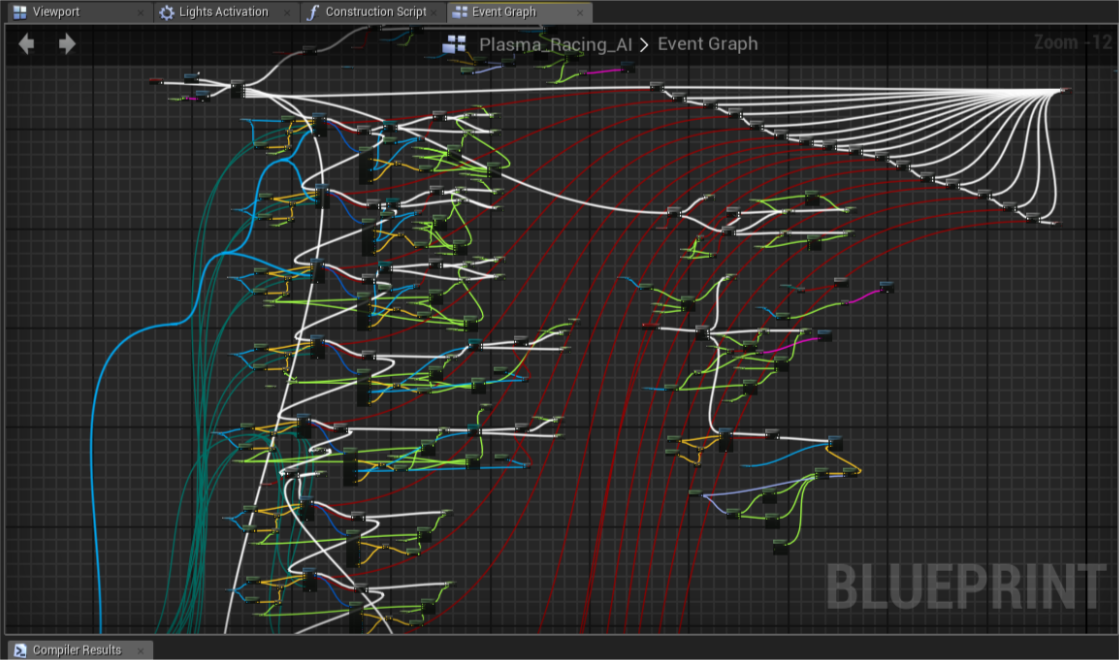
Intax's Blog
In this post I’ll go through common myths about Blueprint performance bottlenecks and explain real logic behind it’s virtual machine.
frosty heron
fiery swallow
Credit to: <@748517221608980631>
https://intaxwashere.github.io/blueprint-perfo...
Thank you I will read it now
frosty heron
fiery swallow
Credit to: <@748517221608980631>
https://intaxwashere.github.io/blueprint-perfo...
Good read, I will keep it in mind when something have expensive or considerable ammount of param
faint pasture
dusky cobalt
What could I spawn that is the most light thing in the world in thousands of num...
Why not just use math
Why have anything spawned or hit tested at all
 true valve
What does No Debugging data means? When I add a breakpoint and try to see the value
autumn pulsar
https://i.imgur.com/Uwer48e.png So when I use this logic, the top branch doesn't seem to set "Is Stopped" properly, but the bottom branch works correctly. Any ideas what might be causing this?
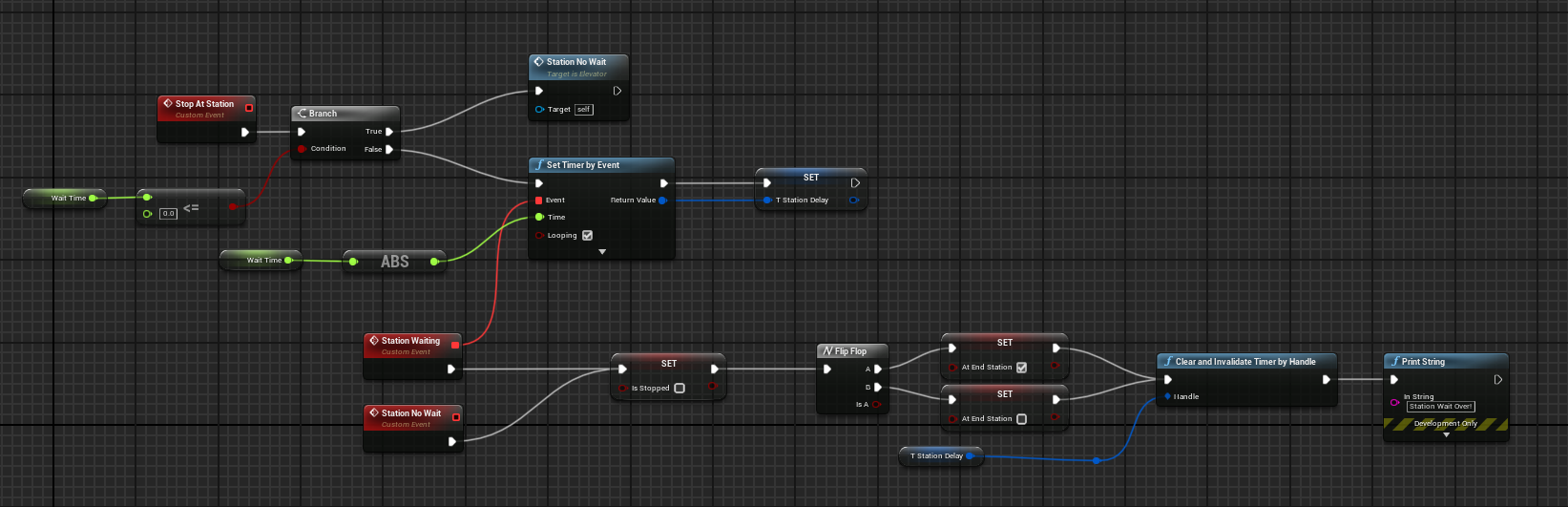
When I print the value to console, the Is Stopped flips every tick I evaluate it
now I found my issue lol
autumn pulsar
Is there a way to set all materials on an object to be the same material?
set material only lets me set per index
 edgy axle
true valve
What does No Debugging data means? When I add a breakpoint and try to see the va...
edgy axle
true valve
What does No Debugging data means? When I add a breakpoint and try to see the va...
are you running ue in debug mode?
oh wait
this isn't c++ nvm
dark drum
true valve
What does No Debugging data means? When I add a breakpoint and try to see the va...
It normally just means its unable to get the value in the context you're trying to view it. For example, if you hoover over an output of a function that hasn't been called yet, it won't have any data to show.
 bright dove
Hi does anyone know how to make the camera stop following hmd device in Collab viewer VR template. In the normal VR template I have an option to disable lock to hmd but I can’t find something similar here
dusky cobalt
faint pasture
Why not just use math
Hmm, I’m not saying not to math, was wondering what could I use actually and if there is alternative to actors. How would you go with math about it?
fiery swallow
frosty heron
Good read, I will keep it in mind when something have expensive or considerable ...
Did you understand any of it lol
dusky cobalt
fiery swallow
https://i.gyazo.com/8238a6a70217d98cbb822ff00be4ef4a.png
this is kind of what I ...
Thank you so much for taking time. That may be good idea to distribute the fog into smaller managers. I went to sleep now it’s time to try some things. It’s gonna be fun 😄
Like get actor location and from that location set things in radius around him hidden? But what would be the matrix for the fog in this case?
fiery swallow
dusky cobalt
Like get actor location and from that location set things in radius around him h...
Everything that's yellow and white are essentially fogged, only the active (red) fogs would be hidden or whatever from the player, so the player could see
Maybe I should have flipped it
By active I meant the player had vision in that area
I'm not sure if that is what you were asking
dusky cobalt
fiery swallow
I'm not sure if that is what you were asking
Yeah, I'm sorry it was follow up to the math approach. I get your idea totally. I'm gonna test first performance test with just a ''tile'' like on the whole map fog, then I will try to divide it into sections (so like grid of managers) and then maybe I will understand how to do it with math 😄
spark steppe
 sharp steppe

Easing functions specify the speed of animation to make the movement more natural. Real objects don’t just move at a constant speed, and do not start and stop in an instant. This page helps you choose the right easing function.
it may miss some and may have some additional, but the majority should be on there
 dense garnet
Hi.
Please see screenshot.
I can't find it - "vector * float" - anybody know that is called in UE5.3?
I've been searching for it for over 30 minutes. haahha
 spark steppe
you can use a vector * vector node, rightclick the 2nd input and there should be an option to change the type
if you want the old behavior you have to disable auto cast nodes in the editor or project settings, i can't recall where it was exactly
bright dove
Hi does anyone know how to make the camera stop following hmd device in Collab viewer VR template. In the normal VR template I have an option to disable lock to hmd but I can’t find something similar here
final berry
Hello! I currently have this to make sure I only do stuff for keys: 1,2 and 3. Which I then put in a switch on int to do something specific for each of the 1,2 and 3 keys. But I hate it and I'm sure there needs to be a better way. Anyone knows?
I dont want to use the key events 1, 2 and 3 because that would create a lot of double code which is a shame as well

 storm shale
final berry
Hello! I currently have this to make sure I only do stuff for keys: 1,2 and 3. W...
storm shale
final berry
Hello! I currently have this to make sure I only do stuff for keys: 1,2 and 3. W...
Well you don't need to do the branch test. The switch will by default handle that. And you can add the 'default' output in the switch if you want smth to happen when it is not 1-3.
final berry
Fair, but I feel like this is so heavy to check something on an Any Key event, or is that not true and is it fine to use the Any Key event
 topaz condor
hey guys, i had a bunch of meshes that made up a house in my game and i combined them into a blueprint actor. problem is when i place it in game all the objects show up in the center, any ideas how to fix this?
spark steppe
your current way most likely performs worse
dusky cobalt
topaz condor
hey guys, i had a bunch of meshes that made up a house in my game and i combined...
Do you mean they spawn in like half deep into ground ?
topaz condor
dusky cobalt
Do you mean they spawn in like half deep into ground ?
no for example lets just say in the middle of my house is the living room, every single part of the house ends up where the living room is
spark steppe
open the BP, are those all child actor components or static mesh components?
spark steppe
you need to reevaluate the buttons you click xD
because that was a bad life choice...
topaz condor
LOL
spark steppe
do you still have the original arangement in some level?
topaz condor
i have it revision controlled
spark steppe
good for you, create the blueprint again but this time pick harvest components in the dialogue that shows up when you create a BP from a selection in the level
that should make the same thing but with actual static mesh components instead of the child actor bullshit
final berry
topaz condor
i have it revision controlled
I need to set this up, what revision control do you use? For my work I use Git, but that's just c# code. Do I need to take something different in account for UE?
topaz condor
final berry
I need to set this up, what revision control do you use? For my work I use Git, ...
i use Git too
pretty simple
dusky cobalt
topaz condor
i have it revision controlled
or if you need to connect some static meshes into one, go into modeling mode, xtransform, and mere all selected meshes, you will get new mesh that
topaz condor
spark steppe
good for you, create the blueprint again but this time pick `harvest components`...
gonna try that thank u!
topaz condor
dusky cobalt
or if you need to connect some static meshes into one, go into modeling mode, xt...
i havent tampered with modeling mode at all yet so im gonna stay away for now
dusky cobalt
it's 3 clicks literally 😄
you click merge when you have all static meshes selected that you want to merge

and it creates new static mesh
final berry
topaz condor
i use Git too
Is there no repository size limit or something?
 languid swallow
If enemy can be pushed, stunned, interrupted, hit. This would be best as component on enemy class?
Push should also be in that component - best way to do push? Launch is not so good because I want to control distance and speed, but I also do not want enemy to get stuck in a wall if he hits wall at very long angle but slide alongside wall - any tips on how to best approach that?
topaz condor
final berry
Is there no repository size limit or something?
i paid the $5 for the 50gb
dusky cobalt
topaz condor
well then
yeah its awesome
there is also duplicate one that is usefull and bake transform if you want to have 2 variants of one mesh in different scales
topaz condor
so the merge just creates a mesh of multiple meshes, not a blueprint correct?
spark steppe
topaz condor
so the merge just creates a mesh of multiple meshes, not a blueprint correct?
no
it creates a BP with multiple static mesh components
instead of multiple child actors
merge mesh also exists tho, but i guess for a house you wouldn't want that
also keep the reference level around, in my experience it's easier to modify stuff later on (since you may figure that some things don't work as they are right now, etc..)
topaz condor
am i doing something wrong, i dont see a blueprint option
 dusky cobalt
topaz condor
so the merge just creates a mesh of multiple meshes, not a blueprint correct?
dusky cobalt
topaz condor
so the merge just creates a mesh of multiple meshes, not a blueprint correct?
yes
topaz condor
naw i got it, just went with the harvest components in the convert blueprint
thank you guys that fixed it!
thin panther
final berry
Is there no repository size limit or something?
Not for Git. For GitHub, yes.
For Azure DevOps, no.
Git is just the software
Github is the remote host, and it's pretty shit compared to the competition
Azure will give you a 250gb soft repo cap, but unlimited git lfs space
final berry
I was gonna say, we transfered to Azure, but I didnt see that option in the revision control of UE
thin panther
Yeah that's because it uses Git
final berry
`Right
spark steppe
you shouldn't use revision control with unreal either
you would set it up outside of UE
unreals internal GIT stuff is garbage at best
topaz condor
can anyone see something off here thats causing my game to significantly drop frames. im running a 4080 with like 15 frames...

 compact hornet
Alright this is something I'm sure is obvious but I cant get it to work. Basically I'm trying to make a line trace "bounce" of a surface by doing a second line trace from the impact. Of course this makes the bounce weird because its coming straight out of the normal, but how do I get the angle to be mirrored to the incoming trace? I'm fairly sure I need to use the dot product in some way but I'm to stupid to figure it out
 merry chasm
hi guys,
anyone experience a blurry decal when its "not loaded fully"?
If I go closer, than the blur disappear, but the problem is that when i render its blurry.

 wispy kayak
Hi how can I destroy the previous spawn actor and replace with new one?
 balmy onyx
hey i came up with a way to save the players money and tried it for the health aswell but it does not work. any solutions?


 tight pollen
someone can help me?
how can I achieve this with Widgets?
I tried with Z-Order, but the last widget is always above the first :/

 exotic mesa
Is it possible to make the world position offset for an object only visible on the client?
So on the “server” it stays the normal size
 twilit heath
tight pollen
someone can help me?
twilit heath
tight pollen
someone can help me?
z order works only for direct children of a canvas panel
don't think UMG has a mechanism that will allow you to have widget 4 over widget 1 but below widget 3 either
edgy axle
tight pollen
do the widgets ever move? or is this a static thing
cause if it's static then you could just use an image instead of 4 widgets
or split the widgets in half and then set one half to be lower than the other
trim matrix
Which approach use to melee attacks? Anim notify doing a some type of trace or setup collision query?
 surreal bridge
I keep having issues with my function library.
One function just returns a static map of enums and Data Assets.
While the other takes an enum and returns the value from the map.
However, from time to time the second function always returns null and the only way to fix it is to clear the static map and remake it.
When I remake it I am using the same keys and values for it and it ends up looking identical to what it was previously except it is working again with no other changes required.
I don't know what is causing it but remaking the same map constantly isn't ideal.
meager acorn
I have blueprint where Directional Light rotates to make day/night, it works great but only on server, on client (without Global Ilumination) is night too bright. I tried setting intesivity but no luck in that


 edgy axle
meager acorn
I have blueprint where Directional Light rotates to make day/night, it works gre...
edgy axle
meager acorn
I have blueprint where Directional Light rotates to make day/night, it works gre...
the directional light's rotation probably isn't replicated then
meager acorn
edgy axle
the directional light's rotation probably isn't replicated then
that's the weird part, it is. The sun goes down and raises after specified time, just that lighting is weird
nvm, i got it. Sky light component was the issue. I forgot it in the scene 💀
edgy axle
meager acorn
I have blueprint where Directional Light rotates to make day/night, it works gre...
your Server Day/Night should be replicated to client not server
you've got it the wrong way around
maiden wadi
tight pollen
I tried with Z-Order, but the last widget is always above the first :/
ZOrder is not a gradient. It's a solid number so one would always be above the rest entirely. If these need to be clickable you can hack up a BP masking implementation but it'll be slow. C++ allows custom hit rects. But C++ won't help you at all for the visuals unless you actually change the widget's vertices and custom draw it which can be costly vs just doing something in a shader.
 remote rapids
hey can i get help?

here i have a sphere us a actor
i want the sphere to move up
i check V on simuilate physics
and on event graph i add impulse
and its not working
i saw a video and that now working to me and i did the same and that work for him
maiden wadi
How much impulse? It can take a lot sometimes.
 silk estuary
Any tips for logging an error in BP?


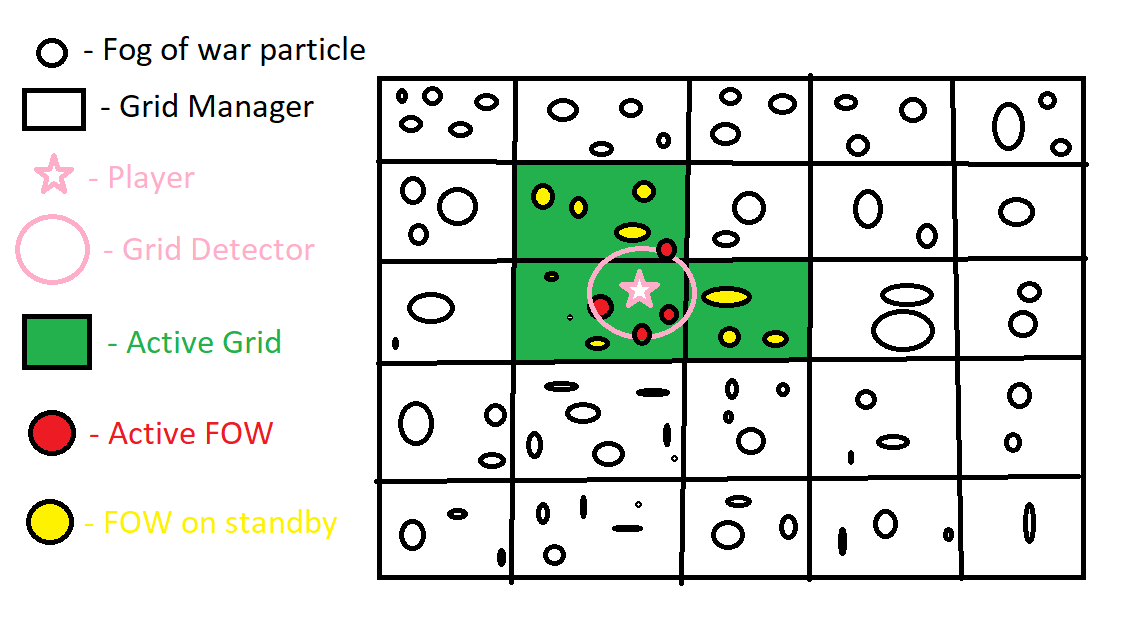
 silk estuary
I occasionally have situations where I have a "should never happen" branch because i know the component / animBP / etc is going to be assigned to a certain actor, and so the cast should always pass for example. So I'd like to log an error in the failed branch as it means I've probably made a programming error
maiden wadi
silk estuary
Any tips for logging an error in BP?
PrintString or PrintText usually.
maiden wadi
remote rapids
Doesn't do anything even at like 100000? If not I'd say your thing isn't simulating physics for some reason despite the checkbox. Some things can turn that off like attachment code.
maiden wadi
silk estuary
Hmm I was hoping for something with a way of capturing the call site
Unsure how you mean? There might be ways to throw better errors but it isn't engine default and would require C++. Usually you just printstring with the class and function name in a PrintString node. Makes it BP searchable at least.
remote rapids
maiden wadi
Doesn't do anything even at like 100000? If not I'd say your thing isn't simulat...
well i did now 100000
and that work
why ot works on 100000 and not on 1000
maiden wadi
Not entirely familiar with the mass system, but I'd guess it's too high. Needs more force to move. Like the difference of kicking a football vs a boulder.