
#blueprint
1 messages · Page 177 of 1
 trim matrix
 outer quail
Hi, I was watching a yt tutorial but he didn't mention anything about how he opens up the command tab. how can I do it like he did?

 thin panther
` key
 wheat citrus
after some more testing I found that to get the same displacement when launching the character in the air as from the ground, the velocity vector has to be scaled by a factor of 2 (in X, Y and Z) which makes no sense to me. Anyone know whats going on?
 balmy viper
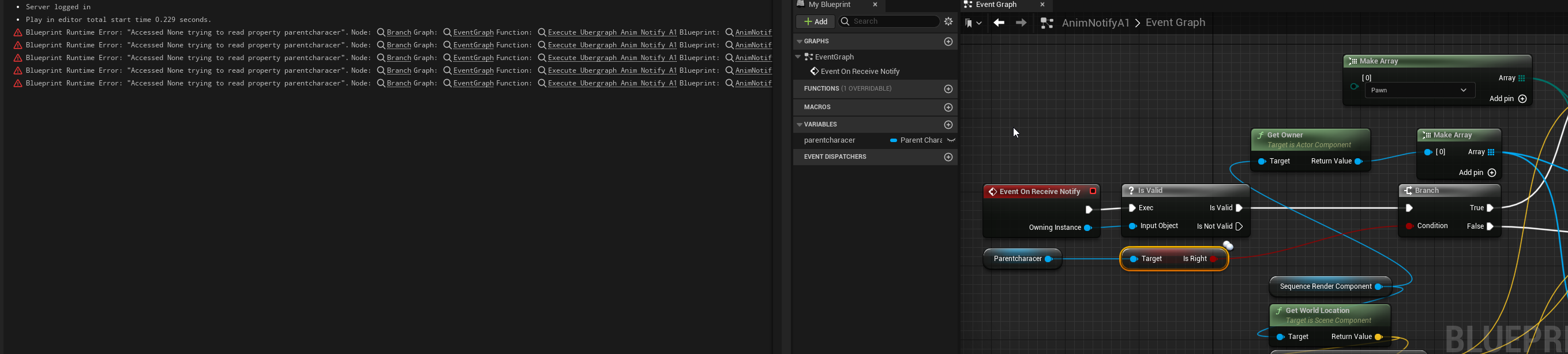
I might be going crazy. I have an EnhancedInputAction bound to my P key ... it's not working. At the moment I only have a PrintString on it, pretty simple. Other input actions are working. Struggling to think how to debug it. Any ideas?
 bronze lake
wheat citrus
after some more testing I found that to get the same displacement when launching...
bronze lake
wheat citrus
after some more testing I found that to get the same displacement when launching...
Can you show your nodes to the left of this?
wheat citrus
bronze lake
Can you show your nodes to the left of this?
Literally just putting in an upward vector

(for the testing anyways)
you can replicate the issue easiest by making a new third person template project and then replacing the jump code by this. I would expect the character to go twice as high (in total) as after the first jump on the second but it only goes an extra fraction of the first

 dusk belfry
hello guys, quick question. Is there any way to get an animation notification info before it triggers? i would like to know the timing between 2 different notifications but it seems you cant get any info from the animation itself in that regard
 stoic ledge
dusk belfry
hello guys, quick question. Is there any way to get an animation notification in...
stoic ledge
dusk belfry
hello guys, quick question. Is there any way to get an animation notification in...
Could u just print the time?
dusk belfry
how do i get the notify timing in a bp?
 open roost
Why AI MoveTo using on player character in top down template doesn't work with custom collision channel? I have simple object with custom collision channel and set character capsule collision to ignore that channel, but character still moves around the object. I tried this on ThirdPerson Template and it works correctly.
 dusky cobalt
Eventception? Any better way to handle it? And this I know this is crossing but how else should I handle it, lol.

 lofty rapids
variables
 balmy viper
I might be going crazy. I have an EnhancedInputAction bound to my P key ... it'...
balmy viper
balmy viper
I might be going crazy. I have an EnhancedInputAction bound to my P key ... it'...
Could this be something to do with my event handler for IA_TestParticles being in child class? Events not being pass through from the parent or something? Still a bit new to unreal dev, I could use a suggestion, thanks.

 queen dagger
so you could
started would print once and triggered would print for as long as the trigger is held down
balmy viper
Is that an answer to me @queen dagger ?
balmy viper
the question is in the quoted post 🙂
balmy viper
yeah
queen dagger
along with the action inputs
balmy viper
I have a bunch of them ... the other ones are working, so it's a mystery and I'm not sure how to investigate
balmy viper
which code? I'm planning to try and grab the enhanced input context at runtime and make sure it's grabbing the right one
queen dagger
well for enhanced input you have to add the mapping context somewhere so it knows to use them correct?

 proper vigil
@dark drum Hello! I'm currently following part 5 of your 'Ultimate Dialogue System' tutorial, and I am currently right at the part before you create the Blacksmith dialogue child. I found an error that didn't happen before. When I start doing the dialogue, it just moves on before I can press the button signaling to progress the conversation.
queen dagger
can you show me the input action for the p key
 proper vigil

 queen dagger
i mean that all looks good
balmy viper
ya
 dreamy mountain
Hey, I'm trying to change a widgets text value based on whether the input came from a keyboard or a controller; how would I get the boolean value to check what input it came from
queen dagger
maybe try making an input event for p to see if p functions not using enhanced input
queen dagger
i do that
balmy viper
k cool
queen dagger
for the escape button'
balmy viper
rgr that
balmy viper
queen dagger
for the escape button'
so like just an OnKeyPressed type deal?
queen dagger
dreamy mountain
Hey, I'm trying to change a widgets text value based on whether the input came f...
ill take one large fry with a side a cast nodes
queen dagger
balmy viper
so like just an OnKeyPressed type deal?
yes
balmy viper
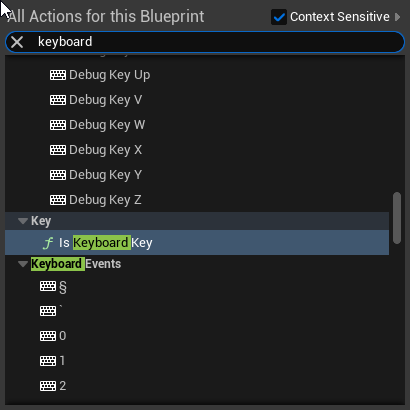
what do you type in to bring up the node? I found it, but in a weird way
queen dagger
keyboard then look for keyboard p
balmy viper
hmm didn't work. weeeeeird
queen dagger
 queen dagger
gotcha
balmy viper
nope on that one lol. this is craziness
queen dagger
like you just dont see the keyboard?
balmy viper
No I found the standard event for P and added a node
and a Print String ... but it's not being fired

 queen dagger
ok so wait
the rock will have an effect and you want to launch the effect when pressing p
balmy viper
yeah
queen dagger
ok
balmy viper
it's a niagara system that's gonna fire when the rock is broken
just trying to test it
balmy viper
its in the component attached to the rock actor
circled up there
I ticked auto-enable on the component
balmy viper
cool
balmy viper
hmmmm okay
queen dagger
but how far have you gotten on the rock
balmy viper
maybe I have to do it through the player controller
I think you're right actually
still getting my head around how the unreal ecosystem works
queen dagger
now worries im pretty new too
balmy viper
sometimes when I haven't done something for a while, I forget
queen dagger
blind leading the blind lol
balmy viper
that's cool I will do it in the controller
balmy viper
queen dagger
blind leading the blind lol
hey, in this case it worked! haha thanks dude
queen dagger
no worries
balmy viper
how's your project going?
queen dagger
well im working on hit detection and multiplayer replication of the hit detection
balmy viper
yup
queen dagger
i just cant get my hit detection to work correctly
balmy viper
I'm considering abandoning my multiplayer stuff for now
too much extra work for a first game
queen dagger
same
balmy viper
yeah
queen dagger
but ive got almost all of the base there
queen dagger
sure sure
 strong halo
Hi! Why isn't the dropdown on create event not showing?


 lunar sleet
Ya broke something
Try restarting the engine. Otherwise it might be tied to your dispatcher’s signature
strong halo
lunar sleet
Try restarting the engine. Otherwise it might be tied to your dispatcher’s signa...
smh restarting helped, as it often does. ty!

 lunar sleet
Good information to put in your initial question yeah?
thin panther
Hell even Get (A Copy) then modify, then Set Array Elem
lunar sleet
I hope it’s a bp struct 😈
thin panther
Great, then there's no Make Array or anything needed.
Well if you're doing what I described you don't need to "make array and copy everything over"
You pull a reference to the struct you want, and set the member in that struct
Happy days
Set Members In TableSeatData
click on the node
it has checkboxes for the members to set
should do, you're working directly off references
If not, you'll have to get a copy, modify it, then set array elem. Less ideal, but still cleaner than make array :P
But I don't see where it could be making a copy there so you should be good
proper vigil
proper vigil
<@430016173694779402> Hello! I'm currently following part 5 of your 'Ultimate Di...
Nvm, the issue had to do with the timer thing.
trim matrix
hii, so im making a platformer, and i have a character that i wna be able to have its form changed by the level, for platforming, like a flame to melt it so it fits under a platform, if it goes through a grated fence it gets spliced into a bunch of little versions of itself that then form back into one model after a few sec stuff like that, how would i accomplish something like that?
proper vigil
trim matrix
hii, so im making a platformer, and i have a character that i wna be able to hav...
3D or 2D?
trim matrix
3d
but the character is a relatively simple mesh its a marshmallow, but i do plan on adding costumes at some point
queen dagger
question so i got my hit box detection sorta workin now i just need to get the damge value to reflect the right amound which is set in the parent character which is pulled from the data table of all characters in game
i just want my base damage amount to be passed through
lunar sleet
what's stopping ya
 lunar musk
I make a simple drag and drop for an inventory but when i reopen inventory, items come back to his initial position. I need to save last index. Any idea?
proper vigil
So, in the tutorial, the branch system has been used for conditions. For my project, I created a new child of BP_DialogueBase for a new converstion that will take place with the same NPC as the first conversation but only when the objective text is set to something specific.
 merry chasm
Hi guys,
I want to solve the following problem:
I have a blueprint actor that contains a StaticMeshComponent. If I change a property in the editor of my actor, I want to execute logic that "reconstructs" the actor based on its height. I use the GetActorBounds function. The problem is that in the construction script, the actor height is not "finalized." The actor has a different size than it will in BeginPlay. The child StaticMeshComponent also has the correct size, but I don't understand why the actor size is not the same as its only child, which is a StaticMeshComponent.
So my question is, why GetActorBounds not give the final size of my actor?
Do you have any idea? 😦
proper vigil
Not sure how I'd go about this, but for my first dialogue with the NPC, I made a system that checked to see if the objective text was set to the objective which allowed for the NPC conversation to begin, otherwise nothing would happen when someone tries to interact with the NPC.

 sweet jetty
what is the best way of adding points
like when i shoot my enemie i want to add points
what is best way ?
proper vigil
Wdym?
sweet jetty
i have gun and line trace and when i kill enamie i want to add points
lofty rapids
sweet jetty
what is best way ?
a variable somewhere
do you want it to persist through levels ?
put it in the game instance, thats where i put most of my "globals"
 green lotus
Hi, I’m trying to open up the WFC Model Instance but it refuses to open
sweet jetty
i have this code here but i just dont know where to put it
merry chasm
@lofty rapids Do you have any idea about why GetActorBounds not gave me the final size of my actor?

 lofty rapids
sweet jetty
lofty rapids
sweet jetty
so i c here you have add points, that makes sense so you use a variable, what bp is that on ?
lofty rapids
sweet jetty
your just get actors of class, don't you want to do it on kill of an enemy ?
lofty rapids
merry chasm
<@910231430074859570> Do you have any idea about why GetActorBounds not gave me ...
idk much about construction script
i don't even know when it runs i have not used it
sweet jetty
lofty rapids
so i c here you have add points, that makes sense so you use a variable, what bp...
this is on my third person character bp
lofty rapids
sweet jetty
this is on my third person character bp
ok thats not a bad spot as the character has points, that event should work you just got to get when you fire that
idk about all the get actor of class
you should upon killing the enemy run add points
queen dagger
lunar sleet
what's stopping ya
when i try to call the player profile struc which hold the row name for the character and get the data row the damage amount doest read oput
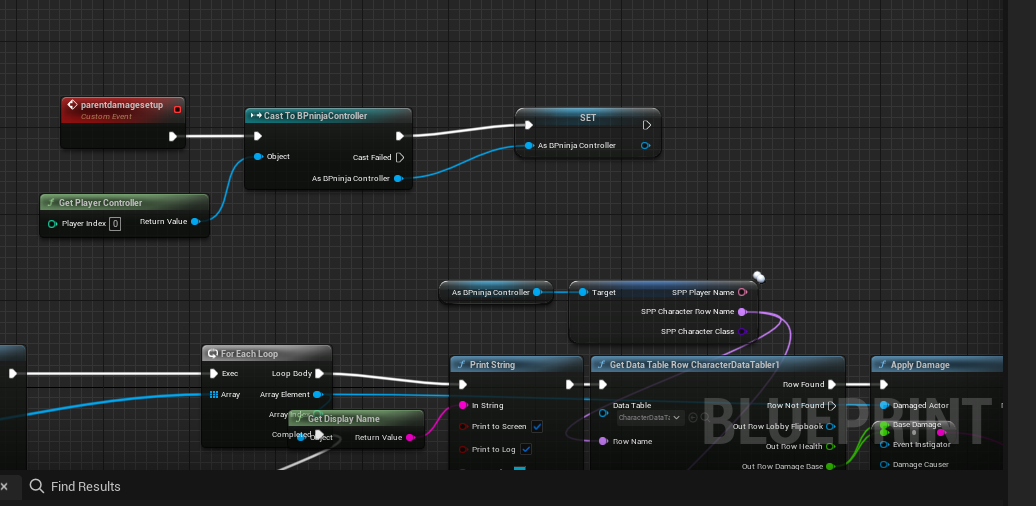
thats what im doing
 dark drum
proper vigil
Not sure how I'd go about this, but for my first dialogue with the NPC, I made a...
dark drum
proper vigil
Not sure how I'd go about this, but for my first dialogue with the NPC, I made a...
I'm not sure what your question is.
sweet jetty
lofty rapids
you should upon killing the enemy run add points
but killing the enamy is on the enamy_bp not third person character
proper vigil
dark drum
I'm not sure what your question is.
How can I initiate a different conversation with the same NPC, based on what the text value of the objective text I made is?
merry chasm
hi pattym. Do you know why GetActorBounds not gave me the final size of actor?
lofty rapids
sweet jetty
but killing the enamy is on the enamy_bp not third person character
you can get player character, cast to your character bp, and run the event
dark drum
proper vigil
How can I initiate a different conversation with the same NPC, based on what the...
I wouldn't use a text value to dictate the dialogue but you could change that later. With the tutorial system, you would set the active branch on the dialogue component. When an interaction is initiated, do your check and set the active branch accordingly before starting the conversation.
proper vigil
dark drum
I wouldn't use a text value to dictate the dialogue but you could change that la...
So, I should check to make sure the text is the correct objective?
trim matrix
trim matrix
but the character is a relatively simple mesh its a marshmallow, but i do plan o...
this is my beta mesh for the character
 dark drum
proper vigil
So, I should check to make sure the text is the correct objective?
dark drum
proper vigil
So, I should check to make sure the text is the correct objective?
Read my comment again.
lunar sleet
queen dagger
when i try to call the player profile struc which hold the row name for the char...
as in nothing prints?
queen dagger
i actualkly got it to work
i had to cast to the controller thats why it was populating
even better though is it works host and client
 nocturne fossil
so im in a component in the blueprints thats using ia steering but the value is just 0 always why?
 lunar sleet
nocturne fossil
so im in a component in the blueprints thats using ia steering but the value is ...
lunar sleet
nocturne fossil
so im in a component in the blueprints thats using ia steering but the value is ...
based on what? that just shows no debug data. and why are you getting it like that, is this a template?
nocturne fossil
i solved it by setting the steering to the output of ia steering on tick
ye its the car template im in a component inside of the car bp, inside a macro
thin panther
No
 stone field
 wispy badger
Is it possible to wrap around nodes?


so it will go from left-right -> right-left -> left-right
 faint pasture
wispy badger
so it will go from left-right -> right-left -> left-right
faint pasture
wispy badger
so it will go from left-right -> right-left -> left-right
no, not really graphically anyway
logically you can do anything you want
 lunar sleet
wispy badger
Is it possible to wrap around nodes?
lunar sleet
wispy badger
Is it possible to wrap around nodes?
maybe you should look into Behaviour Trees
wispy badger
how to get this view?
 spark steppe
are you maybe just looking for reroute nodes
to make the blueprint less messy?!
or do you really want to get some kind of ping-pong execution flow?
dusky cobalt
wispy badger
how to get this view?
click two times on a white line and you can make reroute
oh you want it from right to left lol xD
spark steppe
i think he really wants ping pong code execution
dusky cobalt
damn, just create event and call it at the end if you dont want big mess 😄
wispy badger
spark steppe
are you maybe just looking for reroute nodes
no, it still makes it messy
I only want to visually, but not logically, change the flow of execution. You see nodes going from left to right.
I want them to go from right to left when I want (e.g. 5 nodes per "line" then go down one "line" and add nodes from right to left. Then when that "line" is filled go down another "line" and add nodes from left to right)
Something like a snake 🙂
spark steppe
sequence node
 twilit gulch
Hey! Can Math Expression Nodes have vector variables/inputs? From what I'm reading and seeing it only accepts floats and ints?
basically having an expression like this
vec(myVar.X, myVar.Y, 10)
Which would add a myVar vector input to the node
 remote rapids
i need help
i set the timer countdown logic

i dont know how to make that display on my screen
 frosty heron
remote rapids
i set the timer countdown logic
frosty heron
remote rapids
i set the timer countdown logic
This ain't gonna work
And ain't no timer
Just use set timer by event or function
Delay on tick doesn't do what you think it does.
Think about it, tick runs every frame.
Also you can just print string to see the values
 abstract terrace
twilit gulch
Hey! Can Math Expression Nodes have vector variables/inputs? From what I'm readi...
abstract terrace
twilit gulch
Hey! Can Math Expression Nodes have vector variables/inputs? From what I'm readi...
Have you tried it?
twilit gulch
yes I've tried different syntax (like the above) and it isnt able to parse it
so im not sure if I'm missing how you declare a vector input in the expression, or if its not supported
abstract terrace
twilit gulch
so im not sure if I'm missing how you declare a vector input in the expression, ...
Checking... could've sworn there was a MakeVector operation, but I haven't touched expressions in a while.
twilit gulch
you can make a vector in expression with vec() but its not a variable input
 maiden wadi
@twilit gulch
 twilit gulch
ahh did you change the type of the inputs?
would you just do Vec.X to get the X coord in the expression?
I ended up making a helper function C++ haha, but that's still good to know in the future
abstract terrace
Referencing the components of a vector in the expression seems problematic. That'll give me an error. But if it's just constants, then it works (eg: (vec(1, 2, 3)))
twilit gulch
yeah just tried the same, sadly won't work for my use case as I need to use the float values of the inputted vector
 warped juniper
Hey there!
I have anim notifies set in a montage that adjust several variables on multiple collision shapes within an actor.
However, I want to edit them in such a way I can preview the collisions while editting the montage
I know they all work, but properly adjusting it feels very badly when I can't see it
 jolly delta
hi, i want the two static meshes, + and - of the dipole to stay attached to each other. They are just running away from one another due to force from other dipoles. how may i fix this?
 remote rapids
frosty heron
This ain't gonna work
remote rapids
frosty heron
This ain't gonna work
so from the begin
tell me what to do
i want that in the first click on the button a timer of 45 min will appear and a countdown will appear.
now i need to do that i can click on the button again when the countdown is over.
how to do that>
?
 frank sundial
Hello! So this is probably really simple and im just dumb, but How would I get just the Z axis off of a vector? I have something setup to find where I need to have the starting point at, but I dont know how to get just the Z axis from the vectors.
Never mind i got it
lunar musk
Which is the best way to swap elements on array?
 dawn gazelle
remote rapids
so from the begin
tell me what to do
i want that in the first click on the butto...
dawn gazelle
remote rapids
so from the begin
tell me what to do
i want that in the first click on the butto...
Look up SetTimerByEvent.
 dawn gazelle
lunar musk
Which is the best way to swap elements on array?
dawn gazelle
lunar musk
Which is the best way to swap elements on array?
There is a "SWAP" node you can use with arrays that takes two indices.
remote rapids
dawn gazelle
Look up SetTimerByEvent.
okay but where i connect my button on clicked?
lunar musk
dawn gazelle
There is a "SWAP" node you can use with arrays that takes two indices.
I saw it, but not work for me. I'm trying to swap items on inventory with drag and drop
dawn gazelle
remote rapids
okay but where i connect my button on clicked?
If you want the timer to start when the button is clicked then you'd call the set timer by event then.
remote rapids
and how i call that?
i have 2 question
- how to connect my button on clicked?
- how i add a countdown text on the screen?
@dawn gazelle
dawn gazelle
lunar musk
I saw it, but not work for me. I'm trying to swap items on inventory with drag a...
It works just fine. What might be happening is you're not updating your inventory's display after swapping the indicies.
dawn gazelle
remote rapids
i have 2 question
1. how to connect my button on clicked?
2. how i add a countdo...
- Connect the execution path of your clicked button to the SetTimerByEvent node.
- You can use the TimerHandle's GetTimeRemaining or GetTimerElapsedTime to get the number of seconds and then update any widgets you have with those numbers.


 dawn gazelle
remote rapids
is that good?
dawn gazelle
remote rapids
is that good?
Well, what you have there is a 45 second timer that will start when the widget is constructed and restart itself if you click the "Present" button, but otherwise do nothing else, so if that was your goal, yes, that's good.
remote rapids
But I have 1 problem
I don’t see the countdown when I click on the present button
I want the if I click on the button I will be able to see the timer countdown on the screen
And only when the countdown will end so I will be able to click on the button again
dusky cobalt
remote rapids
But I have 1 problem

#stopwatch #time #clock #lap #tutorial
Create a custom node that outputs a TIME STAMP! Great for racing-style games or any game where you would like to keep track of player time. The node also has the ability to switch to "timer mode" and a built in Custom Event that will fire when the timer hits 00!
Link to code:
remote rapids
I will watch it I think this is good
But I don’t want countdown with print string
I want regular text
For example when you create new widget blueprint and you add canvas and on that you add text
So I want the kind of text color and font and all those text options
And not the ugly print string
dusky cobalt
if something can get printed then it can also get displayed
remote rapids
So there is a node instead of print string that I can set a regular text?
That what you meant?
dusky cobalt
there is couple of way to get data from something to be displayed in the widget, you can bind text in the widget to display variable you want
remote rapids
I will try that tomorrow.
Thunks for the help.
I am sorry if my questions are stupid for you , but I am new and I am learning and you guys really helping me
dusky cobalt
remote rapids
I will try that tomorrow.
Thunks for the help.
I am sorry if my questions are st...
https://www.youtube.com/watch?v=r4DIdM7j7fU&ab_channel=MathewWadsteinTutorials Maybe this will help you better

What is the Get Game Time in Seconds Node in Unreal Engine 4.
Game Time in Seconds are the seconds of game time since the project starts that IS affected by Pausing and IS affected by Dilation.
Source Files: https://github.com/MWadstein/wtf-hdi-files
lofty rapids
i would just set a timer on 1 second
and decrement the values
could work either way ig but simple to do just subtracting
trim matrix
hey how would i make it so i can slice my player mesh in real time when it interacts with another mesh
 subtle shoal
It ended up not being necessary. I gave up on trying to transform pins to I could watch them. I read up on how to set structs and sub-structs to find my mistake. Then I brute-forced it my packing, testing, repeat. It wasn't too bad.
For context, I am modding Mechwarrior 5 Mercenaries which is built with 4.26. I guess I shouldn't complain that watching is so buggy in 4 when 5 exists. Luckily, the upcoming mechwarrior game from the same dev is using 5. Can you watch all data types in 5?
queen dagger
how would i go about getting a healthbar in game to update based on health remaining
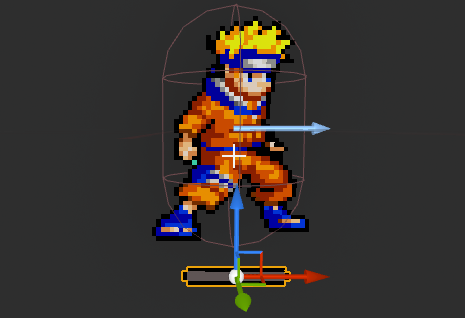
i want to set that bar to a specific level based of the float that the health is at
however how do i get the float to match up to the struct i made
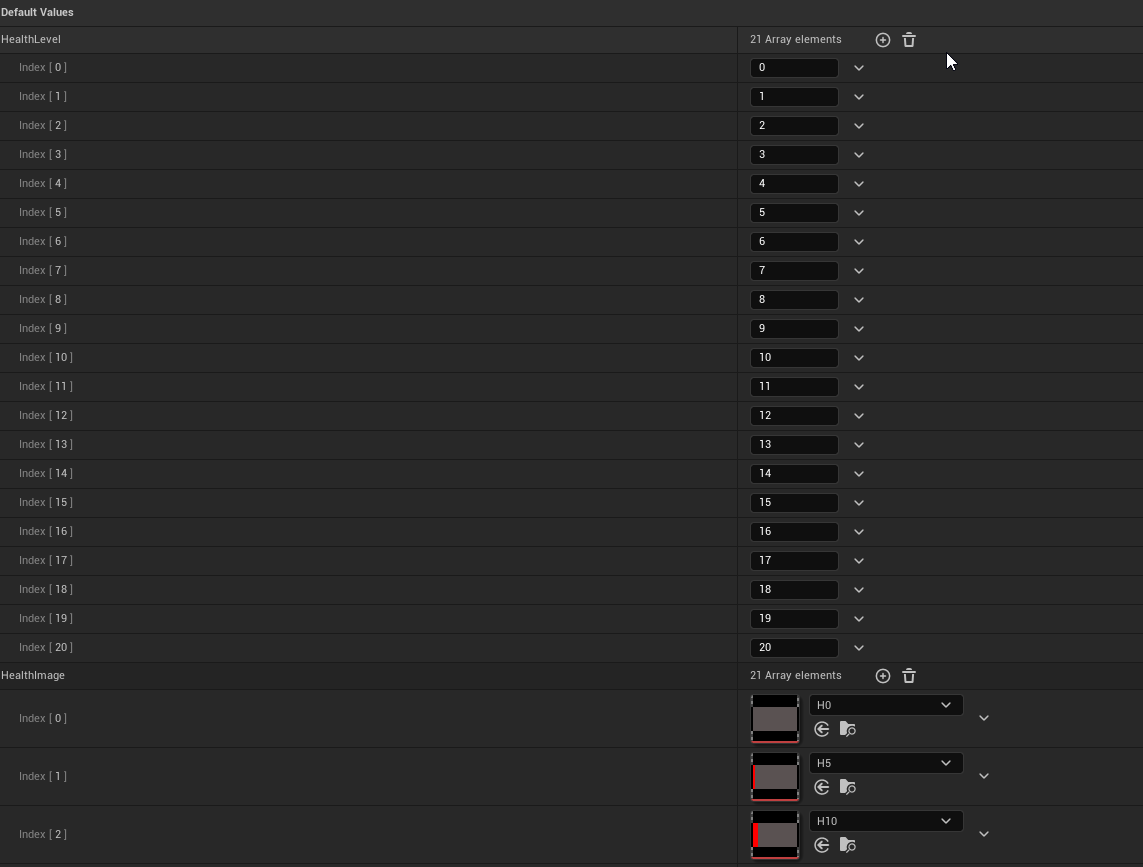
any ideas would be great
 willow cedar
Would there be any good way to see if your character is in a Shadow? I'm trying to do this with a sun light. I just need one point calculated, doesn't need to be perfect.
I suppose all I would need to know is how would I get the angle of the sun in Blueprint to use for a Line Trace.
 karmic palm
Hey guys, Is there a way to detect if a pawn would see another pawn?
I have a turret that has a BoxCollision to detect if an enemy is close, if they are, it aims at the enemy.
I also have a PawnSense component to try and check if the turret can ACTUALLY see the enemy, but this doesn't seem to work, because it tracks through walls, as it doesnt have a boolean to say "looking at x" or "can see x" so I can't un-check it once it detects an enemy.
How can I check to see if the turret can see the enemy? I know I can do line traces but I'm unsure how to do it. I feel like it would LOOK at the enemy and then do a line trace to detect hes not there. I don't want the turret to turn or move until its very clear the enemy can be shot...
lunar sleet
karmic palm
Hey guys, Is there a way to detect if a pawn *would* see another pawn?
I have a ...
Pawn Sensing was replaced by #gameplay-ai perception
Watch the pinned video there on behaviour trees. It also covers AI Perception
karmic palm
Thanks
 vestal sapphire
pls, help me out with this simple thing: I imported a mesh, put the textures on it, opacity doesn't work -it makes the whole thing translucent not only the translucent parts
 dawn gazelle
vestal sapphire
pls, help me out with this simple thing: I imported a mesh, put the textures on ...
dawn gazelle
vestal sapphire
pls, help me out with this simple thing: I imported a mesh, put the textures on ...
Nothing to do with #blueprint as this deals with #materials and textures.
That said, your alpha channel on the texture may not be fully set to white which would make it opaque in those places.
dawn gazelle
queen dagger
however how do i get the float to match up to the struct i made
I wouldn't handle it this way.
If you're using a widget, you can either create a material instance and adjust a scalar parameter to adjust the display of the bar, or use a progress bar element itself and customize its appearance.
 queen dagger
dawn gazelle
I wouldn't handle it this way.
If you're using a widget, you can either create a...
queen dagger
dawn gazelle
I wouldn't handle it this way.
If you're using a widget, you can either create a...
its not actually a widget but a sprite
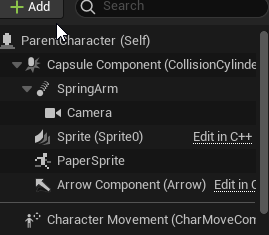
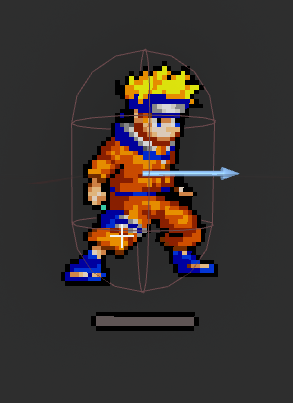

and those are all the bar positions
dawn gazelle
Sprites can still use a material instance.
Just a matter getting it set up to accommodate what you want it to do rather than using 20 different textures and sprites.
queen dagger
okok
and the set that as the progress bar widget?
and then set the widget in the parent character
 pulsar geode
Anyone familiar with spring arm?
I'd like to clamp the maximum rotational distance it can lag behind along with reduce jitter.
lunar sleet
pulsar geode
Anyone familiar with spring arm?
I'd like to clamp the maximum rotational distan...
so what is the issue
dawn gazelle
queen dagger
and the set that as the progress bar widget?
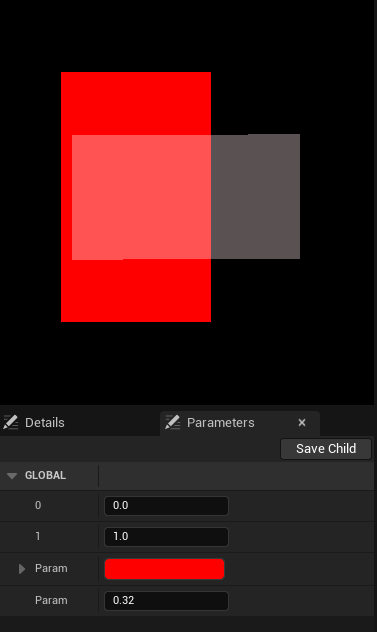
If you want to use a sprite for what you're doing you can, but you need to set up the material to properly display the decal as you need it, and then use that material for the sprite's material. You can create a dynamic instance of that material in your blueprint and then set the scalar parameter in the material instance whenever you adjust the health.
(This isn't perfect, still needs some tweaks)

 pulsar geode
lunar sleet
so what is the issue
pulsar geode
lunar sleet
so what is the issue
As stated, firstly I would like to clamp the max distance that a spring arm can lag behind. I know you can set the max speed within the lag settings. Right now I have it lagging behind camera rotation but if i swing the camera around at a high enough speeds it far outpaces the spring arm regardless of speed. I need a clamp where it will use the lag speed that is set, but it wont get miles behind at higher speeds.
Secondly, is it possible to reduce jitter when using the spring arm? It is pretty brutal.
lunar sleet
doesn't this keep it from lagging too far behind regardless of speed?

ah maybe that doesn't affect rotation
pulsar geode
lunar sleet
ah maybe that doesn't affect rotation
Yeah exactly. I found that but it doesn't do anything for rotation
I have tried both max and min of that float with no difference visually
lunar sleet
you could maybe change the rotation lag speed dynamically, based on how fast you're rotating the camera
pulsar geode
I have thought of that, but then wouldn't using interps based on current rotation be better and jsut forgo the spring arm all together? I was just hoping there would be an ez spring arm option i was glossing over.
Too much lag even at high speeds currently, also the jitter.
lunar sleet
for the jitter try setting the camera lag max time step to zero
pulsar geode
lunar sleet
for the jitter try setting the camera lag max time step to zero
Nice! Thanks for that, there's the jitter gone.
 stark thistle
Hi guys. Quick question: for a function called within the editor (via "Call In Editor" and pressing the button in the Details tab), when you use the Spawn Actor blueprint node is there a way to make it temporary so that it does not save to the level when you exit? I have an Editor-only BP

 regal lance
I have this turret blueprint spawning a projectile, but when I add a delay to loop the function, or even on the event begin play, the projectile doesn't seem to spawn. Not sure what is causing this. Might be a silly question, I'm still pretty new to blueprinting, but any help would be greatly appreciated! Thank you 🙂
 lunar sleet
regal lance
I have this turret blueprint spawning a projectile, but when I add a delay to lo...
lunar sleet
regal lance
I have this turret blueprint spawning a projectile, but when I add a delay to lo...
you can't have delays inside regular for loops.
the latter are meant to execute in one tick
for your scenario try using a Set Timer By Event node on BeginPlay. Plug the delegate pin (square box) into the Fire event's delegate pin, plug your Duration into Time, set to looping.
If you want to stop it from looping, promote the timer's handle to a variable, and when needed get that var and Clear and Invalidate Timer
DO NOT use the execution path of the Set Timer by Event to connect the actual Fire event, aside from maybe using an event call, to run it once before it waits the duration
regal lance
Thank you! I’ve had to step away, but I will fix it soon! Your help is much appreciated 🙂
 green warren
hi yall, i want to follow this tutorial as its the only one i can find that talks about making procedural caves. before i follow it for an hour though, i want to ask first, is it possible to convert the voxels/blocks used here into smoother terrain? https://www.youtube.com/watch?v=RO_9p0ljPAk&t=1447s

Project files: https://app.gumroad.com/jacksonnexhip#PrBfKn
Simplex Noise plugin: https://github.com/devdad/SimplexNoise (make sure you get the right version for your engine!)
Part 1: https://www.youtube.com/watch?v=1QDsE-aSEpA
Covered in this tutorial:
0:00 Intro and importing Simplex Noise plugin
6:51 2d Noise for Surface
40:40 Different mat...
i know its long but you can just scroll through it real quick to check the blueprints he uses
i am using 4.25 btw (as the tutorial requires simplex noise plugin which has stopped updating since that version)
faint pasture
green warren
hi yall, i want to follow this tutorial as its the only one i can find that talk...
Yes, anything is possible
Hard though
especially for caves which imply the terrain NOT being a heightmap
green warren
there isnt even gonna be a surface terrain in the game, its just caves
so what would be a good way to go about doing something like this?
queen dagger
dawn gazelle
(This isn't perfect, still needs some tweaks)
is that the full bp for that?
 undone sequoia
guys I have big map and when I do get all actors of class it seems like that actors which are really far are not counted can i somehow set it up in ue to get all?
dawn gazelle
queen dagger
is that the full bp for that?
That's the material to that you can use with a decal.
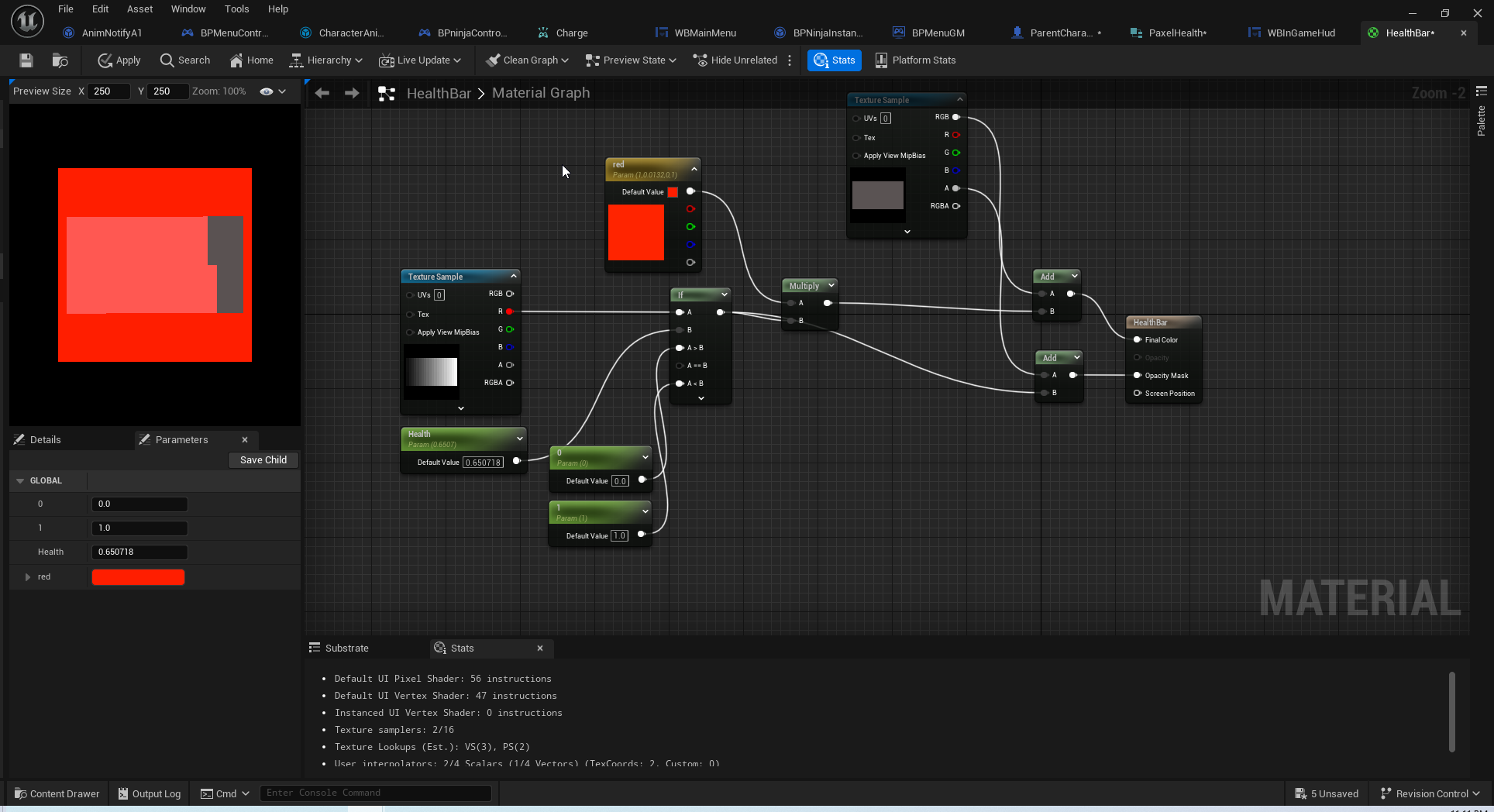
The actual blueprint for control would be something like this - just make sure you set the sprite to use the material you create.
 undone sequoia
like i am on left and actor on right is not in get all actors
 queen dagger
dawn gazelle
That's the material to that you can use with a decal.
The actual blueprint for c...
queen dagger
dawn gazelle
That's the material to that you can use with a decal.
The actual blueprint for c...
damn you made this shit quick
please tell me youre a god and made that all just now
dawn gazelle
I did <_<
dawn gazelle
I screenshotted what you posted, then took it into photoshop, manipulated it, and then imported, yes. (also why it looks kinda junk)
 undone sequoia
wtf I dont understand even I put actors near me i cant get all of them from 8 i get 4 when I print them via loop what is this crazy thing
queen dagger
damn you moved quick
was this a user interface widget
or something i can write direct into the character
dawn gazelle
The last video I showed was a decal. You can control the decal's material on the character.
queen dagger
gotcha
lunar sleet
undone sequoia
guys I have big map and when I do get all actors of class it seems like that act...
If you’re using world partition they won’t be loaded
dawn gazelle
queen dagger
and the first one was what kind of bp
Yeah that's a material. When you first create it, you'll have to set the Material Domain to User Interface and blend mode to masked in order to have it used as a sprite and have transparency.

 undone sequoia
lunar sleet
If you’re using world partition they won’t be loaded
undone sequoia
lunar sleet
If you’re using world partition they won’t be loaded
how change it?
or what to do 😄
i am having path and just creating road so i am loading my path points
lunar sleet
undone sequoia
how change it?
World settings. But if you have a big map that’s prly not a good idea
undone sequoia
lunar sleet
World settings. But if you have a big map that’s prly not a good idea
no that , what setting? please
lunar sleet
Use World Partition. In world settings
queen dagger
dawn gazelle
Yeah that's a material. When you first create it, you'll have to set the Materia...
and for the two texture samples i got the empty bar
what about that first one
is that just a black bar grade
undone sequoia
lunar sleet
Use World Partition. In world settings
i do i meant if there is settings to load all of them anyways
dawn gazelle
The first one needs to be in the shape of the actual health bar that you want to manipulate and have it as a gradient from black to white within that space.
queen dagger
gotcha
lunar sleet
undone sequoia
i do i meant if there is settings to load all of them anyways
If you turn it off they should all stay loaded
queen dagger
since im using pixel size thats 20 by 2
should i increase the size to be more acurate?
undone sequoia
lunar sleet
If you turn it off they should all stay loaded
i just found out that other NPC getting all path points without problem then idk whats in it lol
queen dagger
dawn gazelle
The first one needs to be in the shape of the actual health bar that you want to...
would that work?
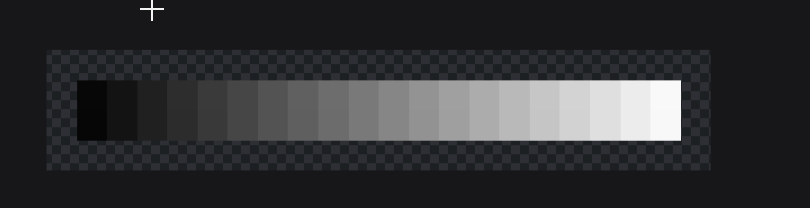 undone sequoia
lunar sleet
If you turn it off they should all stay loaded
undone sequoia
lunar sleet
If you turn it off they should all stay loaded
i solved it with getting all actors with tag instead of all actors of class
lunar sleet
undone sequoia
i solved it with getting all actors with tag instead of all actors of class
Odd. That would prly mean they’re not the same class
dawn gazelle
queen dagger
would that work?
It should, so long as your health values are managed similarly (20 increments?)
undone sequoia
lunar sleet
Odd. That would prly mean they’re not the same class
but they are idk whats wrong they are all just coppies of each other
these
 lunar sleet
undone sequoia
these
lunar sleet
undone sequoia
these
Show the code where you’re using get actors
queen dagger
100 incraments but may have a range
undone sequoia
lunar sleet
Show the code where you’re using get actors

but now with tag
before it it was get all actors of class
dawn gazelle
queen dagger
100 incraments but may have a range
What I mean is that with the image you sent, the player would only see 20 steps in their health, so if they're at 99 health for example, that first chunk of health bar would appear gone even with only 1 damage being done.
dawn gazelle
This also means their health bar would appear empty at 9 health.
lunar sleet
undone sequoia
i dont get it
They might be loading or unloading based on what you’re looking at
queen dagger
any way to set it that it goes down starting at 95?
undone sequoia
lunar sleet
They might be loading or unloading based on what you’re looking at
they are opposite me :/
undone sequoia
placed in map
it is weird I put 12 of them at same place and tried to move it from plane
 queen dagger
also what nodes are the health and 0 and 1
undone sequoia
at this position it only load 11 of 12
but why
all on same place
whats going on
dawn gazelle
queen dagger
also what nodes are the health and 0 and 1
A "Scalar"
 normal pewter
Hey guys, can anyone tell me how do i set a menu item in the selection lobby to rotate on itself?
 queen dagger
dawn gazelle
A "Scalar"
queen dagger
dawn gazelle
A "Scalar"
thanks so much for the assist and how do i add bar color and background color those arent nodes im assuming
dawn gazelle
queen dagger
thanks so much for the assist and how do i add bar color and background color th...
Those are "VectorParameter"
Don't really need the "Background Color" as it's not connected.
dawn gazelle
Yea
 green warren
hi yall, i want to follow this tutorial as its the only one i can find that talk...
green warren
green warren
hi yall, i want to follow this tutorial as its the only one i can find that talk...
does anyone have an answer for this?
dawn gazelle
queen dagger
https://i.imgur.com/b81to12.png
You need to utilize alpha channels in your textures.
queen dagger
 true folio
I have a scene capture component 2d and I want it to use the post processing that is already there in my level for the minimap that I am creating anyone know how to do this?
regal lance
lunar sleet
you can't have delays inside regular for loops.
I've tried using the Set timer by Event node, but it still won't work. I can call the function after this node and it will fire once, but the fire event won't go from this node
 true folio
regal lance
I've tried using the Set timer by Event node, but it still won't work. I can cal...
true folio
regal lance
I've tried using the Set timer by Event node, but it still won't work. I can cal...
add a breakpoint to the spawn projectile
maybe its spawning but just somewhere you cant see it
regal lance
When I call the function once outside of that node I can see it fire once from the correct location
dawn gazelle
queen dagger
https://i.imgur.com/qPec2yA.png
This one here ensures the right color is applied for the filled in part of the healthbar rather than just adding the color value on top of the grey making it look brighter.
If you want, would you mind DM'ing me the textures you're using? I can apply alpha channels to them and try to get the material set up correctly to work for <5% it disappears
 lunar sleet
regal lance
I've tried using the Set timer by Event node, but it still won't work. I can cal...
lunar sleet
regal lance
I've tried using the Set timer by Event node, but it still won't work. I can cal...
You’re spawning the actors in the same spot each time?
With collision set to default they’ll prly fail to spawn or get booted to 0,0,0. Set it to always spawn
regal lance
Adupanda helped my figure it out. They were colliding with themselves for some reason, so we just put in a check so they don't collide with themselves and it seemed to work fine
 midnight kiln
What is the proper way to make a widget billboard like this? If I add a WidgetComponent to my blueprint, it doesn't rotate with the camera. If I set the space from World to Screen, it starts to rotate to face the camera but A) isn't occluded by walls anymore and B) it hides itself completely in the editor and only shows in-game (which is a problem since this is for an editor debug marker and has to show up in-editor). I managed to get something hacked up by generating a texture from the widget's render target and passing that to a material that auto-faces the camera through World Position Offset math, but because it uses Dynamic Material Instances the object can't be saved anymore in-editor


I tried forking the widget material & adding the same World Position Offset adjustment I was using in the original screenshot, but it leads to weird warping / disappears completely in editor (I'm only able to see the material in the blueprint editor for some reason)
 spark steppe
i doubt that you can rotate anything towards the camera with WPO (without the distortion, and eventually disappearing completely when looking at it from 90deg)
also i would just use text renderer for a text label, not a widget
 slow bolt
Hi everybody, I'm still trying to figure out construction script. Tell me please. I created this scheme to rotation each instance independently. It seems to be fully working. But is there any other way to assemble it? I think there's too much calculation involved. If there will be many instances (1000 or 10000), this will greatly load the computer.


 woven turret
Hello, I have a Blueprint actor that needs to change some parameters in a Landscape material. The way I had it set up initially was changing these parameters via a Material Parameter Collection which works fine, but leads to visible seams in the landscape where some landscape tiles don't update their materials visually until the player camera is close enough.
I've now tried to change it so instead of using MPC, I get a reference to the Landscape directly in the same Blueprint actor using "Get Actor of Class" to get the only Landscape in the level > Set a reference with the result > Get Landscape Material from this reference > Create Dynamic Material Instance out of it > then Set this new Dynamic Material Instance as a reference
I've then tried "Set Scalar Parameter Value" on the Landscape Material reference, which doesn't do anything at all when testing in-game.
I've also tried the "Set Landscape Material Scalar Parameter Value" directly on the Landscape reference which also doesn't do anything. Anyone have any ideas if this is intended or if I'm just not using these correctly?
 light mural
Need to modify this pawn blueprint to make it face the direction it is moving can someone help me please?

 tiny meteor
woven turret
Hello, I have a Blueprint actor that needs to change some parameters in a Landsc...
tiny meteor
woven turret
Hello, I have a Blueprint actor that needs to change some parameters in a Landsc...
landscapes have an option in the actor 'use material instances' or something similar,its disabled for optimization purposes
tiny meteor
light mural
Need to modify this pawn blueprint to make it face the direction it is moving ca...
I think pawn has a velocity variable by default, you can use that and get its forward vector, and lerp between that and velocity to set rotation
light mural
where would i put that at exactly?
woven turret
tiny meteor
landscapes have an option in the actor 'use material instances' or something sim...
I've tried this one, while using the MPC method and while trying out the method I posted about with "Set Scalar Parameter" directly - but it hasn't made any difference unfortunately from what I could tell
Using UE 4.26 as well, it may just be broken in that version?
slow bolt
slow bolt
Hi everybody, I'm still trying to figure out construction script. Tell me please...
created a blueprint with the same logic. There are several thousand instances on stage here, each rotating independently. FPS tragically dropped to 10
dark drum
slow bolt
Hi everybody, I'm still trying to figure out construction script. Tell me please...
The issuue is most likely down to the number of loops. Large loops in BP don't tend to perform well. If you're needing to handle large numbers you would most likely be better off handling it in C++.
light mural
I bought a tower defense game blueprint from unreal market place and the enemy pawns do not rotate when moving if I uploaded it to google drive could someone download it and fix the problem then reupload it for me I will cashapp $10 to someone if they can fix it
 mental trellis
slow bolt
created a blueprint with the same logic. There are several thousand instances on...
mental trellis
slow bolt
created a blueprint with the same logic. There are several thousand instances on...
Use Niagara? Should be able to do taht without issue.
slow bolt
mental trellis
Use Niagara? Should be able to do taht without issue.
No, I don't use Niagara, I just started learning Unreal, I don't know anything about Niagara yet.
mental trellis
That is what you should be using 😛
slow bolt
mental trellis
That is what you should be using 😛
Okay thanks, I'll look into it.
mental trellis
Also, small recommendation, the star looks odd when it isn't rotating or animated.
If you use a rotation movement component it'll look a bit nicer.
slow bolt
mental trellis
Also, small recommendation, the star looks odd when it isn't rotating or animate...
Of course, this can be set in the material settings or with a rotator, it’s easy.
mental trellis
Should be various layers as well, rotating at different speeds, to keep it looking nice.
 young meteor
Hey, how do I change my Blueprint thumbnails in the content browser.
Feel like I have seen someone take a "snapshot" in the Blueprint viewport somehow?
dusky cobalt
What could be causing my Data Assets to be reseted every time I close unreal? And they are reseted only for one of the struct.
Even funnier, only this struct is reseted when I put additional ''Ability'' variable, but it gets reseted even when I put it not inside the struct.
Ok, as I was writing this post and wanted to screenshot after reseting, this time it didn't reset it self. I can only guess it might be because I noticed my DA_Ability1 was empty with default values? It's just a guess though.
Anyway, the question for now would be, as it's just first time I hear about Asset Manager, should I look into it and I must configure something there?


 stone field
dusky cobalt
What could be causing my Data Assets to be reseted every time I close unreal? An...
stone field
dusky cobalt
What could be causing my Data Assets to be reseted every time I close unreal? An...
From some old forum thread, regarding struct changes. Perhaps related?
As silly as this sounds I’ve been using this method for a couple of months now and never looked back. Again, it’s a workaround, not a solution, though. Here’s hoping for major fixes soon.``` versed sun
young meteor
Hey, how do I change my Blueprint thumbnails in the content browser.
Feel like I...
versed sun
young meteor
Hey, how do I change my Blueprint thumbnails in the content browser.
Feel like I...
in the Content Browsers settings
 dusky cobalt
stone field
From some old forum thread, regarding struct changes. Perhaps related?
```Once I...
dusky cobalt
stone field
From some old forum thread, regarding struct changes. Perhaps related?
```Once I...
Yeah I read that as well, but I wasn't making changes to struct last 5 times I just put Warrior in the Name and restarted unreal after that. I wasn't modifying struct to have more or less variables so I cannot use it in my case. Funilly enough now it works ''everytime'' (4 times so far.. ) i restarted editor xD
I also removed Ability variable and added it again so maybe it fixed something behind..
stone field
dusky cobalt
I also removed Ability variable and added it again so maybe it fixed something b...
lovely fragility : E
 zenith pond
I recently setup trigger volumes for the first time to update the skylight when entering new zones, there's gotta be a better way to manage this, right? Instead of individually adding a bunch of custom events in the level blueprint?
 tiny meteor
woven turret
I've tried this one, while using the MPC method and while trying out the method ...
tiny meteor
woven turret
I've tried this one, while using the MPC method and while trying out the method ...
not sure, last time I used it I remember there were quite a few limitations, for example it does not work on mobile. you can try assigning a material instance (statically, not during runtime) then try to set parameters in it. may need a material instance and not a MID.
 ruby tendon
How do i mirror static meshes using blueprints?
trim matrix
anyone got any good tutorials where someone sets up player movement in the controller rather then the character
this being in c++
 winged zephyr
How would I get a variable by name from an object reference? I know how to do it in lua since everything is just a table but not sure how this works in Unreal.
^ Preferably I would get all variables in an array/table and turn it into an enum so it can be selected instead of using names.
thin panther
You don't
winged zephyr
There is no way to return them as a table? Like "get class defaults" already do 90% of the functioanlity it just isn't a table.
thin panther
No
ruby tendon
so i am trying to spawn an actor from a buildstructure. but for some reason the scaling doesnt work at all. it stays the same 1,1,1. thats why i put in the weird values. anyone know how to fix this bug. becaus i read its a pretty old bug online. but i need to bypass it otherwise its rip indiegame
 lofty rapids
ruby tendon
so i am trying to spawn an actor from a buildstructure. but for some reason the ...
lofty rapids
ruby tendon
so i am trying to spawn an actor from a buildstructure. but for some reason the ...
are you using ue4 ?
zenith pond
Try setting the scale after the spawn?
ruby tendon
zenith pond
Try setting the scale after the spawn?
i tried doesnt work
ruby tendon
well it doesnt work for some reason
but i found a workaround by using an interface to the actor i spawn
lofty rapids
ruby tendon
so i am trying to spawn an actor from a buildstructure. but for some reason the ...
did you try messing with the scale method at all ?
ruby tendon
a whole bunch
like everything almost
setting the relative scale afterwards/world, trying things such as applying the transforms later
idk why it didnt work. but it works now so i am happy
woven turret
tiny meteor
not sure, last time I used it I remember there were quite a few limitations, for...
We're on Desktop/Windows with this, we already use a material instance from a master landscape material that contain these parameters assigned to the Landscape in the editor, but we need the parameters in the material instance to update in realtime during certain events so I figured creating a dynamic material instance would let us do this the same way we've been able to do it via a material parameter collection before. 🤷
lofty rapids
slow bolt
Hi everybody, I'm still trying to figure out construction script. Tell me please...
for loops are just slow in bp
especially if your doing a bunch of calculations
i would try to offload some stuff to c, you'll get better performance
loops in c are way faster
young meteor
Any way to "Set Timer by Event" with a function that has an input variable?

I would like it to remember a variable and use it for each loop/fire of the event.
lofty rapids
something i also would like to see if possible, i tried a couple things and couldn't get it to work
you may just need to keep track a variable in the event instead
young meteor
Yeah, I'm guessing I have to do like this, but would be neat if there actually was an option for it.
 young meteor
Alright. Thank you.
slow bolt
lofty rapids
especially if your doing a bunch of calculations
Yes, thanks for the advice. Unfortunately, my PC system is old, due to errors I can’t update visual studio, and therefore I can’t use C++ now. For now there are many other things that I need to learn in unreal, but sooner or later I will have to reinstall my system
lofty rapids
my system is fairly old as well and i don't have any issues with visual studio 2022
i would go through the errors and see what you can fix, is it with the install ?
thin panther
it really makes people want to help you when you can't wait 10 seconds
You also never even stated the problem
slow bolt
lofty rapids
i would go through the errors and see what you can fix, is it with the install ?
Error updating the system from version 22H2 to a newer one. It prevents the net framework from updating to version 4.8. I couldn't fix it. I want to upgrade my hardware one day and do a clean installation.
lofty rapids
do you remove from parent the widget ?
slow bolt
Error updating the system from version 1803 to a newer one. It prevents the net framework from updating to version 4.8. I couldn't fix it. I want to upgrade my hardware one day and do a clean installation.
lofty rapids
well you can also ask around in #cpp see if there is a fix, but maybe you have too old hardware idk
but c is very much needed in that
can you show the code where you get into the vehicle ?
so what does the widget look like ?
are those values hardcoded at all or all updated ?
well i would assume your display is a widget
so did you make the display or was it in there ?
i would start by putting another text on the widget, see if it's destroying it or just overwriting the text
without actually shots of code it's a lot more difficult to help
 magic sinew
hi guys, new(ish) to UE5 and thought I'd come along and ask for some advice as I seem to be going round in circles here with the best way to implement weapons / inventory items which are semi-persistent (if that makes sense). I have BP's for weapons which extend from a base BP file (usual set up) so each weapon can have it's own fire rate stats, ammo etc etc. Initially I started this with a DT of items (and still have) which I implement for inventory, but where I'm getting caught up is between the use of classes or objects. I can happily swap between primary and secondary weapons etc which all works fine getting the classes etc from the data table, but there are issues such as whenever I swap weapons, the bullets remaining resets back to default for example as I'm referencing the class not an object - so in short my question is...
how can I create weapons which can be referenced by the object, not by the class and those stats "stick" to the weapons, so if I drop the weapon for example and someone picks it up, if it has no ammo, it's empty when the new player picks it up. If i drop it and pick it up again, it still has no ammo etc
 ancient topaz
Friends, I really need your advice. I've had an interesting problem that I've been putting off for a while. Basically, my animations are playing correctly in the animation window, but in the scene one of the bones, namely the neck bone, starts to live its own life. The characters head in the animations starts to stretch out or the neck starts to bend. In the cut scenes all characters have their neck or head at different angles, but in the animation itself everything is fine. This happened on its own. I also can't see in level sequnce what the camera is showing. This also just disappeared. You click on the camera and nothing happens.
 sonic sigil
Hey guys i cant figure out why my character doesnt wannt to use its walk animation
Hre is my BP setup


 lofty rapids
sonic sigil
Hre is my BP setup
lofty rapids
sonic sigil
Hre is my BP setup
is your state machine plugged in also ?
sonic sigil
Gonna check
sonic sigil
lofty rapids
is your state machine plugged in also ?
yeah

he just idle animations at me menacingly (while moving)
lofty rapids
if you hold i think ctrl on your blendspace @sonic sigil
and move your mouse along the line
do you see him walking in the preview ?
lofty rapids
sonic sigil
Hey guys i cant figure out why my character doesnt wannt to use its walk animati...
also wher do you set character reference ?
queen dagger
i have a widget that im trying to get to work for health
simple health thing that stay with the character
but i cant get it to update
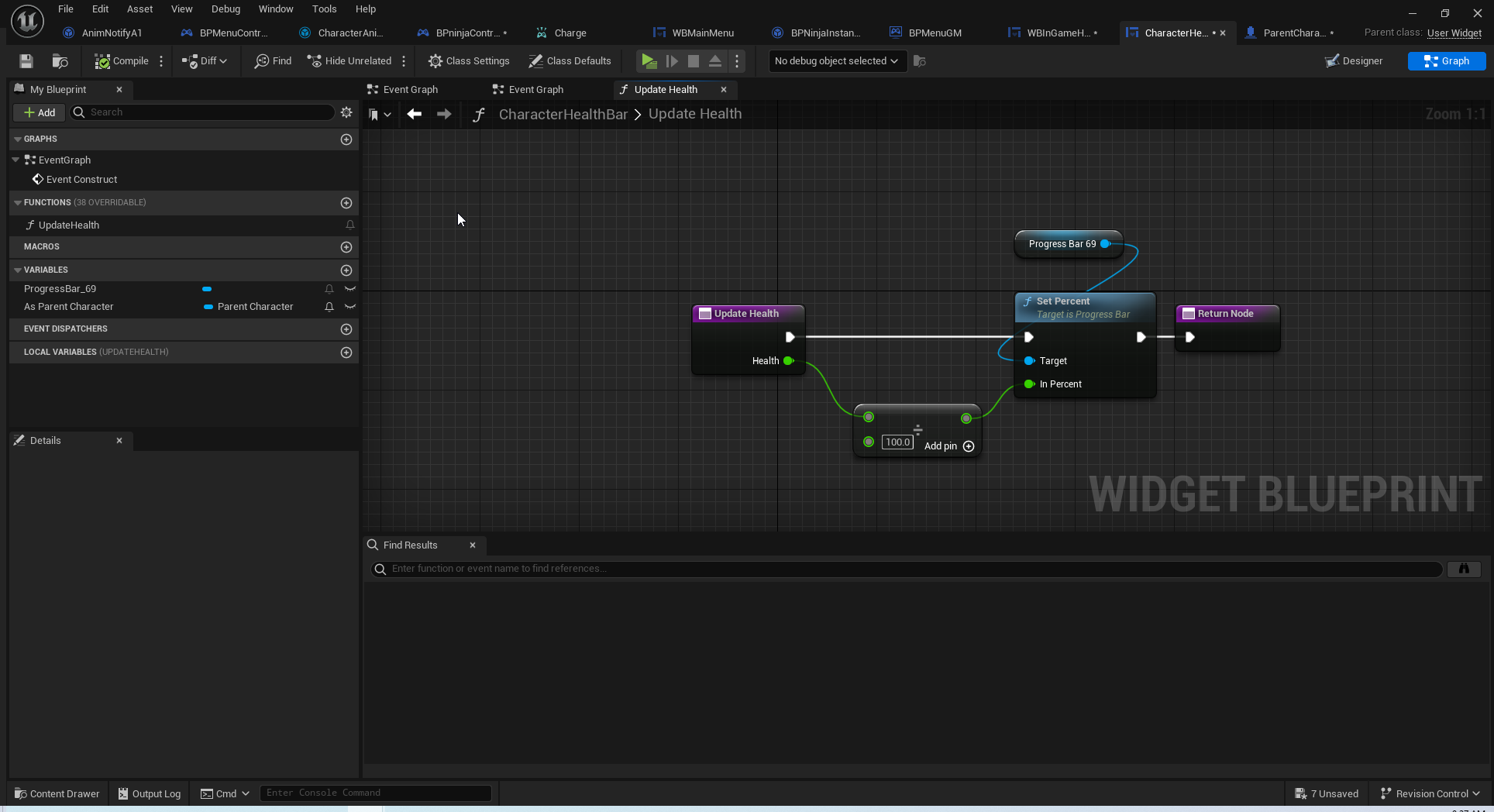
thats my start
lofty rapids
queen dagger
thats my start
where do you set the variable ?
queen dagger
parent character
 faint creek
Hi guys how can I change the parameter value of the camera post processing in Blueprint?
I'd like to make that when I pressed a specific key the parameter change value. For example the Intensity
 lofty rapids
queen dagger
parent character
lofty rapids
queen dagger
parent character
if it's not throwing errors of accessed none, something might be wrong with your reference or the function isn't running at all
also i'm assuming your widget is displaying fine ?
queen dagger
yes
i got the widget to show
i just dont know where i should add the function
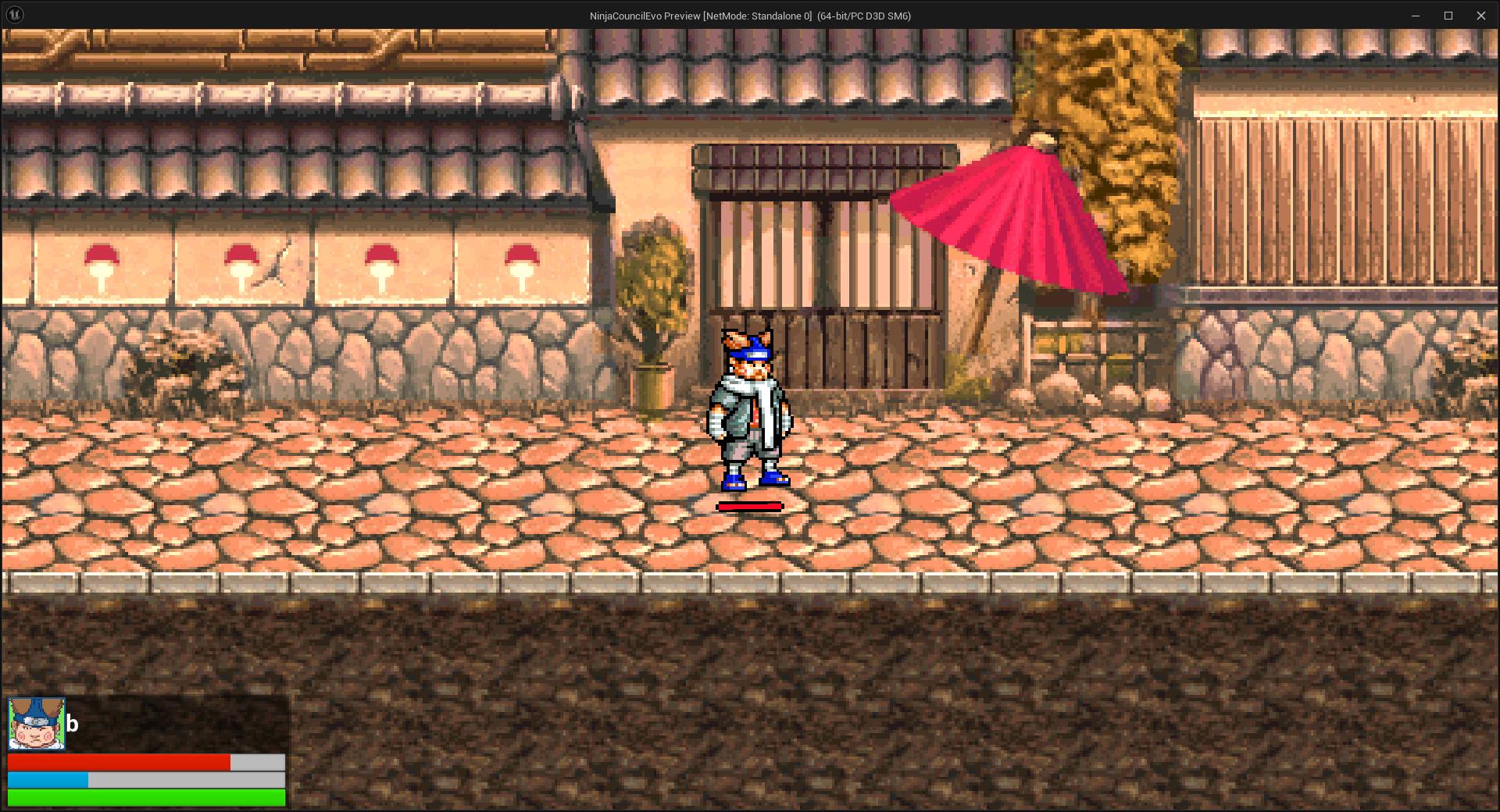
so the main one works just the on screen one does not
 queen heron
is there a fast way to generate foliage instances on a static mesh inside a blueprint?
like, I've got a pathway type of static mesh, with curvy profile, and I wanna generate grass and trees and stuff on a particular area
tho I think that may lag the game a bit when the blueprint is spawned
or maybe not if the instances are already generated
 mild jacinth
How can I create a conditional setting in actor detail panel. For an example I drag an actor to the level, I have a boolean which I can tick through Details panel in the editor. once I enable it, integer field becomes interactable so I can input text to it.
otherwise it would be disabled.
thanks for help
spark steppe
requires C++ (and EditCondition in the UPROPERTY)
lofty rapids
queen dagger
i just dont know where i should add the function
so you havent actually ran the function or ?
queen dagger
no
lofty rapids
well that would be why it doesn't work
i would run it whenever you change health
i usually have a change health function, and a display health function
whenever i change i also display
or you can do it on tick but thats a bit much for what you need
depends on how you want to set it up ig
mild jacinth
spark steppe
requires C++ (and EditCondition in the UPROPERTY)
not possible through blueprints and construction script? I kind of remember it was possible with c++ but not sure if blueprint allows it aswell.
lofty rapids
queen dagger
no
another way is to interp on tick, would give it a smooth movement i think
it matters however you want it to look but running the actual function is a good start
 dim siren
mild jacinth
How can I create a conditional setting in actor detail panel. For an example I d...
dim siren
mild jacinth
How can I create a conditional setting in actor detail panel. For an example I d...
Are you referring to making a variable Instance Editable?
spark steppe
mild jacinth
not possible through blueprints and construction script? I kind of remember it w...
i don't think that it's possible in BP
queen dagger
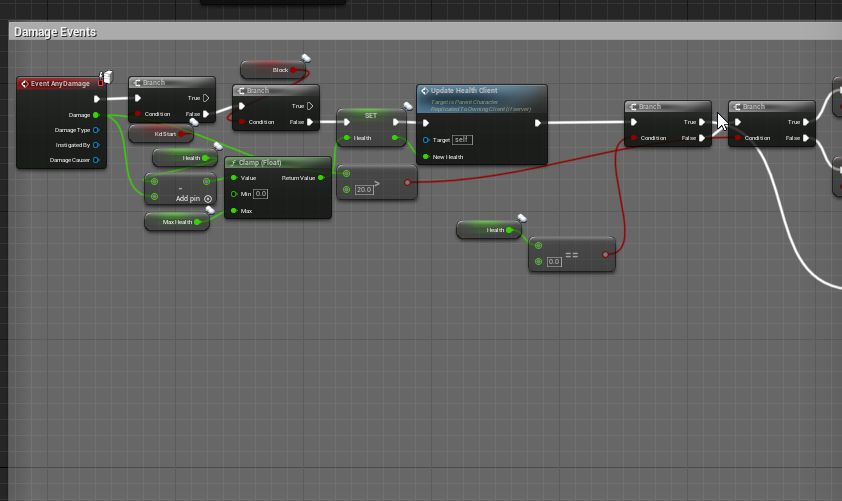
thats for damage
for the widget i have in the event construct
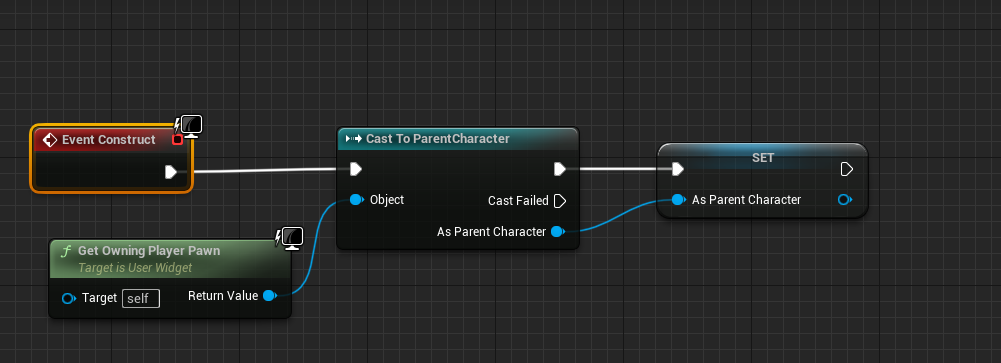
is that necesssary?
and do i need tp set up a widget var in the character
mild jacinth
how would I approach a spawning situation. I want to be able to spawn actors inside my own set area, I would use a spline for this but not sure how I would go about connecting the spline together as a huge circle
and how to tell the system to spawn something inside it
within the boundaries
lunar sleet
mild jacinth
how would I approach a spawning situation. I want to be able to spawn actors ins...
why use a spline for this if you're making a circle
mild jacinth
it doesnt have to be a circle. i want to be able to expand the area
which is why I think spline is best to make it flexible
lunar sleet
mild jacinth
which is why I think spline is best to make it flexible
I mean you could use a simple box volume to spawn things in and scale it as needed.
 wise ravine
I can't break this vector?
 lunar sleet
wise ravine
I can't break this vector?
lunar sleet
wise ravine
I can't break this vector?
disconnect it first
sweet jetty
can someone help me please i have tried everything i can, when i go to package my game i get "packagingresults: error: unknown cook failure" in the output log
lunar sleet
sweet jetty
can someone help me please i have tried everything i can, when i go to package m...
scroll up
that just tells you there was an error earlier in the output log
wise ravine
lunar sleet
disconnect it first
amazing, thanks
sweet jetty
lunar sleet
scroll up
something along these lines "invalid due to being out of bounds. Recommend adjusting it"
on my blend space
lunar sleet
now you know where to start
 dry scarab
https://medal.tv/games/unreal-engine/clips/i0cAHMfVu7UIpOvpd/d1337qB5MVYf?invite=cr-MSw4amUsMTk3ODI4MDUyLA What did i forget here? to stop char roatating, hes suppose to strafe left right, backwards,

Watch Untitled and millions of other Unreal Engine videos on Medal, the largest Game Clip Platform.
 shut quarry
I'm tryna create a hollow cube to do this I'm thinking the outter cube is a normal cube and the inner cube is like scaled slightly smaller than the outer cube and "cuts" out the inner space. Is that possible?
dry scarab
 shut quarry
I'm tryna create a hollow cube to do this I'm thinking the outter cube is a norm...
shut quarry
shut quarry
I'm tryna create a hollow cube to do this I'm thinking the outter cube is a norm...
continuing off of this, I was sorta able to cut it using the modeling mode, but I want to do that in blueprint! so I can just place my blueprint down without having to cut it out every time:

"mesh cut"
select both cubes and press "mesh cut"
mild jacinth
so I have a boolean inside an actor as a variable. is there a "OnEnable" function and "OnDisable" function or bind similar to how Unreal Engine's Widget system has a OnClick event for the checkbox?
I dont want to use tick. its expensive to check for condition all time. I want to press the tick on the boolean via details panel
at level editor
shut quarry
I usually just do it in tick
 cyan bone
Is there a way to open a blueprint from a variable?

i have the variable and instead of searching for the blueprint file in the content browser
Go directly to it and open it?
this would be a huge time saving
cyan bone
its like when you have references to other actors in your actor
and you need to open the blueprint of the other actor
i usually have to go search for it in the content browser
thats a bit of time kill
sonic sigil
lofty rapids
if you hold i think ctrl on your blendspace <@1125820266082217984>
That was it thank you so much I was stuck on that for like 2 hours because I thought that setting the variable to the proper class would get the right actor magically!
 cerulean mango
Hey, I'm going to start my next project, it will be my first with a large map, I wanted to know if there were things to absolutely think about before starting? I was wondering how to manage the AI of enemies who are opposite the player, can we "pause" them to increase performance ? Is C++ mandatory with a large map ?
stone field
cerulean mango
Hey, I'm going to start my next project, it will be my first with a large map, I...
"It depends".
Some games can have a camera zoom out to show the whole map top-down and still simulate hundreds and hundreds of visible enemies, it is not impossible if things are well built, and the platform is powerful.
Other games absolutely need to limit the amount of simultaneous active NPCs, especially games with high-cost models and textures.
In any case, best practice would be to set yourself some limits in terms of goals of what you want to achieve, and build accordingly. Say you decide 20 NPCs at any one time in the vicinity of the player is enough, great, design like that, and only have actually active Actors as needed.
 steady night
hey im trying to rotate my cgharacter towards the mouse location in world
 cerulean mango
@stone field Oh ok thanks for your quick answer ! I was able to hear the level streaming, is that what allows you to divide the levels into sub-levels to manage them independently?
steady night
but it not working really
 haughty snow
weird question...can I programmatically trigger the 'hover' state for UI elements?
I want to visually indicate when my bot is making changes to the UI that would otherwise only show when the mouse is over it
mild jacinth
does anyone know whats the best way to check for bone names when using line trace by channel
like I cannot imagine going through each bone name separately with if branches
nvm im dumb i can just use switch
trim matrix
hey how can i make a particle fx happen when my player collects a coin?
 austere bobcat
Any particular reason I can't add widgets from BP_ThirdPersonCharacter? The code runs and returns no errors but the widget is never added. I even tried some weird stuff like calling the parent function of BeginPlay as suggested in the forums but to no avail.
 faint creek
Hey guys what is the best way to smooth change a float value?
 mild ibex
Splines
I'm moving an object along a closed circular spline path. Im calculating the spline length to degrees so 0 - 360 it can move obviously along the path clockwise but if I start at 35 and go back to 200 and want a counter clockwise motion that doesnt seem to work.
I'm not sure how to move an object along the spline based on degrees counter or back across 0 to 270
dawn gazelle
austere bobcat
Any particular reason I can't add widgets from BP_ThirdPersonCharacter? The code...
You can add widgets from anywhere.
Verify that you're spawning a BP_ThirdPersonCharacter, put a print string after the add to viewport and try printing out the display name of the return value from the create widget node.
austere bobcat
dawn gazelle
Verify that you're spawning a BP_ThirdPersonCharacter, put a print string after ...
Gotcha, will try to make sure the code is actually running.
Well, it's not printing a string at all so I think that begin_play is not ever actually getting called.
 ivory spoke
Hey, I read about avoiding casting because of performance. Is it the same with the Player BP? Because it is loaded every time
dawn gazelle
austere bobcat
Well, it's not printing a string at all so I think that begin_play is not ever a...
Did you happen to change your Game Mode / Game State recently?
austere bobcat
dawn gazelle
Did you happen to change your Game Mode / Game State recently?
I do have my own GameMode class but not game state, that's just whatever the default is.
ivory spoke
Actually I have a Cast to Player BP with a Camery Component to get his rotation (for movement direction stuff in combination with camera rotation)
dawn gazelle
ivory spoke
Hey, I read about avoiding casting because of performance. Is it the same with t...
Casting is expensive only in that by casting within other classes forces that other class to require the other class to load the class it's casting to. It doesn't matter much if you know for certain that the casted to class will always be loaded. This can also be mitigated by using base classes that don't have any assets assigned to them reducing the amount of loading that would be required.
dawn gazelle
austere bobcat
I do have my own GameMode class but not game state, that's just whatever the def...
Ok, when you created your GameMode, did you use "GameMode" or "GameModeBase" when creating it?
austere bobcat
dawn gazelle
Ok, when you created your GameMode, did you use "GameMode" or "GameModeBase" whe...
I used "GameMode". I'm also noticing that Event Tick isn't working either.
Should I re-parent?
dawn gazelle
austere bobcat
I used "GameMode". I'm also noticing that Event Tick isn't working either.
What is your gamestate set to?
GameState or GameStateBase?
austere bobcat
GameState
dawn gazelle
Ok, then that should be working <_<;;
If there is a mismatch between them it can cause some strange behaviors like begin plays not firing..
austere bobcat
Awesome, time to try random stuff until something changes lol
dawn gazelle
Try creating a new character class and put your UI on its begin play and set your game mode to use that character instead. If it works, then there might definitely be something up with your existing blueprint. If it doesn't, then it's something external to the blueprint.
faint creek
faint creek
Hey guys what is the best way to smooth change a float value?
Anyone?
austere bobcat
To be a little more clear, I had a big data loss of over a weeks worth of work(git is horrible for unreal) and now I'm going back in and fixing stuff. It was working before 🤣 also worth mentioning that the class I'm actually spawning is BP_Miner which is a child of BP_ThirdPersonCharacter. Maybe that has something to do with it.
Yeah tick and beginplay work on the child classes
dawn gazelle
If you're overriding BeginPlay in BP_Miner, that would prevent the BeginPlay in BP_ThirdPersonCharacter from executing.
austere bobcat
Right, I'm gonna try a call to Parent at the tick in the child class
Yep that worked! Hopefully this doesn't have too much of a performance impact calling tick twice
dawn gazelle
It's not really calling it twice.
You're just asking it to execute the functions contained within the parent's tick as well.
 iron umbra
I'm trying to allow mic input via pixel streaming, which works, using the PixelStreamingAudio component. However, it has an echo I'm trying to get rid of
In an AudioCapture component, you can do a few things to fix this, like set up a submix that mutes the output.
However if I use a submix that mutes the output on pixel streaming, the microphone input doesn't work at all. I tried setting up a Sound Submix Send, and a few other workarounds, but no luck
Any ideas how I can mute the echo on PixelStreamingAudio microphone capture?
ivory spoke
After two weeks of ue I feel the pain of devs xD actualy I try to Plan a inventory System. Oh man ist this complex
 thin scroll
Hello everyone, does anyone of you know how to change actor to player, for me it counts that it can lift player and not actor (things)
https://www.youtube.com/watch?v=J9lVADyd8ZQ&t=1334s

In this free step by step Unreal Engine 4 tutorial video (UE4 how to) you will learn how to implement a blowing fan using physics constraints.
All my UE4 tutorials: https://www.youtube.com/watch?v=BT0jFArPtGM&list=PLEp7216xGGILh3i2BZe2E0ZEuiIGa-VQT&index=1
Join me for Live Streams: https://www.twitch.tv/lusiogenic
I share stuff here: https://t...
ivory spoke
at this Moment I Work on a First Prototyp with this I will Go Forward. I do some Tests within the Last two weeks (simple Fight, simple inventory, simple Dialogs, day / night etc) now I will do again some of this stuff with Systems from MP and some stuff by myself. Actualy I don't know If I would implement a simple Multiplayer. How complex ist it to rethink / implement this later
lunar sleet
thin scroll
Hello everyone, does anyone of you know how to change actor to player, for me it...
Sorry, no idea what that means
Are you trying to reparent a blueprint ?
lunar sleet
ivory spoke
at this Moment I Work on a First Prototyp with this I will Go Forward. I do some...
Extremely
dawn gazelle
ivory spoke
at this Moment I Work on a First Prototyp with this I will Go Forward. I do some...
You generally want to design things with multiplayer in mind. How you do things and what is possible in multiplayer is very different than what you can get away with in single player.
 vivid quarry
Is there a concensus on best replacement for timeline inside a macro? I am simply trying to have a trace run on tick until it's called to stop by a second interface message, it's code I plan to reuse heavily for different attacks
Had it on timeline just for testing but going to need it on a macro or function
stark thistle
Hi guys. Quick question: for a function called within the editor (via "Call In Editor" and pressing the button in the Details tab), when you use the Spawn Actor blueprint node is there a way to make it temporary so that it does not save to the level when you exit? I have an Editor-only BP and I'd prefer it didn't make a mess of the VCS history.
 haughty snow
adding a 0 tick delay causes an IsValid check to succeed..am i unintentionally putting too many bandaids on something
lunar sleet
haughty snow
adding a 0 tick delay causes an IsValid check to succeed..am i unintentionally p...
Hard to tell with no code
haughty snow

grabbing a reference to my HUD on begin play and setting a variable for a particular WB
lunar sleet
What event is this on
versed sun
0 tick is still next frame
lunar sleet
Of what bp
haughty snow
an actor bp
haughty snow
yeah i realized that once the delay was allowing it to work
i figured i was just not loading that WB before assigning it?
but the 0 tick delay confused me
lunar sleet
It’s possible. Begin play doesn’t have a fixed start time
haughty snow
ouuu
lunar sleet
I haven’t tried 0 delay before but delay until next tick sometimes helps when things take a bit to kick in
haughty snow
ah ok
lunar sleet
There are prly some cpp events that are more precise
ivory spoke
Hmmm
ivory spoke
dawn gazelle
You generally want to design things with multiplayer in mind. How you do things...
Ok, this make all this stuff a little bit Harder 🙂
haughty snow
oh nvm game instance loads before HUD does 😅 lol
ok delay tick it is
different from putting it in the construction script?
trim matrix
what do i connect to the target here?
 dawn gazelle
trim matrix
what do i connect to the target here?
dawn gazelle
trim matrix
what do i connect to the target here?
A reference to the BP_Unlockable that you want to call its unlock function on
 vale minnow
Does anyone know if it is possible to create a widget without a hard reference? As far as I can tell you have to use "create widget" off a player controller which automatically results in a hard reference
trim matrix
where do i go from here?
 dawn gazelle
trim matrix
where do i go from here?
dawn gazelle
trim matrix
where do i go from here?
You still need a reference to the actual BP_Unlockable that you want to have run its Unlock function.
dawn gazelle

Announce Post: https://forums.unrealengine.com/showthread.php?101051
This Training Stream takes a look at Blueprint Communication. We find that Unreal Developers of all levels can sometimes struggle through the concepts behind moving data between objects. So in this video we'll take a look at the different ways to make Blueprints talk to one an...
trim matrix
dawn gazelle
https://www.youtube.com/watch?v=EM_HYqQdToE
what part of the video am i looking for?
dawn gazelle
All of it.
trim matrix
wow just for a reference?
stark thistle
Question w/ "Call in Editor" functions; is there any way to set the order of the buttons? Right now it seems random-ish? Not alphabetical, but also not by the order they are in the heirarchy or even created?
 undone pewter
Hey, how can I smoothly transition Camera's FOV as a response to pressed button? I've seen people using timelines but I can't seem to add one to InputGraph where I define my response to pressed button.
trim matrix
i figured out the references but i still cant get the unlockable to work
lofty rapids
whats the code look like ?
trim matrix


 lofty rapids
so the unlock event isn't firing, your not getting anything for errors ? might be something with your reference is incorrect
lofty rapids
trim matrix
does "hello" print ?
trim matrix
no
lofty rapids
so when are you calling collect coin ?
in order for it to work you need to actually call it
trim matrix
wdym
lofty rapids
trim matrix
collectcoin here is a function that starts this off
when you collect a coin, you need to actually run that function
if no print then it's most likely not running
trim matrix
so hook it up to the event begin play?
trim matrix
i want it to i can set in the blueprint the amount of coins needed to unlock the collectable
lofty rapids
you already have coins ?
 lofty rapids
i would run check coin count after this code here
but with >= you'll run into some issues
probably want to do equals
trim matrix
that code is in the coin blueprint should i move it to there?
im trying to essentially recreate the blue coins from mario sunshine
lofty rapids
trim matrix
this is your coin bp ?
lofty rapids
trim matrix
that code is in the coin blueprint should i move it to there?
you can just pull off the cast and run it
 stoic ledge
doEs it work?
 mental narwhal
Hello!
I am brand new to unreal, I want to create an RTS type game, and I've just setup my camera angles, but I found a bug I am not sure how to fix.
The cameras all work, but I have a use case of when the user holds the middle mouse button and moves the mouse, it allows the user to control the pitch and pan of the camera, so they can pretty much move it all around. This works fine, however, if they are holding W to move the camera forward, and also hold the middle mouse button and move 180 degrees, the camera keeps moving the same direction it was before rotating it.
What should I do in order to have the WSAD update to move in the same direction that the camera is facing?
Thanks 😄


 graceful sage
mental narwhal
Hello!
I am brand new to unreal, I want to create an RTS type game, and I've j...
graceful sage
mental narwhal
Hello!
I am brand new to unreal, I want to create an RTS type game, and I've j...
Try checking pawn use control rotation I believe it is
In class defaults I think
 cold lion
My event dispatcher won't bind in my other blueprint, I can't figure it out. it calls but does not activate the other print string


these are two seperate blueprints
(juvlar is an item)
dawn gazelle
cold lion
My event dispatcher won't bind in my other blueprint, I can't figure it out. it ...
You don't have the bind connected to anything.
dawn gazelle
Whenever you see a node with the white inputs, that means it needs an execution path to be connected to it in order for it to do something.
 cold lion
I did that however it didn't print the string
dawn gazelle
You don't have anything connected to the input.

You connect it to when you want this thing to be bound.
This part would fire immediately after the binding.
 cold lion
like this?
 dawn gazelle
This part would trigger when the dispatcher is called.
 stone field
cerulean mango
<@127136722419974144> Oh ok thanks for your quick answer ! I was able to hear th...
stone field
cerulean mango
<@127136722419974144> Oh ok thanks for your quick answer ! I was able to hear th...
Yes. This can be challenging though, I'm not sure I would recommend it if you are at around beginner level with Unreal
dawn gazelle
cold lion
so I have to make a new function to tell this when to fire?
No, you need to connect it to an execution path that triggers when you want the event to be bound.
Assuming "Juvlar Himself" actually contains a value by the time "Begin Play" fires, you could connect it to that.
cold lion
okay I kinda get it now thanks
 indigo pond
hello i was wondering how to rotate my players spine based on what direction up/down im looking. Ive already got the base but i was wondering how i get the pitch rotation.

i know that since i have 5 spines i have to do 90/5 and limit the pitch to -18 and 18
cerulean mango
stone field
Yes. This can be challenging though, I'm not sure I would recommend it if you ar...
Thanks for your answer,s everything works super fine at the moment it took me some hours to understand tho
 dim halo
Hey guys is there any reason this setfocus node isnt working on my enemy pawn?
 mental narwhal
Try checking pawn use control rotation I
lunar sleet
dim halo
Hey guys is there any reason this setfocus node isnt working on my enemy pawn?
Use a breakpoint and see if the right pawn is coming through
 lethal pollen
Hi!
Is the Construction Script like the constructor in a C++ class?
Thanks!
I'm asking this because I'm moving some code from a blueprint class to a C++ class, and I don't know where to put the code in Construction Script in the C++ class.
thin panther
No, construction script is OnConstruction
lethal pollen
thin panther
No, construction script is OnConstruction
Thanks!
 grim sand
Is anyone aware of how we can turn off certain debug log entries? For example right now the following message is spamming my logs on tick when the player has voice chat enabled:
LogVoiceEngine: OSS: ReadLocalVoiceData: GetVoice: Result: Ok, Available: 56, LastCall: 30.246 ms
It would make diving through the logs significantly less cumbersome 😅
lethal pollen
How can I do this in C++? SMC Cube Block is a static mesh component class. Maybe, I have to ask this question in the C++ room.

Thanks.
spark steppe
grim sand
Is anyone aware of how we can turn off certain debug log entries? For example ri...
you can try the command in the cmd input log LogVoiceEngine Warning or Error
to lower the log level
thin scroll
I meant that I wanted the player to pick up and not things, here it is. I tried to change it many times and it doesn't work, please help


 random pulsar
brothers,i painted a landscape with 2 texture,is there a way to detect when the player is on one of the and kill him?i have an idea about phis material ,but can someone tell what i need to google?

i have already a kill zone blueprint,but i want it to be precise
 tawdry ivy
Hello all, I am trying to upload an image(converting it into a Base64 string) to a given API, but it fails everytime.
Can anyone please share there experience on how they have implemented it?
Also, how do we send the an image to server via API using VaRest plugin?
 tame pecan
random pulsar
brothers,i painted a landscape with 2 texture,is there a way to detect when the ...
tame pecan
random pulsar
brothers,i painted a landscape with 2 texture,is there a way to detect when the ...
one of the what?
random pulsar
I know how to kill a player,but how i kill it when it touches a material
 worthy tendon
random pulsar
brothers,i painted a landscape with 2 texture,is there a way to detect when the ...
worthy tendon
random pulsar
brothers,i painted a landscape with 2 texture,is there a way to detect when the ...
assign different physical materials. for example, ground and lava. you can detect if player is on what phys material
random pulsar
worthy tendon
assign different physical materials. for example, ground and lava. you can detec...
What node detects?
steady night
or
worthy tendon
random pulsar
What node detects?

 thorny glen
Hello Everyone, I was working on something and I am facing a problem related to the actor bound.
I need a Local Bound of an actor But I only have Actor Bounds, So When My actor is rotated on Z axis. Then it's actor bound also changes according to the rotation and The result extent is very bigger than the actual actor size.
So I am wondering If there is any way to convert rotated actor bounds to actual Local bound of that actor.
 broken badge
thorny glen
Hello Everyone, I was working on something and I am facing a problem related to ...
broken badge
thorny glen
Hello Everyone, I was working on something and I am facing a problem related to ...
Are you using this for something based on a collision with the bounds? If so, why not try using overlap with the Skeletal Mesh component
cerulean mango
hey everyone, I'm working on a notebook system, a widget where the player can draw what he sees in the game, I managed to have something rather conclusive, by overriding the OnPaint event of the widget, however I have a problem I would like that when I release the click I would like that a line is not drawn between before my release of click and my new click (I have not yet understood the subtleties of widgets I hadn't yet digged much into the subject) Here is what i do on the tick of my player ( after some condition ) :


 twilit granite
I'm looking at Lyra, and I saw that there is Post Processing material being added to the camera.
I would like to instantiate a second identical material, just with some different parameters, and add it to the camera for Post Processing.
The problem is that this only works if I create a **clone ** of the material in the project, I can't use the same one. Would it be possible to use the same material, without having to create a copy?
 thorny glen
broken badge
Are you using this for something based on a collision with the bounds? If so, wh...
thorny glen
broken badge
Are you using this for something based on a collision with the bounds? If so, wh...
No, Actually, I'm just trying to calculate the size of the object in Feet (Size in Length). And all the actors that I have they are using a Static mesh. And the Selected actor that I have is an "ActorObjectReference".
worthy tendon
random pulsar
What node detects?
it seems that CurrentFloor does not have PhysMat. you need to line trace downwards manually and get phys mat from that hit result.
random pulsar
worthy tendon
it seems that CurrentFloor does not have PhysMat. you need to line trace downwar...
Thx
btw
i can get only the material?is there a way to get a texture?
random pulsar
random pulsar
brothers,i painted a landscape with 2 texture,is there a way to detect when the ...
cuz landscape has 1 material,and multiple textures,what you see are textures
 worthy tendon
I think you have to use landscape layers, blend two materials with different phys mat assigned. phys material is a separate asset that you need to create.
random pulsar
worthy tendon
I think you have to use landscape layers, blend two materials with different phy...
i use them
 dark drum
When spawning an actor, is there anyway to control how much it will attempt to adjust by or anything like that?
 worthy tendon
random pulsar
i use them
worthy tendon
random pulsar
i use them

In this video, we explore how to use the Landscape Physical Material output node in Unreal Engine 5 to automatically generate surface physics based on the height of our landscape. We'll show you how to set up an auto material with physics properties for each layer, and how to use static switches and weight blend layers to customize the environme...
trim matrix
So I have a health component and I'm broadcasting a delegate from it whenever health is changed, I'm then binding on player character and doing same when health is changed calling a delegate is this wasting resources ?
could I do it more effeicent way ?
tame pecan
random pulsar
i use them
this gives me major World of warcaft vibes with the textures
dark drum
trim matrix
So I have a health component and I'm broadcasting a delegate from it whenever he...
Why would the character need to call another delegate? Can things that need to know about the health change not bind directly with the health component?
tame pecan
especially firelands
trim matrix
dark drum
Why would the character need to call another delegate? Can things that need to k...
well I was thinking binding the delegate to the HUD obvs to send it the values
but not sure best way of doing that cause I'd have to go through the player character to get to the health comp to bind to it's delgates anyways
dark drum
trim matrix
well I was thinking binding the delegate to the HUD obvs to send it the values
From the hud you can get the owning player -> get controlled pawn -> get component by class and select your health component and bind directly to the health component.
trim matrix
dark drum
From the hud you can get the owning player -> get controlled pawn -> get compone...
arr cool I'll do that then instead
thank you
trim matrix
dark drum
From the hud you can get the owning player -> get controlled pawn -> get compone...
would this change if I did it from my widget through HUD ?
dark drum
trim matrix
would this change if I did it from my widget through HUD ?
No, the owner of a widget is always a player controller.
trim matrix
dark drum
No, the owner of a widget is always a player controller.
so maybe I could skip the HUD and go from widget to controller and controlled pawn ?
dark drum
trim matrix
so maybe I could skip the HUD and go from widget to controller and controlled pa...
Yea, I normally do it inside the widget that shows the health. That way you can easily move it about and show in other widgets without having to set it up again.
trim matrix
dark drum
Yea, I normally do it inside the widget that shows the health. That way you can ...
awsome
 jaunty jolt
its kind of scary to change structs.
If i add one variable to a struct, then i must change every single time this struct is used
trim matrix
dark drum
Yea, I normally do it inside the widget that shows the health. That way you can ...
If i'm doing thing binding directly, theres not really any point of binding to delegate tbf
cause the function would be called on tick in the widget I think so
dark drum
trim matrix
cause the function would be called on tick in the widget I think so
? What would be called on tick? The widget would only need to bind to the event dispatcher on the health component when it's first created. The delegate you bind would then be called when ever the health is updated. There shouldn't be any need for tick.
 random pulsar
worthy tendon
https://www.youtube.com/watch?v=isL0w-s-5yM
random pulsar
worthy tendon
https://www.youtube.com/watch?v=isL0w-s-5yM
i watched the video,i have it seted up like there but i don't know what to write in BP. Here is what i tried
first one didn't work,instead the second worked with line trace,but how do i connect both logic together

 worthy tendon
Don't use CurrentFloor. It was my mistake
random pulsar
 grim sand
spark steppe
you can try the command in the cmd input `log LogVoiceEngine Warning` or `Error`
grim sand
spark steppe
you can try the command in the cmd input `log LogVoiceEngine Warning` or `Error`
Thanks, I will take a look at this 🙂
random pulsar
this one prints ,but it says im on the lava always
worthy tendon
Line trace downwards, Start + DownVector * SomeLength
Trace complex is not needed i think
cerulean mango
hey everyone, I'm working on a notebook system, a widget where the player can draw what he sees in the game, I managed to have something rather conclusive, by overriding the OnPaint event of the widget, however I have a problem I would like that when I release the click I would like that a line is not drawn between before my release of click and my new click (I have not yet understood the subtleties of widgets I hadn't yet digged much into the subject) Here is what i do on the tick of my player ( after some condition ) :


 dark drum
cerulean mango
hey everyone, I'm working on a notebook system, a widget where the player can dr...
dark drum
cerulean mango
hey everyone, I'm working on a notebook system, a widget where the player can dr...
You need to split you're clicks into there own arrays. When you use the 'Draw Lines' function it will connect all of the points provided. Seperating each click into their own arrays will allow you to call multiple 'Draw Lines' with different groups of points.
trim matrix
anyway to delay in a function ?
I've got this within the bind for the progress bar that interps the values from old to new

but I need to but in a delay or something else it sees invinate loop
 fiery vault
hey everyone, i m having a problem here, when i first pick the assault rifle then pistol, then the gun in my hand is actually asault but player idle animatoin is of pistol, and the current weapon INT is also pistol, and when i pick pistol first, then i switch to assault and then i again switch to assault then same problem occurs. I have no idea why the pistol skeletal mesh is changing to assault
also pistol is secondary and assault is primary here
 fiery vault
trim matrix
I've got this within the bind for the progress bar that interps the values from ...
fiery vault
trim matrix
I've got this within the bind for the progress bar that interps the values from ...
 trim matrix
fiery vault
trim matrix
fiery vault
which delay is that cause I couldn't find it whilst in the graph for the function I was in
mild jacinth
Is it better to add weapon into the character blueprint as child actor or skeletal mesh?
or is it better to get skeletal mesh of the item and then attach it to the player skeleton during runtime?
trim matrix
fiery vault
just type delay
well you have normal delay and then a delay until next tick etc
fiery vault
i don't know bout this delay until next tick

but the first one will delay for given seconds
cerulean mango
@dark drum I'm actually trying your solution but i'm not sure if i'm doing it the right way

 trim matrix
fiery vault
i don't know bout this delay until next tick
trim matrix
fiery vault
i don't know bout this delay until next tick
you can't use delay within a function
 fiery vault
trim matrix
you can't use delay within a function
fiery vault
trim matrix
you can't use delay within a function
https://forums.unrealengine.com/t/is-there-any-way-to-get-a-delay-in-a-function/391023/16
maybe this can help

Epic Developer Community Forums
Please take a look on this → Macros | Unreal Engine Documentation You’ll find exactly how to have input and output with macro. You have a LOT of image that explain exactly how it work.
dark drum
cerulean mango
<@430016173694779402> I'm actually trying your solution but i'm not sure if i'm ...
They way you're adding the points to the array in the array wont work. You might have to use the set member node. Alternatively, you can populate a local array of points that gets added at the desired index when ever a new point is added.
random pulsar
worthy tendon
Don't use CurrentFloor. It was my mistake
i dont get it,i made all like in the video,made a new material,make 2 physical material,assigned them ,and still it shows that i walk on the same phys material


 mild jacinth
Is it better to add weapon into the character blueprint as child actor or skeletal mesh?
or is it better to get skeletal mesh of the item and then attach it to the player skeleton during runtime?
 languid hemlock
trim matrix
but I need to but in a delay or something else it sees invinate loop
languid hemlock
trim matrix
but I need to but in a delay or something else it sees invinate loop
Convert your function to custom event. You need delay and cant use any time-required nodes(like delay) in function
trim matrix
I've ended up doing that
worthy tendon
random pulsar
i dont get it,i made all like in the video,made a new material,make 2 physical m...
print HitActor or HitComponent as well, it should be landscape component. perhaps you have a phys material override somewhere else
make sure there is no phys material override on landscape base material
random pulsar
worthy tendon
print HitActor or HitComponent as well, it should be landscape component. perhap...
i dont,i made sure the dafault is none everywhere
cerulean mango
@dark drumFirst of all thank you for your precious help, I'm fairly new to manage structure in blueprint, my array Of array struct in basically an array of a vector2D array, with my get i'm not suppose to get the array of Vector2D ?

 random pulsar
im progressing a little bit ,but it still doesnt work
 lofty rapids
trim matrix
lofty rapids
trim matrix
you probably want to check after you add the coin not before
lofty rapids
random pulsar
im progressing a little bit ,but it still doesnt work
why are you doing a trace from actor location, to actor location ? are you looking for something that is hitting your actor ?
random pulsar
lofty rapids
why are you doing a trace from actor location, to actor location ? are you looki...
ok now it works,but i need somehow to check it not on tick
 lofty rapids
random pulsar
ok now it works,but i need somehow to check it not on tick
lofty rapids
random pulsar
ok now it works,but i need somehow to check it not on tick
you can run it whenever you want
put it on a custom event
random pulsar
yeah but when do i run that custom event that is the quescion, cuz the player changes his position by time
i would do a animation notify but that will check only when that particular frame comes
lofty rapids
what are you trying to do here, check the floor type ?
looks like if you hit lava you want to die ?
worthy tendon
random pulsar
ok now it works,but i need somehow to check it not on tick
that's what i mean't by tracing downwards. i guess that was the main problem? didn't know about GetSurfaceType node. that's nice
random pulsar
maybe on tick in animation state?but i have a sound effect in the die function and it plays on tick,thats not good,he shouldnt die on tick
random pulsar
lofty rapids
looks like if you hit lava you want to die ?
yeah
lofty rapids
random pulsar
maybe on tick in animation state?but i have a sound effect in the die function a...
i c so you don't want it to keep running ? you could maybe flip a boole isDead ?
so it doesn't run
then just pop it back after you come to life
but if you want it to be when you you move, maybe run it when you move ?
so your checking less, but i feel like tick should be good with a bool you can prevent it from dying over and over again
worthy tendon
you can put a timer that runs when player is on ground, and checks every second or so, if the player is on lava then take damage.
lofty rapids
or even a do once, then reset later
lofty rapids
random pulsar
ok now it works,but i need somehow to check it not on tick
one thing about this, is 500 your half height ? because basically your running a trace but i'm not sure the player will be touching the ground
you may also want to check is falling
random pulsar
the player is very tiny
 lofty rapids
right so i'm guessing he will die just being above the lava at a certain height
without being on the ground
because your tracing down 500, so you may get a hit while in the air
lofty rapids
oh ok, but either way i would check if he is falling, so you can only do the death if he's on the ground
i would keep the trace a good height and check for is falling
i feel like tick is the best place for it
 lofty rapids
wdym "weird" ?
your getting the level name, then switching based on the return value
if the name is "Level6", then it will run through that execution
also when you line trace, add the end to the start, and plug that into end
random pulsar
yeah i know what im doing,but i think there is a lot better way to do this
lofty rapids
not exactly sure of the maths involved, but it's how you get an accurate trace
lofty rapids
random pulsar
yeah i know what im doing,but i think there is a lot better way to do this
i mean it's the best way to check for the floor type
idk other ways actually
besides some sort of collision box
random pulsar
basically on each level that i play i am checking on tick on what level am i
bad for performance
lofty rapids
you can check on beginplay, flip a boolean
so your not getting the level name every time
just run through and branch if the boolean is true
by check i mean just get the level name on begin play and flip the bool
and use the bool in the tick
this way the tick will run hit the bool and stop, not much going on there for execution
default it to false, and flip to true if it's level 6
it will reset when you load a new level
random pulsar
like this?

 lofty rapids
right and just default it to false
lofty rapids
lofty rapids
also when you line trace, add the end to the start, and plug that into end
^
 lofty rapids
random pulsar
yeah,now the trace is green when i hit smth
lofty rapids
random pulsar
yeah,now the trace is green when i hit smth
well thats not what i meant at all
add the end to the start
and plug that into end
so comming out of get actor location do +, to add, and add the output of the subtraction to that, and plug that into end
keep the start the location
because you want to trace down, you basically flipped it to trace up
lofty rapids
random pulsar
yeah,now the trace is green when i hit smth

i think thats how you do it correctly i'm fairly confident this will be accurate trace
random pulsar
your trace))

 lofty rapids
well ffs, ig i was wrong about that
i'm not exactly great with maths
thats why i said "i think" , i'm still learning
random pulsar
one more quescion, if tick doesnt go through that branch,it just dont run? i mean is he also checking the bool on tick?
 lofty rapids
random pulsar
one more quescion, if tick doesnt go through that branch,it just dont run? i mea...
lofty rapids
random pulsar
one more quescion, if tick doesnt go through that branch,it just dont run? i mea...
the branch is checking the bool yes
it shouldn't be a problem it will just stop there and the bool is just false
no condition, so not much to check there
vivid quarry
Extremely basic question but what is the cleanest way to use an event multiple times across the same BP? I am just trying to avoid dragging huge connections all over a BP for an event that will be called a lot of times for a lot of different things
lofty rapids
i mean "cleanest" way ? idk but if you make a custom event you can call it from all over the bp
make it a single event, and call it when needed so if you have to alter the code it's in one place
vivid quarry
But that event can only be called from the one node, do you know what I mean?
I just mean how to get multiple duplicated nodes that all call the same event, if that is possible
random pulsar
lofty rapids
it shouldn't be a problem it will just stop there and the bool is just false
yeah ,but its checking,constantly checking the bool
also not good
lofty rapids
it's really not an issue, but if you think it then you can change it
not much less logic you can do than that
 outer fable
hello, could somebody help me out a bit with a certain blueprint im working on in VR? im trying to create a menu which pops up when the mesh is hit by a ray from the controller. I want the menu to pop up displaced a bit from the location the ray hits the static mesh. but i cant get the menu to pop up. (the interact BP which triggers the event is working fine as im using it for a cuple of other things) This is my current pipeline
 lofty rapids
outer fable
hello, could somebody help me out a bit with a certain blueprint im working on i...
lofty rapids
outer fable
hello, could somebody help me out a bit with a certain blueprint im working on i...
your start and end is the same on the trace, and you probably want to check for a blocking hit
outer fable
lofty rapids
your start and end is the same on the trace, and you probably want to check for ...
oh yes i see what you mean. is there a way to get the location of the hit directly from the interact BP? as it is set up to line trace and check for hit to activate, like this:
 lofty rapids
outer fable
oh yes i see what you mean. is there a way to get the location of the hit direct...
lofty rapids
outer fable
oh yes i see what you mean. is there a way to get the location of the hit direct...
i'm not sure what you mean ? you are calling interact on the hit actor, you want to pass it some values or something ? is it an interface function ?
outer fable
lofty rapids
i'm not sure what you mean ? you are calling interact on the hit actor, you want...
Im sorry for any misunderstandings as im quite new to the blueprints in UE. Im trying to make the widget to pop up when the static mesh in the blueprint is hit by the line trace from the controller. I want the widget to be displaced from the location of the hit so it doesnt collide with the static mesh
lofty rapids
outer fable
oh yes i see what you mean. is there a way to get the location of the hit direct...
this is in your character ?
trim matrix
anyone know why this wouldn't crouch the player character ?

it's being called within a function on the player character BP
outer fable
lofty rapids
this is in your character ?
yes its in the VRpawn
 agile moss
How do I create a camera which only points in one direction, for my main menu
 lofty rapids
agile moss
How do I create a camera which only points in one direction, for my main menu
lofty rapids
agile moss
How do I create a camera which only points in one direction, for my main menu
i just make a pawn with a camera and possess it
agile moss
Ok, how do I posses it?
dim halo
lunar sleet
Use a breakpoint and see if the right pawn is coming through
Thank you very much for the help.
lofty rapids
agile moss
Ok, how do I posses it?
is main menu a seperate level ?
agile moss
yes
agile moss
where is the override 😅
lofty rapids
world settings
you may have to make a game mode
you don't have a game mode ?
you can just make a blank one
world settings, game mode override, select your game mode
you can create an empty game mode and use that
then just set the pawn
agile moss
ok


 agile moss
doesn't work, yes I put a pawn with a camera in the level

 fast stag
agile moss
doesn't work, yes I put a pawn with a camera in the level
fast stag
agile moss
doesn't work, yes I put a pawn with a camera in the level

That will blend cameras
blend time 0 is instant
lofty rapids
agile moss
doesn't work, yes I put a pawn with a camera in the level
it should possess the pawn, when you open the level you still have free cam ?
the camera is still flying around or its fixed ?
lofty rapids
that makes no sense
if your pawn has a camera it should be looking through that camera
fast stag
agile moss
I tried
the self is a b/c I put that in a blueprint with a camera in it
lofty rapids
if it's fixed where you left it off, thats not even default behaviour is it ? i thought the free flying camera was the default
agile moss
I will try doing this on another level
lofty rapids
well i've not had any issues with it possessing the pawn on load
but your using ue4 ?
agile moss
yes
lofty rapids
it works perfect in 5.3.2

but your doing something else with camera or something in some code ?
because if it's fixed at last location thats really strange
but i could be wrong and default is fixed
agile moss
I have no idea
lofty rapids
you have anything in the level bp ?
agile moss
lofty rapids
but i could be wrong and default is fixed
default fixed maybe
agile moss
lofty rapids
you have anything in the level bp ?
no
lofty rapids
i don't think it is, if you make a blank level
agile moss
