#blueprint
1 messages · Page 158 of 1
 dawn gazelle
 main lake
dawn gazelle
It's part of the init code you do in C++.
main lake
dawn gazelle
It's part of the init code you do in C++.
i still don't understand how to do that
what's the method to get the character in the init in c++ ?
dawn gazelle
main lake
what's the method to get the character in the init in c++ ?
You get a reference to your ASC, call the InitAbilityActorInfo, and feed in the reference to the actors you want to use for the actor info.
InitAbilityActorInfo(OwnerActor, AvatarActor) where OwnerActor = the actual actor that holds the ASC and AvatarActor = the actor in the world you want to use as the avatar actor for this ASC.
Where and when you call it depends on your needs.
In the previous screenshots you have, you were setting it on Begin Play of the playerstate. As you were passing it the value "this" for both of the values, then you were basically telling it that the playerstate itself is the OwnerActor and the AvatarActor.

Now, the "OwnerActor" is likely fine as your PlayerState holds your ASC. The AvatarActor is the incorrect one here, but still as I mentioned before, Begin Play on PlayerState is not the right place to do this as you may not necessarily have a pawn assigned to your controller by the time Begin Play of PlayerState fires.
main lake
dawn gazelle
Now, the "OwnerActor" is likely fine as your PlayerState holds your ASC. The Av...
So I have to put that in the "OnPossess" event which is in the player controller I guess ? So that means I need to create a new c++ PlayerController class, right ?
dawn gazelle
Yes, you need to use something that you know will have an association of the avatar actor to your player controller.
Here's an example of using PossessedBy in a Pawn which will work at least for setting the value on the server.
void AYourCharacter::PossessedBy(AController* NewController)
{
    Super::PossessedBy(NewController);
    if (NewController)
        if (AWerewolfPlayerState* WolfPlayerState = Cast<AWerewolfPlayerState>(NewController->PlayerState))
        {
              if (WolfPlayerState->AbilitySystemComponent)
                  WolfPlayerState->AbilitySystemComponent->InitAbilityActorInfo(WolfPlayerState, this);
        }
}
The above again only does the server side, so if you want an appropriate reference on the client, then you need something for them too... You can use the OnRep of playerstate as this should be the right place where you first can get a valid reference on the client to the PlayerState in your Character.
void AYourCharacter::OnRep_PlayerState()
{
    Super::OnRep_PlayerState();

       if (AWerewolfPlayerState* WolfPlayerState = Cast<AWerewolfPlayerState>(PlayerState))
        {
              if (WolfPlayerState->AbilitySystemComponent)
                  WolfPlayerState->AbilitySystemComponent->InitAbilityActorInfo(WolfPlayerState, this);
        }
}
These are both functions that you'd need to override.
So now, the first bit of code will trigger when the pawn gets possessed, verifies that the controller is valid, and attempts to get the PlayerState and cast it to your WereWolfPlayerstate.
Once it has the correct PlayerState, it checks if the ASC is valid, and if so, attempts to init the ability actor info with the WolfPlayerState in question (the owner of the ASC for the OwnerActor) and "this" being the character this code would be in as the AvatarActor.
The second bit of code will trigger whenever the PlayerState assigned to the pawn changes on clients, in case you handle multiple possessions of characters. So this one attempts to get the PlayerState and cast to your WerewolfPlayerState and once it has it, verifies if the ASC is valid, and then again, init the ability actor info with the WolfPlayerState in question (the owner of the ASC for the OwnerActor) and "this" being the character this code would be in as the AvatarActor.
If done correctly then using GetAvatarActorFromActorInfo when running on the server or the client executing the ability, you should have the appropriate avatar actor, namely, your character.
main lake
dawn gazelle
Yes, you need to use something that you know will have an association of the ava...
But wait, why don't you use "OnPossess" event on the player controller rather than doing that in the "PossessedBy" on the "Character" ?
dawn gazelle
main lake
But wait, why don't you use "OnPossess" event on the player controller rather th...
Because what you're attempting to do is more related to your character than your player controller. Either can work, and you'd still need to use the OnRep of playerstate in the controller too.
main lake
dawn gazelle
Because what you're attempting to do is more related to your character than your...
I can't get "AbilitySystemComponent" here from my "WerewolfPlayerState", do you know why ? 🤔
 dawn gazelle
You'll need to include the .h file for your playerstate.
Also it's -> not a . not sure if that's something that your IDE would catch.
main lake
dawn gazelle
You'll need to include the .h file for your playerstate.
did that but still not showing up
dawn gazelle
That's a your IDE problem. 😉
main lake
dawn gazelle
Also it's -> not a . not sure if that's something that your IDE would catch.
it auto converts it to -> when I press tab to confirm the method/property I want

 dawn gazelle
Is your AbilitySystemComponent property under a public: declaration?
 dawn gazelle
That could be why.
main lake
dawn gazelle
That could be why.
solved, thank you 👍 🙂
main lake
dawn gazelle
That could be why.
it does complain about "PlayerState" argument for some reason 🤔 Should I access the one through the PlayerController ? As it says "Member is inacessible" 😬
 dawn gazelle
Use GetPlayerState() instead.
main lake
dawn gazelle
Use GetPlayerState() instead.
Like so ?

 hoary junco
are there any tutorials you guys can recommend about how to set up an equipment system? I'm not sure which ones to look into because the inventory one I followed turned out to be a complete mess... like none of it remains anymore every piece of it had to be stripped out and replaced because it was just entirely inefficient...
 spark violet
Yo! hope yall are well, i was hoping someone could help me with a blueprint to make the door open away from the player? ive watched tons of tutorials but none have worked😅
 hoary junco
spark violet
Yo! hope yall are well, i was hoping someone could help me with a blueprint to m...
hoary junco
spark violet
Yo! hope yall are well, i was hoping someone could help me with a blueprint to m...
so what about this isn't working exactly?
spark violet
its only opening from one direction
hoary junco
spark violet
its only opening from one direction
so, there's a couple of ways you could do this... The simplest would be set up collision boxes on each side of the door, and depending on which one the player is standing in when they open the door, set the rotation of it that way
or you could get the player's rotation when they open the door and if it's between certain values on activation then that controls the direction the door opens
main lake
spark violet
Yo! hope yall are well, i was hoping someone could help me with a blueprint to m...

[This tutorial is filmed in Unreal Engine 5, but will work for later versions of Unreal Engine 4]
In this tutorial we will be making the door we created in a previous video open away from the player. We will be using a dot product to power this. We also make sure the door closes correctly instead of jumping around.
Fixed models (sorry about th...
spark violet
thank you for the quick response ill get started right now!
 fallen glade
I have a folder full of a type of mesh, is it possible to randmly select one from blueprint without creating an array manually?
hoary junco
fallen glade
I have a folder full of a type of mesh, is it possible to randmly select one fro...
not really.. you'd have to make an array or a struct to store that stuff
fallen glade
hoary junco
not really.. you'd have to make an array or a struct to store that stuff
😦 oh well it will take a while I guess, thanks!
 jaunty solstice
Need sone high level tips and suggestions for creating the blueprint architecture of a single standalone application.
There would be 3 main components.
1 The view which would contain all the actors lights and camera that would be displayed#
2 The core logic that would drive the display either a Niagara system or using the new Motion Design tools#
3 Logic to handle input from the outside world whether it’s ambient light sound or motion.
Additionally the display should have a Debug mode that would display performance metrics.
Any tips or suggestions in creating the architecture?
Are there any projects or demos I could reference in the Marketplace?
 agile pond
Best tutorials/courses/youtuber to look into the learn blueprints? I have followed a couple of tutorials already from Unreal Sensei but I get the feeling I am learning cookie cutter info, which is fine as I am so fresh but it would be handy to have more options
Any info much appreciated!
 lunar sleet
agile pond
Best tutorials/courses/youtuber to look into the learn blueprints? I have follow...
lunar sleet
agile pond
Best tutorials/courses/youtuber to look into the learn blueprints? I have follow...
Your feeling is correct. The guy doesn’t teach anything useful, just shows shiny stuff to pitch his $500 masterclass lol
Look up “your first hour in Unreal” on the Epic portal, then the bp comms live training at the bottom of the pins here. From there you want to get out of tutorial hell, by building a game and only looking up specific answers to specific problems
agile pond
lunar sleet
Your feeling is correct. The guy doesn’t teach anything useful, just shows shiny...
Yeah, when I saw it was on offer, one night only, for two days in a row, I was like "I see you"
lunar sleet
agile pond
Yeah, when I saw it was on offer, one night only, for two days in a row, I was l...
Yeah it’s always “on offer” lol
agile pond
Well I have followed about 4 hours of tutorials now which is obviously more like 6-8 hours in engine so I might skip to the BP comms live training in here
lunar sleet
agile pond
Well I have followed about 4 hours of tutorials now which is obviously more like...
Don’t
That is one of the few videos that are worth every minute
It’s a tad long, but you’ll prly want to rewatch some of it several times
agile pond
lunar sleet
It’s a tad long, but you’ll prly want to rewatch some of it several times
I followed a 3 hour tutorial yesterday and the day before that, I can sit through an hour
lunar sleet
It helps you understand things that many rookies have a hard time with, like casting
agile pond
lunar sleet
It helps you understand things that many rookies have a hard time with, like cas...
that is literally the bit of the blueprints I keep thinking "I get what you do but I dont get why" so thats prime
lunar sleet
agile pond
that is literally the bit of the blueprints I keep thinking "I get what you do b...
Tbh a lot of us first think we understand how it works but are sadly mistaken, been there myself
agile pond
I should say "how and why" haha
I will start there then
that sounds like a great step
lunar sleet
It is a very crucial building block
 scarlet urchin
How can i get the host player to always start in a specific player start and let the rest of the players randomly fill the others? I know about choose player start override but i cant figure out how to code it!
 maiden wadi
scarlet urchin
How can i get the host player to always start in a specific player start and let...
maiden wadi
scarlet urchin
How can i get the host player to always start in a specific player start and let...
IsServer and IslocalController will help you there.
 abstract pine
suppose I want to search for PickUpItemEvent and see where it is being referenced like in a normal code editor, how can I do that but in blueprint editor

nothing show up in here

 tawdry walrus
abstract pine
nothing show up in here
tawdry walrus
abstract pine
nothing show up in here
press this button

 stray axle
can anyone help me with this? Im trying to get it so the force only reads the speed of the vehicle and not the rotation, howver adding a normalize makes it focus on one aspect but it only focuses on the rotation. How could I get it to focus on the speed only?
I can take another screenshot to show the entire thing if needed
 dark drum
stray axle
can anyone help me with this? Im trying to get it so the force only reads the sp...
dark drum
stray axle
can anyone help me with this? Im trying to get it so the force only reads the sp...
You want to get the vector length of their velocity.
 trim matrix
Hey guys, I'm understanding what is event dispatcher with my test code but it doesn't work at all what is event disaptcher exactly? and how can I use it?

 dark drum
trim matrix
Hey guys, I'm understanding what is event dispatcher with my test code but it do...
dark drum
trim matrix
Hey guys, I'm understanding what is event dispatcher with my test code but it do...
in your example, the event dispatcher is being called before the other bp has bound to it.
trim matrix
dark drum
in your example, the event dispatcher is being called before the other bp has bo...
hmm because it's on beginPlay event?
dark drum
trim matrix
hmm because it's on beginPlay event?
In this case, yea.
trim matrix
dark drum
In this case, yea.
then what should I do to detect actor spawn bp? like this case

 dark drum
trim matrix
then what should I do to detect actor spawn bp? like this case
dark drum
trim matrix
then what should I do to detect actor spawn bp? like this case
You would have the event dispatcher on the board as it's doing the spawning. When it spawns an actor it calls the event dispatcher. Things can then bind to the event dispatcher on the board when it needs to know when something has spawned.
trim matrix
dark drum
You would have the event dispatcher on the board as it's doing the spawning. Whe...
Maybe I've found solution SetTimerbyEvent
dark drum
trim matrix
Maybe I've found solution `SetTimerbyEvent`
That would allow you to delay the calling of the event dispatcher on what's been spawned but you'll run into another issue where you'd need to get a ref to the thing that's spawned to make the bind. 🙂
trim matrix
dark drum
That would allow you to delay the calling of the event dispatcher on what's been...
Yeah I guess it's gonna work like that thank u for answer
 drowsy kestrel
Hi when i went go open my third person blueprint this happened nothing is showing and when i went to window tab everything is selected. Is this bug? and how do i fix it?

 dark drum
drowsy kestrel
Hi when i went go open my third person blueprint this happened nothing is showin...
dark drum
drowsy kestrel
Hi when i went go open my third person blueprint this happened nothing is showin...
Yea i looks like it's corrupted, (seems to be a bug that happens for some people) You can try reparenting to actor, save, compile and the reparent to character. This has worked for some people. You do normally need to resetup you're movement component though.
 dull glade
Hey, I want to make a list, but only with diffent stuff and no clones, how do i do that?
 maiden wadi
dull glade
Hey, I want to make a list, but only with diffent stuff and no clones, how do i ...
maiden wadi
dull glade
Hey, I want to make a list, but only with diffent stuff and no clones, how do i ...
AddUnique, or a Set
dull glade
Thanks, but now it adds very random amounts of stuff to the list inside of the amount I set, I want it to be consistent
 lapis oracle
Why there is not alot of vidoes about GMCv2 ?
 barren tangle
Hi, I use the Set Actor Transform to move my actor. But it's not supposed to check if there is a collision before trying to move?

i put a block into the road and can go through it 😒
what is the purpose of Sweep and Teleport?
it was the sweep to activate
🙂
 jade junco
Hey guys, I am trying to mix and match a bit with blueprints and C++. I am trying to pass a blueprint player controller in to a C++ gamemode. I went to the Game Mode settings in the world settings, but all those selectors below Selected Gamemode are grayed out and unselectable. I have also tried exposing a UProperty but the selector there only allows me to select the first person map. I believe this is due to the player controller being an actor, rather than something like the input actions or mapping contexts which I have otherwise gotten working in this way, can anyone help?

the image is not from the gamemode class, but a camera pawn class I built from a tutorial, but I exposed the UPROPERTY there just to test if I could do it that way
 waxen mason
jade junco
Hey guys, I am trying to mix and match a bit with blueprints and C++. I am tryin...
waxen mason
jade junco
Hey guys, I am trying to mix and match a bit with blueprints and C++. I am tryin...
I believe you have to create a blueprint class from the C++ class to select it
 wise ravine
Is there a way I can slow down the animation at when the train starts and stops. So it doesnt just come to an abrupt stop
jade junco
waxen mason
I believe you have to create a blueprint class from the C++ class to select it
ah for the gamemode class?
that worked, tysm
waxen mason
Yes, I believe you are trying to select the GameMode you made in C++, to be the gamemode used in world right?
If so, the logic is in the C++, but it needs a BP to be selected
waxen mason
jade junco
that worked, tysm
Nice, good luck 👍
wise ravine
Is there anyway to hold this logic in a variable?

 odd kiln
wise ravine
Is there anyway to hold this logic in a variable?
odd kiln
wise ravine
Is there anyway to hold this logic in a variable?
Set the output in a variable
wise ravine
odd kiln
Set the output in a variable
yes but at that point I might as well just plug the result of the logic in
because the world location of the root is changing everytime the code is run
so I wouldn't be able to just set it once
odd kiln
You could collapse this logic into a "Macro" or create an custom Event to set the variable, then call this Event every time you need to "update" the variable
 spark steppe
wise ravine
Is there anyway to hold this logic in a variable?
spark steppe
wise ravine
Is there anyway to hold this logic in a variable?
make a function for it, and in the details panel (when the function is selected) set it to Pure
wise ravine
spark steppe
make a function for it, and in the details panel (when the function is selected)...
What does setting a function to pure do?
spark steppe
it removes the execute pin
and should only be used for functions which don't modify any data
so calculations etc. where you just want to get the result, those are fine
wise ravine
when does the function get executed then?
spark steppe
whenever it's output is used
but beware... if you connect the output to two other functions, it will be executed twice
 dusty monolith
Anyone?
dull glade
dull glade
Thanks, but now it adds very random amounts of stuff to the list inside of the a...
anyone that can help me out?
scarlet urchin
maiden wadi
IsServer and IslocalController will help you there.
Thank You!!!
When I spawn my characters in the main gamemode level, only the server gets a controller assigned, im not sure what i did wrong. Here is the code i am using.


 sonic quartz
how to change this through blueprints in chaos vehicles
 dusty monolith
Hey guys i am new to Unreal Engine 5 and i would like to recreate LittleBigPlanets Movement in unreal but i have no idea where and how to start. This is roughly what i want to recreate right now

Get moving! Learn how to walk, run and jump your way through LittleBigPlanet.
LittleBigPlanet ©2007 Sony Computer Entertainment Europe. Developed by Media Molecule. LittleBigPlanet is a trademark of Sony Computer Entertainment Europe.
maiden wadi
dull glade
anyone that can help me out?
What are you trying to do, specifically?
maiden wadi
barren tangle
what is the purpose of Sweep and Teleport?
To answer this directly, sweep will sweep the actor to the new location in a move. Possibly stopping it with collisions. Teleport is for physics like actors where you want to set the actor's location and not stop it's physics movements. Such as jumping through a portal.
maiden wadi
dusty monolith
Hey guys i am new to Unreal Engine 5 and i would like to recreate LittleBigPlane...
Looks a lot like a basic character with constrained plane settings.
dusty monolith
maiden wadi
Looks a lot like a basic character with constrained plane settings.
what does that mean?
maiden wadi
dusty monolith
what does that mean?
In the character class, there are settings to make that character stay on a plane. Imagine an giant invisible wall that the character runs along. It can't run towards or away from the wall.
 dusty monolith
maiden wadi
In the character class, there are settings to make that character stay on a plan...
dusty monolith
maiden wadi
In the character class, there are settings to make that character stay on a plan...
I can make layer switching with that?
maiden wadi
I don't know the term layer switching?
dusty monolith
maiden wadi
I don't know the term layer switching?
oh sorry
basically
the going backward and forward
in that video
dull glade
maiden wadi
What are you trying to do, specifically?
To make a list that has a spesific amount of items in the array that is not the same, and now they are not the same but the amount of items in the array varries
maiden wadi
@dusty monolith I'm not following what that has to do with layers. But the video is basically moving the character along a wall to the left and right. For example in the above settings I pasted if you put the PlaneConstraintOrigin at 0x0y0z and the PlaneConstaintNormal at 0x1y0z, this means that the flat part of the wall is facing the Y axis. This means that you can only move along the X and Z axis in the game. So you put a camera also facing the 0x1y0z or the 0x-1y0z direction and you have the same style of movement if you set up the controls to AddMovementInput to the right and left along the X axis of the world.
dusty monolith
maiden wadi
<@1234539522780434453> I'm not following what that has to do with layers. But th...
Hold on let me show you what i have right now
I watched a tutorial and basically made the cam 2d (which im not satisfied with yet im gonna change that myself)
and then i removed the ability to move the cam and to move like in any 3d game
maiden wadi
dull glade
To make a list that has a spesific amount of items in the array that is not the ...
Create a copy. Shuffle this copy. Resize the array to the size you want.
This is one reason you don't use hard coded types in attributes. If you want to edit the list, you have to edit the list.
Once you hardcode, you just keep on going. :/
Then iterate the simple array of tagged attributes you have.
maiden wadi
@dusty monolithWhat you're trying to accomplish is pretty common movement. I'd check out some tutorials on any sidescrollers. Doesn't matter if they're 2D or 3D with Unreal as even Unreal's 2D stuff uses 3D movement constrained to a plane.
dusty monolith
maiden wadi
<@1234539522780434453>What you're trying to accomplish is pretty common movement...
I did already but none of them really explain how i would make a system with layers that the player can switch between
in the real game you have 3 layers and you can only switch between those 3 layers
you cant go 4 layers forward or behind you can only move on those
maiden wadi
That's my bad I assumed this was for passing attributes between containers. You mean you have equipment that adds stats but to pass those to the setter you have to make a bunch of like MakeArray style nodes?
sonic quartz
how to change this through blueprints in chaos vehicles

 granite elk
I was attempting to use open but unfilled array indexes
to return nothing on check, but the check seems to merely see
if the index exists not if something is in it. Is there a way
to check if an array index contains an actual variable or is merely
an unfilled index?
maiden wadi
dusty monolith
I did already but none of them really explain how i would make a system with lay...
I want to naively say that it's about as easy as modifying the constrained plane's location. EG if like before your plane is +y in normal. Then you could make layers at 0Y, 200Y and -200Y or even 0, 200, 400. Or how ever big your layers are.
dusty monolith
maiden wadi
I want to naively say that it's about as easy as modifying the constrained plane...
im not gonna lie i dont get it 😂
do you maybe have some video or something to read through about this topic or something similar to it
so i can get the hang of it
maiden wadi
dusty monolith
im not gonna lie i dont get it 😂
I don't. I'm just going off personal experience with the CMC. I'd mess with those contrain to plane settings mostly. Experiment around with them. I'm pretty sure you'll find what you need there.
dusty monolith
that looks very simple
dusty monolith
maiden wadi
I don't. I'm just going off personal experience with the CMC. I'd mess with thos...
Okay
maiden wadi
granite elk
I was attempting to use open but unfilled array indexes
to return nothing on ch...
If I'm following correctly, there isn't really a way. An array is just an index number of data. So if you check the index and something is there, you have data. How you personally determine your data type is valid or not is up do you.
granite elk
thank you my brain was partially assuming that was the answer.
maiden wadi
@remote spire This is what I mean about the hard coded levels though. Rather than passing these as loose properties, your attributes can be a key to float. Key is up to you, GameplayTags are usually best but you can use GameplayTags, FNames, Enums, etc. Then you have an array of attributes.
Attribute.Health
Attribute.Mana
Attribute.Willpower
Then an equipment thing is just an array of structs that are one of these tags and a float.
Ring of Power
Attribute.Health
200.0
Attribute.Mana
500.0
Attribute.Willpower
10
For each attribute, get current attribute value and add the equipment value to your active stats.
Obligatory note that if you have even the vaguest of C++ ability to define Attributes with in C++, GAS would allow you to do this much easier by simply having each item have a GameplayEffect that gets applied on equip and removed on unequip.
stray axle
dark drum
You want to get the vector length of their velocity.
Oh right! I'll give that a try next time I'm on the project ^^ thanks for the help
 willow plover
My inventory slots on the left are not appearing for some reason...

This is the code that builds the inventory on a working version

and this is mine they are identical to what I see
 maiden wadi
willow plover
and this is mine they are identical to what I see
maiden wadi
willow plover
and this is mine they are identical to what I see
You're missing a white line right about in the middle of this.
willow plover
you gotta be freaking kidding me I was on this issue for an hour
maiden wadi
😄 Happens.
 stray axle
dark drum
You want to get the vector length of their velocity.
stray axle
dark drum
You want to get the vector length of their velocity.
something like this?
 dark drum
stray axle
something like this?
dark drum
stray axle
something like this?
yea
stray axle
its sort of working but the values dont go into the negative, which means the vehicle cant reverse because it thinks its going forward
maiden wadi
Speed being negative is technically false.
Speed is a direction with a length that has to be zero or above. But you can convert that to your own by comparing it with the vehicle's forward direction.
stray axle
but I need it to get negative when reverse otherwise it'll just stutter whilst reversing super slow
how do I compare it? I saw a compare node but I dont know how to fit it into the bool of the branch
lunar sleet
stray axle
how do I compare it? I saw a compare node but I dont know how to fit it into the...
== bool if you’re comparing bools
maiden wadi
Do you only care about how fast the vehicle is moving forward or backward? EG it's local X axis?
lunar sleet
If it’s floats you may want to use near equals
maiden wadi
@stray axle You should consider something like this.
 stray axle
maiden wadi
<@255079559727284228> You should consider something like this.
stray axle
maiden wadi
<@255079559727284228> You should consider something like this.
like this? Just did a print string of that but it doesnt change, only stays at 0
 maiden wadi
stray axle
like this? Just did a print string of that but it doesnt change, only stays at 0
maiden wadi
stray axle
like this? Just did a print string of that but it doesnt change, only stays at 0
Try using your own velocity value instead of the getter then.
stray axle
all sorted. Tysm ^^
 idle vessel
I need to make a system where the camera of my first-person character slowly zooms in/out based on the character's current velocity. My system so far works fine, but it can't reset back to normal when the character stops running. I would use timelines, but the character is going to have three different states of speed (basically walking, running and sprinting) and I feel it'll be too complex to make. Is there any way to make this work? Thanks!
This is how the system works so far:

 stray axle
all sorted. Tysm ^^
stray axle
stray axle
all sorted. Tysm ^^
actually there's still a small problem. I think I need the vector length because at certain angles the negative goes positive and locks the brakes until im no longer at said certain angle
dark drum
idle vessel
I need to make a system where the camera of my first-person character slowly zoo...
Call the Vis Feeback FOV on the 'Completed' pin on your movement input action.
drowsy kestrel
Hi im following this tutorial https://www.youtube.com/watch?v=hbWaFSnUq2w&t=941s for my inventory system but it doesnt work im guessing the interface isnt being called because when ever i put a break point in the interface nothing happens but when i put a break point in the pickup action input it immediately stops.


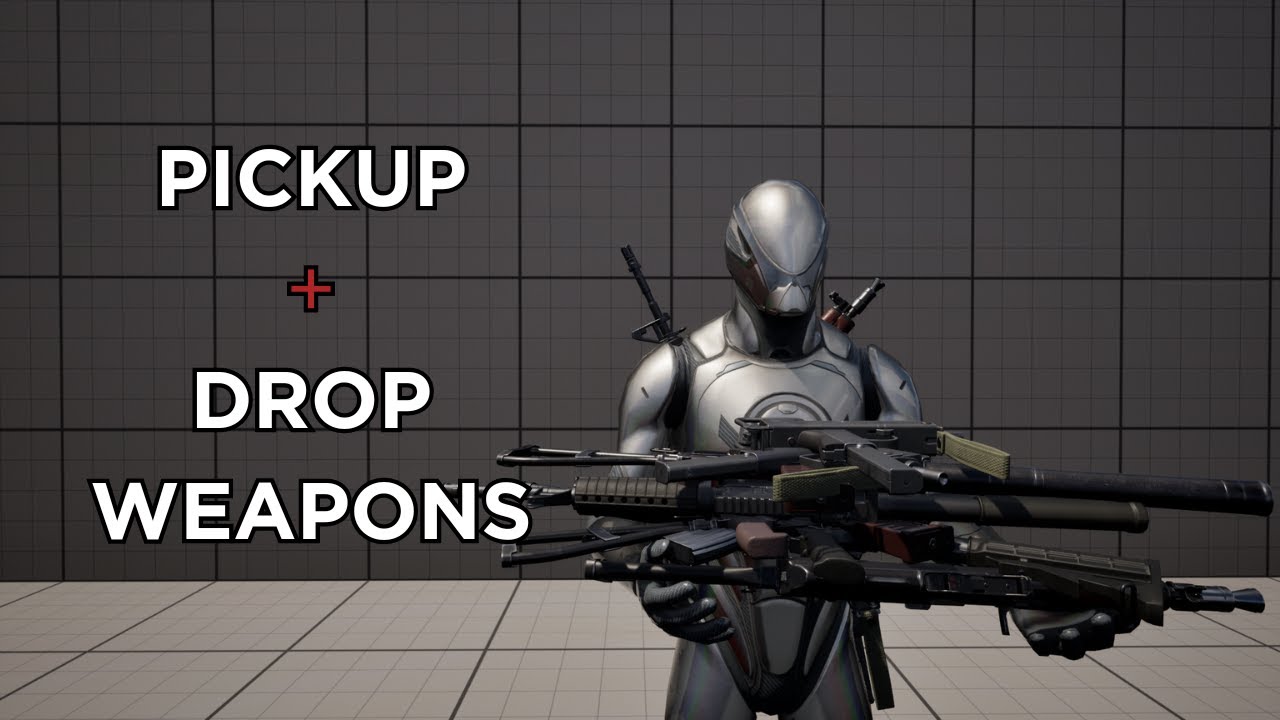
Welcome to 'The Ultimate Guide to Pickup and Drop System in UE5'. This video is designed to be your one-stop resource for mastering the 'pickup and drop system UE5'.
We'll start from the ground up, explaining the basics of the 'pickup and drop system UE5' and gradually move on to more advanced topics. By the end of this video, you'll have a sol...
 steel shadow
Question, I have three separate overlap volumes attached to my pawns, they are one of the biggest performance costs in the game, do you think it would be more efficient to combine them all into one skeletal mesh (in blender) with three bones and just do onoverlap -> find closest bone and perform appropriate logic from there?
or even just a big static mesh and do some simple maths to figure out which part of the big mesh (corresponding to one of the original zones) was hit
maiden wadi
What isn't working exactly? The firing or the inputs?
trim matrix
getting the location from the scene seems wrong, I've never used these stuff
 rotund barn
maiden wadi
What isn't working exactly? The firing or the inputs?
rotund barn
maiden wadi
What isn't working exactly? The firing or the inputs?
im so stupid, im sorry. i tested it with print string and realized i plugged it into the triggered and not the started pin, so it was firing continously which doesnt let the timer begin. do you know if there is a way to default all the nodes as expanded? as this isnt the first time a node automatically collapsed while reconnecting things which caused me to use the wrong pin.
stray axle
stray axle
actually there's still a small problem. I think I need the vector length because...
there any way I can fix this? Not sure if length will cut it though.
maiden wadi
rotund barn
im so stupid, im sorry. i tested it with print string and realized i plugged it ...
Not sure. I don't think so. But even Triggered should only face once for button presses if you use Down specifier.
maiden wadi
stray axle
there any way I can fix this? Not sure if length will cut it though.
I want to say just check the value. If it's too close to zero don't do anything?
stray axle
maiden wadi
I want to say just check the value. If it's too close to zero don't do anything?
yeah I probably have the value too low perhaps. I'll have to try things out
rotund barn
maiden wadi
Not sure. I don't think so. But even Triggered should only face once for button ...
nono i fixed it already, that was exactly what i did wrong. and i wasted an hour with this problem.... ive been working for like 10 hours straight so its easier to do dumb mistakes. i apologize for asking for help here with my oversight
stray axle
maiden wadi
I want to say just check the value. If it's too close to zero don't do anything?
seems that everytime I increase the value, it increases the speed meaning no matter what value its going to hit the threshold
its very weird. Problem is the only way to fix it is with a vector length
 sage heron
does anybody else's actor blueprint viewport get... chaotic and stuff vanish when you try to move things? (in 5.4)
 rose gull
hey im trying to make a boat and attach the player to it and stuff, can someone help me w this part where i add torque to the boat and the boat sorta rotates in its own place but the players orientation isnt affected by the boats, like id want the forward axis of the player to be rotated in relative to that of boats so i can later limit players look at rotation. any idea on how this should be done?
the only thing i could think of was getting the actual difference and applying it manually to the player
 oak gust
Ok I find it my node to convert the enum to string was wrong
I override the findplayerStart, to have custom spawner location, the problem is a player is on spawn spot the new player will never be spawned, how can I avoid this ?

 carmine drum
i am trying to make a game and in this part you have to put boxes on top of eachother to climb, but the psychics of those boxes is really weird is there any way to improve it ?
do i have to change things here besides the tich to simulate it

the boxes fly all over the place, making them havier didnt seem to work either
 ocean gate
Hi! So I'm trying to make a ricocheting laser in my 2D game using line traces, and I'm having an issue where it ricochets just fine from all surfaces except for when the laser is hitting a wall on the LEFT side of the wall, in which case the trace seems to set the end point to the completely opposite direction it should be setting it to (mirror vector by normal node seems to not work in this particular case?) Any idea what might be the problem? 🤔
A bit messy, but this is my blueprint

This is how it should work, and does work from the right side;

this is what happens when the laser is fired towards a wall to the right of it;

this is the beginning part of the blueprints as well;
 maiden wadi
ocean gate
This is how it should work, and does work from the right side;
maiden wadi
ocean gate
This is how it should work, and does work from the right side;
This image looks wrong as well. Upper laser should angle more.
So.. What you're trying to do is to take the hit surface's normal. And then take the hit direction inverted and rotate it around to the other side. It's doable with a small bit of axis math.
ocean gate
maiden wadi
This image looks wrong as well. Upper laser should angle more.
It does? Now that you mention it, yes it does look a bit too sharp. I wonder why that is :/
ocean gate
maiden wadi
So.. What you're trying to do is to take the hit surface's normal. And then take...
I'm quite bad at math, so pardon in advance for probably misunderstanding what you just said. But is this not what I'm already doing when I pass the line trace input vector into Mirror Vector By Normal node alongside the Impact Normal of the first trace?
Ah! I fixed it, got the unit direction vector using trace start and trace end instead to plug into mirror vector by normal 😅
maiden wadi
ocean gate
Ah! I fixed it, got the unit direction vector using trace start and trace end in...
Stepped away for a bit, but glad you got it working! 😄
 torn inlet
I'm coding a system so when you press E it sends you into the closet to hide from a monster and when i hold E it gives me a bunch of buffering, thanks in advance


i think its firing every frame
trim matrix
how to put a random value inside of it (must be unique identifier)?
 maiden wadi
torn inlet
I'm coding a system so when you press E it sends you into the closet to hide fro...
maiden wadi
torn inlet
I'm coding a system so when you press E it sends you into the closet to hide fro...
Your input event needs changed to something like Pressed in the InputAction or InputContextMapping.
torn inlet
where do i change that
dawn gazelle
trim matrix
how to put a random value inside of it (must be unique identifier)?
There's a node "New GUID" that you can set into the variable
trim matrix
dawn gazelle
There's a node "New GUID" that you can set into the variable
yep, I just found that out
maiden wadi
torn inlet
where do i change that
Show your input event that is running the interact.
trim matrix
dawn gazelle
There's a node "New GUID" that you can set into the variable
In C++, do we use FGuid or GUID? or what is the type?
torn inlet
this?
edit:i fixed it thanks
 maiden wadi
Yep. Add a trigger to that and do Pressed
dawn gazelle
trim matrix
In C++, do we use FGuid or GUID? or what is the type?
Pretty sure its FGuid
trim matrix
// Initializing our Global Unique Identifier
UPROPERTY(EditAnywhere)
FGuid globalUniqueIdentifier = FGuid::NewGuid();
```Is that the way to initialize it? it sems to still be 00000000You wouldn't want to initialize it like that. That would set the same guid for every instance to the same thing. You'd probably need something like in PostInitComponents to check if the guid is valid and if not, generate a new one.
That said, if you're in C++ and trying to identify a UObject, Squids are kind of eehh. You already have an object's pathname which is entirely unique.
trim matrix
maiden wadi
That said, if you're in C++ and trying to identify a UObject, Squids are kind of...
what does that mean?
maiden wadi
What class is your Guid in?
trim matrix
in the character
 paper galleon
What do you need the guid for?
trim matrix
paper galleon
What do you need the guid for?
For test purposes right now, but example:
I'm in an actor and I want it to have a unique Guid attached to it so that I can find which player are associated to this actor with the same Guid
maiden wadi
So, in Unreal all UObjects have a unique name pathed by their outers. Map.Actor.Subobject.Subobject. This name is entirely unique to that object because you cannot have two of the same named object outered to the same other object. This serves as a unique identifier for that object when a pointer won't suffice or even if you need to save a pointer as data like a save file.
That said what you're doing is better done by just setting the Owner of the actor to something like the player's PlayerState.
trim matrix
maiden wadi
That said what you're doing is better done by just setting the Owner of the acto...
mhm, so you are telling me that Guids are useless when using C++?
maiden wadi
They're great if you're insane and like using struct based inventory systems. 😂
dawn gazelle
In terms of a player the GUID is kind of useless. There is already ways to uniquely identify players.
maiden wadi
Realistically though. No they're not useless. But in this context they are.
trim matrix
I thought that by putting the player has the owner of the actor, they would move along or smt weird like that
dawn gazelle
GUID is alright for identifying something that doesn't have some kind of unique identification to begin with.... What Authaer describes with using the path sounds like it would be fine to use for the majority of cases. If I understand right though, the only advantage that the GUID has in this case is that if you use GUID it doesn't matter what the thing is named.
paper galleon
maiden wadi
They're great if you're insane and like using struct based inventory systems. 😂
I am insane 😆
dawn gazelle
maiden wadi
They're great if you're insane and like using struct based inventory systems. 😂
Hey! everyone has to start somewhere 😛
I thought I did pretty well with "My First Inventory" using structs considering it was holding proc gen items.
paper galleon
Why wouldn't you use struct based inventory? UObjects just seem like a nightmare to replicate and clean up.
 junior quest
I moved these bones a little and cant edit the location value for some reason. I want to move them back to 0
 junior quest
paper galleon
First off. How is your editor blue!!!
junior quest
paper galleon
First off. How is your editor blue!!!
darker nodes plugin
paper galleon
Ohh nice.
junior quest
i think both that and electronic nodes make the editor easier to read
paper galleon
Did you click the little reset to defaults arrow?
junior quest
yeah
paper galleon
junior quest
i think both that and electronic nodes make the editor easier to read
Yeah, they do actually
paper galleon
junior quest
yeah
Hmm strange.
junior quest
paper galleon
Did you click the little reset to defaults arrow?
it moves them back but then the value stays changed which concerns me a bit
paper galleon
Try closing and opening the asset editor again
maiden wadi
paper galleon
Why wouldn't you use struct based inventory? UObjects just seem like a nightmare...
On the contrary. They're fairly simple to do so. I have an add and remove function here that puts the item into an array and sets it for replication. You set using the replicated subobject list on the component, and in the item you return true for IsSupportedForNetworking. Then the component just has an OnRep array of the object pointers.
And yes UObjects are heavier than a struct in most cases. But as your UI Engineer I'm gonna wrap that shit in a UObject to pass to a ListView or Tileview anyhow, so there's going to be a UObject regardless and I'm also not going to manage that shit so every time you refresh the inventory I'm just going to spam a new bunch of objects. With the items already being uobjects I just pass them directly to the LV/TV widget.
Plus I get inheritance and such for specialized items if I really need it.


 paper galleon
Nooo. Not inheritance again 😅
junior quest
paper galleon
Try closing and opening the asset editor again

They are still just barely off
I can reimport it but im worried about this for animations later on
paper galleon
This is the main reason I switched from UObjects. That, and I wanted a container within container system.
paper galleon
junior quest
I can reimport it but im worried about this for animations later on
Maybe try reimporting. Could be a bug or serialisation gone wrong

 paper galleon
junior quest
paper galleon
junior quest
Off a tangent, I feel like the dials could be better implemented with morph targets or materials.
Bones and a full animation blueprint seems overkill for something like this
maiden wadi
paper galleon
This is the main reason I switched from UObjects. That, and I wanted a container...
I just put a second inventory component on the same actor and link them. Since components are the containers of items.
junior quest
paper galleon
Off a tangent, I feel like the dials could be better implemented with morph targ...
im learning, im more 3d artist than game dev atm
i know it can be animated without bones
paper galleon
maiden wadi
I just put a second inventory component on the same actor and link them. Since c...
It's a bit more complicated, what I have. But I ended up with an ECS for several reasons. Working really great so far.
paper galleon
junior quest
im learning, im more 3d artist than game dev atm
Oh cool. Well, you know something new now
junior quest
ye  I just dont want to do anything complicated yet but I know that transforms being off will mess up character anims I make later
reimporting didnt work but i'll just work through it
maybe ill figure it out later
paper galleon
Yeah, shouldn't be that big a deal
paper galleon
 modest monolith
Why My bad boy is not spawning decals?
modest monolith
Why My bad boy is not spawning decals?
Is your decal material set to render in decal space or something like that? I know you have to do a setting in the material to use it as a decal iirc
Your rotations could also be off.
 hallow garden
Hello Guys
i have a question if you don't mind .
i have multiple meshes that act like buttons ( whenever i click on one of them i added a timeline so they act exactly like buttons)
i added also a text render ( i wanted that every time i press one of the previous buttons i add a string to the text that's empty until i get to 5 max )
the problem i am facing is that when i use the append and attach multiple variable to each button and than set them to the text render after checking the len it doesn't work
and also its a bit heavy i guess since i am using on click event for every static mesh
is there a better optimized way to do it
Thank you
paper galleon
modest monolith
Why My bad boy is not spawning decals?
You can use MakeRotFromX and pass in the impact normal if you want it parallel to the ground
modest monolith
paper galleon
You can use MakeRotFromX and pass in the impact normal if you want it parallel t...
Oh so basically it was a size problem I see... Also yeah footprints are rotated the wrong way. This tutorial is crap
paper galleon
modest monolith
Oh so basically it was a size problem I see... Also yeah footprints are rotated ...
It's always the damn tutorials. Don't use tutorials. They're bad
modest monolith
paper galleon
It's always the damn tutorials. Don't use tutorials. They're bad
Hhahahahaa
paper galleon
I'm actually serious 😆. Anybody thats been in here long enough will tell you the same thing
If you actually need learning material, just use learn.unrealengine.com or whatever the new URL is
Tom Looman is also decent, but I personally wouldn't recommend it
modest monolith
paper galleon
You can use MakeRotFromX and pass in the impact normal if you want it parallel t...
it is parallel to the ground... it's just not the same rotation of the foot
modest monolith
paper galleon
Tom Looman is also decent, but I personally wouldn't recommend it
I know matt aspland is the worst
he teaches you one thing, he creates 50 bugs
paper galleon
Lmao
hoary junco
anyone know any decent tutorials for making an equipment system? Doesn't have to be perfect but I'd rather it not end up like my inventory system where I had to completely rebuild it because none of it worked
paper galleon
Ain't heard of him
paper galleon
Tweak values until you get the desired rotation. I think the forward vector isn't matching
Maybe add a few degrees to the final yaw value
modest monolith
 paper galleon
hoary junco
anyone know any decent tutorials for making an equipment system? Doesn't have to...
paper galleon
hoary junco
anyone know any decent tutorials for making an equipment system? Doesn't have to...
I know a few tutorials. But I wouldn't recommend any. Best to just make your own thing
paper galleon
modest monolith
Keep rotating fam. You're almost there 😅
hoary junco
paper galleon
I know a few tutorials. But I wouldn't recommend any. Best to just make your own...
but I don't know where to start... that's why I'm looking for a tutorial...
like trying to figure stuff out on my own in this engine is like someone from 400 years ago being sat in front of a bunch of parts and being given a brief explanation of what a car is, then being told to build one... I'm going to need some kind of schematic to work off before I can do that....
paper galleon
Hmm... search for unreal engine inventory system on YouTube and pick any one. Roll with it for a while, then completely scrap it and make yours from scratch.
It'll give you some inspiration and ideas on how to do stuff. But I don't recommend following it to the letter.
hoary junco
well you said you know a few tutorials, which one would you say causes the fewest bad programming habits? like what's the least bad?
paper galleon
If you want a grid based inventory like tarkov, that's a bit more difficult. But still doable
hoary junco
oh I already have my inventory system done I managed to replicate the SkyUI skyrim style of inventory
I'm more getting into actually equipping items and that kind of thing
paper galleon
hoary junco
well you said you know a few tutorials, which one would you say causes the fewes...
All of them have bad programming habits 😅. That's why I don't want to recommend any.
 paper galleon
Yay, it's facing the right way
paper galleon
hoary junco
I'm more getting into actually equipping items and that kind of thing
Oh, I see. I'm sure there's any equipment system that stands out to me. But there's a guy I remember. I'll look for it now
You can try Ryan Laley
Again, not recommended
hoary junco
paper galleon
Oh, I see. I'm sure there's any equipment system that stands out to me. But ther...
that's the guy whose inventory tutorial I followed and it ended up being even worse...
paper galleon
Exactly. Lmaoooo
hoary junco
I was in here for days talking to people trying to get it all fixed until basically this chat ended up being the actual tutorial...
granted my blueprints look like an absolute fucking mess but... they work I guess...
modest monolith
Now I have to find out how to reduce the size vertically... no mattet which size I tweak, the decal gets screwed everytime
 paper galleon
hoary junco
I was in here for days talking to people trying to get it all fixed until basica...
paper galleon
hoary junco
I was in here for days talking to people trying to get it all fixed until basica...
I could have tried explaining my own system, but it's too complicated. I'd need to just release it as a plugin or something, but I'm lazy
modest monolith
Okay it was the X.. found it
paper galleon
paper galleon
I could have tried explaining my own system, but it's too complicated. I'd need ...
But the gist of it is that, each equipment slot is also an inventory container that only accepts attachments. So, I store the actual socket name for the item to attach to the character.
modest monolith
paper galleon
I could have tried explaining my own system, but it's too complicated. I'd need ...
How can I put 8 different footprints chosen randomly?
paper galleon
Store all the materials in an array, then do random int in range
Min => 0
Max => ArrayLength - 1
Use that to get a material from the array and pass that to your decal creation node
 ancient siren
how would i get the wish direction of my player? (ex. hold w = 0 degrees, w & d = 45 degrees, ect.)
i need the dot of velocity and the wish direction to achieve what i am looking for

and i have the velocity, but im not sure how to get the wish direction
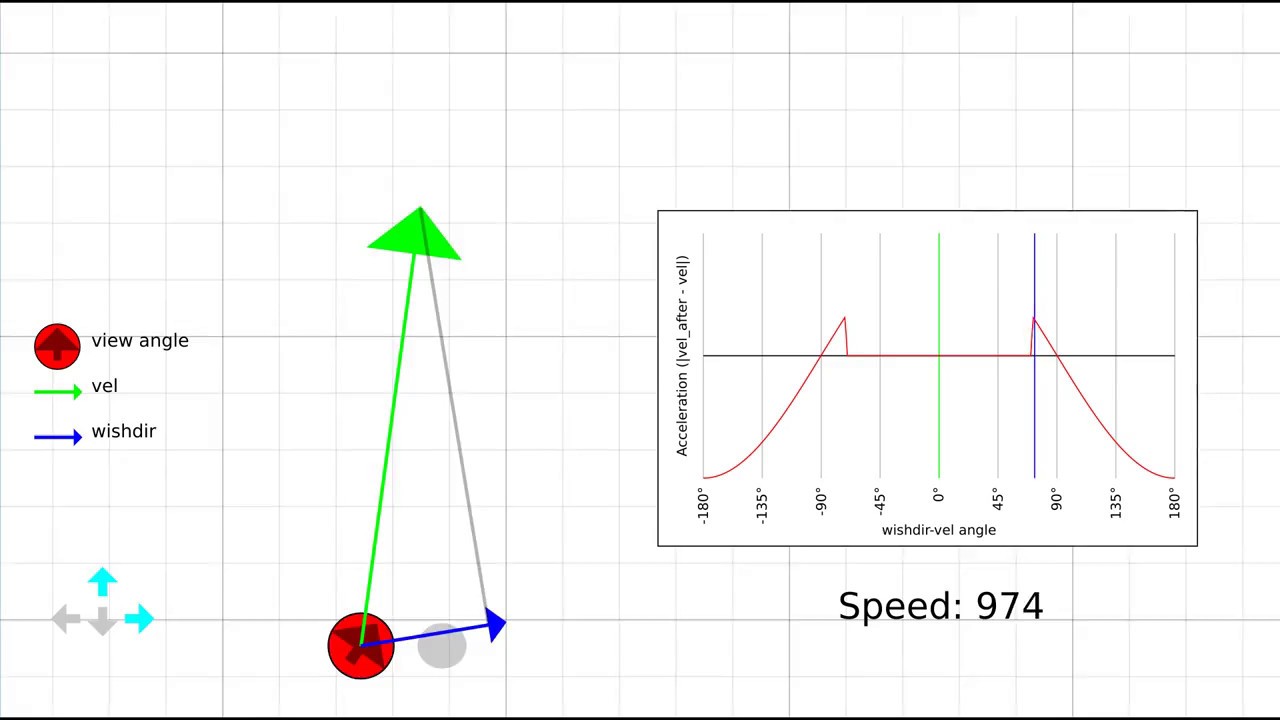
In this video I explain what strafe jumping is, a bit about the maths behind it, and an exploration of why this is such a difficult skill to master.
Custom maps used: tr1ckhouse-beta3, xcm_tricks2
dawn gazelle
hoary junco
but I don't know where to start... that's why I'm looking for a tutorial...
I doubt you'll find a tutorial that matches exactly what you're looking for. Instead, break down your problems into smaller bits and work from them.
If you have an inventory system, then an equipment system shouldn't be much more than an inventory with slots that only accepts specific types of items. So you'd need some additional logic to check that the incoming item is of the appropriate item type for the desired slot its trying to be put into.
The big difference is that you'd probably need to override what happens when something is moved into or out of the slot in that inventory, namely, that's where you'd have to provide the effects from equipping or removing any item present, setting any values on your player etc.
So moving something into the inventory:
Check if the thing coming in is the correct item for the slot or find an appropriate slot > If so, check if something is in the slot > there is something > remove its current effects > in either case swap the items from one inventory to the other to the appropriate slots (in the case of an empty equipment slot, set the source inventory slot to empty) > have equipment inventory then read the item data, and apply its effects.
How you handle this VIA UI is a whole additional level, but what I've described above is the logical system of equipping something.
If you're trying to emulate skyrim's equipment, then when you click on a specific item to equip it, it knows the item type, it can reach out to the player's equipment component, find the appropriate slot for the item, and start the process I mention above.
hoary junco
dawn gazelle
I doubt you'll find a tutorial that matches exactly what you're looking for. In...
well I already have some of that functionality in there. Like when I select an item in my inventory it can either drop the item, or you can use it and if you use it, it doesn't create an actor in the world, instead it's removed from the inventory and it calls a blueprint class that I can specify for each item as its item effect.
Also I have as a part of item data its item type, which means my menu that has "use, drop" as options, "use" gets rewritten depending on the item type so the word changes to "equip" if the item is a weapon or armour item type (also while I don't have items of these types yet, edibles will say "eat" drinkables will say "drink" books will say "read" spell scrolls will say "cast" other stuff just says "use" and items that can't be used won't have the button appear at all)
the more specific part I'm looking for is the actual equipping part, like I have an asset pack with some premade weapons and shields, and I have a sword item that has a sword mesh on it, I want to tell the game when I hit "equip" to put it in my hand and switch my animation set to another asset pack I downloaded which has animations for walking/idling etc when you have a weapon in hand
dawn gazelle
Ok, so again, that would be handled by the equipment component you'd probably build. When you've moved something into that "equippped" slot, that component can then do the logic for handling what happens when that particular type of item is equipped, such as setting the chest or pants mesh to what that item is supposed to display, or remove the old one.
"The Actual Equipping Part" isn't what you're looking for - you're describing the visual representation of the "Actual Equipping Part" which is the logic underneath that determines whether or not something is actually equipped. Once you're able to determine when and if something is equipped, then you can have it do whatever you need to when it is equipped based on the values of the equipped thing.
Equipping a sword > Hand slot is Empty > Declare this particular sword is in the slot > Inventory reads values for this particular sword > Applies mesh, sets stance, etc based on the values associated to this particular sword
hoary junco
fair enough.. is there a way of capping the size of a map? I know you can with an array but I'm wondering for a map because what I have in mind is
have a map of item subtypes to items
when I hit the equip button it looks through the map to find the relevant item subtype
if something is written to that entry, replace it with the thing that was just equipped but don't remove it from the inventory array
write something to the inventory system that checks the equipped items and marks every item in the inventory that is found on the equipment map
does this work?
carmine drum
 dawn gazelle
hoary junco
fair enough.. is there a way of capping the size of a map? I know you can with a...
dawn gazelle
hoary junco
fair enough.. is there a way of capping the size of a map? I know you can with a...
I don't think you can limit a map, but you're limited by whatever the Key is....
Excuse this... but this is just me rambling about what I think... It may not even be coherent XD
Let's say you did use a Map of GameplayTag (Subtype) > Item (Whatever your item reference is)...
Your items would be declared with a GameplayTagContainer that contains the appropriate slots the item can go in. Why a container? So you can have items that can go in multiple places like in left or right hand.
So this could work well for "Equipped.Chest" and "Equipped.Legs". Easy to find what is equipped currently using a find in the map, and add something to the map to overwrite what is currently equipped in the particular slot. Your chest and leg items would only have the single entry of "Equipped.Chest" and "Equipped.Legs".
If you wanted to be able to hold different things in both hands, then you can have tags like Equipped.Hand.Left and Equipped.Hand.Right.
So this could allow you to have dual-wielded swords as they could be just tagged as "Equipped.Hand" and can be valid for either slot, so long as one of them is free.
Trouble is now you're having to think about two-handed items as well, so then you'd probably need another GameplayTagContainer that could reference multiple tags that would need to be removed to properly equip the item - so this two handed sword would need to remove anything in Equipped.Hand.Right and Equipped.Hand.Left. This also means you probably want another tag that distinguishes that the item is taking up both hand slots, let's call this Equipped.Hand.Both. So then this 2HSword would also need to remove anything in Equipped.Hand.Both. Any single handed weapons when equipped would also need to remove Equipped.Hand.Both as well.
Yea... It could work 😛
it's been a while since I modded skyrim, but I do recall they used a similar system for their items.
hoary junco
carmine drum
where is the camera positioned in relation to the spring arm?
hoary junco
dawn gazelle
I don't think you can limit a map, but you're limited by whatever the Key is.......
I mean that is pretty coherent 😛 I haven't really used gameplay tags before though so, what's the mechanics of those? like how do you set them up?
carmine drum
hoary junco
where is the camera positioned in relation to the spring arm?

please dont tell me it should be connected
and im a dumbass
hoary junco
carmine drum
yes it needs to be connected
carmine drum
fuci
hoary junco
XD the hitbox of the camera is the end of the spring arm
dawn gazelle
hoary junco
I mean that is pretty coherent 😛 I haven't really used gameplay tags before tho...
GameplayTags are just a predefined set of FName basically... It helps keep your naming of things consistent and avoid typos, while also providing a hierarchy. You can create a variable of type gameplaytag and start creating them as you like. The difficult part is considering what you name these tags so that they're easy to use, while also not repeating yourself.
Can do fun stuff with them as well, like switch on gameplaytag
paper galleon
GTs are God's answer to enums and bools
carmine drum
hoary junco
XD the hitbox of the camera is the end of the spring arm
so it didnt got fiexed and i connected the cam to the spring arm, also it looks so damn bad now, also when i turn around now i dont see the character anymore
paper galleon
A thousand blessings on whoever thought of tbem
hoary junco
also I did have a plan in the UI when it comes to dual wielding and even weapon/shield combos to have it more accessible to those who are left handed or, even those who just want to mess with different combos, like in skyrim you can only equip a shield in you left hand, I kinda wanted to make it so if you want to.. you can equip a shield in the right hand and your weapon in your left, but if you have 1 shield equipped in 1 hand and you try to equip a shield in the other hand, then it won't let you so you can't do double shield
hoary junco
carmine drum
so it didnt got fiexed and i connected the cam to the spring arm, also it looks ...
is the spring arm the parent of the camera?
carmine drum
hoary junco
is the spring arm the parent of the camera?
yeps
ancient siren
ancient siren
https://www.youtube.com/watch?v=rTsXO6Zicls&t=86s
can someone take a quick peek and see how i could get the blue arrow working in my game as a value?
paper galleon
hoary junco
also I did have a plan in the UI when it comes to dual wielding and even weapon/...
I'm left handed and the shield throws me off everytime when I play skyrim lol. It's always weird for me
hoary junco
carmine drum
yeps
if you want to move the camera into a different position use this option in the spring arm
 carmine drum
hoary junco
is the spring arm the parent of the camera?
carmine drum
hoary junco
is the spring arm the parent of the camera?
kinda fixed it ish, but not the issues is i can still see outseide the pipe, walls
hoary junco
carmine drum
kinda fixed it ish, but not the issues is i can still see outseide the pipe, wal...
also in the springarm settings enable "use pawn control rotation" in the camera settings, and in the third person character settings disable "use controller rotation yaw" try that, see if it works
carmine drum
hoary junco
also in the springarm settings enable "use pawn control rotation" in the camera ...
nope, still can see through
hoary junco
carmine drum
nope, still can see through
do the walls have collision?
 hoary junco
carmine drum
yes
hoary junco
carmine drum
yes
and is the springarm parented to the mesh or the capsule component?
carmine drum
hoary junco
and is the springarm parented to the mesh or the capsule component?

so, did i fucked up something or no ?
hoary junco
carmine drum
instead of worldstatic try changing the collision of the walls to block all? I'm trying to find the issue here because I just did the same process as what I told you and it's working fine
carmine drum
hoary junco
instead of worldstatic try changing the collision of the walls to block all? I'm...
where is the option to block all
 hoary junco
carmine drum
where is the option to block all
hoary junco
carmine drum
where is the option to block all
it should be in collision presets somewhere
carmine drum
thats how i see
 hoary junco
carmine drum
thats how i see
hoary junco
carmine drum
thats how i see
are these walls and whatnot blueprints or are they just static meshes you put into the world?
carmine drum
hoary junco
are these walls and whatnot blueprints or are they just static meshes you put in...
static mashes in the world
hoary junco
carmine drum
static mashes in the world
so if you click one of them you should see something like this yeah?
 carmine drum
yeps
 hoary junco
carmine drum
yeps
hoary junco
carmine drum
yeps
so when you have the "instance" thing selected try searching in the search box below for "collision" and you should see something that says "collision presets" as one of the results
carmine drum
hoary junco
so when you have the "instance" thing selected try searching in the search box b...
oh the block all is here
 hoary junco
see it second from the bottom there
 carmine drum
mb
hoary junco
yeah set it to block all and see if the camera reacts to it
carmine drum
nope 😭
hoary junco
carmine drum
nope 😭
and you said "do collision test" is enabled in the camera settings yeah?
carmine drum
hoary junco
and you said "do collision test" is enabled in the camera settings yeah?
i think so, let me check something
carmine drum
hoary junco
and you said "do collision test" is enabled in the camera settings yeah?
yes it is
ancient siren
how do i find the rotation of the keys i pressed without velocity? like if i press S and D i get -45 degrees, but if i only press W i get 0 degrees (ect.)
hoary junco
carmine drum
yes it is
when you select your camera what does it say its transform is?

 obtuse kraken
Can anyone help me with my collision overlap detection. the collision true or false booleon gets inverted when my collision box collides with 2 actors at once, saying its true when collision overlap ends and false when currently overlapping. Resets itself when the collision box isn't overlapping anything. Will post code in a few seconds
Few mins actually
carmine drum
the thing is the vent its really thing, and the camera i think is higher then the height of the vent, it doesnt automatically fixes itself right?
like it doesnt resize itself
ah doesnt matter, i even lowerd it more
hoary junco
carmine drum
do you still have the default 3rd person map somewhere? If so can you test the camera in there to see if it will go through walls on that map or not?
carmine drum
hoary junco
do you still have the default 3rd person map somewhere? If so can you test the c...
does the same thing
dawn gazelle
C++ 😛
hoary junco
carmine drum
does the same thing
is this a custom character of some kind? because with the default character when I do it, it just works...
obtuse kraken
Can anyone help me with my collision overlap detection. the collision true or false booleon gets inverted when my collision box collides with 2 actors at once, saying its true when collision overlap ends and false when currently overlapping. Resets itself when the collision box isn't overlapping anything. Thanks.
trim matrix
don't learn c++ just for that, it's not even usefull for that
hoary junco
especialy if you have bits of code that are repeated a bunch of times
carmine drum
hoary junco
is this a custom character of some kind? because with the default character when...
so i just duplicated the main character and created this symbyote thing, which is a lot smaller and can fit gaps

but its basically the same cam as the default third person one
lunar sleet
Learning C++ will be useful no matter what, in this engine
carmine drum
as i said the vent is pretty small idk if it metters
 lunar sleet
Epic just needs to add the ability to <insert numerous things here>
carmine drum
epic still better then unity tho
hoary junco
carmine drum
so i just duplicated the main character and created this symbyote thing, which i...
honestly... what might be your best bet is for vent segments, have a collision box at the entrance and exit to switch the camera to first person mode while you're in there, and when you come back out it goes back to third person.. idk why it's clipping when you're in the default map though....
carmine drum
hoary junco
honestly... what might be your best bet is for vent segments, have a collision b...
alright, i ll do that thanks mate
ancient siren
ancient siren
how do i find the rotation of the keys i pressed without velocity? like if i pre...
?
obtuse kraken
obtuse kraken
Can anyone help me with my collision overlap detection. the collision true or fa...
Still stuck on this
hoary junco
ancient siren
?
what do you mean get rotation of the keys pressed?
ancient siren
hoary junco
what do you mean get rotation of the keys pressed?
like the corresponding rotation degrees of the keys
so W would be zero degrees because its facing forward
A would be -90
D would be 90
W and D would be 45
yk?
hoary junco
ancient siren
like the corresponding rotation degrees of the keys
set up an input where if W is pressed then sets rotation to 0... you can't get the rotation of the keys you'd have to assign those values yourself
dawn gazelle
I think it really depends on how you're retrieving the values and getting them in the first place... Take this as an example if you were able to sort them out by an enumerator...
 hoary junco
@dawn gazelle hey, how do you make your own custom gameplay tags?
dawn gazelle
hoary junco
<@218956378654507008> hey, how do you make your own custom gameplay tags?
Make a gameplay tag variable, then you can add new gameplay tags when you're selecting them. I believe they can be done in the project settings as well.

Ideally would probably be native tags in C++ 😛
hoary junco
dawn gazelle
Ideally would probably be native tags in C++ 😛
what do you mean by this?
dawn gazelle
hoary junco
what do you mean by this?
It's a means of declaring your tags in C++ instead of the editor as these are effectively defined in an ini instead. This also then allows you to potentially use those tags in any C++ code you may have.
.h
#include "NativeGameplayTags.h"

UE_DECLARE_GAMEPLAY_TAG_EXTERN(TAG_Some_Tag)
.cpp
#include "YourGameplayTagHFile.h"

UE_DEFINE_GAMEPLAY_TAG(TAG_Some_Tag, "Some.Tag");
 hoary junco
carmine drum
<@178201472796721152> yea...
hoary junco
carmine drum
<@178201472796721152> yea...
I mean what I meant by setting it to first person is making the character mesh invisible and changing the position of the camera to something more akin to a first person position...
obtuse kraken
obtuse kraken
Can anyone help me with my collision overlap detection. the collision true or fa...
should i just delete all my overlap detection logic and do a array instead of a boolean?
carmine drum
hoary junco
I mean what I meant by setting it to first person is making the character mesh i...
not even that works 😭
obtuse kraken
Im getting desperate
carmine drum
hoary junco
I mean what I meant by setting it to first person is making the character mesh i...
idk whatever fuck it, spent 1 hour on this shit
hoary junco
carmine drum
idk whatever fuck it, spent 1 hour on this shit
I mean.. I spent 4 days on a system just to save/load my game 😛
dawn gazelle
obtuse kraken
should i just delete all my overlap detection logic and do a array instead of a ...
If you want to keep track of multiple things colliding, then yea, you'll probably want an array that contains all the things that are colliding, and removing them when they stop colliding.
hoary junco
dawn gazelle
It's a means of declaring your tags in C++ instead of the editor as these are ef...
how would you get the main game to recognise that the gameplay tag file exists? I'm really not proficient in C++ and have forgotten a lot of it
obtuse kraken
dawn gazelle
If you want to keep track of multiple things colliding, then yea, you'll probabl...
ok ty
dawn gazelle
hoary junco
how would you get the main game to recognise that the gameplay tag file exists? ...
Declaring them like this makes it so they are present in your project when you compile.
hoary junco
dawn gazelle
Declaring them like this makes it so they are present in your project when you c...
so where do you put the .h and .cpp files?
dawn gazelle
Anywhere you like.
hoary junco
how does the engine know how to load them then?
dawn gazelle
It's not about loading the files specifically.
They get compiled into your project.
They get added to the "project files". You compile. Engine now knows that they exist.
You can't just create some files with those names without compiling and hoping Unreal knows what they do.
willow plover
so I'm trying to add the selected item's image to a button background(The one darkened) I'm not sure why my code isn't working

 hoary junco
dawn gazelle
It's not about loading the files specifically.
hoary junco
dawn gazelle
It's not about loading the files specifically.
and I'm guessing these dropdowns are gameplay tag containers? Do I need to define those in C++ too? if so how?

 thin panther
hoary junco
and I'm guessing these dropdowns are gameplay tag containers? Do I need to defin...
thin panther
hoary junco
and I'm guessing these dropdowns are gameplay tag containers? Do I need to defin...
No, those are your already defined ones.
As Datura mentioned, you can make new ones in C++ and compile them into the project, something called "Native Gameplay Tags"
You can also manually add them in the correct .ini, or in the project settings
hoary junco
thin panther
No, those are your already defined ones.
As Datura mentioned, you can make new ...
I get that what asking about is what are gameplay tag containers and how do they work?
thin panther
A gameplay tag container is just essentially an array of gameplay tags
hoary junco
like how "cancel" is nested in "action" which is nested in "UI" like am I able to do my own structure like that?
thin panther
That's just the nature of a gameplay tag
when you define a tag it's like "MyTag.MySubTag.MySubSubTag.MySubSubSubTag.MyLeafTag.JkAnotherSubTag"
Each one of those things between a . is one of those drop downs
So in this case you would be able to define UI.Action.MyAction, and MyAction would appear under that Action tab
it's just a heirarchy
dawn gazelle
hoary junco
and I'm guessing these dropdowns are gameplay tag containers? Do I need to defin...
This the hierarchy of your tags. This would look like this in C++:
.h
#include "NativeGameplayTags.h"

UE_DECLARE_GAMEPLAY_TAG_EXTERN(TAG_UI);
UE_DECLARE_GAMEPLAY_TAG_EXTERN(TAG_UI_Action);
UE_DECLARE_GAMEPLAY_TAG_EXTERN(TAG_UI_Action_Cancel);
UE_DECLARE_GAMEPLAY_TAG_EXTERN(TAG_UI_Action_Confirm);
//etc...
.cpp
#include "YourGameplayTagHFile.h"

UE_DEFINE_GAMEPLAY_TAG(TAG_UI, "UI");
UE_DEFINE_GAMEPLAY_TAG(TAG_UI_Action, "UI.Action");
UE_DEFINE_GAMEPLAY_TAG(TAG_UI_Action_Cancel, "UI.Action.Cancel");
UE_DEFINE_GAMEPLAY_TAG(TAG_UI_Action_Confirm, "UI.Action.Confirm");
//etc...
The hierarchy also gets nice, because you can say respond to tags that are UI.Action, and not care about what action it is, for example
They're also pretty fast, as internally they are just essentially numbers, making their comparisons quicker than say, using strings.
Enums are also good, but they lose the benefit of global accessibility, scalability and hierarchy
hoary junco
ah ok... so in this case, if on the sword I have the gameplay tags of
Equipped.weapon.onehanded
then when I hit equip on an item, I check its gameplay tags, if it's equip.weapon I put it in the weapon slots, if it's .onehanded it brings up a UI element that asks if I want it in the left or right hand, and depending on the answer it can either equip it to LeftHandSlot or RightHandSlot key on the equipment map based on the selection, and check if the twohandslot key is filled, and if it is, empty it
am I on the right track with this?
thin panther
Yeah, something like that
hoary junco
would I make the gameplay tags C++ class public or private?
or do I not bother with it?
@dawn gazelle where in these 2 files do I put the declaration and the definition of each of the tags?


 stoic ledge
those functions are both declared and defined, although they do nothing
ancient siren
i have a wonkey system to get degrees of rotation without moving, but when it gets to the one where A and W are held (so it would be -45 degrees), it just defaults to 0 degrees... anyone know whats happening?

 hoary junco
stoic ledge
those functions are both declared and defined, although they do nothing
hoary junco
stoic ledge
those functions are both declared and defined, although they do nothing
I know, as was talked about earlier though I want to use these to make a list of gameplay tags, but where in the file do I put the declaration and definition of the tags?
paper galleon
You don't need the class. The tags are declared and defined using macros
hoary junco
stoic ledge
those functions are both declared and defined, although they do nothing
like in the .h file if I wanted to put in "UE_DECLARE_GAMEPLAY_TAG_EXTERN(TAG_UI);" what line would I put it on?
paper galleon
dawn gazelle
This the hierarchy of your tags. This would look like this in C++:
.h
```cpp
#i...
This.
paper galleon
hoary junco
like in the .h file if I wanted to put in "UE_DECLARE_GAMEPLAY_TAG_EXTERN(TAG_UI...
Outside the class definition. You don't need the class at all
hoary junco
paper galleon
Outside the class definition. You don't need the class at all
so do I just delete the class ection?
paper galleon
Yep.
ancient siren
ancient siren
i have a wonkey system to get degrees of rotation without moving, but when it ge...
i tried printing after this one and it seems to be the only one that doesnt go through

and its not a problem with that line because i tried rearanging it too- it seems to only be the second to last one
stoic ledge
ancient siren
i tried printing after this one and it seems to be the only one that doesnt go t...
it hurts my brain to look at.
ancient siren
stoic ledge
it hurts my brain to look at.
yeah its gotta be one of the worst things ive made so far....
like.. ever......
stoic ledge
ancient siren
yeah its gotta be one of the worst things ive made so far....
its fine, so does the moving left branch work correctly?
ancient siren
stoic ledge
its fine, so does the moving left branch work correctly?
actually i just moved it around and it does not
and no matter the order, this segment gets skipped

it never returns
but theres also something wrong with it going -45 degrees as well
 stoic ledge
so it goes to -90?
stoic ledge
just never -45
ancient siren
yep
and everything is right with the inputs
i tested all of the "moving" bools in a print string
hoary junco
@dawn gazelle so I'm getting this error
ancient siren
@stoic ledge any ideas?
stoic ledge
ancient siren
<@975482789392695307> any ideas?
the two moving lefts.
 ancient siren
stoic ledge
the two moving lefts.
ancient siren
stoic ledge
the two moving lefts.
that worked!! tysm
 pastel apex
unsure if it goes here but will ask. How do I go about casting a hitbox that can return the hit result of all objects within the hitbox?
stoic ledge
what owns the hit box and who needs to see the results?
pastel apex
stoic ledge
what owns the hit box and who needs to see the results?
player and player
basically player does an attack
casts a hitbox
and the results of who got hit will receive damage based on player stat
thin panther
so a box trace?
thin panther
Multi Box Trace
dawn gazelle
hoary junco
<@218956378654507008> so I'm getting this error
Can you show the contents of your .h and .cpp file including any includes? Doesn't need to have all the tags listed in them though.
thin panther
Make sure the things you want are overlapping the trace channel though
Multi trace still returns on a blocking hit
pastel apex
right i was doing that with sphere
and my issue was (i did it with object)
it would consider its individual components as hit targets
so it considered the skeletal mesh and the capsule collider as hit targets
hoary junco
dawn gazelle
Can you show the contents of your .h and .cpp file including any includes? Does...
I found out what the issue was in the end, I had to go into the .build.cs file and add "GameplayTags" to the list of public modules like this

GameplayTags wasn't there before
dawn gazelle
Oh yea
trim matrix
hoary junco
I found out what the issue was in the end, I had to go into the .build.cs file a...
isn't that what they told you to do?
dawn gazelle
No, I didn't mention that 😛
trim matrix
dawn gazelle
No, I didn't mention that 😛
it's in c++
hoary junco
trim matrix
isn't that what they told you to do?
Tank and Ozymandias told me that in the other chat
stoic ledge
pastel apex
right i was doing that with sphere
 hoary junco
@trim matrix also yeah it's what they told me to do, that's what "I found out" means, aka I found out what to do because someone told me
trim matrix
oops, true
pastel apex
stoic ledge
i presume that's a BP that has a sphere collider?
hoary junco
god this whole file is such spaghetti... I hate it...
 stoic ledge
pastel apex
i presume that's a BP that has a sphere collider?
stoic ledge
pastel apex
i presume that's a BP that has a sphere collider?
it was a collision sphere component added to the character, heres the characters mesh.
 pastel apex
stoic ledge
it was a collision sphere component added to the character, heres the characters...
pastel apex
stoic ledge
it was a collision sphere component added to the character, heres the characters...
ah, yeah i was thinking somewhere along those lines too
well albeit as a separate BP that can be spawned for a moment of the animation
the issue is i'm trying to make it work with GAS so i thought i can avoid that and try and use the integrated trace
though i guess that's just meant for continous collision like say sword swings
trim matrix
hoary junco
god this whole file is such spaghetti... I hate it...
not that bad
I've seen worst lol
🥲
hoary junco
it's the most messy blueprint I have in my game at current XD
doesn't help I programmed most of it when exhausted so I was just at the "fuck it I don't care about putting everything in functions anymore"
stoic ledge
pastel apex
ah, yeah i was thinking somewhere along those lines too
he overlap event should return the actors being overlapped and u can just send dmg to the character.
pastel apex
stoic ledge
he overlap event should return the actors being overlapped and u can just send d...
right
hoary junco
@dawn gazelle if I add a gameplay tags variable to a blueprint, and I set its default value to a tag.. does that mean I don't have to do anything with it in the actual blueprint? It just always has that tag now?
dawn gazelle
hoary junco
<@218956378654507008> if I add a gameplay tags variable to a blueprint, and I se...
Yeah it should act just like any other default value you give a variable.
So if you make a child of that blueprint, it too would have the same default gameplaytag value until you change it.
hoary junco
ok cool. So the fact I have the 1 handed weapon tag on sword means I could make a bunch of children from that of mace, dagger, hatchet, etc and they would all get that tag
obviously I'd probably rename sword to weapondefault or something and make a new child class as sword for sword specific data
wait what happens if you make a child of a child? like can you just keep splitting the tree like that?
so weapondefault is a child of item
sword, mace, dagger etc are children of weapondefault
bronze sword, iron sword, steel sword etc are children of sword
and then just continue that down?
dawn gazelle
Yep, but I hope you're using DataAssets instead of Actors.
hoary junco
unfortunately no.... that said, most of the "Item" parent actor's data is done through a component.. so could I put the component on the dataasset and reparent to it?
or would the dataasset be the child in this case?
idk I've not run into data assets before
dawn gazelle
A PrimaryDataAsset would be the parent which contains all the functions and variables that you may want to use from any single definition of an item.
You can create Data Assets off of it which then utilize those variables to create the definition of an asset. You can now use that asset everywhere to reference that particular object without having to spawn it or use a class reference.
You can also make a child of the PrimaryDataAssets class itself, allowing you to create further definitions of a certain type of Assets, which can have overridden functions, additional functions and more variables.
hoary junco
dawn gazelle
A PrimaryDataAsset would be the parent which contains all the functions and vari...
how much would I have to rewrite through through all of this considering how many times the current parent has been referenced somewhere as "get actor of class" or something like that?
and are there any other ways that changing this would mess up the code?
dawn gazelle
Maybe just continue doing what you're doing then 😛
hoary junco
dawn gazelle
Maybe just continue doing what you're doing then 😛
I mean, what's the potential negative outcomes of if I don't change what i'm doing?
dawn gazelle
More difficult to manage, less flexibility, requiring you to spawn instances of actors to utilize their functionality.
hoary junco
I'd probably need help to reconfigure stuff to use the new system :/
lunar sleet
Refactoring is life
hoary junco
also... how do I create a map for the equipment slots? Like for the variable to create the map to begin with what goes in the key side?
dawn gazelle
GameplayTag
The tag would be the identifier of the slot as you want, so like Equip.Chest or Equip.Legs
the key then is the definition of whatever your item is, which hopefully agian, isn't an actor object.
Otherwise, you're spawning a ton of actors that don't need to exist as actors if they're being carried in your inventory.
hoary junco
well that's the thing.. at current while the items themselves are actors, when being used in the inventory all I do is get the name of the actor, run it through a data table, get the item data for an item by that name, then use that data to populate the inventory
like when an item exists in the world it's an actor, but when I pick the item up the actor is destroyed and instead the actor's data is fed into the system.. the only thing the inventory pulls from the actor itself is quantity since I have it so items can be dropped in stacks
dawn gazelle
So then you're going to end up with an actor definition and a separate data table definition for each item?
hoary junco
pretty much... Like each actor really doesn't do anything in the world when it's dropped.. it's just an item, it only does anything when you use it from the inventory which is where it consults the data table and asks what the effects and whatnot of that item are and then it just spawns in the effect when the item is used
and then when the item gets picked up the inventory is an array of structs, and those structs have the item's ID and its quantity so if you want to get any data from an item when you use it in the inventory it grabs that index in the array, gets its struct, gets its ID, uses that ID to get the info from the data table and there you go
what's an ASC?
dawn gazelle
Float iD? that sounds horrible.
ASC is an ability system component part of the Gameplay Ability System.
A "plugin" that does all kinds of fun stuff.
trim matrix
dawn gazelle
ASC is an ability system component part of the Gameplay Ability System.
Do you know what's the best tutorials / articles to understand GAS? (free only)
dawn gazelle
trim matrix
Do you know what's the best tutorials / articles to understand GAS? (free only)
Nope. I just leanred through experimentation myself.
Without much knowledge of UE at the same time 🙃
I'd agree with that.
hoary junco
dawn gazelle
GameplayTag
so, something I'm concerned about is, doesn't a replicated key get replaced in a map? like if I have a 1 handed weapon, how do I tell the map that an item with a tag of equipment.weapon.onehanded can go in 2 different entries?
trim matrix
ppl said this was the best resource:
https://www.udemy.com/course/unreal-engine-5-gas-top-down-rpg/?couponCode=KEEPLEARNING
thin panther
It's decent, but theres tranek's gas bible that's decent. Laura also has a minimal GAS guide pinned in #gameplay-ability-system
trim matrix
mh
thin panther
Stephen is a great resource if you like courses and the free stuff ain't doing it for you.
Make sure you use a coupon though
trim matrix
I should prob understand GAS with BP first
trim matrix
ex: I've never used Gameplay Tags..
dawn gazelle
hoary junco
so, something I'm concerned about is, doesn't a replicated key get replaced in a...
You'd split it up differently.... You'd have something like Equipment.Hand.left and Equipment.Hand.Right. So if you see something labelled as Equipment.Weapon.OneHanded you'd have to have it check whichever slot you want it to go in. Two-handed, you'd have to remove whatever is in both Equipment.Hand.Left and Equipment.Hand.Right
paper galleon
@balmy viper looks like that's an actor component
trim matrix
dw about that, I know I'm better than everybody else :3
 balmy viper
if I start with an actor component, can I not reparent it to a TriggerVolume?
hoary junco
dawn gazelle
You'd split it up differently.... You'd have something like Equipment.Hand.left ...
so would I have both Equipment.Hand.Left and Equipment.Hand.Right as tags on the actor? or would I assign it the tags somehow if it has Equipment.Weapon.OneHanded when it came to actually equipping it?
paper galleon
balmy viper
if I start with an actor component, can I not reparent it to a TriggerVolume?
You should be able to reparent to any BP, but I think it's best to just start from Trigger Volume
balmy viper
paper galleon
You should be able to reparent to any BP, but I think it's best to just start fr...
That's what I would have thought too, so I was surprised. I'll start again, and thanks again
paper galleon
It'll be strange if Trigger Volume isn't blueprintable. But I doubt that
balmy viper
There's TriggerBase, TriggerBox (which is what I think a TriggerVolume is) ... and that suits my purposes, so will use that
lol I think I was wrong, but I'm on the right track now at least
paper galleon
Ohh yeah. It's the box you want
Funny thing is that you can choose not to use the Trigger classes at all and just roll your own
Probably better too, but use what works for now
dawn gazelle
hoary junco
so would I have both Equipment.Hand.Left and Equipment.Hand.Right as tags on the...
Here's maybe a better way to think about it...
You can have a gameplay tag container that gives some properties about the item which you can easily look up by checking if the container has any particular tag you want
Equipment.Weapon.2HSword
ItemClass.Legendary
Material.ElvishSteel
Then you may have another gameplay tag that defines where the item can be equipped.
Equipped.Hand.Both
Then you may have another tag container that defines what other slots would need to be forcefully unequipped if this particular item gets equipped. This can be useful if you have say, a "Robe" type of item and it needs to remove a whole bunch of slots to properly be equipped, or in this case, if a player has their hands equipped, then they should be emptied.
Equipped.Hand.Right
Equipped.Hand.Left
Now let's create a mockup definition for a one handed gathering tool like a sickle...
Equipment.GatheringTool.Sickle
ItemClass.Common
Material.Iron
Can be equipped in:
Equipped.Hand.Left
Equipped.Hand.Right
Force Unequips:
Equipped.Hand.Both
This way you're defining that it removes any two-handed item held in the Equipped.Hand.Both, but it can go in either the right or left hand, and it is made of iron and is considered a common item.
hoary junco
dawn gazelle
Here's maybe a better way to think about it...
You can have a gameplay tag conta...
I think I get it.. that's going to be one hell of a list of tags by the end XD
one thing I do have a question about with C++ stuff though, is there a way to have UE5 load in the C++ files automatically? Because I added one of my custom tags, saved, UE crashed at some point, I loaded it back up, and unless I ran live coding then the custom tags stopped working
dawn gazelle
Here's what skyrim's mod kit thingy looked like as an example... They ahve all those slots listed, and then you'd basically select which slot(s) that it takes up, but some slots overrode other slots it just wasn't exposed to modders to change that behavior
 dawn gazelle
hoary junco
one thing I do have a question about with C++ stuff though, is there a way to ha...
dawn gazelle
hoary junco
one thing I do have a question about with C++ stuff though, is there a way to ha...
No, and don't. If you need to add more C++, always best to do a fresh compile with the editor closed and then load up the editor again.
hoary junco
dawn gazelle
No, and don't. If you need to add more C++, always best to do a fresh compile w...
how do I run a compile?
I've been googling how to compile in visual studio 2022 for unreal engine 5 and literally every answer is saying "just live code"
stoic ledge
right click your project, and select build. (not the Engine)
hoary junco
stoic ledge
right click your project, and select build. (not the Engine)
like, right click the .uproject file and select build? because I don't see a build button
stoic ledge
in visual studio
hoary junco
ok I think it worked, thanks
stoic ledge
========== Build: 1 succeeded, 0 failed, 0 up-to-date, 0 skipped ==========
hoary junco
I mean all mine says is build succeeded and now the custom tags are showing up in the editor when I launch it
hoary junco
@dawn gazelle is there a way I can set it up so I only pull certain tags from a tag container when adding them to the map? like if I have a chestplate that has tags of equipment.armour.chest and material.iron in its container, I don't want to add both of those to the map, all I want is the equipment one, how would I do that?
dawn gazelle
Have a tag defined specifically for what slot it goes into
Create separate tag containers for different types of definitions.
 inland crystal
There's a 'switch on gameplay tag' node
hoary junco
thing is, I already have an item data table right, so I already have all of these categories for a single item, I was hoping to reduce some of these a bit by the use if gameplay tags but, if you're making separate containers for everything, which is going to add yet more pins to this item data struct, then why bother
 dawn gazelle
Because you'll run into problems trying to figure out what a single gameplaytag container is meant to do, and you'll probably end up with thousands of gameplay tags trying to cover all the conditions that you could potentially have so that you can properly sort things out.
Then it just becomes a nightmare to manage the tags @_@
hoary junco
I mean I was hoping that since a hierarchy already exists within the tag system I could pull from the tags and say "anything under this tag in the hierarchy, get those"
dawn gazelle
Can be equipped in:
Equipped.Hand.Left
Equipped.Hand.Right
Force Unequips:
Equipped.Hand.Both
How do you know which is meant to be equipped or unequipped if it was just a listing of:
Equipped.Hand.Left
Equipped.Hand.Right
Equipped.Hand.Both
The only way around would be to have even more tags...
Equipped.Hand.Left
Equipped.Hand.Right
Unequips.Hand.Both
carmine drum
I have this blueprint that should just be pull a lever, a door opens, like slides to the right, but for some reason i get millions of errors saying access none trying to read Open the door


anybody can help?
hoary junco
well that would require its own system but for stuff like armour... all you're doing is overwriting the entry on the map... like if something with a tag of equipment.armour exists, just feed that tag straight into the map because it will just update the equipment, but if it has anything under the equipment.hand hierarchy, then find out what the tag is that it has under that hierarchy and put it in that slot then run a find on equipment.bothhands and empty that slot simple...
then you do the inverse if it has equipment.bothhands, empty anything under the hierarchy of equipment.hand
lunar sleet
carmine drum
anybody can help?
where does the error point when you click the magnifying glass? also show the error in full
carmine drum
lunar sleet
where does the error point when you click the magnifying glass? also show the er...

 lunar sleet
carmine drum
lunar sleet
carmine drum
that BP Sliding Door is null when being accessed. Means you probably never set it/didn't set it properly, or did something silly like creating a var of that class and leaving it empty
carmine drum
lunar sleet
that BP Sliding Door is null when being accessed. Means you probably never set i...
this should be it but not empty is it ?
 lunar sleet
carmine drum
this should be it but not empty is it ?
lunar sleet
carmine drum
this should be it but not empty is it ?
ofc it's empty
carmine drum
???????
lunar sleet
you took a tupperware box and labeled it sandwich
now you're trying to eat the fricken sandwich
lunar sleet
you need to reference it properly. Are you interacting with the door with an overlap/line trace at all/
lunar sleet
are you going to have more than one of these doors in your level at any point?
carmine drum
dont think so
lunar sleet
then you can use get actor of class BP_Sliding Door and set the return value to that sliding door variable you created. It's a bit of a crutch but it'll work for your current use case (this will break as soon as you have more than one door so don't abuse it). I would recommend watching the bp comms live training at the bottom of pins here though, when you get a chance
 flat coral
Ok I swear to god there was a function to get a random point inside an area but I can't remember what it was called! Am I crazy? does this exist?
Litearlly found it
The dark magic of asking for help
lunar sleet
flat coral
Litearlly found it
are you talking about the AI one?
flat coral
Nah just this
 carmine drum
lunar sleet
then you can use get actor of class BP_Sliding Door and set the return value to ...
carmine drum
lunar sleet
then you can use get actor of class BP_Sliding Door and set the return value to ...
like this?

cuz if that's what you meant it doesnt work
flat coral
I can't use AI nav anyways
lunar sleet
carmine drum
like this?
yeah.
carmine drum
no more errors but doesnt do anything
lunar sleet
flat coral
Nah just this
ah right
lunar sleet
carmine drum
no more errors but doesnt do anything
show the open the door function


 carmine drum
lunar sleet
you usually need a lerp after that timeline
carmine drum
lunar sleet
you usually need a lerp after that timeline
tried the timeline just with collision boxes and it works fine, its just the lever doesnt wanna do it
its shy
idk
lunar sleet
but it fires when you pull the lever?
carmine drum
lunar sleet
but it fires when you pull the lever?
yea
lunar sleet
then wdym by works with collision boxes
carmine drum
lunar sleet
then wdym by works with collision boxes
tried it with actor begin overlap and the timeline worked without a lerp
lunar sleet
carmine drum
tried it with actor begin overlap and the timeline worked without a lerp
oh ik why
carmine drum
and i just added this code to the sliding door, sometimes it works sometimes it doesnt

and it works when i pull the lever but im not even in the box
lunar sleet
well for starters, you told it to Open the Door on tick while the first timeline is firing
hoary junco
ok so.. idea... in the equip UI add a thing of,
switch on tag
equipment.weapon
eqipment.armour
from equipment.weapon
has tag equipment.weapon.onehanded
if false, go to the equipment system, find equipment.hand.left and equipment.hand.right, empty both of them
if true bring up another UI element asking the player if they want to equip in the left or right hand
depending on the solution add a gameplay tag to the container that's either equipment.hand.left or equipment.hand.right
depending on what comes out the other side one of three things will happen
if it was equipment.armour than whatever that item's equipment.armour tag was, gets added to the map
if it was equipment.weapon and equipment.weapon.onehanded was false, we've already wiped those 2 blocks so add the item in question to equipment.weapon.twohanded
if it was true then you round out by adding whatever the equipment.hand tag was that corresponds to the item that came through...
lunar sleet
carmine drum
move the Open Door event call to the Finished pin of the first timeline
carmine drum
lunar sleet
well for starters, you told it to Open the Door on tick while the first timeline...
wait what, where is it on tick ?
lunar sleet
carmine drum
wait what, where is it on tick ?
Update ticks away while the timeline is going
 lunar sleet
carmine drum
if thats what you meant, then it doesnt work
lunar sleet
carmine drum
if thats what you meant, then it doesnt work
does it say Fire only once this time?
because before it was spamming it
carmine drum
lunar sleet
does it say Fire only once this time?
yes it does, but as i said, sometimes it works sometimes doesnt XD
lunar sleet
carmine drum
and it works when i pull the lever but im not even in the box
you're also doing different things here. all the sudden you're using a branch check, which is wayyyy better than Flip Flop, but you don't have that in the other screenshots
so you need to be inside a box while pulling the lever or what's the goal here
carmine drum
no, i just did that to check something, but that seems to make it works sometimes, but it works when im not in the box
idk XD
lunar sleet
ok
remove the overlap
we need to sort this out and you're having 2 things do it, which can have an overriding effect
dawn gazelle
hoary junco
ok so.. idea... in the equip UI add a thing of,
switch on tag
equipment.weapon...
Except, switch on tag only works with specific tags that you're feeding in, so you would have to define it as equipment.weapon only. You couldn't define it as equipment.weapon.onehanded for example. You can still check for lower tags, but then you'll end up with a bunch of branches checking if the container contains a non-exact match.

 carmine drum
and thats the interact interface in the lever
 lunar sleet
carmine drum
and thats the interact interface in the lever
lunar sleet
carmine drum
and thats the interact interface in the lever
you don't need an interface
carmine drum
lunar sleet
change the pin to Play From Start
did that
carmine drum
lunar sleet
you don't need an interface
well where do i call the pull then?
lunar sleet
eh...cast would've been so much cleaner but w/e as long as you have it working as intended
flat coral
lunar sleet
you don't need an interface
You need SOMETHING for an interaction system, assuming objects other than this will be interactable
lunar sleet
flat coral
You need SOMETHING for an interaction system, assuming objects other than this w...
ik, I thought he was using an interface after get actor of class but misread
realistically this should've been a line trace/overlap and a cast but whatevs 😄
actually, let's do that instead
hoary junco
dawn gazelle
Except, switch on tag only works with specific tags that you're feeding in, so y...
so would something like this not work? this is step one, get the tags from the thing being equipped, look through them all, if one of the tags is a part of Equipment.Armour then add the full thing to the map
 dawn gazelle
hoary junco
so would something like this not work? this is step one, get the tags from the t...
dawn gazelle
hoary junco
so would something like this not work? this is step one, get the tags from the t...

 flat coral
lunar sleet
realistically this should've been a line trace/overlap and a cast but whatevs 😄
flat coral
lunar sleet
realistically this should've been a line trace/overlap and a cast but whatevs 😄
I use actor components for interaction personally. Lets me do cool things like have the same object be interactable in multiple different ways. Read the journal entry on that laptop, then pick up the laptop as loot
lunar sleet
flat coral
I use actor components for interaction personally. Lets me do cool things like h...
yeah, those are nice too
flat coral
Though every time I think about an object interaction system I get THIS close to writing my own cone trace function to find them
lunar sleet
carmine drum
so? do you guys have any solutions ?
yes, sec
carmine drum
lunar sleet
yes, sec
sir yes sir
lunar sleet
carmine drum
sir yes sir
all of this code is in the lever?
carmine drum
lunar sleet
all of this code is in the lever?
which one
hoary junco
dawn gazelle
you're switching on tag container though not on tag.... the container itself isn't test.smartobject.tag1, the tag inside it is thus the for each loop and switch on gameplay tag

 hoary junco
the for each loop gets the tags out of the container and checks through them
dawn gazelle
hoary junco
you're switching on tag container though not on tag.... the container itself isn...
You're working with a tag container, otherwise you're having individual tags anyway which you're trying to avoid, and switch on gameplaytag still has the same problem.
lunar sleet
carmine drum
those 2
and the code that calls Interact?
carmine drum
lunar sleet
and the code that calls Interact?
thats in the player character
 lunar sleet
sweet mother 😄
dawn gazelle
hoary junco
the for each loop gets the tags out of the container and checks through them

 carmine drum
lunar sleet
sweet mother 😄
carmine drum
lunar sleet
sweet mother 😄
it works for other things tho
lunar sleet
carmine drum
it works for other things tho
yeah, I get that
bit difficult to read it but long as it calls Pull consistently
maiden wadi
lunar sleet
you took a tupperware box and labeled it sandwich
LOL Damnit I shouldn't have been drinking when I read this. That's a good way to explain that.
carmine drum
lunar sleet
bit difficult to read it but long as it calls Pull consistently
ye pull is always read
lunar sleet
carmine drum
ye pull is always read
alright, does Open The Door fire every other time you pull the lever?
carmine drum
lunar sleet
alright, does Open The Door fire every other time you pull the lever?
ye, everytime the interact key is pressed
junior quest
The alpha value is .5 and the dial rotation is 0.0 by default. The dial is just a disk that has 10 evenly spaced numbers (0-9) so i think B on the lerp should be 36. Im having trouble understanding why 144 is what works when in the game
 lunar sleet
carmine drum
ye, everytime the interact key is pressed
lunar sleet
carmine drum
ye, everytime the interact key is pressed
I mean for one, you're only reversing the lever's timeline, so the door will always try to open even when closing. Does it open at all tho?
carmine drum
lunar sleet
I mean for one, you're only reversing the lever's timeline, so the door will alw...
the door? doesnt move
the lever it goes up and down as it should
lunar sleet
carmine drum
the door? doesnt move
but it moved when you were using an overlap event for it?
carmine drum
lunar sleet
but it moved when you were using an overlap event for it?
sometimes, and i wasnt even overlapping with the box collision
lunar sleet
junior quest
The alpha value is .5 and the dial rotation is 0.0 by default. The dial is just ...
I don't understand. You've set A to 0 and B to 144. Why do you think B should be 36?
dawn gazelle
junior quest
The alpha value is .5 and the dial rotation is 0.0 by default. The dial is just ...
If the alpha value is always 0.5 then your output result from the lerp would actually be 72 with a dial rotation set to 0.
lunar sleet
carmine drum
sometimes, and i wasnt even overlapping with the box collision
So weird lol. How many times does Fire print when you pull the lever once?
carmine drum
lunar sleet
So weird lol. How many times does Fire print when you pull the lever once?
just once
i know its weird, im going crazy
lunar sleet
carmine drum
i know its weird, im going crazy
take out the timeline and force the door to the opened position using set location only, does it work?
hoary junco
dawn gazelle
so can you do nested containers then? What's the point of using gameplay tags if it's just going to add a hundred more output pins on my itemdata node regardless?
lunar sleet
equipment.armor.legs.knee.kneecap
junior quest
dawn gazelle
If the alpha value is always 0.5 then your output result from the lerp would act...
im having trouble understanding why rotating it 144* degrees makes it move 1/10th the edge of the disk instead of 36* degrees. Im like not following the math
hoary junco
lunar sleet
equipment.armor.legs.knee.kneecap
that doesn't solve the issue by a longshot....
lunar sleet
hoary junco
that doesn't solve the issue by a longshot....
you asked for the point of gameplay tags
that's one of them
you can have each tag have its own subtag
carmine drum
lunar sleet
take out the timeline and force the door to the opened position using set locati...
ye it gets moved
lunar sleet
carmine drum
ye it gets moved
then your timeline is the issue. Maybe try changing it to include a lerp from one fixed location to another, with the timeline only changing the alpha from 0 to 1
hoary junco
but I could just add node on my item data that says "armor location" and in that I can type "kneecap" and I have the same thing... what I'm looking for is ways of storing details about an item so that the data table doesn't have 100 different parts to fill in... ways of reading the tags to make putting them in the right place easier for minimal output pins
carmine drum
lunar sleet
then your timeline is the issue. Maybe try changing it to include a lerp from on...
how should the lerp look? probably not like this right?
 dawn gazelle
hoary junco
so can you do nested containers then? What's the point of using gameplay tags if...
dawn gazelle
hoary junco
so can you do nested containers then? What's the point of using gameplay tags if...
Because it allows you to create a definition of something that is easily referenceable, will prevent typos and can be easily compared (computationally at least).
Using GameplayTags is the best way to define abstract attributes of an object. The trouble comes in when you're trying to make something like a container contain all possible attributes and somehow use some logic to filter out what you mean by what is contained within that container. Like, by all means, go ahead, you absolutely can do it, you have to figure out how that will work and if it'll work well for what you're doing. I'm also just trying to warn you that you may end up with many duplicated tags if it isn't well thought out.
lunar sleet
carmine drum
how should the lerp look? probably not like this right?
same way you did it on your lever's timeline
 lunar sleet
carmine drum
and its the same fucking code
lunar sleet
carmine drum
and its the same fucking code
it's not the same, or at least not what you're showing
hoary junco
dawn gazelle
Because it allows you to create a definition of something that is easily referen...
I want to use logic to sort through it because I really don't want my itemdata table to start looking like this :/
 maiden wadi
Data assets save lives.
dawn gazelle
Right, and that's the logic you'll have to figure out.
hoary junco
I was hoping that since tags seemed to have a hierarchy system built in that there may be ways of referencing parts of the hierarchy of that tag...
dawn gazelle
There are, but it's not the switch on tag system.
hoary junco
then how do you do it?
dawn gazelle
HasTag (Allows for partial or complete match)
But then you could end up building a massive branching system as that only gives you a bool.
maiden wadi
What is the check anyhow?
hoary junco
maiden wadi
What is the check anyhow?
when I equip a piece of equipment isolate the tag that determines if it's equipment rather than its other tags, then split that to see if it's armor or a weapon, if it's armor, add it to the map straight away, if it's a weapon, find out if it's 1 or 2 handed, if 2 handed, empty the 1 handed slots and add it to the 2 handed slot, if it's 1 handed, ask the player if they want to put it in the right or left hand, see if a 2 handed weapon is equipped, if so empty the 2 handed weapon and equip the 1 handed weapon in the chosen slot
the hangup is like datura said I'm trying to create a logic map to get a single tag container has all the gameplay tags I want to give it, that way I don't have to have each gameplay tag asigned as a node on the item's entry of a data table.. a way of trimming it down to something more manageable
my main disappointment here seems to be that there's no way of saying
"go through the tags in this item's container, and any tags that are part of the equipment.armour group, including equipment.armour.chest or equipment.armour.hands then do something with them, otherwise ignore them"
and it's clear the system knows how to do partial matches because of "has tag", so why can't I have partial matches on "switch on tag"
 gentle urchin
Isnt that a tag query?
dawn gazelle
Yep, that could work better.

 hoary junco
@gentle urchin thanks a lot that, pretty much exactly what I was looking for
hoary junco
dawn gazelle
Yep, that could work better.
why do the rules of your query show up under the tag query name? mine don't...

I have it set up properly
 hoary junco
I'm on 5.3.2 yeah
I was wondering if it was one of your addons that was doing it
in a tag query is there a way of returning the tag that matched the query? or would I just need to go through a for each loop and query each tag?
trim matrix
Hey guys, How can I manage FirstPersonCharacter variables?
I know the cast node, but is it the best way to do it?
 maiden wadi
I'd question why your character needs to care about a widget or not?
trim matrix
maiden wadi
I'd question why your character needs to care about a widget or not?
'cause it's need when player press F key


like this
 lethal pollen
Hi! 'm newbie in Game Development. When you start to develop a game, first you create a prototype only with Blueprints, and then, migrates some parts of the code to C++. Is that correct? Thank you.
 glass nacelle
lethal pollen
Hi! 'm newbie in Game Development. When you start to develop a game, first you c...
glass nacelle
lethal pollen
Hi! 'm newbie in Game Development. When you start to develop a game, first you c...
https://youtu.be/VMZftEVDuCE?si=2dhZsmJDpbzourjH
Kinda yes 🙂
It's not an either/or decision. Learn what makes C++ and Blueprints different, what they have in common, and how to use them together effectively. We'll also learn a thing or two about performance optimization and some basic software design concepts.
Read the article version: http://awforsythe.com/unreal/blueprints_vs_cpp/
00:00 - Introduction...
lethal pollen
glass nacelle
https://youtu.be/VMZftEVDuCE?si=2dhZsmJDpbzourjH
Kinda yes 🙂
OK. I'll do it that way: prototype with Blueprint, because it is faster, and then C++. Thank you.
 gilded jewel
is there a more efficient way to make this cam follow the drone, i currently have this on the tick, but I feel like there could be a better method
 maiden wadi
lethal pollen
Hi! 'm newbie in Game Development. When you start to develop a game, first you c...
maiden wadi
lethal pollen
Hi! 'm newbie in Game Development. When you start to develop a game, first you c...
Not specifically. There's stuff you can't do in BP. And there's stuff that you need C++ for that makes prototyping in BP easier. So it isn't a black and white. As with any basic game design question, the only correct answer is the frustrating "It depends™️"
lethal pollen
Thanks.
gilded jewel
I solved my first issue so removed just to de-clutter.

 dawn gazelle
lethal pollen
If I have this timer:
dawn gazelle
lethal pollen
If I have this timer:
You'd have to call the set timer by event node again. Instead of calling it directly on begin play, give it its own event. Call that event on begin play. When you want to restart it, then you just call that same event.
lethal pollen
dawn gazelle
You'd have to call the set timer by event node again. Instead of calling it dir...
Thank you.
obtuse kraken
Just curious is it possible to make an entire game without writing code? I assume it is possible but what are some of the major drawbacks?
dawn gazelle
Sure. It's completely possible to make a game where the point is to click a button 100 times. Clicking the button 100 times means you win the game.
There would be no problems with making a game like this other than it's probably not that engaging nor fun, but it does work and fits the criteria of your question of making an entire game without writing code.
If you don't use C++, you lose access to many things that aren't exposed to blueprints, and some things just aren't possible in blueprints alone. You can lose performance depending on what the needs are of your game simply by using loops and doing heavy math itself is generally slower in blueprints as well. Otherwise, there are lots of games you can make entirely in blueprints.
maiden wadi
The general TLDR on that is plan for no multiplayer, and don't do anything complex. And it's entirely possible.
dawn gazelle
Funny thing is, once you realize what you're doing is replacing code for pictures, it's basically the same thing as coding, you're just not typing out letters to get the program to do what you want. In other words, it's almost exactly the same thing, just with a visual flowchart of how things are connected, with code requiring a bit more knowledge of what some of the symbols mean (damn you pointers!)
lunar sleet
The possibilities are endless limited
lunar sleet
dawn gazelle
Funny thing is, once you realize what you're doing is replacing code for picture...
And roughly 10x slower 😅
It’s a good way to understand OOP more easily, I find
Had a hard time wrapping my head around pointers when I was learning native
dawn gazelle
I just hate the fact that the position and context of an asterix or ampersand can change everything.
 spring steeple
Hello, i need to store some custom data per item for an inventory system. Would having a "mega struct" with all variables that are storable such as durability, health recovered, damage etc. be bad? I would essentially end up with a bunch of empty variables, so im wondering if there's any significant downside to doing it this way.
maiden wadi
spring steeple
Hello, i need to store some custom data per item for an inventory system. Would ...
You're mixing two systems into one when they definitely should remain as two.
Attributes are their own thing. I highly recommend sticking with a simple model of Key/Float where Key can be a GameplayTag or Name. EG Attribute.Health.Max or Attribute.Health.Current. This lets you make generic arrays of attributes that can contain health, mana, strength, resistances, etc all in a single array of data and dynamically sized to avoid blank and unused data.
The inventory item is a separate idea. The inventory item should have two parts. You need your runtime data and static data. This is important because you don't want to copy static data. If the balancing person says an item is capped to stack at 50, user plays the game and saves. And then balancing patch comes through setting that to 25, then the user still has a slot of that item at 50 if you save it as a runtime stat. So anything that can be altered should be a struct(Or in my opinion a UObject) housing the changable runtime data. And then you need a second struct or a DataAsset that houses an item's general static definition with descriptions, default stats, limits, etc.
spring steeple
Thanks for your reply, it definitely cleared it up a bit. However i still find it difficult to visualize how exactly it should be set up, you shouldn't happen to know any good learning resources on this matter?
maiden wadi
spring steeple
Thanks for your reply, it definitely cleared it up a bit. However i still find i...
Hmm. Not sure, I don't really follow tutorials that much. Most of my inventory experience comes from having recreated the system about a dozen times before settling on my latest. 😄
spring steeple
fair enough😄 thanks anyways
hoary junco
@dawn gazelle I did it, I can now equip items to every slot in the inventory the print strings here are a printout of every item in the equipment map and what slot they are equipped to

but now the question is, how do I do the visual side of this? I don't have any armor models to make that stuff with but, how do I put sword in hand when sword is equipped?
dark drum
spring steeple
Hello, i need to store some custom data per item for an inventory system. Would ...
I personally use uObjects for my items (in inventory, just data) as you can use hierarchy. It means you don't have a single structure with 50 different stats were most of the items only ever use half the data.
Create a base item uobject, add just the core variables that all items should have. Then create children of this for the different types of items and add the vars specific to those items. Rinse and repeat. You're inventory system would just be a place that can create, store and manipulate these uobject items.
 young meteor
Anyone have a rule of thumb for when I should use Interfaces to communicate between BP's vs. Bind and listen for an Event Dispatcher?
Or if not, which is cheaper?
Feel like casting and binding to a dispatcher is too much if it is just for a single event.
I don't really see any drawbacks to interfaces at the moment, but have heard they are abused often?
 bleak wraith
Can someone help me that inside editor play this function works, but when i standalone play, it selects unit but moving is not working

 dark drum
young meteor
Anyone have a rule of thumb for when I should use Interfaces to communicate betw...
dark drum
young meteor
Anyone have a rule of thumb for when I should use Interfaces to communicate betw...
If you have multiple classes (blueprints) that need the same function but don't share a common parent, use an interface. This allows you to give each of the classes the same functions.
However, when casting, you need to make sure you using good hierachy where you cast to base class that don't contain heavy assests such as meshes, materials, sounds etc... To help prevent them from being loaded when not actually being used.
If you're creating something that would function more like a plugin that you would copy/migrate to other projects, you might in this instance want to use an interface as well to decouple the system from any specific class references that generally wouldn't be migrated.
maiden wadi
young meteor
Anyone have a rule of thumb for when I should use Interfaces to communicate betw...
These two things have nothing in common and are not interchangable. One is designed for sending a message. One is designed for sending many messages to listeners.
There's nothing wrong with casting in this case. You need to cast to bind to the dispatcher.
Casting costs nothing, don't fear it because of Noobtube.
 cosmic hill
funny, everyone around youtube just says that its really costly
maiden wadi
Like I said. Noobtube.
young meteor
maiden wadi
These two things have nothing in common and are not interchangable. One is desig...
Was indeed fearing a casting cost.
Casting does mean you load the BP you cast to into memory right? (assuming regular and not soft)
maiden wadi
I would wager at least 85% of them can't even explain why they think casting is bad. And at least half of that 85% will fuck it up and say it's a CPU cost.
bleak wraith
as a newbie and watched ton of videos I can confirm that everyone saying casting so bad but never heard from them an actual explanation xD
cosmic hill
ok, so... im going to go my way and actually ask if anyone knows what casting does internally
so i can explain to the world why they are dumb and im so great
dark drum
young meteor
Was indeed fearing a casting cost.
Casting does mean you load the BP you cast to...
Technically soft references force load the specific class used for the soft reference. You would make sure you're soft reference is a base class of the thing you want to soft load and then specify the default value.
Adding to this, interfaces also force load assets and using them heavily can actually make managing what is loaded more difficult, especially if the interface is used heavily.
maiden wadi
The thing is. Casting itself is nothing but a pointer conversion. Casting an AActor pointer to an ACharacter type. It's basically free. You're just telling that you want to try to access this pointer like it's a character so you can access character's details like it's movement component which an actor level poitner to the same object can't access.
In blueprint the Cast node also functions as an IsValid node. So when you cast you're doing Cast and then IsValid. The IsValid part itself is the CPU cost. This has nothing to do with the casting. You would get the same cost simply checking if any pointer IsValid.
The thing people actually fuck up on are linkers. Linkers are what you need to be careful with. When you cast to Boss3 when in Level1 in the character BP, you keep Boss3 loaded. But this is not the cast node. This is the output type on the cast node. You get the same issue when you have a blank pointer to the type as a class variable or return that type from an interface.
People get lucky with linkers and interfaces because if you're careful and you interface everything, you avoid the linkers. But this is not a valid solution. Much like in the case with needing to subscribe to a dispatcher. You have to know the class it's on. You have to have a linker to that class to bind the dispatcher because that's where it exists.
So how do you have a dispatcher on the boss that things can bind to without keeping the boss loaded? You make MyBossBase and put it in there. You cast to the boss base class that has no materials, sounds, meshes loaded. You still keep this base class loaded but it's basically free due to being a code only class.
Also obligatory note that interfaces are CPU wise slower than a cast node. You can test this yourself with Stat Raw and a 50k loop doing the same thing in an interface as a cast node.
young meteor
dark drum
Technically soft references force load the specific class used for the soft refe...
Hmm, but I feel like I've heard people using soft reference to avoid loading the BP before it is needed. (might be mixing multiple videos into a bad memory 🙂 )
Also, intuitively there has to be some way of loading in other BP's when needed, but not loading everything coded the minute a game starts.
maiden wadi
The main take away from above is that casting and interfaces are largely identical in use. Interfaces patch holes in cases where you can't easily connect classes via a base class, or cannot use composition by putting a component on all the actors you need the function on. But they both allow you to call a function on a target.
You core focus for performance should be on making sure you have base classes or use composition to avoid linking asset related classes to code classes, and then you softobjectptr the asset classes and load those before spawning them.
cosmic hill
yup, hehe, i was waiting for it
dark drum
young meteor
Hmm, but I feel like I've heard people using soft reference to avoid loading the...
Soft references are used to prevent things from loading but lets say you have a 3 classes
A, B and C. (each a child respectively)
If you have a soft ref of type C, it would still force load C, B and A. However, if you have a soft ref of Type B and set it it's default value to C. It would force load B and A but not C.
You can take it a step further and instead set the soft ref to a type of A. You can then set it's default value to either B or C and it'll only force load A.
This is why hierarchy is important which most people who say to use interfaces for everything completely miss.
young meteor
maiden wadi
The main take away from above is that casting and interfaces are largely identic...
Base class meaning "parent" with a setup as "empty" as possible? (meshes, sounds, etc.?)
maiden wadi
Yep. I generally refer to them as code classes.
dark drum
young meteor
Base class meaning "parent" with a setup as "empty" as possible? (meshes, sounds...
Pretty much. Sometimes I'll add blank functions to base classes that only a few children will ever use just so I can cast to the base class. I could create a new child of the base to add the functions but for the sake of 2 or 3 functions it's not always worth it lol.
young meteor
maiden wadi
Yep. I generally refer to them as code classes.
Even if I do this, I have to make sure any casts made in the BP I just cast to (the empty parent boss), are also casting to other empty parent classes?
So in the end, can I practically solve most of this issue by simply building a habit of always having an "empty" parent class for all the blueprints I make/use?
maiden wadi
Yes. This is how a lot of studios do things. They enforce casting to C++ classes for instance. C++ classes are always loaded and casting to them is largely the same as casting to an empty blueprint. They're not linked to assets so it's safe. And you can do the same thing in BP by just not having assets specified in the blueprint, the component's it uses or it's parent classes.
hoary junco
as I asked earlier though, can anyone give me a hand when it comes to the visual aspect of equipping stuff? I have the logic sorted, I can now equip items to equipment slots, but idk how to make the model appear on the body, like how do I put the sword in the character's hand?
hoary junco
yeah idk how any of that works...
cosmic hill
let me try to refresh my memory on that, but i think someone around here must have the answer already fresh
bleak wraith
hoary junco
yeah idk how any of that works...
something like this
 cosmic hill
 hoary junco
probably... I think I have a good idea as to how armour works, like you exchange out pieces of the body with ready made armoured versions... but I don't have an actual armour pieces to test that with..and there's no way in hell I could afford the blueprints, so I'm going to have to try with just weapons for now
young meteor
maiden wadi
Yes. This is how a lot of studios do things. They enforce casting to C++ classes...
Sorry, just to hammer this home, I still need to add the components and *variables I would need in children right?
I just keep them simple or empty in the parent?
 maiden wadi
young meteor
Sorry, just to hammer this home, I still need to add the components and *variabl...
maiden wadi
young meteor
Sorry, just to hammer this home, I still need to add the components and *variabl...
Yep. And it's worth noting that some linking is unavoidable. But you'll largely keep your game from overflowing like this.
hoary junco
cosmic hill
I think attach component to component works better here, like I'd rather not add more actors than is necessary
bleak wraith
bleak wraith
Can someone help me that inside editor play this function works, but when i stan...
@cosmic hill can you help me with that also : )
hoary junco
young meteor
Sorry, just to hammer this home, I still need to add the components and *variabl...
the thing is, the parent actor doesn't load if it's never spawned in to the level, so it can still be "empty" even if it has models and meshes and stuff.
they just end up being reference points that you replace on the children with the actual model or mesh you want for that actor
young meteor
maiden wadi
Yep. And it's worth noting that some linking is unavoidable. But you'll largely ...
Right. You say some though. How do you avoid it in cases where it is possible/practical?
Avoid linking I mean
young meteor
hoary junco
the thing is, the parent actor doesn't load if it's never spawned in to the leve...
Wait, are you sure?
Feel like some YT videos are misleading here too then. They often pull up the memory size diagram (can't remember actual name), and show how it grows when you put casts to other BP's into the one you are checking memory for.
hoary junco
young meteor
Wait, are you sure?
Feel like some YT videos are misleading here too then. They ...
are they casting to a parent blueprint though? or are they casting to something that is currently loaded into the level?
maiden wadi
The idea is that the parent class is always loaded. Pretty much from the start of the game. Doesn't really matter cause it's such a small class.
hoary junco
I have maybe 2 or 3 interfaces in my project at the moment and A LOT of casting and it doesn't really do shit to my memory... it does to my processor but that's because my processor is 8 years old and dying because I can't afford a new one...
young meteor
hoary junco
are they casting to a parent blueprint though? or are they casting to something ...
Ah, so even in the Editor it would of course make a different if it is placed in the level?
It might not have been an empty parent no.
young meteor
maiden wadi
The idea is that the parent class is always loaded. Pretty much from the start o...
Got it. Saving this master class explanation. Thank you very much.
Thank you to all of you.
hoary junco
young meteor
Ah, so even in the Editor it would of course make a different if it is placed in...
in other words, yeah, whoever those youtubers were misled HARD because as Authaer said, a parent class is always loaded, meaning if they casted and RAM usage went up, they loaded something with that class that was not already loaded meaning it could not possibly be a parent class
dark drum
hoary junco
the thing is, the parent actor doesn't load if it's never spawned in to the leve...
That doesn't make sense. You could cast to several classes that are never spawned or placed in the level and the class will still be loaded. That's why you would cast to base classes as generally, they would be loaded anyway as they are a core class to your game.
hoary junco
dark drum
That doesn't make sense. You could cast to several classes that are never spawne...
however if it's not spawned into the level things like meshes and whatnot wouldn't load right? that's what I'm getting at
dark drum
hoary junco
however if it's not spawned into the level things like meshes and whatnot wouldn...
No, they still load. It loads everything it thinks it will need so it can do what ever it needs to do at a drop of a hat. It doesn't know if it'll be need for another 30 mins or in 5 mins.
hoary junco
dark drum
No, they still load. It loads everything it thinks it will need so it can do wha...
but still the parent class doesn't load into the level, the parent class loads on launch and the supposed proof that casting was bad is performing an operation during runtime that spiked RAM usage when a cast occurred
dark drum
hoary junco
but still the parent class doesn't load into the level, the parent class loads o...
Just having this would force the thing I plan to spawn to be loaded when the thing this logic is in is loaded. It doesn't matter it's going to be spawned in in an hours time. That includes all the static meshes, sounds etc...
I could soft ref it but then I'd have to manually load the class before I try to spawn it.
 hoary junco
dark drum
Just having this would force the thing I plan to spawn to be loaded when the thi...
hoary junco
dark drum
Just having this would force the thing I plan to spawn to be loaded when the thi...
ok I think we're talking past eachother at this point...
young meteor
dark drum
Just having this would force the thing I plan to spawn to be loaded when the thi...
But that also is not an empty parent class? Or if it is the memory load is very small.
dark drum
hoary junco
ok I think we're talking past eachother at this point...
If you're unsure what would be loaded, just look at the size map. 🙂
young meteor
I can for example cast to my parent "enemy", without knowing what child it would be at runtime.
dark drum
young meteor
But that also is not an empty parent class? Or if it is the memory load is very ...
In this example no. I do however have a base door that I would cast too. If I had a lot of different things I needed to spawn at a later point in the level, using a soft ref could be a good idea.
young meteor
So I don't load it until at runtime when whatever child I need will then be loaded.
Feel like it makes sense. I'm a newbie though 😄
hoary junco
parent classes still can have code on them though and the impact will still be a lot smaller
dark drum
Doors are a good example as chances are you would have a few different doors. You would have a base door with no actual meshes in it but core functions and vars that would be needed by it's children.
When you create a child, that's when you then add you're static meshes, sounds etc...
This way, when ever something needs to interact with a door it can do so just by using the base class. This can reduce the likelihood of class loading specific door types (and its meshes, audio etc) that might not actually be in the current level.
The screenshot is the size map comparison of my base and then a child of the class. If I happen to have a level with no doors in it. The size of the base class is pretty negligible in context so it doesn't matter if it's loaded.
My doors currently only use a cube and a solid (basic) material so actually adding in a proper door mesh with material could easily see the child size increase to 10-15mb at a minimum.
The bulk of the base door is actually an intractable component which is used by all my things that are intractables so would be loaded anyway.
 young meteor
So you are basically saying you confirmed it is good to cast to an "empty" parent class right?
maiden wadi
young meteor
Right. You say some though. How do you avoid it in cases where it is possible/pr...
Stepped away for a bit. Tacos > WarOnAntiCasting. Mostly just softptrs though. Consider a randomized dungeon level. You need to spawn 3 of 20 classes. Each with very different particles, abilities, effects, sounds etc. You load into the level with none of these spawned or loaded. You pick three of the list, load them and spawn them. Meanwhile to spawn them and initialize them or setup the class, you can cast to their parent class to affect them.
Composition is another tool for this too. GAS for example houses all abilities and attributes on the AbilityComponent. So to affect an actor, I don't even have to cast it. I get it by like a line trace or hit event or whatever and try to get it's ability component and apply an effect to it without ever caring about any other classes than Actor and AbilitySystemComponent.
 sonic garnet
hi guys anyone have this
Where Drag and drop doesnt work only in IOS device? Android works properly
but in IOS, drag is not detecting
maiden wadi
O.o That's an odd platform difference.
We are talking the widget DragDopOperation stuff?
sonic garnet
UI is added to viewport using widget component , using screen space
sonic garnet
maiden wadi
We are talking the widget DragDopOperation stuff?
yeah
but problem is ios is not able to detect it
basically marked part of code is not able to run ig

tried using this detect drag node in Touch Moved, touch started
none works
my heads gonna blast
not able to fix this from one week
i still dont understand why only in iOS mobile device its not working
maiden wadi
This print doesn't run on Ios either?
maiden wadi
sonic garnet
i still dont understand why only in iOS mobile device its not working
How long is your test time? I'm curious if it's passing a weird touch key?
sonic garnet
I mainly spend around an hour or more in taking an iOS build, mainly because my Mac device is quite slow.
what do u mean by weird touch key?
anything additional to setup for iOS ?
maiden wadi
Mainly I'm wondering if touch on the iOS is passing something other than Touch1 through this event or if something is somehow interfering after you register the detect. Cause you said this event can run. So either the input is wrong, or something is breaking it after like a KeyUp somewhere releasing the drag detect
sonic garnet
Please let me know some debugging tips for this if you know any
sonic garnet
maiden wadi
Mainly I'm wondering if touch on the iOS is passing something other than Touch1 ...
thank anyway for giving info
trim matrix
lunar sleet
And roughly 10x slower 😅
Is it ACTUALLY 10x slower?
hoary junco
so something I've noticed about the default UE5 first person arm movement animation when you're running is it doesn't loop properly.. like it gets to the end then just stops there... I have the animation set to loop both in the animation blueprint and on the actual animation itself, anyone know how to fix this?
wait nvm I fixed it...
hoary junco
trim matrix
Is it ACTUALLY 10x slower?
blueprints are SAID to be 10x slower than pure C++, but also for most projects that's the difference between 0.001 seconds and 0.01 seconds.. in other words it's not really noticed too much
 vale stump
hello, I am an artist so forgive me if I'm about to ask something stupid, but i am trying to make a simple space shooter game and wouldn't you know it I'm stuck right at the beginning.
I'm learning how to make a airplane like vehicle move and have watched a bunch of tutorials around that theme, however I have questions on the best way to do things.
I see that most tutorials are using "Add Actor World Offset" to make their craft move forward
However I also read that its better to use the "Floating Pawn Movement" component similarly to how the character movement component is used
My question is, is there any actual difference or should the floating pawn movement component definitely be used?
sonic quartz
how do i change cornering stiffness through blueprints in chaos vehicles?
hoary junco
if I attach a mesh component to another component but the mesh component's origin is not where I want it to be attached, how do I fix that?
like for some reason I have a sword mesh whose origin is the tip of the blade....
 supple dome
hoary junco
like for some reason I have a sword mesh whose origin is the tip of the blade......
supple dome
hoary junco
like for some reason I have a sword mesh whose origin is the tip of the blade......
sockets
hoary junco
supple dome
sockets
so there's a problem with that, I want to equip multiple weapon types, and they all have their origins in a different location, if I change the location of the socket, every other weapon will be borked
supple dome
hoary junco
so there's a problem with that, I want to equip multiple weapon types, and they ...
sockets in the weapon itself not on where you want to equipt it to
so you can choose per weapon where it gets attached to
hoary junco
supple dome
sockets in the weapon itself not on where you want to equipt it to
ok, but how do I tell the weapon via its socket to attach to the hand of my character mesh?
supple dome
you get the socket location, AttachTo, then offset by that vector
hoary junco
supple dome
you get the socket location, AttachTo, then offset by that vector
wouldn't that need to be constantly updated as the arm goes through its animations?
supple dome
hmm no i dont see why, it will be attached and will move correctly with the animations,
it will behave just the same as using an origin, just in another location
hoary junco
supple dome
hmm no i dont see why, it will be attached and will move correctly with the anim...
how do you set an offset for the attachto thing?
supple dome
You probably want to EattachmentRules::snaptotarget, then just component->addlocaloffset
hoary junco
supple dome
You probably want to EattachmentRules::snaptotarget, then just component->addloc...
ok now I'm really confused.. in the node "Attach Component To Component" the target is the thing being attached and the parent is the thing you're attaching to yeah? Well only the paren't socket name is available in that node, so if I add the sword mesh to the character, then attach the character's mesh to the sword at its socket, my character mesh goes away... but if I attach the sword to the character mesh then try to use the sword's socket as an offset, the sword just doesn't appear at all
agile pond
lunar sleet
Tbh a lot of us first think we understand how it works but are sadly mistaken, b...
That 8 yr old tutorial is the best tutorial I have watched thus far
TY
supple dome
hoary junco
ok now I'm really confused.. in the node "Attach Component To Component" the tar...
the idea is this, you first attach to the hand using the default origin, then offset to correctly place at the socket
 hoary junco
supple dome
the idea is this, you first attach to the hand using the default origin, then of...
hoary junco
supple dome
the idea is this, you first attach to the hand using the default origin, then of...
yeah I've tried that, but then I have no sword, it just doesn't exist
hoary junco
supple dome
the idea is this, you first attach to the hand using the default origin, then of...
this is how I'm doing it atm
 supple dome
That gets the world space location, you need local space
dunno how its called in blueprints, maybe GetSocketTransform with Local instead of World
and, possibly multiply that vector by -1, maybe
hoary junco
supple dome
dunno how its called in blueprints, maybe GetSocketTransform with Local instead ...
so this?
 supple dome
yyea
hoary junco
supple dome
yyea
oh hey it worked.. sorta... now I have to set up animations for holding weapons but... that can be done later

thanks
and I'm assuming I can get collision from that actor being attached right? like if I swing the sword I can get events for anything it overlaps with
supple dome
hoary junco
wouldn't that need to be constantly updated as the arm goes through its animatio...
In case this turns out to be an issue, it can be fixed by having an empty scene component to be acting as a pivot placed on the hand, and having the sword attached to it instead (using the same method you did above)
but I guess it will only be an issue if you need to manually rotate the equipped item for some reason, as it will rotate around the pivot
supple dome
hoary junco
and I'm assuming I can get collision from that actor being attached right? like ...
yeah
dark drum
hoary junco
and I'm assuming I can get collision from that actor being attached right? like ...
You can bind to the overlap events.
hoary junco
supple dome
In case this turns out to be an issue, it can be fixed by having an empty scene ...
alright thanks. and now I've been up for damn near 35 hours time to finally sleep T_T
carmine drum
https://www.youtube.com/watch?v=_Hk-qO5aowA I am creating this tutorial to create this explosion and destruction of a mesh, does anybody know how i can play this destruction only when set conditions are met?

Hello guys, in this quick and simple tutorial we are going to learn how to make a simple explosion using Chaos in Unreal Engine 5
↪️Check out awesome Unreal Engine courses: https://bit.ly/GorkaGamesWingfoxCombat
Free Explosions Pack: https://www.unrealengine.com/marketplace/en-US/product/infinity-blade-effects
Check out my Steam Game! https://...
thats what i have for now

it just auto destroys in the beginning and thats not what i want
 eager garden
ive started working on a really ambituous project in Unreal, creating a sorta city-builder on a spherical planet.... Similar to that game Cities XXL, but in my own way.
ive done a pretty good job already at creating the planet with clouds and atmospherics, but now im working on the blueprints and getting the functionality to work, and im having difficulty.
to start, i just want to implement a very simple idea, NPCs on my planet. I wanna see how many NPCs my computer/this engine can handle. So i am trying to spawn actor entities on my Planet that are represented by blue sprite for male NPCs and pink sprite for female NPCs.
and i just wanna spawn X amount of these on the surface of my planet, and then take it further by givng them Navigation and tasks to accomplish like moving around the planet looking for a mate.
im very new to node-based development. hopefullly im doing this right...
1st, i noticed that if i spawn in 1000 sprite NPC entities, the game crashes. Why? Theyre just sprites, what is taking up so many resources?
Second issue Im having is, when the sprites spawn in, i cant make it so that they spawn facing the camera.
third i need to spawn them on the surface of the planet. I found the node, Get Random Point on Sphere, to use to find a location on the sphere to spawn the NPC, but its not working very well. Whenever I increase the radius, it for some reason moves the origin of the sphere to somewhere else or something. Regardless, it gets very difficult finding where they're spawning, because as far as i understand, they're supposed to spawn either inside my sphere or on the outside of it. But they spawn very far away.


 odd kiln
carmine drum
https://www.youtube.com/watch?v=_Hk-qO5aowA I am creating this tutorial to creat...
odd kiln
carmine drum
https://www.youtube.com/watch?v=_Hk-qO5aowA I am creating this tutorial to creat...
It depends on what conditions do you want
carmine drum
odd kiln
It depends on what conditions do you want
i want the player to plant a bomb on the wall, something like a collision box that enables the player to do that and then the explosion happens
do you have any sollutions
odd kiln
carmine drum
i want the player to plant a bomb on the wall, something like a collision box th...
You can use a "Delay" node so after "X" seconds the event "Explosion" happens
carmine drum
odd kiln
You can use a "Delay" node so after "X" seconds the event "Explosion" happens
even if i put it like this it still instantly cracks on play
 odd kiln
carmine drum
even if i put it like this it still instantly cracks on play
odd kiln
carmine drum
even if i put it like this it still instantly cracks on play
Just for testing, try to do a "Print String" only after the delay node
carmine drum
odd kiln
Just for testing, try to do a "Print String" only after the delay node
it prints the message after 5 seconds as it should, but the break is still instant
odd kiln
What is the code of the "break"
 odd kiln
carmine drum
thats all i have
odd kiln
carmine drum
thats all i have
How do you "Fire" the fracture thing ?
carmine drum
odd kiln
How do you "Fire" the fracture thing ?
that's the thing, i dont
i tried to do it again but now it doesnt happen at all
 lofty rapids
your sound says select asset
carmine drum
lofty rapids
your sound says select asset
yea thats not the issue, solved it, it still crashes instantly
lofty rapids
carmine drum
yea thats not the issue, solved it, it still crashes instantly
it crashes when you spawn emitter ?
carmine drum
lofty rapids
it crashes when you spawn emitter ?
it crashes imediately on play
lofty rapids
right but you can start taking things out
odd kiln
It cracks not crashes
lofty rapids
to figure out what makes it crash
lofty rapids
wdym it "cracks" ?
carmine drum
i have shit english
odd kiln
You mean the "fracture" firing instantly
carmine drum
 carmine drum
odd kiln
You mean the "fracture" firing instantly
carmine drum
odd kiln
You mean the "fracture" firing instantly
yes
lofty rapids
carmine drum
so this happens before the impulse ?
i'm guessing your trying to crack it with the impulse ?
carmine drum
lofty rapids
i'm guessing your trying to crack it with the impulse ?
i think so, idk i just followed a tutorial, but it doesnt work as i want to
i want it to explode only after i place a explosible near it
lofty rapids
carmine drum
i want it to explode only after i place a explosible near it
so the beginplay is on what bp ?
the explosive ?
carmine drum
lofty rapids
so the beginplay is on what bp ?
its on the mesh
 lofty rapids
carmine drum
its on the mesh
lofty rapids
carmine drum
its on the mesh
so that means 5s after it is loaded into the level you are running this
carmine drum
lofty rapids
so that means 5s after it is loaded into the level you are running this
thats what i should do, but it cracks instantly
it doesnt respect the delay
lofty rapids
carmine drum
it doesnt respect the delay
break the connection from beginplay
see if cracks as well
maybe something else is causing it ?
carmine drum
still does
odd kiln
I never used "Fracture" but I guess there are some settings on the "Fracture" blueprint
lofty rapids
carmine drum
still does
ok so then something else and not that code is making that happen
if it's not running and still doing it
carmine drum
lofty rapids
ok so then something else and not that code is making that happen
yea well i dont know what else
odd kiln
carmine drum
yea well i dont know what else
https://www.youtube.com/watch?v=qEhSZRJon8M Look at this tutorial he is using "fracture" when the punch of the player hits the wall
I think this is what you want