#blueprint
1 messages · Page 118 of 1
 pallid sphinx
 hoary junco
there's your issue, you're pulling from the base armour blueprint which as 0 on all stats, so of course it's going to spit out 0
pallid sphinx
but my weapon is doing the same and isnt having that issue
hoary junco
are the stats of BP_BaseWeapon also all 0?
pallid sphinx
just fixed it, turns out giving BP_Top an ATK value of 10 in editor wasnt saving upon play so i made it perminantly 10 ATK inside its blueprint and it worked
im guessing that has something to do with the structure not being instance editable
but oh well it works now
hoary junco
it's because you're pulling from the base blueprint whenever you cast, you're not pulling from an instance of the blueprint in the scene
pallid sphinx
i tried pulling from BP_Top on its own before and it didnt change anything
hoary junco
what you need to do is have a variable which BP_Top changes whenever you activate it and that variable is drawn from whenever you're in game rather than drawing directly from the base blueprint
 crystal crown
is owner no see basically same thing as set visibility?
hoary junco
I don't think so, pretty sure owner no see just means that whatever parent classes that class has can't see it where as visibility sets where it's visible or not at all to anything
hoary junco
pallid sphinx
i tried pulling from BP_Top on its own before and it didnt change anything
but yeah think of it this way, if you have a word document on your desktop, then you make a copy of it in your documents folder then edit that version in documents, when you cast to a blueprint to get a value you are telling the code to pull from the original one on your desktop, so any edits made in documents won't do anything. You have to tell it to pull from the edited version by storing them as variables that the calculations pull from
pallid sphinx
yea that makes sense. Thanks 👍
 gray ingot
Hi, how actually can i create seamless teleportation like in antichamber or other non-euclidean games?
 hearty lintel
hi guys! is there anybody who can help me solve a little issue i have?
I know i can start a lobby by opening a level with the option listen
is there any way i can change that option on the current gamemode? what i would like to achieve would be having a main menu that turns into a listen server to have friends connect to it (as it became the actual lobby) and then start a game
Thank you!
gray ingot
I think this question belongs to #multiplayer
hearty lintel
gray ingot
I think this question belongs to <#221799385611239424>
sorry i posted in both sections just in case
gray ingot
I am not a mod, so I'm just saying)
 boreal condor
Question Regarding viewing pawn sense lines in the level editor.
In this video tutorial you can see the "pawn sense lines" are visible in the editor.
in my editor the pawn sense lines are not visible.
I suspect this may be because of the way I have pawn sense setup Where the pawnsense is setup in BP_AI_Pyramid, and the Default_Pyramid refrences the BP_AI inthe AI Controller Class, but I am not sure


 ionic quiver
Thanks a ton for this. Just saw it this morning. I tried to think of a mathematical way to do it but couldn't think of anything. It's a lot simpler now 🙂

 crude spruce
Any tips on how I could visualize a 2d grid where each tile has a defined sub grid, visible on demand?
I got the coordinates, mostly curious on how to procedurally draw/show grid content
 white oxide
What's the advantage of using a raycast for a pickup over colliders?
 thin panther
Cheaper.
hoary junco
how do you grab objects similar to how it works in portal? Like when you pick something up it returns to its default rotation but if you collide it against anything it will rotate then spring back to its default when no longer colliding? I've been trying to find ways to do this for hours and it's getting on my nerves
I currently have it set up to where through a physics handle I can pick up an object with my mouse cursor and drag it around, I just don't want it to flop all over the place and instead trend towards its default position without having to completely lock the rotation
 simple field
When I press P, my pause menu is supposed to show up and pause the game. I can still use the gameplay textbox even when game is paused, how do I fix that? Is it a blueprint issue or a UI issue?

And also I don't want players to be able to click that green button next to it
hoary junco
simple field
When I press P, my pause menu is supposed to show up and pause the game. I can s...
my immediate suggestion would be disabling that UI element while the pause menu is up and bringing it back when it's not
 brittle bluff
simple field
When I press P, my pause menu is supposed to show up and pause the game. I can s...
brittle bluff
simple field
When I press P, my pause menu is supposed to show up and pause the game. I can s...
Probably need to remove the text box widget when pause menu
Mike MW said it better
simple field
Ah thanks i'll try that
simple field
hoary junco
my immediate suggestion would be disabling that UI element while the pause menu ...
Quick question, do I do that in the textbox widget graph or in the pause menu graph? Like I don't know how to logically do that - Game paused event > Disable textbox?
or like how do I reference the textbox in my level blueprint?
hoary junco
simple field
Quick question, do I do that in the textbox widget graph or in the pause menu gr...
never use the level blueprint 😛
hoary junco
simple field
Quick question, do I do that in the textbox widget graph or in the pause menu gr...
so the way you're supposed to do widgets is have an input action go to a create widget then add to viewport in order to put the widget on your screen
then use remove from parent to get rid of it
simple field
Yea I know but I'm not trying to remove the widget, I'm trying to disable the textbox from being edited when game is paused
simple field
I thought I could just use Set enabled to false and then player can't edit it
hoary junco
nope
brittle bluff
Drawing a blank here, how do pull from a gameplaytag container just a single gameplay tag. My transition is a single gameplay tag structure but I'm updating to use a container. Thought of adding a bpi to extract out a single tag from the container and return it but then I have to feed in a text string of the tag I want and that seems..arduous to use.

Break gameplay container gives me an array, which then I still need to sort through (which I'd do if I use the bpi route)
white oxide
So I'm trying to apply force to a ball based on the position of the camera in a roll a ball game. Any idea as to why my camera refuses to move?

 faint pasture
hearty lintel
hi guys! is there anybody who can help me solve a little issue i have?
I know i ...
faint pasture
hearty lintel
hi guys! is there anybody who can help me solve a little issue i have?
I know i ...
Just launch the game as listen
hoary junco
white oxide
So I'm trying to apply force to a ball based on the position of the camera in a ...
what blueprint is this sat on?
hearty lintel
faint pasture
Just launch the game as listen
i haven't found an option for it, do you mean i should start the initial map as listen when i launch the game?
faint pasture
white oxide
So I'm trying to apply force to a ball based on the position of the camera in a ...
 faint pasture
hearty lintel
i haven't found an option for it, do you mean i should start the initial map as ...
faint pasture
hearty lintel
i haven't found an option for it, do you mean i should start the initial map as ...
Or launch to some nothingburger map which opens the main menu map as listen
hearty lintel
fair, but how do I protect it from players joining through getting the ip?
faint pasture
hearty lintel
fair, but how do I protect it from players joining through getting the ip?
There's more to joining then just trying to connect to a listen server
hearty lintel
i've just tried it and i can still access it if i put the IP... i guess just not adding an option to join through IP
faint pasture
just don't let them connect
hearty lintel
would you be so kind to use 5 mins of your time to help me out whenever you want?
brittle bluff
If your using steam etc then create a whitelist of steamids
hearty lintel
i do already have the whole thing set up, i just need to fix this thing
white oxide
faint pasture
Thank you!
faint pasture
I've never done it, just prototyped it out and thought it was a cool way to go for a project with absolute minimal hard cuts
There is some bit of code that approves or denies a join or login request, that's where you'd put your blocking code
hearty lintel
alright, could you point me to what i should be searching for so i can implement it? thank you really much
 hoary junco
simple field
Errr, you lied
hoary junco
simple field
Errr, you lied
I didn't exactly lie because I've tried that method before and it hasn't stopped UI elements from functioning.. like they were still clickable just invisible but if it somehow works for you then 🤷♂️
 blissful willow
Is there not a way to assign a default Input Mapping Context to a controller without having to use Blueprint? I noticed in Epic's example they've always done it on begin play in the Character or Controller, I'm surprised there's not just a property within the class defaults that can be set so I'm wondering why it's done that way or if I'm missing something? Thanks.
 gentle urchin
ionic quiver
Thanks a ton for this. Just saw it this morning. I tried to think of a mathemati...
gentle urchin
ionic quiver
Thanks a ton for this. Just saw it this morning. I tried to think of a mathemati...
Neat! Id throw myself a bone and list out the mappings in a comment box just for safe keeping
Id hate returning to it and having to figure out which one was true north every time 😅
ionic quiver
True, great suggestion! 😄
 undone bluff
blissful willow
Is there not a way to assign a default Input Mapping Context to a controller wit...
undone bluff
blissful willow
Is there not a way to assign a default Input Mapping Context to a controller wit...
well, it'd have to be an array of structs to let you set multiple mapping contexts and their priorities+options, and it'd be a property that can only be assigned in the editor that'd just grab that those values and run the function internally. Just in terms of architecture, when adding an IMC you are calling the function of a subsystem in the ULocalPlayer, the PlayerController has no business storing mapping contexts
blissful willow
undone bluff
well, it'd have to be an array of structs to let you set multiple mapping contex...
I just meant a default value for the one you would load in with. Any others you want to change to during run time would be changed via BP understandably
undone bluff
right, but it's not uncommon to start with more than one mapping context
blissful willow
Oh interesting. Okay, thanks Scaith. Still looking into how they work and thought it was a curiosity, appreciate you humouring me 🙂
undone bluff
np, I have camera controls separated for example
 frigid summit
hi guys why are my buttons dont appear in the viewport


 queen dagger
i have a basic crouch function

i want to notify the animation sequence to crouch but im not sure what to use to notify the animation to indicate the duck
 elder pebble
Sorry @versed sun, what is the "Target Color" node you have here coming out of the Cast?
 lofty rapids
elder pebble
Sorry <@204736241139318794>, what is the "Target Color" node you have here com...
lofty rapids
elder pebble
Sorry <@204736241139318794>, what is the "Target Color" node you have here com...
it's a public variable that is on the myentry bp most likely
gentle urchin
queen dagger
i want to notify the animation sequence to crouch but im not sure what to use to...
Is crouching is a function you can use
elder pebble
lofty rapids
it's a public variable that is on the myentry bp most likely
hmmm the only variable on the entry is "TextBlock_55" but I cant reference that it seems.
lofty rapids
elder pebble
hmmm the only variable on the entry is "TextBlock_55" but I cant reference that ...
you probably want to put a variable in the entry bp, make it public and set it on each one when you add create and add
maybe a string or text, that has or is the text you want to remove
elder pebble
I have them coming from a structure. looks like this:

so the Objective Name would seem like the right variable, but I cant reference that
I guess thats just the variable for CREATING the list item though...
lofty rapids
elder pebble
so the Objective Name would seem like the right variable, but I cant reference t...
why can't you reference that, you get the list item object like did before or pass it, then cast to what i can only imagine is a parent class ? which you should be able to do elsewhere
i mean if you have the data in the first place, you should be able to use it to remove as well
elder pebble
lol yea thats my main problem, figuring out how to reference the data once its been added to the list. Anything IN the list seems to be in a black hole.
lofty rapids
you add the list item objects to an array ?
because you should be able to basically use that code to cast and get the name, then you would do some tests on that value and remove based on it
 lofty rapids
have you tried get list items yet
i would start by getting the list and looping
maybe even just spitting out the length of the array see if it matches
lofty rapids
elder pebble
because it looks like here your casting to your bp you created, but where do you set the objective entry ?
lofty rapids
elder pebble
you add an object does init set the variables ?
elder pebble
 lofty rapids
so loop through like ryck showed
get list items
see if that works
and you should be able to take each one and cast then get objective entry
get name
and see if the name is equal to or has the word in it, then remove
they were using myentry and color, you would use your bp and the objective entry, then the name
elder pebble
ok I need some time to parse everything you have suggested so far lol. I am super new, so I need to poke around to understand everything
but I think maybe I should have been casting to the objective data BP instead of the ListViewEntry widget...
lofty rapids
most likely
elder pebble
is there a way to "comment out" code in blueprints?
gentle urchin
Hmmmm
Disconnect
But i feel like there was another way?
Right click -> disable node?
 waxen quarry
Random question. Does anyone prefer including Data when naming a data asset? ive seen it both ways tho.
UWeapon or UWeaponData
gentle urchin
Didnt lyra use definition?
UWeaponDefinition
For the data part, and instanve for the .. instance part
waxen quarry
Interesting, yeah my thoughts are putting Data at the end would be like putting 'Actor' at the end of your blueprint names.
waxen quarry
lol right
makes no sense, but yea answers that question. I like the idea of using Definition at the end
elder pebble
I hit a roadblock... My RemoveObj custom function isnt getting passed to the MainUI. The UI is created by a different blueprint, so I assumed I could use "Get All Widgets Of Class", but it is totally skipping it I think.

is this not the right way to pass a variable from a BP to a Widget?
simple field
Any idea how to make a reference to another widget in widget event graph? Like for making another widget disappear using a different widget's button.
lofty rapids
elder pebble
is this not the right way to pass a variable from a BP to a Widget?
what does remove obj look like ? and there are multiple main ue widgets ?
lofty rapids
simple field
Any idea how to make a reference to another widget in widget event graph? Like f...
i keep the widgets in the hud class, so i can access them from anywhere
 lofty rapids
elder pebble
lofty rapids
elder pebble
is it running ?
 brazen pulsar
For some reason I can't cast to the trigger box in the level. What I'm hoping to do is change the camera and start a dialogue when the player overlaps with the trigger box, but the trigger box seems to have problems communicating with other bps
 elder pebble
lofty rapids
is it running ?
elder pebble
lofty rapids
is it running ?
I think so... the Main UI is the ui where the List View is. and the list view is displayed.
lofty rapids
elder pebble
I think so... the Main UI is the ui where the List View is. and the list view is...
is the print text working ?
lofty rapids
are you saying it doesn't even goto to foreach ?
so is it running ? or it seems like not
lofty rapids
elder pebble
is there a single get widget of class, if not then get 0 out of found widgets, but ig it should work with an array also
elder pebble
its not running, no.
lofty rapids
elder pebble
normally you would already have a reference after you created the widget you promote to variable, preferably in the hud
elder pebble
ok. I guess I need to build a hud class... I can google that lol

this is it going through... but it does nothing
lofty rapids
brazen pulsar
For some reason I can't cast to the trigger box in the level. What I'm hoping to...
is the cast failing ?
lofty rapids
elder pebble
print string the main ui length
brazen pulsar
lofty rapids
is the cast failing ?
yep
just checked with print string, definitely failing
lofty rapids
elder pebble
i would just use a single one if you have one widget only, i would also use the original reference after you create it
lofty rapids
brazen pulsar
For some reason I can't cast to the trigger box in the level. What I'm hoping to...
where do you set firstdethref ?
brazen pulsar
just default, triggerbox reference
lofty rapids
so are you getting accessed none error ?
brazen pulsar
I'm guessing yes, really it just auto fails everytime, but I think it's accessing none
lofty rapids
you didn't actually set the variable
setting it's type doesn't set it to anything
you need to actual put something in there
you may want get actor of class
lofty rapids
elder pebble
where do you create the widget ?
brazen pulsar
lofty rapids
you may want get actor of class
ok, so, get actor of class, I'm guessing put in the trigger box reference
lofty rapids
brazen pulsar
ok, so, get actor of class, I'm guessing put in the trigger box reference
the class that your looking for
brazen pulsar
 brazen pulsar
it's giving me a note saying I don't need to cast, can I just use the return value on get actor as a reference for the event dispatcher?
elder pebble
lofty rapids
where do you create the widget ?
in another blueprint. the "objective board". basically you interact with the objective board, it gives you objectives and creates the widget to show the list of your objectives
lofty rapids
brazen pulsar
it's giving me a note saying I don't need to cast, can I just use the return val...
ya you don't need to cast because it's already that class
lofty rapids
elder pebble
in another blueprint. the "objective board". basically you interact with the obj...
ok can you do get widget, not widgets <-- with an s ?
brazen pulsar
Well, it now definitely casts, but the dialogue still isn't starting
lofty rapids
brazen pulsar
Well, it now definitely casts, but the dialogue still isn't starting
check the event you bound is running
elder pebble
lofty rapids
ok can you do get widget, not widgets <-- with an s ?
no
brazen pulsar
yep, definitely. It gets as far as casting the npcai, but fails casting there

wait
shit, I just realized what I screwed up
elder pebble
lofty rapids
print string the main ui length
was 0 btw. so its not getting the widget
lofty rapids
elder pebble
was 0 btw. so its not getting the widget
that would make sense why it wasn't doing anything
brazen pulsar
brazen pulsar
yep, definitely. It gets as far as casting the npcai, but fails casting there
working perfectly, I just forgot the 'self' reference here. Me bein stunned. thx
 shell marsh
Im trying to use the default cmc character with my custom player controller, is this possible becauase I could not get my player to move with it for the past 3 days of trying
lofty rapids
are you getting any input ?
shell marsh
no
lofty rapids
did you set your player controller as the one to use ?
 frosty heron
shell marsh
Im trying to use the default cmc character with my custom player controller, is ...
frosty heron
shell marsh
Im trying to use the default cmc character with my custom player controller, is ...
Ofc it's possible, have u set up the input? Are you actually using your custom controller?
Look into project template to see how to setup enhanced input
shell marsh
does the controller it self need input?
lofty rapids
elder pebble
was 0 btw. so its not getting the widget
i like to put the widgets references in the hud, this way you get the hud, get the reference and you can do whatever you need to it
frosty heron
You have to tell the computer, when I press X, something will happend
It's not going to do some magic by it self
elder pebble
lofty rapids
i like to put the widgets references in the hud, this way you get the hud, get t...
cool. I will start there\
frosty heron
Yes u have to setup the Input
shell marsh
frosty heron
Yes u have to setup the Input
Can I use the IMC_Default?
frosty heron
Can't remember, open it and see if it have the inputs you need
lofty rapids
are your inputs on the character, or the controller ?
frosty heron
Don't guess, u have to look where the input is handlee
Look inside your char and controller. They have to live inside of the two
shell marsh
 frosty heron
Where is a matter of design choice
shell marsh
its a stack of controllers

looks like its plugged in to my character already
because Im still using the Default chacter CMC I just am trying to use a new controller
faint pasture
shell marsh
They are in this thing called imc default
That is an input mapping context. That is used for saying "These buttons fire these events"
That way you can basically hot swap the mapping between button presses and game events
You will need at least one and some games have tons of them. Mario Party or GTA would have a bunch.
lofty rapids
it should be getting the player controller
and adding the context ?
if it's set in world settings
then i would guess it would attach to the new one
frosty heron
@shell marsh then it should be as simple as setting the custom controller in your world setting
shell marsh
hmm its in my world settings I feel like its somthing really random
brazen pulsar
new problem. I figured I'd try putting the 'change camera' component into a BTtask since that's the way I'm making the dialogue trees, got the camera saved to the game instance as a reference, but I'm guessing something is wrong with the task coding itself
 undone bluff
shell marsh
hmm its in my world settings I feel like its somthing really random
undone bluff
shell marsh
hmm its in my world settings I feel like its somthing really random
the project has a default gamemode that can be overriden per level, the gamemode spawns the controller specified in it
unreal lets you set stuff in several places to give you control over scope for each setting
shell marsh
I tried binding my respawn to a button and pressing this and I gave me an error that might have somthing to do with it
Blueprint Runtime Error: "Attempted to access BP_GM_Framework_C_0 via property K2Node_DynamicCast_AsBP_GM_Framework, but BP_GM_Framework_C_0 is not valid (pending kill or garbage)". Node: Spawn Player Graph: EventGraph Function: Execute Ubergraph BP Player Controller FW Blueprint: BP_PlayerController_FW
 eternal spruce
Hi everyone! This might be a random question but I am trying to use the Collab viewer template as the ground work for some project I have going on at work. However when i try to use the VR button to load it into the headset, it seems to not wanna work. If I do the VR preview play button in the editor it does work but none of the rest of the stuff work. Any idea why or how to fix it? Thanks in advance!
brazen pulsar
brazen pulsar
new problem. I figured I'd try putting the 'change camera' component into a BTta...
nvm fixed it
 dawn gazelle
shell marsh
Blueprint Runtime Error: "Attempted to access BP_GM_Framework_C_0 via property K...
dawn gazelle
shell marsh
Blueprint Runtime Error: "Attempted to access BP_GM_Framework_C_0 via property K...
This kind of error usually means you're using a property that isn't valid or hasn't been set. Can you show a screenshot of the code this is related to? You should be able to access it by clicking on the "Spawn Player" link in the error message itself in your log.
elder pebble
lofty rapids
i like to put the widgets references in the hud, this way you get the hud, get t...
Putting the widgets in the HUD was amazing advice! Everything is communicating now, and its better organized. Thanks so much. And thank you @versed sun for the "Remove Entries" flow. Appreciate you both!
undone bluff
elder pebble
Putting the widgets in the HUD was amazing advice! Everything is communicating n...
hell yea, that plus an interface and you can access your widgets from everywhere with just a player controller reference
 spring magnet
Any update on this?
 ornate linden
hmmm.
I have my custom game mode bp set to be the used gamemode in the project settings and also on the world override thing have it set. but when im in a random blueprint and do "get game mode" and try to cast it to my game mode bp that everythings set to it always fails.
is there something else im supposed to do here?


I'm attempting to get the game mode in an actor blueprint that i place in the level a couple times
undone bluff
singleplayer?
ornate linden
That's the intention. to be singleplayer. Not sure how that's distinguished to know if i have multiplayer turned off or not
undone bluff
because you cannot access the gamemode on anything but the server, just wanted to make sure
are you running this on begin play?
 idle sandal
im having a problem with trying to aim down sights in first person, i have it set up so when the weapon is equiped it calculates the aim offset for that weapon based off of the adsSocket on the weapon, and the ads target in the middle of the camera. but when i aim in its slightly down to the right. thats my calculate offset event and where it aims in compared to where the middle of the screen is. does anybody have any ideas of what might be wrong?

 ornate linden
undone bluff
are you running this on begin play?
ornate linden
undone bluff
are you running this on begin play?
the logs show up each time i compiled the actor since its in its construction script to change the color of the light on the actor
but yeah when i run it i just use begin play
undone bluff
try to access game mode at a later time and see if it returns properly then
keep in mind startplay and startmatch on the gamemode are called after begin play
 versed sun
ornate linden
but yeah when i run it i just use begin play
versed sun
ornate linden
but yeah when i run it i just use begin play
Put a Print on the Gamemodes BeginPlay,. just to make sure it is loading
undone bluff
but that's not the issue
and gamemode should be initiated before the world
but check just in case
ornate linden
ah yeah, i see what you were saying before now. Yeah when i move it to begin play it works. Kinda sad that makes it so i can't view the color of the light in the editor though. is there somewhere else i should be storeing level specific variables like that? such that i can use them in the construction script and see them in the editor
undone bluff
ah I thought you were getting this while playing as well, yea the gamemode is not available in the editor
the colors definitely do not belong in the gamemode
ornate linden
just wanted a spot where i could put a level-specific variable to change lights from like orange to blue or to green or whatever per-level without changing the actor
undone bluff
a few ways to go about that, you can associate each of your level names in some struct/data asset with the colors and access that, perhaps in the gameinstance
I'm not sure I understand how changing the property of some actors is more work than having one gamemode per level
versed sun
ornate linden
just wanted a spot where i could put a level-specific variable to change lights ...
I think you can use a SaveGame in the construction
Slot= Level name
undone bluff
or am I misunderstanding
ornate linden
the problem with the gamemode thing is i can't use it in the construction script. If I have say like a map with 100 light bulbs in it, and i want to change all of them to be green, i'd have to change it to green then play the level to look at it, as opposed to just looking in the editor. same with like luminosity and what not. just 1 place to change the values of all of the actors simultaneously.
also different blueprints of actors
cuz if it was the same actor i could just change the base color of that actor. but there's several different blueprints that could all just look at 1 variable
undone bluff
you can place a single manager in the level and specify your setting there, the bulbs would get actor of class it and set their values
versed sun
Material Parameter Collection ?
undone bluff
or the other way around
whatever, performance will probably not matter since it's in the construction script
 sage lagoon
After watching this video - https://www.youtube.com/watch?v=clKG7m5xawQ - I am still uncertain on how to make keyboard controls work for a dialogue cutscene. So far, under the On Key Down Function, I have this (see image). Now, I could put in the same commands as when the Next Button is clicked on, but delays can't be included on function charts when normally one second must pass before the Next Button is clickable.
So, what would be the easiest way to set the keyboard controls for a dialogue cutscene? Or will I need to copy and paste the huge dialogue trees from after the Next Button is clicked on? (See the third image.)


Hey guys, in today's video I'm going to be showing you how to use your input buttons inside of a widget blueprint. If you want to do some code after the player presses "E" in a widget for example, this video is perfect for you!
Get access to the project files from my videos and more on my Patreon: https://www.patreon.com/MattAspland
#UE5 #Unre...
versed sun
ornate linden
just wanted a spot where i could put a level-specific variable to change lights ...
Are all your lights the same class/Baseclass?
 subtle mist
how can i load a level and all the things it contains during a loading screen and when it's ready it will start the game?
ornate linden
versed sun
Are all your lights the same class/Baseclass?
rn i've got 2 different actor blueprints that I manually set to have the current color in their individual blueprints. but i wanted to be able to change it in one place and have both change.
versed sun
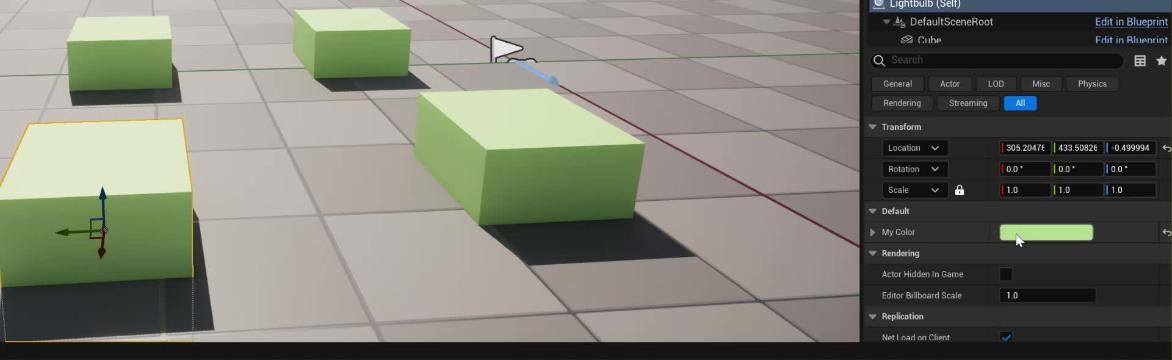
this works @ornate linden


Ryck
World's leading screen capture + recorder from Snagit + Screencast by Techsmith. Capture, edit and share professional-quality content seamlessly.
i always forget about this, array to single

 proper vigil
Wasn't finding much success so far.
queen dagger
ok so let’s say i want to test to see if functions are working, should i duplicate the character bp and put in world and test or what would be the best way to do it
versed sun
Make a curve and read from that
spring magnet
Anyone know why Set Data Layer Instance Runtime State was deprecated and replaced with a non-functional replacement? The new Get Data Layer Manager returns nothing, and has apparently been this way since last year
 rich ferry
Having trouble using a curve, can't seem to figure out how to access it. Anyone know the name of the node I need?
versed sun
rich ferry
Having trouble using a curve, can't seem to figure out how to access it. Anyone ...

 rich ferry
versed sun
rich ferry
versed sun
Do I have make it a variable? Kinda lame but alright
versed sun
yes
you could make it a Function
with a Local Variable for the curve
make it pure
 fast grove
Alrighty, I really hope someone can help me here. I am new.. but I am trying to get a grenade to do damage when it hits the terrain or anything really. It does damage when it hits anything but the terrain at the moment. The Debug Sphere fires off, but no damage is applied. I have attached anything I thought you might need to see. Thank you.

 lofty rapids
fast grove
Alrighty, I really hope someone can help me here. I am new.. but I am trying to ...
lofty rapids
fast grove
Alrighty, I really hope someone can help me here. I am new.. but I am trying to ...
"terrain" ?
fast grove
The ground..
Just landscape in general
It fires off and deals damage if it hits an actor
or a mesh
fast grove
I mean the debug sphere is behind the event and it fires
lofty rapids
fast grove
I mean the debug sphere is behind the event and it fires
so the sphere shows up at the location on the landscape ?
fast grove
yes
lofty rapids
what is impact component ?
fast grove
But the radial damage only shows up in debug unless it hits the pawn or if I put a floor
Thats the 2nd photo
that just handles the sound and emiter with some velocity modifiers
lofty rapids
does the sound play ?
fast grove
yes
Everything but the actual damage applying
First one, hits ground. Second one hits actor


 marsh pilot
I'm trying to add an animation to a character. Is it possible to run an animation (inside the animation blueprint) based on a boolean inside the character blueprint?
lofty rapids
yep
can you show your graph in the anim bp ?
you can set a variable and set it to the variable from your player which there is probably already a cast to
marsh pilot
lofty rapids
can you show your graph in the anim bp ?
I'm just using the default manny UE5 graph. Can I just like get IsWorking from the character cast?
lofty rapids
i would set a boolen in the anim bp, and set it to the value of the one on your character
you can then use the boolean in a transition
thats how i run animation for if my character dies
i switch a boolean
marsh pilot
lofty rapids
i would set a boolen in the anim bp, and set it to the value of the one on your ...
Ahhh gotcha thank you. Not sure why I couldn't "get" that value before
 fast grove
Could my problem be in me using physics for the grenade instead of projectile?
marsh pilot
marsh pilot
Ahhh gotcha thank you. Not sure why I couldn't "get" that value before
also yeah I realized I accidentally used set instead of get for the first node and their different blueprints with the same variable name so it looks like crap but I do understand it now
 visual crest
how do I make a game pad button work like a mouse button for clicking on UI buttons?
sage lagoon
visual crest
how do I make a game pad button work like a mouse button for clicking on UI butt...
That kind of relates to what I shared earlier.
sage lagoon
sage lagoon
After watching this video - https://www.youtube.com/watch?v=clKG7m5xawQ - I am s...
Right here.

 visual crest
sage lagoon
Right here.
visual crest
sage lagoon
Right here.
That's way to over complicated. I'd have to set it up for every UI element in my game. There has to be a way to simulate a mouse button press.
sage lagoon
versed sun
try Override On Key Down
I did, actually. Once again, here is the screenshot I have:

But then, I want the widget to go on to the next message then the next much like when the Next Button is clicked on, except when any of these buttons are pressed.

 visual crest
How do I use this node it looks like exactly what I want. But it can only be used on a widget interaction component

 feral moon
why i can't?? 😭

wanted to create event dispatcher
Thats what i want to call

Everything i want to do is create simple checkpoint where character will teleport when he hit spike
so there will be a lot of different checkpoints so i though event dispatcher should work for this, i tried doing this with interface but i failed too, idk what i do wrong .-.
please help me ❤️
thin panther
It tells you right there. You're trying to make your character reference a checkpoint reference, which doesn't work
Your character will never also be a checkpoint, so you cant plug it into something expecting a checkpoint
 twin perch
is their no variable for Object Libaries ?

i want to store an array of them
never mind i think im going to just make data tables instead
 lunar sleet
where are save game to slot files actually stored? docs say Saved\SaveGames but that doesn't seem to exist. Can't find anything with .sav in the project folder but it's finding saves when using the node
versed sun
doesn't exist? sure you are in the correct project ?
lunar sleet
versed sun
doesn't exist? sure you are in the correct project ?
yeah
there's no .sav files in the project folder
versed sun
are you in PIE ?

 tranquil moon
how do I get the game/viewport resolution in pixels? Get Viewport Size returns 1, 1 in PIE
i have a custom cursor that I want to scale with screen size
 trim matrix
what's PIE
tranquil moon
play in editor
dawn gazelle
feral moon
why i can't?? 😭
In other words, the target is expecting a "BP Checkpoint" but you're trying to feed it a "BP Character".
 tranquil moon
trim matrix
https://docs.unrealengine.com/4.26/en-US/BlueprintAPI/HUD/GetViewportSize/
tranquil moon
trim matrix
https://docs.unrealengine.com/4.26/en-US/BlueprintAPI/HUD/GetViewportSize/
that returns 0, 0
trim matrix
tranquil moon
that returns 0, 0
are you sure that the player controller ref is right?
 frail onyx
Anyone know why my timeline keeps looping over an over when i overlap with the box collision?

im trying to make something pop up and then go away when i leave the box collision
tranquil moon
i believe so yeah
trim matrix
frail onyx
Anyone know why my timeline keeps looping over an over when i overlap with the b...
depends of the curve I guess
tranquil moon
but why is the HUD relevant other than that specific functon being on it, is there no way to get the game resolution withut going through the HUD?
frail onyx
trim matrix
depends of the curve I guess
looping is set to off
trim matrix
tranquil moon
but why is the HUD relevant other than that specific functon being on it, is the...
not in BP
as I've read
trim matrix
frail onyx
looping is set to off
show the curve
frail onyx

its just very simple and goes from 0 to 1
and i have to tracks, one for each object i want to move
dawn gazelle
frail onyx
Anyone know why my timeline keeps looping over an over when i overlap with the b...
You're not checking what is overlapping which could be causing the timeline to retrigger multiple times as things go out and back in to the overlap.
trim matrix
try with some print statements, but Datura is prob right
frail onyx
dawn gazelle
You're not checking what is overlapping which could be causing the timeline to r...
oh, do you know how i can do it so it detects my player?
trim matrix
lol
dawn gazelle
frail onyx
oh, do you know how i can do it so it detects my player?
You can cast the "Other Actor" from the event to your character class, or check if it == get player character 0 (as an example)
trim matrix
i'd suggest the second option
sage lagoon
sage lagoon
I did, actually. Once again, here is the screenshot I have:
Can anyone help, please?
frail onyx
dawn gazelle
You can cast the "Other Actor" from the event to your character class, or check ...
ok, i got it working now thx. Do you know how i could get it to smoothly play the disappear timeline from the point its at when i end overlap
 dawn gazelle
frail onyx
ok, i got it working now thx. Do you know how i could get it to smoothly play th...
dawn gazelle
frail onyx
ok, i got it working now thx. Do you know how i could get it to smoothly play th...
Use reverse on the first timeline instead of having a separate timeline.
trim matrix
casting but not using the ref 💀
frosty heron
trim matrix
casting but not using the ref 💀
It's fine
Just checking if the overlapped actor is of some type
trim matrix
frosty heron
Just checking if the overlapped actor is of some type
he could do an if
frosty heron
trim matrix
he could do an if
What would u compare it with? If and casting is not mutually exclusive
frail onyx
there's no way to have a separate animation for it going away though right?
trim matrix
frosty heron
What would u compare it with? If and casting is not mutually exclusive
if other actor = the BP character
frail onyx
it would just be reversing the appearing timeline animation?
frosty heron
trim matrix
if other actor = the BP character
Ref or class? Again this doesn't replace casting
frail onyx
i wanna have it like smoothly appear and then quickly disappear
dawn gazelle
frail onyx
it would just be reversing the appearing timeline animation?
You can, but it's a bit harder to manage as you can't use an alpha/lerp. You'd have to use an interpto and not a relative location.
trim matrix
 dawn gazelle
That would be checking if the other actor == the BP_MyCharacter blueprint not instance
trim matrix
what's wrong
trim matrix
dawn gazelle
That would be checking if the other actor == the BP_MyCharacter _blueprint_ not ...
actor
frosty heron
N there's reason why it's wrong
I'm gonna enjoy my mccas tho so just cast instead. That was the correct approach
frail onyx
dawn gazelle
You can, but it's a bit harder to manage as you can't use an alpha/lerp. You'd ...
Would it be better to just use 2 different normal animations for what I'm trying to go for?
oh wait that would do the same thing though lmao
trim matrix
I guess BP is ass for that
frosty heron
Remember that casting is just a type check
trim matrix
still really bad and should be avoided at most
lunar sleet
versed sun
I wonder if async version works differently?
frosty heron
That youtube myth with 0 context
trim matrix
frosty heron
That youtube myth with 0 context
BRUH go #cpp
frosty heron
I'm talking about casting here, bp or cpp
lunar sleet
trim matrix
BRUH go <#221799439008923648>
casting is fine at this level. If you end up having hard ref chains you can switch to interfaces as needed
trim matrix
yup
frosty heron
Interface is also not a replacement
Another misconception
U will end up unable to debug Ur game
lunar sleet
Yeah, just a way around some ref chains
frosty heron
Always cast to base class when possible
trim matrix
which this should be avoided in multiplayer, so how would I do it?
 frosty heron
And Soft ref the heavy stuff
lunar sleet
Back to my issue tho. Async save game to slot is saving the game but I can’t find it in the folder
frosty heron
lunar sleet
Back to my issue tho. Async save game to slot is saving the game but I can’t fin...
Does it return a bool?
For succsess
lunar sleet
frosty heron
Does it return a bool?
I haven’t tested the bool itself but the load functionality is finding the save
trim matrix
trim matrix
which this should be avoided in multiplayer, so how would I do it?
how would that work in a multiplayer game? -plz
frosty heron
lunar sleet
I haven’t tested the bool itself but the load functionality is finding the save
So u just can't find the .sav on the folder?
lunar sleet
Bool returns success btw
lunar sleet
PIE
frosty heron
Project folder, saved iirc
lunar sleet
Ik but nothings there
frosty heron
Hmm
lunar sleet
Im using async save and load not sure if that’s what’s causing the issue
Shouldn’t tho
frosty heron
Print string get saved directory
lunar sleet
frosty heron
Print string get saved directory
Where? Can’t find that node with context off either
I’m in GI
frosty heron
Get Project Saved Directory
frosty heron
Naa
lunar sleet
lol it’s saving it in fricken C:\Users
frosty heron
I've only use blocking load for save game object but it should behave the same
lunar sleet
I’m assuming there’s a place I can change this setting lol
frosty heron
trim matrix
which this should be avoided in multiplayer, so how would I do it?
Need more context
Wat do u actually want to happend
trim matrix
frosty heron
Need more context
something after
it's a test btw so I want nothing but learning
lunar sleet
frosty heron
I've only use blocking load for save game object but it should behave the same
I’ll figure out how to change the folder, thx for that function, I couldn’t figure out how to get the path @frosty heron
frosty heron
After wat thox atm that's just saying if overlapped with
frosty heron
lunar sleet
I’ll figure out how to change the folder, thx for that function, I couldn’t figu...
Gl, sry I don't have a clue. At work atm
lunar sleet
Np
trim matrix
frosty heron
After wat thox atm that's just saying if overlapped with
but that wouldnt work if there's multiple player controller, in a multiplayer game
frosty heron
trim matrix
but that wouldnt work if there's multiple player controller, in a multiplayer ga...
Won't work in single player either
trim matrix
frosty heron
Won't work in single player either
it does
frosty heron
U checking against player controller
Instead the pawn
Maybe u mean get player character
Controller don't technically physically exist in the world
frosty heron
It won't collide with your comp
trim matrix
frosty heron
It won't collide with your comp
wdym
frosty heron
trim matrix
frosty heron
https://discord.com/channels/187217643009212416/221798862938046464/1219486153640...
but lpayer character do
frosty heron
Yes just saying Ur pic won't work
trim matrix
frosty heron
Yes just saying Ur pic won't work
does get player character work tho?
trim matrix
if the player collide with it
trim matrix
frosty heron
Dont get player character 0 in mp
yea, how would I do it then
trim matrix
just that if it collide with a player, the print should work, even in a multiplayer game
frosty heron
Get overlapping actor, cast to char, get controller
If valid cast to your player controller
Print string on cast succsess
frosty heron
U r casting to character not your custom character
U will always have character in a world so it's free
trim matrix
like this?
 frosty heron
The same goes with your controller
Something that is inevitably loaded anyway cast away
trim matrix
where the get player controller should be from the player character node
frosty heron
That's not right
trim matrix
wut
frosty heron
I gtg work, but u can read again.
Also it's get controller not get player controller
 frail onyx
Anyone know how to make it so my line trace gets blocked by all the components in my actor but only one of them executes something when the line trace hits it?
the selected box collision is the one i want to trigger something when it is hit by the line trace

 trim matrix
in the details panel for collisions
visual crest
how do I make a game pad button work like a mouse button for clicking on UI buttons?
frail onyx
trim matrix
in the details panel for collisions
wdym?
trim matrix
frail onyx
wdym?
check the detail panels
frail onyx
yeah thats what im trying to figure out, if i select it to be ingored for every object except the box collision then it can go through the walls which i dont want to happen
trim matrix

there's multiple possiblity
you can even create some custom collision type as well
 dawn gazelle
trim matrix
how would that work in a multiplayer game? -plz
dawn gazelle
trim matrix
how would that work in a multiplayer game? -plz
you could cast other actor to character which then makes sure it is a "character" that is overlapping, though it may not be necessarily a player's character. If you want to check if it is a specific character, you'd need to know which character it is first off in some way.
sage lagoon
When overriding the On Key Down function (Image #1), what is the best way to assign the buttons to the same function as the Next Button (Images #2 and #3).


(And the Next Button is the arrow button in the dialogue box in the second image.)
dawn gazelle
sage lagoon
When overriding the On Key Down function (Image #1), what is the best way to ass...
Put what you want to happen in an event, and have what you want from the OnKeyDown call that event?
sage lagoon
I could, though some nodes like Delay cannot be included.
dawn gazelle
Events can accept delays.
sage lagoon
This one's a function, though.
dawn gazelle
The function can call the event.
sage lagoon
Oh right! I forgot about that. Well then, I'll see about making an event as a means of tricking the function into doing what I want it to do.
dawn gazelle
If you want the exact same thing to happen for the OnClick too, have it call that same event too.
frosty heron
trim matrix
<@1050954229902213150> lmk when you are back please
Instead of if, cast it to player controller. Get controller can return the ai controller too so filter it to your need
sage lagoon
dawn gazelle
If you want the exact same thing to happen for the OnClick too, have it call tha...
Okay then. Thanks for the tip!
frail onyx
anyone know how i can make a check in this so when its fully opened its true and if not then false?

i cant exactly figure out where to properly set a boolean to make it work
actually think i got something, would it be good to check if the alpha of the track is = 1 and if so then that means its opened?
it seems to work but im not sure if that's actually a good way to do it
dawn gazelle
frail onyx
anyone know how i can make a check in this so when its fully opened its true and...
On Finished, check the direction. If forward, then it should be "fully open". If backward then it should be "fully closed".
This also means you probably want to make your own enumerator for the state, not just a bool, as it could be "fully open", "opening", "closing" or "fully closed".
frail onyx
dawn gazelle
On Finished, check the direction. If forward, then it should be "fully open". ...
ok thanks!
sage lagoon
dawn gazelle
If you want the exact same thing to happen for the OnClick too, have it call tha...
The buttons do work, but not after the first line, which is here:

So, how do I get any of the designated buttons to work when the widget first adds to viewport and the first text (from the screenshot) appears, since it will only go to the next line when I click on the arrow?
frail onyx
Anyone know how to make each instance of this actor do a different thing based on the level number variable which is a instance editable variable

I got this working, but i feel like there is probably a better and more easily expandable way to achieve this
 ionic quiver
frail onyx
I got this working, but i feel like there is probably a better and more easily e...
ionic quiver
frail onyx
I got this working, but i feel like there is probably a better and more easily e...
Use a select node. The input / output changes based on what you plug it into
 frail onyx
ionic quiver
Use a select node. The input / output changes based on what you plug it into
frail onyx
ionic quiver
Use a select node. The input / output changes based on what you plug it into
the main end goal is to have each one open a level one i interact with it? would this work for openeing a different level based on what the level number integer is?
frail onyx
ionic quiver
Yes, just plug it into a load level instead of a string
where would i plug it into on the open level node?
ionic quiver
The place you specify your level
frail onyx
Ohhh wait, so if i open level by name i would maaake the wildcard options to name
frail onyx
ok thanks i got it working!
visual crest
how do I make a game pad button work like a mouse button for clicking on UI buttons?
 limber parcel
sage lagoon
Bump.
limber parcel
sage lagoon
Bump.
well yeah, u change input mode to UI only, then your keys wont work
sage lagoon
limber parcel
well yeah, u change input mode to UI only, then your keys wont work
I did, actually.

Oh wait. I'm not supposed to set that?
limber parcel
not if you want to continue using your keyboard...
sage lagoon
Oh. I thought that would enable the keyboard to work. Should I replace that with a Set Input Mode to Game and UI or just remove it?
limber parcel
thats up to you
sage lagoon
Hm. It's still not working. It only works after the first line and the next arrow button is clicked on.
sage lagoon
limber parcel
thats up to you
Do you think I should put the first dialogue name and text under the On Down Key function? If I do that, I could just put the On Key Down function after Event Construct on the main BP of this widget.
limber parcel
i think you should watch more tutorials about how to make UI
 dark drum
sage lagoon
Do you think I should put the first dialogue name and text under the On Down Key...
dark drum
sage lagoon
Do you think I should put the first dialogue name and text under the On Down Key...
What are you trying to do?
sage lagoon
Basically, I'm trying to make a dialogue scene widget work with assigned keyboard buttons as well as the left mouse button. I've set the keyboard to work with most of the dialogue tree except for the very first line that pops up after the Event Construct. (I have a screenshot I posted a few minutes ago.)
sage lagoon
dark drum
What are you trying to do?
Unfortunately, none of the three keyboard keys work with the very first line of the cutscene.
dark drum
sage lagoon
Basically, I'm trying to make a dialogue scene widget work with assigned keyboar...
It sounds like you need to set focus to the widget when it's first added.
sage lagoon
dark drum
It sounds like you need to set focus to the widget when it's first added.
The widget's IsFocused box is already checked, if that's what you mean?
dark drum
sage lagoon
The widget's IsFocused box is already checked, if that's what you mean?
No, there's a node called set focus. Call it and supply the widget that needs focus. You may need to set input mode to UI as well.
sage lagoon
dark drum
No, there's a node called set focus. Call it and supply the widget that needs fo...
And I should do this after the Add to Viewport node on the level BP that calls this widget?
dark drum
sage lagoon
And I should do this after the Add to Viewport node on the level BP that calls t...
Yes, otherwise the widget won't receive inputs. The first click gets consumed to give it focus so you can call those nodes to do it manually from the beginning.
 heady zephyr
Hi everyone! I'm stuck with a problem that I'm sure it's very easy to solve, I appreciate the help.
Basically I have 3 doors, every time I launch the game I want a random door of the 3 to open.
I created a Blueprint called "DoorsController" casting every door after a Switch on Int. You can also See the logic inside one door.
When I launch the game basically nothing happens 😄 I can't get my head around it. Any help is very welcome, thank you!

 sage lagoon
dark drum
Yes, otherwise the widget won't receive inputs. The first click gets consumed to...
sage lagoon
dark drum
Yes, otherwise the widget won't receive inputs. The first click gets consumed to...
Something like this?
 dark drum
sage lagoon
Something like this?
dark drum
sage lagoon
Something like this?
Yea.
sage lagoon
dark drum
Yea.
And so this will enable the keyboard once the widget is added and constructed, rather than when the next button is clicked on once?
dark drum
sage lagoon
And so this will enable the keyboard once the widget is added and constructed, r...
Yes.
sage lagoon
Alright. I'll see how that works out.
ionic quiver
heady zephyr
Hi everyone! I'm stuck with a problem that I'm sure it's very easy to solve, I a...
You're casting to the doors and then not doing anything. The second image isn't hooked up to anything.
sage lagoon
dark drum
Yes.
Hm. The buttons still don't work when the first dialogue message appears.
heady zephyr
ionic quiver
You're casting to the doors and then not doing anything. The second image isn't ...
Oh thank you! You mean there should be a node before the "Play from start?". I'm still learning, sorry for the basic questions
ionic quiver
Yes of course. It has to execute from something
limber parcel
heady zephyr
Oh thank you! You mean there should be a node before the "Play from start?". I'm...
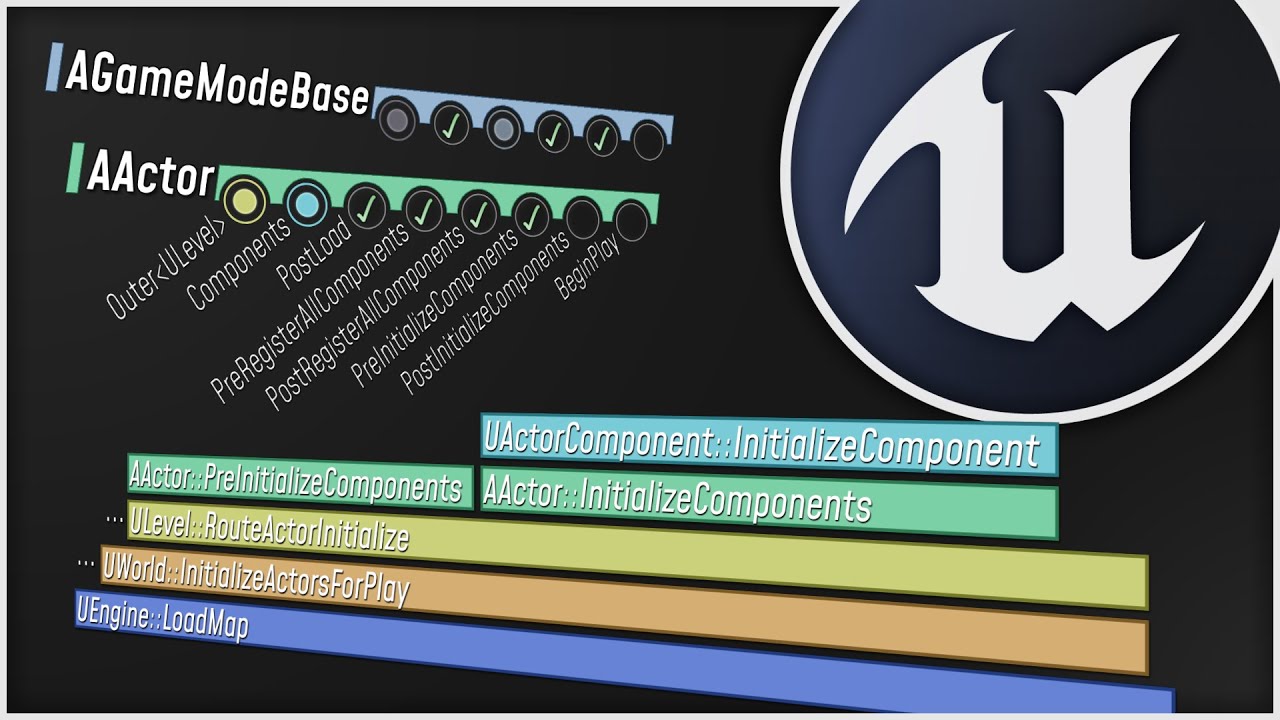
What happens when you start up your Unreal Engine game? This video is a guided tour of the Engine's initialization process: along the way, we'll glimpse the high-level structure of the Engine (modules, game instances, local players, and viewports) and we'll see how all the different parts of the Game Framework (game modes, game states, player co...
heady zephyr
ionic quiver
Yes of course. It has to execute from something
Thanks, I'm gonna look in to it 🤞
sage lagoon
dark drum
Yes.
This is the start of the On Key Down, and what you see is the second dialogue which you see after clicking on the next arrow button. Do you think I should put the first line on this tree?
 dark drum
sage lagoon
Hm. The buttons still don't work when the first dialogue message appears.
dark drum
sage lagoon
Hm. The buttons still don't work when the first dialogue message appears.
Add a set input mode to UI as well.
sage lagoon
dark drum
Add a set input mode to UI as well.
Like this?
 dark drum
sage lagoon
Like this?
dark drum
sage lagoon
Like this?
Yea.
sage lagoon
dark drum
Yea.
Now I got this warning:
 dark drum
sage lagoon
Now I got this warning:
dark drum
sage lagoon
Now I got this warning:
Enable isfocusable in the widget settings.
sage lagoon
dark drum
Enable isfocusable in the widget settings.
Okay. That's fixed, but the dialogue is still not responding to anything else but clicking on the arrow when it appears. Even when I set that widget to focus and its input to UI only.
Maybe I should go to blueprintUE and give you the codes?
fast grove
I still cant figure this out. If the grenade hits the ground.. no damage. If the grenade hits a mesh or another actor.. boom damage.. What deee fuck


Its a physics based drop from the air with a grenade. Do I need to switch to line trace and a projectile? I'm trying to get a bomb to explode on impact basically
sage lagoon
dark drum
Enable isfocusable in the widget settings.
I'm sorry that I can't seem to explain clearly enough.
 uncut seal
how can I use physics constraints to make a grapple system similar to that of hammond/wrecking ball from overwatch 2?
queen dagger
is there a way to deactivate any and all movement on the y axis?
sage lagoon
queen dagger
is there a way to deactivate any and all movement on the y axis?
You mean with a mouse?
Like camera movements?
 lusty quarry
#blueprint hello everyone, as i was learning few things in unreal i got struck on solving 1 problem, i.e i want to make an component to attach on overlap but i don't know how to take the references from each other. like example:- i have a cylinder that need to attach to a cube when it placed near the cylinder, i got to know about the event onbeginoverlap but unable to attach the cylinder to the cube, can anyone help me out with this problem
queen dagger
no as character movement, in making a 2d fighter and everytime i make contact it shifts the character to the side and its no longer alligned
sage lagoon
Oh. I'm not sure about 2D character controls, myself.
dark drum
sage lagoon
Okay. That's fixed, but the dialogue is still not responding to anything else bu...
Hmmm I'm not sure then.
sage lagoon
dark drum
Hmmm I'm not sure then.
Still, thanks for your help.
visual crest
how do I make a game pad button work like a mouse button for clicking on UI buttons?
 surreal peak
visual crest
how do I make a game pad button work like a mouse button for clicking on UI butt...
surreal peak
visual crest
how do I make a game pad button work like a mouse button for clicking on UI butt...
Usually the Face Bottom one is doing that already as long as you have focus on a button
visual crest
Thats common UI and even though I am using common UI don't want to do it that way because I can't drag and drop
it only supports clicks
visual crest
surreal peak
Usually the Face Bottom one is doing that already as long as you have focus on a...
I need gampade button to simulate a mouse button exactly for my inventory to work.
surreal peak
Not sure that's a thing.
visual crest
I really find it stupid that there is no simulate mouse button node to begin with
surreal peak
Why do you need that? For drag and drop?
visual crest
surreal peak
Not sure that's a thing.
there actualy is one for interactable 3d widgets but I can't get it to work for view port widgets
 surreal peak
That's for VR in theory
visual crest
surreal peak
Why do you need that? For drag and drop?
my whole UI is built around a wow style UI so every thing is drag and drop...
surreal peak
Only thing I can say is that Gamepad should have custom UI
And not be forced to work with a mouse driven ui
visual crest
I thought this be easy and the game pad to mouse movement is
 visual crest
surreal peak
Only thing I can say is that Gamepad should have custom UI
visual crest
surreal peak
Only thing I can say is that Gamepad should have custom UI
Who says I hate controler style UI and any gamer I ever talk to does to. Why do you think things like SKY UI exist lol for skyrim
surreal peak
Idk but I would dislike playing with Gamepad if it was using drag and drop
I would just want to select something in inventory cell X and then press again in cell Y and it gets moved over
visual crest
Is there a way to simulate a mouse button?
visual crest
surreal peak
I would just want to select something in inventory cell X and then press again i...
and how would you rearrange you floating windows?
surreal peak
visual crest
and how would you rearrange you floating windows?
Again, mouse driven UI is not really something for gamepads
If your UI requires a mouse ,then it's not a gamepad UI
surreal peak
visual crest
Is there a way to simulate a mouse button?
UI components handle the face bottom button on their own and everyone might do it differently
But I don't think there is a simulate mouse press
I know that some peeps move the invisible mouse cursor to the focused widget
To simulate hovers
But that's about it
 minor dew
Guys, there's supposed to be a pink square when using SceneCapture2D component with ortho mode right? the pink square represents the ortho width.
For some reason it isn't visible anymore, even opening a blank new 5.3 project and adding a SceneCapture2D still isn't visible.
Anyone knows what's going on?
 light garnet
How can i spawn my character with the last gun i picked
Respawn characters with guns are working but I want him to spawn with the last gun i picked up
 heavy plinth
Hey yall. I'm having a bit of trouble with this interaction text I setup. I'm trying to make it create the interaction text widget, set the text to a specific line in the text array that I've made public on each door (and possibly any item I create the interaction monologue widget on), then have it play the animation I made in the widget which just switches the opacity on and after a short delay it's removed from the parent. The only issue is that I'm only able to get the first line of text to show.
Here's the code:


 ancient stag
light garnet
Respawn characters with guns are working but I want him to spawn with the last g...
ancient stag
light garnet
Respawn characters with guns are working but I want him to spawn with the last g...
You could save what gun the player last had and what ammunition it had in the PlayerState (spawned when a PlayerController is spawned). And during your respawn function, you could check if there is a valid weapon that you can attach to your character.
frosty heron
ye make a reference to it
frigid summit
hi guys this is switching lanes logic in endless runner using chat gpt why is it not working


lane1y set to 20 and lan3y set to 480 and lane value is 2
frosty heron
Panning is just an offset
So all of your widget (icons or w.e in the minimap) needs to be offseted by the pan value
@night bolt
 main lake
frigid summit
hi guys this is switching lanes logic in endless runner using chat gpt why is it...
main lake
frigid summit
hi guys this is switching lanes logic in endless runner using chat gpt why is it...
Because in your "Switch on Int" node you have only 1 ouput which is "Default" which means the default value of your "Lane" variable.
frigid summit
main lake
Because in your "Switch on Int" node you have only 1 ouput which is "Default" wh...
ok thanks i added multiple values and made the switch also on y and it worked
 night bolt
frosty heron
So all of your widget (icons or w.e in the minimap) needs to be offseted by the ...
night bolt
frosty heron
So all of your widget (icons or w.e in the minimap) needs to be offseted by the ...
i'll try that, thanks
 neon acorn
Hey all, has anyone faced an issue where the enhanced input system mouse xy 2d axis doesn't work unless a mouse key is held down? This is if the mouse cursor is enabled in the player controller. There is an unresolved question in the forums so I was wondering if someone knows a workaround
 untold fossil
Question. How deep can you go with structs? My idea is to have a HostData struct which containts a ShipData struct which contains an array of ShipPart structs. Is that acceptable? Or asking for trouble?
untold fossil
Why not? My game is made in BP 
frosty heron
Game can be made in bp, except the bp struct
it's the leading reason people can';t package and have their struct corrupted
been that way since forever
Declare the struct in CPP if you don't want trouble
untold fossil
Hmm, ok i'll look into that!
 distant elk
Hi. Noob question: I'm making a blueprint that uses patches to deform the landscape, but I can't figure out how to set landscape paint layer weights. Any pointers? Is it even possible?
 south ravine
New to using UE blueprints, but I'm researching a lot. I've watched tutorials which generate a wire BP using a spline mesh component. One can have a Add Spline Mesh Component node which targets self. However in those tutorials you can see that the placed BP actor does not get additional components in the outliner or details panel.
Is there a way to tell the construction script to generate those child components? Kinda like baking them into the actor. 🤔
Somewhat like when PCG framework adds HISM component to the actor and all the instances.
surreal peak
south ravine
New to using UE blueprints, but I'm researching a lot. I've watched tutorials wh...
AddXYZComponent does add one but UE hides them by default
It's a setting in either EditorPrefs or ProjectSettings to show Construction Script Components in the Outliner
 final widget
Am I just not used to it, or is using Blueprints way more fiddling and overall clunkier than coding?
lofty rapids
the graph gets big quickly
and it's a lot less peformant than c
i really like it so far tho, first visual programming i ever done
final widget
I assume you can screw up a lot less.
lofty rapids
you can still screw up pretty good theres a few quirks
but where it's a bit higher level a lot of stuff is abstracted
that you would normally have to mess with
once you get the flow of the nodes down it's pretty easy to work with
 sterile brook
frail onyx
Anyone know how to make each instance of this actor do a different thing based o...
sterile brook
frail onyx
Anyone know how to make each instance of this actor do a different thing based o...
Too much Print String 😉
You should switch from Appending your strings to "Format Text" and use Print Text instead!
https://www.youtube.com/watch?v=dO70f5SiEVA
That's right. You heard me! Stop using Print String! Use Print Text instead! This way you can use "Format Text" to do what you need which can include a ton of wildcard variables for your needs!
Example of using this;
{PlayerName}
Location: {Location}
Key Pressed: {Key}
Like my vids? Maybe check out my Unreal Marketplace stuff more Unreal Dev...
crude spruce
im having the brain farts
whats it called when i want my vectors as -1, 0, 1
it was sign
 raw orbit
if i have my games start / main menu and the actual gameplay in separate 'levels' is it still possible to contiuously play the same audio track somehow when starting a new game or whatever
crude spruce
My camera is set up as isometric with a 45 degree rotation.
I can get real world x,y coordinates with "convert mouse to world space"
But when i rotate the camera 90 degrees, any direction other than default, makes the world coordinates offset.
Any ideas on how i could offset the rotation of the world and apply it to the real world coordinates?
final widget
sterile brook
Too much Print String 😉
You should switch from Appending your strings to "Form...
I feel like this shouldn't be necessary at all. Isn't there some Debug/Inspector Tooling for this?
lofty rapids
i like format text
crude spruce
im stupid
the mouse world pos seems to be correct whatever the camera rotation is.
my problem is i convert this to a tilespace in which i draw debug boxes in and they arent aligned after the coordinates are written
lofty rapids
so your x and y tile that your hovered is working ?
crude spruce
im a couple of parallell systems.
a 2d data structure
an isometric view of this data structure (so far)
current view mouse interface with data s tructure
but i am stupid so mistakes happen 😄
my problem was that the debug cube i am drawing, snaps to tile position as if the camera never rotates
lofty rapids
so your put a debug sphere on a tile position but it's not the one that is your mouse position to world space ?
lofty rapids
crude spruce
but since i figured out what is done right i can progress
so you fixed it ?
crude spruce
sort of. i really dont yet have a reason to draw debug boxes like this so its a non issue.
thanks
untold fossil
Hello. How can I have a multilinetrace that doesn't stop when it hits something? But instead continues for as long as I want the trace to be and then returns everything it hit along the way? My current multiline trace stops at the first thing it hits. 😦 EDIT: Figured it out, needed to use overlap instead of block
lofty rapids
crude spruce
sort of. i really dont yet have a reason to draw debug boxes like this so its a ...
its a non issue as long as your not actually selecting that box and it's off
i feel like it might be off i would check your x, y is ok
gentle urchin
Its definetly off 😅
I assume the tiles are ism instances?
If so you can ofc just grab the index of that
Or atleast its location
lofty rapids
the trace is weird it's from top to bottom, but the trace looks on, something weird with the maths
or how you pick the box
but a good way is to calculate the index like mentioned
but your x and y look off so it's probably maths
lofty rapids
crude spruce
can you show the maths you used for this ?
crude spruce
lofty rapids
can you show the maths you used for this ?
which part?
several moving parts
lofty rapids
where you trace, and where you set the debug box location
or rather where you set x, y
crude spruce
its kinda irrelevant 🙂
 split venture
hello, i have a (hopefully) very simple to answer question yet Im dumbfounded on how to do it:
when im doing "in air" movement (moving while falling), how do disable the 'floaty' movement? I just want snappy movements. right now when i let go of a directional input, it slowly stops moving in that direction.
lofty rapids
crude spruce
its kinda irrelevant 🙂
well where you set x, y is whats off
crude spruce
lofty rapids
well where you set x, y is whats off
yup
crude spruce
the bp is a real mess so its hard to show anything
split venture
ive been trying all kinds of settings in the "character movement" settings but cant get rid of that slow deceleration effect
crude spruce
its equally a philosophical issue at this stage 😄
dark drum
split venture
ive been trying all kinds of settings in the "character movement" settings but c...
air control and deceleration I believe. You might have to dynamically set the deceleration when you start falling and set it back to a default value so it doesn't affect walking. (I'm not sure if there's a separate value for just when your falling)
lofty rapids
crude spruce
its equally a philosophical issue at this stage 😄
actually after looking at it, it looks like on 0:10 your x and y are correct but your debug box is off, so it's most likely how your positioning that box
crude spruce
aye
 frank juniper
hey brother... Any idea where can get a decent network engineer. I know answer will probably be post a job listing but rather see if any connections out there first.
crude spruce
😄
lofty rapids
how are you doing that ?
crude spruce
the world coordinates are correct in every rotation but the translation to tile space is off
thin panther
frank juniper
hey brother... Any idea where can get a decent network engineer. I know answer w...
It's worth monitoring #hire-a-freelancer
There is also the salary jobs board.
lofty rapids
crude spruce
the world coordinates are correct in every rotation but the translation to tile ...
well one way to get the right box is use the x, y and calculate the proper index in an array
crude spruce
lofty rapids
well one way to get the right box is use the x, y and calculate the proper index...
yeah, the underlying idea about what i need isnt fully understood so it was inevitable a mistake would happen
gentle urchin
crude spruce
i used to be a network engineer in telco
Probably not the same type 😅
crude spruce
probably not but then the type he is looking for has another title 😄
gentle urchin
More likely they want some netcode engineer 😅
marsh pilot
Am a network engineer in the power industry. We are even more expensive
crude spruce
marsh pilot
Am a network engineer in the power industry. We are even more expensive
how high is your licence and diploma stack?
marsh pilot
I just have an FE lol, but when you get to PE level that's when it gets expensive
crude spruce
gentle urchin
Wont be more expensive than us
i can agree
marsh pilot
Well, SCADA engineer to be precise but networking is a big part of it
marsh pilot
crude spruce
i was entry level thug network engineer in norway and i was paid in gold
That doesn't sound bad tbh
crude spruce
a joke ofcourse. but norwegian jobs pay well. probably not as well as silicon valley but close?
marsh pilot
Ahhh, I have no clue. I work on the opposite side of the US
gentle urchin
We've fallen behind sadly in many areas
crude spruce
just upgrade to oil network engineer
gentle urchin
Good engineers are paid far bettter in the US than here
gentle urchin
crude spruce
just upgrade to oil network engineer
True, that boosts it quite a bit
split venture
dark drum
air control and deceleration I believe. You might have to dynamically set the de...
i found it. its the "Falling Lateral Friction" setting
thin panther
Can confirm a good network engineer in the UK is worth their weight in gold too.
Not as much as some other countries, mind you, but still very expensive
pallid sphinx
im trying to get projectiles to spawn whilst draining a mana bar until it is at 0 and i figured this would work but it keeps returning as an infinite loop on top of that it seems loops trigger every potential loop at once instead of over time?
 raw orbit
oh no that delay node fills me with dread
gentle urchin
Cant delay a while looop
Not like that anyways
The while runs repeatedly in the same frame untill condition is met
In this case :
While -> delay -> while -> delay -> while... for infinity
 boreal marlin
pallid sphinx
im trying to get projectiles to spawn whilst draining a mana bar until it is at ...
boreal marlin
pallid sphinx
im trying to get projectiles to spawn whilst draining a mana bar until it is at ...
what if you instead add the delay to the OnBeginPlay node of the projectile itself?
you could delay making it visible and adding velocity etc
pallid sphinx
because its used for things other then the player
it worked easily with the enemy because the player sensing component constantly runs the script whilst i want it to
its just about making that work when i cast the spell as the player
boreal marlin
i'm not quite sure what you mean, could you elaborate? what else happens once the projectile is spawned?
lofty rapids
i stay as far away from whiles as i can, although sometime they are necessary
lofty rapids
pallid sphinx
im trying to get projectiles to spawn whilst draining a mana bar until it is at ...
try a for loop the amount of resources, but i'm guessing you just have too many for bp to handle anyway
lofty rapids
gentle urchin
In this case :
While -> delay -> while -> delay -> while... for infinity
after first delay resource isn't updated ?
i also try to steer away from delay because i've heard it has odd behaviour
 hollow cove
whats the node name for dynamic casting again, i feel like i've done this before
pallid sphinx
Using a set timer by event is working
lofty rapids
timer ftw
i would expect all the timers to run at once
unless you run it again after the timer which makes sense
gentle urchin
lofty rapids
after first delay resource isn't updated ?
Its another frame, which we never reach
gentle urchin
pallid sphinx
Using a set timer by event is working
Because thats not directly blocking the execution flow
Like a delay does
visual crest
If I use auto wrap this is what happens and if I don't this is what happens. Changing the wrap text at value does nothing!! How do I fix this?


 hollow cove
i hate this
 visual crest
hollow cove
i hate this
visual crest
hollow cove
i hate this
its not as bad as this. And it has to be done this way because time lines can't be used in functions lol and I need it to happen in sequence and each value requires different values/inputs so can't function them either lol
 raw orbit
visual crest
raw orbit
visual crest
lol
split venture
visual crest
its not as bad as this. And it has to be done this way because time lines can't ...
 frank juniper
crude spruce
i used to be a network engineer in telco
frank juniper
crude spruce
i used to be a network engineer in telco
Can I chat about it with you?
crude spruce
frank juniper
Can I chat about it with you?
no it was mostly joking banter
but if you have generic questions about network stuff just ask
crude spruce
🙂
crude spruce
visual crest
its not as bad as this. And it has to be done this way because time lines can't ...
 visual crest
crude spruce
https://tenor.com/view/boom-bomb-explosion-iron-man-tony-stark-gif-15429820
visual crest
crude spruce
https://tenor.com/view/boom-bomb-explosion-iron-man-tony-stark-gif-15429820
theoretically I could make a function with bools and might be able to get it to just recall itself but that would take a lot of work and debugging. That said it would add no functionality just looks so I just moved the ugly thing over into its own graph lol
crude spruce
orderly spagheeti is still a sphageeht
select all of it, convert to function, delete function.
😄
split venture
im curious to know how much that affects performance
gentle urchin
hollow cove
i hate this
Inheritance , interface ?
gentle urchin
visual crest
its not as bad as this. And it has to be done this way because time lines can't ...
You can fix this tho.
visual crest
It works perfectly so I am not touching it. How something looks is not worth 2+ hours lol
split venture
what exactly is that staircase doing?
gentle urchin
visual crest
It works perfectly so I am not touching it. How something looks is not worth 2+ ...
Im surenit already cost you over 2h
split venture
im curious because im now worried i could end up making one of those in the future
visual crest
Its my bullet heaven end score board. It visually tallies up each stat gives it a score then at the end adds it all together then give final score/XP
split venture
visual crest
Its my bullet heaven end score board. It visually tallies up each stat gives it ...
ah you are making a shmup?!
visual crest
So stats like: kills, damage received, damaged healed, magic damage done, melee damage done, max combo, so on and so forth.
split venture
im working on a rail shooter (ie: space harrier, maze runner, etc)
visual crest
yep
split venture
i have a bullet heaven/hell planned out too. but i want to knock this out first
gentle urchin
Timeline -> switch on int -> DoStat()
Timeline.end -> increment int -> if int <= lastStat -> start timeline
visual crest
visual crest
If I use auto wrap this is what happens and if I don't this is what happens. Cha...
sence I have all your attantion any one know how to fix this ^
gentle urchin
Nobody cares about real problems
visual crest
lol
faint pasture
visual crest
its not as bad as this. And it has to be done this way because time lines can't ...
yo what the fuck
gentle urchin
Only organizational/code cleanliness ones
visual crest
gentle urchin
Timeline -> switch on int -> DoStat()
Timeline.end -> increment int -> if int <...
Yea that might work. but why.. lol
gentle urchin
Easier to maintain, expand, read
faint pasture
@visual crestWhat does that chutes and ladders mess do?
queen dagger
Is there a way to turn of y axis movement completely for a 2d fighter game?
faint pasture
queen dagger
Is there a way to turn of y axis movement completely for a 2d fighter game?
yes
visual crest
faint pasture
<@222852306985680896>What does that chutes and ladders mess do?
Its my bullet heaven end score board. It visually tallies up each stat, gives it a score then at the end adds it all together to give final score/XP
faint pasture
visual crest
Its my bullet heaven end score board. It visually tallies up each stat, gives it...
Why is it not just 1 timeline with variable stats?
all stats are ints or floats right?
 wild moat
to what degree can material layers & material blend layers be controlled in a blueprint? i see some stuff for accessing parameters, but can i dynamically add layers and swap material layers during runtime?
 faint pasture
What are these stats, stuff like ShipsKilled and BulletsFired?
visual crest
faint pasture
all stats are ints or floats right?
because some stats get added while others are - or X. Then some are just displayed with a fixed value. I would need a long string of input bools and it would take alot of debugging
faint pasture
visual crest
because some stats get added while others are - or X. Then some are just display...
Is this just for a quick and dirty prototype or a Real™️ game?
visual crest
I may fix founction it at a latter date right now I am working with other bugs
split venture
after hearing what that blueprint is used for, im now interested in learning how to do it more efficiently. i have a feeling im going to have a similar need.
faint pasture
You could have something like
Struct Stat:
Name/String/Tag/Whatever Stat
int Count
float ScoreImpact
CalculateScore:
for each Stat in Stats
Score += Stat.Count * Stat.ScoreImpact
DisplayName = Stat.Name
faint pasture
split venture
after hearing what that blueprint is used for, im now interested in learning how...
Basically if you find yourself having a bunch of variables that are really just teh same type of thing with a different name, just make it a pair of name/string/tag to float/int
lofty rapids
i would just make a custom event with some params
send it the thing you want to change
faint pasture
instead of:
float HP
float MaxHP
float HPRegen
float Mana
float MaxMana
float ManaRegen
you can instead have:
struct Stat
Name/String/Tag StatIdentifier
float CurrentStat
float MaxStat
float StatRegen
Then it's super easy to add more types of stats
sage lagoon
sage lagoon
When overriding the On Key Down function (Image #1), what is the best way to ass...
After a good night's sleep and a bit more research, I took another look at this screenshot from https://forums.unrealengine.com/t/ue5-on-key-down-problem/792617 (Image #1).
It was then I realized. The setting focus to UI and Game needs to be in the same group of nodes as when you set the keyboard focus. Originally, I had one of these nodes on the widget itself and one on a level BP. But now, they're both on the level BP like so. (Images #2-4)
I'm really posting this answer for anyone else who might be having trouble with anything similar to this. One could try Set User Focus instead of Set Keyboard Focus for controllers, but I'm not sure.


Epic Developer Community Forums
Hi, I have a problem I would like to do the following: I start my game and am loaded into a level and then a UI opens where you can press any key to open a new ui but the pressing does not work it does not recognise that I press a key. This is when I load my level so that the UI opens without problems This is my user widget Blueporint from...
 hallow compass
is there a way to change the default bp comment box color so that its not blinding white?
sage lagoon

As soon as you add a comment on your BP, you should see this under Details on the right side of the screen.
hallow compass
yeah that i know. im talking about the default setting 🙂
so that when you make a comment it doesnt default to white
over the years i realized im spending an ugly amount of time just changing each comment to black, would be nice if i could change some of the slate(?) settings or some obscure ini file to change the default away from this 1,1,1
sage lagoon
Okay, I found it. Open the Editor Preferences, type "comment" in the search bar, and you should see this:
 sage lagoon
You're welcome.
 short reef
Are there any tutorials for doing a model examine thing where the object appears or moves up to the camera and you can rotate it around and such?
 supple dome
that seems very simple to do, just place the object near the camera with SetActorLocation, then use the mouse movement to AddLocalRotation
marsh pilot
How do I make it so I can play an animation based on a boolean in the NPC's state?
 lofty rapids
marsh pilot
How do I make it so I can play an animation based on a boolean in the NPC's stat...
lofty rapids
marsh pilot
How do I make it so I can play an animation based on a boolean in the NPC's stat...
so this is the animbp event graph ?
are you trying to get is working from the player character ?
marsh pilot
lofty rapids
are you trying to get is working from the player character ?
Yes to both
lofty rapids
what does it look like to the left of the sequence ?
 lofty rapids
marsh pilot
lofty rapids
marsh pilot
you want the info from the player character correct ?
marsh pilot
Correct
gentle urchin
Npc != Character
Your IsWorking is defined in the NPC class
Which likely is a subclass of Character
You either need to cast further down, or get some interface up and running
marsh pilot
gentle urchin
Which likely is a subclass of Character
That's right
gentle urchin
If this animBP is supposed to be shared between npc and player characters
I would suggest creating a shared baseclass
wild moat
wild moat
to what degree can material layers & material blend layers be controlled in a bl...
like i'm looking for blueprint functions for adding layers, deleting layers, hiding layers, showing layers, swapping layer materials, stuff like that:
 marsh pilot
gentle urchin
If this animBP is supposed to be shared between npc and player characters
marsh pilot
gentle urchin
If this animBP is supposed to be shared between npc and player characters
So this is just a copy from the default Manny character, and this is for a city-builder so the player is just a top-down camera
marsh pilot
Yeah I only have to worry about this AnimBP being part of the NPC which is a subclass of character
marsh pilot
oh so just this?

Ahh okay so I think I have it. I also changed the Character type from Character object reference to NPC object reference. Thank you!
gentle urchin
Yepp
dark drum
Has anyone used sequences for things like dynamic cameras? I'm looking at setting up dynamic cameras for interactable but in need of inspiration lol. Not sure if sequences would even be a viable option.
simple field
I'm trying to pause my timer when game is paused, i'm using the Branch to tell every tick whether game is paused or not (1st Pic), then I'm getting that boolean variable reference in Level Blueprint (2nd Pic) and then I'm setting the paused boolean to true/false depending on whether game is supposed to be paused or unpaused. But it doesn't work. Any ideas? 4th pic is the error


 void bluff
I have a blueprint for custom NPCs. I am spawning the NPCs at runtime, and want to set them up (their meshes, hair, etc) in the construction script of the blueprint. Is it possible to pass values to the blueprint before the construction script runs? Similar to passing parameters in an object's constructor? Thanks
SpawnActorDeferred, btw
lofty rapids
simple field
I'm trying to pause my timer when game is paused, i'm using the Branch to tell e...
says timer ref is empty
simple field
lofty rapids
says timer ref is empty
I made timer ref by making new variable and then searching for Timer (my widget) in the variable types menu
is that wrong?

like this
lofty rapids
simple field
is that wrong?
well it's not wrong, but that just the type
you need to actually set it to the timer ref
so you created a variable but it's still empty, you need to put something in there
simple field
I see, how do I make it the Timer reference though?
When I drag off the Timer ref there isn't the Timer widget I want to refer it to
lofty rapids
where are you running a timer ?
when you set timer, the return value is the reference
i didn't know you could pause timers like that so i'm not even sure it would work
but to start your problem is the variable is empty, thats what the error basically means
simple field
I saw it in a tutorial and it works there, I just don't know how to pass the variables over correctly
This is my timer widget

Bottom one is making the timer work
Top one is making sure its unpaused for time to work
That paused boolean variable is in the widget, and I'm somehow trying to pass that paused var over to Level blueprint, so that i can set paused boolean to false/true
lofty rapids
i would store the paused somewhere like the game instance where you can access it anywhere
lofty rapids
simple field
That paused boolean variable is in the widget, and I'm somehow trying to pass th...
you could make the boolean public, then get a reference to the widget where you can get/set the boolean
if you create the widget in the hud class, you should be able to get hud, and get widget np from anywhere
simple field
lofty rapids
i would store the paused somewhere like the game instance where you can access i...
Stored it in the game instance and I can't access that variable in level blueprint for some reason
lofty rapids
simple field
Stored it in the game instance and I can't access that variable in level bluepri...
you can't get game instance in there ?
 queen dagger

so this is a hit detection for a medium attack
im trying to add knockback on the character, my question is would i code the knockback on anydamage event and then identify the type of attack and get the knockbck data via the collision? if that makes sense lol
simple field
lofty rapids
you can't get game instance in there ?
Erm I tried that and it gave a similar error as before
 lofty rapids
what does the code look like if you click where it says branch ?
simple field

selected the branch node
maybe I'm an idiot and I shouldn't have used event construct
lofty rapids
simple field
you don't want to do that, promote it to a variable in the construct
then use that variable on tick
lofty rapids
simple field
maybe I'm an idiot and I shouldn't have used event construct
ya you could probably just use begin play
idk about contruct
simple field
lofty rapids
you don't want to do that, promote it to a variable in the construct
Fixed, new error now lol

oh wait lemme try cooking
lofty rapids
simple field
where does it goto if you click on this one where it says set?
simple field
I had the cast node under the InputAction by accident instead of beginplay
I fixed that, no errors now
but it's still not pausing the timer
:/
Both prints are getting fired when I open and close pause menu

So I think it's a variable issue
wouldn't it be easier to just get rid of my timer logic and use Set timer node?
lofty rapids
you could probably use a timer
but i can't see exactly the problem, but you should be able to set the pause variable
lofty rapids
simple field
your setting a variable but i don't see where you are getting the widget ?
simple field
This is connected to Event BeginPlay
 simple field
simple field
simple field
this is inputaction (pressing P to open pause menu and also set boolean to paused)
 wide mirage
How do I set the Timer for the door, to disable input spamming?
 lofty rapids
simple field
This is connected to Event BeginPlay
lofty rapids
simple field
This is connected to Event BeginPlay
well theres no execution going to that set node
the white lines
 hasty merlin
anyone know how to lock cursor to center of screen without running set mouse pos on event tick?
simple field
@lofty rapids Yep it's a variable issue, I tried printing every tick (in Timer Widget BP) to see whether that paused boolean gets changed and it does not get changed - stays as false, whereas the variable in Level blueprint only gets changed when I pause and unpause the game, so they're not acting as the same variable for some reason
(the printing)
 frosty heron
wide mirage
How do I set the Timer for the door, to disable input spamming?
frosty heron
wide mirage
How do I set the Timer for the door, to disable input spamming?
Using event track in the timeline to set a bool. Use a branch to check and call it a day
queen dagger
is there a node that identifies if youve taken damage and how much?
 lusty hedge
when using an OnDrop function... how do i check to see waht its recieving ?
dawn gazelle
queen dagger
is there a node that identifies if youve taken damage and how much?
How are you applying damage in the first place?
queen dagger
dawn gazelle
How are you applying damage in the first place?

this is the hit box and damage amount

thats the actual damage ecvent
dawn gazelle
queen dagger
So in your logic here, you'd have to figure out if any damage was applied.
That could be as simple as a comparison of how much health you had at the start of the "Any Damage" event and how much you have after you've done any calculations that may have changed it.
queen dagger
oh ok
so make another function seeing if damage was done
then identify amount
then apply knockback based on damage
hasty merlin
how can i make a line trace always be active? not just when i hit a key
dawn gazelle
hasty merlin
how can i make a line trace always be active? not just when i hit a key
Run it on Event Tick
hasty merlin
but will that spam line trace?
im looking for a solid beam that moves when i move wihtout a spam
dawn gazelle
lusty hedge
when using an OnDrop function... how do i check to see waht its recieving ?
The "Operation" pin is the reference to the drag and drop operation that was being dropped on the widget.
trim matrix
simple field
<@910231430074859570> Yep it's a variable issue, I tried printing every tick (in...
watch some tutorials to learn at least the basics...
queen dagger
dawn gazelle
That could be as simple as a comparison of how much health you had at the start ...
would i make another funtion or should I just write it direct into the damageevent
dawn gazelle
queen dagger
would i make another funtion or should I just write it direct into the damageeve...
Up to you
queen dagger
lol this is my first attempt at it so its all new to me
gentle urchin
Better get used to those decisions (and watching them blowback every now and then)
 steel shadow
hasty merlin
but will that spam line trace?
steel shadow
hasty merlin
but will that spam line trace?
you can set line trace to exist for just 1 frame so running it on tick will enable it permanently
 novel swan
In my game I have a shield actor that the player pawn can spawn with a button press. I have a ShieldFunction in the player pawn BP that calculates how the shield should be positioned when it's spawned. I had the great idea to move this ShieldFunction to my shield actor BP. It makes sense to me, in general we want to encapsulate right?
However, in my game potentially 1000 shield actors lets say can exist. Whereas my game might have only like 24 player pawns. So I'm wondering if there's some sort of memory consideration to be had?
Let's just say ShieldFunction is 1kb of memory. Is it going to be 1kb * 1000 actors vs 1kb * 24 actors? Or does it not work that way?
Also, I'm working in VR so efficiency is a little more important in general.
hasty merlin
steel shadow
you can set line trace to exist for just 1 frame so running it on tick will enab...
does debug mode have to be on all the time?
steel shadow
what is debug mode? where it says 'draw debug type' choose 'for one frame'
hasty merlin
yea
trim matrix
Hey guys, im trying to make a blueprint change the hdri background depending on player location. Whats wrong with my blueprint?
 lusty hedge
how to a reference an instance of a componenet on the player
GEt player character node >
then what
trim matrix
trim matrix
Hey guys, im trying to make a blueprint change the hdri background depending on ...
I think you have to use a for each loop...
queen dagger
dawn gazelle
Up to you
does that look sound?
 sage lagoon
I got message widgets to respond to keyboard buttons, but now I have another problem. When the player is near an NPC, pressing Enter will trigger dialogue. Typing Enter, Z or Spacebar will advance to the next message. So far, so good. But then, when I type enter to close the dialogue widget, the dialogue instead goes back to the first message! So how can I break this loop, other than setting some different key to talk to someone?
dawn gazelle
lusty hedge
GEt player character node >
You can do Get Component By Class or by Tag, etc.
trim matrix
sage lagoon
I got message widgets to respond to keyboard buttons, but now I have another pro...
use a for each loop with break
then break whenever you need it
sage lagoon
trim matrix
then break whenever you need it
Here's what I have, right now:

So, should I replace For Each Loop with For Each Loop with Break?
 sage lagoon
trim matrix
yup
sage lagoon
trim matrix
yup
Okay. Anything I should add to this?
 trim matrix
sage lagoon
Here's what I have, right now:
trim matrix
sage lagoon
Here's what I have, right now:
a flip flop might do the job if you want to do something when pressing enter the first time, and then the second time of pressing enter something else happens..
sage lagoon
Flip flop? You mean I should swap two nodes?
trim matrix
trim matrix
get from the for each loop?
trim matrix
sage lagoon
Flip flop? You mean I should swap two nodes?
there's a node called flip flop
The FlipFlop node takes in an execution output and toggles between two execution outputs. The first time it is called, output A executes. The second time, B. Then A, then B, and so on. The node also has a boolean output allowing you to track when Output A has been called
sage lagoon
trim matrix
get from the for each loop?
Okay. Where should I put this Flip Flop node?
trim matrix
sage lagoon
Okay. Where should I put this Flip Flop node?
after the if
sage lagoon
You mean the branch?
trim matrix
ye
sage lagoon
trim matrix
ye
Okay. Here's what I have now.
 trim matrix
sage lagoon
Okay. Here's what I have now.
trim matrix
sage lagoon
Okay. Here's what I have now.
on B, you can have a function that close the dialogue widget
and it should work
sage lagoon
trim matrix
and it should work
Okay. Here's what I have now.
 trim matrix
sage lagoon
Okay. Here's what I have now.
trim matrix
sage lagoon
Okay. Here's what I have now.
you have the ref, dont need to cast
I think
sage lagoon
Unreal Engine gets fussy about casting widgets when you haven't promoted them to variables.
trim matrix
sage lagoon
Unreal Engine gets fussy about casting widgets when you haven't promoted them to...
when you create the widget, you set a variable to it, then you use that variable to delete it
no need to cast a second time
try it
sage lagoon
Oh. Then what would I attach to "Object" on the "Cast to" node?
simple field
trim matrix
watch some tutorials to learn at least the basics...
thanks for the help 👍
trim matrix
simple field
thanks for the help 👍
np